Dishwasher
User Instructions
ANC 822 960 474 - 00 - 0303
ESL 6225
GB

2
Dear customer,
Please read these user instructions carefully.
Above all please observe the safety instructions on
the first few pages ofthese user instructions! Please
keep these user instructions for later reference. Pass
them on to any subsequent owner of the appliance.
1
The warning triangle and/or specific words
(Warning!, Caution!, Important!) are used
to highlight instructions that are important for
your safety or for the function of the appli-
ance. It is imperative that these instructions
are observed.
Numbered instruction steps lead you step by
step through the operation of the appliance.
3
Next to this symbol you receive additional
information and practical tips on using the
appliance.
2
Tips and instructions for the economical and
environmentally conscious use of the appli-
ance are marked with a clover leaf.
In the event of a malfunction, these operating instruc-
tions contain information on how to rectify faults your-
self, see the "What to do, if..." section.
If these instructions are insufficient, please contact
your nearest Service Force Centre.
In this respect please read the "Service and Spare
Parts"section at the rear of these user instructions.
3
Your dishwasher is fitted with the new
"PULSE WASH"
wash system.
With this wash system, the motor speed
and spray pressure are varied during the
wash programme to improve the cleaning
of the dishes. It is for this reason that the
noise level changes during the wash pro-
gramme.

3
Contents
Safety Instructions . . . . . . . . . . . . . . . . . . . . . . . . . . . . . . . . . . . . . . . . . . . . . . . . . . . . . . . . . . . . . . . . . . . . . . 5
Disposal . . . . . . . . . . . . . . . . . . . . . . . . . . . . . . . . . . . . . . . . . . . . . . . . . . . . . . . . . . . . . . . . . . . . . . . . . . . . . . 6
Economical and Ecological Dishwashing . . . . . . . . . . . . . . . . . . . . . . . . . . . . . . . . . . . . . . . . . . . . . . . . . . . 6
Appliance Features, Display and Control Panel . . . . . . . . . . . . . . . . . . . . . . . . . . . . . . . . . . . . . . . . . . . . . . 7
Display and control panel . . . . . . . . . . . . . . . . . . . . . . . . . . . . . . . . . . . . . . . . . . . . . . . . . . . . . . . . . . . . . . . 8
Prior to using for the first time . . . . . . . . . . . . . . . . . . . . . . . . . . . . . . . . . . . . . . . . . . . . . . . . . . . . . . . . . . . . 8
Water softener . . . . . . . . . . . . . . . . . . . . . . . . . . . . . . . . . . . . . . . . . . . . . . . . . . . . . . . . . . . . . . . . . . . . . . . . . . 9
Setting the water softener . . . . . . . . . . . . . . . . . . . . . . . . . . . . . . . . . . . . . . . . . . . . . . . . . . . . . . . . . . . . . . . 9
Special salt for the water softener . . . . . . . . . . . . . . . . . . . . . . . . . . . . . . . . . . . . . . . . . . . . . . . . . . . . . . . . . . 11
Adding special salt . . . . . . . . . . . . . . . . . . . . . . . . . . . . . . . . . . . . . . . . . . . . . . . . . . . . . . . . . . . . . . . . . . . 12
Rinse aid . . . . . . . . . . . . . . . . . . . . . . . . . . . . . . . . . . . . . . . . . . . . . . . . . . . . . . . . . . . . . . . . . . . . . . . . . . . . . 13
Activating/deactivating the inflow of rinse aid . . . . . . . . . . . . . . . . . . . . . . . . . . . . . . . . . . . . . . . . . . . . . . . 13
Adding rinse aid . . . . . . . . . . . . . . . . . . . . . . . . . . . . . . . . . . . . . . . . . . . . . . . . . . . . . . . . . . . . . . . . . . . . . 14
Adjusting Rinse Aid Dosing . . . . . . . . . . . . . . . . . . . . . . . . . . . . . . . . . . . . . . . . . . . . . . . . . . . . . . . . . . . . . 14
Activating/deactivating the acoustic signal . . . . . . . . . . . . . . . . . . . . . . . . . . . . . . . . . . . . . . . . . . . . . . . . . . . . 15
In Daily Use . . . . . . . . . . . . . . . . . . . . . . . . . . . . . . . . . . . . . . . . . . . . . . . . . . . . . . . . . . . . . . . . . . . . . . . . . . . 16
Loading cutlery and dishes . . . . . . . . . . . . . . . . . . . . . . . . . . . . . . . . . . . . . . . . . . . . . . . . . . . . . . . . . . . . . . . 16
Loading Cutlery . . . . . . . . . . . . . . . . . . . . . . . . . . . . . . . . . . . . . . . . . . . . . . . . . . . . . . . . . . . . . . . . . . . . . . 17
Loading Pans, Frying Pans and Large Plates . . . . . . . . . . . . . . . . . . . . . . . . . . . . . . . . . . . . . . . . . . . . . . . 18
Loading Cups, Glasses and Coffee Services . . . . . . . . . . . . . . . . . . . . . . . . . . . . . . . . . . . . . . . . . . . . . . . 19
Adjusting the Height of the Upper Basket . . . . . . . . . . . . . . . . . . . . . . . . . . . . . . . . . . . . . . . . . . . . . . . . . . 19
Filling with Detergent . . . . . . . . . . . . . . . . . . . . . . . . . . . . . . . . . . . . . . . . . . . . . . . . . . . . . . . . . . . . . . . . . . . . 20
Use of "3 in 1"/ Combi Detergent Tablets . . . . . . . . . . . . . . . . . . . . . . . . . . . . . . . . . . . . . . . . . . . . . . . . . . 21
Concentrated Detergent . . . . . . . . . . . . . . . . . . . . . . . . . . . . . . . . . . . . . . . . . . . . . . . . . . . . . . . . . . . . . . . 21
Selecting the Wash Programme (Programme Table) . . . . . . . . . . . . . . . . . . . . . . . . . . . . . . . . . . . . . . . . . . . 22
Starting a dishwashing cycle . . . . . . . . . . . . . . . . . . . . . . . . . . . . . . . . . . . . . . . . . . . . . . . . . . . . . . . . . . . . . . 23
Changing/interrupting/cancelling a dishwashing cycle . . . . . . . . . . . . . . . . . . . . . . . . . . . . . . . . . . . . . . . . 23
Load Sensing . . . . . . . . . . . . . . . . . . . . . . . . . . . . . . . . . . . . . . . . . . . . . . . . . . . . . . . . . . . . . . . . . . . . . . . 23
Switching off the dishwasher . . . . . . . . . . . . . . . . . . . . . . . . . . . . . . . . . . . . . . . . . . . . . . . . . . . . . . . . . . . . . . 24
Care and Cleaning . . . . . . . . . . . . . . . . . . . . . . . . . . . . . . . . . . . . . . . . . . . . . . . . . . . . . . . . . . . . . . . . . . . . . 25
Cleaning the Filter . . . . . . . . . . . . . . . . . . . . . . . . . . . . . . . . . . . . . . . . . . . . . . . . . . . . . . . . . . . . . . . . . . . . . . 25
What to do if ... . . . . . . . . . . . . . . . . . . . . . . . . . . . . . . . . . . . . . . . . . . . . . . . . . . . . . . . . . . . . . . . . . . . . . . . . 26
...Error messages are displayed. . . . . . . . . . . . . . . . . . . . . . . . . . . . . . . . . . . . . . . . . . . . . . . . . . . . . . . . . . . . 26
... there are problems when operating the dishwasher. . . . . . . . . . . . . . . . . . . . . . . . . . . . . . . . . . . . . . . . . . . 27
...the wash results are unsatisfactory. . . . . . . . . . . . . . . . . . . . . . . . . . . . . . . . . . . . . . . . . . . . . . . . . . . . . . . . 27
Technical Data . . . . . . . . . . . . . . . . . . . . . . . . . . . . . . . . . . . . . . . . . . . . . . . . . . . . . . . . . . . . . . . . . . . . . . . . 28
Notes for Test Institutes . . . . . . . . . . . . . . . . . . . . . . . . . . . . . . . . . . . . . . . . . . . . . . . . . . . . . . . . . . . . . . . .29

4
Contents
Installation and Connection Instructions . . . . . . . . . . . . . . . . . . . . . . . . . . . . . . . . . . . . . . . . . . . . . . . . . . . 31
Installing the Dishwasher . . . . . . . . . . . . . . . . . . . . . . . . . . . . . . . . . . . . . . . . . . . . . . . . . . . . . . . . . . . . . . . 31
Installing the Furniture Door . . . . . . . . . . . . . . . . . . . . . . . . . . . . . . . . . . . . . . . . . . . . . . . . . . . . . . . . . . . . . 31
Connecting the Dishwasher . . . . . . . . . . . . . . . . . . . . . . . . . . . . . . . . . . . . . . . . . . . . . . . . . . . . . . . . . . . . . 32
Water Connection . . . . . . . . . . . . . . . . . . . . . . . . . . . . . . . . . . . . . . . . . . . . . . . . . . . . . . . . . . . . . . . . . . . . . . 32
Permitted water pressure . . . . . . . . . . . . . . . . . . . . . . . . . . . . . . . . . . . . . . . . . . . . . . . . . . . . . . . . . . . . . . 32
Connect the inlet hose . . . . . . . . . . . . . . . . . . . . . . . . . . . . . . . . . . . . . . . . . . . . . . . . . . . . . . . . . . . . . . . . 32
Water drain . . . . . . . . . . . . . . . . . . . . . . . . . . . . . . . . . . . . . . . . . . . . . . . . . . . . . . . . . . . . . . . . . . . . . . . . . 34
Leak Prevention System . . . . . . . . . . . . . . . . . . . . . . . . . . . . . . . . . . . . . . . . . . . . . . . . . . . . . . . . . . . . . . . 34
Electrical Connection . . . . . . . . . . . . . . . . . . . . . . . . . . . . . . . . . . . . . . . . . . . . . . . . . . . . . . . . . . . . . . . . . . . . 35
Connections . . . . . . . . . . . . . . . . . . . . . . . . . . . . . . . . . . . . . . . . . . . . . . . . . . . . . . . . . . . . . . . . . . . . . . . . . . . 36
Guarantee Conditions . . . . . . . . . . . . . . . . . . . . . . . . . . . . . . . . . . . . . . . . . . . . . . . . . . . . . . . . . . . . . . . . . . 37
Service and Spare Parts . . . . . . . . . . . . . . . . . . . . . . . . . . . . . . . . . . . . . . . . . . . . . . . . . . . . . . . . . . . . . . . . .39

5
1 Safety Instructions
The safety aspects of ELECTROLUX electrical appli-
ances comply with accepted technical standards and
the German Appliance Safety Law. Nevertheless, as
a manufacturer we consider it our obligation to make
you aware of the following safety information:
Installation, Connection and Plac-
ing into Operation
• The dishwasher may only be transported upright.
• Check the dishwasher for transport damage. Do
not in any circumstances connect an appliance
that is damaged. In the case of damage, please
contact your supplier.
• Prior to placing the appliance in operation, ensure
that the nominal voltage and type of supply on the
rating plate match that of the supply where the
appliance is to be installed. The fuse rating is also
to be found on the rating plate.
• For information on how to correctly install and
connect up your dishwasher, please read the
“Installation“ section. Multiway plugs / connectors
and extension cables must not be used. This
could constitute a safety hazard.
Child Safety
• Children often do not recognise the hazards asso-
ciated with the use of electrical appliances. It is
therefore important that you ensure children are
adequately supervised and that you do not allow
children to play with the dishwasher – there is a
risk that children can shut themselves inside the
appliance (risk of suffocation!).
• Packaging materials (e.g. films, styrofoam) can be
dangerous for children. Risk of suffocation! Keep
packaging away from children.
• Detergents can cause burns to the eyes, mouth,
and throat, or even cause choking! Please
observe the manufacturer's safety instructions for
cleaners and detergents.
• The water in your dishwasher is not suitable for
drinking. If there are still remnants of detergent in
the appliance, there is a risk of burns!
• When disposing of the dishwasher: unplug from
the mains, cut off and dispose of the mains cable.
Break the door lock so that the door no longer
shuts.
General Safety
• Repairs to the dishwasher are only to be carried
out by qualified service engineers. Improper
repairs can give rise to significant hazards for the
user. If your appliance needs repairing, please
contact customer service or your dealer.
• Never place the dishwasher in operation if the
mains cable, water inlet or drain hose is damaged;
or the control panel, work top or plinth area is
damaged such that the inside of the appliance is
freely accessible.
• If the mains lead is damaged, or is to be replaced
for a longer lead, the cable (obtainable from
ELECTROLUX Service Force) must be changed
by a service engineer authorised by ELECTRO-
LUX.
• Never unplug the appliance by pulling on the
cable, always pull the plug.
• Additions or modifications to the dishwasher are
not permitted for safety reasons.
• Ensure that the door of the dishwasher is always
closed when it is not being loaded or unloaded. In
this way you will avoid anybody tripping over the
open door and hurting themselves.
• Sharp knives and items of cutlery with sharp
edges must be placed in the cutlery tray or in the
upper basket.
Correct Use
• Only wash household dishes using the dish-
washer. If the appliance is used for other pur-
poses, or is used incorrectly, the manufacturer
cannot accept any liability for any damage
caused.
• Prior to use, ensure that the manufacturers of the
special salt, detergent, and rinse aid employed
specifically permit the usage of their products in
household dishwashers.
• Do not put any solvents in the dishwasher. There
is a risk of an explosion!
• The anti-flood system provides dependable pro-
tection against damage due to leaks. For this sys-
tem to function correctly, the following
preconditions must be met:
– The appliance must remain connected to the
mains even when it is switched off.
– The dishwasher must be correctly installed.
– Always shut off the water supply at the tap
when the dishwasher is not to be used for
longer periods, e.g. when you are away on hol-
iday.
• Do not sit or stand on the open door, the appli-
ance may tip over.
• In the event of a fault, first close the tap, then
switch off the appliance and unplug it from the
mains. If the appliance is permanently wired to the
mains: switch off the fuse(s) or unscrew them.

6
2 Disposal
Disposing of the Packaging Material
Dispose of the dishwasher packaging material cor-
rectly. All the packaging materials used are harmless
to the environment and can be recycled.
• Plastic parts are marked with standard interna-
tional abbreviations:
– >PE< for polyethylene, e.g. sheet wrapping
material
– >PS< for polystyrene, e.g. padding mate-
rial (always CFC-free)
– >POM< for polyoxymethylene, e.g. plastic
clips
• Cardboard packaging is manufactured from recy-
cled paper and should be deposited in the waste
paper collection for recycling.
Disposal of old appliances
As and when you cease to use your dishwasher,
please take it to a recycling centre or to your dealer
who will, for a small contribution to the costs, dispose
of it for you.
2 Economical and Ecological Dishwash-
ing
• Only connect the dishwasher to the cold water-
supply.
• Ensure that the water softener is correctly
adjusted.
• Do not pre-rinse dishes under running water.
• When you wash a small load, the load sensor cal-
culates the amount of water necessary and short-
ens the programme. It is more economical to
always wash with a full load.
• Select the wash programme to suit the nature and
degree of the soiling on the dishes.
• Do not use more detergent, special salt or rinse
aid than is recommended in these operating
instructions and by the manufacturer of the
respective product.
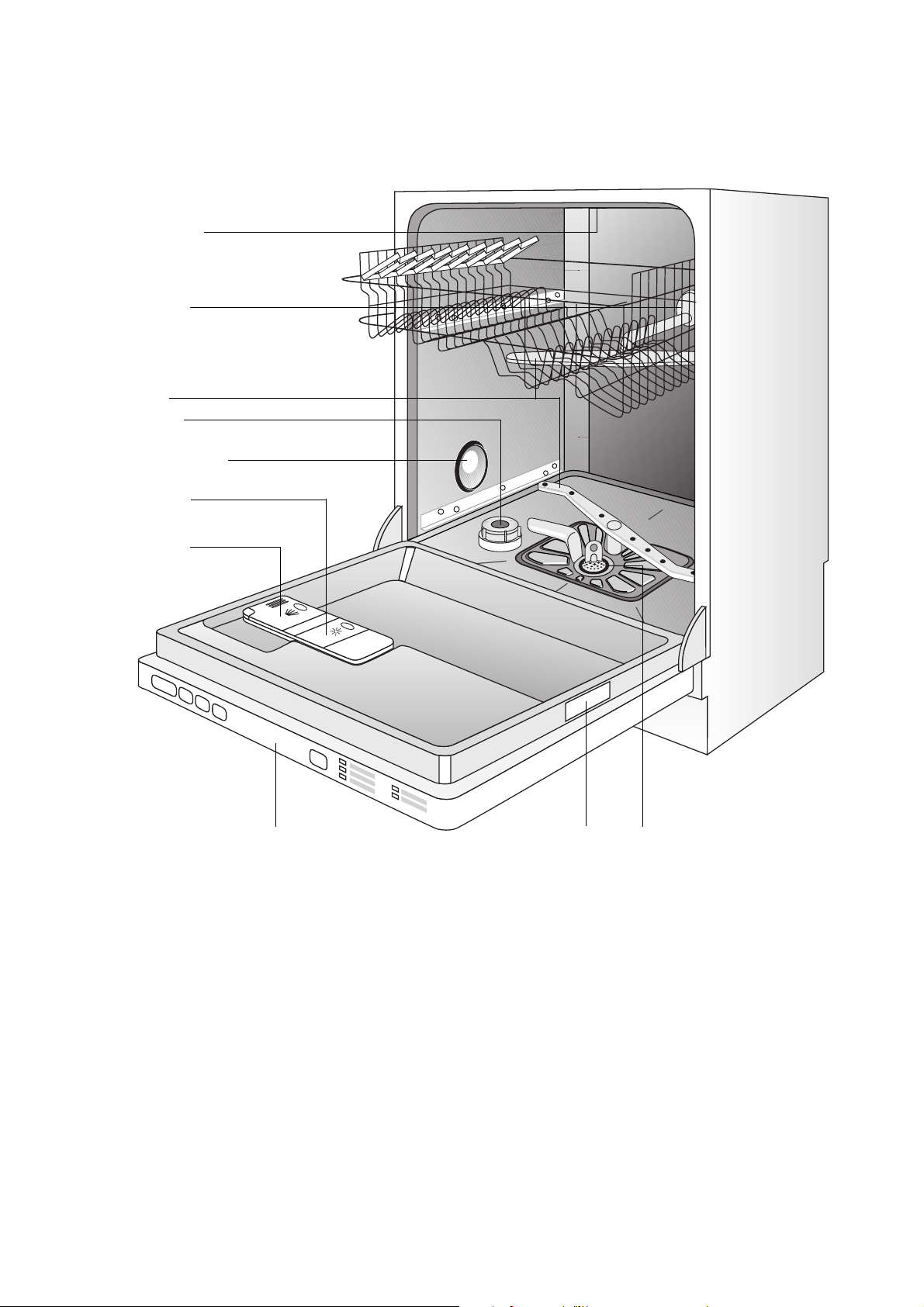
7
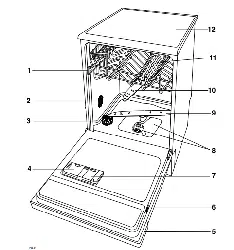
Appliance Features, Display and Control
Panel
Spray Arms
Display and Control Panel
Rating plate
Container
for Rinse Aid
Detergent
Dispenser
Filters
Top Spray Nozzle
Rubber Seal for
Connecting the
Water Feed to the
Upper Spray Arm
Water hardness switch
Container for
Special Salt
8
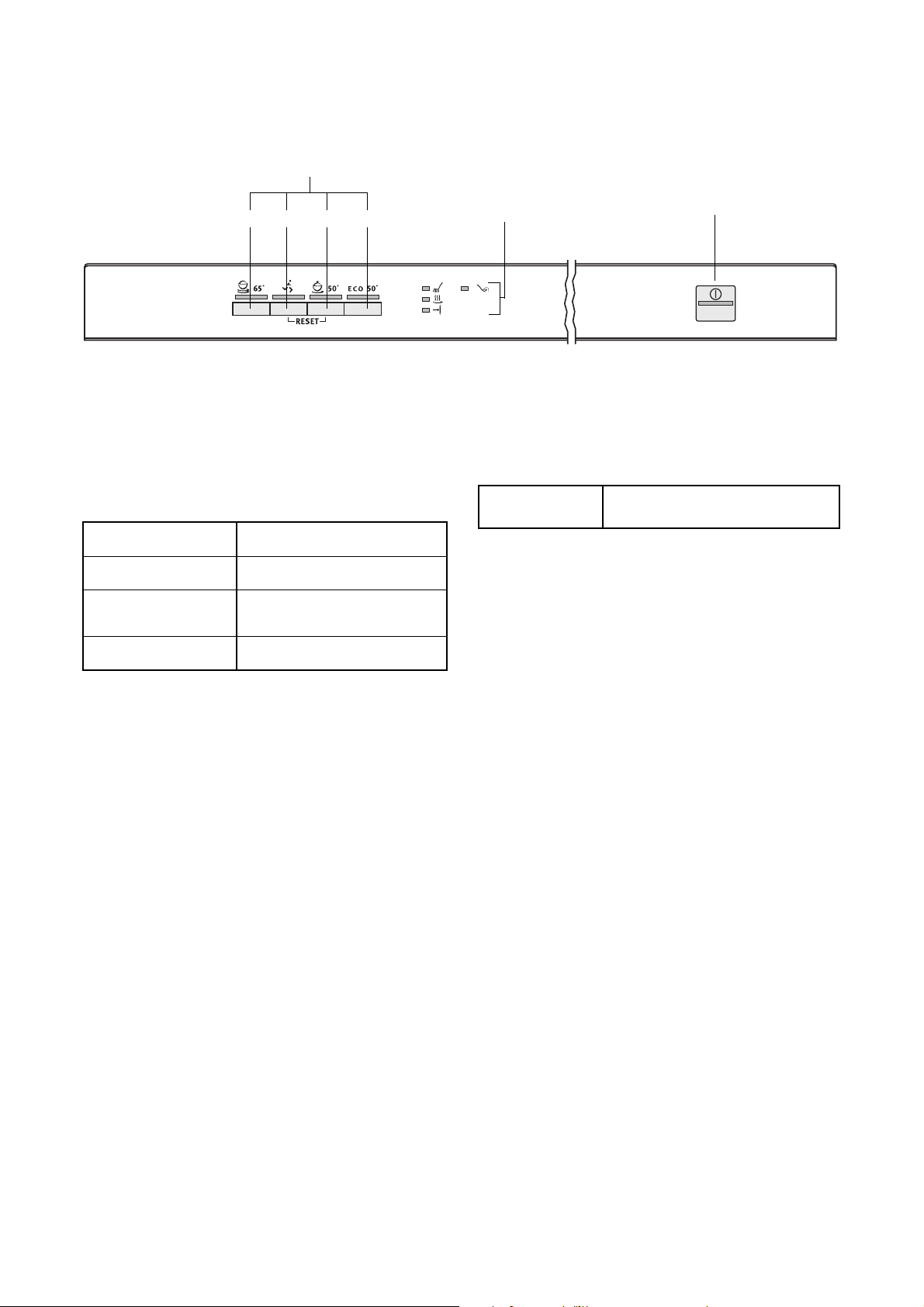
Display and control panel
Function buttons: In addition to the dishwashing
cycle, the following functions can also be set with the
help of these buttons:
The indicator has the following meaning:
3
The control indicator never illuminates while
a wash programme is running.
Prior to using for the first time
Prior to using for the first time, remove all the clips
with which the dish baskets are secured for transport.
Then perform the following steps:
1. Adjust the water softener
2. Filling with Special Salt for the Water Softener
3. Filling with Rinse Aid
Function buttons
12
3
4
Indicator
ON/OFF button
Display for the individual
wash programme steps
Function button 1 Setting the water softener
Function button 2 - not programmed -
Function button 3
Activating/deactivating the
acoustic signal
Function button 4 - not programmed -
t
Refill with special salt
9
Water softener
To avoid scale deposits on the dishes and in the dish-
washer, the dishes must be washed with soft water,
i.e. water with a low lime content. The dishwasher
therefore has a built-in water softener, in which tap
water with a hardness of 4°d (German degree) and
harder is softened with the aid of special salt.
3
Your water supplier will be able to inform you
about the hardness and hardness range of
the water in your area.
The water softener can be set manually using the
water hardness switch; it can also be set electroni-
cally using the buttons on the control panel.
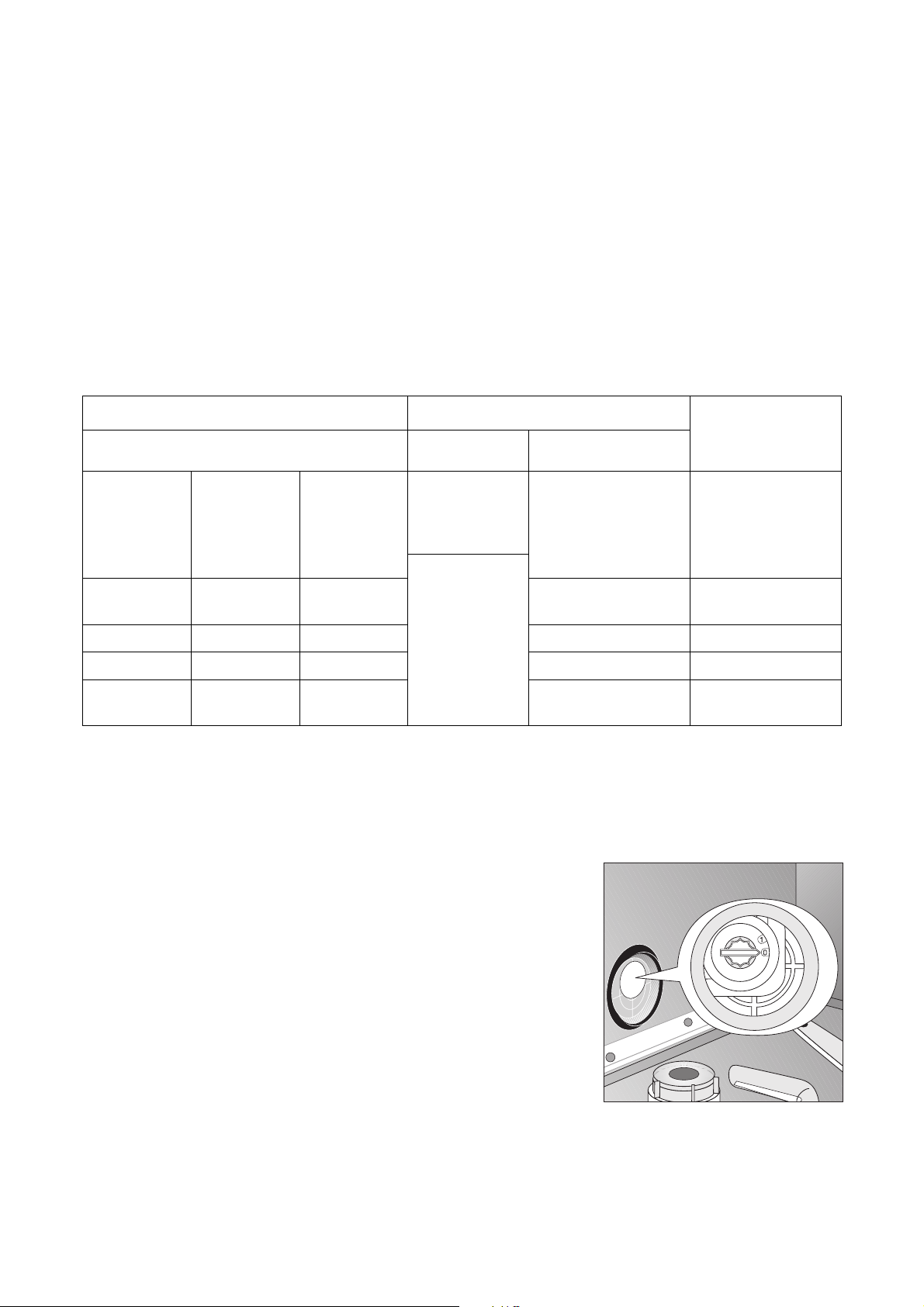
Setting the water softener
Using the table as a guide, adjust the water softener
to that which corresponds to the hardness of the
water in your area:
The dishwasher must be switched off.
Setting manually:
1. Open the dishwasher door.
2. Remove the lower basket from the dishwasher.
3. Turn the hardness range switch to 0 or 1
(see table).
4. Replace the lower basket.
Water hardness Adjusting the hardness setting Number of
flashes and acous-
tic signals
1
In °d
2
In mmol/l
3
Range
Manually Electronically
51 - 70
43 - 50
37 - 42
29 - 36
23 - 28
9,0 - 12,5
7,6 - 8,9
6,5 - 7,5
5,1 - 6,4
4,0 - 5,0
IV
1
10
4
9
8
7
6
10
9
8
7
6
0 *
19 - 22
15 - 18
3,3 - 3,9
2,6 - 3,2
III
5
4 *
5
4
11 - 14 1,9 - 2,5 II 3 3
4 - 10 0,7 - 1,8 I/II 2 2
under 4 under 0.7 I
1
no salt necessary
1
1)The water hardness will only be indicated acoustically if the acoustic signal has been activated.
2)(°d) German degree, measure of the hardness of water
3)[mmol/l] millimol per litre, international unit for the hardness of water
4)On this setting the length of the dishwashing cycle may be slightly longer.
* Factory setting

10
Setting electronically:
5. Press the ON/OFF button.
The LED indicators for all the buttons in the con-
trol panel that are now able to be selected will
become illuminated.
3
If the only LED indicator illuminated is one
that belongs to a programme button, this
means that this dishwashing cycle has been
activated. The dishwashing cycle must be
cancelled (RESET):
Press function buttons 2 and 3 simultane-
ously for approx. 1 second.
The LED indicators for all the buttons in the
control panel that are now able to be
selected will become illuminated.
6. Press function buttons 2 and 3 simultaneously
and keep them pressed.
The LED indicators for the function buttons 1 to 3
will flash.
7. Press function button 1.
The LED indicator for function button 1 will flash.
The LED indicator for the end of the dishwashing
cycle is flashing and acoustic signals can be
heard simultaneously (only when the acoustic sig-
nal has been activated):
– The number of times that the LED indicator for
the end of the cycle flashes and the number of
acoustic signals correspond to the new hard-
ness setting.
– This sequence of flashes and acoustic signals
is repeated over and over, with a 5 second
pause in between.
8. Pressing function button 1 increases the hardness
setting by 1.
(Exception: hardness setting 1 follows hardness
setting 10).
9. When the hardness setting is correct, press the
ON/OFF switch.
The hardness setting is now saved.

11
Special salt for the water softener
3
If the water hardness in your area is less
than 4 °d, then the water in your dishwasher
does not need to be softened and you do not
need to use special salt or salt substitute.
Water can be softened in one of two
ways:
• If you are using dishwasher detergent that already
contains salt substitute, the detergent only is put
into the detergent compartment.
– In this case the water softener must manually
be set to 0 and electronically to 1 to ensure
that no special salt is added.
• If you are using dishwasher detergent and special
salt separately, the special salt is to be put into the
salt container.
– In this case the water softener must manually
be set to 0 and electronically to between 2
and 10 (depending on the water hardness in
your area) to ensure that the special salt is dis-
pensed from the salt container.
1
Only use special salt intended for dishwash-
ers. Never fill the salt supply container with
different types of salt (e.g. cooking or table
salt) or detergent. This would irreparably
damage the water softener.
Prior to filling with salt, please check each
time that you really do have a packet of spe-
cial salt in your hand.
Setting the amount of special salt to be
added
3
Some appliances are equipped with an addi-
tional 3in1 function.
If you use 3-in-1 dishwashing tablets and
select the 3in1 function together with the
programme, the inflow of special salt does
not have to be deactivated (see ”3in1 func-
tion”).
Set the water softener manually and electronically to
the desired water hardness:
3
If the water softener is electronically set at
“1” for the purpose of using detergent that
includes special salt, the special salt indica-
tor is deactivated.
Manual setting
Electronic set-
ting
Number of
flashes
Addition of special salt
0 1 1 Do not add special salt.
0 - 1 2 - 10 2 - 10
Addition of special salt via salt container
(factory setting)
12
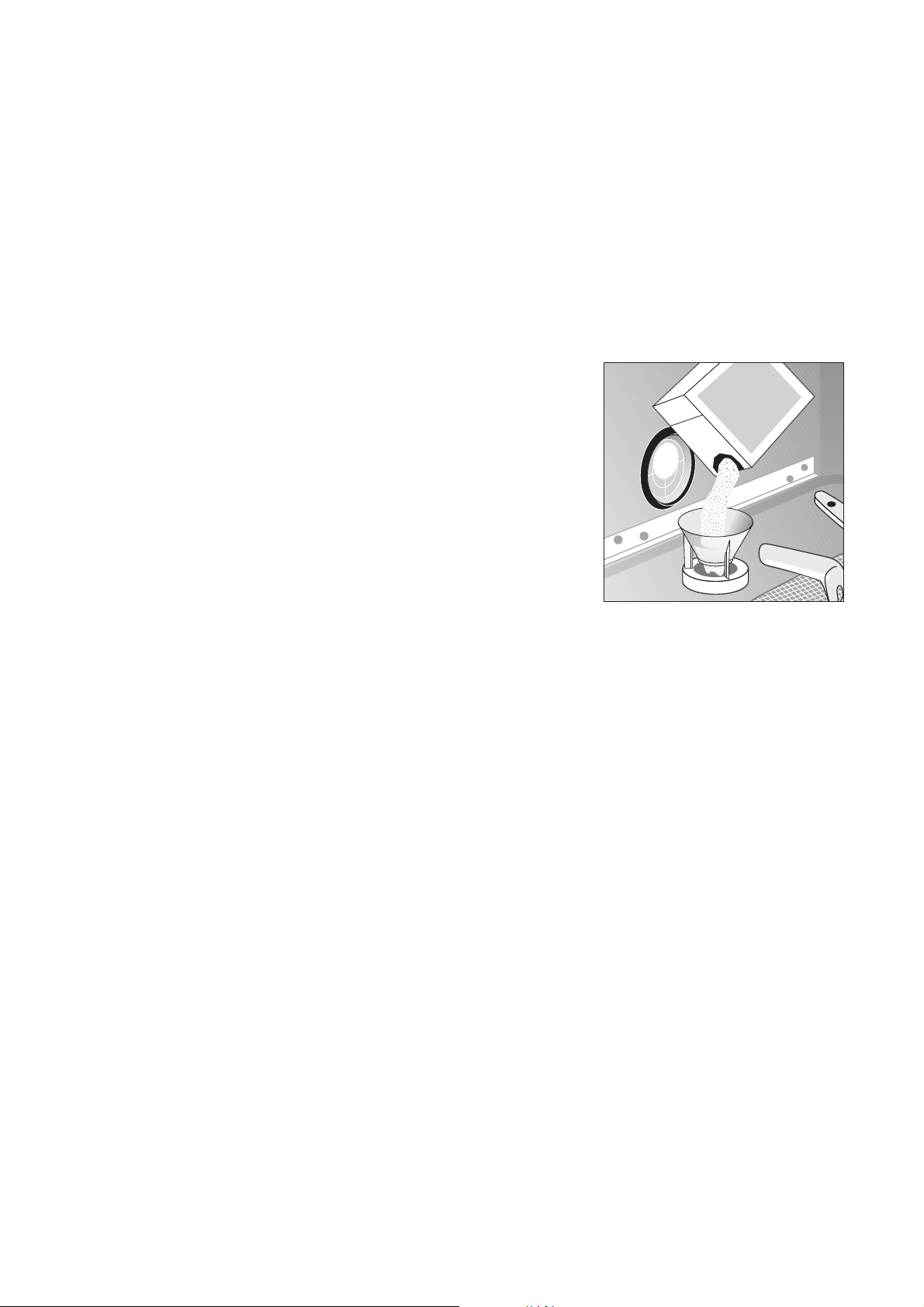
Adding special salt
If you are using dishwasher detergent and special
salt separately, add the special salt:
• Before using the dishwasher for the first time.
• When the
t indicator for special salt is illumi-
nated on the control panel.
1. Open the door, remove the lower basket.
2. Undo the lid on the salt container by turning it anti-
clockwise.
3. Only when using for the first time:
fill the salt container with water.
4. Place the funnel supplied on the container open-
ing.
Fill the container with special salt through the fun-
nel; the capacity of the container is approx. 1.0-
1.5 kg depending on the grain size. Do not overfill
the salt container with special salt.
3
The water expelled by filling the salt con-
tainer with special salt runs out of the salt
container onto the base of the washing com-
partment. This is not a cause for concern,
the water will be pumped out at the start of
the next wash programme.
5. Clean any salt remnants on the container open-
ing.
6. Turn the lid clockwise to the stop, otherwise spe-
cial salt will leak into the wash water, this could
lead to poor wash results. To avoid this run a rinse
programme after filling the salt container with spe-
cial salt. This will wash away salt water and any
salt crystals that have been spilt.
3
Depending on the size of the salt grains, it
can take several hours for the salt to dissolve
in the water and the special salt indicator
t to extinguish.
The setting of the water softener and thus
the consumption of salt are dependent on
the hardness of the local water.
SALE
SALT
SALZ
SEL

13
Rinse aid
Rinse aid ensures that your dishes gleam and are
free from spots, and that your glasses are clear.
Rinse aid can be added in one of two ways:
• If you are using dishwasher detergent that already
contains rinse aid, the detergent including the
rinse aid is put into the detergent compartment.
– In this case the dispensing of rinse aid from the
supply container must be deactivated to avoid
a double dosage.
• If you are using dishwasher detergent and rinse
aid separately, the rinse aid is to be put into the
rinse aid supply container.
– In this case the dispensing of rinse aid from the
supply container must be activated.
– The amount of rinse aid to be dispensed must
be set.
1
Use only branded rinse aid for dishwashers.
Never fill the rinse aid container with any
another substance (e.g. concentrated vine-
gar) or dishwasher cleaning agent. This
would damage the appliance.
Activating/deactivating the inflow
of rinse aid
3
Some appliances are equipped with an addi-
tional 3in1 function.
If you use 3-in-1 dishwashing tablets and
select the 3in1 function together with the
dishwashing cycle, the inflow of rinse aid
does not have to be deactivated (see ”3in1
function”).
1. Press the ON/OFF button.
The LED indicators for all the buttons in the con-
trol panel that are now able to be selected will
become illuminated.
3
If the only LED indicator illuminated is one
that belongs to a programme button, this
means that this dishwashing cycle has been
activated. The dishwashing cycle must be
deselected (RESET):
Press function buttons 2 and 3 simultane-
ously for approx. 1 second.
The LED indicators for all the buttons in the
control panel that are now able to be
selected will become illuminated.
2. Press function buttons 2 and 3 simultaneously
and keep them pressed.
The LED indicators for the function buttons 1 to 3
will flash.
3. Press function button 2.
The LED indicator for function button 2 will flash.
The
w indicator will indicate the current setting:
4. Pressing function button 2 activates and deacti-
vates the rinse aid dispensing function.
5. When the rinse aid dispensing setting is correct,
press the ON/OFF switch.
The setting for the rinse aid dispensing function is
now saved.
The
w indica-
tor is illumi-
nated:
Rinse aid inflow activated
(ex-factory setting)
The
w indica-
tor is not illumi-
nated:
Inflow of rinse aid is deactivated
14
Adding rinse aid
If you are using dishwasher detergent and rinse aid
separately, add the rinse aid:
– Before using the dishwasher for the first time.
– When the H indicator on the control panel is
illuminated.
The rinse aid compartment is on the inside of the
dishwasher door.
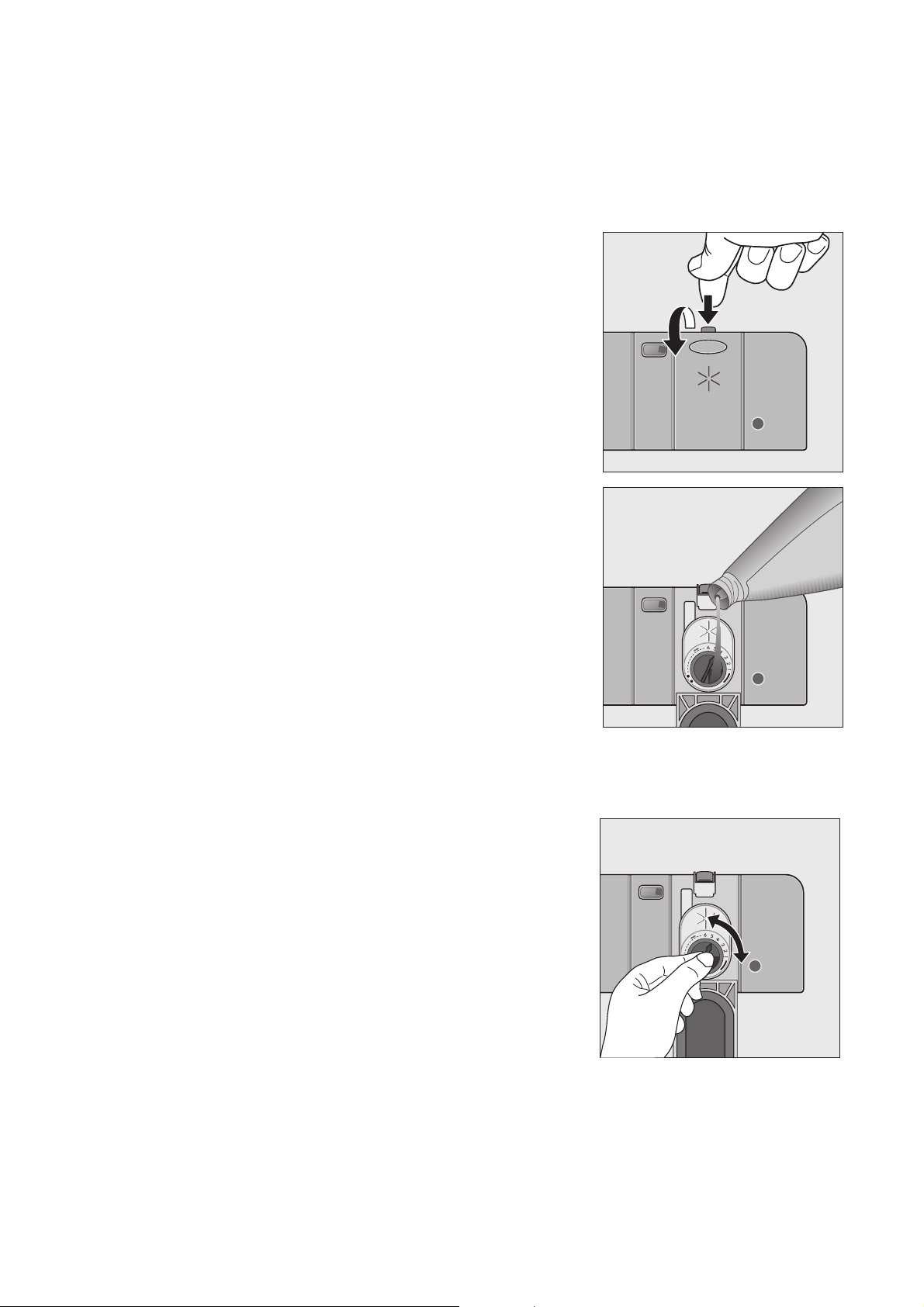
1. Open the door.
2. Press the rinse aid compartment release button
with your finger.
3. Fully open the rinse aid compartment lid.
4. Fill with rinse aid exactly up to the level marked
“max”; this corresponds to a quantity of approx.
140 ml.
5. Close the lid and press until it locks into place.
6. Wipe up any spilt rinse aid with a cloth. Otherwise
too much foam will be formed during the wash.
Adjusting Rinse Aid Dosing
3
As the dishes are washed rinse aid is
released from the dispenser into the wash
water. The dose is factory set at 4, and can
be adjusted from 1 to 6. Only change the set-
ting if streaks, milky spots or dried on water
marks are visible on glasses or crockery.
1. Open the door of the dishwasher.
2. Press the rinse aid compartment release button
with your finger.
3. Fully open the rinse aid compartment lid.
4. Set the dose level.
5. Close the lid and press until it locks into place.
6. If rinse aid has run out, wipe up with a cloth.

15
Activating/deactivating the acoustic signal
The acoustic signal can indicate acoustically:
– at which water hardness the water softener is
set.
– when a dishwashing cycle has finished.
– when an error has occurred with the dish-
washer.
You can switch on/off the acoustic signal in the follow-
ing way:
1. Press the ON/OFF button.
The LED indicators for all the buttons in the con-
trol panel that are now able to be selected will
become illuminated.
3
If the only LED indicator illuminated is one
that belongs to a programme button, this
means that this dishwashing cycle has been
activated. The dishwashing cycle must be
deselected (RESET):
Press function buttons 2 and 3 simultane-
ously for approx. 1 second.
The LED indicators for all the buttons in the
control panel that are now able to be
selected will become illuminated.
2. Press function buttons 2 and 3 simultaneously
and keep them pressed.
The LED indicators for the function buttons 1 to 3
will flash.
3. Press function button 3.
The LED indicator for function button 3 will flash.
The
w display will indicate the current setting:
4. Pressing function button 3 will change the setting.
5. Once the
w display is indicating the required set-
ting, press the ON/OFF button. The setting is now
saved.
The
w display is
continuously illumi-
nated:
Acoustic signal activated
(ex-factory setting)
The
w indicator is
not flashing:
Acoustic signal deactivated

16
In Daily Use
• Is it necessary to refill with special salt or rinse
aid?
• Load cutlery and dishes into the dishwasher
• Fill with dishwasher detergent
• Select a wash programme suitable for the cutlery
and dishes
• Start the wash programme
Loading cutlery and dishes
1
Sponges, household cloths and any object
that can absorb water may not be washed in
the dishwasher
.
• Before loading the dishes, you should:
– Remove large left-overs.
– Soften remnants of burnt food in pans.
• When loading the dishes and cutlery, please note:
– Dishes and cutlery must not impede the rota-
tion of the spray arms.
– Load hollow items such as cups, glasses,
pans, etc. with the opening downwards so that
water cannot collect in the container or a deep
base.
– Dishes and items of cutlery must not lie inside
one another, or cover each other.
– To avoid damage to glasses, they must not
touch.
– Do not lay small objects (e.g. lids) in the cutlery
basket.
For washing in the dishwasher the following cutlery/dishes
are not suitable: are of limited suitability:
– Cutlery with wooden, horn,
china or mother of pearl handles
– Plastic items that are not heat resistant
– Older cutlery with cement that is not tempera-
ture resistant
– Bonded cutlery items or dishes
– Pewter or copper items
– Lead crystal glass
– Steel items subject to rusting
– Wooden platters
– Items made from synthetic fibres
– Only wash stoneware in the dishwasher if it is spe-
cifically marked as being dishwasher-safe by the
manufacturer.
– Glazed patterns may fade if machine washed fre-
quently.
– Silver and aluminium parts have a tendency to dis-
colour during washing. Left-overs, e.g. egg white,
egg yolk and mustard often cause discolouring and
staining on silver. Therefore always clean left-overs
from silver immediately, if it is not to be washed
straight after use.
– Some types of glass can become dull after a large
number of washes.
17
Loading Cutlery
1
Long bladed knives stored in an upright posi-
tion are a potential hazard.
1
Long and/or sharp items of cutlery such as
carving knives must be positioned horizon-
tally in the upper basket.
1
Take care when loading or unloading sharp
items such as knives.
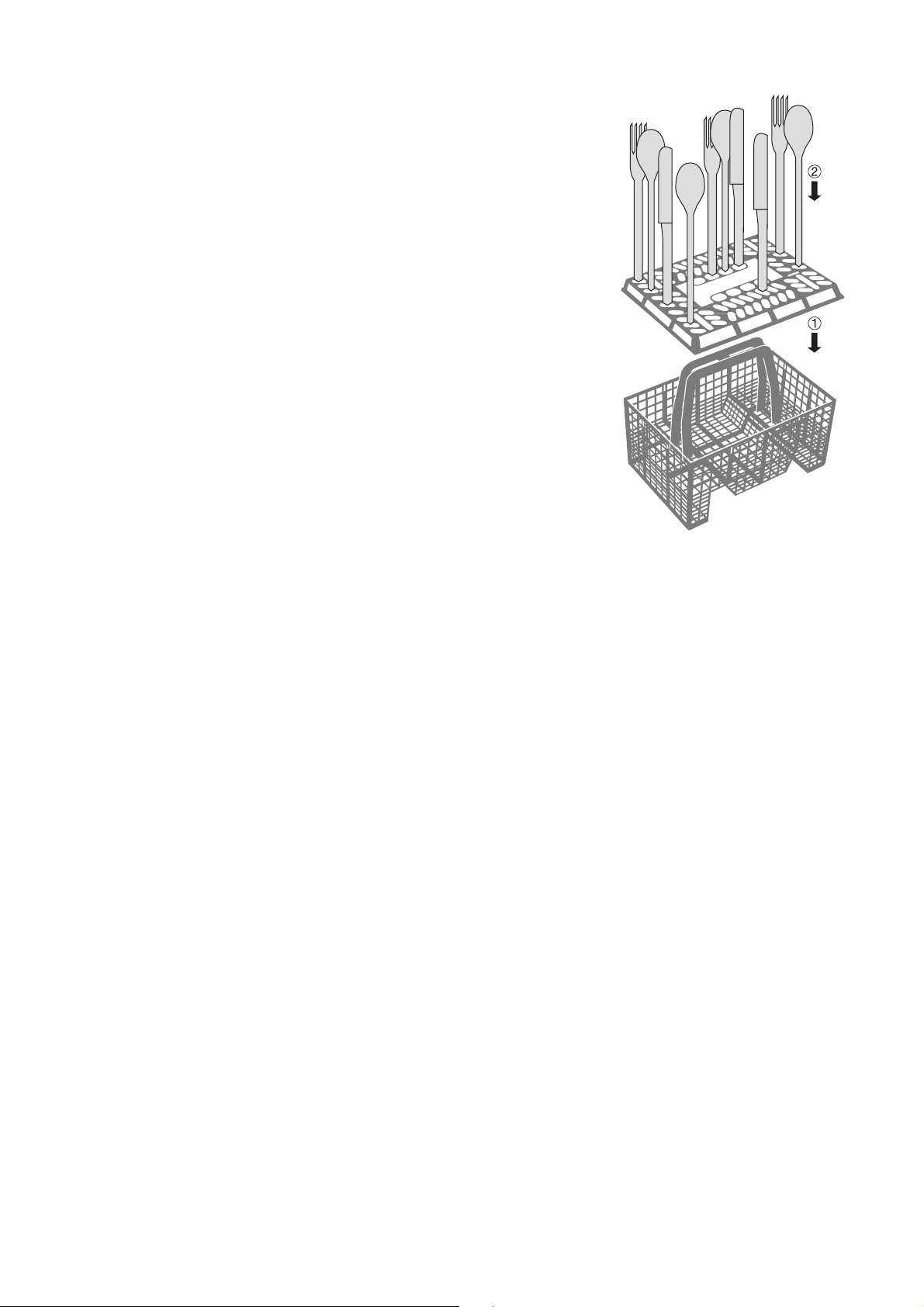
To ensure that all items of cutlery are completely
washed, you should
1. Place the grid insert on the cutlery basket.
2. Place short knives, forks and spoons in the grid
insert with their handles pointing downwards.
Some models of dishwasher have cutlery baskets
without a cutlery grid.
18
Loading Pans, Frying Pans and
Large Plates
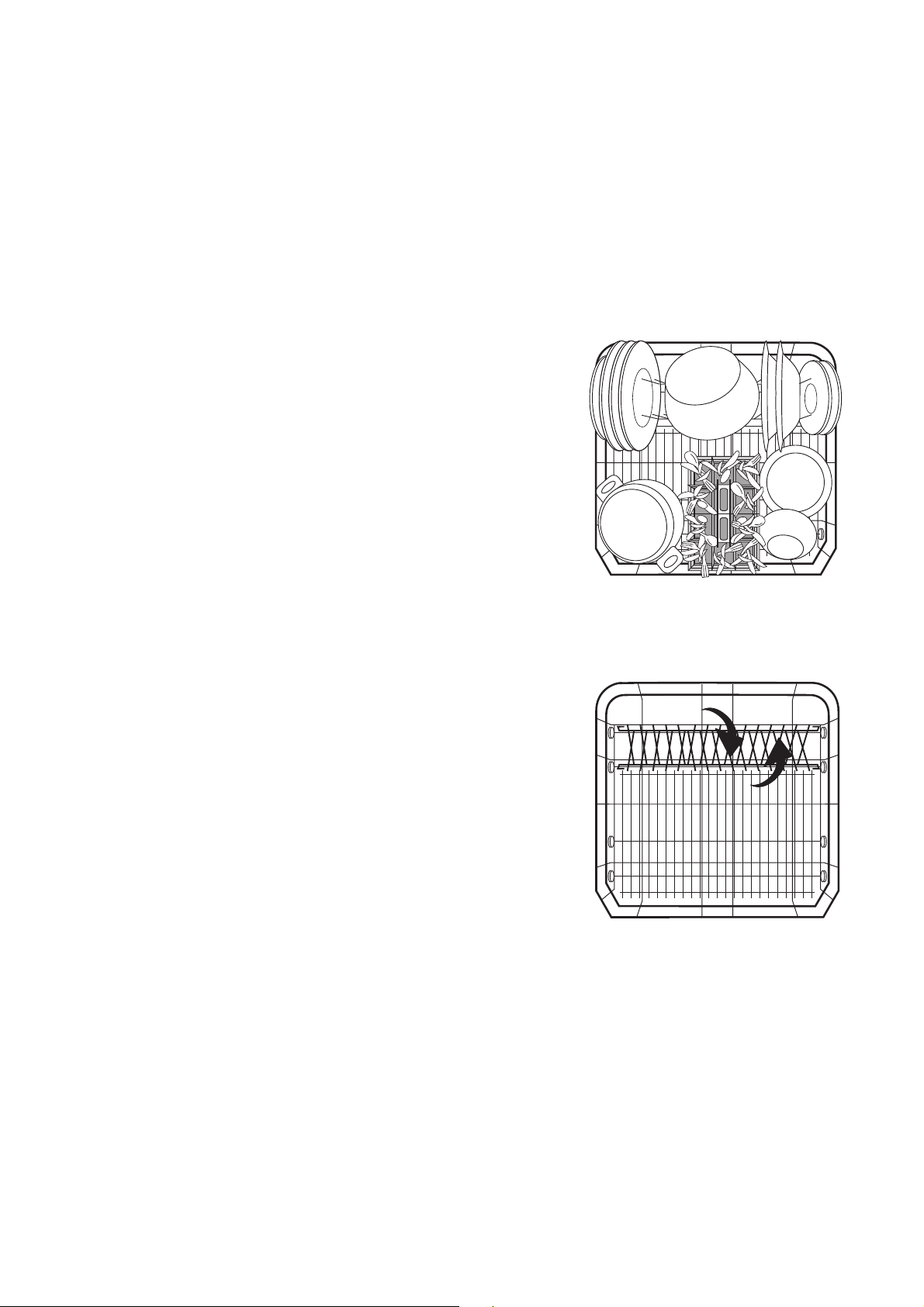
Load large and heavily soiled dishes in the lower bas-
ket (Plates up to 29cm in diameter).
Your dishwasher has one of the following two types of
lower basket:
Type 1: The rear plate insert in the lower
basket can be removed
3
To make it easier to load large dishes, it is
possible
- to remove the plate inserts from the lower
basket.
- to move the cutlery basket sideways.
Type 2: The rear plate insert in the lower
basket can be folded on its side
3
To ease the loading of large items,
- the two rows of prongs in the rear plate
insert can be folded across one another.
- the cutlery basket in the lower basket can
be moved to the side.
19
Loading Cups, Glasses and Coffee
Services
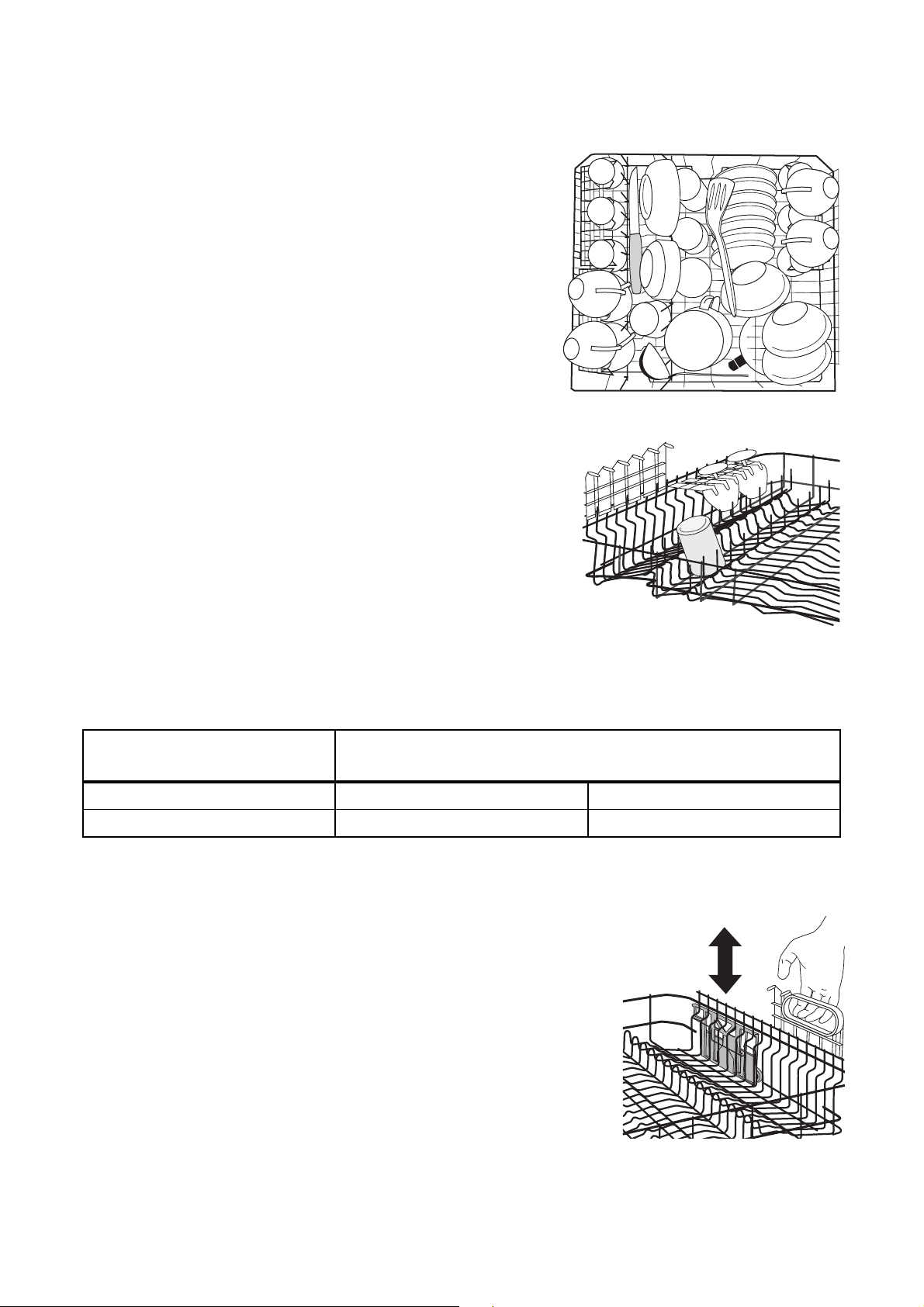
Load small, delicate items and long pointed cutlery in
the upper basket.
• Arrange plates and dishes offset on and under the
folding cup racks so that washing water can reach
all items.
• The cup racks can be folded up out of the way for
tall items.
• Lay or hang wine, champagne, and brandy
glasses in the cut outs on the cup racks.
• Glasses, beakers, etc. can also be placed on the
two rows of prongs on the left of the upper basket.
Adjusting the Height of the Upper
Basket
3
The height of the basket can also be
adjusted when it is loaded.
Lowering the Upper Basket:
1. Pull the upper basket out completely.
2. Holding the upper basket by the handle, lift it as
far as it will go and then lower it vertically. The
upper basket will engage in the lower position.
Raising the Upper Basket:
1. Pull the upper basket out completely.
2. Holding the upper basket by the handle, lift it as
far as it will go and then lower it vertically. The
upper basket will engage in the higher position.
Maximum Height of the Dishes in the
Upper Basket Lower Basket
With upper basket raised 22 cm 30 cm
With upper basket lowered 24 cm 29 cm
20
Filling with Detergent
1
Only use dishwasher detergent.
Fill with detergent:
Prior to the start of a wash programme (not for the
pre wash programme). The detergent is released into
the wash water during the programme.
2
Please observe the manufacturer's dosing
and storage recommendations as stated on
the detergent packaging.
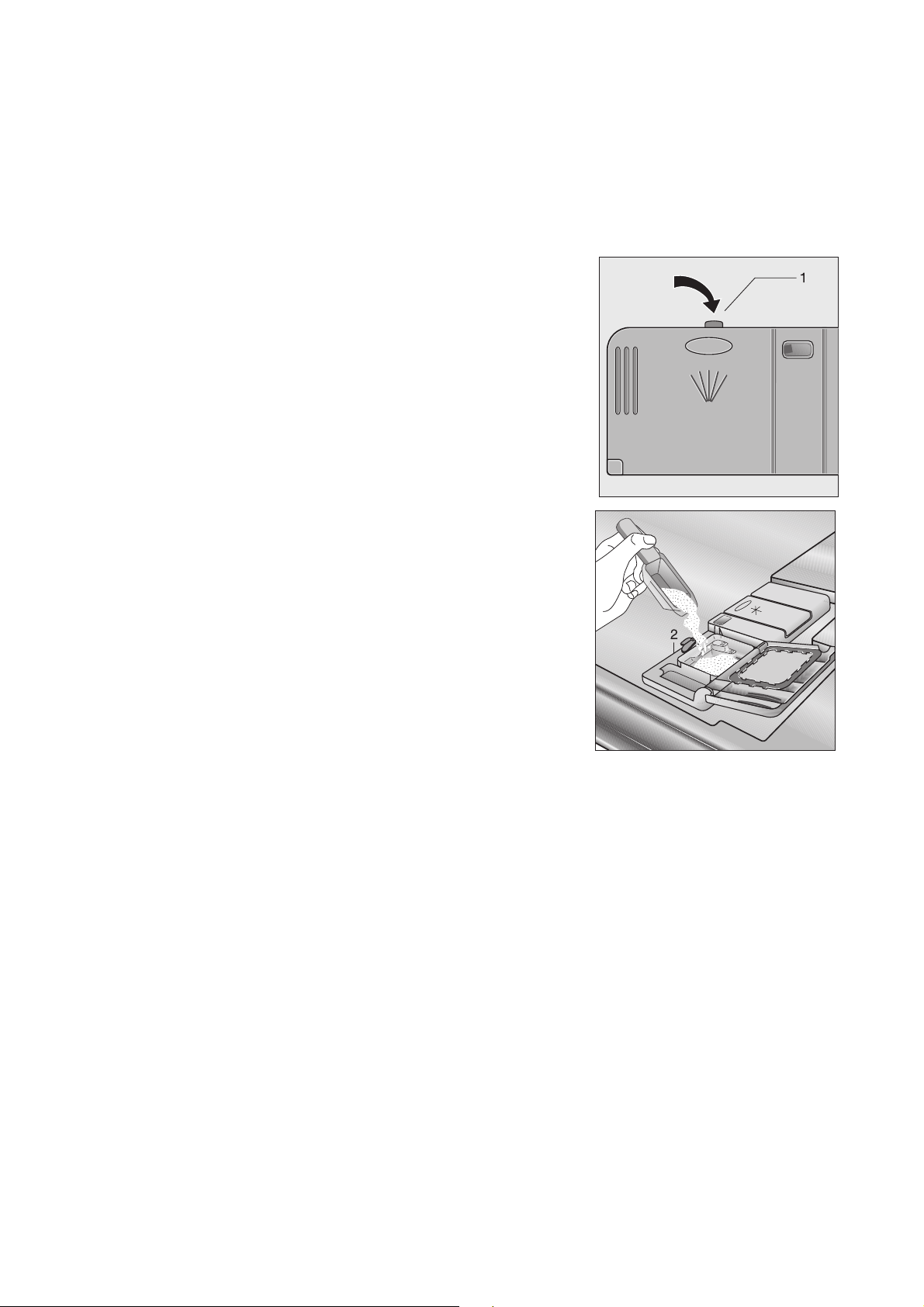
The detergent compartment is on the inside of the
dishwasher door.
1. If the lid is closed:
press release button (1).
The lid springs open.
2. Fill the detergent dispenser with detergent. The
markings indicate the dosing levels:
“20” corresponds to approx. 20 ml of detergent,
“30” corresponds to approx. 30 ml of detergent.
3. Close the lid and press until it locks into place.
3
If the dishes are very heavily soiled put addi-
tional detergent into the adjacent chamber
(2). This detergent will take effect during the
pre wash.

21
Use of "3 in 1"/ Combi Detergent
Tablets
General Advice
These products are tablets with combined detergent/
rinse-aid and salt functions.
1. Before using these products you should first check
that the water hardness in your supply is compati-
ble with the use of these products as per the
detergent manufacturers instructions (on the prod-
uct packaging).
2. These products should be strictly used according
to the detergent manufacturers instructions.
1
Do not place the tablets in the tub or the
cutlery basket as this will result in poorer
wash results. The tablets should be pla-
ced in the detergent dispenser.
3. If you encounter problems when using "3 in1"
products for the first time then please contact the
detergent manufacturers care line (the telephone
number is given on the product packaging).
Special Advice
When using combination products, the rinse-aid and
salt lights are no longer useful. It may be helpful
therefore to switch the rinse aid off - please note that
only some dishwashers have this facility - and select-
ing the lowest possible setting for water hardness.
For more information please refer to your instruction
manual.
If you decide to switch to the use of a standard deter-
gent system we advise that you:
• Refill both the salt and rinse aid compartments.
• Switch the waterhardness setting to the highest
possible position and run for three normal cycles
without a load.
• Readjust the waterhardness setting again accord-
ing to the conditions for your region (as per the
instruction manual).
Concentrated Detergent
Based on their chemical composition, dishwasher
detergents can be split into two basic types:
– conventional, alkaline detergents with caus-
tic components.
– low alkaline concentrated detergents with
natural enzymes.
2
The use of 50 °C wash programmes in con-
junction with concentrated detergents
reduces pollution and is good for your
dishes; these wash programmes are spe-
cially matched to the dirt-dissolving proper-
ties of the enzymes in the concentrated
detergent. For this reason 50 °C wash pro-
grammes in which concentrated detergents
are used can achieve the same results that
can otherwise only be achieved using 65 °C
programmes.
Detergent Tablets
3
Detergent tablets of different makes dis-
solve at different speeds. For this reason
some detergent tablets cannot develop their
full cleaning power during short pro-
grammes. Therefore please use wash pro-
grammes with pre wash when using
detergent tablets.
22
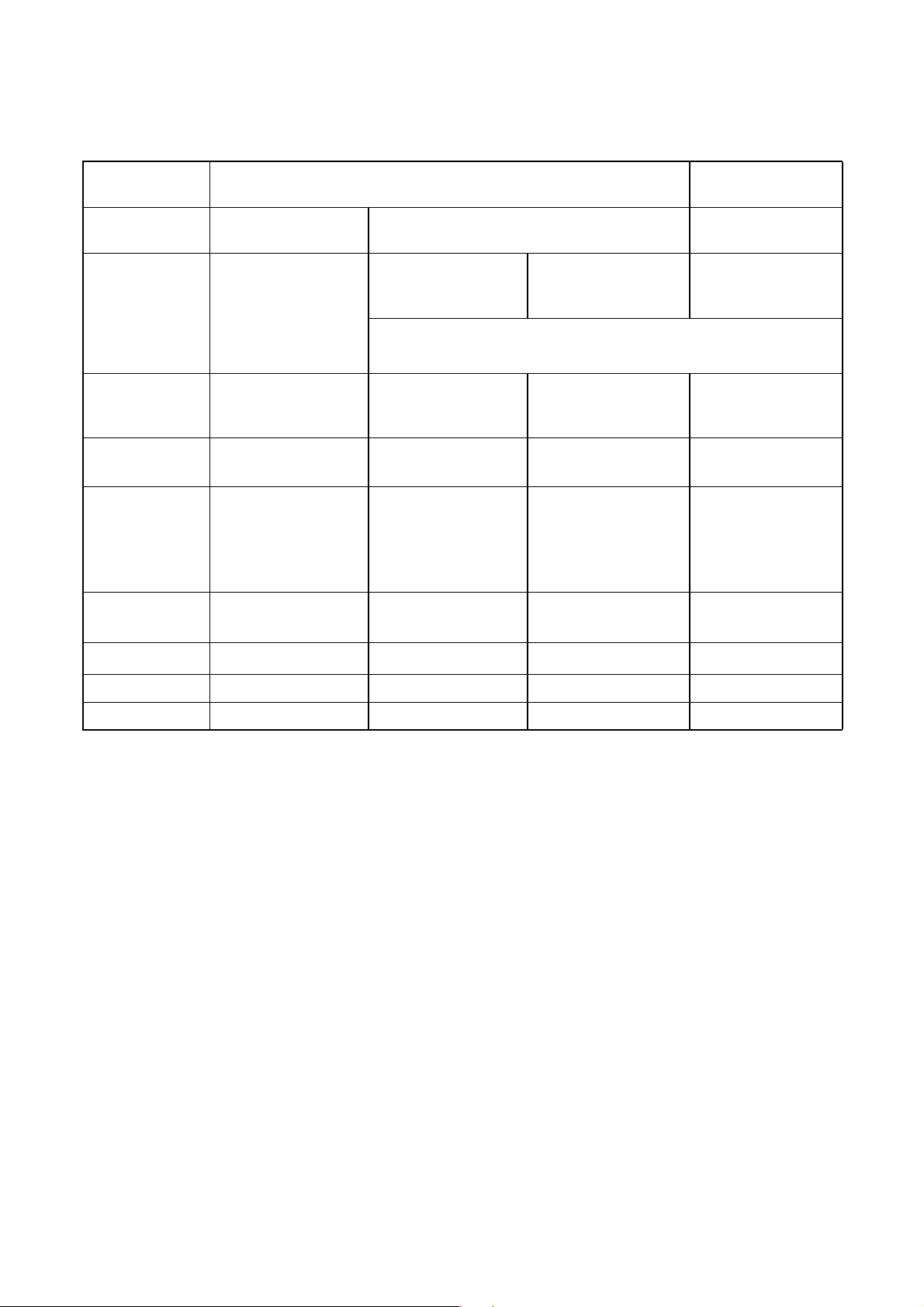
Selecting the Wash Programme (Programme Table)
Choose the most suitable wash programme with the aid of this table:
1) The various stages in the wash programme have different sounds because the dishes are washed more
intensely for short periods during certain stages of the wash programme to improve cleaning.
2) The consumption figures were determined under standard conditions. They are intended as a guide only and
depend on the loading. Variations can occur during normal usage.
3) When the hardness setting is electronically adjusted to 10, the length of the dishwashing cycle may be slightly
longer.
4) Test programme
5) This programme is not suitable when left-overs have dried on.
Type of Dishes:
Dinner Service and Pans
Dishes without
Pans
in addition: –
with dishes that are sensitive to changes
in temperature
–
Type of
Soiling:
heavily soiling;
dried on left-overs,
particularly egg white
and thickeners
normal
soiling
normal
soiling
dishes that have just
been used, normal
to slight soiling
particularly suitable when
concentrated detergents are used.
Suitable
Wash
Programme:
Press pro-
gramme button:
d q{ os o
4)
ï
5)
Programme
Sequence
1)
Pre wash
Main wash
2 rinsing
Final rinse
Drying
Pre wash
Main wash
Rinsing
Final rinse
Drying
Pre wash
Main wash
Rinsing
Final rinse
Drying
–
Main wash
–
Final rinse
–
Consumption
Figures:
2)
Duration
3)
85 - 95 minutes 85 - 95 minutes 120 - 130 minutes 30 minutes
Energy 1,65 - 1,85 kWh 1,1 - 1,2 kWh 0,95 - 1,05 kWh 0,8 kWh
Water 21 - 23 litres 14 - 16 litres 14 - 16 litres 9 litres

23
Starting a dishwashing cycle
1. Check that the dishes and cutlery are stacked in
the dishwasher in such a way that the spray arms
are free to rotate.
2. Turn on the tap fully.
3. Press the ON/OFF button.
The LED indicators for all the buttons in the con-
trol panel that are now able to be selected will
become illuminated.
4. Press the relevant button for the cycle required
(see “Programme Table”).
The cycle display will become illuminated.
5. Close the dishwasher door. The dishwashing
cycle will begin.
3
If an acoustic error message can be heard
after the cycle has begun, please read the
section “What to do if ...”.
Changing/interrupting/cancelling a
dishwashing cycle
3
Only change or interrupt a dishwashing cycle
that is in progress if it is absolutely neces-
sary. After the appliance has been closed
again, the air that has entered will be heated
significantly and expand. As a result, water
may collect in the base of the appliance and
trigger the anti-flood system.
Changing a dishwashing cycle
3
If you would like to change the dishwashing
cycle before closing the dishwasher door,
briefly press the button for the new dish-
washing cycle.
If you would like to change the dishwashing cycle
after the cycle has commenced, proceed as follows:
1
Hot steam may escape when the dishwasher
door is opened. There is a risk of scalding.
Be careful when opening the door of the
dishwasher.
1. Open the door of the dishwasher. The dishwash-
ing cycle will stop.
2. Press the button for the new dishwashing cycle
and hold it down.
First, the indicator for the dishwashing cycle that is
currently running will flash.
After several seconds only the indicator for the
new dishwashing cycle will be flashing.
3. Release the cycle button.
4. Close the dishwasher door. The newly selected
dishwashing cycle will commence from the begin-
ning.
Interrupting the dishwashing cycle by
opening the dishwasher door
1. Open the door of the dishwasher. The dishwash-
ing cycle will stop.
2. Close the dishwasher door. The dishwashing
cycle will continue.
Cancelling the dishwashing cycle
(RESET)
1. Open the door of the dishwasher.
2. Press function buttons 2 and 3 for approx. 1 sec-
ond and keep them pressed.
The LED indicators for all the buttons in the con-
trol panel that are now able to be selected will
become illuminated.
3. Release the function buttons.
The dishwashing cycle has been aborted.
4. Switch off the dishwasher by pressing the ON/
OFF button.
Load Sensing
If a wash programme is started even though there are
only a few dishes in the upper and/or lower basket, an
intelligent electronic system adjusts the amount of
water and the duration of the wash programme to the
number of dishes. By this means it is possible to
wash only a few dishes quickly and economically. At
half load (6 place settings), up to 2 litres of water and
0.2 kWh of electricity are saved.

24
Switching off the dishwasher
If the acoustic signal has been enabled, a continuous
tone will sound for 15 seconds at the end of the dish-
washing cycle.
1
Hot steam may escape if the door is opened
immediately after the cycle has ended.
Therefore:
1. Open the door carefully.
2. Switch off the dishwasher by pressing the ON/
OFF button.
All display indicators will go out.
If you do not switch off the dishwasher, the acous-
tic signal will sound again 3 minutes later and 6
minutes later.
3
Unload the dishes
• Hot dishes are sensitive to knocks. The dishes
should therefore be allowed to cool before they
are removed.
• Leave the dishes in the dishwasher for approxi-
mately 15 minutes following the end of the cycle to
enable better drying and cooling down of dishes.
• Empty the lower basket first, then the upper bas-
ket. This will avoid water spots, which are caused
by remaining water in the upper basket dripping
onto the dishes in the lower basket.
25
Care and Cleaning
1
Do not under any circumstances use furni-
ture care products or aggressive cleaners.
• If necessary, clean the controls only with a soft
cloth and pure warm water.
• Occasionally check the internal containers, door
seal, and water inlet for soiling, clean if necessary.
Cleaning the Filter
3
The filters in the base of the washing com-
partment are to a large extent self-cleaning.
Nevertheless the filters should be checked
and cleaned from time to time. Dirty filters
will degrade the washing result.
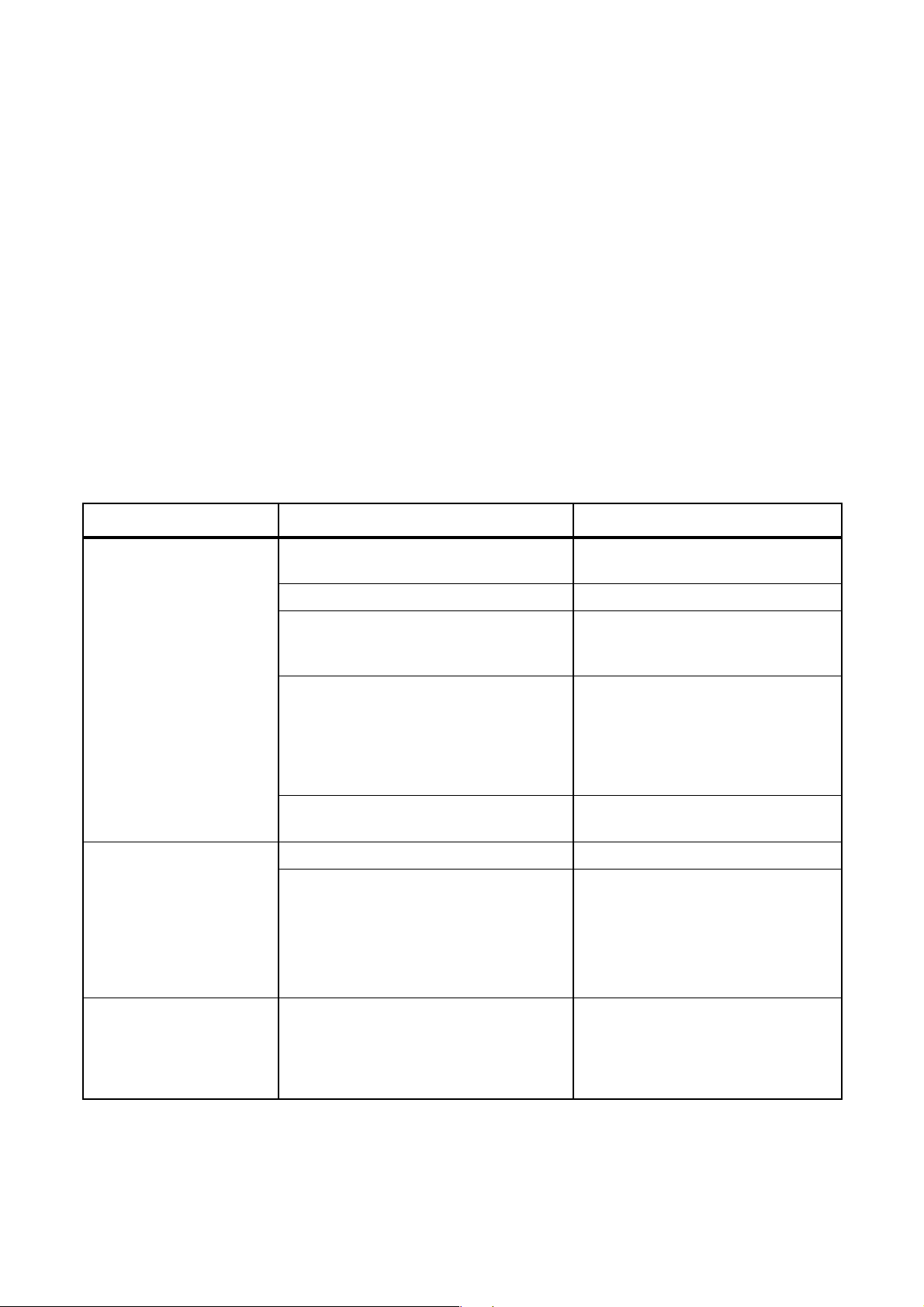
1. Open the door, remove the lower basket.
2. The dishwasher filter system comprises a coarse/
fine filter, microfilter and a flat filter. Unlock the fil-
ter system using the handle on the microfilter, and
remove.
3. Turn the handle about ¼ a turn anticlockwise and
remove.
4. Take hold of the coarse/fine filter (1) by the handle
with the hole and remove from the microfilter (2).
5. Clean all filters thoroughly under running water.
6. Remove the flat filter (3) from the base of the
washing compartment and clean both faces thor-
oughly.
7. Put the flat filter back in the base of the washing
compartment.
8. Place the coarse/fine filter in the microfilter and
press together.
9. Put the filter combination in place and lock by
turning the handle clockwise to the stop. During
this process ensure that the flat filter does not pro-
trude above the base of the washing compart-
ment.
1
Under no circumstances may the dishwasher
be used without filters.
26
What to do if ...
Try to rectify minor faults on the dishwasher with the
aid of the instructions given here. If you call in cus-
tomer service to resolve one of the malfunctions
listed here, or rectify an error made in the operation
of the appliance, the customer service engineer’s visit
is not free of charge, even during the period of guar-
antee.
...Error messages are displayed.
If your appliance is equipped with an optical floor sig-
nal, in the event of an error a dot-shaped optical sig-
nal will flash on the floor.
3
Errors will only be indicated acoustically if
the acoustic signal has been activated.
If, as listed in the table below, any of the indi-
cators in the control panel or the display
panel are flashing or are illuminated, and/or if
an acoustic signal can be heard, you can
probably rectify the fault yourself.
After rectifying the fault related to the 1 acoustic sig-
nal or the two acoustic signals press the button for
the commenced dishwashing cycle. The dishwashing
cycle will continue.
If the fault is displayed again, please contact Service
Force.
3
For all other errors displayed, please contact
Service Force stating the error code (see
chapter: Service and Spare Parts).
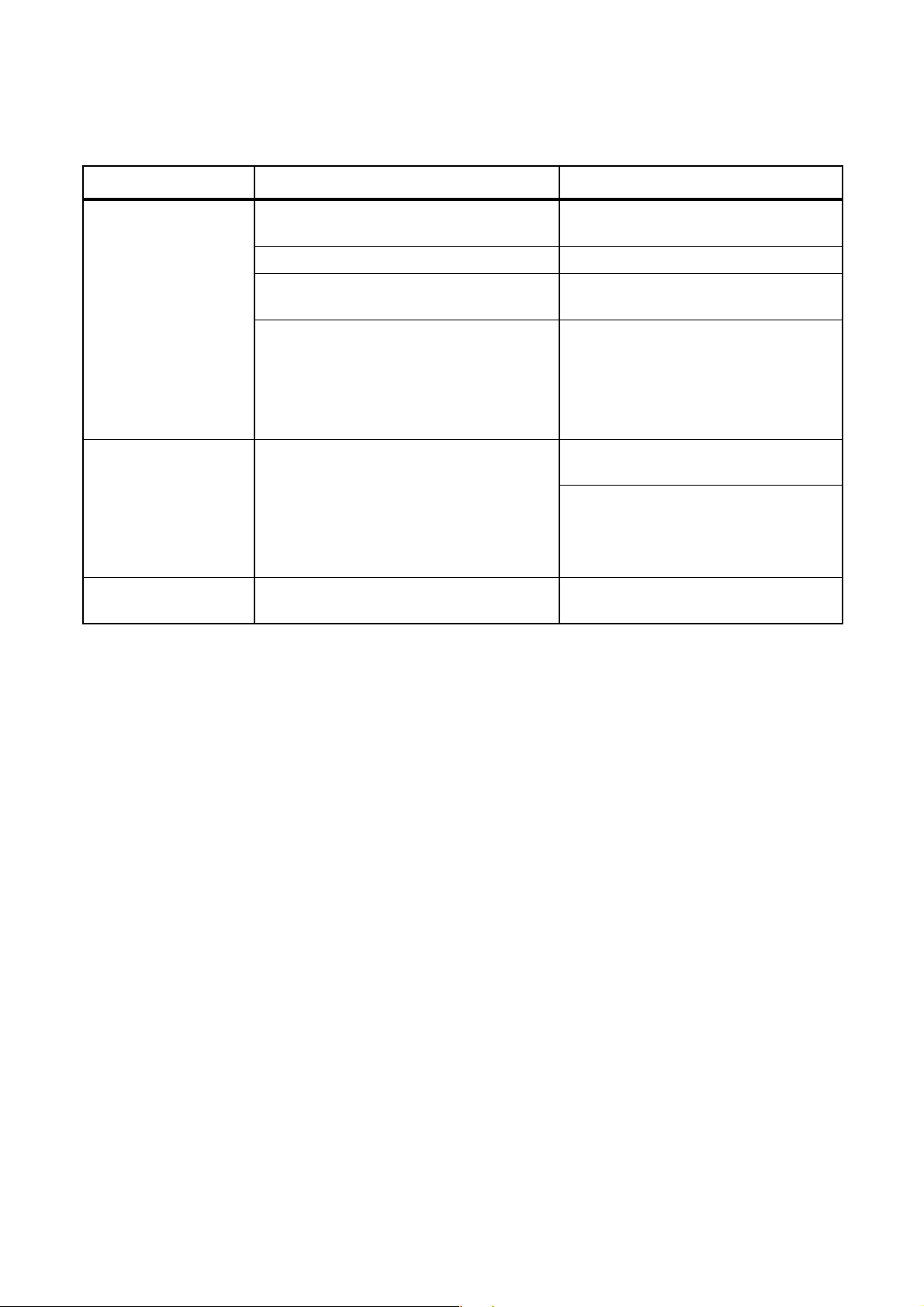
Malfunction Possible cause Remedy
One short continuously
repeated warning tone
can be heard; the cycle
indicator for the selected
dishwashing cycle is flash-
ing, the end cycle indicator
is flashing once repea-
tedly:
There is no water running
into the dishwasher.
The tap is blocked or furred with lime-
scale.
Clean tap.
The tap is turned off. Turn the tap on.
The filter (where present) in the threaded
hose fitting at the water inlet valve is
blocked.
Clean the filter in the threaded hose
fitting.
Filters in the base of the washing com-
partment are blocked.
Press the button for the commenced
dishwashing cycle, then cancel the
dishwashing cycle by pressing
RESET (see chapter: Starting a dish-
washing cycle), clean out the filters
(see chapter: Cleaning the filters).
The water inlet hose has not been cor-
rectly laid.
Check hose installation.
Two short continously
repeated warning tones
can be heard; the cycle
indicator for the selected
dishwashing cycle is flash-
ing, the end cycle indicator
is flashing twice repeat-
edly:
The siphon is blocked. Clean out siphon.
The water drain hose has not been cor-
rectly laid.
Check hose installation.
Three short continuously
repeated warning tones
can be heard, the end cycle
indicator is flashing three
times repeatedly.
The leak prevention system has been trig-
gered.
Turn off the tap and contact Service
Force.
27
... there are problems when operating the dishwasher.
...the wash results are unsatisfactory.
The dishes are still dirty.
• The wrong wash programme was selected.
• The dishes were arranged in such a way as to
stop the water reaching all parts of the surface.
The baskets must not be overloaded.
• The filters in the base of the washing compart-
ment are dirty or incorrectly positioned.
• Too little or no detergent was used.
• Where there are limescale deposits on the dishes:
The salt dispenser is empty or the water softener
unit is set wrongly.
• The drain hose is incorrectly connected.
The dishes are wet and dull.
• Rinse aid was not used.
• The rinse aid container is empty.
There are streaks, milky spots or a bluish
coating on glasses and dishes.
• Decrease rinse aid dosing.
Water drops have dried onto the glasses
and dishes.
• Increase rinse aid dosing.
• The detergent may be the cause. Contact the
detergent manufacturer's consumer advisor.
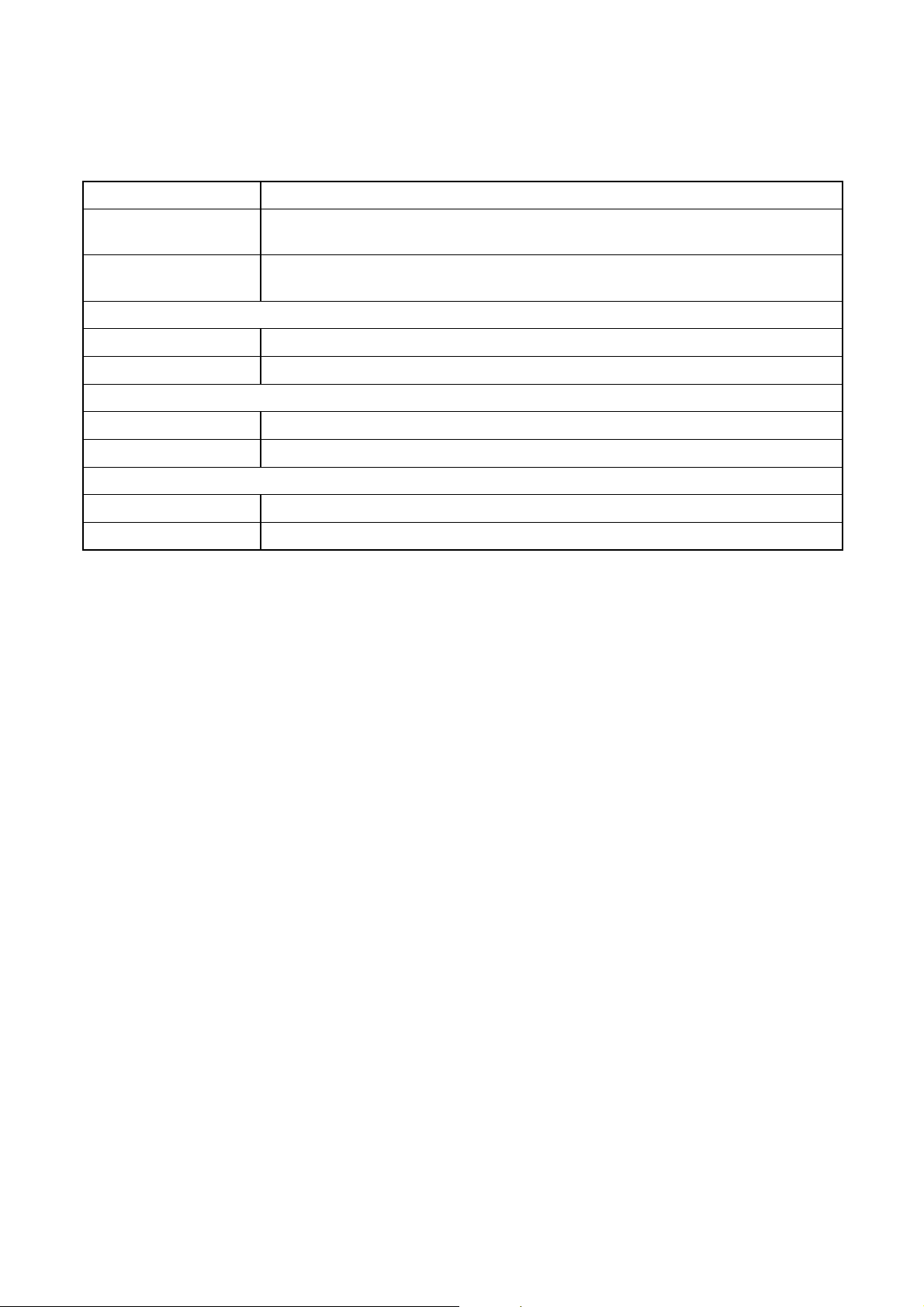
Fault Possible cause Remedy
The programme does
not start.
The dishwasher door has not been closed
properly.
Close the door.
The mains plug is not plugged in. Insert the mains plug.
The fuse has blown in the household fuse
box.
Replace the fuse.
For dishwasher models with delay start
timer: Delay start has been selected.
Where dishes are to be washed imme-
diately, for appliances
- with multidisplay, set the delay start
to 0.
- without multidisplay, cancel the delay
start timer.
Spots of rust are visible
in the washing compart-
ment.
The washing compartment is made of anti-
corrosive stainless steel. Any spots of rust
inside the washing compartment stem from
other sources (flakes of rust from the water
pipe or from pans, cutlery etc.) Remove
such spots with a commercially available
stainless steel cleaner.
Only wash cutlery and dishes that are
suitable for dishwasher use.
Close the salt dispenser lid securely.
There is a whistling
noise during washing.
The whistling is not a cause for concern. Use a different brand of detergent.
28
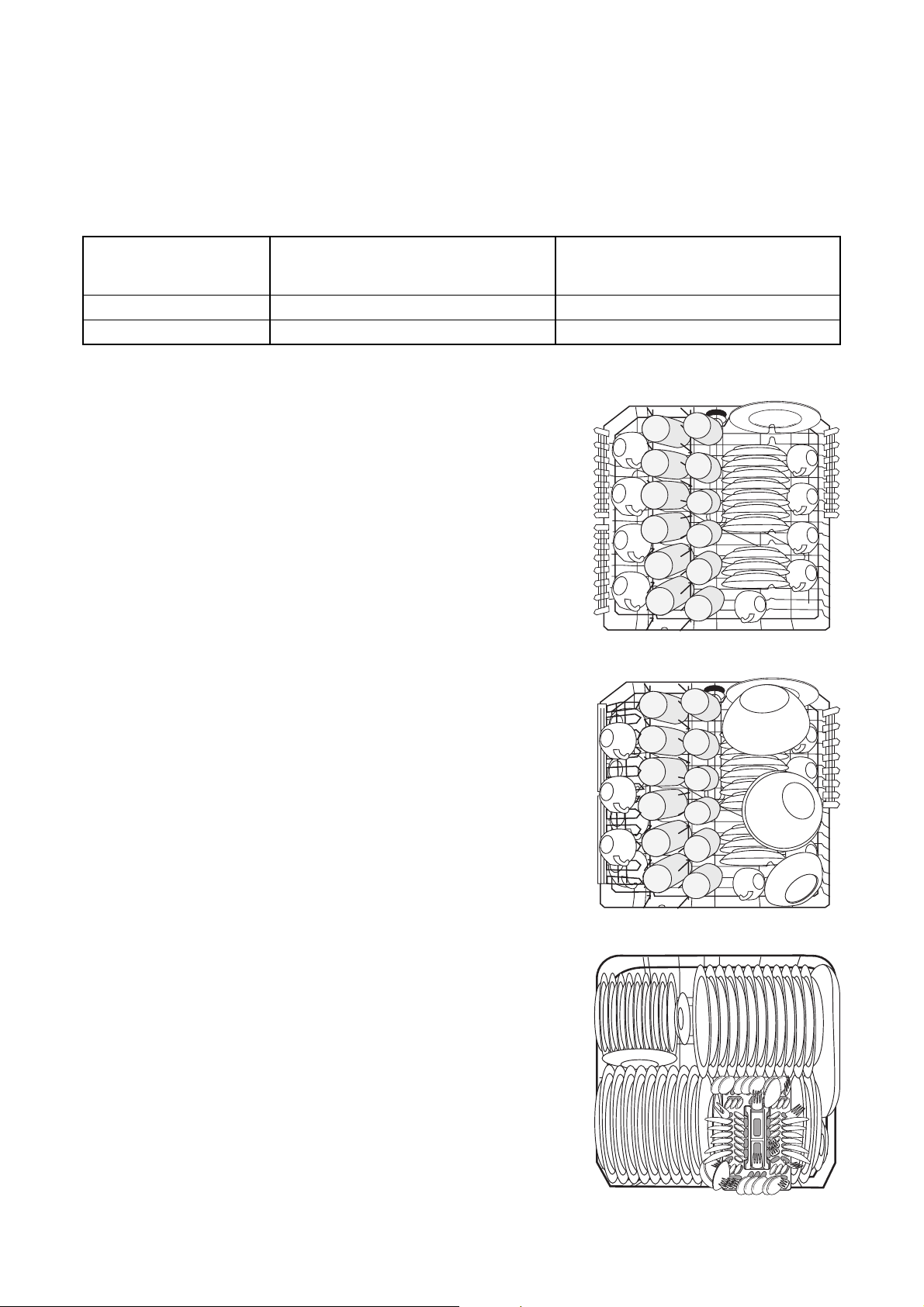
Technical Data
Capacity: 12 place settings including serving dishes
Permitted Water
Pressure:
1-10 bar (=10-100 N/cm
2
= 0.1-1.0 MPa)
Electrical Connection: Information on the electrical connection is given on the rating plate on the inner edge
of the dishwasher door on the right.
Dishwasher: Free-Standing Appliances
Dimensions: 850 x 600 x 600 (H x B x D in mm)
Max. Weight: 54 Kg
Dishwashers that Can Be Integrated, Built-In Dishwashers
Dimensions: 820 – 880 x 596 x 570 (H x W x D in mm)
Max. Weight: 50 Kg
Dishwashers that Can Be Fully Integrated
Dimensions: 820 – 880 x 596 x 546 - 550 (H x W x D in mm)
Max. Weight: 50 Kg
;
This appliance conforms with the following
EU Directives:
• 73/23/EWG dated 19. 02. 1973 – Low
Voltage Directive
• 89/336/EWG dated 03. 05. 1989
(including Directive Amendment 92/31/
EWG) – EMC Directive
29
Notes for Test Institutes
Testing in accordance with EN 60704 must be carried out with the appliance fully loaded and using the test pro-
gramme (see Programme Table).
Tests in accordance with EN 50242 must be carried out when the salt dispenser and rinse aid container have
been filled with salt and rinse aid respectively and using the test programme (see Programme Table).
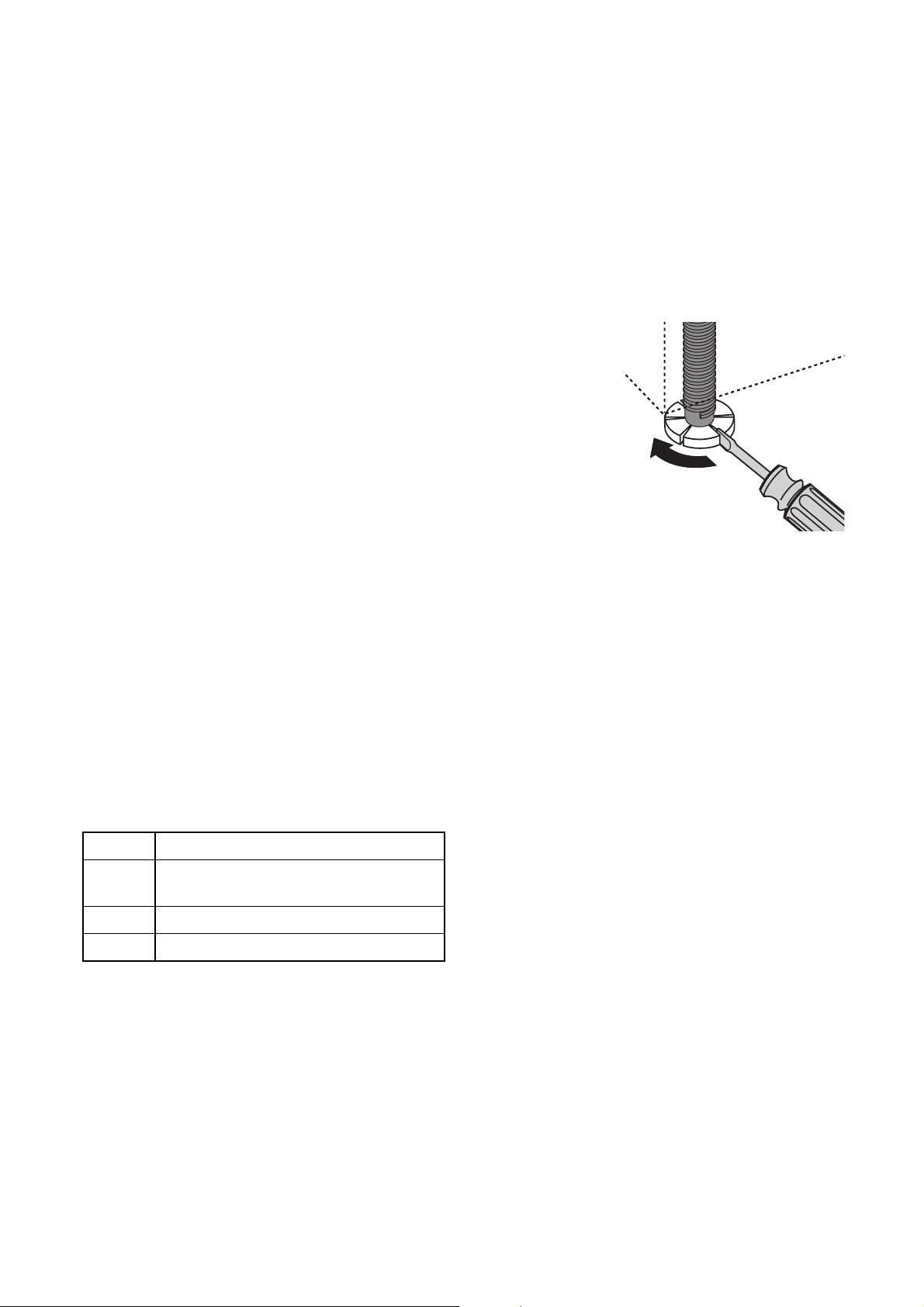
Sample loading arrangement: Upper basket
Sample loading arrangement: Upper basket
Sample loading arrangement: Lower basket
Full Load:
12 place settings incl. serving dishes
Half Load:
6 place settings incl. serving dishes,
leaving alternate positions free
Detergent Dosing: 5g + 25g (Type B) 20g (Type B)
Rinse Aid Setting: 4 (Type III) 4 (Type III)

30
Sample loading arrangement: Cutlery basket
Some dishwasher models have cutlery baskets with-
out a grid insert.
31
INSTALLATION AND CONNECTION
INSTRUCTIONS
Installing the Dishwasher
• The dishwasher must be installed on a firm floor
and adjusted to ensure that it is stable and level.
• To compensate for unevenness in the floor and to
match the height of the appliance to that of sur-
rounding units extend the threaded feet by
unscrewing:
– use a screwdriver
.
• For built-in, integrated and fully integrated dish-
washers, the rear feet should be adjusted from the
front of the appliance using a screwdriver.
• The drain hose, inlet hose and mains cable must
not be kinked or crushed when the dishwasher is
in position.
• In addition, the dishwasher must be firmly
screwed to the work surface or to the neighbour-
ing units. This is essential to ensure the dish-
washer does not tip.
Installing the Furniture Door
(see installation template supplied)
3
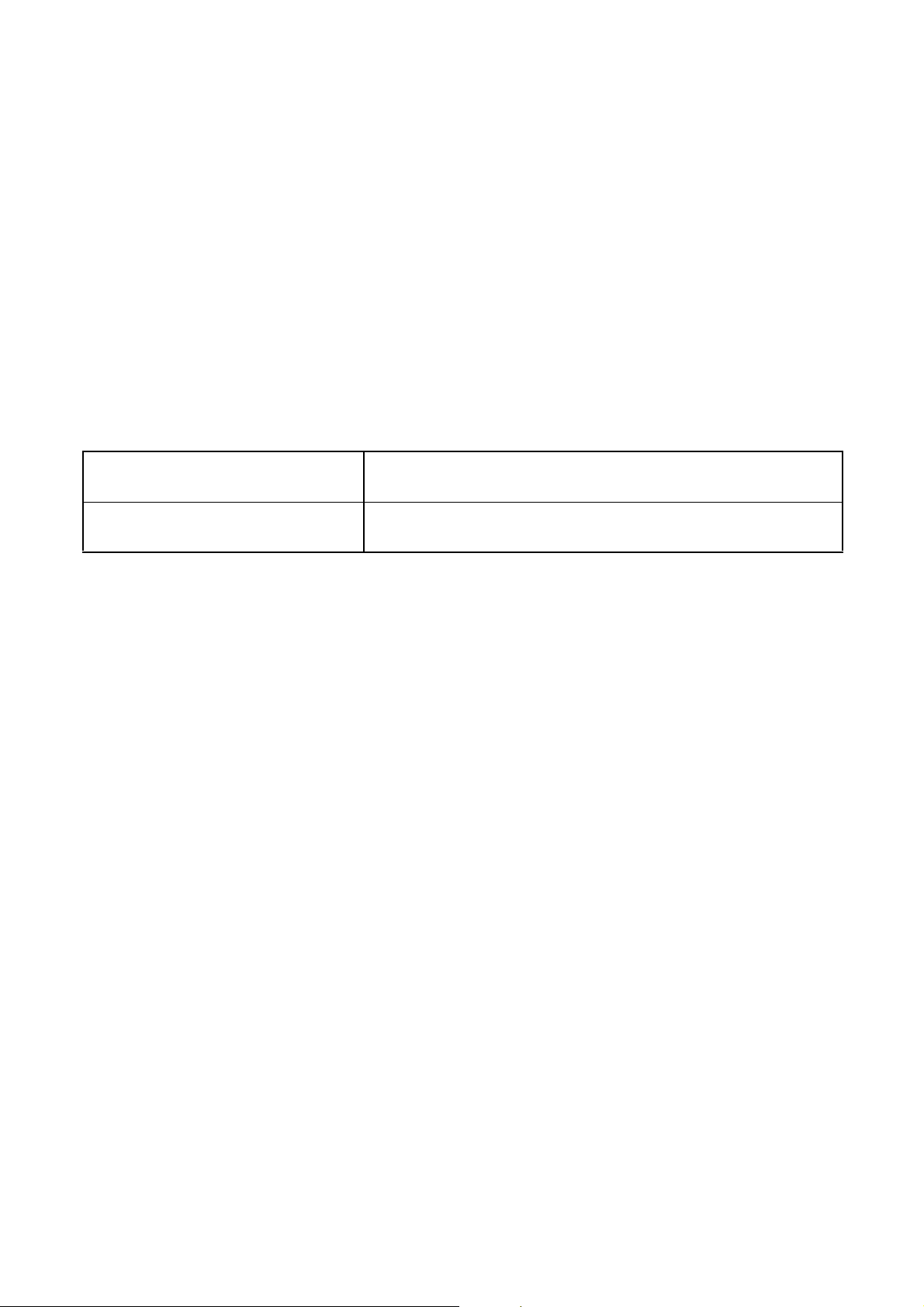
The door of the appliance can be fitted with a
wooden furniture door of the following dimen-
sions:
Width: 591 mm – 594 mm
Thick-
ness:
16 mm – 24 mm
Height: max. 715 mm
Weight: max. 10 kg
32
Connecting the Dishwasher
Water Connection
The dishwasher is fitted with safety devices that pre-
vent the wash water returning into the drinking water
system and comply with the applicable plumbing reg-
ulations.
• The dishwasher can be connected to cold and hot
water supplies up to max. 60 °C.
• The dishwasher must not be connected to open
hot water appliances or instantaneous water heat-
ers.
Permitted water pressure
Connect the inlet hose
1
The water inlet hose must not be kinked,
crushed or entangled when it is being con-
nected up.
Connect the threaded hose fitting
(ISO 228-1:2000) on the water inlet hose to a
tap with an external thread (¾ inch). Tighten
the threaded hose fitting hand tight only.
3
In order that access to the tap in the kitchen
is not limited by the use of the dishwasher,
we recommend the installation of an addi-
tional tap, or fitting a two way adapter to the
existing tap.
• If you need a longer water inlet hose than that
supplied, VDE approved complete hose sets are
to be used. These are available from your local
Service Force Centre.
Lowest permitted water pressure:
1 bar (=10 N/cm
2
=100 kPa)
Consult your installer if the water pressure is less than 1 bar.
Highest permitted water pressure:
10 bar (=100 N/cm
2
=1 MPa)
In the case of a water pressure greater than 10 bar, a pressure reduc-
tion valve must be used (available from your dealer).
33
3
The following section is only applicable to
dishwashers that have a safety valve on the
threaded hose fitting for the tap:
Water inlet hose with safety valve
After connecting the double-walled water inlet hose,
the safety valve is next to the tap. Therefore the water
inlet hose is only under pressure while the water is
running. If the water inlet hose starts to leak during
this operation, the safety valve cuts off the running
water and the draining pump in the dishwasher is
switched on.
1
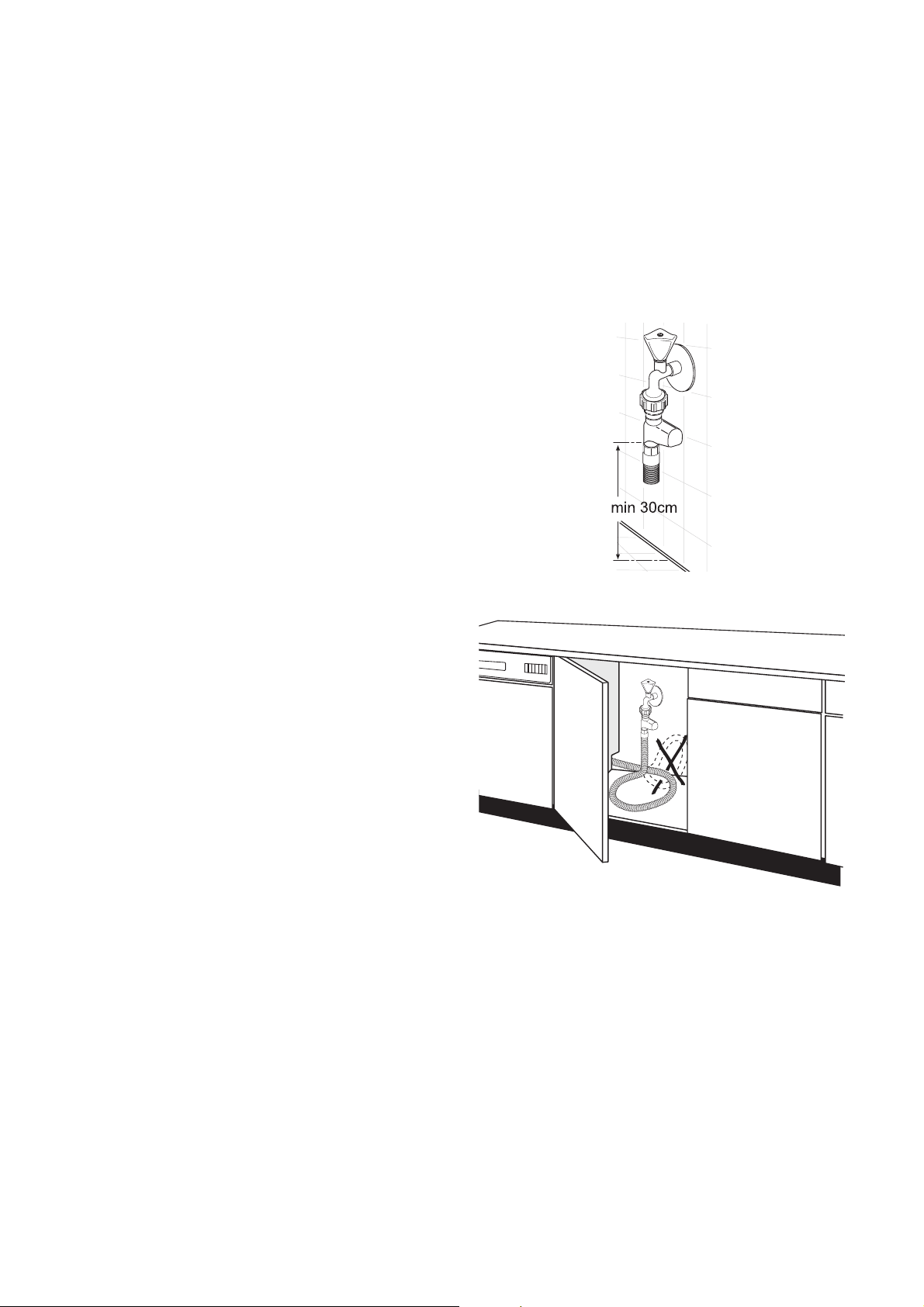
Please take care when installing the water
inlet hose:
– The distance between the bottom edge of the
safety value and the floor on which the dish-
washer is standing must be at least 30 cm:
– The electrical cable for the safety valve is in the
double-walled water inlet hose. Do not
immerse the water inlet hose or the safety
valve in water.
– If the water inlet hose or the safety valve is
damaged, remove the mains plug immediately.
– A water inlet hose with safety valve must only
be replaced by a specialist or Customer Serv-
ices.
– Place the water inlet hose in such a way that it
is never higher than the bottom edge of the
safety valve.
34
Water drain
Drain hose
1
The drain hose must not be kinked, crushed
or entangled.
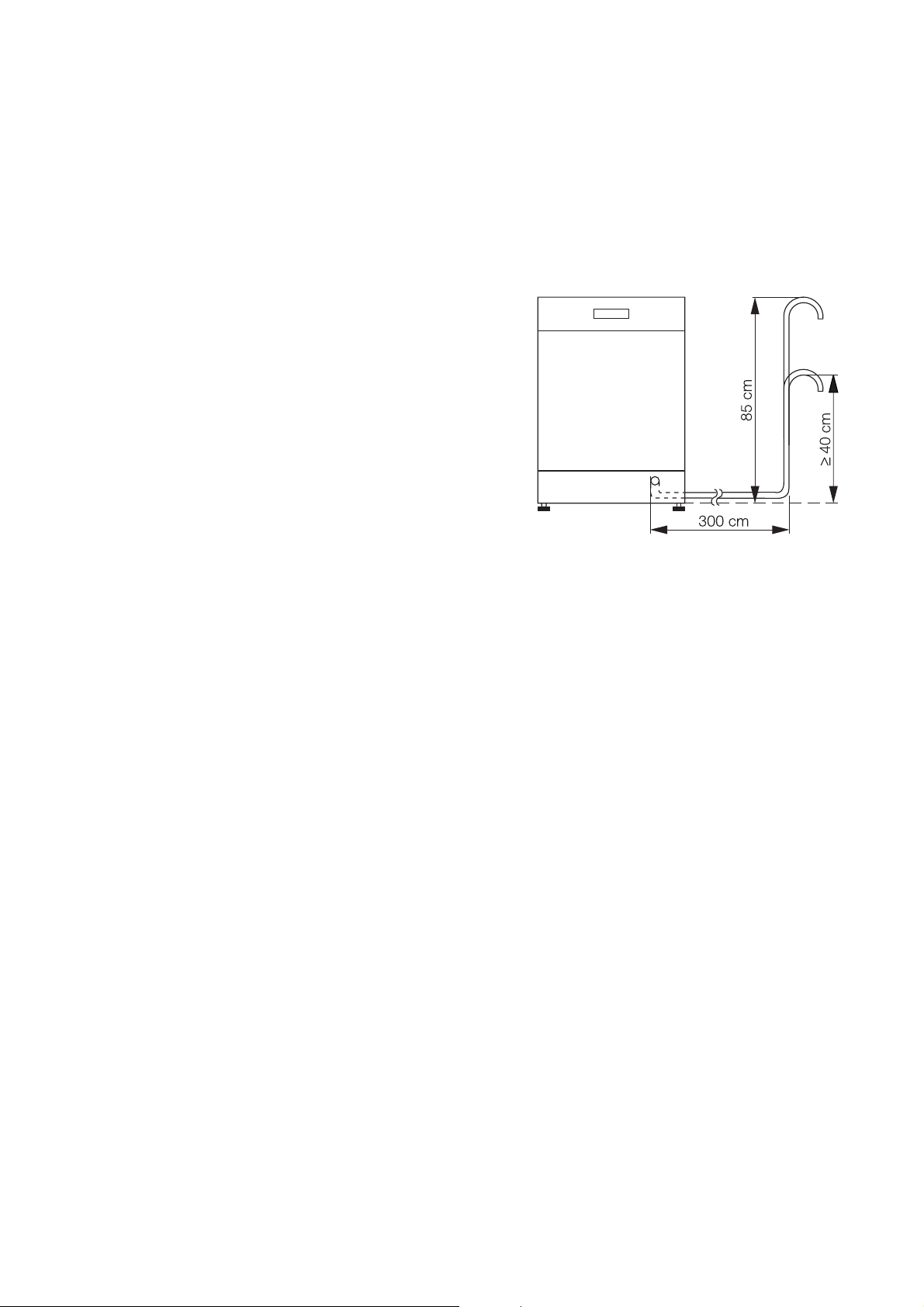
• Connecting the drain hose:
– Maximum permitted height: 1 metre.
– Minimum required height 40 cm above the
lower edge of the machine.
Extension hoses
• Extension hoses are available from your dealer or
customer service. The internal diameter of the
extension hoses must be 19 mm to ensure that
the function of the appliance is not impeded.
• Extension hoses may be laid a maximum of 3
metres horizontally; the maximum permitted
height for the connection for the drain hose is then
85 cm.
Siphon connection
• The outlet of the drain hose (ø 19 mm) fits all com-
monly available siphon types. The outer diameter
of the siphon connection must be at least 15 mm.
• The drain hose must be fixed to the siphon con-
nection using the hose clamp supplied.
If the dishwasher is fitted at a high
position
If the dishwasher is installed at a high level, and the
drainhose connection is less than 30 cm from the bot-
tom of the appliance, adapter kit ET 111099520 must
be fitted. This is available from Customer Service.
Water drain into wash basins (only possi-
ble with free-standing appliances)
In the case that you wish to hang the drain hose in a
wash basin, use a detachable hose elbow. You can
obtain this from customer service under spare part
number ET 646 069 190.
1. Fit the elbow to the drain hose.
2. Secure the drain hose against sliding off the edge
of the wash basin.
Pass a piece of cord through the hose elbow and
fix it to the wall or the tap.
Leak Prevention System
For protection from damage due to water leaks, the
dishwasher is equipped with a leak prevention sys-
tem.
In the event of a fault, the safety valve in the water
inlet hose immediately interrupts the supply of water
to the appliance and the drain pump is activated.
The remaining water in the appliance is automatically
pumped out.
1
The leak prevention system also works when
the appliance is switched off.
35
Electrical Connection
Any electrical work required to install this
appliance should be carried out by a qualified
electrician or competent person.
1
WARNING - This appliance must be
earthed.
The manufacturer declines any responsi-
bility should these safety measures not
be observed.
Before switching on make sure the electricity supply
voltage is the same as that indicated on the appliance
rating plate.
To isolate the dishwasher from the mains, remove the
mains plug.
Important: The plug must still be accessible after the
appliance has been installed.
Changing a fuse
The appliance is supplied with a 13amp plug fitted. In
the event of having to change the fuse in the plug
supplied, a 13amp ASTA approved (BS 1363A) fuse
must be used.
Should the plug need to be replaced for any reason,
proceed as described below.
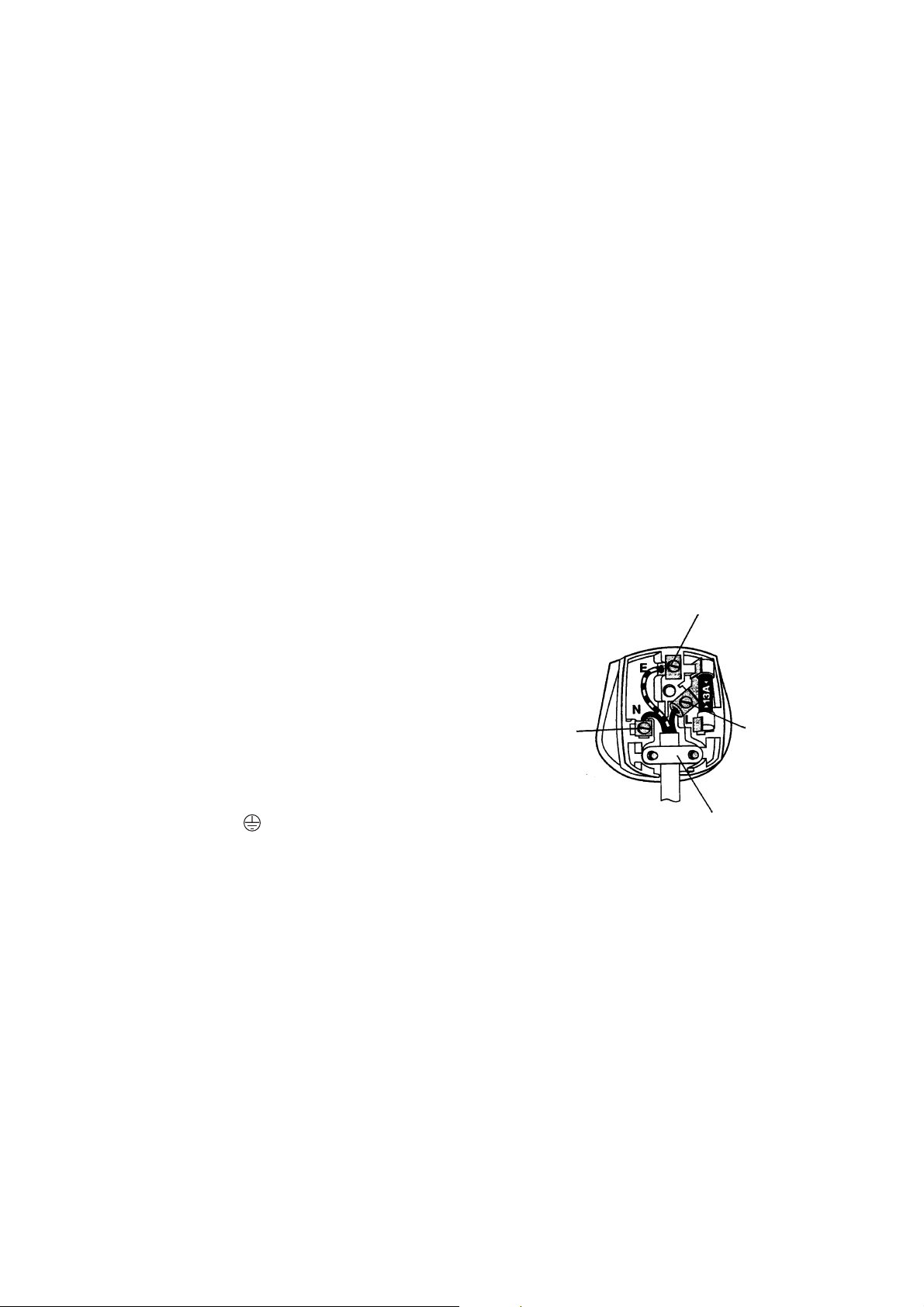
The wires on the mains lead are coloured in accord-
ance with the following code.
• The wire coloured green and yellow must be con-
nected to the terminal marked with the letter “E“ or
by the earth symbol or coloured green and yel-
low.
• The wire coloured blue must be connected to the
terminal “N“ or coloured black.
• The wire coloured brown must be connected to
the terminal marked “L“ or coloured red.
• Upon completion there must be no cut, or stray
strands of wire present and the cord clamp must
be secure over the outer sheath.
1
WARNING! A cut off plug inserted into a
13 amp socket is a serious safety (shock)
hazard. Ensure that, if it is necessary to
cut off the plug, it is disposed of safely
and not retained.
Green and Yellow : Earth
Blue : Neutral
Brown : Live
Green
& Yellow
Brown
Cord Clamp
Blue
36
Connections
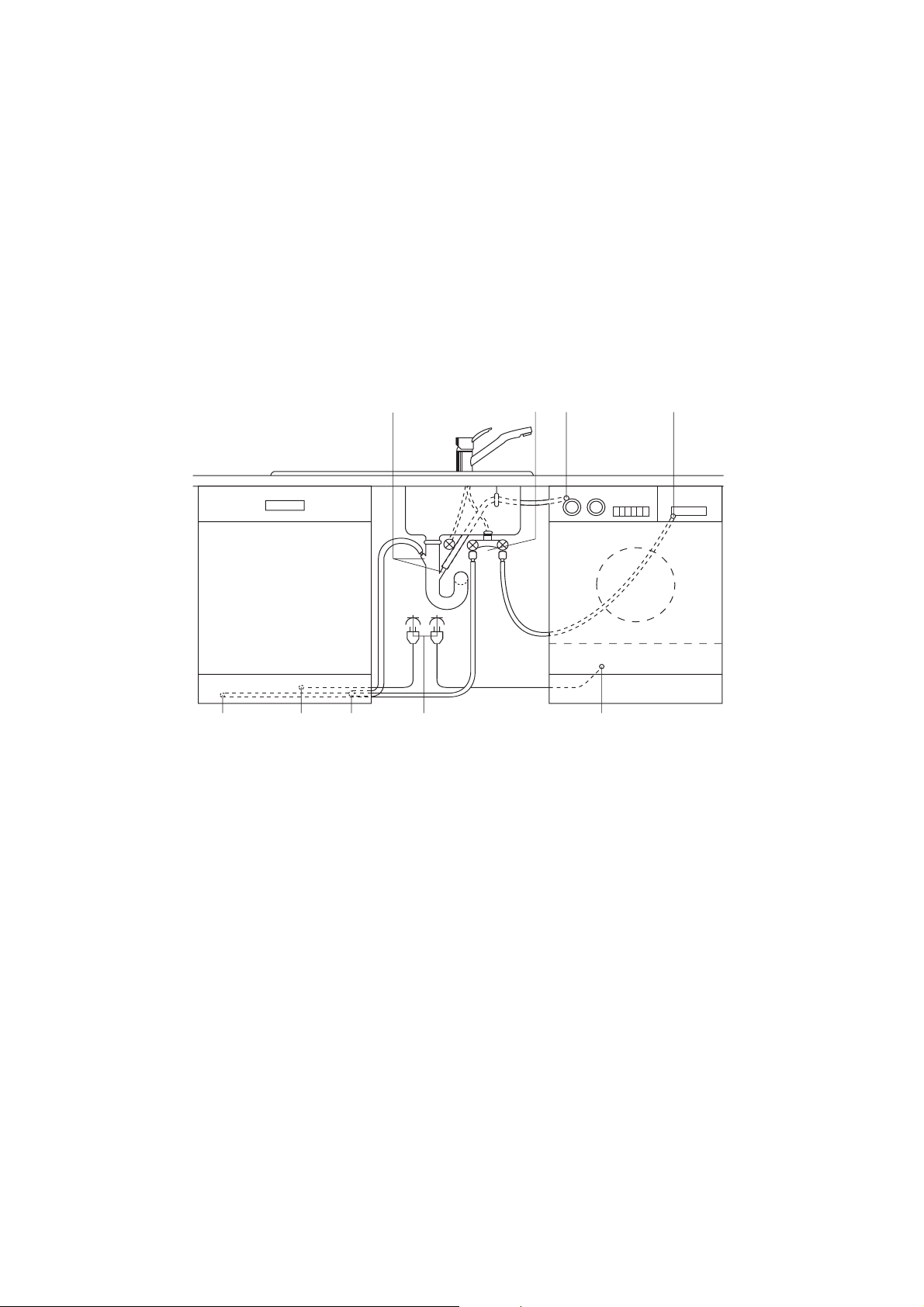
The water inlet and drain hoses, as well as the mains
cable must be connected beside the dishwasher
because there is no space for them behind the appli-
ance.
The example plumbing and electrical installation
given below can only be regarded as a recommenda-
tion; the actual situation where the dishwasher is to
be installed will define the exact installation (available
connections, local electricity and water board regula-
tions for connecting up appliances, etc.).
Two 45° or Straight Connec-
tions,Outer ø 19 mm, Length 30 mm
Double
tap
Water
drain
Water
inlet
Water
drain
Water inlet Mains cable
Mains cable
Mains
socket

37
Guarantee Conditions
Standard guarantee conditions
We, Electrolux, undertake that if within 12 months of
the date of the purchase this Electrolux appliance or
any part thereof is proved to be defective by reason
only of faulty workmanship or materials, we will, at
our option repair or replace the same FREE OF
CHARGE for labour, materials or carriage on condi-
tion that:
• The appliance has been correctly installed and
used only on the electricity supply stated on the
rating plate.
• The appliance has been used for normal domestic
purposes only, and in accordance with the manu-
facturer’s instructions.
• The appliance has not been serviced, maintained,
repaired, taken apart or tampered with by any per-
son not authorised by us.
• All service work under this guarantee must be
undertaken by a Service Force Centre.
• Any appliance or defective part replaced shall
become the Company’s property.
• This guarantee is in addition to your statutory and
other legal rights.
Home visits are made between 8.30am and 5.30pm
Monday to Friday. Visits may be available outside
these hours in which case a premium will be charged.
Exclusions
This guarantee does not cover:
• Damage or calls resulting from transportation,
improper use or neglect, the replacement of any
light bulbs or removable parts of glass or plastic.
• Costs incurred for calls to put right an appliance
which is improperly installed or calls to appliances
outside the United Kingdom.
• Appliances found to be in use within a commercial
environment, plus those which are subject to
rental agreements.
• Products of Electrolux manufacture which are not
marketed by Electrolux.
European Guarantee
If you should move to another country within Europe
then your guarantee moves with you to your new
home subject to the following qualifications:
• The guarantee starts from the date you first pur-
chased your product.
• The guarantee is for the same period and to the
same extent for labour and parts as exists in the
new country of use for this brand or range of prod-
ucts.
• This guarantee relates to you and cannot be
transferred to another user.
• Your new home is within the European Community
(EC) or European Free Trade Area.
• The product is installed and used in accordance
with our instructions and is only used domestically,
i.e. a normal household.
• The product is installed taking into account regula-
tions in your new country.
Before you move please contact your nearest Cus-
tomer Care centre, listed below, to give them details
of your new home. They will then ensure that the
local Service Organisation is aware of your move and
able to look after you and your appliances.
France Senlis +33 (0) 3 44 62 20 13
Germany Nürnberg +49 (0) 800 234 7378
Italy Pordernone +39 (0) 800 11 7511
Sweden Stockholm +46 (0) 20 78 77 50
UK Slough +44 (0) 1753 219898

38
39
Service and Spare Parts
In the event of your appliance requiring service, or if
you wish to purchase spare parts, please contact
Service Force by telephoning:
08705 929 929
Your telephone call will be automatically routed to the
Service Force Centre covering your post code area.
For the address of your local Service Force Centre
and further information about Service Force, please
visit the website at www.serviceforce.co.uk
Before calling out an engineer, please ensure you
have read the details under the heading
„What to do if.....“
When you contact the Service Force Centre you will
need to give the following details:
1. Your name, address and post code.
2. Your telephone number
3. Clear and concise details of the fault.
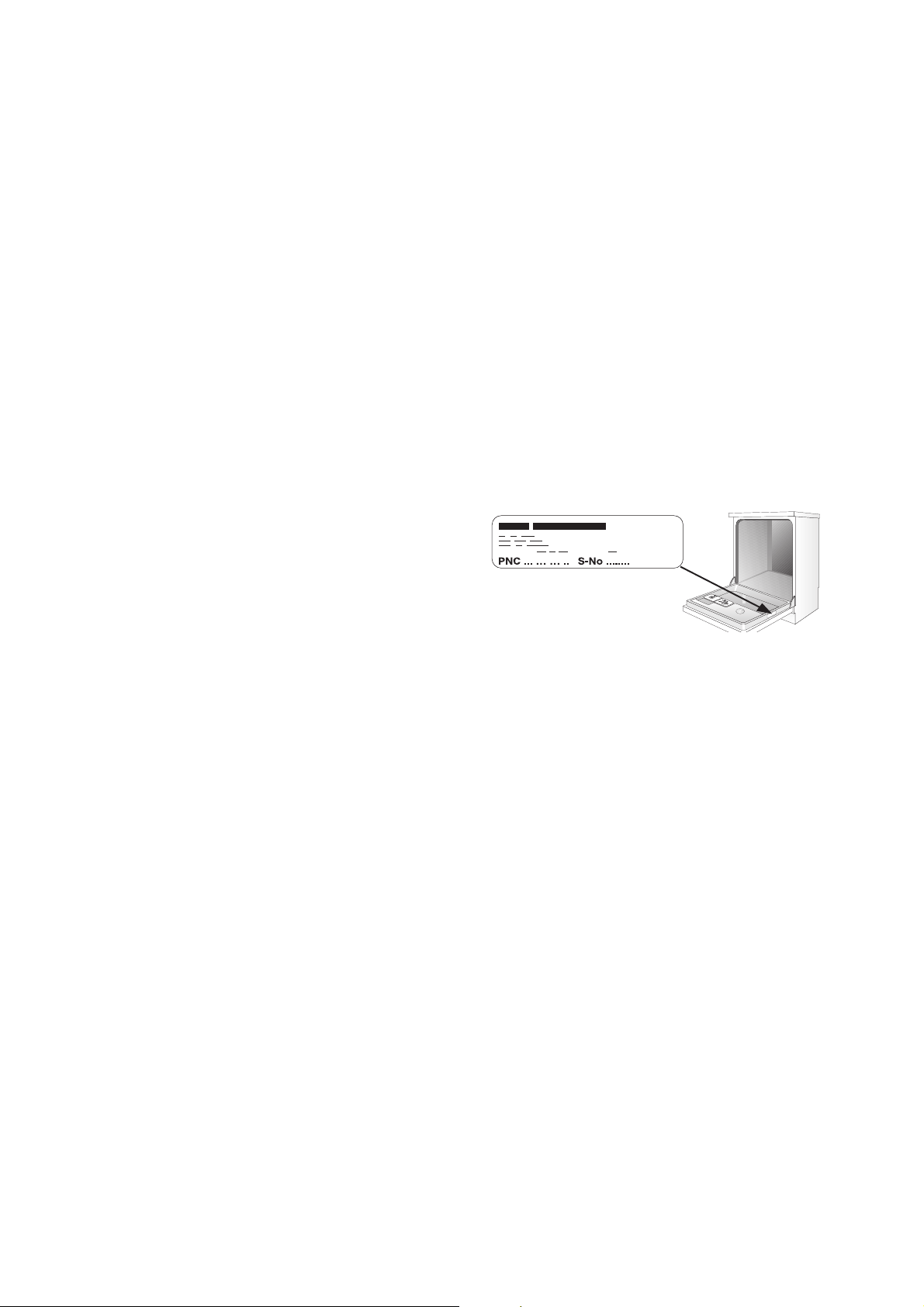
4. The model and serial number of the appliance
(found on the rating plate).
5. The purchase date
Please note that a valid purchase receipt or guaran-
tee documentation is required for in-guarantee serv-
ice calls.
Customer Care
For general enquiries concerning your Electrolux
appliance or for further information on Electrolux
products please contact our Customer Care Depart-
ment by letter or telephone at the address below or
visit our website at www.electrolux.co.uk.
Customer Care Department
Electrolux
55-77 High Street
Slough
Berkshire, SL1 1DZ
Tel. 08705 950950(*)
(*) Calls may be recorded for training purposes

The Electrolux Group. The world´s No.1 choice.
The Electrolux Group is the world´s largest producer of powered appliances for kitchen, cleaning and outdoor use. More than 55 million Electrolux Group products
(such as refrigerators, cookers, washing machines, vacuum cleaners, chain saws and lawn mowers) are sold each year to a value of approx. USD 14 billion in more
than 150 countries around the world.
822 960 474 - 00 - 0303 Subject to change without notice
©
Electrolux plc 2002

This file has been downloaded from:
www.UsersManualGuide.com
User Manual and User Guide for many equipments like mobile phones, photo cameras, monther board, monitors, software, tv, dvd, and othes..
Manual users, user manuals, user guide manual, owners manual, instruction manual, manual owner, manual owner's, manual guide,
manual operation, operating manual, user's manual, operating instructions, manual operators, manual operator, manual product,
documentation manual, user maintenance, brochure, user reference, pdf manual