BC
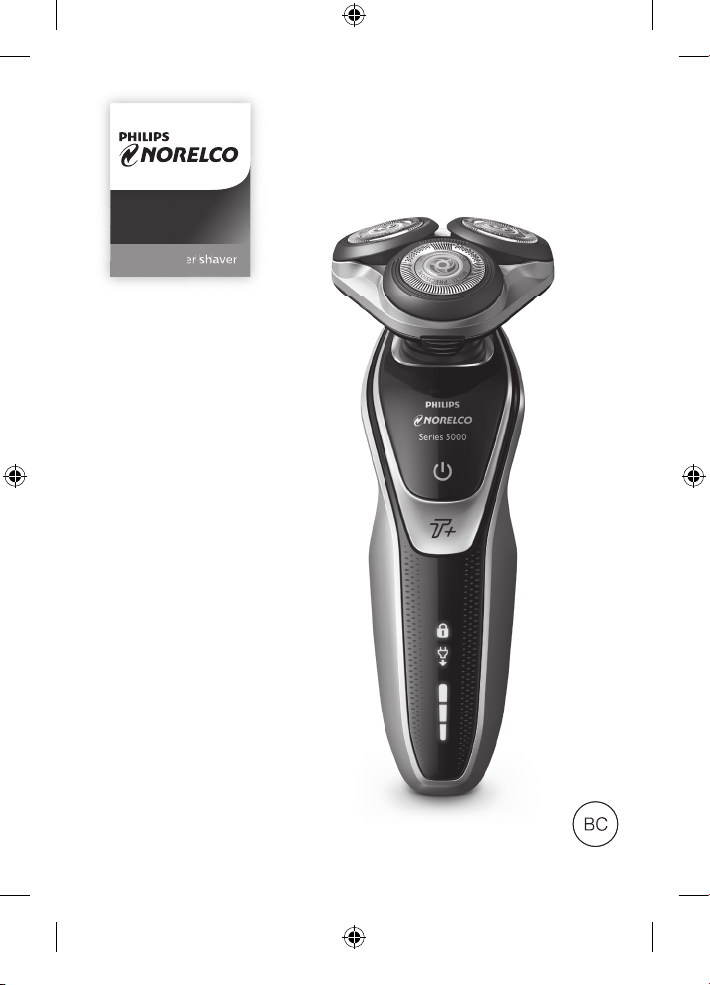
S5660
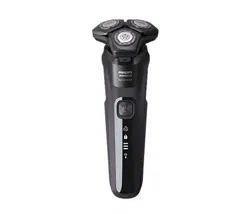
Tripleheader shaver
BC
header
header
sh
sh
ave
ave
r
r
4222_002_7353_1_DFU-Booklet_A6_v6.indd 1 06/06/17 16:14
4222_002_7353_1_DFU-Booklet_A6_v6.indd 2 06/06/17 16:14
S5660
ENGLISH 4
ESPAÑOL 39
Congratulations on your purchase and
welcome to Philips Norelco!
To fully benefit from the support that Philips
Norelco offers, register your product at
www.norelco.com/register
¡Bienvenido a Philips Norelco y felicitaciones
por su compra!
Para utilizar los servicios de asistencia técnica
de Philips Norelco, registre su producto en
www.norelco.com/register
4222_002_7353_1_DFU-Booklet_A6_v6.indd 3 06/06/17 16:14
IMPORTANT SAFETY
INSTRUCTIONS
When using an electric appliance, basic precautions should
always be followed, including the following:
Read all instructions before using this appliance.
DANGER
To reduce the risk of electric shock:
1. Do not reach for a corded shaver/SmartClean System that
has fallen into water. Unplug immediately.
2. Power plug and the accessories connected to it are not for
immersion or for use in shower.
3. Do not use an extension cord with this appliance.
4. Do not place or store a SmartClean System where it can
fall or be pulled into a tub or sink. Do not place or drop a
SmartClean System into water or other liquid.
5. Always unplug this shaver/SmartClean System from the
electrical outlet immediately after use, except when shaver/
SmartClean System is (re)charging.
6. Unplug and remove power supply cord from shaver
before cleaning.
7. The batteries used in this device may present a fire or
chemical burn hazard if mistreated. Do not disassemble, heat
above 100ºC (212°F) or incinerate.
WARNING
To reduce the risk of burns, fire, electric shock, or injury
to persons:
1. Close supervision is required when this product is used
by, on, or near children, or persons with limited physical,
sensory, or mental capabilities or invalids.
ENGLISH
4
4222_002_7353_1_DFU-Booklet_A6_v6.indd 4 06/06/17 16:14
2.
Use this shaver/SmartClean System for its intended household use
as described in this manual. Do not use attachments or a cleaning
cartridge not recommended by Philips North America LLC.
3. Never operate this shaver/SmartClean System if it has a
damaged cord or charging plug, if it is not working properly,
if it has been dropped or damaged, or dropped into water
while plugged in. For assistance call 1-800-243-3050.
4. Keep the shaver/SmartClean System, cord and charging plug
away from heated surfaces.
5. Never drop or insert any object into any opening.
6.
Do not use the adapter in or near a power outlet that contains
an electric air freshener to prevent damage to the adapter.
7. Do not clean, charge or plug in shaver/SmartClean System
outdoors or operate where aerosol (spray) products are
being used or where oxygen is being administered.
8. Do not use this shaver with a damaged or broken comb,
as facial injury may occur.
9. Always attach plug to shaver/SmartClean System first, then
plug into outlet and then put shaver in SmartClean System.
Be certain plug is inserted firmly into shaver/SmartClean
System, up to mark indicated on plug. To disconnect, turn
SmartClean System off, remove charging plug from outlet.
10. Never put the shaver/SmartClean System in direct sunlight
or store at a temperature above 140°F (60°C).
11. Keep the cord dry at all times. Do not handle with wet hands.
12. To prevent possible damage to the cord, do not wrap cord
around the shaver/SmartClean System.
13. Do not attempt to open the appliance to replace the battery.
14. Only use the power plug and other accessories supplied
with the appliance.
SAVE THESE
INSTRUCTIONS
IMPORTANT: The power plug contains a transformer.
Do not cut off the power plug to replace it with another plug,
as this will cause a hazardous condition.
ENGLISH
5
4222_002_7353_1_DFU-Booklet_A6_v6.indd 5 06/06/17 16:14
6
ENGLISH
45 - DAY MONEY-BACK GUARANTEE
To enjoy the closest and most comfortable shave from your new Philips Norelco
Men’s Shaver, the shaver should be used exclusively for 3 weeks. This allows your
hair and skin enough time to adapt to the Philips Norelco Shaving System. If, after
that period of time, you are not fully satisfied with your Philips Norelco Men’s
Shaver, send the product back along with dated sales receipt and we’ll refund
you the full purchase price. The shaver must be shipped prepaid by insured
mail, insurance prepaid, have the original sales receipt, indicating pur-
chase price, the date of purchase, and the money-back guarantee return
authorization form enclosed. We cannot be responsible for lost mail.
The shaver must be postmarked no later than 45 days from the date of purchase.
Philips Norelco reserves the right to verify the purchase price of the shaver and
limit refunds not to exceed suggested retail price.
To obtain money-back guarantee return authorization form,
call 1-800-243-3050 for assistance. Delivery of refund check will
occur 6–8 weeks AFTER receipt of returned product.
4222_002_7353_1_DFU-Booklet_A6_v6.indd 6 06/06/17 16:14
7
Table of Contents
Features ............................................................ 8
LED Display ................................................... 11
Before First Use ........................................... 13
Charging .........................................................13
Recharging .....................................................16
Quick Charge ...............................................16
Put It To The Test & Shaving Tips ..............16
How to Shave
With An Electric Shaver ............................. 17
Using the SmartClick Trimmer ................. 20
Travel Lock ....................................................22
Cleaning ..........................................................23
Replacing the Shaving Heads .....................30
Maintenance ..................................................34
Storage ............................................................35
Assistance ......................................................35
Disposal .........................................................36
Accessories ...................................................37
Warranty ........................................................38
ENGLISH
4222_002_7353_1_DFU-Booklet_A6_v6.indd 7 06/06/17 16:14
8
ENGLISH
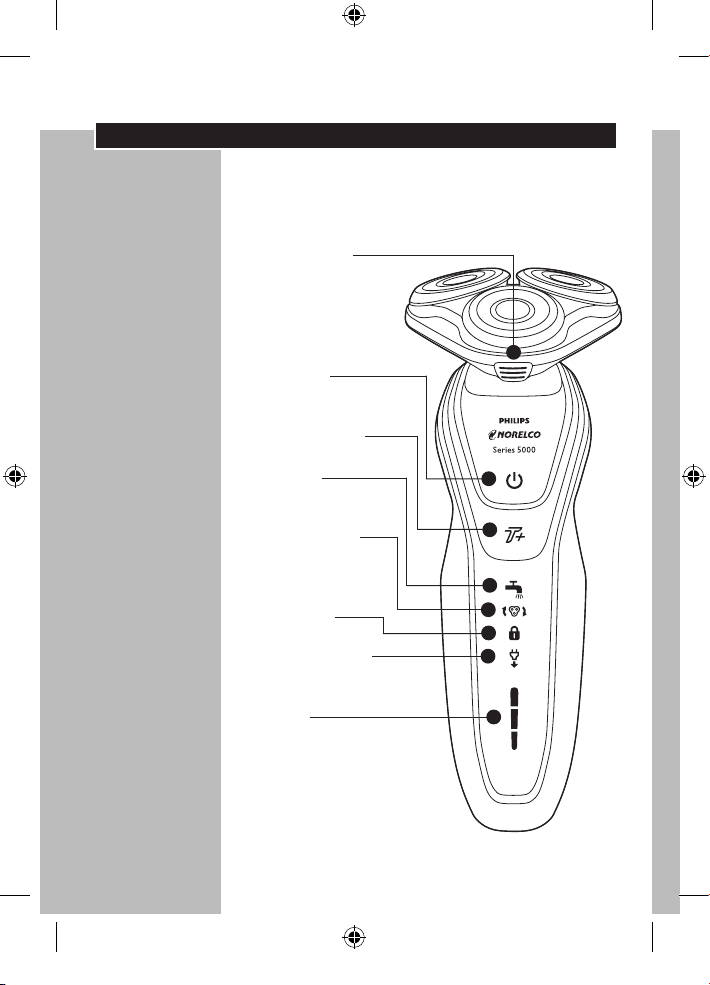
Features
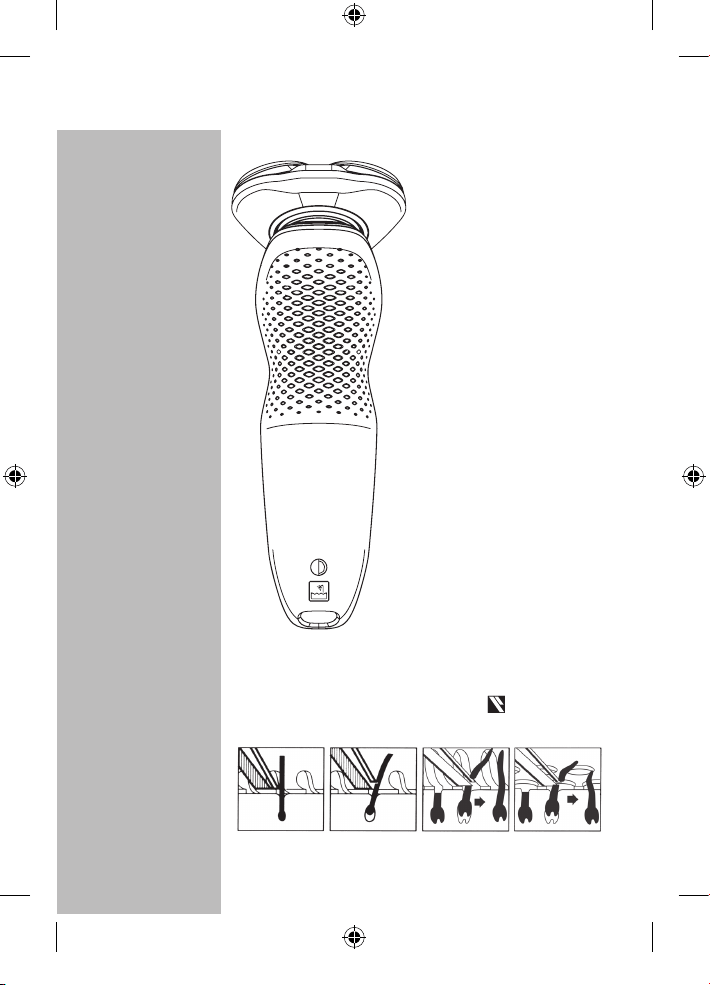
MultiPrecision Blade System
Super Lift and Cut Action
Shaver Head
Release Button
• Hair Chamber
captures shaven
hair
Electronic
On/Off Button
Turbo+ Mode
Cleaning
Reminder Indicator
Replacement
Shaving Heads
Indicator
Travel Lock
‘Unplug for use’
Indicator
Battery
Display
• Battery
Charge,
Full & Low
Indicators
4222_002_7353_1_DFU-Booklet_A6_v6.indd 8 06/06/17 16:14
9
SmartClick Precision
Trimmer
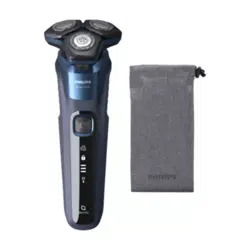
Travel Case
Automatic Worldwide
Voltage 100V to 240V AC
Rechargeable 1-hour full
charge for up to 60 min.
of cordless shaving time
Quick Charge - For
one shave
Cordless - To shave
without a cord
Full 2-Year Warranty
45-Day Money-Back
Guarantee
ENGLISH
How the Unique Philips Norelco Lift and Cut
Shaving System Makes Close Comfortable:
Groove channels
beard closer to
cutting system
Lifter raises hair Slots to cut long
hairs
Holes to cut short
hairs even closer
4222_002_7353_1_DFU-Booklet_A6_v6.indd 9 06/06/17 16:14
10
ENGLISH
Features
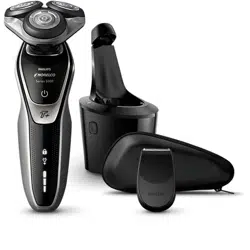
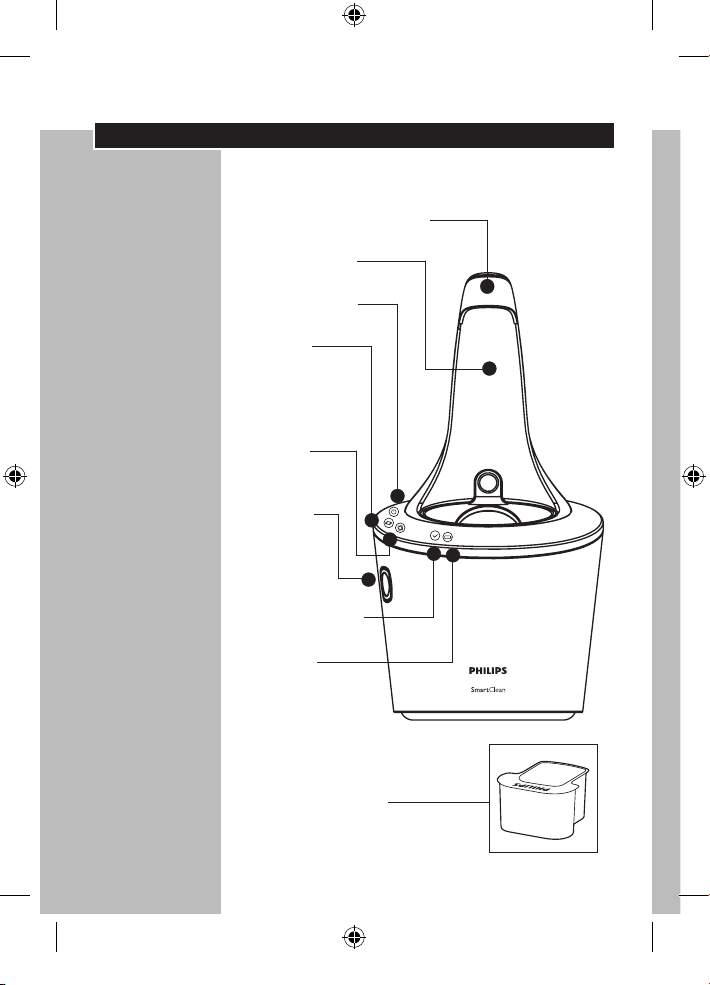
SmartClean System
SmartClean System Cap
Shaver Holder
On/Off Button
Cleaning
Cartridge
Replacement
Indicator
Cleaning
Indicator
Cleaning
Cartridge
Release
Button
Ready Indicator
Charging
Indicator
Cleaning Cartridge
4222_002_7353_1_DFU-Booklet_A6_v6.indd 10 06/06/17 16:14
ENGLISH
11
LED Display
◗ Remove any sticker or protective foil from
the display before using shaver.
◗ The display provides the following
information:
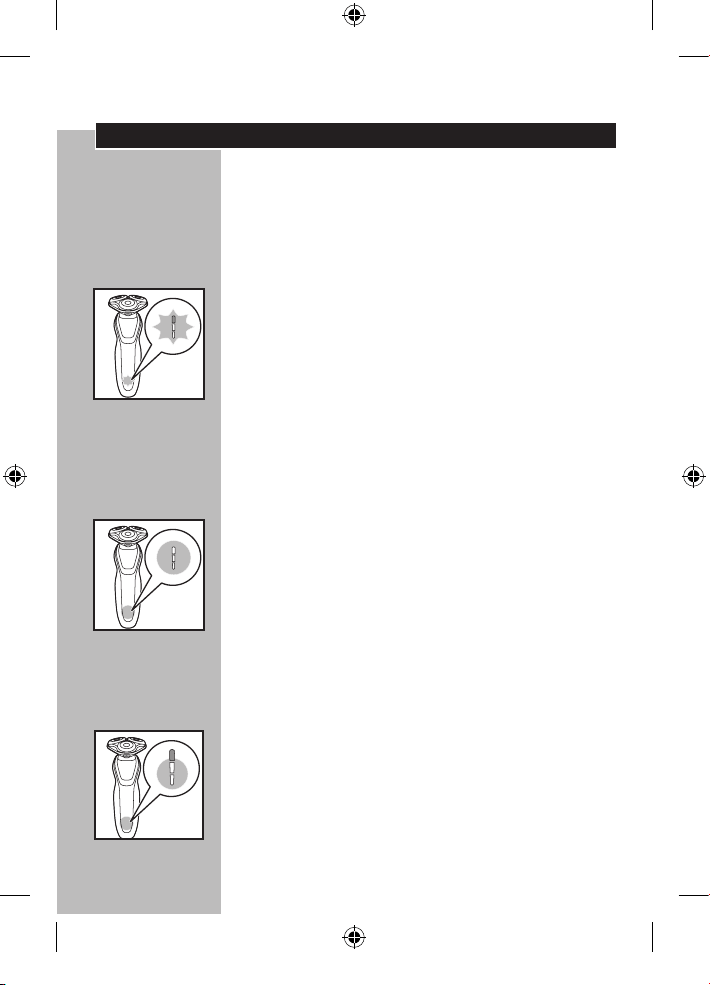
◗ Charging Indicator
C
- Quick charge: When you connect the power
cord to an electrical outlet the lights of the
battery charge indicator light up one after the
other continuously. When the bottom charging
light slowly blinks, the shaver contains enough
energy for one shave.
- As charging continues, each light will blink and
then light up continuously to indicate what level
the battery has been charged.
◗ Full Charge Indicator
C
- When the battery is fully charged, all charging
lights light up continuously. After approximately
30 minutes the display automatically switches off
again.
- If the on/off button is pressed during or after
charging, the 'unplug for use' symbol blinks
indicating the shaver is still connected to the
electrical outlet.
◗ Remaining Battery Capacity
C
- The remaining battery capacity is indicated by
the number of charging lights that are on.
4222_002_7353_1_DFU-Booklet_A6_v6.indd 11 06/06/17 16:14
ENGLISH
12
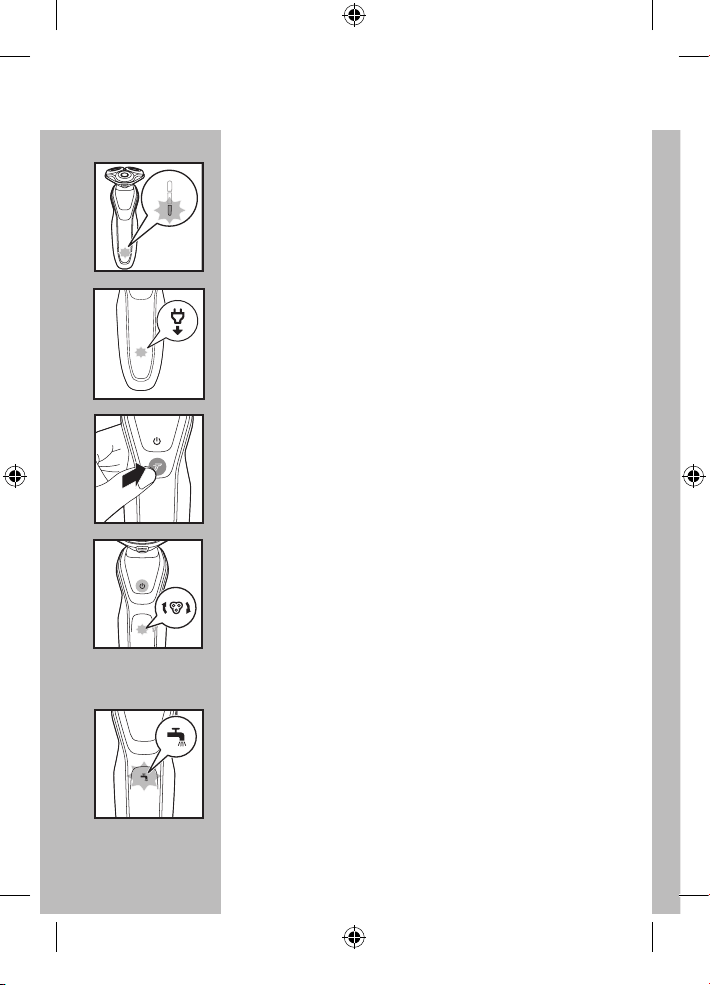
◗ Low Battery Indicator
C
- When the battery is almost empty (5 or less
shaving minutes left), the bottom charging light
blinks orange and you will hear a beep.
C
◗ 'Unplug For Use' Indicator
The 'unplug for use' symbol will blink to remind
you the shaver is connected to the outlet.
C
◗ Turbo+ mode
This setting allows quicker and more powerful
shaving for easier removal of dense hair.
C
◗ Replacement Shaving Heads Indicator
Every year, depending on your shaving behavior,
the replacement shaving heads indicator lights up
continuously. See 'Replacing the Shaving Heads'
section for instructions to reset the shaver. This
reminds you that with new shaving heads you will
guarantee yourself optimal shaving performance.
C
◗ Cleaning Reminder Indicator
For optimal shaving performance, we
recommend cleaning the shaver after EACH use.
The blinking faucet will remind you the
shaving unit needs to be cleaned. This happens
after each shave.
4222_002_7353_1_DFU-Booklet_A6_v6.indd 12 06/06/17 16:14

ENGLISH
13
C
◗ Travel Lock
The shaver is equipped with a travel lock function.
You can use the travel lock function when you are
going to store the shaver for a longer period or if
you are going to take the shaver with you when
traveling. See ‘Travel Lock’ section for instructions
on how to use this function.
Before First Use
◗ Charge the shaver before you start using it
(see ‘Charging’).
◗ Remove any sticker or protective foil from
the display before using shaver.
Important
◗ Only use the power cord or SmartClean
System provided to charge the shaver.
◗ The power plug transforms 100-240V AC to
less than 24V DC.
Charging
◗ Charging, recharging or storing at
temperatures below 40ºF/4,5ºC or higher
than 95ºF/35ºC adversely affects lifetime of
batteries.
◗ Charging or recharging requires one full hour.
◗ A fully charged shaver has a shaving time of
up to 60 minutes.
◗ You may recharge when the display indicates
the battery is almost empty.
4222_002_7353_1_DFU-Booklet_A6_v6.indd 13 06/06/17 16:14
ENGLISH
14
◗ This shaver will not operate corded directly
from the electrical outlet.
◗ Do not charge the shaver in a pouch or travel
case.
C
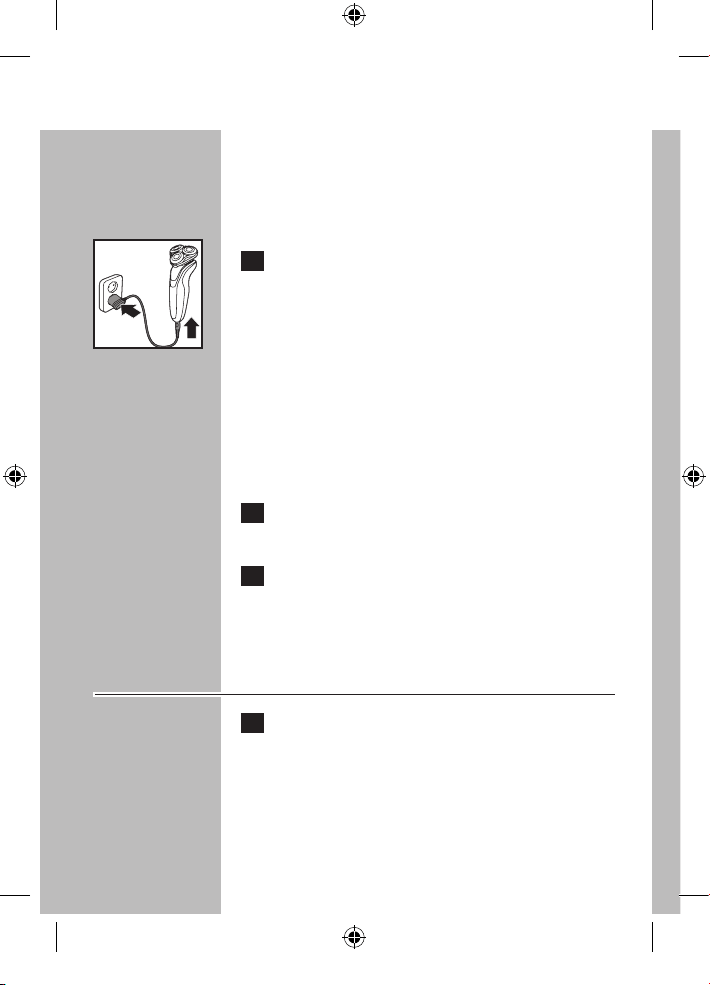
1 Connect cord directly to shaver and
connect the power plug into any 100V to
240V AC outlet. Use only the power cord
provided.
◗ An adaptor plug may be necessary for power
cord usage in some foreign countries. Use
an attachment plug adaptor of the proper
configuration for the power outlet.
The power cord will automatically convert to
work on 100V to 240V AC systems.
2 The display on the shaver will indicate
shaver is charging.
3 Charging requires one full hour. A fully
charged shaver has a cordless shaving time
of up to 60 minutes.
Charging Shaver with SmartClean
System
1 Connect the small plug to the SmartClean
System. Connect the power plug into any
100V to 240V AC outlet. Use only the
power cord provided.
4222_002_7353_1_DFU-Booklet_A6_v6.indd 14 06/06/17 16:14
ENGLISH
15
C
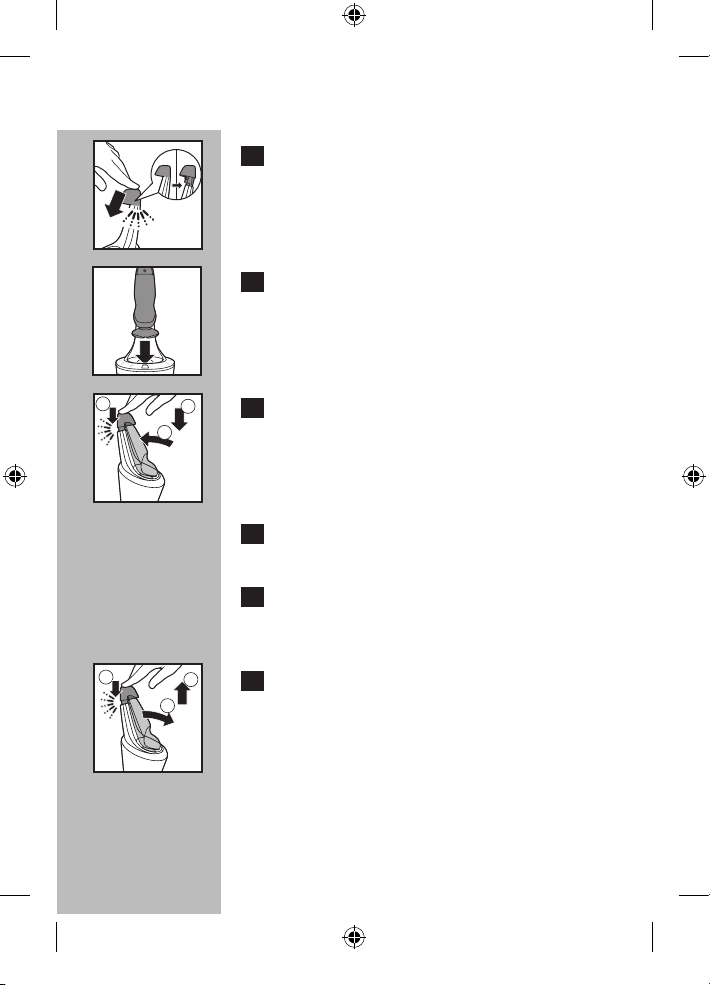
2 Press the top cap down to open the
SmartClean System.
C
3 Hold the shaver head side down above the
shaver holder with the display facing the
shaver holder.
C
4 Place the shaver into the holder (1), push
shaver back (2) and press down the top
cap to connect the shaver (3) (click).
The shaver will only fit in the SmartClean System
in one direction.
5 The battery indicator blinks slowly to
indicate the shaver is charging.
6 Charging requires one full hour. A fully
charged shaver has a cordless shaving time
of up to 60 minutes.
C
7 Press the top cap down (1), pull the shaver
forward (2) and lift shaver from holder (3).
1
2
3
1
2
3
4222_002_7353_1_DFU-Booklet_A6_v6.indd 15 06/06/17 16:14
ENGLISH
16
Recharging
1 Recharging requires one full hour.
Recharge when the display indicates the
battery is almost empty.
Quick Charge
When batteries are empty, recharging the shaver
for 5 minutes gives enough energy for one
cordless shave.
Put It To The Test & Shaving Tips
◗ 21 Day Trial and Conversion Process. It is a fact
that your skin and beard need time to adjust to
a new shaving system.
◗ Use your new shaver exclusively for 3 weeks to
fully enjoy the closeness of a Philips Norelco
shave.
◗ At first you may not get as close a shave as you
expect, or your face may even become slightly
irritated. This is normal since your beard and
skin will need time to adjust. Invest 3 weeks
and you’ll soon experience the full joy of your
new shaver.
◗ Stick with it! If you alternate shaving methods
during the adjustment period, it may make it
more difficult to adapt to the Philips Norelco
shaving system.
4222_002_7353_1_DFU-Booklet_A6_v6.indd 16 06/06/17 16:14
ENGLISH
17
◗ If you are still not convinced after 21 days,
Philips Norelco will refund you the full
purchase price as long as the request is
received within 45 days of purchase.
How To Shave With An Electric
Shaver
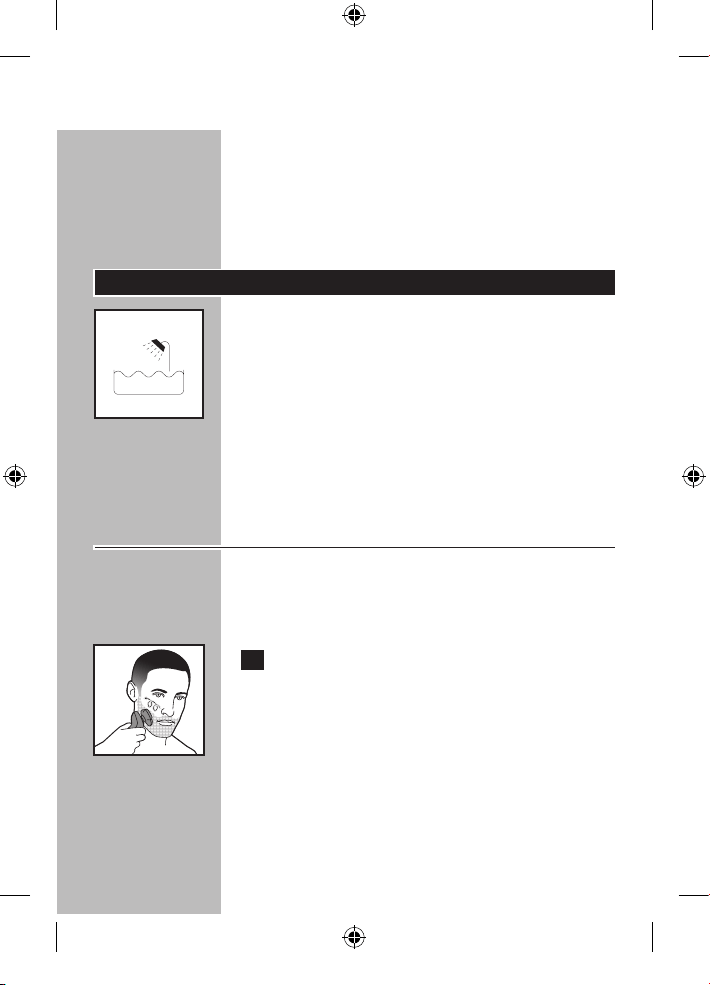
C◗ This symbol on the shaver indicates that the
shaver can be used in the bath or shower.
◗ Make sure the SmartClean System does not
get wet or near water.
◗ For hygienic reasons, the shaver should only
be used by one person.
◗ Use this shaver for its intended household use
as described in this manual.
Dry Shaving
◗ For best results on skin comfort, pre-trim
your beard if you have not shaved for 3 days
or longer.
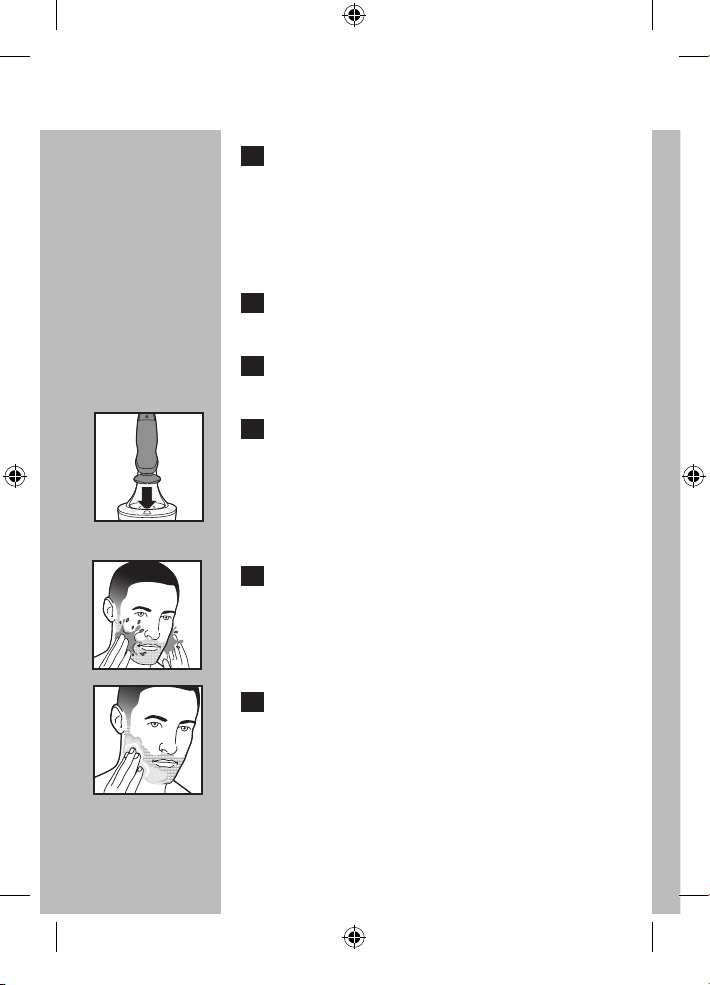
C 1 Turn shaver ON by pressing the on/off
button once. Shave against the direction
of beard growth using only circular
movements.
The display lights up briefly to show the remaining
battery status.
4222_002_7353_1_DFU-Booklet_A6_v6.indd 17 06/06/17 16:14
ENGLISH
18
2 Stretch your skin with your free hand so
blades can lift and cut whiskers. Gently
press shaver to skin so the floating heads
can follow the contours of your face.
DO NOT press too hard. Too much
pressure can pinch the skin into the combs.
3 Turn shaver OFF by pressing the on/off
button once.
4 Clean the shaver after each use (see
chapter ‘Cleaning’).
C 5 Place the shaver in the SmartClean System
to protect shaver heads.
Wet Shaving
You can also use the shaver on a wet face with
shaving foam or gel.
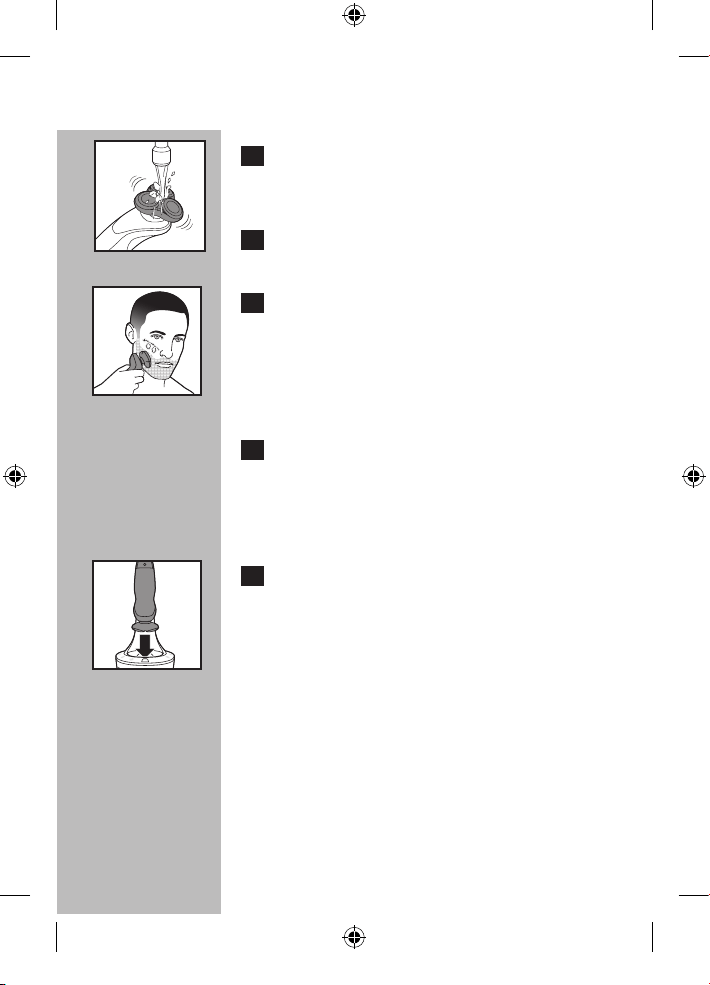
C 1 Apply some water to your skin.
C 2 Apply shaving foam or gel to your skin.
4222_002_7353_1_DFU-Booklet_A6_v6.indd 18 06/06/17 16:14
ENGLISH
19
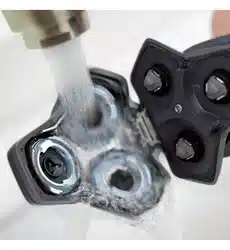
C 3 Rinse the shaving unit under the tap
to ensure that the shaving unit glides
smoothly over your skin.
4 Press the on/off button once to switch on
the shaver.
C 5 Move the shaving heads in circular
movements over your skin.
NOTE: Rinse the shaver under the tap regularly
to ensure that it continues to glide smoothly over
your skin.
6 Dry your face and thoroughly clean
the shaver after each use (see chapter
‘Cleaning’).
NOTE: Make sure you rinse all foam or gel off the
shaver.
C 7 Place the shaver in the SmartClean System
to protect shaver heads.
4222_002_7353_1_DFU-Booklet_A6_v6.indd 19 06/06/17 16:14
ENGLISH
20
Turbo+ Mode
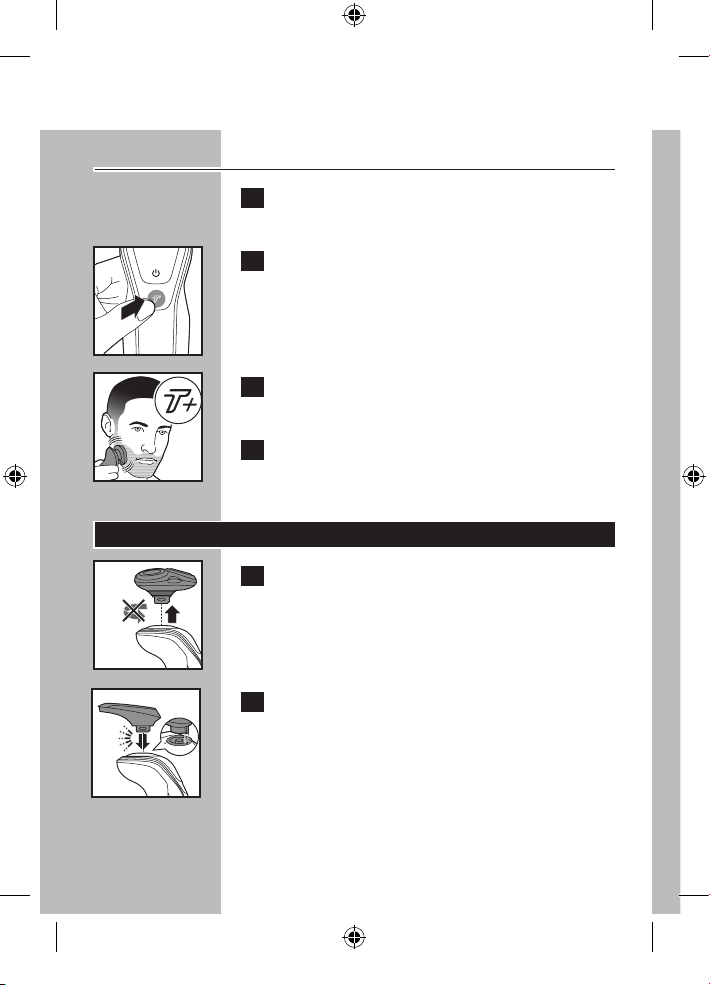
1 Turn shaver ON by pressing the on/off
button once.
C
2 Press the Turbo+ button once if you want to
shave areas of dense hair more quickly.
C
3 Move the shaving heads over your skin in
circular movements.
4 Turn off the Turbo+ mode by pressing the
Turbo button once.
Using the SmartClick Trimmer
C
1 Pull the shaving unit straight off the shaver.
NOTE: Do not turn the shaving unit while you
pull it off the shaver.
C
2 Insert the raised notch of the SmartClick
trimmer into the slot in the top of the
shaver. Press the trimmer down to attach it
to the shaver. You will hear a ‘click’.
4222_002_7353_1_DFU-Booklet_A6_v6.indd 20 06/06/17 16:14
ENGLISH
21
3 Turn shaver ON.
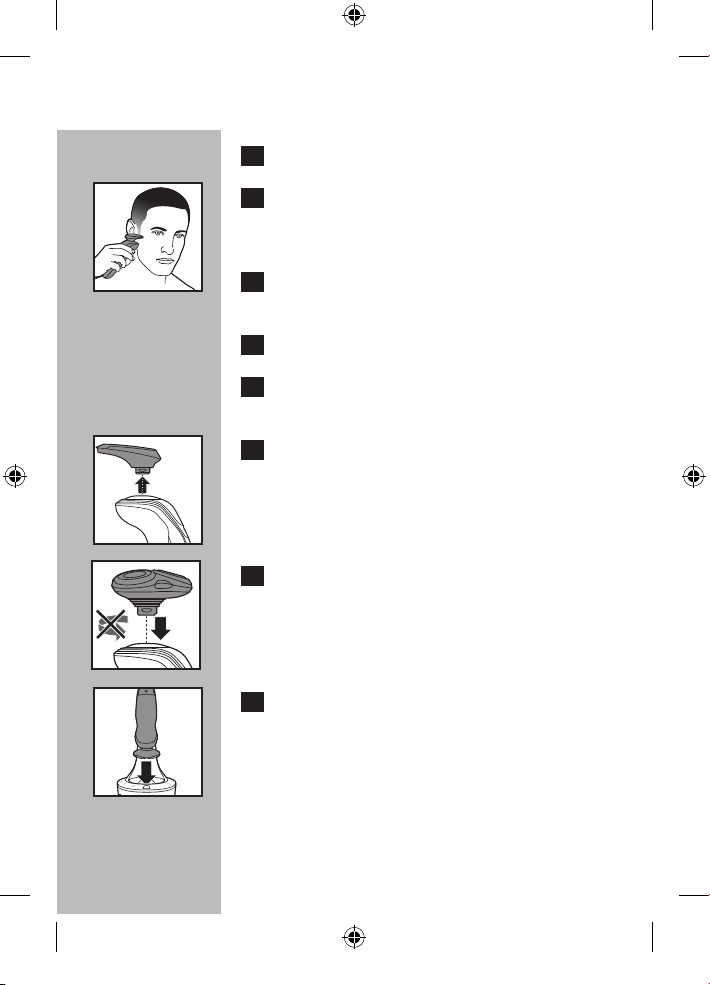
C 4 Hold trimmer to exact hairline desired.
Move trimmer downward with gentle
pressure.
5 Trim beard, moustache or sideburns using
the trimmer.
6 Turn shaver OFF when finished.
7 Thoroughly clean the trimmer (see
‘Cleaning’).
C 8 Pull the trimmer straight off the shaver.
NOTE: Do not turn or twist the trimmer while
you pull it off the shaver.
C 9 Insert the raised notch of the shaving unit
into the slot in the top of the shaver. Press
the shaving unit down to attach it to the
shaver. You will hear a ‘click’.
C 10 Place the shaver in the SmartClean System
to protect shaver heads.
4222_002_7353_1_DFU-Booklet_A6_v6.indd 21 06/06/17 16:14
ENGLISH
22
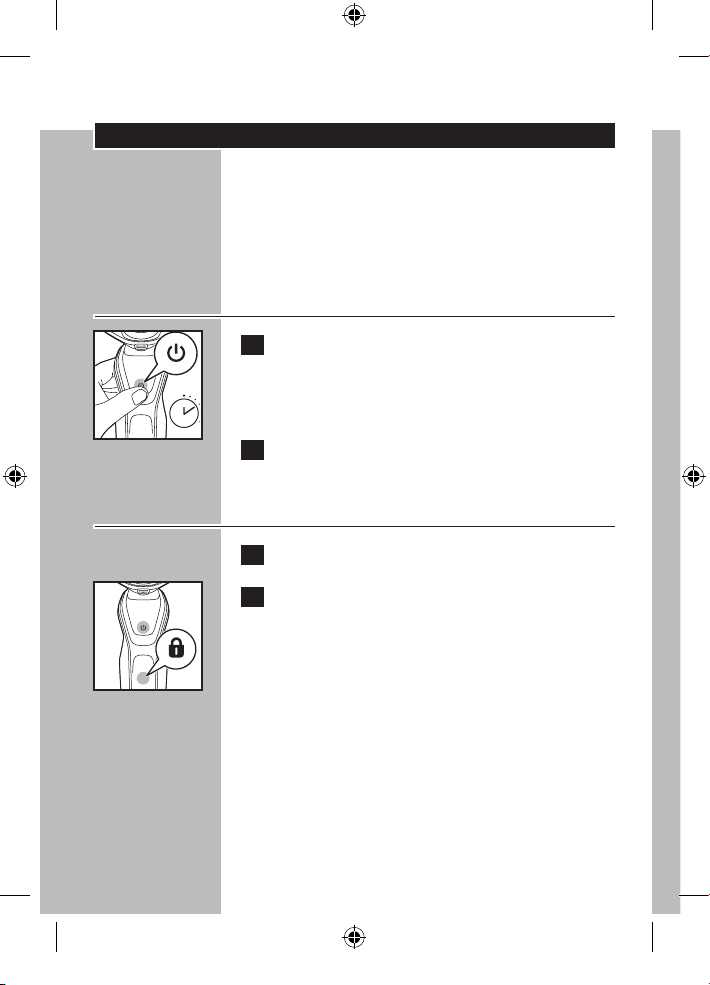
Travel Lock
If you are going to store the shaver for a longer
time period or if traveling, it is possible to lock the
shaver. The travel lock prevents the shaver from
being switched on by accident.
Activating the travel lock
C
1 Press the ON/OFF button for 3 seconds.
◗ The travel lock symbol lights up continuously
and the lock symbol blinks.
2 The travel lock has now been activated.
Deactivating the travel lock
1 Press the ON/OFF button for 3 seconds.
C 2 The lock symbol blinks and then lights up
continuously. The shaver is now ready for
use.
B
The shaver unlocks automatically when charging
in the SmartClean System or when connected to
an electrical outlet.
3 sec.
4222_002_7353_1_DFU-Booklet_A6_v6.indd 22 06/06/17 16:14
ENGLISH
23
Cleaning
◗ Always clean your shaver after each use.
◗ Regular cleaning guarantees better shaving
results.
◗ Never remove or replace shaving unit while
motor is on.
◗ Do not apply pressure to shaving head combs.
Do not touch shaving heads with hard objects
as this may dent or damage precision-made
slotted combs.
◗ Do not use shaver if shaving head combs are
damaged or broken. Facial injury may occur.
◗ Do not use abrasives, scourers or aggressive
liquids such as gasoline or acetone to clean
the shaver.
◗ Never dry the shaving unit with a towel or
tissue as this may damage the shaving heads.
Cleaning the Shaving Unit
The shaving heads may be quickly cleaned after
each use by rinsing with hot water. Water from
the tap should be on a hot setting, BUT BE
CAREFUL TO TEST WATER FIRST SO AS NOT
TO BURN OR SCALD HANDS.
◗ Regular cleaning guarantees better shaving
results.
◗ While rinsing shaving heads, water may drip
out of the base of shaver. This is a normal
occurrence.
4222_002_7353_1_DFU-Booklet_A6_v6.indd 23 06/06/17 16:14
ENGLISH
24
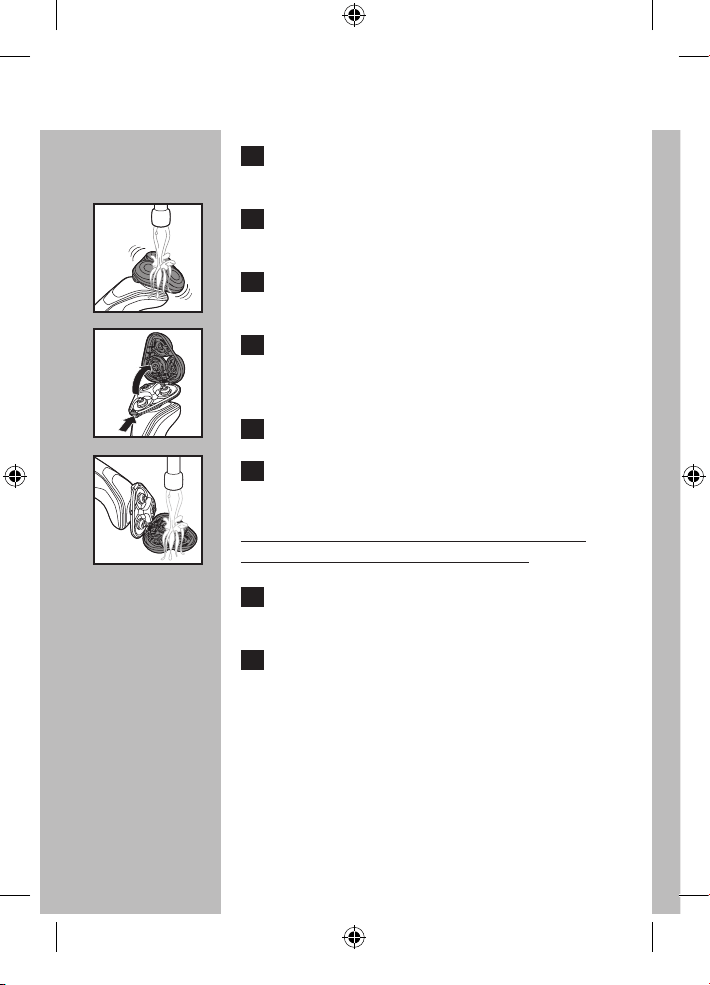
1 Turn the shaver ON by pressing the on/off
button once.
C 2 For best results rinse the shaving unit by
running under hot water for a few minutes.
3 Turn the shaver OFF.
C
4 Press the Shaver Head Release Button to
open the shaving unit.
5 Rinse the hair chamber under the tap.
C
6 Rinse the shaving head holder under hot
tap water for 30 seconds.
BE CAREFUL TO TEST WATER FIRST SO AS
NOT TO BURN OR SCALD HANDS.
7 Carefully shake off excess water and let
the shaving head holder air dry completely.
8 Close the shaving head holder. You will
hear a ‘click’.
4222_002_7353_1_DFU-Booklet_A6_v6.indd 24 06/06/17 16:14
ENGLISH
25
Preparing SmartClean System For
Use
CAUTION: Keep cleaning cartridge(s) out of
reach of children. Do not take internally. Avoid
contact with eyes. In case of eye contact,
thoroughly flush with cold water. If irritation
persists, get medical attention.
Important
◗ For optimal cleaning results, replace the
cleaning cartridge every 3 months when used
weekly.
◗ Only use this shaver, Smart
Clean System
and
cleaning cartridge provided to charge or clean
shaver.
◗ Other Philips Norelco shavers may not work
with this
SmartClean System.
◗ To avoid evaporation, do not expose cleaning
solution to direct sunlight.
◗ The SmartClean System thoroughly cleans but
does not disinfect your shaver, therefore, do
not share shaver with others.
◗ The charging plug converts 100-240V AC to
less than 24V DC.
◗ Place the
SmartClean System
on a flat,
stable and fluid-resistant surface to avoid any
leakage. Be careful not to tip or move the
SmartClean System
when it is ready for use.
◗ Use this appliance for its intended household
use as described in this manual.
4222_002_7353_1_DFU-Booklet_A6_v6.indd 25 06/06/17 16:14
ENGLISH
26
C
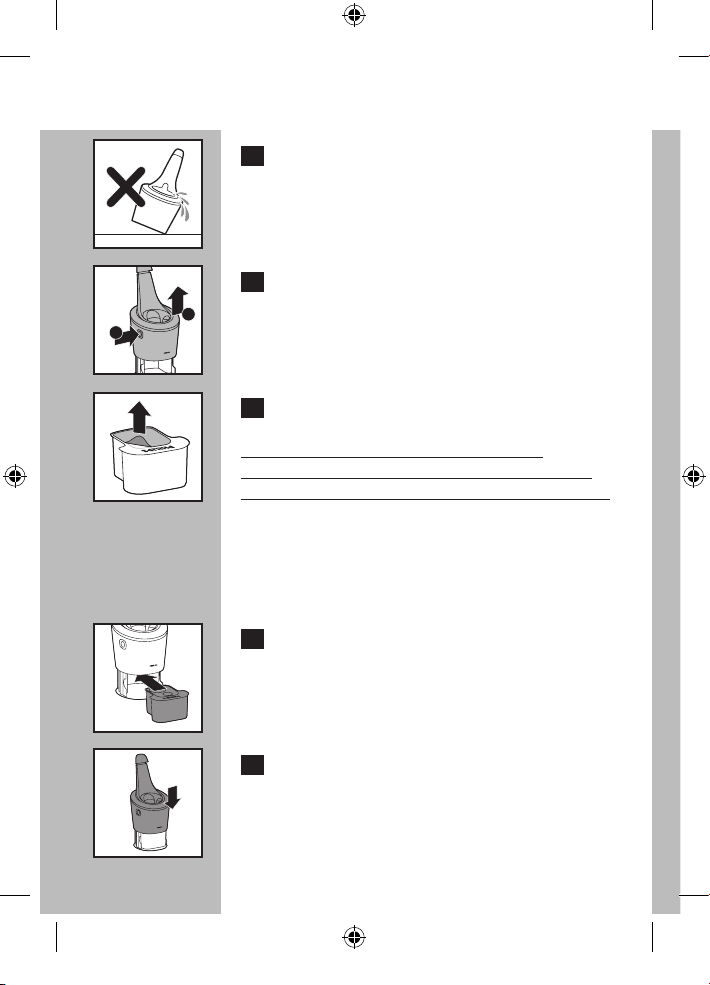
1 Place the SmartClean System on a flat, level
surface.
To prevent leaking, do not tilt the SmartClean
System.
C 2 While holding the SmartClean System with
one hand, press the button located on the
side of the SmartClean System (1) and lift
the SmartClean System (2).
C 3 Remove the seal off the cleaning cartridge.
NOTE: ONLY USE PHILIPS NORELCO
SMARTCLEAN CARTRIDGE (MODEL JC302
OR JC303) WITH THE SMARTCLEAN SYSTEM.
◗ When the cleaning cartridge filter is full, the
replacement symbol blinks indicating the
cleaning cartridge should be replaced. See
'Replacing the SmartClean System Cartridge'.
C 4 Place the cleaning cartridge in the
SmartClean System.
C 5 While holding the SmartClean System with
one hand, gently push the top part of the
SmartClean System back down. You will
hear a 'click'.
1
2
4222_002_7353_1_DFU-Booklet_A6_v6.indd 26 06/06/17 16:14
ENGLISH
27
When the SmartClean System is ready for use,
do not move appliance to prevent leakage.
Cleaning the Shaver in the
SmartClean System
◗ If the shaver does not contain enough power
for one (1) shave, the SmartClean System
may not work properly. Charge the shaver
in the
SmartClean System
before using the
SmartClean System to clean your shaver.
◗ If you use the shaver with shaving foam or gel,
quickly rinse under hot water before cleaning
in the SmartClean System.
1 Connect the small plug to the
SmartClean
System
. Connect the power plug into any
100V to 240V AC outlet. Use only the
power cord provided.
2. Place the SmartClean System on a flat,
level surface. Make sure the seal has been
removed from the cleaning cartridge (see
‘Preparing SmartClean System For Use’).
C 3 Press the top cap down to open the
SmartClean System.
4222_002_7353_1_DFU-Booklet_A6_v6.indd 27 06/06/17 16:14
ENGLISH
28
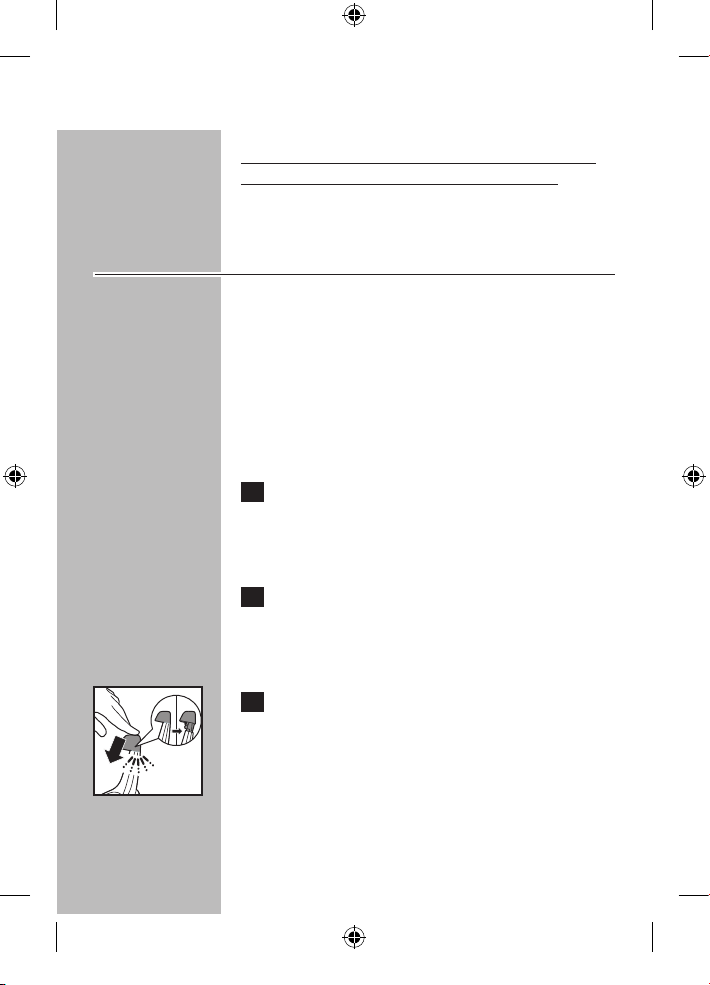
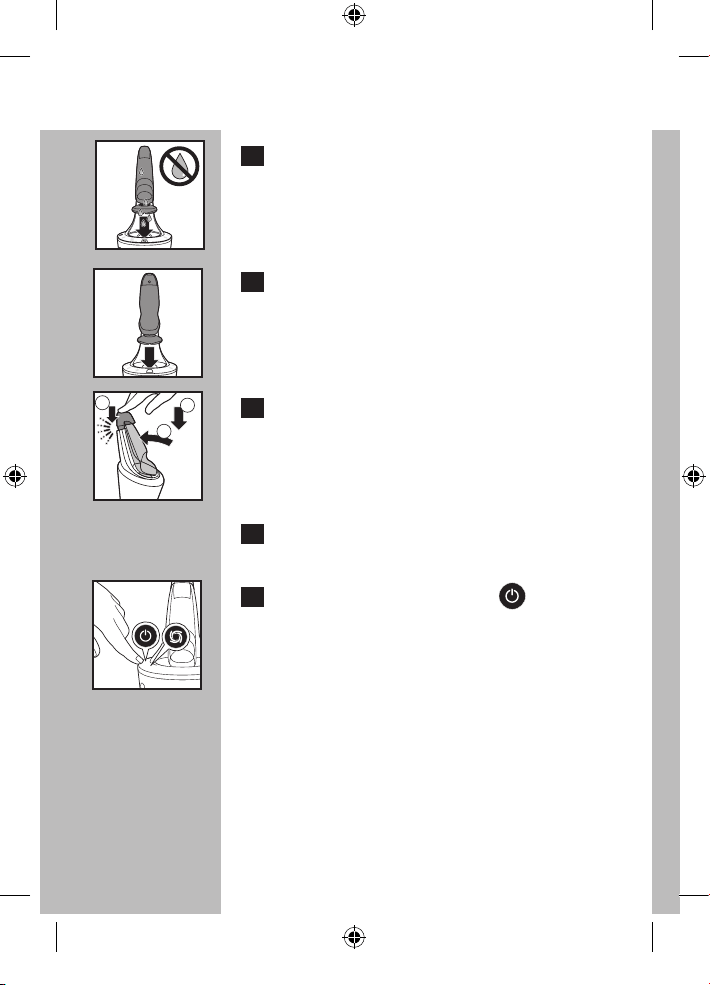
C 4 Shake off any excess water from shaver
before placing in the SmartClean System.
C 5 Hold the shaver head side down above the
shaver holder with the display facing the
shaver holder.
C 6 Place the shaver into the holder (1), push
shaver back (2) and press down the top
cap to connect the shaver (3) (click).
The shaver will only fit in the SmartClean System
in one direction.
7 The battery symbol blinks slowly to
indicate shaver is charging.
C 8 Press the ON/OFF button ( ) on the
SmartClean System to start the cleaning
cycle.
The cleaning symbol will blink.
◗ The cleaning cycle takes approximately
10 minutes.
◗ Do not press the ON/OFF button while the
cleaning cycle is running. If this does occur, the
cleaning cycle will stop and the cleaning symbol
stops blinking. The cleaning cycle can
be re-started by pressing the ON/OFF button
once.
1
2
3
4222_002_7353_1_DFU-Booklet_A6_v6.indd 28 06/06/17 16:14
ENGLISH
29
◗ If the power plug is disconnected before the
cleaning cycle is complete, reconnect the plug
into the outlet and the cleaning cycle can be
re-started by pressing the ON/OFF button
once.
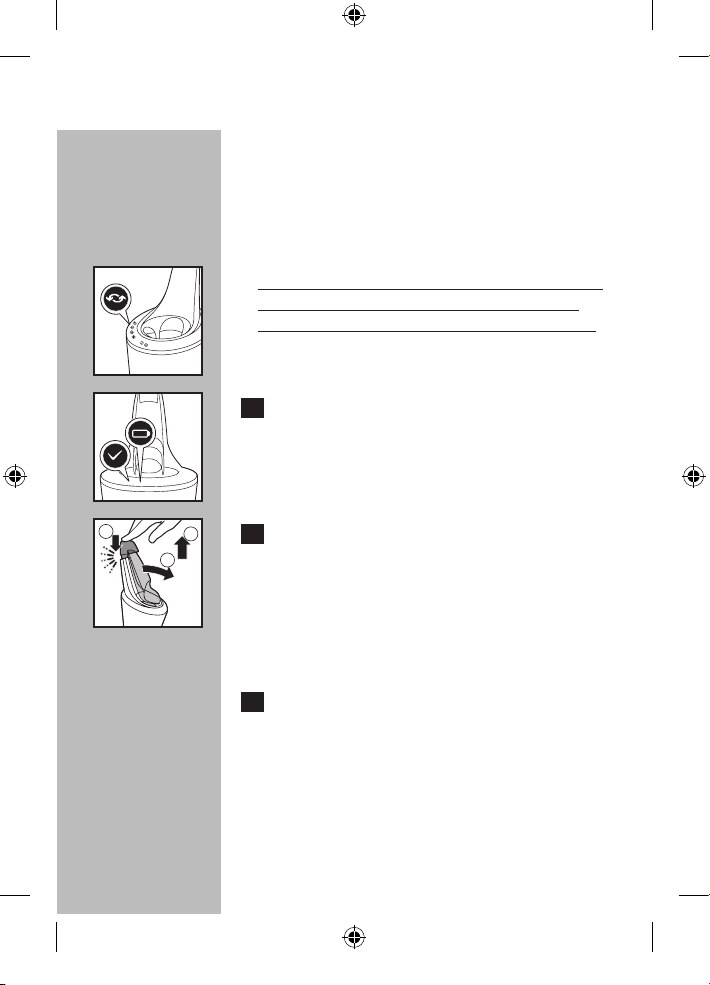
C NOTE: When the cleaning cartridge filter is full,
the replacement symbol blinks orange. (See
'Replacing the SmartClean System Cartridge').
C 9 When the cleaning cycle is complete and
the shaver is hygienically clean, the ready
symbol lights up continuously.
The battery symbol on the shaver will light up to
indicate the shaver is fully charged.
C 10 Press the top cap down (1), pull the
shaver forward (2) and lift shaver from
SmartClean holder (3).
◗ The SmartClean System automatically turns
off 30 minutes after the cleaning cycle is
complete.
11 Carefully shake off excess liquid and let the
shaving unit air dry completely.
You can also leave the shaver in the SmartClean
System overnight to dry.
1
2
3
4222_002_7353_1_DFU-Booklet_A6_v6.indd 29 06/06/17 16:14
ENGLISH
30
Cleaning the Trimmer
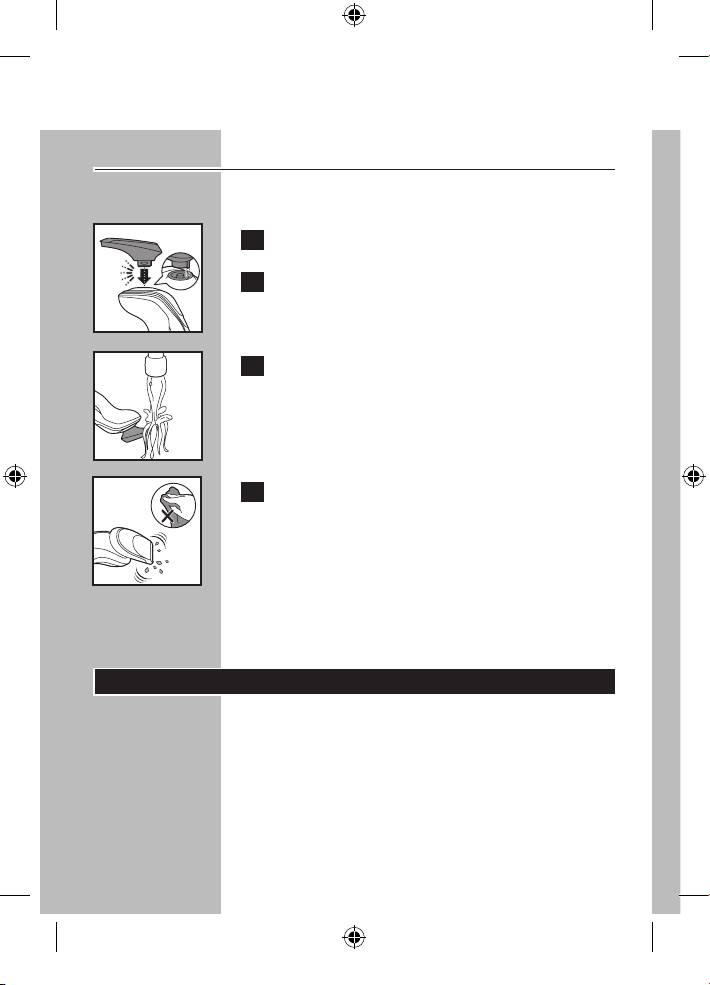
Clean the trimmer after each use.
C 1 Attach the trimmer to shaver.
2 Turn shaver ON.
C 3 Rinse the trimmer under hot water. BUT
BE CAREFUL TO TEST WATER FIRST SO
AS NOT TO BURN OR SCALD HANDS.
C 4 Turn the shaver OFF. Shake off excess
water and allow trimmer to air dry
thoroughly.
Tip: For optimal trimmer performance, lubricate
the trimmer teeth with one drop of mineral
oil every 6 months.
Replacing the Shaving Heads
◗ Replace the shaving heads once a year for
optimal shaving results.
◗ Replace damaged or worn shaving heads with
model SH50 Philips Norelco shaving heads
only.
4222_002_7353_1_DFU-Booklet_A6_v6.indd 30 06/06/17 16:14
ENGLISH
31
Replacement Shaving Heads
Indication
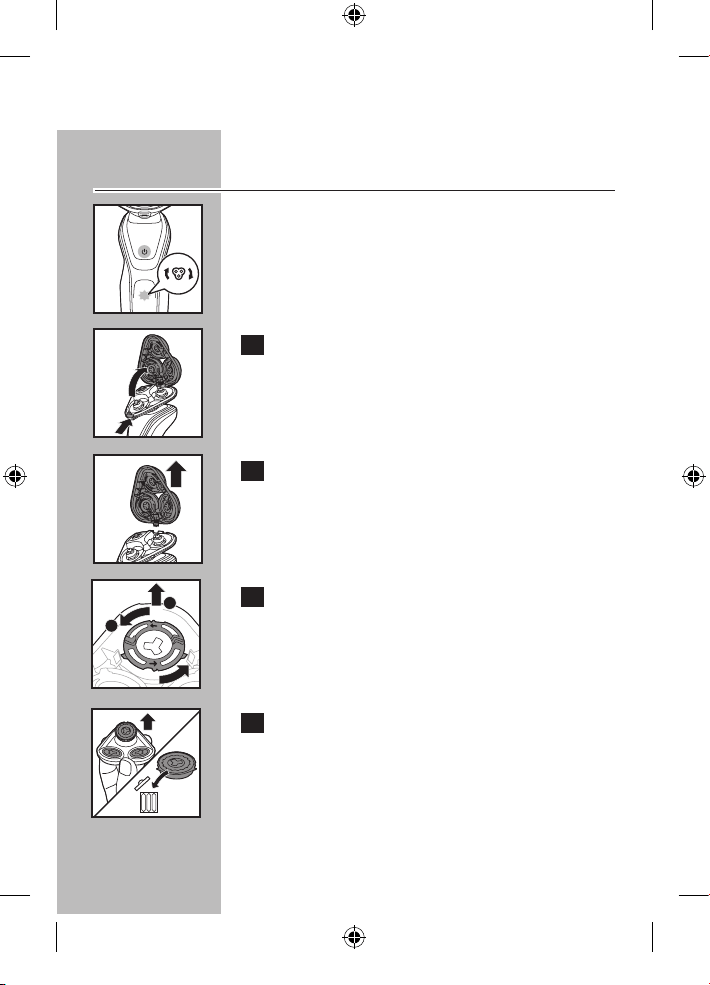
C ◗ The shaving unit symbol lights up continuously
when the shaver is turned off to remind
you to replace your shaving heads to obtain
optimal shaving results.
C 1 Press the shaver head release button to
open the shaving unit.
C 2 Pull the shaving head holder off the
bottom part of the shaving unit.
C 3 Turn the retaining ring counterclockwise
(1) and lift it off the shaving head (2).
C 4 Remove the shaving heads from the
shaving head holder and discard.
DO NOT discard the retaining ring.
1
2
4222_002_7353_1_DFU-Booklet_A6_v6.indd 31 06/06/17 16:14
ENGLISH
32
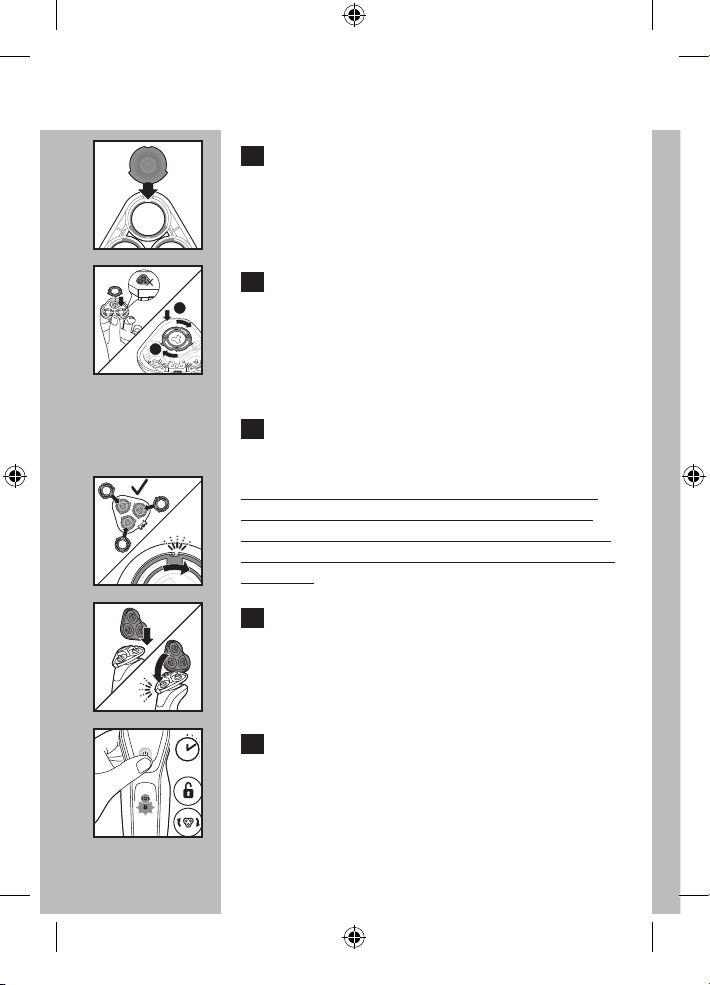
C 5 Place a new shaving head in the holder.
Make sure the projections of the shaving head
fit exactly into the recesses on the shaving head
holder.
C 6 Hold the shaving head holder in your hand
and place the retaining ring on the shaving
head holder (1). Turn clockwise (2) to
reattach the retaining ring.
Do not place the shaving head holder on a
surface, as damage may occur.
7 Repeat this process for the other two
cutters and combs.
C
NOTE: Each retaining ring has two recesses and
two projections that fit exactly in the projections
and recesses of the shaving head holder. Make sure
you hear a 'click' indicating the retaining ring is fixed
into place.
C 8 Reinsert the hinge of the shaving head
holder into the slot of the shaving unit.
Close the shaving head holder (click).
C 9 To reset the shaver, press and hold the On/
Off button for approximately 7 seconds.
7 sec.
1
2
4222_002_7353_1_DFU-Booklet_A6_v6.indd 32 06/06/17 16:14
ENGLISH
33
Replacing the SmartClean System
Cleaning Cartridge
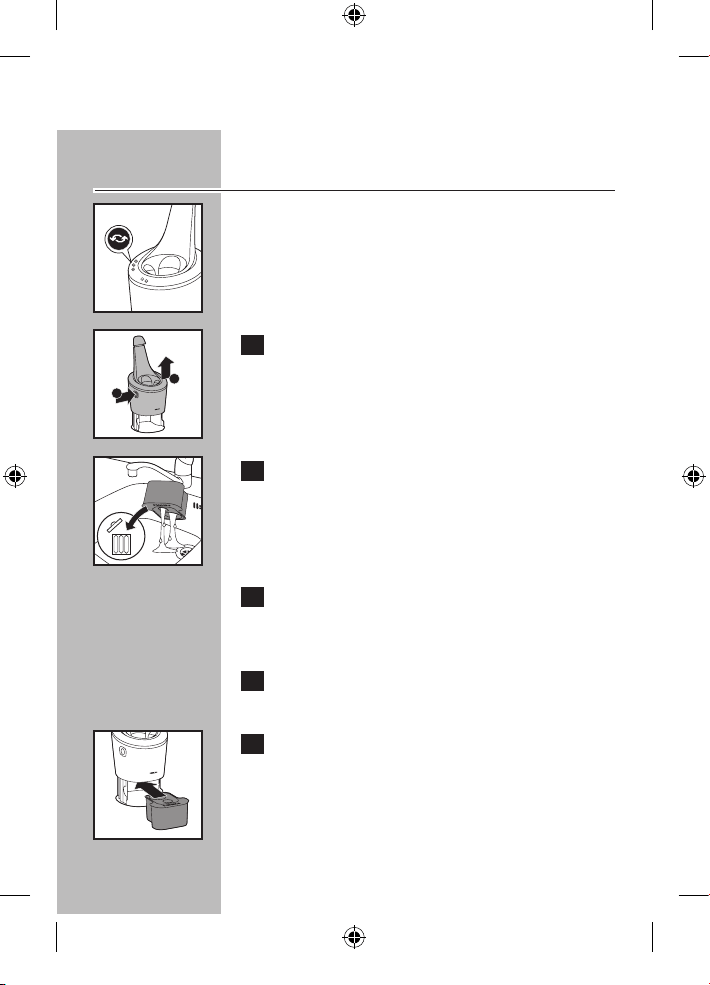
C ◗ For optimal cleaning results, replace the
cleaning cartridge when the replacement
indicator blinks orange or every 3 months if
used weekly.
C 1 While holding the SmartClean System
with one hand, press the cartridge release
button on the side of the SmartClean
System (1) and lift the SmartClean System
(2).
C 2 Remove the empty cleaning cartridge and
pour any remaining cleaning fluid out of
the cleaning cartridge.
You can safely pour the cleaning fluid down the
sink.
3 Discard the empty cleaning cartridge.
Contact your local town or city officials for
recycling information.
4 Remove the seal off the new cleaning
cartridge.
C 5 Place the new cleaning cartridge in the
SmartClean System.
1
2
4222_002_7353_1_DFU-Booklet_A6_v6.indd 33 06/06/17 16:14
ENGLISH
34
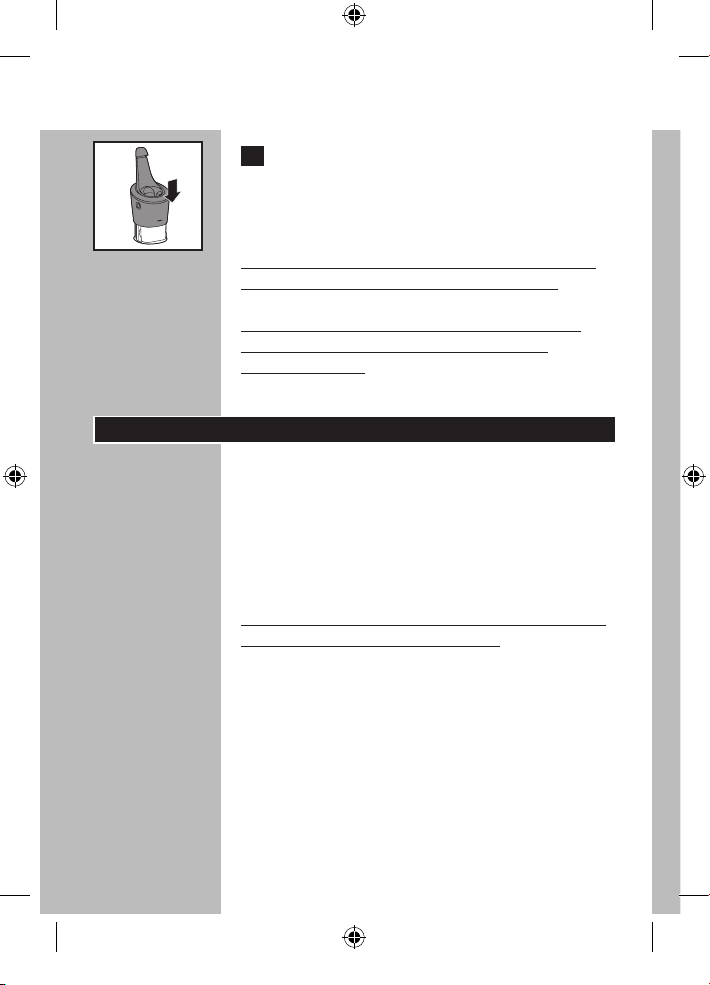
C 6 While holding the SmartClean System with
one hand, gently push the top part of the
SmartClean System back down. You will
hear a 'click'.
When the SmartClean System is ready for use,
do not move appliance to prevent leakage.
This shaver/SmartClean System has no other
user-serviceable parts. For assistance, call
1-800-243-3050.
Maintenance
◗ Always remove shaver from the SmartClean
System before cleaning appliance.
◗ The SmartClean System may be wiped clean
using a damp cloth.
◗ Water from the tap should be on a warm
setting to clean any washable parts.
NOTE: DO NOT place or clean any parts of the
SmartClean System in a dishwasher.
4222_002_7353_1_DFU-Booklet_A6_v6.indd 34 06/06/17 16:14
ENGLISH
35
Storage
◗ The shaver can be placed in the travel case or
SmartClean System for safe storage.
◗ Be sure shaver is turned off. Remove cord
from outlet before storing in a safe, dry
location where it will not be crushed, banged,
or subject to damage.
◗ Do not wrap power cord around shaver or
SmartClean System when storing.
◗ Store cord in a safe location where it will not
be cut or damaged.
◗ Do not place or store SmartClean System
where it can fall or be pulled into a tub or
sink, water or other liquid while plugged in.
Assistance
◗ For assistance, visit our website:
www.philips.com/support or
call toll free 1-800-243-3050
◗ Online information is available 24 hours a day,
7 days a week.
4222_002_7353_1_DFU-Booklet_A6_v6.indd 35 06/06/17 16:14

ENGLISH
36
Disposal
C
◗ This Philips Norelco shaver contains a
rechargeable lithium-ion battery
which must be disposed of properly.
◗ Contact your local town or city officials
for battery disposal information or call
1-800-822-8837 or www.call2recycle.org for
battery drop-off locations.
◗ Your product is designed and manufactured
with high quality materials and components,
which can be recycled and reused. For
recycling information, please contact your
local waste management facilities or visit
www.recycle.philips.com.
◗ For assistance, visit our website,
www.philips.com/support or call toll free:
1-800-243-3050.
4222_002_7353_1_DFU-Booklet_A6_v6.indd 36 06/06/17 16:14
ENGLISH
37
Accessories
C
◗ Replacement Shaving Heads
Model SH50 - For maximum shaver
performance, replace your Philips Norelco
shaving heads once a year.
◗ SmartClick Beard Styler
Model RQ111 - Philips Norelco SmartClick
Beard Styler
◗ Replacement Cleaning Cartridge
Model JC302 - Philips Norelco SmartClean
Cleaning Cartridge, 2-Pack
Model JC303 - Philips Norelco SmartClean
Cleaning Cartridge, 3-Pack
◗ SmartClick Skin Cleansing Brush
Model RQ585 - Philips Norelco SmartClick
Skin Cleansing Brush
◗ Philips Norelco Shaver Accessories may be
purchased at a store near you, or on our
website www.philips.com/store
4222_002_7353_1_DFU-Booklet_A6_v6.indd 37 06/06/17 16:14
FULL TWO YEAR WARRANTY
Philips North America LLC warrants this new product (except cutters and combs) against
defects in materials or workmanship for a period of two years from the date of purchase, and
agrees to repair or replace any defective product without charge.
IMPORTANT: This warranty does not cover damage resulting from accident, misuse or abuse,
lack of reasonable care, the affixing of any attachment not provided with the product or loss of
parts or subjecting the product to any but the specified voltage or batteries.*
NO RESPONSIBILITY IS ASSUMED FOR ANY SPECIAL, INCIDENTAL OR
CONSEQUENTIAL DAMAGES.
In order to obtain warranty service, simply go to www.philips.com/support for assistance.
It is suggested that for your protection you return shipments of product by insured mail,
insurance prepaid. Damage occurring during shipment is not covered by this warranty.
NOTE: No other warranty, written or oral, is authorized by Philips North America LLC.
This warranty gives you specific legal rights, and you may also have other rights which vary
from state to state. Some states do not allow the exclusion or limitation of incidental or
consequential damages, so the above exclusion and limitations may not apply to you.
* Read enclosed instructions carefully.
Manufactured for:
Philips Personal Health
a division of Philips North America LLC
P.O.Box 10313, Stamford, CT 06904
This symbol on the product’s nameplate means it is
listed by Underwriters’ Laboratories, Inc.
Norelco, Tripleheader, Lift and Cut, and are registered trademarks of Philips North
America LLC.
PHILIPS and Philips Shield are registered trademarks of Koninklijke Philips N.V.
© 2017 Philips North America LLC. All rights reserved.
ENGLISH
38
4222_002_7353_1_DFU-Booklet_A6_v6.indd 38 06/06/17 16:14
INSTRUCCIONES
IMPORTANTES DE
SEGURIDAD
Cuando utilice un artefacto eléctrico, tome las precauciones
básicas.
Lea las instrucciones antes de utilizar este producto.
PELIGRO
Para reducir el riesgo de descarga eléctrica:
1. No intente tocar una afeitadora enchufada ni un sistema
SmartClean que haya caído al agua. Desenchúfelo
inmediatamente.
2. El conector y los accesorios conectados a él no deben
sumergirse ni usarse en la ducha.
3. No utilice el artefacto con un cable de extensión.
4. No coloque ni guarde el sistema SmartClean en un lugar
donde pueda caerse en la bañera o en el lavabo. No sumerja
el sistema SmartClean ni lo deje caer en el agua u otros
líquidos.
5. Siempre desenchufe la afeitadora o el sistema SmartClean
de la toma de corriente inmediatamente después de su uso,
excepto cuando se esté recargando la afeitadora o el sistema
SmartClean.
6. Antes de limpiar la afeitadora, desenchufe y desconecte el
cable de alimentación.
7. Las baterías utilizadas en este dispositivo pueden generar
incendios o provocar quemaduras químicas si no se manipulan
correctamente. No las desarme ni las exponga a temperaturas
superiores a 100°C (212°F) o a fuentes de calor.
ADVERTENCIA
Para reducir el riesgo de quemaduras, incendios, descargas
eléctricas y lesiones:
ESPAÑOL
39
4222_002_7353_1_DFU-Booklet_A6_v6.indd 39 06/06/17 16:14

1. El uso de este dispositivo debe estar bajo estricta supervisión
cuando esté operado por niños, por personas con capacidades
mentales, sensoriales o físicas limitas o por personas con
discapacidades, o cuando se emplee en o cerca de estos.
2. Utilice esta afeitadora o el sistema SmartClean para
el uso doméstico que se describe en este manual. No
utilice accesorios ni cartuchos de limpieza que no estén
recomendados por Philips North America LLC.
3. Nunca utilice esta afeitadora ni el sistema SmartClean si el
cable o el enchufe de carga están dañados, si no funciona
correctamente, si se cayó, si está dañada o si se sumergió
en agua mientras estaba conectada. Para solicitar asistencia,
comuníquese al 1-800-243-3050.
4. Mantenga la afeitadora, el sistema SmartClean, el cable y el
enchufe de carga lejos de superficies calientes.
5. No deje caer ni introduzca ningún objeto en las aberturas.
6. No utilice el adaptador en o cerca de una toma de
corriente eléctrica que contiene un ambientador para evitar
daños en el adaptador.
7. No limpie, cargue ni enchufe la afeitadora ni el sistema
SmartClean al aire libre ni los utilice en lugares donde se
utilicen aerosoles (sprays) o se administre oxígeno.
8. No utilice esta afeitadora con un peine deteriorado o roto,
ya que podría ocasionar lesiones en el rostro.
9. Siempre coloque, en primer lugar, el enchufe en la afeitadora
o en el sistema SmartClean, luego, conecte el cable a la
toma de corriente y, finalmente, coloque la afeitadora en
el sistema SmartClean. Asegúrese de que el enchufe esté
insertado firmemente en la afeitadora, hasta la marca que
aparece en el conector. Para desconectarlo, apague el
sistema SmartClean y extraiga el enchufe de carga de la
toma de corriente.
10. Nunca exponga la afeitadora ni el sistema SmartClean a la
luz solar directa ni los guarde en lugares con temperaturas
superiores a los 60°C (140°F).
ESPAÑOL
40
4222_002_7353_1_DFU-Booklet_A6_v6.indd 40 06/06/17 16:14
GARANTÍA DE DEVOLUCIÓN DEL IMPORTE
DE 45 DÍAS
Use su nueva afeitadora Philips Norelco para hombres como método exclusivo
de afeitado durante tres semanas para disfrutar de un afeitado cómodo y al ras.
Esto permite que su pelo y su piel se acostumbren al sistema de afeitado Philips
Norelco. Si después de este período de prueba no está satisfecho con los resul-
tados de su afeitadora Philips Norelco, puede devolver el producto con el recibo
de compra que contenga la fecha de adquisición y le reembolsaremos el precio de
compra íntegramente. La afeitadora se debe enviar prepagada por medio
de correo certificado con el recibo de compra original que indique la
fecha de compra, el importe abonado y el formulario de autorización
de reembolso garantizado del dinero. No nos responsabilizamos por la
pérdida de la correspondencia. La fecha de envío debe estar dentro de los 45
días posteriores a la compra. Philips Norelco se reserva el derecho de verificar el
precio de compra de la afeitadora y limitar el reembolso al precio de venta al por
menor sugerido.
Para obtener un formulario de autorización de reembolso garantizado
del dinero, llame al número 1-800-243-3050 para obtener asistencia. La
entrega del cheche de reembolso sucederá de 6 a 8 semanas DESPUÉS
de recibir el producto devuelto.
11. Mantenga seco el cable en todo momento. No lo manipule
con las manos mojadas.
12. Para evitar dañar el cable, no lo enrolle alrededor de la
afeitadora ni del sistema SmartClean.
13. No intente abrir el artefacto para cambiar la batería.
14. Utilice únicamente el conector de alimentación y los
accesorios suministrados con el artefacto.
CONSERVE ESTAS
INSTRUCCIONES
IMPORTANTE: el conector de energía contiene un
transformador. No lo sustituya por otro para evitar situaciones
de riesgo.
ESPAÑOL
41
4222_002_7353_1_DFU-Booklet_A6_v6.indd 41 06/06/17 16:14
ESPAÑOL
42
Tabla de contenido Tabla de contenido
Características .............................................. 43
Pantalla LED ..................................................46
Antes del primer uso ..................................48
Carga ...............................................................49
Recarga ........................................................... 51
Carga rápida .................................................. 52
Prueba y consejos de afeitado .................. 52
Cómo usar una afeitadora eléctrica .......53
Uso del recortador SmartClick ............... 56
Sistema de Bloqueo .....................................57
Limpieza ..........................................................59
Reemplazo de los cabezales
de afeitado .....................................................68
Mantenimiento..............................................72
Almacenamiento ..........................................73
Asistencia ....................................................... 74
Eliminación .....................................................75
Accesorios ..................................................... 76
Garantía ..........................................................77
4222_002_7353_1_DFU-Booklet_A6_v6.indd 42 06/06/17 16:14
ESPAÑOL
43
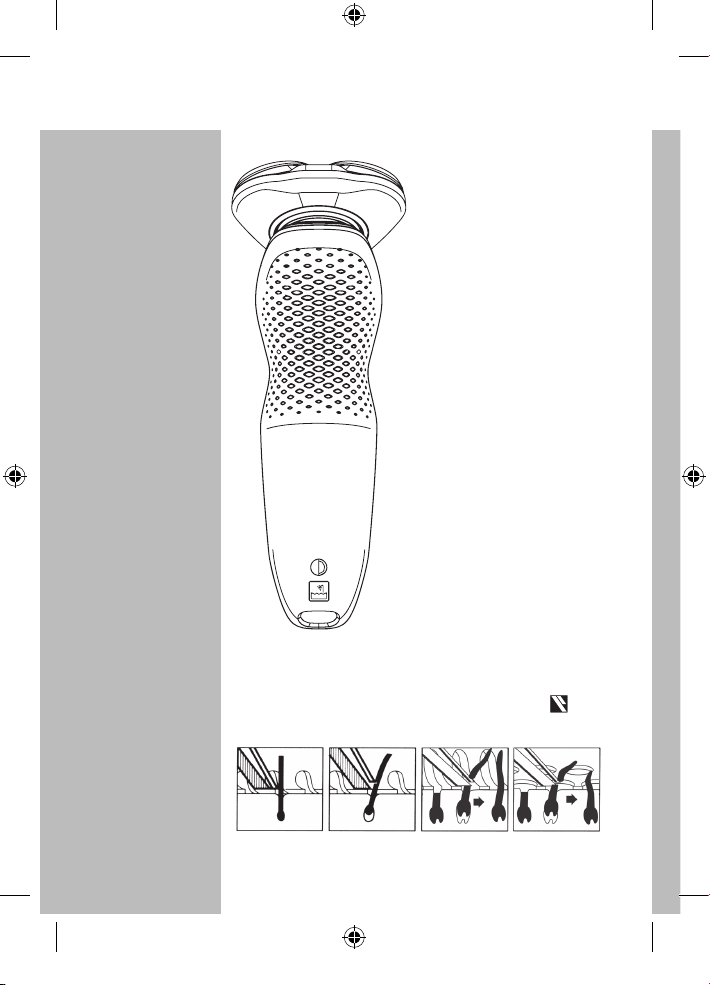
Características
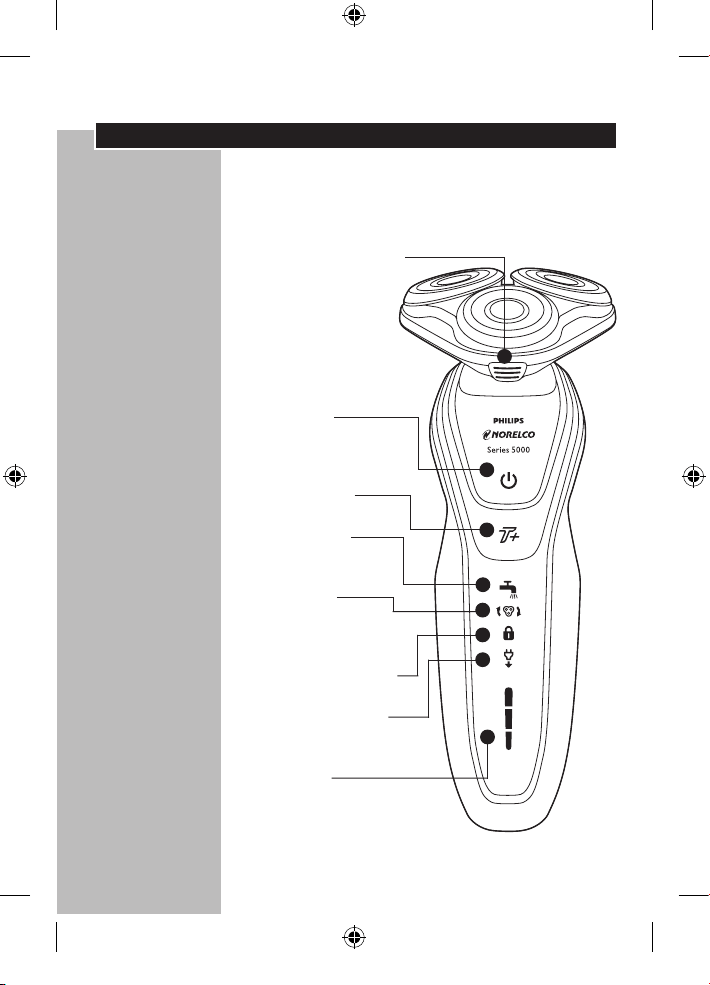
Tecnología DynamicFlex
Functionamiento del sistema Super Lift & Cut
Boton de liberación
del cabezal
de afeitado
• Cámara de
recolección
de vello recoge
el pelo afeitado
Electrónico
Botón de
encendido/apagado
Modo Turbo+
Recortadorio
de limpieza
Reemplazo
Cabezales de
afeitado Indicador
Sistema de bloqueo
'Desenchufar para
utilizar' Indicador
Pantalla de
la batería
• Carga de batería,
Indicadores
Cargado y Bajo
4222_002_7353_1_DFU-Booklet_A6_v6.indd 43 06/06/17 16:14
ESPAÑOL
44
Recortador de Precisión
SmartClick
Funda de viaje (S5570CC)
Voltaje universal
automático entre
100 y 240 V CA
Se recarga en 1 hora. La
carga completa proporciona
hasta 60 minutos de tiempo
de afeitado sin cable
Carga rápida -
Para un afeitado
Sin cables -
Para afeitarse sin cables
Garantía total por 2 años
Garantía de devolución del
importe de 45 días
El Sistema de Afeitado de Philips Norelco
Lift and Cut proporciona un confortable apurado:
El surco dirige la
barba más cerca del
sistema de corte
El elevador levanta
el pelo
Ranuras para
cortar los pelos
más largos
Agujeros para cortar
pelos cortos con un
apurado aún mayor
4222_002_7353_1_DFU-Booklet_A6_v6.indd 44 06/06/17 16:14
ESPAÑOL
45
Características
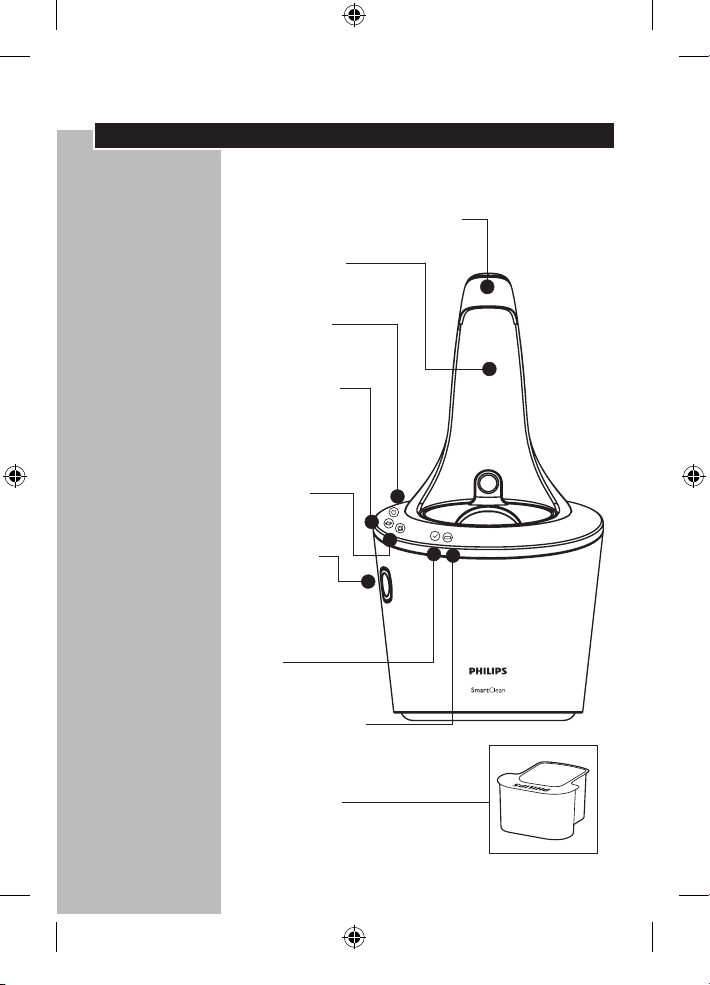
Sistema SmartClean
SmartClean Tapa del sistema
Soporte para
la afeitadora
Encendido/
Apagado botón
Indicador de
reemplazo
del cartucho
de limpieza
Limpieza
indicador
Cartucho
de limpieza
botón de
liberación
Listo
indicador
Carga indicador
Cartucho de
limpieza
4222_002_7353_1_DFU-Booklet_A6_v6.indd 45 06/06/17 16:14
ESPAÑOL
46
Pantalla LED
◗ Quite cualquier adhesivo o lámina protectora
de la pantalla antes de usar la afeitadora.
◗ La pantalla proporciona la siguiente
información:
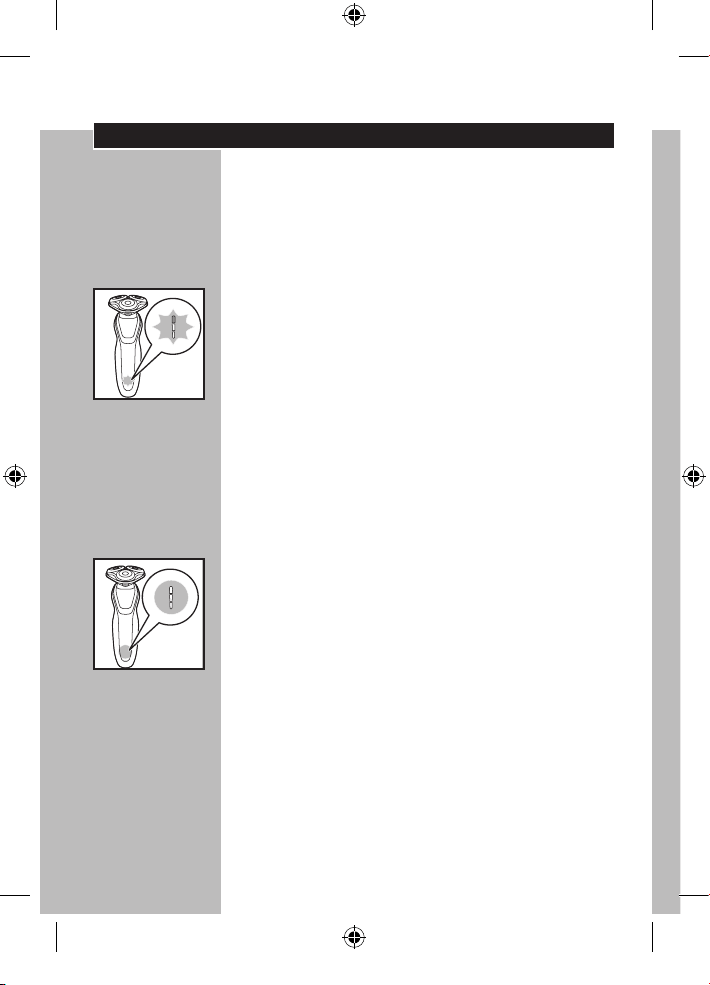
◗ Indicador de carga
C
- Carga rápida: Cuando se conecta el cable de
alimentación a una toma de corriente eléctrica,
las luces del indicador de carga de la batería de
hasta uno después del otro continuamente.
Cuando la luz de carga inferior parpadea
lentamente, la afeitadora tiene suficiente energía
para un afeitado.
- De carga continúa, cada luz parpadeará y
continuación, se illumina de forma continua para
indicar cuál es el nivel hasta el que se ha cargado
la batería.
◗ Indicador de carga completa
C
- Cuando la batería se haya cargado
completamente, se iluminan todas las luces
de carga constantemente. Después de
aproximadamente 30 minutos, la pantalla se
apaga automáticamente otra vez.
-Si se pulsa el botón de encendido/apagado
durante o después de la carga, la 'desenchufar
para utilizar' símbolo parpadea para indicar que
todavía está conectada a la toma de corriente.
4222_002_7353_1_DFU-Booklet_A6_v6.indd 46 06/06/17 16:14
ESPAÑOL
47
◗ Capacidad de carga disponible en la batería
C
- La cantidad de luces de carga encendidas indican
la capacidad de carga disponible en la batería.
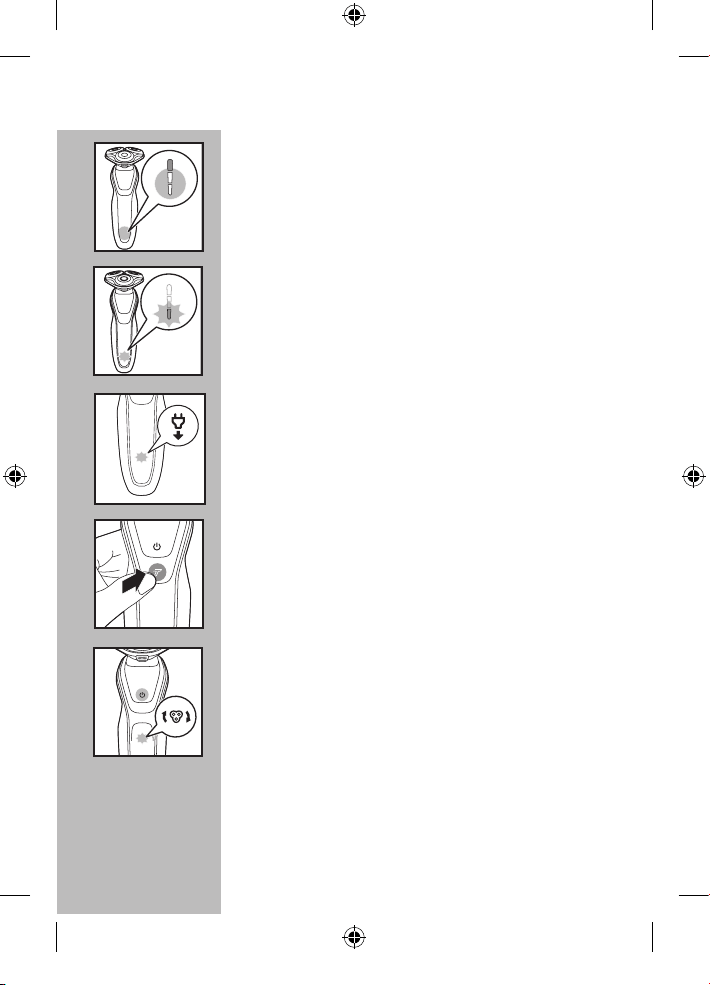
◗ Indicador de nivel bajo de batería
C
- Cuando la batería está casi vacía (5 minutos o
menos de tiempo de afeitado), la luz de carga
inferior parpadea de color naranja y se oye un
pitido.
C
◗ Indicador 'Desenchufar para utilizar'
El símbolo "desenchufar para utilizar" parpadeará
para recordarle que la afeitadora aún está
conectada a la toma de corriente.
C
◗ Modo Turbo+
Este ajuste permite un afeitado más rápido e
poderoso para la eliminación fácil del cabello
denso.
C
◗ Indicador de reemplazo los cabezales de
afeitado
Cada año, según la manera en que se afeite,
el indicador de reemplazo de los cabezales de
afeitado se ilumina constantemente. Consulte
la sección "Reemplazo de los cabezales de
afeitado" para obtener instrucciones sobre cómo
restablecer la afeitadora. Esto le recuerda que
con nuevos cabezales de afeitado se garantiza un
óptimo rendimiento de afeitado.
4222_002_7353_1_DFU-Booklet_A6_v6.indd 47 06/06/17 16:14
ESPAÑOL
48
C
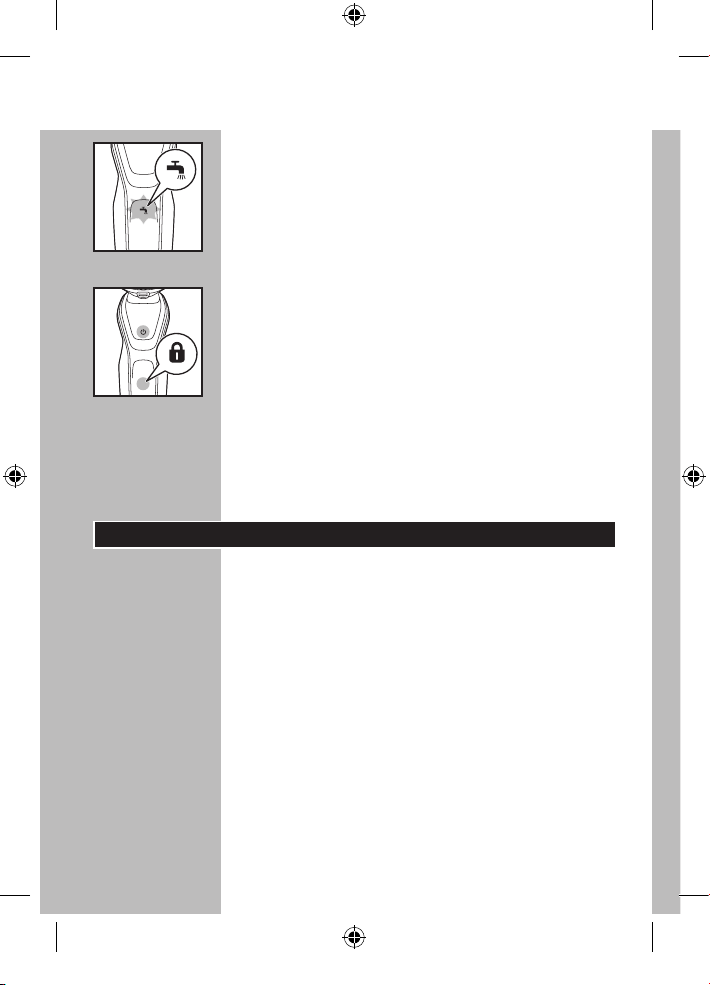
◗ Recordadorio de limpieza
Para conseguir un rendimiento óptimo de
afeitado, recomendamos limpiar la afeitadora
después de CADA uso. El grifo parpadeante le
recordará que la unidad de afeitado debe
limpiarse. Esto ocurre después de cada afeitado.
C
◗ Bloqueo para viajes
La afeitadora está equipada con una función de
sistema de bloqueo. Puede utilizar el sistema
de bloqueo cuando pretenda almacenar la
afeitadora durante un largo periodo de tiempo o
si pretende llevar la afeitadora durante un viaje.
Consulte la sección "Sistema de bloqueo" para
obtener instrucciones sobre cómo utilizar esta
función.
Antes del primer uso
◗ Cargue la afeitadora antes de comenzar a
usarla (consulte la sección "Carga").
◗ Quite cualquier adhesivo o lámina protectora
de la pantalla antes de usar la afeitadora.
Importante
◗ Utilice solo el cable de alimentación o el
sistema SmartClean suministrados para cargar
la afeitadora.
◗ El adaptador del conector transforma CA de
100-240 V a menos de 24 V de CC.
4222_002_7353_1_DFU-Booklet_A6_v6.indd 48 06/06/17 16:14
ESPAÑOL
49
Carga
◗ La carga, recarga o el almacenamiento del
producto a temperaturas inferiores a los
4,5°C (40°F) o superiores a los 35°C (95°F)
reduce la vida útil de las baterías.
◗ La carga o recarga requiere una hora
completa.
◗ Una afeitadora completamente cargada otorga
un tiempo de afeitado de hasta 60 minutos.
◗ Puede recargar la afeitadora cuando la pantalla
indique que la batería está casi vacía.
◗ Esta afeitadora no funciona si está enchufada
directamente a la toma de corriente eléctrica.
◗ No cargue la afeitadora dentro de la funda o
funda de viaje.
C
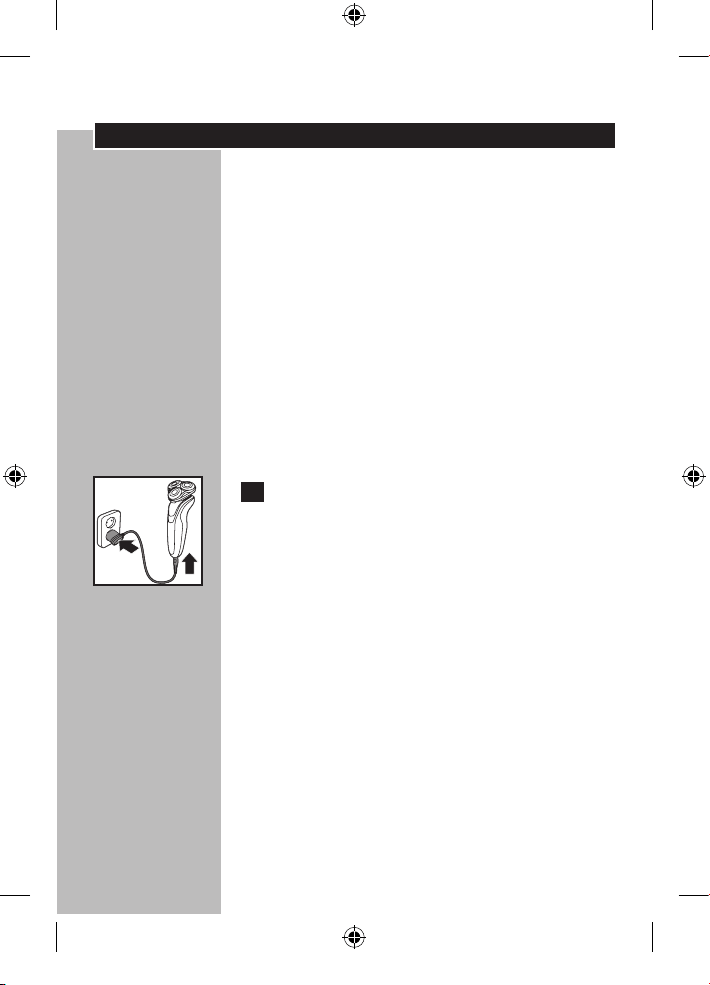
1 Conecte el cable directamente a la
afeitadora y enchufe el conector de
alimentación a cualquier toma de corriente
de entre 100 V a 240 V de CA. Utilice
únicamente el cable de alimentación
suministrado.
◗ En algunos países podría ser necesario el uso
de un adaptador para el cable de alimentación.
Utilice un adaptador apropiado para el tipo de
toma de corriente.
El cable de alimentación transformará
automáticamente la corriente para funcionar con
sistemas de 100 a 240 V de CA.
4222_002_7353_1_DFU-Booklet_A6_v6.indd 49 06/06/17 16:14
ESPAÑOL
50
2 La pantalla de la afeitadora indicará que se
está cargando.
3 La carga requiere una hora completa. Una
afeitadora completamente cargada ofrece
un tiempo de afeitado sin cable de hasta
60 minutos.
Cargar la afeitadora con el sistema
SmartClean
1 Conecte el enchufe pequeño al sistema
SmartClean. Conecte el enchufe de
alimentación a cualquier toma de corriente
de entre 100 V a 240 V de CA. Utilice solo
el cable de alimentación suministrado.
C
2 Presione la tapa superior hacia abajo para
abrir el sistema SmartClean.
C
3 Mantenga el cabezal de la afeitadora hacia
abajo por encima del soporte para la
afeitadora con la pantalla hacia el soporte
para la afeitadora.
4222_002_7353_1_DFU-Booklet_A6_v6.indd 50 06/06/17 16:14
ESPAÑOL
51
C
4 Coloque la afeitadora en el soporte (1),
empuje hacia atrás la afeitadora (2) y
presione hacia abajo la tapa superior para
conectar la afeitadora (3) (hasta que oiga
un "clic").
La afeitadora calza en el sistema SmartClean en
una sola dirección.
5 El indicador de batería parpadea
lentamente para indicar que la afeitadoras
está cargando.
6 La carga requiere una hora completa. Una
afeitadora completamente cargada ofrece
un tiempo de afeitado sin cable de hasta
60 minutos.
C
7 Presione la tapa superior hacia abajo (1),
tire de la afeitadora hacia delante (2) y
levántela del soporte (3).
Recarga
1 La recarga requiere una hora completa.
Puede realizar la recargar cuando la
pantalla indique que la batería está casi
vacía.
1
2
3
1
2
3
4222_002_7353_1_DFU-Booklet_A6_v6.indd 51 06/06/17 16:14
ESPAÑOL
52
Carga rápida
Cuando las baterías estén vacías, al cargar la
afeitadora durante 5 minutos tendrá suficiente
energía para un afeitado sin cable.
Prueba y consejos de afeitado
◗ Proceso de prueba y adaptación de 21 días. Es
un hecho que la piel y la barba tardan algún
tiempo en acostumbrarse al nuevo sistema de
afeitado.
◗ Utilice su nueva afeitadora Philips
Norelco durante 3 semanas para disfrutar
completamente de un afeitado al ras.
◗ Es posible que al principio no obtenga el
afeitado al ras que desea e incluso su piel
puede irritarse levemente. Esto es normal, ya
que la barba y la piel necesitan tiempo para
acostumbrarse. Pruebe este producto durante
3 semanas y pronto disfrutará al máximo de
su nueva afeitadora.
◗ Sea perseverante. Si alterna entre métodos
de afeitado durante el período de adaptación,
será más difícil acostumbrarse al sistema de
afeitado de Philips Norelco.
◗ Si después de 21 días todavía no está
satisfecho con los resultados, Philips Norelco
le reembolsará el precio total de la compra,
siempre que la solicitud de reembolso se
reciba dentro de los 45 días posteriores a la
compra.
4222_002_7353_1_DFU-Booklet_A6_v6.indd 52 06/06/17 16:14
ESPAÑOL
53
Cómo usar una afeitadora eléctrica
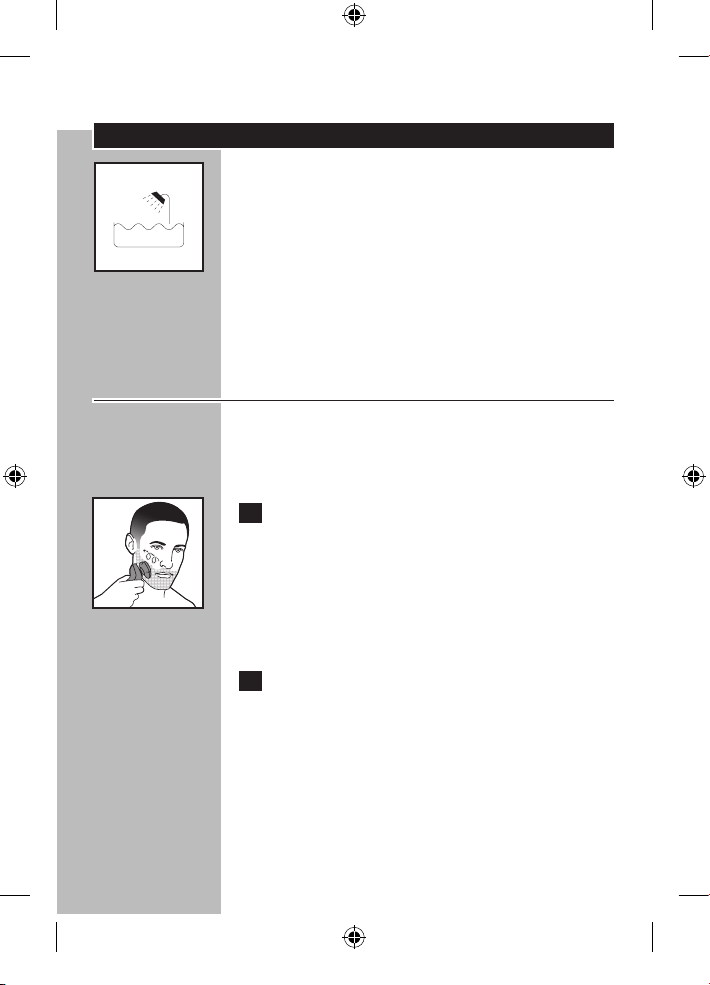
C◗ Este símbolo indica que la afeitadora puede
utilizarse en el baño o en la ducha.
◗ Asegúrese de que el sistema SmartClean no
se moje ni que esté cerca del agua.
◗ Por razones de higiene, la afeitadora sólo debe
ser utilizado por una sola persona.
◗ Utilice esta afeitadora para el uso doméstico
que se describe en este manual.
Afeitado en seco
◗ Para obtener los mejores resultados en la piel
confort, recorte su barba si no se ha afeitado
durante 3 días o más.
C 1 Pulse el botón de encendido/apagado una
vez para encender la afeitadora. Aféitese
en el sentido contrario al crecimiento
del pelo, únicamente con movimientos
circulares.
La pantalla se enciende brevemente para mostrar
la carga que le queda a la batería.
2 Estire su piel con la mano libre para que
las cuchillas puedan levantar y cortar la
barba. Presione suavemente la afeitadora
contra la piel para que los cabezales
flotantes puedan seguir los contornos de
su rostro. NO presione demasiado, ya que
la presión excesiva puede causar que los
peines pellizquen la piel.
4222_002_7353_1_DFU-Booklet_A6_v6.indd 53 06/06/17 16:14
ESPAÑOL
54
3 Pulse una vez el botón de encendido/
apagado para apagar la afeitadora.
4 Limpie la afeitadora después de cada uso
(consulte el capítulo "Limpieza").
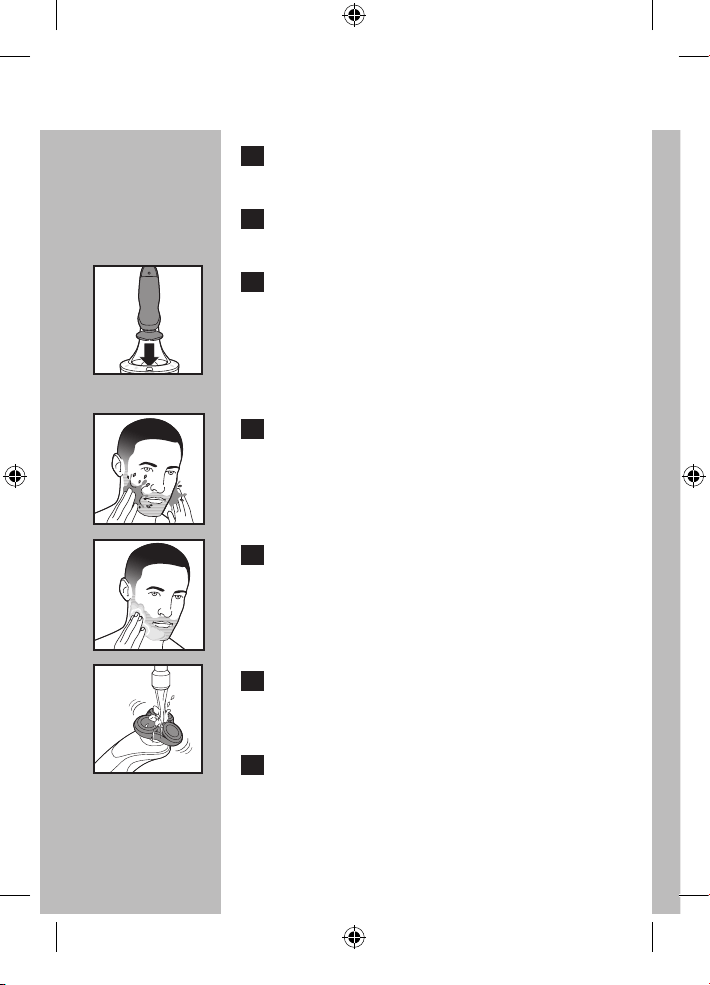
C 5 Coloque la afeitadora en el sistema de
SmartClean para proteger los cabezales.
Afeitado húmedo
También puede utilizar la afeitadora sobre el
rostro húmedo con espuma o gel de afeitar.
C 1 Humedezca la piel.
C 2 Aplique espuma o gel de afeitar sobre la
piel.
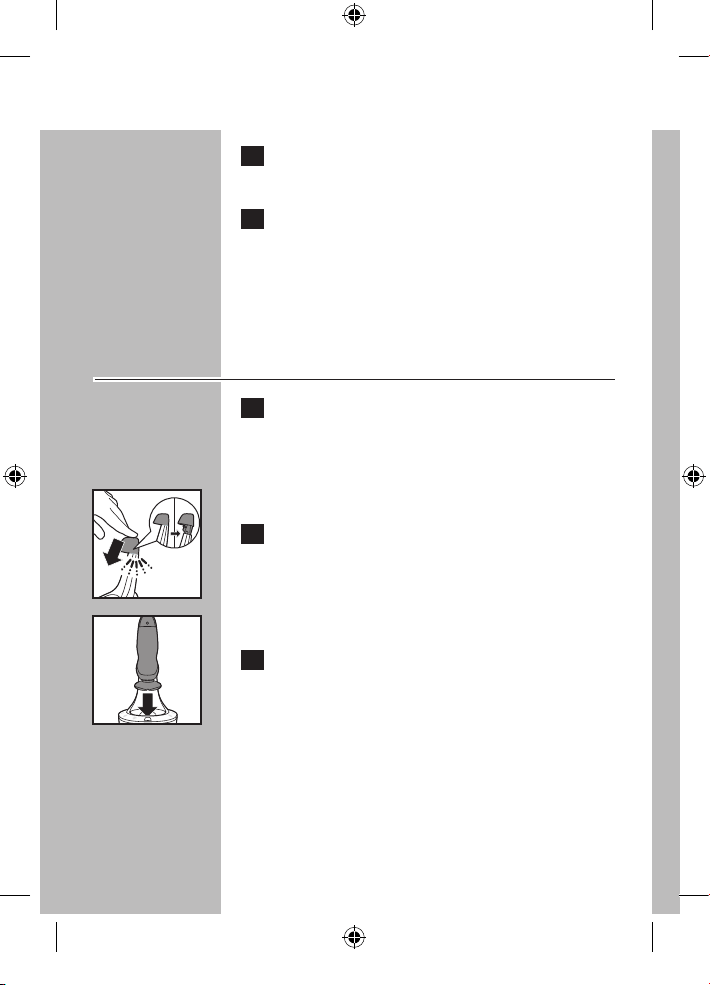
C 3 Enjuague la unidad de afeitado con el
agua del grifo para garantizar que se oiga
deslizando suavemente sobre la piel.
4 Pulse el botón de encendido/apagado una
vez para encender la afeitadora.
4222_002_7353_1_DFU-Booklet_A6_v6.indd 54 06/06/17 16:14
ESPAÑOL
5555
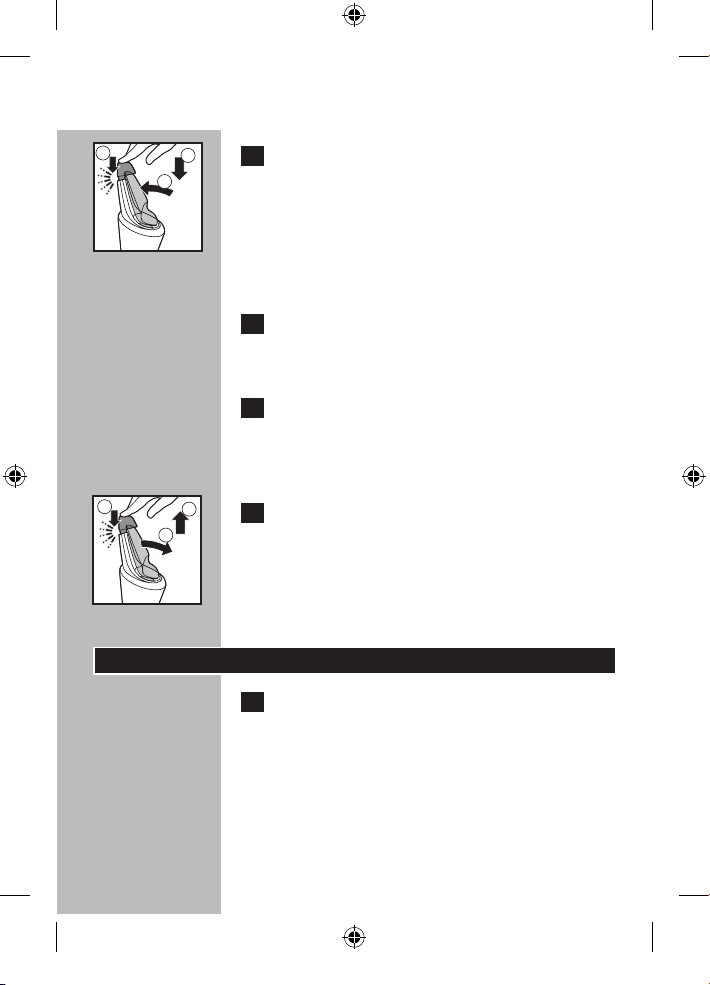
C 5 Mueva los cabezales de afeitado sobre la
piel con movimientos circulares.
NOTA: enjuague regularmente la afeitadora
con el agua del grifo para garantizar que se siga
deslizando suavemente sobre la piel.
6 Séquese la cara y limpie cuidadosamente la
afeitadora después de cada uso (consulte
el capítulo "Limpieza").
NOTA: asegúrese de eliminar todos los restos de
espuma o gel de afeitar de la afeitadora cuando la
enjuague.
C 7 Coloque la afeitadora en el sistema de
SmartClean para proteger los cabezales.
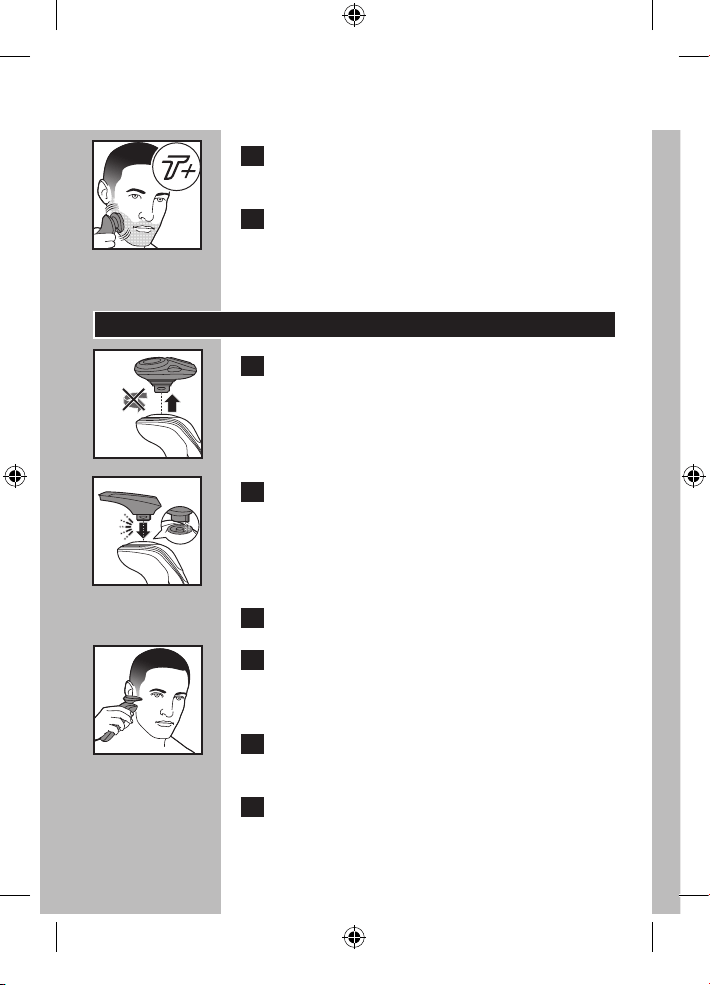
Modo Turbo+
1 Pulse el botón de encendido/apagado una
vez para encender la afeitadora.
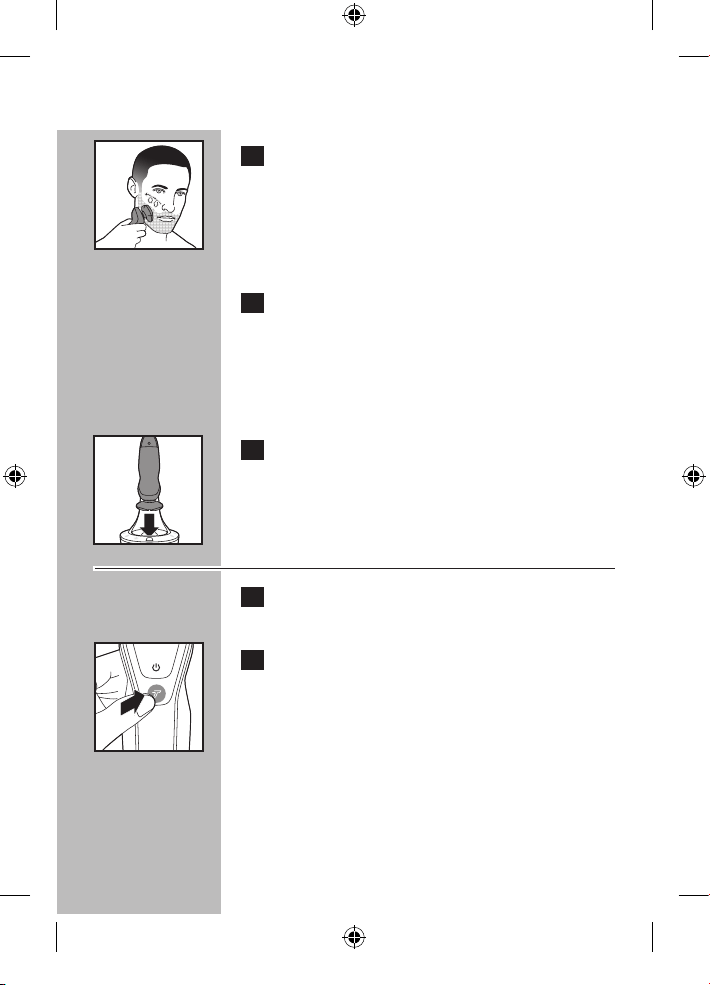
C
2 Presione el botón turbo+ una vez si desea
afeitar las zonas de cabello denso.
4222_002_7353_1_DFU-Booklet_A6_v6.indd 55 06/06/17 16:14
ESPAÑOL
56
C
3 Desplace los cabezales de afeitado sobre la
piel, haciendo movimientos circulares.
4 Desactivar el modo turbo+ pulsando el
botón turbo una vez.
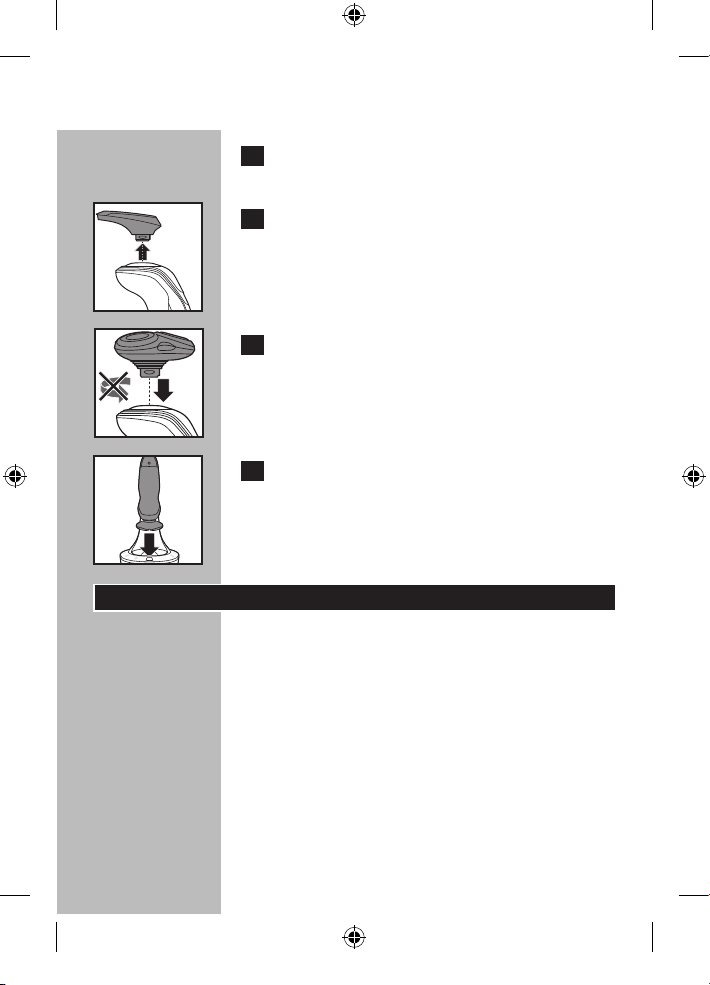
Uso del recortador SmartClick
C
1 Extraiga la unidad de afeitado de la
afeitadora.
NOTA: no gire la unidad de afeitado mientras la
extrae de la afeitadora.
C
2 Inserte la muesca levantada del recortador
SmartClick en la ranura de la parte superior
de la afeitadora. Presione el recortador hacia
abajo para fijarlo a la afeitadora. Se oirá un
"clic".
3 Encienda la afeitadora.
C
4 Fije el recortador hasta que alcance la línea
de cabello deseada. Presione suavemente
el recortador para moverlo hacia abajo.
5 Recorte la barba, el bigote y las patillas con
el recortador.
6 Apague la afeitadora cuando haya
terminado.
4222_002_7353_1_DFU-Booklet_A6_v6.indd 56 06/06/17 16:14
ESPAÑOL
57
7 Limpie a fondo el recortador después de
su uso (consulte el capítulo ‘Limpieza’).
C
8
Extraiga el recortador de la afeitadora.
NOTA: no gire ni tuerza la unidad de recorte
mientras la extrae de la afeitadora.
C
9
Inserte la muesca levantada de la unidad de
afeitado en la ranura de la parte superior
de la afeitadora. Presione la unidad de
afeitado hacia abajo para fijarla a la
afeitadora. Se oirá un ‘clic’.
C 10 Coloque la afeitadora en el sistema de
SmartClean para proteger los cabezales.
Sistema de bloqueo
Puede bloquear la afeitadora si va a almacenarla
durante un largo periodo de tiempo o si va
a viajar. El sistema de bloqueo evita que la
afeitadora se encienda accidentalmente.
4222_002_7353_1_DFU-Booklet_A6_v6.indd 57 06/06/17 16:14
ESPAÑOL
58
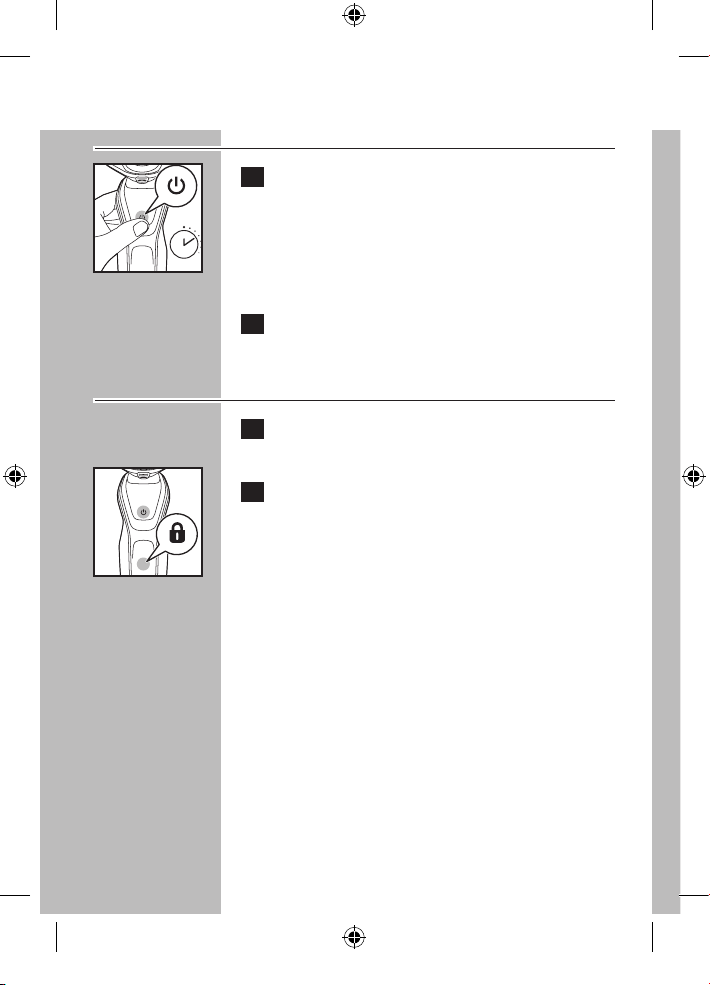
Activación del sistema de bloqueo
C
1 Pulse el botón de encendido/apagado
durante 3 segundos.
◗ El símbolo del sistema de bloqueo se ilumina
constantemente y parpadea el símbolo de
bloqueo.
2 Se ha activado el sistema de bloqueo.
Desactivación del sistema de bloqueo
1 Pulse el botón de encendido/apagado
durante 3 segundos.
C 2 El símbolo de bloqueo parpadea y, a
continuación, se ilumina constantemente.
La afeitadora ahora está lista para usarse.
B
La afeitadora se desbloquea automáticamente
cuando se carga en el sistema SmartClean o
cuando se conecta a una toma de corriente
eléctrica.
3 sec.
4222_002_7353_1_DFU-Booklet_A6_v6.indd 58 06/06/17 16:14
ESPAÑOL
59
Limpieza
◗ Limpie siempre la afeitadora después de cada
uso.
◗ La limpieza frecuente asegura mejores
resultados en el afeitado.
◗ Nunca retire ni reemplace la unidad de
afeitado con el motor en funcionamiento.
◗ No aplique presión a los peines del cabezal de
afeitado. No toque los cabezales de afeitado
con objetos duros, debido a que podría
deformar o dañar los peines que cuentan con
ranuras de precisión.
◗ No utilice la afeitadora si los peines del
cabezal de afeitado están dañados o rotos, ya
que podrían ocasionarle lesiones en el rostro.
◗ No utilice agentes abrasivos ni líquidos
agresivos como la gasolina o la acetona para
limpiar la afeitadora.
◗ Nunca seque la unidad de afeitado con una
toalla o un paño ya que esto podría dañar los
cabezales de afeitado.
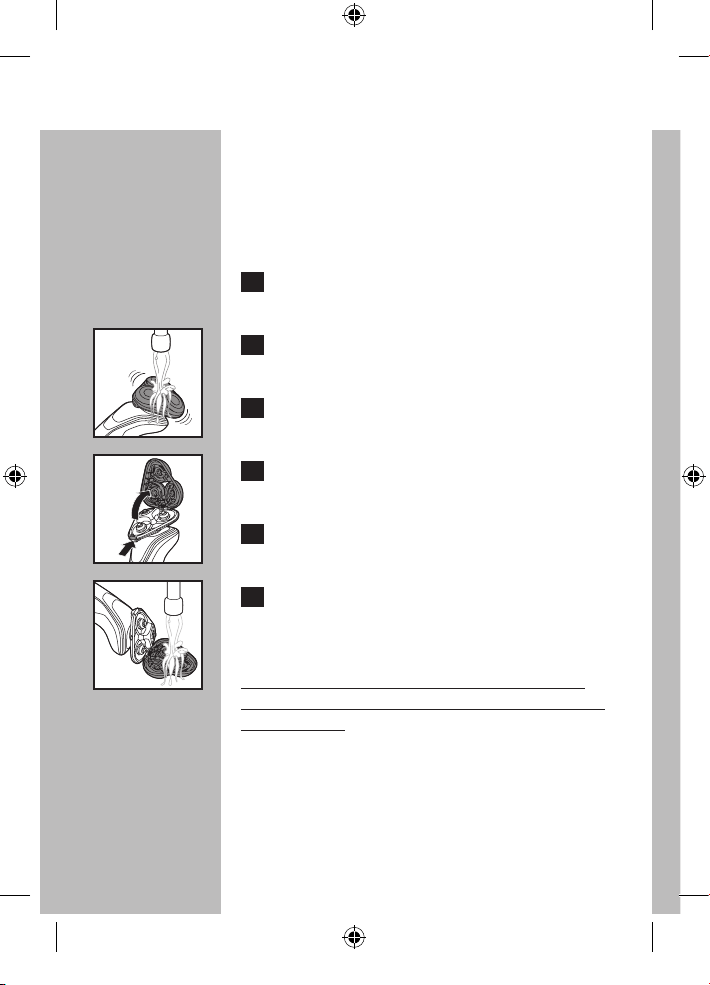
Limpieza de la unidad de afeitado
Los cabezales de afeitado pueden limpiarse
rápidamente después de cada uso si se enjuagan
con agua caliente. El agua del grifo debe estar
caliente, pero PRIMERO COMPRUEBE LA
TEMPERATURA DEL AGUA PARA EVITAR
QUEMADURAS EN LAS MANOS.
4222_002_7353_1_DFU-Booklet_A6_v6.indd 59 06/06/17 16:14
ESPAÑOL
60
◗ La limpieza frecuente asegura mejores
resultados en el afeitado.
◗ Al enjuagar los cabezales de afeitado, es
posible que salga agua por la base de la
afeitadora. Esto es normal.
1 Pulse el botón de encendido/apagado una
vez para encender la afeitado.
C 2 Enjuague la unidad de afeitado bajo el agua
caliente durante algunos minutos.
3 Apagado la afeitadora.
C
4 Pulse el botón de liberación del cabezal
afeitadora para abrir la unidad de afeitado.
5 Enjuague la cámara de recolección de pelo
con agua del grifo.
C
6 Enjuague el soporte del cabezal de afeitado
con agua caliente del grifo durante 30
segundos.
PRIMERO COMPRUEBE LA TEMPERATURA
DEL AGUA PARA EVITAR QUEMADURAS EN
LAS MANOS.
4222_002_7353_1_DFU-Booklet_A6_v6.indd 60 06/06/17 16:14
ESPAÑOL
61
7 Elimine cuidadosamente el exceso de
agua y deje que el soporte del cabezal de
afeitado se seque completamente al aire.
8 Cierre el soporte del cabezal de afeitado.
Preparación para el uso del sistema
SmartClean
PRECAUCIÓN: Mantenga los cartuchos
de limpieza fuera del alcance de los niños. No
ingerir. Evite el contacto con los ojos. Si entra
en contacto con los ojos, debe enjuagarse con
agua fría. Si la irritación continúa, consulte a un
médico.
Importante
◗ Para obtener resultados de limpieza óptimos,
sustituya el cartucho de limpieza cada 3 meses
cuando se utilizan semanalmente.
◗ Solo utilice esta afeitadora, el sistema
SmartClean y el cartucho de limpieza
proporcionados para cargar o limpiar la
afeitadora.
◗ Es posible que otras afeitadoras Philips
Norelco no funcionen con este sistema
SmartClean.
◗ Para evitar su evaporación, no exponga la
solución de limpieza a la luz directa del sol.
◗ El sistema SmartClean limpia en profundidad,
pero no desinfecta la afeitadora, por lo tanto,
no debe compartir la afeitadora con otras
personas.
4222_002_7353_1_DFU-Booklet_A6_v6.indd 61 06/06/17 16:14
ESPAÑOL
62
◗ El conector de carga convierte los 100-240 V
de CA a menos de 24 V de CC.
◗ Coloque el sistema SmartClean en una
superficie plana, estable y resistente a los
líquidos para evitar cualquier fuga. Se debe
tener cuidado de no inclinar ni mover el
sistema SmartClean cuando esté listo para
usarse.
◗ Utilice esta afeitadora para el uso doméstico
que se describe en este manual.
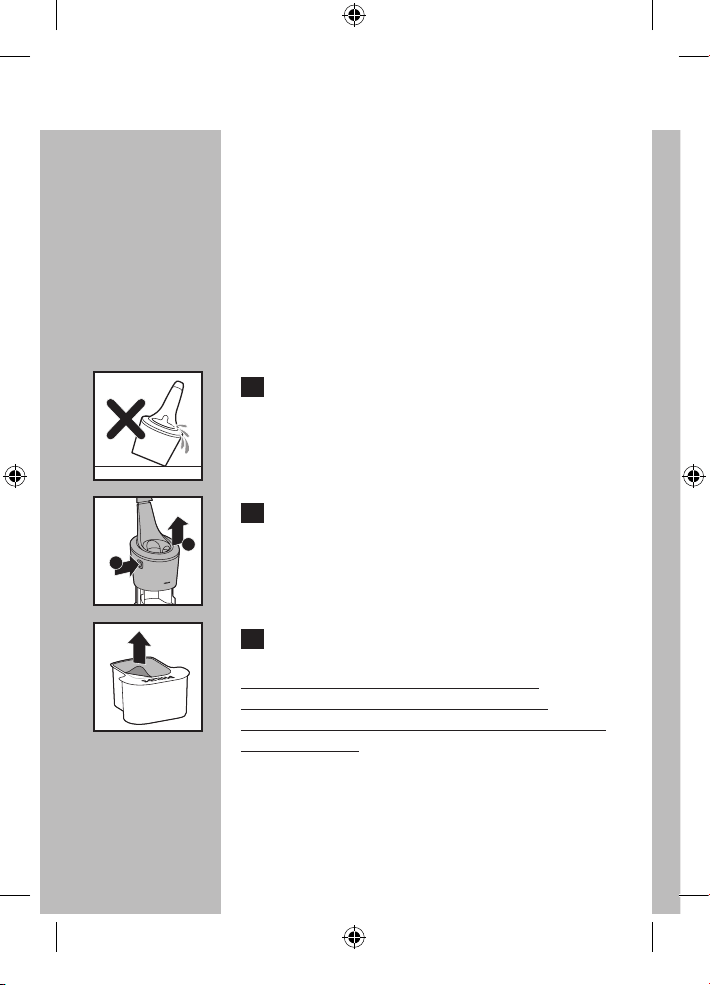
C
1 Coloque el sistema SmartClean sobre una
superficie plana y nivelada.
Para evitar fugas, no se debe inclinar el sistema
SmartClean.
C 2 Mientras sostiene el sistema SmartClean
con una mano, pulse el botón situado en
el costado del sistema SmartClean (1) y
levante el sistema SmartClean (2).
C 3 Extraiga el sello del cartucho de limpieza.
NOTA: UTILICE SOLO CARTUCHOS
SMARTCLEAN DE PHILIPS NORELCO
(MODELO JC302 O JC303) CON EL SISTEMA
SMARTCLEAN.
1
2
4222_002_7353_1_DFU-Booklet_A6_v6.indd 62 06/06/17 16:14
ESPAÑOL
63
◗ Cuando el filtro del cartucho de limpieza esté
lleno, el símbolo de reemplazo parpadea para
indicar que debe reemplazarse el cartucho de
limpieza. Consulte la sección "Reemplazo del
cartucho del sistema SmartClean".
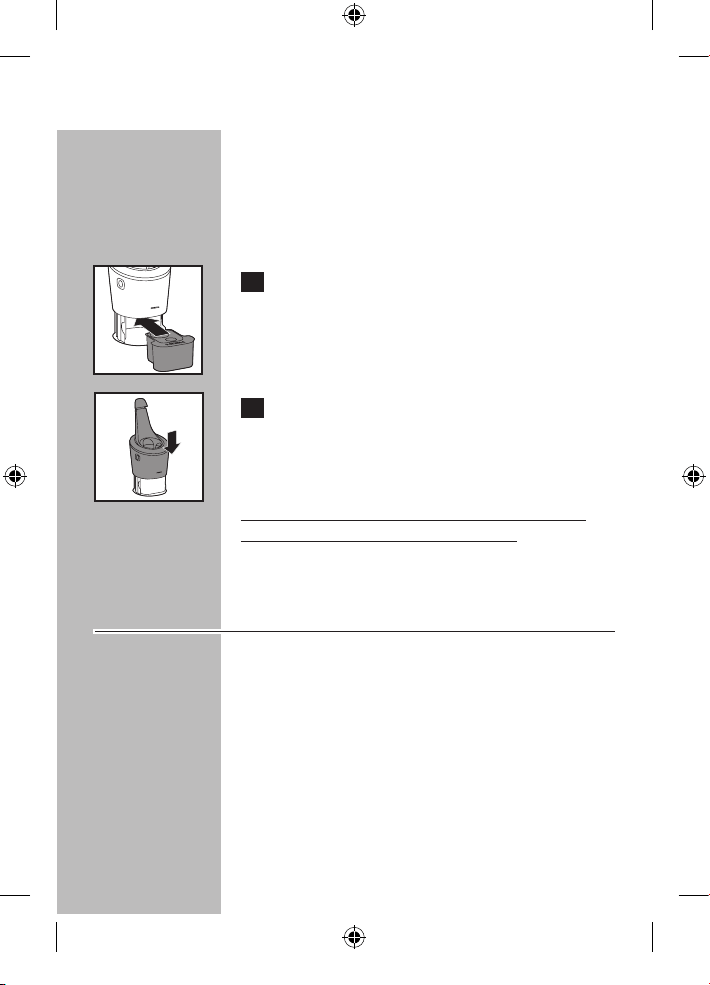
C 4 Coloque el cartucho de limpieza en el
sistema SmartClean.
C 5 Mientras sostiene el sistema SmartClean
con una mano, empuje suavemente
hacia abajo la parte superior del sistema
SmartClean. Se oirá un "clic".
Cuando el sistema SmartClean esté listo para
usarse, no lo mueva para evitar fugas.
Limpieza de la afeitadora en el
sistema SmartClean
◗ Si la afeitadora no tiene suficiente energía para
un (1) afeitado más, es posible que el sistema
SmartClean no funcione correctamente.
Cargue la afeitadora en el sistema SmartClean
antes de utilizar el sistema SmartClean para
limpiar la afeitadora.
◗ Si utiliza la afeitadora con espuma o gel de
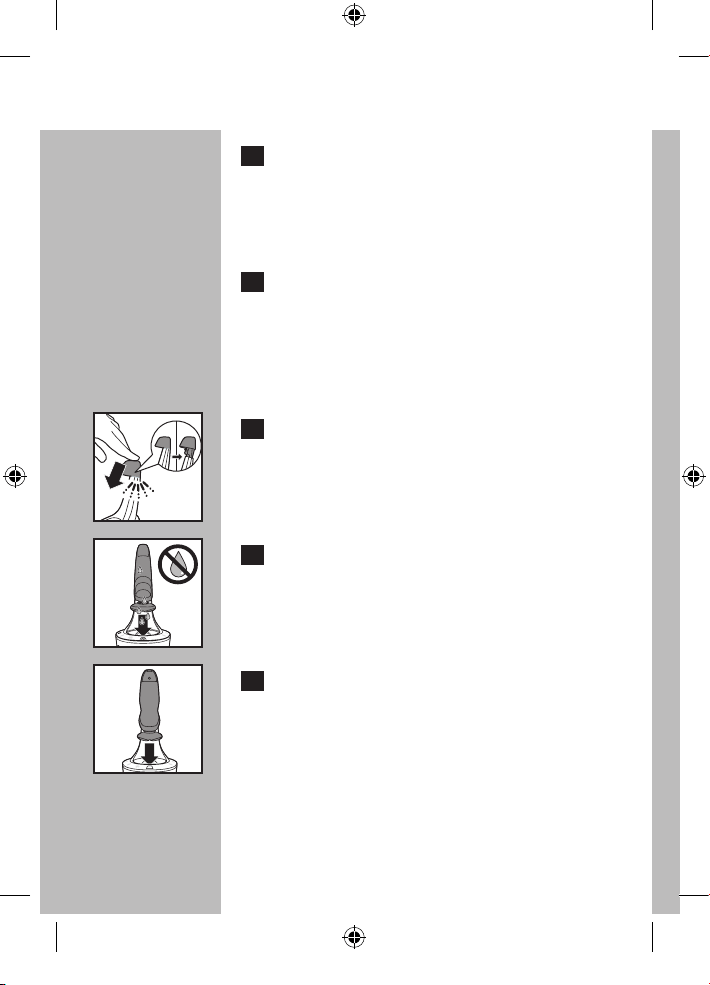
afeitar, enjuáguela rápidamente con agua
caliente antes de limpiarla en el sistema
SmartClean.
4222_002_7353_1_DFU-Booklet_A6_v6.indd 63 06/06/17 16:14
ESPAÑOL
64
1 Conecte el enchufe pequeño al sistema
SmartClean. Conecte el enchufe de
alimentación a cualquier toma de corriente
de entre 100 V a 240 V de CA. Utilice solo
el cable de alimentación suministrado.
2. Coloque el sistema SmartClean sobre una
superficie plana y nivelada. Asegúrese de
que el sello se haya retirado del cartucho
de limpieza (consulte el capítulo
"Preparación para el uso del sistema
SmartClean").
C 3 Presione la tapa superior hacia abajo para
abrir el sistema SmartClean.
C 4 Elimine el exceso de agua de la afeitadora
antes de colocarla en el sistema
SmartClean.
C 5 Mantenga el cabezal de la afeitadora hacia
abajo por encima del soporte para la
afeitadora con la pantalla hacia el soporte
para la afeitadora.
4222_002_7353_1_DFU-Booklet_A6_v6.indd 64 06/06/17 16:14
ESPAÑOL
65
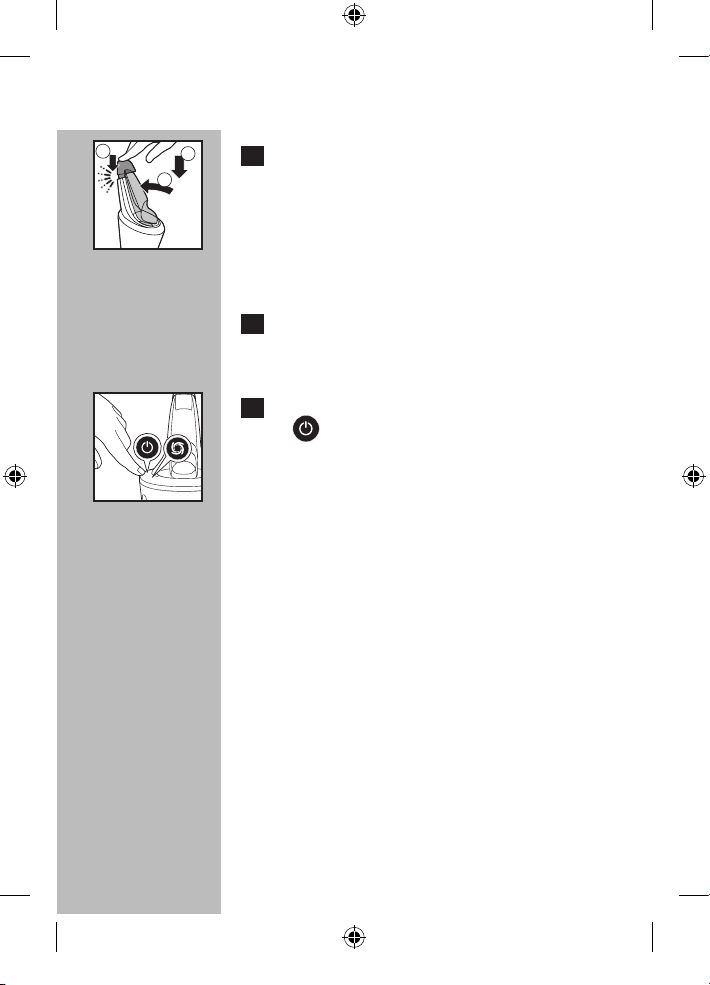
C 6 Coloque la afeitadora en el soporte (1),
empuje hacia atrás la afeitadora (2) y
presione hacia abajo la tapa superior para
conectar la afeitadora (3) (hasta que oiga
un "clic").
La afeitadora calza en el sistema SmartClean en
una sola dirección.
7 El símbolo de la batería parpadea
lentamente para indicar que la afeitadora
se está cargando.
C 8 Pulse el botón de encendido/apagado
( ) del sistema SmartClean para iniciar
el ciclo de limpieza.el ciclo de limpieza.
El símbolo de limpieza se iluminan parpadea.
◗ El ciclo de limpieza tarda aproximadamente
10 minutos.
◗ No pulse el botón de encendido/apagado
mientras el ciclo de limpieza se está ejecutando.
Si esto ocurre, el ciclo de limpieza se detendrá
y el símbolo de limpieza dejará de parpadear.
El ciclo de limpieza puede volver a iniciarse si
se presiona una vez el botón de encendido/
apagado.
◗ Si se desconecta el cable de alimentación antes
de que se complete el ciclo de limpieza, vuelva
a enchufar el conector a la toma de corriente.
El ciclo de limpieza puede volver a iniciarse
si se pulsa una vez el botón de encendido/
apagado.
1
2
3
4222_002_7353_1_DFU-Booklet_A6_v6.indd 65 06/06/17 16:14
ESPAÑOL
66
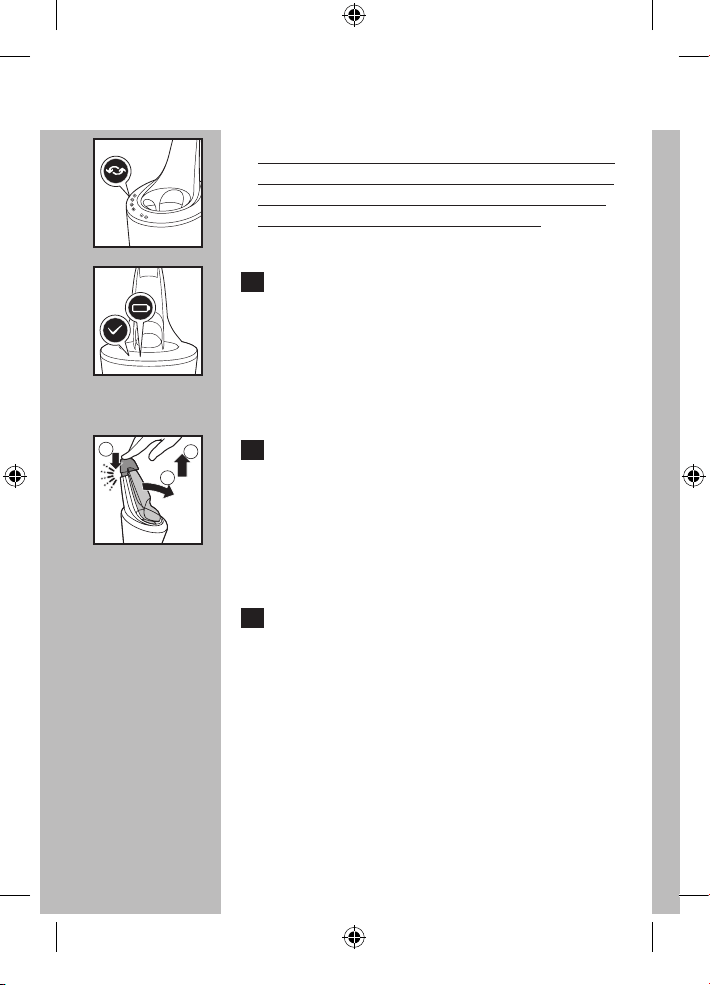
C NOTA: Cuando el filtro del cartucho de limpieza
está lleno, el símbolo de reemplazo parpadea de
color naranja. (Consulte el capítulo "Reemplazo
del cartucho del sistema SmartClean").
C 9 Cuando el ciclo de limpieza se completa
y la afeitadora esta higiénicamente limpia,
el símbolo de finalización del proceso se
enciende constantemente.
El símbolo de batería de la afeitadora se enciende
para indicar que la afeitadora está completamente
cargada.
C 10 Presione la tapa superior hacia abajo (1),
tire de la afeitadora hacia delante (2) y
levántela del soporte SmartClean (3).
◗ El sistema SmartClean se apaga
automáticamente 30 minutos después de que
finaliza el ciclo de limpieza.
11 Elimine cuidadosamente el exceso de
líquido y deje que la unidad de afeitado se
seque completamente al aire.
También puede dejar la afeitador en el sistema
SmartClean durante la noche para secar.
1
2
3
4222_002_7353_1_DFU-Booklet_A6_v6.indd 66 06/06/17 16:14
ESPAÑOL
67
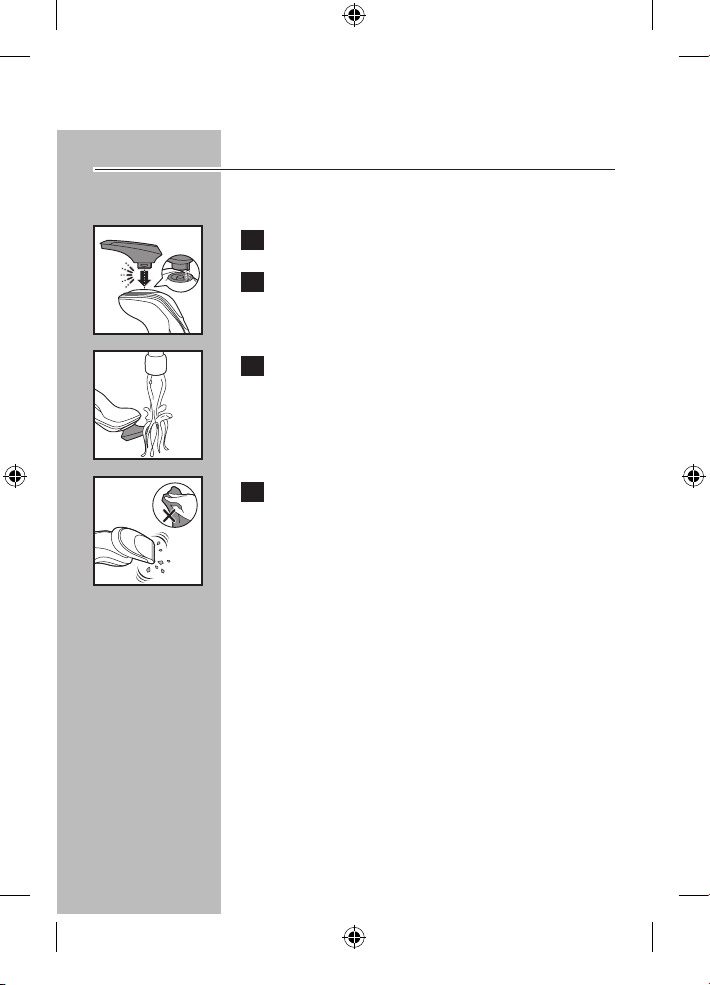
Limpieza del recortador
Limpie el recortador después de cada uso.
C 1 Coloque el recortador en la afeitadora.
2 Encienda la afeitadora.
C 3 Enjuague el recortador con agua
caliente. PRIMERO COMPRUEBE LA
TEMPERATURA DEL AGUA PARA
EVITAR QUEMADURAS EN LAS MANOS.
C 4 Apague la afeitadora. Elimine el exceso de
agua y deje que el recortador se sequen
completamente al aire.
Sugerencia: Para obtener un rendimiento óptimo
del recortador, lubrique cada 6 meses los dientes
del recortador con una gota de aceite mineral.
4222_002_7353_1_DFU-Booklet_A6_v6.indd 67 06/06/17 16:14
ESPAÑOL
68
Reemplazo de los cabezales de afeitado
◗ Reemplace los cabezales de afeitado una vez
al año para obtener resultados óptimos de
afeitado.
◗ Reemplace los cabezales de afeitado dañados
o desgastados solo con los cabezales para la
afeitadora Philips Norelco modelo SH50.
Indicación de reemplazo del conjunto
del cabezal de afeitado
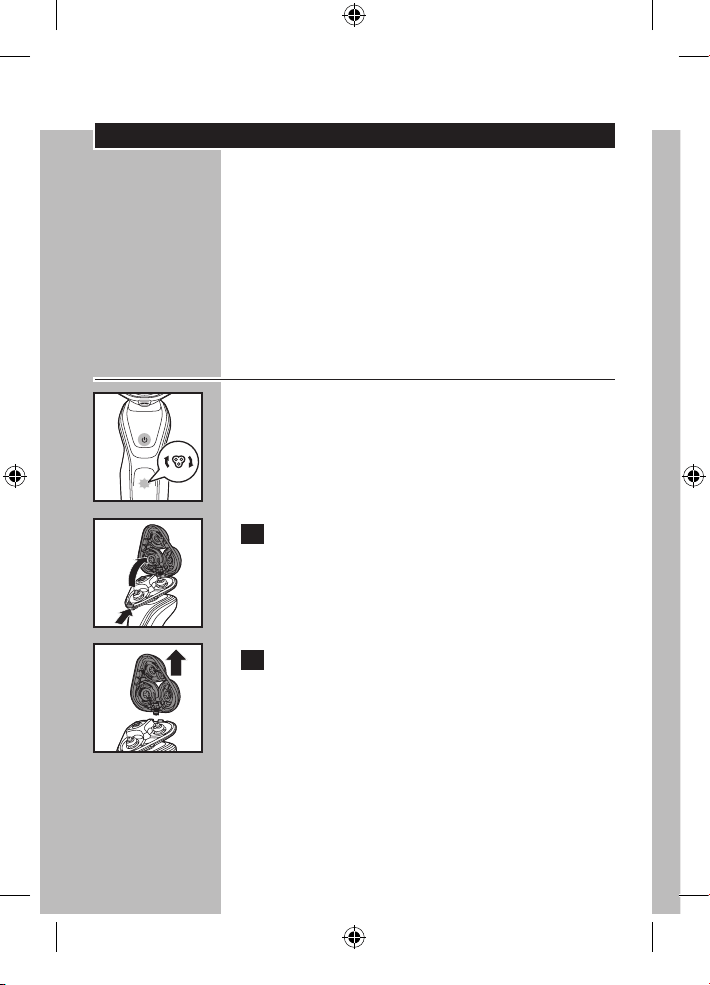
C ◗ El símbolo de la unidad de afeitado se ilumina
constantemente cuando la afeitadora está
apagada para recordarle que debe sustituir la
unidad de afeitado para obtener los resultados
óptimos de afeitado.
C 1 Pulse el botón de liberación del cabezal
afeitadora y abra la unidad de afeitado.
C 2 Tire del soporte del cabezal de afeitado
desde la parte inferior de la unidad de
afeitado.
4222_002_7353_1_DFU-Booklet_A6_v6.indd 68 06/06/17 16:14
ESPAÑOL
69
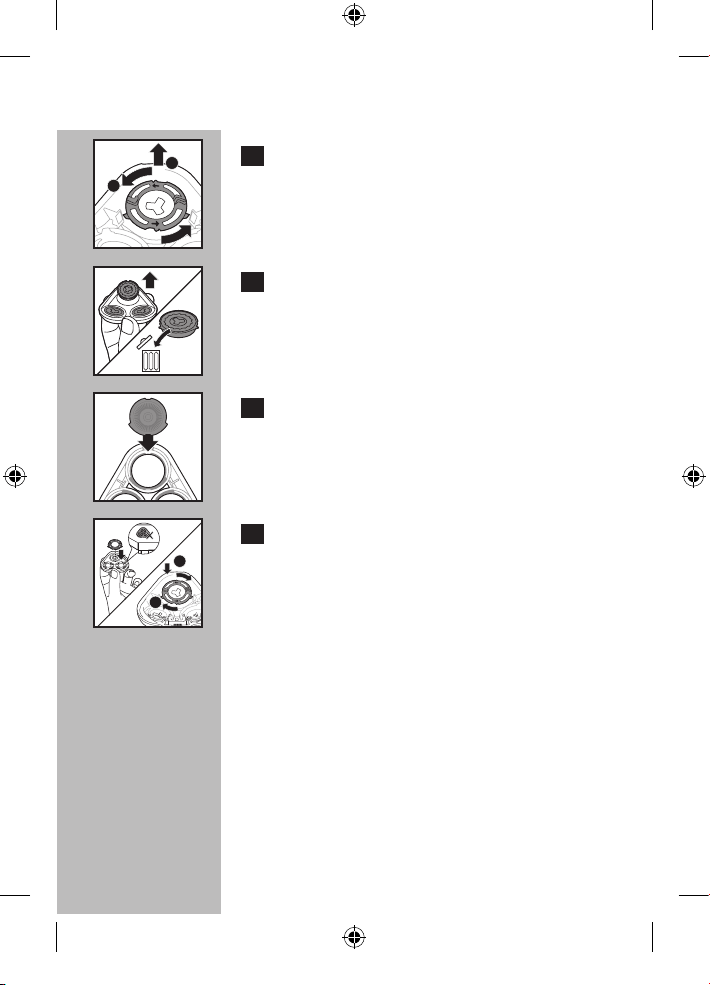
C 3 Gire el anillo de retención a la izquierda
(1) y levántelo para sacarlo del cabezal de
afeitado (2).
C 4 Quite los cabezales de afeitado del
soporte del cabezal de afeitado y
deséchelos.
NO DESECHE el anillo de retención.
C 5 Coloque el nuevo cabezal de afeitado en el
soporte.
Asegúrese de que las proyecciones del cabezal
de afeitado encajen exactamente en los huecos
sobre el soporte del cabezal de afeitado.
C 6 Sujetar el soporte del cabezal de afeitado
en la mano y coloque el anillo de retención
en el soporte del cabezal de afeitado (1).
Gírelo hacia la derecha (2) para volver a
colocar el anillo de retención.
No coloque el soporte de cabezal de afeitado
sobre una superficie, ya que esto puede causar
daños.
1
2
1
2
4222_002_7353_1_DFU-Booklet_A6_v6.indd 69 06/06/17 16:14
ESPAÑOL
70
7 Repita el proceso para los otros dos
conjuntos de cuchillas y peines.
C
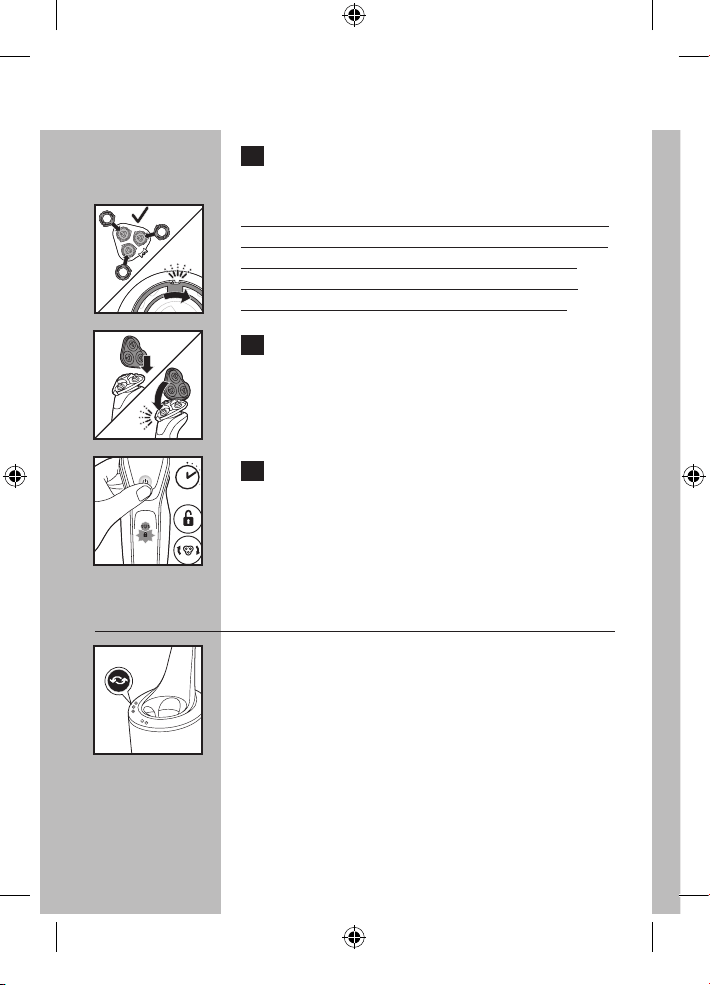
NOTA: Cada anillo de retencion tiene dos huecos
y dos proyecciones que encaja exactamente en las
proyecciones y huecos soporte del cabezal de
afeitado. Asegurese de que se oye un 'clic' que
indica el anillo de retencion se fija en su lugar.
C 8 Vuelva a colocar la bisagra del soporte
del cabezal de afeitado en la ranura de la
unidad de afeitado. Cierre el soporte del
cabezal de afeitado (clic).
C 9 Para restablecer la afeitadora, mantenga
pulsado el botón de encendido/apagado
por aproximadamente 7 segundos.
Reemplazo del cartucho de limpieza
del sistema SmartClean
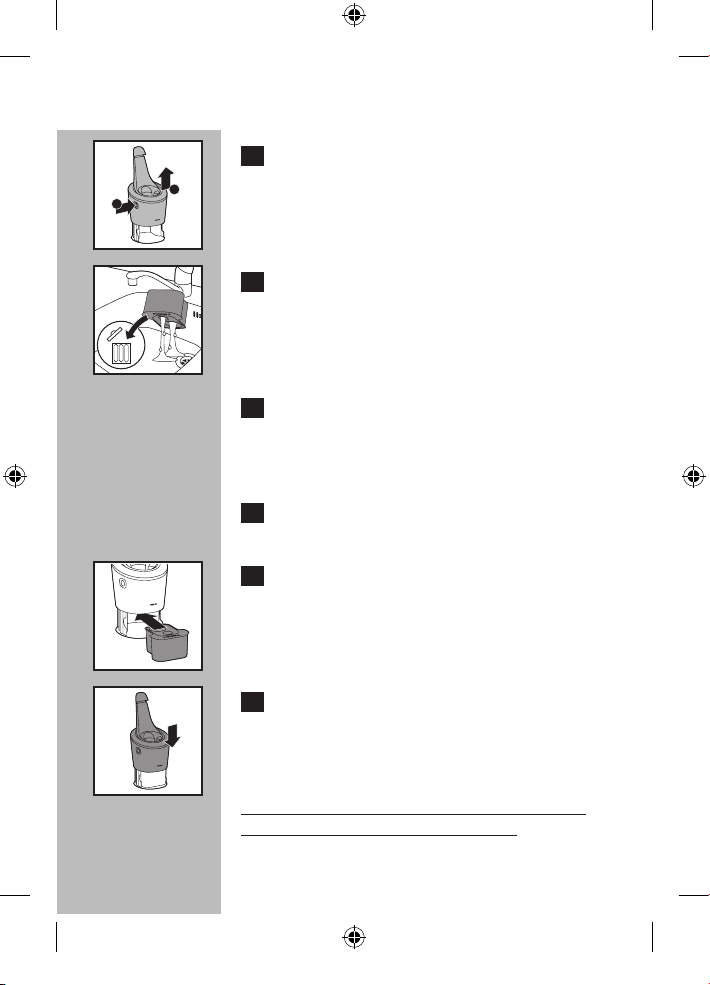
C ◗ Para obtener resultados óptimos de limpieza,
reemplace el cartucho de limpieza cuando
el indicador de reemplazo parpadee de
color naranja o cada 3 meses si utiliza
semanalmente.
7 sec.
4222_002_7353_1_DFU-Booklet_A6_v6.indd 70 06/06/17 16:14
ESPAÑOL
71
C 1 Mientras sostiene el sistema SmartClean
con una mano, pulse el botón de liberación
del cartucho situado en el costado del
sistema SmartClean (1) y levante el
sistema SmartClean (2).
C 2 Quite el cartucho de limpieza vacío y
vierta los restos de líquido de limpieza del
cartucho de limpieza.
Puede vaciar de manera segura el líquido de
limpieza en el lavabo.
3 Deseche el cartucho de limpieza vacío.
Para obtener información sobre el reciclaje
del producto, póngase en contacto con su
administración local.
4 Extraiga el sello del nuevo cartucho de
limpieza.
C 5 Coloque el nuevo cartucho de limpieza en
el sistema SmartClean.
C 6 Mientras sostiene el sistema SmartClean
con una mano, empuje suavemente
hacia abajo la parte superior del sistema
SmartClean. Se oirá un "clic".
Cuando el sistema SmartClean esté listo para
usarse, no lo mueva para evitar fugas.
1
2
4222_002_7353_1_DFU-Booklet_A6_v6.indd 71 06/06/17 16:14
ESPAÑOL
72
Esta afeitadora y el sistema SmartClean no
contienen ninguna otra pieza que pueda ser
reparada por el usuario. Para solicitar asistencia,
comuníquese al 1-800-243-3050.
Mantenimiento
◗ Siempre retire la afeitadora del sistema
SmartClean antes de proceder a la limpieza
del aparato.
◗ El sistema SmartClean pueden limpiarse con un
paño húmedo.
◗ Las partes lavables deben limpiarse con agua
tibia del grifo.
NOTA: NO coloque ni limpie las piezas del sistema
SmartClean en el lavavajillas
4222_002_7353_1_DFU-Booklet_A6_v6.indd 72 06/06/17 16:14
ESPAÑOL
73
Almacenamiento
◗ La afeitadora puede colocarse en la funda
de viaje o en sistema SmartClean para un
almacenamiento seguro.
◗ Asegúrese de que la afeitadora esté apagada.
Desenchufe el cable de la toma de corriente
antes de guardarla en un lugar seguro y seco,
donde no se aplaste, golpee ni pueda sufrir
daños.
◗ No enrolle el cable de alimentación alrededor
de la afeitadora o del sistema SmartClean
cuando la guarde.
◗ Guarde el cable en un lugar seguro donde no
sufra cortes ni daños.
◗ No coloque ni guarde el sistema SmartClean
en un lugar donde pueda caerse en la bañera,
en el lavabo, en el agua o en otro tipo de
líquido mientras está enchufado.
4222_002_7353_1_DFU-Booklet_A6_v6.indd 73 06/06/17 16:14
ESPAÑOL
Asistencia
◗ Para obtener asistencia, visite nuestro sitio
Web:
www.philips.com/support o
llame al número gratuito
1-800-243-3050
◗ La información en línea está disponible las 24
horas, los 7 días de la semana.
74
4222_002_7353_1_DFU-Booklet_A6_v6.indd 74 06/06/17 16:14
ESPAÑOL
Eliminación
C
◗ Esta afeitadora Philips Norelco contiene una
batería recargable de iones de litio que debe
desecharse de manera adecuada.
◗ Para obtener información sobre la forma de
desechar las baterías, comuníquese con las
autoridades locales, llame al número
1-800-822-8837 o visite el sitio web
www.call2recycle.org.
◗ Para obtener asistencia, visite nuestro
sitio Web www.philips.com/support o
comuníquese al número gratuito:
1-800-243-3050.
◗ Su producto ha sido diseñado y fabricado con
materiales y componentes de alta calidad,
que pueden ser reciclados y reutilizados. Para
obtener información sobre reciclaje, contacte
las facilidades de gestión de residuos locales o
visite a www.recycle.philips.com.
75
4222_002_7353_1_DFU-Booklet_A6_v6.indd 75 06/06/17 16:14
ESPAÑOL
Accesorios
C
◗ Reemplazo de los cabezales de afeitado
Modelo SH50 - para obtener el máximo
rendimiento de afeitado, reemplace los
cabezales de la afeitadora Philips Norelco una
vez al año.
◗ Modelador SmartClick
Modelo RQ111 - modelador SmartClick de
Philips Norelco
◗ Reemplazo del cartucho de limpieza
Modelo JC302 - cartucho de limpieza del
sistema SmartClean de Philips Norelco, pack de
2 unidades
Modelo JC303 - cartucho de limpieza del
sistema SmartClean de Philips Norelco, pack de
3 unidades
◗ Cabezal de cepillado SmartClick
Modelo RQ585 - cabezal de cepillado
SmartClick de Philips Norelco
◗ Puede adquirir los accesorios para la
afeitadora Philips Norelco en el local más
cercano a su domicilio o a través de nuestro
sitio web: www.philips.com/store
76
4222_002_7353_1_DFU-Booklet_A6_v6.indd 76 06/06/17 16:14
GARANTÍA TOTAL POR DOS AÑOS
Philips North America LLC garantiza este producto nuevo (excepto cuchillas y peines) contra defectos
en los materiales o en la mano de obra por un período de dos años desde la fecha de compra y acepta
reparar o reemplazar cualquier producto defectuoso sin cargo.
IMPORTANTE: Esta garantía no cubre ningún daño que surja como resultado de un accidente, de un
uso indebido o abuso, de la falta de cuidado razonable, del uso de cualquier accesorio no provisto con el
producto ni la pérdida de piezas, así como tampoco ningún daño derivado del uso del producto con una
tensión o con baterías que no sean las establecidas.*
NINGUNA RESPONSABILIDAD ES ASUMIDA POR CUALQUIER DAÑO,
INCIDENTAL O RESULTANTE.
Para obtener el servicio de garantía, simplemente ingrese a www.philips.com/support para obtener
asistencia. Para su protección, se sugiere que el envío de las devoluciones del producto se realice por
correo certificado, con seguro prepago. Cualquier daño que ocurra durante el envío no será cubierto por
esta garantía.
NOTA: Philips North America LLC no extiende ninguna otra garantía, ni escrita ni oral. Esta garantía le
proporciona derechos legales específicos; asimismo, es posible que goce de otros derechos que pueden
variar de estado a estado. En algunos estados no se permite la exclusión o la limitación de los daños
fortuitos o resultantes, de modo que es posible que las limitaciones o exclusiones arriba mencionadas no
se apliquen a su caso.
*Lea las instrucciones adjuntas atentamente.
Fabricado para:
Philips Personal Health
una división de Philips North America LLC
P.O. Box 10313, Stamford, CT 06904
Este símbolo colocado en la placa de especificaciones del producto significa que está registrado
por Underwriters Laboratories, Inc.
Norelco, Tripleheader, Lift and Cut y son marcas comerciales registradas de
Philips North America LLC.
PHILIPS y Philips Shield son marcas registradas de Koninklijke Philips N.V.
© 2017 Philips North America LLC. Todos los derechos reservados.
ESPAÑOL
77
4222_002_7353_1_DFU-Booklet_A6_v6.indd 77 06/06/17 16:14
4222_002_7353_1_DFU-Booklet_A6_v6.indd 78 06/06/17 16:14
4222_002_7353_1_DFU-Booklet_A6_v6.indd 79 06/06/17 16:14
www.philips.com
4222.002.7353.1
4222_002_7353_1_DFU-Booklet_A6_v6.indd 80 06/06/17 16:14