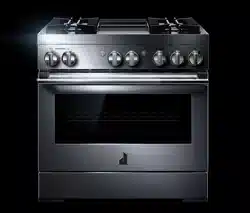
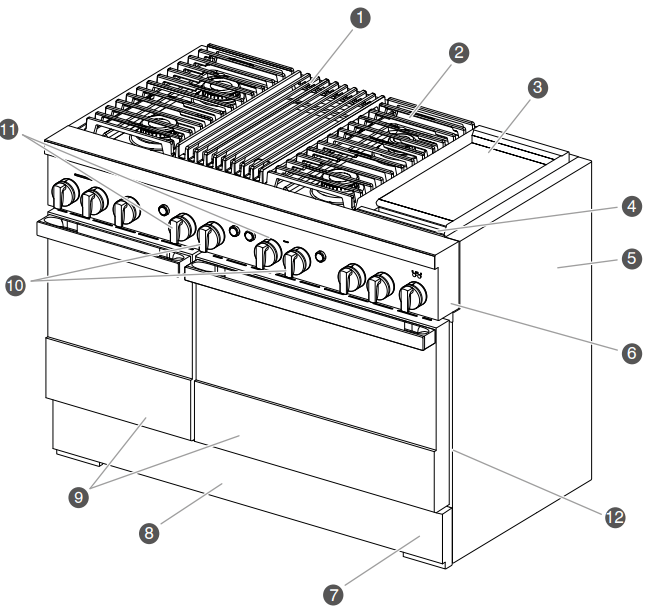
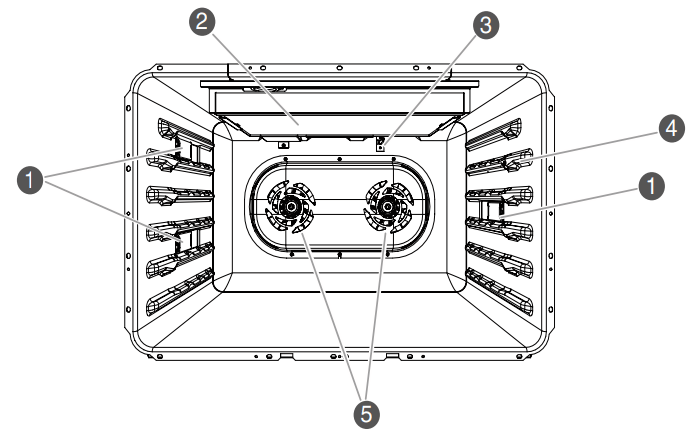
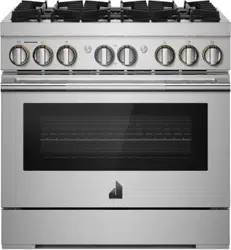
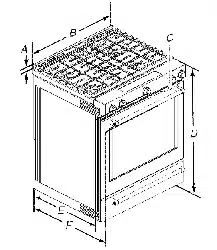
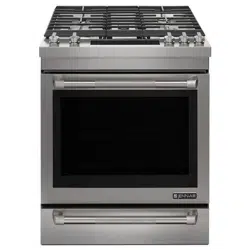
NOTE: Some models have an 18" (45.7 cm) cavity which contains one convection fan.
CONTROL KNOBS
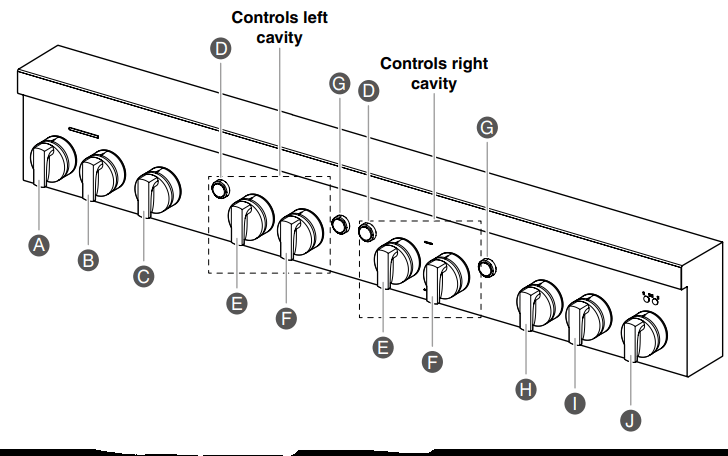
The oven and cooktop features are accessed through the cooktop knobs.
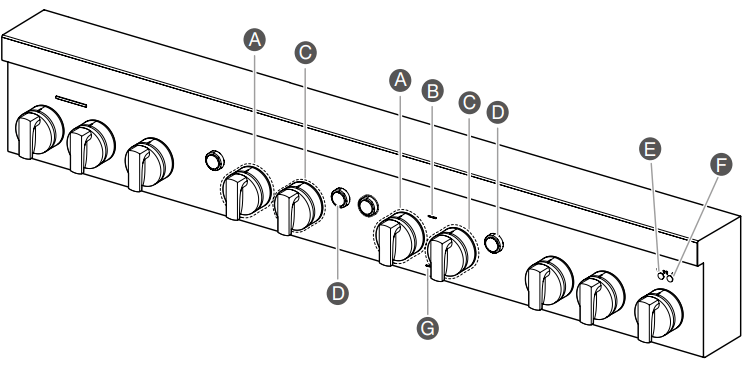
Cooktop Knobs and Buttons
Left Rear Knob
Left Front Knob
Gril Knob
Oven Light Button
Mode Knob
Temperature Knob
Oven Start Button
Center Rear Knob
Center Front Knob
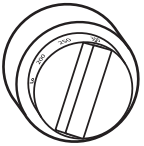
Griddle Knob
NOTE: Cooktop configuration, features, and controls may differ.
Indicator Lights
Mode Knob Indicator Light
Remote Indicator
Temperature Knob Indicator Light
Start Button Indicator Light
Griddle Preheat Light
Griddle Cooktop ON Light
Wi-Fi Indicator
COOKTOP FEATURES
Bunners
WARNING: Fire Hazard
Do not let the burner flame extend beyond the edge of the pan.
Turn off all controls when not cooking. Failure to follow these instructions can result in death or fire.
BTU/hr
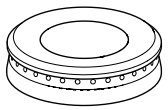
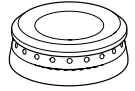
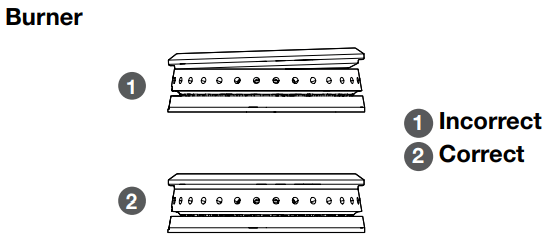
BURNER APPEARANCE
FEATURES
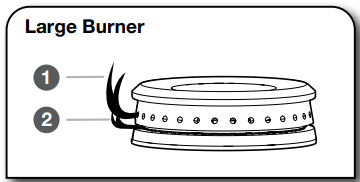
Large stacked burner
This burner has an upper and lower level of flame. The Hi setting uses both flame levels at full power to provide the highest heat. It is ideal for cooking large quantities of food or liquid and using large pots and pans. The Simmer Hi and Lo settings use the lower flame only.
Small burner
This burner is ideal for cooking smaller quantities of food and melting chocolate or butter.
Igniting Burners:
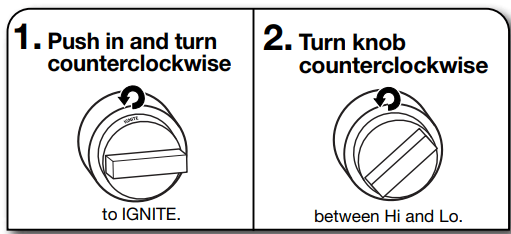
Electric igniters automatically light the surface burners when burner knobs are turned to IGNITE.
Before setting a burner knob, place filled cookware on the grate. Do not operate a burner using empty cookware or without any cookware on the grate.
Visually check that the burner has lit. If the burner does not ignite, listen for the clicking sound. If you do not hear the igniter click, turn off the burner. Check for a tripped circuit breaker or blown fuse.
Check that the burner knob is pressed completely down on the valve shaft. If the spark igniter still does not operate, call a trained repair specialist.
When the burner knob for the desired burner is turned to the IGNITE position, the burner will click independent of the other burners.
REMEMBER: When range is in use or during the SelfCleaning cycle, the entire cooktop area may become hot.
Flame-Sensing™ Reignition Feature
During cooktop use, if one or more burners are extinguished due to external causes (such as a water spill, wind, or ventilation draft), the ignition system will turn on to reignite the flame. When the flame comes back on, the system will stop sparking. If the draft in the room is not removed, occasional sparking may continue. Sparking may also occasionally occur when using the low setting on a burner.
To Set a Burner:
In Case of Power Failure
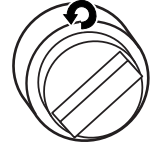
Hold a lit match near a burner and turn knob counterclockwise to Hi. After burner lights, turn knob to desired setting.
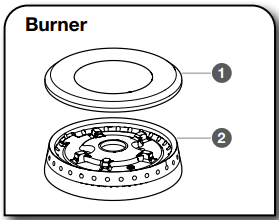
SEALED SURFACE BURNERS
Sealed surface burners are designed to minimize gaps and seams that can allow liquids and spills to get under the cooktop. This design makes cleanup quick and easy.
Bunner cap
Bunner base
IMPORTANT: Do not obstruct the flow of combustion and ventilation air around the burner grate edges.
Burner cap: Always keep the burner cap in place when using a surface burner. A clean burner cap will help avoid poor ignition and uneven flames. Always clean the burner cap after a spillover, and routinely remove and clean the caps according to the “Care and Cleaning” section.
Gas opening: Gas must flow freely throughout the gas opening for the burner to light properly. Keep this area free of soil and do not allow spills, food, cleaning agents, or any other material to enter the gas opening. Keep spillovers out of the gas opening by always using a burner cap.
Upper (main flame)
Lower (simmer flame)
Burner Ports:
Check burner flames occasionally for proper size and shape as shown above. A good flame is blue in color, not yellow. Keep this area free of soil and do not allow spills, food, cleaning agents, or any other material to enter the burner ports.
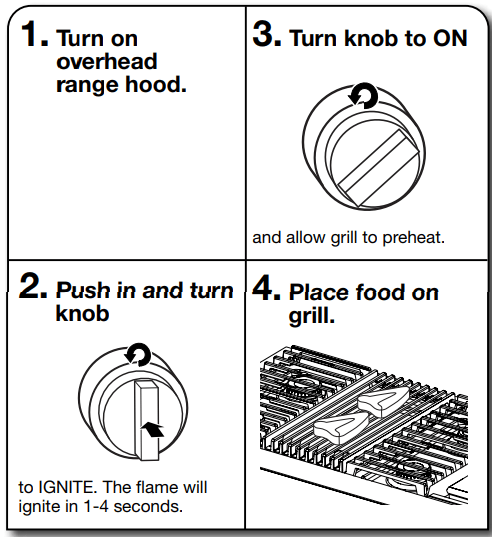
GRILL (on some models)
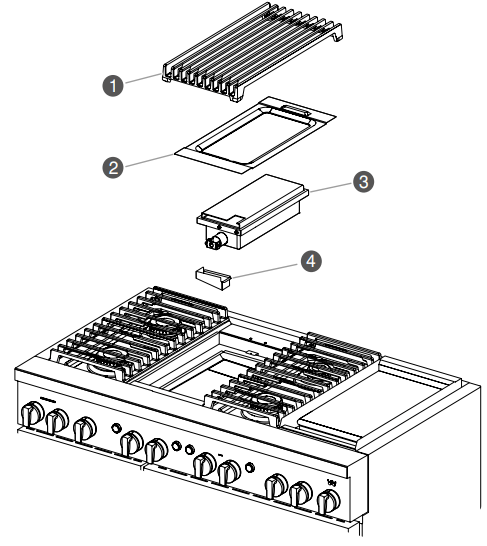
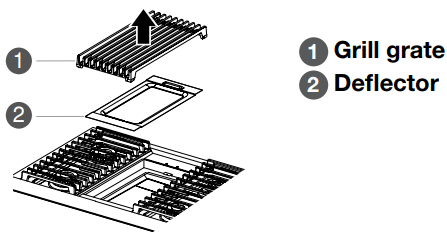
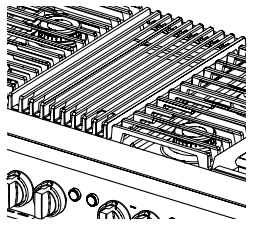
The grill module consists of a cast-iron grate, a burner assembly, deflector and a drip tray.
NOTE: The burner assembly is not removable and should not be removed except by a qualified service technician.
Grate
Deflector
Burner assembly
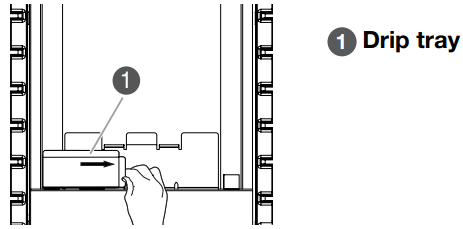
Drip tray
When using the grill, follow the guidelines below:
Trim excess fat to reduce spattering. Slit the remaining fat on the edges to avoid curling.
Allow space between food on the grill. Crowding food will result in uneven cooking.
For most even results, center foods on the grate directly over the heat source.
Use a metal spatula or tongs to turn food.
For even cooking, foods such as chicken quarters should be turned several times.
To check for doneness of meats and poultry, use an instant read thermometer or make a small cut in the center of the food.
Do not leave the grill unattended while cooking.
To avoid damage to the grill, do not use aluminum foil, charcoal or wood chips.
To avoid damage to cookware, do not place cookware on the grill when in use. Food should be cooked directly on the grill grate.
To Use:
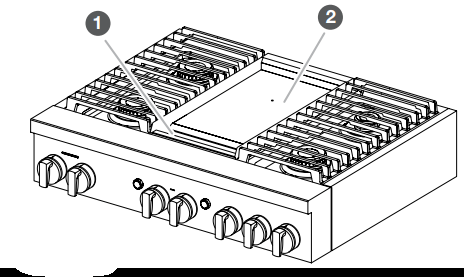
CHROME ELECTRIC GRIDDLE (on some models)
The chrome electric griddle provides the perfect cooking surface for grilled sandwiches, pancakes, eggs, burgers, sautéed vegetables, and many more family favorites. The attractive low-stick surface is designed to make cleanup easy.
Drip tray
Griddle
The chrome electric griddle system provides a convenient cooking surface.
Be sure plastic film has been removed and wash with hot water before first use.
To avoid scratching the griddle, do not place any pots or pans on the griddle. Use only heat-resistant plastic or wooden utensils.
The griddle surface is ready to use and does not need to be seasoned.
Pouring cold water on a hot griddle may warp the griddle, resulting in an uneven cooking surface.
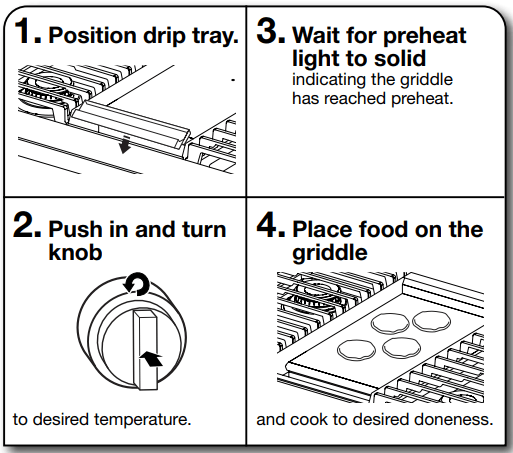
To Use:
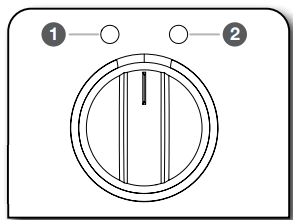
The left griddle indicator light shows that there is power applied to the griddle. The right griddle indicator light blinks to show that the griddle is preheating. When preheat is complete, the right griddle indicator lights solid.
Griddle Preheat Light
Griddle Cooktop ON Light
USING YOUR OVEN
Oven Control Knobs
To Use:
Select desired function on the Mode Knob.
Select desired temperature on the Temperature Knob.
To turn off the unit, the temperature knob needs to be turned to OFF
INDICATOR LIGHTS
The indicator lights illuminate and blink to show the status of the unit.
BEHAVIOR
DESCRIPTION/EXAMPLES
EXAMPLES
Light Pulsing/Blinking
Light pulsing is used on the Mode Knob, Temperature Knob, and the Start button as a way to prompt for action.
When an action is prompted to be completed, the associated indicator light feature will blink.
Examples:
Occurrence: Prompt for action, press the Start button
Result: Start button indicator light quickly blinks Occurrence: 100ºF (38ºC) decrease in temperature required or oven too hot for Proof Result: Knob indicator lights will slowly blink until the oven is at the correct proof temperature
There are two types of pulsing:
1. Start Button Quick Blink: prompting for action.
2. Mode/Temperature Knob White slow blink: preheating Amber slow blink: unit is above target temperature.
When a cycle requiring preheat starts, slow blink will begin. When preheat temperature has been reached, the blinking will stop and the mode/temp indicator lights will be solid.
Mode and Temperature Knob Indicator - Slow Blink
The Mode and Temperature knob indicators will slowly blink to indicate that the feature is in use.
A slow blink indicates that a feature is being used and no further action is required i.e. unit is preheating.
HOW TO START OVEN
1. Set mode and temperature knobs to desired selection.
NOTE: The Start button will blink white when ready.
2. Press the Start button to begin cycle.
START Button - Invalid Selection (Quick Blink)
If an invalid knob combination has been chosen and the Start Button is pressed, the Start Button Indicator Light will quickly blink and a tone will sound to indicate that the chosen selection is invalid.
Bake on the Mode Knob and Wi-Fi on the Temperature Knob.
HOW TO START OVEN
1. Set mode and temperature knobs to desired selection.
NOTE: The Start button will blink white when ready.
If an invalid knob combination has been chosen, the Mode Knob Indicator Light and Temperature Knob Indicator Light will quickly blink white. The indicator light will continue to quickly blink and a tone will sound every 30 seconds until the error is fixed or timeout after 2 minutes of inactivity.
Bake on the Mode Knob and Wi-Fi on the Temperature Knob.
HOW TO START OVEN
1. Set mode and temperature knobs to desired selection.
NOTE: The Start button will blink white when ready.
2. Press the Start button to begin cycle.
Prompt for Action - Inactivity (Quick Blink)
When a valid knob combination has been made, the Start button indicator light will quickly blink to prompt for the Start button to be pressed.
If no action is taken after 2 minutes, a tone will sound and the unit will timeout and return to idle mode.
To exit the unit from idle mode, reselect a Mode and Temperature Knob selection before pressing the Start button.
A quick blink indicates that a valid combination has been selected and is prompting for an action to be taken i.e. Mode is in Bake and temperature is at 350oF (177oC), but the Start button has not been pressed yet.
Validity Check Delay
The unit goes through a validity check to verify that the selected Mode and Temperature combination is valid.
If a valid combination has been selected, the Mode/Temperature Knob indicator lights will show white and the Start button will begin to blink prompting for action.
If an invalid combination has been selected, the knob indicator lights will blink to show that the selected Mode and Temperature combination is invalid.
If the Start Button is pressed too quickly in the validity check, the Start Button indicator light will display an invalid quick blink.
Invalid Temperature Selection Made During A Cycle
If the Temperature Knob is changed during a cycle to a selection that is invalid and the unit was in a previous cycle, the unit will remain in the previous cycle until corrected.
The knob indicator lights will blink to show an invalid selection has been made and will continue to light until corrected.
Mode is in bake, temp is at 350oF (177oC), the Start button is pressed and cycle is running. Then temp is moved to clean. Unit will continue to bake at 350oF (177oC).
Changing Mode Selections During A Cycle
If the Mode Knob is changed during a cycle to a selection that is valid, the Start button will blink to indicate prompt for action. Press the Start Button to begin new Mode selection.
If the Mode Knob is moved from Bake to Convect Bake, the Start button will blink as a prompt for action.
Changing Temperature Selections During A Cycle
If the Temperature Knob is changed during a cycle to a selection that is valid, the temperature will automatically change.
If the temp during a Bake cycle is moved from 350oF to 450oF (177oC to 232oC), the unit will bake at 450oF (232oC).
A tone will sound when:
the unit is powered on
the unit switches to Off mode
a valid Mode and Temperature selection has been made and the Start button is pressed to begin a cycle
an invalid Start button selection is made
there is an error with the unit
preheating has been completed
the timer from the app has ended (the tone will sound every five minutes until the timer is stopped)
a Wi-Fi event is occurring
the Meat probe connects/disconnects
Sabbath Mode
Sabbath Mode is used to configure the oven system so that certain features and modes are disabled or deactivated.
The Sabbath Mode sets the oven to remain ON in a bake setting until turned off.
When a button is pressed, no tones will sound.
All alerts and tones are disabled during Sabbath Mode. All lights stay in the mode of when Sabbath Mode was enabled. For example, if the oven light was on when the user enabled Sabbath Mode, the light would remain on during the entire Sabbath Mode period.
When the oven door is opened or closed, the oven light will not turn on or off and the heating elements will not turn on or off immediately.
If a power failure occurs when the Sabbath Mode is set, the oven will remain in Sabbath Mode but will no longer be actively cooking.
The Sabbath Mode must be entered each time it is used.
Sabbath Mode disables the 12 hour shutoff. All lights and displays are disabled so that no visible activity takes place when the oven door is opened.
To Enter Sabbath Mode:
Turn the Mode knob(s) to the Bake position. The Temperature knob(s) stays in the OFF position.
NOTE: Valid only in the Bake mode position.
Press the Start button seven times within ten seconds.
NOTE: If there are double ovens, both ovens will enter into Sabbath Mode.
The Start button for both ovens will light until Sabbath Mode is exited.
Using Sabbath Bake Mode:
Bake mode is the only mode valid for Sabbath Mode. Select the desired temperature for each available oven and press the Start button.
NOTE: The temperature can be changed while in Sabbath Mode.
If Sabbath Bake mode is disabled in one oven, the other oven will still remain Sabbath enabled.
Once an oven has been disabled by turning the temperature knob to OFF, it cannot be turned back on.
NOTE: Before utilizing Sabbath Mode after successfully connecting to Wi-Fi, verify the app is turned off.
To Exit Sabbath Mode:
Turn either Temperature knob to the OFF position. The Mode knob stays in the BAKE position.
Press the Start button seven times within ten seconds. Within a few seconds, the Start light indicators will turn off.
If you exit Sabbath Mode in one oven, the other oven will also exit Sabbath Mode.
Wi-Fi Connectivity and Remote Operation
Models are provided with a Wi-Fi module that allows the unit to be remotely operated. The control is capable of monitoring and performing the following remote operations once the remote enabling function sequence is properly initiated at the appliance.
Press the Start button once your appliance is Remote Enabled.
Download the App
The first step to get your appliance connected is to download the app on your mobile device. The app will be your guide and walk you through all of the steps. Download the app by visiting iTunes or Google Play.
To connect your appliance:
Download the JennAir® app from Google Play or iTunes.
Follow the prompts in the app to create an account.
Add Appliance
1. Turn the Mode Knob and Temperature Knob to the Wi-Fi position.
2. Look for the SAID code on your appliance. The SAID can be scanned or manually added.
NOTE: The SAID label is located on the lower right of the front side panel.
3. Follow the prompts in the app.
Remote Enable
Once the appliance is connected, use the Remote Enable feature to control features of the appliance from the app such as:
Access the oven from any mobile device
Set and preheat the oven from any location
Monitor progress of cooking cycle
Adjust cook time and temperature
A cooking cycle does not stop when the oven door is opened. Remote enable will stay enabled.
NOTE: The app overrides any knob selections that have been made while Remote Enable is enabled. If the Mode and Temperature Knobs are set and the appliance is remote enabled, the app will control the oven functions.
App Features
The JennAir® app puts complete control of your Connected Appliance at your fingertips.
Access JennAir® Culinary Center
Access JennAir® Steam and Specialty Cycles
Adjust cooking temperatures and times
Preheat, check cooking status, and configure oven features remotely by using the JennAir app, available for either iOS or Android devices.
Home/Away Assist & JennAir
Automatically alert users of oven activity when the home is set “Away.” If the oven is active when the home is set “Away,” the app will alert the user and give the option to turn the oven off.
OVEN USE
Odors and smoke are normal when the oven is used the first few times, or when it is heavily soiled.
During oven use, the heating elements will not remain on, but will cycle on and off throughout oven operation.
IMPORTANT: The health of some birds is extremely sensitive to the fumes given off. Exposure to the fumes may result in death to certain birds. Always move birds to another closed and wellventilated room.
Aluminum Foil
IMPORTANT: To avoid permanent damage to the oven bottom finish, do not line the oven bottom with any type of foil or liner.
For best cooking results, do not cover rack with foil because air must be able to move freely.
To catch spills, place foil on rack below dish. Make sure foil is at least 1/2" (1.3 cm) larger than the dish and that it is turned up at the edges.
Positioning Racks and Bakeware
IMPORTANT: To avoid permanent damage to the porcelain finish, do not place food or bakeware directly on the oven door or bottom.
Racks
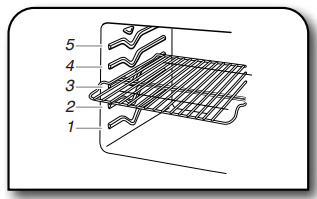
Position racks before turning on the oven.
Do not position racks with bakeware on them.
Make sure racks are level.
When installing racks in adjacent rack levels, begin by installing the lower rack first.
Bakeware
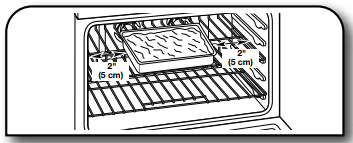
To cook foods evenly, center the dish under the broil element and allow 2" (5.0 cm) of space around pan and the oven wall to ensure adequate air circulation.
Roll-Out Rack
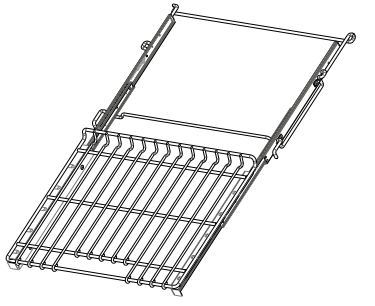
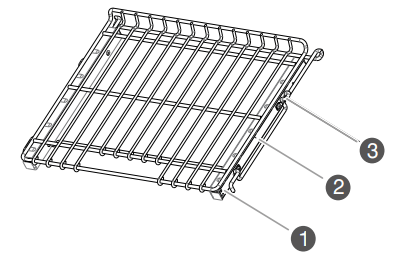
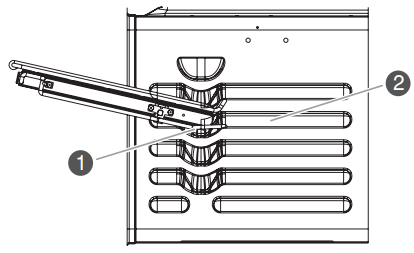
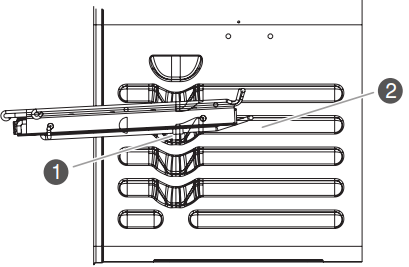
The roll-out rack allows easy access to position and remove food in the oven. The roll-out rack will fit in all positions.
Open Position
Closed and Engaged Position
1. Slide rails
2. Sliding shelf
3. Center brace
To Insert Roll-Out Rack
Angle the rack assembly up and insert the back edge into the “V” cutout in the rack guides of the oven cavity.
Keep the rack lifted at an angle and push in until the back edge of the sliding rails (A) bypass the lower “V” cutout.
Angle the rack downward and continue to gently slide the assembly in until the center brace (C) bypasses the “V” cutout.
Raise rack assembly to flat position and gently push to the back of the oven until the back edge of the sliding rail drops.
When placing racks in adjacent positions, start by loading the lower rack positions first and then install the rack in the position above it.
Pull the rack assembly slightly forward until the front edge drops and the sliding rails are on the rack guide.
1. “V” cutout
2 Rack guide
1. “V” cutout
2 Rack guide
To Remove Roll-Out Rack
1. Push the sliding shelf in completely so that it is closed and engaged with the slide rails.
1 Sliding shelf
2 Slide rails
3 Rack
2. Using 2 hands, lift up on the front edge of the rack assembly. Slowly push the rack assembly to the back wall of the oven so the front edge of the sliding shelf sits on the rack guides on the side of the oven cavity. The front edge of the rack should be higher than the back edge.
3. Using 2 hands, lift up the back of the rack assembly so that the front and back are level on the rack guides.
4. Pull the rack assembly out. To avoid damage to the sliding shelves, do not place more than 25 lbs (11.4 kg) on the rack. Do not clean the roll-out rack in a dishwasher. It may remove the rack’s lubricant and affect its ability to slide.
When placing racks in adjacent positions, start by loading the lower rack positions first and then installing the rack in the position immediately above it.
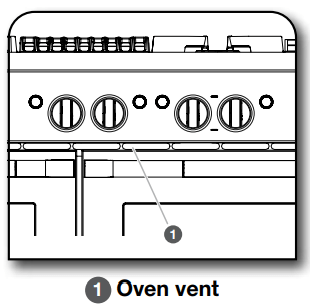
Oven Vent
The oven vent should not be blocked or covered since it allows the release of hot air and moisture from the oven. Blocking or covering the vent will cause poor air circulation, affecting cooking and cleaning results. Do not set plastics, paper, or other items that could melt or burn near the oven vent.
Cooling Fan
The oven has a dual speed cooling fan motor. When the oven temperature is in the Self-Cleaning cycle, the fan will operate at its highest speed to increase airflow and better exhaust the hotter air through the oven vent(s). An increase in noise may be noticeable until the oven cools.
NOTE: Cooling fan may continue to run after the oven has been turned off.
COOKING MODES
Choose an Oven Function
1. Choose an oven function by turning the Mode Knob and Temperature Knob to desired selections.
NOTE: The Start button will flash white to prompt the user to press the Start button.
2. Press the Start button to begin oven function.
When a knob selection is made, and after some time of inactivity, the Start Button Indicator Light will quickly blink to prompt for the Start button to be pressed.
If no action is taken after 2 minutes, a tone will sound and the unit will timeout and return to idle mode.
To exit the unit from idle mode, reselect a mode and Temperature Knob selection before pressing the Start button.
NOTE: The unit goes through a validity check to verify that the selected mode and temperature combination is valid.
If a valid combination has been selected, the knob light and the Start button indicator light will be on. The Start button will begin to blink prompting for action.
If an invalid combination has been selected, the knob indicator lights will blink to show that the selected mode and
Changing a Mode, Temperature, while Oven is Active
If the Mode or Temperature Knob is changed during a cycle to a selection that is valid, the Start button will blink and must be pressed in order to change the setting.
NOTE: The unit will not change mode or temperature until the Start button has been pressed.
If the Mode/Temperature Knob is changed during a cycle to a selection that is invalid and the unit was in a previous cycle, the unit will remain in the previous cycle until corrected.
The knob indicator lights will illuminate to show an invalid selection has been made and will continue to light until corrected.
To Turn Off Oven:
Turn the Temperature Knob to the OFF position.
STEAM-ASSISTED COOKING
Steam-assisted cooking helps to retain moisture, texture, and flavor in food. The cycles are designed to provide the right amount of moisture at the right time for optimal results.
Auto Steam
Auto Steam has 7 settings: Meats, Poultry, Seafood, Breads, Vegetables, Desserts, and Casseroles. Auto Steam settings have default temperature and time settings to guide the cooking process. Choose the type of food being cooked, and select the desired temperature. If desired, both the temperature and time can be changed according to recipe recommendation.
NOTE: For optimal cooking results, avoid opening door during steam-assisted cooking. If the oven door is opened, steam production is automatically shut off until the door is closed.
Steam eliminates the need for the use of parchment paper wraps (for cooking fish), water baths, and spritzing during the cooking process.
When cooking with steam, place meat, poultry, seafood, vegetables, desserts, and casseroles into a cool oven. For best cooking results, allow the oven to cool down from previous cooking before steam cooking.
If oven is warm from use, cooking times may be shorter.
Optimum levels of moisture are introduced at the appropriate time during the cooking cycles.
Specially developed cycles enhance browning on meats, poultry, and bread.
When baking bread, preheating is required.
When a steam-assisted set cook time has elapsed, the oven cooking cycle will continue to run until Off is pressed.
COOK TIMER (App Only)
The Cook Timer allows the oven to cook for a programmed length of time. The Cook Timer can be accessed through the app.
Follow the prompts in the app to use Cook Timer.
Know Your Cook Timer
The Cook Timer countdown is started several ways:
If the cycle does not require preheat, the Cook Time starts immediately as the cycle begins.
If a cycle requires preheat, the Cook Time can only be started through the app when the Start button is pressed.
TEMPERATURE PROBE (App Only)
The temperature probe is a tool to assist with evaluating the finish temperatures of meat, poultry and casseroles. It can be used during Bake, Convect Bake, and Convect Roast. The oven will beep when the food has reached the target temperature.
Know Your Temperature Probe
Always unplug and remove the temperature probe from the oven when removing food.
Before Using Temperature Probe:
Remove any racks above the food that are not in use.
Insert the probe into the food item. For meats, the probe tip should be located in the center of the thickest part of the meat and not into the fat or touching a bone.
For the most accurate temperature readings, insert as much of the probe shaft as possible into the food. Temperatures will be most accurate when more of the probe is inserted in the food.
Place food in oven and connect the temperature probe to the jack.
Keep probe as far away from heat source as possible. Close oven door.
DELAY START (App Only)
WARNING: Food Poisoning Hazard
Do not let food sit in oven more than one hour before or after cooking.
Doing so can result in food poisoning or sickness.
Delay Start allows the oven(s) to be set to turn on at a certain time of day and cook for a set length of time.
Delay Start should not be used for food such as breads and cakes because they may not bake properly.
Delay Start is available with any cycle that has a Delay Start option. The Delay Start can be accessed through the app. Follow the prompts in the app to use Delay Start.
NOTE: Do not use Delay Start for items that require a preheated oven, such as cakes, cookies and breads. If food is in the oven during preheat, it may become overcooked.
CARE AND CLEANING
COOKTOP SURFACE
IMPORTANT:
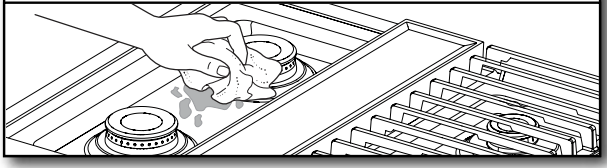
Before cleaning, make sure all cooktop knobs are OFF and the oven and cooktop are cool. Do not use oven cleaners, bleach, or rust removers.
Soap, water, and a soft cloth or sponge are suggested first unless otherwise noted.
After Each Use:
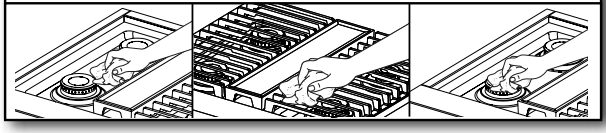
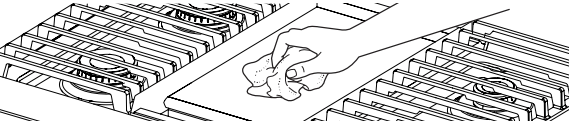
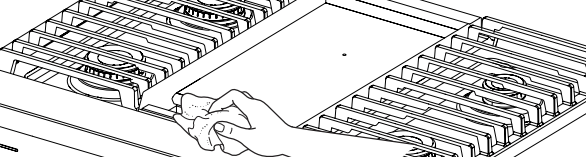
1. Wipe off cooktop, grates, and caps.
2. Clean food spills.
To preserve the finish, clean food spills containing acids, such as vinegar and tomato, as soon as the entire appliance is cool.
SEALED SURFACE BURNERS
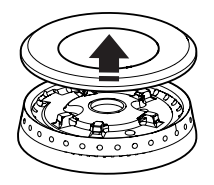
1. Remove burner cap.
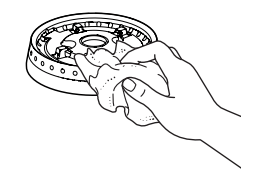
2. Clean gas opening with damp cloth.
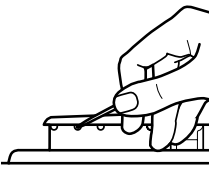
3. Clean clogged burner ports.
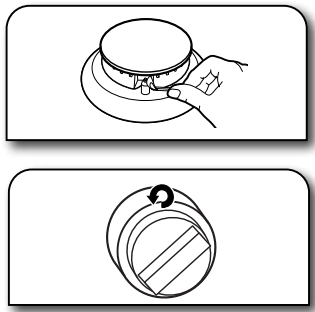
Use a straight pin. Do not enlarge or distort the port. Do not use a wooden toothpick. If the burner needs to be adjusted, contact a trained repair specialist.
4. Replace burner cap.
5. Turn on burner.
If the burner does not light, check cap alignment. If the burner still does not light, do not service the sealed burner yourself. Contact a trained repair specialist.
PORCELAIN-COATED GRATES AND CAPS
Use scrub and cleanser.
Clean with a nonabrasive nylon scrub pad and mildly abrasive cleanser.
Know Your Grates and Caps
Food spills containing acids, such as vinegar and tomato, should be cleaned as soon as the cooktop, grates, and caps are cool. These spills may affect the finish.
To avoid chipping, do not bang grates and caps against each other or hard surfaces such as cast iron cookware.
Do not reassemble caps on burners while wet.
Do not clean in the Self-Cleaning cycle.
Do not clean in dishwasher.
GRILL
To Remove for Cleaning:
Before removing or replacing grill components, make sure the control knobs are turned to OFF. Allow the grill to cool completely before handling.
1. Remove grill grate and deflector.
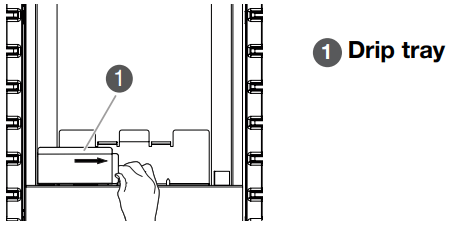
2. Remove and clean drip tray.
To Clean:
Do not use oven cleaners, metal brushes, abrasive scouring pads or other scrubbers made to clean grill components.
Grate:
Do not clean grill grate in dishwasher.
Do not clean in a self-cleaning oven.
Scrub with brush while grate is still warm. Use a soft-bristle brush. Oven mitts may be worn while cleaning.
Soak in warm, soapy water for 30 minutes. After soaking, scrub with nonabrasive pad.
Deflector:
Soak in warm, soapy water to loosen soil. After soaking, scrub with non-abrasive pad.
Drip Tray:
Allow cooktop to cool before cleaning.
Wipe with warm, soapy water or non-abrasive cleanser. Use damp cloth or non-abrasive pad.
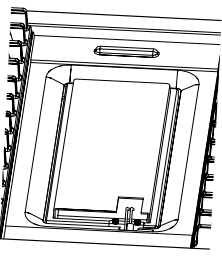
Module Basin:
Wipe with warm, soapy water or non-abrasive cleanser. Use damp cloth or non-abrasive pad.
For heavy soil, soak with paper towels. Soak paper towels in household cleanser and lay them on the soil for at least 30 minutes. After soaking, scrub with a nonabrasive pad.
To Replace:
1. Replace drip tray.
Slide drip tray into opening on the left front side of the grill basin.
2. Place deflector on top of burner assembly.
3. Place grill grate into position.
GRIDDLE
Tips:
Prior to cleaning the griddle, make sure that all cooktop burners and oven controls have been turned off.
For best results, clean the griddle shortly after removing the food.
Do Not Use:
Soap
Abrasive materials
Cleaning materials, including stainless steel cleaner
After Each Use:
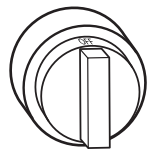
1. Turn knob to 300°F (149°C) to preheat.
Wait until preheat is complete before cleaning.
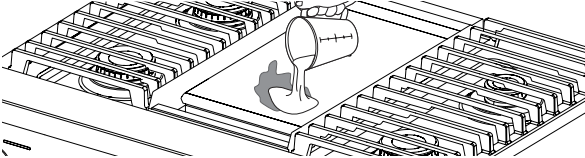
2. Pour water on soiled area.
Using a measuring cup, pour up to 1 cup (236.6 mL) tap water over the soiled area. Start at the back, allowing the water to run toward the drip tray in the front. Allow the water to bubble on the griddle for 3–4 seconds.
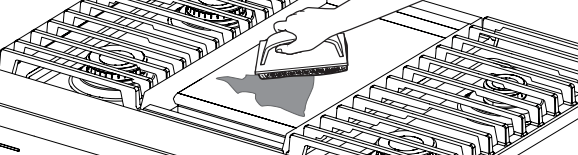
3. Scrape residue into drip tray.
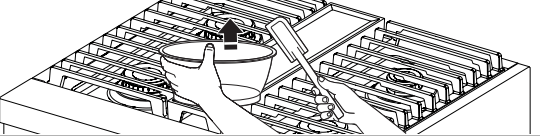
Use a pad holder or wooden spoon with a non-abrasive pad or cloth. Use pressure on soiled areas. Repeat if needed for heavy soils.
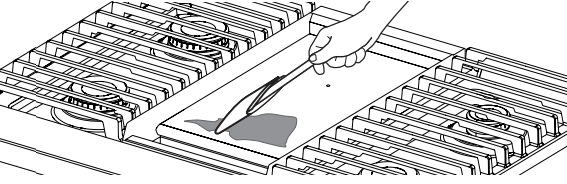
4. Remove remaining residue.
Fold a damp towel and, with the pad holder or wooden spoon, go over the griddle to remove remaining residue.
5. Turn off griddle and let cool.
6. Wipe off griddle.
Once cool, wipe the griddle with a clean, damp terry cloth towel. Then buff with a microfiber cloth. If streaking, rainbowing, or ghosting occurs, use a mixture of 1 part white vinegar to 2 parts water on a towel to wipe the griddle.
7. Remove, empty, and clean drip tray.
Clean the drip tray with warm, soapy water. Wipe the area under the drip tray clean. Once dry, put the drip tray back in position.
COOKTOP CONTROLS
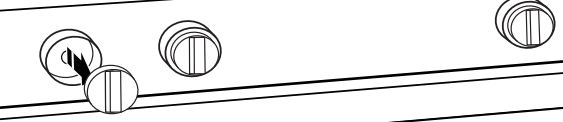
1. Remove knobs.
Pull the knobs straight away from the control panel to remove.
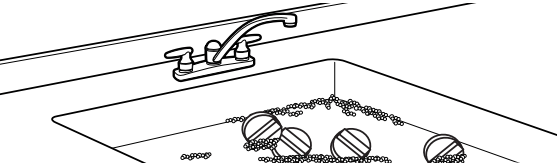
2. Clean with warm, soapy water.
Know Your Cooktop Controls
To avoid damage to the cooktop controls, do not use steel wool, abrasive cleansers, or an oven cleaner.
To avoid damage, do not soak knobs.
When replacing knobs, make sure knobs are in the Off position.
When replacing knobs after cleaning either the surface burner controls or the griddle module control, make sure the knobs are replaced to the correct location.
STAINLESS STEEL
Use cleaner or wipes.
Use affresh® Stainless Steel Cleaner or affresh® Stainless Steel Cleaning Wipes (not included). Rub in direction of grain to avoid possible damage to the steel surface.
Do Not Use:
Soap-filled scouring pads
Abrasive cleaners
Cooktop polishing creme
Steel-wool pads
Gritty washcloths
Abrasive paper towels
SMOKE FINISH (on some models)
IMPORTANT: Do not use corrosive or abrasive detergents. If any of these products accidentally comes in contact with the appliance, clean immediately with a damp microfiber cloth.
Clean surfaces with a damp microfiber cloth. If it is very dirty, wash with a few drops of soap added to water and dry with a soft cloth.
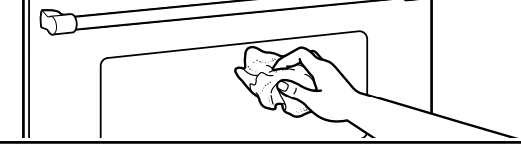
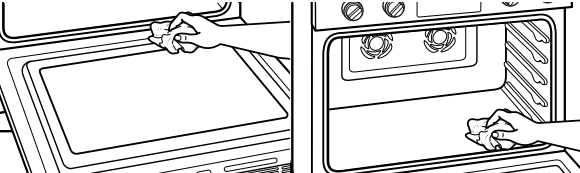
DOOR EXTERIOR
Apply cleaner
Apply glass cleaner to a soft cloth or sponge, not directly on the glass, or use affresh® Kitchen and Appliance Cleaner (not included).
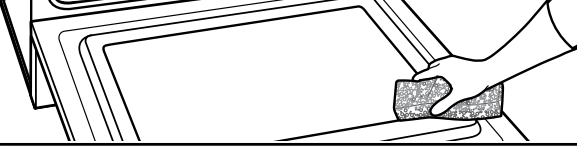
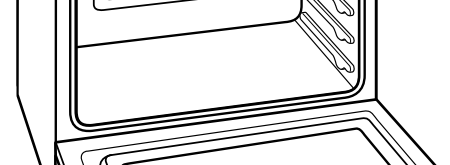
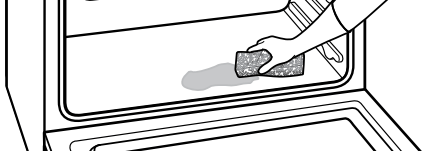
DOOR INTERIOR
1. Wipe away any deposits.
Use a damp sponge
2. Use Self-Cleaning cycle.
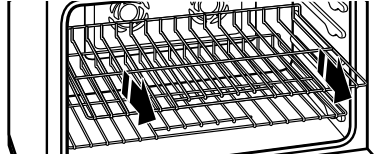
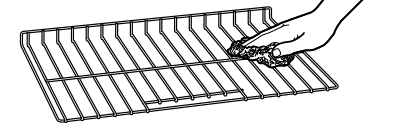
OVEN RACKS
1. Empty out oven and remove racks.
IMPORTANT: Remove racks before the Self-Cleaning cycle to avoid discoloring and difficulty sliding.
2. Use non-abrasive pad or cloth.
OVEN CAVITY
Do not use oven cleaners.
Food spills should be cleaned when oven cools. At high temperatures, foods react with porcelain. Staining, etching, pitting, or faint white spots can result.
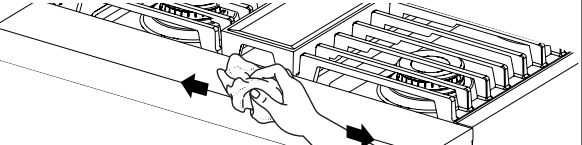
BROIL ELEMENT
Do not use oven cleaners.
To maintain optimal performance, wipe surface with soapy water to remove soil residue when oven completely cools.
Apply glass cleaner or affresh® Kitchen and Appliance cleaner (not included) to a soft cloth or sponge, not directly on the glass cover.
If soil build-up becomes visible or difficult to clean, use the self-clean cycle to thoroughly clean glass.
SELF-CLEANING THE OVEN
WARNING: Burn Hazard
Do not touch the oven during the Self-Cleaning cycle. Keep children away from oven during Self-Cleaning cycle.
Failure to follow these instructions can result in burns.
IMPORTANT:
The health of some birds is extremely sensitive to the fumes given off during the Self-Cleaning cycle. Exposure to the fumes may result in death to certain birds. Always move birds to another closed and well-ventilated room.
Self-clean the oven before it becomes heavily soiled. Heavy soil results in longer cleaning and more smoke.
Remove broiler pan, grid, cookware, and bakeware and, the meat probe from the oven.
Keep the kitchen well-ventilated during the Self-Cleaning cycle to help get rid of heat, odors, and smoke.
Do not block the oven vent(s) during the Self-Cleaning cycle. Air must be able to move freely. See “Oven Vent” in the “Know Your Oven” section.
Do not clean, rub, damage, or move the oven door gasket. The door gasket is essential for a good seal.
To Prepare Oven:
1. Empty out oven and remove racks.
Remove broiler pan, grid, cookware and bakeware, and the meat probe from the oven.
IMPORTANT: Remove racks before the Self-Cleaning cycle to avoid discoloring and difficulty sliding.
2. Remove any foil from oven.
Foil may burn or melt, damaging the oven.
3. Hand clean.
With a damp cloth, hand clean the inside door edge and 1½" (3.8 cm) of the area around the inside oven cavity frame. Be certain not to move or bend the gasket. This area does not get hot enough during self-cleaning to remove soil. Do not let water, cleaners, etc., enter the slots on the door frame.
4. Wipe out loose soil.
Wiping out soil reduces smoke and avoids damage. At high temperatures, foods react with porcelain. Staining, etching, pitting, or faint white spots can result. This will not affect cooking performance.
To Prepare Cooktop:
5. Remove plastic items.
Plastic items may melt.
How the Cycle Works
IMPORTANT:
The heating and cooling of porcelain on steel in the oven may result in discoloring, loss of gloss, hairline cracks, and popping sounds.
The Self-Cleaning cycle uses very high temperatures, burning soil to a powdery ash.
Heavy soil accumulations may require multiple cleaning cycles.
The oven is preset for a 3 hour 30 minute Self-Cleaning cycle. The oven will cool for an additional 30 minutes after cleaning is completed.
To Use Self-Clean:
Turn the Mode and Temperature Knobs to the Clean position. The knob indicator lights will illuminate to show that a selection has been made.
The Start button indicator light will blink to prompt for action. Press the Start button to begin the cleaning cycle. The door(s) will lock.
NOTE: The oven will cool for an additional 30 minutes after cleaning is completed.
To Start Self-Clean:
Turn the Mode Knob to the Clean position.
Turn the Temperature Knob to the Clean position.
Press the Start Button.
NOTE: All operations must be completed within 30 seconds or the unit will return to Idle Mode.
REMEMBER: When range is in use or during the SelfCleaning cycle, the entire cooktop area may become hot.
To Stop Self-Clean Any Time:
Move the Temperature Knob to OFF position to stop self-clean. If the oven temperature is too high, the door will remain locked. It will not unlock until the oven cools.
Once the oven has completely cooled:
Remove ash with a damp cloth.
If soil remains after wiping, that means the length of the SelfCleaning cycle was not long enough for the amount of soil in the oven. Repeat the Self-Cleaning cycle if desired or the soil will be removed during the next Self-Cleaning cycle.
To avoid breaking the glass, do not apply a cool damp cloth to the inner door glass before it has completely cooled.
The oven lights will not light during the Self-Cleaning cycle.
On 48" (121.9 cm) ranges, only one oven can self-clean at a time. If one oven is self-cleaning, the other oven cannot be set or turned on.
NOTE: The oven has a dual speed cooling fan motor. During selfcleaning, the fan(s) will operate at their highest speed to increase airflow to better exhaust the hotter air through the oven vent(s). An increase of noise may be noticeable during and after the SelfCleaning cycle until the oven cools.
OVEN LIGHTS
The oven lights are 120 V, 25 W maximum halogen bulbs. They will come on when the oven door is opened.
To Replace:
Before replacing the bulb, make sure the oven is OFF and cool. Disconnect power.
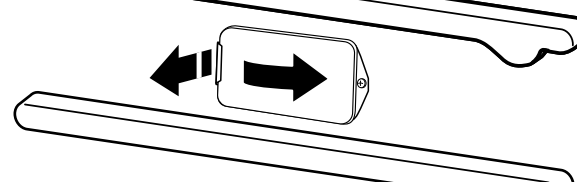
1. Remove glass light cover.
Grasp the front edge, and pull away from the oven.
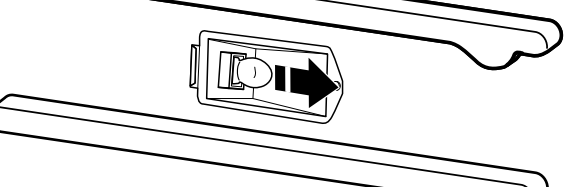
2. Remove bulb from socket.
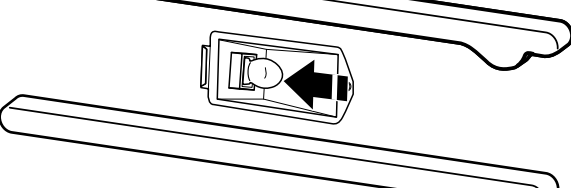
3. Replace bulb.
Use a tissue or wear cotton gloves to handle the bulb. To avoid damage or decreasing the life of the new bulb, do not touch bulb with bare fingers.
4. Replace bulb cover
Snap back into the wall. Reconnect power.
TROUBLESHOOTING
IF YOU EXPERIENCE
POSSIBLE CAUSES
SOLUTION
Nothing will operate
A household fuse has blown or a circuit breaker has tripped.
Replace the fuse or reset the circuit breaker. If the problem continues, call an electrician.
Surface burners will not operate.
This is the first time the surface burners have been used.
Turn on any one of the surface burner knobs to release air from the gas lines.
The control knob is not set correctly
Push in knob before turning to a setting.
The burner ports are clogged.
Clean clogged burner ports with a straight pin.
Surface burner flames are uneven, yellow, and/ or noisy
The burner ports are clogged.
Clean clogged burner ports with a straight pin
The burner caps are not positioned properly.
Make sure cap is properly aligned with the burner
Propane gas is being used.
The range may have been converted improperly. Contact a trained repair specialist.
A tone sounds or indicator light flashes from the unit.
An invalid mode and temperature selection has been made.
Make sure that a valid mode and temperature selection has been made
An invalid Start button selection is made.
If an invalid knob combination has been chosen and the Start button is pressed, the indicator light will quickly blink and a tone will sound to indicate that the chosen selection is invalid.
The timer from the application has ended.
The tone will sound every five minutes until the timer is stopped on the application.
The Meat probe has been disconnected.
Reconnect the meat probe.
Surface burner makes popping noises.
The burner is wet
Let it dry.
Burner sparks but does not light.
There is continuous sparking, but the burner does not light.
Make sure cap is properly aligned with burner.
If sparking continues, discontinue use of the surface burner and contact a service technician.
Excessive heat around cookware on cooktop.
The cookware is not the proper size.
Use cookware about the same size as the surface cooking area or surface burner. Cookware should not extend more than 1/2" (1.3 cm) outside the cooking area.
Cooktop cooking results not what expected.
The proper cookware is not being used.
Use medium-to-heavy cookware made of the material that cooks food the way you want. The best cookware should have a flat bottom, straight sides, and a well-fitting lid.
The control knob is not set to the proper heat level.
Set the Cooktop Control to HI, MED, or LO, depending upon the type of cooking you want to do.
The range is not level.
The range must be level for the griddle to operate properly
Oven will not operate.
The electronic oven control is not set correctly.
Make sure you have followed the instructions for the function you want to perform.
A Delay Start has been set via the App
This will cause the oven to start at a later time.
On some models, the Sabbath Mode is set.
This mode allows oven operation in keeping with the Jewish Sabbath.
The temperature knob is not set to a proper temperature setting.
Push in knob before turning to a setting and verify that the knob is located on a setting.
The start button is not properly operating.
Allow the start button to blink before pressing start.
The updated cooking mode selected is not working properly.
Moving too quickly between cooking modes can cause issues with getting the desired mode started.
Cooling fan runs during baking, broiling, or cleaning.
It is normal for the fan to automatically run while the oven is in use or for some time after the oven is shut off to cool the electronic control.
Self-Cleaning cycle will not operate
The oven door is open.
Close the oven door all the way.
The function has not been entered.
Make sure you have properly followed the Self-Cleaning cycle instructions.
A second self-cleaning cycle is run in the same cavity within 12 hours.
Allow more than 12 hours between self-cleaning cycles.
On 48" (121.9 cm) ranges, one oven is self-cleaning.
When one oven is self-cleaning, the other oven cannot be set to self-clean.
Oven cooking results not what expected.
The set temperature did not perform as expected.
Double-check the recipe in a reliable cookbook
The oven was not preheated.
If the proper steps are followed when setting the desired function, the oven will preheat before cooking.
The proper bakeware is not being used.
Make sure the bakeware used is appropriate for the food being cooked.
The racks are not positioned properly.
Place racks so there is adequate space above each food item.
There is not proper air circulation around bakeware.
Allow 2" (5.0 cm) of space around bakeware and oven walls.
The batter is not evenly distributed in the pan
Make sure your unit and racks are level, and check that batter is level in the pan.
The proper length of time is not being used.
Adjust cooking time.
The oven door has been opened while cooking.
Oven peeking releases oven heat and can result in longer cooking times.
Baked items are too brown on the top or bottom.
Move rack to a lower location to reduce top browning or to a higher location to reduce bottom browning in the oven.
Pie crust edges are browning early.
Use aluminum foil to cover the edge of the crust and/or reduce baking temperature.
Racks are difficult to install in adjacent positions.
Install the bottom rack first and then install the rack above it
Soiled broil element cover drops debris on baking dishes.
Wash cover with soapy water or run Self-Clean cycle to remove build-up.