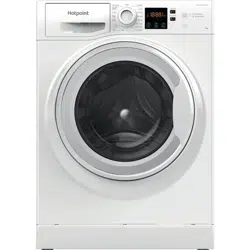
User ManualCONTROL PANEL
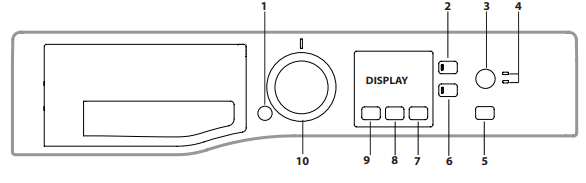
1. ON/OFF button
2. CHILD LOCK button
3. EXTRA TOUCH button
4. EXTRA TOUCH indicator lights
5. START/PAUSE button and indicator light
6. OPTION button and indicator light
7. DELAY START button
8. SPIN button
9. TEMPERATURE button
10. WASH CYCLE SELECTOR KNOB
PRODUCT DESCRIPTION
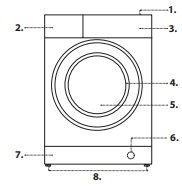
1. Top
2. Detergent dispenser drawer
3. Control panel
4. Handle
5. Porthole door
6. Drain pump (behind the plinth)
7. Plinth (removable)
8. Adjustable feet (2)
DISPLAY
The display is useful when programming the washing machine and provides plenty of information.
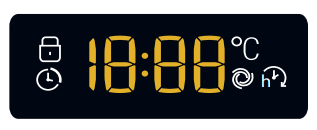
The duration of the available wash cycles and the remaining time of a running cycle appear (the display will show the maximum duration of the cycle chosen, which may decrease after several minutes, since the effective duration of the programme varies depending on the wash load and the settings chosen); if the DELAY START option has been set, the countdown to the start of the selected wash cycle will appear. Pressing the corresponding button allows you to view the maximum spin speed and temperature values attained by the machine during the set wash cycle, or the values selected most recently, if these are compatible with the set wash cycle.
 Locked door indicator
When lit, the symbol indicates that the door is locked. To prevent any damage, wait until the symbol turns off before opening the door. To open the door while a cycle is in progress, press the START/PAUSE button ; if the symbol is off, the door can be opened.
DAILY USE
Prepare the laundry by following the suggestions appearing under the “TIPS AND SUGGESTIONS” section.
- Press the ON/OFF button
 ; the indicator light relative to START/PAUSE
 will flash slowly green.
 - Open the door. Load the laundry while making sure not to exceed the maximum load quantity indicated in the wash cycle table.
- Pull out the detergent dispenser drawer and pour the detergent into the relevant compartments, as described in the “DETERGENT DISPENSER DRAWER” section.
- Close the door.
- The machine automatically displays the maximum temperature and spin speed values for the selected cycle, or the most recently used settings if they are compatible with the selected cycle. Pressing the
 button gradually reduces the temperature down to the cold wash “OFF” setting. Pressing the
  button gradually reduces the spin speed until it is completely excluded (“OFF” setting). Pressing the buttons further restores the maximum allowed values for the selected cycle.
 - Select the desired wash cycle.
- Select the desired options.
- Press the START/PAUSE button to start the wash cycle; the relative indicator light will light up steady green and the door will lock ( symbol on).
OPTIONS
 Extra Rinse
Selecting this option allows for enhancing rinsing efficiency and fully removing the detergent. It is particularly useful for sensitive skin.
 Extra Touch
After pushing the button for the 1st time, option “Rapid Option” is selected and the cycle duration will be reduced.
After pushing the button for the 2nd time, option “Steam Hygiene” enhances washing performance by generating steam during the wash cycle to remove any bacteria from the fibres, which are treated at the same time.! The steam generated during the operation of the washing machine may cause the porthole door to become hazy.
 Delay
Delay
To set a delayed start for the selected cycle, press the corresponding button repeatedly until the desired delay period is reached. When this option has been activated, the symbol lights up on the display. To remove the delayed start setting, press the button until “OFF” appears on the display.
 Temperature
Each wash cycle has a pre-defined temperature. To modify the temperature, press the button. The value will appear on the display.
 Spin
Spin
Each wash cycle has a pre-defined spin speed. To modify the spin speed, press the button. The value will appear on the display.
 CHILD LOCK
To activate the control panel lock, press and hold the button for approximately 2 seconds. When the symbol is lit, the control panel is locked (except for the ON/OFF button). This will prevent accidental modifications to wash cycles, especially when children are at home. To deactivate the control panel lock, press and hold the button for approximately 2 seconds.
TIPS AND SUGGESTIONS
Divide the laundry according to:
Type of fabric (cotton, mixed fibres, synthetics, wool, garments to be hand-washed). Colour (separate coloured garments from whites, wash new coloured garments separately). Delicates (small garments – such as nylon stockings – and items with hooks – such as bras: insert them in a fabric bag).
Empty the pockets:
Objects such as coins or lighters can damage the washing machine and the drum. Check all buttons.
CARE AND MAINTENANCE
Before performing cleaning and maintenance, switch the washing machine off and disconnect it from the mains power. Do not use flammable liquids to clean the washing machine.
Cutting off the water and electricity supplies
Close the water tap after every wash. This will limit wear on the hydraulic system inside the washing machine and help to prevent leaks.
Unplug the washing machine when cleaning it and during all maintenance work.
Cleaning the washing machine
The outer parts and rubber components of the appliance can be cleaned using a soft cloth soaked in lukewarm soapy water. Do not use solvents or abrasives.
The washing machine has a “Auto-Clean” cycle for its internal parts; it must be run without any load in the drum.
To optimise this cycle, it is possible to use either detergent (10% of the quantity specified for lightly soiled garments) or special additives to clean the washing machine. We recommend running a cleaning cycle every 40 wash cycles.
To start the programme, close the door, turn the machine ON and press button  for 5 seconds.
The cycle will start automatically and will run for about 70 minutes. To stop the cycle, press the START/PAUSE button.
Cleaning the detergent dispenser drawer
Remove the dispenser drawer by lifting and pulling it outwards. Wash it under running water; this procedure should be effected regularly.
Caring for the door and drum
Always leave the porthole door ajar in order to prevent unpleasant odours from forming.
Cleaning the pump
The washing machine is fitted with a self-cleaning pump that does not require any maintenance. Small items (such as coins or buttons) may sometimes fall into the protective pre-chamber situated at the base of the pump.
Make sure that the wash cycle has ended and unplug the appliance.
To access the pre-chamber:
- remove the covering panel on the front side of the machine by inserting a screwdriver in the centre and sides of the panel and using it as a lever;
- loosen the drainage pump cover by turning it anti-clockwise: it is normal for some water to leak out;
- clean the inside thoroughly;
- screw the cover back on;
- put the panel back in place, making sure the hooks slot in place before pushing the panel onto the appliance.
Checking the water inlet hose
Check the water inlet hose at least once a year. If it is cracked or broken, it must be replaced: during wash cycles, the high pressure of the water could suddenly split the hose open.
Never use hoses that have already been used.
LOAD BALANCING SYSTEM
Before every spin cycle, to avoid excessive vibrations before every spin and to distribute the load in a uniform manner, the drum rotates continuously at a speed which is slightly greater than the washing rotation speed. If, after several attempts, the load is not balanced correctly, the machine spins at a reduced spin speed. If the load is excessively unbalanced, the washing machine performs the distribution process instead of spinning. To encourage improved load distribution and balance, we recommend small and large garments are mixed in the load.
ACCESSORIES
Contact our Technical Assistance Service to check whether the following accessories are available for this washing machine model.
Stacking kit
With this accessory you can secure the tumble dryer to the upper part of your washing machine to save space and facilitate loading and unloading of the tumble dryer.
TRANSPORT AND HANDLING
Do not lift the washing machine by gripping it from the upper section. Unplug the appliance and close the water tap. Check that the door and detergent dispenser drawer are tightly closed. Detach the filling hose from the water tap then detach the drain hose. Empty all the water remaining in the hoses and secure the latter so that they do not get damaged during transport. Apply the transport bolts back on. Repeat, in reverse order, the transport bolt removal procedure described in the“Installation instructions”.
TROUBLESHOOTING
Your washing machine could occasionally fail to work. Before contacting the Technical Assistance Service, make sure that the problem cannot be easily solved using the following list.
The washing machine does not start.
- The appliance is not plugged into the socket fully, or not enough to make contact.
- There is no power in the house.
The wash cycle does not start.
- The washing machine door is not closed properly.
- The ON/OFF button has not been pressed.
- The START/PAUSE button has not been pressed.
- The water tap has not been opened.
- A delay has been set for the start time.
The washing machine does not fill with water (“H2O” appears on the display).
- The water inlet hose is not connected to the tap.
- The hose is bent.
- The water tap has not been opened.
- There is no water supply in the house.
- The pressure is too low.
- The START/PAUSE button has not been pressed.
The washing machine continuously loads and unloads water.
- The drain hose is not fitted between 65 and 100 cm from the floor.
- The free end of the hose is immersed in water.
- The wall drainage system is not fitted with a breather pipe.
If the problem persists even after these checks, turn off the water tap, switch the appliance off and contact the Technical Assistance Service. If the home is on one of the upper floors of a building, there may be problems relating to back-siphonage, causing the washing machine to fill with water and drain continuously. Special anti-siphon valves are available in shops and help to prevent this inconvenience.
The washing machine does not drain or spin.
- The cycle does not include drainage: with certain cycles it must be started manually.
- The drain hose is bent.
- The drainage duct is clogged.
The washing machine vibrates a lot during the spin cycle.
- The drum was not unlocked correctly during installation.
- The washing machine is not level.
- The washing machine is tucked between furniture cabinets and the wall.
The washing machine leaks.
- The water inlet hose is not screwed on properly.
- The detergent dispenser drawer is obstructed.
- The drain hose is not properly attached.
The “Options” and START/PAUSE indicator lights flash rapidly and the display visualises an error code (e.g.: F-01, F-...).
- Switch off the machine and unplug it, wait for approximately 1 minute and then switch it back on again. If the problem persists, contact the Technical Assistance Service.
There is too much foam.
- The detergent is not suitable for machine washing (it should display the text “for washing machines” or “hand and machine wash”, or the like).
- Too much detergent was used.
After pressing START/PAUSE button, the drum turns but the washing machine does not fill water and no error on display.
DEMO MODE: to deactivate this function, switch the washing machine OFF. Than press and hold “Start/Pause” button, within 5 seconds press also “ON/OFF” button and hold both buttons for 2 seconds.