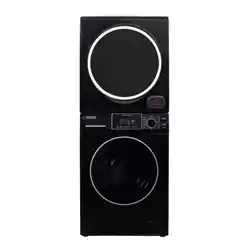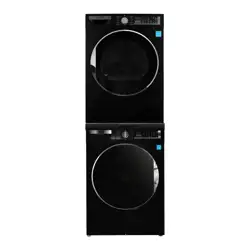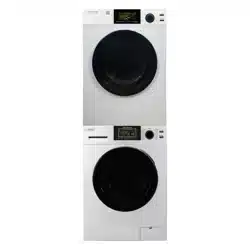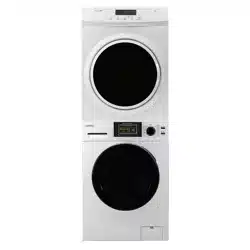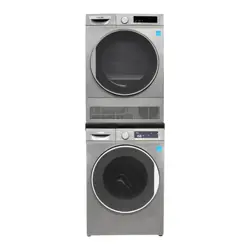
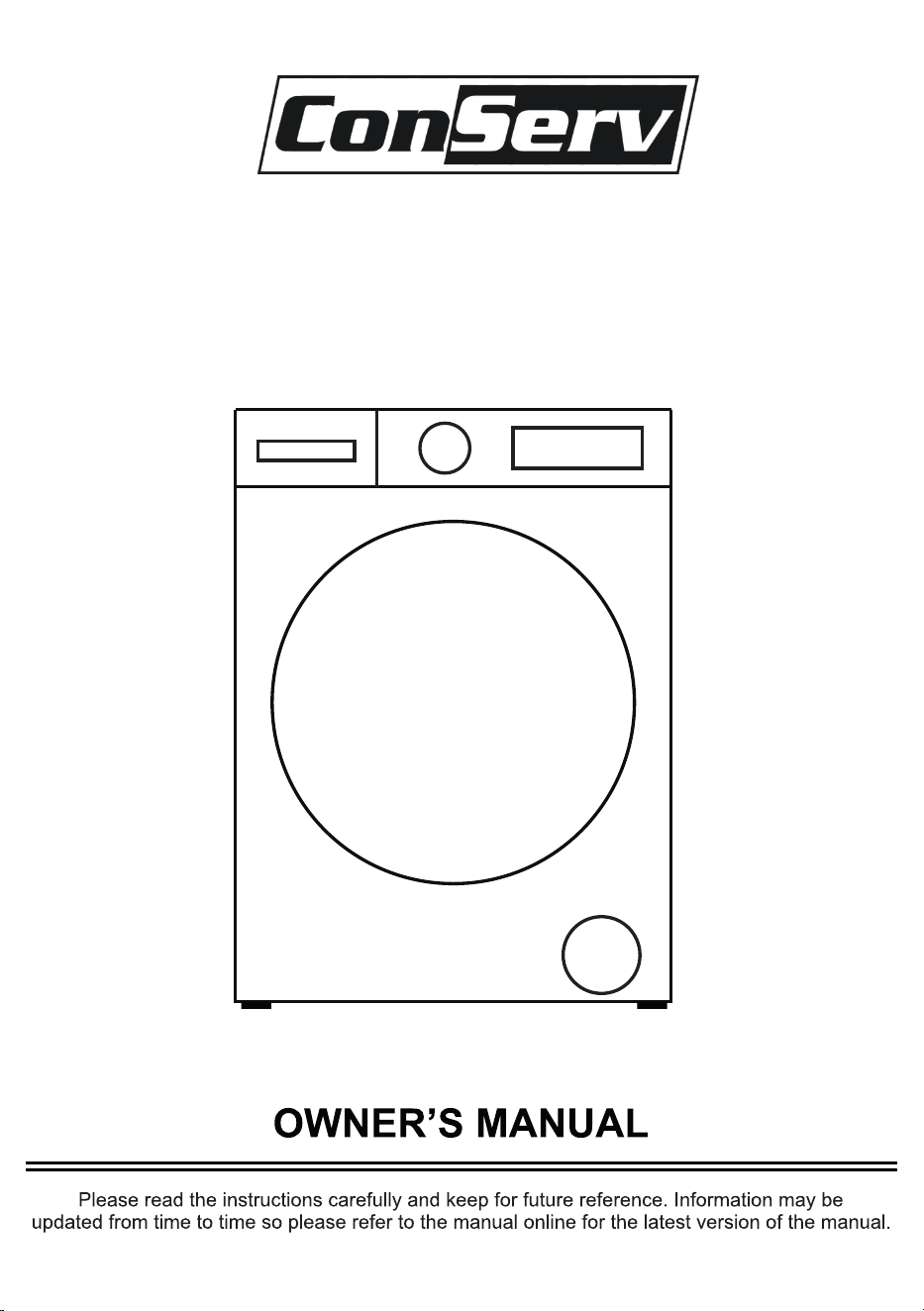
High Efficiency Washer
Model - CW 2240 W/B/T

Your appliance is protected by this warranty under
normal, personal, family or household use for 2 Year Parts & Labor
and limited commercial use (90 days) in USA and Canada.
two
Conserv Appliances
Conserv Appliances
Conserv Appliances
In no event shall Conserv Appliances be liable for incidental or consequential damages or for
damages resulting from external causes such as abuse, operation misuse, neglect,
alterations, normal wear and tear, incorrect voltage or acts of God. This warranty does not
cover service calls which involve defective workmanship, damage due to other products while
combined use with this product or materials covered by this warranty. Accordingly, diagnosis
and repair costs for a service call which involves defective workmanship or materials will be
the responsibility of the consumer-owner.
Most work is covered. The defining factor is has the appliance malfunctioned (Conserv
Appliances is responsible) or has the customer omitted or done something to cause malfunction
(customer is responsible).
Exclusions
1. Non-removal of shipping bolts, causing vibration, resulting in internal damage.
2. Non-adjusment of feet to level machine, causing vibration, resulting in internal damage.
Conserv Appliances
Warranty Limitations
WARNING: This product can expose you to chemicals
including Diisononyl Phthalate (DINP) which is known to
the State of California to cause cancer.
For more information go to www.P65Warnings.ca.gov

Safety
Installation
Electrical Connection
Grounding Instructions
Water Inlet Hose Connection
Water Discharge Connection
Operation
Control Panel
Detergent Drawer and Compartments
Program Dial
Wash Programs Table
Display Panel
Maintenance
Troubleshooting
Error Codes
Technical Specifications
1
5
7
7
8
9
10
11
11
12
13
14
17
21
23
23
Table of Contents

SAFETY
Your safety and the safety of others are very important.
Please read and follow the important safety warnings in this manual and on
your appliance.
Danger indicates a hazardous situation that, if not avoided,
will result in death or serious injury.
Warning indicates a hazardous situation that if not avoided, ,
could result in death or serious injury.
, Caution indicates a hazardous situation that if not avoided,
could result in minor or moderate injury.
DANGER
WARNING
CAUTION
• Do not wash items that have been previously cleaned in, washed in,
soaked in, or spotted with gasoline, dry-cleaning solvents, or other
flammable or explosive substances, as they give off vapors that could
ignite or explode.
• Do not add gasoline, dry-cleaning solvents, or other flammable or
explosive substances to the wash water. These substances give off
vapors that could ignite or explode.
• Under certain conditions, hydrogen gas may be produced in a hot-water
system that has not been used for 2 weeks or more. HYDROGEN GAS
IS EXPLOSIVE. If the hot-water system has not been used for such a
period, before using the appliance, turn on all hot-water faucets and
let the water flow from each faucet for several minutes. This will release
any accumulated hydrogen gas. As the gas is flammable, do not smoke
or use an open flame during this time.
• Do not store flammable liquids near the appliance.
• The sulfur content of paint removers may cause corrosion. Never use paint
removing materials in the appliance.
• Never use products that contain solvents in the appliance.
Risk of Fire
WARNING
To reduce the risk of fire, electric shock, or injury to persons when using
your appliance, always follow basic precautions.
1
• Please ensure that items loaded into your appliance do not have plastic,
metallic, or sharp objects such as pins, keys, or coins.
• Do not tamper with controls.
• Do not repair or replace any part of the appliance or attempt any servicing
unless specifically recommended in the manual or in published user-repair
instructions that you understand and have the skills to carry out.
• To reduce the risk of electric shock, disconnect this appliance from the
power supply before attempting any maintenance. Turning the controls to
the OFF position does not disconnect this appliance from the power supply.
Do not touch the drain hose or any discharged water while your appliance is
running. The high temperatures pose a burn risk.
Risk of Injury or Death from Electrical Current
• Do not connect your appliance to the mains electricity supply using an
extension cord.
• Do not insert a damaged plug into a socket.
• Never remove the plug from the socket by pulling the cord. Always hold
the plug.
• Never touch the power cord/plug with wet hands as this could cause a
short circuit or electric shock.
• Do not touch your appliance if your hands or feet are wet.
• A damaged power cord/plug can cause fire or give you an electric shock.
A damaged cord or plug must be replaced by a qualified technician.
• Connect the appliance to a dedicated circuit.
Risk of Burns
WARNING
2

Risk of Flooding
• Check the speed of water flow before placing the drain hose in a sink.
• Secure the hose to prevent it from slipping. Water flow may dislodge the
hose if it is not properly secured.
• Ensure the plug in your sink does not block the drain.
Risk of Falling and Injury
• Do not climb on your appliance.
• Do not reach into the appliance if the drum is rotating.
• Ensure hoses and cables are secured and do not present a tripping hazard.
• Do not turn your appliance upside down or on its side.
• Do not lift your appliance using the door or detergent drawer.
• The appliance must be carried by at least 2 people.
3

Child Safety
• The appliance is not intended for use by people (including children) with
reduced physical, sensory or mental capabilities, or lack of experience and
knowledge unless they have been given supervision or instruction
concerning use of the appliance by a person responsible for their safety.
• Children of less than 3 years should be kept away unless
continuously supervised.
• Do not leave children unattended near the . Children might lockappliance
themselves in the appliance resulting in risk of death.
• Children should not play with the appliance.
• Cleaning and maintenance should not be done by children.
• Do not allow children to touch the glass door during operation. The surface
becomes extremely hot and may cause damage to skin.
• Poisoning and irritation may occur if detergent and cleaning materials are
consumed or come into contact with the skin and eyes. Keep cleaning
materials out of the reach of children.
• Keep packaging material away from children. The packaging of the
appliance could be hazardous to children. Do not allow children to play
with the packaging or small parts from the appliance.
• Keep the packaging materials in a place where children cannot reach them
or dispose of them appropriately.
• Before the appliance is removed from service or discarded, remove the
door to prevent child entrapment.
Safe disposal
Dispose off this appliance in accordance with local regulations.
4
Installation
Please check the packaging of the washer and the outer surface of the
washer once the packaging has been removed. Do not operate the washer
if it appears damaged or if the packaging has been opened.
Your washer must only be installed by an authorized service agent.
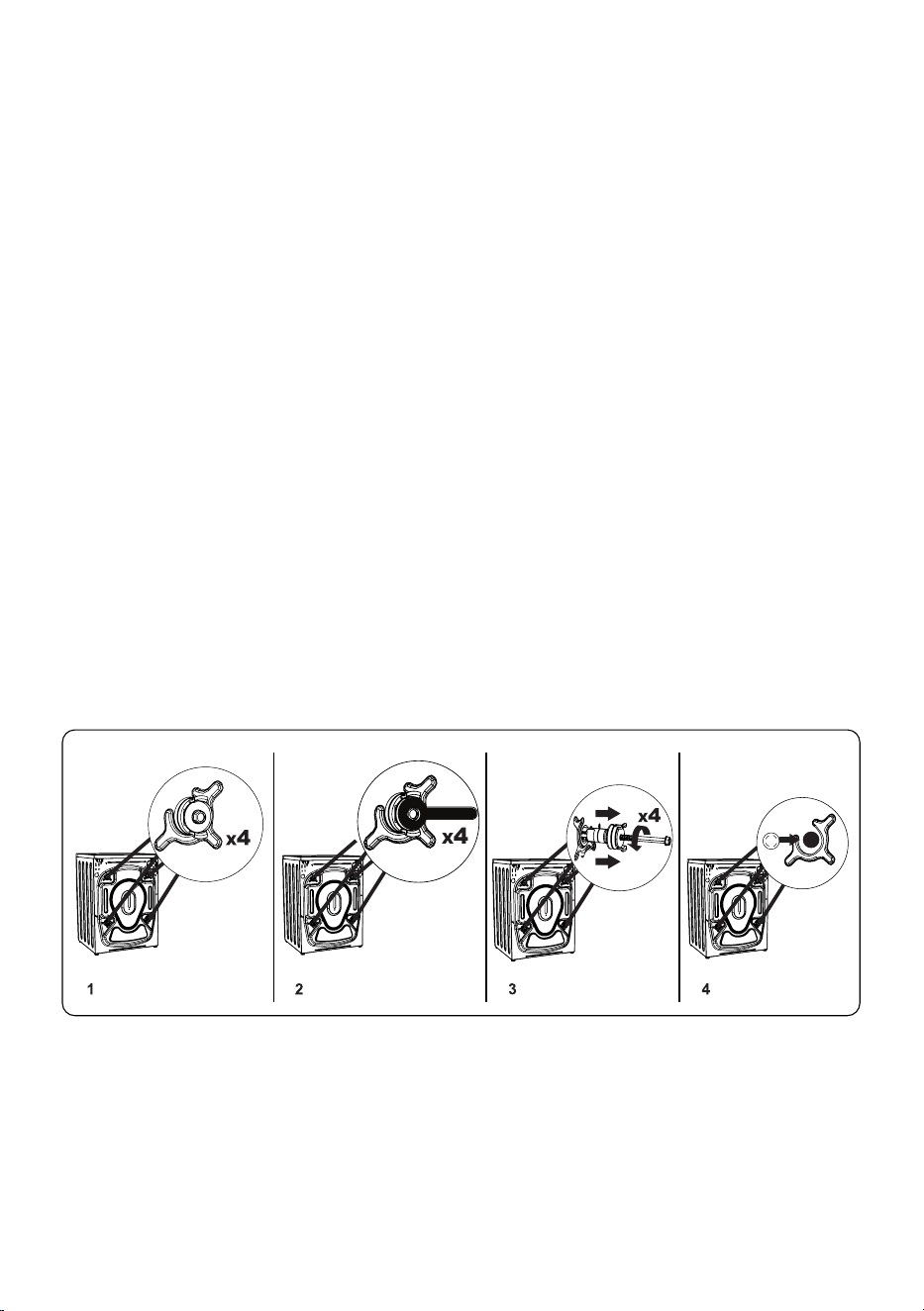
Before installing the washer, remove the shipping bolts.
1. Remove the 4 shipping bolts and rubber spacers from the back of the
washer. If the bolts are not removed, they may cause heavy vibration,
noise and malfunction of the washer and void the warranty.
2. Loosen the shipping bolts by turning them counterclockwise with a wrench.
3. Remove the shipping bolts by pulling them straight out.
4. Fit the plastic blanking caps supplied in the accessories bag into the
gaps left by the removal of the shipping bolts Store the shipping bolts .
for future use.
5

• The necessary ambient temperature for operation of your washer is
59°F - 77°F. If the temperature is below 32°F, hoses may split or the
electronic module may not operate correctly.
• Do not install or store this where it will be exposed to the weather washer
or outdoors.
• Install your washer in a location that can be fully ventilated and
preferably has constant air circulation.
• Do not install the washer on a carpet or surfaces that would prevent the
ventilation of its base.
• Ensure that the door of your washer is not restricted and can be
opened fully.
washer place the • To ensure silent and vibration-free operation of the
washer on a flat, smooth and firm surface.
Leveling
• Level your using the adjustable feet. Never insert cardboard, washer
wood or other similar materials under the to level it.washer
• To increase the height of the , turn the feet clockwise. To decrease washer
the height of the , turn the feet counterclockwise.washer
• Once the is level, tighten the locking nuts by turning washer
them clockwise.
Placement
6
Grounding Instructions
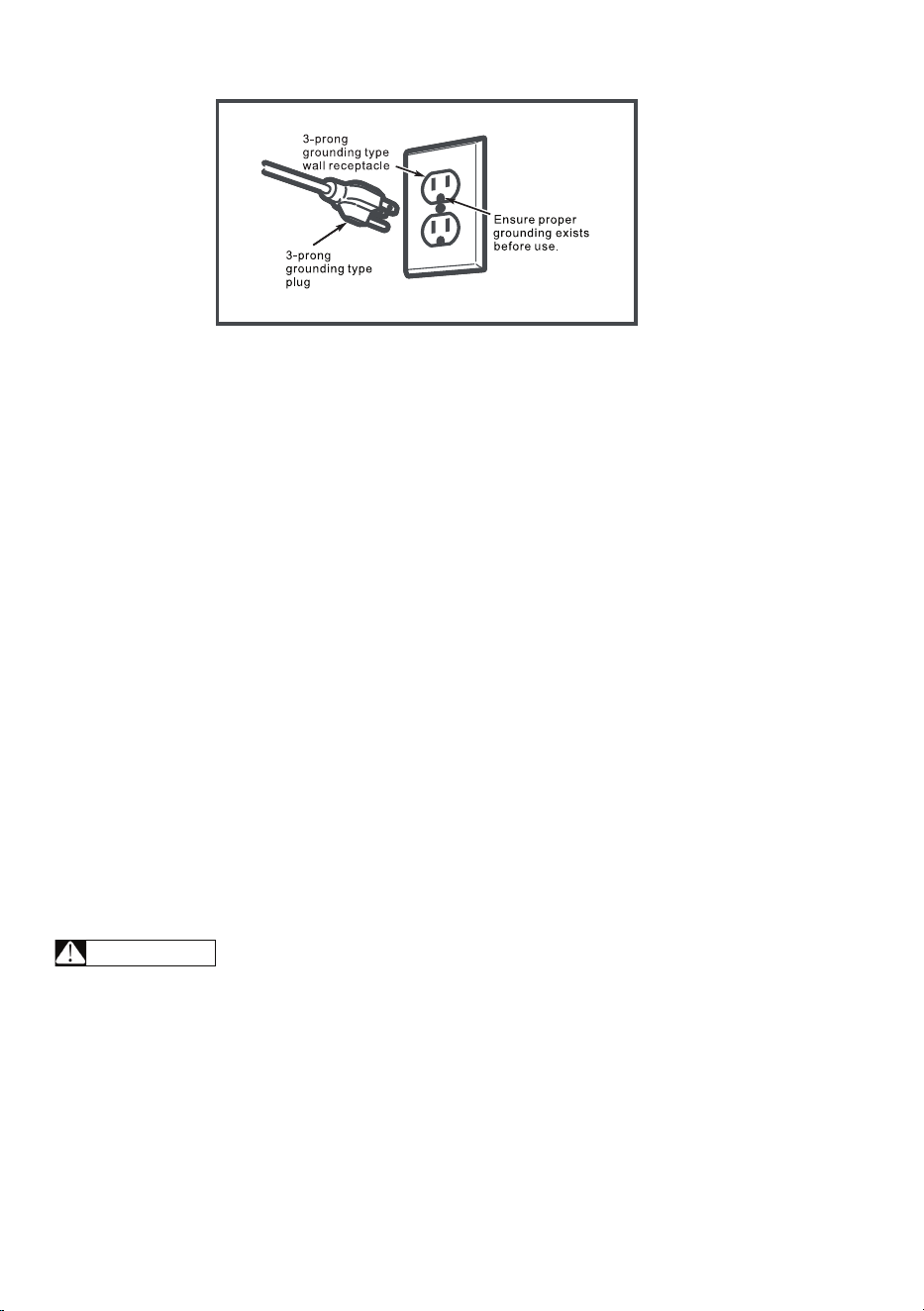
This must be grounded. In the event of malfunction or breakdown, washer
grounding will reduce the risk of electric shock by providing a path of least
resistance for electric current. This is equipped with a cord having washer
an equipment-grounding conductor and a grounding plug. The plug must be
plugged into an appropriate outlet that is properly installed and grounded in
accordance with all local codes and ordinances.
Improper connection of the equipment-grounding conductor
can result in a risk of electric shock. Check with a qualified electrician or
service technician if you are in doubt as to whether the is washer
properly grounded.
Do not modify the plug provided with the . If it does not fit the washer
outlet, ensure that the correct outlet is installed by a qualified electrician.
Electrical Connection
The requires a 110 -120V / 60Hz mains supply.• washer
• The mains cord of the is equipped with a grounded plug. This washer
plug should always be inserted to a grounded outlet of minimum15 amps.
If connected to a circuit protected by fuses, use time-delay fuses with •
this washer.
• If you do not have a suitable socket and fuse conforming with this, please
ensure the work is carried out by a qualified electrician.
WARNING
7
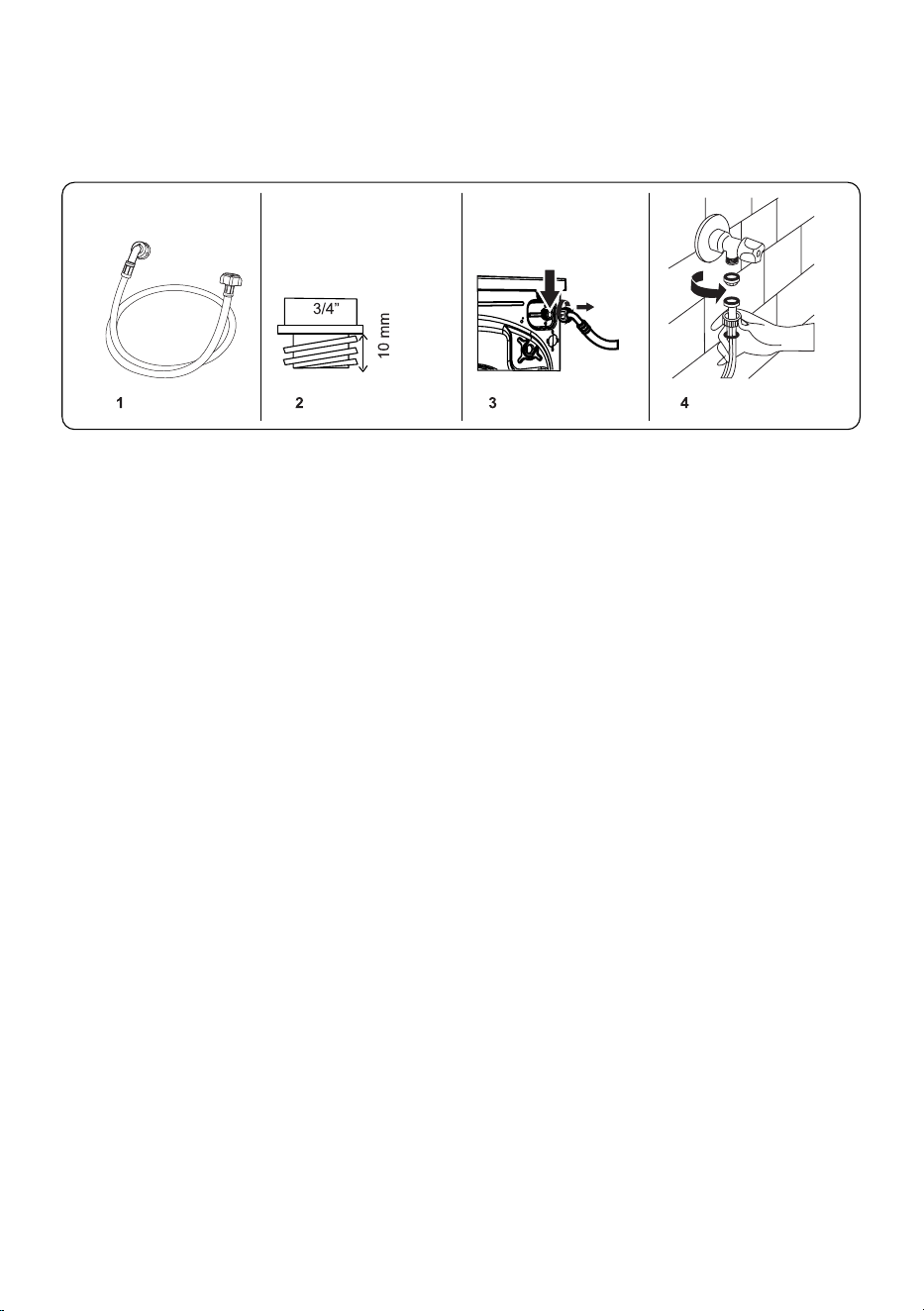
Water Inlet Hose Connection
• Your has hot and cold water inlet connections. The red capped washer
hose should be connected to the hot water inlet.
• To prevent water leaks at the joints, nuts are supplied with the hose. Fit
these nuts to the end(s) of the water inlet hose that connect to the
water supply.
• Connect the water inlet hoses to a ¾” threaded tap.
• Connect the white capped end of the water inlet hose to the white water
inlet valve on the rear side of the and the red capped end of the washer
hose to the red water inlet valve (if applicable).
• Hand tighten the connections If in any doubt, consult a qualified plumber. .
• Water flow with pressure of 0 1 1 Mpa will allow your to operate . - washer
at optimum efficiency. Pressure of 0.1 Mpa means that more than
2 gallons (8 liters) of water per minute will flow through a fully opened tap.
• Once you have made all of the connections, carefully turn the water supply
on and check for leaks.
• Ensure that the new water inlet hoses are not trapped, kinked, twisted,
folded or crushed.
• If the has a hot water inlet connection, the temperature of the washer
hot water supply should not be higher than 158°F.
Note: Some water may be left in your washer as a result of quality
checks during production. This will not affect the operation of your washer.
8
Use only the water inlet hose provided with your when making water inlet washer
connections to your . Never use old, used or damaged water inlet hoses.washer
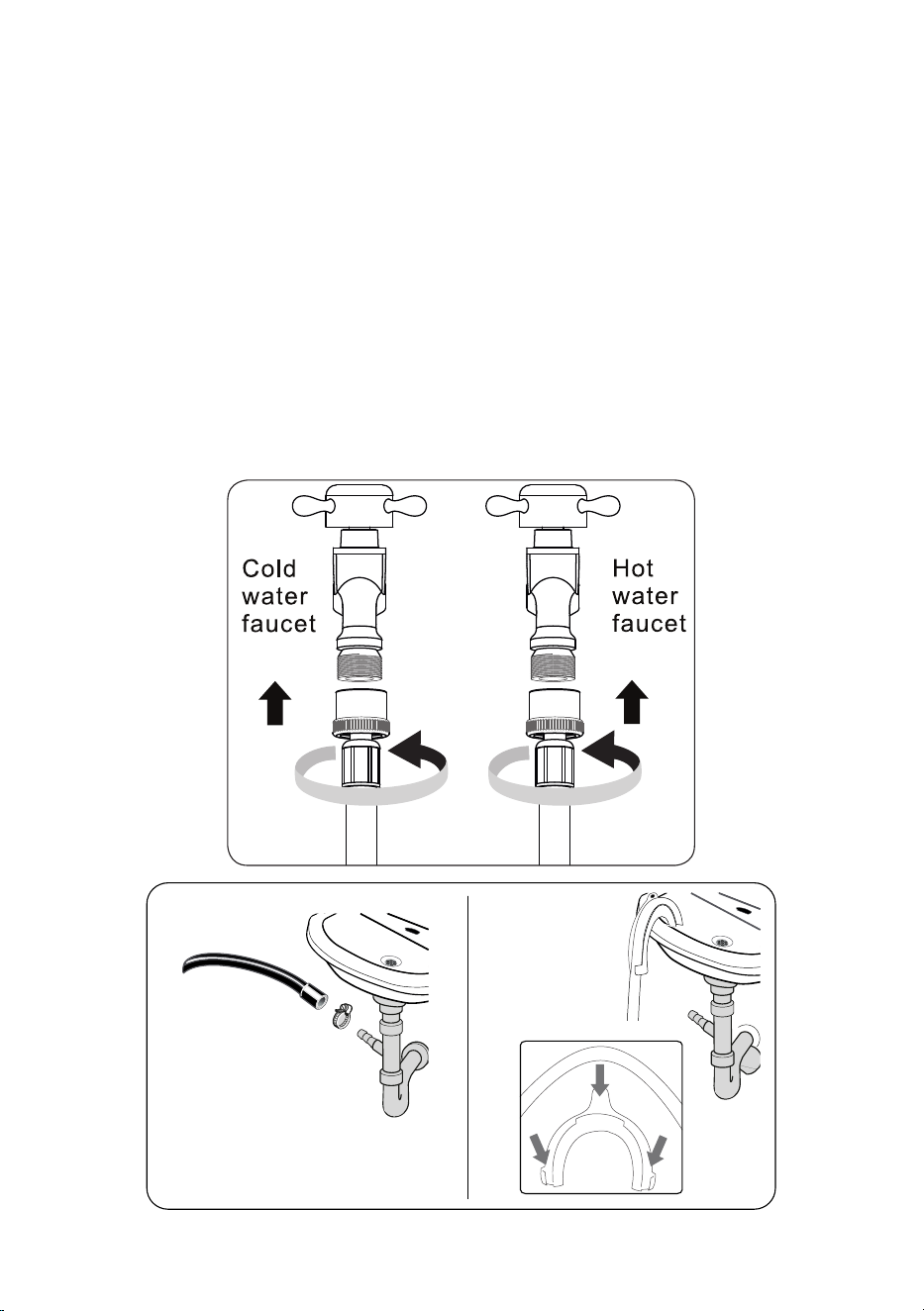
Water Discharge Connection
• Connect the water drain hose to a standpipe or to the outlet elbow of a
household sink.
• Ensure that the drain hose is not bent buckled crushed or extended, , .
• The drain hose must be installed at a minimum height of 24 inches and
maximum height of from the ground40 inches .
• Do not extend the drain hose.
• Do not put the drain hose into a container bucket or bathtub.,
9

Operation
WARNING - To reduce the risk of fire, electric shock, or injury to persons,
read IMPORTANT SAFETY INSTRUCTIONS before operating
this .washer
Ensure the Washer is plugged in correctly and the water supply is turned on.
Ensure that children and pets have not climbed into the and keep washer
them away from the when it is in use.washer
• Follow the instructions given on the care labels on the clothing.
• Separate your laundry according to type (cotton, synthetic, sensitive, wool
etc.), washing temperature and soil level.
• Never wash colored and white clothing together. Dark clothing may contain
excess dye and should be washed separately several times.
• Please ensure that items loaded into your do not have objects washer
such as lighters, keys, coins, etc. Any malfunctions due to foreign materials
damaging your are not covered by the warranty.washer
• Close zips and fasten any hooks and eyes.
• Reverse items such as pants, t-shirts and sweat shirts.
• Wash small items in a net bag.
• Load each item of laundry separately.
• Do not overload the washer. You should be able to comfortably place your
hand above the loaded laundry, ensuring there is enough space for the
clothes to be washed properly.
• Check that no items of laundry are trapped between the rubber seal and
the door.
• Gently push the door until it clicks shut. Ensure the door is fully closed,
otherwise the program will not start.
Never force the door open or open the detergent drawer while the
is in operation.washer
10
Preparation
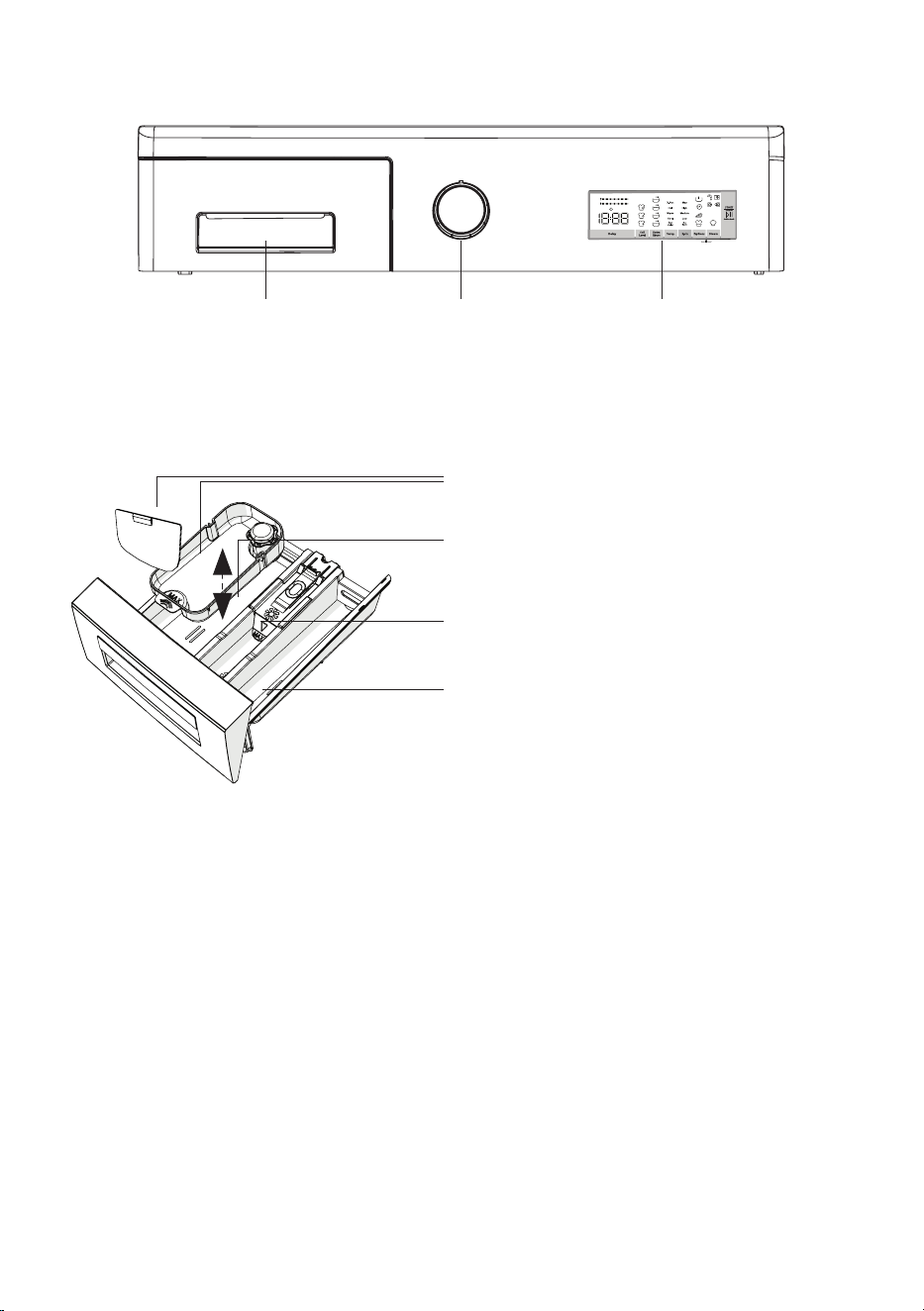
Control Panel
Detergent Drawer Program Dial Display Panel
Detergent Drawer and Compartments
Liquid Detergent Attachments
Detergent - powder or liquid
(left compartment)
Softener
(middle compartment)
Pre-Wash - for heavily soiled laundry
(right compartment)
• The amount of detergent used depends on the load size and the soil level.
• Use detergents produced for automatic washing machines. Follow the
manufacturer's instructions on the amount of detergent and softener to use.
• Put softener in the middle compartment and ensure not to exceed the
Max level. Thick softeners may cause clogging of the drawer and should
be diluted.
• Residue may build up in detergent and softener compartments. Fill these
compartments only at the beginning of each wash.
11
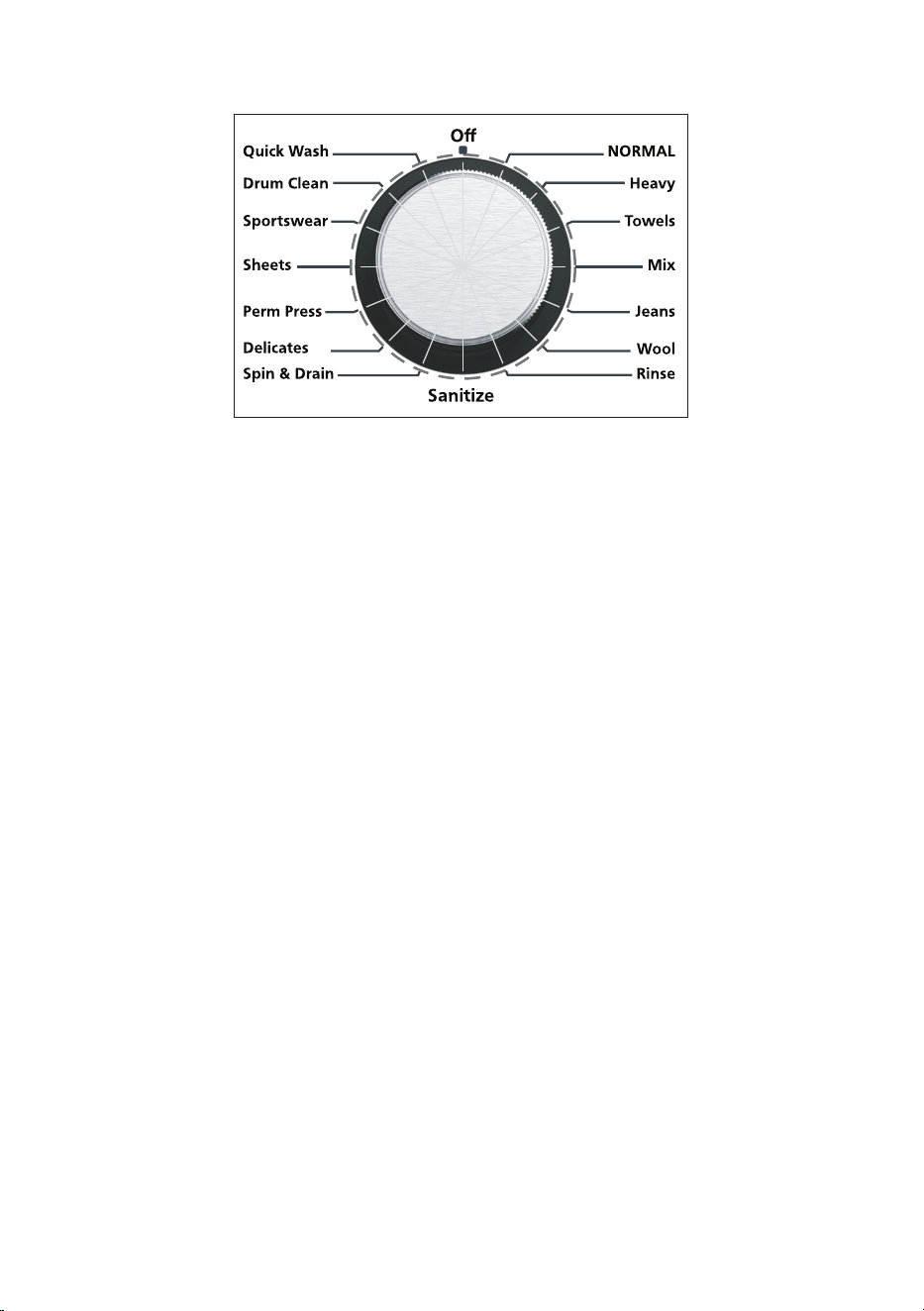
• The Program Dial should be in the Off position (no lights will appear
around the dial).
• To select the desired program turn the Program Dial either clockwise or ,
counterclockwise until the light next to the selected program illuminates
and you hear a beep.
Ensure the display panel is illuminated with the default features.•
If the above does not happen, then turn the Program Dial to the Off •
position, and select the program again.
The wash program is successfully selected when the light on the dial •
next to the program is illuminated and the Display Panel is also
illuminated with the default features.
Refer to the Wash Programs Table as a guide to select programs.•
For all programs there are default factory settings. Depending on the •
specific program, some features can be changed and options added.
Program Dial
12
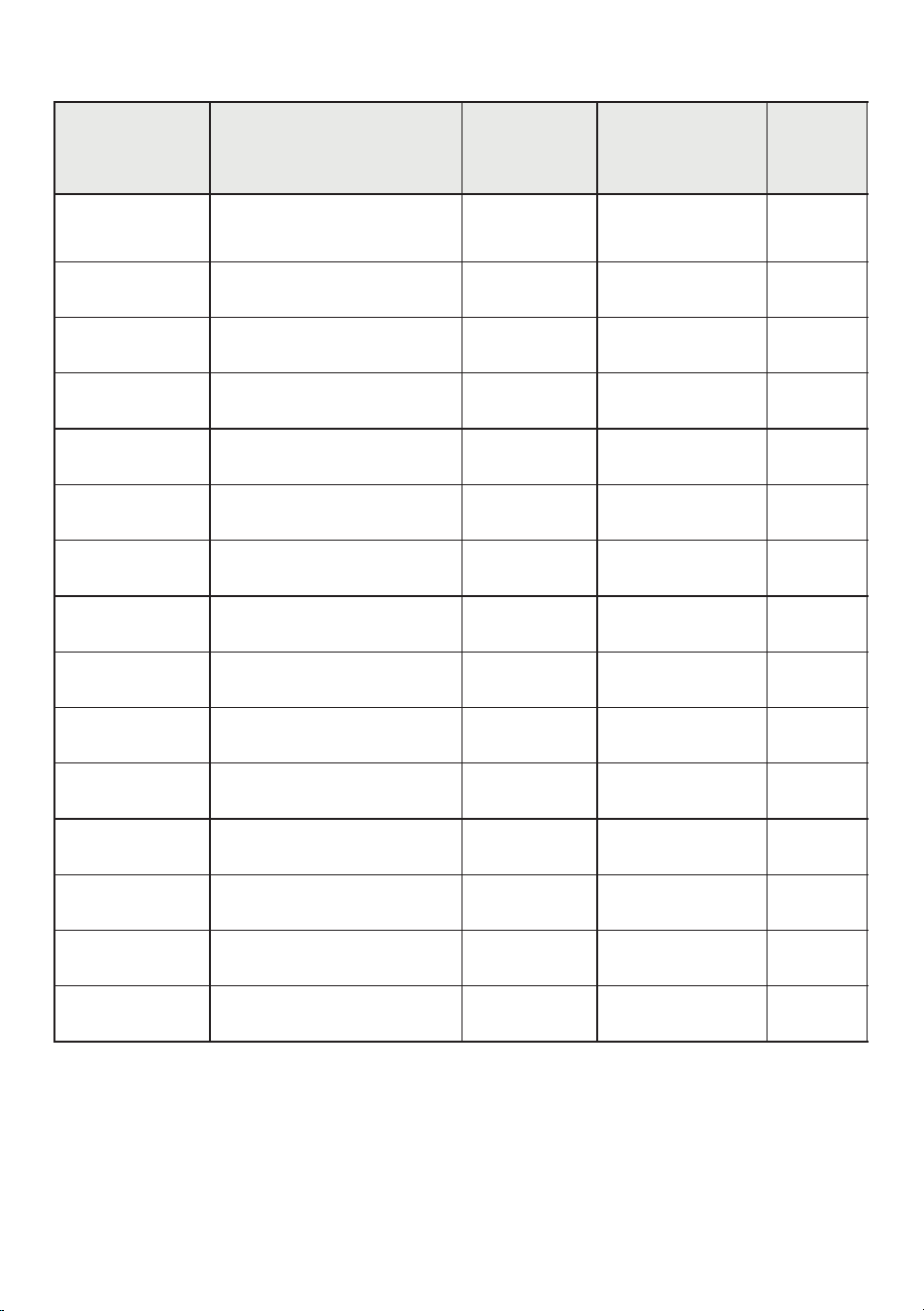
Wash Programs Table
* Max Temperature and Spin Speed - can be decreased depending on wash program.
**For Quick Wash use less detergent.
13
Program
Load
Descriptions
Max
Temp.*
(Default)
(Default)
Max Spin
Speed*
Time
(Mins)
NORMAL
Mixed clothes
(shirts, pants, etc.)
Warm
Max
113
Heavy
Thick cottons
Hot
Max
131
Towels
Thick towels, cottons
Warm
Max
113
Mix
Mixed fabrics
Hot
Medium
118
Jeans
Jeans, pants, denim
Warm
Medium
100
Wool
Sweaters, scarves
Warm
Medium
58
Rinse
All types
Tap Cold
Max
35
Sanitize
All types
X-Hot
Medium
200
Spin & Drain
All types
NA
Max
17
Delicates
Silks, light fabrics
Warm
Medium
100
Perm Press
Cotton blends
Hot
High
120
Sheets
Bedsheets, linen
Hot
Medium
113
Sportswear
T-shirts, leggings
Warm
High
100
Drum Clean
NA
X-Hot
Max
90
Quick Wash**
Light fabrics
Cool
Medium
12
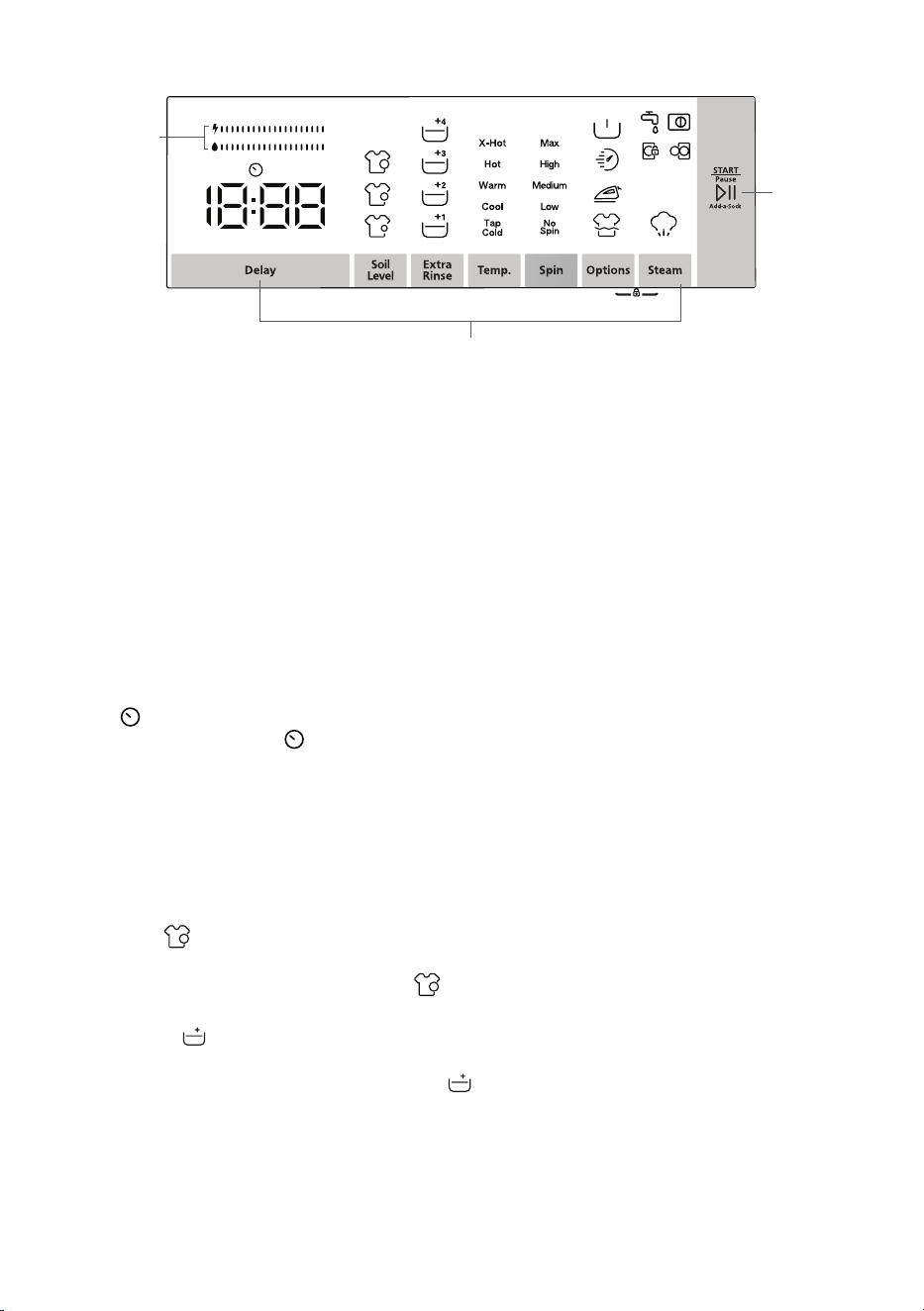
Display Panel
Additional Functions and Options
Start/Pause
Key
Energy/Water
Efficiency Bar
Child Lock
Once the wash program has been selected, there are additional features
and options that can be added to the program. It is not necessary to select
additional functions and options. You can simply select the wash program
on the Program Dial and then press the Start key and the wash cycle will
begin with the pre-programed default settings.
Each feature and option is explained below.
Note: Each wash program has a different set of features and options and
not all features and options are available for all the programs.
Press this key to delay the start of the wash program. The time
icon and the delay time (1h) will appear on the Display Panel.
Each time you press the Delay key, the time will increase in
one-hour increments from 1 to 23 hours. Press the Start key to
activate the program.
To cancel the delay, press the Delay key until it passes 23h or
turn the Program Dial to Off and select the wash program again.
To change the soil level from the default, press the Soil Level
key to select from 3 levels and the selection will illuminate on
the Display Panel .
To add a rinse to the wash program, press the Extra Rinse key
to select the number of rinses and the selection will illuminate
on the Display Panel .
The default maximum temperature for the wash program
selected will be illuminated on the Display Panel. To change
the temperature, press the Temp. key to select from X-hot, Hot,
Warm, Cool and Tap Cold. (Not all may be displayed.)
Delay
Soil Level
Extra Rinse
Temp.
14
Display Panel and Features
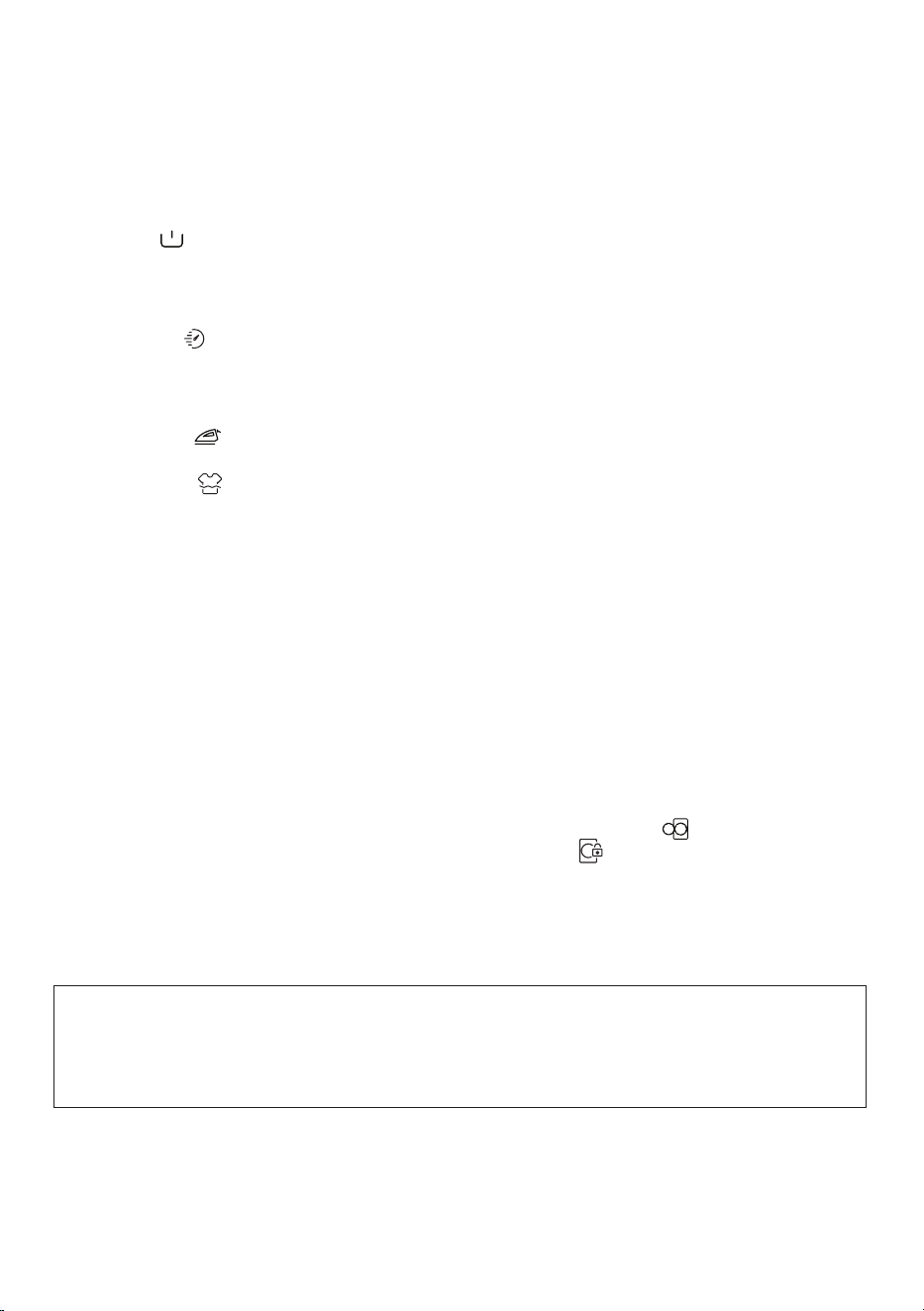
The default maximum spin speed for the wash program
selected will be illuminated on the Display Panel. To change
the spin speed, press the Spin key to select from Max, High,
Medium, Low and No Spin. (Not all may be displayed.)
Press the Options key to select any of the 4 options.
This option allows an extra wash before the regular wash cycle.
Remember to add detergent to the right compartment.
Recommended for heavily soiled clothes.
This option reduces the time, energy and water in the wash
program. If the laundry is only half a load, it will be detected by
the sensors and Rapid wash will automatically be enabled.
This option reduces wrinkles in clothes.
This option keeps the laundry in the last rinse water. To
finish the wash cycle, press the Start key. The water will drain
but not spin.
This is a default function that steams the laundry
eliminating wrinkles.
Press the Options and Steam keys simultaneously for at least
3 seconds until “CL” flashes on the Display Panel for 2 seconds
and child lock is activated. Follow the same procedure to
deactivate child lock and CL will disappear from the panel.
Press this key to start the wash program. When the cycle has
already begun, press it again to pause the program. When you
press the Start/Pause key, the unlock icon on the Display
Panel will change to the lock icon . The door is locked and
cannot be opened until the end of the cycle. When the cycle
ends, a beep will sound and End will show on the Display Panel
and you can then open the door easily.
(After some time the Display Panel will go blank.)
Spin
Options
Pre-wash
Rapid wash
Easy Ironing
Rinse & Hold
Steam
Child Lock
Start/Pause
For the first wash, run the Normal program without laundry and half fill
detergent in the left compartment of the detergent drawer.
This will remove any residue and water from the washer that has been
tested in the factory.
15
Half-Load Detection System
Your features a half-load detection systemwasher .
If you put less than half the maximum load of laundry into the washer the
sensor automatically detects this and selects the half-load function,
regardless of the program you selected. The cycle adjusts the time
depending on the load, thereby reducing the time to complete the program
and uses less water and energy.
Door Lock
The door of the will remain locked while the program cycle is washer
running or when the loses power.washer
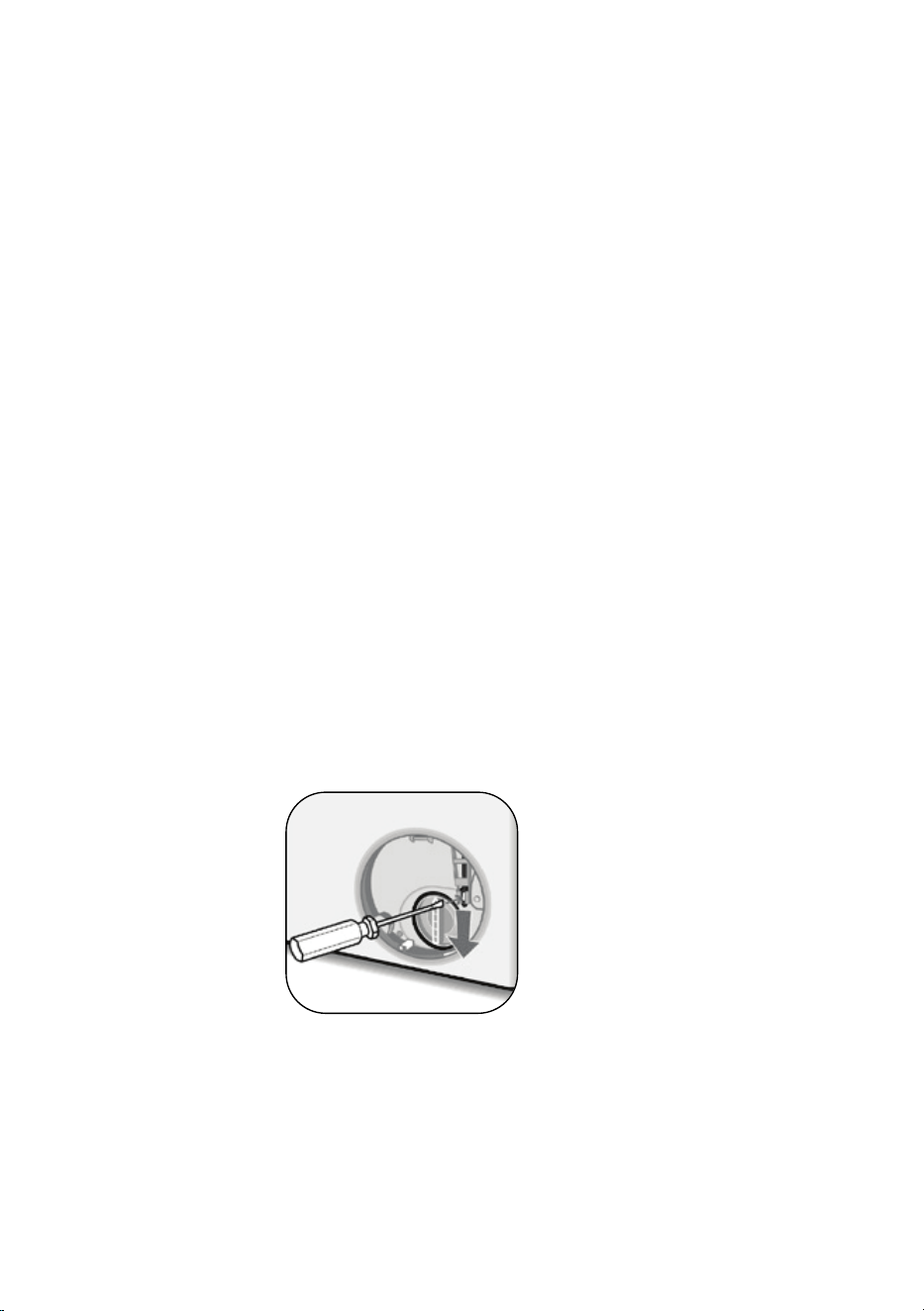
To open the door when it is locked:
1. Turn off the . Remove the power plug from the mains socket.washer
2. Drain the wastewater (see instructions for cleaning the pump filter.)
3. Pull down the emergency opening mechanism using a flathead
screwdriver and open the door at the same time.
4. Move the emergency opening handle to the original position.
16

Maintenance
To reduce the risk of electric shock, disconnect the Washer by removing the
plug from the power socket before doing maintenance. Turning the controls
to the Off position does not disconnect this from the power supply.washer
Turn off the water supply before starting maintenance and cleaning
the .washer
Do not use solvents, abrasive cleaners, glass cleaners or CAUTION:
all-purpose cleaning agents to clean your Washer. They may damage the
plastic surfaces and other components with the chemicals they contain.
All replacement parts must be obtained from the manufacturer's authorized
service center.
General Maintenance
Use mild soap and water to clean the outside of the and non-abrasive cloth
Washer Wipe dry with a soft cloth. .
Check for metallic objects such as keys, clips, coins etc in your Washer and .
remove them from the inside of the drum These objects lead to the .
formation of rust stains in the drum To clean rust stains, use a non-chlorine .
cleaner and follow the manufacturer's instructions. Never use steel wool or
abrasive materials for cleaning rust stains.
• Unplug your and switch off the water supply if it is left unused for washer
a long time. We also recommend that you leave the door open to prevent
buildup of humidity inside the .washer
• In the event of a breakdown, unplug the from the mains supply washer
and turn the water supply off. Do not attempt to carry out any repairs.
Always contact an authorized service agent.
17
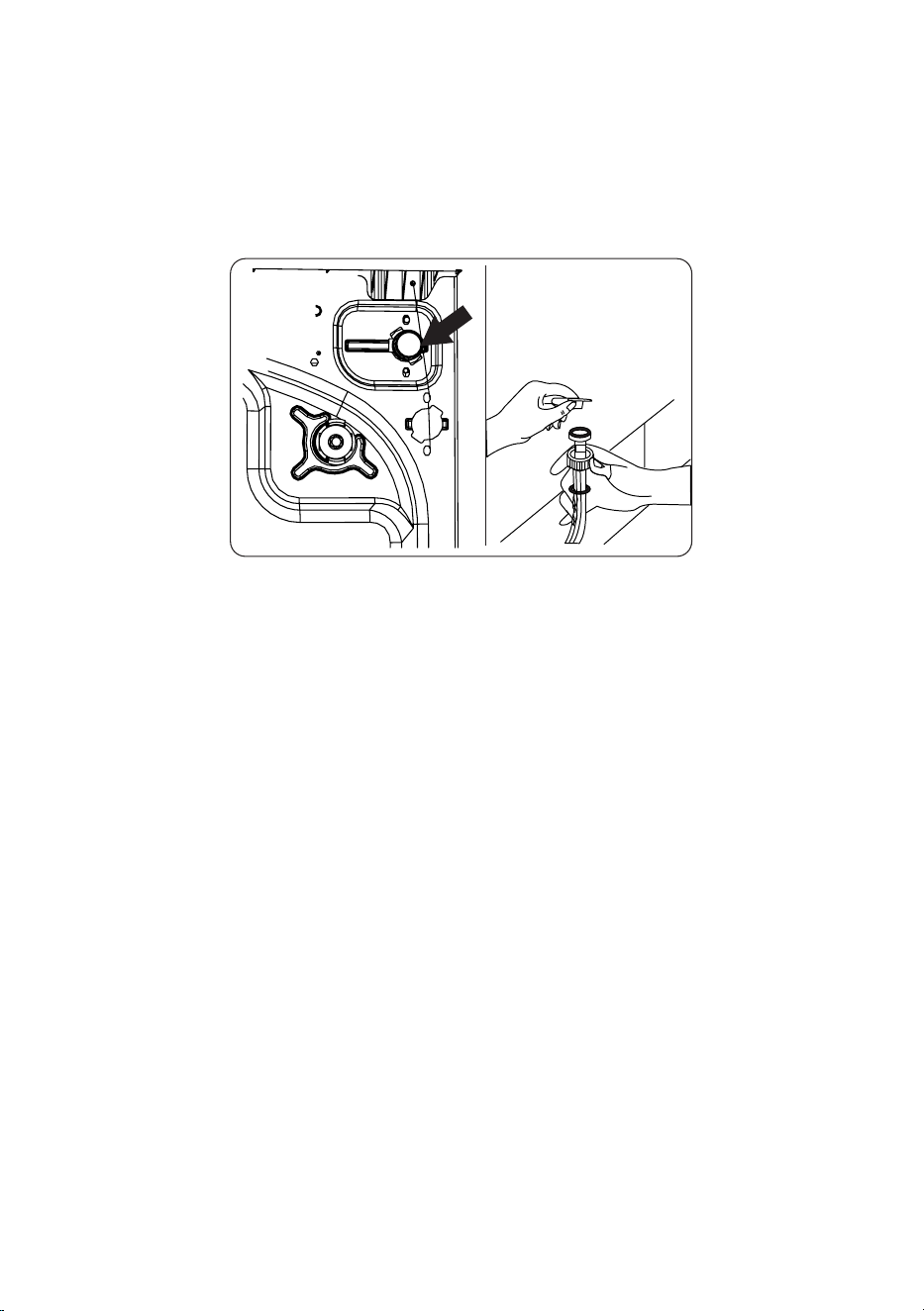
Cleaning Water Inlet Filters
Water inlet filters prevent dirt and foreign materials from entering the
. If the hoses are connected to water supply and the faucet is washer
turned on, but not enough water is flowing to the Washer, then the water
inlet filters should be cleaned. It is recommended that the water inlet filters
be cleaned every 2 months.
• Unscrew the water inlet hose(s) from the Washer.
• To remove the water inlet filter from the water inlet valve, use a pair of
long-nosed pliers to gently pull on the plastic bar in the filter.
• A second water inlet filter is located in the faucet end of the water inlet
hose To remove the second water inlet filter use a pair of long nosed . ,
pliers to gently pull on the plastic bar in the filter.
• Clean the filter thoroughly with a soft brush and wash with soapy water
and rinse thoroughly. Re-insert the filter by gently pushing it back
into place.
CAUTION: The filters at the water inlet valve may become clogged due to
water quality or lack of required maintenance and may break down. This
may cause a water leak Any such breakdowns are out of the scope of .
the warranty.
18
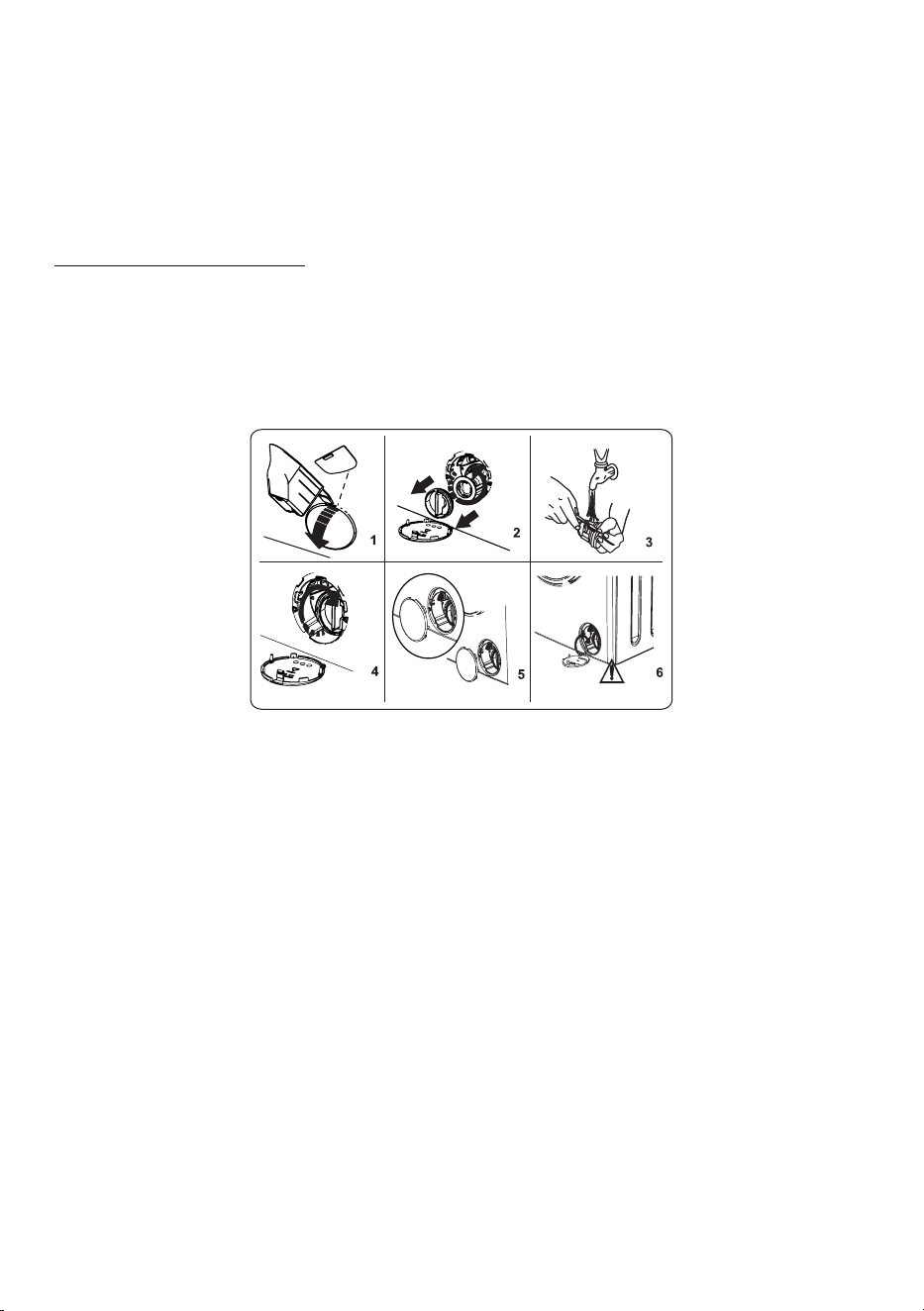
Cleaning the Pump Filter
The pump filter system in your Washer prolongs the life of the pump by
preventing lint from entering the .washer
.Clean the pump filter every 2 months
.The pump filter is behind the cover at the front, lower right corner
:To clean the pump filter
1. Before opening the filter cover, place a container under the filter cover to
collect any water that may flow out of the Washer.
.2. Use a flathead screwdriver or similar tool to open the pump cover
3. Insert the screwdriver at 12 o’clock position in the opening of the cover
and gently press backwards. The cover will open.
4. Loosen the filter by turning counterclockwise and remove by pulling. Wait
for the water to drain.
5. Remove any foreign materials from the filter with a soft brush.
6. After cleaning, re-fit the filter by inserting it and turning clockwise.
7. When closing the pump cover, ensure that the mountings inside the cover
meet the holes on the front panel side.
8. Close the filter cover.
WARNING: The water in the pump may be hot, wait until it has cooled down
before carrying out any cleaning or maintenance.
19

Cleaning the Detergent Drawer
Detergent may cause residual build up in the detergent drawer over time.
Remove and clean the drawer every 2 months.
To remove the detergent drawer:
• Pull the drawer forwards until it is fully extended.
• Press the lever inside the detergent drawer and continue pulling to remove
it completely.
• Disassemble the flush stopper lean thoroughly to remove any and c
softener residue. Refit the flush stopper after cleaning and check that it is
inserted properly.
• Rinse the drawers with a brush and water.
• Carefully remove residue from inside the detergent drawer housing so that
no debris falls inside the Washer.
• Dry the detergent drawer with a dry cloth and place it back in the Washer.
• Remove the liquid level detergent container and clean the detergent residue
using water and a soft cloth. Replace the liquid detergent container and
ensure that no residual material remains inside the siphon.
Do not wash your detergent drawer in a dishwasher.
20
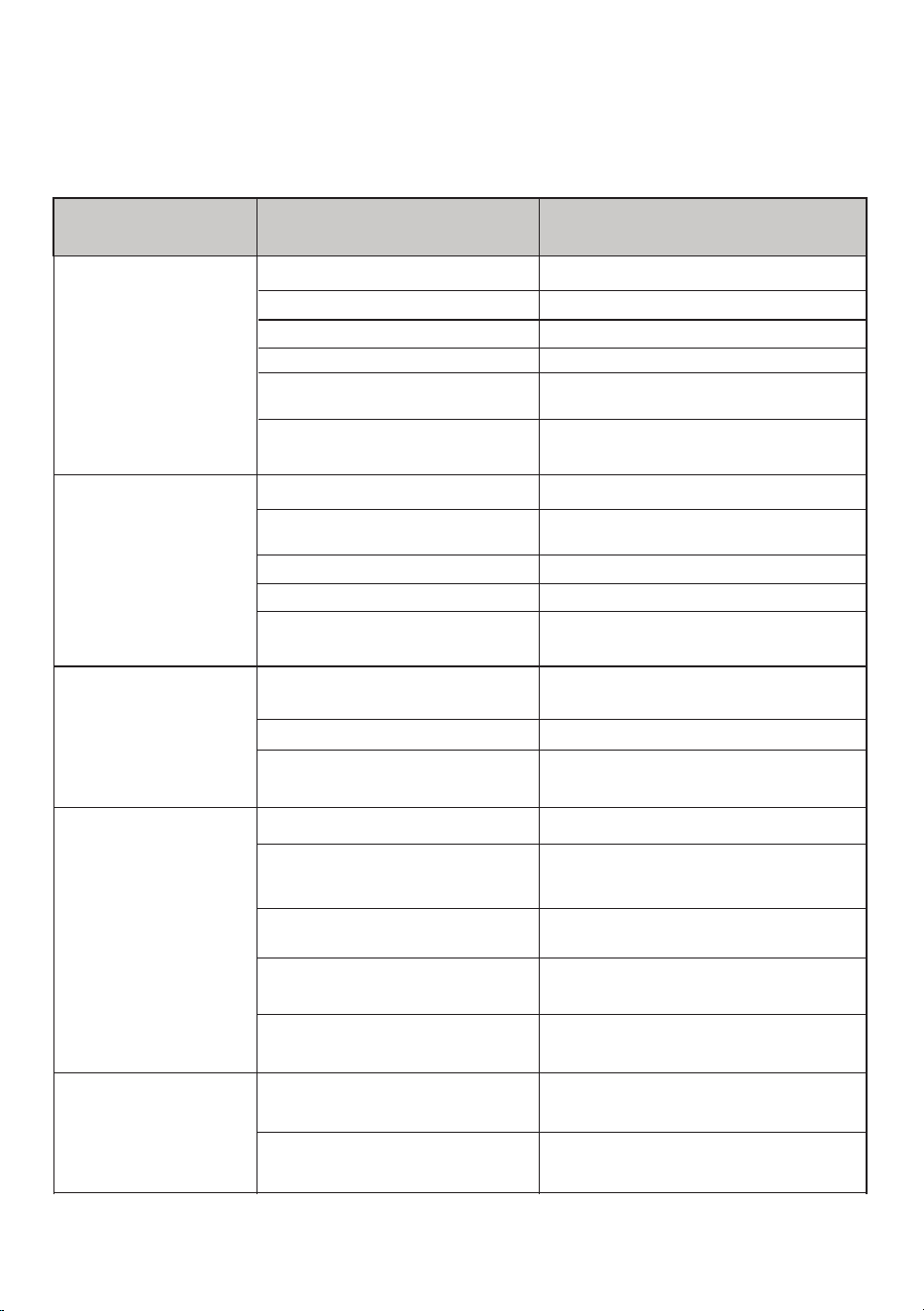
Troubleshooting
Problem
Possible Cause
Solution
Machine does
not start
Start/Pause button not pressed.
No mains power supply.
Machine not plugged in.
The machine door is not
completely closed.
Fuses are faulty.
Program dial position.in Off
Plug machine in.
Replace the fuses.
Check mains power.
Press the Start/Pause button.
Turn the program dial to the desired
program.
Close the machine door.
Machine does
not intake water
The machine door is not
completely closed.
Water faucet is turned off.
Water inlet hose may be
twisted.
Water inlet hose clogged.
Inlet filter clogged.
Clean inlet hose filters.water
Close the machine door.
Turn on the faucet.
Check water inlet hose and untwist.
Clean the inlet filters.
discharge water
Machine does not
Laundry is too tightly packed
together in the drum.
Drain hose clogged or twisted.
Pump filter clogged.
Check the drain hose then either ,
clean or untwist.
Clean the pump filter.
Spread laundry in the machine your
evenly.
Machine vibrates
The feet have not been adjusted.
Shipping bolts fitted for
transportation have not been
removed.
Small load in the drum.
Machine is overloaded with laundry
or laundry is unevenly spread.
Machine rests on a hard surface.
Adjust the feet.
Remove the shipping bolts from the
machine.
This will not prevent operation of
machine.
Do not overload the drum.
Spread laundry evenly in the drum.
Do not set up Washing Machine on a
hard surface.
detergent drawer
Excessive suds
formed in the
Excessive amount of
detergent used.
Wrong detergent used.
Use less detergent.
Only use HE detergents produced for
automatic Washers.
21
In most cases, when your Washer fails to work, the problems arising can be
easily solved without having to call for a technician. Before calling for assistance,
always check these points.
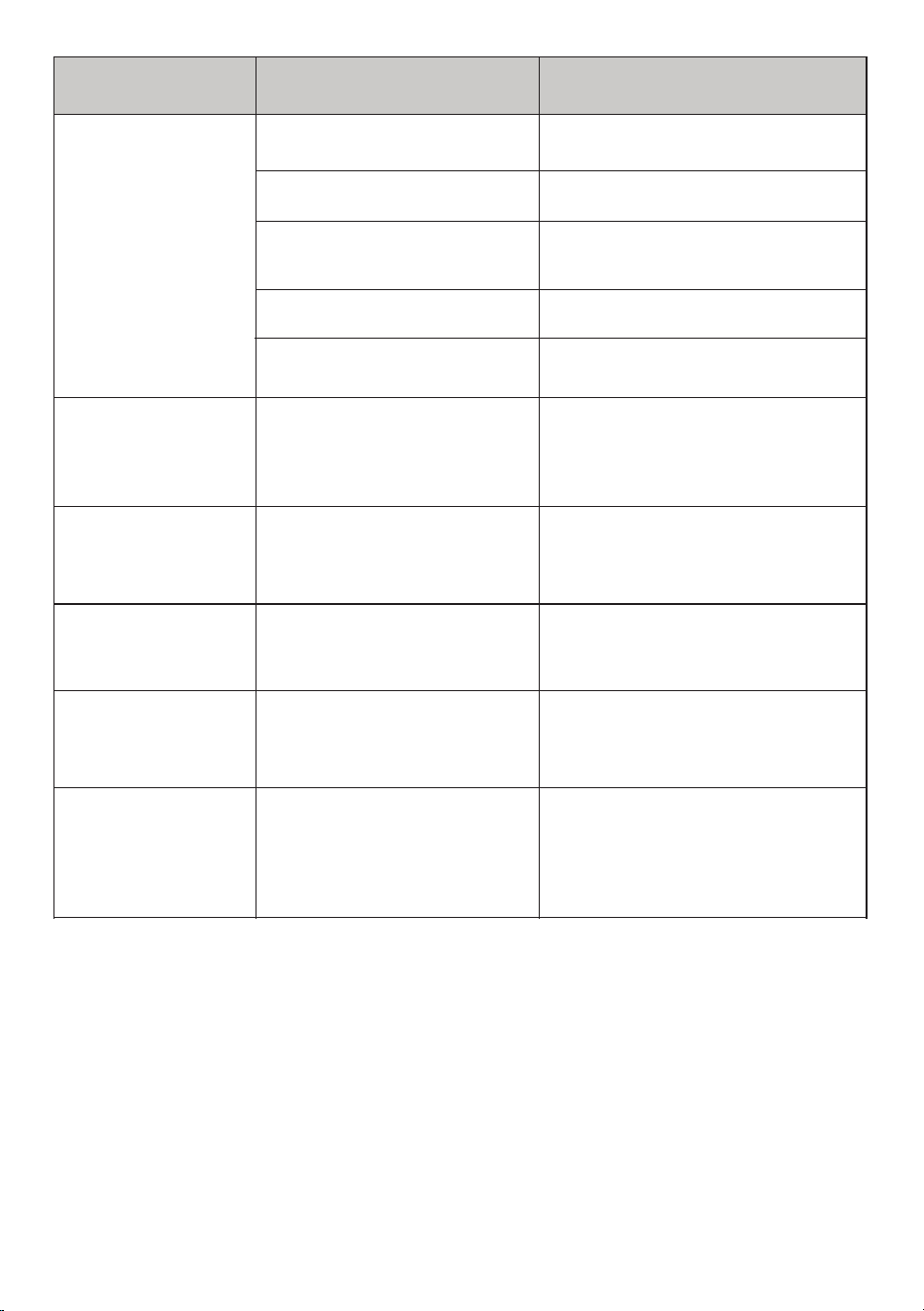
Problem
Possible Cause
Solution
Unsatisfactory
washing result.
Your laundry is too tightly packed
together in the drum.
Amount of detergent used
insufficient.
Hard water.
There is too much laundry in your
machine.
Your washing is too soiled for the
program selected.
Check that your laundry is spread out.
been exceeded.
Use the information in the program tables
to select the most appropriate program.
Increase the amount of detergent
follo ing the manufacturer s instructions.w '
Use the amount of detergent as
instructed on the packaging.
the selected program has not
Check that the maximum capacity for
As soon as the
machine is loaded
with water water ,
discharges.
too lo for the machine.w
The end of water drain hose is
Check that the drain hose is at a
suitable height.
No water appears in
the drum during
washing.
Water is in the unseen part of the
drum.
No fault.
detergent residue.
Laundry has
Non-dissolving particles of some
detergents may appear on your
laundry as white spots.
Perform an extra rinse or clean your ,
laundry with a brush after it dries.
Grey spots appear
on the laundry.
There is untreated oil cream or ,
ointment on your laundry.
next wash.
Use the amount of detergent as
instructed on the packaging in the
than expected.
takes place later
The spin cycle does
not take place or
No fault. The unbalanced load
control system has been activated.
evenly for the next wash.
will try to spread your laundry. The
spinning cycle will begin once your
laundry is spread Load the drum .
The unbalanced load control system
Refer to the respective Installation, Operation and Maintenance sections in the manual to
correct the problems.
22
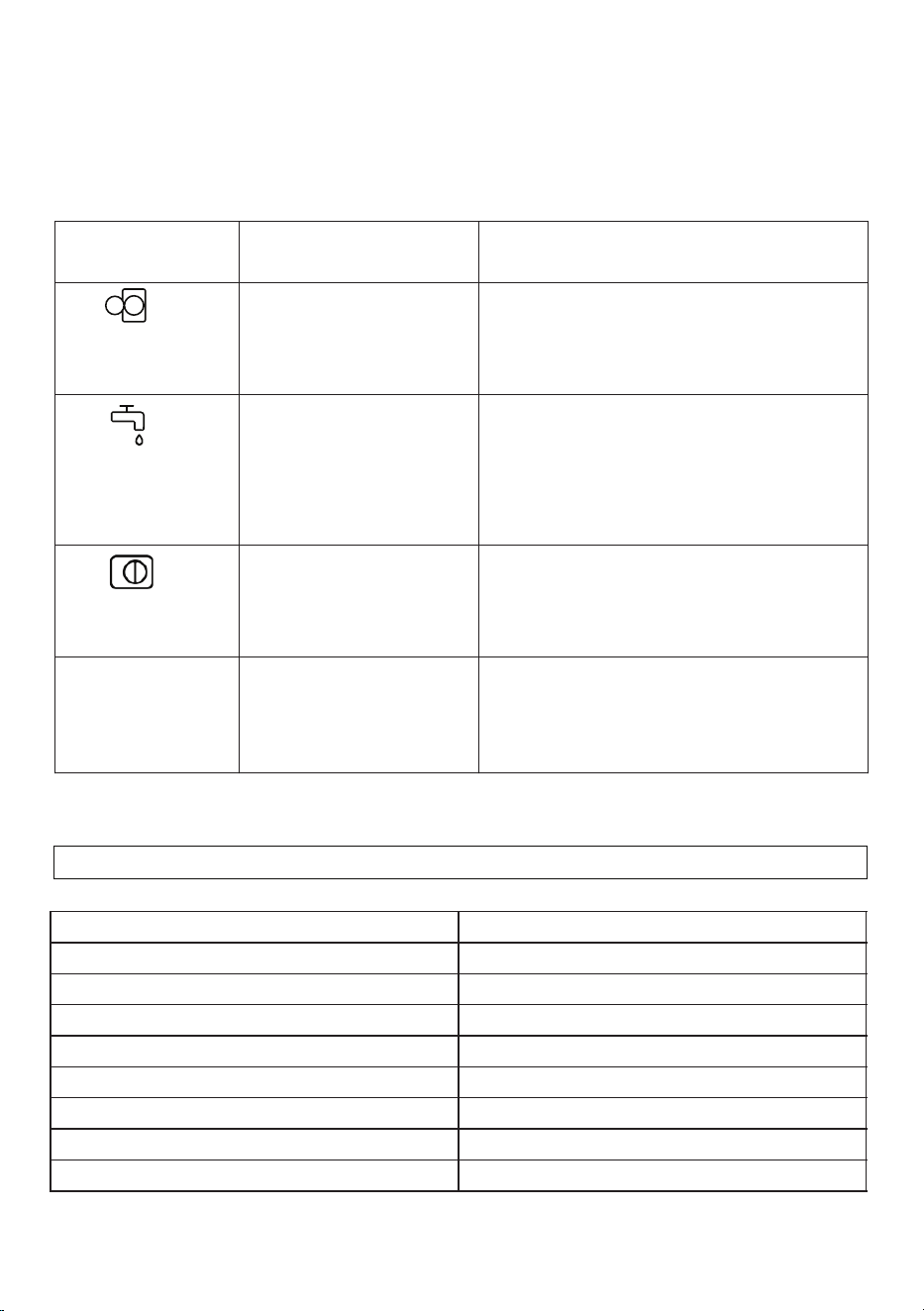
Error Codes
The Washer is equipped with a built-in fault detection system.
The Error Code flashes on the Display Panel.
The most common error codes are listed below.
Error Codes
Possible Cause
Solution
E01
The door of your machine
is not shut properly.
Shut the door properly until you hear a click If .
your machine persists to indicate fault turn off ,
your machine unplug it and contact the ,
nearest authorized service agent immediately.
E02
The water pressure or the
water level inside the
machine may be low.
Check the faucet is fully turned on. Mains
water may be cut-off. If the problem still
continues your machine ill stop after a while , w
automatically. Unplug the machine turn off the ,
faucet and contact the nearest authorized
service agent.
E03
The pump is faulty or pump
filter is clogged or electrical
connection of the pump is
faulty.
Clean the pump filter If the problem persists. ,
contact the nearest authorized service agent.
E04
Your machine has
excessive amount of water.
Your machine will discharge water by itself.
Once the water has drained turn off your ,
machine and unplug it. Turn off the faucet and
contact the nearest authorized service agent.
Model
CW 2240
Rated Voltage
120V/60Hz
Washing input power
60 W
Spin input power
320 W
Capacity
2.2 cu.ft.
Spin Speed
1400 rpm
Programs
15
Dimensions (HXWXD)
33.27 x 23.5 x 22.9 inches
Net Weight
164.24 lbs.
Technical Specifications
23

High Efficiency Dryer
(Condensing)
Model - CD 4040 W/B/T
Your appliance is protected by this warranty under
normal, personal, family or household use for 2 Year Parts & Labor
and limited commercial use (90 days) in USA and Canada.
two
Conserv Appliances
Conserv Appliances
Conserv Appliances
1. Non-cleaning of lint filters and condenser.
1. Non-removal of shipping bolts, causing vibration, resulting in internal damage.
2. Non-adjusment of feet to level machine, causing vibration, resulting in internal damage.
In no event shall Conserv Appliances be liable for incidental or consequential damages or for
damages resulting from external causes such as abuse, operation misuse, neglect,
alterations, normal wear and tear, incorrect voltage or acts of God. This warranty does not
cover service calls which involve defective workmanship, damage due to other products while
combined use with this product or materials covered by this warranty. Accordingly, diagnosis
and repair costs for a service call which involves defective workmanship or materials will be
the responsibility of the consumer-owner.
Most work is covered. The defining factor is has the appliance malfunctioned (Conserv
Appliances is responsible) or has the customer omitted or done something to cause malfunction
(customer is responsible).
Exclusions
Conserv Appliances
Warranty Limitations
Table of Contents
Safety
Installation
Electrical Connection
Connection to Water Outlet
Connecting the Water Discharge Hose
Operations
Control Panel
Program Dial
Dry Programs Table
Display Panel
Maintenance
Troubleshooting
Technical Specifications
Error Codes
1
4
5
8
8
9
9
10
11
12
14
16
17
18
SAFETY
Your safety and the safety of others are very important.
Please read and follow the important safety warnings in this manual and on
your appliance.
Danger indicates a hazardous situation that, if not avoided,
will result in death or serious injury.
Warning indicates a hazardous situation that if not avoided, ,
could result in death or serious injury.
, Caution indicates a hazardous situation that if not avoided,
could result in minor or moderate injury.
DANGER
WARNING
CAUTION
• Do not wash items that have been previously cleaned in, washed in, soaked in, or
spotted with gasoline, dry-cleaning solvents, or other flammable or explosive
substances, as they give off vapors that could ignite or explode.
• Do not add gasoline, dry-cleaning solvents, or other flammable or explosive
substances to the wash water. These substances give off vapors that could
ignite or explode.
• Do not store flammable liquids near the appliance.
• The sulfur content of paint removers may cause corrosion. Never use paint
removing materials in the appliance.
• Never use products that contain solvents in the appliance.
• Please ensure that items loaded into your appliance do not have plastic, metallic,
or sharp objects such as pins, keys, or coins.
• Do not tamper with controls.
• Do not repair or replace any part of the appliance or attempt any servicing unless
specifically recommended in the manual or in published user-repair instructions
that you understand and have the skills to carry out.
• To reduce the risk of electric shock, disconnect this appliance from the power
supply before attempting any maintenance. Turning the controls to the OFF
position does not disconnect this appliance from the power supply.
Risk of Fire
WARNING
To reduce the risk of fire, electric shock, or injury to persons when using your
appliance, always follow basic precautions.
1
Do not touch the drain hose or any discharged water while your appliance is
running. The high temperatures pose a burn risk.
Risk of Injury or Death from Electrical Current
• Do not connect your appliance to the mains electricity supply using an
extension cord.
• Do not insert a damaged plug into a socket.
• Never remove the plug from the socket by pulling the cord. Always hold the plug.
• Never touch the power cord/plug with wet hands as this could cause a short circuit
or electric shock.
• Do not touch your appliance if your hands or feet are wet.
• A damaged power cord/plug can cause fire or give you an electric shock.
A damaged cord or plug must be replaced by a qualified technician.
• Connect to a dedicated circuit.
Risk of Burns
WARNING
2
Risk of Falling and Injury
• Do not climb on your appliance.
• Do not reach into the appliance if the drum is rotating.
• Ensure hoses and cables are secured and do not present a tripping hazard.
• Do not turn your appliance upside down or on its side.
• Do not lift your appliance using the door.
• The appliance must be carried by at least 2 people.

Child Safety
• The appliance is not intended for use by people (including children) with reduced
physical, sensory or mental capabilities, or lack of experience and knowledge
unless they have been given supervision or instruction concerning use of the
appliance by a person responsible for their safety.
• Children of less than 3 years should be kept away unless continuously supervised.
• Do not leave children unattended near the . Children might lockappliance
themselves in the appliance resulting in risk of death.
• Children should not play with the appliance.
• Cleaning and maintenance should not be done by children.
• Do not allow children to touch the glass door during operation. The surface
becomes extremely hot and may cause damage to skin.
• Poisoning and irritation may occur if detergent and cleaning materials are
consumed or come into contact with the skin and eyes. Keep cleaning materials
out of the reach of children.
• Keep packaging material away from children. The packaging of the appliance
could be hazardous to children. Do not allow children to play with the packaging or
small parts from the appliance.
• Keep the packaging materials in a place where children cannot reach them or
dispose of them appropriately.
• Before the appliance is removed from service or discarded, remove the door to
prevent child entrapment.
Safe disposal
Dispose off this appliance in accordance with local regulations.
3

Installation
Please check the packaging of the washer and the outer surface of the washer once
the packaging has been removed. Do not operate the washer if it appears damaged
or if the packaging has been opened.
Your dryer must only be installed by an authorized service agent.
•
o o
The operating temperature of the dryer is 41 F to 95 F.
• Do not install or store this where it will be exposed to the weather or outdoors.dryer
• Install your dryer in a location that can be fully ventilated and preferably has
constant air circulation.
• Do not install the dryer on a carpet or surfaces that would prevent the ventilation of
its base.
• Ensure that the door of your dryer is not restricted and can be opened fully.
dryer place the dryer on a flat, • To ensure silent and vibration-free operation of the
smooth and firm surface. Ensure the back of the dryer is against a wall.
Leveling
• Level your using the adjustable feet. Never insert cardboard, wood or other dryer
similar materials under the to level it.washer
• To increase the height of the , turn the feet clockwise. To decrease the height dryer
of the , turn the feet counterclockwise.washer
• Once the is level, tighten the locking nuts by turning them clockwise.dryer
Under Counter Installation
• Leave at least 1 inch (3 cm) of space between the side and rear walls of the
product and the underside of the counter top when installing your dryer under
a counter.
• Assembly / disassembly under the counter must be done by an
authorized technician.
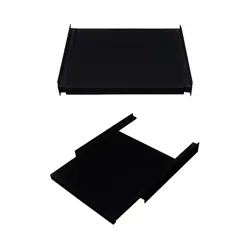
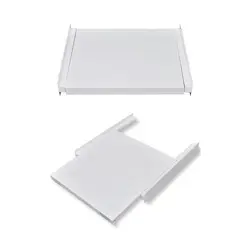
Stacking kit
If you are going to place the dryer above the washer, you must obtain a stacking kit
that is specific for this model of dryer from Customer Service.
Do not place the washer above the dryer.
4
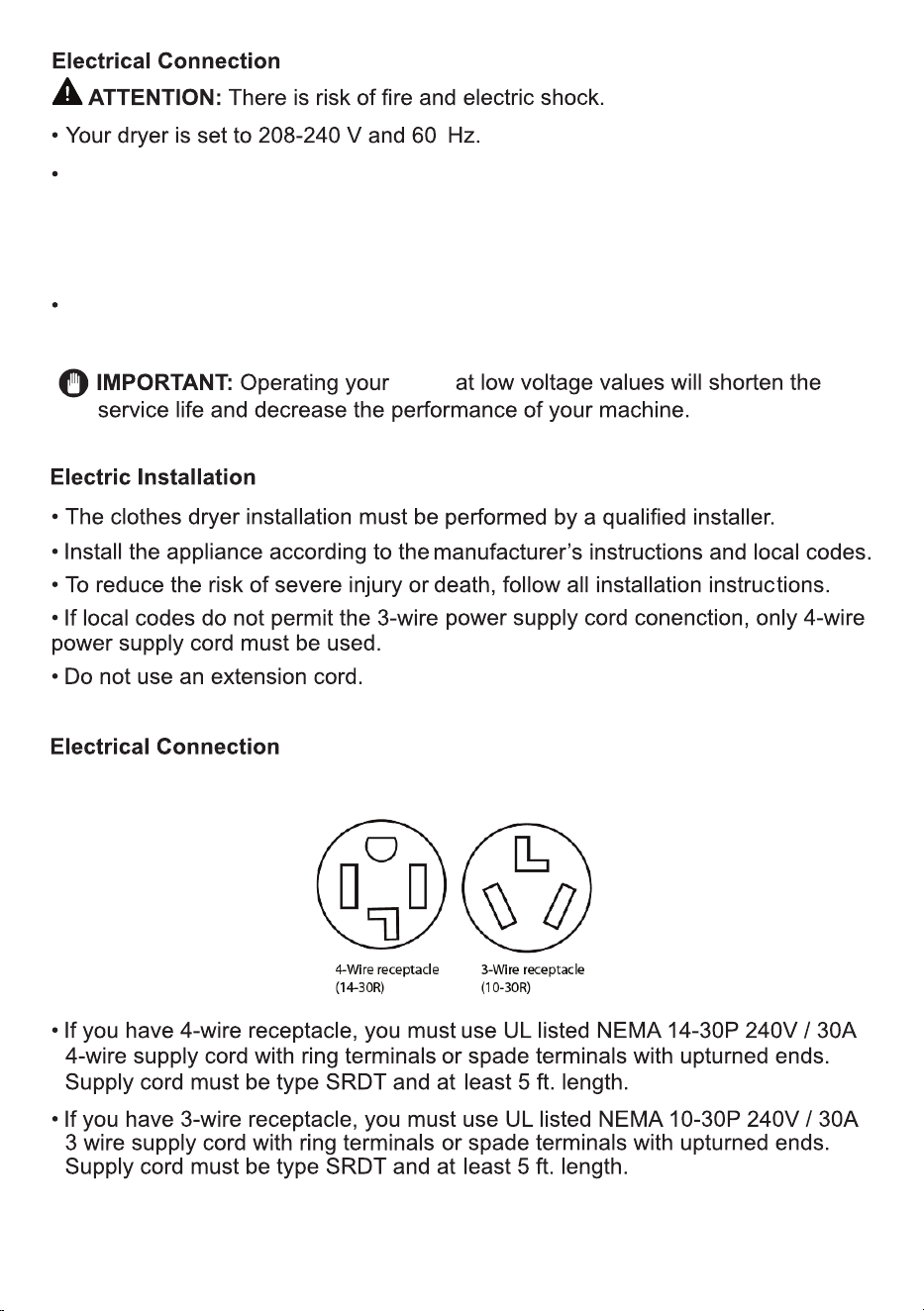
The mains cable of the dryer is equipped with a special plug. This plug must be
connected to a grounded socket protected by a fuse of 16 Amperes as indicated
on the type plate. The fuse current rating of the power line where the outlet is
connected must also be 16 amperes. Consult a qualified electrician if you do not
have such an outlet or fuse.
Our company cannot be held responsible for damages resulting from usage
without grounding.
5
dryer
Before you start, determine which receptacle you have.
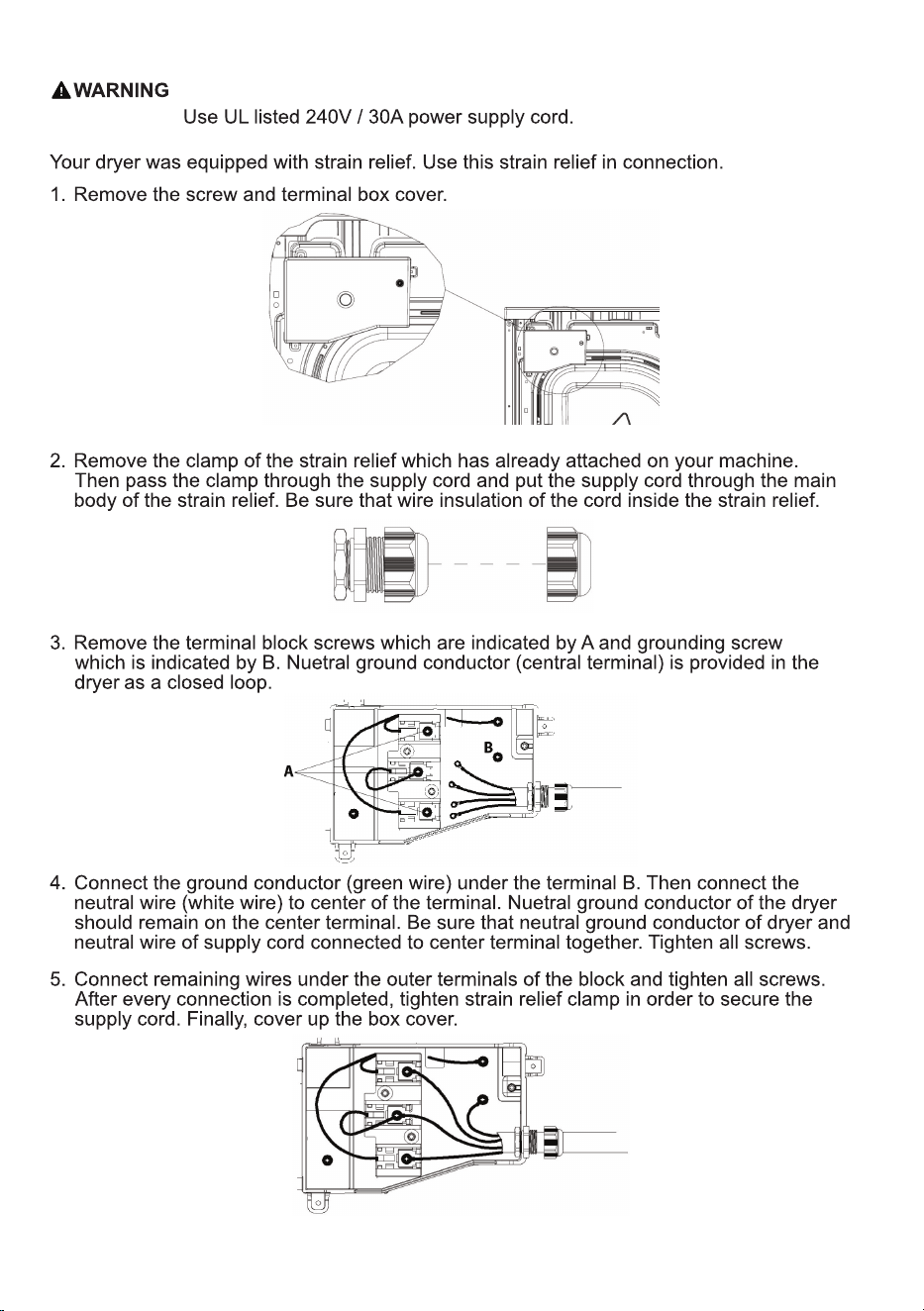
Before making the connection, disconnect the power.
4- Wire Power Supply Cord Connection
6
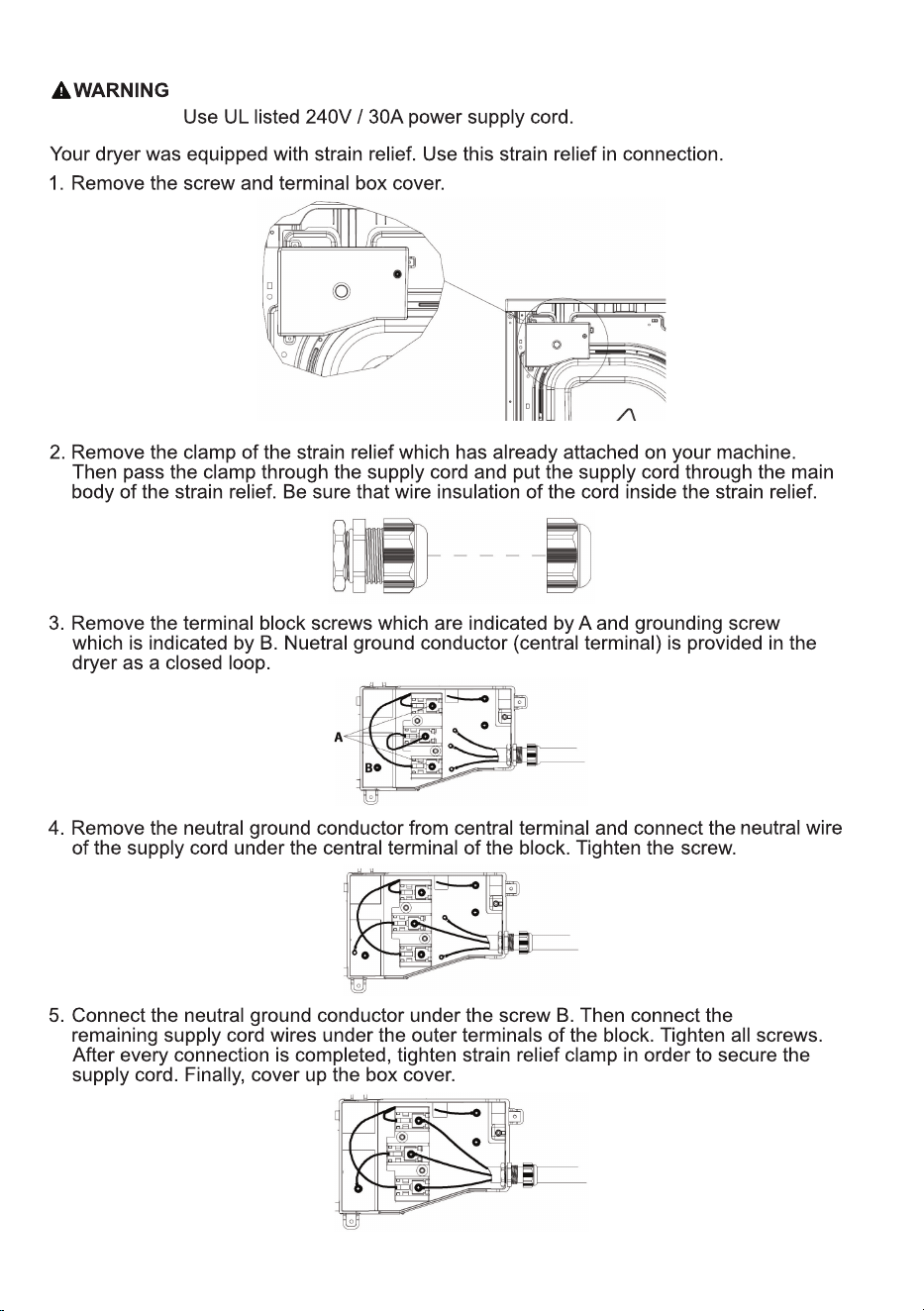
3- Wire Power Supply Cord Connection
Before making the connection, disconnect the power.
7
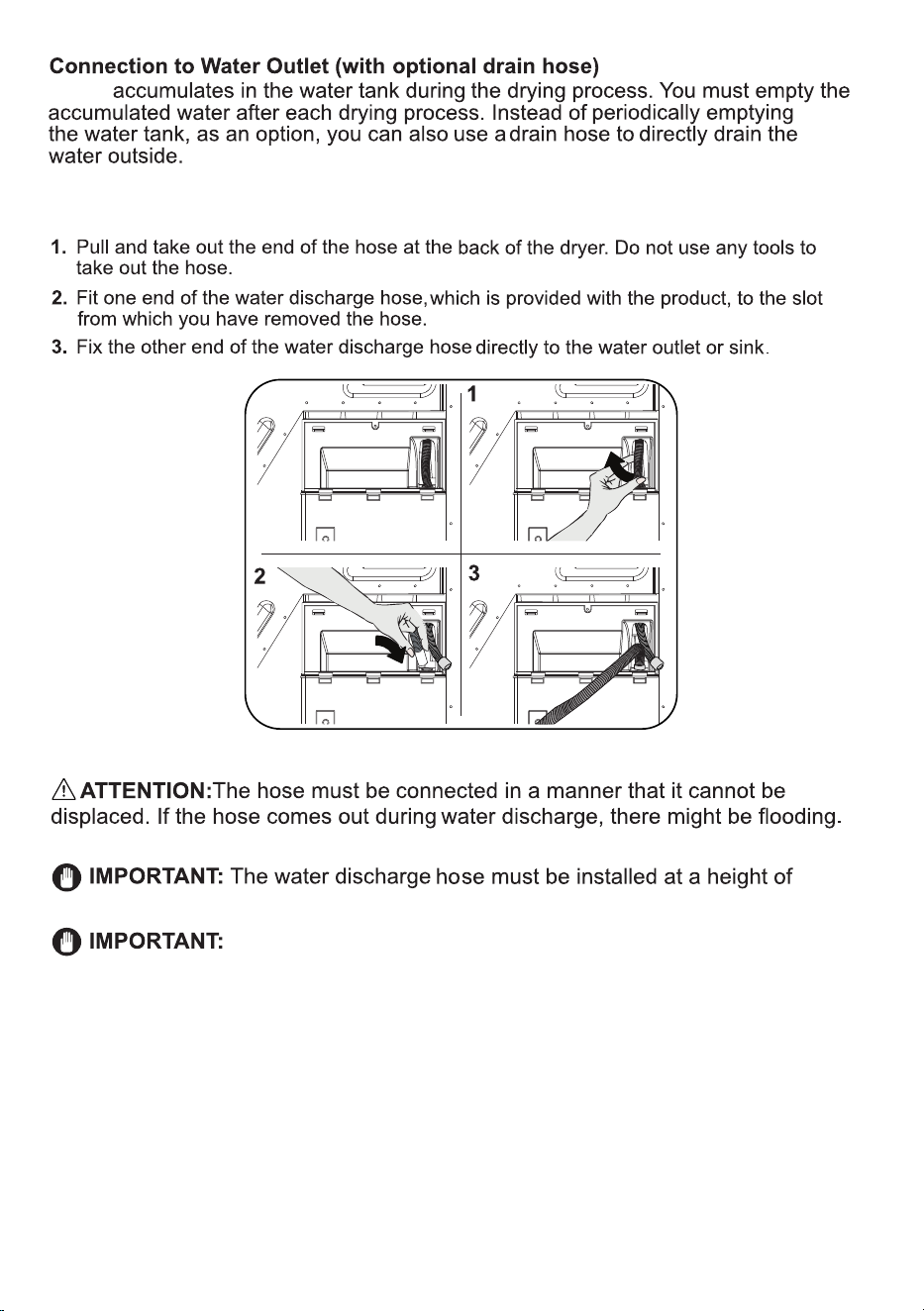
Connecting the Water Discharge Hose
8
Water
31 inch (80 cm) maximum.
Ensure that the water discharge hose is not bent, twisted or
obstructed in any way.
Operations
WARNING - To reduce the risk of fire, electric shock, or injury, read
IMPORTANT SAFETY INSTRUCTIONS before operating the dryer.
Ensure the Dryer is plugged in correctly.
Ensure that children and pets have not climbed into the appliance and keep
them away from the appliance when it is in use.
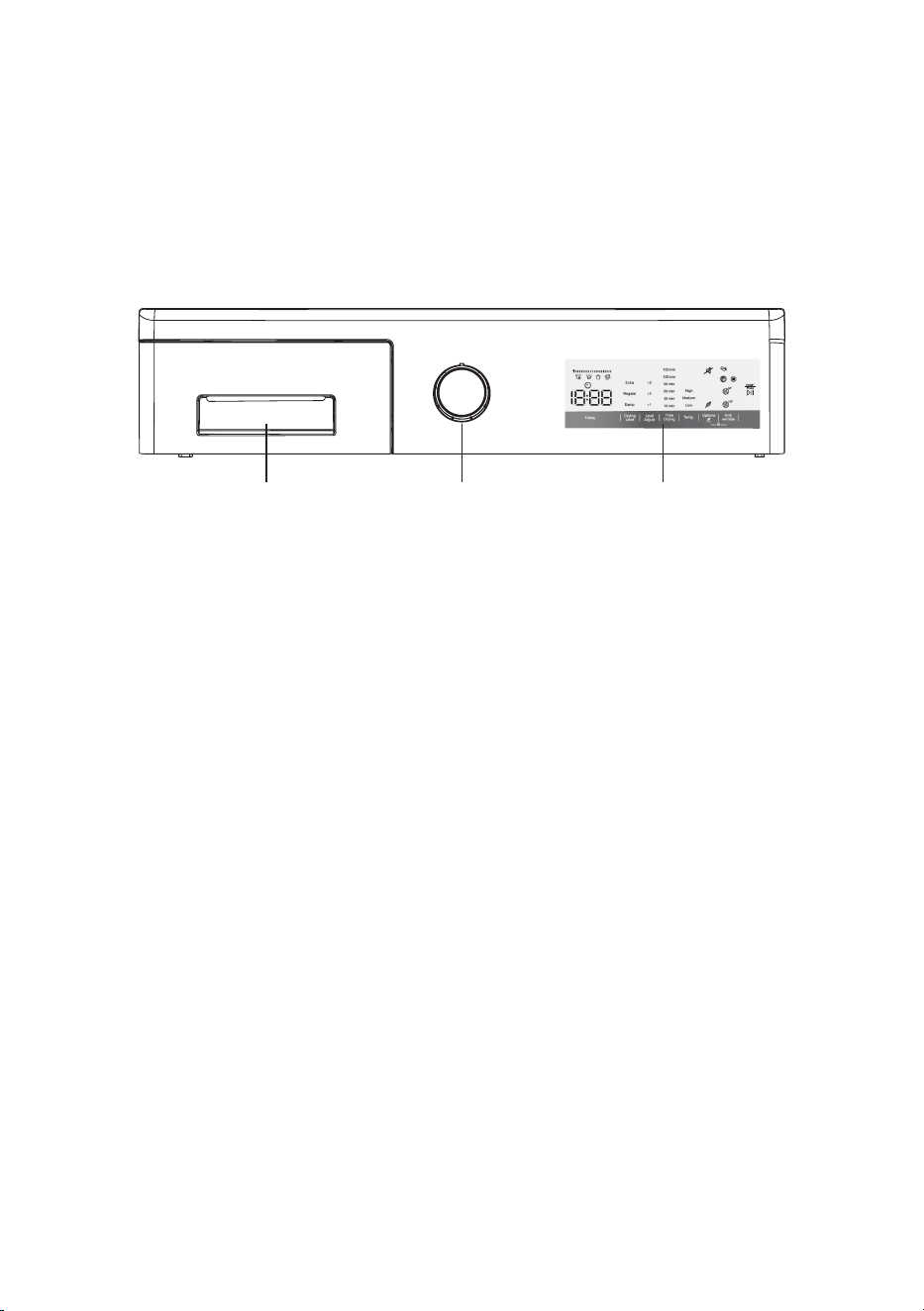
Water Tank Program Dial Display Panel
Control Panel
• Please ensure that items loaded into your dryer do not have objects such as
lighters, keys, coins, etc.
• Dry the same type of materials together in a load.
• Shake out and load each item of laundry separately (it will enhance drying).
• Close zips, fasten any hooks and place small or delicate items in a net bag.
• Reverse items such as printed t-shirts and items that have embroidery,
sequins, etc.
• Do not overload the dryer. You should be able to comfortably place your hand
above the loaded laundry, ensuring there is enough space for the clothes to
tumble, allowing air flow to dry the clothes properly.
• Check that no items of laundry are trapped between the rubber seal and the door.
Gently push the door until it clicks shut. Ensure the door is fully closed, •
otherwise the program will not start.
Do not open the door while the dryer is in operation. If you have to
open it, press the Start/Pause key and then open it. Close the door
quickly and restart the program by pressing the Start/Pause key again.
9
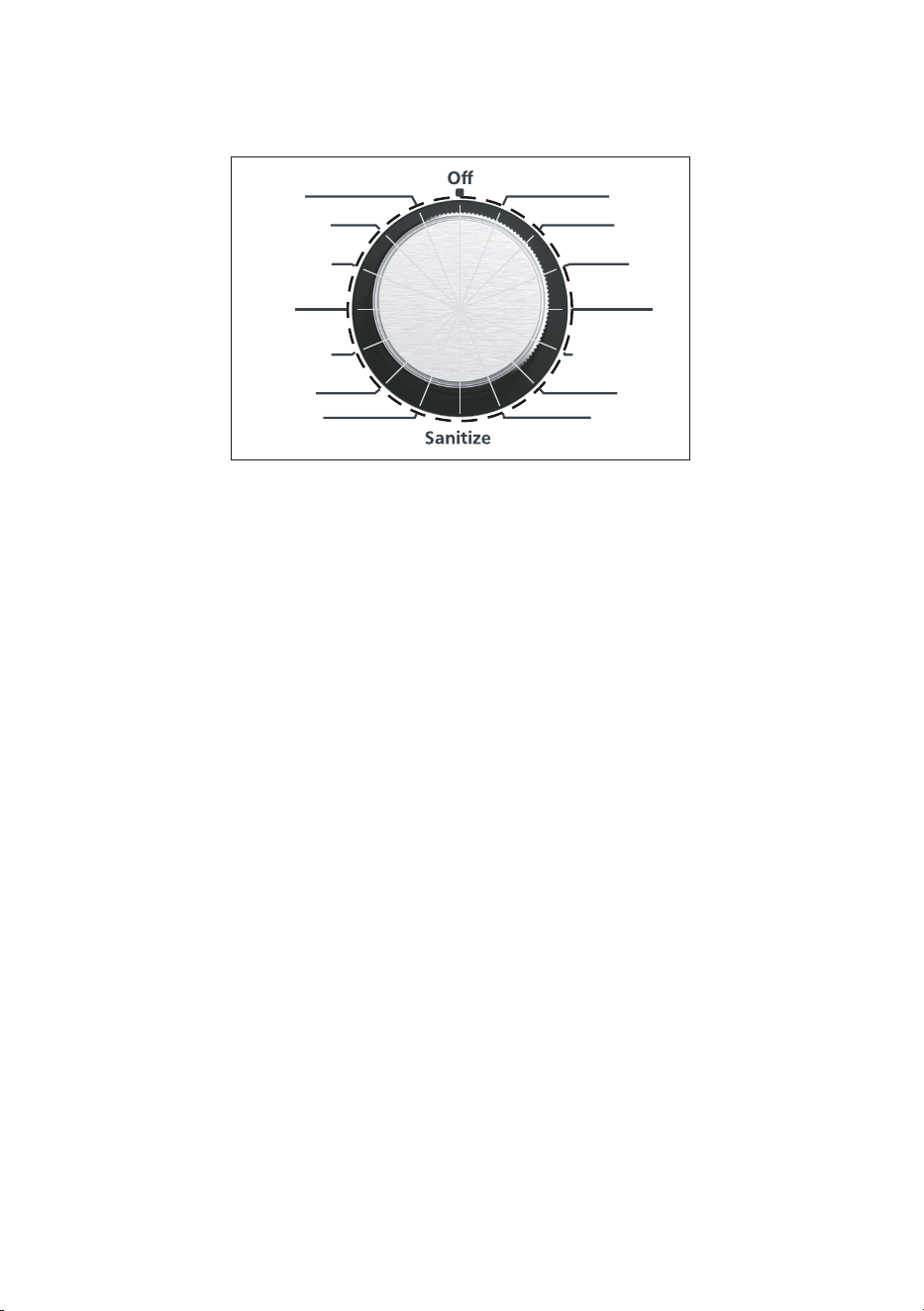
Program Dial
Time Drying
NORMAL
Outdoor
Towels
Mix
Warm Refresh
Air Fluff
Baby Care
Shirt 12’
Express 29’
Sportswear
Sheets
Perm Press
Delicates
• The Program Dial should be in the Off position (no lights will appear around
the dial).
• To select the desired program turn the Program Dial either clockwise or ,
counterclockwise until the light next to the selected program illuminates and you
hear a beep.
Ensure the display panel is illuminated with the default features.•
If the above does not happen, then turn the Program Dial to the Off position, and •
select the program again.
The dry program is successfully selected when the light on the dial next to •
the program is illuminated and the Display Panel is also illuminated with the
default features.
Refer to the Dry Programs Table as a guide to select programs.•
For all programs there are default factory settings. Depending on the specific •
program, some features can be changed and options added.
10
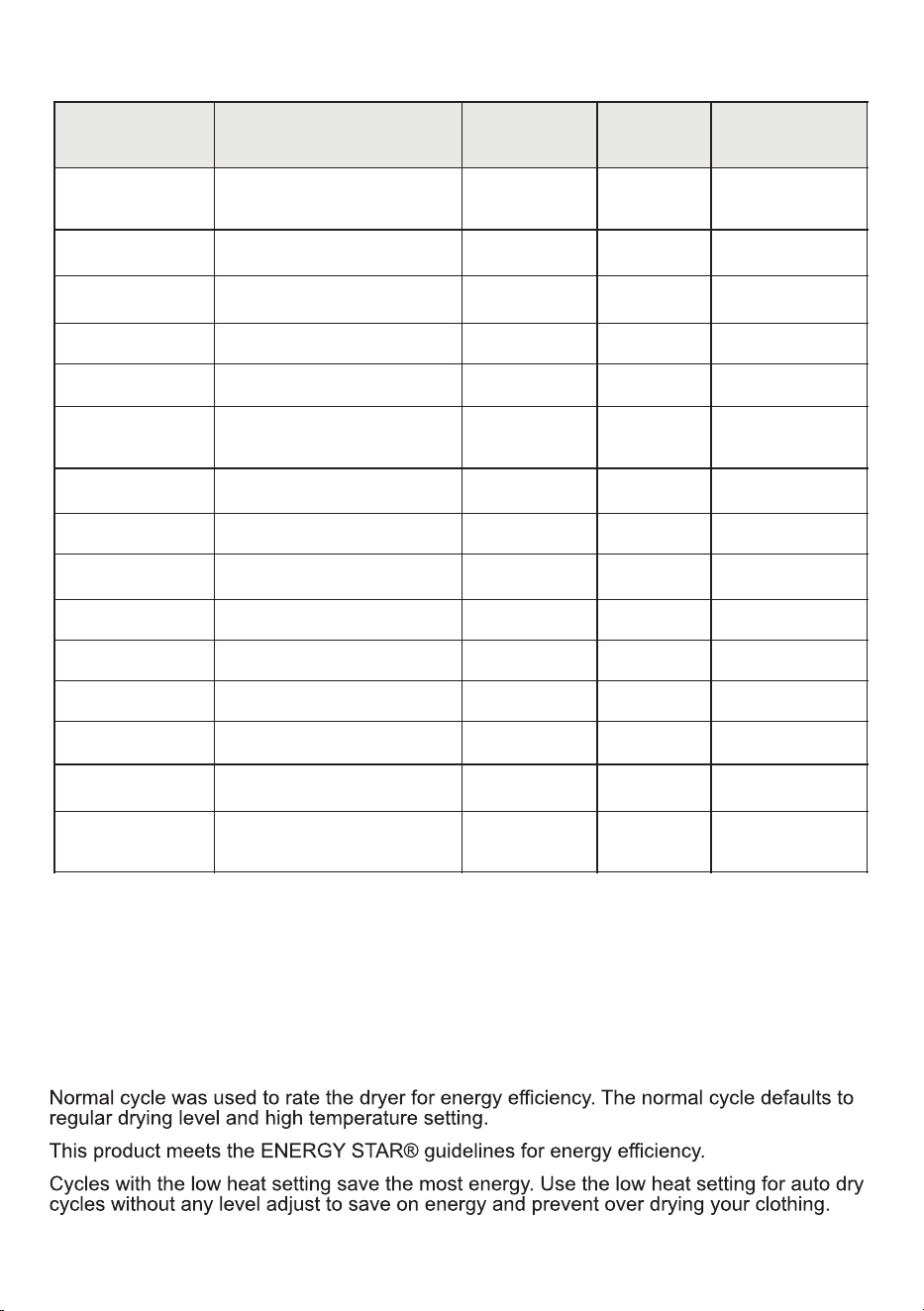
Dry Programs Table
Program
Load
Descriptions
Spin
Speed
Temp.*
(Default)
Time
(Mins)
NORMAL
Mixed clothes
(shirts, pants, etc.)
1000
High
158
Outdoor
Jackets
800
Med
43
Towels
Thick towels, cottons
1000
High
71
Mix
Mixed fabrics
1000
Med
81
Warm Refresh
Woolens, refresh all types
-
Low
-
Air Fluff
All types
(refresh with no hot air)
-
-
Time Drying
All types (10-150 mins)
-
Low
-
Sanitize
All types
1000
High
59
Baby Care
Delicate baby clothes
1000
Med
68
Delicates
Silks, light fabrics
600
Low
41
Perm Press
Cotton blends
800
Med
61
Sheets
Bedsheets, linen
800
Low
127
Sportswear
T-shirts, leggings
800
Med
53
Express 29’
Light fabrics
1200
High
29
Shirts 12’
(damp dry)
Light fabrics, shirts
1200
Med
12
*Temperature can be changed depending on the dry program.
Normal Program
The Normal program uses a sensor dry function which monitors the moisture in the clothes
and adjusts the dry time. When you start this program, the time on the Display Panel will
show 158 minutes. However, depending on the load and the drying process, the time can be
decreased significantly, and the dryer will run only long enough to dry the clothes and
then stop.
11
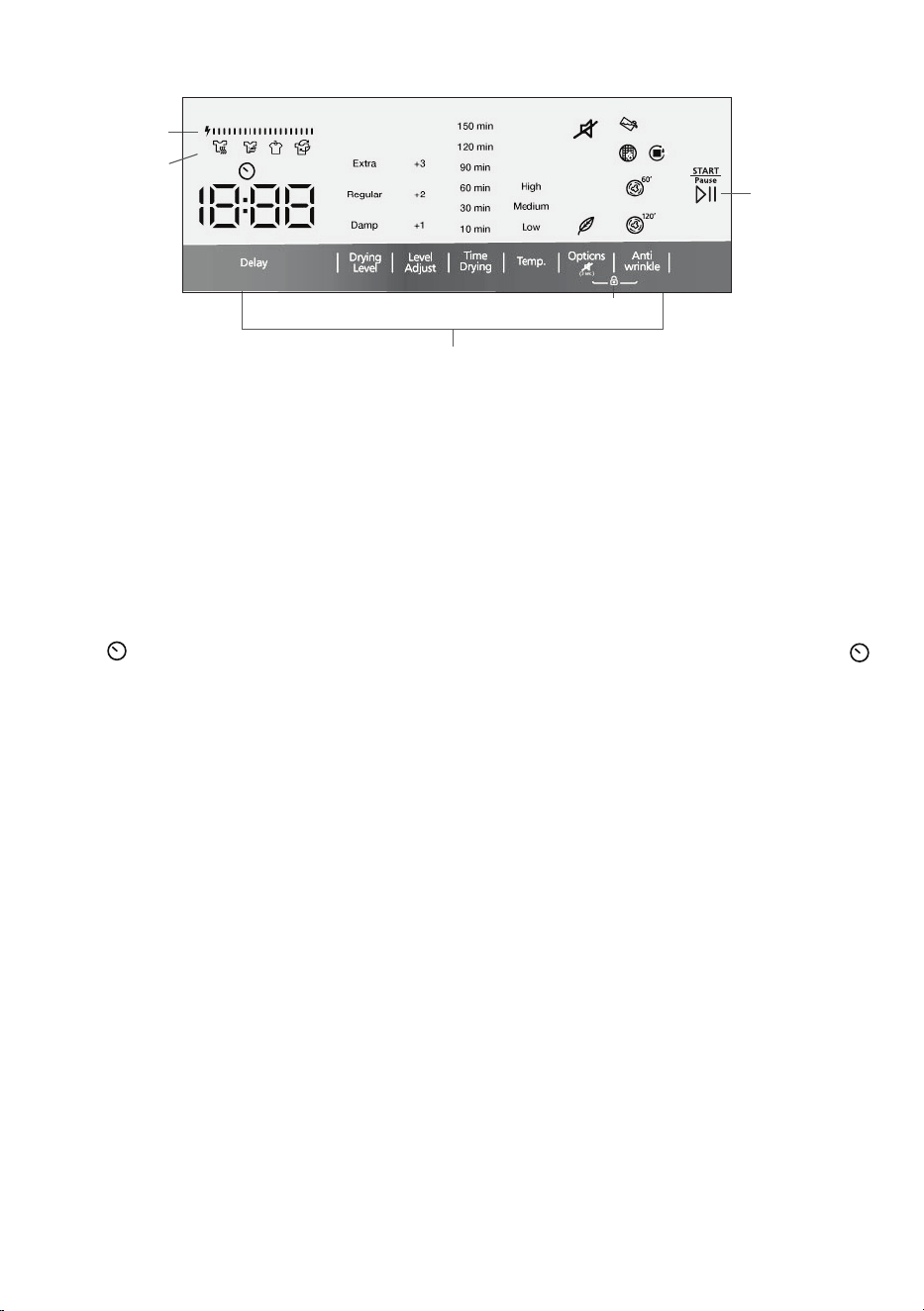
Display Panel
Additional Functions and Options
Start/Pause
Key
Energy
Efficiency Bar
Child Lock
Display Panel and Features
Once the dry program has been selected, there are additional features and options
that can be changed or added to the program. It is not necessary to select additional
functions and options. You can simply select the dry program on the Program Dial
and then press the Start key and the dry cycle will begin with the pre-programed
default settings.
Note: Each dry program has a different set of features and options. Depending on
the dry program selected, not all features and options are available.
Delay
Press this key to delay the start of the dry program. The time icon
and the delay time (1h) will appear on the Display Panel. Each time
you press the Delay key, the time will increase in one-hour
increments from 1 to 23 hours. Press the Start key to activate
the program.
To cancel the delay, press the Delay key until it passes 23h or turn
the Program Dial to Off and select the dry program again.
To change the drying level from the default, press the Drying Level
key to select from 3 levels and the selection will illuminate on the
Display Panel: Extra, Regular, or Damp.
To get clothes even more dry, press the Level Adjust key to select
+1, +2 or +3 and the selection will illuminate on the Display Panel.
This key can only be used when the Time Drying program has been
selected. Press the Time Drying key to select the number of
minutes to dry clothes: 10, 30, 60, 90, 120 or 150.
The default maximum temperature for the dry program selected
will be illuminated on the Display Panel. To change the level of hot
air, press the Temp. key to select from High, Medium, and Low.
(Not all may be displayed.)
Drying Level
Level Adjust
Time Drying
Temp
Drying Status
12
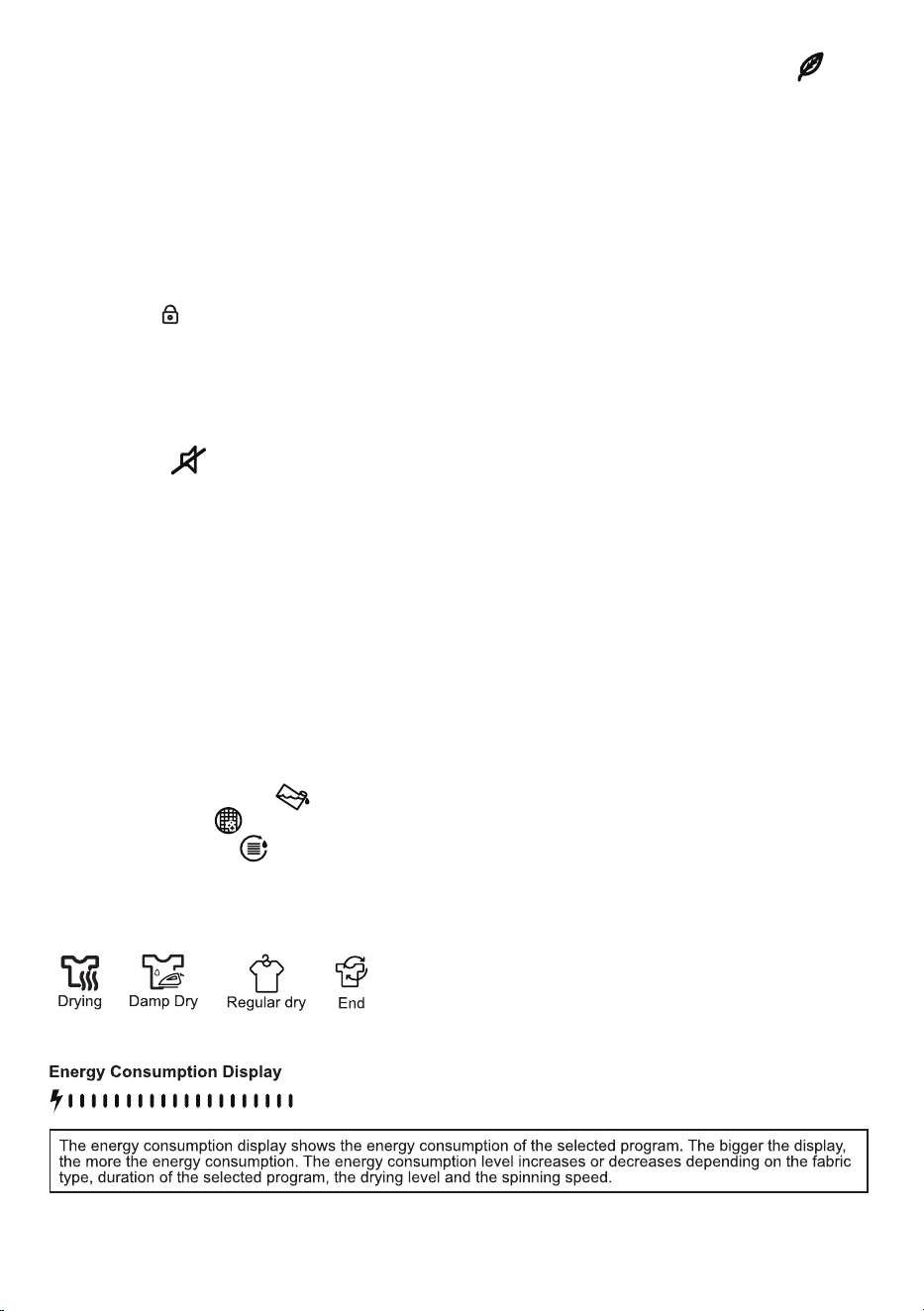
Drying Status: These icons indicate the drying status.
Press the Options key to select Delicate drying .
The Delicate option lets the dry program run at low
temperature and for a longer period of time.
This is a default function that rotates the drum after
the dry program ends, thereby eliminating wrinkles.
Depending on the Dry Program, the anti wrinkle feature
will operate for either 60 or 120 minutes. The icon
illuminates on the Display Panel.
Press the Options and Anti wrinkle keys simultaneously
for at least 3 seconds until “CL” flashes on the Display
Panel for 2 seconds and child lock is activated. Follow
the same procedure to deactivate child lock and CL will
disappear from the panel.
At the end of each dry program the dryer will sound a
beep to let you know the program has ended. Should
you want to silence the beep, it can be cancelled by
pressing the Anti wrinkle key for 2 seconds.
Press this key to start the dry program. When the cycle
has already begun, press it again to pause the program.
When the cycle ends, a beep will sound and End will
show on the Display Panel.
(After some time the Display Panel will go blank.)
Options
Anti wrinkle
Child Lock
Cancel beep
Start/Pause
• Empty the water tank
• Clean lint filter
• Clean condenser
Alert Indicators: Alert icons illuminate on the Display Panel that remind you to
perform specific maintenance activities:
13
Maintenance
IMPORTANT: Do not use industrial chemicals to clean your dryer.
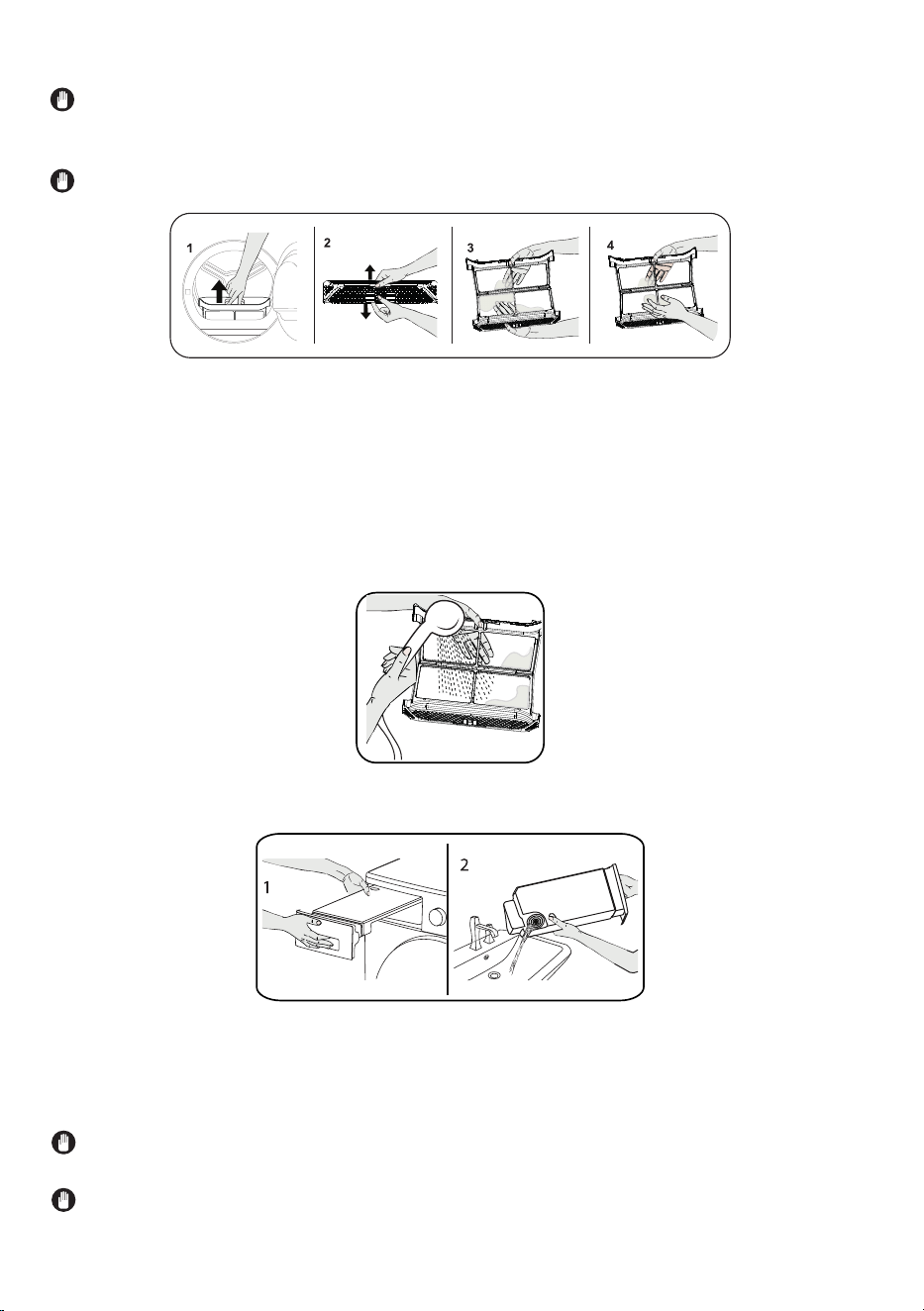
Cleaning the Lint Filter
IMPORTANT: DO NOT FORGET TO CLEAN THE LINT FILTER AFTER EACH USE.
To clean the lint filter:
1. Open the door.
2. Pull up the lint filter to remove it.
3. Use your hands or a soft cloth to clean the lint.
4. Close and replace the lint filter.
Emptying the Water Tank
1. Pull out the drawer cover and carefully take out the tank.
2. Empty the water from the tank in the sink.
3. If there is lint accumulated on the discharge cap in the tank, clean it with water.
4. Replace the water tank.
IMPORTANT: Never remove the water tank when the program is running. The
water condensed in the water tank is not suitable for human consumption.
IMPORTANT: DO NOT FORGET TO EMPTY THE WATER TANK AFTER EACH USE.
Periodically remove and wash the filter with warm water and thoroughly dry it before
reinstalling it.
14
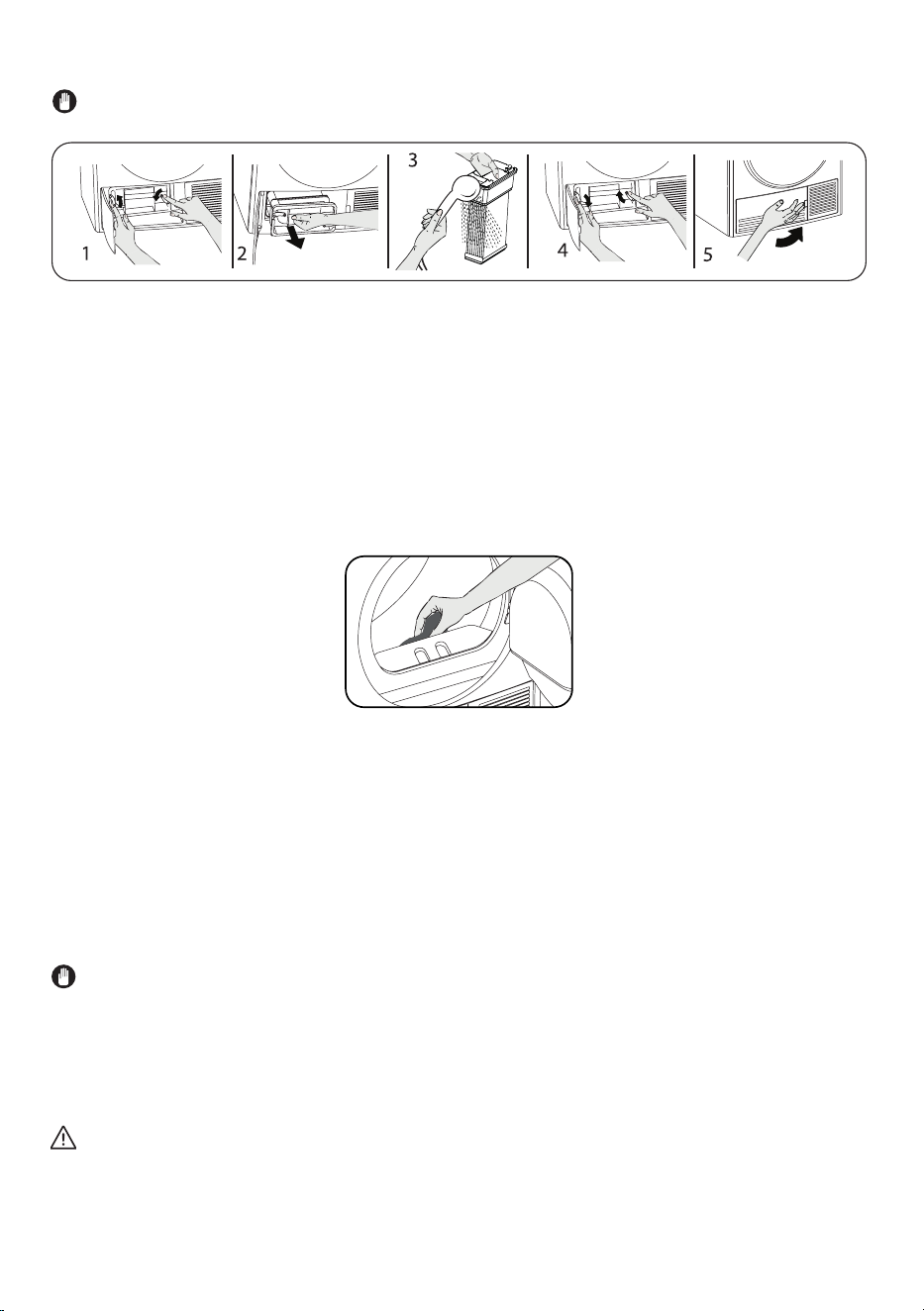
Cleaning the Condenser
Wait for the dryer to cool down before cleaning the condenser.
1. Open the plinth and release the 2 cover locks of the condenser.
2. Hold the condenser by the plastic part and pull it out.
3. Clean it with a showerhead and wait for the water to drain off.
4. Fully insert the condenser into its seat and lock the 2 locks.
5. Close the plinth cover.
IMPORTANT: Clean the condenser once a month.
Cleaning the Moisture Sensor and Door
Inside the dryer, there are moisture sensors that detect whether the laundry is dry.
To clean the sensors:
1. Open the door.
2. If the dryer is still hot due to the drying process, wait for it to cool down.
3. Using a soft cloth soaked in vinegar, wipe the metal surfaces of the sensor and
dry them.
Do not use metal tools to clean the metal surfaces of the sensor and the door.
IMPORTANT: CLEAN THE METAL SURFACES OF THE SENSORS EVERY QUARTER.
WARNING: Due to the risk or fire and explosion, do not use solution agents,
cleaning agents or similar products when cleaning the sensors.
Clean the door including the inner surfaces and the gasket with a soft, damp cloth.
15
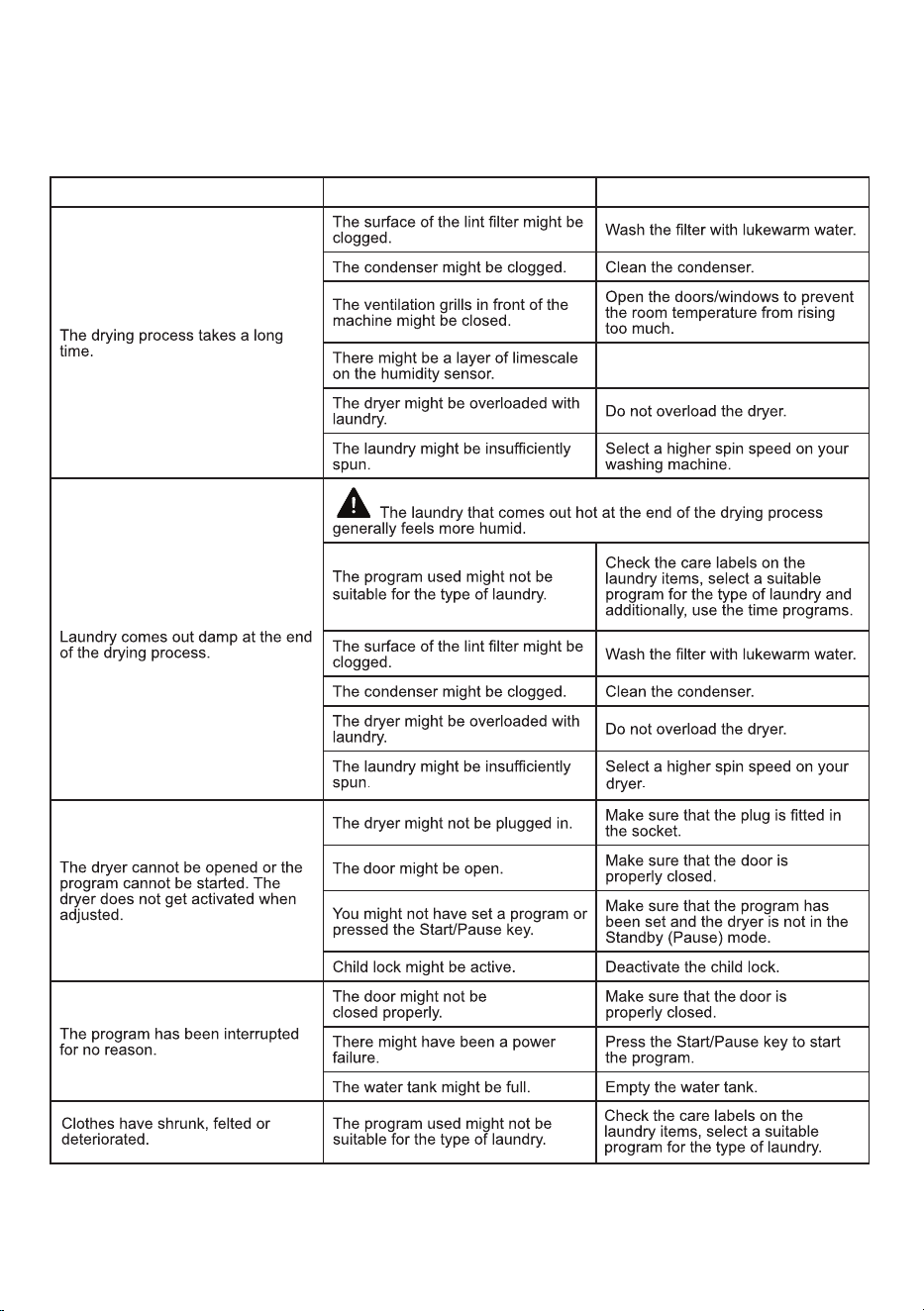
In most cases, when your Dryer fails to work, the problems arising can be easily
solved without having to call for a technician. Before calling for assistance, always
check these points.
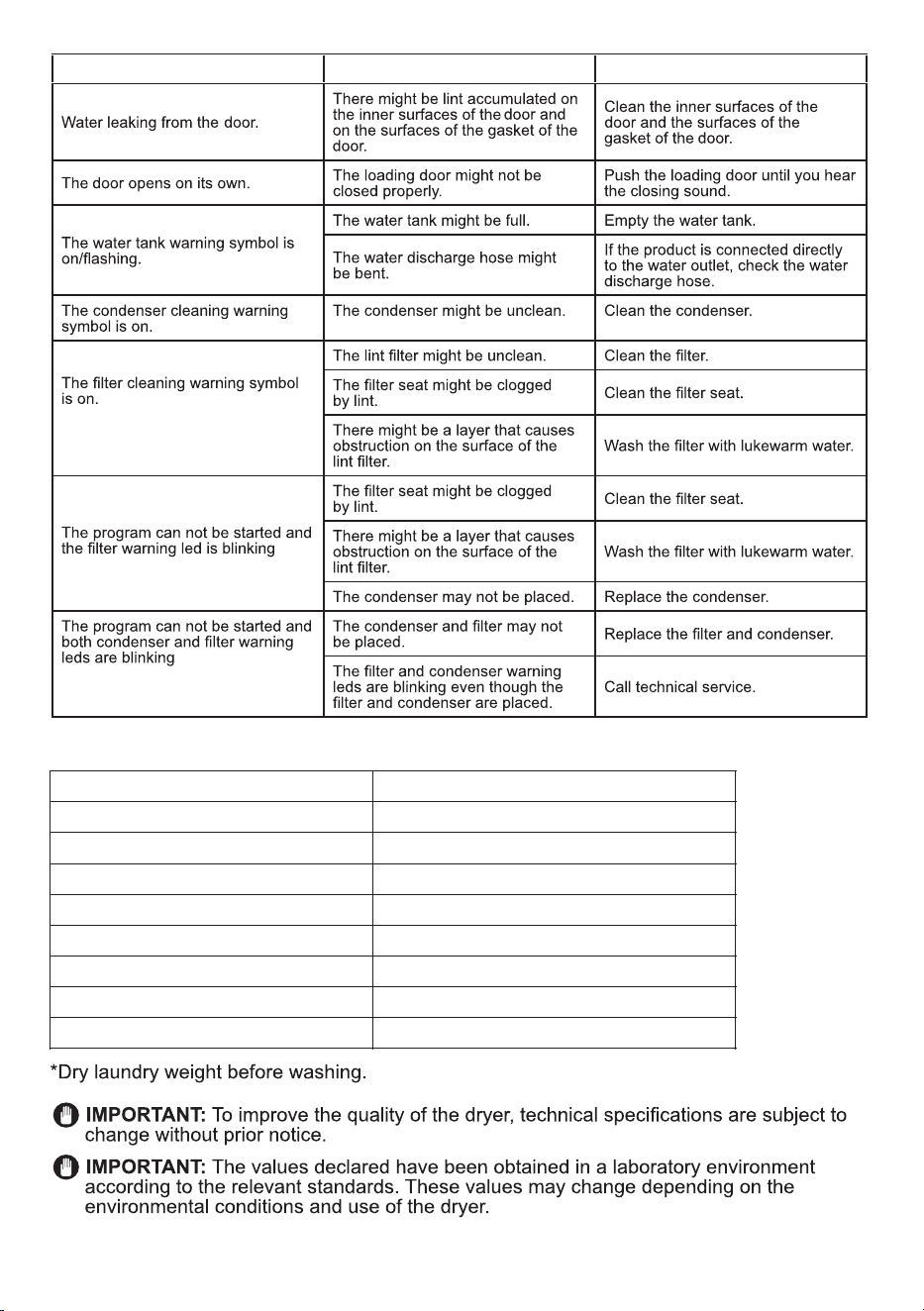
Troubleshooting
POSSIBLE CAUSE
Clean the moisture sensor.
16
SOLUTION
PROBLEM
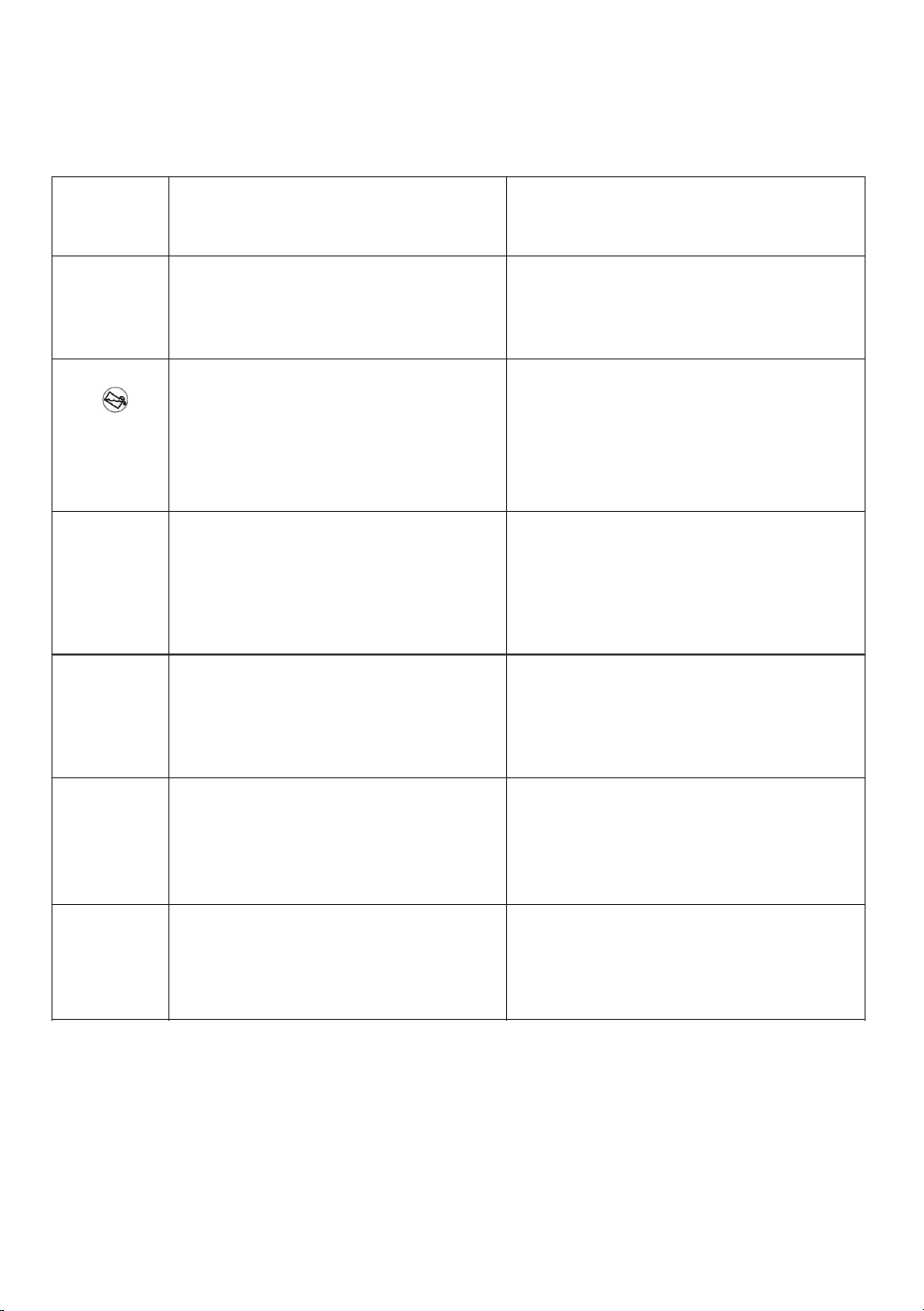
POSSIBLE CAUSE
17
SOLUTIONPROBLEM
Conserv
CD 4040
32.3 inch (845 mm)
33.7 inch (855 mm)
23.5 inch (596 mm) / 24 inch (609 mm)
43 inch (1090 mm)
19.84 lbs (9 kg)*
75.61lbs(34.3 kg)
208-240 V / 2700 W
Brand
Model Name
Height with feet not extended
Height with feet fully extended
Width / Depth
Door Open Depth
*Capacity (max.)
Net Weight (with glass door)
Voltage / Power
Technical Specifications
Error Codes
The Dryer is equipped with a built-in fault detection system.
The Error Code flashes on the Display Panel.
The most common error codes are listed below.
Error
Codes
Possible Cause
Solution
E00
T2 and T3 Touch UI card does not
receive communication from main
board.
Fix the connection. If connection is
good, and error persists, change UI
card. If error continues, change main
board.
E03
Aqua switch connector is
disconnected.
Faulty cable harness
Change cable harness.
Empty the water tank.
Connect the aqua switch or if problem
continues, change aqua switch.
E04
Measured resistance values through
the heater connector are not correct.
Disconnect between e-card and
heater.
Heater is not connected correctly.
Fix heater connections.
Change main board or cable/wiring
harness.
Change heater.
E05
Heater NTC connector may be
disconnected.
Check cable/wiring harness.
Check NTC resistance values and
change heater or main board.
Connect Heater NTC.
E06
Door NTC connector is
disconnected.
Door NTC short circuit.
Connect Door NTC.
Check door NTC resistance values and
change door NTC or main board.
Check cable/wiring harness.
E08
Voltage fluctuation.
There may be voltage fluctuation in
mains. Wait until voltage is appropriate
for working range.
If the voltage is ok, change main board.
An authorized service technician should make the repairs for these errors.
A separate service manual provides detailed instructions on how to correct
the problems. Please contact customer service.
18