VDO Sceptron™ Family
User Manual
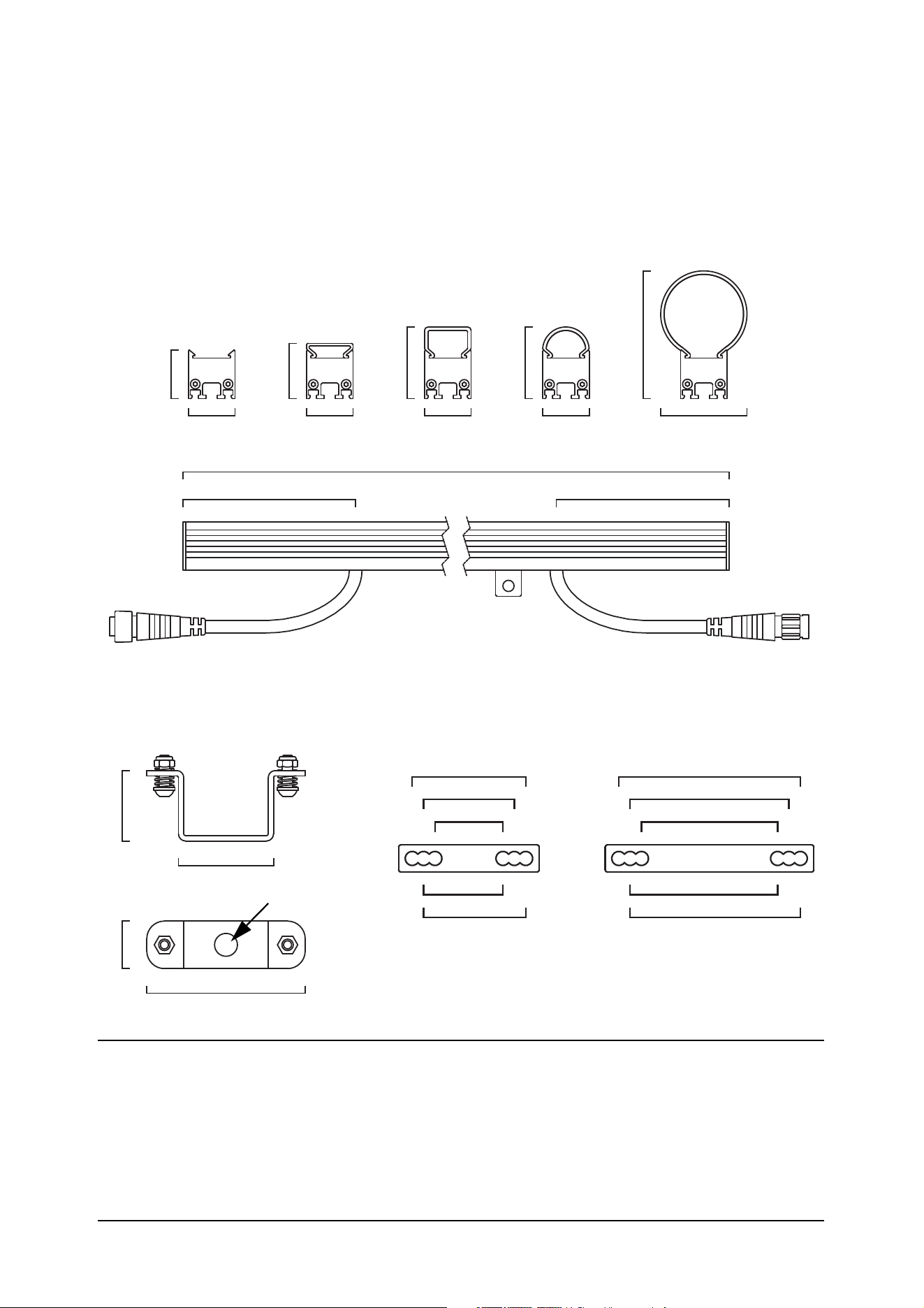
Dimensions
All dimensions are in millimeters
27 27 27 27 50
28
32
42 42
74
100 100
320 / 1000
40
54
27
90
Ø 13
40
30
50
35
45
Sliding bracket
Fixture / optical accessories
Parallel couplers
with flat
diffuser
with square
diffuser
with round
diffuser
with tube
diffuser
80
70
60
65
75
© 2015-2020 HARMAN PROFESSIONAL DENMARK ApS. All rights reserved. Features, specifications and appearance are subject
to change without notice. HARMAN PROFESSIONAL DENMARK ApS and all affiliated companies disclaim liability for any injury,
damage, direct or indirect loss, consequential or economic loss or any other loss occasioned by the use of, inability to use or reliance
on the information contained in this document. Martin is a registered trademark of HARMAN PROFESSIONAL DENMARK ApS
registered in the United States and/or other countries.
HARMAN PROFESSIONAL DENMARK ApS
, Olof Palmes Allé 44, 8200 Aarhus N, Denmark
HARMAN PROFESSIONAL SOLUTIONS U.S.
, 8500 Balboa Blvd., Northridge CA 91329, USA
www.martin.com
VDO Sceptron User Manual P/N 35000284 Rev. G

Contents
Safety information. . . . . . . . . . . . . . . . . . . . . . . . . . . . . . . . . . . . . . . . . . . . . . . . . . . . . . . . . . . . . . . . . . 4
Introduction . . . . . . . . . . . . . . . . . . . . . . . . . . . . . . . . . . . . . . . . . . . . . . . . . . . . . . . . . . . . . . . . . . . . . . . . 9
Precautions to avoid damage . . . . . . . . . . . . . . . . . . . . . . . . . . . . . . . . . . . . . . . . . . . . . . . . . . . . . . . . . 9
VDO Sceptron overview . . . . . . . . . . . . . . . . . . . . . . . . . . . . . . . . . . . . . . . . . . . . . . . . . . . . . . . . . . . 10
Physical installation . . . . . . . . . . . . . . . . . . . . . . . . . . . . . . . . . . . . . . . . . . . . . . . . . . . . . . . . . . . . . . . 11
Wind precautions. . . . . . . . . . . . . . . . . . . . . . . . . . . . . . . . . . . . . . . . . . . . . . . . . . . . . . . . . . . . . . . . . . 11
Captive fasteners. . . . . . . . . . . . . . . . . . . . . . . . . . . . . . . . . . . . . . . . . . . . . . . . . . . . . . . . . . . . . . . . . . 11
Installing a safety cable . . . . . . . . . . . . . . . . . . . . . . . . . . . . . . . . . . . . . . . . . . . . . . . . . . . . . . . . . . . . . 12
Installing a sliding bracket . . . . . . . . . . . . . . . . . . . . . . . . . . . . . . . . . . . . . . . . . . . . . . . . . . . . . . . . . . . 12
Installing parallel couplers . . . . . . . . . . . . . . . . . . . . . . . . . . . . . . . . . . . . . . . . . . . . . . . . . . . . . . . . . . . 14
Joining fixtures end-to-end . . . . . . . . . . . . . . . . . . . . . . . . . . . . . . . . . . . . . . . . . . . . . . . . . . . . . . . . . . 14
Mounting a single fixture . . . . . . . . . . . . . . . . . . . . . . . . . . . . . . . . . . . . . . . . . . . . . . . . . . . . . . . . . . . . 15
Suspending a curtain of horizontally oriented fixtures . . . . . . . . . . . . . . . . . . . . . . . . . . . . . . . . . . . . . . 16
Mounting on a non-vertical structure or surface . . . . . . . . . . . . . . . . . . . . . . . . . . . . . . . . . . . . . . . . . . 17
Suspending a vertical chain of fixtures joined end-to-end . . . . . . . . . . . . . . . . . . . . . . . . . . . . . . . . . . . 19
Installing and removing optical accessories . . . . . . . . . . . . . . . . . . . . . . . . . . . . . . . . . . . . . . . . . . . . . 20
System installation . . . . . . . . . . . . . . . . . . . . . . . . . . . . . . . . . . . . . . . . . . . . . . . . . . . . . . . . . . . . . . . . 22
Installing a P3 system . . . . . . . . . . . . . . . . . . . . . . . . . . . . . . . . . . . . . . . . . . . . . . . . . . . . . . . . . . . . . . 22
Installing a DMX-controlled system . . . . . . . . . . . . . . . . . . . . . . . . . . . . . . . . . . . . . . . . . . . . . . . . . . . . 24
System setup . . . . . . . . . . . . . . . . . . . . . . . . . . . . . . . . . . . . . . . . . . . . . . . . . . . . . . . . . . . . . . . . . . . . . 31
Pixels and segments . . . . . . . . . . . . . . . . . . . . . . . . . . . . . . . . . . . . . . . . . . . . . . . . . . . . . . . . . . . . . . . 31
Setting up for P3 display . . . . . . . . . . . . . . . . . . . . . . . . . . . . . . . . . . . . . . . . . . . . . . . . . . . . . . . . . . . . 31
Setting up for DMX control. . . . . . . . . . . . . . . . . . . . . . . . . . . . . . . . . . . . . . . . . . . . . . . . . . . . . . . . . . . 31
Using the VDO Sceptron . . . . . . . . . . . . . . . . . . . . . . . . . . . . . . . . . . . . . . . . . . . . . . . . . . . . . . . . . . 33
P3 display . . . . . . . . . . . . . . . . . . . . . . . . . . . . . . . . . . . . . . . . . . . . . . . . . . . . . . . . . . . . . . . . . . . . . . . 33
DMX control. . . . . . . . . . . . . . . . . . . . . . . . . . . . . . . . . . . . . . . . . . . . . . . . . . . . . . . . . . . . . . . . . . . . . . 33
Magnetic ‘control button’ . . . . . . . . . . . . . . . . . . . . . . . . . . . . . . . . . . . . . . . . . . . . . . . . . . . . . . . . . . . . 34
Flightcase system . . . . . . . . . . . . . . . . . . . . . . . . . . . . . . . . . . . . . . . . . . . . . . . . . . . . . . . . . . . . . . . . . 36
Service and maintenance. . . . . . . . . . . . . . . . . . . . . . . . . . . . . . . . . . . . . . . . . . . . . . . . . . . . . . . . . . 37
Cleaning. . . . . . . . . . . . . . . . . . . . . . . . . . . . . . . . . . . . . . . . . . . . . . . . . . . . . . . . . . . . . . . . . . . . . . . . . 37
LED performance. . . . . . . . . . . . . . . . . . . . . . . . . . . . . . . . . . . . . . . . . . . . . . . . . . . . . . . . . . . . . . . . . . 37
Installing new software . . . . . . . . . . . . . . . . . . . . . . . . . . . . . . . . . . . . . . . . . . . . . . . . . . . . . . . . . . . . . 37
Troubleshooting . . . . . . . . . . . . . . . . . . . . . . . . . . . . . . . . . . . . . . . . . . . . . . . . . . . . . . . . . . . . . . . . . . 39
DMX protocols . . . . . . . . . . . . . . . . . . . . . . . . . . . . . . . . . . . . . . . . . . . . . . . . . . . . . . . . . . . . . . . . . . . . 40
Direct DMX control. . . . . . . . . . . . . . . . . . . . . . . . . . . . . . . . . . . . . . . . . . . . . . . . . . . . . . . . . . . . . . . . . 40
Pre-programmed FX . . . . . . . . . . . . . . . . . . . . . . . . . . . . . . . . . . . . . . . . . . . . . . . . . . . . . . . . . . . . . . . 43
DMX via P3 System Controller . . . . . . . . . . . . . . . . . . . . . . . . . . . . . . . . . . . . . . . . . . . . . . . . . . . . . . . 45
Specifications . . . . . . . . . . . . . . . . . . . . . . . . . . . . . . . . . . . . . . . . . . . . . . . . . . . . . . . . . . . . . . . . . . . . . 49
4
VDO Sceptron™ Family Safety and Installation Guide
Safety information
The following symbols are used to identify important safety information on the product and in this document:
Warning!
• Read this user manual before installing and operating the Martin® VDO Sceptron™. Keep this
manual for future reference.
• Follow the safety precautions given in this user manual and in the manuals of all the devices you
connect to it. Observe all warnings given in manuals and printed on devices. Make sure that
everyone who is involved in working on or using the VDO Sceptron has read and understood
these safety precautions and warnings.
• Install, connect, operate and service devices only as described in this manual and in connected
devices’ manuals and only in accordance with local laws and regulations. All Martin manuals are
supplied with devices and are also available for download from www.martin.com.
• The VDO Sceptron is not for household use. It presents risks of severe injury or death due to fire
and burn hazards, electric shock and falls. It must be installed by qualified technicians only.
• The VDO Sceptron does not have user-serviceable parts. LEDs are not replaceable. Refer any
operation not described in this manual to Martin Global Service or Martin authorized service
agents.
If you have any questions about how to install, operate or service the fixture safely, please contact your
Martin distributor (see www.martin.com/distributors for details) or in the USA call 1-844-776-4899.
PROTECTION FROM ELECTRIC SHOCK
• Read and respect the directions given in the user manuals of all the devices that you intend to connect to
the VDO Sceptron, particularly the instructions, warnings and limits that apply to:
- system layout,
- connections to other devices,
- specified cables,
- maximum cable lengths, and
- maximum number of devices that can be connected.
• Use only the cables specified in this manual and on the Martin website at www.martin.com to interconnect
devices in the installation. If the specified cables are not long enough for an intended cable run, consult
Martin for assistance in finding or creating a safe alternative solution.
WARNING!
Read the safety precautions in this section before
installing, powering, operating or servicing this
product.
Warning!
Safety hazard.
Risk of severe
injury or
death.
Warning!
Hazardous
voltage. Risk
of severe or
lethal electric
shock.
Warning!
Fire hazard.
Warning!
Refer to user
manual.

Safety information
5
• Provide a means of locking out AC mains power that allows power to the installation to be shut down and
made impossible to reapply, even accidentally, during work on the installation.
• Shut down power to the installation during service and when it is not in use.
• Before applying power to the installation, check that all power distribution equipment and cables are in
perfect condition and rated for the current requirements of all connected devices.
• Isolate the installation from power immediately if any product, power cable or power plug is in any way
damaged, defective or wet, or if it shows signs of overheating.
• Do not immerse a VDO Sceptron fixture in water or expose it to high-pressure water jets.
• Do not allow the total length (including fixtures and cable) of a linked chain of VDO Sceptron fixtures to
exceed 50 m (164 ft.) from the 48 VDC power source (Martin P3 PowerPort 1500™, Martin P3 PowerPort
1000 IP™, Martin DMX PowerPort 375™, Martin IP66 PSU 240W™ or other external power supply unit)
to the last VDO Sceptron at the end of the chain.
• If you supply a chain of VDO Sceptron fixtures with DC power from a generic 48 VDC external PSU and
the DC output used does not have constant overcurrent protection that limits current to 8 A, install an
inline fuseholder with a 7.5 A or 8 A fuse on the circuit that you connect to the DC output.
Safety limits for connecting devices
Do not exceed the maximum safety limits given in the following tables.
Martin P3 PowerPort 1500 safety limits
If you supply VDO Sceptron fixtures with DC power from a Martin P3 PowerPort 1500:
• Do not connect more than one chain of fixtures to one DC output on the P3 PowerPort 1500. Since the P3
PowerPort 1500 has four DC outputs, you can connect a maximum of four chains of fixtures to one P3
PowerPort 1500.
• Do not exceed the maximum total length of fixtures that you can include in one chain (see Table 1).
• Do not exceed a maximum total length of 50 m (164 ft.) for a chain, including fixtures and cable, measured
from the P3 PowerPort 1500 to the end of the chain (see Table 1).
Besides the above limits, each output of a P3 PowerPort 1500 can drive a maximum of 63 fixtures
regardless of the length of the fixtures. This may affect the VDO Sceptron 40. If you are creating a chain
containing VDO Sceptron 40 320 mm fixtures, you must stop and create a new chain if you reach 63
fixtures.
Martin P3 PowerPort 1000 IP safety limits
If you supply VDO Sceptron fixtures with DC power from an output on a Martin P3 PowerPort 1000 IP:
• Do not connect more than one linked chain of VDO Sceptron fixtures to one DC output. Since the P3
PowerPort 1000 IP has four DC outputs, you can connect a maximum of four chains of fixtures to one P3
PowerPort 1000 IP.
• Do not exceed the maximum total length of fixtures that you can include in one chain given (see Table 2).
• Do not exceed a maximum total length of 50 m (164 ft.) for a chain, including fixtures and cable, measured
from the P3 PowerPort 1000 IP to the end of the chain (see Table 2).
Type of fixture in
chain
Maximum total length of
fixtures in chain
Maximum total length of
chain (fixtures and
cable)
VDO Sceptron 10 10 m 50 m
VDO Sceptron 20 20 m 50 m
VDO Sceptron 40 40 m 50 m
Table 1: Maximum length of VDO Sceptron fixtures and chain per P3 PowerPort 1500 output

6
VDO Sceptron™ Family Safety and Installation Guide
Besides the above limits, each output of a P3 PowerPort 1000 can drive a maximum of 63 fixtures
regardless of the length of the fixtures. This may affect the VDO Sceptron 40. If you are creating a chain
containing VDO Sceptron 40 320 mm fixtures, you must stop and create a new chain if you reach 63
fixtures.
Martin DMX PowerPort 375 safety limits
If you supply VDO Sceptron fixtures with DC power from a Martin DMX PowerPort 375:
• Do not connect more than one chain of fixtures to the DMX PowerPort 375’s hybrid DC power and data
output.
• Do not exceed the maximum total length of fixtures that you can include in one chain (see Table 3).
• Do not exceed a maximum total length of 50 m (164 ft.) for a chain, including fixtures and cable, measured
from the DMX PowerPort 375 to the end of the chain (see Table 3).
Martin IP66 PSU 240W safety limits
You can supply VDO Sceptron fixtures with DC power from a Martin IP66 PSU 240W external power supply
unit (this unit was previously called the ‘Martin Tripix Power IP66’). If you use this unit to supply DC power:
• Do not connect more than one linked chain of VDO Sceptrons to the DC power output of the Martin IP66
PSU 240W.
• Do not exceed the maximum total length of fixtures that you can include in one chain (see Table 4).
• Do not exceed a maximum total length of 50 m (164 ft.) for a chain, including fixtures and cable, measured
from the Martin IP66 PSU 240W to the end of the chain (see Table 4).
Type of fixture in
chain
Maximum total length of
fixtures in chain
Maximum total length of
chain (fixtures and
cable)
VDO Sceptron 10 7 m 50 m
VDO Sceptron 20 14 m 50 m
VDO Sceptron 40 27 m 50 m
Table 2: Maximum number of VDO Sceptron fixtures per P3 PowerPort 1000 IP output
Type of fixture in
chain
Maximum total length of
fixtures in chain
Maximum total length of
chain (fixtures and
cable)
VDO Sceptron 10 10 m 50 m
VDO Sceptron 20 20 m 50 m
VDO Sceptron 40 40 m 50 m
Table 3: Maximum length of VDO Sceptron fixtures and chain per DMX PowerPort 375
Type of fixture in
chain
Maximum total length of
fixtures in chain
Maximum total length of
chain (fixtures and
cable)
VDO Sceptron 10 7 m 50 m
VDO Sceptron 20 14 m 50 m
VDO Sceptron 40 27 m 50 m
Table 4: Maximum number of VDO Sceptron fixtures per Martin IP66 PSU 240W
Safety information
7
Generic 48 VDC external PSU safety limits
If you supply a chain of VDO Sceptron fixtures with DC power from a 48 VDC external PSU (power supply
unit) that you obtain yourself, you must not exceed the lowest of these limits:
• Do not create a chain that will exceed the maximum power rating of the PSU output used to supply that
chain with power (to find the power consumption of the chain, multiply the number of fixtures in the chain
with the wattage per fixture according to Table 5).
• Do not exceed the maximum total length of fixtures and the maximum total length of cable that you can
connect in one chain (see Table 5).
• Do not create a chain with a total length of more than 50 m (164 ft.).
Each time you reach (a) the maximum total length of fixtures in one chain, or (b) 50 m (164 ft.) total length of
the chain, or (c) the PSU output’s maximum power rating – whichever you reach first – you must create a
new chain of fixtures that is connected to a new 48 VDC power output.
PROTECTION FROM BURNS AND FIRE
• The VDO Sceptron is cooled by convection. Ensure sufficient ventilation by providing free airflow around
the fixture and keeping a minimum distance of 10 mm (0.4 in.) between the fixture and any surfaces or
objects around it.
• Do not operate the VDO Sceptron if the ambient temperature (Ta) around the fixture exceeds 55° C
(131° F).
• Do not modify the VDO Sceptron in any way not described in this manual or install other than genuine
Martin parts. Use only accessories approved by Martin.
PROTECTION FROM INJURY
• Read carefully the chapter “Physical installation” on page 11 and respect the limits and instructions given
in that chapter, or you may install items in such a way that they can collapse or fall, causing serious or
lethal injury.
• If a fixture may cause injury or damage if it falls, secure it as described in this manual with a secondary
attachment such as a safety cable that is approved by an official body such as TÜV as a safety
attachment for the weight that it secures. The safety cable must comply with EN 60598-2-17 Section
17.6.6 or BGV C1 / DGUV 17 and it must also be capable of bearing a static suspended load at least ten
times (or more if required by locally applicable regulations) the weight that it secures.
• Use at least one safety cable per fixture: do not loop a safety cable through the bracket of more than one
fixture.
• Eliminate as much slack as possible from the safety cable (by looping it more than once around the
rigging truss, for example). If the primary attachment fails, the safety cable must catch the fixture before
the fixture has dropped 10 cm (4 in.).
Type of fixture in
chain
Wattage per fixture
Maximum total length
of fixtures in chain
Maximum total length
of chain (fixtures and
cable)
VDO Sceptron 10,
1000 mm
33 W
10 m 50 m
VDO Sceptron 10,
320 mm
11 W
VDO Sceptron 20,
1000 mm
16.5 W
20 m 50 m
VDO Sceptron 20,
320 mm
5.5 W
VDO Sceptron 40,
1000 mm
8.5 W
40 m 50 m
VDO Sceptron 40,
320 mm
3 W
Table 5: Maximum number of VDO Sceptron fixtures per 48 VDC external PSU (provided that PSU
rating in watts is not exceeded).
8
VDO Sceptron™ Family Safety and Installation Guide
• Ensure that the installation hardware and supporting surface or structure can hold at least 10 times the
weight of all the devices they support.
• Block access below the work area and work from a stable platform whenever installing, servicing or
moving the VDO Sceptron.
• As soon as work is completed, check that all hardware and components are securely fastened to
supporting structures.
• Do not add more than three (3) flightcase extenders to one VDO Sceptron flightcase base unit.
• Do not use the VDO Sceptron without an optical accessory installed on the front of the fixture as directed
in this manual. Optical accessories for the VDO Sceptron are listed under “Accessories” on page 51. An
updated list is available on the Martin website at www.martin.com
PROTECTION FROM INJURY CAUSED BY WIND
• In any location where an array of VDO Sceptron fixtures may be exposed to the wind, follow the
precautions listed below and the instructions in the Physical Installation chapter of this user manual.
• Ensure that professional technicians:
- are in attendance at the installation at all times,
- constantly monitor weather forecasts and local wind speed, and
- remove all fixtures from the installation immediately if constant or gusting wind speed that exceeds
Force 8 on the Beaufort scale (74 km/h, 46 mph or 20 meters/sec.) is forecast or present at the
installation location.

Introduction
9
Introduction
Thank you for selecting a product from the Martin® VDO Sceptron™ family. These compact LED-based
display fixtures are designed to integrate into a Martin P3™ video system, where they can display video
from a variety of sources. They can also be controlled using DMX. Use of an RDM-compliant DMX controller
also allows two-way communication and remote management of VDO Sceptron fixtures from the controller if
you are not using a P3 system controller to set up and manage fixtures.
The VDO Sceptron combines flexibility and simplicity with high-quality video display capabilities. Multiple
VDO Sceptron fixtures can be combined in ways that give exceptional creative flexibility. Clip-on optical
accessories available from Martin allow the appearance and display characteristics of fixtures to be
changed in seconds. The accessories include a clip-on wallwasher lens designed for illuminating surfaces.
A hybrid (power and data) cabling system allows VDO Sceptron fixtures to be daisy-chained for easy setup
and minimal cabling.
The VDO Sceptron is a linear array of LEDs encapsulated in resin in an aluminum profile to give a rugged
IP65-rated fixture. It offers the following features:
• IP65-rated fixtures and connectors
• Fast, flexible mounting options
• Range of clip-on optical accessories
• Three pixel pitch (LED center-to-center distance) options: 10, 20 or 40 mm
• Two fixture lengths: 320 mm (12.6 in.) and 1000 mm (39.4 in.)
• Individually controllable pixels
• High-quality 16-bit per color RGB image processing technology
• Pixel-level brightness and color calibration for optimal image quality
• P3 and DMX control with automatic protocol detection (Art-Net & sACN via P3 System Controller)
• Intuitive pixel mapping and addressing using a Martin P3 system controller
• Single hybrid cable transmits both power and data
• External power and data processor from the Martin P3 PowerPort range and simple cabling system
For dimensions drawings of all the products in the VDO Sceptron family, please see the VDO Sceptron
Product Support pages on the Martin website at www.martin.com
Martin user documentation is supplied with products and available for download from www.martin.com,
where you can also find the latest specifications, firmware updates and support information for all Martin
products.
Precautions to avoid damage
Important! To get the best out of the VDO Sceptron and avoid causing damage that is not covered by
the product warranty, read the following information carefully. Make sure that everyone who is
involved in working on or using the VDO Sceptron has read and understood this information.
Excessive dirt buildup causes overheating and may damage the product. Damage caused by inadequate
cleaning is not covered by the product warranty.
Operating temperature precautions
• Exposing the VDO Sceptron to direct sunlight or operating it in an ambient temperature that exceeds the
specified maximum of 55° C (131° F) when showing average video content may reduce the lifetime of the
product.
• VDO Sceptron fixtures have an internal thermal sensor. If the sensor measures excessive temperature, a
thermal protection cutout shuts down the fixture. The fixture will not function normally again until the
temperature has fallen to a safe level.
• When using a Martin P3 System Controller you can enable "Thermal Throttling" functionality. This feature
gradually dims fixtures if they get hot, avoiding full thermal shutdowns.
10
VDO Sceptron™ Family Safety and Installation Guide
VDO Sceptron overview
WARNING!
)RUVDIHW\LQVWUXFWLRQVVHHXVHUJXLGH
'LVFRQQHFWIURPPDLQVEHIRUHVHUYLFLQJ
5HIHUVHUYLFLQJWRTXDOLILHGVHUYLFHSHUVRQQHO
0D[LPXPDPELHQWWHPSHUDWXUH7
D
&
5LVNRIILUHDQGHOHFWULFVKRFN
1RWIRUKRXVHKROGXVH
6HFXUHIL[WXUHZLWKVDIHW\FDEOHZKHQVXVSHQGLQJ
'RQRWFRQQHFWRUGLVFRQQHFWOLYHSRZHUFDEOHV
Serial no. label
2ORI3DOPHV$OOp
'.$DUKXV1
Made in Denmark
IP 65
SUITABLE FOR WET LOCATIONS
CONVIENT AUX EMPLACEMENTS MOUILLÉS
See user manual before
connecting to THRU connector.
Do not link products in a chain
that will exceed 7.5 A total current draw.
48 V INPUT / 48 V OUT
6ZLSH0DJQHW2QFH
'LVSOD\VWDWXV
6ZLSH$JDLQ6WHS
WKURXJKWHVWSDWWHUQV
6ZLSHDQG+ROGWLOO
/('V%OXH
5HERRW
6ZLSHDQG+ROGWLOO
/('V:KLWH)DFWRU\5HVHW
7HVW
5HVHW
7KLVGHYLFHFRPSOLHVZLWKSDUW
FODVV$RIWKH)&&UXOHV
Supplier
label
Calib.
label
3045187
Conforms to
ANSI/UL Std.
60950-1 / 60950-22
Certified to
CAN/CSA
Std. C22.2 No.
60950-1 / 60950-22
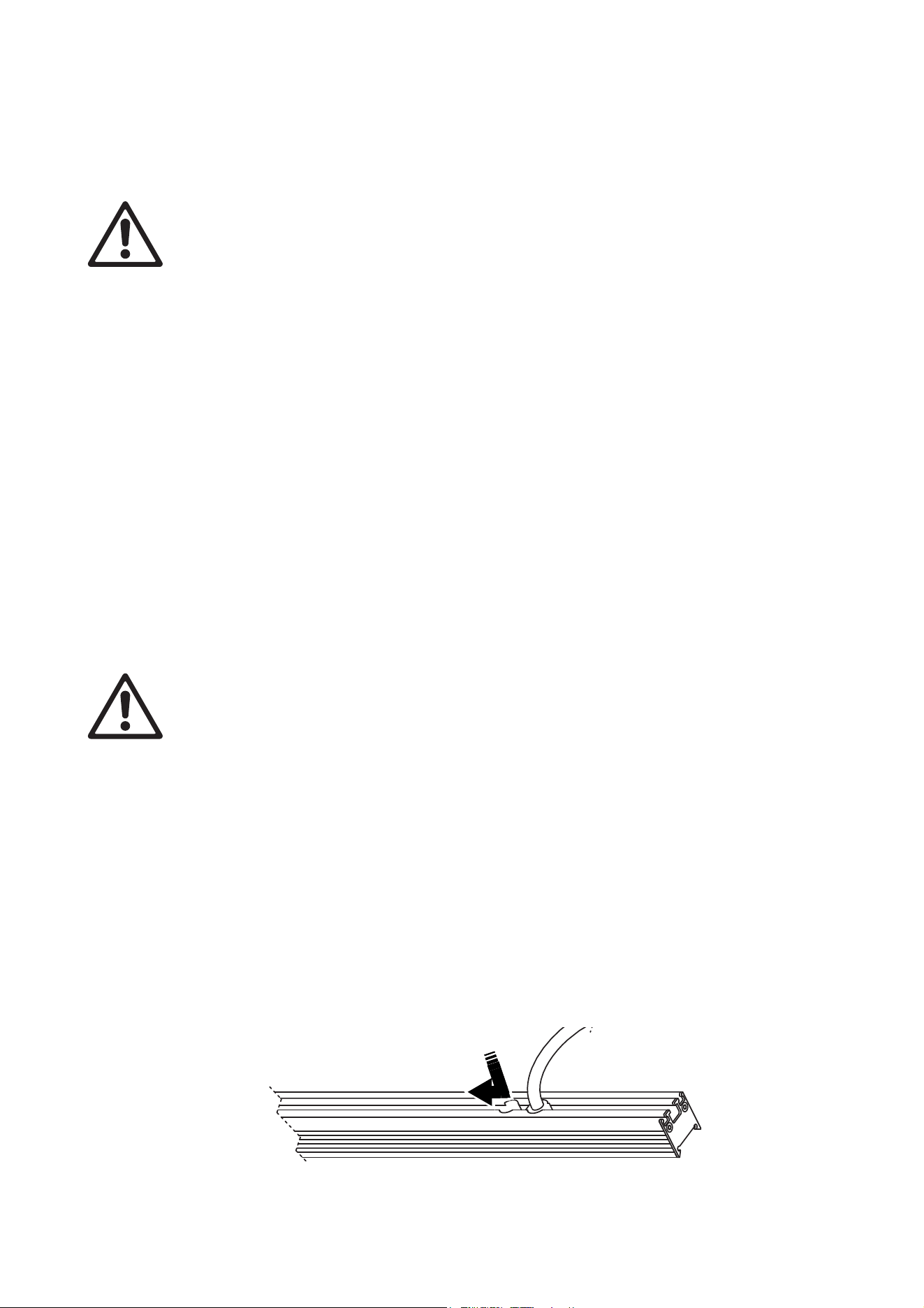
Figure 1: Overview
A - 48 VDC power + P3 video data BBD-type male input connector
B - 48 VDC power + P3 video data BBD-type female output (thru) connector
C - Magnetic control sensor (encased inside fixture) – can be activated using accessory tool
D - Safety cable attachment
320 mm fixture illustrated
A B
C
D
Physical installation
11
Physical installation
Warning! Read “Safety information” on page 4 and “Precautions to avoid damage” on page 9 on
before installing the VDO Sceptron. Read this chapter for important information about installation
safety.
Different installation methods and hardware are required depending on size of fixture, orientation,
number of fixtures fastened together and conditions in the installation location: (a) indoors on a
static structure or (b) in a location that is exposed to wind, vibration or other forces. Read this
chapter carefully before installing VDO Sceptron fixtures and use the method that is suitable for the
installation site.
The VDO Sceptron can be installed in any orientation. The most evenly matched optical characteristics
when viewing an installation from the side at an angle are obtained when all VDO Sceptron fixtures are
oriented vertically, but unevenness will hardly be noticeable in horizontal strips, and then only when viewed
from the side.
Allow free airflow and at least 10 mm (0.4 in.) of clearance around the product. Check that the product will
not be exposed to direct sunlight or heat from other lighting, for example.
The VDO Sceptron is designed to withstand low-pressure water projections but is not designed for
permanent installation in wet locations. Do not submerge it or expose it to high-pressure water jets. If you
need to create a permanent installation in a wet location, consider using the Exterior Pixline™ range of
products from Martin.
A small amount of water may enter and appear between the clip-on optical cover (diffuser) and the fixture –
this is normal and can be ignored, but remove the cover and wipe the fixture and cover dry before storage.
Wind precautions
Wind can create a risk of serious or lethal injury and damage due to falling fixtures. Follow the
instructions in this chapter carefully.
If fixtures are to be installed in a location where they can be exposed to wind force, take these precautions:
• Observe all locally applicable laws, regulations and codes regarding safety of structures and installations.
• Follow the instructions in this chapter for installing in locations that are exposed to wind. A location that is
exposed to wind is not a stable location as defined in this manual.
• Suspend fixtures from a structure that is capable of holding the fixtures securely without any safety risk
when fixtures are exposed to wind pressure.
• Ensure that weather forecasts and local wind speed are constantly monitored while the installation is in
place.
• Ensure that all fixtures are removed from the installation immediately if constant or gusting wind speed
exceeding Force 8 on the Beaufort scale (74 km/h, 46 mph or 20 meters/sec.) is forecast or present.
Captive fasteners
A channel for M6 fasteners (bolt heads and nuts) is provided in the profile on the back of VDO Sceptron
fixtures. See Figure 2. To fasten brackets etc. to a fixture, pass each fastener through the cutout next to the
cable tail and slide it into the channel. The channel holds the fastener captive so that you can tighten against
it.
Figure 2: Inserting a bolt head or nut into a channel in a fixture

12
VDO Sceptron™ Family Safety and Installation Guide
Installing a safety cable
Safety cable attachment brackets and fasteners are supplied with
fixtures. If you install a VDO Sceptron fixture in a location where it may
cause injury or damage if it falls, you must install a safety cable bracket
on the fixture and secure it with a secondary attachment (such as a
safety cable) that will prevent the fixture from falling if the primary
attachment fails.
To install a safety cable attachment bracket and safety cable:
1. Place the fixture with the LEDs facing downwards on a surface that
will not scratch or damage the fixture.
2. See Figure 2. Slide the bracket’s nut into the channel in the back of
the fixture. On 1000 mm fixtures, slide the nut until it is as close as
possible to the center of the fixture.
3. See Figure 3. Tighten the supplied Torx bolt into the nut to a torque of
8 Nm so that the safety cable attachment bracket is held securely.
4. Obtain a safety cable that is approved as a secondary attachment for
the weight it will secure. Pass the safety cable through the bracket on
the fixture.
5. As soon as you have fastened the fixture in the installation location, pass the safety cable through a
secure anchoring point and secure the cable so that it will catch the fixture and prevent any injury or
damage if the sliding brackets or other primary attachments fail.
When installing multiple fixtures, you can loop one safety cable through the attachment brackets of more
than one fixture and through the anchoring point, but only do this if:
• the safety cable is rated for the total weight it secures,
• the anchoring point can support at least ten times the weight it secures, and
• the arrangement will catch all the items supported and prevent injury or damage if the primary attachment
fails.
Installing a sliding bracket
Sliding brackets for the VDO Sceptron allow you to fasten fixtures to a truss using a rigging clamp or to a
surface or other structure using M12 bolts passed through the bracket.
In locations with stable conditions only (i.e. no wind, movement, vibration or other forces) you can
fasten the brackets to fixtures using the spring-loaded fasteners supplied with the brackets. In all other
situations you must remove the supplied spring-loaded fasteners and fasten the brackets to fixtures using
M6x16mm bolts and self-locking nuts. Read all of this chapter carefully for information about the
requirements of different situations.
Figure 3: Safety cable
bracket
Physical installation
13
Installing with spring-loaded fasteners
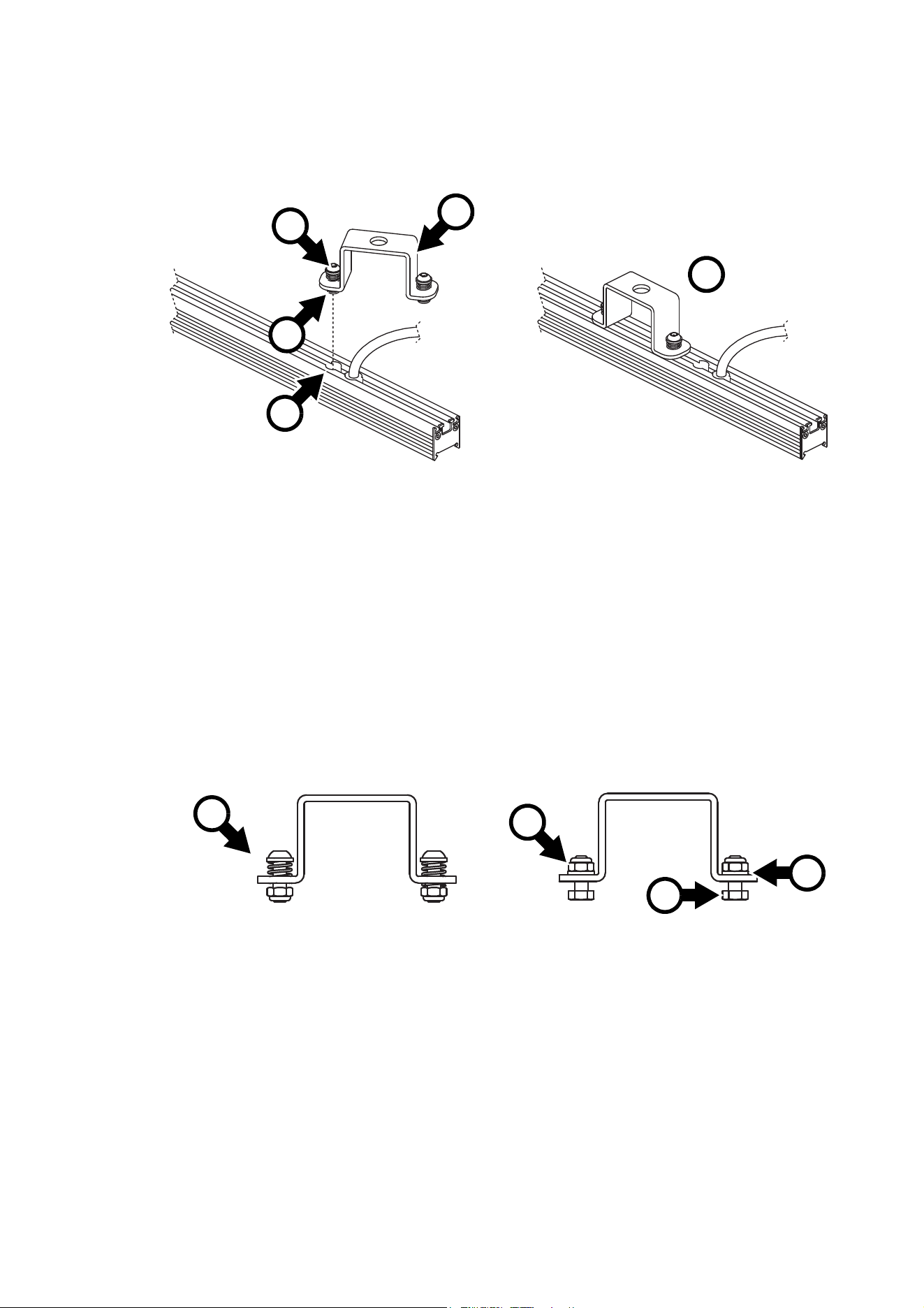
To install a sliding bracket on a VDO Sceptron fixture using the supplied spring-loaded fasteners:
1. See Figure 4. Place the fixture with the LEDs facing downwards on a surface that will not scratch or
damage the fixture. Push one of the spring-loaded mounting screws B on a bracket A down with your
thumb so that the nut C on the screw is pushed down and away from the bracket.
2. Pass the nut C through the cutout D in the rear of the fixture and into the channel in the rear of the
fixture. Slide the nut towards the center of the fixture until you can pass the second nut in the bracket
through cutout D while pressing down on the second spring-loaded screw.
3. Pressing down on both spring-loaded screws, slide the bracket a few centimeters towards the center of
the fixture and release the screws. When you have finished, the bracket should be as shown at E, with
both nuts securely held in the channel in the rear of the fixture.
Installing with M6 bolts
To install a sliding bracket on a VDO Sceptron fixture using M6 bolts:
1. See Figure 5. Remove the spring-loaded fasteners F from the sliding bracket, removing the two Torx
screws with their washers, springs and self-locking nuts. Keep all these items safe for possible future
use.
2. Install grade 8.8 strength M6x16mm bolts, washers and self-locking nuts G on the bracket. Put the
washer between the nut and the sliding bracket at H.
3. Pass the bolt heads I through the cutout and into the channel in the rear of the fixture (see Figure 2 on
page 11) and when the bracket is in position, tighten the nuts G to a torque of 8 Nm.
Figure 4: Installing a sliding bracket with spring-loaded fasteners
A
D
E
B
C
Figure 5: Sliding bracket fasteners
F
G
H
I
14
VDO Sceptron™ Family Safety and Installation Guide
Reinstalling spring-loaded fasteners
Warning! If you do not install the original washer between the head of each Torx screw and the
spring when reinstalling spring-loaded fasteners, there is a danger that the fastener may fail.
To re-install the original spring-loaded fasteners on a sliding bracket:
1. See Figure 5. Remove the M6 nuts G, washers H and bolts I from the bracket.
2. Reassemble the spring-loaded fasteners as shown at F. Install the original washer between the head of
the screw and the spring. If you do not install the washer, there is a danger that the fastener may fail!
Use a new grade 8.8 strength M6 self-locking nut. Hold the nut with a wrench/spanner while you tighten
the screw to 1 Nm against the pressure from the spring.
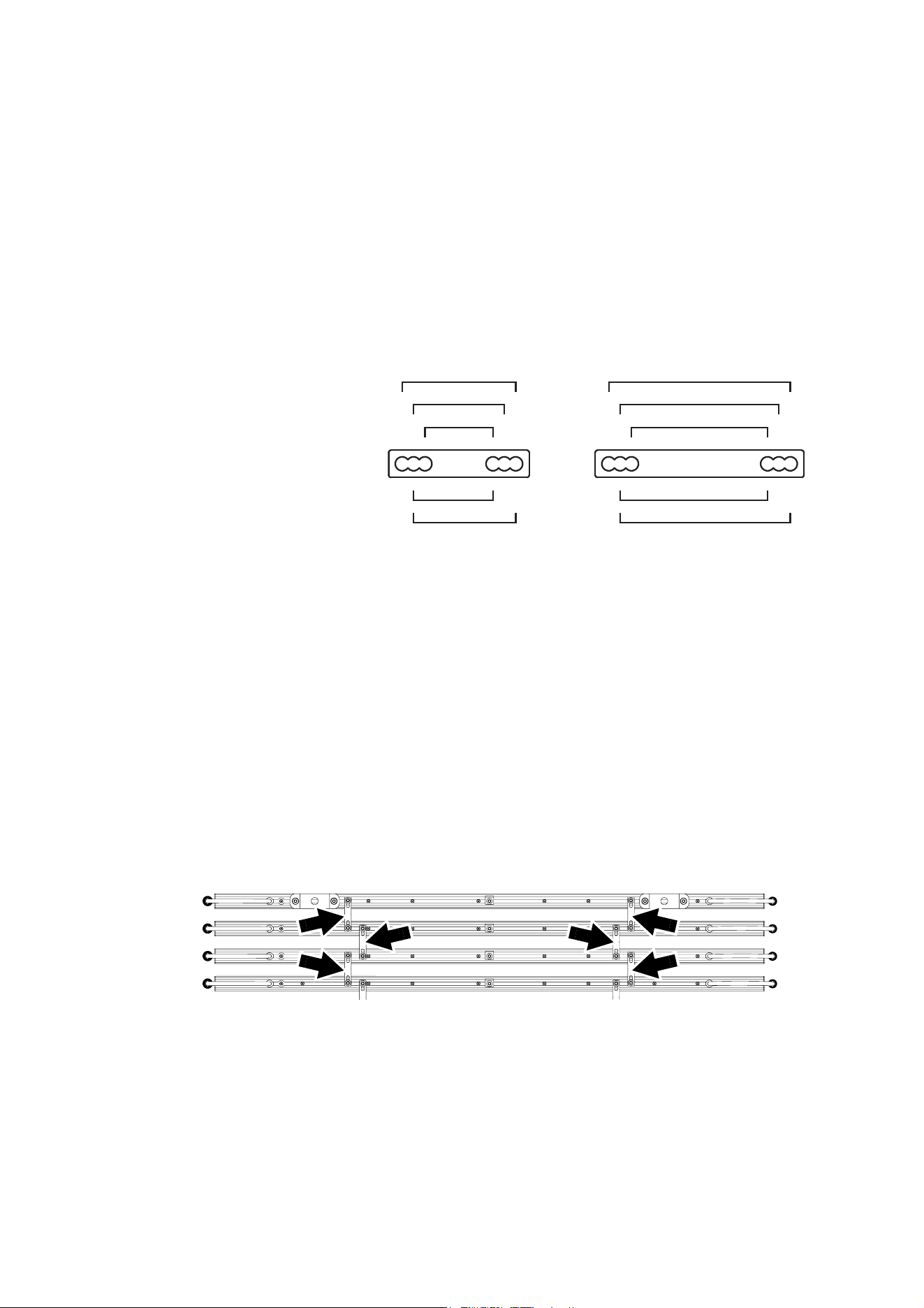
Installing parallel couplers
The parallel couplers
available from Martin (see
“Accessories” on page 51)
let you install fixtures
parallel to each other with
regular spacing between
fixtures. Figure 6 shows the
center-to-center spacings
between parallel fixtures
that you can obtain by
passing the coupler
mounting screws through
different combinations of
holes.
In locations with stable
conditions only (i.e. no
wind, movement,
vibration or other forces), you can use the thumbscrews that are supplied with parallel couplers to fasten
fixtures parallel to each other. In all other situations you must remove the thumbscrews and fasten the
couplers to fixtures using grade 8.8 strength M6x16mm bolts, washers and self-locking nuts. Read the
instructions for different types of installation and different conditions later in this chapter carefully.
To fasten a parallel coupler to a fixture:
1. Install a safety cable attachment bracket close to the center of the fixture (see “Installing a safety cable”
on page 12).
2. Pass the coupler bolt head through the cutouts and into the channels in the rear of the two fixtures to be
joined (see Figure 2 on page 11).
3. Depending on the instructions later in this chapter, fasten the coupler to the fixtures with either grade 8.8
strength M6x16mm bolts, washers and self-locking nuts or with the thumbscrews supplied with the
couplers. See Figure 7. Install parallel couplers (arrowed) as close as possible to the ends of fixtures but
allow space for sliding brackets.
Joining fixtures end-to-end
End-to-end coupler accessories available from Martin allow accurate end-to-end alignment of VDO
Sceptron fixtures.
End-to-end couplers and VDO Sceptron profiles are strongly constructed, but do not expose end-to-end
joins to bending, shear or torsion stress. A VDO Sceptron fixture can apply a very large leverage force if it is
allowed to hang horizontally when it is only supported at one end. You may only use an end-to-end coupler
Figure 6: Parallel couplers
40
30
50
35
45
80
70
60
65
75
Figure 7: Installing parallel couplers
Physical installation
15
to support weight if you are hanging fixtures vertically downwards in a chain in stable conditions (i.e. in a
location that is free of wind, vibration and movement). In all other situations, support the weight of each
fixture independently so that no end-to-end coupler is subjected to bending, shear or torsion stress. See
“Suspending a vertical chain of fixtures joined end-to-end” on page 19.
Where fixtures are mounted horizontally in locations with stable conditions only (i.e. no wind,
movement, vibration or other forces), you can use the thumbscrews that are supplied with end-to-end
couplers to join the ends of fixtures. In all other situations you must remove the thumbscrews and fasten
the couplers to fixtures using grade 8.8 strength M6x16mm bolts and washers. Read the instructions for
different types of installation and different conditions later in this chapter carefully.
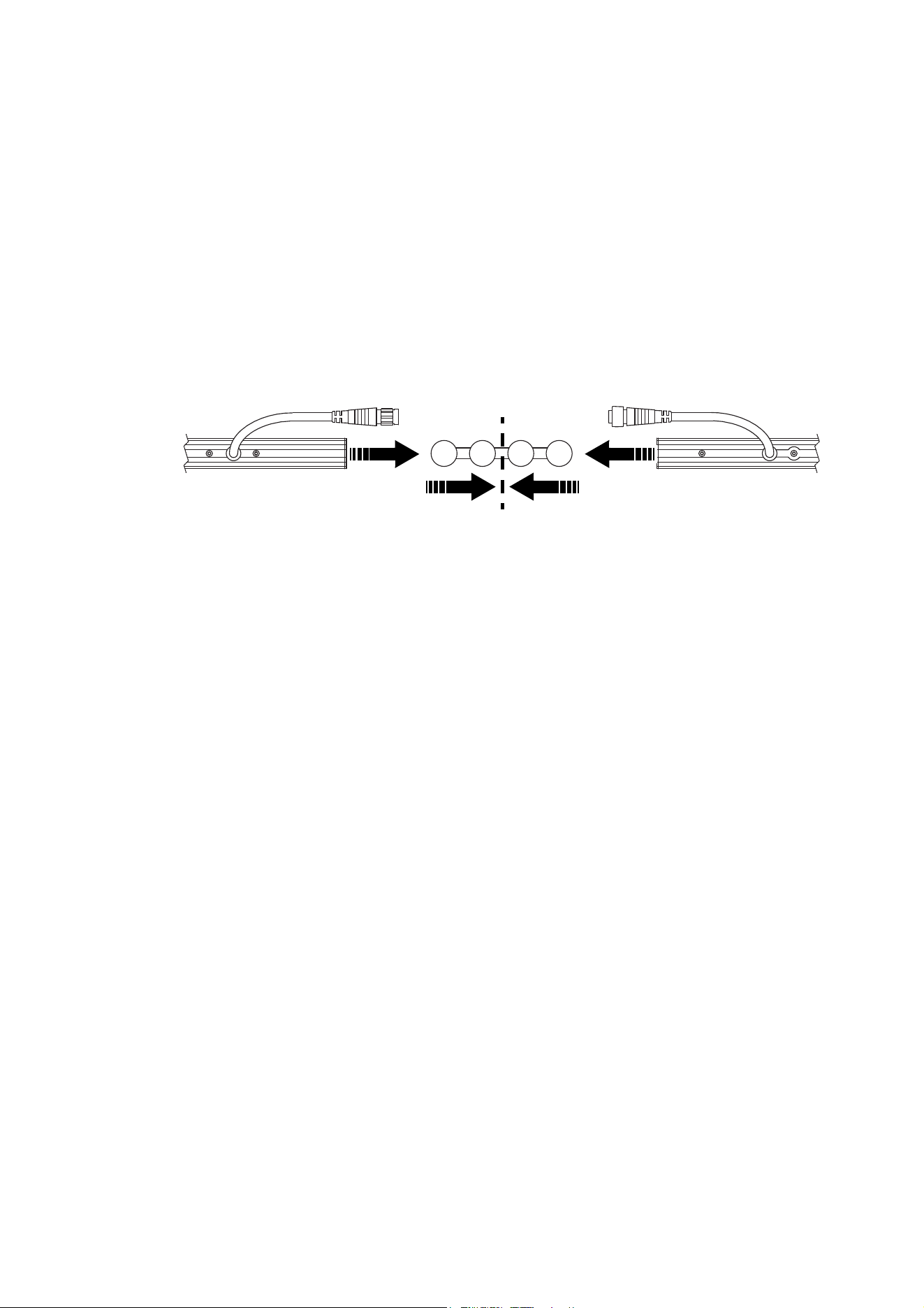
To join two fixtures using an end-to-end coupler:
1. See Figure 8. Slide the coupler into the channels in the rear of the fixtures until both fixtures meet in the
center of the coupler.
2. If using thumbscrews, tighten all four thumbscrews on the coupler. In all other situations, remove the
thumbscrews and tighten four M6x16mm bolts with washers into the couplers. Use a torque wrench to
tighten to a torque of 6 Nm.
Mounting a single fixture
All conditions
To mount a single 320 mm or 1000 mm fixture on a structure or surface in any orientation in a location that
may be exposed to wind, vibration or other forces:
1. Install a safety cable attachment bracket close to the center of the fixture (see “Installing a safety cable”
on page 12).
2. Install two sliding brackets on a 1000 mm fixture or one sliding bracket on a 320 mm fixture using grade
8.8 M6x16mm bolts (see “Installing with M6 bolts” on page 13).
3. Pass a grade 8.8 strength M12 bolt through the hole in the center of each sliding bracket to fasten the
fixture to a rigging clamp, surface or structure. Secure the bolt with a self-locking nut.
4. If installing the fixture in a location where it may cause injury or damage if it falls, secure the fixture with
a safety cable as described in “Installing a safety cable” on page 12.
Stable conditions only
To mount a single 320 mm or 1000 mm fixture on a structure or surface in any orientation in a location with
stable conditions (no wind or other forces, no vibration, fixed and rigid supporting structure):
1. Install a safety cable attachment bracket close to the center of the fixture (see “Installing a safety cable”
on page 12).
2. Install one sliding bracket in the center the fixture using spring-loaded fasteners (see “Installing with
spring-loaded fasteners” on page 13).
3. Pass a grade 8.8 strength M12 bolt through the hole in the sliding bracket to fasten the fixture to a
rigging clamp (such as the Superlight half-coupler rigging clamp, black, P/N 91602018 from Martin),
surface or structure. Secure the bolt with a self-locking nut.
4. If installing the fixture in a location where it may cause injury or damage if it falls, secure the fixture with
a safety cable as described in “Installing a safety cable” on page 12.
Figure 8: Installing an end-to-end coupler
Slide fixtures all the way to center of coupler
16
VDO Sceptron™ Family Safety and Installation Guide
Suspending a curtain of horizontally oriented fixtures
All conditions, 1000 mm fixtures
To suspend horizontally oriented 1000 mm VDO Sceptron fixtures in a curtain that is hanging vertically
downwards in a location that may be exposed to wind, vibration or other forces:
1. Install a safety cable attachment bracket close to the center of each fixture (see “Installing a safety
cable” on page 12).
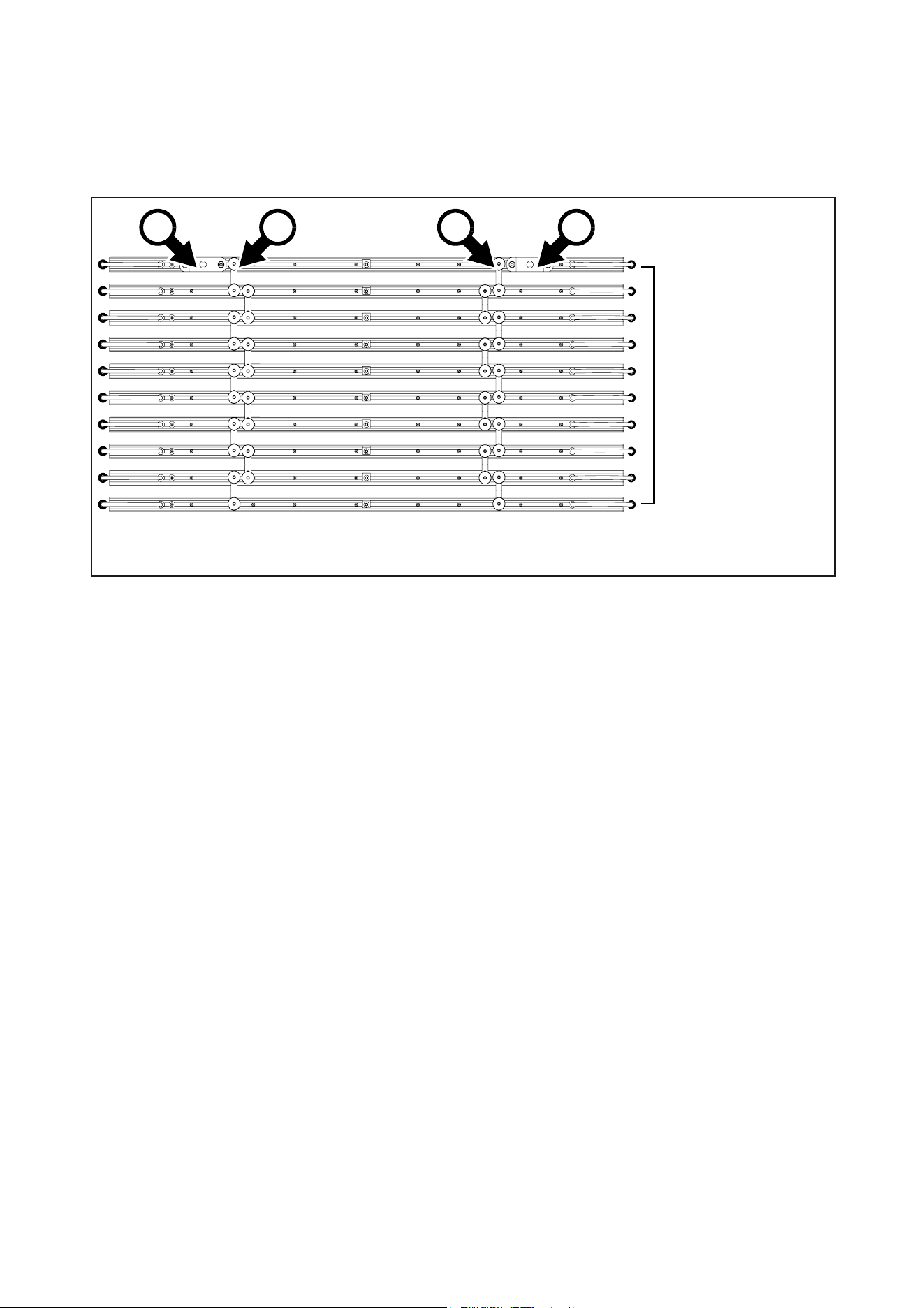
2. See Figure 9. Install two sliding brackets A on the top fixture and two on the bottom fixture using grade
8.8 M6x16mm bolts as described in “Installing with M6 bolts” on page 13. Use a torque wrench to tighten
the bolts to a torque of 8 Nm.
3. You will need two parallel couplers each time you join two fixtures together. Remove the thumbwheels
supplied with the parallel couplers and replace them with grade 8.8 strength M6 washers and
self-locking nuts.
4. Fasten a maximum of 10 fixtures to each other as shown in Figure 9 using two parallel couplers B each
time you join two fixtures together. Fasten the parallel couplers B to fixtures using grade 8.8 strength
M6x16mm bolts and self-locking nuts with washers (see “Installing parallel couplers” on page 14). Use a
torque wrench to tighten the bolts to a torque of 6 Nm. If you have joined ten fixtures as shown in Figure
9 and need to add more fixtures, you must start a new array.
5. Use grade 8.8 strength M12 bolts and self-locking nuts to fasten the brackets A to a stable structure that
can safely hold at least ten times the weight of all the items it must support.
6. If installing the fixtures in a location where they may cause injury or damage if they fall, secure each
fixture with a safety cable as described in “Installing a safety cable” on page 12.
Stable conditions only, 1000 mm fixtures
To suspend horizontally oriented 1000 mm VDO Sceptron fixtures in a curtain that is hanging vertically
downwards in a location with stable conditions (no wind or other forces, no vibration, fixed and rigid
supporting structure):
1. Install a safety cable attachment bracket close to the center of each fixture (see “Installing a safety
cable” on page 12).
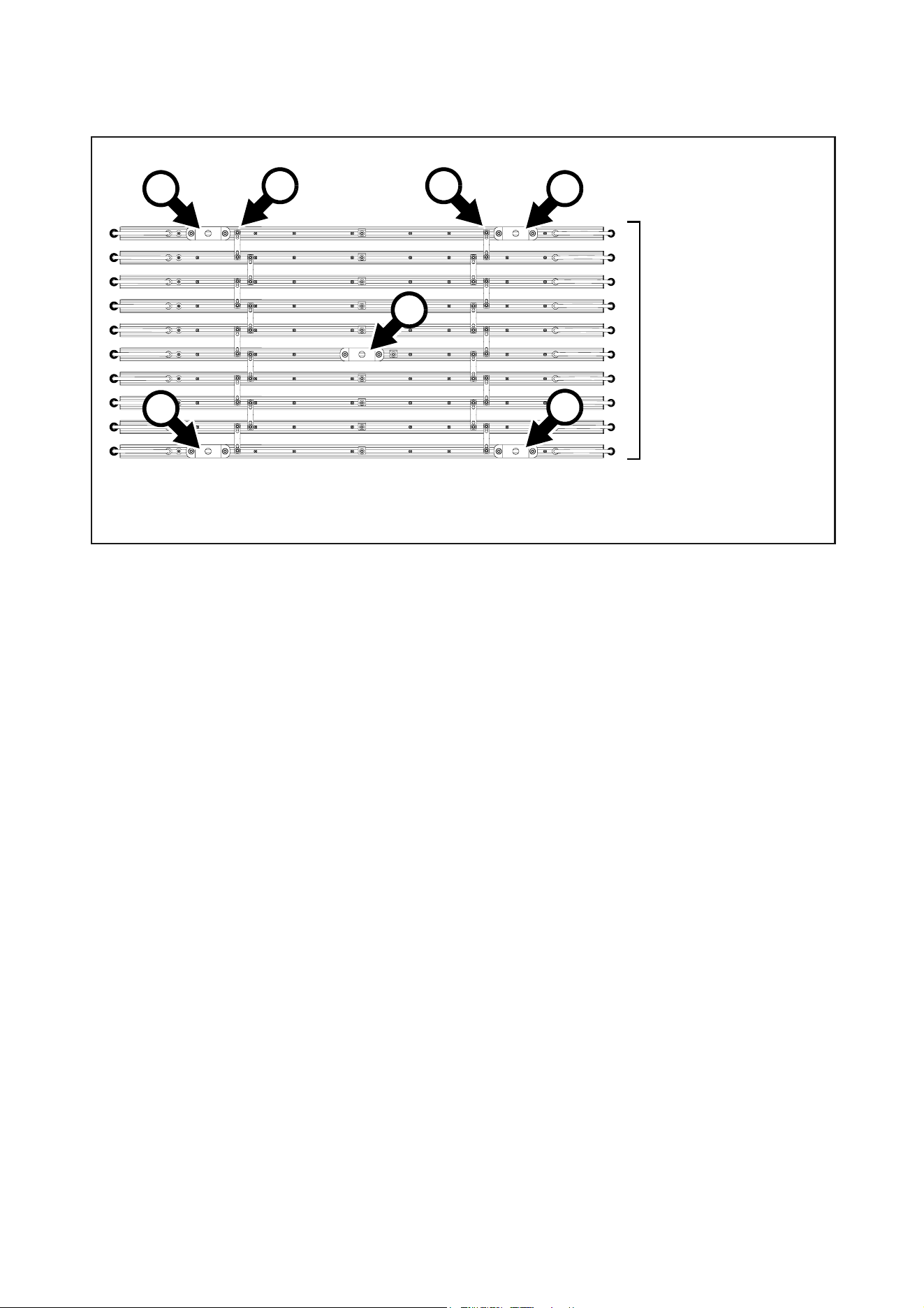
2. See Figure 10. Install two parallel couplers B on a fixture as shown (see “Installing parallel couplers” on
page 14).
3. Install two sliding brackets A on the fixture as shown, fastening the brackets to the fixture using grade
8.8 M6x16mm bolts (see “Installing with M6 bolts” on page 13). Use a torque wrench to tighten the bolts
to a torque of 8 Nm.
4. Fasten up to a maximum of 10 fixtures to each other. Use two parallel couplers B with thumbscrews or
grade 8.8 strength M6x16mm bolts with washers and self-locking nuts each time you join two fixtures
together.
Figure 9: Installation method B – hanging curtain, other conditions
A
B B
Maximum ten fixtures.
Four sliding brackets A
fastened to fixtures
with M6 bolts. Parallel
couplers fastened with
M6 bolts.
A
A
A
Physical installation
17
5. Use grade 8.8 strength M12 bolts with washers and locking nuts passed through the holes in the sliding
brackets to fasten the sliding brackets A to a stable structure that can safely hold at least ten times the
weight of all the items it must support.
6. If installing the fixtures in a location where they may cause injury or damage if they fall, secure each
fixture with a safety cable as described in “Installing a safety cable” on page 12.
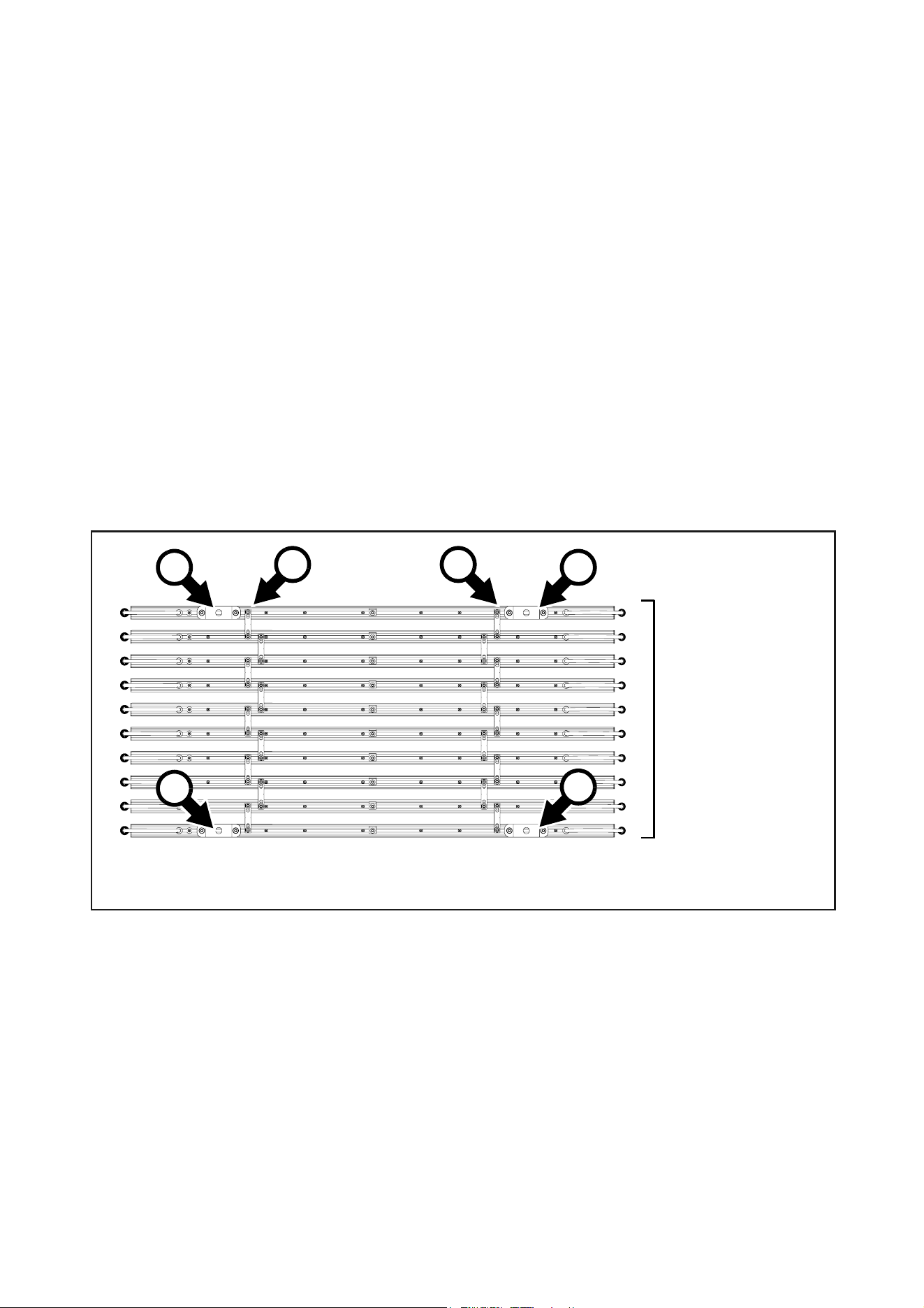
Mounting on a non-vertical structure or surface
1000 mm fixtures, all conditions
To mount or suspend 1000 mm VDO Sceptron fixtures on a structure or surface in any situation where
fixtures are not horizontally oriented and linked in a curtain that is hanging vertically downwards:
1. Install a safety cable attachment bracket close to the center of each fixture (see “Installing a safety
cable” on page 12).
2. See Figure 11. Each time you need to join two fixtures together, obtain two parallel couplers. Remove
the thumbwheels supplied with the parallel couplers and replace them with grade 8.8 strength M6
washers and self-locking nuts.
3. Fasten a maximum of 10 fixtures to each other as shown in Figure 11 using two parallel couplers B each
time you join two fixtures together (see “Installing parallel couplers” on page 14). Fasten the parallel
couplers B to fixtures using the M6 bolts and self-locking nuts. Use a torque wrench to tighten the nuts to
a torque of 6 Nm. If you have joined ten fixtures as shown in Figure 11 and need to add more fixtures,
you must start a new array of fixtures.
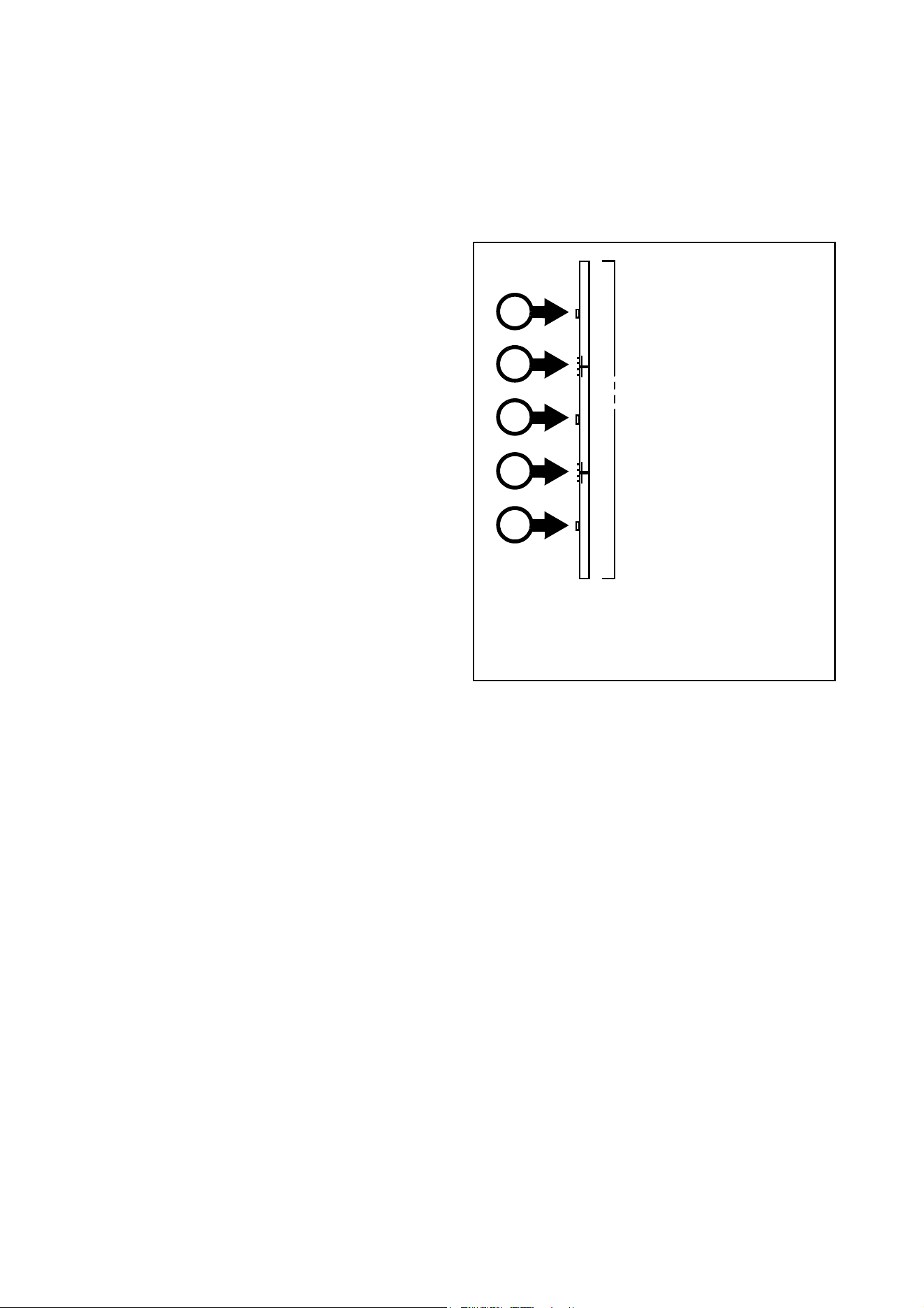
4. Install five sliding brackets A as shown in Figure 11 using grade 8.8 M6x16 bolts, washers and
self-locking nuts (see “Installing with M6 bolts” on page 13).
5. Use grade 8.8 strength M12 bolts and self-locking nuts to fasten the brackets A to a stable structure that
can safely hold at least ten times the weight of all the items it must support.
Figure 10: Installation method A – hanging curtain, stable conditions
A B B
Maximum ten fixtures
in horizontal
orientation. Suspended
vertically from two
sliding brackets A
fastened to fixtures
with M6 bolts.
A
18
VDO Sceptron™ Family Safety and Installation Guide
6. If installing the fixtures in a location where they may cause injury or damage if they fall, secure each
fixture with a safety cables as described in “Installing a safety cable” on page 12.
Warning! Each array of fixtures joined together with parallel couplers must be supported by two sliding
brackets installed on the first fixture and two sliding brackets installed on the last fixture. In groups
containing from 6 to the maximum limit of 10 fixtures, you must also support the array with a sliding
bracket installed at the center of the array as shown in Figure 11.
320 mm fixtures, all conditions
Mounting 320 fixtures is similar to the procedure for 1000 mm fixtures shown in Figure 11, but only one
sliding bracket A is required on each of the two outer fixtures, meaning that a total of three sliding brackets
are required for an array containing maximum ten 320 mm fixtures.
To mount 320 mm VDO Sceptron fixtures on a structure or surface in any situation where fixtures are not
horizontally oriented and linked in a curtain that is hanging vertically downwards:
1. Install a safety cable attachment bracket close to the center of each fixture (see “Installing a safety
cable” on page 12).
2. Each time you need to join two fixtures together, obtain two parallel couplers. Remove the thumbwheels
supplied with the parallel couplers and replace them with grade 8.8 strength M6 washers and
self-locking nuts.
3. Fasten a maximum of 10 fixtures to each other using two parallel couplers each time you join two
fixtures together (see “Installing parallel couplers” on page 14). Fasten the parallel couplers to fixtures
using the M6 bolts and self-locking nuts. Tighten to a torque of 6 Nm. If you have joined ten fixtures and
need to add more fixtures, you must start a new array of fixtures.
4. Install three sliding brackets using M6 bolts and self-locking nuts (see “Installing with M6 bolts” on
page 13), fastening one bracket to each of the two fixtures at the sides of the array and one bracket at
the center of the array.
5. Use grade 8.8 strength M12 bolts and self-locking nuts to fasten the three brackets to a stable structure
that can safely hold at least ten times the weight of all the items it must support.
6. If installing the fixtures in a location where they may cause injury or damage if they fall, secure all
fixtures with safety cables as described in “Installing a safety cable” on page 12.
Figure 11: Installation method C – mounting on a non-vertical structure or surface
Maximum ten fixtures.
Five sliding brackets A
fastened to fixtures with
M6 bolts. Parallel
couplers fastened with
M6 bolts.
A
B B
A
A
A
A
Physical installation
19
Suspending a vertical chain of fixtures joined end-to-end
You can install a vertical chain up to 6 meters in length containing VDO Sceptron fixtures oriented vertically.
The chain must be mounted on a vertical structure or surface using sliding brackets. Fixtures must be joined
using end-to-end couplers. You must remove thumbscrews from brackets and couplers and replace with
grade 8.8 strength M6x16mm bolts, washers and self-locking nuts.
1000 mm and 320 mm fixtures, all conditions
You can install a vertical chain up to 6 meters
in length containing VDO Sceptron fixtures
oriented vertically. The chain must be mounted
on a vertical structure or surface using sliding
brackets. Fixtures must be joined using
end-to-end couplers. You must remove
thumbscrews from brackets and couplers and
replace with grade 8.8 strength M6x16mm
bolts, washers and self-locking nuts.
To suspend a line of VDO Sceptron fixtures
hanging vertically:
1. Install a safety cable attachment bracket
close to the center of each fixture (see
“Installing a safety cable” on page 12).
2. See Figure 12. You will need one
end-to-end coupler each time you join two
fixtures together and a minimum of one
sliding bracket for each fixture. Remove the
thumbwheels supplied with the parallel
couplers and sliding brackets and replace
them with grade 8.8 strength M6 washers
and self-locking nuts (see “Installing with
M6 bolts” on page 13).
3. Install the sliding brackets on the fixtures
using M6 bolts, washers and nuts (see
“Installing a sliding bracket” on page 12).
Use a torque wrench to tighten nuts to a torque of 8 Nm.
4. Install the top fixture on the surface or structure, fastening it securely using an M12 fastener passed
through the sliding bracket. The surface or structure must be capable of holding at least ten times the
weight of all the items it will support.
5. If the fixture will cause injury or damage if it falls, secure it with a safety cable as described in “Installing
a safety cable” on page 12.
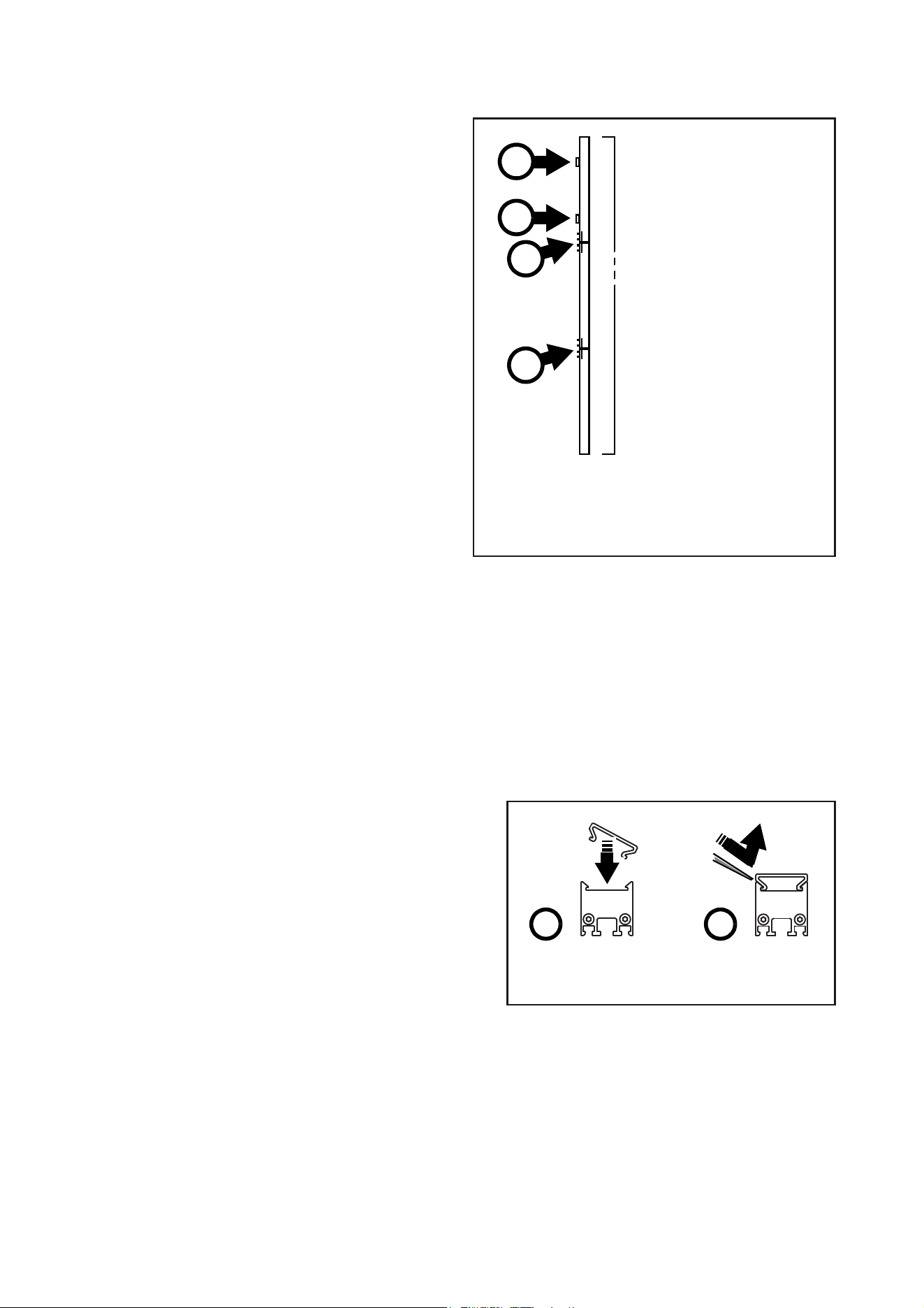
6. Continue installing up to a maximum of six fixtures as shown in Figure 13. Secure each fixture with a
safety cable. Use an end-to-end coupler C each time you join two fixtures together (see “Joining fixtures
end-to-end” on page 14). Fasten the end-to-end couplers C to fixtures using the M6 bolts and
self-locking nuts. Tighten all four nuts on each coupler to a torque of 6 Nm.
7. If you reach the limit of 6 fixtures and need to add more fixtures, start a new chain of fixtures.
Figure 12: Vertical chain of fixtures mounted on
vertical surface or structure
Vertical chain:
maximum 6 fixtures.
One sliding bracket A
fastened to each fixture
with M6 bolts.
End-to-end couplers C
fastened with M6 bolts.
A
A
A
C
C
20
VDO Sceptron™ Family Safety and Installation Guide
1000 mm and 320 mm fixtures, stable conditions only
To suspend a chain of VDO Sceptron fixtures
hanging vertically in a location with stable
conditions (no wind or other forces, no
vibration, fixed and rigid supporting structure):
1. Install a safety cable attachment bracket
close to the center of each fixture (see
“Installing a safety cable” on page 12).
2. See Figure 13. You will need one
end-to-end coupler each time you join two
fixtures together and a two sliding brackets
for the top fixture. Remove the
spring-loaded fasteners from the sliding
brackets and replace them with grade 8.8
strength M6 washers and self-locking nuts
(see “Installing with M6 bolts” on page 13).
Remove the thumbwheels supplied with
the parallel couplers and replace them with
grade 8.8 strength M6 washers and
self-locking nuts (see “Installing with M6
bolts” on page 13).
3. Install the sliding brackets on the fixtures
using M6 bolts, washers and nuts (see
“Installing a sliding bracket” on page 12).
Use a torque wrench to tighten nuts to a
torque of 8 Nm.
4. Install the top fixture on the surface or
structure, fastening it securely using an M12 fastener passed through the sliding brackets. The surface
or structure must be capable of holding at least ten times the weight of all the items it will support.
5. If the fixture will cause injury or damage if it falls, secure it with a safety cable as described in “Installing
a safety cable” on page 12.
6. Continue installing up to a maximum of six fixtures as shown in Figure 13. Secure each fixture with a
safety cable. Use an end-to-end coupler C each time you join two fixtures together (see “Joining fixtures
end-to-end” on page 14). Fasten the end-to-end couplers C to fixtures using the M6 bolts and
self-locking nuts. Use a torque wrench to tighten all four nuts on each coupler to a torque of 6 Nm.
7. If you reach the limit of 6 fixtures and need to add more fixtures, start a new chain of fixtures.
Installing and removing optical accessories
The VDO Sceptron must be used with an optical
accessory (clip-on diffuser or lens) installed on the
front of the fixture. A wide range of these
accessories is available from Martin (see
“Accessories” on page 51). They clip onto the front
of fixtures and can be installed and removed in
seconds.
To aid removal of optical accessories, we
recommend that you use one of the two solutions
available from Martin for the VDO Sceptron: either
the Magnetic Swiper Test Tool or the Lens Removal
Jaws that can be clipped onto pipe grips. See
“Accessories” on page 51.
To install an optical accessory:
1. Block access below the work area and work from a stable platform.
2. See Figure 14. Push one side of the diffuser / lens into the front of the fixture, then push the other side
down also (see A) so that both sides clip into place.
Figure 13: Vertical chain of fixtures mounted on
vertical surface or structure, stable conditions
only
Vertical chain, stable
conditions: maximum 6
fixtures. Two sliding
brackets A fastened to
top fixture with M6 bolts.
End-to-end couplers C
fastened with M6 bolts.
A
A
C
C
Figure 14: Installing and removing a diffuser
BA

Physical installation
21
To remove an optical accessory:
1. Block access below the work area and work from a stable platform.
2. Grasp the diffuser with pipe grips and the jaws available from Martin, or press the lever ends of two
Magnetic Swiper Test Tools (see B in Figure 14) between one side of the diffuser / lens and the fixture.
Lift the diffuser out of its clip and away from the fixture. If you use the Test Tool, you may need to use two
at the same time to lever a diffuser away from a fixture.
22
VDO Sceptron™ Family Safety and Installation Guide
System installation
Warning! Read “Safety information” on page 4 and “Precautions to avoid damage” on page 9
carefully before installing a VDO Sceptron system.
Warning! Connect the VDO Sceptron only to the devices and using only the Martin cables specified
in this manual.
Warning! Do not exceed the maximum numbers of devices that can be connected in chains and
maximum cable lengths specified in ”Protection from electric shock” starting on page 4 and in the
manuals of the other devices in the system.
The VDO Sceptron is designed to display either Martin P3 video or DMX-controlled lighting effects. It
automatically recognizes and responds to either a Martin P3 or a DMX data signal. The next sections
explain how to create a VDO Sceptron installation to display P3 video data or DMX-controlled lighting
effects.
Even when VDO Sceptrons are used in a P3-driven setup, you can still control them using DMX or Art-Net
fed into the P3 System Controller. See ”DMX via P3 System Controller” starting on page 45 for details.
Installing a P3 system
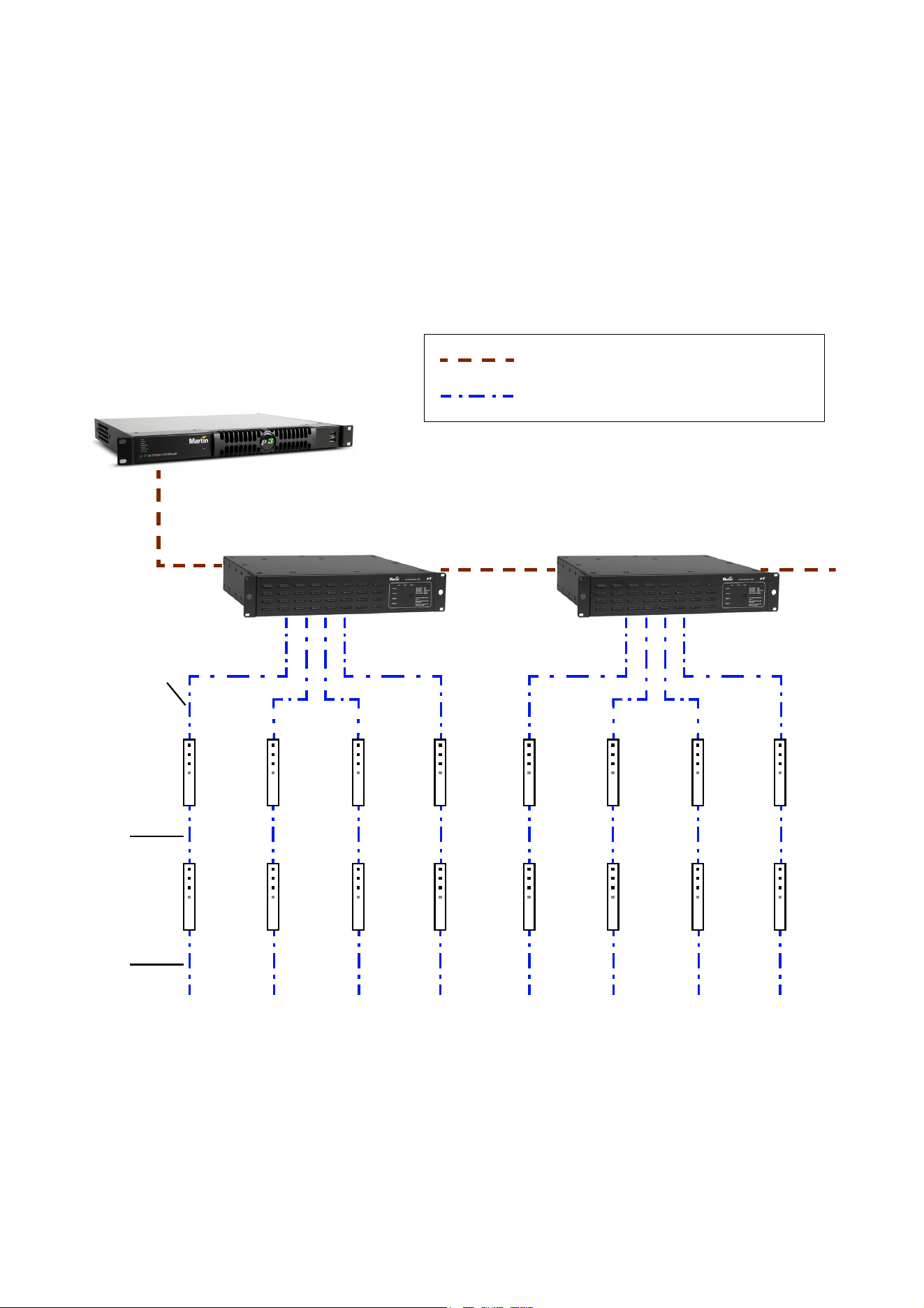
See Figure 16 for an overview of the elements and layout of a Martin P3 video display system.
To install a system that displays P3 video on VDO Sceptrons, see the overview in Figure 16 and follow these
directions:
1. Make sure that no devices in the installation can be connected to AC mains power until all installation
work is complete.
2. Read “Safety information” on page 4 and “Precautions to avoid damage” on page 9.
3. Connect VDO Sceptron fixtures together in chains either directly using the fixtures’ cable tails and BBD
connectors or by adding Martin hybrid cables with BBD connectors (see “BBD extension cables” on
page 52).
Warning! Do not exceed the maximum total length of fixtures and total cable length per chain given in
“Safety limits for connecting devices” on page 5.
4. If necessary to protect from water, dirt, etc., install blanking caps (see “Connectors” on page 52) on the
output connectors of the last fixtures on the chain.
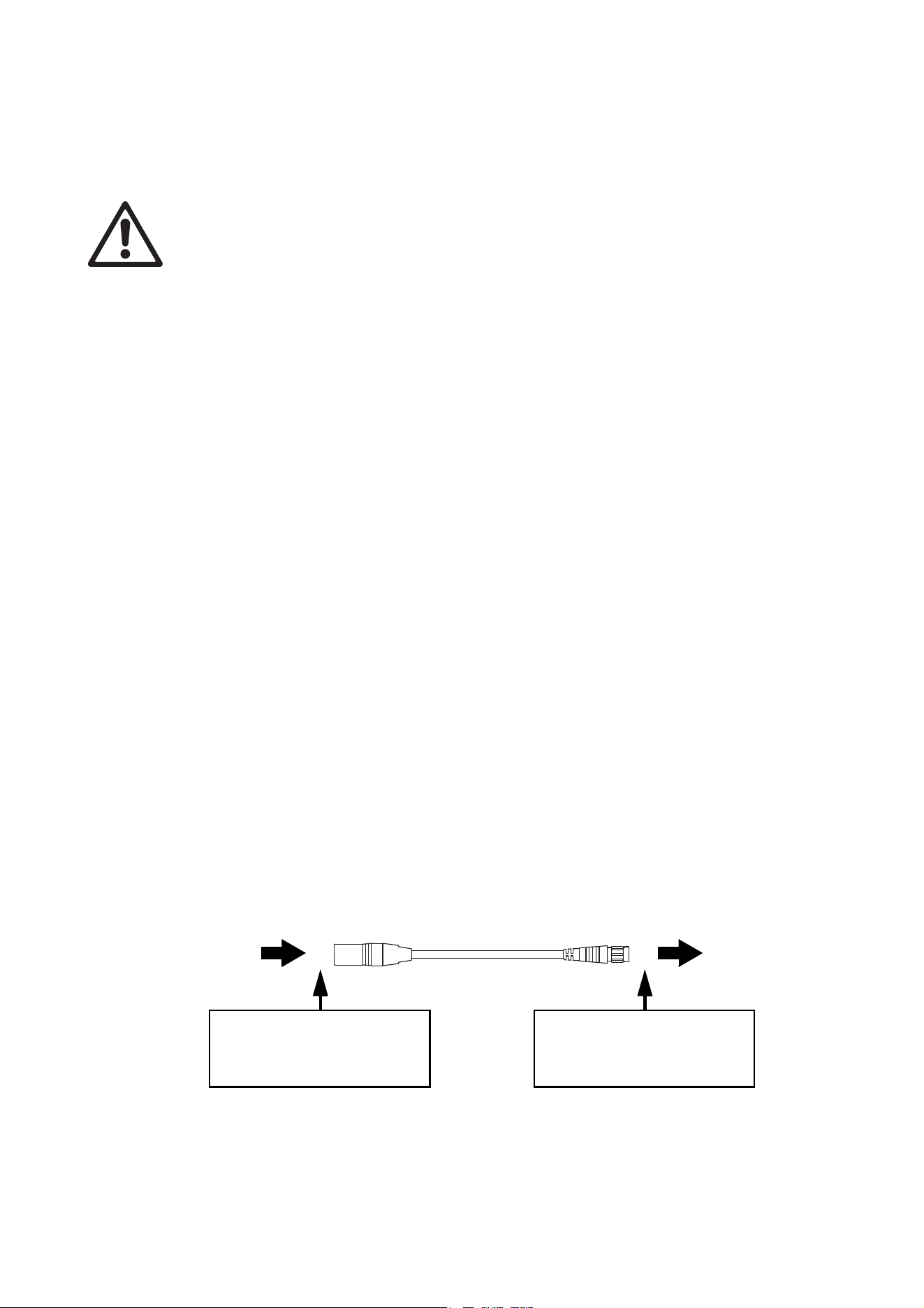
5. Connect each chain of VDO Sceptrons to one of the four 4-pin female XLR hybrid (48 VDC power + P3
data) outputs on a P3 PowerPort 1500 using a Martin hybrid 4-pin male XLR to BBD adapter cable, P/N
91616046 (see Figure 15). Alternatively, connect each chain of VDO Sceptrons to one of the 4 outputs
on a P3 PowerPort 1000 IP. This device has BBD connectors, so no adapter cable is needed.
6. If necessary, add a Martin 4-pin XLR hybrid extension cable to the 4-pin XLR-to-BBD adapter cable so
that you can extend the hybrid link to the P3 PowerPort 1500. Suitable extension cables are available
from Martin in various lengths. See “Accessories” on page 51.
Figure 15: Power and P3 video data input
4-pin male XLR Female BBD
4-pin XLR-to-BBD Input Cable, P/N 91616046
DC power and
data from P3
PowerPort 1500
DC power and
data to VDO
Sceptron chain
Insert 4-pin XLR hybrid
extension cable here if
required
Insert 4-pin XLR hybrid
extension cable here if
required
Insert BBD-to-BBD hybrid
extension cable here if
required
System installation
23
7. Create a P3 video data link from a Martin P3 system controller such as the P3-050, P3-150, P3-300 or
P3 PC to the P3 PowerPort 1500 or P3 PowerPort 1000 IP (see the products’ user manuals for details).
8. If required, continue the P3 video data link in a daisy-chain by connecting the P3 data throughput of one
P3 PowerPort 1500 to the P3 data input of the next, as described in the P3 PowerPort 1500 user
manual. You can connect up to fifty P3 PowerPort 1500s in a P3 data daisy-chain like this. If you need to
connect more than fifty P3 PowerPort 1500s, use an unmanaged Ethernet switch to split the P3 data link
into branches, each containing less than fifty P3 PowerPort 1500s.
9. Connect the P3 PowerPort 1500 to AC mains power at 100 - 240 V, 50/60 Hz as described in its user
manual.
10. connect the P3 system controller to AC mains power and power the controller on.
You can now configure the system at the P3 controller. See”System setup” on page 31.
Max. 4 chains per
P3 PowerPort 1500
P3 System Controller
P3 PowerPort
1500
P3 PowerPort
1500
P3 video data link (Ethernet cable)
Hybrid (DC power and data) link
Figure 16: P3 system layout
4-pin XLR-to-BBD
adapter c
ab
le
Hybrid BBD-
to-BBD cable
Hybrid BBD-
to-BBD cable
See “Safety limits for connecting devices” on page 5 before creating a chain

24
VDO Sceptron™ Family Safety and Installation Guide
Installing a DMX-controlled system
You can send DMX control data to VDO Sceptron fixtures in two ways:
• You can send a DMX or Art-Net signal to a P3 System Controller. The controller will then relay the DMX
data to the VDO Sceptron fixtures. If you intend to do this, see “Installing a P3 system” on page 22 for
cabling instructions and see ”DMX via P3 System Controller” starting on page 45 for the available DMX
modes.
• You can send a DMX control signal directly to VDO Sceptron fixtures. If you intend to do this, follow the
cabling instructions in the section below and see “Direct DMX control” on page 40 for the available DMX
modes.
In a DMX-controlled system, an RDM-compliant DMX lighting controller sends a DMX control data signal
over a DMX link to the installation, and then over the hybrid link to the VDO Sceptrons.
The DMX link requires DMX cable. It can be maximum 300 m (1000 ft.) in length and must run in one single
daisy-chain, but it can be extended or split into branches using an RDM-compliant amplifier/splitter such as
the Martin RDM 5.5 Splitter™ (P/N 90758150). Alternatively, you can run the DMX signal from the controller
over Ethernet cable using Art-Net protocol and convert it to a DMX-compliant signal with an Art-Net to DMX
converter.
If you would like assistance with creating a DMX link, your Martin supplier will be glad to advise.
The number of VDO Sceptron fixtures that you can control on one DMX link is limited by the number of DMX
channels the VDO Sceptrons will use and the 512 DMX channels available in one DMX universe at the DMX
controller. Each time you have used 512 channels, you must create a new DMX link that is connected to a
new DMX universe on the controller. Note that this limit applies to the DMX link. The maximum safety limits
that apply to the chain of fixtures and cable (see “Safety limits for connecting devices” on page 5) take
priority and must be respected in all cases.
If you need to take the DMX signal from the end of a chain of VDO Sceptron fixtures, connect a DMX
Lead-out Cable (see “Accessories” on page 51) to the output connector of the last fixture on the chain. The
Lead-Out Cable has a 5-pin female XLR connector with standard DMX pinout (pin 1 = shield, pin 2 = data
cold/negative, pin 3 = data hot/positive, pins 4 and 5 are not used) that lets you draw off the DMX signal.
DC Power options in DMX installations
You can use any of the following power supply units to provide DC power in a DMX-controlled VDO
Sceptron installation:
• Martin DMX PowerPort 375
• Martin P3 PowerPort 1500
• Martin IP66 PSU 240W external power supply unit
• generic external PSU (the Mean Well SP-480 48, for example).
The hardware and cables required are slightly different depending on which type of PSU you use to supply
the installation with DC power. The three different types of installation are covered in the next three sections:
• If you are using a Martin DMX PowerPort 375, see “Installing a DMX system using the Martin DMX
PowerPort 375” on page 25.
• If you are using a Martin IP66 PSU 240W, see “Installing a DMX system using the Martin IP66 PSU
240W” on page 27.
• If you are using a generic 48 VDC PSU, see “Installing a DMX system using a generic external 48 VDC
PSU” on page 29.
System installation
25
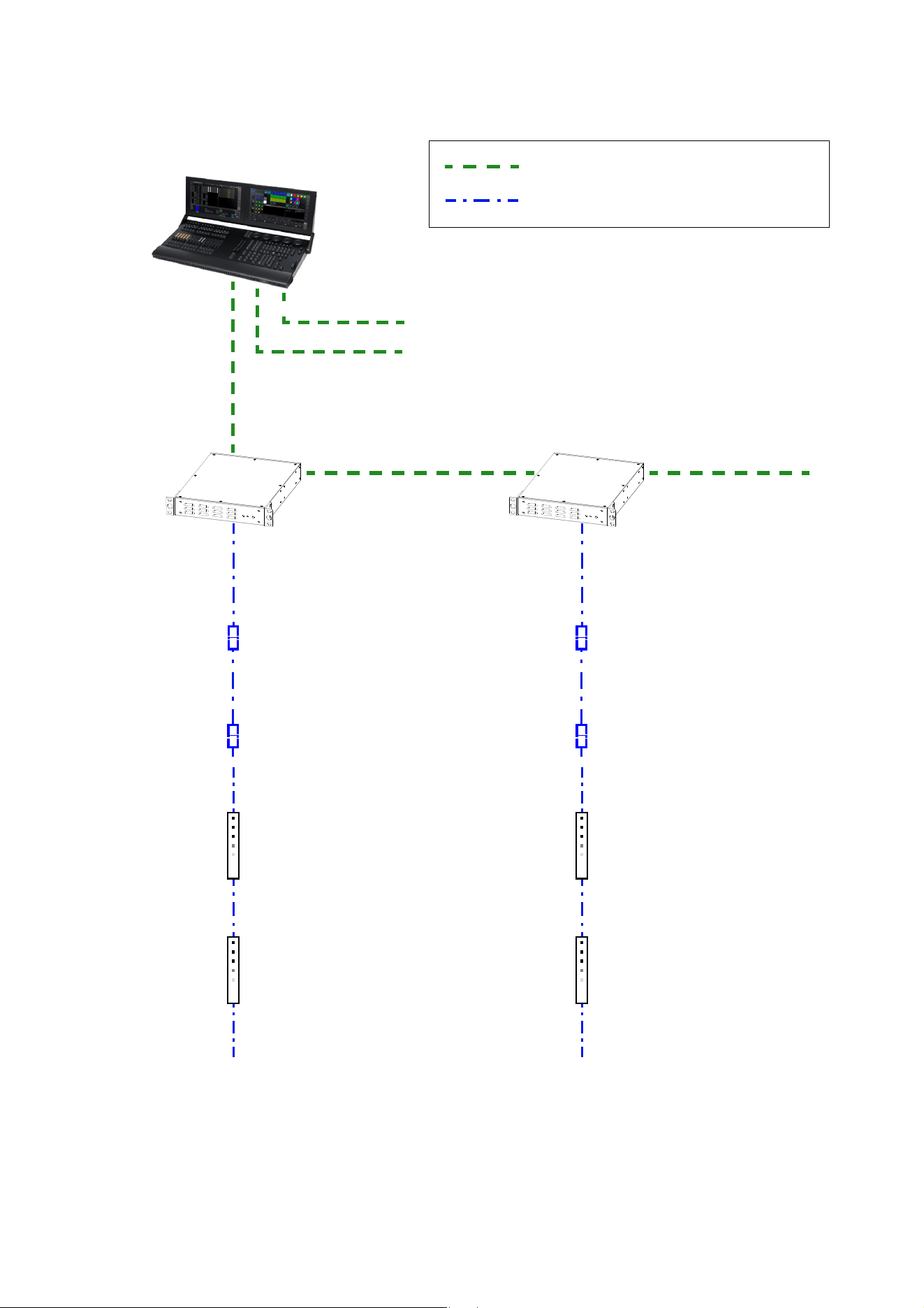
Installing a DMX system using the Martin DMX PowerPort 375
DMX/RDM Controller
Daisy-chained DMX link (DMX cable)
Hybrid (DC power and data) link
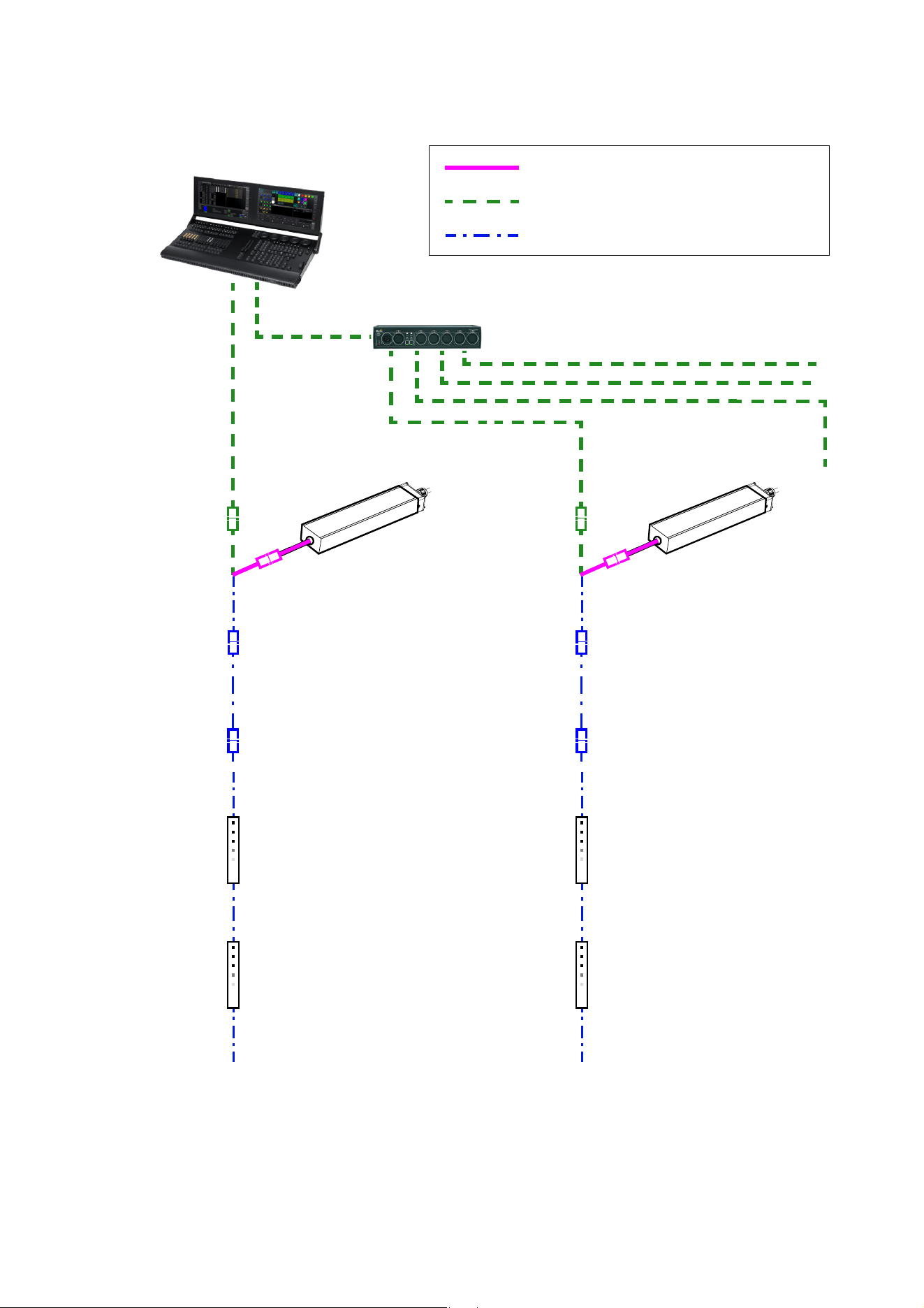
Figure 17: DMX-controlled system using the Martin DMX PowerPort 375
4-pin male XLR
to fem. BBD cable
See “Safety limits for connecting devices” on page 5 before creating a chain
BBD-to-BBD
extension cable
(if needed)
BBD-to-BBD
extension cable
(if needed)
4-pin male XLR
to fem. BBD cable
DMX PowerPort 375DMX PowerPort 375
→ to additional DMX universes, if present
26
VDO Sceptron™ Family Safety and Installation Guide
To create a DMX-controlled installation that draws DC power from the Martin DMX PowerPort 375 external
power supply unit:
1. See Figure 17 on page 25 for an overview of this type of installation
2. Make sure that no devices in the installation can be connected to AC mains power until all installation
work is complete.
3. Read “Safety information” on page 4 and “Precautions to avoid damage” on page 9.
4. Connect VDO Sceptron fixtures together in chains either directly using the fixtures’ cable tails and BBD
connectors or by adding Martin hybrid cables with BBD connectors (see “BBD extension cables” on
page 52).
Warning! Do not exceed the maximum total length of fixtures and total cable length per chain given in
“Safety limits for connecting devices” on page 5.
5. If necessary to protect from water, dirt, etc., install blanking caps (see “Connectors” on page 52) on the
output connectors of the last fixtures on the chain. There is no need to install DMX termination plugs, as
fixtures have integral DMX termination.
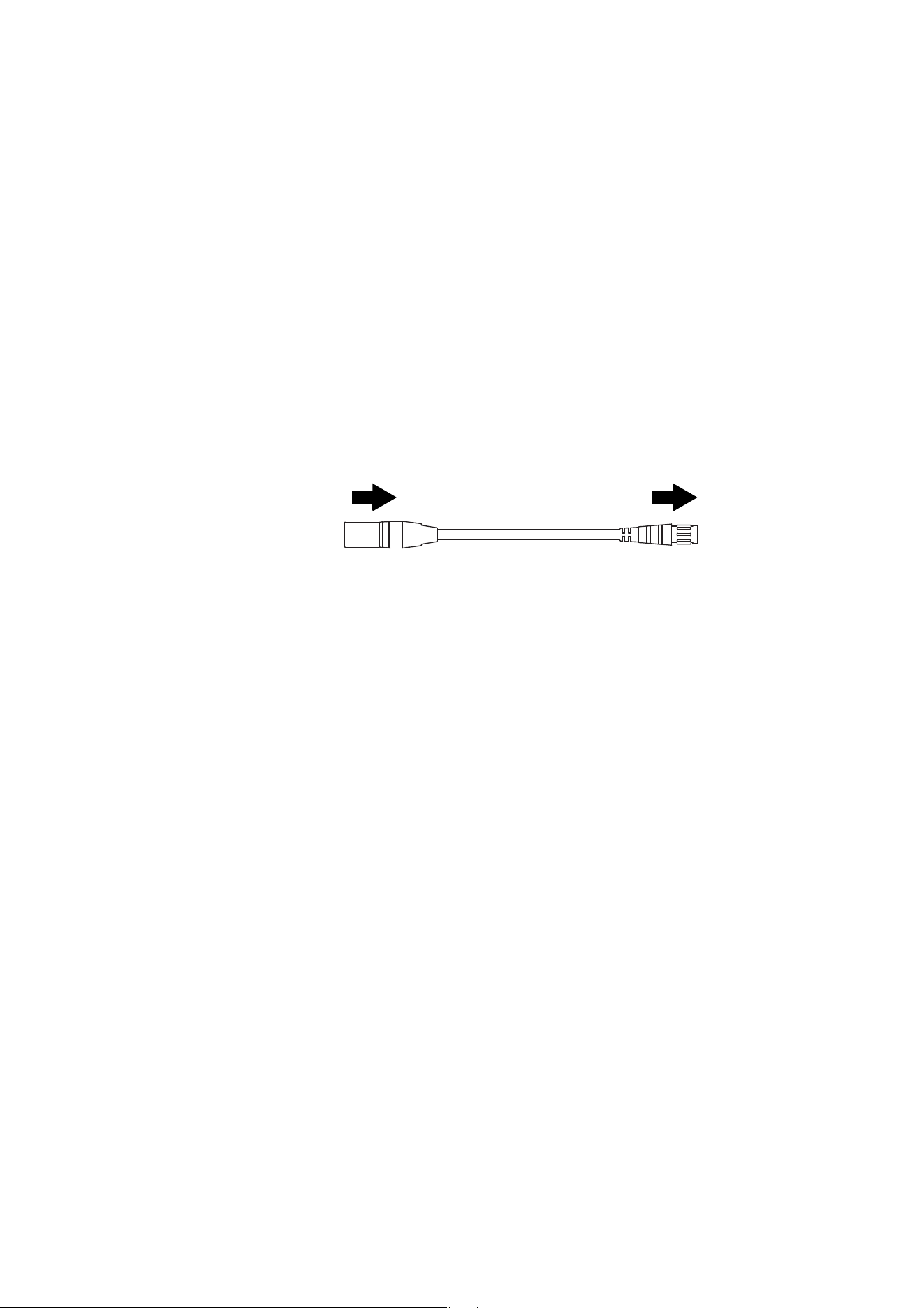
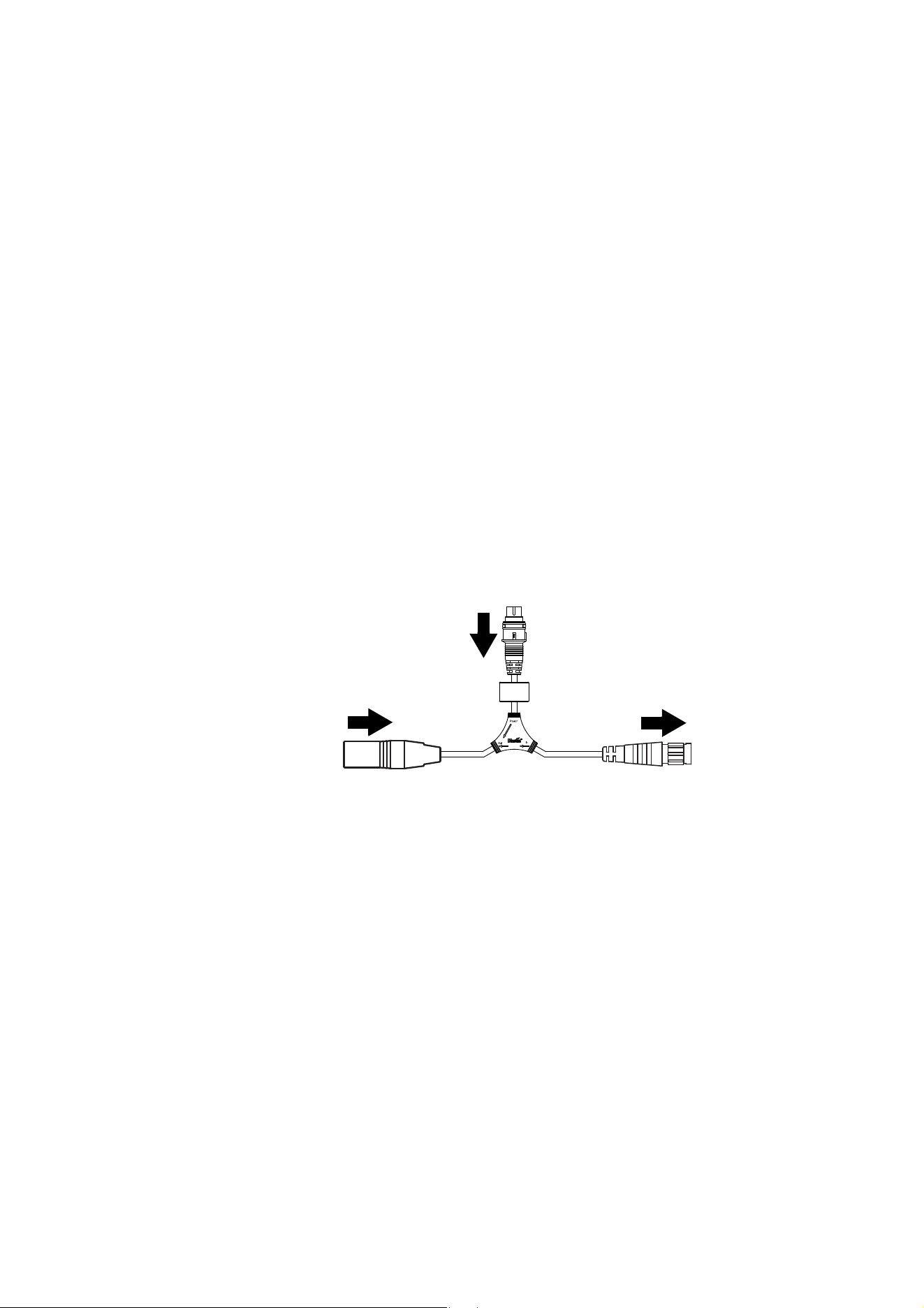
6. See Figure 18. Connect a Martin Power + Data Input Cable, 4-pin male XLR to female BBD (P/N
91616046) to the start of each chain.
7. Connect the 4-pin XLR connector on the cable to the hybrid (DC power and DMX data) output of a
Martin DMX PowerPort 375.
8. Connect the DMX controller to the DMX PowerPort 375 using standard DMX cable and a 5-pin male
XLR connector.
9. To extend the DMX link, connect the first DMX PowerPort 375 to the next DMX PowerPort 375 using
standard DMX cable with one male and one female 5-pin XLR connector. Continue adding DMX
PowerPort 375 devices to the link. You can connect up to a recommended maximum of 32 devices on
one DMX link, but if you want individual control of fixtures or segments on the link, bear in mind that 512
channels are available per DMX universe. To use more than 512 channels you will need to create a new
DMX universe on a new DMX link.
10. Apply AC mains power to the DMX PowerPort 375 devices on the link.
11. Apply AC mains power to the DMX controller.
You can now configure the system. See ”System setup”on page 31.
Figure 18: Martin PowerPort 375 connection to a VDO Sceptron chain
To VDO Sceptron
chain
4-pin male XLR Female BBD
4-pin XLR to BBD Input Cable, 0.25 m, P/N 91616046
Combined DMX and
DC power from DMX
PowerPort 375
System installation
27
Installing a DMX system using the Martin IP66 PSU 240W
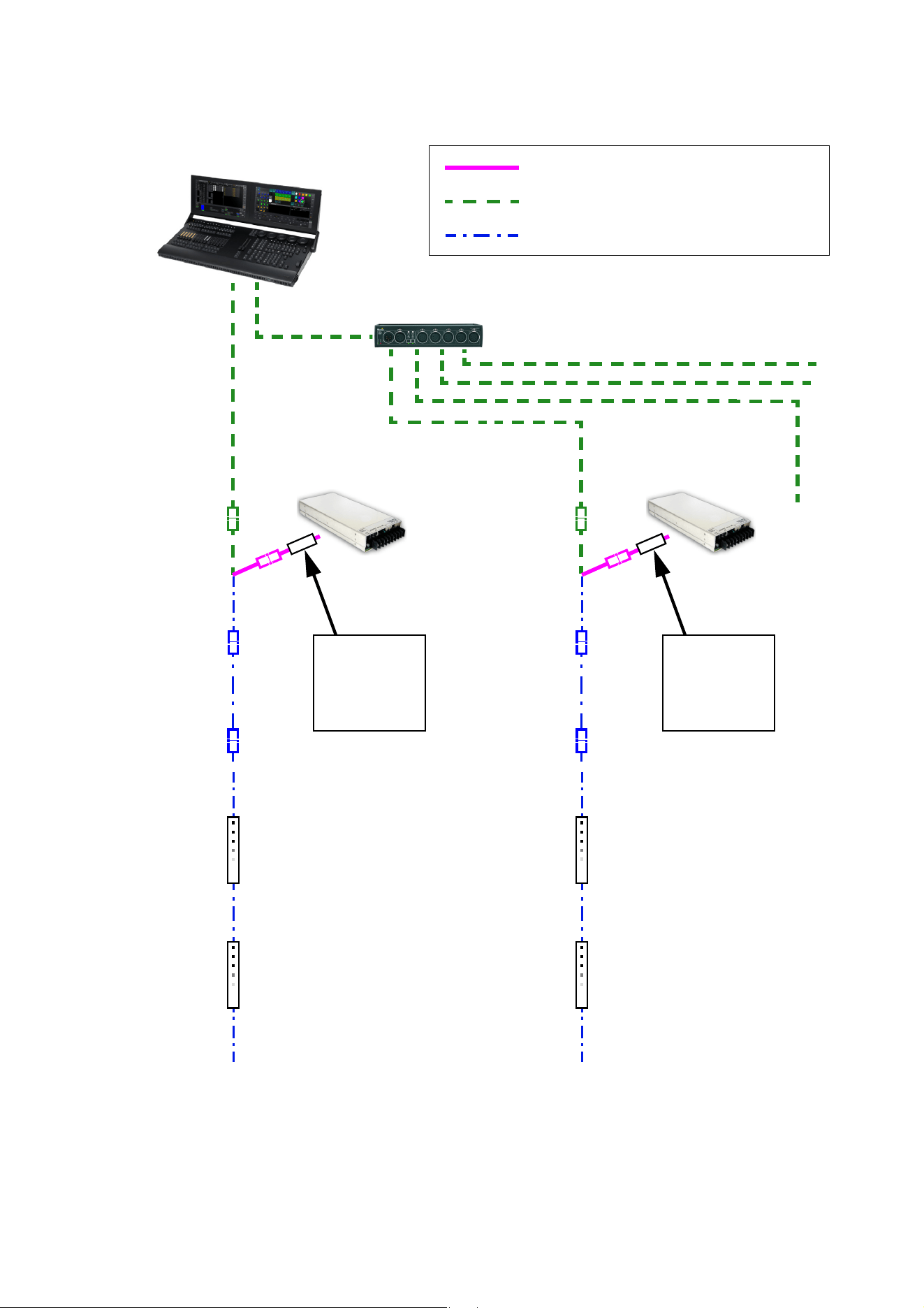
Hybrid
DMX/RDM Controller
48 VDC power
DMX link (DMX cable)
Hybrid (DC power and data) link
Figure 19: DMX-controlled system using the Martin IP66 PSU 240W
lead-in cable,
DMX/RDM Splitter (if used)
Martin IP66 PSU
Hybrid
lead-in cable,
Martin IP66 PSU
See “Safety limits for connecting devices” on page 5 before creating a chain
BBD-to-BBD
extension cable
(if needed)
BBD-to-BBD
extension cable
(if needed)
Martin IP66 PSU 240W Martin IP66 PSU 240W
28
VDO Sceptron™ Family Safety and Installation Guide
To create a DMX-controlled installation that draws DC power from the Martin IP66 PSU 240W external
power supply unit:
1. See Figure 19 on page 27 for an overview of this type of installation
2. Make sure that no devices in the installation can be connected to AC mains power until all installation
work is complete.
3. Read “Safety information” on page 4 and “Precautions to avoid damage” on page 9.
4. Connect VDO Sceptron fixtures together in chains either directly using the fixtures’ cable tails and BBD
connectors or by adding Martin hybrid cables with BBD connectors (see “BBD extension cables” on
page 52).
Warning! Do not exceed the maximum total length of fixtures and total cable length per chain given in
“Safety limits for connecting devices” on page 5.
5. If necessary to protect from water, dirt, etc., install blanking caps (see “Connectors” on page 52) on the
output connectors of the last fixtures on the chain. There is no need to install DMX termination plugs, as
fixtures have integral DMX termination.
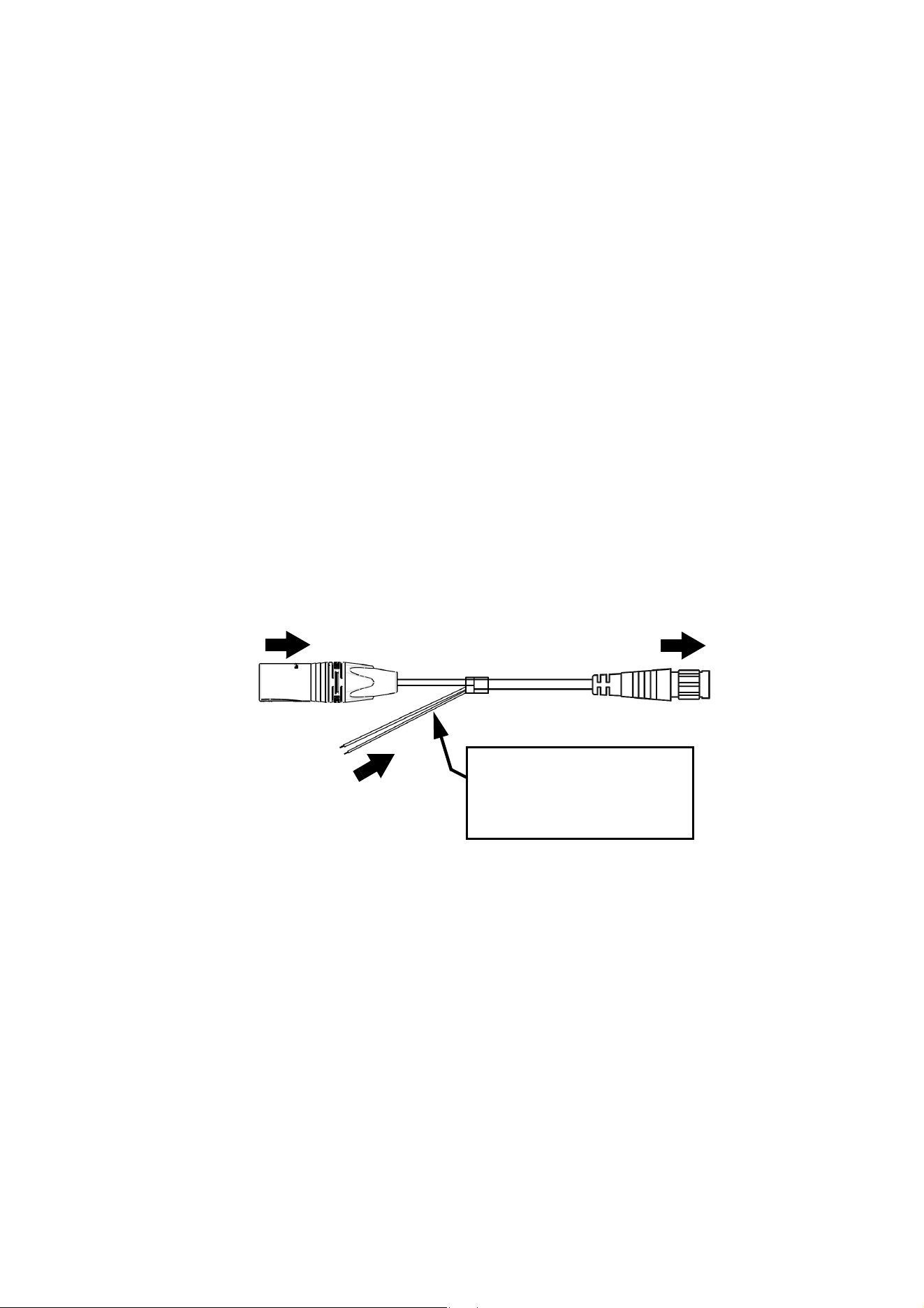
6. See Figure 20. Connect a Martin 5-pin male XLR female and male Martin IP66 PSU 240W to female
BBD adapter cable (P/N 91616050) to the start of each chain.
• Connect the 5-pin male XLR connector on the adapter cable to a DMX link that carries a DMX signal
from an RDM-compliant DMX controller.
• Connect the male Martin IP66 PSU 240W connector on the adapter cable to the DC output of a Martin
IP66 PSU 240W.
• Connect the female BBD connector on the adapter cable to the male BBD connector at the start of the
chain of VDO Sceptron fixtures.
7. Install a mains power cable on the Martin IP66 PSU 240W and connect it to AC mains power.
8. Apply AC mains power to the DMX controller.
You can now configure the system. See ”System setup”on page 31.
Figure 20: Martin IP66 PSU 240W and DMX connections to a VDO Sceptron chain
DC power input from
To VDO Sceptron
chain
5-pin male XLR
Female BBD
Martin IP66 PSU 240W
DMX from DMX/RDM
controller
Tripix system
connector
connector
XLR5+Martin IP66 PSU 240W to BBD Input Cable, 0.25 m, P/N 91616050
System installation
29
Installing a DMX system using a generic external 48 VDC PSU
Hybrid DC
DMX/RDM Controller
48 VDC power
DMX link (DMX cable)
Hybrid (DC power and data) link
Figure 21: DMX-controlled system using a generic PSU
lead-in cable
DMX/RDM Splitter (if used)
Hybrid DC
lead-in cable
External PSU
Inline fuse
required if PSU
does not have
8 A overcurrent
protection
External PSU
Inline fuse
required if PSU
does not have
8 A overcurrent
protection
See “Safety limits for connecting devices” on page 5 before creating a chain. Do not exceed
PSU output rating.
BBD-to-BBD
extension cable
(if needed)
BBD-to-BBD
extension cable
(if needed)
30
VDO Sceptron™ Family Safety and Installation Guide
To create a DMX-controlled installation that draws DC power from a generic PSU:
1. See Figure 21 on page 29 for an overview of this type of installation.
2. Make sure that no devices in the installation can be connected to AC mains power until all installation
work is complete.
3. Read ”Safety information” starting on page 4 and “Precautions to avoid damage” on page 9.
4. Connect VDO Sceptron fixtures together in chains either directly using the fixtures’ cable tails and BBD
connectors or by adding Martin hybrid cables with BBD connectors (see “Accessories” on page 51).
Warning! Do not exceed the maximum total length of fixtures and total length per chain given in “Safety
limits for connecting devices” on page 5.
Warning! Check the PSU’s DC output power rating in watts and the power consumption figures in watts
for VDO Sceptron fixtures given in Table 5 on page 7. Do not create a chain of VDO Sceptron fixtures
that will exceed the power rating of the DC output on the PSU. Even if the PSU’s DC output power rating
would be high enough, do not create a chain of VDO Sceptrons that contains more than the maximum
permitted number per chain given in Table 5 on page 7.
5. See Figure 22:
• If the PSU does not have constant overcurrent protection that will limit current to 8 A on the DC output
used, install an inline fuseholder with a 7.5 A or 8 A fuse on the white (+ve) power wire of a Martin
Power and data adapter cable, XLR5 + power - BBD, 0.25 m (P/N 91616048). You can use a 30 amp
automotive-type inline fuseholder with a 7.5 A blade fuse.
• Connect the 5-pin male XLR connector on the power and data adapter cable to a DMX link that carries
a DMX signal from an RDM-compliant DMX controller.
• Connect the power wires on the power and data adapter cable to a DC output on the PSU. Connect
the white wire to positive (+ve) and the black wire to negative (-ve).
• Connect the female BBD connector on the adapter cable to the male BBD connector at the start of the
chain of VDO Sceptron fixtures.
6. Apply AC mains power to the external PSU.
7. Apply AC mains power to the DMX controller.
You can now configure the system. See ”System setup”on page 31.
Figure 22: Generic PSU and DMX connections to a VDO Sceptron chain
DC power from
white to +ve, black to -ve
To VDO Sceptron
Power + Data Input Cable, XLR5 + Power to BBD, 0.25 m, P/N 91616048
chain
5-pin male XLR
Female BBD
generic 48 VDC PSU
Insert 7.5 A or 8 A inline fuse
here if PSU does not have 8 A
overcurrent protection
DMX from DMX/RDM
controller

System setup
31
System setup
Warning! Read “Safety information” on page 4 and “Precautions to avoid damage” on page 9 before
applying power to a VDO Sceptron installation.
Pixels and segments
A pixel is the smallest RGB-controllable unit in a fixture’s light output. A segment is a group of neighboring
pixels that can be controlled as a unit.
Pixels and segments are numbered starting from the female connector end of fixtures: Pixel 1 and Segment
1 are closest to the female connector end.
Setting up for P3 display
A Martin P3™ system allows video to be displayed on an installation that consists of or includes VDO
Sceptron devices. When a P3 controller is connected to the data link and the installation is powered on, you
can set up all the devices on the link from the P3 controller. See the P3 controller user manual for details.
When you are controlling VDO Sceptrons from a P3 System Controller, you can still also control them (and
even pixelmap them) using DMX or Art-Net by sending the DMX signal to the P3 System Controller. See
”DMX via P3 System Controller” starting on page 45 for details.
Setting up for DMX control
The section below explains DMX control and the DMX modes available when connecting the VDO
Sceptrons directly to a DMX controller (i.e. without routing the DMX signal via a P3 System Controller).
More DMX modes are available if you use a P3 System Controller and send DMX or Art-Net input to the P3
System Controller. See ”DMX via P3 System Controller” starting on page 45 for details.
A DMX system gives 0 - 100% variable intensity control. Varying the intensity of red, blue and green LEDs in
RGB products gives RGB color mixing.
You can set up and control a VDO Sceptron installation over the data link using an RDM-compatible DMX
controller.
DMX control channels
DMX controllers send control data to devices over DMX control channels in DMX universes. One DMX
universe has 512 channels available. Multiple fixtures can share the same DMX channels if you want
grouped control and identical fixture behavior.
A VDO Sceptron fixture can be controlled using four DMX modes (see under “DMX protocols” on page 40):
•In RGB Mode, each fixture uses three DMX channels.
•In Basic Mode, each fixture uses ten DMX channels.
•In Segment Mode, each fixture uses seven DMX channels plus three DMX channels per segment (there
are two segments on 320 mm fixtures and five segments on 1000 mm fixtures)
•In Pixel Mode, each fixture uses seven DMX channels plus three DMX channels per pixel.

32
VDO Sceptron™ Family Safety and Installation Guide
Different modes can be mixed freely in an installation. For example, some VDO Sceptron fixtures can be set
to RGB Mode, some set to Basic Mode and others to Pixel Mode. All you need to do is set up fixtures, DMX
addresses and DMX channel allocation correctly.
DMX addresses
To prepare an installation for DMX control, you set it up using an RDM-compliant DMX controller so that
fixtures or pixels receive instructions from the controller on their own DMX channels. The DMX address
(also known as the control address or start channel) is the first of these channels. A VDO Sceptron fixture or
pixel uses more than one channel, so it uses the DMX address channel and the channels immediately
above it. For example, one VDO Sceptron fixture set to RGB Mode and set to DMX address 1 will use DMX
channels 1 - 3. Channel 4 will be available for use as a DMX address for the next device.
Setting up via RDM
Using an RDM-compliant DMX controller lets you communicate with the VDO Sceptron fixtures on the DMX
data link via RDM. You can:
• Retrieve data
• Set the DMX addresses of the fixtures and set their DMX mode
• Apply various setup options.
Note that if you use a P3 System Controller there is no need to use RDM to configure VDO Sceptrons,
because you can carry out all setup, patching and addressing using the P3 System Controller's DMX &
Motion view.
Type of VDO Sceptron fixture
DMX channels
per fixture, RGB
Mode
DMX channels
per fixture,
Basic Mode
DMX channels
per fixture,
Segment Mode
DMX channels
per fixture,
Pixel Mode
VDO Sceptron 10, 320 mm 3 10 13 103
VDO Sceptron 10, 1000 mm 3 10 22 307
VDO Sceptron 20, 320 mm 3 10 13 55
VDO Sceptron 20, 1000 mm 3 10 22 157
VDO Sceptron 40, 320 mm 3 10 13 31
VDO Sceptron 40, 1000 mm 3 10 22 82
Table 6: Number of DMX channels required per VDO Sceptron fixture

Using the VDO Sceptron
33
Using the VDO Sceptron
Warning! Read “Safety information” on page 4 and “Precautions to avoid damage” on page 9 on
before applying power to the VDO Sceptron.
Do not use the VDO Sceptron if the ambient temperature exceeds 55° C (131° F) or falls below -30° C
(-22° F).
Do not use the VDO Sceptron without an optical accessory installed on the front of the fixture (see
“Installing and removing optical accessories” on page 20).
P3 display
The VDO Sceptron can display video from all common video sources. The video signal must be sent to a
Martin P3™ controller and then distributed to fixtures. The P3 controller lets you map, configure and control
an installation containing VDO Sceptron fixtures (and other Martin P3 video display products if you have
them). See the P3 controller documentation for details.
DMX control
The VDO Sceptron features two DMX control options, each with its own DMX modes.
DMX sent directly to fixtures
A DMX signal can be sent directly to VDO Sceptron fixtures with no P3 System Controller used. In this case
an RDM-compatible controller is required so that you can address and configure the fixtures. See the
DMX/RDM controller documentation for details.
When sending DMX directly to fixtures, four DMX modes are available:
• RGB Mode uses three DMX channels and gives RGB color mixing of all the pixels on a fixture.
• Basic Mode uses ten DMX channels and gives RGB color mixing, strobe effects and pre-programmed FX
(dynamic effects).
• Segment Mode uses the first seven DMX channels of Basic Mode plus three channels per segment for
segment-level RGB color mixing, strobe effects and pre-programmed FX. 320 mm fixtures are divided into
two segments, 1000 mm fixtures are divided into five segments.
• Pixel Mode uses the first seven DMX channels of Basic Mode plus three channels per pixel for pixel-level
RGB color mixing, strobe effects and pre-programmed FX.
See “Direct DMX control” on page 40 for full details of DMX control in this type of installation.
DMX/Art-Net/sACN sent to P3 System Controller and then relayed to fixtures
A DMX, Art-Net or sACN signal can be sent to a P3 System Controller or the P3-PC application and then
sent to VDO Sceptron fixtures. In this case the P3 System Controller takes care of all configuration and
addressing of the fixtures. RDM is not required.
When sending DMX to fixtures via a P3 controller, five DMX modes are available:
•In P3 Intensity Mode the fixture displays video and DMX only controls the intensity of the video shown on
the fixture
•In P3 RGB Mode the fixture displays video and DMX only controls the color of the video shown on the
fixture.
•In P3 Basic Mode the fixture shows video and DMX only controls the intensity and the color of the video
shown on the fixture.
•In P3 Hybrid Mode when the P3 Switch channel is set to above 50% the fixture shows video and
channels 4-6 control the color of the video shown on the fixture. When the P3 Switch channel is set to
below 50% the fixture is purely DMX-controlled, and channels 4 and above control the color of the
segments of the fixture. The number of RGB segments per fixture can be set on the P3 System Controller,
where the fixture can be divided into 1, 2, 4, 5, 8, 10, 16, 20, 25, 32, 50 or 100 segments.
•In P3 PixelMap Mode the fixture is always purely DMX-controlled (it never shows video). Channels 1 and
above control the color of the segments of the fixture. The number of RGB segments per fixture can be

34
VDO Sceptron™ Family Safety and Installation Guide
set on the P3 System Controller, where the fixture can be divided into 1, 2, 4, 5, 8, 10, 16, 20, 25, 32, 50
or 100 segments.
See ”DMX via P3 System Controller” starting on page 45 for full details of DMX control in this type of
installation.
Magnetic ‘control button’
A magnetic sensor is embedded inside the VDO Sceptron
behind the label on the back of the fixture (see C in Figure
1 on page 10). The sensor acts as a control button. To
activate the sensor, swipe a magnet past it.
We recommend that you use the Martin VDO Sceptron
Test and Accessory Tool (see “Accessories” on page 51),
which contains a magnet.
Activating the magnetic sensor lets you display the
product’s status, test the LEDs and reset the VDO
Sceptron.
Status display
To display a VDO Sceptron fixture’s status, swipe the magnet over the sensor once. The first four and last
two LEDs on the fixture will give one of the indications listed in the tables below for a few seconds.
Color Output Indication Action required
Blue Constant
Busy (e.g. booting up or writing to
flash memory).
Wait a moment for normal operation
to be resumed.
Red Constant
Error. The VDO Sceptron has
encountered a fatal error and can
not run.
Perform a factory reboot, followed by
a firmware upload.
Red Flashing No control source detected.
Connect a P3 system controller or
DMX source to the network.
Green Flashing
Ready. VDO Sceptron connected to
P3 controller but not mapped onto
the canvas.
Set up the P3 controller to use the
VDO Sceptron.
Green Constant Running normally in P3 mode. None.
Cyan Flashing
Ready. VDO Sceptron in DMX mode
but not receiving valid DMX data.
Send DMX data (if flashing cyan
continues although you are sending
data, check that DMX controller is
connected correctly and configured
with VDO Sceptron’s DMX address).
Cyan Constant Running normally in DMX mode. None.
Table 7: Status information
Figure 23: VDO Sceptron Test and
Accessory Tool

Using the VDO Sceptron
35
Testing, rebooting and returning to defaults
The tables below list the functions of the magnetic ‘control button’ on each VDO Sceptron fixture.
Test patterns are stored in onboard memory. This lets you test the LEDs without an external controller, but
test patterns can also be called up on P3 system controllers, the P3 PowerPort 1500 and the P3 PowerPort
1000 IP.
Action Function
Quick swipe The first swipe displays status as shown in Table 7 for a few seconds.
The next swipes display the following test patterns on the LEDs (each
swipe scrolls to the next pattern):
- Calibrated white
- Full red
- Full green
- Full blue
- Scrolling gradient
- Dimmed (20% uncalibrated white)
Hold magnet over
‘button’ until LEDs
1-4 light blue
Reboot the VDO Sceptron.
Hold magnet over
‘button’ until LEDs
1-4 light white
Return the VDO Sceptron to its default factory firmware.
Table 8: Magnetic ‘control button’ functions
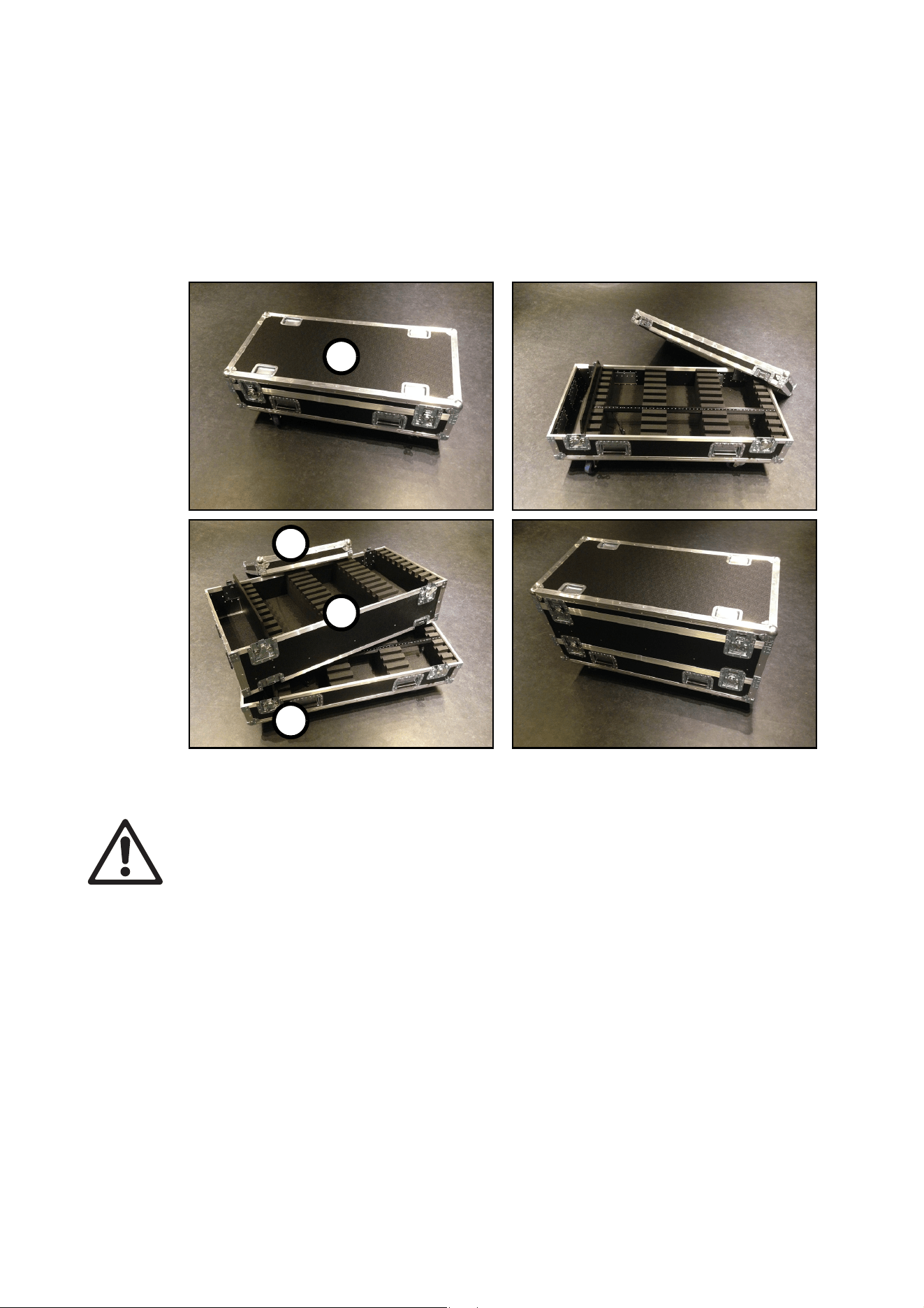
36
VDO Sceptron™ Family Safety and Installation Guide
Flightcase system
The flightcases and flightcase extenders available from Martin for the VDO Sceptron simplify transport and
storage. We strongly recommend their use to protect fixtures and accessories. See “Ordering Information”
on page 52).
Warning! Do not add more than three (3) extenders to one basic flightcase.
See Figure 24. The flightcase system consists of the flightcase base unit A and the flightcase extender B.
The extender adds a level to the base unit. If you combine 1 base unit with 2 extenders, for example, you
obtain a total of 3 levels in one high flightcase.
• You can add maximum 3 extenders to 1 flightcase, giving a maximum height of 4 levels.
• Each level of the flightcase can contain ten 1000mm fixtures or thirty 320 mm fixtures. You can mix the
two different fixture sizes.
• The lids of flightcase base units and the bottoms of extenders have foam strips that keep fixtures in their
slots. These foam strips are fastened in place with Velcro. The strips can be rotated and must be fastened
correctly depending on which diffusers are installed on the fixtures packed below the strips:
- When packing fixtures with Tube Diffusers installed, fasten the wide sides of the foam strips to the lid or
the bottom of the extender. This effectively makes the foam layer thinner, giving room for the Tube
Diffusers while still holding fixtures securely.
- When packing fixtures with either no diffusers or with other types of diffuser installed, fasten the narrow
sides of the foam strips to the lid or the bottom of the extender. This effectively makes the foam layer
thicker so that it holds fixtures securely.
Figure 24: Flightcase system
A
B
A
A

Service and maintenance
37
Service and maintenance
Warning! Read “Safety information” on page 4 and “Precautions to avoid damage” on page 9 before
carrying out service on the VDO Sceptron.
Warning! Isolate the installation from AC mains power before servicing.
Warning! Refer any service operation not described in this manual to a qualified service technician.
Important! Excessive dirt buildup causes overheating and may damage the product. Damage
caused by inadequate cleaning is not covered by the product warranty.
The user will need to clean the VDO Sceptron periodically. All other service operations on the VDO
Sceptron must be carried out by Martin Professional™ or its approved service agents.
Installation, on-site service and maintenance can be provided worldwide by the Martin Professional Global
Service organization and its approved agents, giving owners access to Martin’s expertise and product
knowledge in a partnership that will ensure the highest level of performance throughout the product’s
lifetime. Please contact your Martin supplier for details.
Cleaning
Cleaning schedules vary greatly depending on the operating environment. It is therefore impossible to
specify precise cleaning intervals for the VDO Sceptron. In extreme cases, the product may require cleaning
after surprisingly few hours of operation. Environmental factors that may result in a need for frequent
cleaning include:
• Use of smoke or fog machines.
• High airflow rates (near air conditioning vents, for example).
• Presence of cigarette smoke.
• Airborne dust (from stage effects, building structures and fittings or the natural environment in outdoor
locations, for example).
If one or more of these factors is present, inspect products soon after installing them to see whether
cleaning is necessary. Check again at frequent intervals. This procedure will allow you to assess cleaning
requirements in your particular situation. If in doubt, consult your Martin dealer about a suitable
maintenance schedule.
To clean the product, use low-pressure compressed air to gently remove dust and loose particles from the
front and back of the product. Wipe clean with a soft cloth dampened in a detergent solution. Do not use
solvents or abrasives.
LED performance
Martin use the best components available, but the characteristics of all LEDs change gradually over many
thousands of hours of use. Not all colors change at the same rate, and rates of change vary depending on
factors such as temperature and how intensively a particular color is used. Because of the changes, overall
light output and the exact hues obtained from specific color mixes in all LED-based products can be
expected to shift slightly over time.
To help you obtain consistent output despite these changes, Martin P3 software from version 4.1.0 contains
the P3 Fixture Adjuster tool. This feature lets you compensate for changes in LED characteristics and
restore initial output and color authenticity levels. Please contact Martin for more details.
Installing new software
It may be necessary to upload new software (i.e. device firmware) to the VDO Sceptron if it appears to have
a software-related fault or if you want to update to a newer software version.

38
VDO Sceptron™ Family Safety and Installation Guide
Software for Martin products is available from the Martin website. The VDO Sceptron software can be
installed from the P3 System Controller over the P3 data link. You will need a Martin P3 PowerPort 1500 or
a Martin P3 PowerPort 1000 IP for this. See the P3 System Controller user manual for software installation
instructions.
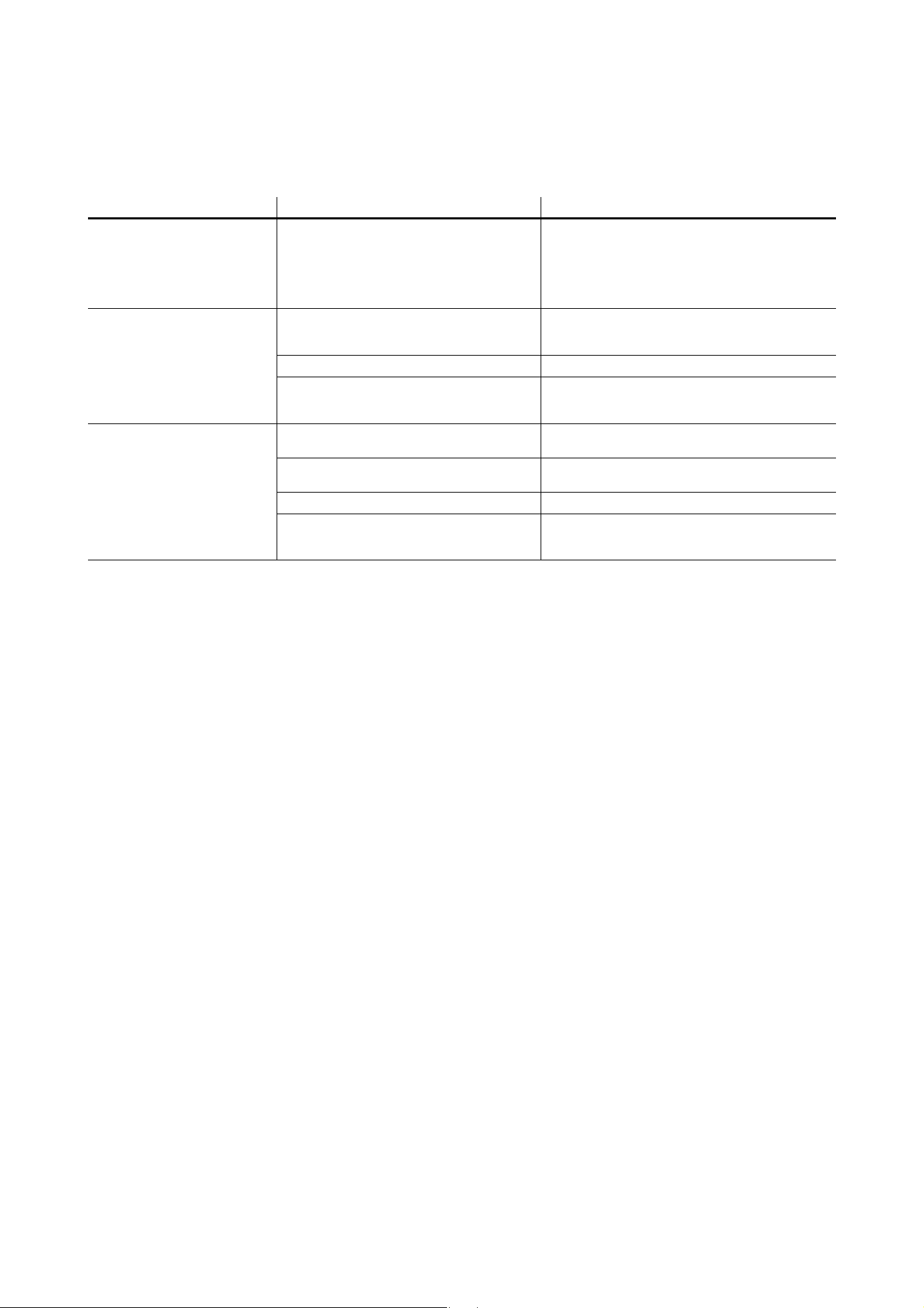
Troubleshooting
39
Troubleshooting
Problem Probable cause(s) Remedy
Control is lost and activating
magnetic ‘control button’ causes
VDO Sceptron to show constant
or flashing red status indication.
Error has occurred.
Check that system is correctly connected, set up
and running.
Hold magnet over ‘control button’ until LEDs 1 - 4
turn blue, then move magnet away, to reboot VDO
Sceptron.
Restart P3 or DMX controller.
Product seems completely
dead.
Product has gone into thermal protection
shutdown.
Check product temperature readouts on P3 system
controller. Reduce ambient temperature by
providing ventilation or fan cooling, for example.
No DC power to product. Check 48 VDC power supply and cables
Internal fault.
Disconnect from power. Do not attempt repairs
yourself. Contact Martin Service or an authorized
Martin service partner for assistance.
VDO Sceptron does not display
as intended.
Bad 48 VDC power transmission.
Inspect connections and cables. Correct poor
connections. Repair or replace damaged cables.
Bad data transmission.
Inspect connections and cables. Correct poor
connections. Repair or replace damaged cables.
Incorrect mapping or addressing of products. Check product address and controller settings.
Product in installation is defective and is
disturbing data transmission.
Substitute known good products one at a time until
normal operation is regained. Have faulty product
serviced by Martin Service.
Table 9: Troubleshooting
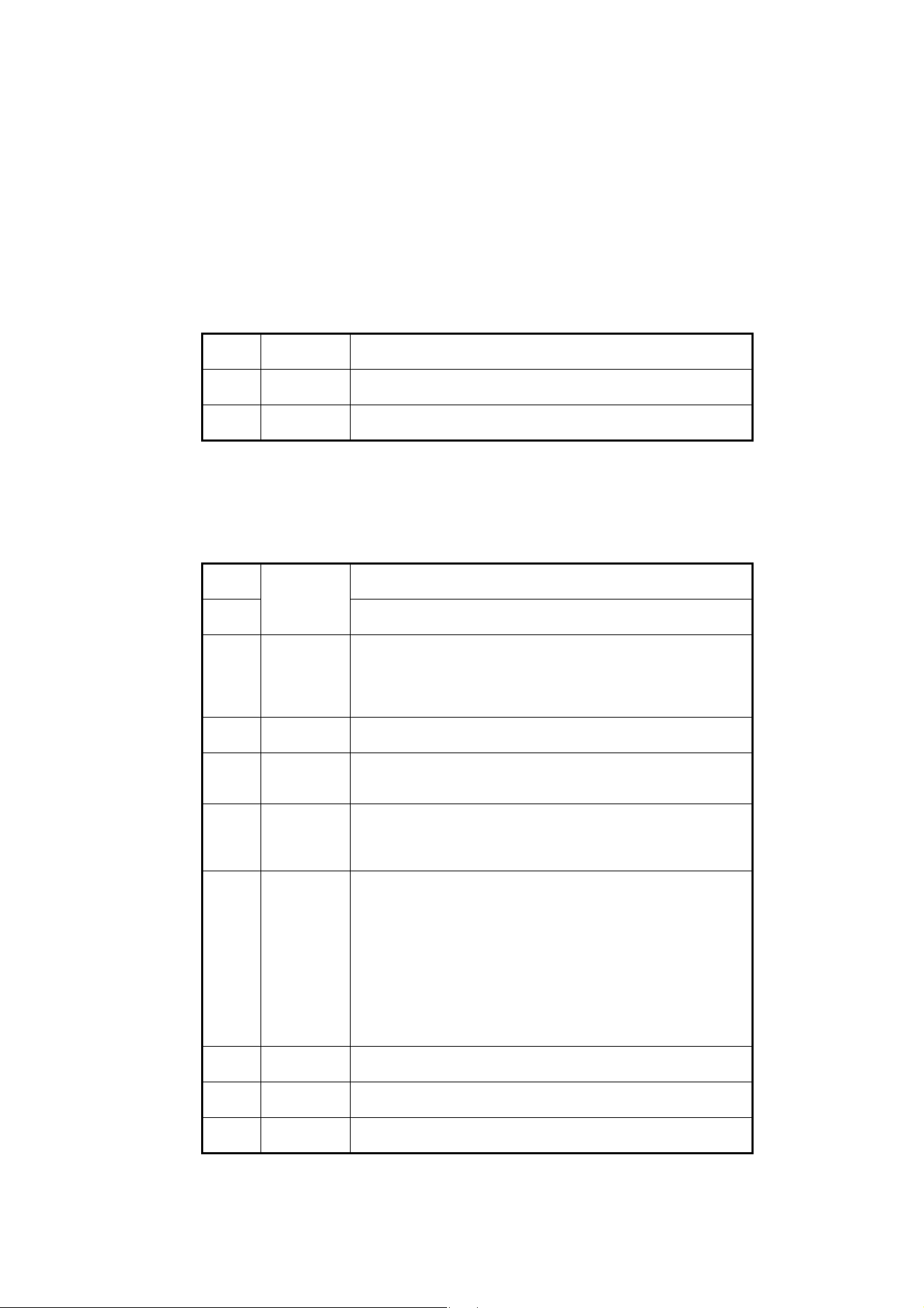
40
VDO Sceptron™ Family Safety and Installation Guide
DMX protocols
Direct DMX control
The following DMX Modes are available when sending a DMX signal directly to fixtures.
RGB Mode
Basic Mode
Channel DMX Value Function
1
0 - 255
Red
0 → 100%
2
0 - 255
Green
0 → 100%
3
0 - 255
Blue
0 → 100%
Table 10: DMX Protocol, RGB Mode
Channel DMX Value Function
1
0 - 65535
Dimmer fade (MSB)
8-bit coarse control, closed 0% → open 100%
2
Dimmer fade (LSB)
16-bit fine adjustment, closed → open
3
0 - 49
50 - 200
201 - 210
211 - 255
Strobe
No strobe
Strobe, slow → fast
No strobe
Random strobe, slow → fast
4
0 - 255
Strobe duration
0 → 1 second
5
0
1 - 255
FX selection
No FX: output controlled on RGB channels
FX selection (see “Segment control in P3 PixelMap Mode” on page 48)
6
0 - 126
127 - 128
129 - 255
FX speed / modifier (depending on effect)
Fast → slow
Stop
Slow → fast
7
0
1
2
3 - 34
35
36
37 - 100
101 - 120
121 - 140
141 - 255
FX synchronization
No sync
Fixture offset 10°
Fixture offset 10°
...
Fixture offset 350°
Synchronized
No function
Random start
Random duration
No function
8
0 - 255
Red
0 → 100%
9
0 - 255
Green
0 → 100%
10
0 - 255
Blue
0 → 100%
Table 11: DMX Protocol, Basic Mode
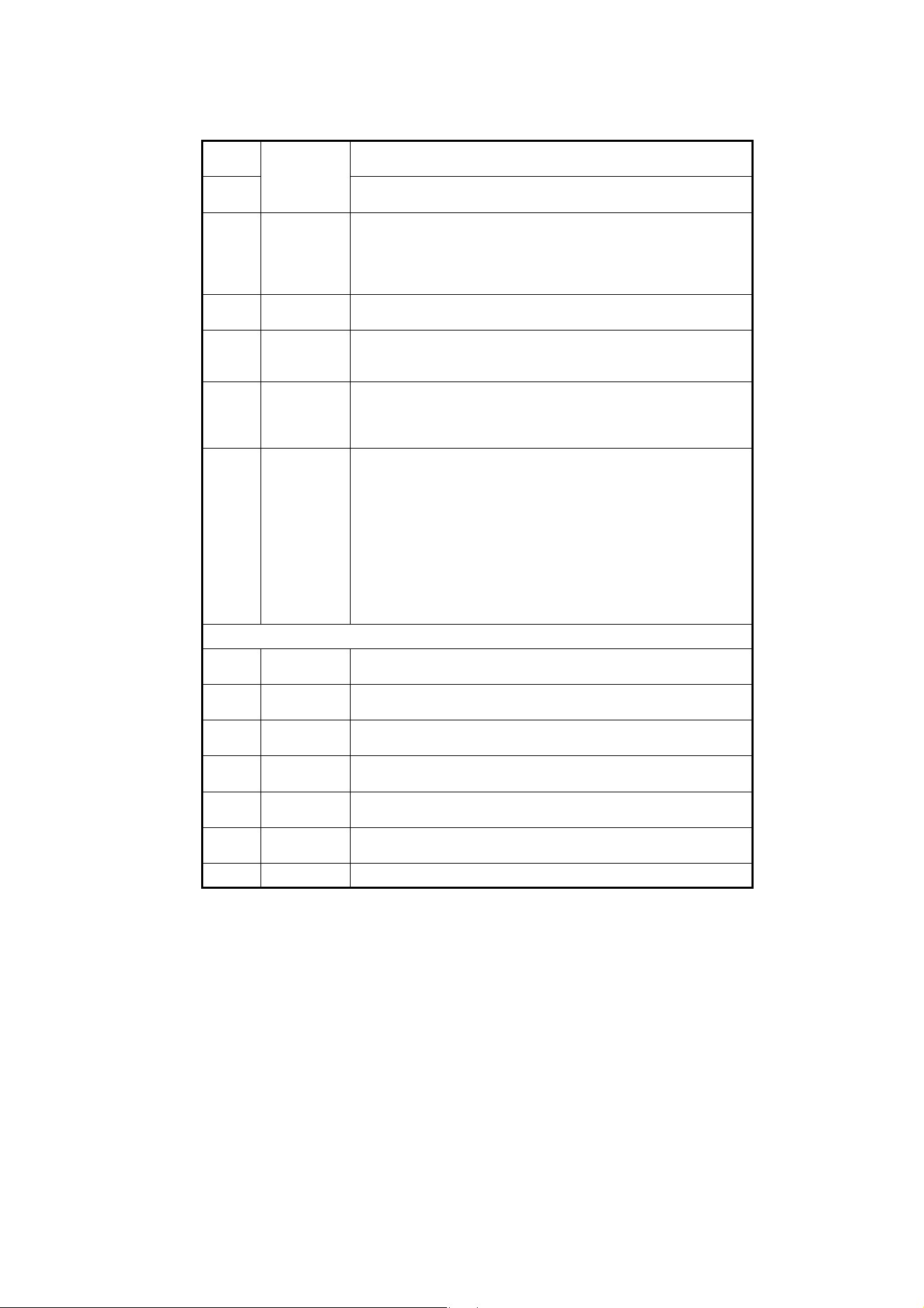
DMX protocols
41
Segment Mode
Channels used by different fixtures in Segment Mode
In Segment Mode, the following channels are used for RGB control of segments:
• 320 mm fixtures (two 160 mm segments) = channels 8 - 13
• 1000 mm fixtures (five 200 mm segments) = channels 8 - 22
Channel DMX Value Function
1
0 - 65535
Dimmer fade (MSB)
8-bit coarse control, closed 0% → open 100%
2
Dimmer fade (LSB)
16-bit fine adjustment, closed → open
3
0 - 49
50 - 200
201 - 210
211 - 255
Strobe
No strobe
Strobe, slow → fast
No strobe
Random strobe, slow → fast
4
0 - 255
Strobe duration
0 → 1 second
5
0
1 - 255
FX selection
No FX: output controlled on RGB channels
FX selection (see “Segment control in P3 PixelMap Mode” on page 48)
6
0 - 126
127 - 128
129 - 255
FX speed / modifier (depending on effect)
Fast → slow
Stop
Slow → fast
7
0
1
2
3 - 34
35
36
37 - 100
101 - 120
121 - 140
141 - 255
FX synchronization
No sync
Fixture offset 10°
Fixture offset 10°
...
Fixture offset 350°
Synchronized
No function
Random start
Random duration
No function
Segment RGB control
8
0 - 255
Segment 1 Red
0 → 100%
9
0 - 255
Segment 1 Green
0 → 100%
10
0 - 255
Segment 1 Blue
0 → 100%
11
0 - 255
Segment 2 Red
0 → 100%
12
0 - 255
Segment 2 Green
0 → 100%
13
0 - 255
Segment 2 Blue
0 → 100%
Etc...
... See details below
Table 12: DMX Protocol, Segment Mode
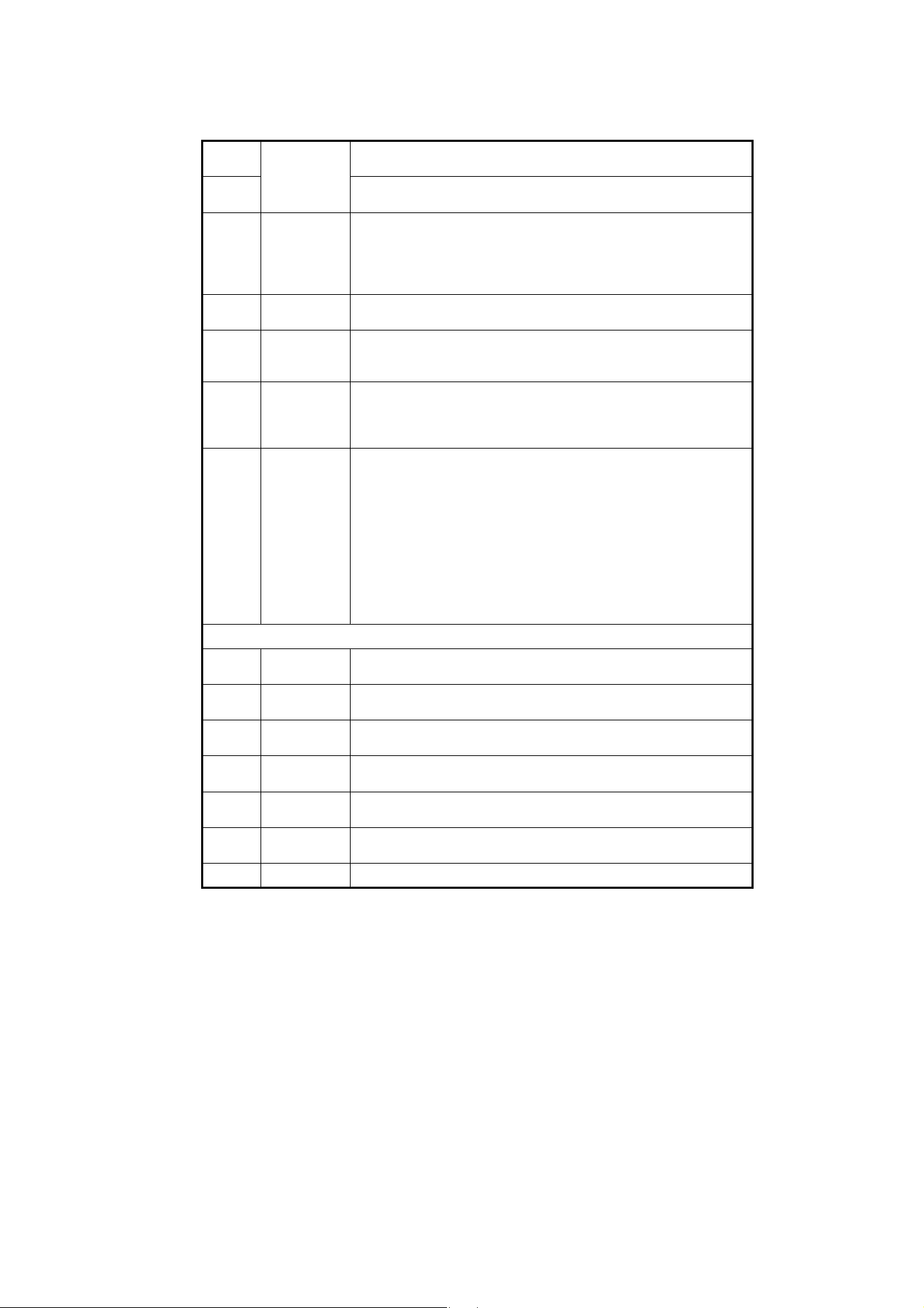
42
VDO Sceptron™ Family Safety and Installation Guide
Pixel Mode
Channels used by different fixtures in Pixel Mode
In Pixel Mode, the following channels are used for RGB control of individual pixels:
• Sceptron 10, 320 mm = channels 8 - 103
• Sceptron 10, 1000 mm = channels 8 - 307
• Sceptron 20, 320 mm = channels 8 - 55
• Sceptron 20, 1000 mm = channels 8 - 157
• Sceptron 40, 320 mm = channels 8 - 31
• Sceptron 40, 1000 mm = channels 8 - 82
Channel DMX Value Function
1
0 - 65535
Dimmer fade (MSB)
8-bit coarse control, closed 0% → open 100%
2
Dimmer fade (LSB)
16-bit fine adjustment, closed → open
3
0 - 49
50 - 200
201 - 210
211 - 255
Strobe
No strobe
Strobe, slow → fast
No strobe
Random strobe, slow → fast
4
0 - 255
Strobe duration
0 → 1 second
5
0
1 - 255
FX selection
No FX: output controlled on RGB channels
FX selection (see “Segment control in P3 PixelMap Mode” on page 48)
6
0 - 126
127 - 128
129 - 255
FX speed / modifier (depending on effect)
Fast → slow
Stop
Slow → fast
7
0
1
2
3 - 34
35
36
37 - 100
101 - 120
121 - 140
141 - 255
FX synchronization
No sync
Fixture offset 10°
Fixture offset 10°
...
Fixture offset 350°
Synchronized
No function
Random start
Random duration
No function
Individual pixel control
8
0 - 255
Pixel 1 Red
0 → 100%
9
0 - 255
Pixel 1 Green
0 → 100%
10
0 - 255
Pixel 1 Blue
0 → 100%
11
0 - 255
Pixel 2 Red
0 → 100%
12
0 - 255
Pixel 2 Green
0 → 100%
13
0 - 255
Pixel 2 Blue
0 → 100%
Etc...
... See details below
Table 13: DMX Protocol, Pixel Mode

DMX protocols
43
Pre-programmed FX
The range of FX listed in this table is available when controlling the fixture directly by DMX (no P3 System
Controller used). To use the pre-programmed FX:
• Select the FX in this table on channel 5 in Basic Mode or Pixel Mode.
• Set FX modification (in most cases this adjusts FX speed) on channel 6.
• Synchronize and set offsets between fixtures on channel 7.
Channel DMX Value Function
5
0
1
2
3
4
5
6
7
8
9
10
11
12
13 - 19
20
21
22
23
24 - 50
51
52
53
54
55
56
57
58
59
60
61
62
63 - 68
69
70
71
72
73
74
75
76
77
78
79 -100
No FX
Intensity FX
Wave
Step
Pulse
Blackout strobe
2x strobe
3x strobe
4x strobe
Up, down flash
Up, flash, down, flash
Random levels
Pixel killer
Noise overlay
No function
Movie flicker
Electric arc
Atomic lightning
Thunderstorm
No function
Color FX
Rainbow wave
Rainbow step
Rainbow pulse
RGB wave
RGB step
RGB pulse
CMY wave
CMY step
CMY pulse
Random mix wave
Random mix step
Random mix pulse
No function
Solid
Spectrum shifter
RGB to white wave
RGB to white step
RGB to white pulse
RGB to white strobe
Normal to white wave
Normal to white step
Normal to white pulse
Normal to white strobe
No function
Table 14: Pre-programmed FX

44
VDO Sceptron™ Family Safety and Installation Guide
5
(continued)
101
102
103
104
105
106
107
108
109
110
111
112-255
Special FX
Police chase
Nightrider
Stars
Fiberoptic white
Fiberoptic mix
Plasma
Starfield
Colorwave
Noise
Snowflakes
Rain
No function
Channel DMX Value Function
Table 14: Pre-programmed FX
DMX protocols
45
DMX via P3 System Controller
The following DMX Modes are available when sending a DMX signal to a P3 System Controller which then
relays the signal to fixtures.
P3 Intensity Mode
In P3 Intensity Mode:
• The fixture displays video
• DMX only adjusts the intensity of the video.
P3 RGB Mode
In P3 RGB Mode:
• The fixture displays video
• DMX only adjusts the color of the video.
P3 Basic Mode
In P3 Basic Mode:
• The fixture displays video
• DMX only adjusts the intensity and color of the video.
Channel DMX Value Function
1
0 - 255
Intensity
0 → 100%
Table 15: DMX Protocol, P3 Intensity Mode
Channel DMX Value Function
1
0 - 255
Red
0 → 100%
2
0 - 255
Green
0 → 100%
3
0 - 255
Blue
0 → 100%
Table 16: DMX Protocol, P3 RGB Mode
Channel DMX Value Function
1
0 - 65535
Intensity (MSB)
8-bit coarse control, closed 0% → open 100%
2
Intensity (LSB)
16-bit fine adjustment, closed → open
3
0 - 255
Red
0 → 100%
4
0 - 255
Green
0 → 100%
5
0 - 255
Blue
0 → 100%
Table 17: DMX Protocol, P3 Basic Mode

46
VDO Sceptron™ Family Safety and Installation Guide
P3 Hybrid Mode
In P3 Hybrid Mode:
• When the P3 Switch channel (channel 3) is set to above 50% the fixture displays video, and channels 4-6
adjust the color of the video on the fixture.
• When the P3 Switch channel (channel 3) is set to below 50% the fixture is controlled by DMX only, and
channels from 4 to the last channel control the color of the segments of the fixture. The number of
channels used for RGB control of segments starting at channel 4 depends on the number of segments
per fixture.
• The number of RGB segments per fixture can be set on the P3 System Controller.
Segment control in P3 Hybrid Mode
In P3 Hybrid Mode, fixtures can be set to use the following numbers of segments and DMX channels:
VDO Sceptron 10, 320mm
• 1 segment – 6 DMX channels
• 2 segments – 9 DMX channels
• 4 segments – 15 DMX channels
• 8 segments – 27 DMX channels
• 16 segments – 51 DMX channels
• 32 segments (individual pixels) – 99 DMX channels
VDO Sceptron 10, 1000mm
• 1 segment – 6 DMX channels
• 2 segments – 9 DMX channels
• 4 segments – 15 DMX channels
• 5 segments – 18 DMX channels
• 10 segments – 33 DMX channels
• 20 segments – 63 DMX channels
• 25 segments – 78 DMX channels
• 50 segments – 153 DMX channels
• 100 segments (individual pixels) – 303 DMX channels
Channel DMX Value Function
1
0 - 65535
Intensity (MSB)
8-bit coarse control, closed 0% → open 100%
2
Intensity (LSB)
16-bit fine adjustment, closed → open
3
0 - 127
128 - 255
P3 Switch
DMX Mode
Video Mode
Segment control
4
0 - 255
Segment 1 Red
0 → 100%
5
0 - 255
Segment 1 Green
0 → 100%
6
0 - 255
Segment 1 Blue
0 → 100%
7
0 - 255
Segment 2 Red
0 → 100%
8
0 - 255
Segment 2 Green
0 → 100%
9
0 - 255
Segment 2 Blue
0 → 100%
Etc...
... See details below
Table 18: DMX Protocol, P3 Hybrid Mode
DMX protocols
47
VDO Sceptron 20, 320mm
• 1 segment – 6 DMX channels
• 2 segments – 9 DMX channels
• 4 segments – 15 DMX channels
• 8 segments – 27 DMX channels
• 16 segments (individual pixels) – 51 DMX channels
VDO Sceptron 20, 1000mm
• 1 segment – 6 DMX channels
• 2 segments – 9 DMX channels
• 5 segments – 18 DMX channels
• 10 segments – 33 DMX channels
• 25 segments – 78 DMX channels
• 50 segments (individual pixels) – 153 DMX channels
VDO Sceptron 40, 320mm
• 1 segment – 6 DMX channels
• 2 segments – 9 DMX channels
• 4 segments – 15 DMX channels
• 8 segments (individual pixels) – 27 DMX channels
VDO Sceptron 40, 1000mm
• 1 segment – 6 DMX channels
• 5 segments – 18 DMX channels
• 25 segments (individual pixels) – 78 DMX channels
P3 PixelMap Mode
In P3 PixelMap Mode:
• The fixture is controlled by DMX only (it never shows video), and channels from 1 to the last channel
control the color of the segments of the fixture. The number of channels used for RGB control of
segments starting at channel 4 depends on the number of segments per fixture.
• The number of RGB segments per fixture can be set on the P3 System Controller.
Channel DMX Value Function
1
0 - 255
Segment 1 Red
0 → 100%
2
0 - 255
Segment 1 Green
0 → 100%
3
0 - 255
Segment 1 Blue
0 → 100%
4
0 - 255
Segment 2 Red
0 → 100%
5
0 - 255
Segment 2 Green
0 → 100%
6
0 - 255
Segment 2 Blue
0 → 100%
Etc...
... See details on next page
Table 19: DMX Protocol, P3 PixelMap Mode

48
VDO Sceptron™ Family Safety and Installation Guide
Segment control in P3 PixelMap Mode
In P3 PixelMap Mode, fixtures can be set to use the following numbers of segments and DMX channels:
VDO Sceptron 10, 320mm
• 1 segment – 3 DMX channels
• 2 segments – 6 DMX channels
• 4 segments – 12 DMX channels
• 8 segments – 24 DMX channels
• 16 segments – 48 DMX channels
• 32 segments (individual pixels) – 96 DMX channels
VDO Sceptron 10, 1000mm
• 1 segment – 3 DMX channels
• 2 segments – 6 DMX channels
• 4 segments – 12 DMX channels
• 5 segments – 15 DMX channels
• 10 segments – 30 DMX channels
• 20 segments – 60 DMX channels
• 25 segments – 75 DMX channels
• 50 segments – 150 DMX channels
• 100 segments (individual pixels) – 300 DMX channels
VDO Sceptron 20, 320mm
• 1 segment – 3 DMX channels
• 2 segments – 6 DMX channels
• 4 segments – 12 DMX channels
• 8 segments – 24 DMX channels
• 16 segments (individual pixels) – 48 DMX channels
VDO Sceptron 20, 1000mm
• 1 segment – 3 DMX channels
• 2 segments – 6 DMX channels
• 5 segments – 15 DMX channels
• 10 segments – 30 DMX channels
• 25 segments – 75 DMX channels
• 50 segments (individual pixels) – 150 DMX channels
VDO Sceptron 40, 320mm
• 1 segment – 3 DMX channels
• 2 segments – 6 DMX channels
• 4 segments – 12 DMX channels
• 8 segments (individual pixels) – 24 DMX channels
VDO Sceptron 40, 1000mm
• 1 segment – 3 DMX channels
• 5 segments – 15 DMX channels
• 25 segments (individual pixels) – 75 DMX channels

Specifications
49
Specifications
Physical
Length . . . . . . . . . . . . . . . . . . . . . . . . . . . . Available in 320 mm (12.6 in.) and 1000 mm (39.4 in.) versions
Width . . . . . . . . . . . . . . . . . . . . . . . . . . . . . . . . . . . . . . . . . . . . . . . . . . . . . . . . . . . . . . . . . .27 mm (1.07 in.)
Height . . . . . . . . . . . . . . . . . . . . . . . . . . . . . . . . . . . . . . . . . . . . . . . . . . . . . . . . . . . . . . . . .28 mm (1.10 in.)
Weight . . . . . . . . . . . . . . . . . . . . . . . . . . . . . . . . . . . . . . . . . . . . . . . . . . . . . . . 1.2 kg / m (0.81 lbs. per foot)
Control and Programming
Control options. . . . . . . . . . . . . . . . . . . .Martin P3™ System Controller (via Martin P3 PowerPort) or DMX
Protocol detection . . . . . . . . . . . . . . . . . . . . . . . . . . . . . . . . . . . . . . . . . . . . . . . . . . . . . . . . . . . . . Automatic
Control modes, direct DMX control . . . . . . . . . . . . . . . . . . . . . . . . . . . . . . RGB, Basic, Segment and Pixel
Control modes, DMX via P3. . . . . . . . . . . . . . P3 Intensity, P3 RGB, P3 Basic, P3 Hybrid and P3 PixelMap
Setting and addressing . . . . . . . . . . . . . . . . . . . . . . . . . P3 System controller or RDM-compliant controller
Control resolution. . . . . . . . . . . . . . . . . . . . . . . . . . . . . . . . . 16-bit (P3) or 8-bit (DMX) control of each color
Color and intensity calibration . . . . . . . . . . . . . . . . . . . . . . . . . . . . . . . . . . . . . . . . . . . . . . . . . . . .Pixel-level
DMX compliance . . . . . . . . . . . . . . . . . . . . . . . . . . . . . . . . . . . . . . . . . . . . . . . . . . . . . . . USITT DMX512-A
RDM compliance . . . . . . . . . . . . . . . . . . . . . . . . . . . . . . . . . . . . . . . . . . . . . . . . . . . . . . . ANSI/ESTA E1.20
Firmware update . . . . . . . . . . . . . . . . . . . . . . . . . . . . . . . . . . . . . . . . . . . . Via Martin P3 System controller
DMX channels, direct DMX control
VDO Sceptron 10. . . . . . . . . . . . . . . . . . . . . . . . . . . . . . . . . . . . . . . . . . . . . . . . . . . . . . 3/10/13/22/103/307
VDO Sceptron 20. . . . . . . . . . . . . . . . . . . . . . . . . . . . . . . . . . . . . . . . . . . . . . . . . . . . . . . 3/10/13/22/55/157
VDO Sceptron 40. . . . . . . . . . . . . . . . . . . . . . . . . . . . . . . . . . . . . . . . . . . . . . . . . . . . . . . . 3/1013/22//31/82
DMX channels, DMX via P3 System Controller
VDO Sceptron 10. . . . . . . . . . . . . . . . . . . . . . . . . . . . . . . . . . . . . . . . . Wide range of options from 1 to 303
VDO Sceptron 20. . . . . . . . . . . . . . . . . . . . . . . . . . . . . . . . . . . . . . . . . Wide range of options from 1 to 153
VDO Sceptron 40. . . . . . . . . . . . . . . . . . . . . . . . . . . . . . . . . . . . . . . . . . Wide range of options from 1 to 78
Signal Protocol
P3 (via Martin P3 PowerPort) or DMX
Optics
Minimum LED lifetime . . . . . . . . . . . . . . . . . . . . . . . . . . . . . . . . . 50 000 hours (to >70% luminous output)*
*Figure obtained under manufacturer's test conditions
Options
Open Front
Flat Diffuser
Smoked Flat Diffuser
Round Diffuser
Smoked Round Diffuser
Square Diffuser (fixtures are supplied with these installed)
Smoked Square Diffuser
Tube Diffuser
Smoked Tube Diffuser
NoBlend Diffuser, 10 mm
Smoked NoBlend Diffuser, 10 mm
NoBlend Diffuser, 20 mm
Smoked NoBlend Diffuser, 20 mm
NoBlend Diffuser, 40 mm
Smoked NoBlend Diffuser, 40 mm
Asymmetric (Wall-Washing) Lens
Lens Array Narrow, 20 mm
Lens Array Narrow, 40 mm
All optical accessory options are interchangeable and clip onto fixtures

50
VDO Sceptron™ Family Safety and Installation Guide
Control/User Interface
Device status . . . . . . . . . . . . . . . . . . . . . . . . . . . . . . . . . . . . . . . . . . . . . . . . . . . Multi-color visual indication
Device test and reset . . . . . . . . . . . . . . Magnetic pushbutton to call up local test patterns and reset device
Video Processing
Brightness control
Gamma correction and control
Color temperature control
Color space control
Calibration processing
Synchronization
Photometric Data
Color resolution . . . . . . . . . . . . . . . . . . . . . . . . . . . . . . . . . . . . . . . . . . . .16 bits per color (48 bits per pixel)
Viewing angle. . . . . . . . . . . . . . . . . . . . . . . . . . . . . . . . . . . . . . . . . . . . . . . . . . . . . . . . . . . . . . . 120° x 120°
VDO Sceptron 10
Pixels per meter. . . . . . . . . . . . . . . . . . . . . . . . . . . . . . . . . . . . . . . . . . . . . . . . . . . . . . . . . . . . . . . . . . . .100
Pitch (pixel center-to-center) . . . . . . . . . . . . . . . . . . . . . . . . . . . . . . . . . . . . . . . . . . . . . . . . . . . . .10.00 mm
Luminous intensity, calibrated mode . . . . . . . . . . . . . . . . . . . . . . . . . . . . . . . . . . . . . . . . . 250 cd per meter
Total output, calibrated mode. . . . . . . . . . . . . . . . . . . . . . . . . . . . . . . . . . . . . . . . . . . 750 lumens per meter
Total output, calibrated mode. . . . . . . . . . . . . . . . . . . 8333 nits (modules spaced 30 mm center-to-center)
VDO Sceptron 20
Pixels per meter. . . . . . . . . . . . . . . . . . . . . . . . . . . . . . . . . . . . . . . . . . . . . . . . . . . . . . . . . . . . . . . . . . . . .50
Pitch (pixel center-to-center) . . . . . . . . . . . . . . . . . . . . . . . . . . . . . . . . . . . . . . . . . . . . . . . . . . . . .20.00 mm
Luminous intensity, calibrated mode . . . . . . . . . . . . . . . . . . . . . . . . . . . . . . . . . . . . . . . . . 125 cd per meter
Total output, calibrated mode. . . . . . . . . . . . . . . . . . . . . . . . . . . . . . . . . . . . . . . . . . . 375 lumens per meter
Total output, calibrated mode. . . . . . . . . . . . . . . . . . . 4166 nits (modules spaced 30 mm center-to-center)
VDO Sceptron 40
Pixels per meter. . . . . . . . . . . . . . . . . . . . . . . . . . . . . . . . . . . . . . . . . . . . . . . . . . . . . . . . . . . . . . . . . . . . .25
Pitch (pixel center-to-center) . . . . . . . . . . . . . . . . . . . . . . . . . . . . . . . . . . . . . . . . . . . . . . . . . . . . .40.00 mm
Luminous intensity, calibrated mode . . . . . . . . . . . . . . . . . . . . . . . . . . . . . . . . . . . . . . . . . . 62 cd per meter
Total output, calibrated mode. . . . . . . . . . . . . . . . . . . . . . . . . . . . . . . . . . . . . . . . . . . 187 lumens per meter
Total output, calibrated mode. . . . . . . . . . . . . . . . . . . 2083 nits (modules spaced 30 mm center-to-center)
Construction
Base. . . . . . . . . . . . . . . . . . . . . . . . . . . . . . . . . . . . . . . . . . . . . . . . . . . . . . . . . . . Extruded aluminum profile
Color . . . . . . . . . . . . . . . . . . . . . . . . . . . . . . . . . . . . . . . . . . . . . . . . . . . . . . . . . . . . . . . . . . . . . . .Matt black
Protection rating. . . . . . . . . . . . . . . . . . . . . . . . . . . . . . . . . . . . . . . . . . . . . . . . . . . . . . . . . . . . . . . . . . . IP65
RoHS compliant
Installation
Orientation . . . . . . . . . . . . . . . . . . . . . . . . . . . . . . . . . . . . . . . . . . . . . . . . . . . . . . . . . . . . . . . . . . . . . . . .Any
Mounting . . . . . . . . . . . . . . . . . . . . . . . . . . . . . . . . . . . . . . . Channel for M6 captive nuts on back of profile.
Mounting options . . . . . . . . . . . . . . . . . . . . . . . . . . . . M6 bolts, optional sliding bracket (accepts M12 bolt)
Connections
Power and data input . . . . . . . . . . . . . . . . . . . . . . . . . . . . . . . . . . . . . . 6-pin custom (BBD-type) IP66-rated
Power and data thru. . . . . . . . . . . . . . . . . . . . . . . . . . . . . . . . . . . . . . . 6-pin custom (BBD type) IP66-rated
Hot-plugging compatible
Electrical
Nominal input voltage . . . . . . . . . . . . . . . . . . . . . . . . . . . . . . . . . . . . . . . . . . . . . . . . . . . . . . 48 VDC +/- 4%
Power supply options. . . . . . . . . . . . . . . . . . . . . Martin P3 PowerPort 1500, Martin P3 PowerPort 1000 IP,
Martin IP66 PSU 240W, Martin DMX PowerPort 375
or generic 48 VDC PSU
VDO Sceptron 10
Total power consumption . . . . . . . . . . . . . . . . . . . . . . . . . . . . . . . .33 W per meter at full intensity, full white
VDO Sceptron 20
Total power consumption . . . . . . . . . . . . . . . . . . . . . . . . . . . . . . . .17 W per meter at full intensity, full white
Specifications
51
VDO Sceptron 40
Total power consumption . . . . . . . . . . . . . . . . . . . . . . . . . . . . . . . 8.5 W per meter at full intensity, full white
Thermal
Cooling. . . . . . . . . . . . . . . . . . . . . . . . . . . . . . . . . . . . . . . . . . . . . . . . . . . . . . . . . . . . . . . . . . . . . Convection
Maximum ambient temperature (Ta max.) for typical video content. . . . . . . . . . . . . . . . . . . . 55° C (131° F)
Minimum ambient temperature (Ta min.) . . . . . . . . . . . . . . . . . . . . . . . . . . . . . . . . . . . . . . . . -30° C (-22° F)
VDO Sceptron 10
Max. total heat dissipation, calculated, +/- 10%. . . . . . . . . . . . . . . . . . . . . . . . . . . . . 115 BTU/hr per meter
VDO Sceptron 20
Max. total heat dissipation, calculated, +/- 10%. . . . . . . . . . . . . . . . . . . . . . . . . . . . . . 60 BTU/hr per meter
VDO Sceptron 40
Max. total heat dissipation, calculated, +/- 10%. . . . . . . . . . . . . . . . . . . . . . . . . . . . . . 30 BTU/hr per meter
Approvals
EU safety. . . . . . . . . . . . . . . . . . . . .EN 60950-1, EN 60950-22, EN 62471
EU EMC . . . . . . . . . . . . . . . . . . . . . . . . . . . . . . . . . .EN 55024, EN 55032
US safety. . . . . . . . . . . . . . . . . . . . . . . . . . . . . . UL 60950-1, UL 60950-22
US EMC . . . . . . . . . . . . . . . . . . . . . . . . . . . .CFR Title 47 Part 15 Class A
Canadian safety . . . . . . . . . . . . . . CSA C22.2 No. 60950-1, No. 60950-22
Canadian EMC . . . . . . . . . . . . . . . . . . . . . . . . . . . . . . . ICES-003 Class A
Australia/NZ . . . . . . . . . . . . . . . . . . . . . . . . . . . . . . . . . . . . . . . . . . . .RCM
Accessories
Service
VDO Sceptron Accessory and Test Tool with magnetic swiper, set of 10 . . . . . . . . . . . . . . . P/N 91610139
VDO Sceptron Diffuser Lens Removal Jaws . . . . . . . . . . . . . . . . . . . . . . . . . . . . . . . . . . . . . P/N 91611836
Hardware
VDO Sceptron/Fatron Sliding Brackets, set of 10 . . . . . . . . . . . . . . . . . . . . . . . . . . . . . . . . . P/N 91610123
VDO Sceptron/Fatron Linear (End-to-End) Coupler . . . . . . . . . . . . . . . . . . . . . . . . . . . . . . . P/N 91611843
VDO Sceptron Linear (End-to-End) Couplers, set of 10 (not suitable for VDO Fatron) . . . . . P/N 91610124
VDO Sceptron/Fatron Spigot Adapter, 28 mm. . . . . . . . . . . . . . . . . . . . . . . . . . . . . . . . . . . . P/N 91611791
VDO Sceptron/Fatron Floor stands, set of two . . . . . . . . . . . . . . . . . . . . . . . . . . . . . . . . . . . P/N 91611792
VDO Sceptron/Fatron Low-profile Half Coupler Rigging Clamp, black . . . . . . . . . . . . . . . . . P/N 91611790
Superlight Half-coupler Rigging Clamp, black . . . . . . . . . . . . . . . . . . . . . . . . . . . . . . . . . . . . P/N 91602018
VDO Sceptron Pivot Coupler . . . . . . . . . . . . . . . . . . . . . . . . . . . . . . . . . . . . . . . . . . . . . . . . . P/N 91611793
VDO Sceptron Parallel Couplers 30/40/50 mm, set of 10 . . . . . . . . . . . . . . . . . . . . . . . . . . . P/N 91610125
VDO Sceptron Parallel Couplers 60/70/80 mm, set of 10 . . . . . . . . . . . . . . . . . . . . . . . . . . . P/N 91610138
Safety Cable, SWL 60 kg, BGV C1 / DGUV 17, black. . . . . . . . . . . . . . . . . . . . . . . . . . . . . . P/N 91604006
Safety Cable, SWL 60 kg, BGV C1 / DGUV 17, silver . . . . . . . . . . . . . . . . . . . . . . . . . . . . . . P/N 91604007
Optical
VDO Sceptron Flat Diffuser, 320 mm . . . . . . . . . . . . . . . . . . . . . . . . . . . . . . . . . . . . . . . . . . P/N 91610111
VDO Sceptron Flat Diffuser, 1000 mm . . . . . . . . . . . . . . . . . . . . . . . . . . . . . . . . . . . . . . . . . P/N 91610112
VDO Sceptron Flat Smoked Diffuser, 320 mm . . . . . . . . . . . . . . . . . . . . . . . . . . . . . . . . . . . P/N 91610113
VDO Sceptron Flat Smoked Diffuser, 1000 mm . . . . . . . . . . . . . . . . . . . . . . . . . . . . . . . . . . P/N 91610114
VDO Sceptron Round Diffuser, 320 mm . . . . . . . . . . . . . . . . . . . . . . . . . . . . . . . . . . . . . . . . P/N 91610115
VDO Sceptron Round Diffuser, 1000 mm . . . . . . . . . . . . . . . . . . . . . . . . . . . . . . . . . . . . . . . P/N 91610116
VDO Sceptron Round Smoked Diffuser, 320 mm . . . . . . . . . . . . . . . . . . . . . . . . . . . . . . . . . P/N 91610117
VDO Sceptron Round Smoked Diffuser, 1000 mm . . . . . . . . . . . . . . . . . . . . . . . . . . . . . . . . P/N 91610118
VDO Sceptron Square Diffuser, 320 mm (installed on fixtures when supplied). . . . . . . . . . . P/N 91610119
VDO Sceptron Square Diffuser, 1000 mm (installed on fixtures when supplied). . . . . . . . . . P/N 91610120
VDO Sceptron Square Smoked Diffuser, 320 mm. . . . . . . . . . . . . . . . . . . . . . . . . . . . . . . . . P/N 91610121
VDO Sceptron Square Smoked Diffuser, 1000 mm. . . . . . . . . . . . . . . . . . . . . . . . . . . . . . . . P/N 91610122
VDO Sceptron Tube Diffuser, 320 mm. . . . . . . . . . . . . . . . . . . . . . . . . . . . . . . . . . . . . . . . . . P/N 91611630
VDO Sceptron Tube Diffuser, 1000 mm. . . . . . . . . . . . . . . . . . . . . . . . . . . . . . . . . . . . . . . . . P/N 91611640
VDO Sceptron Tube Smoked Diffuser, 320 mm. . . . . . . . . . . . . . . . . . . . . . . . . . . . . . . . . . . P/N 91611650
VDO Sceptron Tube Smoked Diffuser, 1000 mm. . . . . . . . . . . . . . . . . . . . . . . . . . . . . . . . . . P/N 91611660
VDO Sceptron 10 NoBlend Diffuser, 320 mm . . . . . . . . . . . . . . . . . . . . . . . . . . . . . . . . . . . . P/N 91610126
VDO Sceptron 10 NoBlend Diffuser, 1000 mm . . . . . . . . . . . . . . . . . . . . . . . . . . . . . . . . . . . P/N 91610127

52
VDO Sceptron™ Family Safety and Installation Guide
VDO Sceptron 10 NoBlend Smoked Diffuser, 320 mm . . . . . . . . . . . . . . . . . . . . . . . . . . . . . P/N 91610128
VDO Sceptron 10 NoBlend Smoked Diffuser, 1000 mm . . . . . . . . . . . . . . . . . . . . . . . . . . . . P/N 91610129
VDO Sceptron 20 NoBlend Diffuser, 320 mm . . . . . . . . . . . . . . . . . . . . . . . . . . . . . . . . . . . . P/N 91610130
VDO Sceptron 20 NoBlend Diffuser, 1000 mm . . . . . . . . . . . . . . . . . . . . . . . . . . . . . . . . . . . P/N 91610131
VDO Sceptron 20 NoBlend Smoked Diffuser, 320 mm . . . . . . . . . . . . . . . . . . . . . . . . . . . . . P/N 91610132
VDO Sceptron 20 NoBlend Smoked Diffuser, 1000 mm . . . . . . . . . . . . . . . . . . . . . . . . . . . . P/N 91610133
VDO Sceptron 40 NoBlend Diffuser, 320 mm . . . . . . . . . . . . . . . . . . . . . . . . . . . . . . . . . . . . P/N 91610134
VDO Sceptron 40 NoBlend Diffuser, 1000 mm . . . . . . . . . . . . . . . . . . . . . . . . . . . . . . . . . . . P/N 91610135
VDO Sceptron 40 NoBlend Smoked Diffuser, 320 mm . . . . . . . . . . . . . . . . . . . . . . . . . . . . . P/N 91610136
VDO Sceptron 40 NoBlend Smoked Diffuser, 1000 mm . . . . . . . . . . . . . . . . . . . . . . . . . . . . P/N 91610137
VDO Sceptron Asymmetric Lens, 320 mm . . . . . . . . . . . . . . . . . . . . . . . . . . . . . . . . . . . . . . P/N 91611670
VDO Sceptron Asymmetric Lens, 1000 mm . . . . . . . . . . . . . . . . . . . . . . . . . . . . . . . . . . . . . P/N 91611680
VDO Sceptron 20 Lens Array, Narrow, 320 mm . . . . . . . . . . . . . . . . . . . . . . . . . . . . . . . . . . P/N 91610140
VDO Sceptron 20 Lens Array, Narrow, 1000 mm . . . . . . . . . . . . . . . . . . . . . . . . . . . . . . . . . P/N 91610141
VDO Sceptron 40 Lens Array, Narrow, 320 mm . . . . . . . . . . . . . . . . . . . . . . . . . . . . . . . . . . P/N 91610142
VDO Sceptron 40 Lens Array, Narrow, 1000 mm . . . . . . . . . . . . . . . . . . . . . . . . . . . . . . . . . P/N 91610143
Combined DC power and data cables
Power + Data Input Cable, 4-pin male XLR (for P3 PowerPort or DMX PowerPort 375)
to female BBD, 0.25 m (9.8 in.). . . . . . . . . . . . . . . . . . . . . . . . . . P/N 91616046
Power + Data Input Cable, 5-pin male XLR (for DMX) + wire tails (for PSU)
to female BBD, 0.25 m (9.8 in.). . . . . . . . . . . . . . . . . . . . . . . . . . P/N 91616048
Power + Data Input Cable, 5-pin male XLR (for DMX) + 4-pin male XLR (for
P3 PowerPort) to female BBD, 0.25m (9.8 in.) . . . . . . . . . . . . . . P/N 91616049
Power + Data Input Cable, 5-pin male XLR (for DMX) + male Martin IP66 PSU 240W
to female BBD, 0.25 m (9.8 in.). . . . . . . . . . . . . . . . . . . . . . . . . . P/N 91616050
Power + Data Output Cable, male BBD
to 4-pin female XLR, 0.25m (9.8 in.). . . . . . . . . . . . . . . . . . . . . . P/N 91616047
DMX Lead-out Cable, male BBD to 5-pin female XLR, 0.25 m (9.8 in.) . . . . . . . . . . . . . . . . P/N 91616051
BBD extension cables
Power + Data Extension Cable, Rental Type, BBD to BBD 1 m (3.3 ft.) . . . . . . . . . . . . . . . . P/N 91616041
Power + Data Extension Cable, Rental Type, BBD to BBD, 2.5 m (8.2 ft.). . . . . . . . . . . . . . . P/N 91616024
Power + Data Extension Cable, Rental Type, BBD to BBD, 5 m (16.4 ft.) . . . . . . . . . . . . . . . P/N 91616042
Power + Data Extension Cable, Rental Type, BBD to BBD, 10 m (32.8 ft.) . . . . . . . . . . . . . . P/N 91616043
Power + Data Extension Cable, Rental Type, BBD to BBD, 25 m (82.1 ft.) . . . . . . . . . . . . . . P/N 91616044
Power + Data Cable, Rental Type, 100m (328 ft.) bulk without connectors . . . . . . . . . . . . . . P/N 91616045
Connectors
Power + Data Cable Connector, BBD, Male. . . . . . . . . . . . . . . . . . . . . . . . . . . . . . . . . . . . . . P/N 91611750
Power + Data Cable Connector, BBD, Female . . . . . . . . . . . . . . . . . . . . . . . . . . . . . . . . . . . P/N 91611751
Blanking Caps for unused female BBD connectors, set of 10 . . . . . . . . . . . . . . . . . . . . . . . . P/N 91616052
Related Items
Martin P3™ PowerPort 1500 . . . . . . . . . . . . . . . . . . . . . . . . . . . . . . . . . . . . . . . . . . . . . . . . . P/N 90721040
Martin P3™ PowerPort 1000 IP, rental model . . . . . . . . . . . . . . . . . . . . . . . . . . . . . . . . . . . . P/N 90721070
Martin DMX PowerPort 375 . . . . . . . . . . . . . . . . . . . . . . . . . . . . . . . . . . . . . . . . . . . . . . . . . . P/N 90721094
Martin IP66 PSU 240W external power supply unit (was Tripix Power IP66). . . . . . . . . . . . . P/N 90760330
Martin P3-050™ System Controller. . . . . . . . . . . . . . . . . . . . . . . . . . . . . . . . . . . . . . . . . . . . P/N 90721090
Martin P3-150™ System Controller. . . . . . . . . . . . . . . . . . . . . . . . . . . . . . . . . . . . . . . . . . . . P/N 90721015
Martin P3-300™ System Controller. . . . . . . . . . . . . . . . . . . . . . . . . . . . . . . . . . . . . . . . . . . . P/N 90721060
Martin P3-PC™ System Controller . . . . . . . . . . . . . . . . . . . . . . . . . . . . . . . . . . . . . . . . . . . . P/N 90721030
Ordering Information
Flightcase for VDO Sceptron™ (holds 10 x 1000mm or 30 x 320 mm fixtures) . . . . . . . . . . P/N 91515030
Flightcase Extender for VDO Sceptron™ (holds 10 x 1000mm or 30 x 320 mm fixtures) . . . P/N 91515031
VDO Sceptron™ 10
VDO Sceptron™ 10, 320 mm, in cardboard box* . . . . . . . . . . . . . . . . . . . . . . . . . . . . . . . . . P/N 90357650
VDO Sceptron™ 10, 1000 mm, in cardboard box* . . . . . . . . . . . . . . . . . . . . . . . . . . . . . . . . P/N 90357655
VDO Sceptron™ 20
VDO Sceptron™ 20, 320 mm, in cardboard box* . . . . . . . . . . . . . . . . . . . . . . . . . . . . . . . . . P/N 90357660
VDO Sceptron™ 20 1000 mm, in cardboard box*. . . . . . . . . . . . . . . . . . . . . . . . . . . . . . . . . P/N 90357665
Specifications
53
VDO Sceptron™ 40
VDO Sceptron™ 40, 320 mm, in cardboard box* . . . . . . . . . . . . . . . . . . . . . . . . . . . . . . . . . P/N 90357670
VDO Sceptron™ 40, 1000 mm, in cardboard box* . . . . . . . . . . . . . . . . . . . . . . . . . . . . . . . . P/N 90357675
*Please order flightcases and flightcase extenders separately from fixtures.
Fixtures are supplied with Square Diffusers clipped into position on the front of the fixture.
Specifications subject to change without notice. For the latest product specifications, see www.martin.com
Disposing of this product
Martin products are supplied in compliance with Directive 2012/19/EC of the European Parliament and of the
Council of the European Union on WEEE (Waste Electrical and Electronic Equipment), where applicable.
Help preserve the environment! Ensure that this product is recycled at the end of its life. Your supplier can give
details of local arrangements for the disposal of Martin products.
FCC Compliance
This device complies with Part 15 of the FCC Rules. Operation is subject to the following two conditions: (1) This device may not
cause harmful interference, and (2) this device must accept any interference received, including interference that may cause
undesired operation.
Canadian Interference-Causing Equipment Regulations - Règlement sur le Matériel Brouilleur du Canada
This Class A digital apparatus meets all requirements of the Canadian Interference-Causing Equipment Regulations.
Cet appareil numérique de la classe A respecte toutes les exigences du Règlement sur le Matériel Brouilleur du Canada.
EU EMC
Operation of this equipment in a residential environment could cause radio interference.
Not for use in a computer room as defined in the Standard for the Protection of Information Technology Equipment, ANSI/NFPA 75.
Ne peut être utilisé dans une salle d'ordinateurs telle que définie dans la norme ANSI/NFPA 75 ‘Standard for the Protection of
Information Technology Equipment’.



www.martin.com