
www.PyleUSA.com
2
READ ALL INSTRUCTIONS CAREFULLY BEFORE USING THIS PRODUCT.
RETAIN THIS OWNER’S MANUAL FOR FUTURE REFERENCE.
WARNING!
CAUTION: TO REDUCE THE RISK OF ELECTRIC SHOCK, DO NOT REMOVE THE
COVER OF THIS UNIT. THERE ARE NO USER−SERVICEABLE PARTS INSIDE.
REFER ALL SERVICING TO A QUALIFIED TECHNICIAN.
1. Read these instructions thoroughly before using this item.
2. Keep these instructions for future reference.
3. Heed all warnings.
4. Follow all instructions.
5. WARNING: To prevent re or electric shock, do not expose this equipment to
rain or moisture. Avoid storing or operating this product near any liquids.
6. Clean only with a dry cloth.
7. Do not store or operate this product near any heat sources such as radiators,
heat registers, stoves, or other apparatuses (including ampliers) that produce
heat.
8. Do not defeat the safety purpose of the polarized or grounding-type plug.
A polarized plug has two blades, one wider than the other. A grounding plug
has two blades and a round grounding prong. The wide blade or third prong
is provided for your safety. If the provided plug does not t your outlet, consult
an electrician to replace the obsolete outlet.
9. Protect all wires connected to this unit from being walked on or pinched,
especially plugs and the points where they exit from the unit.
When removing the cord from the power outlet, hold the plug, not the cord.
The lightning ash with an arrowhead symbol within an equilateral triangle is
intended to alert the user to the presence of 'dangerous' voltage within the
product’s enclosure. This voltage may be of sucient magnitude to constitute a
risk of electric shock to humans. Users should exercise extra caution when this
symbol appears in this instruction manual and follow all stated precautions.
The exclamation point within an equilateral triangle is intended to alert the
user to the presence of important operating and maintenance (servicing)
instructions in this manual.

www.PyleUSA.com
3
10. Unplug the unit during lighting storms or when unused for long periods
of time.
11. When wiring this unit and all other equipment used in connection to this
unit, make sure that all your equipment is turned OFF.
12. Once installation and wiring are complete, power on all your equipment
with the volume and level controls turned DOWN. After all the equipment is
ON, slowly raise the volume or level controls to their proper positions.
13. When grounding this unit, be sure to do so correctly, so as not to defeat the
built-in grounding in this unit.
14. Before placing, installing, rigging, or suspending any product, thoroughly
inspect all hardware, suspension, cabinets, transducers, brackets, and
associated equipment for damage. Any missing, corroded, deformed, or
non-load rated component could signicantly reduce the strength of the
installation, placement, or array. Such conditions severely compromise the
safety of the installation and should be corrected immediately.
Use only hardware rated for the loading conditions of the installation and
any potential short-term, unexpected overloading. Never exceed the rating
of the hardware or equipment.
15. Consult a licensed, professional engineer regarding physical equipment
installation. Ensure that all local, state and national Regulations regarding
the safety and operation of equipment are understood and adhered to.
16. Refer all servicing to qualied service personnel. Servicing is required if the
apparatus has been damaged in any way, such as a damaged power supply
cord or plug, liquid spillage, objects falling into the apparatus, exposure to
rain or moisture, abnormal operation, or if it has been dropped.
Introduction
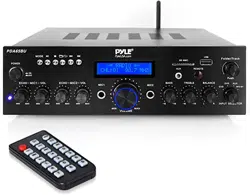
To get the most from our PHDA6BT, it is recommended that you review all of
the information provided in the instruction manual before operating the
equipment.
www.PyleUSA.com
4
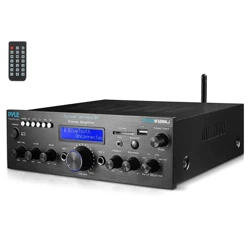
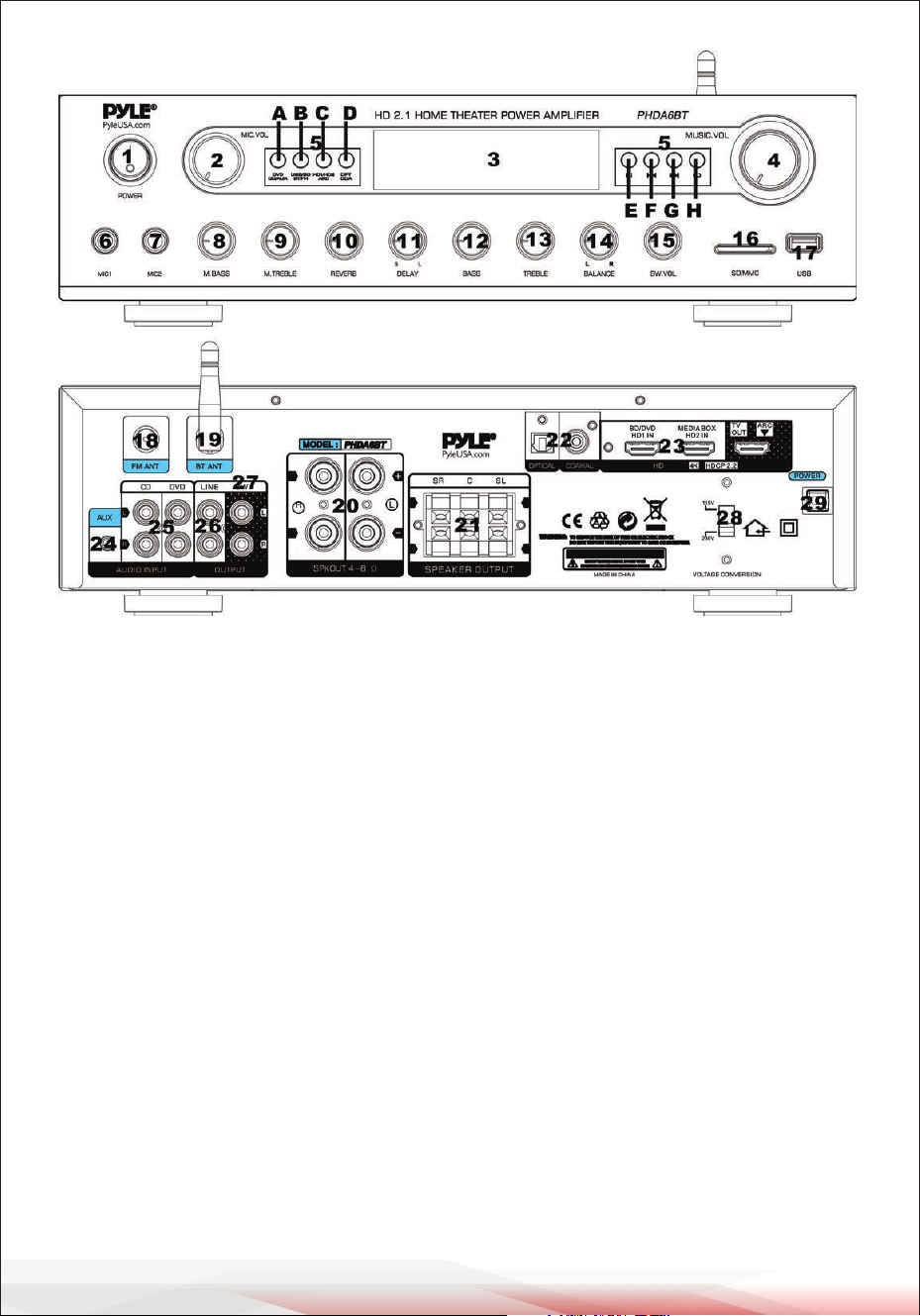
FRONT & BACK PANEL
1. Power ON/OFF Switch: Press this button to turn the unit On/O."
2. Microphone Volume Control: Turn this knob to adjust the volume of the
microphone echo.
3. LED Display Screen: Displays input sources and track time information.
4. Master Volume Control Knob: Turn this knob to adjust the master music
volume.
5. Control Board: Houses control buttons for inputs and MP3 functions.
A. DVD/CD/AUX Input button: Press this button to play music from the
DVD/CD/AUX input.
B. USB/SD/BT/MP3 Select button: Press this button to play music from the
USB/SD/FM or Bluetooth.
C. HDMI Selection Button: Press this button to play music from HDMI input
1/2 or output.
D. Coaxial and Optical Input button: Press this button to play music from
digital inputs.
E. PLAY/PAUSE BUTTON: Each press changes the operation from play to
pause or vice versa in USB/SD or Bluetooth mode. Press once to auto-scan
frequencies from 87.5MHz to 108MHz in FM mode; the unit will automatically
store the channels.

www.PyleUSA.com
5
F. PREV BUTTON: Use this button to select dierent functions based on the
three modes outlined below:
• In USB/SD/BLUETOOTH mode, use it to select the previous track.
• In FM mode, use it to select the previous channel.
• In FM/BLUETOOTH mode, holding this button for more than 3 seconds
will decrease the volume.
G. NEXT BUTTON: Use this button to select dierent functions based on the
three modes as follows:
• In USB/SD/BLUETOOTH mode, use it to select the next track.
• In FM mode, use it to select the next channel.
• In FM/BLUETOOTH mode, holding this button for more than 3 seconds
will increase the volume.
H. REPEAT BUTTON: This button allows you to play the music in repeat mode
(All or Single).
ALL: All tracks in the USB or SD CARD will be repeated in order without
interruption.
SINGLE: Repeat the currently playing track.
Steps for Connecting with Bluetooth Device
Once paired, you can play music from your Bluetooth device and use the
control buttons on the unit to select tracks.
1. Press the MODE button to choose Bluetooth mode; "BLUETOOTH" will be
displayed on the screen.
2. Search for the Bluetooth device name from other Bluetooth devices, and you
will nd the Bluetooth name - “BT”.
3. Select the Bluetooth name "BT" and wait for the devices to pair.
4. The PHDA6BT will emit a noise conrming that the devices have successfully
paired.
6. Microphone 1 Input: MIC 1 Input Jack for connecting microphones.
7. Microphone 2 Input: MIC 2 Input Jack for connecting microphones.
8. MICROPHONE BASS CONTROL KNOB: Turn this knob to adjust the bass level
of the microphone.
9. MICROPHONE TREBLE CONTROL KNOB: Turn this knob to adjust the treble
level of the microphone.
10. Microphone Reverb Control Knob: Turn this knob to adjust the Reverb
level of the microphone.
11. Microphone Delay Control Knob: Turn this knob to adjust the Delay level
of the microphone.

www.PyleUSA.com
6
12. Music Bass Control Knob: Turn this knob to adjust the low-frequency level
of music.
13. Music Treble Control Knob: Turn this knob to adjust the high-frequency
level of music.
14. Music Balance Control Knob: Turn this knob to adjust the volume level of
the L/R channel.
15. Subwoofer Volume Control Knob: Turn this knob to adjust the volume of
the subwoofer.
16. SD CARD SLOT: This is the SD Card Slot where you insert your SD Card to
play MP3 les.
17. USB PORT: This is the USB port where you insert your USB mass storage
device to play MP3 les.
NOTE: The USB input is ONLY meant to connect to a USB ash drive (thumb
drive). Connecting an MP3 player or computer directly to the USB ash drive
input will result in the unit failing to play audio from those devices.
18. FM Antenna Connector: Connect with FM antennas.
19. Bluetooth Antenna: Pull the antenna straight up to gain better Bluetooth
distance.
20. Main Speaker Output: Speaker binding post terminal to connect with the
main speaker.
21. Center & Surround Speaker Outputs: Press-type terminal to connect with
the center speaker and surround speakers.
22. Optical & Coaxial Inputs: To connect digital outputs.
23. HD Inputs & Output: To connect with the HD signal.
24. Aux Input: To connect with the Aux signal using a 3.5mm jack cable.
25. CD/DVD RCA Inputs: Connect the audio output jacks of DVD/CD to these
jacks.
26. Line Output: To connect with other electronic equipment audio input using
these jacks.
27. Subwoofer Output: To connect with an active subwoofer through these
jacks.
28. Power Switch: To select the correct power voltage accordingly.
29. Power Cord: Connect to the AC power socket. Make sure to select the correct
power voltage before connecting to the power socket.
www.PyleUSA.com
7
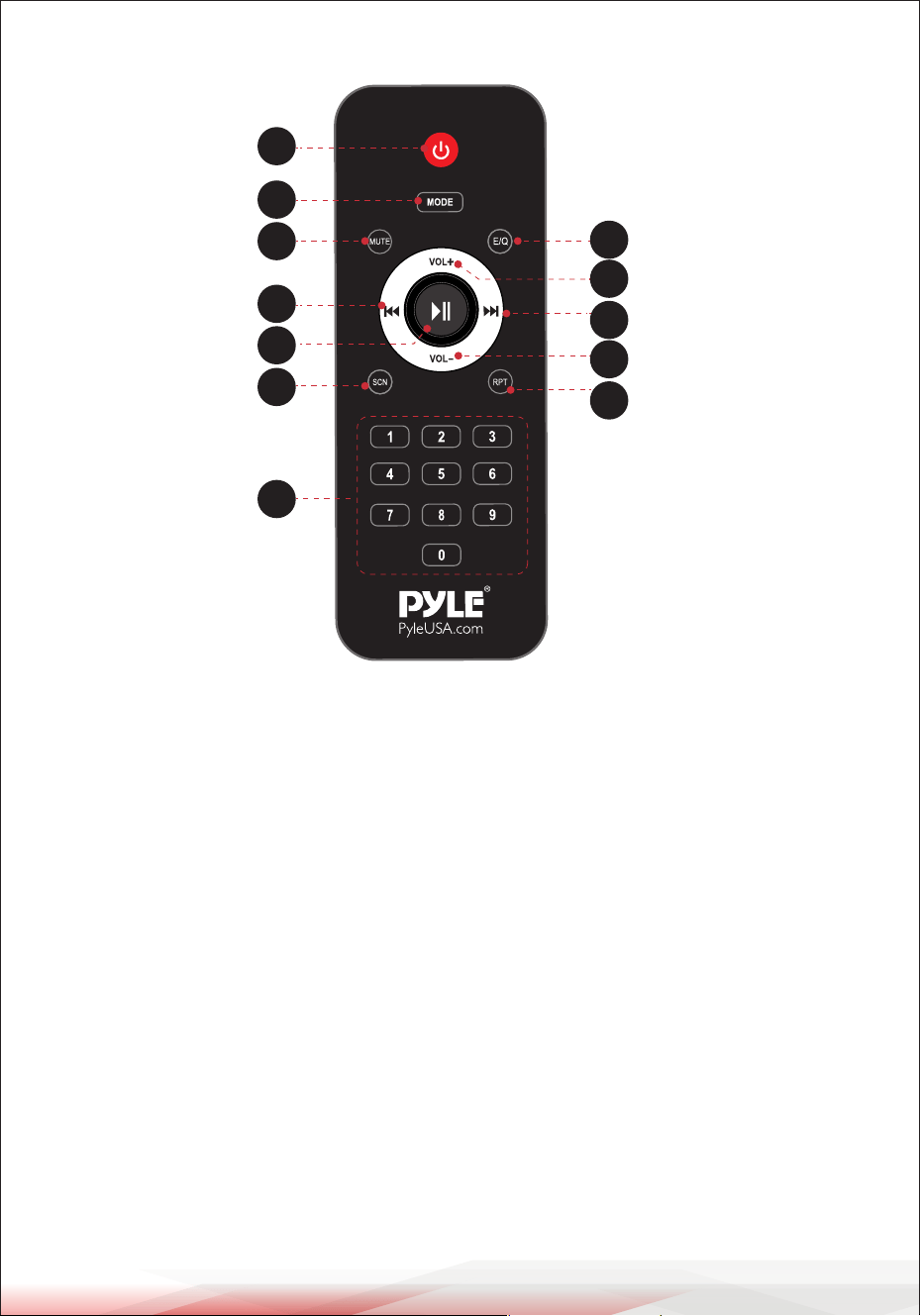
REMOTE CONTROL
1. Power Button: Press this button to turn the MP3 on or o.
2. Mode Selection Button: Press this button to select the playing mode:
USB/SD/FM/BLUETOOTH/Coaxial/Optical/HDMI.
3. Mute Button: Press this button to mute the music.
4. Music Mode Selection Button: Press this button to select the playing mode
of music.
5. Play/Pause Button: Controls the play and pause functions for MP3.
6. Volume Increase Button: Press this button to increase the volume.
7. Previous Track/Station Button: Press this button to select the previous track
or station.
8. Next Track/Station Button: Press this button to select the next track or station.
9. Auto Scanning Button (FM Mode): When in FM mode, press this button for
auto-scanning.
10. Volume Decrease Button: Press this button to decrease the volume.
11. Numeric Keypad: Press the numbers to select tracks directly.
The unit takes 1-2 seconds to respond in USB or SD mode.
12. Repeat Function Button: Press this button for single or all tracks repeat
function.
1
2
3
5
7
9
11
4
6
8
10
12

www.PyleUSA.com
8
Features:
•
USB Flash Drive & SD Memory Card Readers
•FM Radio with LED Digital Display
•Aux (3.5mm) Input
•Desktop Audio Mini Power Amplier
•Compact Home Theater-Stereo Receiver Style
•Built-in Bluetooth for Wireless Music Streaming
•Phono Inputs
•HDMI Digital Inputs and Outputs
•Optical/Coaxial Digital Signal Inputs
•Multi-Channel Audio Input Selection
•MP3/WAV/WMA Audio Files Support
•Connect and stream Audio from External Devices
•(2) 1/4'' Microphone Input Jacks
•(2) Pairs RCA (L/R) Audio Input Connectors
•(2) Pairs Banana Plug Speaker Output Connectors
•(1) RCA (L/R) Audio Output Connectors
•(1) 1/4'' Headphone Output Jacks
•(3) Pairs Press-type Speaker Output for Center and Surround (15Wx3)
•(1) RCA (L/R) Subwoofer Output
•Mic Talk-over Ability to Speak Over Audio, Karaoke Style
•Front Panel Audio Control Center
•Radio Station Auto-Search Scan
•Repeat Audio File Functions
•Treble, Bass, Master & Microphone Volume Adjustable
•Subwoofer Volume Adjustable
•Microphone Reverb and Delay Volume Adjustable
•AC 115V/230V Switchable
•Frequency Level Light on the Display
What's in the box:
•
Desktop Stereo Amplier
•Remote Control
•FM Antenna

www.PyleUSA.com
9
Bluetooth Connectivity:
•Receives Wireless Signal for Audio Streaming
•Simple & Hassle-Free Pairing Setup
•Integrated Antenna for Extended Wireless Range
•Works with All of Today’s Latest Devices
(Smartphones, Tablets, Laptops, Computers, etc.)
•Bluetooth Version: 5.0
•Bluetooth Network Name: 'BT'
•Wireless Range: 40'+ Ft.
Technical Specs:
•Construction Material: Metal
•LED Screen Size: (3.54” x 0.98”) -inches
•Remote Control Battery: 7AAA*2 (Battery Not Included)
•MAX Power Output: 400 Watt
•RMS Power Output: 200 Watt x 2
•Tone Control: Bass, f=100Hz +/-12dB, Treble, f=10 KHz +/-12dB
•Tone Control for Mic: Bass, f=100Hz +/-8dB, Treble, f=10 KHz +/-8dB
•Frequency Response: 20Hz-20 kHz
•Frequency Adjustment: +/-2dB
•Signal to Noise Ratio: >71dB
•T.H.D.: <1%
•Radio Station Presets: Up to 60 Stations
•Separation Degree: >48dB
•Power Supply: 115V/230V, Switchable
•Item Weight: 0.16 lbs.
•Product Dimensions (L x W x H): 9.44" x 13.7" x 3.54" -inches