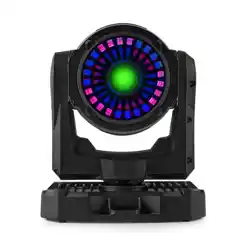
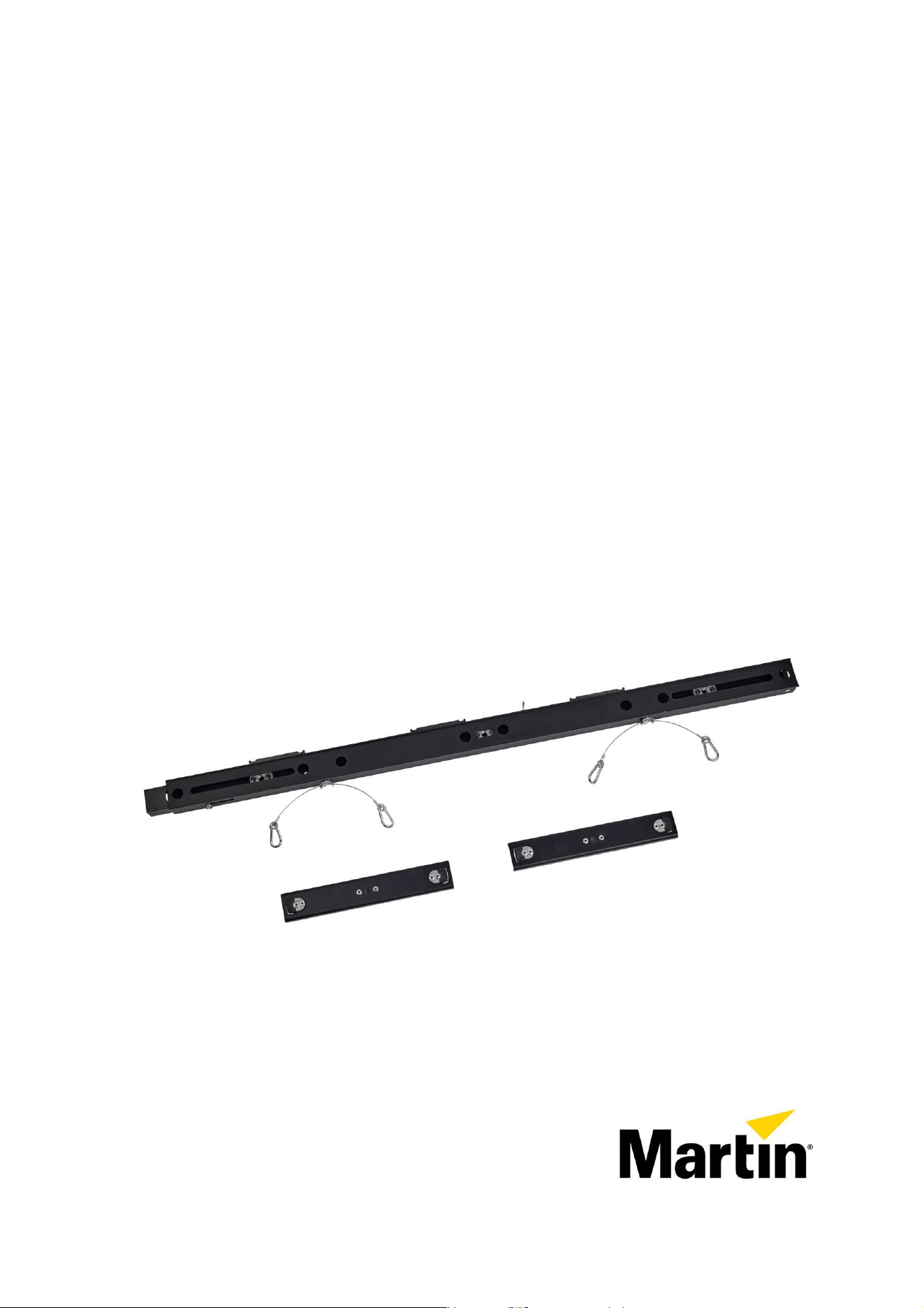
MAC One Fourbar
Safety and Installation Manual
Manuel de Sécurité et d’Installation
Sicherheits- und Installationshinweise
Manual de Seguridad e Instalación
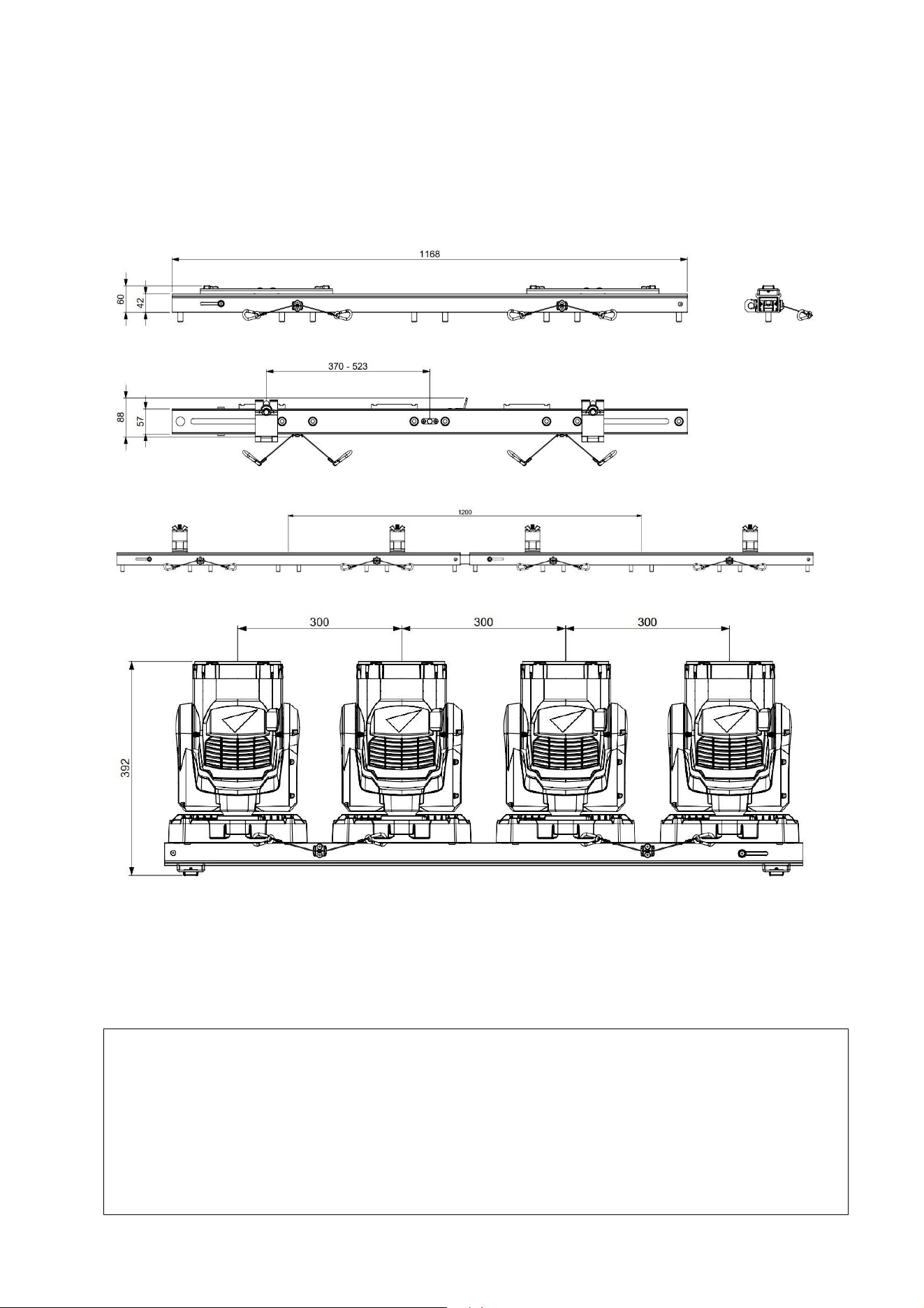
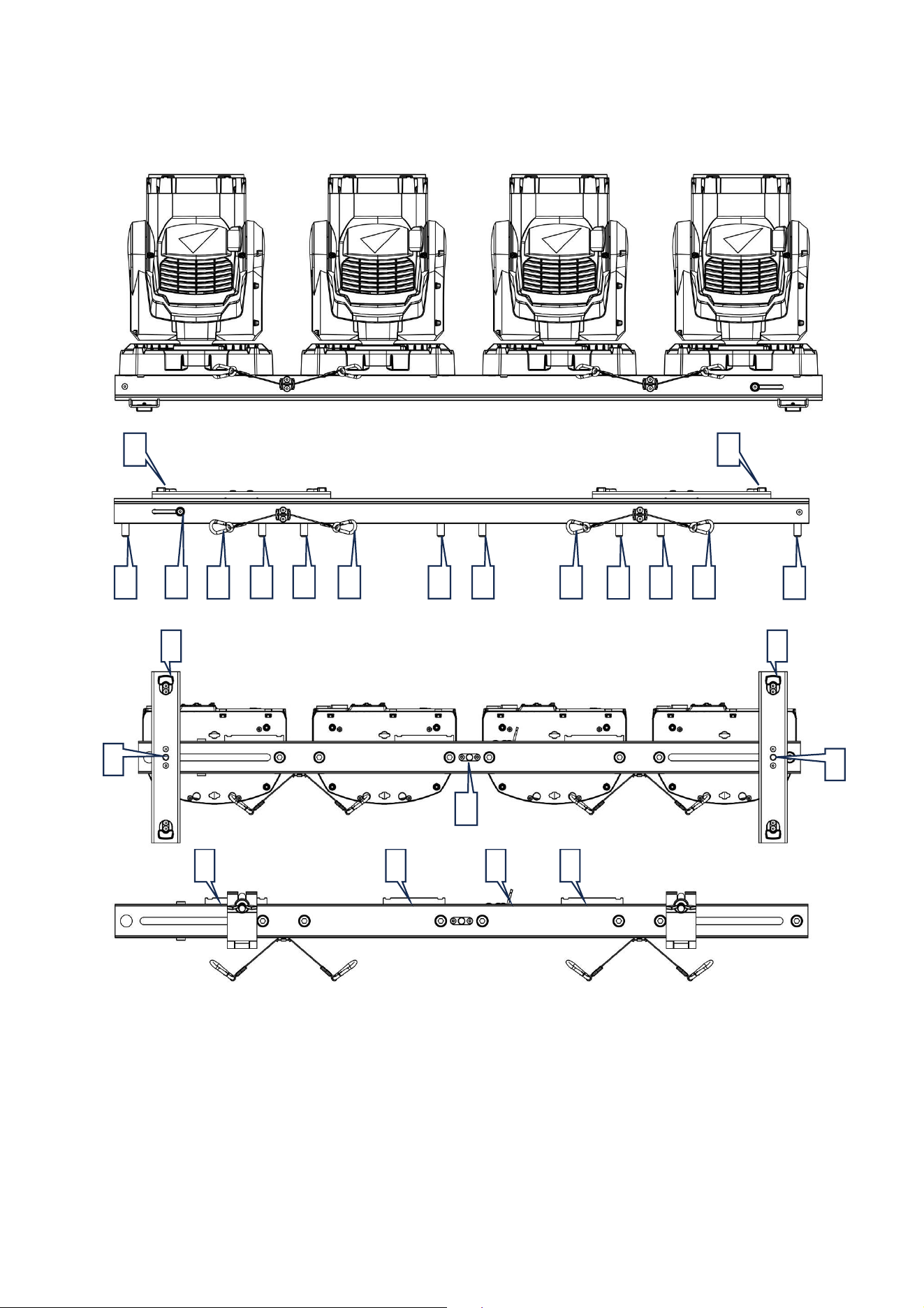
Dimensions
MAC One Fourbar
All dimensions are in millimeters
P/N MAR-91616127HU
Weight = 3.2 kg (7.1 lbs.)
Working coefficient = 10
ELL (Entertainment Load Limit) = 24 kg (52.91 lbs.)
©2024 HARMAN PROFESSIONAL DENMARK ApS. All rights reserved. Features, specifications, and appearance are subject to
change without notice. HARMAN PROFESSIONAL DENMARK ApS and all affiliated companies disclaim liability for any injury,
damage, direct or indirect loss, consequential or economic loss or any other loss occasioned by the use of, inability to use or
reliance on the information contained in this document. Martin® is a registered trademark of HARMAN PROFESSIONAL
DENMARK ApS registered in the United States and/or other countries.
HARMAN PROFESSIONAL DENMARK ApS, Olof Palmes Allé 44, 8200 Aarhus N, Denmark
HARMAN PROFESSIONAL, INC., 8500 Balboa Blvd., Northridge CA 91325, USA
www.martin.com
MAC One Fourbar Safety and Installation Manual, P/N 5145760-00, Revision B

Table of contents
Dimensions ............................................................................................................... 2
Safety Information ..................................................................................................... 4
Introduction ............................................................................................................... 5
Overview ................................................................................................................... 6
Physical Installation................................................................................................... 7
Before installing ................................................................................................. 7
Mounting fixtures on the MAC One Fourbar ..................................................... 7
Securing the MAC One Fourbar with a safety cable ......................................... 8
Installation of the MAC One Fourbar ................................................................. 8
Service and maintenance ....................................................................................... 10
Storage ............................................................................................................ 10
Cleaning .......................................................................................................... 10
Informations de sécurité ........................................................................................... 11
Introduction ............................................................................................................. 12
Vue d'ensemble ....................................................................................................... 13
Installation physique................................................................................................ 14
Avant de procéder à l’installation .................................................................... 14
Montage de projecteurs sur le MAC One Fourbar .......................................... 14
Fixation du MAC One Fourbar à l'aide d'une élingue de sécurité ................... 15
Installation du MAC One Fourbar .................................................................... 15
Entretien et maintenance ........................................................................................ 17
Entreposage .................................................................................................... 17
Nettoyage ........................................................................................................ 17
Sicherheitsinformationen ........................................................................................ 18
Einführung ............................................................................................................... 19
Übersicht ................................................................................................................. 20
Physische Installation ............................................................................................. 21
Vor der Installation ........................................................................................... 21
Montage von Geräten am MAC One Fourbar ................................................. 21
Sichern des MAC One Fourbar mit einem Sicherheitskabel ........................... 22
Installation des MAC One Fourbar .................................................................. 22
Wartung und Instandhaltung ................................................................................... 24
Lagerung ......................................................................................................... 24
Reinigung ........................................................................................................ 24
Información de seguridad ....................................................................................... 25
Introducción ............................................................................................................. 26
Descripción general ................................................................................................ 27
Instalación física ...................................................................................................... 28
Pasos previos a la instalación ......................................................................... 28
Accesorios de montaje en el MAC One Fourbar............................................. 28
Sujeción del MAC One Fourbar con un cable de seguridad ........................... 29
Instalación del MAC One Fourbar ................................................................... 29
Servicio y mantenimiento ........................................................................................ 31
Almacenamiento .............................................................................................. 31
Limpieza .......................................................................................................... 31
4 MAC One Fourbar Safety and Installation Manual, Rev. B
Safety Information
WARNING!
Read the safety precautions in this section before installing,
powering, operating or servicing these products.
The following symbols are used to identify important safety information on the product and in this
manual:
Warning!
Safety hazard. Risk
of severe injury or
death.
Warning!
See user
documentation.
This accessory is for professional use only. It is not for household use.
A revised version of this user manual will become available each time we can improve the
quality of the information we provide in it. Please check that you have the latest revision of
the user manual for this product before installing, operating or servicing the product.
Martin® user manual revisions are identified at the bottom of page 2. You can download
the latest user documentation from the product’s Product Support / Tech Docs page on the
Martin website at www.martin.com.
The instructions and safety limits given in this user manual are provided to make sure that
installers comply with the safety standards that apply to stage and studio environments.
Follow these instructions carefully and do not exceed the limits given, or you may create
an installation that is dangerous and does not meet the required safety standards.
Observe all locally applicable laws, regulations and codes regarding the safety of
permanent and temporary structures, installations and electrical systems.
Read this manual before installing, powering, operating or servicing this product, follow the
safety precautions listed below and observe all warnings given in this manual and printed
on the product.
Technical Support
If you have questions about how to install or operate the fixture safely, please contact
Harman Professional Technical support:
• For technical support in North America, please contact
HProTechSupportUSA@harman.com
Phone: (844) 776-4899
• For technical support outside North America, please contact your national distributor.
Protection from injury
Weight of MAC One Fourbar without fixtures = 3.2 kg (7.1 lbs.)
Do not install MAC One Fourbar using any other method or any other equipment than
those described in this manual.
Make sure that any structure used for support can hold at least six (6) times the weight of
all the items it supports (or more if required by locally applicable regulations).

5 MAC One Fourbar Safety and Installation Manual, Rev. B
If suspending from a rigging structure, fasten the MAC One Fourbar to a truss or similar
support using two rigging clamps. Do not try to suspend the MAC One Fourbar from only
one rigging clamp. Do not use safety cables as the primary means of support.
Remove as much slack as possible from the safety cable (by looping it more than once
around the chord of a rigging truss, for example). Make sure that, if a primary means of
attachment fails, the MAC One Fourbar cannot fall more than 20 cm (8 inches) maximum
before the safety cable catches it.
If the safety cable attachment point becomes deformed, do not suspend the Fourbar. Have
the accessory repaired by an authorized Martin service partner.
• Check that MAC One Fourbar, rigging hardware and other parts in the installation are
securely fastened and cannot fall, causing injury or damage.
• Ensure that all rigging hardware items (rigging clamps, omega brackets etc.) are in
perfect condition, are approved by a professional body such as TÜV for the weight that
they will support, and that they comply with all locally applicable regulations.
• Block access below and around the work area and work from a stable platform
whenever installing, servicing or moving items in the installation.
• Make sure that you respect the limit that applies to the installation concerned when
installing a line of MAC One fixtures hanging from the MAC One Fourbar.
Introduction
The MAC One Fourbar enables MAC One fixtures to be transported and rigged in sets of four. The MAC
One Fourbar is 1168 mm / 45.9" long and holds fixtures at 300 mm / 11.8" center-to-center spacing. The
MAC One Fourbar with four MAC One fixtures attached fits into the MAC One flightcase, so the entire
MAC One Fourbar can remain assembled during transport.
The MAC One Fourbar features three M12 mounting points (two sliding + one fixed) which can be used
to attach standard rigging clamps. Two feet for floor placement of the MAC One Fourbar are also
included in the package. These feet are attached to the MAC One Fourbar using the two sliding M12
mounting points.
The MAC One Fourbar is fitted with an end-to-end alignment system, which makes it easy to create a
continuous line of fixtures without gaps or misalignment.
Safety cables to secure the MAC One fixtures to the MAC One Fourbar are pre-attached to the MAC
One Fourbar for ease of use. To secure the overall safety cable for the MAC One Fourbar to a
supporting structure such as a truss, it is equipped with a safety cable attachment point that can carry
the weight of the MAC One Fourbar and the four fixtures attached to it.
Daisy-chain cables between the MAC One fixtures can be routed neatly through the guiding system on
the MAC One Fourbar and secured in place using standard cable ties. This results in a simple and
aesthetically pleasing solution which can remain fully cabled during transport (in the flightcase).
All Martin user documentation is available for download from the Product Support / Tech Docs pages at
www.martin.com.
6 MAC One Fourbar Safety and Installation Manual, Rev. B
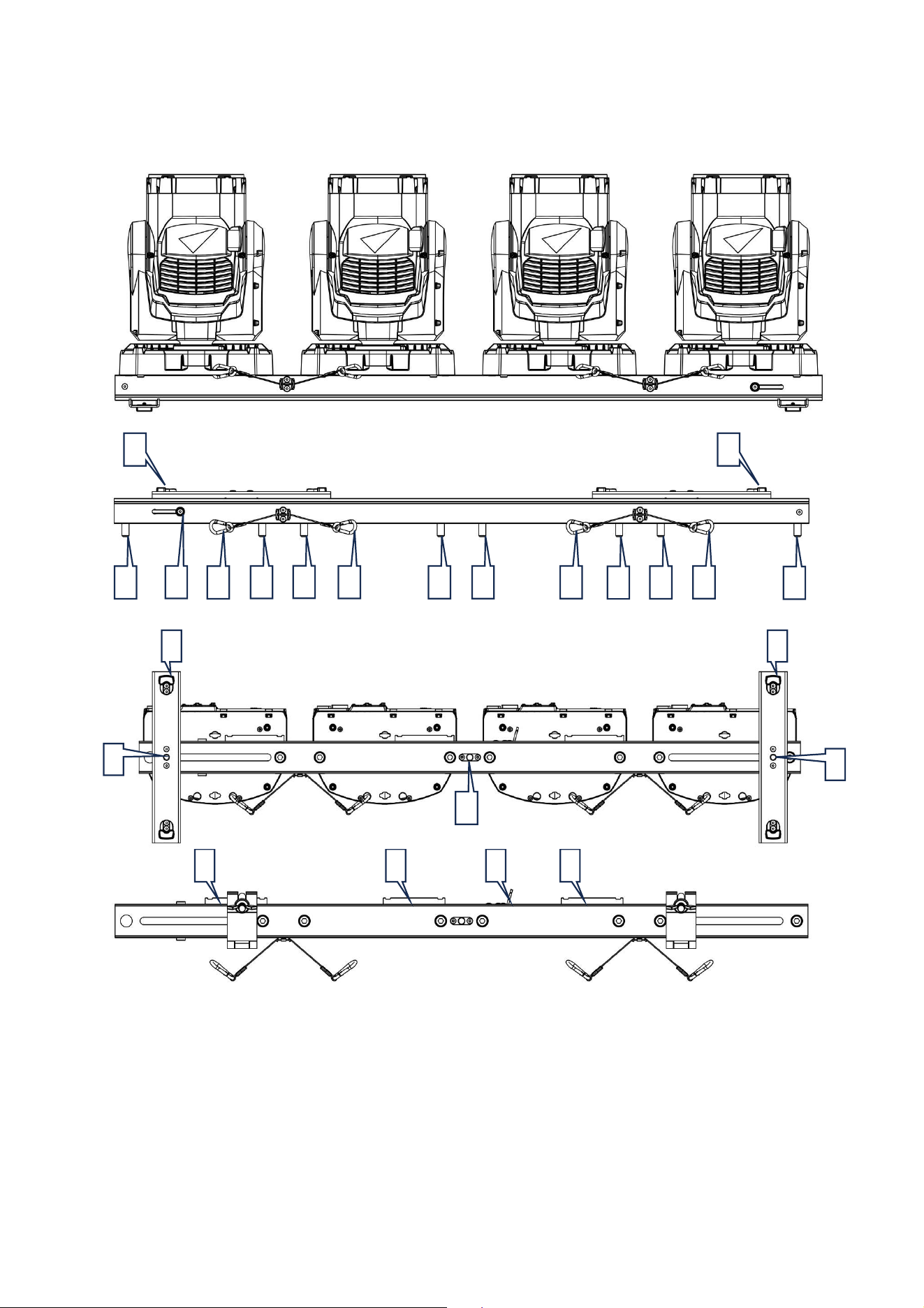
Overview
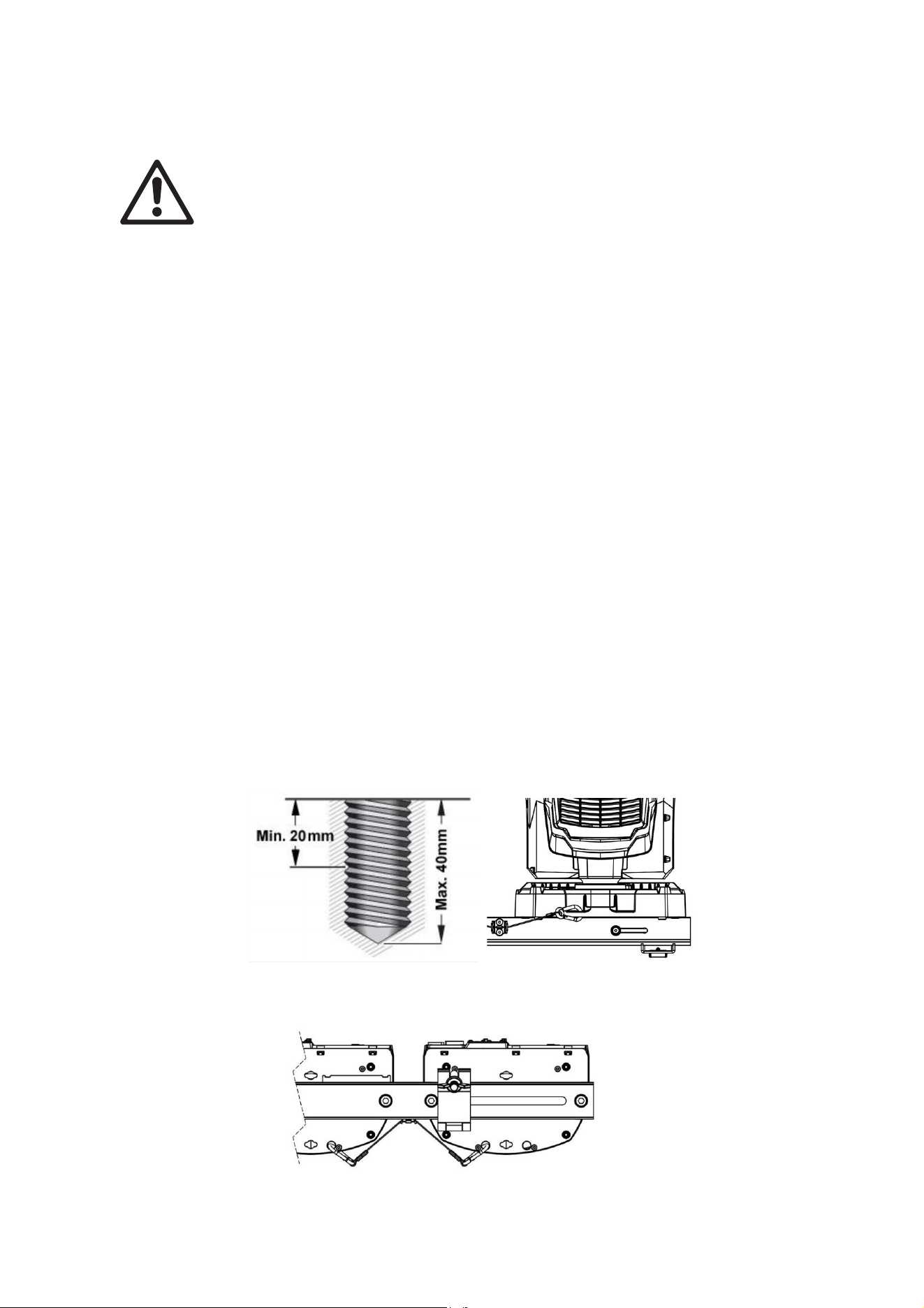
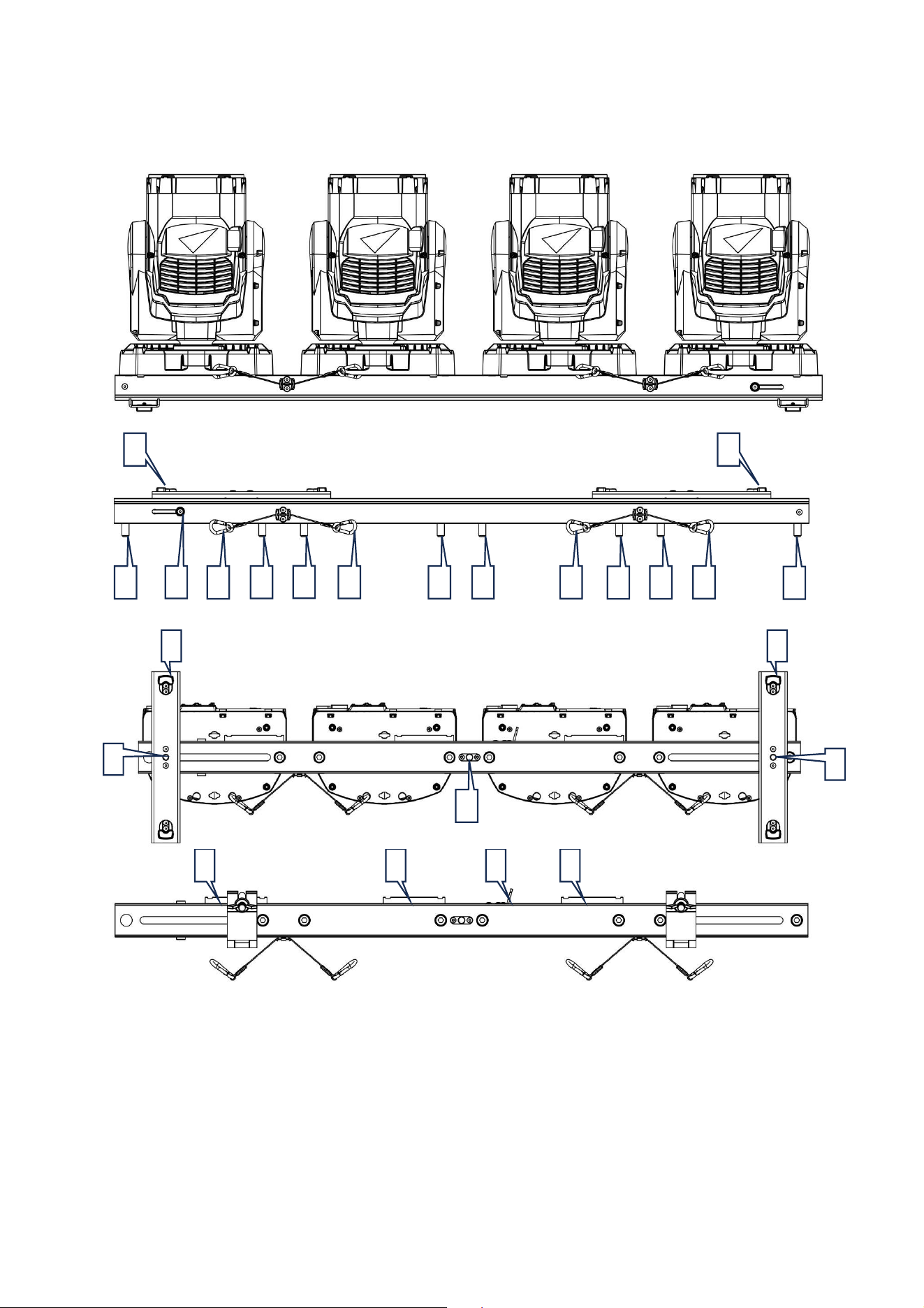
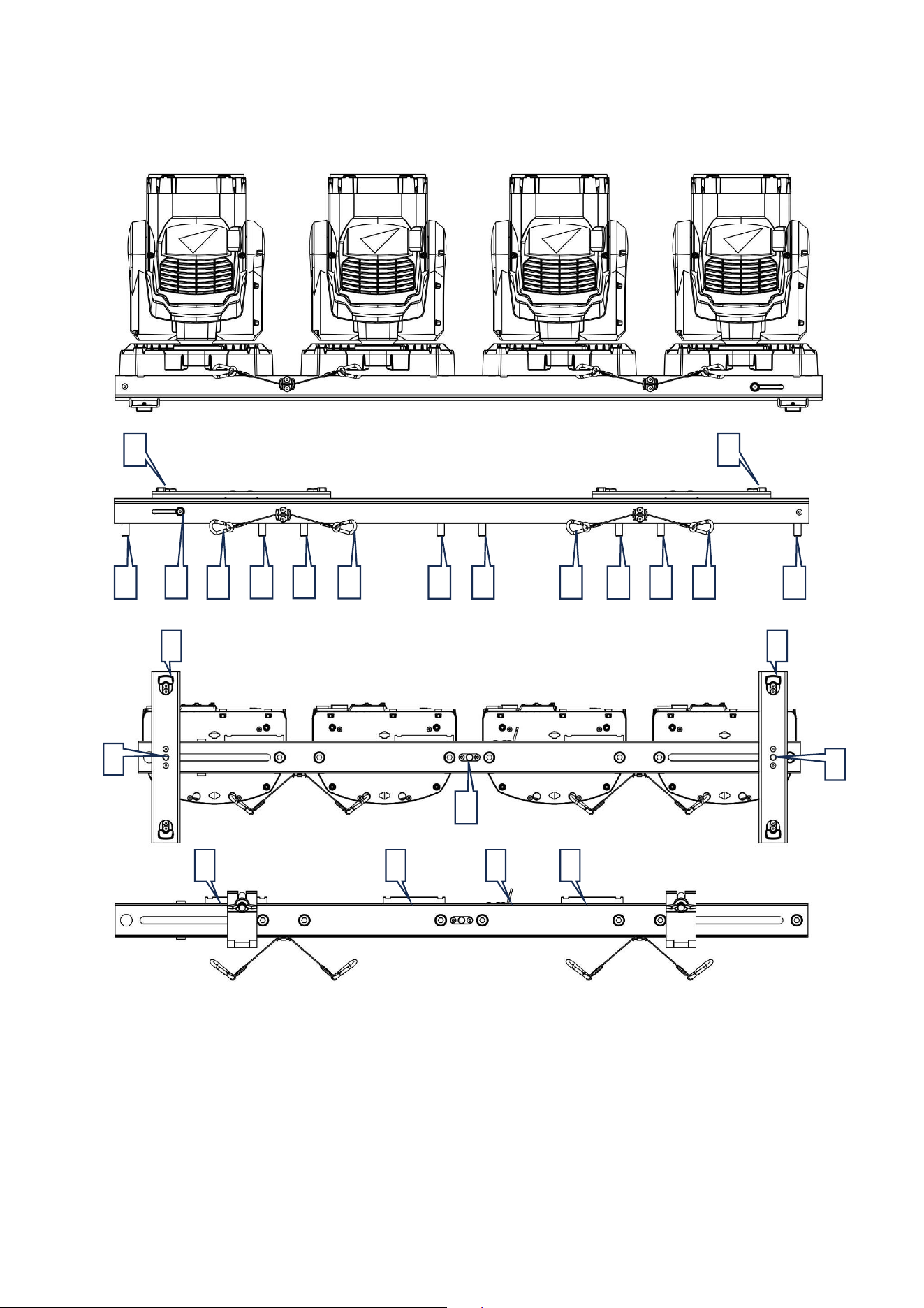
A – M12 x 25 mm bolts for attaching fixture
B – Safety cables for securing fixtures
C – Feet – Lock at 0, 90 or remove
D – M12 screws for feet or clamp
E – Release buttons for alignment guide
F – Attachment point for MAC One Fourbar safety
cable
G – Cabling brackets for fixation of electrical
cables using cable ties
B
A
C
G
G
G
F
C
E
A
A
A
A
B
B
B
A
A
A
C
C
D
D
D
7 MAC One Fourbar Safety and Installation Manual, Rev. B
Physical Installation
Warning! Read ‘Safety Information’ starting on page 4 before installing the MAC One
Fourbar.
Warning! When suspending a MAC One Fourbar above ground level, secure it against
the failure of primary attachments with a safety cable that is approved as a safety
attachment for the total weight that it will secure.
The safety and suitability of lifting equipment, installation location, anchoring method, mounting
hardware, and suspension structures is the responsibility of the installer. Observe all local safety
regulations and legal requirements when installing the MAC One Fourbar. Installation must be carried
out by qualified professionals only. Contact your Martin supplier for assistance if you have any
questions about how to install this product safely.
When using the MAC One Fourbar, make sure that all parts of the system are installed as directed in
this user manual to meet the safety requirements of stage and studio environments.
Martin can supply installation hardware such as rigging clamps and safety cables that are suitable for
use with the MAC One Fourbar (see the product specifications on the MAC One product page on the
Martin website at www.martin.com).
Before installing
Before creating an installation with the MAC One Fourbar:
1. Read “Safety Information” on page 4 and take special note of the precautions relevant for installing
products.
2. Check that supporting structures is designed for the total weight of the MAC One Fourbar.
3. Block access under and around the work area.
Mounting fixtures on the MAC One Fourbar
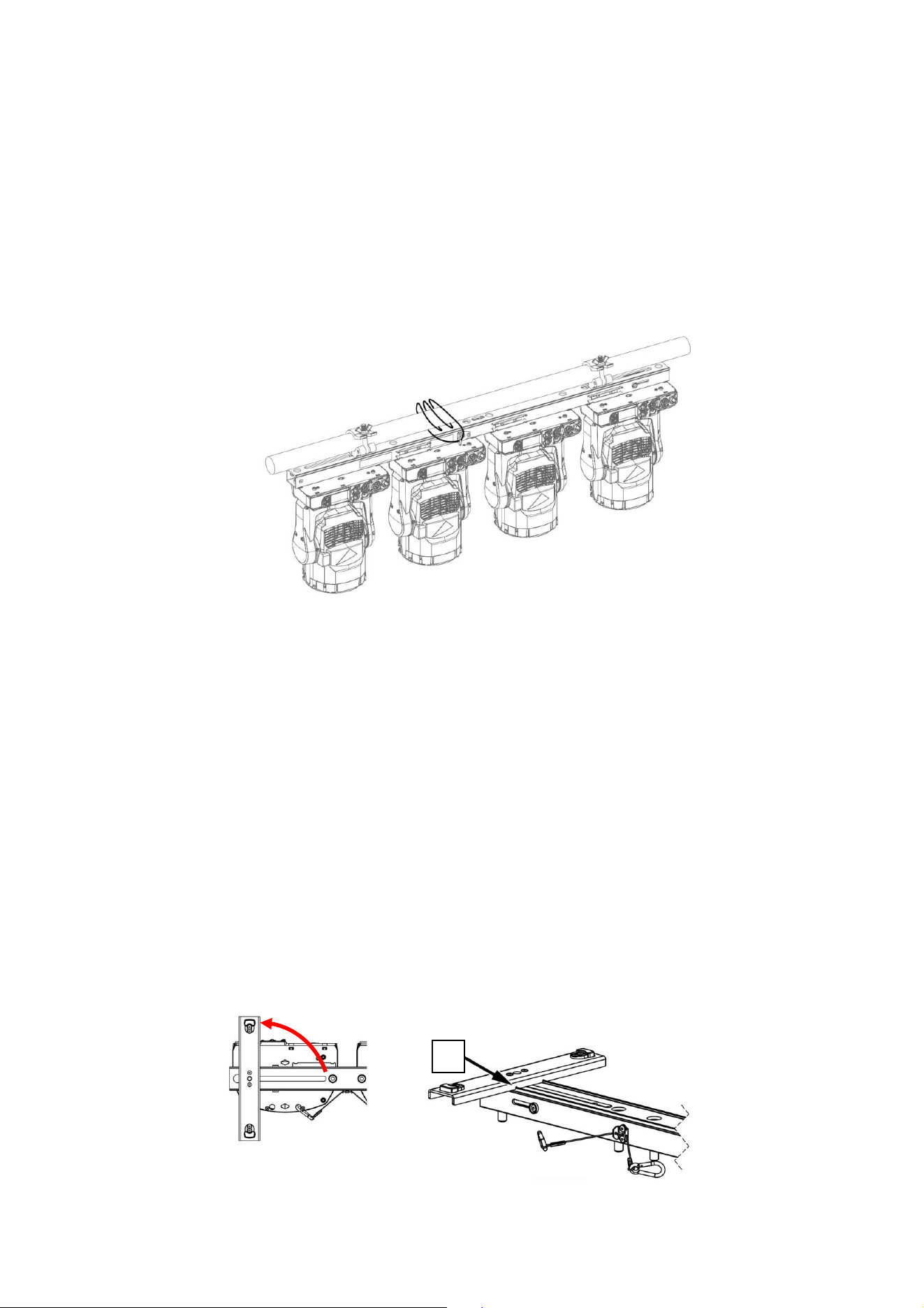
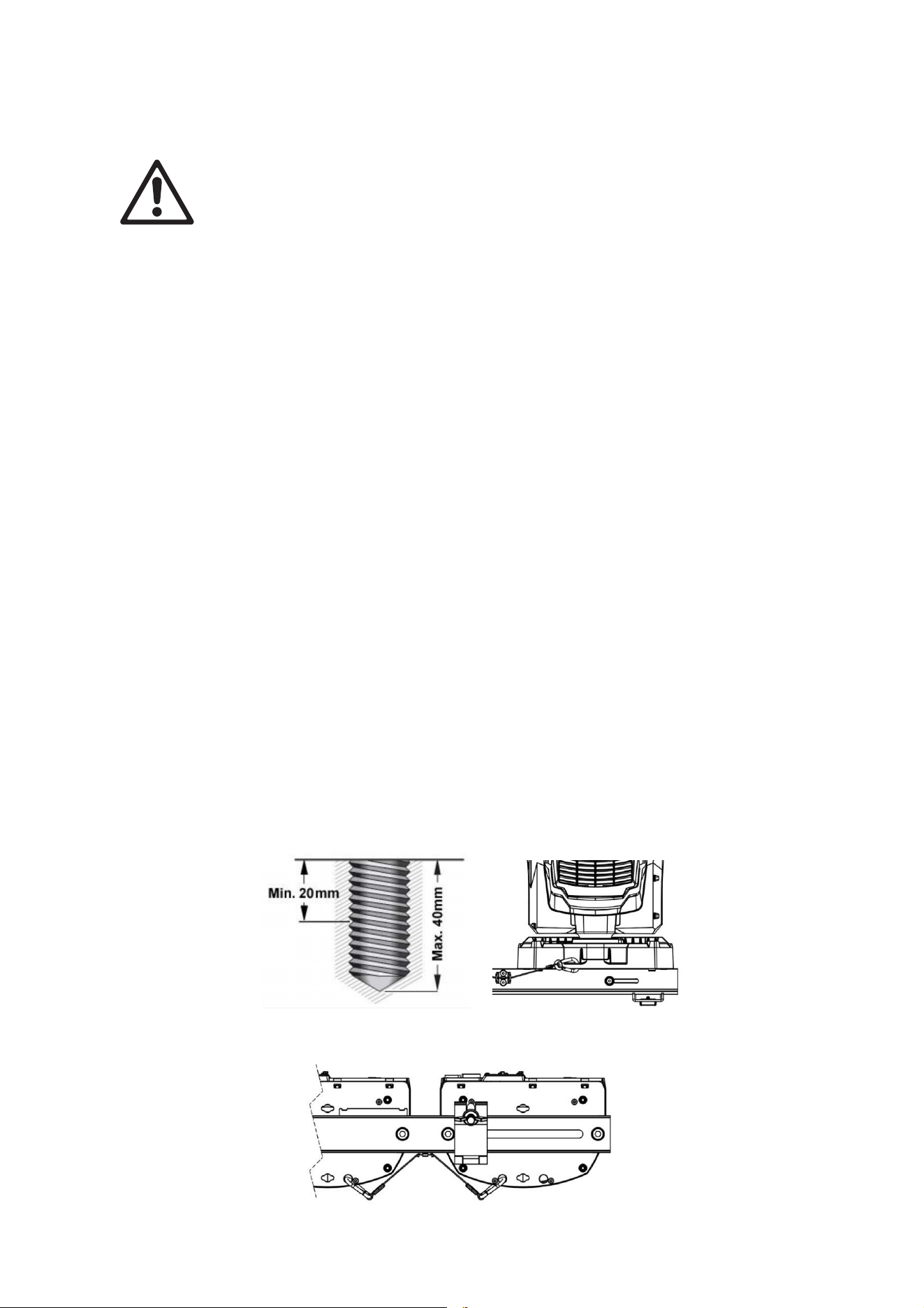
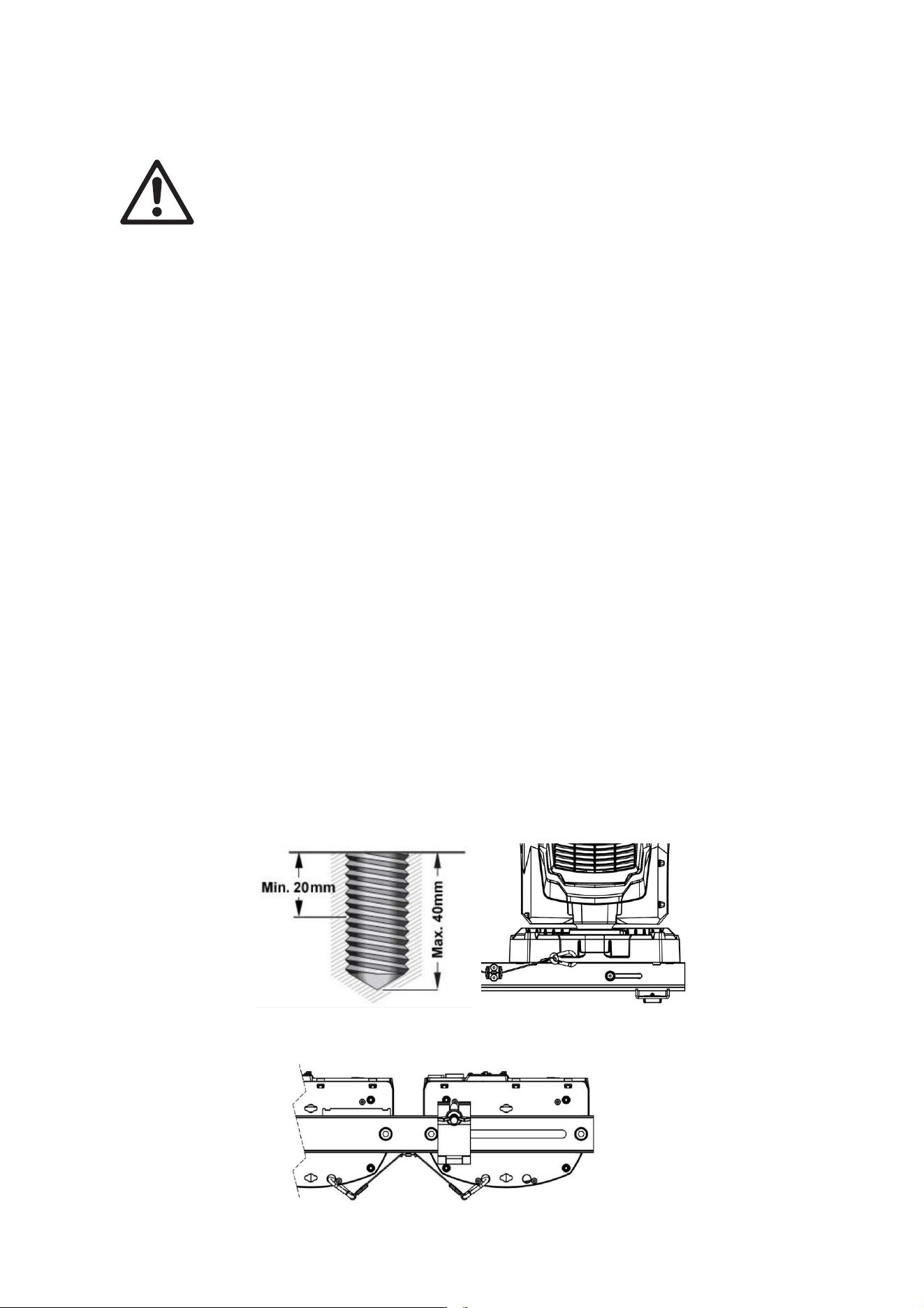
1. Bolt each fixture to the MAC One Fourbar by passing the provided M12 grade 8.8 steel minimum
bolts through the holes in the Fourbar, and into the threaded holes [A] on each side of the base of
the fixture in the illustration above. Bolts must protrude minimum 20 mm and maximum 40 mm into
the base of the fixture (see illustration below).
2. Apply a small quantity of Loctite 243 to the threads of the bolts before fastening them into the base.
Use two bolts, or you will damage the fixture base and create a safety hazard.
3. Fasten each fixture to the MAC One Fourbar by securing the attached safety cables [B] on the MAC
One Fourbar to the safety cable attachment point on the base of each fixture.
8 MAC One Fourbar Safety and Installation Manual, Rev. B
Securing the MAC One Fourbar with a safety cable
1. Whenever mounting a MAC One Fourbar overhead, secure the array with safety cables.
2. Obtain a safety cable that is approved for the weight of the MAC One Fourbar including the fixtures
mounted.
3. Fasten the safety cable to the safety cable attachment point on the MAC One Fourbar (see [F] in
the Overview section).
4. Loop the safety cable around the truss or secure structure that the MAC One Fourbar is fastened
to.
5. Remove as much slack as possible from the safety cable (by looping the cable around the truss for
example) and fasten it to a secure anchoring point.
Installation of the MAC One Fourbar
The rest of this chapter covers different types of installation using the MAC One Fourbar, provided that
fixtures are mounted to the MAC One Fourbar as described in the paragraph “Mounting fixtures on
MAC One Fourbar” above:
1. Using as a floor stand.
2. Hanging overhead.
3. Considerations for pole mount (floor plate).
4. Aligning MAC One Fourbars.
1. Using as a floor stand
The MAC One Fourbar can be placed on a hard, flat, secure horizontal surface provided that there is no
risk that it may cause an obstruction or be knocked over.
To use the MAC One Fourbar as a floor stand:
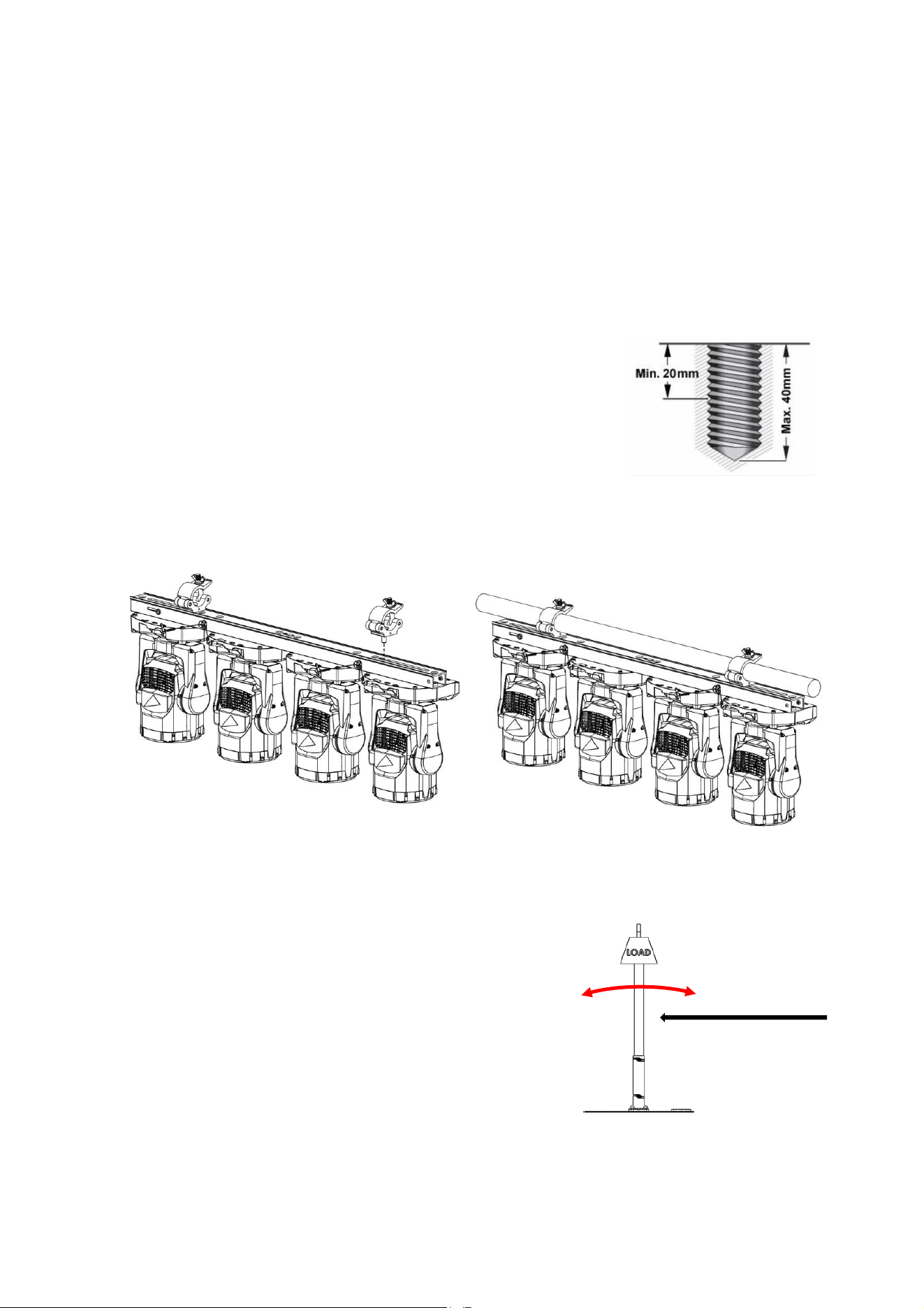
1. Loosen the two M12 screws [D] securing the feet [C] on the bottom of the MAC One Fourbar.
2. Turn each foot 90.
3. Ensure that the cutaways [H] on the feet lock into place with the edges on the MAC One Fourbar.
4. Tighten the screws [D] to secure feet in their position.
H
9 MAC One Fourbar Safety and Installation Manual, Rev. B
2. Hanging overhead
The MAC One Fourbar can be clamped to a truss or similar rigging structure in any orientation using
two half coupler type rigging clamps (see illustrations below) bolted directly to the body of the MAC One
Fourbar.
To clamp the MAC One Fourbar to a truss directly with half-coupler clamps:
1. Check that the rigging structure can support at least six times (or more if required by local
regulations) the weight of all fixtures and equipment to be installed on it.
2. Block access under the work area.
3. Loosen the two M12 screws [D] securing the feet on the bottom of the MAC One Fourbar and
remove feet.
4. Bolt two half-coupler clamps securely to the body of the MAC One
Fourbar by passing an M12 grade 8.8 steel minimum bolt through
each clamp and fastening the bolts into the threaded holes [D] in the
illustration in the ‘Overview’ section. Bolts must protrude minimum
20 mm and maximum 40 mm into the body of the MAC One Fourbar
(see illustration on right). The clamps must be in perfect condition
and approved for the weight that they will support. Do not use one
single clamp, or you will damage the MAC One Fourbar body and
create a safety hazard.
5. Fasten the two half-coupler clamps securely to a rigging truss or similar.
6. Secure both MAC One Fourbar and fixtures using safety cables (see sections ‘Securing MAC One
Fourbar with a safety cable’ and ‘Mounting fixtures on MAC One Fourbar).
3. Pole-mounted (floor plate)
The MAC One Fourbar can be clamped to a pole or similar rigging structure in any orientation using two
half coupler type rigging clamps (see illustration above) bolted
directly to the body of the MAC One Fourbar.
In these instances, you should be aware of circumstantial
factors like balance, stability, wind force etc.
When using the MAC One Fourbar clamped to a pole on a
tripod stand or a floor plate:
1. Block access around the work area.
2. Refer to instructions from previous paragraph ‘Hanging
overhead’.
Wind
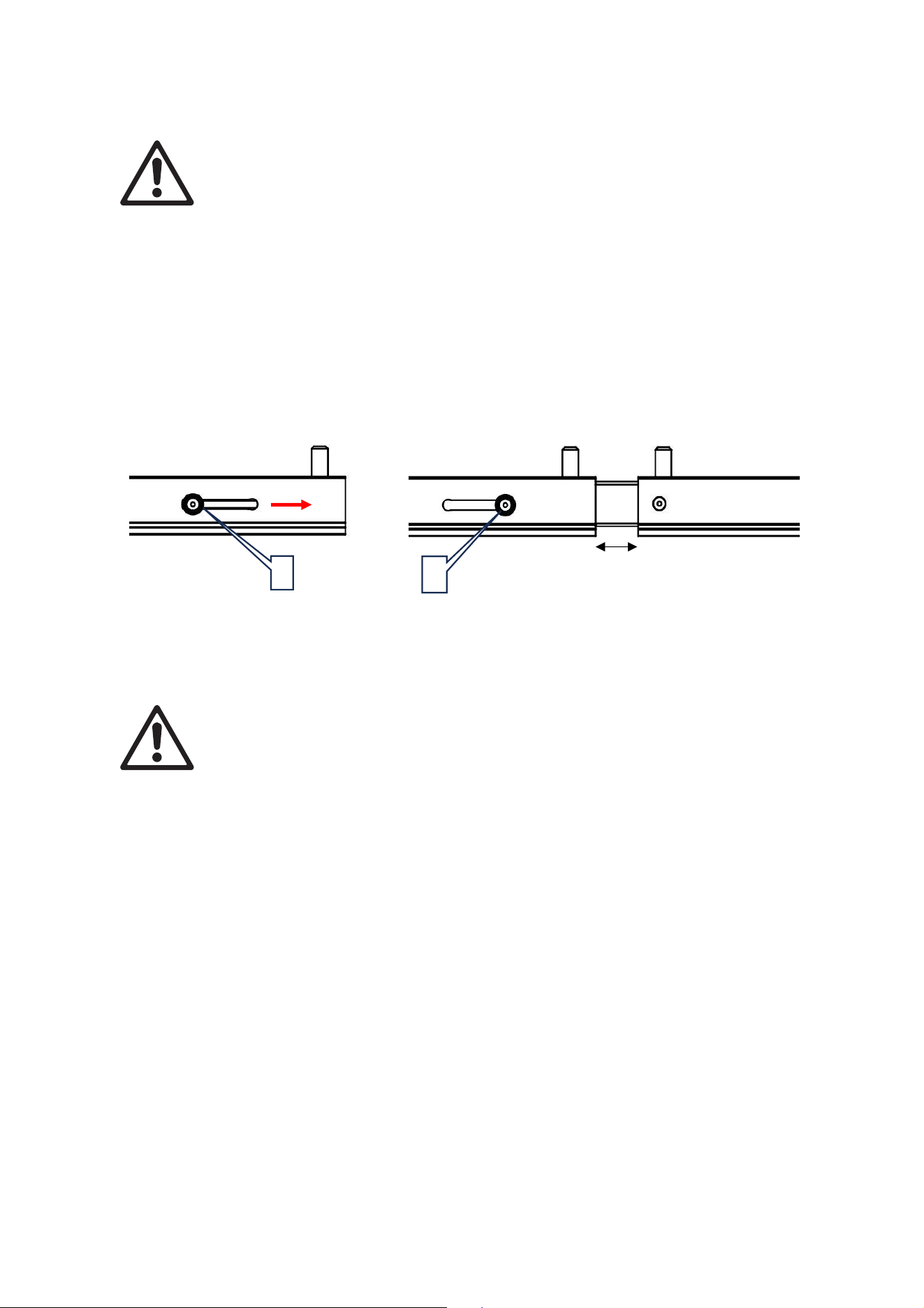
10 MAC One Fourbar Safety and Installation Manual, Rev. B
4. Aligning MAC One Fourbars
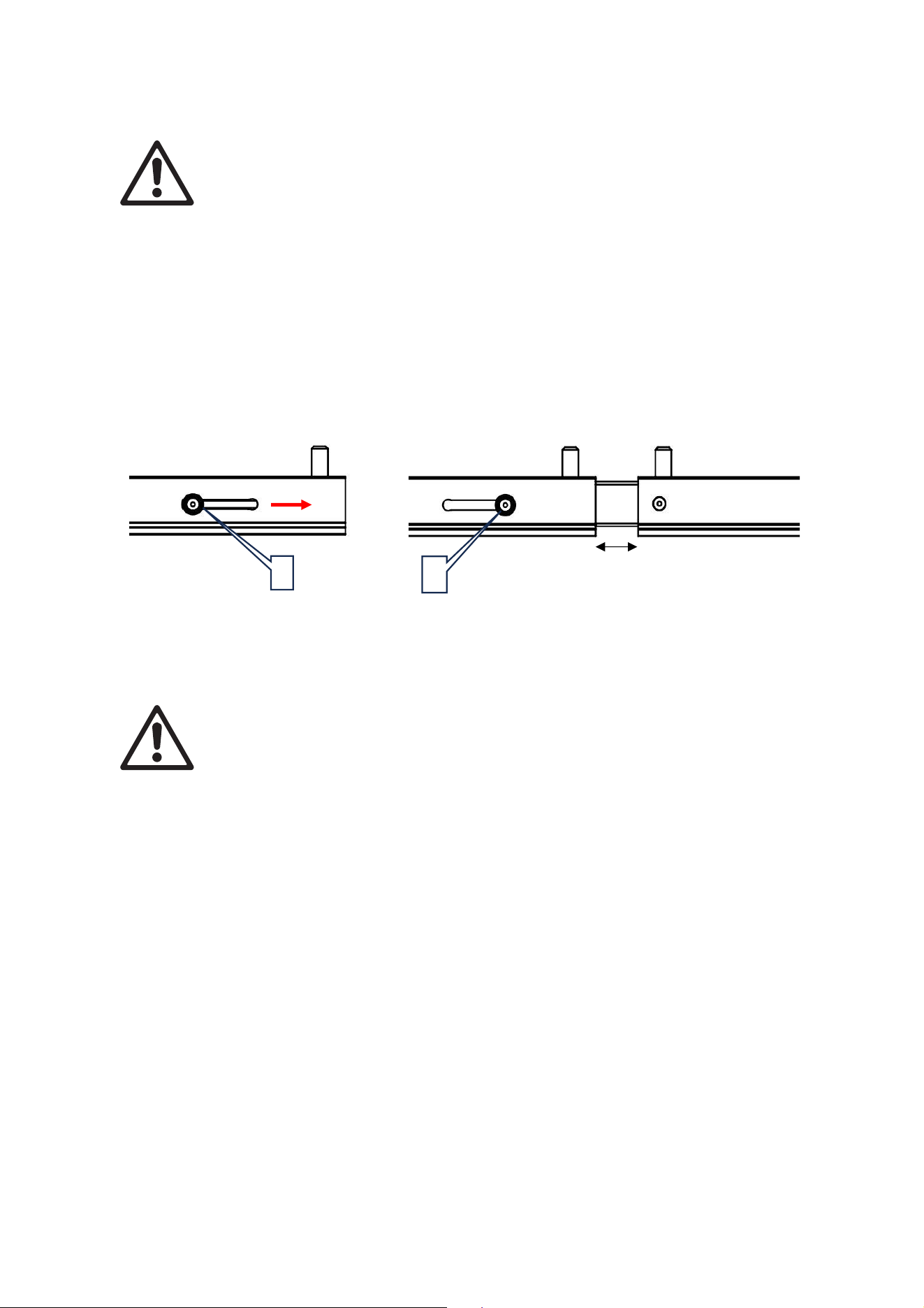
Warning! MAC One Fourbar alignment guides are for alignment purposes only and
must always be used when aligning MAC One Fourbars end-to-end.
Note the following:
• When installing two or more MAC One Fourbars next to each other, use alignment guides to ensure
even spacing and alignment.
• The alignment guide is located in one end of the MAC One Fourbar.
To use alignment guides:
1. Press and hold the buttons [E] releasing the alignment guide.
2. Slide the alignment guide into the opening at the end of the next MAC One Fourbar until it hits the
stop leaving a gap of 32 mm.
Service and maintenance
Warning! Refer any service operation not described below to a service technician
approved by Martin Professional. Removing any cover may cause a safety risk or
unsatisfactory performance and will invalidate the product warranty.
Refer any service or repair operation not described in this manual to an authorized
Martin service technician. Do not try to carry out such an operation yourself, as doing
so may present a health or safety risk. It may also cause damage or malfunction, and it
may void your product warranty.
Installation, on-site service and maintenance can be provided worldwide by the Martin Professional
Global Service organization and its approved agents, giving owners access to Martin’s expertise and
product knowledge in a partnership that will ensure the highest level of performance throughout the
product’s lifetime. Please contact your Martin supplier for details.
Storage
Store parts in a dry environment. Make sure that parts are dry before packing them in flightcases.
Cleaning
Do not use abrasive, caustic, or solvent-based products for cleaning, as they can cause surface
damage.
If the accessory has been used in a marine or coastal environment, clean each part thoroughly to avoid
the buildup of salt that can cause corrosion.
E
E
32 mm
11 MAC One Fourbar Safety and Installation Manual, Rev. B
Informations de sécurité
ATTENTION !
Lisez les précautions d’emploi de cette section avant d'installer,
d'allumer, d'utiliser ou d'entretenir ces produits.
Les symboles suivants sont utilisés pour identifier les informations de sécurité importantes sur le produit
et dans ce manuel :
Attention !
Risque pour la
sécurité. Risque de
blessures graves
ou mortelles.
Attention !
Consulter la
documentation
d’utilisation.
Cet accessoire est réservé à un usage professionnel. Il n'est pas destiné à un usage
domestique.
Une version révisée de ce manuel d'utilisation sera disponible chaque fois que nous
pourrons améliorer la qualité des informations qu'il contient. Veuillez vérifier que vous
disposez de la dernière version du manuel d'utilisation de ce produit avant de l'installer, de
l'utiliser ou d’effectuer un entretien. Les révisions du manuel d'utilisation Martin® sont
identifiées au bas de la page 2. Vous pouvez télécharger la documentation d’utilisation la
plus récente à partir de la page Product Support / Tech Docs du produit sur le site web de
Martin à l'adresse www.martin.com.
Les instructions et les limites de sécurité indiquées dans ce manuel d'utilisation sont
fournies pour s'assurer que les installateurs respectent les normes de sécurité qui
s'appliquent aux environnements de scène et de studio. Suivez attentivement ces
instructions et ne dépassez pas les limites indiquées, sous peine de créer une installation
dangereuse et non conforme aux normes de sécurité requises. Respectez toutes les lois,
réglementations et tous les codes applicables à l’échelle locale concernant la sécurité des
structures, des installations et des systèmes électriques à vocation temporaire ou
permanente.
Lisez ce manuel avant d'installer, d'alimenter, d'utiliser ou d’entretenir ce produit, suivez
les précautions de sécurité énumérées ci-dessous et respectez tous les avertissements
figurant dans ce manuel et imprimés sur le produit.
Assistance technique
Si vous avez des questions sur la manière d'installer ou d'utiliser l'accessoire en toute
sécurité, veuillez contacter le service d'assistance technique professionnelle de Harman :
• Pour l'assistance technique en Amérique du Nord, veuillez contacter
HProTechSupportUSA@harman.com
Téléphone : (844) 776-4899
• Pour obtenir une assistance technique en dehors de l'Amérique du Nord, veuillez
contacter votre distributeur national.
Protection contre les blessures
Poids du MAC One Fourbar sans projecteurs MAC One = 3,2 kg
FRENCH/FRANÇAIS

12 MAC One Fourbar Safety and Installation Manual, Rev. B
N'installez pas le MAC One Fourbar en utilisant une autre méthode ou d’autres
équipements que ceux décrits dans ce manuel.
Assurez-vous que toute structure utilisée comme support peut supporter au moins six (6)
fois le poids de tous les objets qu'elle supporte (ou plus si les réglementations locales en
vigueur l'exigent).
Si le MAC One Fourbar est suspendu à une structure d’accroche, fixez-le à une poutrelle
ou à un support similaire à l'aide de deux colliers. N'essayez pas de suspendre le MAC
One Fourbar à un seul collier. N’utilisez pas des élingues de sécurité comme principal
moyen de support.
Éliminez le plus de mou possible de l’élingue de sécurité (en la bouclant plusieurs fois
autour de la membrure d'une poutrelle, par exemple). Assurez-vous qu'en cas de
défaillance d'un moyen de fixation primaire, le MAC One Fourbar ne peut pas tomber de
plus de 20 cm avant que l’élingue de sécurité ne le rattrape.
Si le point d'attache de l’élingue de sécurité se déforme, ne suspendez pas le Fourbar.
Faites réparer l'accessoire par un partenaire de service Martin agréé.
• Vérifiez que le MAC One Fourbar, le matériel d’accroche et les autres pièces de
l'installation sont solidement fixés et ne peuvent pas tomber et causer des blessures ou
des dommages.
• Assurez-vous que tous les éléments du matériel d’accroche (colliers, supports en
oméga, etc.) sont en parfait état, qu'ils sont approuvés par un organisme professionnel
tel que le TÜV pour le poids qu'ils supporteront et qu'ils sont conformes à toutes les
réglementations locales en vigueur.
• Bloquez l'accès en dessous et autour de la zone de travail et travaillez à partir d'une
plate-forme stable lorsque vous installez, entretenez ou déplacez des éléments dans
l'installation.
• Veillez à respecter la limite qui s'applique à l'installation concernée lorsque vous
installez une ligne de projecteurs MAC One suspendus au MAC One Fourbar.
Introduction
Le MAC One Fourbar permet de transporter et de monter des projecteurs MAC One par groupes de
quatre. Le MAC One Fourbar mesure 1168 mm de long et maintient les projecteurs avec un
espacement de 300 mm de centre à centre. Le MAC One Fourbar équipé de quatre projecteurs MAC
One peut se ranger dans le flightcase MAC One, ce qui permet de laisser l'ensemble du MAC One
Fourbar assemblé pendant le transport.
Le MAC One Fourbar dispose de trois points de montage M12 (deux coulissants + un fixe) qui peuvent
être utilisés pour attacher des colliers standard. Le carton d’emballage contient également deux pieds
pour placer le MAC One Fourbar au sol. Ces pieds se fixent au MAC One Fourbar à l'aide des deux
points de fixation M12 coulissants.
Le MAC One Fourbar est équipé d'un système d'alignement bout à bout, ce qui permet de créer
facilement une ligne continue de projecteurs sans espacement, ni désalignement.
Des élingues de sécurité pour fixer les projecteurs MAC One au MAC One Fourbar sont pré-attachées
au MAC One Fourbar pour une plus grande facilité d'utilisation. Pour fixer toute l’élingue de sécurité du
MAC One Fourbar à une structure porteuse telle qu'une poutrelle, il est équipé d'un point d'attache
d’élingue de sécurité qui peut supporter le poids du MAC One Fourbar et des quatre projecteurs qui y
sont raccordés.
Des câbles en guirlande entre les projecteurs MAC One peuvent être guidés proprement à travers le
système de guidage du MAC One Fourbar et fixés en place à l'aide de colliers de serrage standard.
Vous bénéficiez ainsi d’une solution simple et esthétique qui peut rester entièrement câblée pendant le
transport (dans le flightcase).
Toute la documentation d’utilisation de Martin peut être téléchargée à partir des pages Product Support
/ Tech Docs sur le site www.martin.com.
13 MAC One Fourbar Safety and Installation Manual, Rev. B
Vue d'ensemble
A – Boulons M12 x 25 mm pour la fixation
d’un projecteur
B – Élingues de sécurité pour la fixation de
projecteurs
C – Pieds – Verrouiller à 0, 90 ou enlever
D – Vis M12 pour les pieds ou le collier
E – Boutons de déverrouillage pour le guide
d'alignement
F – Point d'attache pour élingue de sécurité MAC
One Fourbar
G – Supports de câblage pour la fixation de câbles
électriques à l'aide de colliers de serrage
B
A
C
G
G
G
F
C
E
A
A
A
A
B
B
B
A
A
A
C
C
D
D
D
14 MAC One Fourbar Safety and Installation Manual, Rev. B
Installation physique
Attention ! Lisez la section « Informations de sécurité » à partir de la page 11 avant
d'installer le MAC One Fourbar.
Attention ! Lorsque vous suspendez un MAC One Fourbar au-dessus du niveau du sol,
sécurisez-le contre une éventuelle défaillance d’un moyen de fixation primaire à l’aide
d’une élingue de sécurité homologuée comme attache de sécurité pour le poids total
qu'elle doit sécuriser.
La sécurité et l'adéquation de l'équipement de levage, du lieu d'installation, de la méthode d'ancrage,
du matériel de montage et des structures de suspension relèvent de la responsabilité de l'installateur.
Respectez toutes les règles de sécurité locales et les exigences légales lors de l'installation du MAC
One Fourbar. L'installation doit être effectuée par des professionnels qualifiés. Contactez votre
fournisseur Martin pour obtenir de l'aide si vous avez des questions sur la meilleure façon d'installer ce
produit en toute sécurité.
Lors de l'utilisation du MAC One Fourbar, assurez-vous que toutes les parties du système sont
installées conformément aux instructions de ce manuel d'utilisation afin de répondre aux exigences de
sécurité des environnements de scène et de studio.
Martin peut fournir du matériel d'installation tel que des colliers et des élingues de sécurité adaptés à
une utilisation avec le MAC One Fourbar (voir les spécifications du produit à la page du produit MAC
One sur le site web de Martin à l'adresse www.martin.com).
Avant de procéder à l’installation
Avant de créer une installation avec le MAC One Fourbar :
1. Lisez la section « Informations de sécurité » à partir de la page 11 et tenez compte des précautions
à prendre pour l'installation des produits.
2. Assurez-vous que les structures de support sont conçues pour le poids total du MAC One Fourbar.
3. Bloquez l'accès en dessous et autour de la zone de travail.
Montage de projecteurs sur le MAC One Fourbar
1. Boulonnez chaque projecteur au MAC One Fourbar en faisant passer les boulons fournis M12 en
acier de qualité 8.8 minimum dans les trous du Fourbar et dans les trous filetés [A] de chaque côté
de la base du projecteur comme sur l'illustration ci-dessus. Les boulons doivent dépasser de
20 mm au minimum et de 40 mm au maximum de la base du projecteur (voir illustration ci-
dessous).
2. Appliquez une petite quantité de Loctite 243 sur les filets des boulons avant de les fixer dans la
base. Utilisez deux boulons, sinon vous endommagerez la base du projecteur et vous créerez un
risque pour la sécurité.
3. Fixez chaque projecteur au MAC One Fourbar en attachant les élingues de sécurité [B] du MAC
One Fourbar au point d'attache d’élingue de sécurité à la base de chaque projecteur.
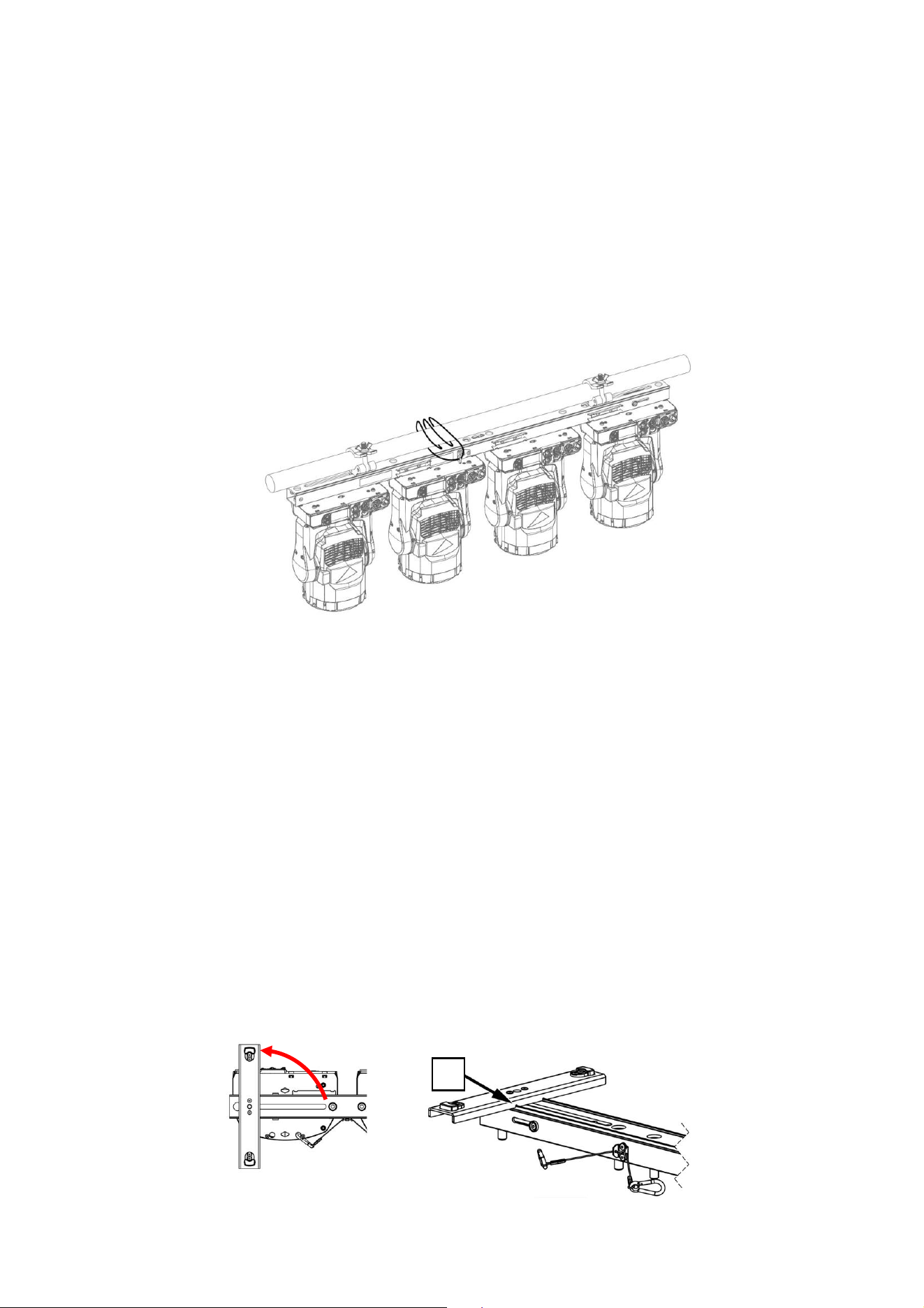
15 MAC One Fourbar Safety and Installation Manual, Rev. B
Fixation du MAC One Fourbar à l'aide d'une élingue de sécurité
1. Lors du montage d'un MAC One Fourbar en hauteur, sécurisez l'ensemble avec des élingues de
sécurité.
2. Procurez-vous une élingue de sécurité homologuée pour le poids total du MAC One Fourbar et des
projecteurs montés.
3. Fixez l’élingue de sécurité au point d'attache d’élingue de sécurité sur le MAC One Fourbar (voir [F]
à la section « Vue d'ensemble »).
4. Bouclez l’élingue de sécurité autour de la poutrelle ou de la structure sécurisée à laquelle le MAC
One Fourbar est fixé.
5. Éliminez le plus de mou possible de l’élingue de sécurité (en la bouclant autour de la poutrelle, par
exemple) et fixez-la à un point d'ancrage sûr.
Installation du MAC One Fourbar
La suite de ce chapitre couvre différents types d'installations utilisant le MAC One Fourbar, pour autant
que des projecteurs aient été montés sur le MAC One Fourbar comme décrit à la section « Montage
des projecteurs sur le MAC One Fourbar » ci-avant :
1. Utilisation comme support au sol.
2. Suspension en hauteur.
3. Considérations relatives au montage sur poteau (plaque de sol).
4. Alignement de plusieurs MAC One Fourbar.
1. Utilisation comme support au sol
Le MAC One Fourbar peut être placé sur une surface horizontale dure, plate et sûre, à condition qu'il
n'y ait pas de risque d'obstruction ou de renversement.
Pour utiliser le MAC One Fourbar comme support au sol :
1. Desserrez les deux vis M12 [D] fixant les pieds [C] sur le bas du MAC One Fourbar.
2. Tournez chaque pied sur 90.
3. Assurez-vous que les découpes [H] des pieds s'engagent dans les bords du MAC One Fourbar.
4. Serrez les vis [D] pour fixer les pieds dans leur position.
H
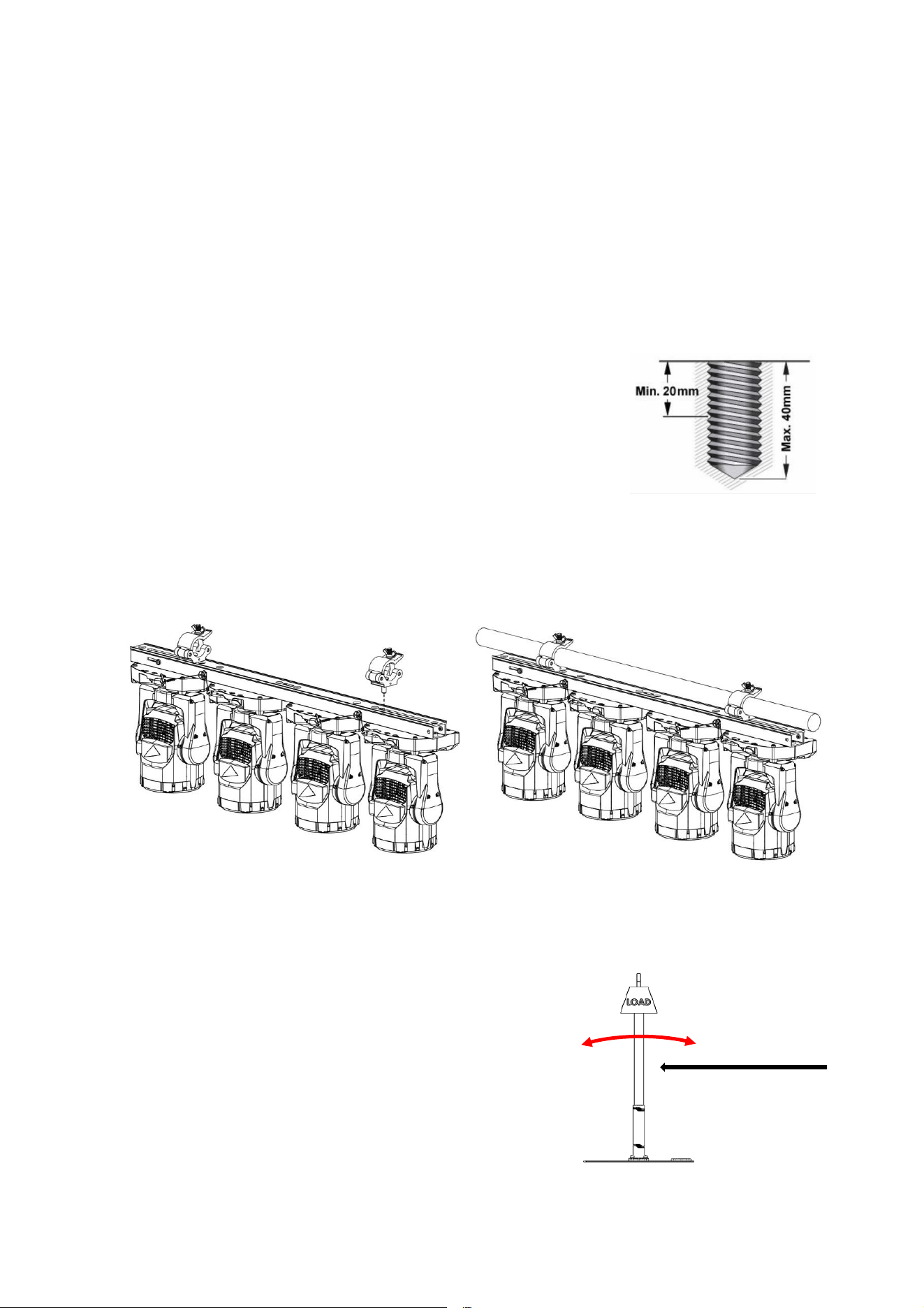
16 MAC One Fourbar Safety and Installation Manual, Rev. B
2. Suspension en hauteur
Le MAC One Fourbar peut être fixé à une poutrelle ou à une structure d’accroche similaire dans
n'importe quelle orientation à l'aide de deux colliers de type demi-coupleur (voir illustrations ci-dessous)
boulonnés directement sur le corps du MAC One Fourbar.
Pour fixer le MAC One Fourbar à une poutrelle directement à l'aide de colliers demi-coupleurs :
1. Assurez-vous que la structure de fixation peut supporter au moins six fois (ou plus si les
réglementations locales l'exigent) le poids de tous les projecteurs et équipements qui y seront
installés.
2. Bloquez l'accès en dessous de la zone de travail.
3. Desserrez les deux vis M12 [D] fixant les pieds [C] sur le bas du MAC One Fourbar et retirez les
pieds.
4. Boulonnez fermement deux colliers demi-coupleurs sur le corps du
MAC One Fourbar en passant un boulon M12 grade 8.8 en acier
minimum à travers chaque collier et en fixant les boulons dans les
trous filetés [D] de l'illustration de la section « Vue d'ensemble ».
Les boulons doivent dépasser de 20 mm au minimum et de 40 mm
au maximum dans le corps du MAC One Fourbar (voir illustration à
droite). Les colliers doivent être en parfait état et homologués pour
le poids qu'ils supporteront. N'utilisez pas un seul collier, sinon vous
endommagerez le corps du MAC One Fourbar et vous créerez un risque pour la sécurité.
5. Fixez fermement les deux colliers demi-coupleurs à une poutrelle ou à une structure d’accroche
similaire.
6. Sécurisez le MAC One Fourbar et les projecteurs à l'aide d’élingues de sécurité (voir les sections
« Sécurisation du MAC One Fourbar à l'aide d'une élingue de sécurité » et « Montage de
projecteurs sur le MAC One Fourbar »).
3. Montage sur poteau (plaque de sol)
Le MAC One Fourbar peut être fixé à un poteau ou à une structure d’accroche similaire dans n'importe
quelle orientation à l'aide de deux colliers de type demi-
coupleur (voir illustration ci-dessus) boulonnés directement sur
le corps du MAC One Fourbar.
Dans ce cas, vous devez tenir compte de facteurs
circonstanciels tels que l'équilibre, la stabilité, la force du vent,
etc.
Lorsque le MAC One Fourbar est fixé à un poteau sur un
trépied ou une plaque de sol :
1. Bloquez l'accès autour de la zone de travail.
2. Reportez-vous aux instructions du paragraphe précédent
« Suspension en hauteur ».
Vent
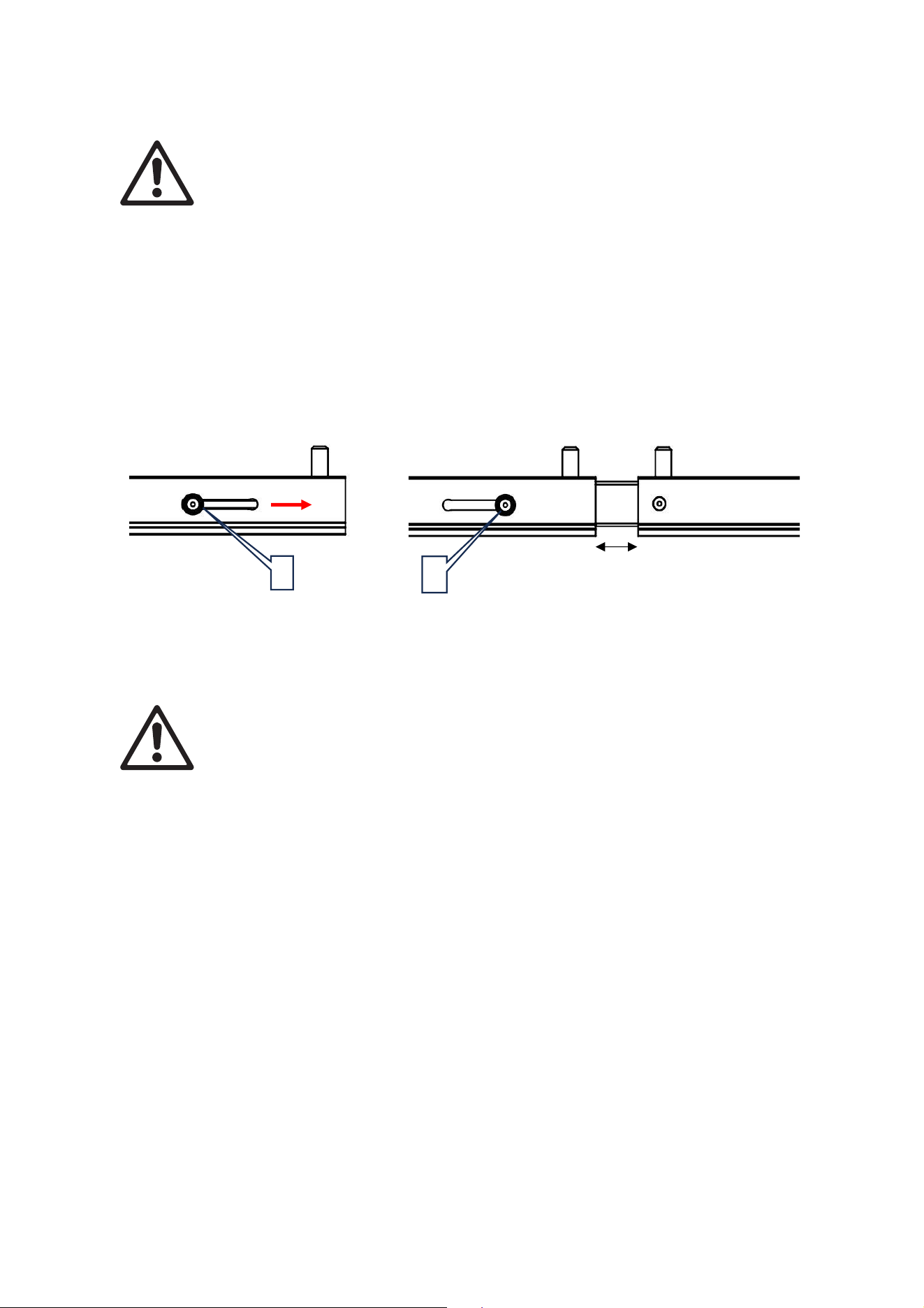
17 MAC One Fourbar Safety and Installation Manual, Rev. B
4. Alignement de plusieurs MAC One Fourbar
Attention ! Les guides d'alignement du MAC One Fourbar sont uniquement destinés à
l'alignement et doivent toujours être utilisés pour aligner plusieurs MAC One Fourbar
bout à bout.
Il convient de noter ce qui suit :
• Lorsque vous installez deux ou plusieurs MAC One Fourbar l'un à côté de l'autre, utilisez des guides
d'alignement pour assurer un espacement et un alignement réguliers.
• Le guide d'alignement est situé à l'une des extrémités du MAC One Fourbar.
Pour utiliser les guides d'alignement :
1. Appuyez sur les boutons [E] et maintenez-les enfoncés pour libérer le guide d'alignement.
2. Faites coulisser le guide d'alignement dans l'ouverture à l'extrémité du MAC One Fourbar suivant
jusqu'à ce qu'il touche la butée, en laissant un espace de 32 mm.
Entretien et maintenance
Attention ! Toute opération d'entretien non décrite ci-dessous doit être confiée à un
technicien agréé par Martin Professional. Le retrait d'un couvercle peut entraîner un
risque pour la sécurité ou des performances insatisfaisantes et annulera la garantie du
produit.
Toute opération d'entretien ou de réparation non décrite dans ce manuel doit être
confiée à un technicien agréé par Martin. N'essayez pas d'effectuer de telles opérations
par vous-même, car elles pourraient présenter un risque pour votre santé ou votre
sécurité. Elles peuvent également provoquer des dommages ou des
dysfonctionnements et annuler la garantie de votre produit.
L'installation, l’entretien sur site et la maintenance peuvent être assurés dans le monde entier par
l'organisation Martin Professional Global Service et ses agents techniques agréés, ce qui permet aux
propriétaires des appareils de profiter de toute l'expertise de Martin et de sa connaissance des produits
dans le cadre d'un partenariat leur assurant le meilleur niveau de performance sur toute la durée de vie
du produit. Contactez votre fournisseur Martin pour plus de détails.
Entreposage
Entreposez les éléments dans un environnement sec. Assurez-vous que les éléments sont secs avant
de les ranger dans des flightcases.
Nettoyage
N’utilisez pas de produits abrasifs, caustiques ou à base de solvants pour le nettoyage, car ils peuvent
endommager les surfaces.
Si l'accessoire a été utilisé dans un environnement marin ou côtier, nettoyez soigneusement chaque
élément pour éviter l'accumulation de sel pouvant provoquer une corrosion.
E
E
32 mm
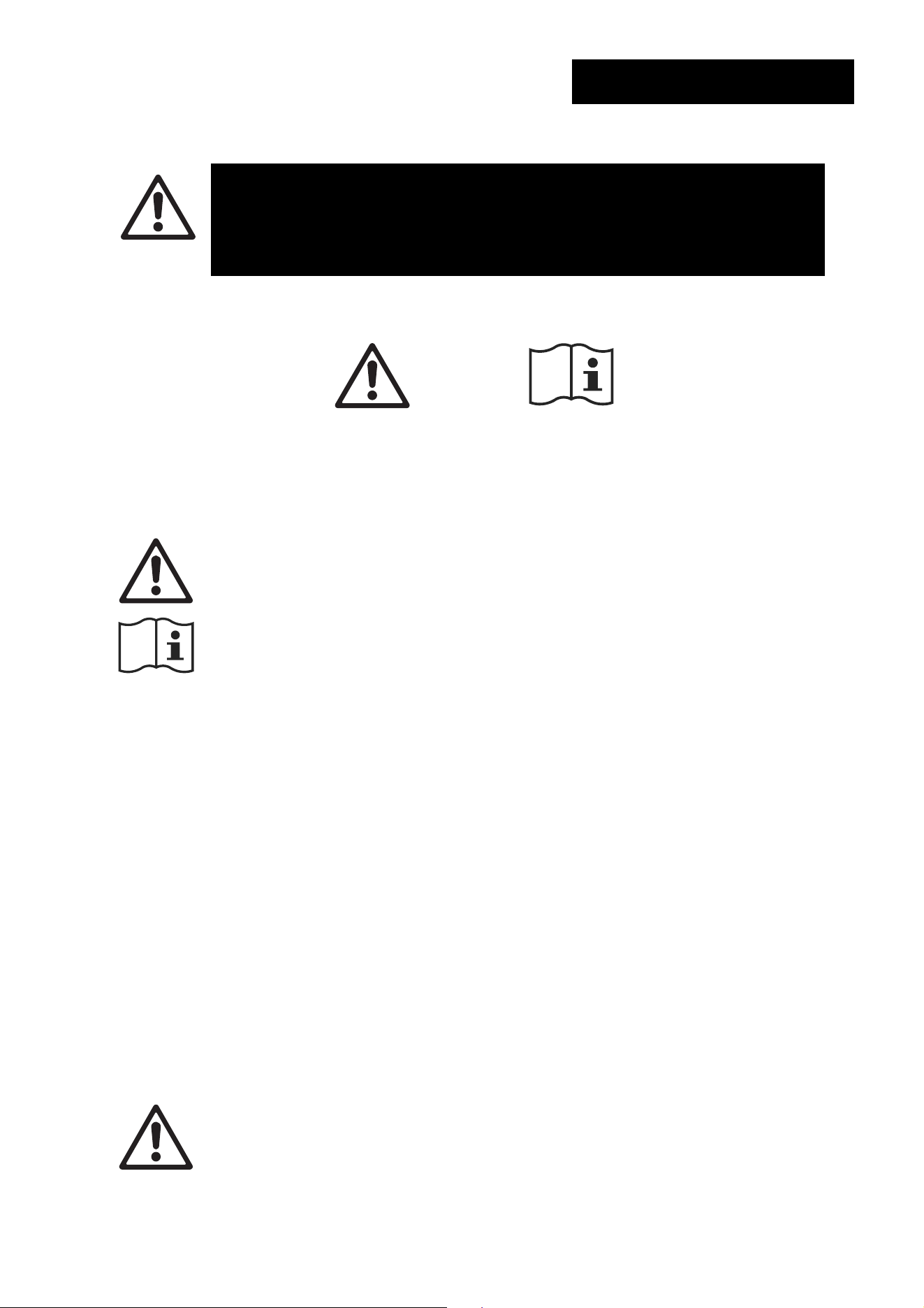
18 MAC One Fourbar Safety and Installation Manual, Rev. B
Sicherheitsinformationen
WARNUNG!
Lesen Sie die Sicherheitshinweise in diesem Abschnitt, bevor Sie
diese Produkte installieren, in Betrieb nehmen, bedienen oder
warten.
Die folgenden Symbole werden verwendet, um wichtige Sicherheitsinformationen auf dem Produkt und
in dieser Anleitung zu kennzeichnen:
Warnung!
Sicherheitsrisiko. Gefahr
von schweren
Verletzungen oder Tod.
Warnung!
Siehe Benutzer-
dokumentation.
Dieses Zubehör ist nur für den professionellen Gebrauch bestimmt. Es ist nicht für den
Hausgebrauch bestimmt.
Eine überarbeitete Version dieses Benutzerhandbuchs wird immer dann zur Verfügung
stehen, wenn wir die Qualität der darin enthaltenen Informationen verbessern können.
Vergewissern Sie sich, dass Sie die neueste Version des Benutzerhandbuchs für dieses
Produkt haben, bevor Sie das Produkt installieren, bedienen oder warten. Die
Überarbeitungen des Martin®-Benutzerhandbuchs finden Sie unten auf Seite 2. Sie
können die aktuelle Benutzerdokumentation von der Seite Product Support / Tech Docs
auf der Martin-Website www.martin.com herunterladen.
Die in diesem Benutzerhandbuch enthaltenen Anweisungen und Sicherheitshinweise
sollen sicherstellen, dass Installateure die für Bühnen- und Studioumgebungen geltenden
Sicherheitsstandards einhalten. Befolgen Sie diese Anweisungen sorgfältig und
überschreiten Sie nicht die angegebenen Grenzwerte, da Sie sonst eine gefährliche
Installation schaffen, die nicht den erforderlichen Sicherheitsstandards entspricht.
Beachten Sie alle vor Ort geltenden Gesetze, Vorschriften und Regeln zur Sicherheit von
permanenten und temporären Strukturen, Installationen und elektrischen Systemen.
Lesen Sie dieses Handbuch, bevor Sie dieses Produkt installieren, in Betrieb nehmen,
bedienen oder warten, befolgen Sie die unten aufgeführten Sicherheitsvorkehrungen und
beachten Sie alle in diesem Handbuch und auf dem Produkt angegebenen Warnhinweise.
Technischer Support
Wenn Sie Fragen zur sicheren Installation oder Bedienung der Geräte haben, wenden Sie
sich bitte an den technischen Support von Harman Professional:
• Für technischen Support in Nordamerika wenden Sie sich bitte an
HProTechSupportUSA@harman.com
Telefon: (844) 776-4899
• Für technischen Support außerhalb Nordamerikas wenden Sie sich bitte an Ihren
nationalen Vertriebspartner.
Schutz vor Verletzungen
Gewicht des MAC One Fourbar ohne MAC One Geräte = 3,2 kg
Installieren Sie den MAC One Fourbar nur nach den in dieser Anleitung beschriebenen
Methoden und mit den dort beschriebenen Geräten.
GERMAN/DEUTSCH

19 MAC One Fourbar Safety and Installation Manual, Rev. B
Vergewissern Sie sich, dass jede Struktur, die als Stütze verwendet wird, mindestens das
Sechsfache (6) des Gewichts aller Gegenstände, die sie stützt, tragen kann (oder mehr,
wenn die örtlich geltenden Vorschriften dies erfordern).
Wenn Sie den MAC One Fourbar an einer tragenden Struktur aufhängen, befestigen Sie
ihn mit zwei Befestigungsklemmen an einer Traverse oder einem ähnlichen Träger.
Versuchen Sie nicht, den MAC One Fourbar an nur einer Befestigungsklemme
aufzuhängen. Verwenden Sie Sicherheitskabel nicht als primäres Hilfsmittel zur
Befestigung.
Entfernen Sie so viel Durchhang wie möglich aus dem Sicherheitskabel (indem Sie es z.
B. mehrmals um die Strebe einer Traverse wickeln). Stellen Sie sicher, dass der MAC One
Fourbar bei Ausfall einer primären Befestigungsmöglichkeit nicht mehr als 20 cm fallen
kann, bevor das Sicherungskabel ihn auffängt.
Wenn sich der Befestigungspunkt des Sicherheitskabels verformt, darf der Fourbar nicht
aufgehängt werden. Lassen Sie das Zubehör von einem autorisierten Martin-
Servicepartner reparieren.
• Vergewissern Sie sich, dass der MAC One Fourbar, das Befestigungsmaterial und
andere Teile der Installation sicher befestigt sind und nicht herunterfallen und
Verletzungen oder Schäden verursachen können.
• Vergewissern Sie sich, dass alle Befestigungselemente (Klemmen, Omega-
Halterungen usw.) in einwandfreiem Zustand sind, von einer professionellen
Einrichtung wie dem TÜV für das Gewicht, das sie tragen sollen, zugelassen sind und
allen örtlich geltenden Vorschriften entsprechen.
• Sperren Sie den Zugang unter und um den Arbeitsbereich herum und arbeiten Sie von
einer stabilen Plattform aus, wenn Sie Teile der Installation anbringen, warten oder
bewegen.
• Achten Sie darauf, dass Sie die für die jeweilige Installation geltenden Grenzwerte
einhalten, wenn Sie eine Reihe von MAC One-Geräten am MAC One Fourbar
aufhängen.
Einführung
Der MAC One Fourbar ermöglicht den Transport und die Montage von MAC One-Geräten in Vierersets.
Der MAC One Fourbar ist 1168 mm/45.9" lang und hält Geräte in einem Abstand von 300 mm/11.8" von
Mitte bis Mitte. Der MAC One Fourbar mit vier angeschlossenen MAC One-Geräten passt in das MAC
One-Flightcase, so dass der gesamte MAC One Fourbar beim Transport montiert bleiben kann.
Der MAC One Fourbar verfügt über drei M12-Befestigungspunkte (zwei verschiebbare und ein fester),
an denen Standard-Befestigungsklemmen angebracht werden können. Zwei Füße für die Aufstellung
des MAC One Fourbar auf dem Boden sind ebenfalls im Paket enthalten. Diese Füße werden mit Hilfe
der beiden verschiebbaren M12-Montagepunkte am MAC One Fourbar befestigt.
Der MAC One Fourbar ist mit einem durchgängigen Ausrichtungssystem ausgestattet, das den Aufbau
einer durchgehenden Reihe von Geräten ohne Lücken oder Fehlausrichtungen erleichtert.
Die Sicherheitskabel, mit denen die MAC One-Geräte am MAC One Fourbar befestigt werden, sind
bereits am MAC One Fourbar angebracht, um die Handhabung zu erleichtern. Um das globale
Sicherheitskabel des MAC One Fourbar an einer tragenden Struktur, wie z. B. einer Traverse, zu
befestigen, ist er mit einem Sicherheitskabel-Befestigungspunkt ausgestattet, der das Gewicht des
MAC One Fourbar und der vier daran befestigten Geräten tragen kann.
Verkettungskabel zwischen den MAC One-Geräten können einfach durch das Führungssystem des
MAC One Fourbar geführt und mit Standardkabelbindern gesichert werden. Das Ergebnis ist eine
einfache und ästhetisch ansprechende Lösung, die während des Transports (im Flightcase) vollständig
verkabelt bleiben kann.
Die gesamte Martin-Benutzerdokumentation steht auf den Seiten Product Support / Tech Docs unter
www.martin.com zum Download bereit.
20 MAC One Fourbar Safety and Installation Manual, Rev. B
Übersicht
A – Schrauben M12 x 25 mm für die
Befestigung von Geräten
B – Sicherheitskabel für die Sicherung von
Geräten
C – Füße – sperren bei 0, 90 oder
entfernen
D – M12-Schrauben für Füße oder Klemme
E – Freigabeknöpfe für Ausrichtungshilfe
F – Befestigungspunkt für Sicherheitskabel für
MAC One Fourbar
G – Kabelhalterungen für die Befestigung von
Elektrokabeln mit Kabelbindern
B
A
C
G
G
G
F
C
E
A
A
A
A
B
B
B
A
A
A
C
C
D
D
D
21 MAC One Fourbar Safety and Installation Manual, Rev. B
Physische Installation
Warnung! Lesen Sie die „Sicherheitsinformationen“ ab Seite 18, bevor Sie den MAC
One Fourbar montieren.
Warnung! Wenn Sie einen MAC One Fourbar über dem Boden aufhängen, sichern Sie
ihn gegen Ausfall der primären Befestigungen mit einem Sicherungskabel, das als
Sicherheitsbefestigung für das Gesamtgewicht, das es sichern soll, zugelassen ist.
Die Sicherheit und Eignung der Hebezeuge, des Installationsorts, der Verankerungsmethode, der
Befestigungsmittel und der Aufhängestrukturen liegt in der Verantwortung des Installateurs. Beachten
Sie bei der Installation des MAC One Fourbar alle örtlichen Sicherheitsvorschriften und gesetzlichen
Bestimmungen. Die Installation darf nur von qualifizierten Fachleuten durchgeführt werden. Wenden Sie
sich an Ihren Martin-Lieferanten, wenn Sie Fragen zur sicheren Installation dieses Produkts haben.
Wenn Sie den MAC One Fourbar verwenden, stellen Sie sicher, dass alle Teile des Systems gemäß
den Anweisungen in dieser Bedienungsanleitung installiert sind, um die Sicherheitsanforderungen für
Bühnen- und Studioumgebungen zu erfüllen.
Martin kann Installationsmaterial wie z. B. Befestigungsklemmen und Sicherheitskabel liefern, die für
die Verwendung mit dem MAC One Fourbar geeignet sind (siehe die Produktspezifikationen auf der
MAC One-Produktseite auf der Martin-Website unter www.Martin.com).
Vor der Installation
Bevor Sie eine Installation mit dem MAC One Fourbar erstellen:
1. Lesen Sie den Abschnitt „Sicherheitsinformationen“ ab Seite 18 und beachten Sie insbesondere die
für die Installation der Produkte geltenden Vorsichtsmaßnahmen.
2. Stellen Sie sicher, dass die Tragstrukturen für das Gesamtgewicht des MAC One Fourbar ausgelegt
ist.
3. Sperren Sie den Zugang unter und um den Arbeitsbereich herum.
Montage von Geräten am MAC One Fourbar
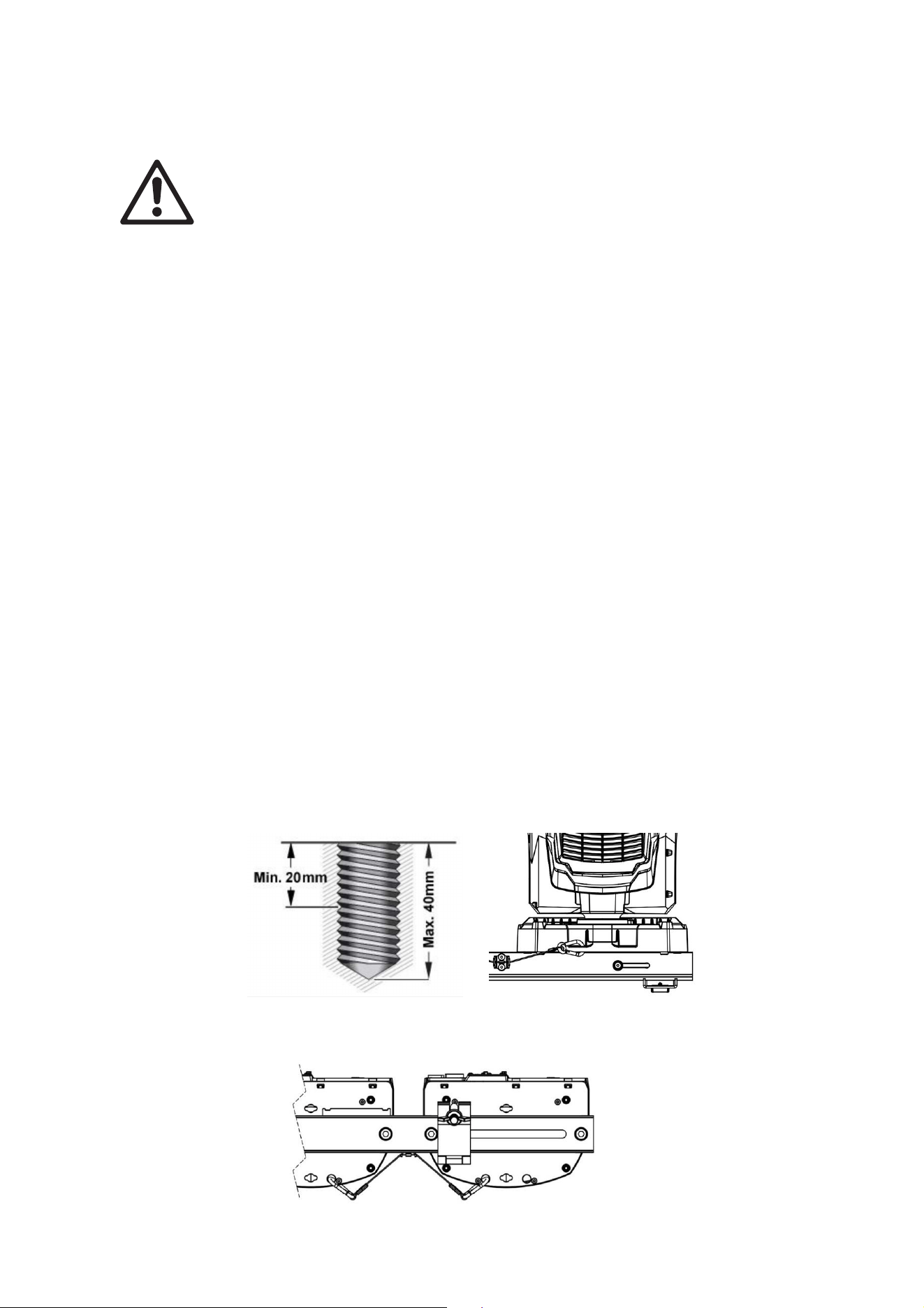
1. Verschrauben Sie jedes Gerät mit dem MAC One Fourbar, indem Sie die mitgelieferten M12-
Schrauben der Stahlgüteklasse 8.8 durch die Löcher im Fourbar und in die Gewindelöcher [A] an
jeder Seite der Basis des Geräts stecken (siehe Abbildung oben). Die Schrauben müssen
mindestens 20 mm und höchstens 40 mm in die Basis des Geräts hineinragen (siehe Abbildung
unten).
2. Tragen Sie eine kleine Menge Loctite 243 auf die Gewinde der Schrauben auf, bevor Sie sie in die
Basis einschrauben. Verwenden Sie zwei Schrauben, da Sie sonst die Basis des Geräts
beschädigen und ein Sicherheitsrisiko erzeugen.
3. Befestigen Sie jedes Gerät am MAC One Fourbar, indem Sie die am MAC One Fourbar
angebrachten Sicherheitskabel [B] am Sicherheitskabel-Befestigungspunkt an der Basis jedes
Geräts sichern.
22 MAC One Fourbar Safety and Installation Manual, Rev. B
Sichern des MAC One Fourbar mit einem Sicherheitskabel
1. Wenn Sie einen MAC One Fourbar über Kopf montieren, sichern Sie die Anordnung mit
Sicherheitskabeln.
2. Besorgen Sie sich ein Sicherheitskabel, das für das Gewicht des MAC One Fourbar einschließlich
der montierten Geräte zugelassen ist.
3. Befestigen Sie das Sicherheitskabel am Sicherheitskabel-Befestigungspunkt am MAC One Fourbar
(siehe [F] im Abschnitt Übersicht).
4. Wickeln Sie das Sicherheitskabel um die Traverse oder die sichere Struktur, an der der MAC One
Fourbar befestigt ist.
5. Entfernen Sie so viel Durchhang wie möglich aus dem Sicherheitskabel (z. B. indem Sie das Kabel
um die Traverse wickeln) und befestigen Sie es an einem sicheren Verankerungspunkt.
Installation des MAC One Fourbar
Der Rest dieses Kapitels befasst sich mit den verschiedenen Installationsarten des MAC One Fourbar,
wobei vorausgesetzt wird, dass die Geräte wie im Abschnitt „Montage von Geräten am MAC One
Fourbar“ beschrieben am MAC One Fourbar befestigt werden:
1. Verwendung als Bodenständer.
2. Über Kopf hängend.
3. Überlegungen zur Pfostenmontage (Bodenplatte).
4. Ausrichten der MAC One Fourbars.
1. Verwendung als Bodenständer
Der MAC One Fourbar kann auf einer harten, flachen und sicheren horizontalen Oberfläche aufgestellt
werden, sofern keine Gefahr besteht, dass er ein Hindernis darstellt oder umgestoßen wird.
Um den MAC One Fourbar als Bodenständer zu verwenden:
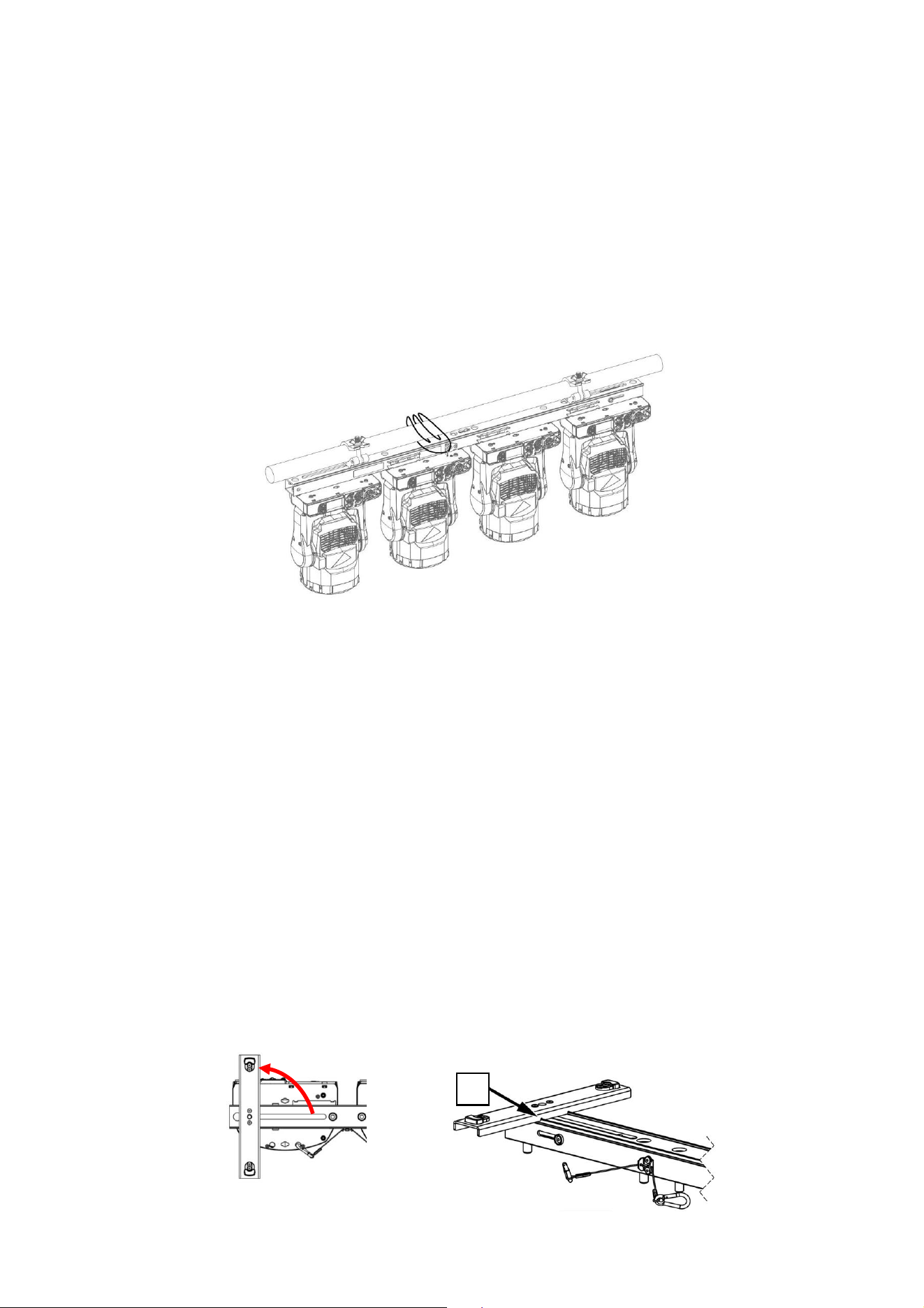
1. Lösen Sie die beiden M12-Schrauben [D], mit denen die Füße [C] an der Unterseite des MAC One
Fourbar befestigt sind.
2. Drehen Sie jeden Fuß um 90.
3. Stellen Sie sicher, dass die Aussparungen [H] an den Füßen an den Kanten des MAC One Fourbar
einrasten.
4. Ziehen Sie die Schrauben [D] an, um die Füße in ihrer Position zu sichern.
H
23 MAC One Fourbar Safety and Installation Manual, Rev. B
2. Über Kopf hängend
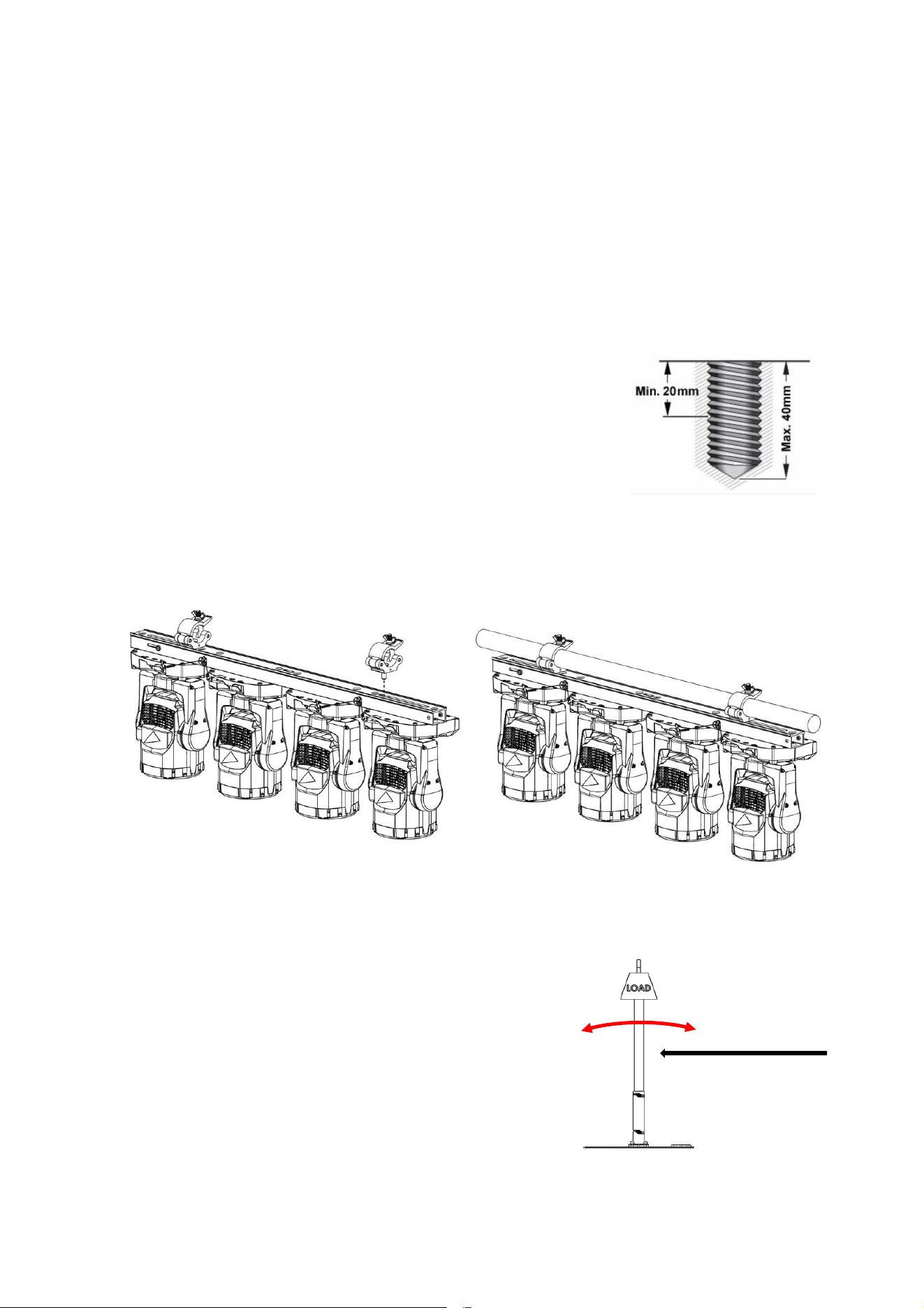
Der MAC One Fourbar kann mit zwei Halbkupplungsklemmen (siehe Abbildungen unten), die direkt mit
dem Gehäuse des MAC One Fourbar verschraubt werden, in jeder beliebigen Ausrichtung an einer
Traverse oder einer ähnlichen Befestigungsstruktur befestigt werden.
Um den MAC One Fourbar mit Halbkupplungsklemmen direkt an einer Traverse zu befestigen:
1. Vergewissern Sie sich, dass die Befestigungsstruktur mindestens das Sechsfache (oder mehr,
wenn die örtlichen Vorschriften dies erfordern) des Gewichts aller daran zu installierenden Geräte
und Apparaturen tragen kann.
2. Sperren Sie den Zugang unter dem Arbeitsbereich.
3. Lösen Sie die beiden M12-Schrauben [D], mit denen die Füße an der Unterseite des MAC One
Fourbar befestigt sind, und entfernen Sie die Füße.
4. Befestigen Sie zwei Halbkupplungsklemmen sicher am Gehäuse
des MAC One Fourbar, indem Sie durch jede Klemme eine
Schraube der Stahlgüteklasse 8.8 (M12) führen und die Schrauben
in den in der Abbildung im Abschnitt „Übersicht“ gezeigten
Gewindelöchern [D] befestigen. Die Schrauben müssen mindestens
20 mm und höchstens 40 mm in das Gehäuse des MAC One
Fourbar hineinragen (siehe Abbildung rechts). Die Klemmen
müssen in einwandfreiem Zustand und für das Gewicht, das sie
tragen sollen, zugelassen sein. Verwenden Sie nicht nur eine einzige Klemme, sonst beschädigen
Sie das Gehäuse des MAC One Fourbar und erzeugen ein Sicherheitsrisiko.
5. Befestigen Sie die beiden Halbkupplungsklemmen sicher an einer Traverse oder ähnlichem.
6. Sichern Sie sowohl den MAC One Fourbar als auch die Geräte mit Sicherheitskabeln (siehe
Abschnitte „Sicherung des MAC One Fourbar mit einem Sicherheitskabel“ und „Montage von
Geräten am MAC One Fourbar“).
3. Pfostenmontage (Bodenplatte)
Der MAC One Fourbar kann mit zwei Halbkupplungsklemmen (siehe Abbildungen oben), die direkt mit
dem Gehäuse des MAC One Fourbar verschraubt werden, in
jeder beliebigen Ausrichtung an einem Pfosten oder einer
ähnlichen Befestigungsstruktur befestigt werden.
In diesen Fällen sollten Sie sich über Faktoren wie
Gleichgewicht, Stabilität, Windstärke usw. im Klaren sein.
Wenn Sie den MAC One Fourbar an einem Pfosten auf einem
Stativ oder einer Bodenplatte befestigen:
1. Sperren Sie den Zugang um den Arbeitsbereich herum.
2. Siehe die Anweisungen im vorherigen Abschnitt „Über
Kopf hängend“.
Wind
24 MAC One Fourbar Safety and Installation Manual, Rev. B
4. Ausrichten der MAC One Fourbars
Warnung! Ausrichtungshilfen für MAC One Fourbar dienen nur der Ausrichtung und
müssen immer verwendet werden, wenn MAC One Fourbars aneinander gereiht
werden.
Beachten Sie Folgendes:
• Wenn Sie zwei oder mehr MAC One Fourbars nebeneinander montieren, verwenden Sie
Ausrichtungshilfen, um gleichmäßigen Abstand und gleichmäßige Ausrichtung zu gewährleisten.
• Die Ausrichtungshilfe befindet sich an einem Ende des MAC One Fourbar.
Zur Verwendung von Ausrichtungshilfen:
1. Halten Sie die Tasten [E] gedrückt, um die Ausrichtungshilfe freizugeben.
2. Schieben Sie die Ausrichtungshilfe in die Öffnung am Ende des nächsten MAC One Fourbar, bis sie
auf den Anschlag trifft und einen Spalt von 32 mm frei lässt.
Wartung und Instandhaltung
Warnung! Überlassen Sie alle Wartungsarbeiten, die nicht unten beschrieben sind,
einem von Martin Professional zugelassenen Servicetechniker. Das Entfernen von
Abdeckungen kann ein Sicherheitsrisiko oder eine unzureichende Leistung
verursachen und führt zum Erlöschen der Produktgarantie.
Überlassen Sie alle Wartungs- oder Reparaturarbeiten, die nicht in diesem Handbuch
beschrieben sind, einem autorisierten Martin-Servicetechniker. Versuchen Sie nicht,
einen solchen Vorgang selbst auszuführen, da dies ein Gesundheits- oder
Sicherheitsrisiko darstellen kann. Dadurch kann es auch zu Schäden oder
Fehlfunktionen kommen und Ihre Produktgarantie kann erlöschen.
Installation, Vor-Ort-Service und Wartung können weltweit von der Martin Professional Global Service-
Organisation und ihren zugelassenen Vertretungen durchgeführt werden. So haben die Besitzer
Zugang zu Martins Fachwissen und Produktkenntnissen in einer Partnerschaft, die ein Höchstmaß an
Leistung über die gesamte Lebensdauer des Produkts gewährleistet. Bitte wenden Sie sich für weitere
Informationen an Ihren Martin-Lieferanten.
Lagerung
Lagern Sie Teile in einer trockenen Umgebung. Vergewissern Sie sich, dass die Teile trocken sind,
bevor Sie sie in Flightcases verpacken.
Reinigung
Verwenden Sie keine scheuernden, ätzenden oder lösungsmittelhaltigen Produkte zur Reinigung, da
diese die Oberfläche beschädigen können.
Wenn das Zubehör in einer Meeres- oder Küstenumgebung verwendet wurde, reinigen Sie alle Teile
gründlich, um Salzablagerungen zu vermeiden, die Korrosion verursachen können.
SPANISH/ESPAÑOL
E
E
32 mm
25 MAC One Fourbar Safety and Installation Manual, Rev. B
Información de seguridad
ADVERTENCIA
Lea las precauciones de seguridad de esta sección antes de
instalar, conectar, utilizar o reparar estos productos.
Los símbolos que aparecen a continuación se utilizan para identificar información de seguridad
importante en el producto y en este manual:
Advertencia
Peligro para la
seguridad. Riesgo
de lesiones graves
o muerte.
Advertencia
Consulte la
documentación del
usuario.
Este accesorio es solo para uso profesional. No está indicado para uso doméstico.
Se publicará una versión revisada de este manual de usuario cada vez que podamos
mejorar la calidad de la información que ofrecemos en el mismo. Compruebe que dispone
de la última revisión del manual de usuario de este producto antes de su instalación, uso o
mantenimiento. Las revisiones del manual del usuario Martin® se indican en la parte
inferior de la página 2. Puede descargar la documentación de usuario más reciente en la
página Product Support / Tech Docs del sitio web de Martin: www.martin.com.
Las instrucciones y límites de seguridad que figuran en este manual del usuario se
facilitan con el fin de garantizar que los instaladores cumplan las normas de seguridad
aplicables a los ambientes de escenario y estudio. Siga atentamente estas instrucciones y
no sobrepase los límites indicados, ya que podría dar lugar a una instalación peligrosa y
no conforme con las normas de seguridad exigidas. Respete todas las leyes, reglamentos
y códigos locales aplicables en materia de seguridad de las estructuras, instalaciones y
sistemas eléctricos permanentes y temporales.
Lea este manual antes de proceder a la instalación, puesta en marcha, funcionamiento o
mantenimiento de este producto, siga las precauciones de seguridad que se indican a
continuación y respete todas las advertencias que figuran en este manual y en el
producto.
Asistencia técnica
Si tiene alguna duda sobre cómo instalar o utilizar el dispositivo de forma segura, póngase
en contacto con el servicio de asistencia técnica de Harman Professional:
• Para obtener asistencia técnica en Norteamérica, póngase en contacto con
HProTechSupportUSA@harman.com
Teléfono: (844) 776-4899
• Para asistencia técnica fuera de Norteamérica, póngase en contacto con su distribuidor
nacional.
Protección contra lesiones
Peso de MAC One Fourbar sin luces = 3,2 kg
No realice la instalación de MAC One Fourbar con ningún otro método ni con ningún otro
equipo que no sean los que se indican en este manual.
SPANISH/ESPAÑOL

26 MAC One Fourbar Safety and Installation Manual, Rev. B
Asegúrese de que cualquier estructura empleada como soporte sea capaz de soportar al
menos seis (6) veces el peso de todos los elementos que soporta (o más si así lo exige la
normativa local aplicable).
Si se suspende de una estructura de montaje, fije el MAC One Fourbar a un armazón o
soporte similar utilizando dos abrazaderas de montaje. No intente suspender el MAC One
Fourbar de una sola abrazadera de montaje. No utilice cables de seguridad como medio
principal de sustentación.
Elimine todo lo posible el cable de seguridad que quede suelto (por ejemplo, enrollándolo
más de una vez alrededor del cable de un armazón de montaje). Asegúrese de que, si
falla algún medio de sujeción primario, el MAC One Fourbar no pueda caer más de 20 cm
como máximo antes de que el cable de seguridad lo sujete.
Si se deforma el punto de fijación del cable de seguridad, no cuelgue el Fourbar. Solicite
la reparación del accesorio a un servicio técnico autorizado Martin.
• Compruebe que el MAC One Fourbar, los accesorios de montaje y otras piezas de la
instalación estén bien sujetos y no puedan caerse, provocando lesiones o daños.
• Asegúrese de que todos los accesorios de montaje (abrazaderas de montaje, soportes
omega, etc.) estén en perfecto estado, estén homologados por un organismo
profesional como TÜV para el peso que van a soportar y cumplan todas las normativas
locales aplicables.
• No permita el acceso por debajo y alrededor de la zona de trabajo y trabaje desde una
plataforma estable siempre que realice tareas de instalación, mantenimiento o traslado
de elementos de la instalación.
• Asegúrese de respetar el límite aplicable a la instalación en cuestión cuando instale
una línea de proyectores MAC One colgados de MAC One Fourbar.
Introducción
MAC One Fourbar permite transportar y montar los proyectores MAC One en grupos de cuatro. MAC
One Fourbar tiene una longitud de 1168 mm y sujeta los proyectores con una separación entre centros
de 300 mm. El MAC One Fourbar con cuatro proyectores MAC One acoplados cabe en el maletín MAC
One, por lo que todo el MAC One Fourbar puede mantenerse montado durante el transporte.
El MAC One Fourbar cuenta con tres puntos de montaje M12 (dos deslizantes + uno fijo) que se
pueden usar para fijar abrazaderas de montaje estándar. También se incluyen en el paquete dos patas
para la colocación en el suelo del MAC One Fourbar. Estas patas se fijan al MAC One Fourbar
mediante los dos puntos de montaje M12 deslizantes.
MAC One Fourbar dispone de un sistema de alineación de extremo a extremo, que facilita la creación
de una línea continua de proyectores sin huecos ni desalineaciones.
Los cables de seguridad para fijar los proyectores MAC One al MAC One Fourbar están preinstalados
en el MAC One Fourbar para facilitar su uso. Para fijar el cable de seguridad general del MAC One
Fourbar a una estructura de soporte, como un armazón, está equipado con un punto de fijación del
cable de seguridad que puede soportar el peso del MAC One Fourbar y de los cuatro proyectores
fijados al mismo.
Los cables de conexión en cadena entre los proyectores MAC One se pueden pasar de forma
ordenada a través del sistema de guiado del MAC One Fourbar y fijarse en su sitio mediante bridas
estándar. El resultado es una solución sencilla y estéticamente agradable que puede mantenerse
completamente cableada durante el transporte (en el maletín).
Toda la documentación de usuario de Martin está disponible para su descarga en las páginas de
Soporte del producto / Documentos técnicos en www.martin.com.
27 MAC One Fourbar Safety and Installation Manual, Rev. B
Descripción general
A – Pernos M12 x 25 mm para la fijación de
la luz
B – Cables de seguridad para fijar los
proyectores
C – Patas - Bloqueo a 0, 90 o quitar
D – Tornillos M12 para patas o abrazadera
E – Botones de liberación de la guía de alineación
F – Punto de fijación del cable de seguridad de
MAC One Fourbar
G – Soportes de cableado para la fijación de
cables eléctricos mediante bridas
B
A
C
G
G
G
F
C
E
A
A
A
A
B
B
B
A
A
A
C
C
D
D
D
28 MAC One Fourbar Safety and Installation Manual, Rev. B
Instalación física
Advertencia Lea la «Información de seguridad» que comienza en la página 25 antes de
instalar el MAC One Fourbar.
Advertencia Cuando cuelgue un MAC One Fourbar por encima del nivel del suelo,
asegúrelo contra el fallo de las fijaciones principales con un cable de seguridad
homologado como fijación de seguridad para el peso total que va a asegurar.
La seguridad y la idoneidad del equipo de elevación, el lugar de instalación, el método de anclaje, los
accesorios de montaje y las estructuras de suspensión son responsabilidad del instalador. Respete
todas las normas de seguridad y los requisitos legales locales al instalar el MAC One Fourbar. La
instalación solo deben realizarla profesionales cualificados. Póngase en contacto con su proveedor
Martin en caso de duda sobre cómo instalar este producto de forma segura.
Cuando utilice el MAC One Fourbar, asegúrese de que todas las piezas del sistema se instalen tal y
como se indica en este manual de usuario para cumplir con los requisitos de seguridad aplicables a los
ambientes de escenario y estudio.
Martin puede suministrar los accesorios de instalación, como abrazaderas de montaje y cables de
seguridad, adecuados para su uso con el MAC One Fourbar (véanse las especificaciones del producto
en la página del producto MAC One en el sitio web de Martin en www.Martin.com).
Pasos previos a la instalación
Antes de realizar una instalación con el MAC One Fourbar:
1. Lea «Información de seguridad» en la página 25 y tenga en cuenta especialmente las
precauciones pertinentes para la instalación de los productos.
2. Compruebe que las estructuras de soporte se hayan diseñado para el peso total del MAC One
Fourbar.
3. No permita el acceso por debajo y alrededor de la zona de trabajo.
Accesorios de montaje en el MAC One Fourbar
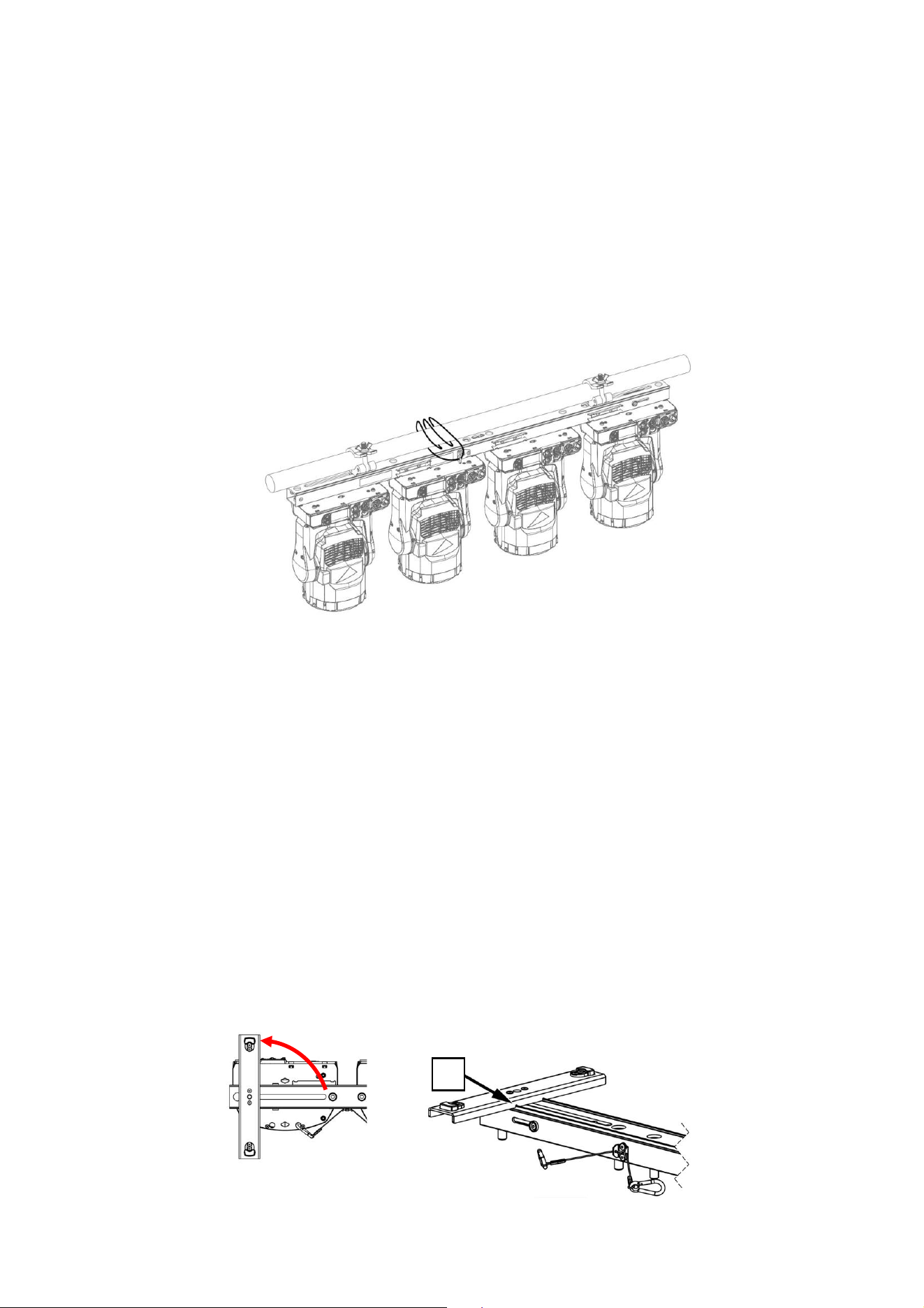
1. Atornille cada luz al MAC One Fourbar pasando los pernos M12 de acero de grado 8.8 como
mínimo suministrados a través de los orificios del Fourbar y en los orificios roscados [A] a cada
lado de la base de la luz en la ilustración anterior. Los pernos deben sobresalir un mínimo de 20
mm y un máximo de 40 mm en la base del proyector (véase la ilustración siguiente).
2. Aplique una pequeña cantidad de Loctite 243 a las roscas de los pernos antes de apretarlos en la
base. Utilice dos pernos, de lo contrario dañará la base del proyector y supondrá un peligro para la
seguridad.
3. Fije cada proyector al MAC One Fourbar asegurando los cables de seguridad [B] fijados en el MAC
One Fourbar al punto de fijación del cable de seguridad en la base de cada luz.
29 MAC One Fourbar Safety and Installation Manual, Rev. B
Sujeción del MAC One Fourbar con un cable de seguridad
1. Siempre que monte un MAC One Fourbar a un nivel por encima de la cabeza, asegure el conjunto
con cables de seguridad.
2. Adquiera un cable de seguridad homologado para el peso del MAC One Fourbar, incluidos los
proyectores montados.
3. Conecte el cable de seguridad al punto de fijación del cable de seguridad en el MAC One Fourbar
(véase [F] en la sección Descripción general).
4. Pase el cable de seguridad alrededor del armazón o de la estructura de seguridad a la que está
fijado el MAC One Fourbar.
5. Elimine toda la holgura posible del cable de seguridad (por ejemplo, pasándolo alrededor del
armazón) y fíjelo a un punto de anclaje seguro.
Instalación del MAC One Fourbar
El resto de este capítulo trata de los distintos tipos de instalación utilizando el MAC One Fourbar,
siempre que los proyectores se monten en el MAC One Fourbar tal y como se describe en el párrafo
«Montaje de los proyectores en el MAC One Fourbar» anterior:
1. Utilización como soporte de suelo.
2. Colgando por encima.
3. Aspectos a tener en cuenta para el montaje en poste (placa de suelo).
4. Alineación de MAC One Fourbars.
1. Uso como soporte de suelo
El MAC One Fourbar puede colocarse sobre una superficie horizontal firme, plana y segura, siempre
que no haya riesgo de que pueda ocasionar un obstáculo o volcarse.
Para utilizar el MAC One Fourbar como soporte de suelo:
1. Afloje los dos tornillos M12 [D] que fijan las patas [C] en la parte inferior del MAC One Fourbar.
2. Gire cada pata 90.
3. Asegúrese de que las muescas [H] de las patas encajen en los bordes del MAC One Fourbar.
4. Apriete los tornillos [D] para fijar las patas en su posición.
H
30 MAC One Fourbar Safety and Installation Manual, Rev. B
2. Colgando por encima
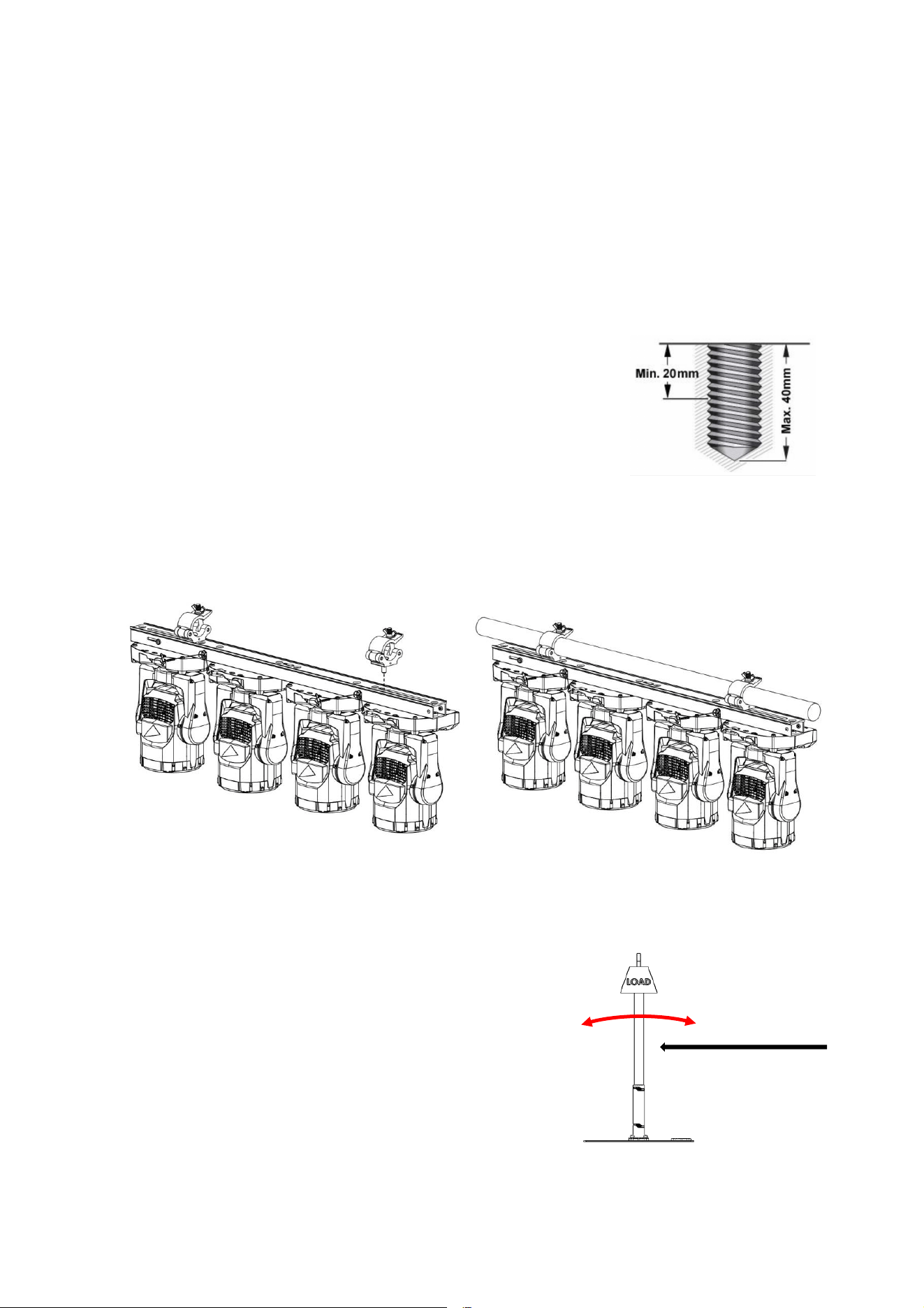
El MAC One Fourbar puede sujetarse a un armazón o estructura de montaje similar en cualquier
orientación mediante dos abrazaderas de montaje tipo medio acoplador (ver ilustraciones más abajo)
atornilladas directamente al cuerpo del MAC One Fourbar.
Para sujetar el MAC One Fourbar a un armazón directamente con abrazaderas de medio acoplador:
1. Compruebe que la estructura del montaje pueda soportar al menos seis veces (o más si así lo
exige la normativa local) el peso de todos los proyectores y equipos que se instalarán en ella.
2. Impedir el acceso por debajo de la zona de trabajo.
3. Afloje los dos tornillos M12 [D] que fijan las patas en la parte inferior del MAC One Fourbar y
retírelas.
4. Atornille firmemente dos abrazaderas de medio acoplador al cuerpo
del MAC One Fourbar pasando un perno M12 de acero de grado
8.8 como mínimo a través de cada abrazadera y fijando los pernos
en los orificios roscados [D] de la ilustración en la sección
«Descripción general». Los pernos deben sobresalir un mínimo de
20 mm y un máximo de 40 mm en el cuerpo del MAC One Fourbar
(véase la ilustración de la derecha). Las abrazaderas deben
encontrarse en perfecto estado y estar homologadas para el peso
que van a soportar. No utilice una sola abrazadera, de lo contrario dañará el cuerpo del MAC One
Fourbar y provocará un peligro para la seguridad.
5. Fije firmemente las dos abrazaderas de medio acoplador a un armazón de montaje o similar.
6. Asegure tanto el MAC One Fourbar como los proyectores mediante cables de seguridad (consulte
las secciones «Fijación del MAC One Fourbar con un cable de seguridad» y «Montaje de los
proyectores en el MAC One Fourbar»).
3. Montaje en poste (placa de suelo)
El MAC One Fourbar se puede sujetar a un mástil o a una estructura de montaje similar con cualquier
orientación usando dos abrazaderas de montaje tipo medio
acoplador (véase la ilustración anterior) atornilladas
directamente al cuerpo del MAC One Fourbar.
En estos casos, se deben tener en cuenta factores
circunstanciales como el equilibrio, la estabilidad, la fuerza del
viento, etc.
Cuando se utiliza el MAC One Fourbar sujeto a un poste en un
mástil de trípode o una placa de suelo:
1. No permita el acceso alrededor de la zona de trabajo.
2. Consulte las instrucciones del apartado anterior
«Colgando por encima».
Viento
31 MAC One Fourbar Safety and Installation Manual, Rev. B
4. Alineación del MAC One Fourbars
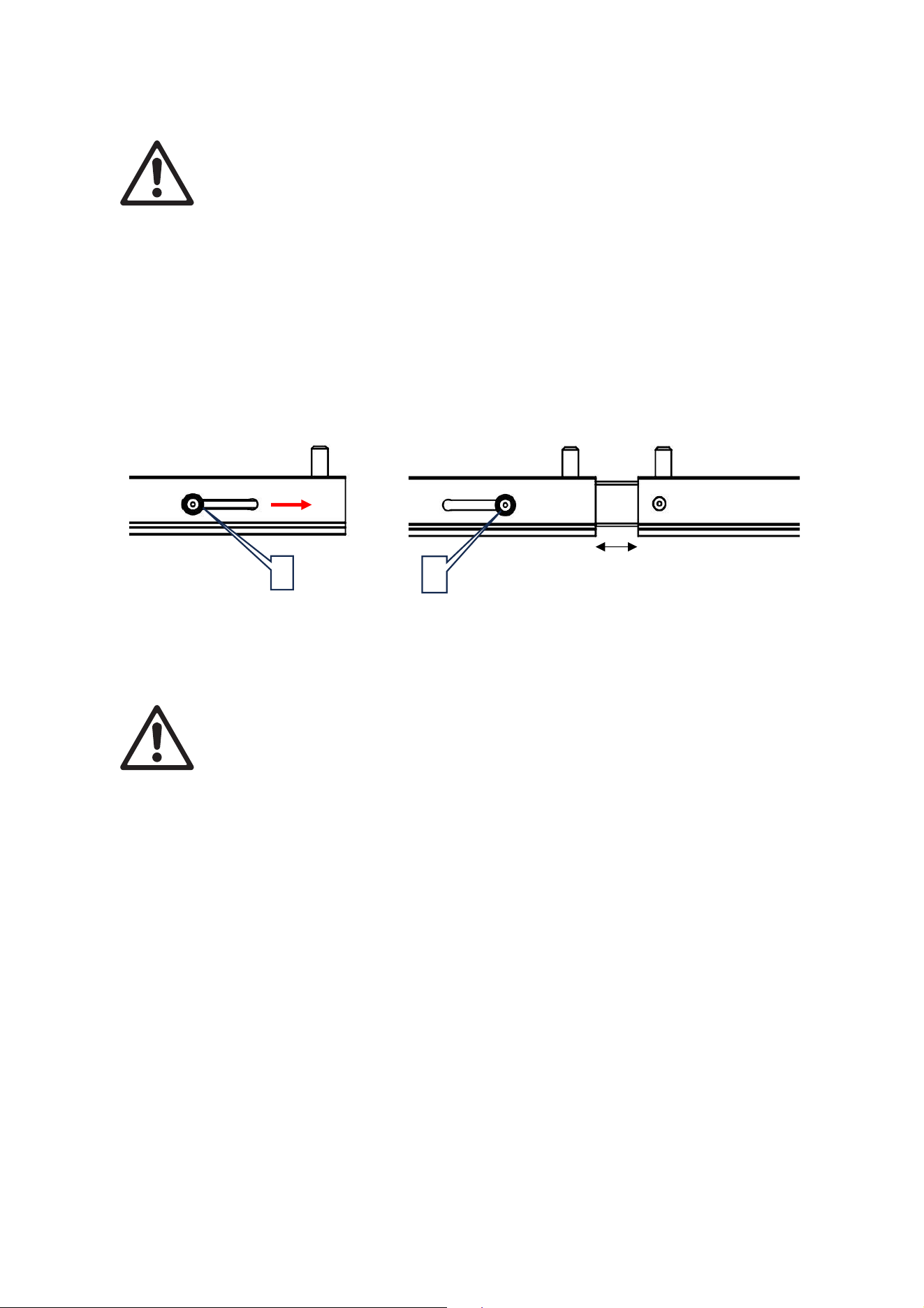
Advertencia Las guías de alineación del MAC One Fourbar son únicamente para fines
de alineación y deben utilizarse siempre al alinear MAC One Fourbars de extremo a
extremo.
Tenga en cuenta en lo siguiente:
• Al instalar dos o más MAC One Fourbars uno al lado del otro, use las guías de alineación para
garantizar un espaciado y alineación uniformes.
• La guía de alineación está situada en un extremo del MAC One Fourbar.
Para utilizar las guías de alineación:
1. Mantenga pulsados los botones [E] para soltar la guía de alineación.
2. Deslice la guía de alineación en la abertura del extremo del siguiente MAC One Fourbar hasta que
llegue al tope dejando un espacio de 32 mm.
Servicio y mantenimiento
Advertencia Cualquier operación de servicio no descrita a continuación debe solicitarse
a un técnico de servicio autorizado por Martin Professional. La retirada de alguna
cubierta puede suponer un riesgo para la seguridad o un funcionamiento inadecuado y
hará que la garantía del producto quede anulada.
Cualquier operación de servicio o reparación no descrita en este manual debe
solicitarse a un técnico de servicio autorizado por Martin. No intente realizar esta
operación por sí mismo, ya que podría suponer un riesgo para la salud o la seguridad.
También podría provocar daños o una avería, y dar lugar a la anulación de la garantía
del producto.
La organización Martin Professional Global Service y sus agentes autorizados pueden encargarse de la
instalación, el servicio in situ y el mantenimiento en todo el mundo, lo que permite a los propietarios
contar con la experiencia y el conocimiento del producto de Martin en una colaboración que garantizará
el máximo nivel de rendimiento durante toda la vida útil del producto. Póngase en contacto con su
proveedor de Martin para obtener más información.
Almacenamiento
Guarde las piezas en un lugar seco. Asegúrese de que las piezas estén secas antes de embalarlas en
los maletines.
Limpieza
No use productos abrasivos, cáusticos o a base de disolventes para la limpieza, ya que pueden dañar
la superficie.
Si el accesorio se ha usado en un ambiente cerca del mar o de la costa, limpie a fondo cada pieza para
evitar la acumulación de sal que puede provocar corrosión.
E
E
32 mm

www.martin.com