Basic Operating Instructions
Cordless Phone
Model No.
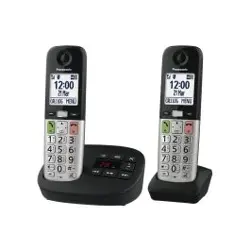
KX-TGU430
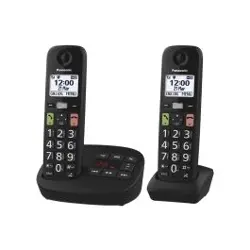
KX-TGU432
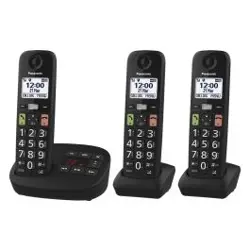
KX-TGU433
KX-TGU532
KX-TGU533
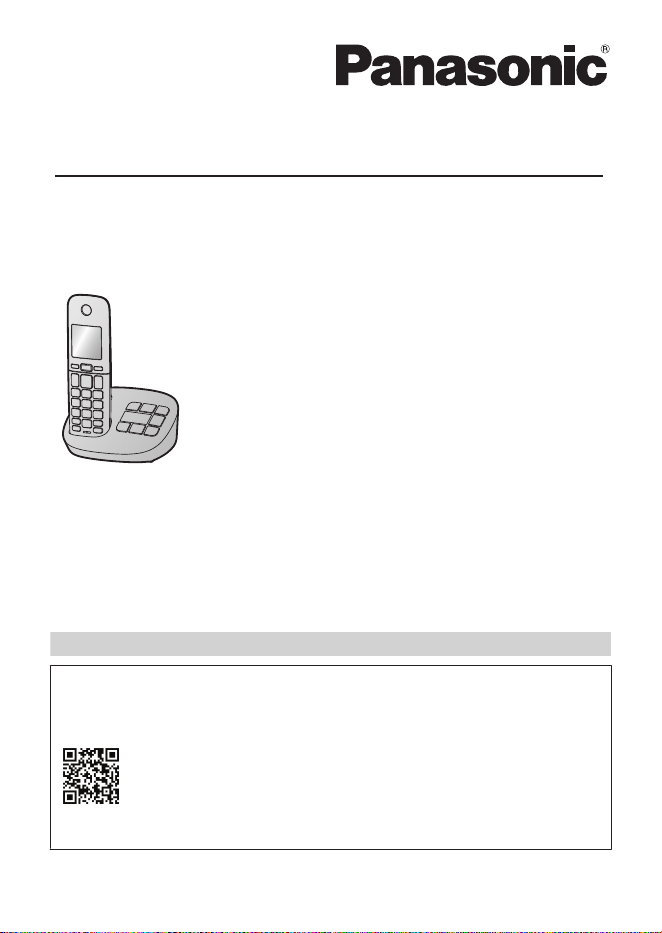
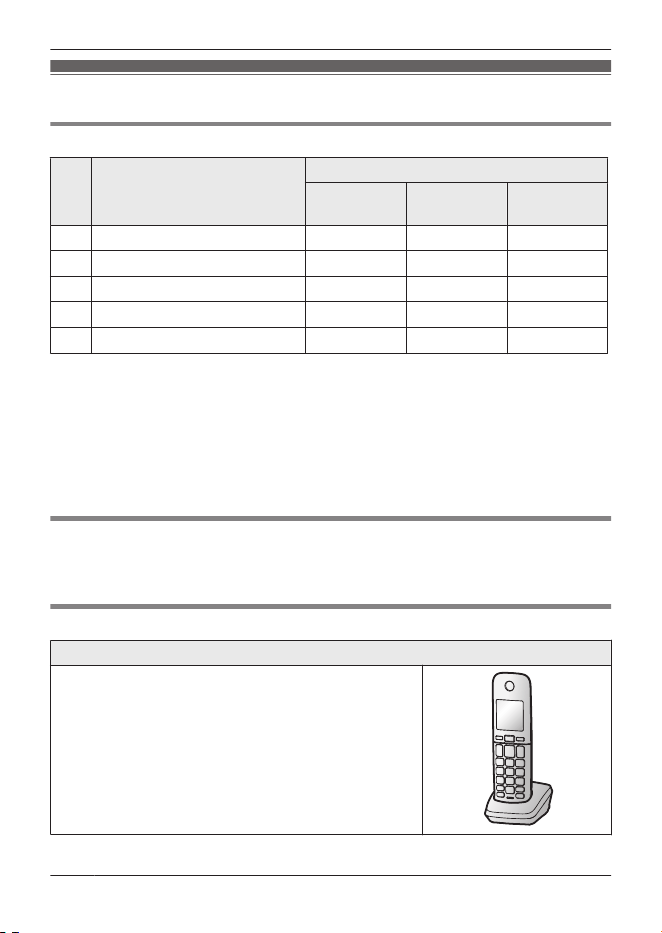
Model shown is KX-TGU430.
Thank you for purchasing a Panasonic product.
Please read
this basic manual before using the unit and save it for future
reference.
For assistance, visit our Web site: https://shop.panasonic.com/support for
customers in the U.S.A.
Please register your product: https://shop.panasonic.com/support
For detailed information about the features of your phone system, refer
to the operating instructions, which is available by visiting the support
page for this product at the address below.
https://shop.panasonic.com/support
Accessory information
Supplied accessories
No.
Accessory item/
Part number
Quantity
KX-TGU430
KX-TGU432
KX-TGU532
KX-TGU433
KX-TGU533
A AC adaptor/PNLV226-0X 1 1 1
B
Telephone line cord
*1
1 1 1
C
Rechargeable batteries
*2
2 4 6
D
Handset cover
*3,
*4
1 2 3
E
Charger
*5
– 1 2
*1 PNJA1186Z (Black cord), PNJA1193Z (Transparent cord)
*2 Please read the operating instructions for replacement battery information.
*3 The handset cover comes attached to the handset.
*4 PNYNTGUA40MR (Black), PNYNTGUA40GR (White)
*5 PNLC1098ZB (Black), PNLC1098ZW (White)
Note:
R Please read the operating instructions for additional/replacement accessories.
Other information
R Design and specifications are subject to change without notice.
R The illustrations in these instructions may vary slightly from the actual product.
Expanding your phone system
Handset (optional): KX-TGUA40
You can expand your phone system by registering
optional handsets (6 max.) to a single base unit.
R Optional handsets may be a different color from
that of the supplied handsets.
R To order, please visit
https://shop.panasonic.com/handsetfinder
2
For assistance, please visit https://shop.panasonic.com/support
Introduction
Graphical symbols for use on equipment
and their descriptions
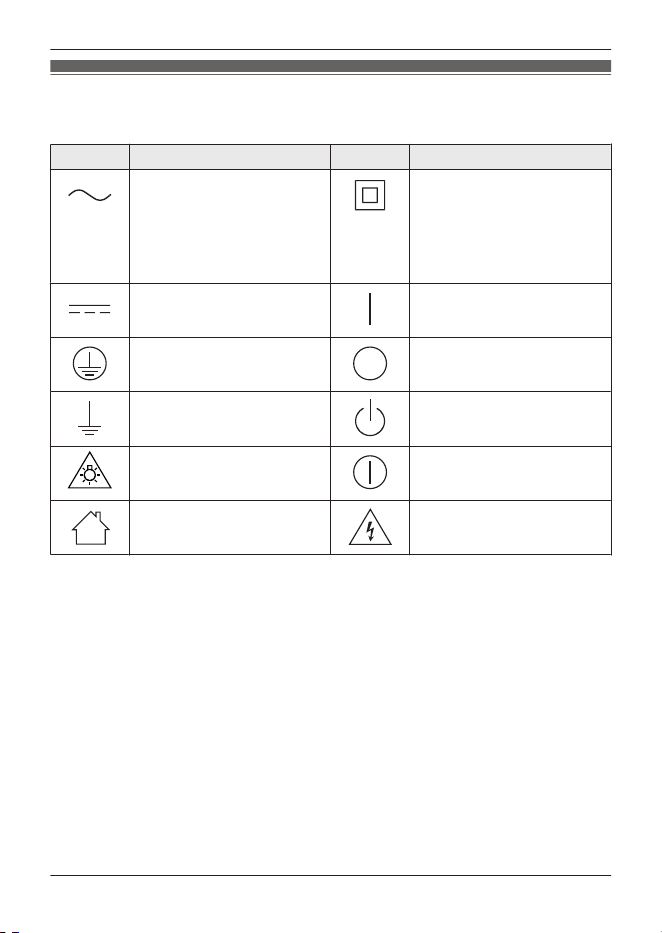
Symbol Explanation Symbol Explanation
Alternating current (A.C.) Class P equipment
(equipment in which
protection against electric
shock relies on Double
Insulation or Reinforced
Insulation)
Direct current (D.C.) “ON” (power)
Protective earth “OFF” (power)
Protective bonding earth Stand-by (power)
Caution, risk caused by
visible radiation
“ON”/“OFF” (power;
push-push)
For indoor use only Caution, risk of electric
shock
For assistance, please visit https://shop.panasonic.com/support
3
Introduction
For your safety
To prevent severe injury and loss of life/
property, read this section carefully
before using the product to ensure
proper and safe operation of your
product.
WARNING
Power connection
R Use only the power source marked
on the product.
R Do not overload power outlets and
extension cords. This can result in
the risk of fire or electric shock.
R Completely insert the AC adaptor/
power plug into the power outlet.
Failure to do so may cause electric
shock and/or excessive heat
resulting in a fire.
R Regularly remove any dust, etc.
from the AC adaptor/power plug by
pulling it from the power outlet, then
wiping with a dry cloth. Accumulated
dust may cause an insulation defect
from moisture, etc. resulting in a fire.
R Unplug the product from power
outlets if it emits smoke, an
abnormal smell, or makes an
unusual noise. These conditions can
cause fire or electric shock. Confirm
that smoke has stopped emitting
and contact us at
https://shop.panasonic.com/support
R Unplug from power outlets and
never touch the inside of the product
if its casing has been broken open.
R Never touch the plug with wet
hands. Danger of electric shock
exists.
Installation
R To prevent the risk of fire or
electrical shock, do not expose the
product to rain or any type of
moisture.
R Do not place or use this product
near automatically controlled
devices such as automatic doors
and fire alarms. Radio waves
emitted from this product may cause
such devices to malfunction
resulting in an accident.
R Do not allow the AC adaptor or
telephone line cord to be
excessively pulled, bent or placed
under heavy objects.
R Do not place the handset on the
base unit when battery cover is
removed.
Operating safeguards
R Unplug the product from power
outlets before cleaning. Do not use
liquid or aerosol cleaners.
R Do not disassemble the product.
R Do not spill liquids (detergents,
cleansers, etc.) onto the telephone
line cord plug, or allow it to become
wet at all. This may cause a fire. If
the telephone line cord plug
becomes wet, immediately pull it
from the telephone wall jack, and do
not use.
R To prevent hearing damage, make
sure anyone who uses this product
is aware that the product can
produce very loud sounds, and
make sure children use this product
only under adult supervision.
R To prevent hearing damage, we
recommend that you set this product
to the lowest volume setting at which
you can hear adequately. Note that
when the
is displayed, the
4
For assistance, please visit https://shop.panasonic.com/support
Important Information
volume booster feature is enabled
and the product may emit sounds at
very high volume.
R Avoid prolonged exposure to loud
sounds produced by this product. Be
aware that the louder a sound is, the
less time is needed to cause hearing
damage. In the event that you
experience hearing discomfort,
consult a medical professional.
Medical
R Consult the manufacturer of any
personal medical devices, such as
pacemakers or hearing aids, to
determine if they are adequately
shielded from external RF (radio
frequency) energy. (The product
operates in the frequency range of
1.92 GHz to 1.93 GHz, and the RF
transmission power is 115 mW
(max.).)
R Do not use the product in health
care facilities if any regulations
posted in the area instruct you not to
do so. Hospitals or health care
facilities may be using equipment
that could be sensitive to external
RF energy.
CAUTION
Installation and location
R Never install telephone wiring during
an electrical storm.
R Never install telephone line jacks in
wet locations unless the jack is
specifically designed for wet
locations.
R Never touch uninsulated telephone
wires or terminals unless the
telephone line has been
disconnected at the network
interface.
R Use caution when installing or
modifying telephone lines.
R The AC adaptor is used as the main
disconnect device. Ensure that the
AC outlet is installed near the
product and is easily accessible.
R The product is only use for mounting
at heights £ 2 m.
Note:
R This height is not guaranteed for
product reliability.
R To prevent serious injuries due to
the product unexpectedly falling,
the product must be installed at a
height of 1.5 m or lower.
R This product is unable to make calls
when:
– the handset batteries need
recharging or have failed.
– there is a power failure.
Battery
R We recommend using the batteries
noted in the operating instructions.
R Do not mix old and new batteries.
R Do not open or mutilate the
batteries. Released electrolyte from
the batteries is corrosive and may
cause burns or injury to the eyes or
skin. The electrolyte is toxic and
may be harmful if swallowed.
R Exercise care when handling the
batteries. Do not allow conductive
materials such as rings, bracelets, or
keys to touch the batteries,
otherwise a short circuit may cause
the batteries and/or the conductive
material to overheat and cause
burns.
R Charge the batteries provided with
or identified for use with this product
only, in accordance with the
instructions and limitations specified
in this manual.
For assistance, please visit https://shop.panasonic.com/support
5
Important Information

R Only use a compatible base unit (or
charger) to charge the batteries. Do
not tamper with the base unit (or
charger). Failure to follow these
instructions may cause the batteries
to swell or explode.
R Avoid the use in the following
conditions
– High or low extreme
temperatures during use, storage
or transportation.
– Replacement of a battery with an
incorrect type that can defeat a
safeguard.
– Disposal of a battery into fire or a
hot oven, or mechanically
crushing or cutting of a battery,
that can result in an explosion.
– Extremely high temperature and/
or extremely low air pressure that
can result in an explosion or the
leakage of flammable liquid or
gas.
Attention:
A nickel metal hydride battery that is
recyclable powers the product you
have purchased.
Please call 1-800-8-BATTERY
(1-800-822-8837) for information on
how to recycle this battery.
Important safety
instructions
When using your product, basic safety
precautions should always be followed
to reduce the risk of fire, electric shock,
and injury to persons, including the
following:
1. Do not use this product near water
for example, near a bathtub,
washbowl, kitchen sink, or laundry
tub, in a wet basement or near a
swimming pool.
2. Avoid using a telephone (other than
a cordless type) during an electrical
storm. There may be a remote risk
of electric shock from lightning.
3. Do not use the telephone to report
a gas leak in the vicinity of the leak.
4. Use only the power cord and
batteries indicated in this manual.
Do not dispose of batteries in a fire.
They may explode. Check with
local codes for possible special
disposal instructions.
SAVE THESE INSTRUCTIONS
For best performance
Base unit location/avoiding noise
The base unit and other compatible
Panasonic units use radio waves to
communicate with each other.
R For maximum coverage and
noise-free communications, place
your base unit:
– at a convenient, high, and central
location with no obstructions
between the handset and base
unit in an indoor environment.
6
For assistance, please visit https://shop.panasonic.com/support
Important Information
– away from electronic appliances
such as TVs, radios, personal
computers, wireless devices, or
other phones.
– facing away from radio frequency
transmitters, such as external
antennas of mobile phone cell
stations. (Avoid putting the base
unit on a bay window or near a
window.)
R Coverage and voice quality depends
on the local environmental
conditions.
R If the reception for a base unit
location is not satisfactory, move the
base unit to another location for
better reception.
Environment
R Keep the product away from
electrical noise generating devices,
such as fluorescent lamps and
motors.
R The product should be kept free
from excessive smoke, dust, high
temperature, and vibration.
R The product should not be exposed
to direct sunlight.
R Do not place heavy objects on top of
the product.
R When you leave the product unused
for a long period of time, unplug the
product from the power outlet.
R The product should be kept away
from heat sources such as heating
devices, cooking appliances, etc. It
should not be placed in rooms
where the temperature is less than
0 °C (32 °F) or greater than 40 °C
(104 °F). Damp basements should
also be avoided.
R The maximum calling distance may
be shortened when the product is
used in the following places: Near
obstacles such as hills, tunnels,
underground, near metal objects
such as wire fences, etc.
R Operating the product near electrical
appliances may cause interference.
Move away from the electrical
appliances.
Routine care
R Wipe the outer surface of the
product with a soft moist cloth.
R Do not use benzine, thinner, or any
abrasive powder.
Other information
R The applied nameplate is located at
the bottom or rear of the product.
CAUTION: Risk of explosion if
battery is replaced by an incorrect type.
Dispose of used batteries according to
the instructions.
Notice for product disposal,
transfer, or return
R This product can store your private/
confidential information. To protect
your privacy/confidentiality, we
recommend that you erase
information such as phonebook or
caller list entries from the memory
before you dispose of, transfer, or
return the product.
R To dispose of your product, please
recycle in accordance with local
environmental regulations. For
further recycling information please
visit https://shop.panasonic.com/
recycle
For assistance, please visit https://shop.panasonic.com/support
7
Important Information
Notice
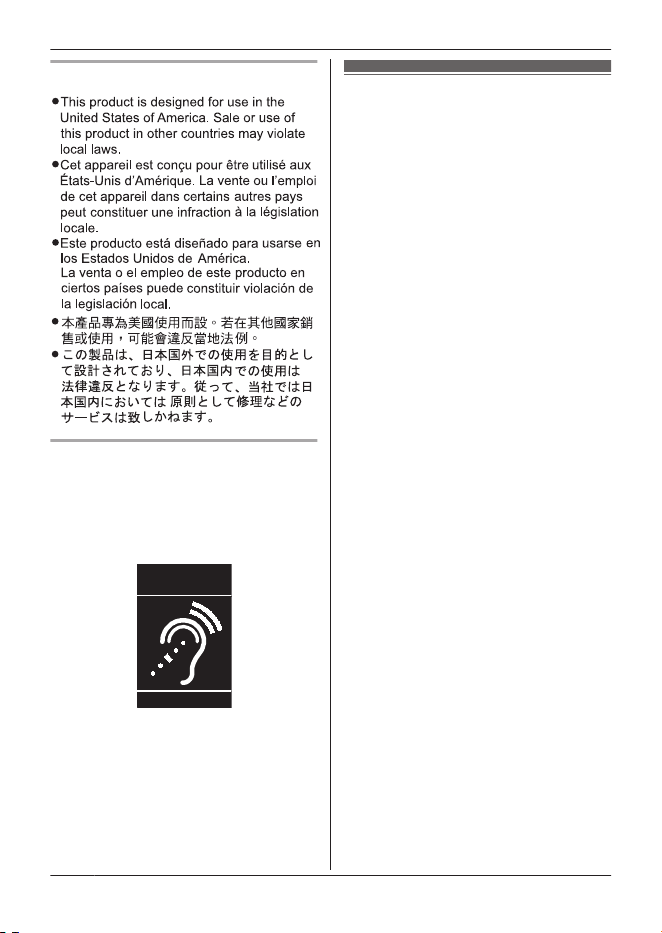
Compliance with TIA-1083 standard
Telephone handsets identified with this
logo have reduced noise and
interference when used with T-Coil
equipped hearing aids and cochlear
implants.
T
Compatible with
Hearing Aid T-Coil
TIA-1083
Specifications
R Frequency range:
1.92 GHz to 1.93 GHz
R RF transmission power:
115 mW (max.)
R Power source:
120 V AC, 60 Hz
R Power consumption:
Base unit:
Standby: 0.7 W
Maximum: 2.4 W
Charger:
Standby: 0.2 W
Maximum: 1.2 W
R Operating conditions:
0 °C – 40 °C (32 °F – 104 °F), 20 %
– 80 % relative air humidity (dry)
8
For assistance, please visit https://shop.panasonic.com/support
Important Information
Setting up
Connections
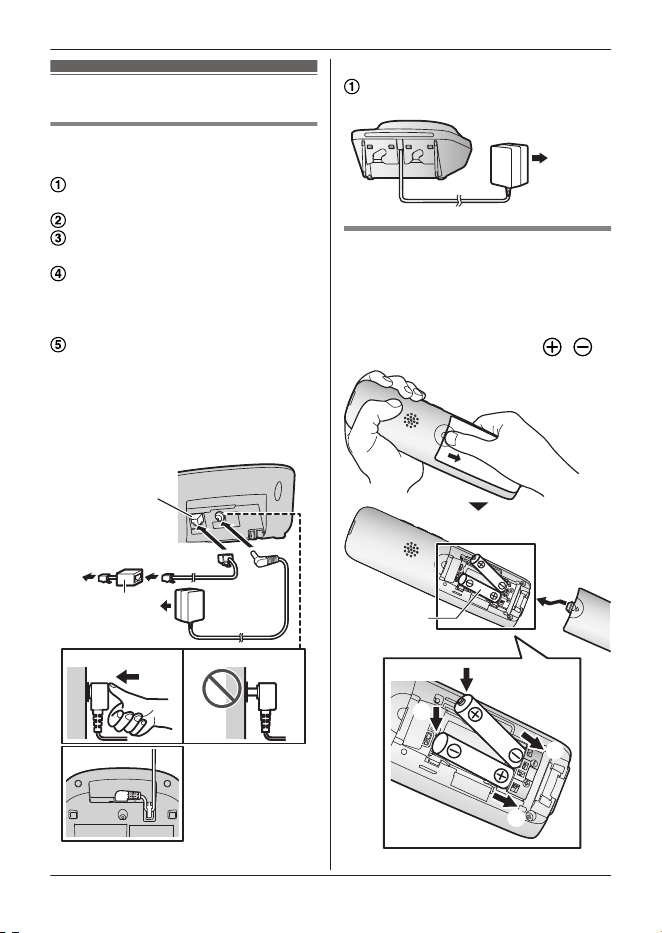
n Base unit
Connect the AC adaptor to the unit
by pressing the plug firmly.
Fasten the cord by hooking it.
Connect the AC adaptor to the
power outlet.
Connect the telephone line cord to
the unit, then to the single-line
telephone jack (RJ11C) until you
hear a click.
A DSL/ADSL filter (not supplied) is
required if you have a DSL/ADSL
service.
Note:
R Use only the supplied Panasonic AC
adaptor PNLV226.
4
4
3
5
2
1
n Charger
Connect the AC adaptor to the
power outlet.
1
Battery installation
R USE ONLY rechargeable Ni-MH
batteries AAA (R03) size (
1
).
R Do NOT use alkaline/manganese/
Ni-Cd batteries.
R Confirm correct polarities ( , ).
4
1
2
3
1
For assistance, please visit https://shop.panasonic.com/support
9
Getting Started
R Follow the directions on the
display to set up the unit.
Battery charging
Charge for about 7 hours.
R Confirm “Charging” is displayed.
R When the batteries are fully
charged, “Fully charged” is
displayed.
Ni-MH battery performance
(supplied batteries)
Operation Operating time
In continuous
use
10 hours max.
*1
Not in use
(standby)
5 days max.
*1
*1 When eco mode is on and
flashlight/booster is off.
Note:
R Actual battery performance depends
on usage and ambient environment.
Controls
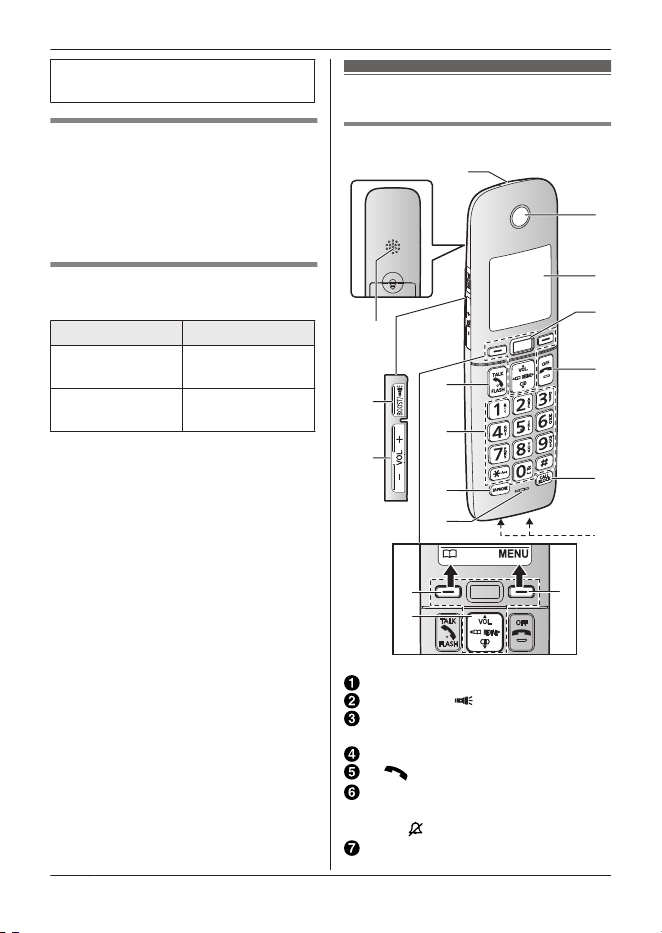
Handset
N
I
J
D
E
F
A
A
G
H
K
L
M
A
B
C
B
Flashlight/Ringer indicator
MBOOSTN/M N (Flashlight)
MjN/MkN (VOL.: Volume up/
down)
Speaker
M N (Talk) MFLASHN
Dial keypad
*: Temporary tone dialing
0: ( ) Ringer off
MSP-PHONEN (Speakerphone)
10
For assistance, please visit https://shop.panasonic.com/support
Getting Started
Microphone
Receiver
Display
Favorites key
Favorites key indicator
MOFFN ( )
MCALL BLOCKN
Charge contacts
n Control type
Soft keys
By pressing a soft key, you can
select the feature shown directly
above it on the display.
Navigator key
– MDN, MCN, MFN, or MEN: Scroll
through various lists and items.
– VOL. (Volume: MDN or MCN): Adjust
the receiver or speaker volume
while talking.
– MFN W: View the phonebook
entry.
– MEN REDIAL: View the redial list.
– MCN CID (Caller ID): View the
caller list.
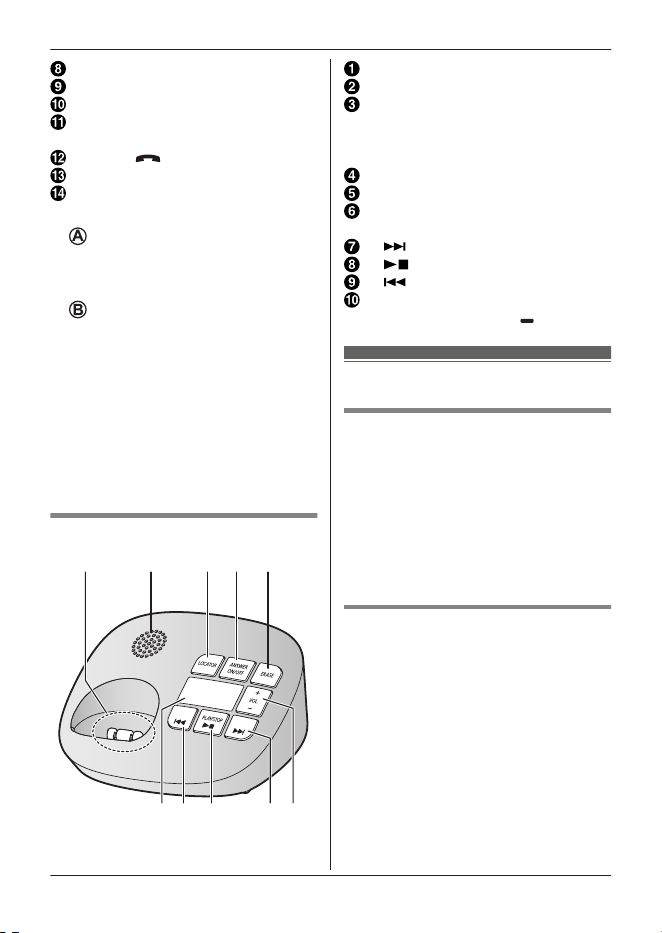
Base unit
B DC E
A
F
GHIJ
Charge contacts
Speaker
MLOCATORN
R You can locate a misplaced
handset by pressing
MLOCATORN.
MANSWER ON/OFFN
MERASEN
MjN/MkN (VOL.: Volume up/
down)
M N (Skip)
M N (PLAY/STOP)
M N (Repeat)
Message counter
Message indicator ( )
Language settings
Display language
1 MMENUN#110
2 MbN: Select the desired setting. a
MSAVEN a MOFFN
Note:
R The language selected will also be
used for the low battery alert
announcement.
Voice announcement
language
You can select the language used for
the following features.
– Answering system guidance
– Automated call block guidance
– Telemarketing call block guidance
– Talking Caller ID
– 2-way recording announcement
1 MMENUN#112
2 MbN: Select the desired setting. a
MSAVEN a MOFFN
For assistance, please visit https://shop.panasonic.com/support
11
Getting Started

Date and time
1 MMENUN#101
2 Enter the current month, date, and
year by selecting 2 digits for each.
Example: July 12, 2024
07 12 24
3 MOKN
4 Enter the current hour and minute
(12-hour clock format) by selecting
2 digits for each.
Example: 9:30
09 30
5 *: Select “AM” or “PM”.
6 MSAVEN a MOFFN
Note:
R When English is selected as the
display language, 12-hour clock
format is used. When Spanish is
selected, 24-hour clock format is
used.
Recording your
greeting message
You can record your own greeting
message instead of using a
pre-recorded greeting message.
1 MMENUN#302
2 MbN: “Yes” a MSELECTN
3 Record a greeting message. a
MSTOPN a MOFFN
Flashlight/Ringer
indicator
The indicator is located at the top of
handset. There are two features
available.
n Flashlight
Press M N to turn the flashlight on/
off. The maximum lighting time is
about 5 minutes.
n Ringer indicator
The LED flashes rapidly to indicate
unit status under the following
conditions:
– an incoming call.
– intercom is being received.
The default setting is “On”.
1 MMENUN#345
2 MbN: Select the desired setting. a
MSAVEN a MOFFN
Note:
R When the flashlight is turned on
while receiving an incoming call, the
ringer indicator will not work.
Making calls
1 Lift the handset and then dial the
phone number.
R To correct a digit, press
MCLEARN.
2 Press M N to make the call.
R To make the call using the
speakerphone, press
MSP-PHONEN.
3 When you finish talking, press
MOFFN or place the handset on the
base unit or charger.
12
For assistance, please visit https://shop.panasonic.com/support
Getting Started
Making a call using the redial list
The last 5 phone numbers dialed are
stored in the redial list (48 digits max.
each).
1 MEN REDIAL
2 MbN: Select the desired entry.
3 Press M N or MSP-PHONEN.
Adjusting the receiver or speaker
volume
Handset
Press either MDN or MCN on the navigator
key, or MjN or MkN located on the side
of the handset, repeatedly to select the
desired volume while talking.
Note:
R If the receiver volume is set to level
5 (max.), it will be changed to level 4
in the next call.
R Pressing the MBOOSTN key
activates the volume booster
feature. Use this key with care. To
prevent hearing damage, we
recommend that you set this product
to the lowest volume setting at which
you can hear adequately.
R If booster is set to on, it will be
changed to off in the next call.
Answering calls
When a call is being received, the
ringer indicator flashes rapidly
according to its setting. (page 12)
1 Lift the handset and then press
M N or MSP-PHONEN when the
unit rings.
2 When you finish talking, press
MOFFN or place the handset on the
base unit or charger.
Any key answer: You can answer the
call by pressing any dial key (except 0
key).
Auto talk: You can answer calls simply
by lifting the handset.
Temporary handset ringer off: You
can turn the ringer off temporarily by
pressing M N (left soft key).
Adjusting the ringer volume
Handset
Press either MDN or MCN on the navigator
key, or MjN or MkN located on the side
of the handset, repeatedly to select the
desired volume while ringing.
R To turn the ringer off, press either
MCN or MkN repeatedly.
Base unit
Press MjN or MkN repeatedly to select
the desired volume.
R To turn the ringer off, press and hold
MkN until the unit beeps.
Volume booster
This feature allows you to substantially
increase the volume of the other party’s
voice. This feature can be set for each
unit.
Volume booster is working under the
following features:
– Making call.
– Answering call.
– Monitoring with a handset
(Baby monitor).
– Listening to message from handset
(Answering system).
1 Press MBOOSTN while on a call.
R The unit displays
.
2 Press either MDN or MCN on the
navigator key, or MjN or MkN
located on the side of the handset,
For assistance, please visit https://shop.panasonic.com/support
13
Getting Started

repeatedly to select the desired
volume while talking.
Note:
R If booster is set to on, it will be
changed to off in the next call.
R This feature is not available while
using the speakerphone.
Recording a telephone
conversation (2-way
recording)
This unit can record a telephone
conversations during outside calls.
1 Press MMENUN during an outside
call.
2 MbN: “2 way recording” a
MSELECTN
R The total recordable time is
displayed.
R The unit announces to both
parties that the recording will
start.
R The unit starts recording.
3 To stop recording, press MMENUN
a MbN: “Stop recording” a
MSELECTN
R You can continue the
conversation with the outside
caller.
Call block
You can press the MCALL BLOCKN
button in the following situations to
disconnect the current call and add a
phone number to the call block list:
– when an incoming call is being
received
– when an incoming call is being
recorded by the answering system
– when talking on an outside call
Once a phone number has been added
to the call block list, the unit will block
calls from that phone number in the
future.
1 Press MCALL BLOCKN under the
situations shown above.
2 Confirm the call block number and
press MYESN.
R The call block number is stored
in the call block list,
confirmation tone sounds
*1
and
“Call blocked” is displayed,
and then the call is
disconnected.
*1 Confirmation tones are used with
permission of © 2018 Copyrights
Vision Inc.
Note:
Refer to the online Operating
Instructions to configure the following
features:
– Storing unwanted callers beforehand
– Block unknown CID (Caller ID)
Unblocking all call block numbers
1 MCALL BLOCKN
2 MbN: “Single number” or
“Range of numbers” a
MSELECTN
3 MMENUN a MbN: “Unblock all”
a MSELECTN
4 MbN: “Yes” a MSELECTN
5 MbN: “Yes” a MSELECTN a
MOFFN
Automated call block
With automated call block, the unit
screens incoming calls before ringing
for allowed calls, or ends the calls
14
For assistance, please visit https://shop.panasonic.com/support
Getting Started

without ringing for calls identified as
robocalls, telemarketing calls, or other
undesirable calls (Caller ID subscribers
only).
The unit will play the greeting message
for automated call block and prompt
the caller to enter an access code in
order for the unit to identify whether the
call is automated.
You can set the unit to block or unblock
mode. The default setting is
“Unblock”.
Allowed number database
Once the caller enters the access
code, the caller’s phone number is
memorized in the allowed number
database as an unblocked number.
Callers from this database are allowed
to connect without the access code
from their next call.
100 entries can be stored to the
database (22 digits max. each).
Note:
R When the database memory is full,
the latest call received will replace
the oldest number stored in the list.
R The numbers stored in the database
will be erased when you change the
access code.
R The numbers stored in the database
cannot be displayed.
Setting the automated call
block
1 MMENUN#787
2 MbN: Select the desired setting. a
MSAVEN
3 MbN: “Yes” a MSELECTN a
MOFFN
Note:
R We recommend you perform a test
run of the automated call block
procedure to ensure that the
automated call block feature is set
correctly.
Adding to the allow name list
You can allow specific callers to pass
through by adding the caller’s name to
the allow name list.
You can store up to 100 names (16
characters max.). If the name stored in
the allow name list matches the
incoming Caller ID, the unit rings.
Callers listed in the allow name list are
not required to enter the access code.
Adding allowed names from the
caller list
1 MCN CID
2 MbN: Select the desired entry. a
MMENUN
3 MbN: “Save allow name” a
MSELECTN a MOFFN
Telemarketing call
block
In addition to Automated call block
(page 14), you can use Telemarketing
call block to further screen calls to stop
telemarketer calls from getting through.
Using this feature, you can ask callers
to say their names, and after checking
the names, you can decide whether to
answer the calls or not.
For assistance, please visit https://shop.panasonic.com/support
15
Getting Started
Operating telemarketing call
block
1 During an outside call, lift the
handset and then press
MTELE.BLK.N.
R The unit prompts callers to say
their names.
2 To answer the call:
Press M
N or MSP-PHONEN.
To block the call:
Press MCALL BLOCKN
*1
a
MYESN.
R The unit announces that the call
will be disconnected, and
disconnects the call.
R The caller will be registered to
call block list.
*1 The user can still answer the call
after pressing MCALL BLOCKN.
To answer the call, press M
N or
MSP-PHONEN.
One ring scam alert
The one ring scam alert feature notifies
the user when calling back a number
that is judged to be a scam call. This
can help reduce the risk of calling back
expense international numbers.
During an incoming call, if the caller
disconnects the call after 1 or 2 rings,
the call is judged to be a scam call.
Depending on the number of rings
made before a call is disconnected, a
non-malicious call may also be judged
as a scam call. The default setting is
“1 or 2 rings”.
Setting the number of rings
for one ring scam
1 MMENUN#798
2 MbN: Select the desired setting. a
MSAVEN
“1 ring”
Judge 1 ring as a scam call.
“1 or 2 rings”
Judge 1 or 2 rings as a scam
call.
“Off”
Turn off the setting and does
not judge as scam calls.
Note:
R When a phone number is judged as
a scam call, “ ” will be displayed
in the caller list unless:
– the number is identified as
Automated call block.
– the number is stored in the call
block list.
Phonebook
You can add 100 names (16 characters
max.) and phone numbers (24 digits
max.) to the phonebook, and assign
each phonebook entry to the desired
group.
Important:
R All entries can be shared by any
registered handset.
Adding phonebook entries
1 MFN W a MMENUN
16
For assistance, please visit https://shop.panasonic.com/support
Getting Started
2 MbN: “Add new entry” a
MSELECTN
3 Enter the party’s name. a MOKN
4 Enter the party’s phone number.
a MOKN
5 MbN: Select the desired group. a
MSELECTN 2 times a MOFFN
Note:
R In step 3, you can switch the
language for entering characters.
# a MbN: Select the desired
language. a MOKN
Finding and calling from a
phonebook entry
1 MFN W
2 To scroll through all entries
MbN: Select the desired entry.
To search by first character
Press the dial key (0 to 9,
or #) which contains the
character you are searching
for.
MbN: Scroll through the
phonebook if necessary.
To search by group
MGROUPN
MbN: Select the desired group.
a MSELECTN
MbN: Scroll through the
phonebook if necessary.
3 M
N
Favorites key
You can add up to 3 favorites names
(16 characters max.), phone numbers
(24 digits max.) and the desired ringer
tone to the Favorites key. The
Favorites key indicator flashes once
you have set your favorites contact
information.
Important:
R Make sure the unit’s date and time
setting is correct (page 12).
R This unit is Caller ID compatible. To
use Favorites key indicator and
ringer tones features, you must
subscribe to a Caller ID service.
Contact your phone service provider
for details.
Note:
R Favorites contacts are a common
feature within the system.
R The preset melodies in this product
(“Melody 1” - “Melody 10”) are
used with permission of © 2009 -
2012 Copyrights Vision Inc.
Adding phone numbers
manually to Favorites key
1 MMENUN#295
2 MbN: Select the desired entry. a
MADDN
3 Enter the party’s name. a MOKN
4 Enter the party’s phone number.
a MOKN
5 MbN: Select the desired ringer tone.
a MSELECTN 2 times a MOFFN
Finding and calling from
Favorites key
1 Press Favorites key.
2 MbN: Select desired entry.
3 Press M
N or Favorites key to
make the call.
For assistance, please visit https://shop.panasonic.com/support
17
Getting Started
Answering call from
Favorites key
1 Lift the handset and then press
Favorites key or M
N or
MSP-PHONEN when the unit rings.
2 When you finish talking, press
MOFFN.
Note:
R If there is a missed call from the
favorites contact, it will not be listed
in the caller list. Instead, the
Favorites key will flash slowly to let
you know there is a missed call from
the favorites contact.
To view:
Press Favorites key.
MbN: Select the desired entry.
a MSELECTN
R If the indicator flashes when the
handset is not placed on the base
unit or charger, battery consumption
will be faster than usual.
Using Caller ID
service
Important:
R This unit is Caller ID compatible. To
use Caller ID features, you must
subscribe to a Caller ID service.
Contact your phone service provider
for details.
Caller ID features
When an outside call is being received,
the caller information is displayed.
Caller information for the last 50 callers
is logged in the caller list from the most
recent call to the oldest.
Missed calls
If a call is not answered, the unit treats
it as a missed call. The display shows
“Missed call”.
Note:
R Even when there are unviewed
missed calls, “Missed call”
disappears from the standby display
if the following operation is
performed by one of the units:
– A handset is replaced on the
base unit or charger.
– Pressing MOFFN on a handset.
Talking Caller ID
Handset / Base unit
This feature lets you know who is
calling without looking at the display.
To use this feature, you must:
– subscribe to a Caller ID service of
your phone service provider.
– turn this feature on (from the
handset):
1 Handset: MMENUN#162
Base unit:
MMENUN#*162
2 MbN: Select the desired setting.
a MSAVEN a MOFFN
When caller information is received, the
handsets and/or base unit announce
the caller’s name or phone number
received from your phone service
provider following every ring.
Viewing the caller list and
calling back
1 MCN CID
2 Press MCN to search from the most
recent call, or MDN to search from
the oldest call.
18
For assistance, please visit https://shop.panasonic.com/support
Getting Started
3 To call back, press M N.
R If you select an entry with
“ ”, “ ” or “ ” displayed,
an error tone sounds.
Wait for 2 seconds until a
confirmation message is
displayed. Press MYESN if you
want to call back.
To exit, press MOFFN.
Note:
R If the entry has already been viewed
or answered, “
” is displayed.
R “ ” or “ ” indicates the caller
information for blocked calls.
R “ ” indicates the caller information
for scam calls.
Answering system
Answering system messages are
stored on your telephone’s built-in
recording device.
By default, the answering system is set
to receive message after 4 rings if no
one picks up.
When you have a new answering
system message: “New message” is
displayed on the handset.
Voicemail is a service offered by your
telephone provider. Messages are
stored in their system and accessed
remotely.
When you have a new voicemail:
“Voicemail msg. via phone
co.” will be displayed on the handset.
Important:
R Make sure the unit’s date and time
setting is correct (page 12).
Turning the answering
system on/off
Base unit
Press MANSWER ON/OFFN to turn on/
off the answering system.
Handset
1 To turn on:
MMENUN#327
To turn off:
MMENUN#328
2 MOFFN
Note for base unit and handset:
R When the answering system is
turned on, the message counter on
the base unit displays the total
number of messages (old and new).
Listening to messages
Using the base unit
When new messages have been
recorded, the message indicator ( )
on the base unit flashes.
Press M N (PLAY).
Operating the answering system
during playback
Key Operation
MjN or MkN Adjust the speaker
volume
M N
Repeat message
*1
M N Skip message
M N
(STOP)
Stop playback
MERASEN Erase currently
playing message
For assistance, please visit https://shop.panasonic.com/support
19
Getting Started
*1 If pressed within the first 5
seconds of a message, the
previous message is played.
Using the handset
When new messages have been
recorded, “New message” is
displayed.
1 To listen to new messages:
MMENUN#323
To listen to all messages:
MMENUN#324
2 When finished, press MOFFN.
Operating the answering system
MMENUN a MbN: “Answering
device” a MSELECTN
Key Operation
MDN or MCN/
MjN or MkN
Adjust the receiver/
speaker volume
(during playback)
1 or MFN Repeat message
(during playback)
*1
2 or MEN Skip message (during
playback)
9 or
MSTOPN
Stop recording
Stop playback
*4
*2
Erase currently
playing message
*1 If pressed within the first 5
seconds of a message, the
previous message is played.
*2 You can also erase as follows:
MPAUSEN a MbN: “Erase” a
MSELECTN a MbN: “Yes” a
MSELECTN
Audible message
alert
This feature allows the base unit to
beep to inform you of a new message
arrival when new messages are
recorded. The base unit beeps 2 times
every minute until you listen to the
messages, if the “Base unit beep”
setting is turned on. The default setting
is “Off”.
1 MMENUN#339
2 MbN: Select the desired setting. a
MSAVEN a MOFFN
Answering system
settings
Call screening
While a caller is leaving a message,
you can listen to the call through the
unit’s speaker.
To adjust the speaker volume, press
either MDN or MCN on the navigator key,
or MjN or MkN located on the side of
the handset, repeatedly.
You can answer the call by pressing
M N on the handset.
Call screening can be set for each unit.
The default setting is “On”.
1 MMENUN#310
2 MbN: Select the desired setting. a
MSAVEN a MOFFN
20
For assistance, please visit https://shop.panasonic.com/support
Getting Started

Number of rings before the
unit answers a call
You can change the number of times
the phone rings “Ring count” before
the unit answers calls. You can select 2
to 7 rings, or “Toll saver”.
The default setting is “4 rings”.
“Toll saver”: The unit’s answering
system answers at the end of the 2nd
ring when new messages have been
recorded, or at the end of the 5th ring
when there are no new messages. If
you call your phone from outside to
listen to new messages, you know that
there are no new messages when the
phone rings for the 3rd time. You can
then hang up without being charged for
the call.
1 MMENUN#211
2 MbN: Select the desired setting. a
MSAVEN a MOFFN
For assistance, please visit https://shop.panasonic.com/support
21
Getting Started
Frequently asked questions
If you still have difficulties after following the instructions in this section, disconnect
the base unit’s AC adaptor, then reconnect the base unit’s AC adaptor. Remove
the batteries from the handset, and then insert them into the handset again.
Question Cause/solution
Why is displayed?
R The handset is too far from the base unit.
Move closer.
R The base unit’s AC adaptor is not properly
connected. Reconnect AC adaptor to the base
unit.
R The handset is not registered to the base unit.
Register it.
1 Handset:
MMENUN#130
2 Base unit:
Press and hold MLOCATORN for about 5
seconds.
R If all registered handsets start ringing,
press MLOCATORN again to stop, then
repeat this step.
3 Handset:
Press MOKN, then wait until a long beep
sounds.
Main unit
no power
or
No link. Re-
connect base
AC adaptor.
is displayed. How do I
remove this message
from the display?
R Confirm the base unit’s AC adaptor is connected
to the unit and the power outlet correctly.
R The handset has lost communication with the
base unit. Move closer to the base unit and try
again.
R Unplug the base unit’s AC adaptor to reset the
unit. Reconnect the adaptor and try again.
R The handset’s registration may have been
canceled. Re-register the handset.
Can I keep the batteries
charging all the time?
R You can leave the handset on the base unit or
charger anytime.
This will not harm the batteries.
How can I answer a call
waiting call (2nd call)?
R Press MFLASHN on the handset when you hear
the call waiting tone.
22
For assistance, please visit https://shop.panasonic.com/support
Useful Information
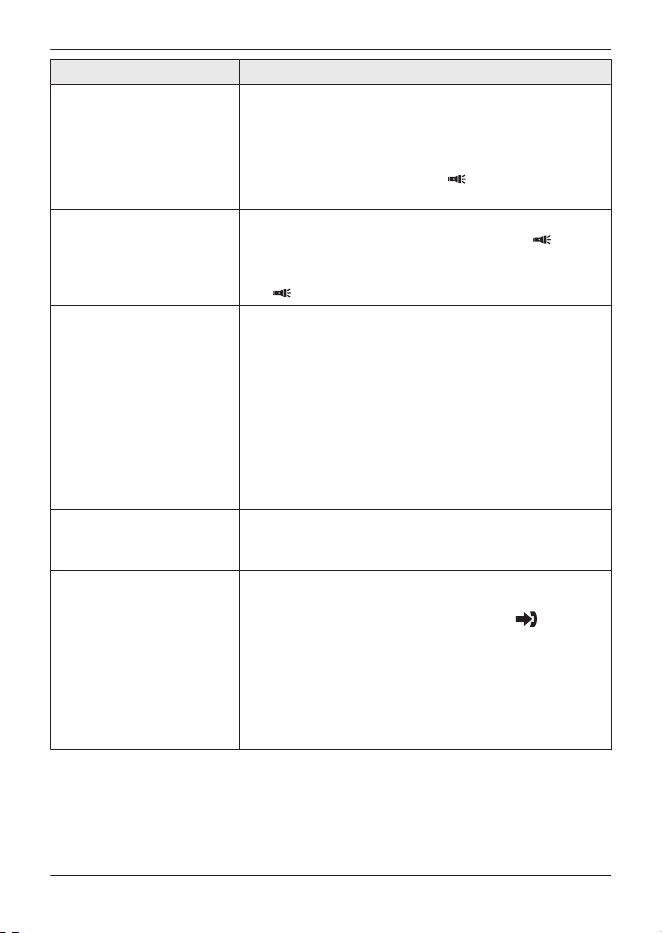
Question Cause/solution
Does excessive use of
the flashlight reduce the
battery life?
R Yes, continuous usage of the flashlight will reduce
the battery life to 2 hours.
Note:
Flashlight will automatically turn off after 5 minutes
of usage. You can press the M N key to turn back
on.
Does the flashlight
always operates,
regardless of the phone’s
call status?
R The flashlight will not turn on while you are on a
call, so when you press the MBOOSTN/M N key,
the operation will go into booster mode. When
you are not on the call and press the MBOOSTN/
M N key, the flashlight will turn on.
Time on the unit has
shifted.
R The unit automatically adjusts the date and time
each time caller information including date and
time is received (Caller ID subscribers only). To
adjust the time, wait for an incoming call.
R Incorrect time information from incoming Caller ID
changes the time. Set the time adjustment to
“Manual” (this will turn automatic adjust off).
Handset:
1. MMENUN#226
2. MbN: Select the desired setting. a MSAVEN
a MOFFN
Why is the Favorites key
flashing?
R The Favorites key flashes when there is a missed
call from any of your favorites contact is received
and not answered.
How can I identify a
missed call in the
favorites contacts
(when 2 or 3 contacts are
registered)?
R When there is a missed call from the favorites
contact, the Favorites key flashes at 5 second
intervals. Press the Favorites key, if “ ” is
displayed besides the favorites contacts that
means you had a missed call from that contact.
Note:
Once you press the Favorites key to see the missed
call and press MOFFN, the Favorites key will stop
flashing.
For assistance, please visit https://shop.panasonic.com/support
23
Useful Information
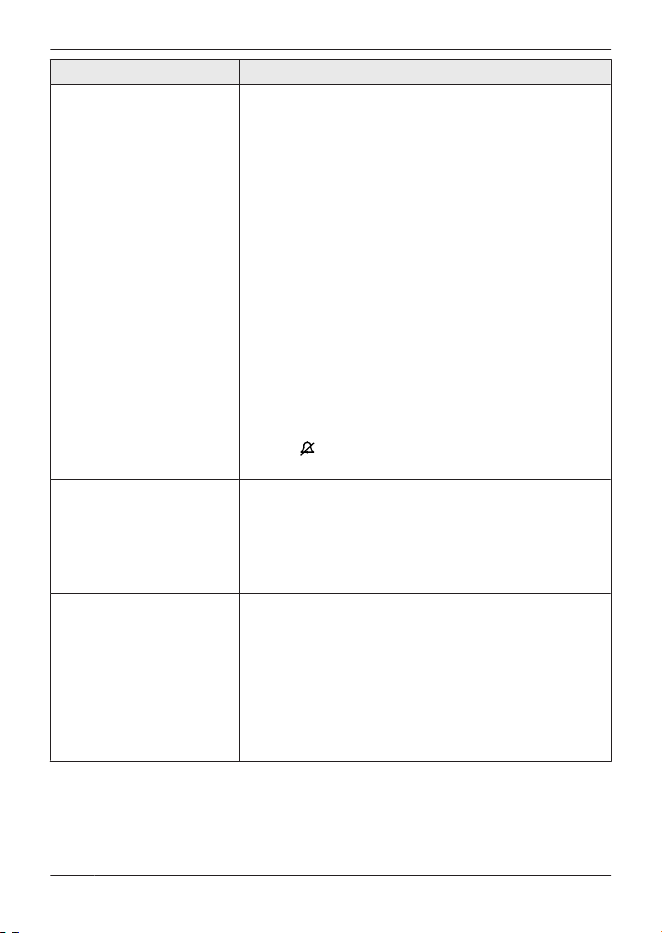
Question Cause/solution
The handset or base unit
does not ring, or the
volume is low.
R The ringer volume is turned off. While the handset
or base unit is ringing for an incoming call, press
either MDN or MCN on the navigator key, or MjN or
MkN located on the side of the handset, or MjN or
MkN on the base unit, repeatedly to select the
desired volume.
You can also program the volume before a call
comes in.
To adjust the ringer volume on the handset,
perform the following programming:
1 MMENUN#160
2 MbN: Select the desired setting. a MSAVEN
a MOFFN
R To turn the ringer off, press either MCN or
MkN until “Off” is displayed.
R Silent mode is turned on. Turn it off.
Press MMENUN#238 to select the desired
setting.
R If the M0N button on your telephone has a ringer
icon
, press and hold M0N to turn the ringer on
and off.
How can I increase the
handset volume level?
R Press either MDN on the navigator key, or MjN
located on the side of the handset, repeatedly to
select the desired volume while talking.
R Turn on the volume booster feature by pressing
MBOOSTN while on a call (page 13). Note that
volume will be increased substantially.
I want to setup the
answering system or help
recording the outgoing
greeting message.
R Turn on the answering system (page 19).
R If you have unit’s answering system set to on and
also the voicemail enabled, the system with least
amount of rings will record the message first.
Contact your phone service provider or change
the unit’s answering system number of rings
settings to a lower value (page 21).
R To record an outgoing greeting message for your
answering system, see page 12.
24
For assistance, please visit https://shop.panasonic.com/support
Useful Information

Question Cause/solution
How to remove/unblock a
number from the blocked
calls list.
R To remove blocked numbers from the telephones’
blocked number list you need to access the
programming menu for Call Block. The
programming steps vary by model.
Please refer to the following URL and select the
telephone model you have:
https://help.na.panasonic.com/answers/
how-to-remove-unblock-a-number-from-the-block
ed-calls-list
Steps that are commonly used:
To erase a single number from the handset
1 MCALL BLOCKN
2 MbN: “Single number” a MSELECTN
3 MbN: Select the desired entry. a
MUNBLOCKN
4 MbN: “Yes” a MSELECTN a MOFFN
To erase all call block numbers from the handset
1 MCALL BLOCKN
2 MbN: “Single number” or “Range of
numbers” a MSELECTN
3 MMENUN a MbN: “Unblock all” a
MSELECTN
4 MbN: “Yes” a MSELECTN
5 MbN: “Yes” a MSELECTN a MOFFN
I want to setup the
voicemail service or help
accessing messages.
R Voicemail service (provided by phone service
provider) can record calls when you are on
another call or if your answering system is off
(page 19).
R Your phone service provider should provide you
with an access number and password to retrieve
your voicemail messages.
Does the unit function
abnormally when
connected to router
telephone line?
R Connection issue between the base unit and the
router.
R Reboot your router by unplugging it from AC
outlet (Note: If the router has battery backup,
please remove).
Wait for at least a minute before plugging it back
again.
For assistance, please visit https://shop.panasonic.com/support
25
Useful Information

Question Cause/solution
Sound issues: Static
noise, muffled voice,
sound cuts in and out,
calls get disconnected,
poor sound quality.
R Try these solutions in following order until your
issue is resolved.
1 Before you begin, move your telephone (base
unit and handsets) away from other electronics
devices such as radios, intercoms, room
monitors, microwave, televisions, etc. Try
installing your phone as far away as possible
from these types of electronic devices.
2 Use the telephone cord and AC adaptor
provided with the unit and do not use the old
telephone cords. Worn-out cords can create
static during your phone calls, creating
interference when trying to get work done.
Replacing the cord could help you fix the
crackling noise on the line.
3 If your telephone shares a power outlet (power
strip) with other devices, try moving the
telephone to another location or connect to a
wall single power outlet.
4 The DSL (Digital Subscriber Line) signal can
cause static/noise if DSL filters (not supplied)
are not plugged into EVERY phone jack that
has a phone line attached. DSL filters block the
high frequency DSL signals from being
transmitted to the telephone. For most
installation plug the telephone line into the DSL
filter (not supplied) and the DSL line into the
telephone wall jack.
5 Reconnect the telephone line to the base and
telephone wall jack. Unplug the telephone line
from the base and telephone wall jack. Wait for
5-10 minutes.
Plug the telephone line back into the base and
telephone wall jack.
6 Unplug the phone from the wall jack. Plug the
phone to a different phone jack in the home and
check to see if you have the same issue. If yes,
you might have a line problem. You can either
confirm testing this phone at different location
(Example: Neighbors or relatives place) or
contact your telephone service provider.
26
For assistance, please visit https://shop.panasonic.com/support
Useful Information
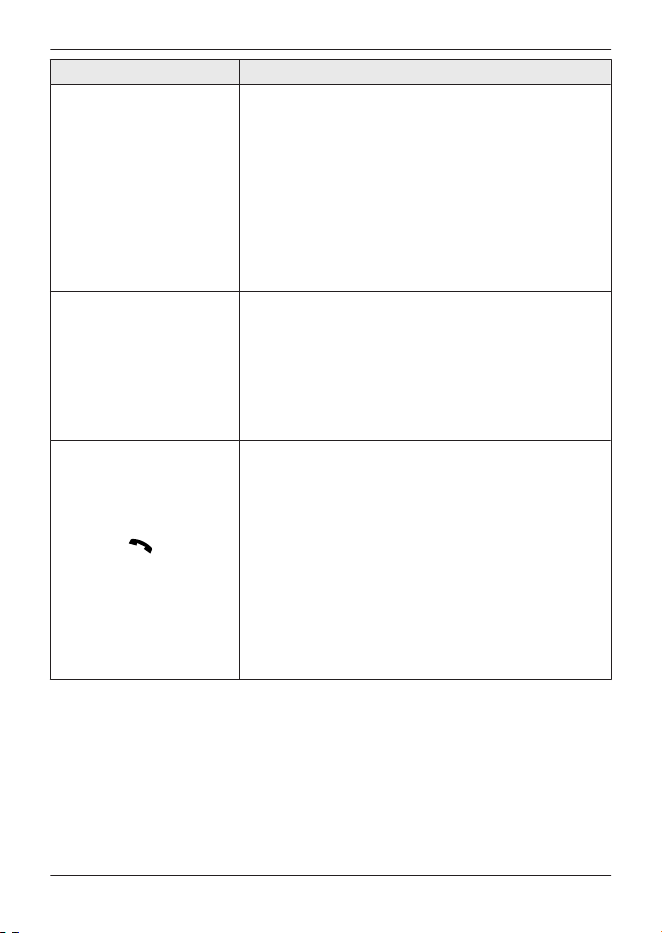
Question Cause/solution
7 Clean your telephone base and handset.
a. Unplug your telephone from the power
outlet and telephone line cord.
b. Clean the charge contacts of the handset,
base unit, and charger using a damp cloth
to remove any dirt, dust, or debris.
c. Clean the speaker and microphone part of
the handset using a damp cloth to remove
any dirt, dust, or debris.
d. Plug your telephone back into the power
outlet and telephone line cord.
Can I add another
accessory handset to my
base unit?
R Yes, you can add up to 6 handsets (including the
handset(s) sold with your base unit) to a single
base unit.
R To purchase additional accessory handset(s)
(KX-TGUA40), please visit:
https://shop.panasonic.com/support
TTY users (hearing or speech impaired users)
can call 1-877-833-8855.
“Voicemail msg. via
phone co.” is shown
on the handset display
and interrupted or busy
dial tone is heard after
pressing M N
on the
handset. How do I clear
the voicemail notice and
busy dial tone?
R Y
our phone service provider’s voicemail service
(not the unit’s answering system) has recorded a
message for you. Typically you can clear the
voicemail notice and busy (stutter) dial tone by
listening to the message. To listen to the
voicemail message, dial the voicemail access
number provided by your phone service provider,
and follow the voice instructions. Depending on
your phone service provider, you may need to
remove all messages from your voice mailbox to
clear the notification.
R You can remove this notification manually by
pressing and holding # until the unit beeps.
For assistance, please visit https://shop.panasonic.com/support
27
Useful Information

FCC and other information
This equipment complies with Part 68 of the
FCC rules and the requirements adopted by
the ACTA. On the bottom of this equipment
is a label that contains, among other
information, a product identifier in the
format US:ACJ----------.
If requested, this number must be provided
to the telephone company.
L Registration No.............(found on the
bottom of the unit)
L Ringer Equivalence No. (REN).......0.1A
A plug and jack used to connect this
equipment to the premises wiring and
telephone network must comply with the
applicable FCC Part 68 rules and
requirements adopted by the ACTA. A
compliant telephone cord and modular plug
is provided with the product. It is designed
to be connected to a compatible modular
jack that is also compliant.
The REN is used to determine the number
of devices that may be connected to a
telephone line. Excessive RENs on a
telephone line may result in the devices not
ringing in response to an incoming call. In
most but not all areas, the sum of RENs
should not exceed five (5.0). To be certain
of the number of devices that may be
connected to a line, as determined by the
total RENs, contact the local telephone
company. For products approved after July
23, 2001, the REN for the product is part of
the product identifier that has the format
US:AAAEQ##TXXXX. The digits
represented by ## are the REN without a
decimal point (e.g., 03 is a REN of 0.3).
If this equipment causes harm to the
telephone network, the telephone company
will notify you in advance that temporary
discontinuance of service may be required.
But if advance notice isn't practical, the
telephone company will notify the customer
as soon as possible. Also, you will be
advised of your right to file a complaint with
the FCC if you believe it is necessary.
The telephone company may make changes
in its facilities, equipment, operations or
procedures that could af
fect the operation of
the equipment. If this happens the
telephone company will provide advance
notice in order for you to make necessary
modifications to maintain uninterrupted
service.
If trouble is experienced with this
equipment, for repair or warranty
information, please contact a Factory
Service Center or other Authorized Servicer.
If the equipment is causing harm to the
telephone network, the telephone company
may request that you disconnect the
equipment until the problem is resolved.
Connection to party line service is subject to
state tariffs. Contact the state public utility
commission, public service commission or
corporation commission for information.
If your home has specially wired alarm
equipment connected to the telephone line,
ensure the installation of this equipment
does not disable your alarm equipment. If
you have questions about what will disable
alarm equipment, consult your telephone
company or a qualified installer.
This equipment is hearing aid compatible as
defined by the FCC in 47 CFR Section
68.316.
When you hold the phone to your ear, noise
might be heard in your Hearing Aid. Some
Hearing Aids are not adequately shielded
from external RF (radio frequency) energy. If
noise occurs, use an optional headset
accessory or the speakerphone option (if
applicable) when using this phone. Consult
with your audiologist or Hearing Aid
28
For assistance, please visit https://shop.panasonic.com/support
Useful Information

manufacturer about the availability of
Hearing Aids which provide adequate
shielding to RF energy commonly emitted
by digital devices.
WHEN PROGRAMMING EMERGENCY
NUMBERS AND(OR) MAKING TEST
CALLS TO EMERGENCY NUMBERS:
1) Remain on the line and briefly explain to
the dispatcher the reason for the call.
2) Perform such activities in the off-peak
hours, such as early morning or late
evenings.
This device complies with Part 15 of the
FCC Rules. Operation is subject to the
following two conditions:
(1) This device may not cause harmful
interference, and (2) this device must
accept any interference received, including
interference that may cause undesired
operation.
Privacy of communications may not be
ensured when using this phone.
CAUTION:
Any changes or modifications not expressly
approved by the party responsible for
compliance could void the user’s authority
to operate this device.
NOTE:
This equipment has been tested and found
to comply with the limits for a Class B digital
device, pursuant to Part 15 of the FCC
Rules. These limits are designed to provide
reasonable protection against harmful
interference in a residential installation. This
equipment generates, uses, and can radiate
radio frequency energy and, if not installed
and used in accordance with the
instructions, may cause harmful
interference to radio communications.
However, there is no guarantee that
interference will not occur in a particular
installation. If this equipment does cause
harmful interference to radio or television
reception, which can be determined by
turning the equipment off and on, the user is
encouraged to try to correct the interference
by one or more of the following measures:
– Reorient or relocate the receiving
antenna.
– Increase the separation between the
equipment and receiver.
– Connect the equipment into an outlet on a
circuit different from that to which the
receiver is connected.
– Consult the dealer or an experienced
radio/TV technician for help.
Some cordless telephones operate at
frequencies that may cause interference to
nearby TVs and VCRs. To minimize or
prevent such interference, the base of the
cordless telephone should not be placed
near or on top of a TV or VCR. If
i
nterference is experienced, move the
cordless telephone further away from the TV
or VCR. This will often reduce or eliminate
interference.
FCC RF Exposure Warning:
L
This product complies with FCC radiation
exposure limits set forth for an
uncontrolled environment.
L To comply with FCC RF exposure
requirements, the base unit must be
installed and operated 20 cm (8 inches)
or more between the product and all
person’s body.
L This product may not be collocated or
operated in conjunction with any other
antenna or transmitter.
L For body-worn operation, the handset
must be used only with a non-metallic
accessory. Use of other accessories may
not ensure compliance with FCC RF
exposure requirements.
Notice:
L FCC ID can be found inside the battery
compartment or on the bottom of the
units.
For assistance, please visit https://shop.panasonic.com/support
29
Useful Information
Customer services
Accessories!
hps://shop.panasonic.com/support
Customer Services Directory
Shop
for all your Panasonic gear
Go to
Get everything you need to get the most out of
your Panasonic products
Accessories & Parts for your Camera, Phone, A/V
products, TV, Computers & Networking, Personal
Care, Home Appliances, Headphones, Baeries,
Backup Chargers & more…
For Product Informa!on, Opera!ng Assistance,
Parts, Owner’s Manuals, Dealer and Service info
go to hps://shop.panasonic.com/support
For the hearing or speech impaired TTY: 1- 877-833-8855
As of March 2023
30
For assistance, please visit https://shop.panasonic.com/support
Appendix
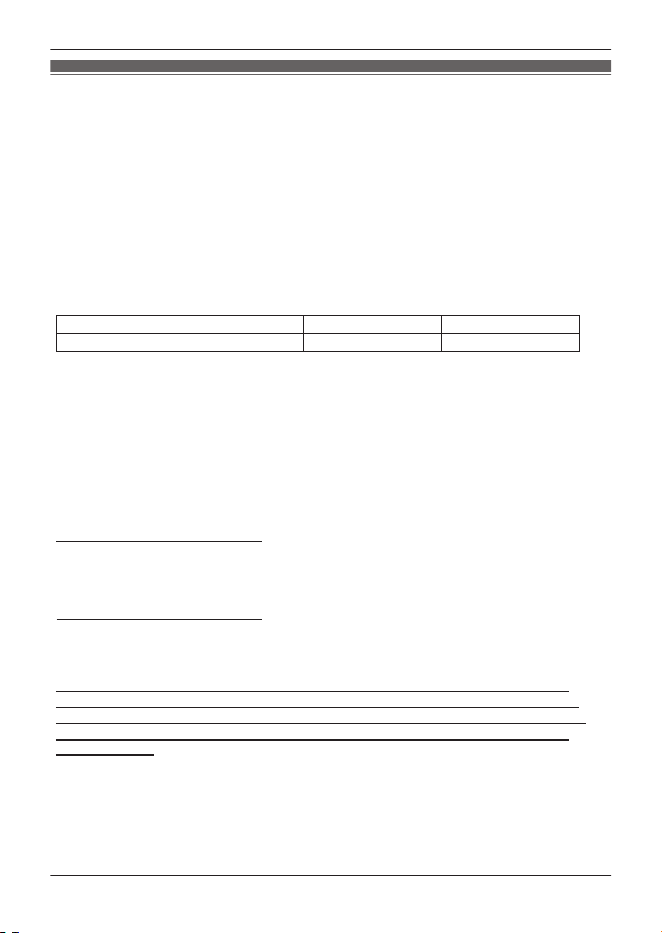
Limited Warranty (ONLY FOR U.S.A.)
When shipping the unit, carefully pack, include all supplied accessories listed in the
Owner’s Manual, and send it prepaid, adequately insured and packed well in a carton box.
When shipping Lithium Ion batteries please visit our Web Site at
https://shop.panasonic.com/support as Panasonic is committed to providing the most up to
date information. Include a letter detailing the complaint, a return address and provide a
daytime phone number where you can be reached. A valid registered receipt is required
under the Limited Warranty.
Limited Warranty Coverage (For USA Only)
Labor
One (1) Year
Parts
One (1) Year
To submit a new repair request and for quick repair status visit our Web Site at
https://shop.panasonic.com/support
Panasonic Products Limited Warranty
Online Repair Request
Mail-In Service--Online Repair Request
If your product does not work properly because of a defect in materials or workmanship,
Panasonic Corporation of North America (referred to as “the warrantor”) will, for the length
of the period indicated on the chart below, which starts with the date of original purchase
(“warranty period”), at its option either (a) repair your product with new or refurbished parts,
(b) replace it with a new or a refurbished equivalent value product, or (c) refund your
purchase price. The decision to repair, replace or refund will be made by the warrantor.
During the “Labor” warranty period there will be no charge for labor. During the “Parts”
warranty period, there will be no charge for parts. This Limited Warranty excludes both
parts and labor for non-rechargeable batteries, antennas, and cosmetic parts (cabinet).
This warranty only applies to products purchased and serviced in the United States.
This warranty is extended only to the original purchaser of a new product which was
not sold “as is”.
Telephone
IF REPAIR IS NEEDED DURING THE WARRANTY PERIOD, THE PURCHASER WILL
BE REQUIRED TO FURNISH A SALES RECEIPT/PROOF OF PURCHASE INDICATING
DATE OF PURCHASE, AMOUNT PAID AND PLACE OF PURCHASE. CUSTOMER WILL
BE CHARGED FOR THE REPAIR OF ANY UNIT RECEIVED WITHOUT SUCH PROOF
OF PURCHASE.
Product or Part Name
For assistance, please visit https://shop.panasonic.com/support
31
Appendix

Limited Warranty Limits and Exclusions
(As examples, this excludes damages for lost time, travel to and from the servicer,
loss of or damage to media or images, data or other memory or recorded content.
The items listed are not exclusive, but for illustration only.)
This warranty ONLY COVERS failures due to defects in materials or workmanship,
and DOES NOT COVER normal wear and tear or cosmetic damage. The warranty
ALSO DOES NOT COVER damages which occurred in shipment, or failures which
are caused by products not supplied by the warrantor, or failures which result from
accidents, misuse, abuse, neglect, mishandling, misapplication, alteration, faulty
installation, set-up adjustments, misadjustment of consumer controls, improper
maintenance, power line surge, lightning damage, modification, introduction of sand,
humidity or liquids, commercial use such as hotel, office, restaurant, or other business
or rental use of the product, or service by anyone other than a Factory Service Center
or other Authorized Servicer, or damage that is attributable to acts of God.
THERE ARE NO EXPRESS WARRANTIES EXCEPT AS LISTED UNDER
“LIMITED WARRANTY COVERAGE”.
THE WARRANTOR IS NOT LIABLE FOR INCIDENTAL OR CONSEQUENTIAL
DAMAGES RESULTING FROM THE USE OF THIS PRODUCT, OR ARISING OUT
OF ANY BREACH OF THIS WARRANTY.
ALL EXPRESS AND IMPLIED WARRANTIES, INCLUDING THE WARRANTY OF
MERCHANTABILITY, ARE LIMITED TO THE PERIOD OF THE LIMITED WARRANTY.
PARTS AND SERVICE, WHICH ARE NOT COVERED BY THIS LIMITED WARRANTY,
ARE YOUR RESPONSIBILITY.
Some states do not allow the exclusion or limitation of incidental or consequential damages,
or limitations on how long an implied warranty lasts, so the exclusions may not apply to you.
This warranty gives you specific legal rights and you may also have other rights which vary
from state to state. If a problem with this product develops during or after the warranty period,
you may contact your dealer or Service Center. If the problem is not handled to your
satisfaction, then write to:
Panasonic Corporation of North America
Consumer Affairs Department
Two Riverfront Plaza
Newark NJ 07102-5490
Product registration is not mandatory. Failure to complete the form does not affect the
consumer's warranty rights.
As of March 2023
32
For assistance, please visit https://shop.panasonic.com/support
Appendix

33
Notes

34
Notes

35
Notes
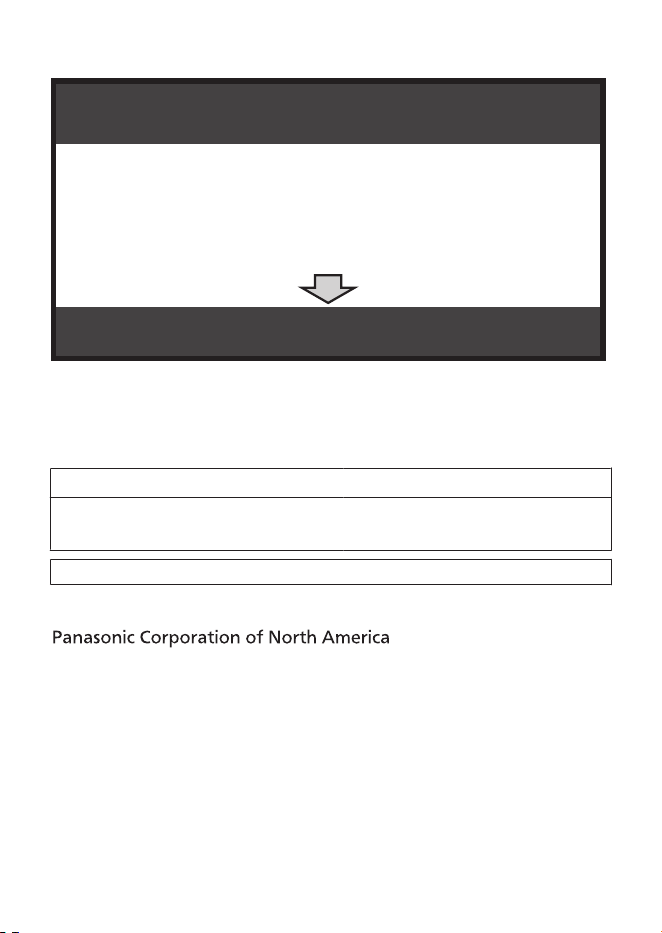
1 Reconnect AC adaptor to the base unit.
2 Check if telephone line cord is connected.
3 Use rechargeable Ni-MH batteries.
(Alkaline/Manganese/Ni-Cd batteries CANNOT be used.)
4 Read troubleshooting page in the base unit’s
Operating Instructions.
IMPORTANT!
If your product is not working properly. . .
Visit our Web site: https://shop.panasonic.com/support
L
FAQ and troubleshooting hints are available.
For your future reference
We recommend keeping a record of the following information to assist
with any repair under warranty.
Serial No.
Date of purchase
(found on the bottom of the base unit)
Name and address of dealer
Attach your purchase receipt here.
Two Riverfront Plaza, Newark, NJ 07102-5490
© Panasonic Entertainment & Communication Co., Ltd. 2024
Printed in Vietnam
*PNQX9278XA*
*PNQX9278XA*
PNQX9278XA PP1223BQ2124