Before use, please read these instructions completely.
E
VQT3S52-2
F0911YS2032
Operating Instructions
INTERCHANGEABLE LENS FOR DIGITAL CAMERA
Model No. H-PS14042
VQT3S52_Cover.fm 1 ページ 2022年3月1日 火曜日 午後3時59分

2
VQT3S52
Contents
Information for Your Safety.....................................2
Precautions........................................................... 4
Supplied Accessories ............................................. 5
Attaching/Detaching the Lens................................. 5
Names and Functions of Components ................... 7
Cautions for Use..................................................... 8
Troubleshooting .................................................... 9
Specifications........................................................ 10
Information for Your Safety
Keep the unit as far away as possible from
electromagnetic equipment (such as microwave
ovens, TVs, video games, radio transmitters,
high-voltage lines etc.).
≥ Do not use the camera near cell phones because
doing so may result in noise adversely affecting
the pictures and sound.
≥ If the camera is adversely affected by
electromagnetic equipment and stops functioning
properly, turn the camera off and remove the
battery and/or the connected AC adaptor. Then
reinsert the battery and/or reconnect the AC
adaptor and turn the camera on.
The lens can be used with a digital camera
compatible with the lens mount standard for the
“Micro Four Thirds
TM
System”.
≥ It cannot be mounted on the Four Thirds
TM
mount
specification camera.
≥ The digital camera illustrations in these operating
instructions show DMC-GF3 as an example.
≥
The appearance and specifications of products described
in this manual may differ from the actual products you
have purchased due to later enhancements.
≥
Micro Four Thirds
TM
and Micro Four Thirds Logo
marks are trademarks or registered trademarks of
Olympus Imaging Corporation, in Japan, the United
States, the European Union and other countries.
≥ Four Thirds
TM
and Four Thirds Logo marks are
trademarks or registered trademarks of Olympus
Imaging Corporation, in Japan, the United States,
the European Union and other countries.
≥ G MICRO SYSTEM is a lens exchange type
digital camera system of LUMIX based on a Micro
Four Thirds System standard.
≥ Other names of systems and products mentioned
in these instructions are usually the registered
trademarks or trademarks of the manufacturers
who developed the system or product concerned.
VQT3S52_ENG.fm 2 ページ 2022年3月1日 火曜日 午後4時6分
3
VQT3S52
-If you see this symbol-
Information on Disposal for Users of Waste Electrical & Electronic Equipment (private
households)
This symbol on the products and/or accompanying documents means that used
electrical and electronic products should not be mixed with general household waste.
For proper treatment, recovery and recycling, please take these products to
designated collection points, where they will be accepted on a free of charge basis.
Alternatively, in some countries you may be able to return your products to your local
retailer upon the purchase of an equivalent new product.
Disposing of this product correctly will help to save valuable resources and prevent
any potential negative effects on human health and the environment which could
otherwise arise from inappropriate waste handling. Please contact your local authority
for further details of your nearest designated collection point.
Penalties may be applicable for incorrect disposal of this waste, in accordance with national legislation.
For business users in the European Union
If you wish to discard electrical and electronic equipment, please contact your dealer or supplier for
further information.
Information on Disposal in other Countries outside the European Union
This symbol is only valid in the European Union.
If you wish to discard this product, please contact your local authorities or dealer and ask for the correct
method of disposal.
ENGLISH
VQT3S52_E.book 3 ページ 2013年2月18日 月曜日 午後3時26分
4
VQT3S52
∫ Lens Care
≥ Sand and dust can damage the lens. Make
sure that no sand or dust gets inside the lens
or the terminals when using the lens on a
beach, etc.
≥ This lens is not waterproof. If drops of water
get onto the lens, wipe the lens with a dry
cloth.
≥ Do not press the lens with excessive force.
≥ When there is dirt (water, oil, and fingerprints, etc.)
on the surface of the lens, the picture may be
affected. Lightly wipe the surface of the lens with a
soft, dry cloth before and after taking pictures.
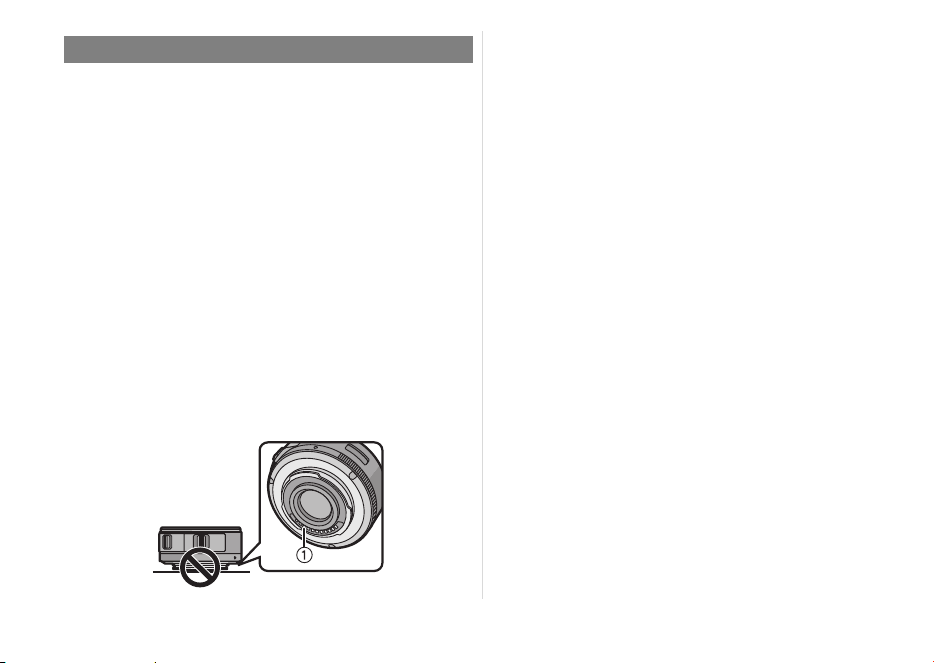
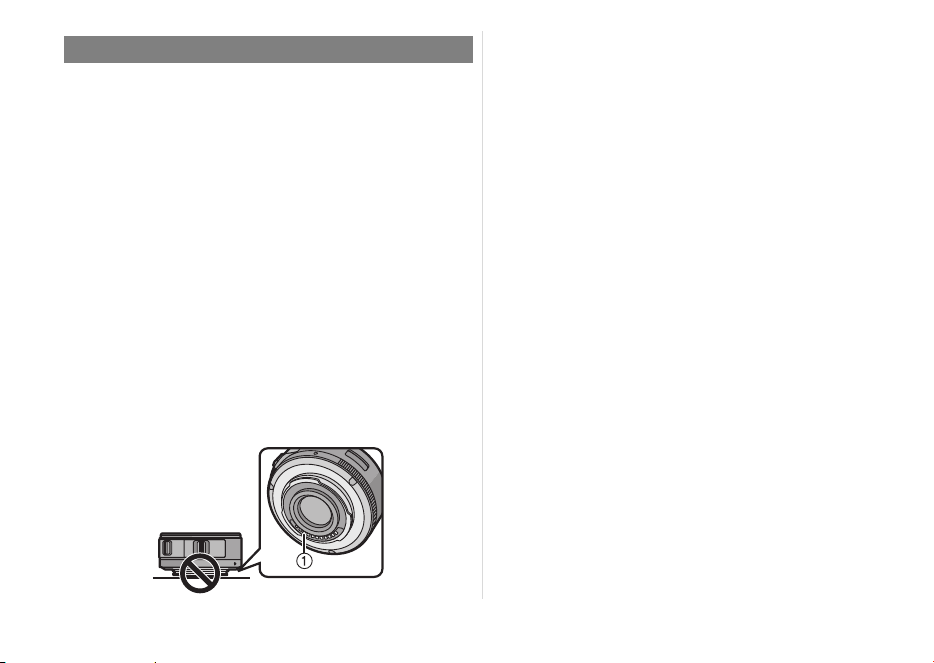
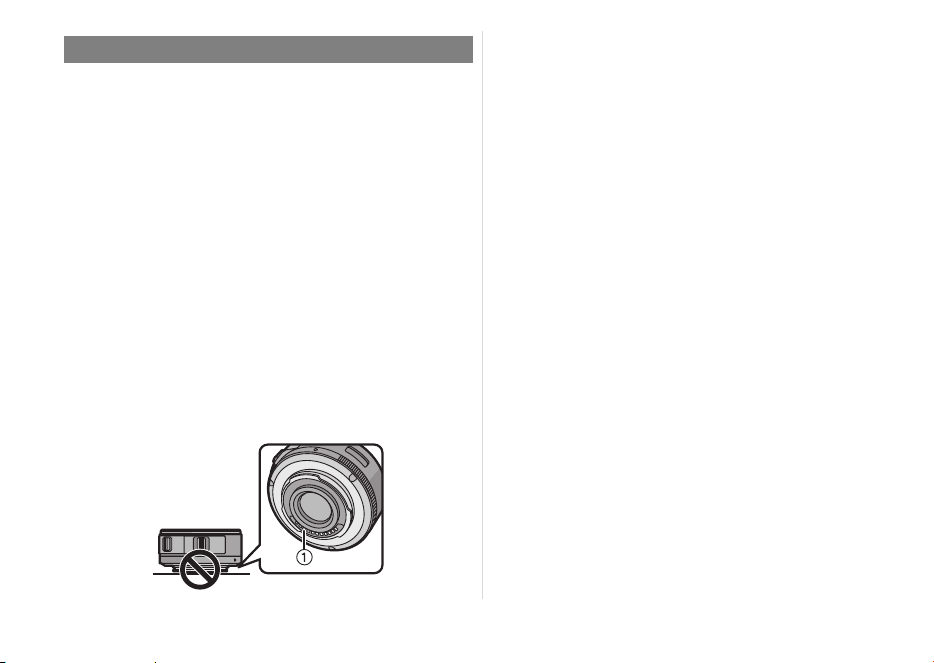
≥ Do not place the lens mount facing downwards.
Do not allow the lens contact points 1 to become
dirty.
∫ About Condensation
(Fogging of the Lens)
≥ Condensation occurs when there are differences
in temperature and humidity as described below.
Condensation can cause the lens to become dirty
and lead to mold and malfunctioning, so exercise
caution in the following situations:
– When the camera is brought indoors from outside
during cold weather
– When the camera is brought into an air-
conditioned car
– When cold air from an air conditioner is directly
blown onto the lens
– In humid places
≥ Put the camera into a plastic bag to allow it to
acclimatize to the surrounding temperature in
order to prevent condensation. If condensation
occurs, turn the power off and leave it for about
two hours. Once the camera acclimatizes to the
surrounding temperature the condensation will go
away naturally.
Precautions
VQT3S52_E.book 4 ページ 2013年2月18日 月曜日 午後3時26分
5
VQT3S52
Supplied Accessories
[Inspection to be performed when you unpack
the unit]
When removing the unit from its packing box, check
that the main unit and the supplied accessories are
there and also check their external appearance and
functions to verify that they have not sustained any
damage during distribution and transportation.
If you discover any trouble, contact your vendor
before using the product.
Product numbers correct as of September 2011.
These may be subject to change.
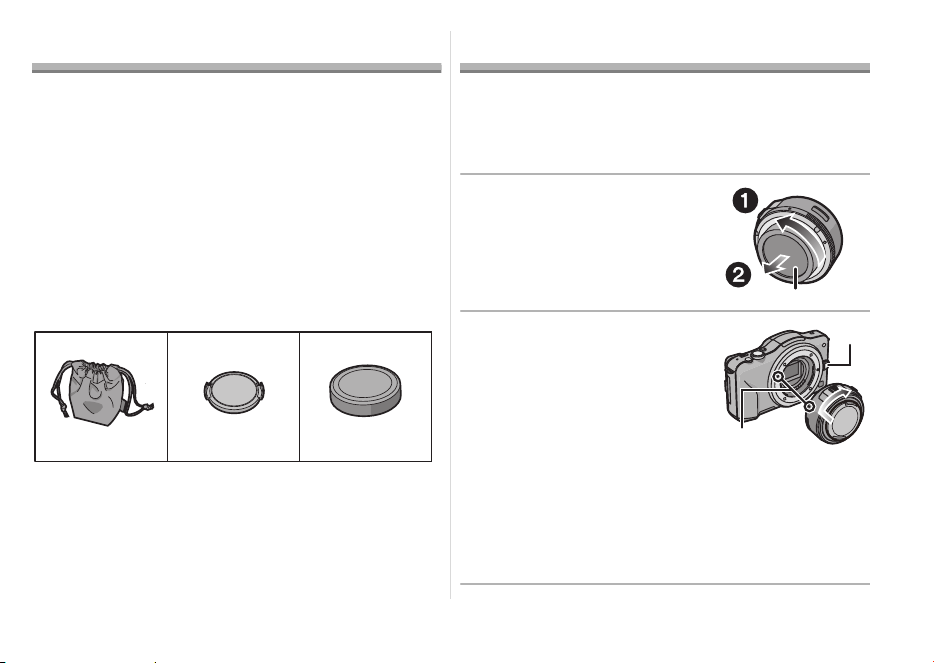
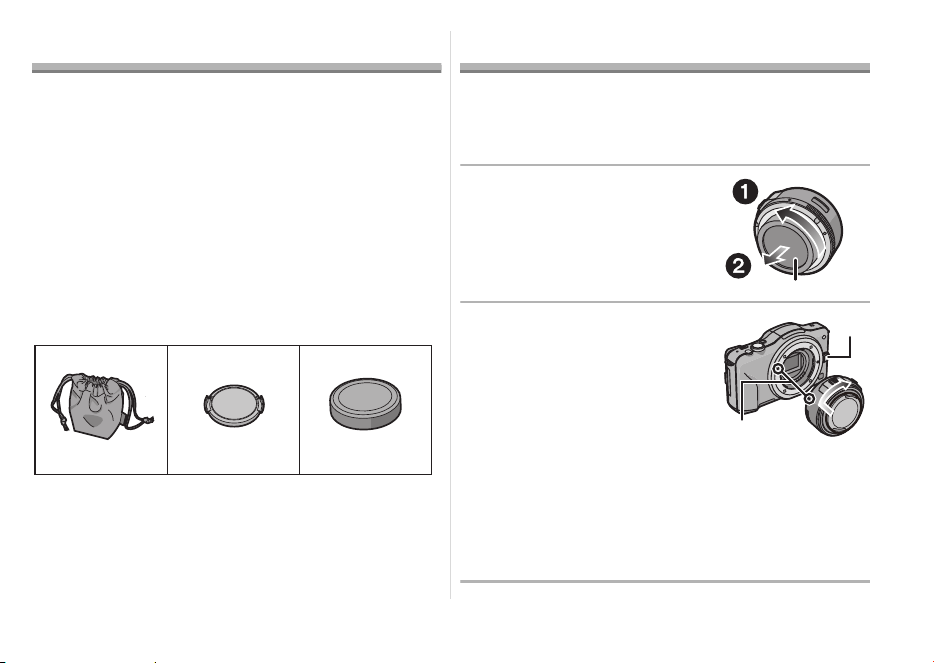
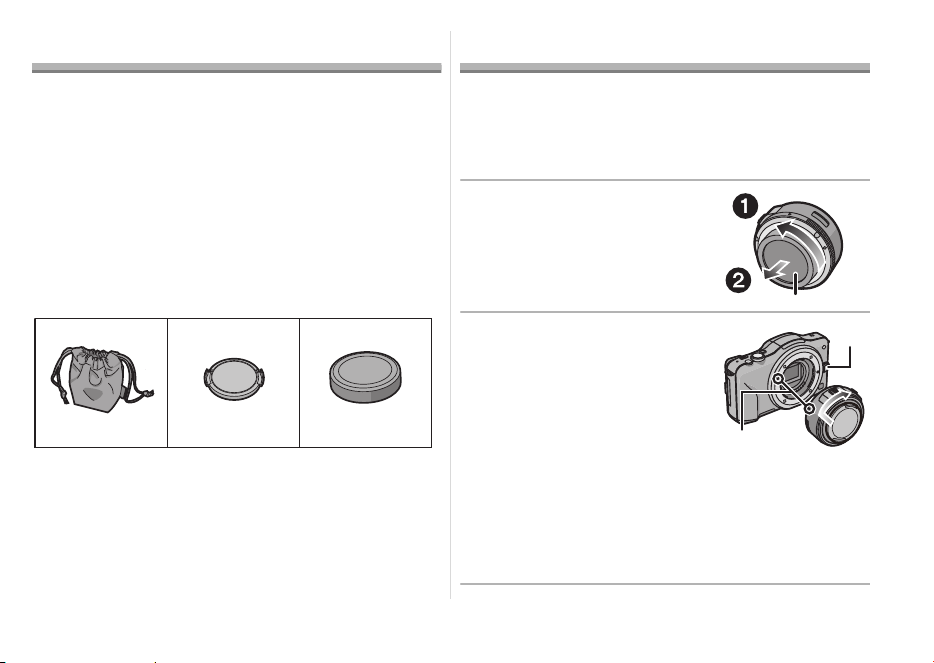
1 Lens Storage Bag
2 Lens Cap
3 Lens Rear Cap
(The lens rear cap and lens cap are attached to
the interchangeable lens at the time of purchase.)
Attaching/Detaching the Lens
≥ Refer also to the camera’s operating instructions
for attaching and detaching the lens.
∫ Attaching the Lens
≥ Check that the camera is turned off.
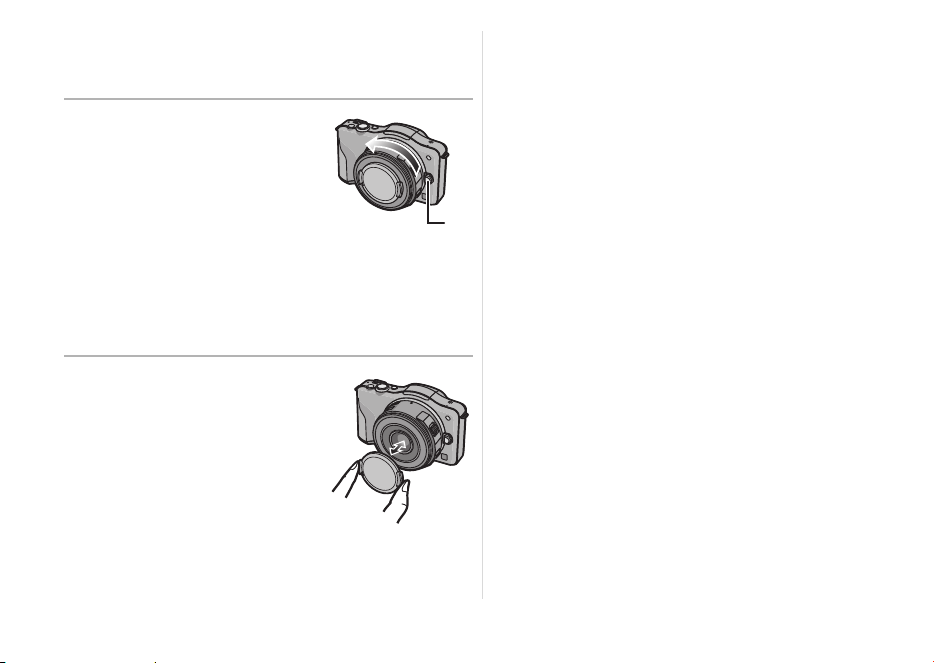
1 Turn the lens rear cap
to detach it.
A: Lens Rear Cap
2
Align the lens fitting
marks
B
on the camera
body and the lens and
then rotate the lens in
the direction of the arrow
until it clicks.
• Do not press the lens
release button C when you
attach a lens.
• Do not try to attach the lens when holding it at an
angle to the camera body as the lens mount may
get scratched.
• Check that the lens is attached correctly.
VFC4460 VYF3443
123
VFC4605
VQT3S52_E.book 5 ページ 2013年2月18日 月曜日 午後3時26分
6
VQT3S52
∫ Detaching the Lens
≥ To protect the lens, turn off the power of the digital
camera and confirm that the lens barrel is
recessed.
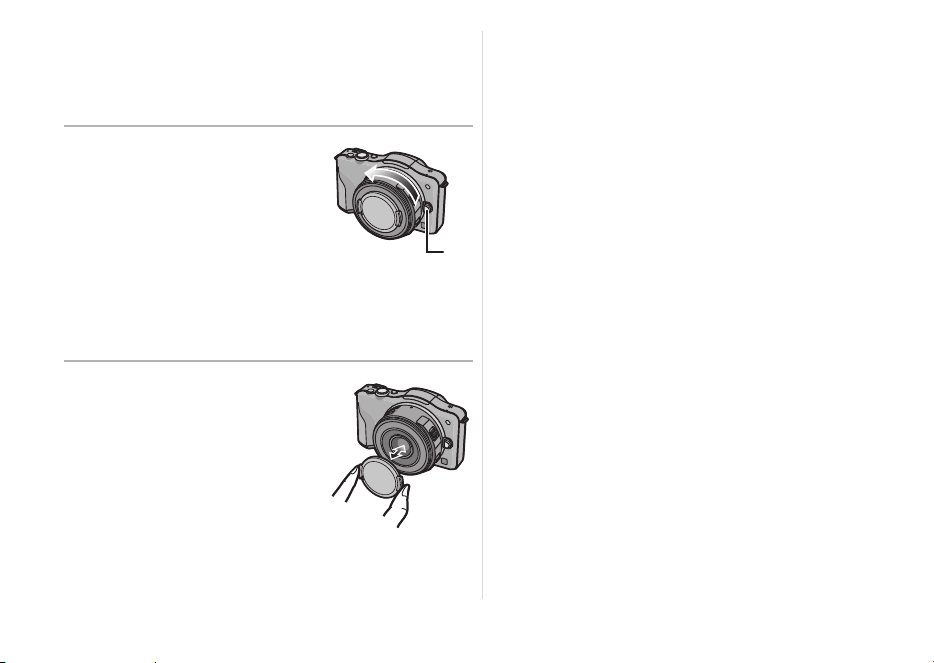
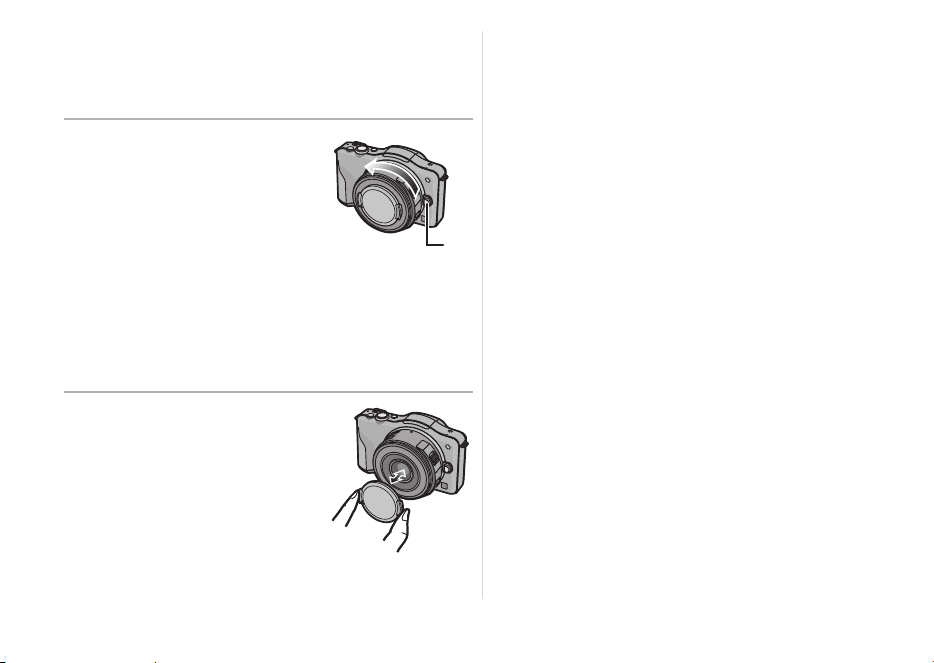
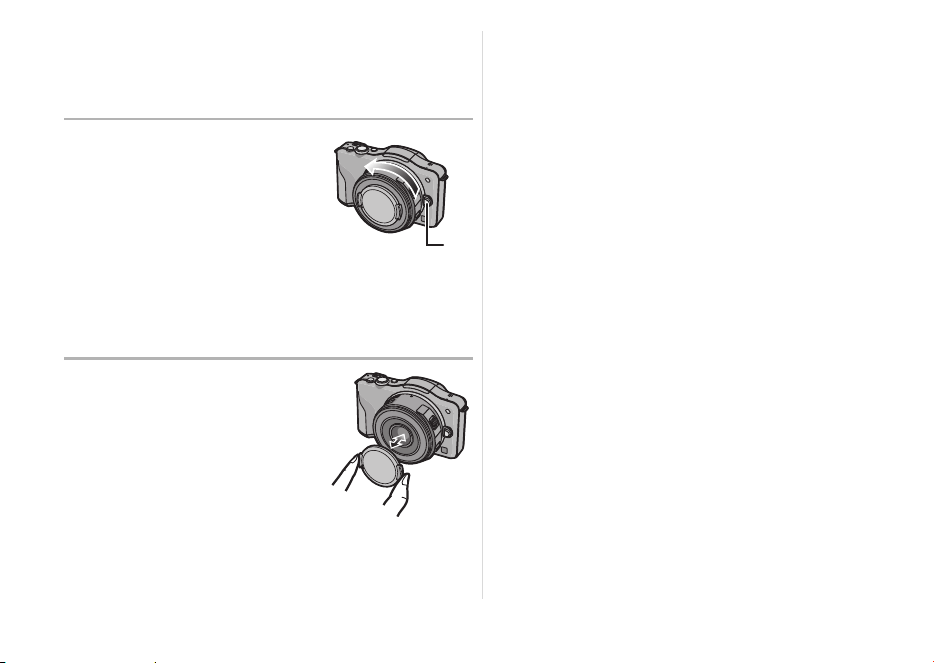
While pressing on the
lens release button D,
rotate the lens toward
the arrow until it stops
and then remove.
• Attach the lens rear cap so
that the lens contact point
does not get scratched.
• Attach the body cap to the camera so no dirt or
dust will get inside the main unit.
∫ Attaching and
Detaching the Lens Cap
Pinch the lens cap as
shown in the figure to
attach or detach.
• Be careful not to lose the
lens cap.
∫ Attaching Filters
≥ Attach or detach the filter when the lens barrel is
recessed.
≥ Vignetting may occur if using 2 or more
MC protectors (optional: DMW-LMCH37),
PL filters (optional: DMW-LPL37) or ND filters
(optional: DMW-LND37), or if using thick
protectors and/or filters.
≥ The filter may become impossible to remove if
excessively tightened, so please refrain from
tightening it too strongly.
≥ It is possible to attach the lens cap with the filter
already attached.
≥ You cannot attach a conversion lens or adaptor to
this lens.
(As of September 2011) A filter may be
used, but attaching any other element may cause
damage to the lens.
VQT3S52_E.book 6 ページ 2013年2月18日 月曜日 午後3時26分
7
VQT3S52
Names and Functions of
Components
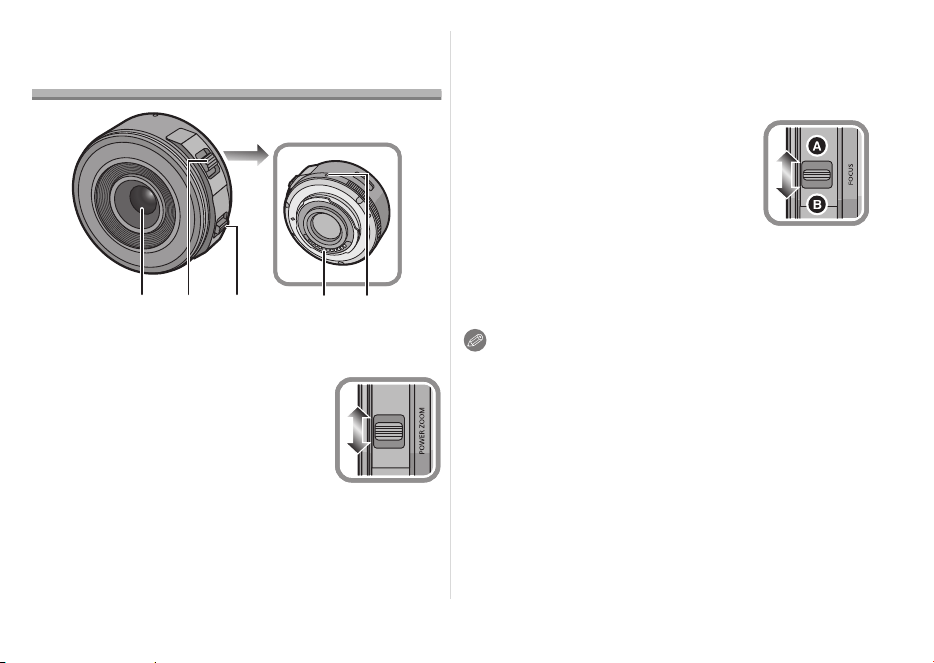
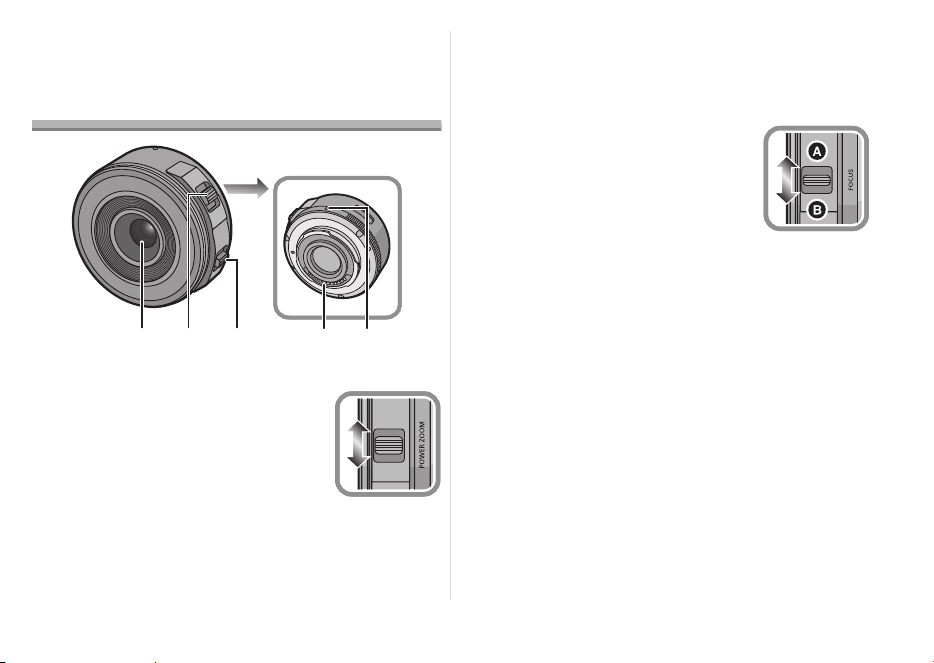
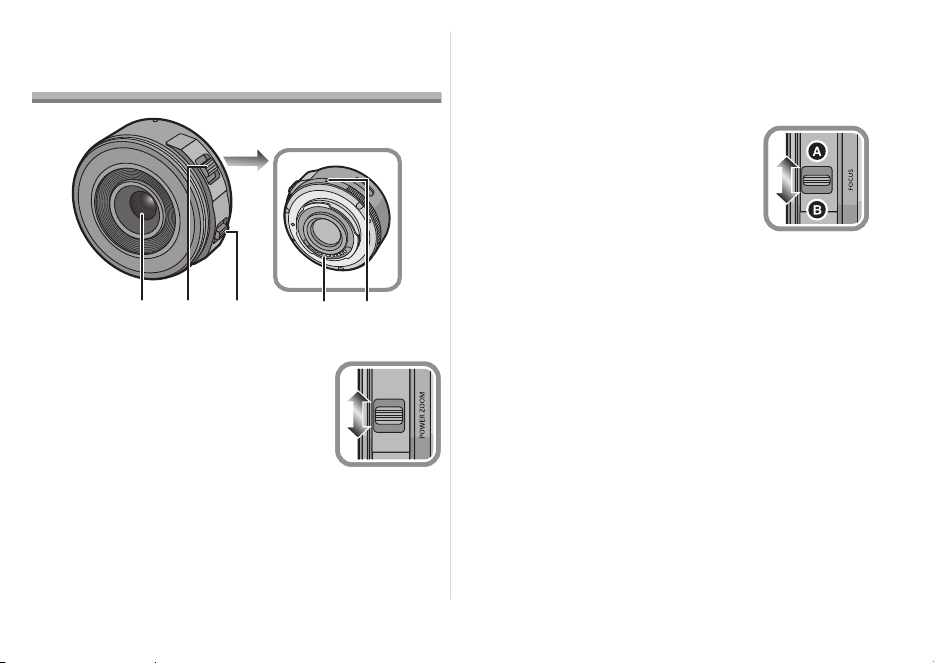
1 Lens surface
2 Zoom lever
Move the zoom lever to the [T]
(Tele side) or [W] (Wide side).
[T]: To make subjects appear
closer use (Tele)
[W]: To make subjects appear
further away use (Wide)
• The zoom speed varies depending on the
range over which the zoom lever is moved.
Zoom speed will be slower than normal when
recording a motion picture.
3 Focus lever
Move the Focus lever to the
A
or
B
.
A
:
Focus on the subject close by
B
:
Focus on the subject far away
• Speed to focus will change
depending on the amount moved.
4 Contact points
5 Lens fitting mark
Note
≥ Sound of lever returning may be recorded when
your finger is taken off from the focus lever or
zoom lever while recording a motion picture. Move
the lever quietly when returning to the original
position.
≥ When flash recording with a close subject, the
light of the flash will be blocked by the lens and
part of the picture may be dark. Check the
distance from the subject when recording.
32
45
1
W
T
VQT3S52_ENG.fm 7 ページ 2022年3月1日 火曜日 午後4時6分

8
VQT3S52
≥
There is no indication of focal length on the lens. The
focal length is displayed on the screen of the digital
camera when attached to the compatible digital
camera. Focal length is not displayed on the digital
camera that is not compatible. For details on the
digital camera used, refer to the website.
http://panasonic.jp/support/global/cs/dsc/
(This Site is English only.)
Cautions for Use
Take care not to drop or knock the lens. Also
take care not to put a lot of pressure on the lens.
≥ Take care not to drop the bag that you inserted the
lens in as it may strongly shock the lens. The
camera may stop operating normally and pictures
may no longer be recorded. Also, the lens may be
damaged.
When using pesticides and other volatile
substances around the camera make sure that
they do not get onto the lens.
≥
If such substances get onto the lens they can
damage the exterior case or cause the paint to peel.
Do not carry the unit when it is still attached to
the camera body.
≥ Under no circumstances should the unit be stored
in any of the following locations since doing so
may cause problems in operation or
malfunctioning.
– In direct sunlight or on a beach in summer
– In locations with high temperatures and humidity
levels or where the changes in temperature and
humidity are acute
– In locations with high concentrations of sand,
dust or dirt
– Where there is fire
– Near heaters, air conditioners or humidifiers
– Where water may make the unit wet
– Where there is vibration
– Inside a vehicle
≥ Refer also to the operating instructions of the
digital camera.
VQT3S52_ENG.fm 8 ページ 2022年3月1日 火曜日 午後4時6分

9
VQT3S52
≥ When the unit is not going to be used for a
prolonged period, we recommend storing with a
desiccant (silica gel). Failure to do so may result in
performance failure caused by mold, etc. It is
recommended that you check the unit’s operation
prior to use.
≥ Do not leave the lens in contact with rubber or
plastic products for extended periods of time.
≥ Do not touch the lens contact point. Doing so can
cause failure of the unit.
≥ Do not disassemble or alter the unit.
Do not use benzine, thinner, alcohol or other
similar cleaning agents to clean the lens glass or
exterior cabinet.
≥ Using solvents can damage the lens or cause the
paint to peel.
≥ Wipe off any dust or fingerprints with a soft, dry
cloth.
≥ Do not use a household detergent or a chemically
treated cloth.
A sound is heard when the camera is turned on
or off.
≥ This is the sound of lens or aperture movement
and is not a malfunction.
When this lens is attached to digital camera,
stabilizer function cannot be turned off or
stabilizer function does not work.
≥ The Optical Image Stabilizer function of this lens
only works correctly with supported cameras.
> When older Panasonic digital cameras (DMC-
GF1, DMC-GH1, DMC-G1) are used,
[STABILIZER] in the [REC] mode menu cannot be
set to [OFF]. It is recommended to update the
firmware of the digital camera at the following
website.
http://panasonic.jp/support/global/cs/dsc/
download/
> When using this lens with another make of digital
cameras, the Optical Image Stabilizer function will
not work. (As of September 2011)
For details, contact the respective company.
Troubleshooting
VQT3S52_ENG.fm 9 ページ 2022年3月1日 火曜日 午後4時6分

10
VQT3S52
Specifications
INTERCHANGEABLE LENS FOR DIGITAL CAMERA
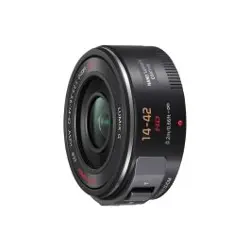
“LUMIX G X VARIO PZ 14–42 mm/F3.5–5.6 ASPH./POWER O.I.S.”
Focal length
f=14 mm to 42 mm (35 mm film camera equivalent: 28 mm to 84 mm)
Aperture type 7 diaphragm blades/circular aperture diaphragm
Aperture range F3.5 (Wide) to F5.6 (Tele)
Minimum aperture value F22
Lens construction 9 elements in 8 groups (4 aspherical lenses, 2 ED Lens)
Nano surface coating Yes
In focus distance 0.2 m (Wide to focal length 20 mm) to ¶ (from the focus distance
reference line),
0.3 m (focal length 21 mm to Tele) to ¶ (from the focus distance
reference line)
Maximum image magnification 0.17k (35 mm film camera equivalent: 0.34k)
Optical image stabilizer Available
[O.I.S.] switch None (Setting of the [STABILIZER] is done in [REC] mode menu
by LUMIX digital cameras.)
Mount “Micro Four Thirds Mount”
Angle of view 75
x (Wide) to 29x (Tele)
Filter diameter 37 mm
Max. diameter Approx. 61 mm
Overall length Approx. 26.8 mm (from the tip of the lens to the base side of the
lens mount when the lens barrel is recessed)
Mass Approx. 95 g
VQT3S52_ENG.fm 10 ページ 2022年3月1日 火曜日 午後4時6分

11
VQT3S52
Panasonic Warranty
1. Subject to the conditions of this warranty Panasonic or its Authorised Service Centre will perform necessary service on
the product, without charge for parts or labour, if in the opinion of Panasonic the product is found to have a
manufacturing defect within one (1) year or (12 months) (the “warranty period”) from the date of purchase appearing
on your purchase receipt.
2. This warranty only applies to Panasonic products purchased in Australia and sold by Panasonic Australia, it’s Authorised
Distributors, or Dealers, and only where the products are used and serviced within Australia or its territories. Warranty
cover only applies to the services that are carried out by a Panasonic Authorised Service Centre and only if valid proof
of purchase is presented when the warranty service is requested.
3. This warranty only applies if the product has been installed and/or used in accordance with the manufacturer’s
recommendations (as noted in the operating instructions) under normal use and reasonable care (in the opinion of
Panasonic). The warranty does not cover damage, malfunction or failure resulting from use of incorrect voltages,
incorrect installation, accident, misuse, neglect, build-up of dirt or dust, abuse, maladjustment of customer controls,
mains supply problems, thunderstorm activity, infestation by insects or vermin, tampering or repair by unauthorised
persons (including unauthorised alterations), exposure to abnormally corrosive conditions, or any foreign object or
matter having entered the product.
4. This warranty does not cover the following items unless the fault or defect existed at the time of purchase:
(a) Consumable parts
(b) Cosmetic parts
(c) Worn or damaged parts
(d) Information stored on Hard Disk Drives, Optical Discs, USB Devices, SD Cards, Tapes
(e) DTV reception issues caused by TV Aerial / Cabling / Wall socket(s)
5. Some products may be supplied with Ethernet connection hardware. The warranty is limited on such products and will
not cover:
(a) Internet and or DLNA connection / setup related problems
(b) Access fees and or charges incurred for internet connection
(c) Incompatible software or software not specifically stipulated in the product operations manual; and
(d) Any indirect or consequential costs associated with the incorrect use or misuse of the hardware, its connection to
the internet or any other device.
6. To claim warranty service, when required, you should:
Contact Panasonic’s Customer Care Centre on 132 600 for Service Centre information.
Confirm the opening and acceptance times with the Authorised Service centre that you choose.
Then send or take the product to a Panasonic Authorised Service Centre together with your proof of purchase
receipt.
Any freight and insurance costs associated with the transport of the product to and/or from your nearest
Authorised Service Centre must be arranged and paid for by you.
7. The warranties hereby conferred do not extend to, and exclude, any costs associated with the installation, de-
installation or re-installation of a product, including costs related to the mounting, de-mounting or remounting of any
screen, (and any other ancillary activities), delivery, handling, freighting, transportation or insurance of the product or
any part thereof or replacement of and do not extend to, and exclude, any damage or loss occurring by reason of,
during, associated with, or related to such installation, de-installation, re-installation or transit.
Panasonic Authorised Service Centres are located in major metropolitan areas and most regional centres of Australia,
however, coverage will vary dependant on product. For advice on exact Authorised Service Centre locations for your
product, please telephone our Customer Care Centre on 132600 or visit our website and use the Service Centre Locator.
In addition to your rights under this warranty, Panasonic products come with consumer guarantees that cannot be
excluded under the Australian Consumer Law. If there is a major failure with the product, you can reject the product and
elect to have a refund or to have the product replaced or if you wish you may elect to keep the goods and be compensated
for the drop in value of the goods. You are also entitled to have the product repaired or replaced if the product fails to be
of acceptable quality and the failure does not amount to a major failure.
If there is a major failure in regard to the product which cannot be remedied then you must notify us within a reasonable
period by contacting the Panasonic Customer Care Centre. If the failure in the product is not a major failure then Panasonic
may choose to repair or replace the product and will do so in a reasonable period of time from receiving notice from you.
THIS WARRANTY CARD AND THE PURCHASE DOCKET (OR SIMILAR PROOF OF PURCHASE)
SHOULD BE RETAINED BY THE CUSTOMER AT ALL TIMES
If you require assistance regarding warranty conditions or any other enquiries, please visit the Panasonic
Australia website
www.panasonic.com.au or contact by phone on 132 600
If phoning in, please ensure you have your operating instructions available.
Panasonic Australia Pty. Limited
ACN 001 592 187 ABN 83 001 592 187
1 Innovation Road, Macquarie Park NSW 2113
www.panasonic.com.au
PRO-031-F11 Issue: 5.0 23-01-2018
VQT3S52_ENG.fm 11 ページ 2022年3月1日 火曜日 午後4時6分

12
VQT3S52
Inhalt
Informationen für Ihre Sicherheit.................................12
Vermeidung von Störungen ......................................14
Beiliegendes Zubehör.................................................15
Objektiv ansetzen/abnehmen .....................................15
Bezeichnungen und Funktionen der
einzelnen Kamerateile ................................................17
Vorsichtsmaßnahmen .................................................18
Fehlerbehebung........................................................20
Spezifikationen ...........................................................21
Informationen für Ihre Sicherheit
Halten Sie das Gerät so weit wie möglich von Geräten und
Einrichtungen fern, die elektromagnetische Felder erzeugen
(wie Mikrowellengeräte, Fernsehgeräte, Videospielgeräte,
Funksender, Hochspannungsleitungen usw.).
≥ Verwenden Sie die Kamera nicht in der Nähe von
Mobiltelefonen. Es könnten sonst Bild- und
Tonstörungen auftreten.
≥
Wenn die Kamera durch elektromagnetische Felder anderer
Geräte gestört wird und Fehlfunktionen auftreten, schalten Sie
die Kamera aus. Nehmen Sie den Akku heraus und/oder
trennen Sie das Netzteil ab. Setzen Sie den Akku dann wieder
ein und/oder stecken Sie das Netzteil wieder ein und schalten
Sie die Kamera ein.
Das Objektiv kann mit Digitalkameras verwendet
werden, deren Objektivfassung mit dem “Micro Four
Thirds™ System”-Standard kompatibel ist.
≥ Objektive dieser Ausführung lassen sich nicht auf
Kameras mit Four-Thirds™-Bajonett aufsetzen.
≥ Die Erläuterungen zur Digitalkamera in dieser
Bedienungsanleitung beziehen sich als ein
Beispiel auf DMC-GF3.
≥
Ausstattung und technische Daten der von Ihnen
erworbenen Produkte können aufgrund technischer
Weiterentwicklungen von der Ausstattung und den
technischen Daten der in diesem Handbuch
beschriebenen Produkte abweichen.
≥
Micro Four Thirds™ und die für Micro Four Thirds
verwendeten Logos sind Markenzeichen oder eingetragene
Markenzeichen der Olympus Imaging Corporation in Japan,
den USA, der EU und anderen Ländern.
≥
Four Thirds™ und die für Four Thirds verwendeten
Logos sind Markenzeichen oder eingetragene
Markenzeichen der Olympus Imaging Corporation
in Japan, den USA, der EU und anderen Ländern.
≥
Das G MICRO SYSTEM ist ein Digitalkamerasystem
aus der LUMIX-Reihe mit Wechselobjektiven auf
Grundlage des Micro-Four-Thirds-Standards.
≥
Andere Namen von Systemen oder Produkten welche in
dieser Bedienungsanleitung genannt werden, sind
normalerweise Warenzeichen oder eingetragene
Warenzeichen der Hersteller dieser Produkte oder Systeme.
VQT3S52_E.book 12 ページ 2013年2月18日 月曜日 午後3時26分
13
VQT3S52
-Bedeutung des nachstehend abgebildeten Symbols-
Entsorgung von Altgeräten und Batterien
Nur für die Europäische Union und Länder mit Recyclingsystemen
Dieses Symbol auf den Produkten, der Verpackung und/oder den Begleitdokumenten bedeutet, dass gebrauchte elektrische und
elektronische Produkte sowie Batterien nicht in den allgemeinen Hausmüll gegeben werden dürfen.
Bitte führen Sie alte Produkte und verbrauchte Batterien zur Behandlung, Aufarbeitung bzw. zum Recycling gemäß den gesetzlichen
Bestimmungen den zuständigen Sammelpunkten zu.
Zusätzlich ist die Rückgabe unter bestimmten Voraussetzungen auch bei Vertreibern (Verkaufsfläche für Elektro- und Elektronikgeräte von
mindestens 400 m² und Lebensmitteleinzelhändler, die über eine Gesamtverkaufsfläche von mindestens 800 m² verfügen und mehrmals im
Kalenderjahr oder dauerhaft auch Elektro- und Elektronikgeräte anbieten und auf dem Markt bereitstellen) möglich. Die Rücknahme hat
kostenlos beim Kauf eines gleichartigen Neugerätes zu erfolgen (1:1 Rücknahme). Unabhängig davon, gibt es die Möglichkeit, die Altgeräte
kostenlos an den Vertreiber zurückzugeben (0:1 Rücknahme; Abmessungen kleiner als 25 cm und weniger als drei Altgeräte).
Vertreiber, die unter Verwendung von Fernkommunikationsmitteln ihre Produkte verkaufen, sind zur Rücknahme von Altgeräten
verpflichtet, wenn die Lager- und Versandflächen für Elektro- und Elektronikgeräte mindestens 400 m² betragen.
Onlineverzeichnis der Sammel- und Rücknahmestellen:
https://www.ear-system.de/ear-verzeichnis/sammel-und-ruecknahmestellen.
Enthalten die Produkte Batterien und Akkus oder Lampen, die aus dem Altgerät zerstörungsfrei entnommen werden können, sind Sie als Endnutzer
gesetzlich dazu verpflichtet, diese vor der Entsorgung zu entnehmen und getrennt als Batterie bzw. Lampe zu entsorgen. Batterien können zusätzlich im
Handelsgeschäft unentgeltlich zurückgegeben werden.
Indem Sie diese Produkte und Batterien ordnungsgemäß entsorgen, helfen Sie dabei, wertvolle Ressourcen zu schützen und eventuelle negative
Auswirkungen, insbesondere beim Umgang mit lithiumhaltigen Batterien, auf die menschliche Gesundheit und die Umwelt zu vermeiden.
Für mehr Informationen zu Sammlung und Recycling, wenden Sie sich bitte an Ihren örtlichen Abfallentsorgungsdienstleister.
Gemäß Landesvorschriften können wegen nicht ordnungsgemäßer Entsorgung dieses Abfalls Strafgelder verhängt werden.
Datenschutz
Wir weisen alle Endnutzer von Elektro- und Elektronikaltgeräten darauf hin, dass Sie für das Löschen personenbezogener Daten auf den zu entsorgenden
Altgeräten selbst verantwortlich sind.
Hinweis für das Batteriesymbol (Symbol unten):
Dieses Symbol kann in Kombination mit einem chemischen Symbol abgebildet sein. In diesem Fall erfolgt dieses auf Grund der
Anforderungen derjenigen Richtlinien, die für die betreffende Chemikalie erlassen wurden.
DEUTSCH
VQT3S52_GER.fm 13 ページ 2022年3月2日 水曜日 午前9時37分
14
VQT3S52
∫ Objektivpflege
≥ Sand und Staub können das Objektiv
beschädigen. Achten Sie darauf, dass kein
Sand oder Staub auf Objektiv oder Anschlüsse
gelangt, wenn Sie die Kamera im Freien, z.B.
am Strand, verwenden.
≥ Dieses Objektiv ist nicht wasserdicht. Wenn
Regenwasser oder anderes Wasser auf das
Objektiv spritzt, wischen Sie es mit einem
trockenen Tuch ab.
≥
Üben Sie keinen zu starken Druck auf das Objektiv aus.
≥
Schmutz auf dem Objektiv (Wasser, Öl,
Fingerabdrücke usw.) kann zu schlechteren Bildern
führen. Wischen Sie die Objektivoberfläche vor und
nach dem Fotografieren vorsichtig mit einem
weichen, trockenen Tuch ab.
≥ Richten Sie die Objektivfassung nicht nach unten.
Achten Sie darauf, dass der Kontaktpunkt der
Objektivfassung 1 nicht verschmutzen.
∫ Hinweise zu Kondensation
(Beschlagen des Objektivs)
≥ Kondensation entsteht, wenn sich
Umgebungstemperatur oder Luftfeuchte wie unten
beschrieben ändern. Da Kondensation zu Flecken
auf dem Objektiv, Pilzbefall und Fehlfunktionen
führen kann, müssen Sie in folgenden Fällen auf
Anzeichen von Kondensation achten:
– Die Kamera wird bei kaltem Wetter von draußen
nach drinnen gebracht
– Die Kamera wird in ein klimatisiertes Auto gebracht
– Eine Klimaanlage bläst kalte Luft direkt auf das
Objektiv
– Die Kamera wird bei hoher Luftfeuchte verwendet
≥ Sie vermeiden Kondensation, wenn Sie die
Kamera in einer geschlossenen Plastiktüte
transportieren und diese erst dann öffnen, wenn
sich die Kamera an die Umgebungstemperatur
angepasst hat. Wenn sich Kondensation bildet,
schalten Sie die Kamera aus und lassen Sie sie
für etwa zwei Stunden ausgeschaltet. Die
Kondensation baut sich während der Anpassung
der Kamera an die Umgebung auf natürlichem
Wege ab.
Vermeidung von Störungen
VQT3S52_E.book 14 ページ 2013年2月18日 月曜日 午後3時26分
15
VQT3S52
Beiliegendes Zubehör
[Kontrollen, die beim Entfernen der Verpackung
des Geräts vorzunehmen sind]
Prüfen Sie beim Entnehmen des Gerätes aus seinem
Karton, ob das Hauptgerät und sein beiliegendes Zubehör
vorhanden sind. Kontrollieren Sie deren äußeres
Aussehen und ihre Funktionsweise, um zu prüfen, dass
es während des Vertriebs und Transports nicht zu
Beschädigungen gekommen ist.
Setzen Sie sich, sollten Sie Störungen feststellen, vor dem
Gebrauch des Gerätes mit Ihrem Händler in Verbindung.
Produktnummern Stand September 2011.
Änderungen jederzeit möglich.
1 Objektivtasche
2 Objektivdeckel
3 Hinterer Objektivdeckel
(Beim Kauf sind der hintere Objektivdeckel und der
Objektivdeckel auf das Wechselobjektiv aufgesetzt.)
Objektiv ansetzen/abnehmen
≥
Informationen zum Aufsetzen und Abnehmen des Objektivs
finden Sie auch in der Bedienungsanleitung der Kamera.
∫ Das Objektiv aufsetzen
≥
Stellen Sie sicher, dass die Kamera ausgeschaltet ist.
1
Drehen Sie den hinteren
Objektivdeckel, um ihn
abzunehmen
.
A: Hinterer Objektivdeckel
2 Richten Sie die
Markierungen zur
Objektivausrichtung
B
am
Kameragehäuse und am
Objektiv aneinander aus
und drehen Sie das
Objektiv in Pfeilrichtung,
bis ein Klicken zu hören ist.
• Drücken Sie nicht die Objektivfreigabetaste C
wenn Sie ein Objektiv anschließen.
• Versuchen Sie niemals, das Objektiv schräg
zum Gehäuse anzusetzen, da die
Objektivfassung beschädigt werden könnte.
• Überprüfen Sie, ob das Objektiv richtig aufgesetzt ist.
VFC4460 VYF3443
123
VFC4605
VQT3S52_E.book 15 ページ 2013年2月18日 月曜日 午後3時26分
16
VQT3S52
∫ Das Objektiv abnehmen
≥ Schalten Sie die Digitalkamera zum Schutz des
Objektivs aus und prüfen Sie, ob der
Objektivtubus eingefahren wurde.
Drehen Sie beim Betätigen
der Objektivfreigabetaste
D das Objektiv in
Pfeilrichtung bis zum
Anschlag und entfernen
Sie es.
• Setzen Sie den hinteren
Objektivdeckel auf, um die
Kontakte der Objektivfassung nicht zu
beschädigen.
• Setzen Sie den Gehäusedeckel der Kamera auf,
damit kein Schmutz oder Staub ins
Kamerainnere gelangen kann.
∫ Objektivdeckel aufsetzen
und abnehmen
Drücken Sie zum
Anbringen oder
Abnehmen des
Objektivdeckels wie in der
Abbildung gezeigt darauf.
• Verlieren Sie den
Objektivdeckel nicht.
∫ Filter aufsetzen
≥ Montieren oder entfernen Sie den Filter bei
eingefahrenem Objektivtubus.
≥ Falls zwei oder mehr Aufsätze, also
MC-Schutzfilter (Sonderzubehör: DMW-LMCH37),
PL-Filter (Sonderzubehör: DMW-LPL37) oder
ND-Filter (Sonderzubehör: DMW-LND37),
verwendet werden oder falls der verwendete
Objektivschutz bzw. Filter besonders dick ist, kann
ein Vignettierungseffekt auftreten.
≥ Der Filter lässt sich eventuell nicht mehr
abnehmen, wenn er zu fest angezogen wird.
Gehen Sie daher vorsichtig vor.
≥ Der Objektivdeckel kann auch aufgesetzt werden,
wenn der Filter bereits angebracht ist.
≥ Auf dieses Objektiv lassen sich weder
Vorsatzlinsen noch Adapter aufsetzen.
(Stand
September 2011) Die Verwendung von Filtern ist
möglich, das Aufsetzen anderer Komponenten
dagegen kann zu einer Beschädigung des
Objektivs führen.
VQT3S52_E.book 16 ページ 2013年2月18日 月曜日 午後3時26分
17
VQT3S52
Bezeichnungen und
Funktionen der einzelnen
Kamerateile
1 Linsenfläche
2 Zoomhebel
Stellen Sie den Zoomhebel auf
[T] (Teleobjektiv) oder [W]
(Weitwinkelobjektiv).
[T]: Um die Motive näher
erscheinen zu lassen (Tele)
[W]: Um Objekte weiter entfernt
erscheinen zu lassen (Weitwinkel)
• Die Zoomgeschwindigkeit variiert je nach dem
Bereich, über den der Zoomhebel bewegt wird.
Die Zoomgeschwindigkeit ist bei der Aufnahme
eines Videos langsamer.
3 Fokushebel
Bewegen Sie den Fokushebel
auf
A
oder
B
.
A
: Scharfstellen auf ein in der
Nähe befindliches Objekt
B
: Scharfstellen auf ein
entferntes Objekt
• Die Schnelligkeit beim Scharfstellen variiert je
nach dem Umfang, in dem der Hebel bewegt
wird.
4 Kontaktpunkt
5 Markierung zum Ansetzen des Objektivs
32
45
1
W
T
VQT3S52_E.book 17 ページ 2013年2月18日 月曜日 午後3時26分

18
VQT3S52
Hinweis
≥ Das Geräusch des sich zurück bewegenden
Hebels wird unter Umständen aufgezeichnet,
wenn Sie Ihren Finger einer Videoaufnahme vom
Fokus- oder Zoomhebel nehmen. Bewegen Sie
den Hebel geräuschlos in seine
Ausgangsposition.
≥ Wenn Sie ein Motiv nah an der Kamera mit Blitz
aufnehmen, blockiert das Objektiv das Licht vom
Blitz, so dass Teile des Bildes dunkel werden
können. Achten Sie bei diesen Aufnahmen daher
auf ausreichenden Abstand zum Motiv.
≥ Auf dem Objektiv wird keine Brennweite
angegeben. Die Brennweite wird auf dem
Bildschirm der Digitalkamera angezeigt, wenn das
Objektiv an der kompatiblen Digitalkamera
montiert wird. Die Brennweite wird bei nicht
kompatiblen Digitalkameras nicht angezeigt. Für
Details zur verwendeten Digitalkamera siehe auf
der Internetseite.
http://panasonic.jp/support/global/cs/dsc/
(Diese Internetseite ist nur in englischer Sprache
verfügbar.)
Vorsichtsmaßnahmen
Achten Sie darauf, das Objektiv nicht fallen zu
lassen und keinen starken Stößen auszusetzen.
Üben Sie keinesfalls zu starken Druck auf das
Objektiv aus.
≥ Achten Sie auch darauf, dass die Tasche, in der
Sie das Objektiv aufbewahren, nicht herunterfällt,
denn das Objektiv könnte sonst schwer
beschädigt werden. Unter Umständen funktioniert
dann auch die Kamera nicht mehr und kann keine
Bilder mehr aufzeichnen.
Wenn in der Umgebung der Kamera Pestizide
oder andere flüchtige Substanzen verwendet
werden, müssen Sie dafür sorgen, dass diese
Stoffe nicht in Kontakt mit der
Obektivoberfläche kommen.
≥
Falls solche Substanzen auf das Objektiv gelangen,
könnten sie zur Beschädigung des Objektivs oder
zum Abblättern der Farbe führen.
VQT3S52_E.book 18 ページ 2013年2月18日 月曜日 午後3時26分

19
VQT3S52
Tragen Sie das Gerät nicht, während es noch an
der Kamera angebracht ist.
≥ Keinesfalls darf das Gerät unter den folgenden
Bedingungen benutzt oder aufbewahrt werden, da
dies zu Defekten oder Funktionsstörungen führen
kann.
– Bei direktem Sonnenlicht oder im Sommer an der
Küste
– An Orten mit hohen Temperaturen und hoher
Feuchtigkeit, bzw. wo starke Änderungen bei
Temperatur und Feuchtigkeit erfolgen
– An Orten mit hoher Konzentration von Sand,
Staub oder Schmutz
– Bei einem Brand
– In der Nähe von Heizkörpern, Klimaanlagen oder
Luftbefeuchtern
– Wo Wasser das Gerät benässen kann
– Wo Erschütterungen vorhanden sind
– In einem Fahrzeug
≥ Weiter Informationen finden Sie auch in der
Bedienungsanleitung der Kamera.
≥ Wenn für längere Zeit kein Einsatz erfolgt, lagern
Sie das Objektiv gemeinsam mit einem
Trocknungsmittel (Silica-Gel). Ohne ausreichende
Trocknung kann die Einsatzfähigkeit des
Objektivs durch Schimmel usw. beeinträchtigt
oder der Einsatz völlig unmöglich werden. Es wird
empfohlen, die Funktionsfähigkeit des Gerätes vor
dem Gebrauch zu prüfen.
≥ Stellen Sie sicher, dass das Objektiv nicht über
einen längeren Zeitraum in Kontakt mit Gummi-
oder Plastikprodukten kommt.
≥ Berühren Sie nicht die elektrischen Kontakte des
Gerätes. Dadurch kann es zu einem Defekt am
Gerät kommen.
≥ Nehmen Sie das Gerät nicht auseinander und
nehmen Sie keine Veränderungen daran vor.
VQT3S52_E.book 19 ページ 2013年2月18日 月曜日 午後3時26分

20
VQT3S52
Verwenden Sie zur Reinigung der Geräte kein
Waschbenzin, Alkohol oder ähnliche
Reinigungsmittel.
≥ Lösungsmittel können zur Beschädigung des
Objektivs oder zum Abblättern der Farbe führen.
≥ Staub und Fingerabdrücke lassen sich mit einem
weichen, trockenen Tuch entfernen.
≥ Verwenden Sie keine Küchenspülmittel oder mit
Chemikalien getränkte Tücher.
Beim Ein- und Ausschalten ist ein Geräusch zu
hören.
≥ Dieses Geräusch wird durch die Blenden- oder
Objektivbewegung verursacht; es ist keine
Fehlfunktion.
Bei Anschluss dieses Objektivs an eine Digital-
Kamera kann die Stabilisierfunktion nicht
ausgeschaltet werden oder die
Stabilisierfunktion funktioniert nicht.
≥ Die optische Bildstabilisierfunktion dieses
Objektivs funktioniert nur korrekt mit gestützten
Kameras.
> Bei Verwendung älterer Digital-Kameras von
Panasonic (DMC-GF1, DMC-GH1, DMC-G1) kann
[STABILISATOR] im [REC] Betriebsmenü nicht auf
[OFF] eingestellt werden. Es wird empfohlen, die
Firmware der Digital-Kamera auf der folgenden
Website zu aktualisieren.
http://panasonic.jp/support/global/cs/dsc/
download/
> Bei Verwendung dieses Objektivs mit einer Digital-
Kamera einer anderen Marke funktioniert die
optische Bildstabilisierfunktion nicht.
(Stand
September 2011)
Für Einzelheiten wenden Sie sich an die
entsprechende Firma.
Fehlerbehebung
VQT3S52_E.book 20 ページ 2013年2月18日 月曜日 午後3時26分

21
VQT3S52
Spezifikationen
WECHSELOBJEKTIV FÜR DIGITALE KAMERA
“LUMIX G X VARIO PZ 14–42 mm/F3.5–5.6 ASPH./POWER O.I.S.”
Brennweite f=14 mm bis 42 mm (Kleinbild-Äquivalent: 28 mm bis 84 mm)
Blende 7 Blendenlamellen/runde Öffnungsblende
Blendenwerte F3.5 (Weitwinkel) bis F5.6 (Tele)
Minimale Blende F22
Objektivaufbau 9 Elemente in 8 Gruppen (4 asphärische Linsen/2 ED-Linsen)
Nano-Oberflächenbeschichtung
Ja
Schärfebereich
0,2 m (Weitwinkel bis Brennweite 20 mm) auf

(von Brennweitenbezugslinie),
0,3 m (Brennweite 21 mm bis Tele) auf

(von Brennweitenbezugslinie)
Maximale Vergrößerung 0,17k (Kleinbild-Äquivalent: 0,34k)
Optischer bildstabilisator Verfügbar
[O.I.S.] Schalter Keiner
(Die Einstellung des [STABILISATOR] erfolgt bei LUMIX Digital-Kameras
im [REC] Betriebsmenü.)
Objektivbajonett “Micro Four Thirds Mount”
Bildwinkel 75
x (Weitwinkel) bis 29x (Tele)
Filterdurchmesser 37 mm
Max. Durchmesser Ca. 61 mm
Gesamtlänge Ca. 26,8 mm (vom Objektivende bis zu der Seite, an der das Objektiv
aufgesetzt wird, wenn der Objektivtubus eingefahren ist)
Gewicht Ca. 95 g
VQT3S52_E.book 21 ページ 2013年2月18日 月曜日 午後3時26分

22
VQT3S52
Table des matières
Précautions à prendre ......................................... 22
Précautions ........................................................ 24
Accessoires fournis .............................................. 25
Fixation/Retrait de l’objectif .................................. 25
Noms et fonctions des composants...................... 27
Précautions d’utilisation........................................28
Dépannage ......................................................... 30
Spécifications........................................................ 31
Précautions à prendre
Évitez d’approcher l’élément de tout équipement
magnétisé (four à micro-ondes, téléviseur,
équipement de jeux vidéo, émetteur radio, ligne
à haute tension, etc.).
≥ N’utilisez pas l’appareil photo à proximité d’un
téléphone cellulaire; cela pourrait entraîner un
bruit nuisible à l’image et au son.
≥ Advenant le cas où le fonctionnement de l’appareil
serait dérangé par un champ magnétique, coupez
le contact, retirez la batterie ou débranchez
l’adaptateur secteur pour ensuite soit remettre la
batterie en place, soit rebrancher l’adaptateur.
Remettez l’appareil en marche.
L’objectif peut être utilisé de pair avec un appareil
photo numérique compatible avec la monture
d’objectif standard prise en charge par le système
“Micro Four Thirds
TM
System”.
≥ Il ne peut pas être monté sur les appareils à
monture Four Thirds
TM
.
≥
Les illustrations de l’appareil photo numérique de ce manuel
d’utilisation prennent le DMC-GF3 comme exemple.
≥ L’apparence et les spécifications des produits
décrits dans le présent manuel peuvent différer
des produits que vous avez achetés en raison de
bonifications ultérieures.
≥
Micro Four Thirds™ et le logo Micro Four Thirds sont
des marques commerciales ou des marques déposées
d’Olympus Imaging Corporation, au Japon, aux États-
Unis, en Union européenne et dans les autres pays.
≥
Four Thirds™ et le logo Four Thirds sont des marques
commerciales ou des marques déposées d’Olympus
Imaging Corporation, au Japon, aux États-Unis, en
Union européenne et dans les autres pays.
≥ G MICRO SYSTEM est un système appareil
photo numérique du type à échange d’objectif de
LUMIX basé sur un standard Micro Four Thirds.
≥ Les autres noms de systèmes et produits
mentionnés dans ce manuel d’utilisation sont
habituellement des marques déposées ou des
marques de commerce des fabricants qui ont
développé le système ou le produit intéressé.
VQT3S52_E.book 22 ページ 2013年2月18日 月曜日 午後3時26分
23
VQT3S52
-Si vous voyez ce symbole-
Informations relatives à l’évacuation des déchets, destinées aux utilisateurs d’appareils
électriques et électroniques (appareils ménagers domestiques)
Lorsque ce symbole figure sur les produits et/ou les documents qui les accompagnent,
cela signifie que les appareils électriques et électroniques ne doivent pas être jetés
avec les ordures ménagères.
Pour que ces produits subissent un traitement, une récupération et un recyclage
appropriés, envoyez-les dans les points de collecte désignés, où ils peuvent être
déposés gratuitement. Dans certains pays, il est possible de renvoyer les produits au
revendeur local en cas d’achat d’un produit équivalent.
En éliminant correctement ce produit, vous contribuerez à la conservation des
ressources vitales et à la prévention des éventuels effets négatifs sur l’environnement
et la santé humaine qui pourraient survenir dans le cas contraire.
Afin de connaître le point de collecte le plus proche, veuillez contacter vos autorités locales.
Des sanctions peuvent être appliquées en cas d’élimination incorrecte de ces déchets, conformément à
la législation nationale.
Utilisateurs professionnels de l’Union européenne
Pour en savoir plus sur l’élimination des appareils électriques et électroniques, contactez votre revendeur
ou fournisseur.
Informations sur l’évacuation des déchets dans les pays ne faisant pas partie de l’Union
européenne
Ce symbole n’est reconnu que dans l’Union européenne.
Pour vous débarrasser de ce produit, veuillez contacter les autorités locales ou votre revendeur afin de
connaître la procédure d’élimination à suivre.
FRANÇAIS
VQT3S52_E.book 23 ページ 2013年2月18日 月曜日 午後3時26分
24
VQT3S52
∫ Entretien de l’objectif
≥ Le sable et la poussière peuvent endommager
l’objectif. Aussi, convient-il de protéger et
l’objectif et les contacts de la monture contre
toute infiltration de sable et de poussière
lorsque l’appareil est utilisé à la plage, etc.
≥ Cet objectif n’est pas étanche à l’eau. Si des
gouttes d’eau l’éclaboussaient, essuyez
l’objectif avec un linge sec.
≥ N’appuyez pas avec force sur l’objectif.
≥ Lorsqu’il a des salissures (eau, huile, traces de
doigts, etc.) sur la surface de l’objectif, cela peut
avoir une incidence sur l’image. Essuyez
légèrement la surface de l’objectif avec un chiffon
sec et doux avant et après la prise de photos.
≥ Ne posez pas l’objectif côté monture vers le bas.
Point de contact 1 de la monture de l’objectif
restent toujours propres.
∫ À propos de la condensation (Objectif
embué)
≥
Il y a formation de condensation lorsque la
température et l’humidité changent comme suit. La
condensation peut salir l’objectif, entraîner de la
moisissure et des problèmes de fonctionnement.
Aussi, est-il important de prendre des précautions
dans les circonstances suivantes:
– Lorsque l’appareil est transporté de l’extérieur à
l’intérieur par temps froid
– Lorsque l’appareil est placé dans un véhicule
climatisé
– Lorsque l’air frais d’un climatiseur arrive
directement sur l’objectif
– Lorsque l’appareil est utilisé ou placé dans un
endroit humide
≥ Gardez l’appareil photo à l’intérieur d’un sac en
plastique jusqu’à ce que la température de
celui-ci soit la plus près possible de celle de la
température ambiante afin d’éviter la
condensation. En cas de condensation, éteignez
l’appareil photo et laissez-le ainsi pendant environ
2 heures. Lorsque la température de l’appareil
photo se rapproche de celle ambiante, la buée
disparaît naturellement.
Précautions
VQT3S52_E.book 24 ページ 2013年2月18日 月曜日 午後3時26分
25
VQT3S52
Accessoires fournis
[La vérification doit être effectuée lorsque vous
sortez l’appareil de l’emballage]
En retirant l’appareil de son emballage, vérifiez la
présence de l’appareil principal et de tous ses
accessoires, et vérifiez également l’apparence externe
ainsi que leur fonction afin de vous assurer qu’ils n’ont
subi aucun dommage lors du transport ou de la livraison.
Si vous découvrez un problème, contactez votre
vendeur avant d’utiliser le produit.
Les codes des produits sont corrects à compter de
septembre 2011. Ceux-ci sont susceptibles d’être modifiés.
1 Sac de rangement pour l’objectif
2 Capuchon d’objectif
3 Capuchon arrière de l’objectif
(Le capuchon arrière de l’objectif et le capuchon
d’objectif sont fixés à l’objectif interchangeable
au moment de l’achat.)
Fixation/Retrait de l’objectif
≥ Pour les instructions sur la mise en place et le
retrait de l’objectif, reportez-vous au manuel
d’utilisateur de l’appareil photo.
∫ Mise en place de l’objectif
≥ Vérifiez que l’appareil photo est éteint.
1 Tournez le capuchon
arrière de l’objectif
pour le retirer.
A: Capuchon arrière de
l’objectif
2
Alignez les repères pour la
mise en place de l’objectif
B
sur le boîtier de l’appareil
photo et sur l’objectif, puis
tournez l’objectif dans le
sens de la flèche jusqu’à ce
que vous entendiez un
déclic.
• N’appuyez pas sur la touche de relâche de l’objectif
C
lorsque vous installez un objectif.
• N’essayez pas de fixer l’objectif lorsque vous le
tenez en angle par rapport au boîtier, car la
monture de l’objectif risquerait d’être éraflée.
• Vérifiez que l’objectif est fixé correctement.
VFC4460 VYF3443
123
VFC4605
VQT3S52_E.book 25 ページ 2013年2月18日 月曜日 午後3時26分
26
VQT3S52
∫ Retrait de l’objectif
≥ Pour protéger l’objectif, éteignez l’appareil photo
numérique et vérifiez que le barillet de l’objectif
soit rentré.
Tout en appuyant sur la
touche de
déverrouillage de
l’objectif D, tournez
l’objectif dans le sens
de la flèche jusqu’à ce
qu’il s’arrête puis
retirez-le.
• Fixez le capuchon arrière de l’objectif afin que les
contacts de la monture de l’objectif ne soient pas rayés.
• Fixez le capuchon sur la monture d’objectif de manière
à prévenir toute infiltration de poussière dans l’appareil.
∫ Fixation et
détachement du
capuchon d’objectif
Pincez le capuchon
d’objectif comme indiqué
sur l’illustration pour le
mettre en place ou pour
l’enlever.
• Faites attention de ne pas
perdre le capuchon d’objectif.
∫ Fixation de filtres
≥ Fixer ou détacher le filtre lorsque le barillet de
l’objectif est rentré.
≥ Un effet de vignetage peut survenir en utilisant 2
ou plus protecteurs MC (en option: DMW-LMCH37),
filtres PL (en option: DMW-LPL37) ou filtres ND
(en option: DMW-LND37), ou en utilisant des
protecteurs et/ou des filtres épais.
≥ Le filtre peut être impossible à retirer s’il est trop
serré, veuillez donc éviter de le faire.
≥ Il est possible de fixer le capuchon d’objectif avec
le filtre déjà en place.
≥ Vous ne pouvez pas installer de convertisseur
d’objectif ou d’adaptateur sur cet objectif.
(A compter de septembre 2011) Un filtre peut être
utilisé, mais installer un autre élément peut causer
des dommages à l’objectif.
VQT3S52_E.book 26 ページ 2013年2月18日 月曜日 午後3時26分
27
VQT3S52
Noms et fonctions des
composants
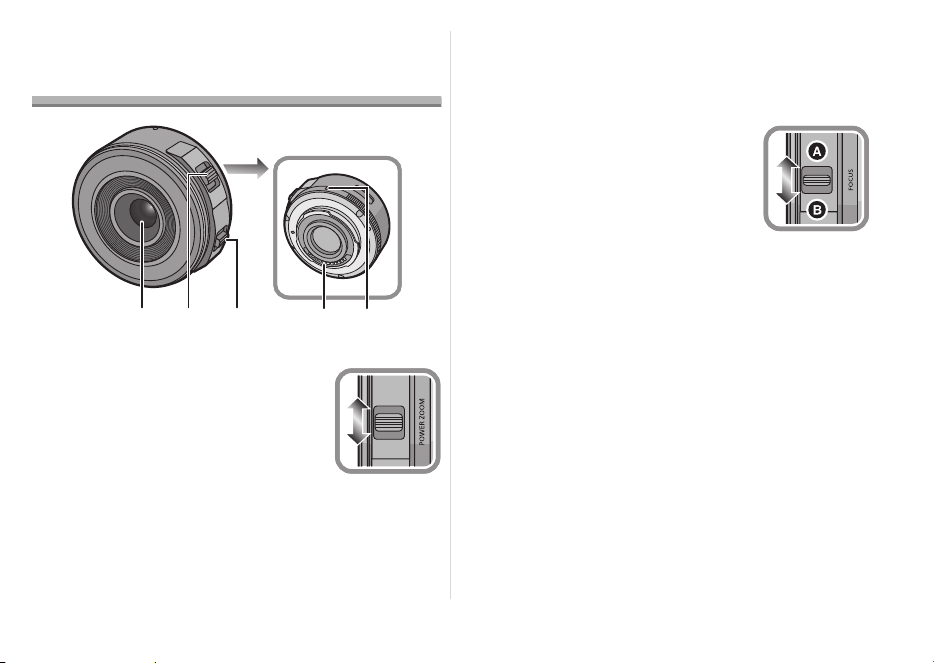
1 Surface de l’objectif
2 Levier du zoom
Tournez le levier du zoom vers
[T] (coté Téléobjectif) ou [W]
(coté Grand-angle).
[T]: Pour faire apparaître les
sujets plus proches, utilisez
(Téléobjectif)
[W]: Pour faire apparaître les sujets plus
éloignés, utilisez (Grand-angle)
• La vitesse du zoom dépend de l’amplitude de
mouvement du levier du zoom. La vitesse du
zoom sera plus lente que d’habitude durant
l’enregistrement d’un film.
3 Levier de mise au point
Déplacez le levier de Mise au
Point sur
A
ou
B
.
A
: Mise au point sur un sujet à
proximité
B
: Mise au point sur un sujet
éloigné
• La vitesse de mise au point changera en
fonction de la quantité de mouvement.
4 Point de contact
5 Repère pour la mise en place de l’objectif
32
45
1
W
T
VQT3S52_E.book 27 ページ 2013年2月18日 月曜日 午後3時26分

28
VQT3S52
Note
≥ Le bruit de retour du levier pourrait être enregistré
lorsque votre doigt se retire du levier de mise au
point ou du levier de zoom durant l’enregistrement
d’un film. Déplacez le levier doucement lorsque
vous ramenez celui-ci dans sa position originale.
≥ En enregistrant un sujet proche avec le flash, la
lumière du flash peut être bloquée par l’objectif et
une partie de la photo peut être sombre. Vérifiez
la distance du sujet en enregistrant.
≥ Il n’y a aucune indication sur la longueur focale de
l’objectif. La longueur focale s’affiche sur l’écran
de l’appareil photo numérique lorsqu’il est installé
sur un appareil photo numérique compatible. La
longueur focale ne s’affiche pas avec un appareil
photo qui n’est pas compatible. Pour avoir plus de
détails sur les appareils photo numériques utilisés,
visitez le site web.
http://panasonic.jp/support/global/cs/dsc/
(Ce Site est uniquement en Anglais.)
Précautions d’utilisation
Prenez soin de ne pas faire tomber ni de cogner
l’objectif. De plus ne mettez pas trop de pression
dessus.
≥ Attention à ne pas faire tomber le sac où se trouve
l’objectif, car celui-ci pourrait être endommagé.
L’appareil photo pourrait ne plus marcher
normalement et les images ne seraient plus
enregistrées.
Si des pesticides ou toute autre substance
volatile sont utilisés près de l’appareil, veuillez
protéger l’objectif contre toute éclaboussure ou
vaporisation.
≥ Si de telles substances atteignent l’objectif, celui-
ci pourrait être endommagé, ou la peinture
pourrait s’écailler.
VQT3S52_E.book 28 ページ 2013年2月18日 月曜日 午後3時26分

29
VQT3S52
Ne transportez pas l’objectif s’il est encore fixé
sur l’appareil photo.
≥ En aucunes circonstances vous ne devez ranger
l’objectif dans les endroits indiqués ci-dessous car
cela pourrait causer des problèmes d’utilisation ou
de mauvais fonctionnement.
– À la lumière directe du soleil ou sur la plage en été
– Dans des endroits ayant des niveaux de
température et d’humidité élevés ou dans des
endroits où les changements de température et
d’humidité sont prononcés
– Dans des endroits ayant une forte concentration
de sable, de poussière ou de saleté
– Où il y a du feu
– Près de radiateurs, climatiseurs, humidificateurs
– Où l’eau pourrait mouiller l’objectif
– Où il y a des vibrations
– À l’intérieur d’un véhicule
≥ Reportez-vous également au manuel d’utilisation
de l’appareil photo.
≥ Si l’appareil ne doit plus être utilisé pendant une
période prolongée, nous vous conseillons de le
ranger avec un produit déshydratant (gel de
silice). Tout manquement à cela pourrait
provoquer une panne causée par la moisissure
etc. Nous vous conseillons de vérifier le
fonctionnement de l’objectif avant de l’utiliser.
≥ Évitez que l’objectif ne soit en contact avec des
produits en plastique ou en caoutchouc pendant
une longue période.
≥ Ne touchez pas les contacts électriques de
l’objectif. Ceci pourrait causer un mauvais
fonctionnement de l’objectif.
≥
Ne désassemblez ni ne tentez de modifier l’objectif.
VQT3S52_E.book 29 ページ 2013年2月18日 月曜日 午後3時26分

30
VQT3S52
N’utilisez pas de benzène, d’alcool ni aucun
autre produit nettoyant similaire pour nettoyer
l’appareil.
≥ L’emploi de solvants peut endommager l’objectif
ou faire s’écailler la peinture.
≥ Essuyez toute poussière ou traces de doigts avec
un chiffon doux et sec.
≥ N’utilisez pas de détergent de cuisine ou de linge
chimique.
Un bruit se fait entendre à la mise en marche et
hors marche de l’appareil photo.
≥ Il s’agit du bruit de l’objectif ou du mouvement de
l’ouverture et ce n’est pas un défaut de
fonctionnement.
La fonction de stabilisation ne peut être mise
hors marche ou la fonction de stabilisation ne
fonctionne pas lorsque cet objectif est fixé à
l’appareil photo numérique.
≥ La fonction de stabilisation optique de l’image ne
fonctionne correctement qu’avec des appareils
photo numériques pris en charge.
>
Lors de l’utilisation d’appareils photo numériques
Panasonic de modèles antérieurs (DMC-GF1, DMC-
GH1 ou DMC-G1), [STABILISAT.] dans le menu du
mode [ENR.] ne peut être réglé sur [NON]. Il est
recommandé d’effectuer la mise à jour du
micrologiciel de l’appareil photo numérique en
visitant le site internet suivant.
http://panasonic.jp/support/global/cs/dsc/download/
> Lors de l’utilisation de cet objectif avec des
appareils photo numériques d’autres fabriquants,
le stabilisateur optique de l’image ne fonctionnera
pas.
(A compter de septembre 2011)
Contactez le fabriquant de l’appareil photo
numérique pour plus de détails.
Dépannage
VQT3S52_E.book 30 ページ 2013年2月18日 月曜日 午後3時26分

31
VQT3S52
Spécifications
OBJECTIF INTERCHANGEABLE POUR APPAREIL PHOTO NUMÉRIQUE
“LUMIX G X VARIO PZ 14–42 mm/F3.5–5.6 ASPH./POWER O.I.S.”
Distance focale
f=14 mm à 42 mm (Équivalent à un film de 35 mm: 28 mm à 84 mm)
Type d’ouverture 7 lamelles de diaphragme/diaphragme à ouverture ronde
Plage d’ouverture F3.5 (Grand-angle) à F5.6 (Téléobjectif)
Valeur d’ouverture minimum F22
Composition de l’objectif 9 éléments en 8 groupes (4 lentilles asphériques, 2 lentilles ED)
Revêtement de surface Nano Oui
Distance de mise au point 0,2 m (Grand-angle à longueur focale 20 mm) à ¶ (à partir de la
ligne de référence de la distance de mise au point),
0,3 m (longueur focale 21 mm à Téléobjectif) à ¶ (à partir de la
ligne de référence de la distance de mise au point)
Grossissement maximum de l’image 0,17k (Équivalent à un film de 35 mm: 0,34k)
Stabilisateur optique de l’image Disponible
Commutateur [O.I.S.] Aucun (Le réglage de [STABILISAT.] s’effectue dans le menu du
mode [ENR.] d’un appareil photo numérique LUMIX.)
Monture “Micro Four Thirds Mount”
Angle de vue 75x (Grand-angle) à 29x (Téléobjectif)
Diamètre de filtre 37 mm
Diamètre maximum Environ 61 mm
Longueur totale Environ 26,8 mm (du bout de l’objectif à la base de montage de
l’objectif lorsque le barillet de l’objectif est rentré)
Poids Environ 95 g
VQT3S52_E.book 31 ページ 2013年2月18日 月曜日 午後3時26分

32
VQT3S52
Indice
Información para su seguridad ............................. 32
Prevención contra las averías ............................ 34
Accesorios suministrados ..................................... 35
Unir y quitar el objetivo ......................................... 35
Nombres y funciones de los componentes........... 37
Precauciones para el uso ..................................... 38
Búsqueda de averías.......................................... 40
Especificaciones................................................... 41
Información para su
seguridad
Mantenga la unidad lo más lejos que sea posible
de equipos electromagnéticos (como hornos de
microondas, televisores, vídeo juegos,
trasmisores radio, líneas de alto voltaje, etc.).
≥
No utilice la cámara cerca de teléfonos móviles, ya
que lo de hacerlo puede producir ruido que afectará
negativamente a las imágenes y el sonido.
≥ Si la cámara queda afectada negativamente por
un equipo electromagnético y deja de funcionar
correctamente, apague la cámara y quite la
batería y/o el adaptador de CA conectado. Luego
vuelva a insertar la batería y/o vuelva a conectar
el adaptador de CA y encienda la cámara.
El objetivo puede usarse con una cámara digital
compatible con el estándar de montaje de objetivos
del “Micro Four Thirds
TM
System”.
≥ No se puede montar en una cámara con estándar
de soporte Four Thirds
TM
.
≥ Las figuras de la cámara digital en estas
instrucciones de funcionamiento muestran la
DMC-GF3 en concepto de ejemplo.
≥ E aspecto y las especificaciones de los productos
descritos en este manual pueden diferir de los
productos reales que usted ha comprado debido a
aumentos sucesivos.
≥ El logotipo Micro Four Thirds™ y Micro Four
Thirds son marcas comerciales o marcas
comerciales registradas de Olympus Imaging
Corporation, en Japón, Estados Unidos, la Unión
Europea y otros países.
≥
El logotipo Four Thirds™ y Four Thirds son marcas
comerciales o marcas comerciales registradas de
Olympus Imaging Corporation, en Japón, Estados
Unidos, la Unión Europea y otros países.
≥ G MICRO SYSTEM es un sistema de cámara
digital con objetivo intercambiable de LUMIX
basado en el estándar Micro Four Thirds System.
≥ Los nombres de los sistemas y productos que se
mencionan en estas instrucciones generalmente
son marcas comerciales registradas o marcas
comerciales de los fabricantes que desarrollaron
el sistema o producto en cuestión.
VQT3S52_E.book 32 ページ 2013年2月18日 月曜日 午後3時26分
33
VQT3S52
-Si ve este símbolo-
Información sobre la eliminación para los usuarios de equipos eléctricos y electrónicos usados
(particulares)
La aparición de este símbolo en un producto y/o en la documentación adjunta indica
que los productos eléctricos y electrónicos usados no deben mezclarse con la basura
doméstica general.
Para que estos productos se sometan a un proceso adecuado de tratamiento,
recuperación y reciclaje, llévelos a los puntos de recogida designados, donde los
admitirán sin coste alguno. En algunos países existe también la posibilidad de
devolver los productos a su minorista local al comprar un producto nuevo equivalente.
Si desecha el producto correctamente, estará contribuyendo a preservar valiosos
recursos y a evitar cualquier posible efecto negativo en la salud de las personas y en
el medio ambiente que pudiera producirse debido al tratamiento inadecuado de
desechos. Póngase en contacto con su autoridad local para que le informen
detalladamente sobre el punto de recogida designado más cercano.
De acuerdo con la legislación nacional, podrían aplicarse multas por la eliminación incorrecta de estos
desechos.
Para empresas de la Unión Europea
Si desea desechar equipos eléctricos y electrónicos, póngase en contacto con su distribuidor o
proveedor para que le informe detalladamente.
Información sobre la eliminación en otros países no pertenecientes a la Unión Europea
Este símbolo sólo es válido en la Unión Europea.
Si desea desechar este producto, póngase en contacto con las autoridades locales o con su distribuidor
para que le informen sobre el método correcto de eliminación.
ESPAÑOL
VQT3S52_E.book 33 ページ 2013年2月18日 月曜日 午後3時26分
34
VQT3S52
∫ Atención del objetivo
≥ La arena y el polvo pueden dañar el objetivo.
Cuando usa el objetivo en una playa, tenga
cuidado de que ni arena ni polvo entren en el
interior del objetivo o los terminales, etc.
≥ Este objetivo no es impermeable. Si caen
gotas de agua en el objetivo, límpielo con un
paño seco.
≥ No ejerce demasiada presión en el objetivo.
≥ Cuando hay suciedad (agua, aceite, huellas
dactilares, etc.) en la superficie del objetivo, la
imagen puede salir afectada. Limpie ligeramente
con un paño blando y seco antes y después de
tomar las imágenes.
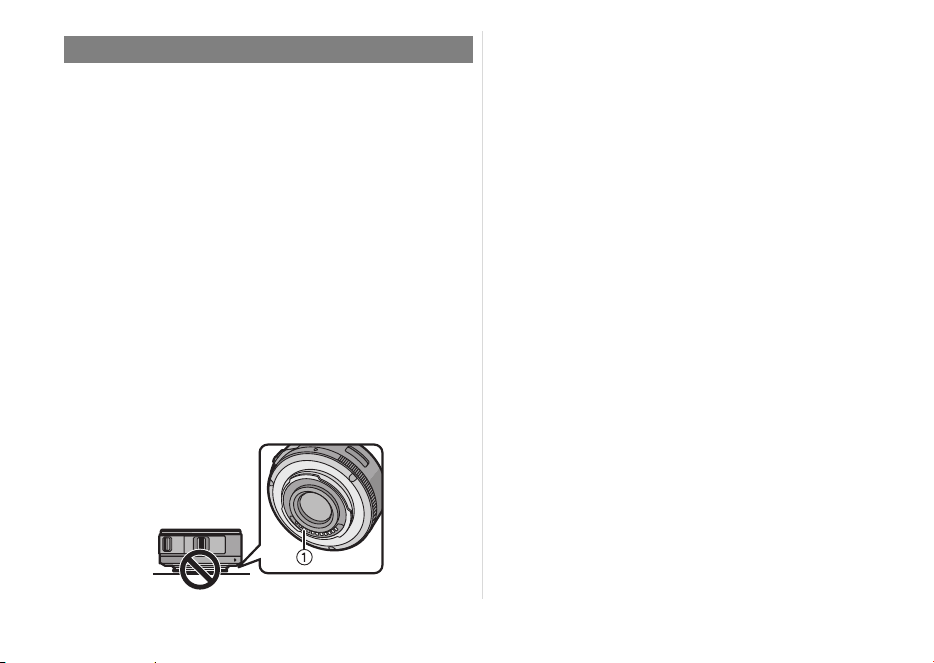
≥ No meta el soporte del objetivo mirando hacia
abajo. No deje que se ensucien los punto de
contacto 1.
∫ Acerca de la condensación
(Empañamiento del objetivo)
≥ La condensación ocurre cuando se encuentra una
diferencia en la temperatura y humedad como se
describe abajo. La condensación puede hacer
ensuciar el objetivo y producir hongos y un
funcionamiento defectuoso, por lo tanto ponga
cuidado en las situaciones a continuación:
– Cuando lleva la cámara en casa desde el aire
libre durante un tiempo frío
– Cuando lleva la cámara dentro de un coche con
aire acondicionado
– Cuando sopla en el objetivo aire frío desde un
acondicionador de aire
– En lugares húmedos
≥ Para impedir la condensación, meta la cámara en
una bolsa de plástico para que se aclimate a la
temperatura ambiente. Si ocurre condensación,
apague la alimentación y la deje así durante dos
horas. Una vez de que la cámara se haya
aclimatado a la temperatura ambiente en
empañamiento desaparece naturalmente.
Prevención contra las averías
VQT3S52_E.book 34 ページ 2013年2月18日 月曜日 午後3時26分
35
VQT3S52
Accesorios suministrados
[Controles a realizar cuando va a desembalar la
unidad]
Al quitar la unidad de su embalaje, compruebe que se
encuentren la unidad principal y los accesorios
suministrados. Además compruebe el aspecto externo
y las funciones para verificar que no hayan padecidos
daños durante la distribución y el transporte.
Por si encuentra un cualquier problema, antes de
usar el producto llame a su comerciante.
Números de productos correctos a partir de
septiembre de 2011. Pueden estar sujetos a cambio.
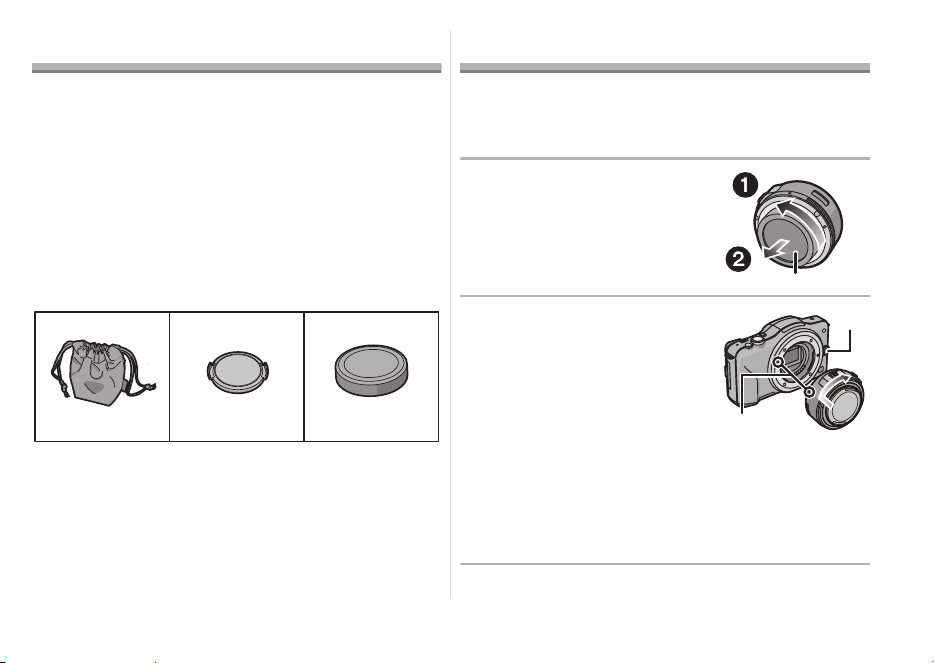
1 Bolsa de almacenamiento del objetivo
2 Tapa del objetivo
3 Tapa trasera del objetivo
(La tapa trasera del objetivo y
la tapa del objetivo
intercambiable al momento de la compra.)
Unir y quitar el objetivo
≥
Se refiera también a las instrucciones de funcionamiento
de la cámara para unir y separar el objetivo.
∫ Unión del objetivo
≥ Compruebe que la cámara esté apagada.
1
Gire la tapa trasera del
objetivo para separarla
.
A: Tapa trasera del objetivo
2
Alinee las marcas para
ajustar el objetivo
B
ubicadas en el cuerpo de
la cámara y el mismo
objetivo, luego gire éste
en la dirección de la
flecha hasta que dispare.
• No presione el botón de liberación de la lente C
cuando coloca una lnte.
• Como el soporte del objetivo podría salir rayado,
no trate de unir el objetivo a la cámara
manteniéndolo de ángulo.
• Compruebe que el objetivo esté unido correctamente.
VFC4460 VYF3443
123
VFC4605
VQT3S52_E.book 35 ページ 2013年2月18日 月曜日 午後3時26分
36
VQT3S52
∫ Separación del objetivo
≥ Para proteger la lente, apague la cámara digital y
confirme que el cilindro del objeto esté retraído.
Mientras presiona el
botón de liberación de
la lente D, gire la lente
hacia la flecha hasta
que se detenga y luego
retírela.
• Una la tapa trasera de
manera que el punto de contacto del objetivo no
salga rayado.
• Una la tapa del cuerpo a la cámara para que ni
suciedad ni polvo entren dentro de la unidad principal.
∫ Unir y separar la tapa
del objetivo
Apriete la tapa de la lente
como se muestra en la
figura para colocarla o
sacarla.
• Ponga cuidado en no
perder la tapa del objetivo.
∫ Unión de los filtros
≥ Coloque o retire el filtro cuando el cilindro del
objetivo está retraído.
≥ Puede tener lugar viñeteado si usa 2 o más
protectores MC (opcionales: DMW-LMCH37),
filtros PL (opcionales: DMW-LPL37) o
filtros ND (opcionales: DMW-LND37), o bien si
usa protectores y/o filtros espesos.
≥ Tal vez sea imposible de retirar el filtro si está
demasiado apretado, por lo que no debe apretarlo
demasiado fuerte.
≥ Se puede colocar la tapa del objetivo con el filtro
ya colocado.
≥ No consigue acoplar un objetivo de conversión o
adaptador a este objetivo.
(A partir de septiembre
de 2011) Puede usarse un filtro, pero acoplar
cualquier otro elemento puede dañar el objetivo.
VQT3S52_E.book 36 ページ 2013年2月18日 月曜日 午後3時26分
37
VQT3S52
Nombres y funciones de
los componentes
1 Superficie del objetivo
2 Palanca del zoom
Mueva la palanca del zoom
hacia [T] (lado de teleobjetivo) o
[W] (lado del gran angular).
[T]: Para acercar a los sujetos
utilice (Teleobjetivo)
[W]: Para hacer aparecer los sujetos más
distantes utilice (Gran angular)
• La velocidad del zoom varía según el rango
sobre el que se mueve la palanca. La velocidad
del zoom puede ser más lenta en la grabación
de imágenes en movimiento.
3 Palanca de enfoque
Mueva la palanca de enfoque
hacia
A
o
B
.
A
: Enfoque en el sujeto cerca
B
: Enfoque en el sujeto lejos
• La velocidad de enfoque
cambiará según la cantidad movida.
4 Punto de contacto
5 Marca para ajustar el objetivo
32
45
1
W
T
VQT3S52_E.book 37 ページ 2013年2月18日 月曜日 午後3時26分

38
VQT3S52
Nota
≥ El sonido de la palanca cuando vuelve se puede
grabar cuando saca su dedo de la palanca del
zoom o de la palanca de enfoque mientras graba
una imagen en movimiento. Mueva
silenciosamente la palanca al volver a colocar en
la posición inicial.
≥ Cuando graba usando el flash estando cerca del
sujeto, la luz del flash será bloqueada por el
objetivo y parte de la imagen puede quedar
oscura. Compruebe la distancia desde el sujeto
cuando graba.
≥ No hay una indicación de la longitud focal de la
lente. La longitud focal de la lente se visualiza en
la pantalla de la cámara digital cuando se coloca
en una cámara digital compatible. La longitud
focal no se visualiza en la cámara digital que no
es compatible. Para obtener detalles sobre la
cámara digital usada, consulte el sitio web.
http://panasonic.jp/support/global/cs/dsc/
(Este sitio está en inglés solamente.)
Precauciones para el uso
Tenga cuidado de no hacer caer el objetivo ni le
choque contra. Asimismo tenga cuidado de no
presionarlo demasiado.
≥
Tenga cuidado de no hacer caer la bolsa en la que
cabe el objetivo. Éste podría dañarse, la cámara
podría dejar de funcionar normalmente y las
imágenes ya podrían no grabarse.
Cuando usa pesticidas y otras substancias
volátiles alrededor de la cámara tenga cuidado
de que no entre en el objetivo.
≥
Si dichas substancias caen en el objetivo, éstas
pueden dañarlo o hacer desconchar su barniz.
VQT3S52_E.book 38 ページ 2013年2月18日 月曜日 午後3時26分

39
VQT3S52
No transporte la unidad si ésta está todavía
unida al cuerpo de la cámara.
≥ De ninguna manera la unidad debe ser usada o
almacenada en uno de los siguientes lugares ya
que lo de hacerlo podría perjudicarla o producir un
funcionamiento defectuoso.
– Bajo la luz directa del sol o bien a lo largo de la
costa durante el verano
– En lugares donde haya altas temperaturas o altos
niveles de humedad o bien donde sean repentinos
los cambios de temperatura y humedad
– En lugares donde haya altas concentraciones de
arena, polvo o suciedad
– Donde haya llamas
– Cerca de calefactores, acondicionadores de aire
o humedecedores
– Donde el agua puede hacer mojar la unidad
– Donde haya vibraciones
– Dentro de un vehículo
≥ Se refiera también a las instrucciones de
funcionamiento de la cámara digital.
≥ Cuando no ha de ser usada la unidad por un
período prolongado, le recomendamos guardar
con un desecante (silicagel). El hecho de no
hacerlo podría ocasionar una avería causada por
el moho etc.
Se recomienda que compruebe el
funcionamiento de la unidad antes de usarla
.
≥ No deje el objetivo en contacto con productos de
plástico durante largos períodos de tiempo.
≥ No toque los contactos eléctricos de la unidad. Lo
de hacerlo puede causar avería en la unidad.
≥
No desmonte ni modifique la unidad.
VQT3S52_E.book 39 ページ 2013年2月18日 月曜日 午後3時26分

40
VQT3S52
No utilice gasolina, diluyente, alcohol u otros
agentes de limpieza parecidos para limpiar la
unidad.
≥ El hecho de usar disolventes puede dañar el
objetivo y hacer desconchar su barniz.
≥ Quite cualquier indicio de polvo o huellas
dactilares con un paño blando y seco.
≥ No use detergentes para cocina o un paño tratado
químicamente.
Se oye un sonido cuando se enciende o se
apaga la cámara.
≥ Éste es el sonido del objetivo o el movimiento de
abertura y no es un funcionamiento defectuoso.
Cuando la lente se coloca en la cámara digital, la
función del estabilizador no se puede apagar o
la función del estabilizador no funciona.
≥ La función del estabilizador de imagen óptica de
esta lente sólo funciona correctamente con las
cámaras admitidas.
>
Cuando se usan cámaras Panasonic más antiguas
(DMC-GF1, DMC-GH1, DMC-G1), [ESTAB.OR] en
el menú del modo [REC] no se puede ajustar en
[OFF]. Se recomienda actualizar el firmware de la
cámara digital en el siguiente sitio web.
http://panasonic.jp/support/global/cs/dsc/download/
> Al usar este lente con otra marca de cámaras
digitales, la función del estabilizador de imagen
óptica no funcionará.
(A partir de septiembre de
2011)
Para obtener detalles comuníquese con la
empresa correspondiente.
Búsqueda de averías
VQT3S52_E.book 40 ページ 2013年2月18日 月曜日 午後3時26分

41
VQT3S52
Especificaciones
ÓPTICA INTERCAMBIABLE PARA CÁMARA DIGITAL
“LUMIX G X VARIO PZ 14–42 mm/F3.5–5.6 ASPH./POWER O.I.S.”
Longitud focal
f=14 mm a 42 mm (Igual a una cámara de película de 35 mm: de 28 mm a 84 mm)
Tipo de abertura 7 aspas de diafragma/Diafragma de apertura circular
Gama de abertura F3.5 (Granangular) a F5.6 (Teleobjetivo)
Valor de abertura mínimo F22
Estructura del objetivo 9 elementos en 8 grupos (4 lentes asféricas, 2 lentes ED)
Revestimiento de superficie Nano
Sí
En la distancia del enfoque 0,2 m (Ancho a la longitud focal 20 mm) a ¶ (desde la línea de
referencia de la distancia de enfoque),
0,3 m (longitud focal 21 mm a teleobjetivo) a ¶ (desde la línea de
referencia de la distancia de enfoque)
Máxima ampliación de la imagen 0,17k (Igual a una cámara de película de 35 mm: 0,34k)
Estabilizador óptico de la imagen Disponible
Interruptor [O.I.S.] Ninguna (El ajuste de [ESTAB.OR] está hecho en el menú de modo
[REC] por las cámaras digitales LUMIX.)
Soporte “Micro Four Thirds Mount”
Ángulo visual 75x (Granangular) a 29x (Teleobjetivo)
Diámetro del filtro 37 mm
Diámetro máx. Aprox. 61 mm
Longitud total Aprox. 26,8 mm (desde la punta de la lente hasta el lado de la base
del montaje de la lente cuando el cilindro del objetivo está retraído)
Peso Aprox. 95 g
VQT3S52_E.book 41 ページ 2013年2月18日 月曜日 午後3時26分

42
VQT3S52
Indice
Informazioni per la sua sicurezza ......................... 42
Prevenzione guasti ............................................. 44
Accessori in dotazione.......................................... 45
Installazione/Rimozione dell’obiettivo................... 45
Nomi e funzioni dei componenti............................ 47
Precauzioni per l’uso ............................................ 48
Ricerca guasti ..................................................... 50
Specifiche ............................................................. 51
Informazioni per la sua
sicurezza
Tenere l’unità il più possibile lontana da
apparecchi elettromagnetici (come forni a
microonde, TV, videogiochi, radiotrasmittenti,
linee dell’alta tensione, ecc.).
≥ Non utilizzare la fotocamera vicino a telefoni
cellulari, perché ciò può causare disturbi che
influenzano negativamente immagini e suoni.
≥ Se il funzionamento della fotocamera digitale è
disturbato da apparecchi elettromagnetici,
spegnere la fotocamera e rimuovere la batteria e/
o l’adattatore CA collegato. Quindi inserire
nuovamente la batteria e/o ricollegare l’adattatore
CA. Infine, riaccendere la fotocamera.
L’obiettivo può essere utilizzato con una fotocamera
digitale dotata di un supporto dell’obiettivo compatibile
con lo standard “Micro Four Thirds
TM
System”.
≥ Non montabile su una fotocamera con specifiche
sul supporto Four Thirds
TM
.
≥ Le illustrazioni della fotocamera digitale presenti
in queste istruzioni operative mostrano il modello
DMC-GF3 come esempio.
≥
L’aspetto e le specifiche dei prodotti descritti in
questo manuale possono differire da quelli dei
prodotti acquistati a causa di miglioramenti introdotti
in tempi successivi alla stampa del manuale.
≥ Micro Four Thirds™ e il logo Micro Four Thirds
sono marchi o marchi registrati di Olympus
Imaging Corporation, in Giappone, negli Stati
Uniti, nell’Unione Europea e in altri paesi.
≥
Four Thirds™ e il logo Four Thirds sono marchi o marchi
registrati di Olympus Imaging Corporation, in Giappone,
negli Stati Uniti, nell’Unione Europea e in altri paesi.
≥ G MICRO SYSTEM è un sistema di fotocamera
digitale LUMIX del tipo a più obiettivi basato sullo
standard Micro Four Thirds System.
≥ Gli altri nomi di sistemi o prodotti menzionati nelle
presenti istruzioni sono generalmente marchi
registrati o marchi depositati dei produttori che
hanno sviluppato detti sistemi o prodotti.
VQT3S52_E.book 42 ページ 2013年2月18日 月曜日 午後3時26分
43
VQT3S52
-Se vedete questo simbolo-
Informazioni per gli utenti sullo smaltimento di apparecchiature elettriche ed elettroniche obsolete
(per i nuclei familiari privati)
Questo simbolo sui prodotti e/o sulla documentazione di accompagnamento significa
che i prodotti elettrici ed elettronici usati non devono essere mescolati con i rifiuti
domestici generici.
Per un corretto trattamento, recupero e riciclaggio, portare questi prodotti ai punti di
raccolta designati, dove verranno accettati gratuitamente. In alternativa, in alcune
nazioni potrebbe essere possibile restituire i prodotti al rivenditore locale, al momento
dell’acquisto di un nuovo prodotto equivalente.
Uno smaltimento corretto di questo prodotto contribuirà a far risparmiare preziose
risorse ed evitare potenziali effetti negativi sulla salute umana e sull’ambiente, che
potrebbero derivare, altrimenti, da uno smaltimento inappropriato. Per ulteriori dettagli,
contattare la propria autorità locale o il punto di raccolta designato più vicino.
In caso di smaltimento errato di questo materiale di scarto, potrebbero venire applicate
delle penali, in base alle leggi nazionali.
Per gli utenti aziendali nell’Unione Europea
Qualora si desideri smaltire apparecchiature elettriche ed elettroniche, contattare il rivenditore o il fornitore
per ulteriori informazioni.
Informazioni sullo smaltimento in nazioni al di fuori dell’Unione Europea
Questo simbolo è valido solo nell’Unione Europea.
Qualora si desideri smaltire questo prodotto, contattare le autorità locali o il rivenditore e chiedere
informazioni sul metodo corretto di smaltimento.
ITALIANO
VQT3S52_E.book 43 ページ 2013年2月18日 月曜日 午後3時26分
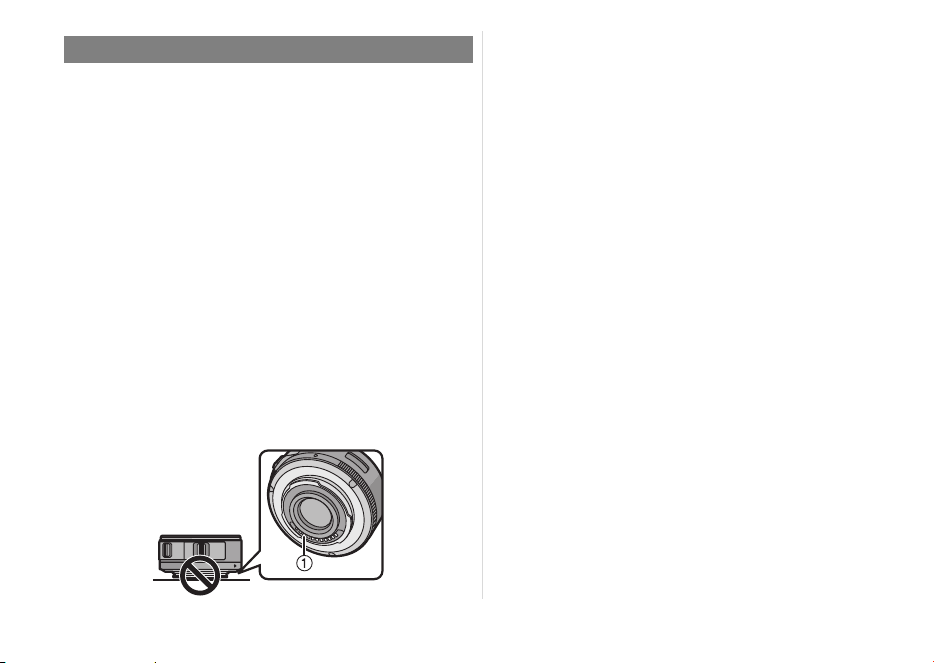
44
VQT3S52
∫ Custodia dell’obiettivo
≥ Sabbia e polvere possono danneggiare
l’obiettivo. Evitare che sabbia o polvere
penetrino all’interno dell’obiettivo o dei
terminali quando si utilizza l’obiettivo su una
spiaggia, ecc.
≥ Questo obiettivo non è impermeabile. Se delle
gocce d’acqua dovessero cadere
sull’obiettivo, pulirlo con un panno asciutto.
≥ Non premere con troppa forza l’obiettivo.
≥ Quando la superficie della lente è sporca (acqua,
olio, impronte, ecc.), l’immagine può risultare
deteriorata. Pulire leggermente la superficie della
lente con un panno asciutto e morbido prima e
dopo aver ripreso delle immagini.
≥ Non tenere il supporto dell’obiettivo rivolto verso il
basso. Evitare che i Contatto del supporto
dell’obiettivo 1 si sporchino.
∫ Informazioni sulla condensa
(Appannamento dell’obiettivo)
≥ La condensa si forma quando si verificano
differenze di temperatura e umidità come quelle
descritte sotto. La condensa può causare
l’appannamento dell’obiettivo e portare alla
formazione di muffe e a malfunzionamenti, per cui
è necessario fare attenzione nelle seguenti
situazioni:
– Quando si porta la fotocamera da un ambiente
esterno freddo a uno interno
– Quando si porta la fotocamera in un’auto con il
condizionatore in funzione
– Quando l’aria fredda di un condizionatore
colpisce direttamente l’obiettivo
– In luoghi umidi
≥ Per evitare la formazione di condensa, inserire la
fotocamera in una busta di plastica per consentirle
di adattarsi alla temperatura circostante. Se si
forma della condensa, spegnere la fotocamera e
non toccarla per un paio due ore. Una volta che la
temperatura della fotocamera ritorna ai valori
dell’ambiente circostante l’appannamento
scomparirà naturalmente.
Prevenzione guasti
VQT3S52_E.book 44 ページ 2013年2月18日 月曜日 午後3時26分
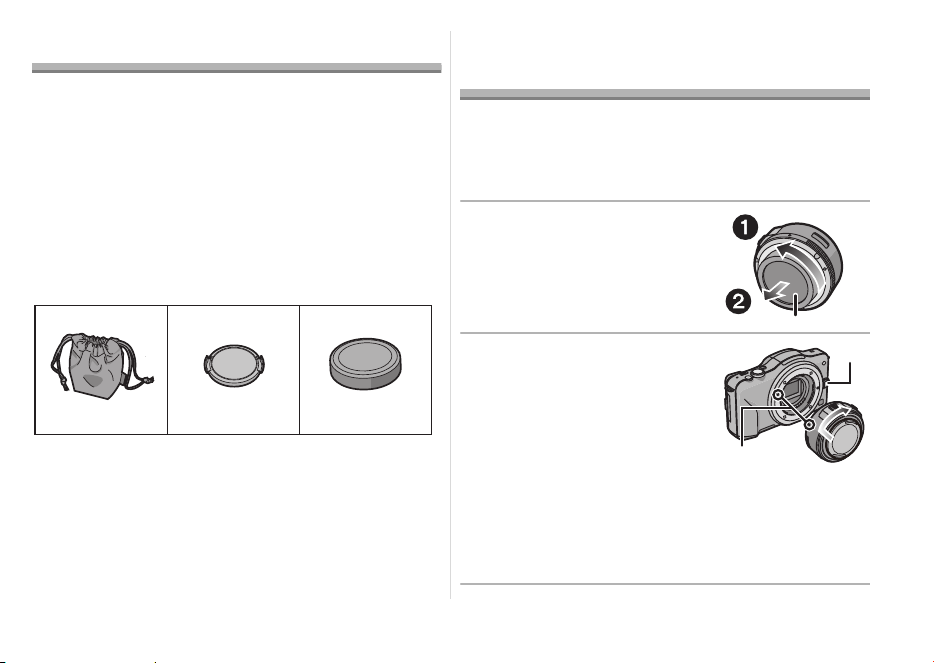
45
VQT3S52
Accessori in dotazione
[Controlli da effettuare quando si disimballa l’unità]
Quando si estrae il flash dalla confezione, controllare
che siano presenti l’unità principale e gli accessori in
dotazione. Controllarne inoltre l’aspetto esterno e il
funzionamento, per verificare che non abbiano
subito danni durante la distribuzione e il trasporto.
Se si riscontra qualche problema, contattare il
rivenditore prima di utilizzare il prodotto.
I codici dei prodotti sono aggiornati a settembre
2011. È possibile che subiscano delle modifiche.
1 Sacca portaobiettivo
2 Copriobiettivo
3 Copriobiettivo posteriore
(Il copriobiettivo posteriore e il copriobiettivo
sono installati sull’obiettivo intercambiabile al
momento dell’acquisto.)
Installazione/
Rimozione dell’obiettivo
≥ Consultare anche le istruzioni per l’uso della
fotocamera per informazioni sulla procedura di
installazione e disinstallazione della fotocamera.
∫ Installazione dell’obiettivo
≥ Controllare che la fotocamera sia spenta.
1 Ruotare il copriobiettivo
posteriore per
disinstallarlo.
A:
Copriobiettivo posteriore
2
Allineare i segni per
l’installazione dell’obiettivo
B
sul corpo della
fotocamera e sull’obiettivo,
quindi ruotare l’obiettivo
nella direzione indicata dalla
freccia finché non scatta.
• Non premere il pulsante di
sgancio dell’obiettivo
C
quando si installa un obiettivo.
• Non tentare di installare l’obiettivo tenendolo
diagonalmente rispetto al corpo della fotocamera,
per evitare di graffiare il supporto dell’obiettivo.
• Controllare che l’obiettivo sia installato correttamente.
VFC4460 VYF3443
123
VFC4605
VQT3S52_E.book 45 ページ 2013年2月18日 月曜日 午後3時26分
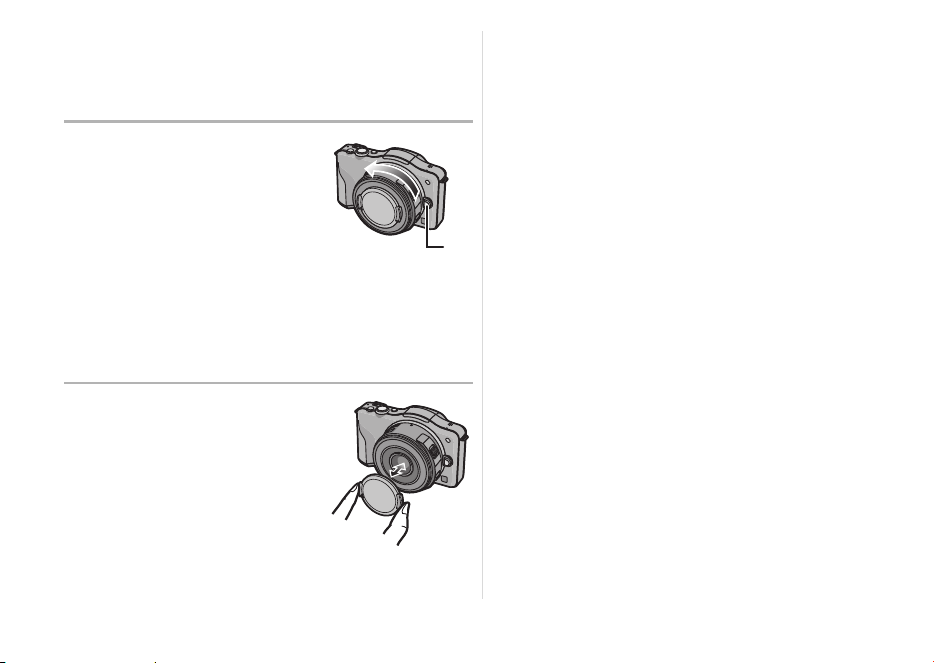
46
VQT3S52
∫ Disinstallazione dell’obiettivo
≥ Per proteggere l’obiettivo, spegnere la fotocamera
digitale e verificare che il cilindro dell’obiettivo sia
ritratto.
Tenendo premuto il
pulsante di sblocco
dell’obiettivo D,
ruotare l’obiettivo nella
direzione indicata dalla
freccia finché non si
arresta, quindi
rimuoverlo.
• Installare il copriobiettivo posteriore per evitare
di graffiare il punto di contatto.
• Installare il copriobiettivo posteriore sulla
fotocamera per evitare che sporcizia o polvere
penetrino all’interno dell’unità principale.
∫
Installazione e rimozione
del copriobiettivo
Premere i lati del
copriobiettivo come
illustrato nell’immagine
quando lo si installa o
lo si disinstalla.
• Fare attenzione a non
perdere il copriobiettivo.
∫ Installazione dei filtri
≥ Inserire o rimuovere il filtro quando il cilindro
dell’obiettivo è ritratto.
≥ È possibile che si verifichi un effetto vignetta se si
utilizzano 2 o più protezioni MC (opzionali:
DMW-LMCH37), filtri PL (opzionali: DMW-LPL37)
o filtri ND (opzionali: DMW-LND37), oppure se si
utilizzano protezioni e/o filtri spessi.
≥ Se il filtro viene stretto eccessivamente, può
diventare impossibile rimuoverlo. Evitare quindi di
stringerlo troppo.
≥ È possibile installare il copriobiettivo con il filtro
già installato.
≥ Su questo obiettivo non è possibile installare una
lente o adattatore di conversione.
(Informazioni
aggiornate a settembre 2011) È possibile
utilizzare un filtro, ma collegare qualsiasi altro
elemento può danneggiare l’obiettivo.
VQT3S52_E.book 46 ページ 2013年2月18日 月曜日 午後3時26分
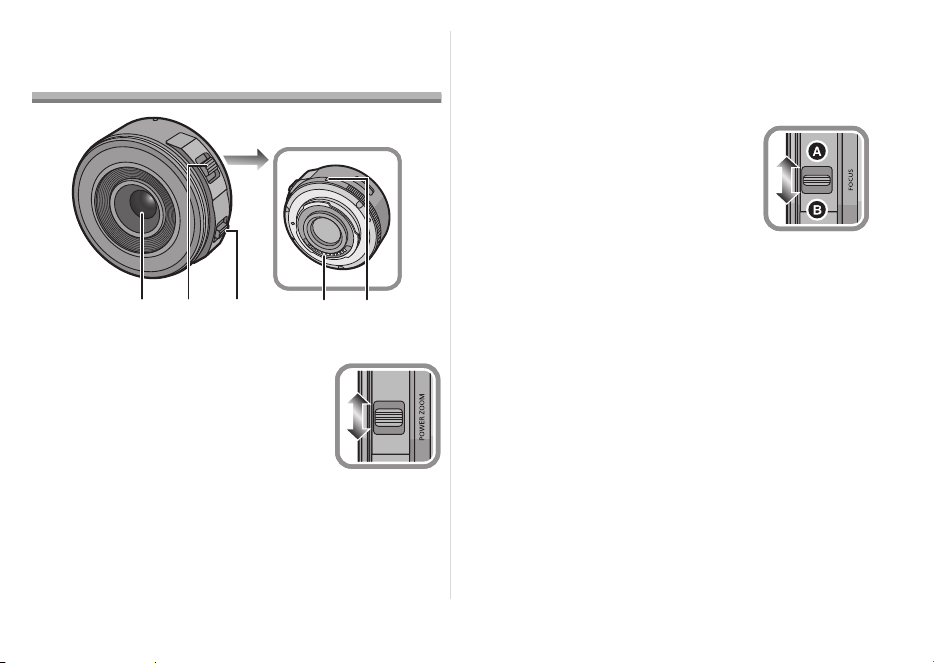
47
VQT3S52
Nomi e funzioni dei
componenti
1 Superficie dell’obiettivo
2 Leva dello zoom
Muovere la leva dello zoom su
[T] (lato Teleobiettivo) o [W] (lato
Grandangolo).
[T]: Per avvicinare i soggetti
utilizzare (Teleobiettivo)
[W]: Per far apparire più lontani i soggetti
utilizzare (Grandangolo)
• La velocità dello zoom varia a seconda di
quanto si sposta la leva. La velocità dello zoom
risulterà inferiore al normale durante la
registrazione di video.
3 Leva della messa a fuoco
Spostare la leva della messa a
fuoco verso
A
o
B
.
A
: Messa a fuoco su un
soggetto vicino
B
: Messa a fuoco su un
soggetto lontano
• La velocità della messa a fuoco varia a
seconda di quanto si sposta la leva.
4 Punto di contatto
5 Segno per l’installazione dell’obiettivo
32
45
1
W
T
VQT3S52_E.book 47 ページ 2013年2月18日 月曜日 午後3時26分

48
VQT3S52
Nota
≥ Se si toglie il dito dalla leva dello zoom o dalla leva
della messa a fuoco mentre si registra un video, è
possibile che venga registrato il rumore del ritorno
della leva. Quando si riporta la leva dello zoom
nella posizione originale, farlo silenziosamente.
≥
Quando si riprende un soggetto da distanza
ravvicinata utilizzando il flash, la luce del flash verrà
bloccata dall’obiettivo e una parte dell’immagine
potrà risultare scura. Controllare la distanza dal
soggetto quando si riprende un’immagine.
≥ La lunghezza focale non è indicata sull’obiettivo.
La lunghezza focale viene visualizzata sullo
schermo della fotocamera digitale, quando
quest’ultima è compatibile. La lunghezza focale
non viene visualizzata sulla fotocamera digitale se
questa non è compatibile. Per ulteriori
informazioni sulla fotocamera digitale che si sta
utilizzando, fare riferimento al sito indicato di
seguito.
http://panasonic.jp/support/global/cs/dsc/
(Il sito è disponibile solo in lingua inglese.)
Precauzioni per l’uso
Fare attenzione a non lasciar cadere o a non
urtare l’obiettivo. Evitare inoltre di esercitare una
forte pressione sull’obiettivo.
≥
Fare attenzione a non far cadere la custodia in cui è
stato inserito l’obiettivo in quanto questo può
danneggiarsi. La fotocamera può smettere di
funzionare e potrebbe non essere più possibile
registrare delle immagini.
Quando si utilizzano pesticidi e altre sostanze
volatili nelle vicinanze della fotocamera fare
attenzione che non vengano a contatto con
l’obiettivo.
≥
Se tali sostanze vengono a contatto con l’obiettivo
possono danneggiarlo o provocare il distacco di
vernice.
VQT3S52_E.book 48 ページ 2013年2月18日 月曜日 午後3時26分

49
VQT3S52
Non lasciare l’unità installata sulla fotocamera
mentre la si trasporta.
≥ Non utilizzare e non lasciare mai l’unità nelle
seguenti condizioni, per evitare problemi di
funzionamento.
– Esposta alla luce del sole, o in spiaggia d’estate
– Temperatura e umidità elevate o soggette a
grossi sbalzi
– Elevate concentrazioni di sabbia, polvere o sporco
– Dove sono presenti fiamme
– Vicino a caloriferi, condizionatori o umidificatori
– Dove l’unità può venire a contatto con l’acqua
– Dove sono presenti vibrazioni
– All’interno di un’auto
≥ Vedere anche le istruzioni per l’uso della
fotocamera digitale.
≥ Quando si prevede di non utilizzare l’unità per un
periodo prolungato, si consiglia di porvi accanto
un disseccante (silica gel). In caso contrario
potrebbero verificarsi dei malfunzionamenti dovuti
alla presenza di muffe ecc. Si consiglia di
controllare il funzionamento dell’unità prima
dell’uso.
≥ Non lasciare l’obiettivo a contatto per lungo tempo
con prodotti in gomma o in plastica.
≥ Non toccare i contatti elettrici dell’unità. In caso
contrario l’unità può guastarsi.
≥ Non smontare o alterare l’unità.
VQT3S52_E.book 49 ページ 2013年2月18日 月曜日 午後3時26分

50
VQT3S52
Non utilizzare benzina, diluenti, alcol o prodotti
simili per pulire l’unità.
≥ L’utilizzo di solventi può danneggiare l’obiettivo o
provocare il distacco di vernice.
≥ Rimuovere la polvere o le impronte digitali
eventualmente presenti con un panno morbido e
asciutto.
≥ Non utilizzare un detergente da cucina o un panno
chimico.
Quando la fotocamera viene accesa o spenta, si
sente un suono.
≥ È il suono provocato dal movimento dell’obiettivo
o dell’apertura, e non si tratta di un
malfunzionamento.
Quando l’obiettivo è installato sulla fotocamera
digitale, non disattivare la funzione di
stabilizzazione, altrimenti tale funzione non ha
effetto.
≥ La funzione Stabilizzatore Ottico di Immagine
funziona correttamente solo sulle fotocamere
supportate.
> Quando si utilizzano fotocamere digitali Panasonic
meno recenti (DMC-GF1, DMC-GH1, DMC-G1),
[STABILIZZ.] in modalità [REG] non può essere
impostato su [OFF]. Si consiglia di aggiornare il
firmware della fotocamera digitale sul seguente
sito Web.
http://panasonic.jp/support/global/cs/dsc/
download/
> Quando si utilizza questo obiettivo con fotocamere
digitali di un’altra marca, la funzione Stabilizzatore
Ottico di Immagine non sarà disponibile.
(Informazioni aggiornate a settembre 2011)
Per ulteriori informazioni, contattare il rispettivo
produttore.
Ricerca guasti
VQT3S52_E.book 50 ページ 2013年2月18日 月曜日 午後3時26分

51
VQT3S52
Specifiche
LENTI INTERCAMBIABILI PER FOTOCAMERA DIGITALE
“LUMIX G X VARIO PZ 14–42 mm/F3.5–5.6 ASPH./POWER O.I.S.”
Lunghezza focale
f=14 mm a 42 mm (equivalente per fotocamera con pellicola da 35 mm: 28 mm a 84 mm)
Tipo di apertura 7 lamelle diaframma/diaframma con apertura circolare
Gamma dell’apertura
F3.5 (Grandangolo) a F5.6 (Teleobiettivo)
Valore minimo dell’apertura F22
Costruzione dell’obiettivo 9 elementi in 8 gruppi (4 lenti asferiche, 2 lenti ED)
Nanorivestimento superficie Sì
Distanza di messa a fuoco 0,2 m (da Grandangolo a lunghezza focale 20 mm) a ¶ (da linea di
riferimento distanza di messa a fuoco),
0,3 m (da lunghezza focale 21 mm a Teleobiettivo) a ¶ (da linea di
riferimento distanza di messa a fuoco)
Ingrandimento massimo
dell’immagine 0,17k (equivalente per fotocamera con pellicola da 35 mm: 0,34k)
Stabilizzatore ottico di immagine
Disponibile
Interruttore [O.I.S.] Nessuno (L’impostazione di [STABILIZZ.] viene effettuata nel menu
della modalità [REG] dalle fotocamere digitali LUMIX.)
Supporto “Micro Four Thirds Mount”
Profondità di campo
75x (Grandangolo) a 29x (Teleobiettivo)
Diametro del filtro 37 mm
Diametro massimo Circa 61 mm
Lunghezza complessiva Circa 26,8 mm (dall’estremità dell’obiettivo al lato di base dell’attacco
dell’obiettivo quando il cilindro dell’obiettivo è ritratto)
Massa Circa 95 g
VQT3S52_E.book 51 ページ 2013年2月18日 月曜日 午後3時26分

52
VQT3S52
目錄
安全注意事項 .................................. 52
故障預防..................................... 53
操作部中文表示對照表 .......................... 54
提供的附件 .................................... 54
安裝
/ 取下鏡頭 ................................ 55
元件的名稱及功能 .............................. 56
使用時的注意事項 .............................. 58
故障排除..................................... 59
規格 .......................................... 60
安全注意事項
使本產品遠離磁性設備(如微波爐、電視、視訊遊戲設
備、無線電發射機、高壓線等)。
≥ 請勿在移動電話附近使用相機,否則會影響圖片和
聲音質量。
≥ 如果相機由於受帶磁設備影響而不能正常工作,請
先將其關閉,取出電池和 / 或斷開連接的 AC 適配
器, 然後重新插入電池和 / 或連接 AC 適配器。隨
後,開啟相機。
此鏡頭可用於與鏡頭座標準
“Micro Four Thirds
™ System”兼容的數位相機。
≥ 無法安裝到 4/3™(Four Thirds™) 接口規格的相機
上。
≥ 本使用說明書中的數位相機圖例以 DMC-GF3 為例
進行說明。
≥ 由於產品的不斷改進,本說明書中所描述的產品外
觀和規格可能與實際所購買的產品有所不同。
≥ Micro Four Thirds™ 和 Micro Four Thirds 標誌是
Olympus Imaging Corporation 在日本、美國、歐
盟和其他國家的商標或註冊商標。
≥ Four Thirds™ 和 Four Thirds 標誌是 Olympus
Imaging Corporation 在日本、美國、歐盟和其他
國家的商標或註冊商標。
≥ G MICRO SYSTEM是LUMIX的鏡頭互換式數位相
機系統,基於微型 4/3 系統 (Micro Four Thirds
System) 標準。
≥ 本說明書中提到的其他公司名稱和產品名稱是各個
公司的註冊商標或商標。
VQT3S52_TAI.fm 52 ページ 2005年1月1日 土曜日 午前6時50分
53
VQT3S52
- 如果看到此符號的話 -
∫ 鏡頭保養
≥ 沙子及塵土會損壞鏡頭。 在沙灘等地方使用鏡頭
時,請勿讓沙子或塵土進入到鏡頭或端子中。
≥ 此鏡頭不防水。 如果水滴濺到鏡頭上,請用乾布擦
拭鏡頭。
≥ 請勿用力按壓鏡頭。
≥ 當鏡頭表面有污垢 (水、油和手印等)時,相片
可能會受到影響。 拍攝前後,請用一塊軟乾布輕輕
擦拭鏡頭表面。
≥ 請勿將鏡頭支座朝下放置。 請勿使鏡頭支座接觸點
1 變髒。
歐盟以外國家的棄置資訊
本符號只適用於歐盟國家。
如欲丟棄本產品,請聯絡當地
政府單位或經銷商,洽詢正確
的棄置方法。
故障預防
中 文
VQT3S52_TAI.fm 53 ページ 2005年1月1日 土曜日 午前6時50分
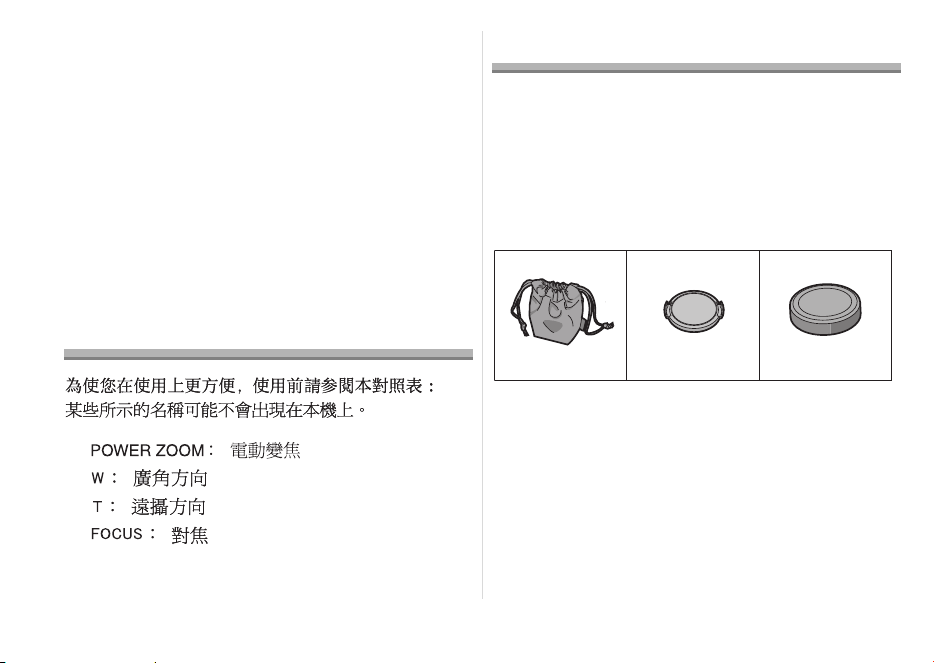
54
VQT3S52
∫ 關於水汽凝結(鏡頭的霧化)
≥ 當周圍環境溫度和濕度如下變化時,會發生水汽凝
結。 水汽凝結可能會使鏡頭變髒,產生霉菌及發生
故障,因此在下列情況時請注意:
– 在寒冷的天氣裡將相機從室外帶到室內時
– 將相機帶到開著空調的車內時
– 空調等設備的冷風直接吹向鏡頭時
– 在潮濕的地方
≥ 要防止水汽凝結,請將相機放在塑膠袋中,直到相
機溫度接近周圍環境溫度。 如果發生了水汽凝結,
請關閉電源,然後將其擱置約 2 小時。 當相機溫度
接近周圍環境溫度時,霧化將自然消失。
操作部中文表示對照表
提供的附件
[ 請在打開包裝取出本裝置時進行檢查 ]
當從其包裝盒中取出本裝置時,請檢查是否包含主機
及其提供的附件,還要檢查它們的外觀和功能,以確保
它們在配送和運輸過程中沒有損壞。
如果發現有問題,請在使用本產品前連繫您的銷售商。
產品號碼截至 2011 年 9 月為準。此後可能會有變更。
1 鏡頭儲藏袋
2 鏡頭蓋
3 鏡頭後蓋
(購買時,鏡頭後蓋和鏡頭蓋安在可互換鏡頭上。)
VFC4460 VYF3443
123
VFC4605
VQT3S52_TAI.fm 54 ページ 2005年1月1日 土曜日 午前12時4分
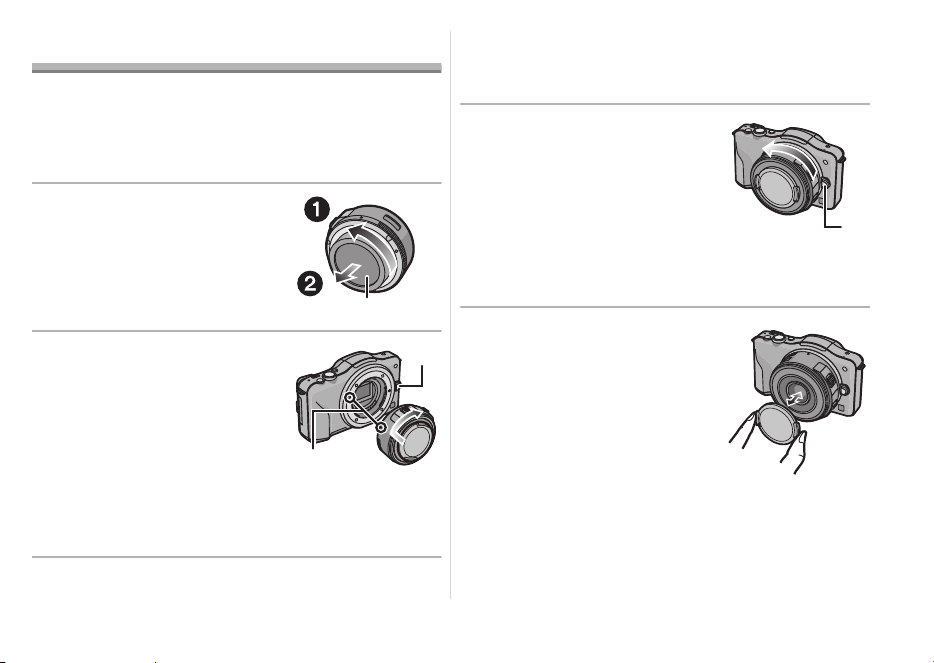
55
VQT3S52
安裝 / 取下鏡頭
≥ 安裝及取下鏡頭的方法也請參閱相機的使用說明
書。
∫ 安裝鏡頭
≥ 檢查相機是否關閉。
1 轉動鏡頭後蓋將其取下。
A: 鏡頭後蓋
2 將鏡頭對準機身上的鏡頭
安裝標記 B,然後朝箭頭
方向轉動鏡頭直到發出喀
噠聲為止。
• 安裝鏡頭時,請勿按鏡頭釋
放按鈕 C。
• 請勿將鏡頭以傾斜的狀態安
裝到相機上,否則,鏡頭接座會被劃傷。
• 檢查鏡頭是否安裝正確。
∫ 取下鏡頭
≥ 為了保護鏡頭,請關閉數位相機的電源並確認鏡筒
已縮回。
按鏡頭釋放按鈕 D 的同
時,朝箭頭指示的方向轉
動鏡頭直到停止為止,然
後取下。
• 請蓋上鏡頭後蓋,這樣就不
會劃傷鏡頭支座觸點。
• 將機身蓋安裝到相機上,以
防止污物或灰塵進入機身內部。
∫ 安裝和取下鏡頭蓋
像圖中所示的那樣捏住鏡
頭蓋安裝或取下。
• 請注意不要弄丟鏡頭蓋。
VQT3S52_E.book 55 ページ 2013年2月18日 月曜日 午後3時26分
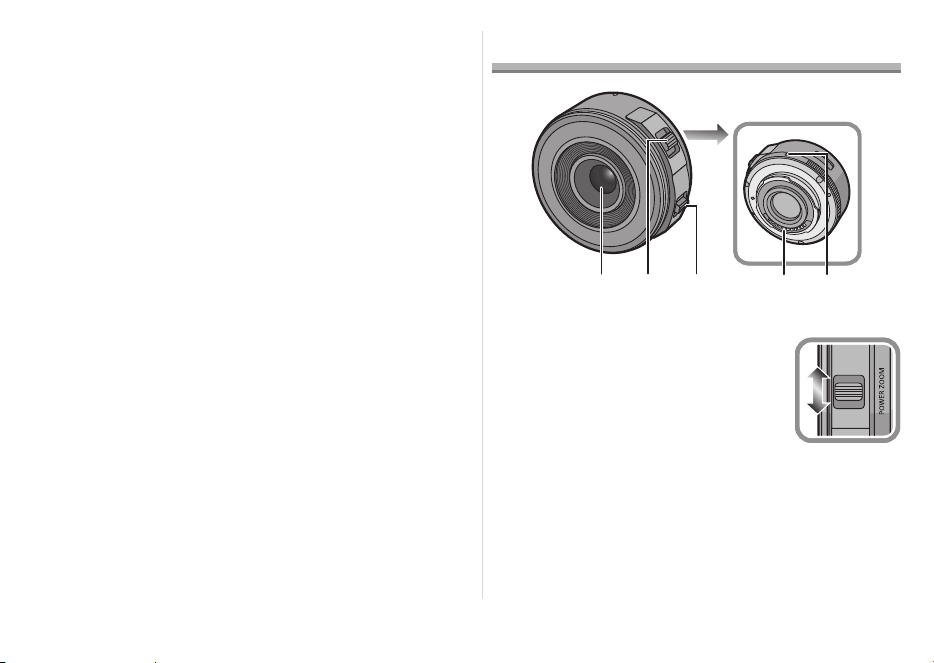
56
VQT3S52
∫ 安裝濾鏡
≥ 請在鏡筒縮回時安裝或取下濾鏡。
≥ 如果使用 2 個以上的 MC 保護鏡
(另購件 : DMW-LMCH37)、 PL 偏光鏡
(另購件 : DMW-LPL37)或 ND 濾鏡 (另購件 :
DMW-LND37),或者使用厚的保護鏡和 / 或濾
鏡,則可能會出現暈影。
≥ 如果擰得過緊,可能無法取下濾鏡。因此,請不要
太用力地擰它。
≥ 安裝了濾鏡時,可以安裝鏡頭蓋。
≥ 不能將轉換鏡頭或轉接器安裝到該鏡頭上。
(截至 2011 年 9 月) 可以使用濾鏡,但安裝其他
任何元件可能會對鏡頭造成損壞。
元件的名稱及功能
1 鏡頭表面
2 變焦桿
向 [T](遠攝側)或 [W](廣角側)
移動變焦桿。
[T]: 要想使被攝物體看起來更
近,請使用遠攝
[W]:要想使被攝物體看起來更
遠,請使用廣角
32
45
1
W
T
VQT3S52_E.book 56 ページ 2013年2月18日 月曜日 午後3時26分
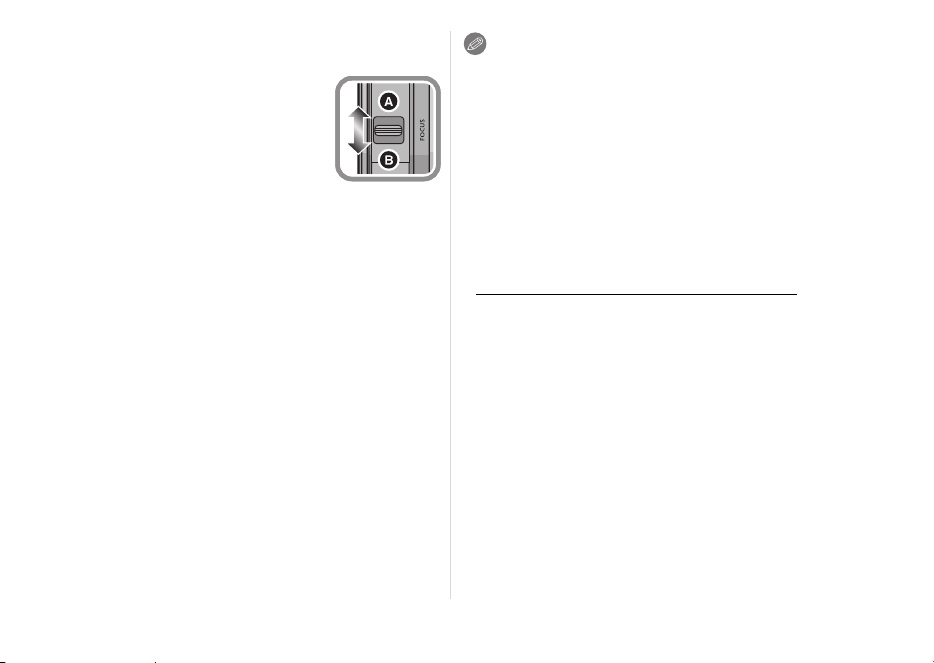
57
VQT3S52
• 根據移動變焦桿的範圍不同,變焦速度也會有所
不同。 錄製動態影像時,變焦速度會比平時慢。
3 對焦桿
向
A
或
B
移動對焦桿。
A
: 對近處的被攝物體對焦
B
: 對遠處的被攝物體對焦
• 對焦速度會根據移動的量改變。
4 接觸點
5 鏡頭安裝標記
注意
≥ 如果在錄製動態影像過程中將手指從對焦桿或變焦
桿上拿開,可能會錄製上桿返回的聲音。 將桿返回
到原來的位置時,請靜靜地移動桿。
≥ 使用閃光燈拍攝近距離的被攝物體時,閃光燈發出
的光會被鏡頭遮擋住,圖片的一部分可能會變暗。
拍攝時,請確認到被攝物體的距離。
≥ 本鏡頭上沒有焦距的指示。 安裝到相容的數位相機
上時,焦距顯示在數位相機的螢幕上。 焦距不會顯
示在不相容的數位相機上。 有關所使用的數位相機
的詳情,請參閱網站。
http://panasonic.jp/support/global/cs/dsc/
(本網站為英文網站。)
VQT3S52_E.book 57 ページ 2013年2月18日 月曜日 午後3時26分

58
VQT3S52
使用時的注意事項
請務必小心,切勿跌落或撞擊鏡頭。還要務必小心,切
勿在鏡頭上施加過多壓力。
≥
請注意不要讓裝有鏡頭的包跌落,因為這樣可能會損
壞鏡頭。相機可能會停止正常操作,可能無法繼續拍
攝圖片。
在相機周圍使用殺蟲劑或其他揮發性的物質時,請勿
使其接觸到鏡頭。
≥ 如果此類化學藥品接觸到鏡頭,可能會損壞鏡頭,
表面漆可能也會剝落。
請勿在本裝置還安裝在相機機身時攜帶本裝置。
≥ 任何情況下都不要在以下地方使用或存放本裝置,
因為這樣做可能導致操作時出現問題或產生故障。
– 太陽直射的地方或夏天的海邊
– 溫度和濕度較高或者溫度和濕度變化劇烈的地方
– 沙子、灰塵或污垢比較集中的地方
– 有火的地方
– 靠近加熱器、空調或加濕器的地方
– 水可能打濕本裝置的地方
– 受到震動的地方
– 車內
≥ 也請參閱數位相機的使用說明書。
≥ 準備長時間不使用本裝置時,建議在存放時放入一
些乾燥劑 (矽膠)。 否則,可能會由於發霉等原因
而導致性能出現故障。 建議在使用前先檢查本裝置
是否能夠正常運行。
≥ 請勿讓鏡頭與橡膠或塑料製品長時間接觸。
≥ 請勿觸摸本裝置的電觸點。 這樣做可能會導致本裝
置發生故障。
≥ 請勿拆卸或改裝本裝置。
請勿使用汽油、稀釋劑、酒精或其他類似的清潔劑清潔
本裝置。
≥ 使用溶劑會損壞鏡頭或導致表面漆剝落。
≥ 請用一塊乾軟布擦袪灰塵或手印。
≥ 請勿使用廚房清潔劑或經化學方法處理過的抹布。
VQT3S52_E.book 58 ページ 2013年2月18日 月曜日 午後3時26分

59
VQT3S52
當相機開啟或關閉時聽到機械音。
≥ 這是鏡頭或光圈運動的聲音,不是故障。
將此鏡頭安裝到數位相機上時,穩定器功能無法關閉
或者穩定器功能不工作。
≥ 只有在支持的相機上,此鏡頭的光學影像穩定器功
能才能正確工作。
> 使用舊機型的 Panasonic 數位相機 (DMC-GF1、
DMC-GH1、DMC-G1) 時,無 法 將 [ 拍攝 ] 模式功能
表中的 [ 穩定器 ] 設定為 [OFF]。 建議在下面的網站
上更新數位相機的韌體。
http://panasonic.jp/support/global/cs/dsc/
download/
> 在其他廠家生產的數位相機上使用此鏡頭時,光學
影像穩定器功能不工作。
(截至 2011 年 9 月)
有關詳情,請與各自的公司聯繫。
故障排除
VQT3S52_E.book 59 ページ 2013年2月18日 月曜日 午後3時26分

60
VQT3S52
規格
數位相機用可替換鏡頭
“LUMIX G X VARIO PZ 14–42 mm/F3.5–5.6 ASPH./POWER O.I.S.”
焦距 f=14 mm 至 42 mm
(相當於 35 mm 菲林相機: 28 mm 至 84 mm)
光圈類型 7 片控光片 / 圓形虹膜光圈
光圈範圍 F3.5(廣角)至 F5.6(遠攝)
最小光圈值
F22
鏡頭結構 9 件 8 組(4 片非球面鏡片、2 片 ED 鏡片)
納米塗層 是
In focus(焦點對準)距離 0.2 m(廣角端至焦距 20 mm)至 ¶ (從對焦距離基準線開始)、
0.3 m(焦距 21 mm 至遠攝端)至 ¶ (從對焦距離基準線開始)
最大影像放大率
0.17k(相當於 35 mm 菲林相機: 0.34k)
光學影像穩定器 可用
[O.I.S.] 開關
無
(
LUMIX
數位相機的
[
穩定器
]
的設定通過
[
拍攝
]
模式功能表進行。)
裝配 “Micro Four Thirds 接口 ”
視角 75x(廣角)至 29x(遠攝)
濾鏡直徑
37 mm
最大直徑
約 61 mm
全長 約 26.8 mm(鏡筒縮回時,從鏡頭的頂端到鏡頭接口的基準面)
重量
約 95 g
VQT3S52_E.book 60 ページ 2013年2月18日 月曜日 午後3時26分
61
VQT3S52
Содержание
Информация для вашей безопасности ...................61
Правила эксплуатации ...........................................63
Принадлежности, входящие в комплект .................64
Установка/Снятие объектива ...................................64
Названия и функции составных частей ..................66
Предосторожности при использовании
фотокамеры ..............................................................68
Устранение неисправностей ..................................69
Технические характеристики....................................70
-Если Вы увидите такой символ-
Информация для вашей
безопасности
Храните прибор вдали от источников
электромагнитного излучения (например,
микроволновых печей, телевизоров,
оборудования для видеоигр, радиопередатчиков,
высоковольтных линий и т.д.).
≥ Не пользуйтесь фотокамерой вблизи сотовых
телефонов, так как телефоны могут вызвать
помехи, отрицательно сказывающиеся на
качестве снимков и звука.
≥ Если камера подвергается негативному
влиянию электромагнитного излучения и
перестает работать нормально, выключите
камеру, извлеките батарею и/или
подключенный сетевой адаптер переменного
тока. Затем снова вставьте батарею и/или
снова подключите сетевой
адаптер
переменного тока и включите камеру.
Информация по обращению с отходами для
стран, не входящих в Европейский Союз
Действие этого символа
распространяется только на
Европейский Союз.
Если Вы собираетесь
выбросить данный продукт,
узнайте в местных органах
власти или у дилера, как
следует поступать с
отходами такого типа.
РУССКИЙ ЯЗЫК
VQT3S52_E.book 61 ページ 2013年2月18日 月曜日 午後3時26分

62
VQT3S52
Объектив может использоваться с цифровой
камерой, совместимой со стандартом крепления
объективов “Micro Four Thirds
TM
System”.
≥ Не предусмотрена его установка на
фотокамеры со спецификацией крепления
Four Thirds
TM
.
≥ На иллюстрациях цифровой камеры в данных
инструкциях по эксплуатации в качестве
примера показан DMC-GF3.
≥ Внешний вид и спецификации продуктов,
описанные в данном руководстве, могут
отличаться от фактических приобретенных
продуктов ввиду более поздних улучшений.
≥ Micro Four Thirds™ и знаки логотипа Micro Four
Thirds являются товарными знаками или
зарегистрированными товарными знаками
Olympus Imaging Corporation в Японии,
Соединенных Штатах, Европейском
Союзе и
других странах.
≥ Four Thirds™ и знаки логотипа Four Thirds
являются товарными знаками или
зарегистрированными товарными знаками
Olympus Imaging Corporation в Японии,
Соединенных Штатах, Европейском Союзе и
других странах.
≥ G MICRO SYSTEM является системой
объективов сменного типа для цифровых
камер LUMIX, разработанной на основе
стандарта Micro Four Thirds System.
≥ Другие названия систем и продуктов,
упомянутые в данной инструкции по
эксплуатации, обычно являются
зарегистрированными товарными знаками или
товарными знаками производителей, которые
разработали упомянутую систему или продукт.
VQT3S52_E.book 62 ページ 2013年2月18日 月曜日 午後3時26分
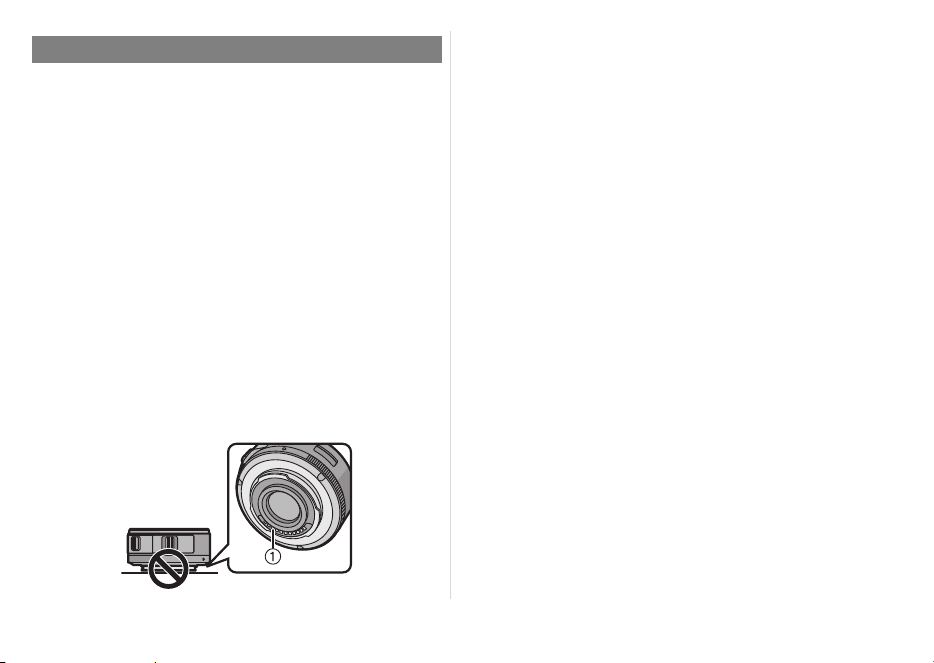
63
VQT3S52
∫ Уход за объективом
≥
Песок и пыль могут привести к повреждению
объектива. При использовании объектива на
пляже и т.п. убедитесь, что внутри объектива
и гнезд нет песка и пыли.
≥
Данный объектив не является
водонепроницаемым. Если на объектив
попали капли воды, вытрите объектив сухой
тканью.
≥ Нельзя сильно нажимать на объектив.
≥ В случае попадания на поверхность объектива
грязи (воды, масла, отпечатков пальцев и т. д.)
качество снимка может ухудшиться. Следует
осторожно вытереть поверхность объектива
мягкой сухой тканью перед съемкой.
≥ Не ставьте объектив монтажной поверхностью
вниз. Не допускайте попадание загрязнений на
монтажные поверхности 1 объектива.
∫ О конденсации (Запотевании
объектива)
≥ Конденсация происходит при разнице в
температуре и влажности, как описано ниже.
Конденсация может привести к загрязнению
объектива, появлению плесени и
неисправностей, поэтому необходимо
соблюдать осторожность в следующих
ситуациях:
– при внесении камеры в помещение с улицы в
холодную погоду
– при внесении камеры в салон автомобиля, где
работает кондиционер
– если поток холодного
воздуха из
кондиционера направлен прямо на объектив
– во влажных местах
≥ Для предотвращения конденсации поместите
камеру в пластиковый пакет, чтобы ее
температура сравнялась с температурой
окружающего воздуха. При возникновении
конденсации выключите камеру и оставьте ее
примерно на два часа. Когда температура
камеры сравняется с температурой
окружающего воздуха, запотевание исчезнет
естественным образом.
Правила эксплуатации
VQT3S52_E.book 63 ページ 2013年2月18日 月曜日 午後3時26分
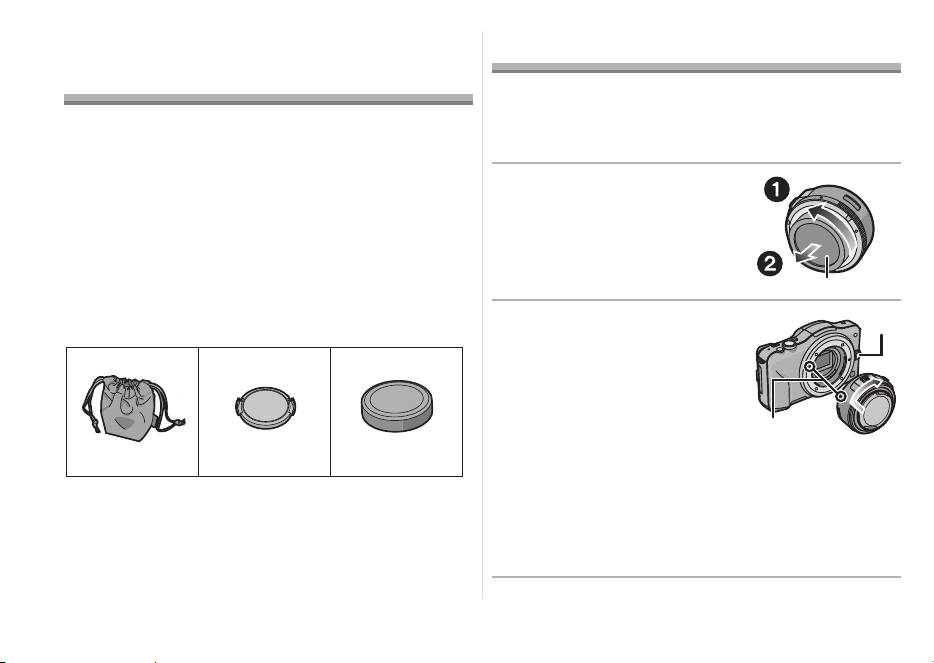
64
VQT3S52
Принадлежности,
входящие в комплект
[Комплектность необходимо проверять при
распаковке устройства]
При изъятии устройства из оригинальной упаковки проверьте
наличие основного устройства и его комплектующих, а также
осмотрите устройство снаружи и проверьте его
функциональность, чтобы убедиться в отсутствии каких-либо
повреждений в результате транспортировки.
Если вы обнаружите какое-либо несоответствие,
свяжитесь с вашим поставщиком,
воздержавшись от эксплуатации изделия.
Номера изделий правильны по состоянию на
сентябрь 2011 г. Они могут изменяться.
1 Сумка для объектива
2 Крышка объектива
3 Крышка задней части объектива
(Во время покупки крышка объектива и
задняя крышка объектива прикреплены к
сменному объективу.)
Установка/Снятие объектива
≥
Информацию об установке и снятии объектива
см. также в инструкциях по эксплуатации камеры.
∫ Установка объектива
≥ Убедитесь, что камера выключена.
1 Поверните заднюю
крышку объектива и
снимите ее.
A: Крышка задней части
объектива
2 Совместите установочную
метку объектива
B
на
корпусе фотокамеры с
меткой на объективе и
затем поверните объектив
в направлении стрелки до
щелчка.
• Не нажимайте кнопку
открытия объектива C в процессе установки
объектива.
• Не пытайтесь установить объектив под углом к
корпусу камеры, поскольку это может привести к
повреждению крепления объектива.
• Убедитесь, что объектив установлен правильно.
VFC4460 VYF3443
123
VFC4605
VQT3S52_E.book 64 ページ 2013年2月18日 月曜日 午後3時26分
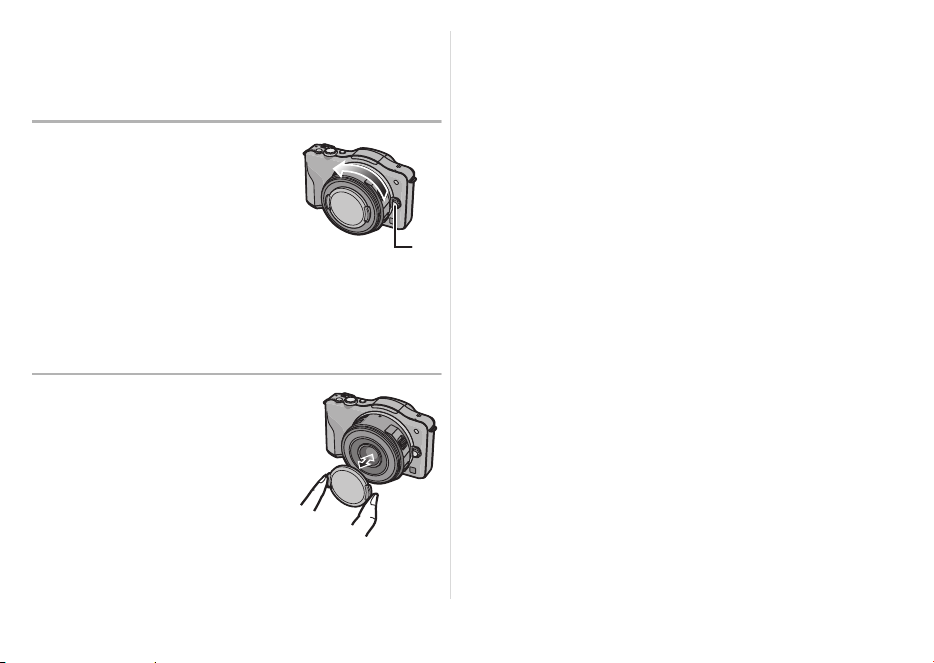
65
VQT3S52
∫ Снятие объектива
≥ Для защиты объектива выключите питание
цифровой камеры и убедитесь, что тубус
объектива втянут.
Удерживая нажатой
кнопку
D
проверните
объектив до упора в
направлении стрелки, а
потом снимите.
• Прикрепите заднюю крышку
объектива, чтобы избежать
царапин монтажной
поверхности объектива.
• Прикрепите к камере крышку корпуса во
избежание попадания грязи и пыли внутрь
основного устройства.
∫ Установка и снятие
крышки объектива
Чтобы установить или
снять крышку
объектива, нажмите на
нее, как показано на
рисунке.
• Будьте осторожны чтобы не
потерять крышку объектива.
∫ Установка фильтров
≥ Присоединять или отсоединять фильтр нужно
при втянутом тубусе объектива.
≥ Виньетирование может возникать при
использовании 2 или более защитных
устройств MC (поставляются отдельно:
DMW-LMCH37), фильтров PL (поставляются
отдельно: DMW-LPL37) или фильтров ND
(поставляются отдельно: DMW-LND37) либо
при использовании толстых защитных
устройств и/или фильтров.
≥ Если фильтр будет чрезмерно затянут, снять
его может быть невозможно, поэтому не
затягивайте его слишком сильно.
≥ Крышку объектива можно прикреплять и в том
случае, если уже прикреплен фильтр.
≥ К данному объективу нельзя прикрепить
преобразовательный объектив или
переходник.
(По состоянию на сентябрь 2011 г.)
Можно использовать фильтр, но прикрепление
любого другого элемента может привести к
повреждению объектива.
VQT3S52_E.book 65 ページ 2013年2月18日 月曜日 午後3時26分
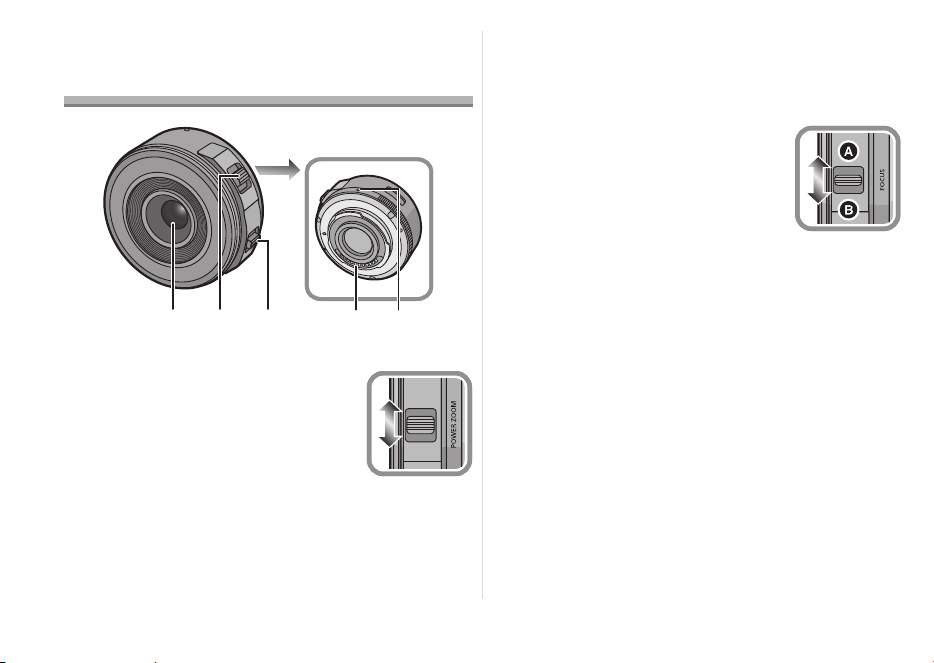
66
VQT3S52
Названия и функции
составных частей
1 Поверхность линзы
2 Рычажок трансфокатора
Переместите рычажок
трансфокатора в сторону [T]
(телережим) или [W]
(широкоугольный).
[T]: используйте для съемки
объектов крупным планом (телережим)
[W]: используйте для съемки предметов
дальним планом (широкий угол)
• Скорость масштабирования зависит от
величины перемещения рычажка
трансфокатора. Скорость масштабирования
при записи видео будет ниже обычной.
3 Рычажок трансфокатора
Переместите рычажок
трансфокатора на
A
или
B
.
A
: Фокусировка на объекте,
расположенном близко
B
: Фокусировка на объекте,
расположенном далеко
• Скорость фокусировки меняется в
зависимости от степени перемещения.
4 Метка установки объектива
5 Монтажная поверхность
32
45
1
W
T
VQT3S52_E.book 66 ページ 2013年2月18日 月曜日 午後3時26分

67
VQT3S52
Примечание
≥ Звук возвращения рычажка может записаться
при убирании пальца с рычажка фокусировки
или рычажка трансфокатора во время записи
видео. Возвращая рычажок в исходное
положение, перемещайте его тихо.
≥ При съемке со вспышкой близко
расположенного объекта свет вспышки может
блокироваться объективом, и часть снимка
может быть затемнена. Проверяйте
расстояние до объекта при
съемке.
≥ На объективе нет обозначений фокусного
расстояния. Фокусное расстояние
отображается на экране при условии
присоединения к совместимой цифровой
камере. На экране несовместимой цифровой
камеры фокусное расстояние не
отображается. Информация по используемым
цифровым камерам приведена на веб-сайте.
http://panasonic.jp/support/global/cs/dsc/
(Этот сайт только англоязычный.)
VQT3S52_E.book 67 ページ 2013年2月18日 月曜日 午後3時26分

68
VQT3S52
Предосторожности при
использовании
фотокамеры
Старайтесь не ронять и не ударять объектив.
Также старайтесь не подвергать объектив
чрезмерному давлению.
≥ Следите за тем, чтобы не уронить в сумку, в
которую вы положили объектив, поскольку это
может привести к повреждению объектива.
Камера может перестать нормально работать,
и дальнейшая запись снимков может оказаться
невозможной.
При использовании пестицидов и
других
летучих веществ вблизи камеры убедитесь,
что они не попадают на объектив.
≥ При попадании на объектив такие вещества
могут повредить объектив или привести к
отслаиванию краски.
Не носите устройство присоединенным к
корпусу фотокамеры.
≥ Категорически запрещается пользоваться
фотовспышкой или хранить ее в следующих
условиях, так как это может привести к сбоям
в
работе или неправильной работе.
– Под воздействием прямых солнечных лучей
или на пляже летом
– В местностях с высокой влажностью воздуха и
высокими температурами, или с резкими
перепадами температуры и влажности
– В местностях с высокими концентрациями
песка, пыли или грязи
– При срабатывании вспышки
– Возле обогревателей, кондиционеров или
увлажнителей
– Где возможно намокание
устройства
– Где присутствует вибрация
– В автомобиле
≥ См. также инструкции по эксплуатации
цифровой камеры.
≥ Если камера не будет использоваться в
течение длительного времени, рекомендуется
хранить ее вместе с влагопоглотителем
(силикагелем). Невыполнение данной
рекомендации может привести к нарушению
технических характеристик ввиду образования
плесени и т. д. Прежде чем использовать,
рекомендуется проверять
работоспособность
устройства после такого длительного
хранения.
VQT3S52_E.book 68 ページ 2013年2月18日 月曜日 午後3時26分

69
VQT3S52
≥ Не оставляйте объектив в контакте с
резиновыми или пластиковым продуктами на
продолжительный период времени.
≥
Не прикасайтесь к электрическим контактам
устройства. Это может вызвать сбой в его работе.
≥ Запрещается разбирать или вносить
изменения в аппарат.
Не используйте бензин, растворитель, спирт
и другие подобные моющие средства для
очистки аппарата.
≥ Использование растворителей может
повредить объектив или привести к
отслаиванию краски.
≥ Вытирайте пыль и следы пальцев мягкой сухой
тканью.
≥ Запрещается использовать моющие средства
или химически обработанную ткань.
При включении и
выключении камеры
слышен звук.
≥ Звук возникает в результате движения
диафрагмы объектива и не является
неисправностью.
Когда данный объектив присоединен к
цифровой камере, функцию стабилизатора
нельзя отключить, или функция
стабилизатора не будет работать.
≥ Функция оптического стабилизатора
изображения данного объектива правильно
работает только с поддерживаемыми
камерами.
> При использовании старых цифровых камер
Panasonic (DMC-GF1, DMC-GH1, DMC-G1)
[СТАБИЛИЗ.] в меню режима [ЗАП.] нельзя
установить на [OFF]. Рекомендуется обновить
прошивку цифровой камеры на веб-сайте
http://panasonic.jp/support/global/cs/dsc/
download/
> При использовании данного объектива с другой
маркой цифровых камер функция оптического
стабилизатора изображения работать не будет.
(По состоянию на сентябрь 2011 г.)
Для получения подробной информации
обращайтесь в соответствующую компанию.
Устранение неисправностей
VQT3S52_E.book 69 ページ 2013年2月18日 月曜日 午後3時26分

70
VQT3S52
Технические характеристики
СМЕННЫЙ ОБЪЕКТИВ ДЛЯ ЦИФРОВОЙ ФОТОKAMEРЫ
“LUMIX G X VARIO PZ 14–42 мм/F3.5–5.6 ASPH./POWER O.I.S.”
Фокусное расстояние
f=14 мм до 42 мм (Эквивалент 35 мм пленочной камеры: от 28 мм до 84 мм)
Тип диафрагмы 7 лепестки диафрагмы/диафрагма с круглым отверстием
Диапазон диафрагм F3.5 (Широкоугольный режим) до F5.6 (Телережим)
Минимальное значение
показателя диафрагмы F22
Конструкция объектива
9 элементов в 8 группах (4 асферические линзы/2 линзы из стекла ED)
Просветляющее покрытие
поверхности Да
Фокусное расстояние от 0,2 м (от крайнего широкоугольного положения до фокусного расстояния
20 мм) до ¶ (от линии отсчета фокусного расстояния),
0,3 м (от фокусного расстояния 21 мм до крайнего положения телефото)
до ¶ (от линии отсчета фокусного расстояния)
Максимальное увеличение
изображения 0,17k (Эквивалент 35 мм пленочной камеры: 0,34k)
Оптический стабилизатор
изображения
Имеется
Переключатель [O.I.S.] Нет (В цифровых камерах LUMIX установка [СТАБИЛИЗ.] выполняется в
меню режима [ЗАП.].)
Крепление “Micro Four Thirds Mount”
Угол обзора 75x (Широкоугольный режим) до 29x (Телережим)
Диаметр фильтра 37 мм
Максимальный диаметр Прибл. 61 мм
Полная длина Прибл. 26,8 мм (от края объектива до основания крепления объектива
при втянутом тубусе объектива)
Масса Прибл. 95 г
VQT3S52_E.book 70 ページ 2013年2月18日 月曜日 午後3時26分
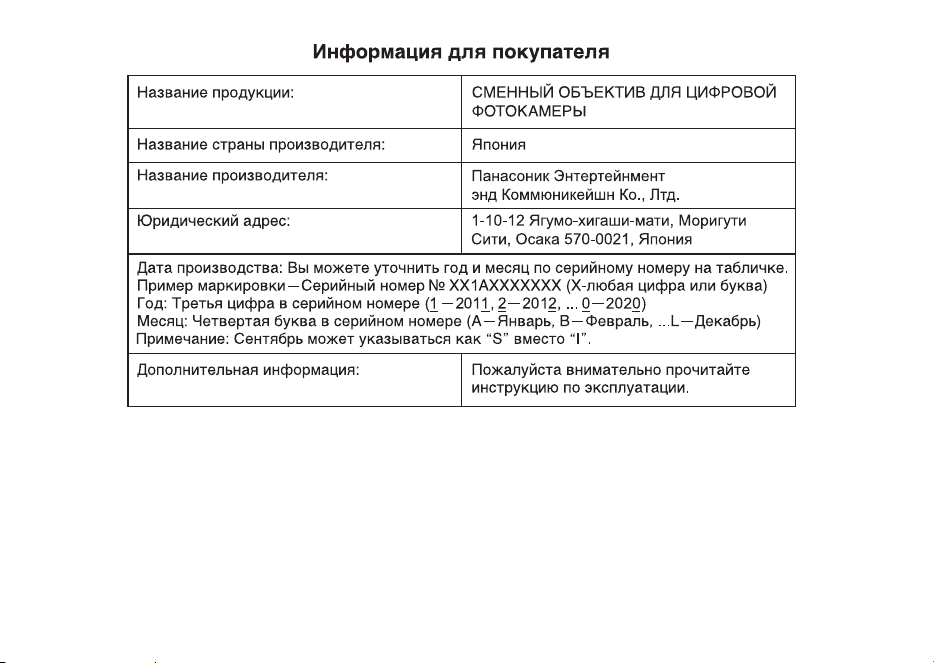
71
VQT3S52
Установленный производителем в порядке п. 2 ст. 5 Федерального Закона РФ “О защите прав
потребителей” срок службы данного изделия равен 7 годам с даты производства при условии,
что изделие используется в строгом соответствии с настоящей инструкцией по эксплуатации и
применимыми техническими стандартами.
Импортёр
ООО «Панасоник Рус»
Россия, 115162, Москва, ул. Шаболовка, д.31Г, этаж/ помещение антресоль 1этажа/10
тел. 8-800-200-21-00
VQT3S52_RUS.fm 71 ページ 2022年3月9日 水曜日 午前10時53分

Manufactured by:
Panasonic Entertainment & Communication Co., Ltd.
1-10-12, Yagumo-higashi-machi, Moriguchi City, Osaka, Japan
Importer for UK:
Panasonic UK, a branch of Panasonic Marketing Europe GmbH
Maxis 2, Western Road, Bracknell, Berkshire, RG12 1RT
Importer for EU:
Panasonic Marketing Europe GmbH
Authorized Representative in EU:
Panasonic Testing Centre
Winsbergring 15, 22525 Hamburg, Germany
Hergestellt von:
Panasonic Entertainment & Communication Co., Ltd.
1-10-12, Yagumo-higashi-machi, Moriguchi City, Osaka, Japan
Importeur:
Panasonic Marketing Europe GmbH
Vertretungsberechtigter in der EU:
Panasonic Testing Centre
Winsbergring 15, 22525 Hamburg, Deutschland
Fabriqué par:
Panasonic Entertainment & Communication Co., Ltd.
1-10-12, Yagumo-higashi-machi, ville de Moriguchi, Osaka, Japon
Importateur :
Panasonic Marketing Europe GmbH
Représentant autorisé dans l’UE :
Panasonic Testing Centre
Winsbergring 15, 22525 Hambourg, Allemagne
Fabricado por:
Panasonic Entertainment & Communication Co., Ltd.
1-10-12, Yagumo-higashi-machi, Ciudad de Moriguchi, Osaka,
Japón
Importador:
Panasonic Marketing Europe GmbH
Representante Autorizado para la UE:
Panasonic Testing Centre
Winsbergring 15, 22525 Hamburgo, Alemania
Fabbricato da:
Panasonic Entertainment & Communication Co., Ltd.
1-10-12, Yagumo-higashi-machi, Città di Moriguchi, Osaka,
Giappone
Importatore:
Panasonic Marketing Europe GmbH
Rappresentante autorizzato nell’UE:
Panasonic Testing Centre
Winsbergring 15, 22525 Amburgo, Germania
Panasonic Entertainment & Communication Co., Ltd.
Web Site/Site Web: http://www.panasonic.com
Panasonic Entertainment & Communication Co., Ltd. 2011
VQT3S52_Back.fm 92 ページ 2022年3月1日 火曜日 午後4時29分
