MAC 101
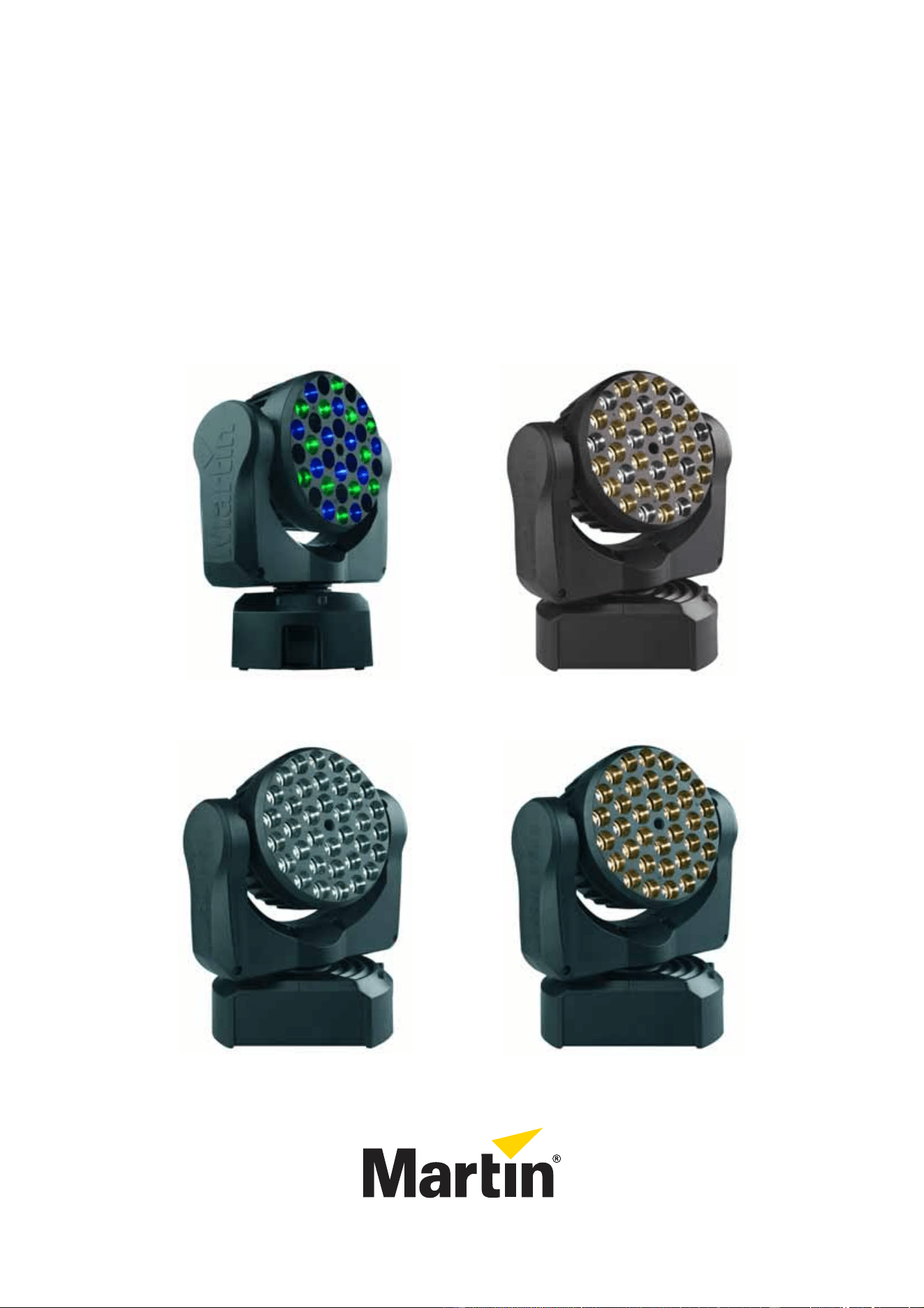
RGB, CT, WRM and CLD models
User manual
TM
MAC 101 CTMAC 101
MAC 101 WRMMAC 101 CLD
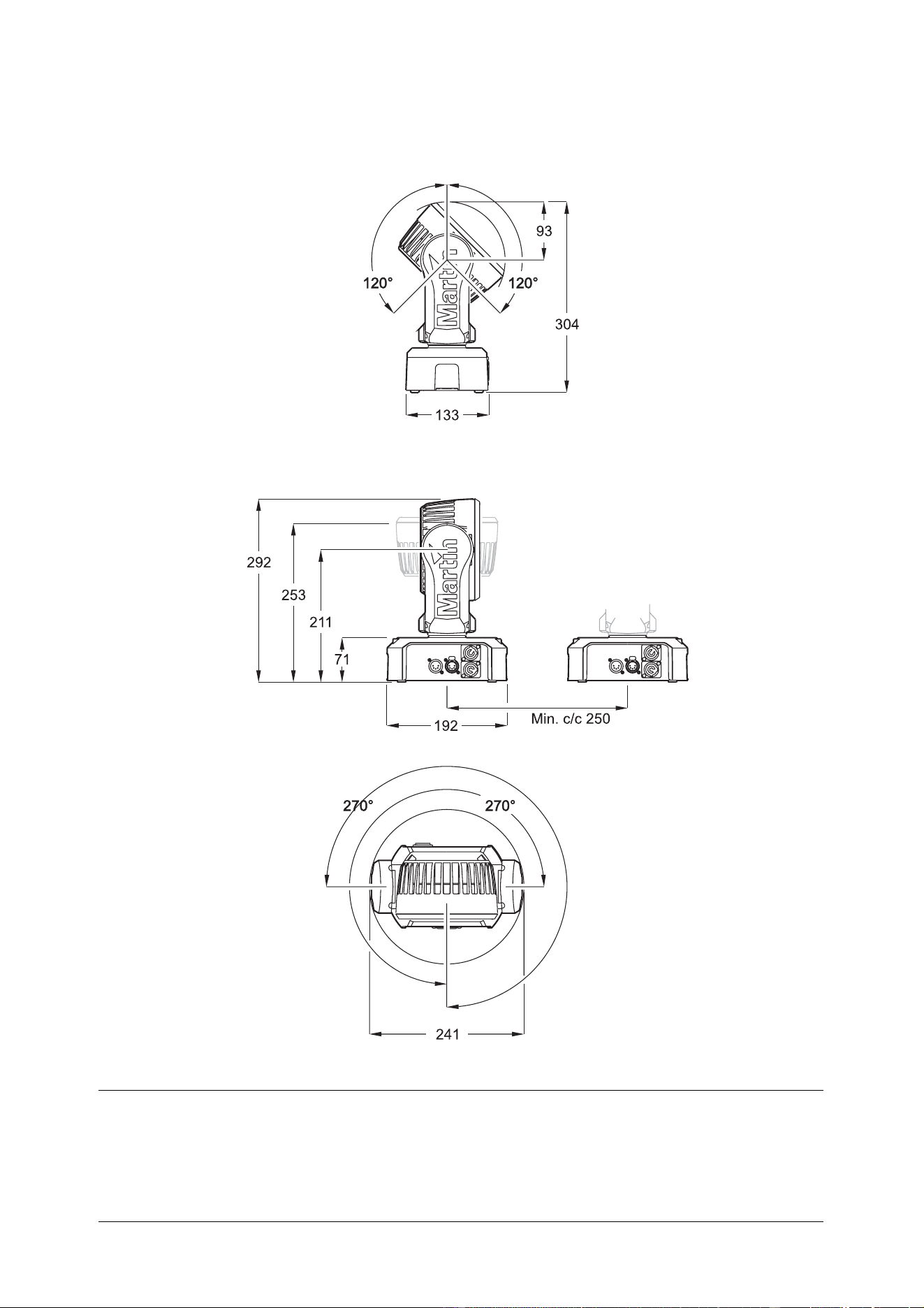
Dimensions
All dimensions are in millimeters
©2010-2011 Martin Professional A/S. Information subject to change without notice. Martin Professional A/S and all affiliated compa-
nies disclaim liability for any injury, damage, direct or indirect loss, consequential or economic loss or any other loss occasioned by
the use of, inability to use or reliance on the information contained in this manual. The Martin logo, the Martin name and all other
trademarks in this document pertaining to services or products by Martin Professional A/S or its affiliates and subsidiaries are trade-
marks owned or licensed by Martin Professional A/S or its affiliates or subsidiaries. The use of certain patents in MAC 101 products
is licensed by Color Kinetics, Inc. (see details printed on product).
P/N 35000246, Rev. G
Safety Information 3
Safety Information
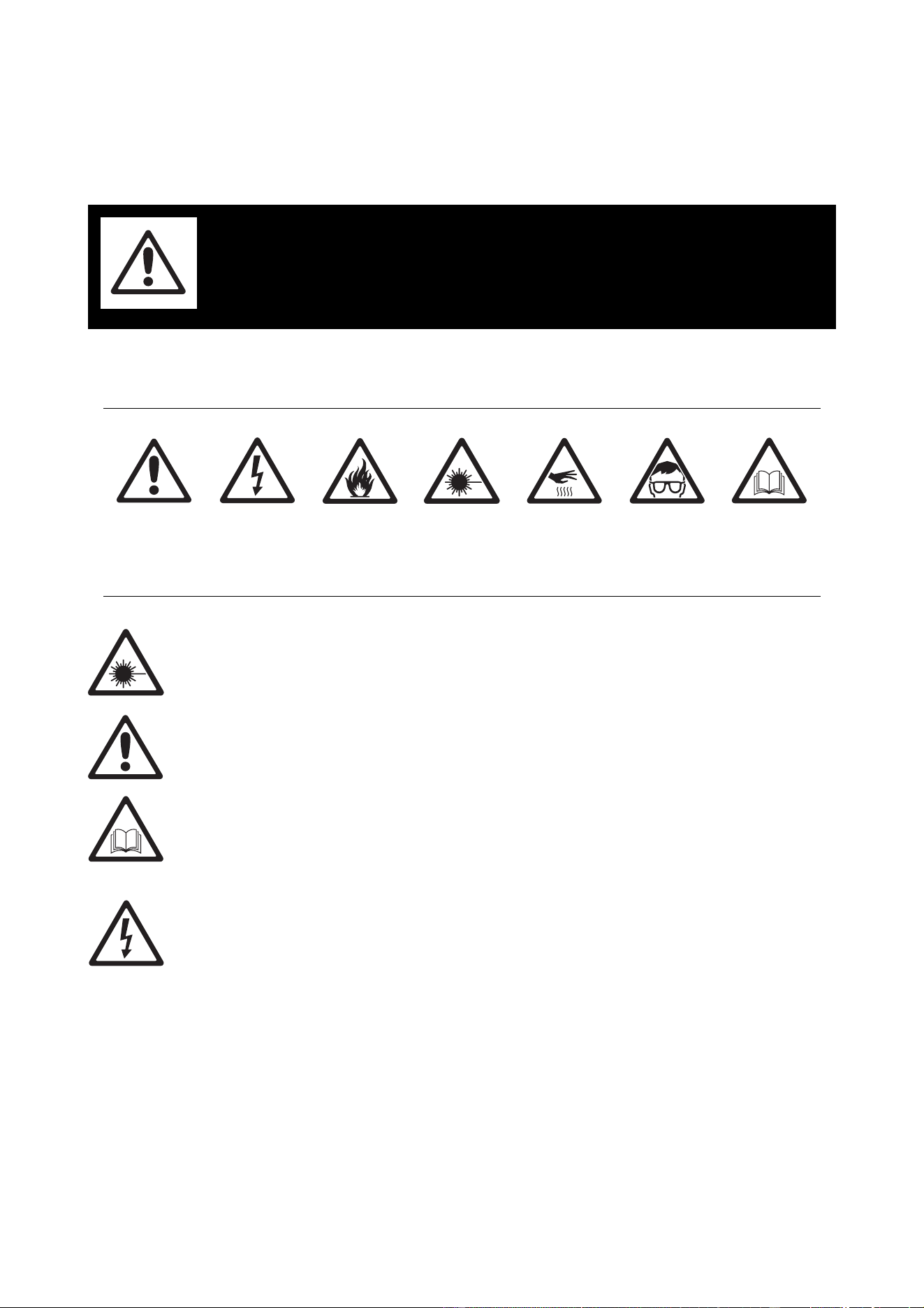
The following symbols are used to identify important safety information on the product and in this manual:
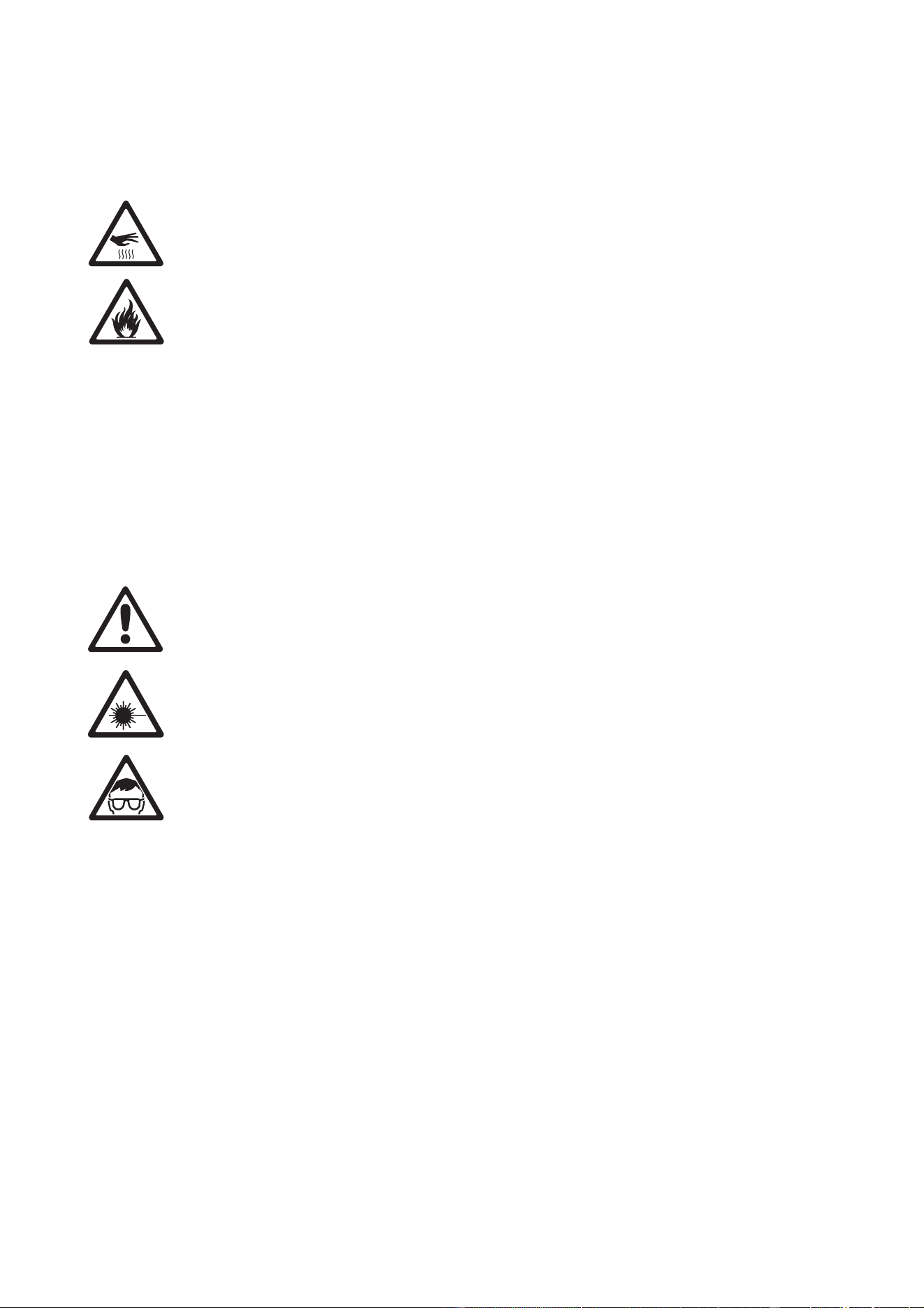
Warning! Risk Group 3 (high risk) LED product according to EN 62471. Do not look into the beam at
a distance of less than 8.3 meters (27 ft. 3 inches) from the front surface of the product. Do not view
the light output with optical instruments or any device that may concentrate the beam.
This product is for professional use only. It is not for household use.
This product presents risks of severe injury or death due to fire and burn hazards, electric shock and falls.
Read this manual before installing, powering or servicing the fixture, follow the safety precautions listed
below and observe all warnings in this manual and printed on the fixture. If you have questions about how to
operate the fixture safely, please contact your Martin supplier or call the Martin 24-hour service hotline on
+45 8740 0000, or in the USA on 1-888-tech-180.
PROTECTION FROM ELECTRIC SHOCK
• Disconnect the fixture from AC power before removing or installing any cover or part and when not in use.
• Always ground (earth) the fixture electrically.
• Use only a source of AC power that complies with local building and electrical codes and has both
overload and ground-fault (earth-fault) protection.
• Before using the fixture, check that all power distribution equipment and cables are in perfect condition
and rated for the current requirements of all connected devices.
• Power input and throughput cables must be rated 20 A minimum, have three conductors 1.5 mm²
(16 AWG) minimum conductor size and an outer cable diameter of 5 - 15 mm (0.2 - 0.6 in.). Cables must
be hard usage type (SJT or equivalent) and heat-resistant to 90° C (194° F) minimum. In the EU the cable
must be HAR approved or equivalent.
• Use only Neutrik PowerCon NAC3FCA cable connectors to connect to power input sockets. Use only
Neutrik PowerCon NAC3FCB cable connectors to connect to power throughput sockets.
• Isolate the fixture from power immediately if the power plug or any seal, cover, cable, or other component
is damaged, defective, deformed, wet or showing signs of overheating. Do not reapply power until repairs
have been completed.
WARNING!
Read the safety precautions in this section before
installing, powering, operating or servicing this
product.
DANGER!
Safety hazard.
Risk of severe
injury or death.
DANGER!
Hazardous
voltage. Risk of
lethal or severe
electric shock.
WARNING!
Fire hazard.
WARNING!
LED light
emission. Risk of
eye injury.
WARNING!
Burn hazard. Hot
surface. Do not
touch.
WARNING!
Wear protective
eyewear.
WARNING! Refer
to user manual.
4 MAC 101 user manual
• Do not expose the fixture to rain or moisture.
• Refer any service operation not described in this manual to a qualified technician.
• Socket outlets used to supply MAC 101 fixtures with power or external power switches must be located
near the fixtures and easily accessible so that the fixtures can easily be disconnected from power.
PROTECTION FROM BURNS AND FIRE
• Do not operate the fixture if the ambient temperature (Ta) exceeds 40° C (104° F).
• The exterior of the fixture becomes hot during use. Avoid contact by persons and materials. Allow the
fixture to cool for at least 10 minutes before handling.
• Keep all combustible materials (e.g. fabric, wood, paper) at least 100 mm (3.9 in.) away from the head.
• Keep flammable materials well away from the fixture.
• Ensure that there is free and unobstructed airflow around the fixture.
• Do not illuminate surfaces within 200 mm (7.9 ins.) of the MAC 101.
• Do not attempt to bypass thermostatic switches or fuses.
• If you relay power from one fixture to another using power throughput sockets, do not connect more than
ten MAC 101 fixtures in total to each other in an interconnected chain.
• Connect only other MAC 101 fixtures to MAC 101 power throughput sockets. Do not connect any other
type of device to these sockets.
• Do not stick filters, masks or other materials onto any optical component.
• Do not modify the fixture in any way not described in this manual
• Install only genuine Martin parts.
PROTECTION FROM INJURY
• Do not look continuously at LEDs from a distance of less than 8.3 meters (27 ft. 3 inches) from the front
surface of the fixture without protective eyewear such as shade 4-5 welding goggles. At less than this
distance, the LED emission can cause eye injury or irritation. At distances of 8.3 meters (27 ft. 3 inches)
and above, light output is harmless to the naked eye provided that the eye’s natural aversion response is
not overcome.
• Do not look at LEDs with magnifiers, telescopes, binoculars or similar optical instruments that may
concentrate the light output.
• Ensure that persons are not looking at the LEDs from within 8.3 meters (27 ft. 3 inches) when the product
lights up suddenly. This can happen when power is applied, when the product receives a DMX signal, or
when
SERVICE menu items are selected.
• Fasten the fixture securely to a fixed surface or structure when in use. The fixture is not portable when
installed.
• Ensure that any supporting structure and/or hardware used can hold at least 10 times the weight of all the
devices they support.
• If suspending from a rigging structure, fasten the fixture to a rigging clamp with an M12 bolt screwed into
the threaded hole in the center of the base of the fixture. The bolt must protrude at least 20 - 30 mm
(0.8 - 1.2 ins.) into the fixture. If the fixture is suspended by any other method, an M12 bolt must be
tightened into this hole so that it protrudes at least 20 - 30 mm (0.8 - 1.2 ins.) into the fixture.
• If the fixture is installed in a location where it may cause injury or damage if it falls, install as described in
this manual a secondary attachment such as a safety cable that is approved by an official body such as
TÜV as a safety attachment for the weight that it secures. The safety cable must comply with EN
60598-2-17 Section 17.6.6 and be capable of bearing a static suspended load that is ten times the weight
of the fixture and all installed accessories.
• Allow enough clearance around the head to ensure that it cannot collide with an object or another fixture
when it moves.
• Check that all external covers and rigging hardware are securely fastened.
• Block access below the work area and work from a stable platform whenever installing, servicing or
moving the fixture.
• Do not operate the fixture with missing or damaged covers, shields or any optical component.

Contents
Dimensions . . . . . . . . . . . . . . . . . . . . . . . . . . . . . . . . . . . . . . . . . . . . . . . . . . . . . . . . . . . . . . . . . . . . . . . . 2
Safety Information. . . . . . . . . . . . . . . . . . . . . . . . . . . . . . . . . . . . . . . . . . . . . . . . . . . . . . . . . . . . . . . . . . 3
Fixture overview . . . . . . . . . . . . . . . . . . . . . . . . . . . . . . . . . . . . . . . . . . . . . . . . . . . . . . . . . . . . . . . . . . . 6
Introduction . . . . . . . . . . . . . . . . . . . . . . . . . . . . . . . . . . . . . . . . . . . . . . . . . . . . . . . . . . . . . . . . . . . . . . . . 7
Using for the first time . . . . . . . . . . . . . . . . . . . . . . . . . . . . . . . . . . . . . . . . . . . . . . . . . . . . . . . . . . . . . . . 7
AC power. . . . . . . . . . . . . . . . . . . . . . . . . . . . . . . . . . . . . . . . . . . . . . . . . . . . . . . . . . . . . . . . . . . . . . . . . . 8
Power voltage . . . . . . . . . . . . . . . . . . . . . . . . . . . . . . . . . . . . . . . . . . . . . . . . . . . . . . . . . . . . . . . . . . . . . 8
Power cables and power plug . . . . . . . . . . . . . . . . . . . . . . . . . . . . . . . . . . . . . . . . . . . . . . . . . . . . . . . . . 8
Relaying power to other devices . . . . . . . . . . . . . . . . . . . . . . . . . . . . . . . . . . . . . . . . . . . . . . . . . . . . . . . 9
Data link . . . . . . . . . . . . . . . . . . . . . . . . . . . . . . . . . . . . . . . . . . . . . . . . . . . . . . . . . . . . . . . . . . . . . . . . . . 10
Tips for reliable data transmission. . . . . . . . . . . . . . . . . . . . . . . . . . . . . . . . . . . . . . . . . . . . . . . . . . . . . 10
Connecting the data link . . . . . . . . . . . . . . . . . . . . . . . . . . . . . . . . . . . . . . . . . . . . . . . . . . . . . . . . . . . . 10
Physical installation . . . . . . . . . . . . . . . . . . . . . . . . . . . . . . . . . . . . . . . . . . . . . . . . . . . . . . . . . . . . . . . 11
Fastening the fixture to a flat surface. . . . . . . . . . . . . . . . . . . . . . . . . . . . . . . . . . . . . . . . . . . . . . . . . . . 11
Mounting the fixture on a truss . . . . . . . . . . . . . . . . . . . . . . . . . . . . . . . . . . . . . . . . . . . . . . . . . . . . . . . 11
Hanging the fixture. . . . . . . . . . . . . . . . . . . . . . . . . . . . . . . . . . . . . . . . . . . . . . . . . . . . . . . . . . . . . . . . . 12
Quick-mount surface mounting bracket. . . . . . . . . . . . . . . . . . . . . . . . . . . . . . . . . . . . . . . . . . . . . . . . . 12
Setup. . . . . . . . . . . . . . . . . . . . . . . . . . . . . . . . . . . . . . . . . . . . . . . . . . . . . . . . . . . . . . . . . . . . . . . . . . . . . 13
Control panel and menu navigation. . . . . . . . . . . . . . . . . . . . . . . . . . . . . . . . . . . . . . . . . . . . . . . . . . . . 13
DMX address setting . . . . . . . . . . . . . . . . . . . . . . . . . . . . . . . . . . . . . . . . . . . . . . . . . . . . . . . . . . . . . . . 13
DMX modes in the standard MAC 101 . . . . . . . . . . . . . . . . . . . . . . . . . . . . . . . . . . . . . . . . . . . . . . . . . 13
Tailoring performance . . . . . . . . . . . . . . . . . . . . . . . . . . . . . . . . . . . . . . . . . . . . . . . . . . . . . . . . . . . . . . 14
Restoring factory default settings . . . . . . . . . . . . . . . . . . . . . . . . . . . . . . . . . . . . . . . . . . . . . . . . . . . . . 15
Operation and effects . . . . . . . . . . . . . . . . . . . . . . . . . . . . . . . . . . . . . . . . . . . . . . . . . . . . . . . . . . . . . 16
Service and maintenance. . . . . . . . . . . . . . . . . . . . . . . . . . . . . . . . . . . . . . . . . . . . . . . . . . . . . . . . . . 18
Cleaning. . . . . . . . . . . . . . . . . . . . . . . . . . . . . . . . . . . . . . . . . . . . . . . . . . . . . . . . . . . . . . . . . . . . . . . . . 18
Control menu service utilities. . . . . . . . . . . . . . . . . . . . . . . . . . . . . . . . . . . . . . . . . . . . . . . . . . . . . . . . . 19
Fixture readouts. . . . . . . . . . . . . . . . . . . . . . . . . . . . . . . . . . . . . . . . . . . . . . . . . . . . . . . . . . . . . . . . . . . 20
Lubrication . . . . . . . . . . . . . . . . . . . . . . . . . . . . . . . . . . . . . . . . . . . . . . . . . . . . . . . . . . . . . . . . . . . . . . . 20
Installing optional diffuser filters. . . . . . . . . . . . . . . . . . . . . . . . . . . . . . . . . . . . . . . . . . . . . . . . . . . . . . . 21
Installing an optional top hat . . . . . . . . . . . . . . . . . . . . . . . . . . . . . . . . . . . . . . . . . . . . . . . . . . . . . . . . . 21
DMX protocols . . . . . . . . . . . . . . . . . . . . . . . . . . . . . . . . . . . . . . . . . . . . . . . . . . . . . . . . . . . . . . . . . . . . 22
Standard MAC 101 RGB DMX protocol. . . . . . . . . . . . . . . . . . . . . . . . . . . . . . . . . . . . . . . . . . . . . . . . . 22
MAC 101 CT DMX protocol . . . . . . . . . . . . . . . . . . . . . . . . . . . . . . . . . . . . . . . . . . . . . . . . . . . . . . . . . . 24
MAC 101 CLD and MAC 101 WRM DMX protocol . . . . . . . . . . . . . . . . . . . . . . . . . . . . . . . . . . . . . . . . 25
LEE colors and RGB equivalents . . . . . . . . . . . . . . . . . . . . . . . . . . . . . . . . . . . . . . . . . . . . . . . . . . 26
Onboard control menus. . . . . . . . . . . . . . . . . . . . . . . . . . . . . . . . . . . . . . . . . . . . . . . . . . . . . . . . . . . . 27
Display messages. . . . . . . . . . . . . . . . . . . . . . . . . . . . . . . . . . . . . . . . . . . . . . . . . . . . . . . . . . . . . . . . . 29
Troubleshooting . . . . . . . . . . . . . . . . . . . . . . . . . . . . . . . . . . . . . . . . . . . . . . . . . . . . . . . . . . . . . . . . . . 30
Specifications . . . . . . . . . . . . . . . . . . . . . . . . . . . . . . . . . . . . . . . . . . . . . . . . . . . . . . . . . . . . . . . . . . . . . 31
6 MAC 101 user manual
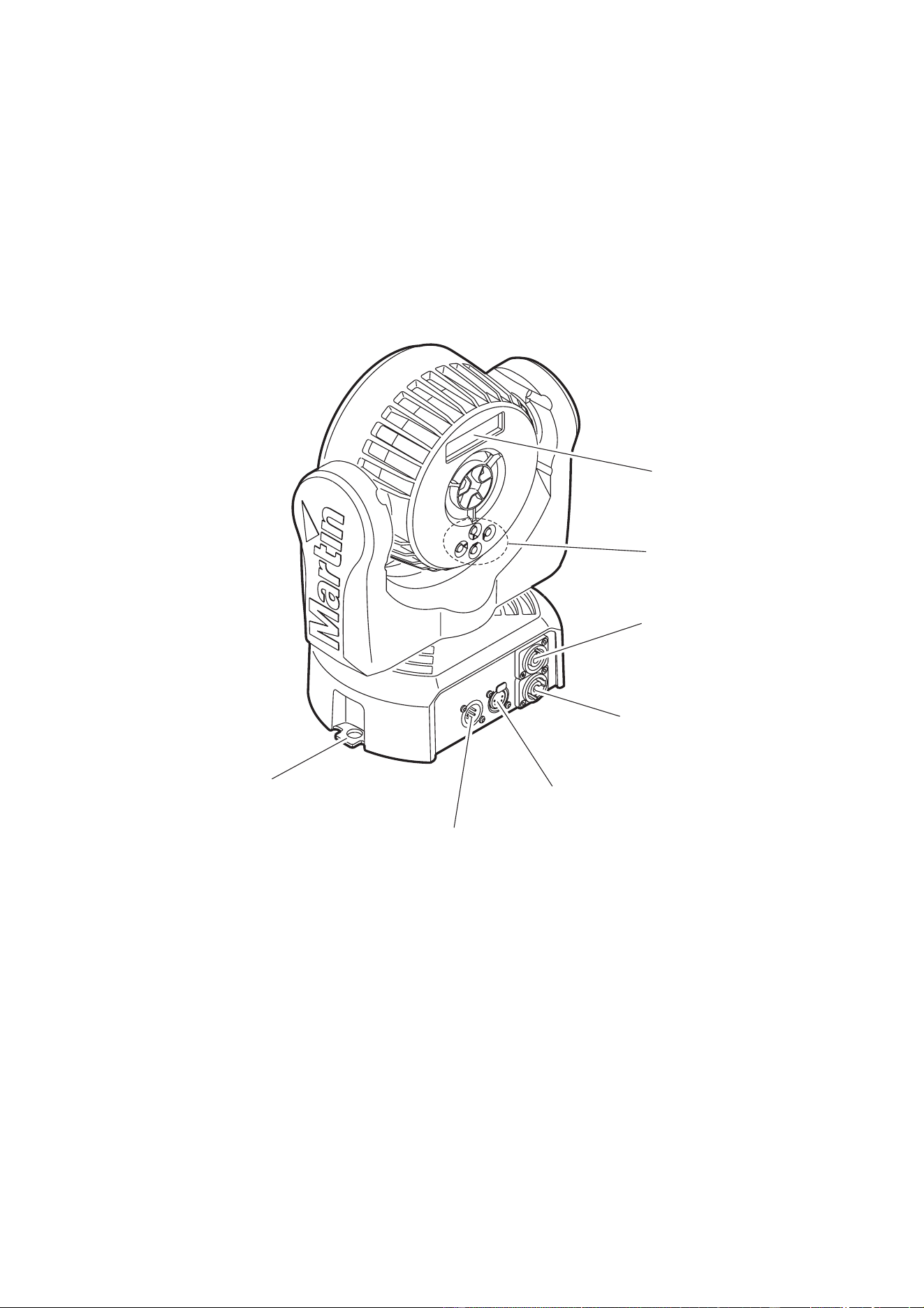
Fixture overview
Control buttons
AC mains power
Safety cable attachment point
Display
Figure 1: Fixture overview
DMX input
DMX output
AC mains power
throughput
input

Introduction 7
Introduction
Thank you for selecting the MAC 101™, an intelligent lighting fixture from Martin Professional™. This range
of compact LED-based moving-head washlight includes four models:
All MAC 101 fixtures feature:
• DMX control
• Onboard control panel and backlit LCD graphic display
• Smooth electronic dimming
• Electronic shutter with strobe and pulse effects
• 540° pan and 240° tilt ranges
The standard MAC 101 features:
• RGB color mixing with color temperature control
• Cree XP-E high-power RGB emitters
• ‘Color wheel’ color-snap feature
• Three DMX control modes:
- Raw RGB + CTC
- Calibrated RGB + CTC
- Basic (color-wheel only, RGB + CTC disabled)
The MAC 101 CT features:
• Warm/cold white mixing with 2800 - 6200 K color temperature control
• Cree XP-E high-power warm and cold white emitters
The MAC 101 WRM features
• 2800 K color temperature
• Cree XP-E high-power warm white emitters
The MAC 101 CLD features:
• 6700 K color temperature
• Cree XP-E high-power cold white emitters
For the latest firmware updates, documentation, and other information about this and all Martin Professional
products, please visit the Martin website at http://www.martin.com
Comments or suggestions regarding this document may be e-mailed to service@martin.dk or posted to:
Technical Documentation, Martin Professional A/S, Olof Palmes Allé 18, DK-8200 Aarhus N, Denmark.
Using for the first time
Warning! Read “Safety Information” on page 3 before installing, powering, operating or servicing
the MAC 101. Before applying power to the fixture:
• Check the Martin Professional website at www.martin.com for the most recent user documentation and
technical information about the MAC 101. Martin user manual revisions are identified by the revision letter
at the bottom of page 2.
• Carefully review “Safety Information” starting on page 3.
• Check that the local AC mains power source is within the fixture’s power voltage and frequency ranges.
• See “Power cables and power plug” on page 8. Install a Neutrik PowerCon NAC3FCA power input
connector on a suitable power cable. If drawing power from a mains power outlet, install a suitable power
plug on the power cable.
8 MAC 101 user manual
AC power
Warning! Read “Safety Information” starting on page 3 before connecting the MAC 101 to AC mains
power.
Warning! For protection from electric shock, the MAC 101 must be grounded (earthed). The power
distribution circuit must be equipped with a fuse or circuit breaker and ground-fault (earth-fault)
protection.
Warning! Socket outlets or external power switches used to supply the MAC 101 with power must be
located near the fixture and easily accessible so that the fixtures can easily be disconnected from
power.
Important! Do not insert or remove live Neutrik PowerCon connectors to apply or cut power, as this
may cause arcing at the terminals that will damage the connectors.
Important! Do not use an external dimming system to supply power to the MAC 101, as this may
cause damage to the fixture that is not covered by the product warranty.
The MAC 101 can be hard-wired to a building electrical installation if you want to install it permanently, or a
power plug that is suitable for the local power outlets can be installed on the power cable.
Power voltage
Warning! Check that the voltage range specified on the fixture’s serial number label
matches the local AC mains power voltage before applying power to the fixture.
MAC 101 fixtures accept AC mains power at 100-240 V nominal, 50/60 Hz. Do not apply AC mains power to
the fixture at any other voltage than that specified on the fixture’s serial number label.
Power cables and power plug
Power input and throughput cables must be rated 20 A minimum, have three conductors 1.5 mm² (16 AWG)
minimum conductor size and an outer cable diameter of 5 - 15 mm (0.2 - 0.6 in.). Cables must be hard
usage type (SJT or equivalent) and heat-resistant to 90° C (194° F) minimum. In the EU the cable must be
HAR approved or equivalent.
If you install a power plug on the power cable, install a grounding-type (earthed) plug that is rated 20 A
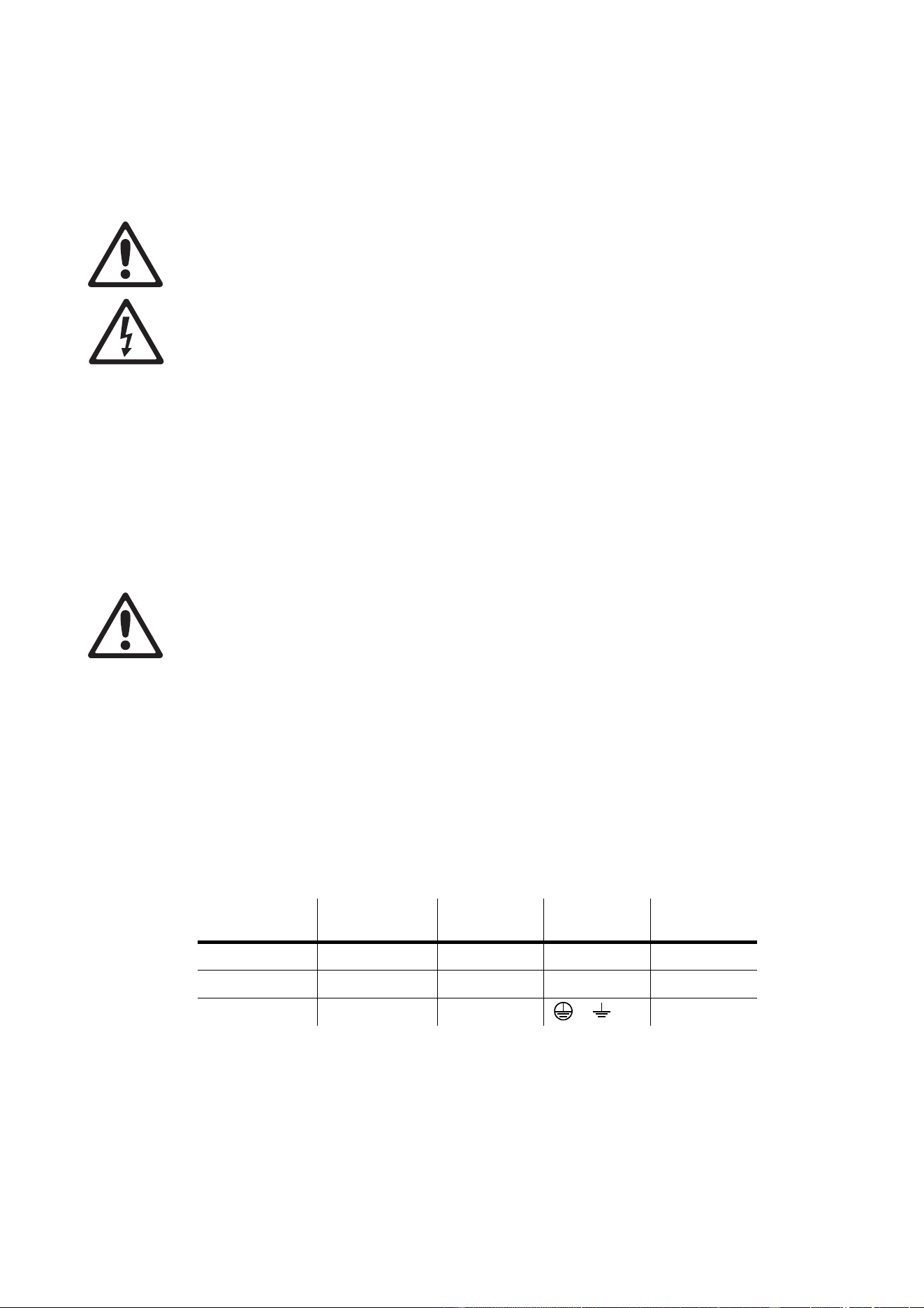
minimum. Follow the plug manufacturer’s instructions. Table 1 shows standard wire color-coding schemes
and some possible pin identification schemes; if pins are not clearly identified, or if you have any doubts
about proper installation, consult a qualified electrician.
Wire Color
(EU models)
Wire Color
(US models) Conductor Symbol Screw (US)
brown black live L yellow or brass
blue white neutral N silver
yellow/green green ground (earth) or green
Table 1: Wire color-coding and power connections
AC power 9
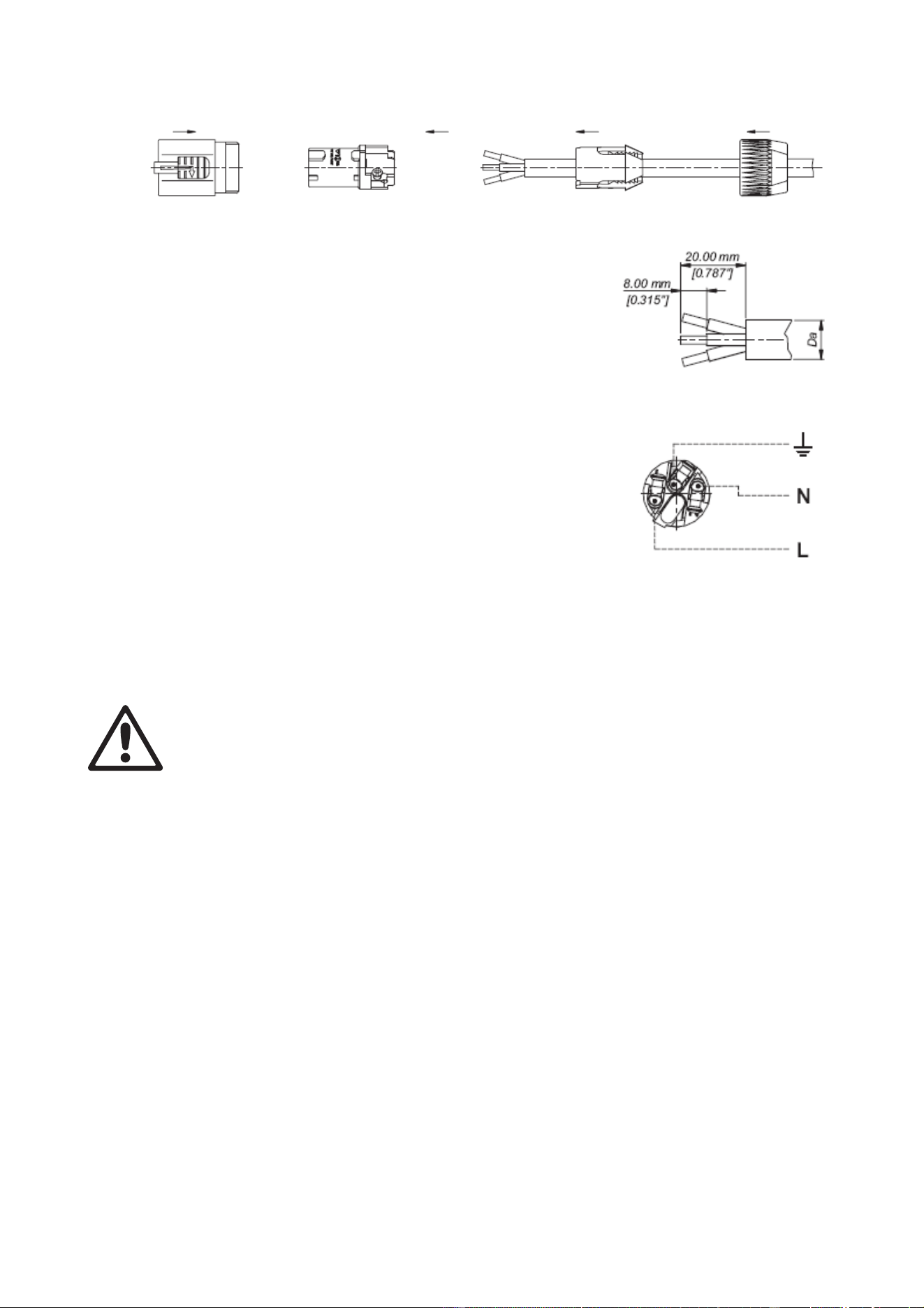
Installing a power input connector on a power cable
To install a Neutrik PowerCon NAC3FCA input connector on a power
cable:
1. Slide the bushing over the cable.
2. Slide the white chuck over cables with a diameter (D
a
) of 5 - 10 mm
(0.2 - 0.4 in.), or the black chuck over cables with a diameter of 10 -
15 mm (0.4 - 0.6 in.).
3. Prepare the end of the cable by stripping 20 mm (0.8 in.) of the
cable’s outer jacket.
4. Strip 8 mm (1/3 in.) from the end of each of the wires.
5. Insert each of the wire ends into the appropriate terminal (see
instructions and Table 1 above) and fasten the clamping device
using a small flathead screw driver.
6. Push and insert the chuck into the housing (note that there is a
raised key on the chuck to ensure that it is oriented correctly).
7. Fasten the bushing using a wrench to a torque of 2.5 Nm (1.8 lb.-ft).
Illustrations above used by kind permission of Neutrik AG
Relaying power to other devices
Warning! Do not connect more than ten MAC 101 fixtures in total to AC mains power in one
interconnected chain.
Power can be relayed to another device via the light-grey PowerCon
throughput socket that accepts a
light-grey PowerCon NAC3FCB cable connector. Note that blue input and light-grey throughput connectors
have different designs: one type cannot be connected to the other. Neutrik power connectors can be
ordered separately from Martin (see Accessories on page 33).
If you link fixtures in a chain so that they all draw AC mains power via the first fixture, certain points must be
respected:
• A hard usage, three-conductor, 16 AWG or 1.5 mm
2
cable with SJT or equivalent cable jacket must be
used to connect the first fixture to AC mains power and to interconnect all the fixtures in the chain up to a
maximum of seven fixtures in total.
• Light-grey Neutrik PowerCon NAC3FCB connectors must be used to draw AC mains power from the
fixtures’ power throughput sockets and blue Neutrik PowerCon NAC3FCA connectors must be used to
supply power at the fixture’s power input sockets.
• No matter what the AC mains power voltage is, do not connect more than ten MAC 101 fixtures in total
(i.e. including the first fixture) to AC mains power in one interconnected daisy chain using power input and
throughput connectors.
Chuck BushingHousing Insert
Cable end
Terminals

10 MAC 101 user manual
Data link
A DMX 512 data link is required in order to control a MAC 101 via DMX.
The MAC 101 has 5-pin XLR connectors for DMX data input and output. The pin-out on all connectors is pin
1 = shield, pin 2 = cold (-), and pin 3 = hot (+). Pins 4 and 5 in the 5-pin XLR connectors are not used in the
MAC 101 but are available for possible additional data signals as required by the DMX512-A standard.
Standard pin-out is pin 4 = data 2 cold (-) and pin 5 = data 2 hot (+).
The MAC 101 is not subject to the limit of 32 devices per daisy-chained link which is common in Martin
fixtures. Instead, the number of fixtures is either limited to 256 or limited by the number of DMX channels
required by the fixtures in relation to the maximum 512 channels available in one DMX universe, whichever
limit is lower. Note that if independent control of a fixture is required, it must have its own DMX channels.
Fixtures that are required to behave identically can share the same DMX channels.
To add more fixtures or groups of fixtures when the above limit is reached, add a DMX universe and another
daisy-chained link.
Tips for reliable data transmission
• Use shielded twisted-pair cable designed for RS-485 devices: standard microphone cable cannot transmit
control data reliably over long runs. 24 AWG cable is suitable for runs up to 300 meters (1000 ft). Heavier
gauge cable and/or an amplifier is recommended for longer runs.
• Never use both a fixture’s outputs to split a DMX link. To split the link into branches, use a splitter such as
the Martin 4-Channel Opto-Isolated RS-485 Splitter/Amplifier.
• Terminate the link by installing a termination plug in the output socket of the last fixture. The termination
plug, which is a male XLR plug with a 120 Ohm, 0.25 Watt resistor soldered between pins 2 and 3, “soaks
up” the control signal so it does not reflect and cause interference. If a splitter is used, terminate each
branch of the link.
Connecting the data link
To connect the MAC 101 to data:
1. Connect the DMX data output from the controller to the closest MAC 101’s male 5-pin XLR DMX input
connector.
2. Connect the DMX output of the fixture closest to the controller to the DMX input of the next fixture and
continue connecting fixtures output to input.
3. Terminate the last fixture on the link with a 120 Ohm resistor.
Physical installation 11
Physical installation
Warning! The MAC 101 must be either fastened to a flat surface such as a stage or wall, or clamped
to a truss or similar structure in any orientation using a rigging clamp. Do not apply power to the
MAC 101 if it is standing freely or the fixture can be moved.
Warning! If the MAC 101 can cause injury or damage it if falls, attach an approved safety cable to
one of the safety cable attachment points on the base (see “Fixture overview” on page 6).
Check that all surfaces to be illuminated are minimum 200 mm (7.9 ins.) from the fixture, that
combustible materials (wood, fabric, paper, etc.) are minimum 100 mm (3.9 in.) from the head, that
there is free airflow around the fixture and that there are no flammable materials nearby.
Make sure that it is impossible for the moving head to collide with another fixture or other object.
Allow a minimum center-to-center distance of 250 mm (10 ins.) between MAC 101 fixtures.
Fastening the fixture to a flat surface
The MAC 101 can be fastened to a fixed flat surface that is oriented at any angle. Check that the surface
can support at least 10 times the weight of all fixtures and equipment to be installed on it.
Warning! The supporting surface must be hard and flat or air vents in the base may be blocked,
which will cause overheating. Fasten the fixture securely. Do not stand it on a surface or leave it
where it can be moved or can fall over. Attach a securely anchored safety cable to the safety cable
attachment point (see “Fixture overview” on page 6) if the fixture is to be installed in any location
where it may fall and cause injury or damage if the primary attachment fails.
Mounting the fixture on a truss
The MAC 101 can be clamped to a truss or similar rigging structure in any orientation.
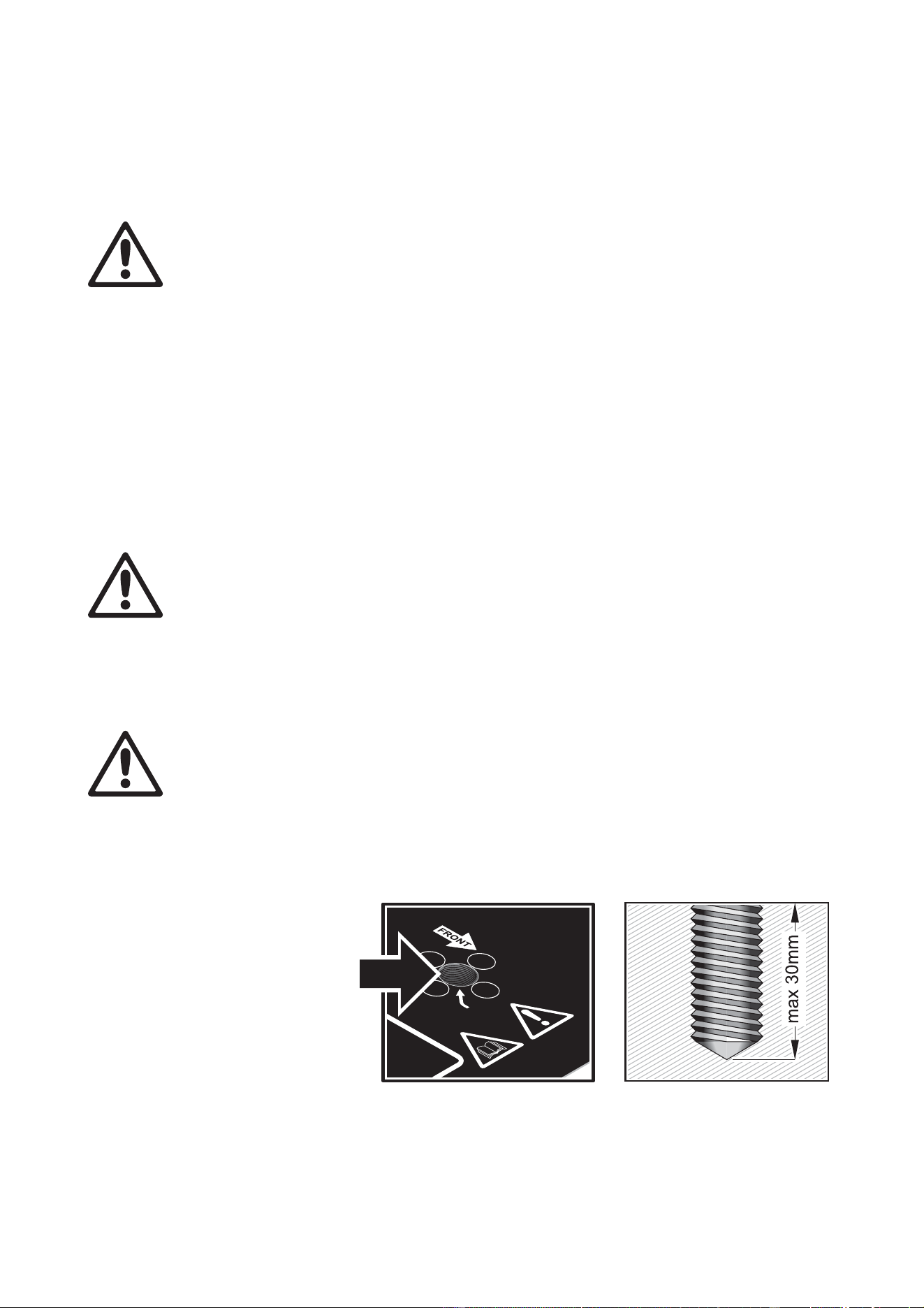
Warning! Use a rigging clamp with an M12 bolt if suspending the fixture from its base. The clamp
must be screwed into the central threaded hole in the fixture base. The M12 bolt must protrude
20 - 30 mm (0.8 - 1.2 ins.) into the fixture base.
An M12 bolt that is suitable for many types of rigging clamp is supplied with the MAC 101, but you
must pass the bolt through the clamp and check that the distance the bolt will protrude into the
fixture base is within the 20 - 30 mm limits before using it. If the bolt is not within these limits, you
must find an alternative bolt that is.
To clamp a MAC 101 to a truss:
1. Check that the rigging
structure can support
at least 10 times the
weight of all fixtures
and equipment to be
installed on it.
2. Obtain a rigging clamp
such as the G-clamp
(P/N 91602003),
Half-coupler clamp
(P/N 91602005) or
Quick trigger clamp
(P/N 91602007)
available as
accessories from
Martin. An omega bracket is not required.
3. Check that the rigging clamp is undamaged and can bear at least 10 times the weight of the fixture.
Fasten the clamp to the fixture with a minimum grade 8.8 steel M12 bolt in the threaded hole in the
Warning!
Install M12 bolt when suspending fixture.
See User Manual!
Warning!
Install
M12
bolt
when
suspending
fixture.
See
User
Manual!
Figure 2: Rigging clamp bolt

12 MAC 101 user manual
center of the base of the fixture. The bolt must protrude 20 - 30 mm (0.8 - 1.2 ins.) into the base of the
fixture.
4. Block access under the work area. Working from a stable platform, hang the fixture on the truss with the
arrow on the base towards the area to be illuminated. Tighten the rigging clamp.
5. Secure the fixture against clamp failure with a secondary attachment such as an approved safety cable
that is rated for the weight of the fixture using one of the attachment points at the edges of the base (see
“Fixture overview” on page 6). Do not use any other part of the fixture as a safety cable attachment
point.
6. Check that the head will not collide with other fixtures or objects.
Hanging the fixture
In some regions, it may be legal to use two safety cables, one looped through one cable attachment point
(see “Fixture overview” on page 6) and the other looped through the other cable attachment point, to
suspend the fixture. If one cable fails, the other will provide secondary attachment.
However, this suspension method is not recommended as it will not hold the base firmly, and moving pan
and tilt will cause the fixture and light beam to swing uncontrollably. Instead, we strongly recommend
installation using a rigging clamp as described above.
Warning! If you choose to suspend using two cables anyway, you must install a minimum 8.8 grade
steel M12 bolt in the rigging clamp hole in the center of the fixture’s base. See Figure 2. The bolt
must protrude 20 - 30 mm (0.8 - 1.2 ins.) into the base. If you do not secure the base in this way, there
is a risk that the fixture may separate from the base and fall.
Quick-mount surface mounting bracket
Quick-mount surface mounting brackets (P/N 91606017) for the MAC 101 are available from Martin in sets
of 5 brackets. The bracket can be screwed to a surface and the MAC 101 mounted on and removed from the
bracket in seconds. A securely anchored safety cable or other secondary attachment must be provided if the
bracket is used. Installation instructions are supplied with the brackets.

Setup 13
Setup
Warning! Read “Safety Information” on page 3 before installing, powering, operating or servicing
the MAC 101.
Control panel and menu navigation
The onboard control panel and backlit graphic display are used to set the MAC 101’s DMX address,
configure individual fixture settings (personality), read out data and execute service utilities. See “Onboard
control menus” on page 27 for a complete list of menus and commands.
Using the control buttons
• To enter a menu, select a function or apply a selection, press (Enter).
• Press
(Up) and (Down) to scroll within a menu or adjust values.
• To escape a function or move back one level in the menu structure, press
(Menu / Escape).
Control button reset shortcut
• Holding (Menu/Escape) pressed in and pressing (Up) forces the fixture to reset.
Display panel functions
The DMX address is shown in the display panel when the MAC 101 is powered on and has reset.
The display panel backlighting indicates fixture status as follows:
• The display dims to zero during resets.
• The display flashes slowly if the fixture is not receiving a valid DMX signal unless the control buttons are
used. In this case, the display behaves normally until the buttons have not been used for a short period,
then begins to flash slowly again.
• The display can be set to go into sleep mode via
PERSONALITY → DISPLAY in the control menu.
Connecting a DMX signal ‘wakes up’ the display.
DMX address setting
The DMX address, also known as the start channel, is the first channel used to receive instructions from the
controller. For independent control, each fixture must be assigned its own control channels. Two MAC 101
fixtures of the same type may share the same address, however, if identical behavior is desired. Address
sharing can be useful for diagnostic purposes and symmetric control, particularly when combined with the
inverse pan and tilt options.
The DMX address is configured using the
DMX ADDRESS menu in the control panel.
DMX modes in the standard MAC 101
DMX control mode in the standard MAC 101 RGB model is selected in the CONT MODE (control mode)
menu. The standard MAC 101 provides three DMX control modes:
•
RAW is an uncalibrated RGB mode that gives maximum output and slightly more saturated color, but
there may be inconsistency in color balance between fixtures. It uses 12 DMX channels.
•
RGB is a calibrated RGB mode that gives slightly less output than RAW mode but consistent color
balance across fixtures. It uses 12 DMX channels.
•
BASIC is a basic mode that only uses 8 DMX channels but only gives access to the color wheel effect for
color control – RGB and CTC are not available.

14 MAC 101 user manual
RAW and RGB modes include the same control options as BASIC mode, but they provide 4 extra channels
to give RGB control and CTC.
See “DMX protocols” on page 22 for details of the DMX commands available in the different modes.
Tailoring performance
Pan and tilt movement
The P/T SPEED settings set the maximum speed of pan and tilt movement. FAST optimizes for speed and
SLOW optimizes for smoothness of movement. NORMAL is the default setting and gives a good
compromise between these two.
The
PAN INVERT and TILT INVERT commands reverse the direction of pan and tilt, and the SWAP
command sends pan commands to tilt and vice versa. These settings are useful for symmetrical effects with
multiple fixtures.
Cooling
FANS gives you a choice of two settings:
• The default setting
REGULATED should suit use in all normal situations and ensure excellent service
lifetimes for all components.
•
FULL maximizes cooling and reduces the operating temperature of the components in the head. It is
recommended when the MAC 101 is used intensively in a warm environment or in fixed installations. Note
that it will give increased fan noise compared to the other cooling modes.
Whatever cooling mode is selected, a thermal cutout shuts down power to the LEDs if the fixture
temperature exceeds safe limits. If this occurs, you must reset the fixture via the control menus or via DMX,
or cycle power to the fixture off and on again.
If a thermal shutdown occurs, you are pushing the fixture to its limits. Clean the fixture, particularly the air
vents, and check that there is sufficient airflow around the fixture. Consider increasing ventilation, reducing
the ambient temperature, or switching to
FULL mode. Contact Martin for service if a thermal shutdown
persists.
Dimming
DIMMER CURVE provides four dimming options (see Figure 3):
•
LINEAR – the increase in light intensity appears to be linear as DMX value is increased.
•
SQUARE LAW – light intensity control is finer at low levels and coarser at high levels.
•
INVERSE SQUARE LAW – light intensity control is coarser at low levels and finer at high levels.
•
S-CURVE – light intensity control is finer at low levels and high levels and coarser at medium levels.
Whichever
DIMMER CURVE option you select, you can choose between FAST or SMOOTH dimming
settings:
•
FAST is the default setting. It gives a virtually instantaneous reaction when you dim from one intensity to
another, but dimming slowly from one intensity to another may appear slightly uneven.
• The
SMOOTH setting gives smoother dimming during slow changes in intensity, but it limits the speed of
dimming changes slightly. This makes it ideal for slow, smooth dimming, but a short time-lag may be
noticeable if you try to dim quickly from one intensity to another.
Output
DMX % DMX %DMX % DMX %
Output
Output
Output
Optically linear S-curveSquare law Inverse square law
Figure 3: Dimming curve options

Setup 15
Restoring factory default settings
The MAC 101 factory default settings can be restored by applying a FACTORY DEFAULT → LOAD
command.

16 MAC 101 user manual
Operation and effects
Warning! Read “Safety Information” starting on page 3 before installing, powering, operating or
servicing the MAC 101.
This section describes only DMX control features that require particular explanation. See “DMX protocols”
on page 22 for a full list of the DMX channels and values required to control the different effects.
Pan and tilt
The MAC 101’s moving head can be panned through 540° and tilted through 240°. The speed of pan/tilt
movement can be adjusted via the control panel.
All DMX modes offer fine control of pan and tilt. In each case, the main control channel sets the first 8 bits
(the most significant byte or MSB), and the fine channel sets the second 8 bits (the least significant byte or
LSB) of the 16-bit control byte. In other words, the fine channel works within the position set by the main
channel.
Shutter effect
The electronic ‘shutter’ effect provides instant open and blackout, variable speed regular and random strobe
and opening/closing pulse effects as well as burst and sinewave effects.
Dimming
Overall intensity can be adjusted 0 - 100% using electronic dimming. See “Dimming” on page 14.
Controlling color (standard MAC 101 RGB only)
Color wheel effect
The electronic ‘color wheel’ effect gives the convenience and feel of a mechanical color wheel and lets you
snap between 33 different full LEE-referenced colors. You can also scroll continuously forwards or
backwards through the colors or display random colors at variable speed.
The color wheel effect is available in all DMX modes.
The approximate RGB equivalents of the ‘color wheel’ colors are given in “LEE colors and RGB equivalents”
on page 26.
Color wheel priority
Even if the fixture is set to
RAW or RGB mode, the color wheel effect channel still has priority over the RGB
channels. To use the RGB channels, you must set the color wheel effect channel to a DMX value from 000 -
009. If you move the color wheel channel to a DMX value above 009 at any point, the color wheel effect
takes over and overrides RGB control.
RGB color mixing
RGB color mixing is available in raw or calibrated modes:
• Raw RGB mode (
RAW) is uncalibrated and allows all LEDs to be operated to their absolute maximum
output regardless of color calibration issues.
• Calibrated RGB mode (
RGB) gives slightly reduced LED power but sets LEDs to their factory calibration
output power to give the best-matched color and white output across multiple fixtures.
CTC (Color Temperature Control)
If the fixture is set to
RAW or RGB mode, setting the CTC channel (12) to a DMX value greater than 019 will
adjust the fixture’s overall color temperature, i.e. the color that has been set using the color wheel channel
or the RGB channels. Note that the more saturated the color, the less it will be affected by adjustments in
color temperature. The biggest CTC variation is available when displaying white.
Overall color temperature can be varied from 10 000 - 2500 K. The default color temperature is 5 600 K.

Operation and effects 17
Controlling color temperature (MAC 101 CT only)
Warm and cold white mixing
Warm and cold white mixing is uncalibrated and allows warm and cold white LEDs to be operated on
separate DMX channels to their absolute maximum output regardless of white color temperature calibration
issues.
Color temperature control
The color temperature control channel is calibrated. It gives slightly reduced LED power but sets LEDs to
their factory calibration output power to give the best-matched white color temperature at identical DMX
values across multiple fixtures.
Controlling warm or cold white (MAC 101 WRM and CLD only)
Fixture intensity in the MAC 101 WRM and CLD models can be controlled by DMX.
18 MAC 101 user manual
Service and maintenance
Warning! Read “Safety Information” on page 3 before servicing the MAC 101.
Warning! Disconnect the fixture from AC mains power and allow to cool for at least 10
minutes before handling. Do not view the light output from less than 8.3 meters (27 ft. 3
inches) without shade 4-5 welding goggles. Be prepared for the fixture to light suddenly if
connected to power.
Warning! Refer any service operation not described in this user manual to a qualified
service technician.
Important! Excessive dust, smoke fluid, and particle buildup degrades performance, causes
overheating and will damage the fixture. Damage caused by inadequate cleaning or maintenance is
not covered by the product warranty.
The user will need to clean the MAC 101 periodically, and it is also possible for the user to update the
firmware and install the optional diffuser accessory available from Martin. All other service operations on the
MAC 101 must be carried out by Martin Professional or its approved service agents.
Installation, on-site service and maintenance can be provided worldwide by the Martin Professional Global
Service organization and its approved agents, giving owners access to Martin’s expertise and product
knowledge in a partnership that will ensure the highest level of performance throughout the product’s
lifetime. Please contact your Martin supplier for details.
It is Martin policy to apply the strictest possible calibration procedures and use the best quality materials
available to ensure optimum performance and the longest possible component lifetimes. However, LEDs are
subject to wear and tear over the life of the product, resulting in gradual changes in color and overall
brightness over many thousands of hours of use. The extent of wear and tear depends heavily on operating
conditions and environment, so it is impossible to specify precisely whether and to what extent LED
performance will be affected. However, you may eventually need to ask Martin Professional to replace LEDs
if their characteristics are affected by wear and tear after an extended period of use and if you require
fixtures to perform within very precise optical and color parameters.
The manufacturer’s LED lifetime data is based on performance under the manufacturer’s test conditions. As
with all LEDs, the gradual reduction in luminous output will be accelerated when LEDs are used in a fixture,
where conditions are much tougher than in manufacturer’s testing. To maximize LED lifetimes, keep the
ambient temperature as low as possible and drive the LEDs no harder and for no longer than necessary.
Cleaning
Cleaning schedules for lighting fixtures vary greatly depending on the operating environment. It is therefore
impossible to specify precise cleaning intervals for the MAC 101. Environmental factors that may result in a
need for frequent cleaning include:
• Use of smoke or fog machines.
• High airflow rates (near air conditioning vents, for example).
• Presence of cigarette smoke.
• Airborne dust (from stage effects, building structures and fittings or the natural environment at outdoor
events, for example).
If one or more of these factors is present, inspect fixtures within their first 100 hours of operation to see
whether cleaning is necessary. Check again at frequent intervals. This procedure will allow you to assess
cleaning requirements in your particular situation. If in doubt, consult your Martin dealer about a suitable
maintenance schedule.
Use gentle pressure only when cleaning, and work in a clean, well-lit area. Do not use any product that
contains solvents or abrasives, as these can cause surface damage.
Service and maintenance 19
Warning! Disconnect from power and allow to cool before cleaning.
To clean the fixture:
1. Disconnect the fixture from power and allow it to cool for at least 10 minutes.
2. Vacuum or gently blow away dust and loose particles from the outside of the fixture and the air vents at
the back and sides of the head and in the base with low-pressure compressed air.
3. Remove the central screw from the grill on the front of the head, remove the grill and clean the LED
lenses by wiping gently with a soft, clean lint-free cloth moistened with a weak detergent solution. Do not
rub the surface hard: lift particles off with a soft repeated press. Dry with a soft, clean, lint-free cloth or
low-pressure compressed air. Remove stuck particles with an unscented tissue or cotton swab
moistened with glass cleaner or distilled water.
4. Reinstall the grill over the LED
lenses in the front of the head and
secure it with its screw.
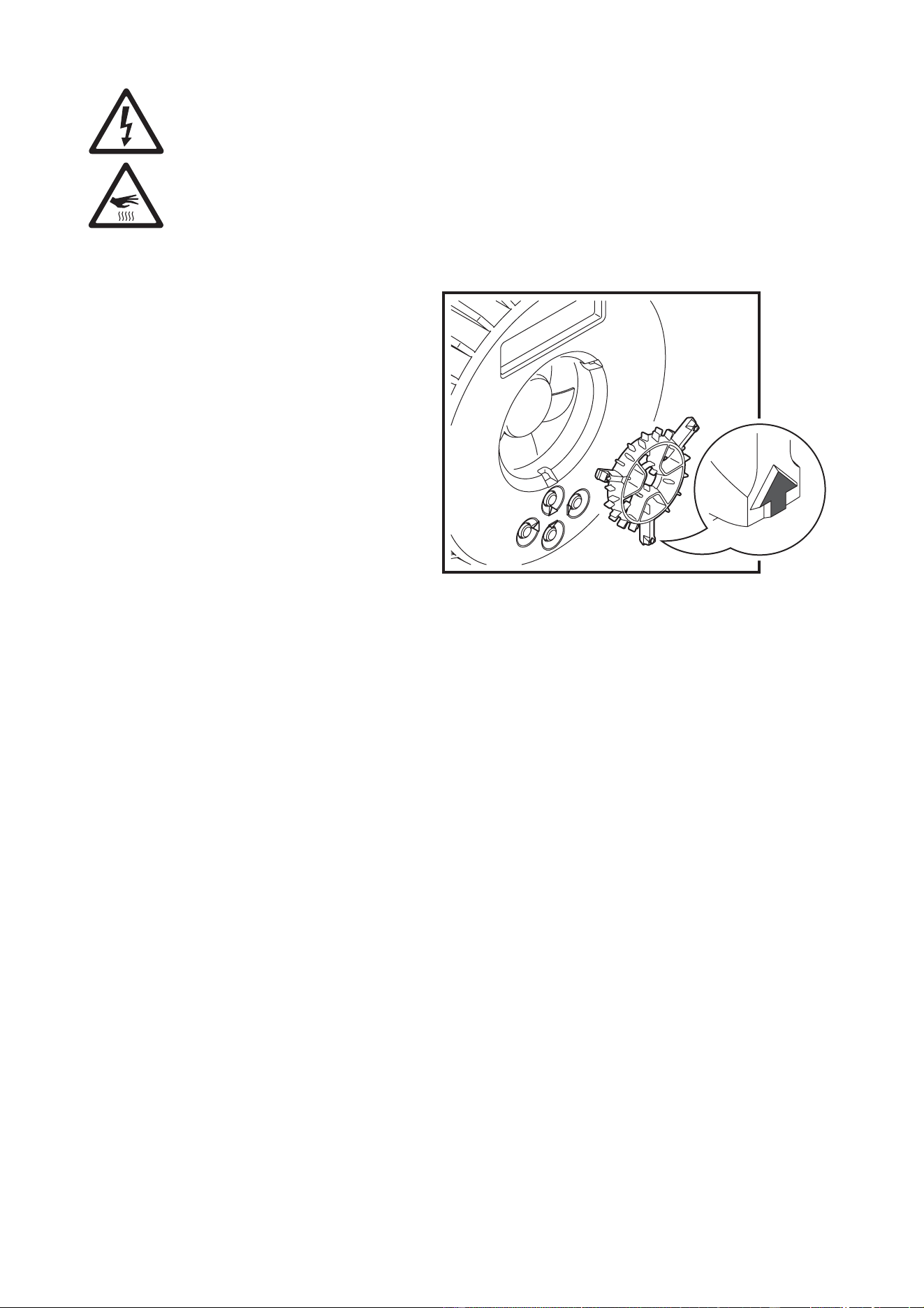
5. See Figure 4. Remove the grill from
the fan on the back of the head by
inserting a small flat-bladed
screwdriver between the head and
the arrow on the grill and levering the
grill out of the head. Use cotton
swabs (cotton buds) and a vacuum
cleaner to clean the grill and the
blades of the head fan, then clip the
grill back into place.
6. Check that the fixture is dry before
reapplying power.
Control menu service utilities
Functions test
The TEST feature provides four test routines, allowing testing of pan/tilt, LEDs and display separately or
together without a controller.
Pan and tilt calibration
Pan and tilt on the MAC 101 are calibrated at the factory so that movement is identical in multiple fixtures.
Adjustment should not be necessary initially, but over a period of use fixtures may gradually lose calibration.
If re-calibration is necessary:
1. Pan calibration is easiest when multiple fixtures are stacked vertically. To calibrate, set tilt positions for
easy one-over-the-other comparison and set each fixture to the same pan DMX value. Select one fixture
to be the reference fixture. On that fixture, select
SERVICE → CALIBRATION → PAN OFFSET and
press . Wait for the fixture to move to its pan calibration position.
2. On each of the other fixtures, select
SERVICE → CALIBRATION → PAN OFFSET and press . Wait
for the head to move to the pan calibration position, then adjust the pan offset using the and
buttons as necessary to align the beam with the reference beam. Press to save the setting,
then to exit.
3. Tilt calibration is easiest when multiple fixtures are arranged side-by-side horizontally. To calibrate, set
pan positions for easy side-by-side comparison. Select one fixture to be the reference fixture. On that
fixture, select
SERVICE → CALIBRATION → TILT OFFSET and press . Wait for the fixture to move
to its tilt calibration position.
4. On each of the other fixtures, select
SERVICE → CALIBRATION → TILT OFFSET and press . Wait
for the head to move to the tilt calibration position, then adjust the tilt offset using the
and
buttons as necessary to align the beam with the reference beam. Press to save the setting,
then
to exit.
Figure 4: Head fan grill removal

20 MAC 101 user manual
Software upload
The MAC 101 is loaded with both software (that can be installed and updated by the user) and firmware
(that is internal and accessible to Martin Service and its authorized partners only). Software updates are
available from the Martin website and can be installed with a PC and Martin USB Duo DMX Interface box
that can upload software to one fixture at a time.
The following are required in order to install software:
• The latest version of the MAC 101 software, available for download free of charge from the Product
Support area of the Martin website at http://www.martin.com
• A PC running Windows 98/2000/XP
• The Windows-based Martin Uploader application available for download free of charge from the
Downloads Area of the Martin website at http://www.martin.com
• Martin USB Duo DMX Interface Box with its supplied cables.
Installing software: normal method
1. Connect the Uploader hardware to a MAC 101 fixture's data input connector.
2. Upload the fixture software as described in the uploader’s help file or user documentation.
3. Disconnect the Uploader hardware and reconnect the fixture to the DMX link.
4. Cycle power off and on. Check that the fixture resets correctly. If an error message appears in the
display, cycle power off and on again and check that the fixture now resets correctly.
Fixture readouts
DMX input signal
The DMX LIVE menu lets you view the DMX values received on each channel. If the fixture does not
behave as expected, reading the DMX values can help you troubleshoot the problem.
Fixture status
The MAC 101 gives fixture status readouts in the INFO menu:
• Current software/firmware version information.
• Temperature readouts from the power supply unit in the base and LED PCB in the head. In each case,
you can view the current temperature and the maximum temperature reached since the readout was last
reset. The maximum temperatures can be reset individually. The
TOTAL temperature counters are not
resettable.
• Power on hours. You can view the number of hours since the resettable counter was last reset or the total
number of hours since manufacture. You can also reset the resettable counter to zero.
• The manufacturer’s serial number and the fixture’s RDM ID number.
Display messages
If an error occurs, the MAC 101 gives fixture status readouts in the display. See “Display messages” on
page 29.
Lubrication
In general, the MAC 101 does not require lubrication. However, depending on use conditions, the moving
parts in the pan and tilt mechanisms may eventually require reapplication of lubricant. Excessive noise
during pan/tilt movement is a sign that lubrication may be required. This operation can be carried out by a
Martin service partner if necessary.
Service and maintenance 21
Installing optional diffuser filters
A set of eight medium-angle diffuser filters can be ordered from Martin (P/N 91616018) as an optional
accessory for the MAC 101. A diffuser filter softens the output from the LEDs and provides a wider beam
angle.
To install a diffuser filter:
1. Shut down power to the fixture and allow it to cool for
at least 10 minutes.
2. Release the Torx screw in the center of the spill ring on
the front of the head and lift the spill ring off. Keep the
screw for use during reassembly and keep the spill
ring for possible future use.
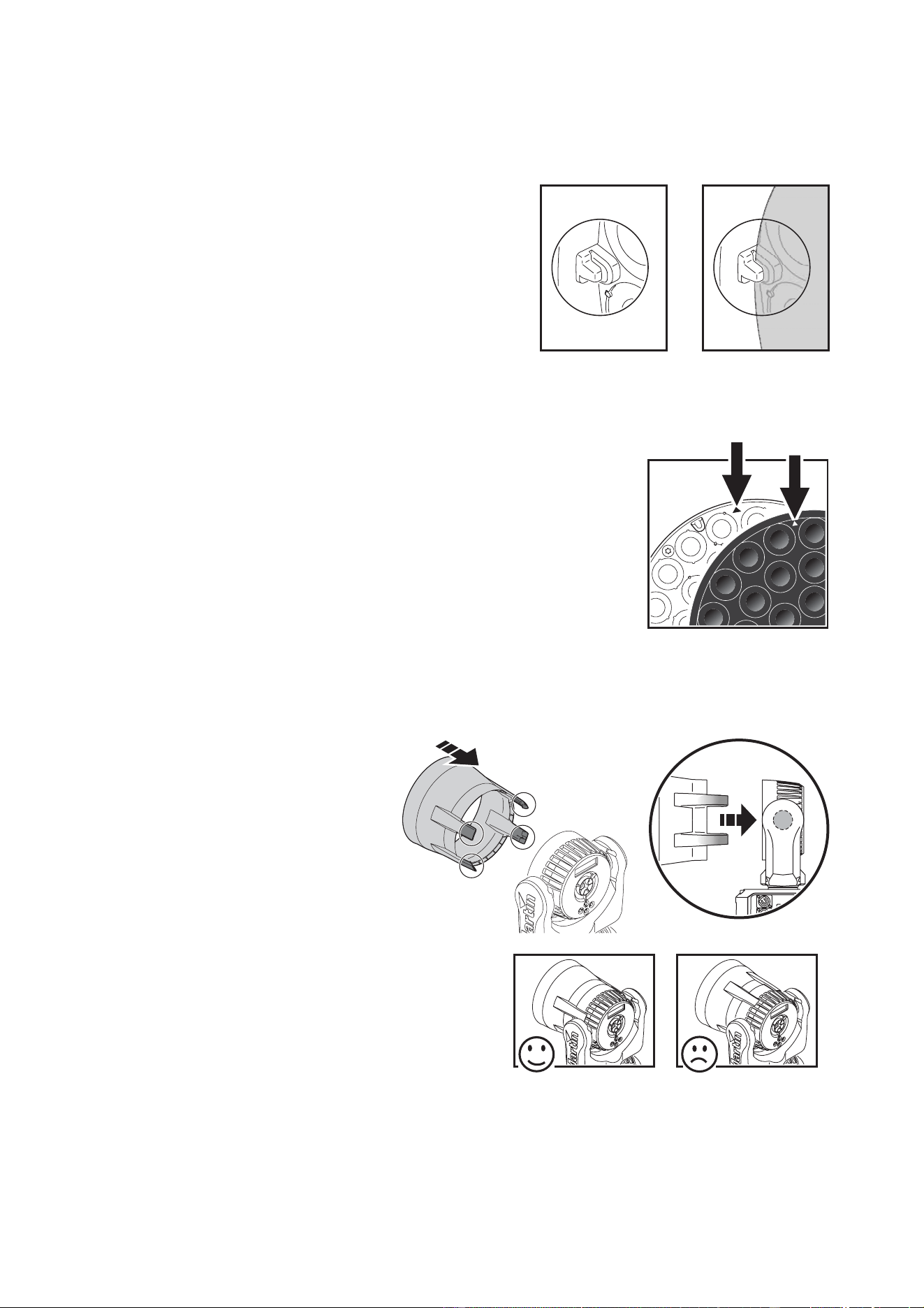
3. Place the diffuser filter over the lens plate so that the
cutouts in the diffuser locate over the tabs around the
edge of the lens plate (see Figure 5).
4. Do not reinstall the spill ring, as this will limit the beam
angle with the diffuser filter installed. Reuse the screw
from step 2. in the center of the diffuser filter to secure
it.
If you remove the diffuser filter in the future, we recommend that you
reinstall the original spill ring. See Figure 6. Line up the two small
arrowheads (arrowed) molded into the lens plate and spill ring and press
the spill ring onto the lens plate so that the locating tabs in the lens plate
engage in the cutouts in the spill ring.
Fasten the spill ring to the head reusing the Torx screw in the center of the
spill ring.
Installing an optional top hat
Top hats (P/N 91611358) can be
ordered from Martin as optional
accessories for the MAC 101. The
Martin top hat reduces glare and
spill from the MAC 101 and installs
in seconds.
Important! The top hat has a
lightweight design. Avoid
shocks and rough handling.
To install a top hat:
1. Enable the
TOP HAT setting in
the
PERSONALITY menu. This
will limit tilt by a few degrees
each side to avoid collisions
between the top hat and the
MAC 101’s base at maximum
tilt.
2. See Figure 7. Line up the top
hat so that the pairs of retaining
clips pass closely on either side
of the tilt pivots in the sides of
the head.
3. Push the top hat onto the head and engage all four clips firmly in the cooling vents in the back of the
head.
Figure 5: Diffuser filter locating tabs
Figure 6: Alignment
arrowheads
Figure 7: Installing a top hat

22 MAC 101 user manual
DMX protocols
Standard MAC 101 RGB DMX protocol
Raw, RGB
Basic
DMX Value Percent Function
11
0 - 19
20 - 49
50 - 64
65 - 69
70 - 84
85 - 89
90 - 104
105 - 109
110 - 124
125 - 129
130 - 144
145 - 149
150 - 164
165 - 169
170 - 184
185 - 189
190 - 204
205 - 209
210 - 224
225 - 229
230 - 244
245 - 255
0 - 7
8 - 19
20 - 25
26 - 27
28 - 33
34 - 35
36 - 41
42 - 43
44 - 49
50 - 51
52 - 57
58 - 59
60 - 65
66 - 67
68 - 73
74 - 75
76 - 81
82 - 83
84 - 89
90 - 91
92 - 97
98 - 100
Electronic shutter effect
Shutter closed
Shutter open
Strobe 1 (fast → slow)
Shutter open
Strobe 2: opening pulse (fast → slow)
Shutter open
Strobe 3: closing pulse (fast → slow)
Shutter open
Strobe 4: random strobe (fast → slow)
Shutter open
Strobe 5: random opening pulse (fast → slow)
Shutter open
Strobe 6: random closing pulse (fast → slow)
Shutter open
Strobe 7: burst pulse (fast → slow)
Shutter open
Strobe 8: random burst pulse (fast → slow)
Shutter open
Strobe 9: sine wave (fast → slow)
Shutter open
Strobe 10: burst (fast → slow)
Shutter open
22
0 - 255 0 - 100
Dimmer
0 → 100% intensity
33
0 - 255 0 - 100
Pan
Pan 0 - 430°
44
0 - 255 0 - 100
Pan fine
Pan fine (Least Significant Byte)
55
0 - 255 0 - 100
Tilt
Tilt 0 - 300°
66
0 - 255 0 - 100
Tilt fine
Tilt fine (Least Significant Byte)
77
0 - 9
10 - 14
15 - 39
40 - 44
45 - 49
50 - 54
55 - 59
60 - 64
65 - 69
70 - 74
75 - 89
90 - 94
95 - 99
100 - 104
105 - 109
110 - 114
115 - 119
120 - 124
125 - 249
250 - 255
0 - 1
2 - 3
4 - 13
14 - 15
16 - 17
18 - 19
20 - 21
22 - 23
24 - 25
26 - 27
28 - 33
34 - 35
36 - 37
38 - 40
41 - 42
43 - 44
45 - 46
47 - 48
49 - 97
98 - 100
Fixture control settings
No function
Reset entire fixture
1
No function
PTSP = NORM
2
PTSP = FAST
2
PTSP = SLOW
2
No function
Fan mode FULL
2
No function
Fan mode REGULATED
2
No function
RGB control mode (calibrated RGB)
3
No function
RAW control mode (uncalibrated RGB)
3
No function
Fast dimming, speed of changes unrestricted
2
No function
Smooth dimming, speed of changes restricted slightly
2
No function
Illuminate display
1
If DMX Reset is disabled in the menu, a reset command can
only be executed if channel 2 is set to 232 and channel 1 is set
to zero. These values need to be held for 5 seconds before
feature is activated. Values must be "snapped to" to function.
2
Menu override: setting unaffected by power off/on.
3
Value must be held for 3 seconds to activate. Setting
unaffected by power off/on.
Table 2: MAC 101 DMX Protocol

DMX protocols 23
Note: DMX values labeled "No function" will have no effect - the last functional value will be used.
In
RAW mode, RGB output is uncalibrated. In RGB mode, output is calibrated
88
0 - 9
10 - 14
15 - 19
20 - 24
25 - 29
30 - 34
35 - 39
40 - 44
45 - 49
50 - 54
55 - 59
60 - 64
65 - 69
70 - 74
75 - 79
80 - 84
85 - 89
90 - 94
95 - 99
100 - 104
105 - 109
110 - 114
115 - 119
120 - 124
125 - 129
130 - 134
135 - 139
140 - 144
145 - 149
150 - 154
155 - 159
160 - 164
165 - 169
170 - 174
175 - 179
180 - 201
202 - 207
208 - 229
230 - 234
235 - 239
240 - 244
245 - 249
250 - 255
0 - 1
2 - 3
4 - 5
6 - 7
8 -9
10 - 11
12 - 13
14 - 15
16 - 17
18 - 19
20 - 21
22 - 23
24 - 25
26 - 27
28 - 29
30 - 31
32 - 33
34 - 35
36 - 37
38 - 39
40 - 41
42 - 43
44 - 45
46 - 47
48 - 49
50 - 51
52 - 53
54 - 55
56 - 57
58 - 59
60 - 61
62 - 63
64 - 65
66 - 67
68 - 69
70 - 78
79 - 80
81 - 89
90 - 91
92 - 93
94 - 95
96 - 97
98 - 100
Color wheel effect
Open. RGB color mixing enabled if the fixture is set to RAW
or RGB modes
LEE 790 - Moroccan pink
LEE 157 - Pink
LEE 332 - Special rose pink
LEE 328 - Follies pink
LEE 345 - Fuchsia pink
LEE 194 - Surprise pink
LEE 181 - Congo Blue
LEE 071 - Tokyo Blue
LEE 120 - Deep Blue
LEE 079 - Just Blue
LEE 132 - Medium Blue
LEE 200 - Double CT Blue
LEE 161 - Slate Blue
LEE 201 - Full CT Blue
LEE 202 - Half CT Blue
LEE 117 - Steel Blue
LEE 353 - Lighter Blue
LEE 118 - Light Blue
LEE 116 - Medium Blue Green
LEE 124 - Dark Green
LEE 139 - Primary Green
LEE 089 - Moss Green
LEE 122 - Fern Green
LEE 738 - JAS Green
LEE 088 - Lime Green
LEE 100 - Spring Yellow
LEE 104 - Deep Amber
LEE 179 - Chrome Orange
LEE 105 - Orange
LEE 021 - Gold Amber
LEE 778 - Millennium Gold
LEE 135 - Deep Golden Amber
LEE 164 - Flame Red
Open
Color wheel rotation effect
Clockwise, fast
→ slow
Stop (this will stop wherever the color is at the time)
Counter-clockwise, slow
→ fast
Open
Random color
Fast
Medium
Slow
Open
9
0 - 255 0 - 100
Red
Red 0 → 100%
10
0 - 255 0 - 100
Green
Green 0 → 100%
11
0 - 255 0 - 100
Blue
Blue 0 → 100%
12
0 - 19
20 - 255
0 - 7
8 - 100
Color Temperature Control
No Function
CTC 10 000K → 2 500K
Raw, RGB
Basic
DMX Value Percent Function
Table 2: MAC 101 DMX Protocol

24 MAC 101 user manual
MAC 101
CT
DMX protocol
DMX
Channel
DMX Value Percent Function
1
0 - 19
20 - 49
50 - 64
65 - 69
70 - 84
85 - 89
90 - 104
105 - 109
110 - 124
125 - 129
130 - 144
145 - 149
150 - 164
165 - 169
170 - 184
185 - 189
190 - 204
205 - 209
210 - 224
225 - 229
230 - 244
245 - 255
0 - 7
8 - 19
20 - 25
26 - 27
28 - 33
34 - 35
36 - 41
42 - 43
44 - 49
50 - 51
52 - 57
58 - 59
60 - 65
66 - 67
68 - 73
74 - 75
76 - 81
82 - 83
84 - 89
90 - 91
92 - 97
98 - 100
Electronic shutter effect
Shutter closed
Shutter open
Strobe 1 (fast → slow)
Shutter open
Strobe 2: opening pulse (fast → slow)
Shutter open
Strobe 3: closing pulse (fast → slow)
Shutter open
Strobe 4: random strobe (fast → slow)
Shutter open
Strobe 5: random opening pulse (fast → slow)
Shutter open
Strobe 6: random closing pulse (fast → slow)
Shutter open
Strobe 7: burst pulse (fast → slow)
Shutter open
Strobe 8: random burst pulse (fast → slow)
Shutter open
Strobe 9: sine wave (fast → slow)
Shutter open
Strobe 10: burst (fast → slow)
Shutter open
2
0 - 255 0 - 100
Dimmer
0 → 100% intensity
3
0 - 255 0 - 100
Pan
Pan 0 - 430°
4
0 - 255 0 - 100
Pan fine
Pan fine (Least Significant Byte)
5
0 - 255 0 - 100
Tilt
Tilt 0 - 300°
6
0 - 255 0 - 100
Tilt fine
Tilt fine (Least Significant Byte)
7
0 - 9
10 - 14
15 - 39
40 - 44
45 - 49
50 - 54
55 - 59
60 - 64
65 - 69
70 - 74
75 - 109
110 - 114
115 - 119
120 - 124
125 - 249
250 - 255
0 - 1
2 - 3
4 - 13
14 - 15
16 - 17
18 - 19
20 - 21
22 - 23
24 - 25
26 - 27
28 - 42
43 - 44
45 - 46
47 - 48
49 - 97
98 - 100
Fixture control settings
No function
Reset entire fixture
1
No function
PTSP = NORM
2
PTSP = FAST
2
PTSP = SLOW
2
No function
Fan mode FULL
2
No function
Fan mode REGULATED
2
No function
Fast dimming, speed of changes unrestricted
2
No function
Smooth dimming, speed of changes restricted slightly
2
No function
Illuminate display
1
If DMX Reset is disabled in the menu, a reset command can
only be executed if channel 2 is set to 232 and channel 1 is set
to zero. These values need to be held for 5 seconds before
feature is activated. Values must be "snapped to" to function.
2
Menu override: setting unaffected by power off/on.
8
0 - 255 0 - 100
Warm LEDs
0 → 100% intensity
9
0 - 255 0 - 100
Cold LEDs
0 → 100% intensity
10
0 - 19
20 - 255
0 - 7
8 - 100
Color Temperature Control
No Function
Color temperature, calibrated, 6200 → 2800 K
Table 3: MAC 101 CT DMX Protocol

DMX protocols 25
MAC 101
CLD and MAC 101 WRM
DMX protocol
DMX
Channel
DMX Value Percent Function
1
0 - 19
20 - 49
50 - 64
65 - 69
70 - 84
85 - 89
90 - 104
105 - 109
110 - 124
125 - 129
130 - 144
145 - 149
150 - 164
165 - 169
170 - 184
185 - 189
190 - 204
205 - 209
210 - 224
225 - 229
230 - 244
245 - 255
0 - 7
8 - 19
20 - 25
26 - 27
28 - 33
34 - 35
36 - 41
42 - 43
44 - 49
50 - 51
52 - 57
58 - 59
60 - 65
66 - 67
68 - 73
74 - 75
76 - 81
82 - 83
84 - 89
90 - 91
92 - 97
98 - 100
Electronic shutter effect
Shutter closed
Shutter open
Strobe 1 (fast → slow)
Shutter open
Strobe 2: opening pulse (fast → slow)
Shutter open
Strobe 3: closing pulse (fast → slow)
Shutter open
Strobe 4: random strobe (fast → slow)
Shutter open
Strobe 5: random opening pulse (fast → slow)
Shutter open
Strobe 6: random closing pulse (fast → slow)
Shutter open
Strobe 7: burst pulse (fast → slow)
Shutter open
Strobe 8: random burst pulse (fast → slow)
Shutter open
Strobe 9: sine wave (fast → slow)
Shutter open
Strobe 10: burst (fast → slow)
Shutter open
2
0 - 255 0 - 100
Dimmer
0 → 100% intensity
3
0 - 255 0 - 100
Pan
Pan 0 - 430°
4
0 - 255 0 - 100
Pan fine
Pan fine (Least Significant Byte)
5
0 - 255 0 - 100
Tilt
Tilt 0 - 300°
6
0 - 255 0 - 100
Tilt fine
Tilt fine (Least Significant Byte)
7
0 - 9
10 - 14
15 - 39
40 - 44
45 - 49
50 - 54
55 - 59
60 - 64
65 - 69
70 - 74
75 - 109
110 - 114
115 - 119
120 - 124
125 - 249
250 - 255
0 - 1
2 - 3
4 - 13
14 - 15
16 - 17
18 - 19
20 - 21
22 - 23
24 - 25
26 - 27
28 - 42
43 - 44
45 - 46
47 - 48
49 - 97
98 - 100
Fixture control settings
No function
Reset entire fixture
1
No function
PTSP = NORM
2
PTSP = FAST
2
PTSP = SLOW
2
No function
Fan mode FULL
2
No function
Fan mode REGULATED
2
No function
Fast dimming, speed of changes unrestricted
2
No function
Smooth dimming, speed of changes restricted slightly
2
No function
Illuminate display
1
If DMX Reset is disabled in the menu, a reset command can
only be executed if channel 2 is set to 232 and channel 1 is set
to zero. These values need to be held for 5 seconds before
feature is activated. Values must be "snapped to" to function.
2
Menu override: setting unaffected by power off/on.
Table 4: MAC 101 CLD and WRM DMX Protocol

26 MAC 101 user manual
LEE colors and RGB equivalents
The table below gives approximate RGB equivalents for the LEE colors available in the standard MAC 101’s
color wheel effect (DMX channel 9).
DMX Integer
Lee no. Name Red Green Blue
790 Moroccan Pink 255 235 052
157 Pink 214 134 048
332 Special rose Pink 255 000 044
328 Follies Pink 255 059 113
345 Fuchsia Pink 255 138 219
194 Surprise Pink 226 175 226
181 Congo Blue 040 001 255
071 Tokyo Blue 000 000 255
120 Deep Blue 000 078 255
079 Just Blue 000 199 255
132 Medium Blue 000 255 234
200 Double CT Blue 149 246 255
161 State Blue 137 255 227
201 Full CT Blue 213 220 222
202 Half CT Blue 219 232 175
117 Steel Blue 205 255 199
353 Lighter Blue 115 255 165
118 Light Blue 006 255 143
116 Medium Blue Green 000 255 94
124 Dark Green 029 255 000
139 Primary Green 032 223 000
089 Moss Green 075 255 000
122 Fern Green 080 232 000
738 JAS Green 108 226 000
088 Lime Green 145 194 000
100 Spring Yellow 210 255 000
104 Deep Amber 225 232 000
179 Chrome Orange 023 215 000
105 Orange 247 214 000
021 Gold Amber 255 163 000
778 Millennium Gold 255 152 000
135 Deep Golden Amber 255 108 000
164 Flame Red 255 080 000

Onboard control menus 27
Onboard control menus
Menu Item Options Notes (Default settings in bold print)
DMX ADDRESS 1 – XXX
DMX address (default address = 1). The DMX address
range is limited so that the fixture will always have
enough DMX channels in the 512 available.
CONT MODE
1
RAW RGB uncalibrated DMX control mode
RGB RGB calibrated DMX control mode
BASIC Basic DMX control mode
PERSONALITY
P/T SETTING
P/T SPEED Pan and tilt speed normal / fast / slow
SWAP
Swap pan and tilt (pan commands move tilt and vice
versa) - off / on
PAN INVERT Pan inversion (reverse direction pan control) - off / on
TILT INVERT Tilt inversion (reverse direction tilt control) - off / on
FANS
REGULATED Cooling fan speed thermostatically regulated
FULL Max. cooling fan speed
DIMMER
CURVE
LINEAR Linear dimming curve
SQUARE LAW Square law dimming curve
INV SQUARE
LAW
Inverse square law dimming curve
S-CURVE S-curve dimming curve
DIMMER
SPEED
FAST Fast dimming with unrestricted speed
SMOOTH Smooth dimming with restricted speed
DMX RESET
OFF Disable reset via DMX
ON Enable reset via DMX
DISPLAY
ON Display is always on
2MN
Display switches off and goes into Sleep mode if the
controls have not been pressed for 2 minutes.
5MN
Display switches off and goes into Sleep mode if the
controls have not been pressed for 5 minutes
10MN
Display switches off and goes into Sleep mode if the
controls have not been pressed for 10 minutes
DISPLAY
INTENSITY
10-100 Display intensity. Default=100
ERROR MODE
NORMAL
Display errors at 100% intensity (regardless of
DISPLAY INTENSITY setting) and illuminate the
service light
SILENT
Silent error mode. The error message does not appear in
the display, but the service lamp is illuminated
TOP HAT
DISABLE No tilt limitation
ENABLE
Tilt limited by a few degrees to avoid collision between
top hat and base at maximum tilt – enable this setting
before installing a top hat
FACTORY
SETTING
FACTORY
DEFAULT
LOAD
Return all settings (except calibrations) to factory
defaults
NB: can take up to 2 minutes to complete!
Table 5: Control menu

28 MAC 101 user manual
1
Standard MAC 101 only, shown in menu in all DMX control modes.
2
Standard MAC 101 only, shown in menu when fixture is set to RAW or RGB DMX control modes
3
MAC 101 CT only
INFO
VERSION CPU firmware version
POWER ON
HOURS
RESETTABLE Hours of operation since counter reset
TOTAL Total hours of operation since manufacture
CLEAR
RESETTABLE
Reset resettable counter to zero
MAIN PCB
TEMP
CURRENT Display current main PCB temperature
SINCE RESET Display highest main PCB temperature since last reset
TOTAL
Display highest main PCB temperature since
manufacture
PIXEL TEMP
CURRENT Display current average LED temperature
SINCE RESET
Display highest average LED temperature since last
reset
TOTAL
Display highest average LED temperature since
manufacture
SERIAL
NUMBERS
RDM Display fixture’s RDM ID
FIXT SERIAL
NUMBER
Display fixture’s serial number
TEST
TEST ALL Test LEDs and pan/tilt movement
TEST LED Test LEDs only
TEST PAN & TILT Test pan/tilt movement only
TEST DISPLAY Test all segments in onboard display panel
DMX LIVE
RATE xx Hz DMX transmission speed, live, in packets per second
QUALITY 0 - 100% Percentage of packets received with errors, live
START CODE 0 - 255 Decimal value of the DMX start code, live
SHUTTER 0 - 255 DMX value received on that channel
DIMMER 0 - 255 DMX value received on that channel
PAN 0 - 255 DMX value received on that channel
PAN FINE 0 - 255 DMX value received on that channel
TILT 0 - 255 DMX value received on that channel
TILT FINE 0 - 255 DMX value received on that channel
CONTROL 0 - 255 DMX value received on that channel
COLOR
WHEEL
1
0 - 255 DMX value received on that channel
RED
2
0 - 255 DMX value received on that channel
GREEN
2
0 - 255 DMX value received on that channel
BLUE
2
0 - 255 DMX value received on that channel
CTC
2
0 - 255 DMX value received on that channel
WARM
WHITE
3
0 - 255 DMX value received on that channel
COLD
WHITE
3
0 - 255 DMX value received on that channel
CTC
3
0 - 255 DMX value received on that channel
SERVICE
P/T
FEEDBACK
ON Enable pan/tilt position feedback/correction system
OFF
Disable pan/tilt feedback for servicing (this setting is not
saved when fixture is reset)
CALIBRATION
PAN OFFSET Pan calibration
TILT OFFSET Tilt calibration
Menu Item Options Notes (Default settings in bold print)
Table 5: Control menu

Display messages 29
Display messages
Message Appears when... What to do
RST (Reset)
... the fixture is indexing effects at startup. Wait for reset to complete.
SRST (Serial reset) ... the fixture has received a reset command.
Wait for reset to complete. Note that
you can set PERSONALITY
→
DMX RESET to OFF to prevent
accidental DMX reset commands.
MERR - MEMORY ERROR ...the EEPROM memory cannot be read.
Reset fixture.
Contact Martin if problem persists.
HTSE - HEAD TMP SEN ERR
...there is a malfunction in the head
temperature sensor circuit.
Contact Martin service for assistance.
LTSE - LAMP TMP SEN ERROR
...there is a malfunction in the LED
temperature sensor circuit.
Contact Martin service for assistance.
HTCO - HEAD TMP CUT OFF
...the head temperature sensor measures that
head temperature is too high. Power to the
LEDs is cut off.
Check that ambient temperature is not
too high. Check that the fixture is clean.
Check that there is free airflow around
the fixture.
Contact Martin service for assistance.
LTCO - LAMP TMP CUT OFF
...the LED temperature sensor measures that
LED temperature is too high. Power to the
LEDs is cut off.
FBEP - PAN FBACK ERR
FBET - TILT FBACK ERR
...there is a malfunction in the optical pan/tilt
monitoring circuit (e.g. sensor defective). After
a time-out, the effect in question stops in a
random position.
Reset fixture. Contact Martin service if
problem continues.
PSER - PAN SENSOR ERR
TIER - TILT SENSOR ERR
DRER - DRIVER CURR ERR
...there is a malfunction in the electrical
indexing circuit for pan, tilt or one of the
drivers. After a time-out, the fixture will
establish a mechanical stop, and continue to
work normally.
Reset fixture. Contact Martin service if
problem continues.
VOLT - VOLTAGE ERR
RAME - RAM ERROR
...there is a voltage or RAM error.
Reset fixture. Contact Martin service if
problem continues.
COLD - EFFECTS TOO COLD
...the onboard thermostat measures that the
effects are too cold.
Leave fixture powered on to warm it up.
Contact Martin service if problem
continues or fixture is warm.
FAN - FAN ERROR
...there is a fan or fan driver error.
Check that fan on rear of head is free to
rotate freely.
Contact Martin service for assistance.
COER - COLOR ERROR ...there is a driver error. Contact Martin service for assistance.
CCER - COLOR CALIB ERR
...color calibration data is invalid or
communication error.
Contact Martin service for assistance.
Table 6: Display messages

30 MAC 101 user manual
Troubleshooting
Problem Probable cause(s) Remedy
Fixture is completely dead.
No power to fixture. Check AC mains power and connections.
Internal circuit fault.
Have faulty fixture serviced by Martin service
technician.
One or more fixtures resets
correctly but responds
erratically or not at all to the
controller.
Fault on data link.
Inspect connections and cables. Correct poor
connections. Repair or replace damaged cables.
Data link not terminated.
Insert termination plug in output connector of the
last fixture on the link.
Incorrect fixture DMX addressing.
Check addressing on fixture and controller.
Check fixture is set to correct DMX mode.
One of the fixtures is defective and is
disturbing data transmission on the link.
Unplug XLR in and out connectors and connect
them directly together to bypass one fixture at a
time until normal operation is regained. Have faulty
fixture serviced by Martin service technician.
XLR pin-out on fixtures does not match (pins
2 and 3 reversed).
Install a phase-reversing cable between the fixtures
or swap pins 2 and 3 in the fixture that behaves
erratically.
Light output shuts down
unexpectedly.
Fixture is too hot.
Clean the fixture, especially air vents. Ensure free
airflow around fixture. Check that ambient
temperature does not exceed max. permitted level.
Switch to FULL cooling mode.
If problem persists, contact Martin for advice.
Table 7: Troubleshooting

Specifications 31
Specifications
Physical
Length . . . . . . . . . . . . . . . . . . . . . . . . . . . . . . . . . . . . . . . . . . . . . . . . . . . . . . .241 mm (9.5 in.) across yoke
Width . . . . . . . . . . . . . . . . . . . . . . . . . . . . . . . . . . . . . . . . . . . . . . . . . . . . . . . .241 mm (9.5 in.) across yoke
Height . . . . . . . . . . . . . . . . . . . . . . . . . . . . . . . . . . . . . . . . . . . . . . . . . . . . . . . . . . . . . . . .304 mm (12.0 in.)
Weight . . . . . . . . . . . . . . . . . . . . . . . . . . . . . . . . . . . . . . . . . . . . . . . . . . . . . . . . . . . . . . . . . 3.7 kg (8.2 lbs.)
Dynamic Effects
MAC 101 RGB
Electronic color wheel effect . . . . . . . . . . 33 LEE-referenced colors plus white, color wheel rotation effect
Color mixing. . . . . . . . . . . . . . . . . . . . . . . . . . . . . . . . . . . . . . . . . . . . . . . . . . . . . . . . . . . . . . . . . . . . . . RGB
Red . . . . . . . . . . . . . . . . . . . . . . . . . . . . . . . . . . . . . . . . . . . . . . . . . . . . . . . . . . . . . . . . . . . . . . . . .0 - 100%
Green. . . . . . . . . . . . . . . . . . . . . . . . . . . . . . . . . . . . . . . . . . . . . . . . . . . . . . . . . . . . . . . . . . . . . . . .0 - 100%
Blue . . . . . . . . . . . . . . . . . . . . . . . . . . . . . . . . . . . . . . . . . . . . . . . . . . . . . . . . . . . . . . . . . . . . . . . . .0 - 100%
Color temperature control . . . . . . . . . . . . . . . . . . . . . . . . . . . . . . . . . . . . . . . . . . . Variable 10 000 - 2500 K
MAC 101 CT
Color temperature control . . . . . . . . . . . . . . . . . . . . . . . . . . . . . . . . . . . . . . . . . . . . Variable 2800 - 6200 K
All models
Shutter effect . . . . . . . . . . . . . . . . . . . . . . . . . . . . . . . . . . . . . . . . Electronic, with pulse and random effects
Electronic dimming . . . . . . . . . . . . . . . . . . . . . . . . . . . . . . . . . . . . . . 0 - 100%, four dimming curve options
Pan. . . . . . . . . . . . . . . . . . . . . . . . . . . . . . . . . . . . . . . . . . . . . . . . . . . . . . . . . . . . . . . . . . . . . . . . . . . . . 540°
Tilt . . . . . . . . . . . . . . . . . . . . . . . . . . . . . . . . . . . . . . . . . . . . . . . . . . . . . . . . . . . . . . . . . . . . . . . . . . . . . 240°
Pan/tilt speed . . . . . . . . . . . . . . . . . . . . . . . . . . . . . . . . . . . . . . . . . . . . . . . . . . . . . . . . . . . . . . . . Adjustable
Optics and Photometric Data
MAC 101 RGB
Light source . . . . . . . . . . . . . . . . . . . . . . . . . 12 red, 12 green and 12 blue Cree XP-E high power emitters
Total luminous output. . . . . . . . . . . . . . . . . . . . . . . . . . . . . . . . . . . . . . . . . . . . . . . . . . . . . . . . . . . . 2300 lm
MAC 101 CT
Light source . . . . . . . . . . . . . . . . . . . . . . 12 cold white and 24 warm white Cree XP-E high power emitters
Total luminous output. . . . . . . . . . . . . . . . . . . . . . . . . . . . . . . . . . . . . . . . . . . . . . . . . . . . . . . . . . . . 4000 lm
MAC 101 WRM
Light source . . . . . . . . . . . . . . . . . . . . . . . . . . . . . 36 warm white (2800 K) Cree XP-E high power emitters
Total luminous output. . . . . . . . . . . . . . . . . . . . . . . . . . . . . . . . . . . . . . . . . . . . . . . . . . . . . . . . . . . . 3600 lm
MAC 101 CLD
Light source . . . . . . . . . . . . . . . . . . . . . . . . . . . . . . .36 cold white (6700 K) Cree XP-E high power emitters
Total luminous output. . . . . . . . . . . . . . . . . . . . . . . . . . . . . . . . . . . . . . . . . . . . . . . . . . . . . . . . . . . . 4500 lm
All models
Minimum LED lifetime . . . . . . . . . . . . . . . . . . . . . . . . . . . . . . . . . 50 000 hours (to >70% luminous output)*
*Manufacturer´s figure obtained under manufacturer´s test conditions
Control and Programming
MAC 101 RGB
DMX control options . . . . . . . . . . . . 3 control modes (RGB raw/calibrated, RGB + CTC enabled/disabled)
DMX channels . . . . . . . . . . . . . . . . . . . . . . . . . . . . . . . . . . . . . . . . . . . . . . . . . . . . . . . . . . . . . . . . . . . . 8/12
MAC 101 CT
DMX channels . . . . . . . . . . . . . . . . . . . . . . . . . . . . . . . . . . . . . . . . . . . . . . . . . . . . . . . . . . . . . . . . . . . . . .10
MAC 101 WRM and MAC 101 CLD
DMX channels . . . . . . . . . . . . . . . . . . . . . . . . . . . . . . . . . . . . . . . . . . . . . . . . . . . . . . . . . . . . . . . . . . . . . . .7

32 MAC 101 user manual
All models
Control protocol . . . . . . . . . . . . . . . . . . . . . . . . . . . . . . . . . . . . . . . . . . . . . . . . . . . . . .USITT DMX512/1990
Control resolution. . . . . . . . . . . . . . . . . . . . . . . . . . . . . . . . . . . . . . . . . .8-bit, with 16-bit control of pan & tilt
Setting and addressing . . . . . . . . . . . . . . . . . . . . . . . . . . . . . . . . Control panel with backlit graphic display
Transceiver. . . . . . . . . . . . . . . . . . . . . . . . . . . . . . . . . . . . . . . . . . . . . . . . . . . . . . . . . . . . . . . . . . . . .RS-485
Firmware update . . . . . . . . . . . . . . . . . . . . . . . . . . . . . . . . . Via DMX with Martin USB Duo DMX Interface
Construction
Color . . . . . . . . . . . . . . . . . . . . . . . . . . . . . . . . . . . . . . . . . . . . . . . . . . . . . . . . . . . . . . . . . . . . . . . . . . Black
Housing . . . . . . . . . . . . . . . . . . . . . . . . . . . . . . . . . . . . . . . . . . . High-impact flame-retardant thermoplastic
Protection rating. . . . . . . . . . . . . . . . . . . . . . . . . . . . . . . . . . . . . . . . . . . . . . . . . . . . . . . . . . . . . . . . . . .IP 20
Installation
Mounting points . . . . . . . . . . . . . . . . . . . . . . . . . . . . . . . . . . . . . . One M12 threaded hole for rigging clamp
Orientation . . . . . . . . . . . . . . . . . . . . . . . . . . . . . . . . . . . . . . . . . . . . . . . . . . . . . . . . . . . . . . . . . . . . . . . .Any
Minimum distance to combustible materials . . . . 100 mm (3.9 in.) from head, no min. distance from base
Minimum distance to illuminated surfaces . . . . . . . . . . . . . . . . . . . . . . . . . . . . . . . . . . . . .200 mm (7.9 ins.)
Location . . . . . . . . . . . . . . . . . . . . . . . . .For indoor use only, must be fastened to fixed surface or structure
Connections
AC power input . . . . . . . . . . . . . . . . . . . . . . . . . . . . . . . . Neutrik PowerCon NAC3MPA input socket (blue)
AC power throughput. . . . . . . . . . . . . . . . . . . . . . . . . . . Neutrik PowerCon NAC3MPB output socket (grey)
DMX data in/out . . . . . . . . . . . . . . . . . . . . . . . . . . . . . . . . . . . . . . . . . . . . . . . . . . . . . . . . .5-pin locking XLR
Electrical
AC power . . . . . . . . . . . . . . . . . . . . . . . . . . . . . . . . . . . . . . . . . . . . . . . . . . . . 100-240 V nominal, 50/60 Hz
Typical total power consumption . . . . . . . . . . . . . . . . . . . . . . . . . . . . . . . . . . . . . . . . . . . . . . . . . . . . .123 W
Power supply unit. . . . . . . . . . . . . . . . . . . . . . . . . . . . . . . . . . . . . . . . . Auto-ranging electronic switch mode
Standby power. . . . . . . . . . . . . . . . . . . . . . . . . . . . . . . . . . . . . . . . . . . . . . . . . . . . . . . . . . . . . . . . . . <25 W
Typical Power and Current
100 V, 50 Hz. . . . . . . . . . . . . . . . . . . . . . . . . . . . . . . . . . . . . . . . . . . . . . . . . . . . . . . 122 W, 1.3 A, PF 0.991
120 V, 60 Hz. . . . . . . . . . . . . . . . . . . . . . . . . . . . . . . . . . . . . . . . . . . . . . . . . . . . . . . 121 W, 1.1 A, PF 0.987
208 V, 60 Hz. . . . . . . . . . . . . . . . . . . . . . . . . . . . . . . . . . . . . . . . . . . . . . . . . . . . . . . 123 W, 0.7 A, PF 0.938
230 V, 50 Hz. . . . . . . . . . . . . . . . . . . . . . . . . . . . . . . . . . . . . . . . . . . . . . . . . . . . . . . 123 W, 0.6 A, PF 0.915
240 V, 50 Hz. . . . . . . . . . . . . . . . . . . . . . . . . . . . . . . . . . . . . . . . . . . . . . . . . . . . . . . 123 W, 0.6 A, PF 0.900
PF = power factor. Measurements made at nominal voltage with all LEDs at full intensity. Allow for a
deviation of +/- 10%.
Thermal
Cooling. . . . . . . . . . . . . . . . . . . . . . . . Forced air (temperature-regulated, low noise, user-definable levels)
Maximum ambient temperature (Ta max.) . . . . . . . . . . . . . . . . . . . . . . . . . . . . . . . . . . . . . . . 40° C (104° F)
Minimum ambient temperature (Ta min.) . . . . . . . . . . . . . . . . . . . . . . . . . . . . . . . . . . . . . . . . . . 5° C (41° F)
Total heat dissipation (calculated, +/- 10%) . . . . . . . . . . . . . . . . . . . . . . . . . . . . . . . . . . . . . . . . 420 BTU/hr.
Approvals
EU safety . . . . . . . . . . . . . . . . . EN 60598-2-17 (EN 60598-1), EN 62471
EU EMC. . . . . . . . . . . . .EN 55103-1, EN 55103-2, EN 55015, EN 61547
US safety . . . . . . . . . . . . . . . . . . . . . . . . . . . . . . . . . . . . . . . . . . . UL 1573
US EMC. . . . . . . . . . . . . . . . . . . . . . . . . . . . . . . . . . FCC Part 15 Class A
Canadian safety. . . . . . . . . . . . . . . . . . CSA E598-2-17 (CSA E60598-1)
Canadian EMC. . . . . . . . . . . . . . . . . . . . . . . . . . . . . . . ICES-003 Class A
Australia/NZ . . . . . . . . . . . . . . . . . . . . . . . . . . . . . . . . . . . . C-TICK N4241
Included Items
User manual . . . . . . . . . . . . . . . . . . . . . . . . . . . . . . . . . . . . . . . . . . . . . . . . . . . . . . . . . . . . . P/N 35000246
M12 bolt suitable for use with Martin rigging clamps

Specifications 33
Accessories
Set of 8 x medium-angle diffusers for MAC 101 . . . . . . . . . . . . . . . . . . . . . . . . . . . . . . . . . . P/N 91616018
Set of 4 x top hats for MAC 101. . . . . . . . . . . . . . . . . . . . . . . . . . . . . . . . . . . . . . . . . . . . . . . P/N 91611358
Set of 5 x quick-mount surface mounting brackets for MAC 101 . . . . . . . . . . . . . . . . . . . . . . P/N 91606017
Neutrik PowerCon NAC3FCA power input connector, cable mount, blue . . . . . . . . . . . . . . . P/N 05342804
Neutrik PowerCon NAC3FCB power output connector, cable mount, light grey . . . . . . . . . . P/N 05342805
G-clamp . . . . . . . . . . . . . . . . . . . . . . . . . . . . . . . . . . . . . . . . . . . . . . . . . . . . . . . . . . . . . . . . . P/N 91602003
Half-coupler clamp. . . . . . . . . . . . . . . . . . . . . . . . . . . . . . . . . . . . . . . . . . . . . . . . . . . . . . . . . P/N 91602005
Quick trigger clamp . . . . . . . . . . . . . . . . . . . . . . . . . . . . . . . . . . . . . . . . . . . . . . . . . . . . . . . . P/N 91602007
Safety wire, 50 kg safe work load . . . . . . . . . . . . . . . . . . . . . . . . . . . . . . . . . . . . . . . . . . . . . P/N 91604003
8-unit flightcase for 8 x MAC 101™ . . . . . . . . . . . . . . . . . . . . . . . . . . . . . . . . . . . . . . . . . . . . P/N 91515010
Related Items
Martin USB Duo DMX Interface Box™ . . . . . . . . . . . . . . . . . . . . . . . . . . . . . . . . . . . . . . . . . P/N 90703010
Ordering Information
MAC 101™ (RGB model) in cardboard box. . . . . . . . . . . . . . . . . . . . . . . . . . . . . . . . . . . . . . P/N 90231600
MAC 101™ (RGB model) in 8-unit flightcase . . . . . . . . . . . . . . . . . . . . . . . . . . . . . . . . . . . . P/N 90231610
MAC 101™ CT in cardboard box. . . . . . . . . . . . . . . . . . . . . . . . . . . . . . . . . . . . . . . . . . . . . . P/N 90231620
MAC 101™ CT in 8-unit flightcase. . . . . . . . . . . . . . . . . . . . . . . . . . . . . . . . . . . . . . . . . . . . . P/N 90231625
MAC 101™ WRM in cardboard box. . . . . . . . . . . . . . . . . . . . . . . . . . . . . . . . . . . . . . . . . . . . P/N 90231650
MAC 101™ WRM in 8-unit flightcase . . . . . . . . . . . . . . . . . . . . . . . . . . . . . . . . . . . . . . . . . . P/N 90231640
MAC 101™ CLD in cardboard box . . . . . . . . . . . . . . . . . . . . . . . . . . . . . . . . . . . . . . . . . . . . P/N 90231670
MAC 101™ CLD in 8-unit flightcase . . . . . . . . . . . . . . . . . . . . . . . . . . . . . . . . . . . . . . . . . . . P/N 90231660
Specifications subject to change without notice. For the latest product specifications, see www.martin.com

34 MAC 101 user manual
Disposing of this product
Martin™ products are supplied in compliance with Directive 2002/96/EC of the European
Parliament and of the Council of the European Union on WEEE (Waste Electrical and Electronic
Equipment), as amended by Directive 2003/108/EC, where applicable.
Help preserve the environment! Ensure that this product is recycled at the end of its life. Your
supplier can give details of local arrangements for the disposal of Martin products.


www.martin.com • Olof Palmes Allé 18 • 8200 Aarhus N • Denmark
Tel: +45 8740 0000 • Fax +45 8740 0010