D:\New folder\PM700\Source\xml\PM700\PM700EB.EG_TQBM0877_EN.fm
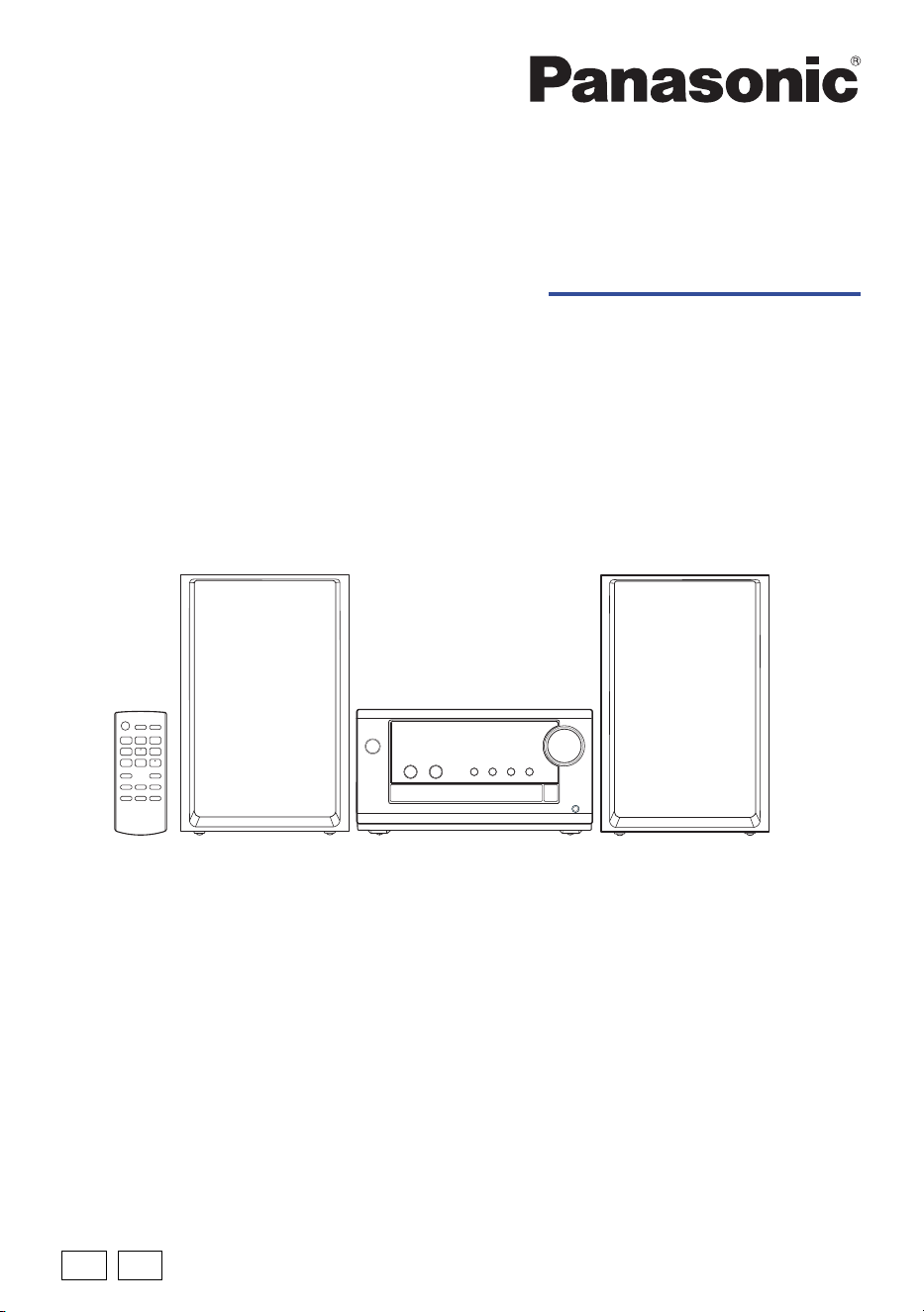
Operating Instructions
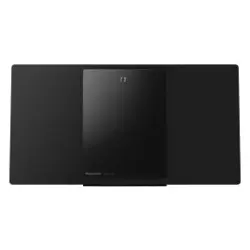
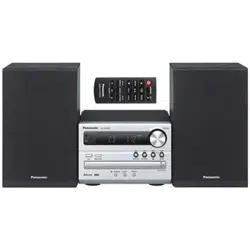
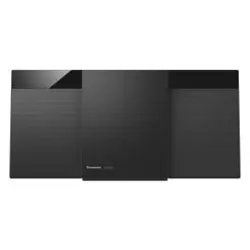
CD Stereo System
Model No. SC-PM702
SC-PM700
TQBM0877
Thank you for purchasing this product.
For optimum performance and safety, please read these instructions carefully.
Please keep this manual for future reference.
EGEB
“EB” indicates the United Kingdom model.
PM700EB.EG_TQBM0877_EN.fm Page 1 Wednesday, March 15, 2023 2:48 PM
2
TQBM0877
D:\New folder\PM700\Source\xml\PM700\PM700EB.EG_TQBM0877_EN.fm
These operating instructions are applicable for models SC-PM702 and SC-PM700.
[PM702]: Indicate features applicable to SC-PM702.
[PM700]: Indicate features applicable to SC-PM700.
Your system and the illustrations can look differently.
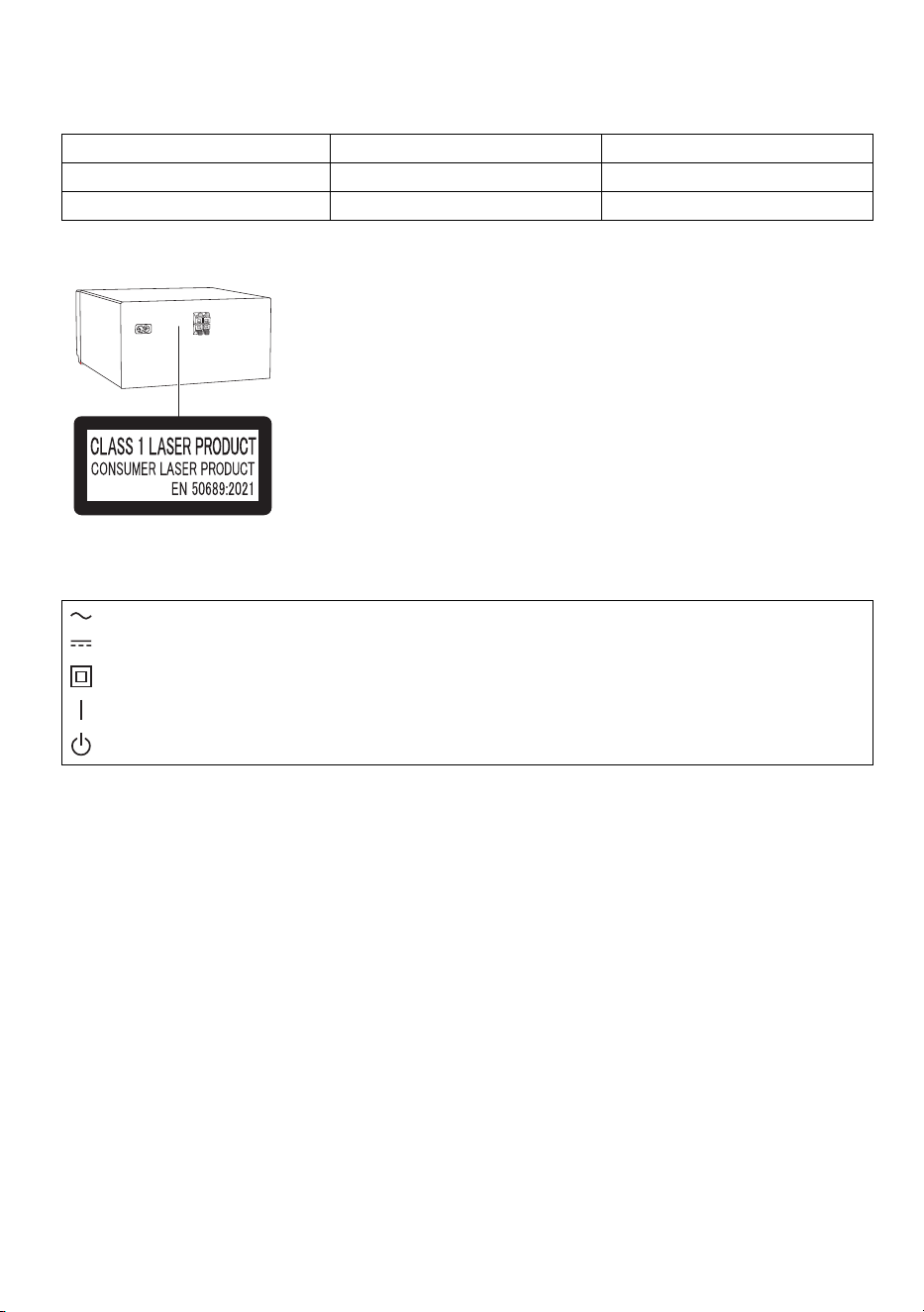
Back of product
The symbols on this product (including the accessories) represent the following:
System SC-PM702 SC-PM700
Main unit SA-PM702 SA-PM700
Speakers SB-PM700 SB-PM700
AC
DC
Class II equipment (The construction of the product is double-insulated.)
ON
Standby
PM700EB.EG_TQBM0877_EN.fm Page 2 Wednesday, March 15, 2023 2:48 PM

3
TQBM0877
D:\New folder\PM700\Source\xml\PM700\PM700EB.EG_TQBM0877_EN.fm
Safety precautions
WARNING
Unit
• To reduce the risk of fire, electric shock or product damage,
– Do not expose this unit to rain, moisture, dripping or splashing.
– Do not place objects filled with liquids, such as vases, on this unit.
– Use the recommended accessories.
– Do not remove covers.
– Do not repair this unit by yourself. Refer servicing to qualified service personnel.
– Do not let metal objects fall inside this unit.
CAUTION
Unit
• To reduce the risk of fire, electric shock or product damage,
– Do not install or place this unit in a bookcase, built-in cabinet or in another confined space. Ensure
this unit is well ventilated.
– Do not obstruct this unit’s ventilation openings with newspapers, tablecloths, curtains, and similar
items.
– Do not place sources of naked flames, such as lighted candles, on this unit.
• This unit is intended for use in moderate climates.
• This unit may receive radio interference caused by mobile telephones during use. If such interference
occurs, please increase separation between this unit and the mobile telephone.
• This unit utilizes a laser. Use of controls or adjustments or performance of procedures other than those
specified herein may result in hazardous radiation exposure.
• Set the unit up on an even surface away from direct sunlight, high temperatures, high humidity, and
excessive vibration.
• This system might get warm after prolonged usage. This is normal. Do not be alarmed.
AC mains lead
• The mains plug is the disconnecting device. Install this unit so that the mains plug can be unplugged
from the socket outlet immediately.
Battery
• Danger of explosion if battery is incorrectly replaced. Replace only with the type recommended by the
manufacturer.
• When disposing of the batteries, please contact your local authorities or dealer and ask for the correct
method of disposal.
• Do not heat or expose to flame.
• Do not leave the battery(ies) in a car exposed to direct sunlight for a long period of time with doors and
windows closed.
• Do not break open or short-circuit the battery.
• Do not charge the alkaline or manganese battery.
• Do not use the battery if the cover has peeled off.
• Remove the battery if you do not use the remote control for a long period of time. Keep in a cool, dark
area.
• Avoid the use in the following conditions
– High or low extreme temperatures during use, storage or transportation.
– Replacement of a battery with an incorrect type.
– Disposal of a battery into fire or a hot oven, or mechanically crushing or cutting of a battery, that can
result in an explosion.
– Extremely high temperature and/or extremely low air pressure that can result in an explosion or the
leakage of flammable liquid or gas.
PM700EB.EG_TQBM0877_EN.fm Page 3 Wednesday, March 15, 2023 2:48 PM
4
TQBM0877
D:\New folder\PM700\Source\xml\PM700\PM700EB.EG_TQBM0877_EN.fm
Caution for AC mains lead
(For the AC mains plug of three pins)
For your safety, please read the following text carefully.
This appliance is supplied with a moulded three pin mains plug for your safety and convenience.
A 5-ampere fuse is fitted in this plug.
Should the fuse need to be replaced please ensure that the replacement fuse has a rating of 5-ampere
and that it is approved by ASTA or BSI to BS1362.
Check for the ASTA mark or the BSI mark on the body of the fuse.
If the plug contains a removable fuse cover you must ensure that it is refitted when the fuse is replaced.
If you lose the fuse cover the plug must not be used until a replacement cover is obtained.
A replacement fuse cover can be purchased from your local dealer.
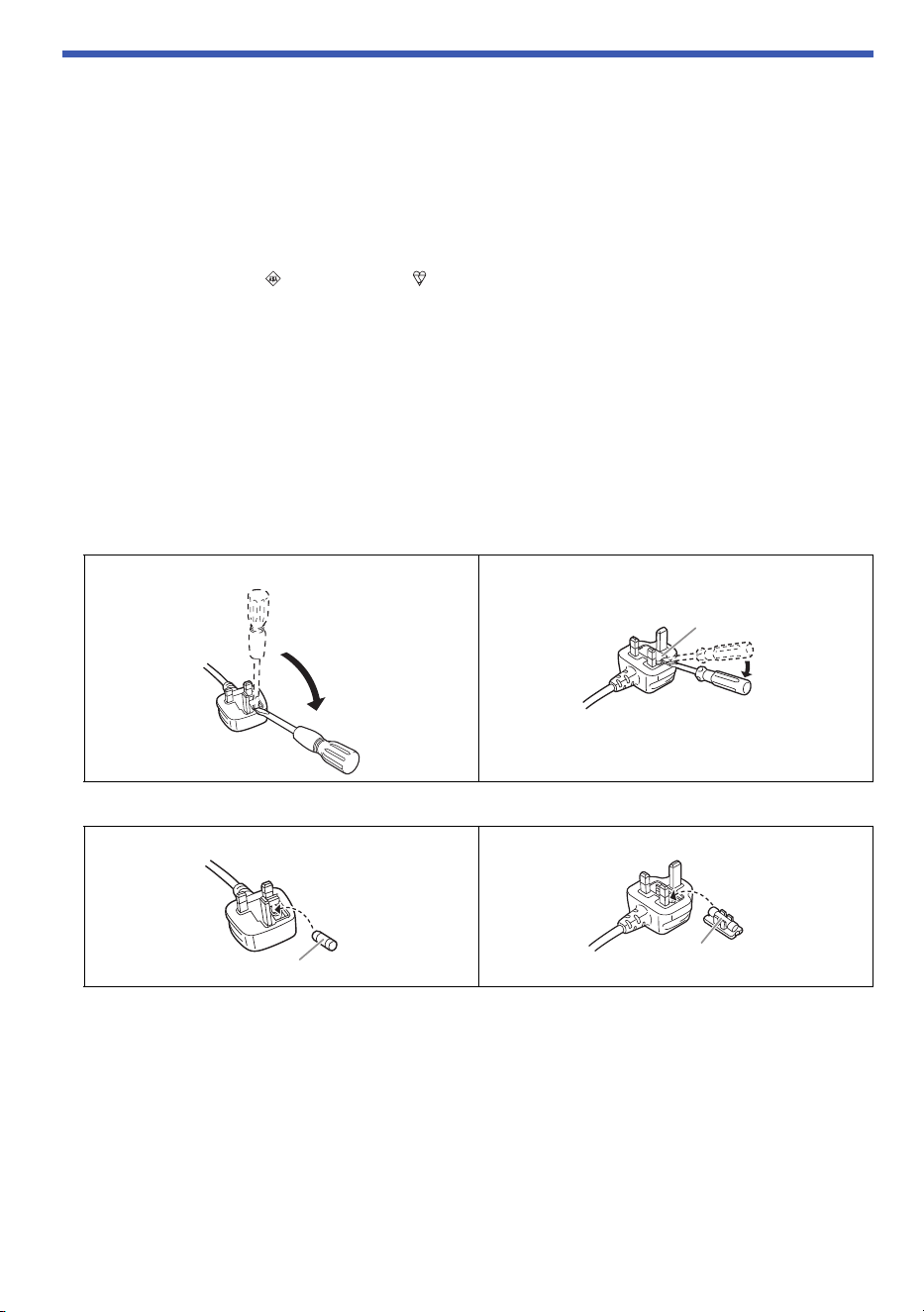
Before use
Remove the connector cover.
How to replace the fuse
The location of the fuse differ according to the type of AC mains plug (figures A and B). Confirm the AC
mains plug fitted and follow the instructions below.
Illustrations may differ from actual AC mains plug.
1. Open the fuse cover with a screwdriver.
2. Replace the fuse and close or attach the fuse cover.
Figure A Figure B
Figure A Figure B
Fuse cover
Fuse (5 ampere)
Fuse (5 ampere)
PM700EB.EG_TQBM0877_EN.fm Page 4 Wednesday, March 15, 2023 2:48 PM

5
TQBM0877
D:\New folder\PM700\Source\xml\PM700\PM700EB.EG_TQBM0877_EN.fm
Table of contents
Safety precautions. . . . . . . . . . . . . . . . . . . . . . . . . . . . . . . . . . . . . . . . . . . . . . . . . . . . . . . . . . . . . . . . . . . 3
Caution for AC mains lead . . . . . . . . . . . . . . . . . . . . . . . . . . . . . . . . . . . . . . . . . . . . . . . . . . . . . . . . . . . . 4
Sales and Support Information . . . . . . . . . . . . . . . . . . . . . . . . . . . . . . . . . . . . . . . . . . . . . . . . . . . . . . . . . 6
Supplied accessories . . . . . . . . . . . . . . . . . . . . . . . . . . . . . . . . . . . . . . . . . . . . . . . . . . . . . . . . . . . . . . . . 6
Placement of speakers . . . . . . . . . . . . . . . . . . . . . . . . . . . . . . . . . . . . . . . . . . . . . . . . . . . . . . . . . . . . . . . 7
Preparing the remote control. . . . . . . . . . . . . . . . . . . . . . . . . . . . . . . . . . . . . . . . . . . . . . . . . . . . . . . . . . . 7
Making the connections. . . . . . . . . . . . . . . . . . . . . . . . . . . . . . . . . . . . . . . . . . . . . . . . . . . . . . . . . . . . . . . 8
Overview of controls . . . . . . . . . . . . . . . . . . . . . . . . . . . . . . . . . . . . . . . . . . . . . . . . . . . . . . . . . . . . . . . . 10
Preparing media . . . . . . . . . . . . . . . . . . . . . . . . . . . . . . . . . . . . . . . . . . . . . . . . . . . . . . . . . . . . . . . . . . . 12
Media playback . . . . . . . . . . . . . . . . . . . . . . . . . . . . . . . . . . . . . . . . . . . . . . . . . . . . . . . . . . . . . . . . . . . . 14
FM Radio. . . . . . . . . . . . . . . . . . . . . . . . . . . . . . . . . . . . . . . . . . . . . . . . . . . . . . . . . . . . . . . . . . . . . . . . . 17
DAB+. . . . . . . . . . . . . . . . . . . . . . . . . . . . . . . . . . . . . . . . . . . . . . . . . . . . . . . . . . . . . . . . . . . . . . . . . . . . 19
Sound effects . . . . . . . . . . . . . . . . . . . . . . . . . . . . . . . . . . . . . . . . . . . . . . . . . . . . . . . . . . . . . . . . . . . . . 21
Clock and timers . . . . . . . . . . . . . . . . . . . . . . . . . . . . . . . . . . . . . . . . . . . . . . . . . . . . . . . . . . . . . . . . . . . 22
Others . . . . . . . . . . . . . . . . . . . . . . . . . . . . . . . . . . . . . . . . . . . . . . . . . . . . . . . . . . . . . . . . . . . . . . . . . . . 23
Troubleshooting. . . . . . . . . . . . . . . . . . . . . . . . . . . . . . . . . . . . . . . . . . . . . . . . . . . . . . . . . . . . . . . . . . . . 24
Maintenance . . . . . . . . . . . . . . . . . . . . . . . . . . . . . . . . . . . . . . . . . . . . . . . . . . . . . . . . . . . . . . . . . . . . . . 27
Specifications . . . . . . . . . . . . . . . . . . . . . . . . . . . . . . . . . . . . . . . . . . . . . . . . . . . . . . . . . . . . . . . . . . . . . 28
References . . . . . . . . . . . . . . . . . . . . . . . . . . . . . . . . . . . . . . . . . . . . . . . . . . . . . . . . . . . . . . . . . . . . . . . 30
PM700EB.EG_TQBM0877_EN.fm Page 5 Wednesday, March 15, 2023 2:48 PM
6
TQBM0877
D:\New folder\PM700\Source\xml\PM700\PM700EB.EG_TQBM0877_EN.fm
Sales and Support Information
For the United Kingdom and Ireland
Customer Communications Centre
• For customers within the UK: 0344 844 3899
• For customers within Ireland: 01 289 8333
• Monday – Friday 9:00am – 5:00pm (Excluding public holidays).
• For further support on your product, please visit our website: www.panasonic.co.uk
Direct Sales at Panasonic UK
• Order accessory and consumable items for your product with ease and confidence by phoning our
Customer Communications Centre Monday – Friday 9:00am – 5:00pm (Excluding public holidays).
• Or go on line through our Internet Accessory ordering application at www.pas-europe.com
.
• Most major credit and debit cards accepted.
• All enquiries transactions and distribution facilities are provided directly by Panasonic UK.
• It couldn’t be simpler!
• Also available through our Internet is direct shopping for a wide range of finished products. Take a
browse on our website for further details.
Supplied accessories
Check and identify the supplied accessories.
Product numbers correct as of March 2023. These may be subject to change.
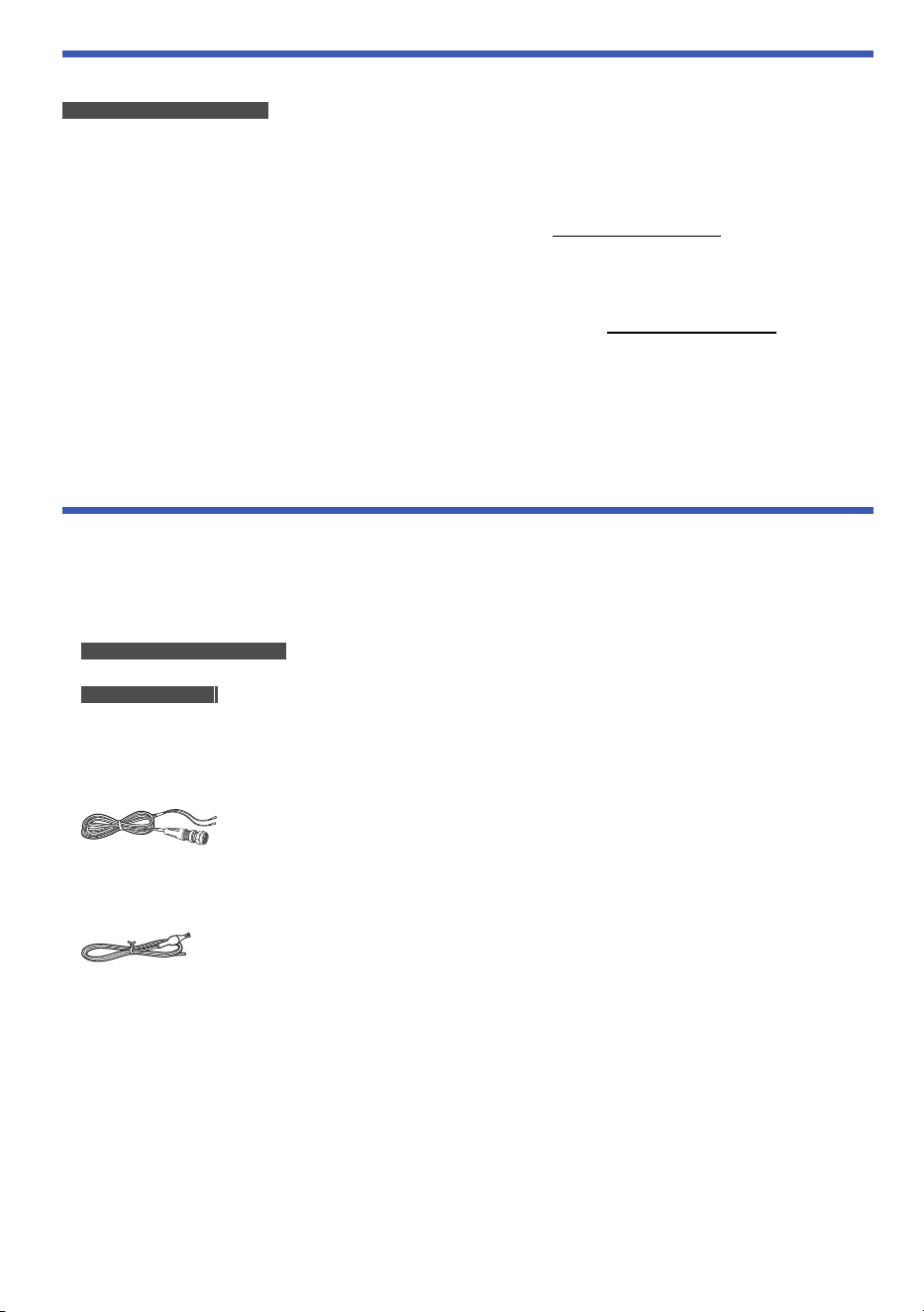
1 AC mains lead
For the United Kingdom and Ireland
(K2CT2YY00146)
For Continental Europe
(K2CQ2YY00164)
[PM702]
1 DAB/FM antenna
(N1CYYYY00022)
[PM700]
1 FM indoor antenna
(RSAX0002)
1 Remote control
(N2QAYB000984)
PM700EB.EG_TQBM0877_EN.fm Page 6 Wednesday, March 15, 2023 2:48 PM
7
TQBM0877
D:\New folder\PM700\Source\xml\PM700\PM700EB.EG_TQBM0877_EN.fm
Placement of speakers
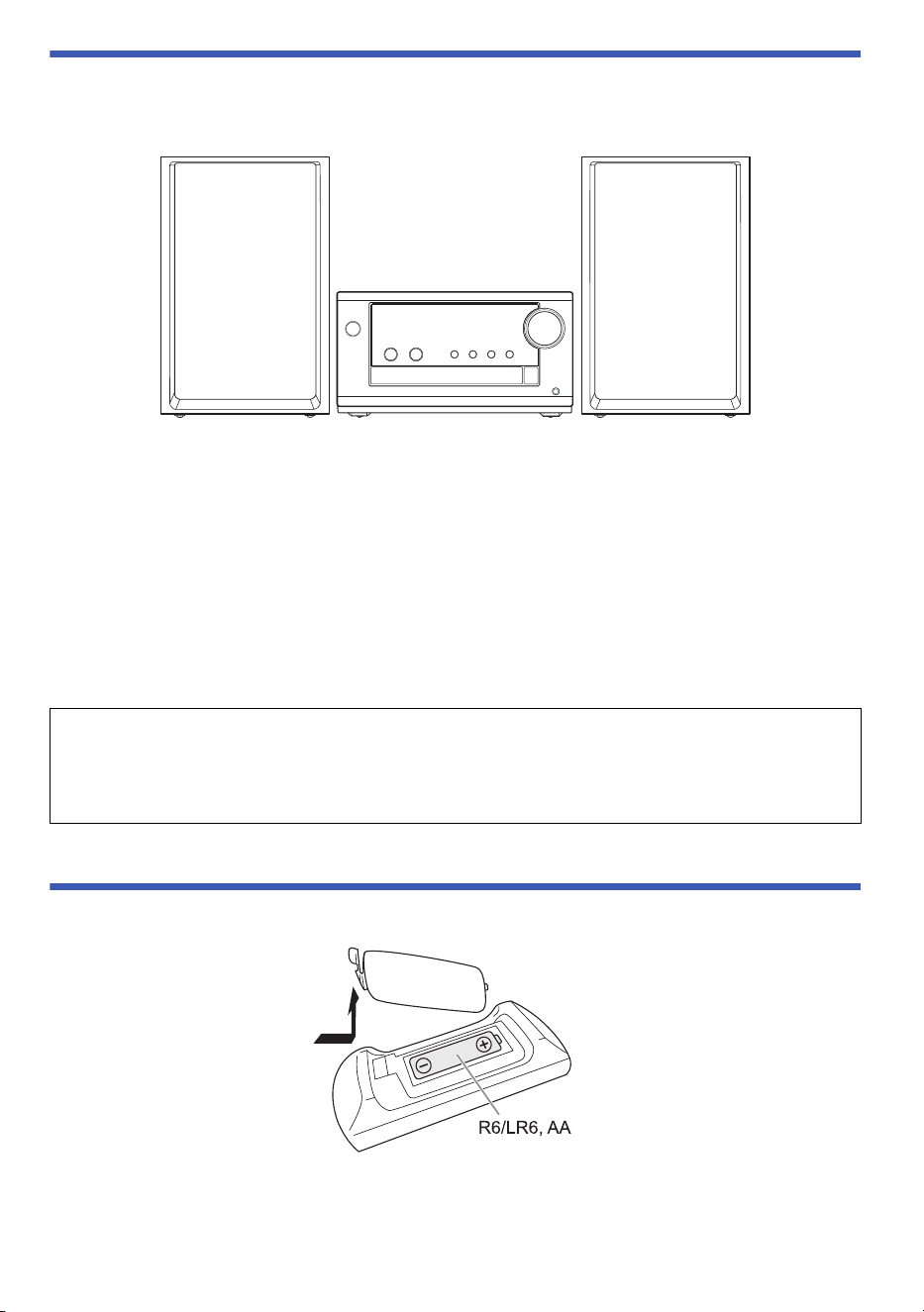
The left and right speakers are the same.
Use only the supplied speakers.
You can cause damage to the system and decrease the sound quality if you use other speakers.
Note:
• Keep your speakers more than 10 mm from the main unit for ventilation.
• Put the speakers on a flat safe surface.
• These speakers do not have magnetic shielding. Do not put them near TVs, PCs or other equipment easily
influenced by magnetism.
• When you play at high levels for a long period, it can cause damage to the speakers and decrease the life of
the speakers.
• Decrease the volume in these conditions to prevent damage:
– When the sound is distorted.
– When you adjust the sound quality.
Preparing the remote control
Use alkaline or manganese battery.
Install the battery so that the poles (+ and –) align with those in the remote control.
CAUTION!
• Use the speakers only with the recommended system. If not, you can cause damage to the
amplifier and speakers and can cause a fire. Consult an approved service personnel if damage
occurs or if there is a sudden apparent change in performance.
• Do not modify the speaker or speaker wires as this can cause damage to the system.
(Not supplied)
PM700EB.EG_TQBM0877_EN.fm Page 7 Wednesday, March 15, 2023 2:48 PM
8
TQBM0877
D:\New folder\PM700\Source\xml\PM700\PM700EB.EG_TQBM0877_EN.fm
Making the connections
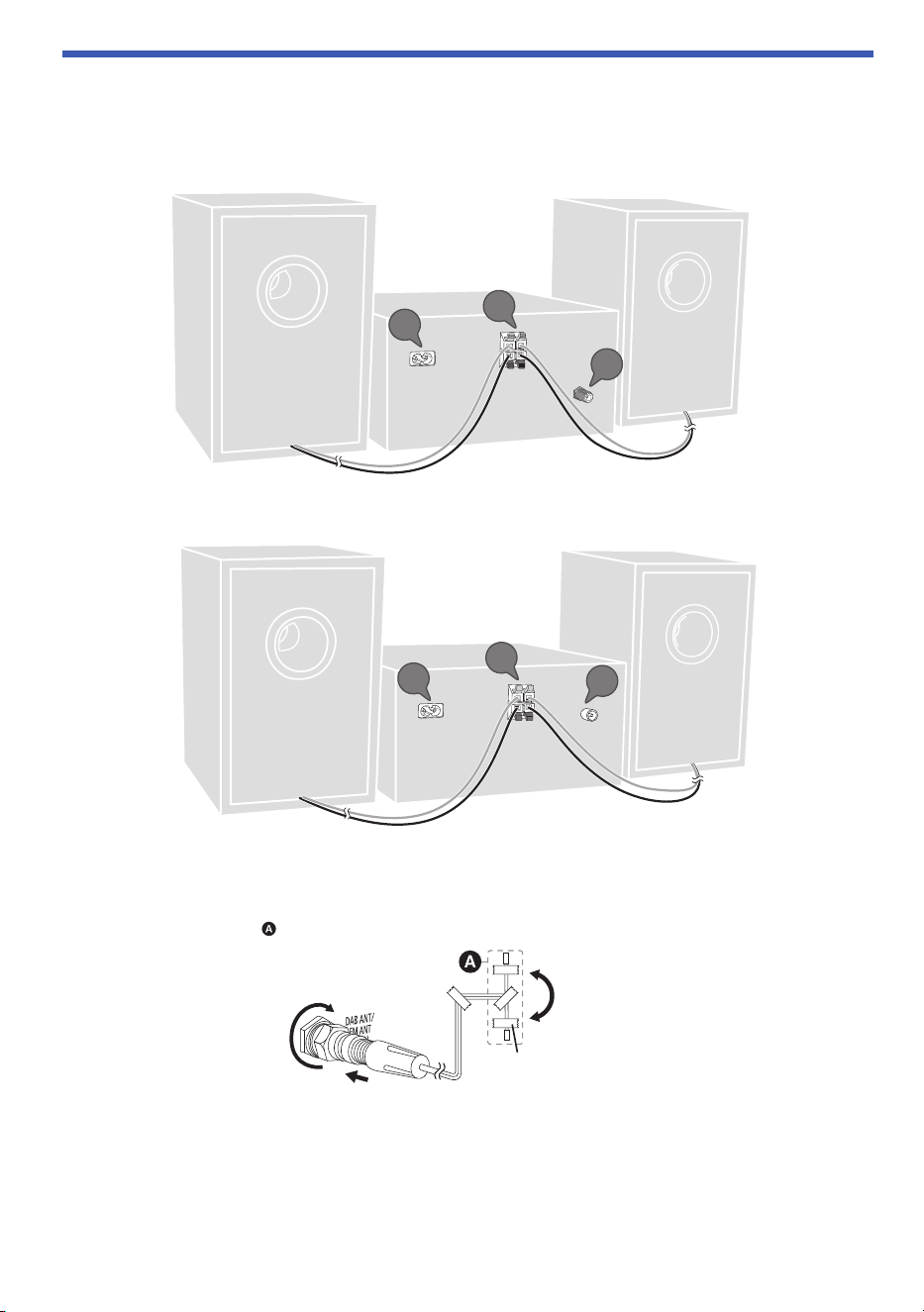
Connect the AC mains lead only after all the other connections have been made.
[PM702]
[PM700]
1 [PM702]
Connect the DAB/FM antenna.
Be sure to tighten fully the nut.
Rotate the antenna at to improve reception.
Note:
Use an outdoor antenna if the reception is poor.
1
2
3
1
2
3
Adhesive tape
(not supplied)
PM700EB.EG_TQBM0877_EN.fm Page 8 Wednesday, March 15, 2023 2:48 PM
9
TQBM0877
D:\New folder\PM700\Source\xml\PM700\PM700EB.EG_TQBM0877_EN.fm
[PM700]
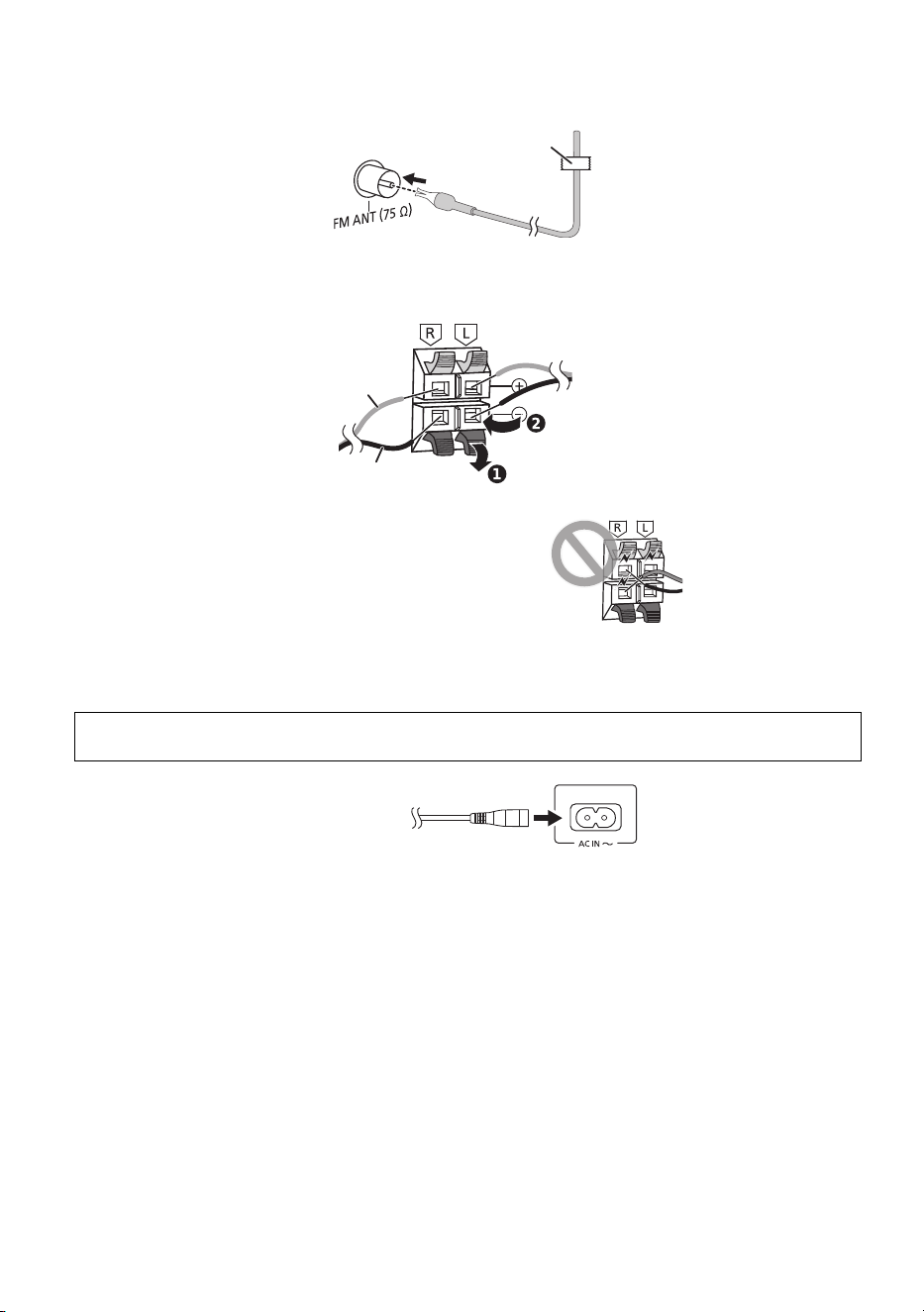
Connect the FM indoor antenna.
Put the antenna where reception is best.
2 Connect the speakers.
Connect the speaker cables to the corresponding terminals.
3 Connect the AC mains lead.
Do not use any other AC mains leads except the supplied one.
Conserving power
The system consumes a small amount of power even when it is in standby mode. Disconnect the
power supply if you do not use the system.
Some settings will be lost after you disconnect the system. You have to set them again.
Note:
Keep the antennas away from the speaker cables and the AC mains lead to avoid picking up noise.
Be careful not to cross (short-circuit)
or reverse the polarity of the speaker
wires as doing so may damage the
speakers.
(For the AC mains plug of three pins)
READ THE “Caution for AC mains lead” BEFORE CONNECTION. (~4)
Adhesive tape
(not supplied)
Red
Black
To household
mains socket
PM700EB.EG_TQBM0877_EN.fm Page 9 Wednesday, March 15, 2023 2:48 PM
10
TQBM0877
D:\New folder\PM700\Source\xml\PM700\PM700EB.EG_TQBM0877_EN.fm
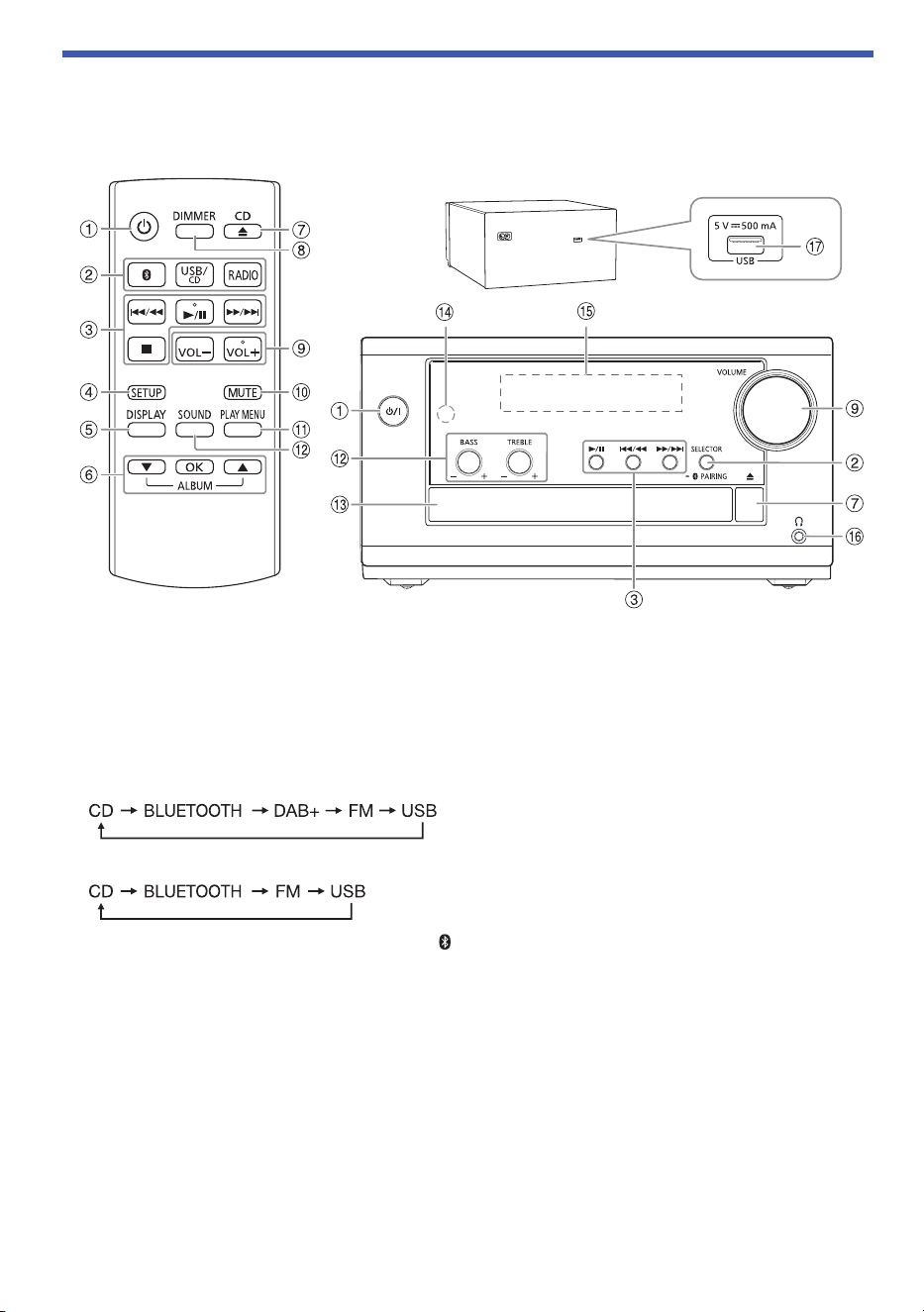
Overview of controls
Do the procedures with the remote control. You can also use the buttons on the main unit if they
are the same.
A Standby/on switch [`], [1 ]
Press to switch the unit from on to standby mode or vice versa. In standby mode, the unit is still
consuming a small amount of power.
B Select the audio source
On the main unit:
Press [SELECTOR] repeatedly to select the source:
[PM702]
[PM700]
To start Bluetooth
®
pairing, press and hold [– PAIRING].
C Basic playback control
D View the setup menu
E View the content information
F Select or confirm the option
Skip MP3 albums
G Open or close the disc tray
H Decrease the brightness of the display panel
To cancel, press the button again.
I Adjust the volume level
Rear
PM700EB.EG_TQBM0877_EN.fm Page 10 Wednesday, March 15, 2023 2:48 PM

11
TQBM0877
D:\New folder\PM700\Source\xml\PM700\PM700EB.EG_TQBM0877_EN.fm
J Mute the sound
To cancel, press the button again.
“MUTE” is also cancelled when you adjust the volume or when you switch off the system.
K View the play menu
L Select the sound effects
M Disc tray
N Remote control sensor
Distance: Within approximately 7 m
Angle: Approximately 10° up and 30° down, 30° left and right
O Display panel
P Headphones jack ( )
Plug type: Ø 3.5 mm stereo (not supplied)
– Excessive sound pressure from earphones and headphones can cause hearing loss.
– Listening at full volume for long periods may damage the user’s ears.
Q USB port (DC 5 V 500 mA)
PM700EB.EG_TQBM0877_EN.fm Page 11 Wednesday, March 15, 2023 2:48 PM

12
TQBM0877
D:\New folder\PM700\Source\xml\PM700\PM700EB.EG_TQBM0877_EN.fm
Preparing media
Disc
1 Press [CD x] (main unit: [x]) to open the disc tray.
Put in a disc with the label facing up.
Press again to close the disc tray.
2 Press [USB/CD] (main unit: [SELECTOR]) repeatedly to select “CD”.
USB
Preparation
Before you connect a USB device to the system, make sure you do a backup of the data.
1 Decrease the volume and connect the USB device to the USB port.
Hold the main unit when connecting or disconnecting the USB device.
2 Press [USB/CD] (main unit: [SELECTOR]) repeatedly to select “USB”.
Note:
Do not use a USB extension cable. The system cannot recognise USB device connected through a cable.
Bluetooth
®
You can connect and play an audio device wirelessly through Bluetooth
®
.
Preparation
• Switch on the main unit.
• Switch on the Bluetooth
®
feature of the device and put the device near the system.
• Read the operating instructions of the device for details.
█
Pairing a device
Preparation
If this system is connected to a Bluetooth
®
device, disconnect it (~13).
1 Press [ ].
If “PAIRING” is shown, continue with step 3.
2 Press [PLAY MENU] to select “PAIRING” and then press [OK].
3 Select “SC-PM702/PM704” or “SC-PM700” from the Bluetooth
®
menu of the device.
If prompted for a passkey, input “0000”.
The device connects with this system automatically after pairing is complete.
The name of the connected device is shown for a few seconds.
Using the main unit
1 Press and hold [– PAIRING] until “PAIRING” is shown.
2 Select “SC-PM702/PM704” or “SC-PM700” from the Bluetooth
®
menu of the device.
Note:
You can pair up to 8 devices with this system. If a 9th device is paired, the device that has not been used for the
longest time will be replaced.
PM700EB.EG_TQBM0877_EN.fm Page 12 Wednesday, March 15, 2023 2:48 PM

13
TQBM0877
D:\New folder\PM700\Source\xml\PM700\PM700EB.EG_TQBM0877_EN.fm
█
Connecting a device
Preparation
If this system is connected to a Bluetooth
®
device, disconnect it (~13).
1 Press [ ].
“BLUETOOTH READY” is shown.
2 Select “SC-PM702/PM704” or “SC-PM700” from the Bluetooth
®
menu of the device.
The name of the connected device is shown for a few seconds.
3 Start playback on the device.
Note:
• A device must be paired to connect.
• This system can only connect to one device at a time.
• When “BLUETOOTH” is selected as the source, this system will automatically try to connect to the last
connected device. (“LINKING” is shown during this process.)
█
Disconnecting a device
While a Bluetooth
®
device is connected
1 Press [PLAY MENU] repeatedly to select “DISCONNECT?”.
2 Press [R, T] to select “OK? YES” and then press [OK].
“BLUETOOTH READY” is shown.
To cancel, select “OK? NO”.
Using the main unit
Press and hold [– PAIRING] until “PAIRING” is shown.
Note:
A device is disconnected when you:
– Select a different source.
– Move the device out of the maximum range.
– Disable the Bluetooth
®
transmission of the device.
– Switch off the system or the device.
PM700EB.EG_TQBM0877_EN.fm Page 13 Wednesday, March 15, 2023 2:48 PM
14
TQBM0877
D:\New folder\PM700\Source\xml\PM700\PM700EB.EG_TQBM0877_EN.fm
Media playback
The following marks indicate the availability of the feature.
Basic playback
CD USB BLUETOOTH
Note:
Depending on the Bluetooth
®
device, some operations may not work.
Viewing available information
CD USB BLUETOOTH
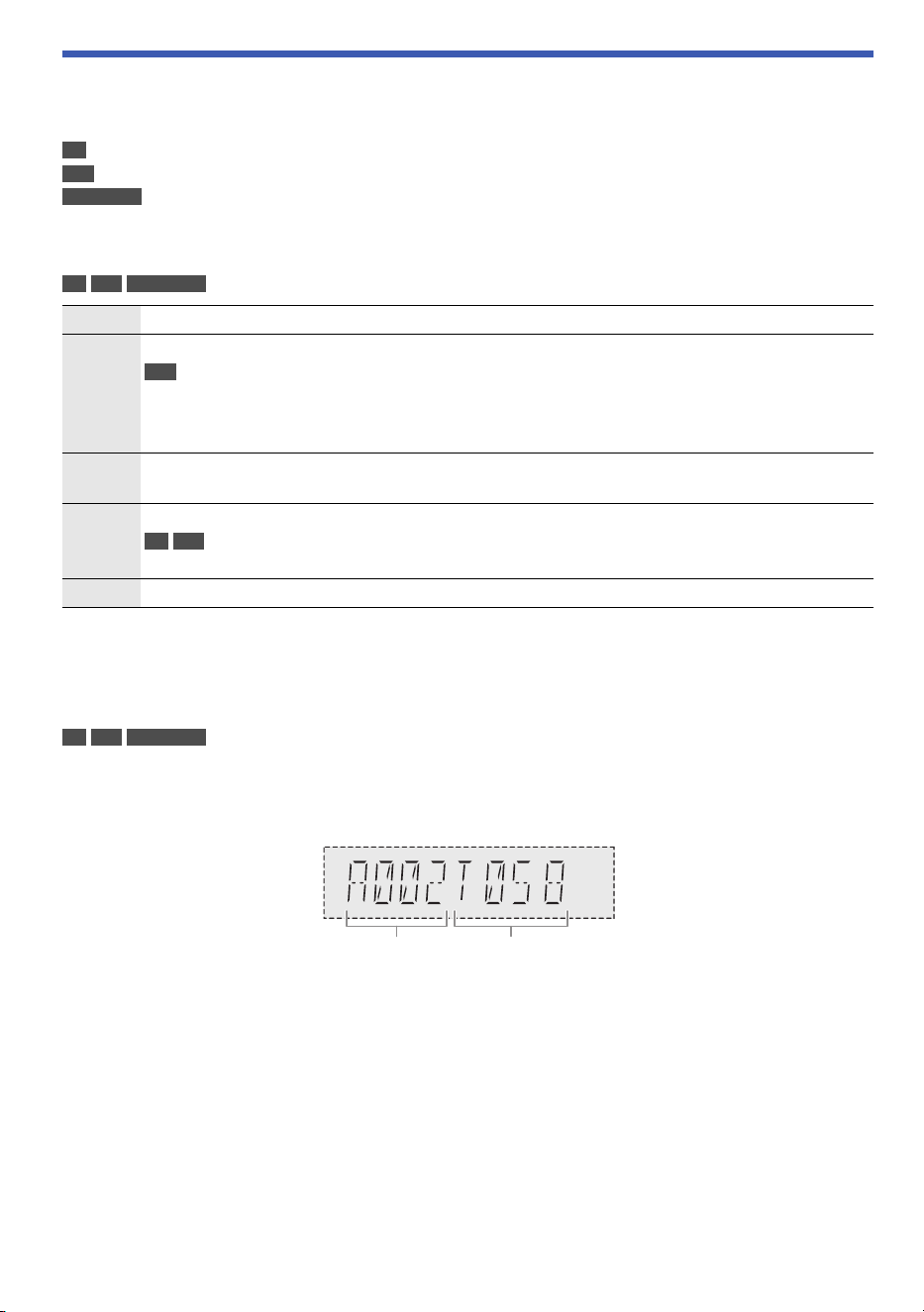
You can view the available information, such as MP3 album and track number, on the display panel.
Press [DISPLAY] repeatedly.
Example: MP3 album and track number display.
Note:
• Maximum characters that can be shown: Approximately 32
• This system supports ver. 1.0, 1.1 and 2.3 ID3 tags.
• Text data that the system does not support can show differently.
CD :
USB :
BLUETOOTH :
CD-R/RW in CD-DA format or with MP3 files.
USB device with MP3 files.
Bluetooth
®
device.
Play Press [4/9].
Stop Press [8].
USB
The position is memorised.
“RESUME” is shown.
Press again to stop fully.
Pause Press [4/9].
Press again to continue playback.
Skip Press [2/3] or [5/6] to skip track.
CD USB
Press [R, T] to skip MP3 album.
Search Press and hold [2/3] or [5/6].
Album number Track number
PM700EB.EG_TQBM0877_EN.fm Page 14 Wednesday, March 15, 2023 2:48 PM
15
TQBM0877
D:\New folder\PM700\Source\xml\PM700\PM700EB.EG_TQBM0877_EN.fm
Play menu
CD USB
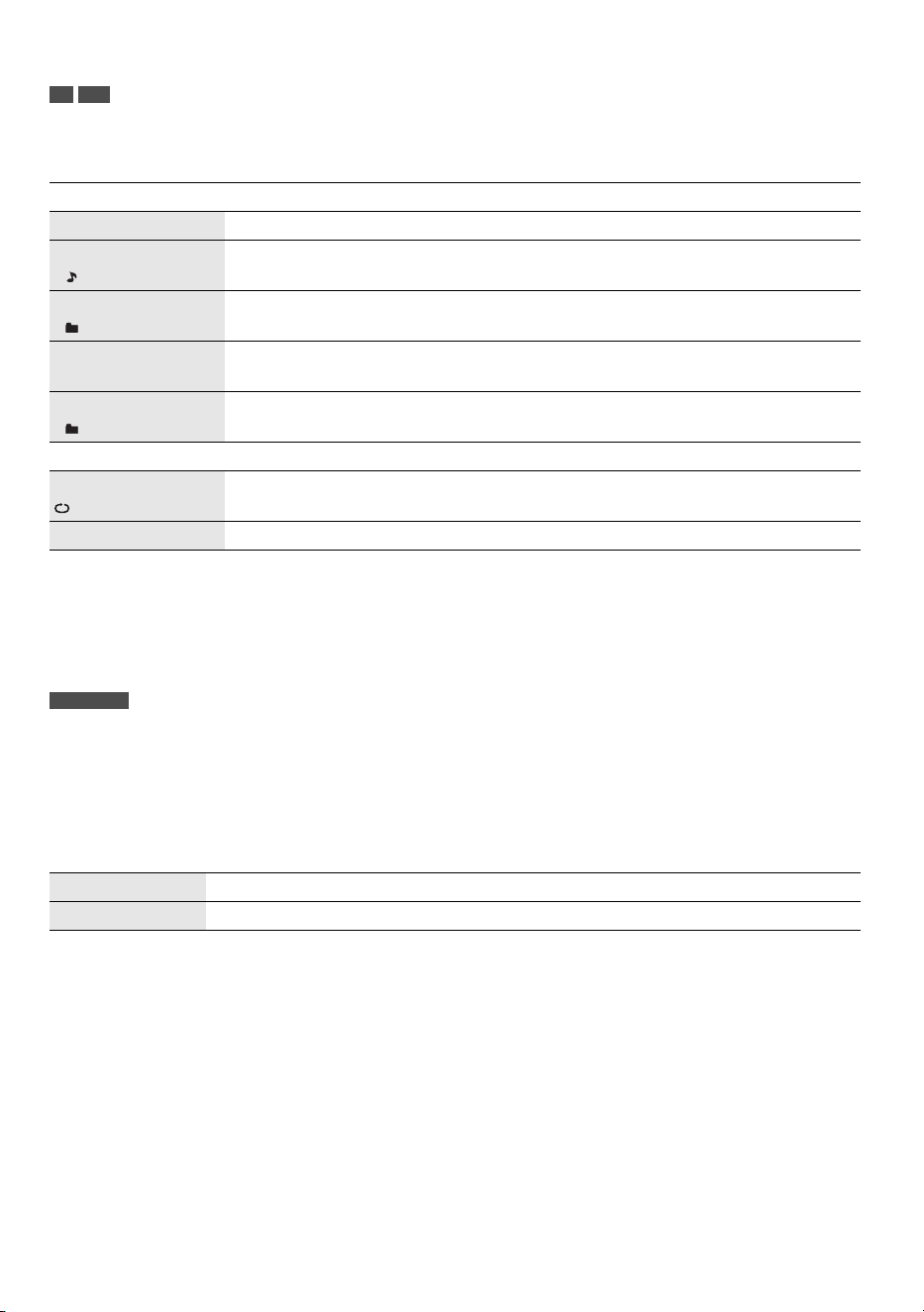
1 Press [PLAY MENU] repeatedly to select “PLAYMODE” or “REPEAT”.
2 Press [R, T] to select the setting and then press [OK].
Note:
• During random playback, you cannot skip to tracks which have been played.
• The setting is cancelled when you open the disc tray or disconnect the USB device.
Link mode
BLUETOOTH
You can change the link mode to suit the connection type.
Preparation
If this system is connected to a Bluetooth
®
device, disconnect it (~13).
1 Press [PLAY MENU] repeatedly to select “LINK MODE”.
2 Press [R, T] to select the mode and then press [OK].
Note:
• Depending on the device, the playback image and sound may not be synchronised. In this case, select
“MODE 1”.
• Select “MODE 1” if the sound is interrupted.
PLAYMODE
OFF PLAYMODE Cancel the setting.
1-TRACK
1
Play one selected track.
Press [2/3] or [5/6] to select the track.
1-ALBUM
1
Play one selected MP3 album.
Press [R, T] to select the MP3 album.
RANDOM
RND
Play all tracks randomly.
1-ALBUM RANDOM
1 RND
Play all tracks in one selected MP3 album randomly.
Press [R, T] to select the MP3 album.
REPEAT
ON REPEAT Repeat playback.
OFF REPEAT Cancel the setting.
MODE 1 Emphasis on connectivity.
MODE 2 (default) Emphasis on sound quality.
PM700EB.EG_TQBM0877_EN.fm Page 15 Wednesday, March 15, 2023 2:48 PM

16
TQBM0877
D:\New folder\PM700\Source\xml\PM700\PM700EB.EG_TQBM0877_EN.fm
Input level
BLUETOOTH
You can change the input level setting if the sound input level of the Bluetooth
®
transmission is too low.
1 Press [PLAY MENU] repeatedly to select “INPUT LEVEL”.
2 Press [R, T] to select the level and then press [OK].
Note:
Select “LEVEL 0” if the sound is interrupted.
█
Note on disc
• This system can play CD-R/RW with CD-DA or MP3 format content.
• Before playback, finalise the disc on the device it was recorded on.
• Some CD-R/RW cannot be played because of the condition of the recording.
• This system does not guarantee play of all types of discs.
█
Note on USB device
• This system does not guarantee connection with all USB devices.
• This system supports USB 2.0 full-speed.
• This system can support USB devices of up to 32 GB.
• Only FAT 12/16/32 file system is supported.
█
Note on MP3 file
• Files are defined as tracks and folders are defined as albums.
• Tracks must have the extension “.mp3” or “.MP3”.
• Tracks will not necessarily be played in the order you recorded them.
• Some files can fail to work because of the sector size.
• This system does not guarantee play of all MP3s.
MP3 file on disc
• This system can access up to:
– 255 albums (including root folder)
– 999 tracks
– 20 sessions
• Disc must conform to ISO9660 level 1 or 2 (except for extended formats).
MP3 file on USB device
• This system can access up to:
– 800 albums (including root folder)
– 8000 tracks
– 999 tracks in one album
(default)
PM700EB.EG_TQBM0877_EN.fm Page 16 Wednesday, March 15, 2023 2:48 PM

17
TQBM0877
D:\New folder\PM700\Source\xml\PM700\PM700EB.EG_TQBM0877_EN.fm
FM Radio
Preparation
Press [RADIO] (main unit: [SELECTOR]) repeatedly to select “FM”.
Manual tuning
1 Press [PLAY MENU] repeatedly to select “TUNE MODE”.
2 Press [R, T] to select “MANUAL” and then press [OK].
3 Press [2/3] or [5/6] to tune in to the station.
To tune automatically, press and hold the button until the frequency starts changing quickly.
“STEREO” is shown when a stereo broadcast is being received.
Memory presetting
You can preset up to 30 FM stations.
█
Automatic presetting
1 Press [PLAY MENU] to select “A.PRESET”.
2 Press [R, T] to select “LOWEST” or “CURRENT” and then press [OK].
The tuner presets all the stations it can receive into the channels in ascending order.
To cancel, press [8].
█
Manual presetting
1 Press [PLAY MENU] repeatedly to select “TUNE MODE”.
2 Press [R, T] to select “MANUAL” and then press [OK].
3 Press [2/3] or [5/6] to tune in to the station.
4 Press [OK].
5 Press [R, T] to select a preset number and then press [OK].
Do steps 3 through 5 again to preset more stations.
The new station replaces any station that occupies the same preset number.
█
Selecting a preset station
1 Press [PLAY MENU] repeatedly to select “TUNE MODE”.
2 Press [R, T] to select “PRESET” and then press [OK].
3 Press [2/3] or [5/6] to select the preset station.
LOWEST Tuning begins from the lowest frequency.
CURRENT Tuning begins from the current frequency.
PM700EB.EG_TQBM0877_EN.fm Page 17 Wednesday, March 15, 2023 2:48 PM

18
TQBM0877
D:\New folder\PM700\Source\xml\PM700\PM700EB.EG_TQBM0877_EN.fm
Improving the sound quality
1 Press [PLAY MENU] repeatedly to select “FM MODE”.
2 Press [R, T] to select “MONO” and then press [OK].
To cancel, select “STEREO”.
“MONO” is also cancelled when you change the frequency.
To memorise the setting
Continue with step 4 of “Manual presetting” (~ 17).
Checking the signal status
Press [DISPLAY].
FM–––– The FM signal is weak.
The system is not tuned in to a station.
FM ST The FM signal is in stereo.
FM MONO “MONO” is selected as the “FM MODE”. The FM signal is in monaural.
PM700EB.EG_TQBM0877_EN.fm Page 18 Wednesday, March 15, 2023 2:48 PM

19
TQBM0877
D:\New folder\PM700\Source\xml\PM700\PM700EB.EG_TQBM0877_EN.fm
DAB+
[PM702]
Preparation
Press [RADIO] (main unit: [SELECTOR]) repeatedly to select “DAB+”.
Note:
If you select “DAB+” for the first time, the system will tune automatically.
Manual tuning
1 Press [PLAY MENU] repeatedly to select “MANUAL SCAN”.
2 Press [R, T] to select the frequency block and then press [OK].
If no station is detected, “SCAN FAILED” is shown.
Adjust the antenna and try again.
Automatic tuning
1 Press [PLAY MENU] to select “AUTO SCAN” and then press [OK].
“START?” is shown.
2 Press [OK] to start tuning.
“DAB AUTO SCAN” is shown.
If no station is detected, “SCAN FAILED” is shown.
Do manual tuning.
Note:
Preset frequencies are erased after you do automatic tuning.
Memory presetting
You can preset up to 20 stations.
1 Press [PLAY MENU] repeatedly to select “TUNE MODE”.
2 Press [R, T] to select “STATION” and then press [OK].
3 Press [2/3] or [5/6] to tune in to the station.
4 Press [OK].
5 Press [R, T] to select a preset number and then press [OK].
Do steps 3 through 5 again to preset more stations.
The new station replaces any station that occupies the same preset number.
Note:
You cannot preset a station when the station is not broadcasting or when you have selected a secondary
service.
█
Selecting a preset station
1 Press [PLAY MENU] repeatedly to select “TUNE MODE”.
2 Press [R, T] to select “PRESET” and then press [OK].
3 Press [2/3] or [5/6] to select the preset station.
PM700EB.EG_TQBM0877_EN.fm Page 19 Wednesday, March 15, 2023 2:48 PM
20
TQBM0877
D:\New folder\PM700\Source\xml\PM700\PM700EB.EG_TQBM0877_EN.fm
Secondary service
You can listen to secondary services when “ ” is shown.
1 Press [PLAY MENU] repeatedly to select “DAB SECONDARY”.
2 Press [R, T] to select the secondary service and then press [OK].
To cancel, select “PRIMARY”.
Note:
The setting is cancelled when you select other stations.
Viewing available information
You can view the following information on the display panel:
• Information about the DAB broadcast
• Programme type
• Ensemble label
• Frequency
•Time
Press [DISPLAY].
Checking the signal quality
You can check the signal quality when adjusting the antenna.
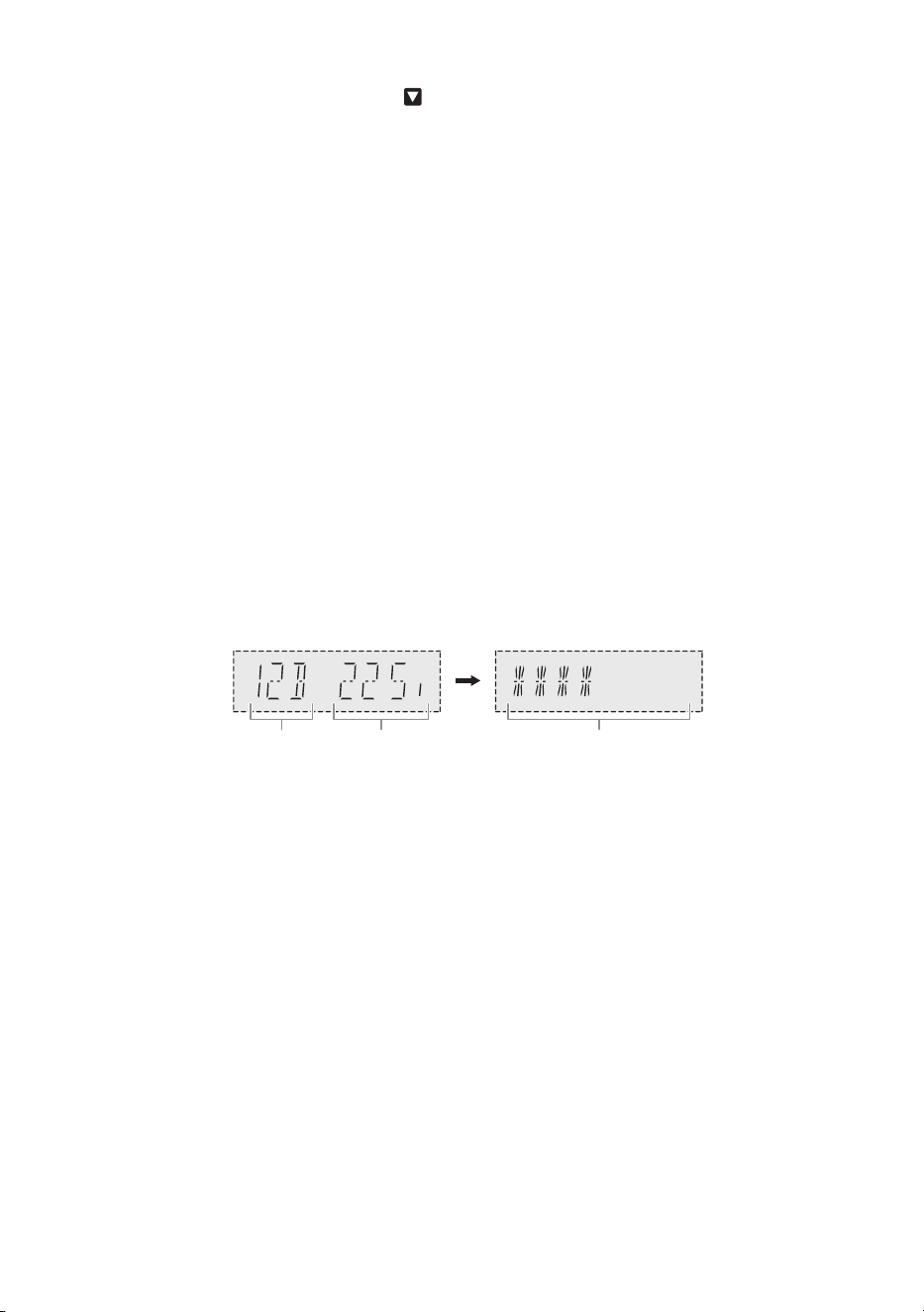
1 Press [PLAY MENU] repeatedly to select “SIGNAL QUALITY” and then press [OK].
The frequency block followed by the reception quality is shown.
To select other frequency blocks, press [R, T].
2 Press [OK] again to exit.
Automatic clock adjustment
You can set the clock to update automatically.
1 Press [PLAY MENU] repeatedly to select “AUTO CLOCK ADJ”.
2 Press [R, T] to select “ON ADJUST” and then press [OK].
To cancel, select “OFF ADJUST”.
Frequency
block
Frequency Reception quality
0 (poor) to 8 (excellent)
PM700EB.EG_TQBM0877_EN.fm Page 20 Wednesday, March 15, 2023 2:48 PM

21
TQBM0877
D:\New folder\PM700\Source\xml\PM700\PM700EB.EG_TQBM0877_EN.fm
Sound effects
1 Press [SOUND] repeatedly to select the effect.
2 Press [R, T] to select the setting and then press [OK].
Note:
Changed settings will be kept until it is changed again, unless otherwise indicated.
Saving the sound settings
You can save the current sound effects (up to 3 combinations)
Preparation
Select the sound effects.
1 Press [SETUP] repeatedly to select “SAVE MY SOUND”.
2 Press [R, T] to select a sound setting number and then press [OK].
“SAVED” is shown.
The new setting replaces the one existing in the same sound setting number.
To recall the setting
1 Press [SOUND] to select “MY SOUND”.
2 Press [R, T] to select the sound setting number and then press [OK].
MY SOUND “SOUND 1”, “SOUND 2” or “SOUND 3” (~21)
PRESET EQ “HEAVY” (default), “SOFT”, “CLEAR”, “VOCAL” or “FLAT”
BASS –4 to +4 (default: 0)
Using the main unit
Turn [BASS].
TREBLE –4 to +4 (default: 0)
Using the main unit
Turn [TREBLE].
D.BASS “ON D.BASS” (default) or “OFF D.BASS”
SURROUND “ON SURROUND” or “OFF SURROUND” (default)
PM700EB.EG_TQBM0877_EN.fm Page 21 Wednesday, March 15, 2023 2:48 PM

22
TQBM0877
D:\New folder\PM700\Source\xml\PM700\PM700EB.EG_TQBM0877_EN.fm
Clock and timers
Setting the clock
This is a 24-hour clock.
1 Press [SETUP] repeatedly to select “CLOCK”.
2 Press [R, T] to set the time and then press [OK].
To check the time
Press [SETUP] repeatedly to select “CLOCK” and then press [OK].
In standby mode, press [DISPLAY].
Note:
Reset the clock regularly to maintain accuracy.
Play timer
(Except for Bluetooth
®
source)
You can set the timer to come on at a certain time to wake you up.
Preparation
Set the clock.
1 Press [SETUP] repeatedly to select “TIMER ADJ”.
2 Press [R, T] to set the start time and then press [OK].
3 Do step 2 again to set the end time.
4 Press [R, T] to select the source you want to play and then press [OK].
To start the timer
1 Prepare the source you want to listen to (disc, USB or radio) and set the volume.
2 Press [SETUP] repeatedly to select “TIMER SET”.
3 Press [R, T] to select “SET” and then press [OK].
“#” is shown.
To cancel, select “OFF”.
The system must be switched off for the timer to operate.
To check the setting
Press [SETUP] repeatedly to select “TIMER ADJ” and then press [OK].
In standby mode, press [DISPLAY] two times.
Note:
• The timer starts at a low volume and increases gradually to the preset level.
• The timer comes on at the set time every day if the timer is on.
• If you switch off the system and then switch on again while a timer is in operation, the timer will not stop at the
end time.
PM700EB.EG_TQBM0877_EN.fm Page 22 Wednesday, March 15, 2023 2:48 PM

23
TQBM0877
D:\New folder\PM700\Source\xml\PM700\PM700EB.EG_TQBM0877_EN.fm
Sleep timer
The sleep timer switches off the system after the set time.
1 Press [SETUP] repeatedly to select “SLEEP”.
2 Press [R, T] to select the setting (in minutes) and then press [OK].
To cancel, select “OFF”.
Note:
• The remaining time is shown for a few seconds every minute. “SLEEP 1” is always shown when only 1 minute
remains.
• The sleep timer always comes first. Be sure not to set an overlap of timers.
Others
Auto off
This system automatically switches off when you do not use it for approximately 20 minutes.
1 Press [SETUP] repeatedly to select “AUTO OFF”.
2 Press [R, T] to select “ON” and then press [OK].
To cancel, select “OFF”.
Note:
This function does not work when you are in radio source or when a Bluetooth
®
device is connected.
Bluetooth
®
standby
This function automatically switches on the system when you establish a Bluetooth
®
connection from a
paired device.
1 Press [SETUP] repeatedly to select “BLUETOOTH STANDBY”.
2 Press [R, T] to select “ON” and then press [OK].
To cancel, select “OFF”.
Note:
Some devices may take longer to respond. If you are connected to a Bluetooth
®
device before switching off the
system, wait for a minimum of 5 seconds before connecting to this system from your Bluetooth
®
device again.
Software updates
Occasionally, Panasonic may release updated software for this system that may add or improve the way
a feature operates. These updates are available free of charge.
For more details, refer to the following website.
https://panasonic.jp/support/global/cs/
(This site is in English only.)
█
Checking the software version
1 Press [SETUP] repeatedly to select “SW VER.” and then press [OK].
The software version is shown.
2 Press [OK] again to exit.
SLEEP 30 SLEEP 60 SLEEP 90 SLEEP 120
OFF
PM700EB.EG_TQBM0877_EN.fm Page 23 Wednesday, March 15, 2023 2:48 PM

24
TQBM0877
D:\New folder\PM700\Source\xml\PM700\PM700EB.EG_TQBM0877_EN.fm
Troubleshooting
Before requesting service, make the following checks. If you are in doubt about some of the check points,
or if the solutions indicated do not solve the problem, consult your dealer for instructions.
When requesting service, make sure to send both the main unit and the remote control to the
service centre.
█
Common problems
The unit does not work.
• The safety device has been activated. Do the following:
1. Press [1] on the main unit to switch the unit to standby mode. If the unit does not switch to standby mode,
disconnect the AC mains lead and then connect it again.
2. Press [1] again to switch on the unit. If the problem persists, consult your dealer.
No operations can be done with the remote control.
• Examine that the battery is installed correctly.
Sound is distorted or no sound.
• Adjust the volume of the system.
• Switch off the system, determine and correct the cause, and then switch on again. It can be caused by
straining of the speakers through excessive volume or power, and when using the system in a hot
environment.
A humming sound can be heard during playback.
• An AC mains lead or fluorescent light is near the cables. Keep other appliances and cords away from the
cables of this system.
█
Disc
Display not shown correctly.
Playback does not start.
• You have not put in the disc correctly. Put it in correctly.
• Disc is dirty. Clean the disc.
• Replace the disc if it is scratched, warped, or non-standard.
• There is condensation. Let the system dry for 1 to 2 hours.
The total number of tracks shown is incorrect.
The disc cannot be read.
Distorted sound is heard.
• You put in a disc that the system cannot play. Change to a playable disc.
• You put in a disc that has not been finalised.
█
USB
The USB device or the contents in it cannot be read.
• The format of the USB device or the contents in it are not compatible with the system.
• USB devices with storage capacity of more than 32 GB cannot work.
• USB devices may not be recognised when connected to this system with a USB extension cable or USB hub.
Slow operation of the USB device.
• Large content size or large memory USB device takes longer time to read.
The elapsed time shown is different from the actual play time.
• Transfer the data to another USB device or backup the data and reformat the USB device.
█
Radio/DAB+
DAB+ reception is poor.
• Keep the antenna away from computers, televisions, other cables and cords.
Sound is distorted.
• Use an optional outdoor antenna. The antenna should be installed by a competent technician.
PM700EB.EG_TQBM0877_EN.fm Page 24 Wednesday, March 15, 2023 2:48 PM

25
TQBM0877
D:\New folder\PM700\Source\xml\PM700\PM700EB.EG_TQBM0877_EN.fm
A beat sound is heard.
• Switch off the TV or move it away from the system.
• Move mobile telephones away from the system if the interference is apparent.
█
Bluetooth
®
Pairing cannot be done.
• Check the Bluetooth
®
device condition.
• The device is out of the 10 m communication range. Move the device nearer to the system.
The device cannot be connected.
• The pairing of the device was unsuccessful. Do pairing again.
• The pairing of the device has been replaced. Do pairing again.
• This system might be connected to a different device. Disconnect the other device and try connecting the
device again.
• The system may have a problem. Switch off the system and then switch on again.
• If “MODE 2” is selected in “LINK MODE”, select “MODE 1” (~15).
The device is connected but audio cannot be heard through the system.
• For some built-in Bluetooth
®
devices, you have to set the audio output to “SC-PM702/PM704” or “SC-PM700”
manually. Read the operating instructions of the device for details.
Sound from the device is interrupted.
• The device is out of the 10 m communication range. Move the device nearer to the system.
• Remove any obstacle between the system and the device.
• Other devices that use the 2.4 GHz frequency band (wireless router, microwaves, cordless phones, etc.) are
interfering. Move the device nearer to the system and distance it from the other devices.
• Select “MODE 1” for stable communication (~15).
Playback image and sound are not synchronised.
• Restart the playback app of the device.
█
Main unit displays
“--:--”
• You connected the AC mains lead for the first time or there was a power failure recently. Set the clock.
• Track play time is more than 99 minutes.
“ADJUST CLOCK”
• The clock is not set. Adjust the clock.
“ADJUST TIMER”
• The play timer is not set. Adjust the play timer.
“AUTO OFF”
• The system has not been used for 20 minutes and will switch off within a minute. To cancel, press any button.
“ERROR”
• An incorrect operation was done. Read the instructions and try again.
“F61”
“F71”
• Disconnect the AC mains lead and consult your dealer.
“F703”
• Examine the Bluetooth
®
connection.
• Disconnect the Bluetooth
®
device. Switch off the system and then switch on again.
“F76”
• There is a problem with the power supply.
• Disconnect the AC mains lead and consult your dealer.
“NO DEVICE”
• The USB device is not connected. Examine the connection.
PM700EB.EG_TQBM0877_EN.fm Page 25 Wednesday, March 15, 2023 2:48 PM

26
TQBM0877
D:\New folder\PM700\Source\xml\PM700\PM700EB.EG_TQBM0877_EN.fm
“NO DISC”
• You have not put in a disc.
“NO PRESET”
• DAB memory presetting has not been done.
“NO PLAY”
• There is no album or track in the USB device.
• Examine the content. You can only play supported format.
• The system may have a problem. Switch off the system and then switch on again.
“NO SIGNAL”
• The station cannot be received. Adjust the antenna.
“PLAYERROR”
• You played an unsupported MP3. The system will skip that track and play the next one.
“REMOTE 1”
“REMOTE 2”
• The remote control and the main unit are using different codes. Change the code of the remote control.
– When “REMOTE 1” is shown, press and hold [OK] and [ ] on the remote control for a minimum of
4 seconds.
– When “REMOTE 2” is shown, press and hold [OK] and [USB/CD] for a minimum of 4 seconds.
“SCAN FAILED”
• Stations cannot be received. Adjust the antenna or do manual tuning.
“SOUND 1 NOT SET”
“SOUND 2 NOT SET”
“SOUND 3 NOT SET”
• You have not saved the sound effects into the sound setting number.
“USB OVER CURRENT”
• The USB device is drawing too much power. Disconnect the USB device, switch off the system and then
switch on again.
• Check the connection, it may be caused by a faulty USB cable.
“VBR”
• The system cannot show the remaining play time for variable bit rate (VBR) tracks.
Remote control code
When other Panasonic equipment responds to the remote control of this system, change the remote
control code for this system.
Preparation
1. Press [CD x] to open the disc tray and remove the disc.
2. Press [USB/CD] to select “CD”.
“NO DISC” is shown.
█
To set the code to “REMOTE 2”
1 Press and hold [2/3] on the main unit and [USB/CD] on the remote control until
“REMOTE 2” is shown.
2 Press and hold [OK] and [USB/CD] for a minimum of 4 seconds.
█
To set the code to “REMOTE 1”
1 Press and hold [2/3] on the main unit and [ ] on the remote control until
“REMOTE 1” is shown.
2 Press and hold [OK] and [ ] on the remote control for a minimum of 4 seconds.
PM700EB.EG_TQBM0877_EN.fm Page 26 Wednesday, March 15, 2023 2:48 PM

27
TQBM0877
D:\New folder\PM700\Source\xml\PM700\PM700EB.EG_TQBM0877_EN.fm
System memory reset
Reset the memory when the following situations occur:
• There is no response when buttons are pressed.
• You want to clear and reset the memory contents.
1 Disconnect the AC mains lead.
2 While you press and hold [1] on the main unit, connect the AC mains lead again.
Continue to press and hold the button until “–––––––––” is shown.
3 Release [1].
All the settings are set back to the factory preset.
It is necessary to set the memory items again.
Maintenance
Disconnect the AC mains lead before maintenance. Clean this system with a soft, dry cloth.
• Never use alcohol, paint thinner or benzine to clean this system.
• Before using chemically treated cloth, read the instructions that came with the cloth carefully.
PM700EB.EG_TQBM0877_EN.fm Page 27 Wednesday, March 15, 2023 2:48 PM

28
TQBM0877
D:\New folder\PM700\Source\xml\PM700\PM700EB.EG_TQBM0877_EN.fm
Specifications
█
General
Dimensions (W x H x D)
SA-PM702 210 mm x 114 mm x 266 mm
SA-PM700 210 mm x 114 mm x 261 mm
SB-PM700 145 mm x 226 mm x 195 mm
Mass
SA-PM702/SA-PM700 2.2 kg
SB-PM700 1.8 kg
Operating temperature range 0 °C to +40 °C
Operating humidity range 35% to 80% RH (no condensation)
█
Amplifier section
RMS output power
Front Ch (both ch driven) 40 W per channel (6 Ω), 1 kHz, 10% THD
Total RMS power 80 W
█
Disc section
Disc played (8 cm or 12 cm) CD, CD-R/RW
Pick up
Wavelength 790 nm (CD)
NORSK
Bølgelengde 790 nm (CD)
Laserstyrke Ingen farlig stråling sendes ut
Format CD-DA, MP3
*
1
Maximum number of folders (albums) 255
Maximum number of files (songs) 999
*
1
MPEG-1 Layer 3, MPEG-2 Layer 3
█
Tuner section
Frequency modulation (FM)
Preset memory 30 stations
Frequency range 87.50 MHz to 108.00 MHz (50 kHz step)
Antenna terminals [PM700] 75 Ω (unbalanced)
Power supply AC 220 V to 240 V, 50 Hz
Power consumption 27 W
Power consumption in standby mode (approximate)
With “BLUETOOTH STANDBY” set to “OFF” 0.3 W
With “BLUETOOTH STANDBY” set to “ON” 0.4 W
PM700EB.EG_TQBM0877_EN.fm Page 28 Wednesday, March 15, 2023 2:48 PM

29
TQBM0877
D:\New folder\PM700\Source\xml\PM700\PM700EB.EG_TQBM0877_EN.fm
█
DAB+ section
[PM702]
DAB memories 20 channels
Frequency band (wavelength)
Band III (All region) 5A to 13F (174.928 MHz to 239.200 MHz)
Sensitivity *BER 4x10
-4
Min requirement –98 dBm
DAB external antenna terminal F - Connector (75 Ω)
█
Speaker section
Speaker unit(s)
Woofer 10 cm cone type x 1
Tweeter 6 cm cone type x 1
Impedance 6 Ω
█
Bluetooth
®
section
Bluetooth
®
System Specification Bluetooth
®
Ver. 4.2
Wireless Equipment Classification Class 2 (2.5 mW)
Supported profiles A2DP, AVRCP
Supported codec SBC
Frequency band 2.4 GHz band FH-SS
Operating distance Approx. 10 m Line of sight*
2
*
2
Prospective communication distance
Measurement environment:
Temperature 25 °C/Height 1.0 m
Measure in “MODE 1”
█
Terminals section
Headphones jack Stereo, 3.5 mm jack
USB Rear, USB Type-A connector
Maximum number of folders (albums) 800
Maximum number of files (songs) 8000
File system FAT12, FAT16, FAT32
USB port power DC OUT 5 V, 500 mA (MAX)
█
Format Section
USB
USB standard USB 2.0 full-speed
USB mass storage class
Format support MP3 (32 kHz, 44.1 kHz, 48 kHz /16 kbps - 320 kbps)
Note:
• Specifications are subject to change without notice.
Mass and dimensions are approximate.
• Total harmonic distortion is measured by the digital spectrum analyser.
PM700EB.EG_TQBM0877_EN.fm Page 29 Wednesday, March 15, 2023 2:48 PM

30
TQBM0877
D:\New folder\PM700\Source\xml\PM700\PM700EB.EG_TQBM0877_EN.fm
References
About Bluetooth
®
Frequency band
• This system uses the 2.4 GHz frequency band.
Certification
• This system conforms to the frequency restrictions and has received certification based on frequency
laws. Thus, a wireless permit is not necessary.
• The actions below are punishable by law in some countries:
– Taking apart or modifying the main unit.
– Removing specification indications.
Restrictions of use
• Wireless transmission and/or usage with all Bluetooth
®
equipped devices is not guaranteed.
• All devices must conform to standards set by Bluetooth SIG, Inc.
• Depending on the specifications and settings of a device, it can fail to connect or some operations can
be different.
• This system supports Bluetooth
®
security features. But depending on the operating environment and/or
settings, this security is possibly not sufficient. Transmit data wirelessly to this system with caution.
• This system cannot transmit data to a Bluetooth
®
device.
Range of use
• Use this device at a maximum range of 10 m.
• The range can decrease depending on the environment, obstacles or interference.
Interference from other devices
• This system may not function properly and troubles such as noise and sound jumps may arise due to
radio wave interference if this unit is located too close to other Bluetooth
®
devices or the devices that
use the 2.4 GHz band.
• This system may not function properly if radio waves from a nearby broadcasting station, etc. is too
strong.
Intended usage
• This system is for normal, general use only.
• Do not use this system near an equipment or in an environment that is sensitive to radio frequency
interference (example: airports, hospitals, laboratories, etc.).
Licenses
Panasonic bears no responsibility for data and/or information that is compromised during a wireless
transmission.
The Bluetooth
®
word mark and logos are registered trademarks owned by Bluetooth SIG, Inc. and any
use of such marks by Panasonic Holdings Corporation is under license. Other trademarks and trade
names are those of their respective owners.
PM700EB.EG_TQBM0877_EN.fm Page 30 Wednesday, March 15, 2023 2:48 PM

31
TQBM0877
D:\New folder\PM700\Source\xml\PM700\PM700EB.EG_TQBM0877_EN.fm
Declaration of Conformity (DoC)
Hereby, “Panasonic Entertainment & Communication Co., Ltd.” declares that this product is in
compliance with the essential requirements and other relevant provisions of Directive 2014/53/EU.
Customers can download a copy of the original DoC to our RE products from our DoC server:
https://www.ptc.panasonic.eu/compliance-documents
Contact to Authorised Representative:
Panasonic Marketing Europe GmbH, Panasonic Testing Centre, Winsbergring 15, 22525 Hamburg,
Germany
UK Declaration of Conformity (DoC)
Hereby, “Panasonic Entertainment & Communication Co., Ltd.” declares that this product is in
compliance with the essential requirements and other relevant provisions of the Radio Equipment
Regulations 2017 No.1206.
Customers can download a copy of the original DoC to our RE products from our DoC server:
https://www.ptc.panasonic.eu/compliance-documents
Contact in the UK: Panasonic Testing Centre on behalf of Panasonic UK, a branch of Panasonic
Marketing Europe GmbH (Importer)
Maxis 2, Western Road, Bracknell, Berkshire, RG12 1RT
Ελληνικά
Δήλωση συμμόρφωσης (DoC)
Η “Panasonic Entertainment & Communication Co., Ltd.” δηλώνει ότι το προϊόν αυτό είναι
συμμορφωμένο προς τις βασικές απαιτήσεις και άλλες σχετικές διατάξεις της Οδηγίας 2014/53/EΕ.
Οι πελάτες μπορούν να κατεβάσουν ένα αντίγραφο του πρωτοτύπου DoC για τα RE προϊόντα μας από
τον DoC server μας:
https://www.ptc.panasonic.eu/compliance-documents
Επικοινωνήστε με τον Εξουσιοδοτημένο Αντιπροσωπό μας:
Panasonic Marketing Europe GmbH, Panasonic Testing Centre, Winsbergring 15, 22525 Hamburg,
Γερμανία
Κατασκευάστηκε από:
Panasonic Entertainment & Communication Co., Ltd.
1-10-12, Yagumohigashi-machi, Πόλη Moriguchi Osaka, Ιαπωνία
Português
Declaração de Conformidade (DoC)
Com o presente documento, a “Panasonic Entertainment & Communication Co., Ltd.” declara que este
produto se encontra em conformidade com os requisitos específicos e demais especificações referentes
à Diretiva 2014/53/UE.
Os clientes podem baixar uma cópia da declaração de conformidade (DoC) para nossos produtos RE do
Server DoC:
https://www.ptc.panasonic.eu/compliance-documents
Contacto com um Representante Autorizado:
Panasonic Marketing Europe GmbH, Panasonic Testing Centre, Winsbergring 15, 22525 Hamburg,
Alemanha
Fabricado por:
Panasonic Entertainment & Communication Co., Ltd.
1-10-12, Yagumohigashi-machi, Cidade de Moriguchi, Osaca, Japão
Type of wireless Frequency band Maximum power (dBm E.I.R.P.)
Bluetooth
®
2402 – 2480 MHz 4 dBm
Τύπο ασύρματης Ζώνη συχνοτήτων Μέγιστη ισχύς (dBm e.i.r.p.)
Bluetooth
®
2402 – 2480 MHz 4 dBm
PM700EB.EG_TQBM0877_EN.fm Page 31 Wednesday, March 15, 2023 2:48 PM

32
TQBM0877
D:\New folder\PM700\Source\xml\PM700\PM700EB.EG_TQBM0877_EN.fm
Magyar
Megfelelőségi Nyilatkozat (DoC)
Ezennel a, “Panasonic Entertainment & Communication Co., Ltd.” kijelenti, hogy a jelen termék kielégíti
az 2014/53/EU Irányelv létfontosságú követelményeit és más vonatkozó rendelkezéseit.
A vásárlók letölthetik az RE termékek eredeti DoC másolatát a DoC szerverünkről:
https://www.ptc.panasonic.eu/compliance-documents
A hivatalos képviselő elérhetősége:
Panasonic Marketing Europe GmbH, Panasonic Testing Centre, Winsbergring 15, 22525 Hamburg,
Németország
Gyártotta:
Panasonic Entertainment & Communication Co., Ltd.
1-10-12, Yagumohigashi-machi, Moriguchi City, Osaka, Japán
Slovensky
Vyhlásenie o zhode (DoC)
“Panasonic Entertainment & Communication Co., Ltd.” týmto vyhlasuje, že tento výrobok je v súlade so
základnými požiadavkami a ďalšími príslušnými ustanoveniami smernice 2014/53/EÚ.
Zákazníci si môžu stiahnuť kópiu pôvodného DoC na naše RE výrobky z nášho servera DoC:
https://www.ptc.panasonic.eu/compliance-documents
Kontakt na splnomocneného zástupcu:
Panasonic Marketing Europe GmbH, Panasonic Testing Centre, Winsbergring 15, 22525 Hamburg,
Nemecko
Výrobca:
Panasonic Entertainment & Communication Co., Ltd.
1-10-12, Yagumohigashi-machi, Moriguchi City, Osaka, Japonsko
Eesti keel
Vastavusdeklaratsioon (DoC)
Käesolevaga kinnitab “Panasonic Entertainment & Communication Co., Ltd.”, et see toode vastab
direktiivi 2014/53/EL olulistele nõuetele ja teistele asjakohastele sätetele.
Kliendid saavad koopia meie RE toodetele kehtiva originaalvastavusdeklaratsiooni koopia alla laadida
meie DoC-serveristt:
https://www.ptc.panasonic.eu/compliance-documents
Võtke ühendust volitatud esindajaga:
Panasonic Marketing Europe GmbH, Panasonic Testing Centre, Winsbergring 15, 22525 Hamburg,
Saksamaa
Tootja:
Panasonic Entertainment & Communication Co., Ltd.
1-10-12, Yagumohigashi-machi, Moriguchi City, Osaka, Jaapan
Tipo de ligação sem fios Banda de frequência Potência máxima (dBm e.i.r.p.)
Bluetooth
®
2402 – 2480 MHz 4 dBm
Wireless típus Frekvenciasáv Maximális teljesítmény (dBm e.i.r.p.)
Bluetooth
®
2402 – 2480 MHz 4 dBm
Typ bezdrôtového pripojenia Frekvenčné pásmo Maximálny výkon (dBm e.i.r.p.)
Bluetooth
®
2402 – 2480 MHz 4 dBm
Juhtmevaba seadme tüüp Sagedusriba Maksimaalne võimsus (dBm EIRP)
Bluetooth
®
2402 – 2480 MHz 4 dBm
PM700EB.EG_TQBM0877_EN.fm Page 32 Wednesday, March 15, 2023 2:48 PM

33
TQBM0877
D:\New folder\PM700\Source\xml\PM700\PM700EB.EG_TQBM0877_EN.fm
Latviski
Atbilstības deklarācija (DoC)
Ar šo “Panasonic Entertainment & Communication Co., Ltd.” paziņo, ka šis izstrādājums atbilst
pamatprasībām un pārējiem Direktīvas 2014/53/ES noteikumiem.
Pircēji var lejupielādēt oriģinālo DoC kopiju mūsu RE izstrādājumos no mūsu DoC servera:
https://www.ptc.panasonic.eu/compliance-documents
Lūdzam sazināties ar pilnvaroto parstāvi:
Panasonic Marketing Europe GmbH, Panasonic Testing Centre, Winsbergring 15, 22525 Hamburg,
Vācijā
Ražotājs:
Panasonic Entertainment & Communication Co., Ltd.
1-10-12, Yagumohigashi-machi, Moriguchi City, Osaka, Japāna
Lietuviškai
Atitikties deklaracija (AD)
Bendrovė “Panasonic Entertainment & Communication Co., Ltd.” patvirtina, kad šis gaminys atitinka
direktyvos 2014/53/ES esminius reikalavimus ir kitas taikytinas nuostatas.
Mūsų RE gaminių originalios atitikties deklaracijos kopiją klientai gali atsisiųsti iš mūsų AD serverio:
https://www.ptc.panasonic.eu/compliance-documents
Įgaliotojo atstovo adresas:
Panasonic Marketing Europe GmbH, Panasonic Testing Centre, Winsbergring 15, 22525 Hamburg,
Vokietija
Gamintojas:
Panasonic Entertainment & Communication Co., Ltd.
1-10-12, Yagumohigashi-machi, Moriguchi City, Osaka, Japonija
Slovensko
Izjava o skladnosti (DoC)
“Panasonic Entertainment & Communication Co., Ltd.” v tem dokumentu izjavlja, da je izdelek v skladu z
bistvenimi zahtevami in drugimi pomembnimi določbami Direktive 2014/53/EU.
Stranka lahko naloži izvod izvirnega DoC o naših izdelkih RE s strežnika DoC:
https://www.ptc.panasonic.eu/compliance-documents
Naslov pooblaščenega predstavnika:
Panasonic Marketing Europe GmbH, Panasonic Testing Centre, Winsbergring 15, 22525 Hamburg,
Nemčija
Proizvaja:
Panasonic Entertainment & Communication Co., Ltd.
1-10-12, Yagumohigashi-machi, Moriguchi City, Osaka, Japonska
Bezvadu tips Frekvenču josla Maksimālā jauda (dBm EIRP)
Bluetooth
®
2402 – 2480 MHz 4 dBm
Bevielio ryšio tinklas Dažnių diapazonas Maksimali siuntimo galia (dBm e.i.r.p.)
Bluetooth
®
2402 – 2480 MHz 4 dBm
Vrsta brezžiène povezave Frekvenčni pas Največja moč (dBm EIRP)
Bluetooth
®
2402 – 2480 MHz 4 dBm
PM700EB.EG_TQBM0877_EN.fm Page 33 Wednesday, March 15, 2023 2:48 PM

34
TQBM0877
D:\New folder\PM700\Source\xml\PM700\PM700EB.EG_TQBM0877_EN.fm
Norsk
Samsvarserklæring (DoC)
“Panasonic Entertainment & Communication Co., Ltd.” erklærer herved at dette produktet samsvarer
med de grunnleggende kravene og andre relevante bestemmelser i direktivet 2014/53/EU.
Kundene kan laste ned en kopi av den originale samsvarserklæringen (DoC) for vårt RE utstyr fra vår
DoC server:
https://www.ptc.panasonic.eu/compliance-documents
Kontaktinformasjon autorisert representant:
Panasonic Marketing Europe GmbH, Panasonic Testing Centre, Winsbergring 15, 22525 Hamburg,
Tyskland
Produsert av:
Panasonic Entertainment & Communication Co., Ltd.
1-10-12, Yagumohigashi-machi, Moriguchi, Osaka, Japan
Български
Декларация за съответствие (DoC)
С настоящото “Panasonic Entertainment & Communication Co., Ltd.” декларира, че този продукт е в
съответствие с основните изисквания и други съответни разпоредби на Директива 2014/53/EС.
Потребителите могат да свалят копие от оригиналните DoC към нашите продуктите от типа RE от
сървъра, на който се съхраняват DoC:
https://www.ptc.panasonic.eu/compliance-documents
Свържете се с нашия упълномощен представител:
Panasonic Marketing Europe GmbH, Panasonic Testing Centre, Winsbergring 15, 22525 Hamburg,
Германия
Производител:
Panasonic Entertainment & Communication Co., Ltd.
1-10-12, Yagumohigashi-machi, Moriguchi City, Osaka, Япония
Român
Declaraţie de Conformitate (DoC)
“Panasonic Entertainment & Communication Co., Ltd.” declară prin prezenta că acest produs este
conform cu cerinţele esenţiale şi alte prevederi relevante ale Directivei 2014/53/UE.
Clienţii pot descărca o copie a DoC-ului original al produselor noastre RE de la adressa noastră DoC din
Internet:
https://www.ptc.panasonic.eu/compliance-documents
Contactaţi Reprezentantul Autorizat:
Panasonic Marketing Europe GmbH, Panasonic Testing Centre, Winsbergring 15, 22525 Hamburg,
Germania
Fabricat de:
Panasonic Entertainment & Communication Co., Ltd.
1-10-12, Yagumohigashi-machi, Moriguchi City, Osaka, Japonia
Type trådløs Frekvensbånd Maks. effekt (dBm e.i.r.p.)
Bluetooth
®
2402 – 2480 MHz 4 dBm
Вид безжична връзка Честотна лента
Максимална мощност
(dBm e.i.r.p.)
Bluetooth
®
2402 – 2480 MHz 4 dBm
Tip de wireless Interval de frecvenţă Putere maximă (dBm e.i.r.p.)
Bluetooth
®
2402 – 2480 MHz 4 dBm
PM700EB.EG_TQBM0877_EN.fm Page 34 Wednesday, March 15, 2023 2:48 PM

35
TQBM0877
D:\New folder\PM700\Source\xml\PM700\PM700EB.EG_TQBM0877_EN.fm
Hrvatski
Deklaracija o podobnosti (DoC)
Ovime “Panasonic Entertainment & Communication Co., Ltd.” izjavljuje da ovaj proizvod udovoljava
osnovnim zahtjevima i ostalim relevantnim odredbama Direktive 2014/53/EU.
Kupci mogu preuzeti kopiju originalne DoC za naše RE proizvode s našeg DoC poslužitelja:
https://www.ptc.panasonic.eu/compliance-documents
Adresa ovlaštenog predstavništva:
Panasonic Marketing Europe GmbH, Panasonic Testing Centre, Winsbergring 15, 22525 Hamburg,
Njemačka
Proizvodi:
Panasonic Entertainment & Communication Co., Ltd.
1-10-12, Yagumohigashi-machi, Moriguchi City, Osaka, Japan
Türkçe
Uygunluk Beyanı (DoC)
“Panasonic Entertainment & Communication Co., Ltd.” bu belge ile bu ürünün 2014/53/EU Direkti’nin
temel gerekliliklerine ve diğer ilgili hükümlerine uygun olduğunu beyan eder.
Müşterilerimiz RE ürünlerimizle ilgili orijinal DoC belgesinin bir kopyasını DoC sunucumuzdan indirebilir:
https://www.ptc.panasonic.eu/compliance-documents
Yetkili Temsilci ile temasa geçin:
Panasonic Marketing Europe GmbH, Panasonic Testing Centre, Winsbergring 15, 22525 Hamburg,
Almanya
Tarafından Üretilmiştir:
Panasonic Entertainment & Communication Co., Ltd.
1-10-12, Yagumohigashi-machi, Moriguchi Şehri, Osaka, Japonya
Vrsta bežične mreže Frekvencijski pojas Maksimalna snaga (dBm e.i.r.p.)
Bluetooth
®
2402 – 2480 MHz 4 dBm
Kablosuz türü Frekans bandı Maksimum güç (dBm e.i.r.p.)
Bluetooth
®
2402 – 2480 MHz 4 dBm
PM700EB.EG_TQBM0877_EN.fm Page 35 Wednesday, March 15, 2023 2:48 PM
D:\New folder\PM700\Source\xml\PM700\PM700EB.EG_TQBM0877_EN.fm
Panasonic Entertainment & Communication Co., Ltd.
Web Site: https://www.panasonic.com
© Panasonic Entertainment & Communication Co., Ltd. 2023
En
Manufactured by:
Importer for UK:
Authorized
Representative in EU:
Panasonic Entertainment & Communication Co., Ltd.
1-10-12 Yagumo-higashi-machi, Moriguchi City,
Osaka 570-0021, Japan
Panasonic UK, a branch of
Panasonic Marketing Europe GmbH
Maxis 2, Western Road, Bracknell, Berkshire, RG12 1RT
Panasonic Marketing Europe GmbH
Panasonic Testing Centre
Winsbergring 15, 22525 Hamburg, Germany
TQBM0877
L0323CH0
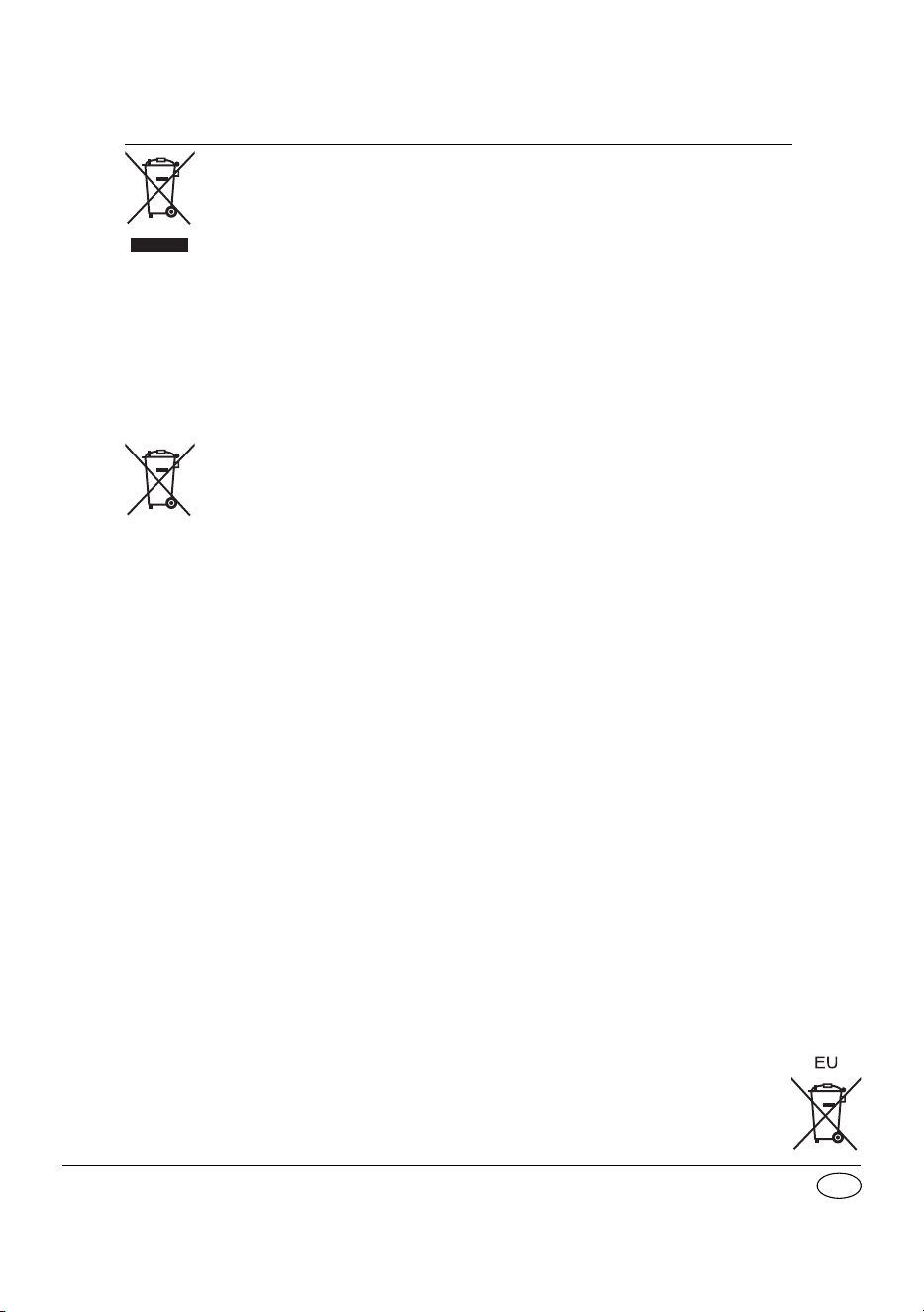
Disposal of Old Equipment and Batteries
Only for European Union and countries with recycling systems
These symbols on the products, packaging, and/or accompanying
documents mean that used electrical and electronic products and batteries
must not be mixed with general household waste.
For proper treatment, recovery and recycling of old products and used
batteries, please take them to applicable collection points in accordance
with your national legislation.
By disposing of them correctly, you will help to save valuable resources and
prevent any potential negative effects on human health and the
environment.
For more information about collection and recycling, please contact your
local municipality.
Penalties may be applicable for incorrect disposal of this waste, in
accordance with national legislation.
Note for the battery symbol (bottom symbol):
This symbol might be used in combination with a chemical symbol. In this
case it complies with the requirement set by the Directive for the chemical
involved.
PM700EB.EG_TQBM0877_EN.fm Page 36 Wednesday, March 15, 2023 2:48 PM