TD2 Series
By Paul Aylett at 12:08 pm, Apr 13, 2016
Content
2
3
4
5 - 7
8 - 11
12 - 13
14
15
16 - 23
24
25
26
18
Introduction
Parts
Features
General Warnings and Safety
Using your TENS Pain Reliever
Troubleshooting
Positions for use
Specification
Compatibility EMC
Maintenance and Cautions
Explanation of Symbols on Unit
Maintenance and Cautions
Explanation of Symbols on Unit

2
Introduction
Thank you for buying your Kinetik TENS Pain Reliever, a safe drug free way to relieve every day
and long term pain. Multiple stimulation and intensity settings allow you to customise your
treatment for different parts of the body and levels of pain.
Why consider digital pain relief?
Pain is a warning signal; we need these signals to tell us that something may be wrong with our
body. Without it, we may not know that parts of our body might be damaged, thereby damaging
them further. However, once we have identified damage, pain serves little purpose. In the case
of chronic, regular pain it can significantly interfere with daily activities and the quality of life.
TENS transmits harmless electrical signals through 4 pads direct to the site of pain, blocking the
pain signals and stimulating endorphins – the body’s own natural painkillers.
• Simple – easy to use, lightweight and portable.
• Customisable – multiple stimulation and intensity settings.
• Effective – recommend by doctors and physiotherapists.
• Safe – drug free relief which can be used alongside medication if required.
Before you start, it is important that you read this instruction booklet carefully.
Please keep it in a safe place in case you need to refer back to it at a later date.
If you have any concerns about your pain symptoms, we recommend you contact your doctor.
3
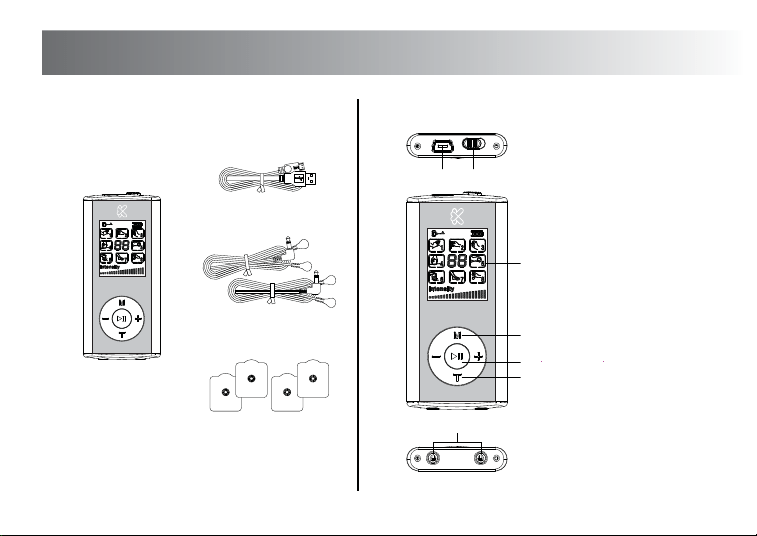
Parts
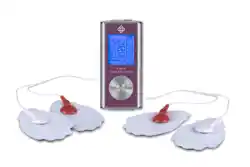
About TENS Pain Reliever MAIN UNIT PARTS
Main Unit
USB Cable
1
1. USB port
2. ON - OFF switch
3. Display
4. Mode selector
5. Play/Pause button
6. Channel selection
7. Channel outlets
3
7
Output Cable x 2
Gel Pad x 4
PAIN RELIEVER
digital
PAIN RELIEVER
digital
2
4
5
6

Features
4
• 2 output channels
• Ea
ch outpu
t channel can be adjusted independently
•
8 mode settings to provide different pain relief and massage effects
• 20 output intensities to suit different parts of the body and pain
• Touch control buttons and backlit LCD display making the unit user friendly
• 4 gel pads
• 10-60 minutes therapy time.
• A safe and effective method of relieving pain
• Simple to use
• Can be used alongside drug therapy
• Lightweight and portable
• Can also be used as a massager to help you relax
What conditions can TENS help relieve?
Please ask your local pharmacist for advice about any specific condition.
TENS provides pain relief for a number of different pain conditions, including:
• Back Pain
• Sciatica
• Sports strains and sprains
• Almost all muscle related injuries
Use the TENS Pain Reliever for at least 15 minutes a day, however, you may need to wear it
for longer to initially gain pain relief. If you wear the unit for longer periods then check your
skin where the gel pads have been placed to ensure your skin does not become sore.

General Warnings and Safety
5
Before you start:
Please carefully read and understand the following warnings and cautions to ensure the safe and correct
use of this device and to prevent injury.
• Make sure the device is fully charged.
• Connect the cable to the gel pads and then connect to the unit (see page 8 for more details).
• Attach the gel pads around the area of pain. Please see section ‘Positions for use' for details of
where to place the pads (page 14).
• Do not use the gel pads if they are scratched or damaged in any way.
The TENS Pain Reliever is a medical device that has been subject to stringent testing. The
use of this device must be supervised by a responsible adult.
It is safe to use for most people, with the following exceptions:
• Children under 16 years of age.
• People with pacemakers, pulse regulators or any other implanted medical device.
• People with heart rhythm problems.
• People with inflammation, acute diseases, or infectious skin wounds.
• People with Leprosy.
• People with chronic alcoholism.
NOT SUITABLE FOR USE DURING PREGNANCY OR LABOUR. Please ask your Local pharmacist about other
drug free pain relief during pregnancy.
Patients must consult their doctor before using this device if receiving any physical treatment or suffering from:
º
Acute diseases
º
Heart diseases or heart rhythm problems
º
A fever
º
Abnormal blood pressure
º
Skin conditions including broken or damaged skin and people with loss of feeling in areas of the body
º
Cancer
º
Diabetes or epilepsy

6
General Warnings and Safety
• Head
• Throat
• Heart
• Eyes
• Sexual organs
• Bones • Scarred areas following surgery for at least 10 months after the operation
• Wet body • Stomach muscles within 90 minutes of eating
Please refer to Page 14 for ‘Positions for use'
• Fac e
• Back of neck
• Chest area
• Oral cavity
• Spine
For safe use of the product, please note the following safety instructions:
• Keep out of reach of Children.
• Make sure the device is turned off before moving the gel pads to different body parts.
• Avoid using the device in the vicinity of flammable or anaesthetic gases.
• Do not insert the gel pad cable into any other socket other than the socket of the device as instructed, as
this may lead to an electric shock.
• Do not disassemble, repair or modify the device in any way as this may lead to malfunctioning or an incident.
• An attempt repair by unauthorised persons invalidates the warranty.
Do not use this device under the following circumstances:
• With an electrocardiograph meter (ECG) or any other medical apparatus.
• With any creams or ointments.
• Whilst in the bathroom.
• In areas of high humidity, as this may cause an uncomfortable intense stimulation.
• Whilst Driving or operating machinery.
• Sleeping.
• Stop using this device at once if you feel pain, discomfort, dizziness or nausea and consult your physician.
Gel Pad not suitable for use on:

7
General Warnings and Safety
(1) to consult with your physician before using this device. The simulation with the device may:
i. cause lethal rhythm disturbances to the heart in susceptible individuals, and,
ii. disrupt the healing process after a recent surgical procedure;
(2) that the device is not effective for pain of central origin, including headache;
(3) that the device is not a substitute for pain medications and other pain management therapies;
(4) that the device has no curative value;
(5) that the device is a symptomatic treatment and, as such, suppresses the sensation of pain that would
otherwise serve as a protective mechanism;
(6) that the long-term effects of electrical stimulation are unknown;
(7) that the user may experience skin irritation, burns or hypersensitivity due to the electrical stimulation or
electrical conductive medium;
(8) if the user has suspected or diagnosed epilepsy, the user should follow precautions recommended by his
or her physician;
(9) to use caution if the user has a tendency to bleed internally, such as following an injury or fracture;
(10) use caution if stimulation is applied over the menstruating uterus;
(11) use caution if stimulation is applied over areas of skin that lack normal sensation;
(12) stop using the device if the device does not provide pain relief; and,
(13) use this device only with the leads, electrodes, and accessories that the manufacturer recommends.
Medical Electrical Equipment needs special precautions regarding electromagnetic compatibility (EMC) and
needs to be installed and put into service according to the EMC information provided.
Be aware of the following.
8
Using your TENS Pain Reliever
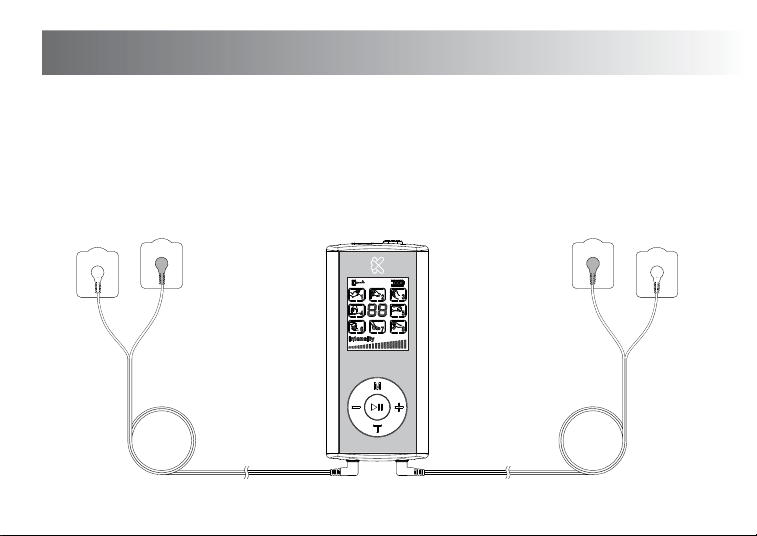
PAIN RELIEVER
digital
CHANNEL A CHANNEL B
Charging
Ensure the device is fully charged before use. Charging takes approximately 1.5 hours and is indicated by the
flashing battery icon on the display. Once complete, remove the charging and store safely.
IMPORTANT NOTE: Never use the device for while it is being charged.

9
Using your TENS Pain Reliever
1. Make sure the unit is switched off.
2. Attach the gel pads to the output cables as above and insert into the respective sockets, channel A and
channel B.
3. Attach the gel pads to the area of pain. Please revert to the ‘Positions for use’ (Gel Pad Positioning)
section on page 14.
4. Turn on the device using the ON/OFF switch and the letter "A" will flash on the display, indicating that
the left output (channel A) can be adjusted. Press the "+" and "-" buttons to increase and decrease the
intensity of channel A.
5. To adjust channel B, press the "A=B" button once. You will see the letter "B" start to flash indicating that
channel B can now be adjusted. Press the "-" or "+" buttons to increase or decrease the intensity of
channel B.
6. Press the "M" button to cycle through the different modes. Each mode has a different waveform, select
the waveform that best diminishes the pain being treated.
7. At any time you may press the central " II" to pause the device (press again to resume).
8. Press and hold the central " II" button to increase the treatment time by 10 minutes. Repeat to select
treatment periods of from 10 to 60 min.
9. When done, switch off the device and put away the connecting wires and electrode pads.
Note: Always start from the lowest intensity, and then gradually adjust to a comfortable level.

10
Using your TENS Pain Reliever
Gel Pads
Each gel pad is pre-fixed with a connector stud and protected by a transparent film. Connect the gel pads
to the output cables and remove the transparent film before placing on the skin. Press firmly to ensure
good adhesion.
IMPORTANT NOTE: When removing the gel pads from the skin, peel off using the pad itself.
DO NOT pull the cable to remove.
Please note:
When the gel pads are not in use, place them back on the protective transparent films to keep them
clean and lint free.
If the gel pads are dirty, wipe with a damp, lint free cloth and allow to dry or replace with new ones.
Do not clean the pads or adhesive gel with any chemicals.
Replacement pads are available from your retailer or directly from www.KinetikWellbeing.com

11
Using your TENS Pain Reliever
Recommended practices:
1. Duration of 20 minute for each body area.
2. Frequency of 1-2 times per day per area.
3. Be sure the treatment site is clean of dirt and body lotion.
4. The lifespan of the electrode pads will vary depending on the use frequency and care taken.
Keeping electrode pads clean and stored on the gel pad holder after use will extend their lifespan.
Replace the electrode pads when they lose their adhesiveness.
12
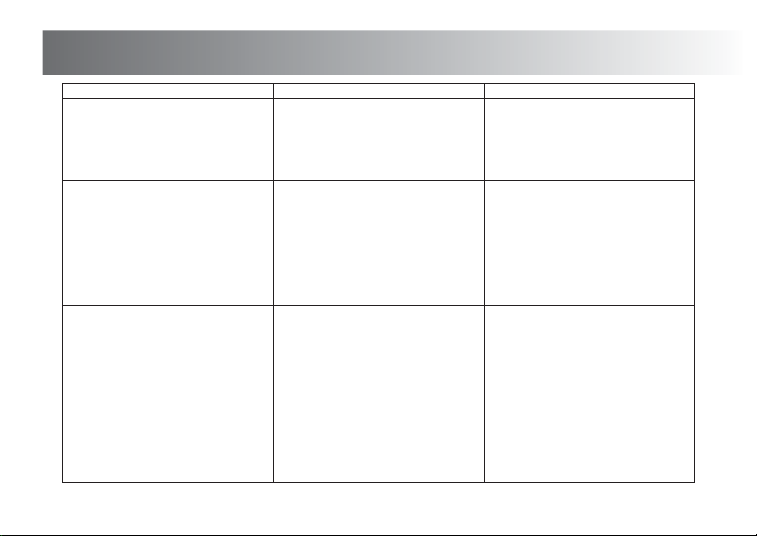
Troubleshooting
Problem Check points Possible solution
The unit does not switch on
No output stimulus/sensation
Are both gel pads stuck on the skin
properly?
Re-attach the gel pads correctly.
Are the gel pads overlapped? Separate and stick them to the skin
again (at lease 4-6 inches apart).
Are the gel pads dirty? Clean the gel pads with a damp, lint
free cloth.
Is intensity too weak? Use a higher intensity level.
Are both gel pads positioned properly? Change the position of the gel pads.
Is the device fully charged? Charge the device using the supplied
USB cable.
Is the cable properly connected? Firmly connect the cable.
Have you removed the transparent
protective film from the gel pads?
Remove the protective film.
Output stimulus/sensation is weak
The skin becomes red and/or you feel
a stabbing pain
Is the intensity too high? Choose a lower intensity or different
program.
Are you using the pads on the same
site every time?
Re-position the pads. If at any time you
feel pain or discomfort stop use
immediately.
Are the gel pads too dry? Please gently wipe with a damp, lint
free cloth and then re-apply.
Are both gel pads stuck onto the skin
properly?
Ensure the pads are stuck securely
on the skin.
Are the gel pads dirty? Please clean the gel pad using a damp,
lint free cloth.
Is the surface of the gel pads scratched? Please replace them with new gel pads.
13
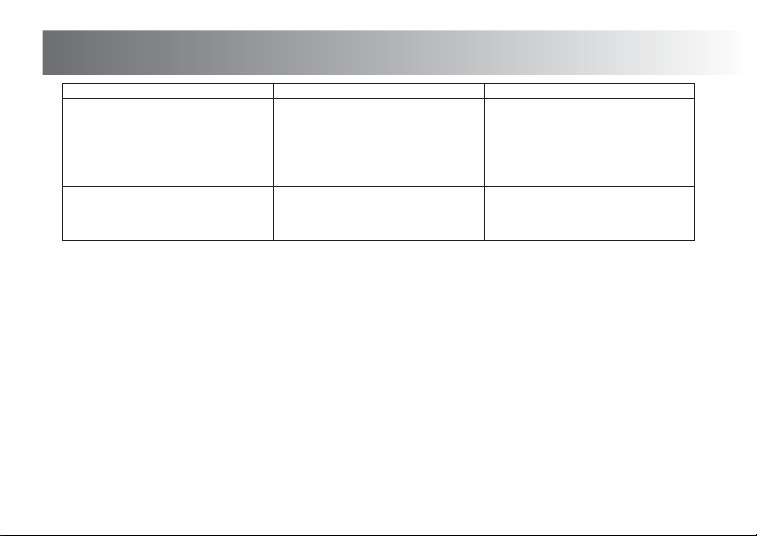
Troubleshooting
Problem Check points Possible solution
If problem persists,
contact your physician.
Stop the treatment.Skin turns red
Output current stops during therapy
Does the battery need recharging? Recharge device using the supplied
USB cable.
Are the cables disconnected? Turn off the power and connect the cables.
Have the gel pads come off the skin? Turn off the power and stick the gel
pads firmly to the skin.
14
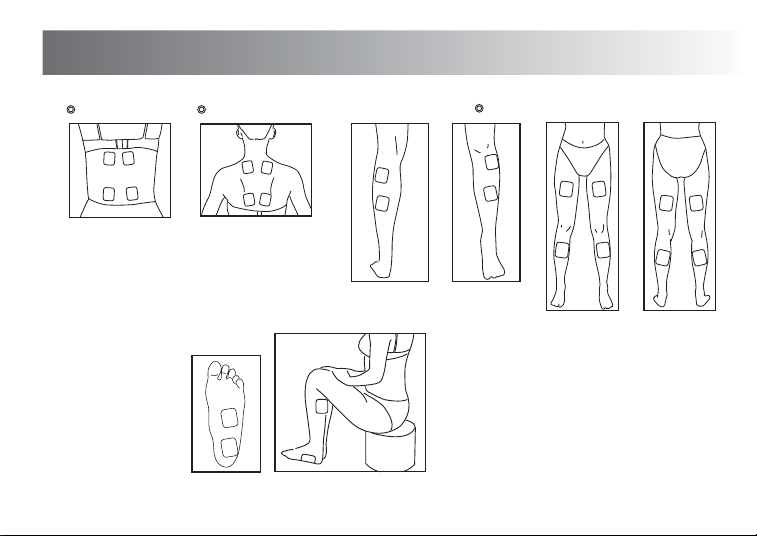
Positions for use
Legs and Feet
For other areas of
pain, place the gel
pads around the
area of pain 4 - 6
inches apart
(approximately).
Lower back Upper back
NOTE: DO NOT PLACE ON SPINE

15
Specification
• Power Source: DC: 3.7V
• Frequency: 110Hz
• Output current: 84mA@500Ω
• Output voltage: 42V@500Ω
• Pulse width: 100µS
• Timer: 10-60 minutes
• Strength level adjustment: 20 levels
• Charger: 100-220V, 50/60Hz, and 10mA (input); DC5V, 300mA (output)
• Storage conditions: -20ºC ~ 55ºC; < 95%RH
• Size: 40 (w) mm x 90 (h) mm x 10 (d) mm (approx.)
• Weight: 38g
16
1) This product needs special precautions regarding EMC and needs to be installed and put into service
according to the EMC information provided, and this unit can be affected by portable and mobile
RF communications equipment.
2) Do not use a mobile phone or other devices that emit electromagnetic fields, near the unit.
This may result in incorrect operation of the unit.
3) Caution: This unit has been thoroughly tested and inspected to assure proper performance
and operation!
4) Caution: this machine should not be used adjacent to or stacked with other equipment and that
if adjacent or stacked use is necessary, this machine should be observed to verify normal operation
in the configuration in which it will be used.
Compatibility EMC
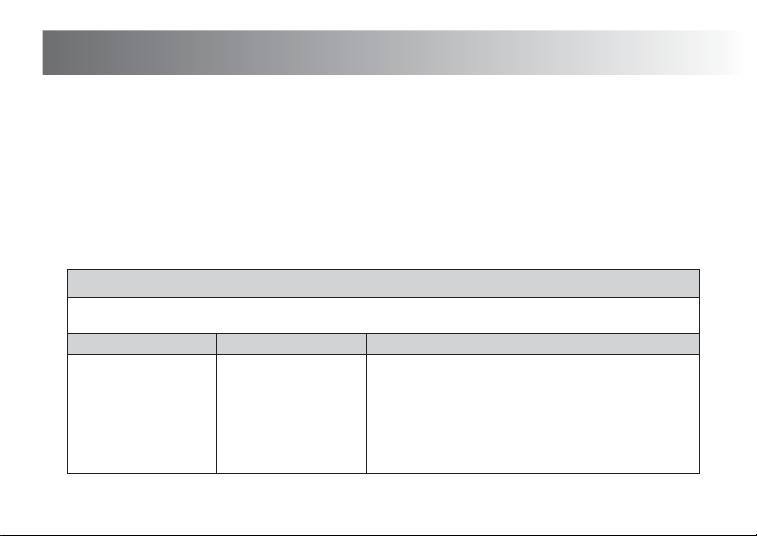
The TD2 is intended for use in the electromagnetic environment specified below. The customer of
the user of the TD2 should assure that it is used in such an environment.
RF emissions
CISPR 11
Group 1
The TD2 use RF energy only for its internal function.
Therefore, its RF emissions are very low and are not likely
to cause any interference in nearby electronic equipment.
Emission test Compliance Electromagnetic environment – guidance
Guidance and manufacture’s declaration – electromagnetic emission
17
Compatibility EMC
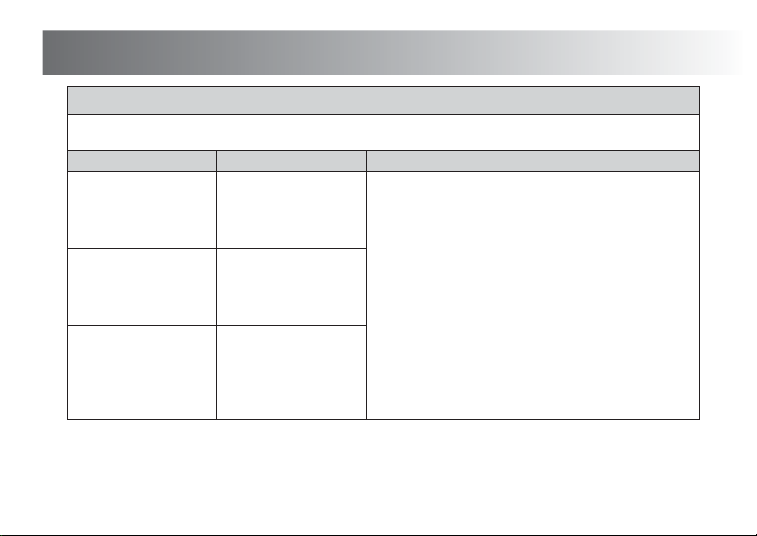
The TD2 is intended for use in the electromagnetic environment specified below. The customer of
the user of the TD2 should assure that it is used in such an environment.
RF emission
CISPR 11
Class B
The TD2 is suitable for use in all establishments,
including domestic establishments and those directly
connected to the public low-voltage power supply network
that supplies buildings used for domestic purposes.
Emission test Compliance Electromagnetic environment – guidance
Guidance and manufacture’s declaration – electromagnetic emission
Harmonic emissions
IEC 61000-3-2
Class A
Voltage fluctuations /
flicker emissions
IEC 61000-3-3
Complies
18
Compatibility EMC
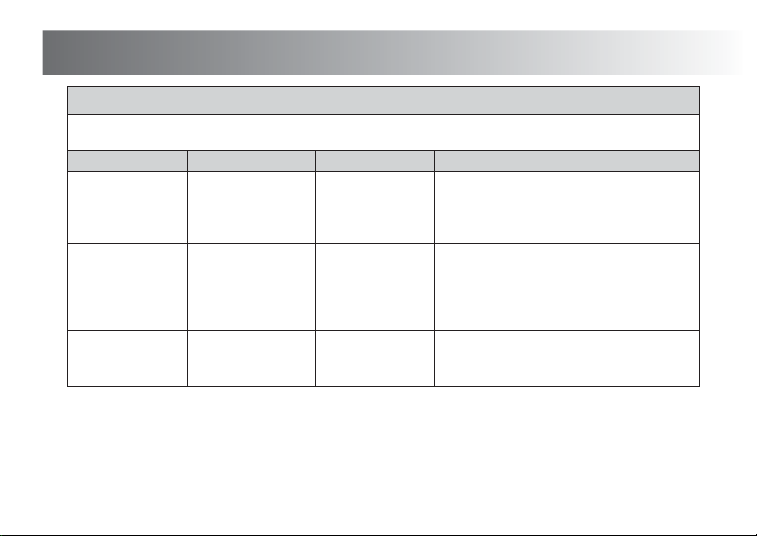
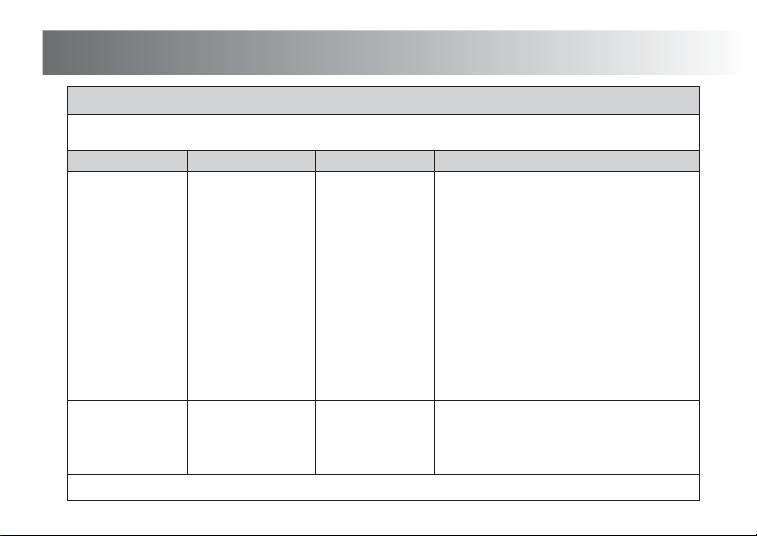
The TD2 is intended for use in the electromagnetic environment specified below. The customer or
the user of the TD2 should assure that it is used in such an environment.
Electrostatic
discharge (ESD)
IEC 61000-4-2
±6 kV contact
±8 kV air
±6 kV contact
±8 kV air
Floors should be wood, concrete or ceramic tile.
If floor are covered with synthetic material,
the relative humidity should be at least 30%.
±2 kV for
power supply lines
±1 kV for
input /output lines
±2kV for
power supply lines
Mains power quality should be that of a typical
commercial or hospital environment.
± 1 kV line(s) to line(s)
± 2 kV line(s) to earth
±1 kV differential
mode
Mains power quality should be that of a typical
commercial or hospital environment.
Immunity test IEC 60601 test level Compliance level Electromagnetic environment - guidance
Guidance and manufacture’s declaration – electromagnetic immunity
Electrical fast
transient /burst
IEC 61000-4-4
Surge
IEC 61000-4-5
19
Compatibility EMC
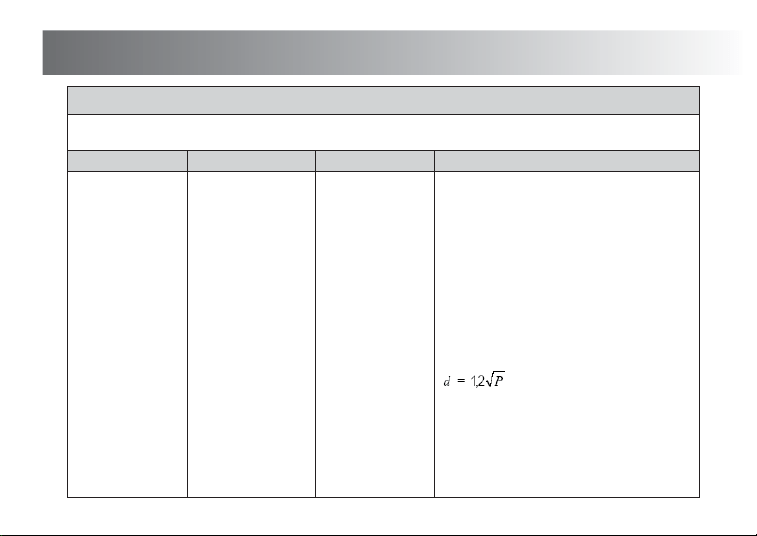
The TD2 is intended for use in the electromagnetic environment specified below. The customer or
the user of the TD2 should assure that it is used in such an environment.
<5% UT
(>95% dip in U
T)
for 0.5 cycle
40% U
T
(60% dip in UT)
for 5 cycles
70% UT
(30% dip in UT)
for 25 cycles
<5% UT
(>95% dip in U
T)
for 5 sec
<5% U
T
(>95% dip in UT)
for 0.5 cycle
40% U
T
(60% dip in UT)
for 5 cycles
70% UT
(30% dip in UT)
for 25 cycles
<5% UT
(>95% dip in U
T)
for 5 sec
Mains power quality should be that of a typical
commercial or hospital environment. If the user
of the TD2 requires continued operation
during power mains interruptions, it is
recommended that the TD2 be powered from
an uninterruptible power supply or a battery.
3 A/m 3 A/m
Power frequency magnetic fields should be
at levels characteristic of a typical location in
a typical commercial or hospital environment.
Immunity test IEC 60601 test level Compliance level Electromagnetic environment - guidance
Guidance and manufacture’s declaration – electromagnetic immunity
Power frequency
(50Hz /60Hz)
magnetic field
IEC 61000-4-8
NOTE U
T is the a.c. mains voltage prior to application of the test level.
Voltage dips, short
interruptions and
voltage variations
on power supply
input lines
IEC 61000-4-11
20
Compatibility EMC
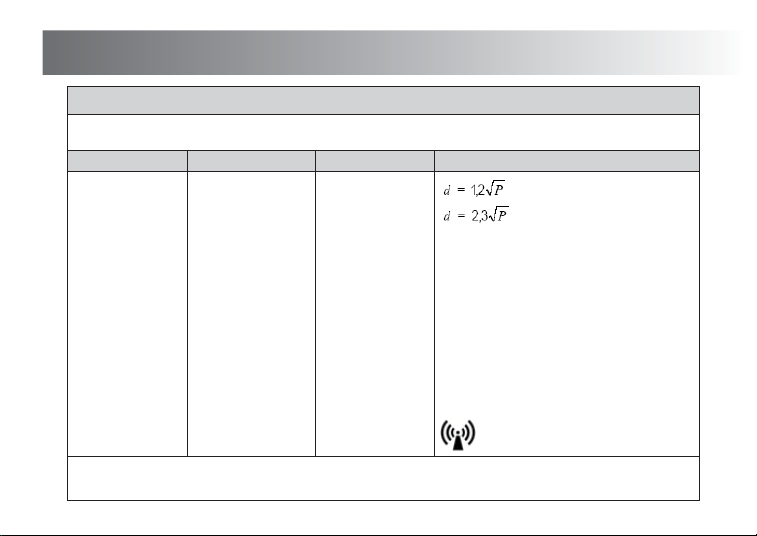
The TD2 is intended for use in the electromagnetic environment specified below. The customer or
the user of the TD2 should assure that it is used in such an environment.
Conducted RF
IEC 61000-4-6
3 Vrms
150 kHz to 80 MHz
3 Vrms
Portable and mobile RF communications
equipment should be used no closer to any
part of the TD2, including cables, than the
recommended separation distance calculated
from the equation applicable to the frequency
of the transmitter.
Recommended separation distance
Immunity test IEC 60601 test level Compliance level Electromagnetic environment - guidance
Guidance and manufacture’s declaration – electromagnetic immunity
21
Compatibility EMC
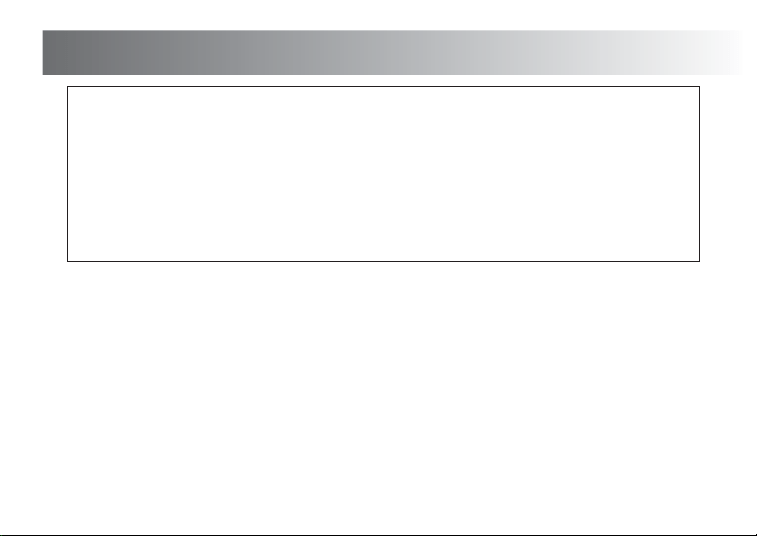
The TD2 is intended for use in the electromagnetic environment specified below. The customer or
the user of the TD2 should assure that it is used in such an environment.
NOTE 1 At 80 MHz and 800 MHz, the higher frequency range applies.
NOTE 2 These guidelines may not apply in all situations. Electromagnetic propagation is affected by absorption and reflection from
structures, objects and people.
Radiated RF
IEC 61000-4-3
3 V/m
80 MHz to 2.5 GHz
3 V/m
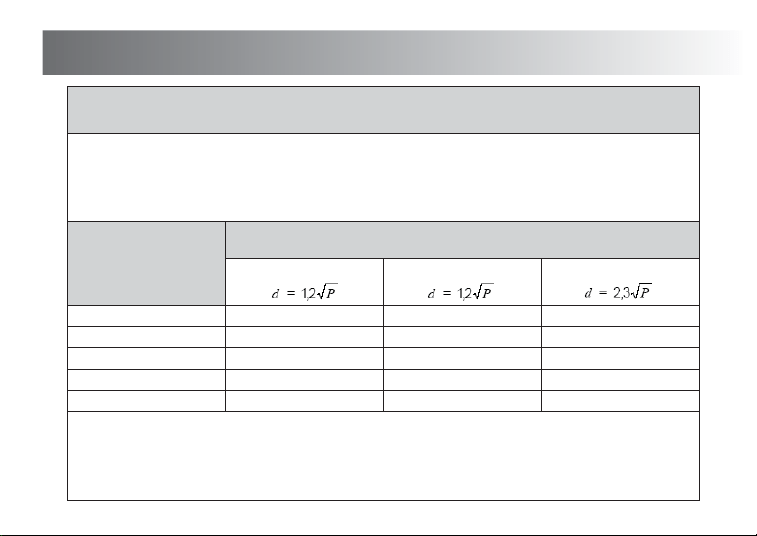
Where P is the maximum output power rating
of the transmitter in watts (W) according to the
transmitter manufacturer and d is the
recommended separation distance in metres (m).
Field strengths from fixed RF transmitters, as
determined by an electromagnetic site survey,
a
should be less than the compliance level in
each frequency range.
b
Interference may occur in the vicinity of
equipment marked with the following symbol:
Immunity test IEC 60601 test level Compliance level Electromagnetic environment - guidance
Guidance and manufacture’s declaration – electromagnetic immunity
80 MHz to 800 MHz
800 MHz to 2,5 GHz
22
Compatibility EMC
a Field strengths from fixed transmitters, such as base stations for radio (cellular/cordless) telephones and land mobile radios,
amateur radio, AM and FM radio broadcast and TV broadcast cannot be predicted theoretically with accuracy. To assess
the electromagnetic environment due to fixed RF transmitters, an electromagnetic site survey should be considered.
If the measured field strength in the location in which the TD2 is used exceeds the applicable RF compliance level above,
the TD2 should be observed to verify normal operation. If abnormal performance is observed,
additional measures may be necessary, such as re-orienting or relocating the TD2
b Over the frequency range 150 kHz to 80 MHz, field strengths should be less than 3 V/m.
23
Compatibility EMC
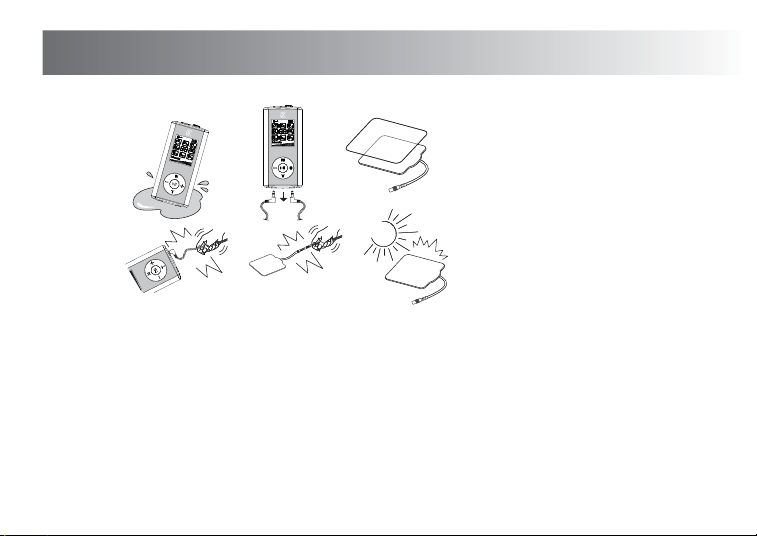
The TD2 is intended for use in an electromagnetic environment in which radiated RF disturbances
are controlled. The customer or the user of the TD2 can help prevent electromagnetic
interference by maintaining a minimum distance between portable and mobile RF communications
equipment (transmitters) and the TD2 as recommended below, according to the maximum
output power of the communications equipment.
NOTE 1 At 80 MHz and 800 MHz, the separation distance for the higher frequency range applies.
NOTE 2 These guidelines may not apply in all situations. Electromagnetic propagation is affected by absorption and reflection from
structures, objects and people.
For transmitters rated at a maximum output power not listed above, the recommended separation distance d in metres (m) can be estimated
using the equation applicable to the frequency of the transmitter, where P is the maximum output power rating of the transmitter in watts (W)
according to the transmitter manufacturer.
0.01
0.1
1
10
100
0.12
0.38
1.2
3.8
12
0.12
0.38
1.2
3.8
12
0.23
0.73
2.3
7.3
23
150 KHz to 80 MHz
Separation distance according to frequency of transmitter
(m)Rated maximum output
power of transmitter
(W)
Recommended separation distances between
portable and mobile RF communications equipment and the TD2.
80 MHz to 800 MHz 800 MHz to 2.5 GHz
24
Maintenance and Cautions
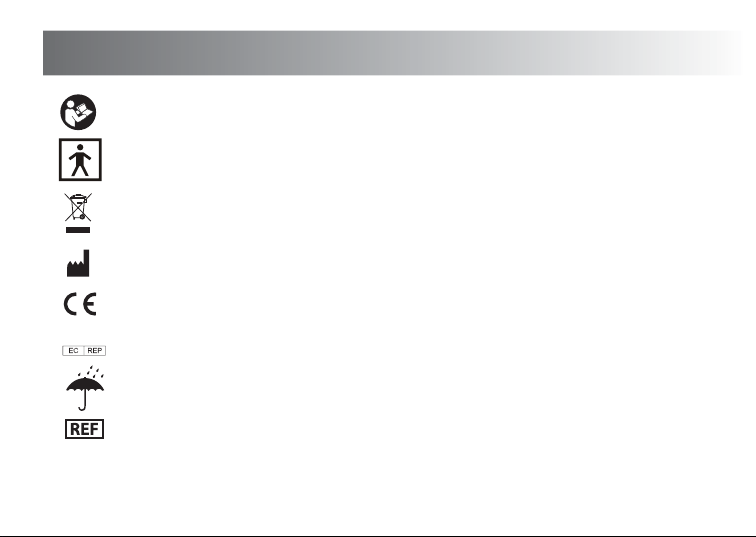
CAUTIONS REGARDING SAFETY
• Do not immerse device in water or any liquid. Do not drop device or throw it from a height.
• After using the device, please remove output plug from output socket and re-attach the pads
to the protective transparent film.
• Always use the protective film when pads are not in use.
• Do not twist or pull the output cables.
• Do not use any chemical to clean the main unit or gel pads. In case you need to clean them,
please wipe with a damp, lint free cloth.
• Do not let the pads dry out or expose to sunlight.
• Keep the pads clean.
PAIN RELIEVER
digital
PA
IN
R
E
L
I
E
V
E
R
d
i
g
i
tal
P
A
IN
RE
L
IEVE
R
di
gi
t
al
Explanation of Symbols on Unit
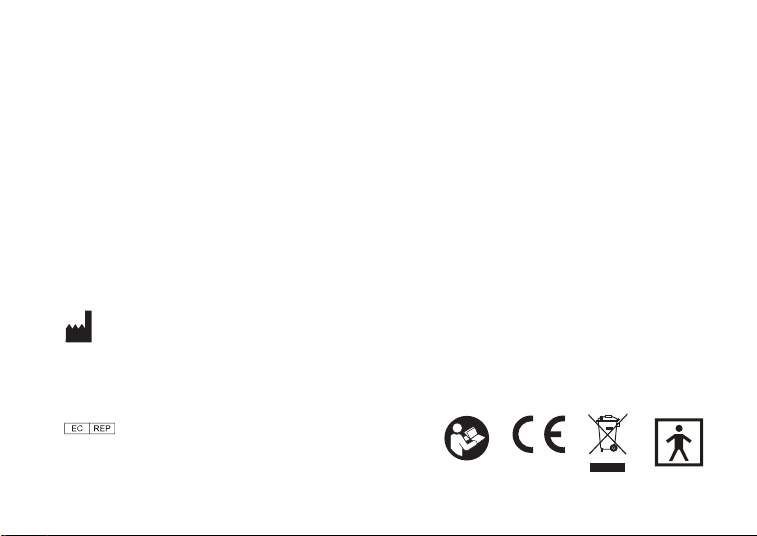
This symbol indicates that this product is a Type BF device.
Symbol for "Environment Protection" – Waste electrical products should not be disposed
of with household waste. Please recycle where facilities exist. Check with your local
Authority or retailer for recycling advice.
Symbol for “Manufacturer”.
This product complies with MDD93/42/EEC requirements.
Symbol for “European Representative”.
0197
25
Read the instructions (actual symbol colours are white on a blue background).
Keep Dry.
Model Reference.
Harvard Medical Devices Ltd.
Unit 1301, 13th Floor, Railway Plaza,
39 Chatham Road South, Tsimshatsui,
Kowloon, Hong Kong.
Kinetik Medical Devices Ltd.
Made in PRC
Kinetik TD2 UK IB 20160413
Medicity Nottingham, D6 Building West,
Thane Road, Nottingham. NG90 6BH
0197
Guarantee
This product is guaranteed for a period of one year from the date of purchase against mechanical and
electrical manufacturing defects. There are no serviceable parts inside this device. Any attempted repair
by unauthorised persons invalidates the warranty. In the unlikely event that you experience a problem,
please return it to the retailer where you made the purchase, along with your receipt. This does not affect
your statutory rights.