AD-2126_UK_IB_20231122_v9
User Manual
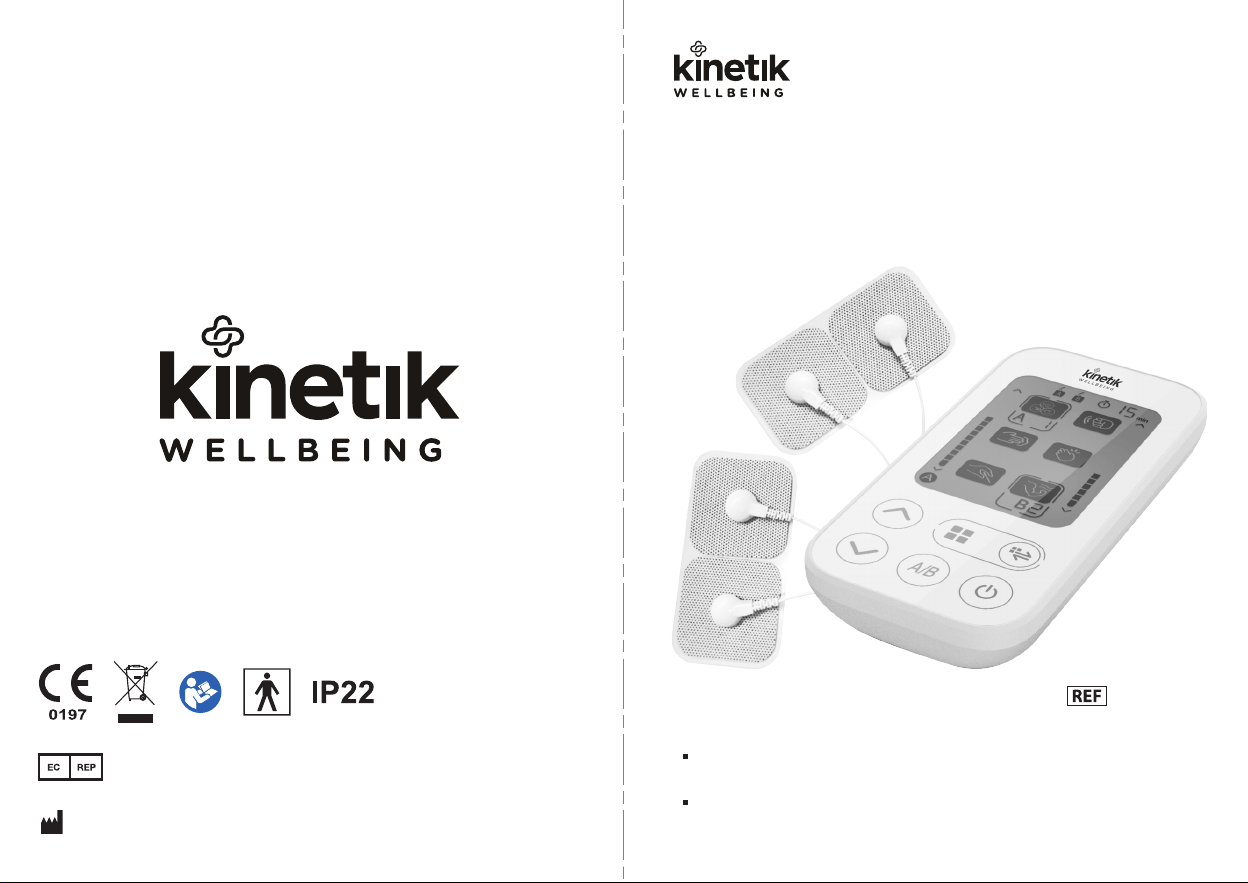
Dual-Channel TENS Pain Reliever
Thank you very much for selecting the Kinetik Wellbeing Dual-Channel
TENS Pain Reliever.
Please read the user manual carefully and thoroughly so as to ensure
the safe usage of this product, keep the manual safe for future reference
in case you have problems.
AD-2126
iHealthLabs Europe SAS
36 Rue de Ponthieu, 75008,
Paris, France
ANDON HEALTH CO., LTD.
No. 3 Jin Ping Street, Ya An Road,
Nankai District, Tianjin 300190, China.

Support.................................................................................................................................... 3
Intended Use ........................................................................................................................... 4
Contraindication ...................................................................................................................... 4
Operation Principle.................................................................................................................. 4
Contents and Display Indicators.............................................................................................. 5
Package Contents ................................................................................................................... 6
Specifications .......................................................................................................................... 6
Notice ...................................................................................................................................... 7
Setup and Operating Procedures.......................................................................................... 10
• Battery Loading............................................................................................................... 10
• Prepare the Adhesive Gel Pads...................................................................................... 11
• Treatment Time Adjustment............................................................................................ 12
• Applying the Adhesive Gel Pads..................................................................................... 12
• Using Your TENS Machine ............................................................................................. 16
• Troubleshooting .............................................................................................................. 20
Maintenance.......................................................................................................................... 22
Explanation of Symbols on Unit ............................................................................................ 23
Warranty Information............................................................................................................. 24
Electromagnetic Compatibility Information ............................................................................ 25
TABLE OF CONTENTS
32
CONTENTS SUPPORT
Our manual should provide you with all the information you need
to set up and use this product.
If you have a question, have a look at our Troubleshooting page!
For further assistance, why not contact our Customer Care team
directly? We’re here to help!
Our Customer Care team are available from 9am-5pm, Monday to
Friday (excluding bank holidays).
We promise to respond to all queries and will ensure to resolve any
issue you may be having.
You can reach us by…
Live Chat:
Simply visit www.kinetikwellbeing.com and send us a message.
Email:
Post:
Kinetik Medical Devices Limited
Unit 11, Perrywood Business Park, Honeycrock Lane,
Salfords, Redhill, RH1 5JQ
INTENDED USE
4 5
CONTENTS AND DISPLAY INDICATORS
The TENS device is intended to provide temporary relief of muscle soreness
caused by exercise, normal household or work activities, as well as to alleviate
chronic, intractable pain and pain associated with arthritis. It is important to apply
the electrode pads only on intact skin and avoid placing them directly on the head,
upper neck, chest, upper back near the heart, spine, and private areas. The TENS
device is suitable for adult users, including lay persons and professionals.
CONTRAINDICATION
Patients with implantable medical devices such as pacemakers, life-sustaining
medical devices such as artificial heart and lung, and medical devices such as
electrocardiograph.
OPERATION PRINCIPLE
TENS lessens pain by sending electrical impulses (Output pulse frequency:
0-100Hz; Output voltage: max. 120 Vpp (500 ohm); Output pulse width: 20~100μs)
through electronic core and self-adhesive pads placed on the skin. The electrical
signal then passes to the nerves under the skin, these nerves take messages to
the brain about what they feel, such as thump, vibrate, press and knead. TENS
signals can interfere the message of pain on these nerves with a tingling sensation
which changes the feeling of the pain. Furthermore, low frequency vibrations can
promote circulation of blood and relieve pain.
Note: The pictures in the manual are for reference only.
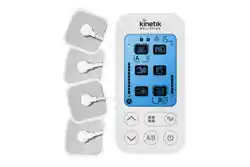
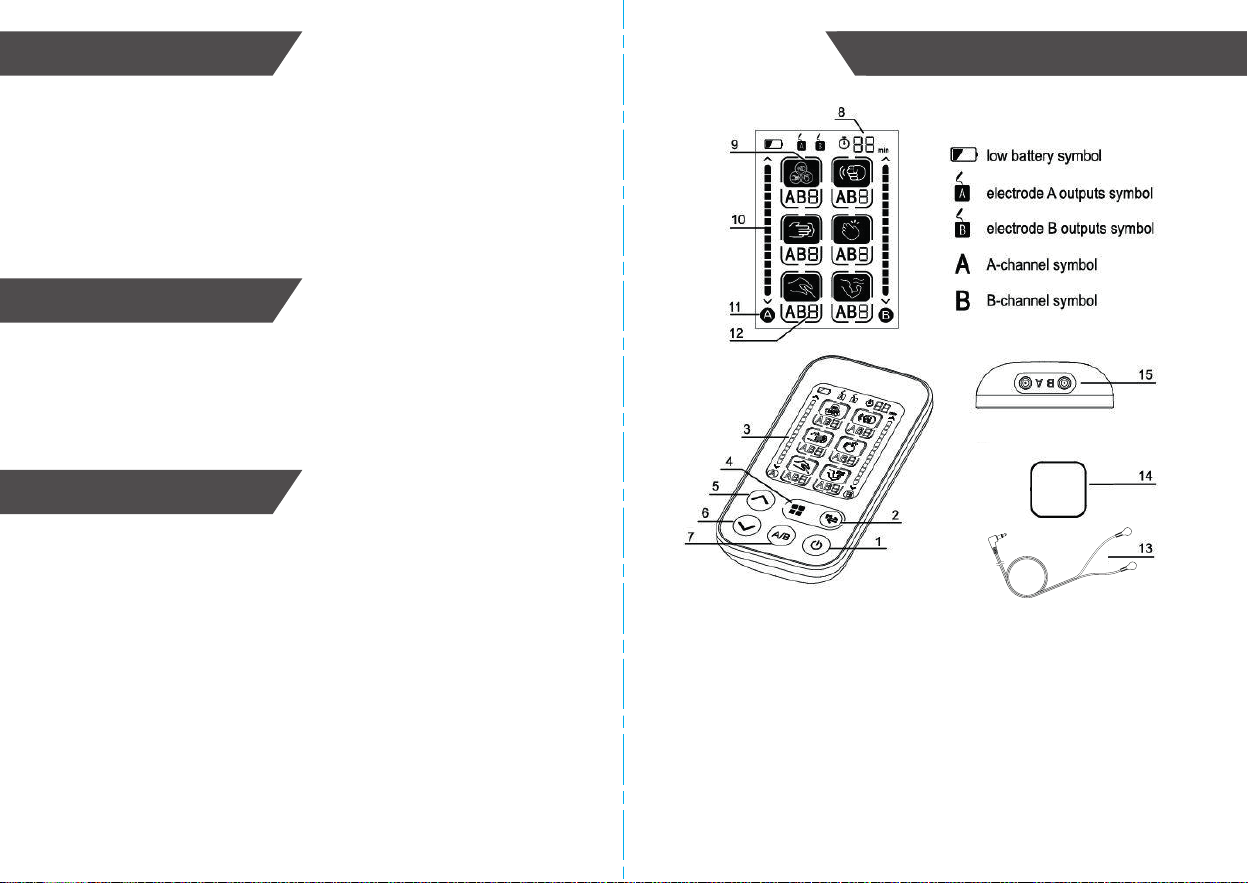
1. ON/OFF button
2. Switch in-mode setting button
3. LCD screen
4. Switch mode button
5. Increase intensity
6. Reduce intensity
7. Channel selection button
8. Remaining treatment time display
9. Treatment mode
10. Intensity
11. Currently adjustable channel
12. In-mode treatment
13. Output cables
14. Electrode gel pads
15. Output channel port
SETUP AND OPERATING PROCEDURES

26. Information regarding potential electromagnetic or other interference between
the electrical muscle stimulator and other devices together with advice regarding
avoidance of such interference please see part ELECTROMAGNETIC
COMPATIBILITY INFORMATION. It is suggested that the unit be kept at least
30 cm away from other wireless devices, such as WLAN unit, microwave oven,
etc.It can’t be used near active HF SURGICAL EQUIPMENT and the RF
shielded room of an ME SYSTEM for magneticresonance imaging, where the
intensity of EM DISTURBANCES is high.
27. Attention that changes or modification not expressly approved by the party
responsible for compliance could void the user’s authority to operate the
equipment.
28. If you are allergic to the device’s material, please don’t use this device.
29. The patient is an intended operator.
30. For Hospitals and Clinics, in the presence of or when attached to the body,
electronic monitoring equipment (e.g. cardiac monitors, ECG alarms), which
may not operate properly when the electrical stimulation device is in use.
PACKAGE CONTENTS
6 7
NOTICE
1 TENS
1 Operation Guide
2 Output Cables
4 Electrode Gel Pads
1 Carry Case
1. Read all of the information in the operation guide and any other literature in the
box before operating the unit.
2. This TENS device is designed for adults and never should be used on infants
or young children. Consult your physician or other health care professionals
before use on older children.
3. The device must never be used near to the heart, such as chest or the upper
back. The stimulation electrodes must not be placed on any part of the front
ribcage (where the ribs and breastbone are located), especially not on the two
large pectorals. this can increase the risk of ventricular fibrillation and induce
cardiac arrest.
4. The device should not be applied across or through the head, directly on the
eyes, covering the mouth.on the front of the neck, (especially the carotid
sinus), or from electrodes placed on the chest and the upper back or crossing
over the heart.
5. The device must never be used on both feet simultaneously or on the spine.
And never be used on private parts or skin disease parts
6. The therapy time should not be more than 30 minutes in each session if the
electrode pads are on the same part of the body.
7. When you feel unwell or your skin is abnormal in using the TENS device,
please stop using it immediately and ask for and follow the advice form the
doctor.
8. Before you are to shift the electrode pad to the other position in using the
apparatus, you must turn off the power first.
9. Do not make any sharp kinks in the connecting leads or electrodes.
10. Observe caution when using the device in the immediate vicinity of cellular
phones that are switched on.
11. Please do not let children or persons who are incapable of expressing their
own will use the TENS device; Keep the product at a place inaccessible to
children to prevent children from swallowing the batteries or small parts.or it
may lead to incident or make one feel unwell.
SPECIFICATIONS
• Product name: Dual-Channel TENS Pain Reliever
• Model: AD-2126
• Classification: Internally powered, Type BF applied part, IP22, No AP or APG,
Continuous operation
• Machine size: Approx. 120.3mm x 60.3mm x 20.6mm (4 3/4″x 2 3/8″ x 13/16″)
• Weight: Approx. 73g (2 9/16 oz.) (exclude batteries)
• Electrode Gel Pads: Approx. 50mm x 50mm (1 31/32″ x 1 31/32″), Applicable to
all treatment modalities. Electrode Pads model: EP505036N
• Output Cable: Approx. 1200mm (47 1/4″). Wire model: 23507-3.8-1200
• Output channel: 2 (A and B)
• Number of treatment program: 24 sub-mode in 6 main modes: Default, Thump,
Press, Slap, Acupuncture and Relax
• 15 intensities
• Output pulse frequency: 0-100Hz
• Output voltage: max. 120 Vpp (500 ohm)
• Output pulse width: 20~100μs
• Large LCD with blue backlight
• 15 minutes countdown time for treatment
• Batteries: 4 x 1.5V Size AAA
• Environmental temperature for operation: 5°C 〜40°C
• Environmental humidity for operation: ≤80%
• Environmental temperature for storage and transport: -20°C 〜55°C
• Environmental humidity for storage and transport: ≤90%
• Environmental pressure: 80kPa - 105kPa
• Device life: 3 years
• Battery life: Approx. 2 months with alkaline batteries and 15 min. usage per day
Note: These specifications are subject to change without notice.
12. Please do not use the TENS device in bathroom or other place in high
humidity . Otherwise one may receive fierce stimulation.
13. Please do not use it when driving , Otherwise it may lead to incident.
14. Please do not use it in sleep.
15. In the process of stimulating and therapy, please do not get the metal part of
leather belt, wristwatch or necklace touch the leaf electrode pads.
16. Please do not use it for other purpose than treatment.
17. The device might not meet its performance specifications or cause safety
hazard if stored or used outside the specified temperature and humidity ranges
in specifications.
18. User who with implanted electronic equipment, such as pacemakers and
intracardiac defibrillators has not got the doctor's advice must not use the
device. Pregnant women should not use the device during the first trimester,
and should always consult a doctor, midwife or physiotherapist prior to use.
19. Simultaneous connection of a PATIENT to a high frequency. surgical ME
equipment may result in burns at the site of the stimulator electrodes and
possible damage to the stimulator.
20. Operation in close proximity (e.g. 1 m) to a shortwave or microwave therapy
EQUIPMENT may produce instability in the STIMULATOR output.
21. Application of electrodes near the thorax may increase the risk of cardiac
fibrillation.
22. Please do not knock down, repair, and rebuild it privately. if you have any
problem,please contact the service center.
23. Please do not use the electrode pads and wire other than supplied by the
manufacturer, otherwise it may bring biocompatible hazard and might result in
uncomfortable feeling.
24. Please do not share the electrode pads with other infective person to avoid
cross-infection.
25. The output wave parameters are not be influence by load resistance, except
output voltage.

26. Information regarding potential electromagnetic or other interference between
the electrical muscle stimulator and other devices together with advice regarding
avoidance of such interference please see part ELECTROMAGNETIC
COMPATIBILITY INFORMATION. It is suggested that the unit be kept at least
30 cm away from other wireless devices, such as WLAN unit, microwave oven,
etc.It can’t be used near active HF SURGICAL EQUIPMENT and the RF
shielded room of an ME SYSTEM for magneticresonance imaging, where the
intensity of EM DISTURBANCES is high.
27. Attention that changes or modification not expressly approved by the party
responsible for compliance could void the user’s authority to operate the
equipment.
28. If you are allergic to the device’s material, please don’t use this device.
29. The patient is an intended operator.
30. For Hospitals and Clinics, in the presence of or when attached to the body,
electronic monitoring equipment (e.g. cardiac monitors, ECG alarms), which
may not operate properly when the electrical stimulation device is in use.
8
9
1. Read all of the information in the operation guide and any other literature in the
box before operating the unit.
2. This TENS device is designed for adults and never should be used on infants
or young children. Consult your physician or other health care professionals
before use on older children.
3. The device must never be used near to the heart, such as chest or the upper
back. The stimulation electrodes must not be placed on any part of the front
ribcage (where the ribs and breastbone are located), especially not on the two
large pectorals. this can increase the risk of ventricular fibrillation and induce
cardiac arrest.
4. The device should not be applied across or through the head, directly on the
eyes, covering the mouth.on the front of the neck, (especially the carotid
sinus), or from electrodes placed on the chest and the upper back or crossing
over the heart.
5. The device must never be used on both feet simultaneously or on the spine.
And never be used on private parts or skin disease parts
6. The therapy time should not be more than 30 minutes in each session if the
electrode pads are on the same part of the body.
7. When you feel unwell or your skin is abnormal in using the TENS device,
please stop using it immediately and ask for and follow the advice form the
doctor.
8. Before you are to shift the electrode pad to the other position in using the
apparatus, you must turn off the power first.
9. Do not make any sharp kinks in the connecting leads or electrodes.
10. Observe caution when using the device in the immediate vicinity of cellular
phones that are switched on.
11. Please do not let children or persons who are incapable of expressing their
own will use the TENS device; Keep the product at a place inaccessible to
children to prevent children from swallowing the batteries or small parts.or it
may lead to incident or make one feel unwell.
NOTICE NOTICE
12. Please do not use the TENS device in bathroom or other place in high
humidity . Otherwise one may receive fierce stimulation.
13. Please do not use it when driving , Otherwise it may lead to incident.
14. Please do not use it in sleep.
15. In the process of stimulating and therapy, please do not get the metal part of
leather belt, wristwatch or necklace touch the leaf electrode pads.
16. Please do not use it for other purpose than treatment.
17. The device might not meet its performance specifications or cause safety
hazard if stored or used outside the specified temperature and humidity ranges
in specifications.
18. User who with implanted electronic equipment, such as pacemakers and
intracardiac defibrillators has not got the doctor's advice must not use the
device. Pregnant women should not use the device during the first trimester,
and should always consult a doctor, midwife or physiotherapist prior to use.
19. Simultaneous connection of a PATIENT to a high frequency. surgical ME
equipment may result in burns at the site of the stimulator electrodes and
possible damage to the stimulator.
20. Operation in close proximity (e.g. 1 m) to a shortwave or microwave therapy
EQUIPMENT may produce instability in the STIMULATOR output.
21. Application of electrodes near the thorax may increase the risk of cardiac
fibrillation.
22. Please do not knock down, repair, and rebuild it privately. if you have any
problem,please contact the service center.
23. Please do not use the electrode pads and wire other than supplied by the
manufacturer, otherwise it may bring biocompatible hazard and might result in
uncomfortable feeling.
24. Please do not share the electrode pads with other infective person to avoid
cross-infection.
25. The output wave parameters are not be influence by load resistance, except
output voltage.
SETUP AND OPERATING PROCEDURES SETUP AND OPERATING PROCEDURES
10 11
Battery Loading
a. Open battery cover at the back of the monitor.
b. Load four “AAA” batteries. Make sure the batteries are inserted according to the
positive and negative marks ("+" and "-") printed in the battery compartment.
c. Close the battery cover.
When LCD shows battery symbol , replace all batteries with new ones.
Rechargeable batteries are not suitable for this TENS machine.
Remove the batteries if the TENS machine will not be used for a month or more to
avoid damage of battery leakage.
Avoid the battery fluid getting into or near your eyes. If it should get in your
eyes, immediately rinse with plenty of clean water and contact a healthcare
professional.
The negative terminal of the battery needs to be compressed into the battery
compartment properly after horizontal compression of the negative electrode.
The battery should be in contact with the spring.
Make sure the battery cover is intact and not damaged before installing the
battery.
The monitor, the batteries the electrode gel pad, and the output cable must be
disposed of according to local regulations at the end of their usage.
Prepare the Electrode Gel Pads
a. Connect the output cable to the electrode gel pads. Connect the output cable to
the output channel port on the TENS machine.
b. Each electrode gel pad is protected by a layer of transparent film. Remove the
layer of film before sticking the pads to the skin. Press the pads to ensure
adhesion.
Please use water to wash or use a wet cloth to gently wipe the electrodes gel
pads when cleaning them. Do not use anything else to clean as this may
scratch the surface of the electrode gel pad.
Wires must stay away from babies and children, to prevent the risk of
suffocation and death.
Note:
1. Clean the intended skin area before applying the electrode gel pads.
2. You should hold the plug when pulling it out. Please do not pull the wire.
3. Never stick two electrode gel pads to each other.Electrode gel pads have to fit
precisely inside the conductive surface.
4. If the pads are not stuck in the correct position, remove the pads and attach
them again.
5. Keep the electrode gel pads clean and do not expose to heat or direct sunlight
6. If the electrode gel pads do not attach or are dirty, wipe with a wet cloth or
replace with new ones. Do not clean the pad or adhesive gels with any
chemical. Please contact Kinetik Wellbeing to get replacement pads.
7. It is recommended to use the electrode gel pad less than 20 times. The specific
number of times that the pad will be suitable depends on the use and storage
conditions.
8. Place the electrodes on intact skin only. Do not place on cuts or damaged skin.
SETUP AND OPERATING PROCEDURES
1312
SETUP AND OPERATING PROCEDURES SETUP AND OPERATING PROCEDURESSETUP AND OPERATING PROCEDURES
Treatment Time Adjustment
1. After turning device on, press and hold the button to enter the treatment
time setting when the device is on.
2. When treatment time flickers on the LCD (the default value is 15 minutes),
press or button to adjust the treatment time to a max of 30 minutes.
Press the button to finish the treatment time setting.
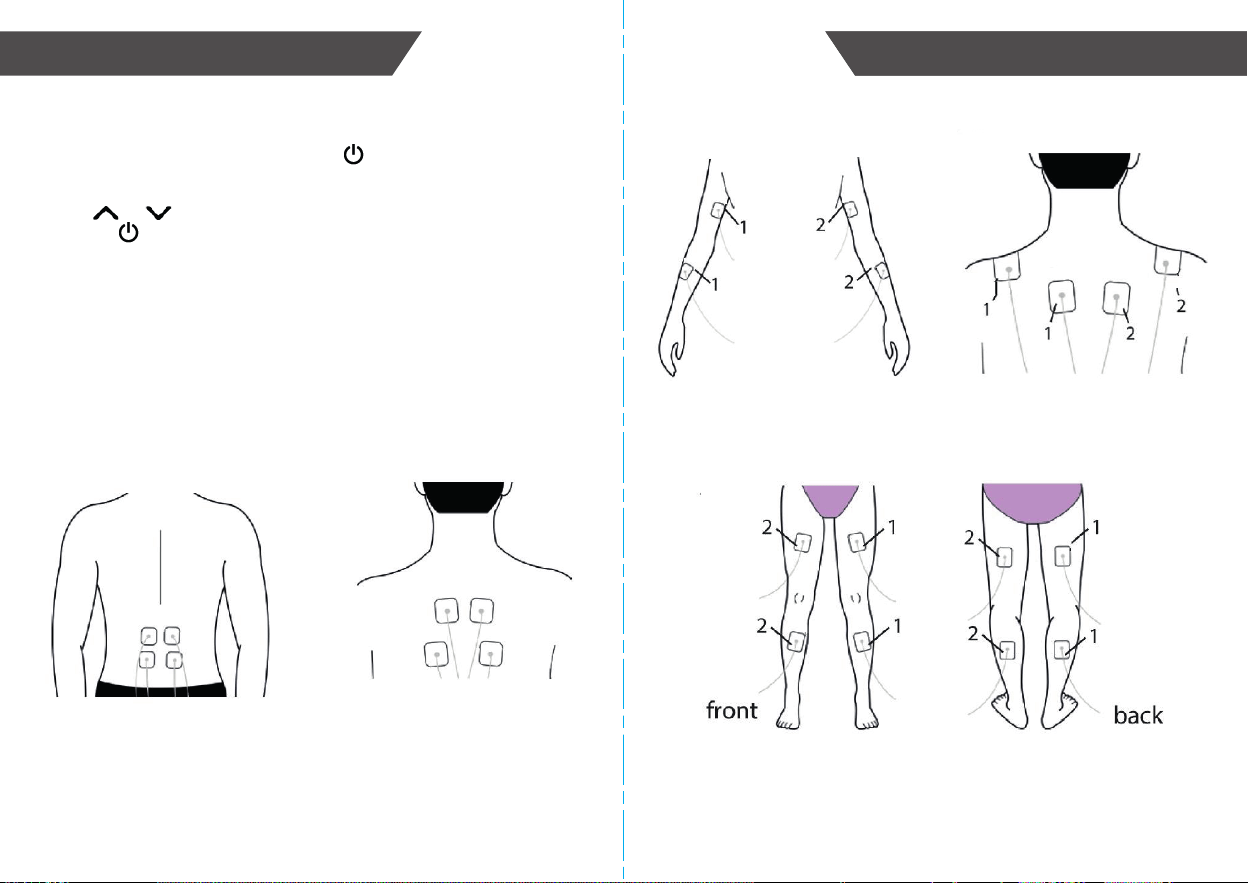
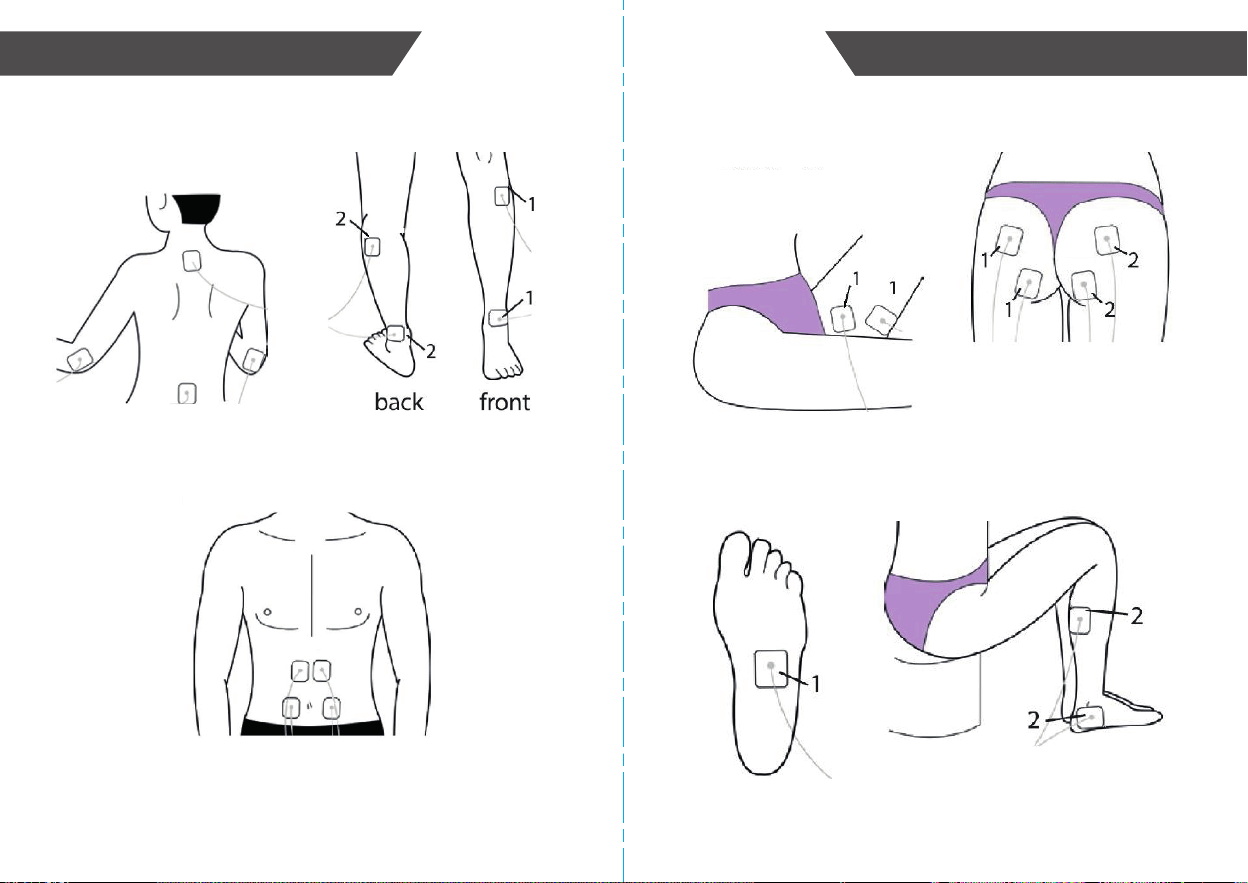
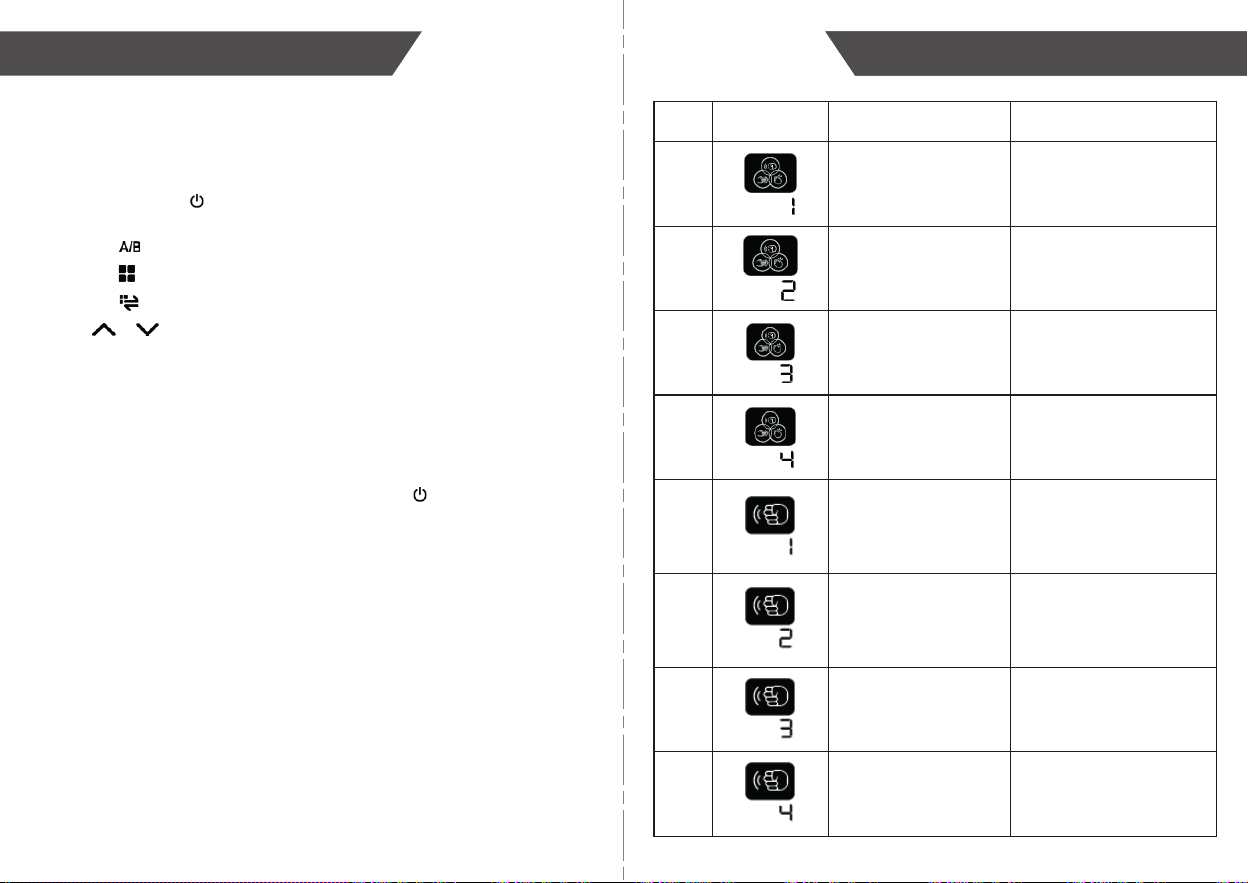
Applying the Electrode Gel Pads
The TENS machine can treat many different types of pain. Please see diagrams of
where to place the electrodes for the most common forms of pain. For other areas
of pain, place the electrodes on either side of the area of pain.
Waist Back
Arm
Leg
Shoulder
1514
Adductor and Gluteus
FeetBelly
SETUP AND OPERATING PROCEDURES SETUP AND OPERATING PROCEDURES
Joint
SETUP AND OPERATING PROCEDURES
1716
SETUP AND OPERATING PROCEDURES SETUP AND OPERATING PROCEDURES
Using Your TENS
a. Ensure electrode gel pads are firmly on the treatment area and output cables
are fully inserted into TENS machine.
b. Press the ON/OFF ( ) button to turn on the device.
Note: you can press the “ON/OFF” button at anytime to turn off the device.
c. Press the button to select current channel (channel A) or (channel B).
d. Press the button to select mode.
e. Press the button to select in-mode setting.
f. Press or button to adjust output intensity of selected channel.
g. When the output intensity is at 1~15 , the treatment starts and the time counts
down with a flashing time sign on the LCD display.
h. The defaulted treatment time is 15 minutes. During the treatment, the time will
not change if the program or the intensity is changed.
i. After treatment or channel A and B intensity are at 0, the device will be shut off
automatically in 20s if no operation.
j. If you want to end the treatment, press the ON/OFF ( ) button to switch off
the device.
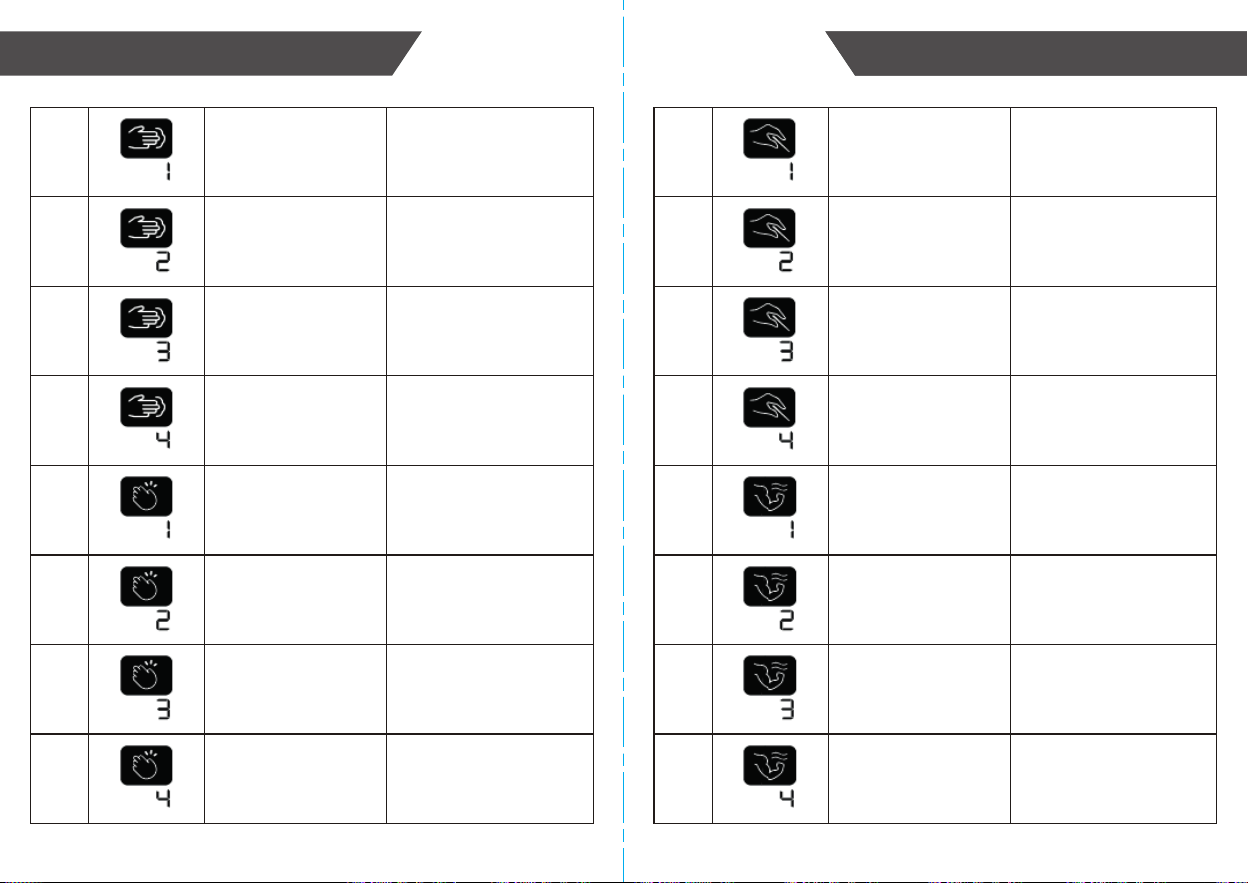
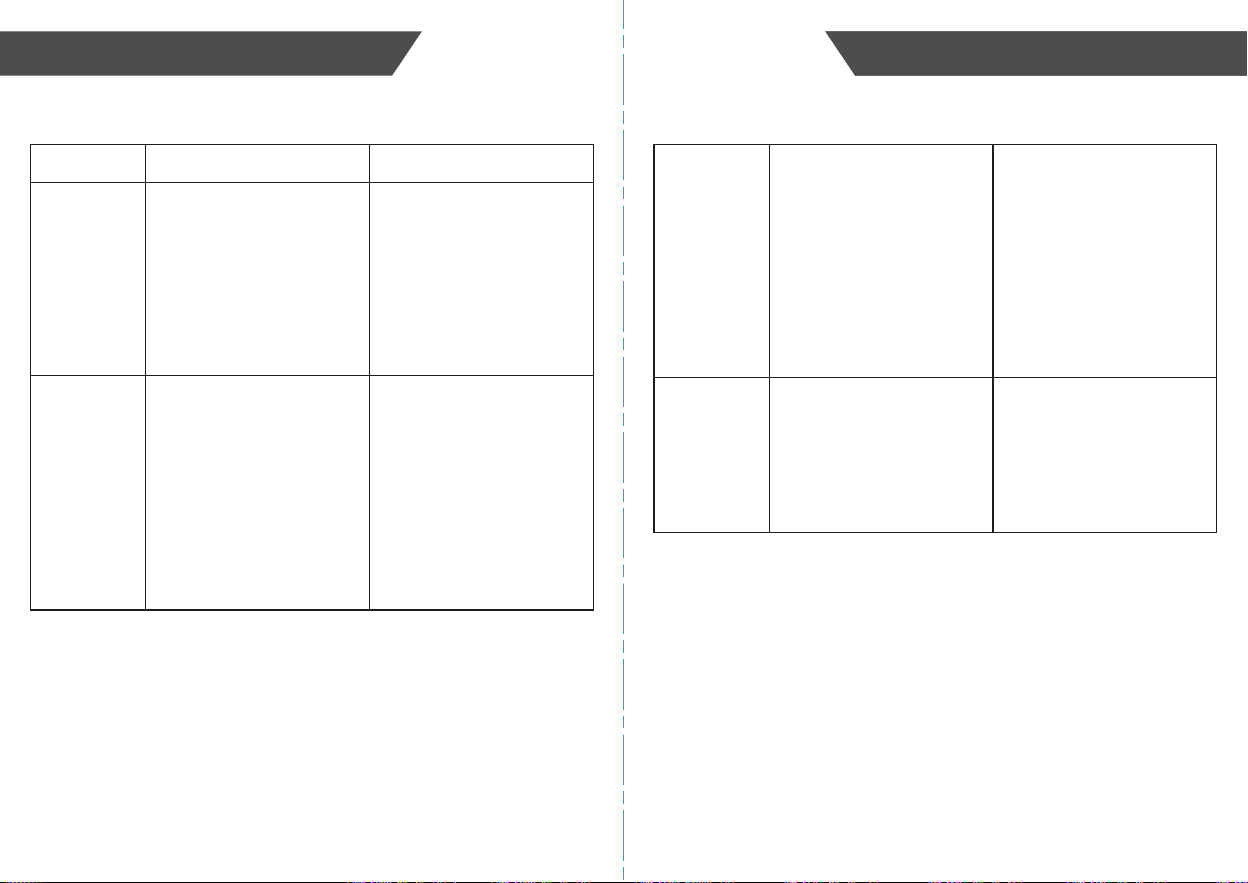
Your Feeling
Display on LCD
Mode
1 Composite (1)
Output pulse frequency =
2~33.33Hz
Output pulse width =
20~100µs
Output pulse frequency =
2~20Hz
Output pulse width =
20~100µs
Output pulse frequency =
1~33.33Hz
Output pulse width =
20~100µs
Output pulse frequency =
20~50Hz
Output pulse width =
20~100µs
Output pulse frequency =
1~16.67Hz
Output pulse width =
20~100µs
Continuous output
Output pulse frequency =
1~16.67Hz
Output pulse width =
20~100µs
Intermittent
Output pulse frequency =
1~6.67Hz
Output pulse width =
20~100µs
Output pulse frequency =
1~6.67Hz
Output pulse width =
20~100µs
Composite (2)
Composite (3)
Composite (4)
Thump (1)
Thump (2)
Thump (3)
Thump (4)
2
3
4
5
6
7
8
Parameters of Wave
SETUP AND OPERATING PROCEDURES
1918
SETUP AND OPERATING PROCEDURESSETUP AND OPERATING PROCEDURES
Output pulse frequency =
2.5~100Hz;
Output pulse width =
20~100µs;
Output pulse frequency =
50~100Hz;
Output pulse width =
20~100µs;
Output pulse frequency =
11.11~100Hz;
Output pulse width =
20~100µs;
Output pulse frequency =
16.67~100Hz;
Output pulse width =
20~100µs;
Output pulse frequency =
1~10Hz;
Output pulse width =
20~100µs;
Output pulse frequency =
1~50Hz;
Output pulse width =
20~100µs;
Output pulse frequency =
1~50Hz;
Output pulse width =
20~100µs;
Output pulse frequency =
16.67~100Hz;
Output pulse width =
20~100µs;
Output pulse frequency =
50Hz
Output pulse width =
20~100µs
Output pulse frequency =
33.33Hz
Output pulse width =
20~100µs
Output pulse frequency =
50Hz
Output pulse width =
20~100µs
Output pulse frequency =
33.33Hz
Output pulse width =
20~100µs
Output pulse frequency =
5~20Hz
Output pulse width =
20~100µs
Output pulse frequency =
2.5~10Hz
Output pulse width =
20~100µs
Output pulse frequency =
3.33~5Hz
Output pulse width =
20~100µs
Output pulse frequency =
3.33~10Hz
Output pulse width =
20~100µs
17
18
19
20
21
22
23
24
9
10
11
12
13
14
15
16
Acupuncture (1)
Acupuncture (2)
Acupuncture (3)
Acupuncture (4)
Muscular Relaxation (1)
Muscular Relaxation (2)
Muscular Relaxation (3)
Muscular Relaxation (4)
Press (1)
Press (2)
Press (3)
Press (4)
Slap (1)
Slap (2)
Slap (3)
Slap (4)
SETUP AND OPERATING PROCEDURES
2120
SETUP AND OPERATING PROCEDURESSETUP AND OPERATING PROCEDURES
Troubleshooting
Problem Cause Solution
You have no
feeling of
stimulus.
1. Are the batteries
exhausted?
2. Are the batteries correctly
inserted?
3. Is the wire correctly
connected?
4. Have you removed the
transparent protective film
over the electrode pad?
1. Replace the batteries.
2. Correctly load the
batteries.
3. Firmly connect the wire.
4. Remove the protection.
Stimulus is
weak.
1. Do the electrode pads
firmly stick to the skin?
2. Are the electrode pads
overlapped?
3. Are the electrode pads
dirty?
4. Is intensity too weak?
5. Are the electrode pads
positioned correctly?
1. Firmly stick the electrode
gel pad to the skin.
2. Separate the electrode
pad and stick them to the
skin again.
3. Please clean the electrode
pad.
4. Change the intensity
according to Part 5.
5. Change the position of the
electrode pad.
The skin
becomes
red.
1. Is the therapeutic time too
long?
2. Are the electrode pads too
dry?
3. Does the electrode pad
closely stick to the skin?
4. Are the electrode pads
dirty?
5. Is the surface of the
electrode pads scratched?
1. Control it within 10~15
minutes at a time.
2. Please gently wipe them
up with wet cloth and then
use them again.
3. Please closely stick the
electrode pad to the skin.
4. Please clean the electrode
pad.
5. Please replace them with
new electrode pad.
Power
source is cut
off in the
therapeutic
process.
1. Have the electrode pads
come off the skin?
2. Is the wire disconnected?
3. Have the batteries been
exhausted?
1. Turn off the power and
stick the electrode pad
firmly to the skin.
2. Turn off the power and
connect the wire.
3. Please replace them with
new ones.
SETUP AND OPERATING PROCEDURES
22 23
MAINTENANCE
1. Do not drop this monitor or subject it to strong impact.
2. Avoid high temperature and solarization. Do not immerse the monitor in
water as this will result in damage to the monitor.
3. If this monitor is stored in cold temperatures, allow it to acclimate to room
temperature before use.
4. If you do not plan to use the monitor for a long time, please remove the
batteries.
5. Do not attempt to disassemble this monitor.
6. Be sure not to move the electrode pads to another part of your body without
turning off the power first.
7. Avoid contact of the electrode pads with anything made of metal, such as belts
or necklaces.
8. After using the device, please remove output cables out of output channel and
re-attach the pads to the protective transparent film.
9. Do not twist or pull the output cables.
10. Please do not use any chemical to clean the main unit or electrode pads. In
case you need to clean them, please wipe with a damp cloth. It is
recommended to clean the electrode pads after every use.
11. No component can be repaired by the user in the monitor. The circuit
diagrams, component part lists, descriptions, calibration instructions, or other
information will require an appropriately qualified technical personnel to repair
those parts of equipment.
12. The TENS machine can maintain the safety and performance characteristics
for three years.
13. The monitor requires 6 hours to warm from the minimum storage temperature
(-20°C) between uses until the monitor is ready for its INTENDED USE when
the ambient temperature is 20°C.
14. The monitor requires 6 hours to cool from the maximum storage temperature
(55°C) between uses until the monitor is ready for its INTENDED USE when
the ambient temperature is 20°C.
15. No servicing/maintenance while the monitor is in use.
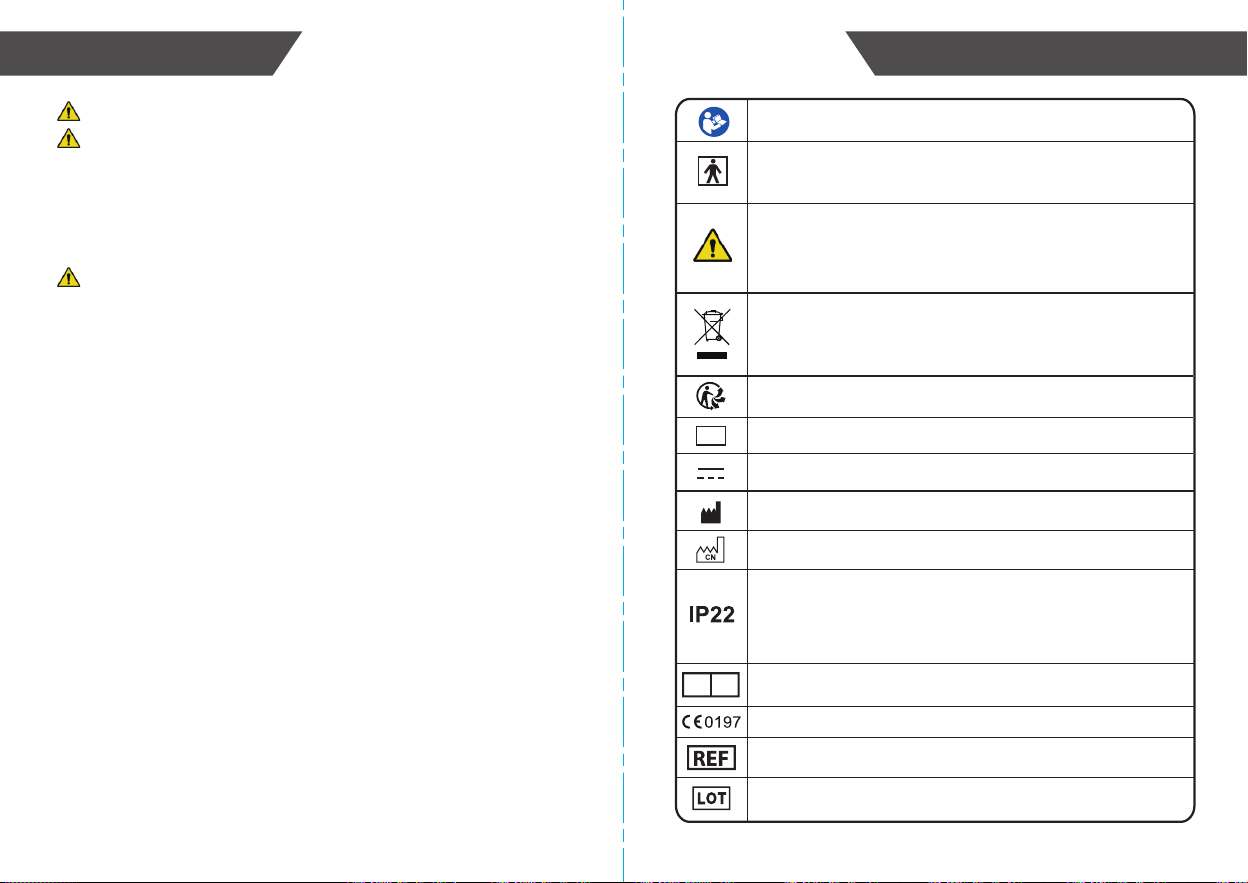
EXPLANATION OF SYMBOLS ON UNIT
Symbol for “The operation guide must be read”
Symbol for “Manufacturer”
Symbol for “Serial Number”
Symbol for “Type BF applied parts” (The electrode pads
are type BF applied part)
Symbol for “Direct Current”
Symbol for “ENVIRONMENT PROTECTION - Electrical waste
products should not be disposed of with household waste.
Please recycle where facilities exist. Check with your local
authority or retailer for recycling advice”
Symbol for “Made in China” and “Manufacture date”
SN
Recyclable identification
Indicates the need for the user to consult the instructions for
use for important cautionary information such as warnings
and precautions that cannot, for a variety of reasons, be
presented on the medical device itself.
Symbol for “Complies with MDD93/42/EEC requirements”
Symbol for Commercial Product Code / Model Number
Symbol for Batch Code
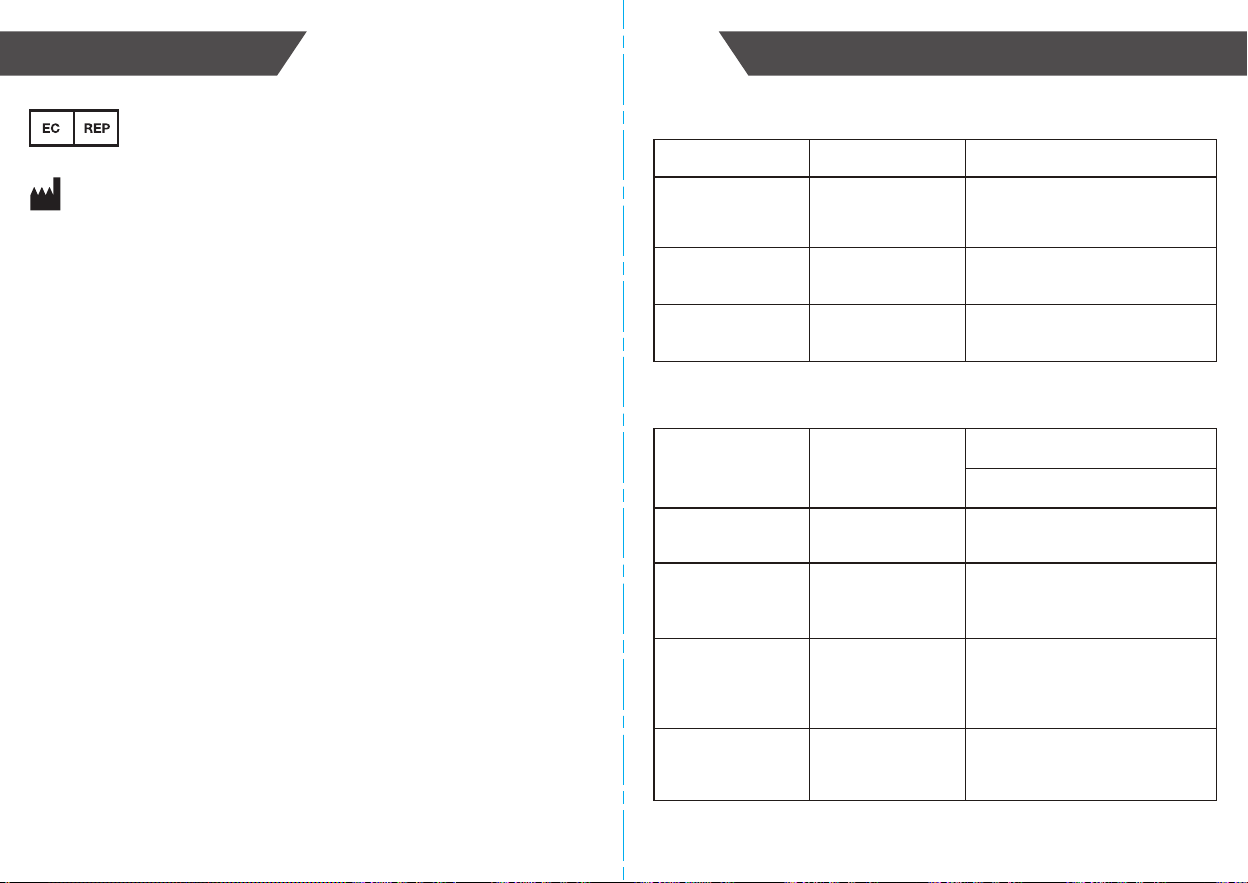
Symbol for “European Authorised Representative (EC Rep)”
EC REP
The first characteristic numeral symbol for “Degrees of
protection against access to hazardous parts and against
solid foreign objects.” The second characteristic numeral
symbol for “Degrees of protection against ingress of water.”
ELECTROMAGNETIC COMPATIBILITY INFORMATION
24 25
WARRANTY INFORMATION
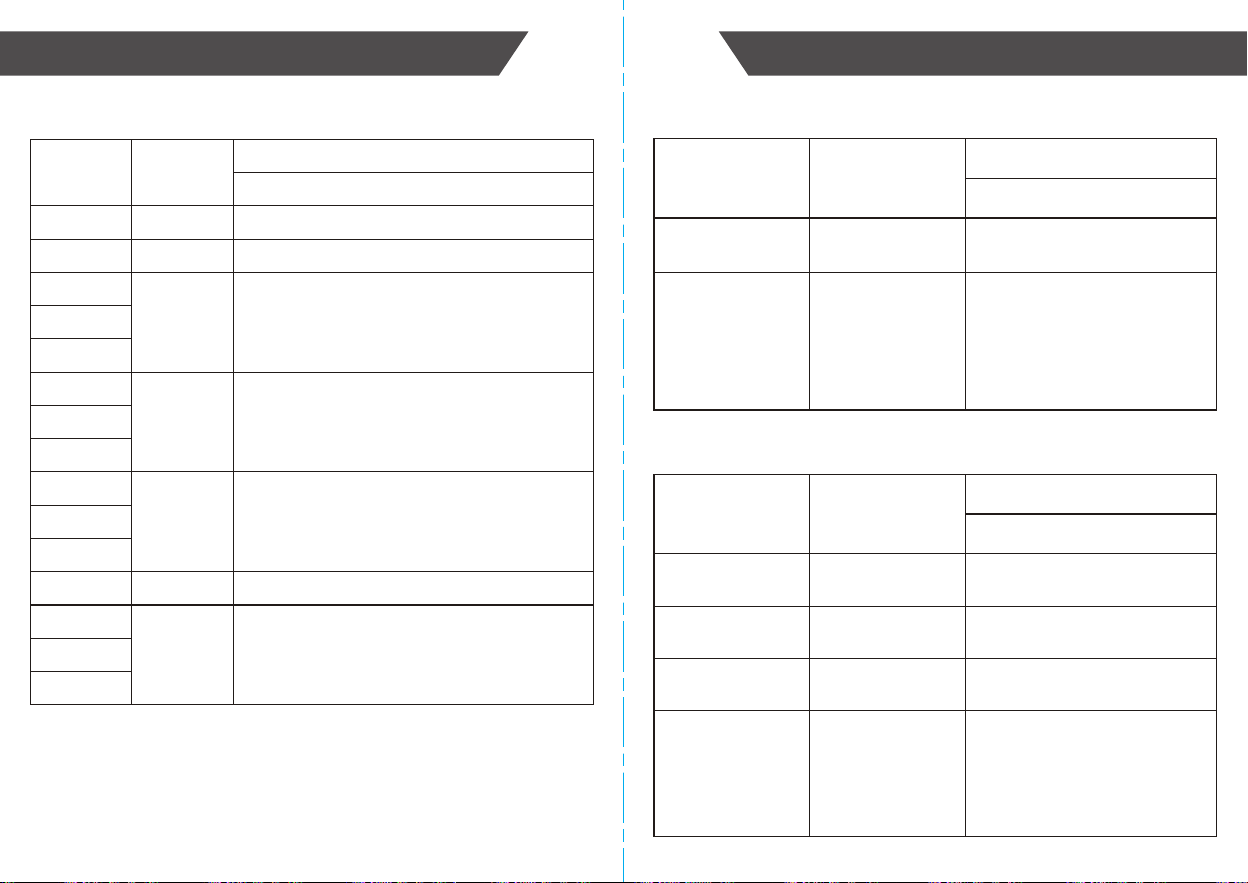
Table 1 - Emission limits per environment
Table 2 - Enclosure Port
iHealthLabs Europe SAS
36 Rue de Ponthieu, 75008, Paris, France
ANDON HEALTH CO., LTD.
No. 3 Jin Ping Street, Ya An Road,
Nankai District, Tianjin 300190, China.
Phenomenon
Conducted and
radiated RF
emissions
Electrostatic
Discharge
IEC 61000-4-2 ±8 kV contact
±2kV, ±4kV, ±8kV, ±15kV air
Radiated RF EM
field
IEC 61000-4-3 10V/m
80MHz-2.7GHz
80% AM at 1kHz
Proximity fields
from RF wireless
communications
equipment
IEC 61000-4-3 Refer to table 3
Rated power
frequency
magnetic fields
IEC 61000-4-8 30A/m
50Hz or 60Hz
Compliance
CISPR 11 Group 1,
Class B
Electromagnetic Environment
Phenomenon
Basic EMC
Standard
Immunity Test Levels
Home Healthcare Environment
The device is intended to be
used in home healthcare
environment
Harmonic distortion IEC 61000-3-2
NA
The device is powered by battery
Voltage fluctuations
and flicker
IEC 61000-3-3
NA
The device is powered by battery
ELECTROMAGNETIC COMPATIBILITY INFORMATION
ELECTROMAGNETIC COMPATIBILITY INFORMATION
26 27
385 380-390 Pulse modulation 18Hz, 27V/m
Test
Frequency
(MHz)
Band
(MHz)
Immunity Test Levels
Table 3 - Proximity fields from RF wireless communications equipment
Professional Healthcare Facility Environment
450 430-470 FM, ±5kHz deviation, 1kHz sine, 28V/m
Table 4 - PATIENT coupling PORT
710 704-787 Pulse modulation 217Hz, 9V/m
745
780
810 800-960 Pulse modulation 18Hz, 28V/m
870
930
1720 1700-1990 Pulse modulation 217Hz, 28V/m
1845
1970
5240 5100-5800 Pulse modulation 217Hz, 9V/m
5500
5785
2450 2400-2570 Pulse modulation 217Hz, 28V/m
Electrostatic
Discharge
IEC 61000-4-2 ±8 kV contact
±2kV, ±4kV, ±8kV, ±15kV air
Phenomenon
Basic EMC
Standard
Immunity Test Levels
Home Healthcare Environment
Conducted
Disturbances
Induced by RF
Fields a)
IEC 61000-4-6 3 V
0,15 MHz – 80 MHz
6 V in ISM and amateur
radio bands between 0,15 MHz
and 80 MHz
80 % AM at 1 kHz
Table 5 - Signal input/output parts PORT
Electrostatic
Discharge
IEC 61000-4-2 ±8 kV contact
±2kV, ±4kV, ±8kV, ±15kV air
Phenomenon
Basic EMC
Standard
Immunity Test Levels
Home Healthcare Environment
Electrical fast
transients / bursts
IEC 61000-4-4
NA
The device is powered by battery
Surges
Line-to-ground
IEC 61000-4-5
NA
The device is powered by battery
Conducted
Disturbances
Induced by RF
Fields
IEC 61000-4-6 3 V
0,15 MHz – 80 MHz
6 V in ISM and amateur
radio bands between 0,15 MHz
and 80 MHz
80 % AM at 1 kHz