1
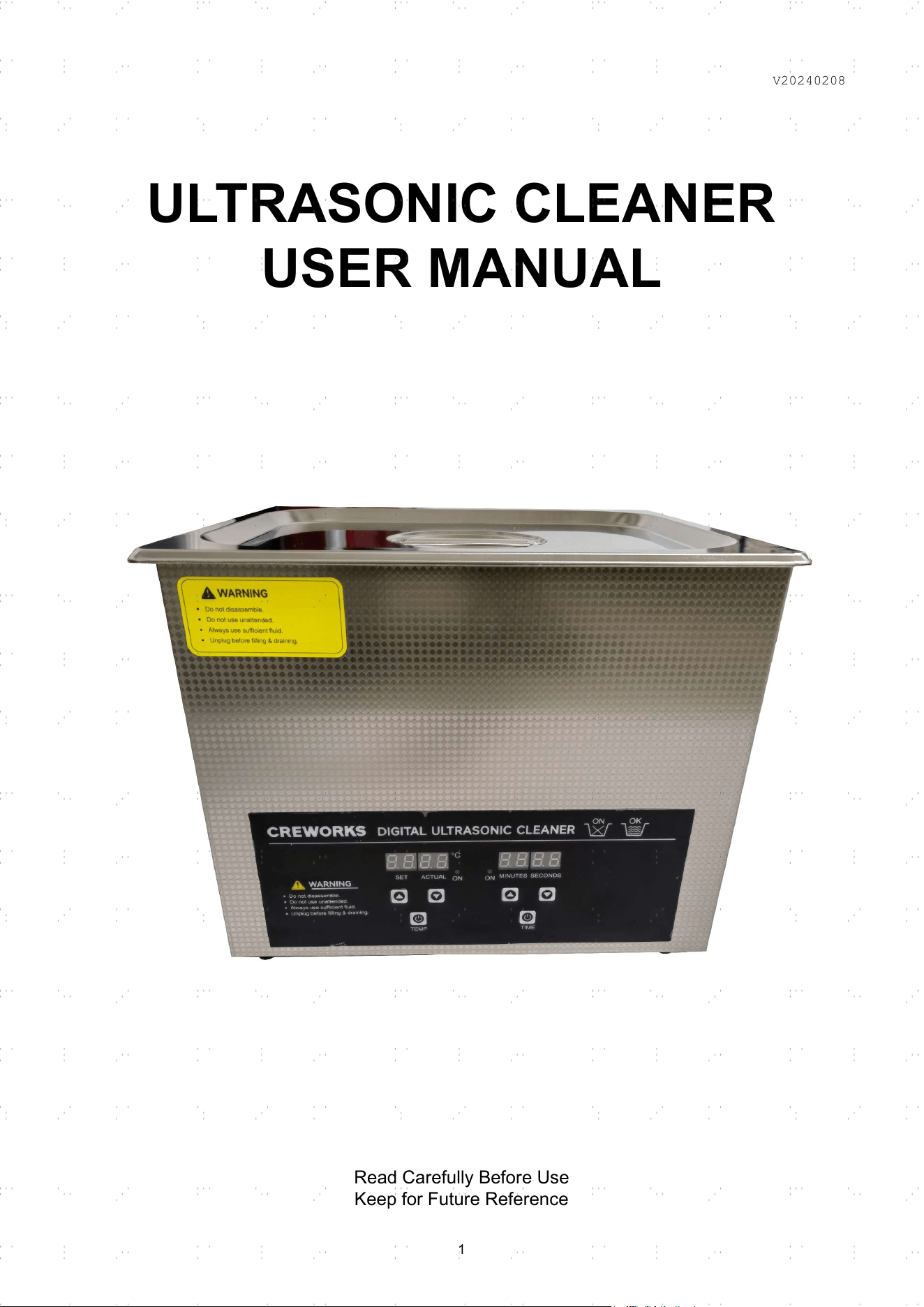
ULTRASONIC CLEANER
USER MANUAL
Read Carefully Before Use
Keep for Future Reference
V20240208
1
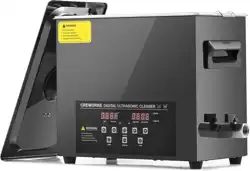
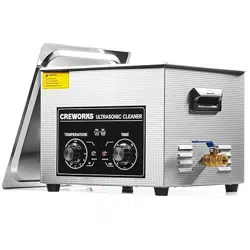
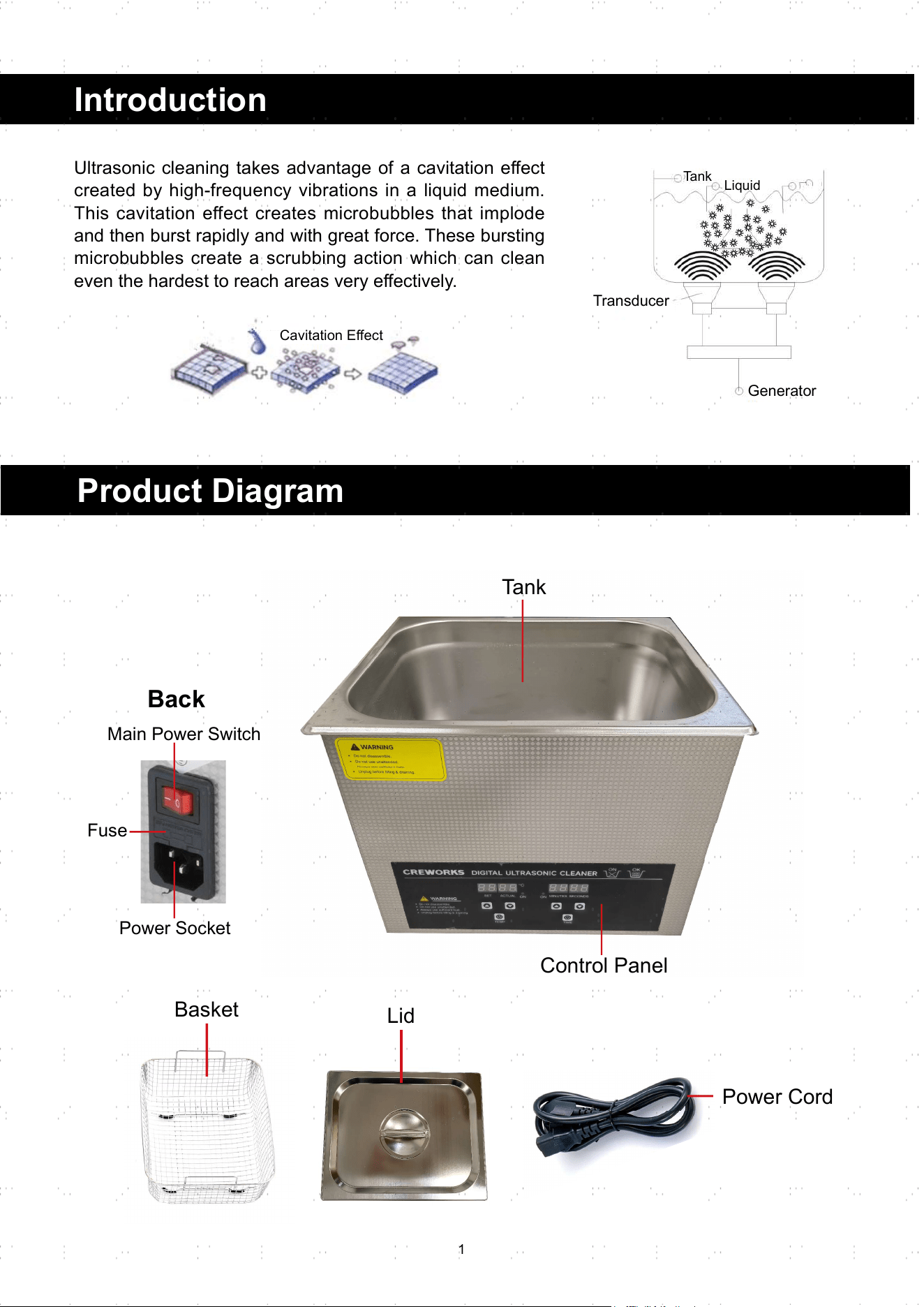
Product Diagram
Power Cord
Basket
Tank
Back
Control Panel
Introduction
Ultrasonic cleaning takes advantage of a cavitation eff ect
created by high-frequency vibrations in a liquid medium.
This cavitation effect creates microbubbles that implode
and then burst rapidly and with great force. These bursting
microbubbles create a scrubbing action which can clean
even the hardest to reach areas very eff ectively.
Cavitation Eff ect
Transducer
Generator
Tank
Liquid
Lid
Main Power Switch
Fuse
Power Socket
2
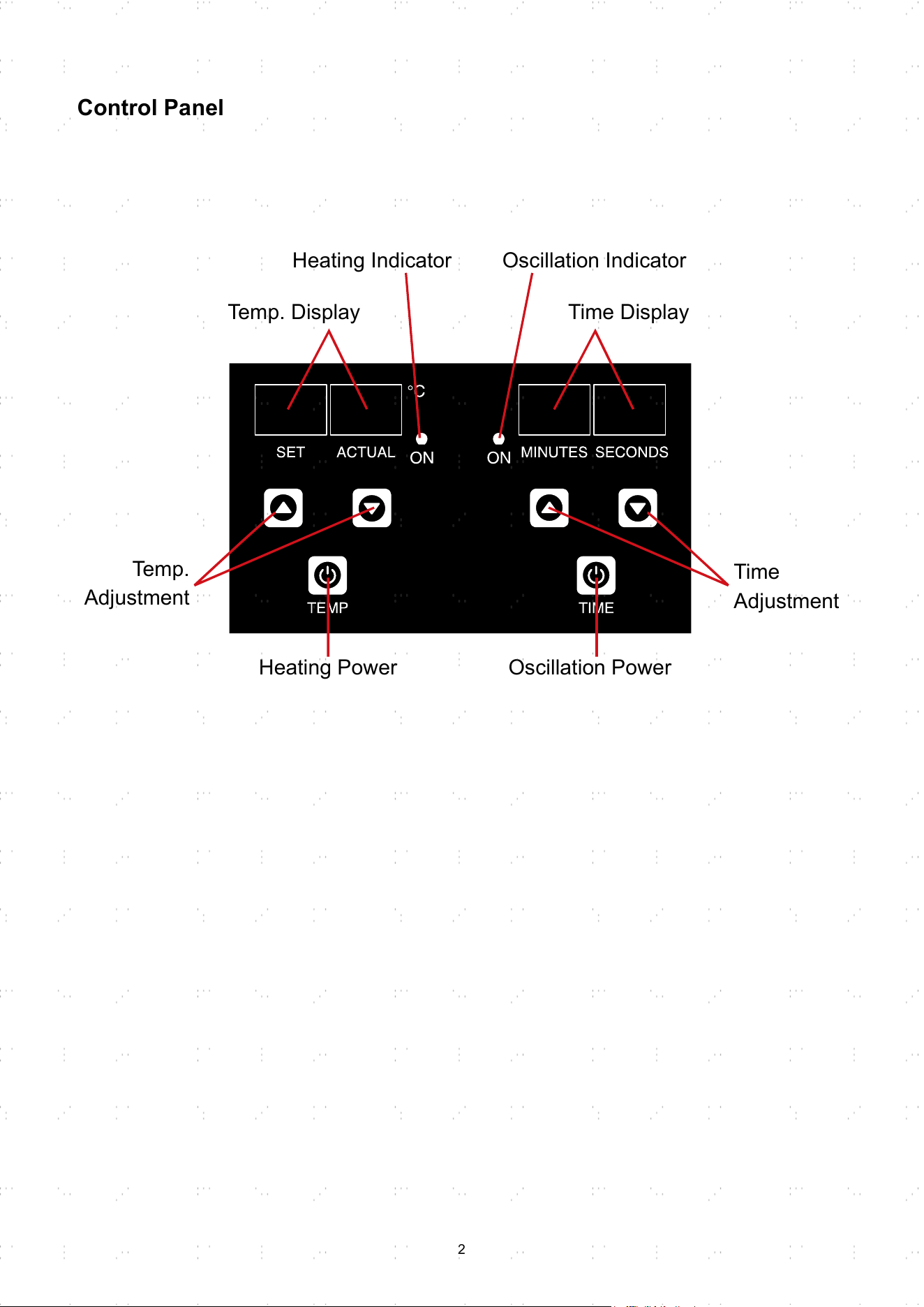
Control Panel
Temp. Display
Temp.
Adjustment
Heating Power
Time
Adjustment
Oscillation Power
Heating Indicator Oscillation Indicator
Time Display
3
Safety Information
• Use this device ONLY in accordance with these instructions and for its intended purpose.
• This appliance can be used by children aged from 8 years and above and persons with
reduced physical, sensory or mental capabilities, ONLY IF (1) they have been given
supervision or instruction concerning the use of the appliance in a safe way, (2) they
understand the hazards involved, (3) there are persons capable of safely using this appliance
present during the entire process of use .
• Keep the appliance and its cord out of the reach of children under 8 years old.
• Cleaning and user maintenance shall not be made by children without supervision.
• If the supply cord is damaged, cease using and have the cord replaced by the manufacturer,
its service agent or similarly qualifi ed persons before resuming use.
• ONLY use this device with a stable, compatible, and well-grounded power source. Do not use
3-to-2 prong adapters, ungrounded extension cords, or extension cords of insuffi cient gauge
for this device’s expected electrical load. Do not modify the power plug or move this device
by pulling on its power cord. In case of power loss during operation, unplug it IMMEDIATELY
until power is restored.
• Disconnect this device from its power source while fi lling up or draining fl uid.
• DO NOT allow this device to run dry or with excessive fluid. Never fill the tank above the
recommended maximum height mark or within
⅖
inches (1 cm) of the top if there is no such
mark. Never operate the device with less than 2 inches (5 cm) of fl uid in smaller tanks and
2¾ inches (7 cm) in larger tanks.
• DO NOT use volatile solvents with low boiling temperatures. Ultrasonic waves can cause
them to heat up and release fumes.
• DO NOT use this device around fl ammable, explosive, or corrosive objects or fumes.
• DO NOT get any electrical components wet or operate them with wet hands or in highly
humid environments. If they become wet accidentally, disconnect them from power and allow
time for them to dry completely before further use.
• DO NOT leave this device unattended or its lid open during use.
• DO NOT place any body parts in the tank during use.
• ALWAYS turn off the heating unit manually when cleaning sensitive objects. This unit DOES
NOT automatically deactivate its heating once the target temperature is reached.
• DO NOT remove the lid before or immediately after heating is turned off , as hot steam may
burn your bare skin.
• ALWAYS disconnect this device from its power source before any cleaning, maintenance, or
repair.
•
DO NOT
operate this device if it malfunctions or shows signs of damage. Repair or replace
damaged components before further use. Never replace any parts with nonidentical ones.
Warning!
• Ultrasonic cleaning is NOT recommended for porous items like corals or gemstones like
pearls, emeralds, and opals.
• DO NOT use fl uids which can damage the stainless steel surface of the tank, such as strong
acid or bases.
• When using aqueous fl uids, deionized, demineralized, or distilled water is recommended to
avoid harmful impurities.
• DO NOT drop items or place them directly into the tank as both may damage the transducer
before or during use. Always deposit items into the tank gently and use the provided basket
to hold them.
• To extend the service life, do not operate this device for more than 30 minutes continuously.
• If your device includes a drain valve, always remember to close it before fi lling the tank. If
your device does not have a valve, always remove all items before emptying the used fl uid
from the tank.
Caution!
4
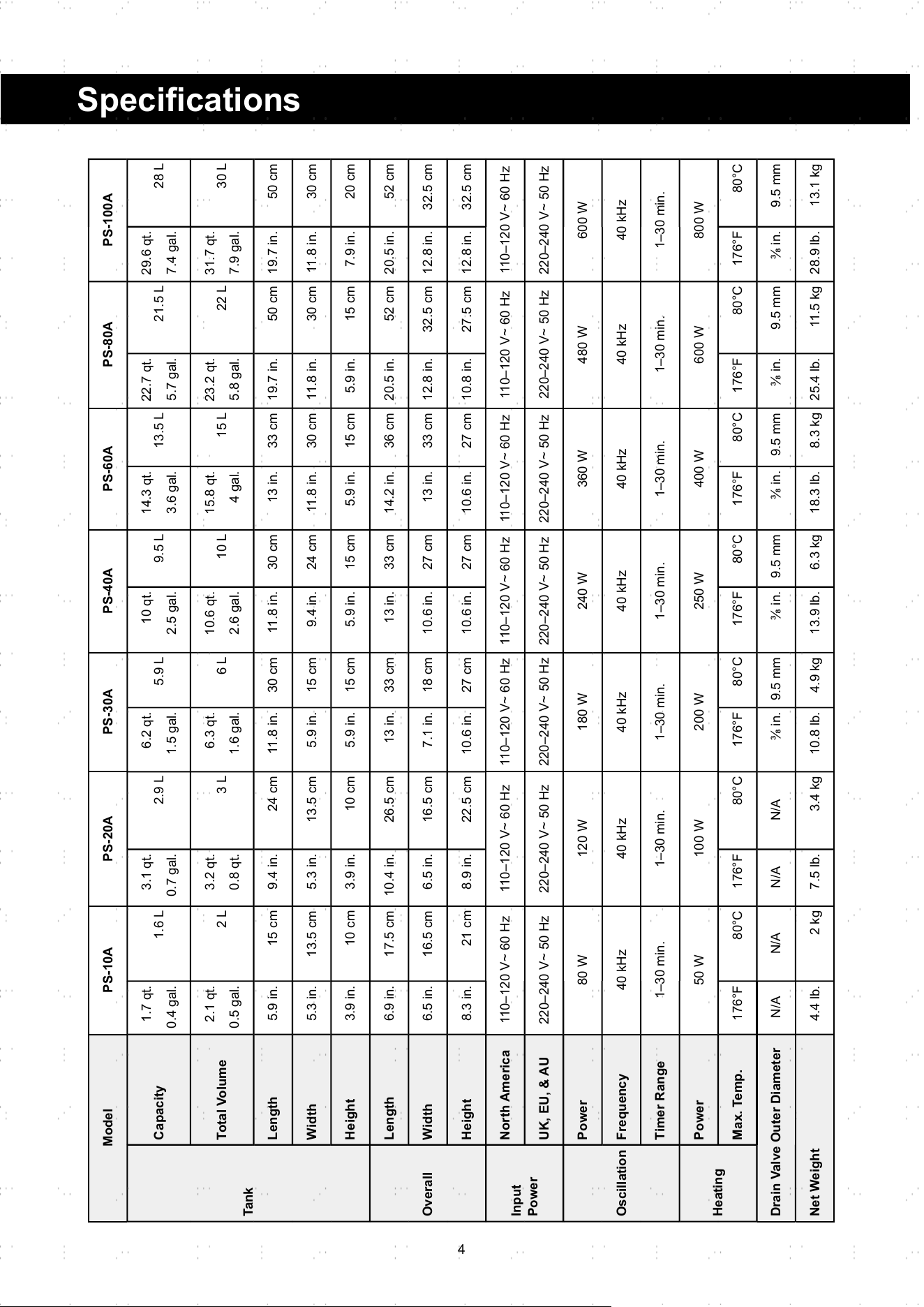
Specifi cations
Model PS-10A PS-20A PS-30A PS-40A PS-60A PS-80A PS-100A
Tank
Capacity
1.7 qt.
0.4 gal.
1.6 L
3.1 qt.
0.7 gal.
2.9 L
6.2 qt.
1.5 gal.
5.9 L
10 qt.
2.5 gal.
9.5 L
14.3 qt.
3.6 gal.
13.5 L
22.7 qt.
5.7 gal.
21.5 L
29.6 qt.
7.4 gal.
28 L
Total Volume
2.1 qt.
0.5 gal.
2 L
3.2 qt.
0.8 qt.
3 L
6.3 qt.
1.6 gal.
6 L
10.6 qt.
2.6 gal.
10 L
15.8 qt.
4 gal.
15 L
23.2 qt.
5.8 gal.
22 L
31.7 qt.
7.9 gal.
30 L
Length 5.9 in. 15 cm 9.4 in. 24 cm 11.8 in. 30 cm 11.8 in. 30 cm 13 in. 33 cm 19.7 in. 50 cm 19.7 in. 50 cm
Width 5.3 in. 13.5 cm 5.3 in. 13.5 cm 5.9 in. 15 cm 9.4 in. 24 cm 11.8 in. 30 cm 11.8 in. 30 cm 11.8 in. 30 cm
Height 3.9 in. 10 cm 3.9 in. 10 cm 5.9 in. 15 cm 5.9 in. 15 cm 5.9 in. 15 cm 5.9 in. 15 cm 7.9 in. 20 cm
Overall
Length 6.9 in. 17.5 cm 10.4 in. 26.5 cm 13 in. 33 cm 13 in. 33 cm 14.2 in. 36 cm 20.5 in. 52 cm 20.5 in. 52 cm
Width 6.5 in. 16.5 cm 6.5 in. 16.5 cm 7.1 in. 18 cm 10.6 in. 27 cm 13 in. 33 cm 12.8 in. 32.5 cm 12.8 in. 32.5 cm
Height 8.3 in. 21 cm 8.9 in. 22.5 cm 10.6 in. 27 cm 10.6 in. 27 cm 10.6 in. 27 cm 10.8 in. 27.5 cm 12.8 in. 32.5 cm
Input
Power
North America 110–120 V~ 60 Hz 110–120 V~ 60 Hz 110–120 V~ 60 Hz 110–120 V~ 60 Hz 110–120 V~ 60 Hz 110–120 V~ 60 Hz 110–120 V~ 60 Hz
UK, EU, & AU 220–240 V~ 50 Hz 220–240 V~ 50 Hz 220–240 V~ 50 Hz 220–240 V~ 50 Hz 220–240 V~ 50 Hz 220–240 V~ 50 Hz 220–240 V~ 50 Hz
Oscillation
Power 80 W 120 W 180 W 240 W 360 W 480 W 600 W
Frequency 40 kHz 40 kHz 40 kHz 40 kHz 40 kHz 40 kHz 40 kHz
Timer Range 1–30 min. 1–30 min. 1–30 min. 1–30 min. 1–30 min. 1–30 min. 1–30 min.
Heating
Power 50 W 100 W 200 W 250 W 400 W 600 W 800 W
Max. Temp. 176°F 80°C 176°F 80°C 176°F 80°C 176°F 80°C 176°F 80°C 176°F 80°C 176°F 80°C
Drain Valve Outer Diameter N/A N/A N/A N/A ⅜ in. 9.5 mm ⅜ in. 9.5 mm ⅜ in. 9.5 mm ⅜ in. 9.5 mm ⅜ in. 9.5 mm
Net Weight 4.4 lb. 2 kg 7.5 lb. 3.4 kg 10.8 lb. 4.9 kg 13.9 lb. 6.3 kg 18.3 lb. 8.3 kg 25.4 lb. 11.5 kg 28.9 lb. 13.1 kg
5
Operation
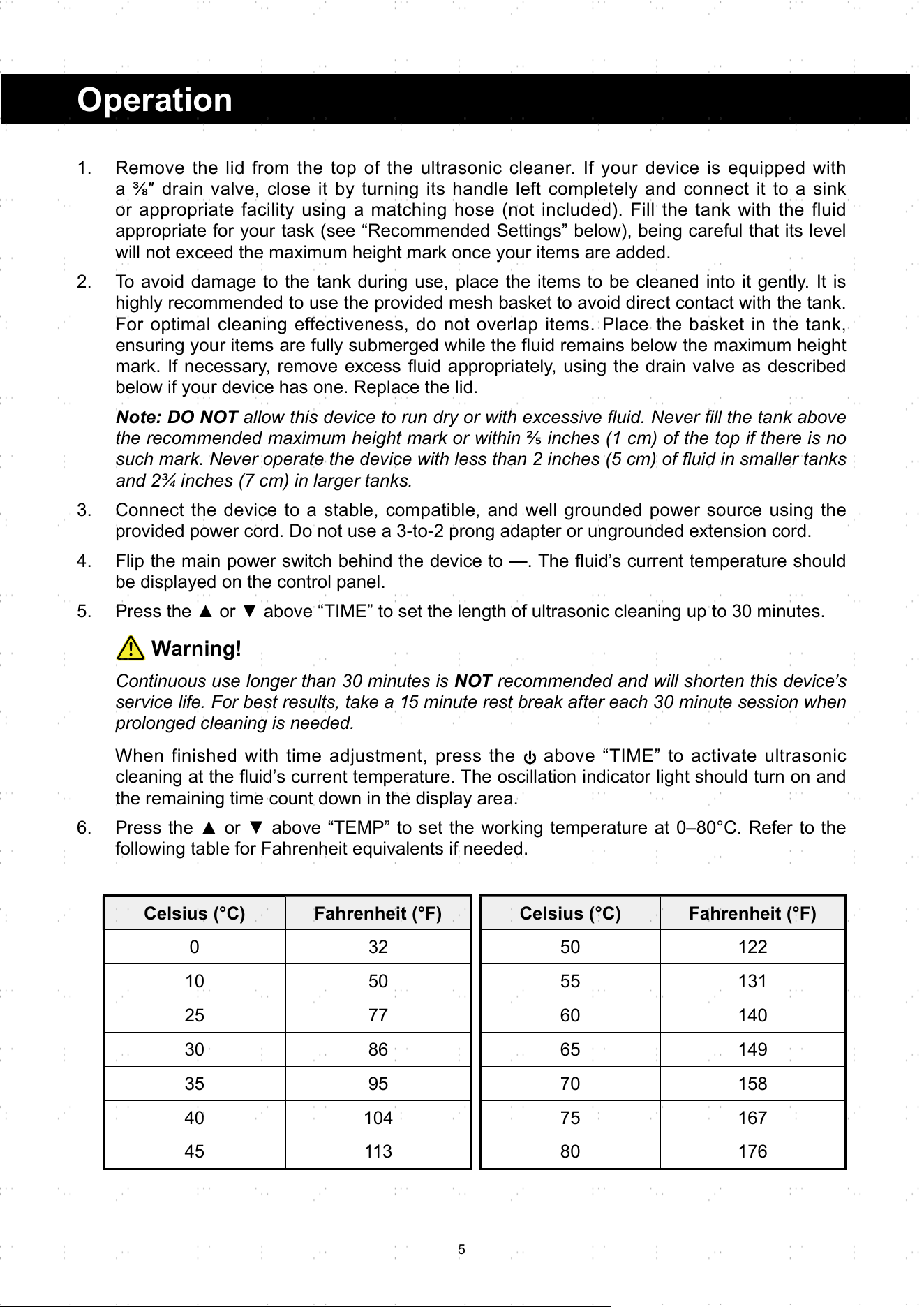
Celsius (°C) Fahrenheit (°F)
0 32
10 50
25 77
30 86
35 95
40 104
45 113
Celsius (°C) Fahrenheit (°F)
50 122
55 131
60 140
65 149
70 158
75 167
80 176
1. Remove the lid from the top of the ultrasonic cleaner. If your device is equipped with
a ⅜″ drain valve, close it by turning its handle left completely and connect it to a sink
or appropriate facility using a matching hose (not included). Fill the tank with the fluid
appropriate for your task (see “Recommended Settings” below), being careful that its level
will not exceed the maximum height mark once your items are added.
2. To avoid damage to the tank during use, place the items to be cleaned into it gently. It is
highly recommended to use the provided mesh basket to avoid direct contact with the tank.
For optimal cleaning effectiveness, do not overlap items. Place the basket in the tank,
ensuring your items are fully submerged while the fl uid remains below the maximum height
mark. If necessary, remove excess fl uid appropriately, using the drain valve as described
below if your device has one. Replace the lid.
Note: DO NOT allow this device to run dry or with excessive fl uid. Never fi ll the tank above
the recommended maximum height mark or within ⅖ inches (1 cm) of the top if there is no
such mark. Never operate the device with less than 2 inches (5 cm) of fl uid in smaller tanks
and 2¾ inches (7 cm) in larger tanks.
3. Connect the device to a stable, compatible, and well grounded power source using the
provided power cord. Do not use a 3-to-2 prong adapter or ungrounded extension cord.
4. Flip the main power switch behind the device to —. The fl uid’s current temperature should
be displayed on the control panel.
5. Press the ▲ or ▼ above “TIME” to set the length of ultrasonic cleaning up to 30 minutes.
Warning!
Continuous use longer than 30 minutes is NOT recommended and will shorten this device’s
service life. For best results, take a 15 minute rest break after each 30 minute session when
prolonged cleaning is needed.
When finished with time adjustment, press the above “TIME” to activate ultrasonic
cleaning at the fl uid’s current temperature. The oscillation indicator light should turn on and
the remaining time count down in the display area.
6. Press the ▲ or ▼ above “TEMP” to set the working temperature at 0–80°C. Refer to the
following table for Fahrenheit equivalents if needed.
6
When fi nished with temperature adjustment, press the above “TEMP” to begin heating.
The heating indicator light should turn on and your fluid should grow hotter until the set
temperature is reached. To end heating, press the above “TEMP” again.
Warning!
The machine will stop heating after reaching the set temperature, but the actual temperature
will be slightly higher than the set temperature because of the heat generated by ultrasonic
work.
7. The device will stop cleaning automatically at the end of its countdown. Press the above
“TIME” at any point before that to pause or stop work early. Press it again to resume.
Note: Since ultrasonic operation also generates heat, the actual temperature will be slightly
higher than the set temperature.
8. When fi nished, fl ip the main power switch to O and disconnect the device from power.
9. If your device has a drain valve, open it by turning its handle 90° so that it is in line with
your hose. Once the tank has fully drained, close the valve again by turning its handle
back. Open the lid, remove the basket from the tank, and take out all your items. Rinse any
remaining detergent off their surfaces with clean water as needed.
If your device has no drain valve, allow time for the heated fl uid to cool as needed. Open
the lid, remove the basket from the tank, and take out your items. Rinse any remaining
detergent off their surfaces with clean water as needed. Hold the device tightly and pour
the used fluid into a sink or an appropriate drainage facility. Rinse away any remaining
detergent from the surface of the tank with clean water if needed.
10. Use a soft cloth to dry the exterior of your items, the tank, and the basket or allow time for
everything to air dry.
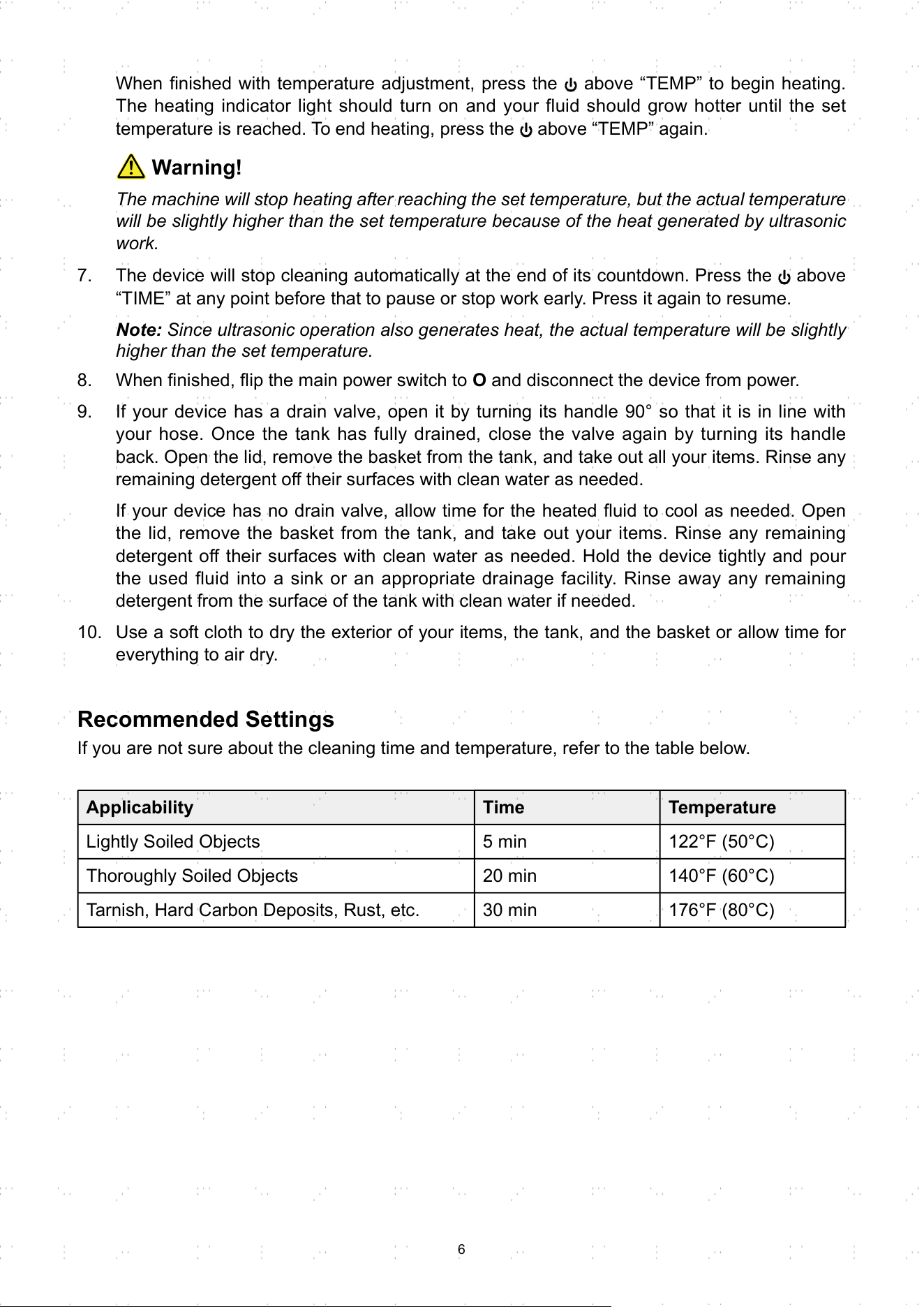
Recommended Settings
If you are not sure about the cleaning time and temperature, refer to the table below.
Applicability Time Temperature
Lightly Soiled Objects 5 min 122°F (50°C)
Thoroughly Soiled Objects 20 min 140°F (60°C)
Tarnish, Hard Carbon Deposits, Rust, etc. 30 min 176°F (80°C)
7
Contact Us
Thank you for choosing our products! If you have any questions or
comments, contact us at contact@b2ccsgroup.com and we'll resolve
your issue ASAP!
For a .pdf copy of the latest version of these instructions, use the
appropriate app on your smartphone to scan the QR code to the right.
Maintenance
• Turn off and unplug this device prior to any draining, cleaning, maintenance, or repair.
• Replace the cleaning fl uid between uses.
• Check the parts of this device for any wear or damage after use. Repair or replace any
problematic parts before further use.
• If this device will not be used for an extended period of time, unplug, drain, and fully dry it
before storing it in a cool, dry, and clean place away from direct sunlight and inaccessible to
children.
Disposal
Electrical products should not be disposed of with household products. In the
EU and UK, according to the European Directive 2012/19/EU for the disposal
of electrical and electronic equipment and its implementation in national laws,
used electrical products must be collected separately and disposed of at the
collection points provided for this purpose. Locations in Australia, Canada, and
the United States may have similar regulations. Contact your local authorities
or dealer for disposal and recycling advice.
DUC-L010-00 DUC-L010-UK DUC-L010-AU DUC-L015-00 DUC-L015-UK DUC-L015-AU DUC-L022-00
DUC-L022-AU DUC-L030-00 DUC-L030-UK DUC-L030-AU DUC-L102-00 DUC-L103-00 DUC-L106-00
DUC-L106-UK DUC-L106-AU DUC-1003-UK
Rev. 8 Feb. 2024