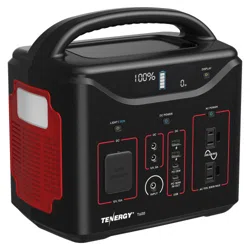
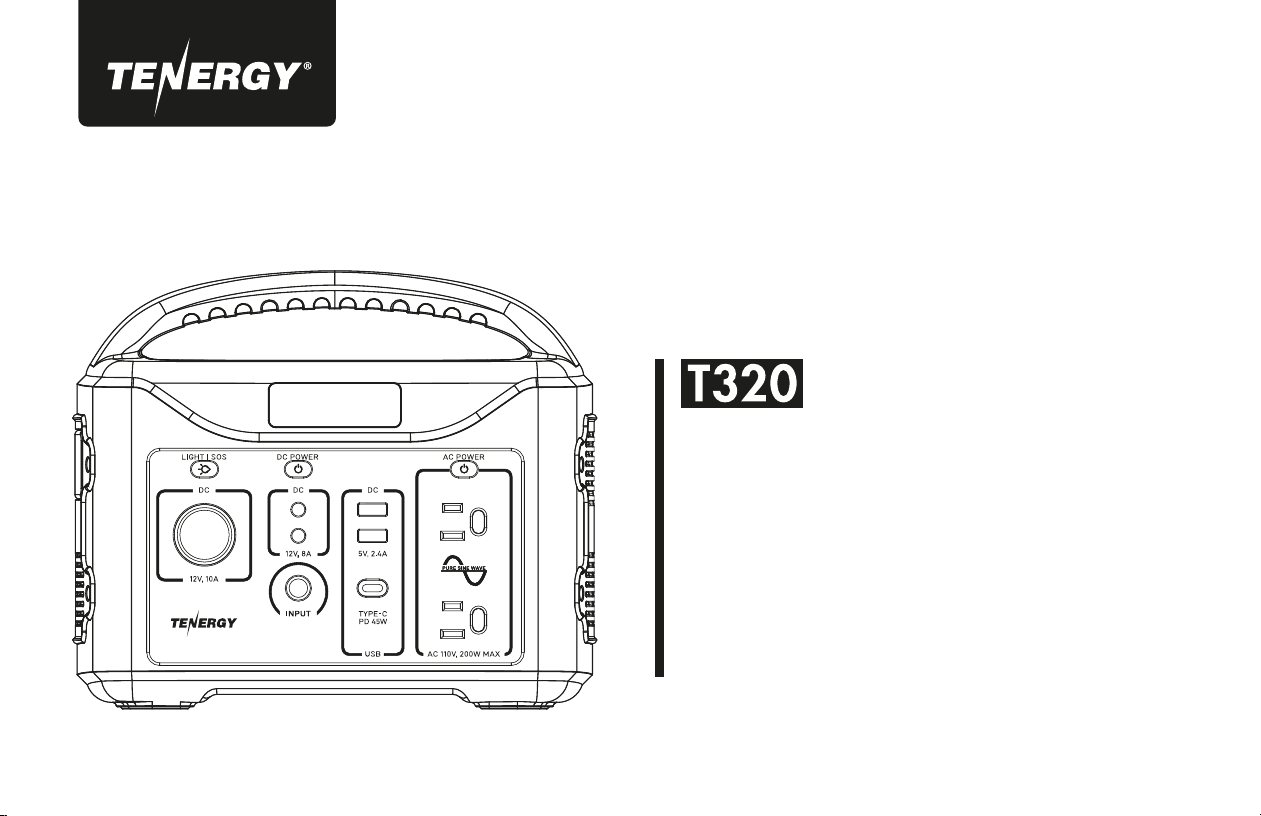
POWER
STATION
USER GUIDE
PN 59148

CHARGE ME NOW
Before using or storing, plug your Tenergy T320 unit
into the wall until it is fully charged.

IMPORTANT SAFETY INSTRUCTIONS
WARNING
When using this product, basic precautions should always be
followed, including the following:
Read all the instructions before using the product.
To reduce the risk of injury, close supervision is neces-
sary when the product is used near children.
Do not put ngers or hands into the product.
Use of an attachment not recommended or sold by power
pack manufacturer may result in a risk of re, electric
shock, or injury to persons.
To reduce risk of damage to the electric plug and cord,
pull the plug rather than the cord when disconnecting the
power pack.
Do not use a battery pack or appliance that is damaged
or modied. Damaged or modied batteries may exhibit
unpredictable behavior resulting in re, explosion or risk
of injury.
Do not operate the power pack with a damaged cord or
plug, or a damaged output cable.
Do not disassemble the power pack; take it to a qualied
service person when service or repair is required.
Incorrect reassembly may result in a risk of re or electric
shock.
To reduce the risk of electric shock, unplug the power pack
from the outlet before attempting any instructed servicing.
When charging the internal battery, work in a well ventilated
area and do not restrict ventilation in any way.
Under abusive conditions, liquid may be ejected from the
battery; avoid contact. If contact accidentally occurs, ush
with water. If liquid contacts eyes, additionally seek medical
help. Liquid ejected from the battery may cause irritation or
burns.
Do not expose a power pack to re or excessive temperature.
Exposure to re or temperature above 130°C may cause
explosion. The temperature of 130°C can be replaced by the
temperature of 265°F.
Have servicing performed by a qualied repair person using
only identical replacement parts. This will ensure that the
safety of the product is maintained.
SAVE THESE INSTRUCTIONS
a)
h)
i)
j)
k)
l)
m)
b)
c)
d)
e)
f)
g)

TABLE OF CONTENTS
WHAT’S IN THE BOX
GET TO KNOW YOUR UNIT
HOW IT WORKS
CHARGING YOUR UNIT
USING YOUR UNIT
STORAGE & MAINTENANCE
TECHNICAL SPECIFICATIONS
FAQS & TROUBLESHOOTING
WARRANTY
CONTACT US
1
1
2
3
4
8
8
9
11
12
1
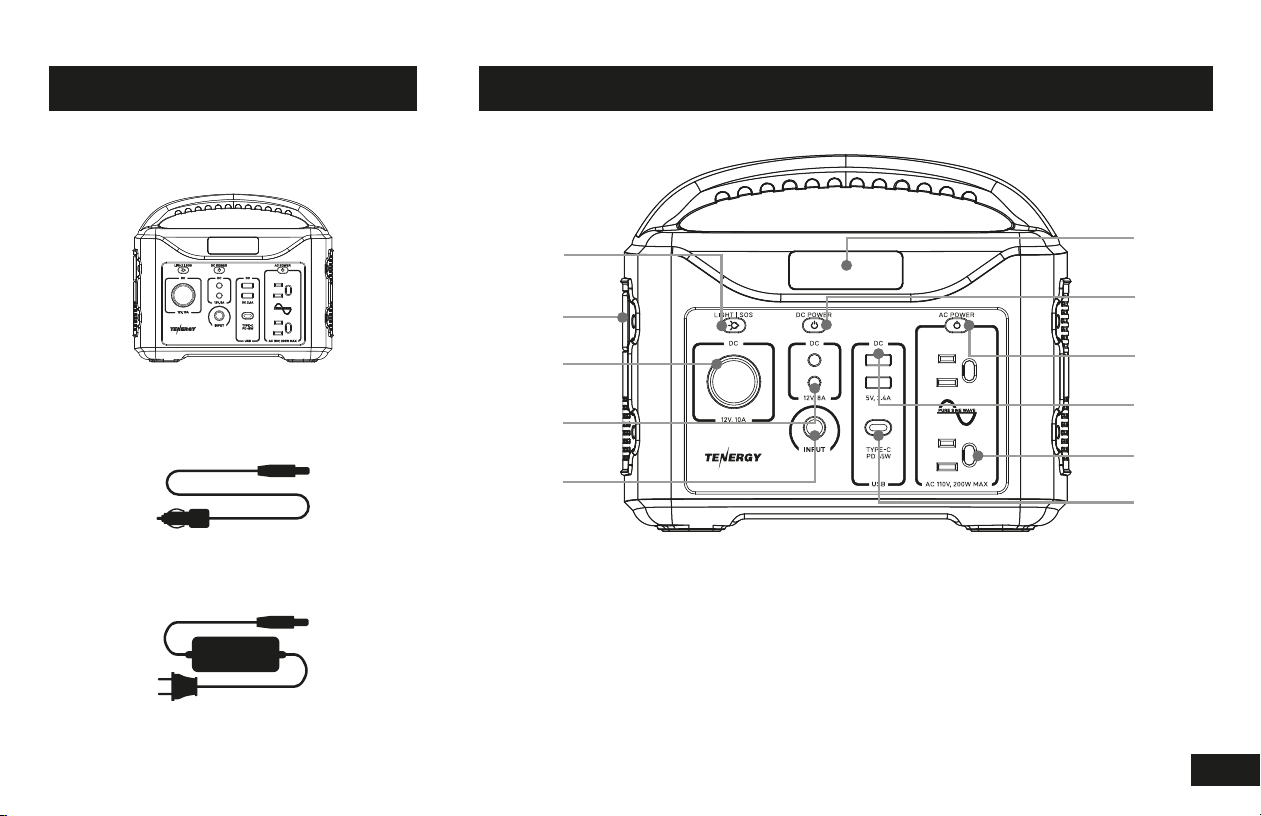
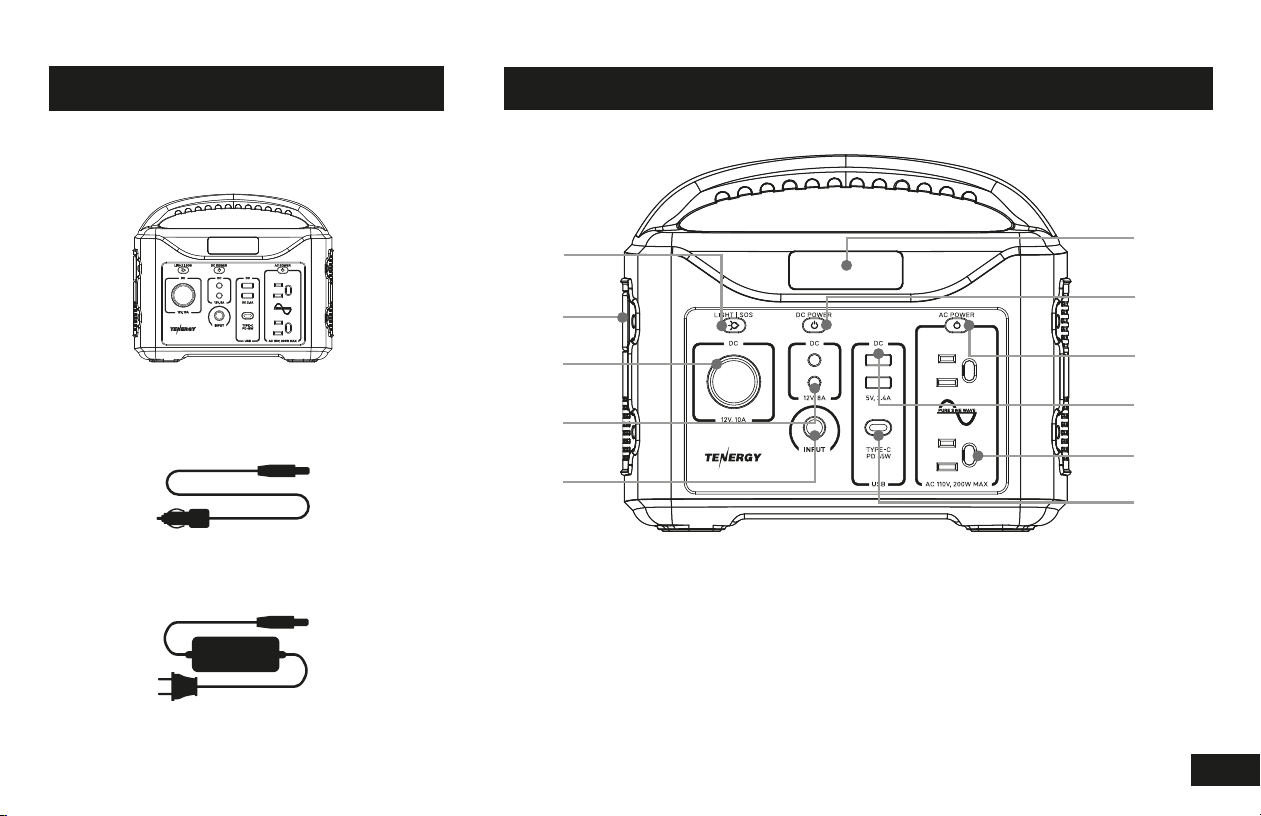
1. LED light button 5. Input port 9. USB ports
2. LED light 6. LCD screen 10. AC outlets
3. 12V,10A DC output 7. DC power button 11. USB-C port
4. 12V, 8A DC outputs 8. AC power button
1
2
3
4
5
6
7
8
9
10
11
WHAT’S IN THE BOX GET TO KNOW YOUR UNIT
Car Charger
Tenergy T320
Wall Charger
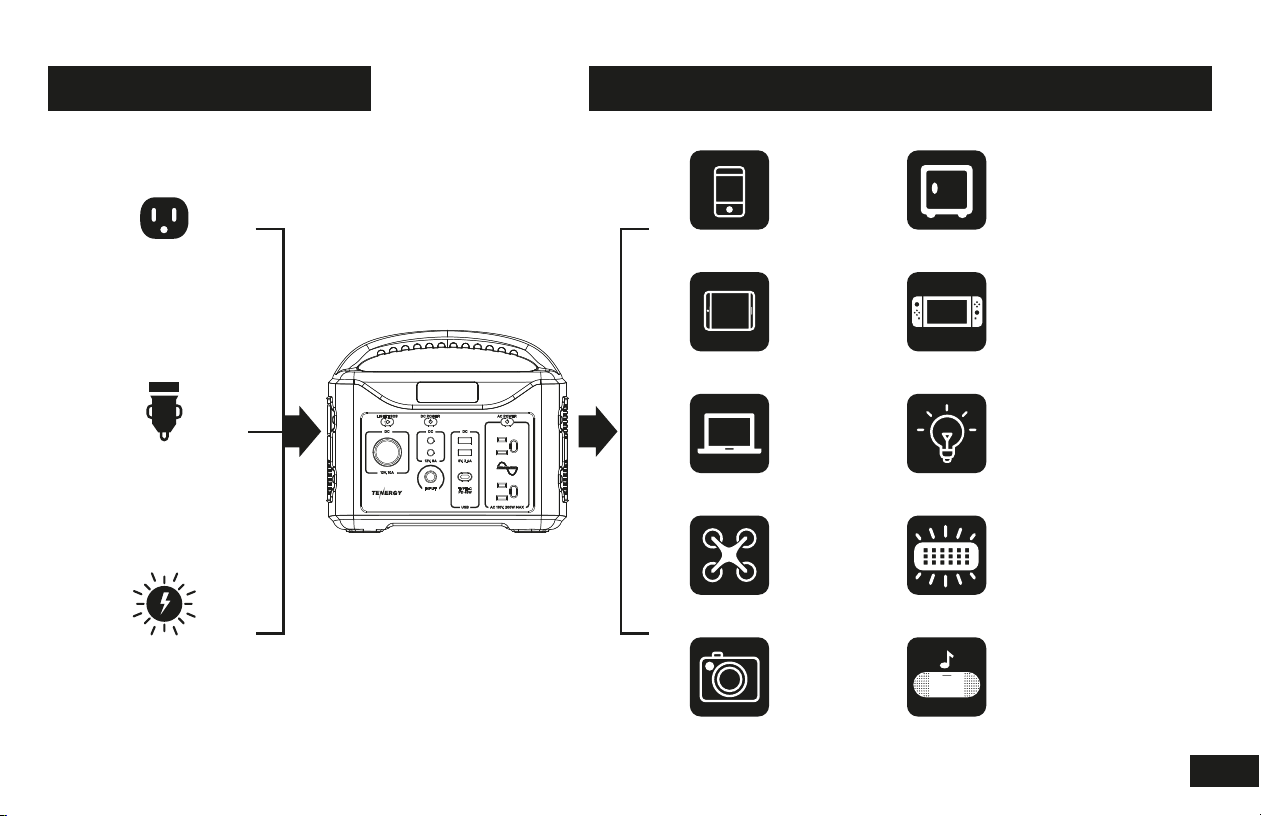
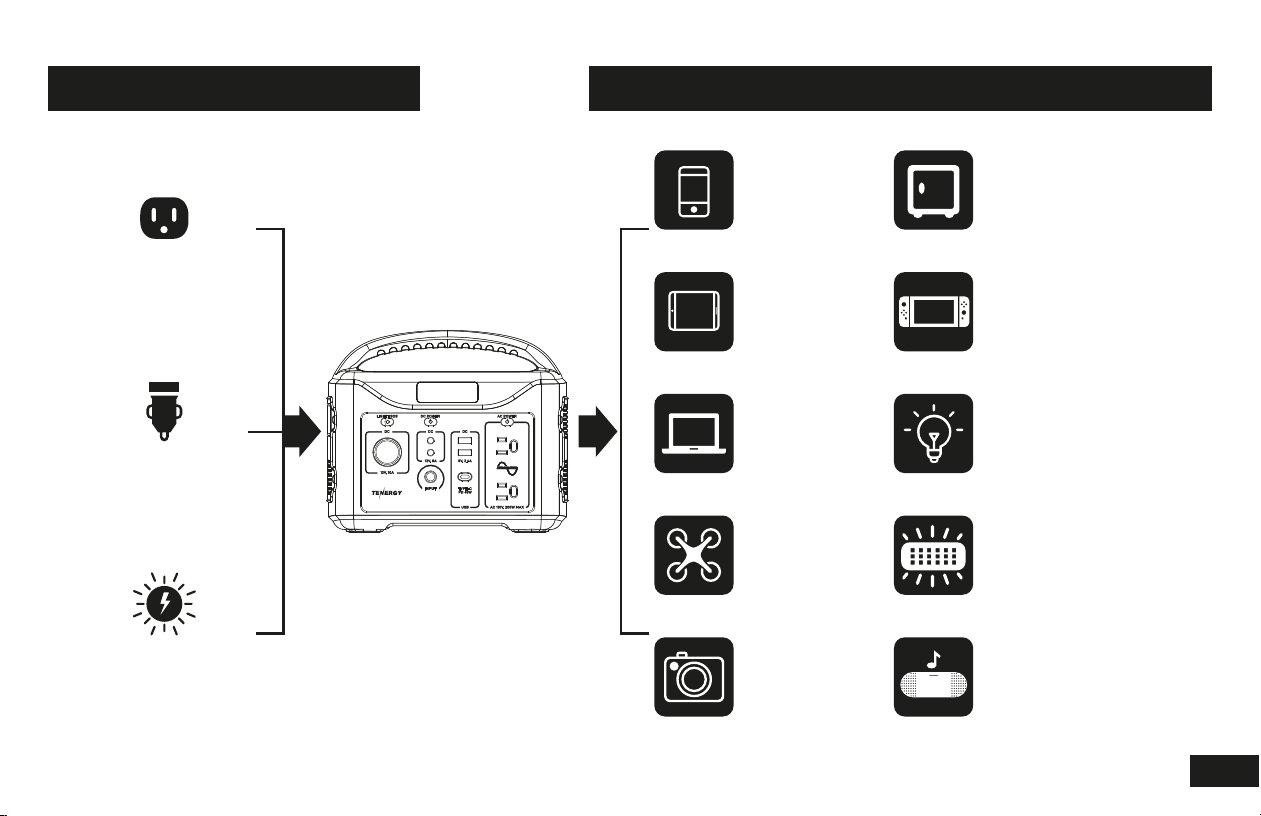
3 WAYS TO RECHARGE WHAT IT POWERS
AC Adapter
8 hours
Car Charger
10 hours
60W Solar Panel
7 hours*
*Solar panel sold separately. Actual charging
time varies, depending on weather conditions
and degree of excellence of sunlight reception.
Phone
30 Charges
Mini Cooler (60W)
22 Hours
Laptop
4-5 Charges
Lamp (9W)
35 Hours
Tablet
9 Charges
Game Console
20 Hours
Drone (Large)
5 Charges
LED Light (Built-in)
85 Hours
Camera
20 Charges
Speaker
20 Charges
(Models may vary)
2
Charge through solar panel (sold separately)
Place your solar panel where it can get the most strong direct sunlight. Connect the solar panel's output port with
the T320's input port. The LCD display will indicate when the power station is being recharged.
MPPT technology:
With MPPT (maximum power point tracking) technology, T320 tracks the max wattage provided by solar power
and becomes more efcient at converting energy into power to recharge the power station.
Charge through AC adapter
Connect your T320 unit to the wall outlet with the AC adapter that comes with your portable power station
packaging. The LCD display will indicate when the power station is being recharged.
Charge through your car
Connect your T320 unit to your 12V car cigarette lighter socket with the car charger that comes with your portable
power station packaging. The LCD display will indicate when the power station is being recharged.
CHARGING YOUR UNIT
3
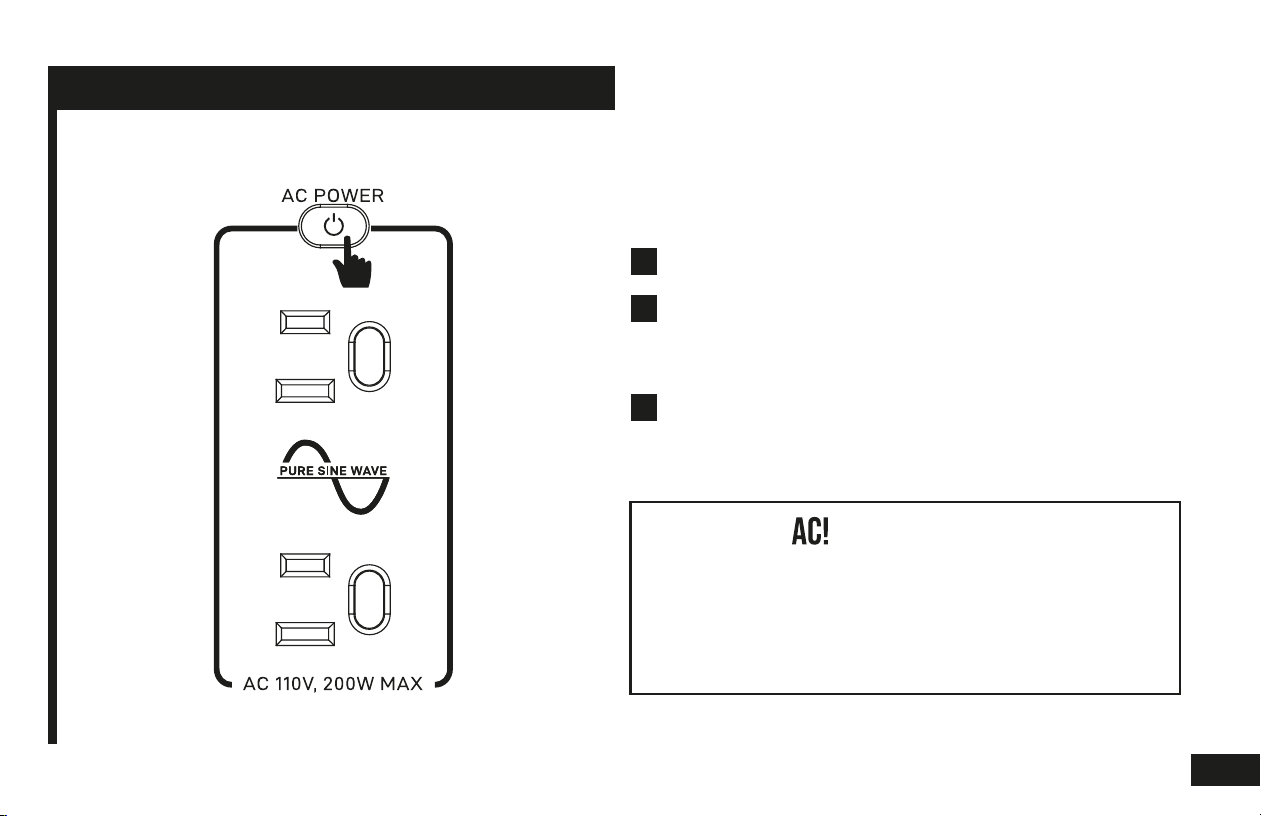
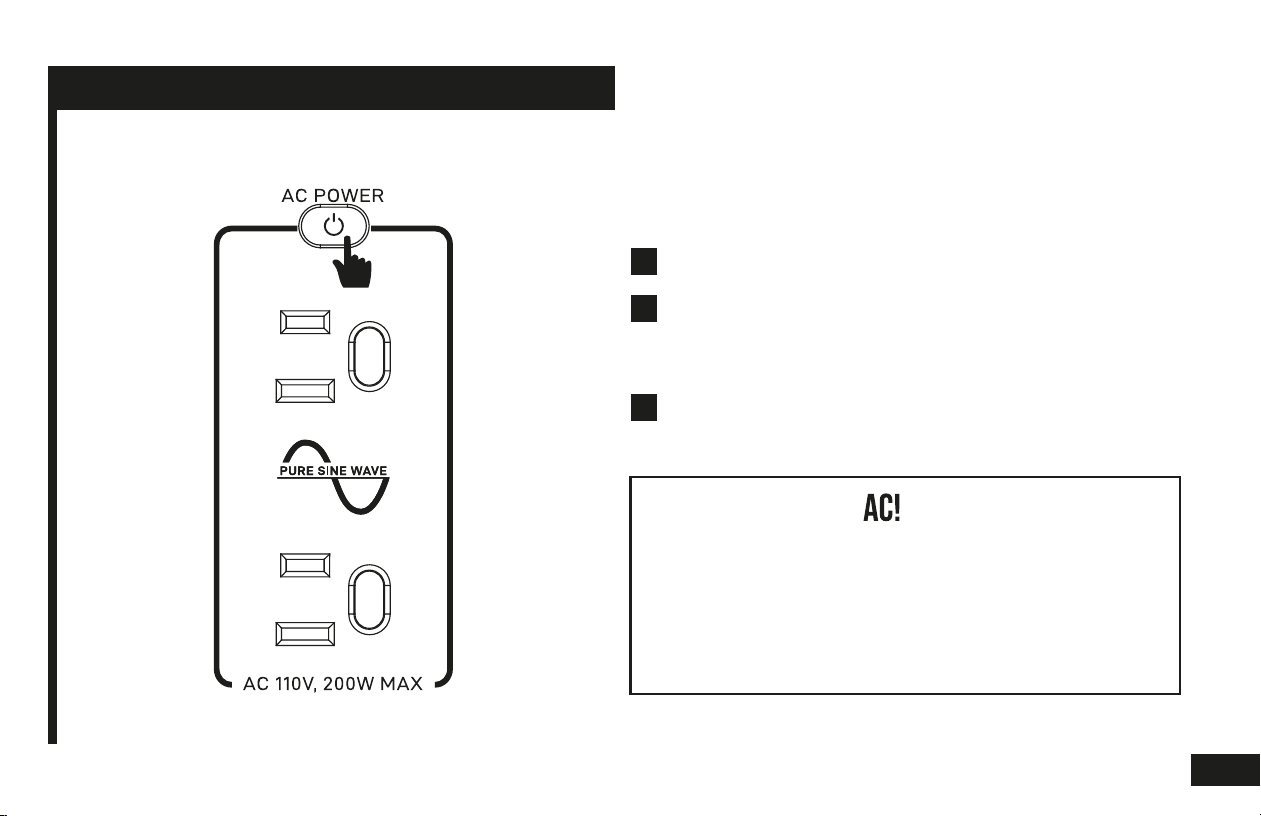
Powering AC applications
Press the AC power button to turn on AC power
output, The AC power button will light up to indicate
that enabled.
WARNING:
Ensure that the total wattage of all AC devices
simultaneously plugged into the AC outlets not
exceed 200 watts. If overloading occurs, please
remove the overloaded application, and press the
power button to reset the unit.
USING YOUR UNIT
Connect your AC application to the T320.1
2
3
Press the AC power button again to shut off AC output.
4
USING YOUR UNIT
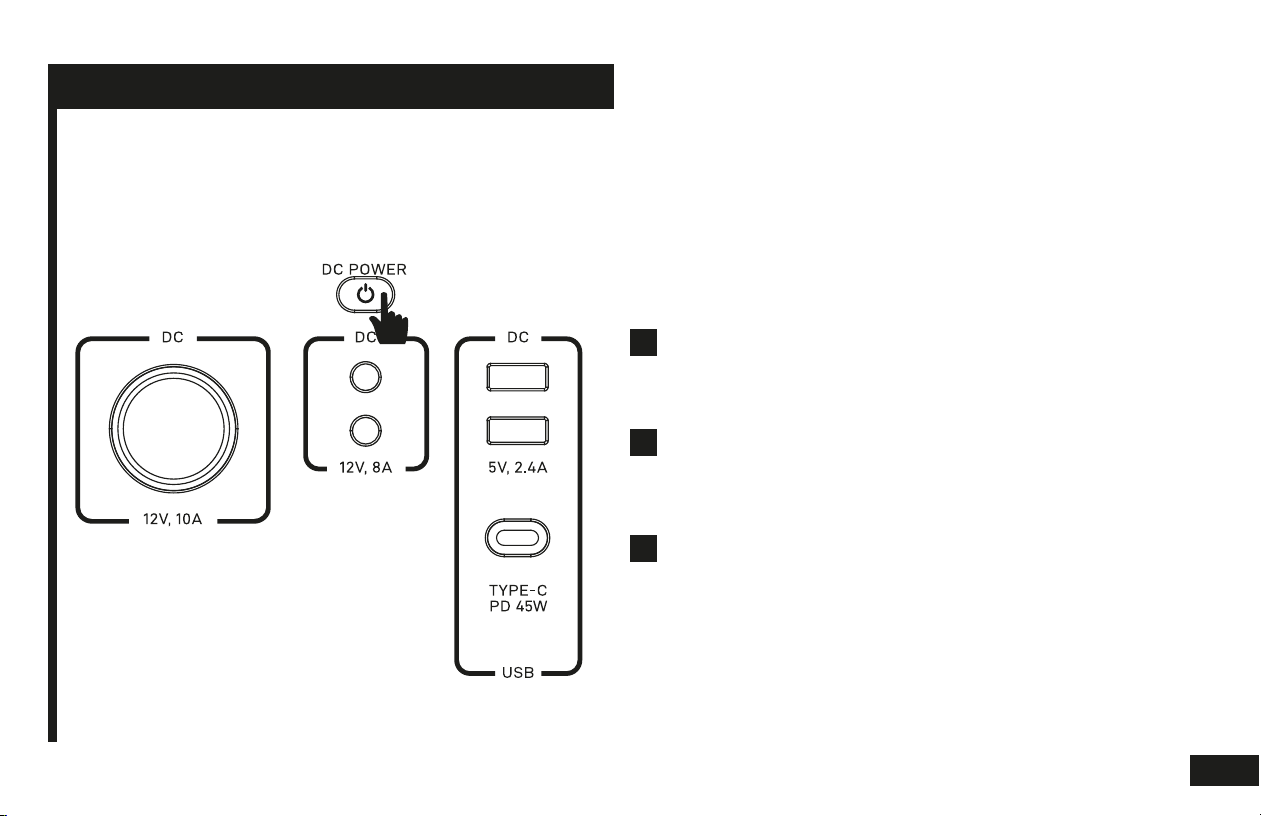
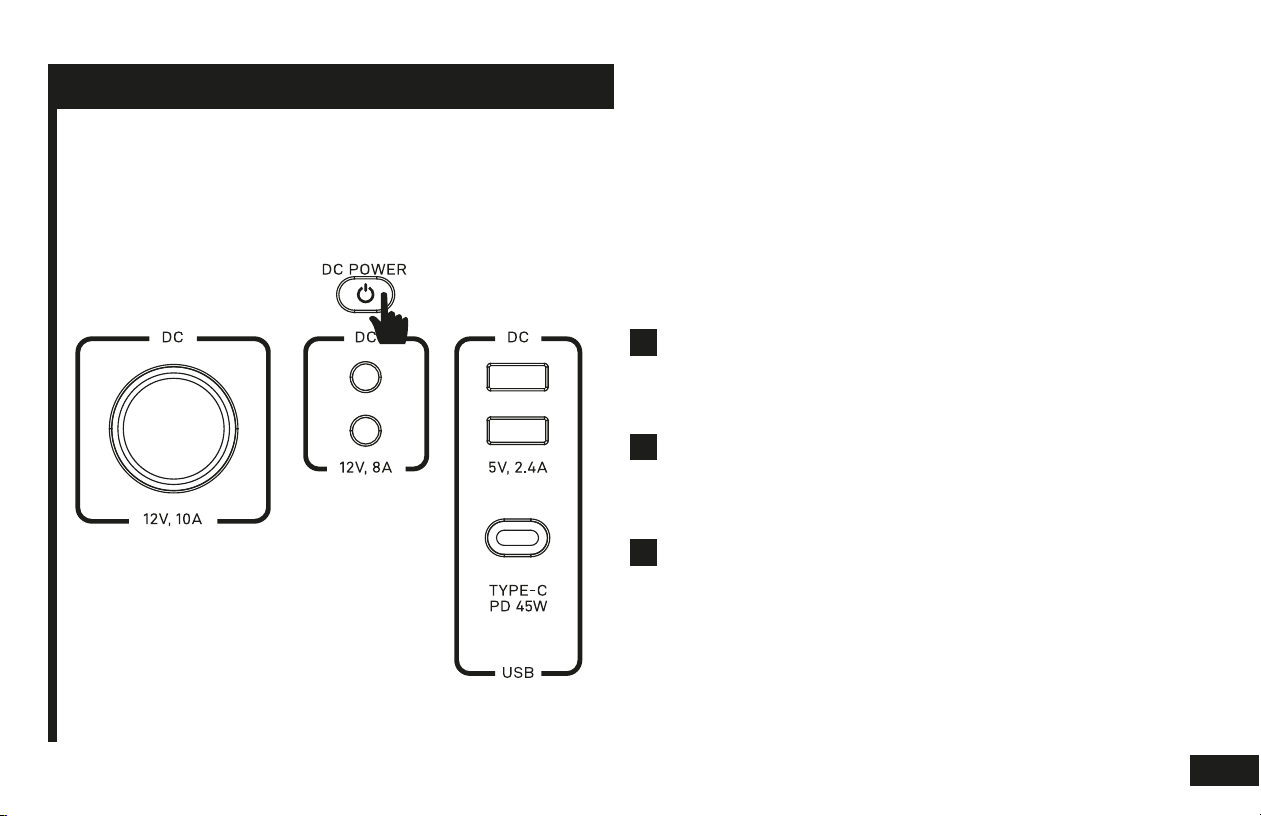
Powering DC applications
Connect your DC application to the T320 via any of the
DC output ports (USB, USB-C, DC socket, car port)
that ts your application connector.
Press the DC power button to enable DC power
output, you’ll know it’s enabled by seeing the DC
power button light up.
Press the DC power button again to shut off the DC
output.
1
2
3
5
USING YOUR UNIT
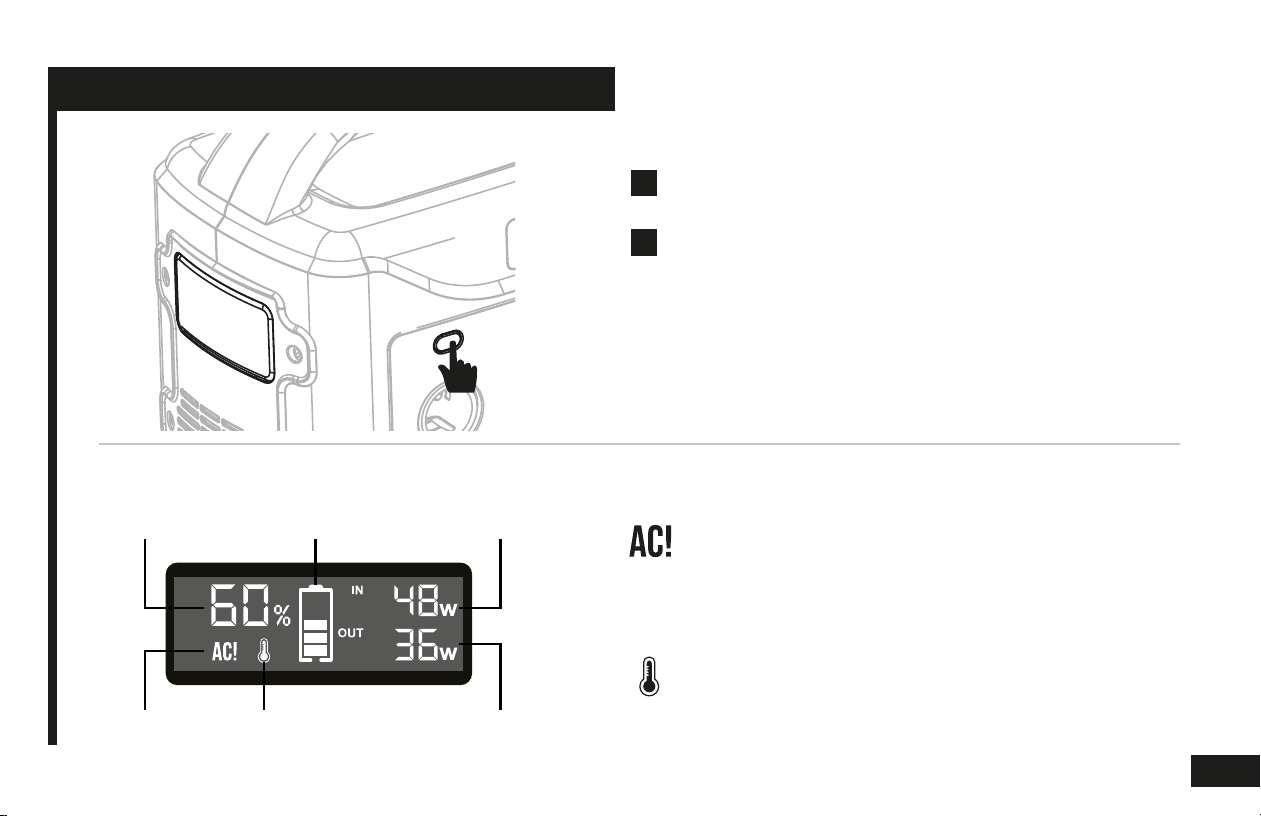
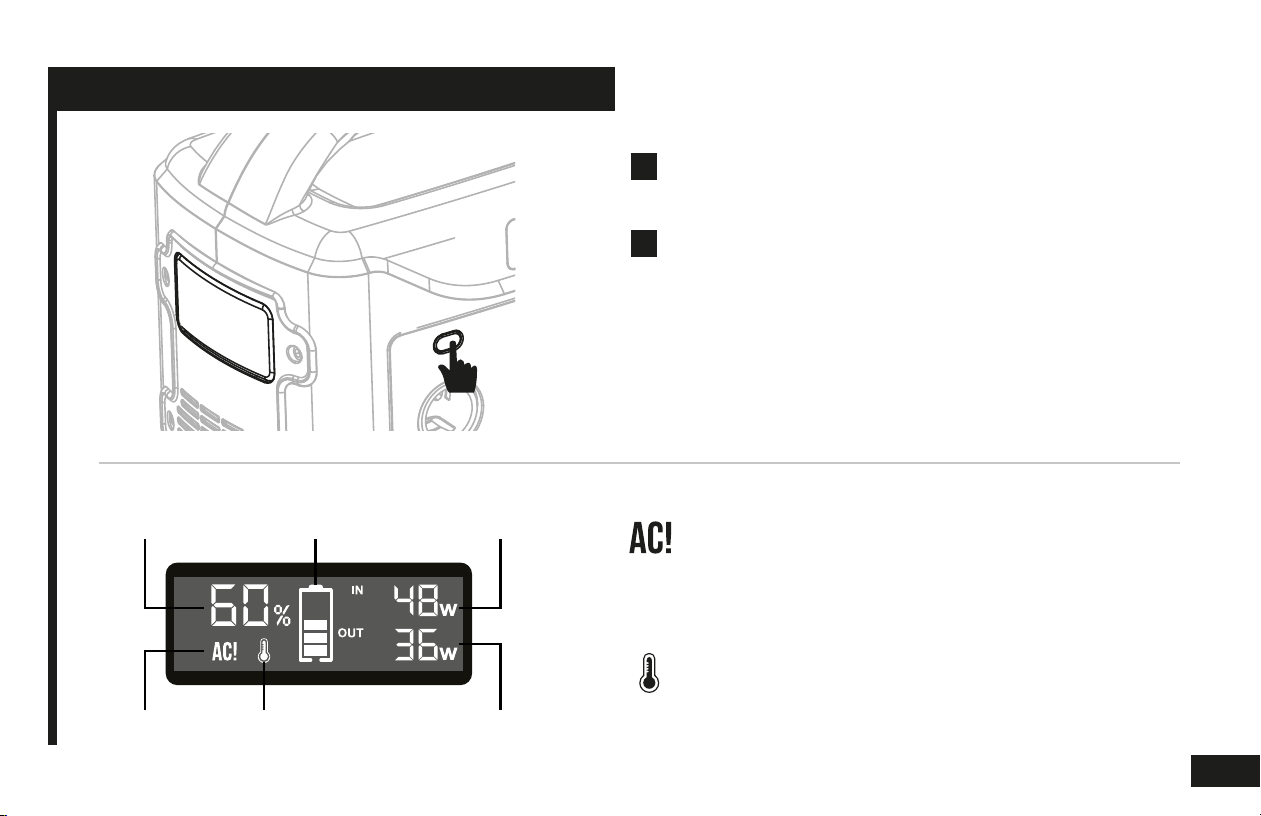
Using the built-in LED light
Press the light button once to turn on the built-in LED
light. Press the button again to turn it off.
Press and hold the light button to output lights in a
SOS distress pattern and to signal danger to others.
Press the button again to turn it off.
1
2
NOTE:
The LED light is powered by DC power, so when the LED light is on, the DC
power button will be turned on to indicate DC power being activated.
Pressing the DC power when LED light is on, will deactivate the LED light.
Abnormal Output Warning
This icon indicates the power draw for the output ports
is more than the power station can supply. Please
unplug an application to balance the load again.
Temperature Warning
This icon indicates that the power station is overheating.
Please take actions to cool the unit off. Such as unplug-
ging and stopping all devices drawing power, or moving
the power station to a cooler shady location.
LCD display
Battery
Percentage
Total Input
Wattage
Charge
Status
Total Output
Wattage
Abnormal
Output Warning
Temperature
Warning
6
NOTE:
The auto turn-off function is automatically enabled when the T320 is
turned off and on again. Regardless of the previous settings, this
feature will be enabled when the device is powered off and on again.
USING YOUR UNIT
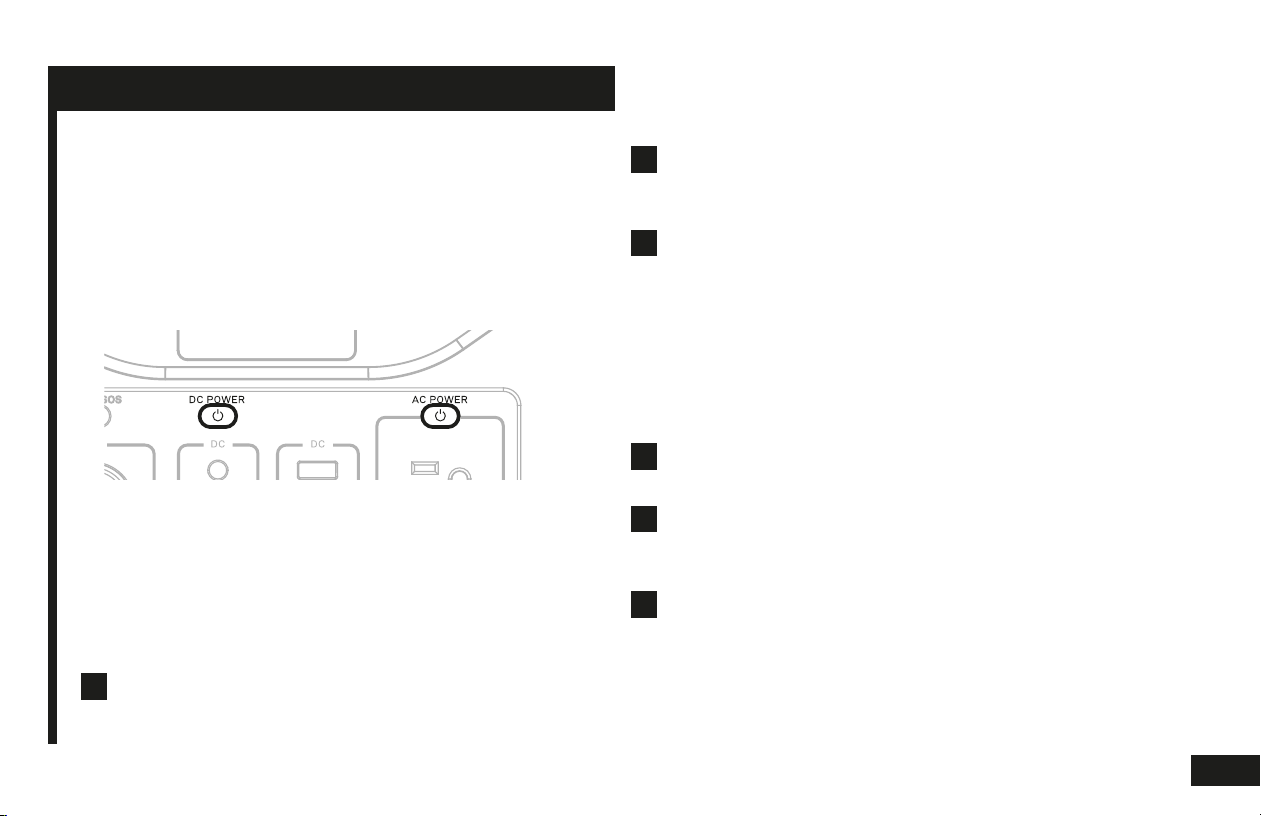
Manually overriding the auto turn-off function:
Auto turn-off function
To save energy and too prolong the battery life,
the T320 has equipped with an auto turn-off function
that is activated by default; that if the load of the AC
application(s) has been low enough for 5 minutes; the
T320 will auto turn itself off.
The auto turn-off function can be manually disabled.
To allow low applications that draw 3W or less to run,
follow these steps:
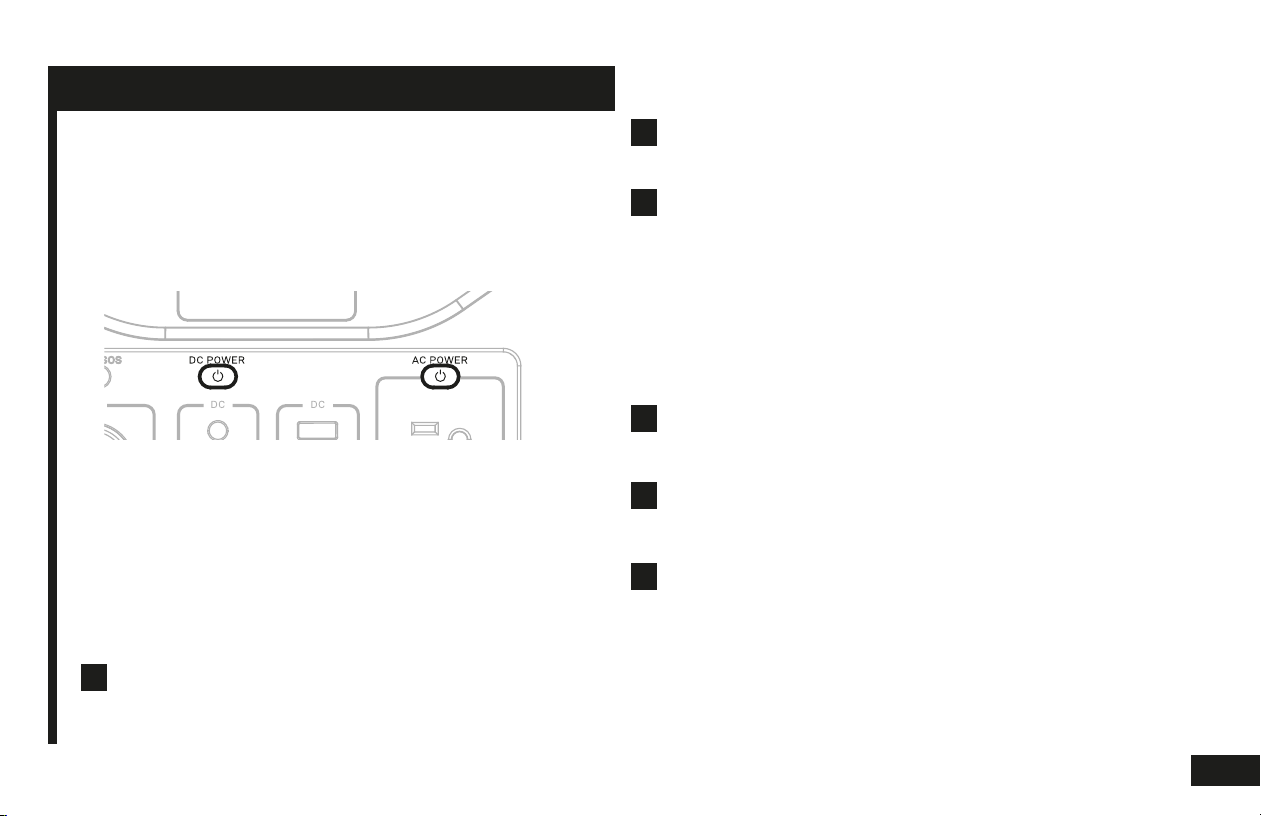
Press and hold BOTH DC power button and AC
power button for 3 seconds.
1
T320 will make 2 short beeps to indicate that auto
turn-off has been disabled. Then let go of your
ngers.
2
You can now use the T320 to power low wattage AC
applications without interruptions.
3
Reactivate auto turn off after manual over ride:
Auto turn-off function can be reactivated after a
manual over ride. To reactivate auto turn-off:
Press and hold BOTH DC power button and AC
power button for 3 seconds.
T320 will make 1 long beep to indicate that auto
turn-off has been reactivated. Then let go of your
ngers.
1
2
This power saving auto turn-off function is now
active again.
3
7
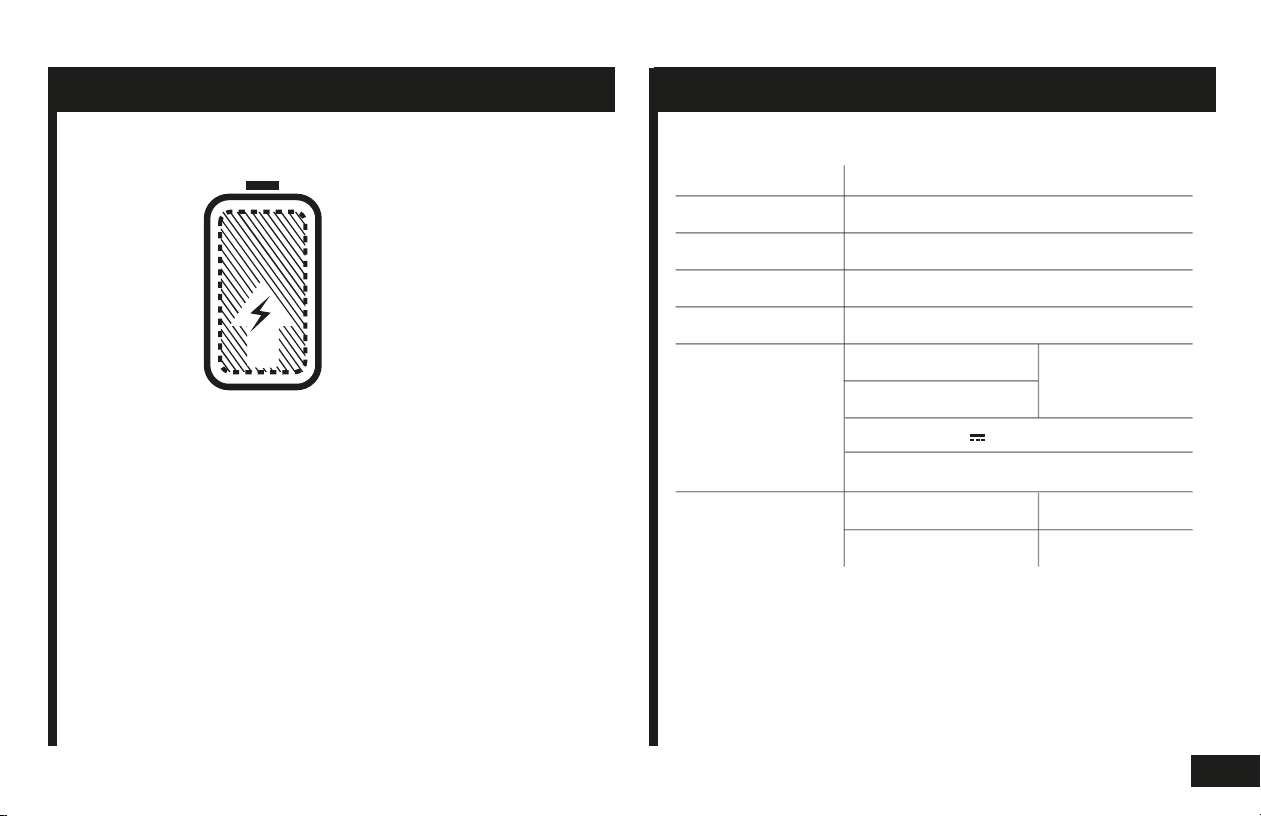
Do not store your T320 at low power level.
Charge it immediately after your adventures to prevent
damage to the battery.
Always fully-charge your T320 unit before putting it to
storage. Store it in a cool, dry place.
To prolong battery life and ensure your unit is always
ready to use, check the battery level frequently and
fully recharge it every 3 to 6 months.
STORAGE & MAINTENANCE TECHNICAL SPECIFICATIONS
Model NO. T320
Battery Cell Lithium-ion (LiFePO4)
Capacity 300Wh (12.8V, 23.4Ah)
Input DC 15V 3A with MPPT support
AC Output 2x 110V ~ 1.82A, 60Hz, 200W
DC Output
14°F to 104°F
32°F to 104°F
1x USB-C PD, 45W
Temperature
Operating
Recharging
2x DC 12V
10A, 120W
1x Car Port 12V
2x USB 5V 2.4A, 24W
CHARGE
BEFORE
STORING
8

Q: Can I use output ports when T320 is charging?
A: Yes you can.
Q: How long will this power station run my device?
A: Runtime hours depend on typical power consumption (how
many watt) your application requires. Find the typical power
consumption of your device from its manufacturer, and then divide
300 by the typical wattage consumption. For example: Airsense 10
CPAP has a typical power consumption of 53W. 300 / 53 = 5.6
hours. A fully charged T320 can run Airsense 10 CPAP for about
5.6 hours per charge.
Q: What kind of solar panel is compatible?
A: Any solar panel with 5V ~ 24V DC output will provide enough
charging voltage to charge your T320 unit via solar. But for
signicant charging speed, we recommend solar panels of 60W.
For example, the Tenergy 60W solar panel.
Q: Why is T320 keep turning itself off in a few
minutes when powering my small applications?
A: Most likely caused by the wattage of your application is too low
and triggered the auto turn off feature. To keep your low-wattage
application running without interrupting. Please manually turn off
the auto turn off feature (see page 7).
Q: Can I take the T320 on an airplane?
A: Please call the respective of airline to check before you took it to
airport. Inform them it's a lithium-ion battery of 300 watt-hours, and ask
for conrmation on compliance.
Q: “AC!” or "Temperature" icon shows up on the
screen, and it’s not working.
A: This can mean one or more of the following issue:
Over load protection: remove the overloaded application that plugged
onto T320, press the power button to reset the unit.
Short circuit: same as over loading, remove application and press the
power button to reset.
Over heat protection: let the unit cool down a few minutes, then press
the power button and see if gets back to normal condition. If not, give it
another few minutes.
Q: I tried everything but it’s still not working or not
meeting my needs.
A: Please contact our customer service team for further assistance.
Q: Why can’t I use it power my coffee maker?
A: Typical coffee maker has power of 800+watts. Which is higher
than the 200watt AC output limitation of T320. Same idea for other
applications such as air dryer, heater, cooker, or anything excess
200Watts.
Q: It will not stay on even it still has N% left.
A: Using the unit in high temperature locations may make the unit
running hot, and has its over temperature protection triggered
even when it still has power in it. Do not use this unit under direct
sun when the weather is hot, keep it in the shade and keep it well
ventilated will help with lowering the temperature.
Q: Is the battery replaceable?
A: The internal battery is not replaceable, but if it’s maintained
well, it can be recharged for up to 2000 times. Which provides a
very long life span.
Q: Can I keep the unit plugged to AC power?
A: It’s not recommended, as it will slightly reduce the life span of
the unit over time, however, if you nd it difcult to charge the unit
when its power level is low. Or you plan to put it in storage for over
a year without charging. Keeping it plugged into the AC power
while storing is doable to prevent over discharge.
FAQS & TROUBLESHOOTING
9
Q: Can I use output ports when T320 is charging?
A: Yes you can.
Q: How long will this power station run my device?
A: Runtime hours depend on typical power consumption (how
many watt) your application requires. Find the typical power
consumption of your device from its manufacturer, and then divide
300 by the typical wattage consumption. For example: Airsense 10
CPAP has a typical power consumption of 53W. 300 / 53 = 5.6
hours. A fully charged T320 can run Airsense 10 CPAP for about
5.6 hours per charge.
Q: What kind of solar panel is compatible?
A: Any solar panel with 5V ~ 24V DC output will provide enough
charging voltage to charge your T320 unit via solar. But for
signicant charging speed, we recommend solar panels of 60W.
For example, the Tenergy 60W solar panel.
Q: Why is T320 keep turning itself off in a few
minutes when powering my small applications?
A: Most likely caused by the wattage of your application is too low
and triggered the auto turn off feature. To keep your low-wattage
application running without interrupting. Please manually turn off
the auto turn off feature (see page 7).
Q: Can I take the T320 on an airplane?
A: Please call the respective of airline to check before you took it to
airport. Inform them it's a lithium-ion battery of 300 watt-hours, and ask
for conrmation on compliance.
Q: “AC!” or "Temperature" icon shows up on the
screen, and it’s not working.
A: This can mean one or more of the following issue:
Over load protection: remove the overloaded application that plugged
onto T320, press the power button to reset the unit.
Short circuit: same as over loading, remove application and press the
power button to reset.
Over heat protection: let the unit cool down a few minutes, then press
the power button and see if gets back to normal condition. If not, give it
another few minutes.
Q: I tried everything but it’s still not working or not
meeting my needs.
A: Please contact our customer service team for further assistance.
Q: Why can’t I use it power my coffee maker?
A: Typical coffee maker has power of 800+watts. Which is higher
than the 200watt AC output limitation of T320. Same idea for other
applications such as air dryer, heater, cooker, or anything excess
200Watts.
Q: It will not stay on even it still has N% left.
A: Using the unit in high temperature locations may make the unit
running hot, and has its over temperature protection triggered
even when it still has power in it. Do not use this unit under direct
sun when the weather is hot, keep it in the shade and keep it well
ventilated will help with lowering the temperature.
Q: Is the battery replaceable?
A: The internal battery is not replaceable, but if it’s maintained
well, it can be recharged for up to 2000 times. Which provides a
very long life span.
Q: Can I keep the unit plugged to AC power?
A: It’s not recommended, as it will slightly reduce the life span of
the unit over time, however, if you nd it difcult to charge the unit
when its power level is low. Or you plan to put it in storage for over
a year without charging. Keeping it plugged into the AC power
while storing is doable to prevent over discharge.
FAQS & TROUBLESHOOTING
MORE QUESTION?
Feel free to contact our customer service specialist:
510-979-9969 service@tenergy.com
10

LIMITED WARRANTY
TENERGY warrants to the original consumer purchaser that
this TENERGY product will be free from defects in workman-
ship and material under normal consumer use during the
applicable warranty period identied in “WARRANTY
PERIOD” below, subject to the exclusions set forth in
“EXCLUSIONS” below. This warranty statement sets forth
TENERGY’s total and exclusive warranty obligation. We will
not assume, nor authorize any person to assume for us, any
other liability in connection with the sales of our products.
WARRANTY PERIOD
The warranty period is 24 months. The warranty period is
measured starting on the date of purchase by the original
consumer purchaser. The sales receipt from the rst
consumer purchase, or other reasonable documentary proof,
is required in order to establish the start date of the warranty
period.
REMEDY
TENERGY will repair or replace (at TENERGY’s option) any
TENERGY product that fails to operate during the applicable
warranty period due to a defect in workmanship or material.
WARRANTY
LIMITED TO ORIGINAL CONSUMER BUYER
The warranty on TENERGY’s products is limited to the original
consumer purchaser and is not transferable to any subsequent
owner.
EXCLUSIONS
TENERGY’s warranty does not apply to (i) any product that is
misused, abused, modied, damaged by accident, or used for
anything other than normal consumer use as authorized in
TENERGY’s current product literature, or (ii) any product purchased
through an online auction house. TENERGY’s warranty does not
apply to any battery cell or product containing a battery cell unless
the battery cell is fully charged by you within seven days after you
purchase the product and at least once every 3 months thereafter.
HOW TO RECEIVE SERVICE
To obtain warranty service, you must contact our customer service
team via telephone at 510- 979-9969 , or via email at
service@tenergy.com.
11

12
CONTACT US
THANK YOU!
510-979-9969
Mon-Fri 9am-5pm PST (US)
LIVE CHAT
service@tenergy.com
power.Tenergy.com
POWER
STATION
MODE D'EMPLOI
PN 59148

CHARGEZ-MOI MAINTENANT
Avant d'utiliser ou de stocker, branchez votre appareil
Tenergy T320 dans le mur jusqu'à ce qu'il soit complètement chargé.

CONSIGNES DE SÉCURITÉ IMPORTANTES
AVERTISSEMENT
Lors de l'utilisation de ce produit, des précautions de base
doivent toujours être suivies, notamment les suivantes:
Lisez toutes les instructions avant d'utiliser le produit.
Pour réduire le risque de blessure, une surveillance étroite est
nécessaire lorsque le produit est utilisé à proximité d'enfants.
Ne mettez pas les doigts ou les mains dans le produit.
L'utilisation d'un accessoire non recommandé ou vendu par le
fabricant du bloc d'alimentation peut entraîner un risque d'incendie,
de choc électrique ou de blessures corporelles.
Pour réduire le risque d'endommagement de la che et du cordon
électriques, tirez sur la che plutôt que sur le cordon lors de la
déconnexion du bloc d'alimentation.
N'utilisez pas de batterie ou d'appareil endommagé ou modié. Les
batteries endommagées ou modiées peuvent présenter un
comportement imprévisible entraînant un incendie, une explosion
ou un risque de blessure.
N'utilisez pas le bloc d'alimentation avec un cordon ou une che
endommagé ou un câble de sortie endommagé.
Ne démontez pas le bloc d'alimentation; apportez-le à un technicien
qualié lorsqu'un entretien ou une réparation est nécessaire. Un
remontage incorrect peut entraîner un risque d'incendie ou de choc
électrique.
Pour réduire le risque de choc électrique, débranchez le bloc
d'alimentation de la prise de courant avant de tenter tout entretien
recommandé.
Lors de la charge de la batterie interne, travaillez dans un endroit
bien ventilé et ne restreignez en aucune façon la ventilation.
Dans des conditions abusives, du liquide peut être éjecté de la
batterie; éviter tout contact. En cas de contact accidentel, rincer à
l'eau. Si du liquide entre en contact avec les yeux, consultez
également un médecin. Le liquide éjecté de la batterie peut
provoquer une irritation ou des brûlures.
N'exposez pas un bloc d'alimentation au feu ou à une température
excessive. L'exposition au feu ou à une température supérieure à
130 ° C peut provoquer une explosion. La température de 130 ° C
peut être remplacée par la température de 265 ° F.
Faites réparer par un réparateur qualié en utilisant uniquement des
pièces de rechange identiques. Cela garantira le maintien de la
sécurité du produit.
CONSERVEZ CES INSTRUCTIONS
a)
h)
i)
j)
k)
l)
m)
b)
c)
d)
e)
f)
g)

TABLE DES MATIÈRES
QU'Y A-T-IL DANS LA BOITE
APPRENEZ À CONNAÎTRE VOTRE UNITÉ
COMMENT ÇA FONCTIONNE
CHARGER VOTRE UNITÉ
UTILISATION DE VOTRE UNITÉ
ENTREPOSAGE ET MAINTENANCE
SPÉCIFICATIONS TECHNIQUES
FAQ & DÉPANNAGE
NOUS CONTACTER
1
1
2
3
4
8
8
9
11
1
1. Bouton d'éclairage LED 5. Port d'entrée 9. Ports USB
2. Lumière LED 6. Écran LCD 10. Prises AC
3. Sortie 12V, 10A DC 7. Bouton d'alimentation DC 11. Port USB-C
4. Sorties 12V, 8A DC 8. Bouton d'alimentation CA
1
2
3
4
5
6
7
8
9
10
11
QU'Y A-T-IL DANS LA BOITE APPRENEZ À CONNAÎTRE VOTRE UNITÉ
Chargeur de voiture
Tenergy T320
Chargeur mural
3 FAÇONS DE RECHARGER CE QU'IL ALIMENTE
Adaptateur AC
8 heures
Chargeur de voiture
10 heures
Panneau solaire 60W
7 heures*
*Panneau solaire vendu séparément. Le temps de charge
réel varie en fonction des conditions météorologiques et
du degré d'excellence de la réception du soleil.
Téléphone
30 charges
Mini refroidisseur (60W)
22 heures
Portable
4-5 charges
Lampe (9W)
35 heures
Tablette
9 charges
Console de jeu
20 heures
Drone (Grand)
5 charges
Lumière LED (intégrée)
85 heures
Caméra
20 charges
Haut-parleur
20 charges
(Les modèles peuvent varier)
2
Charge via le panneau solaire (vendu séparément)
Placez votre panneau solaire là où il peut recevoir la lumière directe du soleil la plus forte. Connectez le port de
sortie du panneau solaire au port d'entrée du T320. L'écran LCD afchera une icône de charge pour indiquer que
le PPS est en cours de charge.
Grâce à la technologie MPPT (Maximum Power Point Tracking), le T320 suit la puissance maximale fournie par
l'énergie solaire et devient plus efcace pour convertir l'énergie en énergie pour recharger la centrale.
Charge via l'adaptateur secteur
Connectez votre appareil T320 à la prise murale avec l'adaptateur secteur fourni avec l'emballage de votre
centrale électrique portable. L'écran LCD indique quand la centrale est en cours de recharge.
Chargez dans votre voiture
Connectez votre unité T320 à votre prise allume-cigare 12V avec le chargeur de voiture fourni avec l'emballage de
votre centrale électrique portable. L'écran LCD indique quand la centrale est en cours de recharge.
CHARGER VOTRE UNITÉ
3
Technologie MPPT:
Alimentation des applications AC
Appuyez sur le bouton d'alimentation AC pour activer
la sortie d'alimentation AC. Le bouton d'alimentation
AC s'allumera pour indiquer que la fonction est activée.
Appuyez à nouveau sur le bouton d'alimentation AC
pour désactiver la sortie AC.
AVERTISSEMENT:
Assurez-vous que la puissance totale de tous les
appareils AC branchés simultanément sur les
prises AC ne dépasse pas 200 watts. En cas de
surcharge, veuillez supprimer l'application
surchargée et appuyez sur le bouton d'alimentation
pour réinitialiser l'unité.
UTILISATION DE VOTRE APPAREIL
Connectez votre application AC au T320.1
2
3
4
UTILISATION DE VOTRE APPAREIL
Alimentation des applications DC
Connectez votre application DC au T320 via l'un des
ports de sortie DC (USB, USB-C, prise DC, port de
voiture) qui correspond à votre connecteur d'application.
Appuyez sur le bouton d'alimentation DC pour activer
la sortie d'alimentation DC, vous saurez qu'il est activé
en voyant le bouton d'alimentation DC s'allumer.
Appuyez à nouveau sur le bouton d'alimentation DC
pour désactiver la sortie DC.
1
2
3
5
UTILISATION DE VOTRE APPAREIL
Utilisation de la lumière LED intégrée
Appuyez une fois sur le bouton d'éclairage pour
allumer l'éclairage LED intégré. Appuyez à nouveau sur
le bouton pour le désactiver.
Appuyez sur le bouton d'éclairage et maintenez-le
enfoncé pour émettre des lumières selon un schéma de
détresse SOS et pour signaler un danger aux autres.
Appuyez à nouveau sur le bouton pour le désactiver.
1
2
REMARQUE:
La lumière LED est alimentée par une alimentation DC, donc lorsque la lumière
LED est allumée, le bouton d'alimentation DC sera allumé pour indiquer que
l'alimentation DC est activée. Appuyer sur l'alimentation DC lorsque la lumière
LED est allumée, désactivera la lumière LED.
Avertissement de sortie anormale
Cette icône indique que la consommation électrique
des ports de sortie est supérieure à ce que la centrale
électrique peut fournir. Veuillez débrancher une
application pour équilibrer à nouveau la charge.
Avertissement de température
Cette icône indique que la centrale électrique surchauffe.
Veuillez prendre des mesures pour refroidir l'appareil. Tels
que débrancher et arrêter tous les appareils consommant
de l'énergie ou déplacer la centrale électrique vers un
endroit ombragé et plus frais..
Affichage LCD
pourcentage
de batterie
Puissance
d'entrée totale
Statut de
charge
Puissance de
sortie totale
Avertissement de
sortie anormale
Avertissement
de température
6
REMARQUE:
La fonction d'extinction automatique est automatiquement activée
lorsque le T320 est éteint puis rallumé. Quels que soient les paramètres
précédents, cette fonction sera activée lorsque l'appareil sera éteint
puis rallumé.
UTILISATION DE VOTRE APPAREIL
Ignorer manuellement la fonction
d'extinction automatique:
Fonction d'extinction automatique:
Pour économiser de l'énergie et prolonger la durée de
vie de la batterie, le T320 dispose d'une fonction
d'arrêt automatique intégrée qui est activée par défaut
lorsque la charge AC est trop faible pendant 5 minutes.
La fonction d'extinction automatique peut être désac-
tivée manuellement. Pour autoriser les applications
faibles qui consomment 3W ou moins à s'exécuter,
procédez comme suit:
Maintenez enfoncés les deux boutons d'alimentation
DC et AC pendant 3 secondes.
1
Le T320 émet 2 bips courts pour indiquer que l'arrêt
automatique a été désactivé. Lâchez ensuite vos doigts.
2
Vous pouvez maintenant utiliser le T320 pour alimenter
des applications AC à faible puissance sans interruption.
3
Réactiver l'arrêt automatique après
un dépassement manuel:
La fonction d'extinction automatique peut être réactivée après
un dépassement manuel. Pour réactiver l'arrêt automatique:
Maintenez enfoncés les deux boutons d'alimentation
DC et AC pendant 3 secondes.
Le T320 émet 1 bip long pour indiquer que l'arrêt
automatique a été réactivé. Lâchez ensuite vos doigts.
1
2
Cette fonction d'extinction automatique d'économie
d'énergie est à nouveau active.
3
7
Ne stockez pas votre T320 à faible puissance.
Chargez-le immédiatement après vos aventures pour
éviter d'endommager la batterie.
Chargez toujours complètement votre unité T320 avant
de la stocker. Conservez-le dans un endroit frais et sec.
Pour prolonger la durée de vie de la batterie et vous
assurer que votre appareil est toujours prêt à l'emploi,
vériez fréquemment le niveau de la batterie et
rechargez-la complètement tous les 3 à 6 mois.
ENTREPOSAGE ET MAINTENANCE SPÉCIFICATIONS TECHNIQUES
Modèle NO. T320
Cellule de batterie Lithium-ion (LiFePO4)
Capacité 300Wh (12.8V, 23.4Ah)
Entrée DC 15V 3A with MPPT support
Sortie AC 2x 110V ~ 1.82A, 60Hz, 200W
Sortie DC
14°F to 104°F
32°F to 104°F
1x USB-C PD, 45W
Température
Fonctionnement
Recharger
2x DC 12V
10A, 120W
1x Car Port 12V
2x USB 5V 2.4A, 24W
CHARGE
AVANT
STOCKAGE
8

Q: Puis-je utiliser des ports de sortie lorsque le T320 est
en charge?
R: Oui, vous le pouvez.
Q: Combien de temps cette centrale électrique fonction-
nera-t-elle sur mon appareil?
R: Les heures d'exécution dépendent de la consommation électrique
typique (combien de watts) votre application nécessite. Trouvez la
consommation d'énergie typique de votre appareil auprès de son
fabricant, puis divisez 300 par la consommation de puissance typique.
Par exemple: Airsense 10 CPAP a une consommation électrique
typique de 53 W. 300/53 = 5,6 heures. Un T320 complètement chargé
peut exécuter Airsense 10 CPAP pendant environ 5,6 heures par
charge.
Q: Quel type de panneau solaire est compatible?
R: Tout panneau solaire avec une sortie 5V ~ 24V DC fournira une
tension de charge sufsante pour charger votre unité T320 via l'énergie
solaire. Mais pour une vitesse de charge importante, nous recomman-
dons des panneaux solaires de 60W. Par exemple, le panneau solaire
Tenergy 60W.
Q: Pourquoi le T320 s'éteint-il en quelques minutes lors
de la mise sous tension de mes petites applications?
R: La cause la plus probable de la puissance de votre application est
trop faible et a déclenché la fonction d'extinction automatique. Pour
que votre application à faible puissance fonctionne sans interruption.
Veuillez désactiver manuellement la fonction d'extinction automatique
(voir page 7).
Q: Puis-je prendre le T320 dans un avion?
R: Veuillez appeler la compagnie aérienne concernée pour vérier avant de
vous rendre à l'aéroport. Informez-les qu'il s'agit d'une batterie lithium-ion de
300 wattheures et demandez une conrmation de conformité.
Q: "AC!" ou l'icône "Température" apparaît à l'écran et ne
fonctionne pas.
R: Cela peut signier un ou plusieurs des problèmes suivants:
Protection contre les surcharges: supprimez l'application surchargée qui
s'est branchée sur le T320, appuyez sur le bouton d'alimentation pour
réinitialiser l'unité.
Court-circuit: identique à la surcharge, supprimez l'application et appuyez
sur le bouton d'alimentation pour réinitialiser.
Protection contre la chaleur excessive: laissez l'appareil refroidir quelques
minutes, puis appuyez sur le bouton d'alimentation et voyez s'il revient à son
état normal. Sinon, donnez-lui encore quelques minutes.
Q: J'ai tout essayé mais cela ne fonctionne toujours pas ou ne
répond pas à mes besoins.
R: veuillez contacter notre service client pour obtenir de l'aide.
Q: Pourquoi ne puis-je pas l'utiliser pour alimenter ma
cafetière?
R: La cafetière typique a une puissance de 800 + watts. Ce qui est
supérieur à la limitation de sortie CA de 200 watts du T320. Même idée
pour d'autres applications telles que séchoir à air, chauffage, cuisinière
ou tout autre excédent de 200 watts.
Q: Il ne restera pas allumé même s'il reste N%.
R: L'utilisation de l'appareil dans des endroits à haute température peut
faire chauffer l'appareil et sa protection contre les surchauffes est
déclenchée même lorsqu'il est toujours alimenté. N'utilisez pas cet
appareil sous le soleil direct lorsque le temps est chaud, gardez-le à
l'ombre et gardez-le bien ventilé vous aidera à abaisser la température.
Q: La batterie est-elle remplaçable?
R: La batterie interne n'est pas remplaçable, mais si elle est bien
entretenue, elle peut être rechargée jusqu'à 2000 fois. Ce qui offre une
très longue durée de vie.
Q: Puis-je garder l'appareil branché sur le secteur?
R: Ce n'est pas recommandé, car cela réduira légèrement la durée de
vie de l'unité au l du temps, cependant, si vous rencontrez des
difcultés pour charger l'unité lorsque son niveau de puissance est
faible. Ou vous envisagez de le stocker pendant plus d'un an sans
charge. Le garder branché sur le secteur pendant le stockage est
possible pour éviter une décharge excessive.
FAQ & DÉPANNAGE
9

Q: Puis-je utiliser des ports de sortie lorsque le T320 est
en charge?
R: Oui, vous le pouvez.
Q: Combien de temps cette centrale électrique fonction-
nera-t-elle sur mon appareil?
R: Les heures d'exécution dépendent de la consommation électrique
typique (combien de watts) votre application nécessite. Trouvez la
consommation d'énergie typique de votre appareil auprès de son
fabricant, puis divisez 300 par la consommation de puissance typique.
Par exemple: Airsense 10 CPAP a une consommation électrique
typique de 53 W. 300/53 = 5,6 heures. Un T320 complètement chargé
peut exécuter Airsense 10 CPAP pendant environ 5,6 heures par
charge.
Q: Quel type de panneau solaire est compatible?
R: Tout panneau solaire avec une sortie 5V ~ 24V DC fournira une
tension de charge sufsante pour charger votre unité T320 via l'énergie
solaire. Mais pour une vitesse de charge importante, nous recomman-
dons des panneaux solaires de 60W. Par exemple, le panneau solaire
Tenergy 60W.
Q: Pourquoi le T320 s'éteint-il en quelques minutes lors
de la mise sous tension de mes petites applications?
R: La cause la plus probable de la puissance de votre application est
trop faible et a déclenché la fonction d'extinction automatique. Pour
que votre application à faible puissance fonctionne sans interruption.
Veuillez désactiver manuellement la fonction d'extinction automatique
(voir page 7).
Q: Puis-je prendre le T320 dans un avion?
R: Veuillez appeler la compagnie aérienne concernée pour vérier avant de
vous rendre à l'aéroport. Informez-les qu'il s'agit d'une batterie lithium-ion de
300 wattheures et demandez une conrmation de conformité.
Q: "AC!" ou l'icône "Température" apparaît à l'écran et ne
fonctionne pas.
R: Cela peut signier un ou plusieurs des problèmes suivants:
Protection contre les surcharges: supprimez l'application surchargée qui
s'est branchée sur le T320, appuyez sur le bouton d'alimentation pour
réinitialiser l'unité.
Court-circuit: identique à la surcharge, supprimez l'application et appuyez
sur le bouton d'alimentation pour réinitialiser.
Protection contre la chaleur excessive: laissez l'appareil refroidir quelques
minutes, puis appuyez sur le bouton d'alimentation et voyez s'il revient à son
état normal. Sinon, donnez-lui encore quelques minutes.
Q: J'ai tout essayé mais cela ne fonctionne toujours pas ou ne
répond pas à mes besoins.
R: veuillez contacter notre service client pour obtenir de l'aide.
Q: Pourquoi ne puis-je pas l'utiliser pour alimenter ma
cafetière?
R: La cafetière typique a une puissance de 800 + watts. Ce qui est
supérieur à la limitation de sortie CA de 200 watts du T320. Même idée
pour d'autres applications telles que séchoir à air, chauffage, cuisinière
ou tout autre excédent de 200 watts.
Q: Il ne restera pas allumé même s'il reste N%.
R: L'utilisation de l'appareil dans des endroits à haute température peut
faire chauffer l'appareil et sa protection contre les surchauffes est
déclenchée même lorsqu'il est toujours alimenté. N'utilisez pas cet
appareil sous le soleil direct lorsque le temps est chaud, gardez-le à
l'ombre et gardez-le bien ventilé vous aidera à abaisser la température.
Q: La batterie est-elle remplaçable?
R: La batterie interne n'est pas remplaçable, mais si elle est bien
entretenue, elle peut être rechargée jusqu'à 2000 fois. Ce qui offre une
très longue durée de vie.
Q: Puis-je garder l'appareil branché sur le secteur?
R: Ce n'est pas recommandé, car cela réduira légèrement la durée de
vie de l'unité au l du temps, cependant, si vous rencontrez des
difcultés pour charger l'unité lorsque son niveau de puissance est
faible. Ou vous envisagez de le stocker pendant plus d'un an sans
charge. Le garder branché sur le secteur pendant le stockage est
possible pour éviter une décharge excessive.
FAQ et DÉPANNAGE
PLUS DE QUESTION?
N'hésitez pas à contacter notre spécialiste du
service client:
510-979-9969 service@tenergy.com
10

11
NOUS CONTACTER
JE VOUS REMERCIE!
510-979-9969
Mon-Fri 9am-5pm PST (US)
CHAT EN DIRECT
service@tenergy.com
power.Tenergy.com