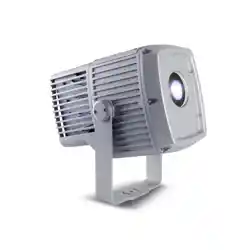
Exterior Projection 500
User Manual
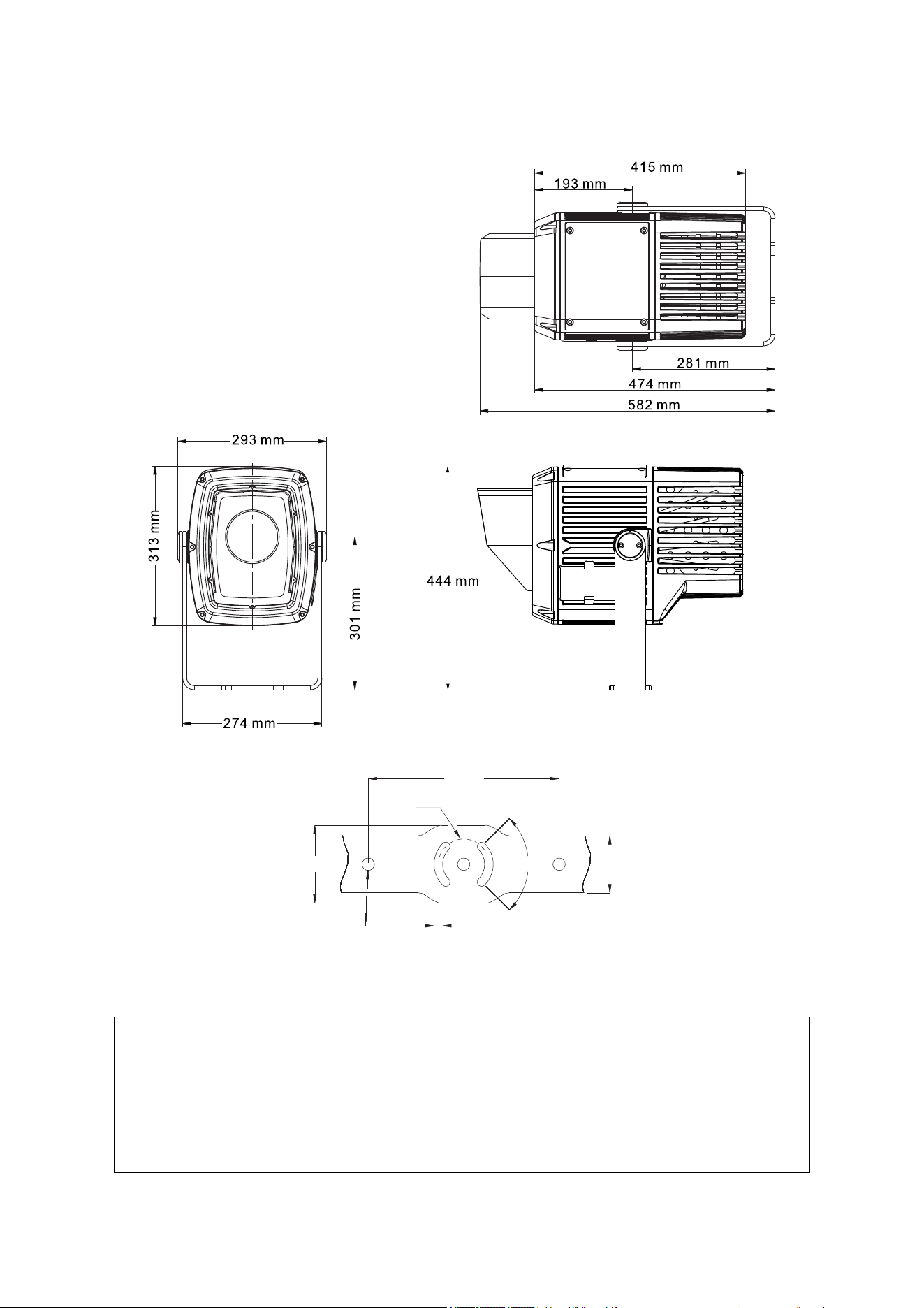
Dimensions
169
94
140
401
290
307
90
90
Ø53
Ø53
200
200
9
60
60
Ø13
Ø13
82
82
All dimensions are in millimeters
©2013-2020 HARMAN International Industries, Inc. Information subject to change without notice. HARMAN International
Industries, Inc. and all affiliated companies disclaim liability for any injury, damage, direct or indirect loss, consequential or
economic loss or any other loss occasioned by the use of, inability to use or reliance on the information contained in this
document.
Martin, HARMAN and all other trademarks in this document pertaining to services or products by HARMAN International
Industries, Inc. or its affiliates and subsidiaries are registered as the property of HARMAN International Industries, Inc.
HARMAN Professional Solutions • 8500 Balboa Blvd. • Northridge • CA 91329 • USA
Exterior Projection 500 User Manual P/N 5088618-00 Revision K

Table of contents
Dimensions ........................................................................................................... 2
Safety information ................................................................................................. 5
Introduction ........................................................................................................... 8
Before using the product for the first time ............................................................ 8
Fixture overview ................................................................................................... 9
Physical installation ............................................................................................ 10
Protection from the sun ............................................................................ 10
Cooling ..................................................................................................... 10
Protection from moisture .......................................................................... 10
Mounting the fixture .................................................................................. 10
Adjusting aiming (pan and tilt) .................................................................. 12
AC power ............................................................................................................ 14
Protecting connections from moisture ...................................................... 14
Connecting to power ................................................................................ 14
Installing a temporary power plug ............................................................ 15
Control data link .................................................................................................. 16
Connecting the data link ........................................................................... 16
Fixture setup ....................................................................................................... 18
Using the control menus .......................................................................... 18
Setting a DMX address ............................................................................ 18
Programming a stand-alone show ........................................................... 19
Manual control mode ................................................................................ 19
Display setting .......................................................................................... 20
Fixture status ............................................................................................ 21
Fixture configuration (including host/client operation) .............................. 21
Setting effect offsets ................................................................................. 23
Setup via RDM ......................................................................................... 23
Effects ................................................................................................................. 24
Strobe / shutter ......................................................................................... 24
Electronic dimming ................................................................................... 24
Color wheel .............................................................................................. 24
Gobos ....................................................................................................... 25
Animation effect ........................................................................................ 27
Prism ........................................................................................................ 27
Frost ......................................................................................................... 27
Focus ........................................................................................................ 27
Operation ............................................................................................................ 28
Projection data ......................................................................................... 28
Focus distances ....................................................................................... 30
Maintenance ....................................................................................................... 31
Cleaning ................................................................................................... 31
Managing humidity ................................................................................... 31
Removing and reinstalling the top cover .................................................. 33

Replacing a rotating gobo ........................................................................ 35
Installing a glare shield accessory ........................................................... 39
Installing a framing module ...................................................................... 39
Updating firmware .................................................................................... 44
Remote Device Management (RDM) ................................................................. 45
Setting beam angles in new firmware ...................................................... 45
Parameter IDs .......................................................................................... 45
DMX protocol ...................................................................................................... 47
Control menus .................................................................................................... 50
Warning and error messages ............................................................................. 52
Troubleshooting .................................................................................................. 53
Specifications ..................................................................................................... 54
Exterior Projection 500 User Manual 5
Safety information
WARNING!
Read the safety precautions in this manual before
installing, operating or servicing this product.
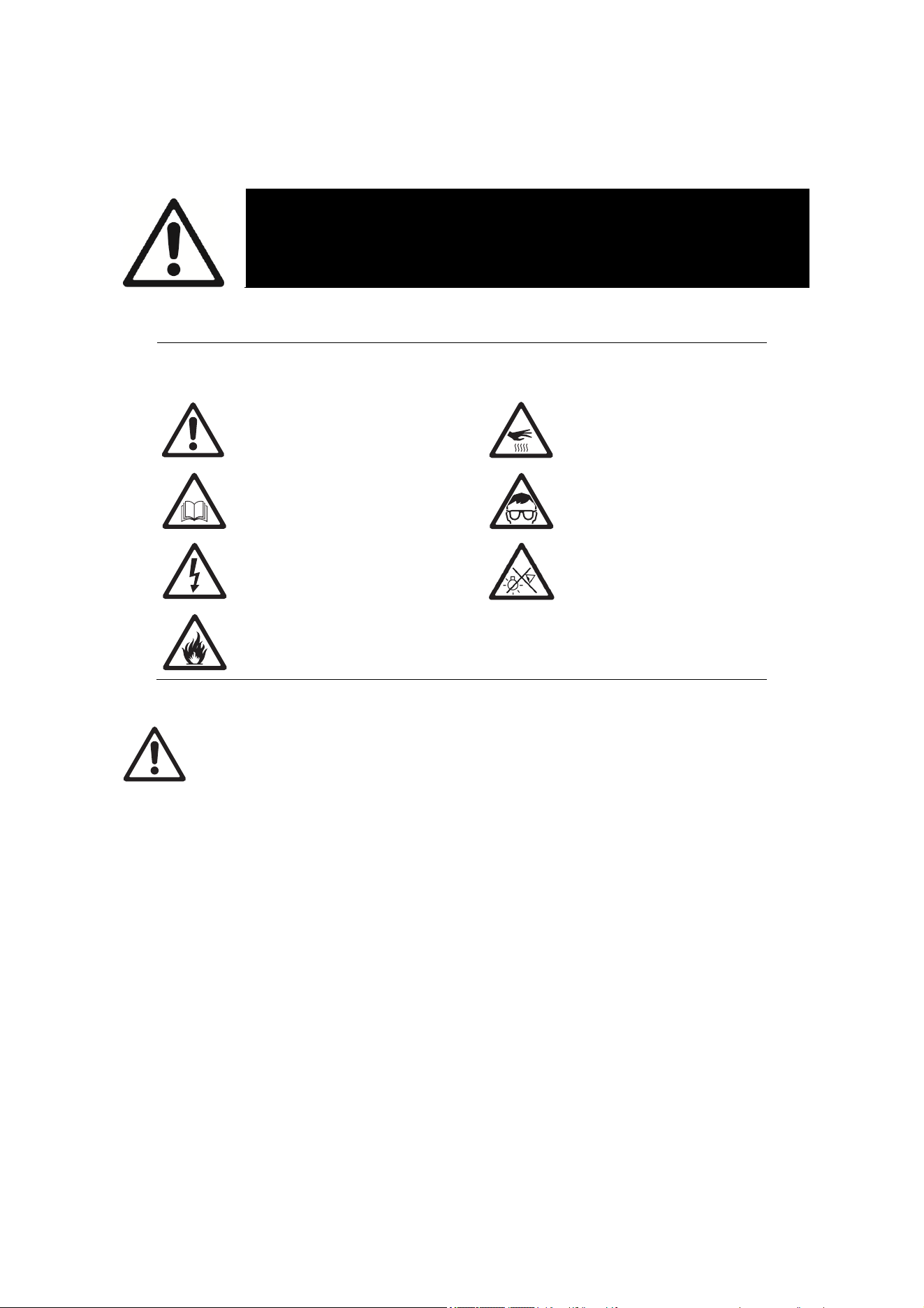
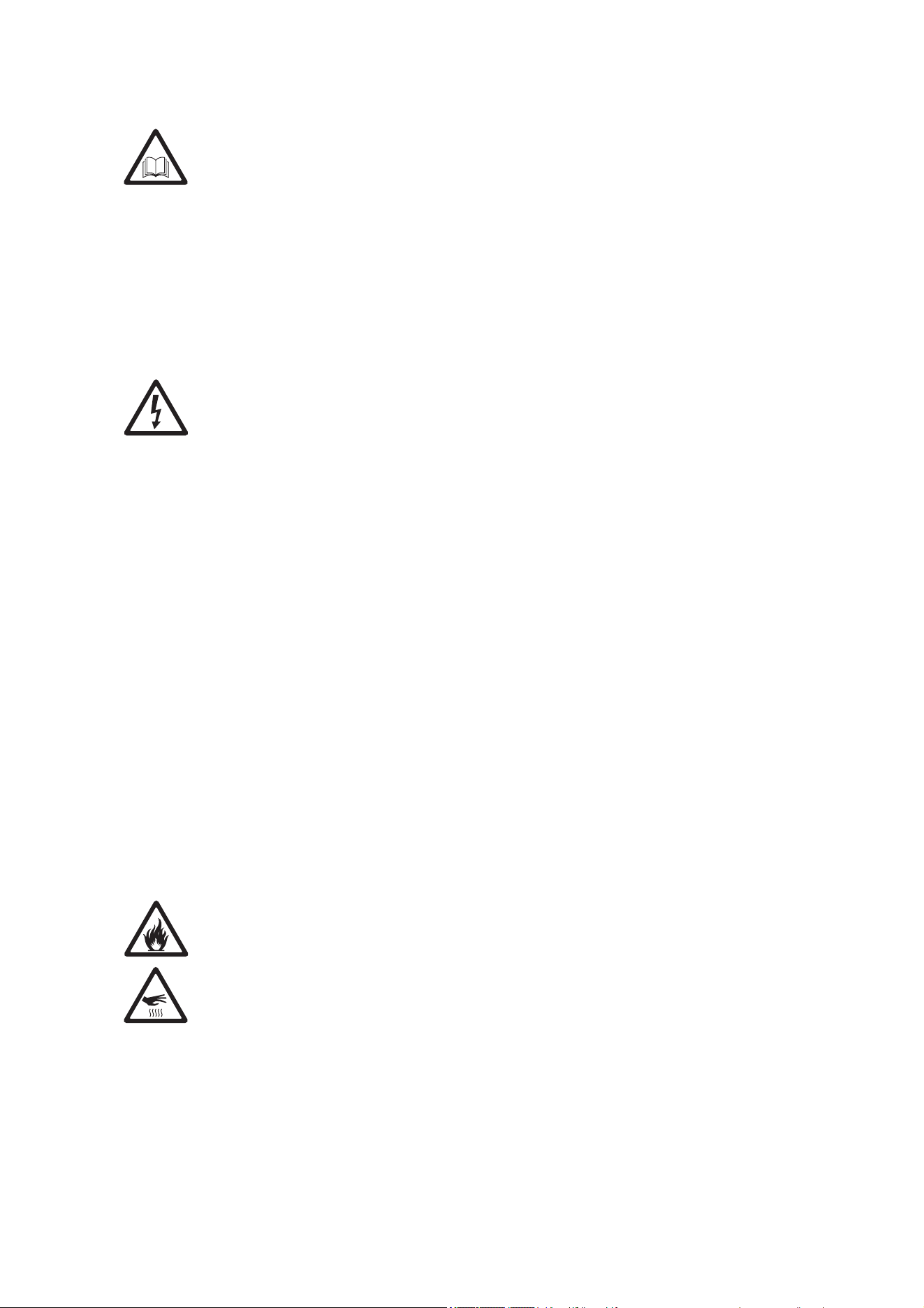
The following symbols are used to identify important safety information on the product
and in this manual:
Warning! Safety hazard.
Risk of severe injury or
death.
Warning! Hot surface. Risk
of burns.
Warning! See user manual
for important safety
information.
Warning! Risk of eye
injury. Wear protective
eyewear.
Warning! Hazardous
voltage. Risk of lethal or
severe electric shock.
Warning! Do not look into
light output.
Warning! Fire hazard.
Warning! Risk Group 3 product according to EN 62471. Do not look directly into
the beam. Do not view the light output with optical instruments or any device that
may concentrate the beam.
This lighting fixture is for professional use only and must be installed by a qualified
technician. It is not for household use. It presents risks of severe injury or death
due to fire hazards, electric shock and falls. It produces a powerful, concentrated
beam of light that can create a fire hazard or a risk of eye injury if the safety
precautions below are not followed.
Respect all locally applicable laws, codes and regulations when installing,
operating or servicing the fixture.
The latest software, manuals and other documentation for all Martin products are
available for download at www.martin.com
If you have any questions about how to install, operate or service the fixture
safely, please contact your Martin® distributor. For technical support in North
America, please contact Harman Professional Technical Support by e-mail:
HProTechSupportUSA@harman.com or by phone: (844) 776-4899. For technical
support outside North America, please contact your national distributor.
The light source contained in the fixture may be replaced by Martin or an
authorized Martin service agent only.
A terminal block for connection to AC mains power is not included and must be
supplied b
y
the installer.
6 Exterior Projection 500 User Manual
Install, operate and service Martin products only as directed in their user manuals
or you may create a safety hazard or cause damage that is not covered by
product warranties.
Keep this user manual for future use. Before installing, using or servicing this
fixture, check that you have the latest version of the user manual, available on the
fixture’s Tech Docs/Support page on the Martin website at http://www.martin.com.
Martin user manual versions are identified by the Revision letter given at the
bottom of page 2.
Refer any operation not described in this user manual to Martin Global Service or
an authorized Martin service agent.
Follow the safety precautions listed below and observe all warnings in this manual
and printed on the fixture.
Protection from electric shock
This fixture is IP66 rated. It is suitable for use in wet locations, but do not immerse
it in water or install it in a location where it may become submerged.
This fixture is a Class I product according to IEC 61140. Ensure that the fixture is
electrically connected to ground (earth).
Disconnect the fixture from AC power when it is not in use.
Use only a source of AC power that complies with local building and electrical
codes and has both overload and ground-fault (earth-fault) protection.
The circuit used to supply the fixture with AC power must include a power switch
that is easily accessible so that the fixture can easily be disconnected from power.
Shut down power to the entire installation at the main power distribution board
and lock out power before carrying out any installation or maintenance work.
Isolate the fixture from power immediately if any seal, cover, cable, connector or
other component is damaged, defective, deformed, wet or showing signs of
overheating. Contact Martin for any service operation not described in this user
manual. Do not reapply power until repairs have been completed
Before using the fixture, check that all power distribution equipment and cables
are in perfect condition, are rated for the current requirements of all connected
devices, are protected to IP67 or higher and are of suitable type for the location
(including water, pollution, temperature and UV resistance).
If the external flexible cable or cord of this luminaire is damaged, it shall be
exclusively replaced by the manufacturer or his service agent or a similar qualified
person in order to avoid a hazard.
Protection from burns and fire
Do not operate the fixture if the ambient temperature (T
a
) exceeds 45° C (113° F).
The surface of the fixture casing can reach up to 85° C (185° F) during operation.
Avoid contact by persons and materials. Allow the fixture to cool for at least 10
minutes before handling.
Keep flammable materials well away from the fixture. Keep combustible materials
(e.g. fabric, wood, paper) at least 0.1 m (4 ins.) away from the fixture housing.
Ensure that there is free and unobstructed airflow around the fixture.
Do not illuminate surfaces within 0.5 m (1.6 ft.) of the front glass.
Do not modify the fixture in any way not described in this manual or install other
than genuine Martin parts. Do not stick filters, masks or other materials onto any
lens or other optical component. Use only accessories approved by Martin™ to
modif
y
the li
g
ht beam.
Exterior Projection 500 User Manual 7
The fixture’s optical components can focus the sun’s rays, creating a risk of fire
and damage. Do not expose the front of the fixture to sunlight or any other intense
li
g
ht source.
Protection from eye injury
Do not stare directly into the light output. Ensure that persons are not looking
directly into the lamp when the fixture lights up suddenly. This can happen when
power is applied, when the fixture receives a DMX signal, or when certain control
menu items are selected.
Do not look at the light output with magnifiers, telescopes, binoculars or similar
optical instruments that may concentrate the light output.
Wear protective glasses and other PPE (personal protective equipment) when
working on or near the fixture.
The risk group distances given below apply to the light output from one fixture
only. If fixtures can be operated in combination light intensity can increase and
you should consult a lighting professional for safety recommendations.
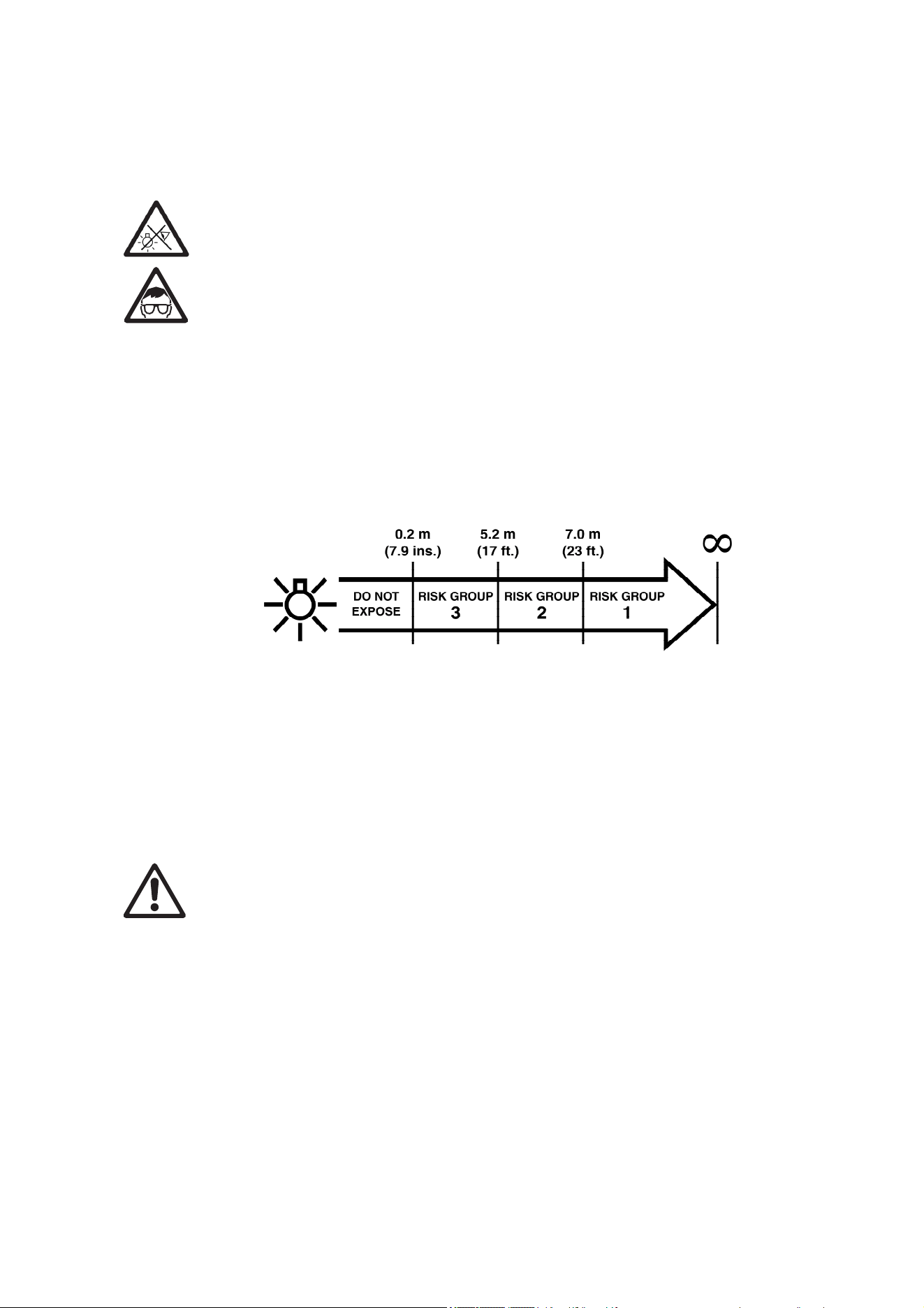
The Exterior Projection 500 falls into the following risk groups according to EN
62471 at the distances indicated:
At a distance of less than 5.2m (17 ft.) from the fixture, the light output can
potentially cause eye or skin injury before an exposed person’s natural aversion
responses (blink reflex and reaction to skin discomfort) can protect them. At
distances greater than 5.2m (17 ft.), potential eye and skin injury hazards from the
light output are normally prevented by natural aversion reflexes.
Position the Exterior Projection 500 so that persons cannot be exposed to the
fixture’s light output at less than 5.2m (17 ft.) from the fixture and so that
prolonged staring into the light output at less than 7 m (23 ft.) from the fixture is
not expected.
Protection from injury
Fasten the fixture securely to a fixed surface or structure when in use. The fixture
is not portable when installed.
Ensure that any supporting structure and/or hardware used can hold at least 10
times the weight of all the devices they support.
Check that all external covers and installation hardware are securely fastened.
Do not operate the fixture with missing or damaged covers, shields or any optical
component.
Block access below the work area and work from a stable platform whenever
installing, servicing or moving the fixture.
In the event of an operating problem, stop using the fixture immediately and
disconnect it from power. Do not attempt to use a fixture that is obviously
damaged.
Do not modif
y
the fixture or install other than
g
enuine Martin parts.
8 Exterior Projection 500 User Manual
Introduction
The Exterior Projection 500 from Martin® is an image projection fixture that features a powerful
230 W LED engine, advanced dynamic effects and rugged weatherproofing.
Four models are available with the following cut-off beam angles: Narrow (12°), Medium (22°),
Wide (37°) and Very Wide (51°). These options let the user select the optimum beam angle and
obtain the best image projection in a specific installation. Exterior Projection 500 Narrow, Medium
and Wide models are suitable for the projection of images and/or patterns such as logos. The
Exterior Projection 500 Very Wide has less clearly defined projections than the other three models
and is best suited to the projection of abstract patterns. See www.martin.com for photometric data
relating to the different beam angle options. Fixtures can be converted from one beam angle to
another with the help of spare parts available from Martin, but the required parts must be installed
by Martin or its authorized service agents only.
The fixture features a rotating gobo wheel with six interchangeable rotating gobos and a gobo
animation effect that provides animated projections when used in combination with a rotating
gobo. The fixture has 8 dichroic color filters, one radial 3-facet and one linear 4-facet rotating prism
and a frost filter. It also has smooth electronic dimming, remote focusing and strobe effects.
The Exterior Projection 500 can be controlled using any controller that is compatible with the
industry-standard DMX512 lighting control protocol. It will also respond to RDM (Remote Device
Management) communication if you use an RDM-compliant controller. RDM lets you set up and
retrieve status information from fixtures over the DMX data link.
The Exterior Projection 500 can also function without DMX control as a stand-alone projector and
run a show with up to twenty dynamic lighting effects that you can pre-program.
This user manual covers fixture software version 1.7.0.
Before using the product for the first time
1. Unpack and ensure that there is no transportation damage before using the fixture. Do not
attempt to operate a damaged fixture.
2. Check the fixture’s Tech Docs / Product Support page on the Martin Professional™ website at
www.martin.com and make sure that you have read the latest user documentation and
technical information about the fixture. Martin user manual revisions are identified by the
revision letter at the bottom of the inside cover.
3. Read ‘Safety information’ on page 5 of this user manual.
4. Ensure that the voltage and frequency of the power supply
match the power requirements of the fixture.
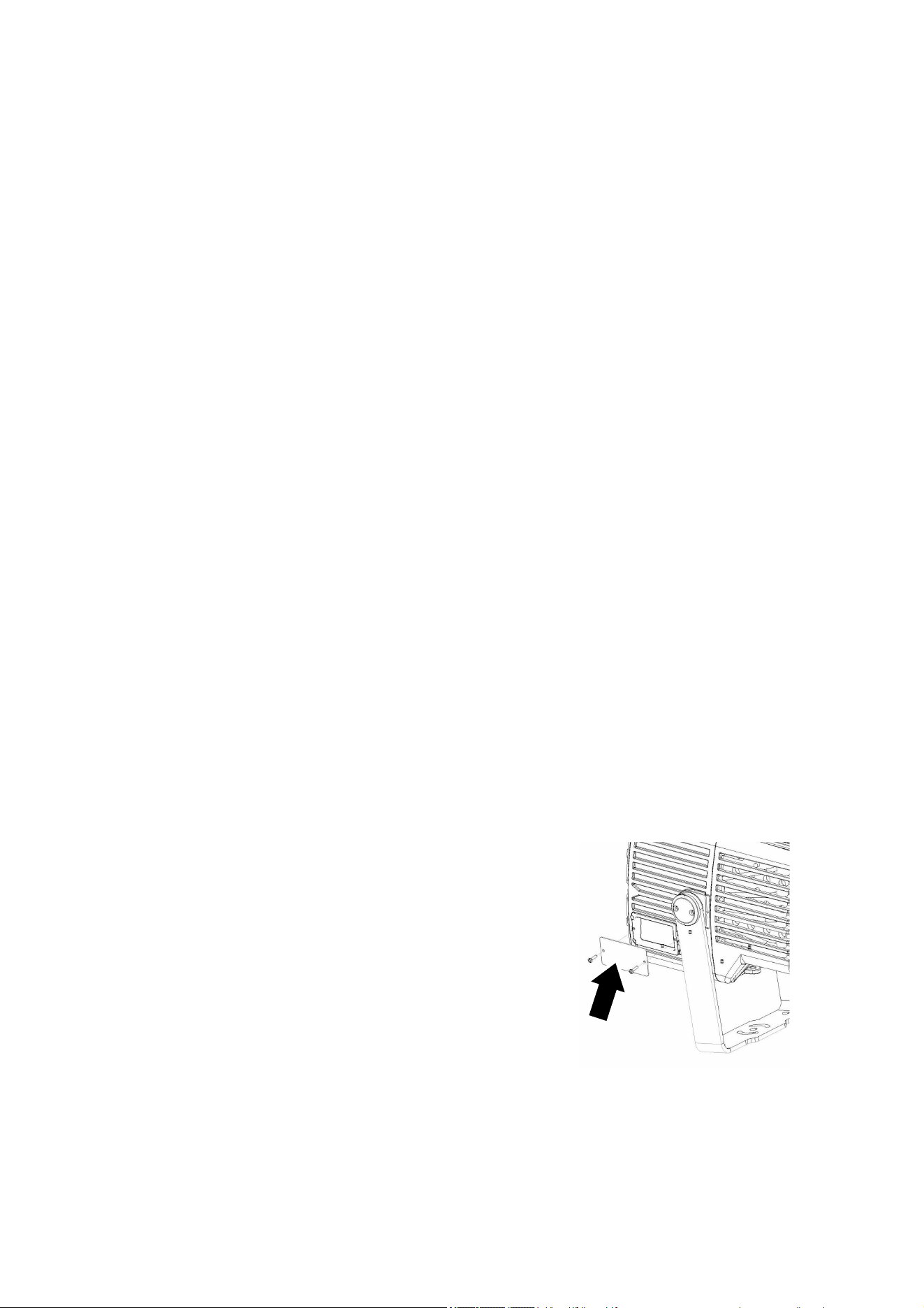
5. See illustration on right. Remove the cover (arrowed) from
the control panel and LCD display on the side of the fixture
so that you can set up the fixture using the control panel.
Otherwise, to help prolong the life of the LCD display you
should keep the cover installed when it is not needed.
6. If the temperature is below -20° C (-4° F), apply power to the fixture but do not use it for 30
minutes. This will give the fixture time to warm up to within its operating temperature range.
Note that whenever AC power is applied to the fixture, it will reset all effects and functions to their
home positions. Reset is available when fixture temperature is above -20° C (-4° F).
Exterior Projection 500 User Manual 9
Fixture overview
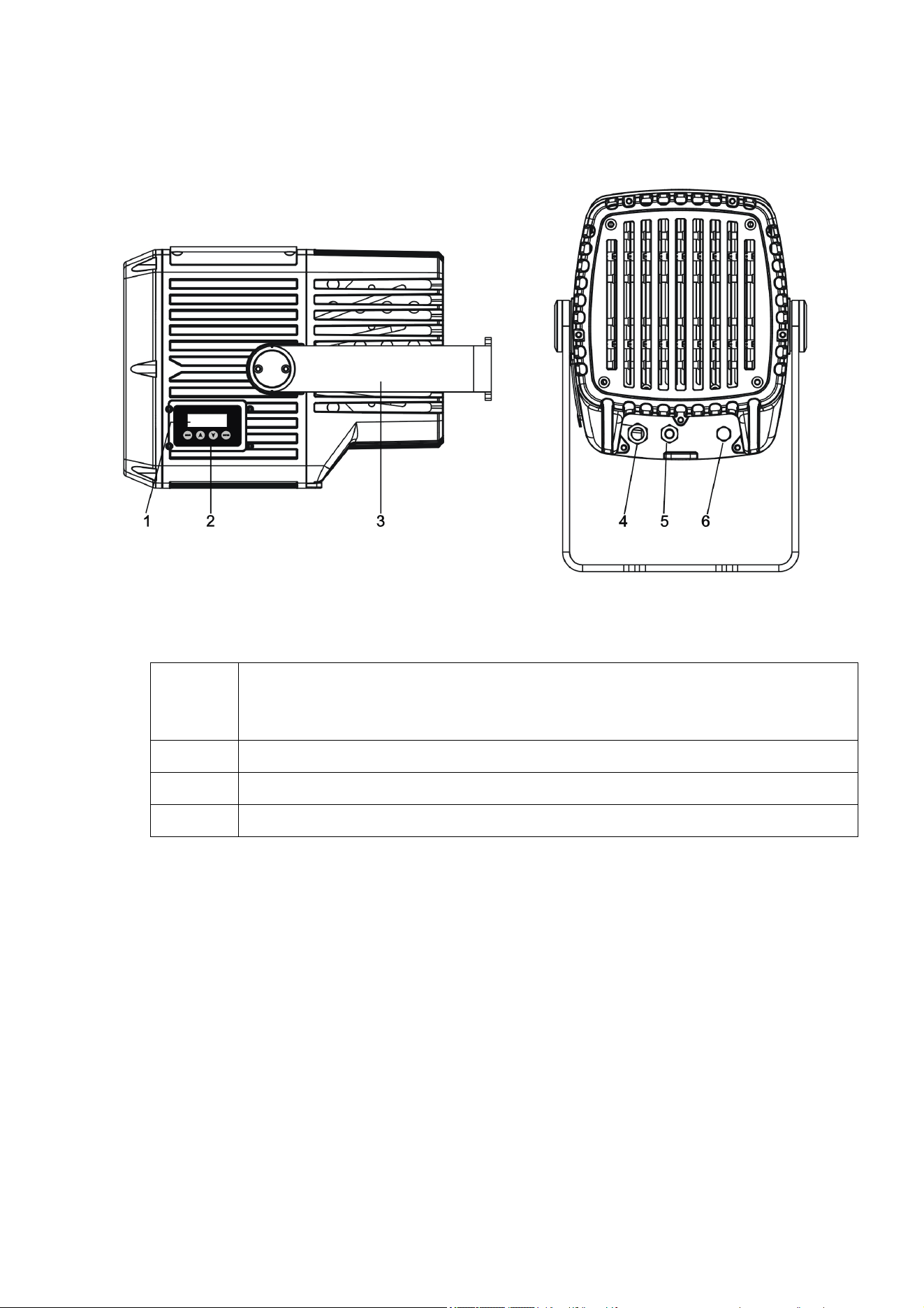
1. Control panel display (shown with cover removed)
2. Control buttons:
MENU
Enter the control menus, or
Return to the previous level of the menu structure, or
Press and hold to exit the control menus
DOWN (▼)
Scroll down a menu or scroll descending values
UP
(
▲
)
Scroll up a menu or scroll ascendin
g
values
ENTER Confirm a selection
3. Adjustable mounting yoke
4. AC mains power cable
5. DMX data combined in/out cable
6. Pressure relief valve
10 Exterior Projection 500 User Manual
Physical installation
Warning! Read ‘Safety information’ on page 5 before installing the fixture.
Protection from the sun
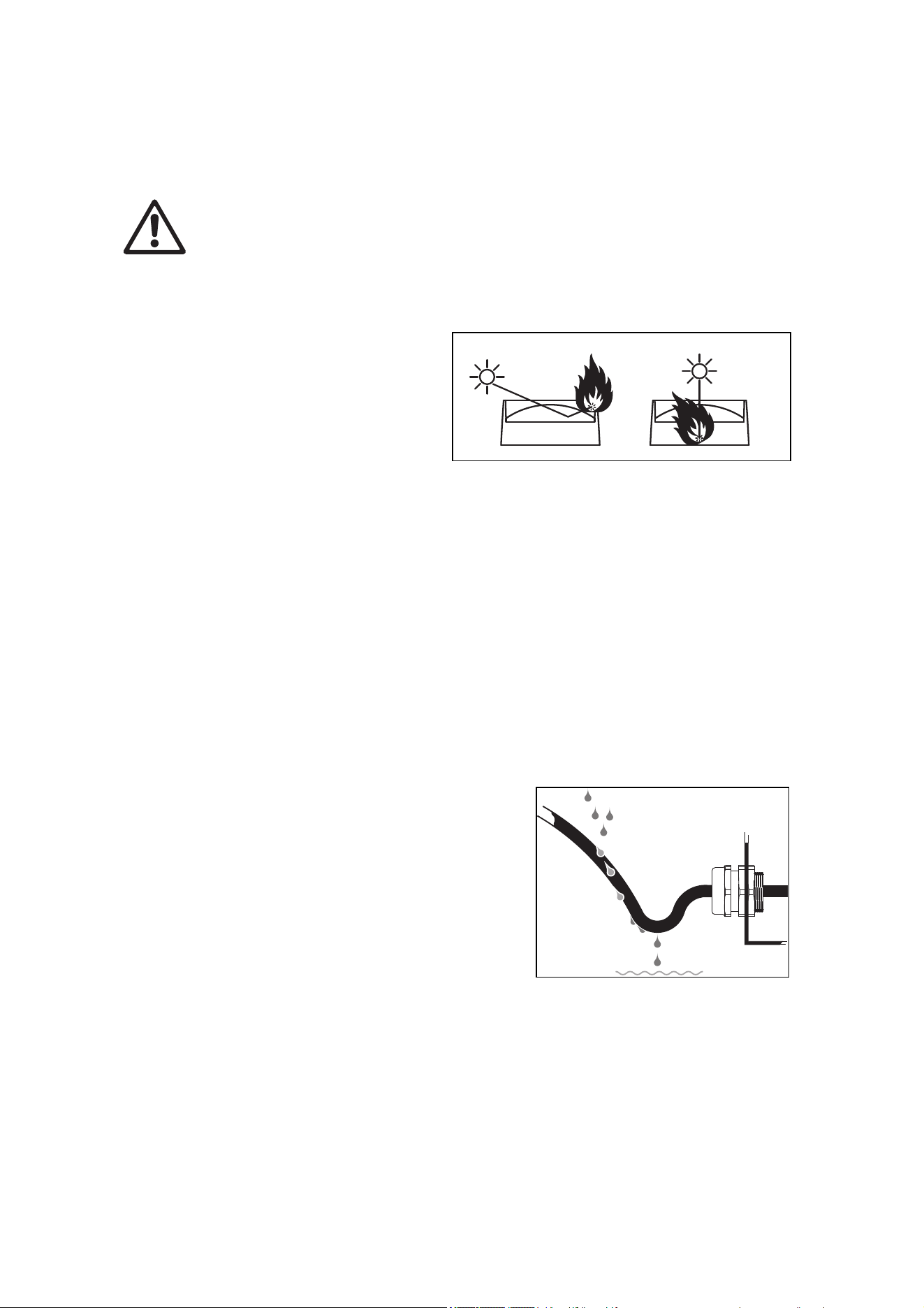
Important! The fixture’s optical system can
focus rays from the sun inside the fixture,
causing internal damage and presenting a fire
hazard. Make sure that the sun will not shine
into the front of the fixture at any time.
The Glare Shield available from Martin (see
‘Accessories’ on page 56) can help protect
the front of the fixture from the sun.
If the control panel will be exposed to sunlight, install its cover to protect the panel and its display
from heat and UV radiation.
Cooling
The Exterior Projection 500 has a thermal protection system. If temperatures inside the fixture
exceed safe levels, it regulates LED output to protect components.
The fixture has internal forced air cooling but it needs to dissipate heat externally by convention.
Ensure sufficient ventilation and free airflow around the fixture, especially around the grills on the
back of the fixture, to minimize any reduction in LED output in high ambient temperatures.
Protection from moisture
If there is a break or cut at any point in a cable (for example at a connection point), and if this is
exposed to water, moisture can be drawn up the inside of the cable due to the vacuum effect of
temperature fluctuations during operation. Ensure that the
fixture is protected from the entry of water via cables by
using IP66-rated connectors or junction boxes, or by
protecting connectors with weatherproof housings. Make
sure that all cables open into dry areas.
See illustration on right. Create a drip loop before cable
glands to reduce any tendency for glands to be constantly
immersed in water.
Mounting the fixture
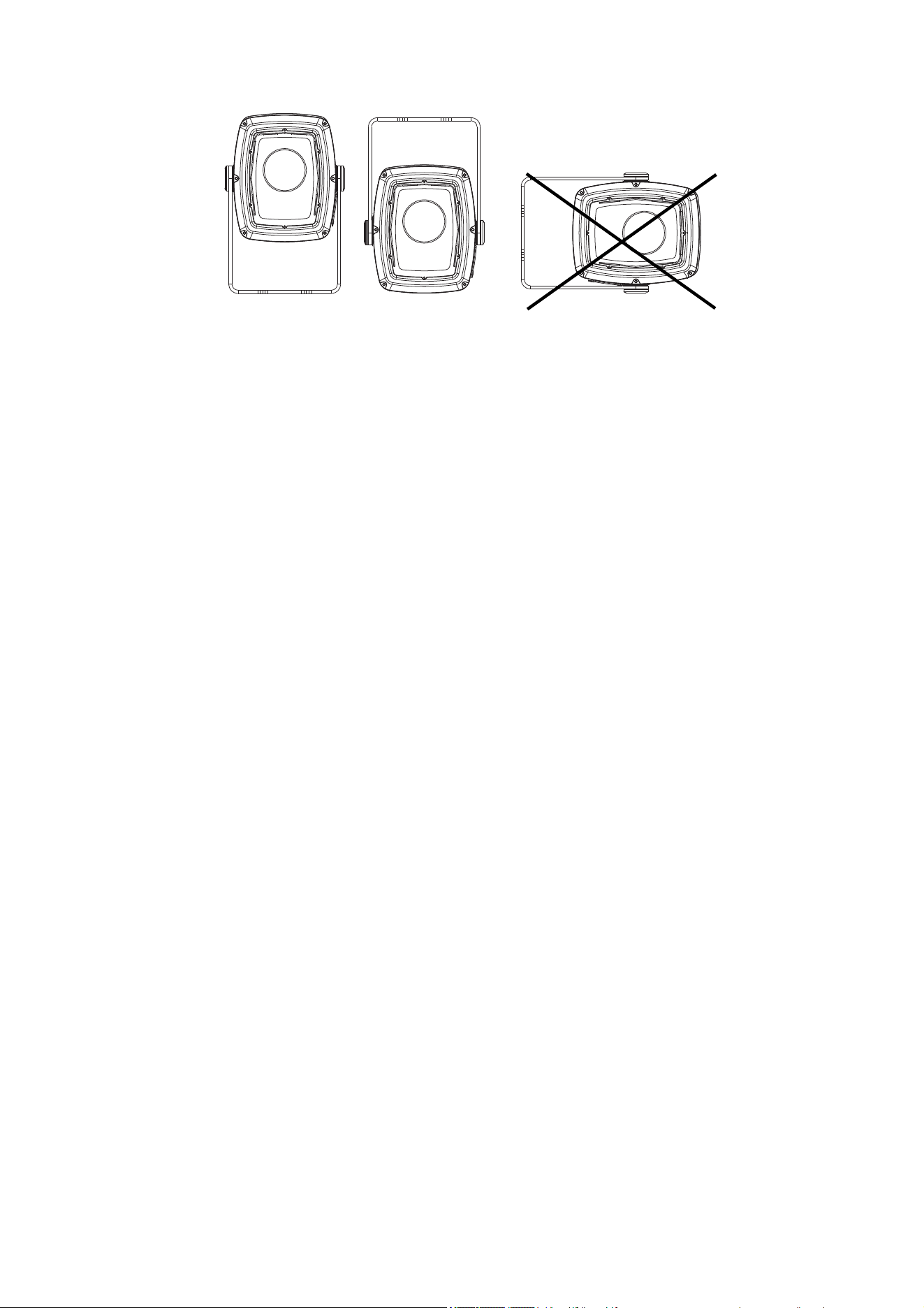
The fixture can be mounted at any angle and the yoke can be fastened to a vertical, horizontal or
angled surface, but the sides of the fixture must be vertical when installed (see examples below),
or the fixture’s cooling airflow will be affected, leading to excessively high fixture temperature and
reduced light output.
Exterior Projection 500 User Manual 11
Sides of fixture Sides of fixture not
vertical: OK vertical: Not OK
Do not stand the fixture freely on a surface or leave it where it can be moved or fall over. Ensure
that the installation surface or structure and all fasteners used can safely bear at least 10 times the
weight of all the fixtures and equipment they will support.
Installing on a rigging truss
It is possible to install the fixture temporarily on a rigging truss or similar support. If you do this,
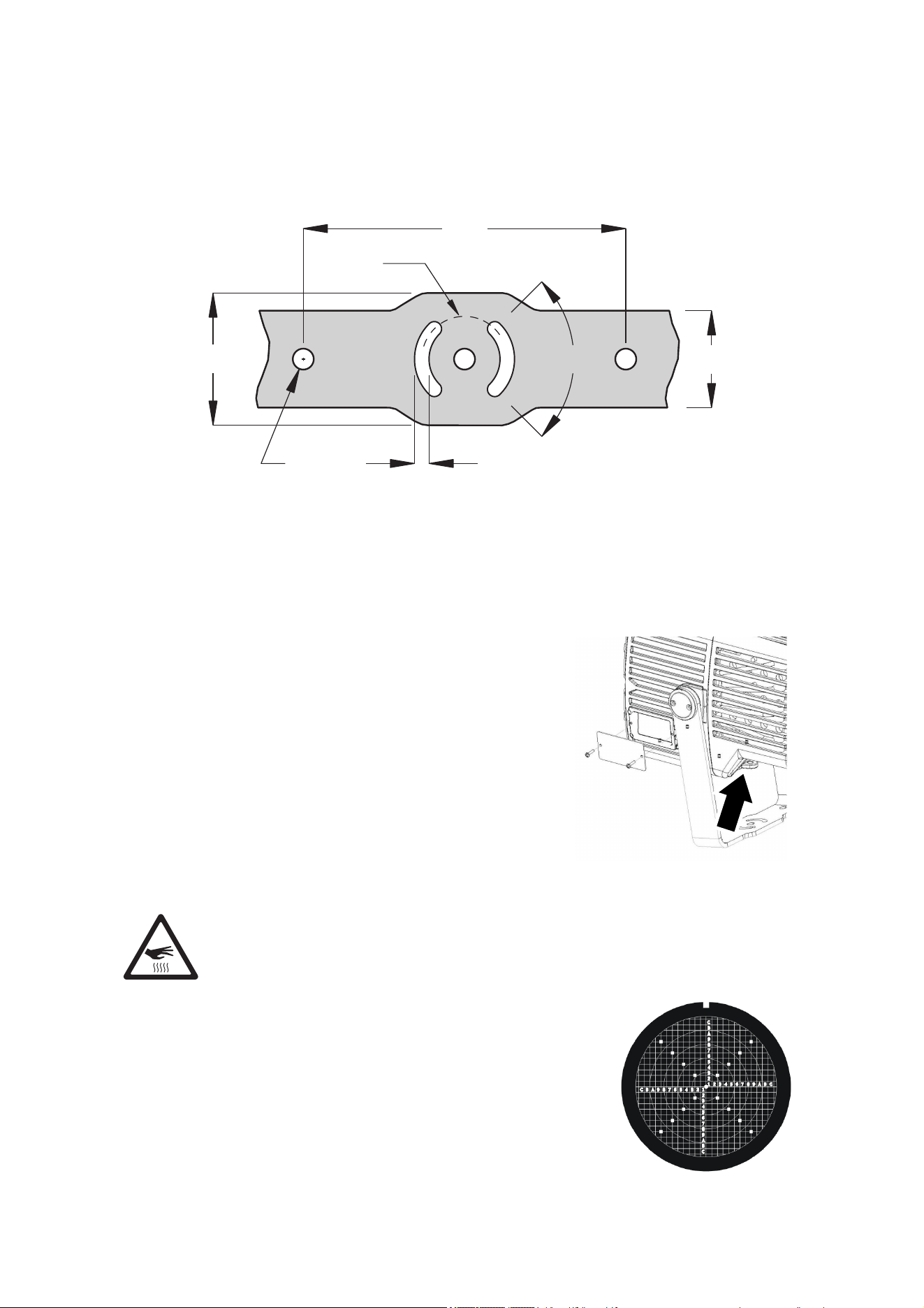
fasten two approved rigging clamps to the mounting yoke with two grade 8.8 strength M12 bolts
fastened through holes B in the mounting yoke base (see illustration at bottom of page) and
suspend the fixture using the two clamps. Install the fixture hanging vertically downwards only.
Secure the fixture with a safety cable as described in ‘Secondary attachment’ on page 12.
Avoiding galvanic corrosion
The fixture and mounting bracket are manufactured in corrosion-resistant anodized aluminum.
Avoid mounting the fixture in direct contact with other types of metal, as this can cause galvanic
corrosion. When fastening to a metal that is not aluminum:
● Use an electrically insulating material (such as rubber or plastic) or coating between the
mounting bracket and the other metal.
● Use a non-conductive coating on fasteners (screws, bolts, washers, etc.) where they come
into contact with the mounting bracket.
Fasteners
The type of fasteners used will depend on the installation, but use a minimum of three high-
strength corrosion-resistant fasteners that are suitable for the installation environment and
application. We recommend that all fasteners are stainless steel A4-70 grade according to ISO
3506 or steel grade 8.8 according to ISO 898-1 or better.
Install washers between the head of each fastener and the yoke base. If you use nuts, use self-
locking type only and install washers under the nuts.
Anchoring to a surface or structure
The fixture’s mounting yoke base must be securely anchored to a flat surface on a wall, pedestal,
structural beam or other suitable support. The yoke allows the fixture to be manually panned and
tilted for beam aiming adjustment.
To anchor the fixture to a surface:
1. See illustration below. Fasten a 12 mm (1/2 inch) shaft diameter bolt to the surface through the
center hole A in the mounting yoke.
2. Fasten two bolts with 8 mm (5/16 inch) shaft diameter to the surface with one bolt passing
through each of the curved slots C to anchor the fixture. This will give approximately 90° of
pan adjustment.
12 Exterior Projection 500 User Manual
3. Adjust the fixture’s pan angle (side-to-side beam aiming) as described later in this chapter.
Adjusting pan is best carried out with power applied to the fixture so that the projection is
visible. Once pan is correct, fasten two 12 mm (1/2 inch) shaft diameter bolts to the surface
with one bolt passing through each of the holes B. Once bolts have been installed in holes B,
pan adjustment is no longer possible.
200
Ø53
82
Ø13
9
60
90°
A
BB
CC
Mounting yoke base
Secondary attachment
If a secondary attachment is required for reasons of safety (in entertainment venues, onboard
marine vessels or in temporary installations, for example), you must install a safety cable:
1. See illustration on right. Loop a safety cable that is
approved for the weight of the fixture through the
secondary attachment point (arrowed) in the fixture and
attach the safety cable to a secure anchoring point so that
the cable will catch the fixture if the primary method of
attachment fails.
2. Remove as much slack as possible from the safety cable
(by looping it more than once around the anchoring point,
for example). Make sure that if the primary method of
attachment fails, it will be impossible for the fixture to drop
any significant distance before the safety cable catches it.
Adjusting aiming (pan and tilt)
Warning! The fixture can become hot. Wear heat-resistant gloves if you adjust
the aim of the fixture when it is (or has recently been) powered on.
Fixture aim adjustment is best carried out after the fixture has been
connected to power and in weak light conditions so that the
projection from the fixture is clearly visible.
See illustration on right. If you require very precise aiming and setup,
we recommend that you order the projection setup gobo available
from Martin for the Exterior Projection 500 (see ‘Accessories’ on
page 56) and install it in the gobo wheel while you adjust fixture aim,
focus, etc.
Exterior Projection 500 User Manual 13
To adjust the aim of the fixture:
1. Set the fixture to project a setup gobo (see above) or another gobo with a sharply defined
pattern. You can select the image remotely either via DMX or by using the MANUAL TEST
menu in the fixture’s control panel (see ‘Manual test’ on page 20).
2. Put on heat-resistant gloves.
3. See ‘Anchoring to a surface or structure’ on page 11. Loosen the bolts in the center hole A and
curved slots C slightly, just until you can rotate the yoke.
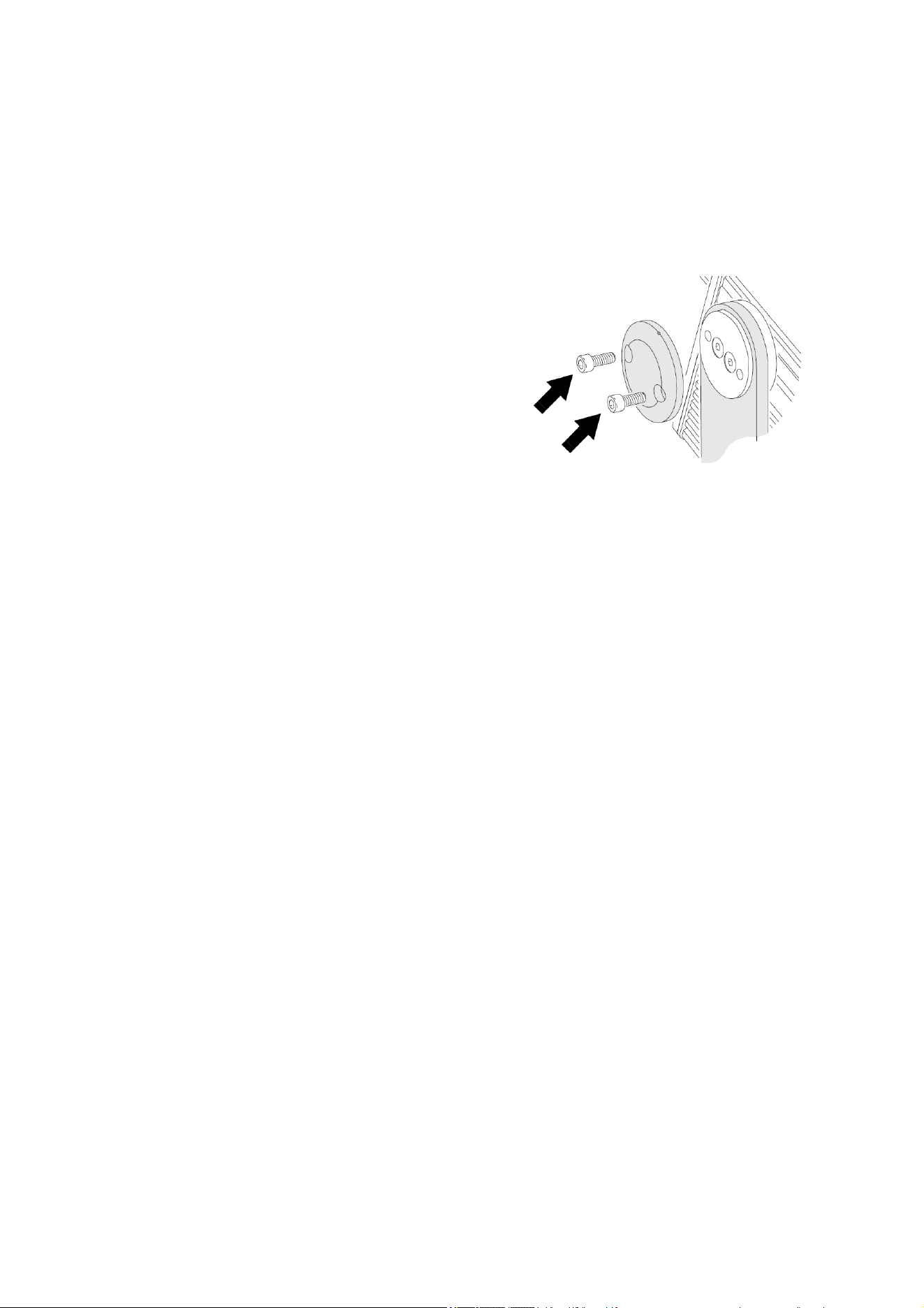
4. See illustration on right. Loosen the tilt lock Allen
(hex) screws (arrowed) on both sides of the yoke
slightly, just until you can tilt the fixture in the yoke.
5. Pan and tilt the fixture until it is aimed correctly.
6. Use a torque driver and tighten the four tilt
adjustment screws to a torque of 1.8 – 2.3 Nm.
7. See ‘Anchoring to a surface or structure’ on page 11. Tighten the bolts in the center hole A and
curved slots C and install bolts in holes B. Check that the fixture will be held securely in all
wind and weather conditions.
14 Exterior Projection 500 User Manual
AC power
Warning! Read “Safety Information” on page 5 before installing the fixture. Lock
out power to the entire installation before working on cables and connections.
Electrical installation must be carried out by qualified professionals only.
For protection from dangerous electric shock, the fixture must be grounded (earthed).
The AC power distribution system must be fitted with current overload and ground-fault
(earth-fault) circuit breakers as well as a means to isolate fixtures from power and lock
out power durin
g
service.
The Exterior Projection 500 is supplied in EU and US models. Both models accept AC power at
100-240 V nominal or 277 V nominal at 50 or 60 Hz. Do not connect to power at any other voltage
or frequency.
You can connect the Exterior Projection 500 to either of the following mains power distribution
systems:
● Single-phase (live, neutral, ground/earth) system.
● Grounded/earthed three-phase four-wire (three phases, neutral, ground/earth) system.
Do not try to connect to a three-phase three-wire (three phases, ground/earth) system.
There is no power on/off switch. Power is applied to an Exterior Projection 500 fixture as soon as it
is connected to power. Provide a means to disconnect or shut down power to fixtures that is easily
accessible and is located close to the fixtures.
Do not use an external dimming system to supply power to the fixture, as this may cause damage
to the fixture that is not covered by the product warranty.
Protecting connections from moisture
Moisture can cause corrosion in unprotected cable connections. Moisture can also be sucked
along the inside of cables at breaks or cuts in the cable jacket (for example at connection points)
and into fixtures because of the vacuum effect of temperature fluctuations inside fixtures. To
protect connections and fixtures from moisture, take at least one of the following precautions:
● Locate cable junctions in dry areas (e.g. junction boxes in dry locations).
● Use connectors or junction boxes that are protected to IP67 or higher.
● Fill junction boxes with potting compound to seal the ends of cables and to protect connections
from corrosion.
Connecting to power
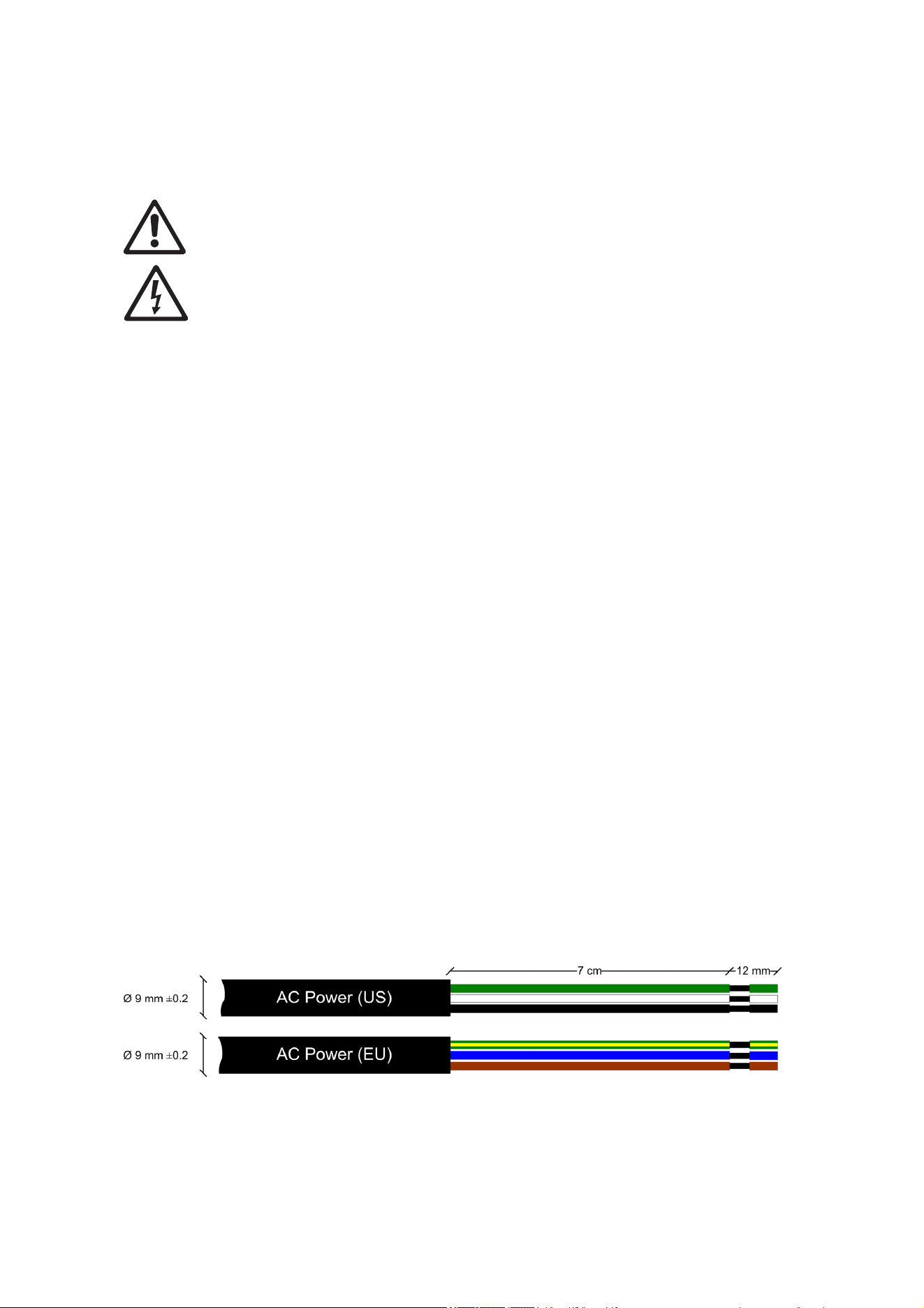
The fixture is supplied with a power cable installed ready for connection. See illustration below:
AC power cable
To connect to a single-phase system or to one phase of a three-phase four-wire system:
1. Lock out power to the installation.

Exterior Projection 500 User Manual 15
2. Connect the conductors in the power cable to the distribution circuit as follows:
a) Connect the green wire (US models) or yellow/green wire (EU models) to ground (earth).
b) Connect the white wire (US models) or blue wire (EU models) to neutral.
c) Connect the black wire (US models) or brown wire (EU models) to live (one phase of a
three-phase system).
3. Check that all installation work is completed and carry out appropriate tests and safety checks
before applying power.
Installing a temporary power plug
It is possible to install a power plug (cord cap) on the power cable (power cord) for temporary use
(such as setting up a fixture before installation) only. If you choose to do this, install a grounding
type (earthed) plug with integral cable grip that is rated minimum 277 V, 6 A. Follow the plug
manufacturer’s instructions and connect the wires in the power cable as shown in the table below:
Live or L Neutral or N
Earth, Ground or
US s
y
stem Black White Green
EU s
y
stem Brown Blue Yellow/
g
reen
Power plug connections

16 Exterior Projection 500 User Manual
Control data link
A DMX512 data link is required in order to control the fixture via DMX (and manage fixtures via
RDM, if used). Your Martin supplier will be happy to help if you need advice or assistance in
planning the link.
Follow these guidelines when creating a DMX data link:
● Use RS-485 data cable designed for exterior use. RS-485 cable has low capacitance and a
characteristic impedance of 85 to 150 Ohms. It is electrically shielded and has at least one
twisted pair of conductors. The minimum recommended wire size is 0.25 mm2 (24 AWG) for
runs up to 300 meters (1000 ft.) and 0.32 mm2 (22 AWG) for runs up 500 meters (1640 ft.). A
cable run of more than 500 meters requires the use of a splitter-amplifier to boost the DMX
signal.
● If independent control of a fixture is required, that fixture must have its own DMX channels.
Any fixtures that will always be required to behave identically can have the same DMX
address, which means that they will use the same DMX channels.
● 512 DMX channels are available in a single DMX universe. Each time the number of DMX
channels required by the fixtures on a data link reaches 512 and you want to add more
fixtures, create a new DMX universe on a new data link and connect the additional fixtures to
the new link.
● You can connect up to 32 fixtures in a single daisy chain on a DMX data link. Connecting in a
daisy chain means that you must connect the DMX data OUT from one fixture to the DMX
data IN of the next fixture, creating a single line of fixtures. Do not split the link into branches
by creating a Y shape in the cable or at connectors.
● However, you can split a DMX data link into two or more branches if you use an optically
isolated DMX splitter-amplifier. To preserve RDM functionality, use an RDM-compatible splitter
such as the Martin RDM 5.5 Splitter. Each branch can contain up to 32 fixtures.
● If you reach the limit of 32 fixtures on a DMX data link, you can connect up to 32 additional
fixtures if you add a splitter-amplifier such as the Martin RDM 5.5 Splitter to the link in order to
boost the data signal. Adding a splitter-amplifier also lets you extend a data link beyond 500
meters (1640 ft.).
● The data link (and each branch of the link if you have created branches with a splitter-
amplifier) must be terminated at the end by placing a 120 ohm resistor (available from Martin,
P/N 04150308) across the data output hot (+) and data output cold (-) conductors of the last
fixture on the link.
● Do not create long parallel runs of AC power and data cables, as these may cause
interference on the data link. Even if not required by law, use separate conduits for power and
data cables.
● The Exterior Projection 500’s combined data input/output cable does not support the optional
second data wire pair that is provided for in the DMX512-A standard. Do not place devices that
use the second data pair on the same DMX data link as Exterior Projection 500 fixtures.
Connecting the data link
Important! Protect all connections and all breaks in cable jackets from moisture (see ‘Protecting
connections from moisture’ on page 14).
Important! Connect the data output from one fixture to the data input of one fixture only. If you
connect one data output to more than one data input, you will split the DMX data link into branches
which will probably cause data signal integrity problems.
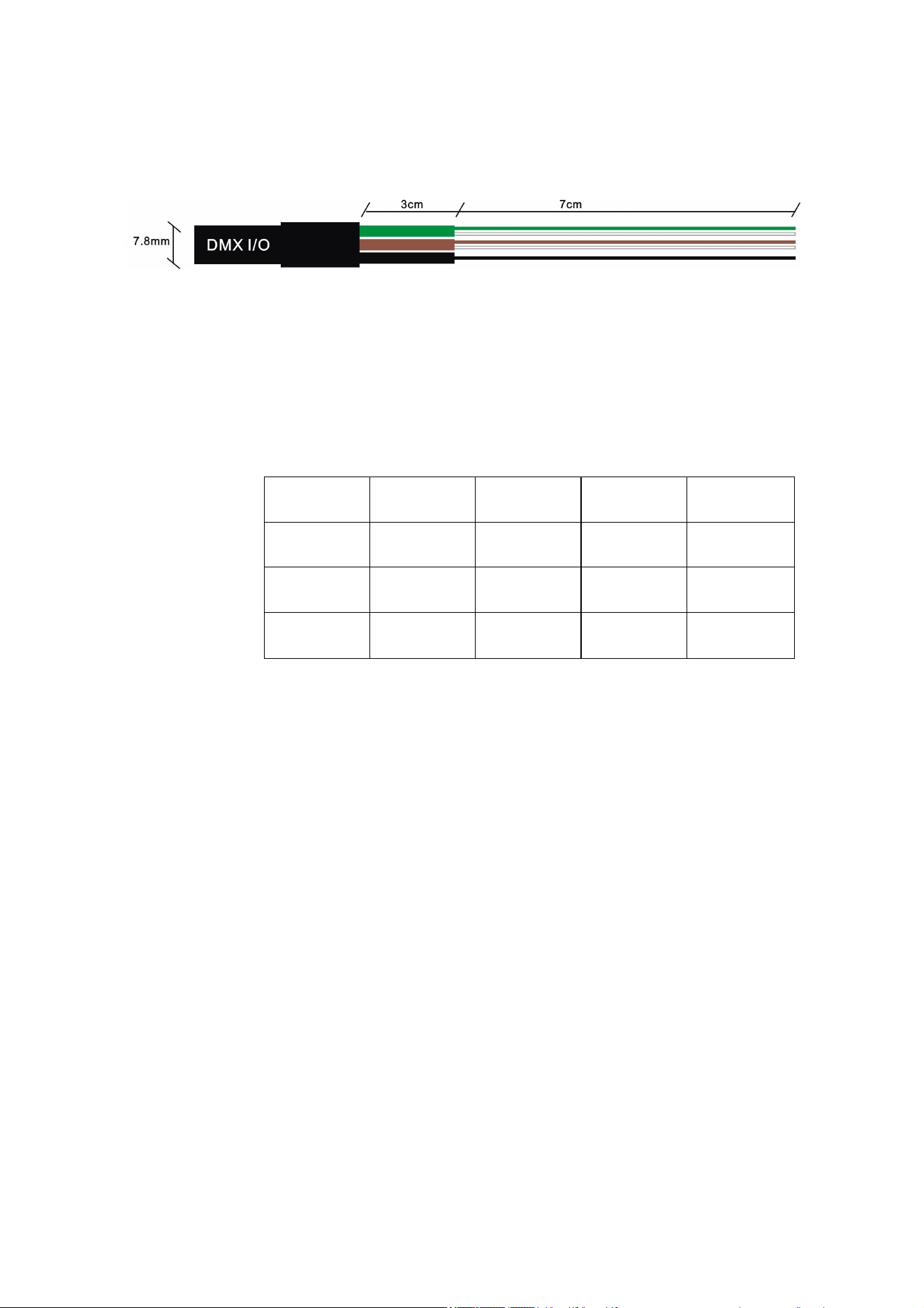
The Exterior Projection 500 is supplied with a hard-wired 1.8 m (5.9 ft.) shielded cable with 2 pairs
of wires for connection to a DMX data link.
Exterior Projection 500 User Manual 17
The pair of wires with a green sleeve is for data input from the control device or previous device in
the daisy chain. The pair of wires with a brown sleeve is for data output (throughput) to the next
device in the daisy chain.
Exterior 500 Projection DMX data cable
Connect the cable as shown in the table below. Do not connect the shield conductor to ground
(earth) or allow it to come into contact with a connector shell, as this may cause interference.
Input wires
(green sleeve)
Output wires
(brown sleeve) Shield
Wire color white green white brown black
Signal DMX in + DMX in – DMX out + DMX out – common
Male XLR
pinout
pin 3 pin 2 - - pin 1
Female XLR
pinout
- - pin 3 pin 2 pin 1
Data connection pinout

18 Exterior Projection 500 User Manual
Fixture setup
Warning! Read ‘Safety information’ on page 5 before operating the fixture.
Using the control menus
This section explains the fixture settings and utilities that are available using the control panel and
display that are located on the side of the fixture.
You can find a full map of the control menus in ’Control menus’ on page 50. Some settings and
functions are also available via RDM. See the end of this chapter.
Control menu settings are retained when the fixture is powered off.
Navigating in the control menus
To access the control menus, press the MENU button and hold for three seconds.
● To select a menu option or to confirm a selection, press the ENTER button.
● To scroll up and down the items in a menu or adjust values, use the DOWN ARROW (▼) and
UP ARROW (▲) buttons.
● To return to a higher level in the menu structure, press the MENU button.
● To exit all active control menus and return directly to the top level, press and hold the MENU
button.
Passwords
The Exterior Projection 500 onboard control panel is password-protected to discourage tampering.
There are two passwords:
● A user password that is set to 123 by default but can be changed to any number from 0 to 999.
This password is required to enter the control menus.
● A service password that is factory-set to 111 and cannot be changed. This password can be
used to enter the control menus if necessary.
To enter a password, use the DOWN ARROW and UP ARROW buttons to scroll to the required
number. When the number is displayed, press ENTER to confirm.
Setting a DMX address
The Exterior Projection 500 uses thirteen DMX channels to receive instructions from a DMX
controller. The fixture’s DMX address, also known as the start channel, is the first of these
channels. If a fixture that requires 4 DMX channels has its DMX address set to 1, for example,
then it uses channels 1, 2, 3 and 4. The next fixture can have its DMX address set to 5, the next to
9 and so on until all the 512 channels in one DMX universe are allocated.
If you want independent control of a group of fixtures, give each fixture its own DMX address so
that each fixture has its own control channels. If you want a group of fixtures of the same type to
always behave identically, give all the fixtures the same DMX address so that they all use the
same DMX control channels.
You can set a fixture’s DMX address using the fixture’s control panel or by sending commands
from an RDM-compliant DMX controller.
To set the fixture’s DMX address from the control panel:
1. Press and hold the MENU button to access the control menu.
2. Use UP and DOWN to select DMX ADDRESS from the menu. Press ENTER.

Exterior Projection 500 User Manual 19
3. The fixture’s current DMX address is displayed. Press UP or DOWN to scroll to the DMX
address that you want to give to the fixture.
4. Press ENTER to store the DMX address in the fixture.
5. Press MENU to exit.
Programming a stand-alone show
You can program a stand-alone show – a sequence of ’scenes’ that run in a loop – in the Exterior
Projection 500. A scene consists of a combination of effects such as gobo selection, gobo
movement, color, intensity, etc. You can set the stand-alone show to run if you are not using a
DMX controller or if a signal from a DMX controller is lost. The show can contain up to 20 scenes
that last up to 10 minutes each. You can program ’fades’ (changes from one scene to the next) so
that scenes change immediately or change gradually over a period of up to 120 seconds’ duration.
Note: To enable stand-alone operation, the OFFLINE MODE setting in the FIXTURE CONFIG
menu must be set to RUN SHOW. See ‘Offline mode – behavior when no DMX or Host signal is
received’ on page 22. A fixture will only run a stand-alone show when it is not receiving a DMX
signal.
To program a stand-alone show:
1. Access the control menu and use UP and DOWN to scroll to PROGRAM SHOW. Press
ENTER to select.
2. Set the total number of scenes:
a) Select SET SCENE TOTAL and press ENTER.
b) Use UP and DOWN to select from 1 to 20 scenes.
c) Press ENTER.
3. Modify the appearance of scenes:
a) Select EDIT SCENE and press ENTER.
b) Select the scene that you want to modify and press ENTER.
c) Select the effect that you want to adjust (STROBE, INTENSITY, COLOR, etc.) and press
ENTER.
d) Press UP or DOWN to scroll to a value. When satisfied, press ENTER to confirm your
selection.
e) Repeat steps c) and d) for each effect.
f) Press MENU to go back up one level in the menus and select another scene to modify.
g) When done editing scenes, press MENU again to return to the PROGRAM SHOW menu.
4. Set the length of time each scene is displayed before fading to the next scene and set the
length of time one scene fades to the next scene:
a) Select SET SHOW TIMES and press ENTER.
b) Select SET HOLD TIME and press ENTER. Press UP or DOWN to scroll to scene
duration from 0 to 99.9 seconds. Press ENTER to confirm your selection.
c) Select SET FADE TIME and press ENTER. Press UP or DOWN to scroll to a scene
change fade duration from 0 to 99.9 seconds. Press ENTER to confirm your selection.
5. Press MENU to exit.
Manual control mode
The fixture can be tested, reset and returned to default factory settings manually from the control
panel. To enter manual mode:
1. Access the control menu and select MANUAL MODE.
2. Press ENTER.

20 Exterior Projection 500 User Manual
Manual test / manual single scene display
The manual test commands let you display a single scene (i.e. a single combination of effects)
manually, either for test purposes or to control the fixture without a DMX controller. To set up the
scene:
1. Select MANUAL TEST and press ENTER.
2. Use UP and DOWN to scroll through the fixture’s effect controls (STROBE, INTENSITY,
COLOR, GOBO SELECTION, etc.). Press ENTER to select an effect to adjust.
3. Use UP and DOWN to select a value for the effect, and press ENTER to confirm your
selection.
4. Repeat for each effect you want to control.
5. Press MENU to exit.
Any scene that you set in the MANUAL TEST menu is retained in memory when fixture power is
cycled off and on. The MANUAL TEST menu therefore lets you set up a permanent single-scene
display without DMX control.
Resetting effects
To reset an effect, returning it to its default setting:
1. Select RESET FUNCTIONS and press ENTER.
2. Select ALL or one of the effects.
3. Press ENTER to reset.
4. Press MENU to exit.
Returning to factory defaults
To return the fixture to its factory default settings, erasing any settings, stand-alone scenes, etc.
stored in the fixture’s memory:
1. Select FACTORY DEFAULT and press ENTER.
2. Select YES to return to factory defaults or NO to exit.
3. Press ENTER to confirm.
4. Give the fixture time to return to the factory default settings.
Display setting
The DISPLAY SETTING menu provides options to invert, dim, and turn off the control panel
display.
Display inverse
For easier reading when the fixture is mounted upside down, flip the display as follows:
1. Select DISPLAY INVERSE and press ENTER.
2. Select YES to invert the display or NO for normal reading.
3. Press ENTER to confirm.
Display auto turn off
Important! We strongly recommend that you set the display to turn off automatically after 1 minute
in order to maximize the lifetime of the display. AUTO OFF
YES is the factory default setting.
The display can be set to stay on or to turn off 1 minute after the last key press.
To set display behavior:
1. Select DISPLAY AUTO OFF and press ENTER.

Exterior Projection 500 User Manual 21
2. Select NO to keep the display illuminated, or YES to have the display turn off automatically
after 1 minute.
3. Press ENTER to confirm.
Display intensity
To adjust the brightness of the control panel display:
1. Select INTENSITY and press ENTER.
2. Scroll to a value from 0 to 100%.
3. Press ENTER to confirm.
Fixture status
You can view the following fixture status information in the FIXTURE STATUS menu:
● Current temperature of LED engine.
● Total number of hours the fixture has been in use.
● Total number of hours the LEDs have been powered on.
● Software version currently installed in the fixture.
You can also call up fixture status information from an RDM-compatible controller.
Fixture configuration (including host/client operation)
The FIXTURE CONFIG menu contains additional settings for customizing behavior.
Host/client operation – important guidelines
Fixtures operating in stand-alone mode can be synchronized in host/client operation if they are all
connected to each other on a DMX data link as described under ‘Control data link’ on page 16.
In host/client operation, one fixture running a stand-alone show – the ’host’ fixture –sends ‘fade’
and ’wait’ signals to the other fixtures running stand-alone shows – the ’client’ fixtures – so that
scene change times in client fixtures are synchronized with the scene change times in the host.
Every time the host changes to its next pre-programmed scene, the client fixtures change to their
next pre-programmed scene at the same time.
Note the following:
● Although scene changes in host and client fixtures all occur at the same time, scenes do not
have to be identical. You can program different effects in the stand-alone scenes of different
fixtures.
● Each fixture displays its own pre-programmed stand-alone show until it reaches its last scene,
then it starts the show sequence again and continues in a loop. If all fixtures have the same
number of scenes in their shows, they will all start shows in synch. If the stand-alone shows in
different fixtures have different numbers of scenes, the fixtures will restart their shows at
different times relative to each other.
● If no controller is connected to the first fixture on the link, you can improve the quality of the
data signal sent to client fixtures by inserting a DMX termination plug (a plug with a 120 Ohm
resistor across data hot and data cold) in the data IN connector of the first fixture.
● DMX and RDM signals will override stand-alone operation in both the host and the client
fixtures. This means that stand-alone operation is only possible if no DMX signal is present.
● If you want host/client operation, set only the first fixture on the link to HOST. Set all the other
fixtures to CLIENT. If you set more than one fixture to act as host, fixtures may behave
unexpectedly.
● If you want fixtures to keep obeying the last DMX command they received if a DMX signal is
lost, set all fixtures to be HOST. If a fixture is set to CLIENT, it will always black out if it is not
receiving a DMX signal or a signal from a HOST fixture.

22 Exterior Projection 500 User Manual
Setting up host/client operation
To set up host/client operation:
1. Program a stand-alone show in each fixture as described under ‘Programming a stand-alone
show’ on page 19.
2. On each fixture, access the control menu and select FIXTURE CONFIG. Press ENTER.
3. On the first fixture on the link select HOST and press ENTER to confirm. Then press MENU to
return to the FIXTURE CONFIG menu.
4. On all the other fixtures on the link, select CLIENT and press ENTER to confirm. Then press
MENU to return to the FIXTURE CONFIG menu.
5. On all fixtures, scroll to OFFLINE MODE and press ENTER. Then select RUN SHOW and
press ENTER to confirm. Finally, press and hold MENU to exit the control menus.
6. Fixtures will now run stand-alone shows synchronized with the host fixture’s stand-alone
shows whenever the fixtures are powered on and not receiving a DMX control signal. Note
that, if a client fixture stops receiving a signal from the host fixture, it will black out until it
receives either a signal from the host fixture or a DMX signal.
Offline mode – behavior when no DMX or Host signal is received
There are three options for setting how a fixture behaves in offline mode, i.e. when it is not
receiving a control signal from either a DMX controller or a host fixture:
● RUN SHOW: Fixture executes its stand-alone show (fixture must be set to HOST).
If the fixture is set to HOST and it does not receive a control signal, the fixture will execute the
scenes in its pre-programmed stand-alone show (see ‘Programming a stand-alone show’ on
page 19). It will also send a signal to any fixtures that are connected to it and set to CLIENT
instructing them to run their stand-alone shows.
If the fixture is set to CLIENT and it does not receive a control signal, it will black out until it
receives a control signal.
● DMX LAST STATE: Fixture holds and displays the last received DMX command (fixture must
be set to HOST).
If the fixture is set to HOST and it does not receive a control signal, it will continue to obey the
last DMX command that it received.
If the fixture is set to CLIENT and it does not receive a control signal, it will black out until it
receives a control signal.
● BLACK OUT (default): Fixture blacks out.
If the fixture is set to HOST and it does not receive a control signal, it will black out until it
receives a control signal.
If the fixture is set to CLIENT, it will always black out if it does not receive a control signal.
These options also apply if a fixture is receiving a control signal but that signal is suddenly lost.
To set a fixture’s offline mode behavior:
1. Access the control menu and scroll to FIXTURE CONFIG. Press ENTER.
2. Scroll to HOST/CLIENT and press ENTER. Press UP or DOWN to select host or client
operation and press ENTER to confirm. Press MENU to go back up one level.
3. Scroll to OFFLINE MODE and press ENTER. Press UP or DOWN to select RUN SHOW, DMX
LAST STATE or BLACK OUT. Press ENTER to confirm.
Setting the software to match the fixture variant
Important! The user should normally never need to change the Fixture Variant setting. Change
the setting with guidance from Martin Service only.
The Exterior 500 Projection firmware fixture software (firmware) can be configured to match one of
the following two fixture variants:
● Exterior Projection 500 MG (Multigobo –standard fixture)

Exterior Projection 500 User Manual 23
● Exterior Projection 500 FR (Framing – special fixture variant with manually operated framing
module, available from late 2017).
By default, the software is configured to match the Multigobo variant. To change this setting:
1. Select SET VARIANT from the main menu and press ENTER.
2. Select from:
a) EP500 MG (Exterior Projection 500 Multigobo, the default setting) or
b) EP500 FR (Exterior Projection 500 Framing).
3. Press ENTER to confirm.
Setting effect offsets
You should normally never need to change the Fixture Offsets setting. We recommend that you
change the setting with guidance from Martin Service only.
You can adjust the home position of each effect by setting an offset in the FIXTURE OFFSET
menu. Adjustments are held in memory when the fixture is powered off and on.
Offsets can be used to match multiple fixtures after they have been installed (if precise gobo
alignment is required, for example).
To reduce the risk of unauthorized tampering with the fixture, you must enter the user password
(factory default = 123) before you can access the FIXTURE OFFSET menu.
Setup via RDM
The Exterior Projector 500 is compatible with RDM (Remote Device Management). Using an
RDM-compliant DMX controller, you can communicate with all the fixtures on a data link without
needing to access the fixture’s control panels or connect to each fixture individually. RDM lets you
set the DMX addresses of all the fixtures on the link, carry out basic fixture configuration and
retrieve basic fixture data.
Before you can communicate with fixtures, you will need to send a ‘Device Discovery / Scan’
command from the RDM controller to detect the devices on the data link. You can then send a ‘Get
Supported Parameters’ RDM command to retrieve a list of the Parameter IDs or messages
supported by the fixture.
24 Exterior Projection 500 User Manual
Effects
Strobe / shutter
The strobe / shutter effect provides instant open and blackout as well as variable speed regular
and random strobe effects.
Electronic dimming
Overall intensity can be adjusted 0-100%. 16-bit dimming resolution is available using two DMX
channels.
Color wheel
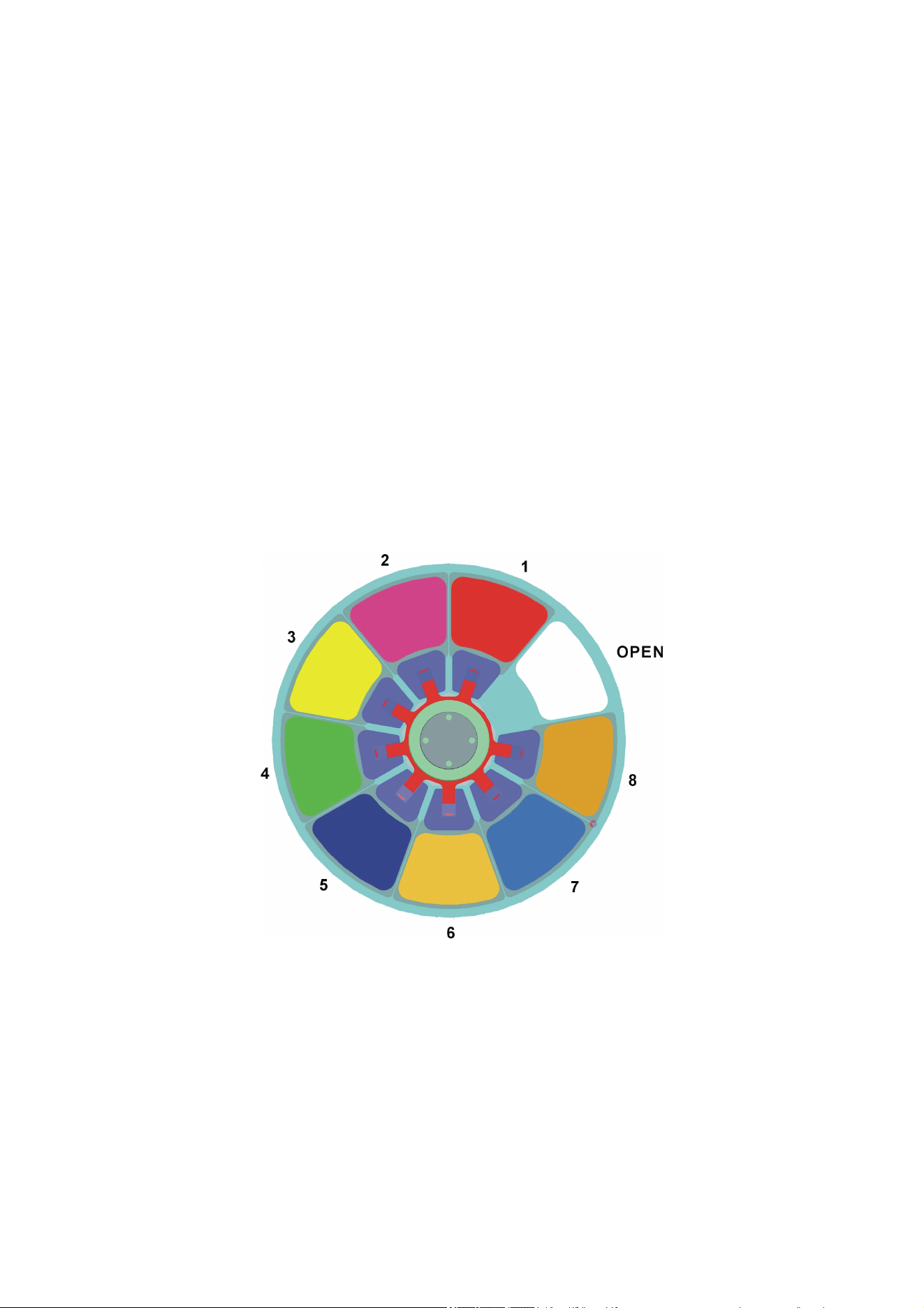
The color wheel contains the 8 dichroic color filters listed below plus an open (white) position.
Colors can be selected in full position steps or continuously scrolled for split colors. The color
wheel can be rotated with variable speed and direction. It can also be set to display random colors
at slow, medium and fast speeds. The color wheel is shown below viewed from the LED side (rear
of the fixture):
Color wheel
Slot 1: Red Slot 5: Dark Blue
Slot 2: Ma
g
enta Slot 6: CTO
Slot 3: Yellow Slot 7: C
y
an
Slot 4: Green Slot 8: Oran
g
e
As an alternative to the above colors, Martin can supply custom color filters made to special order.
Please consult your Martin supplier for details.
Exterior Projection 500 User Manual 25
Gobos
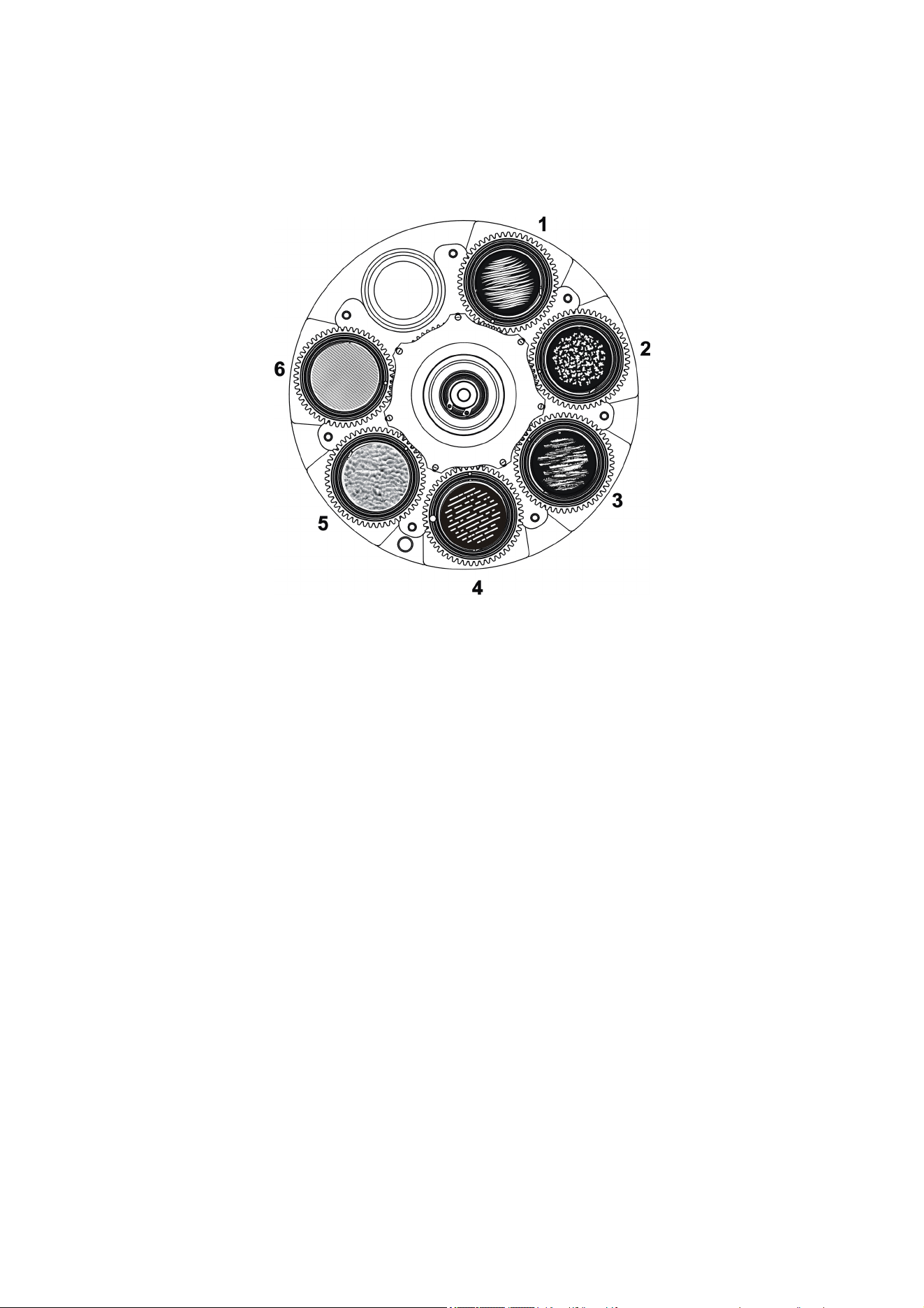
The fixture contains a rotating gobo wheel with the six rotating glass gobos shown below (wheel
viewed from the front of the fixture):
Rotating gobo wheel
Gobo 1: Grass Lines Gobo 4: Li
g
ht Lines
Gobo 2: Or
g
anic Deli
g
h
t
Gobo 5: Ripple Structure Glass
Gobo 3: Brush It Gobo 6: Lined Effect Glass
The gobos can be set to indexed positions and rotated continuously with variable speed and
direction.
To project a gobo, select the gobo and action type (indexed angle or rotation) on channel 5, then
adjust the indexed angle or direction and speed of rotation on channels 6 and 7 until you obtain
the projection you want. Using two channels for adjustment gives 16-bit control.
Custom gobos
Gobos are user-replaceable. You can replace them with custom gobos made to your own design
provided that the gobos meet the quality and specifications of the Martin gobos supplied with the
fixture (see ‘Gobos’ on page 55).
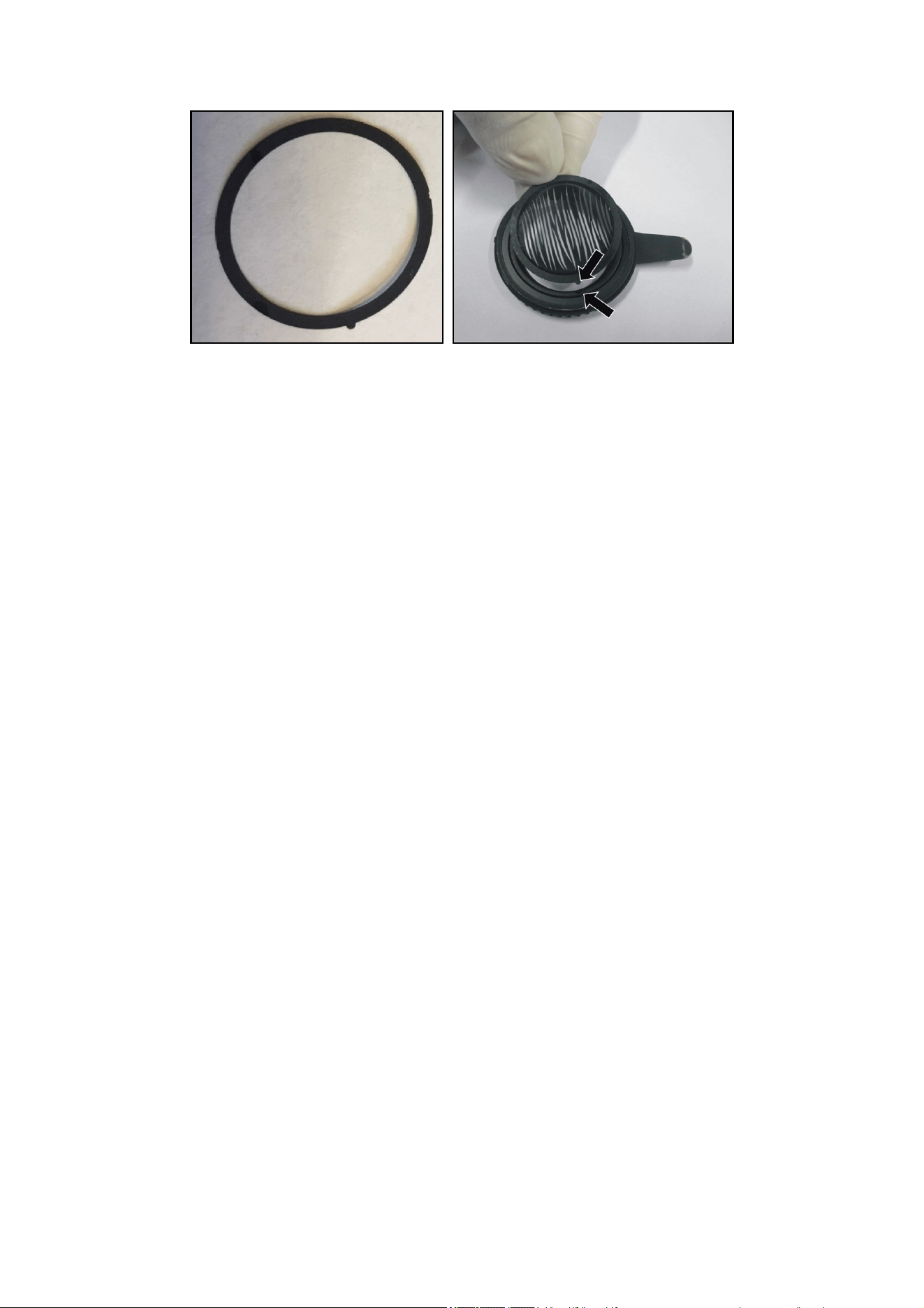
If you replace one of the standard gobos with a custom gobo, we recommend that you glue a gobo
ring with a key onto the gobo (see photos below). The key fits into a keyway in the goboholder and
prevents the gobo from moving in the goboholder and losing its correct orientation over time.
Gobo rings can be ordered in a set of 10 rings as an accessory from your Martin supplier. Ask for
P/N MAR-91611851.
The ring must be glued to the gobo using a silicone adhesive sealant that bonds to glass and
metals and that is suitable for use in temperatures from -55° C to 200° C continuous operation.
See page 35 for instructions on replacing rotating gobos.
26 Exterior Projection 500 User Manual
Gobo indexing angles and precise gobo indexing
Mechanical tolerances mean that there can be small changes in the indexing angles (i.e. rotational
angles) of gobos when you rotate them or change gobos and then return to the initial indexing
angle.
From firmware version 1.7.0 (available early 2020), a ‘Precise gobo indexing’ mode is available on
the fixture settings DMX channel 13. This mode returns gobos more accurately to their original
position after a move. If you require the tightest possible gobo indexing angle repeatability and the
fixture is running an earlier firmware version, we recommend that you update to firmware v. 1.7.0
or later and enable ‘Precise gobo indexing’.
In ‘Precise gobo indexing’ mode, the fixture always moves gobos to their programmed angles from
a counterclockwise direction (as seen when looking at the projection). If you enable ‘Precise gobo
indexing’, you should also always move gobos to indexing angles from a counterclockwise
direction while you are programming a show on a DMX controller or programming a stand-alone
show as described under ‘Programming a stand-alone show’ on page 19. If you overshoot the
desired angle, do not fix the problem by moving the gobo back to the desired angle in a clockwise
direction. Instead, move the gobo back past the desired angle in a clockwise direction, then move
it to the desired angle from a counterclockwise direction again.
Note that you do not need to have ‘Precise gobo indexing’ mode selected during programming. In
fact, it might be easier to disable this mode during programming and then enable it in the final cue.
Note also that slow fading from one gobo indexing angle to another is slightly less smooth when
‘Precise gobo indexing’ mode is enabled. If you want to compensate for this, use short fades or
snap to indexed angles, or program a blackout cue prior to the indexed position.
No matter how carefully we engineer and manufacture Martin products, all lighting fixtures are
subject to mechanical tolerances. These will often cause very small changes in the indexing
angles (i.e. rotational angles) of gobos if you rotate or change gobos and then you return to the
initial gobo indexing angle. To reduce the visibility of any change in indexing angle, we
recommend that you avoid programming very tight gobo mapping in multiple fixtures. For example,
avoid aligning a vertical or horizontal line in gobo projections from two or more fixtures.
The offsets (changes in rotational angle of the gobo projection) that apply to the Exterior Projection
500 are as follows:
• Maximum offset: 0.02 rad (1.15° or 30 mm offset at a beam diameter of 300 cm)
• Typical offset at individual gobo indexing or after fixture reset: < 0.0067 rad (less than 0.4° or
10 mm offset at a beam diameter of 300 cm)
• Typical offset at change between gobos: < 0.01 rad (less than 0.6° or 15 mm offset at a beam
diameter of 300 cm
Exterior Projection 500 User Manual 27
Animation effect
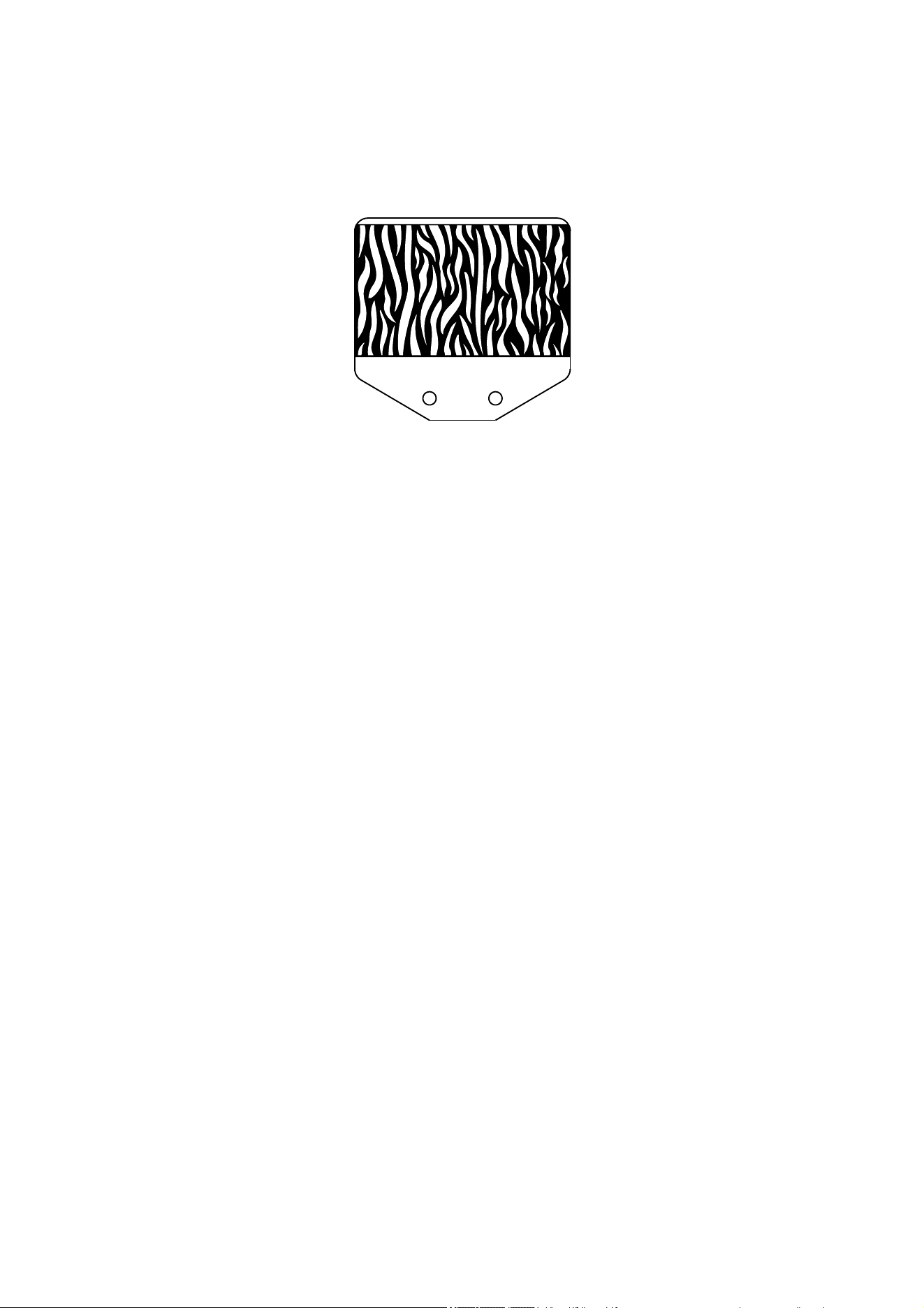
The gobo animation effect is designed to be used in combination with a rotating gobo and color
filter to create a moving image of flames, grass blowing in the wind, water, etc.
Animation effect
Adjust the speed of the gobo rotation, the speed of the animation effect and fixture focus to give
the most realistic animation.
Prism
The fixture has one 4-facet linear rotating and one 3-facet radial rotating prism. Either prism can
be deployed to obtain rotating split beam effects. Each prism can be set to an indexed position or
rotated with variable speed and direction.
Either one of the prisms or the frost filter (see below) can be deployed at one time.
Frost
The frost filter softens the light output, giving a diffuse beam.
Focus
The motorized focus lets you adjust the sharpness of projections from the controller. Gobo
animation effects, for example, can be most effective if they are slightly out of focus.
See also ‘Focus distances’ on page 30.

28 Exterior Projection 500 User Manual
Operation
The Exterior Projection 500 is designed to operate at ambient temperatures between -30°C (-22° F)
and 45° C (113° F). For instant wake-up with no warm-up mode, we recommend that you keep
power applied constantly in ambient temperatures below 0° C (32° F).
If the fixture’s temperature rises above its normal operating range, its light output is regulated. If
the ambient temperature rises towards the 45° C maximum and/or if the fixture is exposed to
strong sunlight, for example, output intensity will be reduced in order to protect the fixture.
Projection data
When projecting a gobo with an image of maximum size at a perpendicular surface (i.e. tilt angle
0° relative to the surface), you can obtain the following image sizes and light intensity in the
projection:
Narrow beam angle (12°) models
Distance to
projection
surface
4 m
(13 ft.)
6 m
(20 ft.)
8 m
(26 ft.)
10 m
(33 ft.)
12 m
(39 ft.)
14 m
(46 ft.)
16 m
(53 ft.)
18 m
(59 ft.)
20 m
(66 ft.)
Projection
diameter in
meters
(
ft.
)
0.8
(2.6)
1.2
(3.8)
1.5
(5.1)
1.9
(6.3)
2.3
(7.6)
2.7
(8.9)
3.1
(10.2)
3.5
(11.4)
3.9
(12.7)
Center
illuminance
in lux
12688 5639 3172 2030 1410 1036 793 627 508
Center
illuminance
in candela
1179 524 295 189 131 96 74 58 47
Projection data, gobo with maximum image size, Narrow beam angle
Medium beam angle (22°) models
Distance to
projection
surface
4 m
(13 ft.)
6 m
(20 ft.)
8 m
(26 ft.)
10 m
(33 ft.)
12 m
(39 ft.)
14 m
(46 ft.)
16 m
(53 ft.)
18 m
(59 ft.)
20 m
(66 ft.)
Projection
diameter in
meters
(
ft.
)
1.4
(4.7)
2.1
(7.0)
2.9
(9.4)
3.6
(11.7)
4.3
(14.1)
5.0
(16.4)
5.7
(18.8)
6.4
(21.1)
7.2
(23.5)
Center
illuminance
in lux
4813 2139 1203 770 535 393 301 238 193
Center
illuminance
in candela
447 199 112 72 50 36 28 22 18
Projection data, gobo with maximum image size, Medium beam angle
Exterior Projection 500 User Manual 29
Wide beam angle (37°) models
Distance to
projection
surface
4 m
(13 ft.)
6 m
(20 ft.)
8 m
(26 ft.)
10 m
(33 ft.)
12 m
(39 ft.)
14 m
(46 ft.)
16 m
(53 ft.)
18 m
(59 ft.)
20 m
(66 ft.)
Projection
diameter in
meters
(
ft.
)
2.5
(8.1)
3.7
(12.1)
4.9
(16.2)
6.2
(20.2)
7.4
(24.2)
8.6
(28.3)
9.9
(32.3)
11.1
(36.4)
12.3
(40.4)
Center
illuminance
in lux
1750 778 438 280 194 143 109 86 70
Center
illuminance
in candela
163 72 41 26 18 13 10 8 7
Projection data, gobo with maximum image size, Wide beam angle
Very Wide beam angle (51°) models
Distance to
projection
surface
4 m
(13 ft.)
6 m
(20 ft.)
8 m
(26 ft.)
10 m
(33 ft.)
12 m
(39 ft.)
14 m
(46 ft.)
16 m
(53 ft.)
18 m
(59 ft.)
20 m
(66 ft.)
Projection
diameter in
meters
(
ft.
)
3.5
(11.5)
5.3
(17.3)
7.0
(23.0)
8.8
(28.8)
10.5
(34.6)
12.3
(40.3)
14.0
(46.1)
15.8
(51.8)
17.6
(57.6)
Center
illuminance
in lux
688 306 172 110 76 56 43 34 28
Center
illuminance
in candela
64 28 16 10 7 5 4 3 3
Projection data, gobo with maximum image size, Very Wide beam angle

30 Exterior Projection 500 User Manual
Focus distances
The minimum distances at which you can obtain sharp focus are shown in the table below:
Approximate
DMX value
Minimum sharp
focus distance
Narrow
(12°)
255
2.7 m (8.9 ft.)
Medium
(22°)
190 2.7 m (8.9 ft.)
Wide
(37°)
130 3 m (9.9 ft.)
Very Wide
(51°)
90 4.3 m (14.2 ft.)
Minimum sharp focus distances
These distances also apply if the optional framing module is installed in the fixture.

Exterior Projection 500 User Manual 31
Maintenance
Warning! Read ‘Safety information’ on page 5 before servicing the fixture.
Important! Opening the fixture can allow moisture to enter and cause
condensation on the front glass. Read ‘Managing humidity’ below and
follow the
g
uidelines in this user manual carefull
y
.
Refer any service or repair operation not described in this manual to an authorized Martin service
technician. Do not try to carry out such an operation yourself, as doing so may present a health or
safety risk. It may also cause damage or malfunction, and it may void your product warranty.
Installation, on-site service and maintenance can be provided worldwide by the Martin Global
Service organization and its approved agents, giving owners access to Martin’s expertise and
product knowledge in a partnership that will ensure the highest level of performance throughout
the product’s lifetime. Please contact your Martin supplier for details.
Optical components have fragile coatings and are exposed to very high temperatures. Handle and
store components with care. Wear cotton gloves while handling them. Keep them perfectly clean
and free of oil and grease to reduce the risk of heat damage.
Cleaning
Regular cleaning is essential for fixture life and performance. Buildup of dust and dirt degrades the
fixture’s light output and cooling ability.
Cleaning schedules will vary greatly depending on the operating environment. It is therefore
impossible to specify precise cleaning intervals for the Exterior Projection 500. Inspect fixtures
within their first few weeks of operation to see whether cleaning is necessary. Check again at
frequent intervals. This procedure will allow you to assess cleaning requirements in your particular
situation. If in doubt, consult your Martin dealer about a suitable maintenance schedule.
Do not use products that contain solvents, abrasives or caustic agents for cleaning, as they can
cause surface damage to the fixture. The aluminum housing and front glass can be cleaned with
mild detergents such as those for washing cars.
To clean the housing and front glass:
1. Isolate the fixture from AC power and allow the fixture to cool for 20 minutes.
2. Visually check that the silicone seals and the power and data cables are in good condition. If
any seal or cable shows signs of damage, cracking or loss of water resistance, stop cleaning
the fixture and contact a Martin authorized service technician for replacement.
3. If seals are in good condition, rinse off loose dirt with a hose or low-pressure water spray.
4. Wash the aluminum housing and front glass using warm water with a little mild detergent and
a soft brush or sponge. Do not use abrasive cleaners.
5. Rinse with clean water and wipe dry.
Managing humidity
Martin Exterior fixtures are IP66-rated and are designed to resist water and moisture in
environments with widely varying climate, temperature and humidity conditions. But if fixtures are
not managed correctly during installation and service, water and moisture can enter, leading to
humidity and condensation inside the fixtures. Maximize the performance and service life of your
product by following the precautions in this section.
General
● Carry out service during low-humidly weather conditions (or indoors if possible). Check that
fixtures are dry and free of moist air before closing them.

32 Exterior Projection 500 User Manual
● Tighten cover screws exactly as directed in this manual and using a torque driver.
● Make sure that all threads are clean and dry. Do not apply lubricant to threads before
assembly. While lubricant may make disassembly easier during future service, it means that
tightening screws to the specified torque will compress seals too much.
● Air and water can be sucked along cables and into fixtures. A cracked or porous cable jacket
can allow water into the cable. Replace any cable that is not in perfect condition. Make sure
that cables from fixtures open into dry areas (e.g. junction boxes in dry locations).
● Do not clean fixtures with high-pressure water jets or immerse them.
Seals and sealing surfaces
The fixture must be sealed effectively. Covers have silicone seals that will withstand rain and water
splashing but will not withstand immersion or high-pressure water jets. Reinstall covers and seals
carefully if you have removed them.
● Make sure that seals and sealing surfaces are perfectly clean, dry and in perfect condition
before installing a cover. If you need to clean seals, use water and a soft cloth only. Replace
any seal that shows signs of aging, damage, cracking, stretching or deformation. Replacement
seals are available from Martin.
● Reinstall seals in exactly their original position.
● Install seals so that they closely follow the profile of the metal parts they are installed on.
When you run your finger around the sealing surface after you have installed a cover, you
should not be able to feel any places where the seal sticks out or sinks into the gap between
the sealing surfaces.
● Do not use liquid gasket or any other type of sealant on sealing surfaces or seals.
Removing humidity using Evaporation Mode and silica gel desiccant
Each time you open the top cover, remove humidity from inside the fixture as directed in this
chapter before you close the fixture again. See ’Reinstalling the top cover’ on page 33.
Pressure relief valves
A valve with a Gore-Tex membrane on the back of the fixture (see ‘Fixture overview’ on page 9)
equalizes pressure by allowing air to pass through it when the fixture heats up and cools down, but
at the same time it acts as a barrier to water in liquid form. The expulsion of warm air (with a
slightly higher water vapor content) and intake of cool air (with a slightly lower water vapor content)
prevents humidity buildup over time provided that the valve works correctly and that the fixture is
correctly sealed.
Valves become blocked over time as the micropores in the membrane fill with particles. If a valve
becomes blocked by dirt or water, excess pressure can damage seals or cause air and even water
to be sucked into the fixture along cables. Valves cannot be cleaned and must be replaced if they
show any signs of contamination or if they are not in perfect condition.
To obtain the maximum service life from your fixture, follow these guidelines:
● Do not allow water to collect on or near pressure relief valves. Do not install a fixture with the
valve membrane horizontal so that water can pool on it.
● Replace a valve with a new item if it shows any signs of contamination or is not in perfect
condition.
● Replace valves after an extended period of use. Intervals for valve replacement depend on the
installation environment.
● Consult your Martin dealer about a suitable valve replacement schedule.
● Contact Martin Service if a valve requires replacement
Exterior Projection 500 User Manual 33
Removing and reinstalling the top cover
Important! Open the fixture in dry weather conditions only. Use Evaporation Mode as described
below and a new silica gel desiccant bag to avoid humidity inside the fixture.
Access to optical components is made easy by a cover on the top of the fixture.
Removing the top cover
To remove the top cover:
1. Disconnect the fixture from power and allow it to cool for at least 60 minutes.
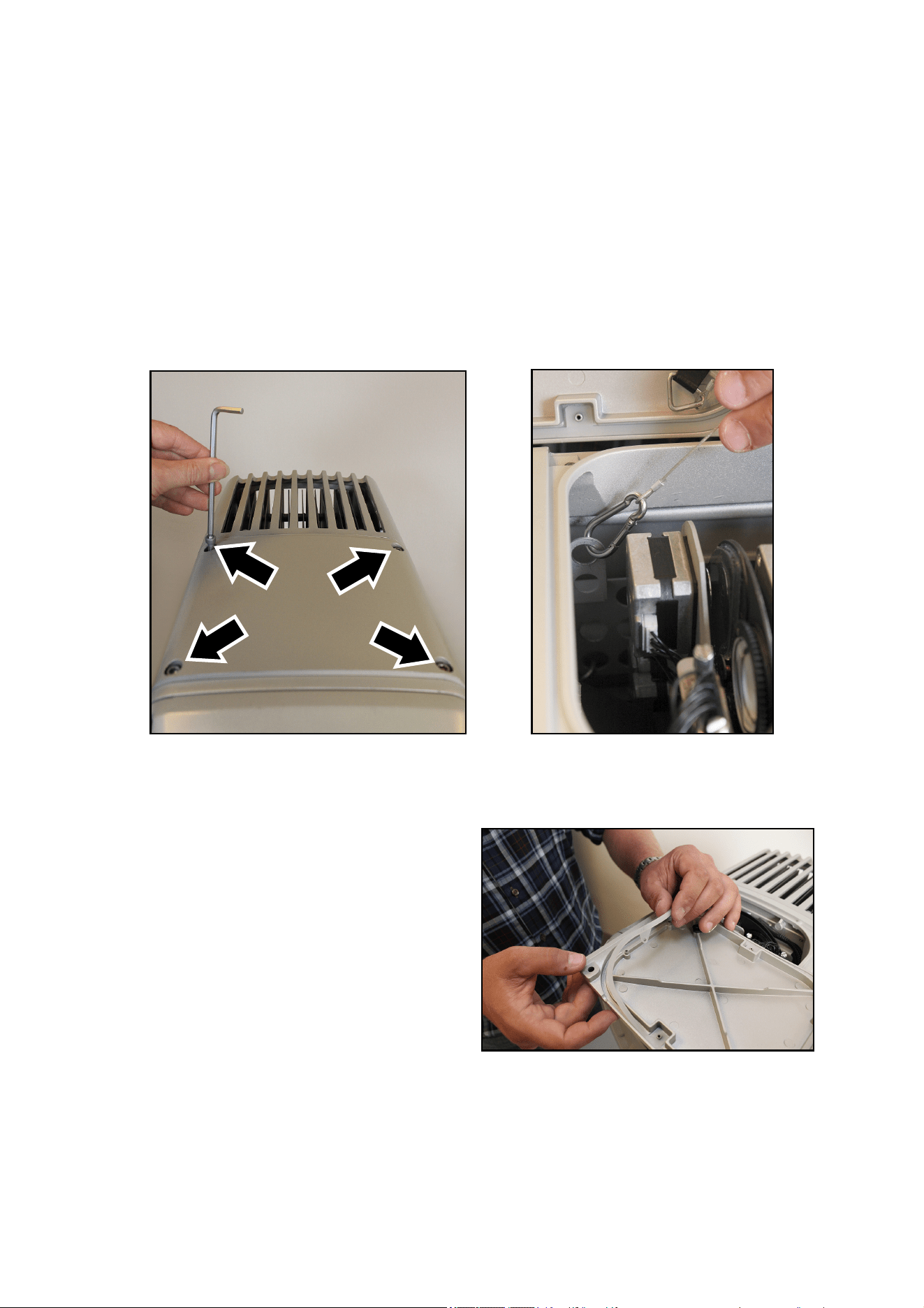
2. See illustrations below. Use a 5 mm Allen key (hex wrench) to remove the four top cover
screws (arrowed). Lift the top cover off the fixture. For ease of access – and if it is safe to do
so – you can unclip the safety cable and remove the cover completely from the fixture.
Reinstalling the top cover
To reinstall the top cover:
1. See illustration on right. Check the silicone
seal in the top cover. If it is not in perfect
condition, replace it with a new item from
Martin.
2. If you unclipped the top cover safety cable,
reinstall the safety cable so that it will catch
the top cover and prevent it from falling while
screws are loosened.
3. Place the top cover loosely over the top of the
fixture so that air can enter and leave the
fixture.
34 Exterior Projection 500 User Manual
4. Obtain a silica gel desiccant bag (P/N 37220000) from Martin. Do not remove the desiccant
bag from its sealed aluminum foil bag until you are ready to install it as described below.
5. Open the Service Evaporation Mode control menu and select PASSWORD. Scroll to the
user password (default = 123) and press ENTER.
6. Select COVER OPEN and press ENTER.
7. Select EVAPORATION ON to set the fixture to Evaporation Mode. This allows warm, humid air
to leave the fixture and dry air to enter the fixture. WAIT will appear in the display.
8. After approx. 15 minutes the display will stop showing WAIT and start showing CLOSE
COVER. Press ENTER.
9. Remove the silica gel bag from its aluminum foil bag. Move the top cover to one side again.
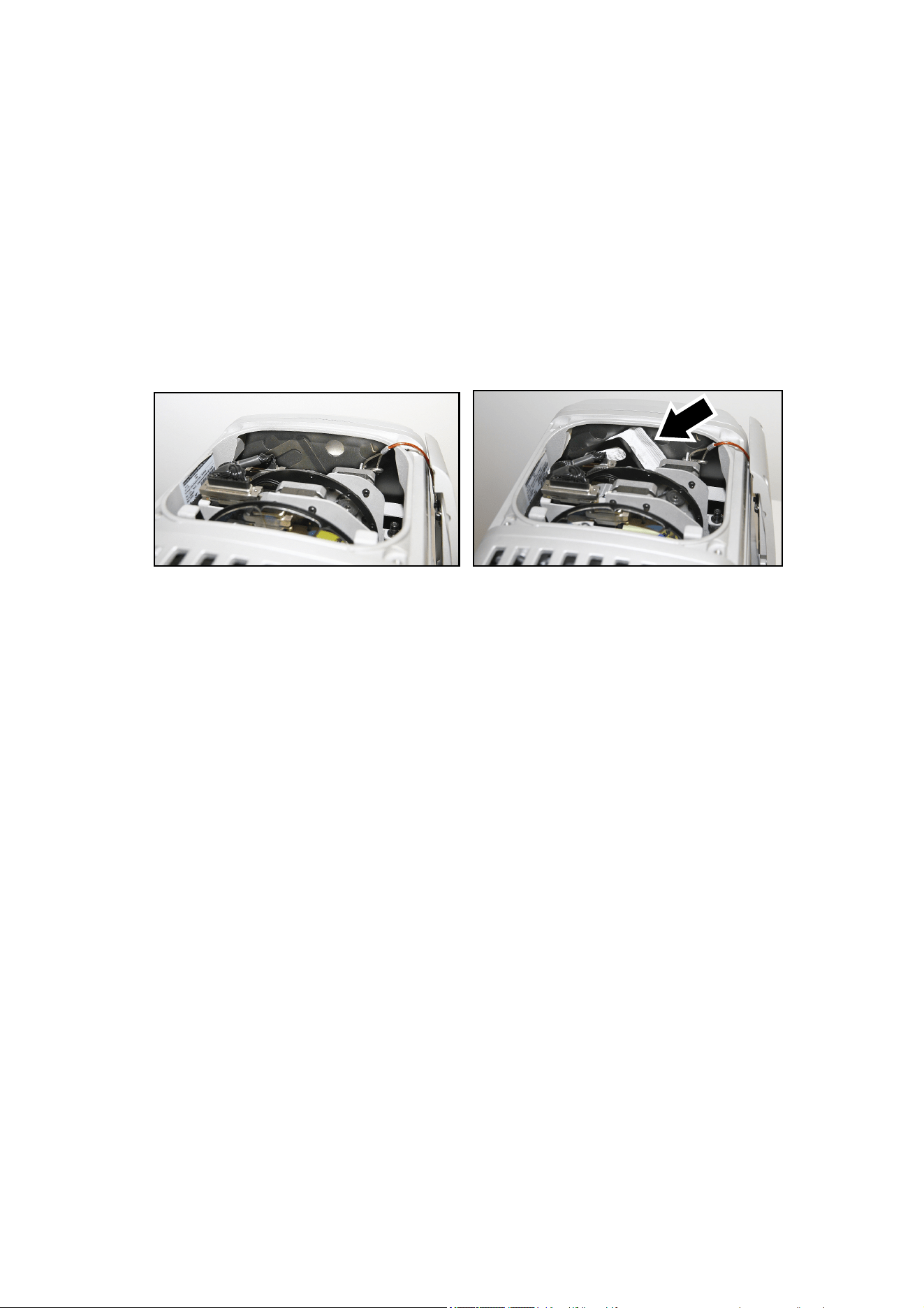
See illustrations below. Push the bag into position behind the clip provided in the rear of the
fixture. Check that the bag is held securely.
10. Place the top cover back onto the fixture, then reinstall the four top cover screws by first
inserting them finger-tight. Then use a torque driver and cross-tighten the screws in a diagonal
pattern, increasing torque gradually in stages until you reach a torque of 1.8 Nm.
Exterior Projection 500 User Manual 35
Replacing a rotating gobo
Gobos are user-replaceable, and you can replace them with custom gobos made to your own
design. Gobos are exposed to severe thermal stresses, so custom gobos must meet the
specifications and quality standards of the Martin gobos supplied with the fixture (see ‘Gobos’ on
page 55), or they can lead to damage that is not covered by the product warranty. Borosilicate
glass gobos are recommended for long-term use, but for shorter periods it is possible to use gobos
constructed in aluminum 1060.
The dark side of glass gobos and the painted side of aluminum gobos must face away from the
LEDs and face towards the front of the fixture.
To help with designing custom gobos when projection requirements are very specific, order the
Projection Setup Gobo (see below) from Martin and use it to map projection characteristics at the
installation site. You can then give precise data to the gobo designer to use as a guide.
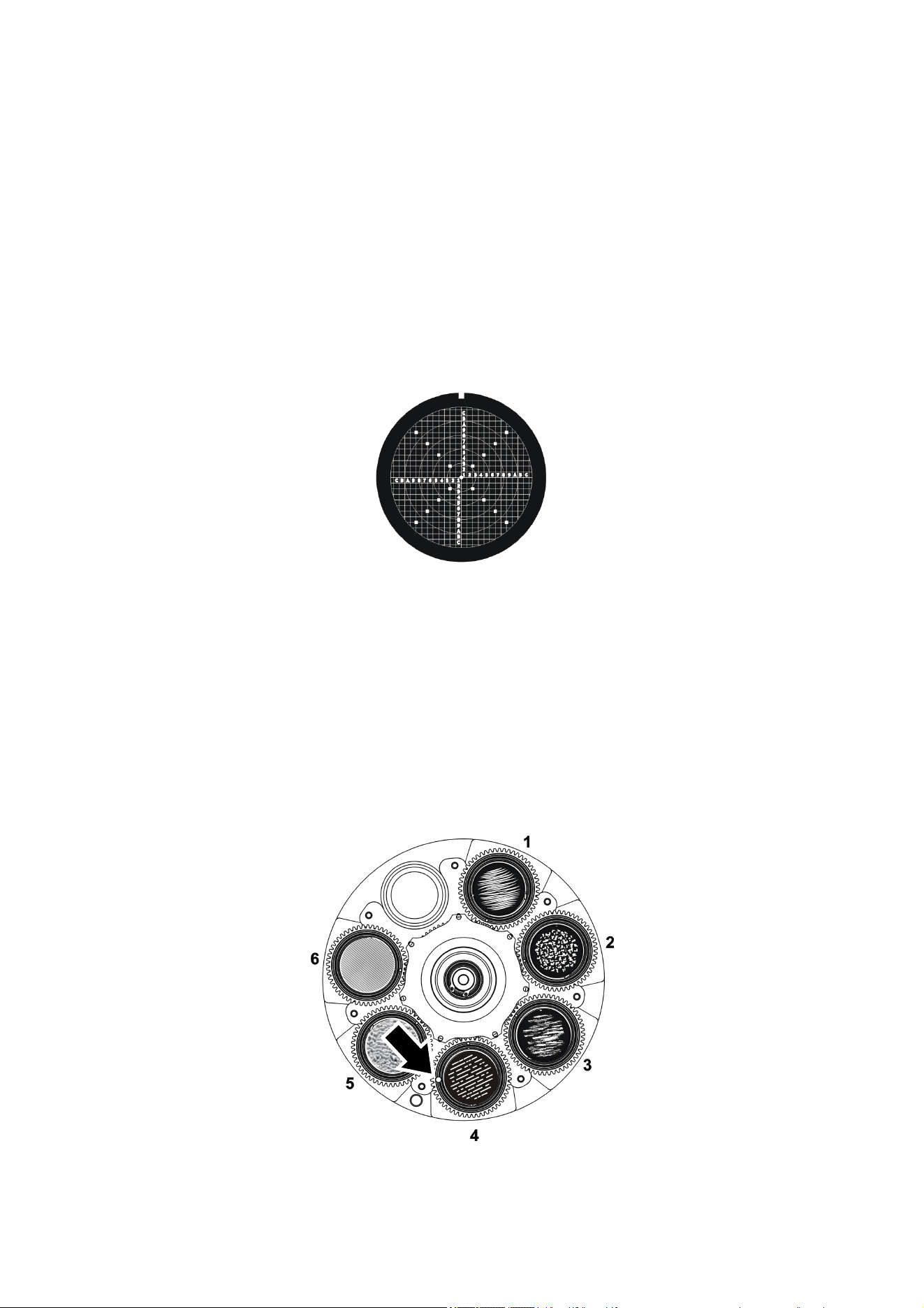
Projection Setup Gobo for the Exterior Projection 500, P/N 91616068
Gobos 1 – 4 are printed/coated glass and share the same specifications, but gobos 5 and 6 are
structured glass and have different specifications to the others. See ‘Gobos’ on page 55.
Goboholders 5 and 6 are not interchangeable with any other goboholders and must always be
installed in the slot they came from. Textured glass gobos must be installed in goboholders 5 and
6, and you must reinstall the thrust washers supplied with gobos 5 and 6 between the gobo
retaining spring and the gobo.
See illustration below. The goboholder in slot 4 has a magnet (arrowed) that the fixture uses to
recognize the position of the gobo wheel and gobos. If you replace gobos, make sure that you
always install this goboholder in its original position in slot 4.
36 Exterior Projection 500 User Manual
The rotating gobos in the Exterior Projection 500 are installed in goboholders that clip into the
rotating gobo wheel.
To replace a gobo:
1. Remove the top cover as described under ’Removing and reinstalling the top cover’ on page
33.
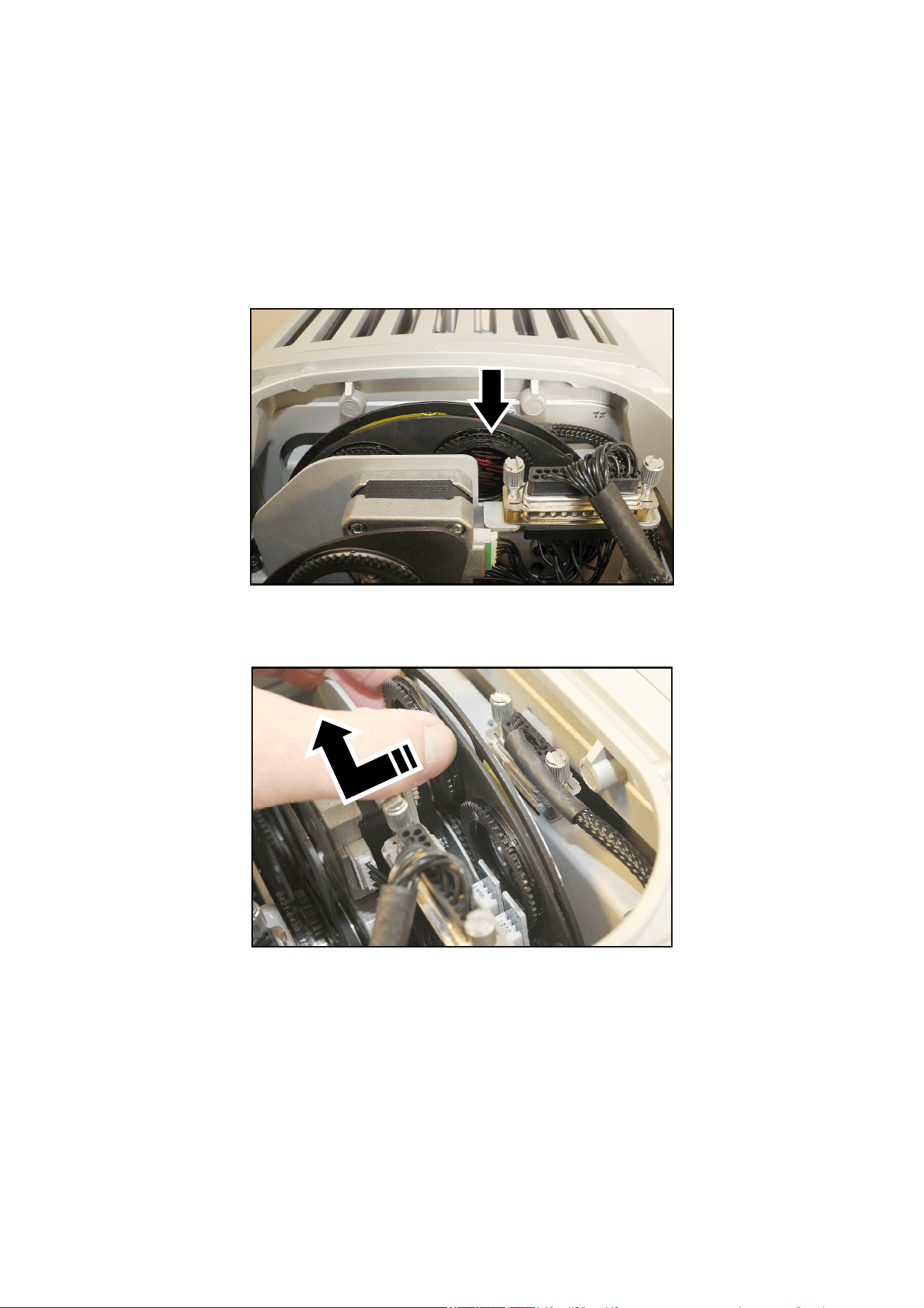
2. See illustration below. Position the alignment mark (arrowed) in the goboholder at a reference
point such as the midpoint between the end of the motor mounting plate and multi-connector
shown below. Always remove and reinstall goboholders with alignment marks in the same
position so that you keep gobos in the same orientation.
3. See illustration below. Pull the goboholder forwards, away from the wheel, then lift it up out of
the wheel.
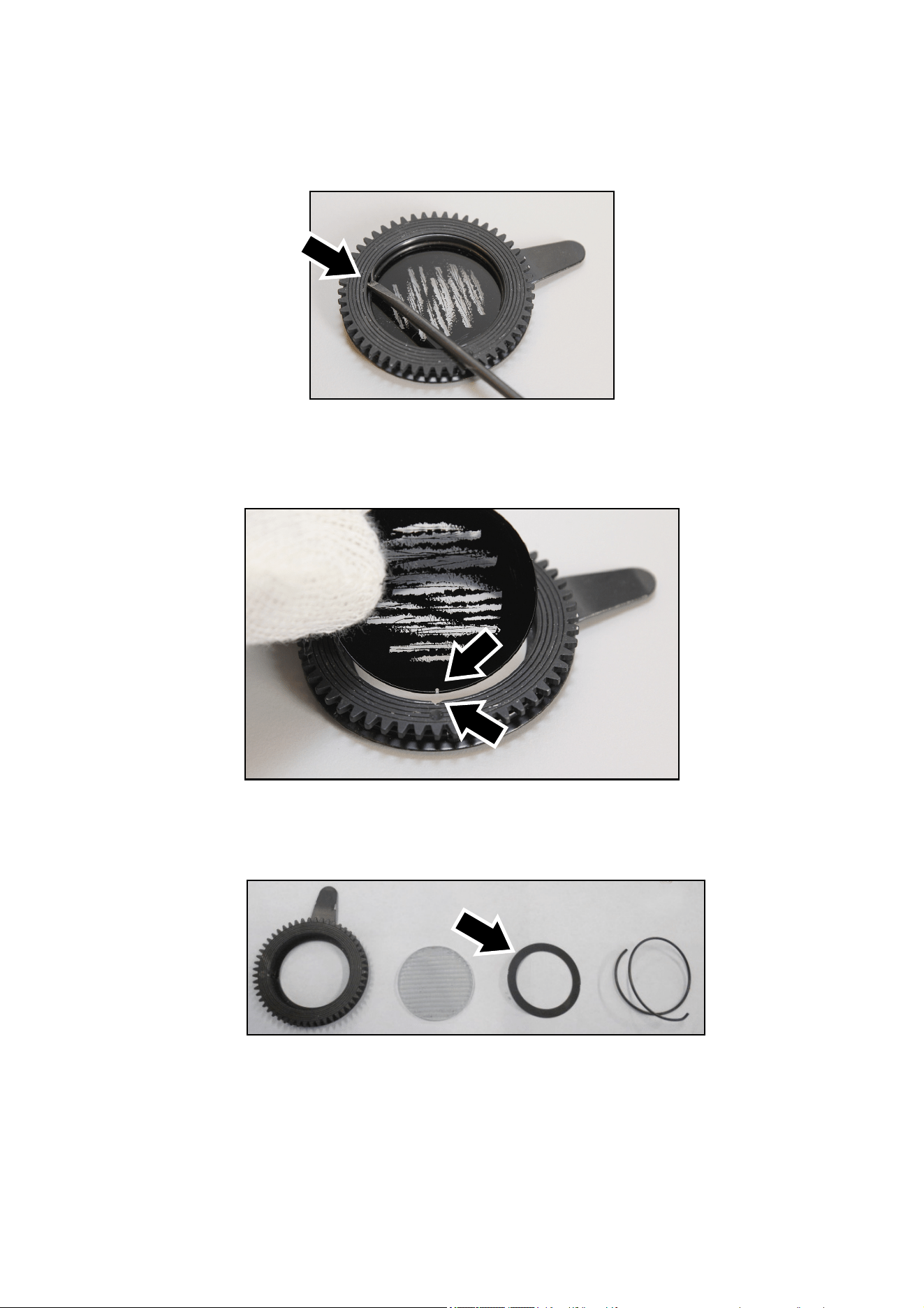
Exterior Projection 500 User Manual 37
4. See illustration below. Place the goboholder on a clean, flat work surface with the teeth facing
upwards. The gobo is held in place in the gobo holder by a spring. Taking care to avoid
scratching or applying pressure to the gobo, lever the end of the spring out, remove the spring
and then lift the gobo out of the goboholder.
5. See illustration below. Hold the gobo with the dark side (glass gobos) or painted side (user-
supplied aluminum gobos) facing upwards towards the teeth in the goboholder. Match up the
alignment marks (arrowed) in the gobo and goboholder. Lay the new gobo flat in the
goboholder.
Gobos 5 and 6 only
Gobos 5 and 6 are structured glass and require a thrust washer. See illustration below. Place
the black thrust washer (arrowed) over the gobo before you go on to the next step.
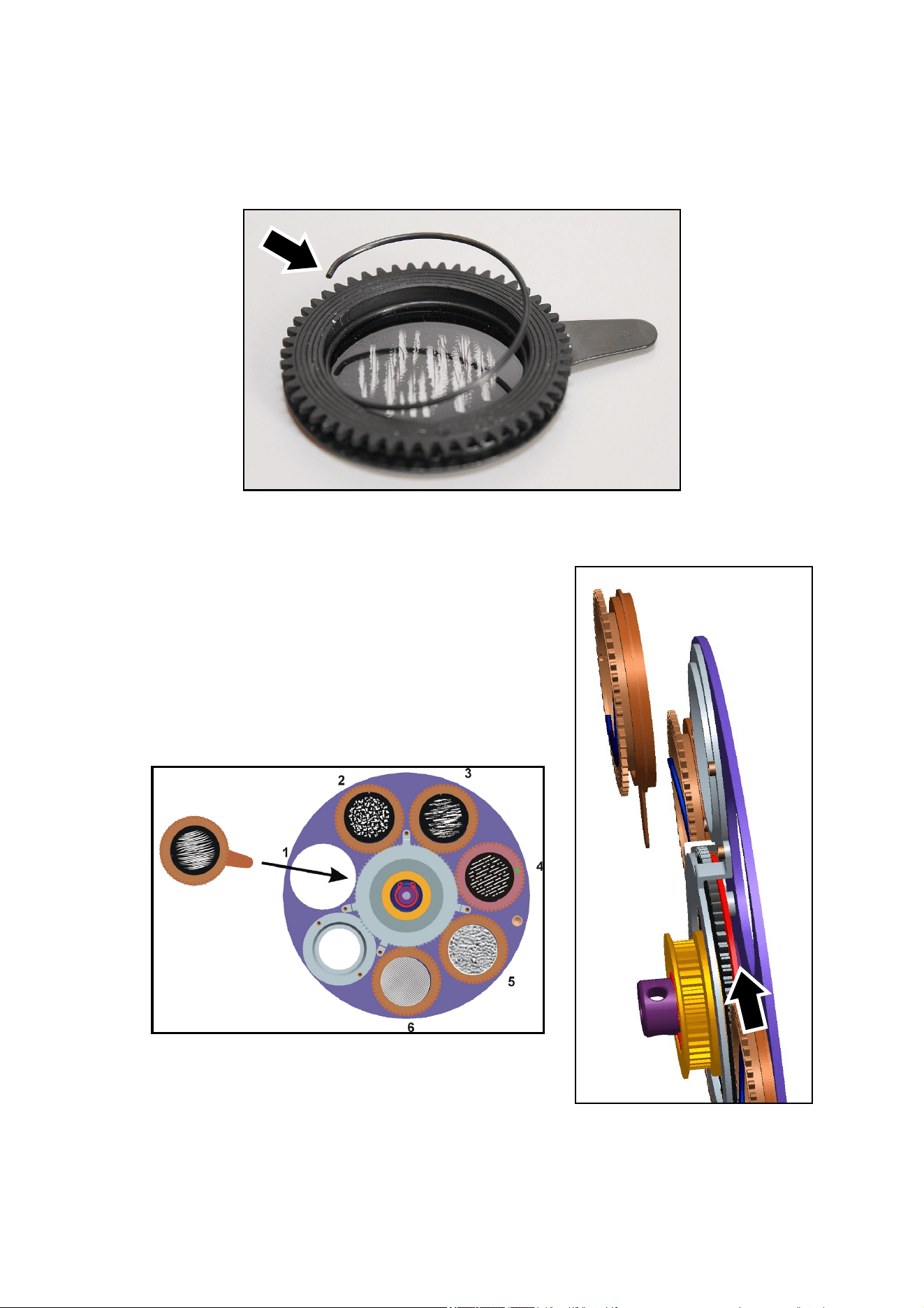
38 Exterior Projection 500 User Manual
6. See illustration below. Note the end of the gobo retaining spring with the bend (arrowed) that is
used for levering the spring out of the goboholder. Making sure that the bend in the spring is at
the top (as shown below), press the spring down into the goboholder until the spring clips into
its recess in the goboholder. Check that the spring is secure and that the gobo is still sitting flat
in the goboholder.
7. Hold the goboholder up to the rotating gobo wheel in its
original position. Rotate it until the alignment mark in the
goboholder lines up with the reference point as shown in
Step 3.
8. See illustrations below and right. Push the goboholder into
position, sliding the tongue that sticks out from the
goboholder into position (arrowed) behind the gobo
activation cog, pressing against the gobo wheel.
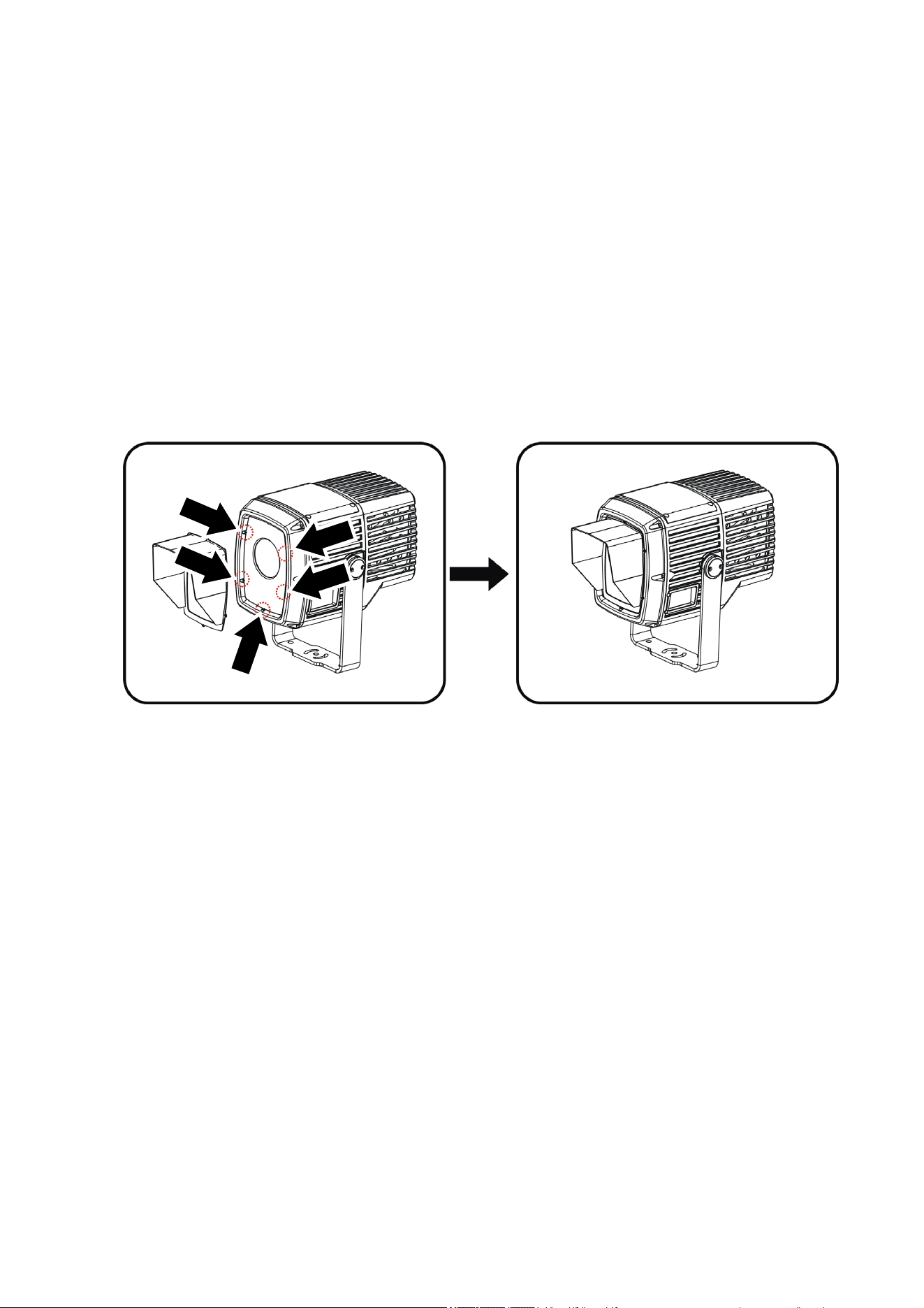
Exterior Projection 500 User Manual 39
9. Check that the goboholder is held securely. Rotate the whole gob wheel with your finger and
check that the goboholder rotates in the wheel while you rotate the gobo wheel. If the
goboholder does not rotate, it is not correctly installed and its teeth are probably not engaged
correctly in the teeth in the gobo wheel. Lift the goboholder out of the gob wheel and reinstall it
correctly.
10. Reinstall the top cover as described under ‘Removing and reinstalling the top cover’ on page
33.
Installing a glare shield accessory
A glare shield is available as an optional accessory for the Exterior Projection 500. The shield
protects from stray light and can help protect the fixture from damage caused by the sun shining
on the front of the fixture. The glare shield can be installed in seconds.
To install a glare shield:
1. See illustration below. Use a 3 mm Allen key (hex wrench) to remove the five screws (arrowed)
from the front of the fixture.
2. Fasten the glare shield securely to the fixture using the five screws as shown in the illustration.
Use a torque driver and cross-tighten to a torque of 0.7 – 1.1 Nm.
Installing a framing module
A four-blade manual framing module is available as an optional accessory for the Exterior
Projection 500. The framing module can be installed in place of the gobo module (which contains
the gobo wheel and the gobo animation wheel).
Each of the four framing blades can be manually adjusted at both ends. The module lets you form
the projection into a wide range of shapes and sizes including regular squares, trapezoid
rectangles and triangles. This lets you restrict the light output to a specific area or target – the
façade of a building, for example. Light output can be prevented from striking neighboring
buildings or dazzling pedestrians at street level, for example.
The framing effect is not intended to mask areas with sharp edges: it is not possible to obtain
sharp focus on all four framing blades simultaneously.
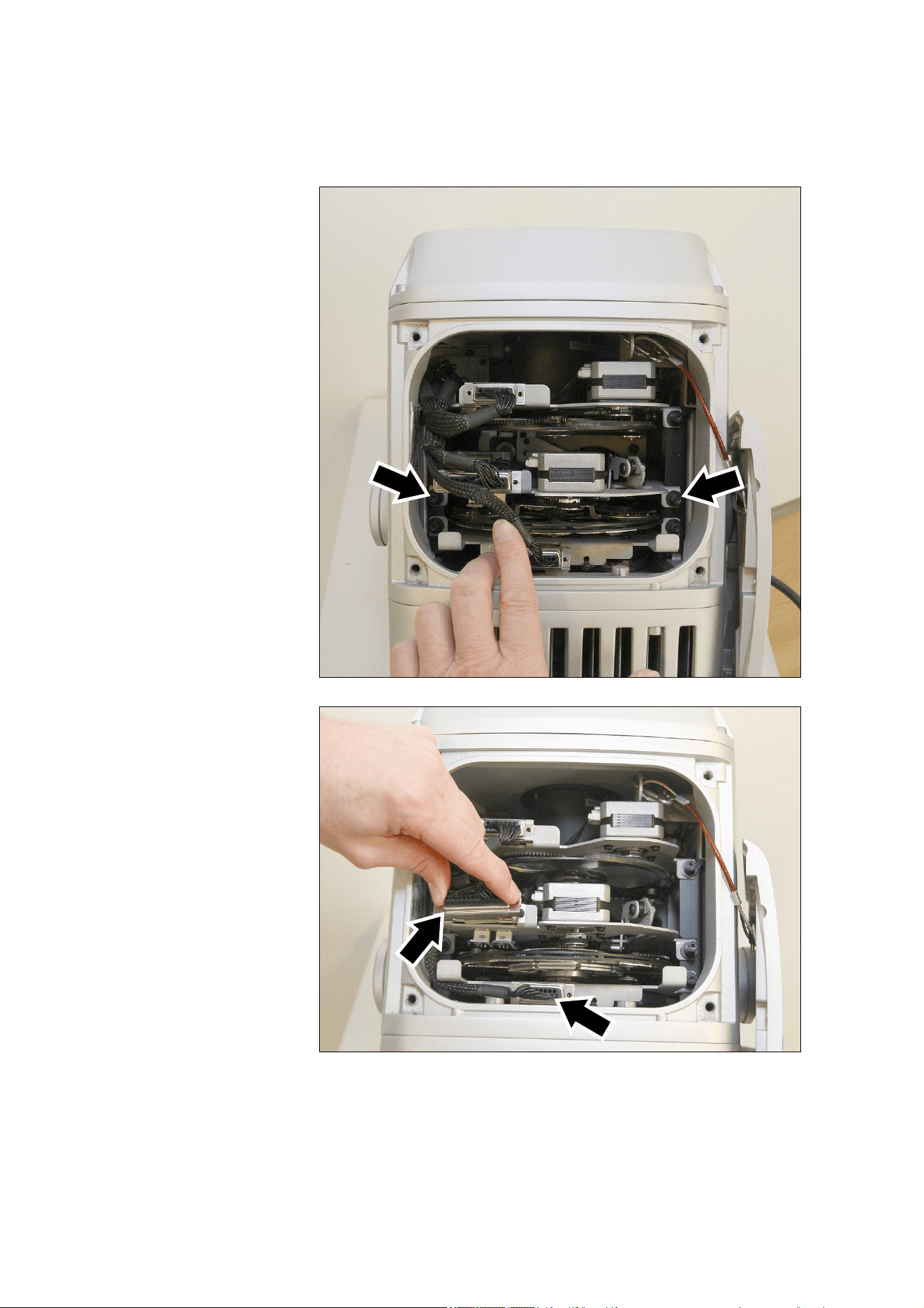
40 Exterior Projection 500 User Manual
To install a framing module:
1. Open the fixture’s top cover as described in ’Removing and reinstalling the top cover’ on page
33.
2. See illustration on
right. Remove the two
Allen (hex) head gobo
module retaining
screws (arrowed).
3. See illustration on
right. Unplug the two
multi-connectors
(arrowed) and move
the wiresets out of the
way to give yourself
space to remove the
gobo module.
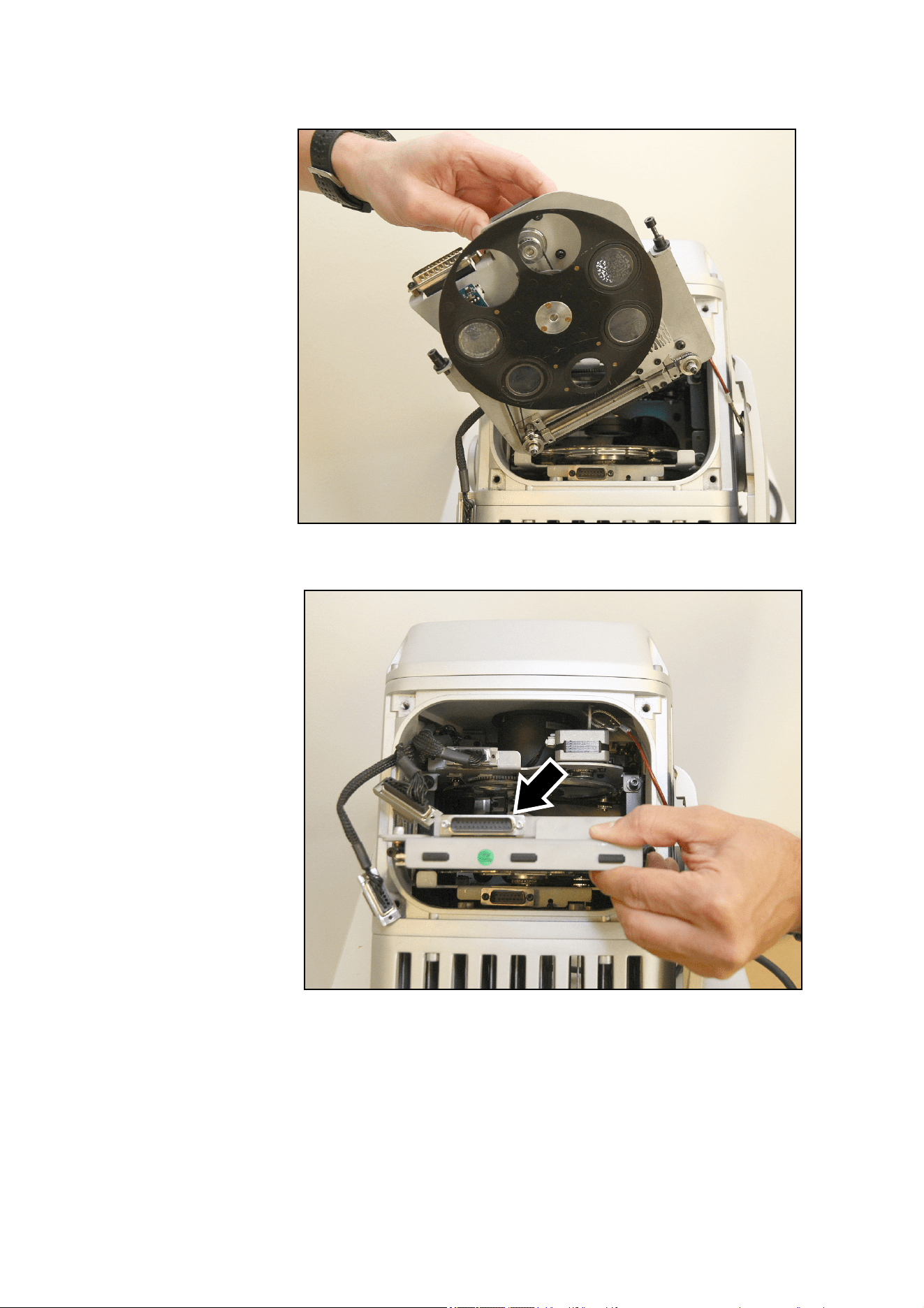
Exterior Projection 500 User Manual 41
4. See illustration on
right. Lift the gobo
module out of the
fixture.
5. See illustration on
right. Slide the
framing module into
the fixture in the
place of the gobo
module. Make sure
that the framing
module multi-
connector
(arrowed) faces as
shown.
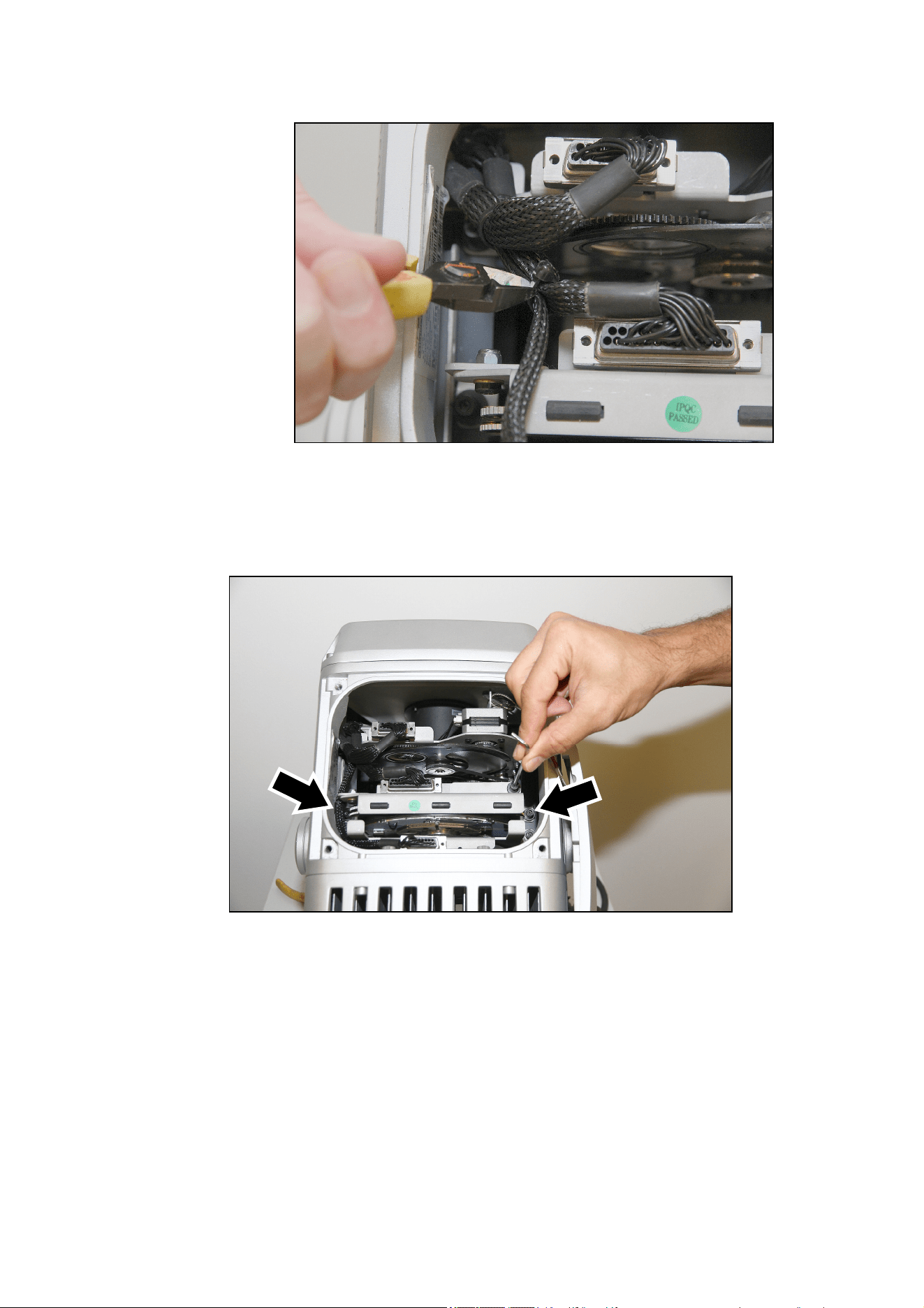
42 Exterior Projection 500 User Manual
6. See illustration on
right. Carefully cut
the cable tie on
the gobo module
wireset to give
more free length
in the wireset.
7. Plug the large
multi-connector
into the framing
module and the
smaller multi-
connector into the
color wheel
module.
8. See illustration below. Route the wireset around the left-hand side of the framing module, and
then fasten the framing module into the fixture with the two Allen (hex) screws (arrowed) that
were used to fasten the gobo module into the fixture. The illustration below shows the framing
module cover being opened with an Allen key / hex wrench, but the screws that hold the
framing module into the fixture are indicated with arrows.
9. If you are not going to adjust framing immediately, close the fixture as described in ’Removing
and reinstalling the top cover’ on page 33. If you are going to adjust framing, continue to the
next section below.
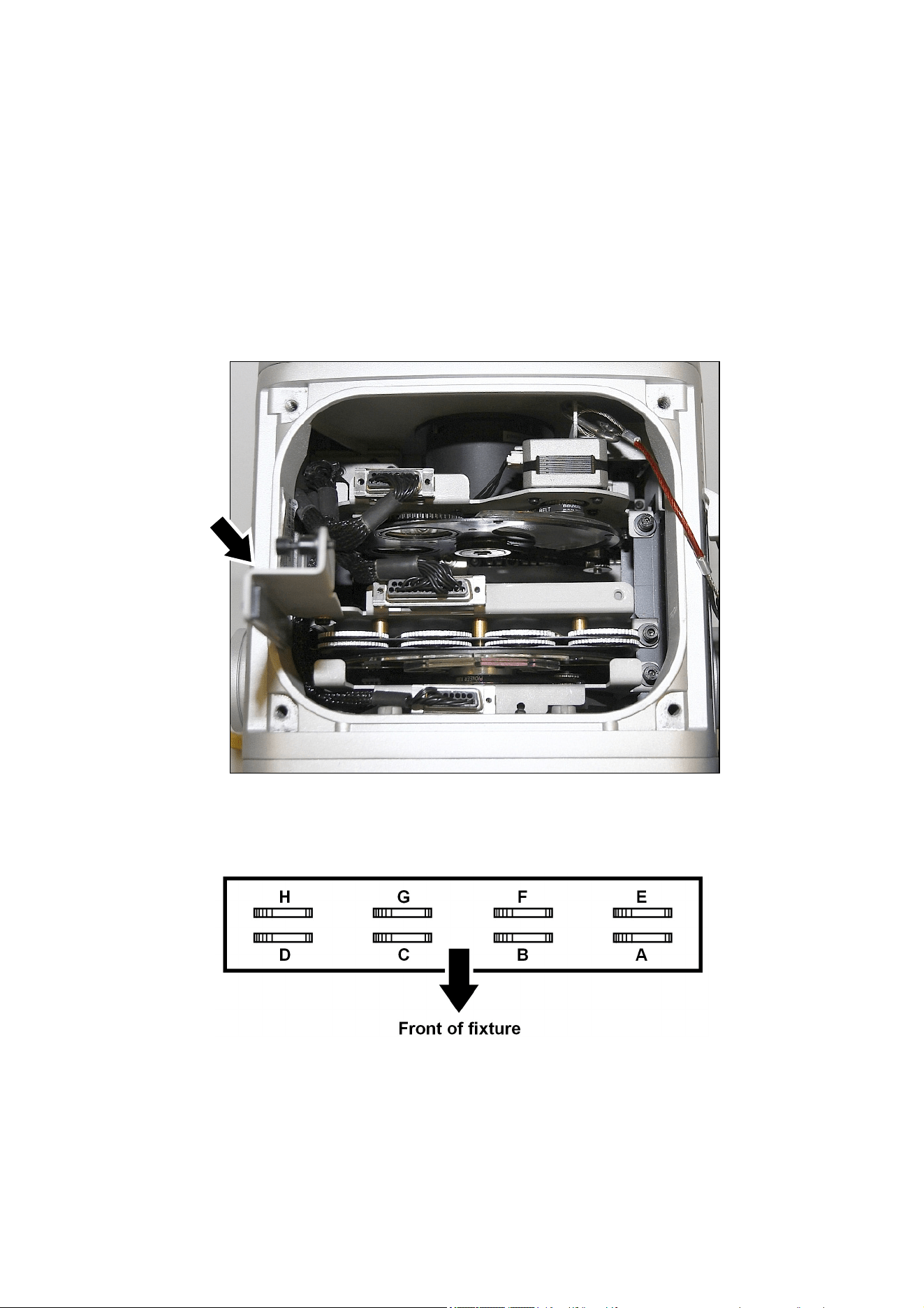
Exterior Projection 500 User Manual 43
Framing adjustment
You can adjust the framing with the framing module installed if the fixture is installed in its final
position and aimed at the target to be illuminated. Carry out adjustment in dry weather conditions
only.
1. Apply power to the fixture, then remove the top cover as described in ’Removing and
reinstalling the top cover’ on page 33. Do not disconnect the safety cable if there is any danger
of the cover falling and causing injury or damage.
2. See illustration below. Opened the framing module cover (arrowed) for access to the framing
adjustment wheels in the top of the framing module. The wheels let you adjust the position of
each framing blade by moving the ends of the blade.
3. The illustration below shows which wheels adjust which blade. Turning wheels A and D
adjusts the top framing blade, for example.
Framing blade adjustment wheels:
A + D = Top
B + C = Bottom
E + F = Right
G + H = Left
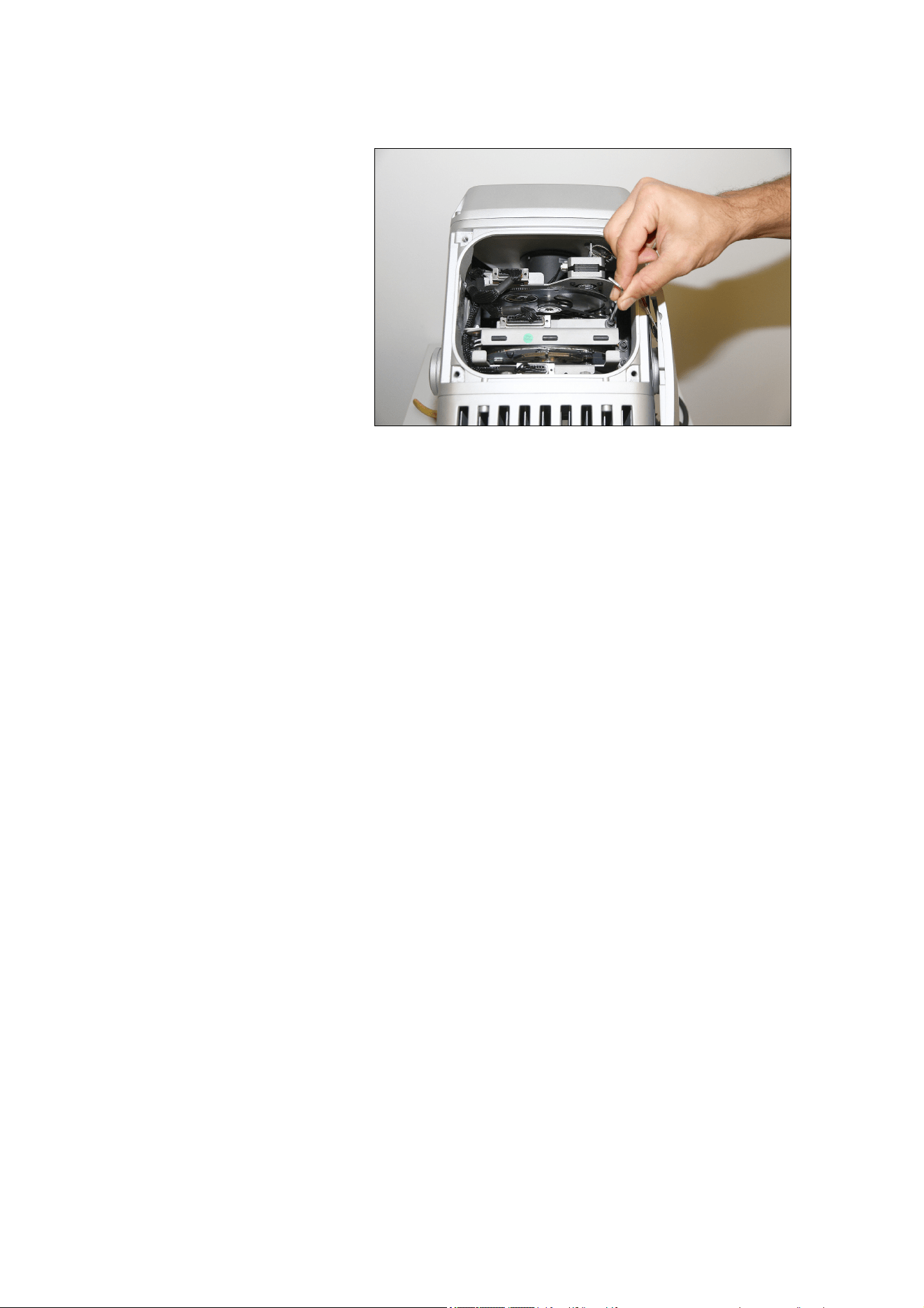
44 Exterior Projection 500 User Manual
4. Rotate the wheels to adjust the blades until they frame the area to be illuminated and mask
the area around it.
5. See illustration on right. Close
the framing module cover and
fasten it closed with its Allen
screw / hex key. Check that
wiresets are routed around
the left-hand side of the
module when you view the
fixture from the front, as
shown in the illustration.
6. Close the fixture as described
in ‘Removing and reinstalling
the top cover’ on page 33.
Updating firmware
The Exterior Projection 500 accepts firmware (fixture software) updates via the DMX/RDM link if
you use an uploader tool such as the Martin Companion application running on a Windows PC.
Connect the PC to the DMX/RDM link via a suitable USB-to-DMX hardware interface such as the
Martin Companion Cable, P/N 91616091. See the Martin website at www.martin.com for details of
the firmware upload options available.
You can download all currently available firmware versions from the Exterior Projection 500’s Tech
Support pages at www.martin.com.
Setting beam angles when updating firmware
In firmware versions 1.4.x and earlier, the fixture’s beam angle is set to Medium by default. If you
update firmware to versions 1.4.x and earlier in a fixture with a Narrow, Wide or Very Wide beam
angle, you must enter the fixture’s onboard control panel, open Service Select Beam Angle
and change the beam angle setting from Medium to Other.
If you update the firmware from version 1.4.x or earlier to version 1.5.x in a Narrow, Wide or Very
Wide fixture, you also need to change the beam angle setting in the fixture’s control panel, but you
only need to do it once. After this, any future firmware updates will automatically recognize the
fixture’s beam angle.
If you update the firmware from version 1.4.x or earlier to version 1.6.0 or later in a Narrow, Wide
or Very Wide fixture, you can set the fixture’s beam angle using the control panel but you can also
set it via RDM. This means that from firmware version 1.6.0 you do not need physical access to
the fixture’s control panel in order to set the beam angle correctly in Narrow, Wide or Very Wide
fixtures. After you have set the fixture’s beam angle once, any future firmware updates will
automatically recognize the beam angle
To update the beam angle in firmware version 1.6.0 or later via RDM:
1. Establish communication between the RDM controller and the fixture that you want to update
2. Open the fixture’s Personality settings and change Beam Angle from Medium to Other.
3. Save your change and exit the Personality settings.
Bear in mind that different RDM controllers may have slightly different names for menu items and
may use slightly different procedures.
Exterior Projection 500 User Manual 45
Remote Device Management (RDM)
The Exterior Projection 500 features Remote Device Management (RDM) capability. RDM lets you
get information from the fixture and change settings in the fixture remotely over the DMX data link
using an RDM-compatible DMX controller.
Setting beam angles in new firmware
If you update the fixture’s firmware to version 1.6.0 or later, you can use RDM to set the correct
beam angle in Narrow, Wide and Very Wide beam angle fixtures without needing physical access
to the fixture (see ‘Setting beam angles when updating firmware’ on page 44).
Parameter IDs
RDM commands are normally referred to as Parameter IDs or PIDs. The Exterior Projection 500
responds to the following Parameter IDs:
Device discovery
Parameter ID
DISC_UNIQUE
_
BRANCH
DISC_MUTE
DISC_UN_MUTE
Device management
Parameter ID GET SET
COMMS_STATUS
QUEUED_MESSAGE
STATUS_MESSAGES
STATUS_ID_DESCRIPTION
CLEAR_STATUS_ID
SUPPORTED_PARAMETERS
PARAMETER_DESCRIPTION
DEVICE_INFO
DEVICE_MODEL_DESCRIPTION
MANUFACTURER_LABEL
DEVICE_LABEL
FACTORY_DEFAULTS
SOFTWARE_VERSION_LABEL
DMX_PERSONALITY
DMX_PERSONALITY_DESCRIPTION
DMX_START_ADDRESS
SLOT_DESCRIPTION

46 Exterior Projection 500 User Manual
SENSOR_DEFINITION
SENSOR_VALUE
DEVICE HOURS
LAMP_HOURS
DEVICE_POWER_CYCLES
IDENTIFY DEVICE
RESET DEVICE
The commands that execute the PIDs in the table above are likely to be displayed differently on
different RDM controllers.
Errors and warnings
The Exterior Projection 500 also sends warnings and error message codes via RDM (see ‘Warning
and error messages’ on page 52).
Exterior Projection 500 User Manual 47
DMX protocol
Channel Value Function
Fade/
Snap
Default
value
1
0 - 19
20 - 49
50 - 200
201 - 210
211 - 255
Shutter / strobe
Shutter closed
Shutter open
Strobe (slow → fast)
Shutter open
Random strobe
(
slow → fast
)
Snap 30
2
0 - 65335
Dimmer
0-100%
Fade 0
3
4
0
7
15
22
30
37
45
52
60
67
75
82
90
97
105
112
120
127
135-160
161-163
164-166
167-169
170-172
173-175
176-178
179-181
182-184
185-192
193 – 214
215 - 221
222 - 243
244 - 247
248 - 251
252 - 255
Color selection
Continuous scrolling
Open
Split open/Color 1
Color 1
Split Color 1/Color 2
Color 2
Split Color 2/Color 3
Color 3
Split Color 3/Color 4
Color 4
Split Color 4/Color 5
Color 5
Split Color 5/Color 6
Color 6
Split Color 6/Color 7
Color 7
Split Color 7/Color 8
Color 8
Split Color 8/Open
Open
Stepped scrolling
Color 1
Color 2
Color 3
Color 4
Color 5
Color 6
Color 7
Color 8
Open
Continuous rotation
Clockwise, fast → slow
Stop (wheel stops at its current position)
Counterclockwise, slow → fast
Random slots
Fast
Medium
Slow
Snap 0
48 Exterior Projection 500 User Manual
5
0 – 4
5 – 9
10 – 14
15 – 19
20 – 24
25 – 29
30 – 34
35 – 39
40 – 44
45 – 49
50 – 54
55 – 59
60 – 64
65-209
210 – 232
233
–
255
Gobo selection
(adjust action on next channels)
Gobo indexed position
Open
Gobo 1 indexed position
Gobo 2 indexed position
Gobo 3 indexed position
Gobo 4 indexed position
Gobo 5 indexed position
Gobo 6 indexed position
Gobo rotation
Gobo 1 rotation
Gobo 2 rotation
Gobo 3 rotation
Gobo 4 rotation
Gobo 5 rotation
Gobo 6 rotation
No function
Continuous gobo wheel scrolling
CW rotation fast → slow
CCW rotation slow → fast
Snap 0
6
0 – 65535
0 – 600
601 – 32130
32131 – 32895
32896 – 64425
64426
–
65535
Gobo indexing angle/rotation movement
(select gobo on previous channel)
Gobo indexing angle
Indexed position (0° Index at 32768)
Gobo rotation speed and direction
No rotation
CW rotation fast → CW slow
No rotation
CCW rotation slow → CCW fast
No rotation
Fade 32768
7
8
0 -4
5 -10
11 - 255
Gobo animation
Open
Stop
A
nimation slow→ fas
t
Fade 0
9
0 - 5
6-10
11 - 15
16 - 20
21 - 25
26 - 30
31 - 255
Prism/frost selection
Open
Prism 1 indexing
Prism 2 indexing
Prism 1 rotation
Prism 2 rotation
Open
No frost → full fros
t
Snap 0
10
0 – 255
0 – 2
3 – 126
127 – 129
130 – 253
254
–
255
Prism indexing
Indexed position, 0° Index at 128
Prism rotation
No rotation (prism indexed at 0°)
Rotating CW fast → CW slow
No rotation (prism stops at current position)
Rotating CCW slow → CCW fast
No rotation
(
prism indexed at 45°
)
Fade 128
11
0 – 65535
Focus
Infinity → near
Fade 32768
12

Exterior Projection 500 User Manual 49
13
0-9
10-14
15-29
30-34
35-39
40-44
45-49
50-54
55-59
60-64
65-69
70-255
Fixture settings
No function
Reset fixture
No function
Precise gobo indexing ON
Precise gobo indexing OFF (default)
Parameter shortcuts = ON (default)
Parameter shortcuts = OFF
Auto-blackout = On
Auto-blackout = OFF (default)
Illuminate display on fixture
Turn off display on fixture
No function
Snap 0
50 Exterior Projection 500 User Manual
Control menus
To access the control menus, press the MENU button and hold for three seconds. Use the UP ▲
and DOWN ▼ buttons to navigate the menus. Select menu options using the ENTER button. Exit
menus using the MENU button.
Menu Sub-menu Notes
DMX
A
ddress
001~500 Set fixture’s DMX address
Program
Show
Set scene total 1-20
Set total number of scenes in stand-
alone show
Edit scene Scene 1~20
Strobe
Set value 0-255 or percentage 0-
100% for each effect
Intensit
y
Color
etc…
Set show times
Set fade time 0~120s Default = 4.0 seconds
Set hold time 0~600s Default = 0.0 seconds
Manual
Mode
Manual test
Strobe 0-255
Manually control all fixture’s effects
Intensit
y
0-100%
Color 0-255
etc… etc…
Reset Functions
All
No
Reset all effects
Yes
Color
No
Reset color wheel
Yes
Gobo
No
Reset gobo wheel
Yes
Prism/Frost
No
Reset prism and frost
Yes
Focus
No
Reset focus
Yes
Animation
No
Reset gobo animation
Yes
Factory Default Yes / No
Return fixture to factory default
settin
g
s
Display
Setting
Inverse On / Off Invert readout in displa
y
panel
Displa
y
Auto Off No /
Y
es
(
1 minute
)
Displa
y
panel sleeps after 1 minute
Intensit
y
0%-100%
A
d
j
ust displa
y
panel intensit
y
Display lock On / Off
Hold Menu key pressed for 3
seconds, then enter user password
(default = 123) or service password
(
111
)
to unlock displa
y
Exterior Projection 500 User Manual 51
Fixture
Config
Host/Client
Host
Set fixture to act as host or client
Client
Offline mode
Run show
If fixture is set to host and no DMX
signal is present, it runs stand-alone
show
DMX last state
If fixture is set to host and no DMX
signal is present, it displays the last
effect it was displaying before the
DMX si
g
nal stopped
Black out
When no DMX signal is present,
fixture blacks out
Service
Fixture Status
LED
Temperature
XXX C Temperature of LED engine
Power-on
Hours
XXXX
(
Hours
)
Number of hours fixture has been
powered on since manufacture
LED Hours
XXXX
(
Hours
)
Number of hours light output has
been activated since manufacture.
Software
Version
V x.x.x
Currently installed software
(
firmware
)
version
Password 0…999
Set user password (factory default
password is set to 123 but you can
set a new password here
)
Select variant
EP500-MG Match software to fixture variant:
select MG for Exterior 500 Projection
Multigobo, select FR for Exterior 500
Pro
j
ection Framin
g
EP500-FR
Select Beam Angle
Medium Match software to fixture variant:
select MEDIUM in Medium beam
angle fixtures, select OTHER in
Narrow, Wide and Very Wide
fixtures.
Other
Fixture Offset
Password 0…999
Note: For use by Martin Service!
Enter user password (default = 123) or
service password (111) for access to
effect offsets. Then set an offset in each
effect’s home position.
Color -128~127
Gobo -128~127
etc… etc…
Evaporation Mode Password 0…999
Enter user password (default = 123) or
service password (111) for access to
Evaporation Mode. To clear humidity,
open top cover slightly, then press Enter.
When message to close cover appears in
display, close top cover and press Enter.
Default settings are shown in bold.
52 Exterior Projection 500 User Manual
Warning and error messages
The Exterior Projection 500 monitors its own operation and is capable of self-diagnosis. If an
operating parameter such as ambient temperature is exceeded or if an error occurs, the fixture
displays a warning or error message in its onboard LCD display.
If the fixture displays a warning or error message, it can also send a four-character code to an
RDM controller. Depending on which controller you are using, these codes may be displayed
automatically or you may need to send a command to get the codes from the fixture.
The following table explains the warning and error message codes in RDM:
Message in display RDM code Notes
Err Gobo Wheel 9017 Gobo wheel error
Err Gobo ind/rot 9018 Gobo indexing/rotation error
Err 3_Facet_Prism 9028 3-facet prism error
Err Line Prism 9062 Linear prism error
Err Prism Rot 9029 Prism rotation error
PSU Fan 9059 Internal PSU fan error
Err Color wheel 9015 Color wheel error
Err Animation 901B Animation system error
Err Focus 901D Focus error
Environment temp out of
range
8003 Ambient temperature exceeded
Exterior Projection 500 User Manual 53
Troubleshooting
This section describes some possible problems that you may experience and provides some
suggestions for easy troubleshooting:
Symptom Potential cause Remedies
No light from
fixture.
Power supply issue such
as faulty connector or
damaged cable.
Ensure that the mains supply is connected
and supplying power to the fixture. Check all
power connections and cables.
Fixture does not
respond correctly
to DMX control.
Incorrect DMX setup.
Fault in the DMX network
due to connector or cable
damage or potential
interference from proximity
to a high voltage
installation.
Internal fault.
Ensure that fixture’s DMX address matches
address set on DMX control device.
Check that fixture’s status LED shows that it is
receiving DMX. If not, check all DMX cables
and connections.
Ensure that DMX link is terminated.
Check that all components on DMX link use
standard DMX polarity.
Attempt to control the fixture with another
DMX control device.
Move or shield the DMX link if it is close to an
unshielded high-voltage installation.
Contact your Martin authorized distributor or
Martin Global Service for assistance.
Condensation
visible on inside of
front glass.
Humidity inside fixture. Condensation inside the fixture is normal in
some atmospheric conditions. The fixture will
gradually expel humidity via its Gore-Tex
pressure relief valve as it cycles on and off.
If required, you can remove excessive
humidity by following the directions given in
‘Removing and reinstalling the top cover’
starting on page 33.
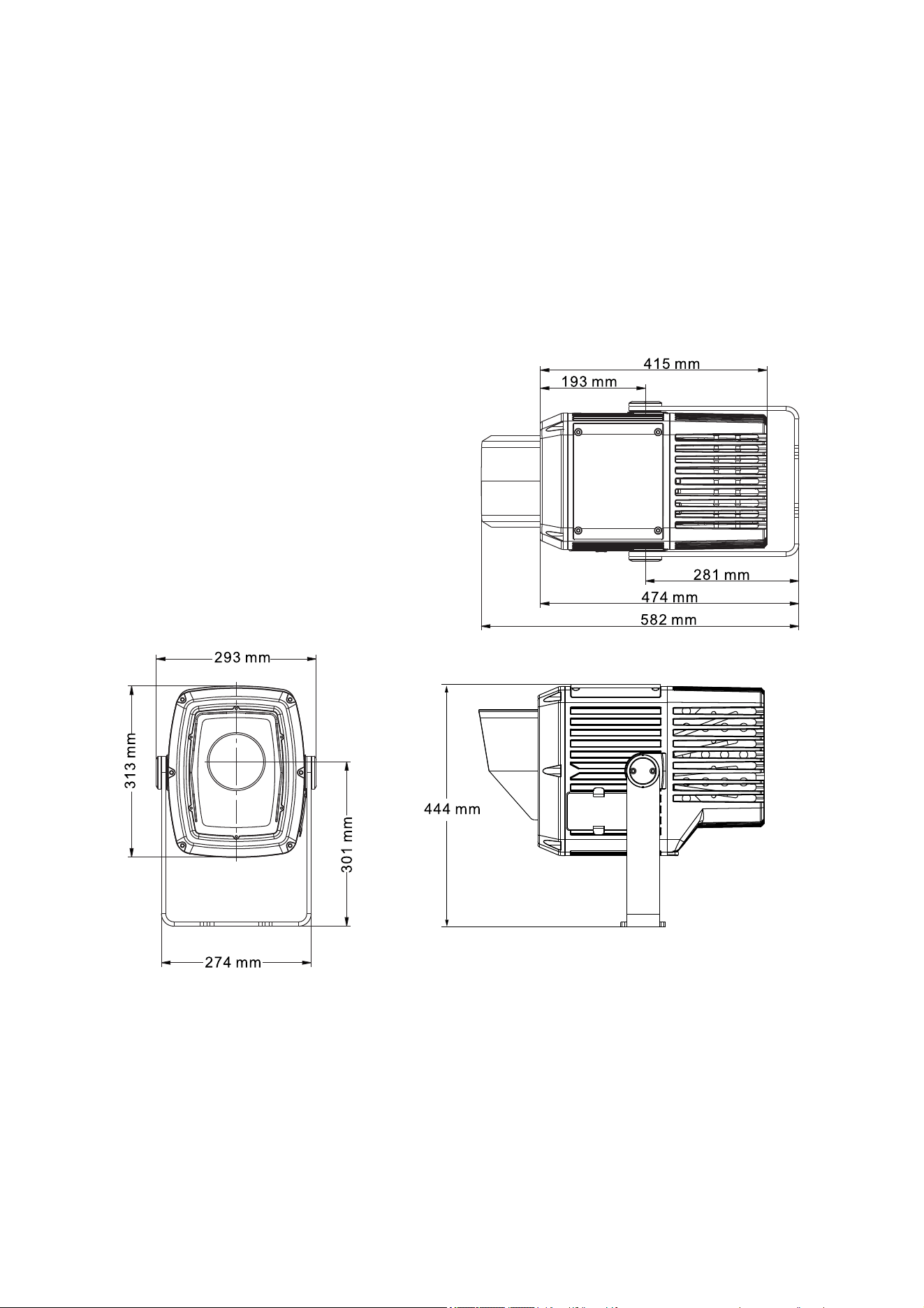
54 Exterior Projection 500 User Manual
Specifications
Physical
Length (head horizontal) ................................................................................ 415 mm (16.4 in.)
Width .............................................................................................................. 293 mm (11.6 in.)
Height (head horizontal)................................................................................. 444 mm (17.5 in.)
Height (head vertical) ..................................................................................... 474 mm (18.7 in.)
Height (head vertical, including glare shield) ................................................. 582 mm (23.0 in.)
Weight ............................................................................................................ 17.5 kg (38.6 lbs.)
All figures include mounting yoke
Dynamic Effects
Color wheel ......................................................................... 8 interchangeable colors plus open
Rotating gobos ...................................... 6 rotating gobos plus open, indexing, variable rotation
Gobo animation .............................................................. Variable speed linear animation effect
Focus .......................................................................... Motorized, variable 3 m (9.8 ft. to infinity
Prisms ....................................................... Prism wheel with 2 interchangeable rotating prisms
Frost (wash effect) ....................................................................................... Motorized, variable
Dimming ................................................................... Constantly variable 0-100%, 16-bit control
Shutter...................................................... Strobe and pulse effects, instant open and blackout
Exterior Projection 500 User Manual 55
Control and Programming
Control options .....................................................................................DMX, RDM, stand-alone
Interface ......................................................................... Control panel with backlit LCD display
Control resolution .................................. 8-bit DMX control with 16-bit DMX control of intensity,
focus and and gobo rotation/indexing angle
Configuration, addressing and status ...................... Onboard control panel with OLED display
DMX channels ......................................................................................................................... 13
DMX compliance ............................................................................................ USITT DMX512-A
RDM compliance ........................................................................................... ANSI/ESTA E1.20
Optics
Light source ................................................................................ 230 W white light LED engine
CRI (Color Rendering Index) .................................................................................................. 7 2
Color temperature ............................................................................................ 8300 K (±200 K)
LED lifetime ............................................................... 20 000 hours (to >70% luminous output)*
*Figure obtained under manufacturer's test conditions
Photometric Data
Model Cut-off angle Total output Center peak
Narrow 12° 5000 lumens 203 000 cd
Medium 22° 6100 lumens 77 000 cd
Wide 37° 5700 lumens 28 000 cd
Very Wide 51° 3400 lumens 11 000 cd
Construction
Housing ............................................................................................................... Cast aluminum
Color ............................................................................. Hard anodized, metallic grey lacquered
Front glass ............................................... 5 mm (0.2 in.) anti-reflection coated tempered glass
Ingress protection .............................................................................................................. IP 66
Impact resistance ................................... IK08 (with control panel display cover plate installed)
Corrosion resistance ..................................... C5-M (very high corrosivity / marine, ISO 12944)
EPA (Effective Projected Area) ...................................................................................... 0.15 m2
RoHS compliant
Gobos
Recommended material .............. Borosilicate glass, coatings heat-resistant to 450°C (842° F)
Alternative material ........... Aluminum 1060, paint on front lens side, 450° C (842° F) HT paint
Gobo diameter ........................................................... 30 mm, +0/-0.3 mm (1.2 in., +0/-0.02 in.)
Max. image diameter ....................................................................................... 23 mm (0.91 in.)
Glass gobo thickness, minimum ........................................ 1.1 mm ±0.1 mm (0.045 ±0.004 in.)
Glass gobo thickness, maximum ..................................... 3.0 mm ±0.3 mm (0.12in. ±0.012 in.)
Aluminum gobo thickness ............................................ 0.5 mm ± 0.02 mm (0.020 in. ± 001 in.)
Color filters
Suitable material ......................... Borosilicate glass, coatings heat-resistant to 450°C (842° F)
Gobo thickness ............................. 1.1-3.0 mm -0.1/+0.3 mm (0.045-0.115 in. -004/+0.012 in.)
Installation
Mounting ........................................................................................................... Adjustable yoke
Suitable for wet locations. Do not immerse in water.
Orientation ............................................................................. Any (sides must be kept vertical)
Minimum distance from housing to combustible materials .................................... 0.1 m (4 ins.)
Minimum distance from front glass to illuminated surfaces .................................. 0.5 m (1.6 ft.)
56 Exterior Projection 500 User Manual
Connections
Power cable entry ............................................................................................ IP68 cable gland
Power connection ......................................................... 1.8 m (5.9 ft.) cable tail with bare ends
Power cable type .................................................. EU models: H07RN-F 450/700 V, Ø 10 mm
US models: SJTW 14AWG, 300 V, Ø 9.3 mm
Data cable entry ............................................................................................... IP68 cable gland
Data connection .................... 1.8 m (5.9 ft.) combined input + output cable tail with bare ends
Electrical
AC power .............................................................................. 100-240/277 V nominal, 50/60 Hz
Power supply ................................................................... Auto-ranging electronic switch-mode
Typical half-cycle RMS inrush current ............................................................................... 8.4 A
Surge protection ................................................................................................................... 4 kV
Idle power (zero intensity, no effects applied) ......................................................... 32 W, 0.3 A
Typical Power and Current
110 V, 60 Hz ......................................................................................... 320 W, 2.9 A, PF 0.977
230 V, 50 Hz ......................................................................................... 310 W, 1.4 A, PF 0.971
277 V, 60 Hz ......................................................................................... 305 W, 1.2 A, PF 0.950
Figures are typical, not maximum. Measurements made at nominal voltage with all LEDs at full intensity.
Allow for a deviation of +/- 10%.
Thermal
Cooling ........................................................................................ Convection, internal forced air
Total heat dissipation (calculated) ........................................................................ 1100 BTU/hr.
Maximum surface temperature ............................................................................ 85° C (185° F)
Maximum ambient temperature (T
a
max.) ......................................................... 45° C (113° F)*
Minimum ambient temperature (T
a
min) ........................................................... -30°C (-22° F)**
* Above this temperature, the fixture regulates output to protect from overheating.
** For instant wake-up with no warm-up mode, leave power applied constantly in ambient temperatures
below 0° C (32° F).
Approvals
Global CB Certification/IECEE .................................................... IEC 60598-2-5 (IEC 60598-1)
EU safety .......................... EN 60598-2-1, EN 60598-2-5 (EN 60598-1), EN 62471, EN 62493
EU EMC ............................ EN 55015, EN 55032, EN 55103-2, EN 61000-3-2, EN 61000-3-3,
EN 61000-4-2, EN 61000-4-3, EN 61000-4-4, EN 61547
US safety ............................................................................................................. ANSI/UL 1598
US EMC ............................................................................................... CFR 47 Part 15 Class A
Canadian safety .......................................................................................... CSA C22.2 No. 250
Canadian EMC ................................................................. ICES-003 Class A, NMB 3-5 Class A
Australia/NZ ........................................................................................................................ RCM
Included Items
Silica gel desiccant bag in sealed foil pack.......................................................... P/N 37220000
Two long-type gobo retaining springs
Accessories
Glare Shield, Exterior Projection 500, aluminum ................................................. P/N 91611767
Projection Setup Gobo ’Line It Up’, Exterior Projection 500 ................................ P/N 91616068
Gobo Ring, Outer Diameter 30 mm, Set of 10 .......................................... P/N MAR-91611851
Exterior Projection 500 Manual Framing Module ................................................ P/N 91611842
Related Items
Martin Companion software suite ................................... Free download from www.martin.com
Martin Companion Cable USB/DMX hardware interface ..................................... P/N 91616091
Martin RDM 5.5 Splitter ........................................................................................ P/N 90758150
Exterior Projection 500 User Manual 57
Spare Parts
Silica gel desiccant bag in sealed foil pack.......................................................... P/N 37220000
Goboholder with magnet incl. washer, short spring & long spring ...................... P/N 50481990
Goboholder without magnet incl. washer, short spring & long spring ................. P/N 50481992
Ordering Information
EU models
Exterior Projection 500, Narrow, EU, Aluminum .................................................. P/N 90506500
Exterior Projection 500, Medium, EU, Aluminum ................................................ P/N 90506505
Exterior Projection 500, Wide, EU, Aluminum ..................................................... P/N 90506510
Exterior Projection 500, Very Wide, EU, Aluminum ............................................. P/N 90506535
Exterior Projection 500, Narrow, EU, White......................................................... P/N 90506540
Exterior Projection 500, Medium, EU, White ....................................................... P/N 90506545
Exterior Projection 500, Wide, EU, White ............................................................ P/N 90506550
Exterior Projection 500, Very Wide, EU, White ................................................... P/N 90506555
US Models
Exterior Projection 500, Narrow, US, Aluminum .................................................. P/N 90506515
Exterior Projection 500, Medium, US, Aluminum ................................................ P/N 90506520
Exterior Projection 500, Wide, US, Aluminum ..................................................... P/N 90506525
Exterior Projection 500, Very Wide, US, Aluminum ............................................. P/N 90506530
Disposing of this product
Martin® products are supplied in compliance with Directive 2012/19/EC of the
European Parliament and of the Council of the European Union on WEEE (Waste
Electrical and Electronic Equipment), where applicable. Help preserve the
environment! Ensure that this product is recycled at the end of its life. Your supplier
can give details of local arrangements for the disposal of Martin products
Photobiological safety warning
The warning shown below is printed on this product. If it becomes difficult or impossible to read, it
must be replaced with a label reproduced from the illustration below:
RISK GROUP 3
WARNING Possibly hazardous optical
radiation emitted from this product. Do not
look at operating lamp. Eye injury may result.
GROUPE DE RISQUE 3
AVERTISSEMENT Produit à émission de
radiations visibles potentiellement
dangereuses. Ne pas regarder le faisceau en
fonctionnement. Risque de lésions oculaires.

Notes


www.martin.com