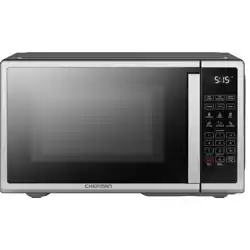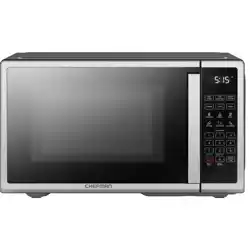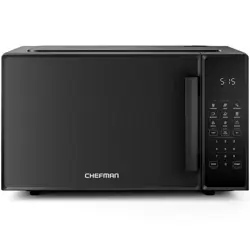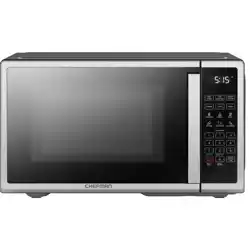
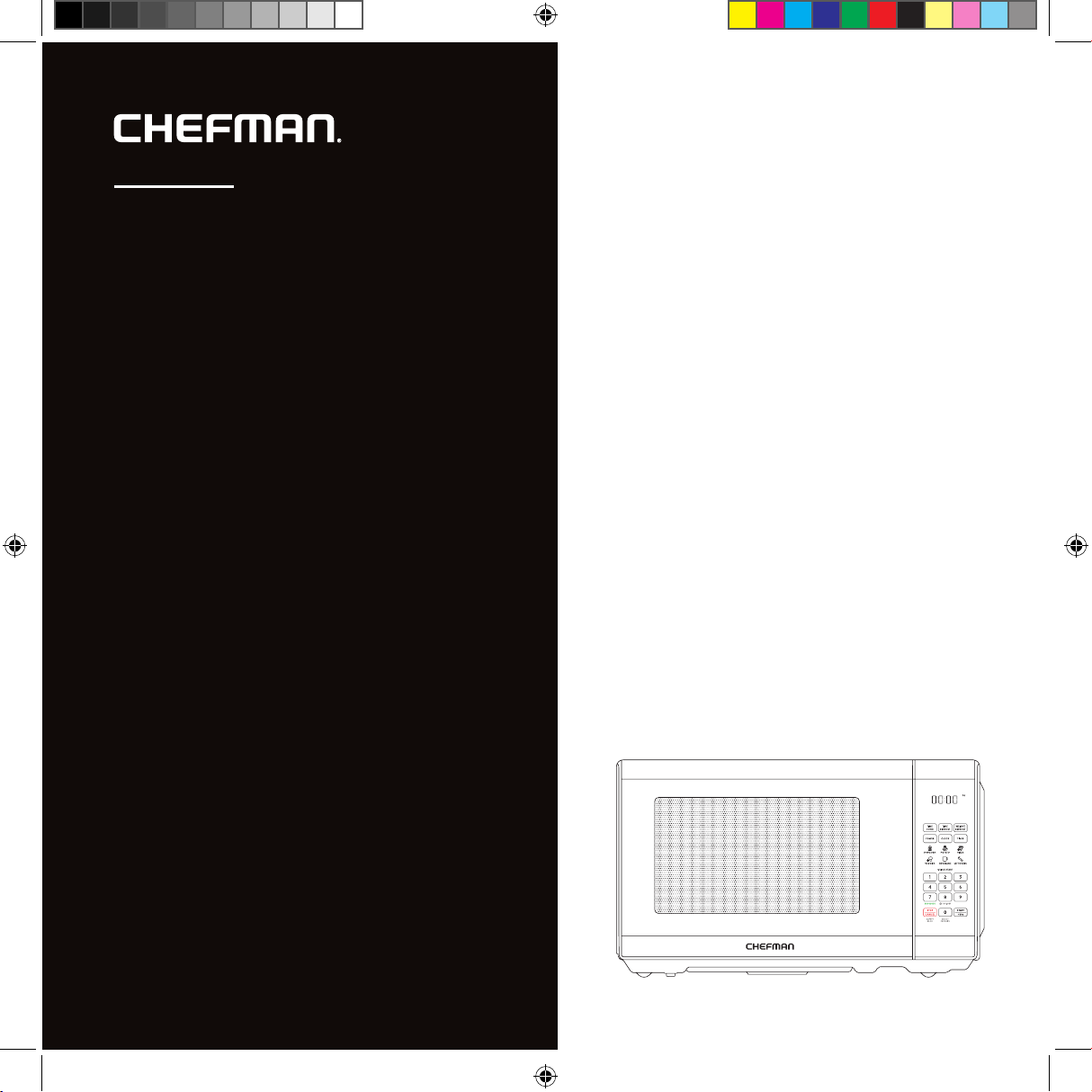
Countertop Classic
Compact
microwave
microwave
USER GUIDE
• Safety Instructions
• Features
• Operating Instructions
• Troubleshooting
• Cleaning and Maintenance
• Terms and Conditions
• Warranty Registration
RJ55-SS-7
READ ALL INSTRUCTIONS BEFORE USE
For your safety and continued enjoyment of this product, always
read the instruction manual before using.
COOKING FORWARD™
Welcome!
Thank you for choosing the Countertop Classic Compact Microwave as the newest
addition to your kitchen. Whether this is your first Chefman® appliance or you’re
already part of our family, we’re happy to be cooking with you. For everything from
simple one-touch heating to multi-phase cooking with dierent power levels, the
microwave covers all your needs. It provides powerful, even heating, while its compact
size makes it perfect for small spaces.
We know you’re excited to get cooking, but please take a few minutes to read our
directions, safety instructions, and warranty information.
From our kitchen to yours,
The Chefman
®
Team
4 Safety Instructions
10 Features
12 Operating Instructions
21 Troubleshooting
23 Cleaning and Maintenance
24 Terms and Conditions
26 Warranty Registration
CONTENTS
4
PRECAUTIONS TO AVOID POSSIBLE EXPOSURE TO EXCESSIVE MICROWAVE ENERGY
1. Do not attempt to operate this oven with the door open since this can result in harmful
exposure to microwave energy. It is important not to disable or tamper with the safety
interlocks.
2. Do not place any object between the oven front face and the door or allow soil or
cleaner residue to accumulate on sealing surfaces.
3. Do not operate the oven if it is damaged. It is particularly important that the oven door
closes properly and that there is no damage to the:
a. DOOR (bent)
b. HINGES AND LATCHES (broken or loosened)
c. DOOR SEALS AND SEALING SURFACE
4. The oven should not be adjusted or repaired. If the oven breaks, please contact
Chefman® Customer Support for assistance.
Specifications
Model RJ55-SS-7
Voltage 120V~, 60Hz
Power microwave 700W
Capacity 0.7 cu ft
External dimensions 17.3 x 13 x 10.2 in
Turntable diameter 10 in
Weight 20.2 lb
SAFETY INSTRUCTIONS
IMPORTANT SAFEGUARDS
5
To reduce the risk of burns, electrical shock, fire, injury to persons, or exposure to
excessive microwave energy when using your oven, follow basic safety precautions,
including:
1. Read all instructions before using the appliance.
2. Read and follow the specific “PRECAUTIONS TO AVOID POSSIBLE EXPOSURE TO
EXCESSIVE MICROWAVE ENERGY” found on p. 4.
3. As with most cooking appliances, close supervision is necessary to reduce the risk
of a fire in the oven cavity.
4. To reduce the risk of fire in the oven cavity:
a. Do not overcook food. Carefully attend the appliance when paper, plastic,
or other combustible materials are used in the oven.
b. Remove wire twist ties and metal handles from paper or plastic containers
or bags before placing them in the oven.
c. If materials inside the oven ignite, keep the oven door closed. Turn the oven o
and unplug the appliance.
d. Do not use the oven cavity for storage purposes. Do not leave paper products,
cooking utensils, or food in the cavity when not in use.
5. This oven must be grounded. Connect only to a properly grounded outlet. See
“GROUNDING INSTRUCTIONS” on p. 8.
6. Install or locate this oven only in accordance with the installation instructions provided
beginning on
p. 12.
p. 12.
SAFETY INSTRUCTIONS
IMPORTANT SAFEGUARDS
6
7. Some products—such as whole eggs, sealed glass jars, and other sealed food
containers—are liable to explode and should not be heated in the oven. Closed
containers should be opened and plastic pouches should be pierced before cooking.
8. Use this appliance only for its intended uses as described in this manual. Do not use
corrosive chemicals or vapors in this appliance. This oven is specifically designed to
heat, cook, or dry food. It is not designed for industrial or laboratory use.
9. As with any appliance, close supervision is necessary when used by children.
10. Do not operate this oven if it has a damaged cord or plug, if it is not working properly,
or if it has been damaged or dropped.
11. Do not attempt to service or repair this microwave. Instead, contact Chefman®
Customer Support for assistance.
12. Do not cover or block any openings on the oven.
13. Do not store or use this appliance outdoors.
14. Do not use this oven near water, for example, near a kitchen sink, in a wet basement,
near a swimming pool, or in similar locations.
15. Do not immerse the cord or plug in water.
16. Keep the cord away from heated surfaces.
17. Do not let the cord hang over the edge of a table or counter.
18. When cleaning the oven, door, and sealing surfaces, use only mild, nonabrasive soaps or
detergents applied with a sponge or soft cloth.
SAFETY INSTRUCTIONS
IMPORTANT SAFEGUARDS
7
19. This appliance is for private household use only.
20. In a microwave, liquids such as water, coee, or tea can become overheated beyond
the boiling point without appearing to be boiling. Visible bubbling is not always present
when the container is removed from the microwave oven. THIS COULD RESULT
IN VERY HOT LIQUIDS SUDDENLY BOILING OVER WHEN THE CONTAINER IS
DISTURBED OR A SPOON OR OTHER UTENSIL IS INSERTED INTO THE LIQUID.
a. Do not overheat liquids.
b. Stir liquids both before and halfway through heating them.
c. Do not use straight-sided containers with narrow necks.
d. After heating, allow the container to stand in the oven for a short time before
removing it.
e. Use extreme care when inserting a spoon or other utensil into a container.
FOR HOUSEHOLD USE ONLY
SAVE THESE INSTRUCTIONS
SAFETY INSTRUCTIONS
IMPORTANT SAFEGUARDS
8
GROUNDING INSTRUCTIONS
DANGER
Electrical Shock Hazard
Touching some of the internal components can cause serious personal injury or death.
Do not disassemble this appliance.
This appliance must be grounded. In the event of an electrical short circuit, grounding
reduces the risk of electrical shock by providing an escape wire for the electric current. To
protect against electrical shock, this appliance is equipped with a cord having a 3-prong
grounding-type plug for insertion into a proper grounding-type electrical outlet. DO NOT
alter the plug for use in a 2-prong outlet. If the plug will not fit into an outlet, have a proper
outlet installed by a qualified electrician.
WARNING
Improper use of the grounding plug can result in electrical shock.
Consult a qualified electrician or serviceman if the grounding instructions are not
completely understood or if doubt exists as to whether the appliance is properly
grounded.
1. A short power-supply cord is provided to reduce the risks of entanglement or tripping
over a longer cord.
2. Extension cords may be used if care is exercised in their use.
SAFETY INSTRUCTIONS
IMPORTANT SAFEGUARDS
9
Do not place the appliance on a
stovetop or any other heatable
surface, even if the stovetop is not
on. Doing so is a fire hazard.
3. If an extension cord is used:
a. The marked electrical rating of the cord set and/or the marked electrical rating
of the extension cord should be at least as great as the electrical rating of the
appliance.
b. The extension cord must be a 3-wire cord that has a 3-pronged grounding plug
and a 3-slot receptacle to accept the appliance’s plug.
c. The longer cord should be arranged so that it will not drape over a
countertop or tabletop where it can be pulled on by children or tripped over
unintentionally.
UTENSIL TEST
Certain nonmetallic utensils and containers may not be safe to use in the microwave. For
more details on microwave-safe materials, refer to the chart beginning on p. 14. If in doubt,
you can test the utensil or container with the following procedure:
1. Fill a microwave-safe container with 1 cup of cold water.
2. Place the water container and the empty container/utensil being tested on the glass
turntable and microwave for 1 minute. Do not exceed the 1 minute cooking time.
3. Carefully feel the container or utensil. If the empty container or utensil is warm, do not
use it in the microwave.
SAFETY INSTRUCTIONS
IMPORTANT SAFEGUARDS
10
O
z
Q
UI
C
K S
T
A
R
T
V
E
G
G
I
ES
P
O
WE
R
L
E
VE
L
S
E
T
C
L
O
C
K
K
I
T
C
H
E
N
T
I
M
E
R
T
I
M
E
C
O
O
K
T
I
M
E
D
E
F
R
O
ST
WE
IG
H
T
D
E
F
R
O
ST
0
9
8
7
6
5
4
3
2
1
S
EL
E
C
T
F
A
V
O
R
IT
E
E
C
O
MOD
E
O
N
/
O
F
F
S
afe
t
y
L
o
c
k
S
T
A
R
T
+
3
0
s
S
T
O
P
C
A
N
CE
L
LE
F
T
O
VE
R
S
P
O
TA
T
O
B
E
VER
A
G
E
P
O
P
C
O
R
N
PI
Z
Z
A
FEATURES
7
8
9
4
5
1
2
3
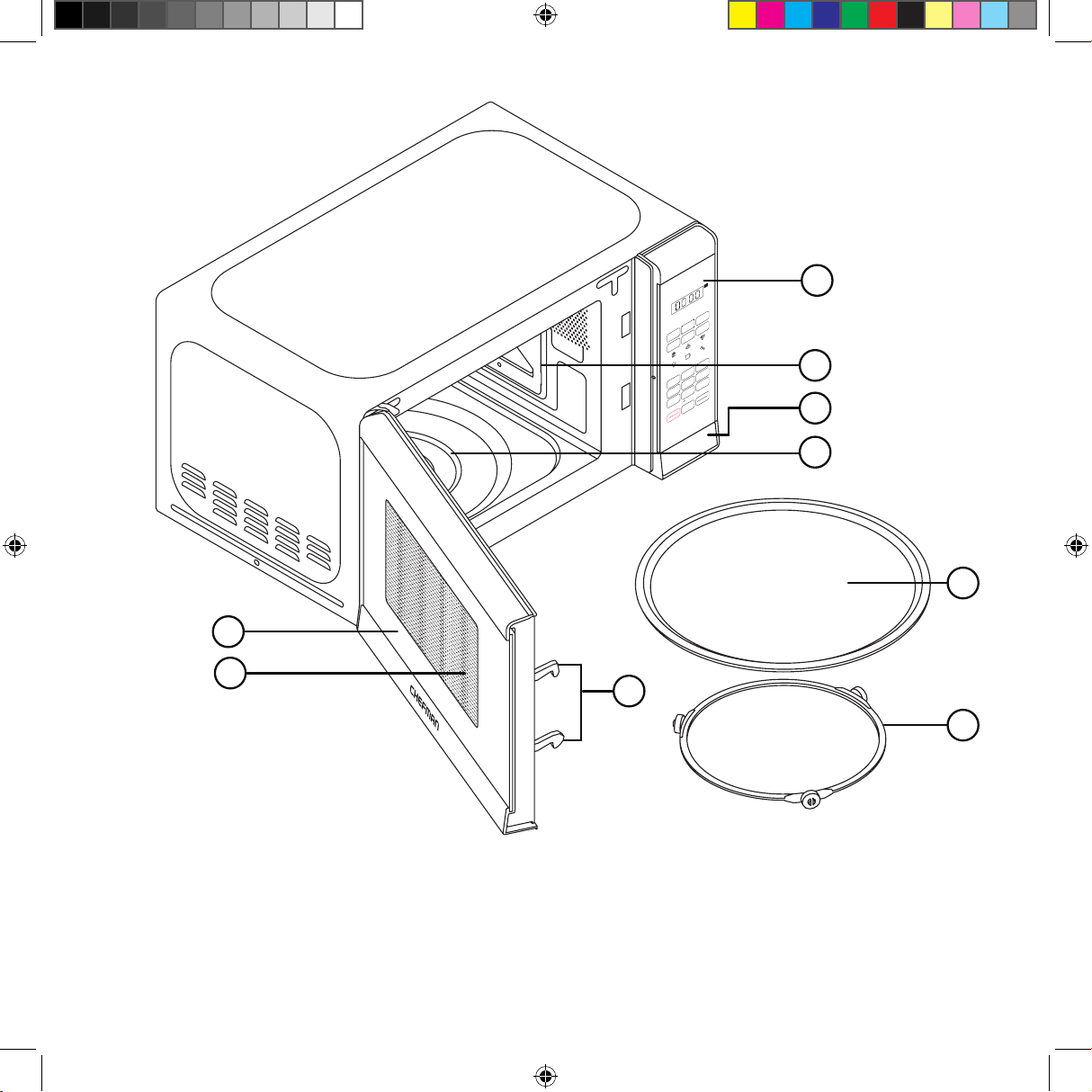
1. Door Assembly
2. Safety Interlock System
3. Window
4. Display
5. Interior Light
6. Door Button
7. Turntable Shaft
8. Glass Turntable
9. Turntable Support Ring
6
11
FEATURES
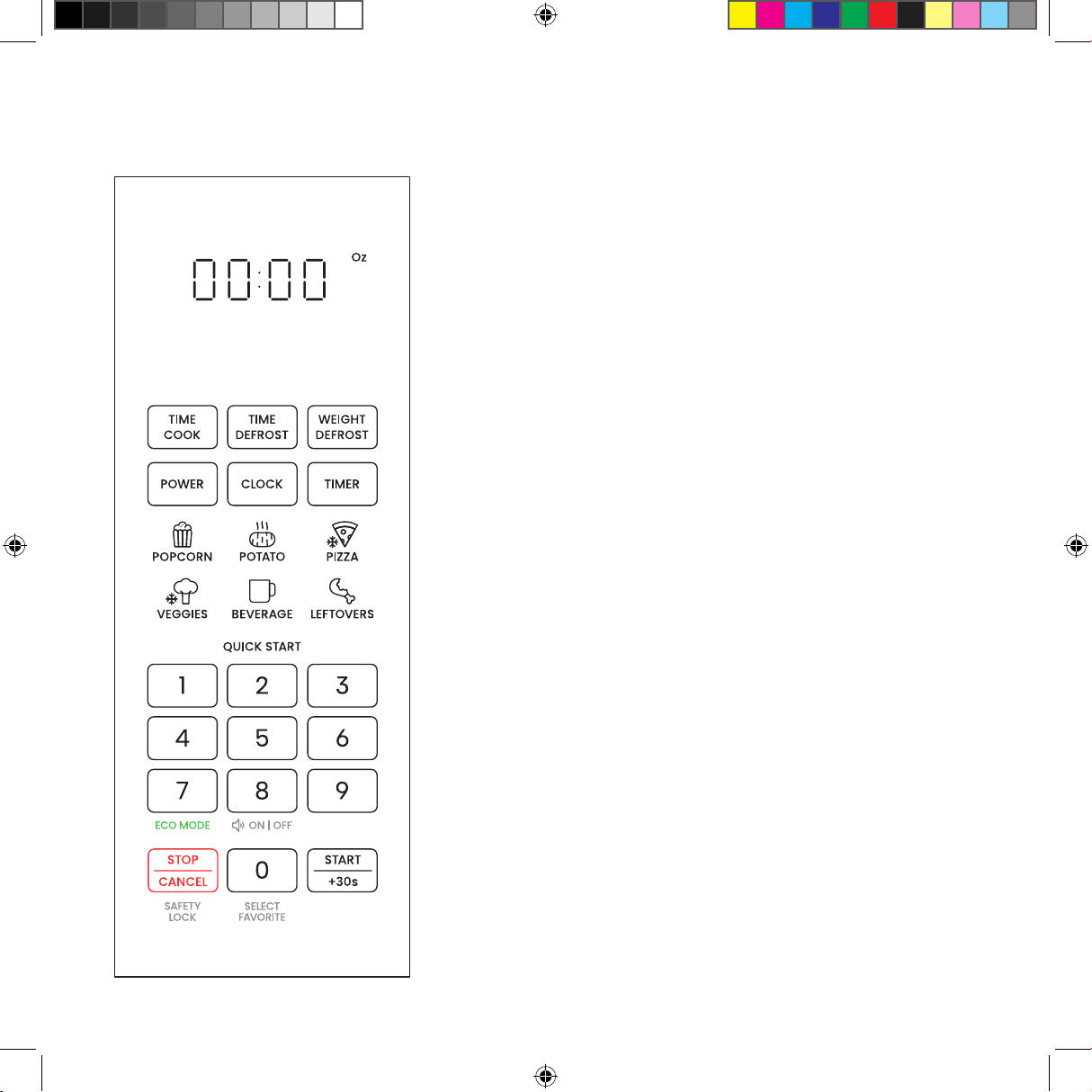
CONTROL PANEL
Clock/Timer Display Counts down to the end of an active
cooking cycle. Displays time of day in Standby Mode.
TIME COOK Button Press to set cooking time.
DEFROST Buttons Press to defrost by time or by weight
(see p. 17).
POWER Button Press to set power level from
0 to 10 (Default power is 100%).
CLOCK Button Press to set microwave's clock.
TIMER Button Press to set a timer for kitchen tasks (with
no microwaving).
Preset Icons Use to select preset cooking functions for
six popular foods (see p. 18).
Number Pad Use to manually enter cooking time or set
clock or kitchen timer. Numbers 1 through 9 can also be
used for 1-touch quick cooking (see p. 16).
STOP/CANCEL Button Use to stop active cooking or
return to Standby Mode.
0/Select Favorites Button The Number Pad's "0" button
can also be used to program and select a stored favorite
cooking cycle (see p. 19).
START/+30 SEC Button Use to start cooking after
selecting a preset or entering time manually OR to add
30 seconds of cooking at any time.
12
OPERATING INSTRUCTIONS
BEFORE FIRST USE
1. Remove all packaging materials, and read and remove all removable stickers. (Leave the
rating label on the unit.) Be sure that all parts and accessories are accounted for before
throwing away any packaging.
2. Gently wipe the exterior and interior of the oven with a clean, damp cloth and dry
thoroughly. Wash the interior with a mild liquid soap and a damp cloth or sponge.
NOTE: Do not use abrasive cleansers, like steel wool pads, as they may damage the finish.
Never immerse the unit in water or other liquids.
3. Hand wash the glass turntable and dry thoroughly. (The turntable is also top-rack
dishwasher safe.)
4. Install the microwave as directed below and install the turntable as directed on p. 13.
COUNTERTOP INSTALLATION
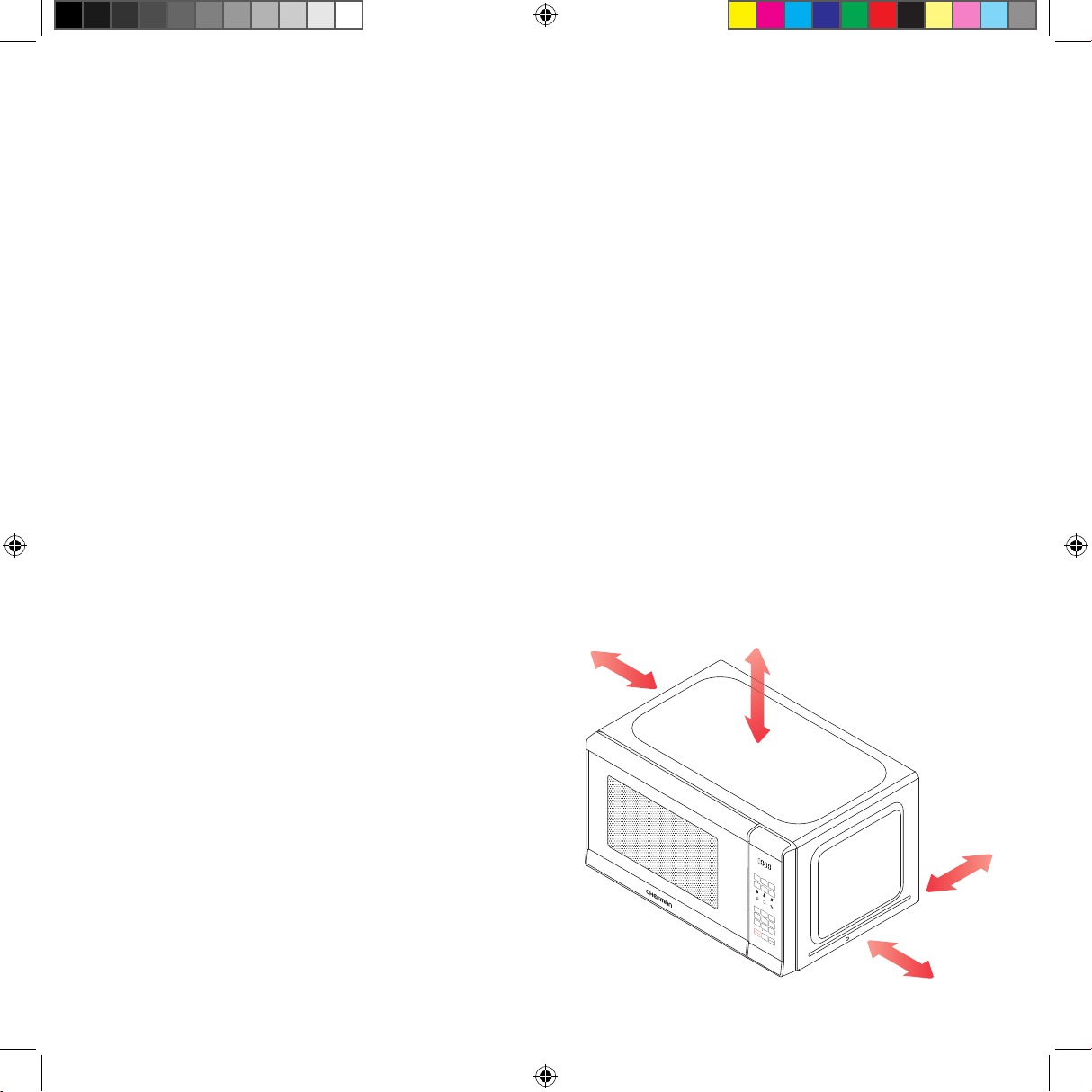
1. Place the microwave on a firm, level surface with the following clearance for intake and
outtake openings:
• right side of microwave must be open.
• a minimum clearance of 3 inches
between the other sides and any
adjacent walls.
• a minimum clearance of 12 inches
between the top of the microwave and
any upper cabinets.
• the minimum installation height is 3feet.
NOTE: Blocking openings can damage the oven.
Oz
TIME
COOK
TIME
DEFROST
WEIGHT
DEFROST
POWER
CLOCK
TIMER
VEGGIES LEFTOVERS
POTATO
BEVERAGE
POPCORN PIZZA
1
2
3
4
5
6
7
8
0
9
STOP
CANCEL
START
+30s
ON | OFF
QUICK START
ECO MODE
SELECT
FAVORITE
SAFETY
LOCK
OPEN
3.0 in
7.5 cm
12
.0 in
30 cm
3.0 i
n
7.5 cm
13
OPERATING INSTRUCTIONS
2. Place the oven far away from radios and television sets, as the operation of the microwave
oven may cause interference with radios or TVs. If there is still interference, it can be
reduced by taking the following measures:
a. Clean the door and sealing surface of the oven.
b. Reorient the receiving antenna of the radio or television.
c. Plug the microwave oven into a dierent outlet so that the microwave oven and
receiver are on dierent branch circuits.
3. Plug your oven into a standard household outlet. Be sure the voltage and the frequency are
the same as the voltage and the frequency on the rating label. WARNING: Do not install
the oven over a range cooktop or other heat-producing appliance. If installed near or over
a heat source, the oven could be damaged, and the warranty would be void.
4. This device complies with part 18 of the FCC rules.
TURNTABLE INSTALLATION
Both the glass turntable and the turntable support must be used whenever you operate the
oven.
1. Set the turntable support in the oven interior so the wheels make contact with the oven
floor.
2. Place the glass turntable over the support, aligning the hub on the underside of the
turntable with the turntable shaft in the oven floor. Never place the turntable upside down.
3. Always place food and food containers on the turntable for cooking. NOTE: If the turntable
or turntable support cracks or breaks, contact Chefman® Customer Support.
14
OPERATING INSTRUCTIONS
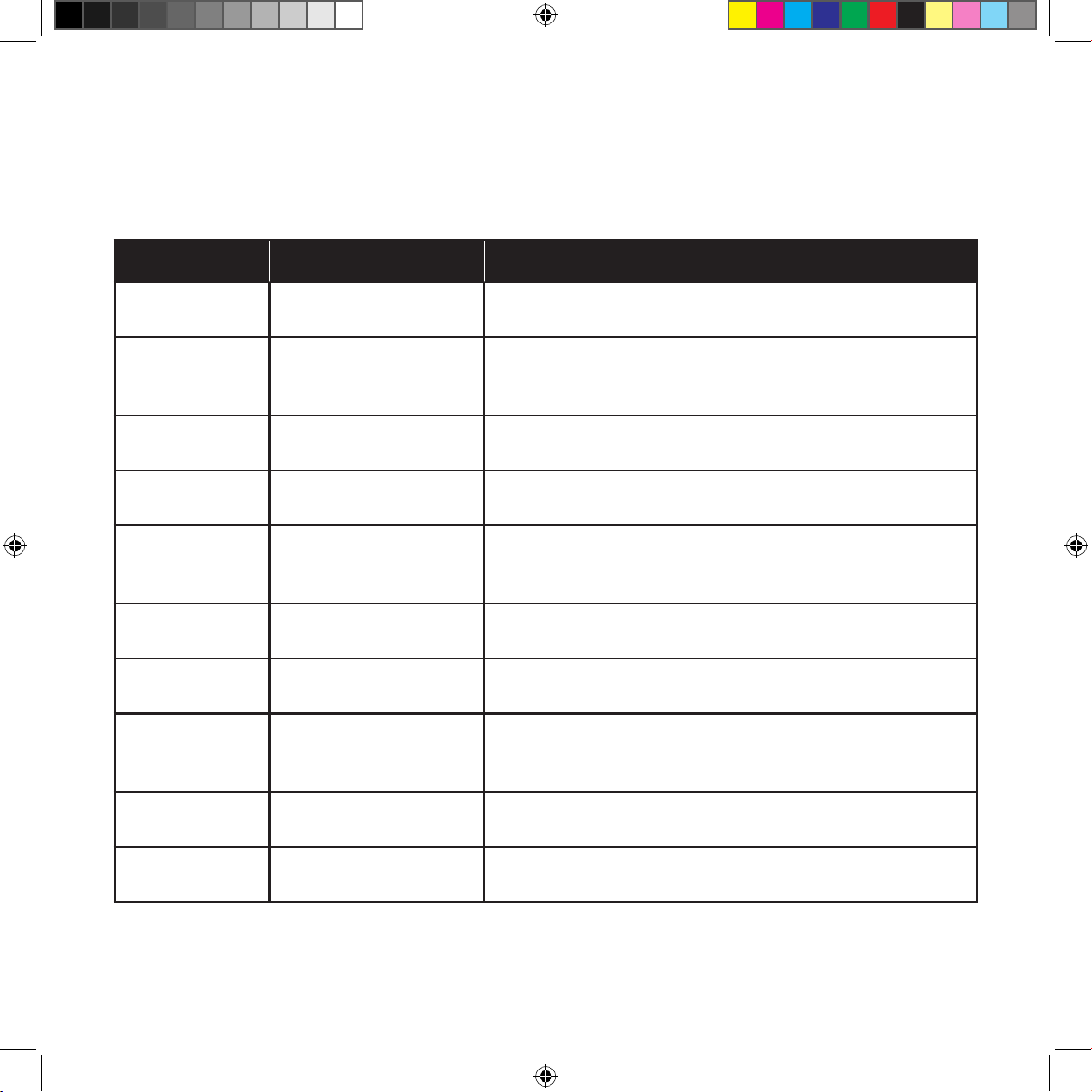
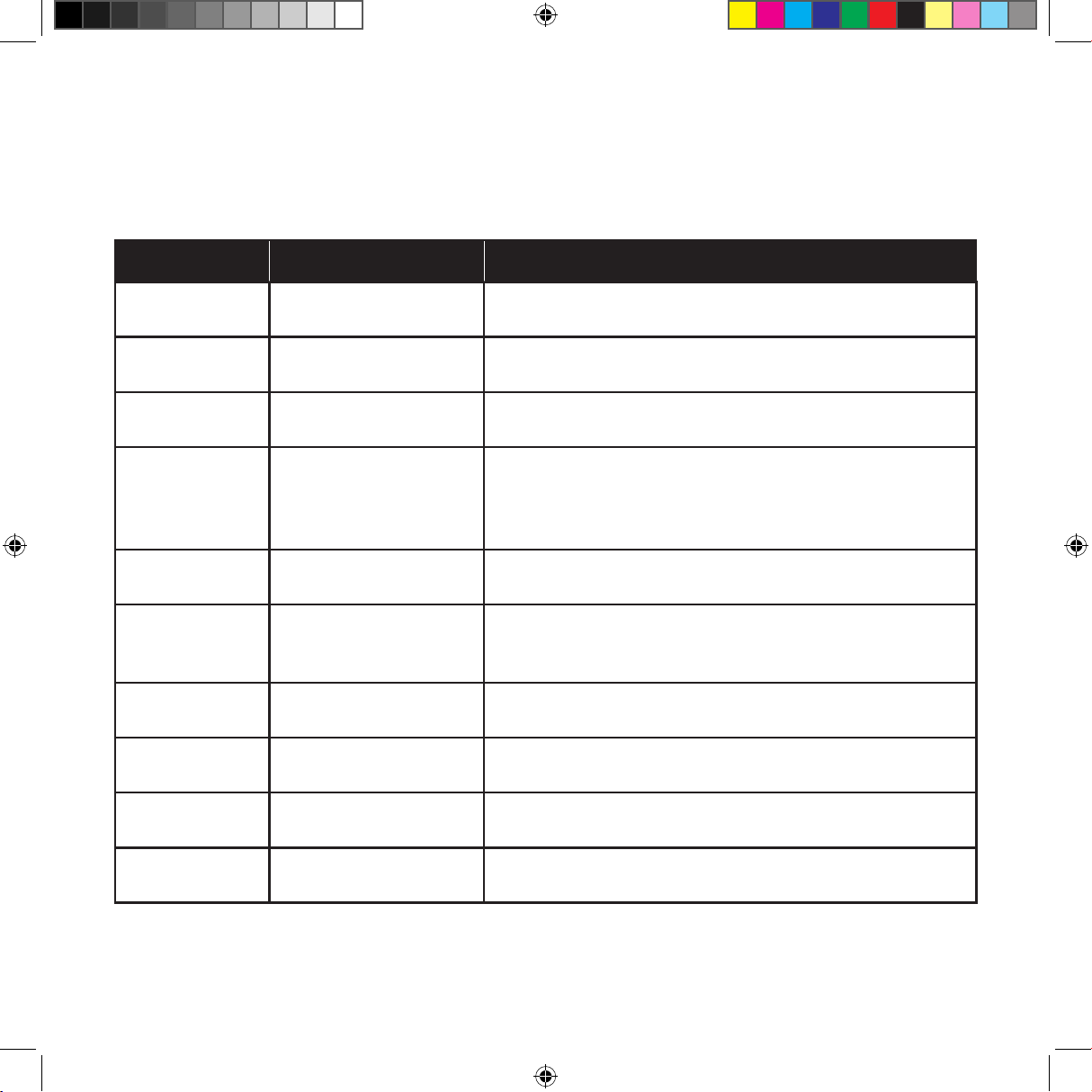
Material Can Use in the Oven? Notes
Dinnerware
Yes, microwave-safe
only
Refer to manufacturer’s label and/or instructions.
Do not use cracked or chipped dishes.
Glass jars Yes
Always remove lid. Use to heat food only until just
warm. Most glass jars are not heat-resistant and
may break.
Glassware Yes, heat-resistant only
Make sure there is no metallic trim. Do not use cracked
or chipped glassware.
Paper oven-
cooking bags
Yes
Follow manufacturer’s instructions. Do not close with
metal twist ties. Make slits to allow steam to escape.
Plastic bags
Yes, microwave-safe
only
Follow manufacturer’s instructions. "Boiling bags" and
tightly closed plastic bags should be slit, pierced, or
vented as directed by package.
Aluminum foil No May cause arcing.
Paper plates
and cups
Yes
Use for short–term cooking/warming only. Do not leave
oven unattended while cooking.
Paper towels Yes
Use with supervision for a short-term cooking only. Use
to cover food while reheating to prevent splatter and
absorb fat.
Parchment
paper
Yes
Use as a cover to prevent splattering or a wrap for
steaming.
Wax paper Yes
Use as a cover to prevent splattering and retain
moisture.
MATERIALS YOU CAN AND CAN’T USE IN THE OVEN
15
OPERATING INSTRUCTIONS
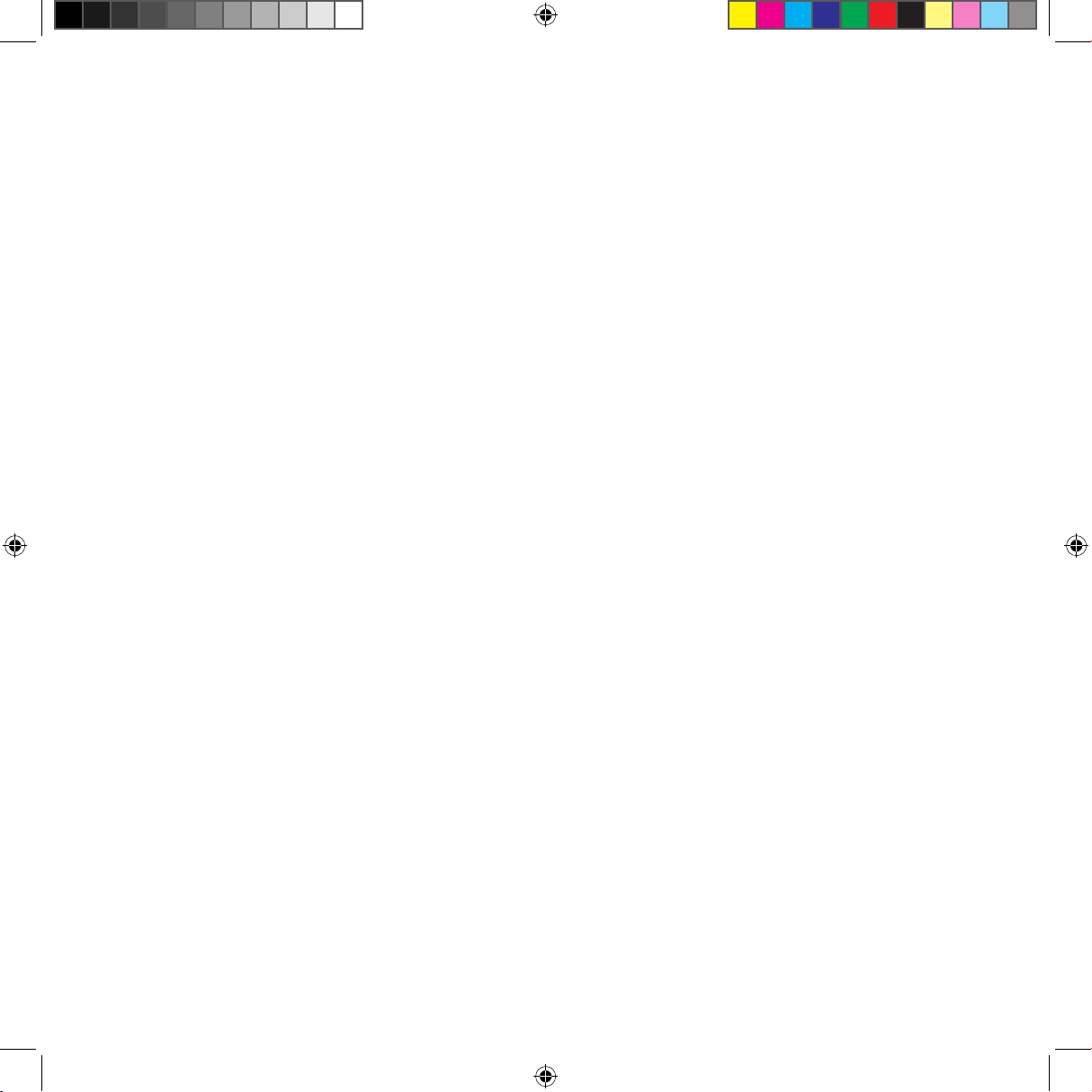
Material Can Use in the Oven? Notes
Plastic wrap
Yes, microwave-safe
only
Use to cover food containers during cooking to retain
moisture. Do not allow plastic wrap to touch food.
Plastic
containers
Yes, microwave-safe
only
Check manufacturer’s label and instructions. Some
plastic containers soften as the food inside gets hot.
Thermometer Microwave-safe only Check manufacturer’s label and instructions.
Browning dish
Yes, microwave-safe
only
Follow manufacturer’s instructions. The bottom of the
browning dish must be at least 3/16 inch (5mm) above
the turntable. Incorrect usage may cause the turntable
to break.
Aluminum trays No
May cause arcing. Transfer food to a microwave-safe
dish.
Food carton
with metal
handle
No
i.e., Chinese takeout carton. May cause arcing. Transfer
food to a microwave-safe dish.
Metal twist ties No May cause arcing and could cause a fire in the oven.
Paper bags No May cause a fire in the oven.
Plastic foam
(Styrofoam)
No
May melt or contaminate food when exposed to high
temperatures.
Wood No
Will dry out and may catch fire when used in the
microwave oven.
MATERIALS YOU CAN AND CAN’T USE IN THE OVEN (continued)
16
SETTING THE CLOCK
To set the clock to the time of day, press the CLOCK button once; "00:00" will display. Then
use the number keypad to enter the current time. Press CLOCK again to finish.
TO USE THE QUICK-COOK FUNCTIONS
Use the Quick-Cook buttons for simple, one-touch microwaving at 100% power.
1. Open the door and place your food on the turntable in a microwave-safe vessel.
2. Press any of the keypad numbers 1 through 9 to instantly begin cooking for that number of
minutes (e.g., press 3 to start cooking for 3 minutes). There is no need to press the START
button.
3. To add time during cooking, press +30 SEC (same as the START button) as many times as
needed.
4. For even shorter cooking cycles, you can simply press the +30 SEC button to instantly
begin cooking for 30 seconds. Add additional time during cooking by pressing the +30
SEC button as needed.
5. After the timer finishes counting down, the unit will beep five times.
OPERATING INSTRUCTIONS
TO MICROWAVE IN MANUAL MODE
Use the Manual Microwave Mode for simple, timed microwaving, either at full power or at lower
power levels.
1. Open the door and place your food on the turntable in a microwave-safe vessel.
2. Press TIME COOK, and use the keypad to enter the cooking time.
3. If desired, press POWER to adjust the power level from 0 to 10 (if you do not select a
power level, the microwave defaults to level 10/full power). NOTE: If power level 0 is
selected, the fan will operate without heating. You can use this setting to clear odors from
the microwave.
17
OPERATING INSTRUCTIONS
4. Press START. The unit will begin cooking and counting down.
5. While the unit is operating, press the +30 SEC button at any time to add 30 seconds of
cooking time at the current power level. Pressing the STOP/CANCEL button OR opening
the door pauses the cooking and the timer countdown. Pressing START once the door is
closed will resume cooking. Pressing the STOP/CANCEL button a second time when the
unit is paused will return the oven to Standby Mode.
6. After the timer finishes counting down, the unit will beep five times. If you wish to add 30
more seconds at full power,
simply press the +30 SECbutton.
7. Multiphase Cooking: If you want to cook at two dierent power levels, you can program
the microwave all at once. After entering the first cooking time and power level, instead
of pressing START, simply enter a second cooking time and power level in the same way.
Then press START, and the microwave will cook the first cycle, followed immediately by the
second cycle.
TO DEFROST
You can defrost frozen foods either by weight or by time using the Manual Microwave Mode for
simple, timed microwaving, either at full power or at lower power levels.
1. Open the door and place your food on the turntable in a microwave-safe vessel.
2. Press the WEIGHT DEFROST button, then use the keypad to enter the ounce weight of
your food (from 4 to 100 oz). Alternatively, press the TIME DEFROST button and use the
keypad to enter your desired defrosting time (from 1 second to 99 minutes, 99 seconds).
3. Default power for defrosting is level 3/30%. If you wish to adjust it, press POWER, then use
the keypad to enter your preferred power level (1–10).
4. Press START. The unit will begin defrosting and counting down.
5. After the timer finishes counting down, the unit will beep five times.
18
OPERATING INSTRUCTIONS
TO USE PRESET FUNCTIONS
The preset functions make it quick and easy to program the oven for cooking some popular
foods.
1. Open the door and place your food on the turntable in a microwave-safe vessel.
2. Press one of the preset icons and continue pressing that button to toggle through the size/
quantity choices that appear on the display (the menu reflects only the relevant choices for
your chosen preset). See the chart below for more information on the preset functions.
3. Press START. The unit will begin cooking and counting down.
4. After the timer finishes counting down, the unit will beep five times.
PRESET FUNCTION CHART
Preset Name
Size/Quantity
Options
Notes
Popcorn 1.75 oz, 3 oz, 3.5 oz
Choose closest size if your packet does not
match one of the size options.
Potato 1, 2, 3 count
Based on whole potatoes, approx. 8 oz each
(prick skin with a fork first).
Pizza 1, 2, 3 slices Reflects time to reheat from frozen.
Veggies 4 oz, 8 oz, 16 oz
Reflects time to defrost and cook
frozen vegetables.
Leftovers 9 oz, 12 oz, 18 oz Reflects time to reheat refrigerated leftovers.
Beverage
6 oz, 8oz, 10 oz,
12 oz
Reflects time to reheat a beverage that has
cooled to room temperature.
19
OPERATING INSTRUCTIONS
TO USE THE FAVORITES FUNCTION
You can program up to three favorite cooking cycles (for instance, 5 minutes and 30 seconds at
50% power) to be stored in memory and activated with one touch.
1. To program: Press the "0" button on the keypad once (press it twice to program a second
favorite cycle).
2. Press TIME COOK, then enter the cooking time using the keypad (e.g., "5-3-0" for
5 minutes and 30 seconds).
3. Press POWER, then enter your power level, from 1 to 10 (e.g., press 5 for 50% power).
4. Press START to save the setting. The unit will beep and display "1" on the screen (or "2" or
"3" if this is your second or third favorite saved).
5. To use the saved favorite: Press the "0/Select Favorite" button on the keypad once and
the screen will display "1" (or to select an already-programmed second favorite, press the
button twice; the screen will display "2"; for a third favorite, press the button three times;
the screen will display "3"). Press START and cooking will begin.
20
OPERATING INSTRUCTIONS
OTHER FUNCTIONS
Turning Sound Off and On
To mute all beeps on the unit, press and hold the "8" on the keypad for 3 seconds. To turn the
sound back on, press and hold the same button for 3 seconds.
Kitchen Timer
The built-in kitchen timer gives you a timer at your fingertips for all sorts of tasks that don't
use the microwave. To use it, press the TIMER button, set the desired time, and press START
(Maximum time is 99 minutes and 99 seconds). When the timer ends, the microwave will beep
5 times. NOTE: The timer does not start or stop the microwave oven, and the oven cannot be
used to cook when the timer is in use.
Safety Lock
To put the unit in childproof Lock Mode, press and hold the STOP/CANCEL button for
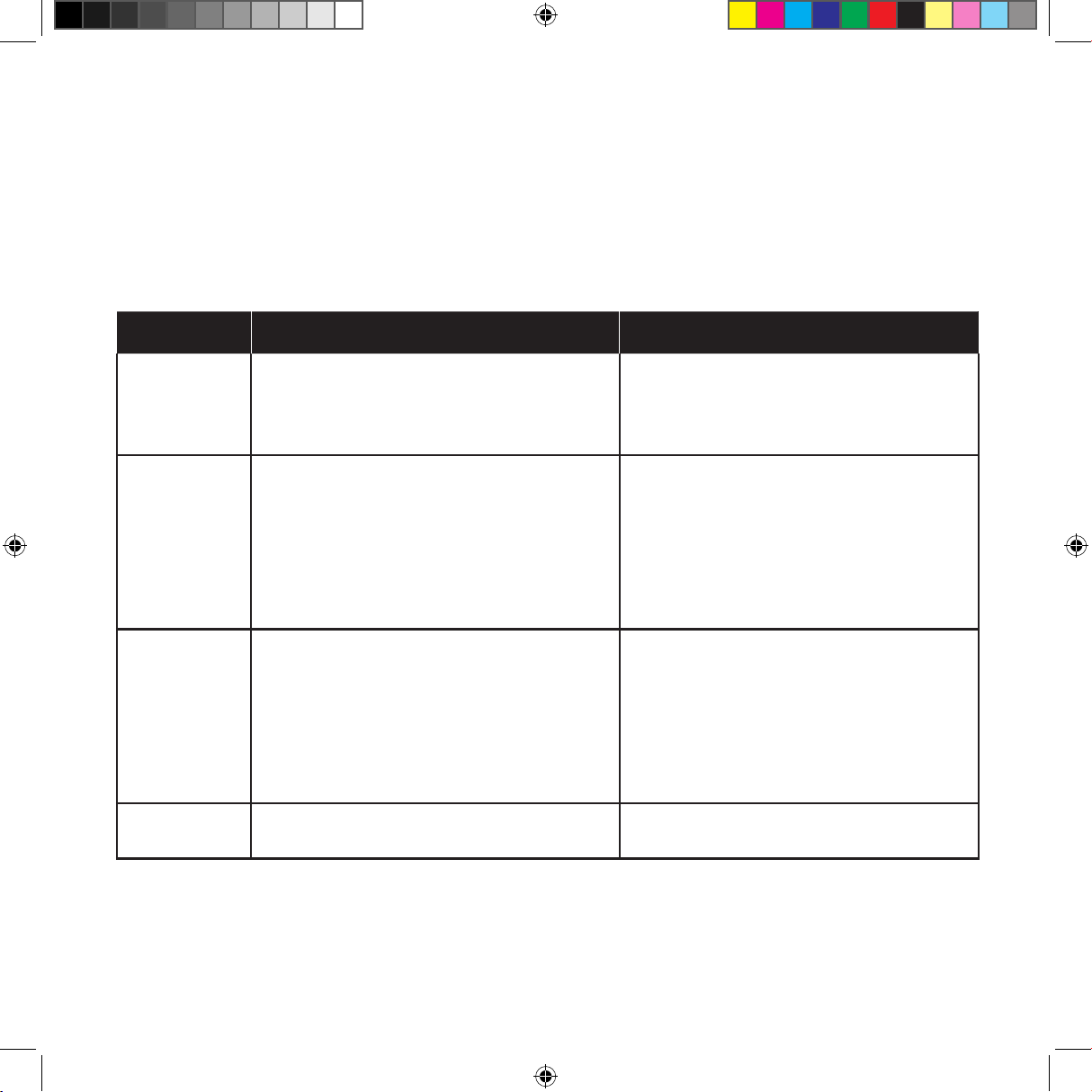
3 seconds. The unit will give a long beep. In Lock Mode the screen displays as , and the
microwave cannot be started. To turn o the Lock Mode, press and hold the STOP/CANCEL
button for 3 seconds again.
Eco Mode
To put the unit in power-saving Eco Mode, press and hold the "7" on the keypad for 3 seconds.
In Eco Mode, the clock will not display when the microwave is not in use. To turn the clock back
on, press any button.
21
TROUBLESHOOTING
Problem Possible Cause Solution
Oven will not
start
a. Electrical cord for oven is not
plugged in.
b. Door is open.
c. Wrong operation is set.
a. Plug into a three-prong outlet.
b. Close the door and try again.
c. Check instructions.
Arcing or
sparking
while oven is
running
a. Wrong materials used in the
microwave.
b. The oven is operated while
empty.
c. Spilled food remains in the
oven interior.
a. Refer to chart on pp. 14–15 for
materials you can and can’t use
in the microwave.
b. Do not operate the oven while
empty.
c. Clean the interior with a damp
cloth.
Unevenly
cooked food
a. Wrong materials used in the
microwave.
b. Cooking time and power level are
not suitable.
c. Food is not flipped or stirred.
a. Refer to chart on pp. 14–15 for
materials you can and can’t use
in the microwave.
b. Use correct cooking time and
power level.
c. Flip or stir food midway through
cooking cycle.
Overcooked
food
a. Cooking time is too long or power
is too high.
a. Reduce cooking time and/or
power.
If you encounter problems with your oven, refer to the chart below for possible
causes and solutions. If you continue to have trouble, please contact Chefman®
Customer Support.
22
TROUBLESHOOTING
Problem Possible Cause Solution
Undercooked
food
a. Cooking time is too short or
power is too low.
b. Food is not completely defrosted.
c. Wrong materials used in
microwave.
d. Oven ventilation ports are
restricted.
a. Increase cooking time and/or
power.
b. Completely defrost food before
cooking.
c. Refer to chart on pp. 14–15 for
materials you can and can’t use.
d. Move unit so there is ample
space around ventilation ports
(see p. 12).
Incompletely
or unevenly
defrosted
food
a. Defrosting time is too short or
power is too low.
b. Wrong materials used in
microwave.
c. Food is not flipped or stirred.
a. Increase defrosting time and/or
power.
b. Refer to chart on pp. 14–15 for
materials you can and can’t use.
c. Flip or stir food midway through
defrosting cycle.
23
CLEANING & MAINTENANCE
Periodically wipe down the interior of the microwave with a damp cloth.
If food splatters on the interior or on the glass turntable, clean both with mild soap
and a damp cloth. The turntable is also top-rack dishwasher safe.
Do not immerse the unit in water. The unit and turntable support are not
dishwasher safe.
24
TERMS AND CONDITIONS
Limited Warranty
RJ Brands, LLC d/b/a Chefman® oers a limited 1-year Warranty (the “Warranty”)
available on sales through authorized distributors and retailers only. Please note
that this Warranty becomes valid from the date of initial retail purchase and that the
Warranty is non-transferable and applies only to the original purchaser.
This Warranty is void without proof of purchase within the United States and Canada.
Please be aware that this Warranty supersedes all other warranties and constitutes
the entire agreement between the consumer and Chefman®. Any changes to the
Terms and Conditions of this Warranty must be in writing, signed by a representative
of Chefman®. No other party has the right or ability to alter or change the Terms and
Conditions of this Warranty.
We may ask you to please submit, via email, photos and/or video of the issue you are
experiencing. This is to help us better assess the matter and possibly oer a quick fix.
Photos and/or video may also be required to determine Warranty eligibility.
We encourage you to register your product. Registering can make the Warranty
process easier and can keep you informed of any updates or recalls on your product.
To register, follow the directions on the Chefman® Warranty Registration page in the
Chefman® User Guide. Please retain your proof of purchase even after registering.
In the event that you do not have proof of your purchase date, we may declare your
Warranty void or we may, at our sole discretion, apply the date of manufacture as the
purchase date for purposes of this Warranty.
25
TERMS AND CONDITIONS
Limited Warranty
WHAT THE WARRANTY COVERS
• Manufacturer Defects – Chefman® products are warranted against defects in material
and workmanship, under normal household use, for a period of 1 year from the date
of purchase when used in accordance with the directions listed in the Chefman® User
Guide. If your product does not work as it should, please contact Customer Support
at support@chefman.com so that we may assist you.
THIS WARRANTY DOES NOT COVER
• Misuse – Damage that occurs from neglectful or improper use of products, including,
but not limited to, damage that occurs as a result of usage with incompatible voltage,
regardless of whether the product was used with a converter or adapter. See Safety
Instructions in the Chefman® User Guide for information on proper use of product;
• Poor Maintenance – General lack of proper care. We encourage you to take care of your
Chefman® products so that you may continue to enjoy them. Please see Cleaning and
Maintenance directions in the Chefman® User Guide for information on proper maintenance;
• Commercial Use – Damage that occurs from commercial use;
• Normal Wear and Tear – Damage or degradation expected to occur due to normal
use over time;
• Altered Products – Damage that occurs from alterations or modifications by any entity
other than Chefman® such as the removal of the rating label axed to the product;
• Catastrophic Events – Damage that occurs from fire, floods, or natural disasters; or
• Loss of Interest – Claims of loss of interest or enjoyment.
26
MADE IN CHINA/FABRIQUE EN CHINE
AC ONLY/ AC SEULEMENT
DATE CODE:
ACCESS CODE:
Model/Modele: RJ25-C
Conveyor toaster
120v~60hz 1800W
CONFORMS TO UL STD. 1026
CERTIFIED TO CSA STD.C22.2 No.64
CAUTION: DO NOT IMMERSE IN WATER
ATTENTION: NE PAS PLONGER DANS L’EAU
WARNING: TO PREVENT ELECTRIC SHOCK,
UNPLUG BEFORE CLEANING
PRÉAVIS: POUR ÉVITER LES CHOCS ÉLECTRIQUES,
DÉBRANCHEZ L’APPAREIL AVANT DE L’UTILISER
READ INSTRUCTIONS BEFORE USING
LISEZ LES INSTRUCTIONS AVANT DE L’UTILISER
HOUSEHOLD USE ONLY
POUR USAGE DOMESTIQUE SEULEMENT
0000
XXXXXXXX
CHEFMAN
®
WARRANTY REGISTRATION
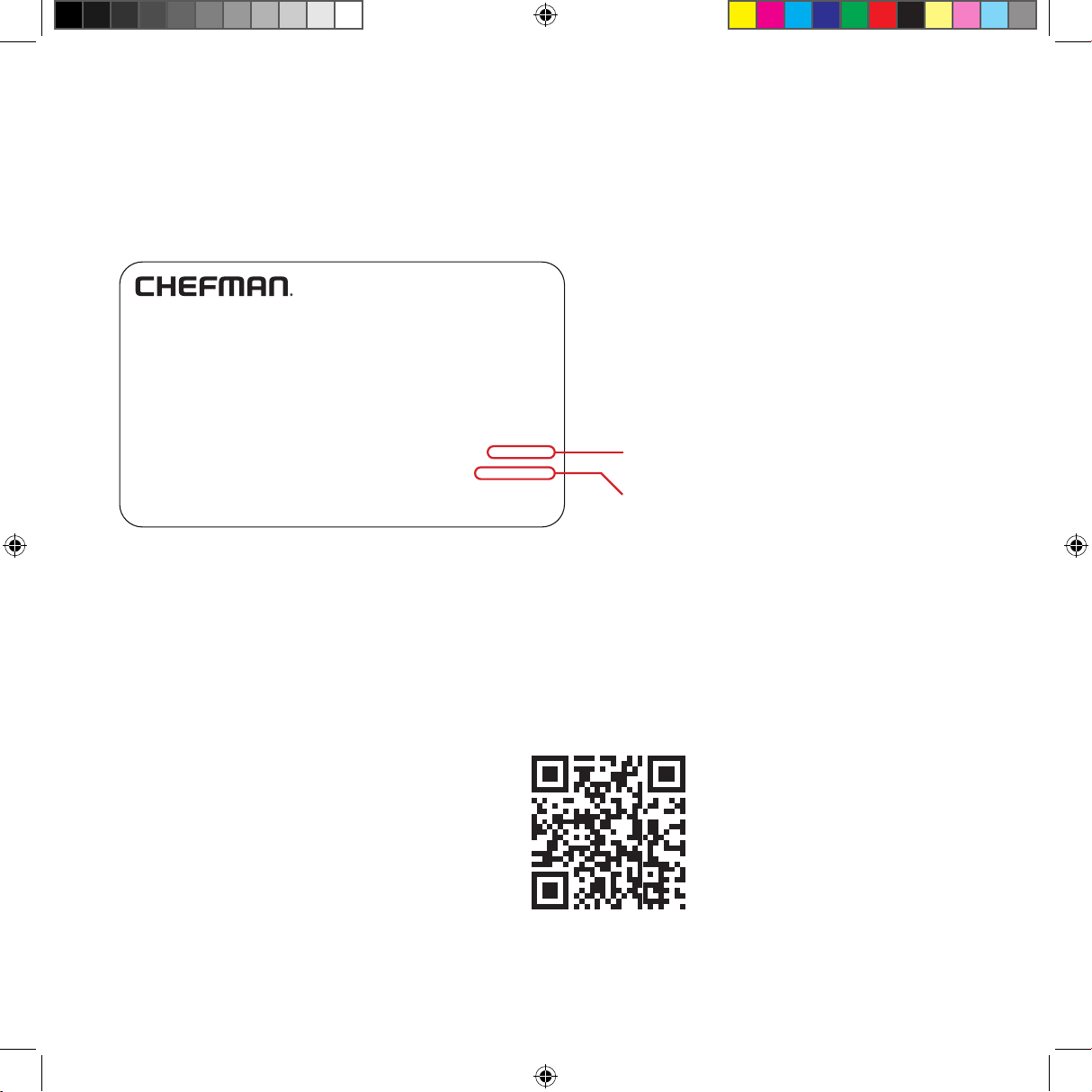
NOTE: Label depicted here is an example.
What do I need to register my product?
•Contact Information
•Model Number
•Proof of Purchase (online
confirmation, receipt, gift receipt)
•Date Code
•Access Code
How do I register my product?
All you need to do is fill out a simple Chefman® registration form. You can easily
access the form in one of the two ways listed below:
1. Visit Chefman.com/register.
2. Scan the QR code to access site:
27
CHEFMAN
®
WARRANTY REGISTRATION
For product information, visit Chefman.com.
EXCEPT WHERE SUCH LIABILITY IS REQUIRED BY LAW, THIS WARRANTY
DOES NOT COVER, AND CHEFMAN
®
SHALL NOT BE LIABLE FOR,
INCIDENTAL, INDIRECT, SPECIAL, OR CONSEQUENTIAL DAMAGES,
INCLUDING WITHOUT LIMITATION, DAMAGE TO, OR LOSS OF USE OF
THE PRODUCT, OR LOST SALES OR PROFITS OR DELAY OR FAILURE TO
PERFORM THIS WARRANTY OBLIGATION. THE REMEDIES PROVIDED
HEREIN ARE THE EXCLUSIVE REMEDIES UNDER THIS WARRANTY,
WHETHER BASED ON CONTRACT, TORT OR OTHERWISE.
Chefman® is a registered trademark of RJ Brands, LLC.
Cooking Forward™ is a trademark of RJ Brands, LLC.
28
©CHEFMAN 2023
RJ55-SS-7_UG_FINAL_OTP_033123