
42 - PRECAUTIONS 91477B706/A
PRECAUTIONS 42
General safety instructions 42
For this appliance 46
Appliance purpose 47
This user manual 48
Manufacturer’s liability 48
Identification plate 48
Disposal 48
To save energy 48
Light sources 49
Information on power consumption in off/stand-
by mode 49
How to read the user manual 49
DESCRIPTION 50
General description 50
Control panel 51
Other parts 51
Accessories 52
Optional accessories (can be purchased
separately) 52
Blast chiller advantages 52
USE 53
Preliminary operations 53
Using the accessories 53
Display 54
First use 56
Cold programmes 58
Manual functions 67
History 70
Multistep functions 70
In the event of a blackout 71
Settings 73
CLEANING AND MAINTENANCE 76
Cleaning the appliance 76
Cleaning the cavity 76
Automatic cleaning 77
Extraordinary maintenance 77
INSTALLATION 77
Electrical connection 77
Positioning 78
We advise you to read this manual carefully, which contains all the instructions for
maintaining the appliance’s aesthetic and functional qualities. For further information on the
product: www.smeg.com
PRECAUTIONS
General safety instructions
Risk of personal injury
•ATTENTION: during use,
the appliance and its
accessible parts become
very hot. Children must be
kept away from the
appliance.
•ATTENTION: during use,
the appliance and its
accessible parts become
very hot. Never touch the
heating elements during
use.
• Do not touch the interior
walls during use of hot
functions.
• Protect your hands by
wearing oven gloves when
moving food inside the
appliance.
• Wear oven gloves when
handling hot trays or other
containers to prevent burns.
• Do not touch the appliance
with damp or wet hands or
feet.
• Never try to put out a fire or
flames with water: turn off
the appliance and smother
the flames with a lid or a
fire blanket.
• This appliance may be used
by children aged at least 8
and by people of reduced
physical, sensory or mental
capacity, or lacking in
experience in the use of
electrical appliances,

PRECAUTIONS - 4391477B706/A
e
provided that they are
supervised or instructed by
adults who are responsible
for their safety.
• Children must not play with
the appliance.
• Keep children below the
age of 8 away from the
appliance unless they are
constantly supervised.
• Do not allow children to
approach the appliance
when it is in operation.
• Cleaning and maintenance
must not be carried out by
unsupervised children.
• The cooking process must
always be monitored. A
short cooking process must
be continuously monitored.
• Never leave the appliance
unattended during cooking
operations where fats or
oils could be released, as
these could then heat up
and catch fire. Be very
careful.
• Do not place trays or
containers on the bottom of
the appliance.
• Ensure that the containers
are suitable for use at low
temperatures.
• Avoid using plastic
containers, we
recommended using
silicone containers.
• Arrange the food carefully
inside the appliance so that
air can circulate correctly.
• Do not stack the foods on
top of each other.
• Take great care when
handling and consuming
raw food, in particular fresh
fish and cephalopods, as
there is the risk of
contamination from
Anisakis, a parasite which
is hazardous to human
health. These risks can be
eliminated ONLY by the
following heat treatments:
- cooking at least 65°C;
- freezing in a freezer at -
18°C, followed by storage
at -18°C for at least 96
hours. Defrosting before
consumption must take
place in the refrigerator;
-blast chilling at -30°C for 4
hours, followed by storage
at -20°C for at least 24
hours. Defrosting before
consumption must take
place in the refrigerator;
• In order to retain the
properties of hot foods, do
not allow them to remain at
room temperature before
blast chilling or deep-
freezing them.
• Do not touch frozen foods
(especially with wet hands),
nor put them in your mouth.
• Keep the door closed when
performing any operation
on the appliance.
• Do not insert pointed metal
objects (cutlery or utensils)
into the slots in the
appliance.
• Switch off the appliance
immediately after use.

44 - PRECAUTIONS 91477B706/A
• DO NOT USE OR STORE
FLAMMABLE MATERIALS
NEAR THE APPLIANCE.
• DO NOT USE AEROSOLS
IN THE VICINITY OF THIS
APPLIANCE WHILST IT IS
IN USE.
• DO NOT MODIFY THIS
APPLIANCE.
• Do not try to repair the
appliance yourself or
without the assistance of a
qualified technician.
• Do not pull the cable to
unplug the appliance.
Risk of damaging the appliance
• Do not damage the coolant
circuit.
• Do not use mechanical
devices or other means to
speed up the defrosting
process other than those
recommended by the
manufacturer.
• Do not use electrical
equipment inside the
appliance.
• To prevent hazards due to
instability of the appliance,
this must be fastened in
accordance with the
instructions.
• Never rest sharp metal
objects such as knives,
forks, spoons and lids on
the appliance during use.
• Do not use abrasive or
corrosive detergents (e.g.
scouring powders, stain
removers and metallic
sponges), rough or abrasive
materials or sharp metal
scrapers on glass parts as
this could scratch the
surface and break the
glass. Use wooden or
plastic utensils.
• Do not sit on the appliance.
• Do not use cleaning
products containing
chlorine, ammonia or
bleach on parts made of
steel or that have metallic
surface finishes (e.g.
anodizing, nickel- or
chromium-plating).
• Do not use rough or
abrasive materials or sharp
metal scrapers.
• Do not use sharp metal
objects to remove excess
ice build-up in the freezer
compartment.
• Do not use adaptors for
plugs.
• CAUTION: do not place
portable multiple sockets or
portable power supply units
at the back of the
appliance.
• Do not place heavy objects
on the top of the appliance.
• Do not use sharp objects
when removing ice and
frost in order not to damage
the appliance's walls.
• Racks and trays should be
inserted as far as they will
go into the side guides. The
mechanical safety locks
that prevent them from
being removed must face
downwards and towards
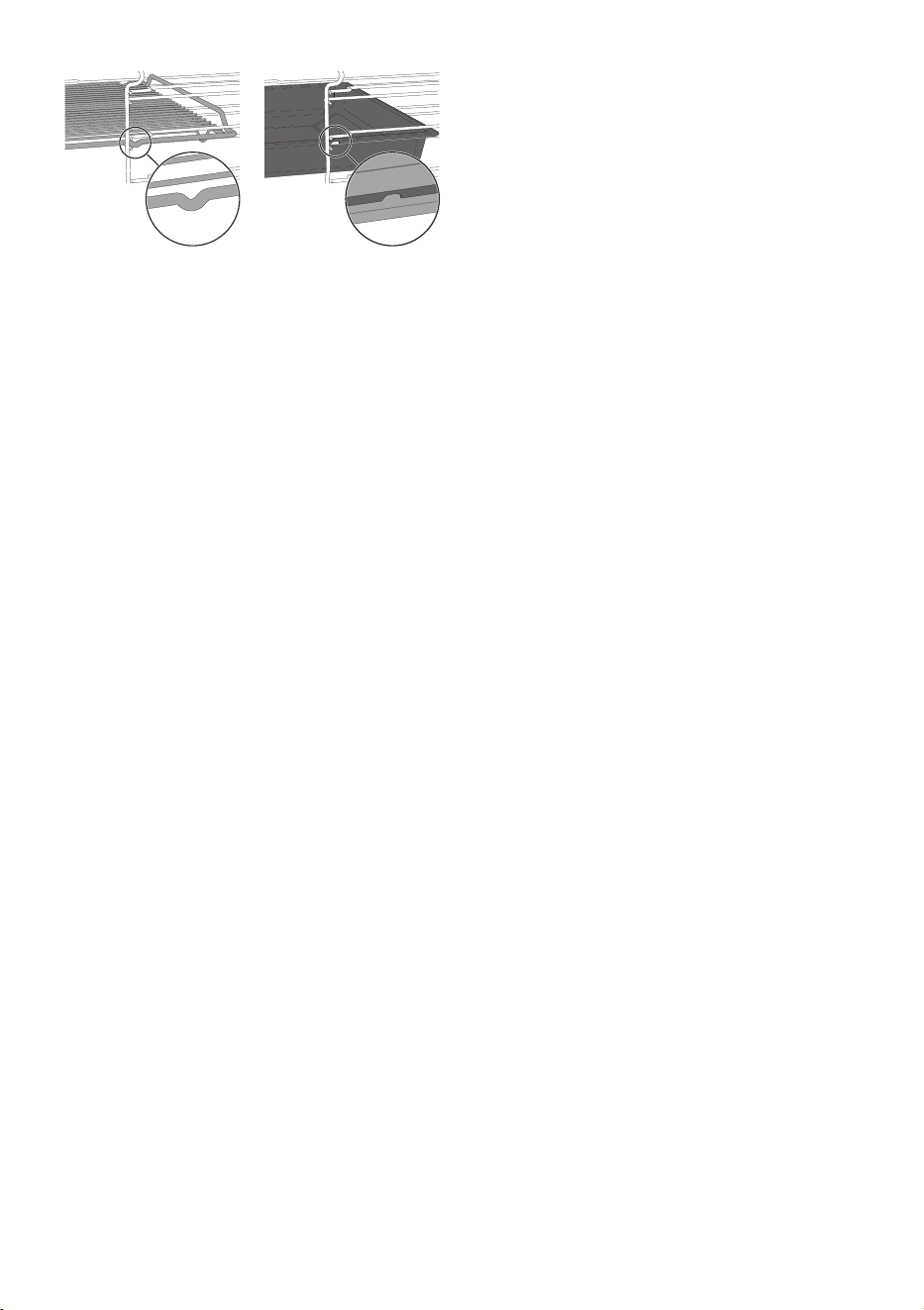
PRECAUTIONS - 4591477B706/A
e
the back of the oven cavity.
• Do not use steam jets to
clean the appliance.
• Do not spray any products
near the appliance.
• Do not obstruct ventilation
openings and heat
dispersal slots.
• Fire hazard: never leave
objects in the cavity.
• DO NOT USE THE
APPLIANCE TO HEAT OR
COOL ROOMS FOR ANY
REASON.
• Do not use plastic
cookware or containers for
cooking.
• Do not put sealed tins or
containers in the appliance.
• Do not remove the seal on
the face of the appliance.
• Remove all trays and racks
which are not required
during the function from the
oven cavity.
• Do not use the open door to
rest pans or trays on the
internal glass pane.
• Never use the oven door to
lever the appliance into
place when fitting.
• Avoid exerting too much
pressure on the door when
open.
• Do not use the handle to lift
or move this appliance.
• Always disconnect the
appliance from the mains in
the event of a breakdown,
maintenance, when
replacing the light bulb or
during cleaning.
Installation and maintenance
• THIS APPLIANCE MUST
NOT BE INSTALLED IN A
BOAT OR CARAVAN.
• The appliance must not be
installed on a pedestal.
• Position the appliance into
the cabinet cut-out with the
help of a second person.
• To prevent any possible
overheating, the appliance
should not be installed
behind a decoration door or
a panel.
• Installation and servicing
should be carried out by
qualified personnel in
accordance with current
standards.
• Have the electrical
connection performed by
authorised technical
personnel.
• The appliance must be
connected to earth in
compliance with electrical
system safety standards.
• Use cables withstanding a
temperature of at least
90 °C.
• The tightening torque of the
screws of the terminal
supply wires must be 1.5 -
2 Nm.

46 - PRECAUTIONS 91477B706/A
• If the power cable becomes
damaged, contact technical
support immediately to
arrange for it to be replaced
in order to avoid possible
hazards.
• WARNING: while
positioning the appliance,
make sure that the power
supply cable is not caught
or damaged.
• Always use any necessary/
required personal
protective equipment (PPE)
before performing any work
on the appliance
(installation, maintenance,
positioning or movement).
• Before performing any work
on the appliance, switch off
the power supply.
• Allow the appliance to be
disconnected after
installation, via an
accessible plug or a switch
in the case of a fixed
connection.
• Fit the power line with an
all-pole circuit breaker with
a contact separation
distance sufficient to
provide complete
disconnection in category III
overvoltage conditions,
pursuant to installation
regulations.
• This appliance can be used
up to a maximum altitude of
2,000 metres above sea
level.
For this appliance
• Caution: risk of fire /
flammable materials.
• Do not damage the cooling
circuit (if this is accessible).
• Follow applicable
legislation on the
consumption of raw food.
• Carefully clean the parts of
the appliance which come
into direct or indirect
contact with food to
prevent any kind of
contamination.
• Use food-safe detergents.
• Do not use flammable or
harmful products.
• Use only the temperature
probe supplied with the
appliance.
• Keep the appliance door
closed during all
operations.
• Do not stack food items on
top of each other, but
rather arrange them so
that the air is able to
circulate correctly inside
the appliance.
• Use aluminium or
stainless-steel containers.
• Do not cover trays with
insulating covers or films.
• Do not rest any weight or
sit on the open door of the
appliance.

PRECAUTIONS - 4791477B706/A
e
• Take care that no objects
are stuck in the doors.
• Do not install/use the
appliance outdoors.
• Only use the temperature
probe provided or
recommended by the
manufacturer.
• If the appliance is to
remain unused for an
extended period of time,
unplug it and clean the
interior and exterior.
• The electrical cable and
socket must remain easily
accessible once the
appliance is installed.
Temperature probe (where
present)
• Handle the temperature
probe with care as it has a
sharp point.
• Do not touch the rod or the
tip of the temperature
probe after use.
• Wear oven gloves when
handling the temperature
probe.
• Use only the temperature
probe supplied with the
appliance.
• Take care not to scratch or
damage enamelled or
chrome-plated surfaces
with the tip or the plug of
the temperature probe.
• Do not insert the
temperature probe into
openings and slots on the
appliance.
• Do not pull the cable to
remove the temperature
probe from the socket or
from the food.
• Make sure that the
temperature probe or its
cable do not get caught in
the door.
• Make sure that the
temperature probe or its
cable do not come into
contact with heating
elements inside the oven.
• No part of the temperature
probe should be allowed to
come into contact with the
walls of the oven cavity, the
heating elements, the racks
or the trays when they are
still hot.
• The temperature probe
should not be kept inside
the appliance.
Appliance purpose
This appliance is designed
for blast chilling, deep-
freezing, preservation and
proving of food, and for
chilling drinks, in a residential
environment. It may be used
to rapidly lower the
temperature of cooked or
raw foods in order to retain
their nutritional properties. It
also allows food to be
cooked at low temperatures
in order to enhance their
quality, flavours and aromas,
and dishes to be warmed up
to serving temperature.
Every other use is considered
48 - PRECAUTIONS 91477B706/A
improper.
This appliance may also be
used:
• In kitchen areas provided
for employees in shops,
offices and other work
environments;
• In farms/farmhouse
facilities;
• By guests in hotels, motels
and other types of
residential environments;
• In bed and breakfasts.
The appliance is not
designed to operate with
external timers or with
remote-control systems.
This user manual
• This user manual is an integral part of
the appliance and must therefore be
kept in its entirety and within the user's
reach for the whole working life of the
appliance.
• Read this user manual carefully before
using the appliance.
• The explanations in this manual include
images, which describe all that regularly
appears on the display. However, it
should be kept in mind that the
appliance may be equipped with an
updated version of the system, and as
such, all that appears on the display
may differ from those in the manual.
Manufacturer’s liability
The manufacturer declines all liability for
damage to persons or property caused by:
• use of the appliance other than that
specified;
• failure to comply with the instructions in
the user manual;
• tampering with any part of the
appliance;
• use of non-original spare parts.
Identification plate
The identification plate bears the technical
data, serial number and brand name of the
appliance. Do not remove the identification
plate for any reason.
Disposal
This appliance conforms to the WEEE
European directive (2012/19/EU) and
must be disposed of separately from
other waste at the end of its service life.
The appliance does not contain substances
in quantities sufficient to be considered
hazardous to health and the environment,
in accordance with current European
directives.
To dispose of the appliance:
• Cut the power cable and remove it.
• Deliver the appliance to the appropriate
recycling centre for electrical and
electronic equipment waste, or return it
to the retailer when purchasing an
equivalent product, on a one for one
basis.
Our appliances are packaged in non-
polluting and recyclable materials.
• Deliver the packing materials to the
appropriate recycling centre.
To s ave energy
• Perform a pre-cooling cycle of a
minimum of 15 minutes with the
appliance empty before placing the food
to be chilled inside.
• Perform a pre-cooling cycle to reduce
power consumption and the time taken.
• Do not cover trays or containers with
insulating films or covers.
This appliance may only
be installed and used
indoors.
This appliance is not subject to the
energy labelling requirements of
Article 1, point E of Regulation 643/
2009.
Power voltage
Danger of electrocution
• Disconnect the mains power supply.
• Unplug the appliance.
Plastic packaging
Danger of suffocation
• Do not leave the packaging or any part
of it unattended.
• Do not let children play with the plastic
bags.
PRECAUTIONS - 4991477B706/A
e
• Ensure that the containers are suitable
for use at low temperatures.
• Arrange the trays or containers evenly
inside the appliance, ensuring you do
not stack them or place them on top of
each other in order to allow air to
circulate.
• Do not allow hot food to sit at ambient
temperature before blast chilling or
deep-freezing in order to retain its
desirable properties.
• Reduce any opening of the door to a
minimum to avoid temperature
dispersal.
• Keep the appliance clean at all times.
Light sources
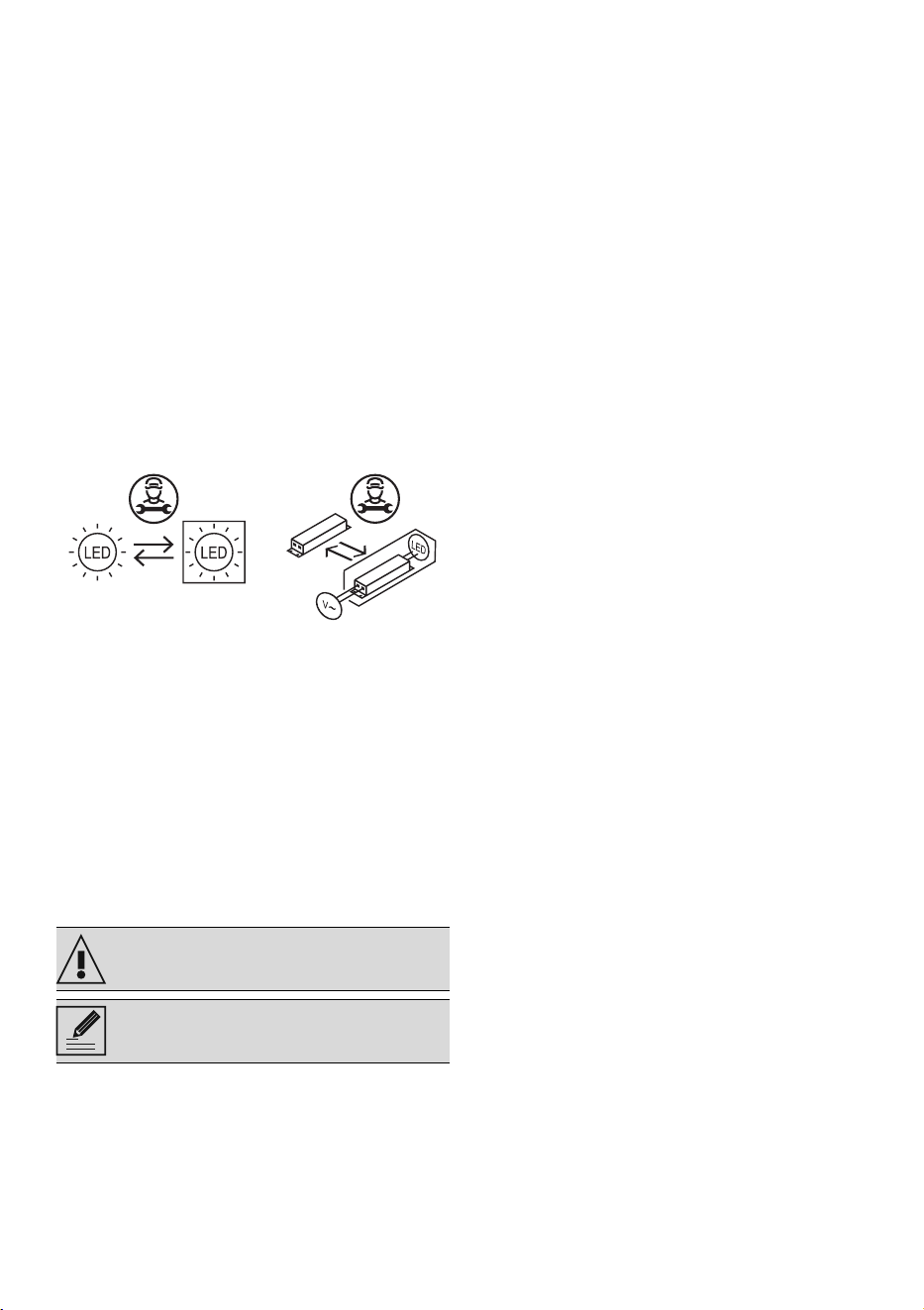
• This appliance contains light sources
which cannot be replaced by the user
and must only be replaced by the
technical assistance service.
• This appliance contains light sources of
efficiency class "G".
Information on power
consumption in off/stand-by
mode
Technical data on the appliance's power
consumption in off/stand-by mode can be
found at www.smeg.com under the page
corresponding to the product in question.
How to read the user manual
This user manual uses the following reading
conventions:
Warning/Caution
Information/Advice
50 - DESCRIPTION 91477B706/A
DESCRIPTION
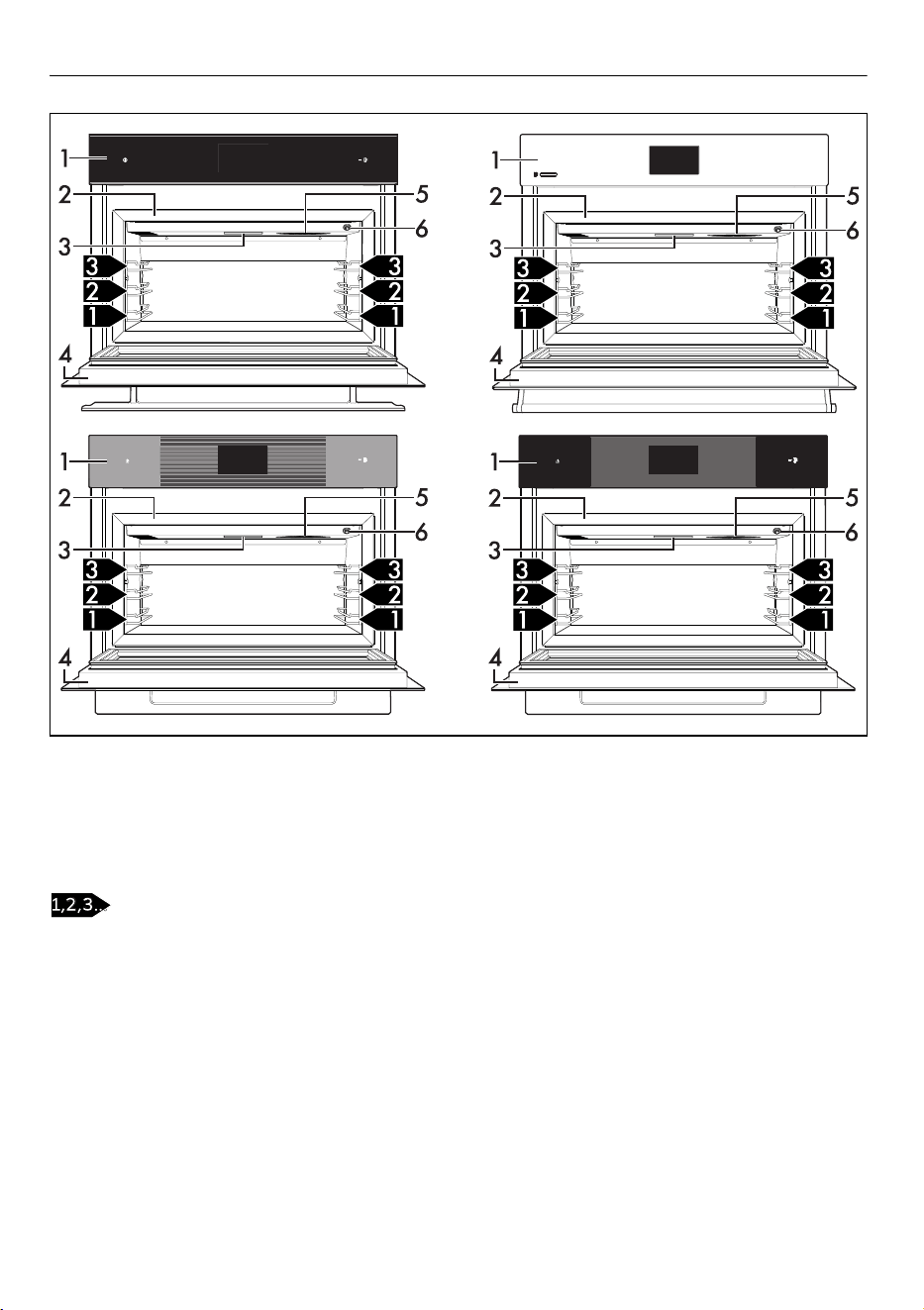
General description
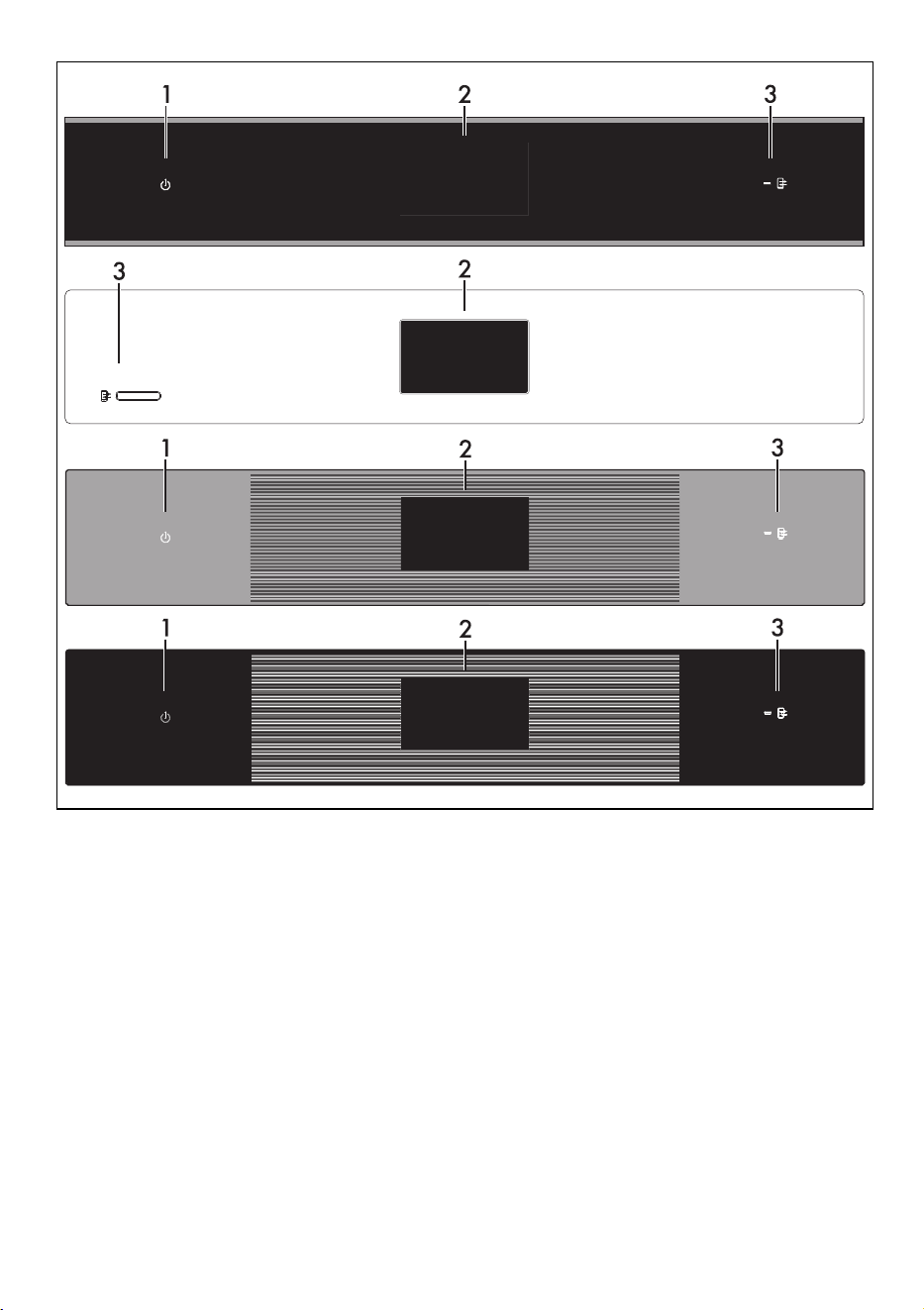
1 Control panel
2 Gasket
3 Light
4 Door
5 Fan
6 Temperature probe socket
Frame shelf
12:30
12:30
12:30
12:30
DESCRIPTION - 5191477B706/A
e
Control panel
1 ON/OFF BUTTON (on some models only)
The ON/OFF button turns the appliance on
or off.
2 Display
The touch-screen display allows you to
interact with the appliance. Touch the icons
to access the various functions. All the
operating parameters will be shown on the
display.
3 Remote control indicator light (selected
models only)
When lit it indicates that the appliance can
be controlled remotely via a smartphone or
tablet (see the "Blast chiller connectivity"
user manual).
SmegConnect (selected models only)
The appliance is equipped with
SmegConnect technology that allows the
user to control the appliance operation via
an App on his/her smartphone or tablet.
For further information, refer to the supplied
brochure and/or visit the site
www.smeg.com
Other parts
Shelves
The appliance features shelves to position
trays and racks at different heights. The
insertion heights are indicated from the
bottom upwards.
Cooling fan
The cooling fan distributes the air evenly
inside the appliance, helping it reach the set
temperature more quickly.
Chamber lighting
The internal light of the appliance comes on
12:30
12:30
12:30
12:30
52 - DESCRIPTION 91477B706/A
when the door is opened.
Accessories
• Not all accessories are available on
some models.
• The accessories intended to come into
contact with food are made of materials
that comply with the provisions of
current legislation.
• Original supplied and optional
accessories can be requested to
Authorised Assistance Centres. Use only
original accessories supplied by the
manufacturer.
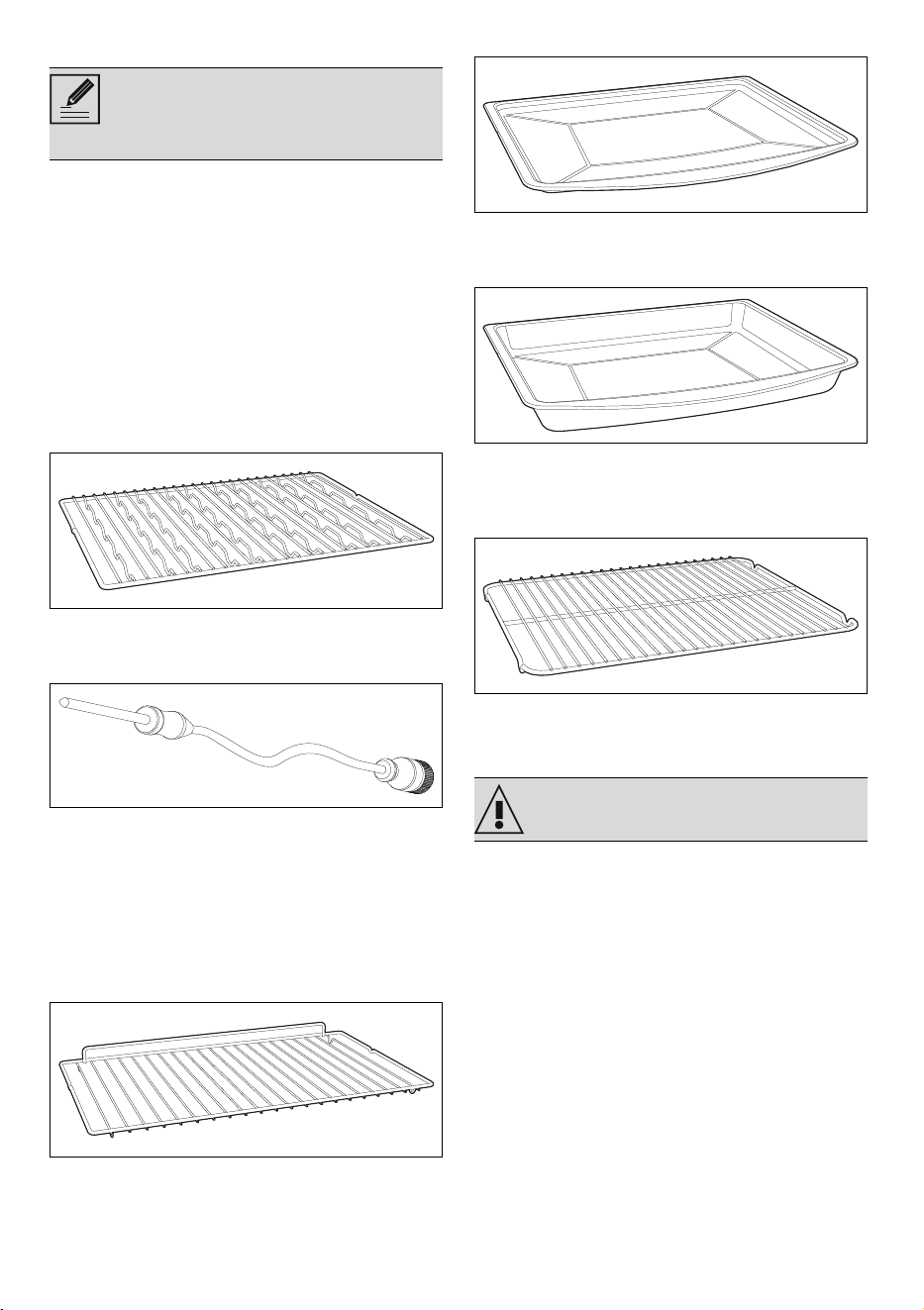
Multifunctional rack
Useful for supporting containers or, if
rotated, for holding bottles.
Tem p e rat u re p ro b e
Using the temperature probe, it is possible
to carry out blast chilling (in the manual
functions) and cooking processes based on
the temperature measured at the centre of
the food.
Optional accessories (can be
purchased separately)
Rack
Used for supporting containers with food
during cooking.
Tray
Useful for cooking cakes, pizzas, oven-
baked desserts and biscuits.
Deep tray
Useful for collecting fat from foods placed
on the rack above and for cooking pies,
pizzas, baked desserts, biscuits, etc.
Tray rack
To be placed over the top of the tray; for
cooking foods which may drip.
Blast chiller advantages
Your blast chiller allows you to quickly cool
food and to deep-freeze them rapidly in
order to retain their freshness and
guarantee them a long lifetime.
Blast chilling and rapid deep-freezing help
preserve the flavour, aroma, colour and
nutritional properties of food.
Blast chilling cooked foods to an internal
temperature of +3°C minimises bacterial
proliferation, which is at its maximum
between 65°C and 8°C.
It also prevents the formation of large ice
crystals that damage and break the cell
walls of the food. When defrosted, the food
will not lose liquid and will retain their
consistency and taste.
Without blast chiller:
• bacteriological risk;
When the door is open, it is not
possible to switch off interior
lighting.
See general safety instructions
USE - 5391477B706/A
e
• evaporation and dehydration;
• food weight loss;
• loss of flavours, aromas, colours;
• rapid spoiling;
• formation of large ice crystals which
damage the fibres of the food.
With blast chiller:
•food safety;
• retention of original consistency;
• no food weight loss;
• retention of original properties;
• longer preservation time;
• formation of micro-crystals of ice that do
not damage the food, allowing its
properties to be preserved.
USE
Preliminary operations
• Remove any protective film from the
outside or inside of the appliance,
including accessories.
• Remove any labels (apart from the
technical data plate) from the
accessories and inside of the appliance.
• Remove and wash all the appliance
accessories (see chapter "CLEANING
AND MAINTENANCE").
• To remove any manufacturing residue,
clean the inside of the appliance
thoroughly with a soft cloth and neutral,
non-abrasive detergent.
Using the accessories
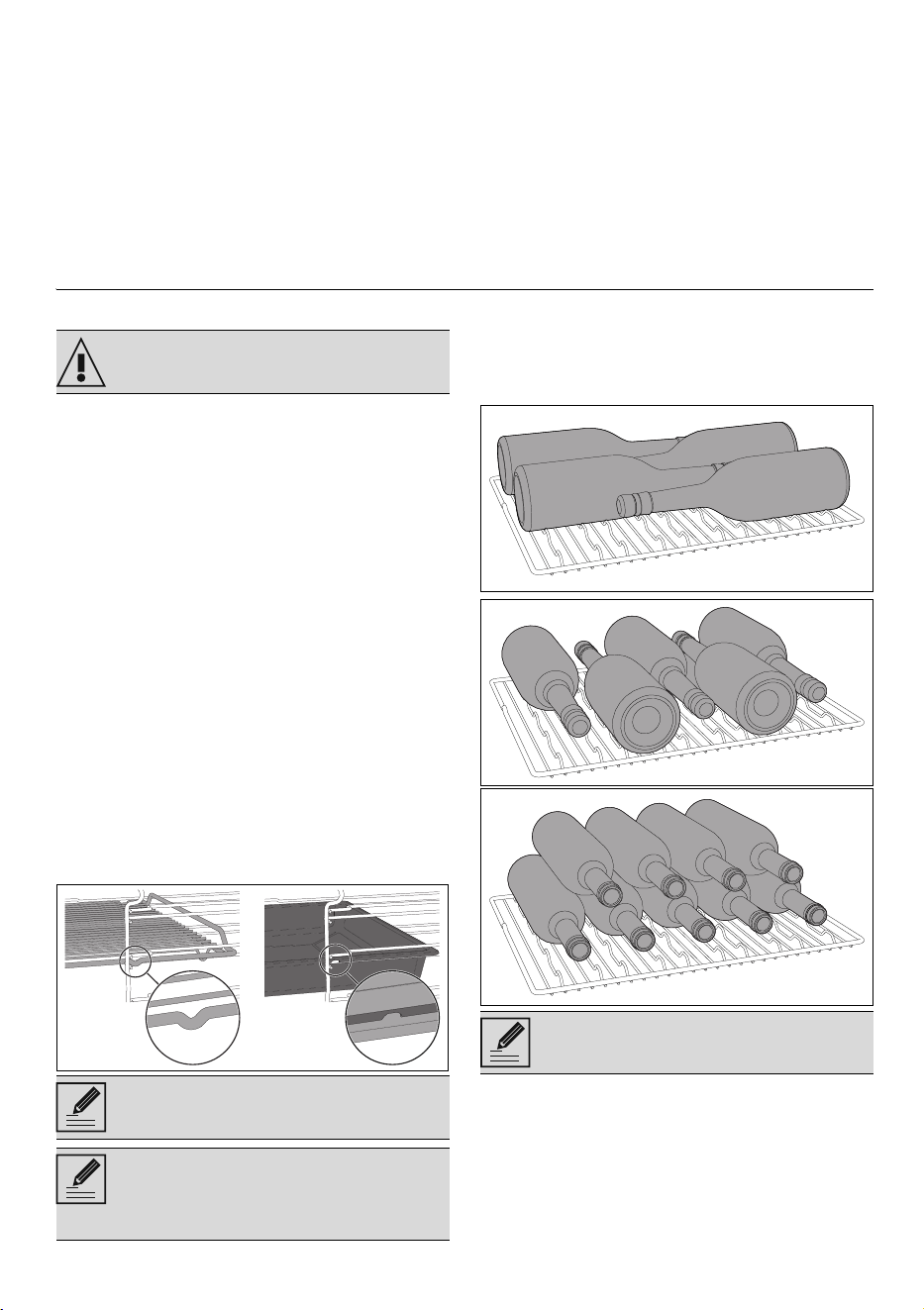
Racks and trays
Racks and trays have to be inserted into the
side guides until they come to a complete
stop.
• The mechanical safety locks that
prevent the rack from being accidentally
removed must face downwards and
towards the back of cavity.
Multifunctional rack
Depending on the dimensions, the
multifunctional rack can accommodate
various bottle rack configurations. Here are
some examples:
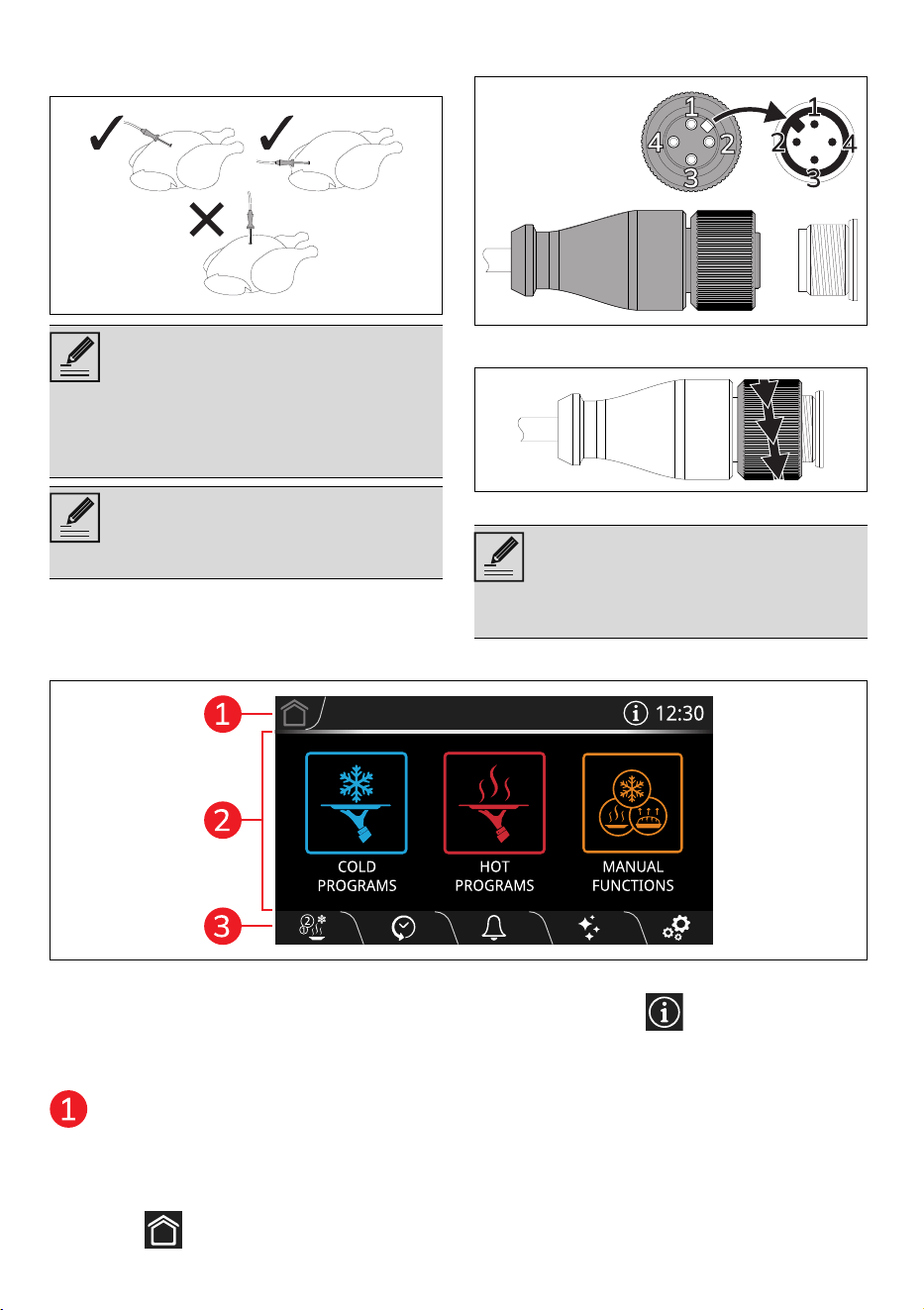
Application of the temperature probe
1. Place the food on a tray.
See General safety instructions.
Gently insert racks and trays into the
cavity until they come to a stop.
Clean the trays before using them
for the first time to remove any
residues left by the manufacturing
process.
If turned, it can be used as a normal
rack for supporting containers.
54 - USE 91477B706/A
2. Insert the tip of the temperature probe
inside the food to be blast chilled or
cooked outside the cavity.
3. Open the door.
4. Insert the dish to be blast chilled or
cooked into the cavity.
5. Connect the temperature probe plug to
the socket on the inside of the appliance.
6. Tighten the ring nut to secure the plug
firmly in the socket.
7. Close the door.
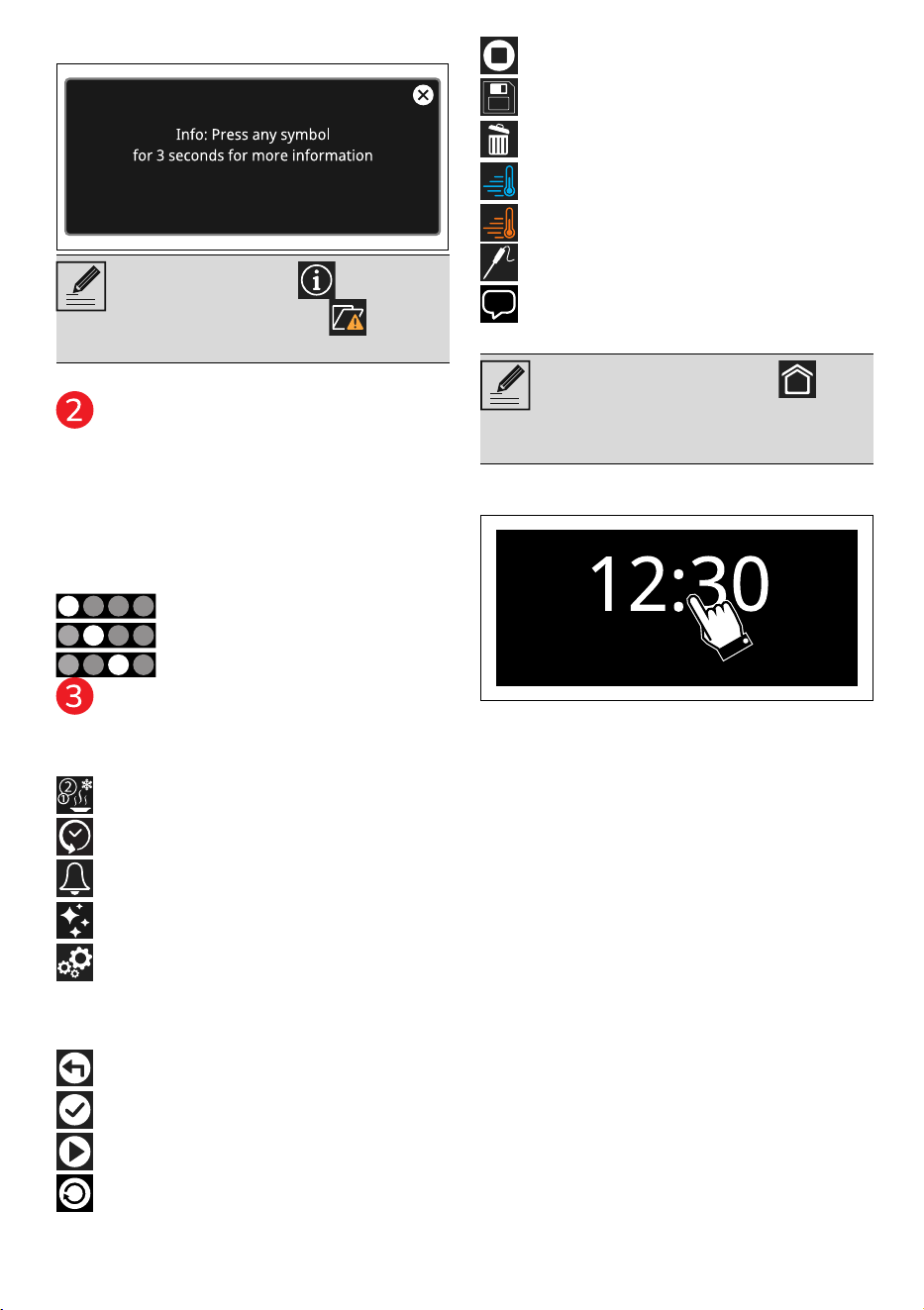
Display
The parameters and values for the currently
selected function will be indicated on the
display. To use it, simply touch the "virtual"
buttons and/or scroll through the values
shown (the picture shows the main menu
screen).
Information area
Information regarding the menus and sub-
menus of the functions in progress in the
main area are shown in this area.
The following are also present in this area:
• HOME button: touch this button to
return to the main menu;
• INFORMATION button: touch this
For best results, make sure that the
temperature probe is placed
transversely in the thickest part of
the food and for least 3/4 of its
length. Make sure that it does not
touch the tray underneath and that
it does not protrude from the food.
In order for the probe to measure the
core temperature of the food
precisely, its tip must not be in
contact with bones or fat.
If the temperature probe is not
connected to the appliance when
required, the appliance will not
proceed with execution of the
selected function.
USE - 5591477B706/A
e
button to display the following screen:
• current time display.
Main area
The various functions of the appliance can
be set in this area. Touch the buttons and
values to set the required function.
In addition, depending on the screen, dots
may appear at the bottom of this area to
indicate that there are other function pages,
which can be reached by scrolling
horizontally.
first page,
second page,
etc...
Lower area
There are various shortcut function buttons
in this area, which vary according to the
functions set in the main area:
MULTISTEP
HISTORY
MENU TIMER
CLEANING
SETTINGS
In addition, depending on the page
displayed, there will also be other buttons
assigned to the function being used:
BACK
CONFIRM
START
REPLAY
STOP
SAVE
DELETE
PRE-COOLING
PRE-HEATING
PROBE
INSTRUCTIONS AND
SUGGESTIONS
To access the main menu.
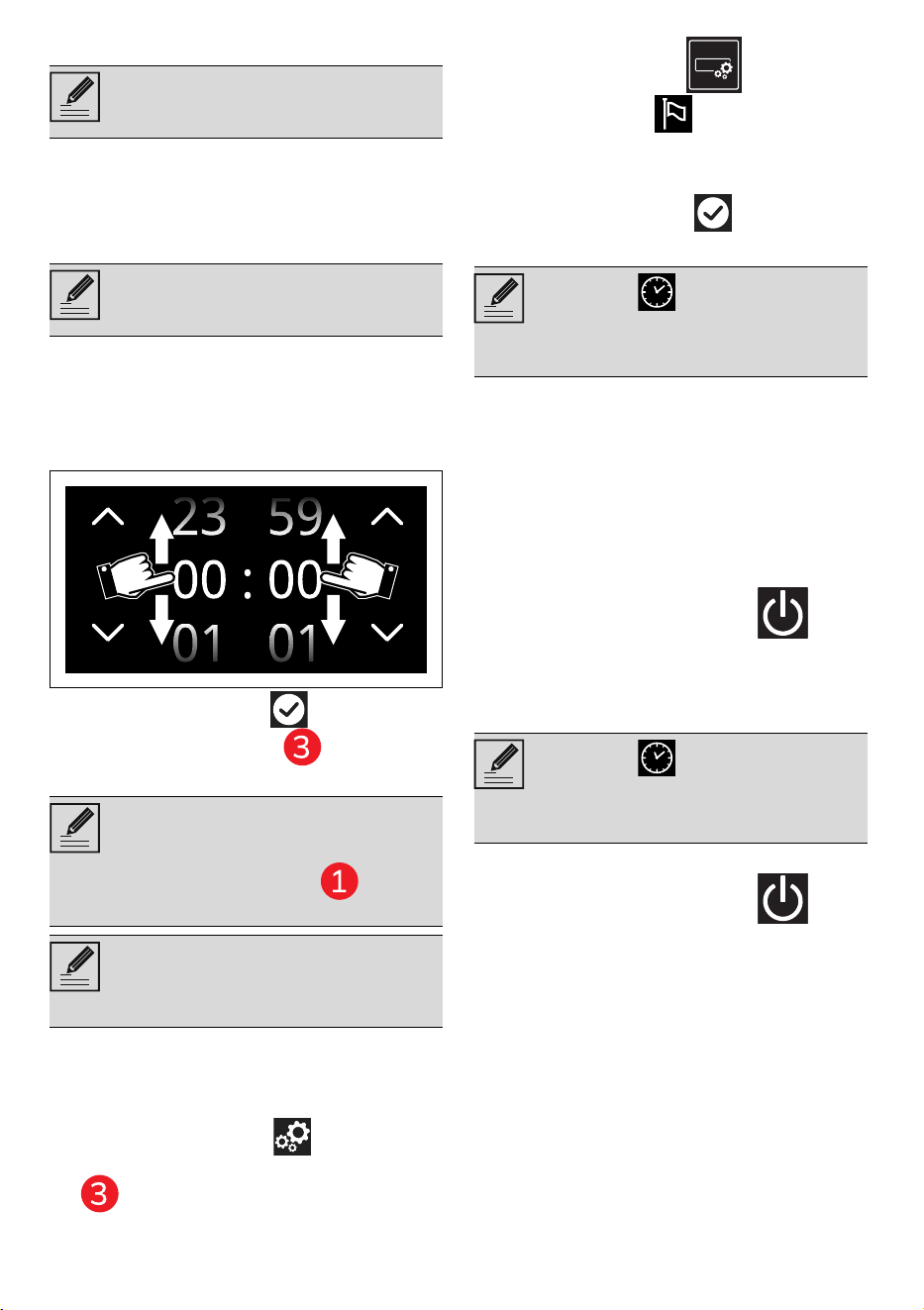
• Tap the time indicated on the display.
Connectivity
Connectivity requirements:
• Smartphone or PC tablet with IOS or
Android operating system. The
minimum versions of the operating
systems are available at the
following link:
www.smeg.com/smegconnect/
• Wi-Fi network (2.4 GHz band,
WPA2 protected) active and
available in the place where the
appliance is installed.
• Internet connection.
• Name and password of the home
Wi-Fi network or WPS (Wi-Fi
Protected Setup) mode available.
For further information, please refer to
the “Built-in oven connectivity” manual.
The INFORMATION button is
replaced by the symbol to warn
that the door is open.
Press and hold the HOME
button for a few seconds to stop the
function immediately at any time
and return to the main menu.
56 - USE 91477B706/A
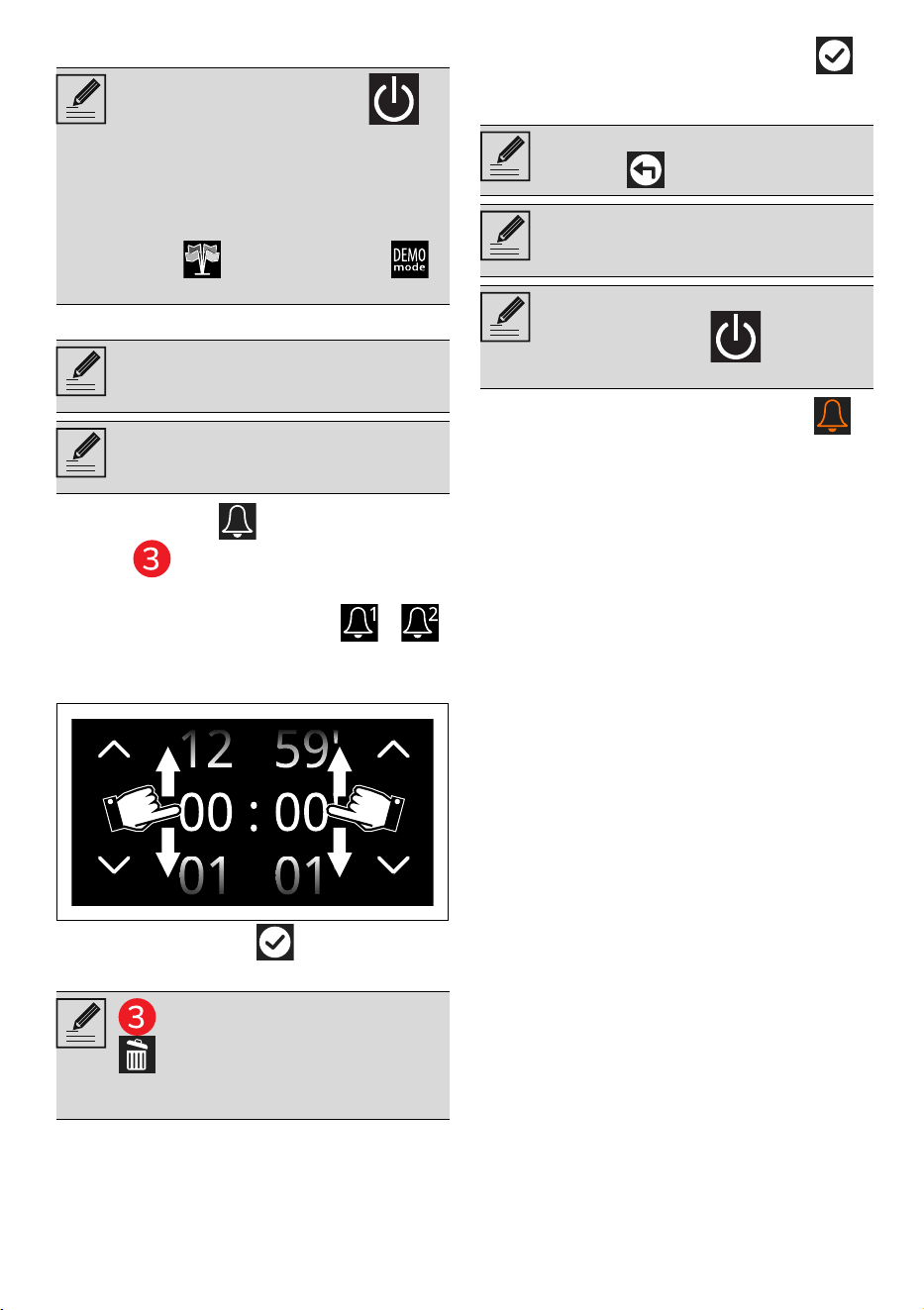
First use
To switch on the appliance:
1. Connect the appliance to the mains
power supply.
The manufacturer’s logo will display for a
few seconds.
Next, the display shows the setting screen
for the current time.
To be able to start any cooking function, the
current time must be set.
2. Scroll up and down through the hours
and minutes to set the current time.
3. Touch the CONFIRM button (at the
right in the lower area ) to set the
current time.
When first used, the appliance may be set
to a different language from yours. It is
recommended that you set the required
language at this point.
4. Touch the SETTINGS button on the
display (at the right in the lower area
).
5. Touch the DISPLAY button.
6. In the Language option (on the left),
scroll through the available languages
(on the right) to select the required
language.
7. Touch the CONFIRM button.
Reactivating the display
To reactivate the display when it is off:
• Open the door.
The appliance emits a sequence of sounds
and the display lights up after a few
seconds. The display shows the main menu
when it is switched on again.
Display deactivation (only models with
ON-OFF button)
To deactivate the display manually:
• Press and hold the ON-OFF
button for a few seconds until you hear
a sound.
Display reactivation (only models with ON-
OFF button)
To reactivate the display when it is off:
• Press and hold the ON-OFF
button for a few seconds until you hear
a series of sounds.
The display turns on after a few seconds.
The display shows the main menu when it
The following instructions are also
valid in the case of a prolonged
power failure.
After the appliance is switched on,
you will need to wait a few seconds
before you can use it.
To change the current time (e.g. due
to summer/winter time), touch the
time shown on the display (located
in the information area on the
right).
When the current time is displayed,
after 2 minutes from the last user
operation, the display shifts to low
brightness.
When the " Show the time"
mode is set to Off, if the time display
is shown, the display will switch off
automatically after 2 minutes.
When the " Show the time"
mode is set to Off, if the time display
is shown, the display will switch off
automatically after 2 minutes.
USE - 5791477B706/A
e
is switched on again.
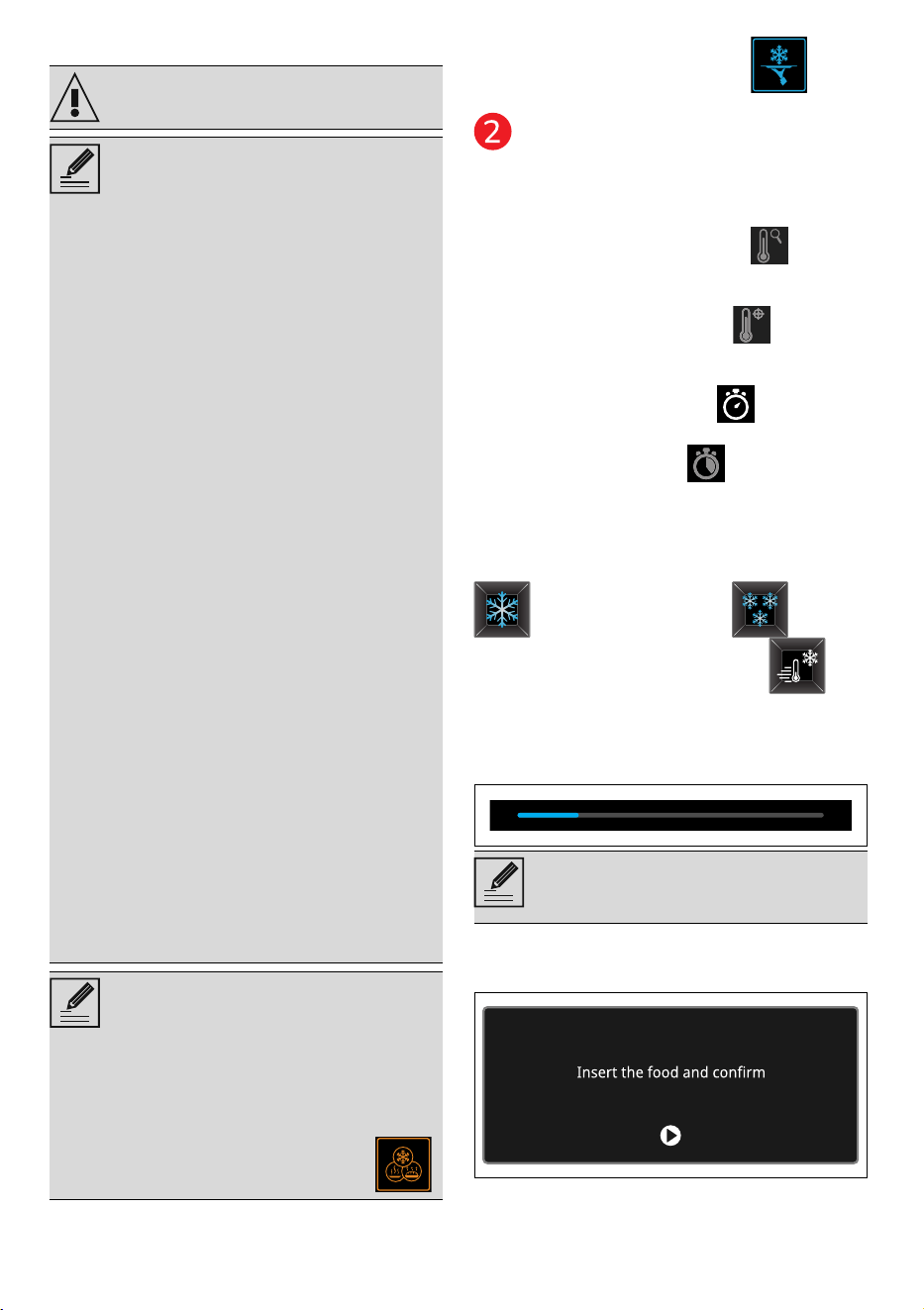
Minute minder timer
1. Tap the TIMER button (in the lower
area ) to access the Timer menu.
Up to 2 minute minder Timers can be set:
2. Tap the button of the TIMER -
that you intend to use.
3. Scroll through the values and select the
required duration.
4. Tap the CONFIRM button to
confirm the selected duration.
5. Repeat the procedure for the other
Timers that you intend to use.
6. When finished, tap the CONFIRM
button again to confirm the selected
timers.
In the following display, the lit TIMER
button, indicates that one or more minute
minder timers have been activated.
7. Wait for the buzzer to indicate that the
time has finished.
In some cases, the ON-OFF
button does not deactivate the
display. For example, when:
• there is a function in progress;
• the door is open;
• a minute minder timer is active;
• the Showroom and/or
Demo modes are active.
This function only activates the
buzzer, without stopping the
function in progress.
The Timer can be set from a
minimum of 1 minute to a maximum
of 12 hours and 59 minutes.
The DELETE button appears
in the lower area that can be
used to delete a timer if one has
been selected.
To cancel the operation, touch the
RETURN button.
The counter must be set to zero in
order to remove the minute minder
timer.
The display cannot be switched off
using the ON-OFF button
when a timer is active.
58 - USE 91477B706/A
Cold programmes
Tap the COLD PROGRAMMES
button in the "main menu" (in the main area
).
THINGS TO KNOW
Depending on the function selected, the
following parameters are displayed:
• CURRENT TEMPERATURE button
(deactivated): indicates the temperature
inside the cavity in real time.
• TARGET TEMPERATURE button
(deactivated): indicates the temperature
to be reached inside the cavity.
• FUNCTION DURATION button: to
set a duration for the function.
• END OF FUNCTION button
(deactivated): indicates the function end
time.
PRE-COOLING
Some cold functions (BLAST CHILLING
and DEEP-FREEZING ) are
preceded by a pre-cooling stage
which allows the appliance to reach the
preset temperature more quickly.
This stage is indicated by a progressive
increase in the temperature level reached.
After pre-cooling, a buzzer will sound and a
message is displayed to indicate that the
dish can be put in the appliance cavity.
Function start
At the end of pre-cooling:
See General safety instructions.
• Each time the door is opened, the
function in progress will stop and
then automatically restart when
the door is closed again.
• The initial temperature of the
food (especially if it is cooked)
can vary the times indicated in
the programs.
• Foods of equal weight but
different thickness may require
different times from those
indicated in the programs.
• It is recommended not to stack
food or make several layers.
• Do not deep-freeze or blast chill
food in lidded containers.
• On the rack, use a container
slightly larger than the food to
allow optimal airflow into the
cavity.
• Do not fill the container to the
brim to enable it to be closed
better later.
• In some functions it is not
possible to select the food
weight, as it does not affect the
function duration.
• In cool programmes, it is not
possible to skip the pre-cooling
phase.
• It is recommended to replace the
container used during cooking
(usually Pyrex glass, ceramic,
cast iron or other refractory
material) with an aluminium
container, in order to avoid
retaining and releasing excessive
heat inside the cavity during the
rapid cooling of large portions of
cooked food.
The preset durations for each
selected function are indicative/
recommended only and can be
adjusted according to your own
needs and preferences.
Alternatively, it is possible to set all
parameters as desired by selecting
the required function from the
MANUAL FUNCTIONS menu .
It is recommended not to introduce
food into the cavity of the appliance
during the pre-cooling stage.
USE - 5991477B706/A
e
1. Open the door
2. Insert the dish into the cavity.
3. Close the door.
4. Tap the CONFIRM button to start
the function.
This stage is indicated by a progressive
increase in the horizontal bar.
BLAST CHILLING
1. Tap the BLAST CHILLING button.
2. Select the type of food to be blast chilled
(e.g. VEGETABLES AND SIDE DISHES
).
3. Select the cut of the food to be blast
chilled (e.g. WHOLE VEGETABLES
).
4. Select the status of the food to be blast
chilled (RAW FOOD or COOKED
FOOD ).
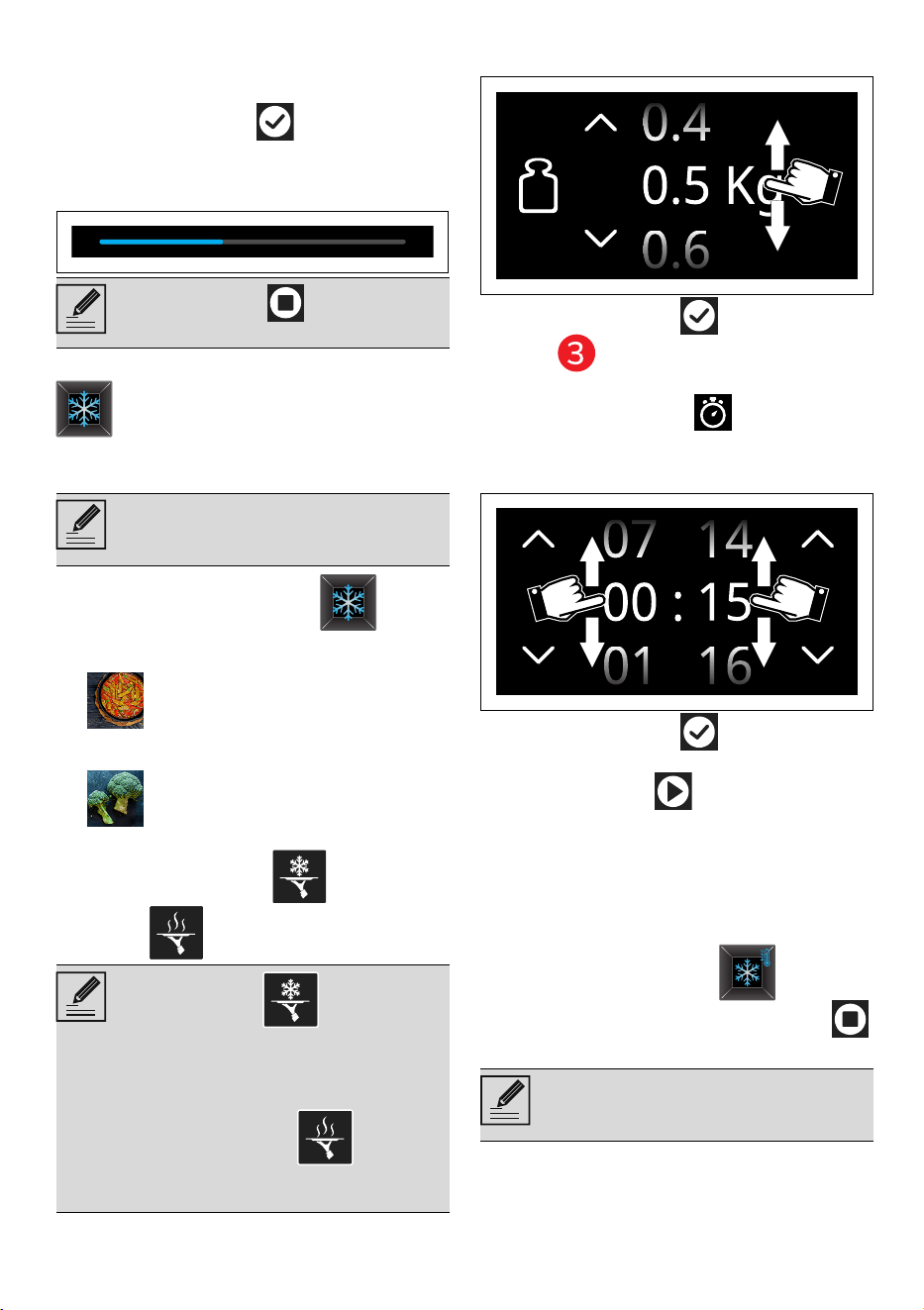
5. Scroll through the values to set the
weight of the food to be blast chilled.
6. Tap the CONFIRM button (at the
right in the lower area) to confirm
the selected value.
7. Tap the DURATION button or the
relevant value.
8. Scroll through the values and select the
required duration.
9. Tap the CONFIRM button to
confirm the settings.
10. Tap the START button to start the
pre-cooling stage and subsequent blast
chilling function (see chapter THINGS
TO KNOW).
End of the function
At the end of the function, the appliance
automatically switches to the
PRESERVATION condition and
remains in this condition until the STOP
button is pressed.
Tips for blast chilling food
• Before introducing hot food to be blast
chilled, it is always recommended to run
the pre-cooling cycle of the (empty)
Touch the STOP button to start
the function at any time.
This function allows you to quickly
chill raw or recently cooked foods to
+3°C.
After blast chilling, food can be kept
in the refrigerator (+4°C).
Blast chilling stops bacteriological
proliferation and retains the
properties of food.
• RAW FOOD : refers to food
that is at room temperature or
cold from the fridge or that
otherwise needs to be cooked
and/or reheated.
• COOKED FOOD : this is
food that has just been cooked
and is still hot.
The state of preservation keeps food
at the correct temperature
according to the function used.
60 - USE 91477B706/A
cavity to reduce time and energy
consumption.
• Ensure that the containers are suitable
for use at low temperatures.
• Arrange the trays or containers evenly
inside the appliance, ensuring you do
not stack them or place them on top of
each other in order to allow air to
circulate.
• Avoid keeping hot food at room
temperature before blast chilling in order
to retain correct properties.
• Blast chilled food should be kept in the
refrigerator at a constant temperature of
+4°C.
• Blast chilled food must not be stored
inside the appliance.
FREEZING
1. Tap the DEEP-FREEZING button.
2. Select the type of food to be deep-
frozen (e.g. DESSERTS ).
3. Select the type of food to be deep-
frozen (e.g. SOFT CAKES ).
4. Scroll through the values to set the
weight of the food to be deep-frozen.
5. Tap the CONFIRM button to
confirm the selected value.
6. Tap the DURATION button or the
relevant value.
7. Scroll through the values and select the
required duration.
8. Tap the CONFIRM button to
confirm the settings.
9. Tap the START button to start the
pre-cooling stage and subsequent
deep-freezing function (see chapter
THINGS TO KNOW).
End of the function
At the end of the function, the appliance
automatically switches to the
PRESERVATION condition and
remains in this condition until the STOP
button is pressed.
Tips for storage of deep-frozen food
• Deep-frozen food must not be stored
inside the appliance.
• Cover and protect food with cling film,
tight and sealed or vacuum covers in the
refrigerator or freezer.
• Label deep-frozen food to be stored in
the freezer for 6-12 months with their
content, date of preparation and expiry
date.
• Deep-frozen food should be kept in the
freezer at a constant temperature of -
18°C.
Deep-frozen foods storage life table
DRINKS COOLING
1. Open the door.
This function allows the
temperature of food to be rapidly
brought down to a temperature of -
18°C.
During deep-freezing do not cover
trays or containers with insulating
films or covers.
It is recommended to grease the pan
or container before deep-freezing
the food.
Time values of less than 15 minutes
cannot be entered.
For some types of food, it is not
possible to change the duration.
The state of preservation keeps food
at the correct temperature
according to the function used.
Foodstuff Time
Fruit, beef max 10-12 months
Vegetables, veal, poultry max 8-10 months
Game max 6-8 months
Pork max 4-6 months
Mince max 4 months
Bread, desserts, cooked
foods, oily fish
max 3 months
Offal max 2 months
Sausages, lean fish max 1 month
This function allows you to chill
different kinds of beverages down
to the perfect drinking temperature.
USE - 6191477B706/A
e
2. Insert the multifunctional rack in an
upside-down position inside the
compartment.
3. Place the bottles to be chilled on the
multifunctional rack.
4. Close the door.
5. On the display, in the cold function
screen, press the DRINKS COOLING
button.
6. Press on the name of the drink you
want, (for example RED WINE ).
7. Choose the number of bottles to be
chilled, scrolling from 1 to 10.
8. Tap the CONFIRM button to
confirm the selected value.
9. Tap the DURATION button or the
relevant value.
10. Scroll through the values and select the
required duration.
11. Tap the CONFIRM button to
confirm the settings.
Cooling stage
12. Touch the START button to start
the function.
This stage is indicated by a progressive
increase in cooling.
End of the function
At the end of cooking, "Function ended"
displays and a buzzer sounds briefly, which
can be deactivated by touching any point of
the display or by opening the door.
• Touch the HOME button to exit
from the function.
Types of beverages
RED WINE
Stems with bends must face
upwards while mechanical safety
blocks must face the rear of the
appliance compartment.
It is recommended inserting the
bottles from the middle position.
Time values of less than 5 minutes
cannot be entered.
Touch the STOP button to start
the function at any time.
•Young red wines
• Mature rosé wines
• Cask-matured white wines
62 - USE 91477B706/A
STILL WHITE WINE
SPARKLING DRINKS
BEER
LIQUEUR (SPIRITS)
LIQUEUR (FORTIFIED WINES)
DRINKS
WATER
CONSERVATION
1. On the display, in the cold function
screen, press the PRESERVATION
button.
2. Select the type of food to preserve (e.g.
ICE CREAM ).
Preservation stage
3. Open the door.
4. Insert the dish to be preserved into the
cavity.
5. Close the door.
6. Touch the START button to start
the function.
End of preservation
To end the preservation function.
7. Touch the STOP button to start the
function at any time.
8. Touch the HOME button to exit
from the function.
RAW FISH SANITISING
• Young white wines
• Complex, mature white wines
• Straw wines (white)
• White fortified wines
•Young rosé wines
• Young grappa
•Champagne
• Sparkling wines
• Lightly sparkling wines
•Porter
• Blanche-Witbier
• APA (American Pale Ale)
• Pilsner
• Strong Belgian Ale
•Trappist
• IPA (Indian Pale Ale)
•Weiss
•Bock
•Stout
•Grappa
• Eau de vie
•Gin
•Cognac
• Tequila
•Vodka
•Whisky
•Rum
•Port wine
•Marsala wine
•Madeira wine
• Sherry (Xeres wine)
• Carbonated drinks
• Fruit juices
• Smoothies and juice extracts
•Mineral
• Sparkling
•Flavoured
• Iced coffee
• Teas, herbal teas and cold
infusions
This function keeps food at the
required temperature.
Time and temperature cannot be
changed in this function. To set the
parameters as desired, select
CONSERVATION from the MANUAL
FUNCTIONS menu .
This long-duration function
(approximately 28 hours) makes it
possible to sanitise food while
maintaining its organoleptic
qualities, preserving flavour, texture
and appearance.
Not sanitising raw fish is extremely
dangerous: parasites, bacteria and
viruses can cause serious infections
and poisoning. This function is
essential to ensure food safety and
protect your health.
USE - 6391477B706/A
e
1. Tap the RAW FISH SANITISING button
.
2. Tap the START button to start the
pre-cooling stage and subsequent
deep-freezing function (see chapter
THINGS TO KNOW).
End of the function
At the end of the function, the appliance
automatically switches to the
PRESERVATION condition and
remains in this condition until the STOP
button is pressed.
Hot programmes
Tap the HOT PROGRAMMES button
in the "main menu" (in the main area ).
THINGS TO KNOW
Depending on the function selected, the
following parameters are displayed:
• CURRENT TEMPERATURE button
(deactivated): indicates the temperature
inside the cavity in real time.
• TARGET TEMPERATURE button
(disabled) or (only on some
functions): used to set the temperature
to be reached inside the cavity.
• MEASURED CORE PROBE button
(disabled and only on some functions):
indicates the temperature inside the
food in real time.
• TARGET CORE PROBE button (only
on some functions): used to set the
temperature to be reached inside the
food.
• FUNCTION DURATION button
(disabled) or (only on some
functions): used to set the function
duration.
• END OF FUNCTION button
(deactivated): indicates the function end
time.
PRE-HEATING
Some hot functions (SLOW COOKING
and YOGURT ) are preceded
by a preheating phase
, which allows
the appliance to reach the cooking
temperature more quickly.
Preset parameters:
• Pre-cooling at -30 °C for 30
minutes
• Deep-freezing at -30°C for 4
hours
• Conservation at -20°C for 24
hours
Time and temperature cannot be
changed in this function. To set the
parameters as desired, select DEEP-
FREEZING from the MANUAL
FUNCTIONS menu .
The state of preservation keeps food
at the correct temperature
according to the function used.
See General safety instructions.
• Each time the door is opened, the
function in progress will stop and
then automatically restart when
the door is closed again.
• It is recommended not to stack
food or make several layers.
• In some functions it is not
possible to select the food
weight, as it does not affect the
function duration.
• In hot programmes, it is not
possible to skip the preheating
phase.
The preset parameters for each
selected function are indicative/
recommended only and can be
adjusted according to your own
needs and preferences.
Alternatively, it is possible to set all
parameters as desired by selecting
the required function from the
MANUAL FUNCTIONS menu .
64 - USE 91477B706/A
In addition, in some functions this phase is
set to 65°C to promote effective sanitisation
of the appliance cavity.
This phase is indicated by the gradual
increase in the temperature level reached.
After pre-heating, a buzzer will sound and a
message will appear on the display to
indicate that the dish can be put in the oven
cavity.
Function start
At the end of the preheating stage:
1. Open the door
2. Insert the dish into the cavity.
3. Close the door.
4. Tap the CONFIRM button to start
the function.
This stage is indicated by a progressive
increase in the horizontal bar.
SLOW COOKING (with the temperature
probe)
1. Tap the SLOW COOKING button.
2. Select the type of food to cook (e.g. FISH
).
3. Select the cut of the food to be blast
chilled (e.g. SALMON ).
4. Scroll through the values to set the
weight of the food to be slow cooked.
5. Tap the CONFIRM button to
confirm the selected value.
6. Tap the TARGET CORE PROBE
button in the main area .
7. Scroll through the target temperature
values and select the required
temperature.
8. Tap the CONFIRM button to
confirm the selected probe temperature.
Unless otherwise indicated in the
recipe, it is not recommended to
place food in the oven during the
preheating stage.
Touch the STOP button to start
the function at any time.
Low-temperature preparations are
long-lasting cooking processes for
food that retain their juices inside,
with the result that they do not dry
out or harden.
Before slow cooking, it is
recommended to use the blast
chilling function for fish.
For best results, it is recommended
browning the food for a few minutes
in a frying pan or by means of the
oven grill before or after cooking at a
low temperature (depending on the
recipe).
The symbol indicates that the
probe is not connected to the
appliance.
USE - 6591477B706/A
e
9. Tap the START button to start the
pre-cooling stage and subsequent slow
cooking function (see chapter THINGS
TO KNOW).
End of low-temperature cooking
The function ends when the instantaneous
temperature reaches the target
temperature.
1. Open the door.
2. Remove the probe from the food.
3. Unscrew the ring nut and disconnect the
temperature probe plug from the socket
on the inside of the appliance.
4. Take out the food from the cavity.
5. Close the door.
DEFROST BY WEIGHT
1. Open the door.
2. After weighing the dish, place it in the
cavity.
3. Close the door.
4. Select DEFROST BY WEIGHT .
5. Select the type of food to defrost from
the categories MEAT - FISH - BREAD -
DESSERTS - FRUIT.
6. Scroll through the values to set the
weight of the food to be defrosted.
7. Touch the CONFIRM button to
confirm the settings.
8. Tap the TARGET TEMPERATURE
button or the relevant value.
9. Scroll through the values and select the
required temperature.
10. Tap the CONFIRM button to
confirm the selected cooking
temperature.
11. Tap the DURATION button or the
relevant value.
12. Scroll through the values and select the
required duration
13. Touch the CONFIRM button to
confirm the settings.
14. Tap the START button to start the
defrost by weight function.
When finished, a buzzer will sound briefly,
which can be deactivated by touching any
point of the display or by opening the door.
The appliance automatically switches to the
PRESERVATION condition and
remains in this condition until the STOP
button is pressed.
PROVING
1. Open the door
2. Position the dough to prove on the
second level.
3. Close the door.
4. Select PROVING .
5. Select the type of proving (6H or 24H).
Manual defrosting function. Choose
the food and enter the temperature
and duration parameters required
for correct defrosting.
If the internal temperature is greater
than the one required, the function
will be stopped immediately and
“Internal temperature unsafe, please
wait until the oven is cool” will
display. Allow the appliance to cool
down before activating the function.
The state of preservation keeps food
at the correct temperature
according to the function used.
Defrosting times may vary on the
basis of the shape and size of the
food to be defrosted.
When defrosting heavy and/or
irregularly shaped food (e.g. chicken,
fish, etc.), it is advisable to turn it
inside the oven cavity at least once
by 180°.
This function is particularly suitable
for proving dough.
If the internal temperature is greater
than the one required, the function
will be stopped immediately and
“Internal temperature unsafe, please
wait until the oven is cool” will
display. Allow the appliance to cool
down before activating the function.
For successful proving, a container
of water should be placed in the
bottom of the oven.
6H PROVING: ideal for doughs with
a substantial amount of yeast and
needing a fairly short resting time.
66 - USE 91477B706/A
6. Touch the CONFIRM button to
confirm the settings.
7. Tap the START button to start the
proving cycle.
When finished, a buzzer will sound briefly,
which can be deactivated by touching any
point of the display or by opening the door.
Tips for optimal proving
• Use metal or ceramic containers, or
other materials suitable for
temperatures up to 80°C.
• For flours with a high W index, use a
smaller quantity of dough and set a
longer proving time.
• Use smaller quantities of yeast, for
example 4 grams in 1 kg of dough and
prove the dough for longer to make it
more fragrant and digestible.
• Cover the dough with cling film.
• Use a sourdough starter to obtain
fluffier, lighter and more digestible
doughs.
• Reduce the quantity of yeast used and
prove at a constant temperature for the
best dough proving results.
• If a fast proving (between 60 and 120
minutes) is desired, it is recommended
using the MANUAL PROVING function
and setting a temperature of 35°C.
YOGHURT
Preparing the mixture
1. Pour one litre of milk into a saucepan
and heat it over low heat to a
temperature of about 38-45°C.
2. Meanwhile, pour 125 grams of yoghurt
(or a sachet of commercially available
freeze-dried lactic ferments) into a
container.
3. When the milk has reached
temperature, remove it from the heat
and pour it a little at a time into the
container with the yoghurt (or cultures),
stirring with the help of a whisk.
4. When finished, distribute the mixture
into 5-6 jars and seal them hermetically
or cover with cling film.
Using the yoghurt function
5. Open the door
6. Place the jars inside the cavity.
7. Close the door.
8. Select the YOGHURT function.
9. Tap the START button or start the
pre-heating phase and subsequent
yoghurt function (see chapter THINGS
TO KNOW).
When finished, a buzzer will sound briefly,
which can be deactivated by touching any
point of the display or by opening the door.
Yoghurt preparation tips
• Use pasteurised whole UHT milk and a
pot of white yoghurt.
• For a low-fat yoghurt, use skimmed or
partly skimmed UHT milk and a pot of
low-fat yoghurt.
• To make fruit yoghurt, it is preferable to
use firm, seasonal fruit.
• We recommend peeling and cutting the
fruit into small cubes and cooking it in a
saucepan for about 15 minutes, stirring
often. For a sweeter taste, brown sugar
can be added during cooking or agave
syrup after cooking.
• For a creamier mixture, you can blend
the previously cooked fruit.
• Allow the resulting fruit mixture to cool
before adding it to the yoghurt.
• Add the (cooled) fruit mixture to the
yoghurt before placing it in the cavity of
24H PROVING: ideal for doughs
with minimal amounts of yeast and
requiring a rather long resting
process.
Preset parameters:
• 4°C for 18 hours
• 28°C for 6 hours
Time and temperature cannot be
changed in this function. To set
parameters at will, select PROVING
from the MANUAL FUNCTIONS
menu .
This long-time function (14 hours) is
dedicated to yoghurt production.
Time and temperature cannot be
changed in this function.
Preset parameters:
• Pre-heating to 30°C
• Fermentation at 43°C for 10
hours
• Conservation at 4°C for 4 hours
USE - 6791477B706/A
e
the appliance.
• Alternatively, flavour the yoghurt with a
few drops of flavouring (lemon, orange,
tangerine, etc.). added to the milk just
before putting it in the jar. The
recommended dose is 2 spoons of
flavouring per litre of milk.
Manual functions
Most of the cold and hot functions we have
already examined are grouped in this menu,
but with the possibility of freely choosing
certain settings such as the temperature
and duration of use of the function.
1. Tap the MANUAL FUNCTIONS
button in the "main menu" (in the main
area ).
Using a manual function
2. From the manual functions menu, scroll
to the right or left and select the desired
function.
3. Depending on the function chosen, the
following parameters can be set:
• TIME COUNT button (disabled):
indicates the time progress of a function.
• DURATION button: to set a
duration for the function.
• END OF FUNCTION button: to set
the end time of the function.
• CURRENT TEMPERATURE button
(deactivated): indicates the temperature
inside the cavity in real time.
• CAVITY TEMPERATURE button: to
set the temperature to be reached inside
the cavity.
• MEASURED CORE PROBE button
(disabled): indicates the temperature
inside the food in real time.
• PROBE button (only on some
functions): used to set the TARGET
CORE PROBE temperature to be
reached inside the food.
4. Tap the CONFIRM button to
confirm the selected value.
5. Tap the START button to start the
function.
THINGS TO KNOW
PRE-COOLING
or PRE-HEATING
Some functions are preceded by a pre-
cooling stage or pre-heating stage
(depending on the function selected)
which allows the appliance to reach the
preset temperature more quickly.
This stage is indicated by a progressive
increase in the temperature level reached.
or
After pre-cooling or pre-heating, a buzzer
will sound and a message is displayed to
indicate that the food can be put in the
See General safety instructions.
Each time the door is opened, the
function in progress will stop and
then automatically restart when the
door is closed again.
There are two sub-menus for the
BLAST CHILLING function.
It is not possible to set an END OF
FUNCTION time if no
DURATION time has been set.
The grey-coloured buttons are
deactivated.
It is recommended not to introduce
food into the cavity of the appliance
during the pre-cooling stage.
You can skip the pre-cooling and
pre-heating stage. Tap the relevant
button, or (located in the
lower area )and confirm by
tapping the “YES” button.
68 - USE 91477B706/A
appliance cavity.
Function start
At the end of pre-cooling or pre-heating:
1. Open the door
2. Insert the dish into the cavity.
3. Close the door.
4. Touch the CONFIRM button to start
the function.
This stage is indicated by a progressive
increase in the horizontal bar.
or
Timed function
1. After selecting a function, touch the
DURATION button or the related
value.
2. Scroll through the values and select the
required duration.
3. Touch the CONFIRM button to
confirm the selected duration.
The time expected for the end of function
displays under the duration.
4. Touch the START button to start
the timed function.
Programmed function
1. After setting a timed function, touch the
END OF FUNCTION button or the
relevant value.
2. Scroll through the values and select the
required end of function time.
Touch the STOP button to start
the function at any time.
For some functions, the appliance
automatically switches to the
PRESERVATION condition
and remains in this condition until
the STOP button is pressed.
Timed function is the function which
allows a cooking operation that
ends after a specific time set by the
user.
For some functions, it is not possible
to set the duration.
The hours and minutes can be
selected separately.
Programmed cooking is the function
of time-controlled cooking operation
to be stopped at a preset time
depending on the time set by the
user, after which the appliance will
switch off automatically.
For safety reasons, it is not possible
to set the end of cooking time by
itself without setting the cooking
duration.
The hours and minutes can be
selected separately.
USE - 6991477B706/A
e
3. Touch the CONFIRM button to
confirm the selected end of function
time.
Manual functions list
STANDARD BLAST CHILLING
SOFT BLAST CHILLING
FREEZING
DRINKS COOLING
CONSERVATION
PRE-COOLING
SLOW COOKING
REHEATING
PROVING
DEFROST BY TIME
This function allows you to quickly
chill raw or recently cooked foods to
+3°C.
After blast chilling, food can be kept
in the refrigerator (+4°C).
Standard blast chilling is preceded
by pre-cooling to -10°C.
This function allows you to quickly
chill delicate raw foods to +3°C.
Soft blast chilling is preceded by
pre-cooling to -10°C.
Blast chilling stops bacteriological
proliferation and retains the
properties of food.
The blast chilling functions also
include the use of the temperature
probe. The target temperature to be
reached inside the food is set at 3°C.
Delicate vegetables for which SOFT
blast chilling with cling film is
recommended are:
• radicchio
• Savoy cabbage
• cabbage
• asparagus
• French beans
This function allows the
temperature of food to be rapidly
brought down to a temperature of -
18°C.
This function allows you to cool
different kinds of beverages down
to the required drinking temperature
between 0°C and +20°C.
This function keeps food at the
required temperature between -
20°C and +20°C.
At the end of the function, a 2-
minute countdown starts; if the user
does not intervene, the function will
restart automatically until there is
further user intervention.
This function cools the appliance
cavity to the required temperature
(between -30°C and +5°C) in
preparation for a subsequent
cooling function.
This long-lasting function is useful
for the preparation of food that
retain their juices inside, with the
result that they do not dry out or
harden.
Slow cooking involves the use of the
temperature probe.
This function reheats food that has
already been cooked and stored in
the refrigerator.
The appliance cavity can be set to a
temperature ranging from 65°C to
80°C.
This function is particularly suitable
for proving dough.
The appliance cavity can be set to a
temperature ranging from 4°C to
40°C.
The function allows the food to be
defrosted to the desired
temperature (between 25°C and
30°C). Select the length of time
required for defrosting, when the set
time has elapsed, the function will
stop.
If the internal temperature is greater
than the one required, the function
will be stopped immediately and
“Internal temperature unsafe, please
wait until the oven is cool” will
display. Allow the appliance to cool
down before activating the function.
70 - USE 91477B706/A
READY TO EAT
History
This menu is particularly useful for viewing
and reusing the last functions used.
1. Touch the HISTORY button on the
“main menu” (at the left in the lower
area).
2. Select the function you wish to reuse
and activate them as described in the
previous sections.
Deleting the history
If you wish to delete the history:
1. Touch the HISTORY button on the
"main menu".
2. Touch the BASKET button to delete
the history.
3. Touch the CONFIRM button to
confirm that you wish to delete the
history (or the CANCEL button to
cancel the operation).
Multistep functions
1. Tap the MULTISTEP button on the
"main menu" (at the left in the lower
area).
2. Tap the ADD STEP button.
3. Select the desired function for the first
step (hot or cold function).
4. As described in the previous chapters,
touch the TEMPERATURE ,
DURATION buttons (depending on
the selected function) to select the
parameters you want to change.
5. Scroll through the values and select the
required settings.
6. Tap the CONFIRM button to
confirm the selected values.
7. Tap the ADD STEP button again.
8. Select the required function for the
second step (hot or cold function).
9. Set the required parameters for the
second function.
10. Tap the CONFIRM button to
confirm the selected values.
11. Tap the START button to start the
Multistep function.
The duration of the Defrost by time
function can be from a minimum of 1
minute to a maximum of 12 hours
and 59 minutes.
This function allows you to bring
ready-cooked food (between 40°C
and 70°C) to serving temperature at
a set time.
It is recommended to only warm
pre-sliced or portioned food with a
maximum weight of 1 kg.
It is possible to set a programmed
function by tapping the END OF
FUNCTION button .
Multistep functions mean the
possibility of sequencing two
different functions set by the user.
It is not possible to add a further
step if a duration or target
temperature of the temperature
probe has not been set (if available
for the selected function).
It is not possible to start a cooking
process if a duration or a
temperature or a target temperature
of the temperature probe (if
available for the selected function)
of all steps has not been set.
It is not possible to select the bottle
cooling function.
Not all functions are available in
both steps.
USE - 7191477B706/A
e
In the event of a blackout
Following a power failure during a function,
the appliance automatically resumes the
function it was performing, maintaining all
the previous settings and discounting the
time already elapsed of the function only if
the duration of the power failure is less than
or equal to 60 seconds.
If the power failure occurs in a different
condition, the appliance remains waiting for
manual consent by the user to continue or
not the function, for a while.
If the function is reactivated, settings
remain as they were before the power
failure, taking into account the time already
elapsed.
If there is no intervention by the user, the
appliance cancels the function and the
display shows the current time again.
Blackout during a programmed function
If the power failure occurs while a
programmed cooking process is set:
• If the blackout is restored within the set
start time, the appliance remains in
standby mode updating the time until
start.
• If the blackout is restored after the set
start time, the device waits for the
function to start and, if after a certain
time there is no intervention by the user,
the appliance cancels the function and
the display shows again the current
time.
Function tips
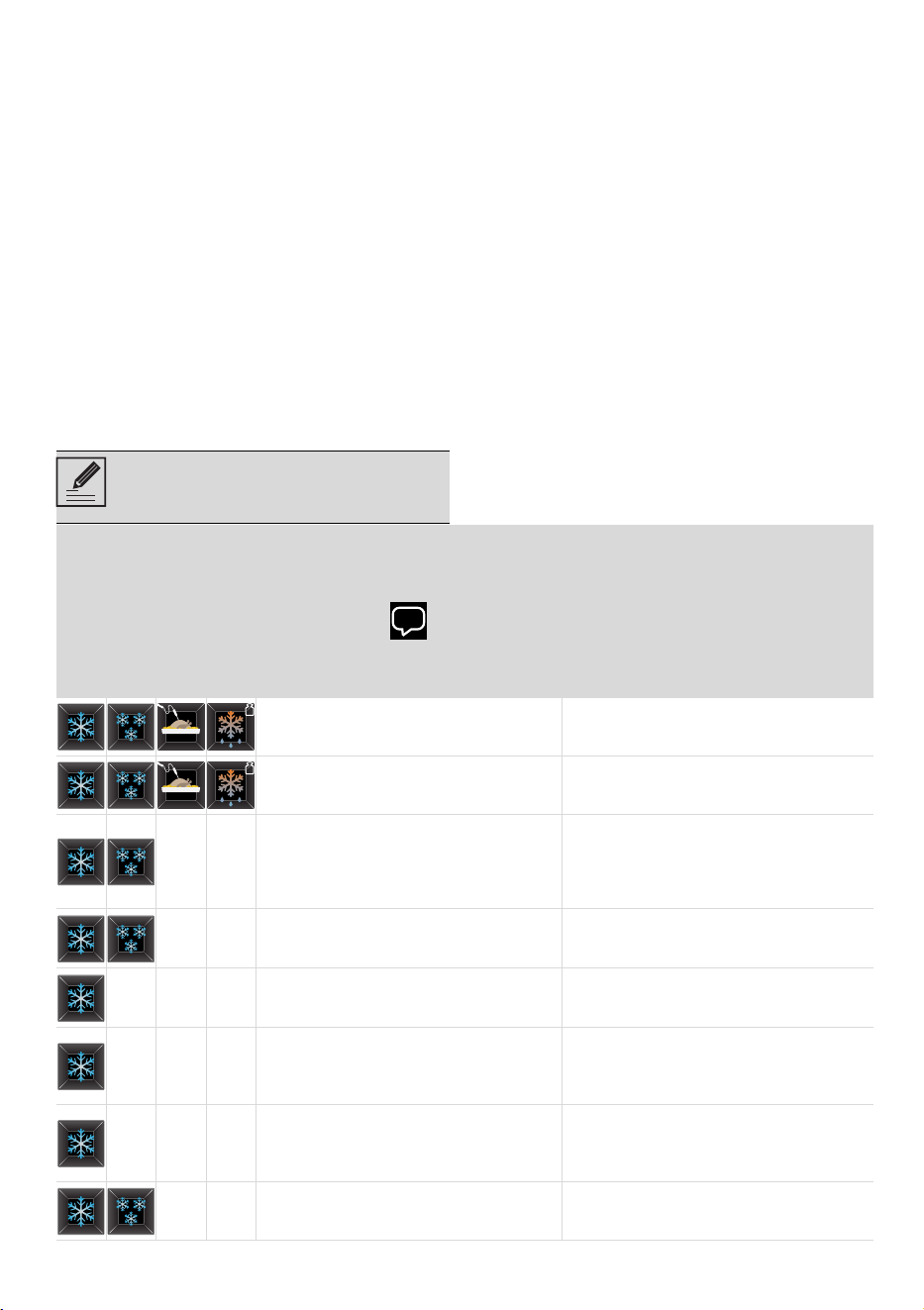
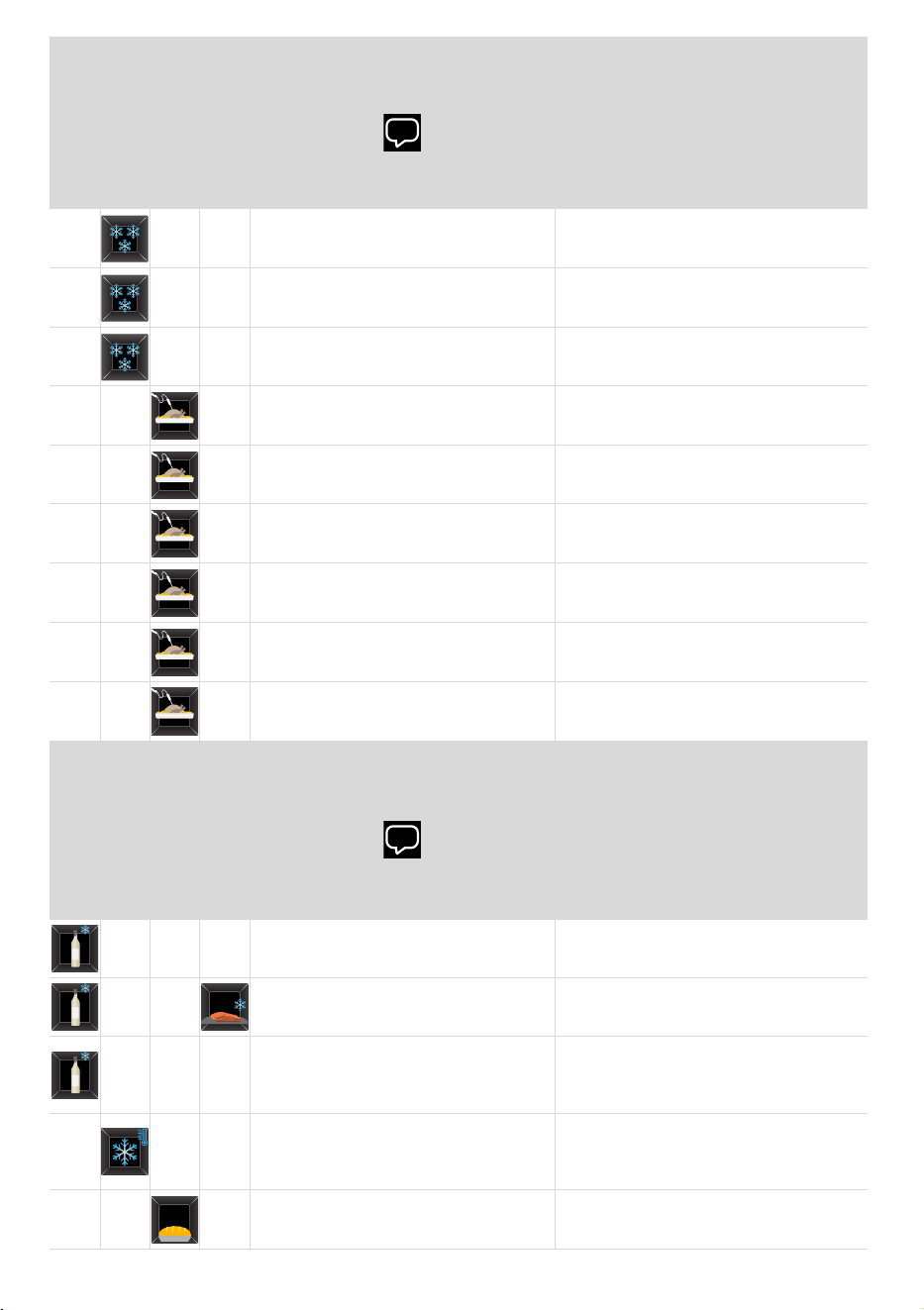
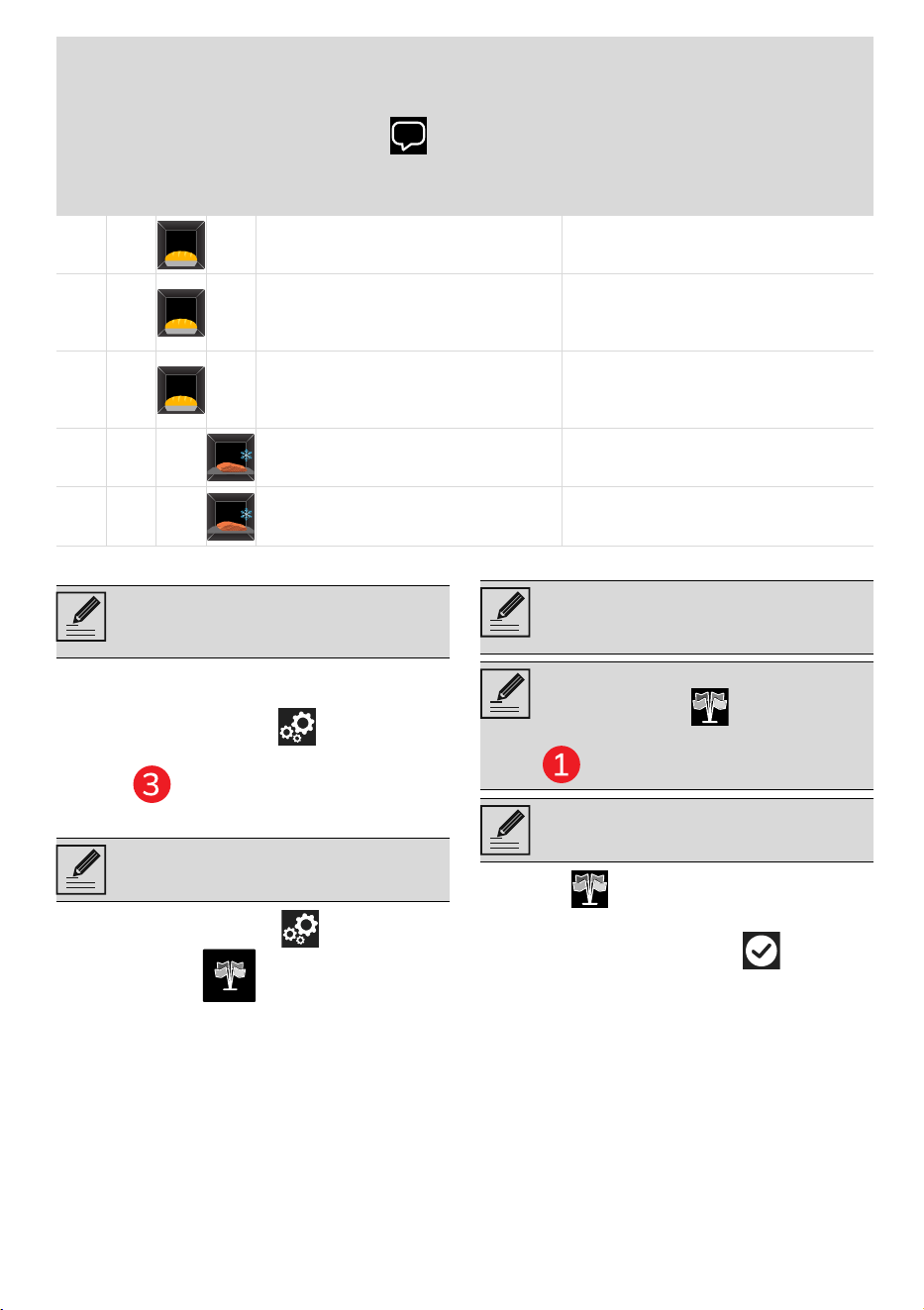
Next, an illustrative table of the suggestions
shown on the display, together with
explanatory notes.
(SmegConnect models only) A
notification also appears in the app
when you reconnect.
BLAST CHILLING
FREEZING
SLOW COOKING
DEFROST BY WEIGHT
Display suggestions
Explanatory notes
It is recommended that you do not to
cover the food with lids or cling film.
To allow the correct food process.
It is recommended that you use the
middle shelf.
To allow correct, uniform and constant
airflow around the food.
It is recommended that you replace
the container used during cooking
(usually Pyrex glass, ceramic, cast
iron or other refractory material) with
an aluminium container.
To avoid retaining and releasing
excessive heat inside the cavity during
the food processing phase.
It is recommended that you arrange
the food spread out, without
overlapping.
To allow uniform exposure of the food
to cold air.
It is recommended that you cover the
food with cling film.
To allow the correct food process
without damaging the parts in direct
contact with the cold air flow.
It is recommended that you use the
lower shelf.
To allow correct, uniform and constant
airflow around the food without it
coming into direct contact with the
cavity walls.
It is recommended not to blast chill
certain delicate vegetables even with
soft blast chilling.
To avoid structural alteration of the
food, as in the case of thin-leaf
vegetables such as spinach, herbs,
salad leaves and tomatoes.
It is recommended that you use the
middle shelf.
If the height of the bread requires it,
use the lower shelf.
72 - USE 91477B706/A
It is recommended to blast chill the
food before freezing.
To reduce bacterial proliferation and
rapidly lower the temperature of the
food.
It is recommended that you arrange
the moulds on a flat container.
To allow the formation of compact ice
lollies or ice cubes with a regular
shape.
It is recommended that you dilute 1
part syrup with 3 parts water.
To obtain ice lollies with a balanced
flavour.
It is recommended that you brown
the food in a pan or grill it after
cooking.
To allow the retention of the food’s
nutritional juices.
Tying the food is recommended to
maintain its shape.
To improve texture and enhance the
flavour of the food.
It is recommended that you brown
the food in a pan before slow
cooking.
About 15 minutes, using oil or butter
as preferred, to retain liquids inside
the food.
It is recommended that you transfer
the food to a tray before slow
cooking.
To avoid retaining and releasing
excessive heat inside the cavity during
slow cooking.
It is recommended that you blast chill
the food before slow cooking.
To prevent bacterial proliferation.
It is recommended that you season
the fish with the desired flavourings
before starting the function.
For example: salt, pepper, oil, herbs or
slices of lemon.
DRINKS COOLING
CONSERVATION
PROVING
RAW FISH SANITIZING
Display suggestions
Explanatory notes
It is recommended that you carry out
pre-cooling with the cavity empty.
To ensure a uniform temperature in
the cooling environment.
It is recommended that you use the
middle shelf.
To allow correct, uniform and constant
airflow around the food.
It is recommended that you arrange
the bottles starting from the centre of
the cavity if the number of bottles is
greater than one.
To allow uniform exposure of the food
to cold air.
It is recommended that you run the
cavity cleaning function with the
cavity empty after completion of the
food conservation function.
To prevent contamination and the for-
mation of mould and other microorga-
nisms.
It is recommended that you carry out
pre-cooling with the cavity empty.
To isolate the food in an impermeable
environment, allowing it to ferment,
rise and mature.
BLAST CHILLING
FREEZING
SLOW COOKING
DEFROST BY WEIGHT
Display suggestions
Explanatory notes
USE - 7391477B706/A
e
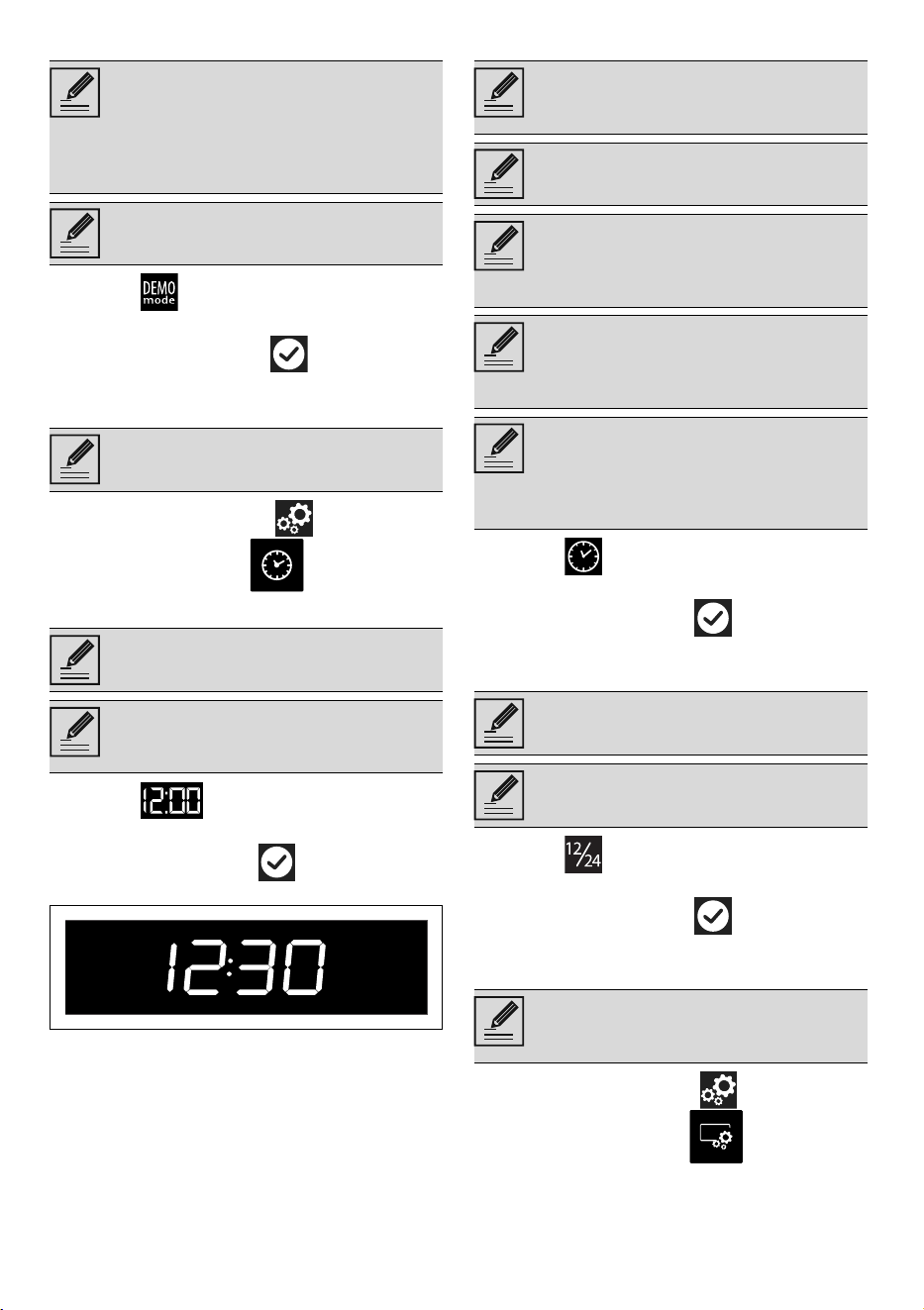
Settings
The product configuration can be set using
this menu.
• Touch the SETTINGS button on the
main menu (at the right in the lower
area ).
EXHIBITION
• In the "settings menu " touch the
EXHIBITION button
Show Room (for showrooms only)
1. Select Show Room.
2. Select On.
3. Touch the CONFIRM button
to activate the Show Room
mode.
It is recommended that you cover the
dough with lids or cling film.
To allow uniform exposure of the food
to cold air.
It is recommended that you work the
dough at the end of the proving cycle.
Once worked, it is recommended that
you let it rest in the tray at room
temperature for the duration of the
oven preheating.
It is recommended that you spread
out the dough at the end of the
proving cycle.
Once spread out, it is recommended
that you let it rest in the tray at room
temperature for the duration of the
oven preheating.
It is recommended that you do not
cover it with lids or cling film.
To allow correct cooling of the food.
It is recommended that you arrange
the food spread out, without
overlapping.
To allow uniform exposure of the food
to cold air.
DRINKS COOLING
CONSERVATION
PROVING
RAW FISH SANITIZING
Display suggestions
Explanatory notes
In the event of a temporary power
cut, all personal settings will remain
stored.
Dedicated menu for exhibitors.
This mode deactivates all the
appliance’s heating elements, while
keeping the control panel active.
During normal operation, it is
indicated by the indicator light
turning on in the information area
.
To use the appliance normally, set
this mode to Off.
74 - USE 91477B706/A
Demo Mode (for showrooms only)
1. Select Demo Mode.
2. Select On.
3. Touch the CONFIRM button to
activate the demo mode.
CLOCK
• In the "settings menu " tap the
CLOCK SETTINGS button.
Digital clock
1. Select Digital clock.
2. Select On.
Touch the CONFIRM button to
activate the Digital clock mode.
Clock display in stand-by
1. Select Show the time.
2. Select On.
3. Touch the CONFIRM button to
activate the time display.
Clock format
1. Select Time format.
2. Select 12h or 24h.
3. Touch the CONFIRM button to
activate the required time format.
DISPLAY
• In the "settings menu " touch the
DISPLAY SETTINGS button.
The same as Show Room, when this
mode is activated, after a certain
period of inactivity, a demonstration
of the various screens that illustrate
the potential of the appliance is
shown on the display.
To use the appliance normally, set
this mode to Off.
Menu where the time and type of
display can be set.
Displays the current time in digital
format.
In the event of a temporary power
cut, the digital version will remain
selected.
Activates/deactivates the clock
display when the appliance is
switched off.
The Clock display in stand-by
function is factory set to Off.
If the Clock display in stand-by
function is set to On, when the
appliance is in stand-by it displays
the current time at low brightness.
When the Clock display in stand-by
function is set to On, the appliance
consumes more power than in
stand-by mode.
Only for SmegConnect models: If the
Clock display in stand-by function is
set to Off, the connectivity switches
off automatically when the clock
sets into stand-by.
Activates/deactivates the clock
display in the 12 or 24 hour format.
The Time format function is factory
set to 24h.
Menu where you can change the
language and modify the display
settings of some parameters.
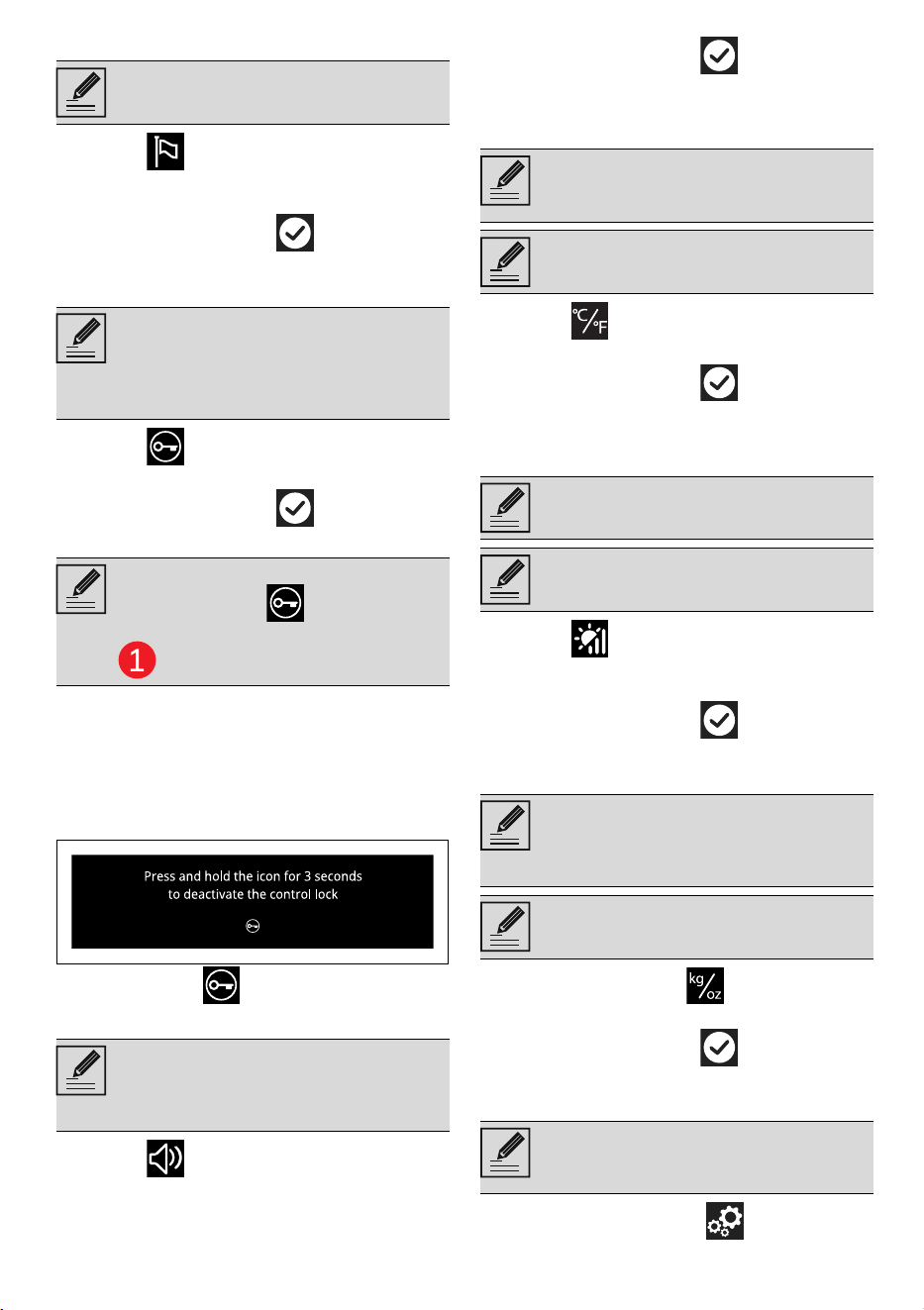
USE - 7591477B706/A
e
Language
1. Select Language.
2. Scroll through the available languages
to select the required language.
3. Touch the CONFIRM button to
confirm the language.
Controls lock
1. Select Controls lock.
2. Select Yes.
3. Touch the CONFIRM button to
activate the Controls lock mode.
To temporarily disable the lock during
cooking:
4. Touch one of the values that you wish to
modify.
A message appears on the display that
indicates how to temporarily disable the
Controls lock mode.
5.
Touch the icon for 3 seconds.
Sound
1. Select Sound.
2. Select Off.
3. Touch the CONFIRM button to
disable the sound associated with the
touching of the symbols on the display.
Temperature Format
1. Select Temperature format.
2. Select °C or °F.
3. Touch the CONFIRM button to
activate the required temperature
format.
Display brightness
1. Select Display brightness.
2. Select from the options High - Medium -
Low.
3. Touch the CONFIRM button to
confirm the selection.
Weight type
1. Select Weight type .
2. Select kg or oz.
3. Touch the CONFIRM button to
activate the desired weight unit.
System info
• In the “settings menu ” touch the
Allows you to select the language of
the display.
Allows the appliance to
automatically lock the controls after
one minute of normal operation
without any intervention from the
user.
During normal operation, it is
indicated by the indicator light
turning on in the information area
.
Whenever one of the display
symbols is pressed, the appliance
beeps. This setting disables these
sounds.
Allows you to set the temperature
scale to degrees Celsius (°C) or
degrees Fahrenheit (°F).
The Temperature format function is
factory set to °C.
This allows the display brightness
level to be selected.
The Display brightness function is
factory set to High.
Allows you to set the unit of
measurement to display the weight
value in kilograms (kg) or in ounces
(oz).
The Weight type function is factory
set to kg.
Menu displaying information about
serial number and software
versions.
76 - CLEANING AND MAINTENANCE 91477B706/A
SYSTEM INFO button (at the right in
the lower area ).
Restore settings
• In the “settings menu ”, tap the
FACTORY RESET button (located in
the lower central area ).
1. Tap the YES button if you wish to restore
the original factory settings.
or
2. Tap the No button to cancel the
operation.
CONNECTION (SmegConnect models
only)
• In the "settings menu " touch the
CONNECTION button.
CLEANING AND MAINTENANCE
Cleaning the appliance
Cleaning the surfaces
To keep the surfaces in good condition, they
should be cleaned regularly after use. Let
them cool first.
Ordinary daily cleaning
Always and only use specific products that
do not contain abrasives or chlorine-based
acids.
Pour the product onto a damp cloth and
wipe the surface, rinse thoroughly and dry
with a soft cloth or a microfibre cloth.
Food stains or residues
Do not use steel sponges and sharp
scrapers as they will damage the surface.
Use normal, non-abrasive products and a
wooden or plastic tool, if necessary. Rinse
thoroughly and dry with a soft cloth or a
microfibre cloth.
Do not allow residues of sugary foods (such
as jam) to set inside the oven. If left to set
for too long, they might damage the enamel
lining of the oven.
Cleaning the cavity
For the best upkeep of the cavity, clean it
regularly after each use.
Avoid letting food residue dry inside, as this
could damage the surfaces.
Take out all removable parts before
cleaning.
Always remove solid residues.
Drying
Cooking and blast chilling/deep-freezing
food generates moisture inside the cavity.
This is a normal phenomenon and does not
affect the appliance operation in any way.
Each time you finish use:
1. let the appliance cool down;
2. remove dirt from the cavity;
3. dry the cavity with a soft cloth;
4. leave the door open until the inside of
the appliance has dried completely.
Removing rack/tray support frames
Removing the rack/tray support frames
enables the sides to be cleaned more easily.
To remove the rack/tray support frames:
• Using a medium-sized slotted
screwdriver, unscrew the pins that
secure the frame to the side panel of the
This restores all settings to the
original factory settings.
Menu where connectivity
parameters are displayed.
For CONNECTION-related settings
refer to the "Built in blast
chiller connectivity" user manual.
See General safety instructions.
In the event you are using specific
cleaning products, we recommend
running the oven at maximum
temperature for 15-20 minutes in
order to eliminate any residue.
At the end of each use, two
automatic cleaning cycles are
recommended to ensure optimal
sanitising of the cavity.
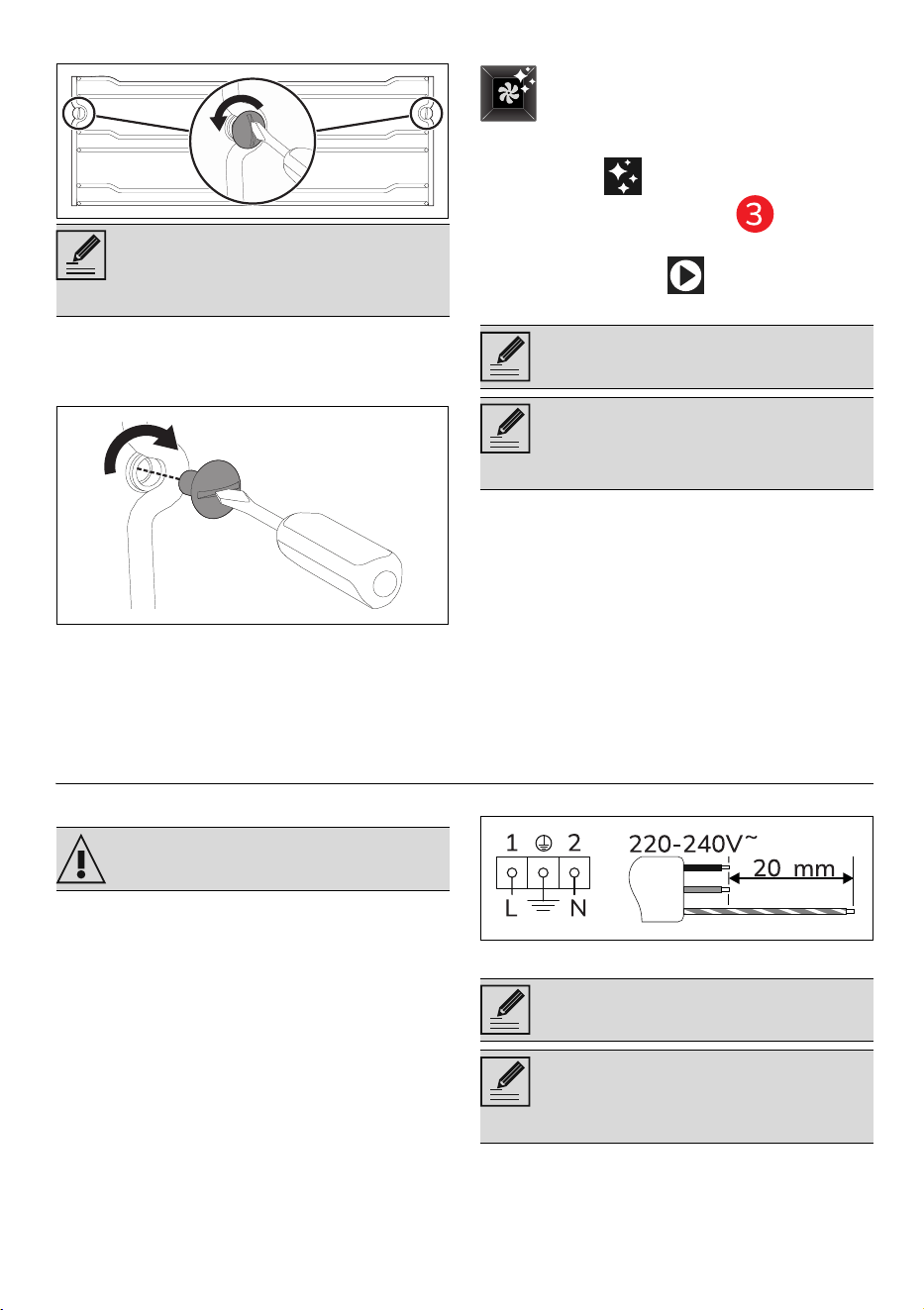
INSTALLATION - 7791477B706/A
e
compartment.
To refit the rack/tray support frames:
• Position the frame on the side panel of
the compartment and screw the
fastening pins into place.
Automatic cleaning
1. Touch the button in the "main
menu" (in the lower area ).
2. Open the door.
3. Press the START button to start the
automatic cleaning.
4. At the end of the automatic cleaning, dry
the inside of the appliance thoroughly.
5. Close the door.
Extraordinary maintenance
Seal maintenance tips
The seal should be soft and elastic.
• To keep the seal clean, use a non-
abrasive sponge and wash with
lukewarm water.
INSTALLATION
Electrical connection
General information
Check the mains characteristics against the
data indicated on the plate.
The identification plate bearing the
technical data, serial number and brand
name is visibly positioned on the appliance.
Do not remove this plate for any reason.
The appliance must be connected to ground
using a wire that is at least 20 mm longer
than the other wires.
The appliance can work in the following
modes:
• 220-240 V~
3 x 1.5 mm² three-core cable.
Fixed connection
Fit the power line with an all-pole circuit
breaker with a contact separation distance
sufficient to provide complete disconnection
Hold the frame firmly with one hand
to prevent it from falling and
damaging the surfaces of the
appliance.
The automatic cleaning function has
the task of sanitising the inside of
the cavity from unpleasant odours
generated during operation.
Automatic cleaning does not start if
the door is closed.
If the door is accidentally closed
during the function, the appliance
interrupts the function while waiting
for the door to reopen.
See General safety instructions.
The values indicated above refer to
the cross section of the internal lead.
The aforementioned power cables
are sized taking into account the
coincidence factor (in compliance
with standard EN 60335-2-6).
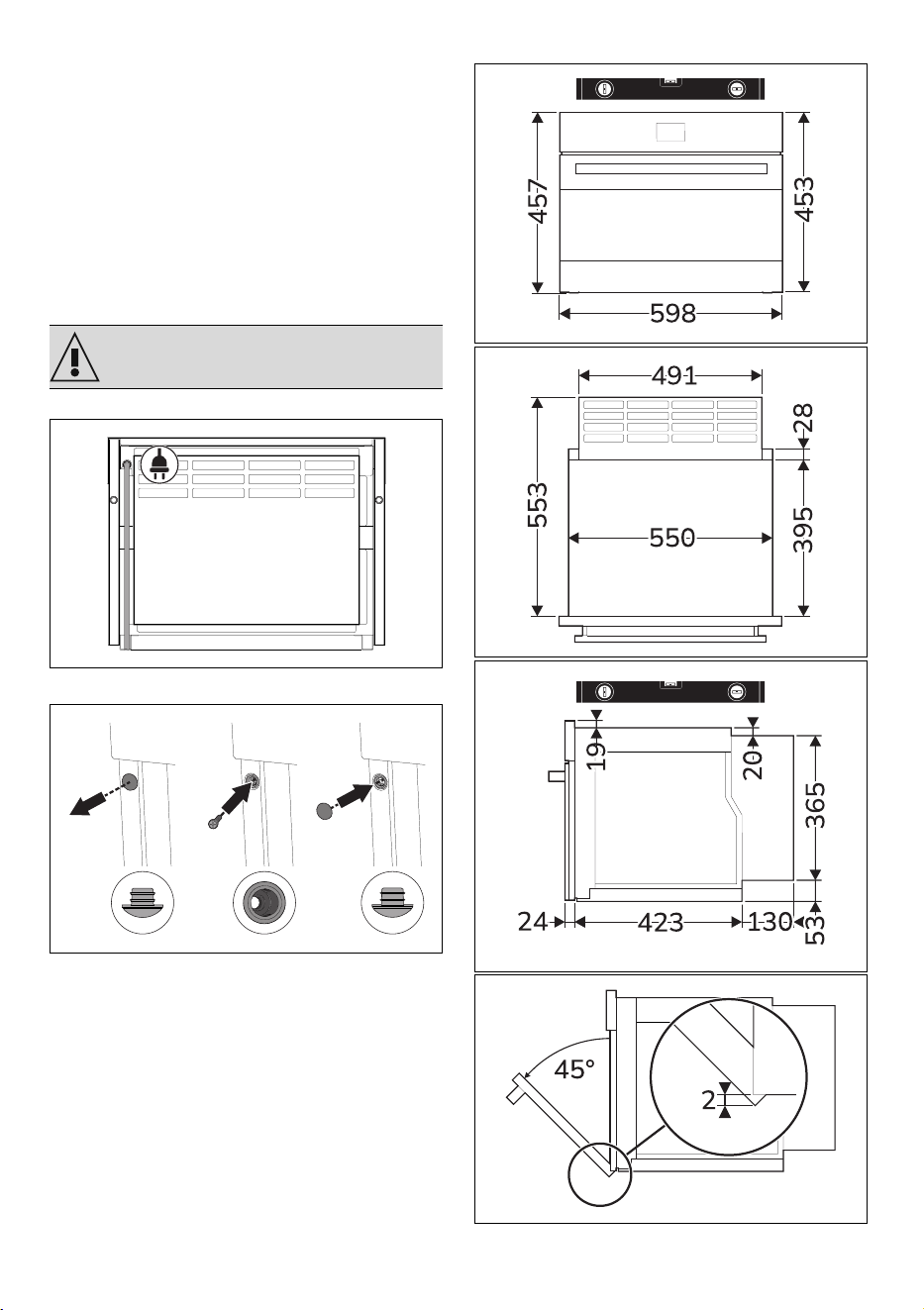
78 - INSTALLATION 91477B706/A
in category III overvoltage conditions,
pursuant to installation regulations.
For the Australian/New Zealand market:
The circuit breaker incorporated in the fixed
connection must comply with AS/NZS 3000.
Connection with plug and socket
Make sure that the plug and socket are of
the same type.
Avoid using adapters, gang sockets or
shunts as these could cause overheating
and a risk of burns.
Positioning
Position of the power cable
Fastening bushings
1. Remove the bushing covers on the front
of the appliance.
2. Mount the appliance into the recess.
3. Secure the appliance to the cabinet
through screws.
4. Cover the bushings with the previously
removed covers.
Appliance overall dimensions (mm)
See General safety instructions.
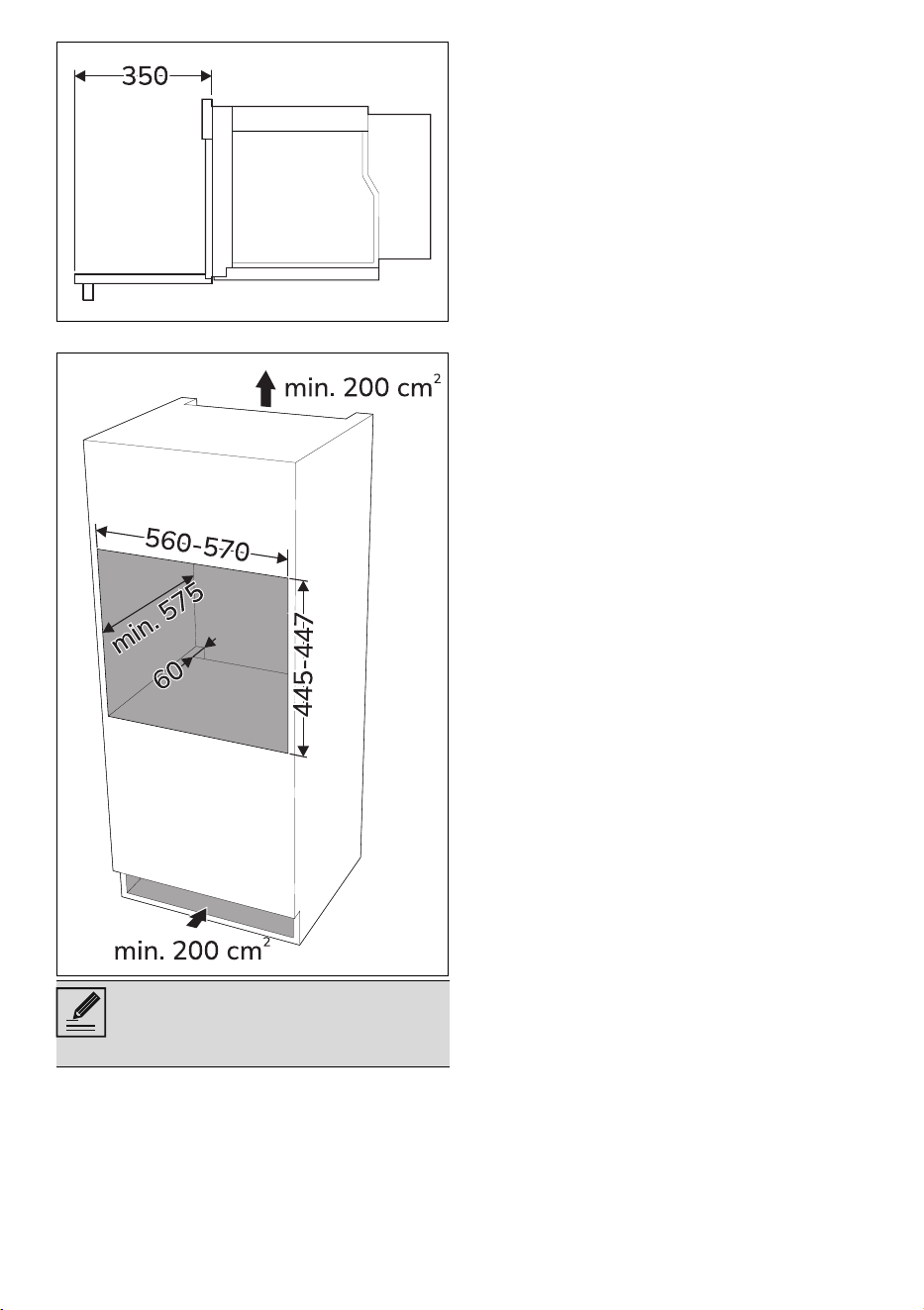
INSTALLATION - 7991477B706/A
e
Mounting into a column (mm)
*Make sure that the cabinet top/
rear section has an opening approx.
60 mm deep.