OPEN /
CLOSE
BL UE TOOTH/CD/USB/SD/AM &F M
BT- 92 28 UC
BT-9228UC

-1-
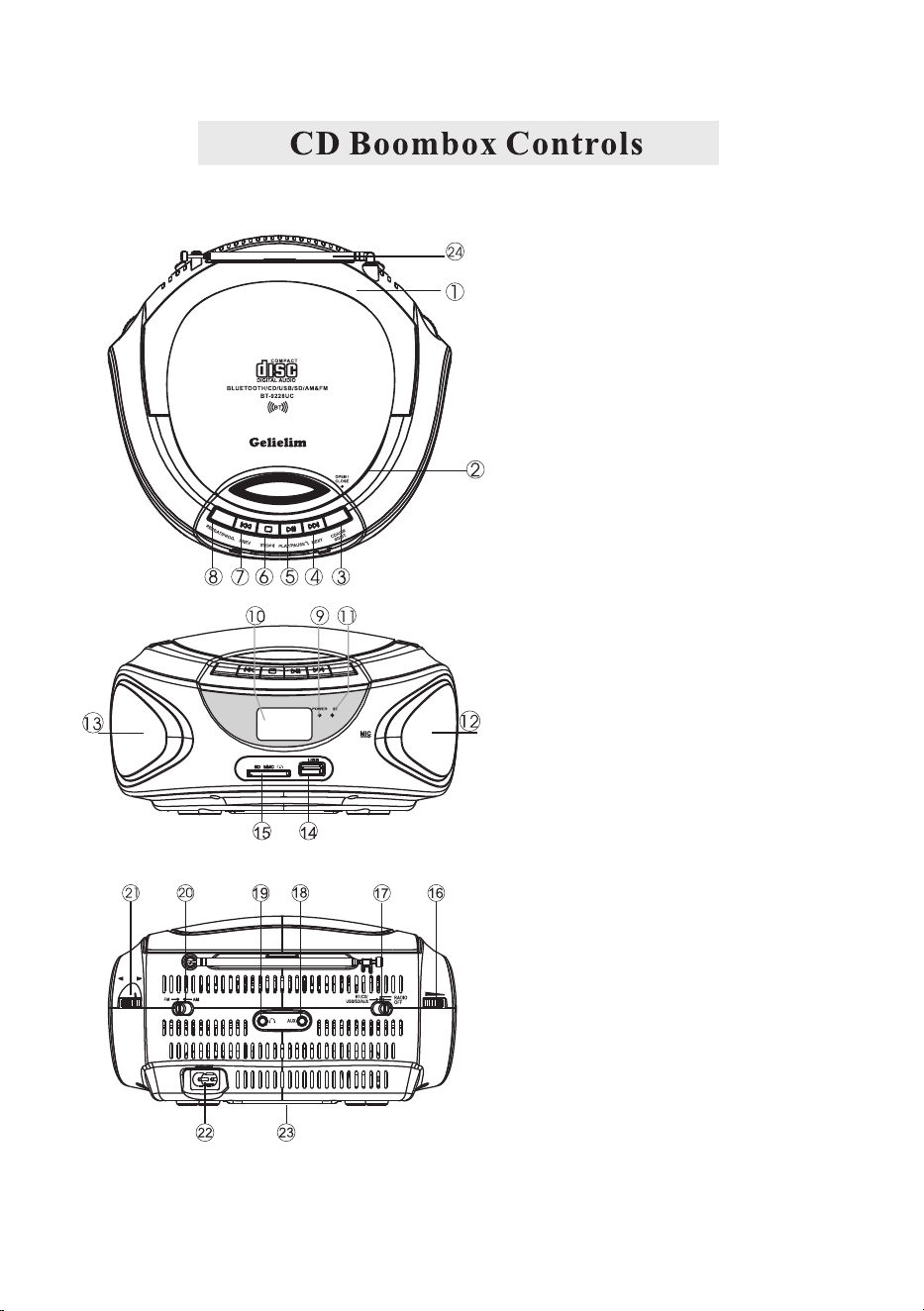
1. HANDLE
2. CD DOOR OPEN/CLOSE
3. CD/USB/SD/BT. FUNCTION BUTTON
4. NEXT/FAST FORWARD
5. PLAY/PAUSE/HANDS FREE FUNCTION
6. STOP/BLUETOOTH CLEAN UP
7. PREVIOUS/FAST REWIND
8. REPEAT/PROGRAM
9. POWER INDICATOR
10. LCD DISPLAY
11. BT INDICATOR
12. LEFT SPEAKER
13. RIGHT SPEAKER
14. USB PORT
15. SD/MMC CARD SLOT
16. VOLUME KNOB
17. FUNCTION SELECTION SWITCH
18. AUDIO INPUT JACK
19. EARPHONE INPUT JACK
20. AM/FM BAND SELECTION SWITCH
21. TUNING KNOB
22. AC SOCKET
23. BATTERY DOOR(BOTTOM)
24. FM ATTENNA
-2-
-3-
CAUTION:LISTENING AT VOLUME POWER FOR A LONG TIME COULD DAMAGE
-4-
function selection switch(17)
Press function button “CD/USB/SD/BT”(3) to enter into CD status
-5-
function selection switch(17)
USB /SD FUNCTION
After power on, slide the to the “BT/CD/USB/SD/AUX”
position. Press function button “CD/USB/SD/BT” to enter into USB/SD status,
Insert the USB/SD CARD into the USD/SD port, the device will play tracks from
USB/SD CARD, the other operation is same as CD operation.
NOTE: USB/SD do not have programming function.
function selection switch(17)
-6-
1. Slide the to be "BT./CD/USB/SD/AUX" position,
the function button (3) to enter into the Bluetooth mode, "BT" word will be
on LCD display, and the Bluetooth indicator (11) will be flashing.
2. Open the set menu of your smart or other Bluetooth devices, go to the
Bluetooth sub menu, find the pairing name of "BT-9228UC", click it to aim to
the main unit, you will hear one sound when successfully paired, and the BT
indicator will be always on, then you can play the music from your devices on
our CD boombox.
(notice: during the pairing, if your devices are with lower version, the device
prompts you to enter password, just input "0000".)
During the music playback, press the PLAY/PAUSE button to pause playback,
resume playback when press it again, you can use PREVIOUS or NEXT button
to selection your desired music song; press STOP button to stop the playback.
3. After paired, press and hold the PLAY button, you can exit the Bluetooth
playback, and briefly press twice to the PLAY button to make a phone call back
4. After paired, when phone call coming, briefly press the PLAY button to answer
the phone, briefly press twice to reject the phone call. After you answer the phone,
briefly press the PLAY button you can hang up.
5. After paired, press and hold the STOP button, you can clean the pairing.
function selection switch(17)
press
shown
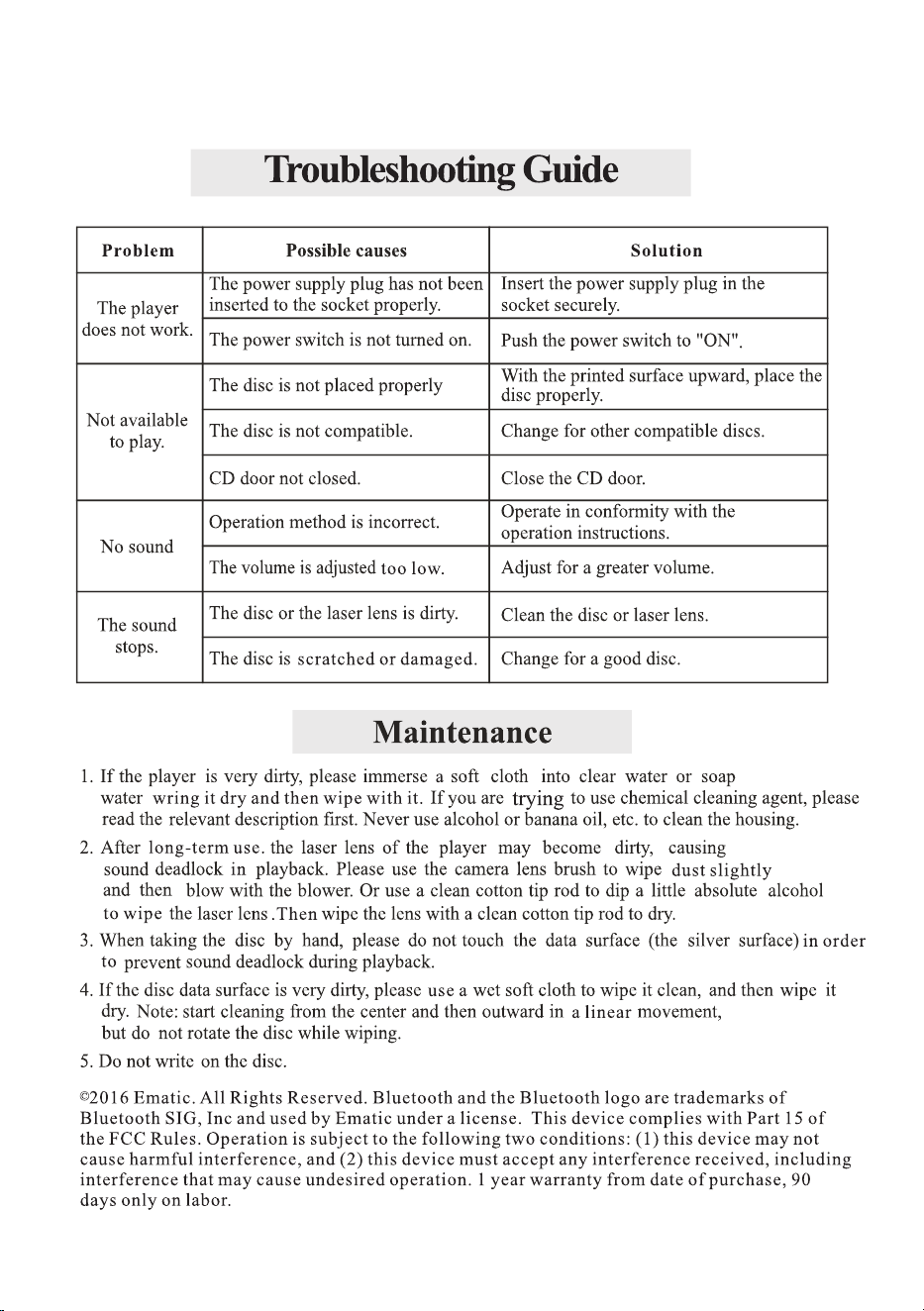
BLUETOOTH FUNCTION
function selection switch(17)
-7-

FCC Warning Statement
Changes or modifications not expressly approved by the party
responsible for compliance could void the user’s authority to operate
the equipment. This equipment has been tested and found to comply
with the limits for a Class B digital device, pursuant to Part 15 of the
FCC Rules. These limits are designed to provide reasonable
protection against harmful interference in a residential installation.
This equipment generates uses and can radiate radio frequency
energy and, if not installed and used in accordance with the
instructions, may cause harmful interference to radio
communications. However, there is no guarantee that interference will
not occur in a particular installation. If this equipment does cause
harmful interference to radio or television reception, which can be
determined by turning the equipment off and on, the user is
encouraged to try to correct the interference by one or more of the
following measures:
‐‐ Reorient or relocate the receiving antenna.
‐‐ Increase the separation between the equipment and receiver.
‐‐Connect the equipment into an outlet on a circuit different from
that to which the receiver is connected.
‐‐ Consult the dealer or an experienced radio/TV technician for
help.
This device complies with part 15 of the FCC Rules. Operation is
subject to the following two conditions: (1) This device may not cause
harmful interference, and (2) this device must accept any interference
received, including interference that may cause undesired operation.
The device has been evaluated to meet general RF exposure
requirement.
A/S CENTER
Thank you for purchasing our product, if you have any questions
during the operation, or have found any quality issues, request
additional information from the store where you purchased the
product, please contact our service center by below email:
Email: [email protected]