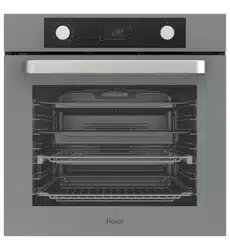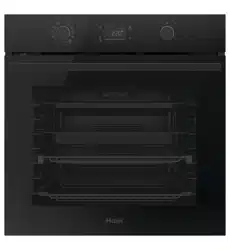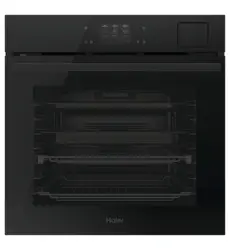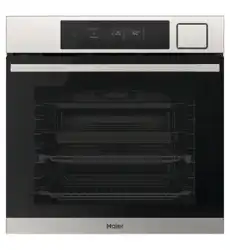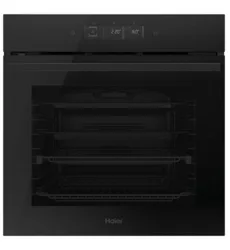

HWO60S14TPB6 and HWO60S14TPX6
Oven, 60cm, 14 Function,
Self-cleaning with Air Fry
USER GUIDE NZ AU


3
CONTENTS
Safety and warnings ................................................................................5
Product overview .................................................................................. 10
Control panel ........................................................................................ 11
First use ............................................................................................... 12
Using the oven . . . . . . . . . . . . . . . . . . . . . . . . . . . . . . . . . . . . . . . . . . . . . . . . . . . . . . . . . . . . . . . . . . . . . . . . . . . . . . . . . . . . . . 14
Cooking functions................................................................................. 17
Wi-Fi connection and remote mode........................................................ 20
Care and cleaning.................................................................................. 21
Replacing the lights ............................................................................... 26
Troubleshooting.................................................................................... 27
Manufacturer's warranty........................................................................ 28
Customer service.................................................................................. 30

4
5
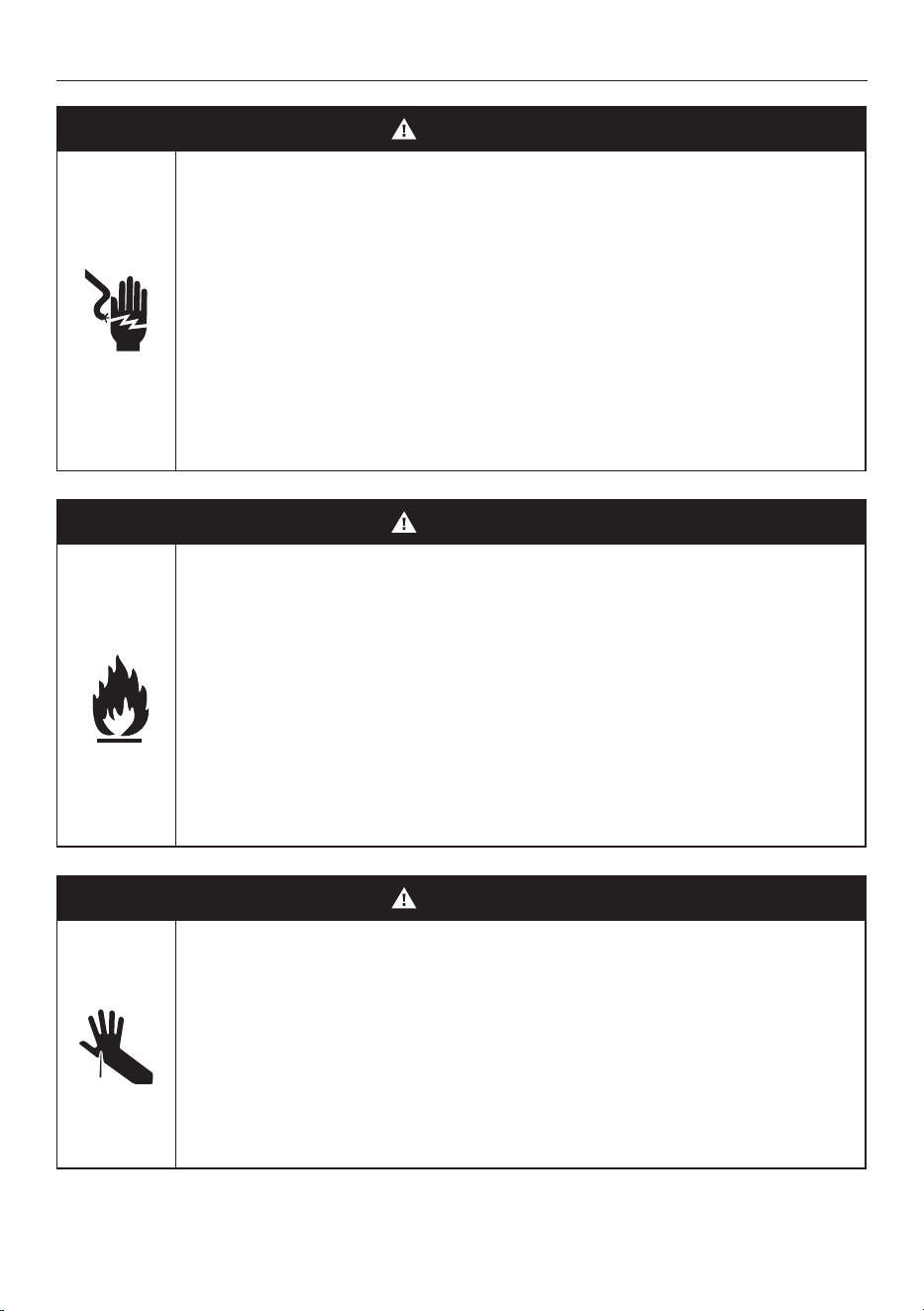
WARNING!
Electric Shock Hazard
Failure to follow this advice may result in electric
shock or death.
• Do not cook on a broken or cracked cooktop. If the
cooktop surface should break or crack, switch the
appliance off immediately at the mains power supply
(wall switch) and contact a qualified technician.
• Switch the appliance off before cleaning
or maintenance.
WARNING!
Fire Hazard
Failure to follow this advice may result in serious
burns or death.
• Unattended cooking on a hob with fat or oil can be
dangerous and may result in fire.
• Cover flame, eg with a lid or fire blanket, or use dry
chemical or foam-type extinguisher.
• Do not store items on cooking surfaces.
WARNING!
Cut Hazard
Failure to follow this advice could result in injury
and cuts.
• The razor sharp blade of a cooktop scraper is exposed
when the safety cover is retracted. Use with extreme
care and always store safely and out of the reach
of children.
SAFETY AND WARNINGS
6
WARNING!
Hot Surface Hazard
Failure to follow this advice could result in burns and
scalds.
• Do not touch surface units or areas near units. Surface
units maybe hot even though they are dark in colour.
• Surfaces of the appliance may become hot enough to
cause burns.
• During and after use, do not touch or let clothing or
other flammable materials contact heating elements
until they have had sufficient time to cool.
• Handles of saucepans may be hot to touch. Check
saucepan handles do not overhang other cooking zones
that are on. Keep handles out of reach of children.
• Never leave metal objects (such as kitchen utensils) or
empty pans on the cooktop as they can become very
hot quickly.
SAFETY AND WARNINGS

7
READ AND SAVE THIS GUIDE
Only use the oven for its intended purpose, that is only for the cooking of foods: any other use, for
example as a heat source, is considered improper and therefore dangerous. The manufacturer cannot
be held responsible for any damage resulting from improper, incorrect or unreasonable usage.
General warnings
z
Do not use a steam cleaner for cleaning operations.
z
CAUTION: in order to avoid a hazard due to inadvertent resetting of the thermal cut-out, this
appliance must not be supplied through an external switching device, such as a timer, or connected to
a circuit that is regularly switched on and off by the utility.
z
During use the appliance become hot. Care should be taken to avoid touching heating elements inside
the oven.
Use limitations
z
The appliance can be used by children aged from 8 years and above and persons with reduced
physical, sensory or mental capabilities or lack of experience and knowledge if they have been given
supervision or instruction concerning use of the appliance in a safe way and understand the hazards
involved. Children shall not play with the appliance. Cleaning and maintenance shall not be made by
children without supervision.
z
This appliance is not intended to be used by persons (including children) with reduced physical,
sensory or mental capabilities, or lack of experience and knowledge, unless they have been given
supervision or instruction concerning use of the appliance by a person responsible for their safety.
z
Children should be supervised to ensure that they do not play with the appliance.
z
WARNING: the appliance and its accessible parts become hot during use. Care should be taken to
avoid touching heating elements.
z
Children less than 8 years of age shall be kept at away unless continuously supervised.
z
WARNING: Accessible parts may become hot during use. Young children should be kept away.
Installation warnings
z
The oven can be located high in a column or under a worktop.
z
Before fixing, you must ensure good ventilation in the oven space to allow proper circulation of the
fresh air required for cooling and protecting the internal parts. Make the openings specified on the
illustrations according to the type of fitting. Always fix the oven to the furniture with screws provided
with the appliance.
z
No additional operation/setting is required in order to operate the appliance at the rated frequencies.
z
The appliance must not be installed behind a decorative door in order to avoid overheating.
z
During installation the oven should be disconnected from the mains electricity supply.
z
If the assistance of the manufacturer is required to rectify faults arising from incorrect installation,
this assistance is not covered by the guarantee. The installation instructions for professionally
qualified personnel must be followed.
z
Incorrect installation may cause harm or injury to people, animals or belongings. The manufacturer
cannot be held responsible for such harm or injury.
z
Installation must be carried on by a qualified technician who must know and respect the laws in force
in the country of installation and the manufacturer’s instruction.
z
After unboxing the appliance, always check it is not damaged, in case of issue contact the customer
service before installing and do not connect to the power supply.
z
Remove the packaging material before operating the appliance.
z
During installation do not use the oven door’s handle to lift and move the oven.
z
The installation furniture and the adjacent ones must with stand temperatures of 95°C.
SAFETY AND WARNINGS

8
SAFETY AND WARNINGS
z
Do not install the product in open environments exposed to atmospheric agents.
z
This appliance is designed to be used at altitude lower than 2000m.
z
It is recommended to wear protective gloves during installation to avoid cut injuries.
z
Do not install the product in open environments exposed to atmospheric agents.
Electrical warnings
z
The socket must be suitable for the load indicated on the tag and must have ground contact
connected and in operation. The earth conductor is yellow-green in colour. This operation should be
carried out by a suitably qualified professional.
z
Connection to the power source can be made by plug or by fixed wiring placing an omnipolar breaker,
with contact separation compliant to the requirements for overvoltage category III, between the
appliance and the power source that can bear the maximum connected load and that is in line with
current legislation.
z
ln case of incompatibility between the socket and the appliance plug, ask a qualified electrician to
substitute the socket with another suitable type. The plug and the socket must be conformed to the
current norms of the installation country.
z
The yellow-green earth cable should not be interrupted by the breaker. The socket or omnipolar
breaker used for the connection should be easily accessible when the appliance is installed.
z
lf the supply cord is damaged, it must be replaced by the manufacturer, its service agent or similarly
qualified persons in order to avoid a hazard. For any repairs, refer only to the Customer Care
Department and request the use of original spare parts.
z
Disconnect the appliance from the mains electricity supply before carrying out any work or
maintenance on it.
z
WARNING: ensure that the appliance is switched off before replacing the bulb, to avoid the possibility
of electric shocks.
z
The oven must be switched off before removing the removable parts. After cleaning, reassemble
them according the instructions.
z
The use of any electrical appliance implies the observance of some fundamental rules:
z
do not pull on the power cable to disconnect the appliance from the power source;
z
do not touch the appliance with wet or damp hands or feet;
z
in general the use of adaptors, multiple sockets and extension cables is not recommended;
z
in case of malfunction and/or poor operation, switch off the appliance and do not tamper with it.
z
NOTE: as the oven could require maintenance work, it is advisable to keep another wall socket
available so that the oven can be connected to this if it is removed from the space in which it is
installed.
z
Any repair, installation and maintenance not carried out correctly can seriously endanger the user.
z
The manufacturing company hereby states that it does not assume any responsibility for direct or
indirect damages caused by incorrect installation, maintenance, or repair work. Furthermore, it is
not liable for damages caused by the absence or interruption of the grounding system (e.g. electric
shock).
z
CAUTION: in order to avoid a hazard due to inadvertent resetting of the thermal cut-out, this
appliance must not be supplier through an external switching device, such as a timer, or connect-ed to
a circuit that is regularly switched on and off by the utility.
z
The appliance is not designed to be activated by an external timer or separate remote control system.

9
SAFETY AND WARNINGS
Use and maintenance
z
Wash all accessories before first use with a solution of hot water and washing up liquid.
z
The dripping pan collects the residues that drip during cooking.
z
When you place the grid or air fry tray on the side racks, make sure that the shorter section of the
side (between the stop and the extremity) is directed towards the interior of the oven. If the grid has
a decorative metal bar, pay attention to position it on the exterior of the oven so that the brand logo
can be visible and readable. For the correct positioning refer also to the image in the Accessories
section of this user manual.
z
Do not use harsh abrasive cleaners or sharp metal scrapers to clean the oven door glasses, since they
can scratch the surface, which may result in shattering of the glass.
z
Only use the temperature probe recommended for this oven.
z
During cooking, moisture may condense inside the oven cavity or on the glass of the door. This is a
normal condition. To reduce this effect, wait 10-15 minutes after turning on the power before putting
food inside the oven. ln any case, the condensation disappears when the oven reaches the cooking
temperature.
z
Cook the vegetables in a container with a lid instead of an open tray.
z
Avoid leaving food inside the oven after cooking for more than 15/20 minutes.
z
A long power supply failure during an occurring cooking phase may cause a malfunction of the
monitor. ln this case contact customer service.
z
WARNING: Do not line the oven walls with aluminium foil or single-use protection available from
stores. Aluminium foil or any other protection, in direct contact with the hot enamel, risk melting and
deteriorating the enamel of the insides.
z
WARNING: Never remove the oven door seal.
z
CAUTION: Do not refill the cavity bottom with water during cooking or when the oven is hot.
z
For a correct use of the oven it is advisable not to put the food in direct contact with the racks and
trays, but to use oven papers and/or special containers.
z
WARNING: Risk of burn and damage to the appliance: Using the steam function the released steam
can cause burns: Open the door carefully to avoid injury after using a cooking function with steam.
z
Use only drinking water to fill in the cavity bottom during the steam function.
Warnings (*for Pyro ovens)
z
Excess spillage must be removed before cleaning.
z
WARNING: before initiating the automatic cleaning cycle:
z
Clean the oven door;
z
Remove large or coarse food residues from the inside of the oven using a damp sponge. Do not
use detergents;
z
Remove all accessories and the sliding rack kit (where present);
z
Do not place tea towels .
z
ln ovens with meat probe it is necessary, before making the cleaning cycle, close the hole with the nut
provided. Always close the hole with the nut when the meat probe is not used.
z
During the pyrolytic cleaning process (if available), the surfaces may get hotter than usual and
children should be kept away.
z
If a hob has been fitted above the oven, never use the hob while the Pyrolizer is working, this will
prevent the hob from overheating.
10
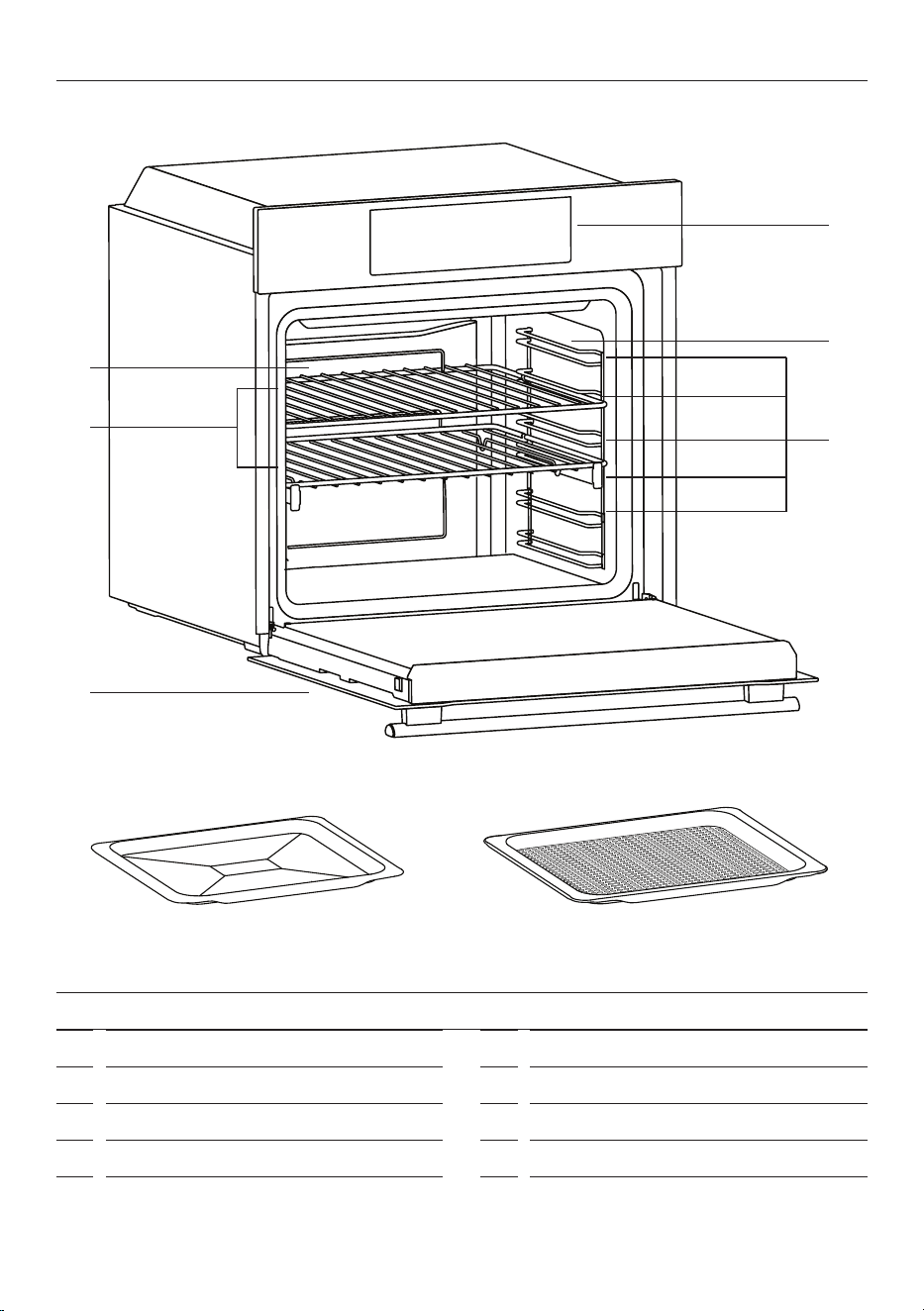
PRODUCT OVERVIEW
1
2
6
3
8
4
5
7
FEATURES AND ACCESSORIES
1
Control panel
2
Shelf positions
3
Racks
4
Fan cover
5
Oven door
6
Side racks
7
Baking tray
8
Airfry tray
11
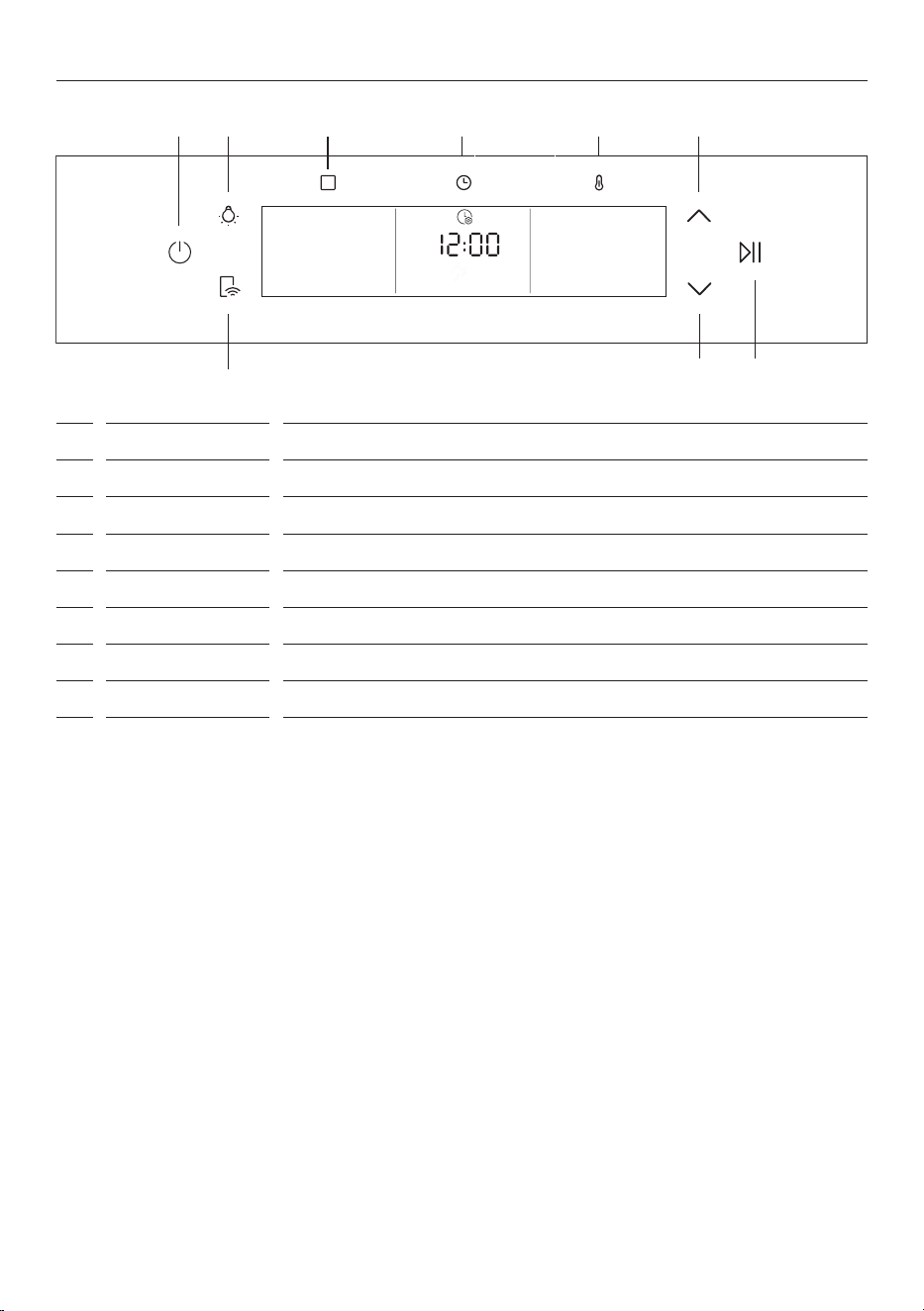
CONTROL PANEL
1 POWER
Press to turn oven ON/OFF.
2 REMOTE MODE
Press and hold to use Remote Mode after connecting the oven with the app.
3 LIGHT
Press to turn lights ON/OFF.
4 FUNCTIONS
Press to access cooking functions, recipes, cleaning functions and settings.
5 TIME
Press to access clock, cooking duration, timer and delayed start modes.
6 TEMPERATURE
Press to check oven temperature or activate FAST PREHEAT.
7 SCROLL
Press to cycle through functions and adjust settings.
8
START/PAUSE
Press to START/PAUSE cooking and conrm functions.
1 43 5 6 7
7 8
2
12
FIRST USE
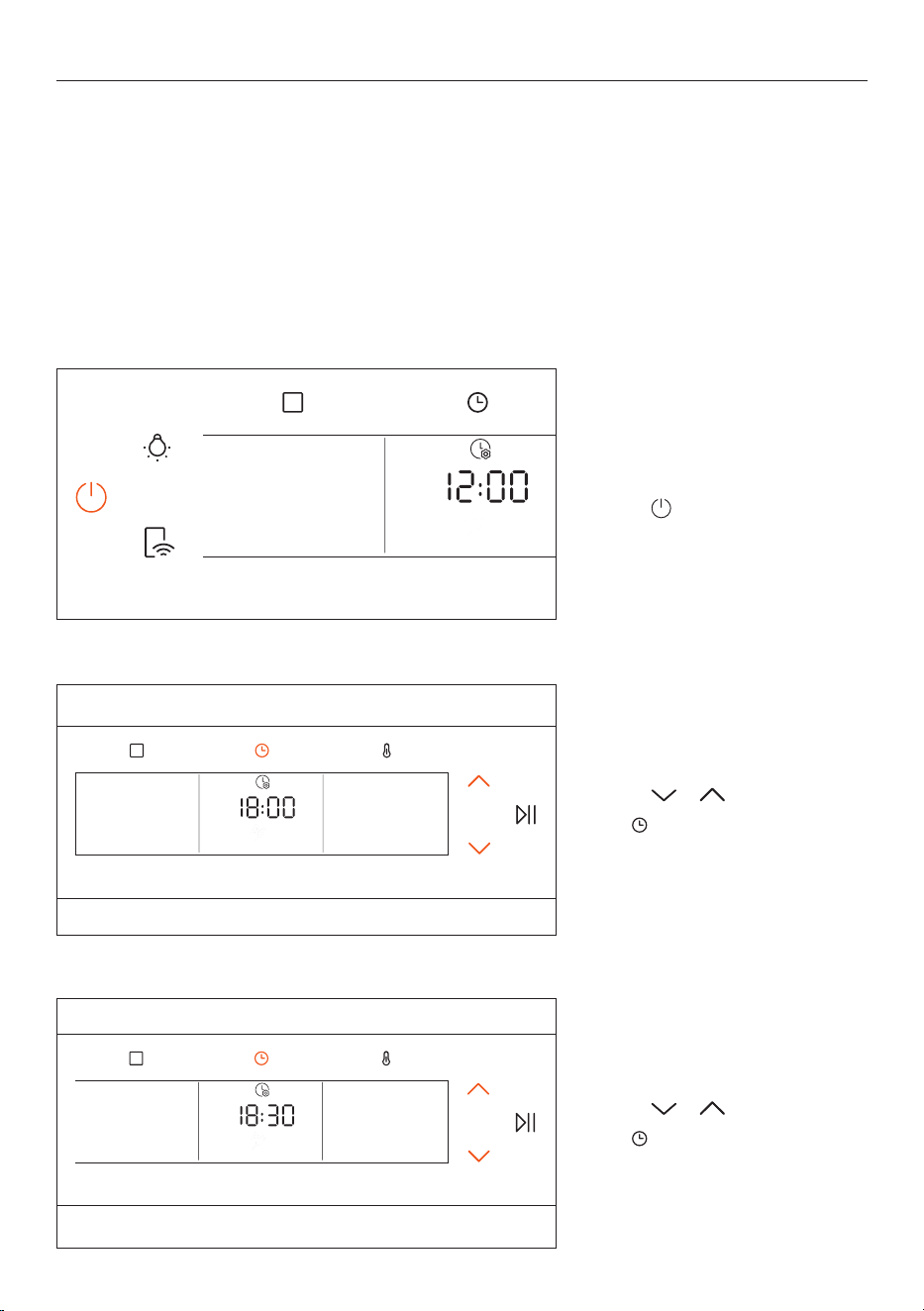
2. Press or to set the hour.
Press
to confirm.
Setting the clock
1. Press to turn the oven on.
3. Press
or to set the minutes.
Press
to confirm.
Preparing your oven
Before using your oven for the first time, remove and wash all accessories, and clean the inside of the oven
with a damp, soft cloth and mild detergent. Wipe the outside with a damp, soft cloth. Dry with a clean cloth.
Run the empty oven at maximum temperature for 60 minutes to remove the newness smell. See 'Using the
oven'. The oven may smoke slightly during this process. This is normal.
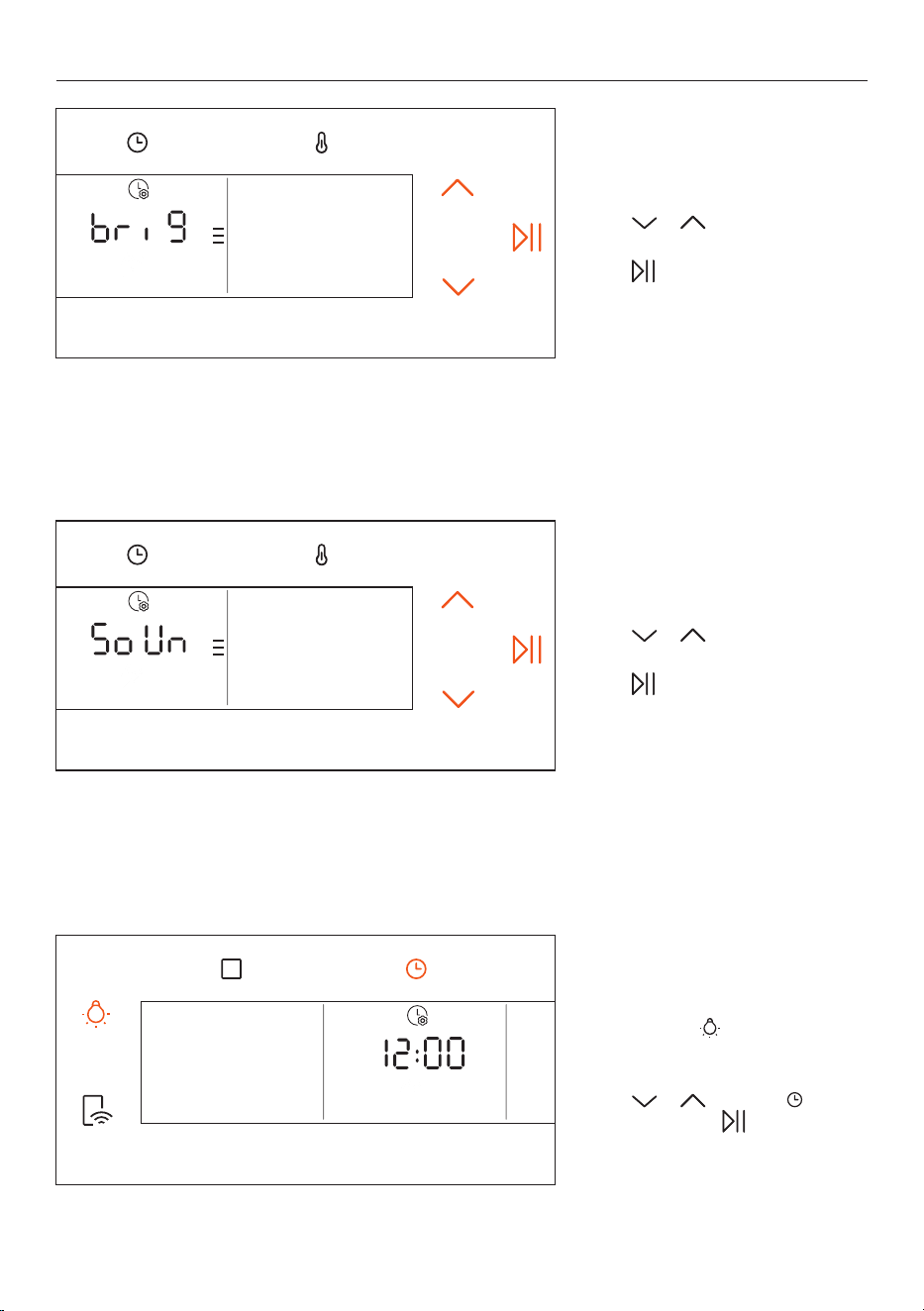
Settings
The first time you switch on the oven, you will be prompted to set the clock, display brightness and alert
volume level.
13
Setting the display brightness
Press or to set the
brightness level.
Press
to confirm.
Setting the alert volume level
Press or to set the
volume level.
Press
to confirm.
FIRST USE
Resetting clock, brightness
and volume
Press and hold to access
and reset clock, brightness and
volume settings.
Press
or to adjust, to
confirm time and to confirm
brightness and volume.
14
USING THE OVEN
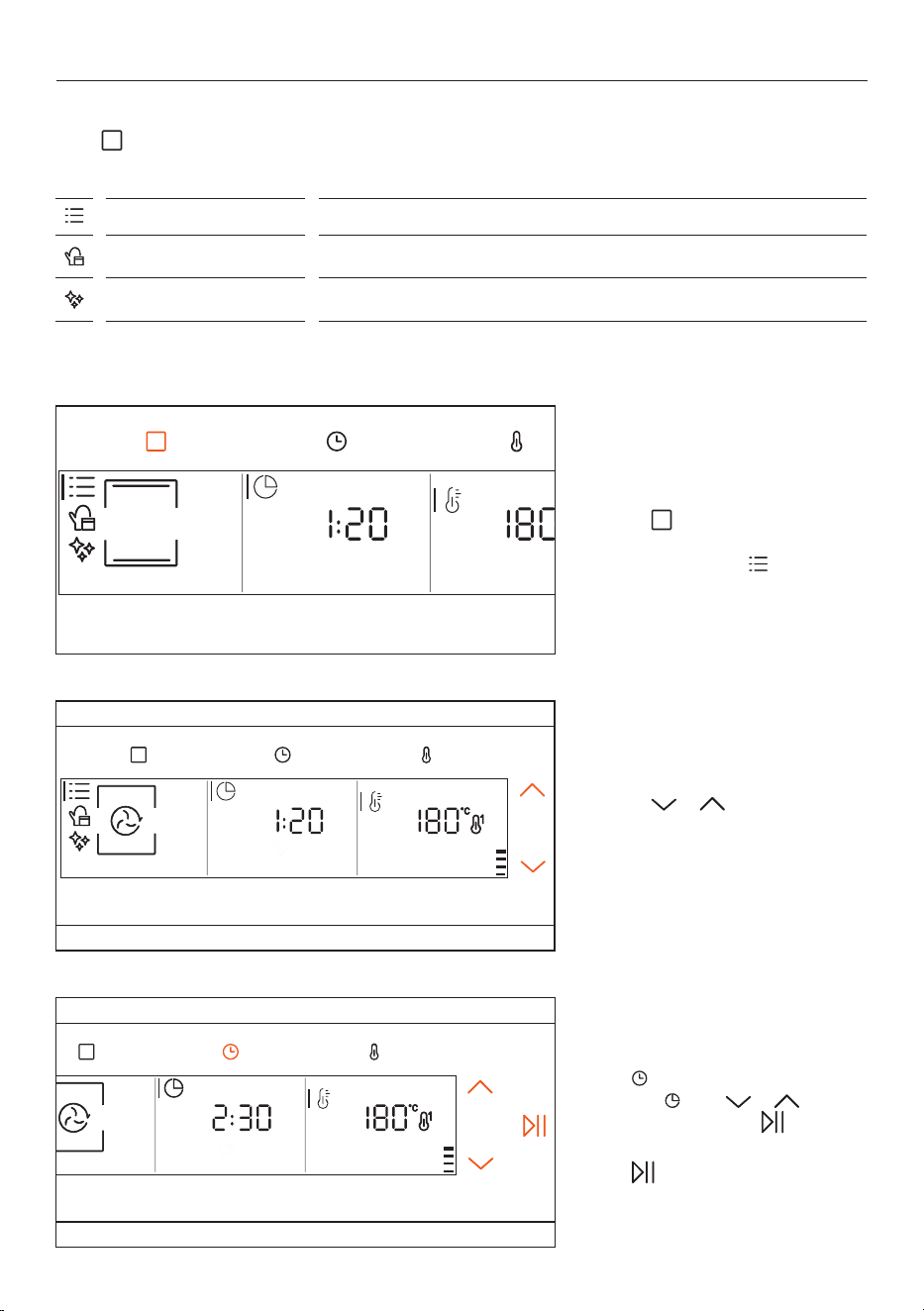
Functions menu
Press as required to access the FUNCTIONS menu and cycle through the menu items.
2. Press or to scroll through
the COOKING FUNCTIONS menu and
select the desired cooking function.
Setting cooking duration
Press to select COOKING
DURATION
, then or to
set the duration. Press to start
preheat (if available).
Press
to start the countdown
after preheating.
Selecting a cooking function
1. Press to access the
FUNCTIONS menu and select
COOKING FUNCTIONS .
COOKING FUNCTIONS
Access cooking functions.
EVERYDAY COOKING
Access preset cooking programs.
CLEANING FUNCTIONS
Access cleaning functions.
15
USING THE OVEN
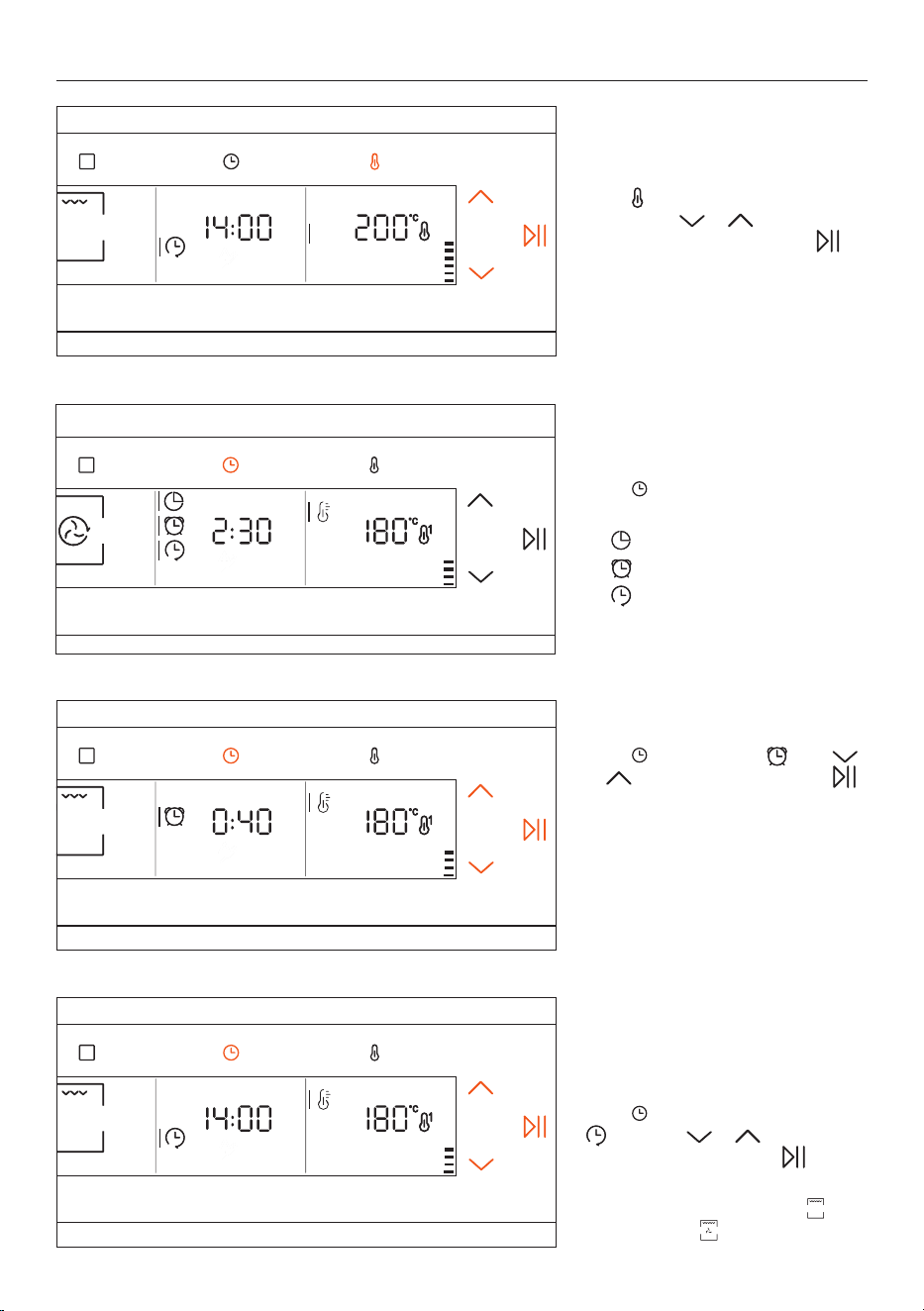
Accessing the time menu
Press to access the time menu
and cycle through the options:
z
COOKING DURATION
z
TIMER
z
DELAYED START
Setting the timer
Press to select TIMER then
or to set the duration. Press
to conrm.
The timer operates independently
from cooking functions. Cooking will
continue until the oven is turned off.
TIMER can also be used when the
oven is in standby.
Delayed start
After setting a cooking duration, you
can schedule a time for cooking to
start.
Press
to select DELAYED START
then then or to set a
cooking start time. Press to
conrm.
Not available with
MAXI GRILL or
FAN MAXI GRILL function.
Setting the temperature
Press twice to select TEMPERATURE
VALUE
, then or to set or
adjust the temperature. Press
to conrm.
16
USING THE OVEN
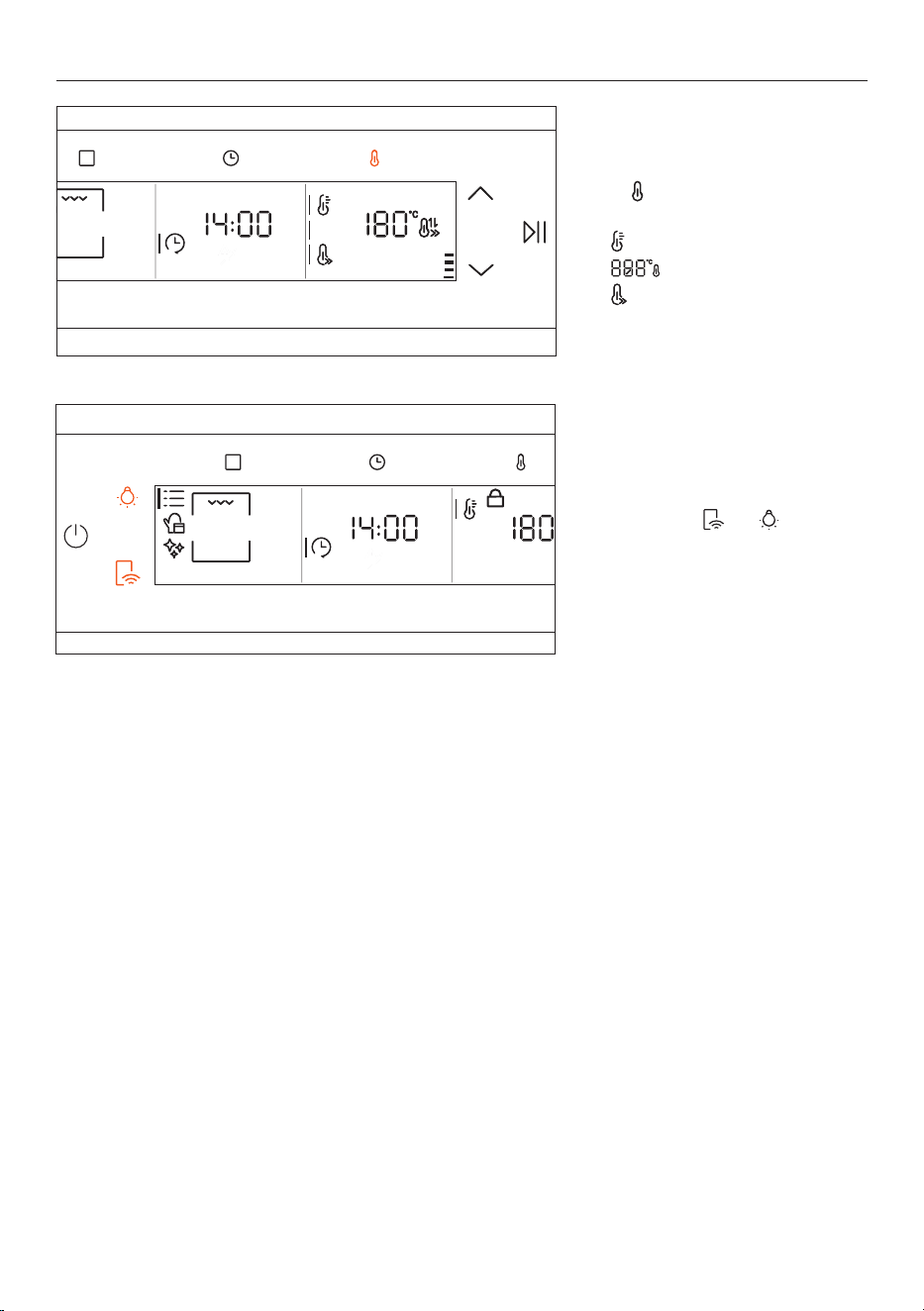
LOCK
Press and hold and to
activate LOCK. Press and hold again
to unlock.
Accessing temperature menu
Press to access the temperature
menu and cycle through the options:
z
PREHEAT
z
TEMPERATURE VALUE
z
FAST PREHEAT
17
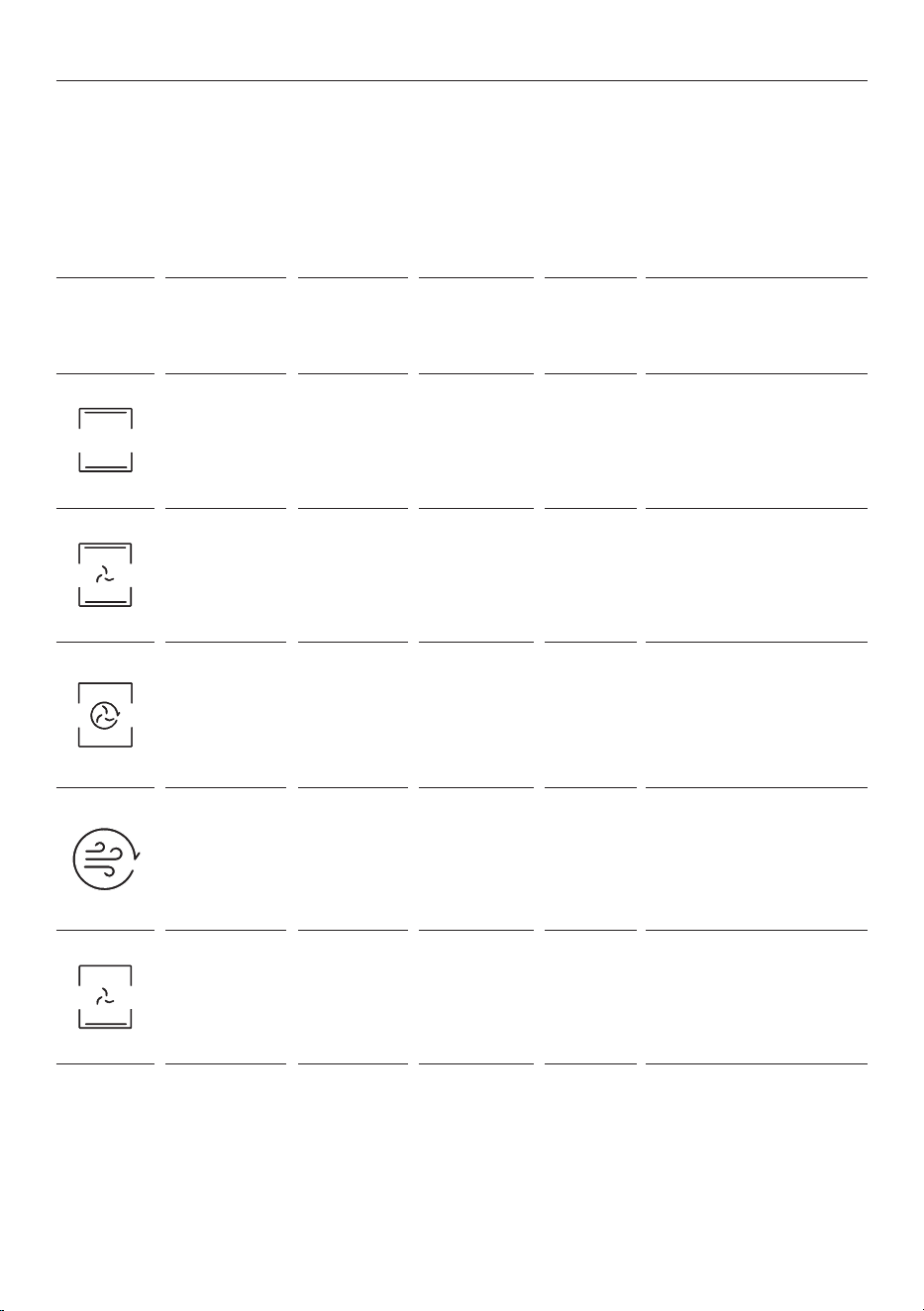
COOKING FUNCTIONS
ICON FUNCTION
DEFAULT
TEMP°C /
TEMP°C
RANGE
SUGGESTED
SHELF
POSITION
PREHEAT COOKING SUGGESTIONS
Bake
200°C
30–250°C
L2/3
Yes/Fast
preheat
Ideal for cakes, breads,
biscuits, quiches on one level
using both upper and lower
level heating.
Fan Bake
175°C
50–250°C
L2/3/4
Yes/Fast
preheat
Ideal for roasts, casseroles,
vegetables and pies with
moist llings on one level.
Ideal for cooking foods with
high water content.
Fan Forced
160°C
50–250°C
L4 (one tray)
L2+L5 (two
trays)
L2+L4+L6
(three trays)
Yes/Fast
preheat
Ideal for cakes, biscuits and
pizzas on one or more levels.
Air Fry
200°C
150–250°C
L3/4 No
Ideal for preparing frozen
foods or breaded par-cooked
foods which are usually fried.
Thanks to the dedicated tray,
the hot air can ow evenly
over the foods.
Pizza
300°C
200–300°C
L2/3 No
Ideal for all kinds of pizzas
without preheating the oven.
Use lower temperatures for
frozen items and 300°C for
homemade pizza.
Preheating the oven
Ensure you remove all accessories from the oven before using functions that have a preheating stage.
Fast preheating
FAST PREHEAT combines fan and heating elements to preheat the oven, without using the cavity light, to
heat the oven faster and save energy. Not available with all functions.
18
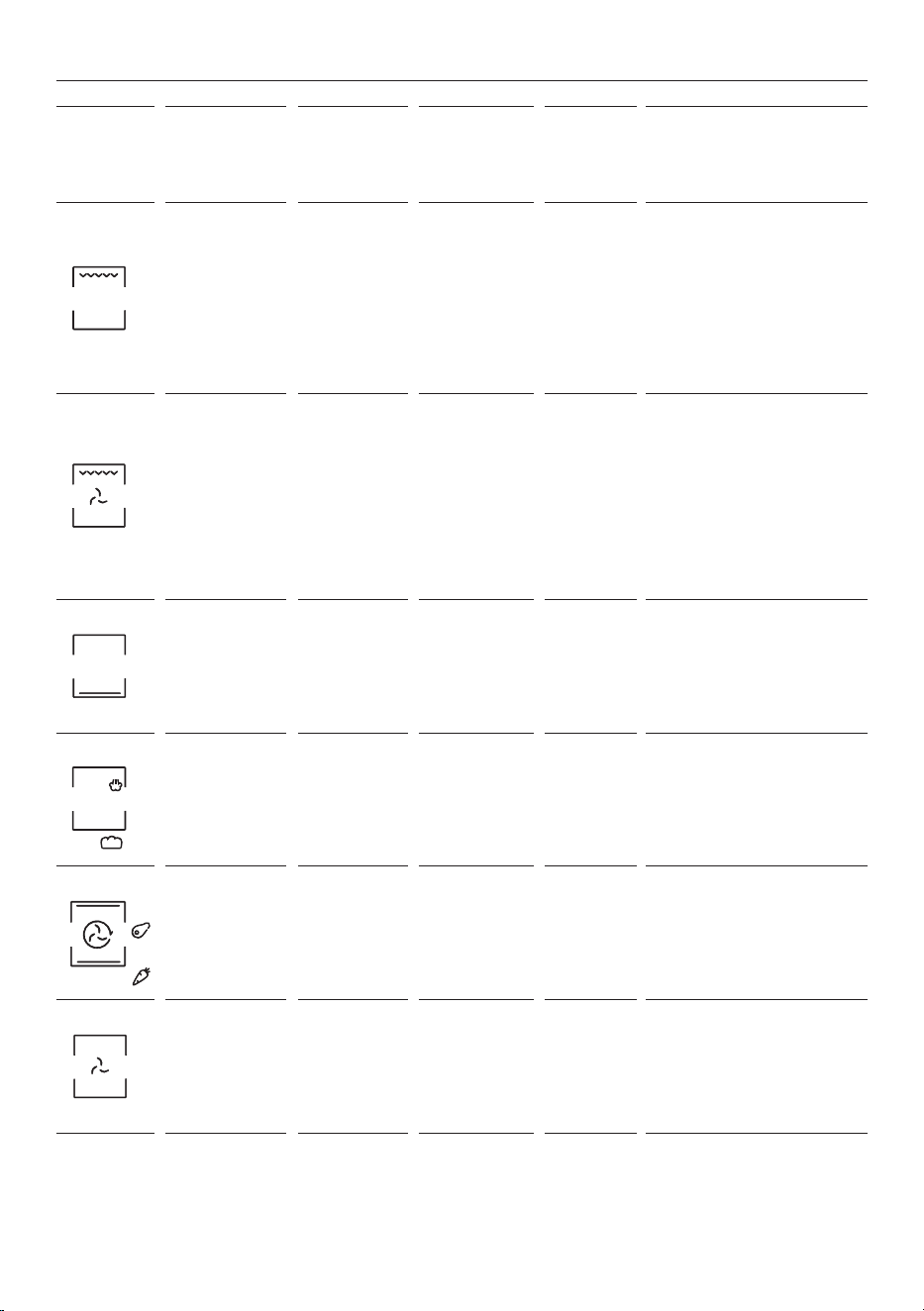
COOKING FUNCTIONS
ICON FUNCTION
DEFAULT
TEMP°C /
TEMP°C
RANGE
SUGGESTED
SHELF
POSITION
PREHEAT COOKING SUGGESTIONS
Maxi grill 1-5
L6 for thin
foods, L5 for
thicker foods
No
Ideal for sausages, steaks
and toast.
The entire area below the
grill element becomes hot.
Use with the door closed.
Turn food two thirds of the
way through cooking (If
necessary).
Fan maxi grill
200°C
150-250°C
L4/L5
Yes/Fast
preheat
Ideal for larger cuts of meat
or sh that require longer
cooking without burning the
top. The entire area below
the grill element becomes
hot. Use with the door
closed. Turn food two thirds
of the way through cooking
(If necessary).
Traditional Bake
170°C
50-230°C
L2
Yes/Fast
preheat
Ideal for traditional recipes
and foods that have a pastry
base and require delicate
baking or minimal surface
browning.
Bakery + Steam
210°C
190-220°C
L2/L3 No
Ideal for breads, lasagne
and pastries. Can be used
with Steam Assist by adding
100mL of water to base of
oven cavity.
Roast
200°C
150-250°C
L2/3/4
Yes/Fast
preheat
Ideal for roasting meats,
poultry and sh by using all
elements and the fan. This
provides even cooking and
enhanced browning.
Defrost 20°C L3 No
Fan circulates air around
food at room temperature
to accelerate defrosting of
frozen food.
19
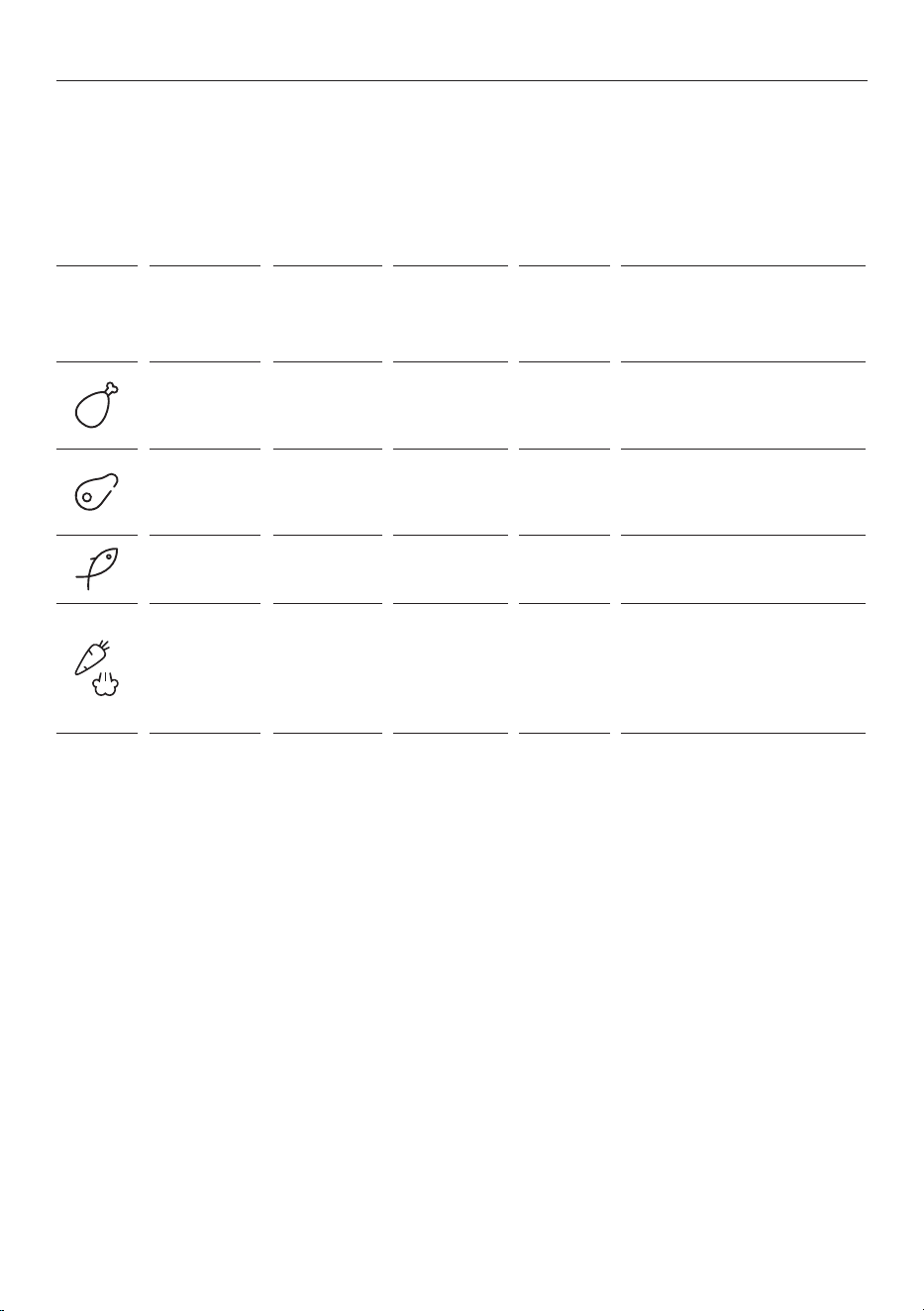
COOKING FUNCTIONS
ICON FUNCTION
DEFAULT
TEMP°C /
TEMP°C
RANGE
SUGGESTED
SHELF
POSITION
PREHEAT COOKING SUGGESTIONS
White meat
190°C
180–200°C
L2/3/L4 No
Ideal for poultry and cuts of
white meat.
Time range: 40–80 mins.
Red meat
190°C
180–200°C
L3/L4 No
Ideal for beef, and cuts of
red meat.
Time range: 20–80 mins.
Fish
170°C
160–180°C
L3/L4 No
Ideal for whole fish and fillets.
Time range: 15–45 mins.
Vegetables +
Steam
190°C
180–200°C
L3/L4 No
Ideal for roasted vegetables
and potatoes. Can be used with
Steam Assist by adding 180mL
of water to base of oven cavity.
Time range: 30–80 mins.
Everyday cooking
These programmed recipe functions allow you to cook a variety of recipes without preheating the oven.
You can adjust cooking duration and temperature within the ranges listed in the table.
If further cooking is required after using these functions, we recommend using a standard cooking function
instead of resetting an everyday cooking function.
20
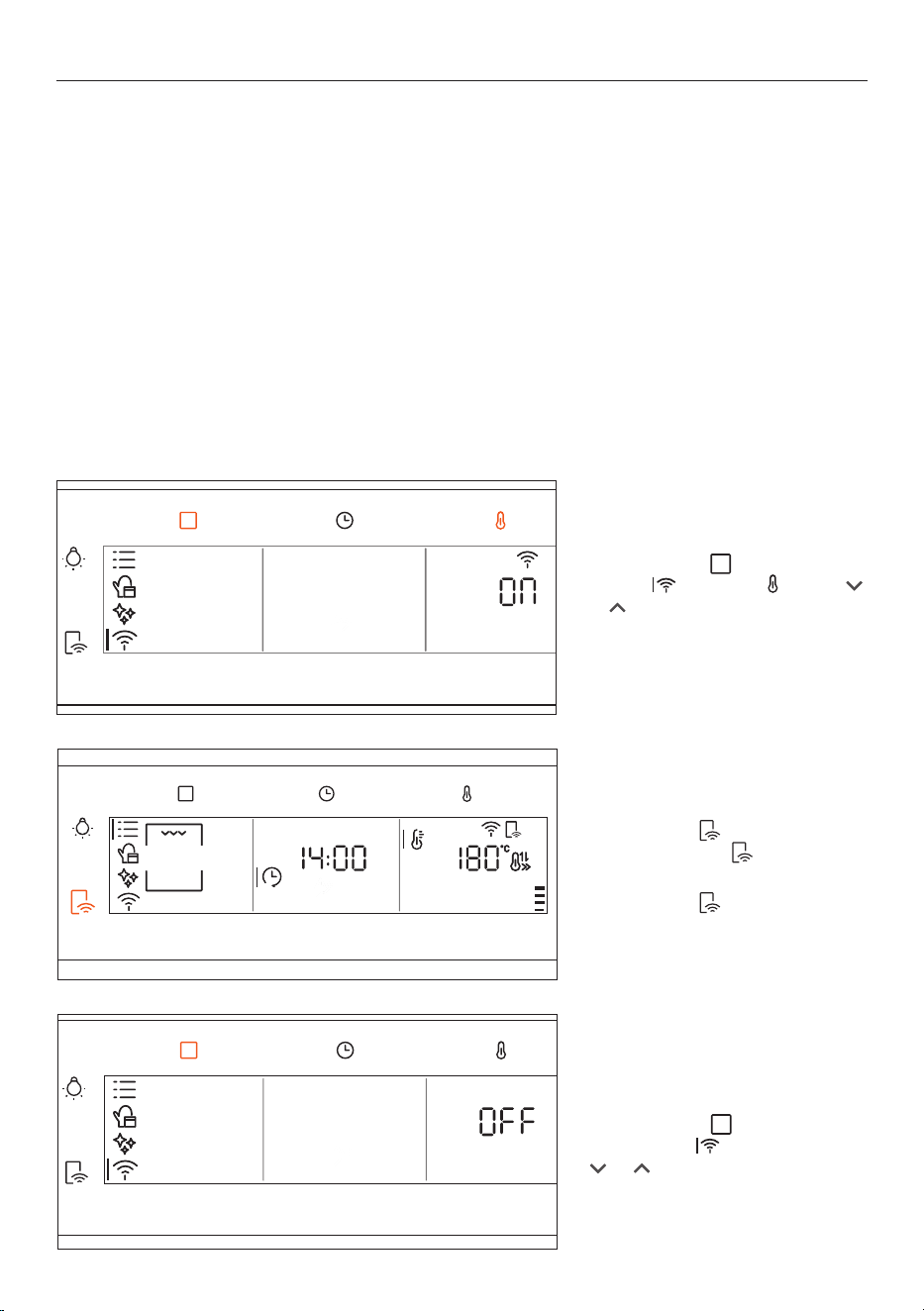
WI-FI CONNECTION AND REMOTE MODE
Your appliance may be connected to your home wireless network and operated remotely using the app.
Connect your appliance to ensure it stays up to date with the latest software and features.
Getting started
z
Ensure your home Wi-Fi network and Bluetooth on your mobile device are turned on.
z
You will be given step-by-step guidance on your appliance and mobile device.
z
It may take up to 10 minutes to connect your appliance.
Connecting to Wi-Fi
Press Functions to select Wi-Fi
settings , then press and use
Fridge
3.0 °C
Fridge
3.0 °C
Fridge
5.0 °C
or
Fridge
3.0 °C
Fridge
3.0 °C
Fridge
5.0 °C
to turn Wi-Fi On.
Follow the instructions in the app to
complete setup.
Disconnecting or
resetting Wi-Fi
Press Functions to reach
Wi-Fi settings , then press
Fridge
3.0 °C
Fridge
3.0 °C
Fridge
5.0 °C
or
Fridge
3.0 °C
Fridge
3.0 °C
Fridge
5.0 °C
until Offor rst
shows on the display.
Turning Remote Mode ON/OFF
Press and hold until the
Remote Mode icon shows on
the display.
Press and hold
again to turn off
Remote Mode.
On your mobile device:
1 Download the app from www.haier.co.nz/smart.
2 Register and create an account.
3 Add your appliance and set up the Wi-Fi connection.
21
CARE AND CLEANING
General recommendations
We recommend cleaning the oven after each use. Wait for the oven to cool before cleaning.
z
Do not line the oven walls with aluminium foil or single-use protection as these may damage the
enamel interior.
z
Frequent cooking at high temperatures can produce more food residue in the oven and result in strong
smoky smells. Where possible, we recommend longer cooking durations at lower temperatures.
z
We recommend you only use the accessories supplied with the oven and dishes and baking moulds
resistant to very high temperatures.
Pyrolytic cleaning
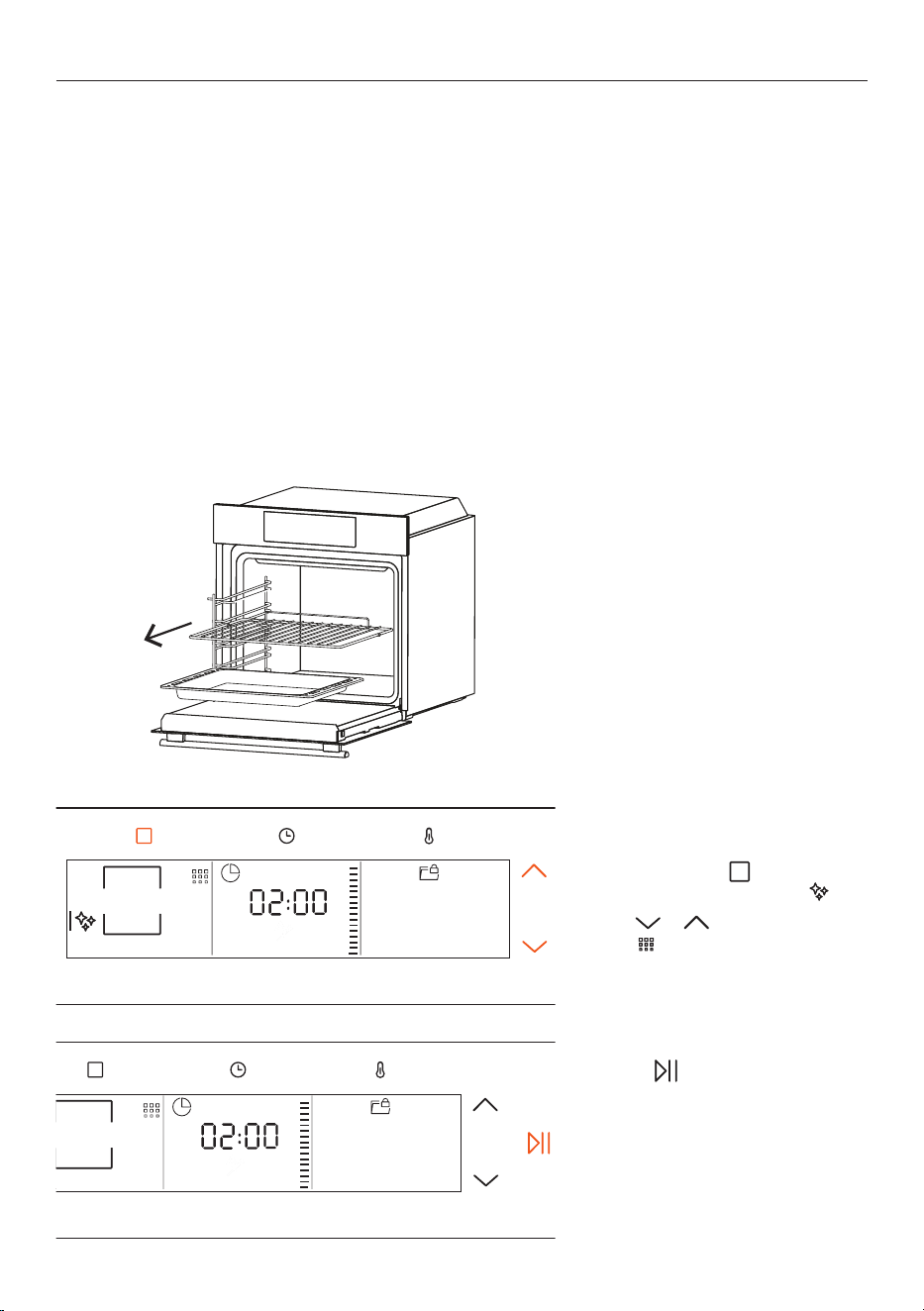
The pyrolytic cleaning cycle rapidly heats the oven to 410°C to clean the interior by turning food residue to
dust. Once the oven has cooled, wipe the interior clean with a damp cloth and mild detergent.
The oven door will remain locked until the cleaning cycle and cooling phase are complete.
1. Remove all racks, trays and side
racks from the oven.
2. Press Functions
as required to
access CLEANING FUNCTIONS .
Press
or to select PYROLYTIC
CLEAN
.
3. Press
to start cleaning
process.
Allow the function to operate for
the preset duration. Wait for the
oven to cool completely before
wiping the interior clean with a soft,
damp cloth.
22
CARE AND CLEANING
Hydro clean
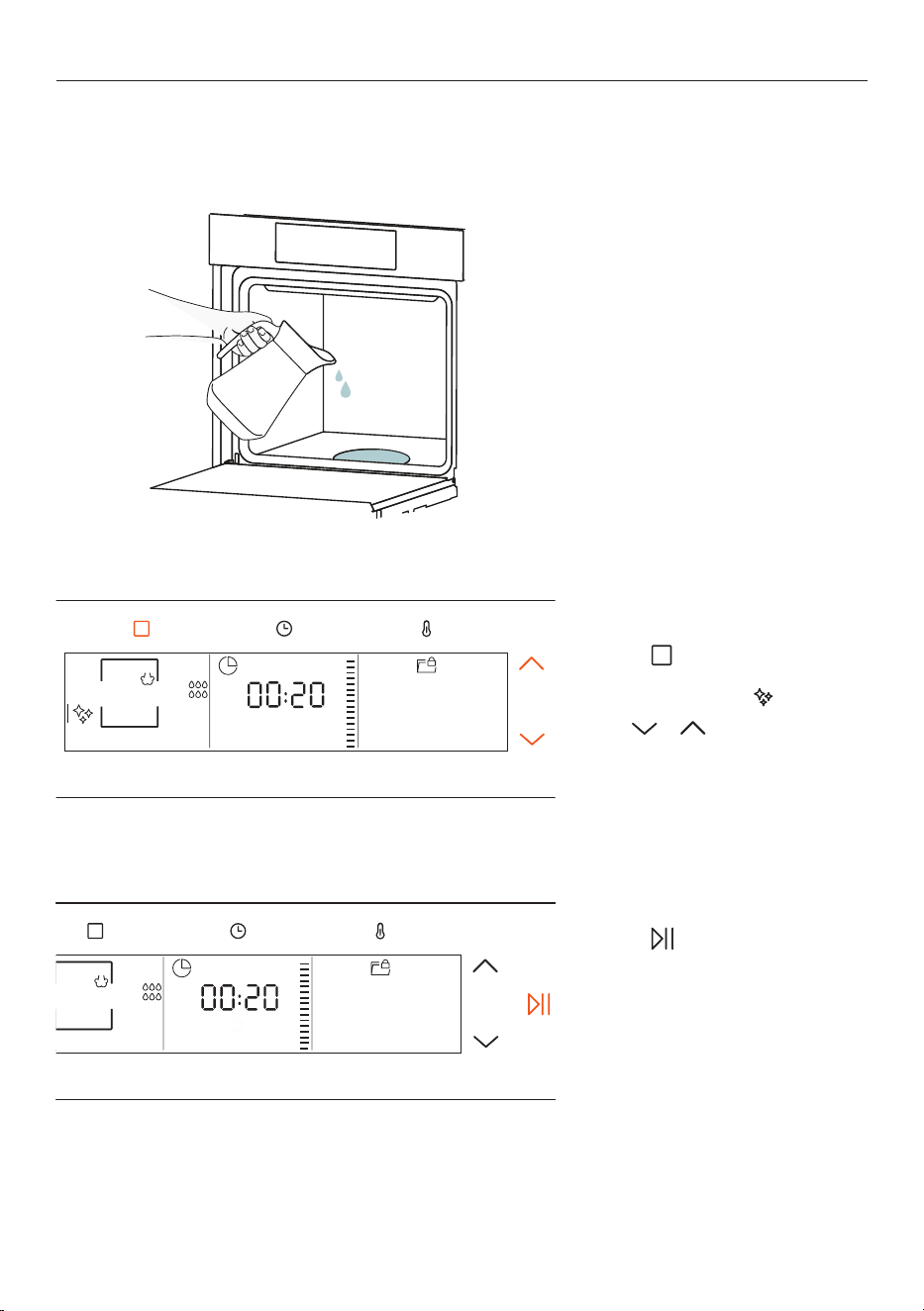
This function uses steam to clean light levels of residue from the oven interior in a quick and eco-friendly
way. Always use distilled or drinkable water.
1. Remove all racks, trays and side
racks from the oven, then pour
100 ml of water into the base of
the oven.
2. Press
as required to access
the FUNCTIONS menu and select
CLEANING FUNCTIONS .
Press
or to select HYDRO
CLEAN
.
3. Press to start the
cleaning process.
Allow the function to operate for
the preset duration. Wait for the
oven to cool completely before
wiping the interior clean with a
soft, damp cloth.
23
CARE AND CLEANING
Cleaning the accessories
We recommend you clean and dry the accessories thoroughly after every use. If required, soak them for
30 minutes in a mixture of hot water and mild detergent before cleaning.
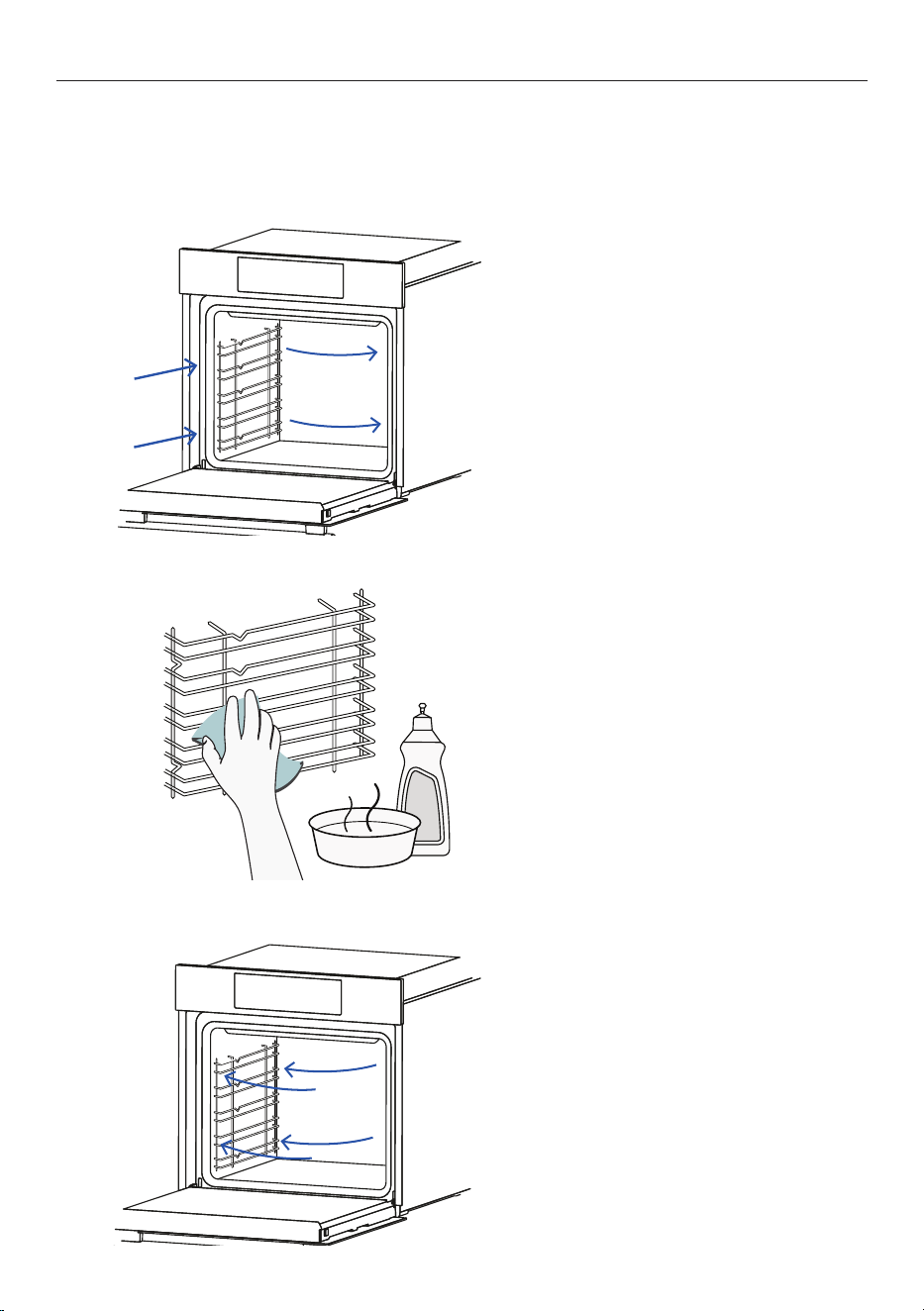
Cleaning the side racks
1. Push the side racks towards the
back of the oven, then pull to the
centre to remove.
2. Wipe the side racks clean with a
soft, damp cloth and mild detergent.
Dry with a clean cloth.
Side racks are also dishwasher safe.
3. Push the racks back into the side
of the oven to refit.
24
CARE AND CLEANING
Removing the door
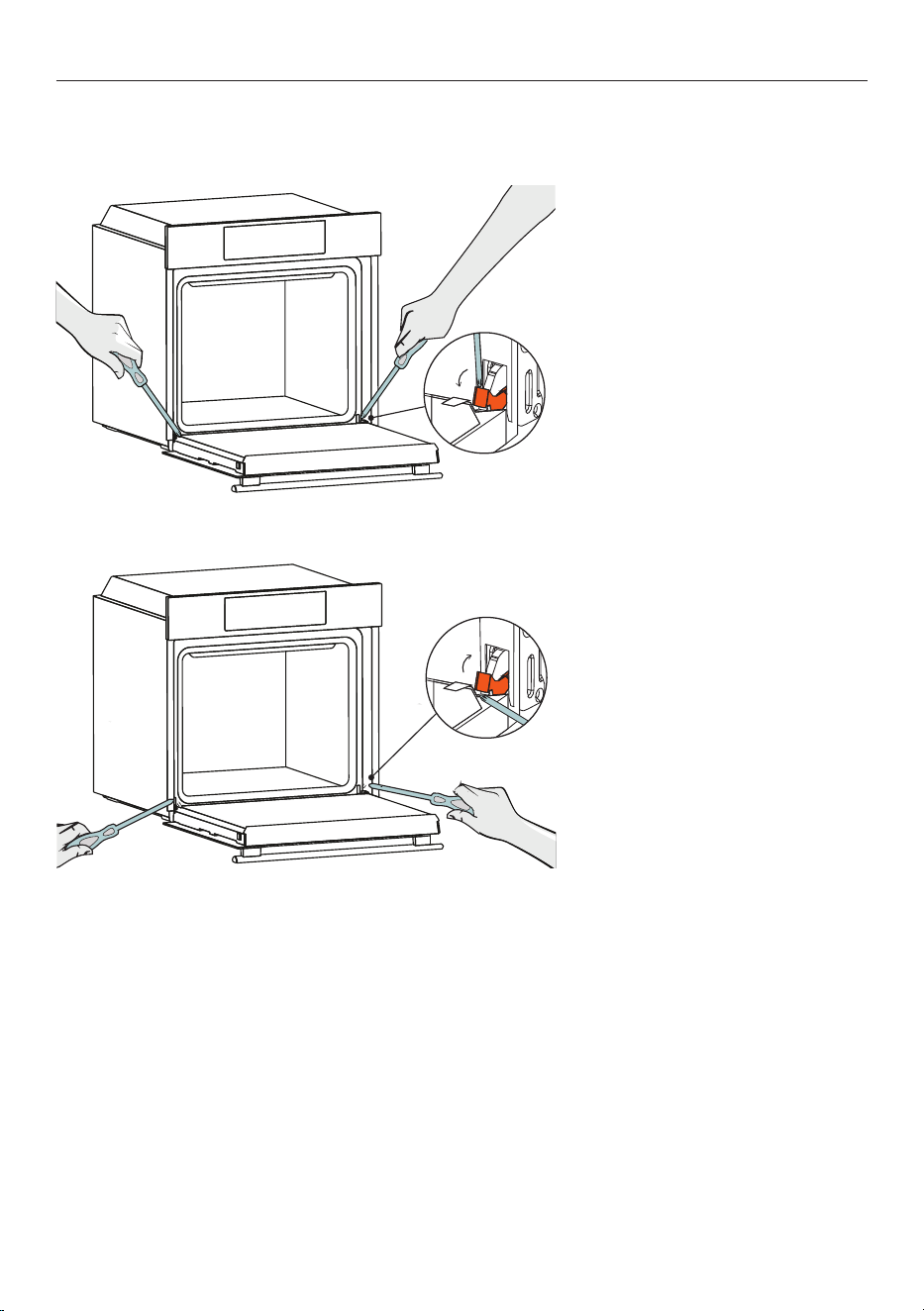
The door can be removed for greater access when cleaning the oven.
1. Open the door fully and use a
screwdriver to rotate the hinge locks
outwards, then carefully lift the
door off and place it on a soft, level
surface.
2. To refit, place door back onto
the hinges and use a screwdriver to
rotate the hinge locks back into the
hinge cavity.
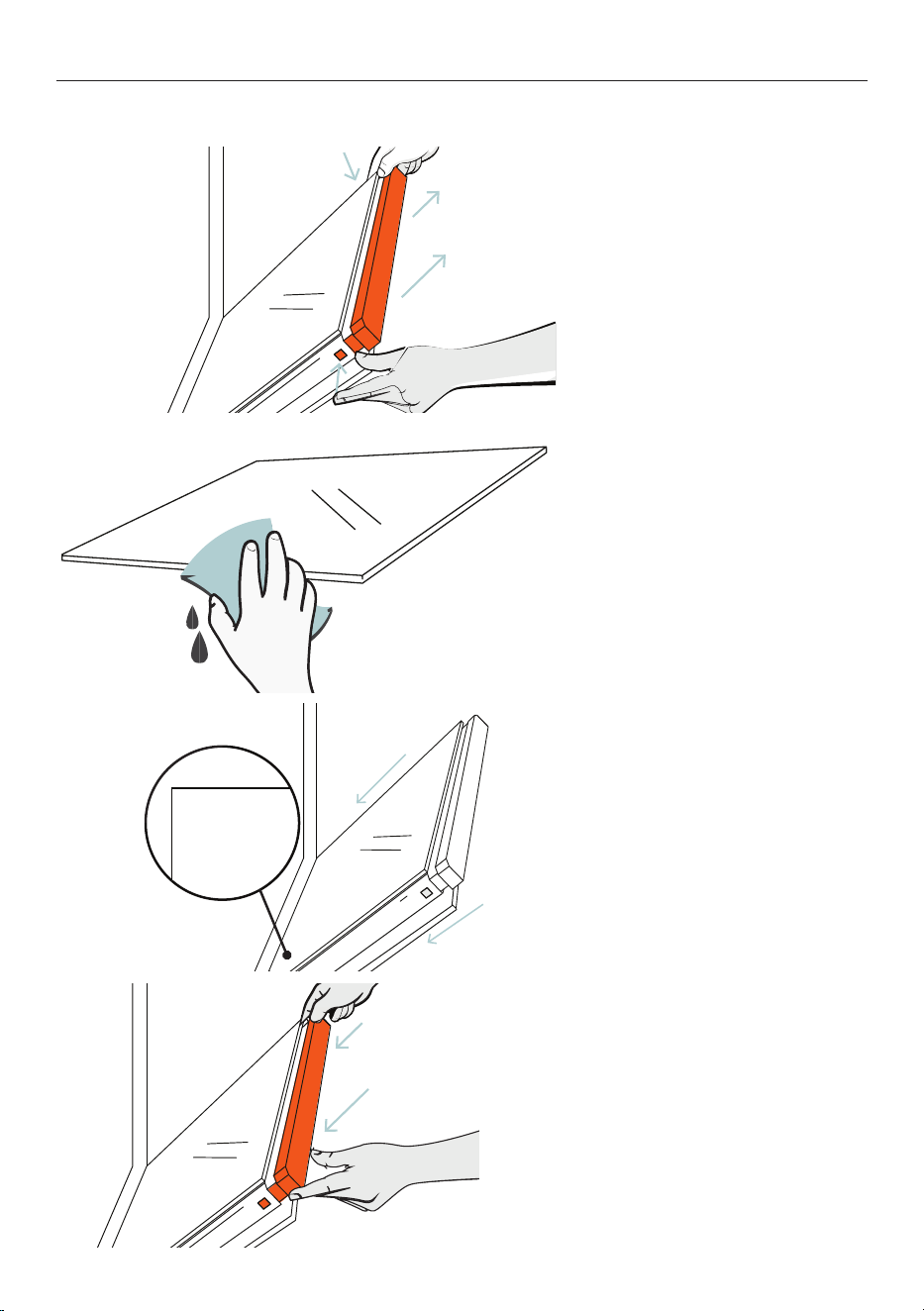
25
1. Shut the door halfway, then press
the buttons on both sides of the
door at the same time to release the
cover on top of the door.
2. Carefully remove the inner and
middle panes and wipe clean with a
soft, damp cloth and mild detergent.
CARE AND CLEANING
3. Once clean, carefully refit the
panes and ensure the 'LOW-E'
label of the middle pane, and the
'PYRO' label of the inner pane, are
positioned correctly in the lower
left-side corner of the door.
LOW-E
4. Push the cover back onto the
top of the door until you hear the
buttons click.
Removing and cleaning the door glass
26
REPLACING THE LIGHTS
Always disconnect the oven from the power supply before replacing the lights.
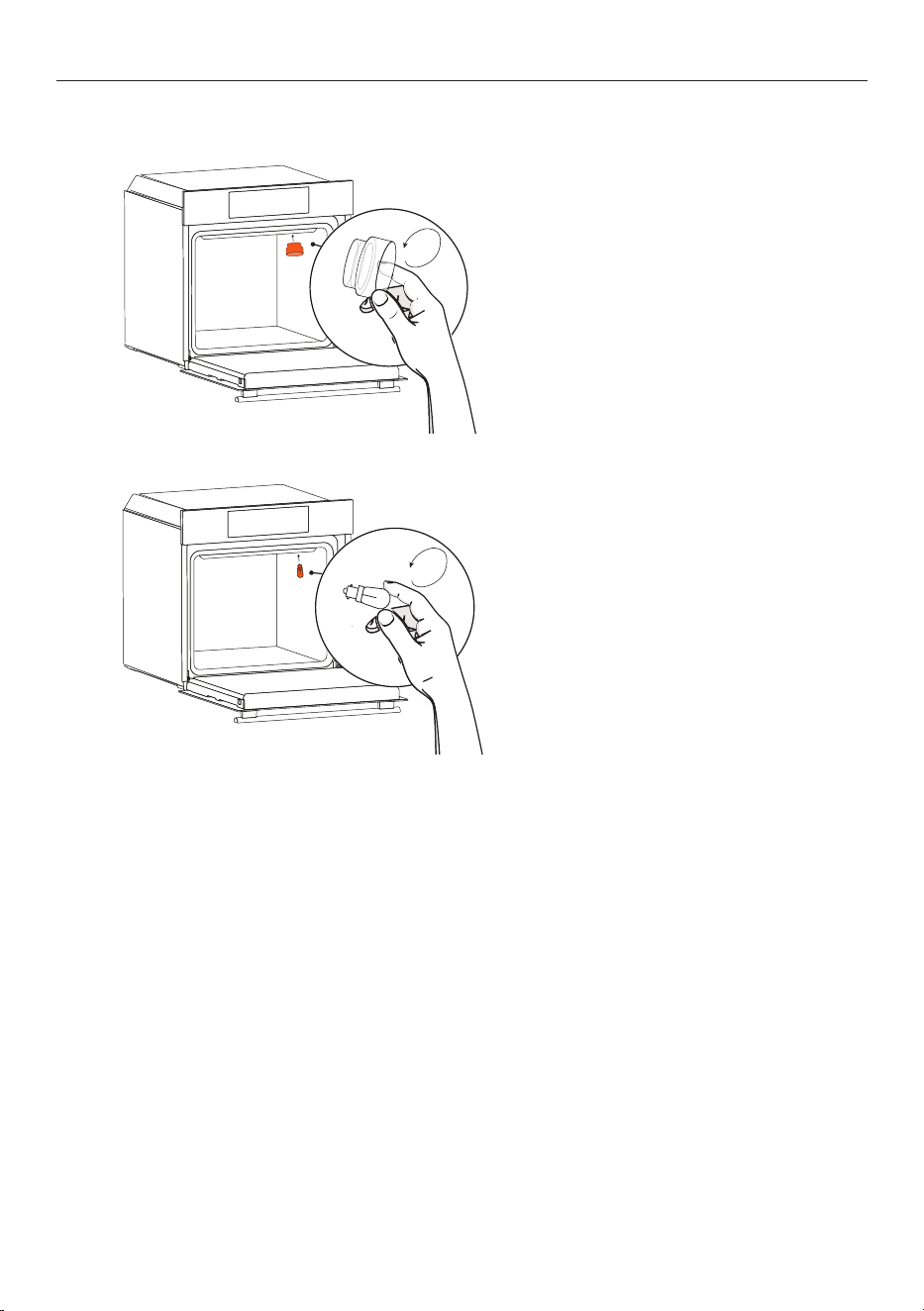
Replacing the back light
1. Turn the protective light cover
clockwise to remove it.
2. Unscrew the light bulb to remove
it. Replace with a new bulb and refit
the protective cover.
27
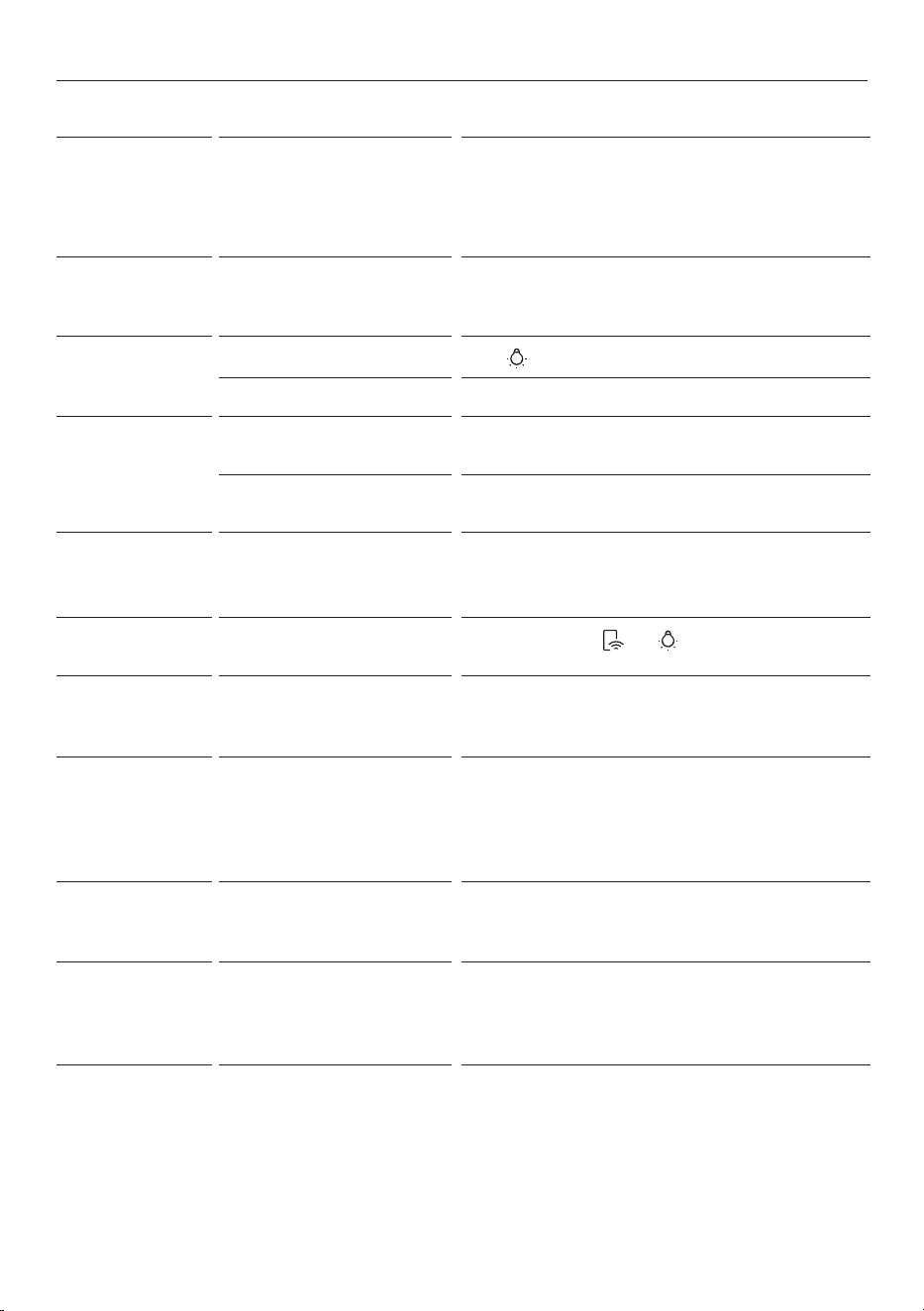
TROUBLESHOOTING
PROBLEM POSSIBLE CAUSES WHAT TO DO
ER__ is showing
on the display
There is an error. If the oven is switched on, switched it o and wait
several minutes before powering it on again. If the
error has disappeared, you can continue to use the
oven. If the error code remains, note the number and
call Customer Service.
The oven does not
work
No power. Check that the mains power supply (wall switch) is
turned on, the fuse has not tripped and there is no
power outage in your area.
The lights are not
operating when I
open the oven door
The lights are turned o.
Press
to turn the lights on.
The oven lights have blown. Replace the lights. See 'Replacing the lights.'
The oven is not
heating
The door is not fully closed. Make sure the door is properly closed. The heating
elements are disabled while the door is open.
The door has been opened too
often during cooking.
Avoid opening the door too often during cooking.
A glass pane in the
door has cracked,
chipped or shattered
The glass has been knocked or
cleaned incorrectly.
You must NOT use the oven. Call your Authorised
Repairer or Customer Service.
The controls aren't
working
The control panel is locked.
Press and hold the
and to unlock.
Hot air is coming out
of the vents when
the oven is off
The cooling fan is running. This is normal. You do not need to do anything.
The fan comes
on when I select a
function that does
not use a fan (eg.
BAKE)
The fan starts automatically
while preheating (but not for
FAST PREHEAT).
This is normal. The fan will turn o when the oven
reaches temperature.
The oven is loud
during
PYROLYTIC
CLEAN
The cooling fan is operating at
its highest speed.
This is normal. The fan will turn o when the oven has
cooled.
The
PYROLYTIC
CLEAN
cycle has
finished but the oven
door will not open
The oven is locked because it
is still too hot to be used for
cooking.
The oven will unlock once it has reached a safe
temperature.

28
MANUFACTURER'S WARRANTY
Please read this warranty card carefully. Attach your purchase receipt to this warranty card and keep in a
safe place. You must produce both warranty card and proof of purchase in the event of a warranty repair
being required.
When you purchase any new Haier Product you automatically receive a two year Manufacturer's Warranty
covering parts and labour for servicing.
The Manufacturer undertakes to:
Repair or, at its option, replace without cost to the owner either for material or labour any part of the
Product, the serial number of which appears on the Product, which is found to be defective within TWO
YEARS from the date of purchase.
This warranty DOES NOT cover:
A Service calls which are not related to any defect in the Product. The cost of a service call will be charged
if the problem is not found to be a Product related fault. For example:
1 Correct the installation of the product.
2 Provide Instruction on use of the product or change the setup of the product.
3 Replace house fuses or correct house wiring.
4 Correcting faults) caused by the user.
5 Noise or vibration that is considered normal.
6 Water on the floor due to incorrect loading or excessive suds.
7 Blocked pumps, removal of foreign objects/substances from the machine, including the pump and
inlet house filters.
8 Correcting damage caused by pests, eg. rats, cockroaches etc.
9 Correct corrosion or discolouration due to chemical attack.
!0 Power outages or surges.
B Defects caused by factors other than:
1 Normal domestic use or
2 Use in accordance with the Product's User Guide.
C Defects to the Product caused by accident, neglect, misuse or 'Act of God'.
D The cost of repairs carried out by non-authorised repairers or the cost of correcting such
unauthorised repairs.
E Normal recommended maintenance as set out in the Product's User Guide.
F Repairs when the appliance has been dismantled, repaired or serviced by other than an AUTHORISED
CUSTOMER SERVICE CENTRE or the selling dealer.
G Pick up and delivery.
H Transportation or travelling costs involved in the repair when the product is installed outside the
AUTHORISED CUSTOMER SERVICE CENTRE'S normal service area.
This product has been designed for use in a normal domestic environment. It is not intended for
commercial use. Doing so may affect product warranty.
Service under this warranty must be provided by an Authorised Service Repairer (refer to the Customer
Care section for contact details). Such service shall be provided during normal business hours. This
warranty certificate should be shown when making any claim.

29
MANUFACTURER'S WARRANTY
Note:
This Warranty is an extra benefit and does not affect your legal rights and applies only to product
purchased in New Zealand and Australia. Please keep this Warranty Card in a safe place.
For Australian customers:
Our goods come with guarantees that cannot be excluded under the Australian Consumer Law. You are
entitled to a replacement or refund for a major failure and for compensation for any other reasonably
foreseeable loss or damage. You are also entitled to have the goods repaired or replaced if the goods fail to
be of acceptable quality and the failure does not amount to a major failure.

30
CUSTOMER SERVICE
Complete and keep for safe reference:
We recommend our Haier Customer Service and the use of original spare parts.
If you have a problem with your appliance, please first check TROUBLESHOOTING. If you cannot find a
solution there, please contact:
z
Your local dealer
z
The Service & Support area at
www.haier.com.au or
www.haier.co.nz
where you can activate the service claim and also find FAQs.
To contact our Service, ensure that you have the following data available.
The information can be found on the rating plate at the door.
Model
Serial No.
Model
Serial No.
Purchase Date
Purchaser
Dealer
Suburb
To w n
Country