Operator’s Manual
www.mechmaxx.com
HEAT PRESS MACHINE
WARRANTY


OPERATING INSTRUCTIONS
1
www.mechmaxx.com
Thank you for purchasing a Mechmaxx heat press!
To ensure smooth setup and operation, please read this user manual carefully before starting production with your
machine.
Reproducing any part of this manual in any form is not permitted without written permission from Mechmaxx. We reserve
the right to make changes to technical specifications and product features at any time.
FOR THE HEAT PRESS MACHINE
OPERATING INSTRUCTIONS

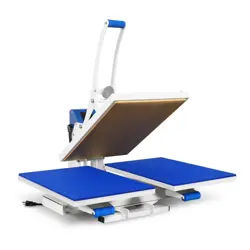
DOUBLE STATIONS PNEUMATIC HEAT PRESS MACHINE USER MANUAL
DOUBLE STATIONS PNEUMATIC HEAT PRESS MACHINE USER MANUAL
2
www.mechmaxx.com
This machine can thermo-transfer (via sublimation) colorful pictures and words onto textiles made of cotton, flax, chemi-
cal fiber, nylon, etc. This machine can also conduct some heat-treatments such as hair-planting print, vesicant print, and
conglutination of clothes with their lining under lower temperature and lower pressure (such as the conglutination of kid’s
clothes, caps and shoes).
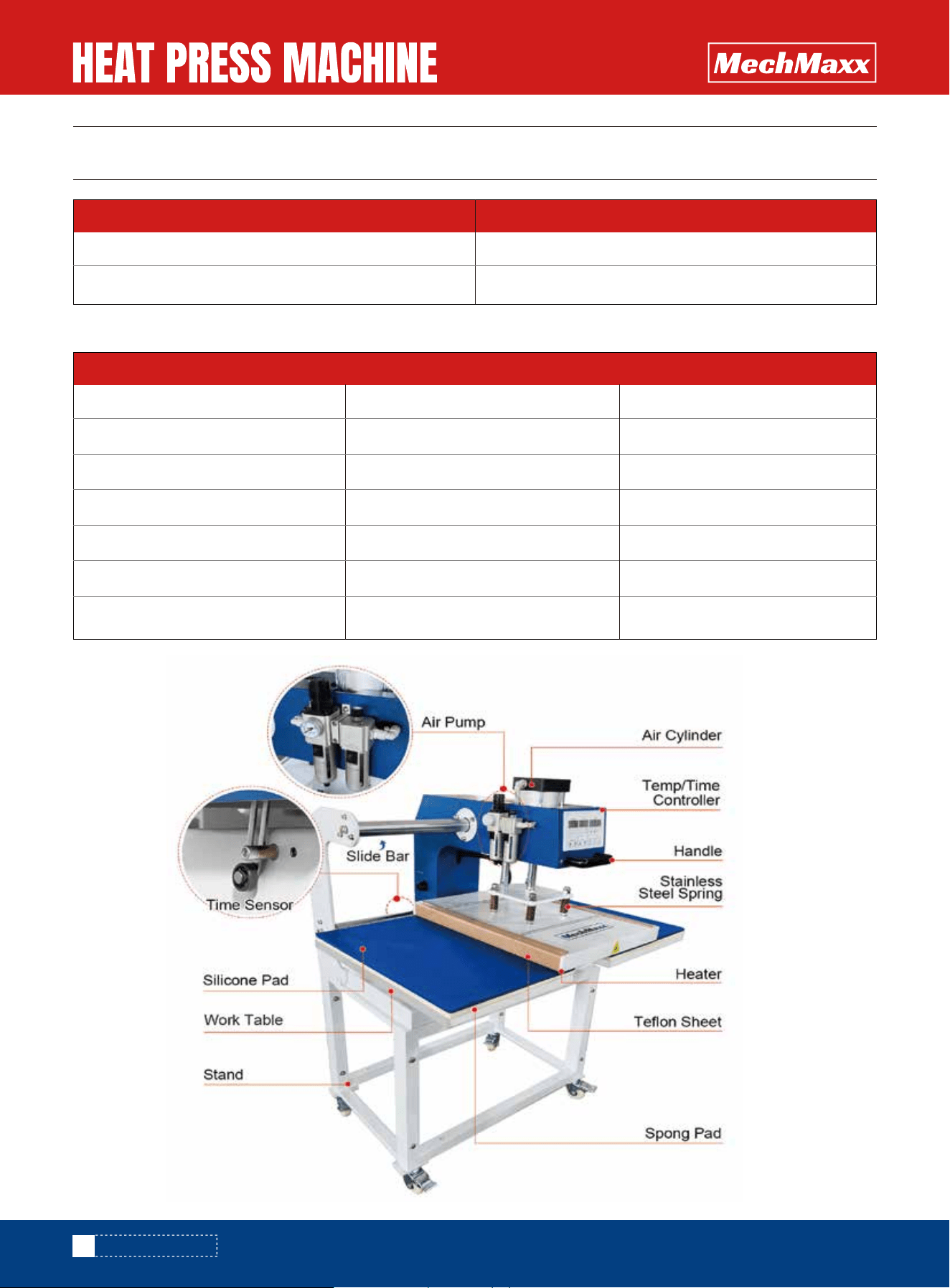
It is air press pneumatic, auto work, easy operation, safe and reliable with enlarged and thickened cast aluminum heating
board.
The Mechmaxx heat press machine is a pneumatic double-plate transfer press specifically designed for medium to
high-volume production environments.
• Enables efficient and consistent processing of larger batches through its dual working surfaces.
• Features a digital control system for precise and user-friendly adjustment of time and temperature, including real-time
monitoring of set and actual values.
• Contact pressure is flexibly adjustable via a pressure gauge, with an integrated oil and water separator to ensure
optimal pneumatic performance.
• Equipped with a two-hand operation system and emergency stop functions for maximum operational safety, including
a pre-press capability.
• Lifting and lowering speeds can be finely regulated using built-in restriction valves.
• The device is CE and RoHS certified and has been tested in accordance with applicable German safety standards.
1.This machine must be protected by safe and reliable ground wire. Note that it is only permissible to operate a heat press
from a power socket protected by a ground fault protection switch.
2. During heating up and operation, please do not touch the heater to avoid scalding.
3. To get successful sublimation effect, it should be correct time, temperature and pressure; the thickness and material
of the heating sublimation products and the ink and paper also will affect the sublimation effect.
4. Before large scale production, you must make some sample test to make sure the best time, temperature, pressure
etc.
5. The temperature controller is complicated, except the temperature setting, please do not make other setting to avoid
program error and broken.
6. Don’t put your hand on the working plate when the machine is working, for prevent your hand from burns
7.Never open the housing or attempt to modify the machine yourself
8.In case you are requested by the Mechmaxx customer support to open the heating plate cover, please make sure you
are wearing respiratory protection and only touch the contained insulation wool with gloves. Any disposal of the wool
must be contained in a closed bag.
9.Ensure that liquids and metal objects do not get into the inside of the heat press.
10.Disconnect machine from power outlet when not in use!
11.Never operate the heat press within the reach of children and never leave the machine unsupervised when switched
on.
12.Ensure that the machine is used only in dry rooms.
SUMMARY
SHORT OVERVIEW – MECHMAXX HEAT PRESS MACHINE
SAFETY PRECAUTIONS

3
www.mechmaxx.com
DOUBLE STATIONS PNEUMATIC HEAT PRESS MACHINE USER MANUAL
13.Pay attention that the used compressor is attuned to the air consumption and the pressure.
If you cannot observe one or more of the safety precautions above, or if you are not sure whether all points are satisfied,
please contact our Technical Support Department.
4
www.mechmaxx.com
SCOPE OF DELIVERY
SCOPE OF DELIVERY
Item Quantity
TECHNICAL PARAMETERS
Heat press machine
Instruction manual
1
1
Large format Heat Press Machine
Model
Voltage
Power
Temperature
Time for heating up
Pressure output
Work Size
PUD1624
110V
1650W/2.21HP
0-750°F / 0-399 ℃
10-15 minutes
85 PSI / 6kg/cm²(minimum)
16*24 inches / 40*60cm
PUD2024
110V
1500W/2HP
0-750°F / 0-399 ℃
10-15 minutes
85 PSI / 6kg/cm²(minimum)
20*24 inches / 50*60cm
5
www.mechmaxx.com
SCOPE OF DELIVERY
PNEUMATIC CONNECTION AND PRESSURE ADJUSTMENT
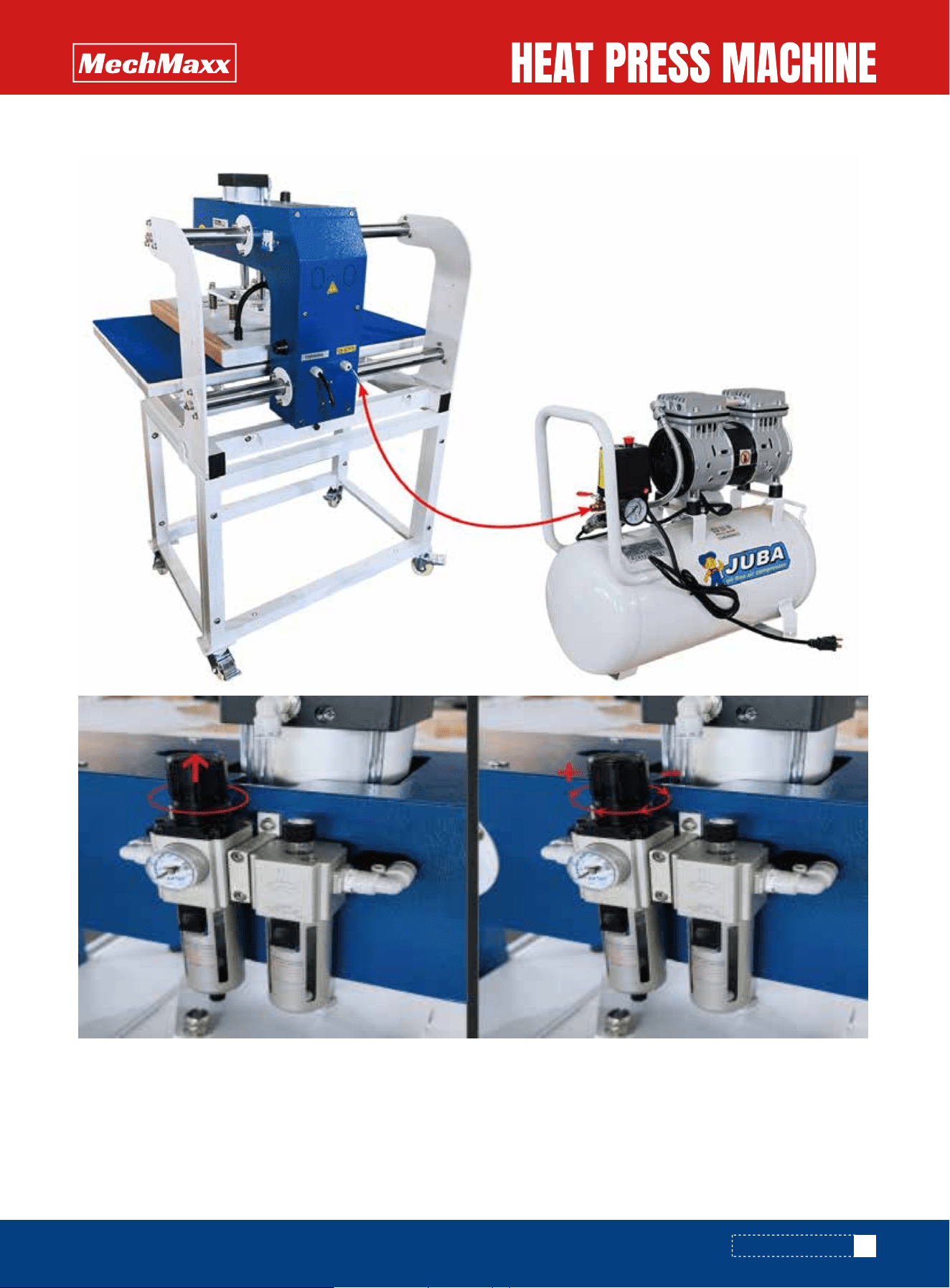
1).Connect the heat press with air compressor or air sources.
2).Lift up the cap of air valve as the picture show.
3).Revolve the cap anticlockwise , the air pressure goes down ; contrariwise , the air pressure goes up ; when you finish
the pressure adjustment , push down the cap.
4).Suggested air pressure is 58-87PSI, up to 87PSI is possible. It depends on the transfer materials.
6
www.mechmaxx.com
OPERATION
OPERATION
Before turn on the power, check each spare parts to make sure they are not loose.
Connect the air source, power supply and open the pressure valve to let the pressure valve to needed pressure (about
58-87 PSI ) till the heating board rises up automatically.
1.READ BEFORE USAGE
Turn on the power switch,
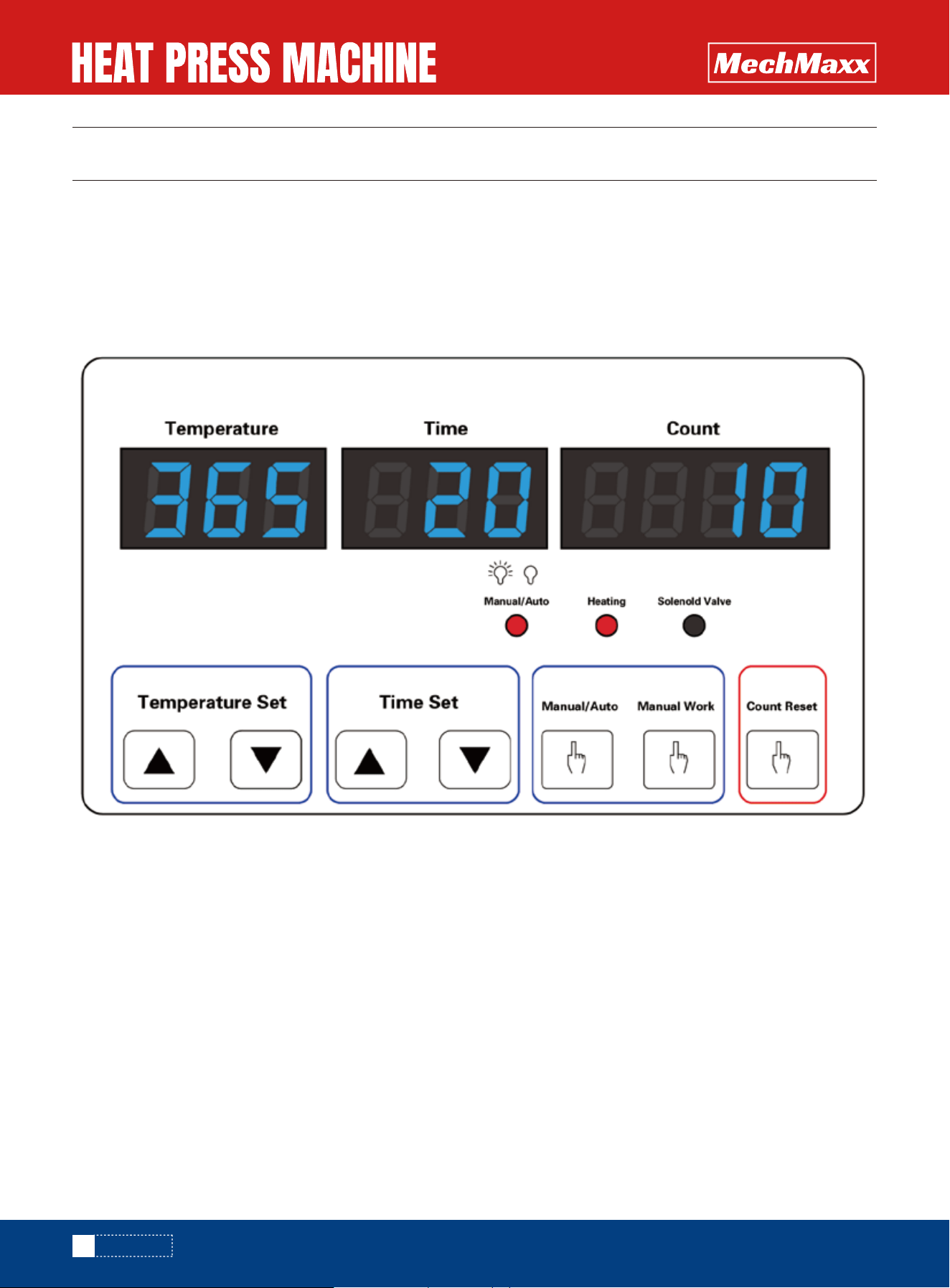
1): Set temperature, press ▲ for temperature increase, press ▼for temperature decrease;
2): Set time. press▲ for time increase, press▼ for time decrease;
3): Finish setting. Machine starts heating up.
3. PNEUMATIC PRESS UP AND DOWN
1) When reach to needed temperature, the machine will alarm, the heater will rise up;
2) Move the work table exactly under the heater, the heater will automatically press down;
3) When time is up to finish printing, the heater will rise up.
2.PANEL SETTING

7
www.mechmaxx.com
OPERATION
OPERATION OF THROTTLE VALVES
IMPORTANT NOTEICE FOR EMERGENCY STOP:
Note: Please note that a certain time is required before the press cools down after it is switched off.
1) On the right side of the press head there are two silver screws with which the restricting
valves to open and close the heating sheet can be adjusted.
2) If the screws are screwed out, this slows down the lifting and lowering process.
3) When the screws are screwed in, the heat press machine accelerates the lowering and lifting of the
heating sheet.
4)Fix the respective setting with the corresponding counter nuts by tightening them by hand.
When machine works abnormally, please immediately press EMERGENCY STOP button to stop work; to restart, rotate the
EMERGENCY STOP button and pull it out.
8
www.mechmaxx.com
RECOMMENDED TIMES AND TEMPERATURES
RECOMMENDED TIMES AND TEMPERATURES
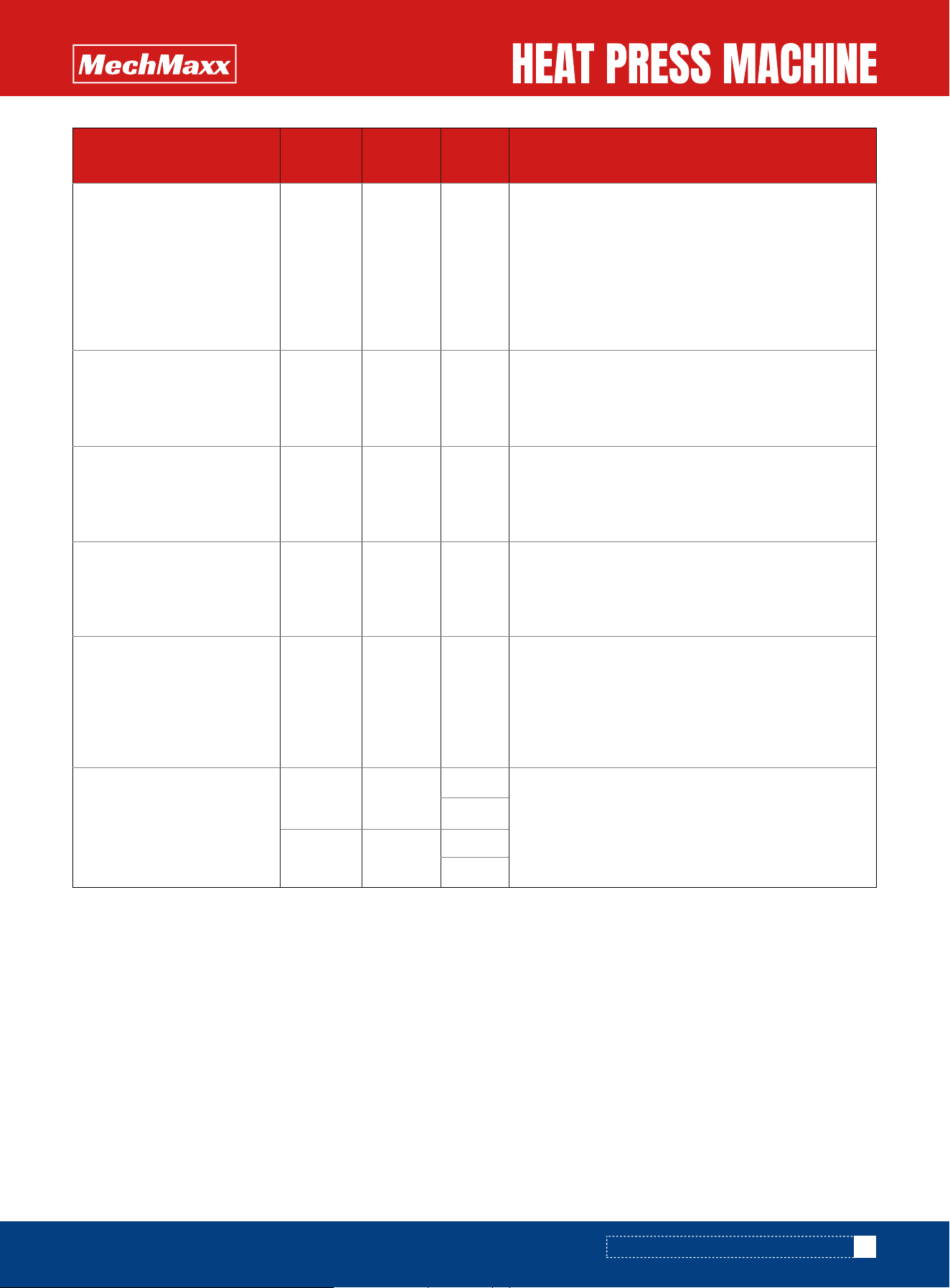
These values are only guidelines;; they can vary from material to material and should always be checked before pressing.
1.Printing On Sublimation Paper , Mirror Image ;
2.Put The Plate Right ;
3.Light Medium .
1.Printing On Sublimation Paper , Mirror Image ;
2.Image And Printing Side Matched Tight Without
Margin ;
3.Printing Side Downward ;
4.Medium Pressure .
1.Printing On Sublimation Paper , Mirror Image ;
2.Tear Off The Protective Film On The Board Before
Printing ;
3.Image And Printing Side Matched Tight Without
Margin ;
4.High Pressure .
1.Printing On Sublimation Paper , Mirror Image ;
2.Tear Off The Protective Film On The Board Before
Printing ;
3.Image And Printing Side Matched Tight Without
Margin ;
4.High Pressure .
1.Printing On Sublimation Paper , Mirror Image ;
2.Keep Temperature Sensitive Parts Away From
Heating Board ;
3.Press Down The Heating Board After It Rises To
The Lowest Temperature ;
4.High Pressure ;
5.Only For Non Cotton Material Like Fabrics And
Polyester .
1.Printing On Light Color Transfer Paper , Mirror
Image ;
2.Keep Temperature Sensitive Parts Away From
Heating Board ;
3.Press Down The Heating Board After It Rises To
The Lowest Temperature ;
4.High Pressure ;
5.Peel Off Base Paper Immediately After Printing ;
5.Only For Light Color Cotton T-Shirts .
Item Name
Lowest
Temp.(F)
Highest
Temp.(F)
Time(S) Remark
Plate
230
320
230
230
330
330
230
310
330
310
330
330
330
330
330
330
345
345
40
100
20
100-120
20
100
120
340
340
30
50
100
300-420
120-240
Ceramic Tile
Metal Board
Key Chain
(Sparking Aluminum Sheet)
T-Shirt
(Non Cotton Material)
T-Shirt
(Light Color Cotton Material)
Before beginning full production, it is essential to conduct your own tests using the specific transfer materials and
substrates intended for use. The settings and values provided in this manual, as well as those from the material manufac-
turer, should be regarded as general guidelines only.
The user is solely responsible for determining the correct settings suitable for their individual conditions. Performance
characteristics such as washability and transfer behavior must be verified through your own testing.
IMPORTANT NOTICE
After pressing, allow the textile to cool completely before removing any type of carrier or backing from the transfer materi-
al. The adhesive in the transfer material activates fully only when cooled. If the adhesive fails to bond properly once
cooled, it may indicate insufficient pressing temperature or duration.
TEXTILE APPLICATION NOTE:
1.Printing On Dark Color Transfer Paper , Non Mirror
Image ;
2.Keep Temperature Sensitive Parts Away From
Heating Board ;
3.Press Down The Heating Board After It Rises To
The Lowest Temperature ;
4.High Pressure ;
5.Wait For 3 Minutes And Peel Off Thermal Paper.
1.Printing On Sublimation Paper , Mirror Image ;
2.Image And Printing Side Matched Tight Without
Margin ;
3.Medium Medium .
1.Printing On Sublimation Paper , Mirror Image ;
2.Image And Printing Side Matched Tight Without
Margin ;
3.Medium Medium .
1.Printing On Sublimation Paper , Mirror Image;
2.Printing Side Downward;
3.Both Sides Printable , Printing Side By Side With
The Need For Thermal Paper.
1.Printing On Sublimation Paper , Mirror Image;
2. Keep Temperature Sensitive Parts Away From
Heating Board;
3.Press Down The Heating Board After It Rises To
The Lowest Temperature ;
4.High Pressure.
1.Printing On Sublimation Paper , Mirror Image;
2.Image And Printing Side Matched Tight Without
Margin ;
3.Printing Side Downward;
4.Medium Pressure.
Item Name
Lowest
Temp.(F)
Highest
Temp.(F)
Time(S) Remark
340
340
345345
30
120
320320
330330
120
40
345345
80
230
345
120-180
360-480
345
345
240-300
450-600
T-Shirt
(Dark Color Cotton Material)
Mouse Pad
Puzzle
Metal Name Card
Pillow
Photo Slate
9
www.mechmaxx.com
RECOMMENDED TIMES AND TEMPERATURES

MAINTENANCE
1.Air pressure
Checking the lubricating oil lf it's enough in the Cylinder. Use the pressure knob on the Air Requlator to adiust thepressure,
turn toward "+"direction to add the pressure, "_"direction to reduce the pressure.
2. Heat Platen Not Goes Down: lf digital display show normally, but when you press green start button, theheat
platen not goes down
1). The limit value under the bottom platen doesn't touch the counting down switch because of its too high
position.Please loosen the value's screw a little to make it longer.
2). Checking the circuit connecting with green start-up switch if it's with problem.
3. No action after turn on the machine
1). Check the plug whether it connects well or whether it is broken.
2).Check the power switch or digital controller whether it is broken
3).Check the fuse whether it has been burnt out.
4). lndicating light is on, but no display on screen, check the 5 cable of Railway transformer. lf it's loosening.
showing the problem is poor connection. lf they connects well, showing that the Transformer is faulty.
4.Heater can not be heating up
1)The panel has problem
2)Check whether the thermocouple of the heat platen touches well. lf the thermocouple is loose, the display wil
show 255 and machine keeps beeping.
3)Check if the indicating light of solid-state rela y is on, if not, check if the relay or digital controller is broken.
4)lf you already changed the new solid-state relay but the heat platen still can't heating up, check if the heat platenis
faulty or the heat platen's power cable is loose, need to change by new heat platen
5. The heat platen works well, but suddenly the display screen show 255℃.
1). Check whether the thermocouple of the heat platen touches well.
2). lf the thermocouple touches well but stills show 255'℃ , then it is faulty.
6. The machine is heating during 0~180'c, but display number jumps to above 200'℃ or 300'℃ suddenly, or the
numbers on display jumps irregularly.
1). Check whether the thermocouple of the heat platen touches well.
2). lf the thermocouple is good, it shows that the program of digital controller is broken, which namely IC or is
broken, need to change by new controller.
7. The temperature is out of control: Set 180℃, but the actual temperature is above 200'℃。
1). lt means the solid-state relay is broken, out of control, need to change the relay.
2). Or the digital controller is faulty and it keeps conveying electric to relay, need to change controller
8. The setting temp and time becomes abnormal after exchange the heat platen
Please reset the temp and time according the operation process manual.
9.Thermocouple is broken
One line broken light will light up from the temperature display, then change the thermal couple.
10
www.mechmaxx.com
MAINTENANCE

10.Maintenance and cleaning
1).In order to prolong the machine service life, please add the lubrication oil regularly on the joints.
2).In order to keep the heat platen's good transfer effect, you need to protect the heat platen carefully whenever you are
using it or not.
3).Please keep the machine in dry place.
4).If you are not able to solve the electrical parts problem, please kindly contact the supplier and get technical support
5).Maintenance work should always be accomplished with the press switched off and cooled down.
6).The plug must first be disconnected from the power socket.
7).Clean the press regularly with a soft cloth and mild household cleaner to remove adhesive residues etc. Never use
scouring sponges, solvents or gasoline!
8).Clean the Drain Valve by draining Oil and Water through the Drain Valve.
1. Picture burning: Too much time or temperature, just adjust time or temperature
2. Picture not vivid: less time or too low temperature, just adjust to have more time or temperature
3. lf the print color is pale: the temperature is too low / the pressure is not correct / or not pressed long enough2. lf the
print color is too brown or the transfer paper is almost burnt: reduce the setting temperature
4. lf the print is blurring: too much transfer time causes proliferation.
5. lf print color is different/ partial transfer effect is not good enough: the pressure is not enough / or not pressed long
enough /or poor quality transfer paper.
6 .lf transfer paper stick to the obiect after transfer: the temperature is too high/ or poor quality printing ink
COMMON FAILURES AND THEIR POSSIBLE REASONS
11
www.mechmaxx.com
MAINTENANCE
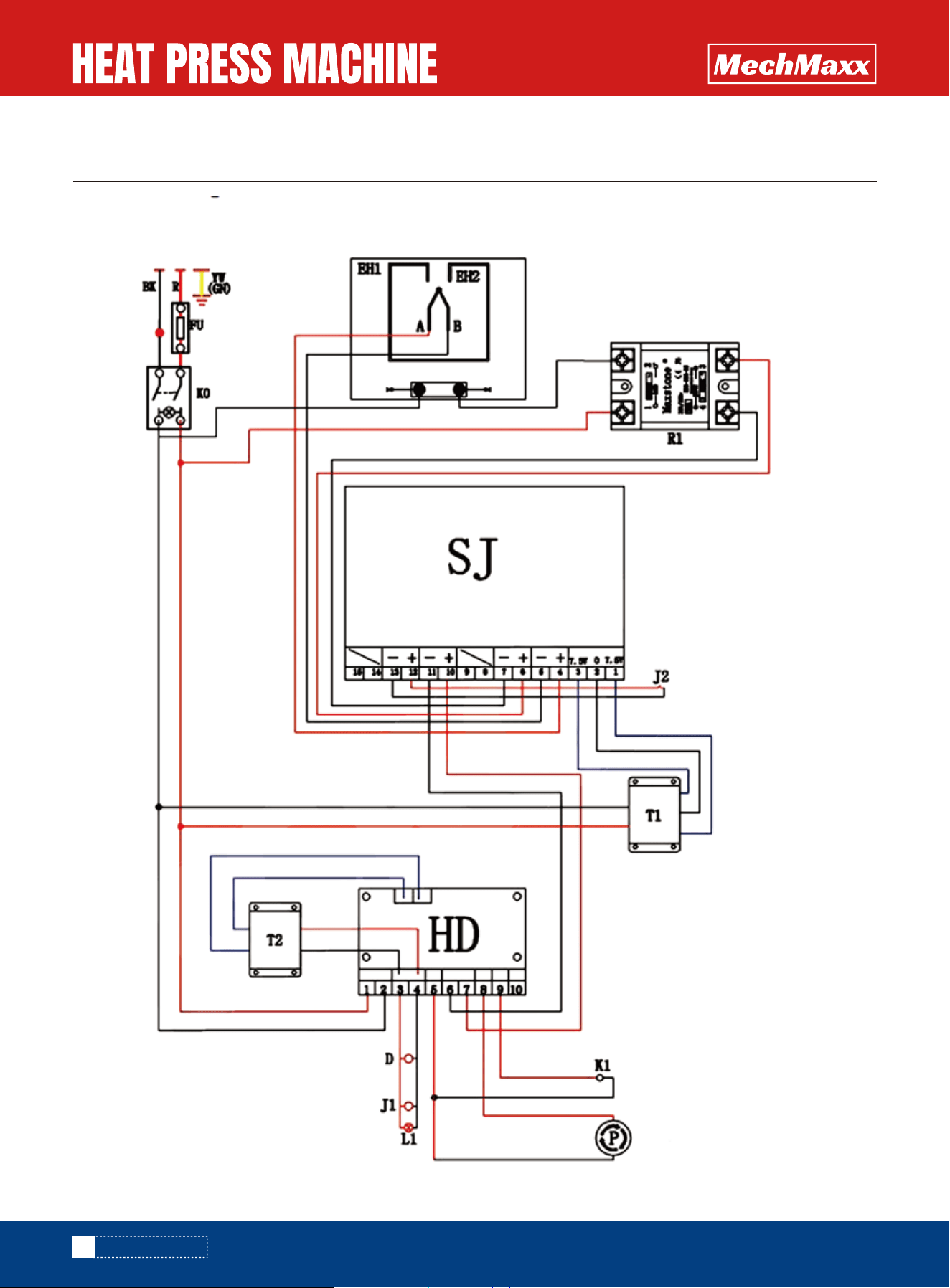
CIRCUIT DIAGRAM
12
www.mechmaxx.com
CIRCUIT DIAGRAM
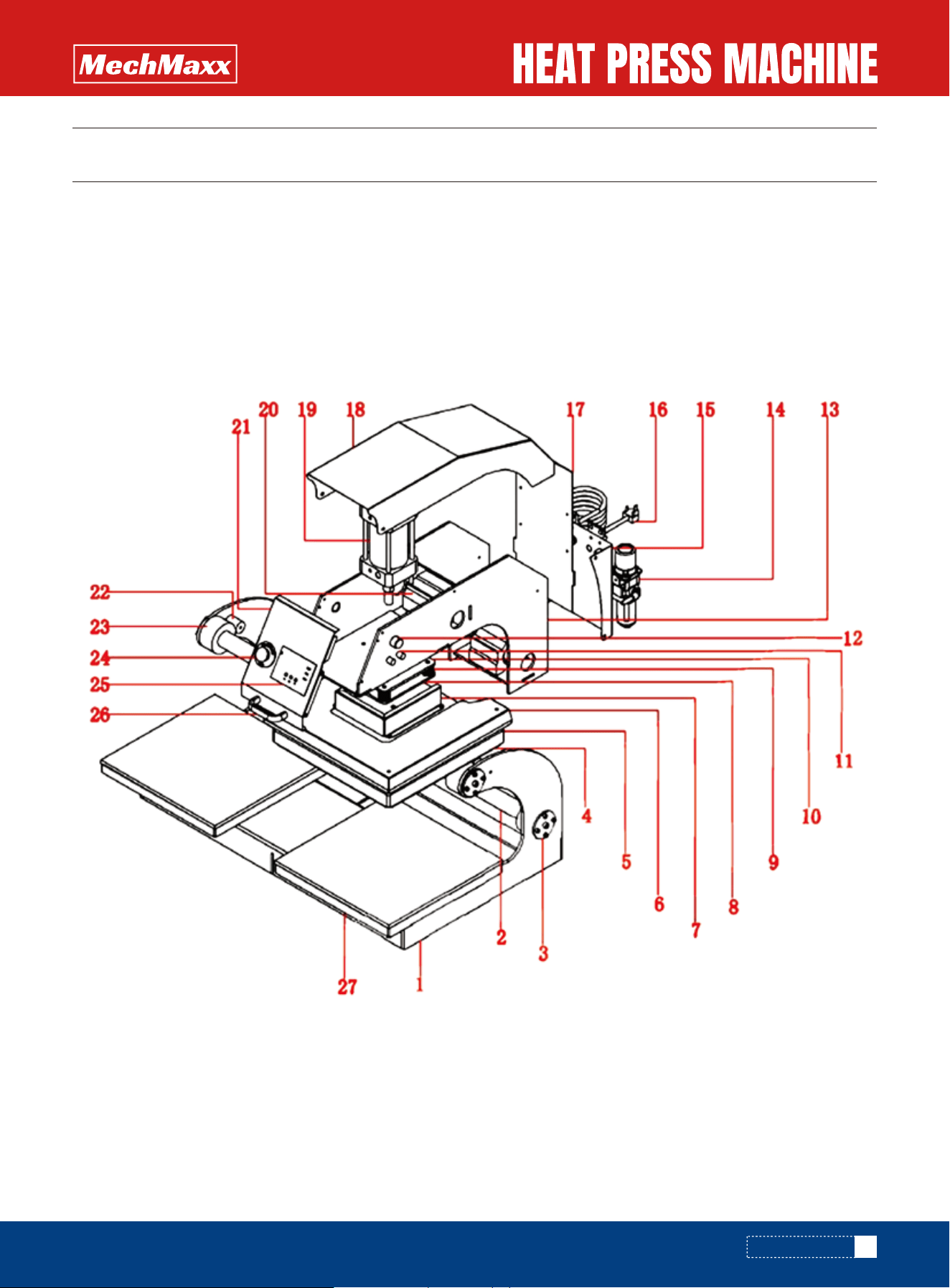
PARTS DIAGRAM
13
www.mechmaxx.com
PARTS DIAGRAM
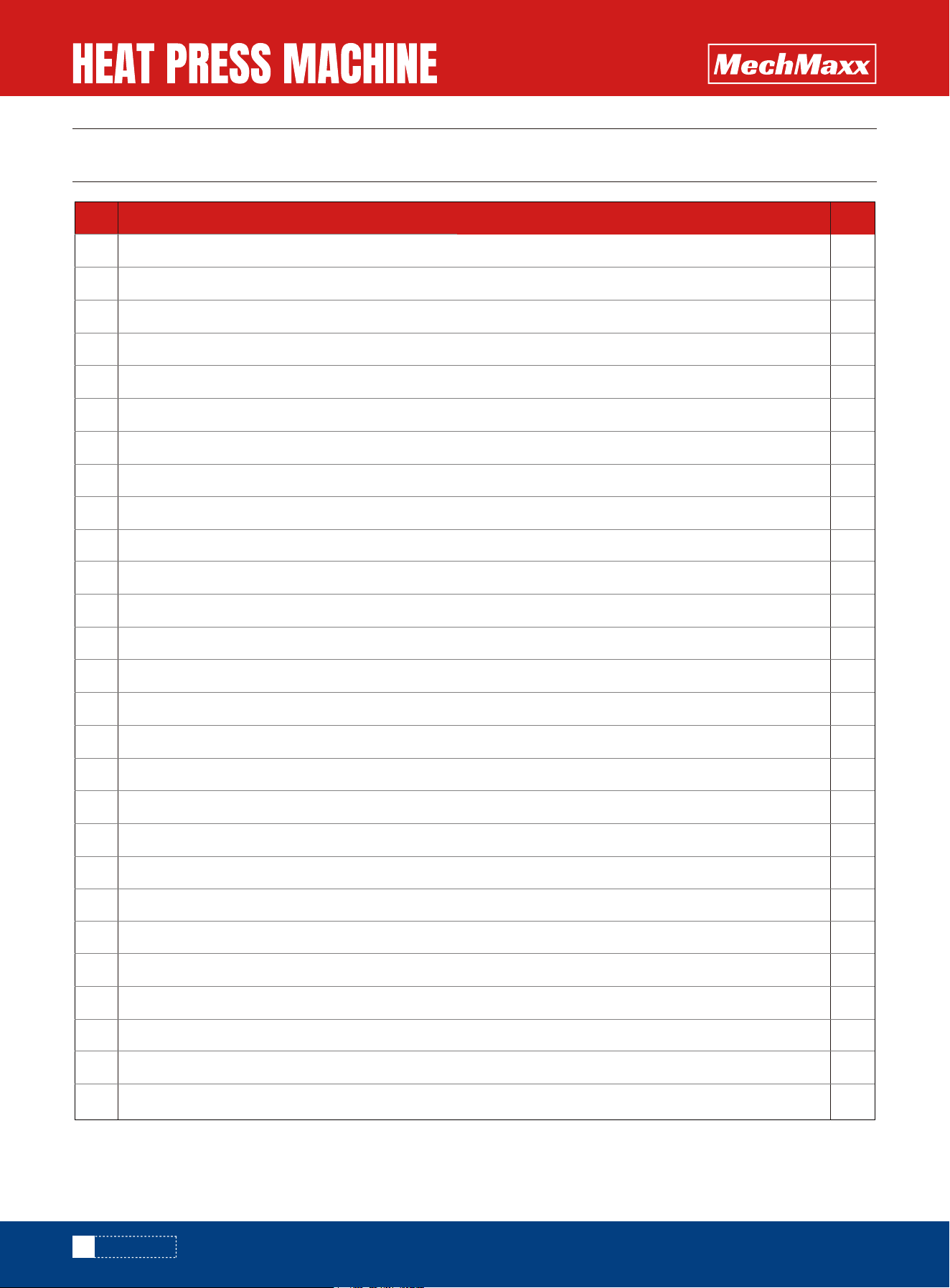
PARTS LIST
14
www.mechmaxx.com
PARTS LIST
No. DESCRIPTION QTY
1
2
3
4
5
6
7
8
9
10
11
12
13
14
15
16
17
18
19
20
21
22
23
24
25
26
27
Machine Frame
Slide Rail
Slide Rail Fixed Plate
Heat Platen
Heat Platen Cover
Anti-scald protect metal cover
Spring Protective Cover
Spring Fixed Cover
Spring
Adaptor Plate
Air Regulating Valve
Start Switch
Side Plate
Air Filter
Back Plate
Power Cord
Electronic Parts Bracket
Upper Cover Plate
Air Cylinder
Spindle with Base
Controller Cover
Electromagnet
Casting Polyurethane
Emergency Stop Button
GY-04 Digital Controller
Front Handle
Under Plate
2
1
1
1
1
1
2
2
1
1
1
1
1
1
4
1
1
1
1
1
1
2
2
2
1
1
1