
Write the model and serial
numbers here:
Model # _________________
Serial # _________________
You can find them on a label on
the back of the dehumidifier.
GE is a trademark of the General Electric Company. Manufactured under trademark license.
OWNER’S MANUAL
DEHUMIDIFIER
49-5001090 Rev. 1 01-25
ADHE25
ADHE35
ADHE50
SAFETY INFORMATION .........3
OPERATING INSTRUCTIONS
Controls ..............................4
Other Features ........................5
Caster Installation .....................6
How the Dehumidifier Operates .........6
Choosing a Location ...................6
Automatic Defrost .....................7
Removing Collected Water .............7
Water Level ...........................7
Bucket Operation ......................7
CARE AND CLEANING
Grille and Case ........................9
Water Bucket .........................9
Air Filter ..............................9
TROUBLESHOOTING TIPS ......10
WIFI SETUP ...................... 11
CONSUMER SUPPORT
Limited Warranty .....................13
Consumer Support ....................14
ENGLISH/ESPAÑOL
Before you begin
Record the GE module number and
password for wifi setup. To locate this
information, see page 11.
GE Module Number #____________
Password #____________________

2 49-5001090 Rev. 1
THANK YOU FOR MAKING GE APPLIANCES A PART OF YOUR HOME.
Whether you grew up with GE Appliances, or this is your first, we’re happy to have you in the family.
We take pride in the craftsmanship, innovation and design that goes into every GE Appliances
product, and we think you will too. Among other things, registration of your appliance ensures that we
can deliver important product information and warranty details when you need them.
Register your GE appliance now online. Helpful websites and phone numbers are available in the
Consumer Support section of this Owner’s Manual. You may also mail in the pre-printed registration
card included in the packing material.
349-5001090 Rev. 1
READ AND SAVE THESE INSTRUCTIONS
IMPORTANT SAFETY INFORMATION
READ ALL INSTRUCTIONS BEFORE USING THE APPLIANCE
SAFETY INFORMATION
WARNING
For your safety, the information in this manual must be followed to minimize the risk of fire, electric
shock or personal injury.
• Use this appliance only for its intended purpose as described
in this Owner’s Manual.
• This dehumidifier must be properly installed and grounded
as described in this manual before it is used.
• Never operate this dehumidifier in an area that is likely to
accumulate standing water. If this condition develops, for
your safety disconnect the power supply before stepping into
the water.
• Never unplug your dehumidifier by pulling on the power
cord. Always grip plug firmly and pull straight out from the
receptacle.
• Immediately replace all electric service cords that have
become frayed or otherwise damaged. A damaged power
supply cord must be replaced with a new power supply cord
obtained from the manufacturer and not repaired. Do not
use a cord that shows cracks or abrasion damage along its
length or at either the plug or connector end.
• If the receptacle does not match the plug, the receptacle
must be changed out by a qualified electrician
• If the SUPPLY CORD is damaged, it must be replaced by
the manufacturer, its service agent or similarly qualified
person in order to avoid a hazard.
• The appliance shall be installed in accordance with national
wiring regulations.
• Turn the dehumidifier OFF and unplug it before cleaning.
• GE Appliances does not support any servicing of the
dehumidifier. We strongly recommend that you do not
attempt to service the dehumidifier yourself.
• For your safety, do not store or use combustible materials,
gasoline or other flammable vapors or liquids in the vicinity
of this or any other appliance.
• All dehumidifiers contain refrigerants, which under federal
law must be removed prior to product disposal. If you are
getting rid of an old product with refrigerants, check with the
company handling disposal about what to do.
• Do not use outdoors.
• This dehumidifier is intended for indoor residential
applications only. This dehumidifier should not be used for
commercial or industrial applications.
• This appliance can be used by persons with reduced
physical, sensory or mental capabilities or lack of experience
and knowledge if they have been given supervision or
instruction concerning use of the appliance in a safe way
and understand the hazards involved.
WARNING
USE OF EXTENSION CORDS. RISK OF FIRE. Could cause serious injury or death.
• DO NOT use an extension cord with this Dehumidifier.
• DO NOT use surge protectors or multi-outlet adaptors with
this Dehumidifier.
HOW TO CONNECT ELECTRICITY
Do not, under any circumstances, cut or remove the third
(ground) prong from the power cord. For personal safety, this
appliance must be properly grounded.
DO NOT use an adapter plug with this appliance.
The power cord of this appliance is equipped with a 3-prong
(grounding) plug which mates with a standard 3-prong
(grounding) wall outlet to minimize the possibility of electric
shock hazard from this appliance.
Have the wall outlet and circuit checked by a qualified
electrician to make sure the outlet is properly grounded.
Where a 2-prong wall outlet is encountered, it is your personal
responsibility and obligation to have it replaced with a properly
grounded 3-prong wall outlet.
The dehumidifier should always be plugged into its own
individual electrical outlet, which has a voltage rating matching
the rating plate.
This provides the best performance and also prevents
overloading house wiring circuits, which could cause a fire
hazard from overheated wires.
Risk of Fire or Explosion. This unit contains flammable refrigerant.
Additional safety precautions must be followed.
WARNING
A2L
• Do not use means to accelerate the defrosting process or to
clean, other than those recommended by the manufacturer.
• The appliance shall be stored in a room without continuously
operating ignition sources (for example: open flames, an
operating gas appliance or an operating electric heater.
• Do not pierce or burn refrigerant tubing. Be aware that
refrigerants may not contain an odor.
• Keep ventilation openings clear of obstruction.
• When handling, installing, and operating the appliance, care
should be taken to avoid damage to the refrigerant tubing.
• Do not drill holes in the unit.
• Maintenance, cleaning, and service should only be
performed by technicians properly trained and qualified in the
use of flammable refrigerants.
• GE Appliances does not support any servicing of the sealed
system components (i.e. refrigerant containing parts) in the
product.
• Dispose of dehumidifier in accordance with Federal and
Local Regulations. Flammable refrigerants require special
disposal procedures. Contact your local authorities for the
environmentally safe disposal of your dehumidifier.
4 49-5001090 Rev. 1
OPERATING INSTRUCTIONS
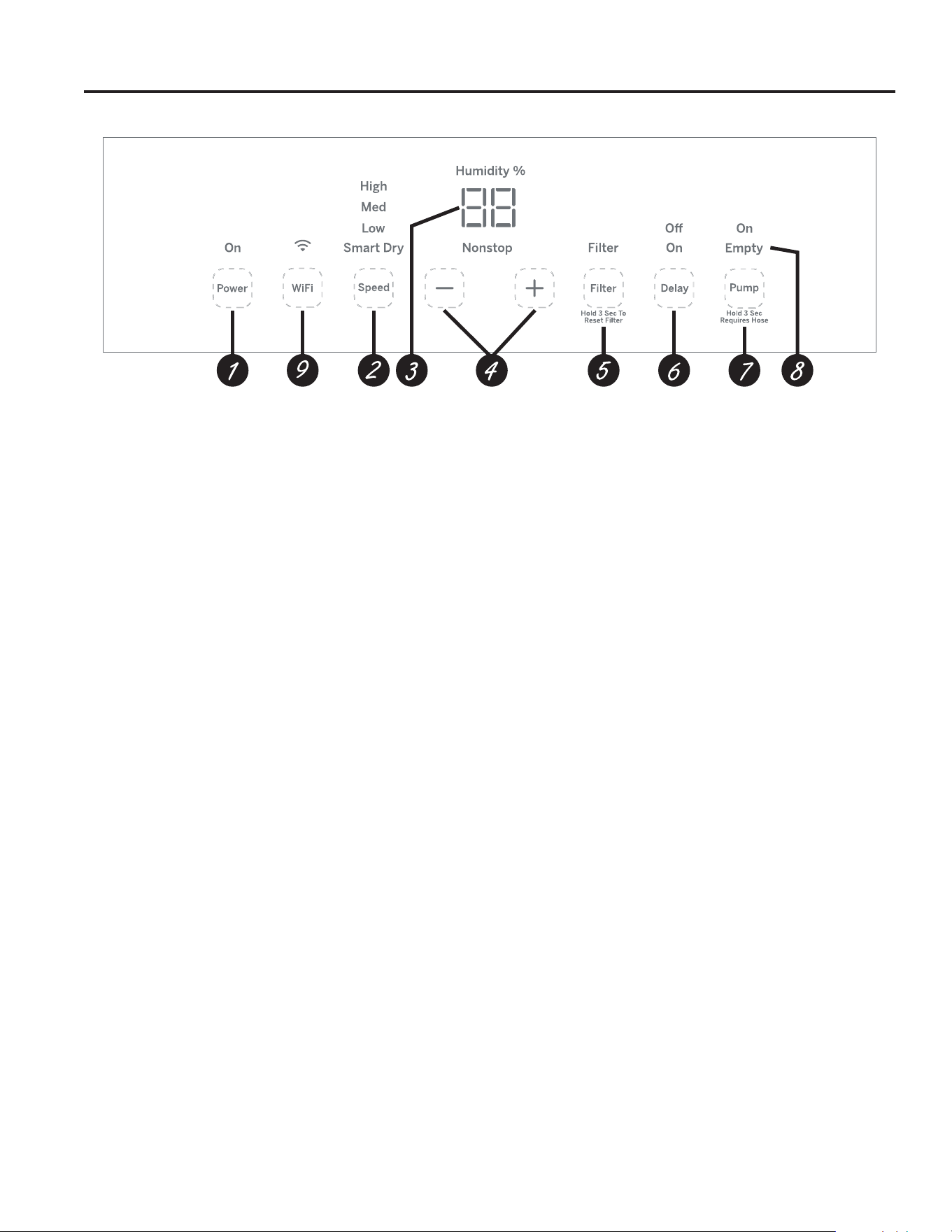
Controls
Controls
NOTE: When the bucket is full or removed, the controls
cannot be set.
1. Power Pad
Press to turn the dehumidifier on and off.
NOTE: Turning off the power by pressing the Power button
does NOT disconnect the appliance from power supply.
2. Fan Speed Pad
Controls the fan speed.
Press to select either High, Medium, Low, or Smart Dry
fan speed.
Set the fan control to High for maximum moisture removal.
When the humidity has been reduced and quiet operation is
preferred, set the fan control to Medium or Low. Smart Dry
compares the set humidity level with the actual humidity and
adjusts the fan speed automatically.
3. Display
Shows the set % humidity level while setting, then shows the
actual (+/– 5% accuracy) room % humidity level.
4. Humidity Set Control Pads
The humidity level can be set within a range of 35%
RH (Relative Humidity) to 80% RH (Relative Humidity) in 5%
increments or in Nonstop mode for continuous operation. To
set the unit for continuous operation, press the “–” pad until
the “Nonstop” indicator light is illuminated.
NOTE: If Nonstop is selected, the dehumidifier will operate
continuously at its maximum dehumidification settings if
attached to a hose to drain or until the bucket is full. For
drier air, press the “–” pad and set to a lower percent value
(%). For damper air, press the “+” pad and set to a higher
percent value (%). When you first use the dehumidifier,
set the humidity control to 45% or 50%. Allow at least 24
hours for the dehumidifier to achieve the humidity level.
If you still have damper air than desired, set the humidity
level to a lower setting or select Nonstop for maximum
dehumidification.
5. Filter Timer
After 250 hours of operation, the Clean the Filter indicator
light will glow to remind you to clean the filter. Remove the
filter and clean it.
Press and hold Filter button for 3 seconds to reset the filter
reminder. See the Care and Cleaning section.
6. Delay Off
While the dehumidifier is operating press the Delay button.
Press the “+” / “–” buttons to select the number of hours
you want the dehumidifier to continue to operate before
turning Off.
NOTE: After displaying the time, the Display will revert to
showing the current humidity after 5 seconds have passed.
Pressing the Delay button will display the number of hours
left on the delay.
Delay On
While the dehumidifier is off press the Delay button.
Press the “+” / “–” buttons to select the number of hours
you want the dehumidifier to remain off before turning On.
NOTE: The display will show the number of hours left until
the dehumidifier turns on.
To cancel the Delay:
Press the Delay button once, the hours remaining on the
Delay will appear on the display. Press the Delay button
again and the Delay will be cancelled.
7. Pump (on some models)
Activates the internal pump function. Press for 3 seconds
to activate the internal pump for automatic removal of
condensate. The internal pump indicator light will remain
illuminated after 3 seconds. Press to deactivate the pump.
Before turning on the pump, ensure the hose is connected.
8. Empty Indicator
The “Empty” indicator will blink when the bucket is ready
to be emptied, or when the bucket is removed and/or not
replaced in the proper position.
9. WiFi Connect Pad (on some models)
Enables connection of the dehumidifier to the home WiFi.
Download SmartHQ App for details at:
GEAppliances.com/connect.
Appearance may vary by model.

549-5001090 Rev. 1
Alarm
If the bucket is full or missing, an alarm will sound for
about 10 seconds to remind you to empty and replace
the bucket.
Auto Shut Off
The Water Level Control Switch shuts off the
dehumidifier when the bucket is full, or when the bucket
is removed and/or not replaced in the proper position.
NOTE: The fan and compressor will stop running as
soon as the bucket is removed. The alarm will sound if
the bucket is not replaced in the proper position after 3
minutes.
Auto Defrost
When frost builds up on the evaporator coils, the
compressor will cycle off and the fan will continue to run
until the frost disappears.
Power Outage
In the case of a power outage or interruption, the unit will
automatically restart, in the settings last used, after the
power is restored.
Other Features
OPERATING INSTRUCTIONS
6 49-5001090 Rev. 1
OPERATING INSTRUCTIONS
Using the Dehumidifier
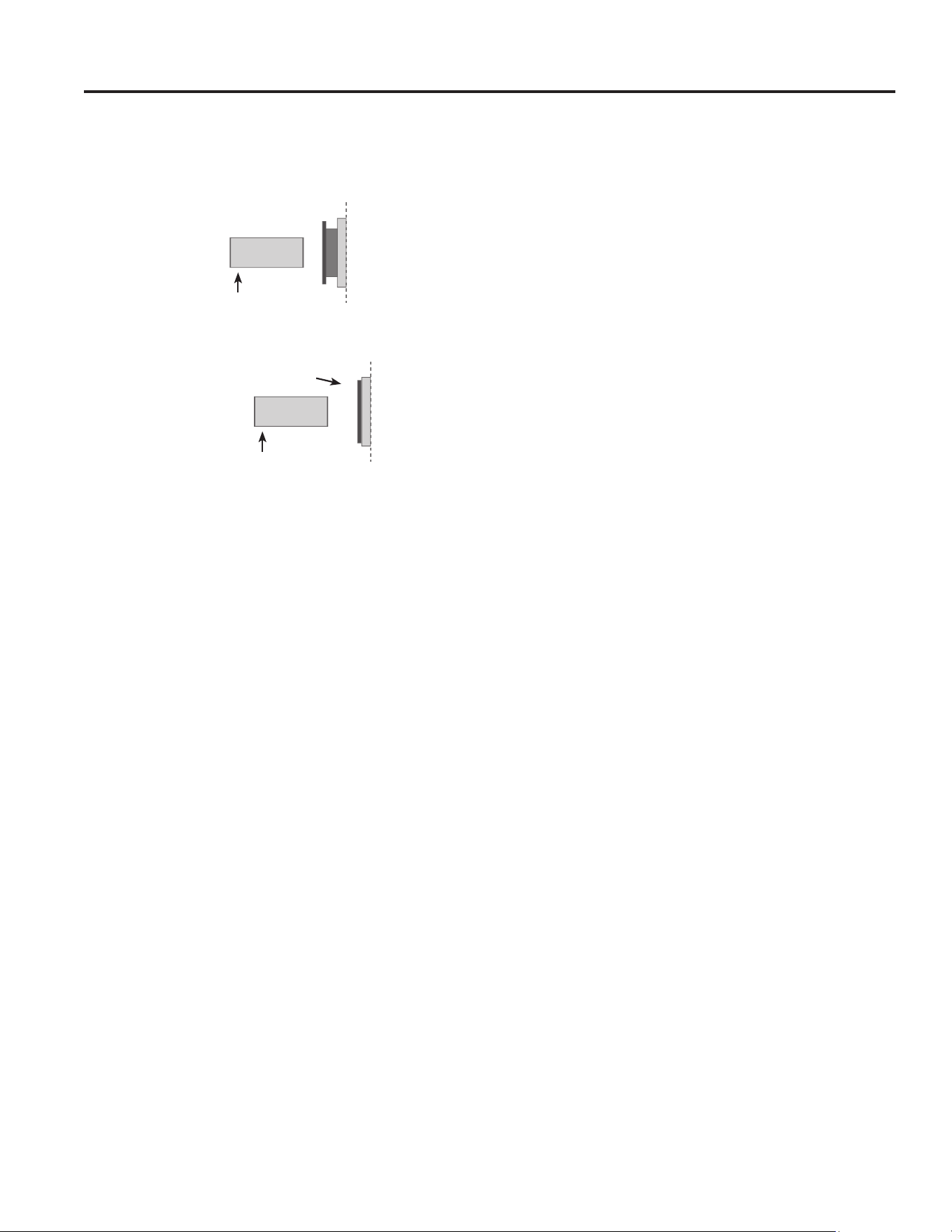
Choosing a Location
A dehumidifier operating in a basement will have little or no
effect in drying an adjacent enclosed storage area, such as
a closet, unless there is adequate circulation of air in and
out of the area.
• Do not use outdoors.
• This dehumidifier is intended for indoor residential
applications only. This dehumidifier should not be used for
commercial or industrial applications.
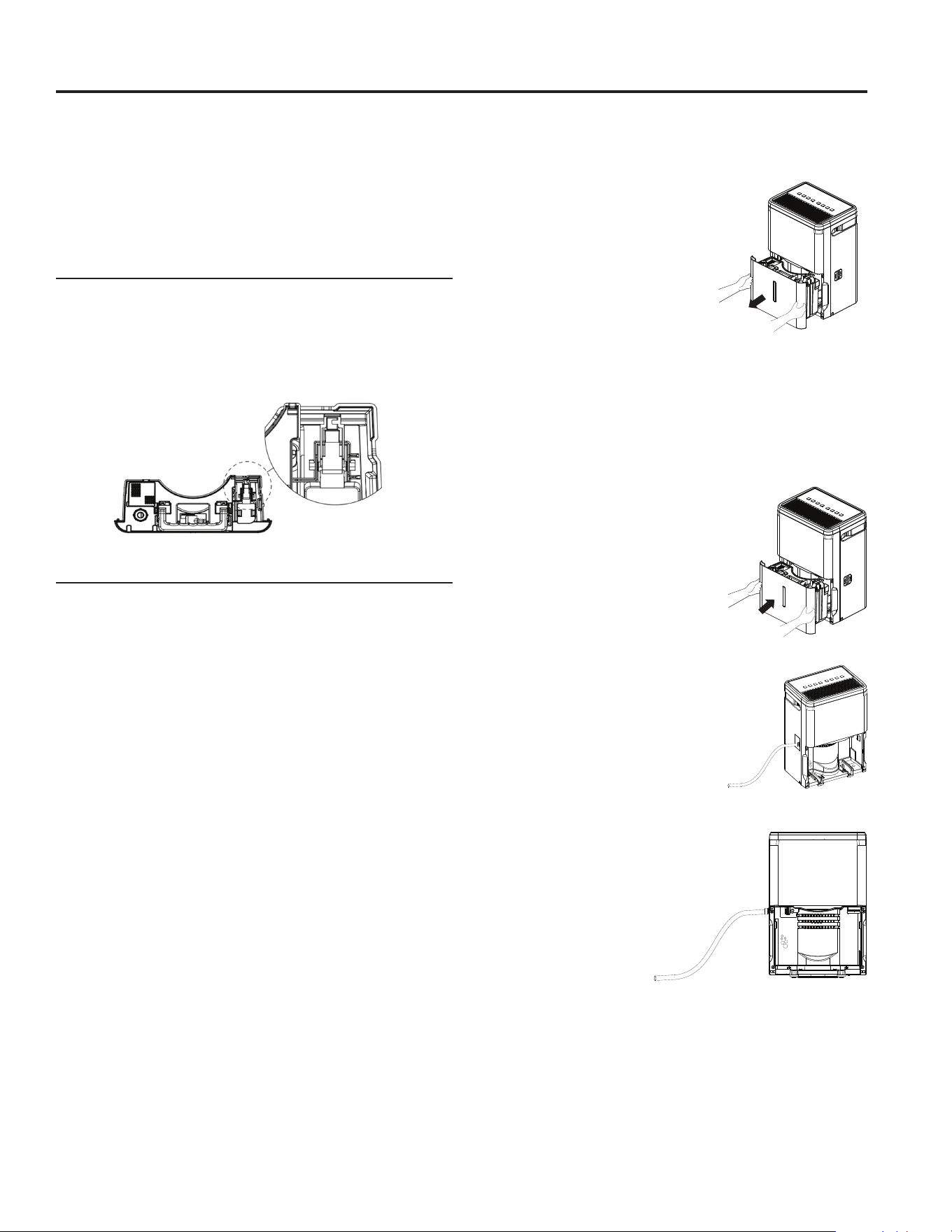
• Place the dehumidifier on a smooth, level floor strong
enough to support the unit with a full bucket of water.
• Allow at least 18 inches of air space on all sides of the
unit for good air circulation.
• Place the dehumidifier in an area where the temperature
will not fall below 41°F (5°C) or above 90°F (32°C). The
coils can become covered with frost at temperatures
below 41°F, which may reduce performance.
• The suggested range of relative humidity is between 40%
and 50%
• Use the dehumidifier in areas that have excessive
moisture.
NOTE: Place the dehumidifier away from the clothes
dryer.
• Use the dehumidifier to prevent moisture damage
anywhere books or valuables are stored.
• Use the dehumidifier in a basement to help prevent
moisture damage.
• The dehumidifier must be operated in an enclosed area to
be most effective.
• Close all doors, windows and other outside openings to
the room.
NOTE: The dehumidifier has casters to aid placement, but
it should only be rolled on smooth, flat surfaces. Do not
attempt to roll the dehumidifier on carpet or over objects.
41 °F
(5 °C)
41 °F
(5 °C)
Above
Below
Correct Wrong
at least 18 inches
at least 18 inches
How the Dehumidifier Operates
Moist, humid air is drawn over a cold refrigerated
dehumidifying coil. Moisture in the air condenses on this
coil and drains into a bucket (or through a hose and drain).
Dry, clean air is drawn through the condenser where it is
heated and discharged out the top grille into the room.
It is normal for the surrounding air to become slightly
warmer as the dehumidifier operates.
When first using the dehumidifier, operate the unit continuously for 24 hours.
NOTE: This is for 25 and 35 pint models only. Before plugging in
the dehumidifier, remove the casters from the bucket and install as
shown below.
Installing the Casters
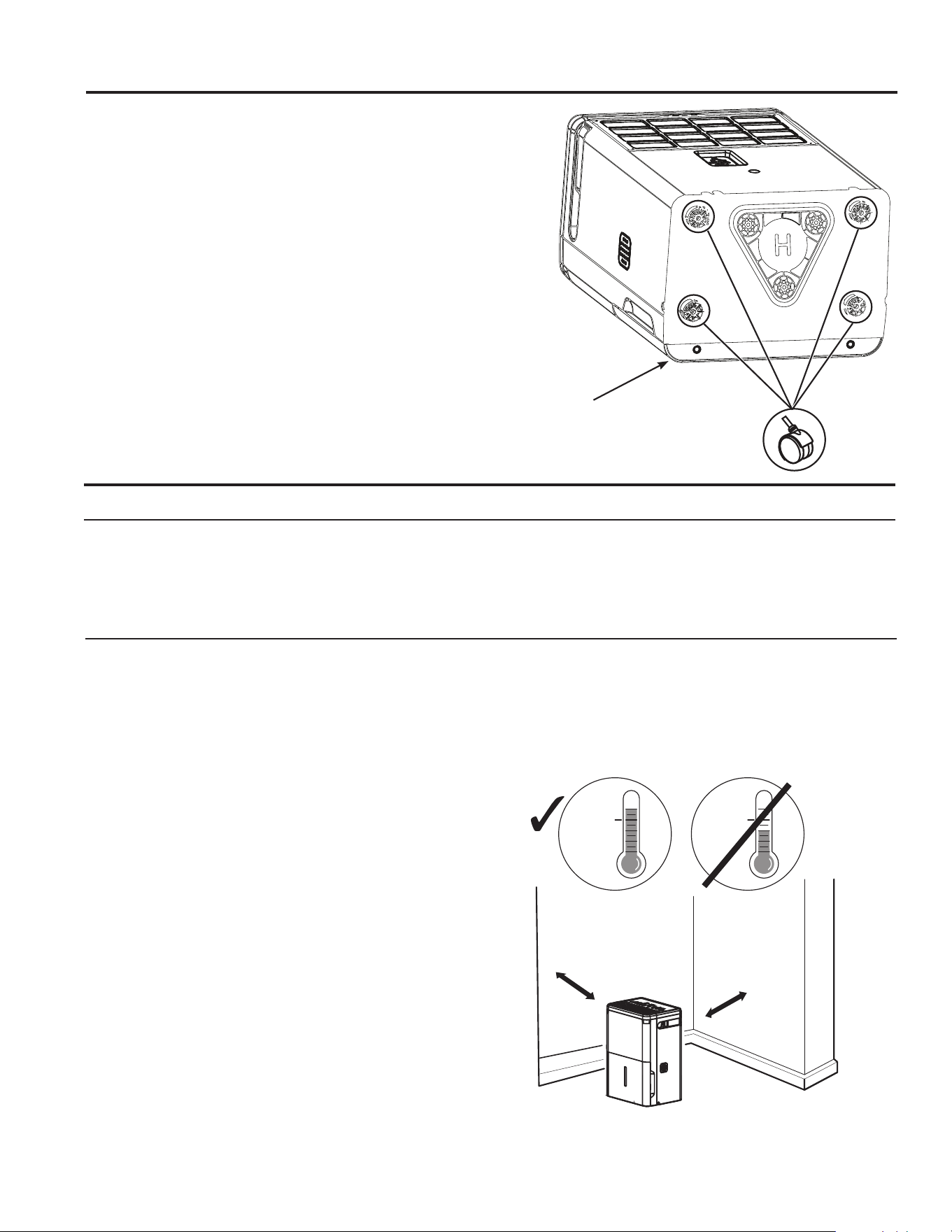
1. Remove the 4 casters from the bag taped to the inside of the
water bucket lid.
2. Carefully lay the dehumidifier down on it’s front or back.
3. Following the arrows on the base, slide the 4 casters into place.
4. Place the unit upright and wait 1 hour before use.
Caster Installation
Dehumidifier is on it’s front
749-5001090 Rev. 1
Water Level
The dehumidifier will turn off automatically when the
bucket is full, or when the bucket is removed or not
replaced in the proper position.
The bucket must be replaced in the proper position for
the dehumidifier to work. The empty indiator will blink
and the dehumidifier will not run if the bucket is not in
the proper position.
Bucket Operation
DO NOT remove the foam piece and magnet block in the
bucket assembly.
If removed the Dehumidifier will not work properly.
Automatic Defrost
When frost builds up on the evaporator coils, the
compressor will cycle off and the fan will continue to run
until the frost disappears.
When the coil is defrosted, the compressor or fan will
automatically restart and dehumidifying will resume.
Using the Dehumidifier
OPERATING INSTRUCTIONS
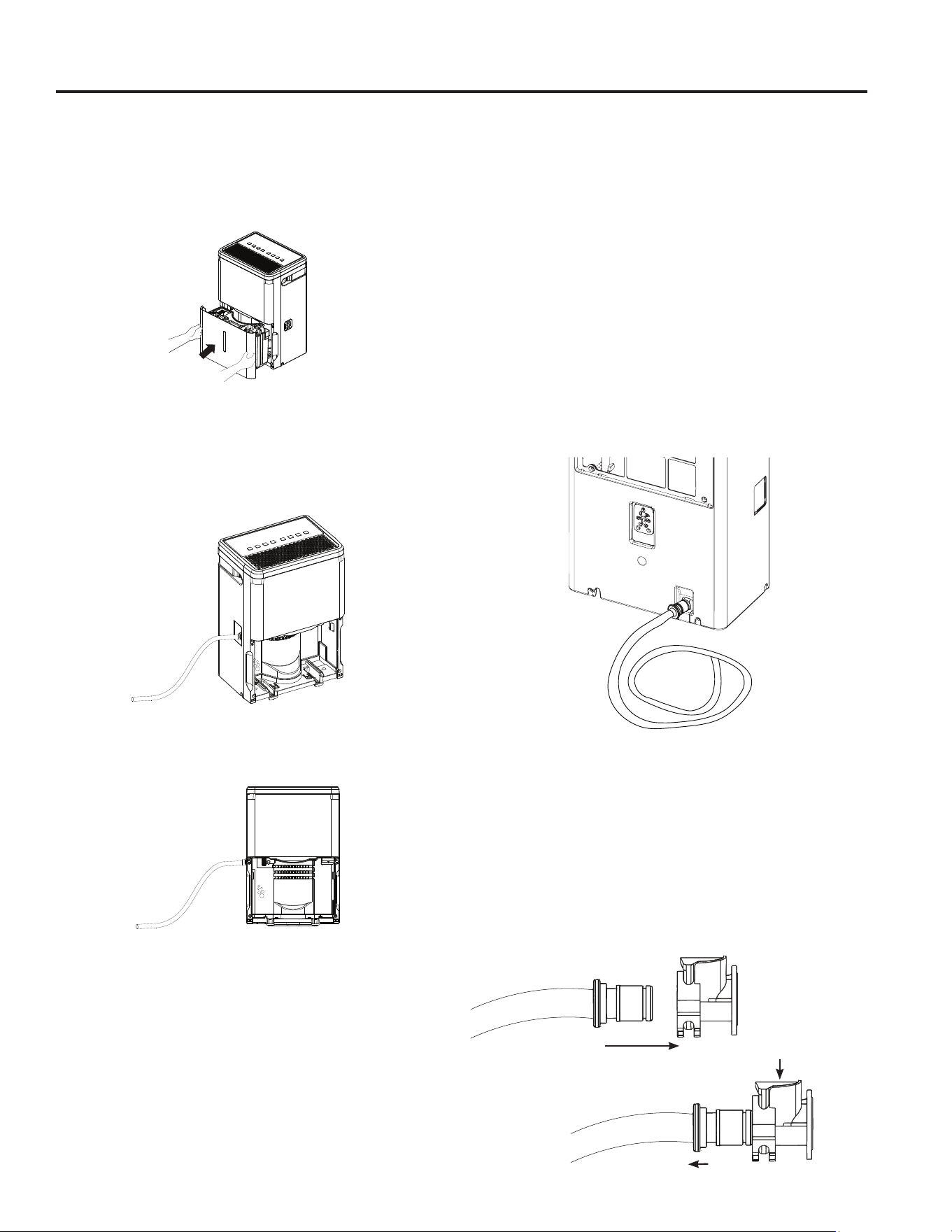
Removing Collected Water
Always make sure the water bucket is locked into
place on the dehumidifier.
There are 3 ways to remove
collected water:
– Use the bucket
– Use a garden hose
– Use the internal pump (on some
models)
Use the bucket. When the bucket is
removed, the unit will shut off. Empty
and replace the bucket.
IMPORTANT: Do not use the hose if using the bucket to
collect water. When the hose is connected, water will flow
through it onto the floor instead of into the bucket.
NOTES:
•
Do not remove the bucket while the dehumidifier is
operating or if it has just stopped operating. This might
cause some water to drip from
the drain pan.
•
The bucket must be in place
and securely seated for the
dehumidifier to operate.
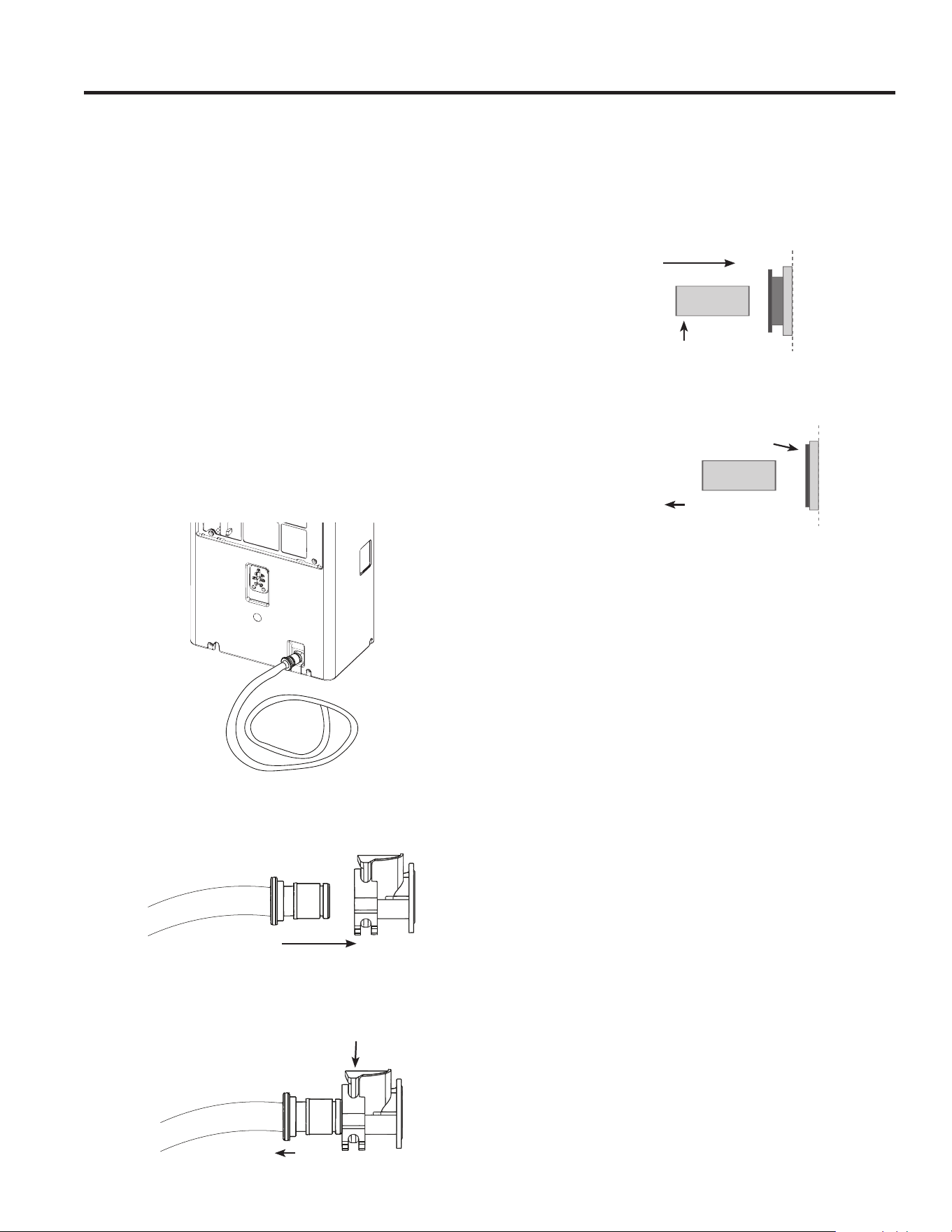
Use a garden hose. Water can be
automatically emptied into a floor
drain by attaching a garden water
hose (not included).
1. Remove the bucket from the front
of the unit.
2. Open the drain cover on the side
of the unit.
3. Thread a garden hose (not
supplied) onto the nozzle and
ensure it is seated securely. Cut
to length and lead it to the floor
drain.
4. Replace the bucket in
the unit.
NOTE: The bucket
must be in place and
securely seated for the
dehumidifier to operate.
The garden hose must
run down from the
dehumidifier to the floor
drain.
8 49-5001090 Rev. 1
Removing Collected Water (Continued)
Use the internal pump (on some models)
Water can be automatically emptied into a remote location
by attaching the included pump hose.
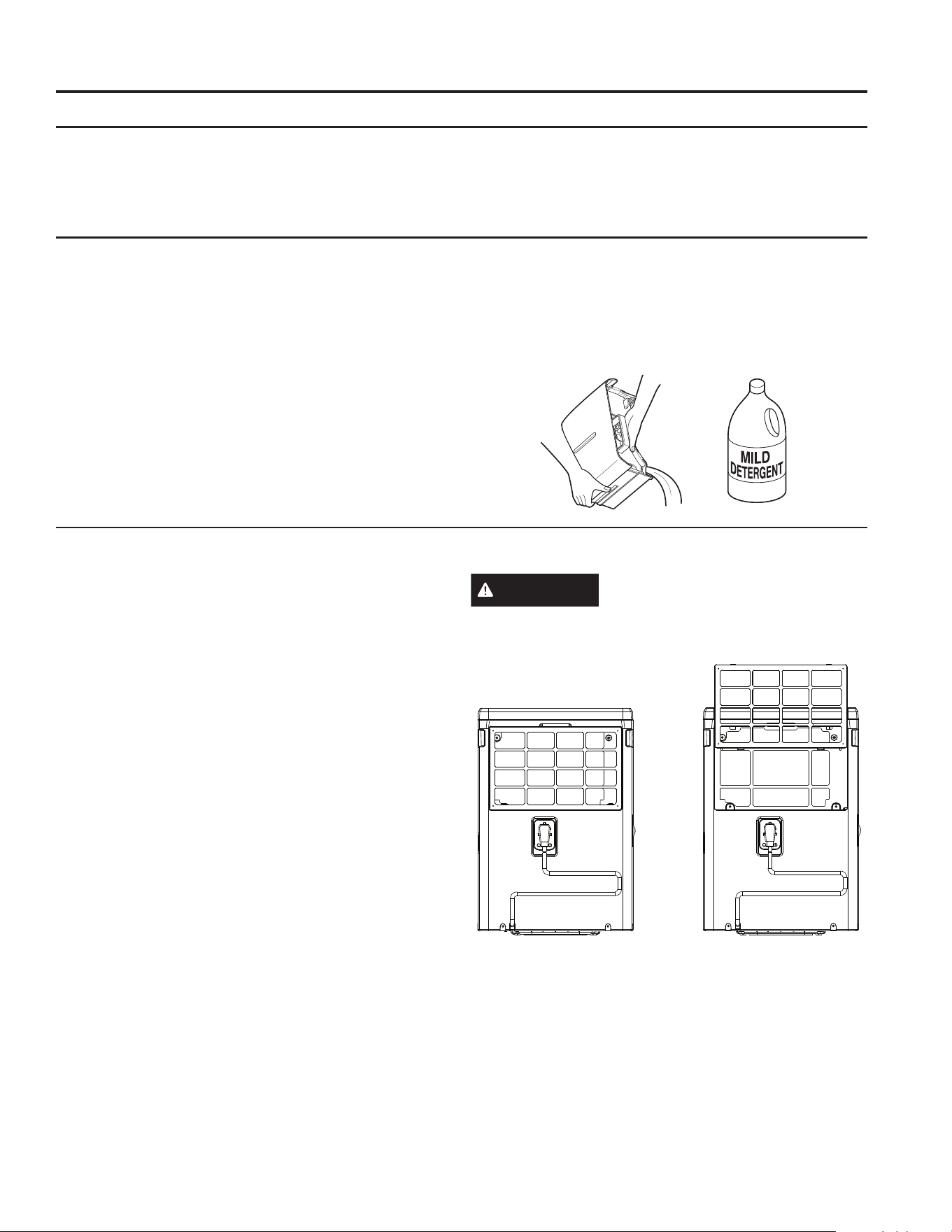
1. Attach the pump hose to the hose connector by pushing
the tube fitting into the connector until it fits into place
(should not be able to remove the hose when pulled).
2. Position the hose discharge to the desired location.
3. Make sure the pump is activated. To activate the pump,
press and hold the Pump button for 3 seconds. The
Pump indicator light will flash then remain illuminated
once the 3 seconds are complete.
IMPORTANT: Make sure the condensate hose is properly
connected and is not kinked, bent or cracked as this may
cause water to flow onto the floor. Please ensure the bucket
is empty before putting the unit into pump mode. The bucket
must also be fully seated for the pump to work properly. Do
not operate the machine if the room temperature is 41°F or
below.
NOTE: Maximum lift height is 16ft.
To Install Pump Hose (on some models): Push in hose
and gently pull to make sure it is secure. Should not be able
to be removed. You should hear a “click” that lets you know
the hose is inserted correctly.
To Release Pump Hose: Press the blue button on top of
the connector attached to the dehumidifier and pull the hose
out to remove. Be sure to turn off the pump before removing
the hose.
NOTE: DO NOT kink or crimp hose, as it can block water
flow.
To Install Pump Hose (on some models): Push in
hose and gently pull to make sure it is secure. Should
not be able to be removed.
To Release Pump Hose: Hold the grey ring while
pulling to remove.
NOTE: DO NOT kink or crimp hose, as it can block
water flow. Only use the hose included with the product
for Pump mode.
1. Hold grey ring in
2. Pull hose out
Push hose in
OPERATING INSTRUCTIONS
Using the Dehumidifier
Insert
Press
Pull
949-5001090 Rev. 1
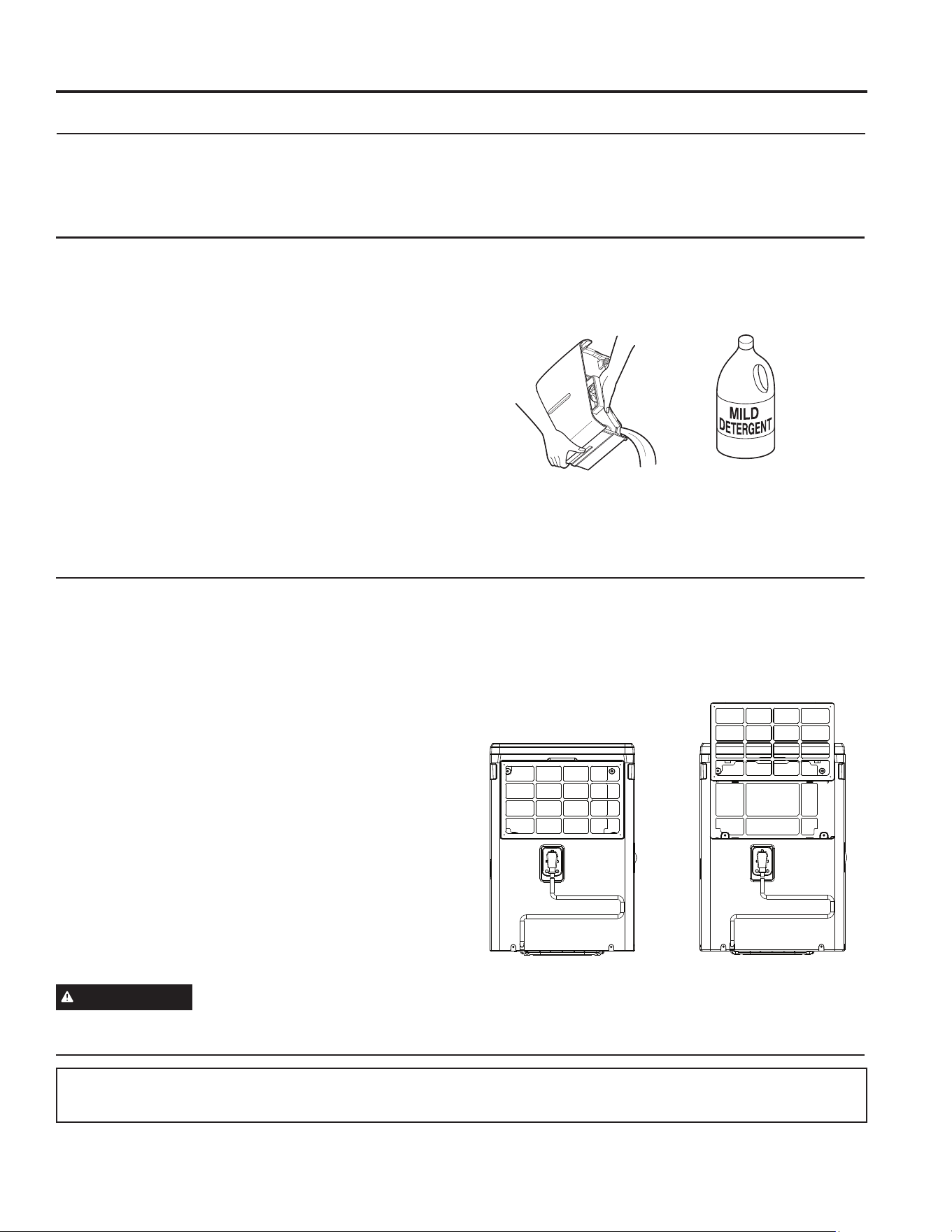
Air Filter
The air filter behind the rear grille should be checked and
cleaned at least every 250 hours of operation or more
often if necessary.
After 250 hours of operation, the Filter indicator light will
glow to remind you to clean the filter. Remove the filter
and clean it. Replace the filter and press and hold the
filter button for 3 seconds.
To remove:
Remove the rear grille and the filter will be attached.
To clean:
Clean the filter with warm, soapy water. Rinse and let the
filter dry before replacing it.
NOTE: DO NOT put the filter in an automatic
dishwasher.
CAUTION
DO NOT operate the dehumidifier
without a filter because dirt and lint will clog the unit and
reduce performance.
Grille and Case
To clean the case:
Use water and a mild detergent. Do not use
bleach or abrasives.
To clean the rear grille:
Use a vacuum attachment or brush.
Water Bucket
To clean:
Every few weeks, clean the bucket to prevent growth
of mold, mildew and bacteria. Partially fill the bucket
with clean water and add a little mild detergent. Swish it
around in the bucket, empty and rinse.
NOTE: Do not use a dishwasher to clean the water
bucket.
To remove:
Remove the bucket and pour out any water.
To replace:
Slide the bucket into the dehumidifier.
NOTE: The bucket must be in place and securely seated
for the dehumidifier to operate.
Air filter
Care and Cleaning
CARE AND CLEANING
Turn off the dehumidifier and remove the plug from the wall outlet before cleaning.
10 49-5001090 Rev. 1
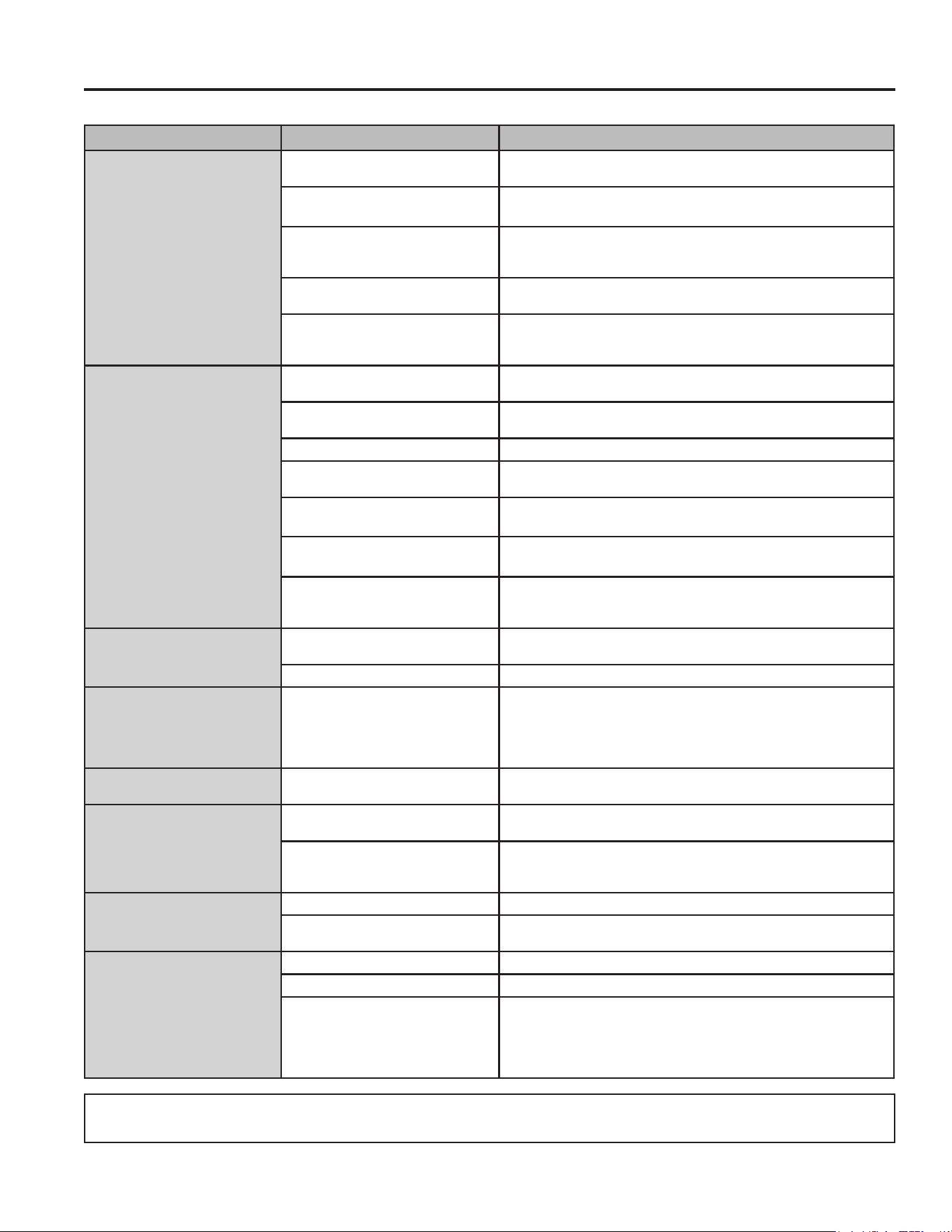
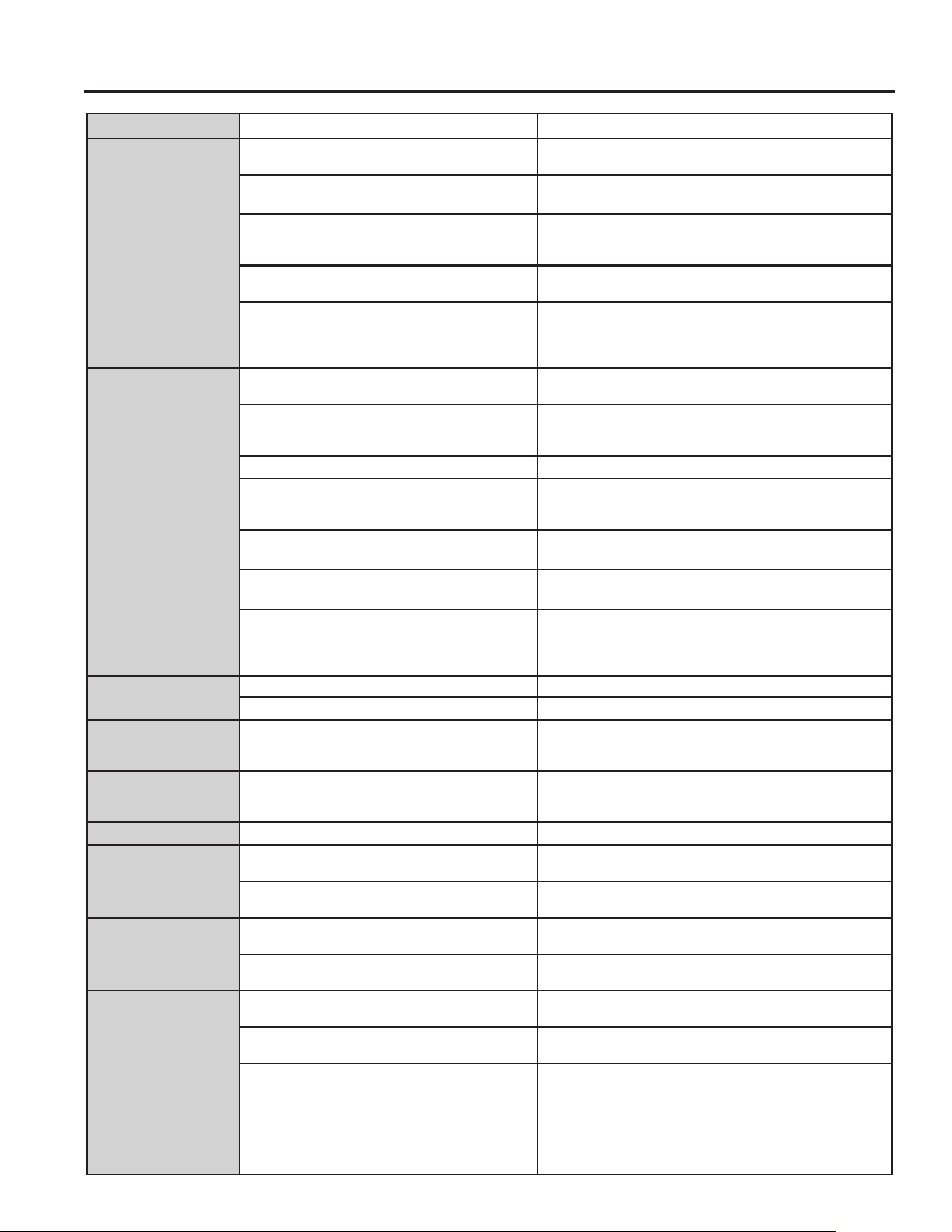
Troubleshooting Tips... Before you call for service
TROUBLESHOOTING TIPS
Save time and money! Review the charts on the following pages first and you may not need to call for service.
Problem Possible Cause What To Do
Dehumidifier does not start The dehumidifier is unplugged. Makes sure the dehumidifier’s plug is pushed completely into the
outlet.
The fuse is blown/circuit breaker
is tripped.
Check the house fuse/circuit breaker box and replace the fuse or
reset the breaker.
Dehumidifier has reached its set
humidity level or bucket is full.
The dehumidifier automatically turns off when either condition
occurs. Change to a lower setting or empty the bucket and replace
properly.
Bucket is not in the proper
position.
The bucket must be in place and securely seated for the
dehumidifier to operate.
Power Failure. There is a protective time delay (up to 3 minutes) to prevent tripping
of the compressor overload. For this reason, the unit may not start
normal dehumidification for 3 minutes after it turned back on.
Dehumidifier does not dry the
air as it should
Did not allow enough time to
remove the moisture.
When first installed, allow at least 24 hours to maintain the desired
dryness.
Airflow is restricted. Make sure there are no curtains, blinds or furniture blocking the top
or back of the dehumidifier. See the Choosing a Location section.
Dirty Filter See the Care and Cleaning section.
The Humidity Control may not be
set low enough.
For drier air, press the ź pad and set to a lower percent value (%)
or at the Nonstop setting for maximum dehumidification.
Doors and windows may not be
closed tightly.
Check that all doors, windows and other openings are securely
closed.
Clothes dryer may be blowing
moisure-laden air into the room.
Install the dehumidifier away from the dyer. The dryer should be
vented to the outside.
Room temperature is too low. Moisture removal is best at higher room temperatures. Lower room
temperatures will reduce the moisture removal rate. Models are
designed to be operated at temperatures above 41°F (5°C).
Dehumidifier runs too much Area to be dehumidified is too
large.
The capacity of your dehumidifier may not be adequate
Doors and windows are open. Close all doors and windows to the outside.
Frost appears on the coils Room temperature is below 41°F
(5°C)
Please operate unit at temperatures above 41 F (5 C). Frost will
usually disappear within 60 minutes. Under certain conditions, frost
may appear on the coils of your dehumidifier at temperatures above
41°F (5°C). This is normal and frost will usually disappear within 60
minutes. See the Automatic Defrost section.
Fan noise Air is moving through the
dehumidifier.
This is normal.
Water on floor Hose connection may be loose. Check the hose connection. See the Removing Collected Water
section.
Intended to use the bucket to
collect water, but a hose was
attached
Disconnect the hose if using a bucket to collect water. See the
Removing Collected Water section.
Bucket Full LED light flashing
and alarm sounds while drain
hose is connected
Drain hose not tight on fitting. Check drain hose connection.
Drain hose is kinked. Ensure the drain hose is pointed straight down to the floor and is
not kinked in anyway.
Bucket fills up when using
drain pump (on some models)
Unit not in pump mode Ensure pump is turned on and pump light is illuminated
Pump hose not installed Ensure pump hose is properly installed on back of unit
Water level sensor issue This may be caused by very humid conditions or error with float
sensor. Check unit for a P1 error code on display. If this is present
- turn off the unit, unplug unit for a few seconds, plug back in and
turn on the unit to reset sensor. If this error continues to occur refer
to warranty section for exchange options.
RECYCLING INFORMATION
For appliance recycling information please visit GEAppliances.com/recycling.
1149-5001090 Rev. 1
WiFi Setup (on some models)
WIFI SETUP
GE Appliances SmartHQ (for customers in the United States)
Your Dehumidifier is GE Appliances SmartHQ Enabled.
Please visit GEAppliances.com/connect to learn more
about connected appliance features, and to learn what connected appliance apps will work with your smart phone.
WiFi Connectivity:
For assistance with the appliance or the appliance network connectivity, please call 1-800-220-6899.
All connected appliance data is held in strict accordance with the GE Appliances Connected Data Privacy Policy.
Visit geappliances.com/privacy/privacy_policy_connected to view this policy.
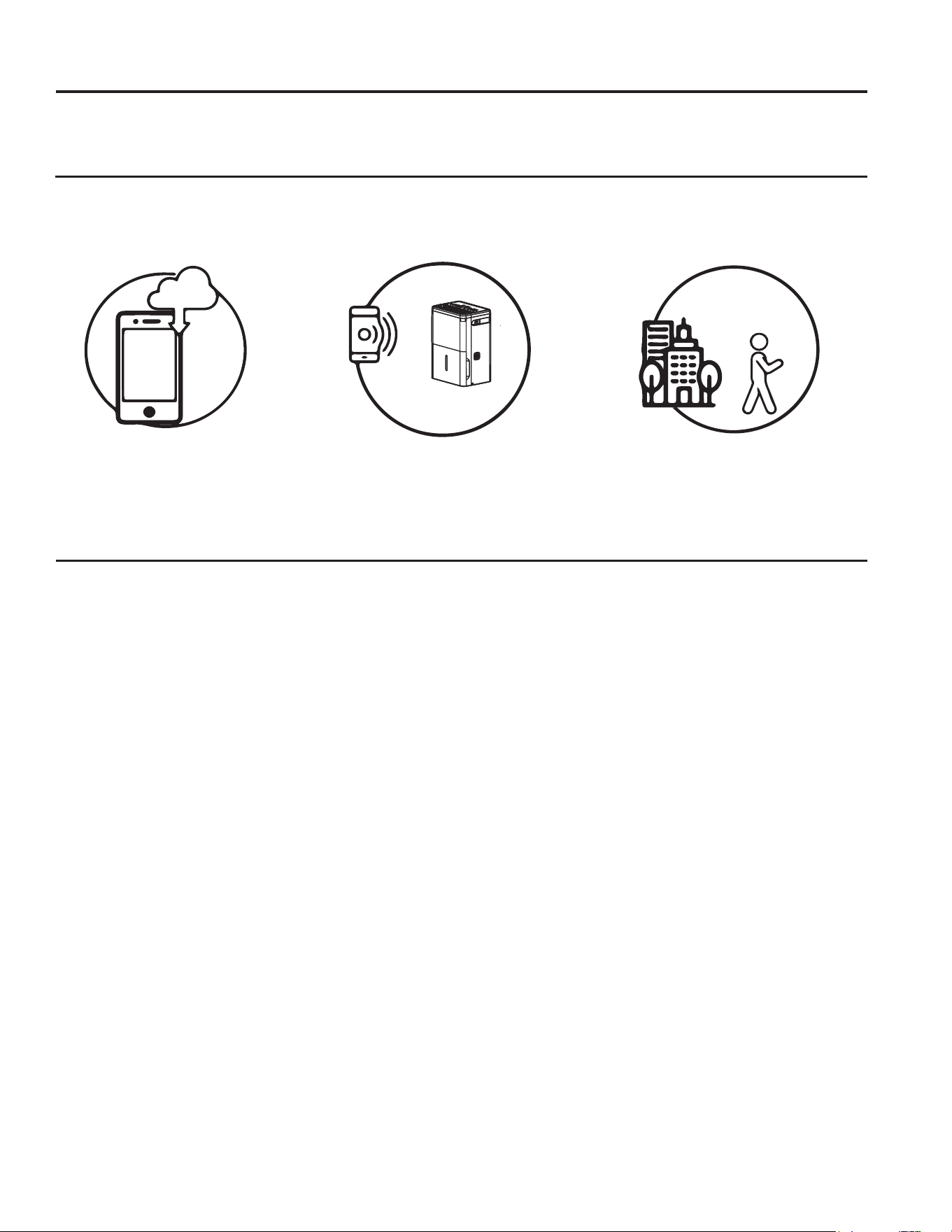
How it Works
Download the GE Appliances App.
Use the app to connect to your
GHKXPLGL¿HU
Once connected, use the app to
DGMXVWWKHGHKXPLGL¿HUDVGHVLUHG
Questions about SmartHQ
Get answers you need about setting up WiFi appliances and connecting to your home network in our support articles.
Visit products.geappliances.com/appliance/gea-support-search-content WRYLHZZLILFRQQHFWGHKLPLGL¿HUVXSSRUW
articles.
REGULATORY INFORMATION
FCC/IC Compliance Statement:
This device complies with Part 15 of the FCC Rules.
Operation is subject to the following two conditions:
1. This device may not cause harmful interference.
2. This device must accept any interference received,
including interference that may cause undesired
operation.
This equipment has been tested and found to comply
with the limits for a Class B digital device, pursuant to
Part 15 of the FCC Rules. These limits are designed
to provide reasonable protection against harmful
interference in a residential installation. This equipment
generates uses and can radiate radio frequency energy
and, if not installed and used in accordance with the
instructions, may cause harmful interference to radio
communications. However, there is no guarantee that
interference will not occur in a particular installation. If
this equipment does cause harmful interference to radio
or television reception, which can be determined by
turning the equipment off and on, the user is encouraged
to try to correct the interference by one or more of the
following measures:
• Reorient or relocate the receiving antenna.
• Increase the separation between the equipment and
receiver.
• Connect the equipment into an outlet on a circuit
different from that to which the receiver is connected.
• Consult the dealer or an experienced radio/television
technician for help.
Labelling: Changes or modifications to this unit not
expressly approved by the manufacturer could void the
user’s authority to operate the equipment.
*Select Models Only
This product has Wi-Fi capability and requires
Internet connectivity and a wireless router to enable
interconnection with an Energy Management System,
and/or with other external devices, systems or
applications.

12 49-5001090 Rev. 1
Notes
1349-5001090 Rev. 1
Staple your receipt here. Proof of the original purchase date
is needed to obtain service under the warranty.
EXCLUSION OF IMPLIED WARRANTIES - Your sole and exclusive remedy is product repair as provided in this
Limited Warranty. Any implied warranties, including the implied warranties of merchantability or fitness for a particular
purpose, are limited to one year or the shortest period allowed by law.
For US Customers: This limited warranty is extended to the original purchaser and any succeeding owner for
products purchased for home use within the USA. If the product is located in an area where service by a GE
Appliances Authorized Servicer is not available, you may be responsible for a trip charge or you may be required to
bring the product to an Authorized GE Appliances Service location for service. In Alaska, the limited warranty excludes
the cost of shipping or service calls to your home.
Some states do not allow the exclusion or limitation of incidental or consequential damages. This limited warranty
gives you specific legal rights, and you may also have other rights which vary from state to state. To know what your
legal rights are, consult your local or state consumer affairs office or your state’s Attorney General.
Warrantor US:
GE Appliances, a Haier company
Louisville, KY 40225
• Customer instruction. This owner’s manual provides
information regarding operating instructions and user
controls.
• Improper installation. If you have an installation
problem, or if the product is of improper capacity,
contact your dealer or installer. You are responsible
for providing adequate electrical connecting facilities.
• Failure of the product resulting from modifications
to the product or due to unreasonable use including
failure to provide reasonable and necessary
maintenance.
• Replacement of house fuses or resetting of circuit
breakers.
• Failure due to corrosion.
• Damage to the product caused by improper power
supply voltage, accident, fire, floods or acts of God.
• Incidental or consequential damage caused by
possible defects with this product.
• Damage caused after delivery.
What Will Not Cover:
LIMITED WARRANTY
Limited Warranty
For The Period Of: Will Replace:
One Year
From the date of the
original purchase
Replacement, repair, or refund of the original retail price for any product which fails due
to a defect in materials or workmanship. If the unit is exchanged, the replacement unit
is warranted for the remainder of your product’s original one-year warranty period. GE
Appliances will, at its sole discretion, replace the product with a product of the same or
comparable functionality and quality or refund the original retail price.
• Properly pack your unit. We recommend using the
original carton and packing materials.
• Return the product to the retail location where it was
purchased.
• Include in the package a copy of the sales receipt
or other evidence of date of original purchase. Also
print your name and address and a description of the
defect.
In Order to Make a Warranty Claim During Your Retailer’s Allowable Return Period:
In Order to Make a Warranty Claim During the Remainder of the One-Year Warranty:
• Locate your sales receipt and make note of the model and serial number.
• Call 833-4BODEWELL (833-4263393) to initiate a warranty claim.
• You will be asked to provide your name, address, receipt information, model and serial number.
•Warranty claims may require electronic or mailed-in evidence of purchase.
14 49-5001090 Rev. 1
Consumer Support
CONSUMER SUPPORT
GE Appliances Website
Have a question or need assistance with your appliance? Try the GE Appliances Website 24 hours a day, any day
of the year! You can also shop for more great GE Appliances products and take advantage of all our on-line support
services designed for your convenience. GEAppliances.com
Register Your Appliance
Register your new appliance on-line at your convenience! Timely product registration will allow for enhanced
communication and prompt service under the terms of your warranty, should the need arise. You may also mail in
the pre-printed registration card included in the packing material. GEAppliances.com/register
Extended Warranties
Purchase a GE Appliances extended warranty and learn about special discounts that are available while your
warranty is still in effect. You can purchase it on-line anytime. GE Appliances Services will still be there after your
warranty expires. bodewellcareplan.com or call 800.626.2224 during normal business hours.
Remote Connectivity
For assistance with wireless network connectivity (for models with remote enable), visit our website at
GEAppliances.com/connect or call 800.220.6899.
Parts and Accessories
Individuals qualified to service their own appliances can have parts or accessories sent directly to their homes
(VISA, MasterCard and Discover cards are accepted). Order on-line today 24 hours every day.
GEApplianceparts.com or by phone at 877.959.8688 during normal business hours.
Instructions contained in this manual cover procedures to be performed by any user. Other servicing
generally should be referred to qualified service personnel. Caution must be exercised, since improper
servicing may cause unsafe operation.
Contact Us
If you are not satisfied with the service you receive from GE Appliances, contact us on our Website with all the
details including your phone number, or write to:
General Manager, Customer Relations | GE Appliances, Appliance Park | Louisville, KY 40225
GEAppliances.com/contact or call 800.626.2000

Escriba los números de modelo
y serie aquí:
# de Modelo _____________
# de Serie _______________
Puede encontrar estos números en
una etiqueta en la parte atrás del
deshumidificador.
GE es una marca registrada de General Electric Company. Fabricado bajo licencia de marca.
MANUAL DEL
PROPIETARIO
DESHUMIDIFICADOR
49-5001090 Rev. 1 01-25
ADHE25
ADHE35
ADHE50
INFORMACIÓN
DE SEGURIDAD .................... 3
INSTRUCCIONES DE OPERACIÓN
Controles ................................. 4
Otras funciones ............................ 5
Instalación de ruedas ....................... 6
Cómo funciona el deshumidificador .......... 6
Descongelado automático .................. 6
Selección del lugar adecuad ................ 7
Cómo desechar el agua acumulada .......... 7
Nivel de agua ............................. 7
Funcionamiento del Balde .................. 7
CUIDADO Y LIMPIEZA
Rejilla y gabinete .......................... 9
Tanque de agua ........................... 9
Filtre de aire .............................. 9
CONSEJOS PARA LA SOLUCIÓN DE
PROBLEMAS ..........................10
CONFIGURACIÓN WIFI .............11
AYUDA AL CLIENTE
Garantía Limitada ..........................13
Ayuda al cliente ...........................14
Antes de comenzar
Registre el número de módulo de GE
Appliances y su contraseña para la
configuración del wifi. Para ubicar esta
información, consulte la página 11.
# módulo de GE Appliances ___________
# de Contraseña:_____________________

2 49-5001090 Rev. 1
GRACIAS POR HACER QUE GE APPLIANCES SEA PARTE DE SU HOGAR.
Ya sea que haya crecido usando GE Appliances, o que ésta es su primera vez, nos complace
tenerlo en la familia.
Sentimos orgullo por el nivel de arte, innovación y diseño de cada uno de los electrodomésticos de
GE Appliances, y creemos que usted también. Entre otras cosas, el registro de su electrodoméstico
asegura que podamos entregarle información importante del producto y detalles de la garantía
cuando los necesite.
Registre su electrodoméstico GE ahora a través de Internet. Sitios Web y números telefónicos útiles
están disponibles en la sección de Soporte para el Consumidor de este Manual del Propietario.
También puede enviar una carta en la tarjeta de inscripción preimpresa que se incluye con
el material embalado.
49-5001090 Rev. 1 3
LEA Y GUARDE ESTAS INSTRUCCIONES
INFORMACIÓN IMPORTANTE DE SEGURIDAD
LEA TODAS LAS INSTRUCCIONES ANTES DE USAR ESTE ELECTRODOMÉSTICO
INFORMACIÓN DE SEGURIDAD
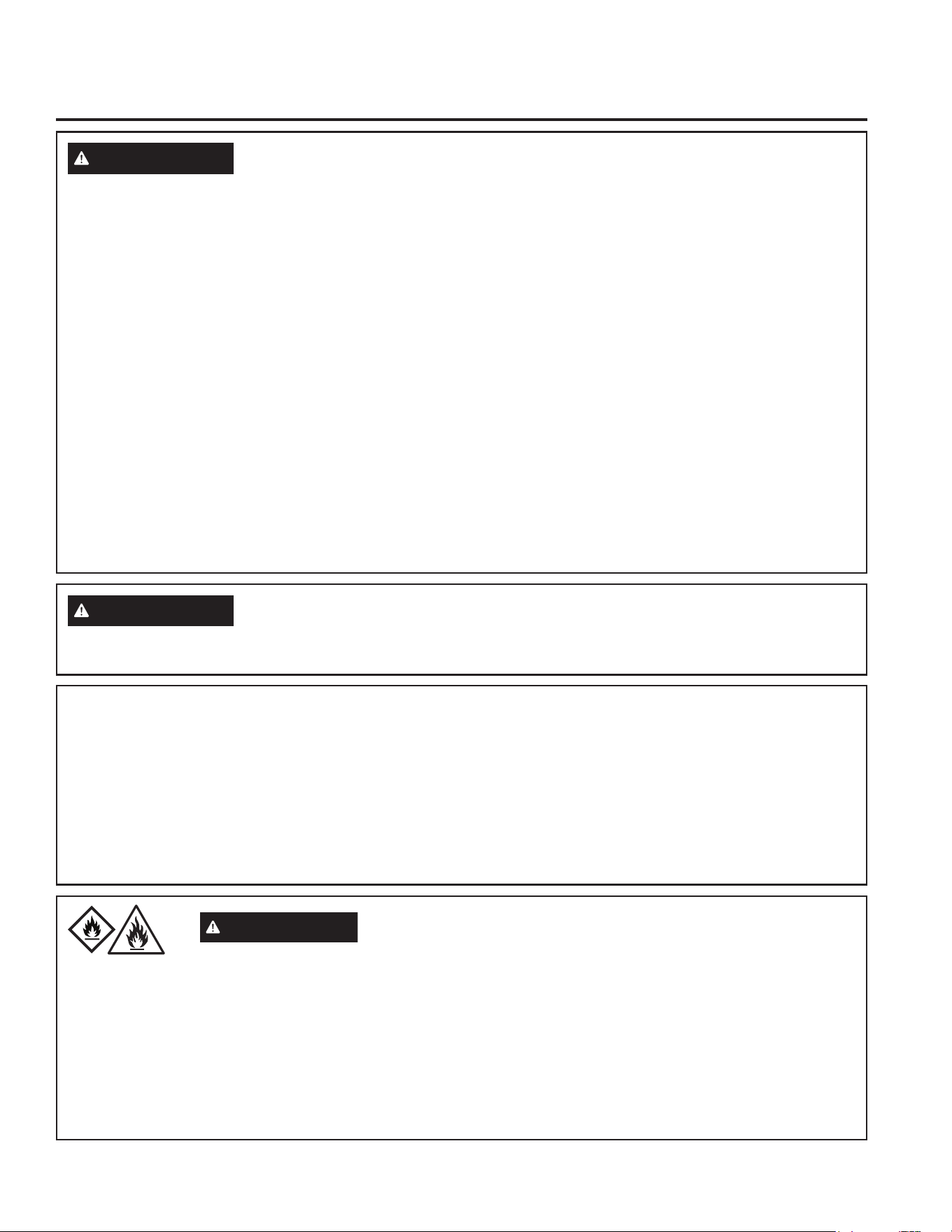
ADVERTENCIA
Por su seguridad, se debe seguir la información en este manual para minimizar el riesgo de incendios,
descargas eléctricas o lesiones personales.
• Use este electrodoméstico solamente para el propósito
determinado según se describe en este Manual del propietario.
• Este deshumidificador debe instalarse correctamente y conectado
a tierra de acuerdo con las instrucciones de este manual antes de
su uso.
• Nunca opere este deshumidificador en un área en la que es posible
que se acumule agua. De encontrarse en estas condiciones, por su
seguridad, desconecte el suministro de corriente eléctrica antes de
pisar sobre el agua.
• Nunca desenchufe su deshumidificador tirando del cable eléctrico.
Siempre agarre firmemente el enchufe y tire de él directamente
hacia afuera.
• Reemplace inmediatamente todos los cables eléctricos que se
hayan pelado o que se hayan dañado de alguna otra manera. Un
cable de corriente dañado no debe repararse, sino que debe ser
sustituido por uno nuevo que se adquiera del fabricante. No use
un cable eléctrico que muestre evidencias de deterioro, o daños de
abrasión en su superficie en alguno de sus extremos.
• Si el receptáculo no coincide con el enchufe, un electricista
calificado debe reemplazar el receptáculo.
• Si el CABLE DE ALIMENTACION está dañado, deberá ser
reemplazado por el fabricante, su agente de servicios o una
persona con calificación similar a fin de evitar riesgos.
• El electrodoméstico deberá ser instalado de acuerdo con las
regulaciones de cableado nacionales.
• Apague el control y desenchufe su deshumidificador antes de
hacer cualquier reparación o limpiar.
• GE Appliances no está no apoya que se le proporcione ningún
servicio al deshumidificador. Vehementemente recomendamos que
usted no intente proporcionar servicio al deshumidificador usted
mismo.
• Por su seguridad, no almacene ni use materiales combustibles,
gasolina u otros vapores o líquidos inflamables en la proximidad de
éste o algún otro electrodoméstico.
• No use el deshumidificador en exteriores.
• Este deshumidificador está diseñado exclusivamente para
aplicaciones residenciales de interior. No debe usarse para
aplicaciones comerciales ni industriales.
• Este electrodoméstico puede ser usado por personas con
capacidades físicas, sensoriales o mentales reducidas o con
falta de experiencia y conocimiento, si les fue dada supervisión o
instrucción relacionada con el uso de este electrodoméstico de una
forma segura y entienden los riesgos involucrados.
ADVERTENCIA
USO DE PROLONGADORES. RIESGO DE INCENDIO. Podría ocasionar lesiones graves o la muerte.
• NO use prolongadores con este Deshumidificador.
• NO use protectores contra picos de corriente ni adaptadores para
múltiples tomacorrientes con este Deshumidificador.
COMO CONECTAR LA ELECTRICIDAD
Bajo ninguna circunstancia, corte o remueva la tercera púa
(tierra) del cable eléctrico. En pos de la seguridad personal, este
electrodoméstico debe siempre conectarse a tierra.
NO USE un enchufe adaptador con este aparato.
El cable eléctrico de este electrodoméstico está equipado con un
enchufe de tres púas (tierra) que combina con un tomacorriente
estándar de tres tomas de pared para minimizar la posibilidad de
una descarga eléctrica.
Pida a un técnico que inspeccione el tomacorriente y el circuito para
cerciorarse de que el tomacorriente está conectado a tierra de la
manera apropiada.
Donde exista un tomacorriente de dos tomas, es su responsabilidad
y obligación personal hacer que dicho tomacorriente sea
reemplazado por uno de tres tomas con conexión a tierra.
El deshumidificador debería siempre estar conectado a un
tomacorriente individual con su circuito de voltaje correspondiente.
Esto proporciona el mayor rendimiento y además evita que los
circuitos del resto de la casa se sobrecarguen, lo cual podría causar
incendios por el sobrecalentamiento del cableado.
Riesgo de Incendio o Explosión. Esta unidad contiene refrigerante inflamable.
Se deben seguir las precauciones adicionales de seguridad.
ADVERTENCIA
A2L
• A fin de acelerar el proceso de descongelación o para limpiar, no
use ningún método que no sea el recomendado por el fabricante.
• Este electrodoméstico deberá ser guardado en una sala donde no
haya fuentes de encendido continuas (por ejemplo: llamas abiertas,
un electrodoméstico que funcione a gas o un calefactor que
funcione a electricidad).
• No perfore ni queme el tubo refrigerante. Tenga presente que los
refrigerantes no deben tener olor.
• Mantenga las aberturas de la ventilación libres de obstrucciones.
• Al mover, instalar y operar el electrodoméstico, se deberá tener
cuidado para evitar dañar la tubería del refrigerante.
• No realice perforaciones en la unidad.
• El mantenimiento, la limpieza y el servicio técnico sólo deberán ser
realizados por técnicos adecuadamente entrenados y calificados en
el uso de refrigerantes inflamables.
• GEAppliances no brinda soporte sobre ningún servicio técnico
de los componentes del sistema sellado (es decir: piezas que
contengan refrigerante) del producto.
• Descarte el deshumidificador de acuerdo con las Regulaciones
Federales y Locales. Los refrigerantes inflamables requieren
procedimientos de descarte específicos. Comuníquese con las
autoridades locales para descartar su deshumidificador de forma
ambientalmente segura.
4 49-5001090 Rev. 1
INSTRUCCIONES DE OPERACIÓN
Controles
La apariencia puede variar de acuerdo al modelo.
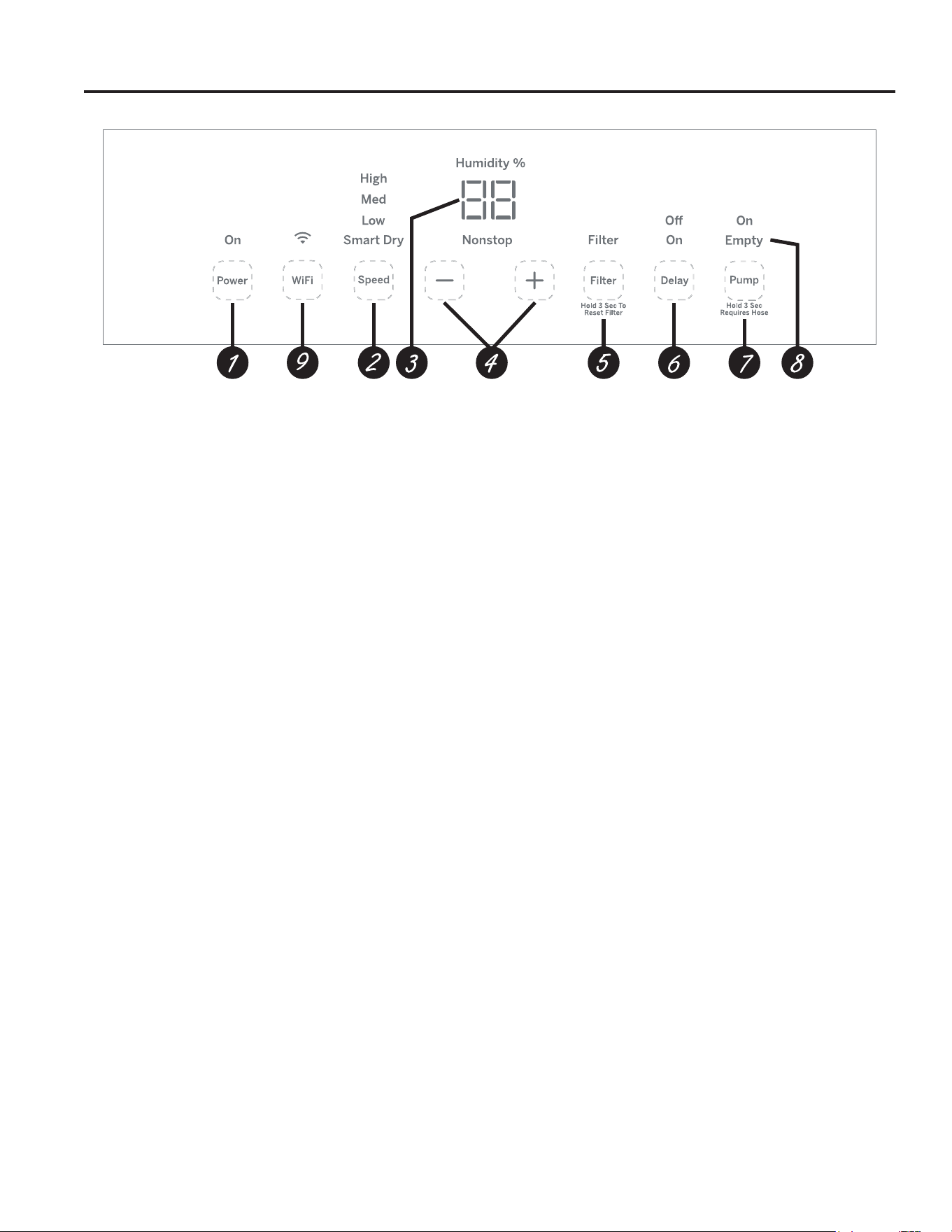
Controles
NOTA: Cuando el recipiente está lleno o es retirado, los
controles no pueden ser ajustados.
1. Power Pad
Presione para encender o apagar el deshumidificador.
NOTA: Apagar el encendido presionando el botón Power
NO desconecta el electrodoméstico del suministro de
corriente.
2. Boton de velocidad del ventilador (Fan Speed)
Controla la velocidad de circulación del aire.
Presione para seleccionar la velocidad del ventilador en High,
Medium o Low.
Coloque el control del ventilador a High velocidad para lograr
remover la mayor cantidad de humedad. Cuando la humedad
haya sido reducida y usted prefiera una operación más
tranquila, coloque el control del ventilador a Medium o Low
velocidad.
3. Pantalla
Muestra el % del nivel de humedad programado durante la
configuración, luego muestra el % del nivel de humedad real
de la habitación (con una precisión de +/– 5%).
4. Botones para el Control de humedad
(Humidity Set Control)
El nivel de humedad se podrá configurar dentro de un rango
de humedad relativa (RH) de entre el 35% y el 80%, por
incrementos del 5% o en el modo Nonstop (Ininterrumpido)
para un funcionamiento continuo. A fin de configurar la
unidad para un funcionamiento continuo, presione la tecla
“–” hasta que la luz indicadora de “Nonstop” (Ininterrumpido)
se ilumine.
NOTA: Si se selecciona Nonstop, el deshumidificador
funcionará en forma continua en la configuración máxima de
deshumidificación hasta que se llene el tanque.
Si desea aire más seco, presione el botón
“–” y seleccione un
valor porcentual más bajo (%).
Si desea aire más húmedo, presione el botón “+” y
seleccione un valor porcentual más alto (%).
Cuando use por primera vez el deshumidificador, coloque
el control del deshumidificador a 45% ó 50%. Permita
que transcurran por lo menos 24 horas para que el
deshumidificador alcance el nivel de humedad. Si el aire
aún está más húmedo de lo deseado, ajuste el nivel
de humedad a un nivel menor o seleccione el botón de
funcionamiento continuo (Nonstop) para obtener una máxima
deshumidificación.
5. Temporizador del filtro (Filter Timer)
Después de 250 horas de operación, se encenderá la luz
indicadora de Clean the Filter para recordarle que debe
limpiar el filtro. Quite el filtro y límpielo.
Mantenga presionado el botón del filtro durante 3 segundos
para restablecer el recordatorio del filtro.
6. Retraso Desactivado
Mientras el deshumidificador se encuentra en funcionamiento,
presione el botón Delay.
Presione los botones “+” /
“–” para seleccionar la cantidad de
horas que desea que el deshumidificador continúe funcionando
antes de apagar el mismo.
NOTA: Luego de exhibir el tiempo, la pantalla pasará a mostrar
el nivel de humedad actual una vez que hayan pasado 5
segundos. Presionar el botón Delay exhibirá la cantidad de
horas restantes del retraso.
Retraso Activado
Mientras el deshumidificador se encuentra apagado, presione el
botón Delay (Retraso).
Presione los botones “+” /
“–” para seleccionar la cantidad de
horas que desea que el deshumidificador permanezca apagado
antes de encender el mismo.
NOTA: La pantalla mostrará la cantidad de horas restantes
hasta que se encienda el deshumidificador.
Para cancelar el Retraso:
Al presionar el botón Delay una vez, aparecerá la cantidad de
horas restantes del Retraso en la pantalla. Presione el botón
Delay nuevamente y el mismo será cancelado. Presionar el
botón Power también cancelará la función Delay (Retraso).
7. Bomba (en algunos modelos)
Activa la función de la bomba interna. Presione durante 3
segundos para activar la bomba interna para el retiro automático
del condensado. La luz indicadora Pump On titilará y luego
permanecerá´iluminada una vez completados los 3 segundos.
Presione para desactivar la bomba. Antes de encender
la bomba, asegúrese de que la manguera se encuentre
conectada. Asegúrese de que el balde esté vacío antes de
poner la unidad en modo de bomba.
8. Indicador de Vaciado
El indicador de “Vaciado” parpadeará cuando el cubo esté listo
para ser vaciado, o cuando el cubo sea retirado y/o no sea
reemplazado en la posición correcta.
9. WiFI Connect (en algunos modelos)
WiFi Connect le permite la conexión del deshumidificador
al WiFi del hogar. Descargue los detalles de la SmartHQ
Aplicación en
GEAppliances.com/connect.
49-5001090 Rev. 1 5
Otras funciones
INSTRUCCIONES DE OPERACIÓN
Alarma (Alarm)
Si el tanque se encuentra lleno o no está en su lugar, sonará
una alarma durante 10 segundos para recordarle de vaciar y
volver a colocar el tanque.
Apagado automático (AUTO SHUT OFF)
El Interruptor de control de nivel de agua apaga el
deshumidificador cuando el tanque esté lleno, o cuando el
tanque no esté presente o no esté colocado en una posición
apropiada. Sonará una alarma si el interruptor del control del
nivel de agua no es reiniciado.
NOTA: El ventilador y el compresor dejarán de funcionar tan
pronto como se retire el balde. La alarma sonará si el balde
no se vuelve a colocar en la posición correcta después de 3
minutos.
Descongelado automático (AUTO DEFROST)
Cuando se acumule escarcha en los serpentines
evaporadores, el compresor se apagará, y el ventilador
continuará funcionando hasta que la escarcha desaparezca.
Pérdida de energía (POWER OUTAGE)
En caso de la pérdida de la energía o interrupción, la unidad
reiniciará automáticamente, en las configuraciones usadas por
última vez, una vez la energía sea restablecida.
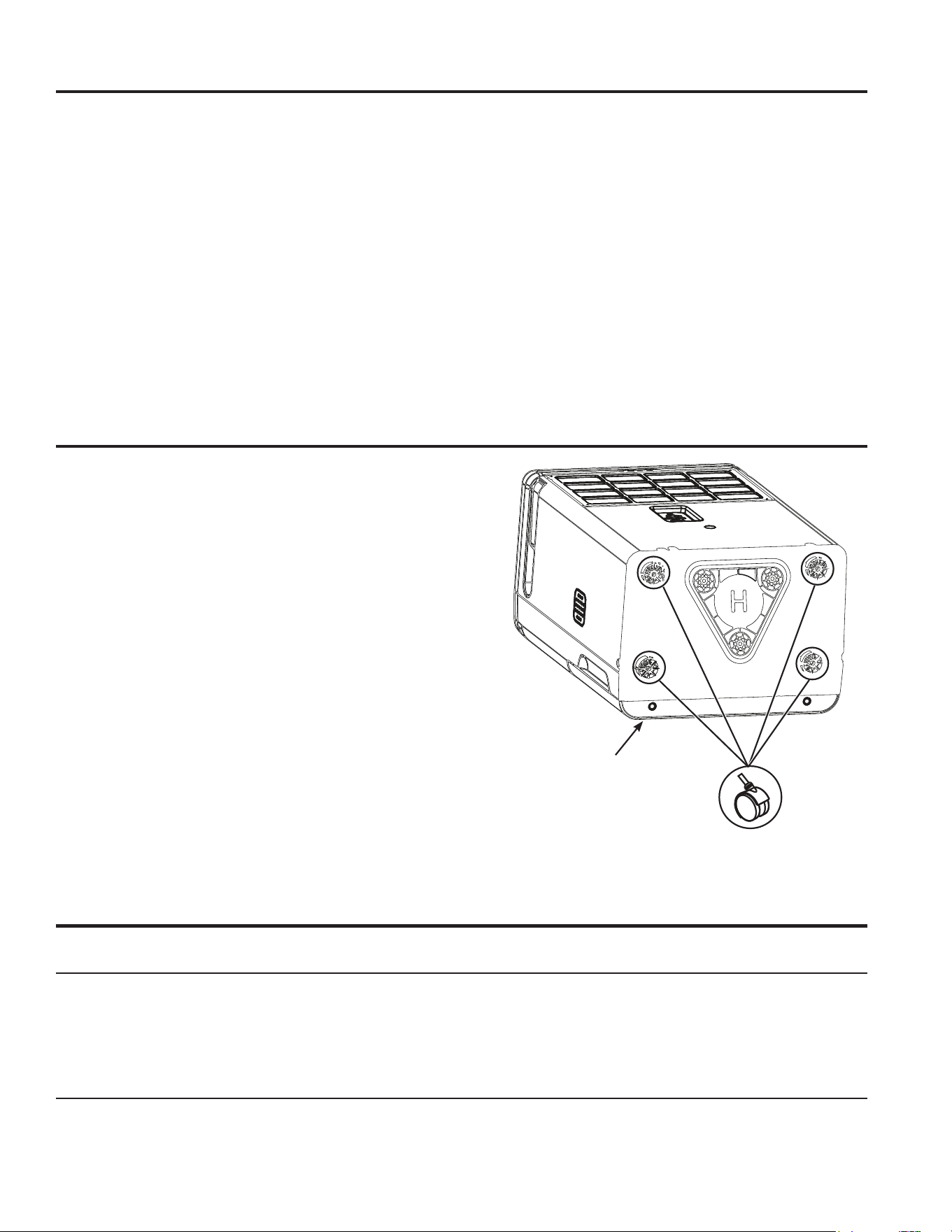
Instalación de Ruedas
NOTA: Esto es solo para modelos de 25 y 35 pinta. Antes
de enchufar el deshumidificador, retire las ruedas de la
cubeta e instálelas como se muestra a continuación.
Instalar las ruedas
1. Retire las 4 ruedas de la bolsa con cinta adhesiva en el
interior de la tapa del cubo de agua.
2. Coloque con cuidado el deshumidificador en la parte
delantera o trasera.
3. Siguiendo las flechas en la base, deslice las 4 ruedas en
su lugar.
4. Coloque la unidad en posición vertical y espere 1 hora
antes de usarla.
El deshumidificador
está en su frente
Cómo usar el deshumidificador
Cómo funciona el deshumidificador
La humedad en el aire pasa por un serpentin deshumidificador.
La humedad en el aire se condensa en este serpentin y se
drena hacia el tanque (o a través de la manguera y luego
través del drenaje).
El aire limpio y seco pasa luego por el condensador donde es
calentado y desechado de regreso al medio ambiente a través
de la parrilla.
Es normal que el aire en los alrededores se caliente un poco
conforme el deshumidificador funciona.
Descongelado automático
Cuando se acumule escarcha en los serpentines
evaporadores, el compresor se apagará, y el ventilador
continuará funcionando hasta que la escarcha desaparezca.
Cuando el evaporador se descongele, el compresor o el
ventilador se encenderá automáticamente y el proceso de
deshumidificación continuará.
Cuando se disponga a usar el deshumidificador por primera vez, permita que la unidad opere de manera
continua por 24 horas.
6 49-5001090 Rev. 1
Cómo usar el deshumidificador
Selección del lugar adecuado
El deshumidificador ubicado en un sótano tendrá poco o
ningún efecto en secar el aire dentro areas adjacentes de
almacenamiento, como un armario, por ejemplo, al menos que
exista una circulación adecuada de aire hacia en interior y
hacia el exterior de dicha área.
Ŷ No use el deshumidificador en exteriores.
Ŷ Este deshumidificador está diseñado exclusivamente para
aplicaciones residenciales
de interior. No debe usarse para aplicaciones comerciales ni
industriales.
Ŷ Coloque el deshumidificador en un piso firme y nivelado que
sea lo suficientemente fuerte para soportar la unidad cuando
la cubeta esté llena de agua.
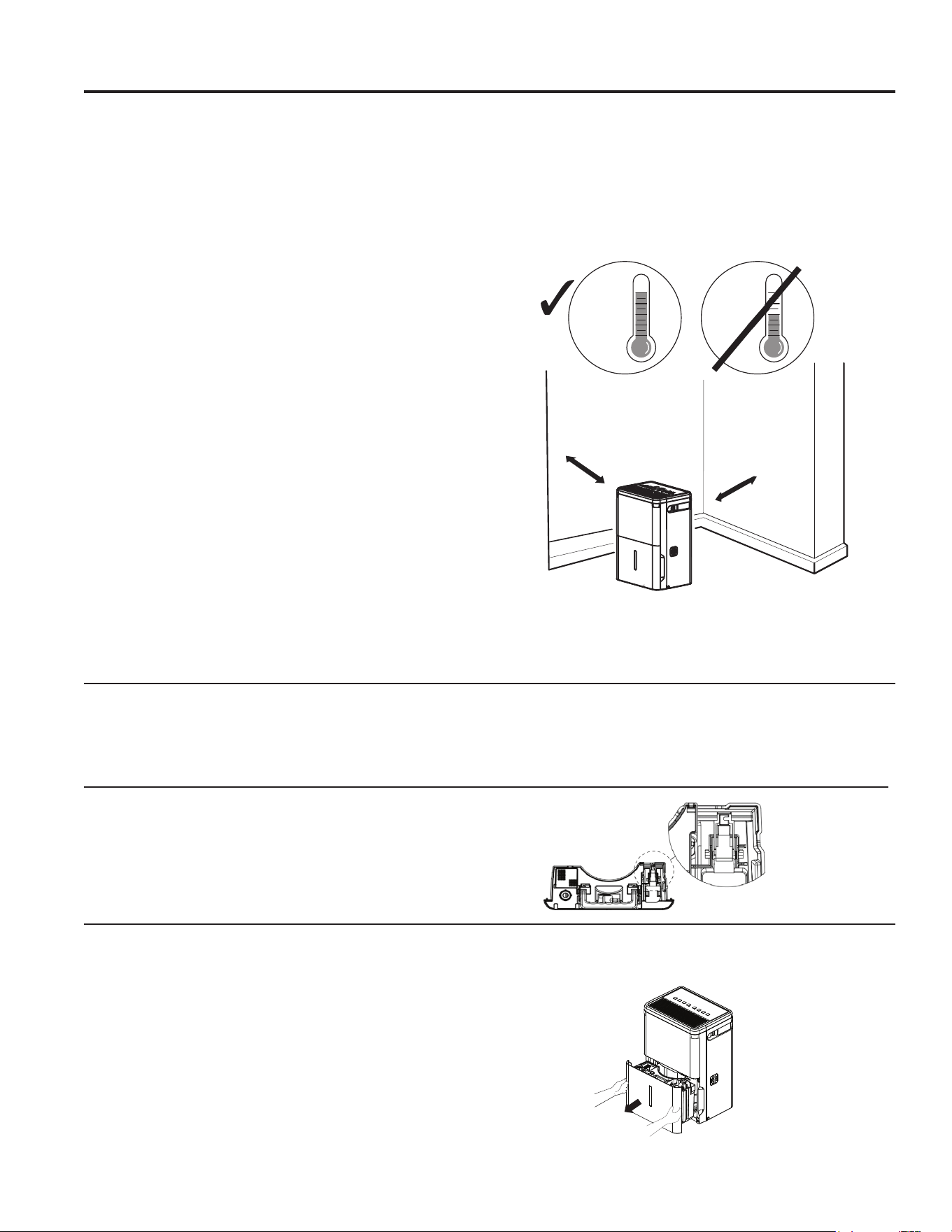
Ŷ Deje por lo menos 18 pulgadas de espacio libre alrededor
de la unidad para que exista una buena circulación de aire.
Ŷ Coloque el deshumidificador en un área en la que la
temperatura no sea inferior a 41 °F (5 °C) ni superior a 90°F
(32°C). Los serpentines pueden escarcharse en ambientes
con temperaturas inferiores a 41 °F (5 °C), lo cual puede
reducir su rendimiento.
Ŷ El rango sugerido o la humedad relativa está entre 40% y
50%.
Ŷ Use el deshumidificador en áreas donde exista humedad
excesiva. NOTA: Coloque el deshumidificador lejos la
secadora de ropa.
Ŷ Use el deshumidificador para evitar daños causados por
la humedad en lugares donde guarde libros o artículos de
valor.
Ŷ Use el deshumidificador en el sótano para ayudar a prevenir
los daños causados por la humedad.
Ŷ El deshumidificador debe usarse en áreas cerradas para
mayor efectividad.
Ŷ Cierre todas las puertas, ventanas y otras aberturas hacia el
exterior de la habitación en donde esté el deshumidificador.
NOTA: El deshumidificador tiene ruedas para ayudarle a
colocarlo en distintos lugares, pero debe rodarse en superficies
firmes y plantas. No intente rodarlo sobre objetos o sobre una
alfombra.
41 °F
(5 °C)
41 °F
(5 °C)
Above
Below
Correct Wrong
at least 18 inches
at least 18 inches
SI
NO
Por debajo
de 41 °F
(5°C)
Por
encima
de 41°F
(5°C)
18 pulgadas mín.
18 pulgadas mín.
Nivel de agua
El deshumidificador se apagará automáticamente cuando el
tanque se llene, o cuando el tanque sea removido o no sea
colocado en la posición apropiada.
El tanque debe colocarse en la posición apropiada para que el
deshumidificador funcione. El indicador de vaciado parpadeará
y el deshumidificador no funcionará si el cubo no se encuentra
en la posición correcta.
Funcionamiento del Balde
NO retire la pieza de espuma en la junta del balde. Si se
retira, el Deshumidificador no funcionará correctamente.
INSTRUCCIONES DE OPERACIÓN
Cómo desechar el agua acumulada
Hay 3 formas de eliminar el agua acumulada:
– Usa el balde
– Use una manguera de jardín
– Utilizar la bomba interna (en algunos modelos)
Use el tanque. Cuando usted saque el tanque de su lugar, la
unidad se apagará. Vacíe y reinstalelo.
IMPORTANTE: No use el manguera si usa el tanque para
recoger agua. Si el manguera está conectada, el agua caerá al
piso en lugar de caer dentro del tanque.
49-5001090 Rev. 1 7
Cómo usar el deshumidificador
INSTRUCCIONES DE OPERACIÓN
Cómo desechar el agua acumulada
NOTAS:
• No retire el balde con el deshumidificador en funcionamiento
o si recién se apagó. Esto puede hacer que el agua gotee
del recipiente de drenaje.
• El tanque debe estar en su lugar y bien sujeto para que el
deshumidificador funcione.
Usa una manguera de jardín. El agua puede desecharse
automáticamente hacia un drenaje en el piso si usted conecta
el tubo de drenaje con boquilla de la unidad a una manguera
para agua de jardín (no incluida).
1. Saque el tanque del frente de la unidad.
2. Abra la tapa de drenaje sobre el lado de
3. Enrosque una manguera de jardín (no suministrada) sobre
la boquilla y asegúrese de que se encuentre bien ajustada.
Corte la misma de acuerdo a la longitud y condúzcala hasta
el drenaje del piso.
4. Vuelva a colocar el tanque en la unidad.
NOTA: El tanque debe estar en su lugar y bien sujeto para
que el deshumidificador funcione. La manguera de jardín debe
correr desde el deshumidificador hasta el desagüe del piso.
Use la bomba interna (en algunos modelos).
El agua puede ser vaciada de forma automática en una
ubicación remota, adhiriendo la manguera incluida de la
bomba.
1. Adhiera la manguera de la bomba al conector de la
manguera, presionando el accesorio de la tubería en el
conector hasta que quede colocada correctamente (usted no
debería poder retirar la manguera al empujar).
2. Posicione la descarga de la manguera en la ubicación
deseada.
3. Asegúrese de que la bomba esté activada. Para activar
la bomba, mantenga presionado el botón Pump On/Off
(Bomba Activada/ Desactivada) durante 3 segundos. La
luz indicadora Pump On (Bomba Encendida) titilará y
luego permanecerá iluminada una vez completados los 3
segundos.
IMPORTANTE: Asegúrese de que la manguera para
condensado esté correctamente conectada y que no esté
retorcida, inclinada ni fisurada, ya que esto puede hacer
que caiga agua al piso. Asegúrese de que el balde esté
vacío antes de poner la unidad en modo de bomba. El cubo
también debe estar completamente apoyado para que la
bomba funcione de forma correcta. No utilice la máquina si la
temperatura ambiente es de 41ºF o inferior.
NOTAS:
• La altura máxima de elevación es de 16 pies.
Para Instalar la Manguera: Empuje la manguera hacia
adentro y de forma suave empuje la misma hacia usted
para controlar que esté bien asegurada No debe poder ser
eliminado.
Debe escuchar un “clic” que le permite saber que la manguera
está insertada correctamente.
Para Liberar la Manguera: Presione el botón azul en la parte
superior del conector conectado al deshumidificador y extraiga
la manguera para extraerla. Asegúrese de apagar la bomba
antes de retirar la manguera.
NOTE: NO retuerza ni pellizque la manguera, ya que esto
puede bloquear el flujo de agua
insertar
prensa
Halar
8 49-5001090 Rev. 1
Para Instalar la Manguera: Empuje la manguera hacia
adentro y de forma suave empuje la misma hacia usted
para controlar que esté bien asegurada No debe poder ser
eliminado.
Para Liberar la Manguera: Sostenga el anillo gris
mientras empuja hacia usted para retirar la misma.
NOTE: NO retuerza ni pellizque la manguera, ya que esto
puede bloquear el flujo de agua. Use sólo la manguera
incluida con el producto para el modo Pump (Bomba).
Cómo desechar el agua acumulada (cont.)
Empuje la manguera hacia adentro
1. Sostenga el anillo gris
2. Empuje la manguera hacia afuera
Cómo usar el deshumidificador
INSTRUCCIONES DE OPERACIÓN
49-5001090 Rev. 1 9
Cuidado y limpieza
CUIDADO Y LIMPIEZA
Filtro de aire
El filtro de aire que se encuentra detrás de la rejilla
trasera se deberá revisar y limpiar por lo menos cada
250 horas de funcionamiento o con una frecuencia
mayor, si fuera necesario.
Luego de 250 horas de funcionamiento, la luz indicadora
de Limpieza del Filtro brillará para recordarle que se
debe limpiar el filtro. Retire el filtro y limpie el mismo.
Reemplace el filtro y presione la tecla Filter Timer
(Temporizador del Filtro) para reiniciar el recordatorio
del filtro.
Para retirar:
Retire la rejilla trasera y el filtro se encontrará adherido.
Para limpiar:
Limpie el filtro con agua caliente y jabón. Enjuague y
deje secar el filtro antes de su reemplazo.
NOTA: No enjuague ni coloque el filtro en un lavavajillas
automático.
PRECAUCIÓN
NO OPERE el deshumidificador sin el
filtro debido a que la suciedad y las pelusas lo obstruirán y
reducirán su rendimiento.
Rejilla y gabinete
Para limpiar el gabinete:
Use agua y un detergente de baja concentración. No
use blanqueador ni limpiadores abrasivos.
Para limpiar la rejilla superior o trasera:
Use una aspiradora con accesorio de cepillo suave
o un cepillo de mano.
Tanque de agua
Para limpiar:
Después de algunas semanas, limpie el tanque para
evitar la formación de moho, mildiú y bacterias. Llene
parcialmente el tanque con agua limpia y agregue un
poco de detergente suave. Agite el contenido dentro del
tanque, luego vacíelo y enjuáguelo.
NOTA: No use una máquina lavavajillas para limpiar el
tanque de agua.
Para retirar:
Retire el tanque y deseche todo resto de agua.
Para volver a colocar:
Coloque el tanque en el deshumidificador deslizándolo.
NOTA: El tanque debe estar en su lugar y bien sujeto
para que el deshumidificador funcione.
Apague el deshumidificador y desconecte el enchufe del tomacorriente en la pared antes de limpiarlo.
Filtro de aire
INFORMACIÓN SOBRE CÓMO RECICLAR
Para acceder a información sobre como reciclar sus electrodomésticos, ingrese a www.geappliances.com/recycling.
10 49-5001090 Rev. 1
Consejos para la Solución de Problemas... Antes de solicitar el servicio técnico
CONSEJOS PARA LA SOLUCIÓN DE PROBLEMAS
¡Ahorre tiempo y dinero! Primero revise los cuadros que aparecen en las siguientes páginas y es posible que no necesite solicitar reparaciones.
Problema Causas posibles Qué hacer
El deshumidificador no
enciende
El cable eléctrico del deshumidificador está
desenchufado.
Cerciórese de que la clavija del deshumidificador esté
conectada en la pared.
El fusible está quemado o el disyuntor del
circuito está abierto.
Revise la caja del disyuntor del circuito ó el fusible; cambie el
fusible o vuelva activar el disyuntor.
El deshumidificador ha alcanzado su nivel
preseleccionado o el tanque de agua está lleno.
El deshumidificador se apaga automáticamente cuando ocurre
alguna de las dos condiciones. Cambie a una configuración
más baja o vacíe el tanque de agua y reinstale apropiadamente.
El tanque no está en su lugar. El tanque debe estar en su lugar y bien sujeto para que el
deshumidificador funcione.
Corte de energía. Hay una demora protectora (de hasta 3 minutos) para prevenir
la interrupción de la sobrecarga del compresor. Por esa razón,
la unidad no reiniciará la deshumidificación a los 3 minutos de
haber sido encendida de nuevo.
Deshumidificador
no seca el aire como
debiera
No ha pasado suficiente tiempo para que seque
el aire.
Cuando se instala por primera vez, deje que pasen 24 horas
para que se mantenga el nivel de humedad deseada.
Hay escasa circulación de aire. Cerciórese de que no haya cortinas, persianas o muebles que
bloqueen la parte arriba o atrás del deshumidificador. Vea la
sección Seleccione del lugar adecuado.
Filtro sucio Vea la sección de Cuidado y limpieza.
El Control de humedad no está ajustado lo
suficientemente bajo.
Para aire más seco, presione el botón y seleccione un valor
porcentual más bajo (%) o en NS (Nonstop) para obtener una
máxima deshumidificación.
Las puertas y ventanas no están cerradas
completamente.
Revise que todas las puertas, ventanas y otras aberturas están
cerradas completamente.
El secador de ropa podría estar generando aire
húmedo en el recinto.
Instale el deshumidificador lejos de la secadora de ropa. El
secador debe desechar el aire hacia el exterior.
La temperatura del recinto está demasiado baja. La deshumidificación es mejor a temperaturas ambiente
altas. Temperaturas bajas causan bajo rendimiento de
deshumidificación. Modelos están diseñada para funcionar a
temperaturas por encima de 41 ºF (5 ºC).
El deshumidificador
trabaja demasiado
El volumen de aire a deshumidificar es excesivo. La capacidad de su deshumidificador no están adecuada.
Las puertas y ventanas están abiertas. Cierre todas las puertas y ventanas que den al exterior.
Se forma escarcha en
el serpentín
El deshumidificador ha sido encendido hace
poco o la temperatura del recinto es inferior a 41
°F (5 °C).
Esto es normal. La escarcha normalmente desaparecerá en
60 minutos. Vea la sección de Descongelado automático
(Automatic defrost).
Los controles no se
pueden configurar
El compresor se apaga, y el ventilador sigue
funcionando automáticamente durante
aproximadamente 3 minutos a una configuración fija.
Esto es normal. Espere aproximadamente 3 minutos y coloque
el ventilador lo desee.
El ventilador hace ruido El aire se mueve a través del deshumidificador. Esto es normal.
Hay agua en el piso La conexione a la manguera está floja. Inspeccione la conexione a la manguera. Consulte la sección
Cómo desechar el agua acumulada.
Intenta usar el tanque para recoger agua, pero el
manguera está colocada.
Desconecte el manguera si usa el tanque para recoger agua.
Consulte la sección Cómo desechar el agua acumulada.
La luz LED de Tanque
Lleno destella y suena
la alarma
La manguera de drenaje no está bien ajustada en
el accesorio
Verifique la conexión de la manguera de drenaje
La manguera de drenaje está torcida Verifique que la manguera de drenaje apunte en forma recta
hacia el piso y que no se encuentre torcida.
El balde se llena
cuando se usa la
bomba de drenaje (en
algunos modelos)
La unidad no está en modo bomba Asegúrese de que la bomba esté encendida y la luz de la
bomba esté iluminada
Manguera de bomba no instalada Asegúrese de que la manguera de la bomba esté
correctamente instalada en la parte posterior de la unidad
Problema con el sensor de nivel de agua Esto puede deberse a condiciones de mucha humedad o un
error con el sensor de flotación. Verifique la unidad en busca
de un código de error P1 en la pantalla. Si esto está presente,
apague la unidad, desenchúfela durante unos segundos, vuelva
a enchufarla y encienda la unidad para restablecer el sensor.
Si este error continúa, consulte la sección de garantía para
conocer las opciones de cambio.
49-5001090 Rev. 1 11
Configuración WiFi (en algunos modelos)
CONFIGURACIÓN WIFI
GE Appliances SmartHQ
(Para clientes en Estados Unidos)
Su deshumidificador cuenta con GE SmartHQ Habilitado. Para aprender más sobre las funciones del electrodoméstico
conectado, y para saber qué aplicaciones de electrodomésticos conectados funcionarán con su teléfono inteligente, visite
GEAppliances.com/connect
Conectividad WiFi:
Para solicitar asistencia con relación al electrodoméstico o la conectividad de red del electrodoméstico,
comuníquese al 1-800-220-6899.
Los datos de todos los electrodomésticos conectados son guardados en estricto cumplimiento con la Política de
Privacidad de Datos de Conexión de GE Appliances. Para acceder a esta política,
visite geappliances.com/privacy/privacy_policy_connected.
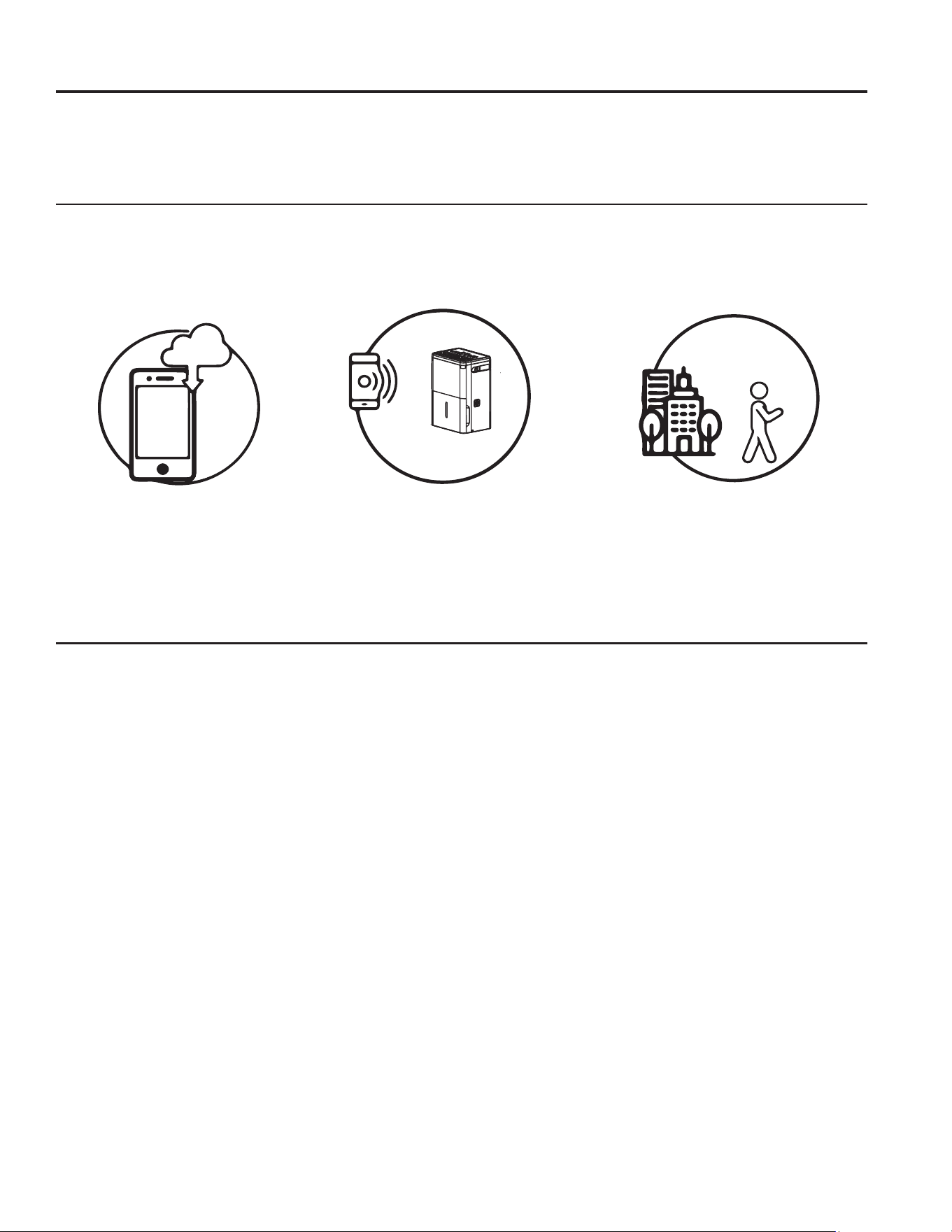
Cómo Funciona
Descargue la Aplicación de GE
Appliances.
Use la aplicación para conectar su
GHKXPLGL¿HUSDUDVDOD
Una vez conectado, use la aplicación
SDUDDMXVWDUHOGHKXPLGL¿HUVHJ~QOR
desee.
Preguntas acerca de SmartHQ
Acceda a respuestas necesarias sobre la configuración de electrodomésticos con WiFi y la conexión a su red
hogareña a través de nuestros artículos de soporte.
Para acceder a los artículos de soporte la conexión wifi del deshumidificador para sala, visite products.geappliances.
com/appliance/gea-support-search-content.
INFORMACIÓN REGULATORIA
Declaración de Cumplimiento con FCC/
IC:
1. Este dispositivo no podrá causar interferencias perjudiciales.
2. Este dispositivo debe aceptar cualquier interferencia
recibida, incluidas las interferencias que puedan provocar un
funcionamiento no deseado.
Este equipo fue probado y cumple con los límites establecidos
para un dispositivo digital de clase B, según la parte 15 de
la Normativa de la FCC. Estos límites fueron diseñados para
brindar una protección razonable contra interferencias nocivas
en una instalación residencial. Este equipo genera, usa y
puede emitir energía de radiofrecuencia y, si no se instala
y utiliza de acuerdo con las instrucciones, puede ocasionar
interferencias perjudiciales sobre las comunicaciones
radiales. Sin embargo, no se garantiza que no se presenten
interferencias en una instalación en particular. Si este equipo
provoca interferencias perjudiciales para la recepción de radio
o televisión, lo que puede comprobar encendiendo y apagando
el equipo, se aconseja al usuario que intente corregir la
interferencia a través de una o más de las siguientes medidas:
• Reoriente o reubique la antena receptora.
• Aumente la separación entre el equipo y el receptor.
• Conecte el equipo a un tomacorriente de un circuito diferente
al tomacorriente al cual se encuentra conectado el receptor.
• Para solicitar ayuda, consulte al comerciante minorista o a un
técnico experimentado de radio/ televisión.
Etiqueta: Las modificaciones sobre esta unidad no aprobadas
expresamente por parte del fabricante podrían anular la
autoridad del usuario para utilizar el equipo.
*Modelos Selectos Únicamente
Este producto tiene capacidad Wi-Fi y requiere conectividad a Internet
y un enrutador inalámbrico para permitir la interconexión con un
Sistema de administración de energía y / o con otros dispositivos,
sistemas o aplicaciones externos.

12 49-5001090 Rev. 1
Notas
49-5001090 Rev. 1 13
Abroche su recibo aquí. Para acceder al servicio técnico de acuerdo
con la garantía deberá contar con la prueba de la fecha original de
compra.
GARANTÍA LIMITADA
EXCLUSIÓN DE GARANTÍAS IMPLÍCITAS—Su única y exclusiva alternativa es la reparación del producto, como se indica en la
Garantía Limitada. Las garantías implícitas, incluyendo garantías implícitas de comerciabilidad o conveniencia sobre un propósito
particular, se limitan a un año o al período más corto permitido por la ley.
Para Clientes de EE.UU: Esta garantía limitada se extiende al comprador original y a cualquier dueño subsiguiente de productos
comprados para uso hogareño dentro de EE.UU. Si el producto está en un área donde no se encuentra disponible un Proveedor
Autorizado del Servicio Técnico de GE Appliances, usted será responsable por el costo de un viaje o se podrá requerir que traiga
el producto a una ubicación del Servicio Técnico de GE Appliances Autorizado para recibir el servicio. En Alaska, la garantía
limitada excluye el costo de envío o llamadas del servicio técnico a su hogar.
Algunos estados no permiten la exclusión o limitación de daños fortuitos o consecuentes. Esta garantía limitada le da derechos
legales específicos y es posible que tenga otros derechos legales que varían entre un estado y otro. Para conocer cuáles son sus
derechos legales, consulte a la oficina de asuntos del consumidor local o estatal o al Fiscal de su estado.
Garante en EE.UU:
GE Appliances, a Haier company
Louisville, KY 40225
Ŷ,QVWUXFFLyQDOFOLHQWH(VWHPDQXDOGHOSURSLHWDULR
brinda información relacionada con instrucciones de
funcionamiento y controles del usuario.
Ŷ,QVWDODFLyQLQDGHFXDGD6LWLHQHXQSUREOHPDGHLQVWDODFLyQ
o el producto no posee la capacidad adecuada, contacte a
su vendedor minorista o instalador. Usted es responsable
de brindar instalaciones de conexión eléctrica adecuadas.
Ŷ)DOODGHOSURGXFWRFRPRUHVXOWDGRGHPRGLILFDFLRQHVVREUH
el mismo o debido a un uso irrazonable, incluyendo la falta
de mantenimiento razonable o necesario.
Ŷ5HHPSOD]RGHIXVLEOHVGHOKRJDURUHLQLFLRGHGLV\XQWRUHV
Ŷ)DOODVFRPRFRQVHFXHQFLDGHFRUURVLyQ
Ŷ'DxRVRFDVLRQDGRVVREUHHOSURGXFWRSRUQLYHOGH
suministro de voltaje inadecuado, accidente, incendio,
inundaciones o catástrofes naturales.
Ŷ'DxRVFRQVHFXHQWHVRLQFLGHQWDOHVFDXVDGRVSRUSRVLEOHV
defectos del producto.
Ŷ'DxRFDXVDGRGHVSXpVGHODHQWUHJD
Qué No Será Cubierto:
*DUDQWtDGHVXDFRQGLFLRQDGRUGHDLUH²JDUDQWtDOLPLWDGDGHXQDxR
Por el Período de: Reemplazaremos:
Un Año
Desde la fecha de la
compra original
Reemplazo, reparación o reembolso del costo minorista original de cualquier producto que
falle debido a un defecto en los materiales o la fabricación. Si la unidad es cambiada, la unidad
de reemplazo posee garantía por el resto del período de la garantía original de un año sobre su
producto. GE Appliances reemplazará, a su exclusivo criterio, el producto por otro de la misma o de
una funcionalidad y calidad comparable o hará un reembolso por el precio minorista original.
Ŷ Embale la unidad correctamente. Le recomendamos usar la
caja de cartón y los materiales de embalaje originales.
Ŷ(QWUHJXHHOSURGXFWRHQODXELFDFLyQGHOYHQGHGRU
minorista donde fue adquirido.
Ŷ Incluya en el paquete una copia del receptor de la venta u
otro comprobante de la fecha de compra original. También
escriba su nombre y domicilio y una descripción del
defecto.
Para hacer un reclamo de garantía durante el período de devolución permitido de su minorista:
$)LQGH5HDOL]DUXQ5HFODPRVREUHOD*DUDQWtD'XUDQWHHO5HVWRGHOD*DUDQWtDGHXQ$xR
Ŷ Ubique su recibo de venta original y haga una nota de su modelo y número de serie.
Ŷ Llame al 833-4BODEWELL (833-4263393) para iniciar una reclamación de garantía.
Ŷ Se solicitará su nombre, domicilio, información del recibo, y números de modelo y serie.
Ŷ Las reclamaciones de garantía podrán requerir una prueba de compra enviada de forma electrónica o por correo.
14 49-5001090 Rev. 1
Impreso en China
SOPORTE PARA EL CONSUMIDOR
Soporte al Cliente
Sitio Web de GE Appliances
¿Desea realizar una consulta o necesita ayuda con su electrodoméstico? ¡Intente a través del Sitio Web de
GE Appliances las 24 horas del día, cualquier día del año! Usted también puede comprar más electrodomésticos
maravillosos de GE Appliances y aprovechar todos nuestros servicios de soporte a través de Internet, diseñados
para su conveniencia. GEAppliances.com
Registre su Electrodoméstico
¡Registre su electrodoméstico nuevo a través de Internet, según su conveniencia! Un registro puntual de su producto
permitirá una mejor comunicación y un servicio más puntual de acuerdo con los términos de su garantía, en caso de
surgir la necesidad. También puede enviar una carta en la tarjeta de inscripción preimpresa que se incluye con el
material embalado. GEAppliances.com/register
Garantías Extendidas
Adquiera una garantía extendida de GE Appliances y conozca los descuentos especiales que están disponibles
mientras su garantía aún está vigente. La puede adquirir en cualquier momento a través de Internet. Los servicios
de GE Appliances aún estarán allí cuando su garantía caduque.
bodewellcareplan.com o comuníquese al 800.626.2224 durante el horario de atención comercial.
Conectividad Remota
Para solicitar asistencia para la conectividad de red inalámbrica (para modelos con acceso remoto), visite nuestro
sitio web en GEAppliances.com/connect o comuníquese al 800.220.6899.
Piezas y Accesorios
Aquellos individuos calificados para realizar el servicio técnico de sus propios electrodomésticos podrán solicitar el
envío de piezas o accesorios directamente a sus hogares (se aceptan las tarjetas VISA, MasterCard y Discover).
Ordene hoy a través de Internet durante las 24 horas, todos los días. GEApplianceparts.com o de forma telefónica
al 877.959.8688 durante el horario de atención comercial.
Las instrucciones que figuran en este manual cubren los procedimientos que serán realizados por cualquier
usuario. Otros servicios técnicos generalmente deben ser derivados a personal calificado del servicio. Se
deberá tener cuidado, ya que una reparación indebida podrá hacer que el funcionamiento no sea seguro.
Contáctenos
Si no se encuentra satisfecho con el servicio que recibió de GE Appliances, comuníquese con nosotros a través de
nuestro sitio Web con todos los detalles, incluyendo su número telefónico, o escriba a:
General Manager, Customer Relations | GE Appliances, Appliance Park | Louisville, KY 40225
GEAppliances.com/contact o comuníquese al 800.626.2000