VISIT ARANET.COM
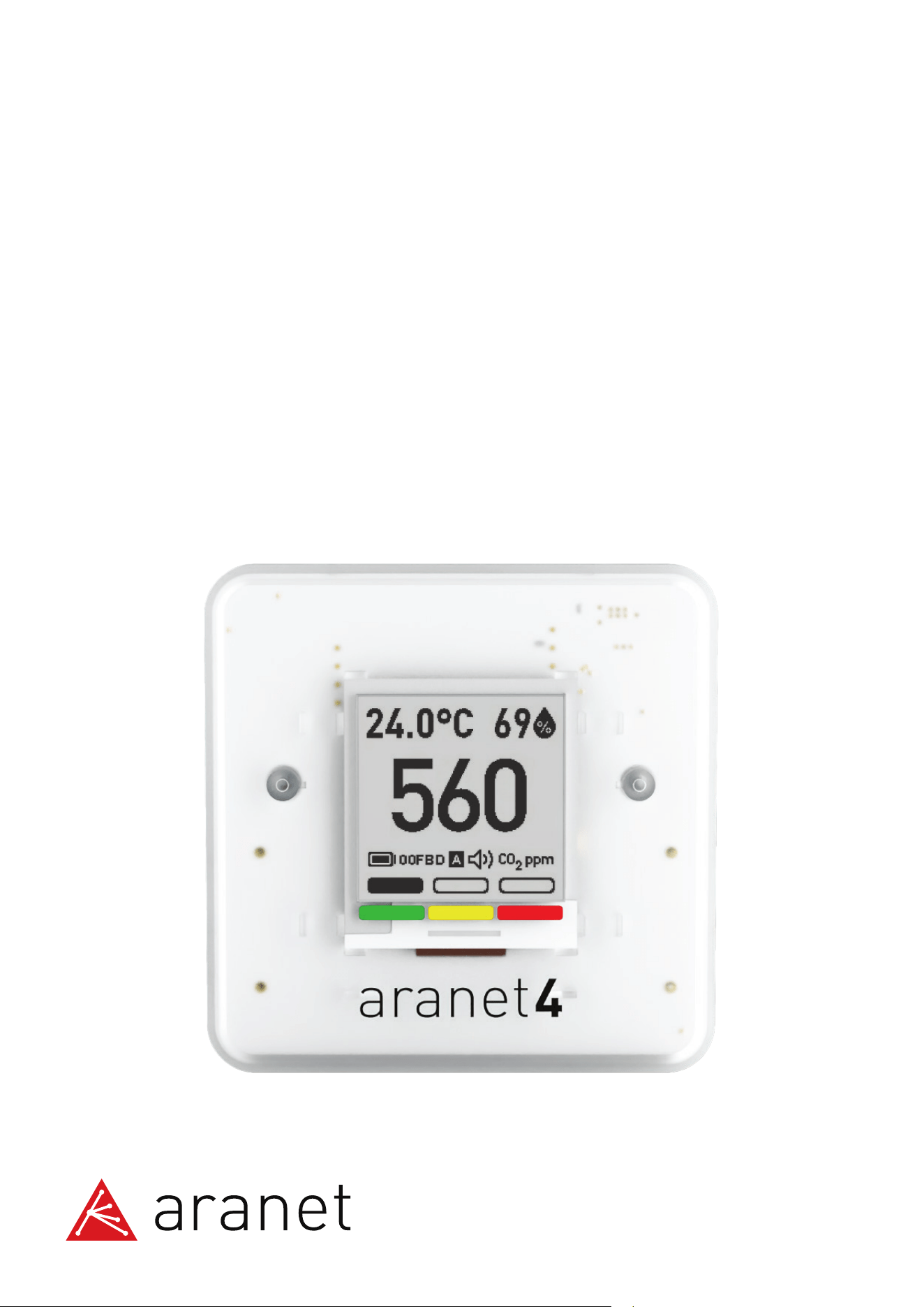
Aranet4 HOME/Aranet4 PRO
User guide
V130224
Aranet4 monitor is an innovative wireless device fo
r effortless monitoring of indoor air quality – CO₂, relative humidity,
temperature and atmospheric pressure*. The device is suitable for monitoring the CO₂ level at home, in school, office,
or any other indoor environment.
Measurement data is displaye
d on a power-efficient e-ink screen with a long battery life. Additionally, the device
provides visual and optional buzzer notifications when the CO₂
concentration becomes unhealthy. CO₂
concentration levels of 1400 ppm (parts per million) and up are unhealthy and can cause drowsiness and decrease
cognitive function by 50 %. A high concentration of CO₂ is an indicator of insufficient ventilation, which can increase
the risk of infection with airborne diseases.
Download the Aranet4 app and connect via Bluetooth with up to six devices. The app allows you to configure the
Aranet4 device and access the data monitored by the device. Read a detailed description of all the possibilities that
the app offers in the chapter How to pair Aranet4 to my smart device using the Aranet4
app on page 5.
Additionally, up to 100 Aranet4 PRO devices can be connected to the Aranet PRO base station. Refer to the
chapter Using Aranet4 device with the Aranet PRO base station on page 6.
There are two Aranet4 models – Aranet4 HOME and Aranet4 PRO. You can find out more about how they differ in
this informative leaflet.
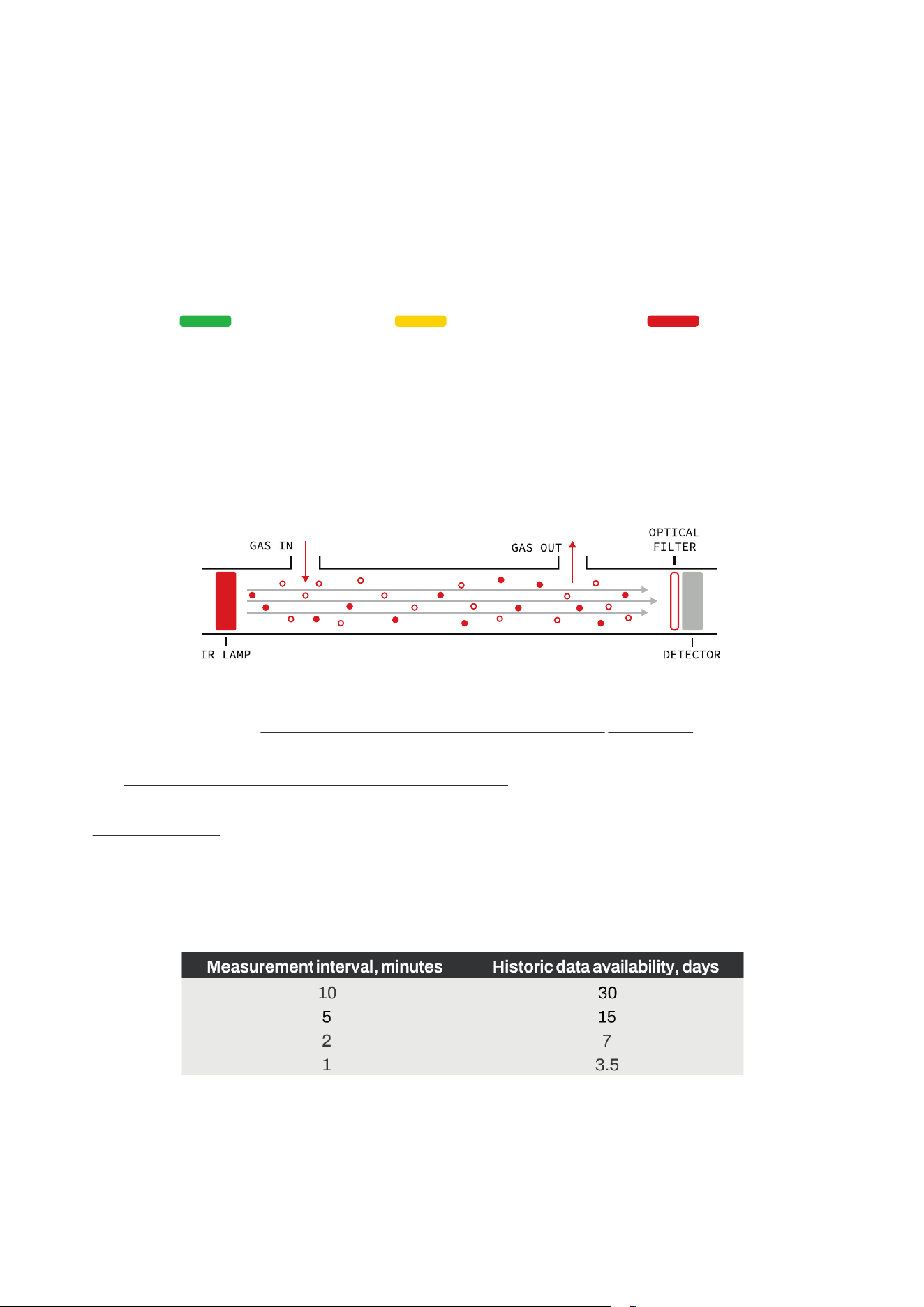
Measurement and data transmission** intervals are 1,2,5, or 10 minutes. The default measurement interval is
set to 5 minutes.
The amount of the stored historic measurement data depends on the measurement interval of the device (starting
from firmware v1.4.14):
The data that is older than the possible storage period will be automatically overwritten in the device memory
with the newly measured data.
Aranet4 uses the nondispe
rsive infrared (NDIR) sensor to measure the CO₂ concentration. The CO₂ gas in the chamber
absorbs infrared light; this absorption is measured by the sensor. The less light passes through, the higher the CO₂
concentration. CO₂ ab
sorbs only a specific wavelength of light, therefore an optical filter is used.
* Atmospheric pressure data measurements are available only on the Aranet4 app.
More information is in the chapter How to pair the Aranet4 to my smart device using the Aranet4 app on page 5.
** For Aranet4 PRO paired to Aranet PRO base station.
About the Aranet4 monitor
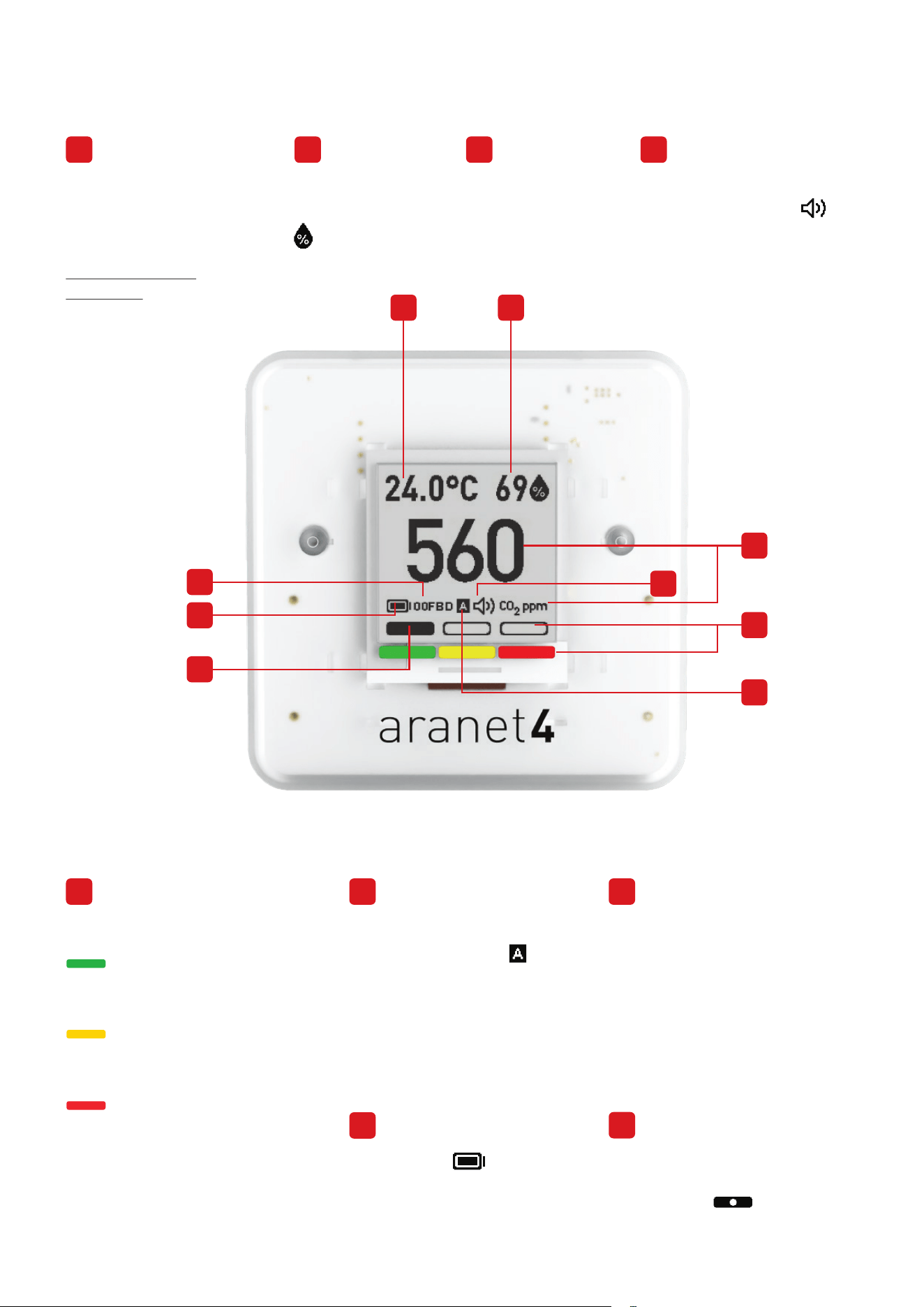
1
Unhealty
(Red)
Good
(Green)
Average
(Yellow)
5
CO₂ threshold level indication
Green represents a good CO
²
level (below 1000 ppm*)
Yellow represents the average
CO₂ level (1000 to 1400 ppm*)
Red represents an unhealthy
CO₂ level (above 1400 ppm*)
CO₂ calibration mode
indication. Symbol is
displayed when calibration is
set to automatic. No letter is
displayed when calibration is
set to manual mode.
For Aranet4 PRO only:
Monitor identification
number comprising five
hexadecimal symbols of
the Aranet4 PRO device
(wirelessly connecting
Aranet PRO base station
& Aranet Cloud).
Battery level.
Adjustable CO₂ thresholds
that can be set using the
Aranet4 app.
Temperature of the air in
Celsius or Fahrenheit. To
change the temperature
units, refer to the chapter
Switch positions
explained on page 4.
Relative humidity
of the air (RH %).
CO
²
concentration
level in ppm (parts
per million).
Buzzer status.
The speaker symbol
is visible when the buzzer
is enabled. The buzzer’s
settings can be adjusted
using the Aranet4 app.
The Aranet4 sensor screen explained
2
* These are default thresholds that can be reconfigured using the Aranet4 app.
4
3
6
5
1 2
7
8
9
1 2 3 4
6 7
8
9
The calibration
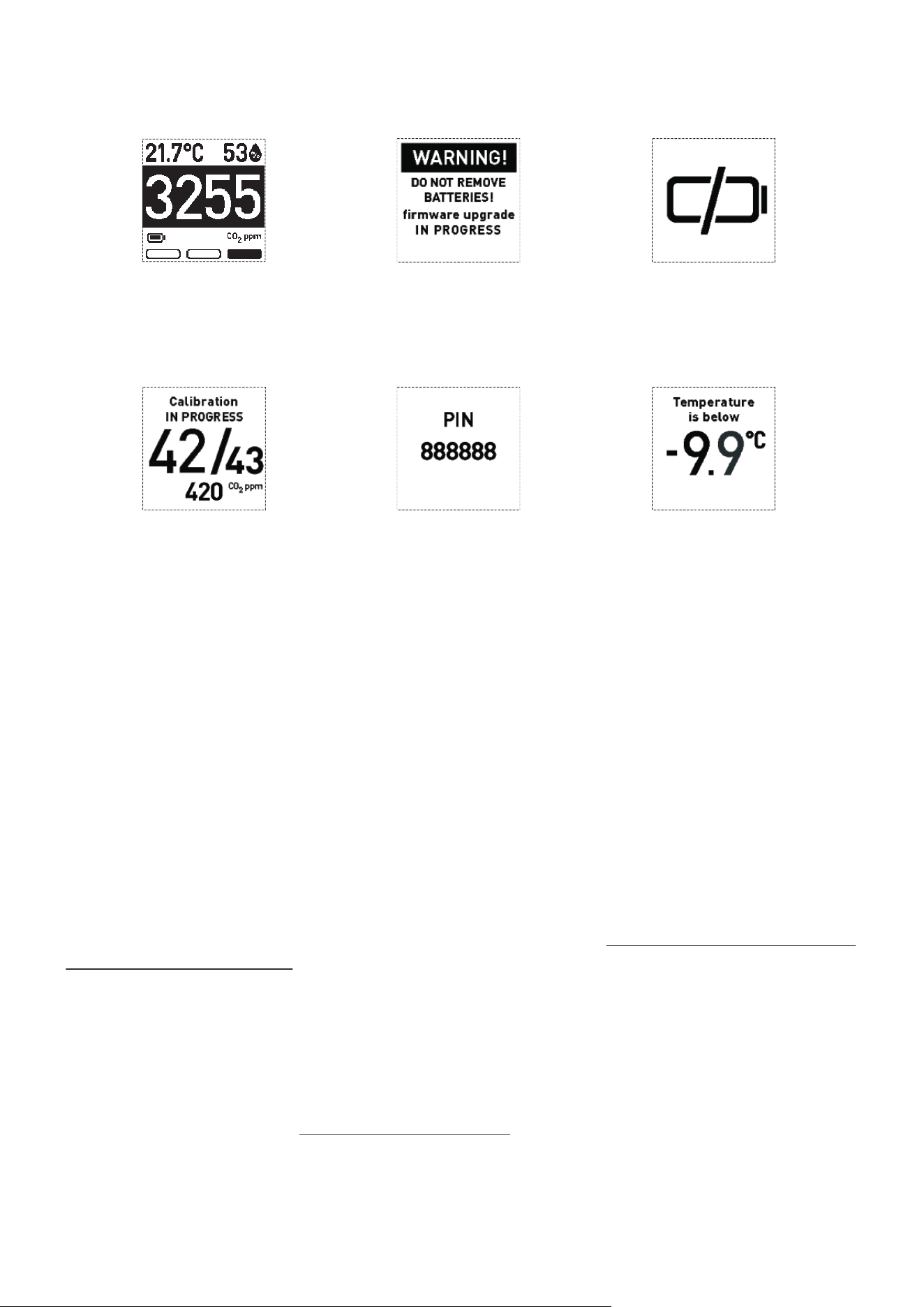
progress.
Temperature below zero
can damage the sensor.
The recommended
operating temperature of
the sensor is 0 °C to 50 °C
(32 °F to 122 °F).
Six-digit pin code displayed
for wirelessly connecting the
device with your smartphone
to the Aranet4 app via
Bluetooth.
The Aranet4 monitor is calibrated at the factory. However, the user can carry out CO₂ calibration manually
when needed. The general recommendation is to calibrate Aranet4 once a year, but more often if it is used
in dusty environments. During the manual calibration, the Aranet4 device must be exposed to fresh
outdoor air. Keep a distance of at least one meter from the device during the calibration process – no
humans, animals, or plants should be closer to the device during calibration.
You can calibrate your Aranet4 manually with or without the app. To manually calibrate Aranet4 with the
Aranet4 app, pair your device with your smartphone (refer to the chapter How to pair Aranet4 to my smart
device using the Aranet4 app on page 5), open Settings, and choose CO₂ calibration.
You can also calibrate the Aranet4 monitor manually without the app. To perform the manual CO₂
calibration, flip the switch from MANUAL to AUTO and then back to MANUAL (flip the switch quickly, with
less than one second between each movement). Once started, the calibration progress will be displayed
on the screen of the device. In case of a calibration failure message, make sure that the device is still in a
fresh air environment and repeat the process from the beginning. To learn more about the switch
positions, see the next chapter Switch positions explained on page 4.
If the automatic calibration mode is used, the Aranet4 device needs to be exposed to fresh air at around
420 ppm (for instance, outdoors) for at least 8 hours each month.
CO
₂
calibration
3
Aranet4 screen indications
The inverted screen
alerts when CO₂ concentration
has reached the red threshold
level.
Do not remove batteries
during a firmware upgrade.
The batteries are
empty. Replace them.
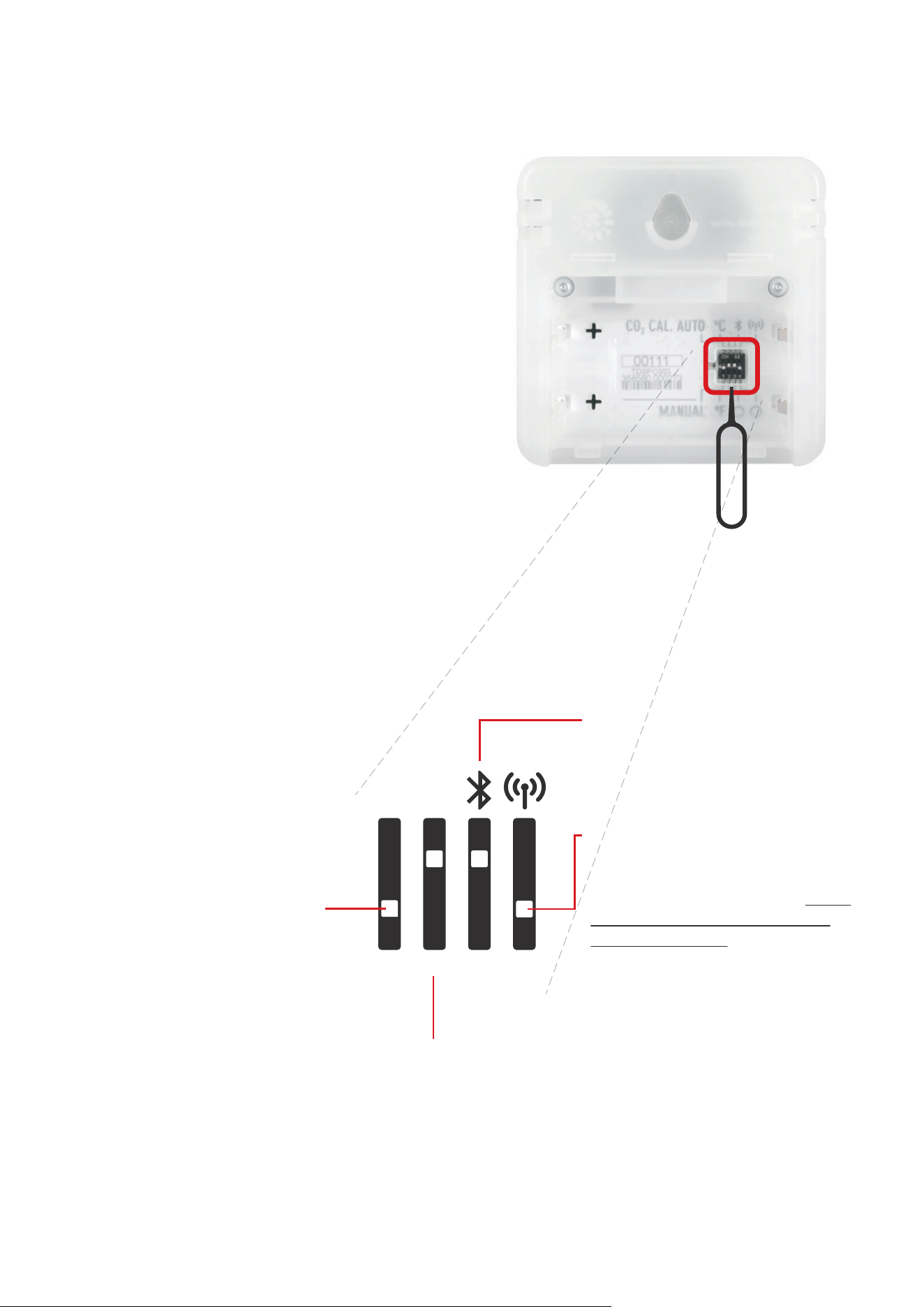
The Aranet4 monitor has four small configuration
switches that allow the user to adjust the settings.
To access the configuration switches, open the
cover of the battery compartment on the back of
the device. With the batteries remaining inside,
adjust the switch position (up or down) using the pin
tool supplied with the Aranet4 device.
You can adjust the switches with the batteries
removed as well, but note that, if you remove the
batteries, it will erase the measurement history
from Aranet4 memory. To avoid this, update the
data in the Aranet4 app before removing the
batteries. The new settings will start working once
the batteries are back in.
Switch positions explained
4
Switch tool (PIN) can
be found in Aranet4
Quick Start Guide
English version.
Bluetooth – turn on or o the
Bluetooth (connection to
Aranet4 app).
Enable/disable the connection to
Aranet PRO base station
(available only for Aranet4 PRO
device). Refer to the chapter Using
Aranet4 device with the Aranet
PRO base station on page 6.
Temperature measurement
units – change to Celsius or
Farenheit degrees.
AUTO / MANUAL – change the
CO₂ calibration mode to either
manual (default position) or
automatic mode.
The positions of the
configuration switches have
the following meaning:
AUTO
MANUAL
°C
°F O
(OFF)
O
(OFF)
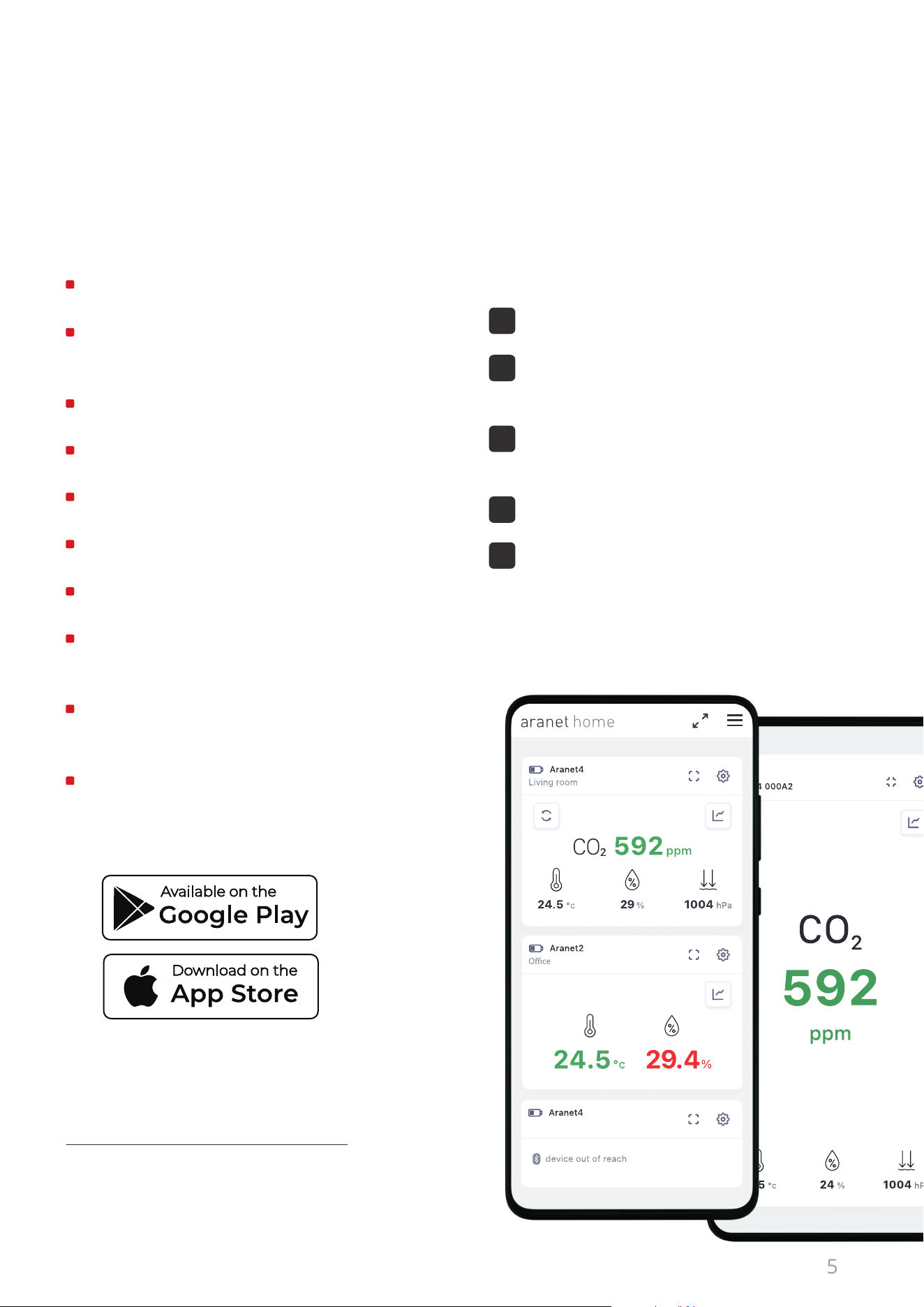
Download the Aranet4 app and connect your
smartphone to the Aranet4 device via
Bluetooth* to:
5
How to pair Aranet4 to my smart device
using the Aranet4 app
* Access to the device’s location should be allowed because
of the general requirement for Bluetooth apps to work
correctly on Android OS.
Find out more about the Aranet4 app in
forum.aranet.com/all-about-aranet4
Launch the Aranet4 app.
Add Aranet4 to the app by pressing
“+ PAIR NEW DEVICE” button.
Select the necessary Aranet4 from the
devices list and press “+ PAIR”.
Accept the pairing procedure.
Enter the 6-digit pin code that is shown on
the display of your Aranet4 device.
To connect your Aranet4 to your smart device,
make sure Bluetooth connectivity is enabled on
your mobile device and your Aranet4 monitor,
and follow these steps:
We advise you to check the app for Aranet4 newest firmware
versions regularly and use the oered upgrades.
1
2
3
4
5
Aranet4 App is currently available on iOS and
Android devices. Requires Android 6.0 or
newer or iOS 11.00 or newer.
Access real-time measurement data.
Store up to 90-day measurement history
and export it as a CSV file.
Track atmospheric pressure data.
Adjust CO
²
thresholds and set the buzzer.
Change sensor measurement interval.
Access all nearby Aranet4 devices.
Carry out the CO
²
calibration of the device.
Activate firmware updates for the
Aranet4 devices.
Enable Aranet4 connection to Homey
smart home system.
Display Aranet4 measurements on
larger TV screens.
Lounge

– Aranet4 protection class: IP 20.
– Aranet4 is not impact-resistant.
– Do not use Aranet4 in high humidity environments (greater than 85 %).
– Do not leave Aranet4 in direct sunlight.
In case of a return or a warranty claim, please fill out the RMA form on the Aranet web page
rma.aranet.com. For Terms and Conditions refer to aranet.com/terms-and-conditions.
If you have purchased your device on Amazon, please follow Amazon’s Returns Policy.
The Aranet PRO base station collects and stores data from all types of Aranet sensors, including Aranet4
PRO. Up to 100 sensors can be connected to one base station. The Aranet PRO base station has an
internal memory to store the measurement data for up to 10 years.
Find out more about the Aranet PRO base station at aranet.com and follow the Aranet PRO
User Manual
on how to pair Aranet sensors to the Aranet PRO base station.
If you can’t find the answer that you are looking for in this manual, please take a look at the Aranet Forum
at forum.aranet.com/all-about-aranet4. Otherwise, send us a message to suppor[email protected].
More information about Aranet4 HOME
and Aranet4 PRO can be found at
aranet.com/products/aranet4
Discuss. get support. Exchange your experience.
6
Using Aranet4 PRO monitor with the
Aranet PRO base station
Returns and warranty
Frequently asked questions (FAQ)
Additional links
For more information about Aranet products, please visit ara
net.com,
contact your Aranet representative or write to info@aranet.com.
Product specifications are subject to change without prior notice.
© 2024 SAF Tehnika, JSC. All rights reserved.
This equipment has been tested and found to comply with the limits for a Class B digital device, under part 15
of the FCC Rules. These limits are designed to provide reasonable protection against harmful interference in
a residential installation. This equipment generates, uses, and can radiate radio frequency energy and, if not
installed and used following the instructions, may interfere with radio communications. However, there is no
guarantee that interference will not occur in a particular installation. If this equipment interferes with radio or
television reception, which can be determined by turning the equipment o and on, the user is encouraged to
avoid the interference by one or more of the following measures:
– Reorient or relocate the receiving antenna.
– Increase the separation between the equipment and receiver.
– Connect the equipment into an outlet on a circuit dierent from that to which the receiver is connected.
– Consult the dealer or an experienced radio/TV technician for help.
“This device complies with part 15 of the FCC Rules. Operation is subject to the following two
conditions: (1) This device may not cause harmful interference, and (2) this device must accept any
interference received, including interference that may cause undesired operation.”
The information presented in this guide is the property of SAF Tehnika, JSC. No part of this document
may be reproduced or transmitted without proper permission from SAF Tehnika, JSC.
The specifications or information in this document are subject to change without notice due
to continuing introduction of design improvements. If there is any conflict between this document and
compliance statements, the latter will supersede this document.
SAF Tehnika, JSC has no liability for typing errors in this document or damages of any kind that result
from the use of this document.
To get up-to-date information about accessories and their availability, please contact a sales
representative.
Industry Canada Regulatory Statement
This device complies with Industry Canada’s license-exempt RSSs. Operation is subject to the following
two conditions:
(1) This device may not cause interference; and
(2) This device must accept any interference, including interference that may cause undesired
operation of the device.
Le présent appareil est conforme aux CNR d'Industrie Canada applicables aux appareils radio
exempts de licence. L'exploitation est autorisée aux deux conditions suivantes:
(1) l'appareil ne doit pas produire de brouillage, et
(2) l'utilisateur de l'appareil doit accepter tout brouillage radioélectrique subi, même si le brouillage est
susceptible d'en compromettre le fonctionnement.
Changes or modifications not expressly approved by the party responsible for
compliance could void the user’s authority to operate the equipment.
7
FCC compliance statement