ARANET4 SAF 4 Home Wireless Indoor Air Quality Monitor for Office or School CO2, Temperature, Humidity

Product's Documents

Below are documents related to this product, you can read online or download:
ARANET4 photo

Wireless Indoor Air Quality Monitor for Office or School (CO2, Temperature, Humidity, Atmospheric Pressure)

1. Product Overview

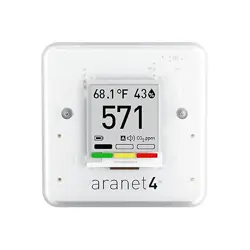
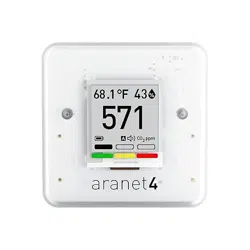
SAF Aranet4 Home device showing its compact, white, tabletop design with an e-ink screen displaying measurements.

The SAF Aranet4 Home is a portable, battery-powered indoor air quality monitor. It measures carbon dioxide (CO2) levels, temperature, relative humidity, and atmospheric pressure in real-time. The device features a power-efficient e-ink display and connects to a smartphone application for data history and configuration.

Its primary purpose is to provide information about indoor air quality, enabling you to make informed decisions about ventilation for health and comfort.

2. Features and Specifications

2.1 Key Features

  • Multi-Parameter Monitoring: Tracks CO2, temperature, relative humidity, and atmospheric pressure.
  • Wireless & Portable: Battery-powered with no cables required. Compact for easy placement or transport.
  • E-Ink Display: Clear, low-power screen that shows current readings.
  • Visual & Audible Alerts: Color-coded CO2 indicator and an optional buzzer warn of high concentrations.
  • Mobile Application: Free app for viewing historical data (up to 90 days), graphs, and device configuration.
  • NDIR Sensor Technology: Uses a nondispersive infrared (NDIR) sensor for precise and reliable CO2 measurements.
  • Long Battery Life: Up to 4 years of operation from 2 included AA alkaline batteries.

2.2 Technical Specifications

  • Dimensions: 70 x 70 x 24 mm (2.76 x 2.76 x 0.94 inches)
  • Weight: 104 grams (3.7 oz)
  • Operating Temperature: 0°C to 50°C (32°F to 122°F)
  • Operating Humidity: 0% to 85% non-condensing
  • Battery: 2 x AA alkaline (included)
  • Data Transmission Intervals: Configurable (1, 2, 5, 10 minutes)
  • Data Encryption: Yes
  • Manufactured: European Union
Illustration emphasizing Carbon Dioxide (CO2) monitoring. Illustration emphasizing Humidity monitoring. Illustration emphasizing Temperature monitoring. Illustration emphasizing Atmospheric Pressure monitoring.

3. Initial Setup and Installation

3.1 Physical Setup

  1. Open the battery compartment on the back of the device.
  2. Insert the two included AA alkaline batteries, observing the correct polarity (+/-).
  3. Close the battery compartment. The device will power on automatically.
  4. Place the monitor on a stable, flat surface (tabletop mounting). Ensure it is not in direct sunlight or directly next to ventilation sources for accurate readings.

Note: A video titled "How to put batteries into aranet Co2 sensor" is available, demonstrating this process.

3.2 Mobile App Setup

  1. On your smartphone (iOS or Android), download the free "Aranet HOME" application from your device's app store.
  2. Open the app and follow the on-screen instructions to create an account or log in.
  3. Enable Bluetooth on your smartphone.
  4. The app should guide you through pairing with your Aranet4 device. Ensure the monitor is powered on and within range.
  5. Once paired, you can name your device and begin viewing data.

Note: A video titled "The video guides you through product setup" is available.

4. Usage Guide

Close-up of the Aranet4 e-ink display showing a large CO2 number and color indicator.

4.1 Understanding the Display

The e-ink screen shows the primary measurements:

  • Prominent Large Number: This is the current CO2 level in parts per million (ppm).
  • Color Indicator (around the number):
    • Green: Normal level (below 1000 ppm).
    • Yellow/Orange: Average level (1000 to 1400 ppm). Consider increasing ventilation.
    • Red: High level (above 1400 ppm). Ventilation is recommended.
  • Secondary readings for temperature, relative humidity, and atmospheric pressure are also displayed, typically in smaller text or by cycling through screens.

4.2 Using the Mobile Application

Smartphone screen showing the Aranet app interface with graphs and data history.

The app provides extended functionality:

  • Real-Time View: See live readings from your device.
  • Historical Data: View graphs of all measured parameters for the past 90 days.
  • Device Configuration: Adjust settings such as:
    • Measurement interval (1, 2, 5, 10 minutes).
    • Alert thresholds for CO2 levels.
    • Enable or disable the audible buzzer alarm.
  • Data Interpretation: Review trends to understand how activities and ventilation changes affect your indoor air quality.

4.3 Alerts and Indicators

  • Visual Alert: The color change on the device's display is the primary warning system.
  • Audible Alert (Buzzer): An optional buzzer can be enabled via the mobile app to sound when CO2 exceeds a set threshold. This can be useful if the device is not in your direct line of sight.

4.4 Portable Use

The device is designed to be moved. You can take it to different rooms, offices, classrooms, hotels, or conferences to assess the air quality in various environments.

5. Maintenance and Care

5.1 Battery Replacement

The battery life is up to 4 years. The mobile app may provide a battery status indicator. When batteries are low:

  1. Open the battery compartment.
  2. Remove the old AA batteries and dispose of them properly.
  3. Insert two new AA alkaline batteries.

5.2 Cleaning

Wipe the exterior of the device with a soft, dry cloth. Do not use liquids, chemicals, or abrasive cleaners. Ensure the sensor vents are not blocked by dust or debris.

5.3 Sensor Calibration

The NDIR CO2 sensor is designed for long-term stability and typically does not require user calibration.
6. Troubleshooting

  • Device won't turn on: Check that batteries are correctly inserted. Replace with new batteries.
  • App cannot find device: Ensure Bluetooth is enabled on your smartphone. Ensure the Aranet4 device is powered on and within range (typically within 10 meters/30 feet without obstructions). Restart the app and/or your smartphone.
  • Readings seem inaccurate: Ensure the device is placed in a representative location. Avoid placing it directly in front of air vents, heaters, open windows, or in confined spaces. Allow time for readings to stabilize after moving the device.
  • Display is blank: The e-ink screen only updates when measurements change or at set intervals. Press the device's button (if present) to wake the display, or check battery level.

7. Safety Information

  • Use only the specified battery type (AA alkaline).
  • Do not expose the device to water or excessive moisture.
  • Operate and store within the specified temperature and humidity ranges.
  • This device is for informational purposes to help assess environmental conditions. It is not a life-safety device.
  • Keep batteries away from children and dispose of them according to local regulations.

8. Compliance and Disposal

This product complies with applicable regulations in the region of sale. At the end of its life, dispose of the device and batteries according to your local electronic waste (e-waste) and battery recycling regulations.

Reference file: ARANET4 SAF 4 Home Wireless Indoor Air Quality Monitor for Office or School CO2, Temperature, Humidity

Specifications

Aranet ARANET4 Questions and Answers