
Instruction Manual
evolution wireless G4
500 P series
Sennheiser electronic GmbH & Co. KG
Am Labor 1, 30900 Wedemark, Germany, www.sennheiser.com
ew 500 P G4 - v2.3

1
Overview 6
ew 500 P G4 series products 7
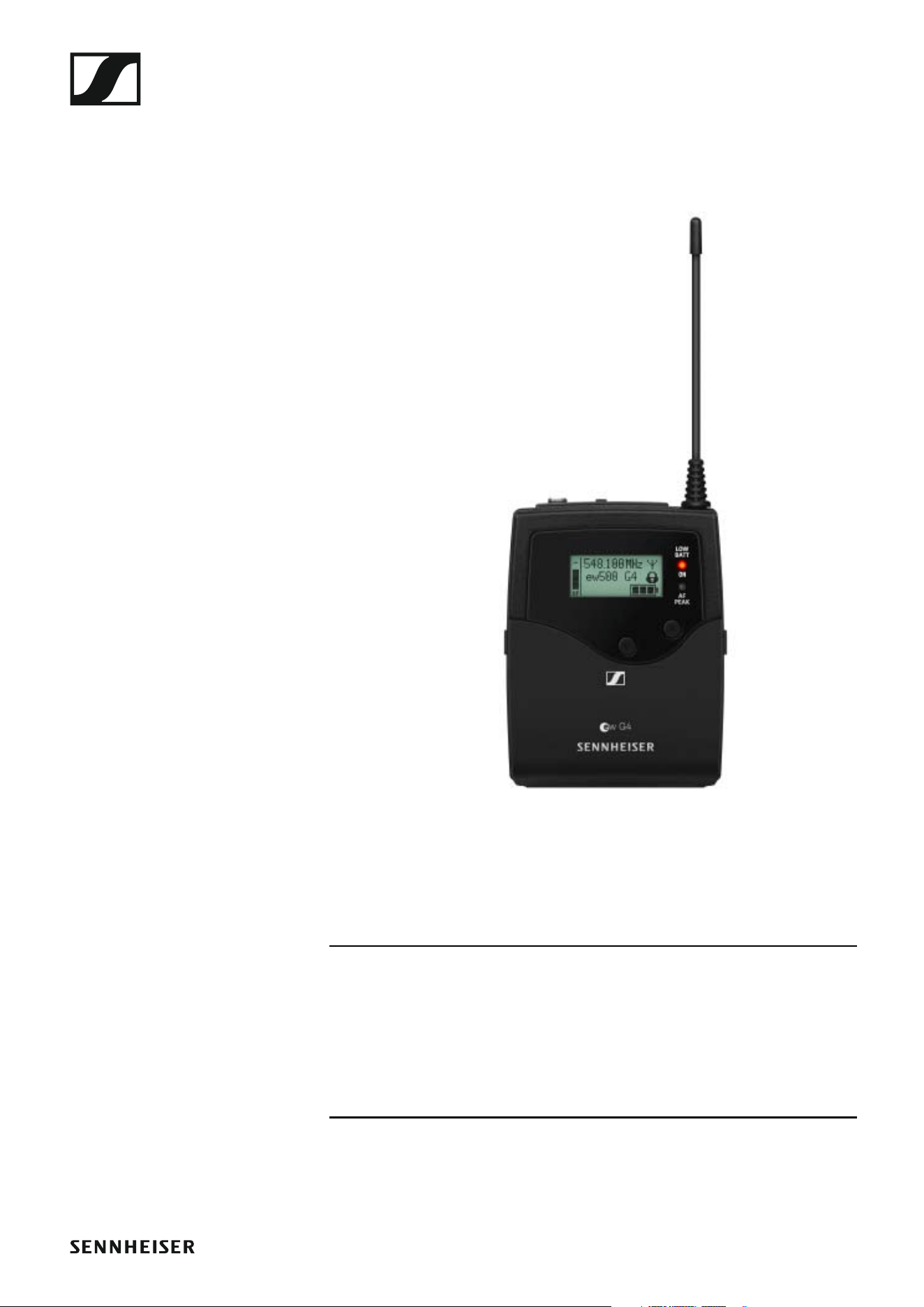
EK 500 G4 diversity receiver 8
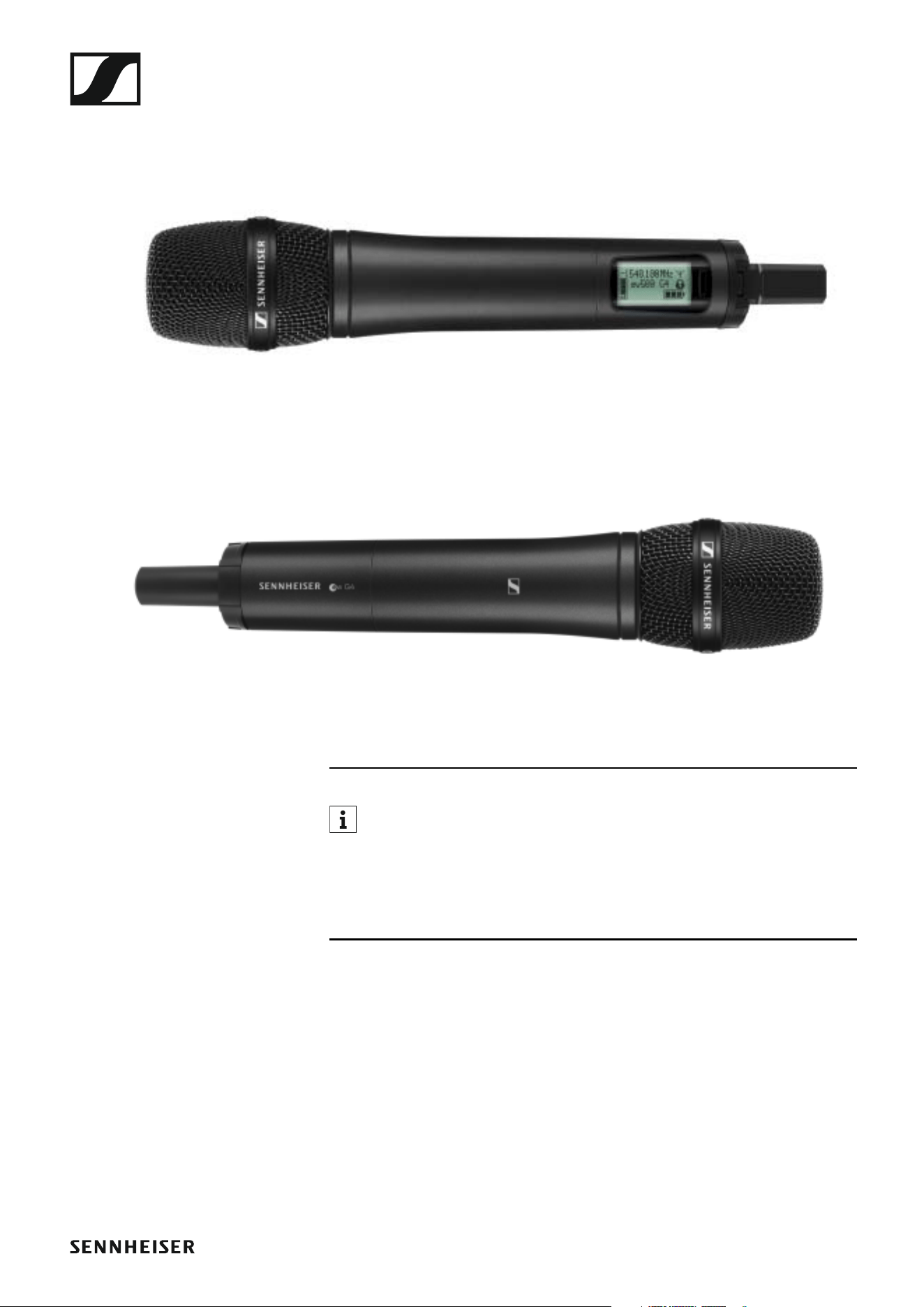
SKM 500 G4 handheld transmitter 9
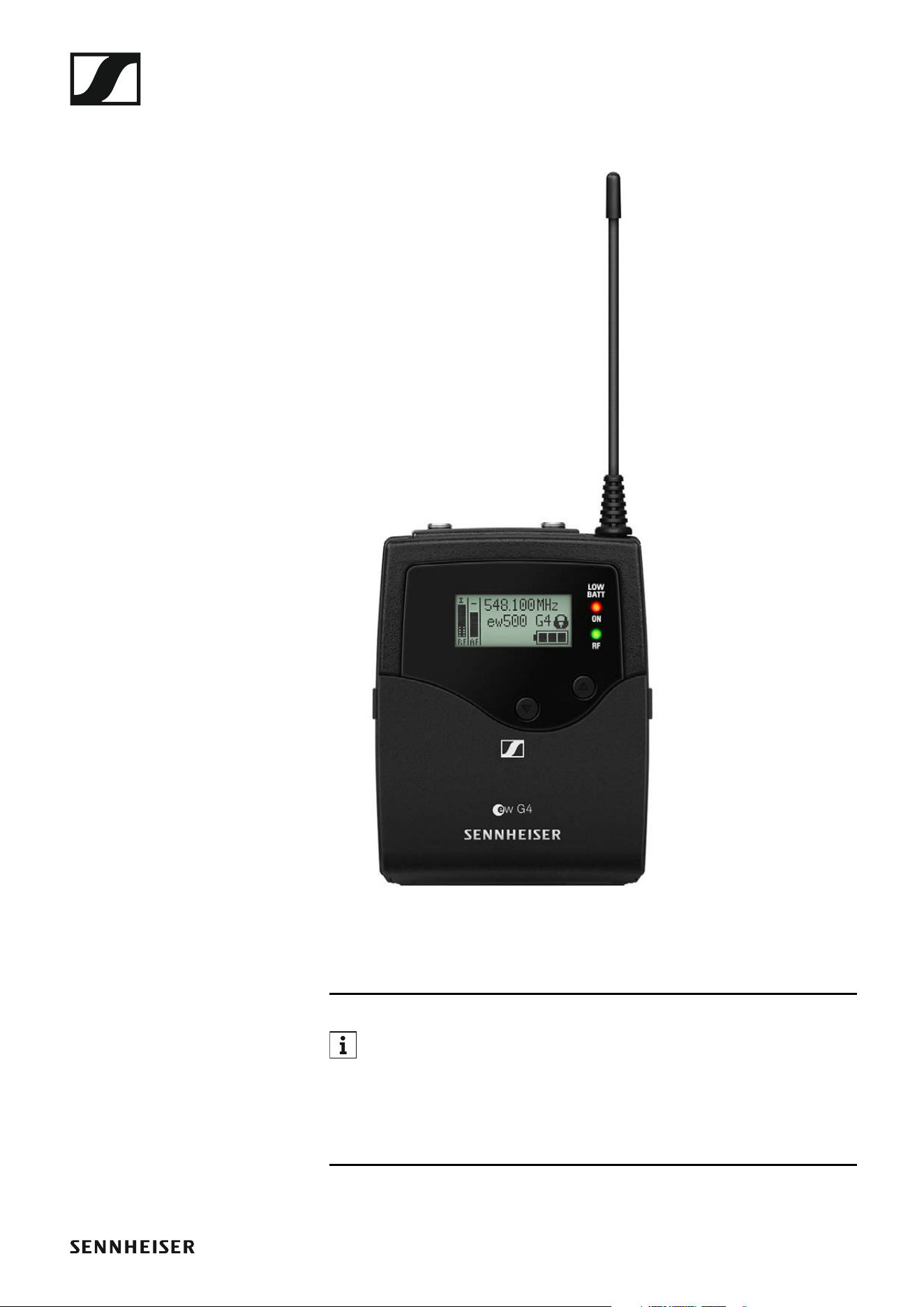
SK 500 G4 bodypack transmitter 10
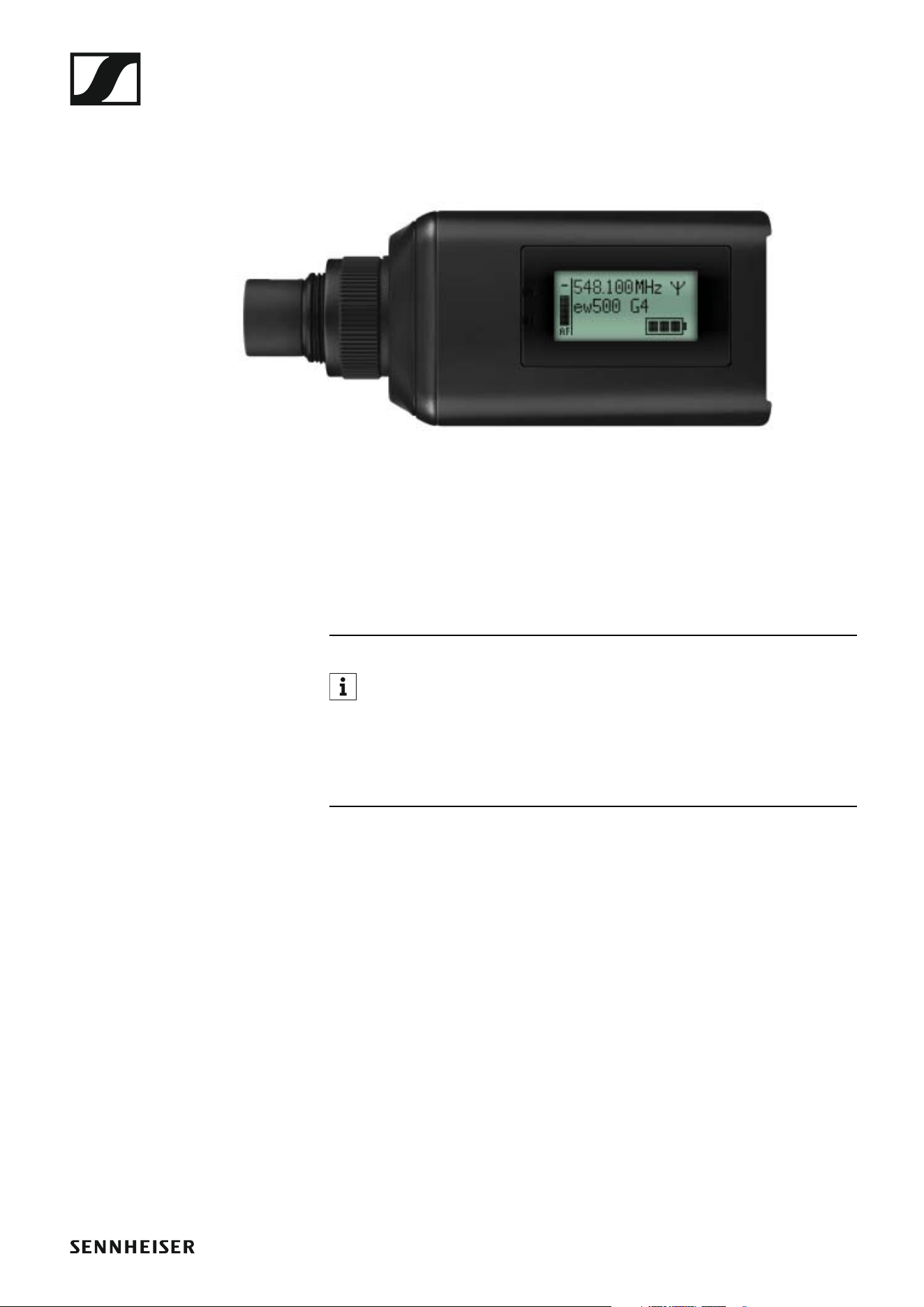
SKP 500 G4 plug-on transmitter 11
Accessories 12
Microphones and cables 12
Microphone modules 12
Headset and Lavalier microphones 13
Line connecting cable 14
Rechargeable battery and charger 15
BA 2015 rechargeable battery 15
L 2015 charger 15
Accessories for camera mounting 16
CA 2 camera adapter 16
Additional accessories 17
Color labeling set 17
Microphone clamp 17
The frequency bank system 18
Installing ew 500 P G4 series devices 19
Installing the EK 500 G4 20
Inserting and removing the batteries/rechargeable bat-
teries 20
Battery status 21
Connecting headphones to the EK 500 G4 22
Attaching the diversity receiver to a camera 23
Connecting the diversity receiver to a camera 26
Installing the SKM 500 G4 28
Inserting and removing the batteries/rechargeable bat-
teries 29
Battery status 30
Replacing the microphone module 31
Changing the colored ring 32
Installing the SK 500 G4 33
Inserting and removing the batteries/rechargeable bat-
teries 34
Battery status 35
Connecting a microphone to the SK 500 G4 36
Connecting an instrument or line source to the
SK 500 G4 37
Attaching the bodypack transmitter to clothing 38
Installing the SKP 500 G4 39
Inserting and removing the batteries/rechargeable bat-
teries 39
Battery status 40
Attaching the plug-on transmitter to the microphone 41
Using ew 500 P G4 series devices 42
Using the EK 500 G4 44
Operating elements of the EK 500 G4 diversity receiver

2
45
Switching the EK 500 G4 on and off 46
Volume control of the PHONES socket 47
Lock-off function 48
Displays on the EK 500 G4 display panel 49
Buttons for navigating through the menu 50
Home screen 52
Frequency/Name standard display 52
Frequency Bank/Channel/Name standard display 53
Setting options in the menu 54
Menu structure 56
Sync menu item 57
Phones Volume menu item 57
Squelch menu item 58
Easy Setup menu item 60
Frequency Preset menu item 61
Name menu item 62
AF Out menu item 63
Auto Lock menu item 64
Advanced menu item 65
Advanced -> Tune menu item 66
Only adjusting the frequency 66
Setting the channel and frequency 66
Advanced -> Sync Settings menu item 67
Advanced -> Pilot Tone menu item 68
Advanced -> LCD Contrast menu item 68
Advanced -> Reset menu item 69
Advanced -> Software Revision menu item 69
Using the SKM 500 G4 70
Operating elements of the SKM 500 G4 handheld trans-
mitter 71
Switching the SKM 500 G4 handheld transmitter on and
off 72
Muting the handheld transmitter (AF mute) 73
Deactivating the RF signal (RF mute) 73
Lock-off function 74
Displays on the SKM 500 G4 handheld transmitter dis-
play panel 75
Select a standard display 76
Buttons for navigating the SKM 500 G4 menu 77
Navigating through the menu 77
Making changes in a menu item 77
Setting options in the menu 78
Sensitivity menu item 79
Frequency Preset menu item 79
Name menu item 80
Auto Lock menu item 80
Advanced menu item 81
Advanced > Tune menu item 82
Only adjusting the frequency 82
Setting the channel and frequency 82
Advanced > RF Power menu item 83

3
Advanced > Pilot Tone menu item 83
Advanced > LCD Contrast menu item 84
Advanced > Reset menu item 84
Advanced > Software Revision menu item 84
Using the SK 500 G4 85
Operating elements of the SK 500 G4 bodypack trans-
mitter 86
Switching the SK 500 G4 bodypack transmitter on and
off 87
Muting the bodypack transmitter (AF mute) 88
Deactivating the RF signal (RF mute) 89
Deactivating the RF signal with the MUTE switch 89
Deactivating the RF signal with the ON/OFF button 90
Lock-off function 92
Displays on the SK 500 G4 bodypack transmitter display
panel 93
Select a standard display 94
Buttons for navigating the SK 500 G4 menu 95
Navigating through the menu 95
Making changes in a menu item 95
Setting options in the menu 96
Sensitivity menu item 97
Frequency Preset menu item 97
Name menu item 98
Auto Lock menu item 98
Advanced menu item 99
Advanced > Tune menu item 100
Only adjusting the frequency 100
Setting the channel and frequency 100
Advanced > Mute Mode menu item 101
Advanced > RF Power menu item 101
Advanced > Pilot Tone menu item 102
Advanced > LCD Contrast menu item 102
Advanced > Reset menu item 102
Advanced > Software Revision menu item 102
Using the SKP 500 G4 103
Operating elements of the SKP 500 G4 plug-on transmit-
ter 104
Switching the SKP 500 G4 plug-on transmitter on and off
105
Muting the plug-on transmitter (AF mute) 106
Deactivating the RF signal (RF mute) 107
Deactivating the RF signal with the MUTE switch 107
Deactivating the RF signal with the ON/OFF button 108
Lock-off function 109
Displays on the SKP 500 G4 plug-on transmitter display
panel 110
Select a standard display 111
Buttons for navigating the SKP 500 G4 menu 112
Navigating through the menu 112
Making changes in a menu item 112

4
Setting options in the menu 113
Sensitivity menu item 114
Frequency Preset menu item 114
Name menu item 115
Auto Lock menu item 115
Advanced menu item 116
Advanced > Tune menu item 117
Only adjusting the frequency 117
Setting the channel and frequency 117
Advanced > Mute Mode menu item 118
Advanced > RF Power menu item 118
Advanced > Phantom Power 48V menu item 119
Advanced > Pilot Tone menu item 119
Advanced > LCD Contrast menu item 119
Advanced > Reset menu item 119
Advanced > Software Revision menu item 120
Establishing a radio link 121
Setting notes 121
Synchronizing devices 122
Overview 123
Product variants 124
EK 500 G4 product variants 124
Made in Germany 124
Assembled in the USA 124
SKM 500 G4 product variants 125
Made in Germany 125
Assembled in the USA 125
SK 500 G4 product variants 126
Made in Germany 126
Assembled in the USA 126
SKP 500 G4 product variants 127
Made in Germany 127
Assembled in the USA 127
Frequency tables 128
Specifications 129
EK 500 G4 130
RF characteristics 130
AF characteristics 131
Overall device 131
SKM 500 G4 132
RF characteristics 132
AF characteristics 133
Overall device 133
SK 500 G4 134
RF characteristics 134
AF characteristics 135
Overall device 135
SKP 500 G4 136
RF characteristics 136
AF characteristics 137
Overall device 137

5
Pin assignment 138
3.5 mm stereo jack plug 138
3.5 mm mic jack plug 138
3.5 mm line jack plug 138
6.3 mm stereo jack plug, balanced (audio in/loop out)
138
6.3 mm mono jack plug, unbalanced 139
6.3 mm stereo jack plug for headphone jack 139
XLR-3 plug, balanced 139
Hollow jack plug for power supply 139
Cleaning and maintenance 140
Cleaning the sound inlet basket of the microphone mo-
dule 140
Overview
6
PRODUCT INFORMATION
Overview
You can find information about the individual products in the ew 500 P G4
series under “ew 500 P G4 series products”.
For information about the available accessories, see “Accessories”.
You can find information about the ew 500 P G4 series frequency bank
system under “The frequency bank system”.

ew 500 P G4 series products
7
ew 500 P G4 series products
You can also find more information here:
• A variety of frequency variants are available from the individual prod-
ucts. You can find more information under “Product variants”.
• You can find technical specifications about the individual products un-
der “Specifications”.
• You can find information about installing the products under “Installing
ew 500 P G4 series devices”.
• You can find information about operating the products under “Using
ew 500 P G4 series devices”.

Accessories
12
Accessories
A variety of accessories are available for the ew 500 P G4 series.
Microphones and cables
Microphone modules
We recommend using the following microphone modules with the
SKM 500 G4 handheld transmitter.
►
You can find more information about the individual microphone mod-
ules on their respective product pages at www.sennheiser.com.
Module Features Article
no.
MMD 835-1 BK Dynamic, cardioid, black 502575
MMD 845-1 BK Dynamic, super-cardioid, black 502576
MME 865-1 BK Capacitor, super-cardioid, black 502581
MMD 935-1 BK Dynamic, cardioid, black 502577
MMD 945-1 BK Dynamic, super-cardioid, black 502579
MMK 965-1 BK Capacitor, switchable
Cardioid/super-cardioid, black
502582
MMK 965-1 NI Capacitor, switchable
Cardioid/super-cardioid, nickel
502584
MMD 42-1 Dynamic, omni-directional, black 506772
MD 9235 BK Dynamic, cardioid, black 502585
MD 9235 NI Dynamic, cardioid, black 502586
MD 9235 NI/BK Dynamic, cardioid, nickel/black 502591
Neumann
KK 204
Capacitor, cardioid, nickel 008651
Neumann
KK 204 BK
Capacitor, cardioid, black 008652
Neumann
KK 205
Capacitor, super-cardioid, nickel 008653
Neumann
KK 205 BK
Capacitor, super-cardioid, black 008654

Accessories
13
Headset and Lavalier microphones
We recommend using the following Lavalier microphones and headset mi-
crophones with the SK 500 G4 bodypack transmitter.
►
You can find more information about the individual microphones on
their respective product pages at www.sennheiser.com.
Microphone Features Article
no.
ME 2-II Lavalier microphone, omni-direc-
tional, black
507437
ME 3-II Headset microphone, cardioid,
black
506295
ME 4-N Lavalier microphone, cardioid,
black
005020
MKE 1-ew Lavalier microphone, omni-direc-
tional, black
502876
MKE 1-ew-3 Lavalier microphone, omni-direc-
tional, beige
502879
MKE 2-ew Gold Lavalier microphone, omni-direc-
tional, black
009831
MKE 40-ew Lavalier microphone, cardioid,
black
500527
SL Headmic 1 BE Headband microphone, omni-di-
rectional,
beige
506272
SL Headmic 1 BK Headband microphone, omni-di-
rectional,
black
506271
SL Headmic 1 SB Headband microphone, omni-di-
rectional,
silver
506904
Accessories
14
Line connecting cable
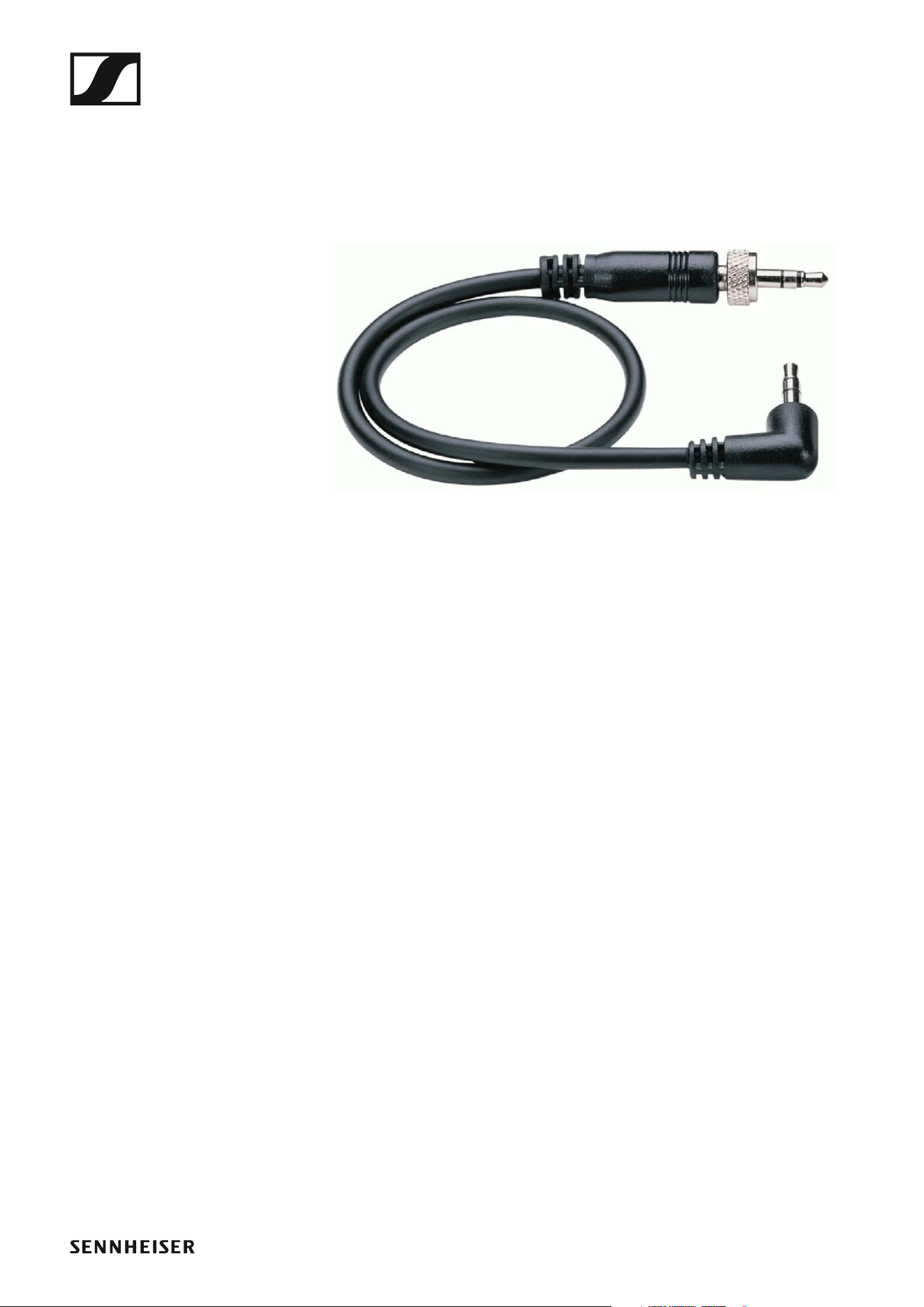
The following cables can be used to connect cameras to the EK 500 G4 di-
versity receiver:
• CL 1
3.5 mm jack plug on lockable 3.5 mm jack plugs
Article no. 005022
►
• CL 500
XLR-3 on a 3.5 mm jack plug
Article no.
Accessories
15
Rechargeable battery and charger
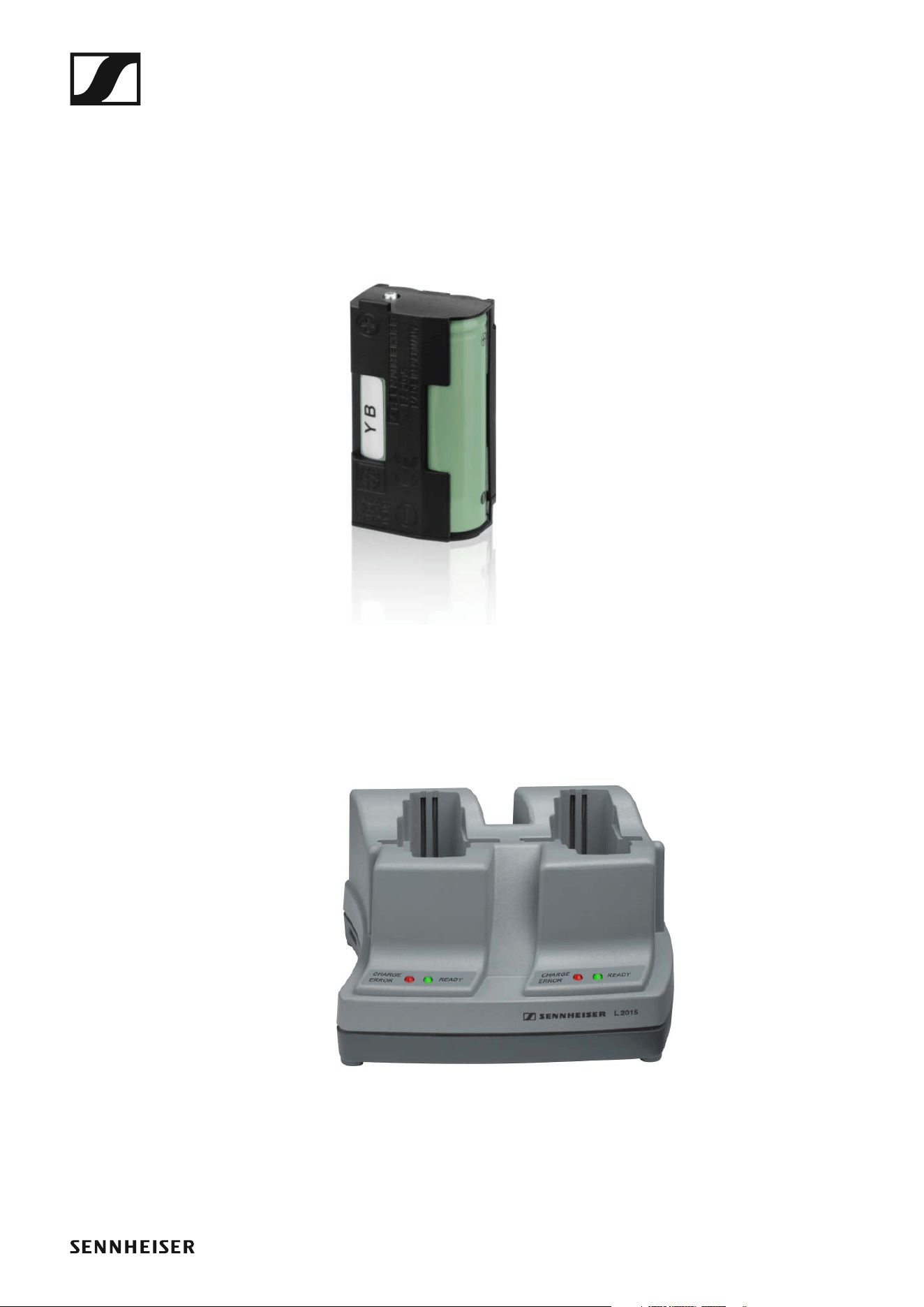
BA 2015 rechargeable battery
The BA 2015 rechargeable battery is designed for use with evolution wire-
less G4 series handheld transmitters, bodypack transmitters and
bodypack receivers.
Article no. 009950
►
L2015 charger
The BA 2015 rechargeable battery can be charged in the L 2015 charger on
its own or inside of the bodypack transmitter/bodypack receiver.
Article no. 009828
►
Accessories
16
Accessories for camera mounting
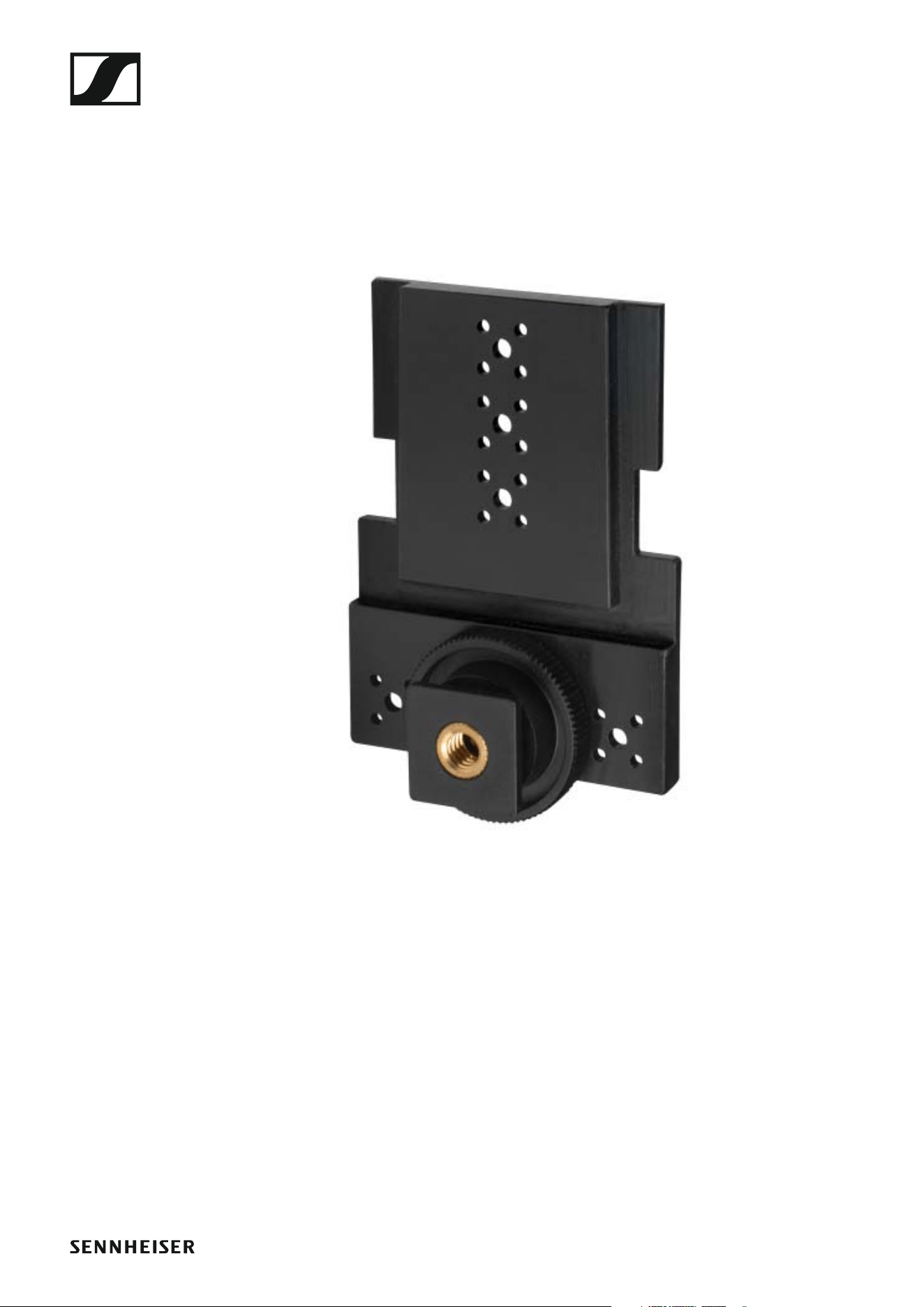
CA 2 camera adapter
Camera adapter with hot shoe for portable receivers from the ew 100 P G4
and ew 500 PG4 series.
Article no. 009986
►
Accessories
17
Additional accessories
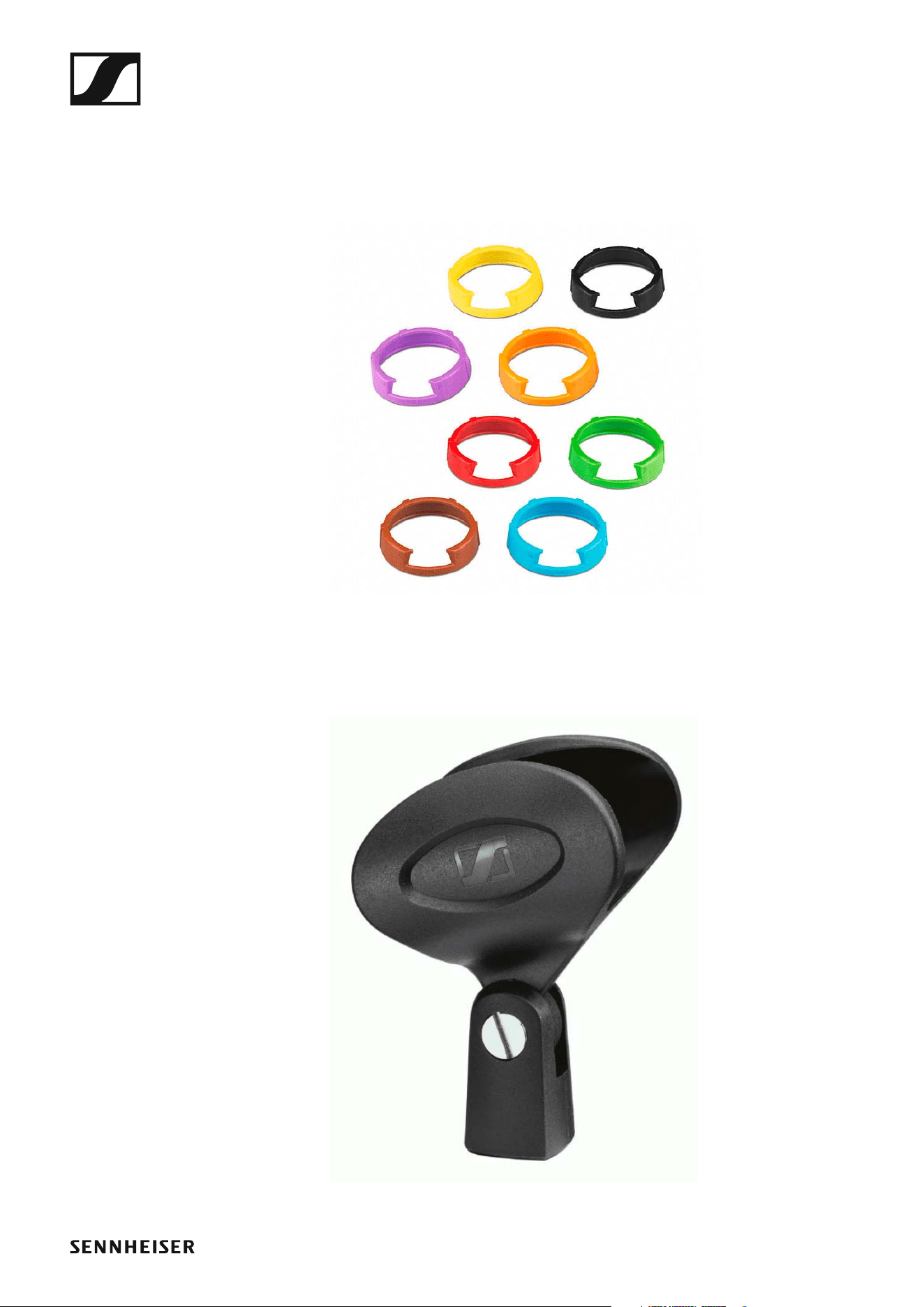
Color labeling set
• KEN 2, color labeling set for SKM handheld transmitters
Article no. 530195
►
Microphone clamp
• MZQ 1, microphone clamp for SKM handheld transmitters
Article no. 076670
►
The frequency bank system
18
The frequency bank system
There are different frequency ranges in the UHF band available for trans-
mission.
The following frequency ranges are available for the ew 500 P G4 series:
• Aw+ range: 470 – 558 MHz
• AS range: 520 – 558 MHz
• Gw1 range: 558 – 608 MHz
• Gw range: 558 – 626 MHz
• GBw range: 606 – 678 MHz
• Bw range: 626 – 698 MHz
• Cw range: 718 – 790 MHz
• Dw range: 790 – 865 MHz
• JB range: 806 – 810 MHz
• K+ range: 925 – 937.5 MHz
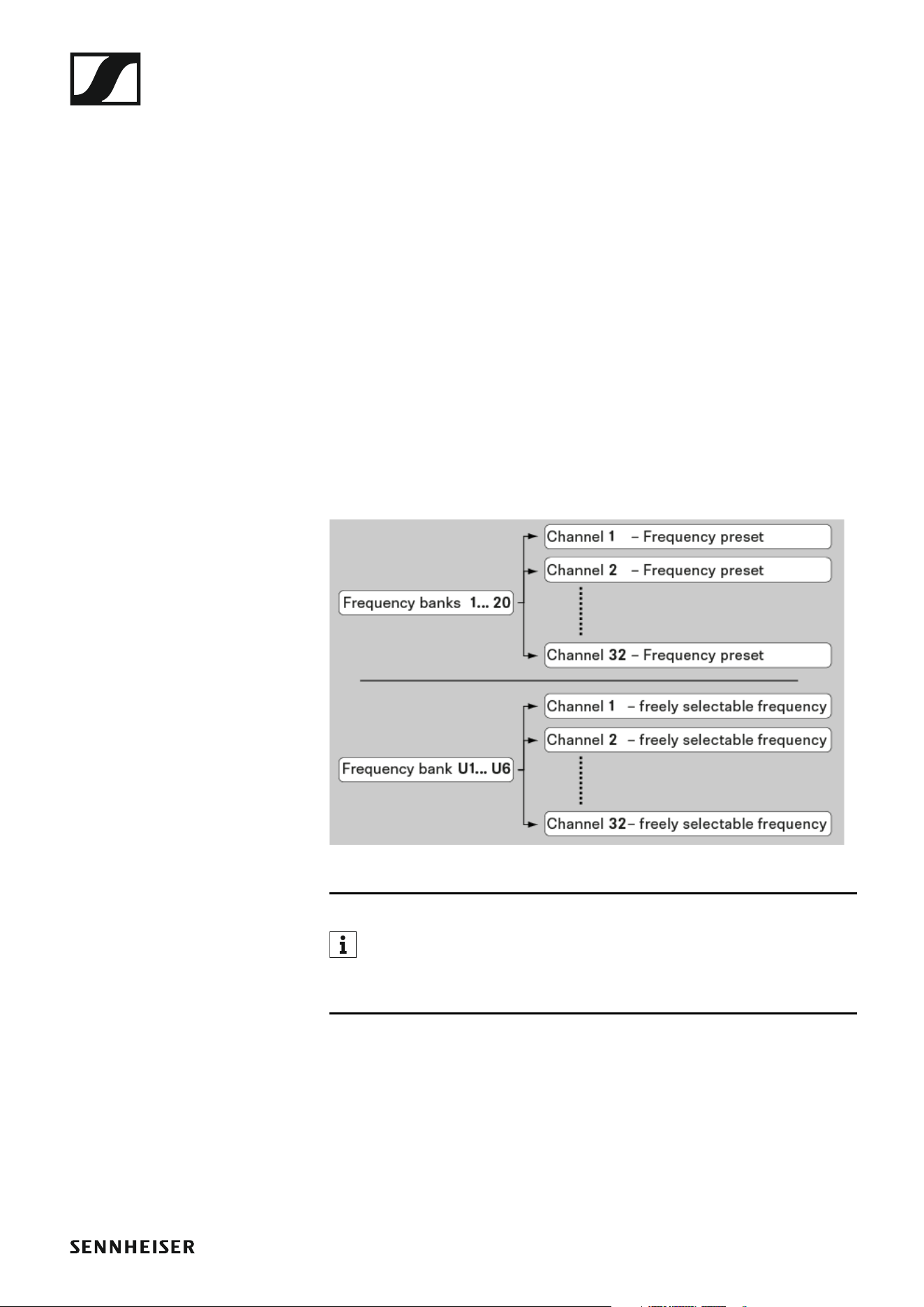
Every frequency range has 26 frequency banks with up to 32 channels:
►
You can find information about the frequency presets in the frequen-
cy tables of the respective frequency ranges under “Frequency ta-
bles”.
Installing ew 500 P G4 series devices
19
INSTALLATION
Installing ew 500 P G4 series devices
You can find information about installing and connecting
ew 500 P G4 series devices in the following sections.
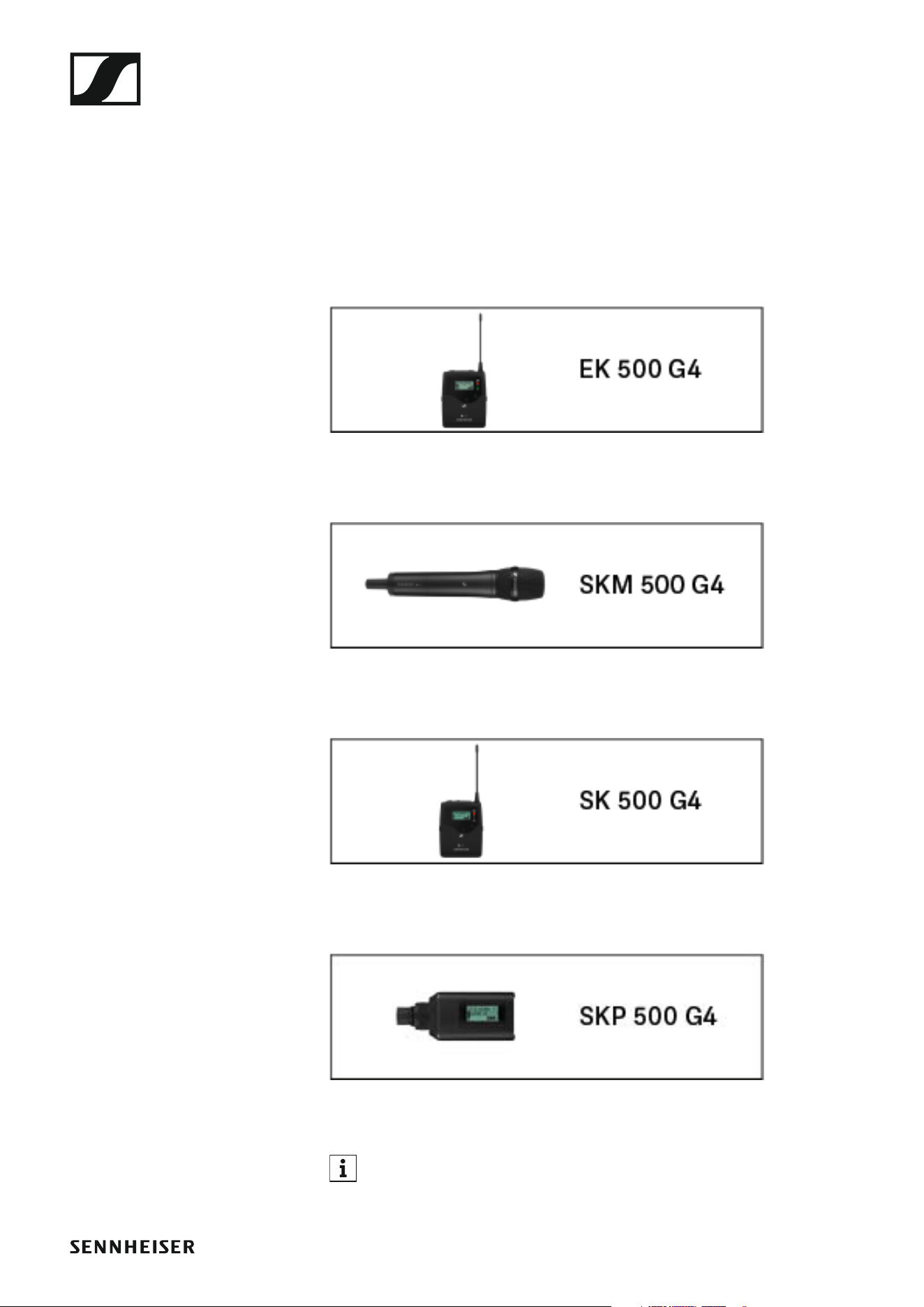
• EK 500 G4 diversity receiver >> “Installing the EK 500 G4”
• SKM 500 G4 handheld transmitter >> “Installing the SKM 500 G4”
• SK 500 G4 bodypack transmitter >> “Installing the SK 500 G4”
• SKP 500 G4 plug-on transmitter >> “Installing the SKP 500 G4”
You can find information about operating the products under “In-
stalling ew 500 P G4 series devices”.
Installing the EK 500 G4
20
Installing the EK 500 G4
These sections contain detailed information about installing the
EK 500 G4.
You can find information about operating the EK 500 G4 under “Using the
EK 500 G4”.
Inserting and removing the batteries/rechargeable
batteries
You can operate the diversity receiver either with batteries (AA, 1.5 V) or
with the rechargeable Sennheiser BA 2015 battery.
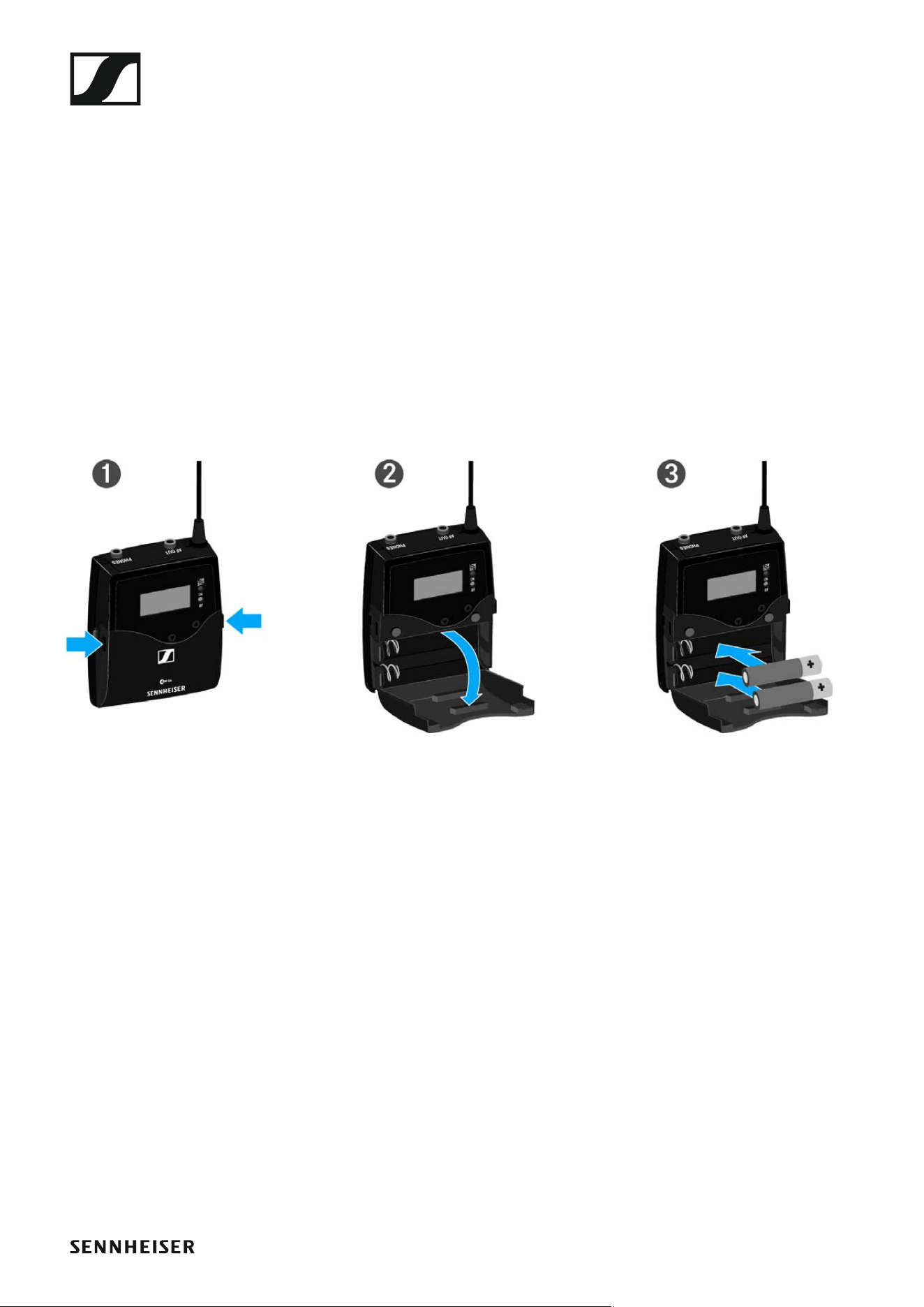
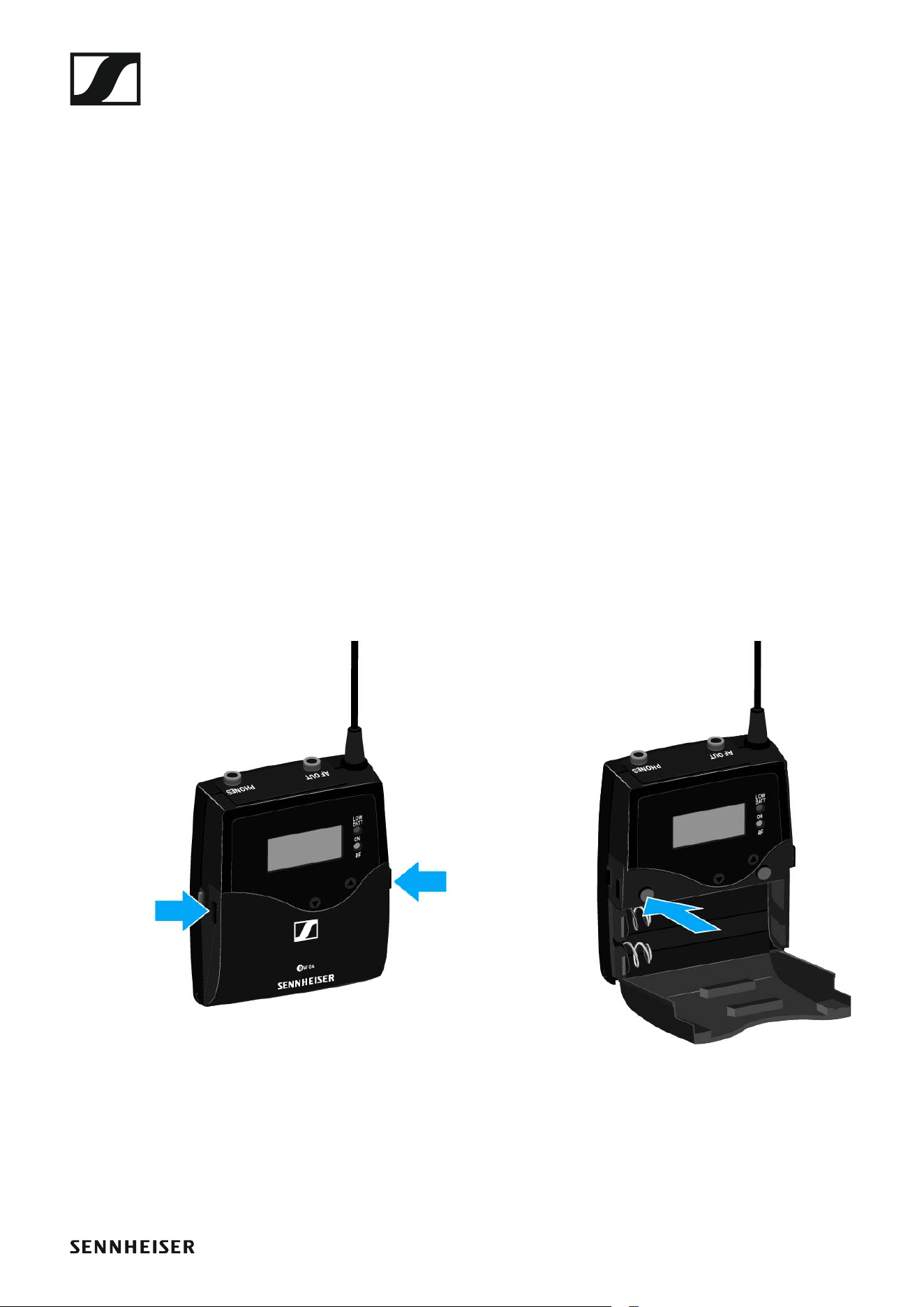
▷ Press the two catches and open the battery compartment cover.
▷ Insert the batteries or the rechargeable battery as shown below. Please
observe correct polarity when inserting the batteries.
►
▷ Close the battery compartment.
▷ The cover locks into place with an audible click.
Installing the EK 500 G4
21
Battery status
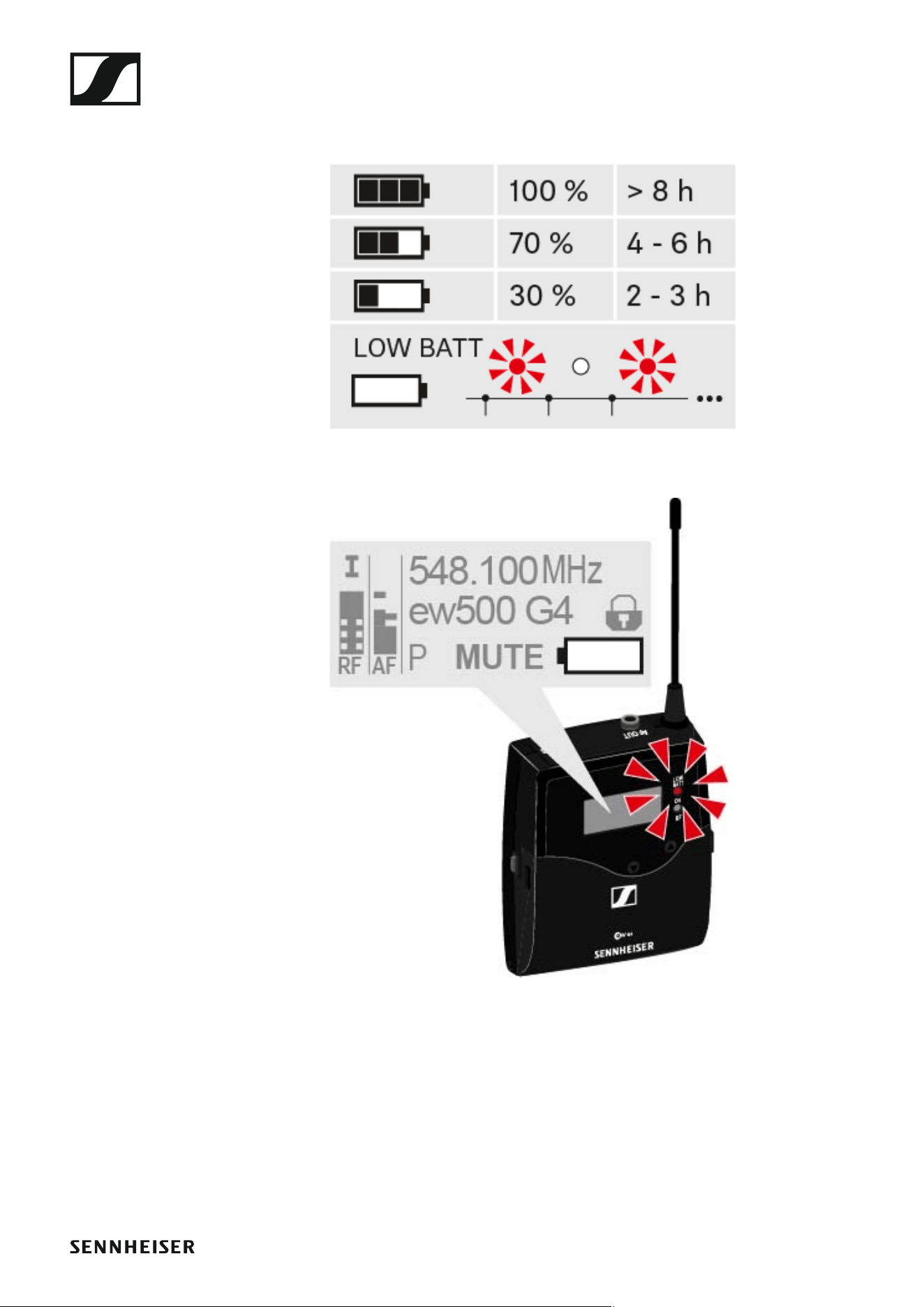
Charge status of the batteries:
►
Charge status is critical (LOW BATT):
►
Installing the EK 500 G4
22
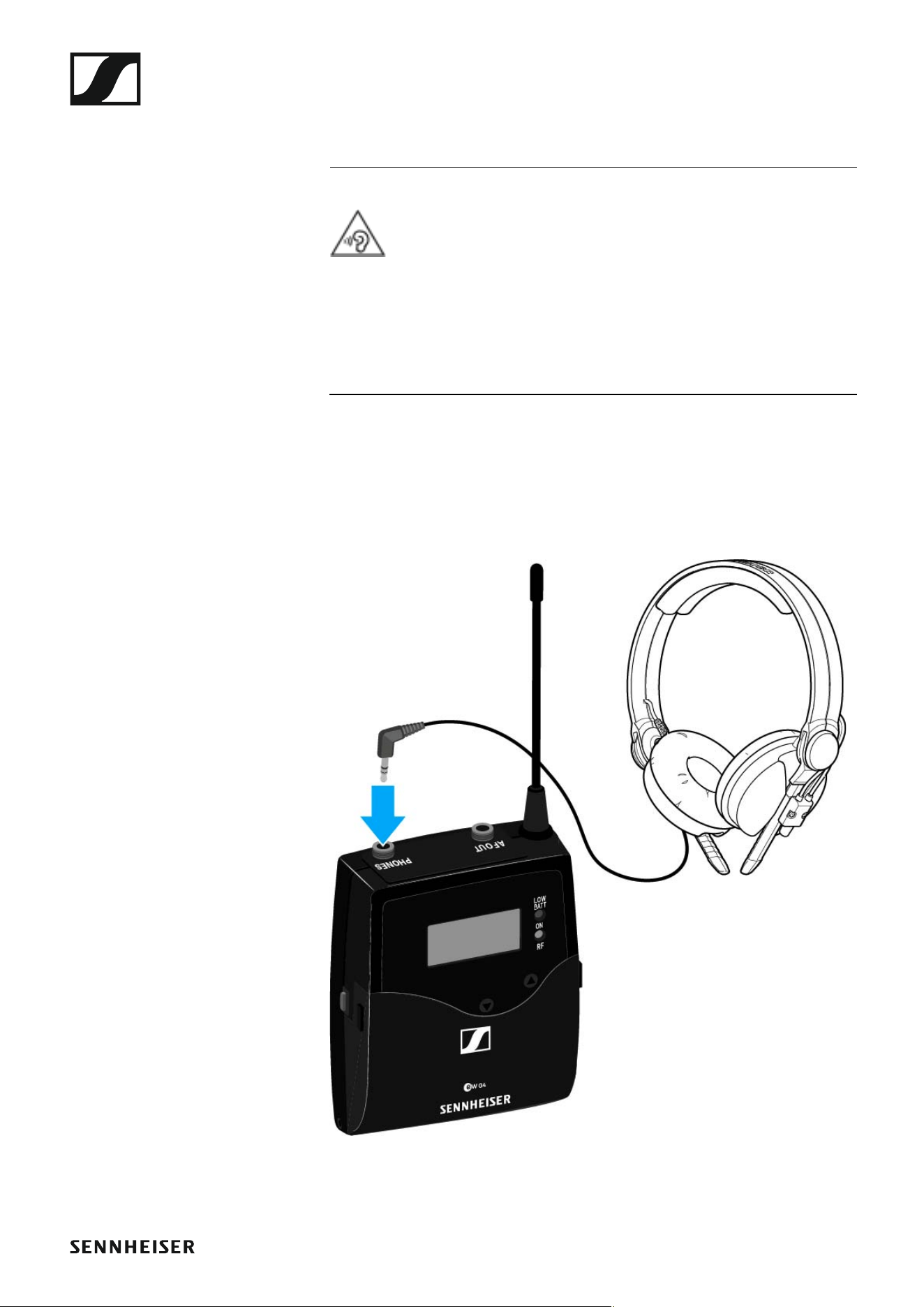
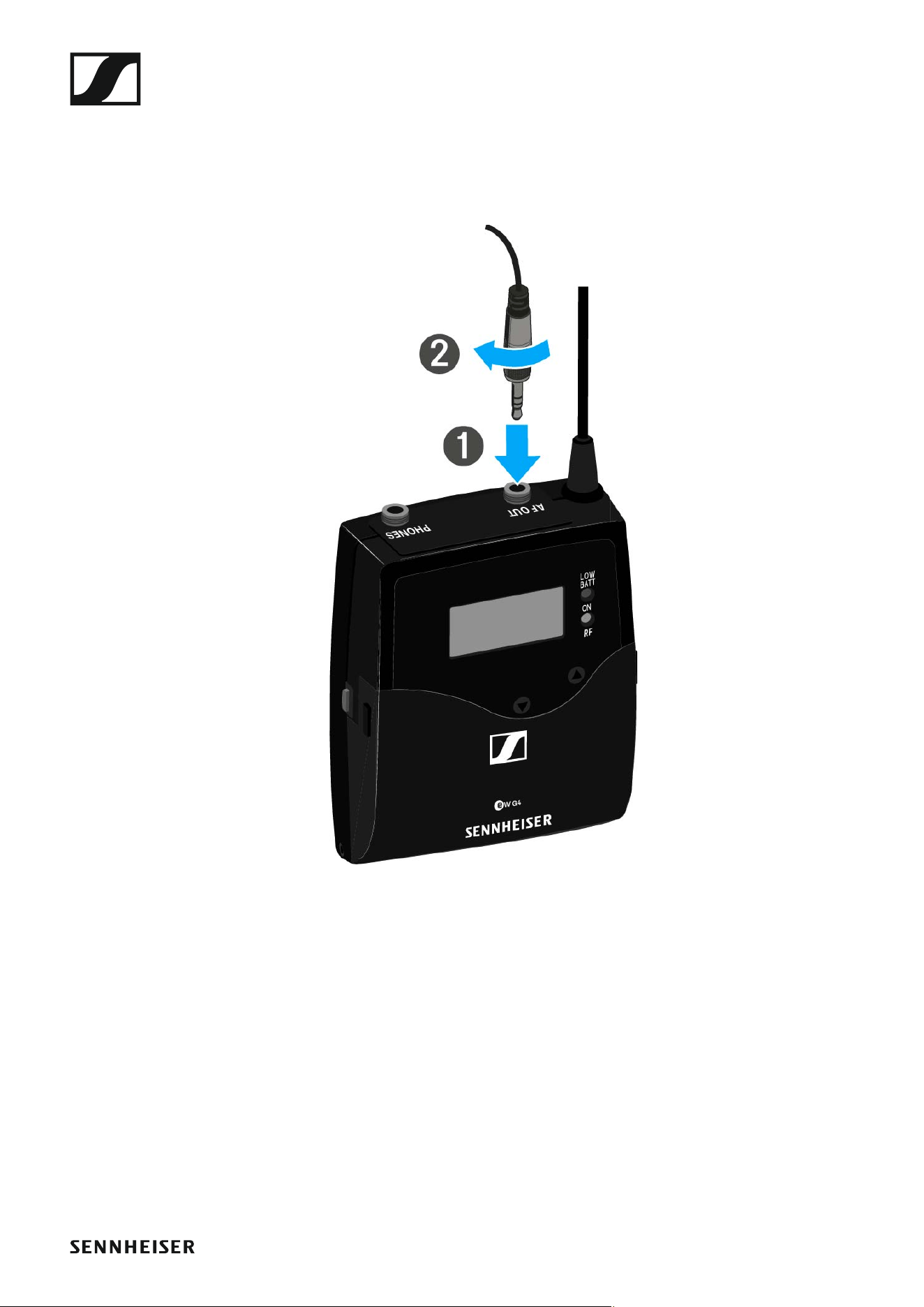
Connecting headphones to the EK 500 G4
ATTENTION
Danger due to high volume levels
Volume levels that are too high may damage your hearing.
▷ Turn down the volume of the headphone output before you put on the
headphone.
To connect the headphones to the receiver:
▷ Insert the cable’s 3.5 mm jack plug into the PHONES socket on the re-
ceiver as shown in the diagram.
▷ Screw the plug’s coupling ring onto the audio socket thread of the re-
ceiver if needed.
Installing the EK 500 G4
23
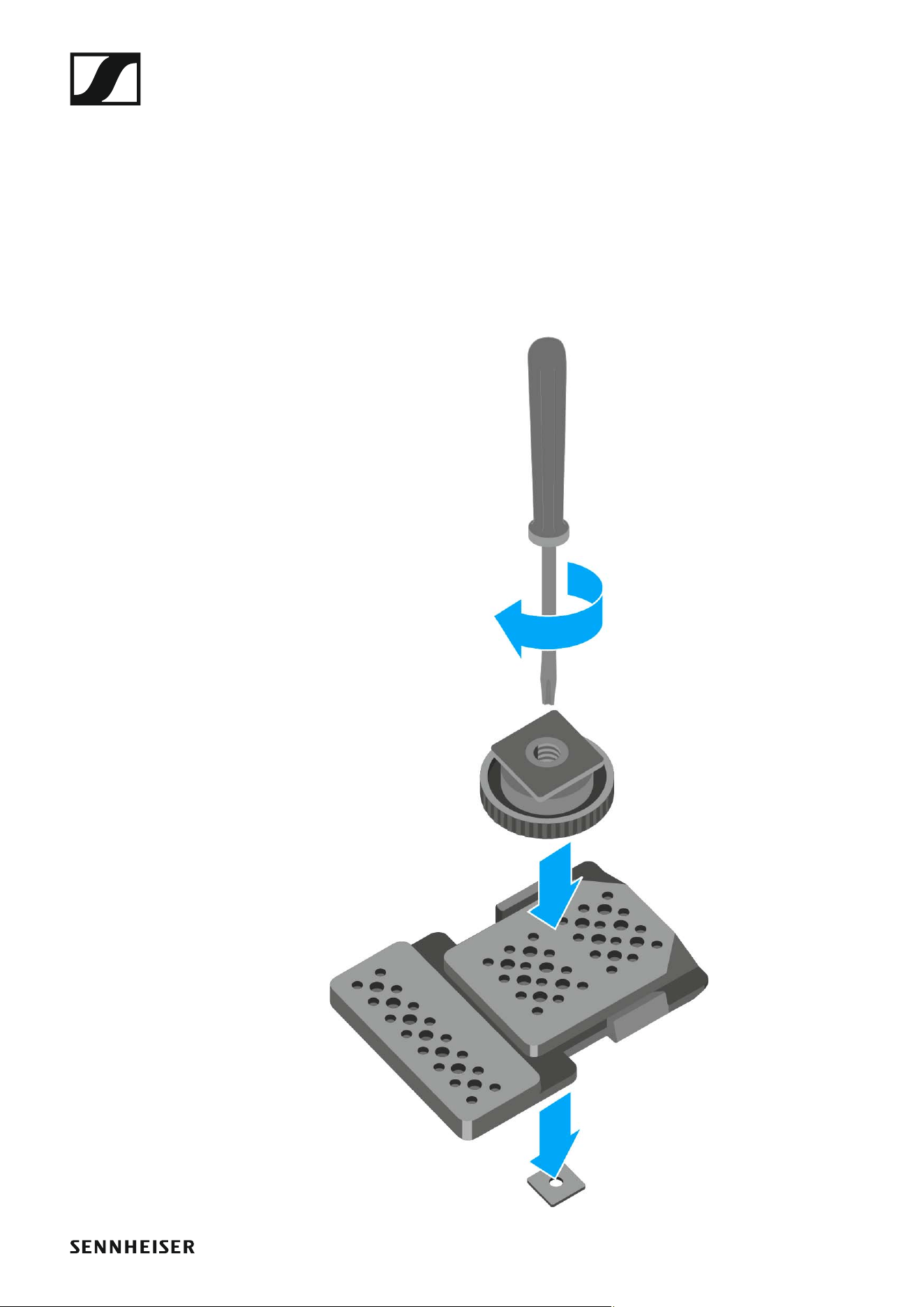
Attaching the diversity receiver to a camera
You can attach the diversity receiver on the hot shoe of the camera with the
included CA 2 camera kit.
To attach the EK 500 G4 diversity receiver to a camera:
▷ Determine where on the perforated plate you need to attach the hot
shoe adapter so that the diversity receiver can be optimally attached to
the camera.
▷ Place a square nut under the perforated plate at this position.
▷ Affix the hot shoe adapter to the perforated plate with the square nut.
Installing the EK 500 G4
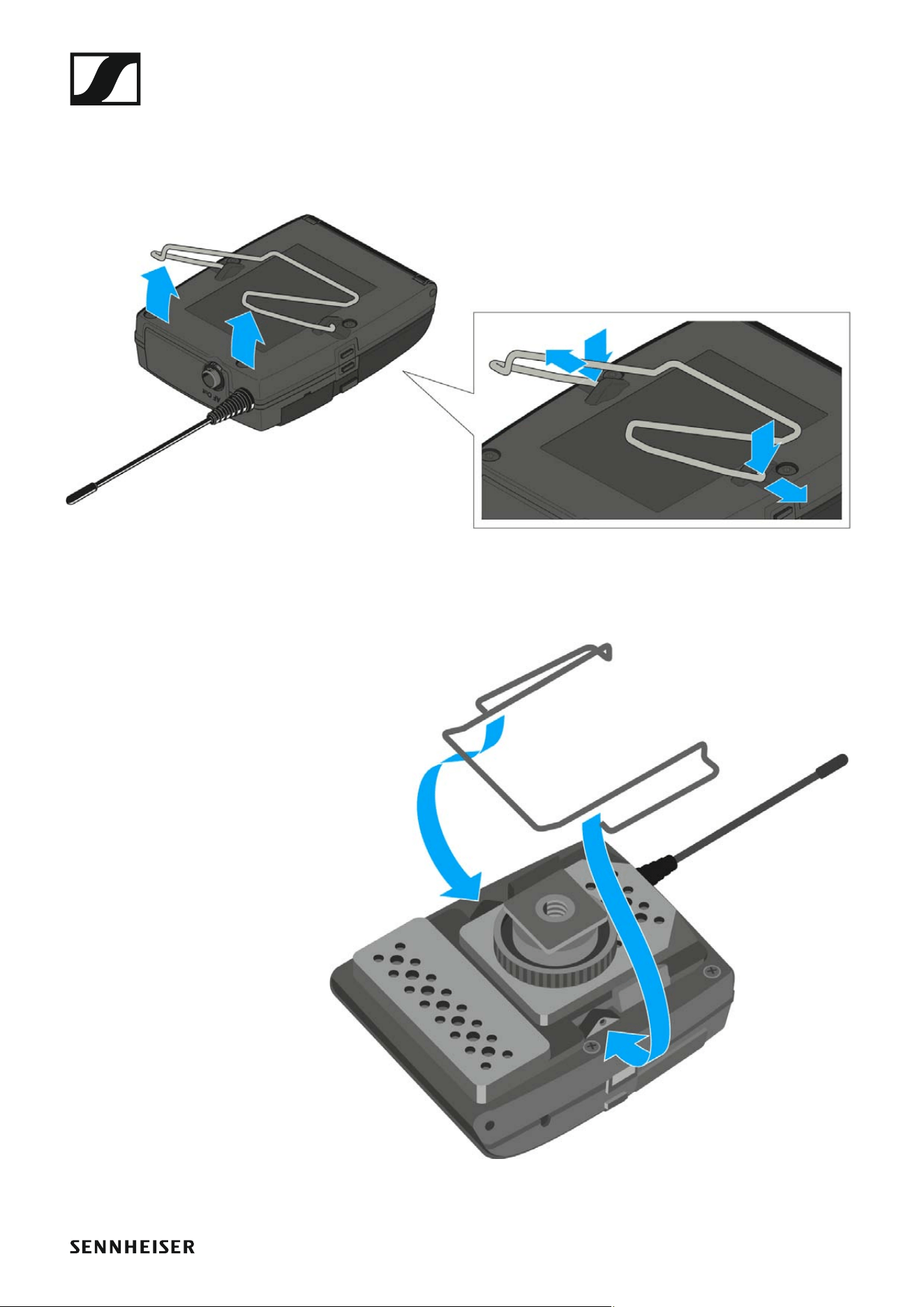
24
▷ Lift the belt clip.
▷ Press one side of the clip downward on the fixing hole and pull it out of
the housing.
▷ Do the same thing on the other side.
▷ Place the perforated plate on the rear side of the diversity receiver.
▷ Reattach the clip.
Installing the EK 500 G4
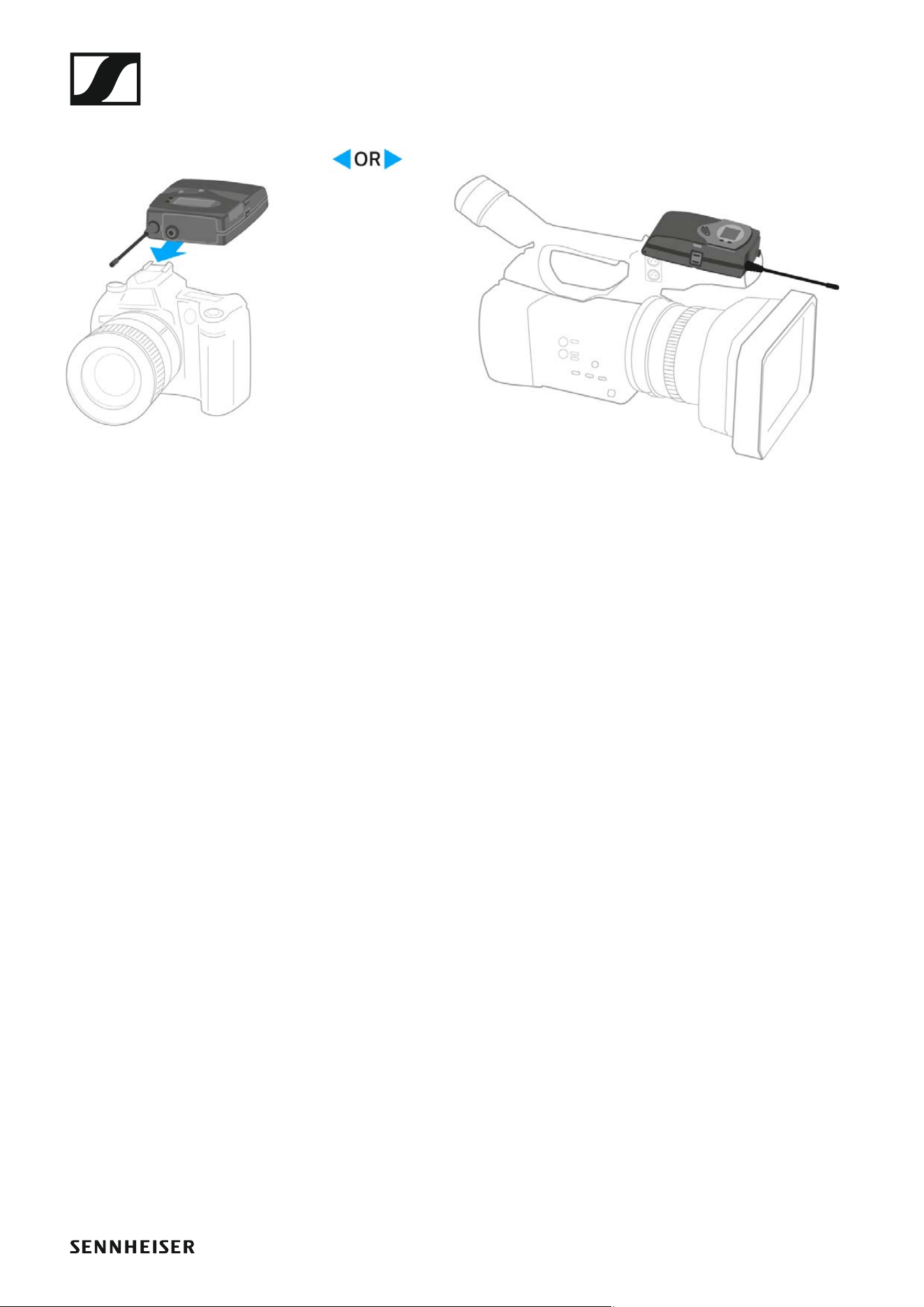
25
▷ Slide the receiver onto a camera.
Installing the EK 500 G4
26
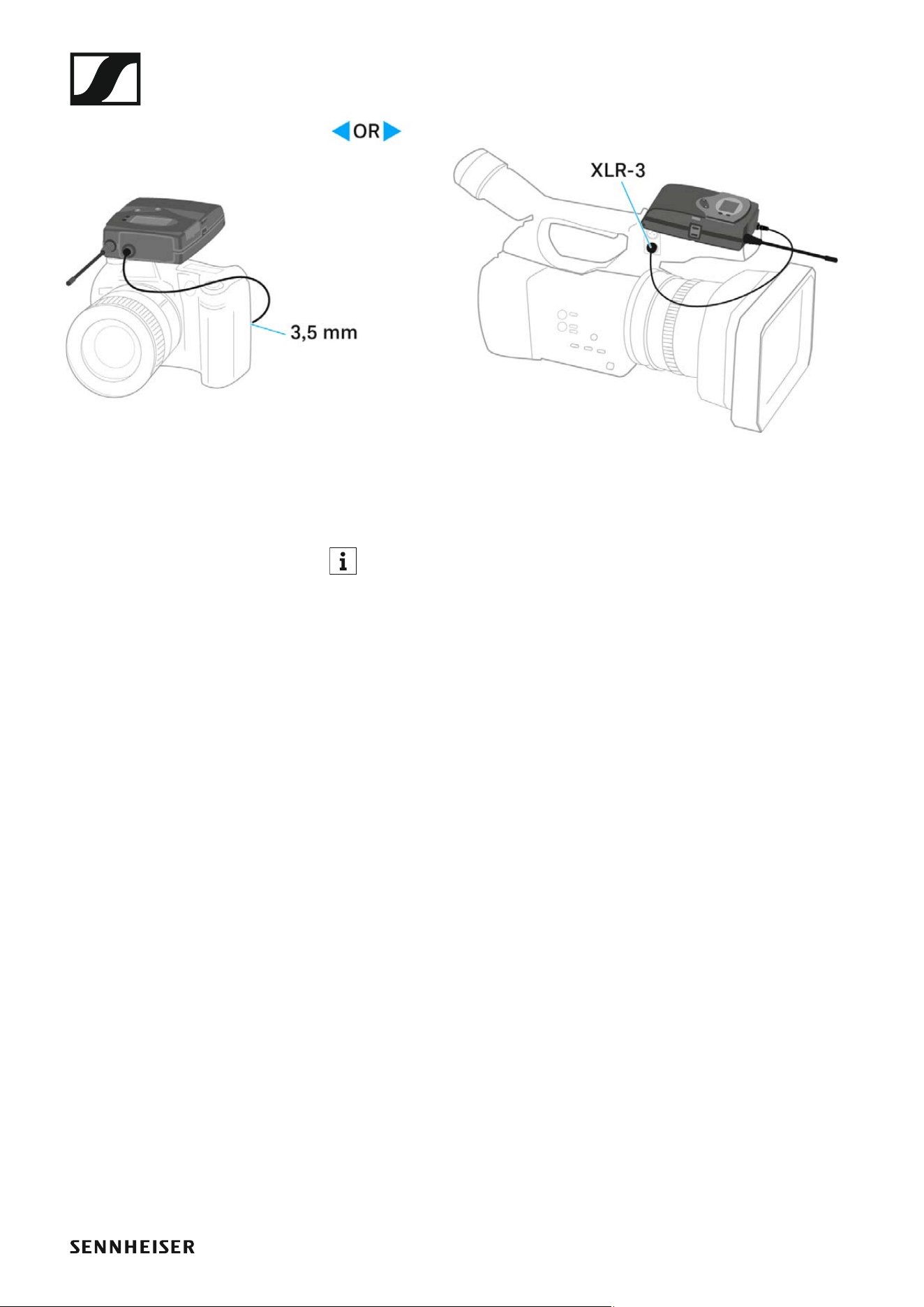
Connecting the diversity receiver to a camera
To connect the diversity receiver to a camera:
▷ Attach the line input of the camera to the jack socket of the receiver us-
ing one of the enclosed line connecting cables.
Installing the EK 500 G4
27
▷ Adjust the level of the AF Out audio output in the operating menu of the
diversity receiver based on the input level of the camera (see “AF Out
menu item”).
The shielding of the line cable acts as an antenna for the second di-
versity branch. For details on the pin assignment, see “Pin assign-
ment”.

Installing the SKM 500 G4
29
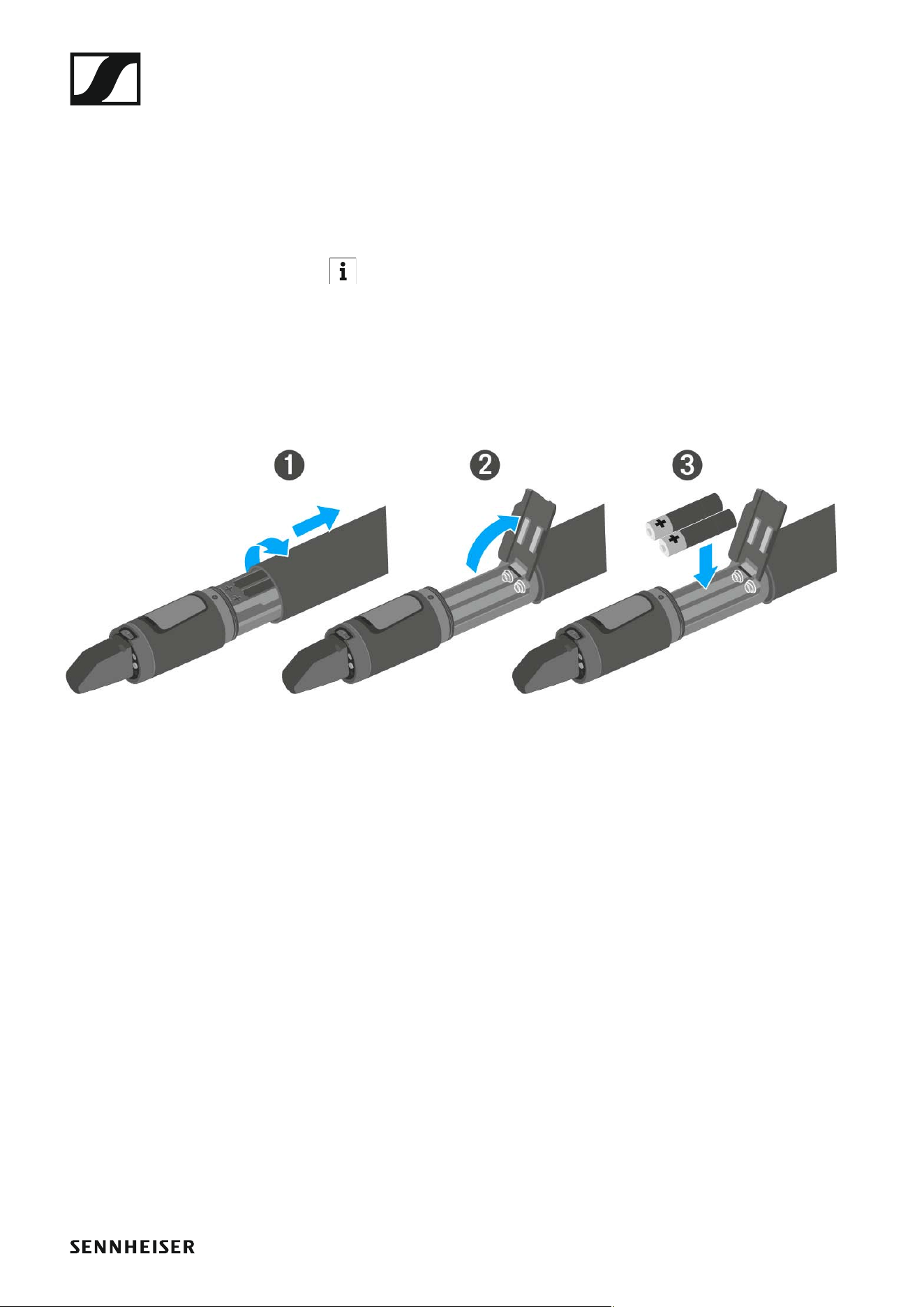
Inserting and removing the batteries/rechargeable
batteries
You can operate the wireless microphone either with batteries (AA, 1.5 V)
or with the rechargeable Sennheiser BA 2015 battery.
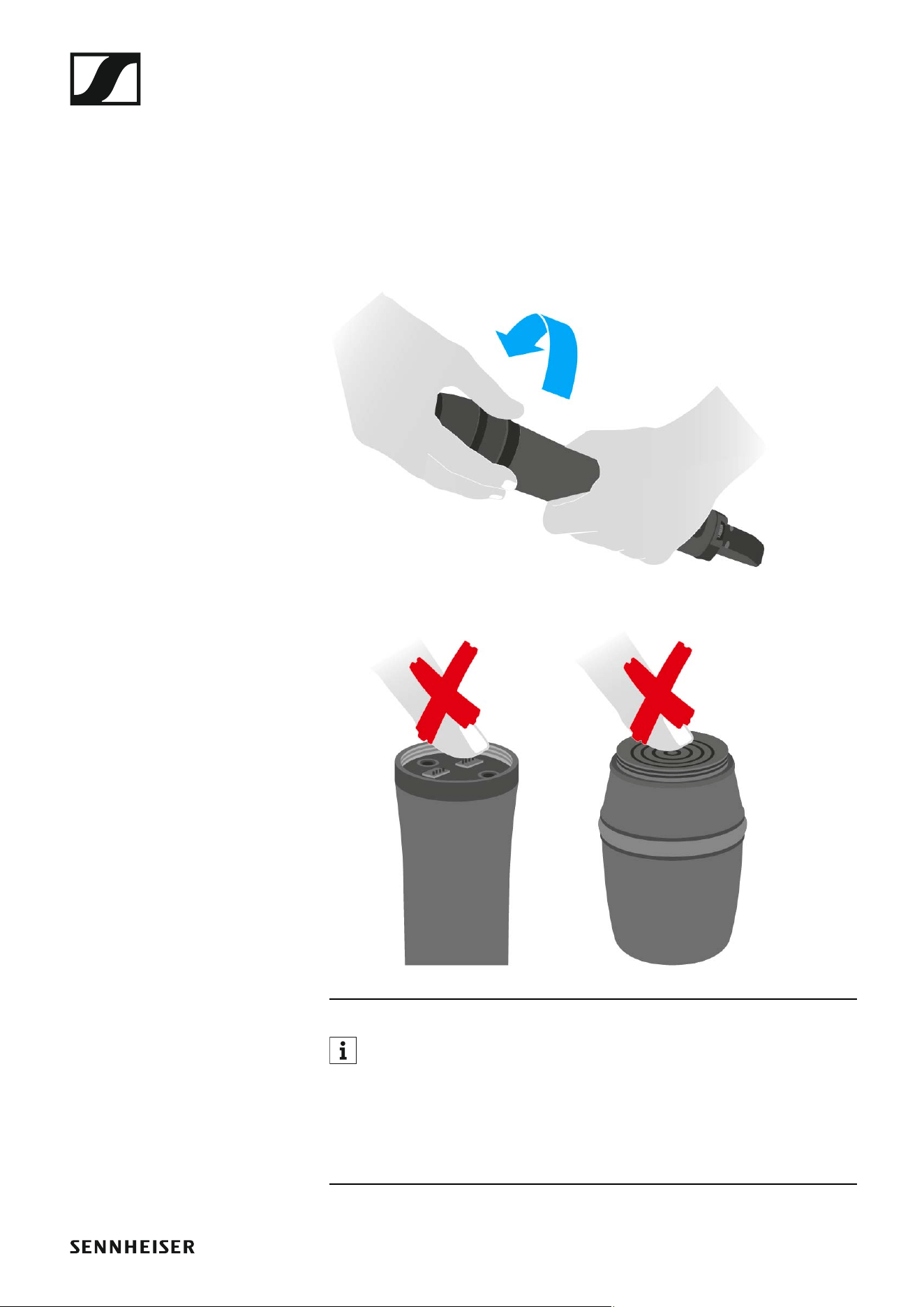
▷ Screw the rear part of the wireless microphone in the direction of the
arrow (counter-clockwise) off of the handle of the wireless microphone.
When you remove the wireless microphone during operation, mute is
automatically activated. MUTE appears in the display panel. When
you screw the microphone back together, mute is deactivated.
▷ Pull the rear part of the wireless microphone all the way out.
▷ Open the cover of the battery compartment.
▷ Place the batteries or the BA 2015 rechargeable battery in the battery
compartment as shown on the cover. Please observe correct polarity
when inserting the batteries/accupack.
▷ Close the cover.
▷ Push the battery compartment into the handle of the wireless micro-
phone.
▷ Screw the rear part of the wireless microphone back onto the handle.
Installing the SKM 500 G4
30
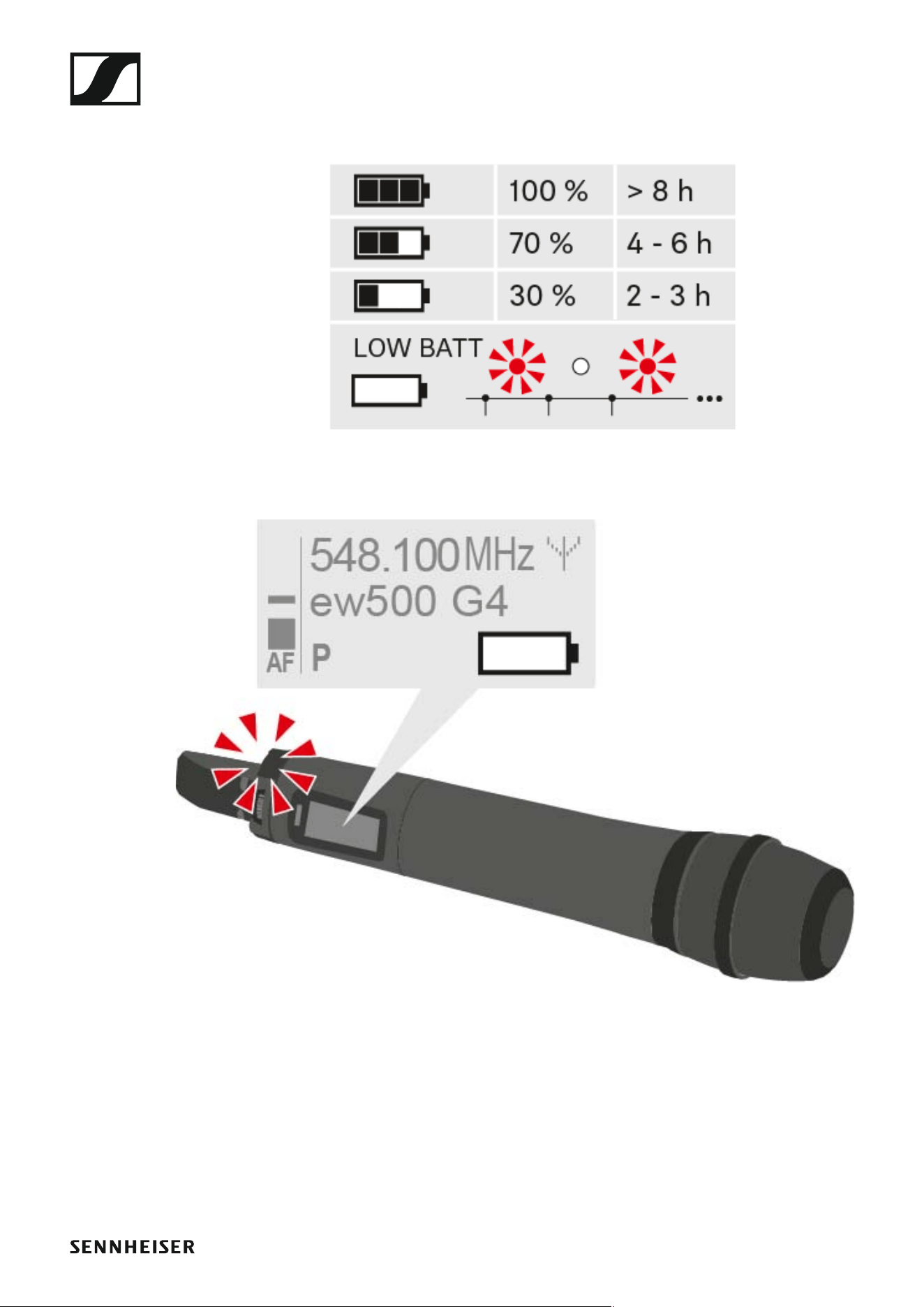
Battery status
Charge status of the batteries:
►
Charge status is critical (LOW BATT):
►
Installing the SKM 500 G4
31
Replacing the microphone module
You can find a list of the recommended microphone modules for the hand-
held transmitter under “Microphones and cables”.
To change the microphone module:
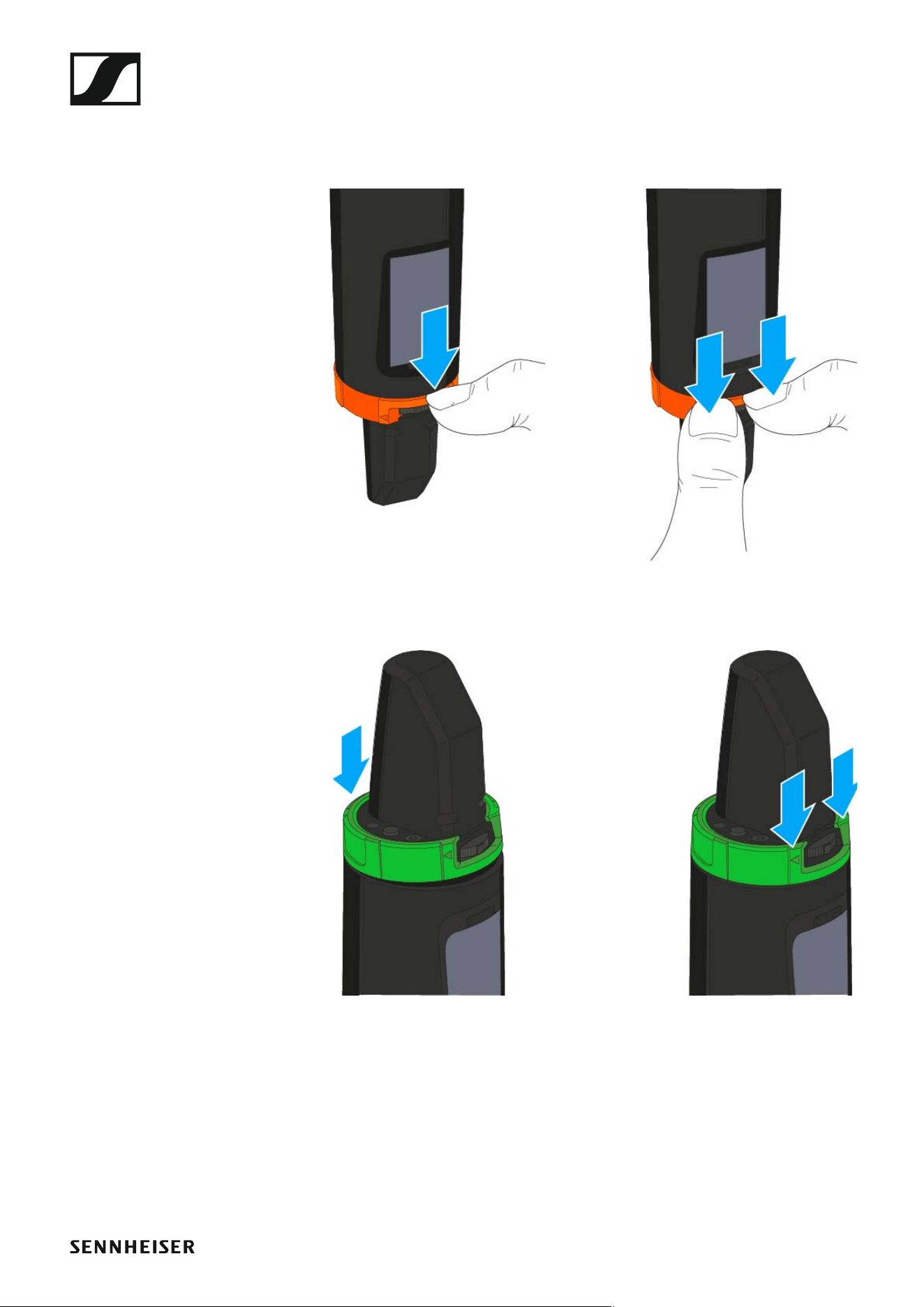
▷ Unscrew the microphone module.
▷ Screw the desired microphone module on.
►
Do not touch the wireless microphone contacts or the microphone
module contacts. If you touch the contacts, they may become dirty or
bent.
When you unscrew the microphone module during operation, mute is au-
tomatically activated. MUTE appears in the display panel. When you screw
the microphone module back on, mute is deactivated.
Installing the SKM 500 G4
32
Changing the colored ring
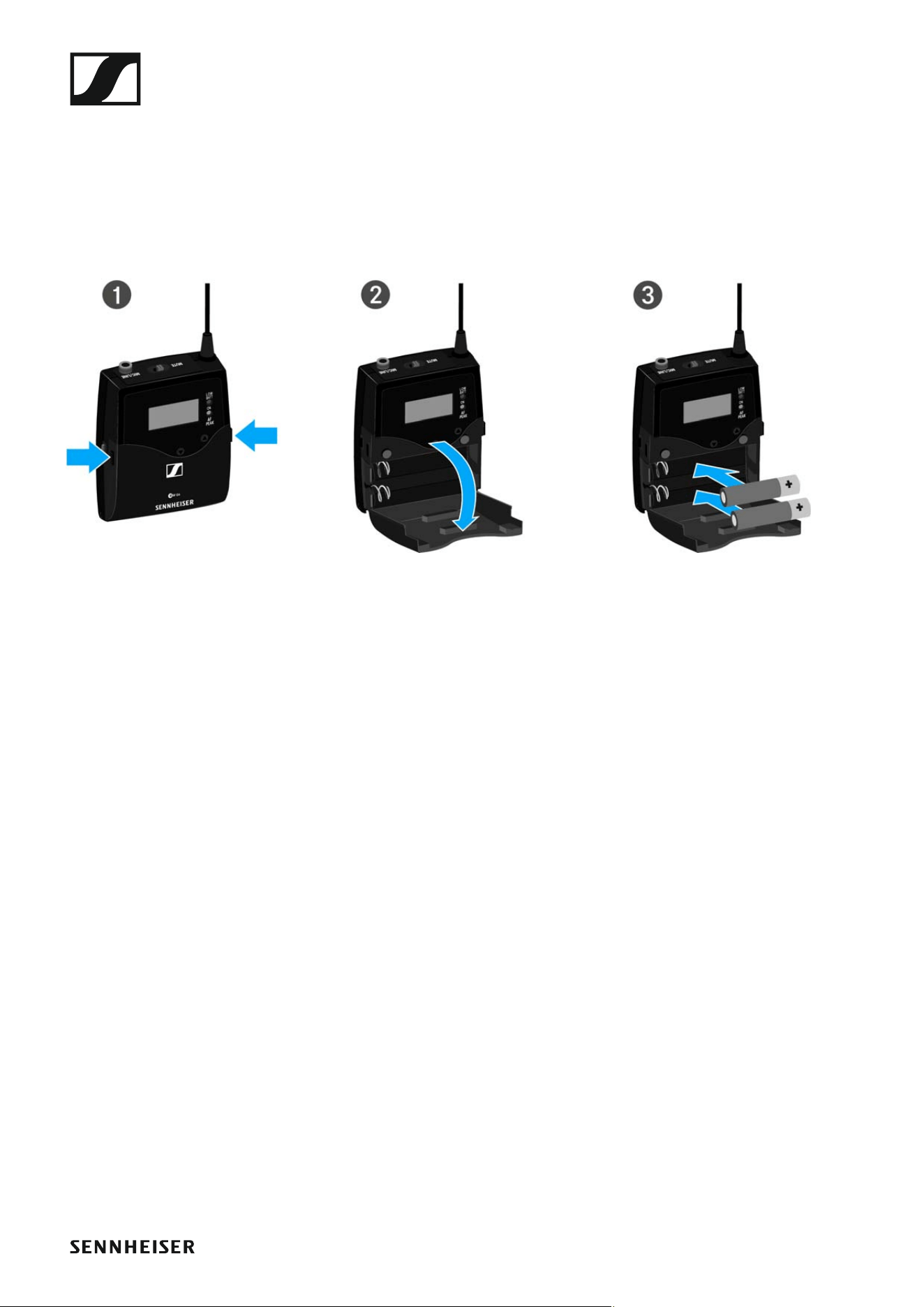
To change the colored ring:
▷ Pull the colored ring off as shown in the diagram.
►
▷ Attached a colored ring in the color you want as shown in the diagram.
►

Installing the SK 500 G4
34
Inserting and removing the batteries/rechargeable
batteries
You can operate the bodypack transmitter either with batteries (AA, 1.5 V)
or with the rechargeable Sennheiser BA 2015 battery.
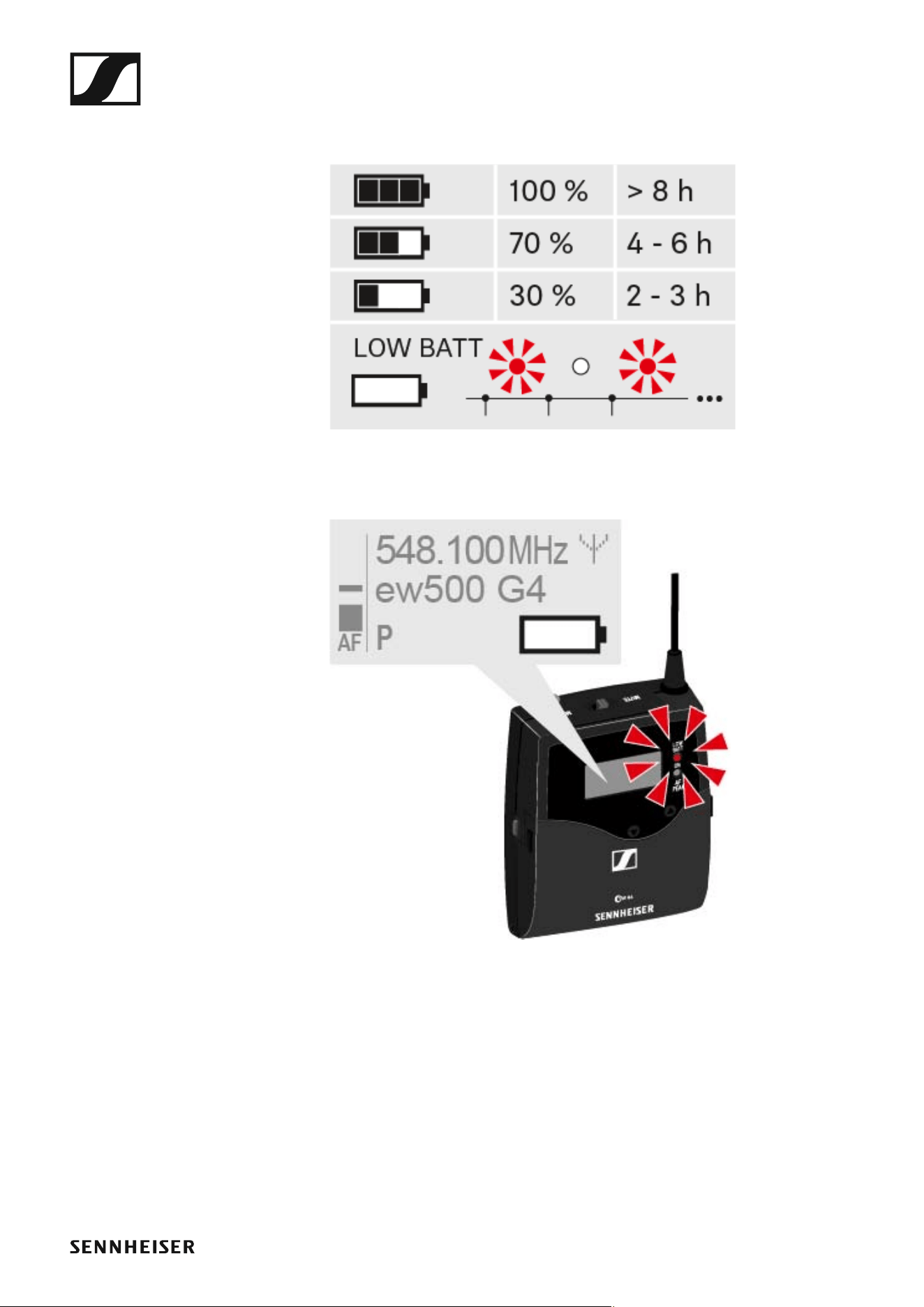
▷ Press the two catches and open the battery compartment cover.
▷ Insert the batteries or the rechargeable battery as shown below. Please
observe correct polarity when inserting the batteries.
►
▷ Close the battery compartment.
The cover locks into place with an audible click.
Installing the SK 500 G4
35
Battery status
Charge status of the batteries:
►
Charge status is critical (LOW BATT):
►
Installing the SK 500 G4
36
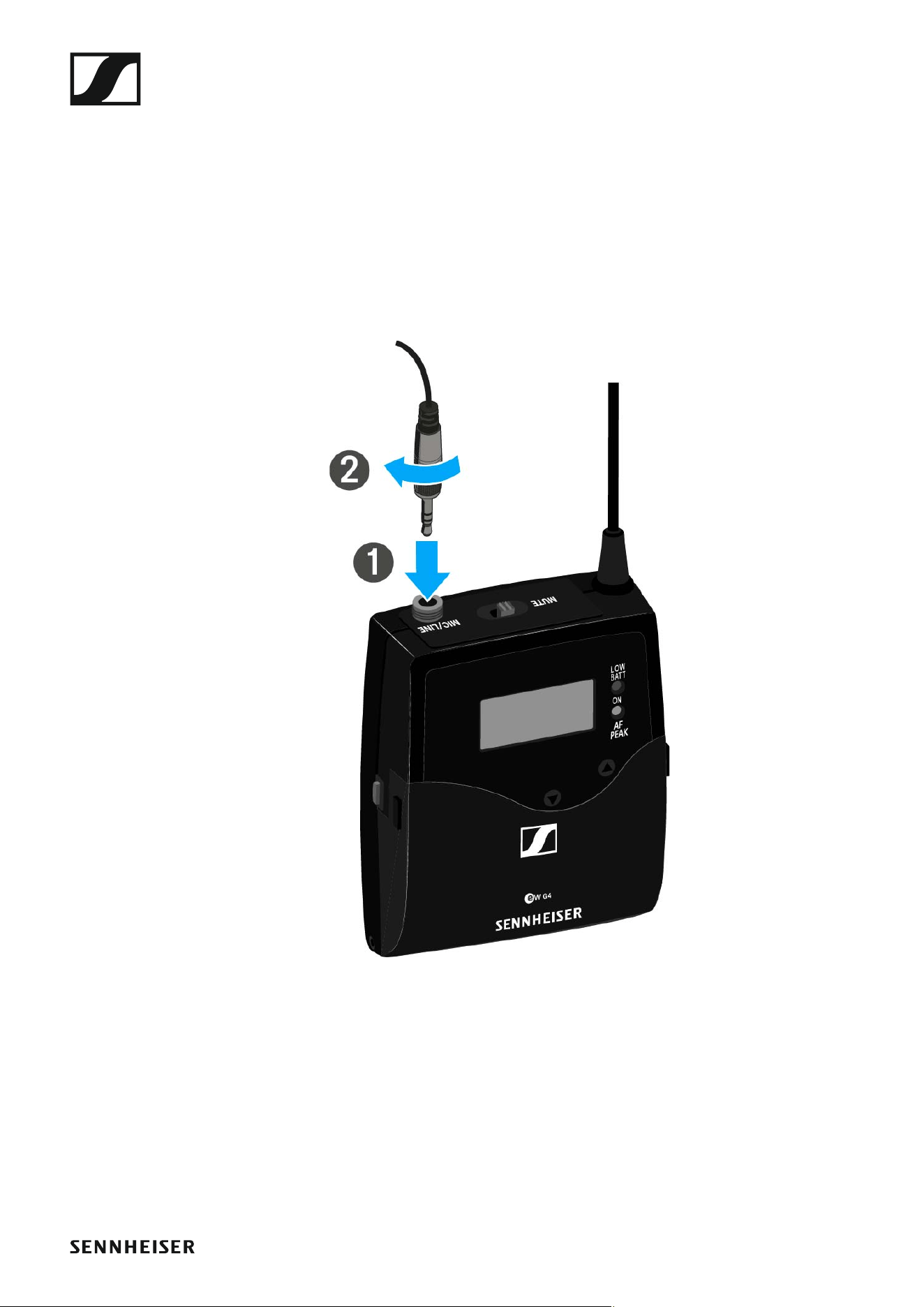
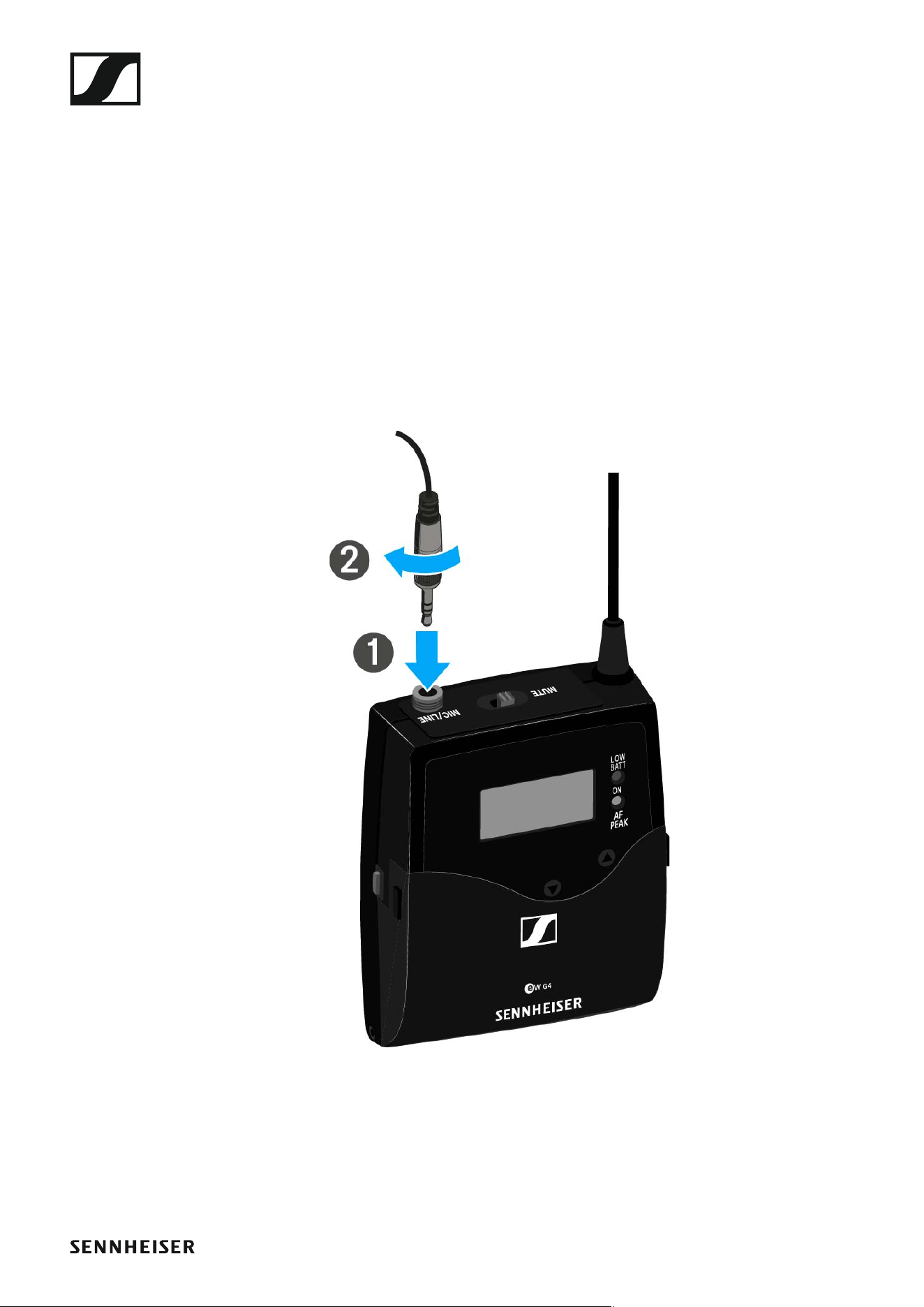
Connecting a microphone to the SK 500 G4
You can find a list of recommended Lavalier and headset microphones for
the bodypack transmitter under “Microphones and cables”.
To connect a microphone to the bodypack transmitter:
▷ Insert the cable’s 3.5 mm jack plug into the MIC/LINE socket on the
bodypack transmitter as shown in the diagram.
▷ Screw the plug’s coupling ring onto the audio socket thread of the
bodypack transmitter.
Installing the SK 500 G4
37
Connecting an instrument or line source to the
SK 500 G4
You can connect instruments or audio sources with a line level to the
bodypack transmitter.
To do this, you will need the Ci 1-N (6.3 mm jack plug on a lockable 3.5 mm
jack plug) or CL 2 (XLR-3F plug on lockable 3.5 mm jack plug) Sennheiser
cables.
To connect an instrument or line source to bodypack transmitter:
▷ Insert the cable’s 3.5 mm jack plug into the MIC/LINE socket on the
bodypack transmitter as shown in the diagram.
▷ Screw the plug’s coupling ring onto the audio socket thread of the
bodypack transmitter.
Installing the SK 500 G4
38
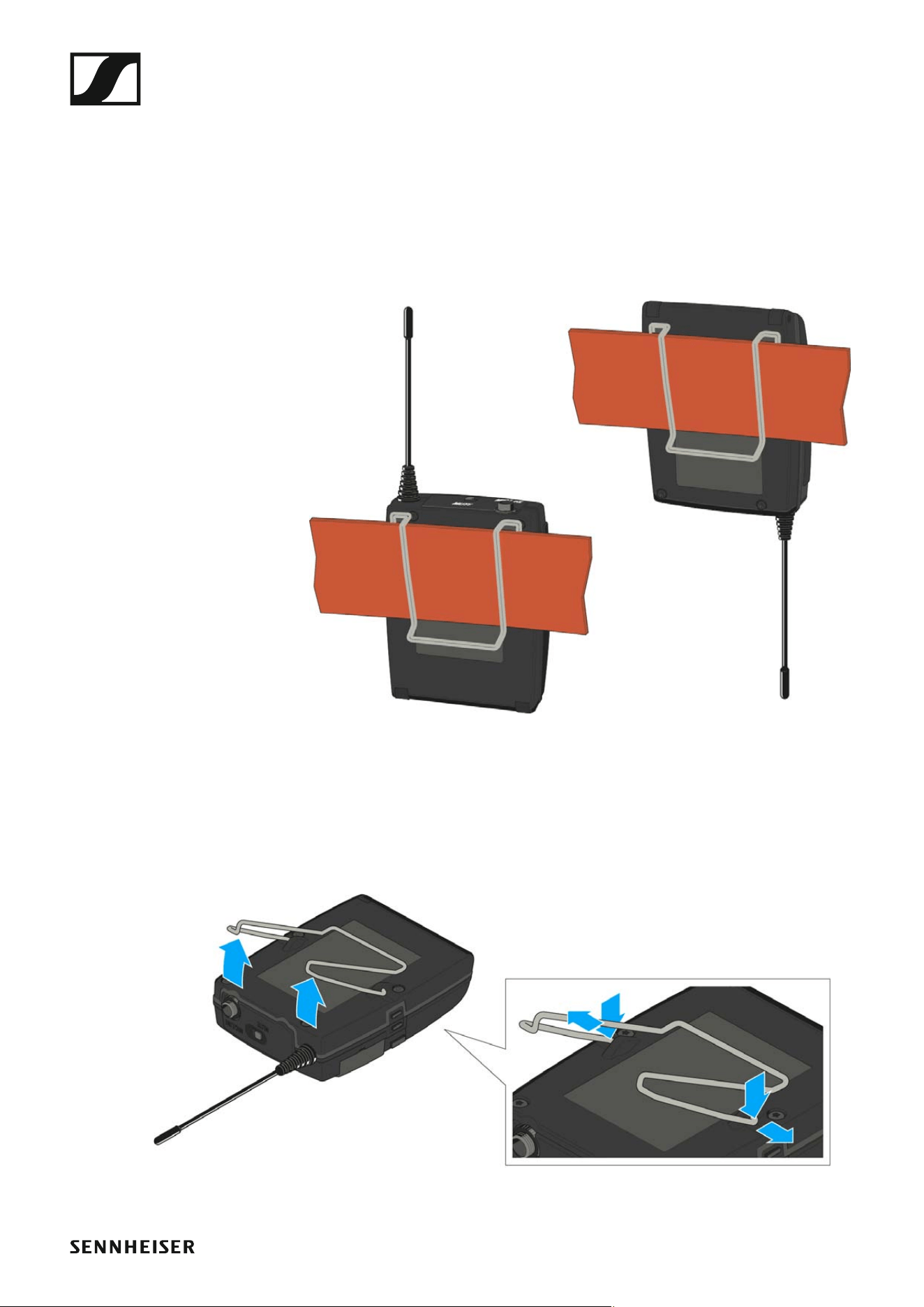
Attaching the bodypack transmitter to clothing
You can use the belt clip to attach the bodypack transmitter to your waist-
band or on a guitar strap.
The belt clip is detachable so that you can also attach the bodypack trans-
mitter with the antenna pointing downwards. To do so, withdraw the belt
clip from its fixing points and attach it the other way round.
The belt clip is secured so that it cannot slide out of its fixing points acci-
dentally.
►
To detach the belt clip:
▷ Lift the belt clip as shown in the diagram.
▷ Press one side of the clip downward on the fixing hole and pull it out of
the transmitter housing.
▷ Do the same thing on the other side.
Installing the SKP 500 G4
39
Installing the SKP 500 G4
These sections contain detailed information about installing and starting
up the SKP 500 G4.
You can find information about operating the SKP 500 G4 under “Using the
SKP 500 G4”.
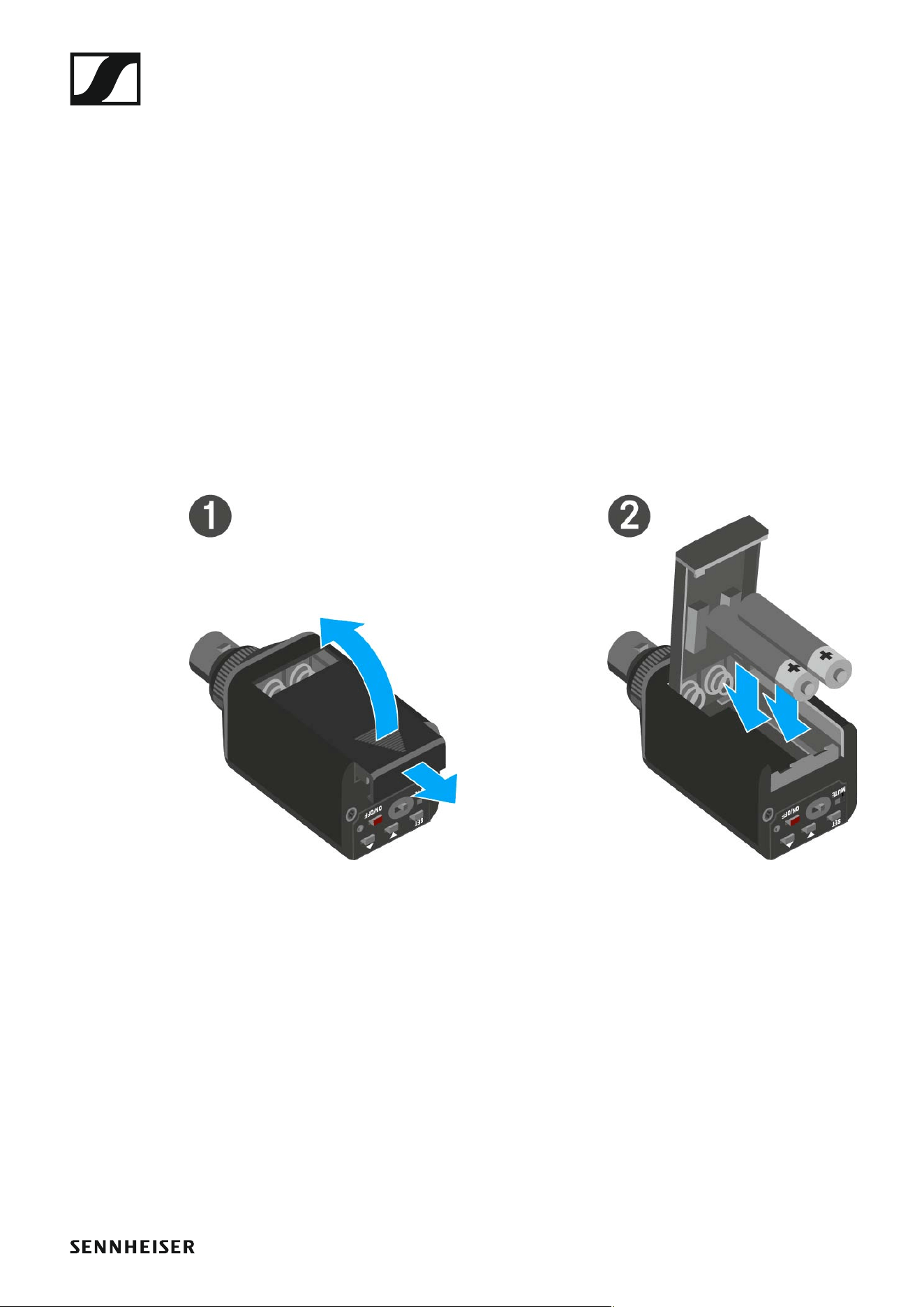
Inserting and removing the batteries/rechargeable
batteries
You can operate the plug-on transmitter either with batteries (AA, 1.5 V) or
with the rechargeable Sennheiser BA 2015 battery.
▷ Slide the battery compartment cover in the direction of the embossed
arrow and open the cover.
▷ Insert the batteries or the accupack as shown below. Please observe
correct polarity when inserting the batteries/accupack.
▷ Close the battery compartment.
The cover locks into place with an audible click.
Installing the SKP 500 G4
40
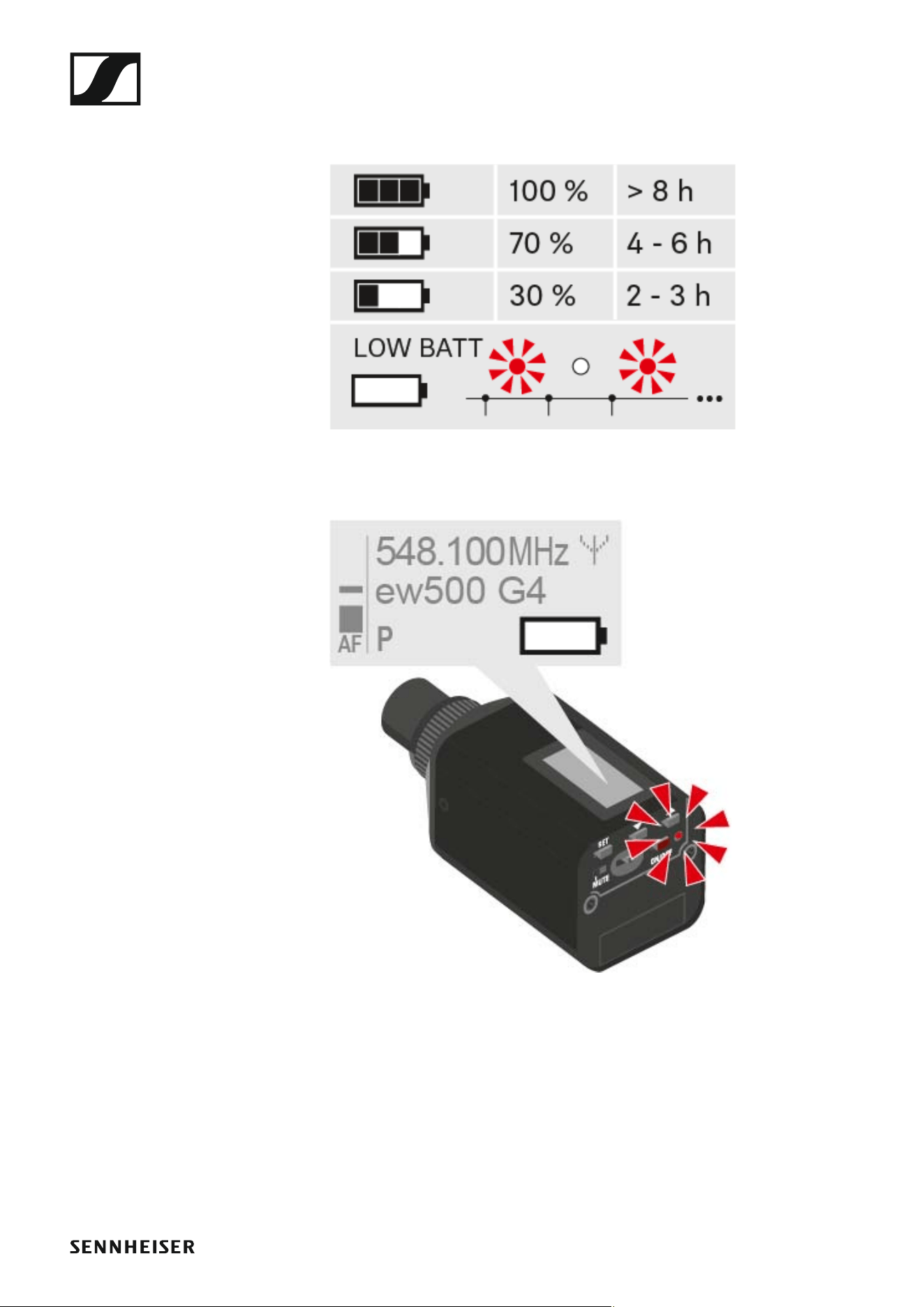
Battery status
Charge status of the batteries:
►
Charge status is critical (LOW BATT):
►
Installing the SKP 500 G4
41
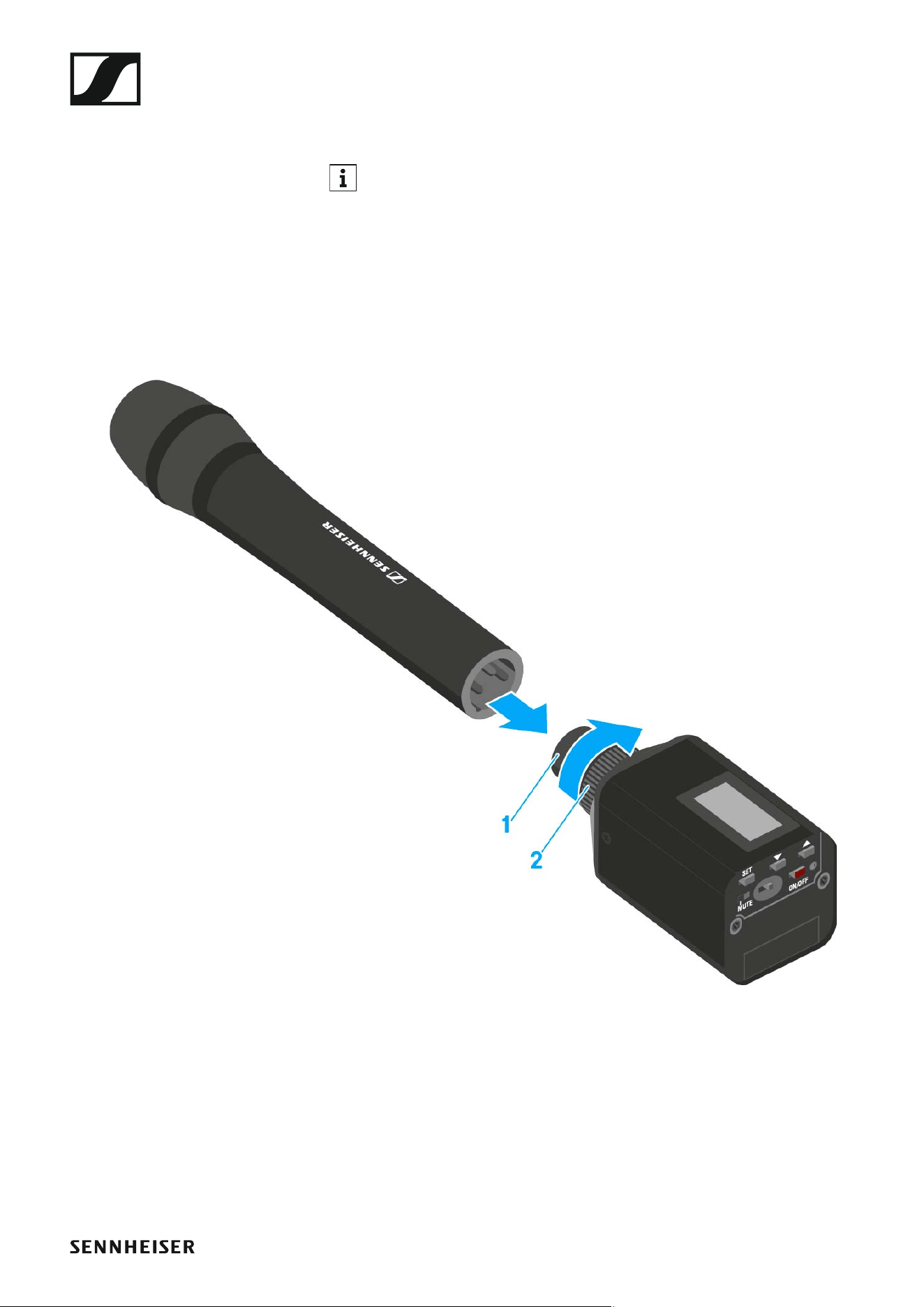
Attaching the plug-on transmitter to the micro-
phone
Microphones with a metal casing should be used for optimal signal
transmission.
▷ Loosen the locking ring (2) by rotating it in the clockwise direction past
the center point.
This unlocks the XLR-3 plug (1) of the plug-on transmitter.
▷ Connect the plug-on transmitter's XLR-3 plug (1) to the XLR-3 socket of
the microphone.
▷ Tighten the locking ring (2) by rotating it counter-clockwise in the di-
rection of the arrow.
Using ew 500 P G4 series devices
42
OPERATION
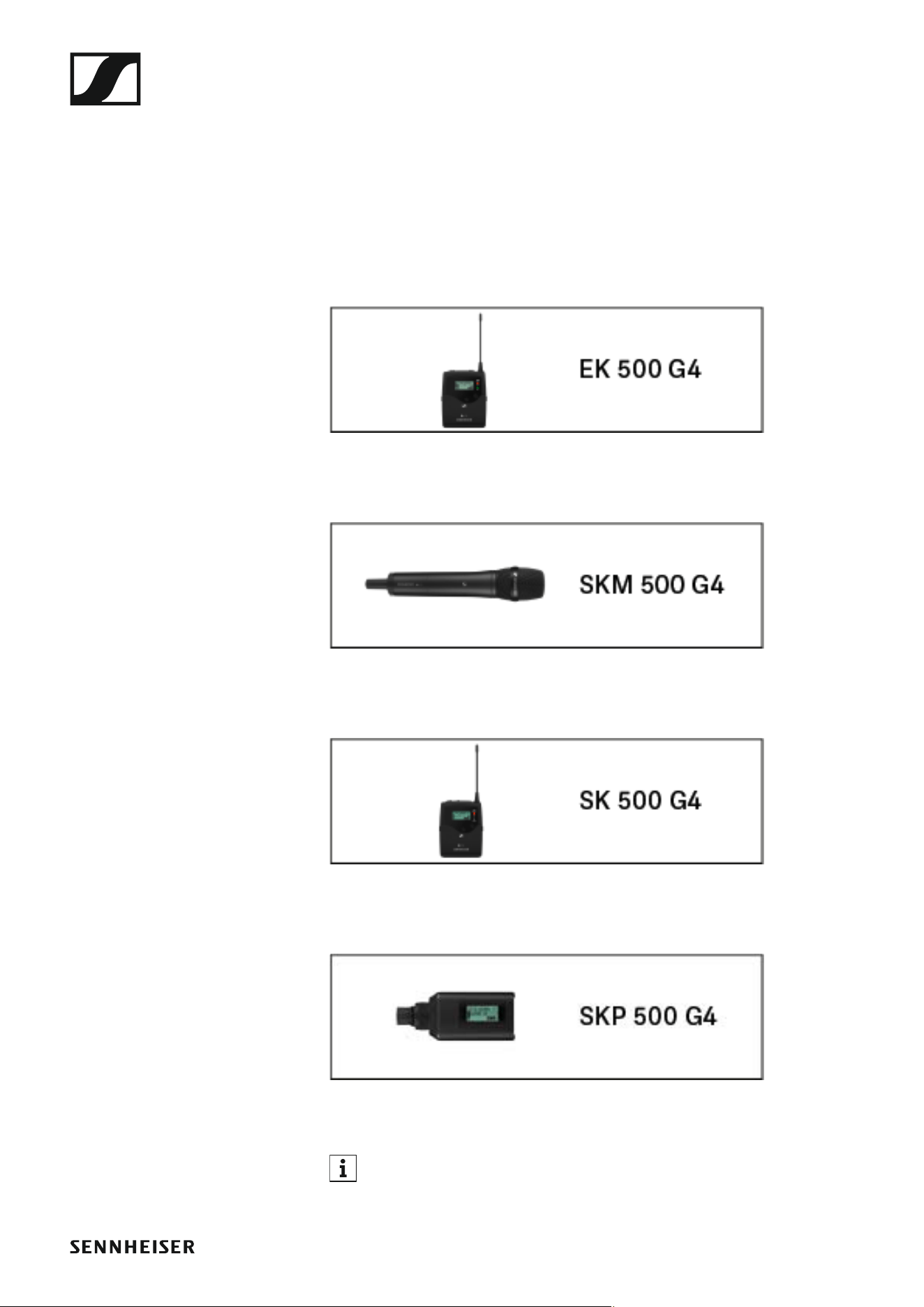
Using ew 500 P G4 series devices
You can find information about using ew 500 P G4 series devices in the fol-
lowing sections.
• EK 500 G4 diversity receiver >> “Using the EK 500 G4”
• SKM 500 G4 handheld transmitter >> “Using the SKM 500 G4”
• SK 500 G4 bodypack transmitter >> “Using the SK 500 G4”
• SKP 500 G4 plug-on transmitter >> “Using the SKP 500 G4”
You can find information about installing the products under “Install-
ing ew 500 P G4 series devices”.
Using ew 500 P G4 series devices
43
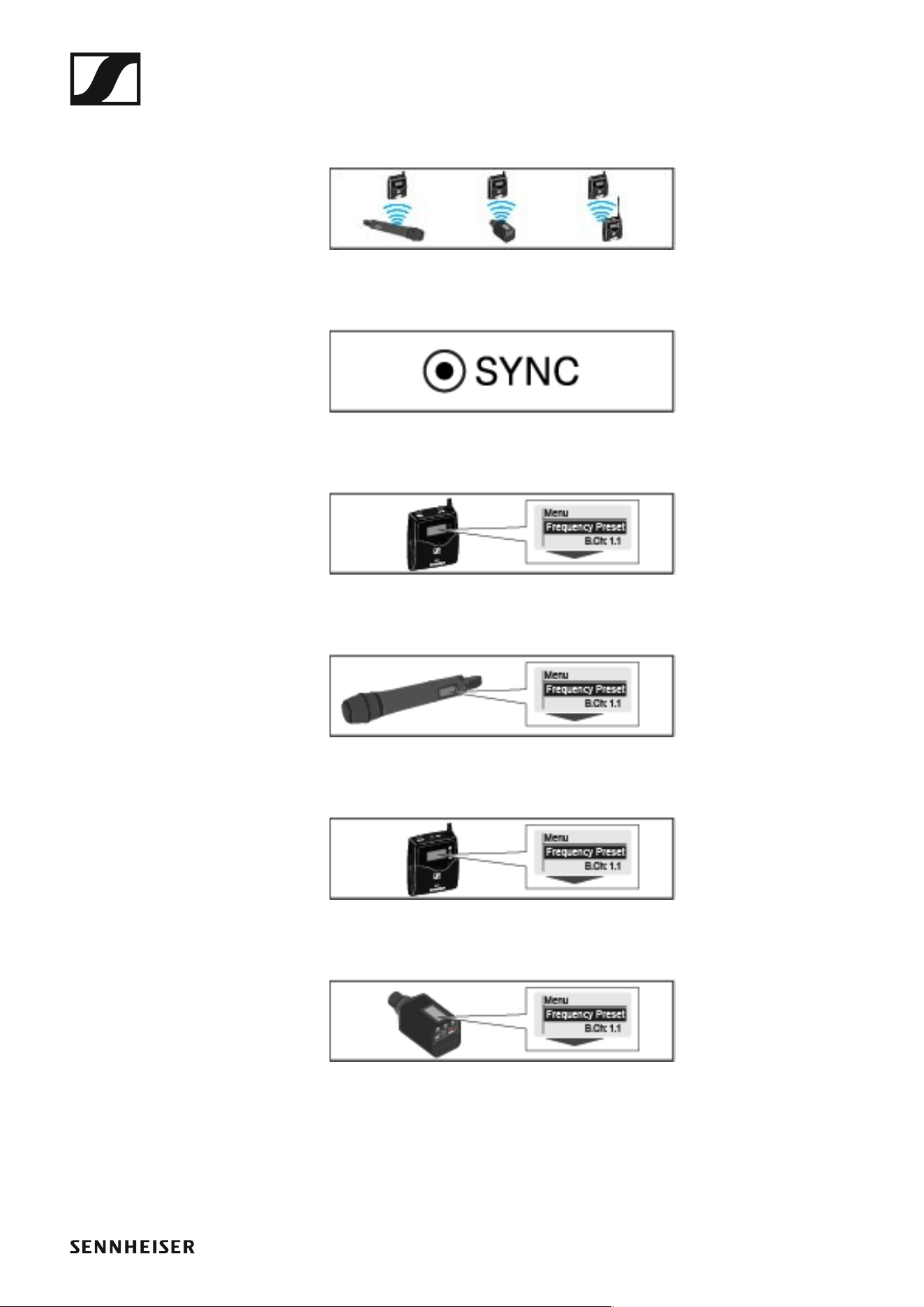
In the sections below, you can find important information about specific
use cases.
• Establishing a radio link between the transmitter and receiver >> “Es-
tablishing a radio link”
• Synchronizing the receiver settings to the transmitter >> “Synchroniz-
ing devices”
•Using the menu of the diversity receiver >> “Displays on the EK 500 G4
display panel”
•Using the menu of the handheld transmitter >> “Displays on the
SKM 500 G4 handheld transmitter display panel”
•Using the menu of the bodypack transmitter >> “Displays on the
SK 500 G4 bodypack transmitter display panel”
• Using the menu of the plug-on transmitter >> “Displays on the
SKP 500 G4 plug-on transmitter display panel”

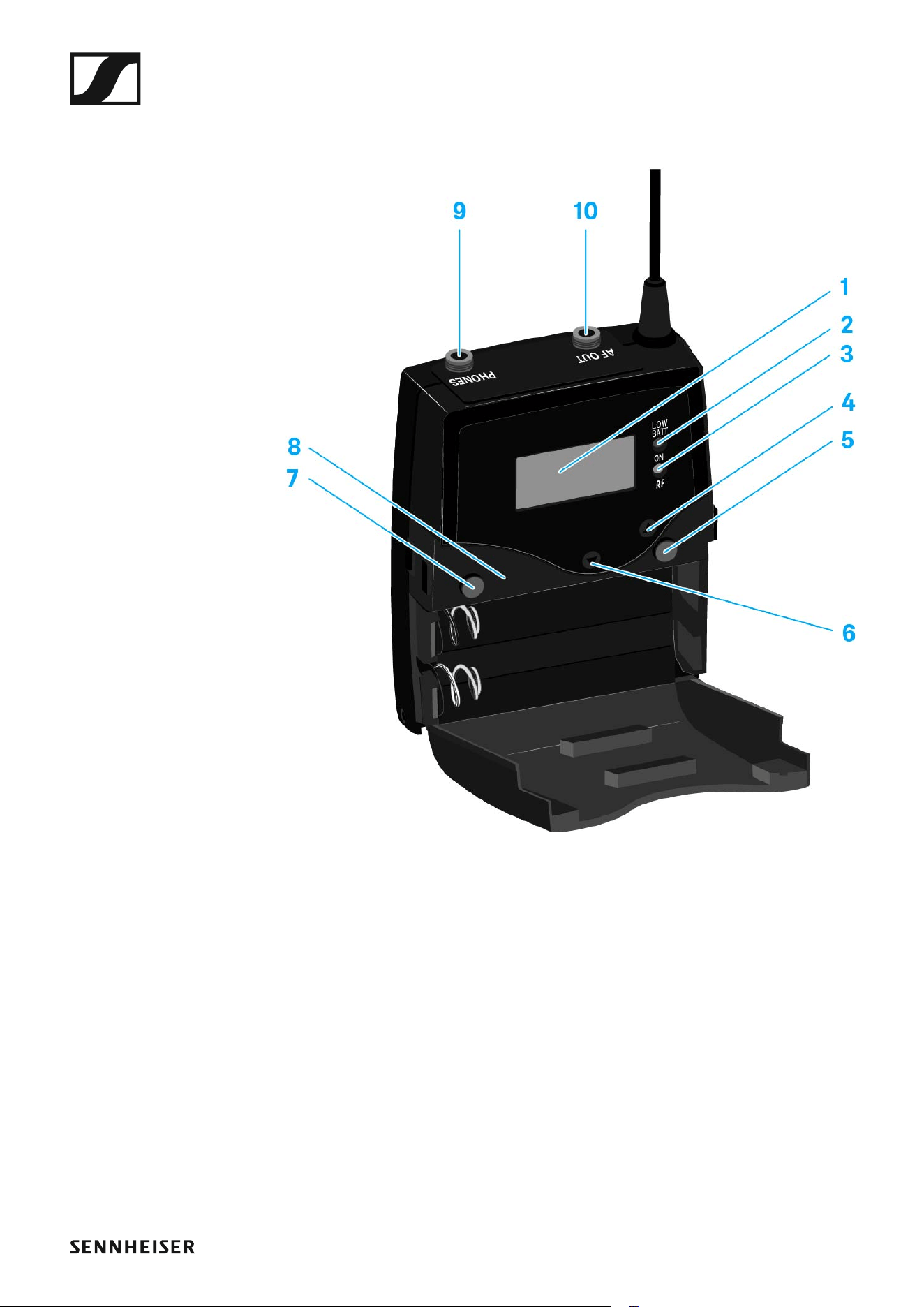
Using the EK 500 G4
45
Operating elements of the EK 500 G4 diversity re-
ceiver
►
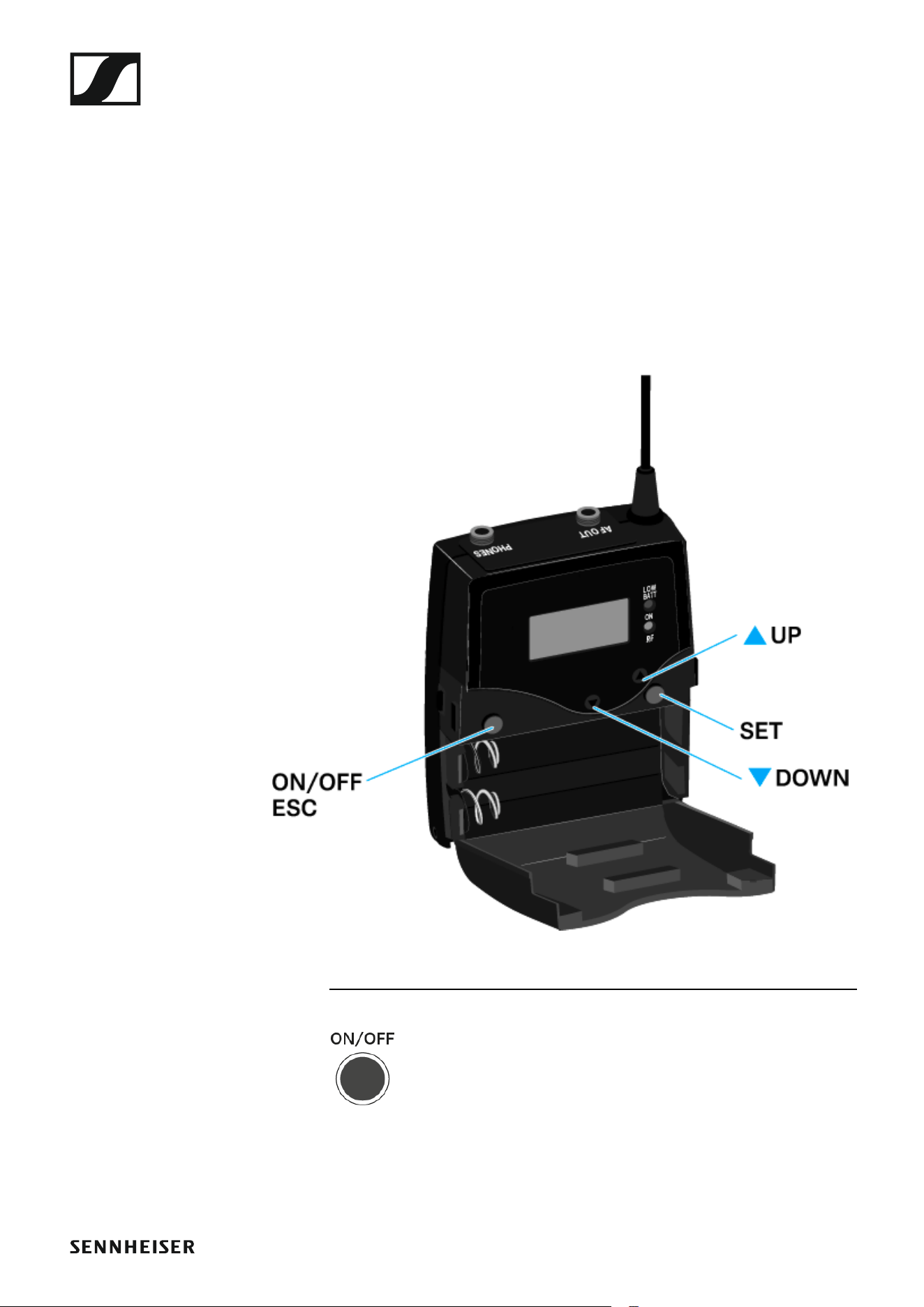
1 Display panel
• See “Displays on the EK 500 G4 display panel”
2 Operation and battery indicator, red LED
• illuminated = ON
See “Switching the EK 500 G4 on and off”
•flashing = LOW BATTERY
See “Inserting and removing the batteries/rechargeable batteries”
3 Wireless reception indicator, green LED
• illuminated = RF
4 UP button
• See “Buttons for navigating through the menu”
5 SET button
• See “Buttons for navigating through the menu”
6 DOWN button
• See “Buttons for navigating through the menu”
Using the EK 500 G4
46
7 ON/OFF button with ESC function in the operating menu
• Switch the transmitter on or off
See “Switching the EK 500 G4 on and off”
• Escape function in the menu
See “Buttons for navigating through the menu”
8 Infra-red interface
• See “Synchronizing devices”
9 3.5 mm jack socket PHONES
• See “Connecting headphones to the EK 500 G4”
• See “Volume control of the PHONES socket”
103.5 mm jack socket AF OUT
•lockable
See “Connecting the diversity receiver to a camera”
Switching the EK 500 G4 on and off
▷ Press the two catches and open the battery compartment cover.
To switch the receiver on:
▷ Hold down the ON/OFF button until the Sennheiser logo appears on the
display.
To switch the receiver off:
▷ Hold down the ON/OFF button until the display goes off.
Using the EK 500 G4
47
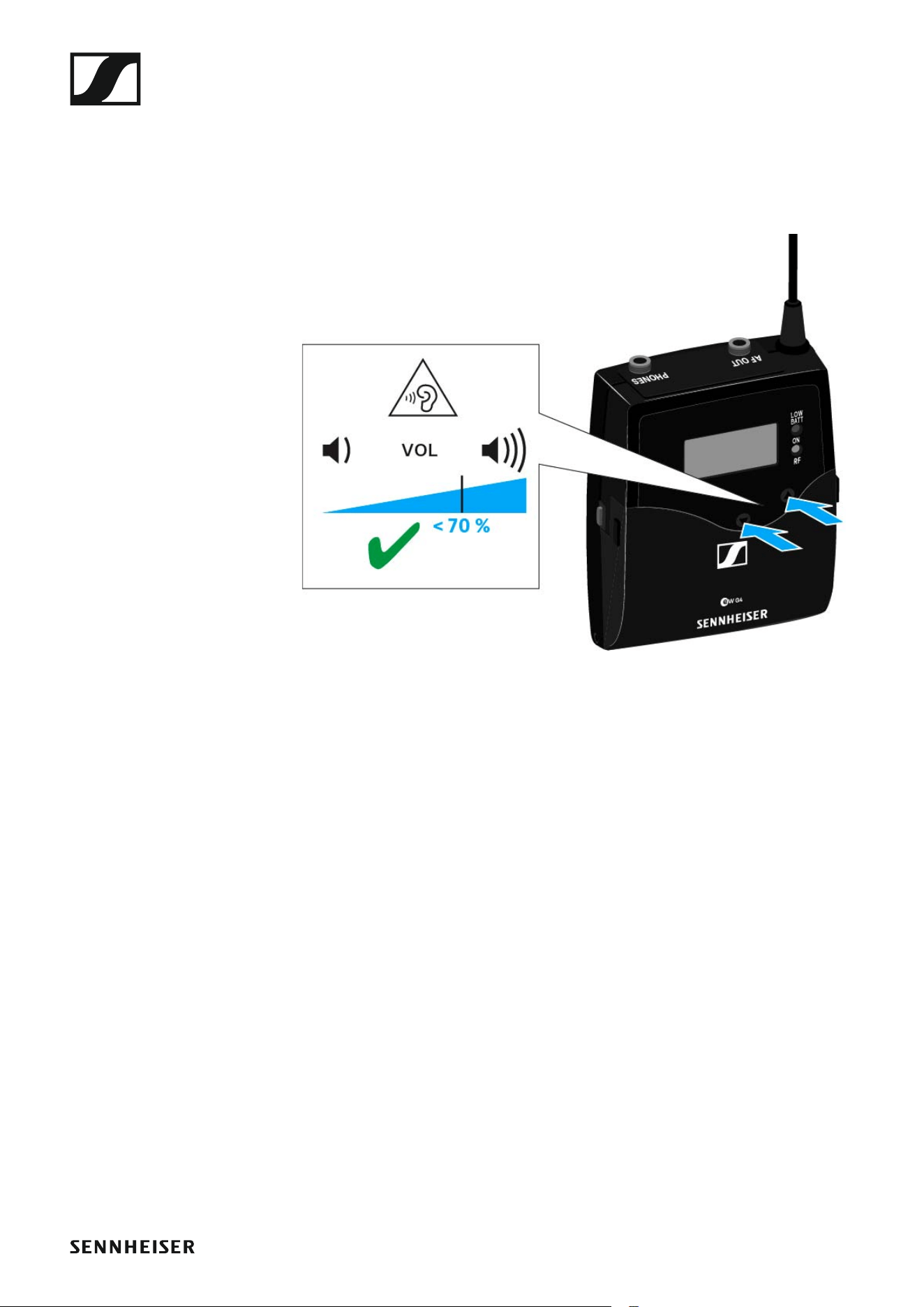
Volume control of the PHONES socket
To adjust the volume of the connected headphone:
▷ Press the UP or DOWN buttons.
Using the EK 500 G4
48
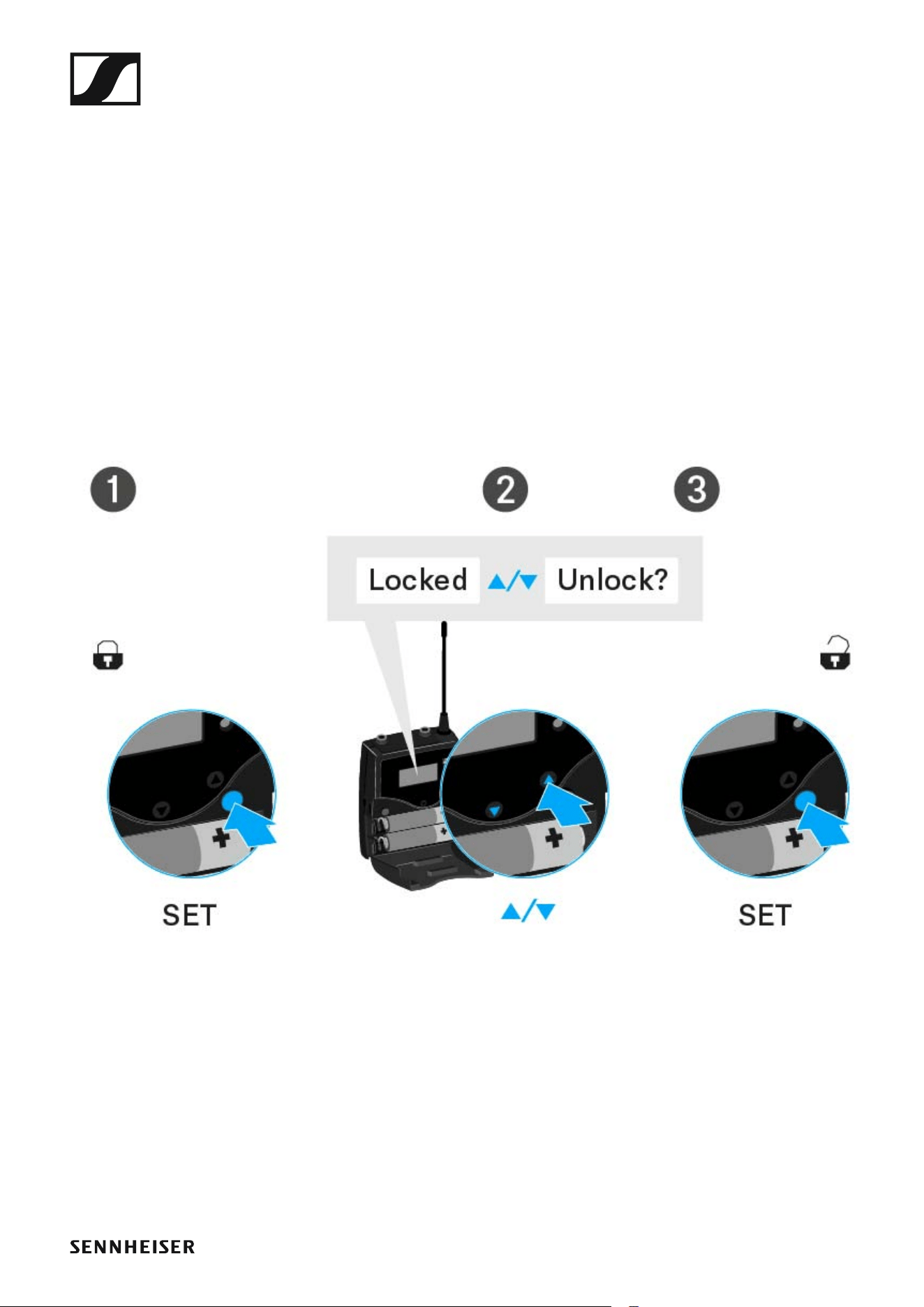
Lock-off function
You can set the automatic lock-off function in the Auto lock menu (see
“Auto Lock menu item”).
When you have switched on the lock-off function, you will have to turn the
transmitter off and on again in order to operate it.
To temporarily deactivate the lock-off function:
▷ Press the SET button.
Locked appears in the display panel.
▷ Press the UP or DOWN button.
Unlock? appears in the display panel.
▷ Press the SET button.
Lock-off function is now temporarily deactivated.
When you are in the operating menu
>> Lock-off function is deactivated long enough for you to work in the op-
erating menu.
When one of the standard displays is shown
>> Lock-off function is automatically activated after 10 seconds.
The lock-off function icon flashes while lock-off function is being activated
again.

Using the EK 500 G4
49
Displays on the EK 500 G4 display panel
Status information such as reception quality, battery status, audio level,
etc. is displayed on the home screen of the display panel. See “Home
screen”.
The display panel also displays the operating menu which you can use to
configure all of the settings. See “Setting options in the menu”.
Using the EK 500 G4
51
►
Press the SET button
• Changes from the current standard display to the operating menu
• Calls up a menu item
• Changes to a submenu
• Stores the settings and returns to the operating menu
►
Press the UP or DOWN button
• Changes to the previous or next menu item
• Changes the setting of a menu item
Using the EK 500 G4
52
Home screen
After you switch on the receiver, the display panel initially displays the
Sennheiser logo. After a short time, the home screen is then displayed.
The home screen has two different standard displays.
▷ Short-press the ON/OFF button to switch between the standard dis-
plays.
Frequency/Name standard display
►
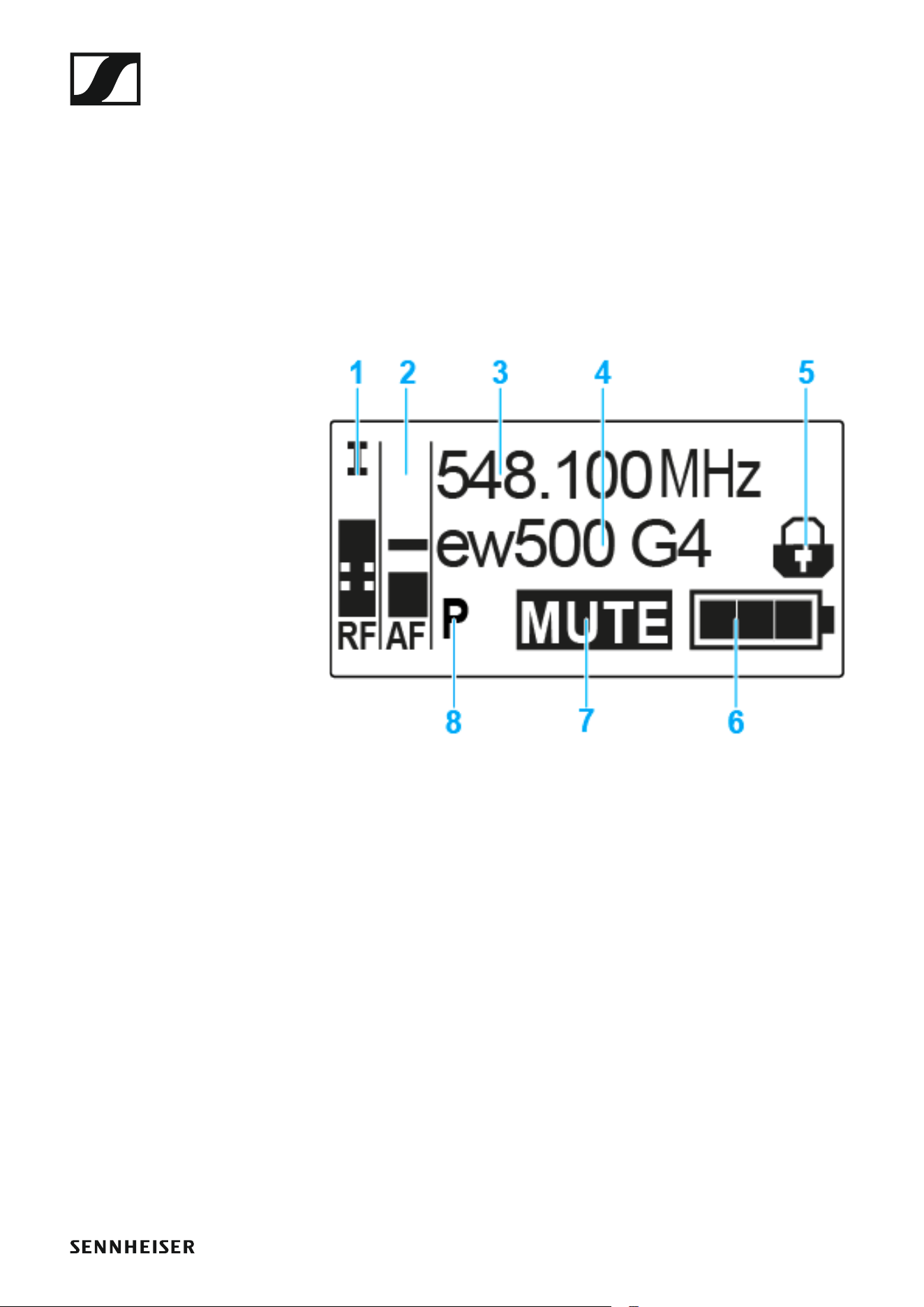
1 RF level (radio frequency)
• RF signal level display
• including the display of the squelch threshold (see “Squelch menu
item”)
2 AF audio level (audio frequency)
• Displays the audio level of the received transmitter
When the display shows full deflection, the audio input level is exces-
sively high.
• See “AF Out menu item”
3 Frequency
• Current receiving frequency
• See “Frequency Preset menu item”
4 Name
• Freely selectable name of the receiver
• See “Name menu item”
5 Lock-off function
• Lock-off function is activated on the receiver
• See “Lock-off function”
Using the EK 500 G4
53
6 Battery status of the receiver
• See “Inserting and removing the batteries/rechargeable batteries”
7 MUTE muting function
•No RF signal received
8 P pilot tone
• P = Activated pilot tone evaluation
• No symbol = Evaluation is deactivated
• P is black = Pilot tone is being received on the current frequency
• See “Advanced -> Pilot Tone menu item”
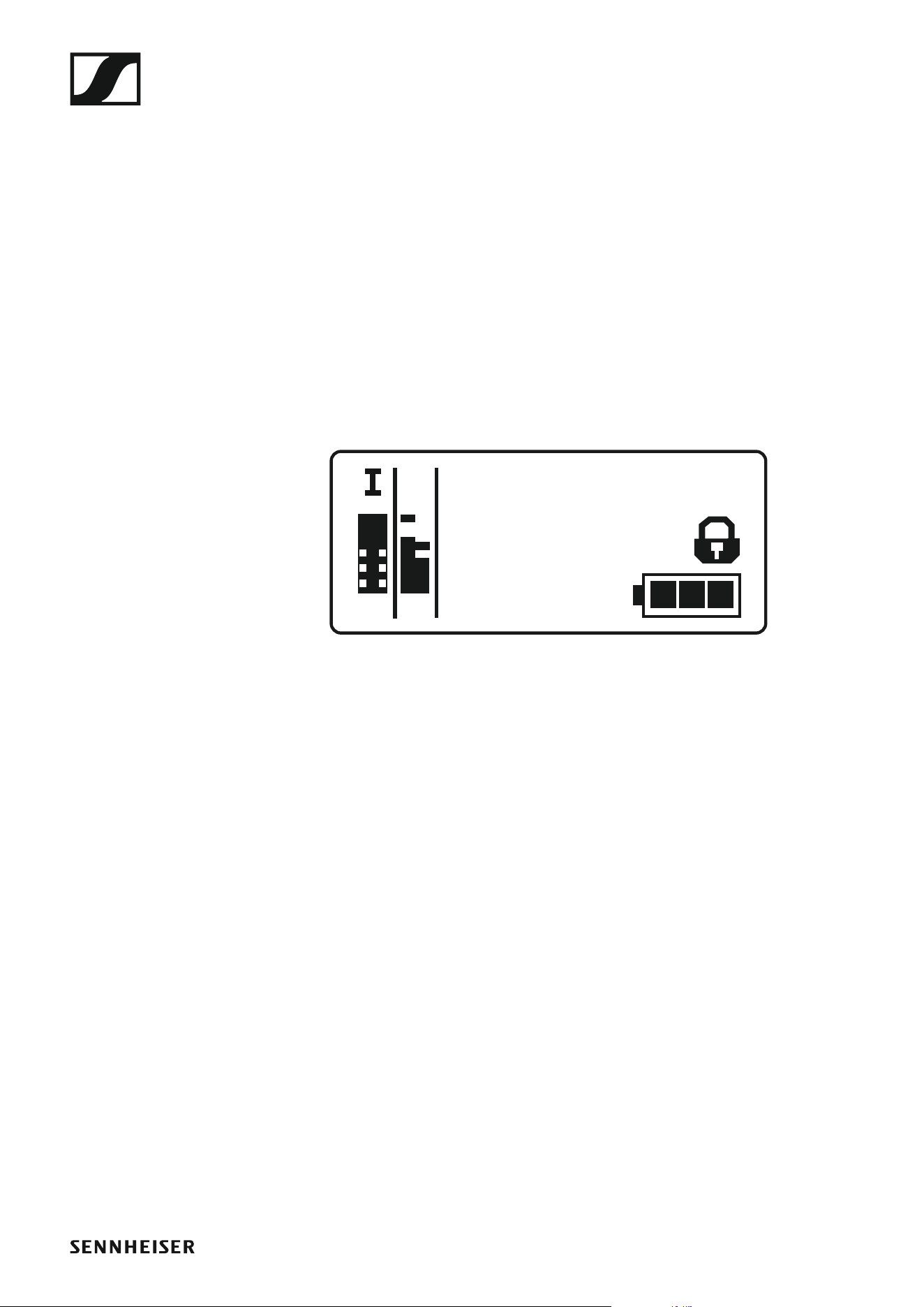
Frequency Bank/Channel/Name standard display
The Frequency Bank/Channel/Name standard display shows the level of
the line output AF Out instead of the MUTE muting function.
►
1. 1
B.Ch:
ew500 G4
P
+6dB
AFRF

Using the EK 500 G4
54
Setting options in the menu
In the EK 500 G4 menu, you can configure the following settings.
Synchronizing the transmitter with the diversity receiver
▷ See “Sync menu item”
Adjusting the volume of the headphone socket
▷ See “Phones Volume menu item”
Adjusting the squelch threshold
▷ See “Squelch menu item”
Scanning for unused frequency presets, releases and selects frequen-
cy presets
▷ See “Easy Setup menu item”
Setting the frequency bank and the channel
▷ See “Frequency Preset menu item”
Entering a freely selectable name
▷ See “Name menu item”
Adjusting the audio output level
▷ See “AF Out menu item”
Activate/deactivate the automatic lock-off function
▷ See “Auto Lock menu item”
Configuring enhanced settings in the Advanced Menu:
• Adjusting the receiving frequencies for the U frequency bank
• Activating/deactivating the parameters to be transferred to the trans-
mitters
• Activating/deactivating the pilot tone evaluation
• Adjusting the contrast of the display panel
• Resetting the receiver

Using the EK 500 G4
56
Menu structure
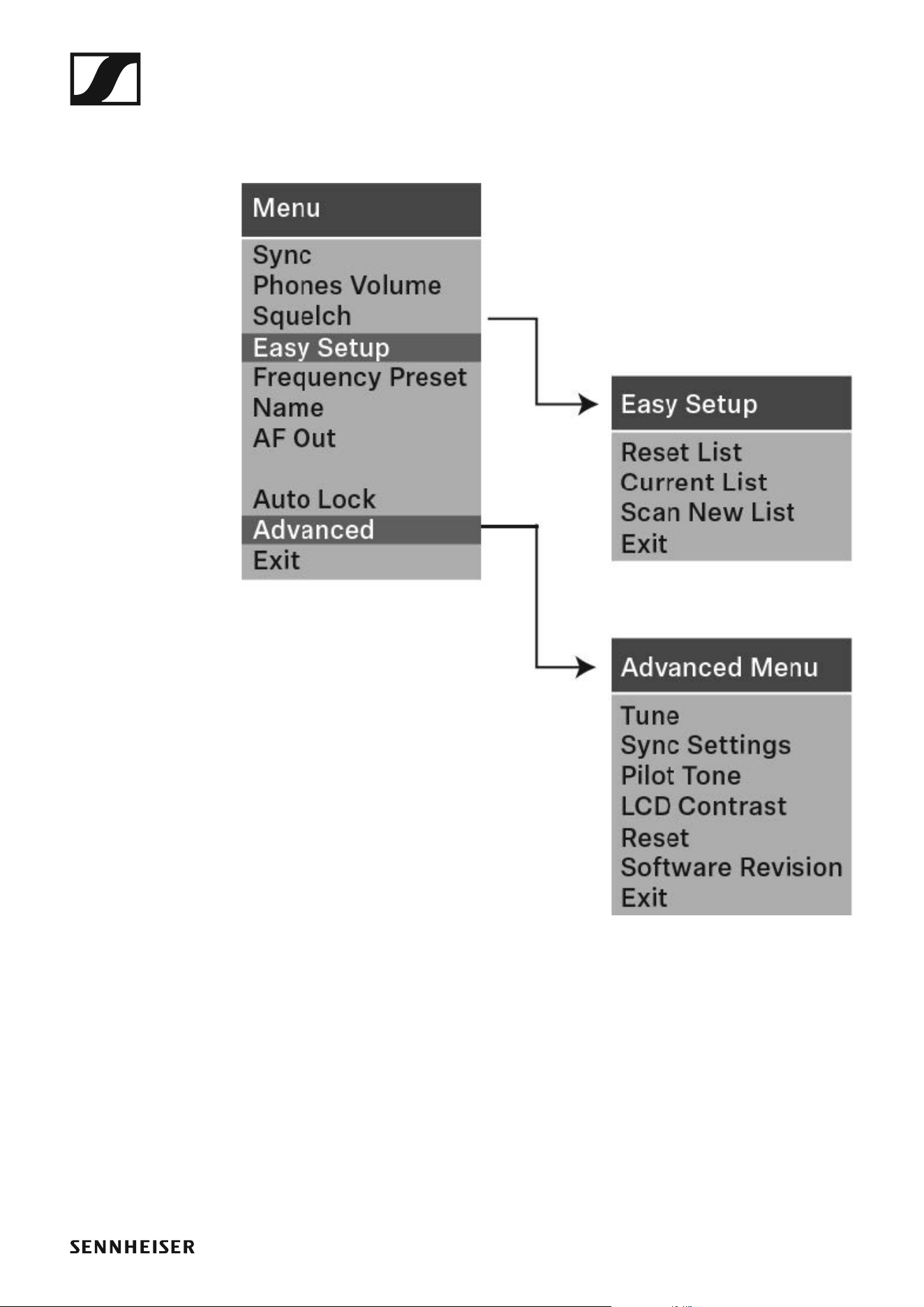
The figure shows the complete EK 500 G4 menu structure in an overview.

Using the EK 500 G4
57
Sync menu item
In the Sync menu item you can synchronize ew 500 P G4 series transmit-
ters and receivers.
For more information, see “Synchronizing devices”.
Phones Volume menu item
In the Phones Volume menu item you can adjust the volume for the head-
phone output.
Setting range: 1 to 5
You can also adjust the headphone volume in the standard display with the
UP and DOWN buttons. See “Volume control of the PHONES socket”.
Using the EK 500 G4
58
Squelch menu item
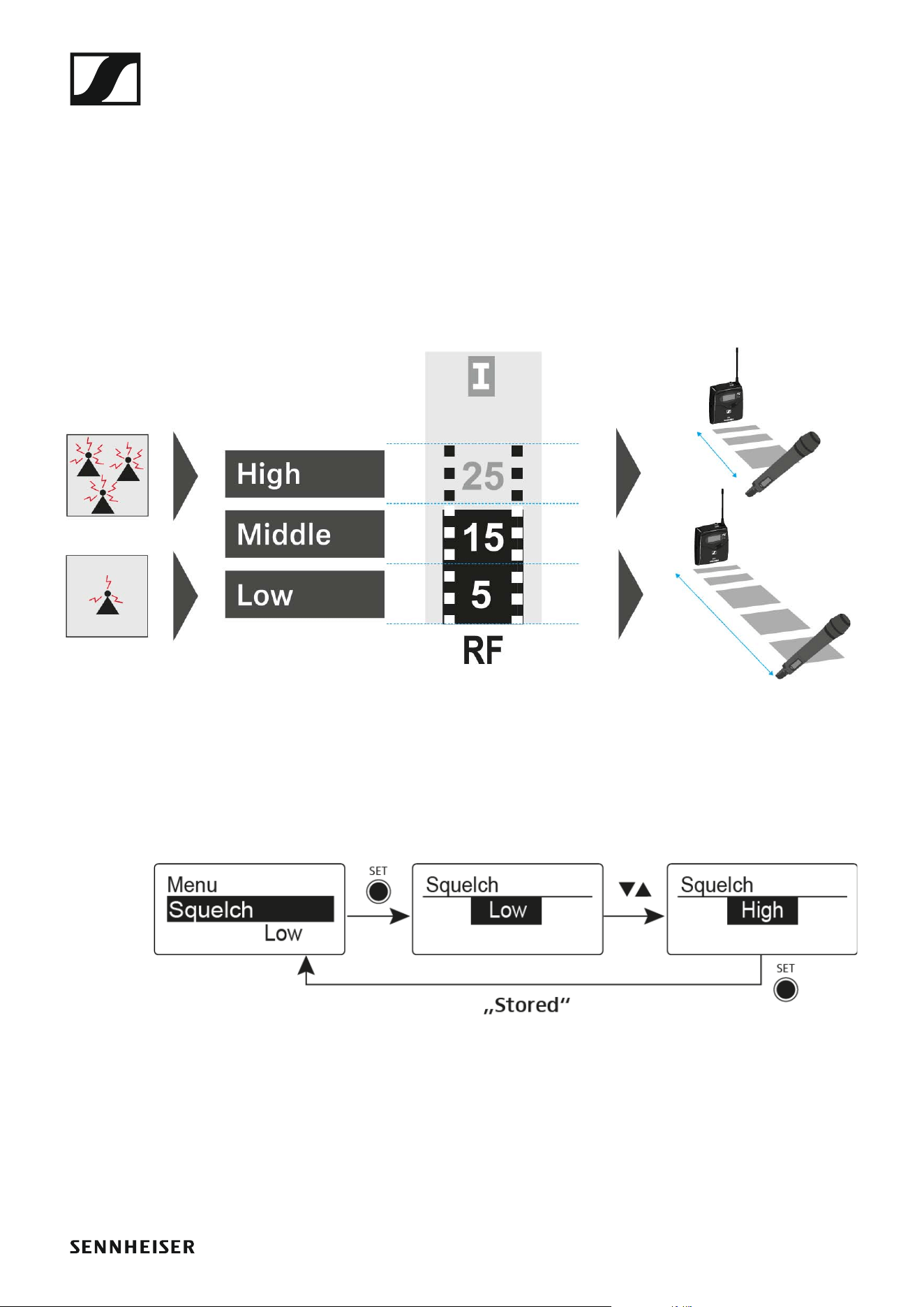
You can adjust the squelch threshold in the Squelch menu item.
Setting range:
• Low >> 5 dBμV
• Middle >> 15 dBμV
• High >> 25 dBμV
The squelch threshold is displayed on the home screen in the RF signal lev-
el area.
►
To open the Squelch menu item:
▷ On the home screen, press the SET button to open the operating menu.
▷ Press the UP or DOWN button until the Squelch menu item appears in
the selection frame.
▷ Press the SET button to open the menu item.
▷ Adjust the settings as desired.
►
▷ Press the SET button to save the changes you made to the settings.
or
▷ Press the ON/OFF button to cancel the entry without saving the set-
tings.

Using the EK 500 G4
59
CAUTION
Risk of hearing and material damage
If you set the squelch threshold to a very low value, a very loud hissing
noise can occur in the receiver. This hissing noise can be loud enough to
cause hearing damage or overload your system’s loudspeakers.
▷ Before adjusting the squelch threshold, set the volume of the audio out-
put to the minimum.
▷ Never change the squelch threshold during a live transmission.
Using the EK 500 G4
60
Easy Setup menu item
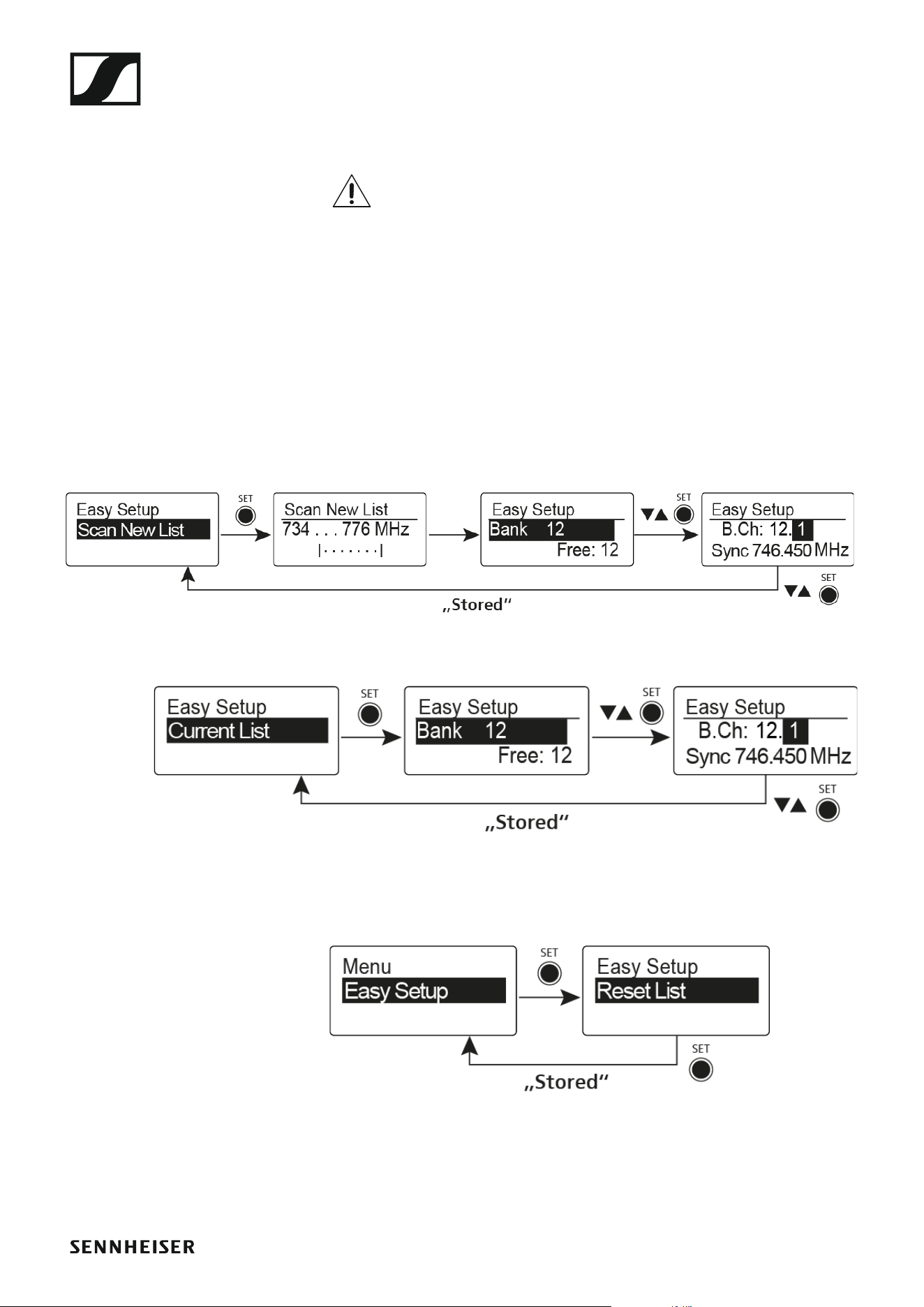
You can scan for unused frequencies using the Easy Setup menu item.
Switch off all transmitters before you perform the scan. If transmit-
ters are still switched on, they are detected as unavailable frequen-
cies and the frequencies that are actually available cannot then be
used.
To open the Easy Setup menu item:
▷ On the home screen, press the SET button to open the operating menu.
▷ Press the UP or DOWN button until the Easy Setup menu item appears
in the selection frame.
▷ Press the SET button to open the menu item.
▷ Adjust the settings as desired.
• Scan New List: Automatically searches for unused receiving frequen-
cies (frequency preset scan):
►
• Current List: Selects an unused frequency preset:
►
• Reset List: Releases all occupied frequency presets and selects an
unused frequency preset:
►
▷ Press the SET button to save the changes you made to the settings.
or
▷ Press the ON/OFF button to cancel the entry without saving the set-
tings.
Using the EK 500 G4
61
Frequency Preset menu item
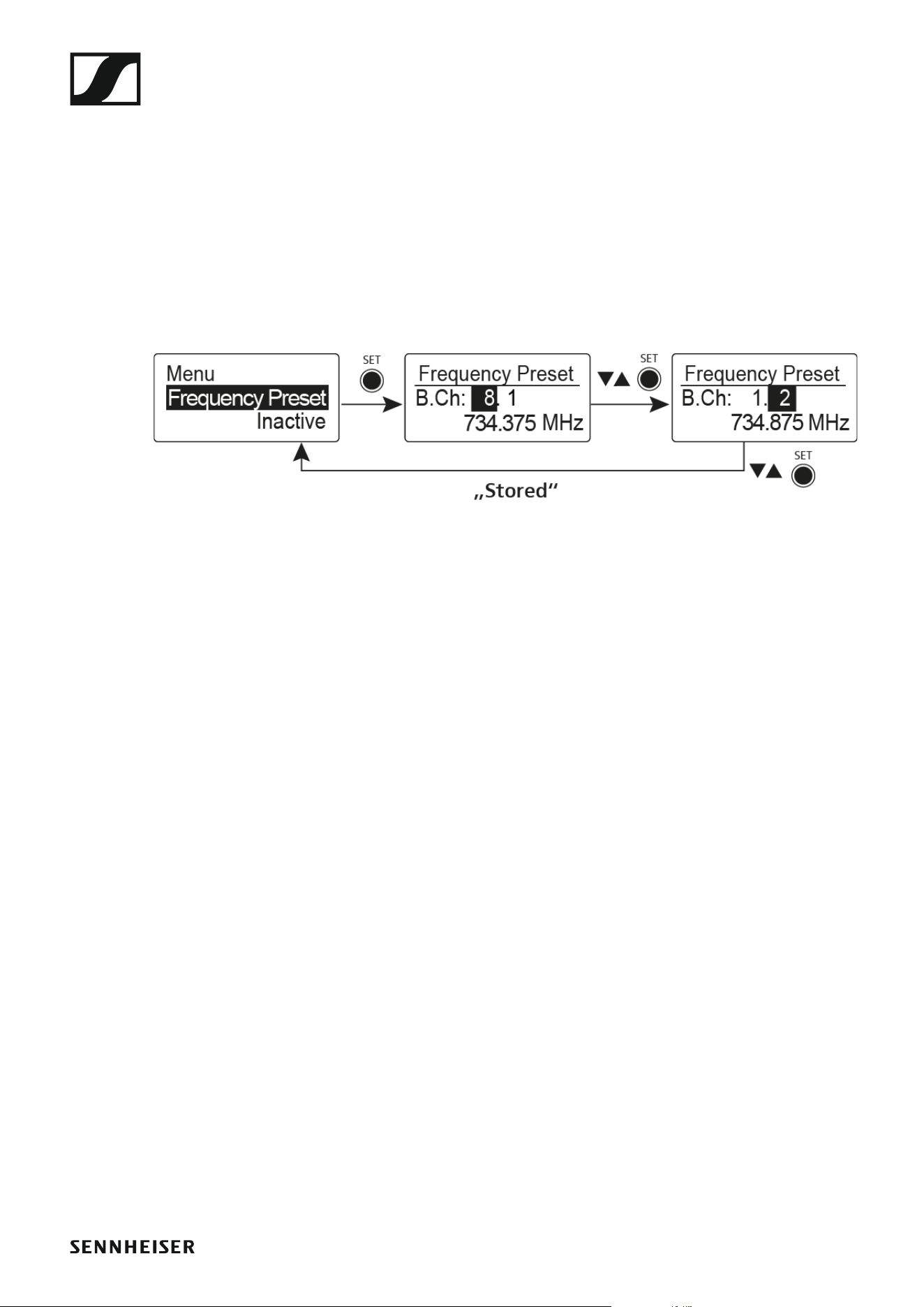
In the Frequency Preset menu item, you can adjust the receiving frequen-
cy of the receiver by adjusting the frequency bank and the channel.
To open the Frequency Preset menu item:
▷ On the home screen, press the SET button to open the operating menu.
▷ Press the UP or DOWN button until the Frequency Preset menu item
appears in the selection frame.
▷ Press the SET button to open the menu item.
▷ Adjust the settings as desired.
►
▷ Press the SET button to save the changes you made to the settings.
or
▷ Press the ON/OFF button to cancel the entry without saving the set-
tings.
Using the EK 500 G4
62
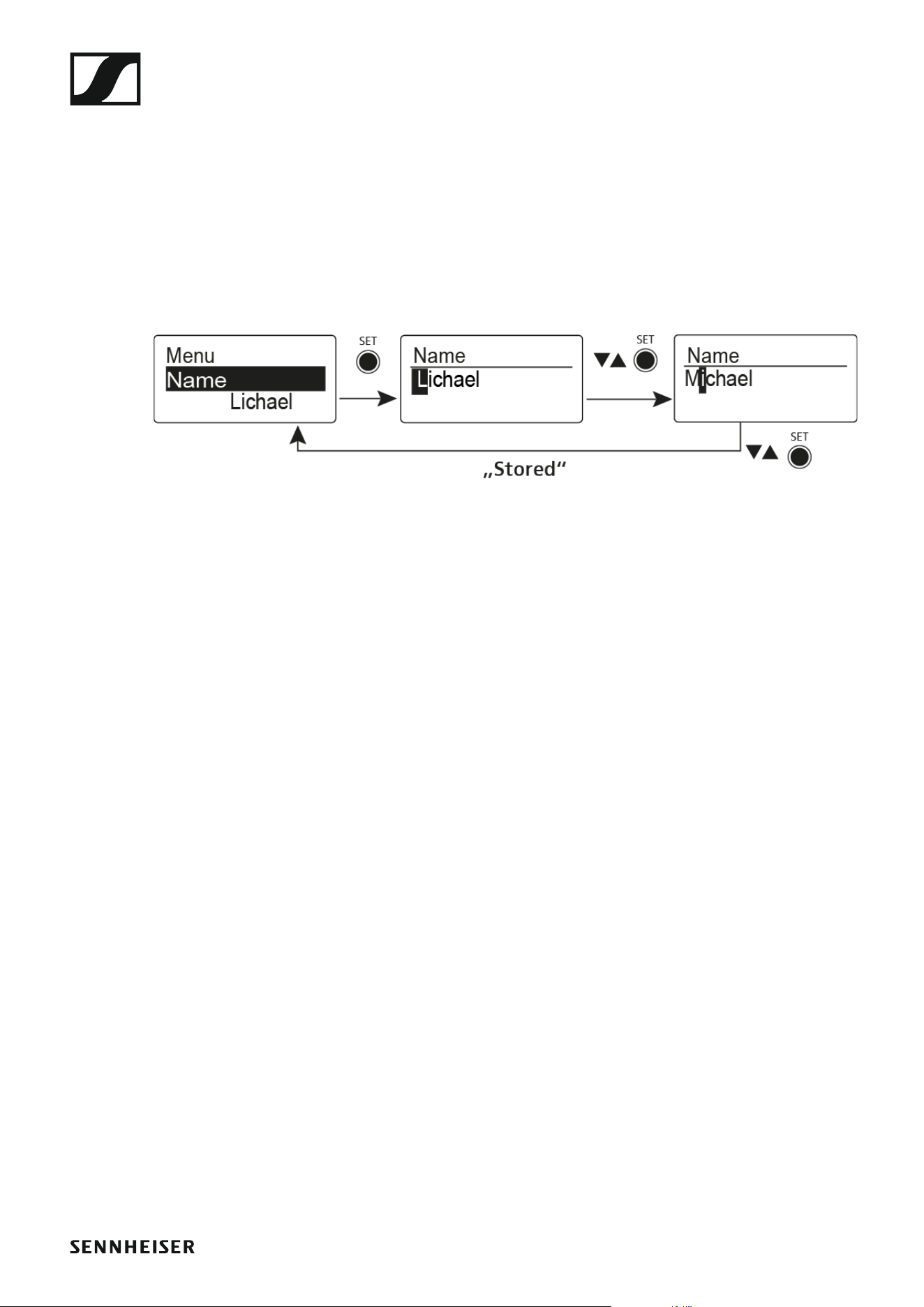
Name menu item
In the Name menu item you can enter a name for the radio link.
To open the Name menu item:
▷ On the home screen, press the SET button to open the operating menu.
▷ Press the UP or DOWN button until the Name menu item appears in the
selection frame.
▷ Press the SET button to open the menu item.
▷ Adjust the settings as desired.
►
▷ Press the SET button to save the changes you made to the settings.
or
▷ Press the ON/OFF button to cancel the entry without saving the set-
tings.
Using the EK 500 G4
63
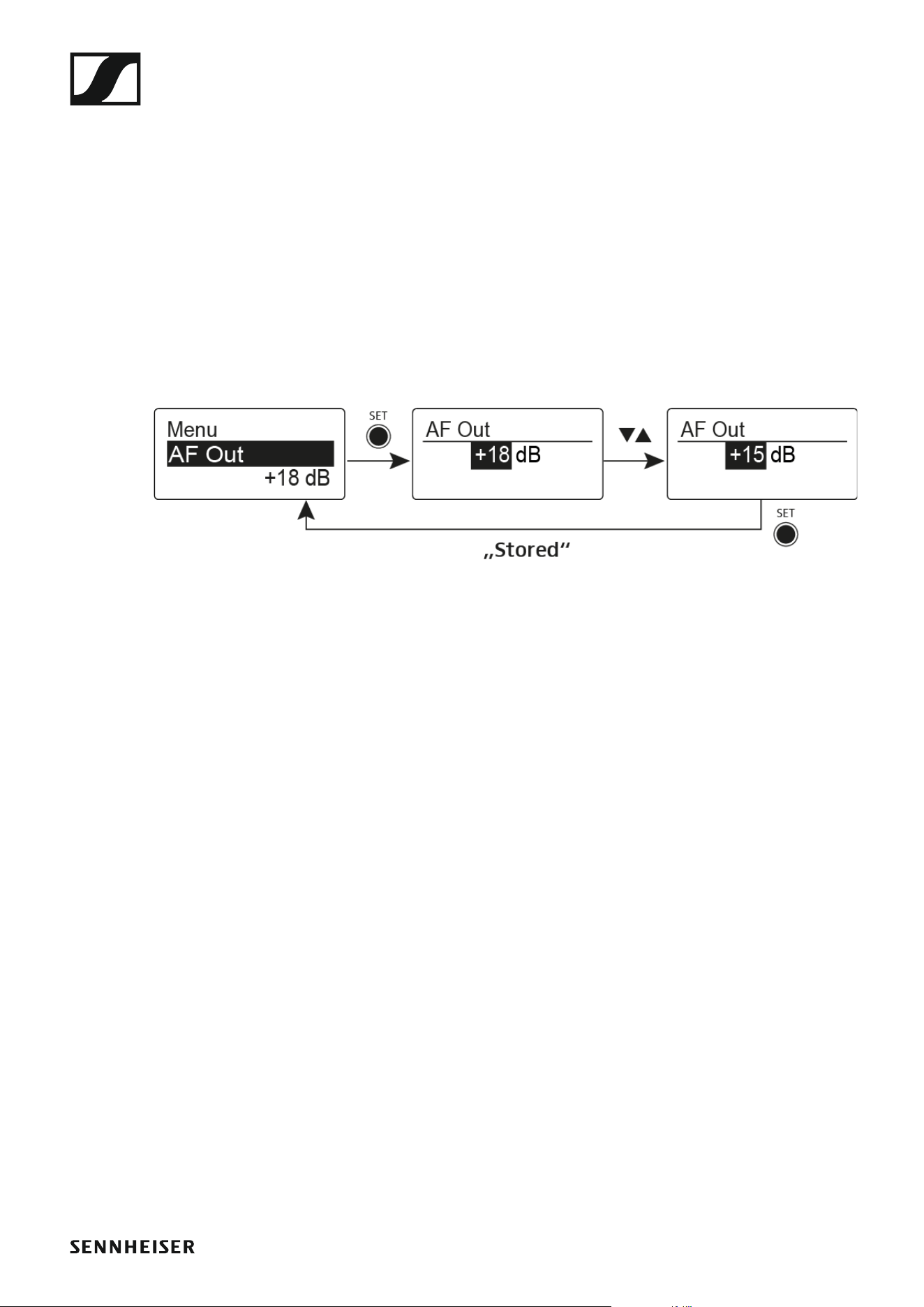
AF Out menu item
In the AF Out menu item you can adjust the level of the line audio output
based on the level of the connected camera.
Setting range:
• –24 dB to +18 dB in 6 dB steps
To open the AF Out menu item:
▷ On the home screen, press the SET button to open the operating menu.
▷ Press the UP or DOWN button until the AF Out menu item appears in
the selection frame.
▷ Press the SET button to open the menu item.
▷ Adjust the settings as desired.
►
▷ Press the SET button to save the changes you made to the settings.
or
▷ Press the ON/OFF button to cancel the entry without saving the set-
tings.
Using the EK 500 G4
64
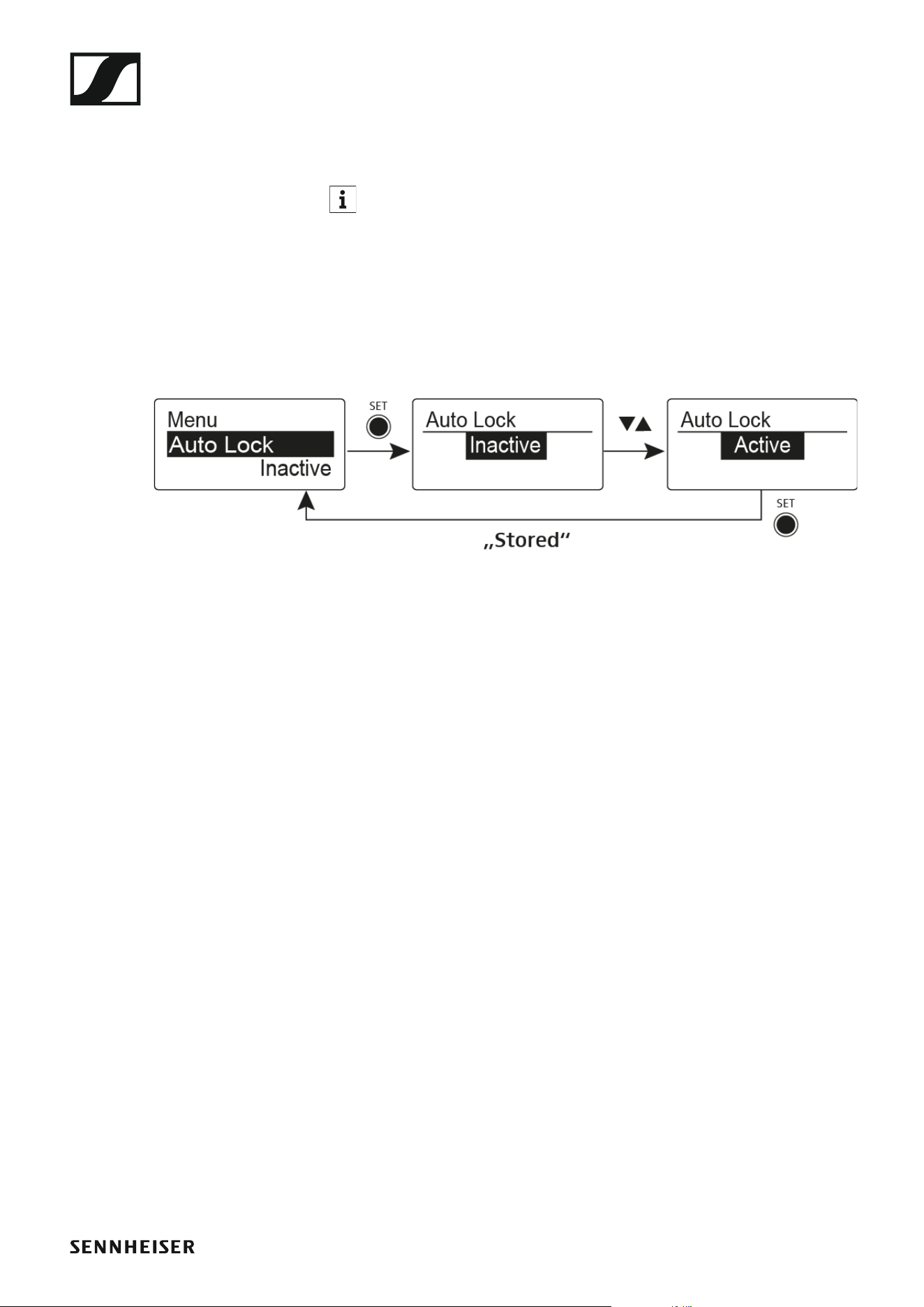
Auto Lock menu item
In the Auto Lock menu item you can activate or deactivate the auto lock-
off function.
You can find information about temporarily deactivating the lock-off
function during operation under “Lock-off function”.
To open the Auto Lock menu item:
▷ On the home screen, press the SET button to open the operating menu.
▷ Press the UP or DOWN button until the Auto Lock menu item appears
in the selection frame.
▷ Press the SET button to open the menu item.
▷ Adjust the settings as desired.
►
▷ Press the SET button to save the changes you made to the settings.
or
▷ Press the ON/OFF button to cancel the entry without saving the set-
tings.

Using the EK 500 G4
65
Advanced menu item
In the Advanced submenu you can configure enhanced settings.
To open the Advanced submenu:
▷ On the home screen, press the SET button to open the operating menu.
▷ Press the UP or DOWN button until the Advanced menu item appears
in the selection frame.
▷ Press the SET button to open the menu item.
The following sub-items are available:
Adjusting the receiving frequency for the frequency bank U
▷ See “Advanced -> Tune menu item”
Activating/deactivating the parameters to be transferred to the trans-
mitters
▷ See “Advanced -> Sync Settings menu item”
Activating/deactivating the pilot tone evaluation
▷ See “Advanced -> Pilot Tone menu item”
Adjusting the contrast of the display panel
▷ See “Advanced -> LCD Contrast menu item”
Resetting the receiver
▷ See “Advanced -> Reset menu item”
Displaying the current software revision
▷ See “Advanced -> Software Revision menu item”
Using the EK 500 G4
66
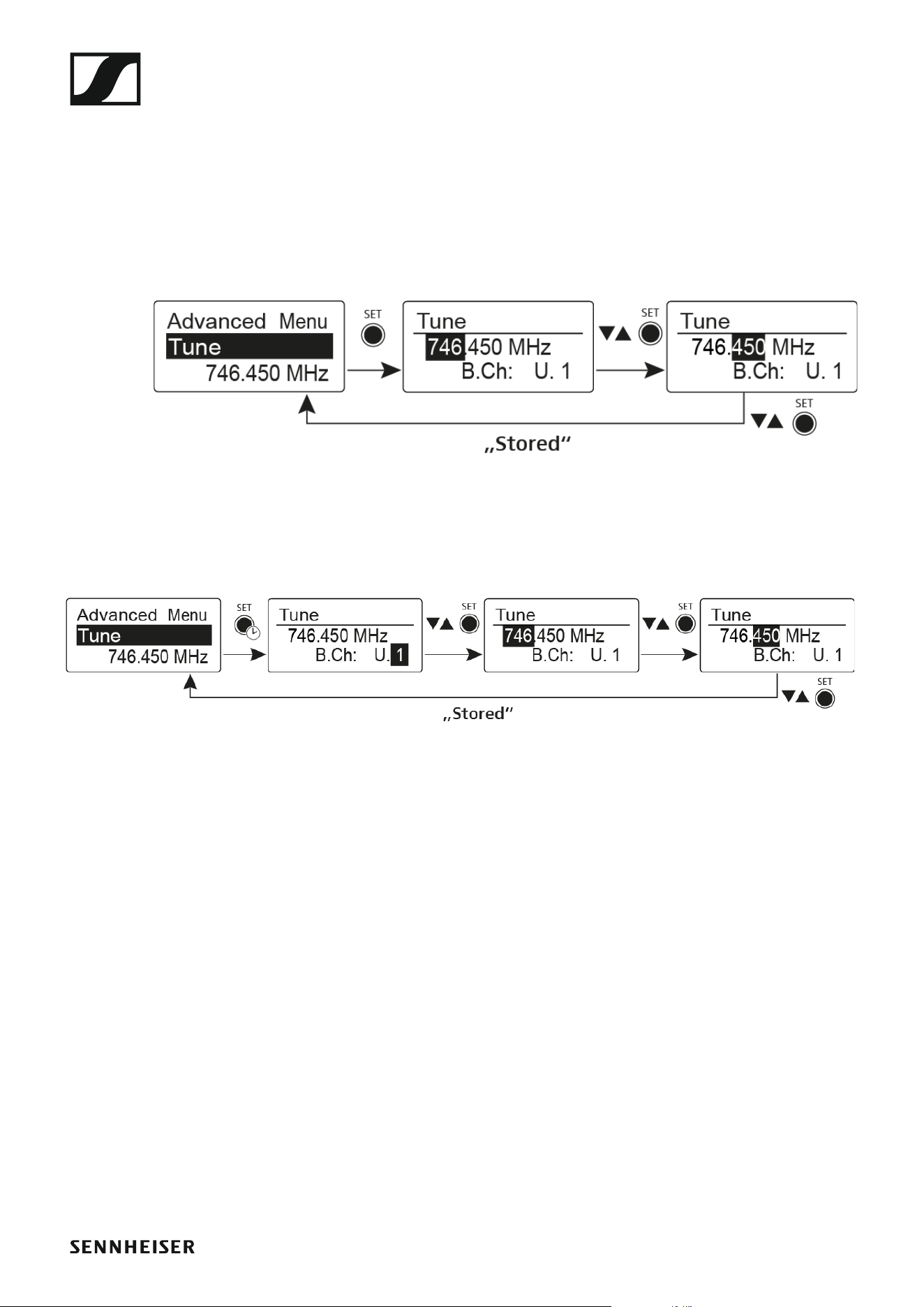
Advanced -> Tune menu item
In the Tune menu item of the Advanced submenu, you can configure the
receiving frequencies for the U frequency bank.
Only adjusting the frequency
▷ Open the Tune menu item in the Advanced menu.
▷ Adjust the settings.
►
Setting the channel and frequency
▷ Select the menu item and call it up by holding down the SET button un-
til the channel selection appears.
►
Using the EK 500 G4
67
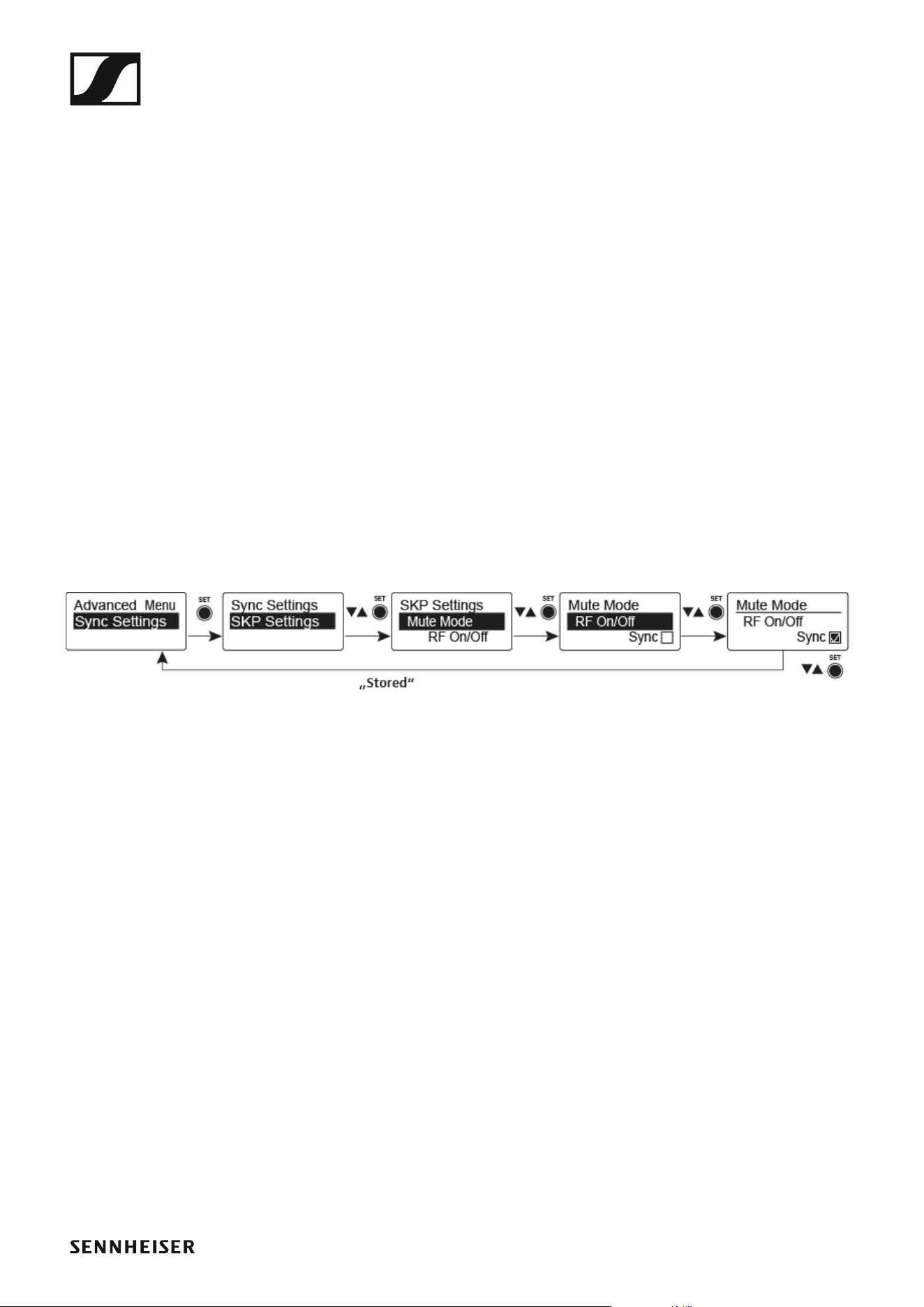
Advanced -> Sync Settings menu item
In the Sync Settings menu item of the Advanced submenu, you can con-
figure the parameters to be sent to the transmitters and activate or deac-
tivate transmission The parameters are defined separately for the SK, SKM
and SKP.
You can activate/deactivate the following parameters:
•Sensitivity
•Auto Lock
•Mute Mode
•RF Power
• Phantom Power 48 V (only SKP 500 G4)
To configure a parameter and activate or deactivate transmission:
▷ Go to the parameter in question in the Advanced -> Sync Settings
menu.
▷ Press the SET button to open the sub-item.
▷ Press the UP and DOWN buttons to set the value.
▷ Press the SET button to save the setting.
▷ Press the UP and DOWN buttons to activate or deactivate the check
box.
When the check box is activated, the value will be transmitted during
synchronization. If it is deactivated, the value will not be transmitted.
▷ Press the SET button to save the setting.
Using the EK 500 G4
68
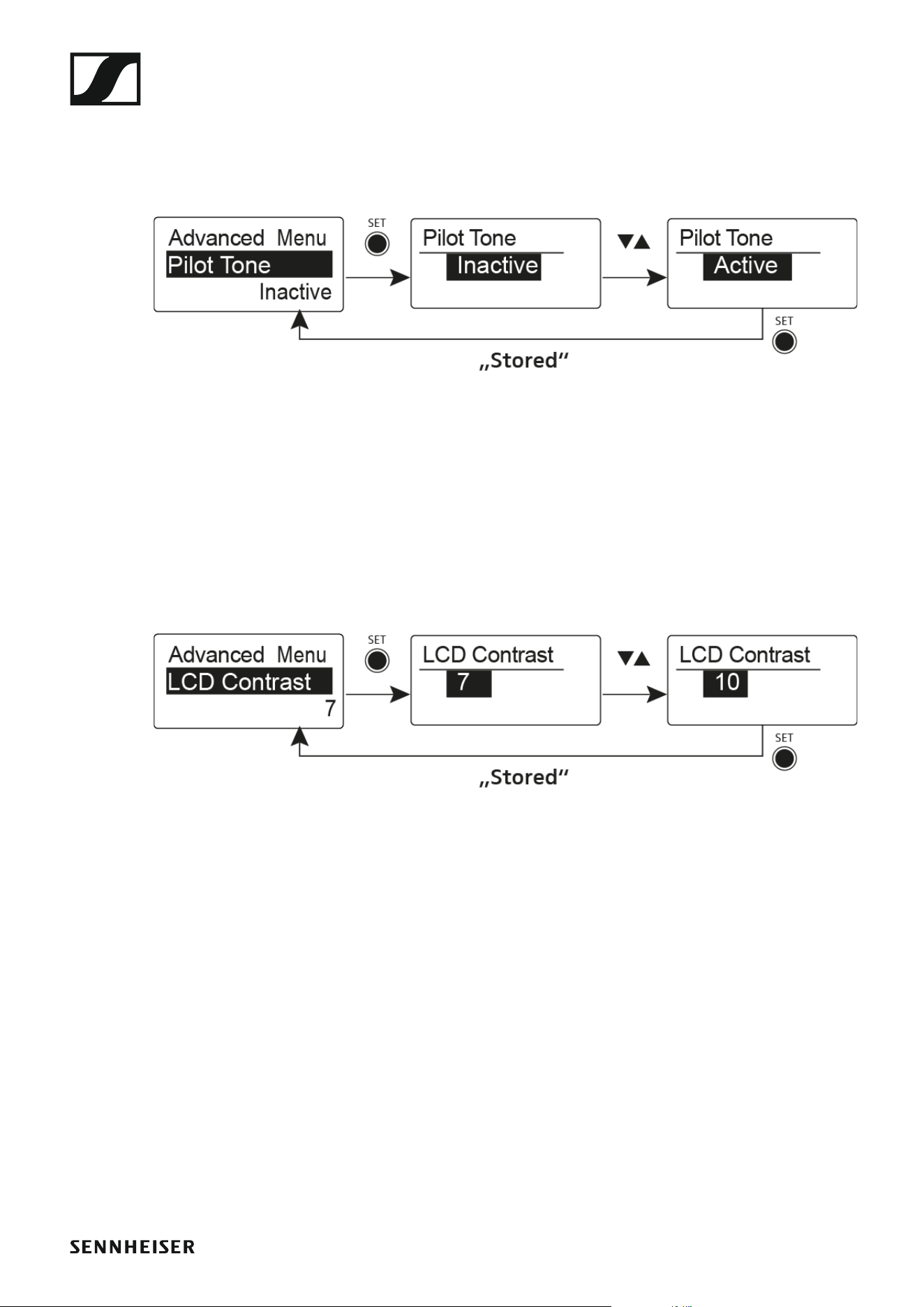
Advanced -> Pilot Tone menu item
In the Pilot Tone menu item of the Advanced submenu, you can activate
and deactivate the pilot tone evaluation.
►
The pilot tone has an inaudible frequency that is sent from the transmitter
and evaluated by the receiver. It supports the receiver’s squelch function.
Advanced -> LCD Contrast menu item
In the LCD Contrast menu item of the Advanced submenu, you can adjust
the display contrast of the display panel in 16 steps.
►
Using the EK 500 G4
69
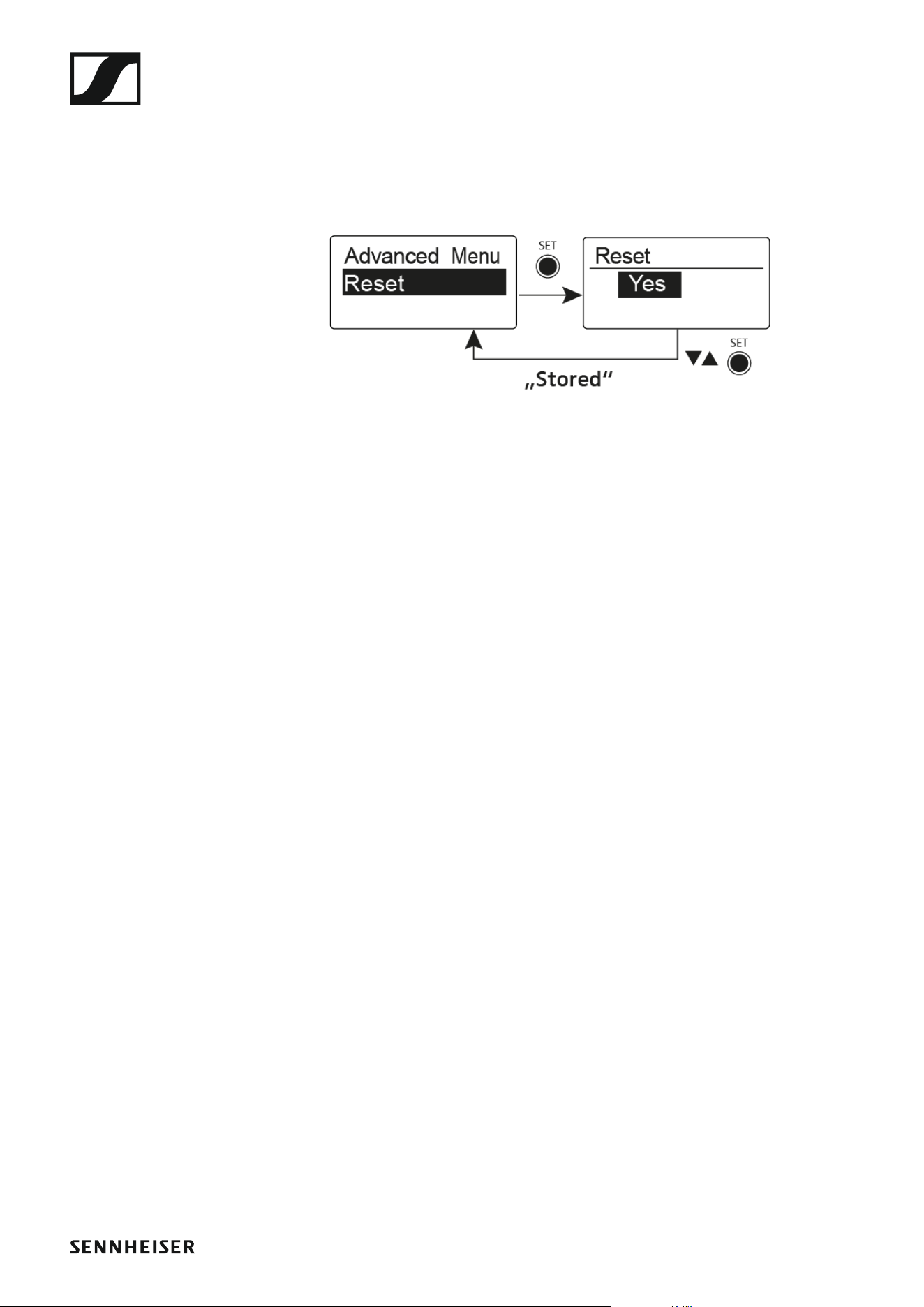
Advanced -> Reset menu item
In the Reset menu item of the Advanced submenu, you can reset the set-
tings of the receiver.
When you reset the diversity receiver, only the selected settings of the pilot
tone and the U frequency bank are retained.
►
Advanced -> Software Revision menu item
In the Software Revision menu item of the Advanced submenu, you can
display the current software version of the receiver.

Using the SKM 500 G4
71
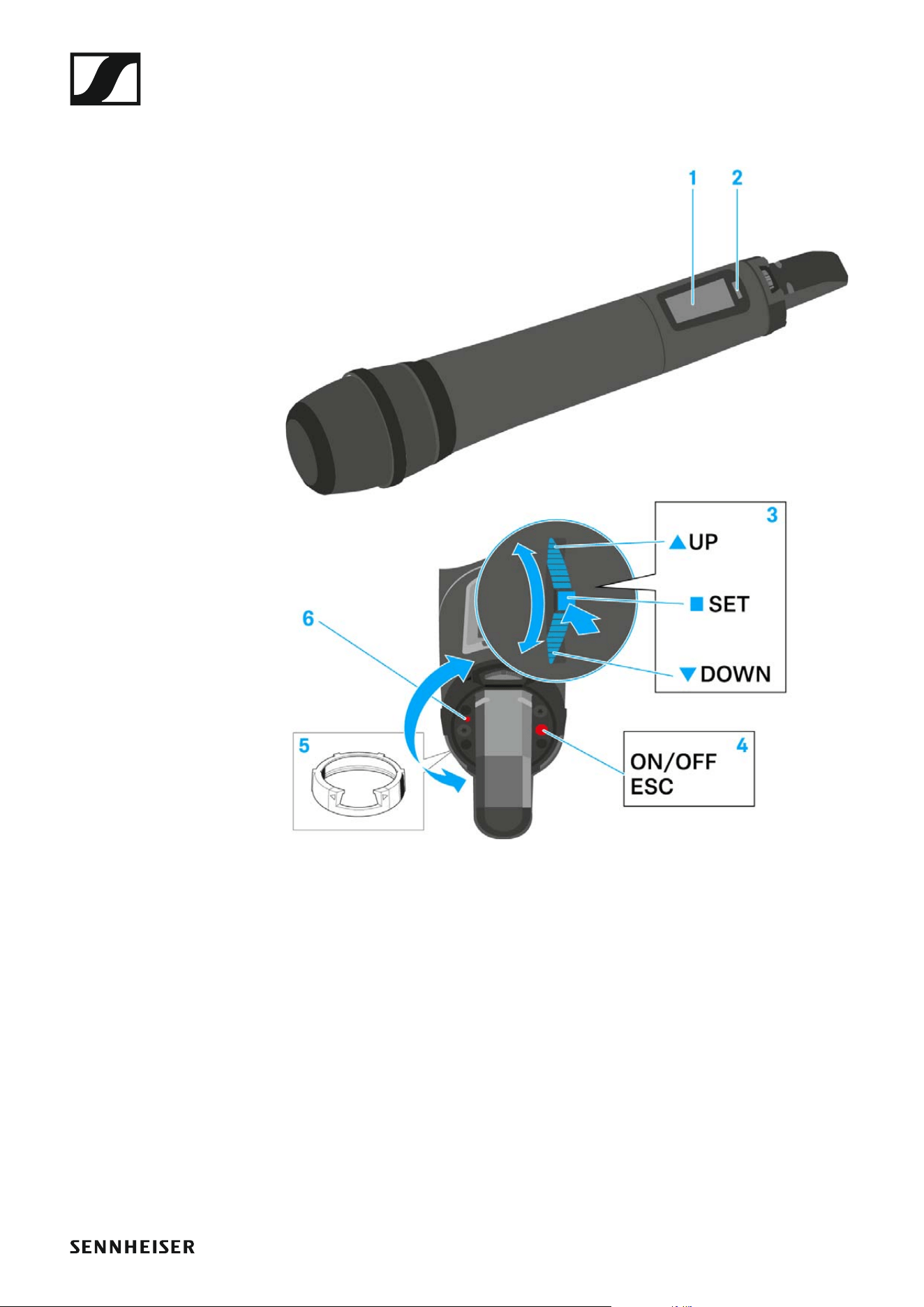
Operating elements of the SKM 500 G4 handheld
transmitter
►
1 Display panel
• See “Displays on the SKM 500 G4 handheld transmitter display pan-
el”
2 Infra-red interface
• See “Synchronizing devices”
3 DOWN, UP and SET multi-function switch
• See “Buttons for navigating the SKM 500 G4 menu”
4 ON/OFF button with ESC function in the operating menu
• Switch the transmitter on or off
See “Switching the SKM 500 G4 handheld transmitter on and off”
• Escape function in the menu
See “Buttons for navigating the SKM 500 G4 menu”
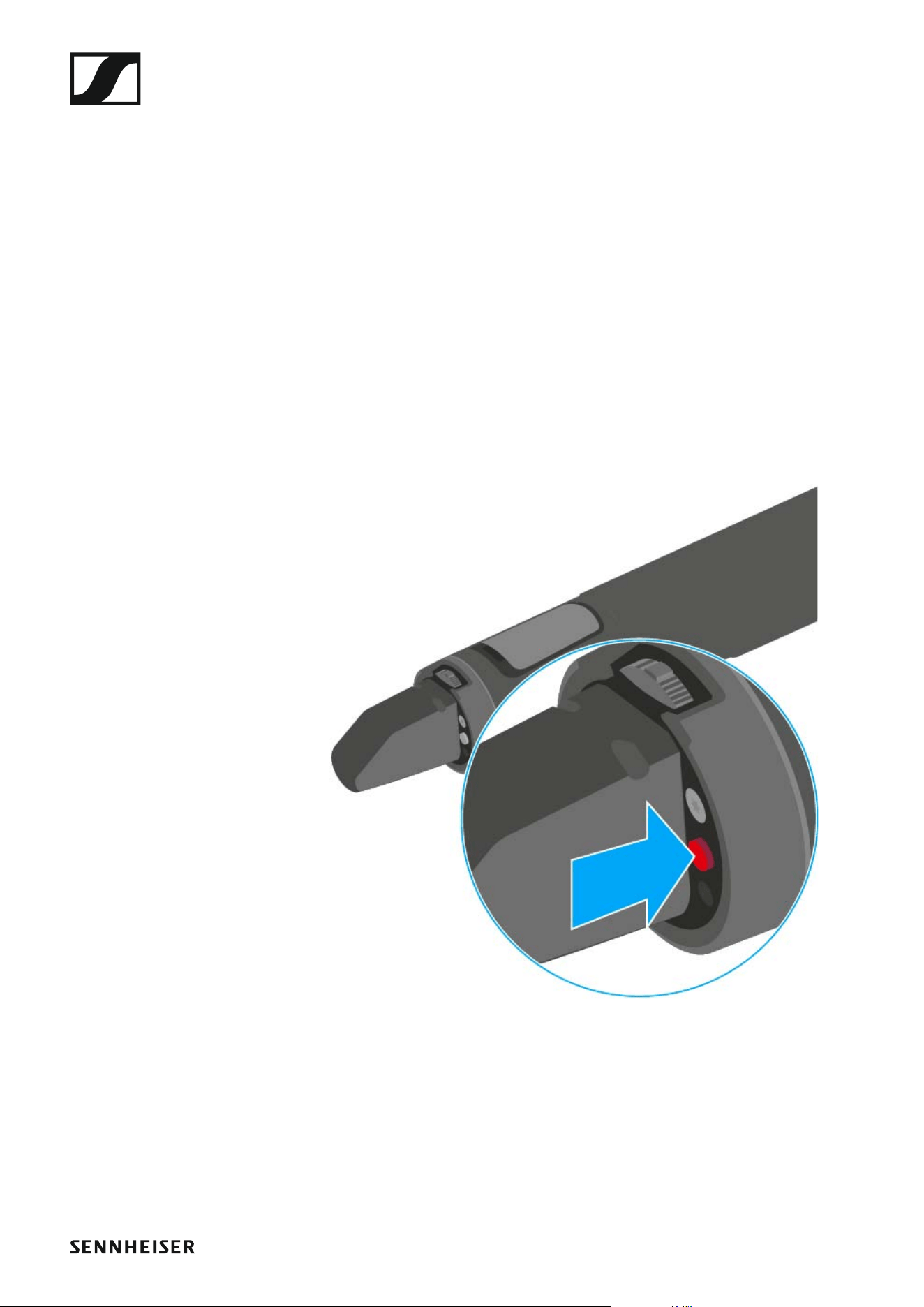
• Deactivating the RF signal
See “Deactivating the RF signal (RF mute)”
Using the SKM 500 G4
72
5 Colored ring
• Available in different colors (see “Additional accessories” and
“Changing the colored ring”)
• Can be turned to protect the multi-function switch
6 Operation and battery indicator, red LED
• illuminated = ON
See “Switching the SKM 500 G4 handheld transmitter on and off”
•flashing = LOW BATTERY
See “Inserting and removing the batteries/rechargeable batteries”
Switching the SKM 500 G4 handheld transmitter on
and off
To switch on the SKM 500 G4:
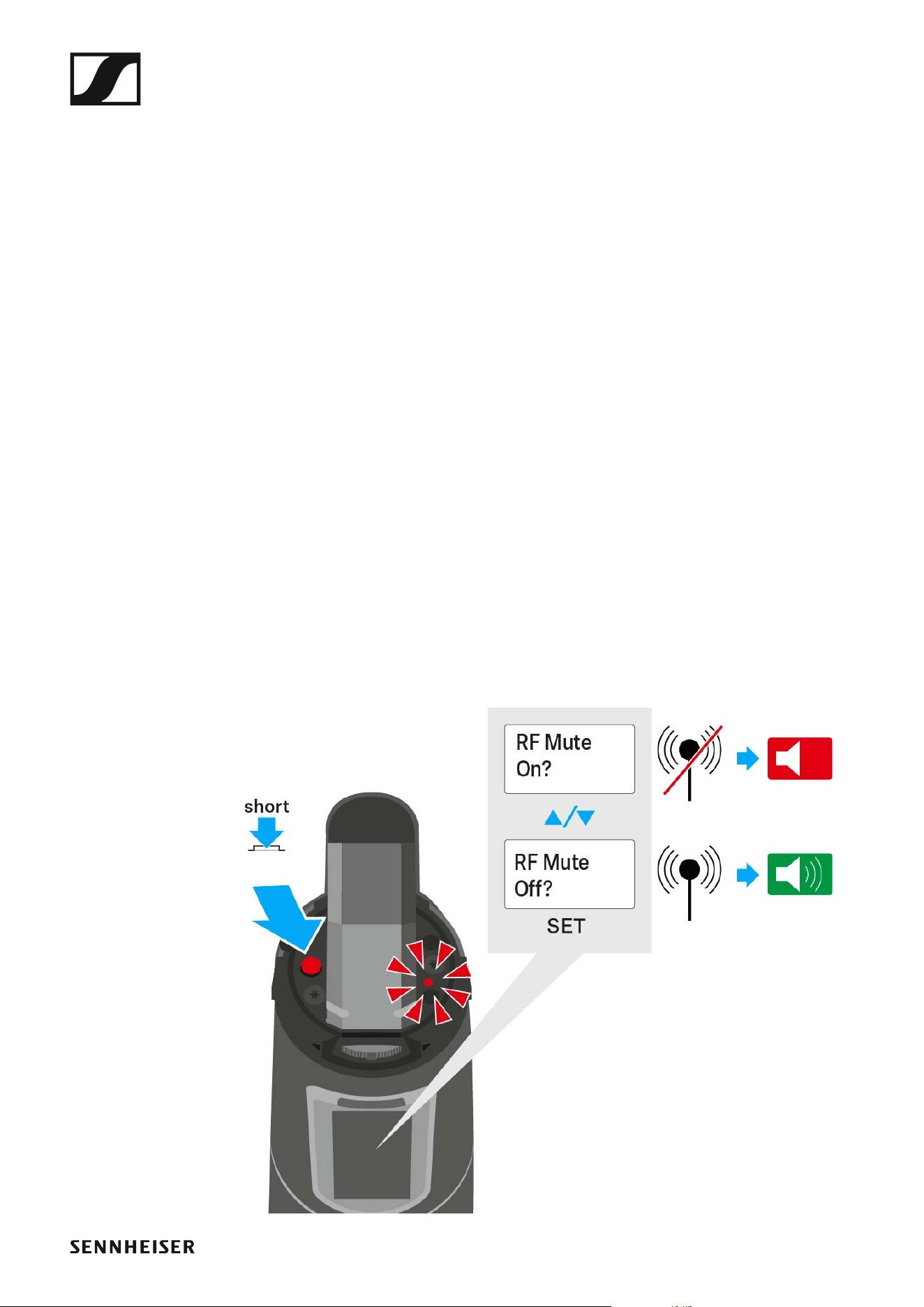
▷ Hold down the ON/OFF button until the Sennheiser logo appears on the
display.
►
To switch off the SKM 500 G4:
▷ Hold down the ON/OFF button until the display goes off.
Using the SKM 500 G4
73
Muting the handheld transmitter (AF mute)
The audio signal of the transmitter cannot be muted.
However, when you deactivate the RF signal no AF signal is output. See
“Deactivating the RF signal (RF mute)”.
Deactivating the RF signal (RF mute)
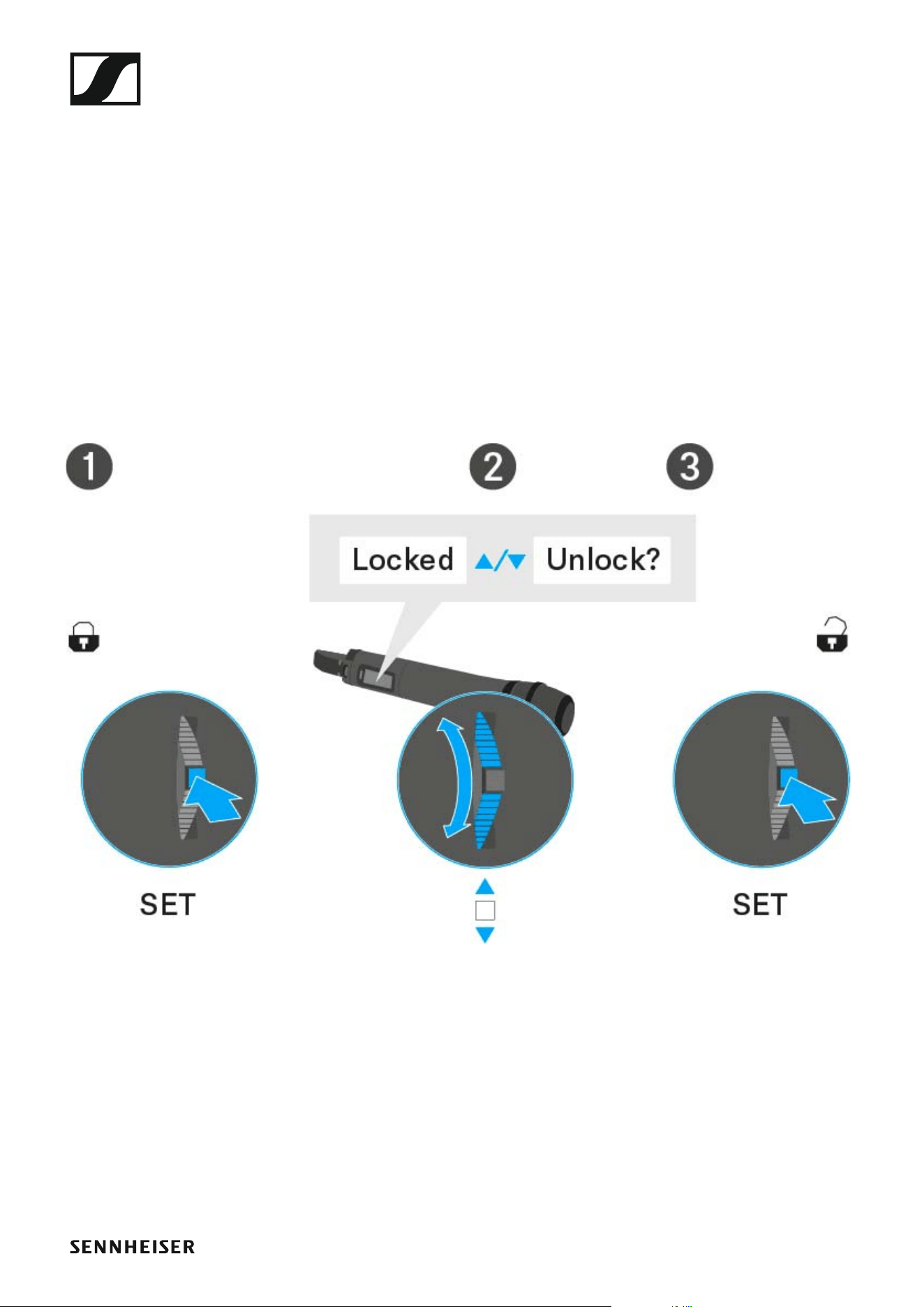
You can deactivate the RF signal with the ON/OFF button.
To deactivate the RF signal:
▷ Press the ON/OFF button.
RF Mute On? appears.
▷ Press the SET button.
The transmission frequency is displayed, however the wireless micro-
phone is not transmitting an RF signal. The transmission icon is not lit
(see “Displays on the SKM 500 G4 handheld transmitter display pan-
el”).
To activate the RF signal:
▷ Press the ON/OFF button.
RF Mute Off? appears.
▷ Press the SET button.
The transmission icon appears again (see “Displays on the
SKM 500 G4 handheld transmitter display panel”).
Using the SKM 500 G4
74
Lock-off function
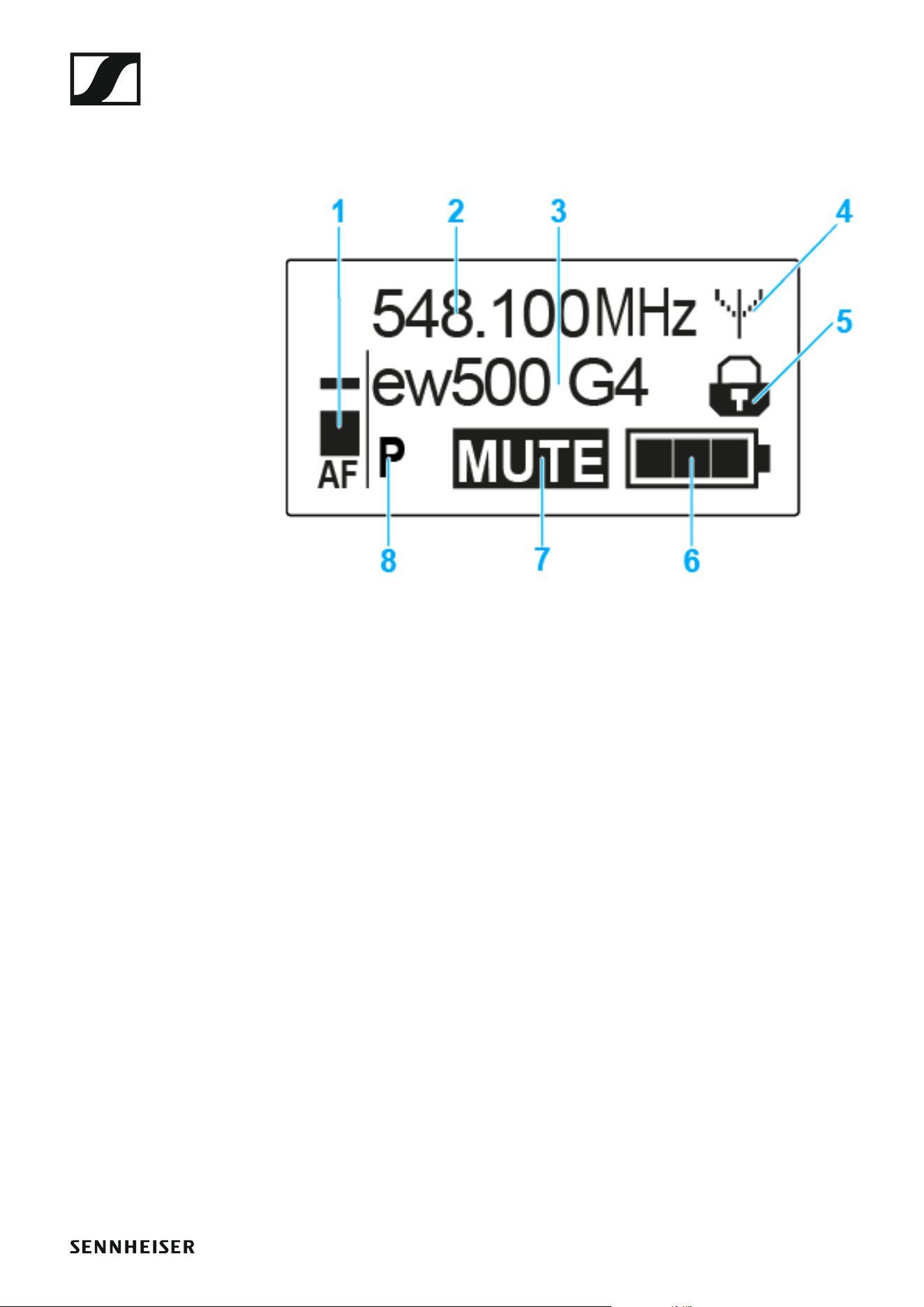
You can set the automatic lock-off function in the Auto lock menu (see
“Auto Lock menu item”).
When you have switched on the lock-off function, you will have to turn the
transmitter off and on again in order to operate it.
To temporarily deactivate the lock-off function:
▷ Press the SET button.
Locked appears in the display panel.
▷ Press the UP or DOWN button.
Unlock? appears in the display panel.
▷ Press the SET button.
Lock-off function is now temporarily deactivated.
Using the SKM 500 G4
75
Displays on the SKM 500 G4 handheld transmitter
display panel
You can view the following information on the transmitter display.
►
1 AF audio level
• Displays the audio level with peak hold function
• See “Sensitivity menu item”
2 Frequency
• Configured transmission frequency
• See “Frequency Preset menu item”
3 Name
• Freely selectable name of the receiver
• See “Name menu item”
4 Transmission icon
• RF signal is being transmitted
• See “Deactivating the RF signal (RF mute)”
5 Lock-off function
• Lock-off function is activated
• See “Auto Lock menu item”
6 Battery status
• See “Battery status”
7 MUTE muting function
• The audio signal is muted
• See “Muting the handheld transmitter (AF mute)”
8 P pilot tone
• Pilot tone transmission is activated
• See “Advanced > Pilot Tone menu item”
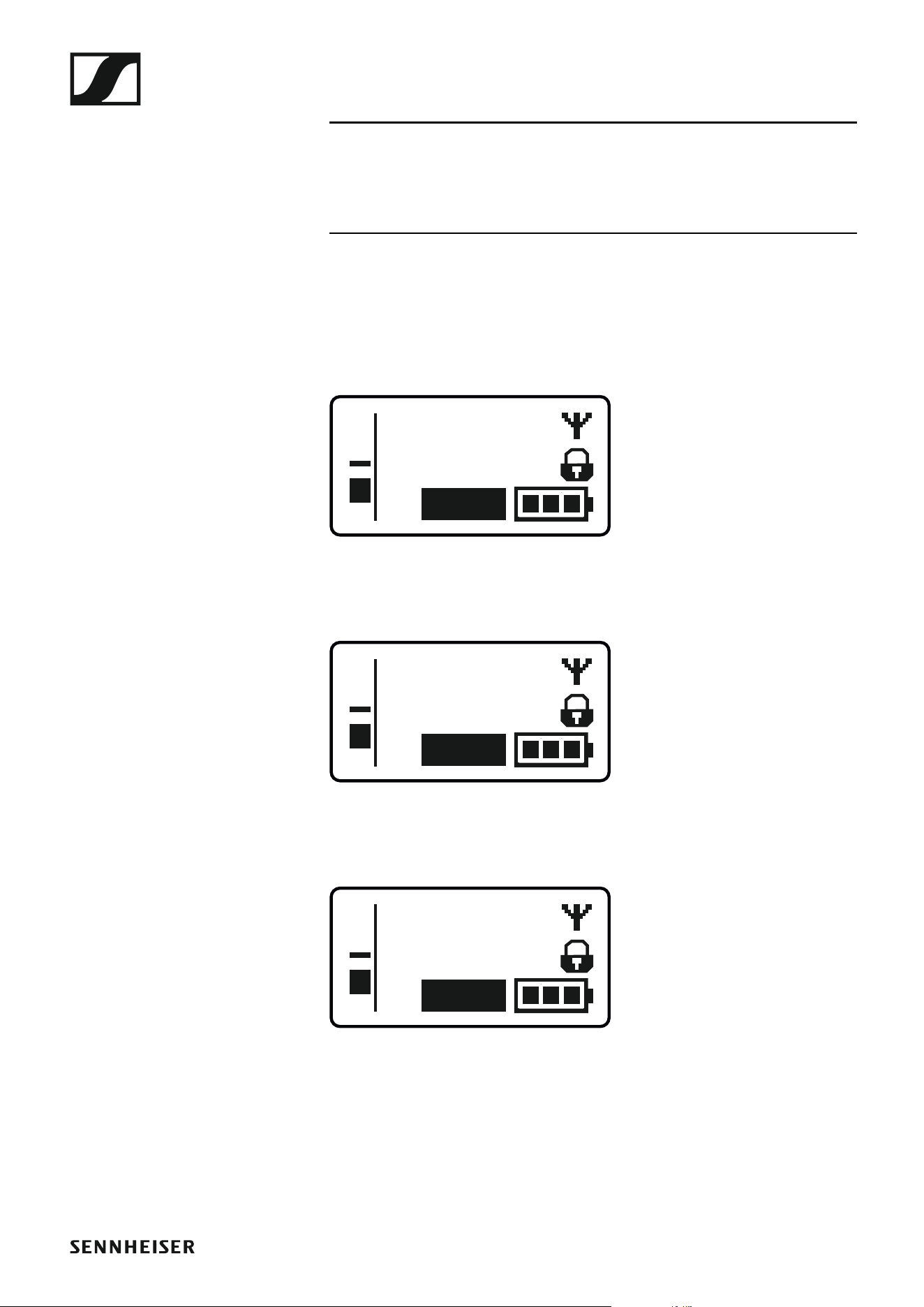
Using the SKM 500 G4
76
>> “Buttons for navigating the SKM 500 G4 menu”
>> “Setting options in the menu”
Select a standard display
▷ Move the multi-function switch to select a standard display:
Frequency/Name standard display
►
Channel/Frequency standard display
►
Name/Channel standard display
►
ew500 G4
MHz
548.100
MUTE
P
AF
MHz
548.100
B.Ch: 20.12
MUTE
P
AF
B.Ch: 20.12
MUTE
P
AF
ew500 G4

Using the SKM 500 G4
77
Buttons for navigating the SKM 500 G4 menu
Navigating through the menu
To open the menu:
▷ Press the SET button.
The operating menu is shown on the transmitter display panel.
To open a menu item:
▷ Press the UP or DOWN buttons to navigate through the individual
menu items.
▷ Press the SET button to open the selected menu item.
“Operating elements of the SKM 500 G4 handheld transmitter”
Making changes in a menu item
After you open a menu item, you can make changes as follows:
▷ Press the UP or DOWN buttons to set the displayed value.
▷ Press the SET button to save the setting.
▷ Press the ESC (ON/OFF) button to leave the menu item without saving
the setting.
“Operating elements of the SKM 500 G4 handheld transmitter”
>> “Displays on the SKM 500 G4 handheld transmitter display panel”
>> “Setting options in the menu”

Using the SKM 500 G4
78
Setting options in the menu
In the SKM 500 G4 menu, you can configure the following settings.
Adjusting the input sensitivity
▷ See “Sensitivity menu item”
Setting the frequency bank and the channel
▷ See “Frequency Preset menu item”
Entering a freely selectable name
▷ See “Name menu item”
Activating/deactivating the automatic lock-off function
▷ See “Auto Lock menu item”
Configuring enhanced settings in the Advanced Menu:
• Adjusting the transmission frequencies for the U frequency bank
• Configuring the transmission power
• Activating/deactivating the pilot tone evaluation
• Adjusting the contrast of the display panel
• Resetting the transmitter
• Displaying the current software revision
▷ See “Advanced menu item”
Using the SKM 500 G4
79
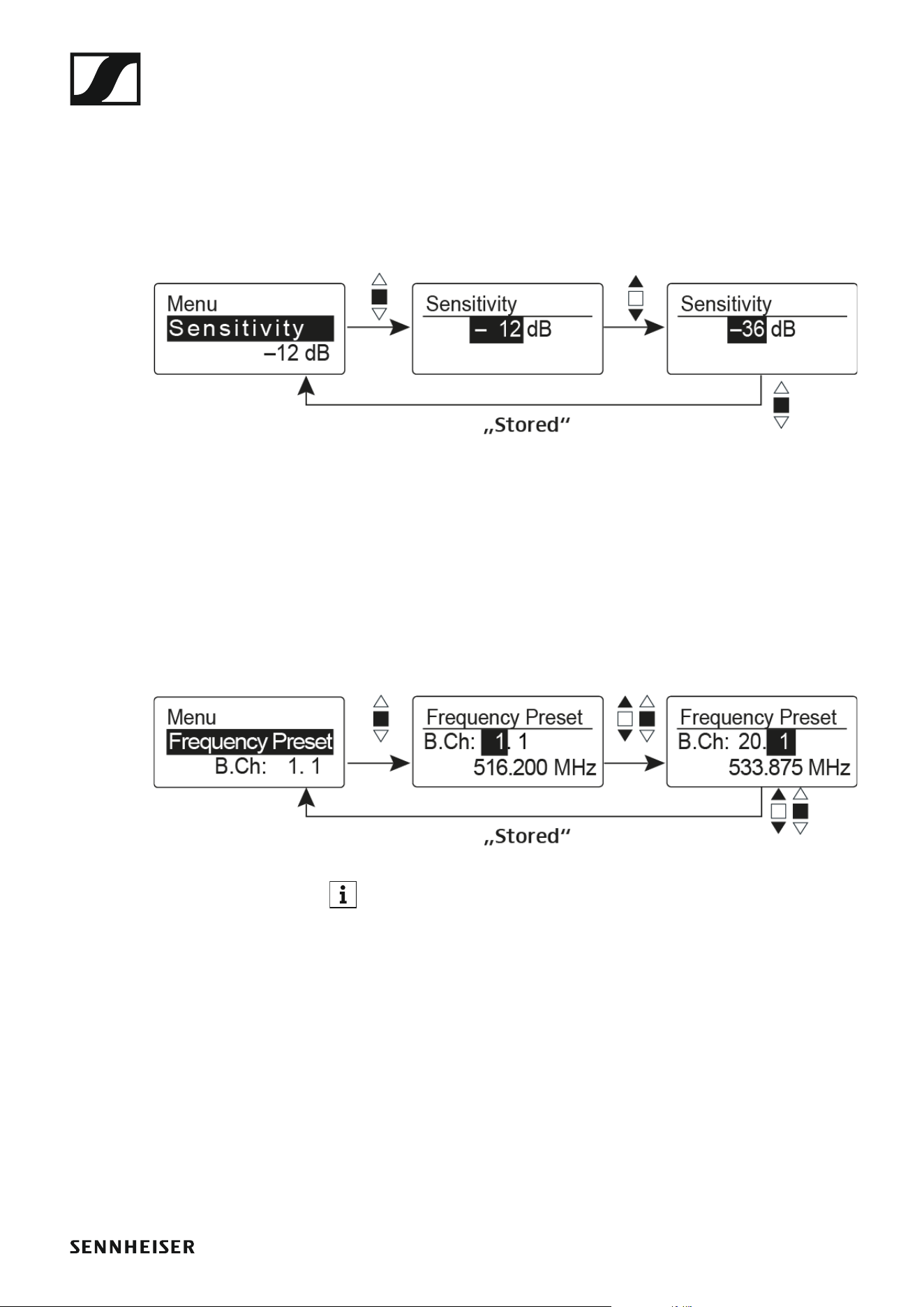
Sensitivity menu item
• Adjusting the input sensitivity – AF audio level
Setting range: 0 dB to -48 dB in 6 dB steps
The AF audio level is also displayed when the wireless microphone is mut-
ed, e.g. to check the sensitivity before a live broadcast.
►
Recommended presets:
• Loud music/vocals: -48 to -18 dB
• Moderation: -18 to -12 dB
• Interviews: -12 to 0 dB
Frequency Preset menu item
• Manually selecting a frequency bank and channel
►
While you work in the Frequency Preset menu, the RF signal is deac-
tivated.
Please note when creating multi-channel systems:
Only the factory-preset frequencies within one frequency bank are inter-
modulation-free. The wireless microphone and receiver must be set to the
same frequency. Be sure to note the information on frequency selection
under “Establishing a radio link”.
Using the SKM 500 G4
80
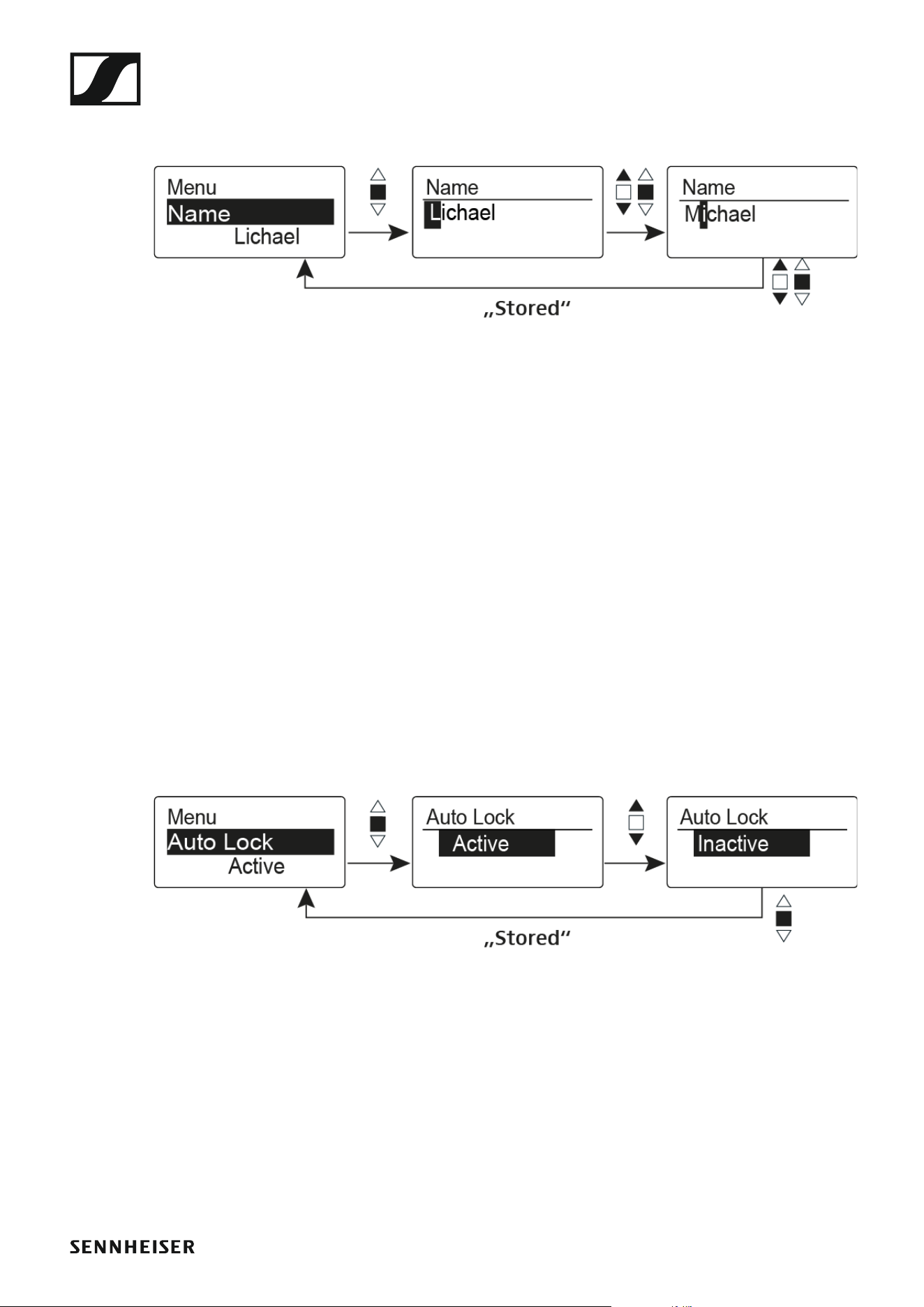
Name menu item
• Entering names
►
In the Name menu item you can enter any name you want for the wireless
microphone (e.g. the names of the musicians).
The name can be shown in the Frequency/Name and Name/Channel stan-
dard displays.
The names are a maximum of 8 characters:
• All letters except umlauts.
• Numbers from 0 to 9
• Special characters and spaces
Enter the names as follows:
▷ Move the multi-function switch to select a character.
▷ Press the multi-function switch to jump to the next space or to save the
name you have entered once it is complete.
Auto Lock menu item
• Switching the automatic lock-off function on and off
►
This lock prevents the wireless microphone from being unintentionally
switched off and also prevents any unintentional changes to the transmit-
ter’s configuration. In the current standard display, the lock icon shows
whether the lock-off function is currently switched on.
You can find information about using the lock-off function under “Lock-off
function”.

Using the SKM 500 G4
81
Advanced menu item
In the Advanced submenu you can configure enhanced settings.
The following sub-items are available:
Adjusting the transmission frequencies for the U frequency bank
▷ See “Advanced > Tune menu item”
Configuring the transmission power
▷ See “Advanced > RF Power menu item”
Activating/deactivating the pilot tone evaluation
▷ See “Advanced > Pilot Tone menu item”
Adjusting the contrast of the display panel
▷ See “Advanced > LCD Contrast menu item”
Resetting the transmitter
▷ See “Advanced > Reset menu item”
Displaying the current software revision
▷ See “Advanced > Software Revision menu item”
Using the SKM 500 G4
82
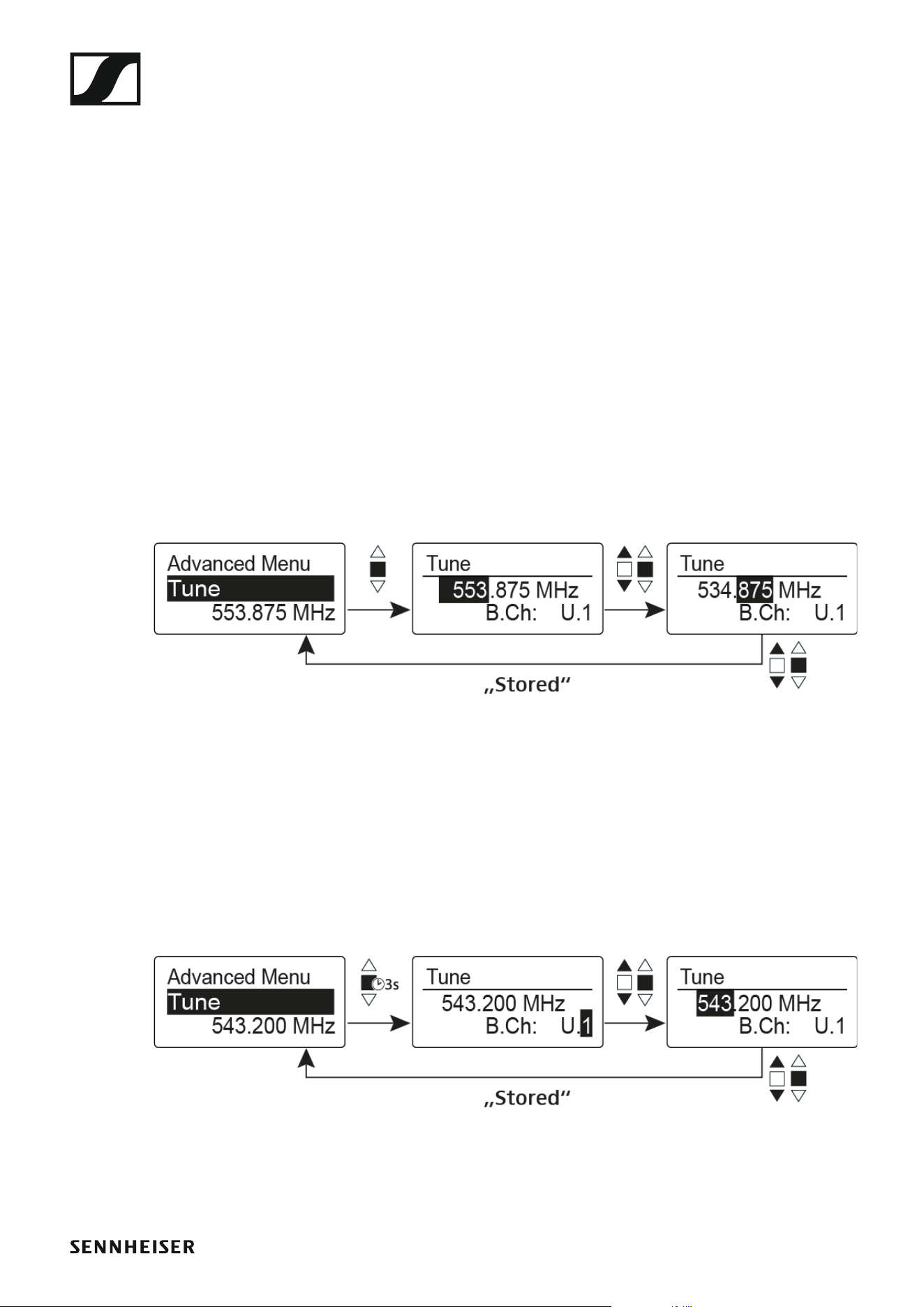
Advanced > Tune menu item
• Configuring the transmission frequency and frequency bank U
When you have configured the wireless microphone to a system bank and
you call up the Tune menu item, channel 1 of the frequency bank U is auto-
matically set. The message U.1 briefly appears in the display. In the factory
settings, the channels of the frequency bank U are not assigned to any
transmission frequency.
While you work in the Tune menu, the RF signal is deactivated.
You can configure a transmission frequency for the current channel or se-
lect a channel in the frequency bank U and configure a transmission fre-
quency for this channel in the Tune menu. Be sure to note the information
on frequency selection, see “Setting notes”.
Only adjusting the frequency
To configure the transmission frequency for the current channel:
▷ Move the multi-function switch until the Tune menu item appears.
▷ Press the multi-function switch.
The frequency selection appears.
►
▷ Configure the desired frequency.
▷ Press the multi-function switch.
Your settings will be saved. You are now back in the operating menu.
Setting the channel and frequency
To select a channel and assign it a frequency:
▷ Move the multi-function switch until the Tune menu item appears.
▷ Hold down the multi-function switch until the frequency bank selection
appears.
►
▷ Set the desired channel.
▷ Press the multi-function switch.
The frequency selection appears.
▷ Configure the frequency.
Using the SKM 500 G4
83
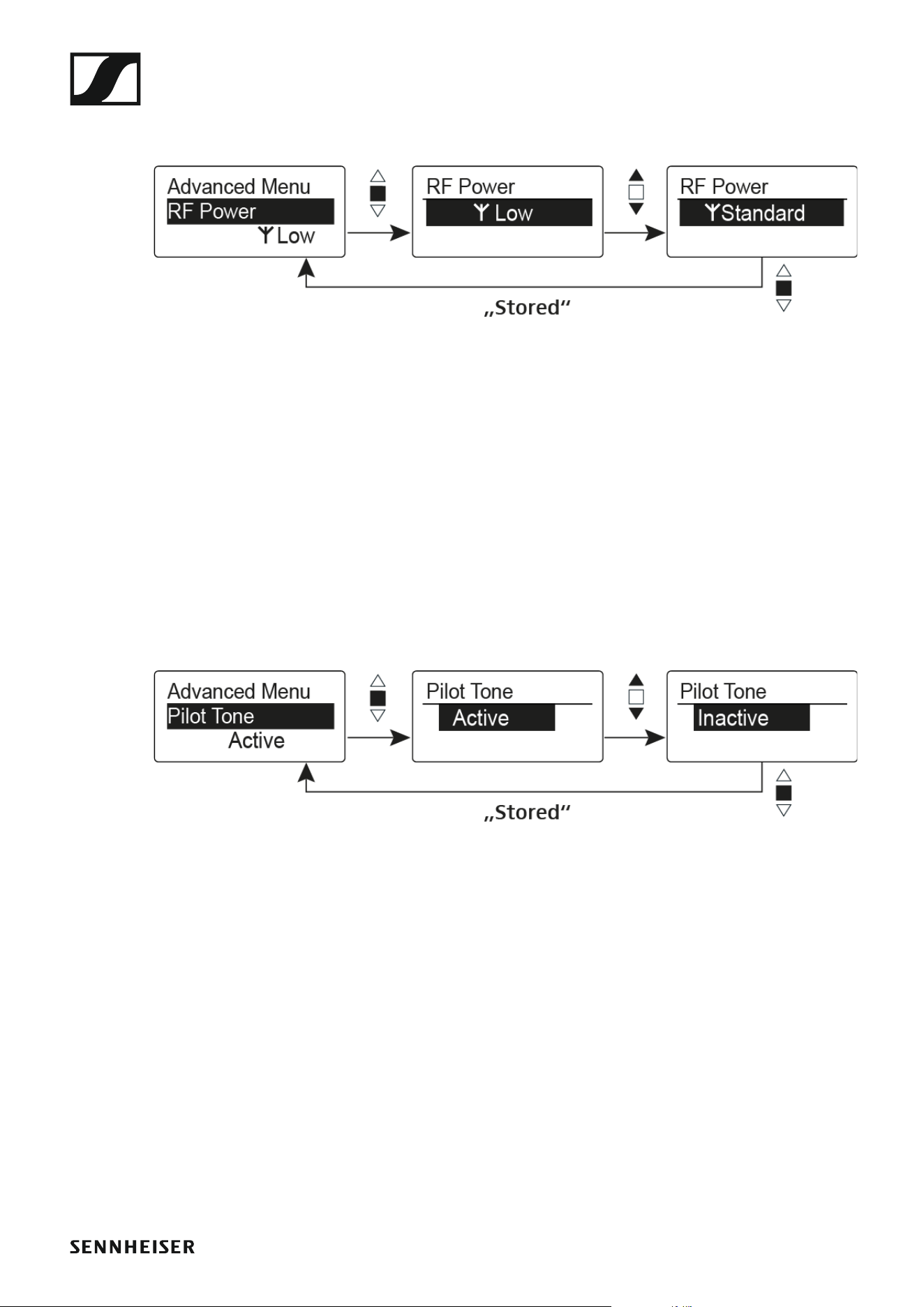
Advanced > RF Power menu item
• Configuring the transmission power
►
You can configure the transmission power in three steps in the RF Power
menu item. Please note the information at the following address:
General conditions and restrictions for the use of frequencies
Setting range:
Low: 10 mW
Standard: 30 mW
High: 50 mW
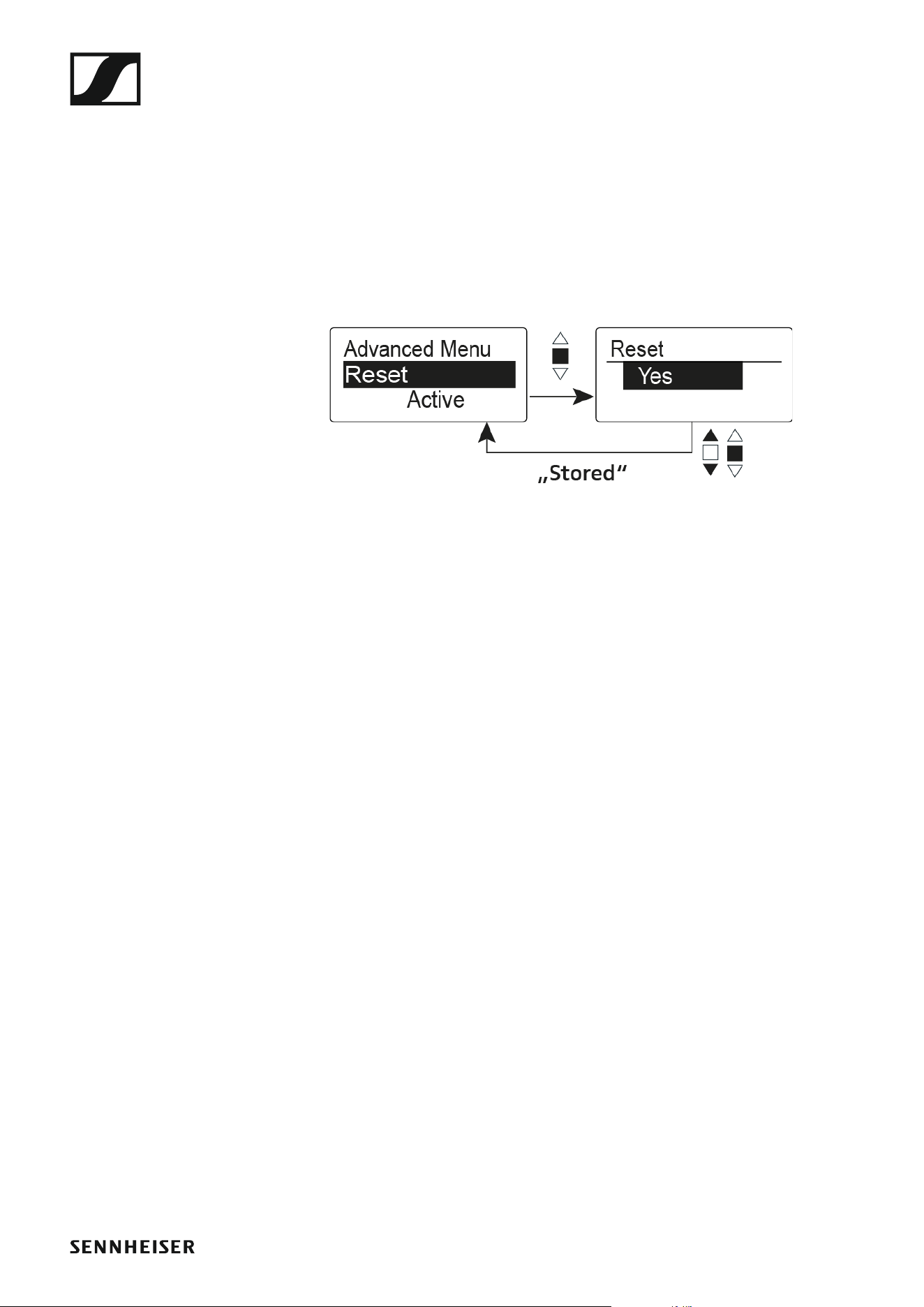
Advanced > Pilot Tone menu item
• Activating/deactivating pilot tone transmission
►
The pilot tone has an inaudible frequency that is sent from the transmitter
and evaluated by the receiver. It supports the receiver’s squelch function.
Using the SKM 500 G4
84
Advanced > LCD Contrast menu item
• Adjusting the contrast of the display panel
You can configure the contrast of the display in 16 steps.
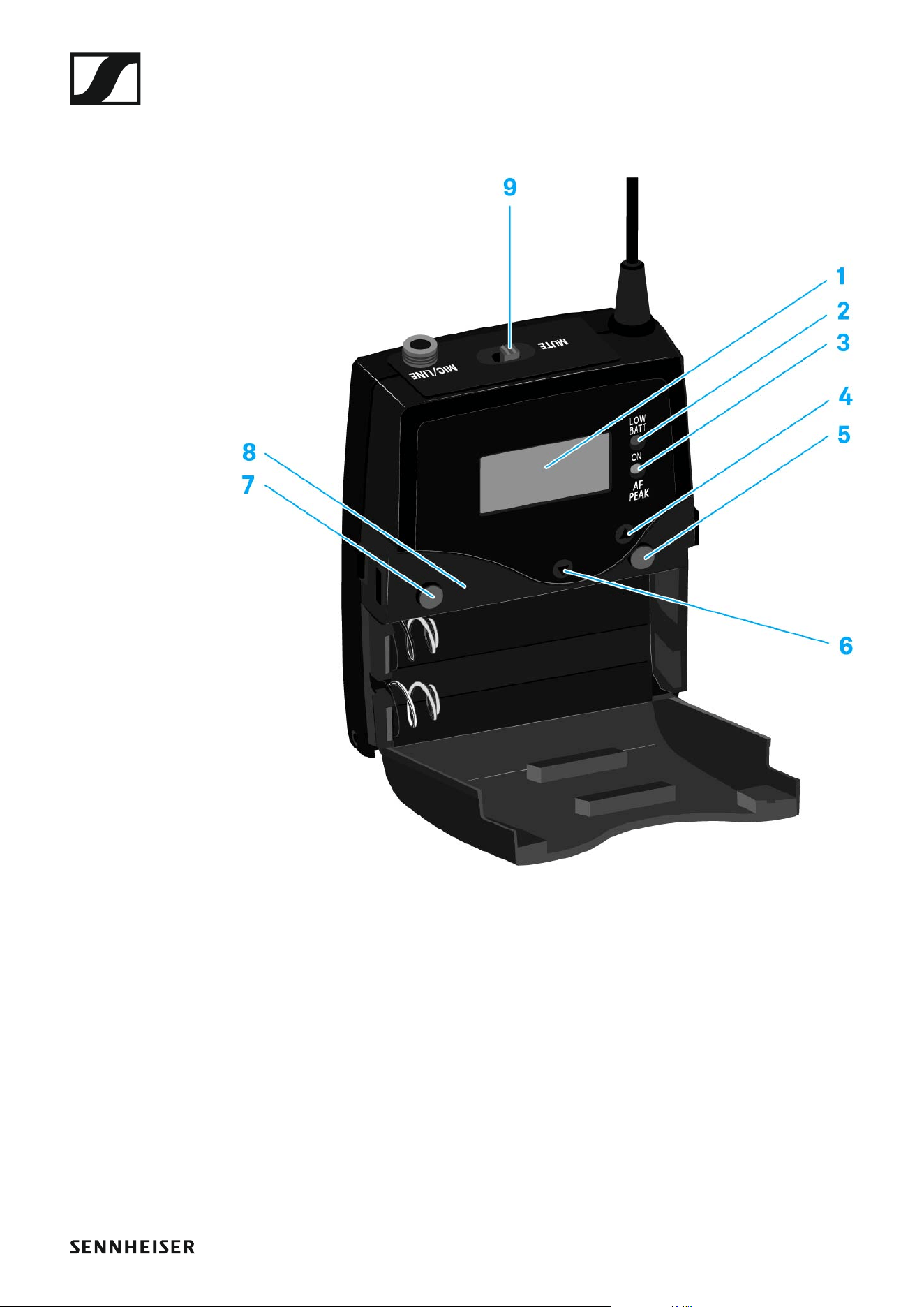
Advanced > Reset menu item
• Resetting the wireless microphone
►
When you reset the wireless microphone, only the selected settings of the
pilot tone and the U1 to U6 frequency banks are retained.
Advanced > Software Revision menu item
• Show software revision
You can display the current software revision.

Using the SK 500 G4
86
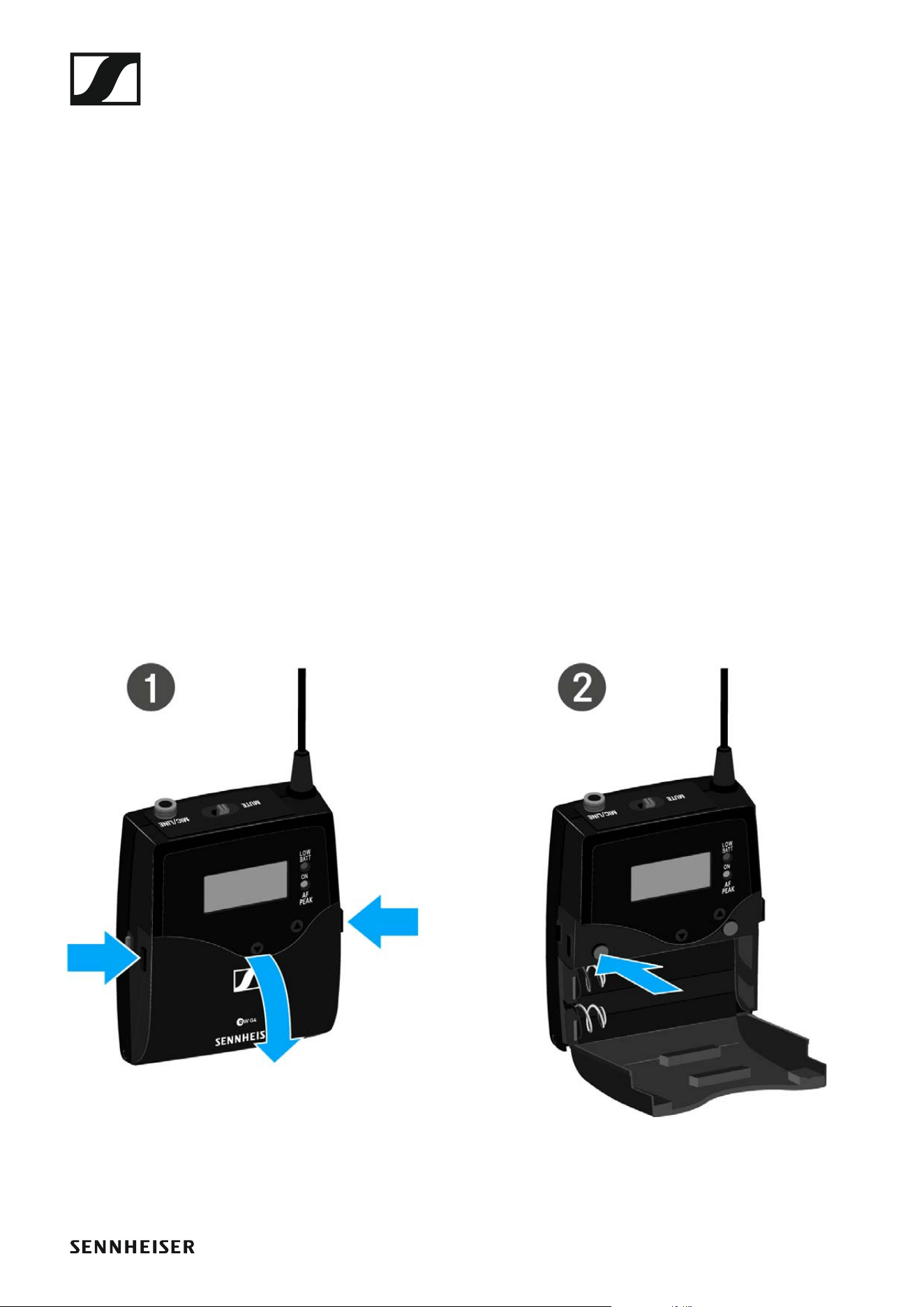
Operating elements of the SK 500 G4 bodypack
transmitter
►
1 Display panel
• See “Displays on the SK 500 G4 bodypack transmitter display panel”
2 Operation and battery indicator, red LED
• illuminated = ON
See “Switching the SK 500 G4 bodypack transmitter on and off”
•flashing = LOW BATTERY
See “Inserting and removing the batteries/rechargeable batteries”
3 Audio overload indicator, yellow LED
• illuminated = AF PEAK (overload)
See “Sensitivity menu item”
4 UP button
• See “Buttons for navigating the SK 500 G4 menu”
5 SET button
• See “Buttons for navigating the SK 500 G4 menu”
6 DOWN button
Using the SK 500 G4
87
• See “Buttons for navigating the SK 500 G4 menu”
7 ON/OFF button with ESC function in the operating menu
• Switch the transmitter on or off
See “Switching the SK 500 G4 bodypack transmitter on and off”
• Escape function in the menu
See “Buttons for navigating the SK 500 G4 menu”
8 Infra-red interface
• See “Synchronizing devices”
9 MUTE switch
• Deactivate and activate RF signal
See “Deactivating the RF signal (RF mute)”
• Deactivate and activate audio signal
See “Muting the bodypack transmitter (AF mute)”
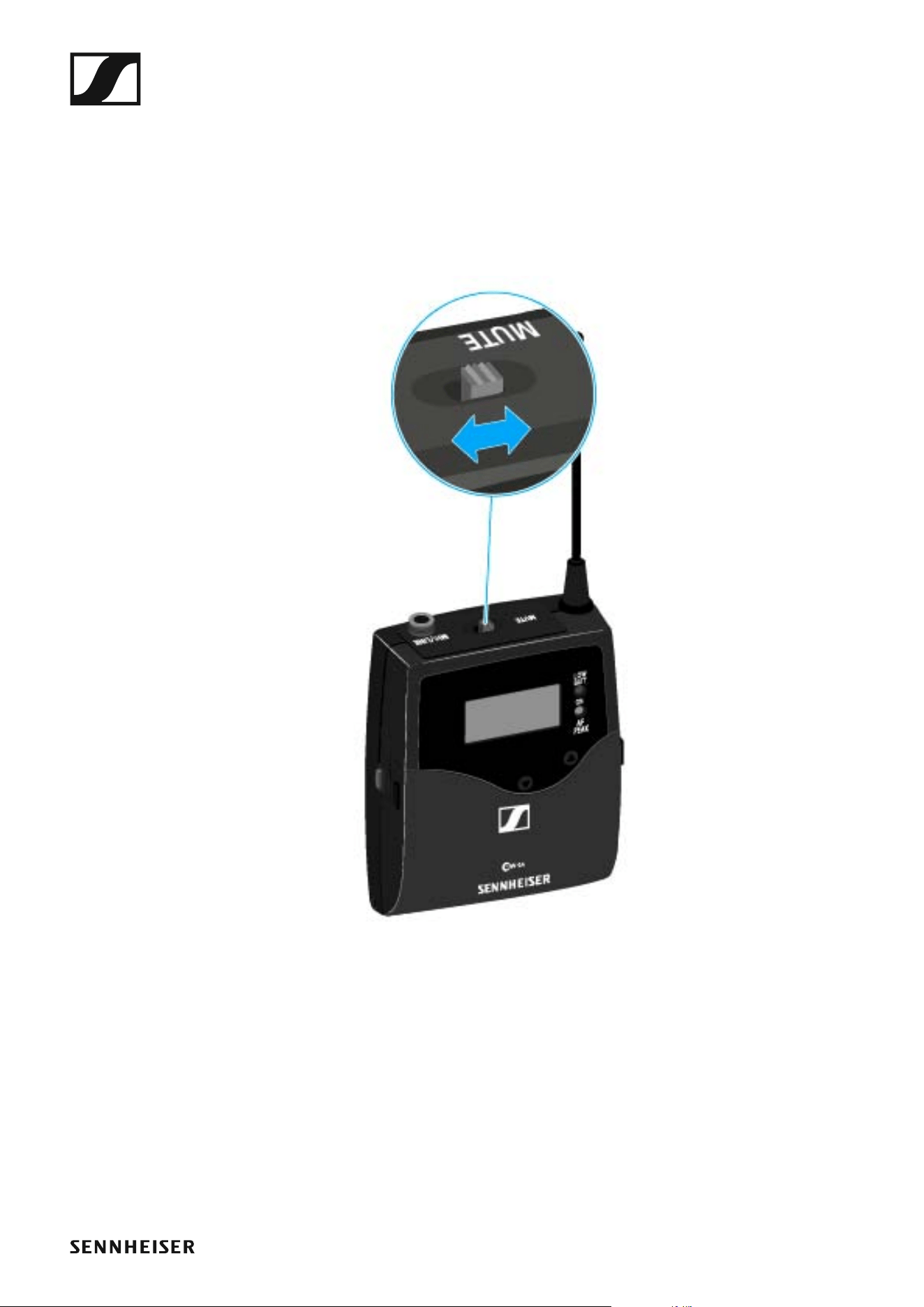
Switching the SK 500 G4 bodypack transmitter on
and off
▷ Press the two catches and open the battery compartment cover.
To switch on the SK 500 G4:
▷ Hold down the ON/OFF button until the Sennheiser logo appears on the
display.
To switch off the SK 500 G4:
▷ Hold down the ON/OFF button until the display goes off.
Using the SK 500 G4
88
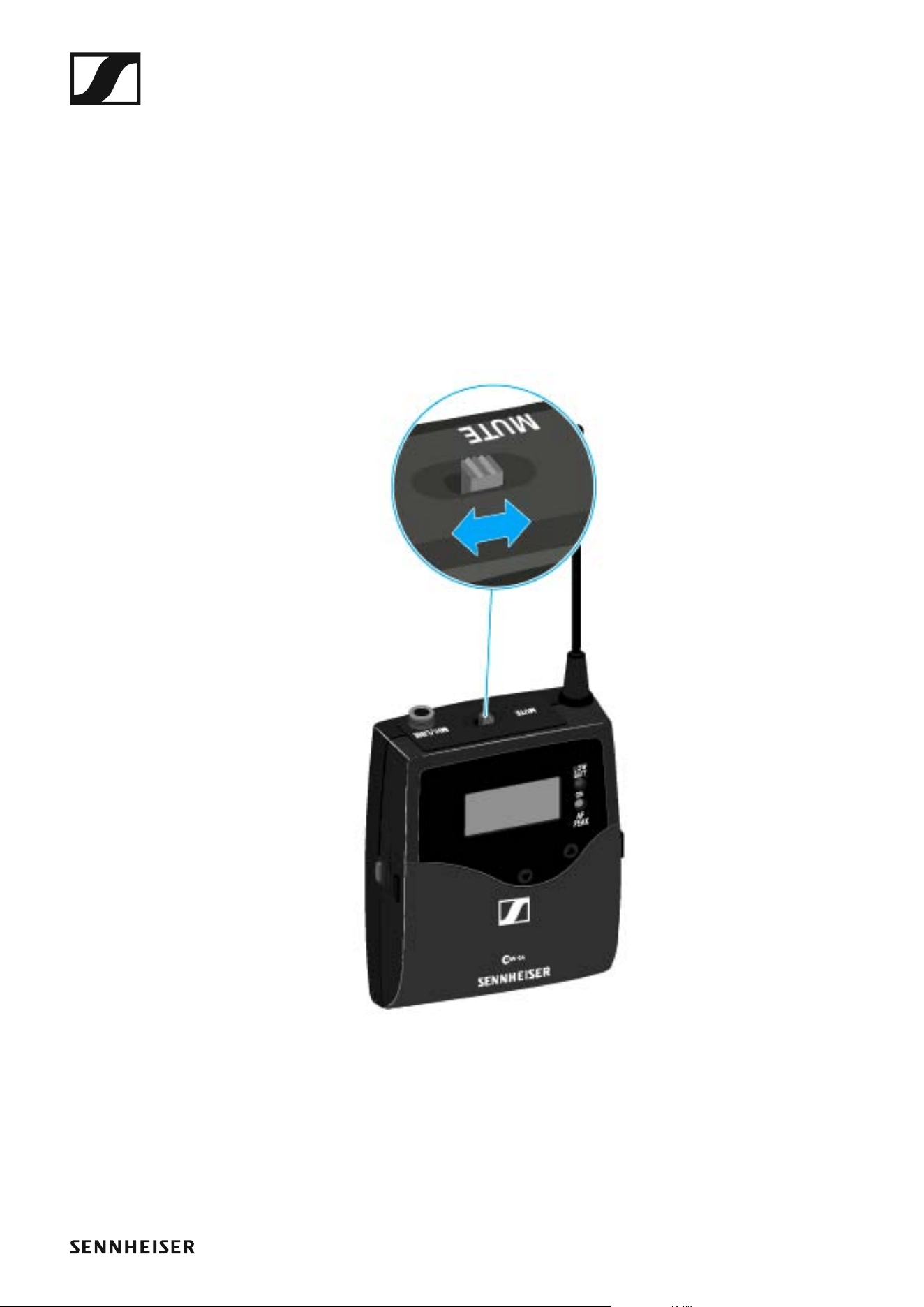
Muting the bodypack transmitter (AF mute)
You can mute the audio signal with the MUTE switch.
To do this, the MUTE switch function must be configured to AF On/Off.
You can find more information about this subject under “Advanced > Mute
Mode menu item”.
▷ Slide the MUTE switch to the MUTE position.
The audio signal is muted. The message MUTE is shown on the display.
Using the SK 500 G4
89
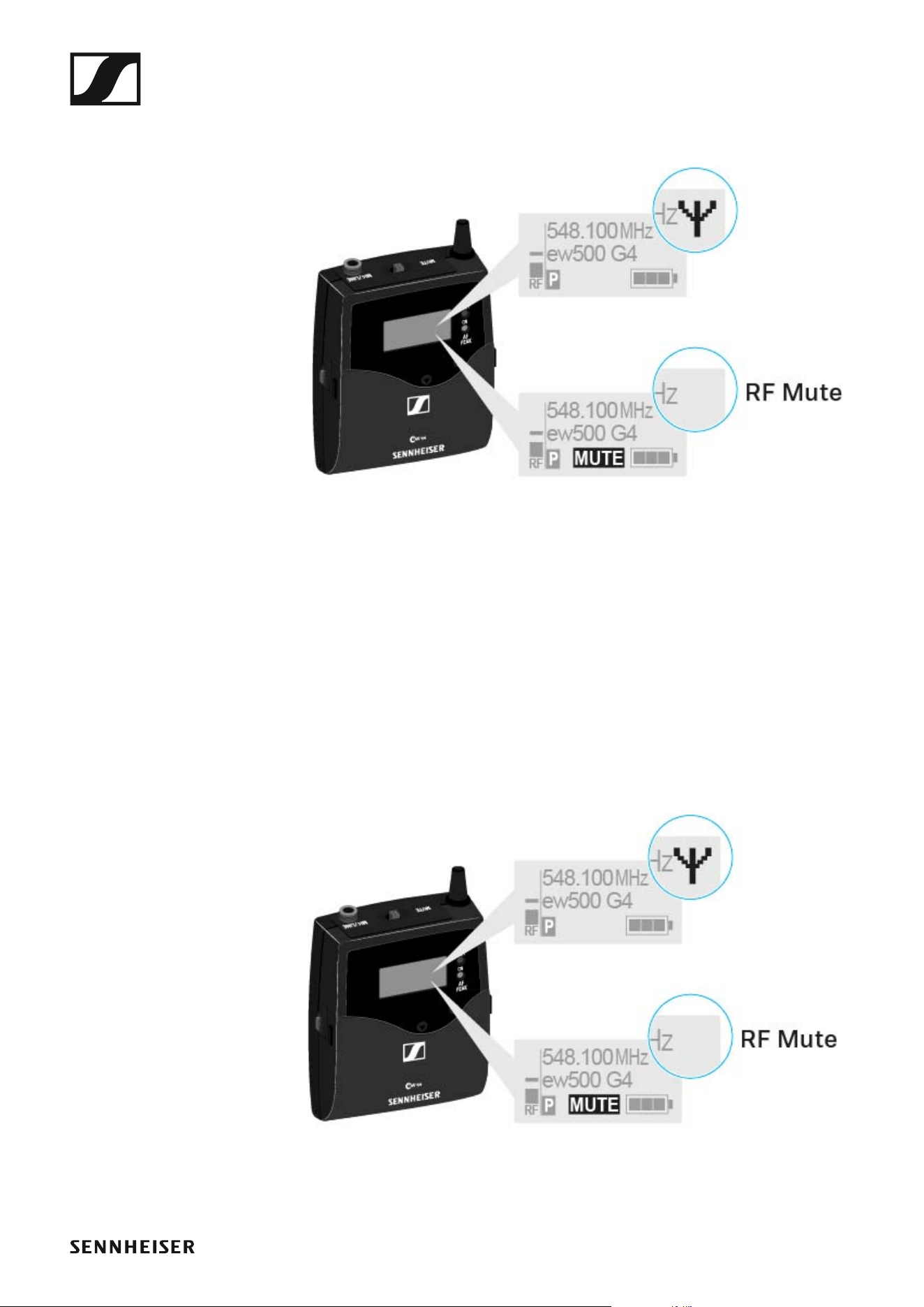
Deactivating the RF signal (RF mute)
You can deactivate the RF signal in two ways:
Deactivating the RF signal with the MUTE switch
You can deactivate the RF signal with the MUTE switch.
To do this, the MUTE switch function must be configured to RF On/Off. You
can find more information about this subject under “Advanced > Mute
Mode menu item”.
Slide the MUTE switch to the MUTE position.
Using the SK 500 G4
90
The RF signal is deactivated. The message MUTE is shown in the display
and the transmission icon no longer appears.
Deactivating the RF signal with the ON/OFF button
You can deactivate the RF signal with the ON/OFF button.
To deactivate the RF signal:
▷ Short-press the ON/OFF button.
RF Mute On? appears.
▷ Press the SET button.
The RF signal is deactivated. The message MUTE is shown in the dis-
play and the transmission icon no longer appears.

Using the SK 500 G4
91
To activate the RF signal:
▷ Short-press the ON/OFF button.
RF Mute Off? appears.
▷ Press the SET button.
The transmission icon appears again.
Using the SK 500 G4
92
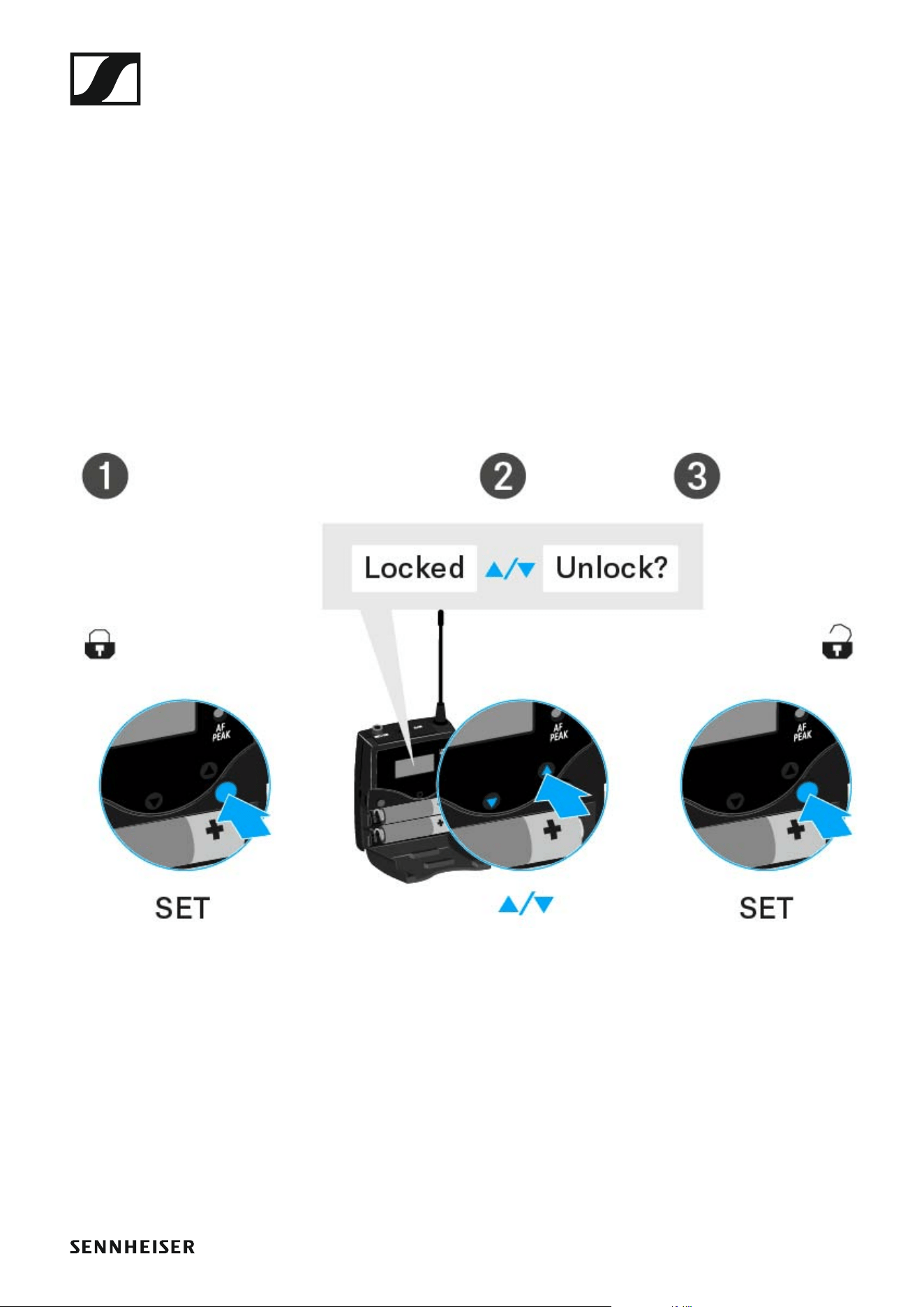
Lock-off function
You can set the automatic lock-off function in the Auto lock menu (see
“Auto Lock menu item”).
When you have switched on the lock-off function, you will have to turn the
transmitter off and on again in order to operate it.
To temporarily deactivate the lock-off function:
▷ Press the SET button.
Locked appears in the display panel.
▷ Press the UP or DOWN button.
Unlock? appears in the display panel.
▷ Press the SET button.
Lock-off function is now temporarily deactivated.
When you are in the operating menu
>> Lock-off function is deactivated long enough for you to work in the op-
erating menu.
When one of the standard displays is shown
>> Lock-off function is automatically activated after 10 seconds.
The lock-off function icon flashes while the lock-off function is being acti-
vated again.
Using the SK 500 G4
93
Displays on the SK 500 G4 bodypack transmitter
display panel
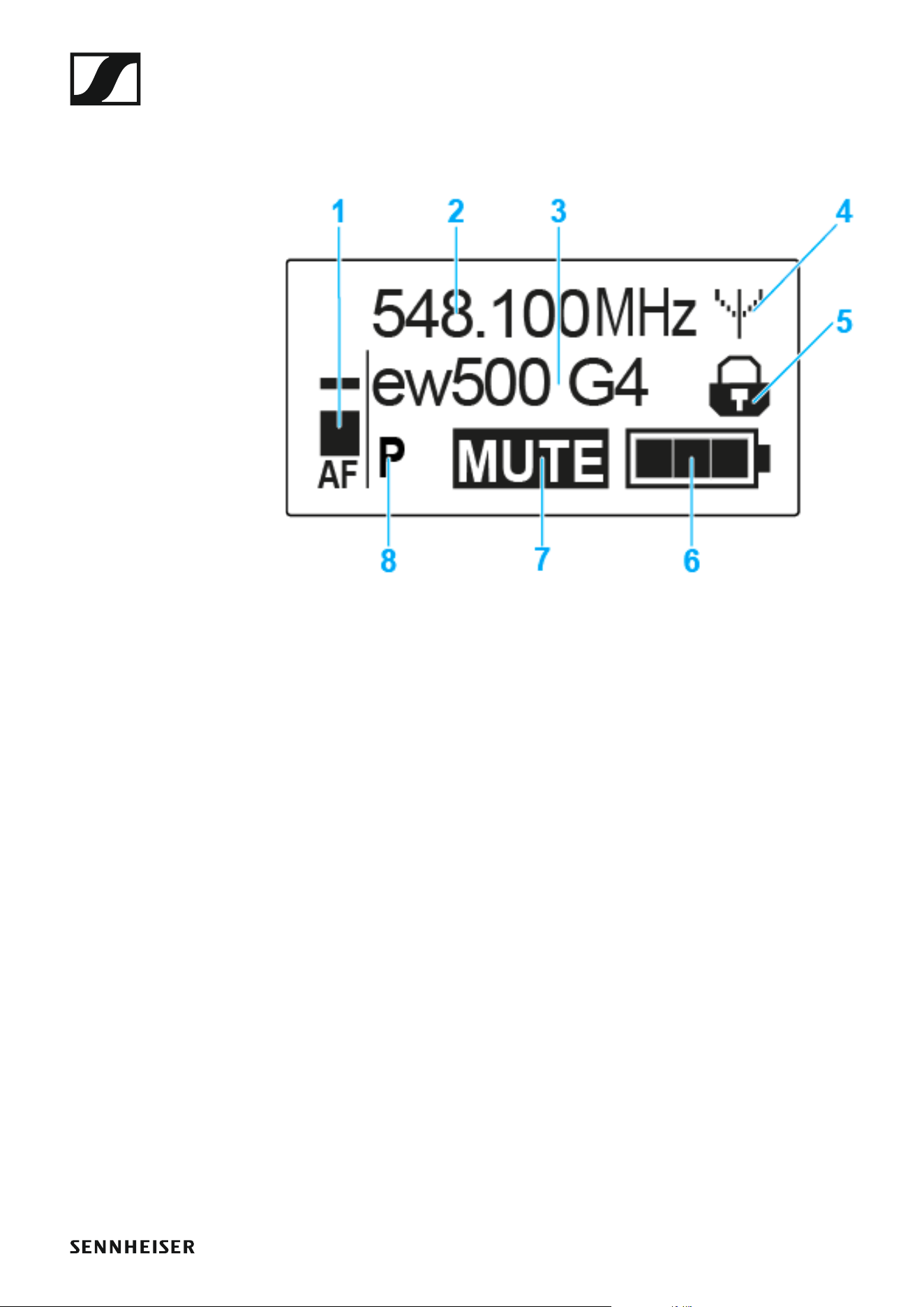
You can view the following information on the transmitter display.
►
1 AF audio level
• Displays the audio level with peak hold function
• See “Sensitivity menu item”
2 Frequency
• Configured transmission frequency
• See “Frequency Preset menu item”
3 Name
• Freely selectable name of the receiver
• See “Name menu item”
4 Transmission icon
• RF signal is being transmitted
• See “Deactivating the RF signal (RF mute)”
5 Lock-off function
• Lock-off function is activated
• See “Auto Lock menu item”
6 Battery status
• See “Battery status”
7 MUTE muting function
• The audio signal is muted
• See “Muting the bodypack transmitter (AF mute)”
8 P pilot tone
• Pilot tone transmission is activated
• See “Advanced > Pilot Tone menu item”
Using the SK 500 G4
94
>> “Buttons for navigating the SK 500 G4 menu”
>> “Setting options in the menu”
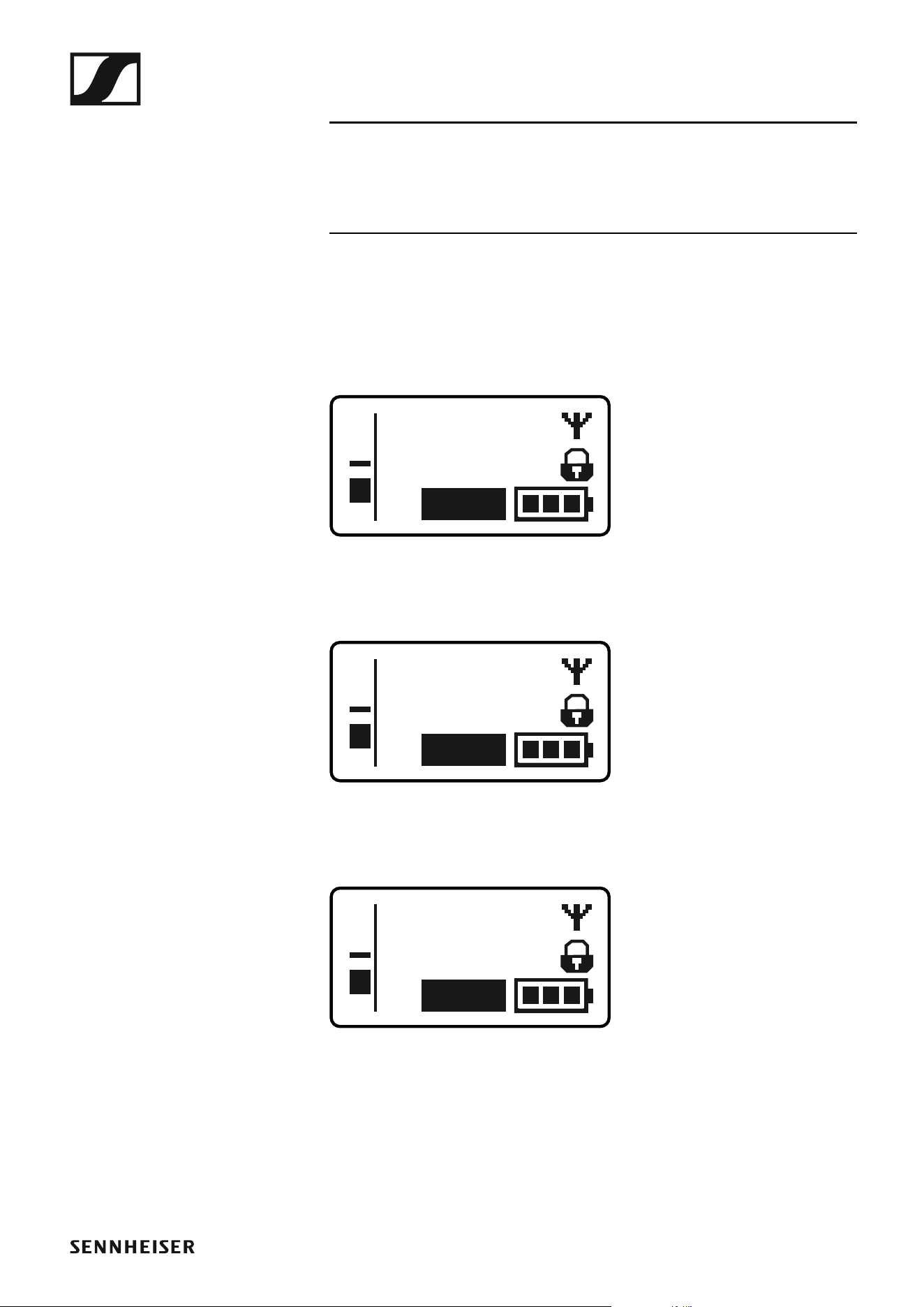
Select a standard display
▷ Press the UP or DOWN buttons to select a standard display.
Frequency/Name standard display
►
Channel/Frequency standard display
►
Name/Channel standard display
►
ew500 G4
MHz
548.100
MUTE
P
AF
MHz
548.100
B.Ch: 20.12
MUTE
P
AF
B.Ch: 20.12
MUTE
P
AF
ew500 G4

Using the SK 500 G4
95
Buttons for navigating the SK 500 G4 menu
Navigating through the menu
To open the menu:
▷ Press the SET button.
The operating menu is shown on the transmitter display panel.
To open a menu item:
▷ Press the UP or DOWN buttons to navigate through the individual
menu items.
▷ Press the SET button to open the selected menu item.
“Operating elements of the SK 500 G4 bodypack transmitter”
Making changes in a menu item
After you open a menu item, you can make changes as follows:
▷ Press the UP or DOWN buttons to set the displayed value.
▷ Press the SET button to save the setting.
▷ Press the ESC (ON/OFF) button to leave the menu item without saving
the setting.
“Operating elements of the SK 500 G4 bodypack transmitter”
>> “Displays on the SK 500 G4 bodypack transmitter display panel”
>> “Setting options in the menu”

Using the SK 500 G4
96
Setting options in the menu
In the SK 500 G4 menu, you can configure the following settings.
Adjusting the input sensitivity
▷ See “Sensitivity menu item”
Setting the frequency bank and the channel
▷ See “Frequency Preset menu item”
Entering a freely selectable name
▷ See “Name menu item”
Activating/deactivating the automatic lock-off function
▷ See “Auto Lock menu item”
Configuring enhanced settings in the Advanced Menu:
• Adjusting the transmission frequencies for the U frequency bank
• Configuring the MUTE switch
• Configuring the transmission power
• Activating/deactivating the pilot tone evaluation
• Adjusting the contrast of the display panel
• Resetting the transmitter
• Displaying the current software revision
▷ See “Advanced menu item”
Using the SK 500 G4
97
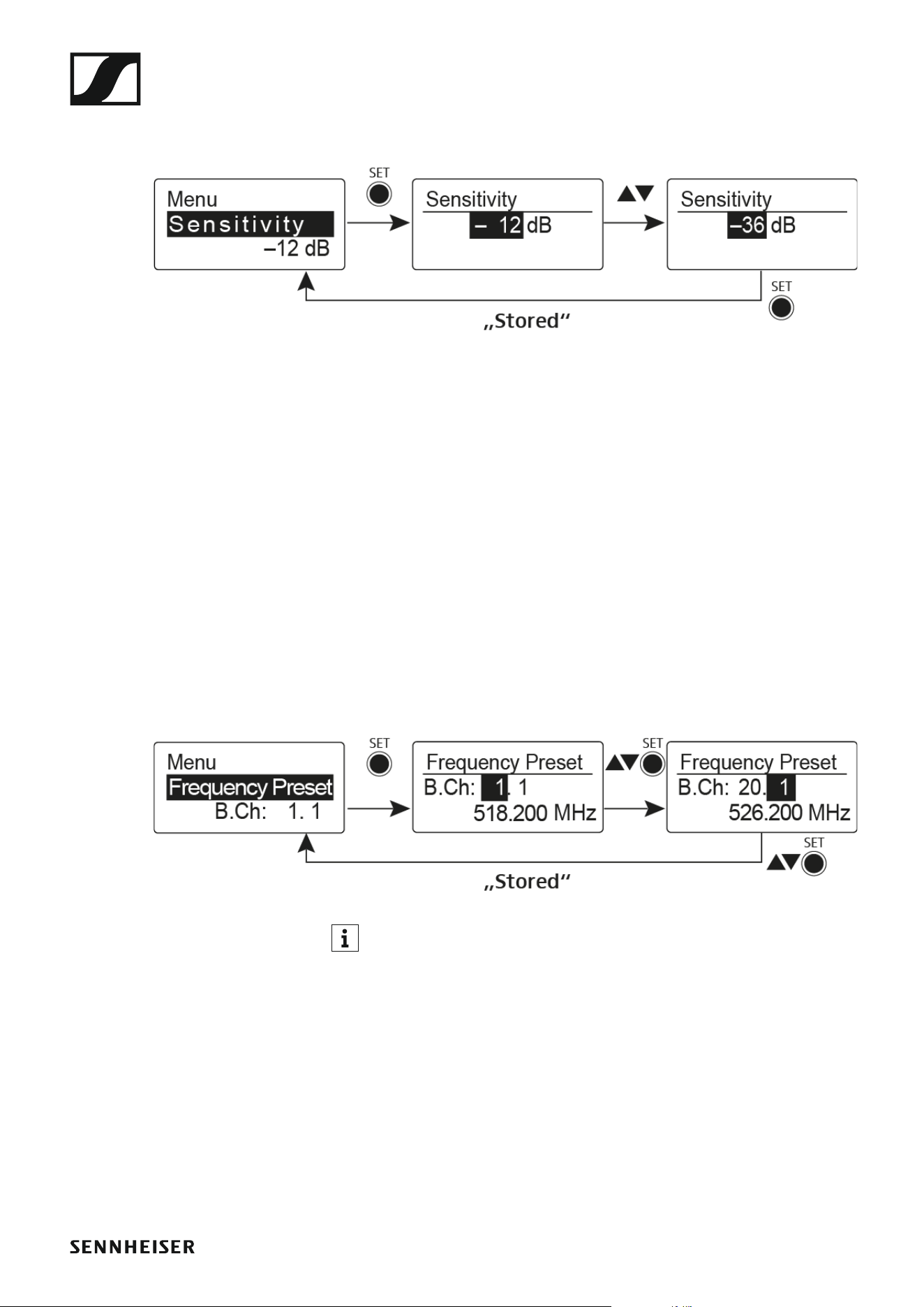
Sensitivity menu item
• Adjusting the input sensitivity – AF audio level
►
Setting range: 0 dB to –60 dB in 6 dB steps.
The AF audio level is also displayed when the bodypack transmitter is mut-
ed, e.g. to check the sensitivity before a live broadcast.
Recommended presets:
• Loud music/vocals: –30 to –21 dB
• Moderation: –21 to 0 dB
• Electric guitar with single-coil pickups: –30 to –24 dB
• Electric guitar with Humbucker pickups: –45 to –30 dB
• Electric guitars with active electronics: –45 to –30 dB
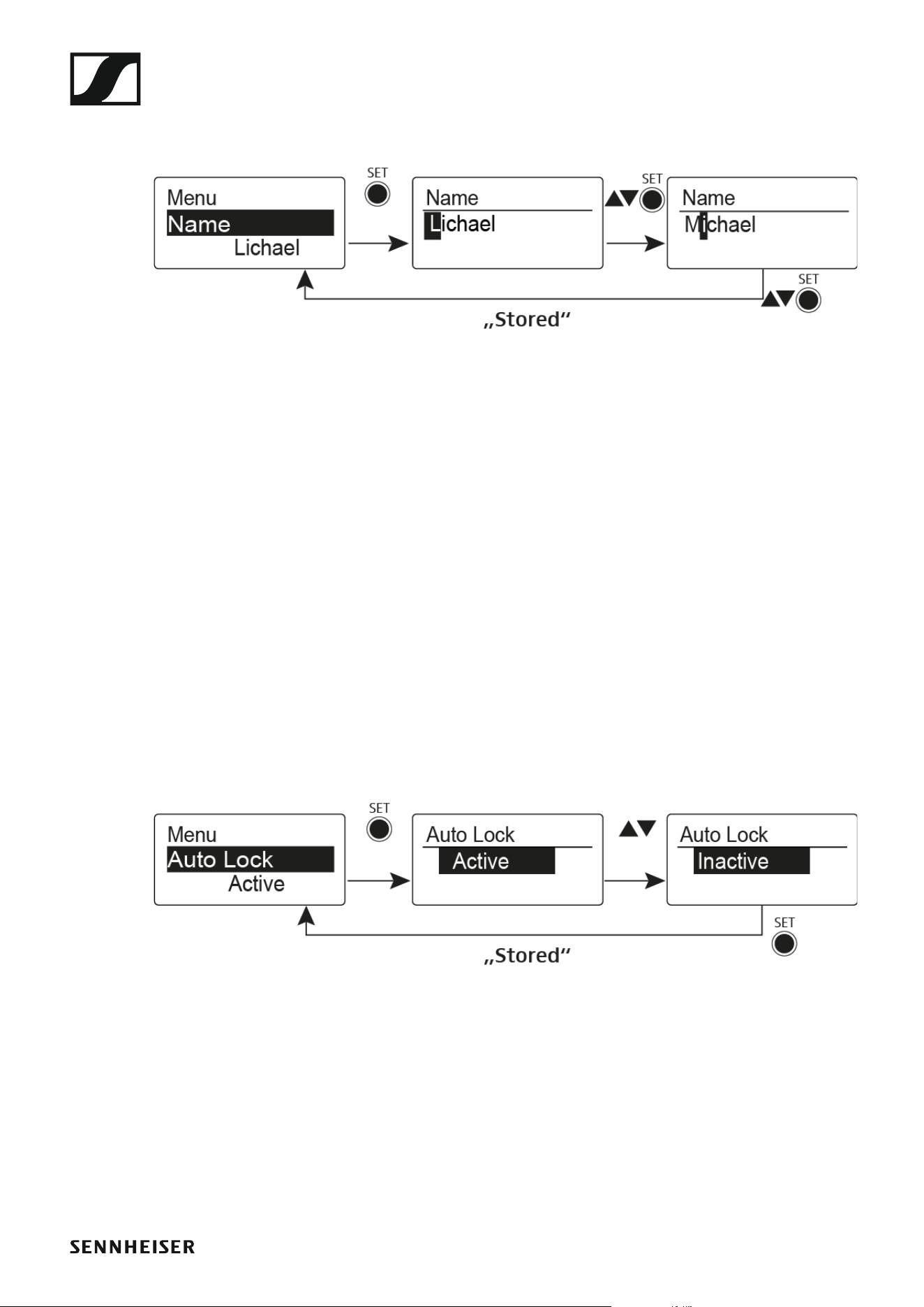
Frequency Preset menu item
• Manually selecting a frequency bank and channel
►
While you work in the Frequency Preset menu, the RF signal is deac-
tivated.
Please note when creating multi-channel systems:
Only the factory-preset frequencies within one frequency bank are inter-
modulation-free. The bodypack transmitter and receiver must be set to the
same frequency. Be sure to note the information on frequency selection
under “Establishing a radio link”.
Using the SK 500 G4
98
Name menu item
• Entering names
►
In the Name menu item you can enter any name you want for the bodypack
transmitters (e.g. the names of the musicians).
The name can be shown in the Frequency/Name and Name/Channel stan-
dard displays.
The names are a maximum of 8 characters:
• All letters except umlauts.
• Numbers from 0 to 9
• Special characters and spaces
Enter the names as follows:
▷ Press the UP or DOWN buttons to select a character.
▷ Press the SET button to switch to the next space or to save the name
you have entered once it is complete.
Auto Lock menu item
• Switching the automatic lock-off function on and off
►
This lock prevents the wireless microphone from being unintentionally
switched off and also prevents any unintentional changes to the transmit-
ter’s configuration. In the current standard display, the lock icon shows
whether the lock-off function is currently switched on.
You can find information about using the lock-off function under “Lock-off
function”.

Using the SK 500 G4
99
Advanced menu item
In the Advanced submenu you can configure enhanced settings.
The following sub-items are available:
Adjusting the transmission frequencies for the U frequency bank
▷ See “Advanced > Tune menu item”
Configuring the function of the MUTE switch and the RMS 1 remote
mute switch
▷ See “Advanced > Mute Mode menu item”
Configuring the transmission power
▷ See “Advanced > RF Power menu item”
Activating/deactivating the pilot tone evaluation
▷ See “Advanced > Pilot Tone menu item”
Adjusting the contrast of the display panel
▷ See “Advanced > LCD Contrast menu item”
Resetting the transmitter
▷ See “Advanced > Reset menu item”
Displaying the current software revision
▷ See “Advanced > Software Revision menu item”
Using the SK 500 G4
100
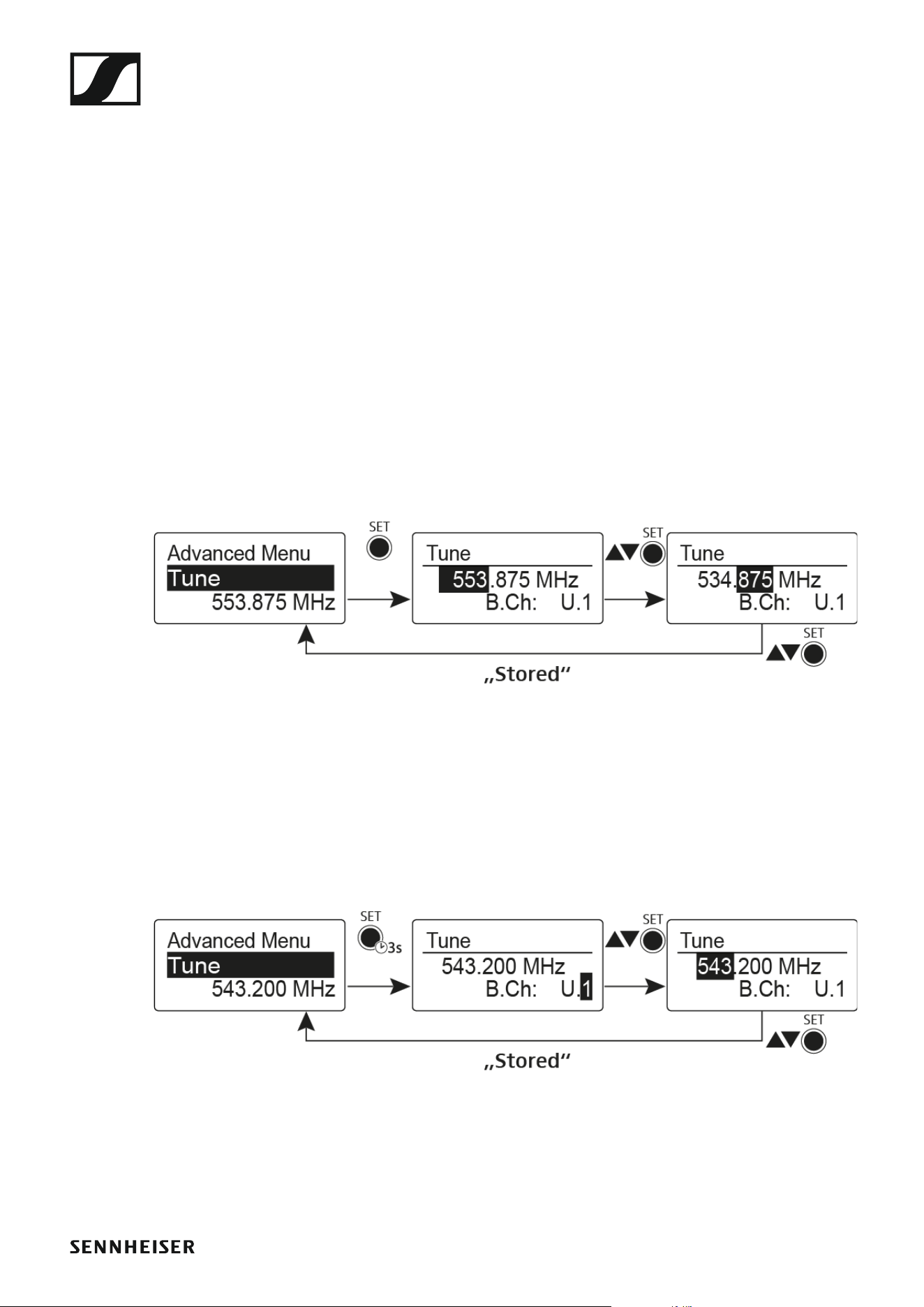
Advanced > Tune menu item
• Configuring the transmission frequency and frequency bank U
When you have configured the bodypack transmitter to a system bank and
you call up the Tune menu item, channel 1 of the frequency bank U is auto-
matically set. The message U.1 briefly appears in the display. In the factory
settings, the channels of the frequency bank U are not assigned to any
transmission frequency.
While you work in the Tune menu, the RF signal is deactivated.
You can configure a transmission frequency for the current channel or se-
lect a channel in the frequency bank U and configure a transmission fre-
quency for this channel in the Tune menu. Be sure to note the information
on frequency selection, see “Setting notes”.
Only adjusting the frequency
To configure the transmission frequency for the current channel:
▷ Open the Tune menu item in the Advanced menu.
The frequency selection appears.
►
▷ Configure the desired frequency.
▷ Press the SET button.
Your settings will be saved. You are now back in the operating menu.
Setting the channel and frequency
To select a channel and assign it a frequency:
▷ Open the Tune menu item in the Advanced menu by pressing and hold-
ing the SET button until the frequency bank selection appears.
►
▷ Set the desired channel.
▷ Press the SET button.
The frequency selection appears.
▷ Configure the frequency.
Using the SK 500 G4
101
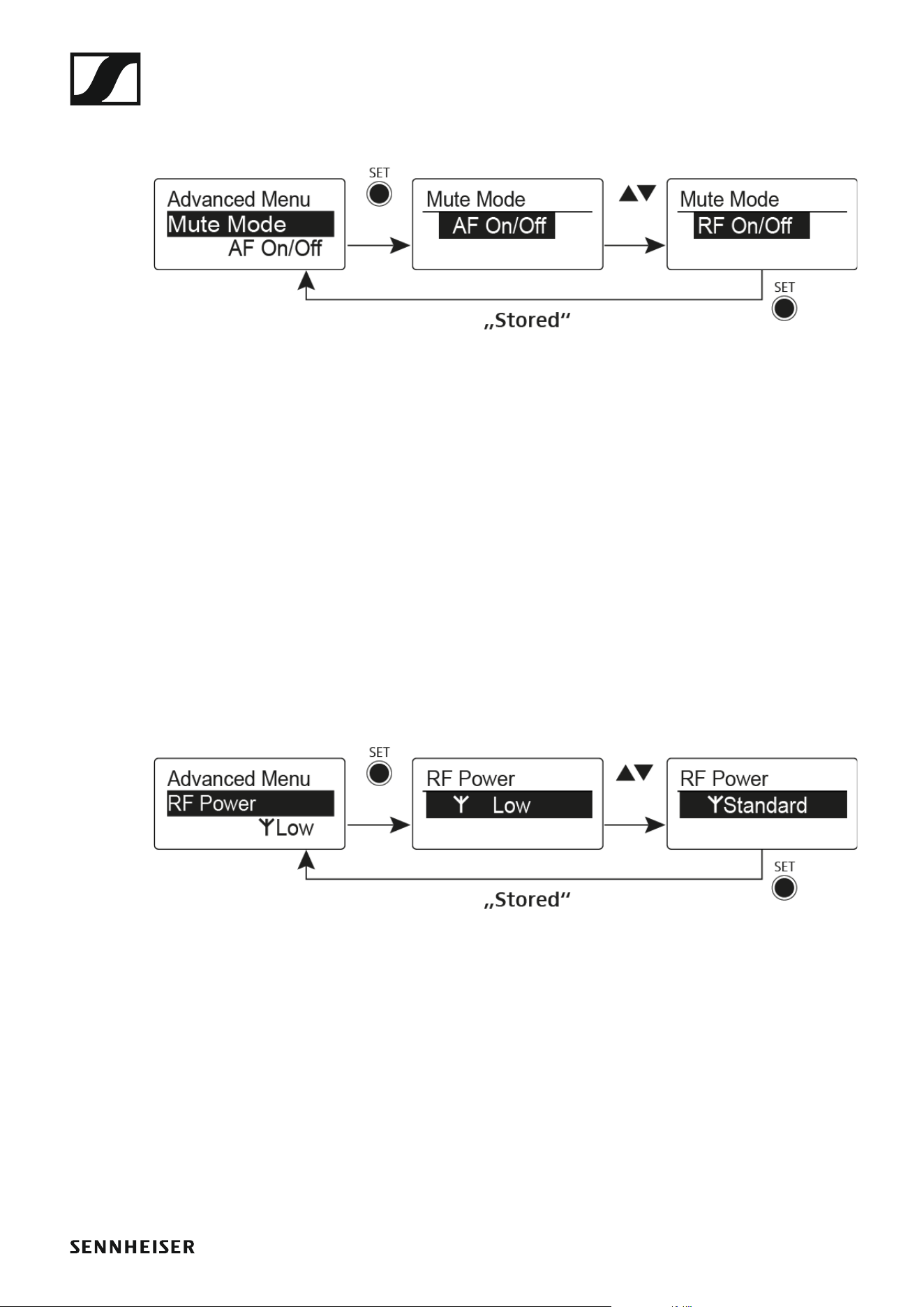
Advanced > Mute Mode menu item
•Configuring the MUTE switch
►
AF On/Off mode
• If set to position MUTE, the audio signal is muted
RF On/Off mode
• If set to the MUTE selector position, the RF signal is deactivated.
Disabled mode
• No function
You can find information about operating the mute switch under “Muting
the bodypack transmitter (AF mute)” and “Deactivating the RF signal (RF
mute)”.
Advanced > RF Power menu item
• Configuring the transmission power
►
You can configure the transmission power in three steps in the RF Power
menu item. Please note the information at the following address:
General conditions and restrictions for the use of frequencies
Setting range:
Low: 10 mW
Standard: 30 mW
High: 50 mW
Using the SK 500 G4
102
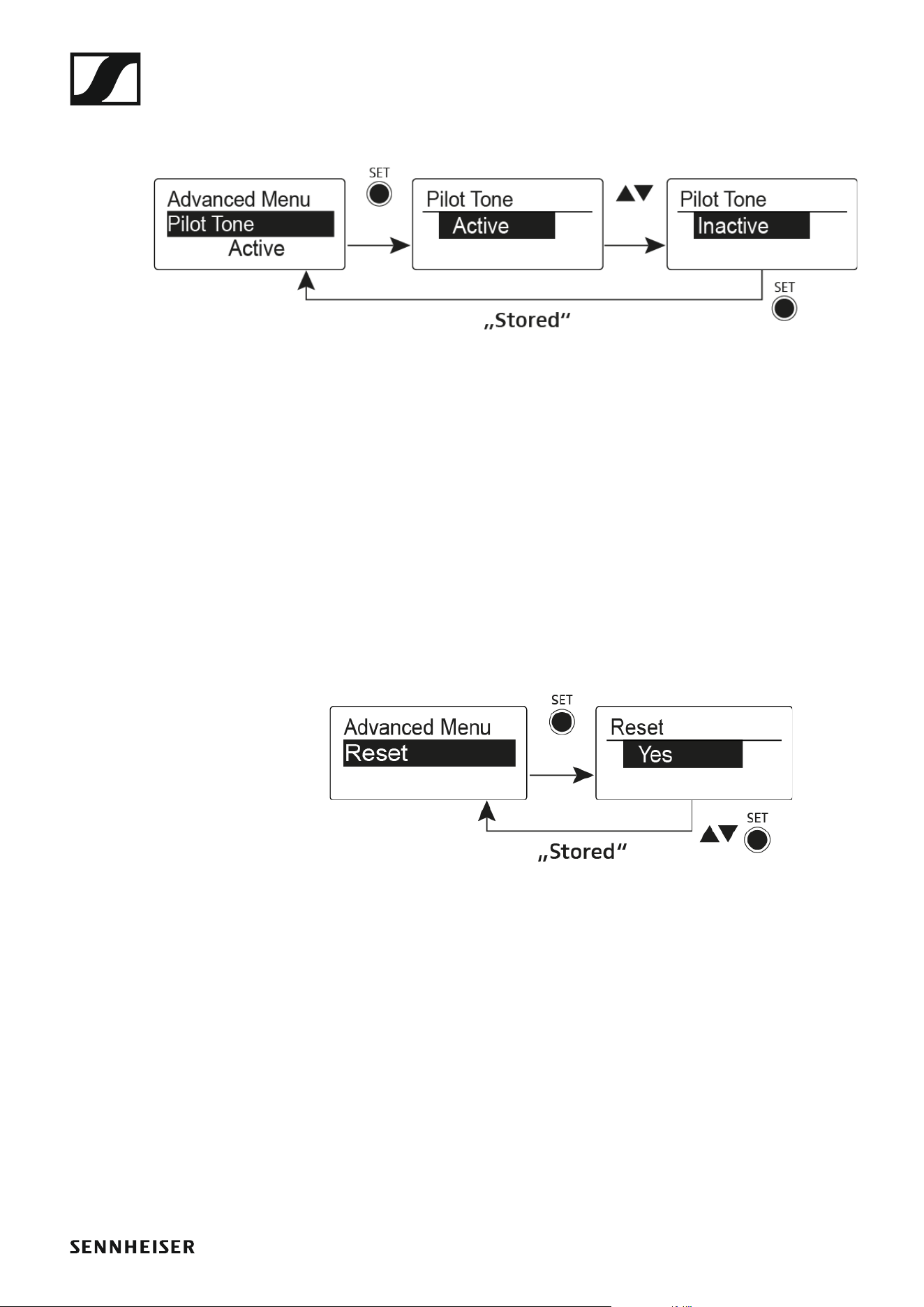
Advanced > Pilot Tone menu item
• Activating/deactivating pilot tone transmission
►
The pilot tone has an inaudible frequency that is sent from the transmitter
and evaluated by the receiver. It supports the receiver’s squelch function.
Advanced > LCD Contrast menu item
• Adjusting the contrast of the display panel
You can configure the contrast of the display in 16 steps.
Advanced > Reset menu item
• Resetting the bodypack transmitter
►
When you reset the bodypack transmitter, only the selected settings of the
pilot tone and the U frequency bank are retained.
Advanced > Software Revision menu item
• Show software revision
You can display the current software revision.

Using the SKP 500 G4
104
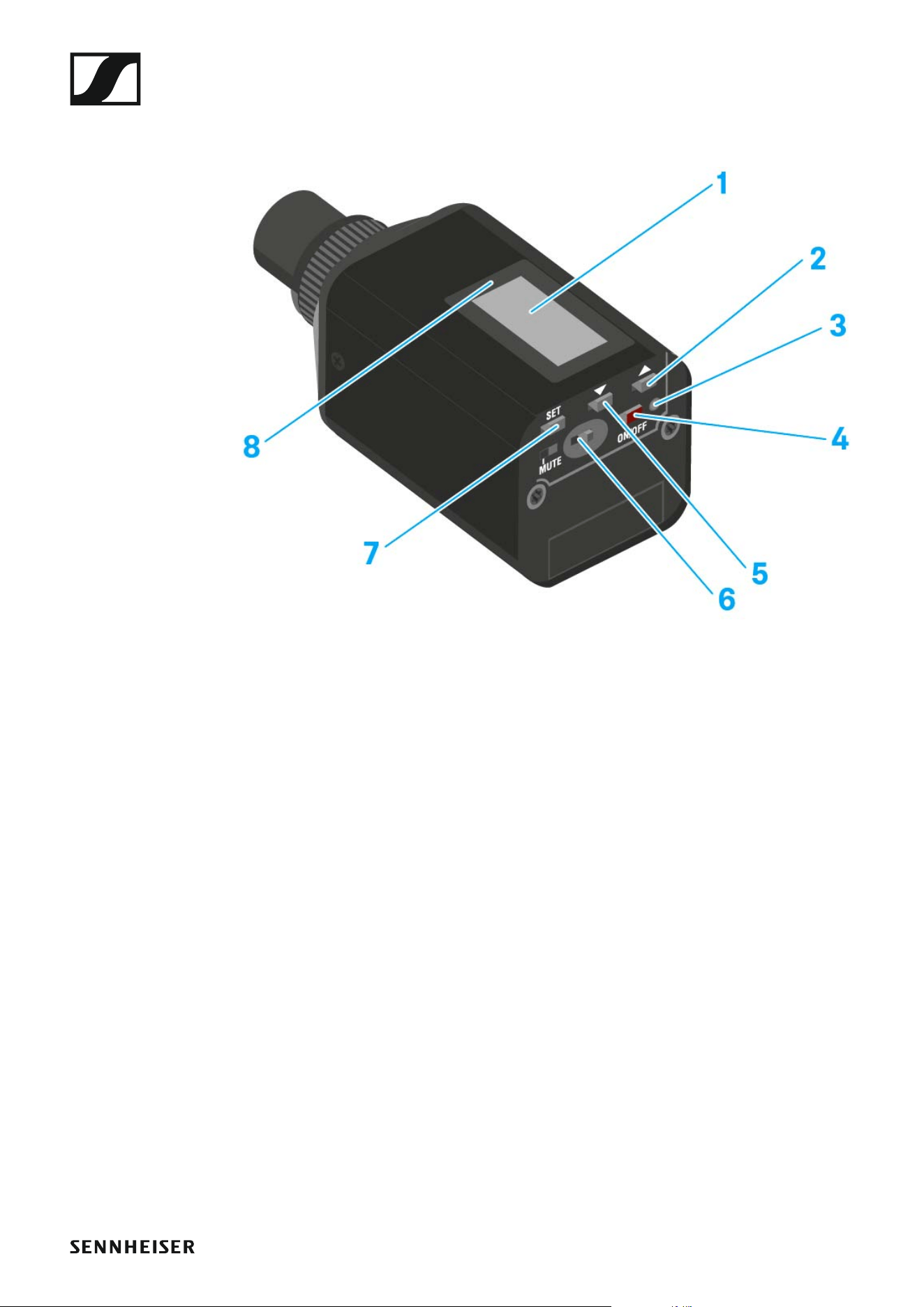
Operating elements of the SKP 500 G4 plug-on
transmitter
►
1 Display panel
• See “Displays on the SKP 500 G4 plug-on transmitter display panel”
2 UP button
• See “Buttons for navigating the SKP 500 G4 menu”
3 Operation and battery indicator, red LED
• illuminated = ON
See “Switching the SKP 500 G4 plug-on transmitter on and off”
•flashing = LOW BATTERY
See “Inserting and removing the batteries/rechargeable batteries”
4 ON/OFF button with ESC function in the operating menu
• Switch the transmitter on or off
See “Switching the SKP 500 G4 plug-on transmitter on and off”
• Escape function in the menu
See “Buttons for navigating the SKP 500 G4 menu”
5 DOWN button
• See “Buttons for navigating the SKP 500 G4 menu”
6 MUTE switch
• See “Muting the plug-on transmitter (AF mute)”
7 SET button
• See “Buttons for navigating the SKP 500 G4 menu”
8 Infra-red interface
• See “Synchronizing devices”
Using the SKP 500 G4
105
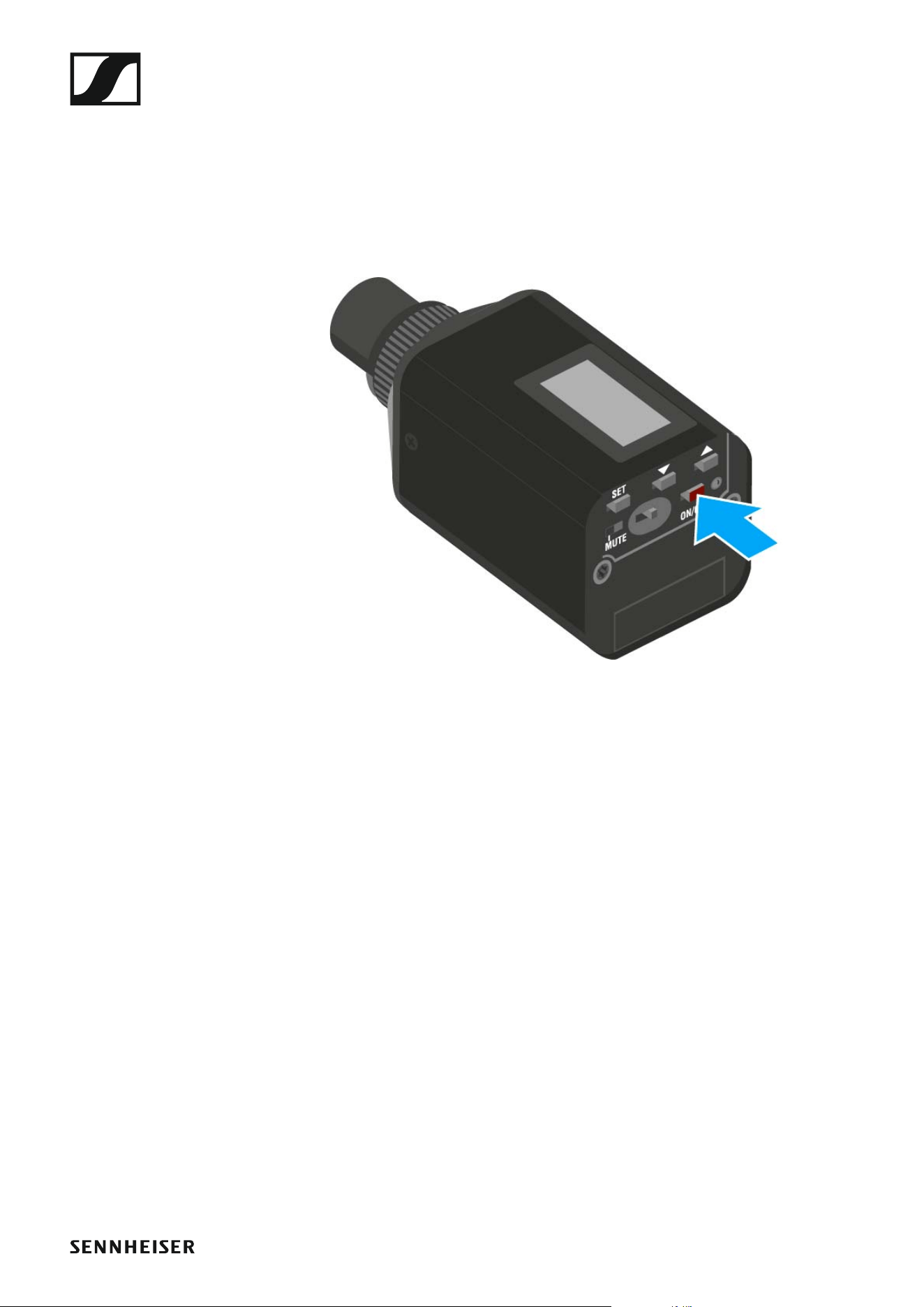
Switching the SKP 500 G4 plug-on transmitter on
and off
To switch on the SKP 500 G4:
▷ Hold down the ON/OFF button until the Sennheiser logo appears on the
display.
To switch off the SKP 500 G4:
▷ Hold down the ON/OFF button until the display goes off.
Using the SKP 500 G4
106
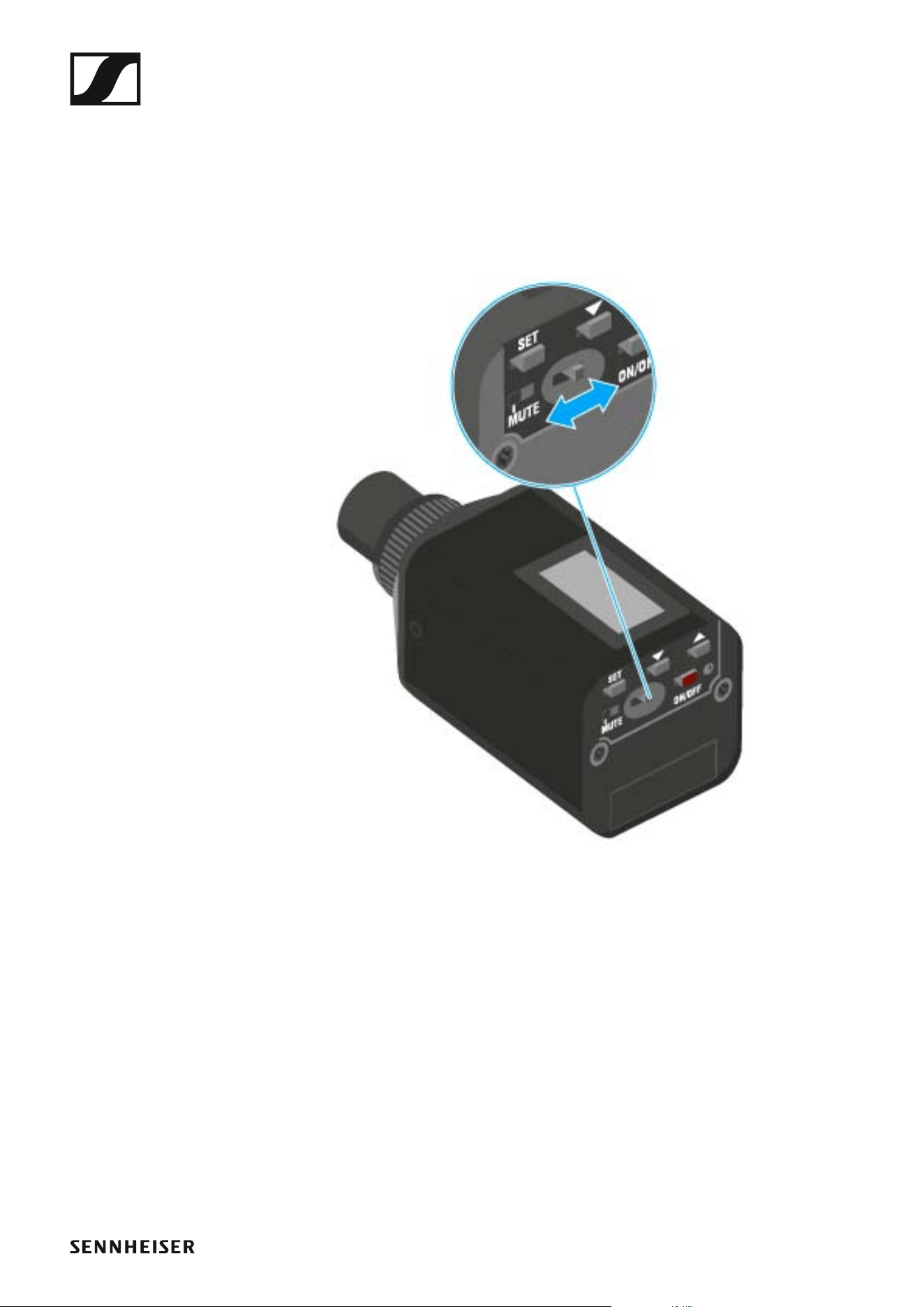
Muting the plug-on transmitter (AF mute)
You can mute the audio signal with the MUTE switch.
To do this, the MUTE switch function must be configured to AF On/Off.
You can find more information about this subject under “Advanced > Mute
Mode menu item”.
▷ Slide the MUTE switch to the MUTE position.
The audio signal is muted. The message MUTE is shown on the display.
Using the SKP 500 G4
107
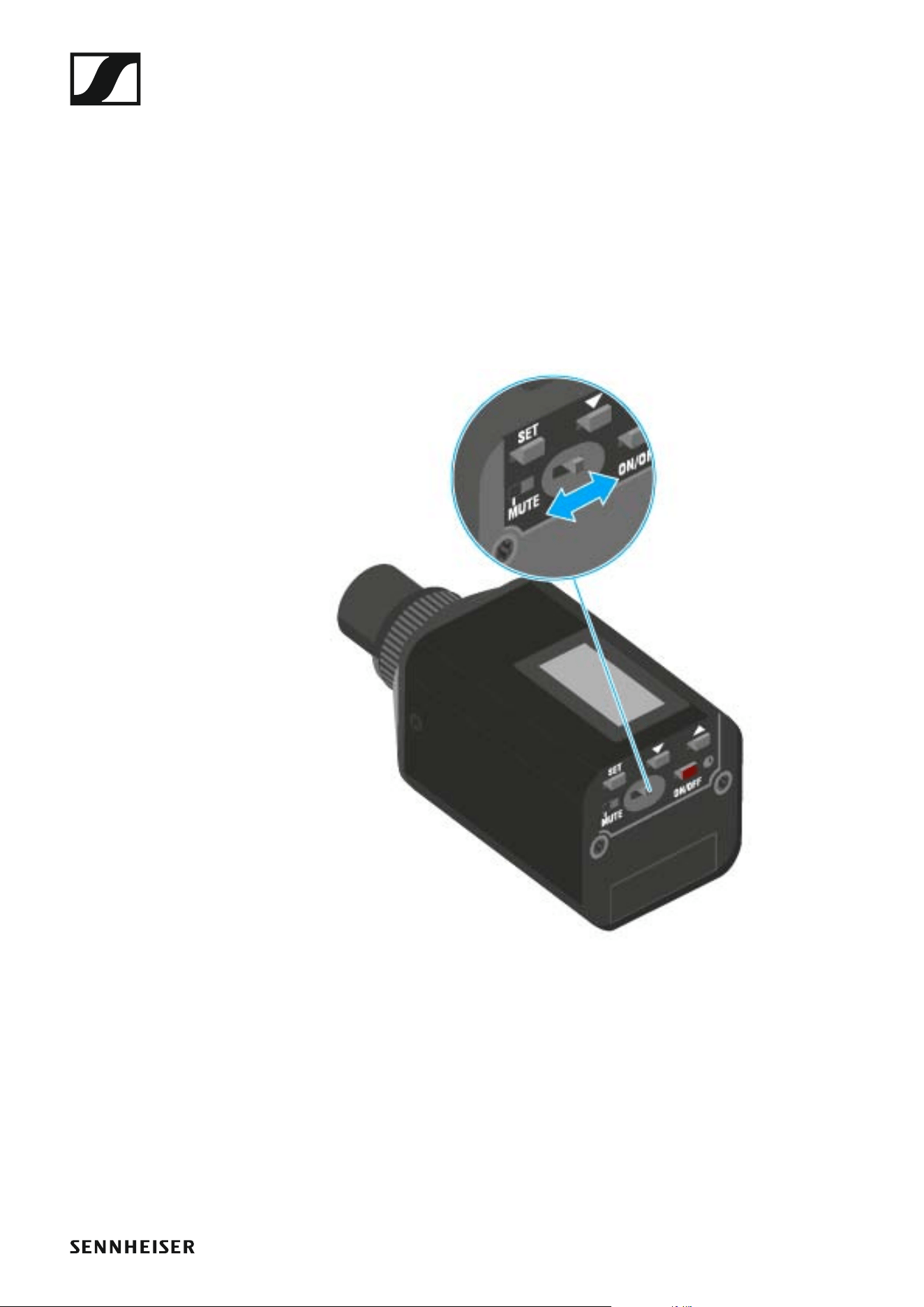
Deactivating the RF signal (RF mute)
You can deactivate the RF signal in two ways:
Deactivating the RF signal with the MUTE switch
You can deactivate the RF signal with the MUTE switch.
To do this, the MUTE switch function must be configured to RF On/Off. You
can find more information about this subject under “Advanced > Mute
Mode menu item”.
Slide the MUTE switch to the MUTE position.
Using the SKP 500 G4
108
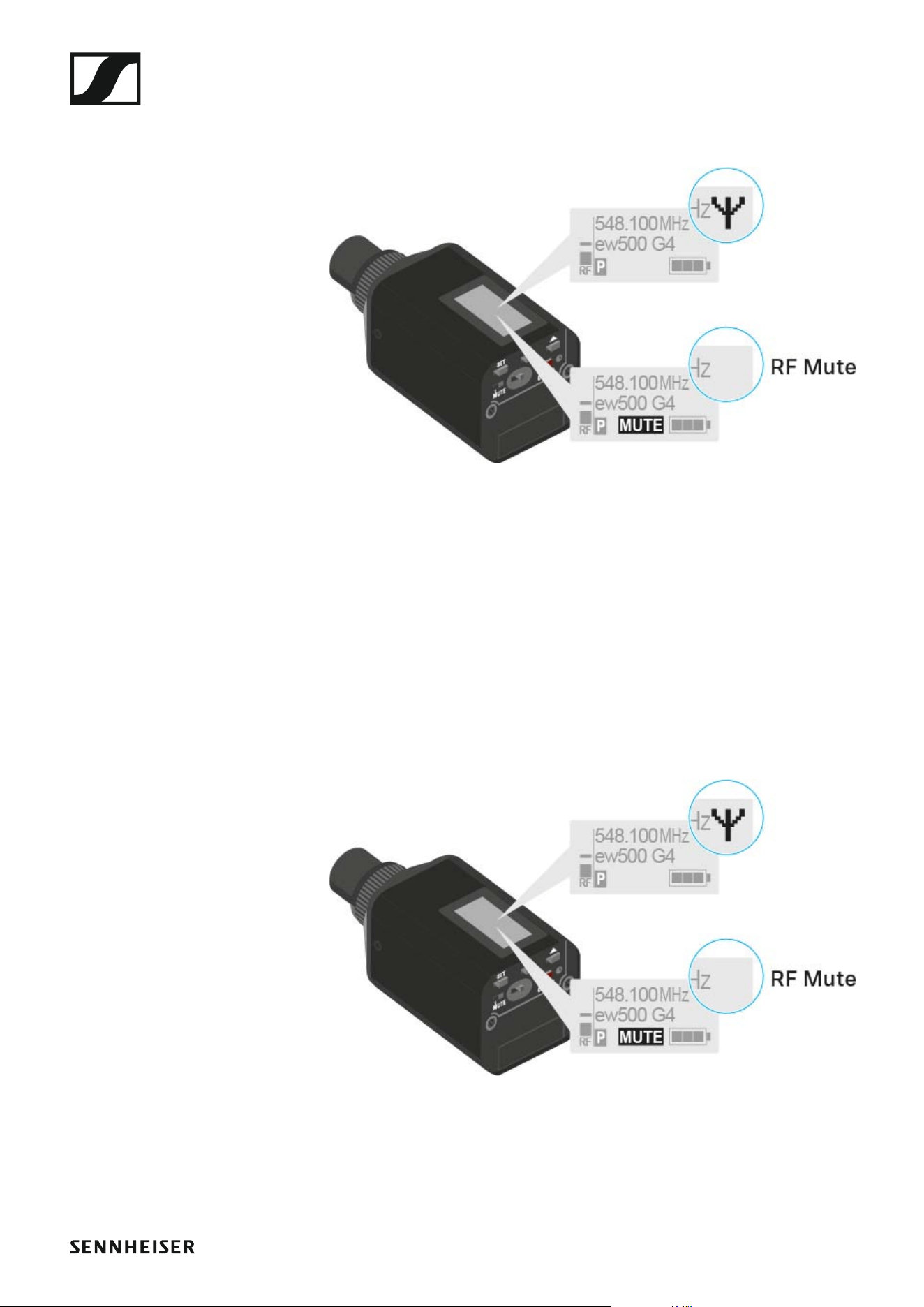
The RF signal is deactivated. The message MUTE is shown in the display
and the transmission icon no longer appears.
Deactivating the RF signal with the ON/OFF button
You can deactivate the RF signal with the ON/OFF button.
To deactivate the RF signal:
▷ Short-press the ON/OFF button.
RF Mute On? appears.
▷ Press the SET button.
The RF signal is deactivated. The message MUTE is shown in the dis-
play and the transmission icon no longer appears.
To activate the RF signal:
▷ Short-press the ON/OFF button.
RF Mute Off? appears.
▷ Press the SET button.
The transmission icon appears again.
Using the SKP 500 G4
109
Lock-off function
You can set the automatic lock-off function in the Auto lock menu (see
“Auto Lock menu item”).
When you have switched on the lock-off function, you will have to turn the
transmitter off and on again in order to operate it.
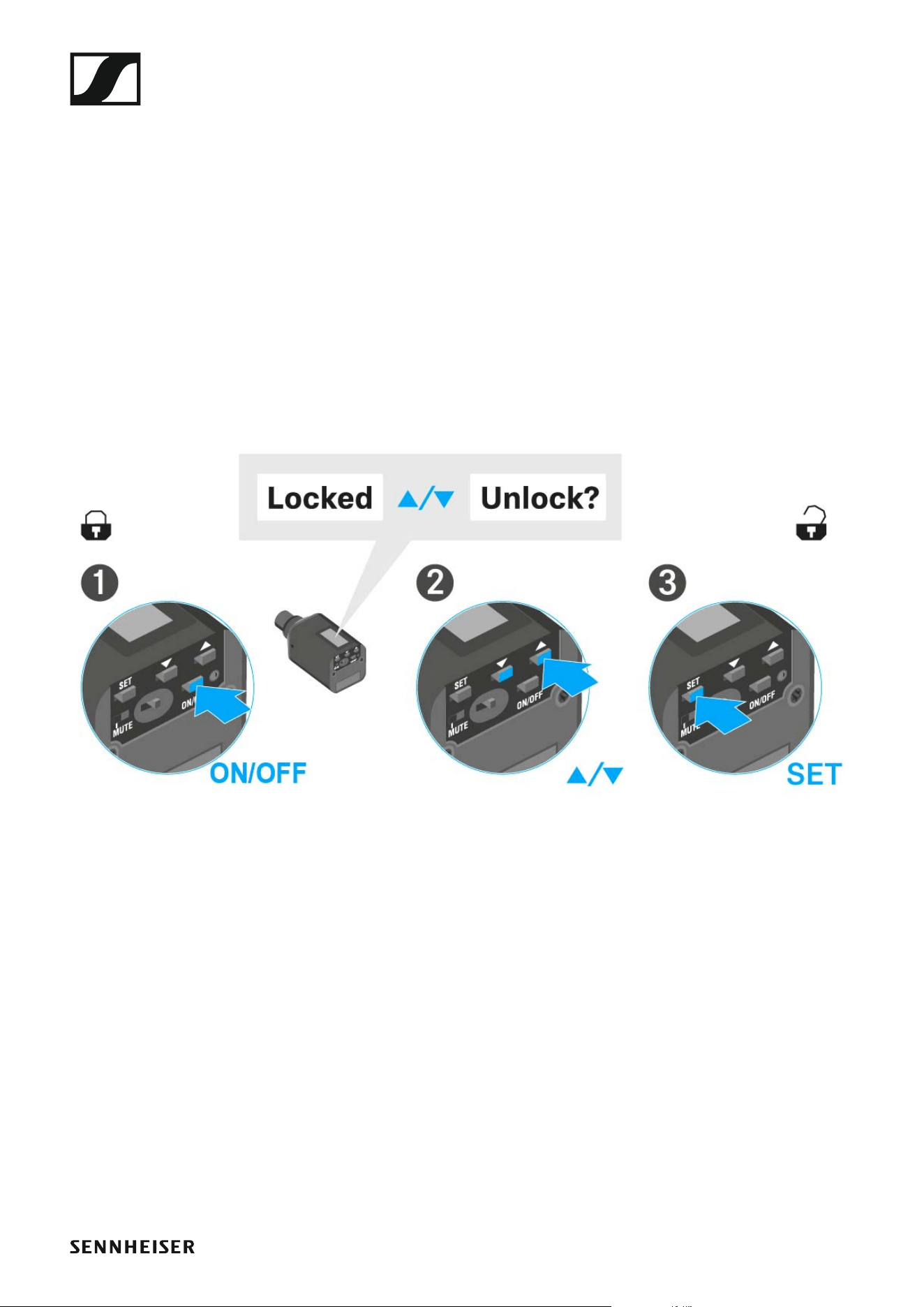
To temporarily deactivate the lock-off function:
▷ Press the SET button.
Locked appears in the display panel.
▷ Press the UP or DOWN button.
Unlock? appears in the display panel.
▷ Press the SET button.
Lock-off function is now temporarily deactivated.
When you are in the operating menu
>> Lock-off function is deactivated long enough for you to work in the op-
erating menu.
When one of the standard displays is shown
>> Lock-off function is automatically activated after 10 seconds.
The Lock-off function icon flashes while the lock-off function is being acti-
vated again.
Using the SKP 500 G4
110
Displays on the SKP 500 G4 plug-on transmitter dis-
play panel
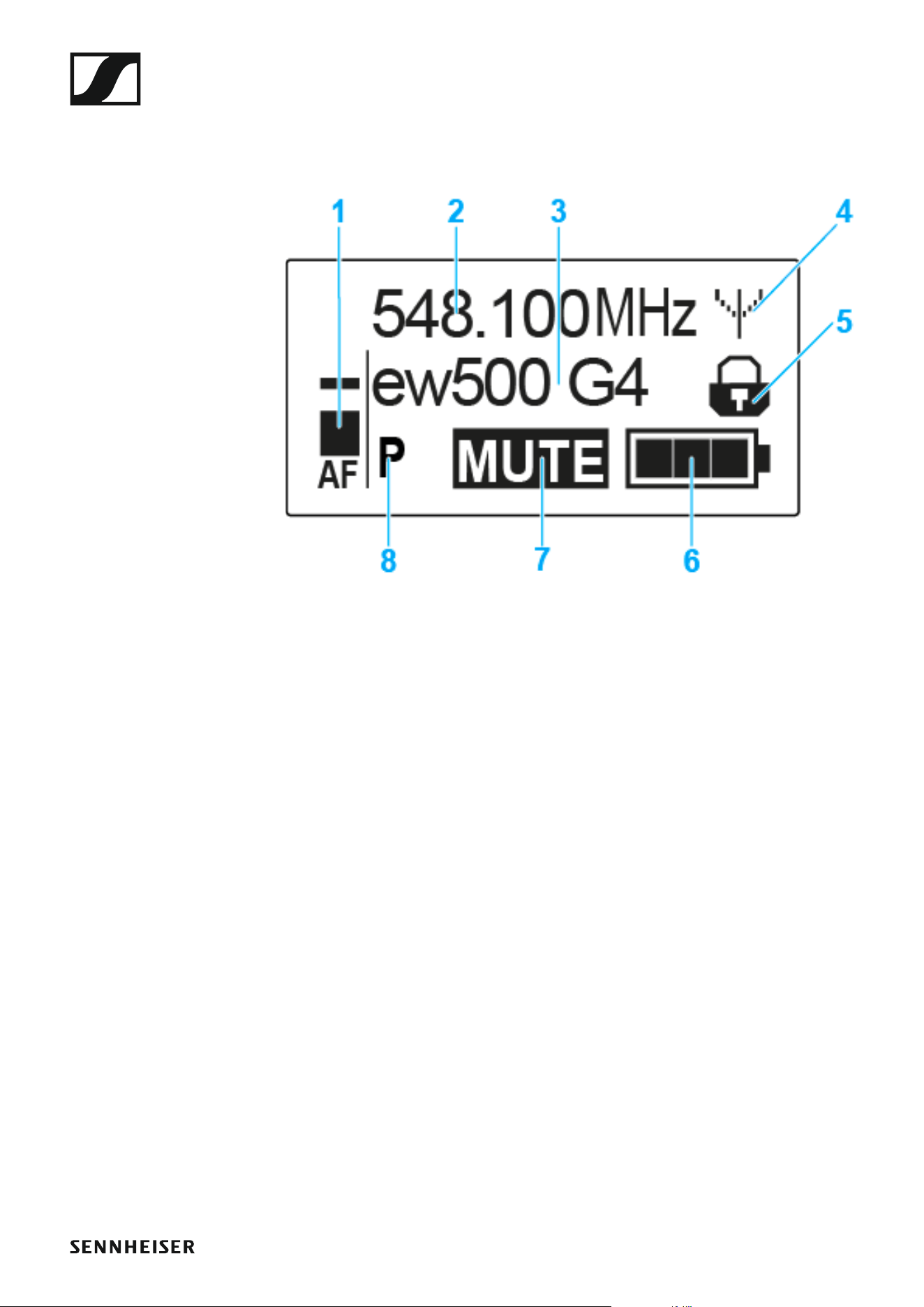
You can view the following information on the transmitter display.
►
1 AF audio level
• Displays the audio level with peak hold function
• See “Sensitivity menu item”
2 Frequency
• Configured transmission frequency
• See “Frequency Preset menu item”
3 Name
• Freely selectable name of the receiver
• See “Name menu item”
4 Transmission icon
• RF signal is being transmitted
• See “Deactivating the RF signal (RF mute)”
5 Lock-off function
• Lock-off function is activated
• See “Auto Lock menu item”
6 Battery status
• See “Battery status”
7 MUTE muting function
• The audio signal is muted
• See “Muting the plug-on transmitter (AF mute)”
8 P pilot tone
• Pilot tone transmission is activated
• See “Advanced > Pilot Tone menu item”
Using the SKP 500 G4
111
>> “Buttons for navigating the SKP 500 G4 menu”
>> “Setting options in the menu”
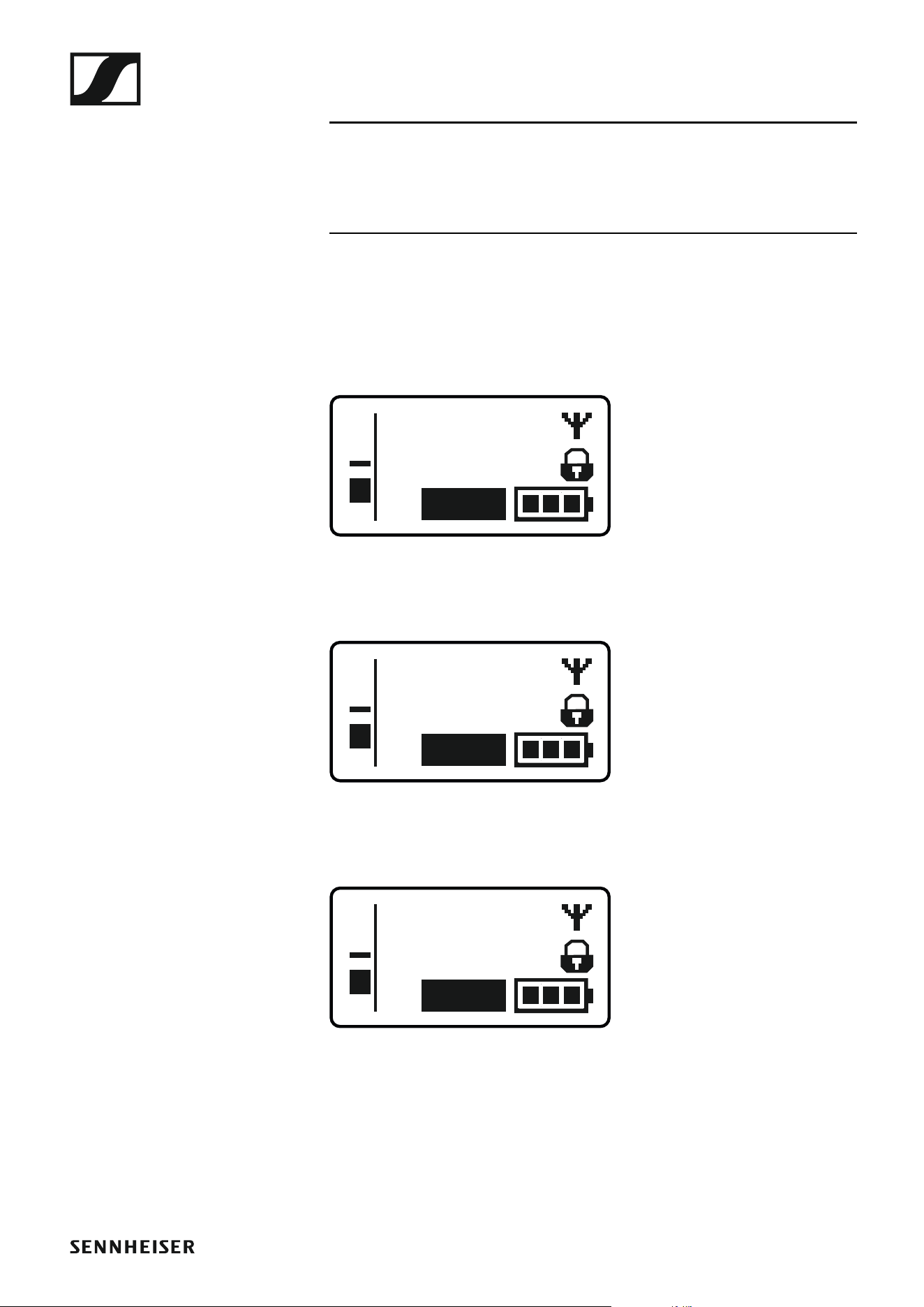
Select a standard display
▷ Press the UP or DOWN buttons to select a standard display.
Frequency/Name standard display
►
Channel/Frequency standard display
►
Name/Channel standard display
►
ew500 G4
MHz
548.100
MUTE
P
AF
MHz
548.100
B.Ch: 20.12
MUTE
P
AF
B.Ch: 20.12
MUTE
P
AF
ew500 G4

Using the SKP 500 G4
112
Buttons for navigating the SKP 500 G4 menu
Navigating through the menu
To open the menu:
▷ Press the SET button.
The operating menu is shown on the transmitter display panel.
To open a menu item:
▷ Press the UP or DOWN buttons to navigate through the individual
menu items.
▷ Press the SET button to open the selected menu item.
“Operating elements of the SKP 500 G4 plug-on transmitter”
Making changes in a menu item
After you open a menu item, you can make changes as follows:
▷ Press the UP or DOWN buttons to set the displayed value.
▷ Press the SET button to save the setting.
▷ Press the ESC (ON/OFF) button to leave the menu item without saving
the setting.
“Operating elements of the SKP 500 G4 plug-on transmitter”
>> “Displays on the SKP 500 G4 plug-on transmitter display panel”
>> “Setting options in the menu”

Using the SKP 500 G4
113
Setting options in the menu
In the SKP 500 G4 menu, you can configure the following settings.
Adjusting the input sensitivity
▷ See “Sensitivity menu item”
Setting the frequency bank and the channel
▷ See “Frequency Preset menu item”
Entering a freely selectable name
▷ See “Name menu item”
Activating/deactivating the automatic lock-off function
▷ See “Auto Lock menu item”
Configuring enhanced settings in the Advanced Menu:
• Adjusting the transmission frequencies for the U frequency bank
• Configuring the MUTE switch
• Configuring the transmission power
• Activating phantom powering
• Activating/deactivating the pilot tone evaluation
• Adjusting the contrast of the display panel
• Resetting the transmitter
• Displaying the current software revision
▷ See “Advanced menu item”
Using the SKP 500 G4
114
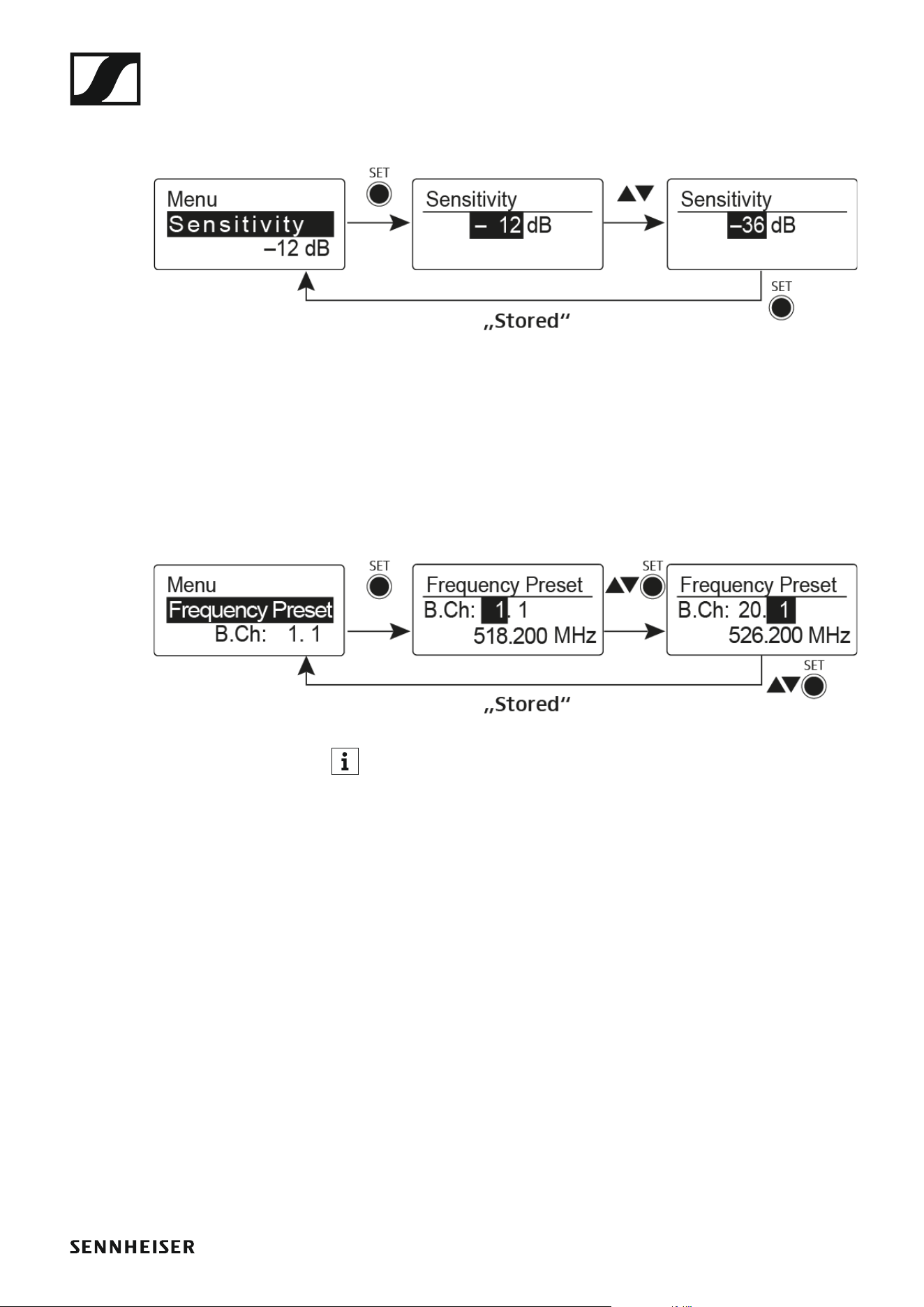
Sensitivity menu item
• Adjusting the input sensitivity – AF audio level
►
Setting range: 0 dB to -48 dB in 6 dB steps.
The AF audio level is also displayed when the plug-on transmitter is muted,
e.g. to check the sensitivity before a live broadcast.
Frequency Preset menu item
• Manually selecting a frequency bank and channel
►
While you work in the Frequency Preset menu, the RF signal is deac-
tivated.
Please note when creating multi-channel systems:
Only the factory-preset frequencies within one frequency bank are inter-
modulation-free. The bodypack transmitter and receiver must be set to the
same frequency. Be sure to note the information on frequency selection
under “Establishing a radio link”.
Using the SKP 500 G4
115
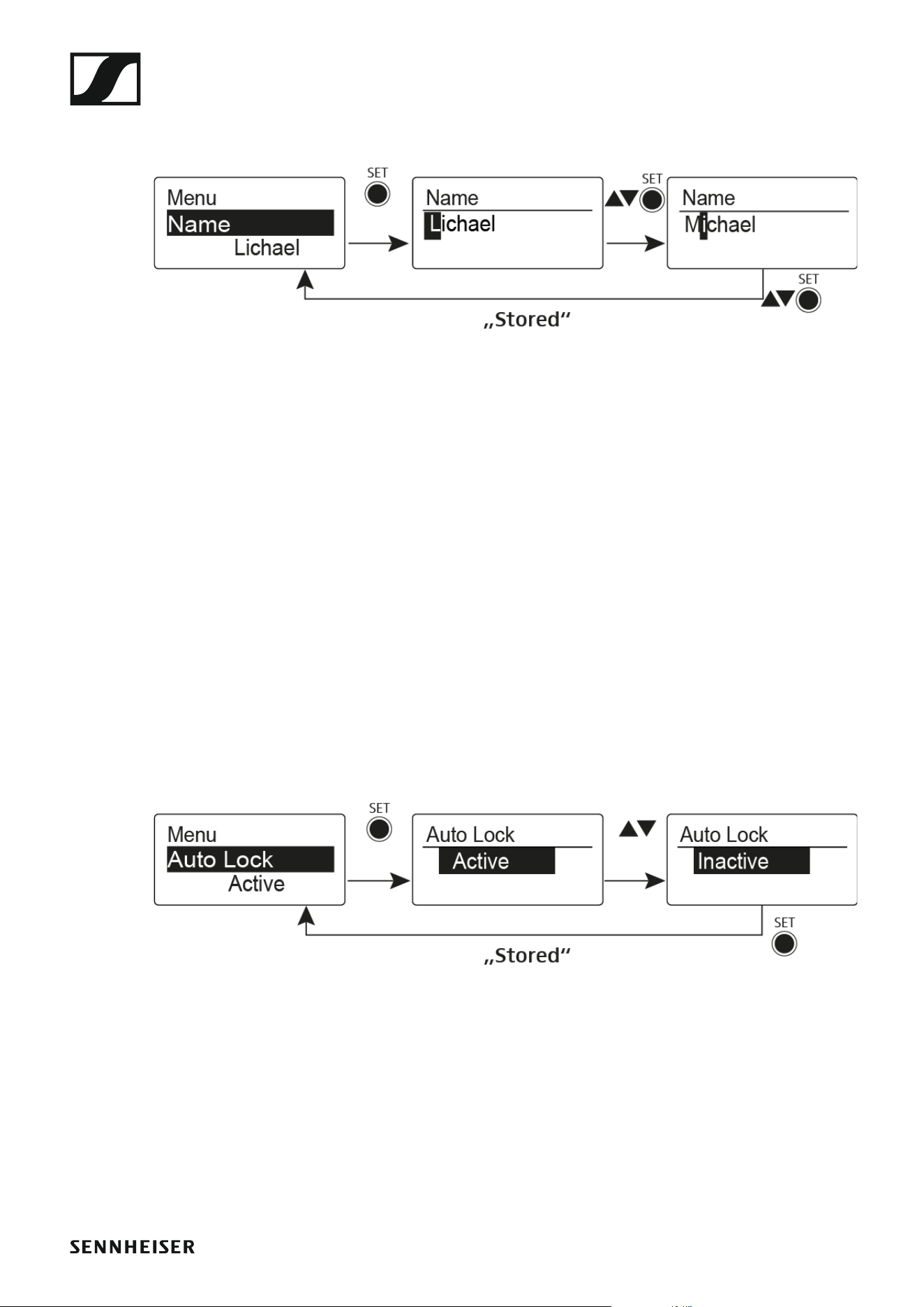
Name menu item
• Entering names
►
In the Name menu item you can enter any name you want for the bodypack
transmitters (e.g. the names of the musicians).
The name can be shown in the Frequency/Name and Name/Channel stan-
dard displays.
The names are a maximum of 8 characters:
• All letters except umlauts.
• Numbers from 0 to 9
• Special characters and spaces
Enter the names as follows:
▷ Press the UP or DOWN buttons to select a character.
▷ Press the SET button to switch to the next space or to save the name
you have entered once it is complete.
Auto Lock menu item
• Switching automatic the lock-off function on and off
►
This lock prevents the wireless microphone from being unintentionally
switched off and also prevents any unintentional changes to the transmit-
ter’s configuration. In the current standard display, the lock icon shows
whether the lock-off function is currently switched on.
You can find information about using the lock-off function under “Lock-off
function”.

Using the SKP 500 G4
116
Advanced menu item
In the Advanced submenu you can configure enhanced settings.
The following sub-items are available:
Adjusting the transmission frequencies for the U frequency bank
▷ See “Advanced > Tune menu item”
Configuring the function of the MUTE switch and the RMS 1 remote
mute switch
▷ See “Advanced > Mute Mode menu item”
Configuring the transmission power
▷ See “Advanced > RF Power menu item”
Activating phantom powering
▷ See “Advanced > Phantom Power 48V menu item”
Activating/deactivating the pilot tone evaluation
▷ See “Advanced > Pilot Tone menu item”
Adjusting the contrast of the display panel
▷ See “Advanced > LCD Contrast menu item”
Resetting the transmitter
▷ See “Advanced > Reset menu item”
Displaying the current software revision
▷ See “Advanced > Software Revision menu item”
Using the SKP 500 G4
117
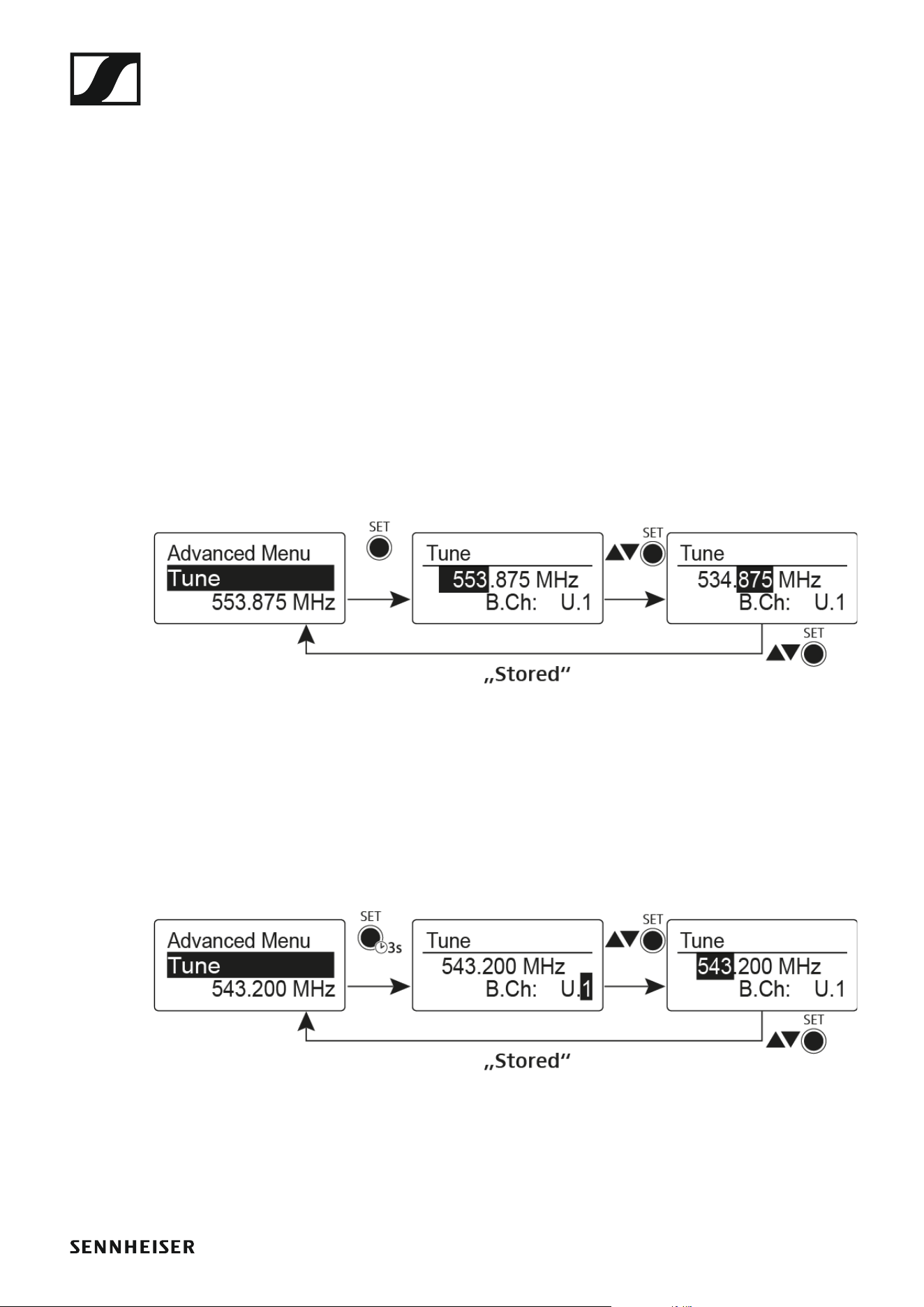
Advanced > Tune menu item
• Configuring the transmission frequency and frequency bank U
When you have configured the bodypack transmitter to a system bank and
you call up the Tune menu item, channel 1 of the frequency bank U is auto-
matically set. The message U.1 briefly appears in the display. In the factory
settings, the channels of the frequency bank U are not assigned to any
transmission frequency.
While you work in the Tune menu, the RF signal is deactivated.
You can configure a transmission frequency for the current channel or se-
lect a channel in the frequency bank U and configure a transmission fre-
quency for this channel in the Tune menu. Be sure to note the information
on frequency selection, see “Setting notes”.
Only adjusting the frequency
To configure the transmission frequency for the current channel:
▷ Open the Tune menu item in the Advanced menu.
The frequency selection appears.
►
▷ Configure the desired frequency.
▷ Press the SET button.
Your settings will be saved. You are now back in the operating menu.
Setting the channel and frequency
To select a channel and assign it a frequency:
▷ Open the Tune menu item in the Advanced menu by pressing and hold-
ing the SET button until the frequency bank selection appears.
►
▷ Set the desired channel.
▷ Press the SET button.
The frequency selection appears.
▷ Configure the frequency.
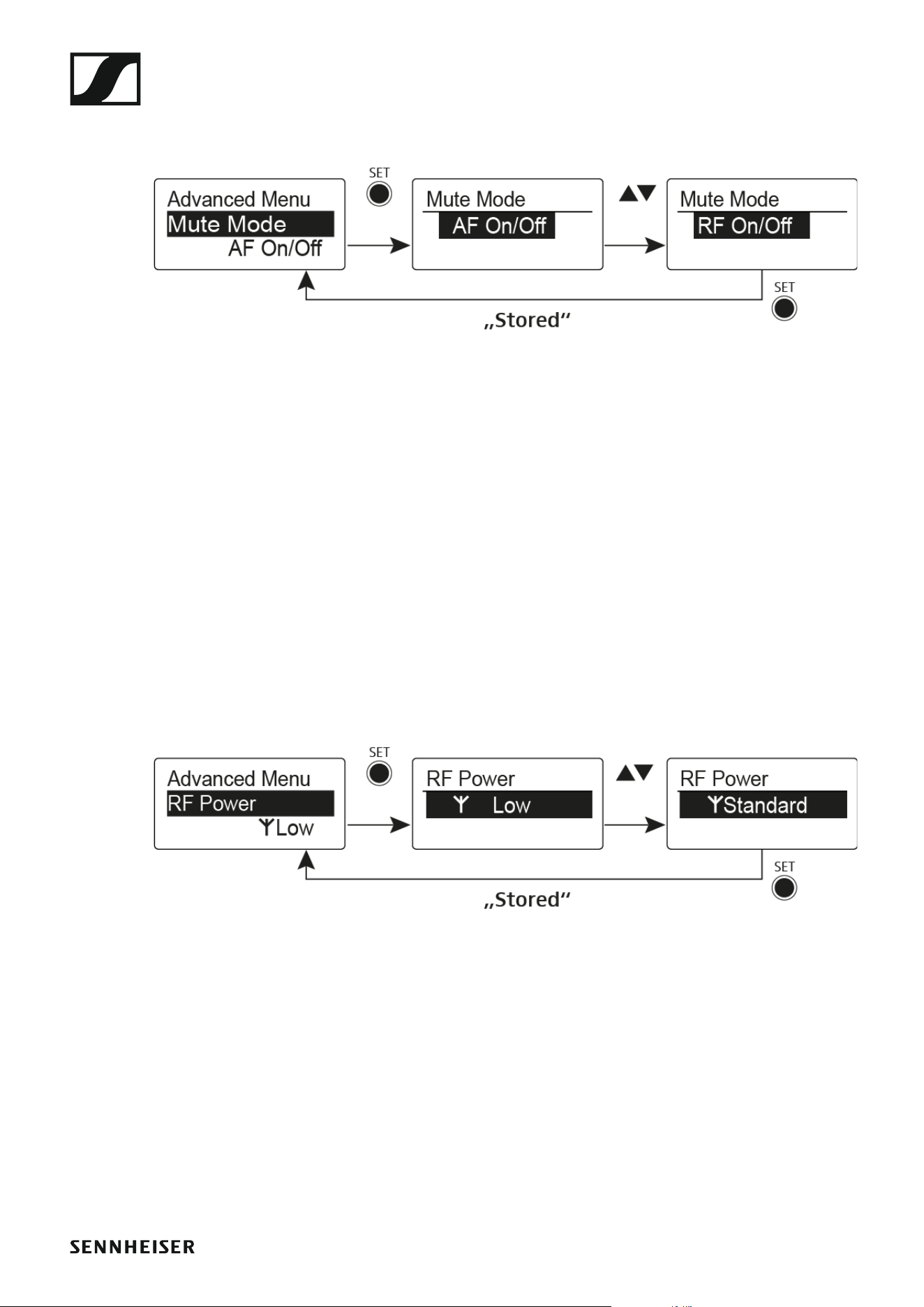
Using the SKP 500 G4
118
Advanced > Mute Mode menu item
•Configuring the MUTE switch
►
AF On/Off mode
• If set to position MUTE, the audio signal is muted
RF On/Off mode
• If set to the MUTE selector position, the RF signal is deactivated.
Disabled mode
• No function
You can find information about operating the mute switch under “Muting
the plug-on transmitter (AF mute)” and “Deactivating the RF signal (RF
mute)”.
Advanced > RF Power menu item
• Configuring the transmission power
►
You can configure the transmission power in three steps in the RF Power
menu item. Please note the information at the following address:
General conditions and restrictions for the use of frequencies
Setting range:
Low: 10 mW
Standard: 30 mW
High: 50 mW
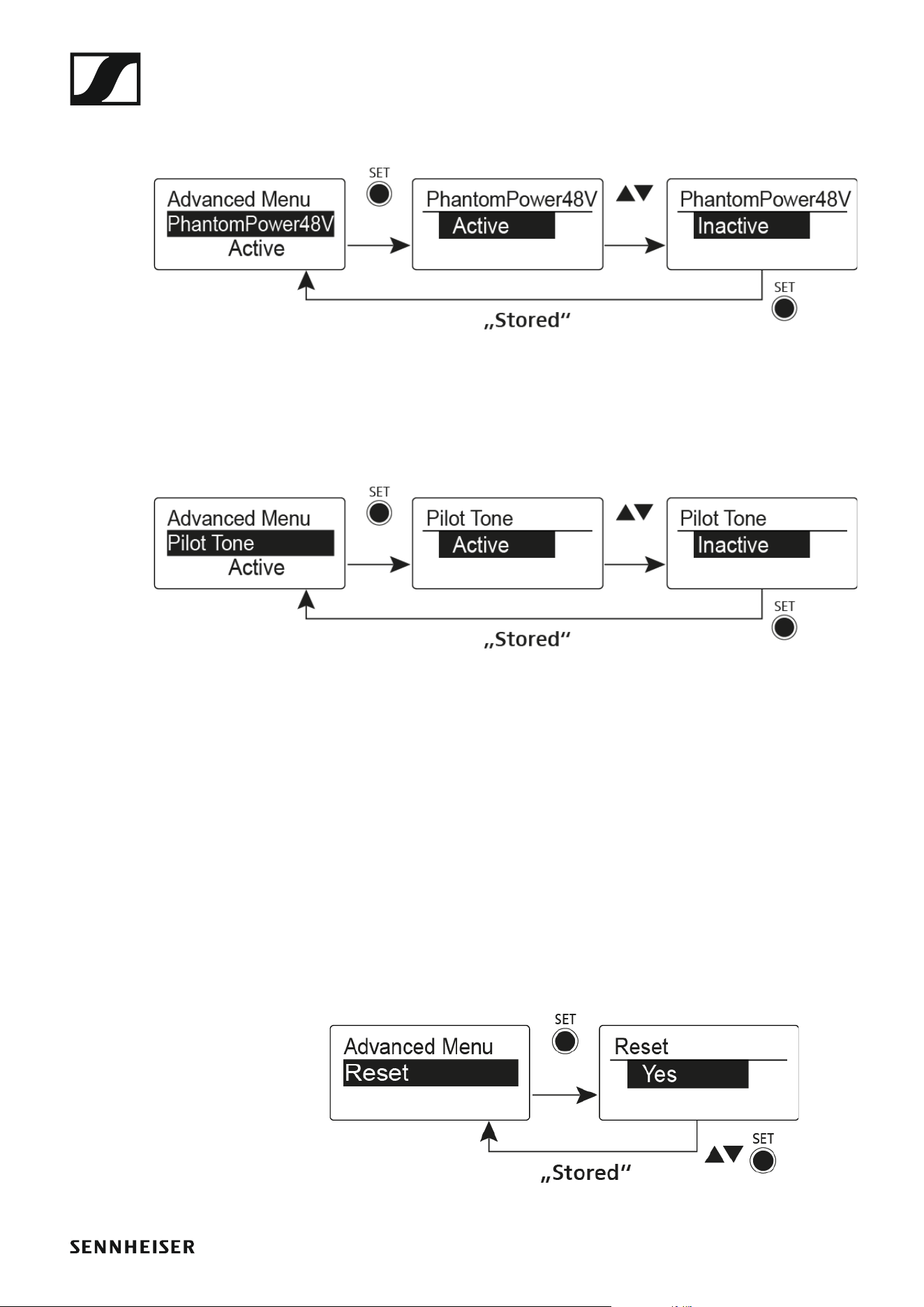
Using the SKP 500 G4
119
Advanced > Phantom Power 48V menu item
• Activating phantom powering
►
Advanced > Pilot Tone menu item
• Activating/deactivating pilot tone transmission
►
The pilot tone has an inaudible frequency that is sent from the transmitter
and evaluated by the receiver. It supports the receiver’s squelch function.
Advanced > LCD Contrast menu item
• Adjusting the contrast of the display panel
You can configure the contrast of the display in 16 steps.
Advanced > Reset menu item
• Resetting the plug-on transmitter
►
When you reset the plug-on transmitter, only the selected settings of the
pilot tone and the U frequency bank are retained.

Using the SKP 500 G4
120
Advanced > Software Revision menu item
• Show software revision
You can display the current software revision.

Establishing a radio link
121
Establishing a radio link
To establish a radio link between the transmitter and receiver, the same
frequency must be set in both devices.
You can do this in a number of different ways:
1. Use the Easy Setup function to perform an automatic frequency set-
up (see “Easy Setup menu item”).
2. Set a frequency in the receiver manually (see “Frequency Preset menu
item”) and synchronize it with the transmitter (see “Synchronizing de-
vices”).
3. Set the frequency on the receiver and the transmitter manually
(EK 500 G4: “Frequency Preset menu item”, SKM 500 G4: “Frequency
Preset menu item”, SK 500 G4: “Frequency Preset menu item”, SKP 500
G4: “Frequency Preset menu item”)
Setting notes
Please note the following when synchronizing a transmitter with a receiv-
ers:
▷ Only use transmitters and receivers from the same frequency range
(see the type plate on the transmitter and receiver).
▷ Make sure that your chosen frequencies are listed in the frequency ta-
ble for the particular frequency range (see “Frequency tables”).
▷ Ensure that the desired frequencies are permitted in your country and
apply for an operating license if necessary.
Please note the information at the following address:
General conditions and restrictions for the use of frequencies
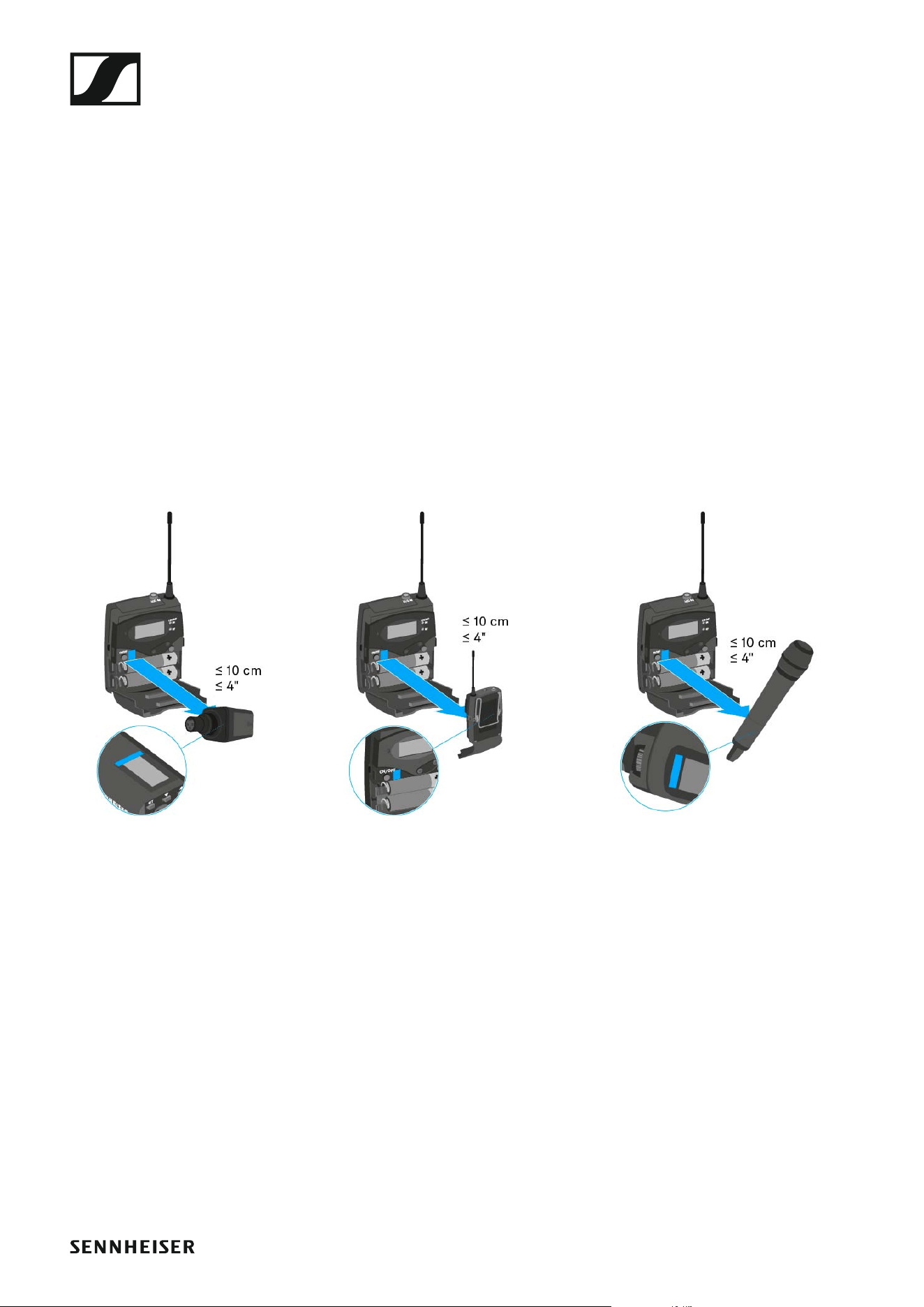
Synchronizing devices
122
Synchronizing devices
You can synchronize ew 500 P G4 series transmitters and receivers via the
receiver’s infrared interface.
You can adjust the Parameters to be transferred to the transmitter here:
“Advanced -> Sync Settings menu item”
To synchronize the devices:
▷ Switch the transmitter and the receiver on.
▷ Call up the Sync menu item on the receiver.
Sync appears in the receiver’s display.
▷ Hold the infra-red interface of the transmitter in front of the infra-red
interface of the receiver.
The parameters are transferred to the transmitter. When the transfer is
complete, a tick appears in the receiver’s display as a confirmation.
Then the receiver will return to the current standard display.
►
To cancel synchronization:
▷ Press the ON/OFF button on the receiver.
An X appears in the display.
This icon also appears when:
• no transmitter is found or the transmitter is not compatible.
• no transmitter is found and the synchronization process automatically
ends after 30 seconds.

Overview
123
SPECIFICATIONS
Overview
In the sections below, you can find information about the different variants
of the products in the ew 500 P G4 series as well as technical data for the
individual products.
• Product variants and frequency variants >> “Product variants”
• Frequency tables with overviews of all banks and channels >> “Fre-
quency tables”
• Product-specific technical data >> “Specifications”
• Information on pin assignment (jack and XLR) >> “Pin assignment”
You can also find information about safely cleaning and maintaining
evolution wireless G4 series products.
• “Cleaning and maintenance”

Product variants
124
Product variants
EK 500 G4 product variants
Made in Germany
►
Assembled in the USA
►
EK 500 G4-K+ 925 – 937.5 MHz Art. no. 507822
EK 500 G4-GBw 606 – 678 MHz Art. no. 507823
EK 500 G4-Gw 558 – 626 MHz Art. no. 507824
EK 500 G4-Bw 626 – 698 MHz Art. no. 507825
EK 500 G4-Cw 718 – 790 MHz Art. no. 507826
EK 500 G4-Dw 790 – 865 MHz Art. no. 507827
EK 500 G4-Aw+ 470 – 558 MHz Art. no. 508419
EK 500 G4-AS 520 – 558 MHz Art. no. 508161
EK 500 G4-JB 806 – 810 MHz Art. no. 508162
EK 500 G4-Gw 558 – 626 MHz Art. no. 508163
EK 500 G4-Bw 626 – 698 MHz Art. no. 508164
EK 500 G4-Cw 718 – 790 MHz Art. no. 508165
EK 500 G4-Dw 790 – 865 MHz Art. no. 508166
EK 500 G4-Aw+ 470 – 558 MHz Art. no. 508440
EK 500 G4-Gw1 558 – 608 MHz Art. no. 508461

Product variants
125
SKM 500 G4 product variants
Made in Germany
►
Assembled in the USA
►
SKM 500 G4-K+ 925 – 937.5 MHz Art. no. 507782
SKM 500 G4-GBw 606 – 678 MHz Art. no. 507783
SKM 500 G4-Gw 558 – 626 MHz Art. no. 507784
SKM 500 G4-Bw 626 – 698 MHz Art. no. 507785
SKM 500 G4-Cw 718 – 790 MHz Art. no. 507786
SKM 500 G4-Dw 790 – 865 MHz Art. no. 507787
SKM 500 G4-Aw+ 470 – 558 MHz Art. no. 508414
SKM 500 G4-AS 520 – 558 MHz Art. no. 508121
SKM 500 G4-JB 806 – 810 MHz Art. no. 508122
SKM 500 G4-Gw 558 – 626 MHz Art. no. 508123
SKM 500 G4-Bw 626 – 698 MHz Art. no. 508124
SKM 500 G4-Cw 718 – 790 MHz Art. no. 508125
SKM 500 G4-Dw 790 – 865 MHz Art. no. 508126
SKM 500 G4-Aw+ 470 – 558 MHz Art. no. 508435
SKM 500 G4-Gw1 558 – 608 MHz Art. no. 508459

Product variants
126
SK 500 G4 product variants
Made in Germany
►
Assembled in the USA
►
SK 500 G4-K+ 925 – 937.5 MHz Art. no. 507774
SK 500 G4-GBw 606 – 678 MHz Art. no. 507775
SK 500 G4-Gw 558 – 626 MHz Art. no. 507776
SK 500 G4-Bw 626 – 698 MHz Art. no. 507777
SK 500 G4-Cw 718 – 790 MHz Art. no. 507778
SK 500 G4-Dw 790 – 865 MHz Art. no. 507779
SK 500 G4-Aw+ 470 – 558 MHz Art. no. 508413
SK 500 G4-AS 520 – 558 MHz Art. no. 508113
SK 500 G4-JB 806 – 810 MHz Art. no. 508114
SK 500 G4-Gw 558 – 626 MHz Art. no. 508115
SK 500 G4-Bw 626 – 698 MHz Art. no. 508116
SK 500 G4-Cw 718 – 790 MHz Art. no. 508117
SK 500 G4-Dw 790 – 865 MHz Art. no. 508118
SK 500 G4-Aw+ 470 – 558 MHz Art. no. 508434
SK 500 G4-Gw1 558 – 608 MHz Art. no. 508455

Product variants
127
SKP 500 G4 product variants
Made in Germany
►
Assembled in the USA
►
SKP 500 G4-K+ 925 – 937.5 MHz Art. no. 507814
SKP 500 G4-GBw 606 – 678 MHz Art. no. 507815
SKP 500 G4-Gw 558 – 626 MHz Art. no. 507816
SKP 500 G4-Bw 626 – 698 MHz Art. no. 507817
SKP 500 G4-Cw 718 – 790 MHz Art. no. 507818
SKP 500 G4-Dw 790 – 865 MHz Art. no. 507819
SKP 500 G4-Aw+ 470 – 558 MHz Art. no. 508418
SKP 500 G4-AS 520 – 558 MHz Art. no. 508153
SKP 500 G4-JB 806 – 810 MHz Art. no. 508154
SKP 500 G4-Gw 558 – 626 MHz Art. no. 508155
SKP 500 G4-Bw 626 – 698 MHz Art. no. 508156
SKP 500 G4-Cw 718 – 790 MHz Art. no. 508157
SKP 500 G4-Dw 790 – 865 MHz Art. no. 508158
SKP 500 G4-Aw+ 470 – 558 MHz Art. no. 508439
SKP 500 G4-Gw1 558 – 608 MHz Art. no. 508460


Specifications
129
Specifications
You can find the cross-system and product-specific technical data in the
sections below.

130
EK 500 G4
RF characteristics
►
Modulation Wideband FM
Receiving frequency ranges Aw: 470 – 558 MHz
AS: 520 – 558 MHz
Gw1: 558 – 608 MHz
Gw: 558 – 626 MHz
GBw: 606 – 678 MHz
Bw: 526 – 698 MHz
Cw: 718 – 790 MHz
Dw: 790 – 865 MHz
JB: 806 – 810 MHz
K+: 925 – 937.5 MHz
Receiving frequencies Max. 2880 receiving frequencies,
adjustable in 25 kHz steps
20 frequency banks, each with up
to 32 factory-preset channels, no
intermodulation
6 frequency banks with up to 32
programmable channels
Switching bandwidth up to 88 MHz
Nominal/peak deviation ±24 kHz / ±48 kHz
Receiver principle Adaptive diversity
Sensitivity (with HDX,
peak deviation)
< 1.6 μV for 52 dBA
eff S/N
Adjacent channel selection ≥ 65 dB
Intermodulation attenuation ≥ 65 dB
Blocking ≥ 70 dB
Squelch Low: 5 dBμV
Middle: 15 dBμV
High: 25 dBμV
Pilot tone squelch Can be switched off

131
AF characteristics
►
Overall device
►
Compander system Sennheiser HDX
Signal-to-noise ratio
(1 mV, peak deviation)
Line: ≥ 110 dBA
Phones: approx. 90 dBA
Total harmonic distortion (THD) ≤ 0.9 %
AF output voltage (at peak devia-
tion, 1 kHz AF)
3.5 mm jack socket +17 dBu (mo-
no, unbalanced)
“AF Out” setting range 42 dB in 6 dB steps
Temperature range -10 °C to +55 °C (14 °F to 131 °F)
Power supply 2 AA batteries, 1,5 V or
BA 2015 accupack
Nominal voltage 3 V battery /
2.4 V rechargeable battery
Power consumption at nominal voltage:
typically 180 mA
with transmitter switched off:
≤ 25 μA
Operating time Typically 8 h
Dimensions Approx. 82 x 64 x 24 mm
Weight (with batteries) Approx. 130 g

132
SKM 500 G4
RF characteristics
►
Modulation Wideband FM
Receiving frequency ranges Aw+: 470 – 558 MHz
AS: 520 – 558 MHz
Gw1: 558 – 608 MHz
Gw: 558 – 626 MHz
GBw: 606 – 678 MHz
Bw: 526 – 698 MHz
Cw: 718 – 790 MHz
Dw: 790 – 865 MHz
JB: 806 – 810 MHz
K+: 925 – 937.5 MHz
Transmission frequencies Max 2880 receiving frequencies,
adjustable in 25 kHz steps
20 frequency banks, each with up
to 32 factory-preset channels,
no intermodulation
6 frequency banks with up to 32
programmable channels
Switching bandwidth up to 88 MHz
Nominal/peak deviation ±24 kHz / ±48 kHz
Frequency stability ≤ ±15 ppm
RF output power at 50 ? Switchable:
Low: typically 10 mW
Standard: typically 30 mW
High: typically 50 mW
Pilot tone squelch Can be switched off

133
AF characteristics
►
Overall device
►
Compander system Sennheiser HDX
AF frequency response 80 – 18,000 Hz
Signal-to-noise ratio
(1 mV, peak deviation)
≥ 115 dBA
Total harmonic distortion (THD) ≤ 0.9 %
Setting range for input sensitivity 48 dB in 6 dB steps
Temperature range -10 °C to +55 °C (14 °F to 131 °F)
Power supply 2 AA batteries, 1,5 V or
BA 2015 accupack
Nominal voltage 3 V battery /
2.4 V rechargeable battery
Power consumption
at nominal voltage
with transmitter switched off
typically 180 mA
≤ 25 μA
Operating time Typically 8 h
Dimensions Approx. Ø 50 x 265 mm
Weight (with batteries) Approx. 450 g

134
SK 500 G4
RF characteristics
►
Modulation Wideband FM
Receiving frequency ranges Aw+: 470 – 558 MHz
AS: 520 – 558 MHz
Gw1: 558 – 608 MHz
Gw: 558 – 626 MHz
GBw: 606 – 678 MHz
Bw: 526 – 698 MHz
Cw: 718 – 790 MHz
Dw: 790 – 865 MHz
JB: 806 – 810 MHz
K+: 925 – 937.5 MHz
Transmission frequencies Max 2880 receiving frequencies,
adjustable in 25 kHz steps
20 frequency banks, each with up
to 32 factory-preset channels,
no intermodulation
6 frequency banks with up to 32
programmable channels
Switching bandwidth up to 88 MHz
Nominal/peak deviation ±24 kHz / ±48 kHz
Frequency stability ≤ ±15 ppm
RF output power at 50 ? Switchable:
Low: typically 10 mW
Standard: typically 30 mW
High: typically 50 mW
Pilot tone squelch Can be switched off

135
AF characteristics
►
Overall device
►
Compander system Sennheiser HDX
AF frequency response Microphone: 80 – 18,000 Hz
Line: 25 – 18,000 Hz
Signal-to-noise ratio
(1 mV, peak deviation)
≥ 115 dBA
Total harmonic distortion (THD) ≤ 0.9 %
Max. input voltage
Microphone/line
3 V
eff
Input impedance
Microphone/line
40 kΩ, unbalanced/1 MΩ
Input capacitance Switchable
Setting range for input sensitivity 60 dB in 3 dB steps
Temperature range -10 °C to +55 °C (14 °F to 131 °F)
Power supply 2 AA batteries, 1,5 V or
BA 2015 accupack
Nominal voltage 3 V battery
2.4 V rechargeable battery
Power consumption
at nominal voltage
with transmitter switched off
typically 180 mA
≤ 25 μA
Operating time Typically 8 h
Dimensions approx. 82 x 64 x 24 mm
Weight (with batteries) Approx. 160 g

136
SKP 500 G4
RF characteristics
►
Modulation Wideband FM
Receiving frequency ranges Aw: 470 – 558 MHz
AS: 520 – 558 MHz
Gw1: 558 – 608 MHz
Gw: 558 – 626 MHz
GBw: 606 – 678 MHz
Bw: 526 – 698 MHz
Cw: 718 – 790 MHz
Dw: 790 – 865 MHz
JB: 806 – 810 MHz
K+: 925 – 937.5 MHz
Transmission frequencies Max. 2880 receiving frequencies,
adjustable in 25 kHz steps
20 frequency banks, each with up
to 32 factory-preset channels, no
intermodulation
6 frequency banks with up to 32
programmable channels
Switching bandwidth up to 88 MHz
Nominal/peak deviation ±24 kHz / ±48 kHz
Frequency stability ≤ ±15 ppm
RF output power at 50 ? Switchable:
Low: typically 10 mW
Standard: typically 30 mW
High: typically 50 mW
Pilot tone squelch Can be switched off

137
AF characteristics
►
Overall device
►
Compander system Sennheiser HDX
AF frequency response 80 – 18,000 Hz
Signal-to-noise ratio (1 mV, peak
deviation)
≥ 120 dBA
Total harmonic distortion (THD) ≤ 0.9 %
Input voltage 6 V
eff
Input impedance 68 kΩ, unbalanced
Input capacitance Switchable
Setting range for input sensitivity 48 dB in 6 dB steps
Temperature range -10 °C to +55 °C (14 °F to 131 °F)
Power supply 2 AA batteries, 1,5 V or
BA 2015 accupack
Nominal voltage 3 V battery /
2.4 V rechargeable battery
Power consumption at nominal voltage:
typically 180 mA
with transmitter switched off:
≤ 25 μA
Operating time Typically 8 h
Dimensions Approx. 105 x 43 x 43 mm
Weight (with batteries) Approx. 195 g
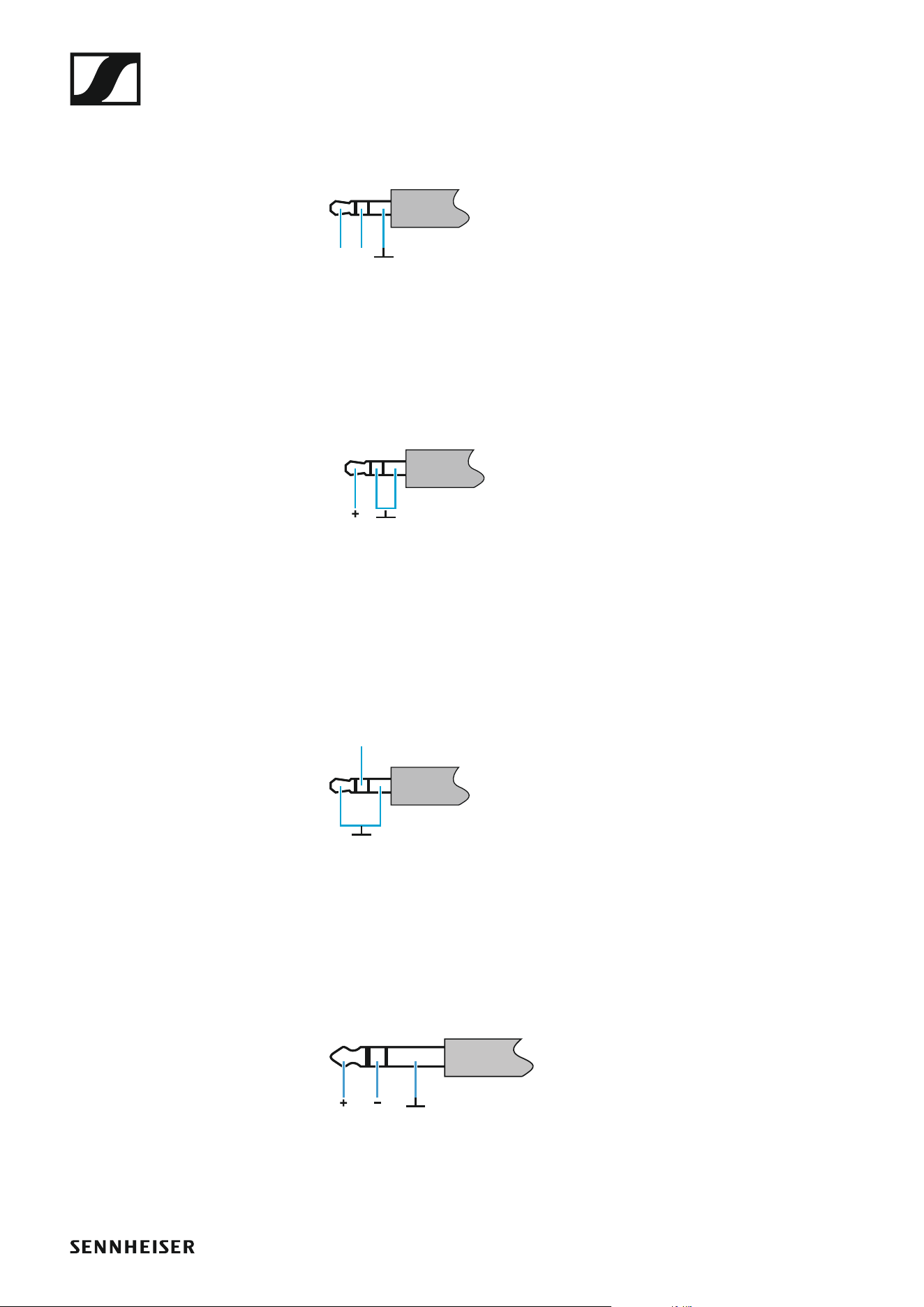
Pin assignment
138
Pin assignment
3.5 mm stereo jack plug
►
• Plug for headphone and earphone cables, e.g. IE 4.
•Connect to:
•EK IEM G4
•EK 500 G4
3.5 mm mic jack plug
►
• Plug for lavalier and headset microphone, e.g. ME 2.
•Connect to:
•SK100G4
•SK 300 G4
•SK 500 G4
3.5 mm line jack plug
►
• Plug for line and instrument cables, e.g. Ci 1-N
•Connect to:
•SK100G4
•SK 300 G4
•SK 500 G4
6.3 mm stereo jack plug, balanced (audio in/loop out)
►
•Connect to:
• SR IEM G4 Audio In
• SR IEM G4 Loop Out
RL
Mic
Line +
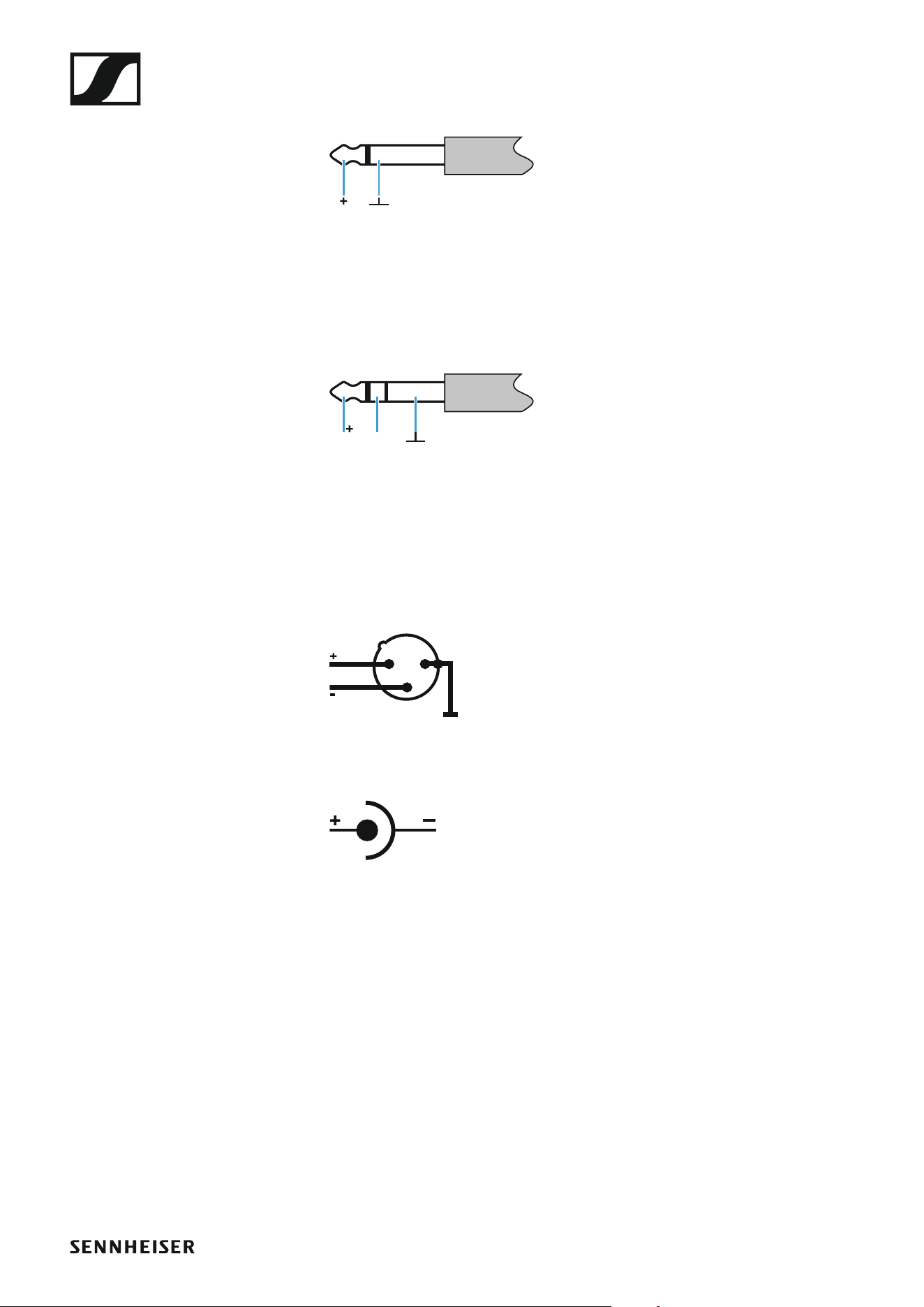
Pin assignment
139
6.3 mm mono jack plug, unbalanced
►
•Connect to:
•EM 100 G4 Audio Out
• EM 300-500 G4 Audio Out
6.3 mm stereo jack plug for headphone jack
►
•Connect to:
• EM 100 G4 headphone input
• EM 300-500 G4 headphone input
• SR IEM G4 headphone input
XLR-3 plug, balanced
►
Hollow jack plug for power supply
►
LR
1
3
2
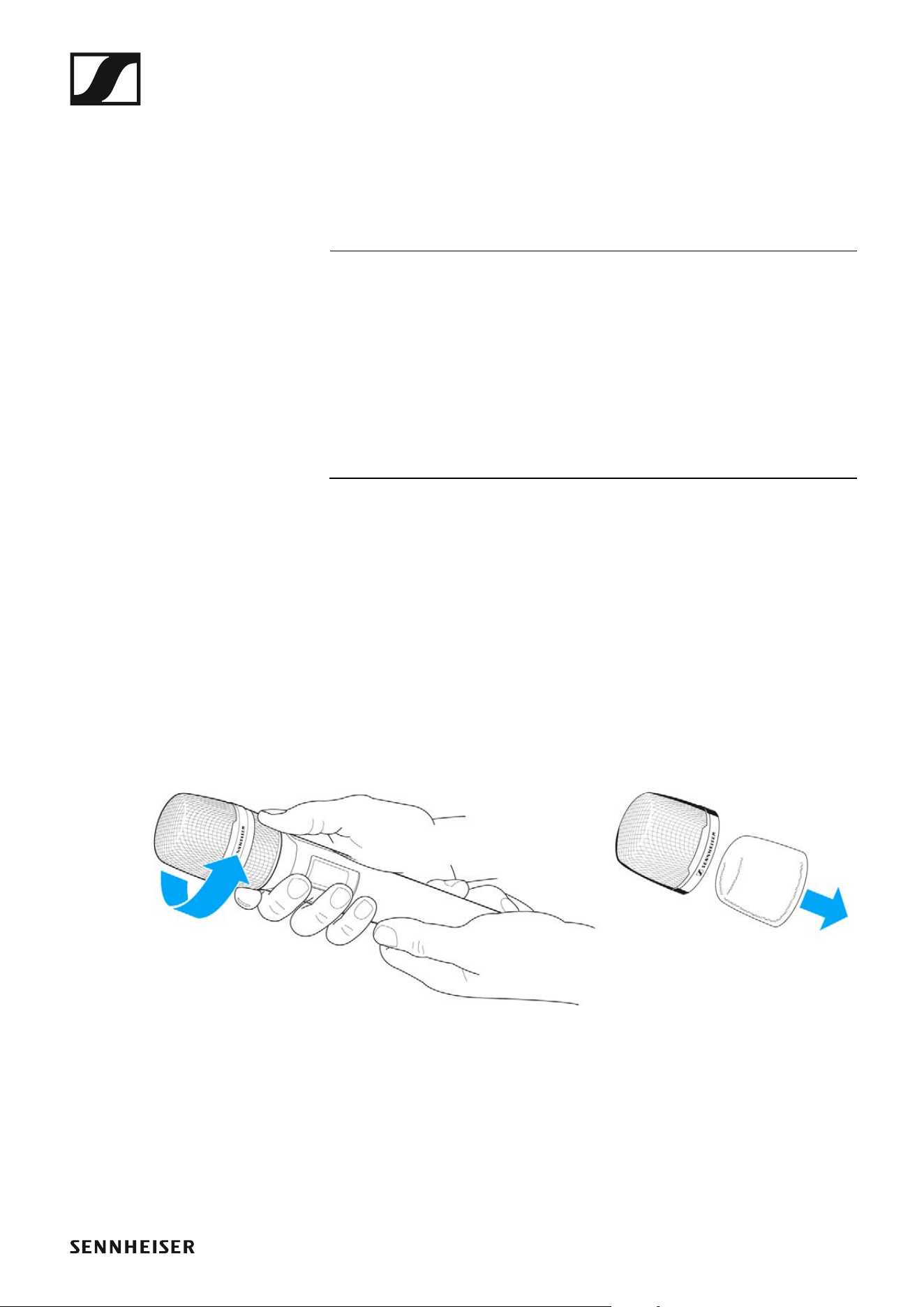
Cleaning and maintenance
140
Cleaning and maintenance
Note the following information when cleaning and maintaining evolution
wireless G4 series products.
CAUTION
Liquids can damage the products’ electronics.
Liquids entering the product housing can cause a short-circuit and damage
the electronics.
▷ Keep all liquids away from the products.
▷ Do not use any solvents or cleansing agents.
▷ Disconnect the products from the power supply system and remove re-
chargeable batteries and batteries before you begin cleaning.
▷ Clean all products only with a soft, dry cloth.
▷ Note the special cleaning instructions below for the following products.
Cleaning the sound inlet basket of the microphone module
▷ Unscrew the top sound inlet basket from the microphone module by
turning it counterclockwise.
▷ Remove the foam insert.
You can clean the sound inlet basket in two ways:
▷ Use a slightly damp cloth to clean the top sound inlet basket from the
inside and outside.
▷ Use a brush and rinse with clean water.
▷ If necessary, clean the foam insert with a mild detergent or replace the
foam insert.
▷ Dry the top sound inlet basket and foam insert.
▷ Reinsert the foam insert.

Cleaning and maintenance
141
▷ Screw the sound inlet basket back onto the microphone module.
From time to time, you should also clean the microphone module contacts:
▷ Wipe the contacts of the microphone module with a soft, dry cloth.