www.salusna.com
SALUS North America
850 Main Street
Redwood City
CA 94063
T: +1-650-360-1725
For PDF Installation guide please go to
www.salusna.com
Maintaining a policy of continuous product
development SALUS Controls plc reserve the right
to change specication, design and materials of
products listed in this brochure without prior notice.
SALUS North America is a member of the
Computime Group
00086/2 Issue Date: Oct 2016
INSTALLER / USER MANUAL
Zigbee Coordinator
Models: AC10RF
SALUS North America warrants that this product will be free from any defect in materials or
workmanship, and shall perform in accordance with its specication, for a period of ve years
from the date of installation. SALUS North America sole liability for breach of this warranty
will be (at its option) to repair or replace the defective product.
Customer Name: .............................................................................................................................
Customer Address: ..........................................................................................................................
............................................................................... Post Code: ........................................................
Tel No: ........................................................ Email: .........................................................................
Engineers Company: .......................................................................................................................
Tel No: ......................................................... Email: ........................................................................
Instalation Date: ..............................................................................................................................
Engineers Name: ............................................................................................................................
Engineers Signature: .......................................................................................................................
WARRANTY
TECHNICAL DETAIL
SYSTEM DELETE
Model AC10RF
Type Zigbee Coordinator
Function Zigbee network coordinator for Wyse.ly system
Control Open - Close the Zigbee network
Indication Tri Colour LED - RED - GREEN - AMBER
User Interface Single push button
Operating Temperature 0 to 50 ºC
Storage Temperature -20ºC to 60ºC
Frequency 2.45 GHz
Power Source 24V 50Hz/60Hz via mains adaptor (supplied)
Approval FCC and IC
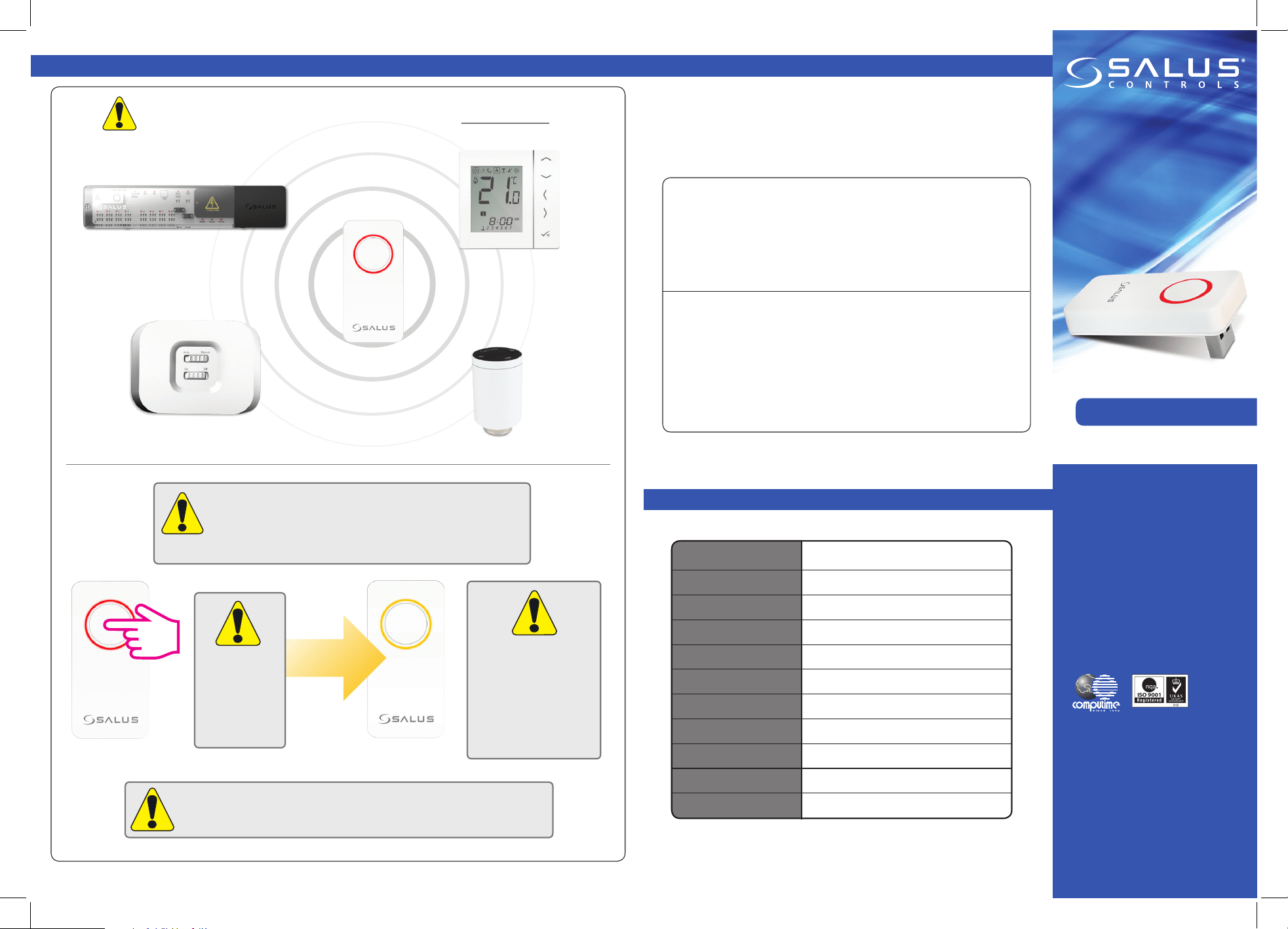
If at any time you need to delete all installed Wyse.ly devices
from your Zigbee network follow the steps below. As this
procedure can have a serious aect on your heating / cooling
system it should only be carried out by your installer.
Press for 10
seconds
to delete
the existing
network.
The button colour
will change to
AMBER to indicate
system delete. At this
point, the procedure
cannot be cancelled.
After all devices have been deleted from the Zigbee network, they will
need to be re-installed. Please refer to all relevant instruction manuals.
SYSTEM DELETE
Wyse.ly System
AKL08RF
AX10RF
AS20RF Thermostat
AC10RF
ARV10RFM
INSTALLATION
This equipment has been tested and found to comply with the limits
for a Class B digital device, pursuant to Part 15 of the FCC Rules.
These limits are designed to provide reasonable protection against
harmful interference in a residential installation. This equipment
generates uses and can radiate radio frequency energy and, if not
installed and used in accordance with the instructions, may cause
harmful interference to radio communications. However, there is no
guarantee that interference will not occur in a particular installation.
If this equipment does cause harmful interference to radio or television
reception, which can be determined by turning the equipment o and
on, the user is encouraged to try to correct the interference by one or
more of the following measures:
• Reorient or relocate the receiving antenna.
• Increase the separation between the equipment and receiver.
• Connect the equipment into an outlet on a circuit dierent from
that to which the receiver is connected.
• Consult the dealer or an experienced radio/TV technician for help.
Changes or modications not expressly approved by the party
responsible for compliance could void the user’s authority to operate
the equipment.
This device complies with part 15 of the FCC Rules. Operation is subject
to the following two conditions: (1) This device may not cause harmful
interference, and (2) this device must accept any interference received,
including interference that may cause undesired operation.
This device complies with Industry Canada’s licence-exempt RSSs.
Operation is subject to the following two conditions:
(1) This device may not cause interference; and
(2) This device must accept any interference, including interference that
may cause undesired operation of the device.
Le présent appareil est conforme aux CNR d’Industrie Canada
applicables aux appareils radio exempts de licence. L’exploitation est
autorisée aux deux conditions suivantes : (1) l’appareil ne doit pas
produire de brouillage, et (2) l’utilisateur de l’appareil doit accepter
tout brouillage radioélectrique subi, même si le brouillage est
susceptible d’en compromettre le fonctionnement.
Box Contents
www.salusna.com
SALUS North America
850 Main Street
Redwood City
CA 94063
T: +1-650-360-1725
For PDF Installation guide please go to
www.salus-controls.com
Maintaining a policy of continuous product
development SALUS Controls plc reserve the right
to change specication, design and materials of
products listed in this brochure without prior notice.
SALUS Controls is a member of the Computime Group
00086/2 Issue Date: June 2014
INSTALLER / USER MANUAL
Zigbee Coordinator
Models: AC10RF
SALUS North America warrants that this product will be free from any defect in materials or
workmanship, and shall perform in accordance with its specication, for a period of ve years
from the date of installation. SALUS Controls sole liability for breach of this warranty will be
(at its option) to repair or replace the defective product.
Customer Name: .............................................................................................................................
Customer Address: ..........................................................................................................................
............................................................................... Post Code: ........................................................
Tel No: ........................................................ Email: .........................................................................
Engineers Company: .......................................................................................................................
Tel No: ......................................................... Email: ........................................................................
Instalation Date: ..............................................................................................................................
Engineers Name: ............................................................................................................................
Engineers Signature: .......................................................................................................................
WARRANTY
TECHNICAL DETAIL
SYSTEM DELETE
Model AC10RF
Type Zigbee Coordinator
Function Zigbee network coordinator for Wyse.ly system
Control Open - Close the Zigbee network
Indication Tri Colour LED - RED - GREEN - AMBER
User Interface Single push button
Operating Temperature 0 to 50 ºC
Storage Temperature -20ºC to 60ºC
Frequency 2.4 GHz
Power Source 24V 50Hz/60Hz via mains adaptor (supplied)
Approval FCC and IC
If at any time you need to delete ALL installed Wyse.ly devices
from your Zigbee network follow the steps below. As this
procedure can have a serious aect on your heating / cooling
system. It should only be carried out by your installer.
Press for 15
seconds
to activate
identify mode.
The button colour
will change to
AMBER to indicate
system delete. At this
point, the proceedure
cannot be cancelled.
After all devices have been deleted from the Zigbee network, they will
need to be re-installed. Please refer to all relevant instruction manuals.
SYSTEM DELETE
Wyse.ly System
AKL08RF
AX10RF
AS20RF Thermostat
AC10RF
ARV10RFM
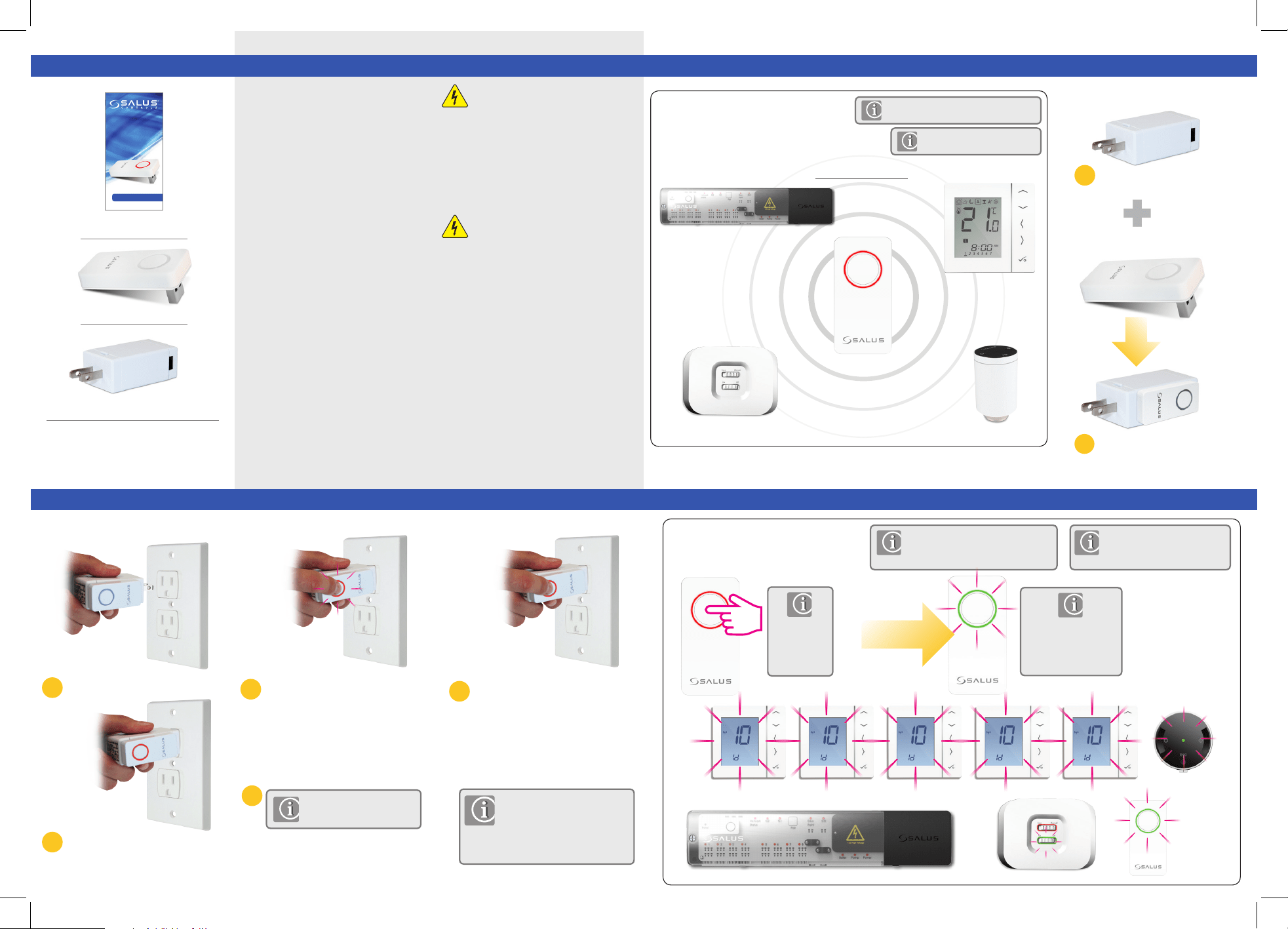
1 x Installer / User manual
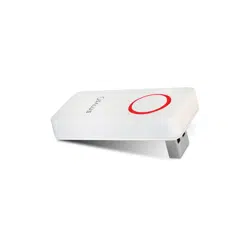
1 x AC10RF
1 x Plug Adapter
Switch the 24V mains outlet on and
ensure the button is illuminated (red)
as shown above.
Plug
Coordinator
Attach Coordinator to USB adaptor.
Warning
These instructions are applicable to the SALUS
model stated on this instruction guide.
This product must be tted by a competent person, and
installation must comply with the guidance, standards and
regulations applicable to the city, country or state where the
product is installed. Failure to comply with the requirements
of the relevant guidance, standards and regulations could
lead to injury, death or prosecution.
Warning
Always isolate the AC Mains supply before installing or
working on any components that require 120 V 60Hz supply.
We hope you enjoy this product...
INSTALLATIONSYSTEM OVERVIEW
To commence system installation press and
hold the button for 5 seconds until the button
starts flashing red. This means the Zigbee
network is ready to accept Wyse.ly devices.
When everything is paired press and hold the
button for 5 seconds until the ashing stops.
Please refer to individual
device manuals.
AKL08RF
AX10RF
AS20RF Thermostat
AC10RF
INTRODUCTION
Thank you for purchasing the SALUS AC10RF
Zigbee coordinator. The Zigbee coordinator
controls the Zigbee communication of your
Wyse.ly system.
CHECKING SYSTEM CONFIGURATION
Please refer to individual device
manuals for more information.
The Zigbee coordinator must be used with the
Wyse.ly RF range of products below:
Press again for 1 second
to cancel identify.
Identify mode will time
out after 10 minutes.
To check that the complete system is
communicating and has been congured
correctly, you can use identify mode.
Using identify from the
coordinator will show all products
that are connected to your system.
3
5
6
4
7
Maintenance
If replacing or adding Wyse.ly
devices please ensure you
follow steps 6 to 8.
Insert the adaptor into 24V mains outlet.
Press for 1
second
to activate
identify mode.
1
2
Wyse.ly System
For PDF Installation guide please go to
www.salusna.com
ARV10RFM
Product Compliance & Safety Info