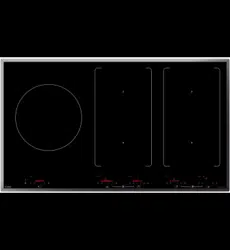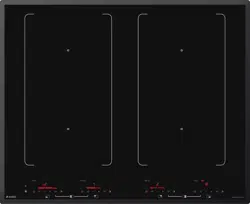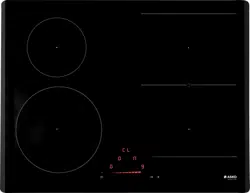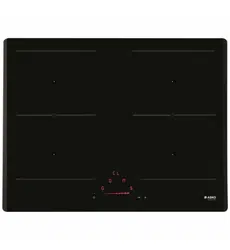
OPERATING INSTRUCTIONS
Induction hob
EN (AU) (NZ)
HI5320Fxx1
HI5632Fxx1
HI5642Fxx1
HI5643Fxx1
HI5842Fxx1
HI5952Fxx1
HI5954Fxx1

3Pictograms used ........................................
4Safety ..........................................................
6Safe use .......................................................
8Your induction hob ....................................
8Dear customer! ............................................
9Description ...................................................
10Control panel ...............................................
11Explanation of the touch keys function ........
12Program function explanation ......................
13Indications in the display .............................
14Use ..............................................................
14Induction cooking ........................................
15Pans for induction cooking ..........................
17Induction sounds .........................................
17Dynamic Slide ..............................................
18Cooking settings ..........................................
19Operation ....................................................
19Start Preparing .............................................
19Standard cooking ........................................
20Bridge Induction zone .................................
21
5
+
Induction cooking zone ...........................
21Cooking with the PLUS menu ......................
23Pause ...........................................................
23Child lock .....................................................
24Timer functions ............................................
25Operation of the linked extraction hood ......
27ConnectLife ................................................
28Wi-Fi ............................................................
28Switching Wi-Fi on and off ...........................
29Firmware Update .........................................
30Settings .......................................................
34Maintenance ...............................................
34Cleaning glass top .......................................
36Troubleshooting .........................................
36General ........................................................
36Troubleshooting table ..................................
39Technical data ............................................
39Compliance information ...............................
40Installation ..................................................
40Safety ...........................................................
43Preparations for installation .........................
44Flush-mount .................................................
45Built-in ..........................................................
47Electrical connection ...................................
49Connecting & testing ...................................
49Removing the built-in appliance ..................
50Environmental aspects ..............................
50Disposal of the appliance and packaging ....
Contents
The following symbols are used throughout the manual and they have the following meanings:
INFORMATION!
Information, advice, tip, or recommendation
WARNING!
Warning – general danger
ELECTRIC SHOCK!
Warning – danger of electric shock
HOT SURFACE!
Warning – danger of hot surface
DANGER OF FIRE!
Warning – danger of fire
It is important that you carefully read the instructions.
3
Pictograms used
IMPORTANT SAFETY INSTRUCTIONS
READ CAREFULLY AND KEEP FOR FUTURE REFERENCE!
General
The manufacturer cannot be held liable for any damage resulting
from failure to follow the safety instructions and warnings.
Damage caused by incorrect connection, incorrect fitting, or incorrect
use is not covered by the warranty.
WARNING!
• This appliance is not intended for use by persons (including
children) with reduced physical, sensory or mental capabilities,
or lack of experience and knowledge, unless they have been
given supervision or instruction concerning use of the appliance
by a person responsible for their safety.
• Accessible parts may become hot during use. Young children
should be kept away.
Children should be supervised to ensure that they do not play with
the appliance.
Do not use or store flammable materials in the appliance storage
drawer or near this appliance.
Do not modify this appliance.
WARNING: If the surface is cracked, switch off the appliance to
avoid the possibility of electric shock.
Do not spray aerosols in the vicinity of this appliance while it is in
operation.
Children are not to be allowed near the device unsupervised.
For stationary appliances permanently connected to the fixed wiring,
compliance with this requirement is considered to be met if the
instruction concerning disconnection incorporated in the fixed wiring
is in accordance with AS/NZS 3000.
4
Safety
DANGER OF FIRE!
• WARNING: Danger of fire: do not store items on the cooking
surfaces.
• WARNING: Cooking with fat or oil on a hob without supervision
can be dangerous and can lead to a fire.
NOTE!
• CAUTION! The cooking process has to be supervised. A short
term cooking process has to be supervised continuously.
NEVER try to extinguish a fire with water. Instead, switch the
appliance off and then cover the flames with for example a lid or a
fire blanket.
If a drawer underneath the appliance is permitted (see the installation
instructions), without an intermediate bottom, this should not be used
to store highly flammable objects/materials. Ensure that there is
adequate clearance of a few centimetres between the bottom of the
hob and the contents of any drawers.
Always provide adequate ventilation!
The hob is only to be used for the preparation of food.
This appliance is only designed for household use.
Do not use this appliance as a space heater.
Never cover the appliance with a cloth or something similar. If the
appliance is still hot or is switched on, there is a risk of fire.
Do not use the appliance as a worktop. The appliance may
accidentally be switched on or still be hot, which means objects
could melt, become hot or catch fire.
The appliance is not intended to be operated by means of an external
timer or separate remote control system.
5
Safety

Never use a steam cleaner for cleaning the appliance. Only clean
the appliance when switched off. The steam of a steam cleaner could
reach the conducting parts and cause an electrical short.
The ceramic top is extremely strong, but not unbreakable.
For example, a spice jar or sharp utensil falling on it could cause it
to break.
If you decide to discontinue using the appliance because of a fault,
we recommend you cut off the cable after removing the plug from
the plug socket. Take the appliance to your municipality’s waste
disposal site.
The cooking zones heat up during use and stay hot for a while
afterwards. Keep young children away from the hob during and
immediately after cooking.
Induction use
• Metal objects or objects containing metal, such as knives, forks,
spoons, and lids, should not be placed on the hob surface, as
they can get hot.
• When the induction hob is in use, keep objects that are sensitive
to magnetic fields (credit cards, bank cards, discs, watches and
similar items) away from the hob. We advise anyone with a
pacemaker to consult their cardiologist first.
• Never use aluminium foil for cooking and never place products
packaged in aluminium on the hob. The aluminium would melt
and irreparably damage your device.
Safe use
• Do not keep objects that children might find interesting in cupboards above or behind the
appliance.
• Do not warm closed tins on the hob. There will be a build-up of pressure that will cause tins to
explode. You might get injured or scalded.
• Do not use the appliance in temperatures below 5 °C.
• The appliance should not be placed or used outdoors.
• When you use the hob for the first time you will notice a “new smell”. Don’t worry, this is normal.
If the kitchen is well ventilated, the smell will soon disappear.
• Never open the casing of the appliance.
6
Safety
• As soon as you remove the pan from the hob, the cooking process will stop automatically. Get into
the habit of switching off the cooking zone or hob manually to avoid unintentionally switching on
the appliance.
• After use, switch off the hob element using the controls and don’t rely only on the pan detector.
• Remember that if the hob is used on a high setting the heating time will be very short. Do not
leave the hob unattended if you are using a zone on a high setting.
Temperature safety induction zones
• The hob is fitted with a cooling fan which cools the electronic components during cooking.
The fan may operate for a while, even after the end of the cooking process.
• The induction cooking hob is also fitted with an overheating protector which protects the electronic
components from damage. The protector operates in several ways. When the cooking zone
temperature gets very high, the cooking power is automatically reduced. If this does not suffice,
the cooking zone power continues to decrease, until the safety mechanisms switch off the cooking
zone completely. When the cooking hob is cooled down, its total power will be available again.
Cooking time limiter
WARNING!
If a cooking zone is switched on for an unusually long time, it will be switched off automatically.
Depending on the setting you have chosen, the cooking time will be limited as follows:
The cooking zone switches off automatically
after:
Setting
9 hours1 and 2
5 hours3, 4 and 5
4 hours6, 7 and 8
3 hours9
2 hours10
1 hour11 and 12
The cooking-time limiter switches the cooking zones off if the time in the table has elapsed.
The cooking zone switches to setting 12
automatically after:
Setting
10 minutesBoost
Cooking zone related timers take priority over the cooking-time limiter.
7
Safety
Dear customer!
Welcome to our growing ASKO family!
We are proud of our appliances. We hope that this appliance will be an appreciated and dependable
aid for many years to come.
Please read the operating instructions before use. They include general tips, information about the
settings and adjustments you can make, and the best way to take care of your appliance.
The manual also serves as reference material for service technicians. Please, therefore, stick the
appliance identification card in the space provided, at the back of the manual. The appliance
identification card contains all the information that the service technician will need in order to respond
appropriately to your needs and questions.
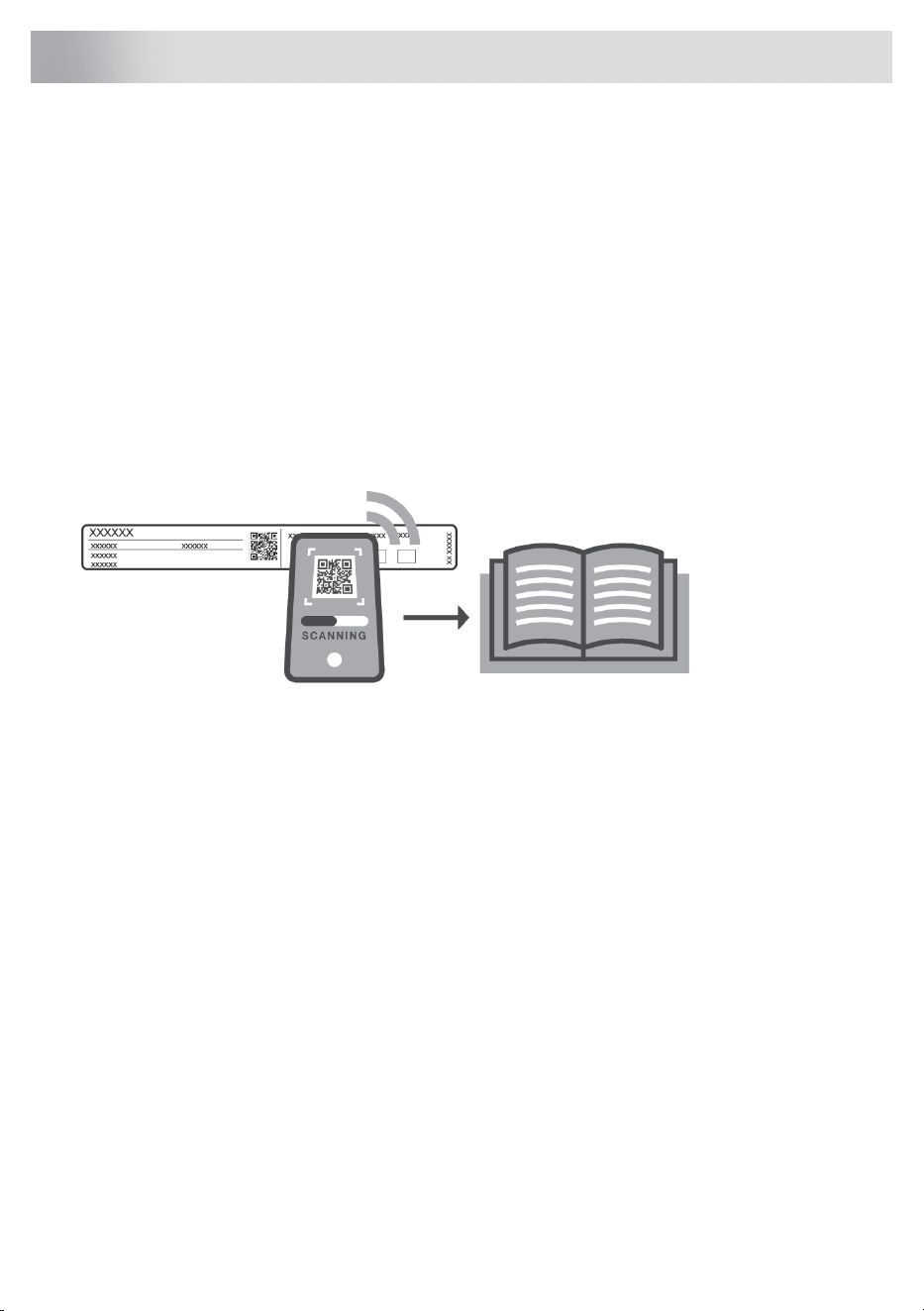
For more detailed instructions and tips, please visit https://global.asko.com/customer-care/manuals
or scan the QR code. This QR code can be found on the bottom of the appliance, with the documents
provided, or (if available) on the quick guide.
Enjoy your cooking!
8
Your induction hob
Description
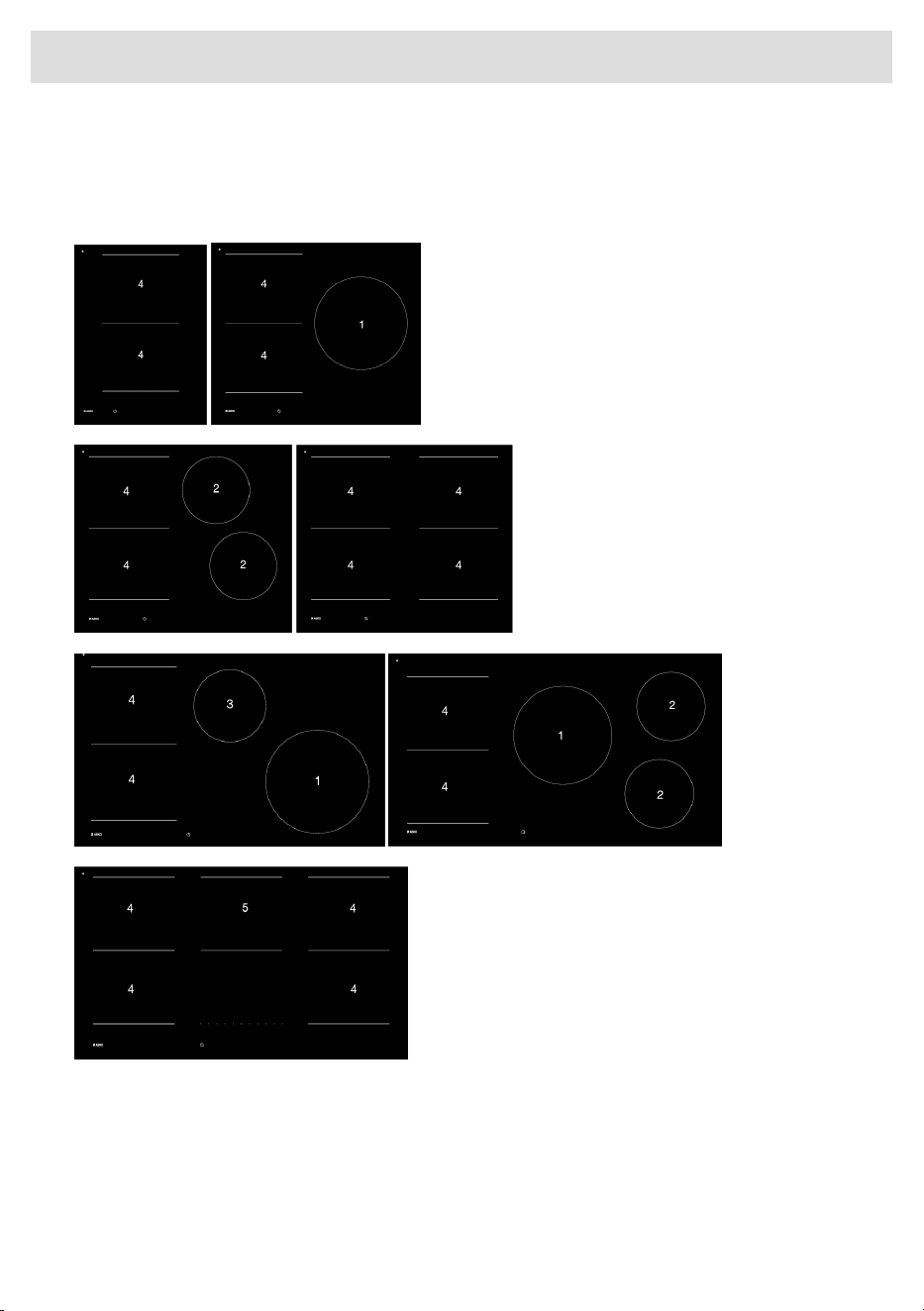
Since the appliances for which these instructions were drawn up may have different equipment,
some functions or equipment may be described in the manual that may not be present in your
appliance.
1. Cooking zone ø 260 mm - 2.3 kW (3.6 kW (boost)
2. Cooking zone ø 180 mm - 2.0 kW (3.0 kW boost)
3. Cooking zone ø 210 mm - 2.2 kW (3.6 kW boost)
4. Bridge Induction cooking zone 190 x 220 mm / 2.2 kW (3.6 kW boost)
5. 5
+
Induction: single cooking zone 190 x 220 mm 2.2 kW / extended cooking zone 380 x 220 mm
3.6 kW
9
Your induction hob
Control panel
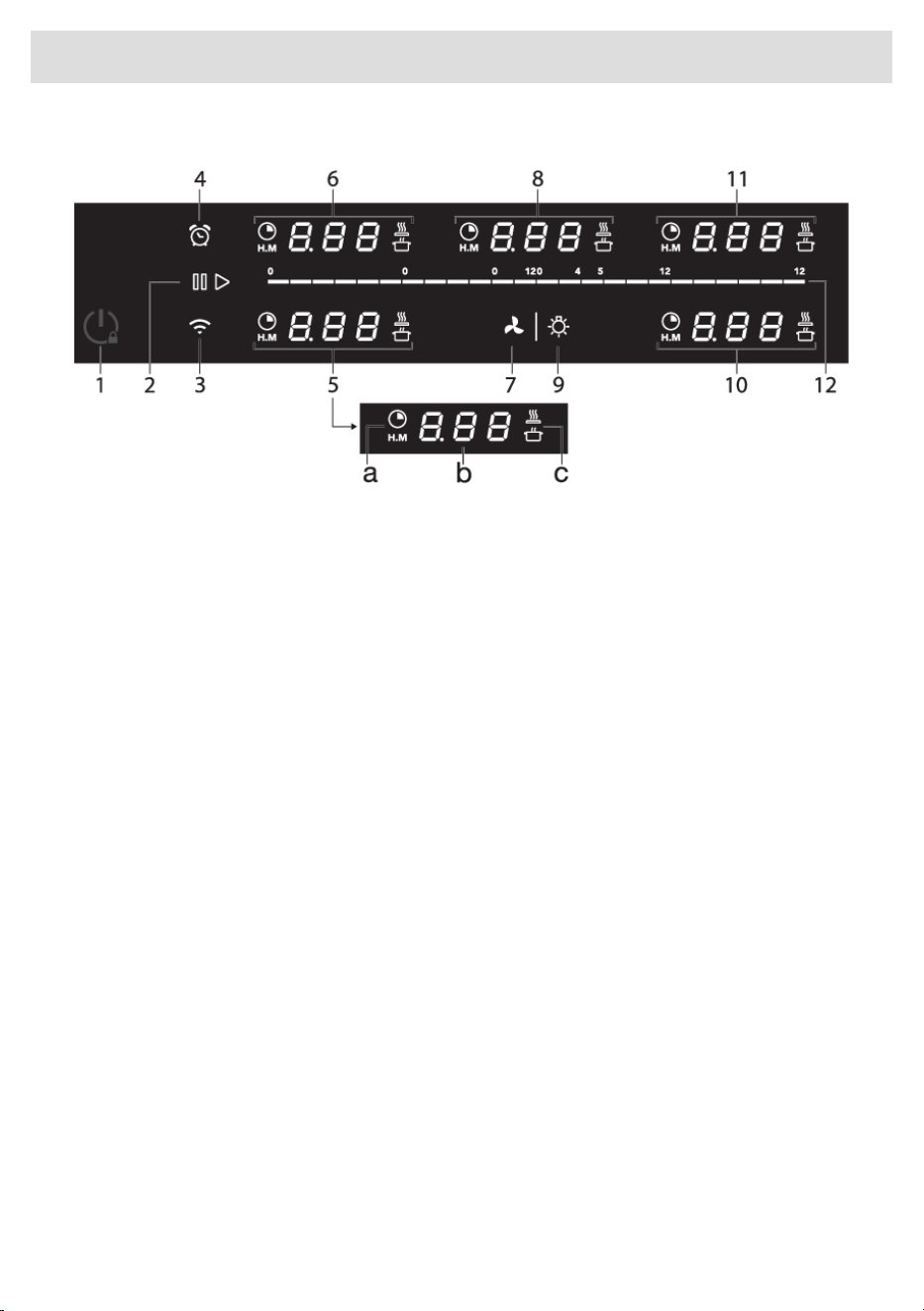
1. On/Off and Child lock touch key
2. Pause/Start touch key
3. Wi-Fi/connectivity touch key
4. Kitchen timer touch key
5. Controls for front left cooking zone
a. Cooking zone timer touch key + indication
b. Cooking zone key + display
c. PLUS programs touch key
6. Controls for rear left cooking zone
7. Extraction hood (linked) extraction touch key
8. Controls for middle cooking zone
9. Extraction hood (linked) lighting touch key
10. Controls for front right cooking
11. Controls for rear right cooking zone
12. Slide control
10
Your induction hob
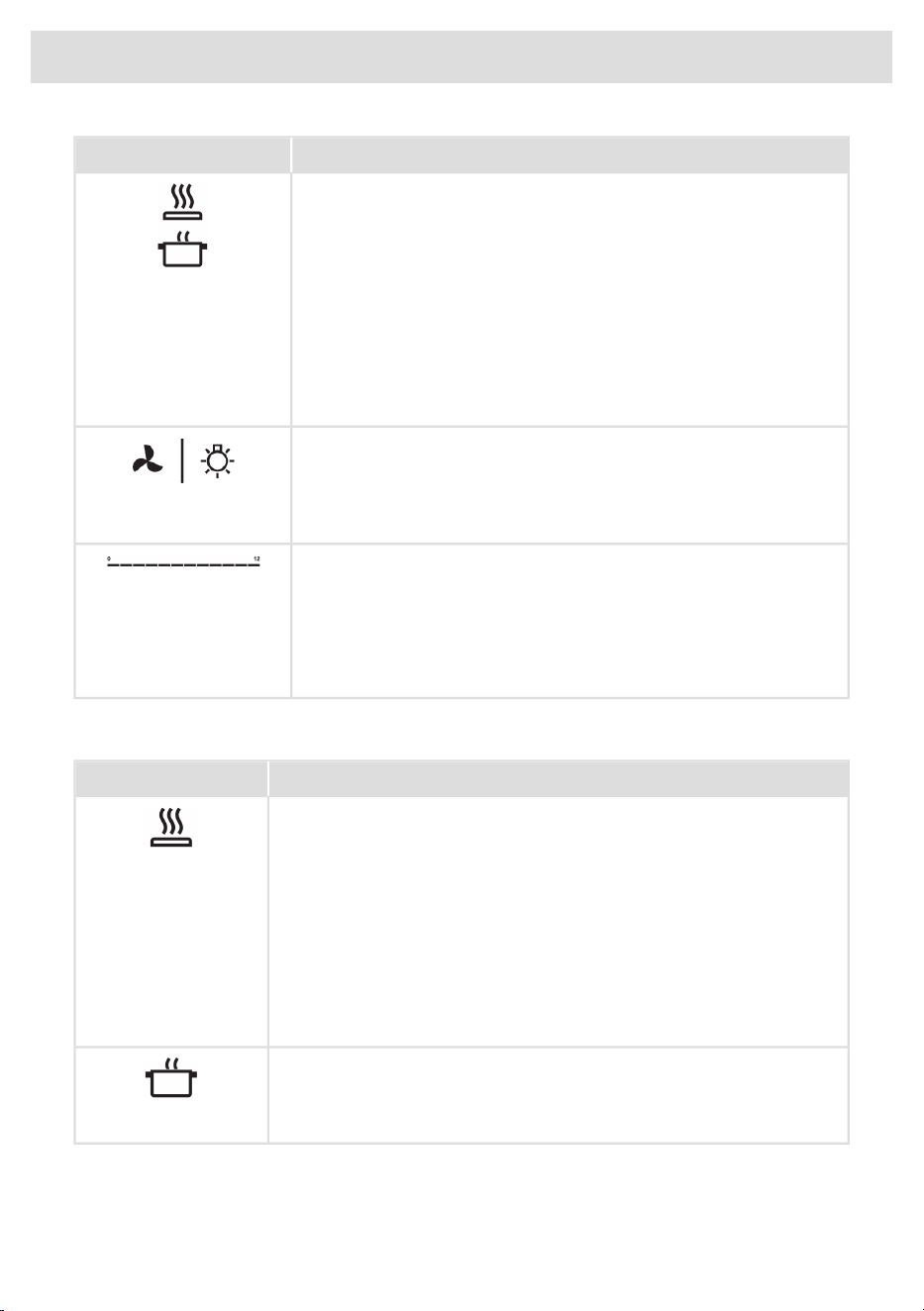
Explanation of the touch keys function
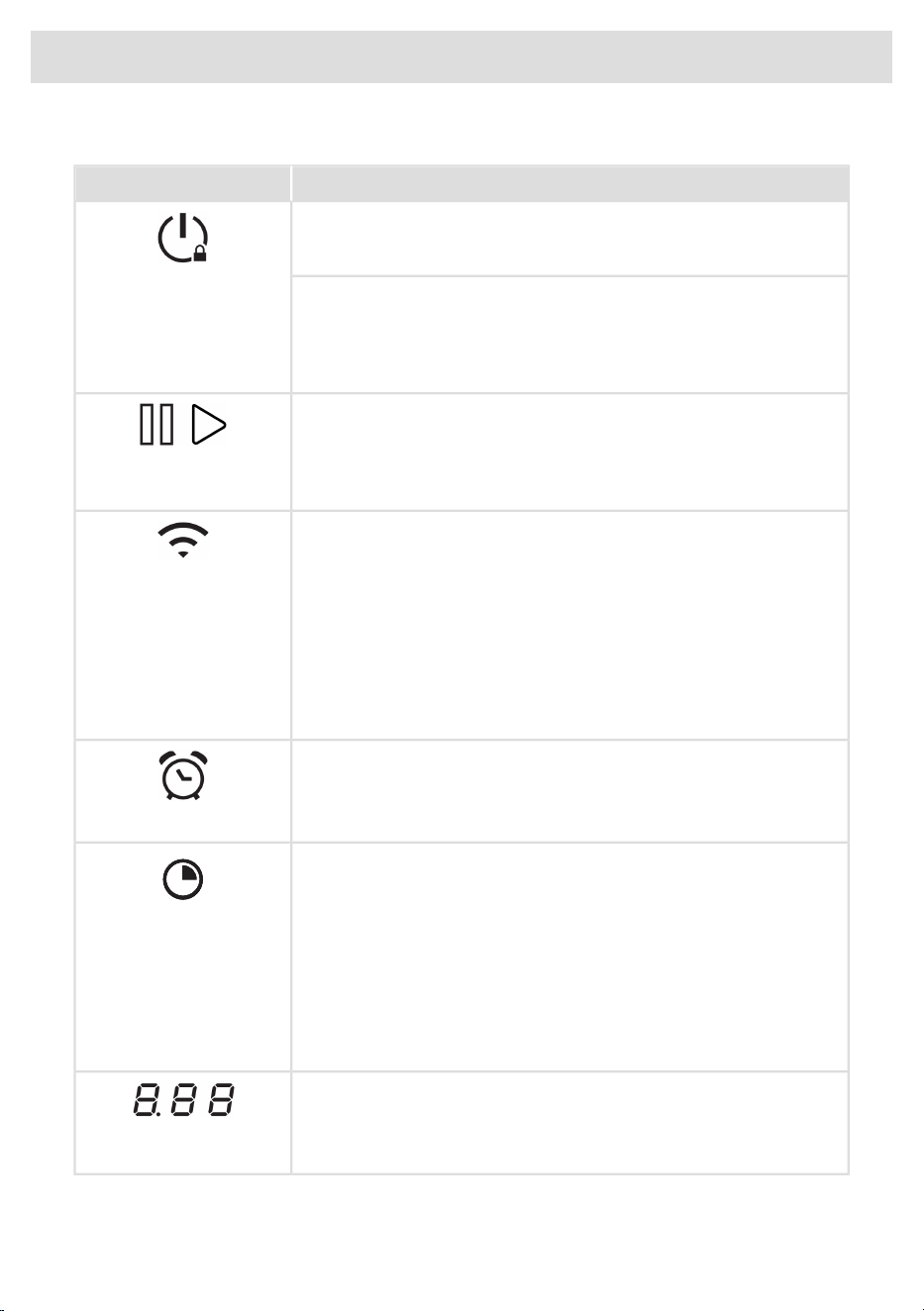
DescriptionTouch key/slider
Switching the hob on/off
• The appliance can be switched on and off with the on/off key.
On/Off
Child lock
• The hob can be locked and unlocked to prevent it from being
accidentally switched on. To lock and unlock the hob, touch the
power button for about 2 seconds.
Pause/Start
• The pause function can be used to pause the operation of the entire
cooking hob for up to 10 minutes. This gives you time to safely
clean the cooking hob without losing your settings.
Pause/Start
Wi-Fi
• The cooking hob is equipped with a Wi-Fi module that allows the
appliance to connect to a mobile device such as a smartphone or
Wi-Fi
tablet. It offers to monitor the cooking hob status via the mobile
device. It is not possible to remotely control, turn on, or turn off the
cooking hob for safety reasons.
• The monitoring function via mobile device shall not be used to
directly replace the cooking process personal supervision on the
cooking hob.
Kitchen timer
• The kitchen timer can be used independently of the cooking zones.
• The kitchen timer does not switch off the cooking zone.
Kitchen timer
Cooking zone timer
• depending
• The switch-off timer makes the cooking process easier by setting
the cooking time for the selected cooking zone. When the time set
Cooking zone timer
on the timer expires, the cooking zone will automatically switch off
and emit an acoustic signal. You can switch off the acoustic signal
by touching the cooking zone timer key or remove the pan;
alternatively, it will switch off automatically after a while. You can
set the switch-off timer independently for all cooking zones.
Select a cooking zone + display
• Select a cooking zone.
Select a cooking zone
• Read the power set for the cooking zone on the display.
11
Your induction hob
DescriptionTouch key/slider
'Plus menu' automatic cooking
• This hob features automatic cooking functions. The actual
performance of these functions depends greatly on the type of
cookware used and certain other factors.
- The automatic cooking functions work most accurately when
using stainless steel pans with sandwich bottoms.
menu
- The automatic cooking functions work less accurately for
cookware containing aluminium or multi-layer pans.
- The use of cast iron and steel cookware is not recommended.
Operation linked extraction hood
• If you own a compatible Bluetooth-enabled hood, it can be
connected to your induction hob. To pair and customize the
behaviour of your hood, see the chapter 'Settings'.
Extraction hood (linked)
Slider
With the slider, you can:Slide control (12 settings)
• Set a power level (when a cooking zone is selected).
• Set a time (when the timer is selected).
• Select a setting (in the user menu).
Program function explanation
DescriptionPLUS menu programs.
Frying
• With this function, you can cook vegetables, fish, bacon, meat, fried
potatoes, or eggs in butter or oil.
Grilling
• This function is exclusively for Bridge Induction cooking zones, that
are combined to a larger cooking zone.
• Grilling is optimised for the ASKO induction accessories: grill plate
and teppanyaki. This function also works with other cookware, but
perhaps less accurately.
Heating up/keeping warm
• With this function you can, for example, melt chocolate (45 °C), keep
food warm (70 °C), simmer (94 °C) or bring it to boil (100 °C).
Table continued from last page
12
Your induction hob
Hob recall function
This feature allows you to recall all the settings of the cooking zones if the hob was accidentally
switched off.
The hob should be switched on again within 6 seconds. Pressing the Pause/Start key within 6 seconds
will recall all settings before the appliance was last switched off.
Pan move function
If you remove the pan from an active cooking zone and within 6 seconds place it on a different
cooking zone, you can transfer all the timer and cooking-related settings to the new cooking zone
by touching the cooking zone key of the new cooking zone. To indicate this possibility, the new
cooking zone displays copied settings on the slider. Confirm the settings on the new cooking zone
by touching the cooking zone key. When the confirmation is done, the previous cooking zone is
deactivated.
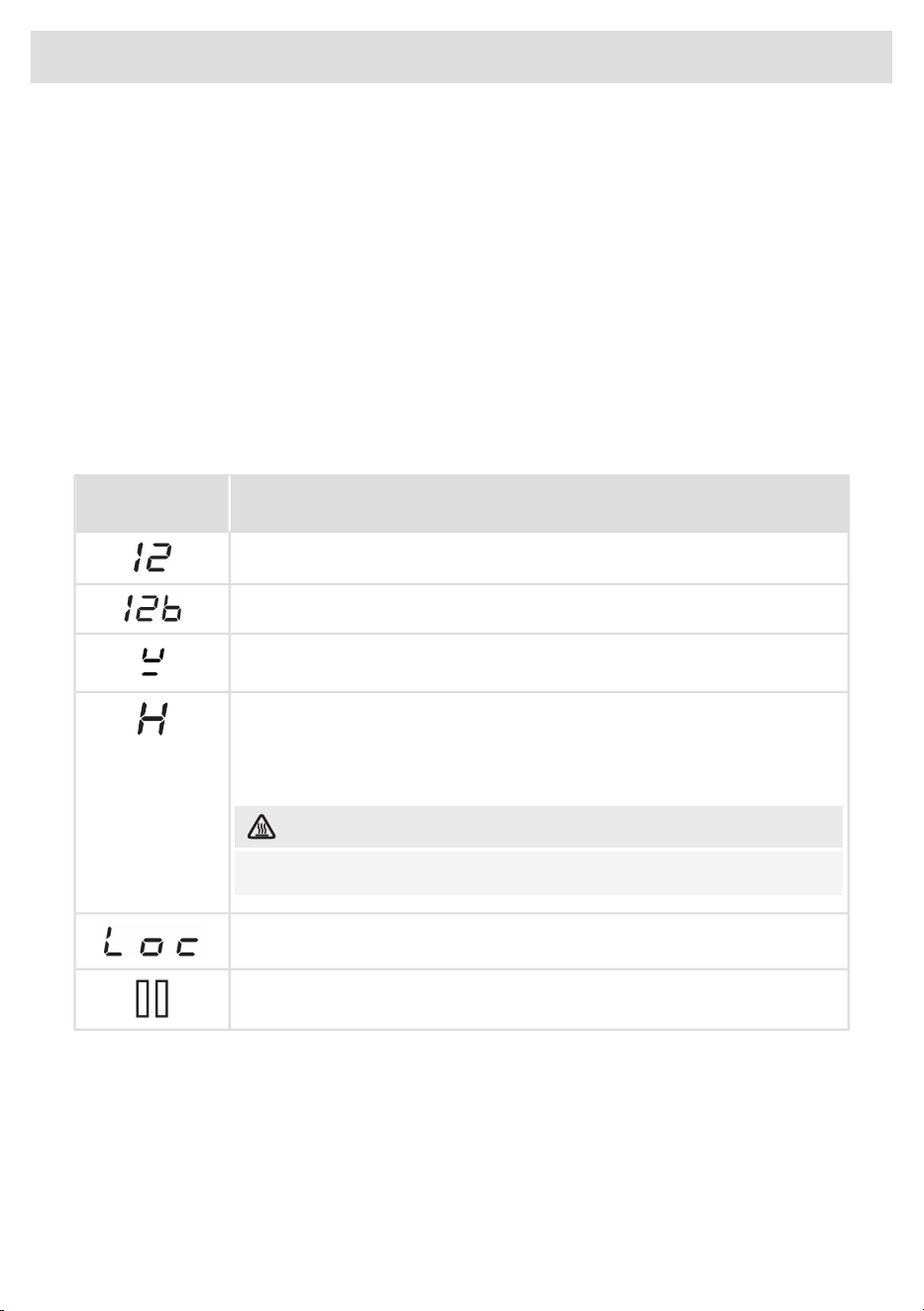
Indications in the display
DescriptionCooking zone
display
Power level that is set for a cooking zone; 1 = low / 12 = high (12b = boost).
Boost level active.
No (suitable) pan on the cooking zone (pan detection symbol) or the pan is
removed from the cooking zone.
Residual heat indicator: The hob has a residual heat indicator for each cooking
zone to show which cooking zones are hot after the cooking zone is turned off.
Although the hob is switched off, the indicator will remain on as long as the
cooking zone is hot! Avoid touching those cooking zones when this indicator
is lit.
HOT SURFACE!
Danger! Risk of burns.
Child safety lock is activated.
Pause function active.
13
Your induction hob
Induction cooking
Induction cooking is fast
To start with, you will be surprised by the speed of induction cooking.
Especially at higher settings, foods and liquids will come to a boil very
rapidly. It is best not to leave pans unattended to avoid them boiling
over or boiling dry. With induction cooking, there is no heat loss, and
the handles stay cool.
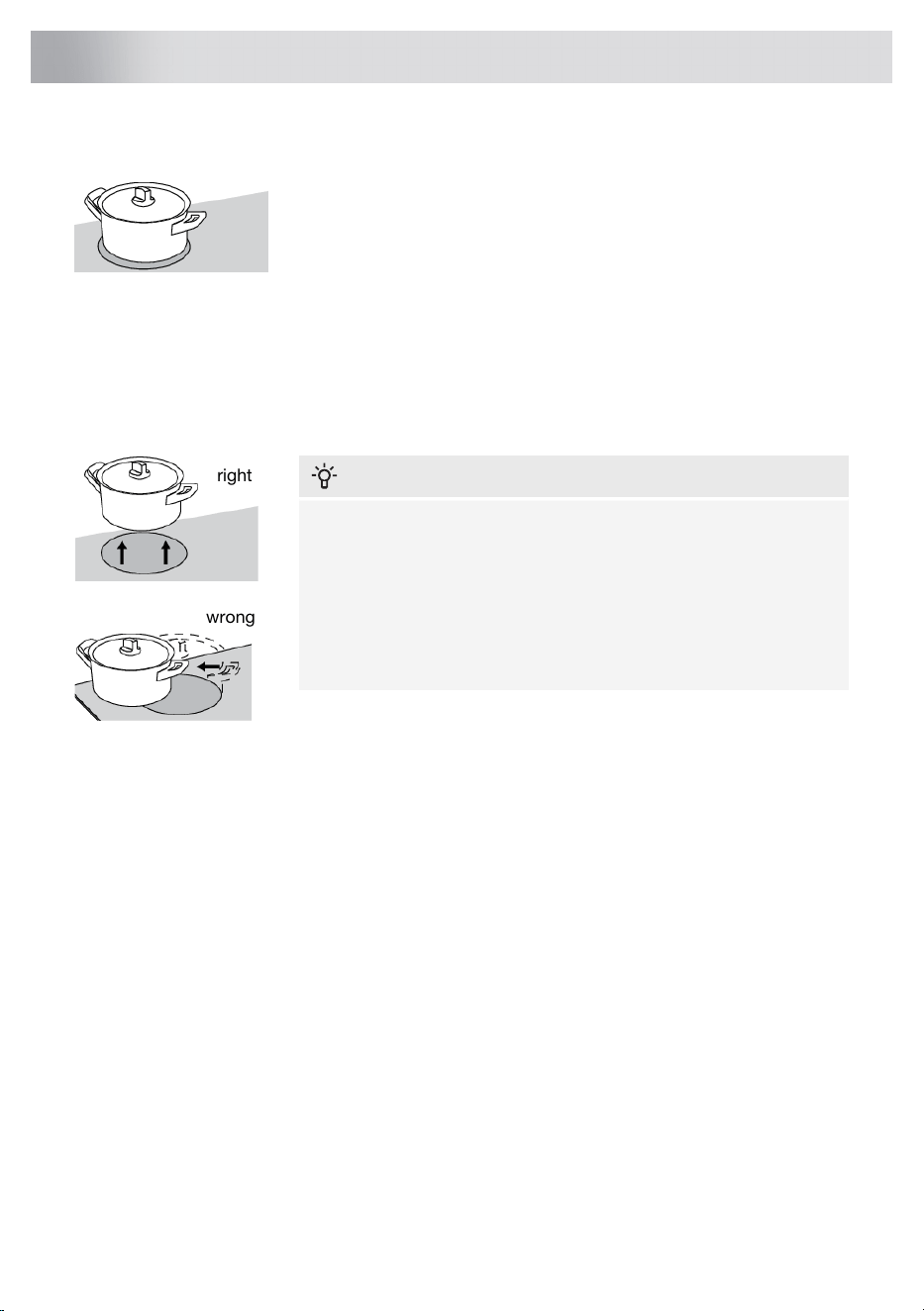
The power level adjusts itself
In induction cooking, only the zone on which the pan is placed is used. If you use a small pan on a
large zone, the power will be adjusted to the diameter of the pan. The power will thus be lower and
it will take longer before the food comes to the boil.
right
wrong
INFORMATION!
• Grains of sand, salt, or sugar may cause scratches that are
impossible to remove. Therefore, only put pans with a clean
base on the cooking surface, and always pick pans up to move
them.
• Do not use the hob as a worktop.
• Always keep the lid on the pan when cooking, in order to avoid
energy loss.
Operation of the touch keys and sliders
• The touch sensors only react to the light pressure of a fingertip. Do not operate the controls with
any other objects.
• The cooking hob is operated by a slider. You can either touch the selected part of the slider or
move over the slider to increase or decrease the power.
• To set the cooking zone power level, touch the desired spot on the slider. As you touch the slider,
the selected power level will appear on the cooking zone display unit.
• Do not use any objects to operate the slider.
Easy
The electronic controls are accurate and easy to set. On the lowest setting, you can melt chocolate
directly in the pan, for example, or cook ingredients that you would normally heat in au bain-marie.
Fast
Thanks to the induction hob’s high power levels, bringing food to the boil is very quick.
Clean
The hob is easy to clean. Because the cooking zones do not get any hotter than the pans themselves,
food spills are unlikely to burn into the glass.
14
Use
Safe
The heat is generated in the pan itself. The glass top does not get any hotter than the pan. This means
that the cooking zone is considerably cooler than a ceramic hob, for example.
Once a pan has been removed, the cooking zone cools down quickly.
Capacity distribution of cooking zones
Depending on the hob model, the cooking zones can affect each other. When several cooking zones
are switched on simultaneously, the available capacity is shared automatically between them.
When the maximum capacity of the combination of cooking levels is reached during setting, one or
more zones are automatically reduced to the highest possible setting at that moment. This is indicated
by the flashing of the relevant control element.
Pans for induction cooking
Induction cooking requires a particular type of pan in terms of quality.
Pans that have already been used for cooking on a gas hob are no longer suitable for use on an
induction hob.
Only use pans that are suitable for electric and induction cooking with:
• a thick base of a minimum of 2.25 mm;
• a flat base.
TIP!
You can check for yourself whether your pans are suitable using a magnet. A pan is suitable if the
base of the pan is sufficiently attracted by the magnet.
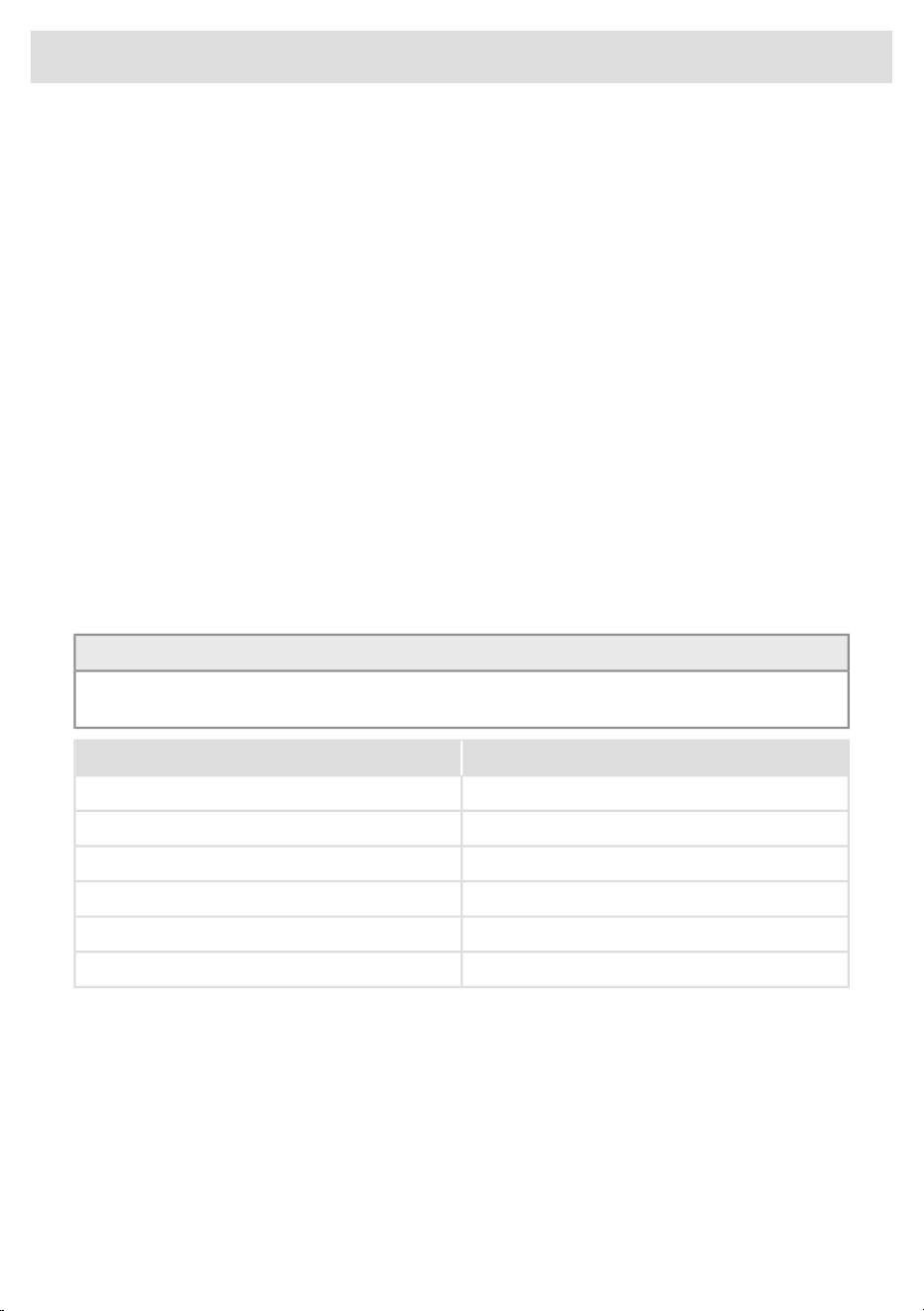
UnsuitableSuitable
EarthenwareSpecial stainless steel pans
Stainless steelClass Induction
PorcelainSolid enamelled pans
CopperEnamelled cast-iron pans
Plastic
Aluminium
15
Use
WARNING!
Be careful with enamelled sheet-steel pans:
• the enamel may chip (the enamel comes loose from the steel) if you switch the hob on at a
high setting when the pan is (too) dry;
• the base of the pan may warp, for example as a result of overheating;
• heat enamelled pans slowly.
Never use pans with a misshapen base. A hollow or rounded base can interfere with the operation
of the overheating protection, causing the appliance to become too hot. This may lead to the
glass top cracking and the pan base melting. Damage caused by using unsuitable pans or boiling
dry is excluded from the guarantee.
The diameter of the pan
The diameter of the bottom of the pan must be at least the value prescribed in below table.
Minimum pan bottom diameterCooking zone
ø 110 mmø 180 mm
ø 145 mmø 210 mm
ø 145 mm190 x 210 mm
ø 145 mmø 260 mm
NOTE!
You will achieve the best results by using a pan with the same diameter as the zone. If a pan is
too small, the zone will not work.
Pressure cookers
Induction cooking is very suitable for pressure cookers. The fast-reacting cooking zone brings the
pressure cooker to pressure quickly. As soon as you switch off a cooking zone, the dish stops
cooking immediately.
Pan detection
The hob automatically detects whether a suitable pot is on a cooking zone. If the hob is empty, the
cooking zone is selected for the first pot placed and the cooking zone display lights up automatically.
If there are further pots, the cooking zone display must then be selected manually.
Integrated pan recognition
If a certain power level is set for a cooking zone and there is no (suitable) pan on the cooking zone,
the cooking zone will not deliver any power. After a certain period, the cooking zone will switch off
automatically.
16
Use

Induction sounds
• Ticking sound
This sound can be caused at lower power level settings or by the automatic pot detection.
• Pan makes sounds
Pans can make some noise during cooking. This is caused by the energy flowing from the hob
to the pan. At high settings, this is perfectly normal for some pans. It will not damage either the
pans or the hob.
• Ventilator makes sounds
To increase the lifespan and performance of the electronics, the appliance is equipped with
fans. During intense appliance use, the fan is activated to cool down the appliance, and you will
hear a buzzing sound. The fan still runs for several minutes after the hob has been switched off.
Dynamic Slide
The slider has more elements than, for example, cooking levels need to be displayed. As a result,
the slider can be used in different positions. When controlling the leftmost cooking zone(s), the left
12 elements are in use, while the remaining elements are not visible. When controlling the middle
cooking zone(s), the inner 12 elements are in use, and when controlling the rightmost one, the 12
elements are counted from the right. If the dynamic slider is switched off (see chapter ‘Settings’), all
cooking zones are controlled using only the inner 12 elements (central slider).
The slider is also used to set the extraction or lighting of a paired extractor hood. When the extractor
is selected, the inner 4/5 elements are used as the slider for the extractor.
The slider can also be used to set the timer. Slide from the left to the right to set a time. Swiping
across the slider can be used to speed up the setting in some cases.
17
Use

Cooking settings
Because the settings depend on the quantity and composition of the pan and its contents, the table
below is intended as a guideline only.
PurposeLevel
Use settings 1 - 5 to:
• simmer bouillon,
• stew meats,
• simmer vegetables,
• melt chocolate,
• poach,
• melt cheese.
Use settings 6 - 9 to:
• complete the cooking of large quantities,
• defrost hard vegetables,
• fry thick slices of breaded meat.
Use settings 10 - 11 to:
• fry thick pancakes,
• fry bacon (fat),
• cook raw potatoes,
• make breaded fish,
• cook through fish,
• fry thin slices of breaded meat.
Use setting 12 to:
• sear meats,
• cook fish,
• cook omelettes,
• fry boiled potatoes,
• deep fry foods.
Use setting boost to:
• bring liquids to a boil quickly,
• shrink greens,
• heat oil and fat,
• wok.
18
Use
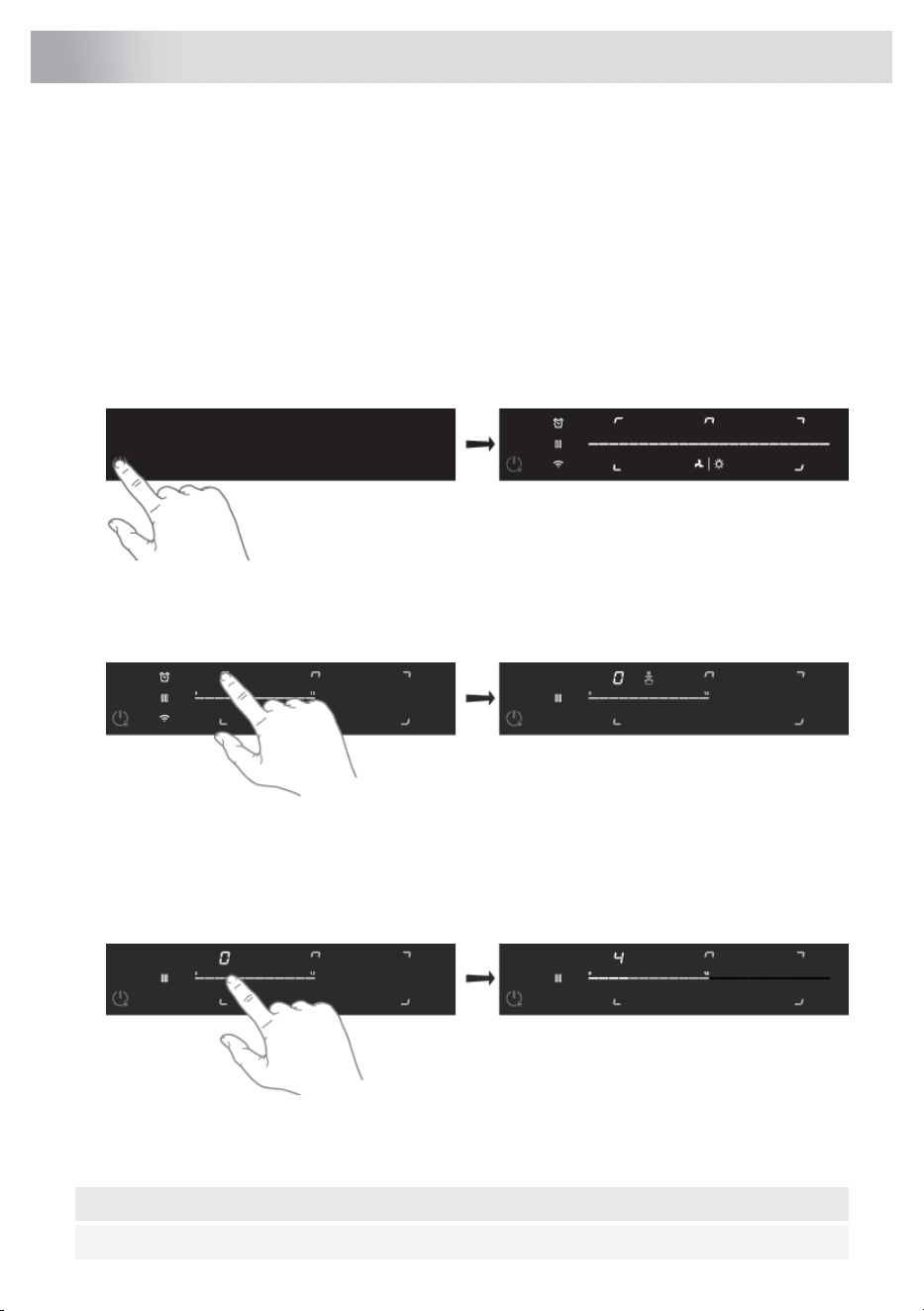
Start Preparing
Two cooking modes are available:
1. Standard cooking with power levels.
2. Cooking with the PLUS menu
Standard cooking
1. Place a pan on a cooking zone.
• Make sure the bottom of the pan and the surface of the cooking zone are clean and dry.
2. Touch the on/off key to switch on the hob.
• The hob automatically selects the first pan placed on it. The display of the cooking zone
lights up.
3. Touch the desired cooking zone key if the pan is not automatically selected.
• A single audio signal sounds.
• The slider lights up and gradually goes out.
4. Set a higher or lower setting by sliding over the slide control with your finger or by tapping on
the slide control.
• The cooking zones have 12 settings. There is also a ‘boost’ setting.
5. Touch the cooking zone key for 3 seconds to switch off the cooking zone.
NOTE!
When no cooking zone is active for 60 seconds, the cooking hob will power off.
19
Operation
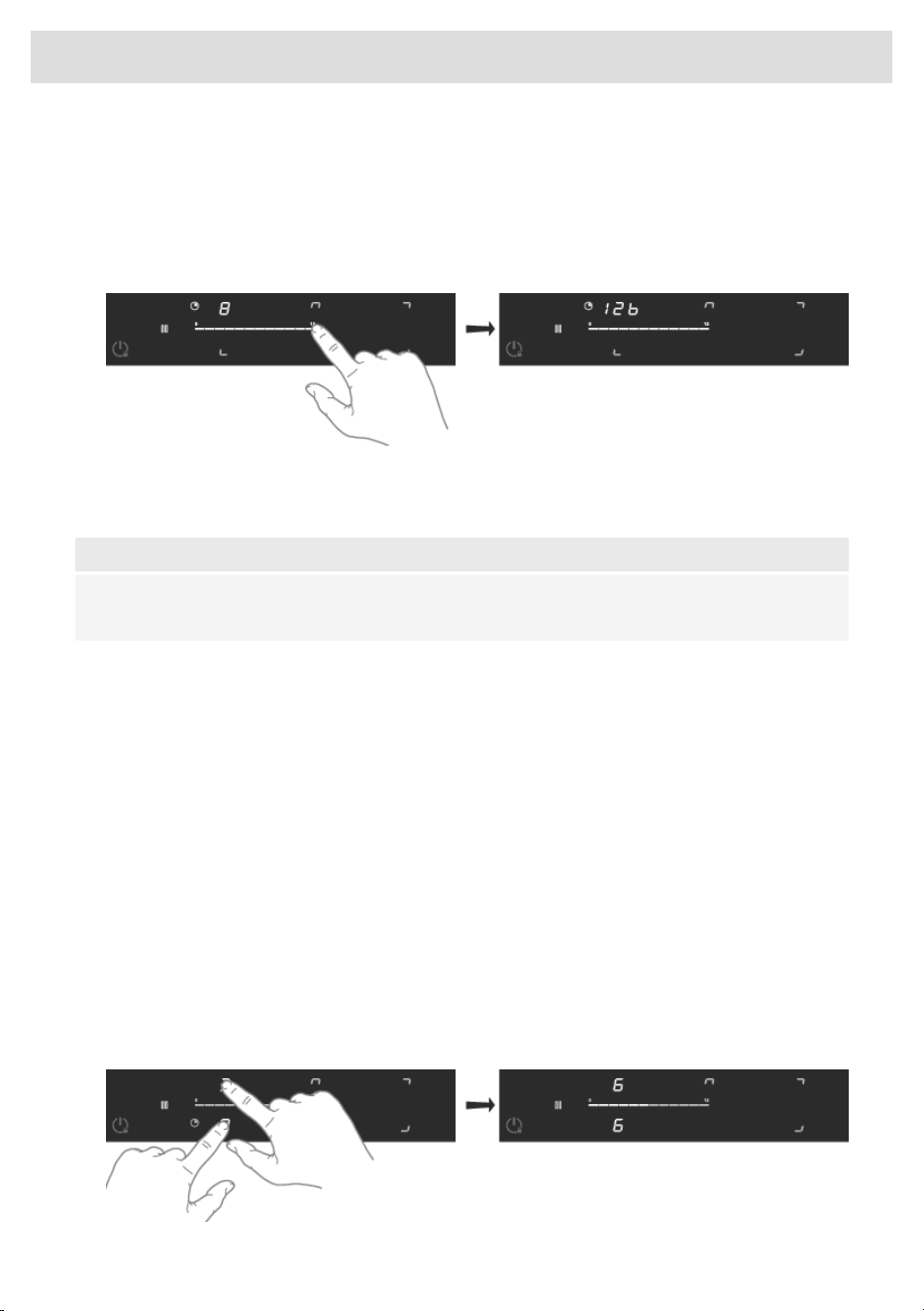
Boost
You can use the ‘boost’ function to cook at the highest power level during a short period of time (max
10 minutes). After the maximum boost time has passed, the power will be reduced to setting 12.
1. Place a pan on a cooking zone.
2. Touch level 12 of the slider or slide along level 12 to set the boost level. Touch level 12 twice if
'Auto Boost' is off (refer to chapter 'Settings').
• 1x scrolling text "booSt" and then "12b" appear in the display.
3. To deactivate the boost for the selected cooking zone, again touch level 12 on the slider.
NOTE!
To avoid overheating, the electronic control system may automatically deactivate boost prematurely
and decrease the power level to 12.
Bridge Induction zone
The Bridge Induction zones (the front and rear) can be linked together. This creates one large zone
that can be used, for example, for a large fish pan or various pans at the same power.
• Pan position recognition is activated automatically after the appliance is switched on. When a
pan is placed on the hob, the pan recognition function recognizes its position and automatically
bridges the cooking zones depending on the size of the pan (only if the hob was already switched
on).
• If the Bridge Induction zones are linked, the grill temperature (from the Plus menu function
‘Grilling’) can be used.
• Use a (fish) pan covering at least the middle of the Bridge Induction zones.
Connecting Bridge Induction zones
1. Place a large pan on both cooking zones so that both zones are well covered.
•
The zones are linked automatically if the brd (auto-connecting) function is active (consult
chapter ‘Settings’).
2. Touch simultaneously the cooking zone keys of the front and rear cooking zones.
20
Operation
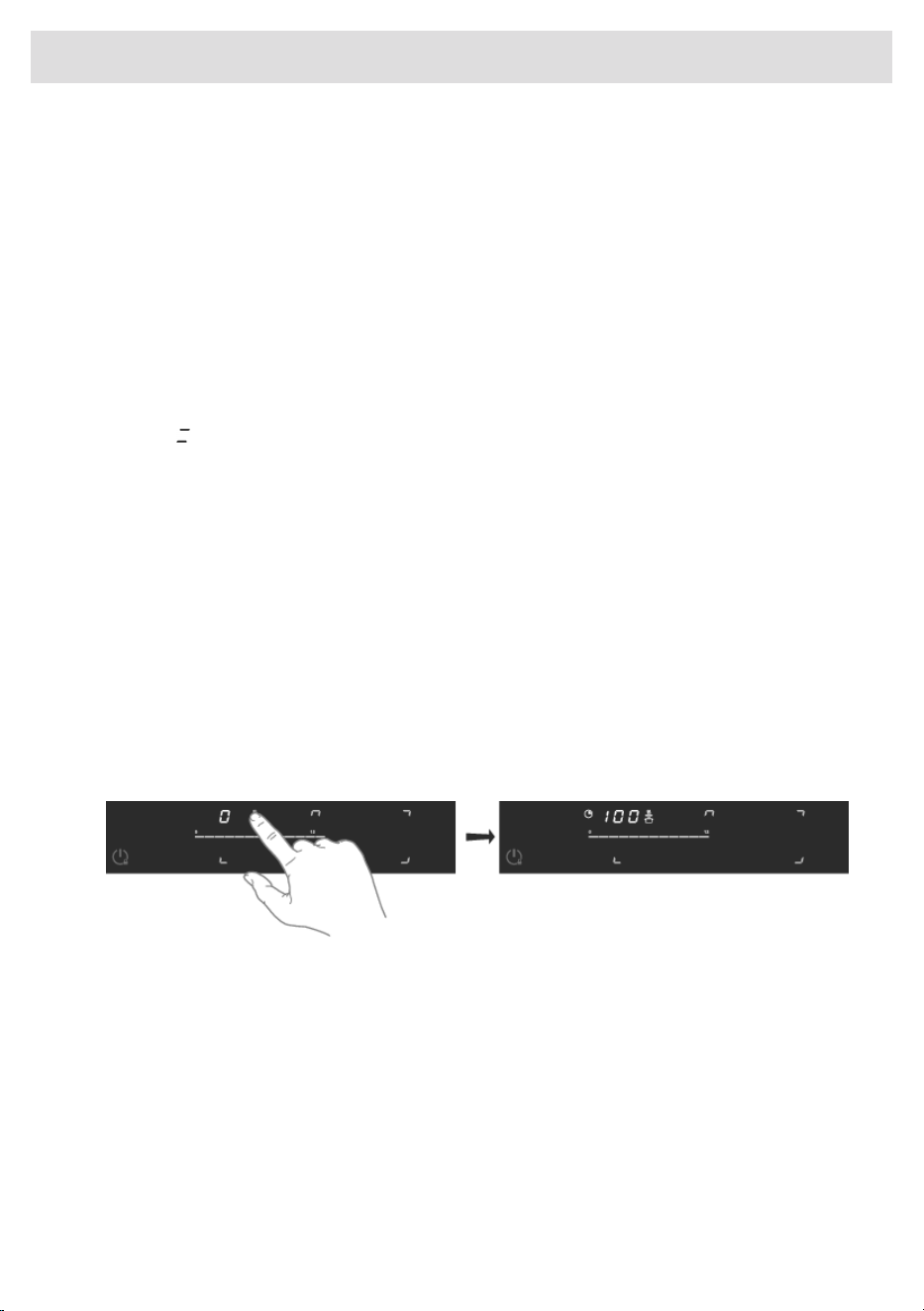
• The power level or temperatures are displayed simultaneously on both connected cooking
zones.
3. Use the slider of the front cooking zone to set the desired cooking setting for the linked cooking
zones.
4. Touch both cooking zone keys again to unlink the cooking zones.
5
+
Induction cooking zone
The '5 + Induction' cooking zone can be used as a single or extended cooking zone when a large
(oval) pan is placed on it. The zone then works as two linked Bridge induction cooking zones.
The extended cooking zone cannot be switched on manually. Large cookware (e.g., grill plate) is
automatically recognized within seconds, and the '5+ Induction' extended zone is switched on.
After symbol appears, a power level can be set. If a power level is set before the symbol appears,
then only the power level for the single cooking zone is set.
The '5+ Induction' extended cooking zone is only activated by pan recognition. It cannot be switched
on manually.
Cooking with the PLUS menu
The PLUS menu allows cooking with semi-automatic programs, enabling temperature cooking for
all kinds of cookware that fit the program's purpose.
The automatic cooking programs, up to 100-degree program, operate based on temperature
measurements, which means heating times may vary depending on the amount in your pan. For
optimal performance, choose a cooking zone equal to or slightly smaller than the diameter of your
pan base. The following quantities per pan base diameter are recommended for the best performance:
160 mm (1 litre), 200 mm (2 litres), and 240 mm (3 litres). You can also use other quantities, but
remember that this may affect performance.
1. Touch the PLUS programs key to select the program: keeping warm/heating up and grill.
2. Use the slider to select a plus program temperature (see table).
• Heating up/keeping warm indicator lights up.
• At a selected temperature above 100 °C, the 'frying' indication comes on.
When the program or temperature selection does not change for 3 seconds, the program is activated.
To deactivate a PLUS program, press the active cooking zone key for about three seconds or select
a power level manually.
For certain programmes, such as Heating up/keeping warm and Frying, confirmation is required
after the heating phase ends and the food has been added. When the set temperature and the PLUS
programme icon are flashing and an audible signal sounds, add the food to the pan. Then confirm
by pressing the temperature indicator within 2 minutes. From that point on, the programme will
maintain a constant temperature.
21
Operation
The hob is equipped with a power limiter. If the total power of operating cooking zones exceeds the
maximum available amount of power, the power is automatically reduced. The display of the cooking
zone who is being reduced in its power is first flashing; the level is then automatically reduced to
the highest available power.
NOTE!
Always add water, a little oil or butter before starting a programme; never use an empty pan or
pot.
Keeping warm and Heating up
UseTemperature (°C)
melt chocolate45
heating up/keeping warm70
simmer vegetables94
bring food or liquid to the boil quickly100
NOTE!
If the cooking zone is hot, 'keep warm' and 'heating up' programs are unavailable.
Frying
UseTemperature (°C)
fish, bacon, fried egg, vegetables in butter140 / 160
schnitzel, sausages, jacket potatoes180 / 200
wok220
Grilling (Bridge Induction zones are connected)
UseTemperature (°C)
fish, bacon, fried egg, vegetables in butter160
schnitzel, sausages, jacket potatoes180 / 200
wok220
NOTE!
The correct operation of the automatic programmes depends heavily on the quantity, type of pan,
starting temperature, and other factors.
22
Operation
Pause
The pause function can be used to pause the operation of the entire cooking hob for up to 10 minutes.
Thus, you can walk away from the appliance or safely clean the cooking hob, within a short period,
without losing your settings.
Switching on the pause
At least one cooking zone must be active.
1. Touch the pause/start key.
• You will hear a short beep.
• The settings on all active cooking zones are reduced to setting 1 to keep food warm.
• All timer functions are paused.
• The pause key and slider flash.
• All keys are inactive except the pause and on/off-key.
If no key is pressed within 10 minutes, all active hobs automatically turn off.
Switching off the pause
1. Touch the pause/start key again within 10 minutes.
• The hob continues to operate with the same settings.
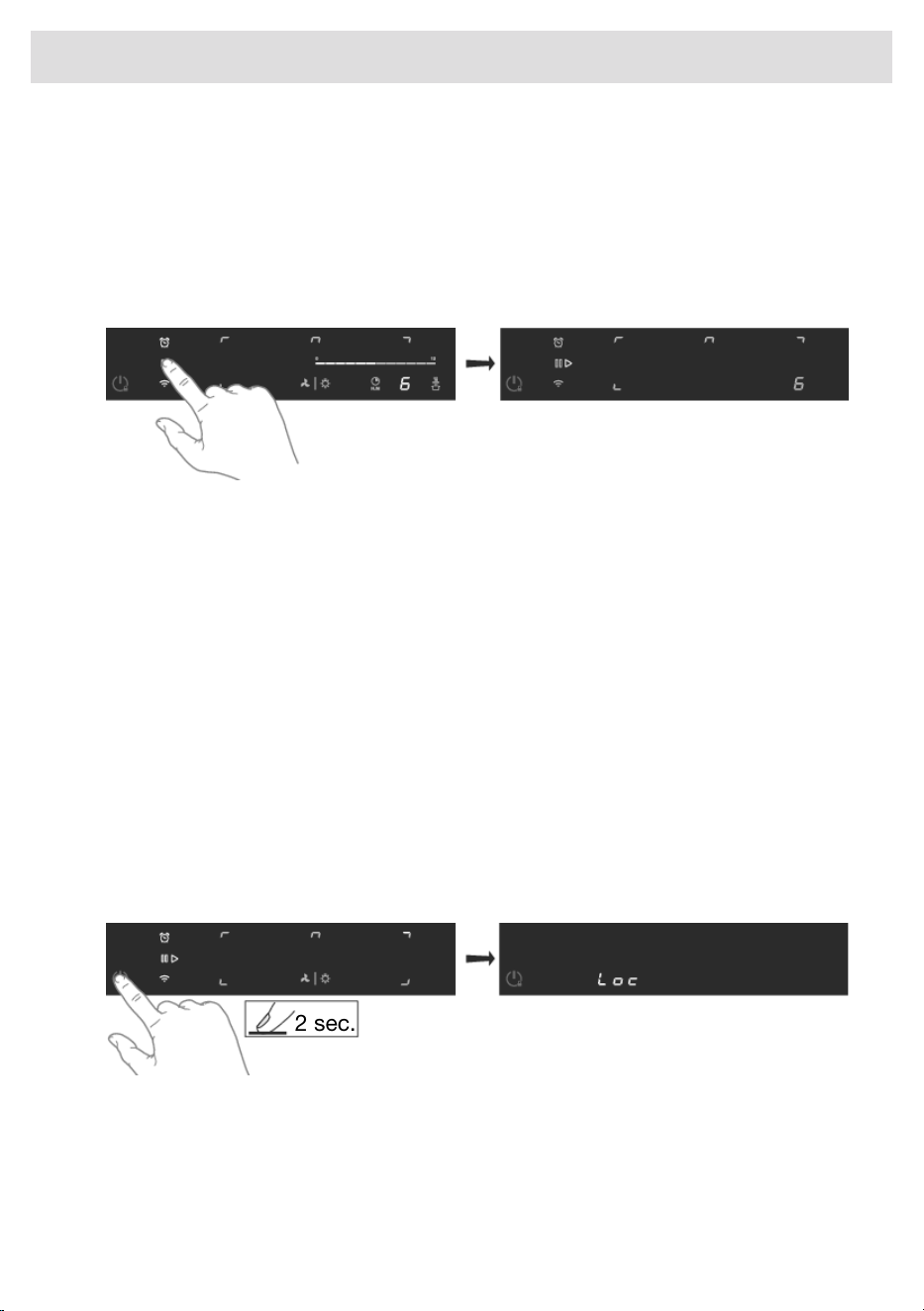
Child lock
The cooking zones can be locked to prevent them from being switched on inadvertently.
1. Touch the on/off key to switch on the hob.
2. Touch the power key again for 2 seconds.
2 sec.
• The ‘Loc’ indication appears on the display and the hob controls are locked.
3. Proceed in the same way to unlock the controls.
• The ‘Loc’ indication disappears from the display, and the hob controls are unlocked.
23
Operation
Timer functions
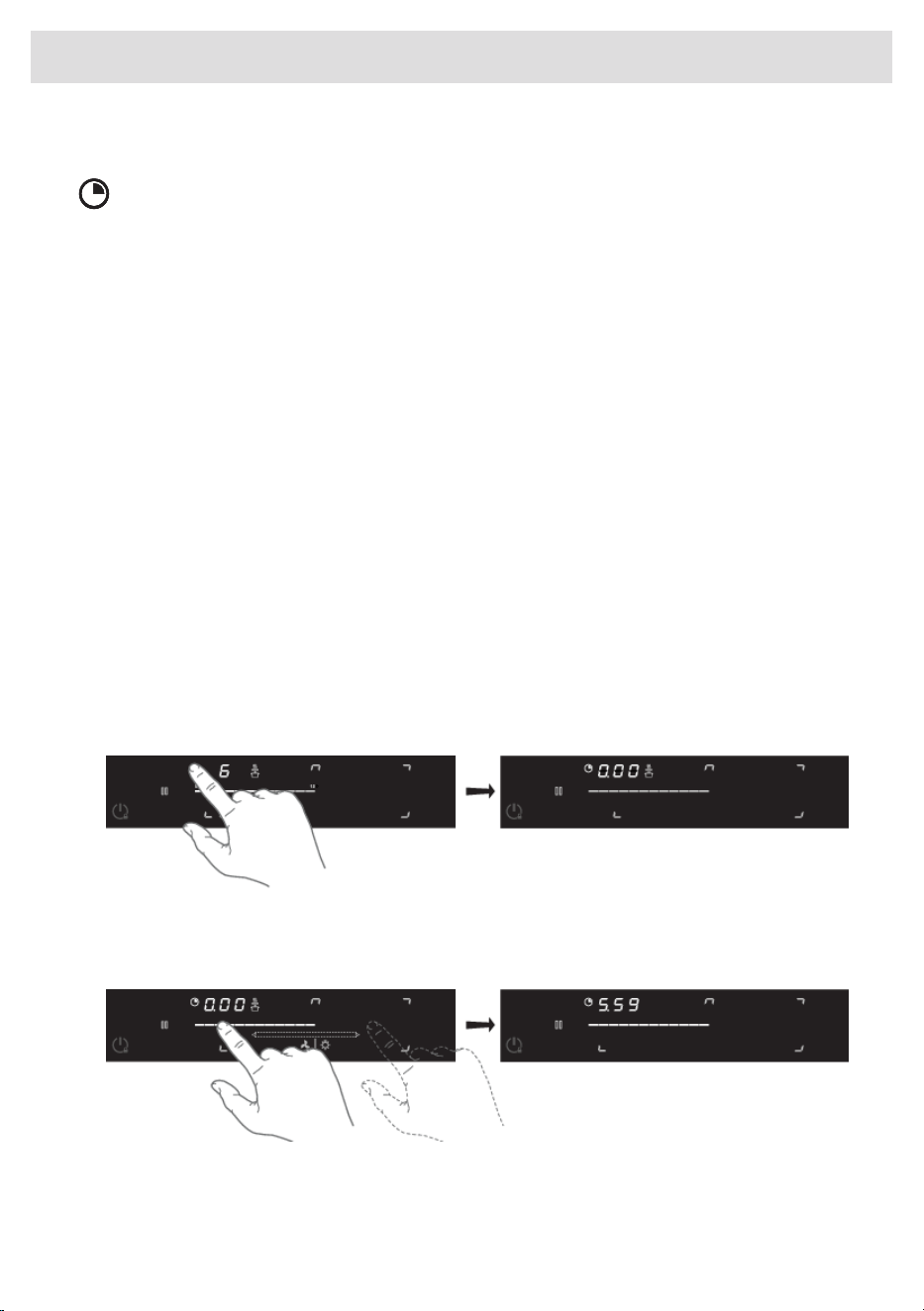
Cooking zone timer
Every cooking zone has a cooking zone timer.
The cooking zone timer can be used in two different ways: as a stopwatch timer or a switch-off timer
that switches off the corresponding zone. The timers cannot be used at the same time.
• The stopwatch timer can be used to check how long cooking has been done on a cooking zone.
- Touch the cooking zone timer button to select the stopwatch timer. After a short delay, it
starts counting.
- If ‘Auto-Stopwatch Timer’ is on, the stopwatch timer will start counting immediately when a
power level is set. The current value will not be visible until the stopwatch timer is selected.
- If ‘Auto-Stopwatch Timer’ is off, the stopwatch timer will start counting after selecting it.
- Switch off the ‘Auto-Stopwatch timer’ by touching the cooking zone timer key and then
touching the key again for a long time. Touching the cooking zone timer key for a long time
afterwards sets the stopwatch timer to 0.00.
• The switch-off timer can be used to automatically switch off a cooking zone.
- When the time set on the timer expires, the cooking zone will automatically switch off and
emit an audible signal.
- Touch the timer to turn off the audible signal; otherwise, it will turn off automatically after a
while. The timer can be set separately for all cooking zones.
Setting the switch-off timer
1. Touch the timer key of the desired active cooking zone.
• The timer key and '0.00' will flash on the cooking zone display unit.
2. Set the desired cooking time with the slider (see chapter 'Dynamic Slide').
3. If desired, repeat the same steps to set the timer for another active cooking zone.
• After the set time has elapsed, the alarm sounds, the key for the relevant cooking zone
flashes and ‘0.00’ flashes on the timer display.
• The cooking zone is switched off.
24
Operation
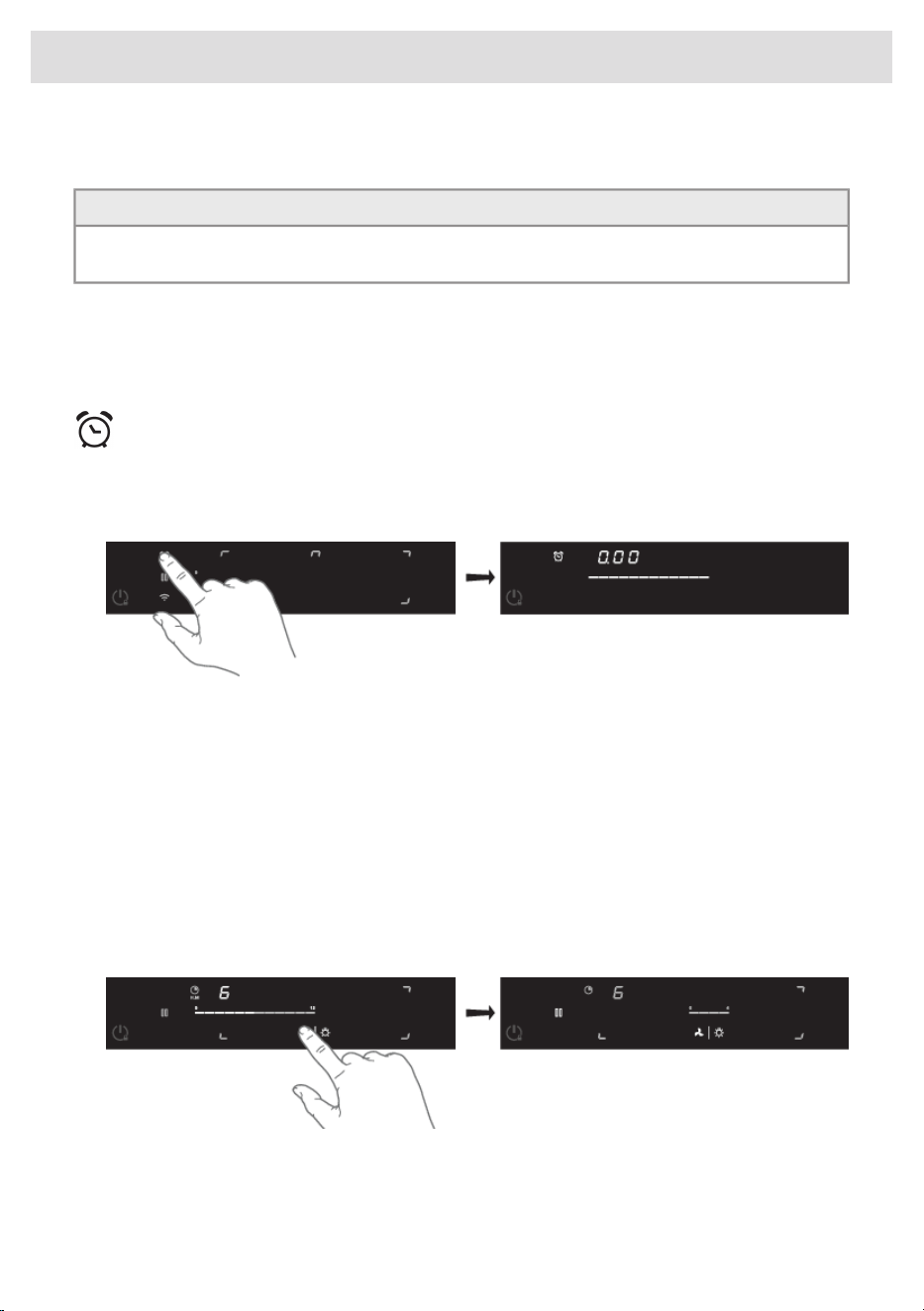
• To stop the alarm, touch the timer key, or remove the pan from the cooking zone.
TIP!
If you move the pan from the cooking zone, all timer functions set for that cooking zone will be
paused.
Deactivating the cooking zone timer
1. Long touch the cooking zone timer key of the desired active cooking zone.
• The timer is switched off.
Kitchen timer
The kitchen timer is not connected to a cooking zone. The kitchen timer does not switch off the
cooking zone.
1. Touch the kitchen timer key.
• Set a kitchen time using the slider.
• The kitchen timer can be reset by touching the kitchen timer key for 3 seconds.
Operation of the linked extraction hood
If you own a compatible bluetooth enabled hood, it can be connected to your induction hob. To pair
and customize the behaviour of your hood see chapter 'Settings'. Parameter hth is used for pairing,
while Hst and Hsc effect the behaviour of your hood so you can customize it according to your
kitchen habbits.
Switching extraction on and off
1. Touch the fan key to turn on the fan.
2. Touch the slider to set an extraction setting.
25
Operation
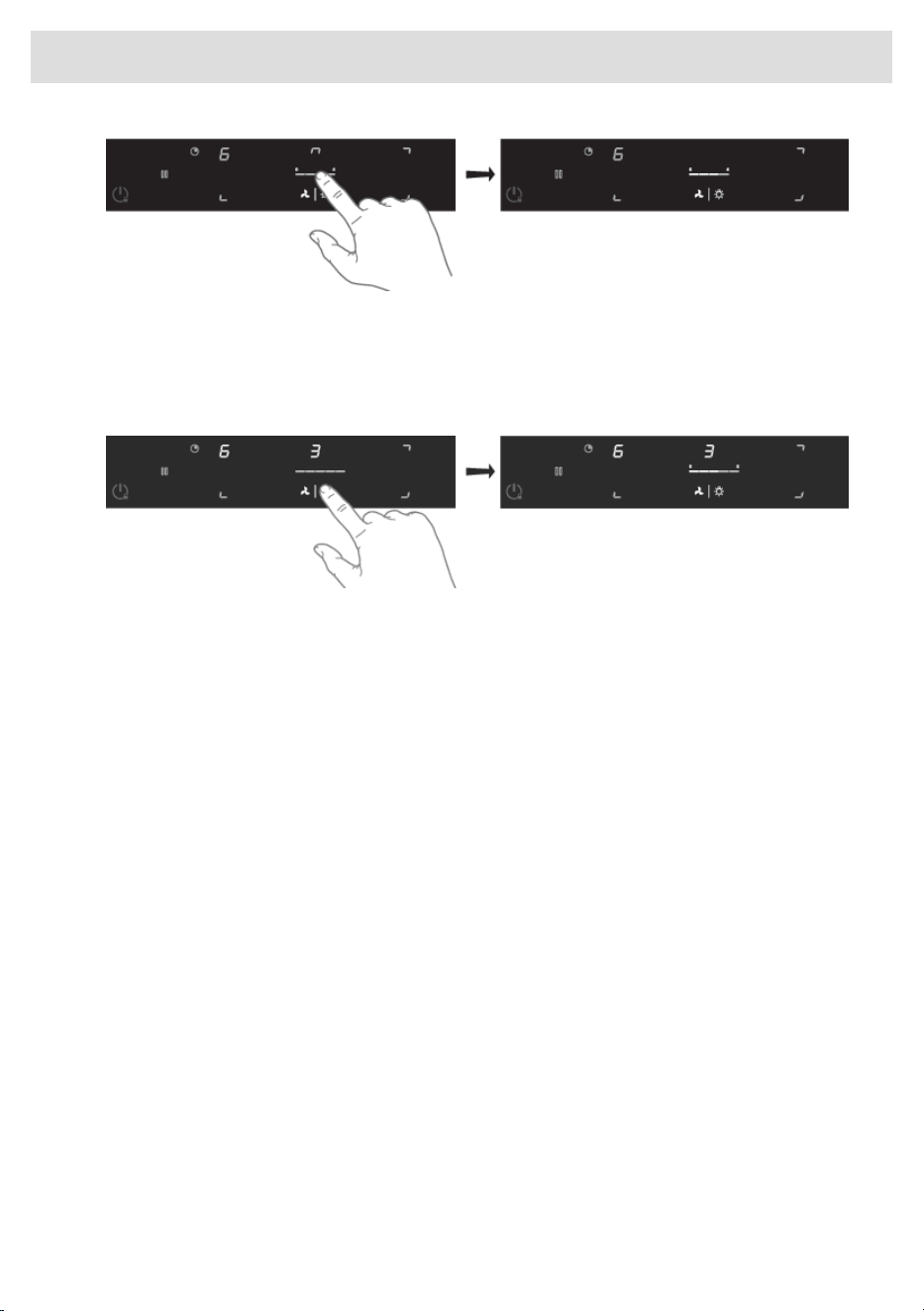
• Depending on the hood model, the extraction level can be set between setting 1 to 4 or 5 .
3. To switch off the cooker hood, press and hold the ‘Fan’ key for 1 second.
Switching the light on and off
1. Touch the lighting key.
• The light switches on at maximum strength.
• The slider appears.
2. Touch the slider to adjust the brightness.
3. Long touch the illumination key to switch off the illumination.
Automatic extraction
The extraction module has three automatic extraction settings (see chapter ‘Settings’):
• Synchro Start (Settings)
This setting allows the induction hob to automatically activate the lights of the connected hood
every time the induction hob is turned on. Depending on the value you set, the ventilation will
automatically start at that speed level when any cooking zone is activated.
• Synchro Control (Settings)
In addition to Synchro Start, the hood will be controlled automatically depending on the current
highest activated cooking level.
• Synchro Stop (Settings)
The lights will be switched off together with the hob and the fan will, when all cooking zones
have cooled down, also be switched off.
26
Operation
Connecting the appliance to the ConnectLife-app.
ConnectLife is a smart home platform that connects people, devices and services. The ConnectLife
application includes advanced digital services and carefree solutions that allow users to monitor
and control appliances, receive notifications from a smartphone, and update software (supported
features may vary depending on your appliance and the region/country in which you are located).
To connect your smart device, you need a home Wi-Fi network (only 2.4 GHz networks are supported)
and a smartphone equipped with the application ConnectLife.
To download the ConnectLife application, scan
the QR code or search for ConnectLife in your
favourite app store.
1. Install the ConnectLife application and create an account.
2. In the ConnectLife application, go to the "Add device" menu and select the appropriate type of
device. Then scan the QR code on the appliance's nameplate or on the additional sticker in the
manual. You can also enter the AUID/SN code manually.
3. The application then guides you through the entire process of connecting the appliance to your
smartphone.
4. Once a successful connection has been established, the appliance can be operated and
monitored remotely via the mobile application.
27
ConnectLife

Switching Wi-Fi on and off
The hob is equipped with a Wi-Fi module that allows the appliance to connect to the internet via your
home network.
You will first connect your mobile device directly to the appliance via Bluetooth, and then use this
connection to share the data of your Wi-Fi home network. The hob can then connect to the home
network.
For safety reasons, it is not possible to remotely control, turn on or turn off the hob.
Preparation
• Make sure you know the name/SSID of your router’s Wi-Fi network and its password
1)
.
• Your smart device's Bluetooth is turned on.
Wi-Fi menu
Activate Wi-Fi to enable the Wi-Fi menu. The hob must be switched on.
1. Touch the Wi-Fi key for 5 seconds to open the Wi-Fi menu.
•
Depending on the Wi-Fi state, there are 1 to 3 options available in the menu: 'Con) to set up
a connection, 'PAl' to pair an additional user, and 'UnP' to unpair all users.
2. Use the slider to choose an option (if more than one option is available).
3. Touch the Wi-Fi key to confirm the selected option.
4. Touch the on/off key or touch the slider to close the menu.
• If no key is pressed within 60 seconds, the menu will be switched off automatically.
Connection setup
1. Select option ‘Con’ in the Wi-Fi menu.
• The appliance is in “Connection Setup Mode” for 5 minutes.
• The Wi-Fi key flashes.
2. On the mobile app, start the process to ‘Add appliances’ and follow the instructions to set up
the network.
Pairing additional user
This option requires that the connection setup has been performed successfully and the hob is
connected to the cloud (Wi-Fi key is constantly full lit).
1. Select option ‘PAl’ in the Wi-Fi menu.
• The appliance is in “Pairing Mode” for 3 minutes.
• The Wi-Fi key flashes.
2. On the mobile app, start the process to ‘Add appliances’ and follow the instructions to pair the
appliance.
1)
NOTE: only 2,4 Ghz networks are supported
28
Wi-Fi

NOTE!
Already connected users can add additional users in the ConnectLife application by sharing the
device.
Unpair all users
This option requires that the connection setup has been performed successfully and the hob is
connected to the cloud (Wi-Fi key is constantly full lit).
1. Touch the Wi-Fi key for 3 seconds.
2. Select option ‘UnP’ in the Wi-Fi menu to unpair all users and disconnect from the cloud.
• The Wi-Fi key will flash 3 times.
• The hob will delete all paired users ('Unpair').
Switching off Wi-Fi
1. Enter the Wi-Fi menu as explained in ‘Wi-Fi menu’.
2. Touch the Wi-Fi key for 2 seconds to deactivate Wi-Fi.
• A short beep will be emitted. The Wi-Fi key will be off.
Reactivating Wi-Fi after switching off
1. Switch off the hob.
2. Touch the on/off key for 5 seconds.
• A short beep will be emitted. The Wi-Fi key will appear.
Firmware Update
Equipped with a Wi-Fi module, the hob can receive updates (e.g. enhanced features or safety-related
updates) from the appliance's firmware.
To start the update process, the cooking hob needs to have the FoA setting set to on in the settings
menu (see “Settings”). This confirms your presence at the cooking hob. After 10 min, this setting is
automatically reset to off.
After enabling the FoA setting on the hob, start updating from the app. The cooking hob will switch
off. As indication, the Wi-Fi symbol flashes during the process. Depending on the configuration, the
update process can take up to 60 minutes.
NOTE!
During the update process, you cannot use the hob. The hob will restart several times and will
not respond for periods. Make sure that the power supply and the Wi-Fi connection are not
interrupted during the update.
If the update fails, the hob will remain on the previous firmware version and operate as usual. Try again
after a short period of time. If the update continues to fail, please get in touch with the service
department for further assistance.
If the hob is not responding after updating, it may not have completed the update. Wait for the update
process to complete. If the hob still does not respond after a while, please contact the service
department for further assistance.
29
Wi-Fi
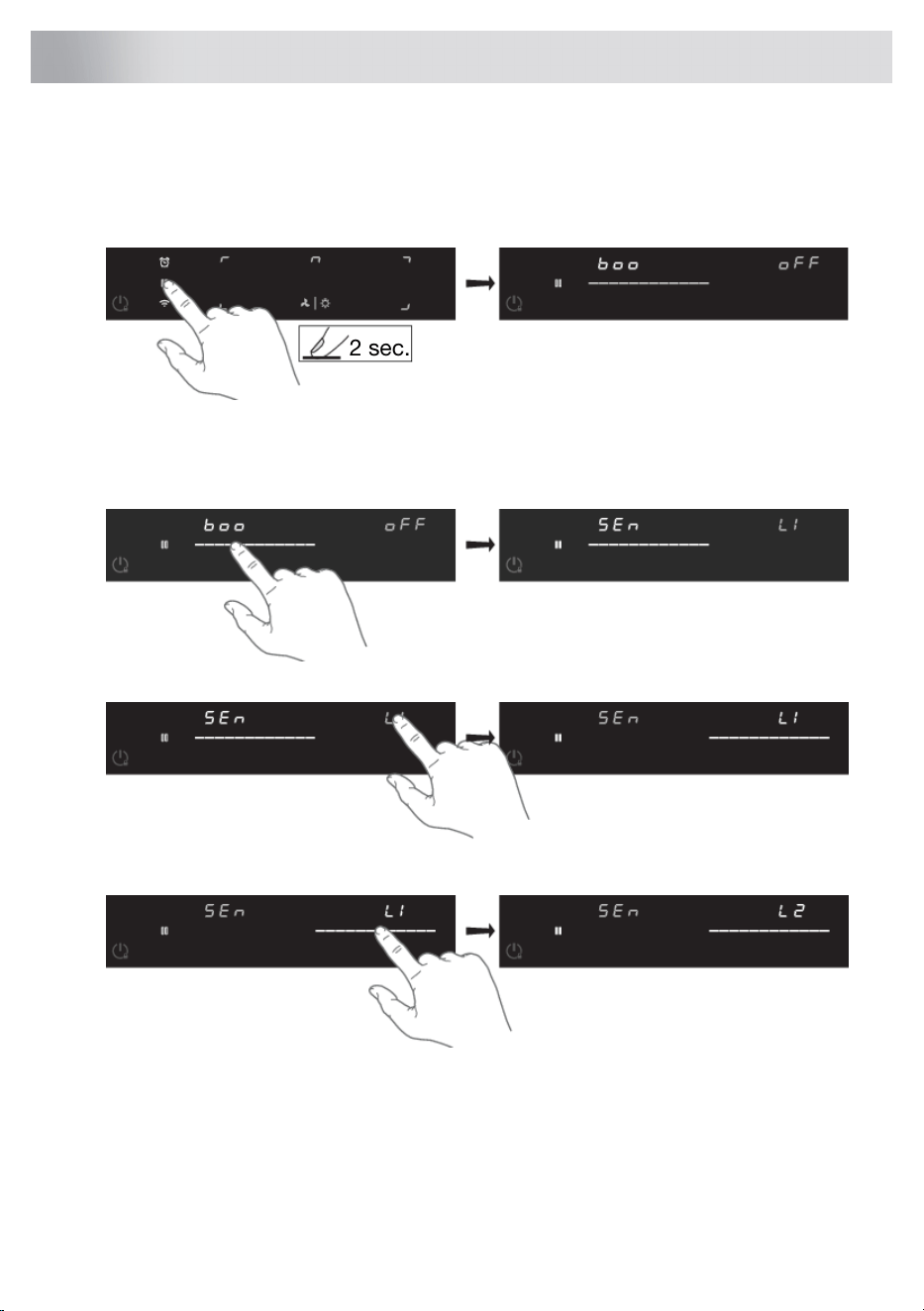
You can tailor the behaviour of this induction hob to suit your cooking style! There are various settings
available for adjustment.
1. Make sure all cooking zones are switched off.
2. Touch the pause button for 2 seconds.
2 sec.
• The settings menu opens.
• The initial setting and status appear in the displays.
3. Select another setting with the slider.
4. Select the status.
5. Set a new status using the slider.
6. Save the setting (only 'Con') by long touching the cooking zone key.
• To exit the menu, touch the pause key.
30
Settings

The following settings are available (depending on the model).
If enabled, the boost level is activated automatically when level 12 is
switched on. If off, boost is activated by selecting power level 12 and then
long-selecting level 12 again.
boo - Auto boost
Automatic Boost
activation
While on, when a new pan is detected on two connected Bridge Induction
cooking zones, the cooking zones are automatically connected into one
big cooking zone. While off, connecting must be done manually by
pressing on the sliders of two Bridge Induction cooking zones at the same
time.
brd - Auto bridge
Automatic coupling
You can choose whether (on) or not (off) the slider will automatically appear
when the first pan is placed on the hob.
SEL - Auto Select
Auto select
• on
• off
Choose whether (on) or not (off) automatic closing of the slider after 6 sec
of not being used. When ‘DES’ is set to ‘off’, the slider must be closed
manually.
dES - Auto deselect
Auto deselect
• on
• off
Choose to use (on) or not (off) the dynamic slider. If ‘dYn’ is off, the slider
always appears in the middle.
dYn - Dynamic Slide
Dynamic Slide
• on
• off
While on, the recovery function is active and, settings can be moved from
one cooking zone to the other when a pan switches position.
rEC – Move and
recover function
Move and recovery
function
Set the time for how long the hob should detect if a pan is placed on the
cooking zone.
dEt - Pan Detection
Time-out
Pan detection time-out
• 0.01 (standaard) = 1 min
• 0.10 = 10 min
AtI
–'Auto-Stopwatch-timer'
• If ‘Auto-Stopwatch Timer’ is on, the stopwatch timer will start counting
immediately when a power level is set. The current value will not be
visible until the stopwatch timer is selected.
Automatic
Stopwatch-timer
• If ‘Auto-Stopwatch Timer’ is off, the stopwatch timer will start counting
after selecting it.
Set the time when the timer should start counting down:Cdn - Timer Countdown
Countdown timer start
• Off (timer does not count down)
• 0.20 (20 seconds before end of set time)
• 1.00 (60 and 20 seconds before end of set time)
31
Settings

The following settings are available (depending on the model).
• 5.00 (300, 60 and 20 seconds before end of set time)
While on, the hob is automatically locked at every switch off.ACL - Auto child lock
Auto child lock
Sound volume has 4 different options. L3 (high), L2 (medium), L1 (low),
off (only error and alarm sounds).
Snd - Sound volume
Sound volume
Key responsiveness has 3 different speed options. L3 (quick), L2 (medium),
L1 (slow).
SEn - Key sensitiveness
Key responsiveness
If you own a compatible cooker hood with Bluetooth, you can pair it with
your induction hob! To do this, set this parameter to on. The cooker hood
control icons will start flashing. You now have 5 minutes to activate the
pairing on your cooker hood. Once the cooker hood is paired with your
induction hob, the icons of the cooker hood control will stop flashing.
hth - Hob-to-hood
pairing (Bluetooth)
Hood control
This setting allows the induction hob to automatically activate the lights of
the connected hood every time the induction hob is turned on. Depending
on the value you set, the ventilation will automatically start at that speed
level when any cooking zone is activated.
hSt- Hob-to-hood
(Synchro Start Level)
Hood Start Level
This setting allows the induction hob to automatically activate the lights of
the connected hood every time the induction hob is turned on. While on,
the hood will be controled automatically depending on the current highest
activated cooking level. If you manually change any hood related settings,
the hood turns to manual control for the rest of this cooking session. The
response level can be set: L3 (high), L2 (medium), L1 (low), off.
hSc- Hob-to-hood
(Synchro Control,
response Level)
Hood response Level
This setting allows the induction hob to automatically deactivate the lights
of the connected hood every time the induction hob is turned off.
Depending on the value you set, the ventilation will switch to that speed
level and stop with a delay.
hSP- Hob-to-hood
(Synchro Stop Level)
Hood Stop Level
To display the current software versions of the hob. The UI software version
will be shown .
FIr - Display firmware
version
Firmware version
To receive firmware updates for the cooking hob, you need to be paired
to the cooking hob via the mobile app. You will receive a notification, or
you can check available firmware updates on the mobile app menu for
updates.
FoA - Firmware update
over the air
Firmware update via
Wi-Fi
To start the firmware update via the app, set this setting to ‘on’ to confirm
your login to the hob. More information can be found in the ‘Wi-Fi’ chapter.
After 10 minutes, this setting is automatically set to ‘off’.
Table continued from last page
32
Settings
The following settings are available (depending on the model).
WARNING!
Current limiter setting must be set according to your connection and
circuit breakers by a registered and qualified installer. Please read the
safety regulations and the installation instructions carefully.
Con - Connection
power
Current limiter
(connection to power
grid)
If your electrical wiring or circuit breakers do not meet the specified current
draw on the rating plate, the current limiter can be activated by reducing
the value of this setting. Doing so may cause a reduced performance of
the induction hob.
The number left of the dot represents the number of connected phases,
while the number right of the dot represents the electrical current per
phase in Ampere.
WARNING!
The appliance must always be set to the actual or lower rating of the
electrical wiring or circuit breakers. This setting can only be set by an
authorised expert.
NOTE!
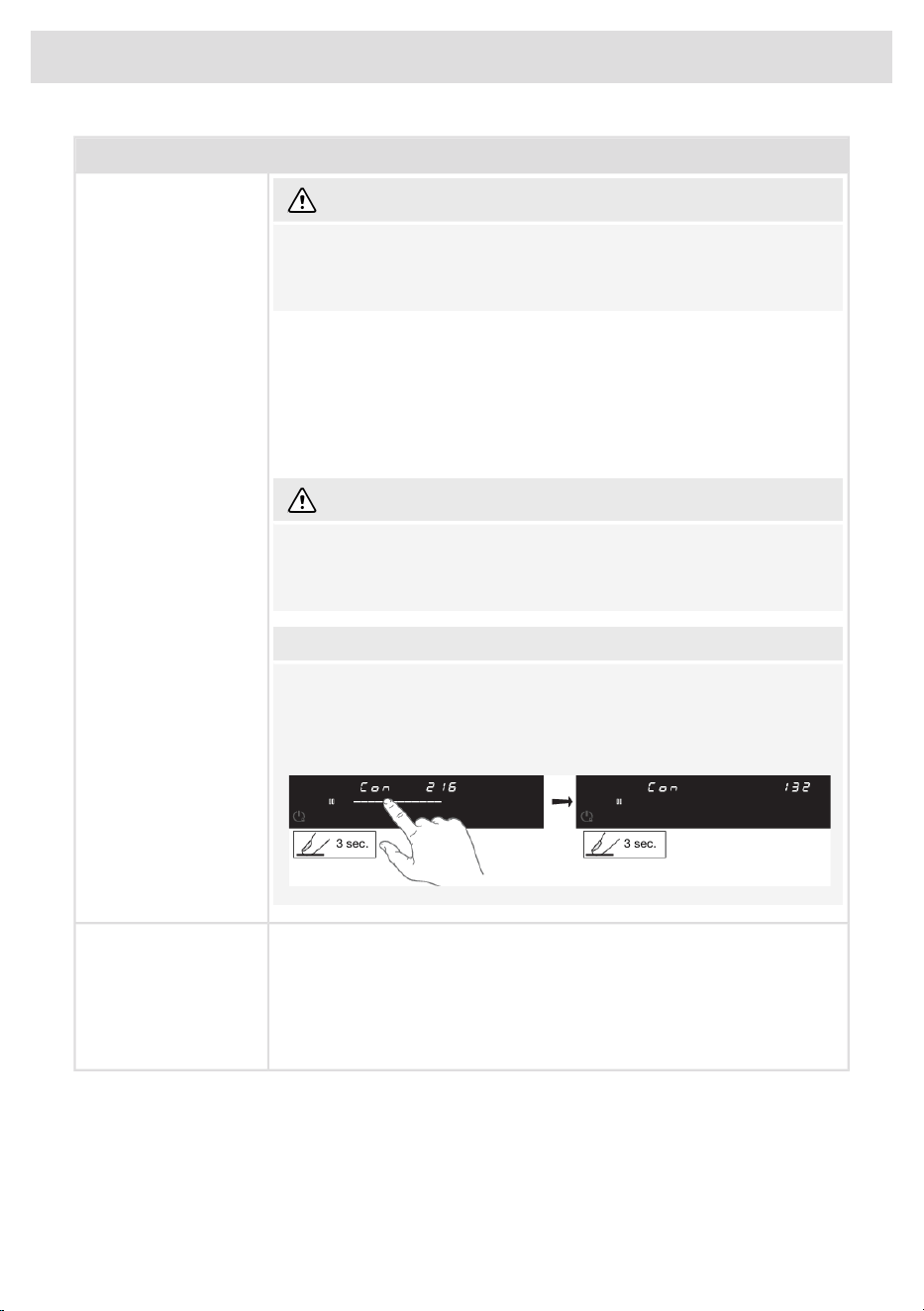
To prevent unintentional adjustment of the 'Con - connected power',
Con setting must be confirmed when changed by touching the cooking
zone key for 3 seconds. A change without confirmation will not be
implemented!
3 sec. 3 sec.
In demo mode, the appliance will act as usual, without the possibility to
heat the cookware.
dE - Demo mode
Demo Mode for Dealer
Showrooms When demo mode is active, this is briefly indicated by ‘dE’ after the device
is switched on.
Without any user interaction, the appliance will automatically switch off
after 10 minutes.
Table continued from last page
33
Settings
Cleaning glass top
After each use, wait for the glass ceramic surface to cool down and clean it. Otherwise, all remaining
impurities will burn onto the hot surface the next time you use the hob.
For regular maintenance of the glass ceramic hob, use special care products that create a protective
film on the surface to prevent the dirt from sticking onto it.
Before each use of the glass ceramic surface, wipe off the dust or any other impurities that could
scratch the surface, from both the hob and the pan bottom.
INFORMATION!
Steel wool, coarse cleaning sponges, and abrasive powders may scratch the surface. The surface
may also be damaged by aggressive spray cleaners and unsuitable liquid cleaners.
Signage may be worn when using aggressive or abrasive cleaners or cookware with coarse or
damaged bottom.
Use a damp soft cloth to remove minor impurities. Then, wipe the surface dry.
Remove water stains with a mild solution of vinegar. However, do not use this solution to wipe the
frame (only with some models) as it may lose its sheen. Do not use aggressive spray cleaners or
descaling agents.
Use special glass ceramic cleaners for stubborn dirt. Observe the manufacturer's instructions.
Be sure to thoroughly remove any cleaner residues after the cleaning process as they may damage
the glass ceramic surface when the cooking zones heat up.
Remove stubborn and burnt residues with a scraper. Be careful when handling the scraper to prevent
injury.
Immediately remove any sugar or sugar-laden food from the glass ceramic hob using a scraper,
even if the hob is still hot, as sugar may permanently damage the glass ceramic surface.
INFORMATION!
The scraper is not included in appliance equipment.
INFORMATION!
Only use the scraper when dirt cannot be removed with a wet cloth
or special cleaners for glass ceramic surfaces.
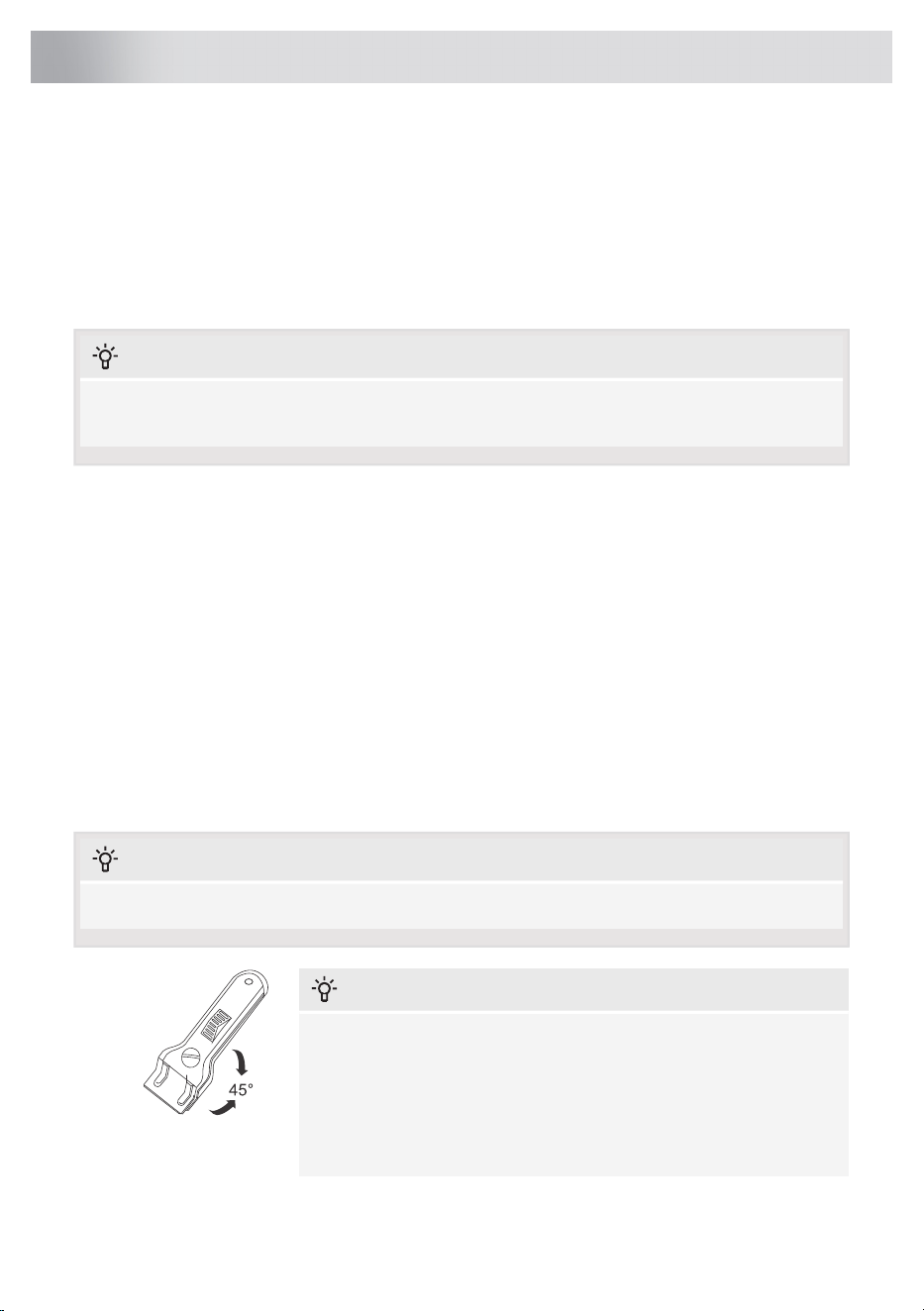
Hold the scraper at the correct angle (45° to 60°). Gently press the
scraper against the glass and slide it over the signage to remove
the dirt. Make sure the plastic handle of the scraper (in some models)
does not come into contact with a hot cooking zone.
34
Maintenance
TIP!
Activate the child lock before cleaning the hob.
Daily cleaning
• Although food spills cannot burn into the glass, we nevertheless recommend you clean the hob
immediately after use.
• For daily cleaning, a damp cloth with a mild cleaning agent is best.
• Dry off with kitchen paper or a dry tea towel.
Stubborn stains
• Stubborn stains can also be removed with a mild cleaning agent, washing-up liquid, for example.
• Remove water circles and limescale with cleaning vinegar.
• Traces of metals (caused by sliding pans) can be difficult to remove. Special products are
available for this.
• Use a glass scraper to remove food spills. Melted plastic and sugar are also best removed with
a glass scraper.
NOTE!
• Never use abrasives. These leave scratches in which dirt and limescale can accumulate.
• Never use anything sharp such as steel wool or scourers.
TIP!
Consult the website for additional maintenance and cleaning instructions!
35
Maintenance

General
NOTE!
If you see a crack or tear (however small) in the glass plate, immediately switch off the hob and
disconnect it from the power supply (unplug it from the socket-if any).
Then contact the Service Department.
Troubleshooting table
If your hob does not work properly, it does not always mean that it is defective. Make sure to check
the points mentioned below in the table, or visit our website for more information.
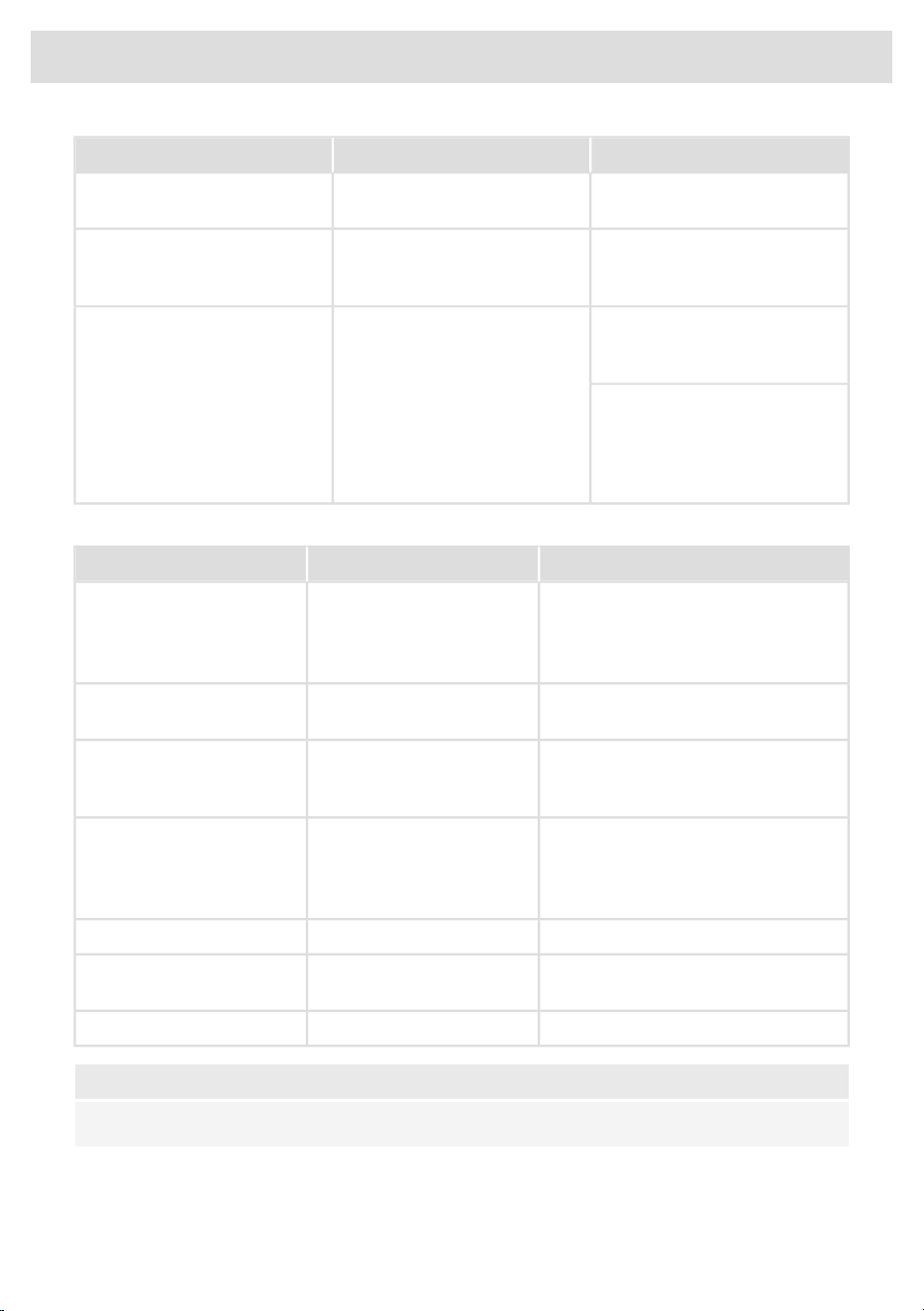
Induction zones
SolutionPossible causeSymptom
Normal operation.This is the standard set-up
routine.
Characters appear in the
displays when the appliance is
connected for the first time.
Normal operation.The hob is cooling down.The fan runs on for several
minutes after the hob has been
switched off.
This is normal and disappears
after the hob has been used a
few times. Ventilate the kitchen.
The new appliance is heating
up.
A slight smell is noticeable the
first few times the hob is used.
Normal operation.This is caused by the capacity
limiter on the front and back
zones. A soft ticking sound can
also occur at lower settings.
You can hear a ticking sound in
your hob.
Clean the induction hob with a
ceramic hob cleaner and
remove the dirt / grease from the
pan bottom.
Contaminated pan bottom used
on the cooking zone.
Circle of pan bottom remains
visible after cleaning.
This is normal for certain pans,
particularly at high settings. This
is not harmful to the pans or the
hob.
This is caused by the energy
flowing from the hob to the
saucepan.
The pans make noise while
cooking.
Use a suitable pan (see chapter
'Pans for induction cooking').
The pan you are using is not
suitable for induction cooking or
has a diameter of less than 12
cm.
You have switched a cooking
zone on, but the display keeps
flashing.
Switch off the signal by pressing
the cooking zone key on the
timer.
The preset time has ended.A cooking zone suddenly stops
working and you hear a signal.
Check the fuses or the electric
switch (if there is no plug).
There is no power supply due to
a defective cable or a faulty
connection.
The hob is not working and
nothing appears in the display.
36
Troubleshooting
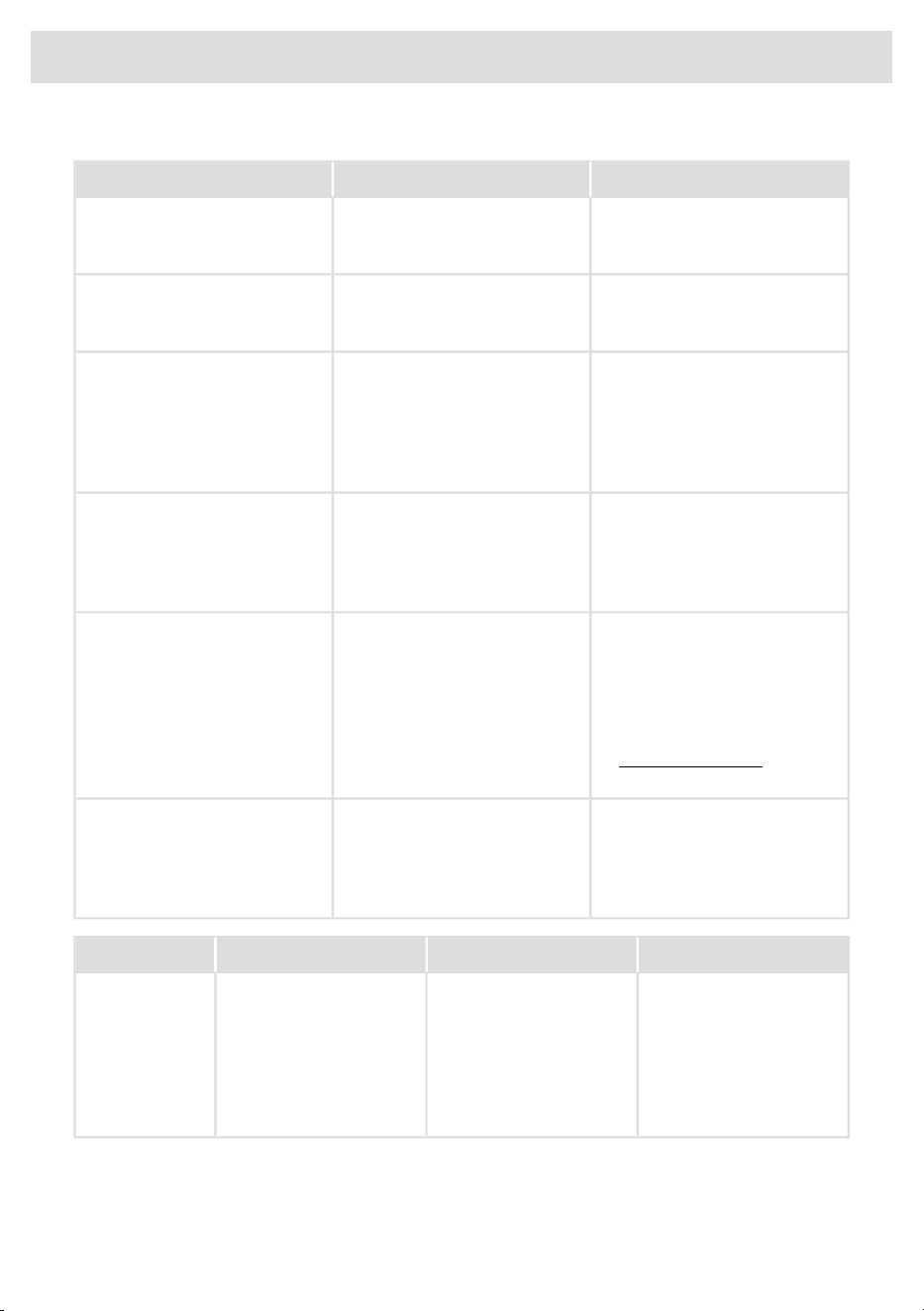
SolutionPossible causeSymptom
After the hob has cooled down,
cooking can be continued.
Zone is overheated.Zone stops unintended and
residual heat indicator is shown.
Check the electrical
connections.
The appliance is incorrectly
connected.
A fuse blows when the hob is
connected to the electrical
power mains.
Disconnect the device from the
power supply. Contact your
installer.
The ceramic glass plate is
broken.
Please note! Do not throw a
broken ceramic glass plate in
the glass recycling bin but take
this to the Municipality's waste
recycling centre.
Error codes
SolutionPossible causeSymptom
Disconnect the device from the mains,
wait 10 seconds and reconnect.
Defective generator.Error codes F0 to F7 and FC.
Contact the technician if the error code
does not disappear.
Let the appliance cool down and start
cooking again.
Appliance overheated.Error codes Fc
Have your connection changed.The appliance has been
connected incorrectly and/or
the mains voltage is too high.
Error code FC02
Disconnect the device from the mains,
wait 10 seconds and reconnect.
Control panel errorError codes Fc01, FC04,
FC08 , FC10 and FH
Contact the technician if the error code
does not disappear.
Contact your energy supplier.Mains voltage is too low.Error codes FJ
Make sure the venting holes under the
cooking plate are open.
Air circulation not good.Error codes F9
Contact the service department.Other error codes.
NOTE!
In case of other error codes: please write down the error code and contact the service department.
Table continued from last page
37
Troubleshooting
Troubleshooting Wi-Fi
SolutionPossible causeSymptom
The hob must be switched off,
then touch the on/off key and
hold it for 5 seconds.
Wi-Fi turned off.Wi-Fi icon not shown.
Check that your home network
signal is strong and internet
connection is working.
Home network issues.Wi-Fi setup failed.
Please check the network
settings. Ensure a 2.4 GHz and
visible network. If the signal is
too weak, try to move the
network router closer to the
appliance.
The home network is not on 2.4
GHz, the network is hidden, or
the signal strength is too weak.
Home network is not displayed
during the connection setup
process.
Ensure that Wi-Fi is enabled and
the internet connection in your
home network is working.
Repeat the connection setup if
necessary.
Wi-Fi is disabled or home
network issues.
Cooking hob is shown
disconnected on the mobile app
First disable the Wi-Fi and
enable it again. Check that the
internet connection in your home
network is working. Repeat the
connection setup if necessary.
Different causes.Other Wi-Fi problem.
Further troubleshooting available
on www.connectlife.io or contact
the service department.
Ensure the power supply is not
terminated and a stable internet
connection before retrying
again. If failed again, contact the
service department.
Internet connection lost or power
supply terminated.
Firmware update process failed.
SolutionPossible causeSymptomError code
Try to connect the device
to your network again.
Failed to connect to Wi-Fi
network.
E7 appears on display
after setting up the Wi-Fi
connection.
E7
Make sure that new
devices can connect to
the network (e.g. MAC
address filtering is
disabled).
38
Troubleshooting
Compliance information
HL3215STGRadio equipment type
HLW3215-TG
HLW3215-TG01
Wi-Fi
2.412GHz - 2.472GHzOperating frequency range
≤10 dBm/MHz ( EIRP) (Antenna gain 10 dBi)Maximum output power
Gain: 0 dBiMaximum antenna gain
Bluetooth
2.402 GHz - 2.4800 GHzOperating frequency range
6 dBm (≤10 dBm)Carrier Output
F1DEmission type
The company declares that the device with the function Connectlife complies with the essential
requirements and other relevant provisions of Directive 2014/53/EU. The detailed Declaration of
Conformity can be found at the web address https://auid.connectlife.io on the page of your device
among the additional documents.
39
Technical data

If the supply cord is damaged, it must be replaced by the
manufacturer, its service agent or similarly qualified persons in order
to avoid a hazard.
The device should be disconnected from the mains prior to
maintenance or repairs.
The device is only disconnected from the electric power if:
• the main switch of the electrical wiring/installation in the house is
switched off,
• or the fuse for the electrical wiring/installation in the house has
been completely removed,
• or the plug has been pulled out of the socket.
It is recommended the hotplate be checked and serviced by an
authorized person every 2 years. This is not covered by warranty.
For New Zealand only
If the cooking range is not provided with a supply cord fitted with a
plug or an installation male connector and if this appliance is to be
connected to a new or upgraded electrical installation, then it must
be connected to the supply by a supply cord fitted with:
• an appropriately rated plug that is compatible with the
socket-outlet fitted to the final sub circuit in the fixed wiring that
supplies this appliance.
• or an appropriately rated installation male connector that is
compatible with the installation female connector fitted to the final
sub-circuit in the fixed wiring that supplies this appliance.
Safety
If the safety instructions and warnings are not followed, the manufacturer cannot be held responsible
for any resulting damage.
• Installation, maintenance or repairs should only be carried out by professionals who are authorized
by the manufacturer, as failure to do so will void the warranty.
• Prior to installation, ensure that the local distribution conditions (voltage and frequency) and the
adjustment of the appliance are compatible.
• The voltage, frequency, power and the country for which the appliance has been designed are
shown on the appliance rating plate.
40
Installation

• For stationary appliances permanently connected to the fixed wiring, compliance with this
requirement is considered to be met if the instruction concerning disconnection incorporated in
the fixed wiring is in accordance with AS/NZS 3000.
• The walls and the worktop surrounding the appliance must be heat resistant up to at least 105 °C.
• Duplicate rating plates should be attached to an adjacent surface, such as a cupboard door.
• The appliance is not suitable for installation and operation with aftermarket lids or covers fitted.
• Please contact the service department if installation or operational faults occur during installation.
• The worktop into which the hob is fitted should be flat.
Electrical connection
• This appliance must be earthed.
• The electrical connection must comply with national and local regulations.
• Prior to installation, ensure that the local distribution conditions (voltage and frequency) and the
adjustment of the appliance are compatible.
• The voltage, frequency, power and the country for which the appliance has been designed are
shown on the appliance rating plate.
• For class I appliances, check that your home’s electrical system provides proper earthing.
• The wall plug socket and plug should always be accessible.
• If a stationary appliance is not fitted with a supply cord and a plug, or with other means for
disconnection from the supply mains having a contact separation in all poles that provide full
disconnection under overvoltage category III conditions, the means for disconnection must be
incorporated in the fixed wiring in accordance with the wiring rules. This is also applicable for
appliances with a supply cord and plug when the plug is not accessible after installing the
appliance. Using an omnipolar switch with a contact separation of at least 3 mm fitted in the
fixed wiring will fulfil this requirement.
• The connection cable must hang freely and should not be fed through a drawer.
• For connecting, use an approved cable with the correct cable diameters appropriate for the
connection. The cable casing should be made of rubber (preferably of the H05VV-F or H07V2V2
type).
• Before connecting the appliance, make sure the voltage indicated on the rating plate conforms
to the voltage in your power mains.
• The connection should be adjusted to the current and fuses.
• The appliance should not be connected to the mains via a multi-plug adapter or extension cable,
as the safe use of the equipment cannot be guaranteed.
• After installation, the parts carrying electrical current and insulated parts shall be protected
against contact.
WARNING!
Failure to use screws or fasteners for installation as described in the installation instructions may
result in electric shock.
• Do not use an adapter or an extension lead to connect the device to the electrical mains. Safe
use of the device cannot be guaranteed with these accessories.
• Use a (flexible) cable that is flame retardant made from PVC suitable for 300/500V in a 0…70 ºC
environment.
41
Installation

Service
• Disconnect the appliance from the mains supply before starting any repair work.
• Faulty parts may only be replaced by original parts. The manufacturer can only guarantee that
original parts meet safety requirements.
• The device should be disconnected from the mains prior to maintenance or repairs.
• The device is only disconnected from the electric power if:
- the main switch of the electrical wiring/installation in the house is switched off,
- or the fuse for the electrical wiring/installation in the house has been completely removed,
- or the plug has been pulled out of the socket.
It is recommended the hotplate be checked and serviced by an authorized person every 2 years.
This is not covered by warranty.
42
Installation
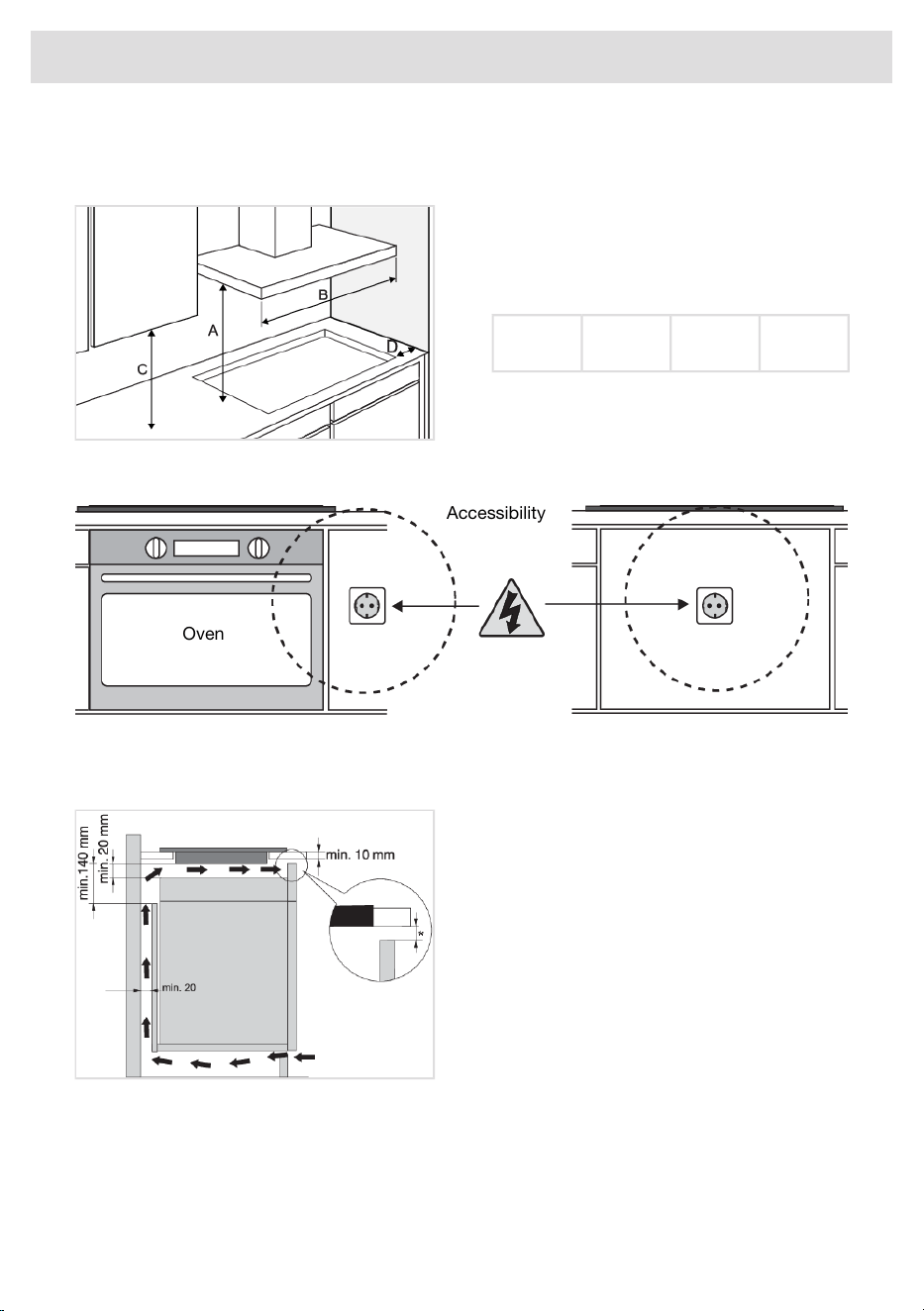
Preparations for installation
Free space around the appliance
Rangehoods and exhaust fans shall be
installed in accordance with manufacturers
instructions.
For an overhead exhaust fan A>750 mm!
D (>mm)
= 50
C (>mm)
= 450
B (>mm)
= 900
A (>mm)
= 650
Accessibility
Accessibility
Oven
Air vents in the lower kitchen cabinet
Normal operation of the induction cooking hob electronic components requires sufficient air circulation.
Lower cabinet with a drawer
• In the cabinet's rear wall, there must be
an opening with a height of at least
140 mm along the entire width of the
cabinet.
The hob is fitted with a fan located in its lower part. If there is a drawer underneath the countertop,
do not use it to store small objects or paper as these could, if sucked into the fan, damage the fan
and the cooling system. Moreover, do not use the drawer to store aluminium foil or flammable
substances or liquids (such as sprays). Keep such substances away from the cooking hob. Danger of
explosion! There should be at least 20 mm of clearance between the contents of the drawer and the
fan inlet vents.
43
Installation
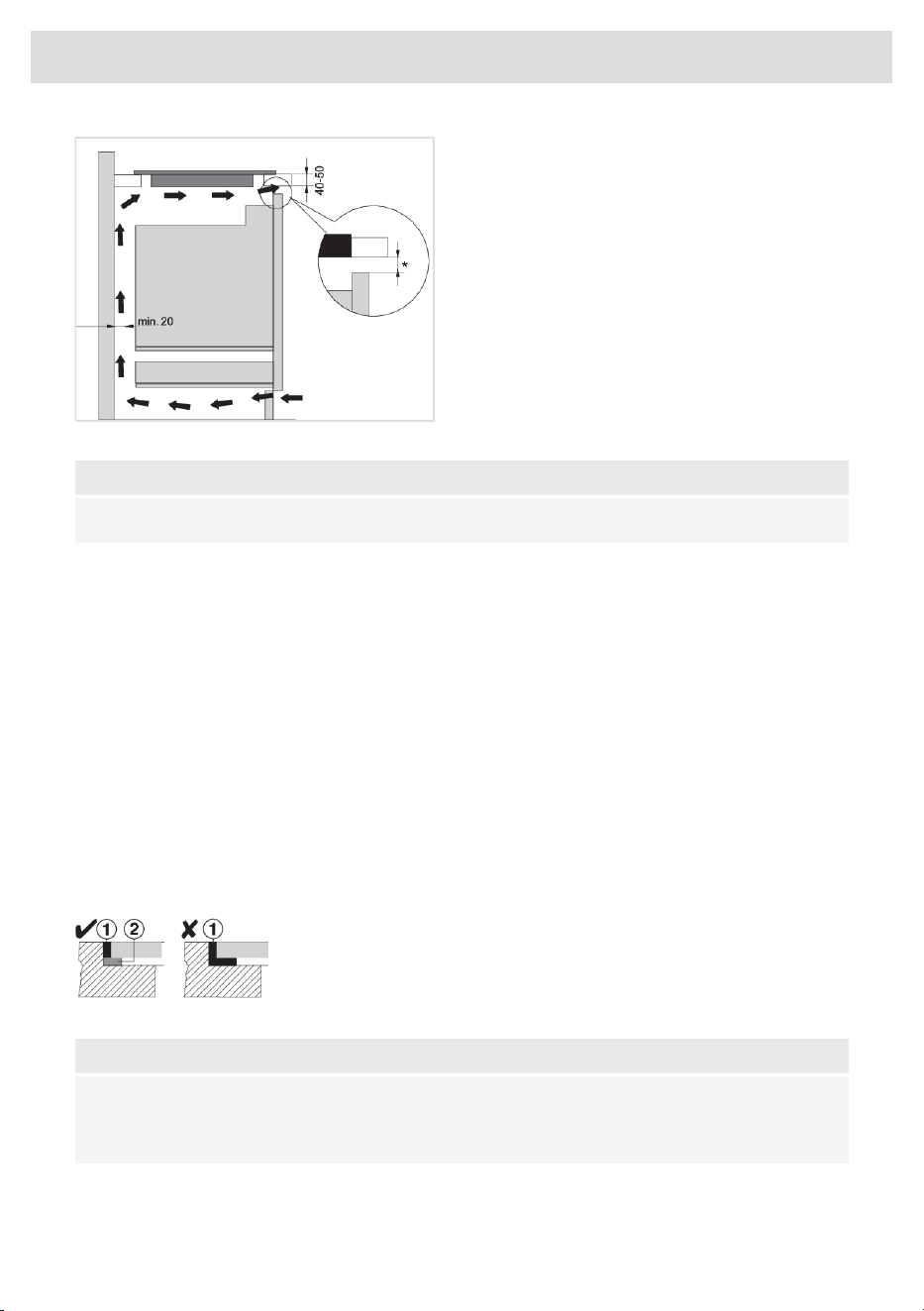
Lower cabinet with an oven
• Only install ovens with a cooling fan under
the induction hob. Before installing the
oven, the kitchen cabinet rear wall has to
be removed in the area of the opening for
installation.
• If other appliances are installed under the
induction cooking hob, we cannot
guarantee their correct operation.
NOTE!
* For optimal hob performance, a ventilation gap of ≥6 mm is advised.
Flush-mount
The appliance may only be installed into a temperature- and water-resistant countertop, such as a
countertop made of (natural) stone (marble, granite), or solid wood (the edges along the cut-out
have to be sealed). When installing into a countertop made of ceramics, wood, or glass, a wooden
sub-frame should be used. The frame is not supplied with the appliance. The appliance may only
be installed into a countertop made of other materials after you have consulted the countertop
manufacturer and obtained his express approval. Internal dimension of the basic unit should be at
least equal to the internal cutout for the appliance. This will allow simple removal of the appliance
from the countertop. Attach sealing tape along the perimeter of the bottom of the glass panel.
Install the appliance (see ‘Installation’) and connect the appliance to the mains power supply (see
instructions for connecting the appliance). Test the operation of the appliance before applying the
seal. Seal the groove between the appliance and the kitchen worktop with a silicone sealant.
The silicone sealant used to seal the appliance must be temperature-resistant (to at least 160 °C).
Smooth out the silicone sealant using suitable tools. Observe the instructions for use of the selected
silicone sealant. Do not switch on the appliance until the silicone sealant has dried completely.
1. Silicone sealant, 2. Sealing tape
NOTE!
Pay particular attention to built-in dimensions with (natural) stone countertops. When choosing
the silicone sealant, observe the countertop material and consult the countertop manufacturer.
Use of inappropriate silicone sealants can result in permanent discolouration of some parts.
44
Installation
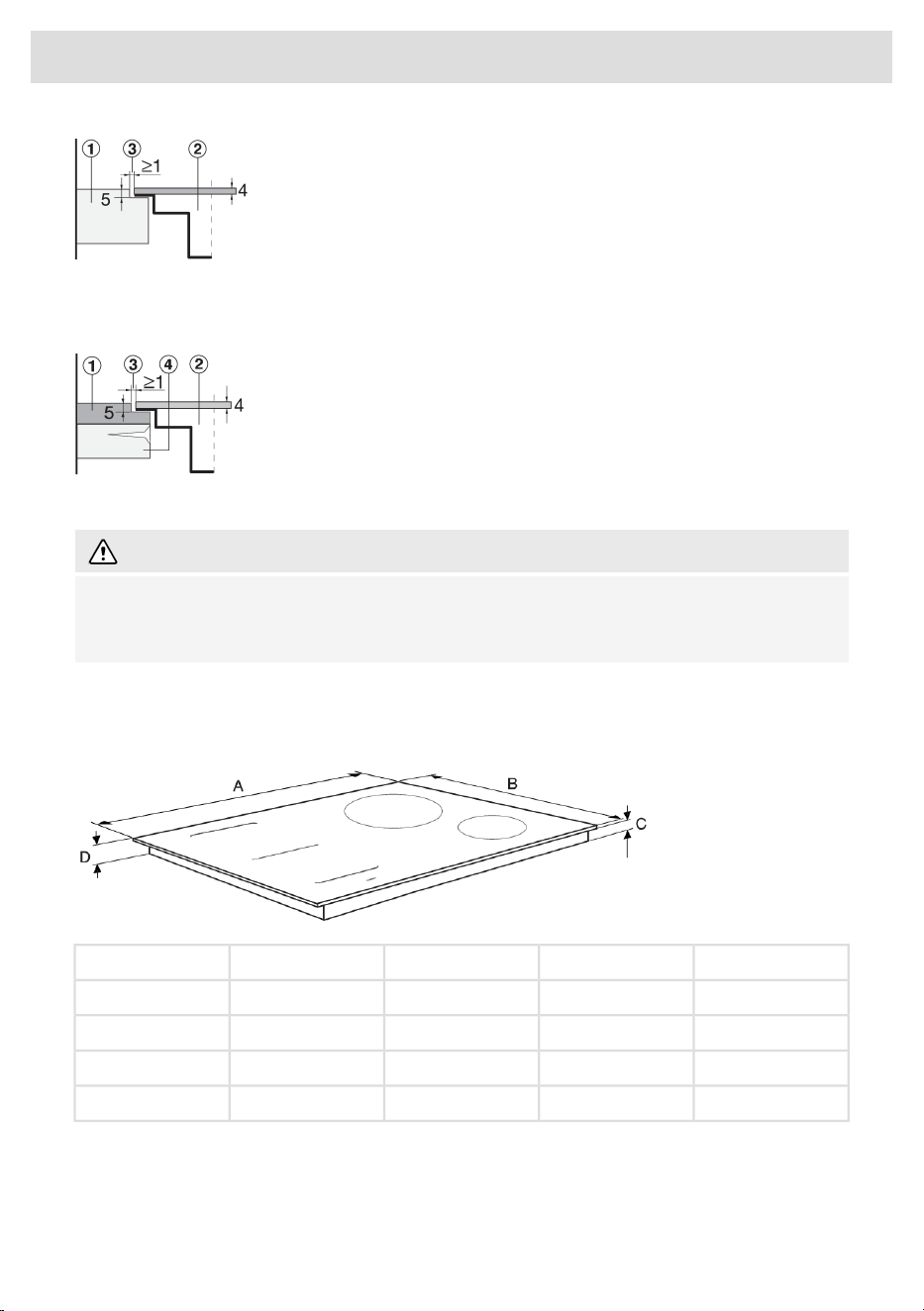
Stone countertop
1. Countertop
2. Appliance
3. Slot
Given the margin of error (tolerance) for the glass ceramic plate of the appliance, and the cutout in
the countertop, the slot is adjustable (min. 2 mm).
Ceramic, wooden, or glass countertop
1. Countertop
2. Appliance
3. Slot
4. Wooden frame, thickness 16 mm
WARNING!
The service department shall only be responsible for repair and servicing of the cooking hob.
Consult your specialized kitchen equipment dealer regarding the re-installation of the flush-mount
cooking hob.
Built-in
Appliance dimensions
D (mm)C (mm)B (mm)A (mm)
5046520380HI53xxx
5046520600HI56xxx
5046520800HI58xxx
5046520900HI59xxx
45
Installation
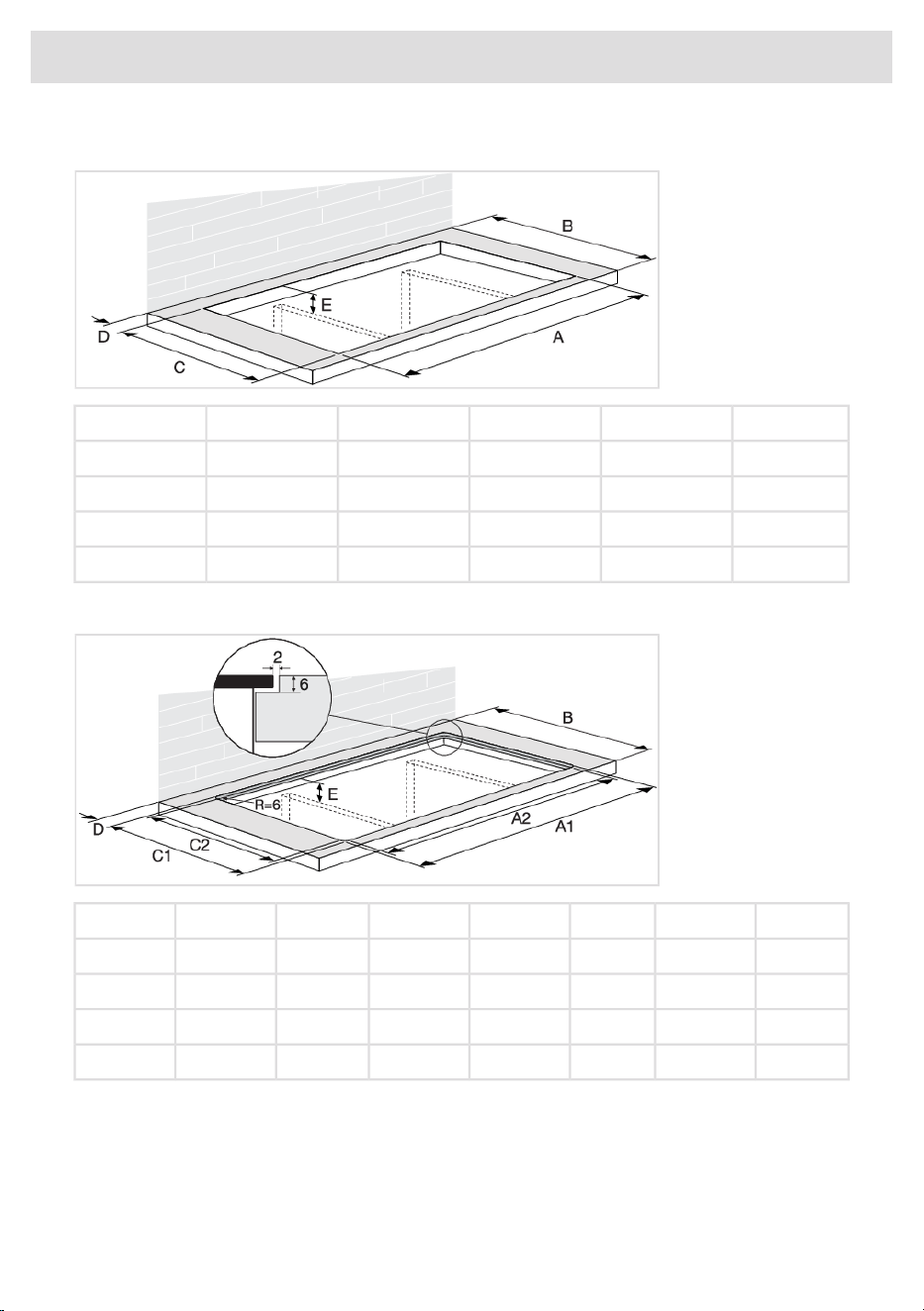
Cut-out in the worktop
E (mm)D (mm)C (mm)B (mm)A (mm)
Min. 60Min. 40490Min. 600340HI53xxx
Min. 60Min. 40490Min. 600560HI56xxx
Min. 60Min. 40490Min. 600750HI58xxx
Min. 60Min. 40490Min. 600860HI59xxx
Cut-out in the worktop (flush)
E (mm)D (mm)C2 (mm)C1 (mm)B (mm)A2 (mm)A1 (mm)
Min. 60Min. 40490524-525Min. 600340384-385HI53xxx
Min. 60Min. 40490524-525Min. 600560604-605HI56xxx
Min. 60Min. 40490524-525Min. 600750804-805HI58xxx
Min. 60Min. 40490524-525Min. 600860904-905HI59xxx
46
Installation
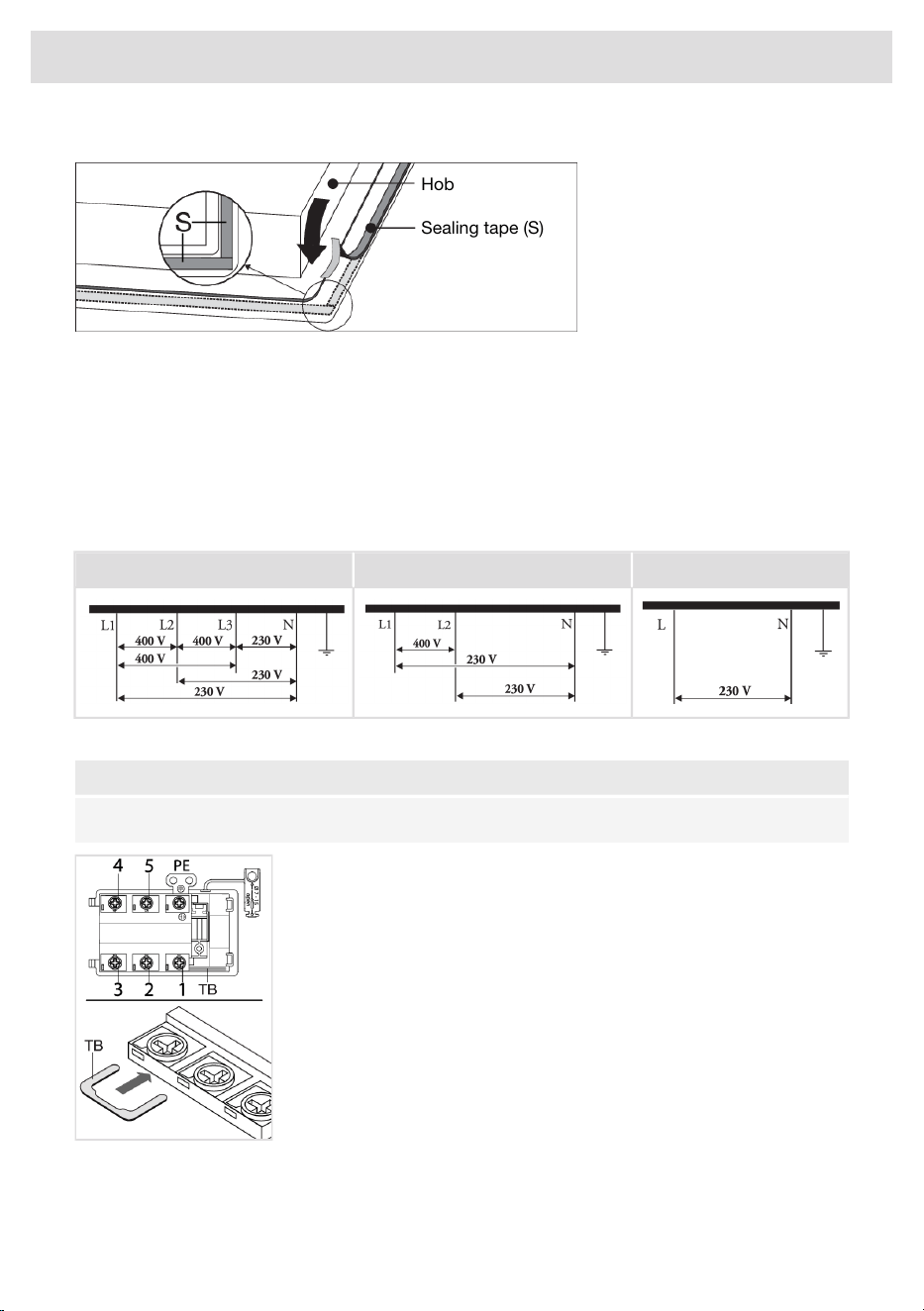
Sealing tape
Hob
Sealing tape (S)
Electrical connection
Determining the existing electrical connection
• Check the voltage. Before connecting the appliance, make sure the voltage specified on the
rating plate conforms to the voltage of your power mains. The voltage of your power mains
(220–240 V between L and N) should be checked by an expert using an appropriate measuring
device.
• Check the voltages present as indicated in the diagrams below.
1 phase - 1 neutral2 phase - 1 neutral3 phases - 1 neutral
Connection diagram
NOTE!
Consult the wiring diagrams on the bottom of the appliance.
1. Open the cover of the connection terminal box.
2. Run the power cord through a cord strain relief (clamp) which
protects the cable from being pulled out.
3. Connect the wires according to your type of appliance.
4. Make the necessary connections between the terminals using the
supplied terminal bridges (TB). The terminal bridges are located in
the connection box.
Power limiter
See chapter ‘Settings’, under Con - power limiter to set the parameter. This parameter must be set
before placing a pan on the hob or activating a cooking zone.
47
Installation
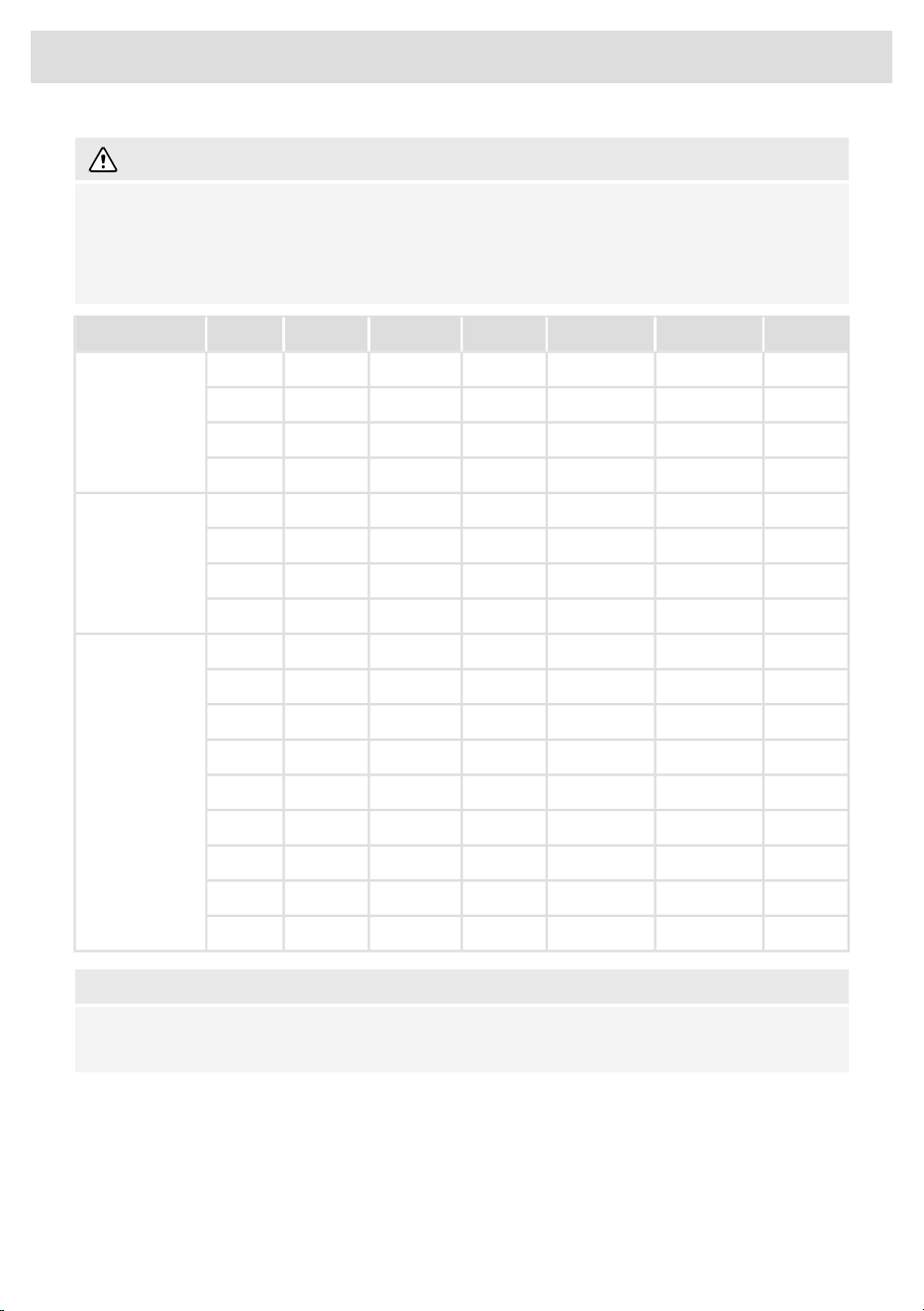
WARNING!
Setting the power limiter should only be carried out by a registered and qualified installer.
Please read the safety regulations and the installation instructions carefully.
Some automatic cooking functions are disabled if the appliance power limiter is set to a lower
value. Refer to the table below.
MeltingKeep warmSimmerBoilingFryingGrillingIMax (A)Phase
xxxxxx163 Phases
xxx-xx13
xxx---10
xxx---6
xxxxxx162 Phases
(2 and 3
interconnected)
xxx-xx13
xxx---10
xxx---6
xxxxxx401 Phase
(1, 2 and 3
interconnected)
xxxxxx35
xxxxxx32
xxxxxx25
xxxxxx20
xxxxxx16
xxx-xx13
xxx---10
xxx---6
NOTE!
Setting a lower value of the power limiter parameter will cause a reduced performance of the
induction hob.
See the connection diagrams for the voltage between the phase and neutral conductors and voltage
between the phase conductors.
Power cord core cross sectional area should be at least 1,5 mm² for the following power limiter
settings which should be adjusted to your circuit breakers:
48
Installation
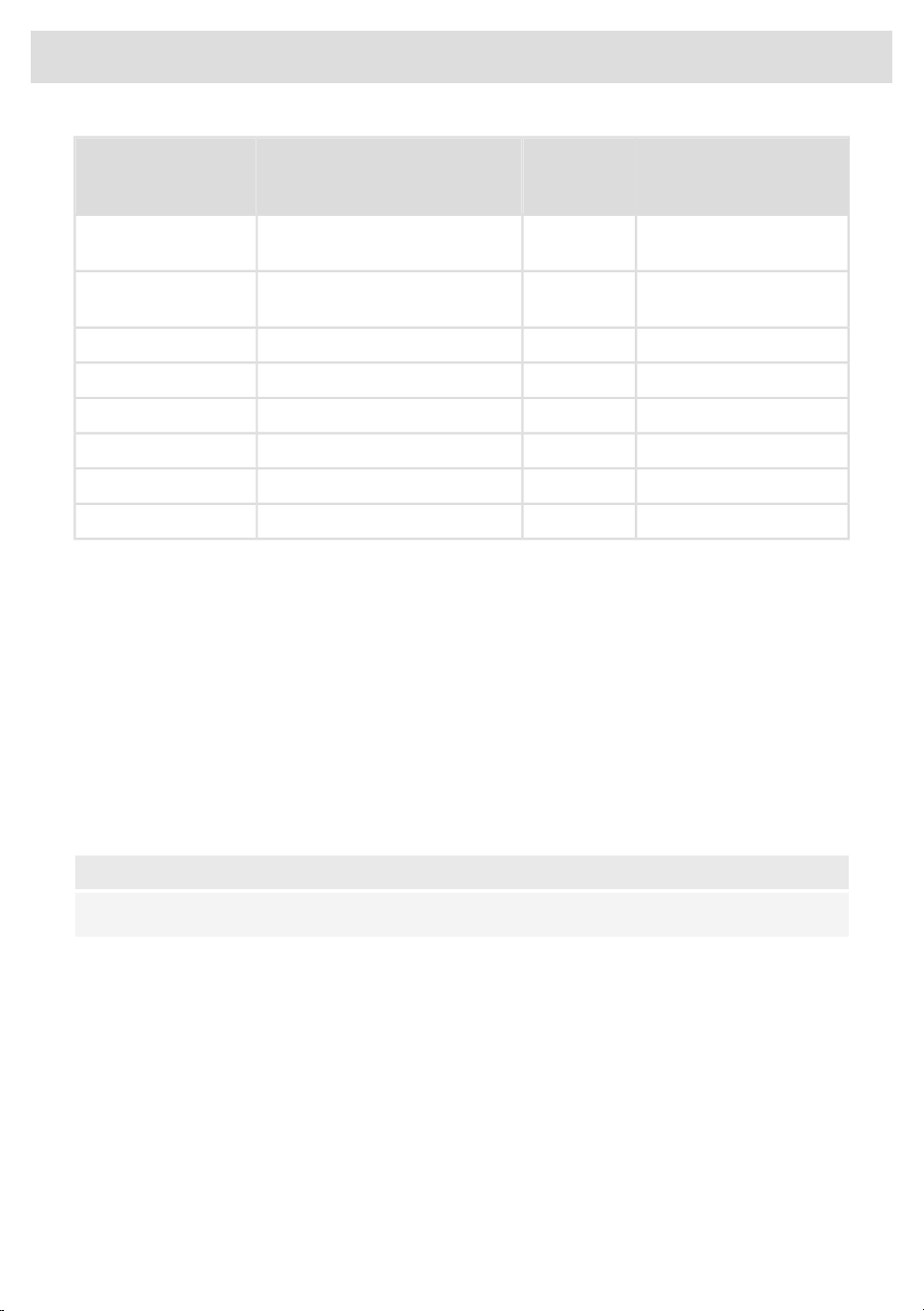
Number and cross
section of Power cord
wires
Power cord
Type
Connection typePower limiter
configuration
5 x 1.5 mm²H05V2V2-F3 phases - 1 neutral3x16 A / 3x13 A /
3x10 A / 3x06 A
4 x 1.5 mm²H05V2V2-F2 phase - 1 neutral2x16 A / 2x13 A /
2x10 A / 2x06 A
5 x 1.5 mm²H05V2V2-F2 phase - 2 neutral (only for NL)2 x 16 A
4 x 1.5 mm²H05V2V2-F3 phases (only for BE)3 x 16 A
4 x 4.0 mm²H05V2V2-F2 phase - 1 neutral2 x 32 A
3 x 4.0 mm²H05V2V2-F1 phase - 1 neutral1x32 A / 1x25 A
3 x 2.5 mm²H05V2V2-F1 phase - 1 neutral1x20 A
3 x 1.5 mm²H05V2V2-F1 phase - 1 neutral1x16 A
Connecting & testing
• Connect the appliance to the power supply with a plug. The socket must be earthed. The nominal
voltage and frequency required for the appliance are shown on the appliance’s type plate/label
with basic information.
• Test if the appliance operates correctly.
• For flush mounting, seal the hob (see ‘Flush-mount installation into the worktop’).
Removing the built-in appliance
Disconnect the appliance from the power mains and disconnect it from the discharge duct. Use a
suitable tool to remove the silicone seal from around the edge. Remove the appliance by pushing
it upwards from the bottom.
NOTE!
Do not attempt to remove the appliance from the upper side of the counter!
49
Installation
Disposal of the appliance and packaging
Sustainable materials have been used during manufacture of this appliance. This appliance must
be disposed of responsibly at the end of its service life. Ask your local authorities for more information
about how to do this.
The appliance packaging is recyclable. The following may have been used:
• cardboard;
• polyethylene film (PE);
Dispose of these materials in a responsible manner and in accordance with government regulations.
WARNING!
Never allow children to play with packaging material due to the danger of injury or suffocation.
Store the packaging material safely or dispose of it in an environmentally-friendly way.
The product has been marked with a crossed-out dustbin symbol to
remind you of the obligation to dispose of electrical household
appliances separately. This means that the appliance may not be
included with normal domestic refuse at the end of its service life.
The appliance must be taken to a special municipal centre for separated
waste collection or to a dealer providing this service.
Separate collection of household appliances helps to prevent any
potential negative impact on the environment and on human health
caused by improper disposal. It ensures that the materials of which the
appliance is composed can be recovered to obtain significant savings
in energy and raw materials.
NOTE!
Please note! Do not throw a broken ceramic glass plate in the glass recycling bin but take this
to the Municipality's waste recycling centre.
Declaration of conformity
We hereby declare that our products satisfy the applicable European
directives, orders and regulations, as well as the requirements stated
in the referenced standards.
50
Environmental aspects

51
Your notes
941125
www.asko.com
We reserve the right to make changes.
-a7