
Installation Manual
TE004Model No.
Please watch these videos first and
use this manual as a guide.
Scan the QR code and search TE004
Tutorial Video
If you have any questions, please contact us at
+1 (833) 878-3346
(Monday-Friday 9:00 am-5:00 pm PST)
Need Help? Contact Us!
teeho.com

1. Parts List
............................................................................................. 1
.......................................................................... 3
2. Installation Guide
.............................. 3
Step 1: Prepare the Door & Check Dimensions
Step 2: Install the Latch & Strike
........................................................ 7
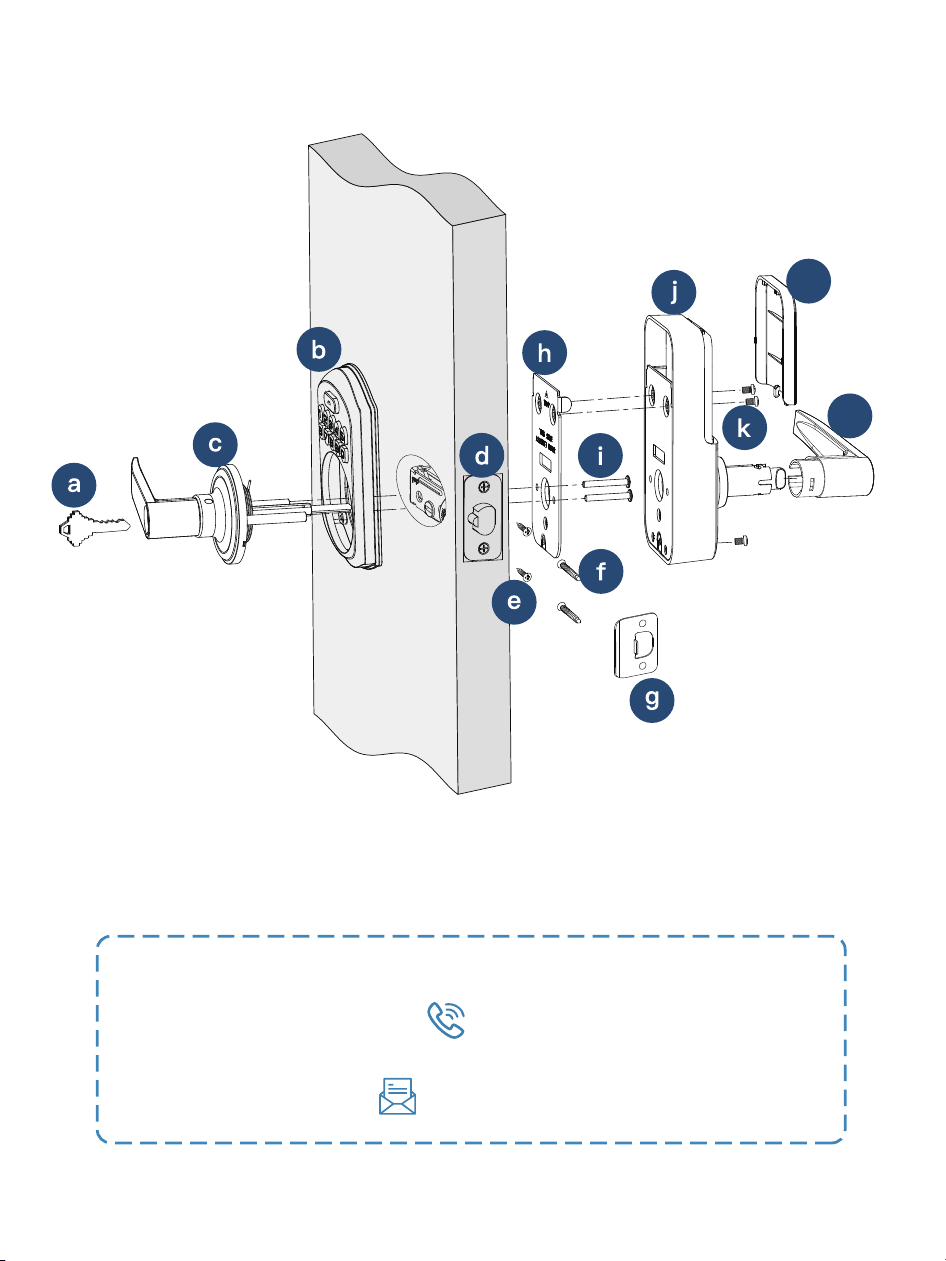
Step 3: Install Exterior Assembly
....................................................... 9
Step 4: Install Interior Assembly
........................................................ 10
......................................... 17
4. Information & Safety Warnings
........................................................................... 14
3. Troubleshooting
CONTENTS
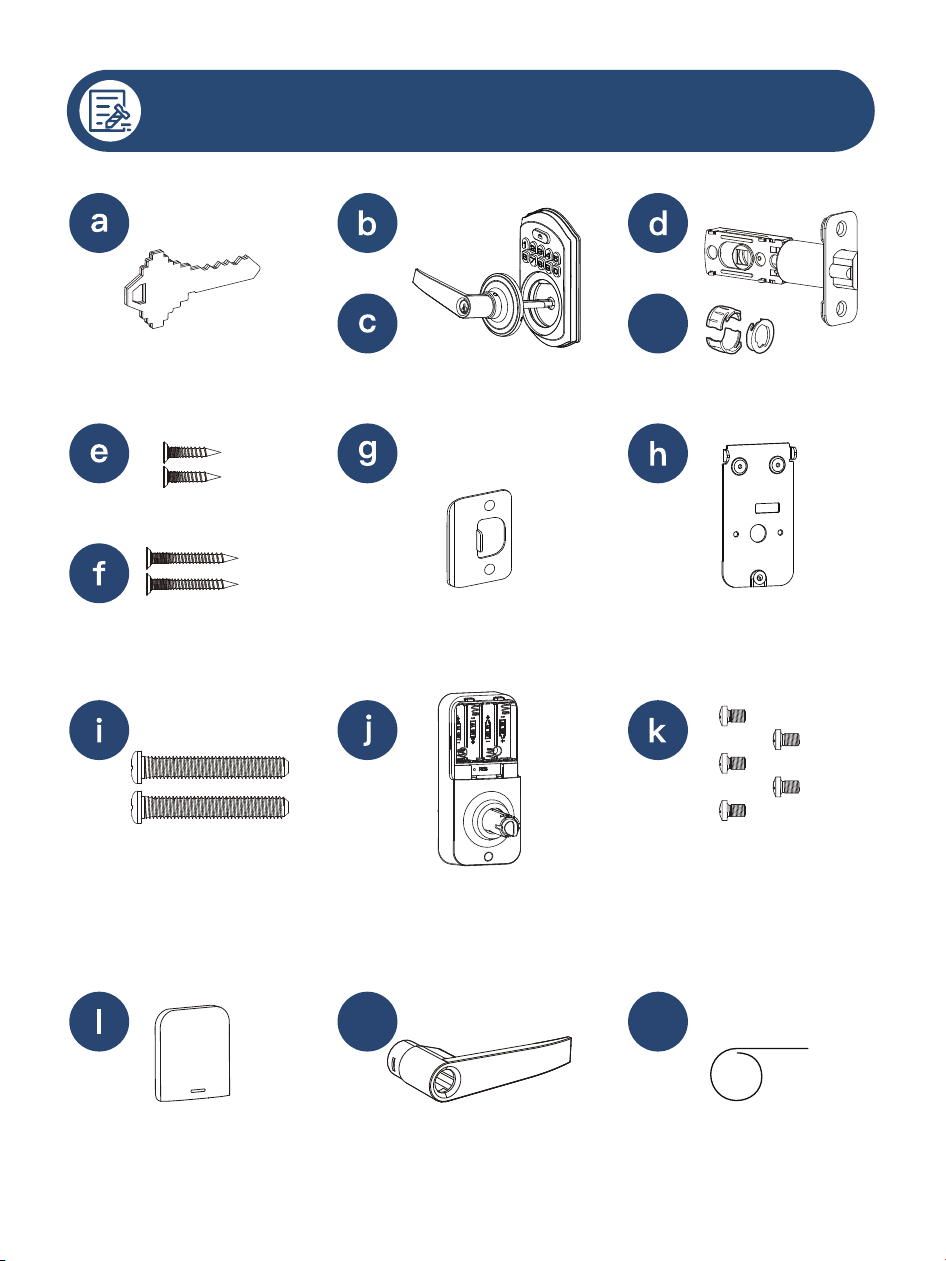
PARTS LIST
Reset Tool
Mechanical Keys x2
01
Latch Screws x2
Strike Screws x2
Interior Assembly
Screws x5 (2 Spare)
Strike
Mounting Plate
Battery Cover
Mounting Plate
Screws x2
m n
Interior Assembly
Interior Lever
Exterior
Assembly
Latch
Exterior Lever
Drive-in Collar (Optional)
d-1
If any parts are missing or damaged, please contact us at
+1 (833) 878-3346
(Monday-Friday 9:00 am-5:00 pm PST)
02
l
m
1 2
3 4
INSTALLATION GUIDE
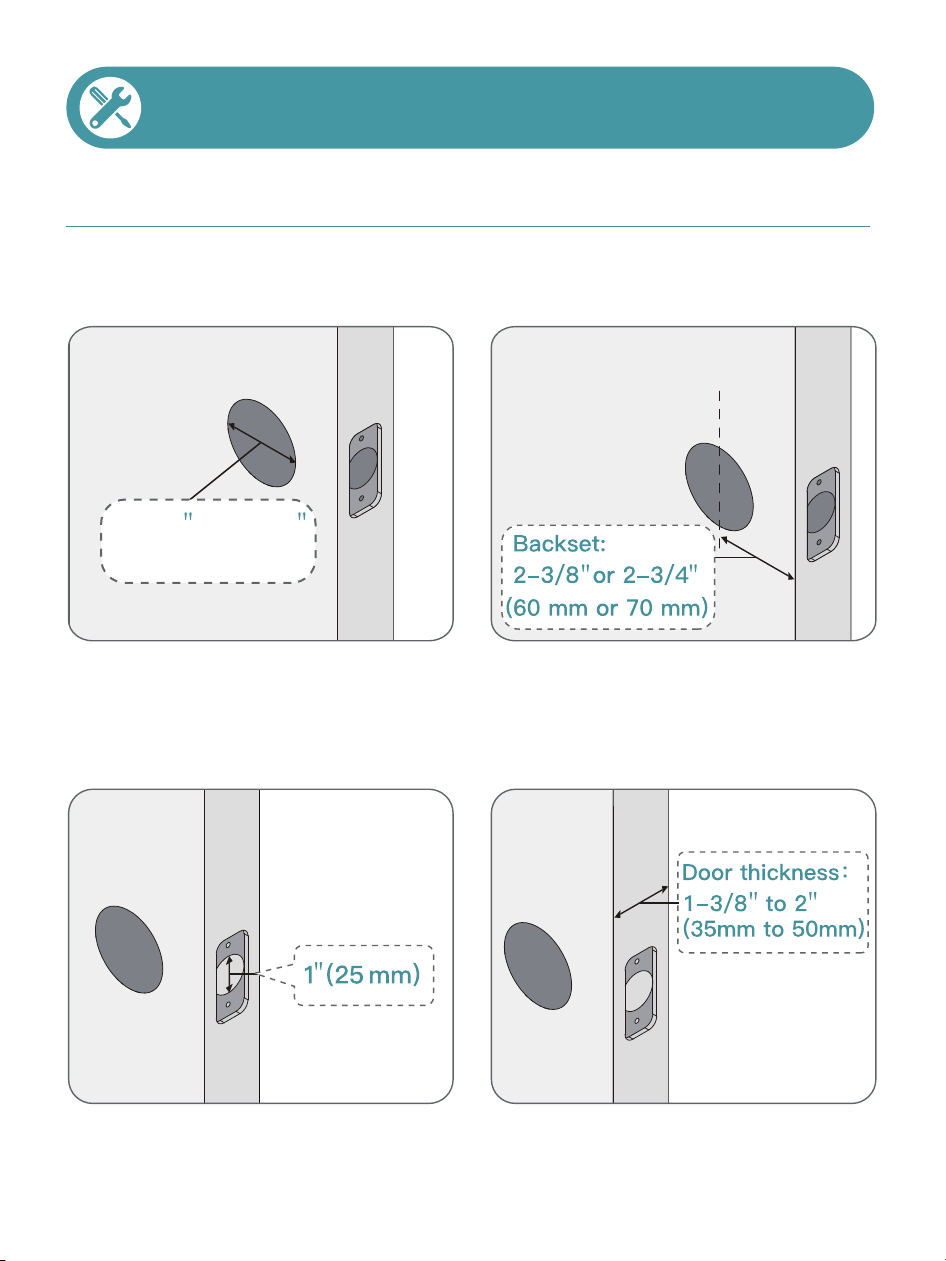
Step 1: Prepare the Door & Check Dimensions
The hole in the door is 2-1/8"
(54mm).
The backset is either 2-3/8"
or 2-3/4" (60 or 70mm).
The hole in the door edge is
1" (25mm).
The door thickness is 1-3/8"
to 2" (35mm to 50mm).
03
2-1/8
(54mm)
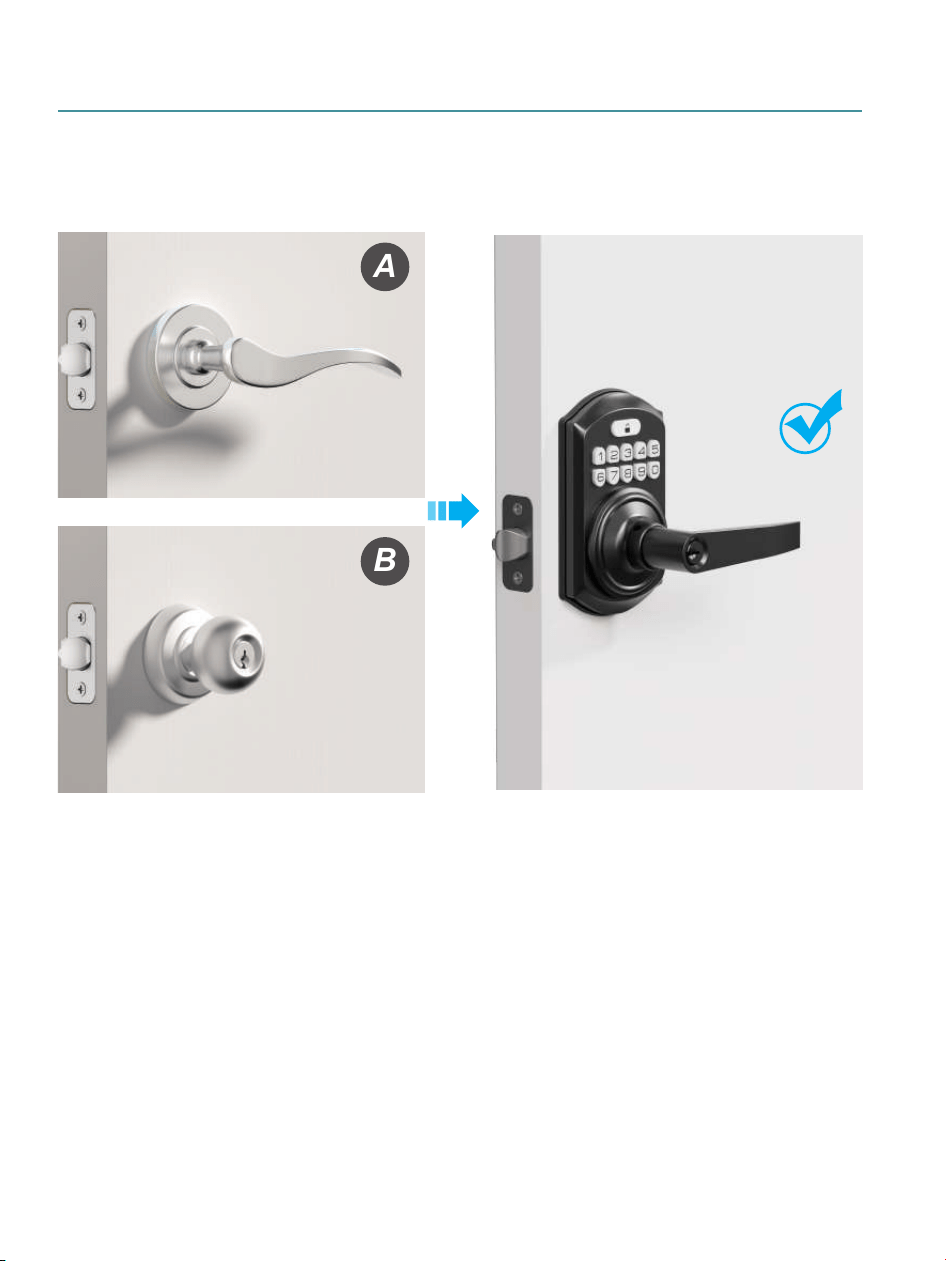
Method 1: For Doors with a Single Hole
A
B
Two Installation Methods
04
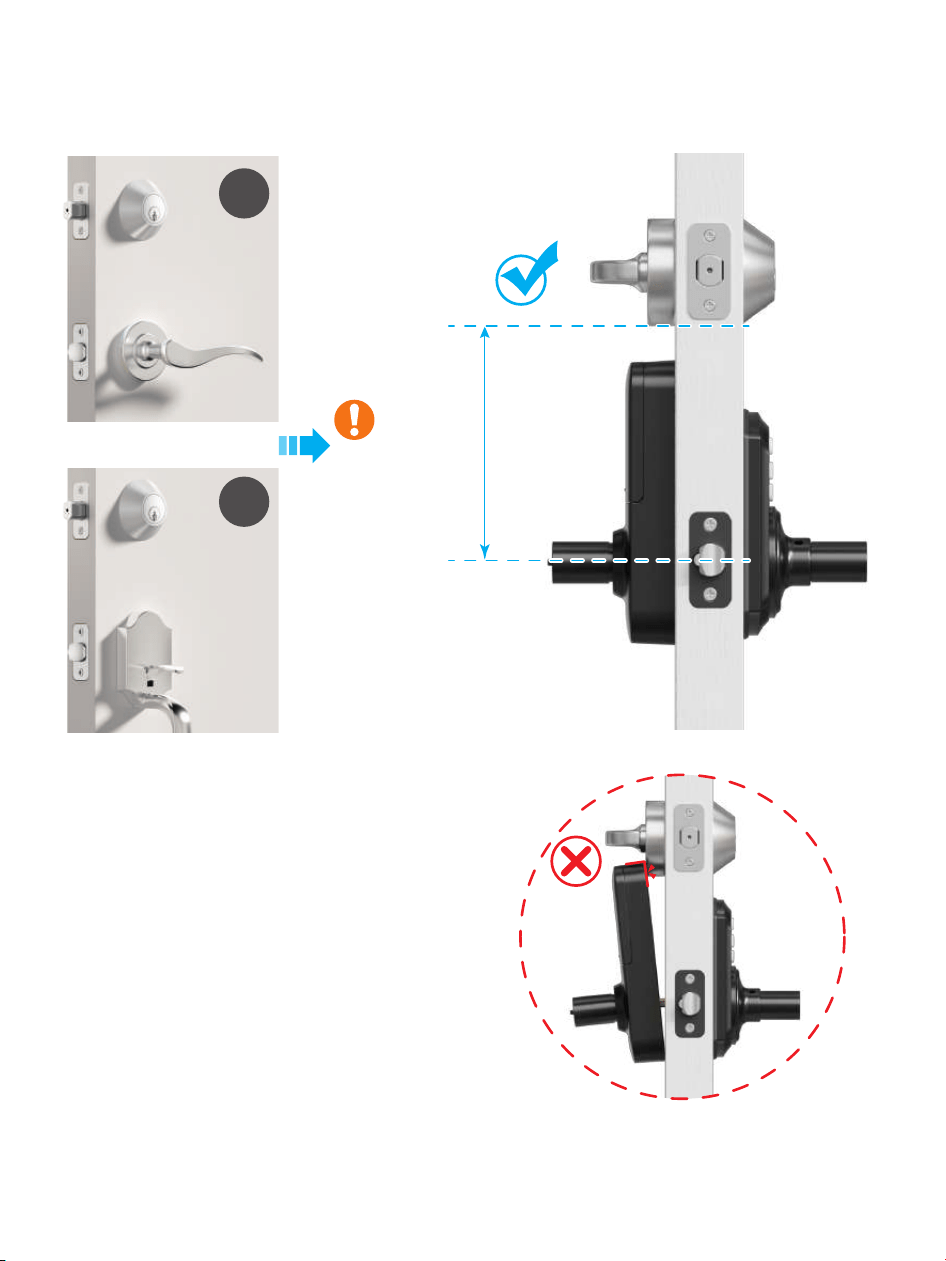
A
B
>4-1/2"
(115mm)
Method 2: For Doors with Two Holes
05
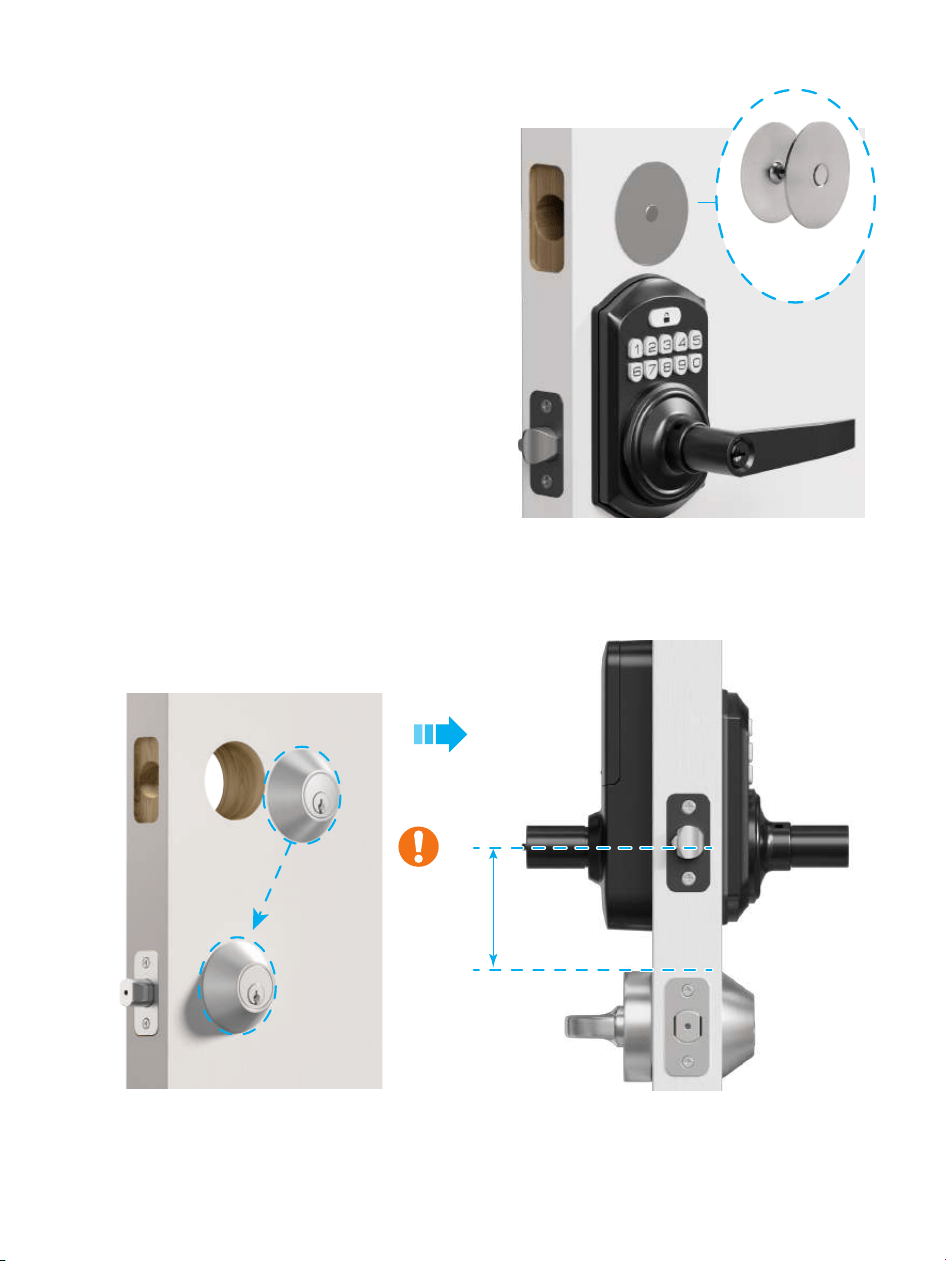
A
If this installation method does not
fit your door, consider the following
alternatives:
Remove the deadbolt, cover the
hole with a Door Hole Cover
Plate (not included), and install
the lock.
B
Remove the handle, lower the deadbolt,
and install the lock above it.
>2-1/8"
(54mm)
Door Hole
Cover Plate
(Not Included)
Method 2: For Doors with Two Holes
06
07
Step 2: Install the Latch & Strike
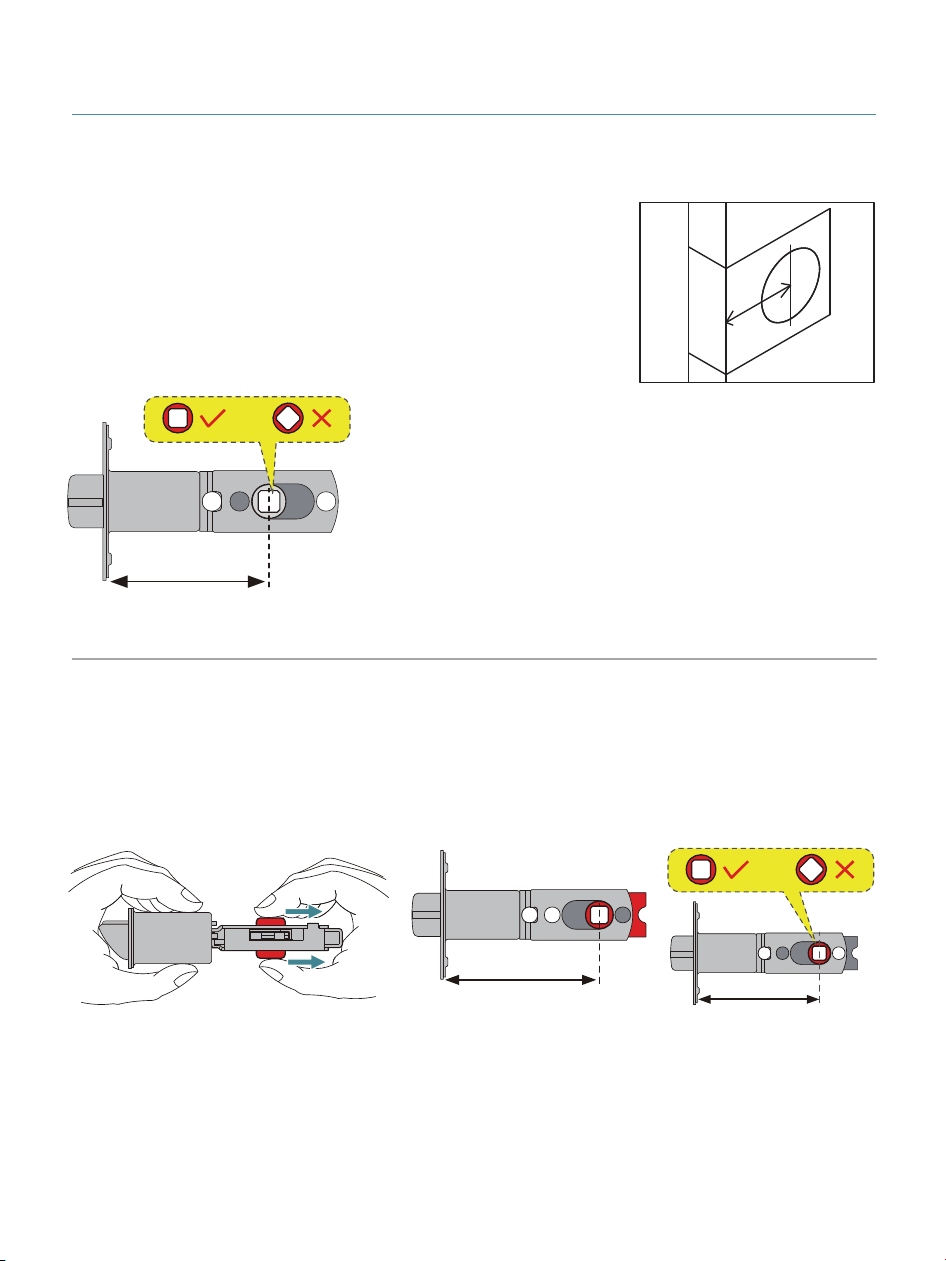
2-3/4" (70mm)
2-3/4" (70mm)
If the backset of your door is 2-3/4(70mm), please adjust the
Latch as shown in the images below.
1
Confirm the backset and adjust the Latch.
Backset is the distance from the door
edge to the center of the hole in the door.
The Latch is provided with adjustable
design which can fit either 2-3/8(60mm)
or 2-3/4(70mm) backset.
If the backset of your door is
2-3/8(60mm), no need to
adjust the Latch.
Backset
2-3/8" (60mm)
Holes must form a
square, not a diamond.
08
2
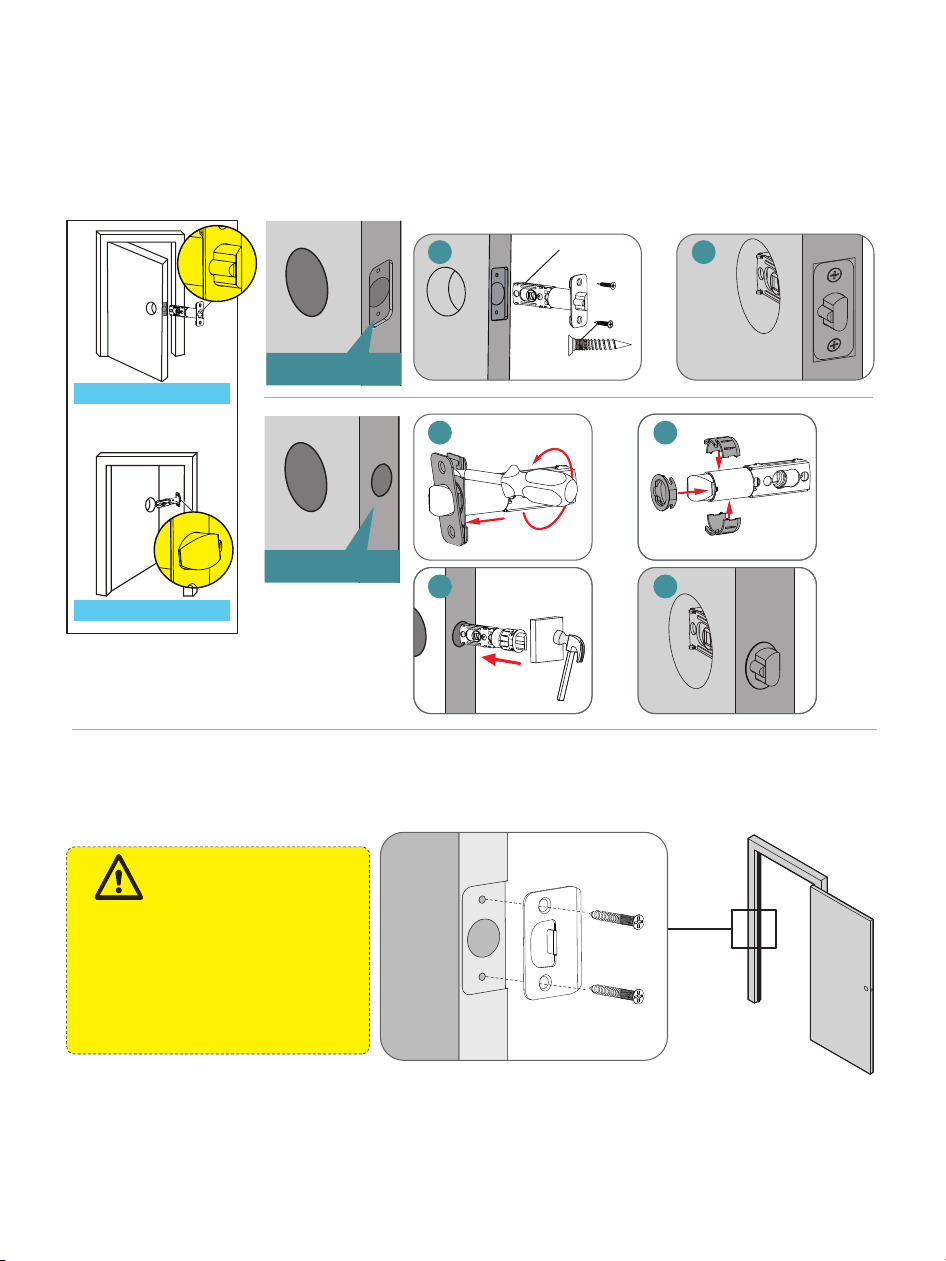
Install the Latch and check its orientation from outside
the door. Rotate the Latch bolt with a screwdriver to test
if it extends and retracts properly.
3
Install Strike on the door frame.
Drive-in Collar (d-1)
Make sure the hole
in door frame is
drilled a minimum
of 1" (25mm) deep.
IMPORTANT:
Strike Screws (f)
Chiseled
Not Chiseled
Opening Outwards
d
Opening Inwards
1 2
1
2
3 4
Latch
Screws (e)
1
Step 3: Install Exterior Assembly
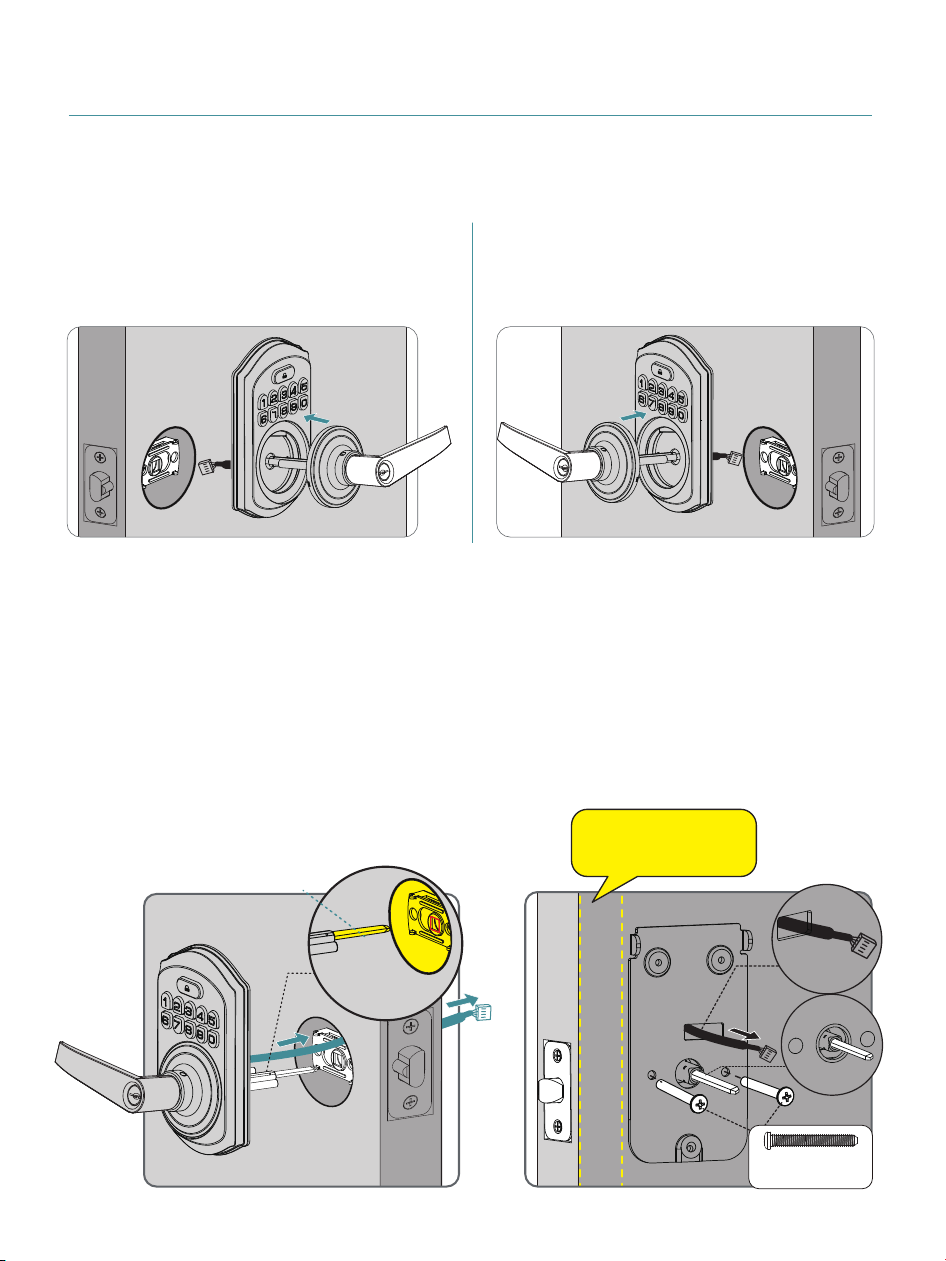
Before installing the Lever into the door slot, ensure
the Torque Blade is in horizontal position.
2
Route the cable above the
Latch and insert the
Torque Blade horizontally
into the Latch slot.
D
o not insert the Mechanical
Key into the cylinder
during the installation.
3
Install the Mounting
Plate with the Mounting
Plate Screws.
Do not overtighten
screws.
09
Torque
blade
Torque
Blade
Horizontal
Mounting Plate
Screws (i)
Keep parallel
to door edge.
A. For a right-handed door,
install the Lever as shown
on the left.
B. For a left-handed door,
install the Lever as shown
on the right.
1
Step 4: Install Interior Assembly
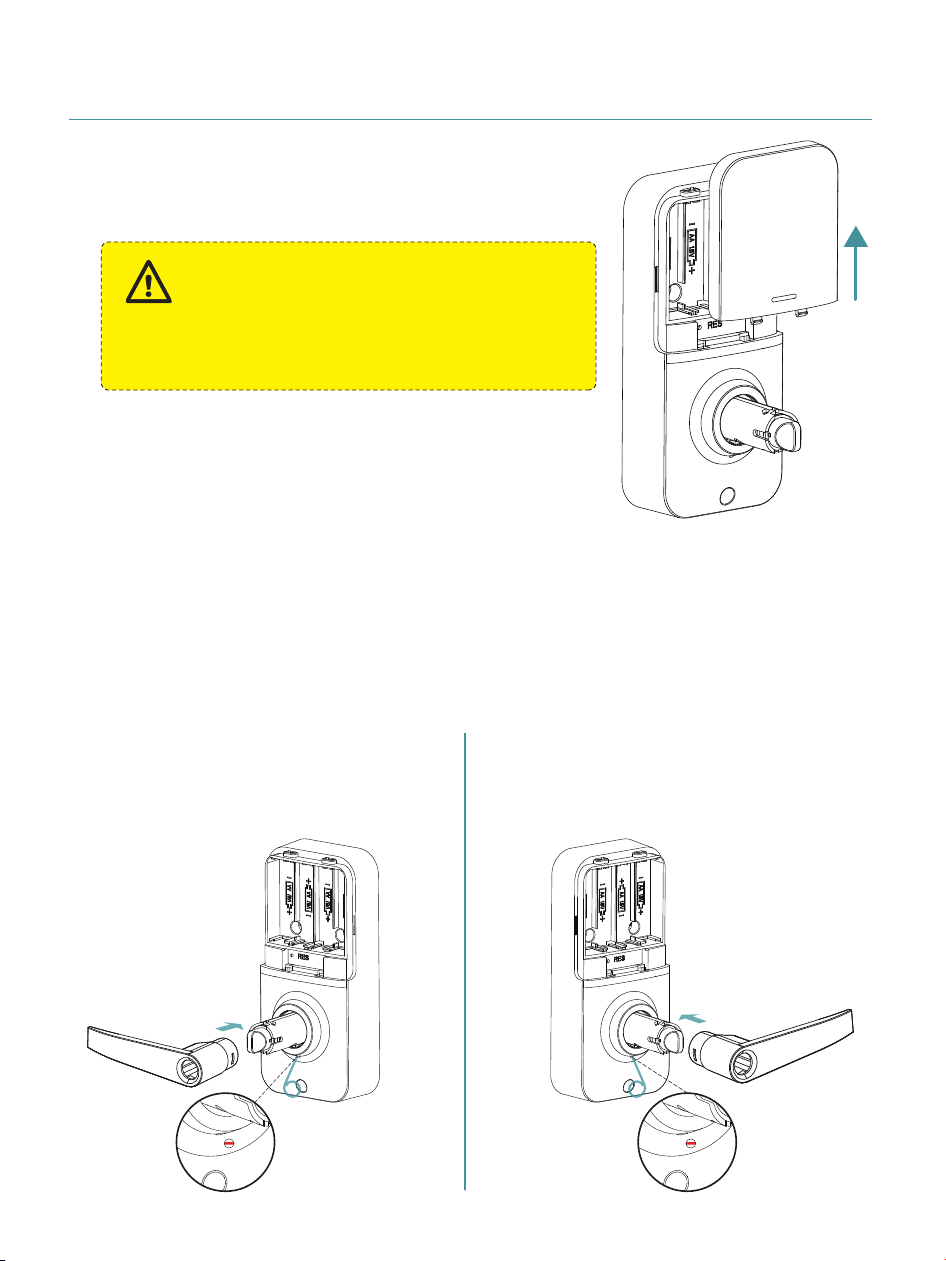
Push the Battery Cover out in the
direction as illustrated.
2
Install the Interior Lever.
Use the Reset Tool to press the hole at the bottom of
the Interior Assembly, then push the Lever in until you
hear a “click.”
Pull the Lever to check if it is securely installed.
Do not load batteries until the lock is
completely installed.
IMPORTANT:
10
A. For a right-handed door,
install the Lever as shown
on the left.
B. For a left-handed door,
install the Lever as shown
on the right.
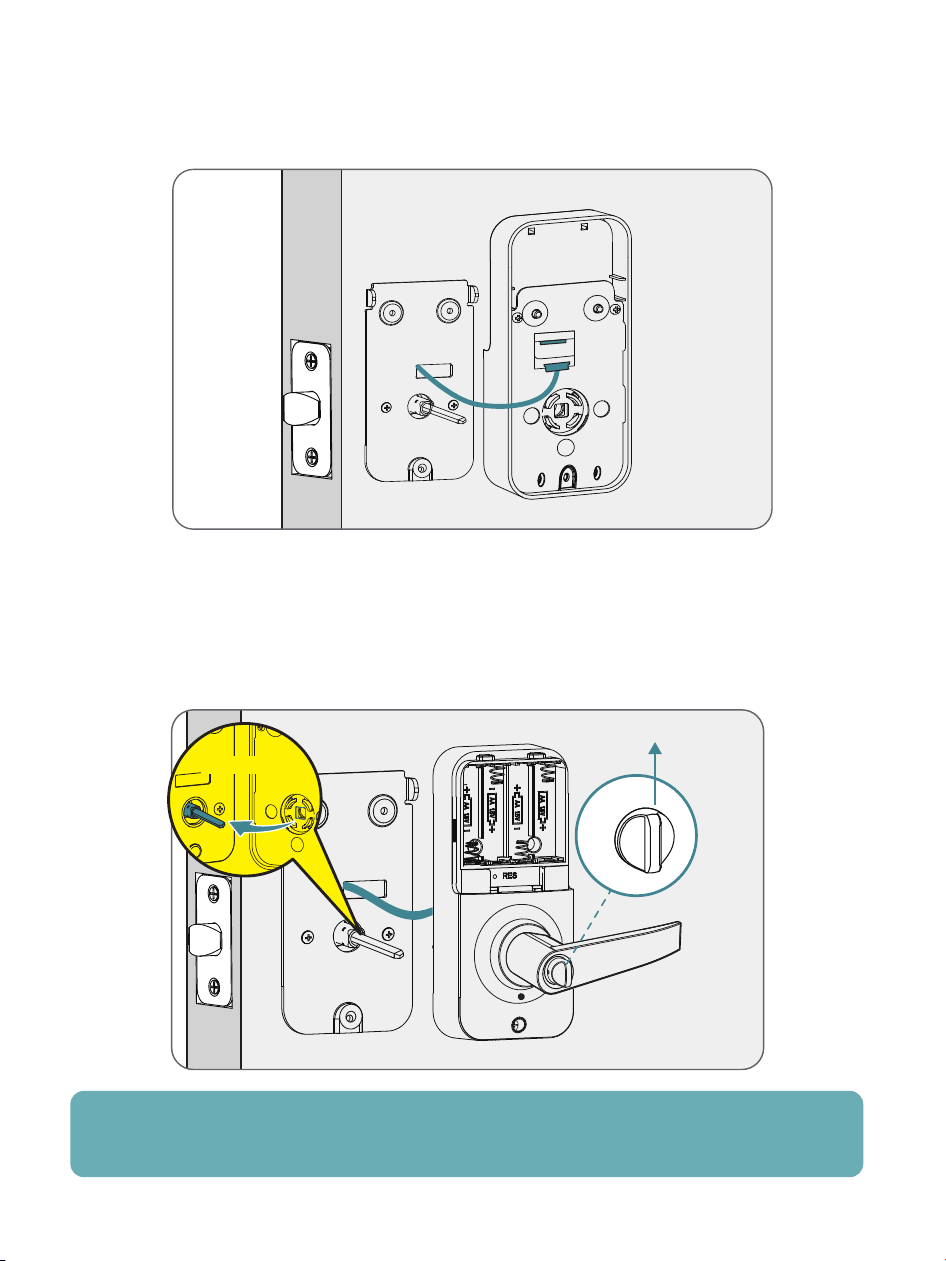
Note: Tuck excess cable into the socket to avoid blocking screw
holes or interfering with cover installation.
3
Insert the cable connector into the socket and push it in
securely.
4
Keep the Thumb Turn in vertical position and install the
Interior Assembly.
Vertical
Horizontal
11
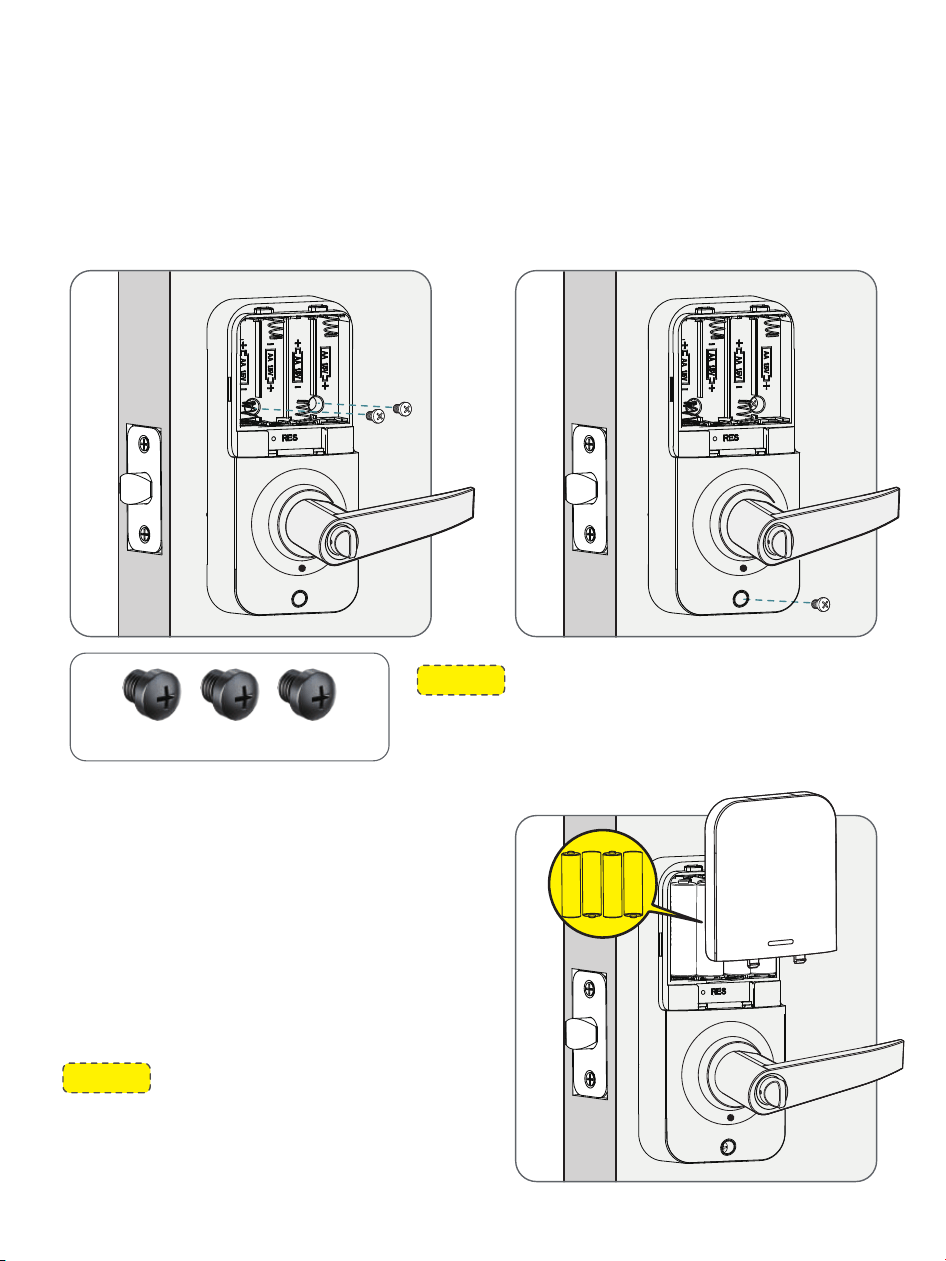
5
Attach the Interior Assembly to the Mounting Plate.
Ensure the Interior Assembly Screws engage with
the threads on the Mounting Plate, then tighten all
three screws.
6
Keep the door open and
u
nlocked. Load 4 AA batteries
into the compartment and
install the Battery Cover.
12
NOTE: Make sure not to use the wrong
screws, as this may cause a short circuit
and other issues.
Interior Assembly Screws (k)
NOTE:
Use only new, non-rechargeable
alkaline batteries. Do not mix old and
new batteries or different brands.
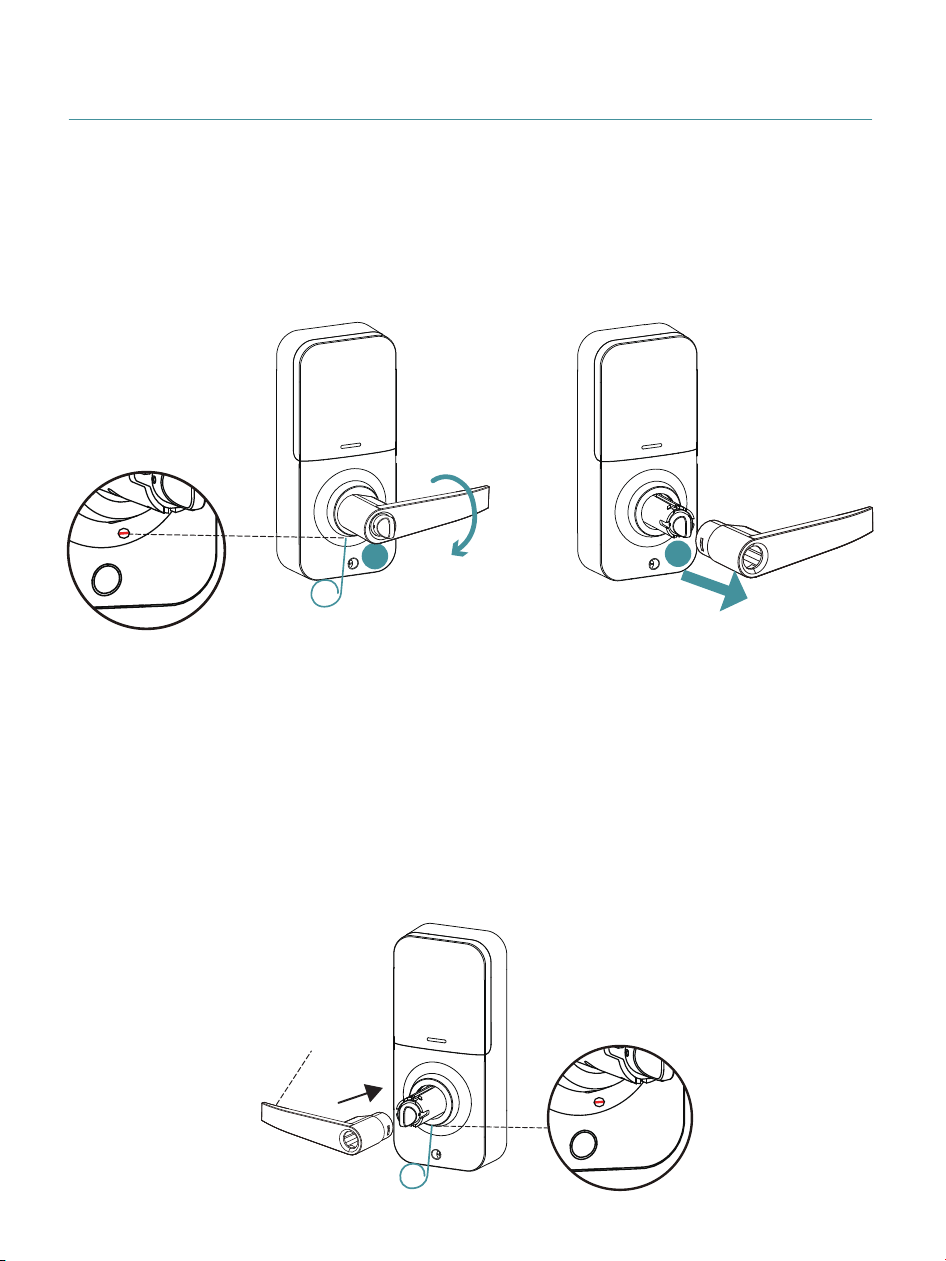
1
Interior Lever disassembly steps.
Press the Lever downwards and find the joint in the hole on the
bottom of the Interior Assembly, keep pressing it by using the
Reset Tool and pull out the Lever simultaneously.
2
Change the direction of Interior Lever.
Reverse the Lever 180°, keep pressing the hole on the bottom of
the Interior Assembly by using the Reset Tool and push the Lever
in simultaneously until you hear the sound of “click” to complete
the direction change.
Interior Lever
13
1
2
Pull out
Reverse the Lever Direction (Optional)

TROUBLESHOOTING
Uninstall the Interior and Exterior
Assemblies.
Before re-installation, please follow these
guidelines:
(1) Make sure the Latch bolt is in the retracted
position.
(2) Do not insert the Mechanical Key into the
lock cylinder before or during installation.
(3) Make sure the Torque Blade is inserted
horizontally.
Problem Solution
I cannot remove my
key unless it is in the
locked position.
(1) The battery is low if the battery indicator
light keeps flashing. Please replace with 4
new batteries (Alkaline batteries only).
(2) Please refer to “How to Reset”
section in the user manual to perform
the reset again.
Fail to reset.
14

TROUBLESHOOTING
(3) Check the cable for any damage that may
have occurred during installation.
Make sure the cable is firmly connected.
(4) The battery is low if the battery indicator
light keeps flashing. Please replace with 4
new batteries. Make sure the batteries are
properly installed (Alkaline batteries only).
(1) Make sure you have entered the correct
User Code.
(2) Check the Strike to make sure it is prop-
erly aligned and clear so the Latch bolt
can freely move in the hole.
Problem Solution
Unable to unlock / lock
by Keypad.
Master Code can not
be changed.
Refer to “How to Reset” section in the
user manual to perform the reset again.
If it doesn’t solve the issue,
please call us at
+1 (833) 878-3346.
15

TROUBLESHOOTING
(1) Before adding a new User Code, please
change the Default Master Code
12345678 to a new one.
The battery is low if the battery indicator
keeps flashing. Please replace with 4 new
batteries for the best performance (Alkaline
batteries only).
(2) Make sure the New Master Code
has been entered correctly.
(3) The lock can set and store up to 20 user
codes, with each code needing to be at least
4 to 10 digits long.
Problem Solution
Fail to add a new User
Code.
Battery indicator
keeps flashing.
Performing a resetting will revert the Master
Code back to the default (12345678).
I forgot my Master
Code.
16

17
INFORMATION & SAFETY WARNINGS
Protect your User Codes and Master Code.
Restrict access to your lock’s interior assembly and routinely
check your settings to ensure they have not been altered
without your knowledge.
Do not use an electric screwdriver during installation.
This manufacturer advises that no lock can provide complete
security by itself.
This lock may be defeated by forcible or technical means, or
evaded by entry elsewhere on the property.
No lock can substitute for caution, awareness of your environ-
ment, and common sense.
Take care to ensure a long-lasting finish. Please use a soft
and damp cloth to clean the lockset if you need. Using lacquer
thinner, caustic soaps, abrasive cleaners or polishes could
damage the coating and result in tarnishing.
The lock is water resistant. It can withstand water splashes;
however, do not let water and liquids get into the lock.
Avoid exposure to direct sunlight. Long-term exposure to
direct sunlight may damage the lock.

V1.0
Whatever issues with TEEHO products. Please contact us
before returning it.
+1 (833) 878-3346
(Monday-Friday 9:00 am-5:00 pm PST)
Need Help? Contact Us!
teeho.com
If you have your order ID, videos or images of your
problem (if necessary) ready before contacting Customer
Support, we will solve your problem faster and better.