
PRECAUTIONS - 2791477C005/B
e
PRECAUTIONS 27
General safety instructions 27
Installation 30
Appliance purpose 31
This user manual 31
Manufacturer’s liability 32
Identification plate 32
Disposal 32
To save energy 32
Information on power consumption in off/stand-
by mode 32
How to read the user manual 32
DESCRIPTION 33
General description 33
Control panel 33
USE 34
Basic functions 34
Preliminary operations 35
Using the hob 36
Additional functions 39
Special functions 41
User menu 42
Error notifications 44
CLEANING AND MAINTENANCE 44
Cleaning the glass ceramic hob 44
What to do if... 45
INSTALLATION 45
Electrical connection 45
Power limitation procedure 46
Section cut from the countertop 46
Mounting 47
Ventilation 48
Fixing to the built-in cabinet 48
Fixing to the built-in cabinet 48
Instructions for the installer 49
We advise you to read this manual carefully, which contains all the instructions for
maintaining the appliance’s aesthetic and functional qualities. For further information on the
product: www.smeg.com
PRECAUTIONS
General safety instructions
Risk of personal injury
• During use the appliance
and its accessible parts
become very hot. Keep
children well away from the
appliance.
• Protect hands with heat
resistant gloves during use.
• Never try to put out a fire or
flames with water: Turn off
the appliance and smother
the flames with a fire
blanket or other appropriate
cover.
• This appliance may only be
used by children aged 8
years and over, and by
people of reduced physical,
sensory or mental capacity,
or lacking in experience in
the use of electrical
appliances, provided that
they are supervised or have
been given instructions on
the safe use of the
appliance and of the
hazards associated with it.
• Children must not play with
the appliance.
• Keep children under the age
of eight at a safe distance
unless they are constantly
supervised.
• Keep children under the age
of 8 away from the
appliance when it is in use.
• Cleaning and maintenance
must not be carried out by
unsupervised children.
• Be aware of how rapidly
the cooking zones heat up.
Do not place empty pans on

28 - PRECAUTIONS 91477C005/B
the heat. Danger of
overheating.
• Activate the controls lock
when you have children or
pets which could reach the
hob.
• Do not touch or clean the
hob surface during
operation or when the
residual heat indicator
lights are still on.
• After use, switch off the
plates. Never rely solely on
the cookware detector.
• Supervise children carefully
as they cannot readily see
the residual heat indication.
After use the cooking zones
remain hot for a certain
period of time even if they
have been turned off. Keep
children away from the
cooking zones.
• The cooking process must
always kept under control.
A short cooking process
must be continuously
monitored.
• WARNING: Cooking foods
containing fat and/or oil
without monitoring them
can be dangerous and can
cause a fire.
• Fats and oils can catch fire
if they overheat. Do not
leave the appliance
unattended while preparing
foods containing oils or fats.
If fats or oils catch fire,
never put water on them.
Place the lid on the pan and
turn off the relevant cooking
zone.
• Do not use the Booster and/
or the Double Booster
functions (if present) to heat
fats or oils. Fire hazard.
• Do not place metal objects,
such as dishes or cutlery, on
the surface of the hob
during cooking as they may
overheat.
• Do not cook foods in closed
tins or containers or plastic
containers.
• Do not use magnetic tins.
• Do not use trivets or other
items between the bottom
of the pan and the glass
ceramic surface. Danger of
burns.
• Do not insert pointed metal
objects (cutlery or utensils)
into the slots in the
appliance.
• Do not use or store
flammable materials near
the appliance or directly
underneath the hob.
• Switch off the appliance
immediately after use.
• Do not pull the cable to
unplug the appliance (if
present).
•DO NOT USE AEROSOLS
IN THE VICINITY OF THIS
APPLIANCE WHILST IT IS
IN USE.
• DO NOT MODIFY THIS
APPLIANCE.
• Always wear personal
protective equipment (PPE)
before carrying out any
work on the appliance

PRECAUTIONS - 2991477C005/B
e
(installation, maintenance,
positioning or moving).
• Do not clean the appliance
if it is still hot or in
operation.
• After use the cooking zones
remain hot for a certain
period of time after they
have been turned off. Do
not touch the hob surfaces.
• Before performing any work
on the appliance, switch off
the power supply.
• Do not try to repair the
appliance yourself or
without the assistance of a
qualified technician.
• If the power cable becomes
damaged, contact technical
support immediately to
arrange for it to be replaced
in order to avoid possible
hazards.
• If cracks or fissures form, or
if the glass ceramic cooking
surface breaks, turn off the
appliance immediately.
Disconnect the power
supply and call Technical
Support.
• People who have
pacemakers or other similar
devices fitted must make
sure that the operation of
these devices is not
affected by the induction
field, the frequency range of
which is between 20 and
50 kHz.
Risk of damaging the appliance
• Do not use abrasive or
corrosive detergents (e.g.
scouring powders, stain
removers and metallic
sponges) on glass parts.
• Use wooden or plastic
utensils.
• Do not sit on the appliance.
• Do not use the glass
ceramic cooking surface as
a support surface.
• Do not use the appliance as
a support surface.
• Do not obstruct ventilation
openings and heat
dispersal slots.
• Do not use the hob if the
pyrolytic cycle is taking
place inside any oven
installed below.
• Do not use steam jets to
clean the appliance.
• Never leave the appliance
unattended during cooking
operations where fats or
oils could be released, as
these could then heat up
and catch fire. Be very
careful.
• Fire hazard: Never leave
objects on the cooking
surfaces.
• DO NOT FOR ANY
REASON USE THE
APPLIANCE AS A SPACE
HEATER.
• Cooking vessels or griddle
plates should be placed
inside the perimeter of the
hob.
• All pans must have smooth,
flat bottoms.
• If any liquid does boil over

30 - PRECAUTIONS 91477C005/B
or spill, remove the excess
from the hob.
• Take care not to spill acid
substances such as lemon
juice or vinegar on the hob.
• Do not spill sugar or sweet
mixtures on the hob during
cooking.
• Do not place materials or
substances that could melt
or catch fire (paper, plastic
or aluminium foil) on the
appliance while it is in use.
• Place the cookware directly
on the glass ceramic
surface.
• Do not put empty pans or
frying pans on switched on
cooking zones.
• Do not use rough or
abrasive materials or sharp
metal scrapers.
• The glass ceramic surface
is highly resistant to impact.
However, prevent hard,
solid objects from falling on
the cooking surface as they
may cause it to break.
• Do not use cleaning
products containing
chlorine, ammonia or
bleach on parts made of
steel or that have metallic
surface finishes (e.g.
anodizing, nickel- or
chromium-plating).
• This appliance is not
intended to be operated by
means of external timer or
separate remote control
system.
• To prevent scratching the
glass surface, avoid sliding
pots across it. Lift them and
place them gently where
needed instead.
Installation
• THIS APPLIANCE MUST
NOT BE INSTALLED IN A
BOAT OR CARAVAN.
• This appliance must not be
installed above a
dishwasher unless the
instructions provided in the
“INSTALLATION” chapter
are complied with.
• Position the appliance into
the cabinet cut-out with the
help of a second person.
• Check that the cabinet has
the required slots.
• Check that the cabinet
material is heat resistant.
• Installation and servicing
should be carried out by
qualified personnel in
accordance with current
standards.
• Have the electrical
connection performed by
authorised technical
personnel.
• The appliance must be
connected to earth in
compliance with electrical
system safety standards.
• Use cables that can
withstand temperatures of
at least 90°C.
• Run the power cable in the
rear part of the unit. Make
sure that it does not come
into contact with the lower
part of the hob or a built-in

PRECAUTIONS - 3191477C005/B
e
oven below it.
• Be careful when connecting
additional electrical
appliances. Connection
cables must not come into
contact with hot cooking
zones.
• The tightening torque of the
screws of the terminal
supply wires must be 1.2-
1.5 Nm.
• Do not attach the appliance
too tightly to the unit as this
could cause damage during
use or partially obstruct the
heat dispersal slots.
• The power cable must only
be installed or replaced by a
qualified technician.
• If the power cable becomes
damaged, contact technical
support immediately to
arrange for it to be replaced
in order to avoid possible
hazards.
• Always use any necessary/
required personal
protective equipment (PPE)
before performing any work
on the appliance
(installation, maintenance,
positioning or movement).
• Before performing any work
on the appliance, switch off
the main power supply.
• Allow the appliance to be
disconnected after
installation, via an
accessible plug or a switch
in the case of a fixed
connection.
• Fit the power line with an
all-pole circuit breaker with
a contact separation
distance sufficient to
provide complete
disconnection in category III
overvoltage conditions,
pursuant to installation
regulations.
• If access to the electrical
power supply is limited,
means of disconnection of
all poles must be accessible
and incorporated into the
fixed wiring in accordance
with the wiring regulations.
• This appliance can be used
up to a maximum altitude of
2,000 metres above sea
level.
Appliance purpose
This appliance is intended for
cooking food in the home
environment. Every other use
is considered improper. It
must also not be used:
• In kitchen areas provided
for employees in shops,
offices and other work
environments.
• in farms/farmhouses.
• By guests in hotels, motels
and other types of
residential environments.
• In bed and breakfasts.
This user manual
• This user manual is an integral part of
the appliance and must therefore be
kept in its entirety and within the user's
reach for the whole working life of the
This appliance may only
be installed and used
indoors.
32 - PRECAUTIONS 91477C005/B
appliance.
• Read this user manual carefully before
using the appliance.
• The explanations in this manual include
images, which describe all that regularly
appears on the display. However, it
should be kept in mind that the
appliance may be equipped with an
updated version of the system, and as
such, all that appears on the display
may differ from those in the manual.
Manufacturer’s liability
The manufacturer declines all liability for
damage to persons or property caused by:
• use of the appliance other than that
specified;
• failure to comply with the instructions in
the user manual;
• tampering with any part of the
appliance;
• use of non-original spare parts.
Identification plate
The identification plate bears the technical
data, serial number and brand name of the
appliance. Do not remove the identification
plate for any reason.
Disposal
This appliance conforms to the WEEE
European directive (2012/19/EU) and
must be disposed of separately from
other waste at the end of its service life.
The appliance does not contain substances
in quantities sufficient to be considered
hazardous to health and the environment,
in accordance with current European
directives.
To dispose of the appliance:
• Cut the power cable and remove it.
• Deliver the appliance to the appropriate
recycling centre for electrical and
electronic equipment waste, or return it
to the retailer when purchasing an
equivalent product, on a one for one
basis.
Our appliances are packaged in non-
polluting and recyclable materials.
• Deliver the packing materials to the
appropriate recycling centre.
To save en e rgy
• The diameter of the base of the pan
must not extend beyond the lines
printed on the glass ceramic surface.
• Pans must not be placed outside the
perimeter of the hob or on the display.
• When buying a pan, check whether the
diameter indicated is that of the base or
the top of the pan, as the top is almost
always larger than the base.
• When preparing dishes with long
cooking times, you can save time and
energy by using a pressure cooker,
which also helps to retain vitamins
contained in the food.
• Make sure that the pressure cooker
contains enough liquid as, if there is not
enough and it overheats, this may cause
damage to both the pressure cooker and
the cooking zone.
• If possible, always cover pans with a
suitable lid.
• Choose a pan suitable for the quantity
of food to be cooked. A large, half-
empty saucepan leads to a waste of
energy.
Information on power
consumption in off/stand-by
mode
Technical data on the appliance's power
consumption in off/stand-by mode can be
found at www.smeg.com under the page
corresponding to the product in question.
How to read the user manual
This user manual uses the following reading
conventions:
Power voltage
Danger of electrocution
• Disconnect the mains power supply.
• Unplug the appliance.
Plastic packaging
Danger of suffocation
• Do not leave the packaging or any part
of it unattended.
• Do not let children play with the plastic
bags.
Under certain circumstances, if the
hob and the oven are used at the
same time, the maximum power
limit of the electrical system might
be exceeded.
Warning/Caution
DESCRIPTION - 3391477C005/B
e
DESCRIPTION
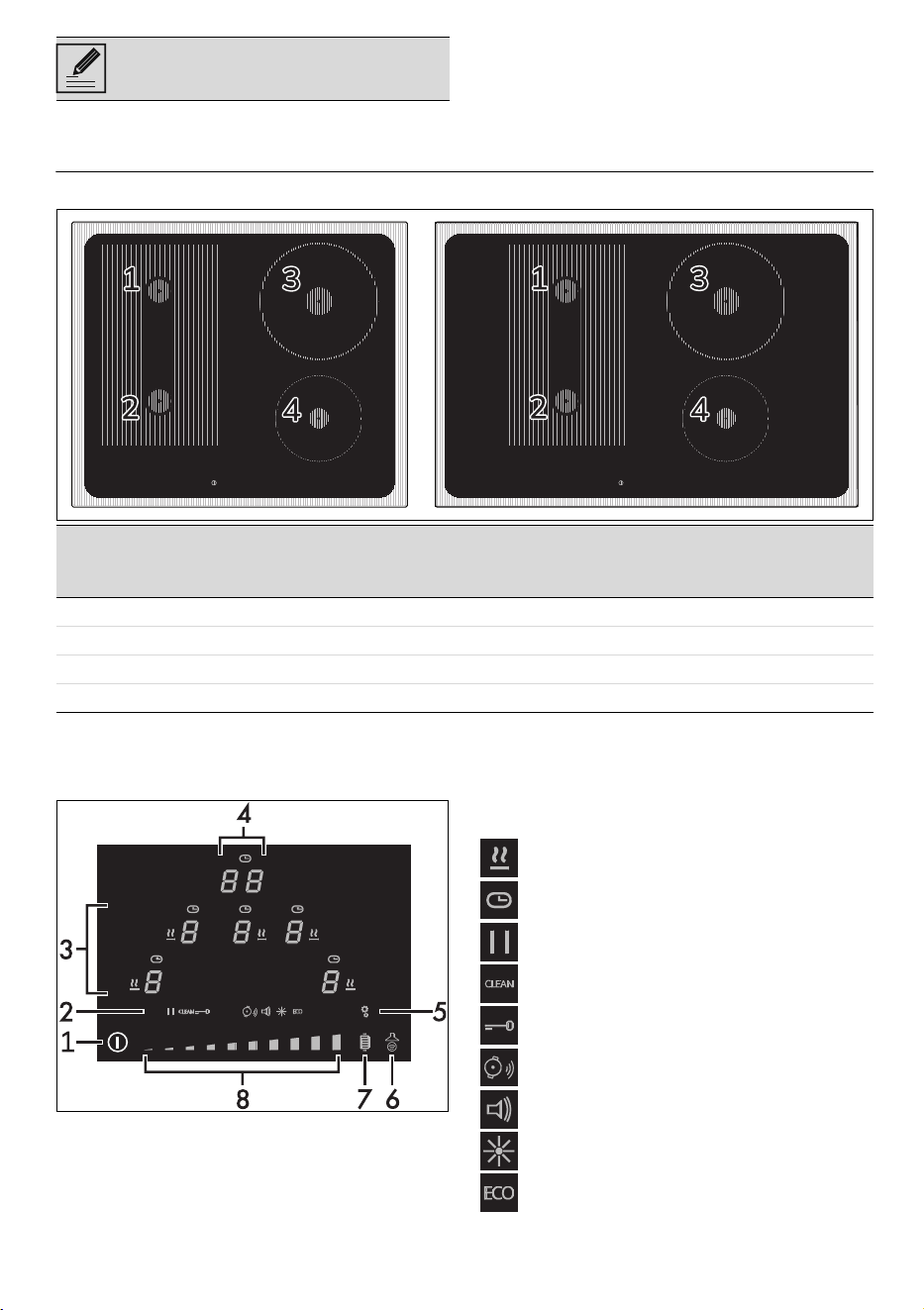
General description
*Power levels are approximate and may vary according to the pan used or the settings
made.
Control panel
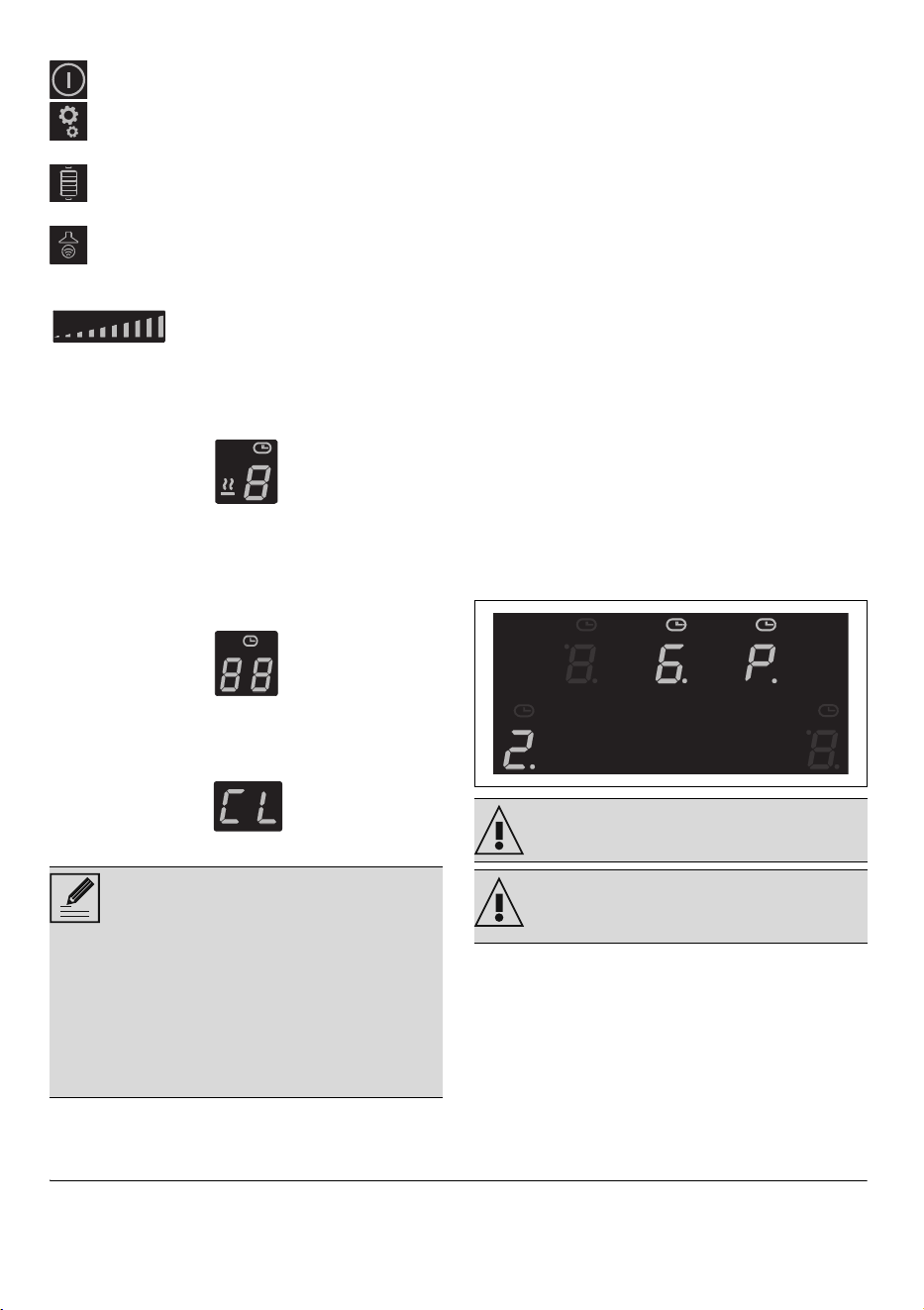
1. ON/OFF button
2. Settings icons
3. Cooking zones display
4. Timer display
5. Settings menu button
6. Auto-Vent 2.0 function button
7. Grill function button
8. Scroll bar
List of icons
Warming Function.
Timer
Pause Function
Clean Function
Controls Lock Function.
Automatic pan detection function.
Button volume.
Display brightness.
ECO function.
Information/Advice
Zone Dimensions H x L (mm)
Power draw at lev.
9 (W)*
Power draw in
Booster function
(W) *
Power draw in
Double Booster
function (W)*
1 - 2 (single) 180 x 210 2100 2500 3000
1 - 2 (multizone) 360 x 210 3000 3700 -
3 200 x 200 2300 3000 -
4 160 x 160 1400 2100 -
34 - USE 91477C005/B
List of buttons
On/Off: turns the hob on or off.
Settings menu: allows you to access the
appliance’s settings.
Grill Function: activates the Grill
function.
Auto-Vent 2.0 function: activates
communication between the hob and the
extractor hood.
Scroll bar: increases or
decreases the power level of a cooking
zone, allows you to adjust settings and to
select user menu options.
Cooking zones display
The buttons for selecting the cooking
zones and the timer icons above each of
them and the Warming function icon are
found in this zone.
Timer display
The controls for setting the independent
timer and the timer for the cooking zones
are located in this area. The following text is
displayed when it is possible to set an
independent timer .
Advantages of induction cooking
• Energy saving thanks to the direct
transmission of energy to the pan
(suitable magnetisable cookware is
required) compared to traditional
electric cooking.
• Improved safety as the energy is only
transmitted to the pan placed on the
hob.
• High level of energy transmitted from
the induction cooking zone to the base
of the pan.
• Rapid heating speed.
• Reduced danger of burns as the cooking
surface is only heated under the base of
the pan; foods which overflow do not
stick.
Power control
The hob is fitted with a power control
module that optimises/limits consumption. If
the overall set power level exceeds the
maximum limit permitted, the electronic
circuit board will automatically manage the
power supplied by the hot plates. The
module tries to maintain the maximum
deliverable power levels. Levels set by the
automatic control will appear on the
display.
USE
Basic functions
First power connection
When connected to the power supply for
the first time, or after power has been
switched back on after a power failure, an
The appliance is equipped with an
induction generator for each cooking
zone. Each generator located under
the glass ceramic cooking surface
creates an electromagnetic field
which induces a thermal current in
the base of the pan. This means the
heat is no longer transmitted from
the hob to the pan but created
directly inside the pan by the
inductive current.
Priority is given to the last zone set.
The power control module does not
affect the total power consumption
of the appliance.
USE - 3591477C005/B
e
automatic check is carried out that control
turns on the indicator lights and the
displays for a few seconds. Afterwards, the
appliance can be used normally.
Switching on the hob for the first time
When the appliance is used for the first
time, after having been connected to the
mains power supply, the flashing
symbol appears on the display. It is used to
access the appliance’s technical menu and
is intended only for Technical Support
personnel.
When the appliance is switched on, the
icon, the
dimly lit button and the text
appear on the timer display.
Preliminary operations
• Remove any protective film from the
outside or inside of the appliance,
including any accessories (if present).
• Remove any labels (apart from the
technical data plate).
Usable pan diameters
*If you use pans with a diameter less than the
one indicated in the column above, the appliance
might not detect them.
Bear in mind the following:
• Do not exceed the limits of the zones
printed on the hob.
• Do not cover the control panel.
• Do not place the pans next to the edges
of the glass.
• If you wish to use a griddle or a long pan
in zones 1 and 2 in Multizone mode, it is
recommended that you use one with a
maximum size of 22 x 36 cm and a
minimum size of 19 x 19 cm.
Cookware suitable for use in induction
cooking
Cookware used on the induction cooking
surface must be made of metal, with
magnetic properties and a sufficiently large
base.
Suitable cookware:
• Enamelled steel cookware with thick
bases.
• Cast iron cookware with an enamelled
base.
• Cookware in multilayer stainless steel,
ferritic stainless steel and aluminium
with a special base.
Unsuitable cookware:
• Copper, stainless steel, aluminium,
fireproof glass, wood, ceramic and
terracotta cookware.
Advice on energy-saving
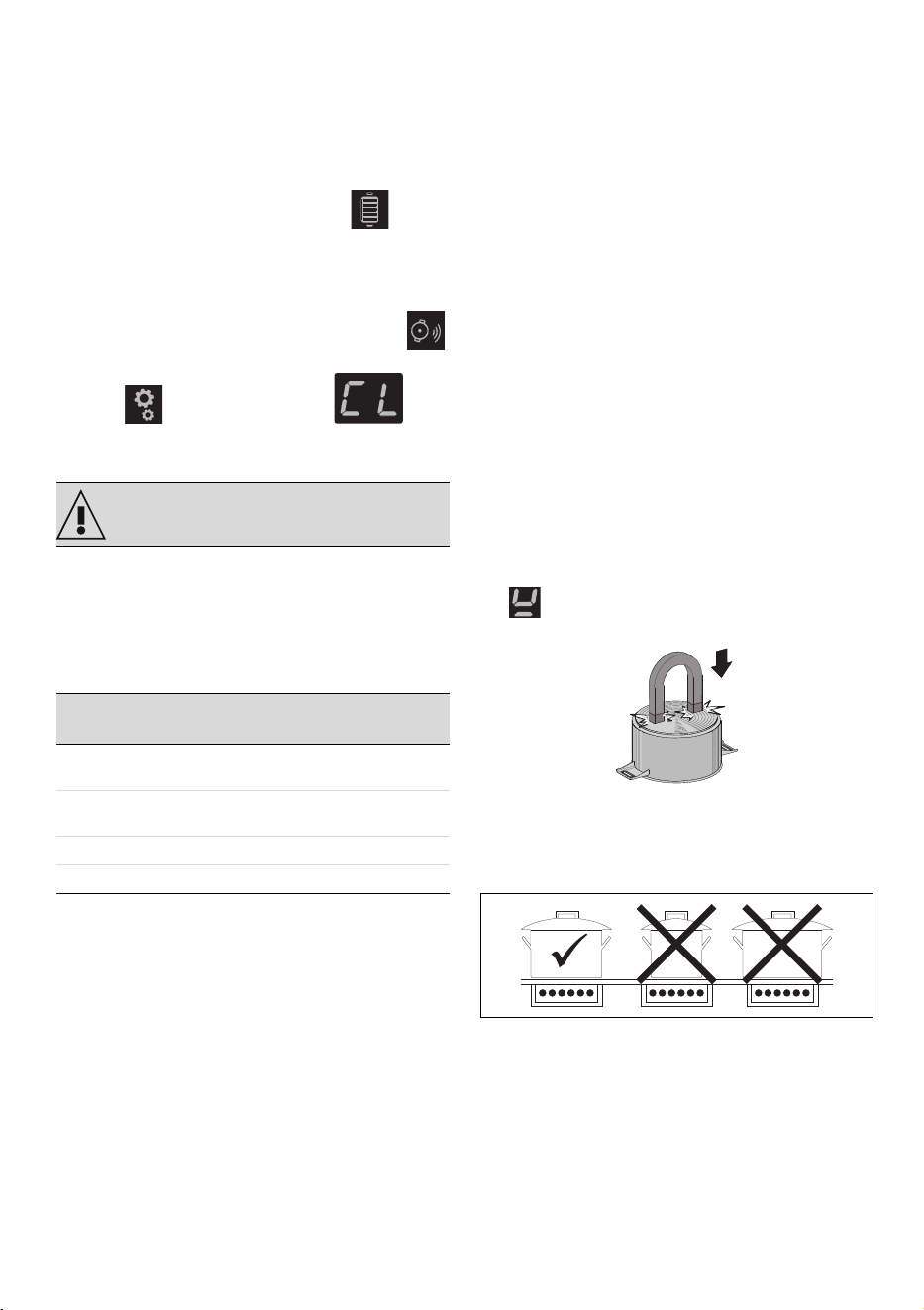
To see whether the pan is suitable, bring a
magnet close to the bottom: if it is attracted,
the pan is suitable for induction cooking. If
you do not have a magnet, you can put a
small amount of water in the pan, place it
on a cooking zone and start the hot plate. If
the symbol appears on the display, it
means the pan is not suitable.
Advice on energy-saving
The diameter of the base of the pan must
correspond to the diameter of the cooking
zone.
• When buying a pot, check whether the
diameter indicated is that of the base or
the top,
as the top is almost always larger than the
base.
• The base of the cookware must be thick
and completely flat. In addition, the hob
should be clean and dry as well.
• When preparing dishes with long
cooking times, you can save time and
energy by using a pressure cooker,
See General safety instructions.
Burner
minimum Ø
(cm)
Ø recommen-
ded (cm)
Zone 1 - 2 (sin-
gle)
9 - 11* 18
Zone 1 - 2 (Mul-
tizone)
19 22
Zone 3 13 25
Zone 4 9 - 11* 21
36 - USE 91477C005/B
which also makes it possible to preserve
the vitamins in the food.
• Make sure that the pressure cooker
contains enough liquid as, if there is not
enough and it overheats, this may cause
damage to both the pressure cooker and
the cooking zone.
• If possible, always cover the pans with a
suitable lid.
• Choose a pan suitable for the quantity
of food to be cooked. A large, half-
empty saucepan leads to a waste of
energy.
• Do not use cast-iron cookware or
cookware with a rough base.
Power level table
The power in the cooking zones can be
adjusted to various levels. In the table
below you will find instructions for the
different types of cooking.
Limiting the cooking duration
The appliance has an automatic device that
limits the duration of use.
If the cooking settings for a pan are not
changed, the maximum operation time for
each zone depends on the power level
selected.
Heating is switched off when the device for
limiting the duration of use is activated.
Using the hob
Switching on and off
To switch on the hob, press and hold the
ON/OFF button for 1 second.
If no cooking zone is activated within 5
seconds of switching on, the hob switches
off automatically.
• The text appears on the timer
display for a few seconds, during which
an independent timer can be set (see
“Independent timer”).
• If power limitation has been set, the
number associated with the set power
will be displayed for a few seconds
instead of . In this case, it is still
possible to set an independent timer by
touching the timer display.
Switching on the cooking zone
automatically
After switching on the hob:
• Position a pan (suitable for induction
cooking and not empty) on the cooking
zone you wish to use.
• The button corresponding to the zone on
which the pan has been placed
switches on automatically and is
displayed. The other zones cannot be
activated.
If the automatic pan detection system is not
active, when the appliance is switched on
the symbol will appear on the displays
of all the cooking zones. To activate the
If hob and oven are being used at
the same time, under certain
conditions the maximum power limit
that can be used by your electrical
system might be exceeded.
Power level Suitable for:
0 OFF setting
from 1 to 2
Cooking small amounts of food
(minimum power)
from 3 to 4 Cooking
from 5 to 6
Cooking large quantities of food,
roasting larger portions
from 7 to 8 Roasting, slow frying with flour
9Roasting
P/
Roasting / browning (maximum
power, see Booster and Double
Booster)
Power level
Maximum cooking dura-
tion in hours
18 ½
26 ½
35 ½
44 ½
53 ½
61 ½
71 ½
81 ½
91 ½
The hob is fitted with an automatic
pan detection system, indicated by
the icon. This feature is active
by default, but can be deactivated
via the user menu.
Power level
Maximum cooking dura-
tion in hours
USE - 3791477C005/B
e
zones, select them using the relative display
and choose the required power level.
Adjusting cooking zones
After switching on the display:
1. Position a pan (suitable for induction
cooking and not empty) on the cooking
zone you wish to use.
2. The display corresponding to the zone
on which the container has been placed
turns on automatically and displays .
Adjusting cooking zones
After having placed a pan on the cooking
zone and made sure that the zone has been
activated:
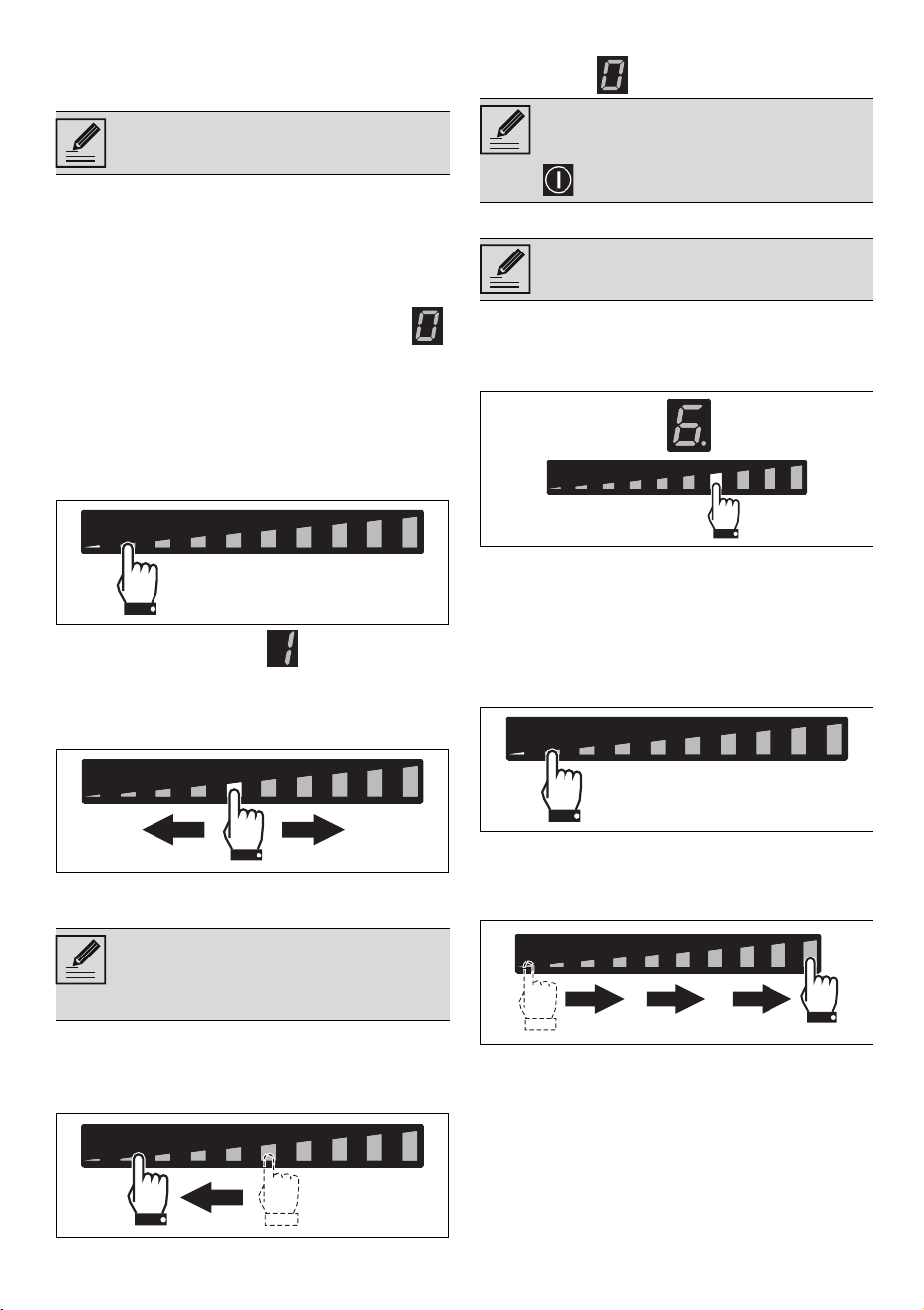
1. Place a finger on the left-hand side of
the scroll bar of the cooking zone to be
used.
The power level is now .
2. Move your finger to the left or right to
select the power level from 1 to 9 or
enable the Booster or Double Booster
function (see specific sections).
The display of the zone being used will
indicate the selected power level.
Switching off the cooking zones
1. Move your finger to the far left of the
scroll bar of the cooking zone you wish
to turn off.
1. The display of the zone selected
indicates .
Quick selection
After switching on the appliance and
having selected a cooking zone:
1. Place a finger on the scroll bar at
approximately the required power level.
2. Move your finger to the left or right to
select the required cooking power.
Booster function
After switching on the hob and having
selected a cooking zone:
1. Place a finger on the left-hand side of
the scroll bar.
The display of the cooking zone used will
turn on: the power level indicated is “1”.
2. Slide your finger to the far right on the
scroll bar to select power level 9.
3. Press the segment at the far right of the
scroll bar.
The display of the cooking zone used will
show “P”. Select any other power level to
deactivate the Booster function.
The Booster function can be activated
quickly.
• After switching on the hob and having
selected a cooking zone, press the last
The appliance is fitted with an
automatic pan sensing system.
The power level can also be
selected by pressing the scroll bar at
the point that corresponds to the
required power level.
To switch off more than one cooking
zone at the same time, simply
switch off the appliance using the
button.
The appliance is fitted with an
automatic pan sensing system.
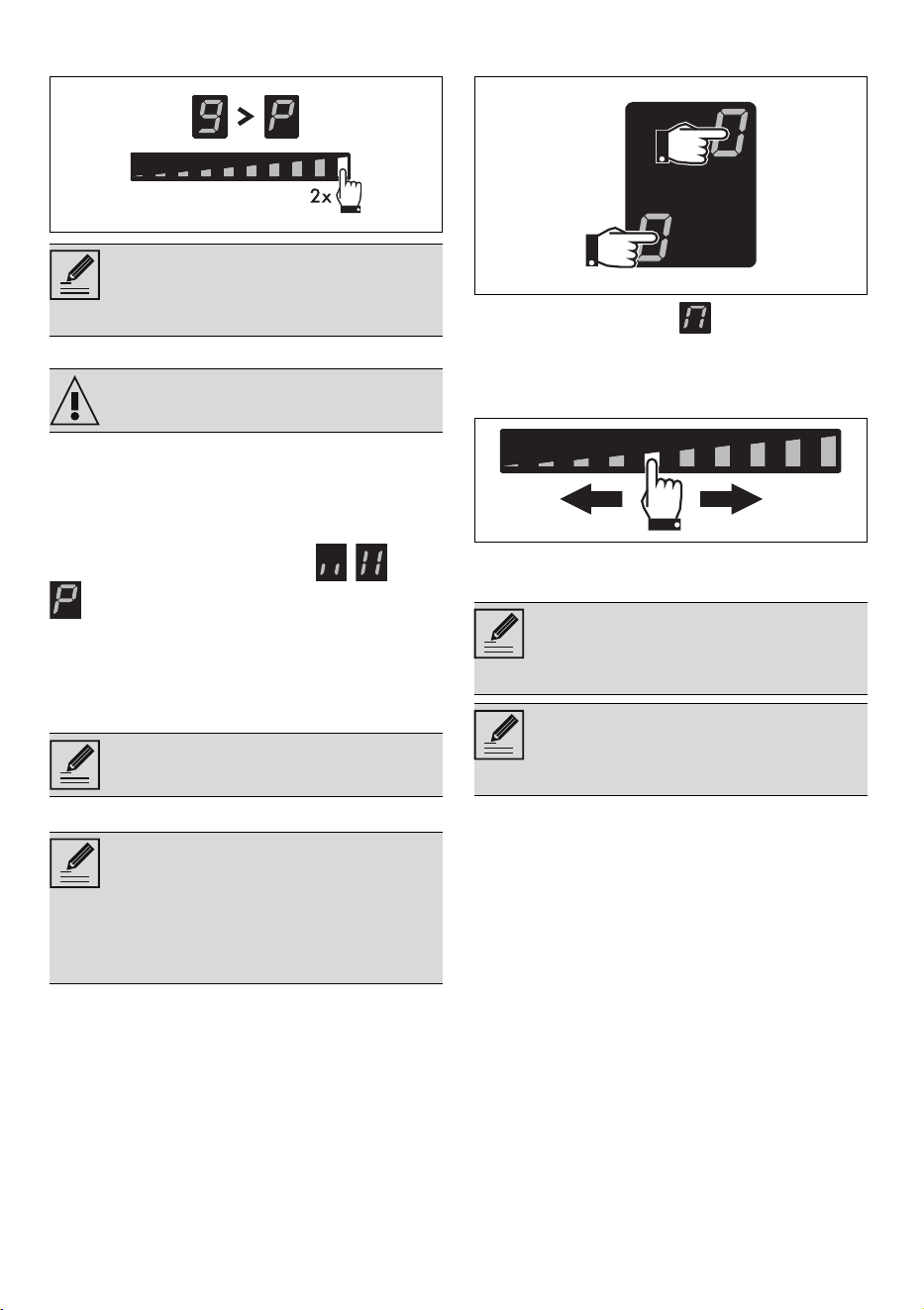
38 - USE 91477C005/B
segment at the far right of the scroll bar
twice.
Double Booster Function
The Double Booster function allows more
power to be supplied compared to the
Booster function.
After having activated the Booster function
for a cooking zone, press the far right of the
scroll bar again. The symbols , and
will be displayed in sequence to
indicate that the Double Booster function is
on.
To deactivate the function, simply select
any other power level or switch off the
appliance.
Multizone function
After switching on the hob:
1. Place a finger on the front and rear left
zone buttons at the same time.
After a short beep, the symbol will
display next to the button of the rear zone.
The Multizone function is now active.
2. Use the left-hand scroll bar to set the
required cooking power.
The same power level is set on both cooking
zones.
If a large, oval or oblong pan is being used,
make sure that it is placed in the centre of
• The Booster function remains
active for a maximum of 5
minutes, after which the power is
reduced automatically to level 9.
See General safety instructions.
The Double Booster Function is only
available for zones 1 and 2.
This function allows you to operate
two cooking zones (front and rear)
at the same time when using pans
such as fish kettles or rectangular
containers.
It can only be activated between
zones 1 and 2.
It is not possible to activate the
Double Booster function for the
cooking zones on which the
Multizone is active.
The Multizone function can also be
activated automatically by placing
an elongated pan across zones 1
and 2.
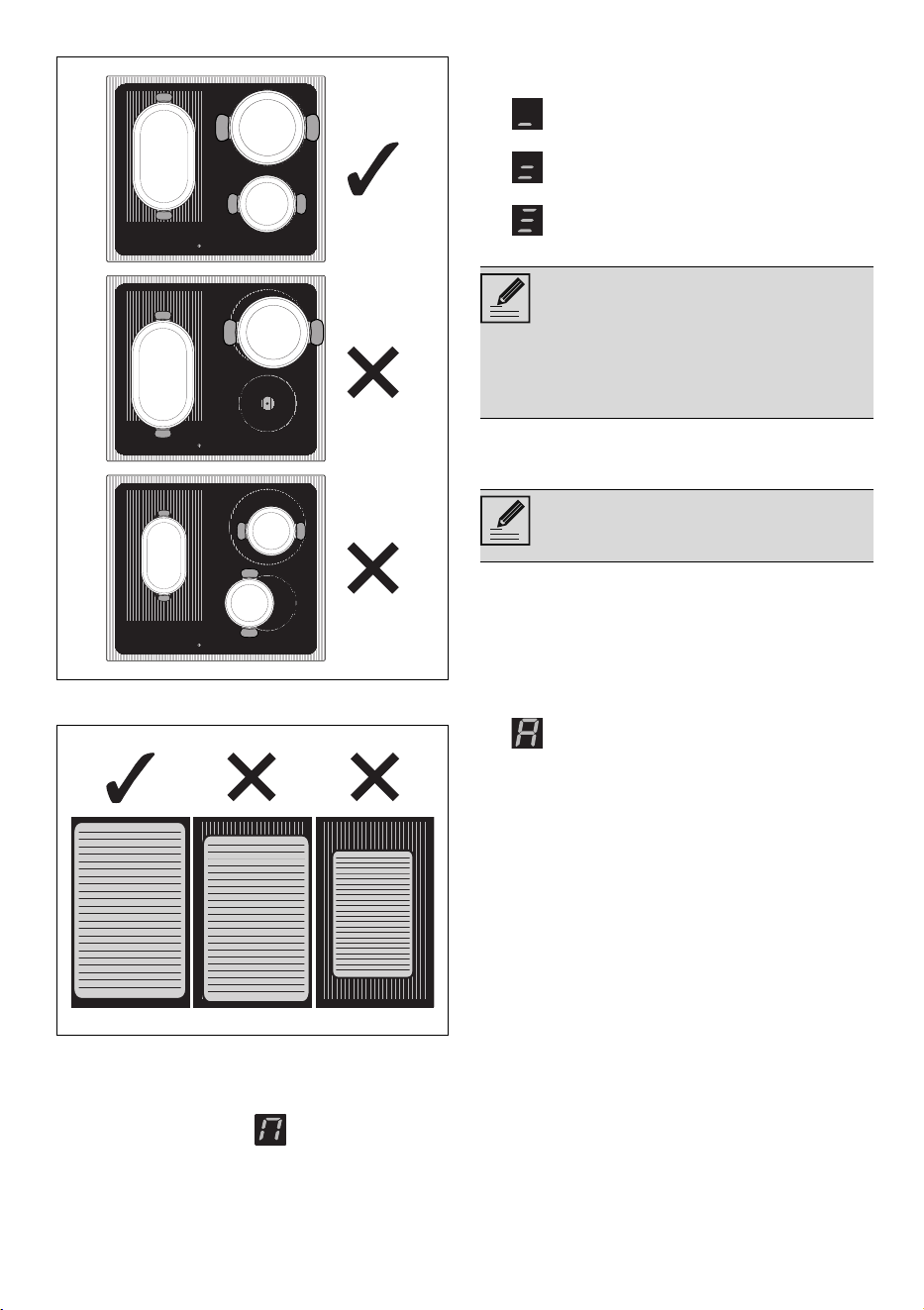
USE - 3991477C005/B
e
the cooking zone.
If using a griddle, make sure it is positioned
correctly.
To deactivate the Multizone function:
Simultaneously press the buttons of the
cooking zones on which the Multizone
function is active. The symbol
disappears and the two zones can be
regulated separately.
Residual heat indicator
After the cooking zone has been switched
off, a symbol appears on each display to
indicate whether the zone is still hot and
indicates the approximate temperature:
1. if the temperature is between 60 °C
and 79 °C.
2. if the temperature is between 80 °C
and 99 °C.
3. if the temperature is 100 °C or
higher.
Additional functions
Rapid heating function
The rapid heating function heats one
cooking zone at maximum power for a
limited time, after which it continues
cooking at the set power level.
After selecting a cooking zone:
• Press and hold a power level (from 1 to
8) for at least 3 seconds.
• appears on the display of the
cooking zone.
• After the heating time has elapsed, the
cooking zone reverts to the previously
selected power level.
• This function can be deactivated by
pressing and holding the set power level
for at least 3 seconds, or by selecting a
lower power level.
Supervise children carefully as they
cannot easily see the residual heat
indicator. The cooking zones remain
hot for a certain period of time even
after they have been turned off.
Make sure that children never touch
the hob.
This function is not available for
power level 9 or the Booster and
Double Booster functions
40 - USE 91477C005/B
Rapid heating times
Warming function
To activate the Warming function, first turn
on the hob, then:
1. Select a cooking zone.
2. Press the far left of the scroll bar,
approximately between level 0 and level
1, to activate the function;
the symbol appears on the display of
the selected cooking zone.
Select any power level to deactivate the
Warming function. Or press the button.
Independent timer
After having switched on the hob, without
selecting a zone:
3. Touch the inside of the timer setting
area, where “CL” is displayed.
4. appears and the icon flashes
on the display.
5. Pressing again will cause the digit on
the left to flash. It is now possible to set
the minutes using the scroll bar
(e.g. ).
6. When the digit on the left stops flashing,
the tens of minutes (e.g. ) can be
selected using the same procedure.
7. After a few seconds, the timer will start
the countdown.
Timed cooking
The timed cooking function can be
activated when at least one cooking zone is
switched on:
1. Select a power level.
2. Follow the same procedure as for an
independent timer.
• The symbol is displayed above the
cooking zone display to indicate that the
zone is timed.
3. Timed cooking will start a few seconds
after the last selection.
4. When the time elapses, a series of
beeps will be emitted. This can be
deactivated by pressing the timer area.
Modifying or deactivating timed cooking
1. Use the button to activate the hob
2. To modify or deactivate the timer and
timed cooking, simply press the timer
setting area and follow the same
procedure used for setting it in order to
modify or zero the minutes.
Recall Function
If the appliance is switched off
Power level
Automatic heating time
(minutes/seconds)
1 48 s
2 2 m 24 s
3 3 m 50 s
4 5 m 12 s
5 6 m 48 s
62 m
7 2 m 48 s
8 3 m 36 s
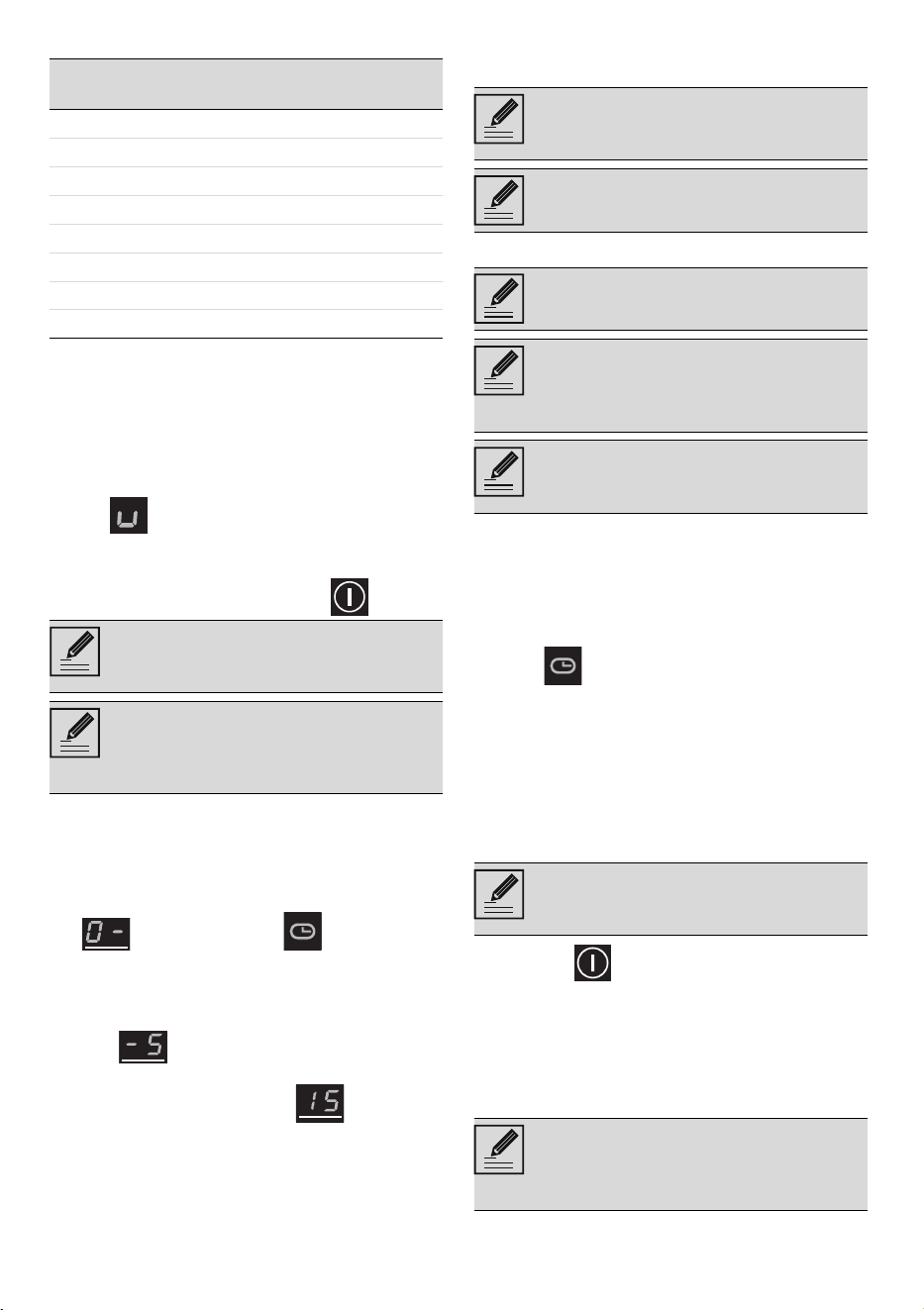
This function allows you to keep
cooked food warm or to keep water
on the boil.
The warming function deactivates
automatically after 2 hours of
operation and switches off the
cooking zone used.
This function is used to set a
countdown timer that will emit a
sound at the end of the pre-set time.
A maximum time of 99 minutes can
be set.
A maximum of 99 minutes can be
set.
This function is used to program the
automatic switch-off of each
cooking zone at the end of a period
of time.
This function can be activated on
multiple cooking zones at the same
time.
If you modify a timer that has
already been started, it has to be
started again from the beginning.
This is used to restore some
functions that have already been
started after the appliance has been
switched off unintentionally.
USE - 4191477C005/B
e
unintentionally, carry out the following
procedure within 6 seconds:
1. Switch on the appliance.
• The button starts to flash.
2. Press the pause button immediately
to restore the functions that were
previously active.
Special functions
Grill Function
To activate the Grill function:
1. Place a griddle or a long pan on the left
zones.
2. Press the button, which starts to
flash.
The symbol appears on the front zone
display and the symbol appears on the
rear zone display. The scroll bar will be set
automatically to level 9. (preheating stage).
After three minutes of operation, the power
will be reduced to level 7.
The button remains lit steadily.
Press the button and use the scroll bar
to modify the power level at any time.
Press the button to deactivate the Grill
function.
Auto-Vent 2.0 function
The Auto-Vent 2.0 function is deactivated
by default, but can be enabled from the user
menu. When enabled, the button
remains dimly lit at all times.
This function has an automatic and a
manual mode:
• Automatic mode (default) adjusts the
speed of the hood extractor fan
according to the total power of the
appliance (see “User menu - option U8).
• Manual mode allows the speed of the
hood extractor fan to be controlled by
pressing the button.
After switching on the hob, activate manual
mode as follows:
1. Press the button, which will light up
at maximum brightness.
2. Each subsequent press of the button
increases the speed of the extractor
hood fan according to a cyclic sequence
with 5 levels of adjustment, from 0 (off)
to 4 (maximum speed).
To go back to manual mode, the appliance
has to be switched off and on again.
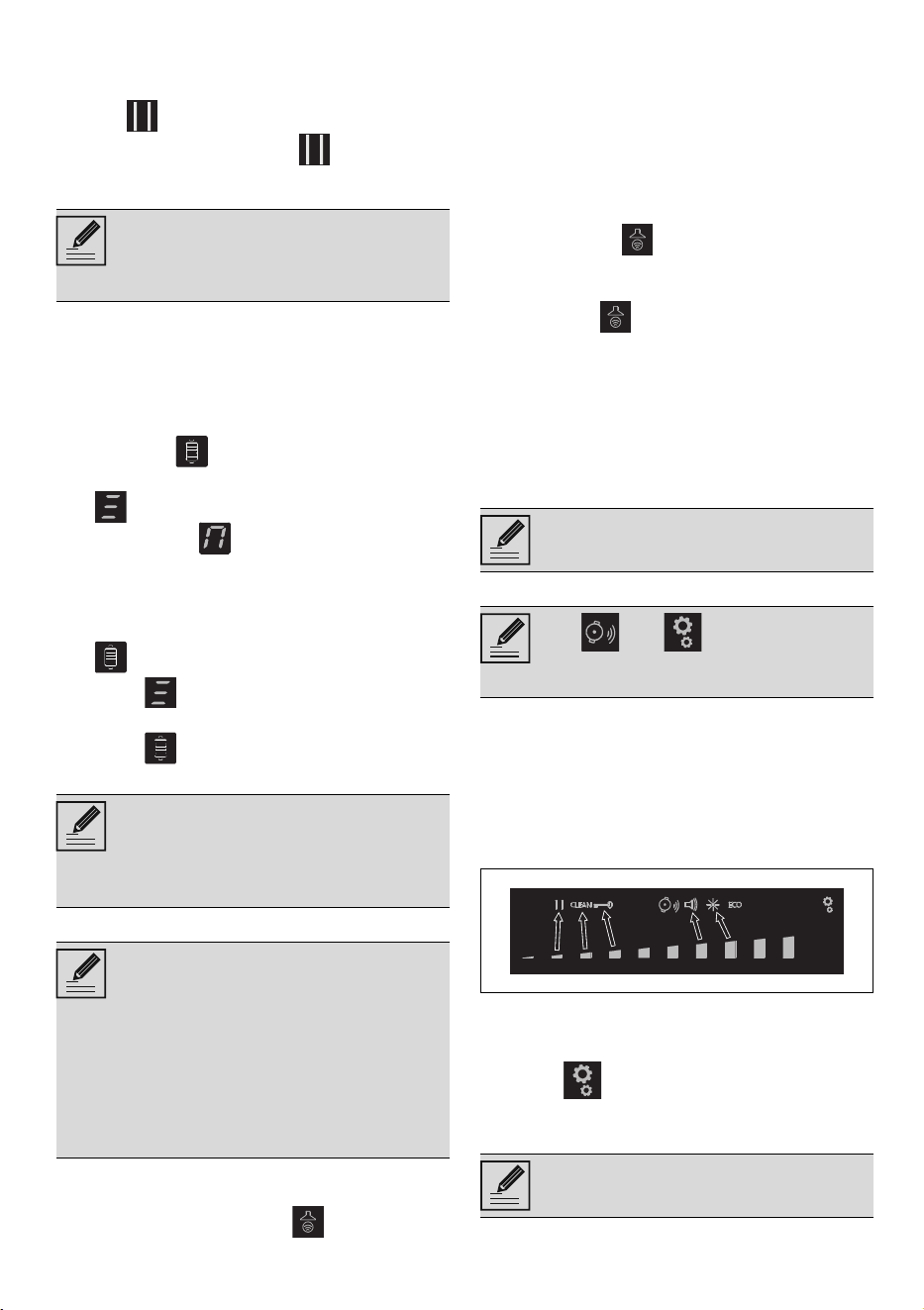
Settings menu
The settings menu allows you to modify
some of the operating characteristics of the
appliance and allows you to carry out
operations indicated below.
With the appliance switched off, press the
button to access the settings menu. The
scroll bar and the icons of settings that can
be changed will be displayed:
Individual settings can be selected using the
segment of the scroll bar that is most
directly below it.
Press the button again to exit from the
menu.
Pause function
To activate the Pause function:
This function restores the cooking
zones, timer and rapid heating
functions; no other functions will be
restored.
This function is used to
automatically activate the Multizone
function for the left zones only. It is
used when cooking with a griddle or
long pans.
• This function allows the speed of
the hood extractor fan to be
controlled via a wireless
connection.
• The hood must be designed to
use the Auto-Vent 2.0 function.
• The connection is always
unidirectional, from the hob to the
hood: it is not possible to control
the hob via the hood.
Refer to the hood manual for further
details.
The and refer to functions
that can only be modified from the
user menu.
This function pauses the operation
of all the cooking zones.
42 - USE 91477C005/B
1. Switch on at least one cooking zone.
2. Hold down the pause button . The
symbol displays on all the cooking
zones.
To deactivate the Pause function:
1. Hold down the button . The pause
symbol, which has just been pressed,
starts to flash.
2. Press any button apart from the Pause
button.
3. The pause function has now been
deactivated and the previously set
functions are restored.
Clean Function
At least one cooking zone must be active in
order to activate the Clean function:
1. Access the settings menu.
2. Press the segment of the scroll bar
below the icon.
3. A 15-second countdown appears on the
timer display, after which the appliance
resumes with the previous settings.
Select any power level to deactivate the
Warming function. Or press the button.
Controls lock
This is useful when cleaning the appliance
and to prevent functions being modified by
mistake.
To activate the controls Lock, carry out the
following procedure:
4. Access the settings menu.
5. Press the segment of the scroll bar
below the icon. appears on the
displays of all the cooking zones.
To deactivate the controls lock, carry out the
following procedure:
1. Access the settings menu
2. Press the segment of the scroll bar
below the icon. All the symbols
disappear.
Button volume
1. Access the settings menu.
2. Press the segment of the scroll bar
under the icon.
3. Use the scroll bar to select the required
volume.
Display lighting
1. Access the settings menu.
2. Press the segment of the scroll bar
under the icon.
3. Use the scroll bar to select the required
level of brightness.
User menu
The user menu allows you to modify the
operating characteristics of the appliance.
There are 9 options are available. Each
option is marked with the letter “U” together
with a progressive number on the timer
display.
Accessing the user menu
1. If the hob is off, switch it on using the
button .
2. Press again to switch it off; the
button starts to flash.
The cooking time limitation, the
residual heat indicators and the
control lock function remain enabled
during the Pause function.
When the power comes back on
after a power failure, the pause
function will be deactivated.
The pause function can be
maintained for a maximum of 10
minutes, after which the appliance
switches off.
This function pauses the appliance
for 15 seconds during which it is
possible to remove dirt or stains. Be
careful, as the surface may be hot.
This feature is designed to lock all
the hob zones, except for the
and buttons.
Option Description
U0
Maximum total power (kW) -
To be modified by the installer
only
U1 Option disabled
U2 Button volume
U3 Timer alarm volume
U4 Display brightness
U5 Timer animation
U6 Automatic pan detection
U7 Timer alarm duration
U8 Hood fan configuration
U9 Auto-Vent 2.0 function
USE - 4391477C005/B
e
3. Press and hold .
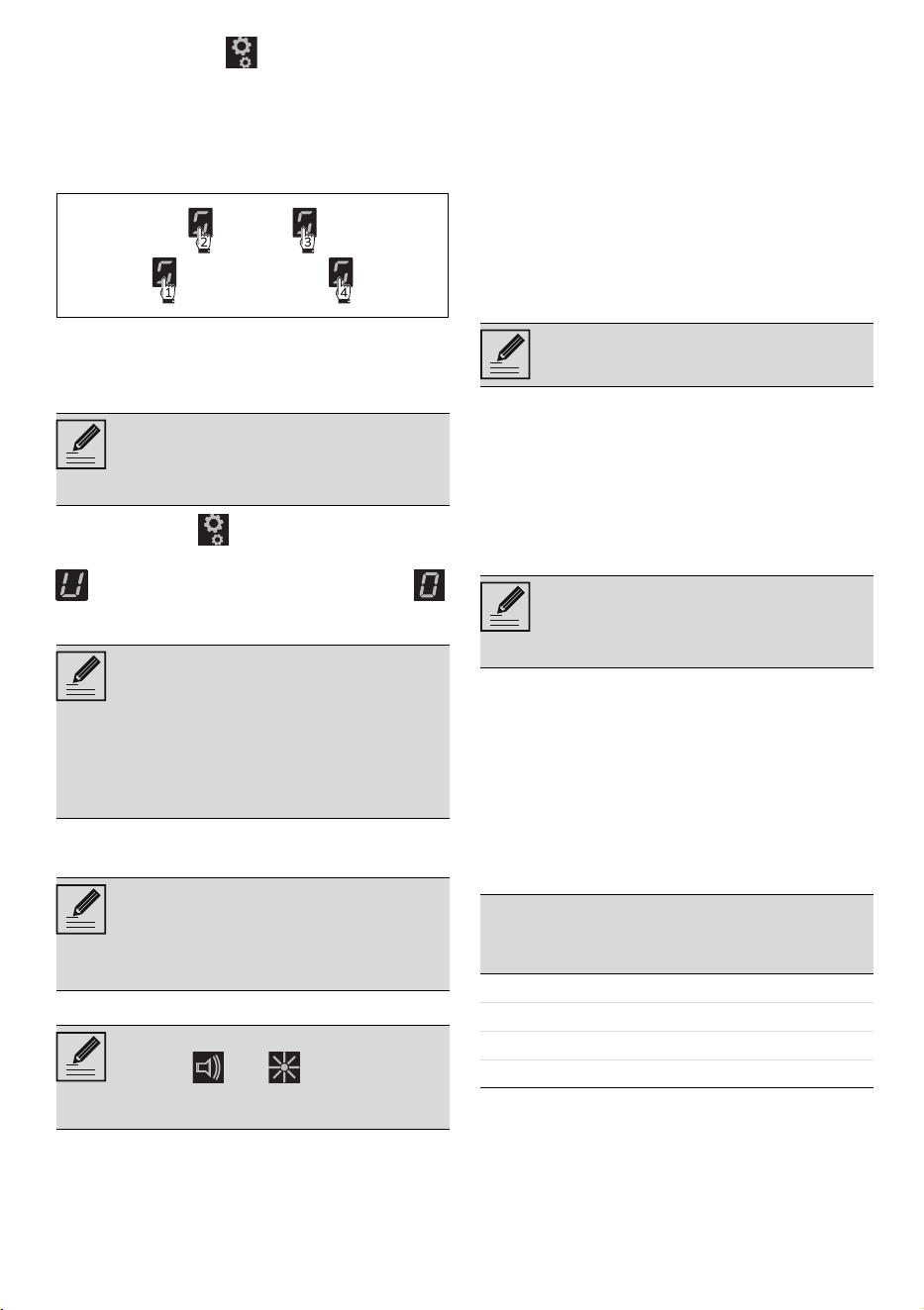
4. The following symbols appear on the
cooking zone displays:
Press all the buttons of the cooking zones in
sequence in a clockwise direction starting
from the front left. Every effective touch will
be confirmed by a beep.
Press all the buttons of the cooking zones in
sequence in a clockwise direction starting
from the front left (1). A beep will sound to
confirm every effective press of a button.
5. Release the button.
The user menu has been accessed and the
symbol alternating with the number
(option U0 - Power limitation) appears on
the display of the rear left zone.
• After selecting an option, press the front
left display to modify it.
User options
Option U2 modifies the volume of the
button sounds; 4 sound levels can be
selected using the scroll bar.
• 0: minimum volume.
• 3: maximum volume.
Option U3 modifies the volume of the sound
signals when the timer has ended. 4 levels
can be selected.
• 0: minimum volume.
• 3: maximum level.
Option U4 modifies the brightness of the
display. 10 levels can be selected.
• 0: maximum brightness.
• 9: minimum brightness.
Option U5 allows you to modify the type of
animation of the seconds countdown of the
independent timer and timed cooking, from
59 to 0 seconds.
• 0: animation 1.
• 1: animation 2.
Option U6 allows you to activate or
deactivate the automatic pan detection
function. (see “Automatic cooking zone
activation”).
• 0: automatic detection off.
• 1: automatic detection on.
Option U7 specifies the length of the alarm
when the timer has finished. 3 levels can be
selected:
• 0: alarm duration 120 seconds.
• 1: alarm duration 10 seconds.
• 2: alarm disabled.
Option U8 allows you to activate the Auto-
Vent 2.0 function in automatic mode. 8
levels can be selected. The following table
summarises the possible settings:
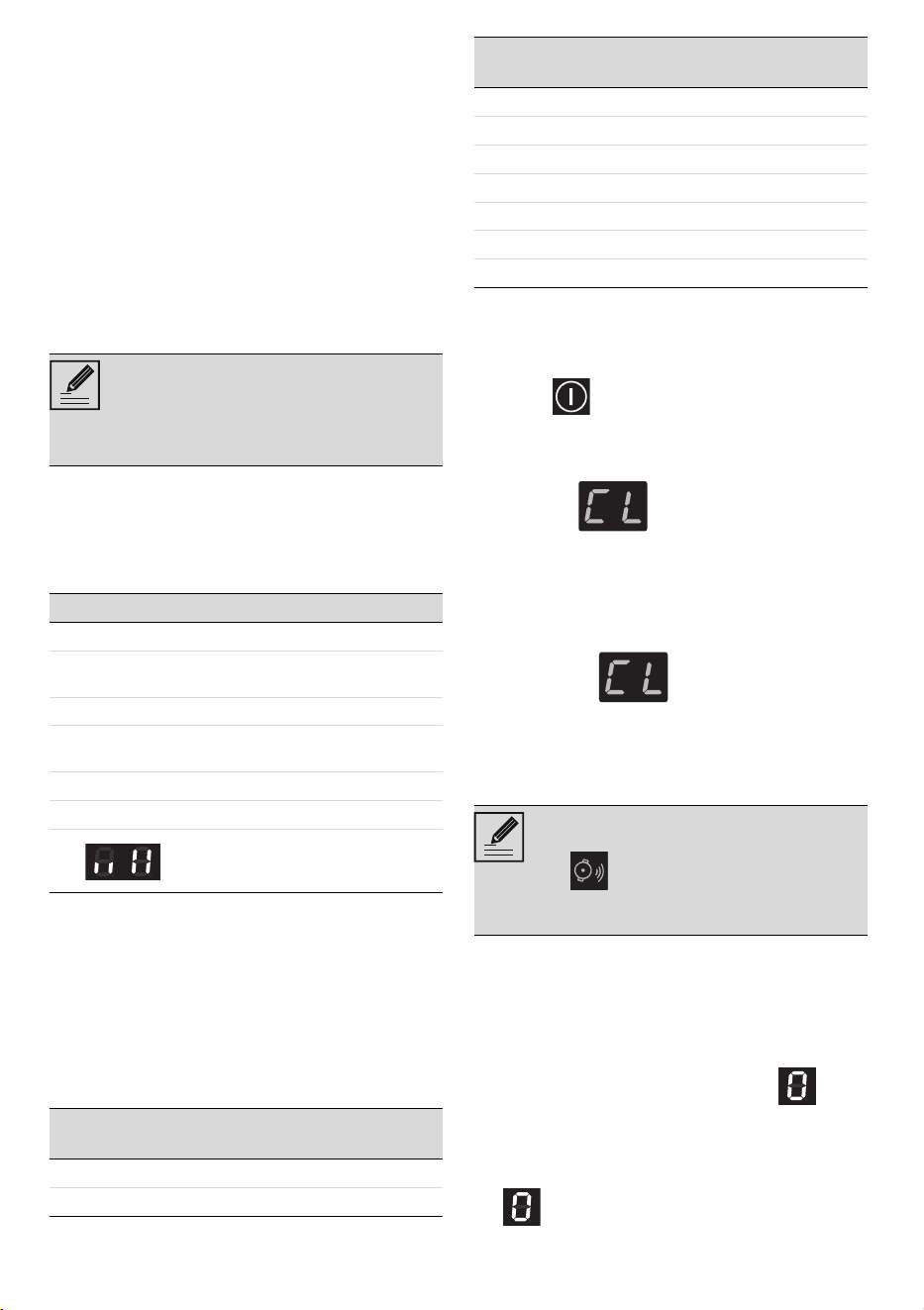
Refer to the table below to select the most
suitable value according to the power
If the buttons are pressed in the
incorrect order, the procedure for
accessing the menu will have to be
repeated.
• The first segment on the left
(option U0) is reserved for the
power limitation procedure
(installer only).
• For technical reasons, the second
segment from the left (option U1)
is disabled. Selecting this option
will have no effect.
According to the adjustment range
of each option, the scroll bar will
show only those segments that
correspond to the adjustments
available for each option.
Options U2 and U4 (that correspond
to icons and respectively)
can also be modified via the settings
menu.
The seconds count is displayed
when the timer is set to 1 minute.
If automatic pan detection is
disabled, the area must be switched
on manually when a pan is placed
on the hob.
Value
Hood li-
ghting
Hood fan speed
Delicate
cooking
Medium
cooking
Intense
cooking
0Off Off
1On Off
2 - 4 - 6 On Off speed 1 speed 2
3 - 5 - 7 On speed 1 Speed 2 Speed 3
44 - CLEANING AND MAINTENANCE 91477C005/B
limitation of the appliance:
Option U9 allows you to activate or
deactivate the Auto-Vent 2.0 function:
• 0: function off.
• 1: function on.
Exiting the user menu
There are two ways to exit from the user
menu:
1 Press the button. Any modifications
will be discarded and the hob will be
switched off.
Or
2 Press the button for at least two
seconds. The modifications will be
saved and the hob will be switched off.
Error notifications
If the appliance malfunctions or operates
incorrectly, the associated error code
appears on the display.
The error codes always begin with the letter
“E” or “Er” followed by a series of digits (e.g.
“Er47-30”).
Errors coded as:
• “E02”
•“E2”
• “Er21”
Indicate that the appliance or part of it is
overheating. If this occurs, you should
switch off the appliance immediately,
remove all pans and let it cool down.
If these errors persist or if other errors
appear, make a note of the code and
contact Technical Support.
CLEANING AND MAINTENANCE
Cleaning the glass ceramic hob
Cleaning the surfaces
To keep the surfaces in good condition, they
should be cleaned regularly after use. Let
them cool first.
Ordinary daily cleaning
Always and only use specific products that
do not contain abrasives or chlorine-based
acids. Pour the product onto a damp cloth
and wipe the surface, rinse thoroughly and
dry with a soft cloth or a microfibre cloth.
Weekly cleaning
Clean and maintain the hob once a week
using an ordinary glass ceramic cleaning
product. Always follow the manufacturer’s
instructions. The silicon in these products
creates a protective, water-repellent
membrane which also resists dirt. All marks
stay on the membrane and can therefore be
removed easily. After cleaning, dry the
surface with a clean cloth. Make sure that
there is no detergent left on the cooking
surface as it might undergo an aggressive
reaction when heated up and could modify
the structure of the cooking surface.
Food stains or residues
Light coloured marks from pans with
aluminium bases can be easily cleaned off
with a cloth moistened in vinegar. Remove
any burnt-on residues after cooking; then
rinse with water and dry thoroughly with a
clean cloth. Dirt, which may have fallen on
the hob while cleaning lettuce or potatoes,
can scratch the hob when moving pans.
Consequently, remove any dirt from the
cooking surface immediately. Changes in
colour do not affect the operation and
stability of the glass. These are not
alterations to the material of the hob but
just residues which have not been removed
and have then carbonised. Shiny surfaces
can form due to the bases of pans,
especially aluminium ones, rubbing on the
surface, and due to the use of unsuitable
detergents. They are difficult to remove
using conventional cleaning products. It
may be necessary to repeat the cleaning
process several times. Use of corrosive
detergents or rubbing of pan bases can
wear away the decoration on the hob over
Value Power limitation
2 - 3 up to 4 kW
4 - 5 from 4 to 5 kW
6 - 7 5 kW upwards
If the appliance is set to a lower
power level lower than the one
indicated in the table above, it may
not be possible to select some of the
fan speeds.
See General safety instructions.
In case of stubborn dirt, clean when
cold using a damp kitchen sponge
and neutral detergent; then dry with
a microfibre cloth.
INSTALLATION - 4591477C005/B
e
time and contribute to the formation of
stains.
What to do if...
The hob does not work:
• Make sure that the hob is connected and
that the main switch is turned on.
• Make sure that there is no power failure.
• Make sure that the fuse has not blown.
In this case replace the fuse.
• Make sure that the circuit breaker of the
residential electrical system has not
tripped. In this case, reset the circuit
breaker.
The cooking results are unsatisfactory:
• Make sure that the cooking temperature
is not too high or too low.
• Make sure that the hob is properly
ventilated and that the air inlets are
unobstructed.
• Use cookware that is certified and
tested for induction cooking.
The hob smokes:
• Let the hob cool down and clean it once
cooking is complete.
• Make sure that the food has not spilled
out of the pan and use a larger cooking
vessel, if needed.
The fuses blow or the circuit breaker of the
residential electrical system trips
repeatedly.
• Call Technical Support or an electrician.
There are cracks or fissures in the hob:
• Turn off the appliance immediately,
disconnect the power supply and
contact Technical Support.
INSTALLATION
Electrical connection
General information
Check the mains characteristics against the
data indicated on the plate.
The identification plate bearing the
technical data, serial number and brand
name is visibly positioned on the appliance.
Do not remove this plate for any reason.
The appliance must be connected to ground
using a wire that is at least 20 mm longer
than the other wires.
Terminal block connection
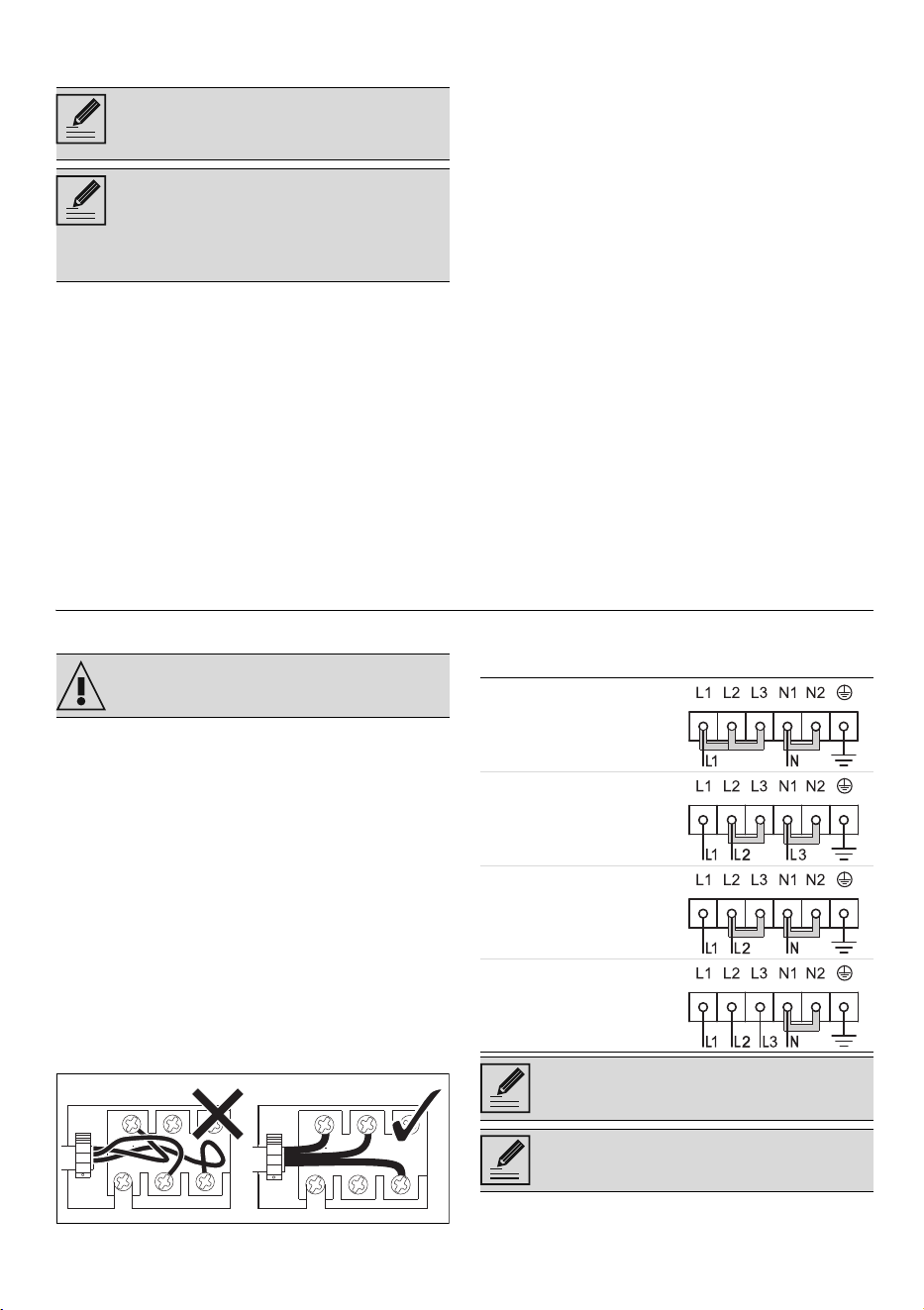
Arrange the cables in an orderly manner to
avoid overlapping or contact with any
jumpers. The cables must be of the correct
length to avoid build-up/twisting inside the
terminal box.
The device can be connected in the
following ways:
We recommend the use of cleaning
products distributed by the
manufacturer.
After cleaning, dry the appliance
thoroughly to prevent any water or
detergent from interfering with its
operation or creating unsightly
marks.
See General safety instructions.
220-240V ~
3 x 6 mm ²
three-core cable
220-240V 3~
4 x 4 mm ²
four-core cable
380-415V 2N~
4 x 4 mm ²
four-core cable
380-415V 3N~
5 x 1.5 mm ²
five-core cable
For all types of connection, use the
jumper provided.
The values indicated refer to the
cross-section of the internal lead.
46 - INSTALLATION 91477C005/B
Fixed connection
Fit the power line with an all-pole circuit
breaker with a contact separation distance
sufficient to provide complete disconnection
in category III overvoltage conditions,
pursuant to installation regulations.
For the Australian/New Zealand market:
The circuit breaker incorporated in the fixed
connection must comply with AS/NZS 3000.
Power limitation procedure
In order to modify the maximum power
absorbed by the appliance, you have to
access the user menu (see “User menu”).
Once the menu has been accessed, the
displays for the rear left zone alternate
between the symbol and the number
(option U0 – Power limitation).
The total power of the appliance can be
modified in steps of 0.1 kW (Eco-Logic
Advance function). The timer display
indicates the default power setting (6.7
kW).
Press the timer display to enable changes
to be made to the power settings. Then
press the left half of the scroll bar to
decrease the power and the right half to
increase it. Keep the button pressed to
reach the required setting more quickly.
• Press on the symbol to go back to
selecting the options (rear left zone
display).
• Press the segments of the scroll bar to
select an option.
Section cut from the countertop
Safety instructions for positioning and
installation
• Installation can be carried out on various
materials such as masonry, metal, solid
wood or plastic laminated wood as long
as they are heat resistant (>90°C).
• Veneers, adhesives or plastic coatings
on adjacent furniture should be
temperature-resistant (>90°C),
otherwise they might warp over time.
• If the piece of furniture does not have
the required recess opening, either it will
have to be cut or masonry work carried
out by a competent technician.
• The minimum clearance between
exhaust hoods and the cooking surface
must be at least the distance indicated
in the exhaust hood installation
instructions.
• The minimum clearances must also be
respected for the edges of the hob on
the back as indicated in the assembly
instructions.
• If the appliance is to be installed above
an oven, the oven must be fitted with a
cooling fan.
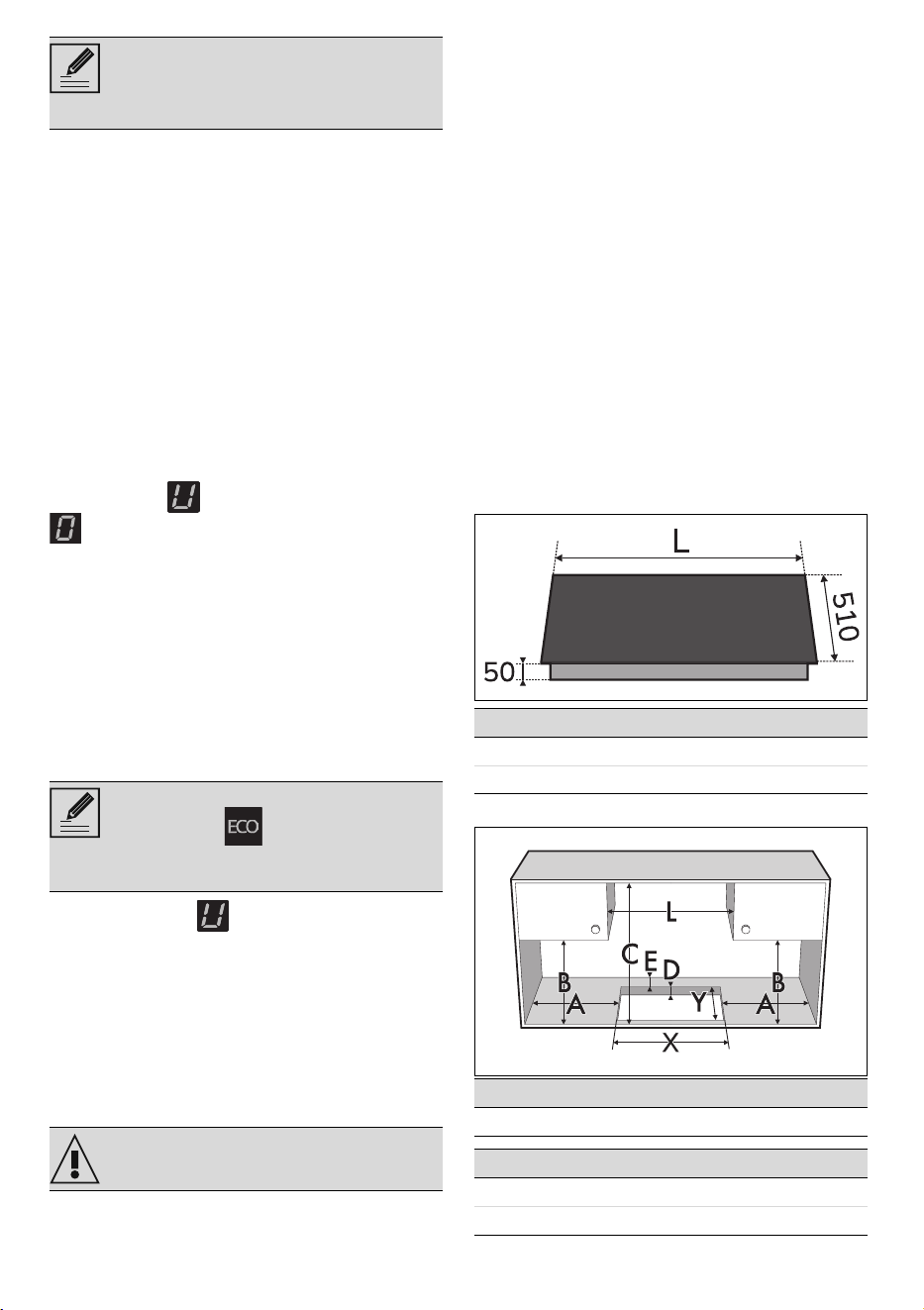
Appliance overall dimensions (mm)
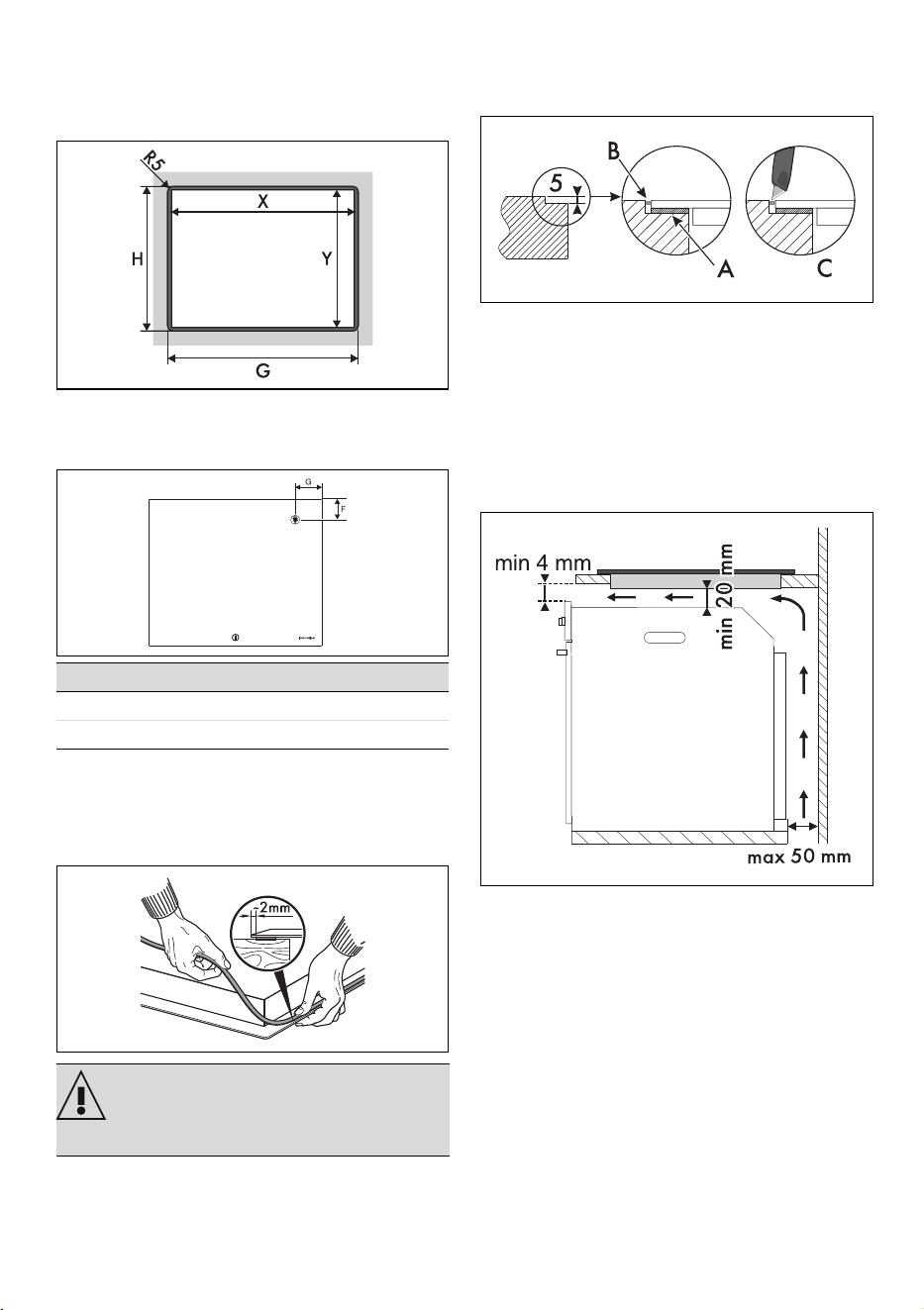
Standard and flush mounting (mm)
The power cables are sized taking
into account the coincidence factor
(in compliance with standard EN
60335-2-6).
If a power level lower than 6.7 kW is
set, the icon will be shown
when the appliance is switched on
again.
See General safety instructions.
MODELS (cm) L
60 600
75 750
A B C D E
min 150 min 460 min 750 20 - 60 min 50
L X Y G H
600 555÷560 478÷482 604 514
750 555÷560 478÷482 754 514
INSTALLATION - 4791477C005/B
e
Flush built-in model
For this type of mounting, you have to make
an additional cut at the edges of the recess
in the furniture if you wish to install the hob
flush with the countertop.
*Refer to the measurements in the table
above.
Position of electrical connection
Hob seal
To prevent leakage of liquid between the
frame of the hob and the countertop, place
the adhesive seal provided along the entire
outer edge of the hob before assembly.
In the case of flush mounting, after placing
the adhesive seal (A) on the glass surface
and after positioning and securing the hob,
fill the edges with insulating silicone (B) and
wipe off any excess. If for any reason the
hob needs to be removed, cut the silicone
using a cutter before attempting to remove
it (C).
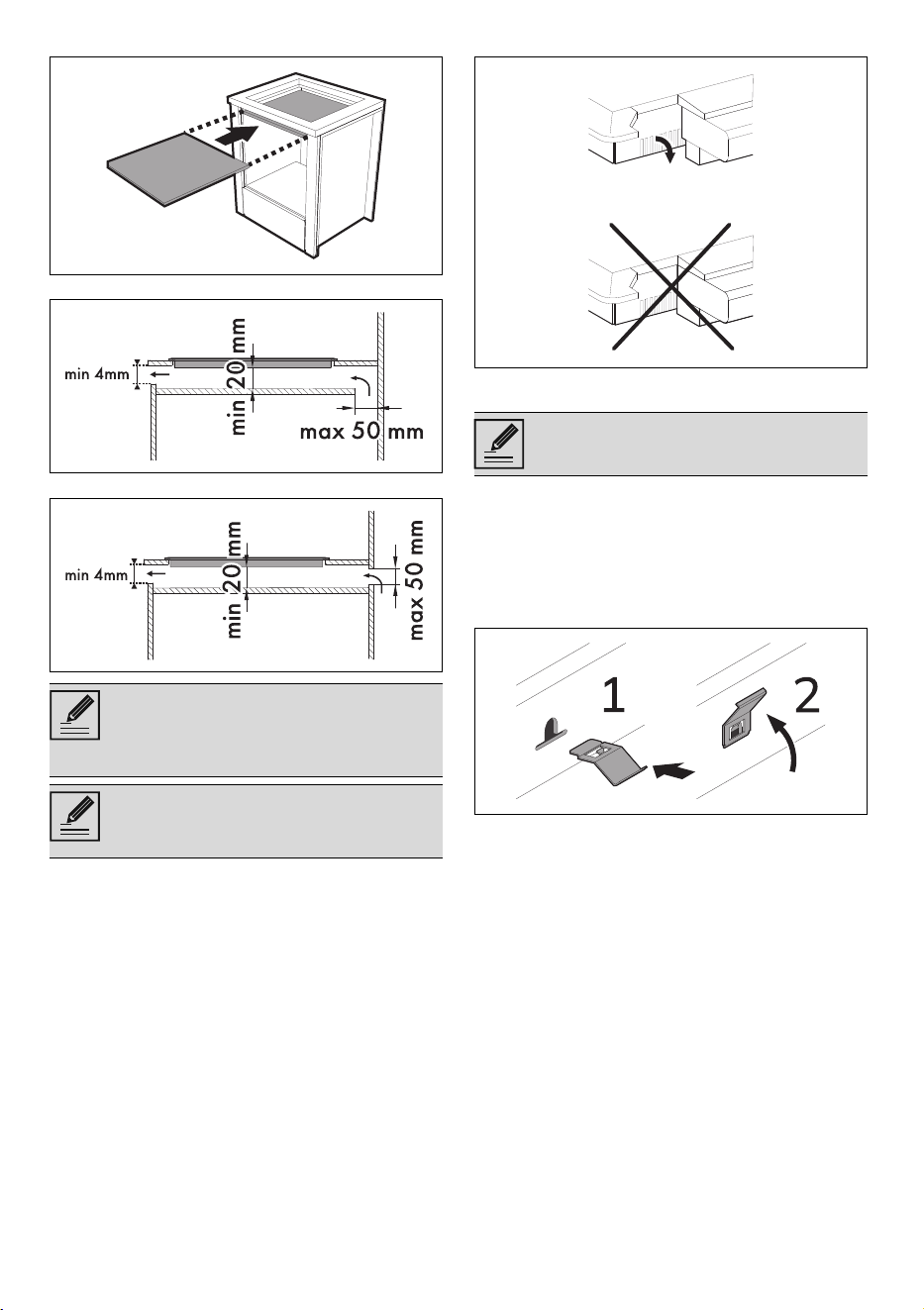
Mounting
On top of oven built-in unit
The clearance between the hob and the
kitchen furniture or other installed
appliances must be enough to ensure
sufficient ventilation and air discharge. If
installed above an oven, a space must be
left between the bottom of the hob and the
top of the appliance installed below.
On top of empty kitchen unit or
drawers
If there are other pieces of furniture (lateral
walls,
drawers, etc.), dishwashers or fridges
under the hob, a double-layer wooden base
must be installed at least 20 mm from the
bottom of the hob to avoid any accidental
contact. It must only be possible to remove
the double-layer base using suitable
MODELS (cm) G F
60 145 147
75 220 147
Do not use silicone to secure the
hob. This would make it impossible
to remove the hob without
damaging it.
48 - INSTALLATION 91477C005/B
equipment.
opens on bottom:
opens on rear:
Ventilation
The illustrations below show an example of
installation suitable for proper ventilation
and one example of incorrect installation to
be avoided.
Fixing to the built-in cabinet
To ensure the hob is fixed and centred as
accurately as possible, the clips provided
must be positioned as described below:
1. Fit the clips by gently pressing them
horizontally into the appropriate space.
2. Then turn them upwards to fix them in
place.
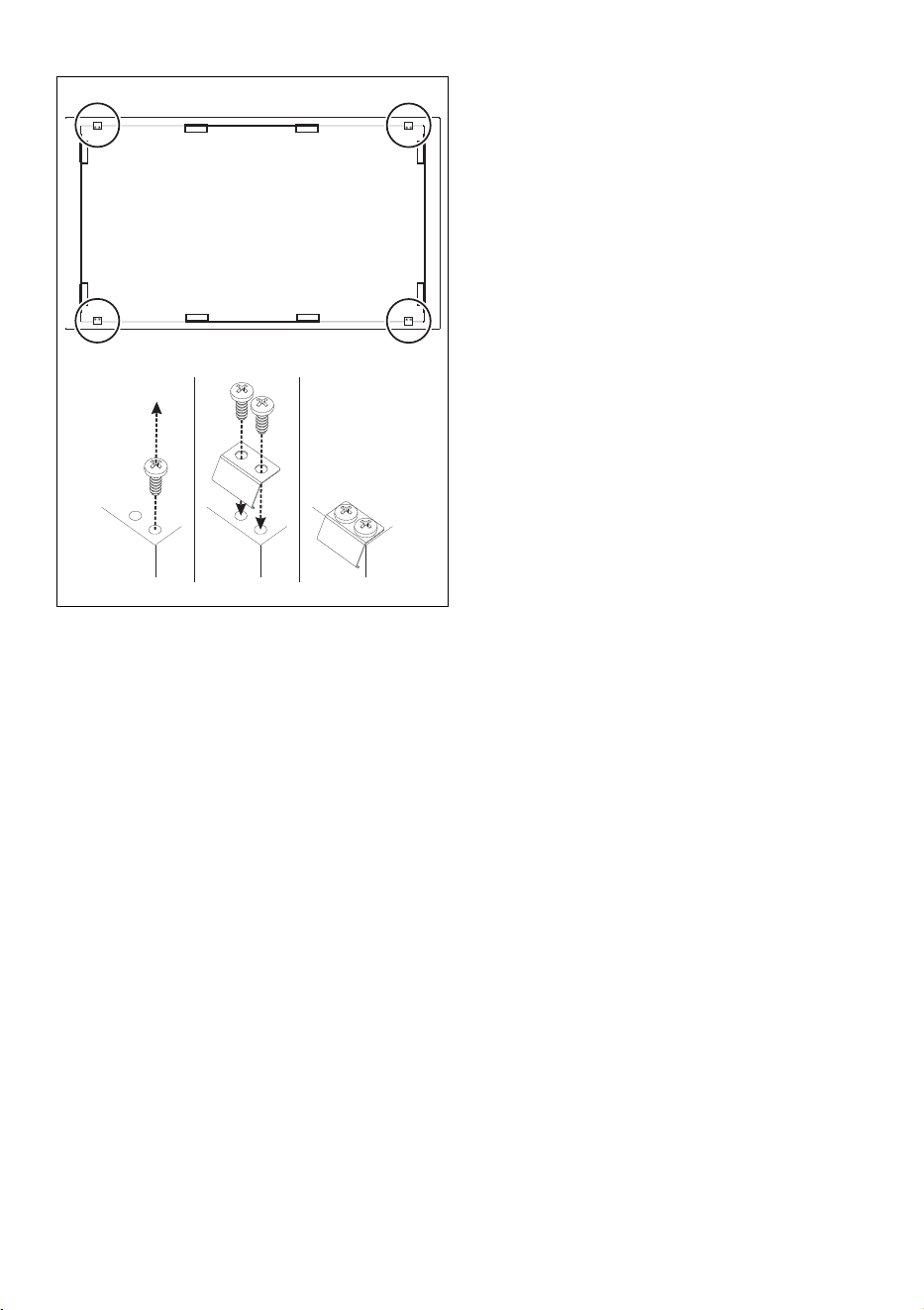
Fixing to the built-in cabinet
To ensure secure fixing and optimal
centring, the following instructions must be
followed:
1. Remove the screws from the appliance.
Failure to install the double-layer
wooden base exposes the user to
possible accidental contact with
sharp or hot parts.
If installed on top of an oven, the
latter must be equipped with a
cooling fan.
The clips should not be installed at
the front of the appliance.
INSTALLATION - 4991477C005/B
e
2. Position the bracket and tighten the
screws previously removed.
Instructions for the installer
• If you use a plug (if present) to connect
to the power supply, the plug must be
accessible after installation.
• Do not bend or trap the power cable.
• The appliance must be installed
according to the installation diagrams.
• If the appliance does not work correctly
after having carried out all the checks,
contact your local Authorised Service
Centre.
• Once the appliance has been installed,
please explain to the user how to use it
correctly.