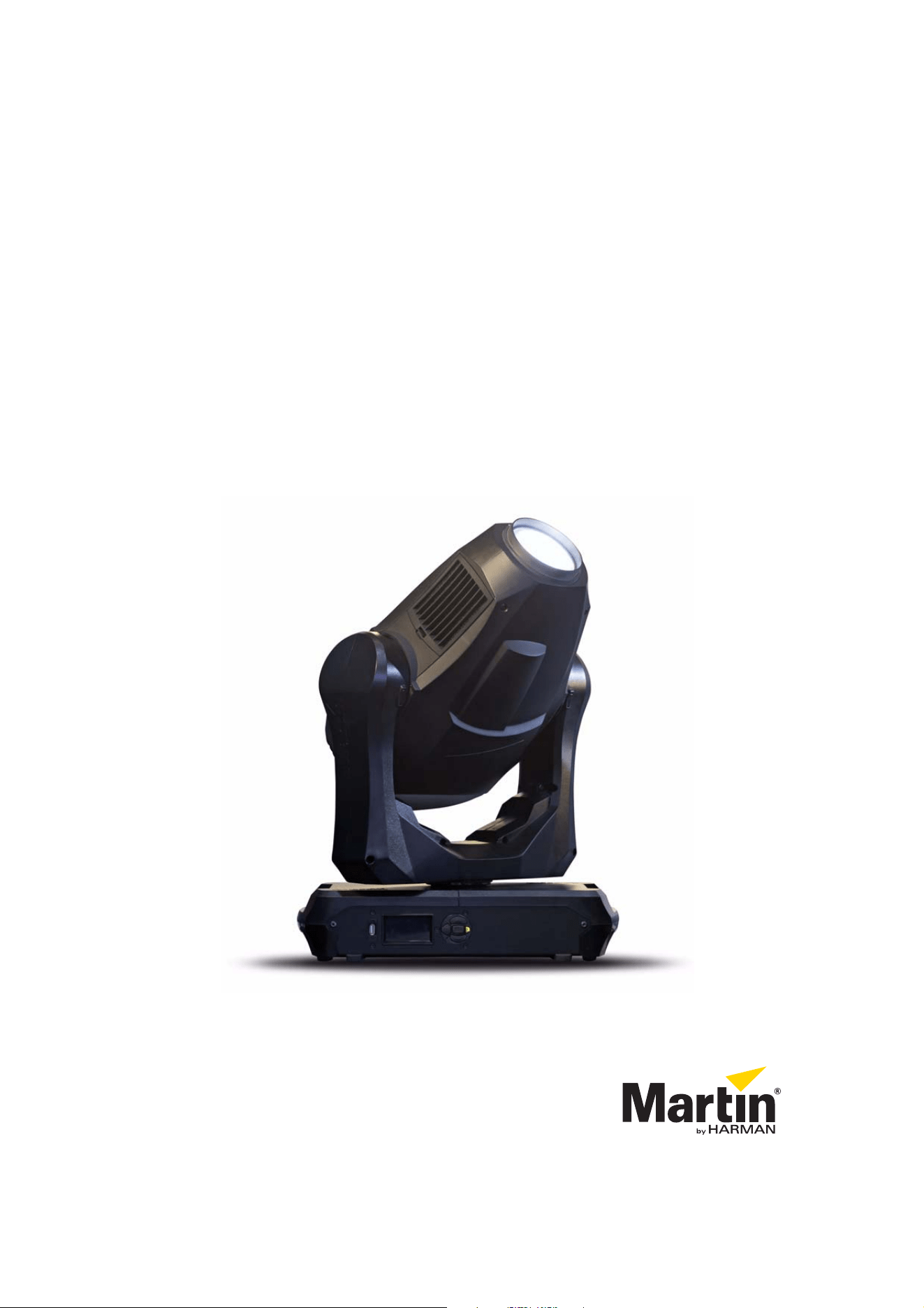
MAC Quantum Profile™
SAFETY AND INSTALLATION MANUAL
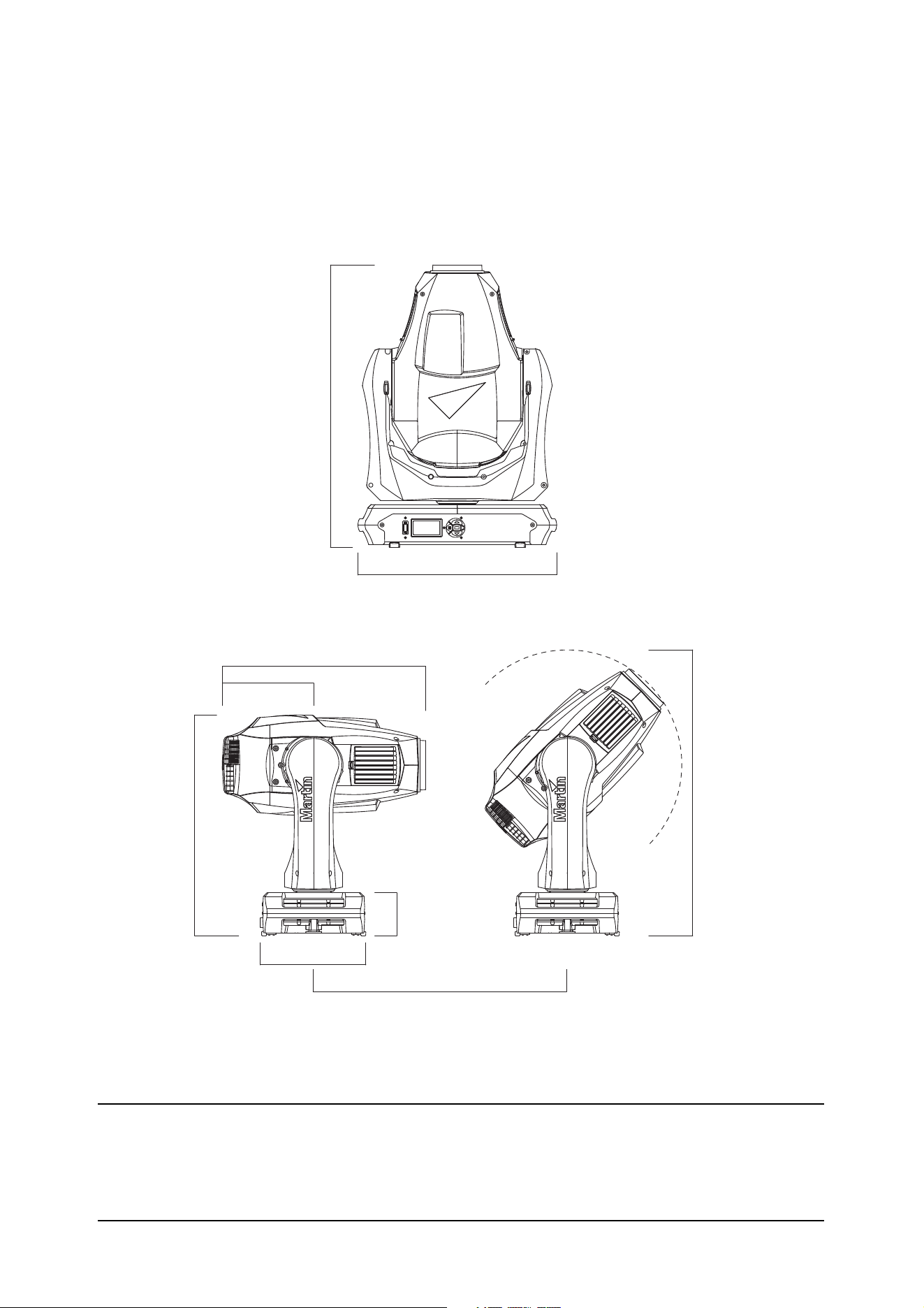
Dimensions
All measurements are given in millimeters
502
452
462
240
648
540
642
208
98
© 2013-2014 Martin Professional™ ApS. Information subject to change without notice. Martin Professional and all affiliated
companies disclaim liability for any injury, damage, direct or indirect loss, consequential or economic loss or any other loss
occasioned by the use of, inability to use or reliance on the information contained in this document. The Martin logo, the Martin name,
the Harman name and all other trademarks in this document pertaining to services or products by Martin Professional or its affiliates
and subsidiaries are trademarks owned or licensed by Martin Professional or its affiliates or subsidiaries.
P/N 35000278, Rev. C

Contents
Safety Information . . . . . . . . . . . . . . . . . . . . . . . . . . . . . . . . . . . . . . . . . . . . . . . . . . . . . . . . . . . 4
Introduction . . . . . . . . . . . . . . . . . . . . . . . . . . . . . . . . . . . . . . . . . . . . . . . . . . . . . . . . . . . . . . . . .6
Unpacking . . . . . . . . . . . . . . . . . . . . . . . . . . . . . . . . . . . . . . . . . . . . . . . . . . . . . . . . . . . . . . . 6
Packing . . . . . . . . . . . . . . . . . . . . . . . . . . . . . . . . . . . . . . . . . . . . . . . . . . . . . . . . . . . . . . . . . 6
Physical installation . . . . . . . . . . . . . . . . . . . . . . . . . . . . . . . . . . . . . . . . . . . . . . . . . . . . . . . . . . 7
AC power. . . . . . . . . . . . . . . . . . . . . . . . . . . . . . . . . . . . . . . . . . . . . . . . . . . . . . . . . . . . . . . . . . . 9
Power input . . . . . . . . . . . . . . . . . . . . . . . . . . . . . . . . . . . . . . . . . . . . . . . . . . . . . . . . . . . . . . 9
DMX data link . . . . . . . . . . . . . . . . . . . . . . . . . . . . . . . . . . . . . . . . . . . . . . . . . . . . . . . . . . . . . . 11
Service and maintenance . . . . . . . . . . . . . . . . . . . . . . . . . . . . . . . . . . . . . . . . . . . . . . . . . . . . 12
Tilt lock. . . . . . . . . . . . . . . . . . . . . . . . . . . . . . . . . . . . . . . . . . . . . . . . . . . . . . . . . . . . . . . . . 12
Cleaning. . . . . . . . . . . . . . . . . . . . . . . . . . . . . . . . . . . . . . . . . . . . . . . . . . . . . . . . . . . . . . . . 12
Replacing the head air filters . . . . . . . . . . . . . . . . . . . . . . . . . . . . . . . . . . . . . . . . . . . . . . . . 13
Servicing optical components . . . . . . . . . . . . . . . . . . . . . . . . . . . . . . . . . . . . . . . . . . . . . . . 14
Lubrication . . . . . . . . . . . . . . . . . . . . . . . . . . . . . . . . . . . . . . . . . . . . . . . . . . . . . . . . . . . . . . 20
Using the fixture . . . . . . . . . . . . . . . . . . . . . . . . . . . . . . . . . . . . . . . . . . . . . . . . . . . . . . . . . . . . 21
Applying power . . . . . . . . . . . . . . . . . . . . . . . . . . . . . . . . . . . . . . . . . . . . . . . . . . . . . . . . . . 21
Troubleshooting . . . . . . . . . . . . . . . . . . . . . . . . . . . . . . . . . . . . . . . . . . . . . . . . . . . . . . . . . . . 22
Specifications . . . . . . . . . . . . . . . . . . . . . . . . . . . . . . . . . . . . . . . . . . . . . . . . . . . . . . . . . . . . . . 23
Safety Information
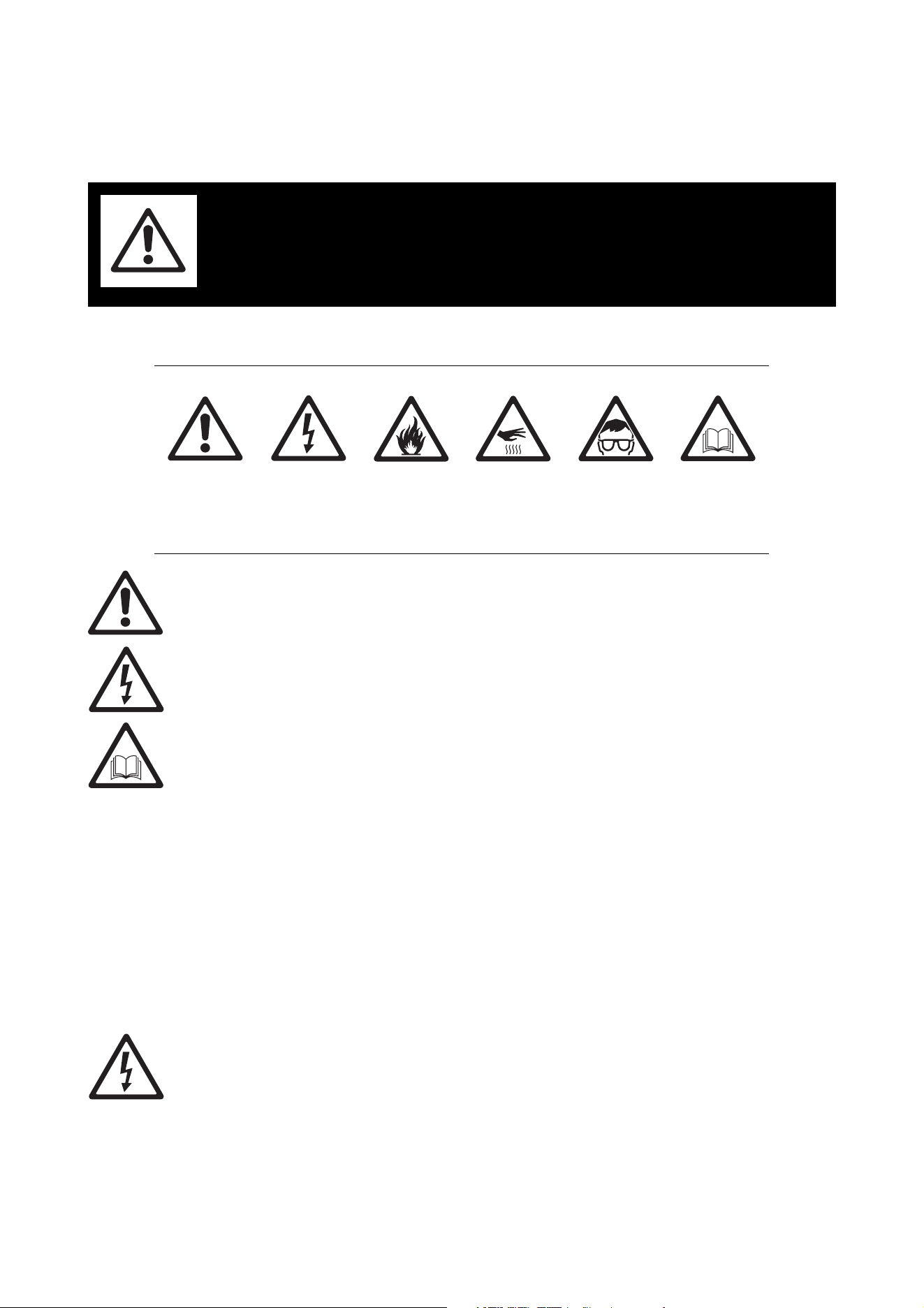
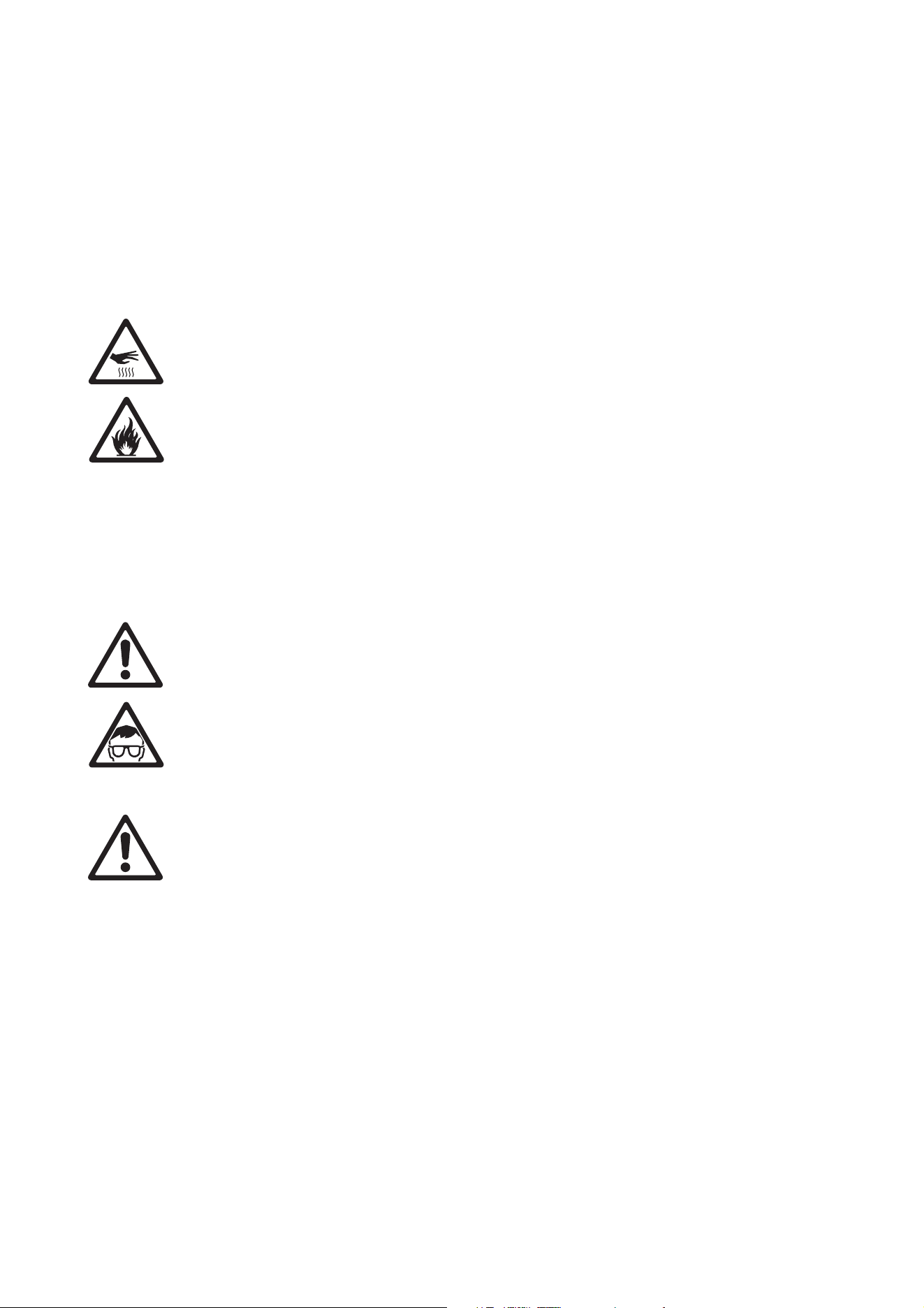
The following symbols are used to identify important safety information on the product and in this document:
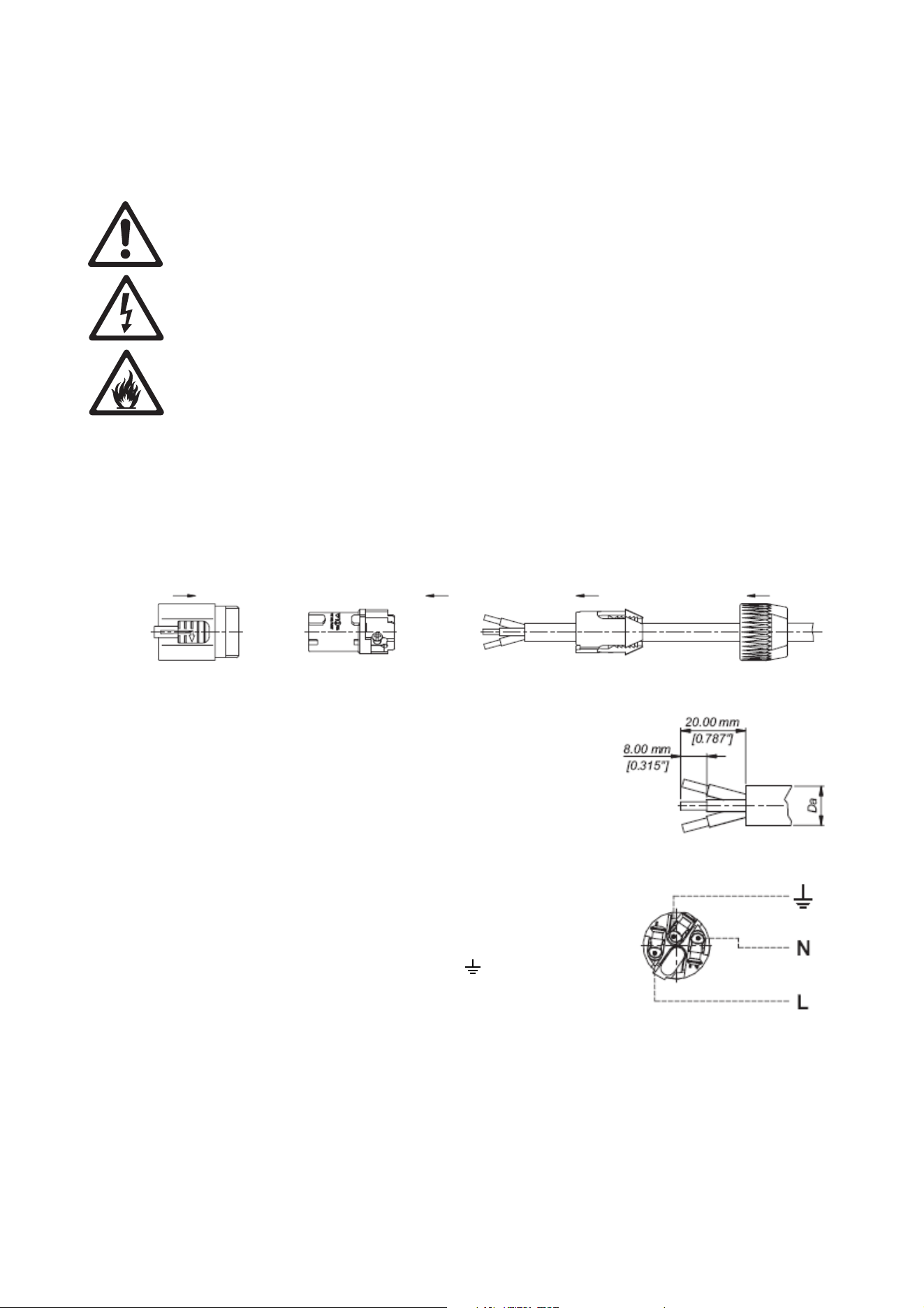
Warning! The MAC Quantum Profile™ contains components that are accessible and live at high
voltage while the fixture is connected to power. These components remain under tension for up to
30 minutes after power is disconnected. Only technicians who are authorized by Martin™ and who
have access to the Martin™ service documentation for the MAC Quantum Profile are permitted to
open the fixture.
Warning! Risk Group 2 product according to EN 62471. Do not view the light output with optical
instruments or any device that may concentrate the beam.
This lighting fixture is for professional use only and must be installed by a qualified technician. It is not for
household use. It presents risks of severe injury or death due to fire hazards, electric shock and falls. It
produces a powerful, concentrated beam of light that can create a fire hazard or a risk of eye injury if the
safety precautions below are not followed.
Read this manual. Install, operate and service the fixture only as directed in this manual, or you may create
a safety hazard or cause damage that is not covered by the product warranty. Follow the safety precautions
and observe all warnings in this manual, in the MAC Quantum Profile User Guide, and printed on the fixture.
The latest versions of this Safety and Installation Manual and the MAC Quantum Profile User Guide are
available for download from the MAC Quantum Profile Product Support page on the Martin™ website at
www.martin.com. Before you install, operate or service the MAC Quantum Profile, check the Martin™
website and make sure that you have the latest user documentation for the fixture. Document revisions are
indicated at the bottom of page 2.
Respect all locally applicable laws, codes and regulations when installing, powering, operating or servicing
the fixture.
If you have questions about how to operate the fixture safely, please contact your Martin™ supplier or call
the Martin™ 24-hour service hotline on +45 8740 0000, or in the USA on 1-888-tech-180.
PROTECTION FROM ELECTRIC SHOCK
• Do not remove any cover from the fixture except as described under “Service and maintenance” on
page 12.
• Disconnect the fixture from AC power before servicing it and when it is not in use.
• Ensure that the fixture is electrically connected to ground (earth).
• Use only a source of AC power that complies with local building and electrical codes and has both
overload and ground-fault (earth-fault) protection.
• The power input cable must be rated 20 A, hard usage type and heat-resistant to 90° C (194° F)
minimum. It must have three conductors and an outer cable diameter of 5 - 15 mm (0.2 - 0.6 in.). In North
WARNING!
Read the safety precautions in this section before
installing, powering, operating or servicing this
product.
DANGER!
Safety hazard.
Risk of severe
injury or death.
DANGER!
Hazardous
voltage. Risk of
lethal or severe
electric shock.
WARNING!
Fire hazard.
WARNING!
Burn hazard. Hot
surface. Do not
touch.
WARNING!
Intense light
emission.
WARNING!
Refer to user
manual.
Safety Information 5
America the cable must be 12 AWG minimum conductor size, type SJT or equivalent. In the EU the cable
must be 2.5 mm² minimum conductor size, type H05VV-F or equivalent.
• Before using the fixture, check that all power distribution equipment and cables are in perfect condition
and rated for the current requirements of all connected devices.
• Isolate the fixture from power immediately if the power plug or any seal, cover, cable, or other component
is damaged, defective, deformed, wet or showing signs of overheating. Do not reapply power until repairs
have been completed.
• Use only a Neutrik PowerCon NAC3FCA cable connector to connect to the power input socket.
• Do not expose the fixture to rain or moisture.
• Refer any service operation not described in this manual or in the MAC Quantum Profile User Guide to
Martin™ Service or an authorized Martin™ Service partner.
PROTECTION FROM BURNS AND FIRE
• The exterior of the fixture becomes hot. Take care when handling.
• Keep all combustible materials (e.g. fabric, wood, paper) at least 0.2 m (8 in.) away from the fixture.
• Keep flammable materials well away from the fixture.
• Ensure that there is free and unobstructed airflow around the fixture.
• Provide a minimum clearance of 0.2 m (8 in.) around fans and air vents.
• Do not illuminate surfaces within 2.0 m (6.6 ft.) of the fixture.
• Do not expose the front glass to sunlight or any other strong light source from any angle. Lenses can
focus the sun's rays inside the fixture, creating a potential fire hazard.
• Do not attempt to bypass thermostatic switches or fuses.
• Do not operate the fixture if the ambient temperature (Ta) exceeds 40° C (104° F).
• Do not modify the fixture in any way not described in this manual or the product’s User Guide or install
other than genuine Martin™ parts. Do not stick filters, masks or other materials onto any lens or other
optical component. Use only accessories approved by Martin™ to mask or modify the light beam.
PROTECTION FROM EYE INJURY
• Do not look at LEDs with magnifiers, telescopes, binoculars or similar optical instruments that may
concentrate the light output.
• Ensure that persons are not looking at the LEDs when the product lights up suddenly. This can happen
when power is applied, when the product receives a DMX signal, or when certain control menu items are
selected.
• To minimize the risk of eye irritation or injury, disconnect the fixture from power at all times when the
fixture is not in use, and provide well-lit conditions to reduce the pupil diameter of anyone working on or
near the fixture.
PROTECTION FROM INJURY
• Fasten the fixture securely to a fixed surface or structure when in use. The fixture is not portable when
installed.
• Do not lift or carry the fixture alone.
• Use two evenly spaced clamps to suspend the fixture from rigging structures. Do not use only one clamp.
• When clamping the fixture to a truss or other supporting structure at any other angle than with the yoke
hanging vertically downwards, use two half-coupler clamps. Do not use G-clamps, quick-trigger clamps or
any other type of clamp that does not completely encircle the supporting structure when fastened.
• When suspending the fixture, ensure that the supporting structure and all hardware used can hold at least
10 times the weight of all devices suspended from them.
• If the fixture is installed in a location where it may cause injury or damage if it falls, install as described in
this manual a secondary attachment such as a safety cable that is approved by an official body such as
TÜV as a safety attachment for the weight that it secures. The safety cable must comply with EN
60598-2-17 Section 17.6.6 and be capable of bearing a static suspended load that is ten times the weight
of the fixture and all installed accessories.
• Check that all external covers and rigging hardware are securely fastened.
• Block access below the work area and work from a stable platform whenever installing, servicing or
moving the fixture.
• Allow enough clearance around the head to ensure that it cannot collide with an object or another fixture
when it moves.
6 MAC Quantum Profile Safety and Installation Manual
Introduction
Thank you for selecting the Martin MAC Quantum Profile™. This moving-head spotlight features:
• 475 W long-life LED engine
• Independently variable 0-100% CMY color mixing
• Two rotating gobo wheels, one with 6 interchangeable rotating gobos, one with 10 static gobos
• Color wheel with 6 color filters
• Rotating three-facet prism
• Iris with pulse effects
• Motorized zoom and focus
• Full-range dimming with four dimming curve options
• Electronic shutter effect with variable speed regular and random strobe
• Backlit graphic display and battery power (mains power not required for fixture setup)
• Light weight at 22.4 kg (49.4 lbs.)
• Auto-sensing switch-mode power supply.
For the latest firmware updates, documentation, and other information about this and all Martin Professional
products, please visit the Martin™ website at http://www.martin.com
Comments or suggestions regarding this document may be e-mailed to service@martin.dk or posted to:
Technical Documentation, Martin Professional, Olof Palmes Allé 18, DK-8200 Aarhus N, Denmark.
Unpacking
The MAC Quantum Profile is packaged in either a
cardboard box or a flightcase that is designed to protect
the product during shipment.
This Safety and Installation Manual is included with the
product. The MAC Quantum Profile User Guide,
containing full details of setting up, controlling and
monitoring the fixture, is available for download from the
MAC Quantum Profile Product Support page on the
Martin website at www.martin.com. If you have any
difficulty locating this document, please contact your
Martin supplier for assistance.
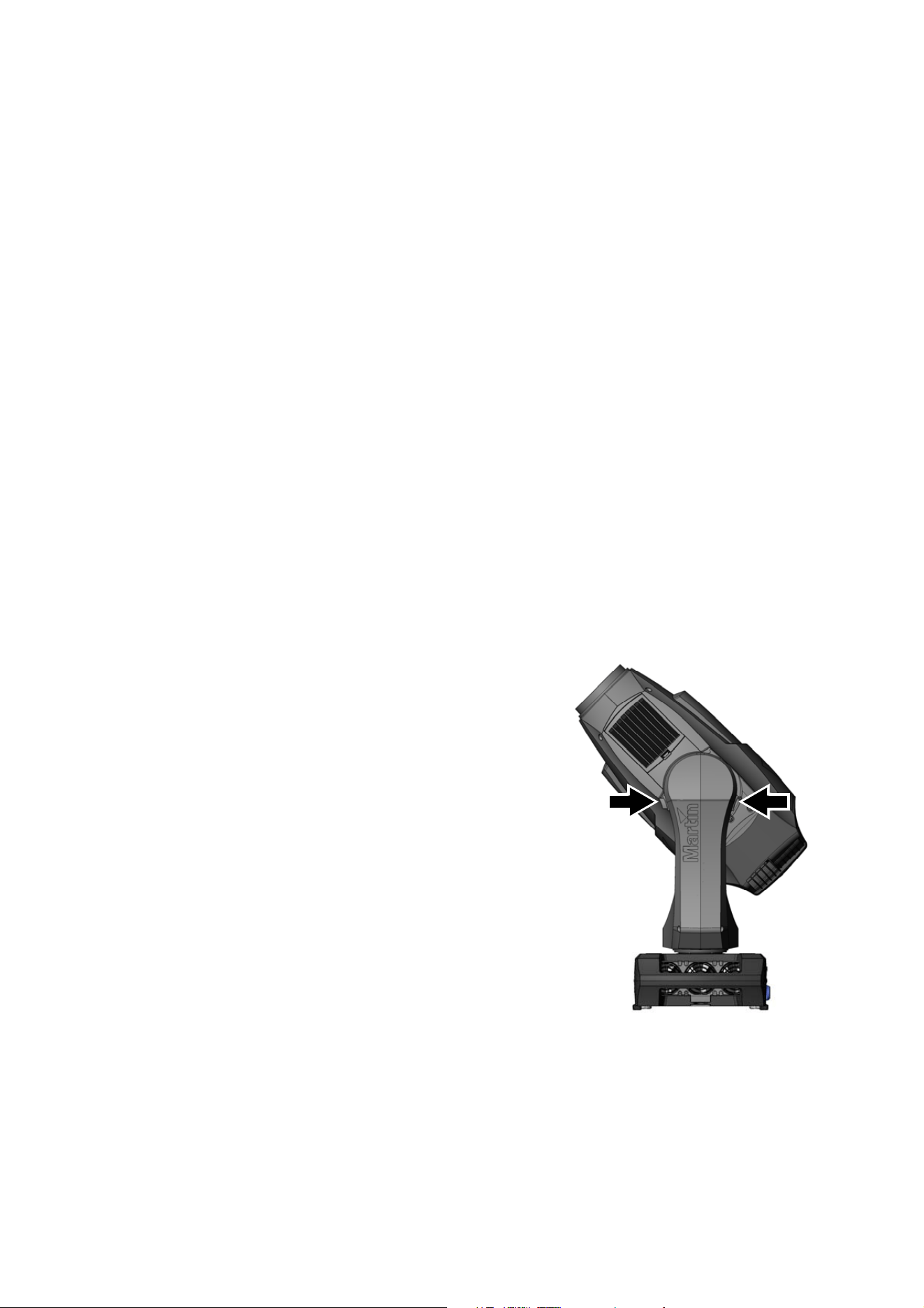
Tilt lock
Release the tilt lock before applying power to the fixture.
See Figure 1. Release the tilt lock by pushing the lock in
towards the yoke (you can reapply the tilt lock by first
checking that the power is off and then pushing the lock
back in towards the yoke from the other side).
Packing
Important! Release the tilt lock and allow the fixture to cool before packing it in its flightcase.
The anti-shock material in the MAC Quantum Profile flightcase is designed to protect the head without the
tilt lock applied. Release the tilt lock when transporting the fixture in the flightcase. Leaving the tilt lock
applied may cause damage that is not covered by the product warranty.
Figure 1: Tilt lock
Physical installation 7
Physical installation
Warning! The MAC Quantum Profile has a powerful pan motor. The torque reaction when the head is
panned suddenly can cause the base to move if the fixture is standing unsecured on a surface. Do
not apply power to the MAC Quantum Profile unless the base is securely fastened to a surface or to
rigging hardware.
Warning! Use 2 clamps to rig the fixture. Do not hang the fixture from only one clamp. Lock each
clamp with both 1/4-turn fasteners. Fasteners are locked only when turned a full 90° clockwise.
Warning! When suspending the fixture above ground level, secure it against failure of a primary
attachment using a safety cable that is approved as a safety attachment for the weight of the fixture
together with mounting hardware, accessories, etc. Do not use the carrying handles for secondary
attachment.
Warning! When clamping the fixture to a truss or other structure at any other angle than with the
yoke hanging vertically downwards, use two clamps of half-coupler type. Do not use any type of
clamp that does not completely encircle the structure when fastened.
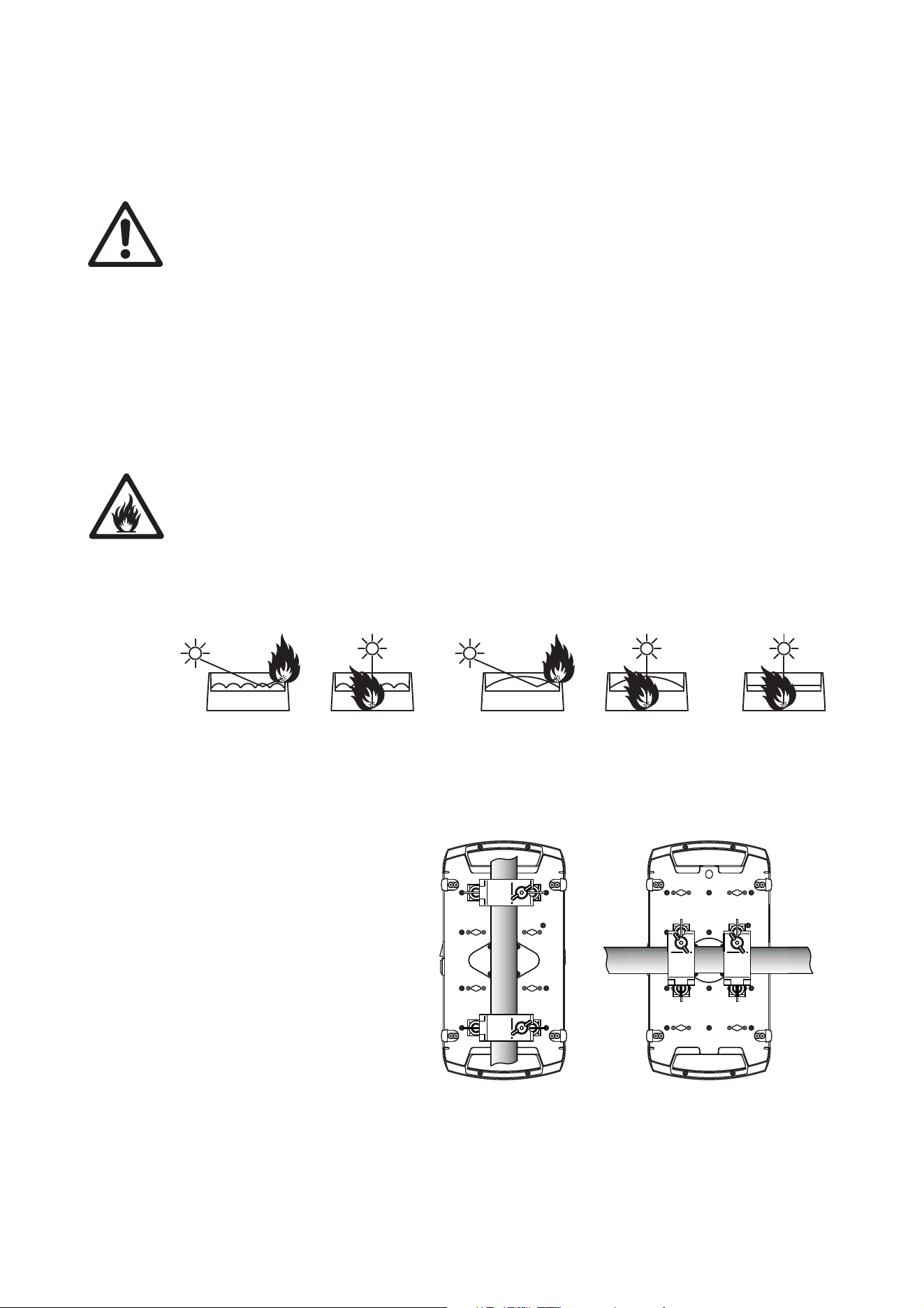
Warning! Position or shade the head so that the front lens will not be exposed to sunlight or any
other strong light source from any angle – even for a few seconds. See Figure 2. The MAC Quantum
Profile’s lens can focus the sun's rays, creating a potential fire hazard and causing damage.
Important! Do not point strong light output from other fixtures at the MAC Quantum Profile, as
intense illumination can damage the display.
See Figure 2. Lenses can focus sunlight and strong light, presenting a risk of fire and damage to the fixture.
Shield or shade the head if necessary.
The MAC Quantum Profile can
be fastened to a surface such as
a stage or clamped to a truss in
any orientation. Clamps must be
half-coupler type (see Figure 4)
or equivalent type that fully
encircles the truss unless the
fixture is installed with the yoke
hanging vertically downwards,
in which case other clamp types
that are approved for the
supported weight may be used.
The mounting points in the base
allow omega brackets and
rigging clamps to be fastened
as shown in Figure 3.
Figure 2: Potential sunlight damage
Figure 3: Clamp bracket positions
8 MAC Quantum Profile Safety and Installation Manual
Clamping the fixture on a truss
1. Check that all rigging hardware is undamaged and can bear at least 10 times the weight of the fixture.
Check that the structure can bear at least 10 times the weight of all installed fixtures, clamps, cables,
auxiliary equipment, etc.
2. Bolt each rigging clamp securely to an omega bracket with an M12 bolt (minimum grade 8.8) and
self-locking nut.
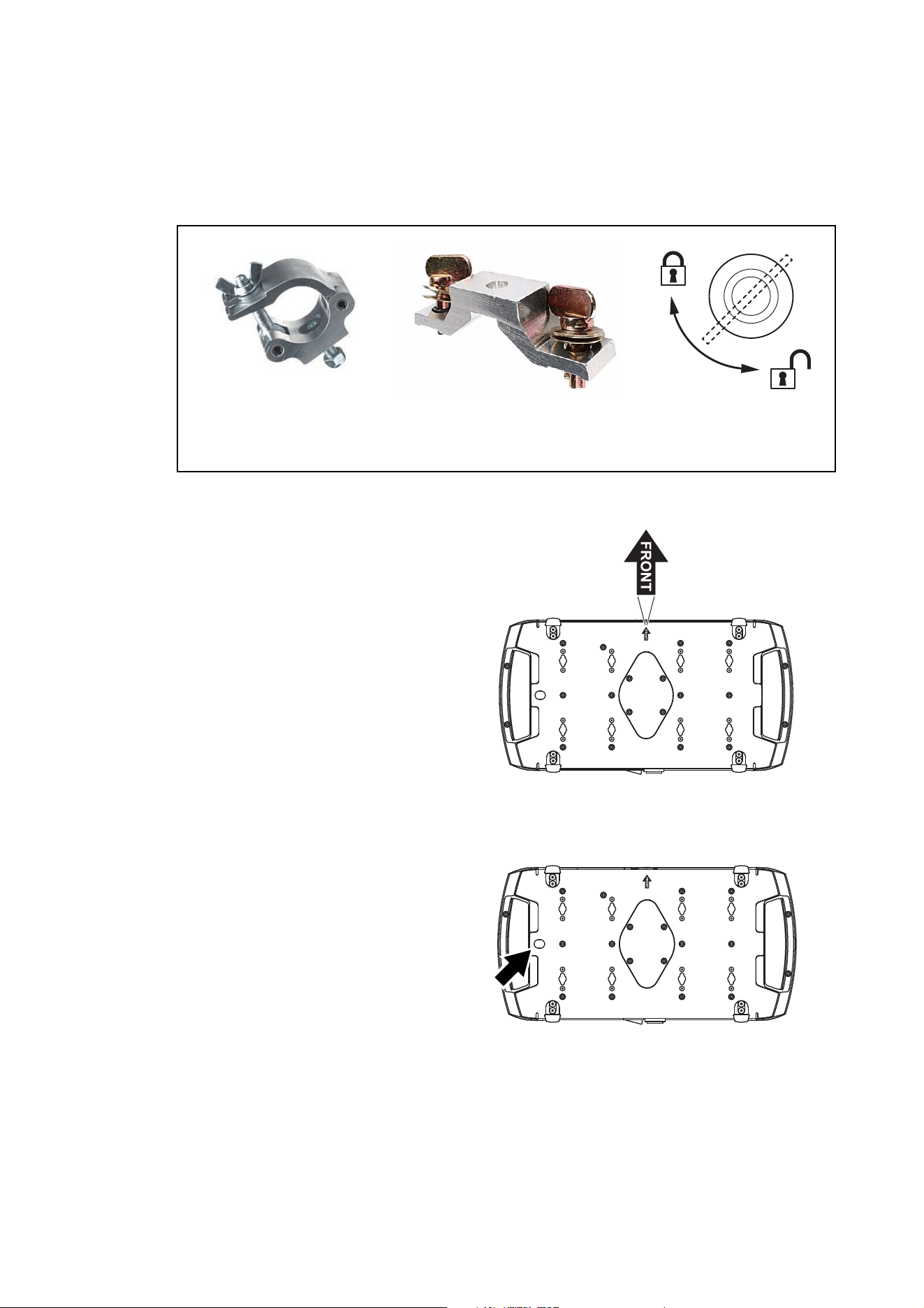
3. See Figure 3 on page 7. Align the first
clamp and bracket with 2 mounting points
in the base, and engage both the clamp
bracket’s quarter-turn fasteners in
corresponding sockets in the base. See
Figure 4. Turn the levers on the
quarter-turn fasteners a full 90° clockwise
to lock. Repeat for the second clamp.
4. Block access under the work area. See
Figure 5. Note the position of the arrow
marked FRONT on the base of the fixture.
Working from a stable platform, hang the
fixture on the truss with the arrow marked
FRONT facing towards the area to be
illuminated. Tighten the rigging clamps.
5. See Figure 6. Install a safety cable that is
approved as a safety attachment for the
weight of the fixture by looping it through
the safety attachment point (arrowed) in
the bottom of the base and around a
secure anchoring point so that the safety
cable will catch the fixture if a primary
attachment fails.
6. Check that the tilt lock is released. Check
that there are no combustible materials
within 0.2 m (8 in.) or surfaces to be
illuminated within 2.0 m (6.6 ft.) of the
fixture, and that there are no flammable
materials nearby.
7. Check that there is no possibility of heads
or yokes colliding with other fixtures.
8. Check that other lighting fixtures cannot project intense light at the MAC Quantum Profile, as intense
illumination can damage the MAC Quantum Profile’s display.
Figure 4: Martin rigging hardware
Half-coupler Omega bracket for
rigging clamp rigging clamp attachment
90°
Locking quarter-
turn fasteners
SAFETY CABLE
Figure 5: Front of fixture
SAFETY CABLE
Figure 6: Safety cable attachment point
AC power 9
AC power
Warning! For protection from electric shock, the fixture must be electrically connected to ground
(earth). The AC mains power supply must be fitted with a fuse or circuit breaker and ground-fault
(earth-fault) protection.
The MAC Quantum Profile features an auto-sensing switch-mode power supply that automatically adapts to
AC power at 120-240 V (nominal), 50/60 Hz.
Power input
Important! Connect the MAC Quantum Profile directly to AC power. Do not connect it to a dimmer
system; doing so may damage the fixture.
The MAC Quantum Profile requires a power input cable with a Neutrik PowerCon NAC3FCA cable
connector for AC mains power input. The cable must meet the requirements listed under “Protection from
electric shock” on page 4.
Martin™ can supply either a suitable 3 m (9.8 ft.) power cable with PowerCon input connector installed or
the PowerCon input connector without a cable (see “Accessories” on page 24).
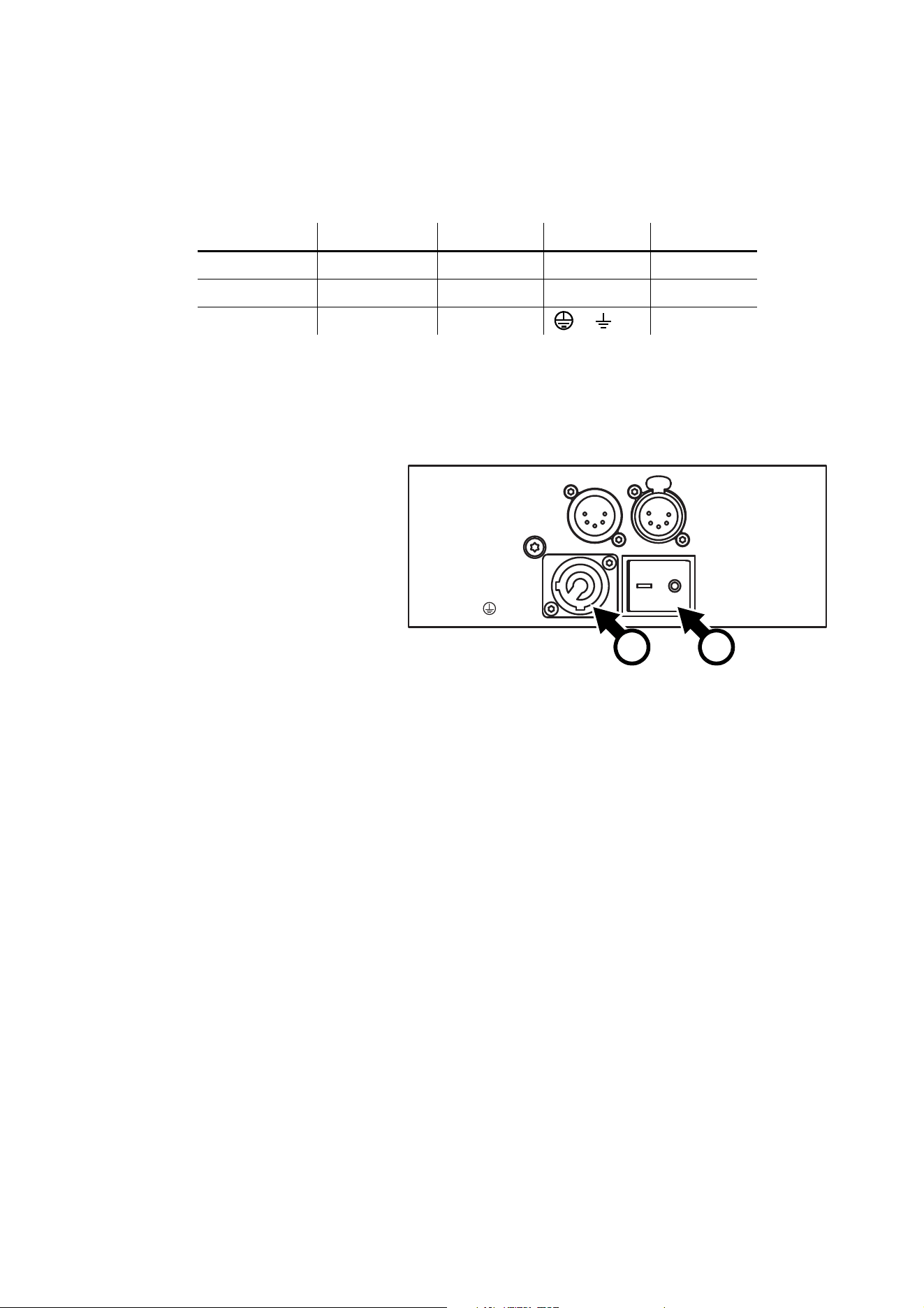
Installing a power input connector on a power cable
To install a Neutrik PowerCon NAC3FCA input connector on a power
cable, see illustrations above and right:
1. Slide the bushing over the cable.
2. Slide the white chuck over cables with a diameter (D
a
) of 5 - 10 mm
(0.2 - 0.4 in.), or the black chuck over cables with a diameter of 10 -
15 mm (0.4 - 0.6 in.).
3. Prepare the end of the cable by stripping 20 mm (0.8 in.) of the
cable’s outer jacket.
4. Strip 8 mm (1/3 in.) of insulation from the end of each wire.
5. Use a small flathead screwdriver to fasten the wires into the
connector terminals in the insert as follows:
• live wire into the terminal marked L
• neutral wire into the terminal marked N
• ground (earth) wire into terminal marked .
6. Push the insert and chuck into the housing (note the raised key and
keyway to ensure correct orientation).
7. Fasten the bushing to the housing using a wrench to a torque of
2.5 Nm (1.8 lb.-ft).
Illustrations used by kind permission of Neutrik AG
Chuck BushingHousing Insert
Cable end
Terminals
10 MAC Quantum Profile Safety and Installation Manual
Connecting to an AC mains power source
The power cable can be hard-wired to a building installation circuit or fitted with a mains plug (cord cap) to
allow connection to local AC mains power outlets. If you install a mains plug, install a grounding-type
(earthed) plug, following the plug manufacturer’s instructions. Table 1 shows some possible mains power pin
identification schemes; if the pins are not clearly identified, or if you have any doubts about proper
installation, consult a qualified electrician.
Applying power
See Figure 7. To apply power to
the MAC Quantum Profile, check
that the tilt lock is released, that
the base is held securely, and that
personal safety will not be put at
risk when the fixture lights up and
moves, then set the power on/off
switch B to I (On).
Check that the mains power on/off
switch B is set to O (Off) before
inserting or removing the power
input connector at the input
socket A, otherwise you may
cause arcing at connector
terminals that can damage them.
Wire Color (US) Wire Color (EU) Pin Symbol Screw (US)
black brown live L yellow or brass
white blue neutral N silver
green yellow/green ground (earth) or green
Table 1: Cord cap (mains plug) connections
DMX
IN
DMX
OUT
Disconnect from mains
before servicing.
Déconnecter du secteur
avant entretien.
MAINS
INPUT
MAINS
ON - OFF
AC MAINS SUPPLY
Brown = Live
Blue = Neutral
Yel/Green
= Ground
(Earth)
Figure 7: Mains input socket and mains power on/off switch
A B

DMX data link 11
DMX data link
The MAC Quantum Profile has 5-pin locking XLR sockets for DMX and RDM input and output (see Figure 7
on page 10). The default pin-out on both sockets is:
• pin 1 to shield
• pin 2 to data 1 cold (-)
• pin 3 to data 1 hot (+).
Pins 4 and 5 are not used by the fixture but are bridged between input and output sockets. These pins can
therefore be used as a pass-through connection for an additional data signal if required.
Tips for reliable data transmission
• Use shielded twisted-pair cable designed for RS-485 devices: standard microphone cable cannot transmit
control data reliably over long runs. 24 AWG cable is suitable for runs up to 300 meters (1000 ft). Heavier
gauge cable and/or an amplifier is recommended for longer runs.
• To split the data link into branches, use one of the splitter-amplifiers available from Martin (see under
“Accessories” in the product specifications given at the end of this document.)
• Do not overload the link. Up to 32 devices may be connected on a serial link.
• Install a DMX termination plug on the last fixture on the link.
Connecting the data link
1. Connect the DMX data output from the controller to the MAC Quantum Profile’s data input (male XLR)
socket.
2. Run the data link from the MAC Quantum Profile’s data output (female XLR) socket to the data input of
the next fixture.
3. Terminate the data link by connecting a 120 Ohm, 0.25 Watt resistor between the data 1 hot (+) and cold
(-) conductors (and between data 2 hot and cold if used) at the data output of the last fixture on the link.
If a splitter is used, terminate each branch of the link.
12 MAC Quantum Profile Safety and Installation Manual
Service and maintenance
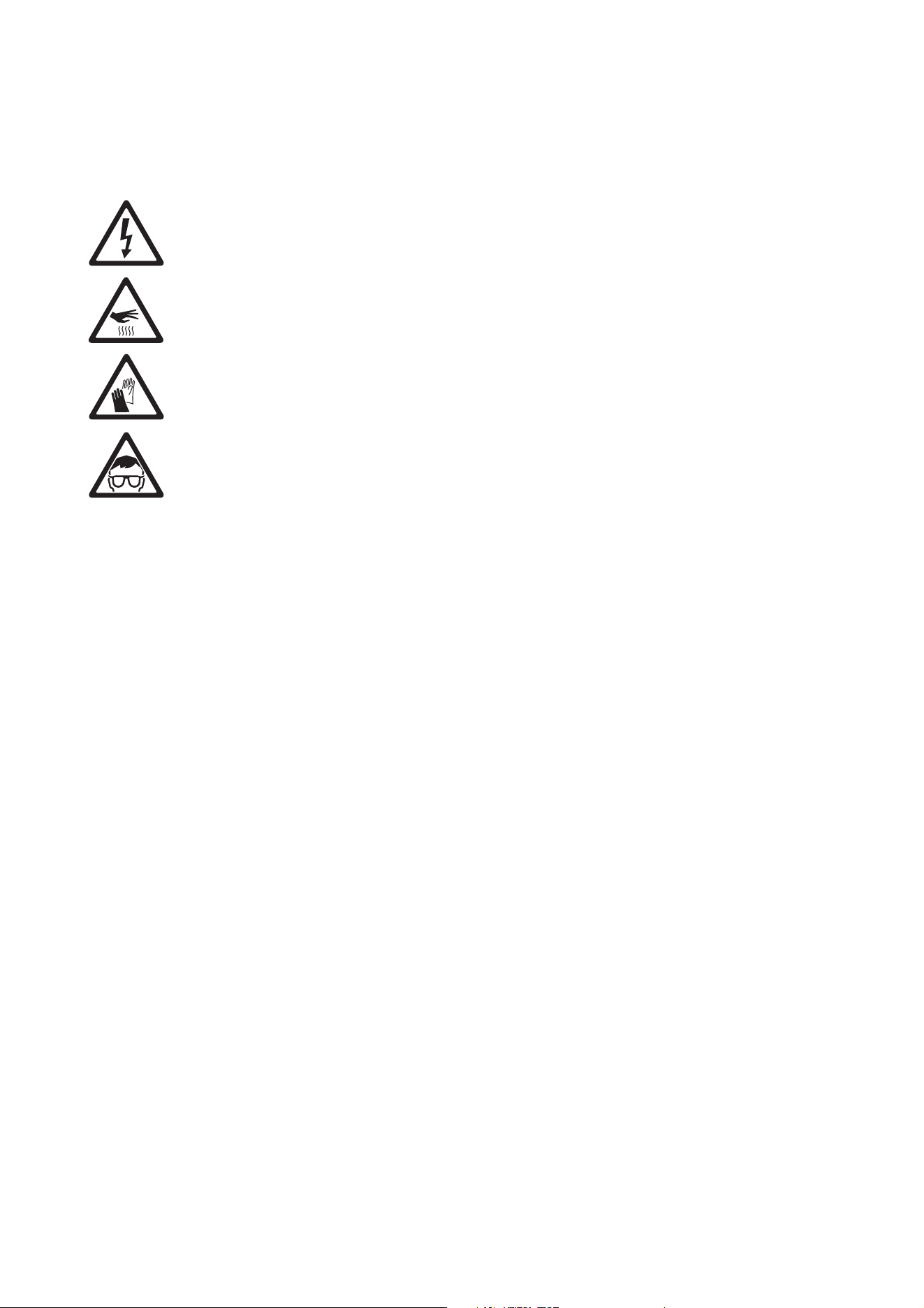
Warning! Read “Safety Information” on page 4 before servicing the MAC Quantum Profile.
Warning! Disconnect the fixture from AC mains power and allow to cool for at least 30 minutes
minutes before handling. Do not stare into the light output. Be prepared for the fixture to light and
move suddenly when connected to power.
Warning! The MAC Quantum Profile™ contains components that are accessible and live at high
voltage while the fixture is connected to power and that remain under tension for 30 minutes after
power is disconnected. The user may upload firmware, carry out cleaning, replace the head air
filters, open the top head cover and replace optical components as described below, following the
warnings given below, but any service operation (including opening the base of the fixture) that is
not described in this manual or in the fixture’s User Guide must be referred to Martin™, its approved
service agents, or trained and qualified personnel using the official Martin™ service documentation
for the MAC Quantum Profile.
Important! Excessive dust, smoke fluid, and particle buildup degrades performance, causes
overheating and will damage the fixture. Damage caused by inadequate cleaning or maintenance is
not covered by the product warranty.
Installation, on-site service and maintenance can be provided worldwide by the Martin Professional Global
Service organization and its approved agents, giving owners access to Martin’s expertise and product
knowledge in a partnership that will ensure the highest level of performance throughout the product’s
lifetime. Please contact your Martin™ supplier for details.
It is Martin™ policy to apply the strictest possible calibration procedures and use the best quality materials
available to ensure optimum performance and the longest possible component lifetimes. However, optical
components are subject to wear and tear over the life of the product, resulting in gradual changes in color
over many thousands of hours of use. The extent of wear and tear depends heavily on operating conditions
and environment, so it is impossible to specify precisely whether and to what extent performance will be
affected. However, you may eventually need to replace optical components if their characteristics are
affected by wear and tear after an extended period of use and if you require fixtures to perform within very
precise optical and color parameters.
Tilt lock
The tilt position of the head can be locked for service. See Figure 1 on page 6. Push the lock in towards the
yoke in one direction to lock the head and back in from the other side to unlock the head.
Important! Release the tilt lock before applying power to the fixture and before packing the fixture in its
flightcase.
Cleaning
Regular cleaning is very important for fixture life and performance. Buildup of dust, dirt, smoke particles, fog
fluid residues, etc. degrades the fixture’s light output and cooling ability.
Cleaning schedules for lighting fixtures vary greatly depending on the operating environment. It is therefore
impossible to specify precise cleaning intervals for the MAC Quantum Profile. Cooling fans suck in airborne
dust and smoke particles, and in extreme cases fixtures may require cleaning after surprisingly few hours of
operation. Environmental factors that may result in a need for frequent cleaning include:
• Use of smoke or fog machines.
• High airflow rates (near air conditioning vents, for example).
• Presence of cigarette smoke.
• Airborne dust (from stage effects, building structures and fittings or the natural environment at outdoor
events, for example).
Service and maintenance 13
If one or more of these factors is present, inspect fixtures within their first few hours of operation to see
whether cleaning is necessary. Check again at frequent intervals. This procedure will allow you to assess
cleaning requirements in your particular situation. If in doubt, consult your Martin dealer about a suitable
maintenance schedule.
Work in a clean, well lit area. Use gentle pressure only when cleaning. Do not use any product that contains
abrasives. Do not use solvents. Use care when cleaning optical components: surfaces are fragile and easily
scratched.
To clean the fixture:
1. Disconnect the fixture from power and allow it to cool for at least 30 minutes.
2. Vacuum or gently blow away dust and loose particles from the outside of the fixture and air vents with
low-pressure compressed air.
3. Clean the front glass on the front of the head by wiping gently with a soft, clean, lint-free cloth moistened
with a weak detergent solution.
4. If you need to clean glass optical components, follow the instructions in “Servicing optical components”
on page 14. Do not rub surfaces hard: lift particles off with a soft repeated press. Dry with a soft, clean,
lint-free cloth or low-pressure compressed air. Remove stuck particles with an unscented tissue or
cotton swab moistened with glass cleaner or distilled water.
5. Check that the fixture is dry and correctly assembled before reapplying power.
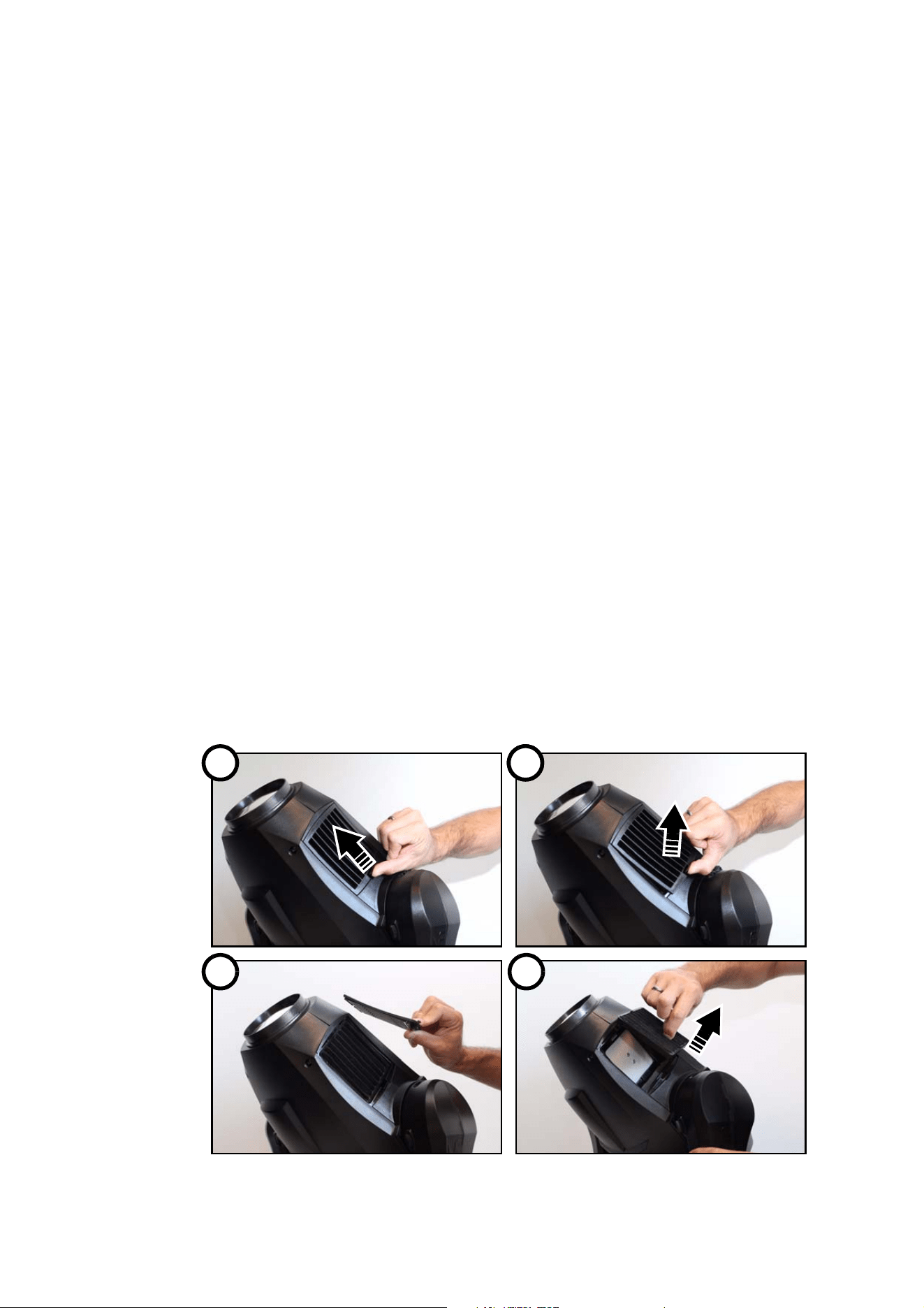
Replacing the head air filters
Free airflow through air filters is important for effective cooling and maximized performance and product life.
Air filters will therefore require periodical replacement. As with cleaning, air filter replacement intervals
depend on the environment the fixture is used in. Inspect air filters visually at regular intervals and replace
them if filters are visibly contaminated by dust, dirt, residue from atmospheric effects, etc.
Air filters for the MAC Quantum Profile are disposable items that must be replaced, not cleaned. New filters
are available from Martin™ suppliers by ordering P/N 50400765 ‘Head air filter, MAC Quantum Profile, set
of 12’. Two filters are required per fixture.
To service the head air filters:
1. Disconnect the fixture from power and allow components to cool for 30 minutes.
2. Position the head so that the air filter covers are accessible and apply the tilt lock (see Figure 1 on page
6).
3. See Figure 8. On both sides of the head, unclip the air filter covers and lift them off the head.
Figure 8: Releasing head air filter covers
1 A2
3 4
14 MAC Quantum Profile Safety and Installation Manual
4. Remove each air filter from the head and dispose of it. Do not try to clean or re-use a dirty air filter.
5. Place new air filters in their positions in the head, making sure that there is no gap for air to pass through
around the edges of the filters.
6. Hook the front end of each filter cover into the head and push the cover into the head until the clip in the
rear of the cover engages fully. Check that the covers are held securely.
7. Release the tilt lock before applying power or packing the MAC Quantum Profile in its flightcase.
Servicing optical components
Warning! Disconnect from power and allow to cool for 30 minutes before servicing the components
in the head.
Optical components have fragile coatings and are exposed to very high temperatures. Use only genuine
Martin™ parts. Handle and store components with care. Wear cotton gloves while handling them and keep
them perfectly clean to reduce the risk of heat damage.
Opening the head for service access
To open the head for access to the optical components:
1. Disconnect the fixture from power and allow to cool for 30 minutes.
2. Place the product on a suitable work surface.
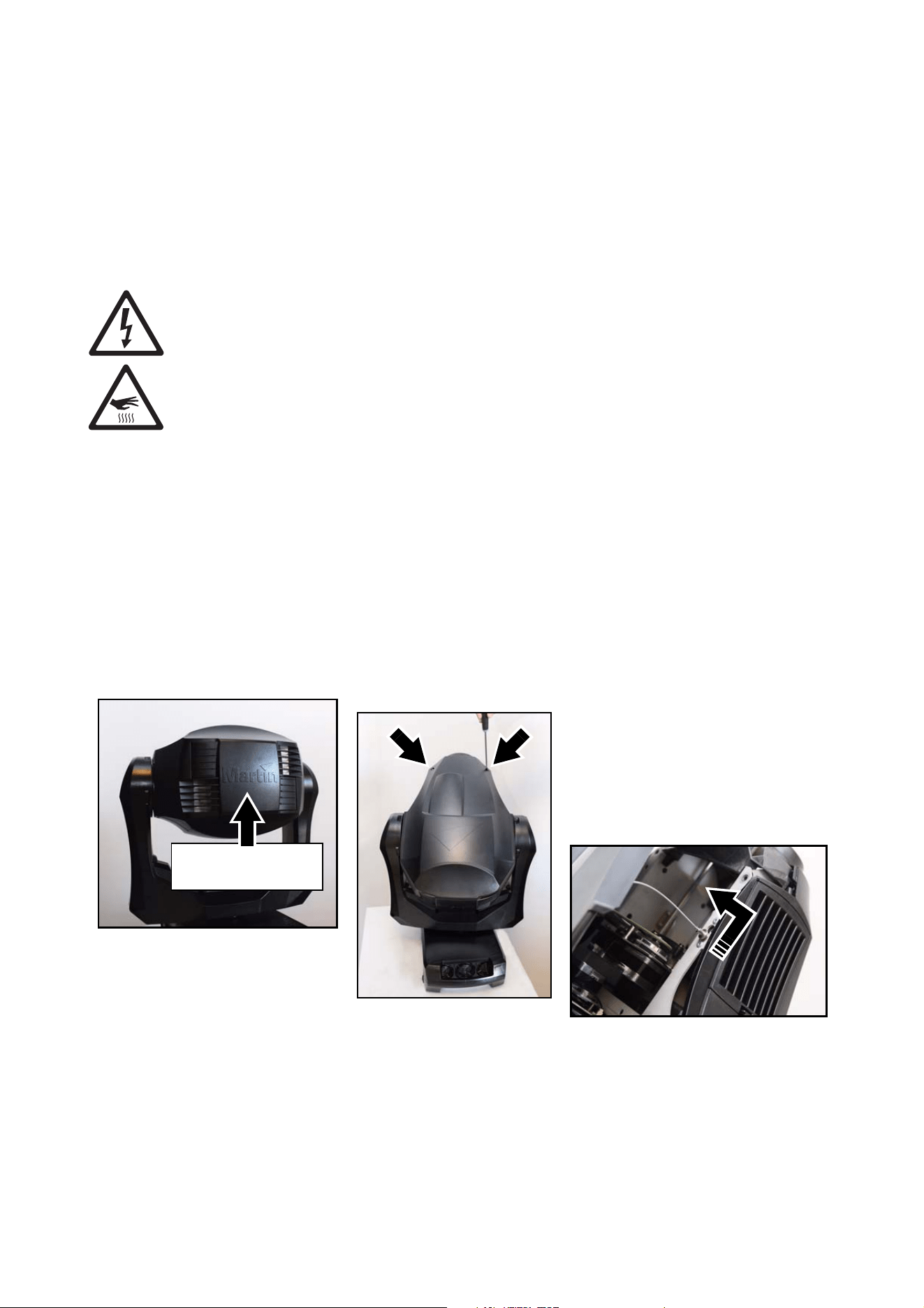
3. See Figure 9. Position the head so that the Martin logo on the back of the head is facing the right way up
and apply the tilt lock (see Figure 1 on page 6).
4. The user may remove the top head cover only. When the Martin™ logo on the back of the head is facing
the right way up, this cover is on the top of the head. Do not try to remove the other head cover. Loosen
the cover’s two Torx 25 retaining screws (arrowed) and lift the cover up from the head.
5. If required for easier access, release the head cover’s safety wire from its slot in the head chassis and
remove the head cover completely.
To close the head, follow the above steps in reverse order. Remember to release the tilt lock before
applying power or packing the MAC Quantum Profile in its flightcase.
Figure 9: Access to the head for service
Martin logo the right
way up
Service and maintenance 15
Removing the multi-module
You need to remove the multi-module from the head if you want to replace the static gobo wheel or if you
want easier access to the rotating gobo wheel.
To remove the multi-module:
1. Open the head as described above.
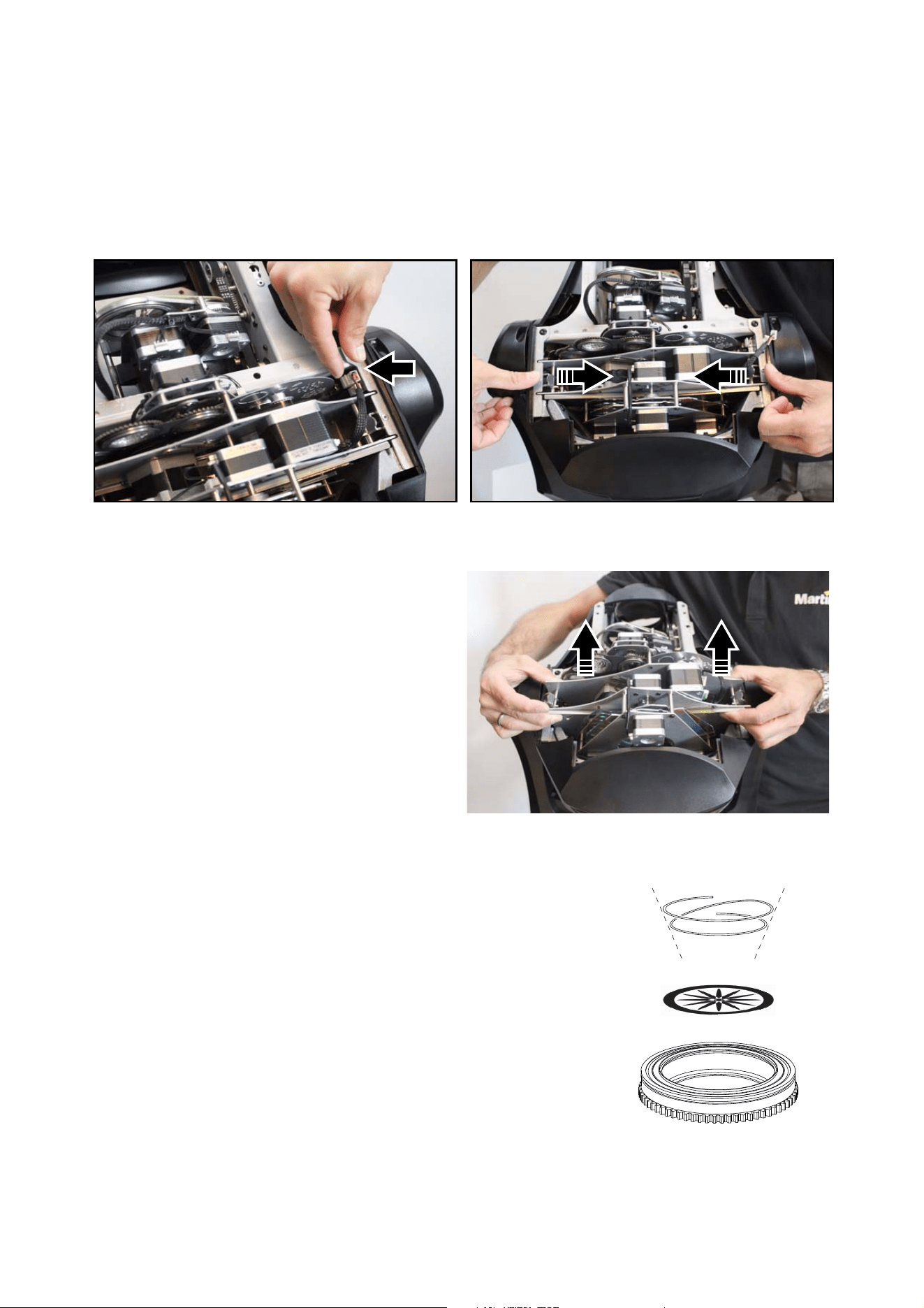
2. See Figure 10. Disconnect the two plugs (arrowed) on the right-hand side of the head, then push the two
multi-module latches in towards the centre of the multi-module.
3. See Figure 11. Lift the multi-module out
of the head and place it on a clean work
surface.
To reinstall the multi-module, follow the
above steps in the reverse order.
Handling and storing gobos
The MAC Quantum Profile uses specially-designed borosilicate
gobos with a heavy matted aluminum coating that require
particularly careful handling and storage.
The use of metal gobos in the MAC Quantum Profile is not
recommended.
Do not use gobos with dark coatings on any side, as these will
absorb heat – either directly from the lamp or reflected back from
other optical components – and will not be durable.
1. Store all gobos in a dust-free environment with approx. 50%
humidity.
2. Always use clean gloves when handling gobos.
3. Avoid touching the other gobos when taking out a gobo from the
rack: the sharp edge of one gobo can scratch the others.
4. Clean the coated side of gobos with dust and oil-free
compressed air only.
Figure 10: Releasing the multi-module
Figure 11: Removing the multi-module
Figure 12: Rotating gobo holder
16 MAC Quantum Profile Safety and Installation Manual
5. Clean the uncoated side of gobos with photographic quality lens-cleaner and optics cleaning tissues.
Use a repeated dabbing action rather than a rubbing action.
6. Avoid scratching coated and uncoated sides.
7. Never place a gobo with the coated side face-down on any surface.
8. Mount the gobo with the matted coating towards the lens.
Replacing a rotating gobo
To replace a rotating gobo:
1. Remove the top head cover as described above. If you want easier access, you can remove the
multi-module as described above, but this is not necessary.
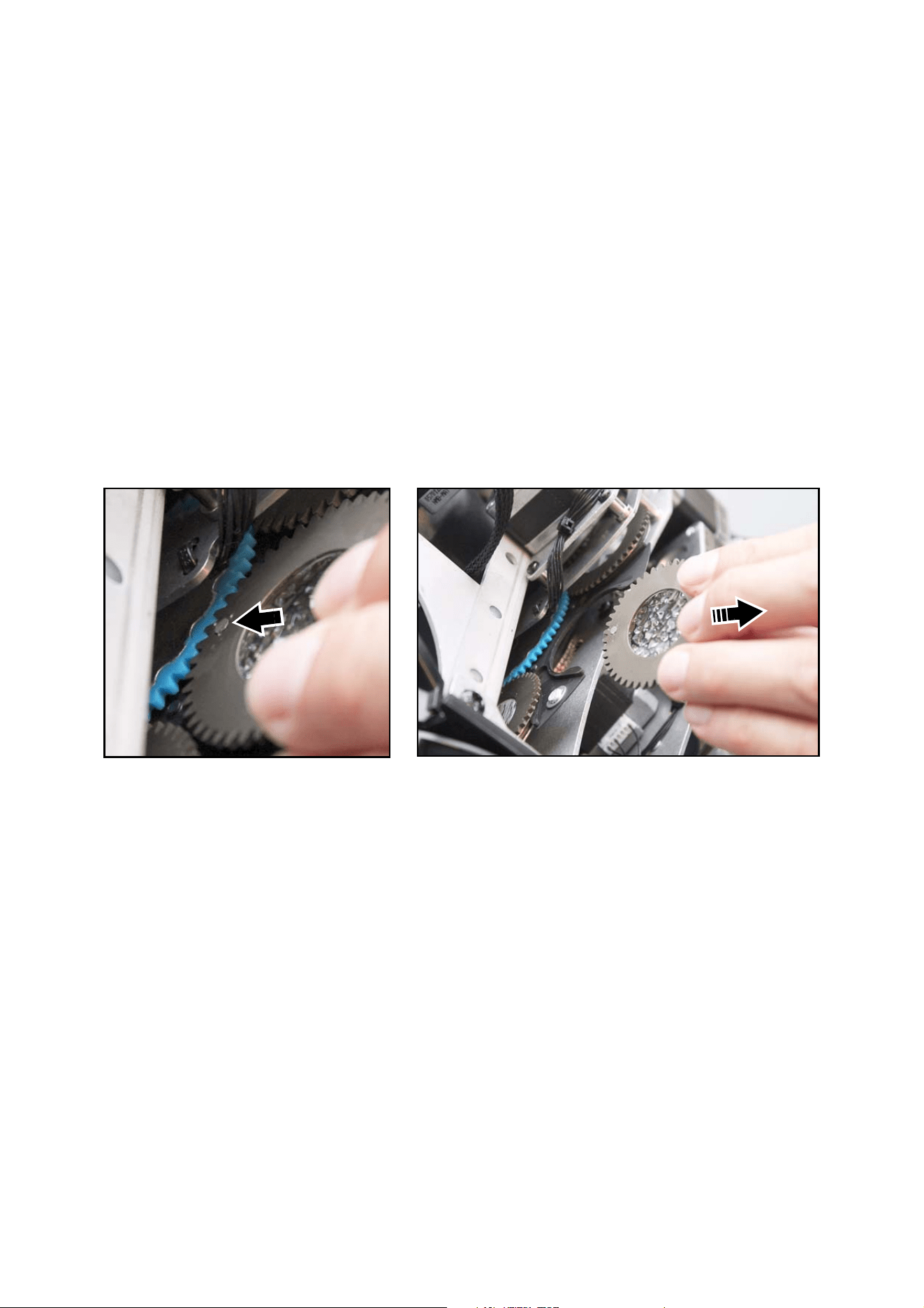
2. See Figure 13. Turn the rotating gobo wheel until the gobo you want to replace is easily accessible.
Avoid disturbing the gobo wheel for the rest of the procedure.
3. Rotate the gobo you want to replace until the magnet (arrowed) points towards a reference position
such as the centre of the gobo wheel. The magnets in all the goboholders will now point in this direction.
4. Holding the edge of the goboholder firmly, slide the goboholder out of its clip in the gobo wheel.
5. Check that the magnets in all the goboholders are still facing towards the reference point, then slide the
new gobo into its clip in the gobo wheel with the magnet facing towards the reference point until it is held
securely.
6. Check that the gobo rotates correctly.
7. When service work is finished, reinstall the multi-module (if you removed it) and the top head cover as
described above.
Figure 13: Removing a rotating gobo
Service and maintenance 17
Replacing the static gobo wheel
To replace the static gobo wheel:
1. Remove the top head cover and remove the multi-module as described above.
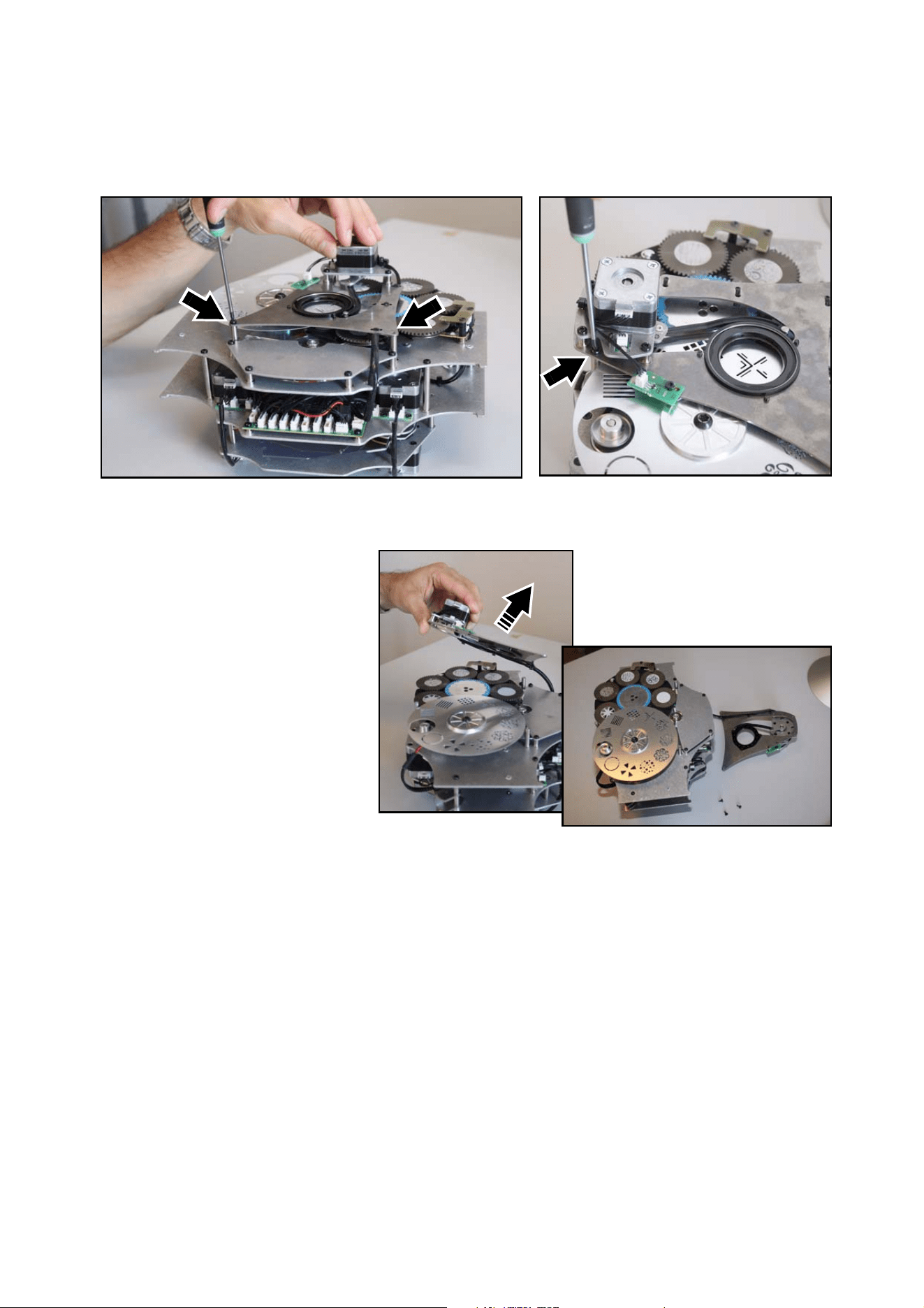
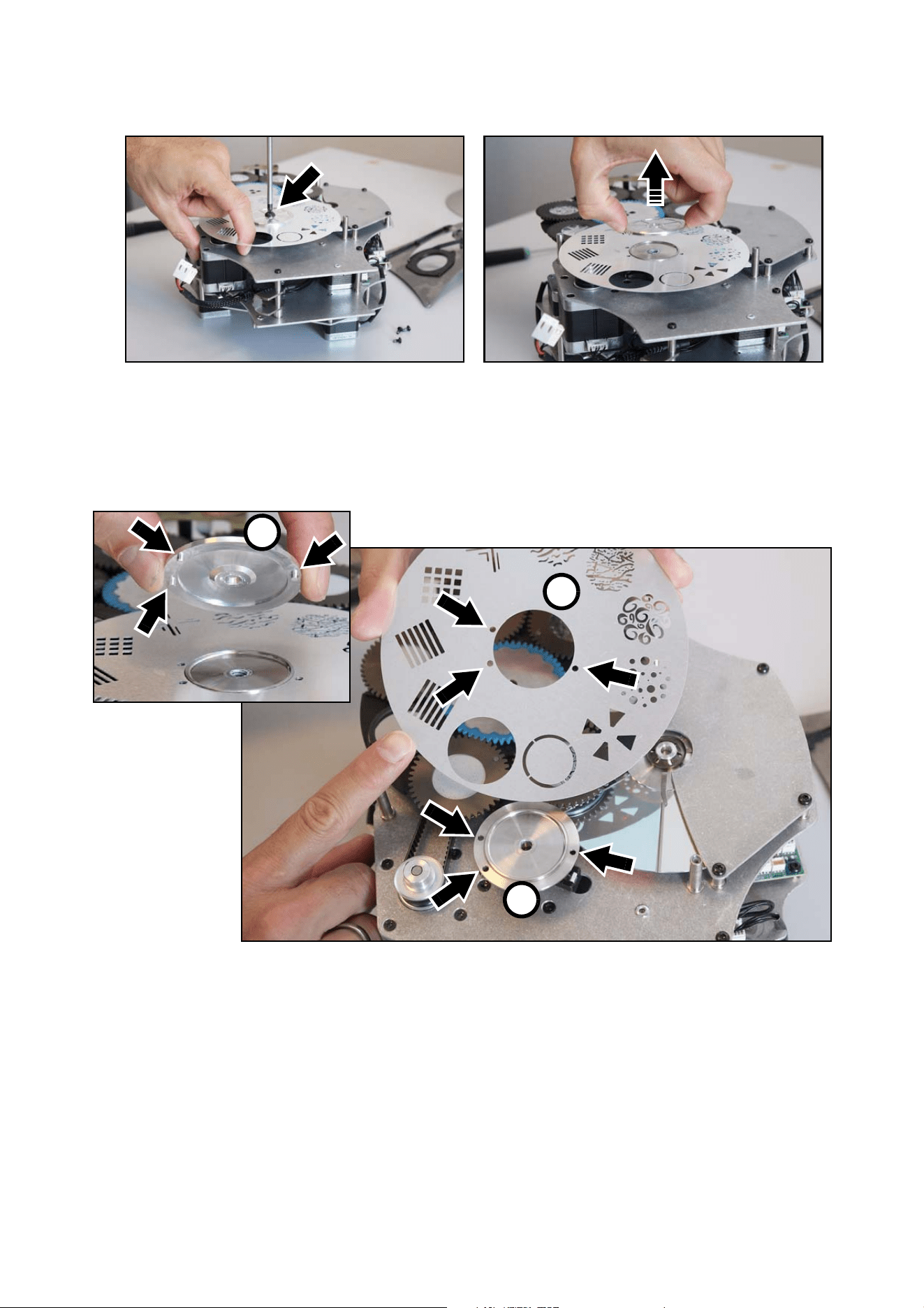
2. See Figure 14. Remove the three Torx 10 retaining screws (arrowed) from the iris unit.
3. See Figure 15. You do not
need to disconnect the iris
unit wireset. Lift the iris
unit off the multi-module
and place it beside the
module. You now have
access to the static gobo
wheel.
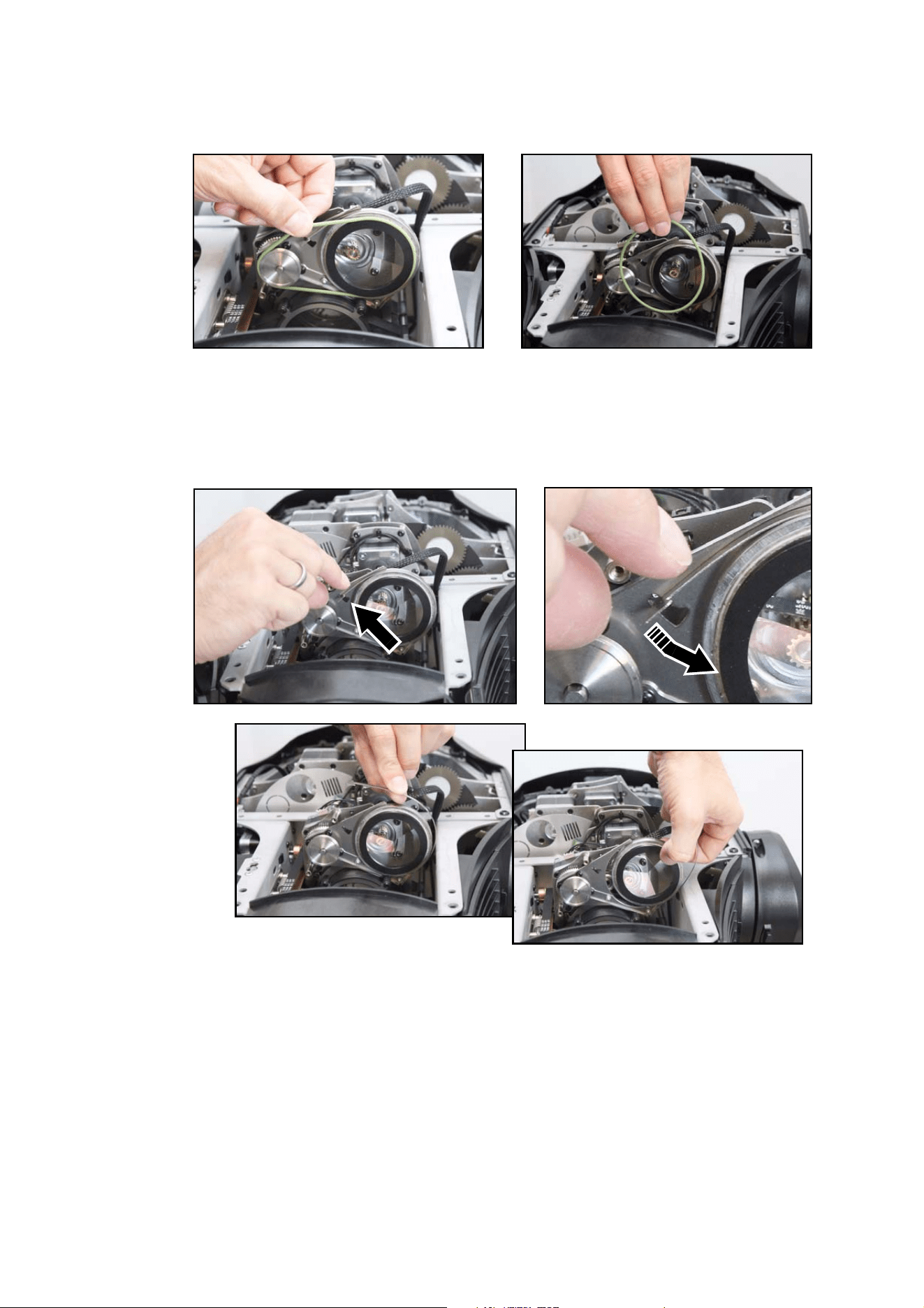
4. The static gobo wheel is delicate. Do not apply any pressure that might bend it. See Figure 16. Holding
the wheel with a finger through the open slot to prevent it rotating, remove the Torx 30 screw from the
Figure 14: Releasing the iris unit
Figure 15: Moving the iris unit for access
18 MAC Quantum Profile Safety and Installation Manual
centre of the wheel and lift the alloy retaining disk off the wheel. You can now lift the static gobo wheel
off its mount.
5. See Figure 17. When installing a static gobo wheel, note the positions of the three alignment pins in the
alloy retaining disk A. The pins must line up with three holes in the gobo wheel B and three holes in the
gobo wheel mount C. The alignment pins ensure that the gobo wheel can only be mounted in the correct
position and facing in the correct direction.
6. When service work is finished, reinstall the multi-module and top head cover as described above.
Figure 16: Releasing the static gobo wheel
Figure 17: Static gobo wheel alignment
A
B
C
Service and maintenance 19
Replacing the prism
1. Remove the top head cover as described above.
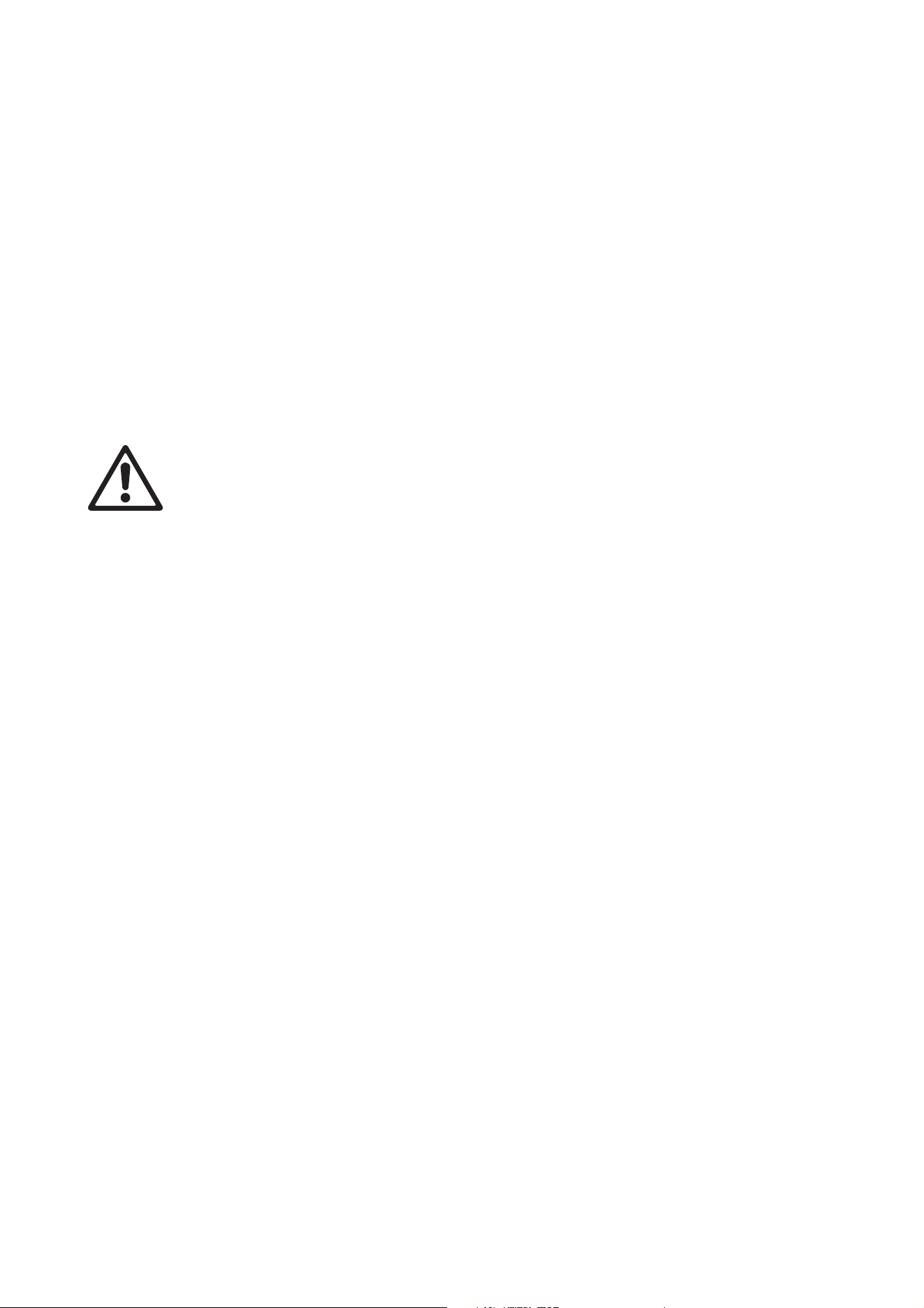
2. See Figure 18. Lift the prism drivebelt off its pulleys. Do not stretch the drivebelt any more than
necessary.
3. See Figure 19. Push the end of the prism retaining clip down towards the prism until you can release it
from its locking slot. Lift the clip up and away from the prism.
4. Holding the prism by the edge, slide it out of the rotating prism unit.
Figure 18: Removing the prism drivebelt
Figure 19: Removing the rotating prism

20 MAC Quantum Profile Safety and Installation Manual
5. To install a prism, follow the above
procedure in reverse. See Figure 20.
Before you install the prism drivebelt,
check that the prism is correctly
located as shown.
6. When service work is finished,
reinstall the top head cover as
described above.
Color wheel service
Color wheel replacement must be carried out by an authorized Martin™ Service agent with Martin™ service
documentation.
Lubrication
The MAC Quantum Profile does not require lubrication under normal circumstances. Moving parts can be
checked and a long-lasting teflon-based grease reapplied by a Martin™ Service agent if necessary.
Figure 20: Correct prism location
Using the fixture 21
Using the fixture
Before using the fixture, download and read the latest version of the MAC Quantum Profile User Guide from
the MAC Quantum Profile Product Support page on the Martin website at www.martin.com. The User Guide
contains details of:
• The effects available in the fixture.
• The control options available using DMX.
• The setup, monitoring and control options available using the onboard control and display panel.
• RDM (Remote Device Management) compatibility.
• Software service functions.
Applying power
Warning! Before applying power to the fixture:
• Carefully review the safety information starting on page 4.
• Check that the installation is safe and secure.
• Check that the base is fastened securely so that the torque reaction when the head is panned will
not cause the base to move.
• Check that the head tilt lock is released (see “Tilt lock” on page 6).
To apply power, set the power on/off switch on the base to the “I” position.
22 MAC Quantum Profile Safety and Installation Manual
Troubleshooting
Problem Probable cause(s) Remedy
One or more of the fixtures is
completely dead.
No power to fixture.
Check that power is switched on and cables are
plugged in.
Fuse blown or internal fault.
Contact Martin™ Service or authorized service
partner. Do not remove base or yoke covers,
attempt to replace a fuse or carry out any repairs or
service that are not described in this Safety and
Installation Manual unless you have both
authorization from Martin™ and official Martin™
service documentation.
Fixtures reset correctly but
respond erratically or not at all
to the controller.
Bad data link.
Inspect connections and cables. Correct poor
connections. Repair or replace damaged cables.
Data link not terminated.
Insert DMX termination plug in data output socket
of the last MAC Quantum Profile on the data link.
Incorrect addressing of fixtures. Check fixture address and protocol settings.
One of the fixtures is defective and is
disturbing data transmission on the link.
Unplug the XLR in and out connectors and connect
them directly together to bypass one fixture at a
time until normal operation is regained. Have the
fixture serviced by a qualified technician.
Timeout error after fixture reset. Effect requires mechanical adjustment.
Contact Martin™ Service or authorized Martin™
service partner.
Mechanical effect loses
position.
Mechanical train requires cleaning,
adjustment, or lubrication.
Contact Martin™ Service or authorized Martin™
service partner.
Light output cuts out
intermittently.
Fixture is too hot.
Allow fixture to cool.
Clean fixture.
Reduce ambient temperature.
Table 2: Troubleshooting

Specifications 23
Specifications
Physical
Length . . . . . . . . . . . . . . . . . . . . . . . . . . . . . . . . . . . . . . . . . . . . . . . . . . . . . . . . . . . . . . . .452 mm (17.8 in.)
Width (across yoke) . . . . . . . . . . . . . . . . . . . . . . . . . . . . . . . . . . . . . . . . . . . . . . . . . . . . . .431 mm (17.0 in.)
Height (maximum) . . . . . . . . . . . . . . . . . . . . . . . . . . . . . . . . . . . . . . . . . . . . . . . . . . . . . . .648 mm (25.5 in.)
Height (head straight up) . . . . . . . . . . . . . . . . . . . . . . . . . . . . . . . . . . . . . . . . . . . . . . . . . .642 mm (25.3 in.)
Weight . . . . . . . . . . . . . . . . . . . . . . . . . . . . . . . . . . . . . . . . . . . . . . . . . . . . . . . . . . . . . . . 22.4 kg (49.4 lbs.)
Minimum center-to-center distance in side-by-side installation . . . . . . . . . . . . . . . . . . . . .540 mm (21.3 in.)
Dynamic Effects
Color mixing. . . . . . . . . . . . . . . . . . . . . . . . . . . . . . . . . . . . . . . . . . . CMY, independently variable 0 - 100%
Color wheel . . . . . . . . . . . . . . . . . . . . . . . . . . . . . . . . . . . . . . . . . . . . . . . . . . . . . . . 6 color filters plus open
Rotating gobo wheel . . . . . . . . . . . . . . . . . . . . . . . . . . . . . . . . . . . . . . 6 interchangeable gobos plus open,
. . . . . . . . . . . . . . . . . . . . . . . .wheel rotation, gobo rotation, indexing and shake
Static gobo wheel . . . . . . . . . . . . . . . . . . . . . . . . 10 gobos plus open, wheel indexing, rotation and shake
Beam effects . . . . . . . . . . . . . . . . . . . . . . . . . . . . . . . . . . . . . . . . . . . . . . . . . . . . Rotating three-facet prism
Zoom . . . . . . . . . . . . . . . . . . . . . . . . . . . . . . . . . . . . . . . . . . . . . . . . . . . . . . . . . . . . . . . . . . . 12° - 36° (1:3)
Focus . . . . . . . . . . . . . . . . . . . . . . . . . . . . . . . . . . . . . . . . . . . . . . . . . . Motorized, with zoom-focus tracking
Iris . . . . . . . . . . . . . . . . . . . . . . . . . . . . . . . . . . . . . . . . . . . . . . . . . . . . . . . . . . . . . . 0 - 100%, pulse effects
Shutter effect . . . . . . . . . . . . . . . . . . . . . . . . . . . Electronic, with variable speed regular and random strobe
Electronic dimming . . . . . . . . . . . . . . . . . . . . . . . . . . . . . . . . . . . . . . . . . . . . . .Four dimming curve options
Pan. . . . . . . . . . . . . . . . . . . . . . . . . . . . . . . . . . . . . . . . . . . . . . . . . . . . . . . . . . . . . . . . . . . . . . . . . . . . . 540°
Tilt . . . . . . . . . . . . . . . . . . . . . . . . . . . . . . . . . . . . . . . . . . . . . . . . . . . . . . . . . . . . . . . . . . . . . . . . . . . . . 268°
Pan and tilt speed . . . . . . . . . . . . . . . . . . . . . . . . . . . . . . . .Adjustable via onboard control panel and DMX
Control and Programming
Control system. . . . . . . . . . . . . . . . . . . . . . . . . . . . . . . . . . . . . . . . . . . . . . . . . . . . . . . . . . . . . . . . . . . .DMX
RDM. . . . . . . . . . . . . . . . . . . . . . . . . . . . . . . . . . . . . . . . . . . . . . . . . . . . . . . . . . . . . . . . . . . . . Implemented
Control resolution. . . . . . . . . 8-bit, with 16-bit control of dimming, gobo indexing, zoom, focus, pan and tilt
DMX channels . . . . . . . . . . . . . . . . . . . . . . . . . . . . . . . . . . . . . . . . . . . . . . . . . . . . . . . . . . . . . . . . . . . 19/27
Setting and addressing . . . . . . . . . . . . . . . . . . . . . . . . . . . . . . . . Control panel with backlit graphic display
DMX compliance . . . . . . . . . . . . . . . . . . . . . . . . . . . . . . . . . . . . . . . . . . . . . . . . . . . . . . . USITT DMX512-A
RDM compliance . . . . . . . . . . . . . . . . . . . . . . . . . . . . . . . . . . . . . . . . . . . . . . . . . . . . . . . ANSI/ESTA E1.20
Transceiver. . . . . . . . . . . . . . . . . . . . . . . . . . . . . . . . . . . . . . . . . . . . . . . . . . . . . . . . . . . . . . . . . . . . .RS-485
Fixture software update . . . . . . . . . . . . . . . . . . . . . . . . . . . Direct with USB memory stick or over DMX link
. . . . . . . . . . . . . . . . . . . . . . . . . . . . .with Martin™ USB Duo DMX Interface Box
Optics
Light source . . . . . . . . . . . . . . . . . . . . . . . . . . . . . . . . . . . . . . . . . . . . . . . . . . . . . . . . . . .475 W LED engine
Minimum LED lifetime . . . . . . . . . . . . . . . . . . . . . . . . . . . . . . . . . 50 000 hours (to >70% luminous output)*
*Figure obtained under manufacturer´s test conditions
Construction
Color . . . . . . . . . . . . . . . . . . . . . . . . . . . . . . . . . . . . . . . . . . . . . . . . . . . . . . . . . . . . . . . . . . . . . . . . . . Black
Housing . . . . . . . . . . . . . . . . . . . . . . . . . . . . . . . . . . . . . . . . . . . High-impact flame-retardant thermoplastic
Protection rating. . . . . . . . . . . . . . . . . . . . . . . . . . . . . . . . . . . . . . . . . . . . . . . . . . . . . . . . . . . . . . . . . . . IP20
Installation
Mounting points . . . . . . . . . . . . . . . . . . . . . . . . . . . . . . . . . . . . . . . . . . . . . . . . . . . . 4 pairs of 1/4-turn locks
Location . . . . . . . . . . . . . . . . . . . . . . . . . . . . . . . . Indoor use only, must be fastened to surface or structure
Orientation . . . . . . . . . . . . . . . . . . . . . . . . . . . . . . . . . . . . . . . . . . . . . . . . . . . . . . . . . . . . . . . . . . . . . . . .Any
Minimum distance to combustible materials . . . . . . . . . . . . . . . . . . . . . . . . . . . . . . . . . . . . . . . 0.2 m (8 in.)
Minimum distance to illuminated surfaces . . . . . . . . . . . . . . . . . . . . . . . . . . . . . . . . . . . . . . . . 2.0 m (6.6 ft.)
Connections
AC power input . . . . . . . . . . . . . . . . . . . Neutrik PowerCon socket (accepts Neutrik NAC3FCA connector)
DMX and RDM data in/out. . . . . . . . . . . . . . . . . . . . . . . . . . . . . . . . . . . . . . . . . . . . . . . . .5-pin locking XLR

24 MAC Quantum Profile Safety and Installation Manual
Electrical
AC power . . . . . . . . . . . . . . . . . . . . . . . . . . . . . . . . . . . . . . . . . . . . . . . . . . . . 120-240 V nominal, 50/60 Hz
Power supply unit. . . . . . . . . . . . . . . . . . . . . . . . . . . . . . . . . . . . . . . . . Auto-ranging electronic switch mode
Maximum power consumption . . . . . . . . . . . . . . . . . . . . . . . . . . . . . . . . . . . . . . . . . . . . . . . . . . . . . . .750 W
Typical power consumption, all effects static, zero light output . . . . . . . . . . . . . . . . . . . . . . . . Approx. 50 W
Typical half-cycle RMS inrush current . . . . . . . . . . . . . . . . . . . . . . . . . . . . . . . . . . . . . . . . . . . . . . . . .10.3 A
Typical Power and Current
120 V, 60 Hz. . . . . . . . . . . . . . . . . . . . . . . . . . . . . . . . . . . . . . . . . . . . . . . . . . . . . . . 4.8 A, 576 W, PF >0.95
208 V, 60 Hz. . . . . . . . . . . . . . . . . . . . . . . . . . . . . . . . . . . . . . . . . . . . . . . . . . . . . . . 2.8 A, 568 W, PF >0.95
230 V, 50 Hz. . . . . . . . . . . . . . . . . . . . . . . . . . . . . . . . . . . . . . . . . . . . . . . . . . . . . . . 2.5 A, 565 W, PF >0.95
240 V, 50 Hz. . . . . . . . . . . . . . . . . . . . . . . . . . . . . . . . . . . . . . . . . . . . . . . . . . . . . . . 2.4 A, 565 W, PF >0.95
Measurements made at nominal voltage with all LEDs at full intensity. Allow for a deviation of +/- 10%.
PF = power factor
Thermal
Cooling. . . . . . . . . . . . . . . . . . . . . . . . Forced air (temperature-regulated, low noise, user-definable levels)
Maximum ambient temperature (Ta max.) . . . . . . . . . . . . . . . . . . . . . . . . . . . . . . . . . . . . . . . 40° C (104° F)
Minimum ambient temperature (Ta min.) . . . . . . . . . . . . . . . . . . . . . . . . . . . . . . . . . . . . . . . . . . 5° C (41° F)
Total heat dissipation (calculated, +/- 10%) . . . . . . . . . . . . . . . . . . . . . . . . . . . . . . . . . . . . . . . 2000 BTU/hr.
Approvals
EU safety . . . . . . . . . . . . . . . . . . . . . . . . . . . . EN 60598-2-17 (EN 60598-1), EN 62471
EU EMC . . . . . . . . . . . . . . . . . . . . . . . . . . . . . . . . . .EN 55015, EN 55032, EN 55103-2,
EN 61000-3-2, EN 61000-3-3, EN 61547
US safety (pending) . . . . . . . . . . . . . . . . . . . . . . . . . . . . . . . . . . . . . . . . . . . . . . UL 1573
US EMC . . . . . . . . . . . . . . . . . . . . . . . . . . . . . . . . . . . . . . . . . . . . . FCC Part 15 Class A
Canadian safety (pending) . . . . . . . . . . . . . CSA C22.2 No. E598-2-17 (CSA E60598-1)
Canadian EMC. . . . . . . . . . . . . . . . . . . . . . . . . . . . . . . . . . . . . . . . . . ICES-003 Class A
Australia/NZ . . . . . . . . . . . . . . . . . . . . . . . . . . . . . . . . . . . . . . . . . . . . . . . C-TICK N4241
Included Items
Safety and Installation Manual
Two omega brackets with quarter-turn fasteners
Accessories
3 m power cable, 12 AWG, SJT, with PowerCon NAC3FCA power input connector . . . . . . . P/N 11541503
Neutrik PowerCon NAC3FCA power input connector, cable mount, blue . . . . . . . . . . . . . . . P/N 05342804
Head air filter, MAC Quantum Profile, set of 10. . . . . . . . . . . . . . . . . . . . . . . . . . . . . . . . . . . P/N 50400765
G-clamp . . . . . . . . . . . . . . . . . . . . . . . . . . . . . . . . . . . . . . . . . . . . . . . . . . . . . . . . . . . . . . . . . P/N 91602003
Half-coupler clamp. . . . . . . . . . . . . . . . . . . . . . . . . . . . . . . . . . . . . . . . . . . . . . . . . . . . . . . . . P/N 91602005
Quick trigger clamp . . . . . . . . . . . . . . . . . . . . . . . . . . . . . . . . . . . . . . . . . . . . . . . . . . . . . . . . P/N 91602007
Safety cable, safe working load 50 kg . . . . . . . . . . . . . . . . . . . . . . . . . . . . . . . . . . . . . . . . . . P/N 91604003
Flightcase for 2 x MAC Quantum™ . . . . . . . . . . . . . . . . . . . . . . . . . . . . . . . . . . . . . . . . . . . . P/N 91510210
Related Items
Martin USB Duo™ DMX Interface Box . . . . . . . . . . . . . . . . . . . . . . . . . . . . . . . . . . . . . . . . . P/N 90703010
Martin RDM 5.5 Splitter™ . . . . . . . . . . . . . . . . . . . . . . . . . . . . . . . . . . . . . . . . . . . . . . . . . . . P/N 90758150
Ordering Information
MAC Quantum Profile™ in cardboard box. . . . . . . . . . . . . . . . . . . . . . . . . . . . . . . . . . . . . . . P/N 90240000
MAC Quantum Profile™ in 2-unit flightcase . . . . . . . . . . . . . . . . . . . . . . . . . . . . . . . . . . . . . P/N 90240010
Specifications subject to change without notice. For the latest product specifications including photometric
data, see www.martin.com
Photobiological Safety Warning
The label shown on the right is displayed on this product. If it becomes difficult or
impossible to read, it must be replaced using the illustration on the right to
reproduce a new label.
FCC Compliance
This device complies with Part 15, Class A, of the FCC Rules. Operation is subject to the following two conditions: (1) This device may not
cause harmful interference, and (2) this device must accept any interference received, including interference that may cause undesired
operation.
Canadian Interference-Causing Equipment Regulations - Règlement sur le Matériel Brouilleur du Canada
This Class A digital apparatus meets all requirements of the Canadian Interference-Causing Equipment Regulations.
Cet appareil numérique de la classe A respecte toutes les exigences du Règlement sur le Matériel Brouilleur du Canada.
Intellectual Property Rights
MAC Quantum™ products are covered by one or more of these patents:
CNZL200810128720.0; CZ17567; DK177579; EP1958483; EP2058586; US7,498,756; US7,703,948; US7,893,633; US7,905,630;
US8,482,226; US8,708,535; US8,770,762;
and/or one or more of these patent applications:
BR1120120270362; BR1120120270370; BR1120120270389; CN201180014884.0; CN201380004370; CNPA201370747;
DKPA201370715; DKPA201370745; DKPA201370746; DKPA201470172; DKPA201470409; EP13763923.3; JP2013-505332;
JP2013-505333; JP2013-505334; RU2012144005; RU2012144006; RU2012144007; US13/991,435; US14/342,105;
US14/362,457;
and/or one or more of these designs:
CN201430042777.5; CN201430200783.9; CNZL201430042909.4; CNZL201430043080.X; EU002418756; EU002422204;
EU002489856; US29/484171; US29/484173; US29/484179; US29/494964;
and/or one or more other intellectual property rights, including one or more intellectual property rights listed on www.martin.com/ipr
Disposing of this product
Martin™ products are supplied in compliance with Directive 2012/19/EC of the European Parliament and of the
Council of the European Union on WEEE (Waste Electrical and Electronic Equipment), where applicable.
Help preserve the environment! Ensure that this product is recycled at the end of its life. Your supplier can give details
of local arrangements for the disposal of Martin products.
This product contains a lithium battery that must be replaced by an authorized Martin™ service agent only. Ensure that
it is disposed of correctly and responsibly by an authorized recycling or waste disposal center at the end of its life.
Where applicable, Martin™ participates in schemes whose aim is to ensure that local recycling and/or waste disposal
centers accept batteries from Martin™ products.
RISK GROUP 2
CAUTION
Possibly hazardous
optical radiation emitted from this
product.
Do not stare at operating lamp.
May be harmful to the eyes.



www.martin.com • Olof Palmes Allé 18 • 8200 Aarhus N • Denmark
Tel: +45 8740 0000 • Fax +45 8740 0010