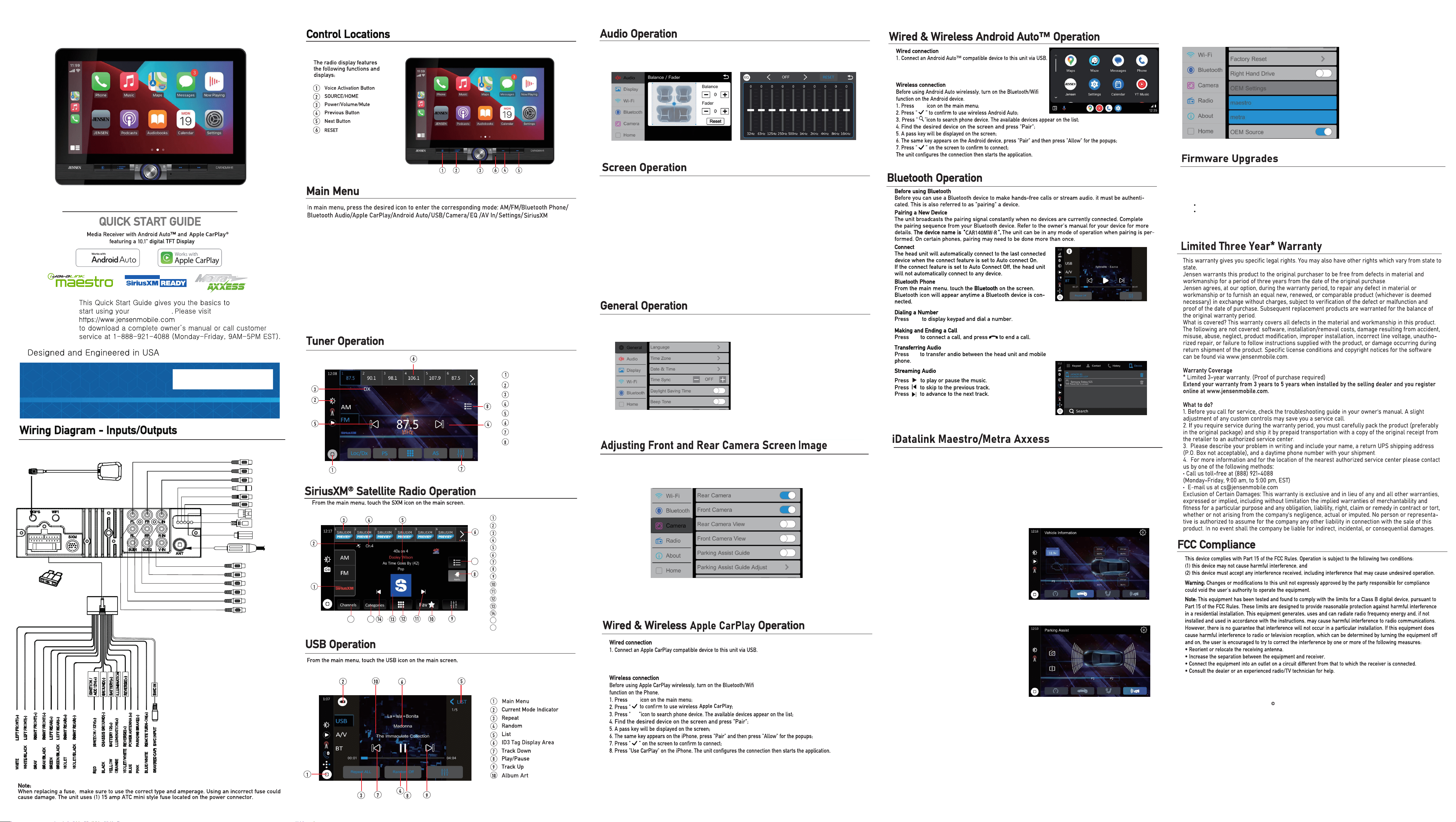
Press the Function icon in the Settings menu to access the Time Zone,
Date and Time and other radio Settings.
Select from the below 3 icons in the Settings menu to select between Balance, Fader and Time
Alignment Settings, EQ Presets and 10-Band EQ Settings or Surround Settings.
www.jensenmobile.com
2025 Namsung America Inc. All rights reserved.
NSC1225-V01
Main Menu
Dimmer
Local/Distance
Seek Tune Up
Seek Tune Down
Preset Stations
Settings
EQ
CAR140MW-R
if your front or rear cameras appear to have a reversed image on the radio's display, go into the
Camera section in the Settings menu to reverse the image of the camera. To do this, toggle the "Rear
Camera View Reverse" or "Front Camera View Reverse" function to correct the viewing angle of the
camera(s)
CAR140MW-R
15A
15AMP ATC REPLACEMENT FUSE
Note: Works for Apple CarPlay
and Android Auto only.
White
Front Left Preamp Output
Front Right Preamp Output
Left audio Input
External MIC Input
Front Camera Input
Rear Camera Input
Apple CarPlay
Android Auto
Playback/Charging
MAESTRO
Yellow
Red
Blue
Red
Blue
White
Right Audio Input
SUB-OUT2
Rear Right Preamp Output
SUB-OUT1
Rear Left Preamp Output
White
Red
Radio Antenna
GPS ANT
Video Input
This Jensen receiver connects with a compatible Maestro & Metra Axxess programmable interface
(optional, purchased separately*), allowing the unit to display OEM features and functions such as Vehicle
Info, Parking Assistance, and Climate Control, as well as retaining other capabilities which could include
steering wheel controls and voice commands.The functions that are displayed are dependent on what is
available on your specific vehicle.
*Website link: https://www.idatalinkmaestro.com/en
*Website link: https://www.axxessinterfaces.com
Press the OEM Setting to access the Maestro & Metra Axxess function.
Gauges screen
Vehicle Information screen
Climate Control screen
Parking Assist
Band Selector
Satellite Strength
BAND Presets 1~6
Channel Info
File Information
Quick Select Bands
Additional Options
Favorites Alert
Direct Equalizer
Favorites Manager
Next
Direct Channel Entry
Channel / Album Artwork
Previous
Category Manager
Channel Manager
15
16
Press the Display icon in the Settings menu to access the Brightness, Contrast,
Button Illumination Colors and Wallpaper Settings.
The outer screen is lined with color-changing illumination for customization options.
Use the Ambient Light ON/OFF switch to turn the ambient light mode on and off.
When the Ambient Light Animation is on, it automatically changes six colors; when it is off,
the user can manually select one of the six colors.
If a product or software update becomes available, you may find these updates on our website under your
product model number.
Please go to www.jensenmobile.com to check for new updates.
Updates can be completed with a user supplied USB drive, typically 8GB or 16GB in size from one of the below
recommended manufacturers:
SanDisk, Kingston, PNY, Samsung, Corsair or Verbatim.
These are readily available online or at most retail locations that sell electronics.
The drive needs to support USB 2.0 or faster transfer speeds. Older version USB 1.0 is not compatible.
Format the drive using the FAT32 file system.
15
16
7
2. The Android Auto home screen appears.
3. If your phone is connected to USB, Press the Android Auto icon.
2. The Apple CarPlay home screen appears.
3. If your phone is connected to USB, Press the Apple CarPlay icon.
www.jensenmobile.com
2025 Namsung America Inc. All rights reserved.
NSC1225-V01
Si sus cámaras delanteras o traseras parecen tener una imagen invertida en la pantalla de la radio, vaya a
Cámara sección en el menú Configuración para invertir la imagen de la cámara. Para hacer esto, active la
opción "Cámara trasera Función Ver reversa" o "Vista reversa de cámara frontal" para corregir el ángulo
de visión de la(s) cámara(s).
CAR140MW-R
15A
Nota: Works for Apple CarPlay
and Android Auto only.
Apple CarPlay
Android Auto
MAESTRO
Reproducción/ Carga
GPS ANT
Apple CarPlay
®
Este receptor Jensen se conecta con una interfaz programable Maestro & Metra Axxess compatible
(opcional, comprada por separado*), lo que permite que la unidad muestre características y funciones
OEM como información del vehículo, asistencia de estacionamiento y control de clima, además de
conservar otras capacidades que podrían incluir la dirección. Controles en el volante y comandos de voz.
Las funciones que se muestran dependen de lo que esté disponible en su vehículo específico.
*Enlace al sitio web: https://www.idatalinkmaestro.com/en
*Enlace al sitio web: https://www.axxessinterfaces.com
Presione la configuración OEM para acceder a la función Maestro & Metra Axxess.
Pantalla de indicadores
Pantalla de información del vehículo
Pantalla de control de clima
Pantalla de asistencia de estacionamiento
Selector de banda
Fuerza del satélite
Preajustes de BANDA 1~6
Información del canal
Informacion del archivo
Bandas de selección rápida
Opciones adicionales
Alerta de favoritos
Ecualizador directo
Administrador de favoritos
Próximo
Entrada directa al canal
Carátula del canal/álbum
Anterior
Gerente de categoria
Gerente de Canal
15
16
CAR140MW-R
La pantalla exterior está revestida con iluminación que cambia de color para ofrecer opciones de
personalización.
Utilice el interruptor de encendido/apagado de la luz ambiental para activar o desactivar el modo de luz
ambiental.
Cuando la animación de luz ambiental está activada, cambia automáticamente seis colores; cuando está
desactivada, el usuario puede seleccionar manualmente uno de los seis colores.
Si hay una actualización de producto o software disponible, puede encontrar estas actualizaciones en nuestro
sitio web bajo el número de modelo de su producto.
Por favor, visite www.jensenmobile.com para verificar nuevas actualizaciones
Las actualizaciones se pueden completar con una unidad USB proporcionada por el usuario, generalmente de
8GB o 16GB de tamaño, de uno de los fabricantes recomendados a continuación:
SanDisk, Kingston, PNY, Samsung, Corsair o Verbatim.
Estas están disponibles en línea o en la mayoría de los comercios minoristas que venden electrónicos.
La unidad necesita admitir velocidades de transferencia USB 2.0 o superiores. Las versiones más antiguas,
como USB 1.0, no son compatibles.
Formatee la unidad utilizando el sistema de archivos FAT32.
6
15
16
7
2. Aparecerá la pantalla de inicio de Apple CarPlay.
3. Si tu teléfono está conectado a USB, pulse el icono de Apple CarPlay.
2. Aparecerá la pantalla de inicio de Android Auto.
3. Si tu teléfono está conectado a USB, pulse el icono de Android Auto.
SiriusXM
Encendido /
ACC 12V(+)
TIERRA(-)
BATERÍA(+)
INVERSO(+)
ENTRADA SWC
ILLUMINACIÓN