BG-HAVS
1080P Full HD H.264/265 HDMI Video and Audio Streaming Encoder
User Manual

BZBGEAR BG-HAVS PRODUCT MANUAL
Address: 830 National Drive #140, Sacramento, CA 95834, USA · Tel: +1(888)499-9906 · Email: support@bzbgear.com 2

BZBGEAR BG-HAVS PRODUCT MANUAL
TABLE OF CONTENTS
Statement 4
Safety Precaution 4
Introduction 5
Features 5
Packing List 5
Operation Controls and Functions 7
Network Configuration 7
Management Web Page 7
Tech Support 16
Limited Product Warranty Terms 16
Mission Statement 16
Copyright 16
Address: 830 National Drive #140, Sacramento, CA 95834, USA · Tel: +1(888)499-9906 · Email: support@bzbgear.com 3

BZBGEAR BG-HAVS PRODUCT MANUAL
Statement
Please read these instructions carefully before connecting, operating, or configuring this
product. Please save this manual for future reference.
Safety Precaution
● To prevent damaging this product, avoid heavy pressure, strong vibration, or immersion
during transportation, storage, and installation.
● The housing of this product is made of organic materials. Do not expose to any liquid,
gas, or solids which may corrode the shell.
● Do not expose the product to rain or moisture.
● To prevent the risk of electric shock, do not open the case. Installation and maintenance
should only be carried out by qualified technicians.
● Do not use the product beyond the specified temperature, humidity, or power supply
specifications.
● This product does not contain parts that can be maintained or repaired by users.
Damage caused by dismantling the product without authorization from BZBGEAR is not
covered under the warranty policy.
● Installation and use of this product must strictly comply with local electrical safety
standards.
● Disconnect power cord by connector only. Do not pull on the cable portion.
● Do not place or drop heavy or sharp-edged objects on the power cord. A damaged cord
can cause fire or electrical shock hazards. Regularly check power cord for excessive
wear or damage to avoid possible fire / electrical hazards.
● Ensure the unit is always properly grounded to prevent electrical shock hazard.
● Do not operate units in hazardous or potentially explosive atmospheres. Doing so could
result in fire, explosion, or other dangerous results.
● Handle with care to avoid shocks in transit. Shocks may cause malfunction. When you
need to transport the unit, use the original packing materials, or alternate adequate
packing.
● Turn off the unit if an abnormality or malfunction occurs. Disconnect everything before
moving the unit.
Note: due to constant efforts to improve products and product features, specifications may
change without notice.
Address: 830 National Drive #140, Sacramento, CA 95834, USA · Tel: +1(888)499-9906 · Email: support@bzbgear.com 4

BZBGEAR BG-HAVS PRODUCT MANUAL
Introduction
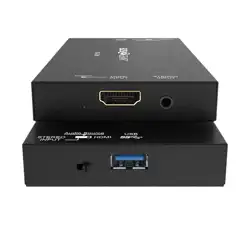
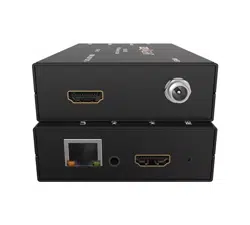
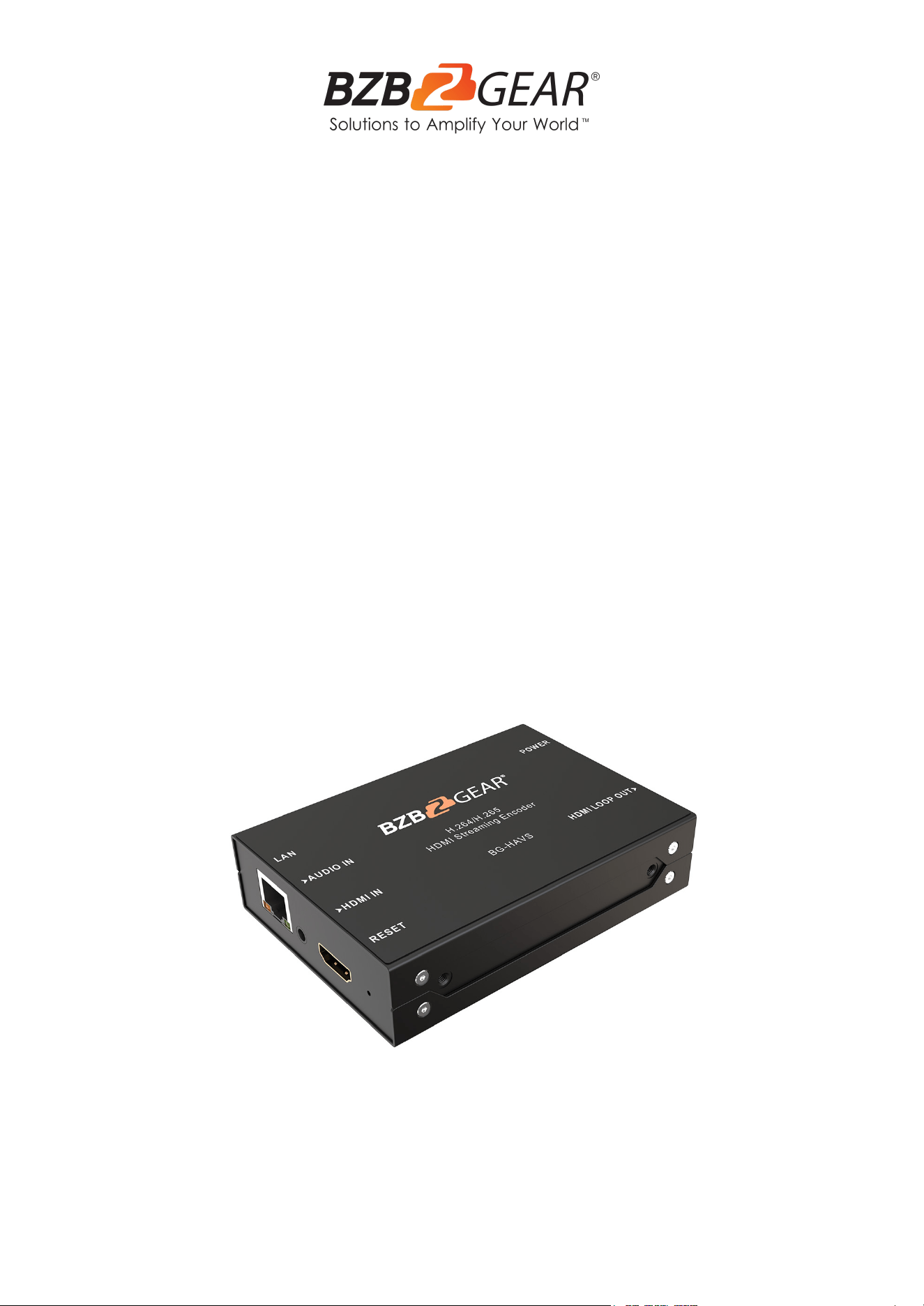
The BG-HAVS is an HD audio and video encoder which can encode and compress HDMI
video and audio source into an IP stream and then transmit it to a streaming media server
via a network IP address to live broadcast on platforms like Facebook, YouTube, Ustream,
Twitch, Wowza, etc.
Features
● 1× HDMI input, 1× HDMI loop out, 1× Analog audio input
● H.265/ H.264 stream encode protocol, up to 1080p60hz
● Dual-stream (main stream and sub stream)
● RTSP, RTP, RTMPS, RTMP, HTTP, UDP, SRT, unicast and multicast
● Video and audio streaming or single audio streaming
● Image and text overlay
● Mirror image & upside-down image
● Live stream with no need for connecting a computer
Packing List
● 1x BG-HAVS Streaming Encoder
● 1x 12V power supply unit
● 1x User Manual
● 1х Quick Start Guide
Address: 830 National Drive #140, Sacramento, CA 95834, USA · Tel: +1(888)499-9906 · Email: support@bzbgear.com 5

BZBGEAR BG-HAVS PRODUCT MANUAL
Technical Specifications
CONNECTIONS
Video Input
HDMI Type A x 1
Video Loop Out
HDMI Type A x 1
Analog Audio
3.5mm (line in) x 1
Network
RJ-45 x 1 (100/1000Mbps self-adaptive Ethernet)
STANDARDS
HDMI In Format Support
1080p 60/59.94/50/30/29.97/25/24/23.98/23.976,
1080i 50/59.94/60,
720p 60/59.94/50/30/29.97/25/24/23.98,
576i 50, 576p 50, 480p 59.94/60, 480i 59.94/60
Video Coding
H.265/ H.264
Video Bitrate
16Kbps ~ 12Mbps
Audio Coding
ACC/ MP3/ MP2/ G711
Audio Bitrate
24Kbps ~ 320Kbps
Encoding Resolution
1920×1080, 1680×1056, 1280×720, 1024×576, 960×540,
850×480, 720×576, 720×540, 720×480, 720×404,
720×400, 704×576, 640×480, 640×360
Encoding Frame Rate
5-60fps
SYSTEMS
Network Protocols
HTTP, RTSP, RTMP, RTP, UDP, Multicast, Unicast, SRT
Configuration Management
Web configuration, Remote upgrade
OTHERS
Consumption
5W
Temperature
Working temp: -10°C ~60°C , Storage temp: -20°C ~70°C
Dimension (LxWxD)
4.1 x 3 x 1in [104 x 76 x 25mm]
Weight
Net weight: 0.7 lbs [310g], Gross weight: 1.5 lbs [690g]
Address: 830 National Drive #140, Sacramento, CA 95834, USA · Tel: +1(888)499-9906 · Email: support@bzbgear.com 6
BZBGEAR BG-HAVS PRODUCT MANUAL
Operation Controls and Functions
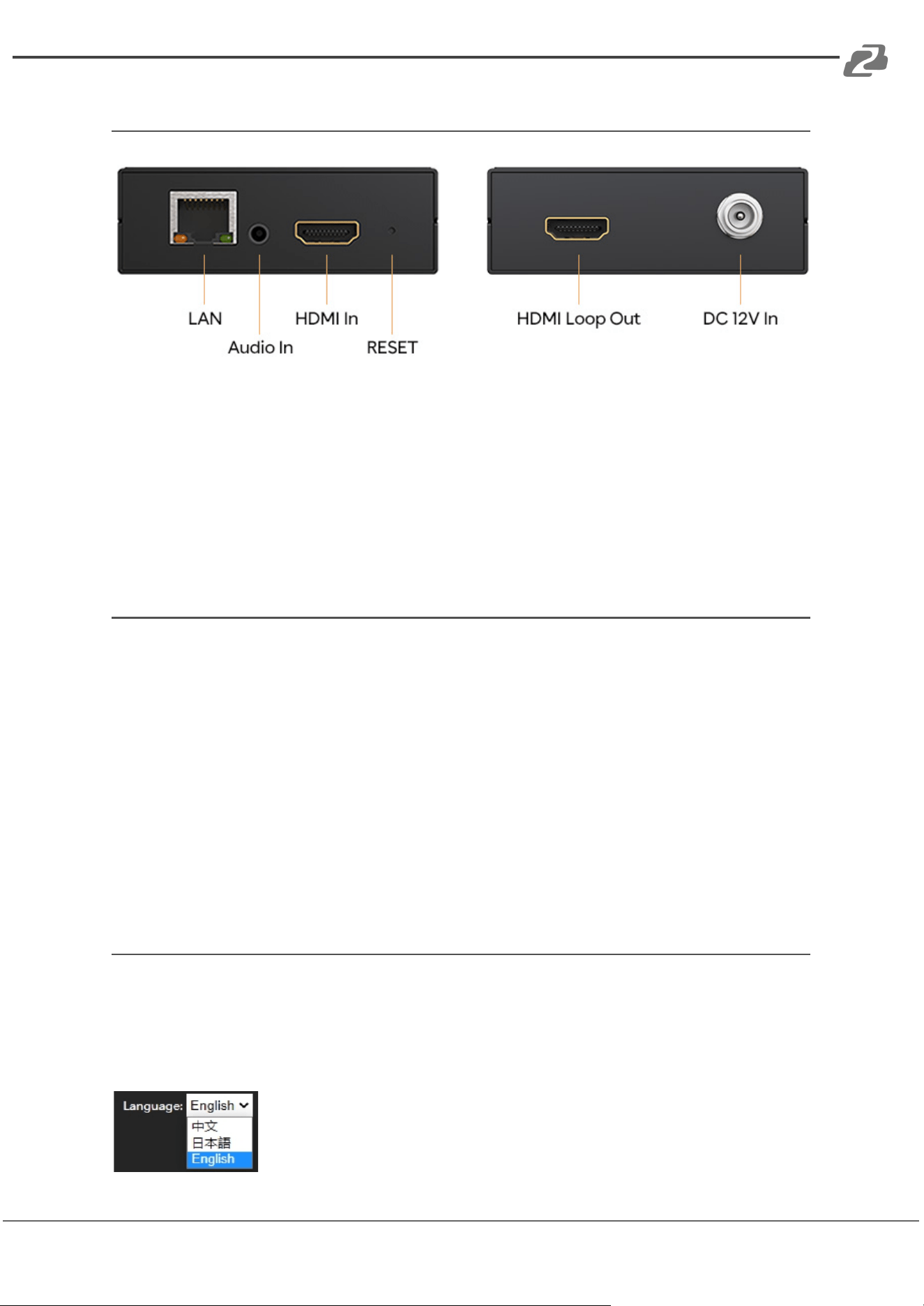
● HDMI: Crystal clear image with resolutions up to 1080p@60Hz
● LAN: Streaming interface
● Audio In: Stereo audio input for connecting mics or local audio sources
● Power: Use supplied Power Adapter
Network Configuration
Connect the encoder to network via a network cable. The encoder can auto obtain a new IP
address when it is using DHCP on the network, or disable DHCP and configure the encoder
and computer’s network in the same network segment. The default IP information is below:
IP Address: 192.168.1.168
Subnet Mask: 255.255.255.0
Default Gateway: 192.168.1.1
Note: Your computer's IP address cannot be the same as the encoders.
Visit encoder’s IP address 192.168.1.168 through an Internet browser to login the WEB
page for setting up. The default Username is admin, and password is admin.
Management Web Page
The encoding settings can be set on the encoder management web page.
Language Settings
English, Chinese (中文), and Japanese (日本語) languages are available as options on the
top-right corner of the encoder management web page.
Address: 830 National Drive #140, Sacramento, CA 95834, USA · Tel: +1(888)499-9906 · Email: support@bzbgear.com 7
BZBGEAR BG-HAVS PRODUCT MANUAL
Device Status
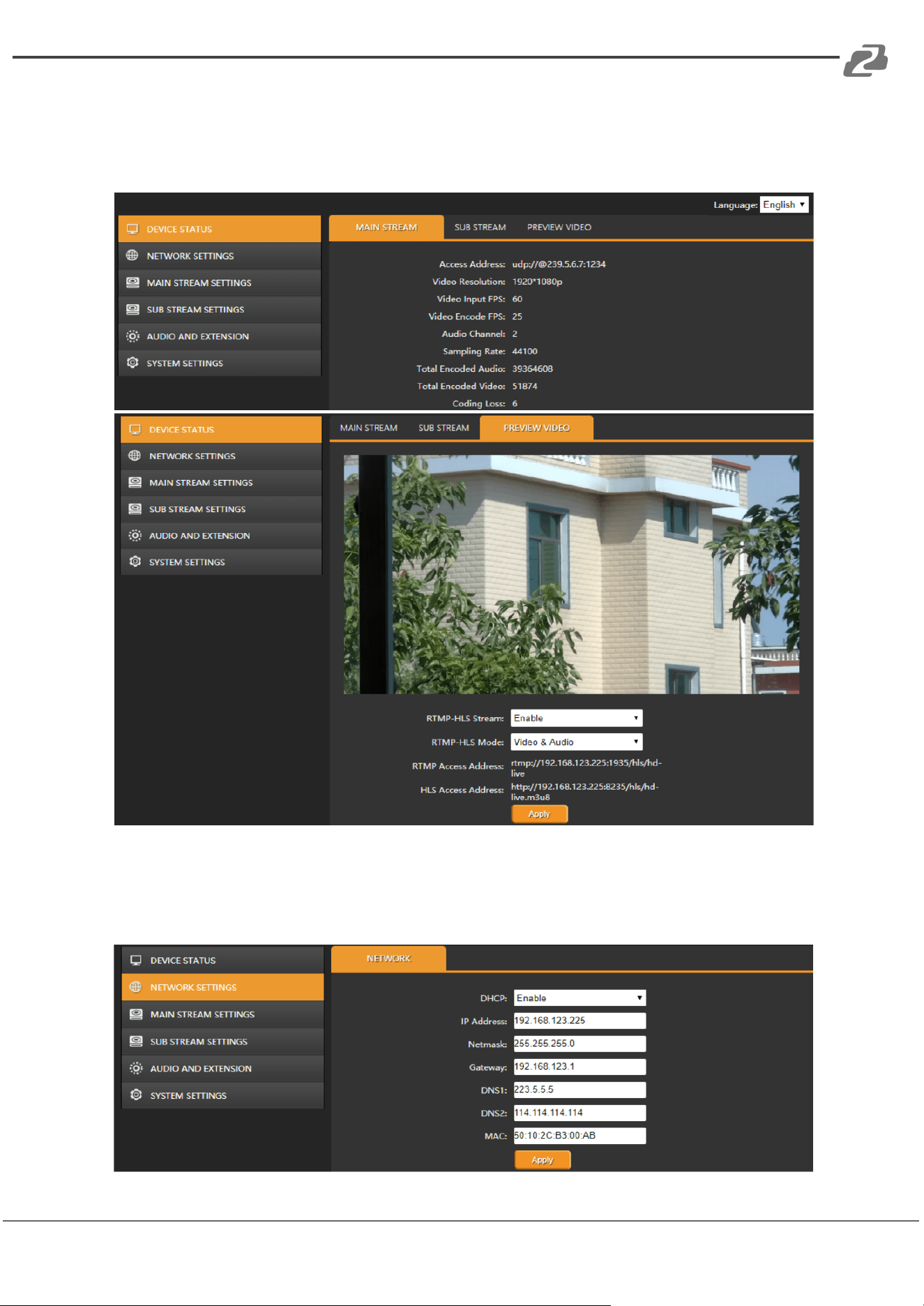
The status of MAIN STREAM and SUB STREAM can be viewed on the webpage as well as
a preview on the streaming video on the PREVIEW VIDEO tab.
Network Settings
The network can be set to dynamic IP (DHCP Enable) or static IP (DHCP Disable). The
default IP information is listed above under Network Configuration.
Address: 830 National Drive #140, Sacramento, CA 95834, USA · Tel: +1(888)499-9906 · Email: support@bzbgear.com 8
BZBGEAR BG-HAVS PRODUCT MANUAL
Main Stream Settings
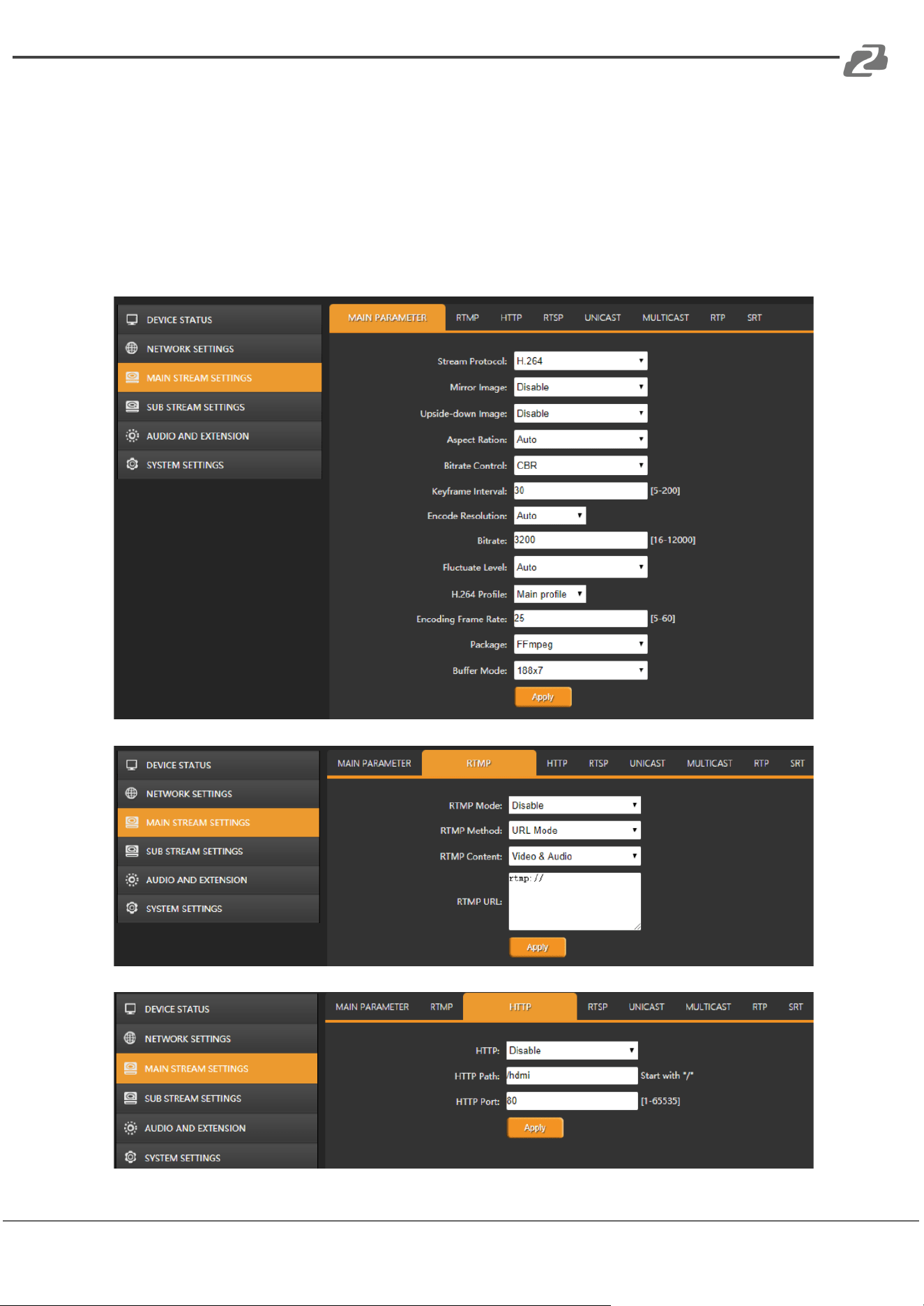
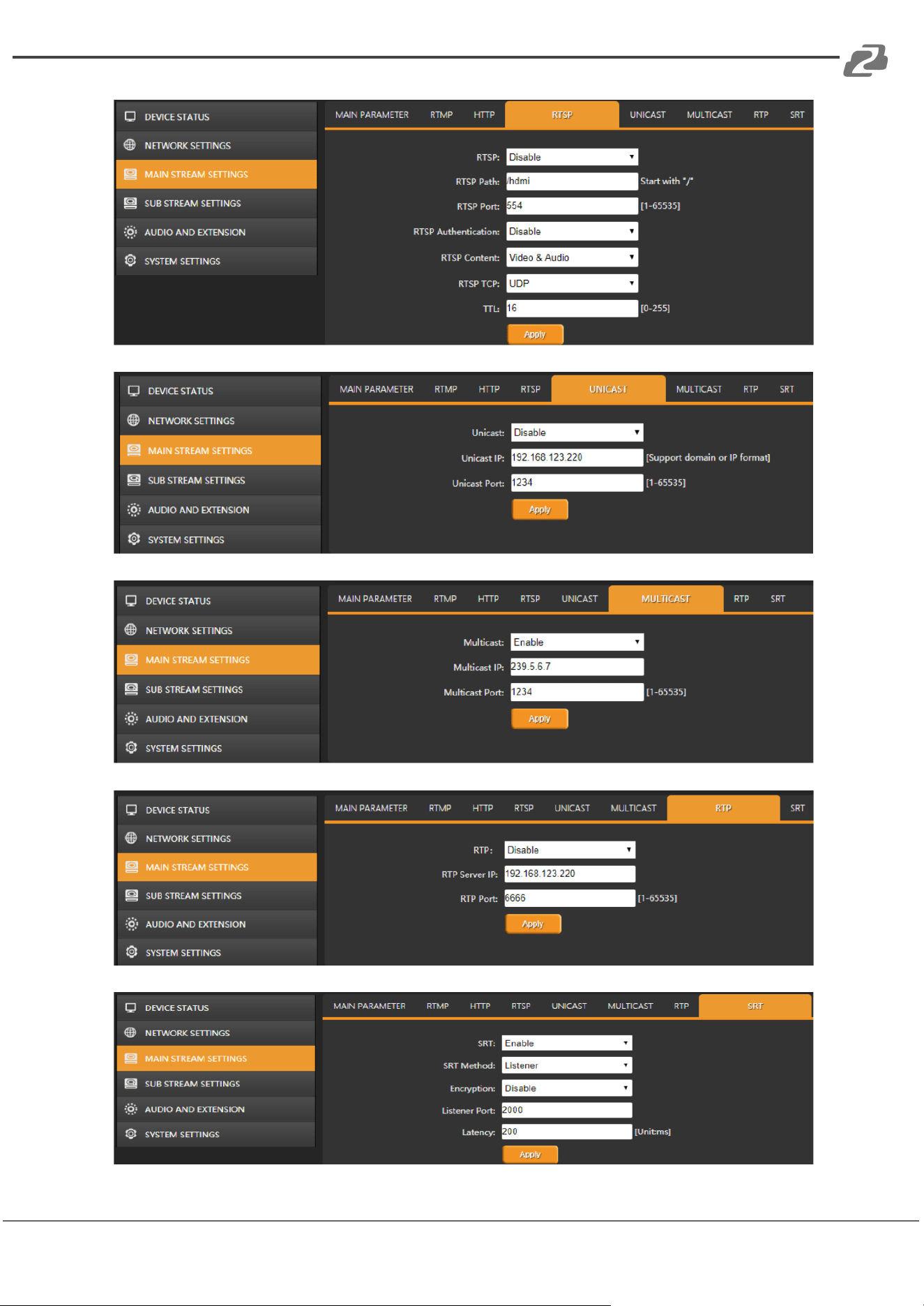
The main stream can be set to “mirror image” and “upside-down image” from the MAIN
PARAMETER tab. Configure main stream network protocol RTMP/ HTTP/ RTSP/ UNICAST
/MULTICAST/ RTP/ SRT accordingly. Please note that only one of HTTP/ RTSP/ UNICAST
/MULTICAST/ RTP can be enabled at a time.
Covered by one or more claims of the HEVC patents listed at patentlist.accessadvance.com
Address: 830 National Drive #140, Sacramento, CA 95834, USA · Tel: +1(888)499-9906 · Email: support@bzbgear.com 9
BZBGEAR BG-HAVS PRODUCT MANUAL
Address: 830 National Drive #140, Sacramento, CA 95834, USA · Tel: +1(888)499-9906 · Email: support@bzbgear.com 10
BZBGEAR BG-HAVS PRODUCT MANUAL
Sub Stream Settings
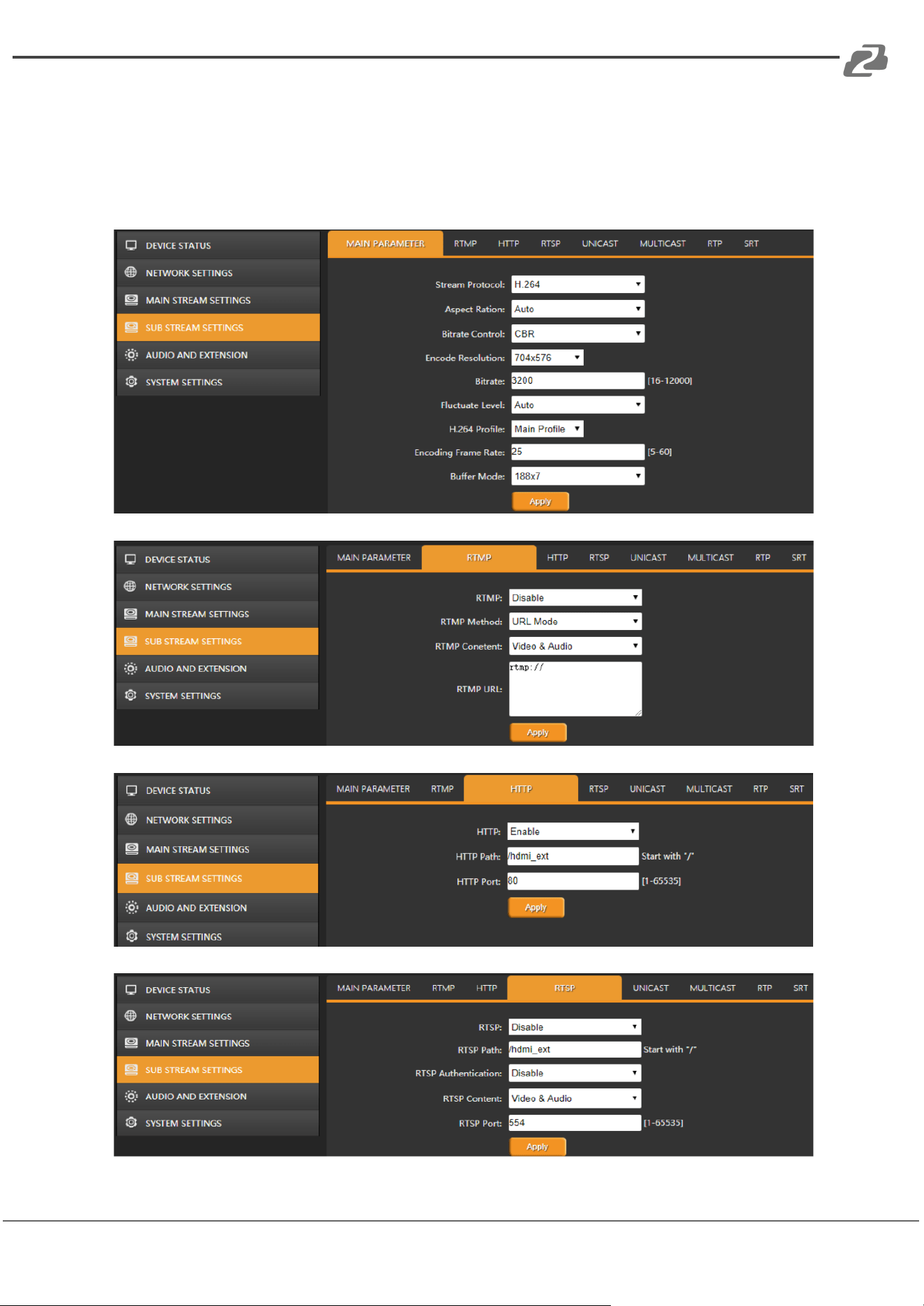
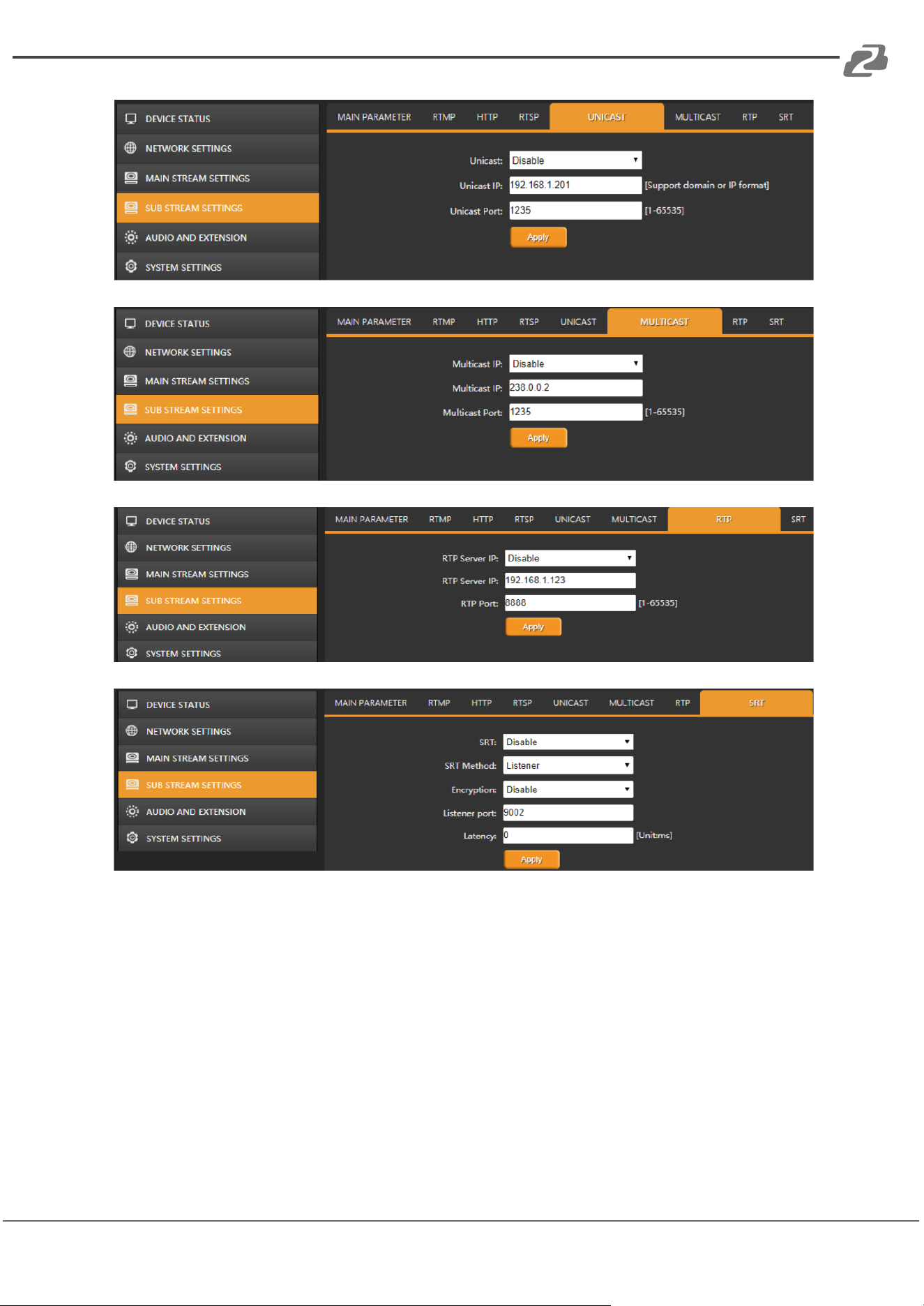
Configure sub stream network protocol RTMP/ HTTP/ RTSP/ UNICAST/ MULTICAST/ RTP/
SRT accordingly. Please note that only one of HTTP/ RTSP/ UNICAST/ MULTICAST/ RTP
can be enabled at a time.
Address: 830 National Drive #140, Sacramento, CA 95834, USA · Tel: +1(888)499-9906 · Email: support@bzbgear.com 11
BZBGEAR BG-HAVS PRODUCT MANUAL
Address: 830 National Drive #140, Sacramento, CA 95834, USA · Tel: +1(888)499-9906 · Email: support@bzbgear.com 12
BZBGEAR BG-HAVS PRODUCT MANUAL
Audio and Extension
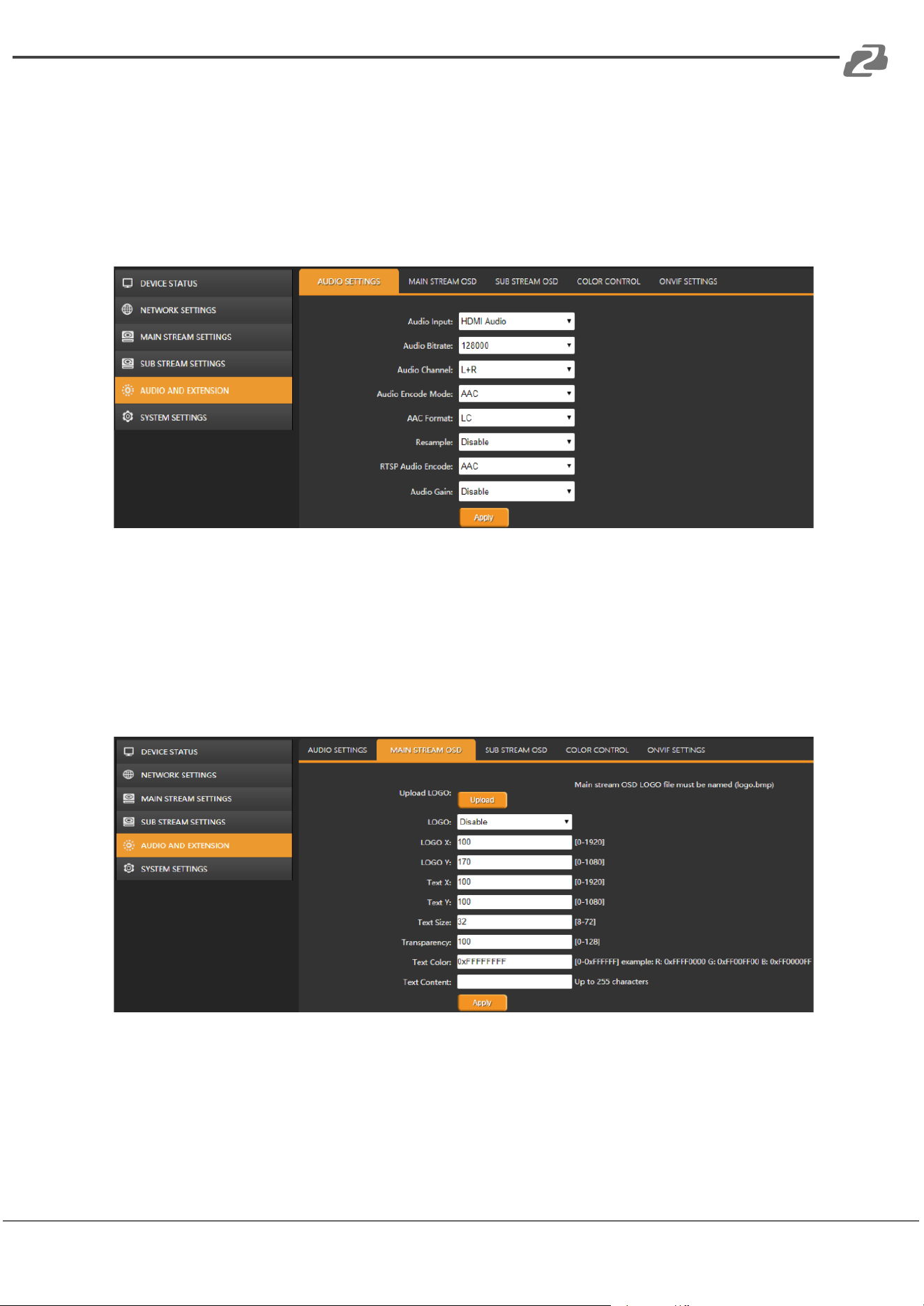
● Audio Settings
The encoder supports audio embedding from external analog inputs. Therefore, the audio
can be from HDMI embedded audio or analog line in audio. Audio Encode Mode can be set
to ACC/ MP3/ MP2.
● OSD Overlay
The encoder can insert a logo and text to the Main Stream / Sub Stream videos at same
time. The logo file should be named logo.bmp and its resolution needs to be 1920×1080 or
below and less than 1MB in file size. Text content overlay supports up to 255 characters.
The size and color of the text can be set on the web page and users also can set the
position and transparency of the logo and text overlay.
Address: 830 National Drive #140, Sacramento, CA 95834, USA · Tel: +1(888)499-9906 · Email: support@bzbgear.com 13
BZBGEAR BG-HAVS PRODUCT MANUAL
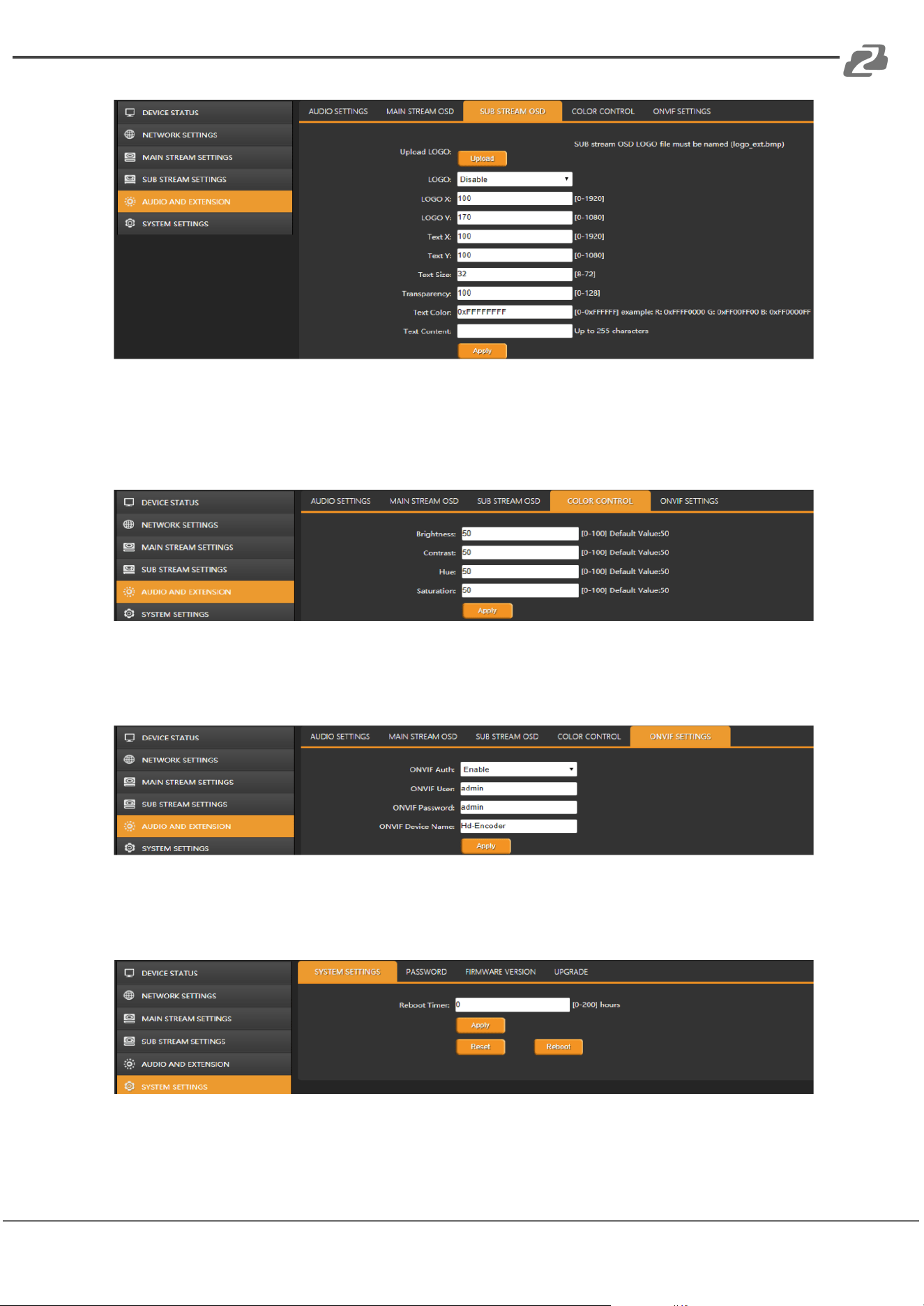
● Color Control
Users can adjust the brightness, contrast, hue, and saturation of streaming video through
the web page.
● ONVIF Settings
The settings of ONVIF as below:
● System Settings
Users can set the encoder reboot after 0-200 hours for some applications.
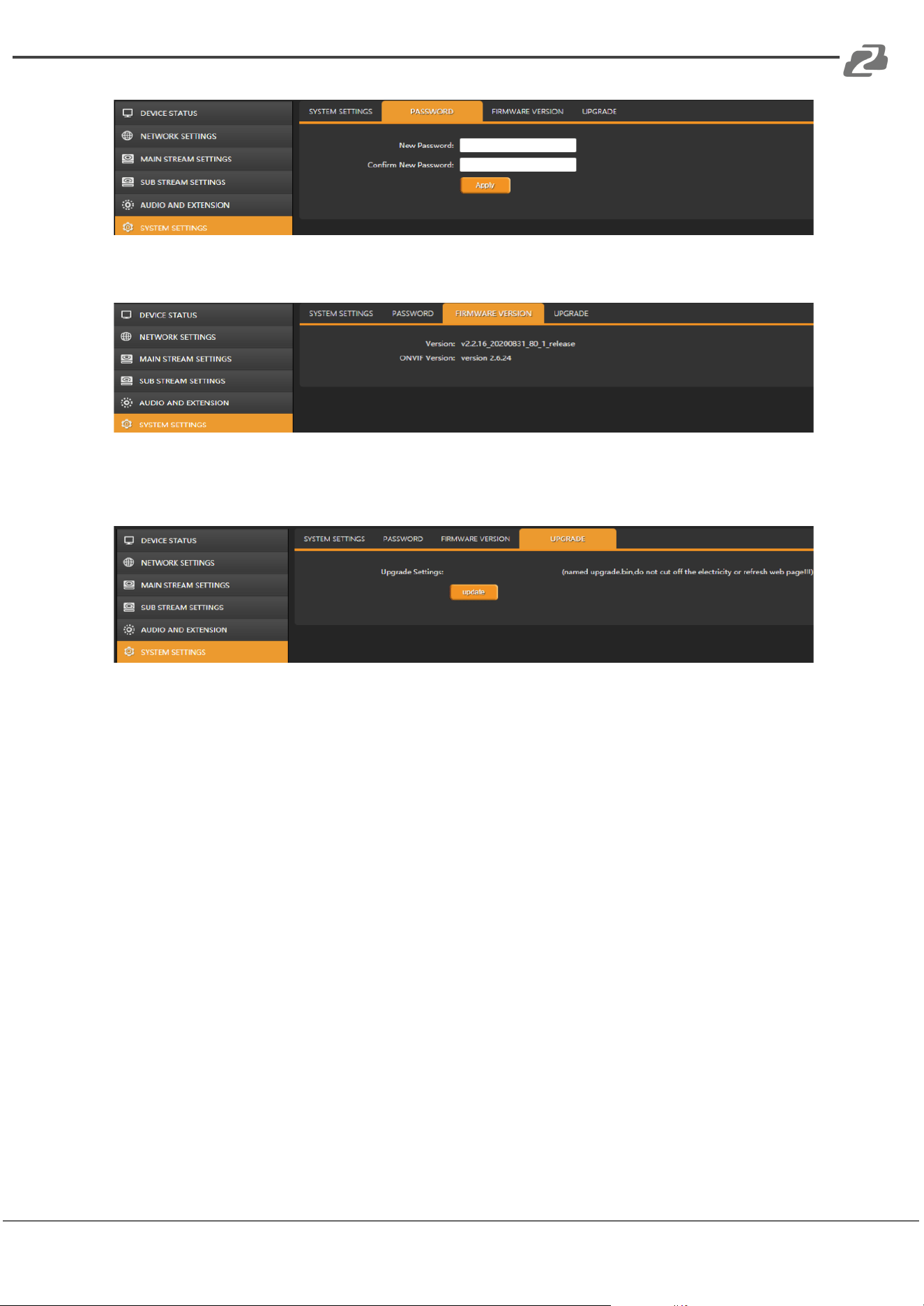
The default password is admin. Users can set a new password through the page below.
Address: 830 National Drive #140, Sacramento, CA 95834, USA · Tel: +1(888)499-9906 · Email: support@bzbgear.com 14
BZBGEAR BG-HAVS PRODUCT MANUAL
The firmware version information can be checked on the page below.
Upgrade new firmware through the web page as below. Please note: do not turn off the
power or refresh the web page when upgrading.
Address: 830 National Drive #140, Sacramento, CA 95834, USA · Tel: +1(888)499-9906 · Email: support@bzbgear.com 15

BZBGEAR BG-HAVS PRODUCT MANUAL
Tech Support
Have technical questions? We may have answered them already!
Please visit BZBGEAR’s support page (bzbgear.com/support) for helpful information and
tips regarding our products. Here you will find our Knowledge Base
(bzbgear.com/knowledge-base) with detailed tutorials, quick start guides, and step-by-step
troubleshooting instructions. Or explore our YouTube channel, BZB TV
(youtube.com/c/BZBTVchannel), for help setting up, configuring, and other helpful how-to
videos about our gear.
Need more in-depth support? Connect with one of our technical specialists directly:
Phone
1.888.499.9906
Email
support@bzbgear.com
Live Chat
bzbgear.com
Limited Product Warranty Terms
Pro Line: 5-year warranty from the date of purchase for AV/Broadcasting products bought
on or after August 1, 2024.
Essential Line: 3-year warranty from the date of purchase for AV/Broadcasting products
bought on or after August 1, 2024.
Cables: Lifetime Limited Product Warranty.
For complete warranty information, please visit bzbgear.com/warranty.
For questions, please call 1.888.499.9906 or email support@bzbgear.com.
Mission Statement
BZBGEAR is a breakthrough manufacturer of high-quality, innovative audiovisual equipment
ranging from AVoIP, professional broadcasting, conferencing, home theater, to live
streaming solutions. We pride ourselves on unparalleled customer support and services.
Our team offers system design consultation, and highly reviewed technical support for all
the products in our catalog. BZBGEAR delivers quality products designed with users in
mind.
Copyright
All the contents in this manual and its copyright are owned by BZBGEAR. No one is allowed
to imitate, copy, or translate this manual without BZBGEAR’s permission. This manual
contains no guarantee, standpoint expression or other implies in any form. Product
specification and information in this manual is for reference only and subject to change
without notice.
All rights reserved. No reproducing is allowed without acknowledgement.
Address: 830 National Drive #140, Sacramento, CA 95834, USA · Tel: +1(888)499-9906 · Email: support@bzbgear.com 16