
1
TRAEGER.COM
OWNER’S
MANUAL
T07090/B
IRONWOOD
WELCOME TO THE WOOD-FIRED REVOLUTION.
WE WANT YOU TO GET THE MOST OUT OF YOUR TRAEGER.
Scan here to access this manual in dierent languages, as well as to learn how to set up, season,
and get the most out of your grill.
2
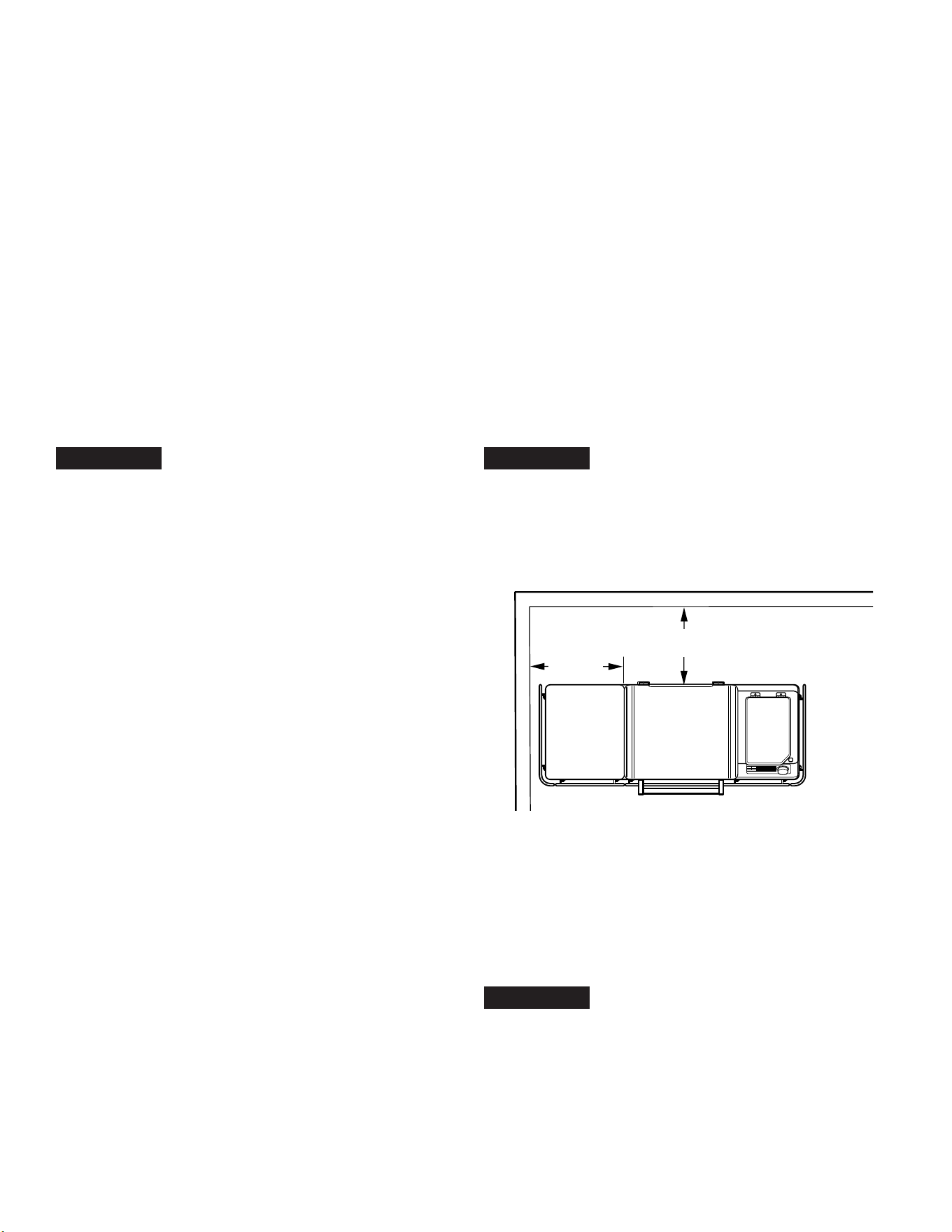
A MAJOR CAUSE OF FIRES IS FAILURE TO MAINTAIN REQUIRED CLEARANCES (AIR SPACES) BETWEEN
COMBUSTIBLE MATERIALS AND YOUR GRILL. IT IS OF UTMOST IMPORTANCE THAT THIS PRODUCT BE
INSTALLED ONLY IN ACCORDANCE WITH THESE INSTRUCTIONS.
When properly operated and maintained, cooking with a hardwood re on a Traeger
®
Grill brings years of
enjoyment to you and your friends and family. Your new Traeger
®
Grill is specially designed to make cooking easier
while giving you optimal performance with the most avorful food.
Please read this entire manual before installation and operation. Anyone who uses this grill should also read the
entire manual before operating it. Failure to follow these instructions could result in property damage, bodily injury,
or even death. Contact local building or re ofcials about restrictions and installation inspection requirements
in your area. Save these instructions. If you are assembling this unit for someone else, provide this manual
for the owner to read and save for future reference.
w DANGER
Carbon Monoxide Hazard
Burning wood pellets produces carbon monoxide
which may lead to illness, serious injury, and/or death.
Follow these guidelines to prevent this colorless,
odorless gas from poisoning you, your family, your pets,
or others:
• Only use your Traeger
®
Grill outside in a well-
ventilated area. This grill is intended for OUTDOOR
USE ONLY.
• Never use your Traeger
®
Grill in any enclosed area
or any area without adequate ventilation.
• Know the symptoms of carbon monoxide poisoning:
headache, dizziness, weakness, nausea, vomiting,
sleepiness, and confusion. Carbon monoxide
reduces the blood’s ability to carry oxygen.
Low blood oxygen levels can result in loss
of consciousness and death.
• See a doctor if you or others develop cold- or u-like
symptoms. Carbon monoxide poisoning, which can
easily be mistaken for a cold or u, is often detected
too late.
• Alcohol consumption and drug use increase the
effects of carbon monoxide poisoning.
• Carbon monoxide is especially toxic to mother and
child during pregnancy, infants, the elderly, smokers,
and people with blood or circulatory system
problems, such as anemia or heart disease.
w WARNING
Fire Hazard
• When operating your Traeger
®
Grill, maintain a
MINIMUM distance of 20 inches (50.8 cm) from the
grill to any nearby combustibles, including wooden
railings, home siding, window frames, furniture, trees,
and trash receptacles, etc.
• Do not install or operate this grill indoors or under
a combustible ceiling or overhang.
• Do not install or operate your Traeger
®
Grill on
combustible oors or surfaces.
• Do not put a grill cover or anything ammable in the
storage space area under the grill.
• Remove pots and pans while the operating appliance
is unattended, to reduce the risk of re.
w WARNING
Fire Hazard
• Keep your Traeger
®
Grill clean. Grease res are
caused by not properly maintaining your grill and
failing to clean its Traeger
®
Grease Management
System on a consistent basis (see “Maintaining Your
Grill” on pages 28-30).
IMPORTANT SAFETY PRECAUTIONS
READ ALL INSTRUCTIONS BEFORE INSTALLING AND USING
YOUR TRAEGER® GRILL
20"
(50.8 cm)
20"
(50.8 cm)

3
TRAEGER.COM
• Even if there is ample room in the grill, be cautious
of loading excessive amounts of food or high fat
content foods (e.g., bacon) that can release large
quantities of ammable grease.
• Do not place food near the edges of the grill where
grease drippings may miss the drip tray and fall to
the bottom of the grill, where they could come into
contact with embers from the repot and ignite.
• Ensure the repot is properly seated below the auger
tube. If not installed correctly, pellets will not ow
properly into the repot and may accumulate and
cause damage to the grill.
• Always make sure the EvenFlow
TM
Heat Shield
and drip tray are properly seated on their locating
brackets. If not installed correctly, direct heat and
ame from the repot could cause a grease re or
damage the Traeger
®
Grease Management System.
• Never use gasoline, lantern fuel, kerosene, lighter
uid, or other ammable materials to start or “freshen
up” a re.
• Never use or store ammable liquids or other
combustibles materials near the grill.
• Never attempt to over-re your grill by adding excess
pellets or other combustible materials to the repot
or the hopper.
w DANGER
In the event of a grease re, ensure
the grill door and hopper lid are closed, and then
immediately unplug the grill if you can do so safely.
Move away from the grill until the re is completely
out and grill has cooled down. Until the re has
extinguished and the grill has cooled off:
• Do Not move the grill;
• Do Not throw water on the grill;
• Do Not use salt or baking soda to put out a grease re; and
• Do Not try to smother the re.
With the grill door and hopper closed, the re will be
starved of oxygen and burn itself out. Never keep the
grill door or hopper lid open during a grease re; if
the grill door is open, use a non-combustible tool that
will allow you to close the grill door while keeping a
safe distance from the grill. An all-class (class ABC)
approved re extinguisher should be used if a re is not
contained within the grill. If an uncontrolled re does
occur, immediately call the Fire Department. When the
re is completely out, allow the grill to cool completely.
Remove everything from the inside of your grill,
including all internal components (grill grates, drip
tray, EvenFlow
TM
Heat Shield, grease governor, and
repot), pots and pans, and food. Clean the entire grill,
including any grease accumulation from the Traeger
®
Grease Management System (TGMS) and all ash and
pellets from the grill and repot (see “Maintaining Your
Grill” on pages 28-30). Replace the repot, EvenFlow
TM
Heat Shield, drip tray, grease governor, and grill grates,
restart the grill, and resume cooking.
w WARNING
Fire Hazard
Always allow grill to cool completely before using the
Auger function.
w WARNING
Burn Hazard
Ashes should always be completely cool before
handling. Ashes should be placed in a metal container
with a tight-tting lid. The closed container of ashes
should be placed on a noncombustible oor or on
the ground, well away from all combustible materials,
pending nal disposal. Ashes should be retained in the
closed container until they are disposed.
w WARNING
Burn Hazard
Many parts of the grill become very hot during
operation. During operation of the grill and afterwards,
care must be taken to avoid burns while the grill is hot.
• Never leave the grill unattended when young children
or pets are present.
• Never move the grill when it is operating or hot.
Let the grill cool thoroughly and close the grill door
before moving or attempting to transport. If you are
transporting your grill in a vehicle after cooking on it,
make sure the re is completely out and the grill is
cold before placing it in any vehicle. Never put water
into the repot; it will jam the auger.
• Never add pellets by hand to a hot repot. This is
dangerous and you may be seriously burned. If you
run out of pellets and lose your re while cooking,
let the grill cool completely and start again. (See page
25, “Hopper Clean-out” instructions).
• Never touch cookware, heating surface, food, or
liquid while using the induction cooktop. Allow the
cooktop to completely cool and remove cookware
containing hot food or liquid from the cooktop before
handling or cleaning the cooktop. Cleaning a hot
surface with a wet sponge could result in a burn
from steam.
• Grill grates and meat probes are extremely hot when
preheated. Please use caution when loading food
onto the grill grates and when inserting, removing,
or adjusting your meat probes.
• Never move the grill with the door open. Always
close the grill door prior to moving.
w WARNING
Smoke Hazard
• If there is a delayed start and the smoke from
your grill changes from transparent white smoke to
unusual billowing thick non-transparent white smoke
that turns to a yellow tinted smoke, immediately turn
off your grill using the main power button on the front
of the pellet hopper or unplug the power cord.
Do Not initiate the shutdown cycle.

4
IMPORTANT SAFETY PRECAUTIONS CONTINUED
•
w DANGER
Do Not open the grill door to air out
the grill. Stay away from the grill until smoke clears
and the grill completely cools.
• This may be the result of a pellet overow condition,
which is caused by partial ignition of pellets. If
allowed to continue long enough, gases will build
up, which can ignite. If these gases ignite they
will combust all at once, making a loud noise that
may startle and/or injure persons in the immediate
vicinity of the grill, and the grill door may open and
close. This occurrence is sometimes referred to as
a “grill burp” and should be avoided. If you have
not properly maintained your grill, as described in
“Maintaining Your Grill” on pages 28-30, a hazardous
grease re may also result.
• If a burp occurs, let the grill cool down completely,
remove all internal components (including grill grates,
drip tray, EvenFlow
TM
Heat Shield, grease governor,
and repot), and thoroughly clean all ash and pellets
from the grill and repot (see page 29, “Cleaning the
Ash from Inside and Around the Firepot”) and ensure
that grease and other buildup has been removed
(see pages 28-30, “Maintaining Your Grill”). Remove
all pellets from the pellet hopper. Run the prime auger
sequence to push all pellets out of the auger and
dispose of those pellets. Clean all pellets out of the
repot. Fill hopper with new pellets and prime the
auger (See “Onboarding Part 1: Seasoning Your Grill”
on page 14 for instructions on priming your auger).
w DANGER
Do Not stick your hand in or near
the auger located at the bottom of your pellet hopper.
Severe injury will occur if the auger is turning and your
hand is caught in the auger. Do not remove the wire
guard in your pellet hopper. No maintenance should
be performed on or around the auger while the grill is
turned on or plugged into power.
w WARNING
Electrical Shock Hazard
Hazardous voltage is present, which can shock, burn,
or cause death.
• Ground Fault Circuit Interrupter (GFCI) protection
must be provided on the circuit(s) or outlet(s) to be
used for the operation of this Traeger
®
Grill.
• Disconnect the power cord before servicing the grill
unless otherwise noted in this Owner’s Manual.
• If using an extension cord, only use an extension
cord suitable for outdoor use to prevent electric
shock in accordance with the instructions and
warnings accompanying that product. This type of
cord is designated with “W-A” or “W” on the cord’s
jacket, such as an extension cord of cord type:
SW-A, SOW-A, STW-A, STOW-A, SJW-A, SJOW-A,
SJTW-A, or SJTOW-A.
• If using an extension cord, be sure to use a
No. 14 AWG grounded extension cord for 120 V
models and a No. 18 AWG cord for 230 V models.
• Do not modify the plug on your Traeger
®
Grill, the
extension cord receptacle, or the extension cord plug
in any way, including by removing the ground (earth)
prong.
• Make sure your extension cord is in good condition.
Inspect extension cords prior to each use for loose or
exposed wires and cut or worn insulation. Replace if
damaged. Never use a damaged extension cord.
• Ensure that the power cord and extension cord are
securely plugged together. Do not plug extension
cords into one another.
• Keep extension cord clear of snow and standing
water.
• Ensure that the power cord and extension cord
do not create a tripping hazard. Do not route an
extension cord through a window or doorway.
• When not in use, the extension cord should be
removed and stored in a location protected from
the sun and out of the reach of children.
w CAUTION
• Never modify this grill or install any parts or
components not authorized by Traeger for use with
this grill. Any modication of this grill or installation
of unauthorized parts or components will void the
warranty and may create a safety hazard including,
without limitation, a re.
• Children should be supervised to ensure they
do not play with the grill.
w CAUTION
Use Correct Pellets
• This grill is designed and approved only for all natural
wood cooking pellets designed for wood pellet grills.
Use of any other type of fuel in this grill will void the
warranty, may lead to the auger becoming jammed,
and may create a safety hazard.
• For best results and avor, use genuine
TRAEGER
®
BRAND HARDWOOD PELLETS.
• Always store wood pellets in a dry location, away
from heat-producing appliances and other fuel
containers.

5
TRAEGER.COM
w WARNING
Do not use fuel pellets. Never use
heating fuel pellets in the grill because they may contain
hazardous contaminants and additives and may
damage the grill.
w CAUTION
Minimum Ambient Temperature
• When the ambient temperature falls below -20°F
(-29°C), damage to the controller’s display may
occur.
w WARNING
Improper placement of the meat probe
could result in raw or undercooked meats, which may
increase your risk of foodborne illness.
w WARNING
If the re in the repot goes out while
cooking, it is important to follow these steps. Failure to
do so may cause a hazardous “overring” of your grill
due to an excess of unburned pellets in the repot. This
is often caused by improper start-up procedure and/or
running out of pellets.
• Press the main power button in the front of the grill
to OFF and disconnect the power cord. Allow the
grill to cool thoroughly. Open the door and remove
all food, grill grates, drip tray, and EvenFlow
TM
Heat
Shield.
• Remove all unburned pellets and ash from inside
and around the repot. (See instructions for proper
handling and disposal of ash on page 30.)
• Ensure repot is properly seated with the lip of the
repot sitting underneath the auger tube.
• Before replacing the EvenFlow
TM
Heat Shield, drip
tray, and grill grates, plug the power cord into an
appropriate grounded/earthed electrical outlet, press
the main power button to ON, and start a cook. Pellets
should fall into the repot and the hot rod should begin
to heat (it will start to turn red).
w WARNING
Do not
touch the hot rod.
• When ames start to come out of the repot, initiate
a shutdown cycle, then press the main power button
to OFF. Let the grill cool down. Now you’re ready
to place the EvenFlow
TM
Heat Shield, drip tray, grill
grates, and food back into the grill.
w WARNING
• Press the main power button to OFF and disconnect
the power cord before initiating any maintenance.
• Make sure that the grill is COLD and ashes
are extinguished and COLD before checking
the EZ-Clean Grease + Ash Keg.
• Accumulated grease is easier to clean off when
the grill is still warm—not hot. Be careful not
to burn yourself. Heat-protective gloves are
recommended.
• A dedicated vacuum cleaner is the best way to
remove ashes from the repot, but this must be done
with extreme care to avoid the risk of re. Again,
cleaning the ash from in and around the repot
should be done only when the grill is COLD.
• Cleaning the grill grates works best while they
are still warm. Be careful not to burn yourself.
Heat-protective gloves are recommended. We
recommend keeping a long-handled cleaning brush
near the grill. After removing your food, give the grill
grate a quick brushing. It takes only a minute and it
will be ready the next time you want to use the grill.
• This equipment has been tested and found to comply
with the limits for Class B digital device, pursuant
to part 15 of the FCC Rules. These limits are
designed to provide reasonable protection against
harmful interference in a residential installation. This
equipment generates, uses, and can radiate radio
frequency energy and, if not installed and used in
accordance with the instructions, may cause harmful
interference to radio or television reception, which
can be determined by turning the equipment off
and on. The user is encouraged to try to correct
the interference by one or more of the following
measures:
– Reorient or relocate the receiving antenna.
– Increase the separation between the equipment
and the receiver.
– Connect the equipment into an outlet on a
circuit different from that to which the receiver is
connected. Consult the dealer or an experienced
radio/TV technician for help.
SAVE THESE INSTRUCTIONS

6
6

7
TRAEGER.COM 7
2 IMPORTANT SAFETY PRECAUTIONS
8 FLAVOR MATTERS
9 ALL NATURAL HARDWOOD PELLETS
10 GETTING TO KNOW YOUR GRILL
13 FIRST STEPS TO START YOUR GRILL
14 ONBOARDING PART 1: SEASONING
YOUR GRILL
16 ONBOARDING PART 2: CONNECTING
YOUR GRILL
18 ONBOARDING PART 3: CONNECTING
YOUR ACCESSORIES
19 USING YOUR GRILL
20 COOKING ON YOUR TRAEGER
22 COOKING WITH ACCESSORIES
24 SHUTTING DOWN YOUR GRILL
25 HOPPER CLEAN-OUT
26 GRILL FEATURES
28 MAINTAINING YOUR GRILL
30 TROUBLESHOOTING
31 OPERATING TIPS
32 SERVICE
34 WARRANTY
TABLE OF CONTENTS

8
8
THE PERFECT
PAIRINGS
Bold cuts of beef need bold wood flavors
to match, like hickory or mesquite.
Throw in some pellets and turn your
Traeger into a wood-fired pizza oven.
Cherry pie cooked over fruit hardwood
pellets? Yes please.
9
TRAEGER.COM
ALL NATURAL
HARDWOOD PELLETS
CONSISTENT PERFORMANCE & FLAVOR
Pellets fuel the fire and add flavor to make meals unforgettable.
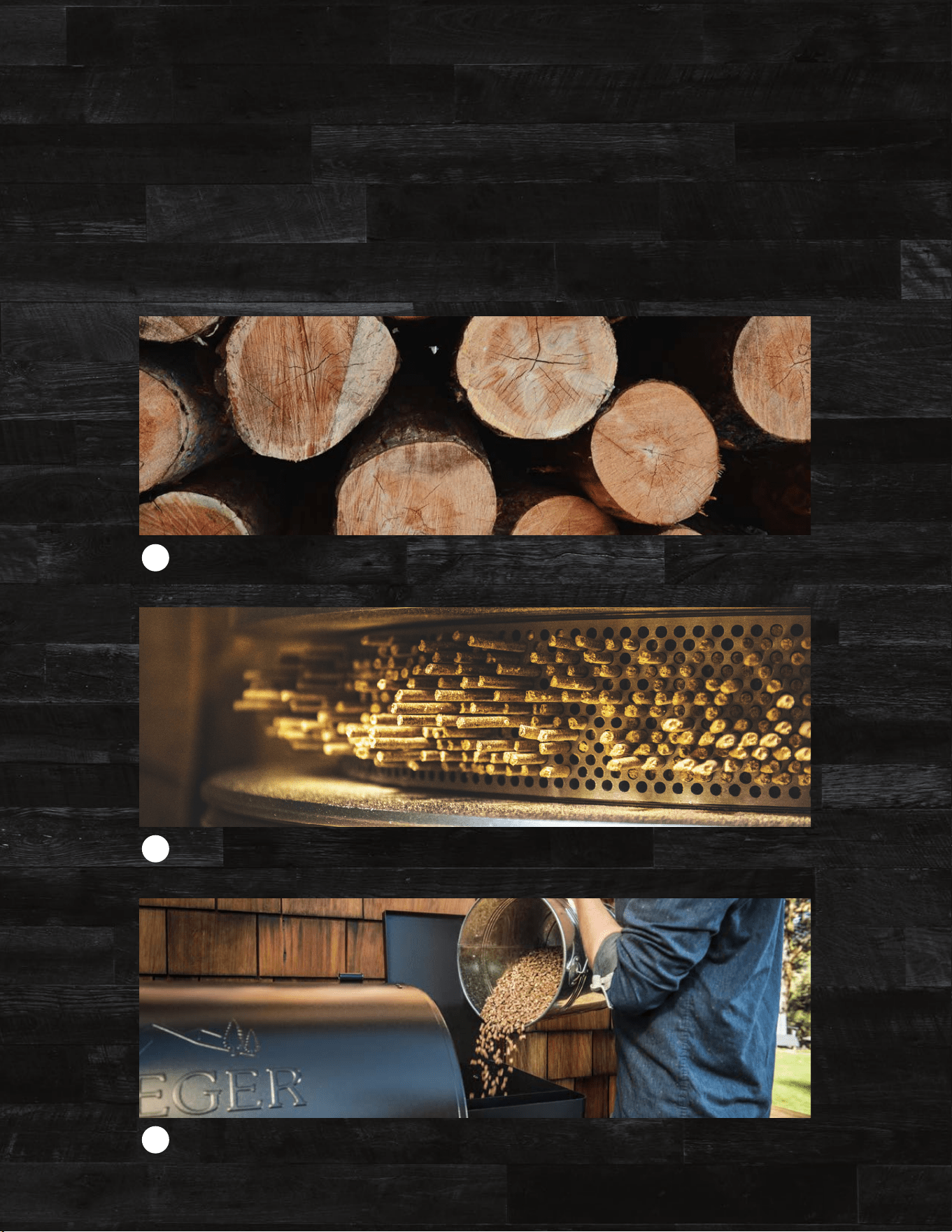
3
The sawdust is compressed into pellets using heat and pressure.
2
Traeger pellets are made from all natural hardwood sawdust.
1
HOW OUR PELLETS ARE MADE
9
10
GETTING TO KNOW YOUR GRILL
Refer to the Assembly Guide to assemble and install your Traeger® Grill.
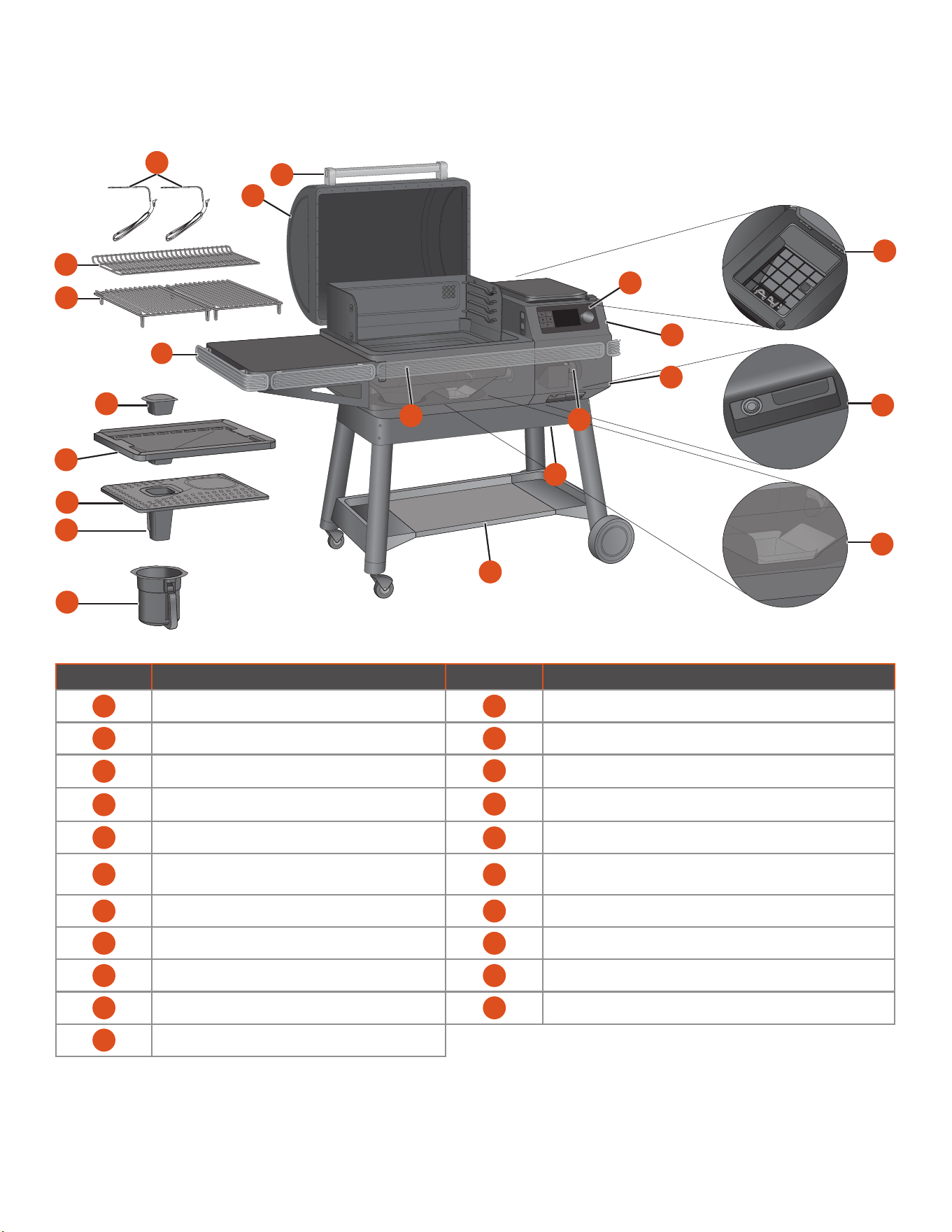
PART DESCRIPTION PART DESCRIPTION
1 GRILL DOOR 12 BOTTOM SHELF
2 DOOR HANDLE 13 P.A.L. POP-AND-LOCK™ ACCESSORY RAIL
3 WIRED MEAT PROBES
14
FIREPOT
4 2ND TIER GRILL GRATE
15
HOPPER CLEAN-OUT DOOR (BOTTOM OF HOPPER)
5 1ST TIER GRILL GRATES
16
AUGER (PELLET HOPPER INTERIOR)
6 SIDE SHELF
17
MAIN POWER BUTTON (FRONT OF PELLET HOPPER) AND
HOPPER CLEAN-OUT DOOR LEVER
7 GREASE GOVERNOR 18 DETACHABLE POWER CORD (REAR OF PELLET HOPPER)
8 EZ-CLEAN DRIP TRAY 19 PELLET HOPPER
9 EVENFLOW
TM
HEAT SHIELD 20 TRAEGER CONTROLLER WITH WiFIRE® TECHNOLOGY
10 GREASE TUBE 21 PELLET HOPPER INTERIOR WITH GRATE
11 EZ-CLEAN GREASE + ASH KEG AND KEG LINERS
WEIGHT CAPACITIES
Shelf: 60 lbs (27.2 kg)
Bottom Shelf: 80 lbs (36.3 kg)
IRONWOOD GRILL PARTS AND FEATURES
9
20
4
6
21
1
8
10
5
2
7
11
17
18
15
12
19
13
16
3
14
11
TRAEGER.COM
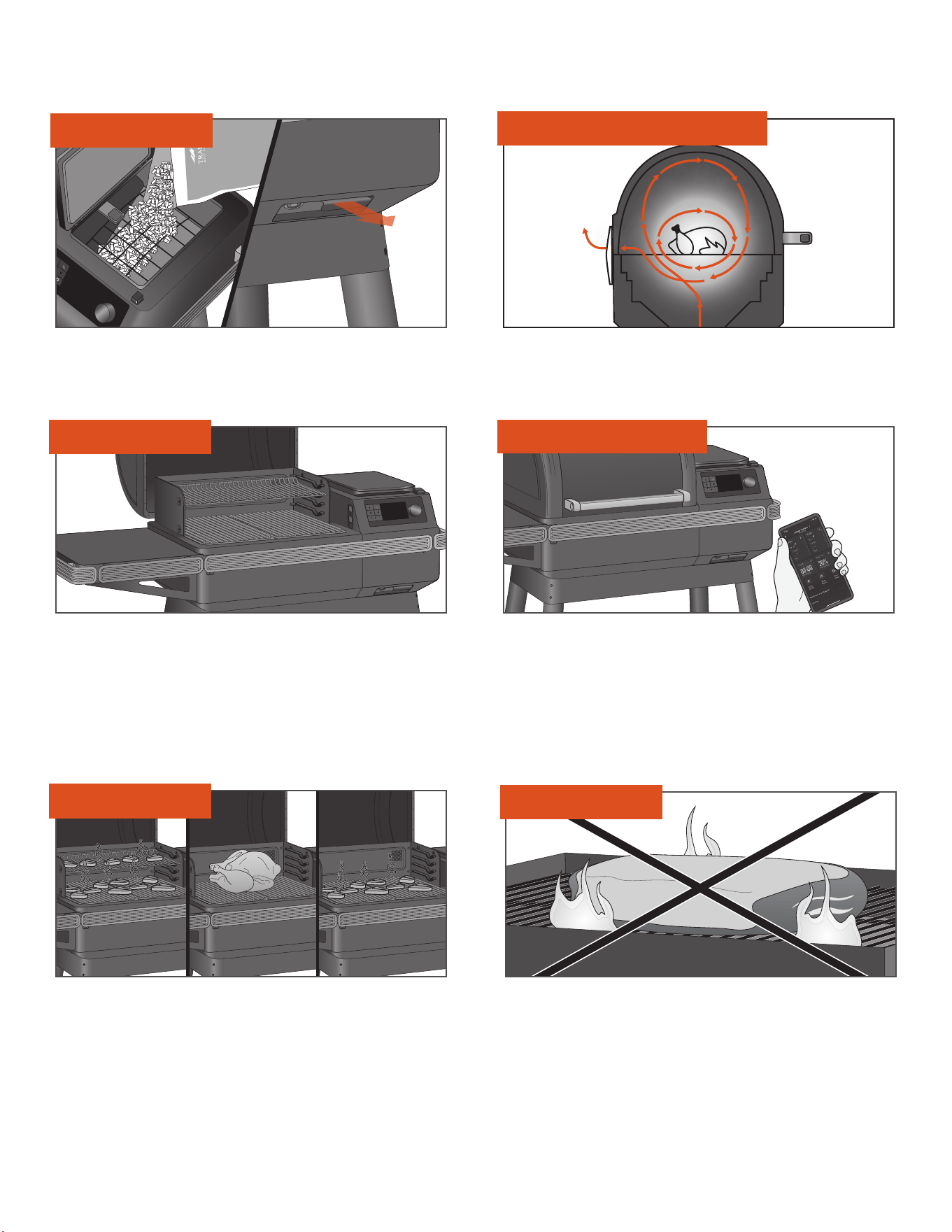
PELLET HOPPER
GRILL SHAPE/DOWNDRAFT EXHAUST
GRILLING SPACE
VERSATILITY
NO FLARE-UPS
HIGH-TECH CONTROLS
A 22-lb. (10-kg) capacity pellet hopper will keep you cooking for
hours, getting you away from the grill and back to the things you
want to do. Pellets can be emptied with a simple pull of a lever.
Traeger’s signature grill shape/downdraft exhaust creates a vortex of
convection. It circulates hot, smoky air around the cooking chamber,
surrounding your food with wood-fired heat for even cooking on all sides.
The smoky air is always present during cooking, even if you don't see it.
With 616-924 in.
2
(0.39-0.59 m
2
) of grilling space, your Traeger®
Grill has the real estate for party-sized orders of T-bones or racks
of ribs, with enough room left over to handle those side dishes, too.
With the Traeger® Grill, controlling your grill is as easy as pulling out
your phone. The WiFIRE® Technology allows you to set and adjust
temperatures automatically with recipes downloaded from our
Traeger app. To download the app for Android, go to the Google Play
Store; for Apple, go to the App Store. For information on how to use
the app, go to traeger.com/app. See “Onboarding Part 2: Connecting
Your Grill” section (page 16) for instructions on how to connect your
grill to your phone.
An adjustable 2-tier grate system oers options to load up both grill
grates for a true feast; remove the top grate for taller food like a
colossal turkey.
You don’t have to worry about drippings flaring up and causing
nasty fireballs that destroy your meal, because Traeger® Wood Fired
Grills cook using indirect heat. All drippings are safely channeled
into the external EZ-Clean Grease + Ash Keg for easy disposal.
TIP: Keep your grill clean. See “Operating Tips” (page 31) and
“Maintaining Your Grill” (pages 28-30).
12
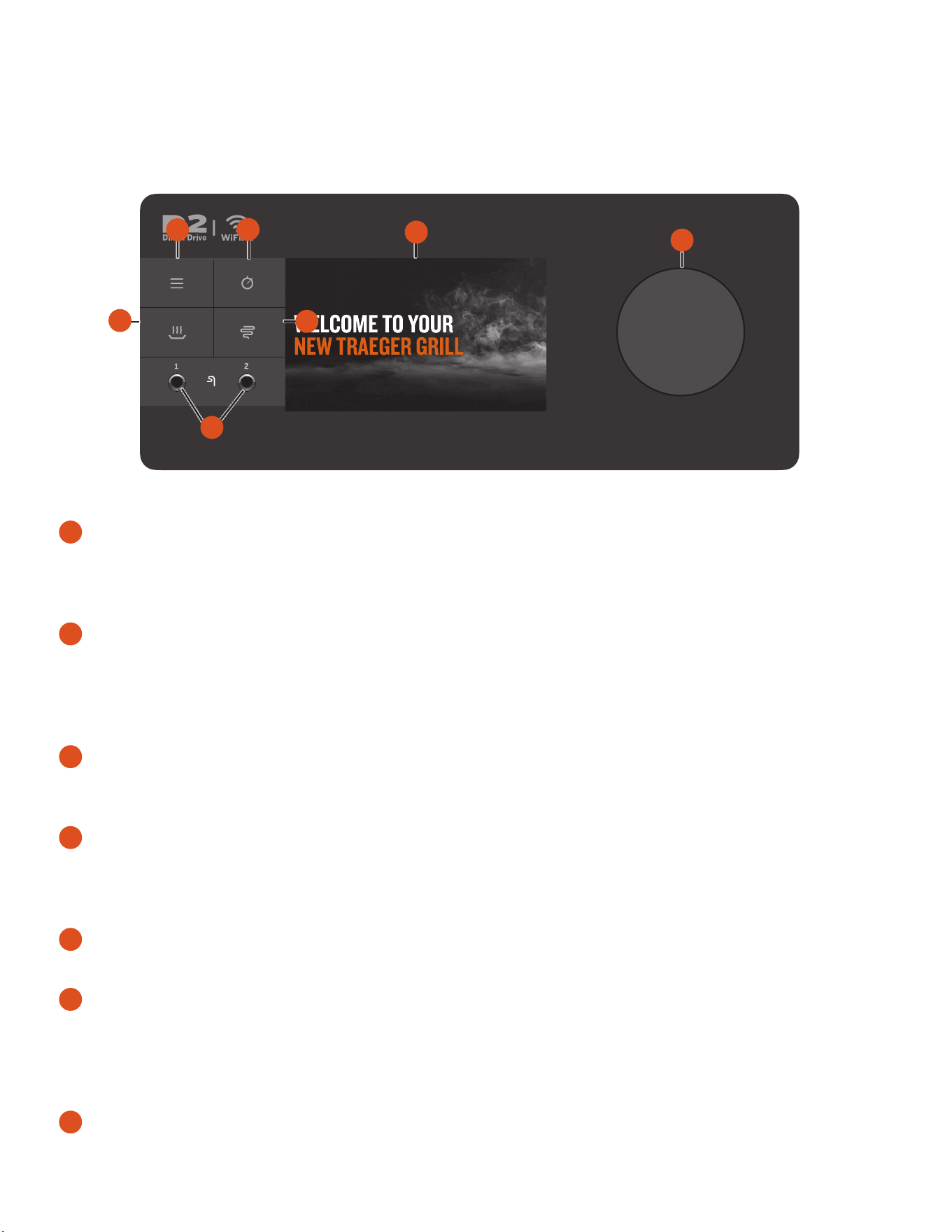
YOUR WiFIRE® DIGITAL CONTROLLER Your Traeger® Grill is equipped with a state-of-the-art Traeger Controller with WiFIRE® Technology that
is Wi-Fi-capable and Bluetooth-enabled. The controller includes an ambient light sensor in the upper left corner that controls the brightness of the screen
for perfect visibility in any light. Before you begin using the grill, familiarize yourself with the dierent features of the controller. Once the main power
button (located under the front of the pellet hopper) is ON, tap any of the buttons on the left side of the screen or turn the selection dial to turn on the grill.
1
MAIN MENU
From the menu, you can set up and monitor accessories, access
grill care and maintenance, and sync your grill with your home’s
internet and settings.
2
TIMER
The timer is for your convenience only; it does not aect
grill operation. For example, if you need to baste your meat for
15 minutes, set the timer for 15 minutes. A tone will sound when
the time is up.
3
KEEP WARM
This feature maintains the grill temperature at 165°F (74°C) to
keep food warm.
4
SUPER SMOKE
Select SUPER SMOKE at any time during grilling when cook
temperature is between 165°–225°F (74°–107°C) to increase
the amount of smoke released for additional smoky flavor.
5
ACCESSORY JACK
Use these jacks to plug in wired probes or other wired accessories.
6
STATUS DISPLAY
This advanced TFT display shows current temperature, status
of cook cycle, and all things related to grill control and function.
This display is also a touch screen and can be modified both via
touch and via the selection dial.
7
SELECTION DIAL
Rotate this dial to move up and down through the displayed menu.
Press the center of the dial to make a selection.
NOTE: Temperature fluctuations are normal for Traeger® Grills. Any significant fluctuation could be the result of wind, air temperature, improper
use, lack of grill maintenance, or pellet quality and condition.
MAIN DISPLAY
• HOMESCREEN – At Traeger, we keep it simple. The grill temperature
is always displayed on the homescreen. To set or adjust the grill
temperature from this screen, simply turn the dial to your desired
temperature and press the center of the dial.
• HOMESCREEN FOOTER – For more information and shortcuts for
additional functionality, simply tap anywhere along the footer to bring
up the Traeger Dashboard.
• TRAEGER DASHBOARD – The Traeger Dashboard can be accessed
by tapping anywhere along the lower footer. From the Dashboard, you
can monitor probe temperatures, timers, pellet level, and more. As
you set up more and more devices, scroll or tap arrows in the lower
corners to see additional information. Want to keep an eye on your
probes or accessories? Tap the pin in the upper right corner to pin this
view and hold it constant throughout your cook. Tap again to return to
the homescreen view.
MENU
• WiFIRE® CONNECTIVITY – From this selection, you can connect your
grill to your home Wi-Fi and pair any Traeger Bluetooth devices.
• ACCESSORIES – From this selection, monitor all accessories and
their settings, such as temperatures, set probe goal temperatures,
and more.
NOTE: Traeger Bluetooth devices can only be paired to one Traeger®
Grill at a time. If you have multiple Bluetooth-enabled Traeger® Grills
and want to use a paired probe on another grill, make sure to “Forget”
the device on the first grill in order to pair with the second grill.
3
7
5
4
6
1
2
GETTING TO KNOW YOUR GRILL CONTINUED
13
TRAEGER.COM
• MAINTENANCE AND CARE – Traeger® Grills are built with some of
the highest quality measures in the industry; however, issues can
arise. From this selection, check and diagnose any errors or issues
that may occur with your grill. With more sensors than ever before,
thanks to Smart Combustion Technology, we can better understand
and more quickly diagnose these issues to keep you cooking.
• Auger – Provides quick access to troubleshoot and clear any
auger jams/errors.
• Part Diagnostics – Allows you to learn about and troubleshoot
any errors.
• Care Tips – Even the pros take time to clean, and a clean grill will
maximize the performance of your grill.
• Self Test – The Self Test section can help make sure everything
is running correctly. Follow a few on-screen prompts to test all
components for connection to the controller and power. After the
short test, your grill will display a list of components and whether
or not they received power. For more help on how to self test,
contact our customer service department.
• Customer Service – We're always here to answer any questions.
Refer to this contact information whenever you need it.
• ABOUT GRILL – From this selection, check Wi-Fi information, model
numbers, and regulatory information. You can also find Pro Tips
here to learn about all the features and benefits of your Traeger®
Grill.
• SETTINGS – Use the Settings selection in the menu to adjust
display settings, temperature settings, and more.
• Brightness – Rotate the selection dial to adjust the display
contrast from 1 (low) to 10 (high). Default setting is 5. Press
the center of the dial to confirm and return to the Settings menu.
• Sound – Turns the grill control speaker on or o. The selected
setting will be indicated with a check mark.
• Units – Turn and press the selection dial, or tap the screen
to choose between degrees Fahrenheit (°F) and Celsius (°C).
The selected setting will be indicated with a check mark.
• Languages – Turn and press the selection dial to select the
desired language.
FIRST STEPS TO START YOUR GRILL
Traeger’s ecosystem of Wi-Fi-enabled and Bluetooth-connected products oers a world of flavor at your fingertips. To get the most out of your
grilling experience, we recommend that you complete our guided onboarding experience to get you up and running and ready to cook with ease:
1
Season your grill.
NOTE: This must be completed prior to cooking food on your grill.
2
Connect your WiFIRE® grill to Wi-Fi through the Traeger app.
3
Take a tour of the incredible features and functions
of this industry-leading wood-fired grill.
14
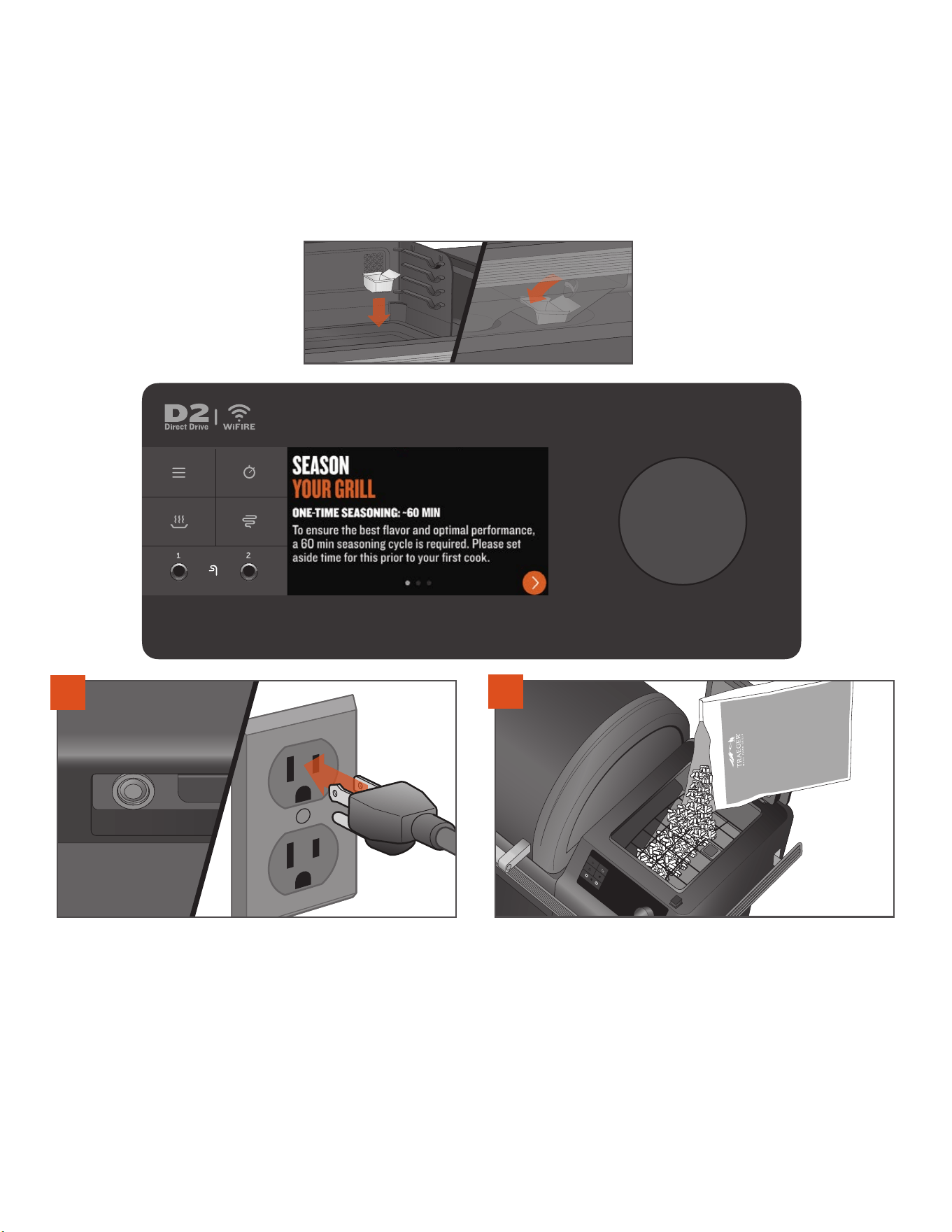
ONBOARDING PART 1: SEASONING YOUR GRILL
REQUIRED PRIOR TO FIRST COOK AND RECOMMENDED TO COMPLETE DURING GUIDED
ONBOARDING PROCESS.
In order to ensure the best flavor, optimal performance, and proper and safe operation of the grill, follow the
instructions below to season your grill and “prime” the auger tube.
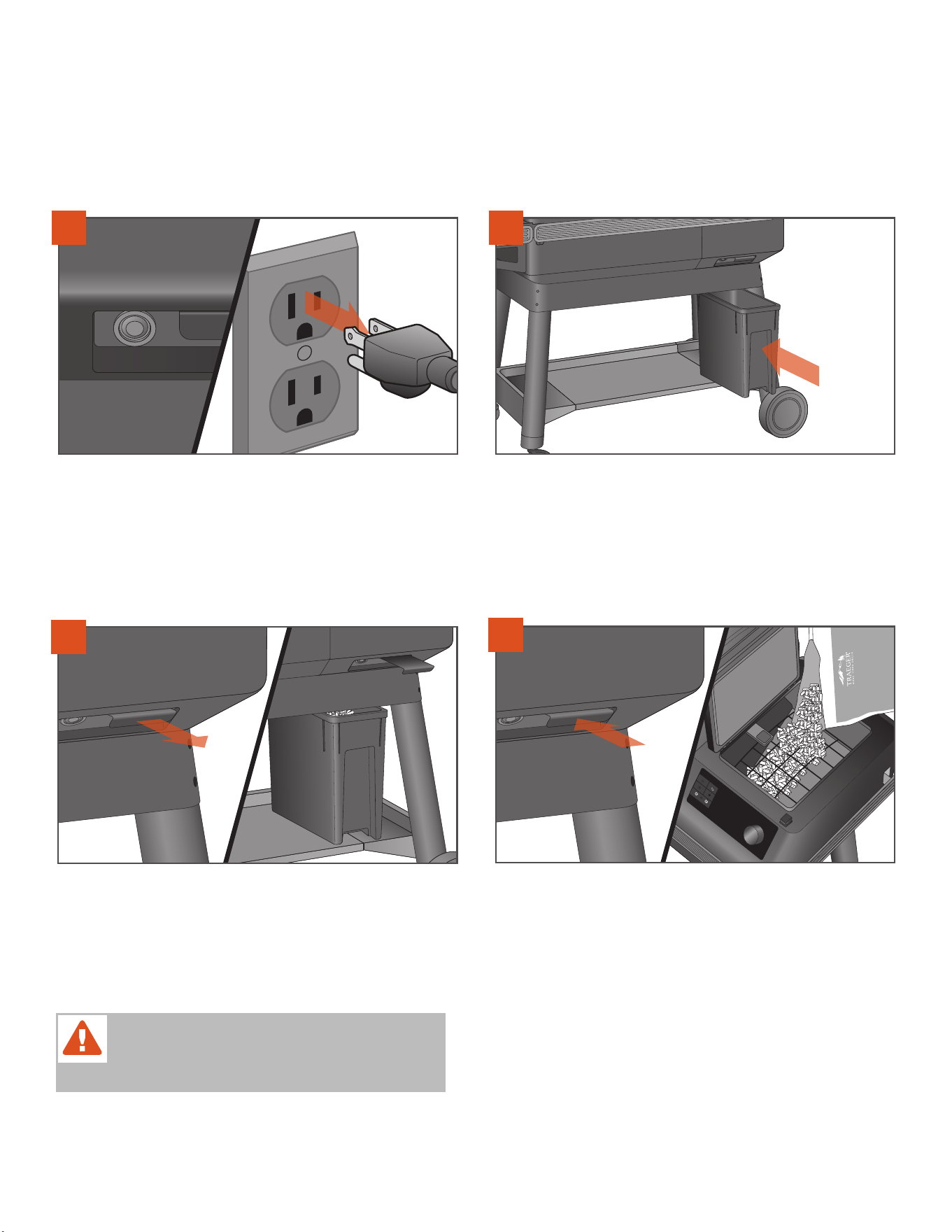
1
PLUG APPEARANCE MAY VARY BY REGION.
With the main power button set to OFF, plug the power cord into an
appropriate grounded/earthed electrical outlet.
2
Open the hopper lid. Make sure there are no foreign objects in the
auger before adding pellets to the hopper. After adding pellets to the
hopper, close the hopper lid. We recommend you fill the hopper with
pellets at least to the safety grate in the hopper.
IMPORTANT: Make sure all components are properly
installed in the grill prior to seasoning.
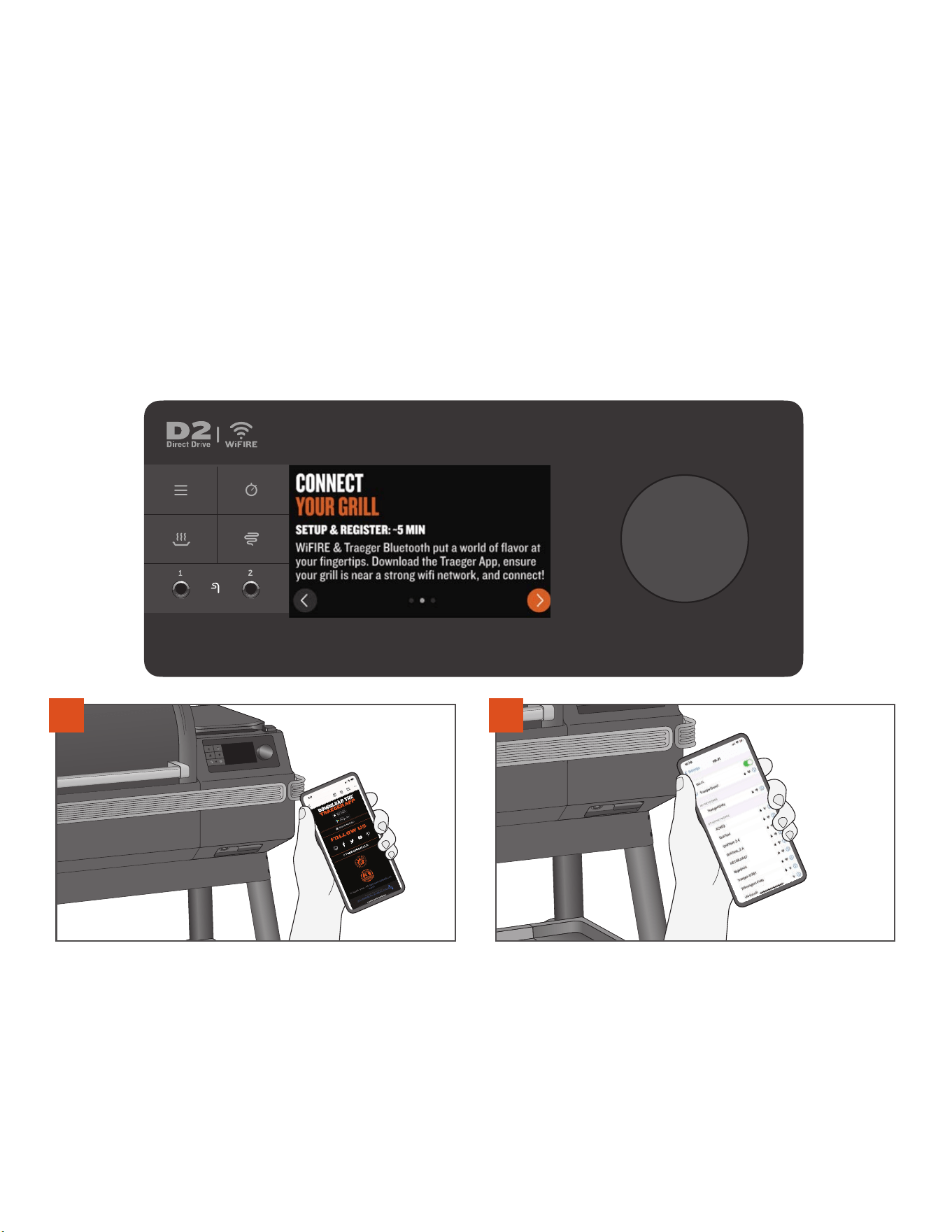
16
ONBOARDING PART 2: CONNECTING YOUR GRILL
RECOMMENDED TO COMPLETE DURING ONBOARDING PROCESS. We are dedicated to delivering a world-class
product and experience. This means we are constantly working to improve grill performance and features. To ensure the latest software and
firmware functionality, it is recommended that you connect your grill to the Traeger app using Traeger WiFIRE® technology during first use.
To learn more about WiFIRE®, the Traeger app, and more ways to connect, go to traeger.com/app. To pair, follow these instructions to connect
your grill to Wi-Fi.
NOTES:
• Make sure your smart device is running on the latest operating system and that Bluetooth is turned ON.
• To connect your grill to Wi-Fi, your grill must be powered on. Make sure the main power button is pressed to ON.
• The router signal must be 2.4 GHz, as the grill is not compatible with 5 GHz.
• The sucess screen at the end of the pairing process only indicates that pairing is completed. Seasoning is completed only when the
SEASONING COMPLETE screen appears.
1
Go to your Apple App Store or your Android Google Play Store to
download the latest Traeger app.
2
Ensure your smart device is connected to the Wi-Fi network to which
you want your grill connected. The router signal must be 2.4 GHz, as
the grill is not compatible with 5 GHz.
17
TRAEGER.COM
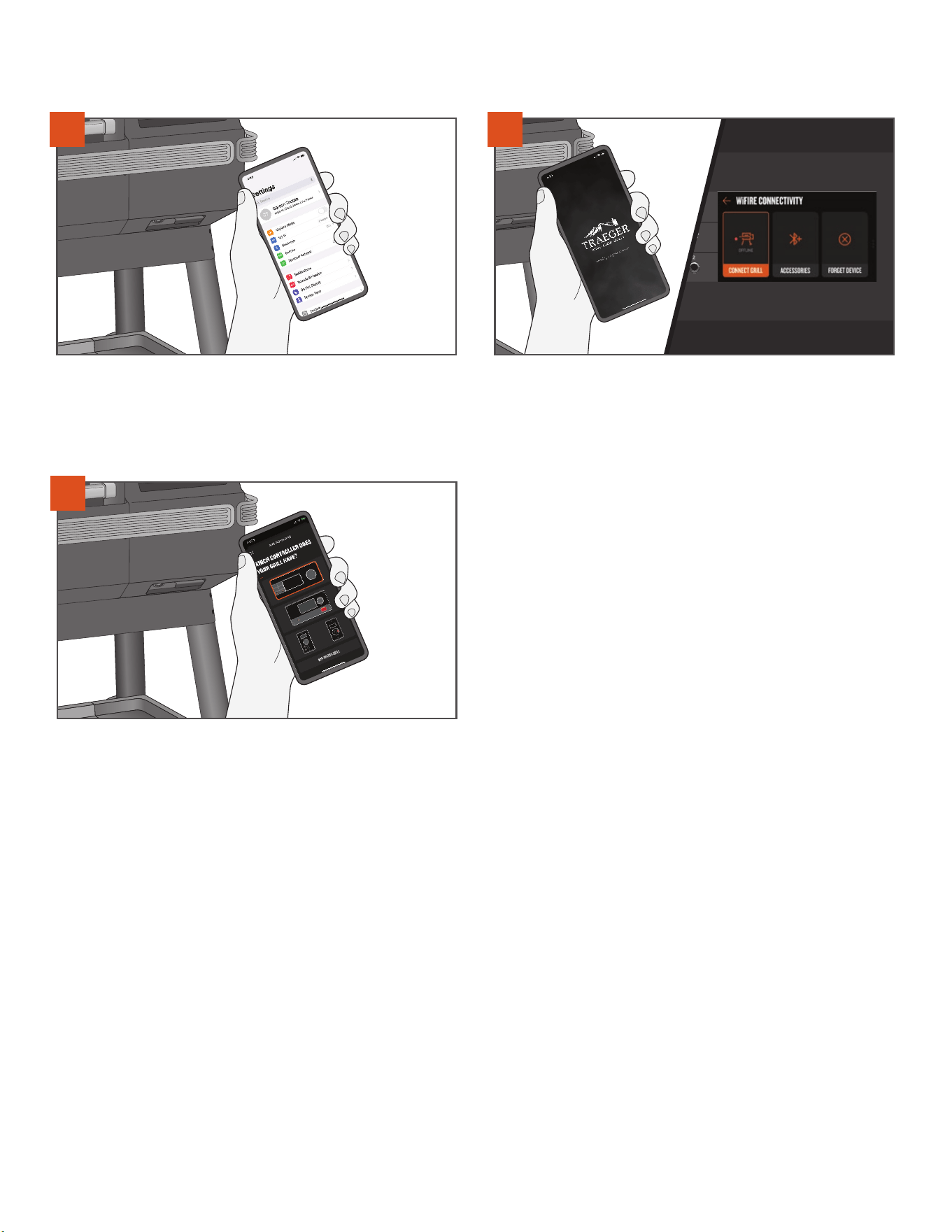
3
Go to your smart device Settings menu and ensure that the Bluetooth
setting on your smart device is on.
Open the Traeger app, create or log in with your account, and follow the
instructions in the app to add a grill. To initiate this process on the grill,
tap the menu icon on the controller. Select WiFIRE® CONNECTIVITY
from the menu and follow the prompts to connect grill.
On the controller selection screen, select the controller that matches
your grill and follow the steps on your app to get connected!
5
4
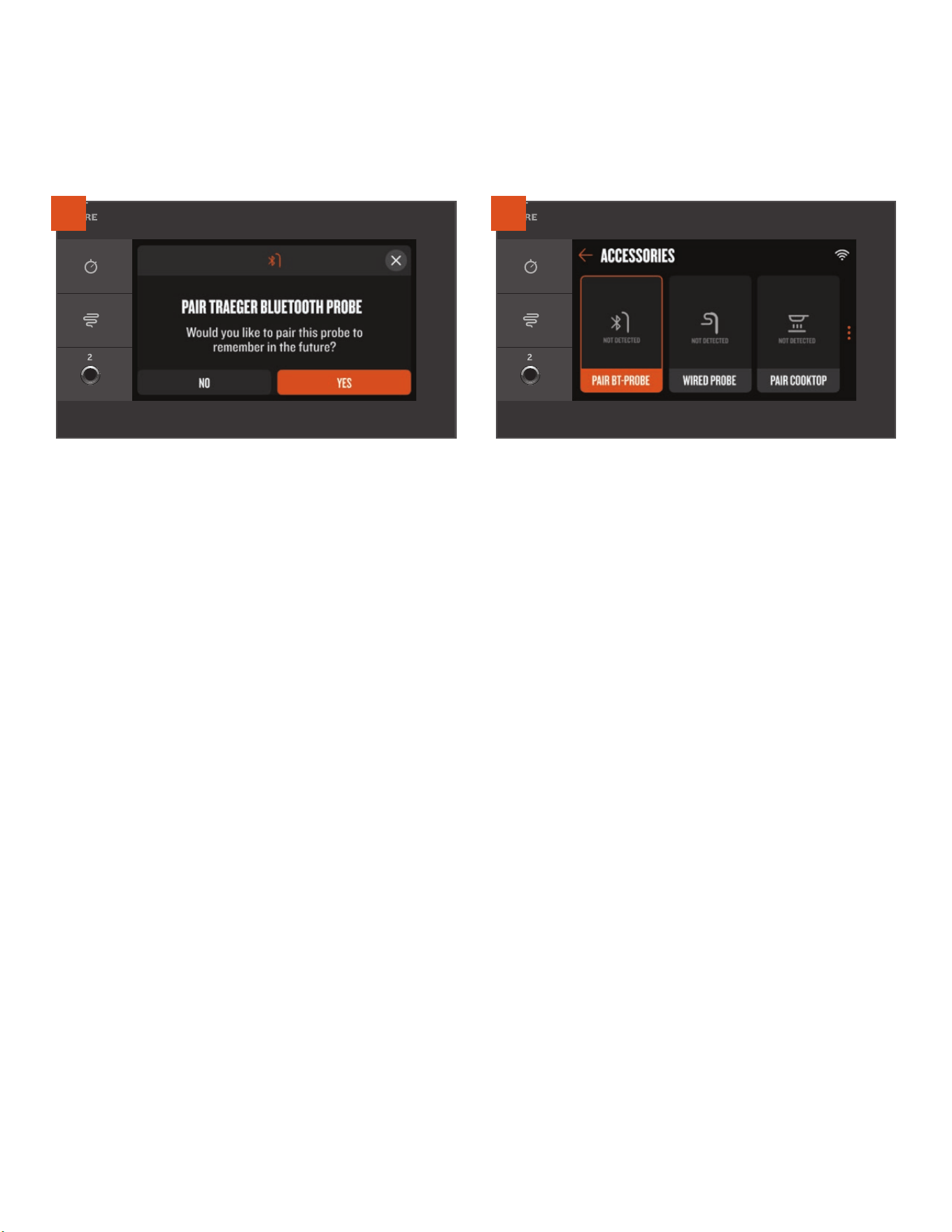
18
ONBOARDING PART 3: CONNECTING YOUR ACCESSORIES
RECOMMENDED TO COMPLETE DURING ONBOARDING PROCESS. To save time later, it is recommended that you
pair your Traeger Bluetooth devices when prompted during the onboarding process. If you decide to pair your Traeger Bluetooth device later,
check out the instructions below:
1
Make sure that your Traeger Bluetooth device is powered or fully
charged, and close to your grill before attempting to pair. For most
Traeger Bluetooth devices, a popup will automatically appear on
screen when the grill recognizes the signal of the device. Select YES
and follow the instructions on screen to pair your device to your grill.
2
If you missed or closed out of the popup too soon, no worries! You
can always pair accessories by navigating through the menu. Tap the
menu icon on the control panel, select the Accessories menu item,
then select the type of accessory you would like to pair. Follow the
instructions on the controller to pair that accessory type.

19
TRAEGER.COM
USING YOUR GRILL
YOU WILL NEED TO BEGIN WITH THESE STEPS EVERY TIME YOU USE YOUR GRILL.
PRE-GRILLING CHECKLIST
1. Check for and do needed maintenance:
• Clean the Traeger® Grease Management System:
• EZ-Clean Drip Tray
• Grease Drain Tube
• EZ-Clean Grease + Ash Keg
• Remove ash when alerted by the grill (or after approximately 30 hours of cooking).
• Check the power cord for twists, damage, or fraying.
2. Make sure the grill is correctly assembled with all parts present before using it:
• EvenFlow
TM
Heat Shield
• EZ-Clean Drip Tray
• Grates
• Grease Governor
• Firepot
3. Make sure you have proper airflow:
• Ensure nothing is obstructing the exhaust.
4. Make sure the grill is a safe distance from combustibles (see page 2).
5. Make sure the grill is on a level surface.
6. Inspect the pellets:
• Make sure you have enough pellets in the hopper.
• Make sure the pellets are not wet, water damaged, swollen, or dull. They should be shiny and easy to snap.
• Make sure the bottom of the hopper and the auger do not have excessive sawdust.
7. Close the hopper lid.
8. Close the grill door.
20
COOKING ON YOUR TRAEGER
GENERAL COOKING Use this method to set and change temperature for quick cooks and simple recipes.
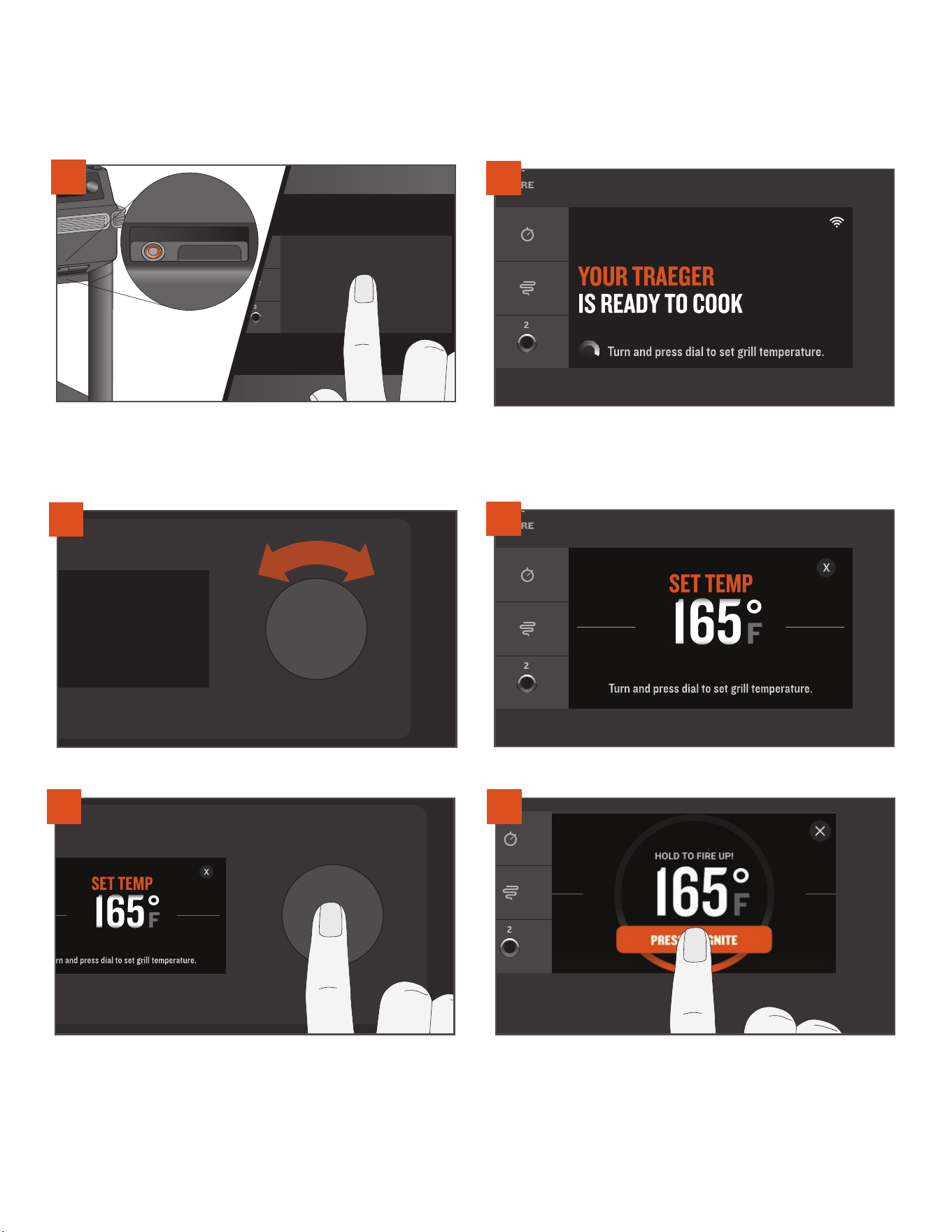
2
The homescreen displays YOUR TRAEGER IS READY TO COOK.
Cooking temperature can be set directly from this screen.
To select temperature, turn the selection dial right or left.
4
The selected temperature is displayed.
With the door closed, press the main power button located on the
front of the grill to ON. Tap anywhere on the screen or turn the
selection dial to wake up the controller. A splash screen will appear
after a few seconds as the grill powers on.
1
5
Press the center of the selection dial to select that temperature.
6
Once your temperature is selected, you will be prompted to ignite
your grill. Press and hold the button on the touch screen display
for about 2 seconds until the grill displays that it is successfully
“igniting.” The automatic ignition and preheat cycle will begin. The
fan and auger will kick on and o throughout the cooking process to
stoke the fire according to the set temperature.
3
21
TRAEGER.COM
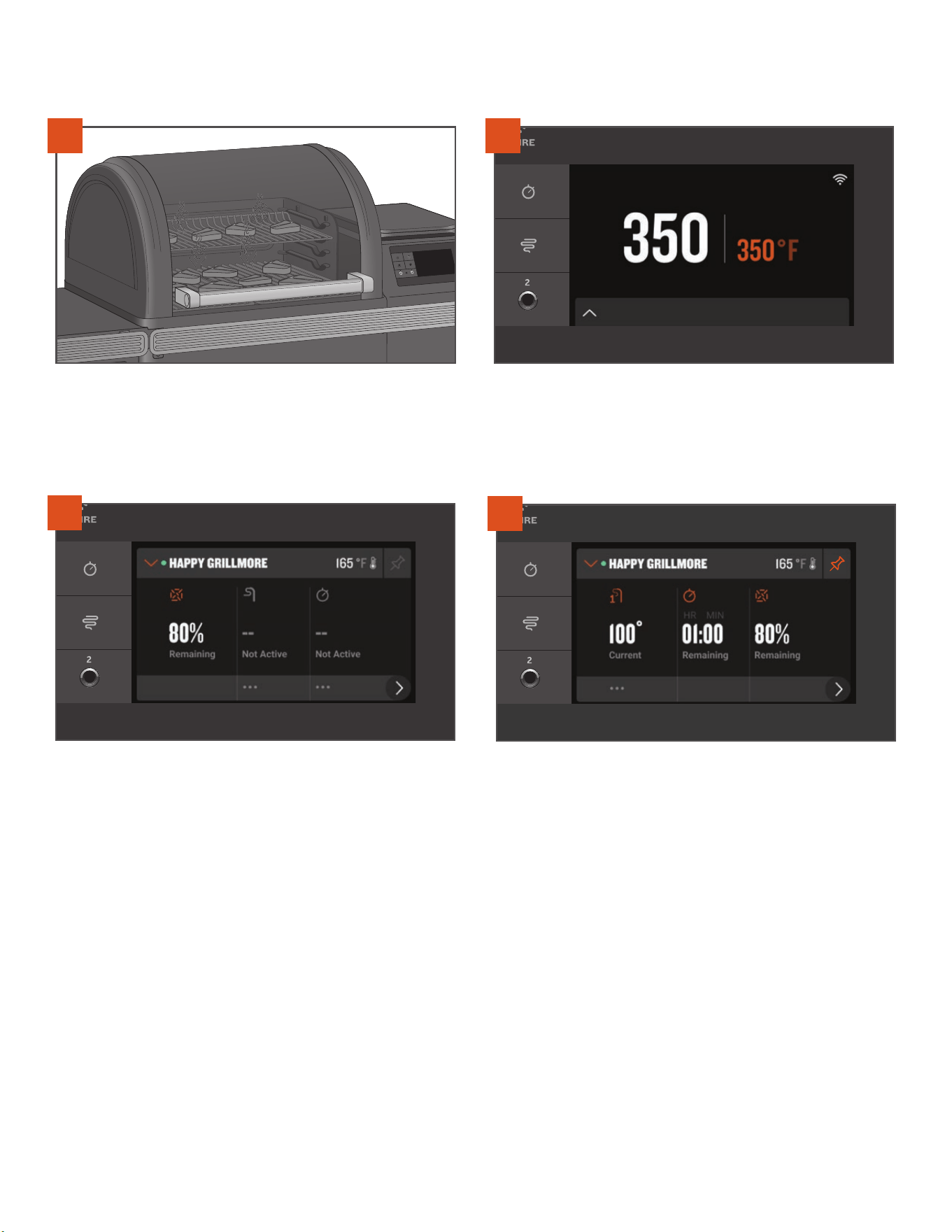
8
At Traeger, we keep it simple. The grill temperature is always
displayed prominently on the homescreen. To change the
temperature, always navigate to this homescreen. Turn the
selection dial to your desired temperature and press to select
a new temperature.
9
Tap the footer bar at the bottom of the homescreen to access the
Traeger Dashboard. From here, as you set up and use accessories,
you can monitor timers, set probe goal temperatures, review pellet
levels, and more.
10
Prefer this screen with more details related to connected accessories
or sensors? Tap the pin in the upper right corner to pin the current
view of the Dashboard.
TIPS:
• It is recommended, but not necessary, to wait until the preheat cycle is complete before loading food into the grill.
• Loading food too early can result in the grill taking longer than usual to achieve desired temperature.
• Keep the grill closed during the preheat cycle so that the grill can reach the desired set temperature.
• Traeger® Grills provide real time temperature readings and you should expect to see fluctuations in temperature.
7
Once preheating is complete, load food into the grill and close the
grill door. See page 22 if using the meat probe prior to loading food
into the grill.
22
COOKING WITH A BLUETOOTH PROBE You can use a Bluetooth Probe when your recipe specifies an internal goal
temperature for your food. Traeger® Wireless Bluetooth Probes can be purchased as an accessory compatible with the Ironwood model.
Please refer to the Traeger Wireless Probe Owner’s Manual for more details.
NOTES:
• Before use, the probes must be charged. In order to charge the probes, the tag found on the charging dock must first be removed.
• Due to high heat, it is not recommended to use wireless probes with the pizza oven mode.
COOKING WITH ACCESSORIES
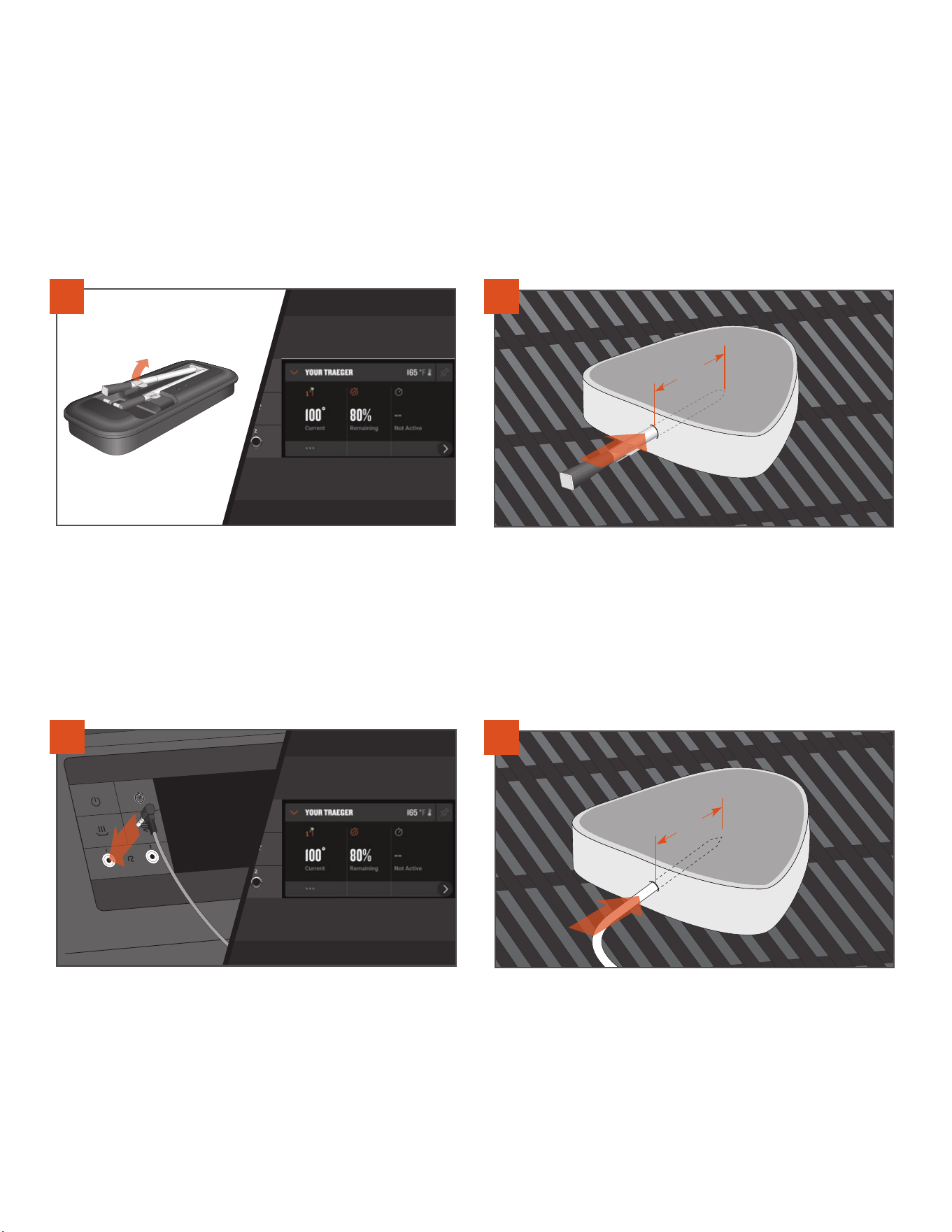
See “Cooking on Your Traeger” on page 20 to turn on the grill. Once
the grill is on, remove a charged Traeger® Bluetooth Probe one at
a time from the charging dock and the controller will automatically
recognize any previously paired probe. A probe widget will appear
within the Traeger Dashboard where you can find additional
information on probe status and shortcuts for setting probe
goal alarms.
1
Insert the probe up to the notch, into the thickest part of the protein –
avoid touching any bones or particularly fatty portions of the protein.
The probe needs to be in the protein at least 2 inches (5.1 cm). This
probe may not be suitable if you cannot insert the probe 2 inches
(5.1 cm) into the thickest part of the protein. After your probe has
been inserted, load your food onto the preheated grill.
2"
(5.1 cm)
2
COOKING WITH A WIRED PROBE You can use a wired probe when your recipe specifies an internal goal temperature for your food.
See “Cooking on Your Traeger” on page 20 to turn on the grill. Plug
the probe into the probe jack located on the WiFIRE® controller. Once
connected, the controller will recognize the probe and a probe widget
will appear in the Dashboard.
IMPORTANT: Make sure the probe is fully inserted into the jack.
Insert the probe tip halfway into the thickest part of the protein –
avoid touching any bones or particularly fatty portions of the protein.
The probe needs to be in the protein at least 2 inches (5.1 cm). This
probe may not be suitable if you cannot insert the probe 2 inches
(5.1 cm) into the thickest part of the protein. After your probe has been
inserted, load your food onto the preheated grill.
2"
(5.1 cm)
2
1
IMPORTANT: Probes will be extremely hot after use. Use care when removing them from the grill.
23
TRAEGER.COM
NOTES:
• It is recommended to cook to an internal temperature using the probe, instead of cooking for a specific time.
• The probes can only be paired to one Traeger® Grill at a time. If you have multiple Bluetooth-enabled Traeger® Grills and want to use a paired
probe on another grill, make sure to “Forget” the device on the first grill in order to pair with the second grill.
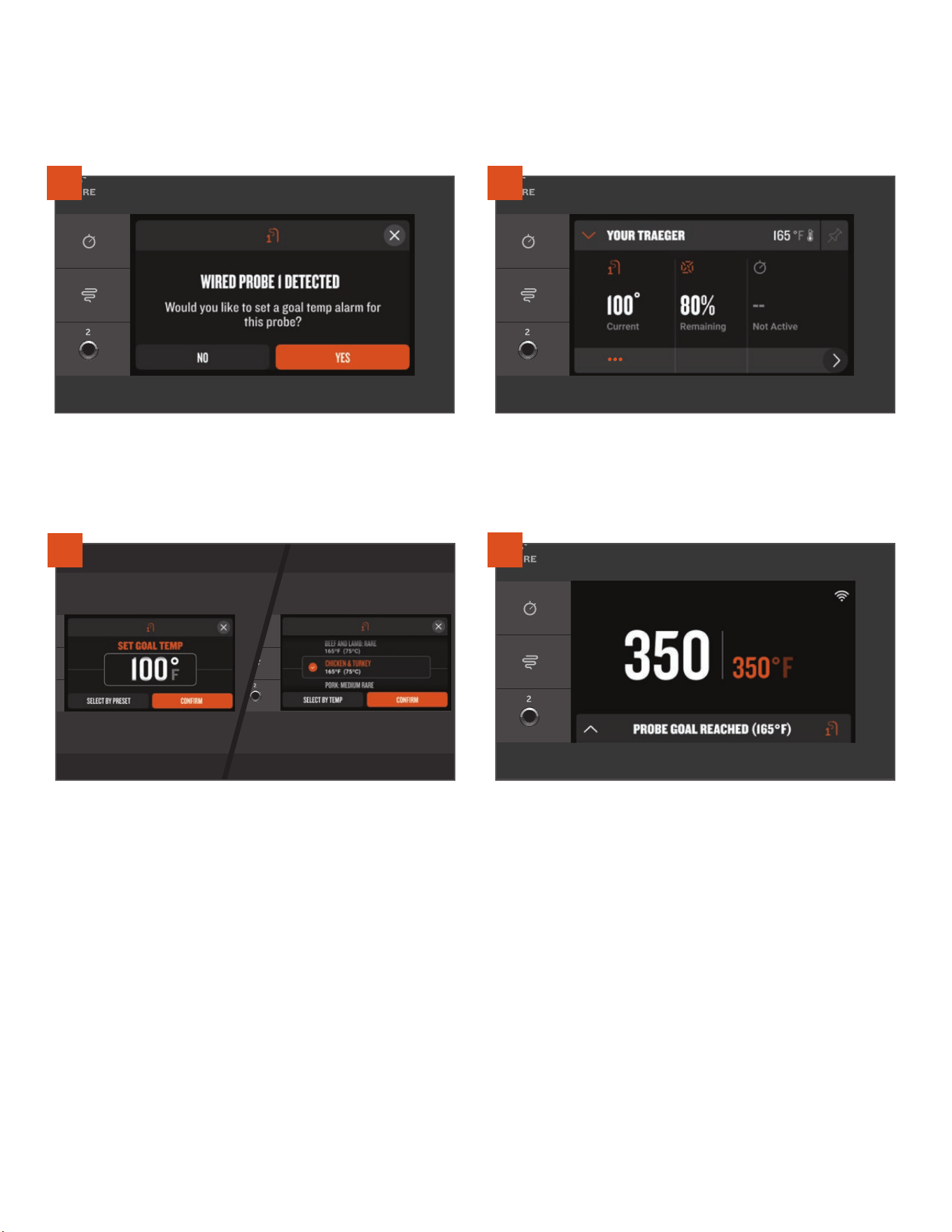
To cook to an internal temperature, set a probe goal alarm. When
you first connect a Bluetooth or wired probe, a popup will provide a
shortcut to easily set a goal temperature alarm. Select YES and follow
the prompts.
3
If you missed the popup, you can set a probe goal alarm via the (...)
shortcut in the Dashboard underneath the probe widget, or via the
Accessories options within the menu.
4
Use the selection dial to select the desired temperature for your
probe goal alarm and press the dial to select and confirm. Can't
remember the safe internal temperature for Chicken Marsala? Tap
SELECT BY PRESET to find a list of the food-safe temperatures
associated with typical protein choices.
5
A tone will sound when your protein reaches the set alarm
temperature. If using the Traeger app, you will also receive a push
notification on your connected smart device.
6
COOKING TO AN INTERNAL TEMPERATURE WITH PROBES How to set a goal temperature alarm for Bluetooth or
wired probes.
24
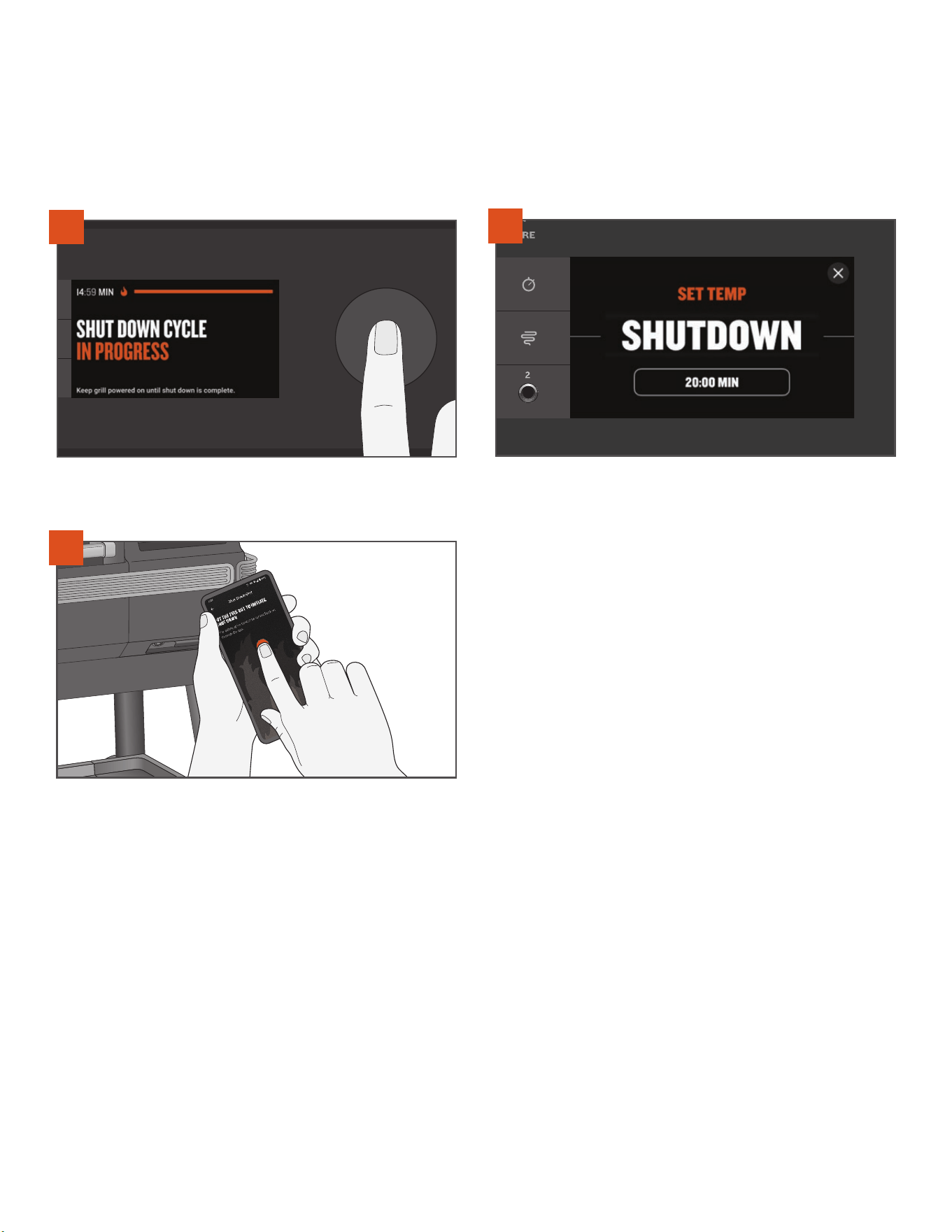
SHUTTING DOWN YOUR GRILL THE SHUTDOWN CYCLE EXPLAINED
The shutdown cycle is crucial to the success and high-quality grill performance of your Traeger® Grill. Shutdown cycles prevent future adverse
eects and get your grill properly set up for the next cook. Always initiate a shutdown cycle after each and every cook.
To initiate a shutdown cycle, turn o your grill in one of the following ways:
Press and hold the selection dial down for 3 seconds, until the screen
registers and shows “SHUT DOWN CYCLE IN PROGRESS.”
While setting the temperature, turn the selection dial all the way to
the left and push to select SHUTDOWN.
2
Use the Traeger app to initiate the shutdown cycle on your grill from
anywhere at any time.
3
NOTES:
• The shutdown cycle minimizes your risk for future adverse events like backburn. Backburn occurs when the fire from the firepot burns pellets
in the auger tube, causing the fire to burn back into the hopper.
• The shutdown cycle will run for approximately 15 to 20 minutes, depending on the previous set temperature. Allow the shutdown cycle to
complete for the proper operation of your grill. Do not press the main power button on the front of the grill to OFF or unplug your grill prior to
completion. If it remains plugged in and is not powered o, the grill will remain in standby mode for firmware updates and quick start-ups for
the next cook.
1
25
TRAEGER.COM
HOPPER CLEAN-OUT
Your Traeger® Grill has a hopper clean-out system that allows you to remove pellets from the pellet hopper or quickly change from one pellet
flavor to another without making a mess.
1
3
2
4
PLUG APPEARANCE MAY VARY BY REGION.
Press the main power button to OFF and disconnect the power cord.
If the grill is still hot, allow it to cool completely.
TRAEGER® STAYDRY™ PELLET BIN SHOWN.
Pull the lever directly out to release pellets. Pellets will empty into
the StayDry™ Pellet Bin or the container you've placed below. You
might need a spatula or spoon to push the remaining pellets out of
the hopper. Vacuum out any remaining sawdust from the hopper and
auger.
Once the hopper's empty, push the lever back in, and refill the hopper
with a dierent flavor of TRAEGER® ALL NATURAL HARDWOOD
PELLETS.
TRAEGER® STAYDRY™ PELLET BIN SHOWN.
The Traeger® StayDry™ Pellet Bin can be purchased as an accessory
for all Ironwood models. When emptying the hopper, make sure that
this bin (or a similar-style container) is placed directly underneath
the hopper.
WARNING! DO NOT EMPTY OUT THE HOPPER UNTIL
GRILL HAS COMPLETELY COOLED AND THE POWER IS
OFF; OTHERWISE, PELLETS MAY BE VERY HOT.
26
GRILL FEATURES
TRAEGER APP
TIMER
Your Traeger® Grill can be controlled remotely using the Traeger app. To learn more about WiFIRE®, the
Traeger app, and more ways to connect, go to traeger.com/app.
You will need a home internet Wi-Fi connection to connect your Traeger® Grill to the internet. Your
smartphone or tablet must be running the latest iOS or Android operating system. If you leave the range of
your Wi-Fi networks with your device, a data plan is required. The grill must remain connected to the internet
to receive the latest operating, safety, and security updates.
The Traeger app is also an easy way to search, download, and cook new recipes on your Traeger® Grill.
Your Traeger® Grill comes equipped with a convenient timer. The Timer function does not impact grill operation; you can use it to notify you of
other needed steps during cooking, such as loading vegetables or other shorter time cooks into the grill or basting your food.
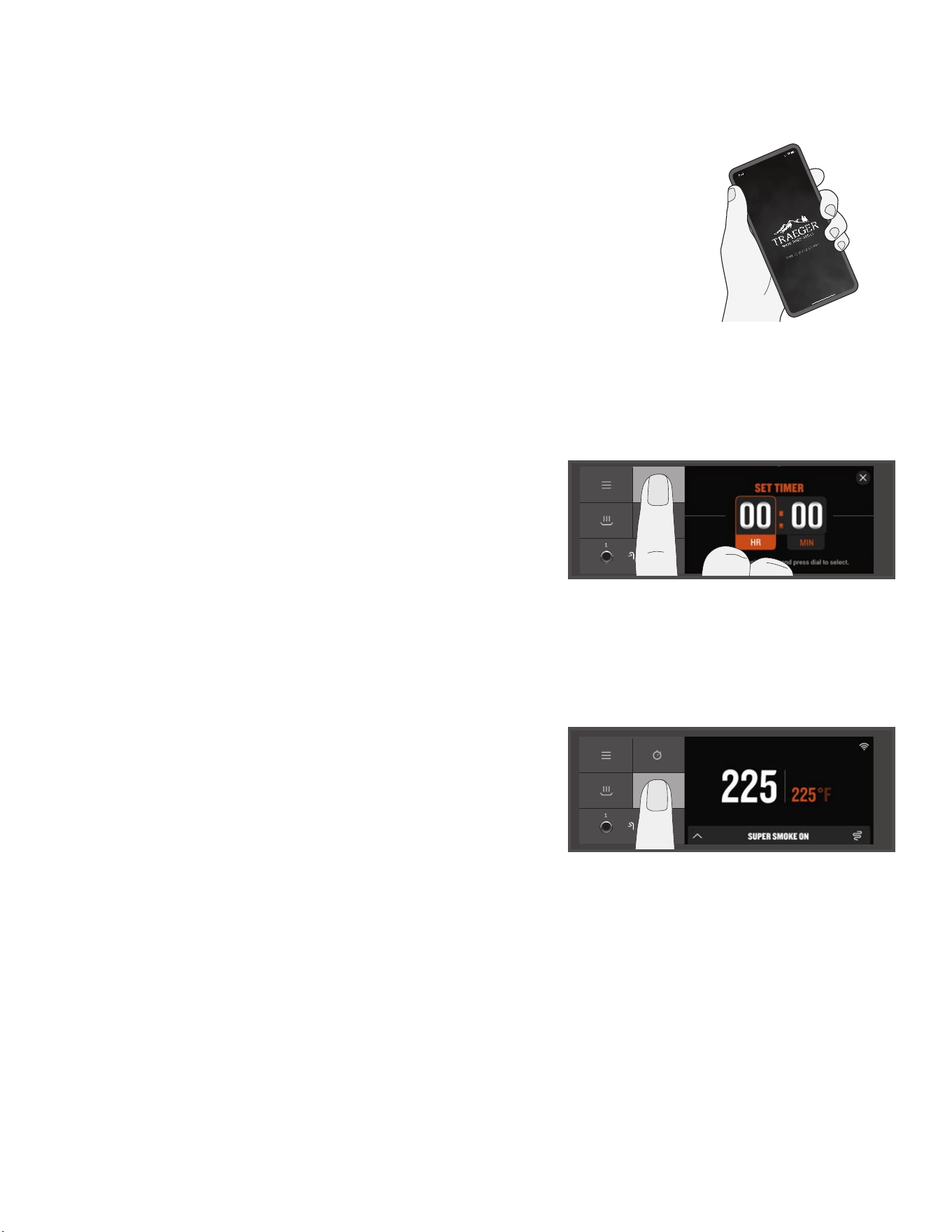
TO SET THE TIMER:
1. Press and hold the timer icon.
2. Use the selection dial to toggle between hours and minutes to set the time.
Once the dial is pressed after choosing the time, the Timer is set, you will be returned
to the homescreen, and the Timer will automatically begin the countdown.
TO CANCEL THE TIMER:
1. Press and hold the timer icon.
2. You will see the options.
3. Select.
SUPER SMOKE OPTION
You can add more smoke flavor to your food by pressing the Super Smoke icon at
any time during grilling. Press it again to cancel.
NOTES:
• Super Smoke can only be activated when grill temperature is between
165°–225°F (74°–107°C).
• Smoke will be thin and blue.
27
TRAEGER.COM
VERSATILE UPPER GRATE
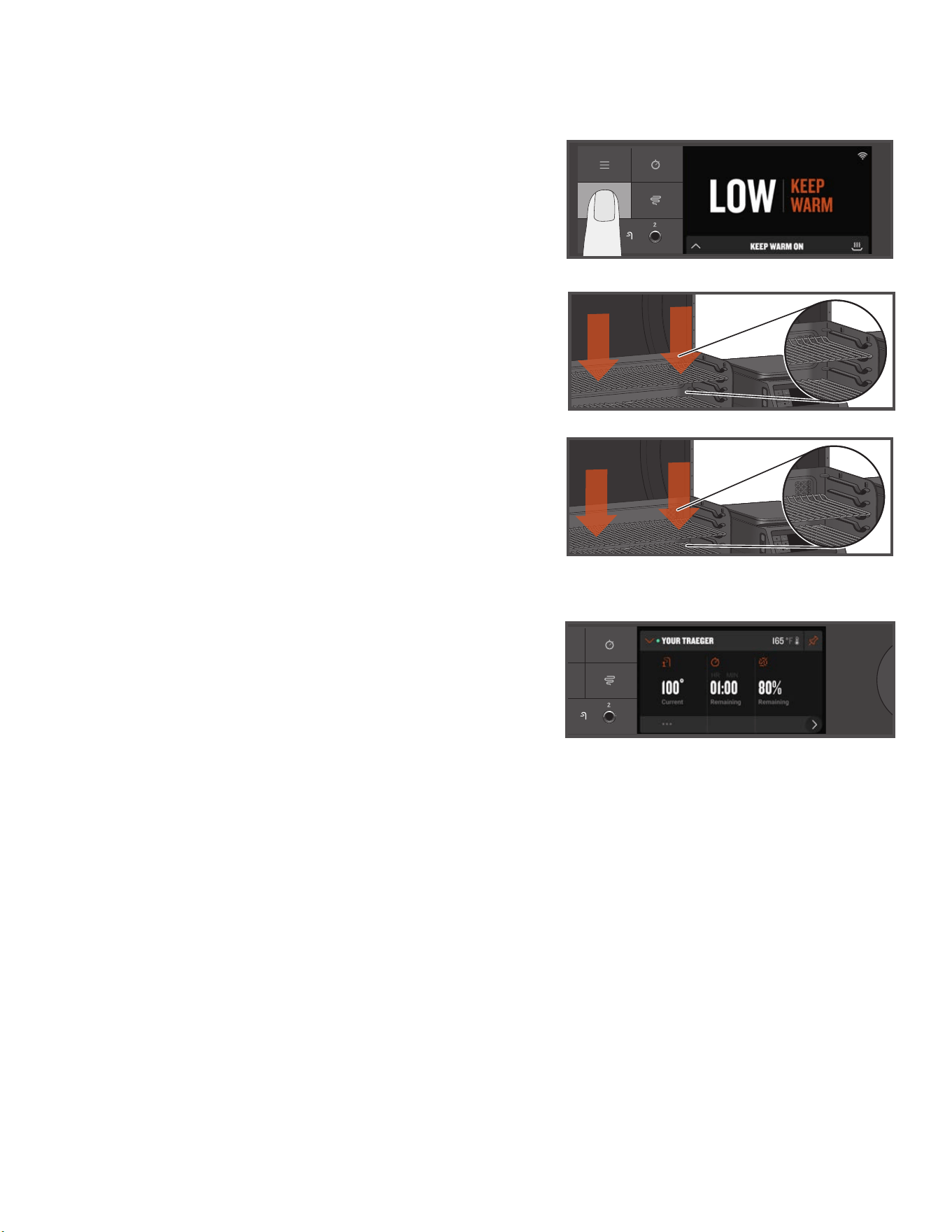
Several locations are available for you to change the placement of the upper grill
grate. This allows you to make room on the lower grate or upper grate if needed.
KEEP WARM FUNCTION
Keep Warm can be used to pause the cook cycle at any time during grilling
and maintain the grill temperature at 165°F (74°C). Press the keep warm icon
to activate the function. Press the Keep Warm icon again to resume cooking.
TRAEGER PELLET SENSOR
The Traeger Pellet Sensor monitors the supply of pellets. Once selected from the
menu, it will display the current level of pellets, in 5% increments.
If the Traeger Pellet Sensor is properly connected, it will display “PELLET SENSOR
Pellet Level: XXX%.” If the Traeger Pellet Sensor is not properly connected, it will
display “PELLET SENSOR Disconnected Pellet Level: 0%.”
The Traeger Pellet Sensor allows you to check the status of your pellet level
remotely using the Traeger app. This system will send you push notifications and
alarms through the Traeger app on your smart device when your pellets are getting
low, protecting your cook from running out of fuel.
28
MAINTAINING YOUR GRILL
1. BEFORE EACH COOK:
Remove any excess buildup from the EZ-Clean drip tray. Check the EZ-Clean
Grease + Ash Keg and empty if full. Ensure that nothing is covering the EZ-Clean
drip tray.
2. AFTER EACH COOK:
Remove any excess food from the grates while still warm. Scrape excess grease
buildup into the EZ-Clean Grease + Ash Keg with a sti, non-metallic tool.
3. MONTHLY:
Check the firepot and remove excess ash buildup in, around, and underneath.
When replacing the firepot, make sure the firepot lip is positioned under the
auger tube. Scrape creosote from the backsplash and the back of the grill door.
Do a final wipe down of the grill cavity with Traeger® All Natural Cleaner. Remove
the grease governor and clean out the grease trap tube.
IMPORTANT: Covering the EZ-Clean drip tray with anything, including foil or liners,
will significantly impact the performance of the grill and could damage the EZ-Clean
drip tray or grill.
Do you love to slowly cook fattier proteins at lower temperatures? We do too. But when you do, we recommend extra care and attention to
cleaning up excess grease drippings. When the grill has cooled to a warm temperature, scrape grill grates and wipe up this extra grease from the
EZ-Clean drip tray (be careful not to burn yourself). This will ensure that everything runs smoothly the next time you fire up, especially if you plan
to cook something hot and fast!

29
TRAEGER.COM
w WARNING
Fire Hazard: Grease fires are most frequently
caused by failing to properly maintain the grill by not cleaning the
grease from the grill on a consistent basis.
w WARNING
Press the main power button to OFF and disconnect
the power cord before initiating any of the maintenance below.
4. REMOVAL OF ASH AND GREASE FROM THE EZ-CLEAN GREASE +
ASH KEG (EVERY COOK)
w WARNING
Make sure that the grill is COLD and ashes are
extinguished and COLD before checking the Grease + Ash Keg.
w WARNING
Failure to empty the EZ-Clean Grease + Ash Keg
could result in a serious fire.
Underneath the grill body there is a keg that collects both ash
and grease. This should be checked and emptied before every cook.
To remove and check the keg, simply grab the keg with two hands
and push the button to release. Remove the disposable liner and
replace with a new one. See Step 9, Disposal of Ashes, for proper
ash disposal.
NOTE: Traeger’s keg liners will help keep this a clean and easy task.
5. CLEANING YOUR TRAEGER® GREASE MANAGEMENT SYSTEM (“TGMS”):
During your cooks, grease drippings will fall onto (i) the EZ-Clean
drip tray and be channeled into (ii) the grease drain tube,
(iii) to be collected in the EZ-Clean Grease + Ash Keg. These
three components are the components of the Traeger® Grease
Management System (TGMS). Grease will accumulate in all of these
locations and should be regularly cleaned to reduce the risk of fire.
How often you need to clean the TGMS depends on the fat
content of your food. Fattier foods will require cleaning of the
TGMS more often, and sometimes you will need to clean the
TGMS after every cook.
Visible pieces of food and bits of hardened grease or other
buildup indicate a need for cleaning.
All components of the TGMS should be inspected before each use
for signs of grease buildup.
w WARNING
Accumulated grease is easier to clean o
when the grill is still warm—not hot. Be careful not to burn
yourself. Heat-protective gloves are recommended.
Clean the grease out of the grease drain tube. We recommend
cleaning this location regularly.
Remove all grill grates and the grease governor cap. This will
provide access to the grease drain tube opening inside the grill.
Scrape the grease accumulated on the EZ-Clean drip tray down
through the grease drain tube using a sti, nonmetallic tool.
Much of the loosened grease can be pushed down through the
grease drain tube and will fall into the EZ-Clean Grease + Ash Keg.
Wipe up remaining grease residue with paper towels or disposable
rags.
Regularly clean the grease out of the grill on the interior bottom and
sides. If grease is allowed to build up, a grease fire could result.
Scrape the grease accumulation from inside the grill using a sti,
nonmetallic tool. Much of the loosened grease can be removed
using paper towels or disposable rags. Excessive scraped-o
residue can be cleaned using a vacuum cleaner as described in
Step 8 (below) when cleaning the firepot of ashes.
Inspect and clean the EvenFlow
TM
Heat Shield for any grease or
debris.
6. CREOSOTE REMOVAL:
When wood pellets are burned slowly, they produce tar and
other organic vapors that combine with expelled moisture to
form creosote. The creosote vapors condense in the relatively
cool exhaust vent of a slow-burning fire. As a result, creosote
accumulates on the exhaust vent lining. When ignited, creosote
makes an extremely hot fire. Airborne grease particles will travel
through the cooking chamber, and some of this airborne grease
will accumulate on the exhaust vent lining, similar to creosote,
which could contribute to a fire.
Periodically scrape the creosote and grease accumulation from
the back of the backsplash and back of the grill door. Once the
creosote and grease residue have been loosened from the interior
lining and ventilation gaps in this downdraft system, much of
it can be removed with paper towels or disposable rags. Do not
spray water or other liquid cleaners onto the inside of your grill
to remove creosote.
NOTE: The Traeger® Downdraft Exhaust System should be
inspected at least twice a year to determine when a creosote
and/or grease buildup has occurred.
When creosote or grease has accumulated, it should be removed
to reduce the risk of a fire.
7. OUTSIDE STORAGE:
w CAUTION
If the grill is stored outside, care should be
taken to ensure that water does not get into the pellet hopper.
Wood pellets expand greatly when wet and will jam your auger.
Always cover your grill when not in use with a Traeger® Grill Cover.
This custom-fit cover can be purchased at traeger.com.
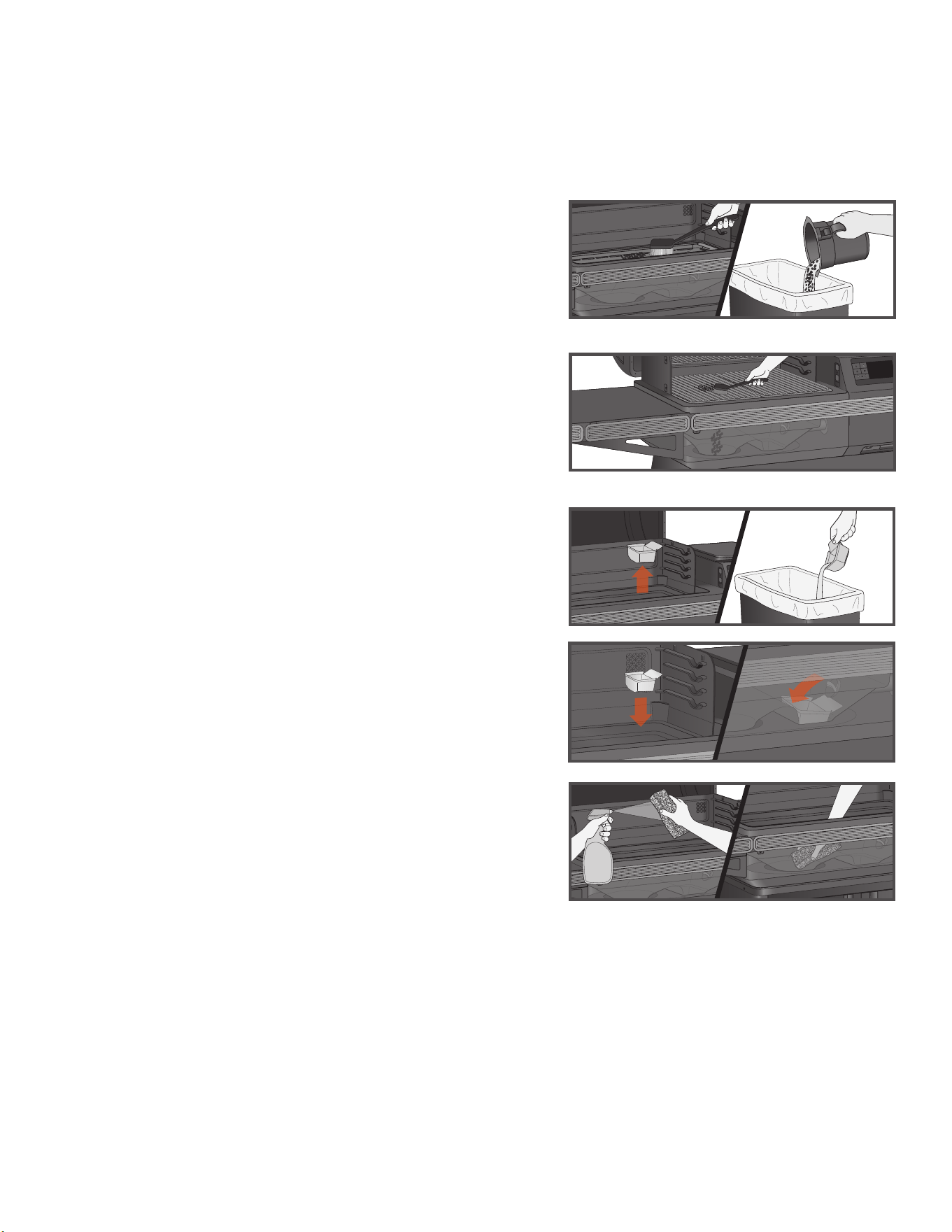
8. CLEANING THE ASH FROM INSIDE AND AROUND THE FIREPOT
(AFTER APPROXIMATELY 30 HOURS OF COOKING):
w WARNING
Make sure that the grill is COLD and ashes are
extinguished and COLD before cleaning the ash.
w WARNING
Disposal of ashes should be done only
according to the following instructions.
Excess ash in the firepot will hamper ignition and may cause your
fire to go out. The firepot should be inspected occasionally and
cleaned to remove the ash buildup. Again, cleaning the ash from in
and around the firepot should be done only when the grill is COLD.
Remove the grill grates, EZ-Clean drip tray, and EvenFlow
TM
Heat
Shield cover to provide access to the firepot and the interior of the
grill, including the fan pan. Much of the ash outside of the firepot
can be removed from the grill with a shop vac.
30
w WARNING
A dedicated vacuum cleaner is the best way to
remove ashes from the firepot, but this must be done with extreme
care to avoid the risk of fire. Again, cleaning the ash from in and
around the firepot should be done only when the grill is COLD.
A utility-type vacuum cleaner having a metal collection canister
without a bag would be best for this task. However, almost any
vacuum cleaner will work safely if this procedure is properly
followed.
After ensuring that the ash in the firepot is COLD, vacuum the ash
from the inside of the firepot.
a.
If your vacuum cleaner is a bagless model, empty any
previously accumulated debris from the collection chamber.
Then vacuum the ash from the inside of the firepot. Once the
firepot is clean, empty the collection chamber into the metal
container handled in the manner
described below under
Disposal of Ashes without delay. Make sure that there is
no remaining ash residue left in the collection chamber.
b. If your vacuum cleaner is a model that uses a disposable
bag, install an unused bag in the machine. Then vacuum the
ash from the inside of the firepot. Once the firepot is clean,
remove the bag from the vacuum cleaner and place it in a metal
container handled in the manner described under Disposal of
Ashes below.
9. DISPOSAL OF ASHES:
w WARNING
Ashes should always be completely cool
before handling. Ashes should be placed in a metal container with
a tight-fitting lid. The closed container of ashes should be placed
on a noncombustible floor or on the ground, well away from all
combustible materials, pending final disposal. Ashes should be
retained in the closed container until they are disposed.
10. CLEANING THE GRILL GRATES:
w WARNING
Cleaning the grill grates works best while they
are still warm. Be careful not to burn yourself. Heat-protective
gloves are recommended. We recommend keeping a long-handled
cleaning brush near the grill. After removing your food, give the
grill grate a quick brushing. It takes only a minute and it will be
ready the next time you want to use the grill.
11. CLEANING OUTSIDE SURFACES:
w WARNING
Press the main power button to OFF and
disconnect the power cord before initiating cleaning.
Use a disposable rag or cloth dampened with Traeger® All Natural
Cleaner or warm, soapy water to wipe the grease from the outside
of the grill. DO NOT use oven cleaner, abrasive cleansers, or
abrasive cleaning pads on the outside grill surfaces.
12. TESTING THE GRILL AFTER CLEANING:
Before replacing the EvenFlow
TM
Heat Shield, EZ-Clean drip tray,
and the grill grates, plug the power cord into an appropriate
grounded/earthed electrical outlet and press the main power button
to ON. After you set the temperature and press IGNITE, pellets
should fall into the firepot and the hot rod should begin to heat
(it will start to turn red).
w WARNING
Do not touch the hot rod.
When flames start to come out of the firepot, run the shutdown
cycle. Let the grill cool down. Now you’re ready to place the
EvenFlow
TM
Heat Shield, EZ-Clean drip tray, grill grates, and food
back onto the grill.
13. POWER CORD
If the power supply cord is damaged, it must be replaced by a
special cord assembly available from Traeger.
FREQUENTLY ASKED QUESTIONS
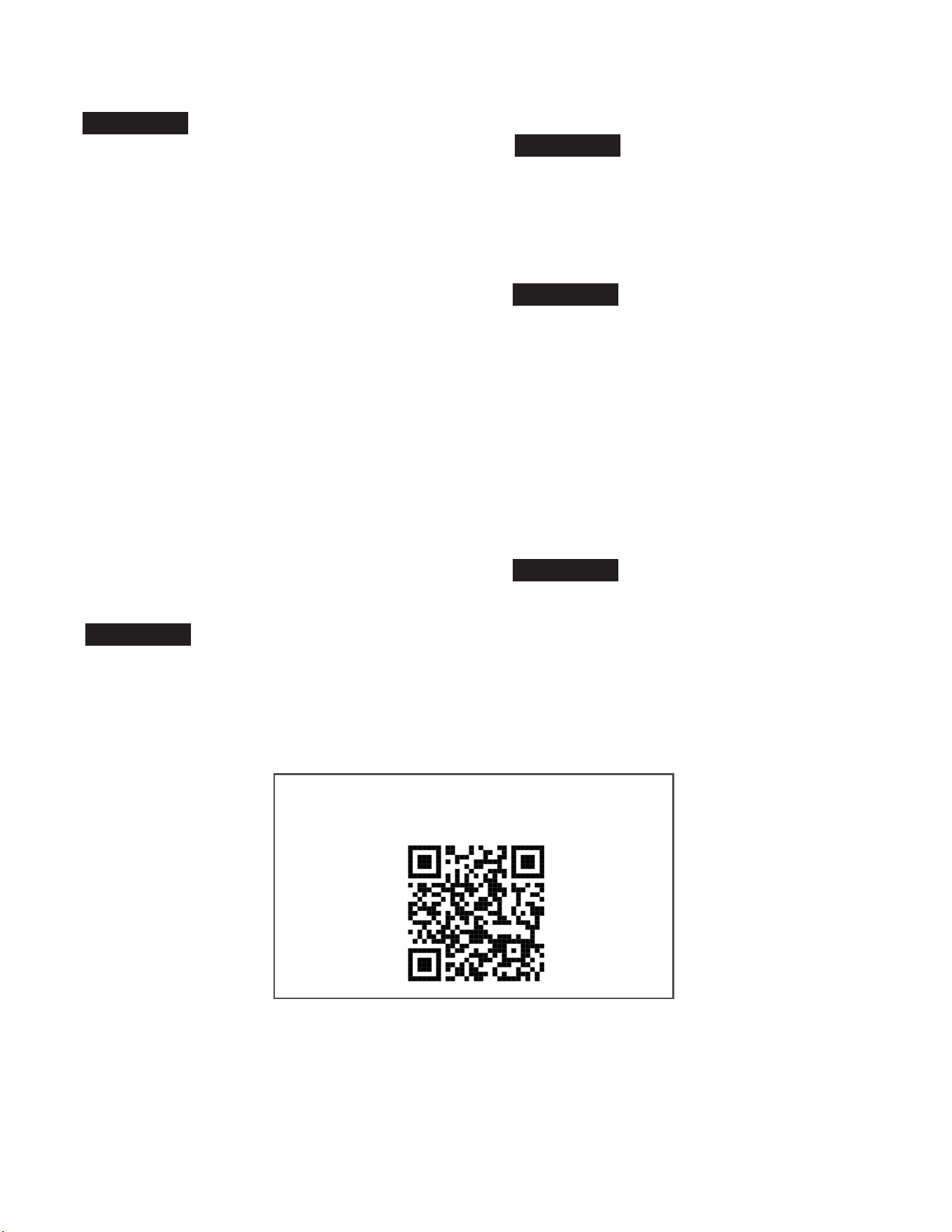
Scan this QR code to take you to Frequently Asked Questions.
TROUBLESHOOTING
This is a connected product. To ensure you are receiving the latest firmware updates to keep your grill operating at its peak performance, always
make sure your grill is connected. See “Onboarding Part 2: Connecting Your Grill” on page 16.
Although rare, you may see an error or warning message display on your control panel. Refer to traeger.com/support for a list of error messages
and how to resolve them.
ERROR MESSAGES AND WiFIRE® PROBLEMS/QUESTIONS
MAINTAINING YOUR GRILL CONTINUED

31
TRAEGER.COM
OPERATING TIPS
1. We are always working to improve your grill’s performance. Make
sure your grill is connected and has the latest firmware update. For
instructions on checking your firmware version, go to traeger.com.
2. You can change the temperature at any time during grilling to
increase or decrease cooking temperature. It is best practice to
give the grill some time to reach the desired temperature before
making additional temperature changes.
3. To change between Fahrenheit and Celsius: Select Temperature
Units from the Settings menu. Turn the dial to choose between
degrees FAHRENHEIT (°F) and CELSIUS (°C). Press the center of
the dial to confirm. You will now see temperatures displayed in the
format you’ve chosen.
4. Your Traeger® Grill is designed to operate with the door closed.
Opening the grill door greatly lengthens your cooking time.
• When putting frozen, raw, cold, or otherwise uncooked food
on the grill, this may result in a temporary drop of your grill’s
internal temperature.
5. Do not overload cooking surface with excessive amounts of food
that reach beyond the edges of the footprint of the EZ-Clean drip
tray. This can lead to interference with proper cooking airflow and
may lengthen the time to reach the set temperature.
6. Always take into account the type of food you are cooking:
• Thin foods need high heat and shorter cook times, while thicker
foods need low heat and longer cook times.
• Vegetables take longer to cook than meats at the same cooking
temperatures.
• Always check that the internal temperature of the meat that you
are cooking reaches a safe temperature for eating.
• The Keep Warm function is not designed to properly cook your
food.
7. Keep the grill clean. Regularly inspect your grill for accumulated
grease. Most grease fires are caused by not properly maintaining
the grill and failing to clean the Traeger® Grease Management
System (TGMS) on a consistent basis (see “Maintaining Your
Grill” on pages 28-30).Even if there is ample room in the grill, be
cautious of loading excessive amounts of food that can release
large quantities of flammable grease (for example more than a
pound of bacon). If the grill has not been well maintained or if
your previous cooks have produced large quantities of flammable
grease, it is highly recommended that the grease be cleaned from
the grill before using it again.
32
TRAEGER’S LEGENDARY CUSTOMER SERVICE is the best out there. If you have any questions about
your Traeger® Grill or need tips on cooking your first holiday turkey, our seasoned experts have your back. We’re here for you
365 days a year, including holidays. For assistance with assembly, installation, safe operation, parts, or general customer
service, you can visit our website traeger.com/support or you can phone or write us at:
TRAEGER'S CUSTOMER SERVICE
Please visit: traeger.com/support
Phone: US/CA: 1-800-TRAEGER 6:00 a.m. – 10:00 p.m. MT
Address: TRAEGER PELLET GRILLS LLC
1215 E. Wilmington Ave., Suite 200
Salt Lake City, UT 84106
SERVICE
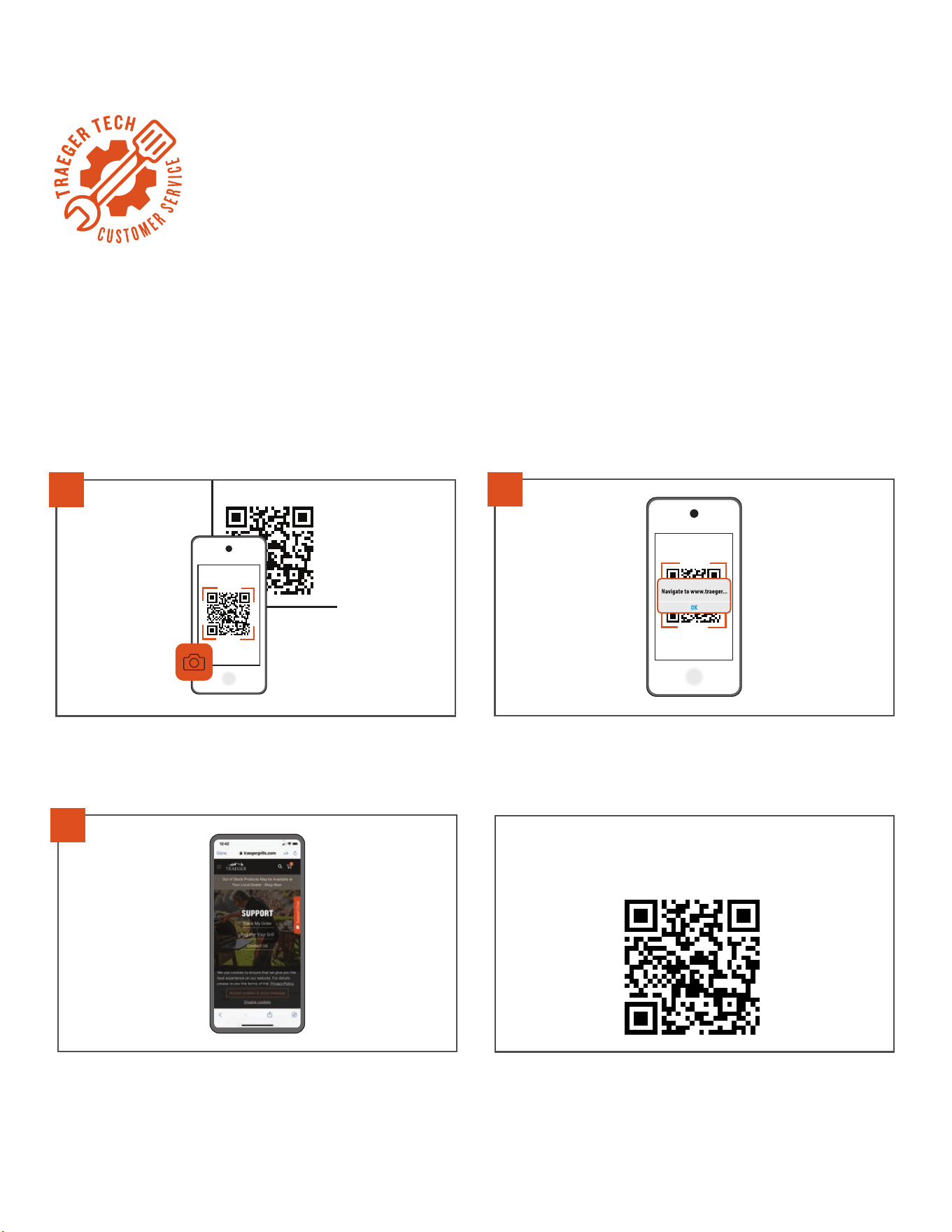
1
Open the camera on your phone and point it at the QR code.
2
Wait for the camera to register and tap the notification or banner
when it appears on your screen.
3
Information related to the code will automatically load.
TRY IT OUT
Scan this QR code to take you to Traeger’s Support Home page.
TRAEGER'S CUSTOMER SERVICE IS JUST A SCAN AWAY

33
TRAEGER.COM
NOTES
34
10-YEAR LIMITED WARRANTY
Traeger Pellet Grills LLC warrants this Traeger® Grill for the components, coverage, and warranty period listed in
the table below under normal use and proper maintenance. This warranty gives you specific legal rights, and you
may also have other rights which may vary among states and provinces. The warranty period starts from the date of
original purchase from traeger.com or a Traeger authorized dealer. A list of Traeger authorized dealers is available at
https://www.traeger.com/dealers (together each an “Authorized Seller”). The warranty period and coverage for the
replacement parts shall be as follows:
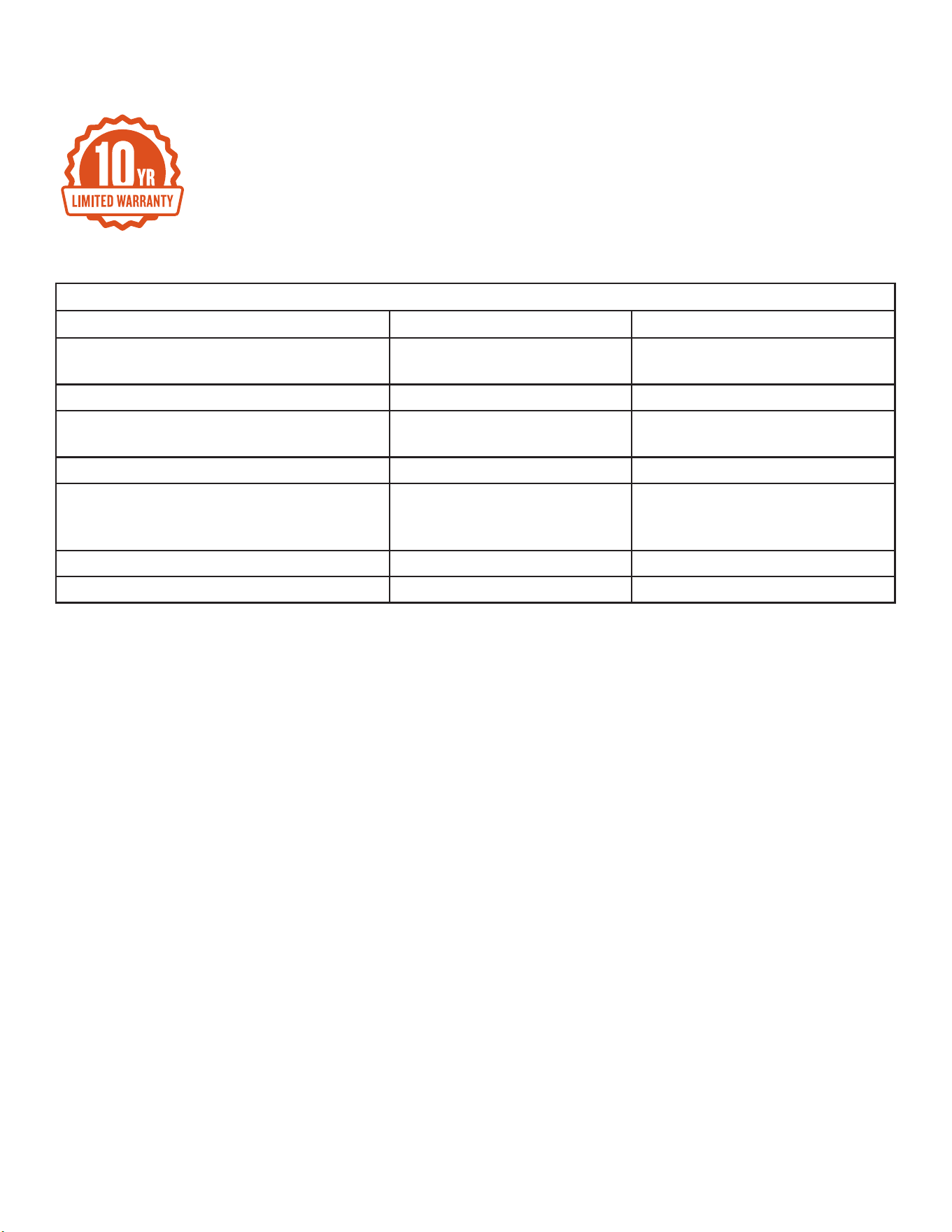
Warranty Periods and Coverage
Components Warranty Period Coverage
Body, Legs, Cabinet Doors, Bottom Shelf,
Painted Shelf/Hopper Cover
10 Years Will not rust through
Controller, Auger Motor, Auger, and Fan 3 Years Material and Manufacturing Defects
EZ-Clean Drip Tray, EvenFlow
TM
Heat Shield
Body, Heat Bae, Interior Enamel Rack Holder
3 Years Material and Manufacturing Defects
Enameled, Cast Iron and Stainless Grill Grates 3 Years Will not rust through
Hot Rod, Pellet Sensor, Cord, RTD, Flame
Sensor, Door Sensor, Grease Sensor,
Thermocouple, Door Gasket, and Induction Hob
1 Year Material and Manufacturing Defects
Lighting 1 Year Material and Manufacturing Defects
Meat Probe and Wireless Meat Probes 1 Year Will not rust through
TRAEGER® GRILL WARRANTY

35
TRAEGER.COM
®
Traeger’s entire liability and your exclusive remedy shall be replacement of the defective parts of your Traeger® Grill, if any. Original part(s)
approved for return by Traeger’s Customer Service must be returned prepaid. Traeger may replace defective parts with new or refurbished
parts, at Traeger’s sole discretion on an as available basis within ninety days. Without limiting the exclusions stated above, there is not warranty
coverage for: (i) paint damage caused by grease fires, (ii) UV exposure, (iii) normal wear and tear; and (iv) warping of the EZ-Clean drip tray,
EvenFlow
TM
Heat Shield, or heat bae.
Traeger grills are designed to be modular for simple repair by regular users. Traeger’s entire obligation under this warranty shall be to provide
you with replacement of any defective parts and to provide you with instructions on how to make the replacement yourself. Traeger may replace
defective parts with new or refurbished parts. Traeger reserves the right to inspect any grill (shipping paid by Traeger) and to analyze any usage
information including, without limitation, any digital connected grill data (to the extent covered by our data protection policy). To validate and
process a warranty claim Traeger may require that you provide reasonable evidence of your issue, including participating in video chats, phone
conversations, providing photos, and providing other relevant information. Labor charges connected with the replacement of defective parts and
freight charges to ship parts shall be paid at your expense.
The limitations in the following paragraph do not apply to residents of Quebec to whom the Quebec Consumer Protection Act applies.
FOR GREATER CERTAINTY AND TO FULLEST EXTENT PERMITTED BY LAW, TRAEGER PELLET GRILLS LLC SHALL NOT BE LIABLE UNDER THIS
OR ANY IMPLIED WARRANTY FOR INCIDENTAL, CONSEQUENTIAL DAMAGES, INDIRECT, SPECIAL, LOSS OF DATA, EXEMPLARY, PUNITIVE OR
ENHANCED DAMAGES, LOST PROFITS OR REVENUES OR DIMINUTION IN VALUE ARISING OUT OF OR RELATING TO YOUR USE OF YOUR GRILL,
REGARDLESS OF (A) WHETHER SUCH DAMAGES WERE FORESEEABLE, (B) WHETHER OR NOT TRAEGER WAS ADVISED OF THE POSSIBILITY
OF SUCH DAMAGES AND (C) THE LEGAL OR EQUITABLE THEORY (CONTRACT, TORT, OR OTHERWISE) UPON WHICH THE CLAIM IS BASED,
AND NOTWITHSTANDING THE FAILURE OF ANY AGREED OR OTHER REMEDY OF ITS ESSENTIAL PURPOSE. THIS WARRANTY GIVES THE RETAIL
CUSTOMER SPECIFIC LEGAL RIGHTS AND THE CUSTOMER MAY HAVE OTHER RIGHTS WHICH VARY AMONG STATES AND PROVINCES. BOTH
YOU AND TRAEGER INTEND FOR THIS WARRANTY TO BE YOUR EXCLUSIVE REMEDY FOR A DEFECTIVE GRILL.
This warranty shall be void if: (i) the grill is not assembled or operated in accordance with Traeger’s operating instructions provided with this
grill; (ii) the grill is not purchased from an Authorized Seller; (iii) the grill is resold or traded to another owner; (iv) there has been use of any third
party components, parts, or accessories; (v) fuels other than wood pellets designed for wood pellet grills and barbeques have been used with the
grill; (vi) wood stove heating pellets are used in the grill; (vii) the grill has been used in a commercial or food service application; (viii) the user
has allowed the grill to become damaged, abused, or otherwise failed to maintain the grill in accordance with Traeger’s operating instructions; or
(ix) there has been any unapproved modification of this grill.
Please note that because Traeger is unable to oversee or control the quality of its products sold by unauthorized sellers, Traeger’s warranty is
only available if you purchased your grill from an Authorized Seller. Traeger’s warranty extends only to products purchased from an Authorized
Seller.
To process a warranty claim, contact Traeger’s customer service at the phone number or address listed above. Traeger requires proof of your date
of purchase from an Authorized Seller. You should retain your sales slip or invoice along with this manual with your valuable documents.
Customers outside of the United States and Canada should note that NOT all warranty policies stated herein are consistent globally. Customers
should contact the local distributor in their current country from the list at International Support for instructions regarding warranty claims
specific to that country. The process described herein will not work for international warranty requests.
ADDITIONAL IMPORTANT WARRANTY INFORMATION
• We are not responsible for items lost in transit. For this reason, we highly recommend getting a tracking number or delivery confirmation when
shipping your package.
• The product you send to us becomes the possession of Traeger and will not be returned to you.
Traeger will determine if your warranty claim is covered under this warranty policy at Traeger’s sole and complete discretion, and failure to follow
the required procedures may void your warranty claim. This warranty gives you specific legal rights, and you may also have other rights which
vary among states, provinces, and countries.

36
Traeger Pellet Grills LLC
1215 E. Wilmington Ave., Suite 200
Salt Lake City, UT 84106
traeger.com