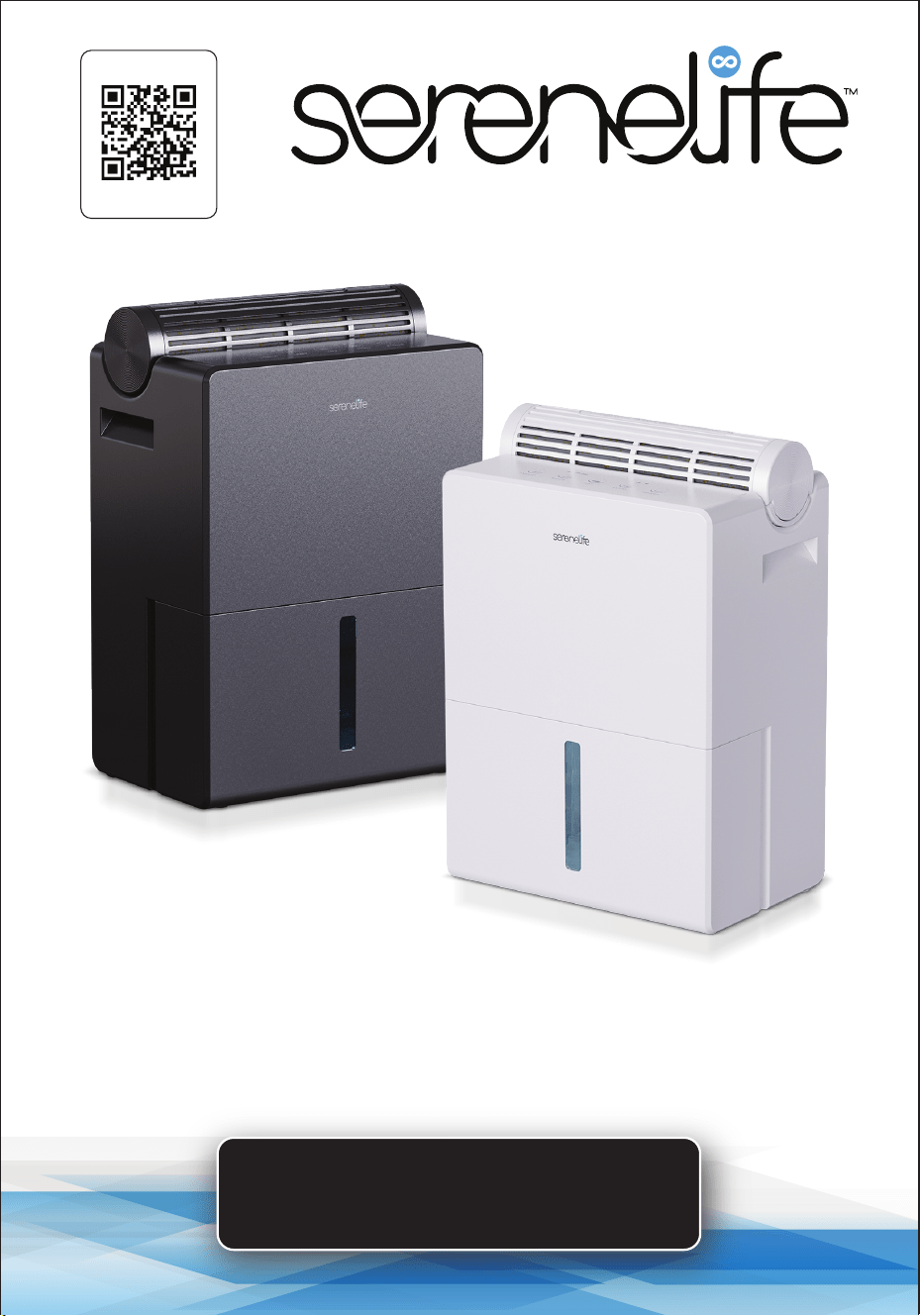
USER GUIDE
Semiconductor Dehumidifier
SLARP800BK - SLARP800WT
Start Here
Serenelifehome.com/
register

www.SereneLifeHome.com
2
PLEASE KEEP THIS MANUAL CAREFULLY FOR FUTURE REFERENCE.
FOR HOUSEHOLD USE ONLY.
TABLE OF CONTENTS
Features and Technical Specs
Important Safeguards
Product Description
OPERATING INSTRUCTIONS
How to Start
How to Use the Dehumidier Box
How to Empty the Tank
Maintenance
Safety Instructions
TROUBLESHOOTING
Register Product
3
4
5
6
7
8
9
10
10
11
13
www.SereneLifeHome.com
3
Features:
•
Highly ecient semiconductor dehumidier.
• Features a Full Tank reminder indicator light.
• Automatic defrosting function.
• Reusable silica gel dehumidication and drying function.
• Maintains optimal humidity levels.
• Provides precise and intelligent humidity control.
• Includes timer and sleep mode for added convenience.
• User-friendly operation with a 3-hour drying function.
• Adjustable 2-speed levels.
• Ideal for medium spaces.
• Perfect for oces, stockrooms, bedrooms, kitchens, cellars, and living rooms.
What's in the Box:
•
Semiconductor Dehumidier
• Silica Gel Dehumidication Module
• Adapter
Technical Specs:
•
Construction Material: ABS
• Timer Settings: 6, 12, 24 hours
• Drying: 3 Hours
• Voltage: DC 18V
• Power: 54 Watts
• Dehumidication: 17 oz./day (30°C, 80% RH)
• Water Tank: 91 oz.
• Floor Area: 215 sq.ft.
• Type of Adapter(s): DC Adapter
• Automatic Shut O Function: Yes, Timer Function
• Removed Moisture: 1 Pints/day
• Tank Capacity: 0.6 Gallons
• Product Dimensions (L x W x H): 9” x 6” x 13” -inches

www.SereneLifeHome.com
4
Important Safeguards
1. Verify that the voltage matches the label on the adapter before use.
2. DO NOT operate the machine with a damaged power cord.
Contact customer service for assistance.
3. Ensure the air inlet and outlet are free from obstructions.
4. DO NOT use in ammable or explosive environments or at temperatures
above 104°F. Ideal operating range: 46°F–104°F.
5. Always switch o and unplug the machine when not in use.
6. Avoid twisting or pulling the power cord.
7. Keep the dehumidier upright; do not use at an angle greater than 10 degrees.
8. DO NOT cover the machine to prevent overheating.
9. DO NOT use in dusty, low-temperature, or volatile environments containing
acids, alkalis, or oils.
10. DO NOT touch the plug with wet hands to prevent electric shock.
11. Avoid inserting objects into the dehumidier while it is operating.
12. This appliance can be used by children aged 8 and older under supervision.
13. Persons with reduced physical, sensory, or mental capabilities may use the
appliance if instructed properly and supervised.
14. Children should not play with or clean the appliance unsupervised.
15. Clean the surface using a soft cloth and neutral detergent.
Avoid petroleum, alcohol, or other harsh chemicals.
16. DO NOT use an incompatible adapter.
17. Repairs should only be conducted by qualied personnel.
Do not attempt self-repairs.
18. It is normal for the adapter to become warm (up to 176°F) during operation.
19. Avoid contact with moving parts.
20. DO NOT use outdoors.
21. DO NOT submerge the dehumidier in water or other liquids.
Please read this manual carefully before use.
Follow the instructions for proper installation and operation.
Retain this manual for future reference. If distributing this product to a
third party, ensure the manual is included. Improper use may result in
damage or serious injury. This product is suitable for indoor home use
only and is not intended for industrial or outdoor use.
www.SereneLifeHome.com
5
Product Description
This compact and portable dehumidier combines energy eciency with
powerful dehumidication. It removes excess moisture by drawing in humid air,
removing water vapor, and releasing fresh, dry air. This process helps eliminate
mold and improves overall air quality, creating a comfortable and healthy living
environment.
Product Structure
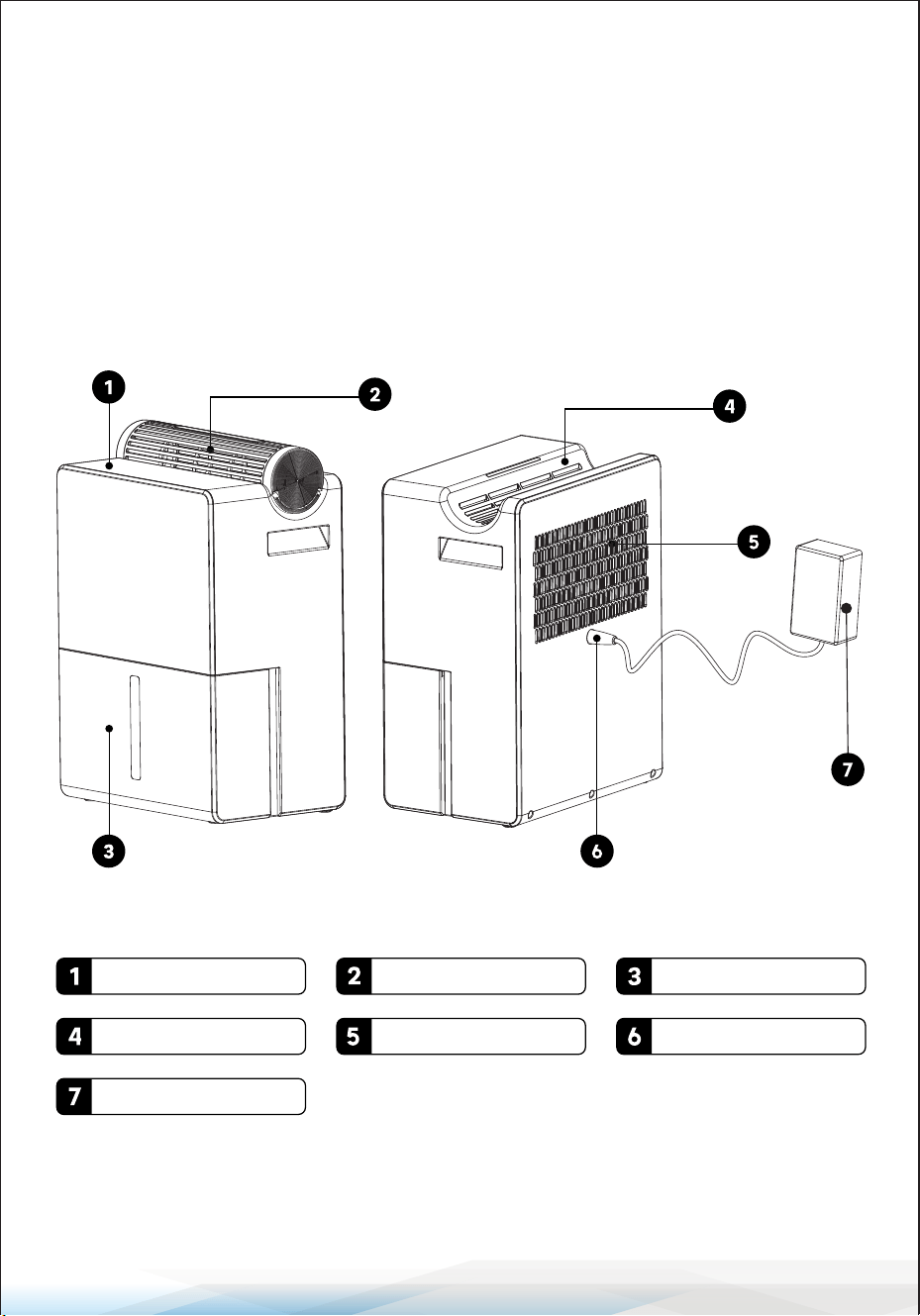
Control Panel Dehumidier Box Water Tank
Air Outlet Air Inlet DC Port
Adapter
www.SereneLifeHome.com
6
OPERATING INSTRUCTIONS
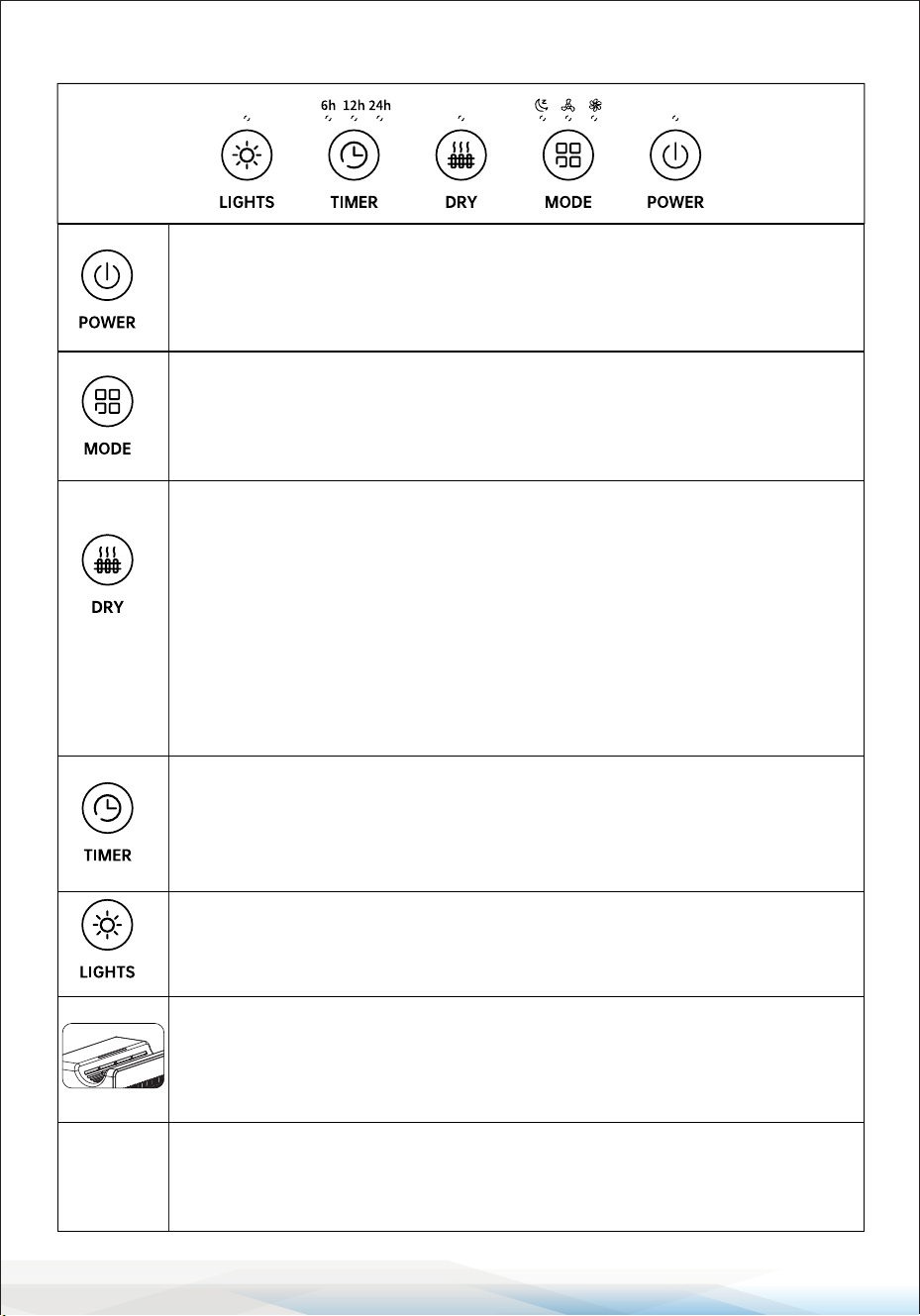
Power Button:
• Press to turn the machine on or o.
• The machine will operate at the last set wind speed.
If restarted after a power failure, it will default to the initial state.
Mode Button:
• Press to switch between modes: Sleep Mode, Standard Mode,
and Strong Mode.
• The corresponding function indicator will light up.
Dry Button:
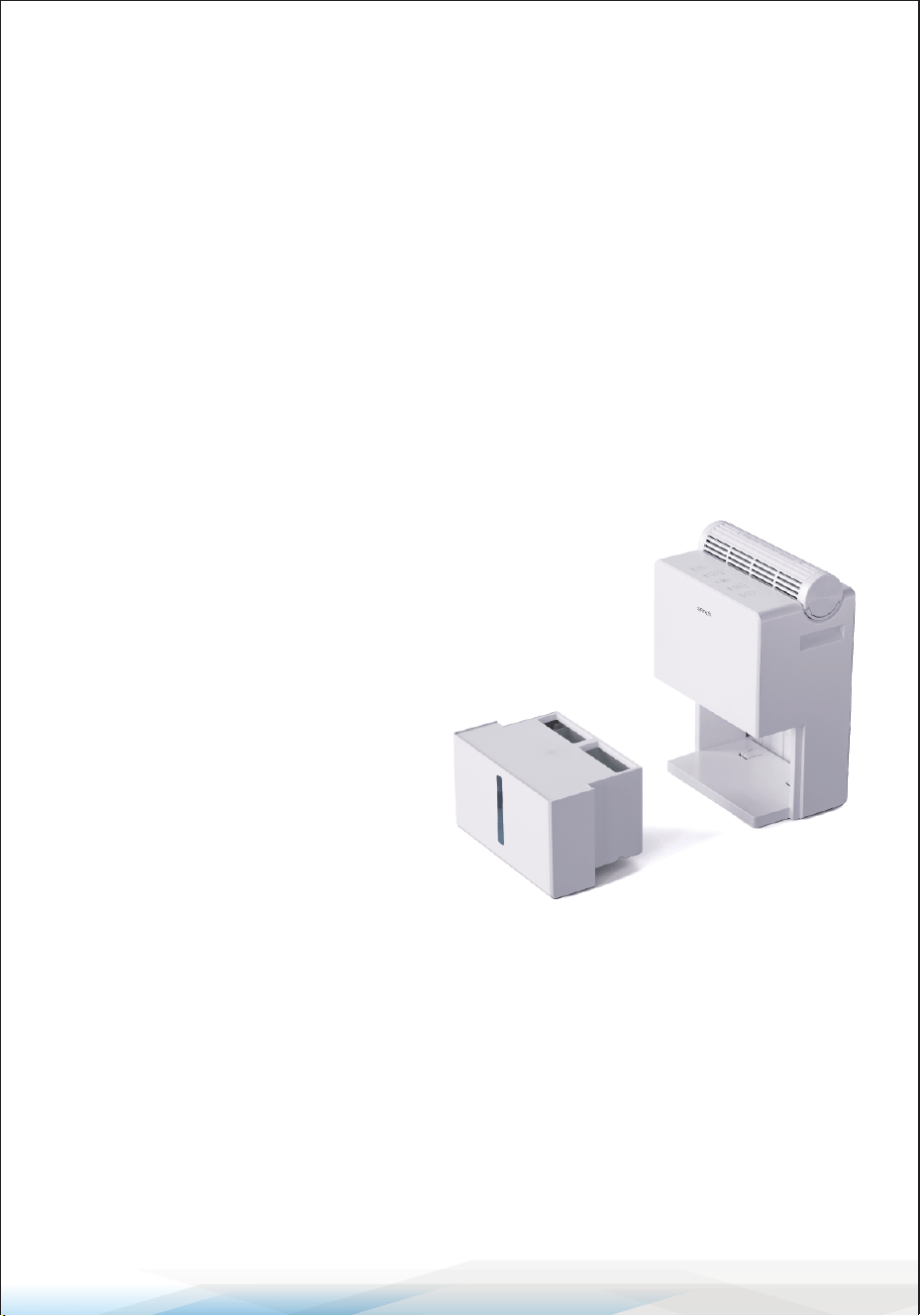
• Place the dehumidier box at the air outlet on top of the machine.
• Press the Dry Button to activate drying mode.
The drying indicator light will ash during operation.
• After 3 hours, the indicator light will remain solid, but the drying
function will continue.
• You can continue drying until the moisture-absorbing particles
turn orange. Press the Dry Button again to exit drying mode and
return to the previous setting.
Timer Button:
• Press to set the timer for 6, 12, or 24 hours.
• The corresponding indicator light will illuminate to conrm the
setting.
Lights Button:
• Press to turn o all indicator lights.
• Press again to reactivate the lights.
Indicator Light Descriptions
• Light Blue: Normal operation.
• Light Red: Water tank full or removed.
• Light Purple: Defrost mode active.
Intelligent
Defrosting
Function
If frost buildup is detected, the machine will automatically switch
to defrost mode, indicated by a purple light. Once defrosting is
complete, the machine will resume its previous mode.
www.SereneLifeHome.com
7
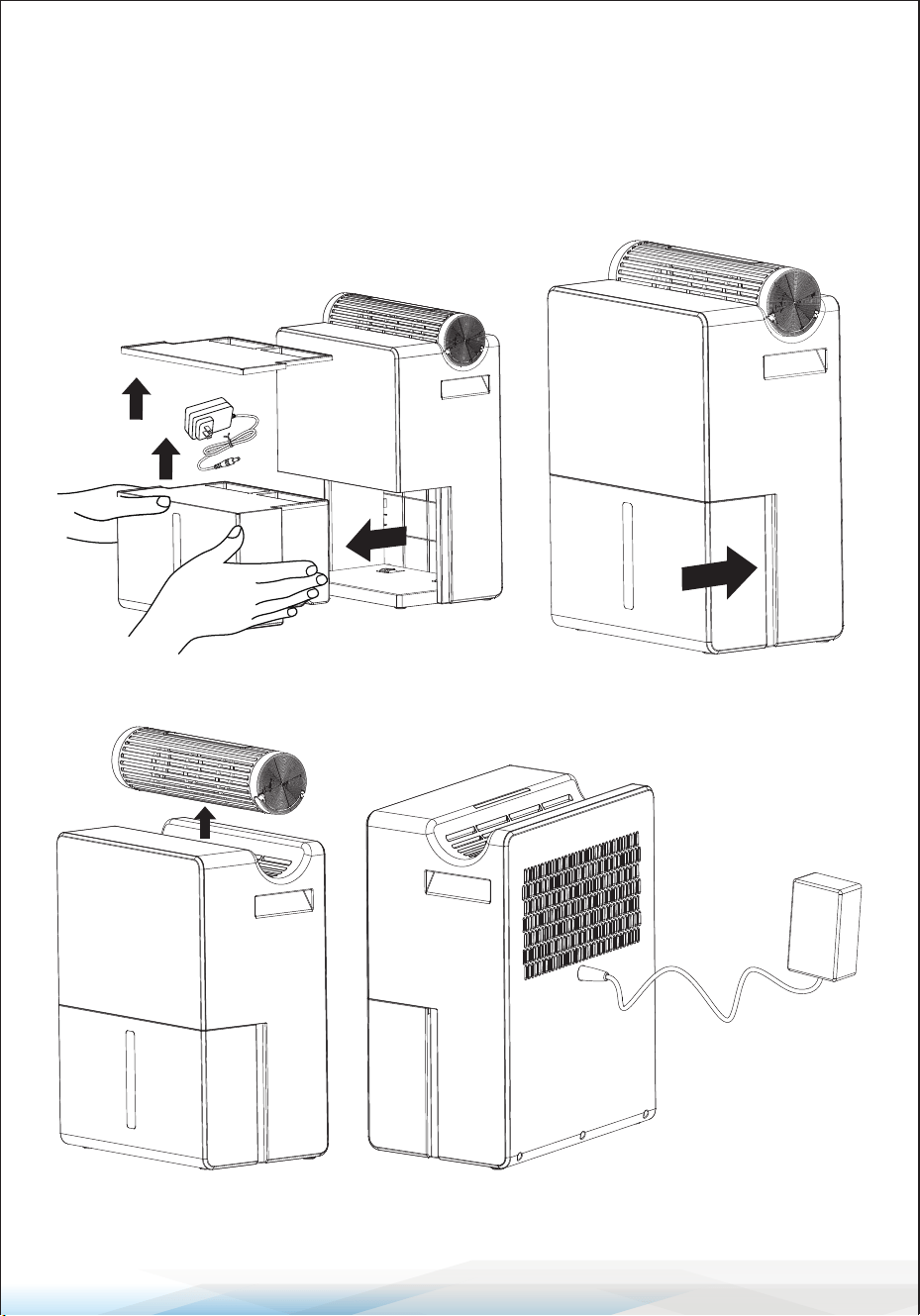
How to Start
1. Remove the adapter placed in the tank (see Figure 1).
2. Reinstall the water tank into the machine (see Figure 2).
3. Take out the desiccant dehumidier box (see Figure 3).
4. Insert the adapter into the rear port and connect it to a power supply
(see Figure 4).
Figure 1 Figure 2
Figure 3
Figure 4
www.SereneLifeHome.com
8
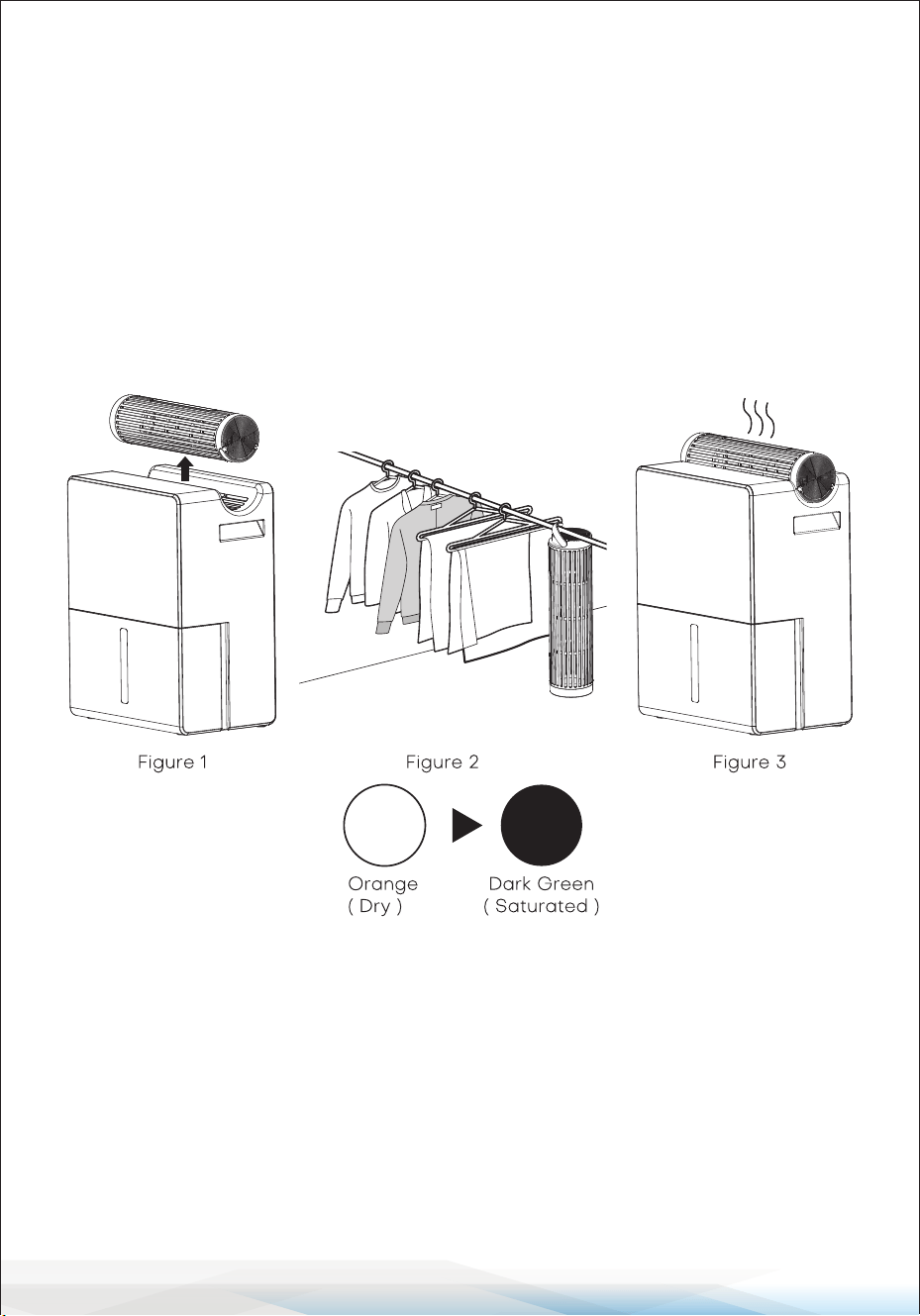
How to Use the Dehumidier Box
1. Remove the dehumidier box from the top of the machine (see Figure 1).
2. Hang the dehumidier box on a hanger or place it in the desired location
(see Figure 2).
3. When the moisture-absorbing particles have partially turned green, return the
dehumidier box to the machine's top. Press the Dry Button to activate the
drying function. The drying mode indicator will ash (see Figure 3).
4. After drying, switch back to dehumidication mode.
Remember to remove the dehumidier box to prevent interference with the
machine’s operation.
Particle Status Guide
Orange (Dry): The particles are ready for use. Place the dehumidier box in
wardrobes, closets, cupboards, or other small spaces.
Dark Green (Saturated): The particles indicate moisture saturation.
Dry the box using the machine before reusing.
Tip: After absorbing moisture, orange particles will change color, but the
white particles will remain unchanged.
www.SereneLifeHome.com
9
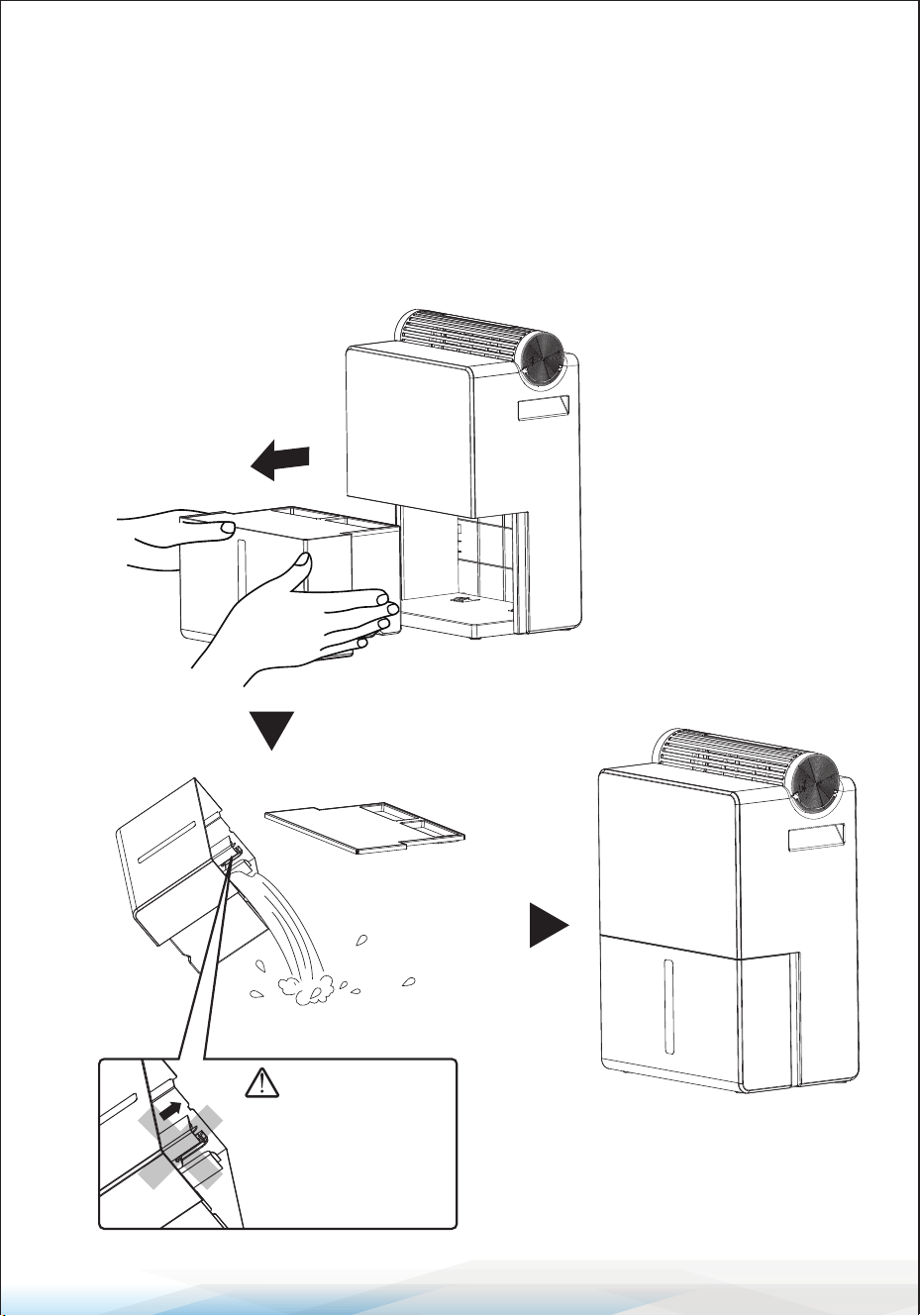
How to Empty the Tank
1. Turn O the Machine: Ensure the device is powered o.
2. Gently pull the water tank assembly forward (see Figure 1).
• Avoid tilting the machine to prevent water overow.
• Handle the tank carefully when it’s full.
3. Open the tank cover and drain the stored water (see Figure 2).
4. Reinstall the water tank (see Figure 3).
Do not remove the oat
inside the tank. The oat
ensures proper operation;
removing it will prevent the
machine from functioning
normally.

www.SereneLifeHome.com
10
Maintenance
Before cleaning, turn o and unplug the machine.
1. Wipe the machine’s exterior with a soft cloth and neutral detergent.
2. Rinse the water tank with clean water.
3. Dry all parts with a soft, dry cloth.
4. Clean the air inlet grid regularly to prevent dust or hair buildup, which could
reduce performance.
5. Store the device in its original packaging in a dry location after cleaning.
Troubleshooting Performance Issues
If less water is collected in the tank:
• Check if doors or windows are open; close them.
• Ensure the air inlet/outlet is not obstructed.
• Avoid operating the dehumidier near steam-releasing equipment.
• Verify indoor temperature: Dehumidication may be less eective at
temperatures below 46°F.
Safety Instructions
This dehumidier is built with safety and environmental standards and
complies with relevant regulations. Always follow these precautions to avoid
re, electrical shock, or injury:
1. Turn o the power switch and unplug the device before cleaning or
maintenance.
2. Remove any oil spills on the device to prevent discoloration or damage.
3. Do not immerse the machine in water. Use a soft cloth with neutral detergent
for cleaning. Avoid acidic or alkaline solutions.
4. Ensure the product is fully dry before use or storage.
5. If not using the dehumidier for an extended period:
• Unplug the power cable.
• Pack all parts in the original box and store them in a dry location.
6. Handle the product carefully to avoid scratches or damage that could aect
its performance.
www.SereneLifeHome.com
11
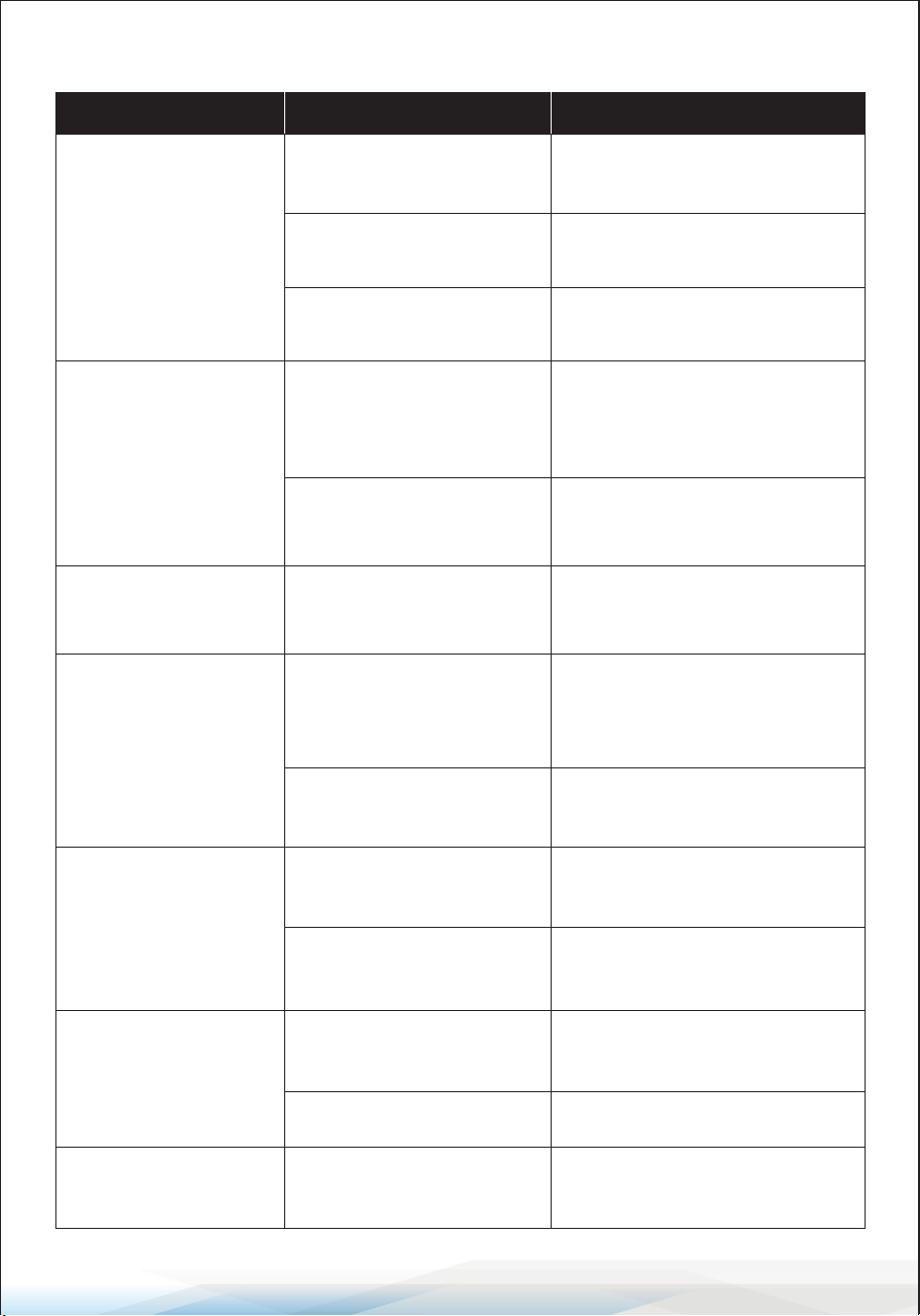
TROUBLESHOOTING
Existing Problems Possible Causes Solutions
The machine cannot
be powered on
Power supply connection
problem
Switch to another power outlet.
The power adapter is
damaged
Contact Customer Support.
The power adapter is
damaged
Machine emits noise
after use
Fan inside the machine
makes abnormal noise
Machine collects
water slowly
Obstructions block air
intake or outlet, aecting
performance
Choose proper placement for
the machine.
Low ambient temperature
or low humidity
Machine performs better at
30°C/86°F with 80% humidity.
Machine doesn't stop
when water is full
Water tank not installed
properly
Reinstall the water tank.
Consistently shows
red light alarm
Water tank cover not
installed securely
Ensure the water tank lid is
properly installed.
Machine leaking water
Water tank not installed
securely
Reinstall the water tank.
Internal damage to the
machine
Contact Customer Support.
Beeps upon powering
on, then shuts down
Poor adapter connection
Ensure the DC cable is not bent
and is connected properly to the
machine.
Contact Customer Support.
Contact Customer Support.
Water tank full-triggering
sensor not functioning
Contact Customer Support.
Water tank full Empty the water tank.
www.SereneLifeHome.com
12
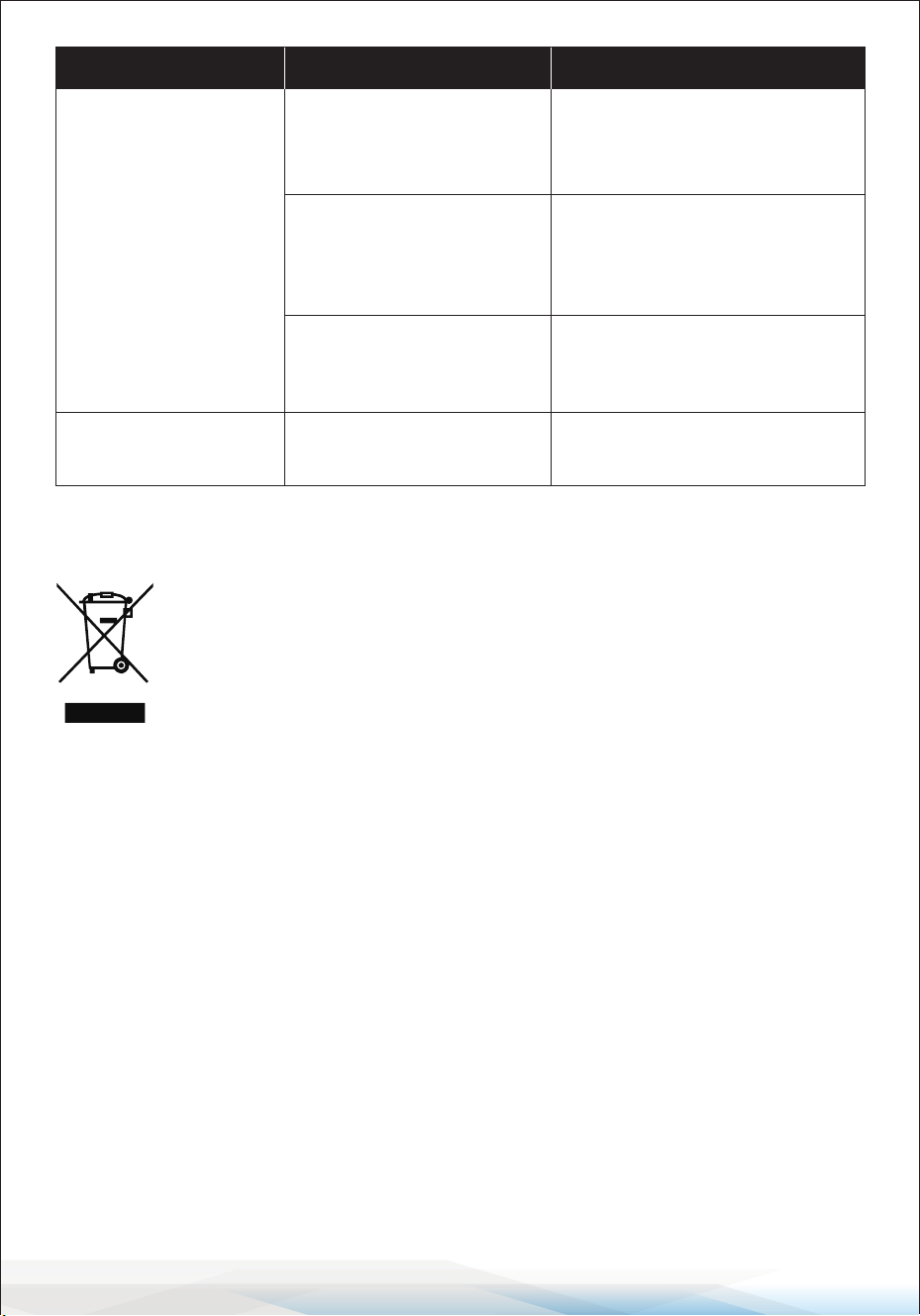
CORRECT DISPOSAL OF THIS PRODUCT
This symbol indicates that this product should not be disposed of
with regular household waste within the European Union.
To minimize potential harm to the environment and human health
caused by uncontrolled waste disposal, ensure proper recycling of
this product. Recycling helps promote the sustainable reuse of
material resources.
To dispose of your used device responsibly:
• Utilize local return and collection systems for electronic waste.
• Contact the retailer where the product was purchased for assistance.
They will help ensure the product is recycled in an environmentally safe manner.
Existing Problems Possible Causes Solutions
Low ambient temperature;
condenser frosting
Machine powers on but
does not collect water
Machine is broken
Low humidity (below 40%)
Dehumidication eciency is
very low below 40%.
It is recommended to operate in
environments above this level.
Wait for defrosting and maintain
indoor temperature above 8°C/
46.4°F to speed up defrosting.
Contact Customer Support.
Machine shows low
performance
Obstructions block air
intake or outlet, aecting
performance
Choose proper placement for
the machine.

www.SereneLifeHome.com
13
FCC INFORMATION
WARNING: Changes or modications not expressly approved by the party responsible
for compliance could void the user’s authority to operate the equipment.
NOTE: This equipment has been tested and found to comply with the limits for a Class
B digital device, pursuant to Part 15 of the FCC Rules. These limits are designed to
provide reasonable protection against harmful interference in a residential installation.
This unit generates, uses, and can radiate radio frequency energy, and if not installed
and used in accordance with the instructions, may cause harmful interference to radio
communications. However, there is no guarantee that interference will not occur in a
particular installation. If this equipment does cause harmful interference to radio or
television reception, which can be determined by turning the equipment o and on,
the user is encouraged to try and correct the interference by one or more of the
following measures:
• Reorient or relocate the receiving antenna.
• Increase the separation between the equipment and receiver.
• Connect the equipment to an outlet on a circuit dierent from that to which the
receiver is connected.
• Consult the dealer or an experienced radio/TV technician for help.
This device complies with Part 15 of the FCC Rules. Operation is subject to the
following two conditions:
1. This device may not cause harmful interference.
2. This device must accept any interference received, including interference that may
cause undesired operation.
Register Product
Thank you for choosing SereneLife. By registering your product,
you ensure that you receive the full benets of our exclusive
warranty and personalized customer support.
Complete the form to access expert support and to keep your
SereneLife purchase in perfect condition.
Start Here
Serenelifehome.com/pages/register

Questions or Comments?
We are here to help!
Phone: 1.718.535.1800
Serenelifehome.com/ContactUs