DCE Accessories
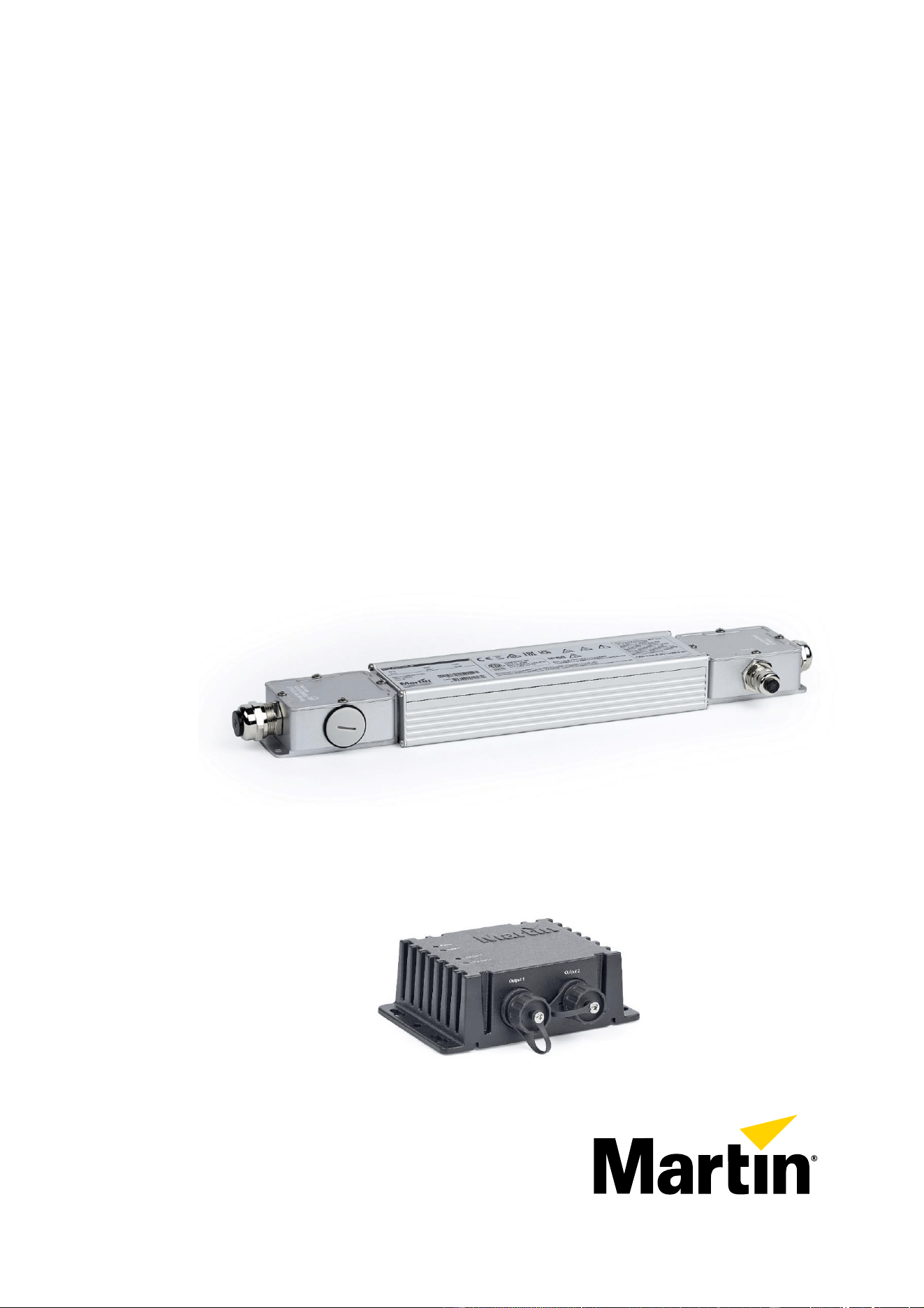
DCE PSU 240 IP
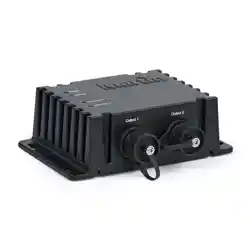
DCE Data Splitter/Booster IP
Safety, Installation
and User Manual
DCE PSU 240 IP
DCE Data Splitter/Booster IP
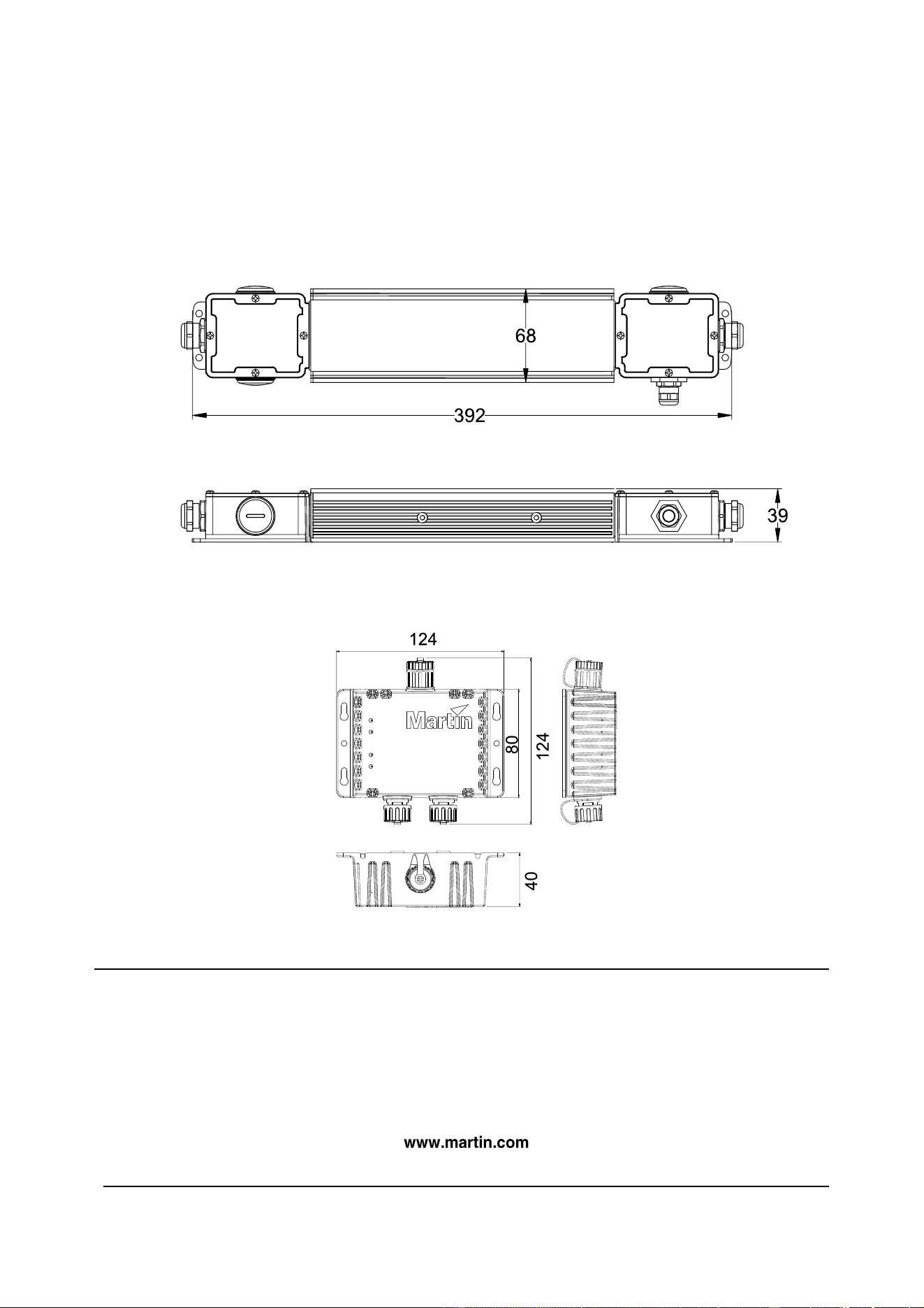
Dimensions
DCE PSU 240 IP
DCE Data Splitter/Booster IP
©2023-2024 HARMAN PROFESSIONAL DENMARK ApS. All rights reserved. Features, specifications and
appearance are subject to change without notice. HARMAN PROFESSIONAL DENMARK ApS and all affiliated
companies disclaim liability for any injury, damage, direct or indirect loss, consequential or economic loss or any other
loss occasioned by the use of, inability to use or reliance on the information contained in this document. Martin is a
registered trademark of HARMAN PROFESSIONAL DENMARK ApS registered in the United States and/or other
countries.
HARMAN PROFESSIONAL DENMARK ApS, Olof Palmes Allé 44, 8200 Aarhus N, Denmark
HARMAN PROFESSIONAL, INC., 8500 Balboa Blvd., Northridge CA 91329, USA
DCE Accessories Safety, Installation and User Manual Rev. B
All measurements are
in millimeters

Contents
Dimensions ...................................................................................................................................... 2
Safety information ........................................................................................................................... 4
Introduction ...................................................................................................................................... 8
Unpacking .................................................................................................................................. 8
Accessories and related items ................................................................................................... 8
Installing with cable glands ........................................................................................................ 8
DCE PSU 240 IP ............................................................................................................................. 9
Overview .................................................................................................................................... 9
Installing ..................................................................................................................................... 9
Connecting ................................................................................................................................. 9
DCE Data Splitter/Booster IP ........................................................................................................ 11
Overview .................................................................................................................................. 11
Installing ................................................................................................................................... 11
Making connections .................................................................................................................. 12
Service and maintenance .............................................................................................................. 13
Cleaning ................................................................................................................................... 13
4 Martin
®
DCE Accessories Safety, Installation and User Manual
Safety information
WARNING!
Read the safety precautions in this section before installing,
operating or servicing this product.
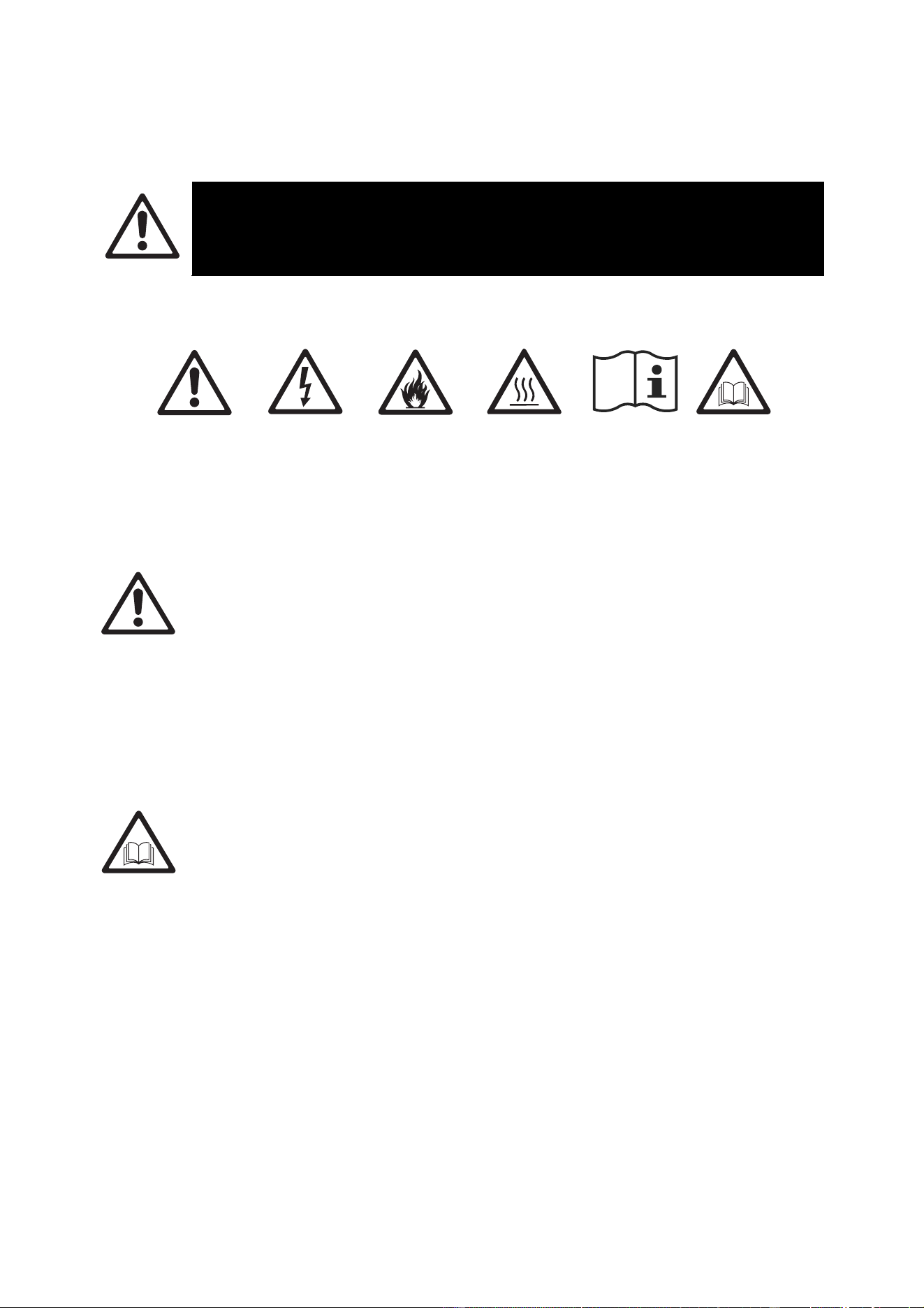
The following symbols are used to identify important safety information on the product and in this manual:
Warning!
Safety hazard.
Risk of severe
injury or death.
Warning!
Hazardous
voltage. Risk
of lethal or
severe electric
shock.
Warning!
Fire hazard.
Warning!
Burn hazard.
Hot surface.
Do not touch.
Warning!
See user documentation.
Warning! This product presents risks of severe injury or death due to fire and burn hazards,
electric shock and falls if the safety precautions in this manual are not followed. Read this
manual before installing, operating or servicing the product. Follow the safety precautions
given not only in this user manual but also in the manuals of all the devices you connect to
the product. Observe all warnings given in the manuals and printed on devices.
The products in the DCE Accessory family are for professional use only. They are not for
household lighting applications. They must be installed and serviced by professional
technicians only. Respect all locally applicable laws, codes and regulations when installing,
operating or servicing the products.
Refer any service operation that is not described in this user manual to Martin
®
Service or
an authorized Martin Service partner.
Install, operate and service Martin products only as directed in their user documentation, or
you may create a safety hazard or cause damage that is not covered by product warranties.
Follow the safety precautions listed in the following section and observe all warnings in this
manual and printed on the product.
The latest version of this User Manual is available for download from the Martin website at
www.martin.com. Before you install, operate or service the product, check the Martin
website and make sure that you have the latest user documentation for the fixture.
Document revisions are indicated at the bottom of page 2.
Technical Support
If you have questions about how to install or operate the fixture safely, please contact
Harman Professional Technical support:
For technical support in North America, please contact:
HProTechSupportUSA@harman.com
Phone: (844) 776-4899
For technical support outside North America, please contact your national distributor.
Martin
®
DCE Accessories Safety, Installation and User Manual 5
Protection from electric shock
Ensure that these products are electrically connected to ground (earth).
Use only a source of mains power that complies with local building and electrical codes and
has both overload and ground-fault (earth-fault) protection.
Socket outlets or external power switches used to supply these products with power must be
located near the product and easily accessible so that the product can easily be
disconnected from power.
Provide a means of locking out AC mains power so that power to the installation can be shut
down and made impossible to reapply, even accidentally, during work on the installation.
Isolate the product from power immediately if the power plug or any seal, cover, cable, or
other component is damaged, defective, deformed or showing signs of overheating. Do not
reapply power until repairs have been completed.
Do not expose connectors or cable glands to stresses caused by lengths of cable hanging
from them or by tight cable bends. Support the weight of cables running to and from
products.
Keep the supplied caps on all unused connectors to protect from humidity. Leave caps
hanging on their tethers while using connectors so that the caps can easily be re-installed.
DCE Data Splitter/Booster IP and DCE PSU 240 IP products are IP66-rated and may be
used in permanent indoor and outdoor installations. Do not expose these products to high-
pressure water jets from any direction.
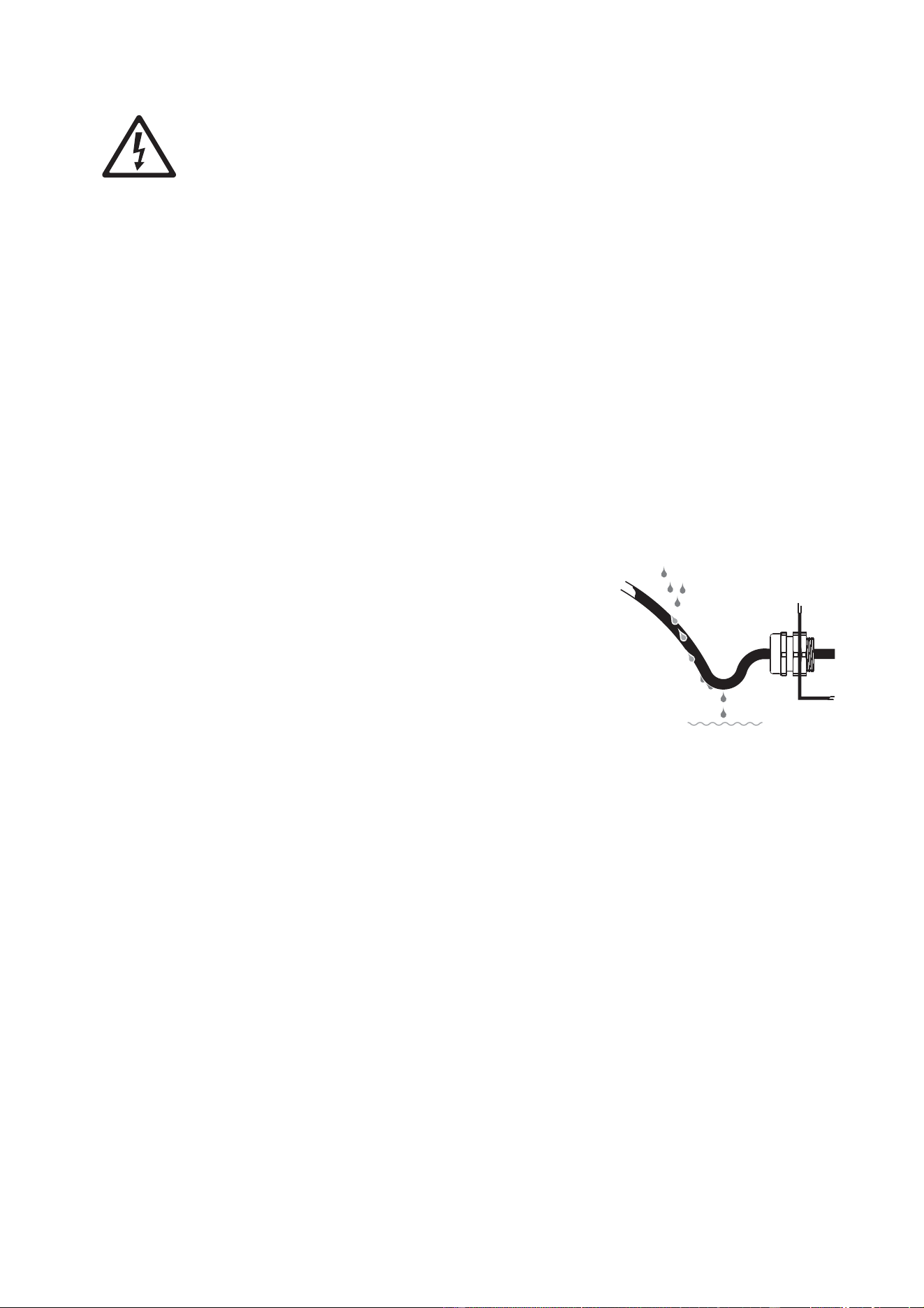
When installing cable, create a ‘drip loop’ (see illustration
on right) so that the cable arrives at cable glands or
connectors from below.
Do not allow water to pool around the pressure
equalization valve of an IP65 or IP66-rated product. Make
a visual check of the pressure equalization valve
periodically. If a valve appears to be dirty it may be
blocked. Consult your Martin supplier for replacement.
Before using a device, check that all power distribution
equipment and cables are in perfect condition and rated for
the electrical requirements of all connected devices.
Disconnect products from AC mains power and ensure that power cannot be reconnected
before carrying out any installation or maintenance work and when the product is not in use.
Do not connect products to mains power in a daisy chain that will exceed the electrical
ratings of any device, cable or connector in the chain.
Check and respect the directions given in the user manuals of all the devices that you intend
to connect to a DCE accessory product. Pay particular attention to the instructions and
warnings that apply to:
• system layout,
• connections to other devices,
• specified cables,
• maximum cable lengths, and
• maximum number of devices that can be connected.
The external diameter of the cables used to connect DCE PSU 240 IP products to power
and data must be suitable for the cable glands provided, or water can enter the product and
create a safety hazard or cause damage. The cables must have the following external
diameter:
• AC mains power in: EU 8-13 mm (0.32-0.51 in.), USA/Canada 8.5-13 mm (0.34-0.51 in.)
• Hybrid (48 VDC power and data) out: 6.5-10.5 mm (0.26-0.41 in.)
Drip loop
6 Martin
®
DCE Accessories Safety, Installation and User Manual
• Network data in: 5-8 mm (0.2-0.32 in.)
To connect a DCE PSU 240 IP device to AC mains power – or to connect DCE PSU 240 IP
devices to AC mains power in a chain that takes power from one source – use minimum
18 AWG or 1.0 mm
2
conductor size power input cable that is suitable for the current draw,
environment and application. In the USA and Canada the cables must be UL/CSA-listed,
hard usage type SJTW, SJOOW or better. In the EU the cables must be type H05RN-F,
H07RN-F or better.
If you connect DCE PSU 240 IP devices to AC mains power in a chain that takes power
from one source, respect the following limits:
• When operating at 100-120 V~ do not link more than five (5) devices in total in a chain.
• When operating at 200-240 V~ do not link more than twelve (12) devices in total in a
chain.
When power is first applied to the DCE PSU 240 IP, there is a half-cycle RMS inrush current
of 12.98 A.
The DCE PSU 240 IP has a maximum earth-leakage current of 0.264 mA.
Protection from burns and fire
Do not operate a device in this range of products if the maximum ambient temperature
(T
a
max.) exceeds the levels shown below:
• DCE PSU 240 IP: 40° C (104° F)
• DCE Data Splitter/Booster IP: 55° C (131° F)
The surface of the products can reach the following maximum temperatures during
operation.
• DCE PSU 240 IP: 76° C (169° F)
at full load, ambient temperature 40° C (104° F)
• DCE Data Splitter/Booster IP: 61° C (142° F)
at full load, ambient temperature 55° C (131° F)
Protection from injury
Fasten the product securely to a fixed surface or structure when in use. The product is not
portable when installed.
Ensure that any supporting structure and/or hardware used can hold at least six (6) times
– or more if required by local regulations – the weight of all the devices and other items that
they support.
Use rigging hardware and fasteners that are in perfect condition, approved for the weight
that they will support, and suitable for their application and the installation environment. Do
not use safety cables as the primary means of support.
If you install the DCE Data Splitter/Booster IP on a truss or similar tubular structure using a
rigging clamp in a location where it may cause injury or damage if it falls, install as directed
in this manual a secondary attachment such as a safety cable that will hold the product if a
primary attachment fails. The secondary attachment must be approved by an official body
such as TÜV as a safety attachment for the weight that it secures, must comply with EN
60598-2-17 Section 17.7.4 and must be capable of bearing a static suspended load that is
six (6) times – or more if required by local regulations – the weight of the product and all
installed accessories.
Check that all external covers and rigging hardware are securely fastened.
Block access below the work area and work from a stable platform whenever installing,
servicing or moving an overhead product.
Do not operate a product with missing or damaged covers.

Martin
®
DCE Accessories Safety, Installation and User Manual 7
In the event of an operating problem, stop using the product immediately and disconnect it
from power. Do not attempt to use a product that is obviously damaged.
Do not modify the product in any way not described in this manual. Install genuine Martin
parts only.
Refer any service operation not described in this manual to Martin Service or one of its
authorized agents.

8 Martin
®
DCE Accessories Safety, Installation and User Manual
Introduction
Thank you for selecting a product from the Martin® DCE* range. These devices support all Martin
Creative LED fixtures fitted with hybrid DCE connectors. The following products are available:
• DCE PSU 240 IP – for powering Martin Creative LED fixtures without the advanced features offered by
the P3 PowerPorts (see the information on Martin P3 PowerPorts on the Martin website at
www.martin.com)
• DCE Data Splitter/Booster IP – for extending the distance between the P3 PowerPort or DCE PSU
240 IP and Martin Creative LED fixtures and/or for splitting chains of fixtures.
These products will forward any Art-Net, sACN or Martin P3 data to the Martin Creative LED fixtures
connected to them.
For possible system layouts when using DCE devices with Martin Creative LED fixtures, please see the
user documentation for those products. Martin user documentation is supplied with products and available
for download from the Martin website at http://www.martin.com, where you can also find the latest
specifications, firmware updates and support information for all Martin products.
*The name DCE is used to indicate DC power plus Ethernet.
Unpacking
The following items are included with devices.
DCE PSU 240 IP
• This user manual
• Blanking plugs in all pre-installed cable glands
• Wago and splice connectors for all connections
DCE Data Splitter/Booster IP
• This user manual
Accessories and related items
Martin can supply a comprehensive range of cables, connectors, rigging hardware and other accessories
for the products in the DCE product range. The accessories listed in the Specifications sections of the
DCE product pages on the Martin website at www.martin.com give details. Your Martin supplier will also
be happy to help if you would like assistance with assessing your needs and ordering.
Installing with cable glands
Where cable glands are used for cable entry, follow the instructions in this section to ensure that the
product’s IP66-rating is maintained.
To install a cable using a cable gland:
1. Ensure that the installation is isolated from power.
2. See illustration on right. On the DCE PSU 240 IP, the cable
entry A on cable glands is glued to the device’s housing, so do
not try to turn it. Loosen the compression nut B on the cable
gland.
3. Pass the cable through the cable gland and into the device.
When you have finished making the connections inside the
device, tighten the compression nut B until the cable is held
securely in the gland.
Support the weight of cables to ensure that no length of cable is left hanging from a cable gland. Create
‘drip loops’ so that cables arrive at cable glands from below.
Cable gland
B
A
Martin
®
DCE Accessories Safety, Installation and User Manual 9
DCE PSU 240 IP
Overview
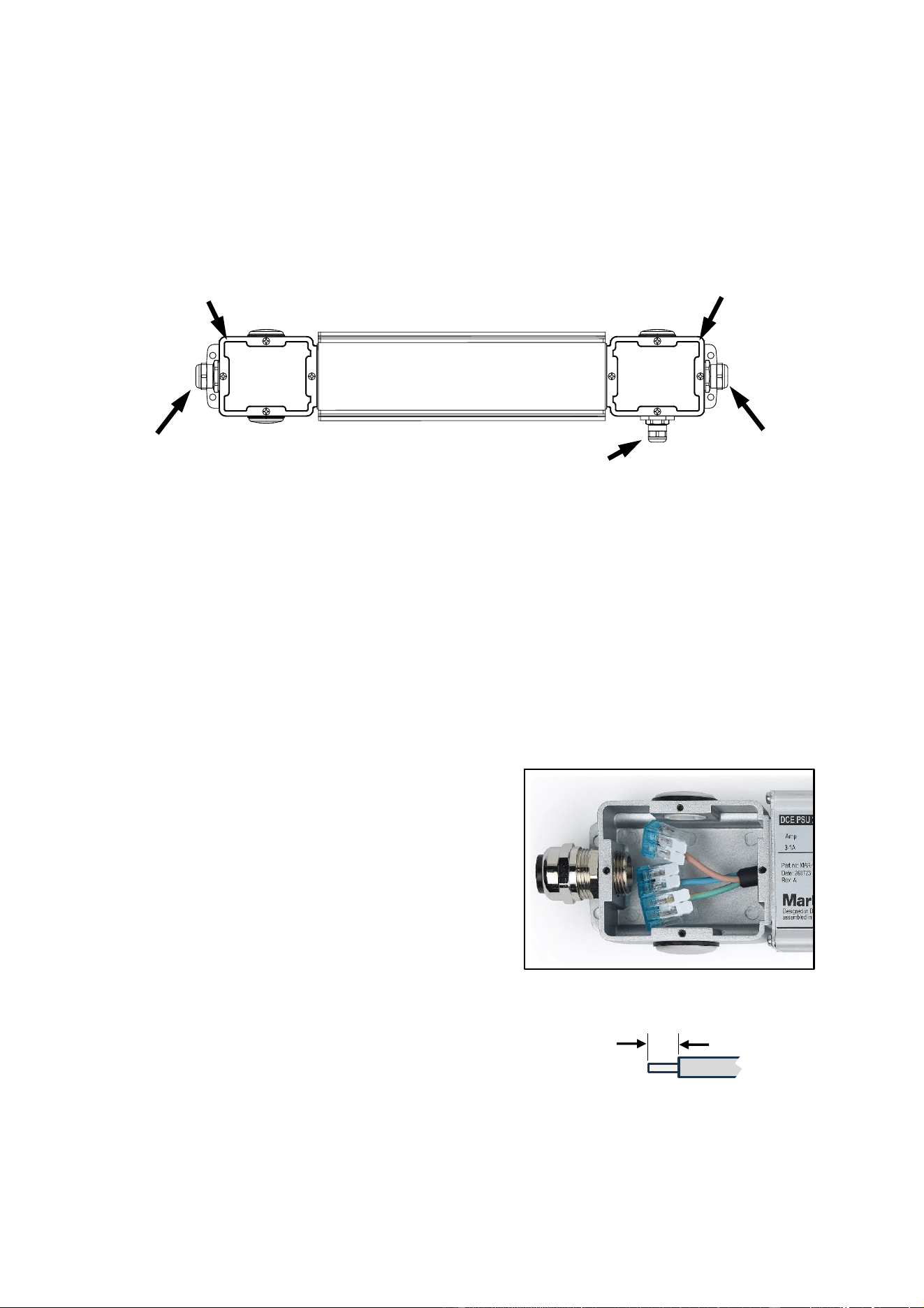
AC mains power, 48 VDC power and network data connections are made inside the connections boxes at
each end of the device.
Installing
Read the ‘Safety Information’ section starting on page 4 before installing, applying power to or operating
the device.
The IP66-rated DCE PSU 240 IP is designed to be mounted on a flat surface in any orientation with four
screws or other suitable fasteners. Holes for fasteners are provided in each corner of the device.
Connecting
To connect the device to mains power, to network data and to a hybrid (DC power and data) daisy-chain
of Martin creative LED fixtures, make connections as directed below.
AC mains power
1. Check that mains power to the installation is shut down
and cannot be reapplied during installation work.
2. Remove the four screws from the mains power input
connections box and remove the cover.
3. See the instructions on installing with cable glands in
the previous section of this manual. The cable entries
are glued into the housing, so do not try to turn them.
Loosen the mains power input cable gland
compression nut and pass the mains power input cable
through the nut and cable gland and into the
connections box.
4. See illustration on right. Strip 13–14 mm (0.51–0.55 in.)
of insulation from the power cable wires and fasten the
wires into the quick-connectors following the color
coding of the wires that are already in the device:
• Live to brown
• Neutral to blue
• Ground/earth to yellow or green/yellow.
To fasten a wire into a quick-connector, lift up the lever on the quick-connector, insert the bare wire
end into the connector, then push the lever down to grip the wire. Check that the wire is held securely.
Mains power
in
Hybrid (48 VDC
power and data)
out
DC power and data
connections box
Mains power input
connections box
Network
data in
DCE PSU 240 IP
AC mains power input connections
13–14 mm
0.51–0.55 in.
10 Martin
®
DCE Accessories Safety, Installation and User Manual
If you need to release a wire, lift up the lever on the quick-connector.
5. Tighten the compression nut on the cable gland until the mains power input cable is held tightly.
6. To obtain extended protection from humidity, consider filling the connections box with potting
compound.
7. Check that the seal is dry and in perfect condition, then reinstall the seal and the cover on the mains
power input connections box so that the box is sealed against the entry of water and moisture.
Network data and DC power
1. Remove the four screws from the DC power and data connections box and remove the cover.
2. See the instructions on installing with cable glands in the previous section of this manual. The cable
entries are glued into the housing, so do not try to turn them. Loosen the compression nuts on the two
cable glands.
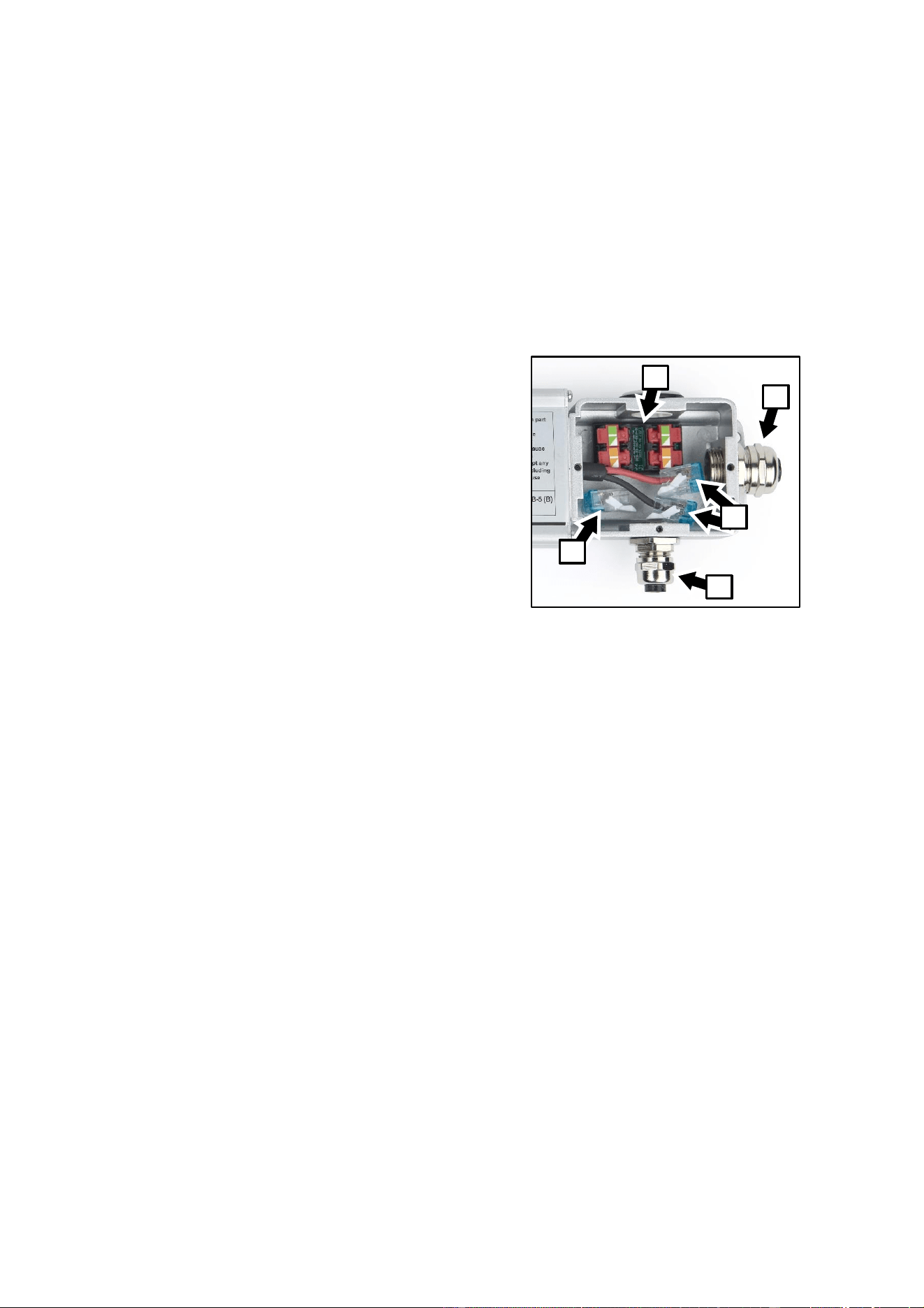
3. See illustration on right. Take the hybrid (data and
DC power) output cable for the chain of lighting
fixtures and pass it through the hybrid cable gland
A and into the connections box.
4. Strip enough insulation from the DC power cable
wires to ensure correct conductivity inside the
quick-connectors without leaving any bare copper
visible outside the connectors. Fasten the wires into
the quick-connectors B as follows:
• Positive (+) to red
• Negative (-) to black.
5. There are four data wires colored orange,
orange/white, green and green/white in the hybrid
output cable. Do not strip insulation from these
wires. Untwist the wires, lift the levers in the data
quick-connectors C and slide the wires into the
connectors, respecting the green/green-
white/orange/orange-white color coding of the wires
and the connectors. Push the levers on the connectors all the way down firmly and check that the
wires are held securely.
6. For the data input cable gland D, two different inserts are supplied with the product. Use the smaller
insert for data cables with an outer diameter of 5-6 mm. Use the larger insert for data cables with an
outer diameter of 6-8 mm. Pass the network data input cable through the data input cable gland D and
into the connections box. Fasten the data input wires into the quick connectors C as described above
for the hybrid cable data wires.
7. Take the shield conductors in the network data input cable and in the hybrid output cable and fasten
them into the common shield quick-connector E.
8. Tighten the compression nuts on the hybrid cable output and network data input glands A and D until
the cables are held tightly.
9. To obtain extended protection from humidity, consider filling the connections box with potting
compound.
10. Check that the seal is dry and in perfect condition, then reinstall the seal and cover on the DC power
and data connections box so that the box is sealed against the entry of water and moisture.
DC power and data connections box
A
C
B
E
D
Martin
®
DCE Accessories Safety, Installation and User Manual 11
DCE Data Splitter/Booster IP
Overview
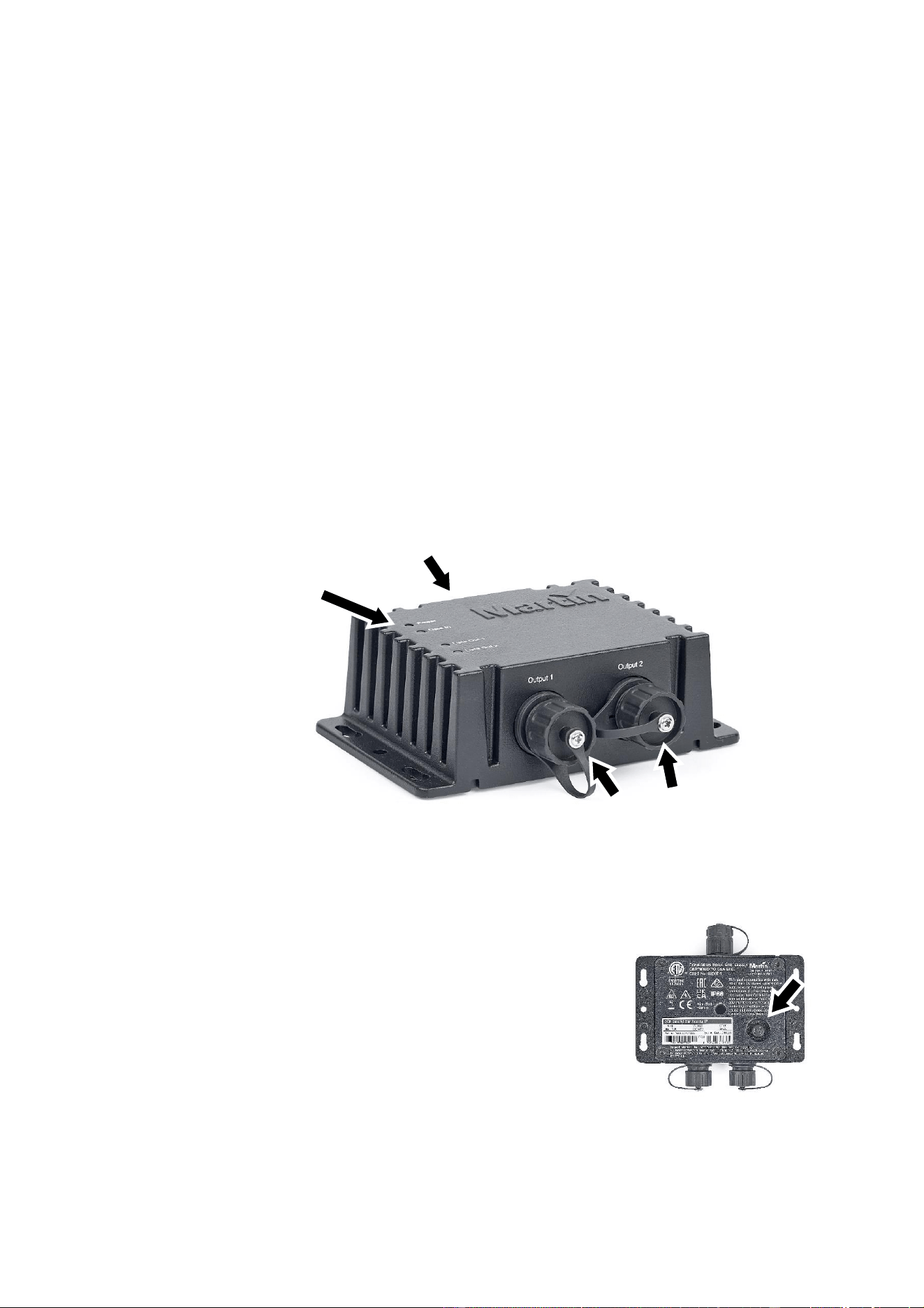
The IP66-rated DCE Data Splitter/Booster IP lets you split a hybrid DC power and data daisy-chain link
into two branches and/or amplify the data signal to let you extend the hybrid cable.
The normal maximum length for a hybrid cable is 90 m (295 ft.). The DCE Data Splitter/Booster IP lets you
extend the hybrid cable by another 90 m (295 ft.). It is possible to extend the hybrid cable in this way by
adding two Splitter/Boosters to the link, giving a maximum total hybrid cable length of 270m (885 ft.).
The DCE Data Splitter/Booster IP has one DCE-type hybrid (DC power and data) input connector and two
DCE-type hybrid output connectors. All connectors are IP66-rated.
Status LEDs
The DCE Data Splitter/Booster IP has four status LEDs:
• The device’s POWER IN status LED lights green to indicate that the device is receiving DC power via
the Hybrid input cable.
• The device’s DATA IN, DATA OUT 1 and DATA OUT 2 status LEDs light amber to indicate a correct
data link and flash when there is data transmission.
Installing
Read the ‘Safety Information’ section starting on page 4 before installing,
applying power to or operating the device.
There is a pressure equalization valve on the bottom of the DCE Data
Splitter/Booster IP (see illustration on right). Do not immerse or block this
valve. Do not install the device in a location where the valve may become
immersed in water. Make sure that there is sufficient drainage from the
installation location.
The DCE Data Splitter/Booster IP can be mounted on a flat surface in any
orientation using a minimum of two screws or similar fasteners. Holes for
fasteners are provided in flanges on each side of the device. Use
fasteners that are suitable for the application and for the installation environment.
Hybrid link
thru 1 and 2
Status LEDs
Hybrid link in
12 Martin
®
DCE Accessories Safety, Installation and User Manual
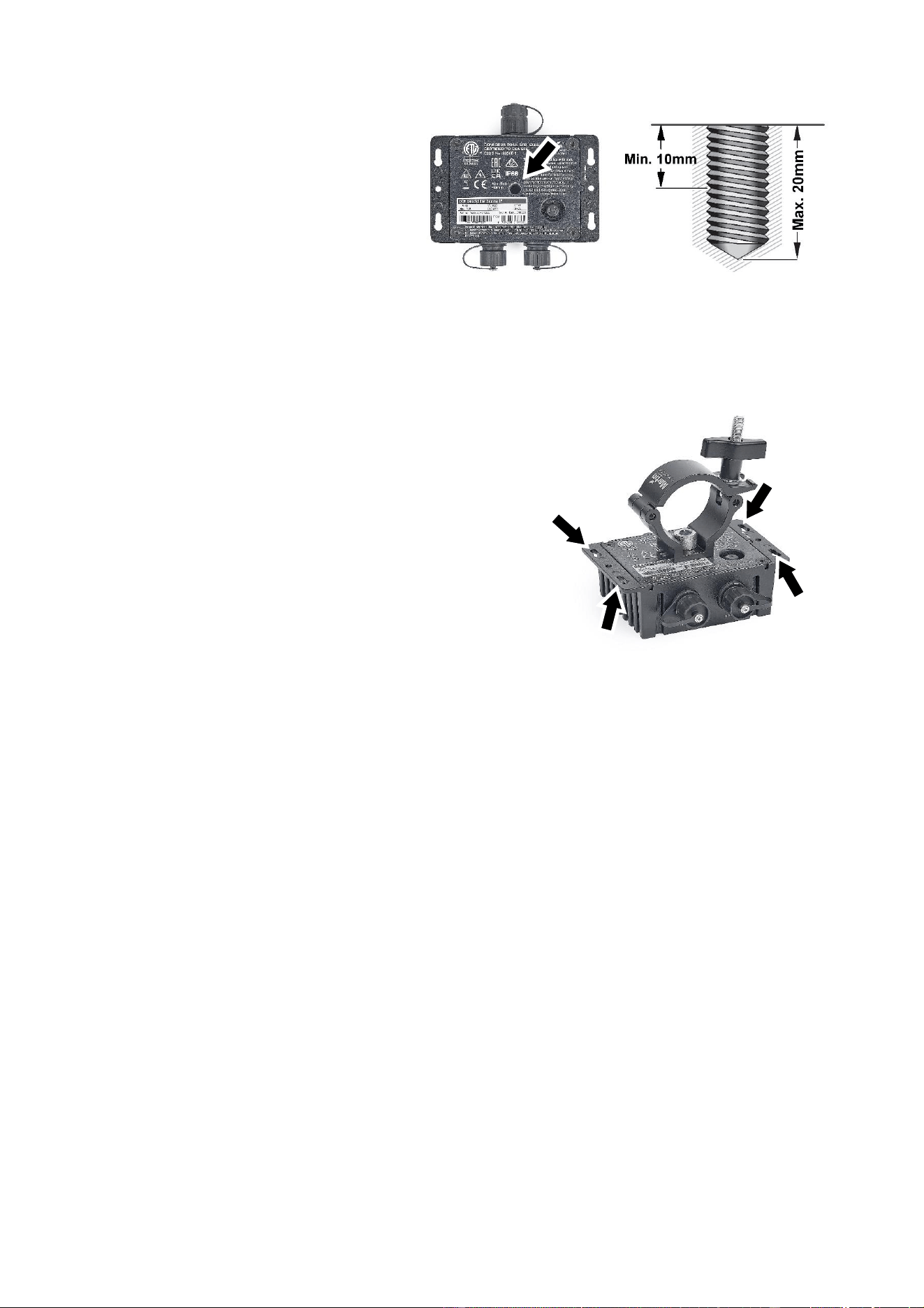
Installing using a rigging clamp
See illustration on right. The DCE Data
Splitter/Booster IP also has an M10
threaded hole in its base (arrowed). You can
use this hole to fasten a rigging clamp, for
example, to the device.
Check that any bolt used will protrude
minimum 10 mm and maximum 20 mm
protrusion into the device when it is
installed.
Fasten the device to a lighting truss by fastening the rigging clamp securely to the truss. Make sure that
the weight of cable runs is supported so that lengths of cable do not hang from connectors. If the device
may cause injury or damage if it falls, secure it with a safety cable as described below.
Securing with a safety cable
If you install the DCE Data Splitter/Booster IP using a rigging
clamp in a location where it may cause injury or damage if it
falls, attach a safety cable that is approved for the weight of the
device to one of the device’s mounting holes (arrowed in
illustration on right) and anchor the safety cable securely (by
looping it around the rigging truss, for example).
Remove as much slack as possible from the safety cable,
looping it more than once around the truss if necessary. Make
sure that the safety cable will catch the device if the rigging
clamp fails.
Making connections
The DCE Data Splitter/Booster IP has cable connectors for one hybrid input cable and two hybrid output
cables. All connections support hot-plugging.
Keep the connector caps installed on unused connectors at all times to maintain a seal against humidity
and dirt.

Martin
®
DCE Accessories Safety, Installation and User Manual 13
Service and maintenance
Warning! Read “Safety Information” on page 4 before carrying out service or maintenance
work.
Disconnect all devices from AC mains power before servicing.
Refer any service operation not described in this user manual to Martin Service or an
authorized Martin service agent.
Important! Excessive dirt buildup causes overheating and will damage the product. Damage
caused by inadequate cleaning is not covered by the product warranty.
The user will need to clean the device periodically. other service operations must be carried out by Martin
Professional or an authorized Martin service agent.
Installation, on-site service and maintenance can be provided worldwide by the Martin Professional Global
Service organization and its approved agents, giving owners access to Martin’s expertise and product
knowledge in a partnership that will ensure the highest level of performance throughout the product’s
lifetime. Please contact your Martin supplier for details.
Cleaning
Cleaning schedules vary greatly depending on the operating environment. It is therefore impossible to
specify precise cleaning intervals. Check products frequently and clean when necessary.
To clean a DCE accessory:
1. Shut down power to the installation and allow devices to cool for at least 15 minutes.
2. Wipe the outside of the device with a cloth lightly moistened in a mild detergent solution. You can rinse
an IP66-rated device with water, but do not direct a high-pressure water jet at the device. Do not use
any product that contains abrasives or solvents.
3. Dry the device with a soft cloth before reapplying power.

14 Martin
®
DCE Accessories Safety, Installation and User Manual
FCC Compliance
This equipment has been tested and found to comply with the limits for a Class B digital device, pursuant
to part 15 of the FCC Rules. These limits are designed to provide reasonable protection against harmful
interference in a residential installation. This equipment generates, uses and can radiate radio frequency
energy and, if not installed and used in accordance with the instructions, may cause harmful interference
to radio communications. However, there is no guarantee that interference will not occur in a particular
installation. If this equipment does cause harmful interference to radio or television reception, which can
be determined by turning the equipment off and on, the user is encouraged to try to correct the
interference by one or more of the following measures:
• Reorient or relocate the receiving antenna.
• Increase the separation between the equipment and receiver.
• Connect the equipment into an outlet on a circuit different from that to which the receiver is connected.
• Consult the dealer or an experienced radio/TV technician for help.
FCC Supplier’s Declaration of Conformity
These devices comply with part 15 of the FCC Rules. Operation is subject to the following two conditions:
1. This device may not cause harmful interference, and
2. this device must accept any interference received, including interference that may cause undesired
operation.
Canadian Interference-Causing Equipment Regulations
This Class B digital apparatus meets all requirements of the Canadian Interference-Causing Equipment
Regulations.
Règlement sur le Matériel Brouilleur du Canada
Cet appareil numérique de la classe B respecte toutes les exigences du Règlement sur le Matériel
Brouilleur du Canada.
EU Declaration of Conformity
An EU Declaration of Conformity covering these products is available for download from the product’s
area of the Martin website at www.martin.com.
Disposing of the product
Martin products are supplied in compliance with Directive 2012/19/EC of the
European Parliament and of the Council of the European Union on WEEE (Waste
Electrical and Electronic Equipment), where applicable.
Help preserve the environment! Ensure that this product is recycled at the end of its
life. Your supplier can give details of local arrangements for the disposal of Martin
products