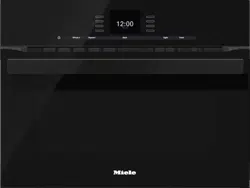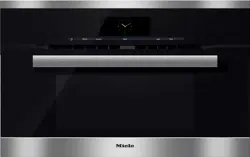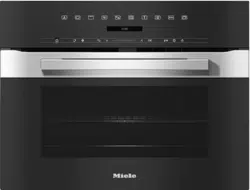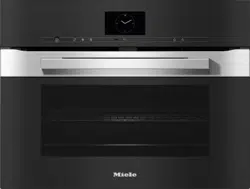
Operating and Installation Instructions
Speed Oven
To prevent accidents and machine damage, read these instructions
before installation or use.
en-US, CA
M.-Nr. 10 230 762

PRECAUTIONS TO AVOID POSSIBLE EXPOSURE TO
EXCESSIVE MICROWAVE ENERGY
2
PRECAUTIONS TO AVOID POSSIBLE EXPOSURE TO EXCESSIVE
MICROWAVE ENERGY
(a) Do not attempt to operate this oven with the door open since
open-door operation can result in harmful exposure to microwave
energy. It is important not to defeat or tamper with the safety
interlocks.
(b) Do not place any object between the oven front and the door or
allow soil or cleaner residue to accumulate on sealing surfaces.
(c) Do not operate the oven if it is damaged. It is particularly
important that the oven door closes properly and that there is no
damage to the: (1) door (bent), (2) hinges and latches (broken or
loosened), (3) door seals and sealing surfaces.
(d) The oven should not be adjusted or repaired by anyone except
properly qualified service personnel.

Contents
3
PRECAUTIONS TO AVOID POSSIBLE EXPOSURE TO EXCESSIVE
MICROWAVE ENERGY .......................................................................................... 2
IMPORTANT SAFETY INSTRUCTIONS ................................................................ 8
Guide to the Speed Oven ................................................................................... 20
H6500BM, H6600BM ............................................................................................ 20
H6570BM, H6670BM ............................................................................................ 21
Control panel ....................................................................................................... 22
Sensor buttons...................................................................................................... 23
Display................................................................................................................... 25
Symbols............................................................................................................ 26
Features................................................................................................................ 27
Model numbers .................................................................................................... 27
Data plate ............................................................................................................. 27
Items included....................................................................................................... 27
Standard and optional accessories....................................................................... 27
Glass Tray......................................................................................................... 27
Wire rack with non-tip safety notches.............................................................. 28
Oven controls ........................................................................................................ 30
Oven safety features ............................................................................................. 30
System lock ................................................................................................. 30
Safety shutoff ................................................................................................... 30
Cooling fan ....................................................................................................... 30
PerfectClean treated surfaces .............................................................................. 30
Before first use .................................................................................................... 31
Standard settings .................................................................................................. 31
Heating the oven ................................................................................................... 33
Settings ................................................................................................................ 34
Accessing the “Settings” menu............................................................................. 34
Changing and saving settings .......................................................................... 34
Settings overview .................................................................................................. 35
Language ........................................................................................................... 37
Time of day............................................................................................................ 37
Display..............................................................................................................37
Clock format..................................................................................................... 37
Setting .............................................................................................................. 37
Date ....................................................................................................................... 37
Lighting.................................................................................................................. 38
Display brightness................................................................................................. 38

Contents
4
Audible tone information ....................................................................................... 38
Melody.............................................................................................................. 38
Solo tone .......................................................................................................... 38
Keypad tone .......................................................................................................... 39
Units of measurement ........................................................................................... 39
Weight .............................................................................................................. 39
Temperature ..................................................................................................... 39
Quick MW.............................................................................................................. 40
Popcorn ................................................................................................................. 40
Keeping Warm....................................................................................................... 41
Cooling fan ............................................................................................................ 41
Recommended temperatures................................................................................ 42
Recommended settings ........................................................................................ 42
Safety .................................................................................................................... 43
System lock ................................................................................................. 43
Sensor lock ...................................................................................................... 43
Calibrate temperature............................................................................................ 44
Voltage................................................................................................................... 44
Showroom program............................................................................................... 44
Demo Mode...................................................................................................... 44
Factory default settings......................................................................................... 44
Timer..................................................................................................................... 45
Setting the timer.................................................................................................... 45
Resetting the timer ................................................................................................ 46
Canceling the timer ............................................................................................... 46
Guide to the modes............................................................................................. 47
Solo Modes ........................................................................................................... 47
Microwave (Solo) ............................................................................................ 48
Combination Modes.............................................................................................. 49
Microwave power ................................................................................................ 51
How it works.......................................................................................................... 51
Microwave power levels........................................................................................ 51
Selecting cookware............................................................................................. 52
Containers suitable for microwave use ................................................................. 52
Unsuitable containers for microwave use ............................................................. 54
Testing dishes for their suitability .......................................................................... 55
Placing the dish in the Speed Oven ...................................................................... 56
Lid.......................................................................................................................... 56
Energy saving tips ............................................................................................... 58

Contents
5
Solo modes .......................................................................................................... 59
Quick Guide........................................................................................................... 59
Cooling fan ........................................................................................................... 59
Additional functions............................................................................................... 60
Changing the oven mode ................................................................................. 60
Changing the temperature................................................................................ 61
Rapid PreHeat .................................................................................................. 62
Using the “Crisp” function (moisture reduction)............................................... 63
Setting additional durations ............................................................................. 64
Microwave (Solo) .......................................................................................... 67
Quick Guide........................................................................................................... 67
Cooling fan ........................................................................................................... 67
Additional functions............................................................................................... 68
Changing the microwave power level .............................................................. 68
Changing the cooking time .............................................................................. 68
Changing the oven mode ................................................................................. 69
Setting additional durations ............................................................................. 69
Combi Modes....................................................................................................... 71
Quick Guide........................................................................................................... 71
Cooling fan ........................................................................................................... 72
Additional functions............................................................................................... 72
Changing the microwave power level .............................................................. 73
Changing the temperature................................................................................ 73
Using the Crisp function (Moisture Reduction) ................................................ 73
Changing the oven mode ................................................................................. 73
Setting additional durations ............................................................................. 73
MasterChef .......................................................................................................... 74
List of food types................................................................................................... 74
Using the MasterChef programs ........................................................................... 74
Notes on using these programs ....................................................................... 75
Favorites............................................................................................................... 76
Creating a Favorite ................................................................................................ 76
Starting a Favorite ................................................................................................. 78
Changing Favorites................................................................................................ 79
Changing cooking stages................................................................................. 79
Changing the name .......................................................................................... 79
Deleting a Favorite................................................................................................. 79
Minute +................................................................................................................ 80

Contents
6
Popcorn ................................................................................................................ 81
Bake...................................................................................................................... 82
Roast .................................................................................................................... 84
Roast Probe........................................................................................................... 86
How the roast probe works .............................................................................. 86
When to use the roast probe............................................................................ 86
Important notes regarding the roast probe ...................................................... 87
Using the roast probe....................................................................................... 87
Time-left display............................................................................................... 88
Using residual heat........................................................................................... 89
Slow Roasting...................................................................................................... 90
Using the “Slow Roasting” function ...................................................................... 91
Adjusting the Slow Roasting temperature............................................................. 92
Broil....................................................................................................................... 93
Microwave: Defrosting/Reheating/Cooking ..................................................... 95
Tables for defrosting, reheating and cooking food using the Microwave mode..... 99
Table for defrosting food ................................................................................ 100
Table for reheating food ................................................................................. 101
Table for cooking food.................................................................................... 102
Special Modes ................................................................................................... 103
Defrost................................................................................................................. 104
Dehydrate ............................................................................................................ 105
Reheat ................................................................................................................. 106
Warm-up Cookware ............................................................................................ 106
Proof .................................................................................................................... 107
Pizza .................................................................................................................... 107
Sabbath Program ................................................................................................ 108
Gentle Bake......................................................................................................... 109
Canning ............................................................................................................... 110
Preparation ..................................................................................................... 110
Frozen food.......................................................................................................... 113
Cleaning and care ............................................................................................. 114
Unsuitable cleaning agents ................................................................................. 114
Tips...................................................................................................................... 115
Normal soiling...................................................................................................... 115
Roast Probe.................................................................................................... 115
Stubborn soiling .................................................................................................. 116
Lowering the Browning / Broiling element .......................................................... 117

Contents
7
Frequently Asked Questions ............................................................................ 118
Technical Service............................................................................................... 123
Contact in case of fault ....................................................................................... 123
Warranty .............................................................................................................. 123
Caring for the environment .............................................................................. 124
Electrical connection ........................................................................................ 125
Installation diagrams H6500BM, H6600BM..................................................... 126
Appliance and cut-out dimensions ..................................................................... 126
Installation in a tall cabinet ............................................................................. 126
Undercounter installation ............................................................................... 127
Combination installation with an oven into a tall cabinet...............................128
Front dimensions................................................................................................. 129
Installation diagrams H6570BM, H6670BM..................................................... 130
Appliance and cut-out dimensions ..................................................................... 130
Installation in a tall cabinet ............................................................................. 130
Undercounter installation ............................................................................... 131
Combination installation with an oven into a tall cabinet...............................132
Front dimensions................................................................................................. 133
Installation.......................................................................................................... 134

IMPORTANT SAFETY INSTRUCTIONS
8
When using the appliance, follow basic safety precautions, including the
following:
Read all instructions before installation and use of the oven to prevent
accidents and machine damage.
WARNING - To reduce the risk of burns, electric shock, fire, injury to persons,
or exposure to excessive microwave energy:
This appliance complies with current safety requirements.
Improper use of the appliance can lead to personal injury and
material damage.
Read all instructions before installing or using the oven for the first
time. Only use the appliance for its intended purpose.
Keep these operating instructions in a safe place and pass them
on to any future user.
Read and follow the specific “PRECAUTIONS TO AVOID
POSSIBLE EXPOSURE TO EXCESSIVE MICROWAVE ENERGY”
found at the beginning of this manual.
Only use the appliance for its intended purpose. Install or locate
this appliance only in accordance with the provided installation
instructions and all local codes.
Appropriate use
This appliance is intended for residential use only. Use only as
described in these operating instructions.
This appliance is not intended for outdoor use.
The oven is intended for domestic use only: cooking, baking,
roasting, broiling, canning, defrosting and reheating of food.
Only use this appliance for its intended purpose.

IMPORTANT SAFETY INSTRUCTIONS
9
Risk of fire! Do not use the speed oven to store or dry items which
could ignite easily.
If such items were dried in the Speed Oven, the moisture in the item
would evaporate causing it to dry out and even self-ignite.
Persons who lack physical, sensory or mental abilities, or
experience with the appliance should not use it without supervision
or instruction by a responsible person.
Safety with children
Children should not be left alone or unattended in an area where
an oven is in use. Never allow children to operate, sit or stand on any
part of the oven. Caution: Do not store items of interest to children
in cabinets above an oven. Children climbing on the oven to reach
these items could be injured.
Burn Hazard - Do not allow children to use the oven.
Danger of suffocation! Ensure that any plastic wrappings, bags,
etc. are disposed of safely and kept out of the reach of children.
Danger of burns. The oven gets hot at the oven door glass, the
vapor vent, the handle and the operating controls. Do not allow
children to touch or play in, on or near the oven.
Technical safety
This appliance must be installed and connected in compliance
with the installation instructions.
Unauthorized installation, maintenance, and repairs can cause
considerable danger for the user. Installation, maintenance, and
repairs must only be carried out by a Miele authorized technician.
Maintenance by the user: Never repair or replace any part of the
appliance unless the instructions specifically recommend doing so.
Service work should only be performed by a qualified technician.

IMPORTANT SAFETY INSTRUCTIONS
10
Before installing the oven, check for externally visible damage. Do
not operate a damaged appliance.
Reliable and safe operation of the oven can only be guaranteed if
it is connected to the power supply.
Operating a damaged appliance can result in microwave leakage
and present a hazard to the user. Do not use the appliance if:
– the door is warped or bent,
– the door hinges are loose,
– holes or cracks are visible in the housing, the door, the door seal
or the oven interior walls.
To guarantee the electrical safety of this appliance, continuity
must exist between the appliance and an effective grounding
system. This appliance must be grounded. Connect only to properly
grounded outlet. See “Electrical connection - GROUNDING
INSTRUCTIONS”. It is imperative that this basic safety requirement
be met. If there is any doubt, have the electrical system of the house
checked by a qualified electrician.
Proper installation: Make sure that your appliance has been
installed correctly and that it has been grounded by a qualified
technician.
Before installation, make sure that the voltage and frequency
listed on the data plate correspond with the household electrical
supply. This data must correspond to prevent injury and machine
damage. Consult a qualified electrician if in doubt.
Before installation or service, disconnect the power supply to the
work area by
– removing the fuse,
– “tripping” the circuit breaker, or
– unplugging the unit. Pull the plug not the cord.

IMPORTANT SAFETY INSTRUCTIONS
11
Extension cords do not guarantee the required safety of the
appliance (e.g. danger of overheating). Do not use an extension cord
to connect this appliance to electricity.
The oven is not to be operated until it has been properly installed
within cabinetry.
Danger of electric shock!
Under no circumstances open the outer casing of the appliance.
This appliance must not be used in a non-stationary location (e.g.
on a ship).
Do not repair or replace any part of the appliance unless
specifically recommended in the operating instructions. All other
servicing should be referred to a qualified technician.
Defective components should be replaced by Miele original parts
only. Only with these parts can safety of the appliance be assured as
intended by the manufacturer.
In order for the oven to function correctly, it requires an adequate
supply of cool air. Ensure that the air flow is not impaired (e.g.
insulation in the cabinetry). Also be sure that the cool air supply is
not heated by other sources nearby.
If the oven is installed behind a cabinet door, do not close the
door while the oven is in operation. Heat and moisture can build up
behind the closed door and cause damage to the oven, cabinetry
and flooring. Do not close the door until the oven has completely
cooled down.

IMPORTANT SAFETY INSTRUCTIONS
12
Correct use
Danger of burns!
The Speed Oven becomes hot when in use.
Depending on the mode selected, you could burn yourself on the
heating elements, oven interior, cooked food or oven accessories.
Wear pot holders when placing food in or removing food, or when
making adjustments to items being cooked in the hot Speed
Oven.
Caution: Heating elements may be hot even though they are not
glowing. Interior surfaces of an oven become hot enough to cause
burns. External parts of the oven such as the door glass, vents, and
the control panel can become hot. During and after use, do not
touch, or let clothing or other flammable materials come into contact
with heating elements or interior surfaces of the oven until they have
had sufficient time to cool.
Do not let food sit in the oven for an extended period of time
before or after cooking. Doing so can result in food poisoning or
sickness.
It is important that the heat is allowed to spread evenly
throughout the food being cooked.
This can be achieved by stirring and/or turning the food, and
observing a sufficiently long standing time, which should be added
to the time needed for cooking, reheating or defrosting.
Use only dry, heat-resistant potholders. Moist or damp potholders
used on hot surfaces may result in steam burns. Do not let
potholders come in contact with oil or grease. Do not substitute dish
towels or other bulky items for potholders. Do not let potholders
touch hot heating elements.
Loose fitting or hanging garments present a fire hazard. Wear
proper apparel while operating the appliance.
Do not heat unopened containers of food in the oven, pressure
may cause the containers to burst and result in injury.
IMPORTANT SAFETY INSTRUCTIONS
13
To prevent burns, always place oven racks at their desired height
while the oven is cool. If the rack must be moved while the oven is
hot, do not let pot holders touch hot heating elements.
Open the door carefully to allow hot air or steam to escape before
placing or removing food.
To prevent burns, allow the heating elements to cool before
cleaning by hand.
Do not leave the oven door open unnecessarily as someone may
trip over it or be injured by it.
Never leave the appliance unattended when cooking with oil or
fat. They can ignite if overheated. Do not use the oven for frying.
Do not use water on grease fires. Turn off the Speed Oven
immediately and suffocate the flames by keeping the door closed.
Never store flammable liquids and materials in, above or under an
oven, or near cooking surfaces.
To avoid fueling any flames, do not open the Speed Oven door if
smoke occurs inside the appliance. Interrupt the process by turning
the appliance off and disconnecting it from the power. Do not open
the door until the smoke has dissipated.
Do not use the oven to heat the room. The high temperatures
radiated could cause objects near the oven to catch fire.
WARNING
NEVER use this appliance as a space heater to heat or warm the
room. Doing so may result in carbon monoxide poisoning and
overheating of the oven.
WARNING
NEVER use this appliance as storage space. Doing so may result
in carbon monoxide poisoning and overheating of the oven.

IMPORTANT SAFETY INSTRUCTIONS
14
WARNING
NEVER cover any slots, holes or passages in the oven bottom or
cover an entire rack with materials such as aluminum foil. Doing so
blocks air flow through the oven and may cause carbon monoxide
poisoning. Aluminum foil linings may also trap heat, causing a fire
hazard.
Please be aware that durations for using microwave power are
often considerably shorter when cooking, reheating and defrosting
than when using modes without microwave power. Excessively long
cooking times can lead to food drying out and burning or could even
cause it to catch fire.
Be sure you keep to recommended broiling times when using the
“Broil” mode. Do not use the “Microwave” mode for dehydrating
items such as flowers, herbs, bread, or rolls. Never use “Broil”
modes for pre-baked products such as bread or rolls or for drying
flowers or herbs. Use “Convection Bake” for these items and
monitor the process carefully.
Use caution when using alcohol in your recipes. Alcohol
evaporates at high temperatures but may, in rare circumstances,
combust on the hot heating elements.
Dishes with hollow knobs or handles are not suitable for use with
microwave modes. Moisture which has gathered in the hollow
recesses can cause pressure to build up and the item can explode.
Fire hazard! Using Microwave or Microwave combination
modes with plastic dishes which are not microwave safe can cause
them to melt and damage the appliance.
Do not use any containers or cutlery made from or containing metal,
aluminum foil, lead, crystal glassware, temperature-sensitive
plastics, wooden utensils or cutlery, metal clips or plastic or paper
covered wire ties. Do not use plastic containers with the foil lid only
partially removed (see “Containers suitable for microwave use”).

IMPORTANT SAFETY INSTRUCTIONS
15
For modes without microwave power: Plastic containers which are
not suitable for use in an oven can melt at high temperatures and
can even damage the oven or catch fire.
Only use containers which are declared by the manufacturer as
being suitable for use in an oven. Follow the manufacturer's
instructions on use.
Do not leave the microwave oven unattended when reheating or
cooking food in disposable containers made of plastic, paper or
other inflammable materials.
Before using single-use containers, make sure they are suitable for
use in microwave ovens (See “Containers suitable for microwave use
- Plastics”).
Do not reheat food in the oven in heat-retaining bags which are
intended for use in normal ovens.
These heat-retaining bags usually contain a thin layer of aluminum
foil which reflects microwaves.This reflected energy can, in turn,
cause the outer paper covering to become hot and ignite.
The Speed Oven can be damaged when using Microwave or
Microwave Combination modes if it is empty or incorrectly loaded.
For this reason please do not use modes with microwave power to
pre-heat cookware or to dry herbs.
Instead use Convection Bake or Surround for these
procedures.
When using residual heat to keep food in the oven warm, the high
humidity and amount of condensation in the Speed Oven can cause
corrosion. The control panel, the countertop or the cabinetry can
also suffer damage.
Always cover food when using Microwave . Once food is cooked
through, use a lower power for continued cooking to reduce the
amount of steam produced from the food. When using residual heat
do not turn the Speed Oven off. Instead set the temperature to the
lowest setting and leave the oven on the selected mode. The fan will
then remain on automatically and dissipate the moisture.

IMPORTANT SAFETY INSTRUCTIONS
16
It is recommended to cover all cooked food that is left in the oven
to be kept warm. This will prevent moisture from condensing on the
interior of the oven.
A build-up of heat can cause damage to the enamel on the floor
of the oven.
When using Surround , Bake , Intensive or Convection
Bake, do not line the floor of the oven with anything, e.g.,
aluminum foil or protective liners. Do not place any pans or trays
directly on the oven floor.
The door can support a maximum weight of 17.5lbs (8kg). Do not
sit on or lean against an open door, and do not place heavy objects
on it. Also make sure that nothing can get trapped between the door
and the oven cavity. The oven could get damaged.
When heating food and drinks, remember that the heat is created
in the food itself, and that the container will normally be cooler. The
dish is only warmed by the heat of the food. The temperature of the
container is not an indication of the temperature of the food or liquid
in it.
Check the food for the desired temperature after removing it. This is
particularly important when preparing food for babies. Shake or
stir baby milk and food thoroughly after heating, and try it for
temperature to ensure that it will not scald the baby.
The Speed Oven is not suitable for cleaning or disinfecting items.
Items can get extremely hot and there is a danger of burning when
the item is removed from the appliance.
Do not cook or reheat food or liquids in sealed containers, jars or
bottles. With baby bottles, the screw top and nipple must be
removed.
Otherwise pressure will build up which can cause the bottle or
container to explode. Risk of injury.

IMPORTANT SAFETY INSTRUCTIONS
17
When boiling and in particular when re-heating liquids, milk,
sauces etc., using microwave power without a boiling rod, the
boiling point of the liquid may be reached without the production of
typical bubbles. The liquid does not boil evenly throughout. This so-
called 'boiling delay' can cause a sudden build up of bubbles when
the container is removed from the oven or shaken. This can lead to
the liquid boiling over suddenly and explosively. Danger of scalding
and burning! The formation of bubbles can be so strong that the
pressure forces the oven door open, with a danger of injury and
damage.
Before cooking or reheating, thoroughly stir the liquid. Then wait at
least 20seconds before removing the container from the oven.
During cooking and reheating you can also place a glass rod or
similar in the container and use as a boiling rod, if available.
Eggs can be cooked without their shells using microwave power
only if the yolk membrane has been punctured several times first.
The pressure could otherwise cause the egg yolk to explode.
Eggs in their shells will explode if cooked with microwave power,
even after taking them out of the oven.
They can only be cooked in their shells using microwave heat in a
specially designed egg-boiling device available from specialist
shops. Hard-boiled eggs must not be reheated in the microwave
oven either as they too will explode.
Food with a thick skin or peel, such as tomatoes, sausage,
potatoes and eggplant, should be pierced or cut in several places to
allow steam to escape and prevent the food from bursting.
To check food temperature, first interrupt the cooking process.
Only use a thermometer specifically approved for food use to
measure the temperature of the food. Do not use a thermometers
containing mercury or liquid as these are not suitable for use with
very high temperatures and break very easily

IMPORTANT SAFETY INSTRUCTIONS
18
Do not use the oven to heat up heating pads filled with grains, gel,
etc.
These pads can ignite even after they have been removed from the
Speed Oven.
This oven must only be used for cooking food. Fumes, vapors or
heat given off by glues, plastics or flammable liquids and materials
could be hazardous. Do not use it as a dryer, kiln, dehumidifier, etc.
Do not obstruct the flow of combustion and ventilation air.
Do not let metal objects (aluminum foil, pans) come in contact
with the heating element.
Make certain that the power cords of small appliances do not
come in contact with or get caught in the oven door.
Cleaning and maintenance
Do not use a steam cleaner to clean this oven.
Steam could penetrate electrical components and cause a short
circuit.
Only clean parts listed in these Operating and Installation
Instructions.
Scratches on the door glass can cause the glass to break.
Do not use abrasive cleaners, hard sponges, brushes or sharp metal
tools to clean the door glass.
To avoid corrosion on the stainless steel surfaces of the Speed
Oven, remove any splashes on the interior walls of the oven from
food or liquids containing salt.
Do not use a protective coating to line the oven and do not use
commercial oven cleaner unless certified for use in a self-cleaning
oven.
IMPORTANT SAFETY INSTRUCTIONS
19
Accessories
Use only genuine original Miele parts. If parts or accessories from
other manufacturers are used, the warranty will become void.
Only use the Miele roast probe supplied with this oven. If it is
faulty, it must only be replaced with a Miele genuine roast probe.
The plastic on the roast probe can melt at very high temperatures.
Do not use the roast probe when using the broil functions (exception:
Convection Broil). Do not store the roast probe in the oven if it is
not in use.
SAVE THESE INSTRUCTIONS AND REVIEW THEM PERIODICALLY
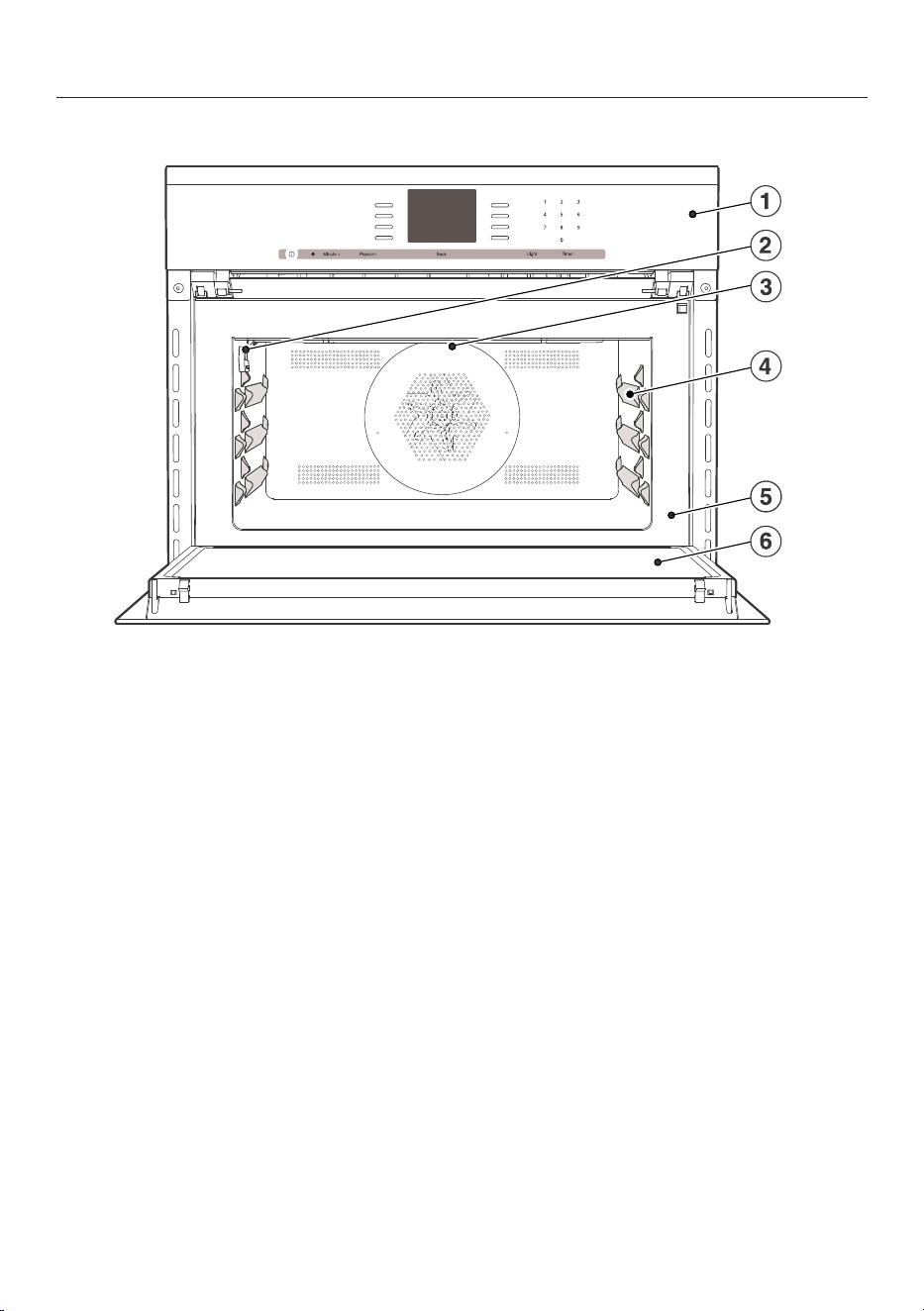
Guide to the Speed Oven
20
H6500BM, H6600BM
a
Control panel
b
Connection socket for the roast probe
c
Browning / Broiling element
d
3 Shelf levels for the glass tray and rack
e
Front frame with data plate
f
Door
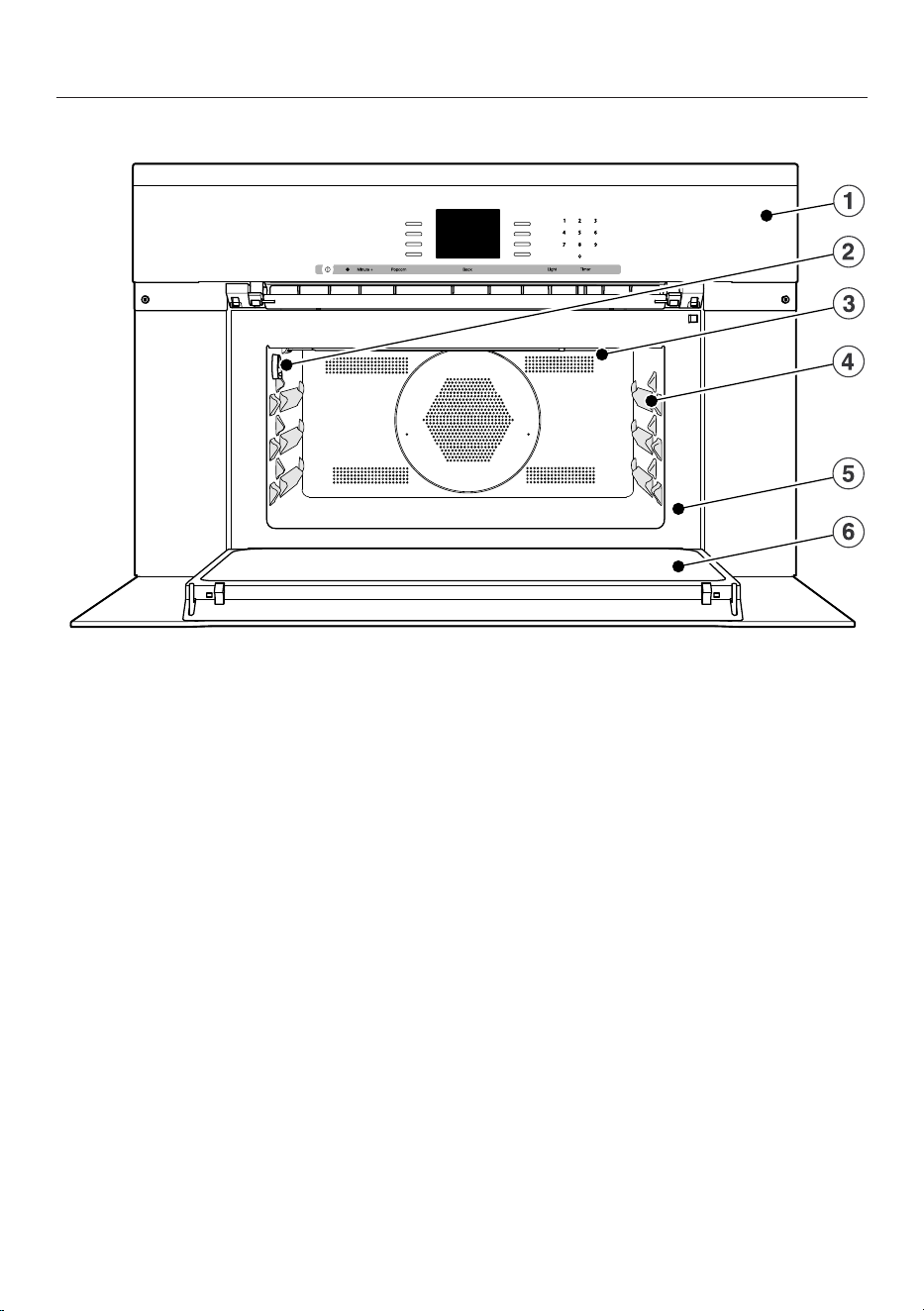
Guide to the Speed Oven
21
H6570BM, H6670BM
a
Control panel
b
Connection socket for the roast probe
c
Browning / Broiling element
d
3 Shelf levels for the glass tray and rack
e
Front frame with data plate
f
Door
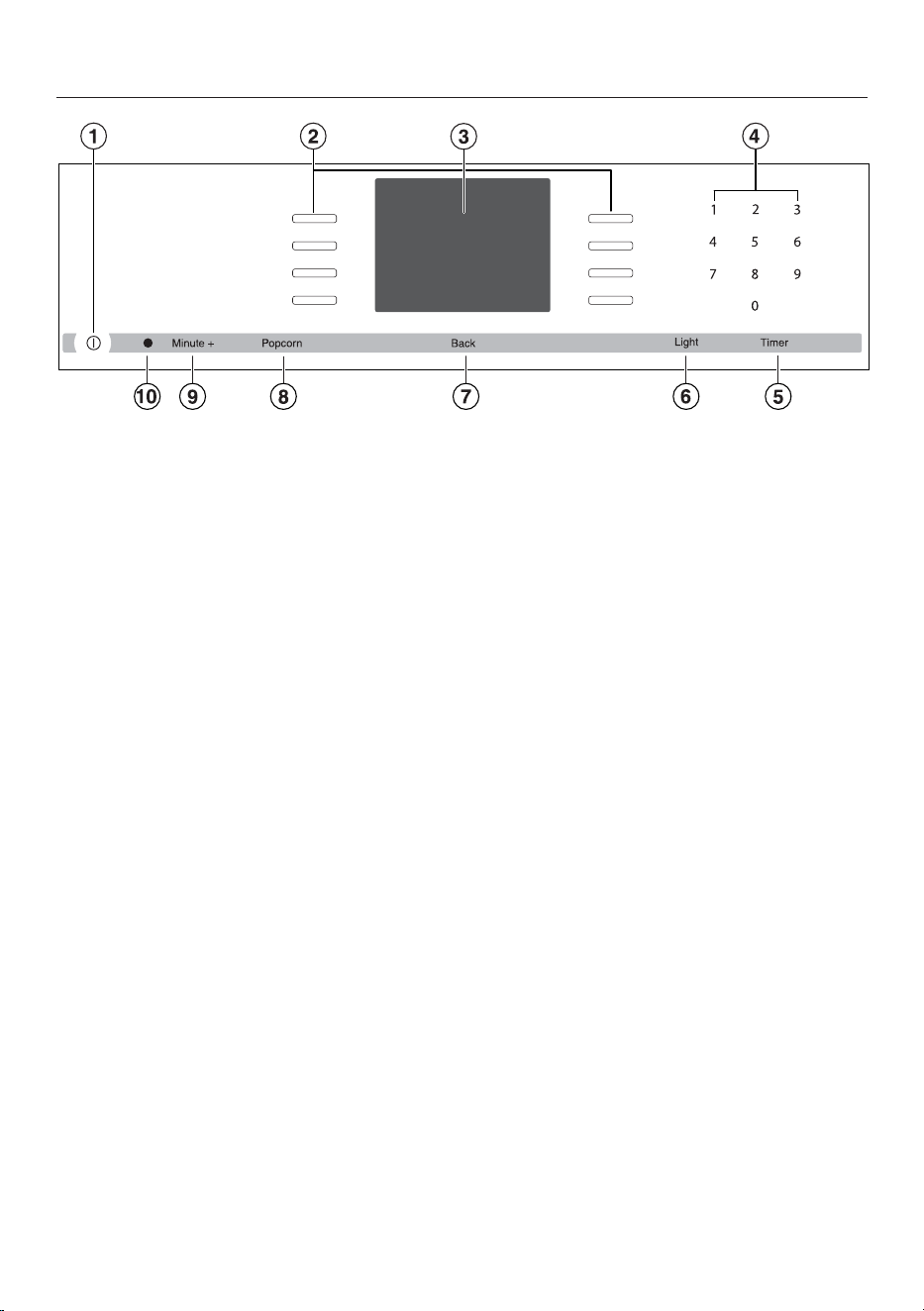
Control panel
22
a
Recessed On / Off button
Turns the oven on and off
b
Sensor buttons
To select operating modes, settings and menu items
c
Display
To display time of day and information for operation
d
Sensor buttons 0-9
Numeric keypad to enter values
e
“Timer” sensor button
To set the timer
f
“Light” sensor button
To turn the oven cavity lighting on and off
g
“Back” sensor button
To go back one step at a time
h
“Popcorn” sensor button
To start the “Popcorn” function
i
“Minute +” sensor button
To start the “Minute +” function
j
Optical interface
(for service technician use only)
Control panel
23
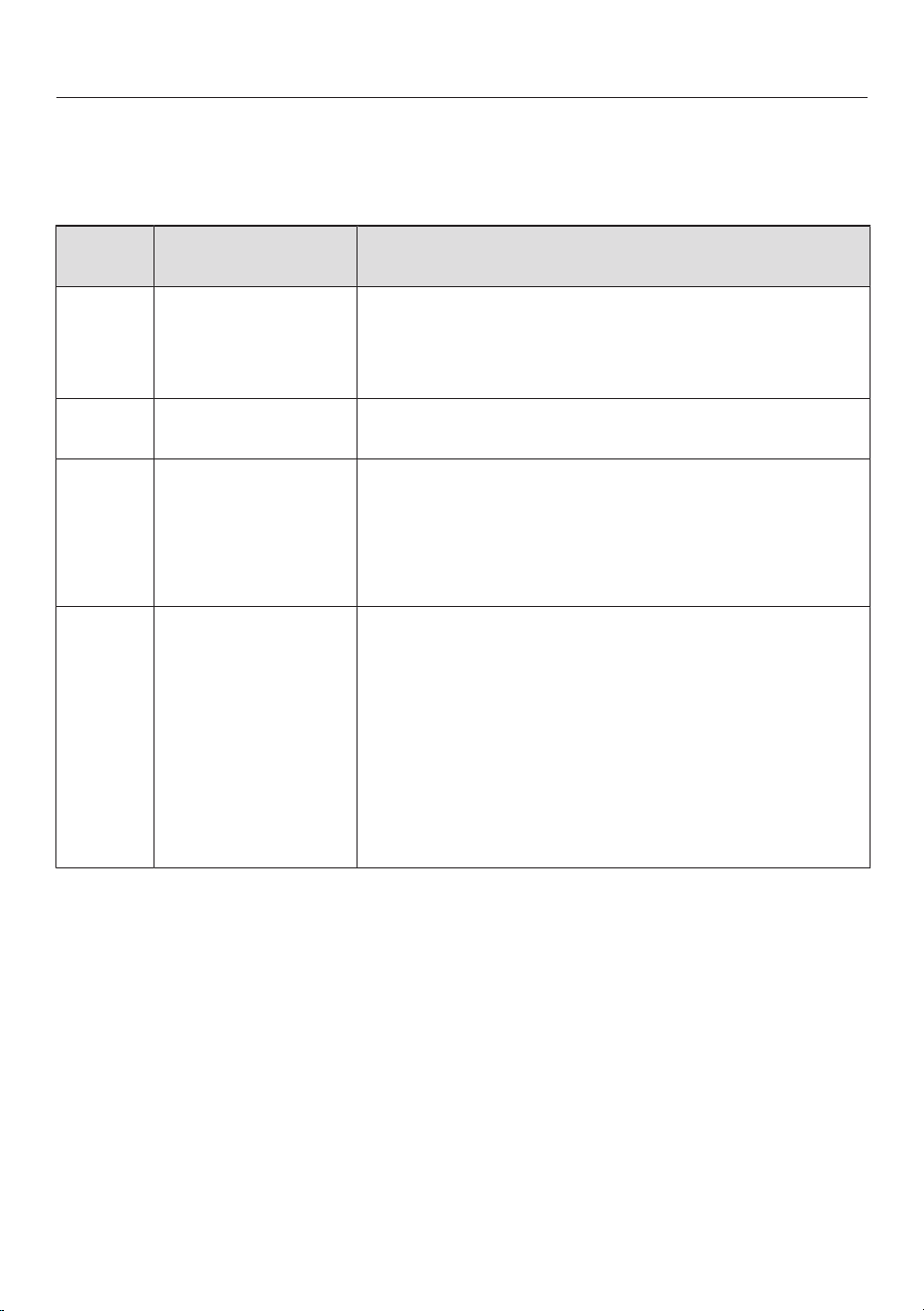
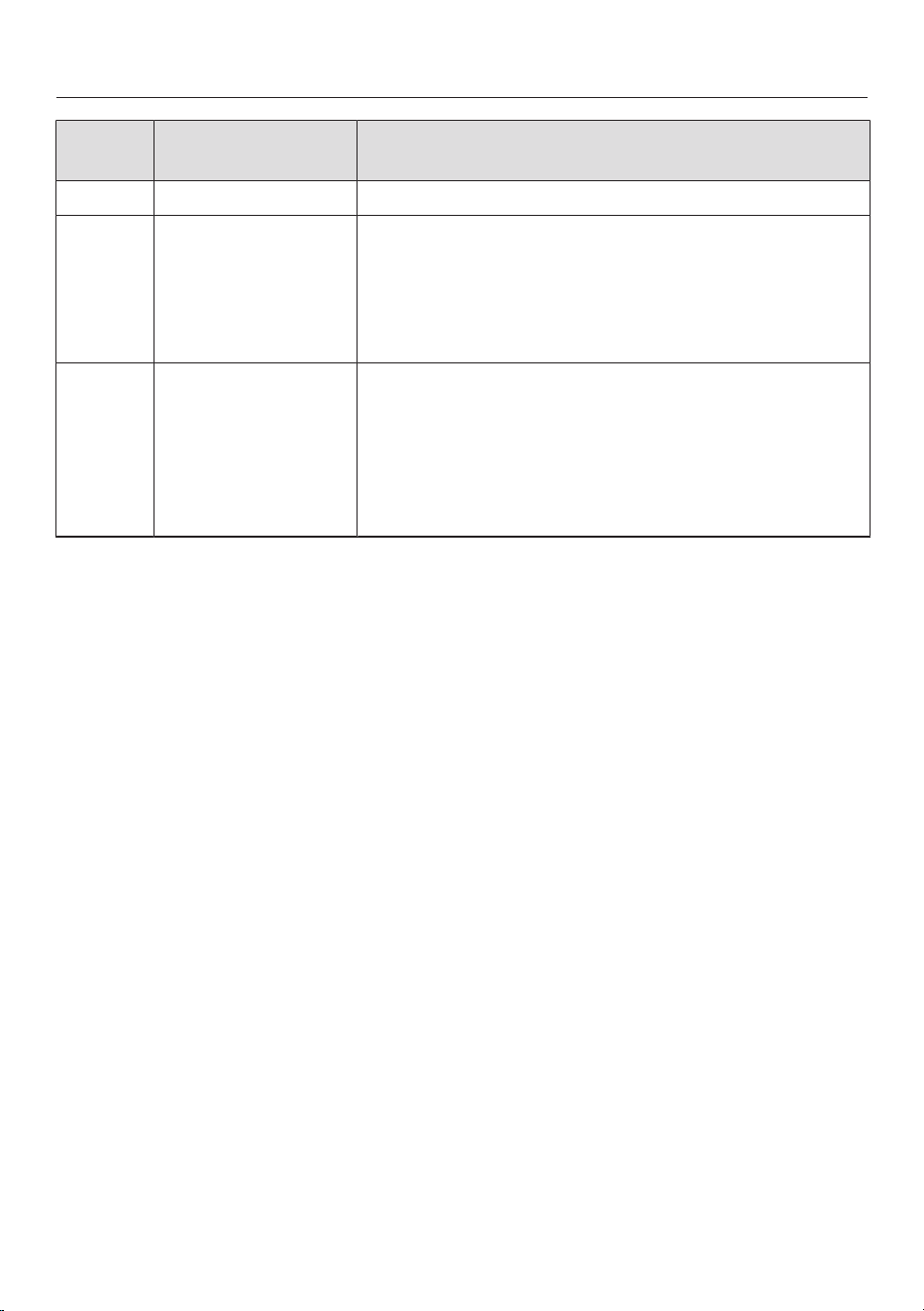
Sensor buttons
The sensors react to touch. Each touch is confirmed with an audible tone. This
tone can be turned off (see “Settings – Keypad tone”).
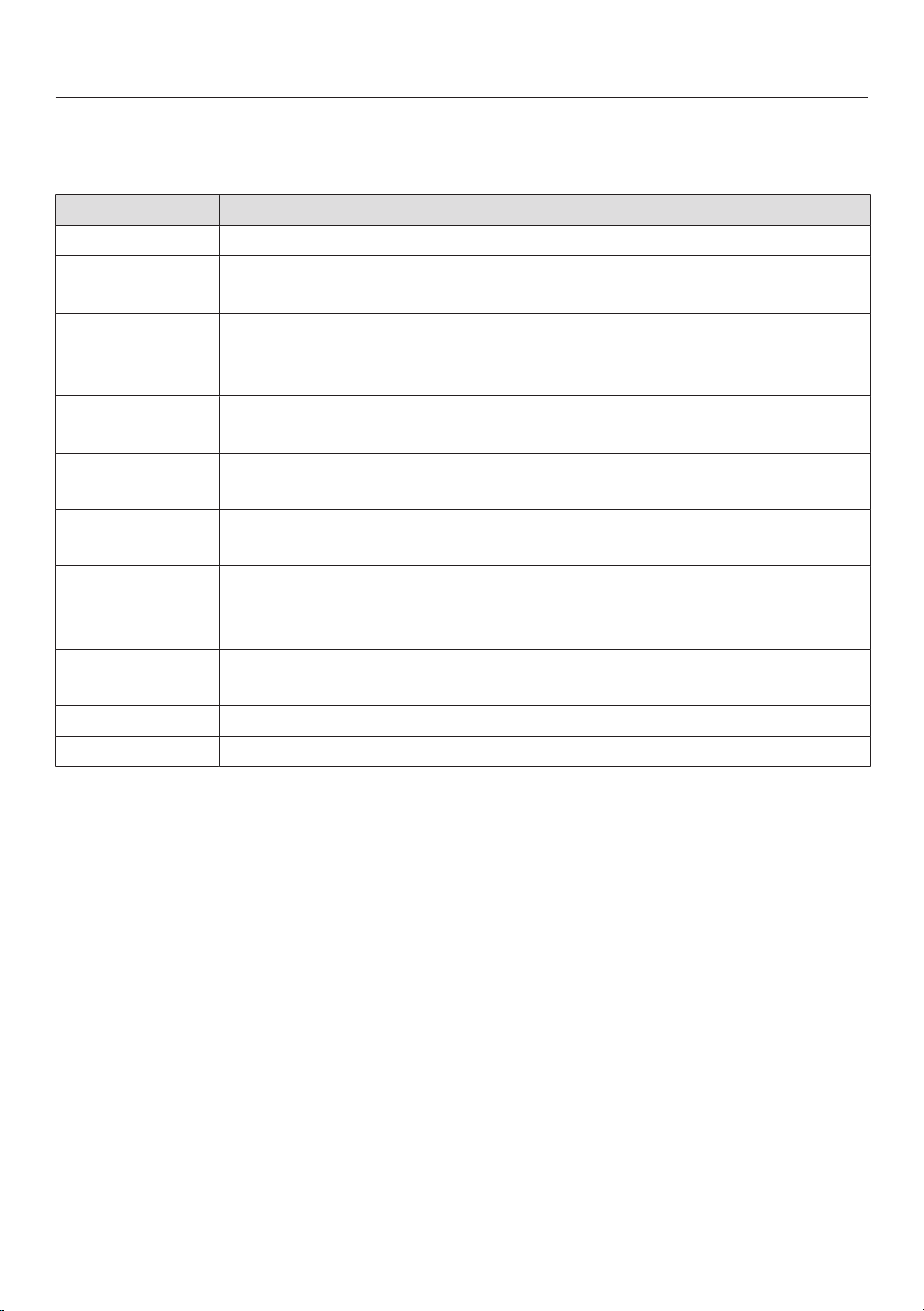
Sensor
button
Function Notes
For selecting
options and
scrolling through
the list of options
A menu option can be selected by touching the
illuminated sensor next to it.
0–9 Numerical keypad
for setting values
The numerical keypad is used to set values, e.g.
temperatures and durations.
Timer To set the timer If a list of options is showing in the display or if a
cooking process is running, a timer duration (e.g.,
when boiling eggs) can be set at any point.
If the time of day display is turned off, the “Timer”
button will not react until the oven is turned on.
Light For turning the
oven interior
lighting on and off
If a list of options is showing in the display or if a
cooking process is running, touching “Light” will
turn the oven interior lighting on or off.
If the time of day display is turned off, the “Light”
sensor button will not react until the oven is turned
on.
The oven interior lighting turns off after 15 seconds
during cooking or remains constantly turned on,
depending on the setting selected.
Control panel
24
Sensor
button
Function Notes
Back To go back a step
Popcorn “Popcorn” function The microwave starts at power level 6 and a
cooking time of 3 minutes (see the “Popcorn”
chapter).
This function can only be used when no other
cooking procedures are in progress.
Minute + “Minute +” function The microwave mode starts at maximum power
(1000W) and a cooking time of 1minute (see
“Minute +”). Touching the sensor button repeatedly
increases the cooking time.
This function can only be used when no other
cooking procedures are in progress.

Control panel
25
Display
The display is used for showing the
time of day or information about
modes, temperatures, power settings,
cooking durations, MasterChef
programs and settings. Information or a
list of options is shown on the display
depending on the function selected.
After turning the oven on with the On/
Off sensor button , the main menu
will appear:
If a cooking process is running,
selecting Change will call up a list of
options which can be set or changed
for the cooking process in progress.
– Temperature
– Power Level
– Core Temperature (only when using the
roast probe)
– Duration
– Ready at
– Start at (only if Duration / Ready at has
been set)
– PreHeating (only available in some
operating modes)
– Crisp function (Moisture reduction)
– Change Mode
A menu item can be selected by
touching the illuminated sensor
next to the menu item.
Options can then be accessed by
touching the illuminated sensor
next to OK.
Control panel
26
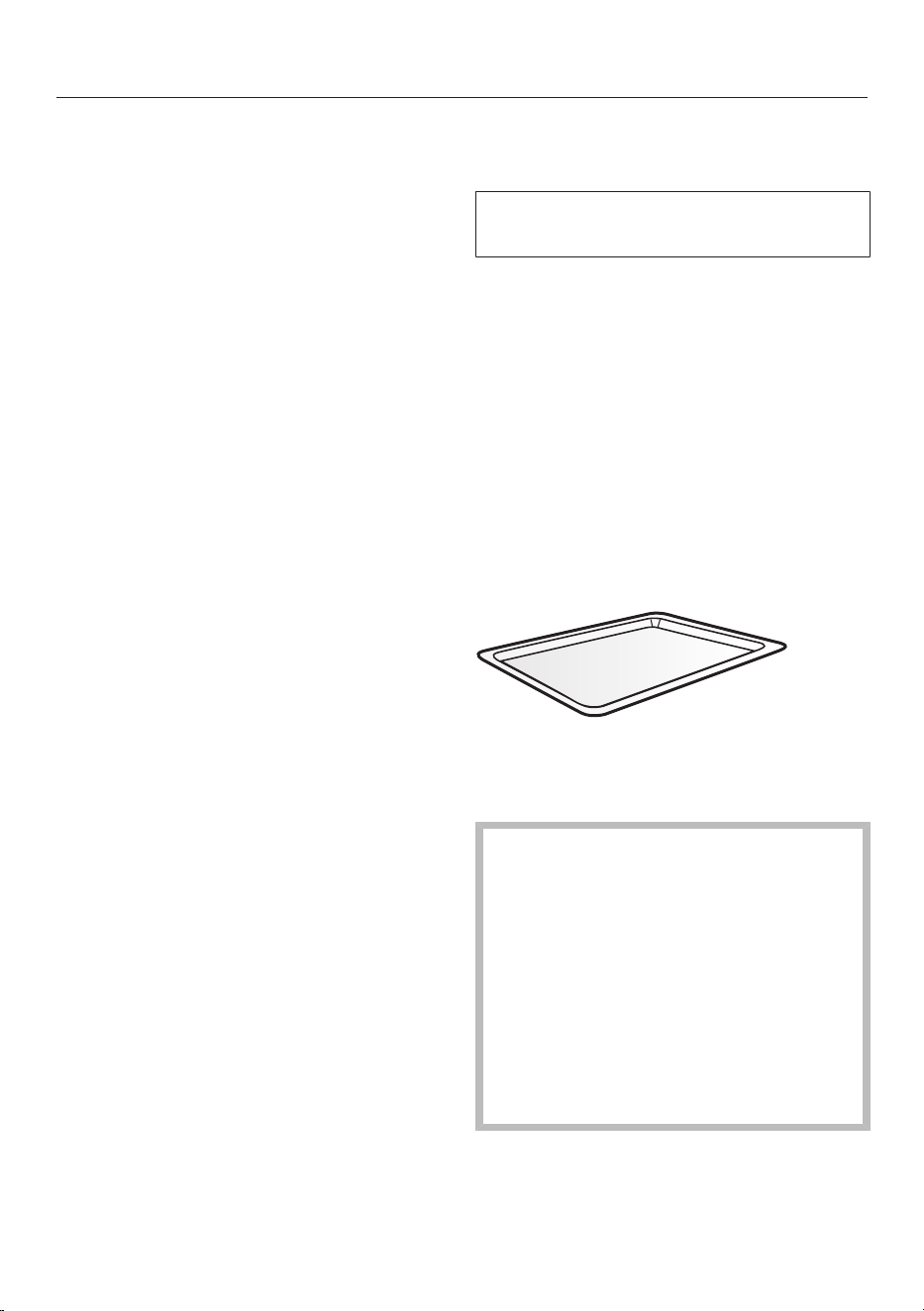
Symbols
The following symbols may appear in the display:
Symbol Description
Timer
Allocates an illuminated Sensor button to an option and
indicates that the option can be selected.
If more than four options are available a bar will appear on the
right-hand side of the display. Use the allocated sensors to scroll
through the list.
The end of a list is indicated by a dotted line. By scrolling down
further, you will reach the beginning of the list again.
Some settings, e.g. display brightness and buzzer volume, are
selected using a bar chart.
A check indicates the currently active setting. will not be
displayed and the corresponding sensor will not be illuminated.
This symbol indicates that there is additional information and
advice about using the oven. Select OK to access the
information.
The system lock or sensor lock is active (see “Settings – Safety”).
The oven cannot be used.
Program finished
Core temperature when using the roast probe
Features
27
Model numbers
A list of the ovens described in these
operating instructions can be found on
the back page.
H6500BM, H6600BM:
Width: 237/16" (595mm)
H6570BM, H6670BM:
Width: 2913/16" (757mm)
Data plate
The data plate located on the front
frame of the oven is visible when the
door is open.
Printed on the data plate are the model
number, serial number and the
connection data (voltage/frequency/
maximum rated load) of the oven.
Have this information available when
contacting Miele Technical Service.
Items included
The following items are included with
this appliance:
– The operating and installation
instructions for using the Speed
Oven
– Screws for securing your appliance
into the cabinetry
– Various accessories
Standard and optional
accessories
This Speed Oven is supplied with a
glass tray, rack and roast probe.
All accessories and cleaning and care
products in these instructions are
designed to be used with Miele ovens.
These can be ordered from the Miele
web store, Miele Technical Service, or
from your Miele dealer.
When ordering, please have ready the
model number of your oven and of the
desired accessories.
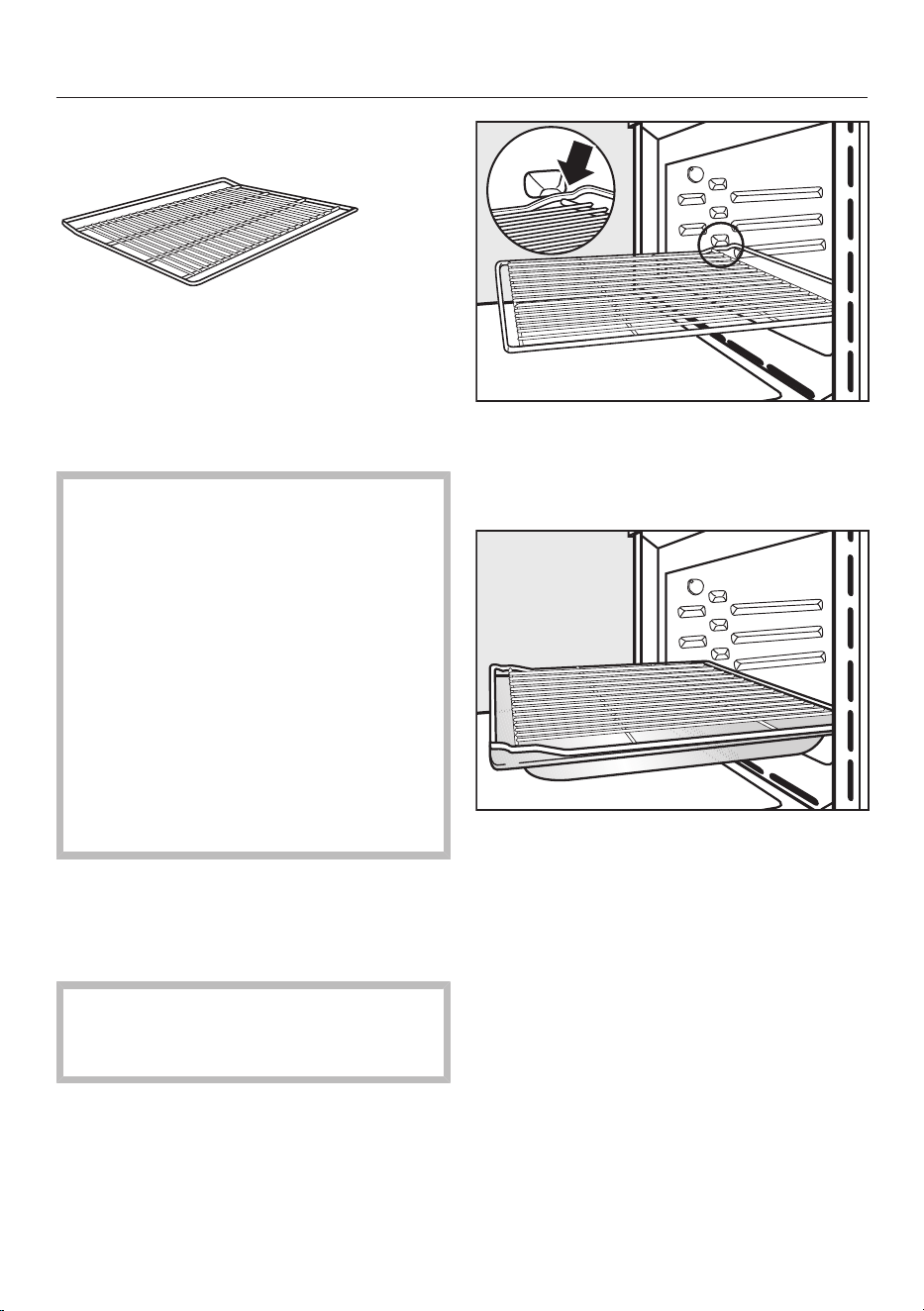
Glass Tray
The glass tray is suitable for use with all
operating modes.
Always use the glass tray when
using Microwave (Solo) .
Do not place items weighing more
than 17.5 lbs (8 kg) on it.
Do not place the hot glass tray on a
cold surface, such as a tiled or
granite countertop. The glass tray
could get damaged. Use a suitable
heat-resistant mat or pot rest.
Features
28
Wire rack with non-tip safety notches
The rack is only suitable for cooking in
Combination modes and modes that do
not use microwave. It is not suitable for
cooking in the Microwave (Solo)
mode.
Danger of burns! The rack gets hot
during the cooking process.
Use pot holders when placing food
in and taking food out of a hot oven.
Use of the rack with the Microwave
(Solo) mode can cause damage
to the oven and rack due to possible
sparking. The rack should be used
on a shelf level. Do not place it on
the floor of the oven.
Do not place items weighing more
than 17.5 lbs (8 kg) on the rack.
The rack has non-tip safety notches
which prevent it being pulled
completely out when it only needs to be
pulled out partially.
When pushing the rack back in,
always ensure that the safety
notches are at the back of the oven.
To remove the rack, lift it upwards
slightly at the front when the safety
notches connect with the sides of the
oven.
We recommend using the rack
together with the glass tray when
cooking items on the rack which
might drip.
Features
29
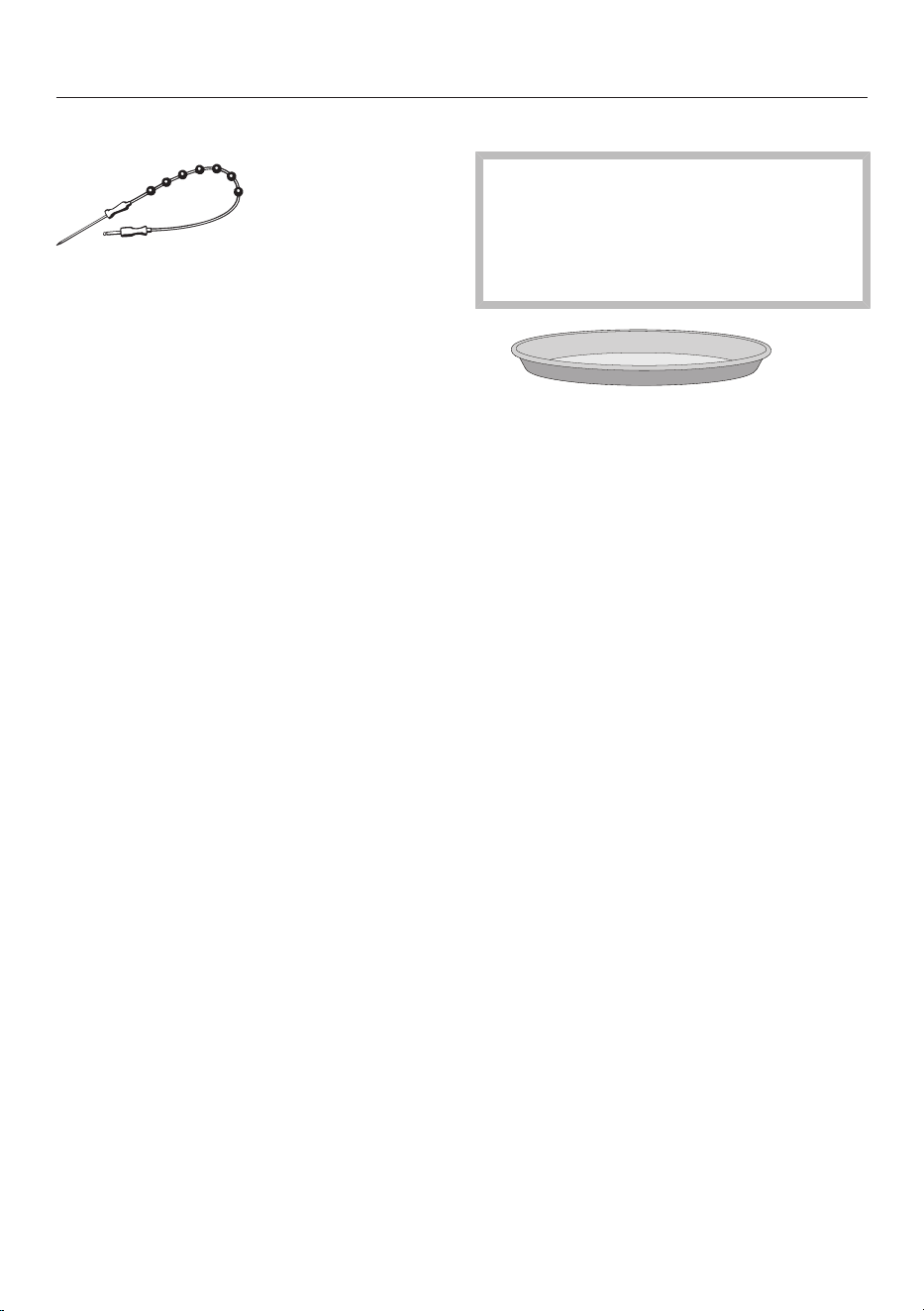
Roast Probe
Using the roast probe enables you to
accurately monitor the temperature
during the cooking process (see
“Roasting - Roast probe”).
Round Baking Form HBF27-1
Microwave modes will damage the
Round Baking Form.
Do not use the round baking form
when using Microwave (Solo) or
Combi modes.
This circular form is suitable for cooking
fresh or frozen pizzas, flat cakes, tarts
and baked goods.
Place the round baking form on the
rack.
The surface has been treated with
PerfectClean enamel.
Miele Oven Cleaner
Miele oven cleaner is suitable for
removing stubborn soiling. It is not
necessary to preheat the oven before
use.

Features
30
Oven controls
The oven controls enable you to use the
various oven modes to bake, roast,
broil, and reheat.
They also allow you to access:
– Time display
– Timer
– Settings to turn cooking processes
on and off automatically
– Settings to use automatic programs
– Settings to create Favorites
– Custom settings
Oven safety features
System lock
The system lock prevents the oven from
being used unintentionally (see
“Settings - System lock”).
The system lock will remain activated
even after a power failure.
Safety shutoff
A mode without microwave can be
started without selecting a cooking
duration. To prevent continuous use
and avoid the risk of fire, the oven will
turn itself off automatically after a time
between 1hour and 12hours
depending on the mode and
temperature selected.
If a combi mode is followed in quick
succession by another program using
microwave power, the magnetron
(which produces the microwaves)
cannot be turned on again until approx.
10seconds have elapsed. Therefore,
wait a short time before starting the
second process.
Cooling fan
The cooling fan comes on automatically
when a cooking program is started. The
cooling fan mixes hot air from the oven
cavity with cool room air before venting
it out into the kitchen through vents
located between the appliance door
and the control panel.
The cooling fan will continue to run for a
while after a cooking process to prevent
moisture building up in the oven, on the
control panel or on the surrounding
cabinetry. It will turn itself off
automatically after a while.
PerfectClean treated surfaces
The revolutionary PerfectClean enamel
is a smooth, non-stick surface that
cleans easily with a sponge.
Food and soiling from baking and
roasting can be easily removed from
these surfaces.
Do not use ceramic knives as these
will scratch the PerfectClean surface.
Follow the instructions in the “Cleaning
and Care” section of this manual so the
anti-stick and easy cleaning properties
are retained.
The oven compartment and the rack
have a PerfectClean finish.

Before first use
31
Standard settings
The oven must not be operated
until it has been properly installed
within cabinetry.
The oven will turn on automatically
when it is connected to the power
supply.
Welcome screen
A welcome greeting is displayed. You
will then be asked to select some basic
settings which are needed before the
appliance can be used.
Follow the instructions on the display.
Set the language
Scroll through the list until the desired
language appears.
Touch the illuminated sensor next
to the language you want to select.
Confirm with OK.
Select the location
Scroll through the list until the desired
location appears.
Touch the illuminated sensor next
to the location you want to select.
Confirm with OK.
Setting the voltage (electrical
version)
The voltage set must match that
of the house as to not damage the
oven.
Confirm the voltage before setting. If
in doubt contact a qualified
technician.
Select the voltage.
Confirm with OK.
Set the date
Use or to set the year, month
and day.
Confirm with OK.
Set the time of day
Use the numerical keypad to set the
time of day in hours and minutes (e.g.
1-2-1-5 for 12:15).
Confirm with OK.
Select the lit sensor button next
to am or pm.
Confirm with OK.
The time of day can be displayed in
24-hour format (see “Settings - Time
of Day - Clock Format”).

Before first use
32
Time of day display
You will then be asked when you want
the time of day to show in the display
when the oven is turned off (see
“Settings - Time of day - Display”):
– On
The time is always visible in the
display.
– Off
The display appears dark to save
energy. Some modes are limited.
– Night Dimming
The time only shows in the display
between 5:00 am and 11:00 pm. It
turns off at night to save energy.
Select the desired option.
Confirm with OK.
Information regarding energy
consumption will appear in the display.
Confirm with OK.
Set up Successfully Completed is
displayed.
Confirm with OK.
The oven is now ready to use.
If you accidently select the wrong
language, follow the instructions
described in “Settings - Language ”.
Before first use
33
Heating the oven
New ovens may have a slight odor
during their first use. Heating up the
oven for at least one hour with nothing
in it will eliminate the odor.
Ensure that the kitchen is well
ventilated while the appliance is
being heated up for the first time.
Close doors to other rooms to
prevent the smell spreading
throughout the house.
Remove any protective wrapping and
sticky labels from the oven.
Take all accessories out of the oven
and clean them (see “Cleaning and
care”).
Before heating the oven up, wipe the
interior with a damp cloth to remove
any dust or bits of packaging that
may have accumulated in the oven
cavity during storage and unpacking.
Turn on the oven.
The main menu will appear.
Select Operating Modes.
Select Convection Bake
The default temperature is displayed
350°F (160°C).
The oven heating, lighting and cooling
fan will turn on.
Set the maximum temperature.
Confirm with OK.
Heat up the oven for at least one hour.
After at least an hour:
Turn the oven off.
After heating up for the first time
Danger of burning! Allow the
oven to cool before cleaning.
Turn the oven on using the On/
Offbutton.
Select to turn on the oven light.
Clean the oven cavity with warm
water and liquid dish soap, applied
with a soft sponge or cloth.
Dry all surfaces with a soft cloth.
Turn the lighting and the oven off.
Leave the oven door open until the
oven cavity is completely dry.
Settings
34
Accessing the “Settings” menu
Select Settings .
A list of settings will appear in the
display.
They can be checked and changed, if
needed.
A check next to an option shows
which setting is active.
Settings cannot be altered while a
cooking program is in progress.
Changing and saving settings
Select Settings .
Scroll through the list until the desired
setting appears.
Touch the sensor button next to the
setting. The desired setting may
appear in a submenu.
Change the setting.
Confirm with OK.
Touch “Back” until the main menu
appears or select another setting.
Settings
35
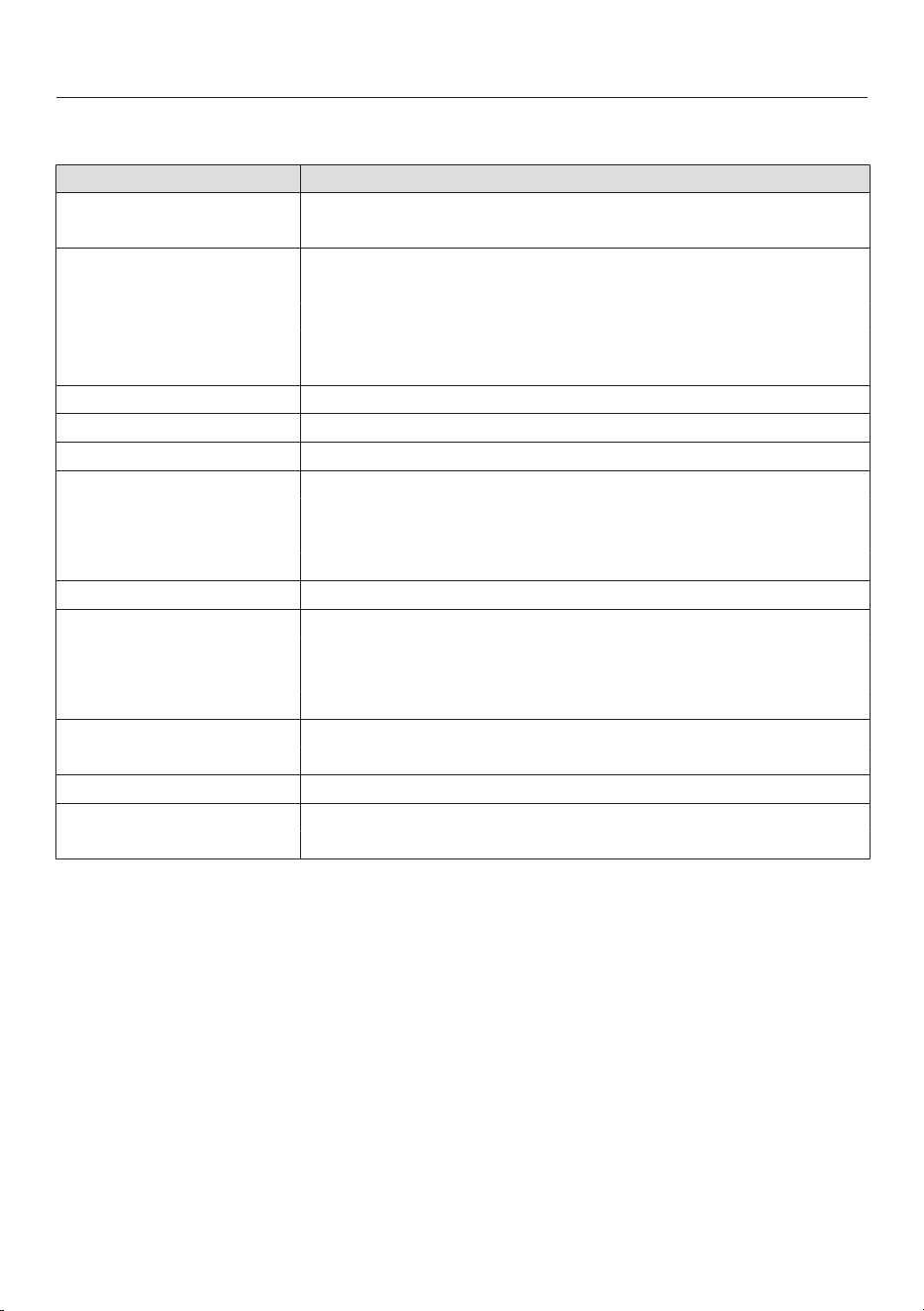
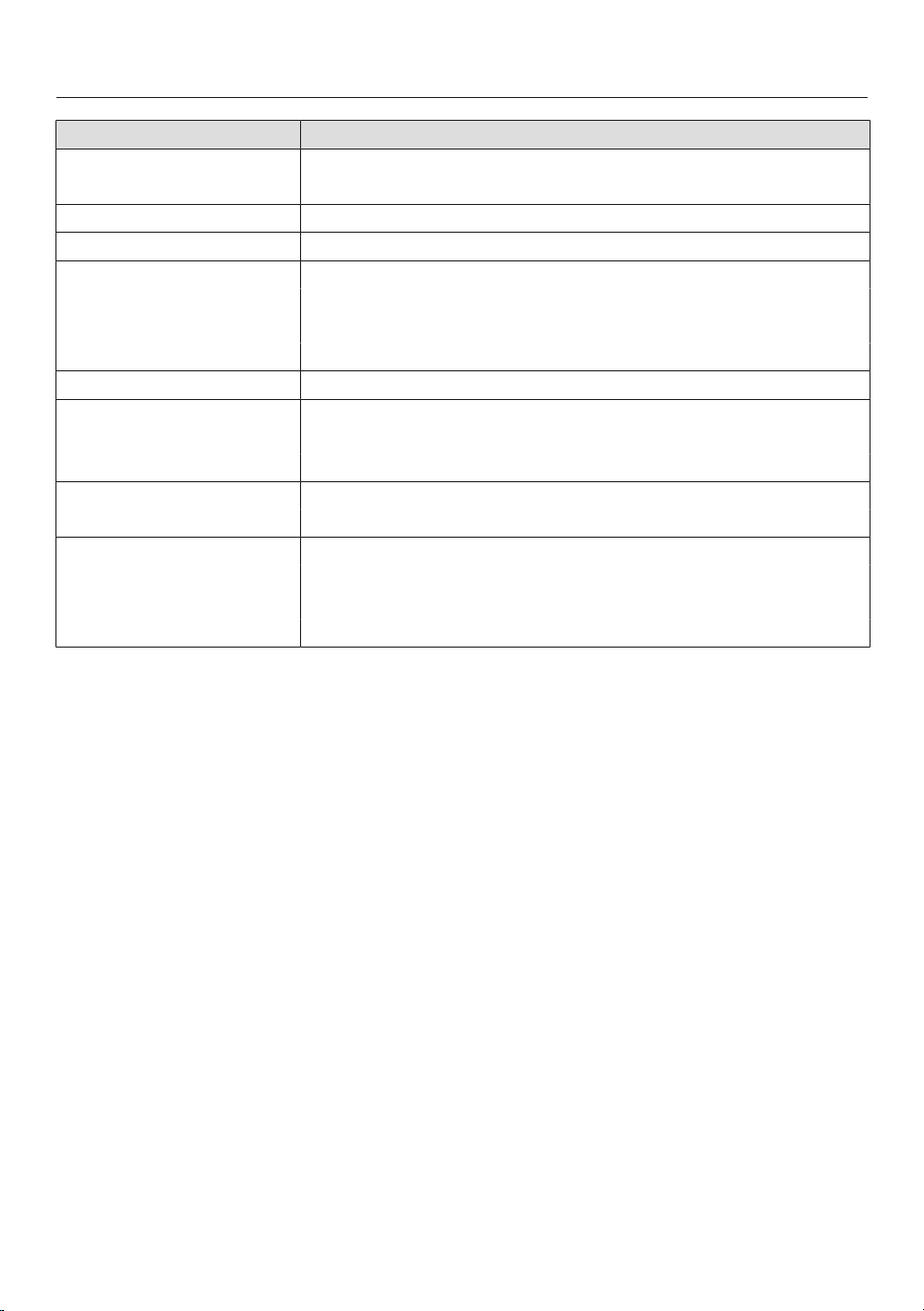
Settings overview
Option Available settings
Language ... / deutsch / english / ...
Location
Time Show
On / Off * / Night Dimming
Clock Format
24 h / 12 h *
Set
Date
Lighting On / On for 15 Seconds *
Display Brightness
Audible tone information Melody
Solo Tone
Keypad Tone
Units of Measurement Weight
g / lb / lb:oz *
Temperature
°C / °F *
Quick MW Power Level
Duration
Popcorn Duration
Keeping Warm On
Off *
* Factory default
Settings
36
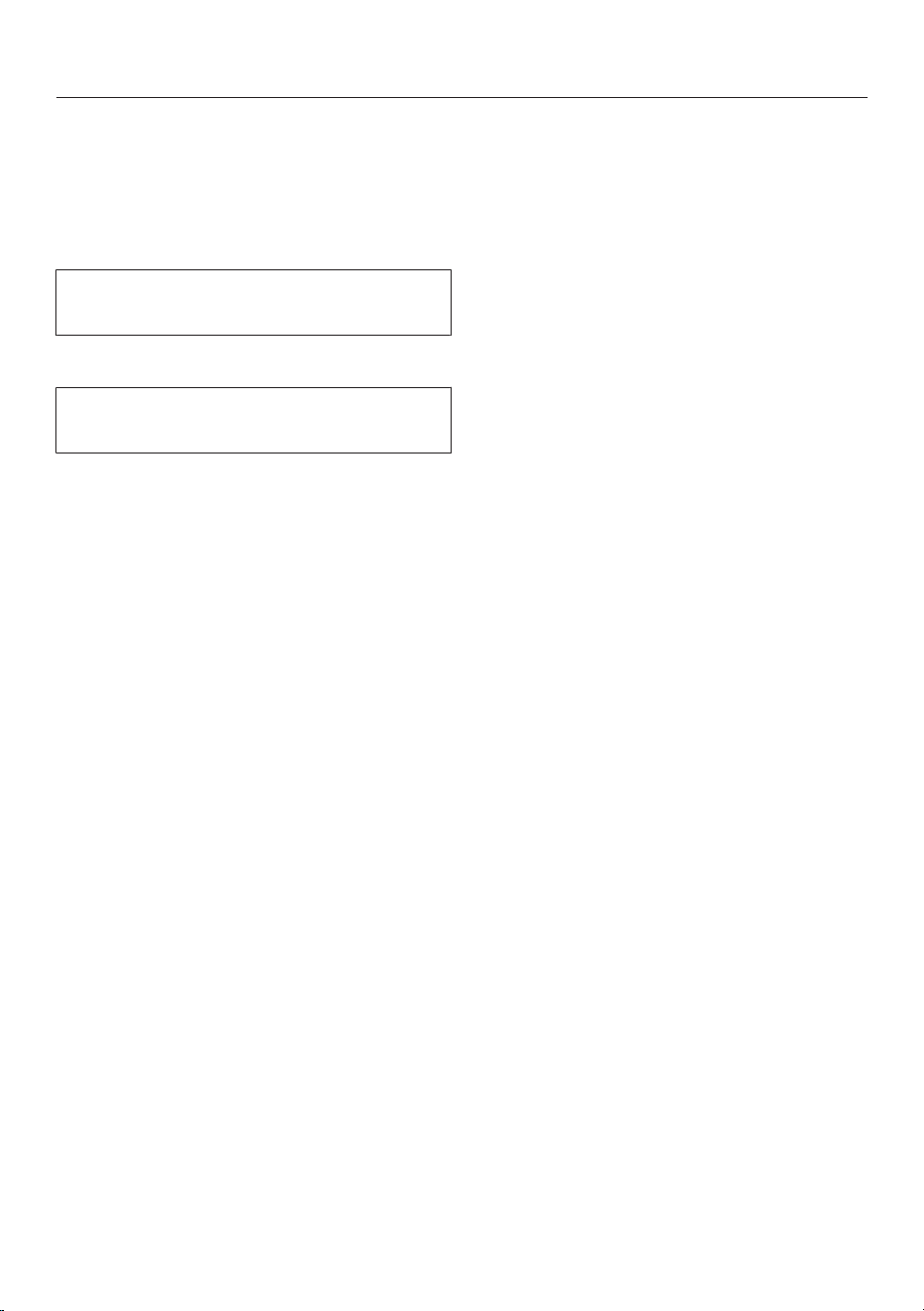
Option Available settings
Cooling Fan Temp. Controlled *
Time Controlled
Default Temperature
Recommended Settings
Safety System Lock
On / Off *
Sensor Lock
On / Off *
Calibrate Temperature
Voltage 208V / 60Hz
220V / 60Hz
240V / 60Hz
Showroom Program Demo Mode
On / Off *
Factory Default Settings
Favorites
Recommended Settings
Default Temperature
* Factory default

Settings
37
Language
The desired location and language
can be set.
After selecting and confirming your
choice, the language selected will
appear in the display.
Tip: If you accidently select a language
you do not understand, select the
symbol to return to the submenu.
Time of day
Display
Select how you would like the time of
day to appear in the display when the
oven is turned off:
– On
The time is always visible in the
display.
– Off
The display is turned off to save
energy. The oven has be to be turned
on before you can use it. This also
applies to the “Minute +,” “Popcorn,”
“Timer,” and “Light” functions.
– Night Dimming
To save energy, the time is only
visible on the display between 5:00
am and 11:00 pm. The rest of the
time it is not visible.
Clock format
You can select the clock format for the
time of day:
– 24 h
The time of day is shown in a 24 hour
clock format.
– 12 h
The time of day is shown in a 12 hour
clock format.
Setting
Set the hours and the minutes.
If you have selected the 12-hour format,
you also set am or pm.
If there is a power failure, the current
time of day will reappear once the
power has been restored. The time is
stored in memory for about 200 hours.
Date
Set the date.

Settings
38
Lighting
– On
The interior lighting is turned on
during the entire cooking period.
– On for 15 Seconds
The oven lighting turns off 15
seconds after a program starts.
Touching “Light” turns it on for
another 15 seconds.
Display brightness
The display brightness is represented
by a bar with seven segments.
Select Darker or Brighter to change the
brightness of the display.
Audible tone information
Melody
At the end of a process, a melody will
sound several times in intervals.
The volume of the melody is
represented by a bar with seven
segments.
Maximum volume is selected when all
segments are filled. If none of the
segments are filled, the volume is
turned off.
Select Quieter or Louder, to adjust the
volume.
Select On or Off, to turn the melody
on or off.
Solo tone
At the end of a process, a continuous
tone will sound for period of time.
The pitch of this tone is represented by
a segment bar.
Select Lower or Higher, to change the
pitch.
Select On or Off, to turn the tone on or
off.

Settings
39
Keypad tone
An audible tone is heard with each
touch of a sensor.
The volume of the keypad tone is
represented by a bar with seven
segments.
Maximum volume is selected when all
segments are filled. If none of the
segments are filled, the volume is
turned off.
Select Quieter or Louder, to adjust the
volume.
Select On or Off, to turn the keypad
tone on or off.
Units of measurement
Weight
– g
The weight of food in MasterChef
programs is shown in grams.
– lb
The weight of food in MasterChef
programs is shown in pounds.
– lb:oz
The weight of food in MasterChef
programs is shown in pounds and
ounces.
Temperature
– °C
The temperature is displayed in
Celsius.
– °F
The temperature is displayed in
Fahrenheit.

Settings
40
Quick MW
Under this settings you can change
the presetting of the “Minute+”
sensor button.
The maximum power level 7 and a
cooking duration of 1 minute is preset
for the immediate startup of the
microwave.
– Power Level
You can set the power level between
1 and 7.
– Duration
The maximum cooking time that can
be set depends on the power level
selected:
Power levels 1 through 3: maximum
of 10 minutes
Power levels 4 through 7: maximum 5
minutes
Popcorn
Under this setting you can change the
presetting of the “Popcorn” sensor
button.
For the immediate start of the
microwave to prepare popcorn, power
level 6 and a cooking time of 3 minutes
are preset. This is suitable for the
preparation of most brands of
microwave popcorn.
You can change the cooking time, but
not the microwave power level.
– Duration
The maximum cooking time that can
be set is 4 minutes.

Settings
41
Keeping Warm
– On
The “Keeping Warm” function is
activated in the Microwave mode
if at least power level 4 and a
minimum cooking time of 10 minutes
is selected.
If food is not removed from the oven
at the end of a program, the
“Keeping Warm” function will
automatically start after approx. 5
minutes. Keeping Warm will appear on
the display and the food will be kept
warm for approx. 15 minutes using
power level 2. The keeping warm
phase is canceled if the door is
opened during this time.
– Off
The “Keeping Warm” function is
deactivated.
Cooling fan
The cooling fan will continue to run for
some time after the oven has been
turned off to prevent humidity from
building up in the oven, on the control
panel or in the surrounding cabinetry.
– Temp. Controlled
The cooling fan will turn off when the
oven compartment temperature
drops below 160°F (70°C).
– Time Controlled
The cooling fan will turn off after
approx. 25 minutes.
Condensation can cause the
cabinetry and the countertop to be
damaged. This could lead to
corrosion of the appliance.
When keeping food warm in the
oven, increases to the Time Controlled
setting can lead to condensation of
the control panel, moisture on the
countertop and on the cabinetry.
Do not adjust the Time Controlled
setting and try not to leave food in
the warm oven.

Settings
42
Recommended temperatures
If you often cook with temperatures that
differ from the default, it makes sense
to change the recommended
temperatures.
After selecting this option, a list of oven
modes will appear in the display.
Select the desired mode.
The recommended temperature is
displayed along with the available
temperature range.
Change the recommended
temperature.
Confirm with OK.
Recommended settings
If you often cook with microwave power
levels that differ from the default, it
makes sense to change the default
temperatures.
The default power levels can be
changed for “Microwave” and
“Microwave Combi” modes.
After you select this menu item, a list of
mode will appear together with their
respective default power levels.
– Microwave:
Power level 1 through 7 (can be set
via a bar with 7 segments)
– Combined modes:
Power levels 1 through 3 (can be set
using a number wheel)
Select the desired mode.
Change the default power level.
Confirm with OK.
Settings
43
Safety
System lock
The system lock prevents the oven
being turned on inadvertently.
The system lock will remain activated
even after a power failure.
Select On to activate the system lock.
The timer can still be used when the
system lock is active.
– On
The system lock is now active. If you
want to use the oven press and hold
the sensor next to OK for at least 6
seconds.
– Off
The system lock is not active. The
oven can be used as normal.
Sensor lock
The sensor lock prevents a cooking
process from being switched off or
changed while it is running. Once
activated, the sensors are locked a few
seconds after a program has started.
– On
The sensor lock is activated. Touch
the sensor next to OK for at least
6seconds to use the functions again.
The sensor lock is then deactivated
for a short period.
– Off
The sensor lock is not active. All
sensors react to touch as normal.

Settings
44
Calibrate temperature
Using temperature calibration the
temperature can be modified, in all
modes and MasterChef programs, so
that it is slightly higher or lower than
shown.
The temperature calibration is
represented by a bar with seven
segments.
If all of the segments are filled the oven
temperature is much higher than
indicated in the display. If no segment is
filled the oven temperature is much
lower than indicated.
Select + or -, to adjust the
temperature calibration.
Confirm with OK.
Voltage
Setting the voltage (electrical version)
Select the desired voltage and
corresponding frequency.
Confirm with OK.
Showroom program
This function enables the oven to be
demonstrated in showrooms without
heating up. It should not be set for
domestic use.
Demo Mode
If you have demo mode activated
Demo mode active. The appliance will not
heat up will appear when you turn on
the oven.
– On
Press and hold OK for at least 4
seconds to activate demo mode.
– Off
Press and hold OK for at least 4
seconds to deactivate demo mode.
The oven can then be used as
normal.
Factory default settings
– Settings
Any settings that have been altered
will be reset to the factory default
setting.
– Favorites
All favorites will be deleted.
– Recommended Settings
Power levels which have been
changed will be reset to the factory
default settings.
– Default Temperature
Any default temperatures that have
been changed will reset to the factory
default settings.

Timer
45
The timer can be used to time any
activity in the kitchen, e.g. boiling eggs.
The timer can also be used at the same
time as a cooking program if a start and
finish time have been set, e.g. a
reminder to stir the dish or add
seasoning.
A maximum timer duration of 9hours,
59minutes and 59seconds can be set.
Setting the timer
When the setting Time - Show - Off is
set the oven must be turned on to set
the timer. The timer can then be seen
counting down in the display when the
oven is turned off.
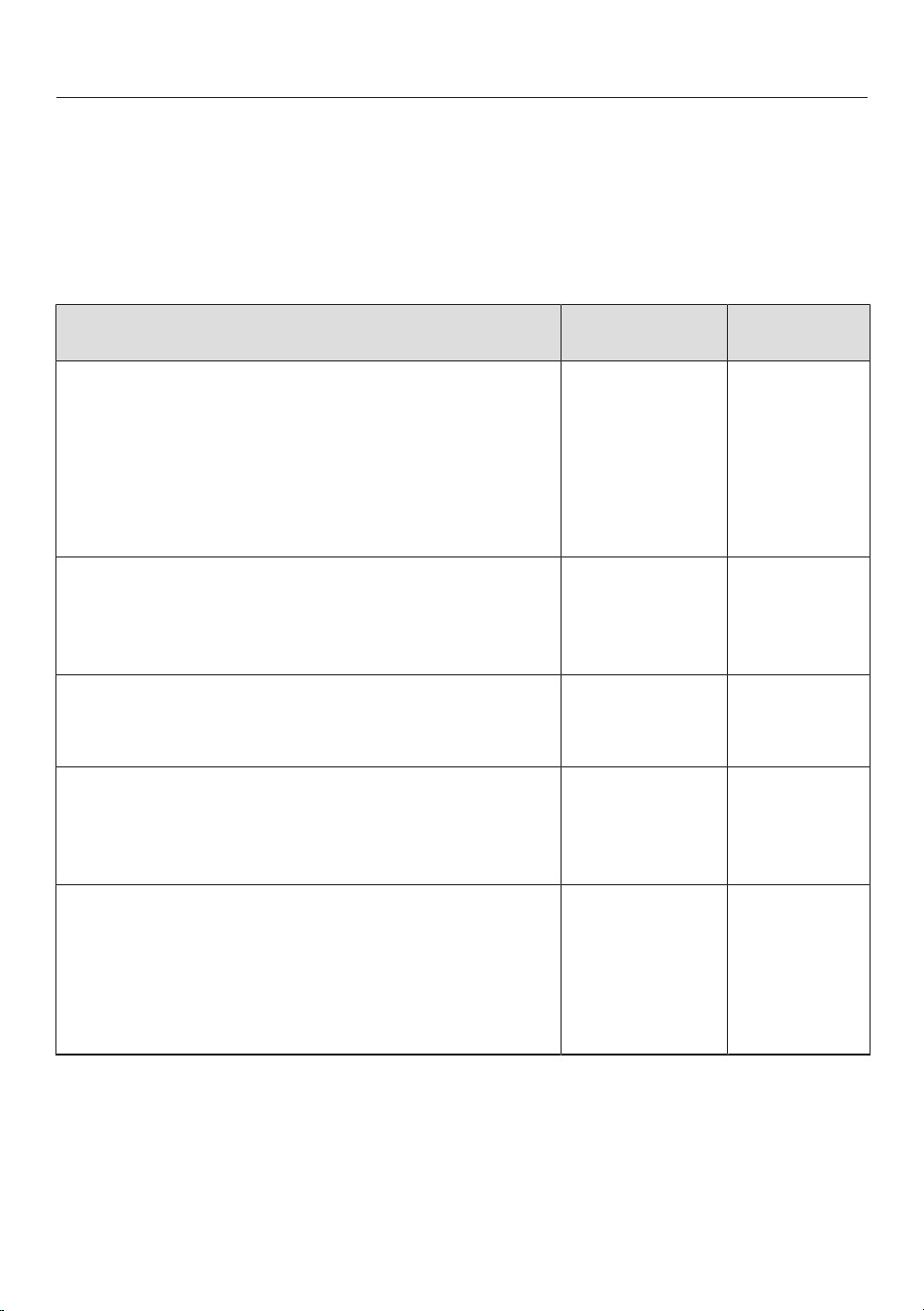
Example: Boiling eggs and setting the
timer for 6 minutes and 20 seconds.
Select “Timer”.
“0 : 00 : 00” (h : min : sec) will appear.
Use the numerical keypad to enter a
different duration (6-2-0).
Confirm with OK.
The timer duration is now saved.
The duration counts down in the display
when the oven is turned off.
If a cooking program is running at the
same time, the timer duration will
appear at the bottom of the display.

Timer
46
At the end of the timer
– flashes,
– the time starts counting upwards,
– a buzzer will sound if turned on (see
“Settings - Acoustic information”).
Select the “Timer” button.
The buzzer will turn off and the symbols
in the display will go out.
Resetting the timer
Select “Timer” or the illuminated
sensor next to the timer duration that
is counting down.
The time previously set appears
Set the new timer duration using the
numeric keypad.
Confirm with OK.
The changed time is saved and will
count down in seconds.
Canceling the timer
Select “Timer” or the illuminated
sensor next to the timer duration that
is counting down.
The time previously set appears
Select Reset.
The timer has been canceled.
Guide to the modes
47
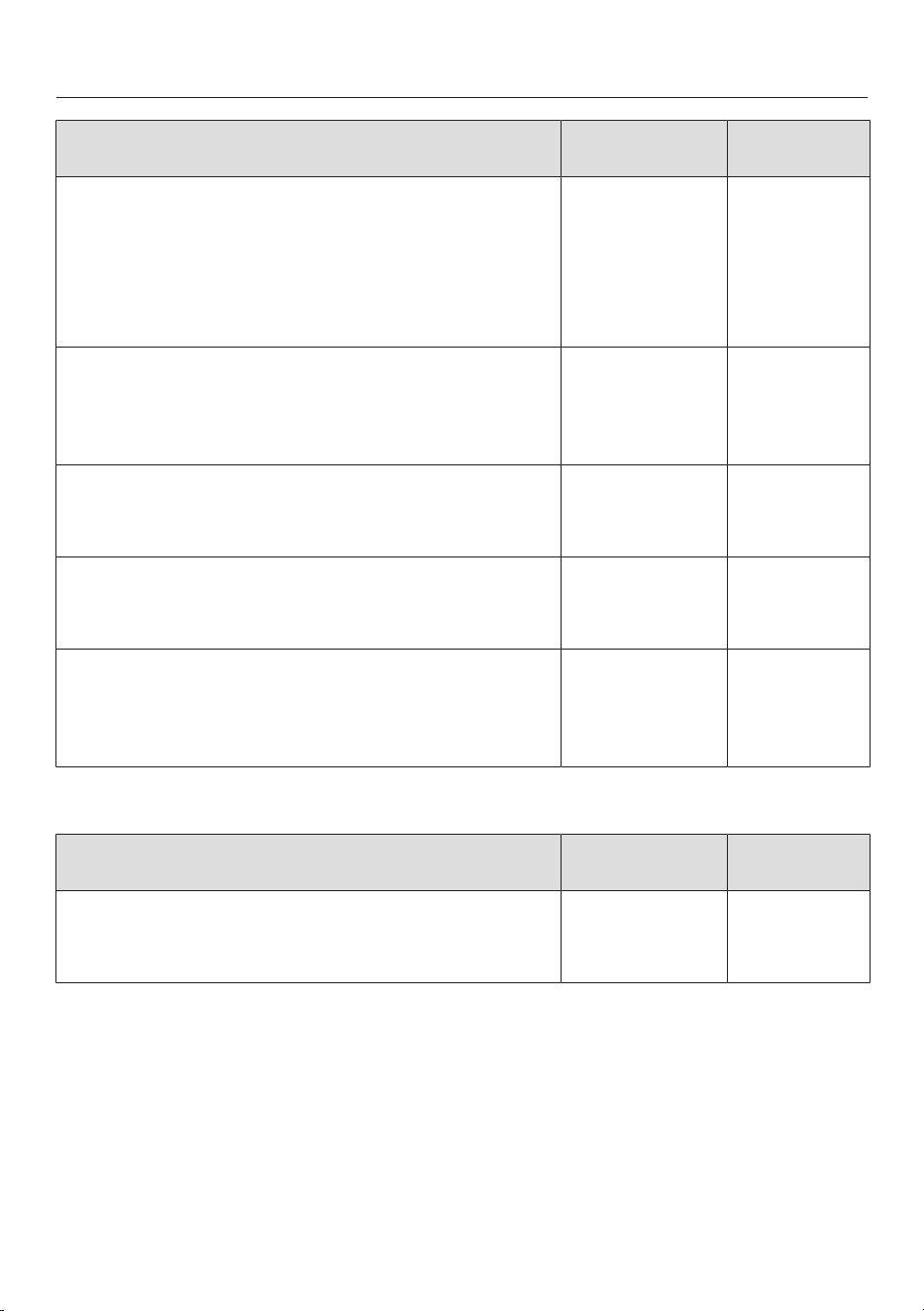
The oven has a wide range of modes for preparing a variety of foods.
Due to country-specific preferences for preparation of food, default temperatures
and temperature ranges in °F and °C do not correspond. The temperature values
have been defined as given in the chart.
Solo Modes
Mode Default
temperature
Temperature
range
Convection Bake
Use this mode for baking and roasting on several
levels at the same time. You can cook at lower
temperatures than with the Surround mode
because the fan distributes the heat evenly
throughout the cavity for a consistent baking
temperature.
350 °F (160 °C) 75–475 °F
(30–250 °C)
Convection Roast
This mode uses the convection fan to circulate
heated air throughout the oven. Ideal for cooking
delicate cuts of meat, fish and crispy poultry.
375 °F (160 °C) 75–475 °F
(30–250 °C)
Auto Roast
For a premium result, the meat is seared at a high
temperature keeping meat tender and juicy.
350 °F (160 °C) 200–450 °F
(100–230 °C)
Maxi Broil
For broiling meats e.g. steak, chops, kebabs, etc.
The entire Browning / Broiling element will glow
red to produce the required heat.
Level 3 Levels 1–3
Convection Broil
This mode distributes hot air from the Browning/
Broiling element over the food using the fan. This
allows for a lower temperature to be used than
when using Broil . Ideal for broiling thicker cuts
of meat (e.g. chicken, roulades).
350 °F (200 °C) 200–500 °F
(100–220 °C)
Guide to the modes
48
Mode Default
temperature
Temperature
range
Intensive
This mode gently circulates heated air from the
lower heating element using the fan to create a
brick oven environment. Ideal for baking pizza,
focaccia, pies and tarts that require a crisp base
and moist toppings.
350 °F (170 °C) 125–450 °F
(50–220 °C)
Surround
This premium baking mode uses heat from the
upper and lower elements to create perfect results
on all baking recipes.
350 °F (180 °C) 75–475 °F
(30–250 °C)
Surround Roast
For roasting traditional recipes, e.g. pot roast, and
braising or cooking at low temperatures.
400 °F (180 °C) 75–475 °F
(30–250 °C)
Bake
This mode uses traditional baking techniques to
perfect pies and biscuits.
350 °F (190 °C) 200–400 °F
(100–200 °C)
Gentle Bake
A combination of different heating elements
ensures excellent baked good, gratins and
lasagna.
350 °F (190 °C) 200–475 °F
(100–230 °C)
Microwave (Solo)
Mode Default power
level
Power level
range
Microwave
This mode is used to rapidly defrost, reheat and
cook food.
7 1–7

Guide to the modes
49
Combination Modes
During Combination modes the heating element and the magnetron turn on and off
alternating one after the other. The heating element browns the food and the
magnetron helps it cook quickly. The maximum power level is 3.
Mode Default
temperature
Temperature
range
Combi Bake
For rapid reheating and cooking of food, brown it
at the same time. This combination program saves
time and energy.
When baking do not set the microwave power
higher than Level 2.
325 °F (160 °C) 75–450 °F
(30–220 °C)
Combi Auto Roast
For roasting at high temperatures and slow
cooking at low temperatures. The Microwaves will
speed up your cooking process without sacrificing
the quality of food. During the searing phase the
oven heats up to 450°F (230°C) to seal the meat.
Once this temperature has been reached, the
oven temperature automatically drops back down
to the pre-set cooking temperature for continued
roasting.
The maximum adjustable microwave power level
is 3.
350 °F (160 °C) 200–475 °F
(100–200 °C)

Guide to the modes
50
Mode Default
temperature
Temperature
range
Micro Broil
For broiling flat meats, e.g. steak, chops, kebabs,
etc. The entire Browning / Broiling element will
glow red to produce the required infrared heat.
The Microwaves will speed up your cooking
process without sacrificing the quality of food.
The maximum settable microwave power level is
3.
Level 3 Levels 1–3
Combi Broil
This mode distributes hot air from the Browning /
Broiling element over the food using the fan. This
allows for a lower temperature to be used then
when using Micro Broil . Ideal for broiling
thicker cuts of meat (e.g. chicken). The
Microwaves will speed up your cooking process
without sacrificing the quality of food.
The maximum settable microwave power level is
3.
350 °F (200 °C) 200–400 °F
(100–200 °C)

Microwave power
51
How it works
The Speed Oven contains a high-
frequency tube called a magnetron. It
converts electrical energy into
microwaves. The microwaves are then
distributed evenly throughout the metal
sides of the oven interior to reach the
food from all sides.
In order for microwaves to reach the
food, they must be able to penetrate the
cooking container being used.
Microwaves can pass through
porcelain, glass, cardboard, and
plastics, but not metal. Therefore, do
not use containers that are made of
metal or contain metal (in the form of
gold or silver trim, for example). The
metal reflects microwaves and this
could cause sparking. The microwaves
cannot be absorbed.
The microwaves will pass through any
suitable cookware and find their way
directly into the food. All food contains
moisture molecules which, when
subjected to microwave energy, begin
to oscillate at a rate of 2.5billion times
per second. The friction caused by
these vibrations creates heat, which
first starts developing around the
outside of the food and then slowly
penetrates it toward the center. The
more water a food contains, the faster it
is reheated or cooked. The heat is
produced directly in the food.
Advantages
– Food can generally be cooked in a
microwave with little or no liquid or
oil.
– Defrosting, heating, and cooking is
faster than when using a
conventional cooktop or oven.
– Nutrients, such as vitamins and
minerals, are generally retained.
– The natural color, texture, and taste
of food are not impaired.
Microwaves stop being produced as
soon as the cooking process is
interrupted or the appliance door is
opened. When the appliance is in
operation, the closed, sealed door
prevents microwaves escaping from
the appliance.
Microwave power levels
Microwave power levels 1 to 7 can be
selected.
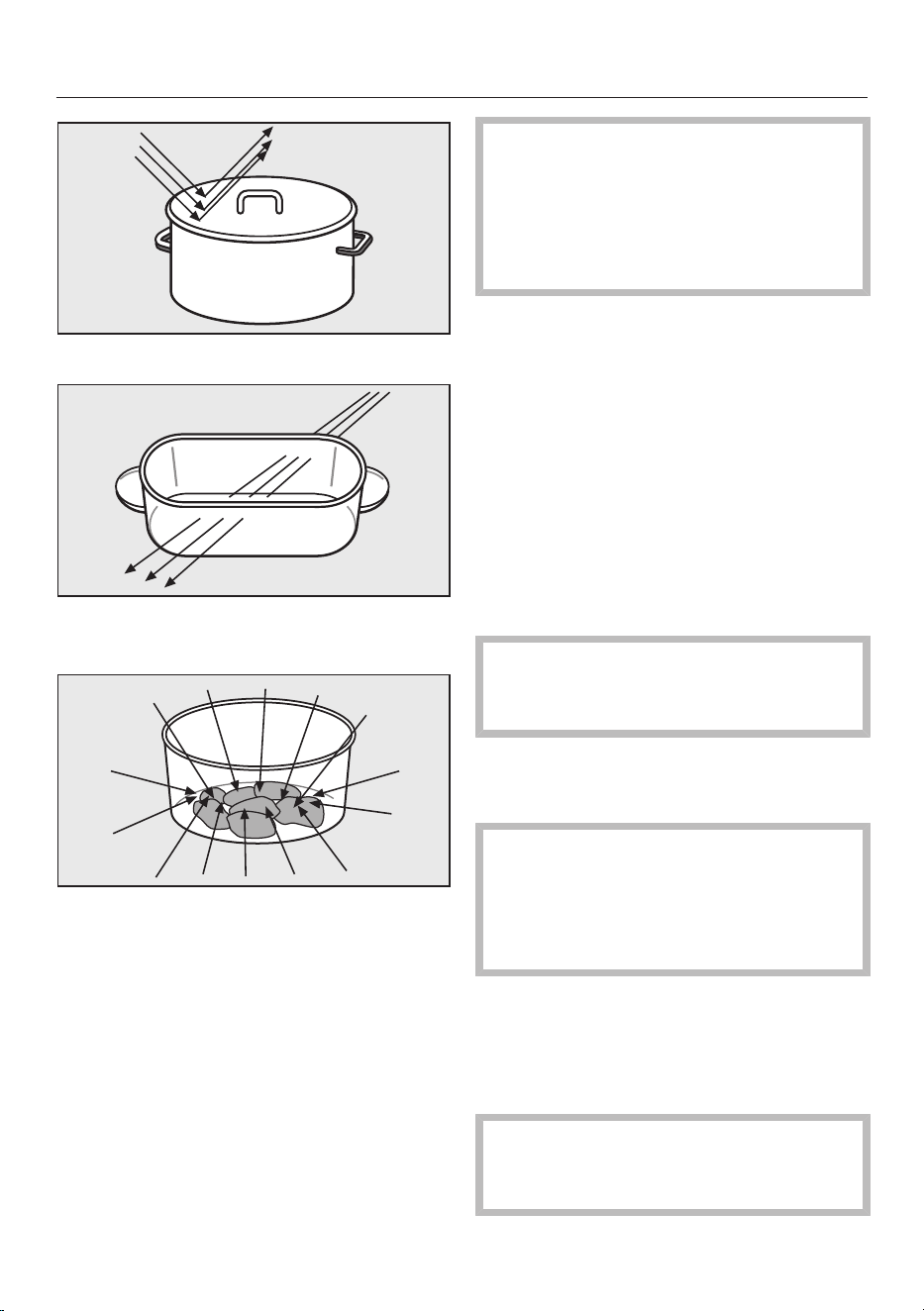
Selecting cookware
52
Microwaves are reflected by metal.
They pass through glass, porcelain,
plastic and cardboard.
They are absorbed by food.
Non-microwave safe dishes can
suffer damage or cause damage to
the oven when using the the
Microwave (Solo) and
Combination modes with Microwave.
Risk of Fire!
The material and shape of containers
used affect cooking results and times.
Circular and oval containers work best.
The food will heat more evenly than in a
square container.
Containers suitable for
microwave use
Glassware
Heat-resistant glass or ceramic glass
are ideal for use with microwave power.
Exception: Do not use crystal glass
as it contains lead which can crack
or shatter in a microwave.
Porcelain
Porcelain is a suitable material.
Exception: Do not use porcelain with
gold, silver or cobalt blue edging or
items with hollow knobs or handles,
as insufficient ventilation may cause
a build-up of pressure.
Earthenware
Decorated earthenware is only suitable
if the decoration is beneath an all-over
glaze.
Danger of burning! Wear pot holders
when removing earthenware dishes
from the Speed Oven.
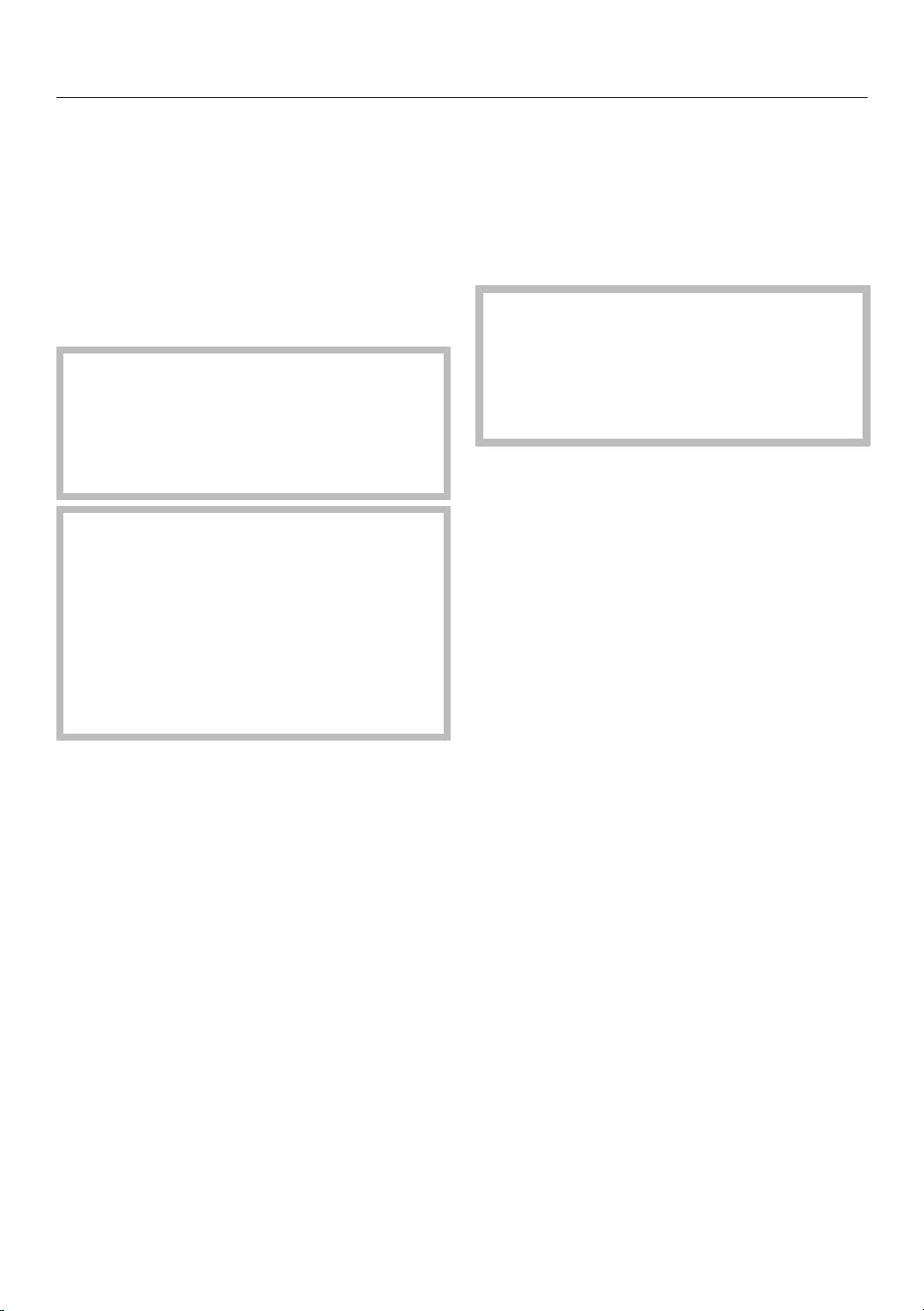
Selecting cookware
53
Plastics
Plastic containers and plastic
disposable containers may only be
used with Microwave (Solo) if they
have been declared as suitable for
microwave use by the manufacturer. To
protect the environment, it is best to
avoid using single-use containers.
Do not leave the Speed Oven
unattended when reheating or
cooking food in disposable
containers made of plastic, paper or
other flammable materials.
Plastic cookware must be heat-
resistant up to at least 230°F (110°C).
Otherwise the cookware will deform
and possibly come in contact with
the food.
Only use plastic dishes in the
Microwave and combination
modes.
– Plastic microwave containers
Readily available from retail stores.
– Styrofoam containers
Disposable containers, such as trays
made from styrofoam, can only be used
for very short, timed warming and
reheating of food.
– Plastic cooking bags
Plastic cooking bags can be used for
cooking and reheating food.
They should be pierced beforehand so
that steam can escape. This prevents a
build-up of steam and reduces the rish
of the bag bursting.
There are also cooking bags that do not
need to be pierced. Following the
instructions listed on the packaging.
– Roasting bags
Follow the manufacturer's instructions.
Fire hazard!
Do not use metal clips, plastic clips
containing metal parts, or paper ties
containing wire. There is a danger
that they will ignite when heated.
– Melamine
Plastic tableware made from melamine
is not suitable for use in this oven.
Melamine absorbs microwave energy
and becomes very hot. Before
purchasing plasticware be sure that is is
microwave-safe.

Selecting cookware
54
Unsuitable containers for
microwave use
Dishes with hollow knobs or
handles are not suitable for use with
microwave modes. Moisture which
has gathered in the hollow recesses
can cause pressure to build up and
the item can explode.
Metal
Metal reflects microwaves and
obstructs the cooking process.
Do not use metal containers, aluminum
foil, or metal cutlery and dishes with a
metallic finish (gold rims or cobalt blue,
forexample) with Microwave
combination programs.
Do not use containers where the foil
lid has not been completely removed
as small pieces of foil can cause
sparking.
Exceptions:
The rack supplied is only suitable for
cooking in Combination modes and
modes that do not use microwave. It
is not suitable for cooking in the
Microwave (Solo) mode.
The rack should be used on a shelf
level. Do not place it on the floor of
the oven.
– Metal bakeware can be used with
Microwave combination programs.
– Ready-meals in aluminum foil trays
can be defrosted and reheated using
microwave power as long as the lid is
removed.
Using aluminum foil trays can cause
crackling and sparking. Therefore,
place aluminum foil trays on the
glass tray and not on the wire rack.
Make sure that the aluminum tray is
at least 3/4"(2cm) from the oven
walls at all times. It must not touch
the walls.
However, as food is only heated from
the top, it is better to remove the food
from the aluminum foil container and
transfer it to a dish suitable for use in a
microwave oven. The heat distribution
will be more even.
Selecting cookware
55
– Aluminum foil pieces
For even defrosting and to avoid
overcooking unevenly shaped cuts of
meat, poultry, or fish, small pieces of
aluminum foil may be used to mask thin
pieces for the last few minutes of the
program.
Make sure that the aluminum foil is
at least 3/4"(2cm) from the oven
walls at all times. It must not touch
the walls.
– Metal meat skewers or clamps
These should only be used if they are
very small in comparison to the size of
the cut of meat.
Glazes and colors
Some glazes and colors contain metal
and are therefore unsuitable for
microwave modes.
Wood
Wooden dishes are not suitable.
Moisture contained in the wood
evaporates when exposed to
microwave energy, causing the wood to
dry and crack.
Testing dishes for their
suitability
If in doubt as to whether glass,
earthenware or porcelain plates or
dishes are suitable for use with
microwave energy, a simple test can be
performed:
Insert the glass tray on shelf level 1
and place the empty item you wish to
test on the glass tray. Fill a suitable
glass with water and also place this
on the glass tray.
Close the door.
Select Microwave .
Set the highest microwave power
level (7) and a cooking duration of
30seconds.
Confirm with OK and start the
program.
If a cracking noise is heard
accompanied by sparks during the
test, turn the appliance off
immediately. Any cookware which
causes this reaction is unsuitable for
use with microwave power. If in
doubt, contact the cookware
manufacturer.
This test cannot be used to check
whether items with hollow knobs or
handles are suitable for use with
microwave power.
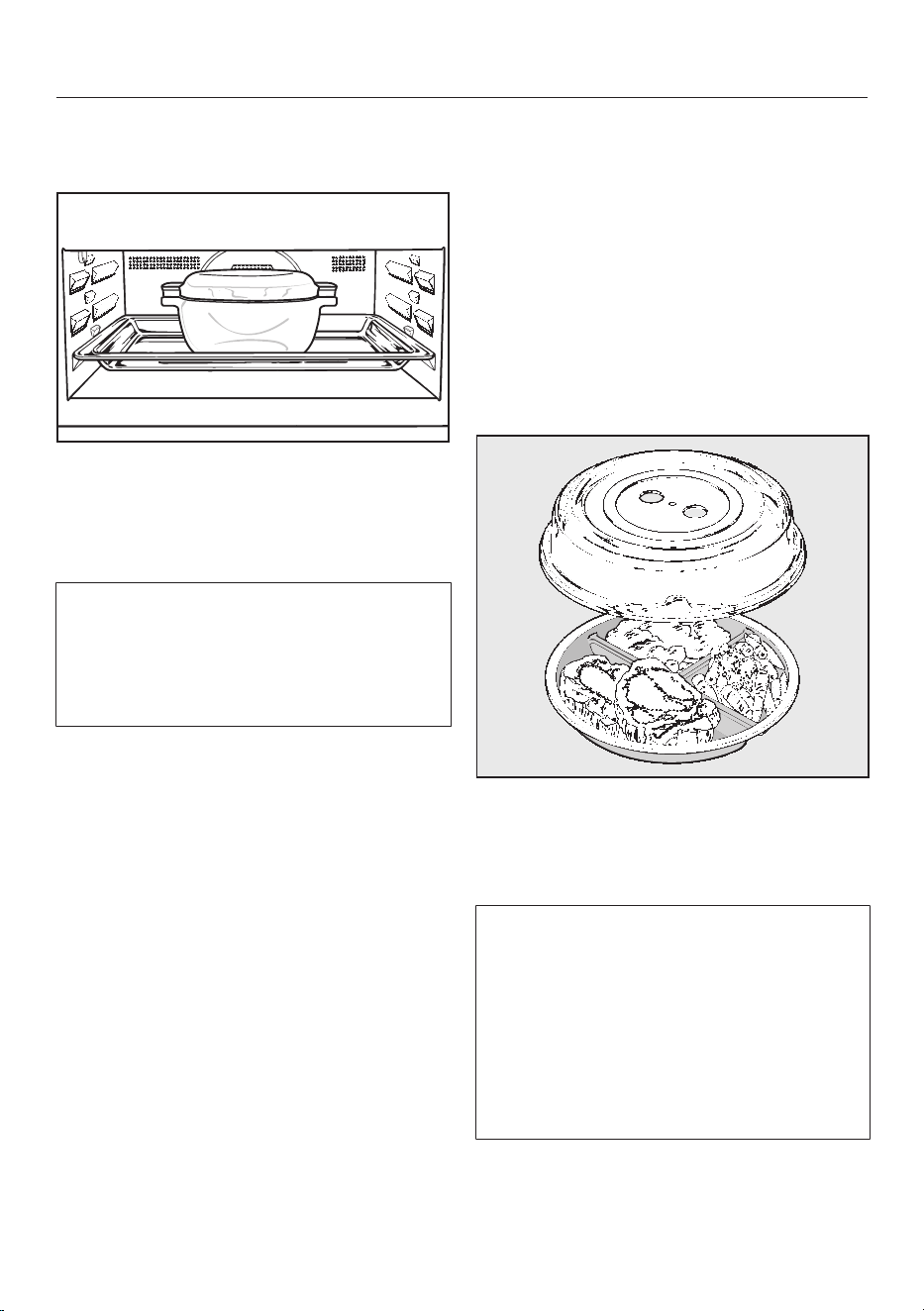
Selecting cookware
56
Placing the dish in the Speed
Oven
Insert the glass tray on shelf level 1.
The dish containing the food should
always be placed in the middle of the
glass tray.
Placing the food directly on the floor
of the oven would give unsatisfactory
and uneven results as the microwaves
would not be able to reach the food
from below.
Lid
The lid offers the following advantages:
– Prevents too much steam escaping,
especially when cooking foods which
need longer to cook, such as
potatoes.
– Speeds up the cooking process.
– Prevents food from drying out.
– Helps keep the oven interior clean.
When using Microwave (Solo),
always cover the food with a lid or
cover made of microwave-safe glass
or plastic.
Suitable covers are available from
retail outlets.
Alternatively, use plastic wrap
recommended for use in a microwave
oven (pierce as instructed by the
manufacturer). Heat can cause normal
plastic wrap to distort and fuse with
the food.
Selecting cookware
57
The cover can withstand
temperatures of up to 230°F (110°C).
At higher temperatures (e.g.,in
Broil or Convection Bake
mode) the plastic may distort and
fuse with the food. Only use a cover
in Microwave mode.
The cover should not form a seal
with the container. If the cover is
used with a container which only has
a narrow diameter, there might not
be enough room for condensation to
escape through the holes in the side.
The cover could get too hot and start
to melt.
When reheating food, do not use a
cover for for:
– breaded food
– food which requires a crisp finish,
e.g.toast
– food which you are reheating in a
Combi mode
Otherwise pressure can build up,
causing the container to explode and
posing a severe risk of injury.
Do not cook or reheat food or liquids
in sealed containers, jars, or bottles.
Open containers beforehand and
with baby bottles, the screw top and
teat must be removed.

Energy saving tips
58
– Remove any accessories from the
oven that you do not require for
cooking.
– If possible, do not open the door
during a program. If the door is
opened during a program that is not
using microwave power, the heat in
the oven automatically turns off. The
fan continues to run. As soon as the
door is closed again, the program will
continue.
– If a temperature range is given, it is
best to select the lower temperature
and check the food after the shortest
cooking time given.
– Convection Broil can be used for
a wide variety of foods. Lower
temperatures can be used than with
other Broil modes which use the
maximum temperature setting.
– The default setting for the Time of
Day display Time - Show - Off will
consume the least amount of energy.
– With the factory default setting
Lighting - On for 15 Seconds the oven
interior lighting turns off automatically
after 15 seconds. It can be turned on
again at any time by touching “Light”.
– When cooking with automatic shut-
off or the roast probe, the oven
heating will turn off automatically
shortly before the end of cooking.
The reqidual heat is sufficient to finish
the cooking process. Energy Save
Phase will appear in the display. The
cooling fan or hot air fan (depending
on mode used) will remain on.
– The oven turns off automatically if a
button is not pressed to save power.
The amount of time before the oven
turns off depends on the selected
settings, e.g. mode, temperature,
cooking duration, etc.

Solo modes
59
Quick Guide
Turn the oven on.
The main menu will appear.
Place the food in the oven.
Select Operating Modes.
Select the desired mode.
The oven mode and default temperature
will appear.
The oven heating, lighting and cooling
fan will turn on.
Adjust the default temperature if
necessary.
The default temperature will be
automatically accepted within a few
seconds. If necessary, select Change
to go back to the temperature setting
(see “Additional functions - Changing
the temperature”).
Confirm with OK.
The required and the actual
temperatures will appear.
You will see the temperature rising in
the display. A buzzer will sound when
the oven temperature is reached if this
option is selected (see “Settings -
Audible tone information”).
After the cooking process:
Remove the food from the oven.
Turn the oven off.
Cooling fan
After the cooking process the cooling
fan will continue to run for a while after
a program is complete to prevent
moisture from building up in the oven,
on the control panel or surrounding
cabinetry.
When the temperature in the oven has
fallen sufficiently the cooling fan will
turn off automatically.
The default setting can be changed if
desired (see “Settings - Cooling Fan”).

Solo modes
60
Additional functions
You have placed the food in the oven,
selected an operating mode and set the
temperature.
Select Change.
Additional options will appear in the
display for you to select for change if
desired.
– Temperature
– Core Temp. (This will only appear if
you are using the roast probe. You
cannot set a cooking duration when
using the roast probe.)
– Duration
– Ready at
– Start at (This only appears if a
Duration or Ready at time has been
set.)
– PreHeating (This only appears in the
Convection Bake / Convection Roast
, Auto Roast , and Surround /
Surround Roast modes if you set
a temperature above 212°F/100°C.)
– Operating Modes (You can change
the mode while a cooking program is
in process.)
Changing the oven mode
You can change the oven mode during
operation.
Select Change.
Scroll through the list until Operating
Modes appears.
Select Operating Modes.
Confirm with OK.
The new mode will appear in the display
together with its default temperature.
Change the temperature, if
necessary.
Confirm with OK.
The oven mode has been changed.
The times entered will be kept.

Solo modes
61
Changing the temperature
As soon as a cooking mode is selected,
a default temperature will appear in the
display together with its possible range
(see the “Guide to the modes”).
If the default temperature is suitable
for your recipe, confirm it with OK.
If it is not suitable for your recipe, you
can change it for this particular
cooking program.
You can also permanently reset the
recommended temperature to suit
your personal cooking habits (See
“Settings - Default temperatures”).
Example: You have selected Convection
Bake and 350°F (170°C) and can
see the temperature rising in the
display.
You would like to reduce the target
temperature to 310°F (155°C).
Select Change.
Select Temperature.
The desired temperature is highlighted.
Changing the temperature
Confirm with OK.
The adjusted temperature is saved.
Confirm with OK, if you would like to
see the actual temperature increasing
in the display.
The altered set temperature appears.

Solo modes
62
Rapid PreHeat
“Rapid PreHeat” can be used to speed
up the preheating phase.
The “Rapid PreHeat” function switches
on automatically if you set a
temperature of more than 212°F/100°C
for “Convection Bake” , “Auto
Roast”, and “Surround”.
Do not use “Rapid PreHeat” to
preheat the oven when baking pizzas
or delicates mixtures (e.g., small
baked goods, sponge). These will
brown too quickly.
You can turn off “Rapid PreHeat” for a
relevant cooking process via the
PreHeating option.
Preheating
– Rapid (Factory default)
The Browning / Broiling and
convection heating elements turn on
together with the fan to enable the
oven to reach the required
temperature as quickly as possible.
– Normal
Only the heating elements associated
with the cooking mode are turned on.
To turn off the “Rapid PreHeat”
function:
Select Change.
Select PreHeating.
Select Normal.
Confirm with OK.
Confirm with OK, if you would like to
see the actual temperature increasing
on the display.
Instead of Rapid PreHeat, Preheating will
appear on the display.

Solo modes
63
Preheating the oven
The oven only needs to be preheated in
a few cases.
Most dishes can be placed in a cold
oven. They will then use the heat
produced during the heating phase.
The oven should be preheated in the
following instances:
Convection Bake
– dark bread doughs,
– beef sirloins and tenderloins.
– cakes and pastries with a short
baking time (up to 30 minutes),
Surround
– delicate mixtures (e.g. sponge),
– dark bread doughs,
– beef sirloins and tenderloins.
Select the required oven function and
the temperature.
Rapid PreHeat should be turned off
when baking pizza or delicate
mixtures.
Wait for the preheating phase to
complete.
When the set temperature is reached,
the buzzer will sound if it has been
turned on (see “Settings – Volume –
Buzzer tone”).
Place the food in the oven.
Using the “Crisp” function (moisture
reduction)
It is a good idea to use this function
when cooking items which are moist on
the inside but which should be crispy
on the outside, e.g., french fries,
croquettes or breaded meats.
It is also suitable for fruit cakes, such as
apple cake.
You have placed the food in the oven,
selected an operating mode and set the
temperature.
You can activate the Crisp function
function with any oven mode. It must
be activated separately for a cooking
process. For best results, activate it at
the beginning of the cooking process.
Select Change.
Scroll through the list until Crisp
function appears.
Select Crisp function.
Select On.
Confirm with OK.
Moisture reduction is now activated.

Solo modes
64
Setting additional durations
You have placed the food in the oven,
selected a mode and set the
temperature.
By entering Duration, Ready at or Start at
you can automatically turn the cooking
program on or off.
– Duration
Enter the cooking duration desired.
Once the duration set has elapsed,
the heating will turn off automatically.
The maximum duration which can be
set is 12 hours.
A cooking duration cannot be
entered if you are using the roast
probe. When using the roast probe,
the cooking duration is determined
by when the set core temperature is
reached.
– Ready at
You can specify when you would like
the cooking program to complete.
The oven will turn off automatically at
the time set.
A Ready at time cannot be entered if
you are using the roast probe. When
using the roast probe the end time is
determined by when the set core
temperature is reached.
– Start at
Set the time you would like cooking
to start at. The oven will turn on
automatically at the time set.
Start at can only be used together
with Duration or Ready at, except
when using the roast probe.
Turning off automatically
It is now 11:45. The food takes 30
minutes to cook and should be ready at
12:15.
Select Duration and set 0:30 h or select
Ready at and set the time for 12:15.
The oven will switch off automatically
after this duration has elapsed or the
time set has been reached.
Setting the duration
Select Change.
Select Duration.
Use the numerical keypad to set the
duration (3-0).
Confirm with OK.
Setting the “Ready at” time
Select Change.
Select Ready at.
Use the numeric keypad to set the
time when food should be ready
(1-2-1-5).
Confirm with OK.

Solo modes
65
Turning on and off automatically
It It is recommended to use the
automatic On/Off feature when
roasting. Do not delay the start of the
program for too long when baking.
Cake mixtures and doughs will dry
out, and the leavening agents will lose
their effectiveness.
To turn a cooking program on and off
automatically, you have a choice of how
to enter the time parameters:
– Duration and Ready at
– Duration and Start at
– Ready at and Start at
It is now 11:45. The food takes 5
minutes to cook and should be ready at
12:30.
Select Change.
Select Duration and set a duration of
0:30 h.
Select Ready at and set the time to
12:30 h.
The Start at time will be automatically
calculated. Start at 12:00 will appear in
the display.
The oven will turn on automatically
when this time is reached.
Sequence of a cooking program that
turns on and off automatically
Up until the start time the mode, the
selected temperature, Start at and the
start time will appear in the display.
After the program has started you
can follow the preheating phase in the
display until the required temperature
has been reached.
Once this temperature is reached, a
buzzer will sound if turned on (see
“Settings - Audible tone information”).
After the preheating phase the
remaining time will appear in the
display.
The time will count down in the display.
The last minute counts down in
seconds.
At the end of the cooking process a
buzzer will sound if turned on (see
“Settings - Audible tone information”).
The oven heating and lighting are
turned on. Program Finished appears in
the display.
You have the option to save the
program as a favorite (see “Favorites”)
or to increase the cooking duration
using Change.
During the cooling down phase the
cooling fan will continue to run.

Solo modes
66
Changing the set time
Select Change.
All options that can be changed will
appear.
Select the desired time.
Change the set time
Confirm with OK.
These settings will be deleted in the
event of a power failure.
Canceling cooking
Select “Back”.
When Cancel Cooking? appears, select
Yes.
The oven heating and lighting will turn
off, and any durations set will be
deleted.

Microwave (Solo)
67
Quick Guide
Turn the oven on.
The main menu will appear.
Place the food in the oven.
Select Operating Modes.
Select “Microwave” .
The function, recommended power
level, and the power level range will
appear on the display.
If necessary, change the
recommended power level.
Confirm with OK.
Use the numerical keypad to set the
cooking duration.
The maximum duration that can be set
depends on the power level selected.
Confirm with OK.
Select Start.
The magnetron, lighting and cooling fan
will come on and the cooking program
will start.
The time remaining appears on the
display. You can interrupt the cooking
at any time with Stop.
At the end of the cooking duration
– Program Finished appears on the
display.
– The cooling fan continues to run.
– A buzzer will sound if turned on (see
“Settings - Buzzer tones”).
You have the option to save the
program as a favorite (see “Favorites”)
or to increase the cooking duration
using Change.
Remove the food from the oven.
Turn the oven off.
Cooling fan
After the cooking process the cooling
fan will continue to run for a while after
a program is complete to prevent
moisture from building up in the oven,
on the control panel or surrounding
cabinetry.
The cooling fan will turn off after a set
time.

Microwave (Solo)
68
Additional functions
You have placed the food in the oven,
selected a microwave power level and
set the duration.
Select Change.
Additional options will appear in the
display for you to select for change if
desired.
– Power Level
– Duration
– Ready at
– Start at
– Change Mode (You can change the
mode while a cooking program is in
process.)
Changing the microwave power level
In the “Microwave” mode, default
power level 7 is set at the factory.
If the default power level is suitable
for your recipe, confirm it with OK.
If it is not suitable for your recipe, you
can change it for this particular
cooking procedure.
You can also permanently reset the
default power level to suit your
personal cooking practices (See
“Settings - Microwave Power Levels”).
Select Change.
Select Power Level.
Change the power setting.
Confirm with OK.
The cooking procedure continues to run
with the modified microwave power
level.
Changing the cooking time
Select Change.
Select Duration.
Changing the cooking time
Confirm by selecting OK twice.
Select Start.
The program will restart using the new
duration.

Microwave (Solo)
69
Changing the oven mode
You can change the oven mode during
operation (see “Solo modes - Changing
the oven mode”).
Setting additional durations
You have placed the food in the oven,
selected a microwave power level and
set the duration.
By entering Ready at or Start at, you can
automatically turn the cooking program
on or off.
– Ready at
You can specify when you would like
the cooking program to complete.
The oven will turn off automatically at
the time set.
A Ready at time cannot be entered if
you are using the roast probe. When
using the roast probe the end time is
determined by when the set core
temperature is reached.
– Start at
Set the time you would like cooking
to start at. The oven will turn on
automatically at the time set.
Turning on and off automatically
To turn a cooking program on and off
automatically, you have a choice of how
to enter the time parameters:
– Duration and Ready at
– Duration and Start at
Example: It is now 11:45 am. The food
takes 5 minutes to cook and should be
ready at 12:30 pm.
Use the numerical keypad to set the
microwave power level and then the
cooking duration (5-0-0).
Confirm with OK.
Select Change.
Select Ready at and set the time to
12:30 pm (1-2-3-0).
Confirm by selecting OK twice.
Select Start.
The Start at time will be automatically
calculated. Start at 12:25 will appear in
the display.
The oven will turn on automatically
when this time is reached.

Microwave (Solo)
70
Sequence of a cooking program that
turns on and off automatically
Up until the start time the mode, the
microwave power level, the selected
temperature, Start at and the start time
will appear in the display.
After starting the time remaining will
appear in the display.
You can follow the time counting down
on the display.
At the end of the cooking process a
buzzer will sound if turned on (see
“Settings - Buzzer tones”).
The magnetron and the oven light turn
off. Program Finished appears.
You have the option to save the
program as a favorite (see “Favorites”)
or to increase the cooking duration
using Change.
Changing the set time
Select Change.
All options that can be changed will
appear.
Select the desired time.
Change the set time
Confirm by selecting OK twice.
Select Start if the program is already
running.
These settings will be deleted in the
event of a power failure.
Deleting a finish time
Select Change.
All options that can be changed will
appear.
Select the desired time.
Select Reset.
Confirm with OK.
Select Start.
The program will start using the
duration set.
Canceling cooking
Select “Back.”
Cancel Cooking? appears on the display.
Select Yes.
The main menu will appear. Any
cooking durations set will be deleted.
Combi Modes
71
Microwave Combi modes use
microwave power with another
cooking mode (e.g. Convection Bake,
Auto Roast). This combination enables
shorter cooking durations.
Quick Guide
Turn the oven on.
The main menu will appear.
Put the food in the oven.
Select Operating Modes.
Select the desired mode.
The mode, default power level, and
power range will appear on the display.
The oven lighting does not turn on.
In the combined operating modes, you
can set a maximum microwave power
level of 3.
Change the default power level if
required.
Confirm with OK.
The recommended temperature and
temperature range will appear.
The default temperature with the
possible temperature range for each
mode is described in “Guide to the
modes.”
Adjust the suggested temperature if
necessary.
Otherwise, the recommended
temperature will be accepted within a
few seconds.
Confirm with OK.
Use the numerical keypad to set the
cooking duration.
You can set a maximum cooking time
of 2:00 hours.
Confirm with OK.
Select Start.
The cooking program will start. The
oven heating and cooling fan will turn
on.
The microwave power level, cooking
duration, set temperature and actual
temperature will appear on the display.
The temperature will rise in the display.
When the set temperature has been
reached a signal will sound (see
“Settings - Volume - Buzzer tone”).
The remaining time appears on the
display.
The microwave will switch on once the
target temperature is reached.

Combi Modes
72
At the end of the cooking duration
– Program Finished appears on the
display.
– The oven heating turns off
automatically.
– The cooling fan continues to run.
– A buzzer will sound if turned on (see
“Settings - Buzzer tones”).
You have the option to save the
program as a favorite (see “Favorites”)
or to increase the cooking duration
using Change.
Remove the food from the oven.
Turn the oven off.
Cooling fan
After the cooking process the cooling
fan will continue to run for a while after
a program is complete to prevent
moisture from building up in the oven,
on the control panel or surrounding
cabinetry.
When the temperature in the oven has
fallen sufficiently the cooling fan will
turn off automatically.
The default setting can be changed if
desired (see “Settings - Cooling Fan”).
Additional functions
You have placed the food in the oven,
selected a temperature and microwave
power level, and set the duration.
Select Change.
Depending on the combination of
modes, further options will appear in
the display which you can select or
change for your program:
– Temperature
– Power Level
– Broil Setting (only for Micro Broil .)
– Duration
– MW Duration (You can shorten the
duration of the microwave cooking
phase.)
– Ready at
– Start at
– PreHeating (not for Micro Broil .)
– Crisp function (This moisture
reduction feature will allow surfaces
to crisp on the outside.)
– Change Mode (You can change the
oven mode during operation.)

Combi Modes
73
Changing the microwave power level
Select Change.
Select Power Level.
Change the microwave power level.
Confirm by selecting OK twice.
The changed microwave power level is
now saved and will appear on the
display.
Changing the temperature
Select Change.
Select Temperature.
The desired temperature is highlighted.
Change the temperature.
Confirm by selecting OK twice.
The altered temperature is saved and
will appear on the display.
Using the Crisp function (Moisture
Reduction)
You can activate or deactivate the Crisp
function (see “Solo modes - Using the
Crisp function (Moisture reduction)”).
Changing the oven mode
You can change the oven mode during
operation (see “Solo modes - Changing
the oven mode”).
Setting additional durations
You can set a program to turn on and
off automatically (see “Microwave (Solo)
- Setting additional durations”).
Shortening the duration of the
microwave phase
You can select how long you want
microwave power to be on for during a
microwave combination program. This
can be useful e.g. when baking to help
the dough rise more efficiently.
Select MW Duration to reduce the
microwave cooking phase.
Select Change.
Select MW Duration.
Set the duration for the microwave
cooking phase.
Confirm by selecting OK twice.

MasterChef
74
Your oven has a wide range of
MasterChef programs that enable you
to achieve excellent cooking results
with ease. Simply select the
appropriate program for the type of
food you are cooking and follow the
instructions in the display.
List of food types
The programs can be found under
MasterChef.
– Bakes & Gratins
– Baked Goods
– Meat
– Fish
– Poultry
– Cook Vegetables + MW
– Pizza
– Cook Soup with MW
Using the MasterChef
programs
From the Main Menu:
Select MasterChef.
A list of food types will appear on the
display.
Select the desired food category.
The MasterChef programs available for
the food category selected will appear.
Select the desired MasterChef
program.
Each step you need to take before
starting the MasterChef program will
appear on the display.
Depending on the program, the
following information will appear on the
display:
– type of cookware,
– shelf level,
– using the roast probe,
– duration.
Follow the instructions on the display.

MasterChef
75
Notes on using these programs
– After cooking, allow the oven interior
to cool down to room temperature
again before starting a MasterChef
program.
– Some programs require a preheating
phase before food can be placed in
the oven. A prompt will appear
indicating when to add the food.
– The duration quoted for MasterChef
programs is an estimate. It may
increase or decrease depending on
the program. When using the roast
probe, the duration will be
determined by when the core
temperature is reached. The duration,
in particular with meat, will vary
depending on the initial temperature
of the food.

Favorites
76
You can create and save up to 20 of
your own programs.
– Each one can have up to 10 cooking
stages. This enables you to save your
most frequently used recipes very
accurately. In each stage you can
select settings such as mode,
temperature and duration or core
temperature.
– You can specify the shelf level(s) for
the food.
– You can enter a program name for
your recipe.
When you next select the program, it
will start automatically.
There are different ways of creating a
Favorite:
– At the end of running a MasterChef
Program, save it as a separate
program.
– After running a program with a set
duration, select Save.
Then name the program.
Creating a Favorite
Select Favorites.
When first creating a program Create
Program will appear in the display.
Confirm with OK.
If the Favorite already exists, the
program name will appear with Edit
Program underneath.
Select Edit Program.
Select Create Program.
You can now specify the settings for
cooking stage 1. Follow the instructions
in the display:
Select and confirm the settings.
The settings for the first cooking stage
have now been set.
You can now adjust the settings for
PreHeating and the Crisp function,
depending on the selected mode and
the set temperature.
Select Additional Parameters.
Select the desired settings.
Favorites
77
More cooking stages can be added, for
example, if you would like to add
another cooking mode to follow the
first.
If additional cooking stages are
required, select Add Cooking Stage and
proceed as you did for the 1st
cooking stage.
When you have completed setting the
cooking stages. select Complete
Program.
Set the shelf level(s) to be used:
Select and confirm the required
level(s).
A summary of your settings will appear
in the display.
If you would like to change your
program select Change. You can
change individual cooking stages or
add additional cooking stages.
Confirm the settings and then select
Accept.
You can now save or change your
Favorite. You can also start it
immediately or program it to turn on or
off automatically at a specific time.
Select Save.
You can now give the program a name.
The following symbols appear next to
the alphabet:
Symbol Description
␣ Space
Alphabet in upper case
Alphabet in lower case
Numbers 0 to 9 and hyphen -
Touch the sensors next to the
symbols to highlight the desired
character.
Select Select.
The letter or number you have selected
will appear in the top line of the display.
You can delete the characters one at a
time with “Back”.
A maximum of 10 characters can be
used.
Finish creating the program name.
Once you have entered the program
name select Save.
A message will appear in the display
confirming that the name has been
saved.
Confirm with OK.

Favorites
78
Starting a Favorite
Place the food in the oven.
Select Favorites.
The display shows the program names
and Edit Program at the bottom.
Select the desired program.
A list will appear in the display:
– Start Now
The program will start right away and
the oven heating will turn on.
– Start Later
This option will only appear if you are
using the roast probe. You can
specify when you would like the
program to start. The oven heating
will turn on automatically at the time
set.
– Start at
You can specify when you want the
program to start. The oven heating
will turn on automatically at the time
you set.
– Ready at
You can specify when you would like
the cooking program to complete.
The oven will turn off automatically at
the time set.
– Change Cooking Stages
More information on this menu item
can be found in “Change cooking
stages”.
Select the desired menu item.
Confirm the message regarding
which shelf level to use with OK.
The selected program will begin
automatically right away or at the time
set.

Favorites
79
Changing Favorites
Changing cooking stages
Cooking stages in a MasterChef
program that have been saved under a
different name cannot be changed.
Select Favorites.
The display shows the program names
and Edit Program at the bottom.
Select the desired program.
Select Change Cooking Stages.
The setting specified for a cooking
stage can be changed or more cooking
stages can be added to the program.
Select the desired cooking stage or
Add Cooking Stage.
Alter the program as desired (see
“Creating a Favorite”).
Confirm the settings and then select
Accept.
Select Save.
The changes made to the program will
be saved.
If necessary, change the name (see
"Creating a Favorite) and select Save.
A message will appear in the display
confirming that the name has been
saved.
Confirm with OK.
Changing the name
Select Favorites.
The display shows the program names
and Edit Program at the bottom.
Select Edit Program.
Select Change Program.
Select the desired program.
Select Change Name.
Change the name (see "Creating a
Favorite) and select Save.
A message will appear in the display
confirming that the name has been
saved.
Confirm with OK.
The new program name will be saved.
Deleting a Favorite
Select Favorites.
The display shows the program names
and Edit Program at the bottom.
Select Edit Program.
Select Delete Program.
Select the desired program.
Confirm if the program should be
deleted with Yes.
The program is deleted.
You can delete all of your Favorites at
the same time (see “Settings - Factory
Default - Favorites”).

Minute +
80
With the “Minute +” function the
microwave starts with a set microwave
power level and cooking duration, e.g.,
for heating liquids.
The maximum default power level of 7
and a cooking duration of 1 minute are
preset.
Tip: You can alter the microwave power
level and the duration. The maximum
duration will depend on the microwave
power level selected (see “Settings –
Quick MW”).
This function can only be used when
no other cooking programs are in use.
Select “Minute +” and the cooking
process will start.
Touching this sensor button
repeatedly will increase the cooking
time.
The time remaining appears on the
display.
You can stop the cooking procedure
at any time with Stop and cancel with
“Back.”
At the end of the program
– Program Finished appears on the
display.
– A buzzer will sound if turned on (see
“Settings - Buzzer tones”).

Popcorn
81
With the “Popcorn” button, the
microwave starts with a set power level
and cooking time.
Microwave power level 6 and a cooking
time of 3 minutes are preset. This is
suitable for most brands of microwave
popcorn.
Tip: The duration can be changed up to
a maximum of 4 minutes. The
microwave power level cannot be
changed (see “Settings – Popcorn”).
This function can only be used when
no other cooking programs are in use.
Touch “Popcorn” until the program
starts.
The time remaining appears on the
display.
You can stop the cooking procedure
at any time with Stop and cancel with
“Back.”
Do not leave the oven unattended
during this program and follow the
manufacturers instructions.
At the end of the program
– Program Finished appears on the
display.
– A buzzer will sound if turned on (see
“Settings - Buzzer tones”).

Bake
82
Eating food which has been cooked
correctly is important for good
health.
Only bake cakes, pizza, french fries,
etc. until they are golden brown. Do
not overcook them.
Oven modes
Depending on how you would like the
food prepared, you can use Convection
Bake , Surround , Intensive ,
or Combi Bake (see “Guide to the
modes”).
Combi Bake is particularly suitable
for baking dough with a longer baking
time, such as yeast-based dough,
enriched dough, and kneaded dough,
because the cooking time is shortened.
During this mode, power level 2 must
not be exceed throughout the entire
baking time.
Bakeware
The bakeware used depends on the
oven mode chosen and how the food is
being prepared.
– Convection Bake, Intensive:
Bakeware made of any heat-resistant
material is suitable. Light-colored,
thin, non-reflective metal bakeware
can be used, but results may not be
as good as with dark, non-reflective
bakeware.
– Surround:
Dark metal, enamel, or aluminum
bakeware with a matte finish, as well
as heat-resistant glass, ceramic, and
coated bakeware can be used.
Avoid using bright, shiny metal
bakeware; it gives an uneven and
poor browning result and in some
cases cakes might not cook properly.
– Combi Bake
Only use oven-safe bakeware
suitable for microwave use (see
“Dishes suitable for microwave use”),
such as oven-safe glass or ceramic
dishes, as these allow microwaves
through them.
Metal containers reflect microwaves
so food will only cook from above.
Cooking durations would, therefore,
be longer and metal tins could also
cause sparking. Place the dish on the
glass tray so that it cannot touch the
oven walls. If the dish being used
causes sparking, do not use it for
combination cooking modes again.
Parchment paper
Place french fries, croquettes and
similar types of food on paper.

Bake
83
Temperature
Select the suggested temperature if
possible.
Choosing a baking temperature higher
than those recommended may reduce
the cooking time, but will lead to
uneven browning, and unsatisfactory
cooking results.
Baking duration
Check if the food is cooked at the end
of the shortest duration quoted. To
check if a cake is ready insert a wooden
skewer or toothpick into the center, it
should come out clean.
Shelf levels
The shelf level that you place the food
on for baking depends on the oven
mode and the number of trays being
used.
– Convection Bake
Cakes in pans: Level 1 from the
bottom
Flat baked goods (e.g. cookies,
cakes): Level 2 from the bottom
Baking on 2 levels at the same time:
Levels 1+3 from the bottom or levels
2+3 from the bottom
– Surround
Cakes in pans: Level 1 from the
bottom
Flat baked goods (e.g. cookies,
cakes: Level 2 from the bottom
– Intensive
In general use Level 1 from the
bottom.
– Combi Bake
Insert the glass tray on Level 1 from
the bottom and place the bakeware
on it.
Tips
– Setting the cooking duration. When
baking, the oven should not be set to
start after an extended period of time.
Otherwise the cake mixture or dough
will dry out, and the raising agents
will lose their effectiveness.
– Place cakes in rectangular bakeware
on the rack with the longer side
across the width of the oven for
optimum heat distribution and even
results.
Roast
84
Always observe the USDA guidelines
for food safety.
Oven modes
Convection Bake / Convection Roast
, Auto Roast
For roasting meat, fish and poultry
dishes in which a browned finish is
desired.
Combi Bake ,
Combi Auto Roast
The program duration is shorter with
these modes.
Set the microwave to the following
power levels for the entire roasting time:
– For meat and fish: max. Level 3
– For poultry: max. Level 2
This combination program is not
suitable for cooking roast beef or
tenderloins. The center would be too
well cooked before the exterior is
browned.
Cooking accessories
Please take into account the material of
your bakeware in your choice of oven
mode:
– Convection Bake / Convection Roast
/ Auto Roast :
Roasting pans, ovenproof ceramic
dishes, and clay roasting pans.
Make sure that the pot and lid have
heat-resistant handles.
– Combi Bake /
Combi Auto Roast :
Dishes must be suitable for use in a
microwave oven and must not have
metal lids (see “Containers suitable
for microwave use”).
Roasting in a closed pan
Season the meat and place it in the
roasting dish. Dot with butter or
margarine or brush with oil if
necessary. For large lean cuts of meat
(4–6 lbs.) and fatty poultry, add about
1/2 cup of water to the dish.
When using a roasting bag, follow the
manufacturer's instructions.
Roasting on the rack
Add a little fat or oil to very lean meat or
wrap with bacon.
Do not add too much liquid during
cooking as this will hinder the
browning process.

Roast
85
Temperature
Select the suggested temperature if
possible.
If higher temperatures are used, the
meat will brown on the outside, but will
not be properly cooked through.
Preheating
Preheating is only required when
roasting sirloins and tenderloins.
Roasting duration
The roasting time can be determined by
multiplying the thickness of the roast (in
cm (approx. 3/8 in.)) by the time per
centimeter thickness [min/cm] (listed
below), depending on the type of meat:
– Beef / Game: 15–18 min/cm
– Pork / Veal / Lamb: 12–15 min/cm
– Sirloin / Fillet: 8–10 min/cm
Roasting times are approx. 20 minutes
longer per kilo (approx. 2 lbs.) for frozen
meat. Frozen meat weighing less than
approx. 1.5 kg (approx. 3 lbs.) does not
need to be defrosted before roasting.
Check if the meat is cooked after the
shortest duration quoted.
Shelf levels
– Convection Bake / Convection Roast
/ Auto Roast :
Rack with meat on it on shelf level 1
– Combi Bake /
Combi Auto Roast :
Rack or glass tray with meat on it on
shelf level 1
Tips
– Browning: Browning only occurs
towards the end of the roasting time.
Remove the lid about halfway
through the roasting time if a more
intensive browning result is desired.
– Resting time: At the end of the
program, take the roast out of the
oven, cover with aluminum foil and let
stand for about 10 minutes. This
helps retain the juices when the meat
is sliced.
– Roast Chicken: For a crisp skin, baste
the poultry 10minutes before the end
of the cooking time with lightly salted
water.

Roast
86
Roast Probe
The roast probe enables the roasting
process to be monitored simply and
reliably.
How the roast probe works
The metal tip of the roast probe must
be fully inserted into the centre of the
food all the way to the handle. There is
a temperature sensor in the metal tip
which measures the core temperature
of the food during cooking. The rise in
the core temperature reflects the extent
to which the food is cooked. You can
program the core temperature to be
lower or higher, depending on how you
would like the meat cooked, rare,
medium or well-done.
A core temperature of up to 210°F
(99°C) can be set. Please refer to the
roasting chart and “Slow cooking” for
the core temperatures applicable for
different types of meat.
The cooking time will be similar when
cooking with or without the roast probe.
When to use the roast probe
Some MasterChef programs and
Special modes will prompt you to use
the roast probe.
You can also use it with your own
Favorite programs and with the
following functions:
– Auto Roast
– Convection Bake / Convection Roast
– Surround / Surround Roast
– Convection Broil
– Microwave
– Combi Auto Roast
– Combi Bake
– Combi Broil
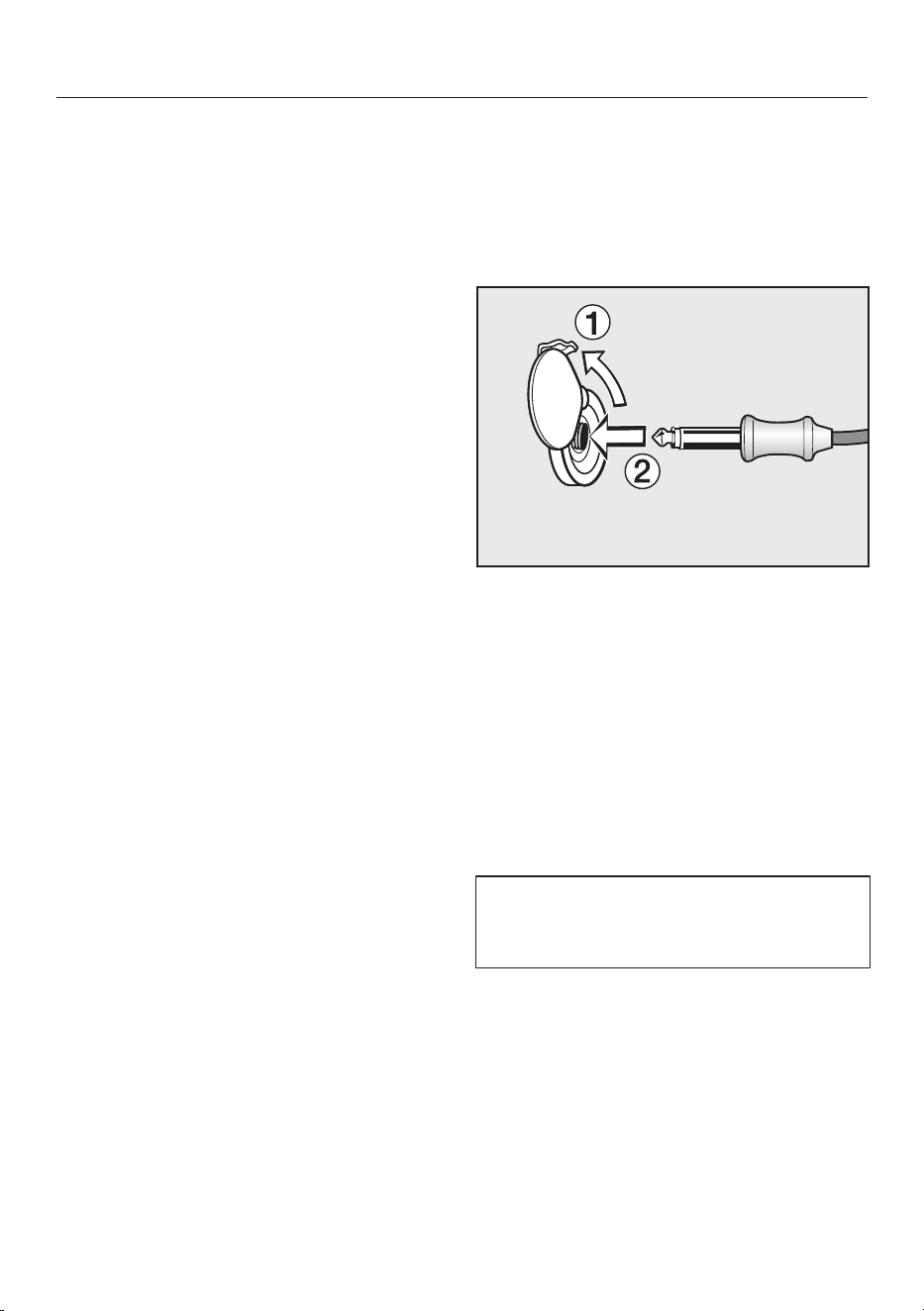
Roast
87
Important notes regarding the roast
probe
Please note:
– You can place the meat in a pot, on
the rack or in the glass tray,
depending on the mode selected.
– The metal tip of the roast probe must
be fully inserted into the centre of the
food all the way to the handle.
– When cooking poultry, insert the
metal tip into the thickest part of the
breast. You can find the thickest part
of the breast by pressing the area
with your thumb and index finger.
– Do not let the metal tip touch any
bones or insert it into a fatty area of
the meat. If fat or bone come into
contact with the probe, this can lead
to the oven being turned off too early.
– If the meat is very heavily marbled
with fat, select the highest core
temperature given in the roasting
chart.
– When using roasting bags or
aluminum foil, insert the probe
through the bag or foil into the center
of the meat. You can also place the
meat, with the roast probe inserted,
inside the foil. Follow the roasting
bag / aluminum foil manufacturer's
instructions.
Using the roast probe
Insert the metal tip of the roast probe
fully into the centre of the food all the
way to the handle.
Place the food in the oven.
Insert the plug of the roast probe into
the socket until you feel it engage.
Close the door.
Select an oven mode or MasterChef
program.
Set the temperature or power level if
necessary.
Set the core temperature if
necessary.
The core temperatures cannot be
changed for the MasterChef
programs.

Roast
88
You can also delay the start of the
cooking program to a later time. To do
this, select Start at. In the MasterChef
programs select Start Later.
You can estimate approximately when
the food will be ready as the duration of
the cooking program is about the same
as if you were cooking food without
using the roast probe.
Duration and Ready at cannot be set
because the total time depends on how
long it takes for the core temperature to
be reached.
Time-left display
If the temperature set for a cooking
process is above 285°F (140°C), the
estimated duration remaining (time left)
will appear in the display.
The time left is calculated from the
cooking temperature selected, the set
core temperature, and the progress of
the core temperature as it rises.
The time left first shown is an estimate.
As the cooking process continues, the
time left is revised continuously, and a
more accurate figure is shown.
The time left will be deleted if the
cooking or core temperature is changed
or if a different mode is selected. If the
door is opened for a longer time, the
time left will be recalculated.
Alternating between the time left and
core temperature displays
As soon as the time left is shown, you
can alternate between the time left and
core temperature displays
Select Change.
Select Status.
Select whether you would like the
time left or core temperature to
appear in the display.
Confirm with OK.

Roast
89
Using residual heat
Shortly before the end of the cooking
program the oven heating will turn off.
The residual heat in the oven is
sufficient to complete the cooking
process.
Using the residual heat in the oven
saves energy.
Energy Save Phase will appear in the
display to show that the oven is in
energy save mode. The measured core
temperature is no longer visible.
The cooling fan and hot air fan (if turned
on) will continue to run.
When the selected core temperature
has been reched,
– Program Finished appears in the
display,
– a buzzer will sound if turned on (see
“Settings - Audible tone
information”).
Tip: If the food is not sufficiently
cooked, insert the roast probe into
another place and repeat the program.
Slow Roasting
90
This cooking method is ideal for
cooking beef, pork, veal or lamb when a
tender result is desired.
First, using a cooktop sear the meat on
all sides to seal in the juices.
Then place the meat in a preheated
oven. It will be cooked at a low
temperature for an extended time
allowing the meat to become very
tender.
The meat will rest and the juices start to
circulate evenly throughout.
This gives the meat a very tender and
juicy result.
Tips
– Use fresh, lean meat that has been
trimmed. Remove the bones before
cooking.
– When searing, use a suitable cooking
oil or fat that can withstand high
temperatures (e.g. clarified butter,
vegetable oil).
– Do not cover the meat during
cooking.
Cooking will take approx. 2-4 hours,
depending on the size and weight of
the meat, as well as the desired
degree of doneness and browning.
Cooking time / Core
temperatures
Always observe USDA food safety
guidelines.
Meat
[min]
°F / °C
Beef Tenderloin 80–100 138/59
Sirloin
– rare
– medium
– well done
50–70
100–130
160–190
118/48
135/57
156/69
Pork tenderloin 80–100 145/63
Smoked pork
chop *
140–170 154/68
Filet of veal 80–100 140/60
Veal loin * 100–130 145/63
Saddle of lamb * 50–80 140/60
*
boneless
After cooking:
Because the cooking temperatures are
very low:
– The meat can be carved immediately.
No resting time is required.
– The cooking result will not be
affected if the meat is left in the oven
after the program is complete. It can
be kept warm until you serve it.
– The meat is at an ideal temperature
to be eaten right away. Serve on pre-
warmed plates with a hot sauce or
gravy to keep warm.
Slow Roasting
91
Using the “Slow Roasting”
function
Use the glass tray with the wire oven
rack placed on top of it.
Select Special Modes.
Select Slow Roasting.
Set the required temperature.
Set the core temperature.
Follow the instructions on the display.
Let the wire oven rack with glass tray
preheat in the oven.
While the oven is preheating, sear the
meat on all sides on the cooktop.
Burn hazard!
When the oven is hot use pot holders
to insert, remove or turn the food, or
when adjusting the oven shelves,
etc.
Once Use the roast probe appears in
the display, place the seared meat on
the rack and insert the roast probe,
so that the metal tip is fully in the
center of the meat.
For more information, see “Roast -
Roast probe.”
Use Caution!
The Browning / Broiling element will
be hot. Danger of burns!
Insert the plug of the roast probe into
the socket until you feel it engage.
Close the door.
At the end of the program, Program
Finished will appear in the display and a
buzzer will sound if the buzzer is
switched on (see “Settings – Buzzer
tones”).
If the meat is not cooked to your
satisfaction, you can extend the
cooking time.

Slow Roasting
92
Adjusting the Slow Roasting
temperature
Use the glass tray with the rack
placed on top of it.
Do not use the “Rapid PreHeat”
function to pre-heat the oven.
Place the glass tray with a rack on
shelf level 1.
Select “Surround” and a
temperature of 265°F (130°C).
Change the preheating function by
selecting Change - PreHeating -
Normal.
PreHeat the oven together with the
glass tray and the rack for approx. 15
minutes.
While the oven is preheating, sear the
meat on all sides on the cooktop.
Burn hazard!
Use pot holders when inserting,
removing or turning hot food, or
when adjusting shelves, etc., in a hot
oven.
Place the seared meat on the wire
oven rack.
Select Change.
Select Temperature and set 210°F
(100°C).
Continue cooking until the end of the
cooking time.
You can set the cooking procedure to
finish automatically (see “Modes
without microwave power - Setting the
duration”).

Broil
93
Danger of burns!
Broil with the oven door closed. If
you broil with the door open the hot
air will escape from the oven before
it has been cooled by the cooling
fan.
The controls will get hot.
Oven modes
Maxi Broil
This mode delivers excellent browning
and broiling results when cooking larger
amounts of food. Use to broil chops,
ribs and large quantities of meat and for
browning large dishes.
The entire Browning/Broiling element
will become red hot to produce the
necessary heat.
Convection Broil
For broiling thicker items, e.g. poultry or
London broil.
The Browning/Broiling element and the
fan switch on in alternating phases.
Micro Broil / Combi Broil
The broiling duration is shorter.
The maximum settable microwave
power level is 3.
Cooking accessories
Broiling on the wire oven rack.
Brush the rack with oil, and place the
food on it. It is best to broil food of a
similar thickness at the same time so
that the broiling duration for each
item does not vary too greatly.
Broil level (Maxi Broil /
Micro Broil )
– Level 3: Thin cuts are cooked quickly
when placed close to the Browning /
Broiling element
– Level 2: For lighter browning, e.g.
casseroles.
– Level 1: Thicker cuts should be
broiled further from the Browning /
Broiling element.
Temperature (Convection
Broil , Combi Broil )
As a general rule, select the default
temperature. If higher temperatures are
used, the meat will brown on the
outside but will not be properly cooked
through.Thin cuts can generally be
broiled at 425°F (220°C), thicker cuts at
355-400°F (180-200°C).
Broil
94
Preheating
Always preheat the oven for about
5minutes with the door closed before
Broiling.
Do not set a microwave power level
during pre-heating.
Shelf level
– “Maxi Broil” , “Micro Broil” :
Use shelf level 2 or 3 from the bottom
depending on the thickness of the
food.
– “Convection Broil” , “Combi Broil”
:
Use self level 1 or 2 from the bottom
depending on the thickness of the
food.
Broiling duration
– Flat pieces of fish and meat usually
take 6–8 minutes per side.
It is best to broil food of a similar
thickness at the same time so that
the broiling duration for each item
does not vary too greatly.
– Thicker pieces need about 7–9
minutes.
– Roulades: allow approx.10 minutes
per cm diameter.
Testing doneness
Always observe USDA food safety
guidelines.
Preparing food for broiling
Rinse the meat under cold water and
pat dry. Do not season the meat with
salt before broiling, this will draw out
the juices.
Brush the meat with oil, if necessary.
Do not use other types of fat as they
can easily burn and cause smoke.
Clean fish as usual. To enhance the
flavor, salt or lemon can be added.
Broil
PreHeat the Browning/Broiling
element for approx. 5 minutes with
the door closed.
Do not set a microwave power level
during preheating.
Place the food on the wire rack.
Select a mode, microwave power
level, and broil setting for the “Maxi
Broil” and “Micro Broil”
modes.
Select a mode, microwave power
level, and temperature for the
“Convection Broil” and “Combi
Broil” modes.
Burn hazard!
Use pot holders when inserting,
removing or turning hot food, or
when adjusting shelves, etc., in a hot
oven.
Place the food on the appropriate
shelf level (see the Broiling chart).
Close the door.
Microwave: Defrosting/Reheating/Cooking
95
Always observe the USDA guidelines for food safety.
Oven
mode
/ Suitable for:
Defrost 1 Very delicate foods such as cream,
butter, filled sponge cakes, cheese
1 All other types of food
Reheat 4 Food for infants and children
5 All types of food; frozen meals that do
not need browning
6
7 Drinks
Cooking 6
Heating-up
Casseroles, puddings, frozen foods that
do not need browning
4
Continued
cooking
2
Simmering
Select a “Microwave Combi” mode if you want to shorten
cooking durations and have a crisp finish to the dish.
3 +
320-355°F
(160–180°C)
Sear using a high temperature to start
with, then continue cooking with a
lower temperature.
3 +
300-340°F
(150–170°C)
Ready-meals which need to be
browned, e.g., gratins
Microwave / Microwave power level / Combi Auto Roast / Combi Bake /
Temperature
The duration required depends largely on the nature of the food, the amount and its initial
temperature. Food that has been refrigerated, for example, takes longer to reheat than food
at room temperature. Please refer to the relevant charts.
Microwave: Defrosting/Reheating/Cooking
96
Before defrosting, reheating
and cooking
Place food (frozen or unfrozen) in a
dish that is suitable for microwave
use, and cover it.
Place the dish in the middle of the
glass tray on shelf level 1.
The roast probe can be used to
monitor the temperature when
reheating or cooking (see “Roast -
Roast probe”).
With Microwave Combi modes
Use only microwave-safe and heat-
resistant cookware.
A lid is not usually required.
Never use a lid with the Combi Auto
Roast and Micro Broil modes
as the food will not brown.
Place the glass tray on shelf level 2.
Place pre-made meals in aluminum
containers directly on the glass tray.
During the defrosting,
reheating and cooking process
Turn or stir the food several times.
Stir the food from the outside
towards the middle, as food heats
more quickly from the outside.

Microwave: Defrosting/Reheating/Cooking
97
After defrosting, reheating and
cooking
Compensating times are resting periods
in which the temperature is uniformly
distributed in the food.
Allow the food to stand at room
temperature for a few minutes to
enable the heat to spread evenly
throughout the food.
Burn hazard!
After reheating food, especially food
for babies and small children, stir the
food or shake the container and
check that the temperature does not
pose any danger. Double check after
it has been left to stand.
Danger of burns!
Be careful when removing dishes
from the appliance. Although heat is
not normally produced in the
container itself by the microwaves
(apart from stoneware), heat transfer
from the food to the container may
be considerable, making the
container itself hot.
Use pot holders when removing
dishes.
Always ensure that food is sufficiently
cooked or reheated.
If you are unsure whether a
sufficiently high temperature has
been reached or whether the food is
sufficiently cooked, continue
reheating a little longer.
Always follow proper food safety
guidelines.
Tips on reheating
Danger of burns! Food for infants
and children must not be too hot.
Heat baby food for only approx.
30-60 seconds at power level 4. You
can also use the roast probe for
temperature-controlled heating.
Otherwise pressure can build up,
causing the container to explode,
posing a severe risk of injury.
Do not cook or reheat food or liquids
in sealed containers, jars or bottles.
Otherwise pressure will build up
which can cause the bottle or
container to explode. Risk of injury.
Eggs may burst.
Never reheat hard boiled eggs using
Microwave , even without the
shell. The eggs can explode.
Microwave: Defrosting/Reheating/Cooking
98
When boiling and in particular when
reheating liquids using microwave
power, the boiling point of the liquid
may be reached without the
production of typical bubbles. The
liquid does not boil evenly
throughout.
This so-called “boiling delay” can
cause a sudden build up of bubbles
when the container is removed from
the oven or shaken. This can lead to
the liquid boiling over suddenly and
explosively. The formation of bubbles
can be so strong that the pressure
forces the oven door open.
To avoid this, always wait a minimum
of 20seconds before removing the
container from the oven and place a
suitable glass rod or utensil into the
cup or glass when heating liquids.
Cooking tips
Food with a thick skin or peel, such
as tomatoes, sausage, potatoes, and
egg plant, can burst when heated.
Pierce or score the skin of these
foods several times to allow steam to
escape.
Eggs heated in their shell can burst,
even after they have been removed
from the oven.
Eggs can only be cooked in their
shells using Microwave (Solo) in
a specially designed egg-boiling
device available from speciality
stores.
When heating shelled eggs, the yolk
may still burst after cooking.
Prick the yolk several times before
cooking to avoid this.
Microwave: Defrosting/Reheating/Cooking
99
When to use Notes
Defrosting large quantities
of food at once, e.g. 4 lbs.
of fish
The glass tray can be used on shelf level 1 for
defrosting food.
Reheating food Always cover food when reheating it, except when
reheating fried food or food with breading.
Cooking vegetables Add a little water to vegetables which have been
kept stored. Vegetable cooking times depend on the
texture of the vegetable. Fresh vegetables contain
more water than vegetables which have been stored
and usually cook more quickly.
Cooking frozen meals Deep frozen meals can be defrosted and then
reheated or cooked in one process. Follow the
instructions on the package.
Tables for defrosting, reheating and cooking food using the
Microwave mode
The following notes apply to all tables:
Always observe the USDA guidelines for food safety.
Take note of the default microwave power levels, durations and standing times.
These take the consistency, the quantity and the initial temperature of the food
into account.
In general you are recommended to select the middle duration.
Place the food on the glass tray and use shelf level 1.
Microwave: Defrosting/Reheating/Cooking
100
Table for defrosting food
Quantity
[min]
[min]
1)
Dairy products
Cream 1 cup (250ml) 1 13–17 10–15
Butter 1/2lb (250 g) 1 8–10 5–10
Cheese slices 1/2lb (250 g) 1 6–8 10–15
Milk 2 cups (500ml) 2 14–16 10–15
Baked Goods
Pound Cake (1 slice) approx. 1/4lb 2 1–2 5–10
Pound Cake approx. 3/4lb 2 4–6 5–10
Fruit Cake (3 slices) approx. 3/4lb 2 6–8 10–15
Butter Cake (3 slices) approx. 3/4lb 2 5–7 5–10
Cream Cake (1 slice) approx. 1/4lb 1 1:30 5–10
Cream Cake (3 slices) approx. 3/4lb 1 4–4:30 5–10
Yeast rolls, puff pastries (4 pieces) 2 6–8 5–10
Fruit
Strawberries, raspberries 1/2lb (250 g) 2 7–8 5–10
Currants 1/2lb (250 g) 2 8–9 5–10
Plums 1lb (500 g) 2 12–16 5–10
Meat
Ground Meat 1lb (500 g) 2 16–18 5–10
Chicken 2lbs 2 34–36 5–10
Vegetables
Peas 1/2lb (250 g) 2 8–12 5–10
Asparagus 1/2lb (250 g) 2 8–12 10–15
Beans 1lb (500 g) 2 13–18 10–15
Red cabbage 1lb (500 g) 2 15–20 10–15
Spinach 3/4lb (300 g) 2 12–14 10–15
Microwave Power Level / Defrosting / Resting Time
1)
Allow food to stand at room temperature. During this resting time, the temperature will
distribute throughout the food more evenly.
Microwave: Defrosting/Reheating/Cooking
101
Table for reheating food
Quantity
[min:sec]
[min]
1)
Drinks
2)
Coffee, drink temperature 140-150°F /
60–65°C
1 drink
(2/3 cup / 200ml)
7 0:50–1:10 –
Milk, drink temperature 140-150°F /
60–65°C
1 drink
(2/3 cup / 200ml)
7
1:00–1:50
3)
–
Boiling water 1 drink
(1/2 cup / 125ml)
7 1:00–1:50 –
Baby bottle (milk) Approx. 2/3 cup /
200ml
4
0:50–1:00
3)
1
Mulled wine, drink temperature
140-150°F / 60–65°C
1 glass
(2/3 cup / 200ml)
7 0:50–1:10 –
Food
3)
Baby Food (room temperature) 1 jar (7 oz / 200 g) 4 0:30–1:00 1
Cutlets, fried 7 oz / 200 g 5 3:00–5:00 2
Fish fillet, fried 7 oz / 200 g 5 3:00–4:00 2
Roast meat in gravy 7 oz / 200 g 5 3:00–5:00 1
Side dishes 8 oz / 250 g 5 3:00–5:00 1
Vegetables 8 oz / 250 g 5 4:00–5:00 1
Gravy 1 cup / 250ml 5 4:00–5:00 1
Soup / Casserole 1 cup / 250ml 5 4:00–5:00 1
Soup / Casserole 1 pt / 500ml 5 7:00–8:00 1
Microwave power level / heating-up time / resting time
1)
Allow food to stand at room temperature. During this resting time, the temperature will
distribute throughout the food more evenly.
2)
To avoid a boiling delay, always wait a minimum of 20seconds before removing the
container from the oven and place a suitable glass rod or utensil into the cup or glass when
heating liquids.
3)
Durations apply for food with an initial temperature of approx. 40°F / 5°C.
For food which is not normally stored in the fridge an initial temperature of approx. 70°F /
20°C is assumed.
With the exception of baby food and delicate sauces, food should be heated to a
temperature of 155-165°F / 70–75°C.
Microwave: Defrosting/Reheating/Cooking
102
Table for cooking food
Quantity Level6
[min]
+ Level4
[min]
[min]
1)
Meat
Meatballs in sauce (3/4lb/400 g
meat)
10–12 – 2–3
Stew (1.5lbs/750g meat) 16 + 15 2–3
Poultry
Chicken in sauce approx. 1 3/4lb (800 g) 4 + 12 2–3
Chicken Curry approx. 2lbs (900 g) 5 + 12 2–3
Chicken Risotto approx. 3 1/2lbs (1.6kg) 10 + 15 3–5
Fish
Fillet in sauce approx. 2lbs (900 g) 8–10 – 2–3
Fish Curry approx. 3 1/4lbs (1.5kg) 5 + 12 3–5
Fresh vegetables
Carrots 3/4lb (300 g) 2 + 6 2
Cauliflower florets 1lb (500 g) 6 + 10 2
Peas approx. 1lb (450 g) 5 + 10 2
Peppers, cut into strips 1lb (500 g) 5 + 10 2
Kohlrabi, batons 1lb (500 g) 3 + 8 2
Brussels Sprouts 3/4lb (300 g) 3 + 9 2
Asparagus 1lb (500 g) 5 + 8 2
Broccoli, florets 3/4lb (300 g) 4 + 4 2
Leeks 1lb (500 g) 5 + 8 2
Green Beans 1lb (500 g) 4 + 12 2
Frozen Vegetables
Peas, Mixed Vegetables approx. 1lb (450 g) 5 + 11 2
Spinach approx. 1lb (450 g) 5 + 7 2
Brussels Sprouts 3/4lb (300 g) 4 + 6 2
Broccoli 3/4lb (300 g) 3 + 6 2
Leeks approx. 1lb (450 g) 4 + 8 2
Desserts
Fruit Compote (2 cups/500ml
fruit juice or 1lb/500 g fruit)
6–8 – –
Cooking / Resting Time
1)
Allow food to stand at room temperature. During this resting time, the temperature will
distribute throughout the food more evenly.

Special Modes
103
In addition to the MasterChef programs
your oven has a variety of special
modes.
– Defrost
– Dehydrate
– Reheat
(to reheat plated meals)
– Warm Cookware
– Proof
– Slow Roasting
See “Slow Roasting” for more
information.
– Pizza
– Sabbath Program
This section also gives information on
the following applications:
– Gentle Bake
– Canning
– Frozen food

Special Modes
104
Defrost
Use the “Defrost” mode to gently
defrost frozen food.
Only use heat-resistant containers that
are microwave safe.
Select Special Modes.
Select Defrost.
Select the food category.
Enter the weight of the food.
Follow the instructions in the display.
Air is circulated throughout the oven
cavity to gently defrost the food.
Danger of salmonella poisoning!
Observe proper hygiene rules when
defrosting poultry.
Do not use the defrosting liquid.
Tips
– Remove the packaging and place the
food to be defrosted on the glass
tray.
– When defrosting poultry, put it on the
rack over the glass tray to catch the
defrosting liquid so that the meat is
not lying in this liquid.
Special Modes
105
Dehydrate
This program is designed for traditional
drying of food to preserve it.
The temperature can be set between
175-250°F (80-100°C).
It is important that fruit and vegetables
are ripe and not bruised before they are
dehydrated.
Prepare the food for dehydrating.
– Peel and core apples, and cut into
slices 1/4" (0.5 cm) thick.
– Core plums if necessary.
– Peel, core and cut pears into wedges.
– Peel and slice bananas.
– Clean mushrooms, then either halve
or slice them.
– Remove parsley and dill from the
stem.
Distribute the food to be dried evenly
over the glass tray or the rack.
Select Special Modes.
Select Dehydrate.
If necessary, adjust the default
temperature and set the duration.
Follow the instructions on the display.
Food [min]
Fruit 120–480
Vegetables 180–480
Herbs * 50–60
Dehydrating time
* Because this program uses the fan, you
should use Surround mode set to a
temperature of 175-250°F (80-100°C) for
drying herbs.
Reduce the temperature if
condensation begins to form in the
oven.
Danger of burning!
Use pot holders when removing the
food from the oven.
Allow the fruit or vegetables to cool
down after dehydrating.
Dried fruit must be completely dry, but
also soft and elastic. Juice should not
escape when cut.
Store in sealed glass jars or tins.
Special Modes
106
Reheat
This mode is designed to reheat cooked
food.
Only use heat-resistant containers that
are microwave safe.
Place the food that is to be reheated
in a glass dish with a cover.
Select Special Modes.
Select Reheat.
Select the food category.
Enter the weight of the food.
Follow the instructions in the display.
Burn hazard!
Use pot holders when removing
dishes from the oven. Condensation
may accumulate on the bottom of
the dish.
Warm-up Cookware
This program is designed to warm your
cookware.
The temperature can be set between
75-175°F (50-80°C).
Use heat-resistant cookware.
Place the rack on shelf level 1 and
place the cookware to be heated on
it.
Select Special Modes.
Select Warm Cookware.
If necessary, adjust the default
temperature and set the duration.
Follow the instructions on the display.
Danger of burns!
Use pot holders when removing
dishes from the oven. Condensation
may accumulate on the bottom of
the dish.

Special Modes
107
Proof
This mode is designed specifically for
proofing yeast dough.
You can set a temperature between 75
and 125°F (30 and 50°C).
Select Special Modes.
Select Proof.
If necessary, adjust the default
temperature and set the duration.
Follow the instructions in the display.
Pizza
This program is designed specifically
for baking pizza.
The temperature can be set between
300-475°F (160-250°C).
Select Special Modes.
Select Pizza.
If necessary, adjust the default
temperature and set the duration.
Follow the instructions on the display.

Special Modes
108
Sabbath Program
This mode is designed for religious
observance.
Select the “Sabbath” mode and then
select the oven mode and temperature.
The program will only start once the
door is opened and closed:
– The cooking process will start after
about 5minutes using “Surround”
.
– The oven will heat up to the
temperature you have set and will
maintain this temperature for a
maximum of 72 hours.
– The interior lighting does not come
on, even when the door is opened.
If Settings - Lighting - On has been
selected, the lighting will remain
turned on throughout the program.
– Sabbath Program will appear on the
display throughout the entire
program.
– The time of day is turned off.
Once the “Sabbath” program has
started it cannot be changed or saved
as a Favorites.
Using the “Sabbath” mode
The program can only be canceled by
turning the oven off.
Select Special Modes.
Select Sabbath Program.
Select “Surround” .
The “Sabbath” program cannot be
started if the timer is being used.
Set the required temperature.
Confirm with OK.
The oven is now ready for use.
Open the door to start the program.
Place the food in the oven.
Close the door.
The oven heating will turn on after 5
minutes.
To end the program early:
Turn the oven off.

Special Modes
109
Gentle Bake
The Gentle Bake mode is ideal for
casseroles and gratins.
You can select a temperature setting
from 200-450°F (100-230°C).
Select Operating Modes.
Select Gentle Bake and change the
default temperature if necessary.
Follow the instructions on the display.
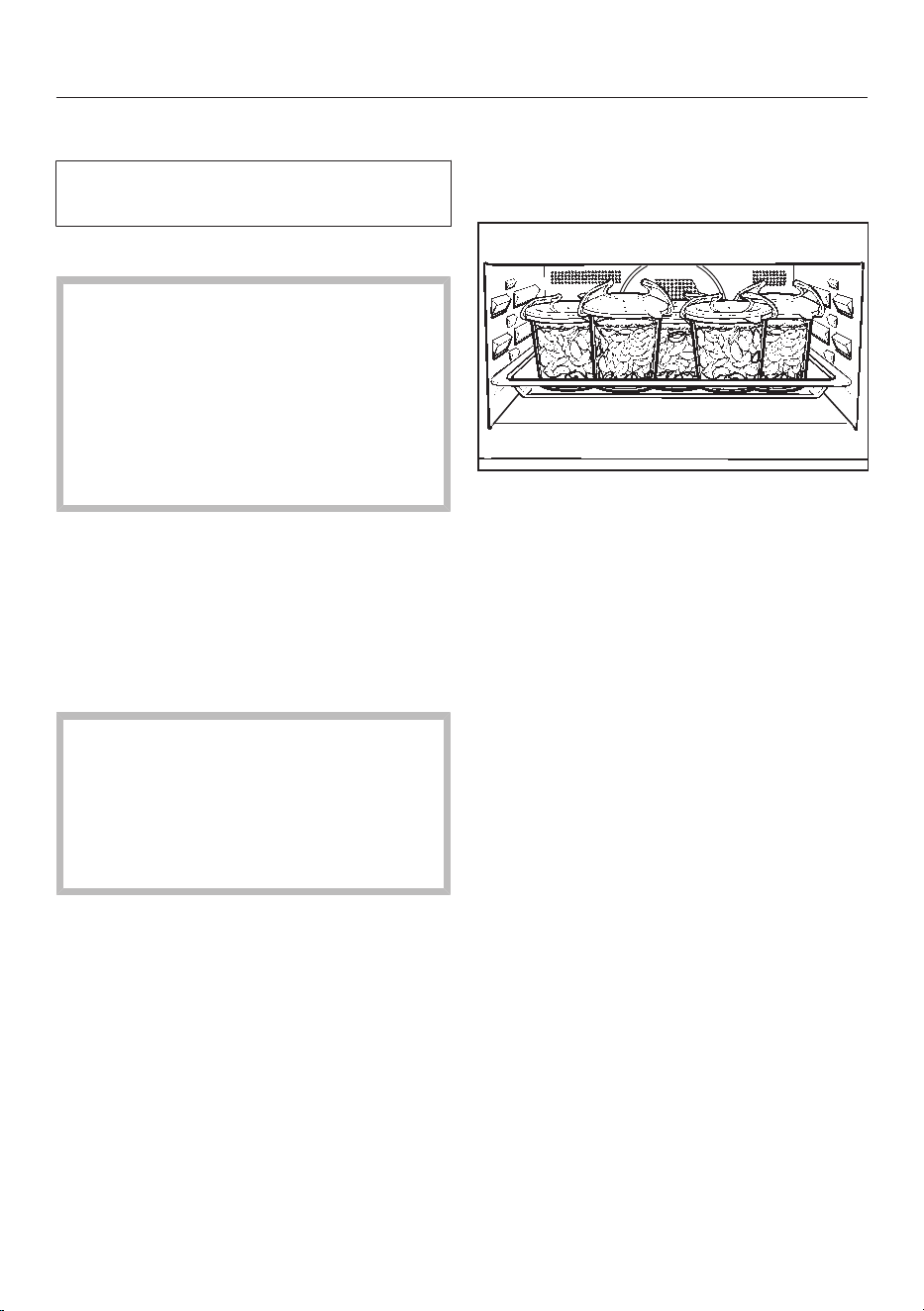
Special Modes
110
Canning
Always observe USDA food safety
guidelines.
Canning containers
Danger of injury!
Do not use the appliance to heat up
or can food in sealed jars or
containers.
Pressure will build up inside them
and they can explode causing
damage to the appliance, as well as
the risk of injury and scalding.
Only use jars designed for canning:
– “Convection Bake” : Jars with
screw-top lids.
– “Microwave” : Microwave-safe
bottling jars sealed with clips or clear
adhesive tape.
Sparking can be cause by metal
brackets on jars!
Close the jars with clear adhesive
tape or with clips suitable for
microwave use. Never use metal
clips or jars with screw-on lids.
Preparation
The instructions below are for 516
ounce (0.5 liter) glass jars.
Prepare the jars in the usual way. Fill
the jars up to 3/4" (2 cm) below the
rim.
Insert the glass tray on shelf level 1
and place the jars on it.
Special Modes
111
Convection Bake
5 Jars
1/2 pint (1/2 liter)
1)
Temperature Time from
simmering
point
2)
[min]
Continued
warming
duration
[min]
Fruit / Cucumbers 300-340°F (150-170°C)
until simmering. Allow to
stand in the turned off oven
afterwards.
None 25–30
Asparagus,
Carrots
300-340°F (150-170°C)
until simmering. Then
continue cooking at 212°F
(100°C).
60–90 25–30
Peas, Beans 90–120 25–30
Microwave
5 Jars
1/2 pint (1/2 liter)
1)
Microwave power level Time until
simmering
point
2)
[min]
Time from
simmering
point
2)
[min]
Fruit / Cucumbers Level6 until simmering.
Leave to stand in the
turned off oven afterwards.
3–15
depending on
number of jars
–
Asparagus,
Carrots
Level6 until simmering.
Then continue cooking at
level4.
3–15
depending on
number of jars
approx. 15
Peas, Beans approx. 25
1)
Glass tray on shelf level 1
2)
Simmering = Consistent bubbling

Special Modes
112
After canning
Danger of burns!
Use pot holders when removing the
jars from the oven.
Take the jars out of the oven.
Cover the jars with a towel and leave
to set for approx. 24 hours.
Remove any clips or the adhesive
tape.
Make sure all jars are closed properly
when storing them.

Special Modes
113
Frozen food
Tips
Cakes, pizza, baguettes
– Bake on parchment paper placed on
the wire oven rack.
– Use the lowest temperature
recommended by the manufacturer.
French fries, croquettes and similar
items
– Place these frozen foods on the glass
tray.
Place parchment paper underneath.
– Use the lowest temperature
recommended by the manufacturer.
– Turn several times during cooking.
Preparation
Handling food carefully will help
protect your health.
Select the oven mode and
temperatures recommended on the
food's packaging.
Preheat the oven.
Place the food in the preheated oven
on the shelf level recommended on
the packaging.
Check the food at the end of the
shortest time recommended on the
packaging.

Cleaning and care
114
Danger of burning!
The heater elements must be turned
off. Make sure the oven has cooled
down.
Risk of injury!
The steam from a steam cleaning
appliance could reach live electrical
components and cause a short
circuit.
Do not use a steam cleaner to clean
this appliance.
All surfaces could be discolored or
damaged if unsuitable cleaning
agents are used. The oven front is
particularly susceptible to damage
from oven cleaners.
All surfaces of this machine are
susceptible to scratching. Scratches
on glass can in some circumstances
lead to breakage.
Remove all cleaning agent residues
immediately.
Stubborn soiling may damage the
oven.
Once the oven has cooled clean the
oven, the inside of the door, and the
door seal. Waiting too long to clean
the oven will make if much more
difficult to clean.
Check the door and door seal for any
sign of damage. If any damage is
seen, the oven should not be used
again. Contact Miele.
Unsuitable cleaning agents
To avoid damaging the surfaces of your
appliance, do not use:
– cleaning agents containing soda,
ammonia, acids, or chlorides
– cleaning agents containing descaling
agents on the oven front
– abrasive cleaning agents,
e.g.,powder cleaners and cream
cleaners,
– solvent-based cleaning agents
– stainless steel cleaning agents
– dishwasher cleaners
– glass cleaners
– cleaning agents for ceramic cooktops
– hard, abrasive brushes or sponges,
e.g.,pot scourers, brushes, or
sponges which have been previously
used with abrasive cleaning agents)
– eraser sponges
– sharp metal scrapers
– steel wool
– stainless steel scouring pads
– spot cleaning with mechanical
cleaning agents
– oven cleaners *
* These can, however, be used to
remove very heavy soiling from
PerfectClean treated surfaces
Cleaning and care
115
If soiling is allowed to sit for any
length of time, it may become
impossible to remove. If items are
used frequently without being
cleaned, it may become very difficult
to clean them.
Soiling is, therefore, best removed
after each use.
Only the glass tray is dishwasher
proof.
Tips
– Soiling caused by spilt juices and
cake mixtures is best removed while
the oven is still warm. Use caution
and make sure the oven is not too hot
- Danger of burns.
– The Browning/Broiling element can
be lowered for easier cleaning.
– To neutralize odors in the oven, put a
container of water with some lemon
juice in the oven and heat for a few
minutes.
Normal soiling
Moisture inside the oven can cause
damage.
Wipe out the oven with a damp cloth
so no excess moisture enters the
interior of the appliance through the
openings.
Remove normal soiling immediately
using a clean sponge with warm
water and liquid dish soap applied
with a clean, damp microfiber cloth.
After cleaning, ensure that any
detergent residue is removed with
clean water.
This is particularly important when
cleaning surfaces treated with
PerfectClean enamel as detergent
residue can impair the non-stick
properties.
After cleaning, dry the surfaces with a
soft cloth.
Roast Probe
Do not put the roast probe into
water or clean it in the dishwasher,
this will damage it.
Clean the roast probe with a damp
towel.

Cleaning and care
116
Stubborn soiling
Spilled fruit and roasting juices may
cause lasting discoloration or matte
patches. This does not affect the
functional characteristics of the
finish.
Do not attempt to remove these
marks. Clean them following the
instructions given here.
Moisten stubborn soiling with a
solution of warm water and liquid
dish soap, leave for a few minutes to
take effect.
If necessary, the rough side of a dish
sponge can be used to remove the
soiling.
After cleaning, rinse thoroughly with
clean water, and dry with a soft cloth.
Stubborn soiling on PerfectClean
surfaces can be cleaned using Miele
Oven Cleaner. Follow the instructions
on the packaging.
Non-Miele oven cleaner must only be
used in a cold oven and not left on for
longer than a maximum of 10minutes.
If necessary, the scouring pad on the
back of a non-scratching washing-up
sponge can be used to remove the
soiling after the holding time.
After cleaning, remove all oven
cleaning agent residues thoroughly
with clean water, and then dry the
surfaces.
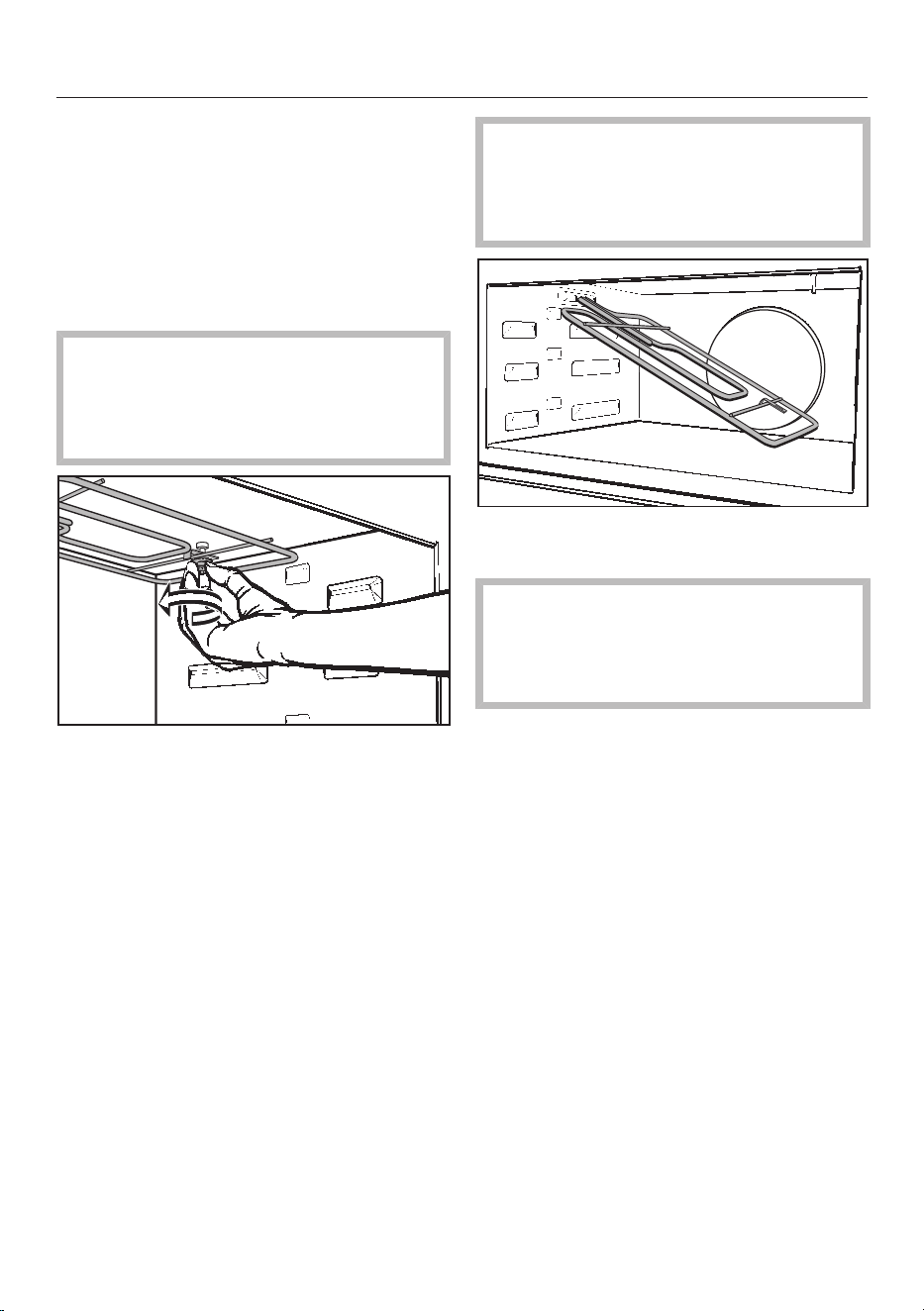
Cleaning and care
117
Lowering the Browning /
Broiling element
If the oven interior is very dirty, the
Browning / Broiling element can be
lowered. It is recommended to clean
the oven interior with a damp sponge
regularly.
Burn hazard!
Make sure the heating elements are
turned off and allowed to cool
completely.
Unscrew the nut and lower the
Browning / Broiling element.
Use caution not to damage the
Browning / Broiling element.
Do not use force to lower the
Browning / Broiling element.
Carefully lower the Browning /
Broiling element.
The cover at the top of the oven
cavity can be damaged.
Do not use the hard side of a dish
sponge to clean the cover.
Clean the oven interior with a damp
cloth or sponge.
After cleaning, raise the Browning /
Broiling element gently back up
again. Refit the nut and tighten to
secure the element back in position.
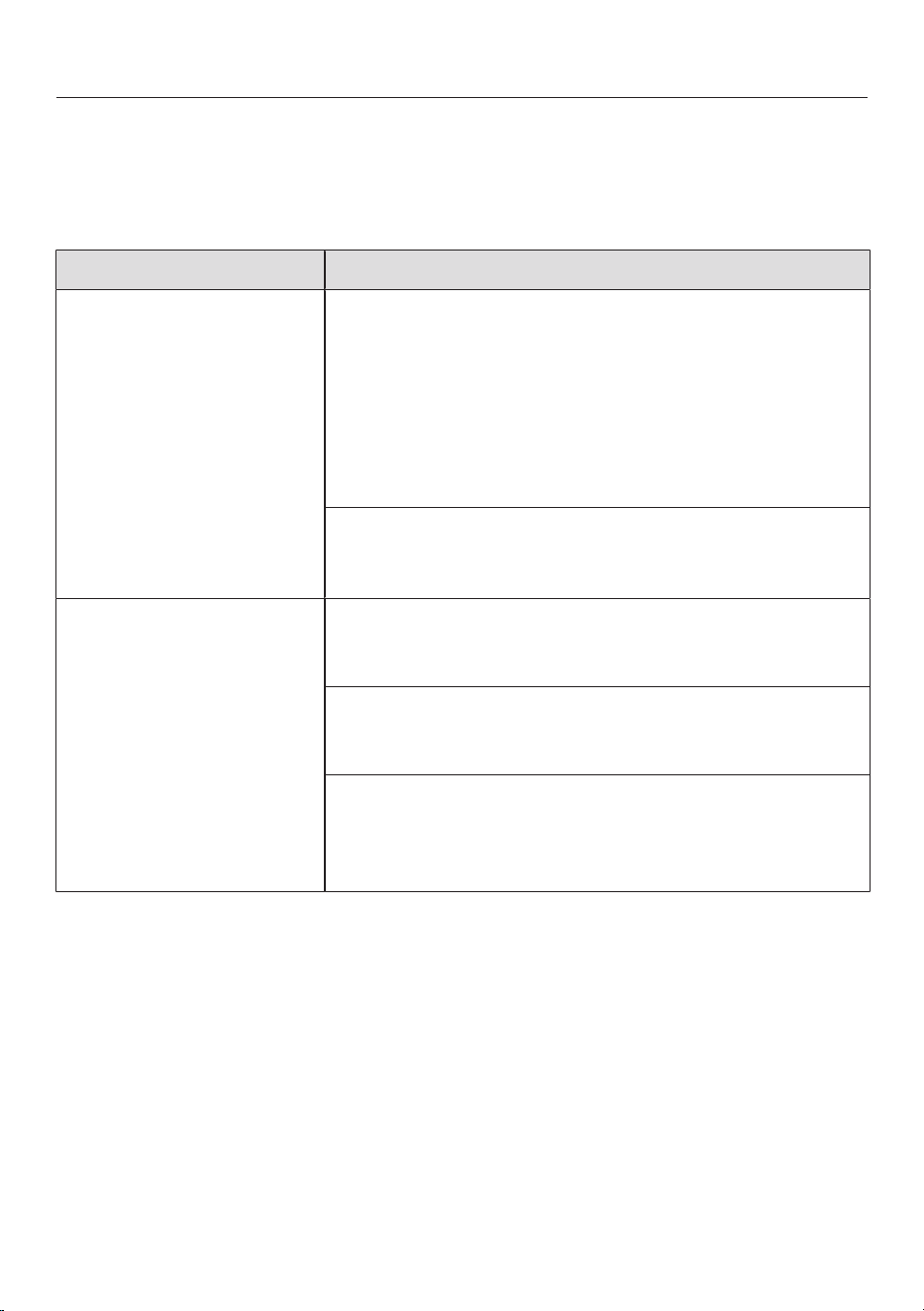
Frequently Asked Questions
118
With the help of the following guide minor faults in the performance of the
machine, some of which may result from incorrect operation, can be remedied
without contacting the Service Department.
This guide may help you to find the reason for the fault, and how to correct it.
Problem Possible cause and solution
The display is dark. The time of day display is deactivated. When the
appliance is turned off, the time of day display is
turned off.
As soon as the oven is turned on, the time of day
will appear. If you want it to be displayed
continuously, the setting to turn the time of day
display back on must be changed (see “Settings –
Time of day – Display”).
There is no power to the appliance.
Check if the breaker has tripped. If it has, contact
a qualified electrician or Miele Technical Service.
A program will not start. If running a program with Microwave, the door is
open.
Check if the door is closed properly.
If running a program with Microwave, a microwave
power level or cooking time have not been set.
Be sure to set the power level and cooking time.
If running a Combi mode, all necessary setting have
not been set.
Be sure to set the microwave power level,
temperature and cooking time.
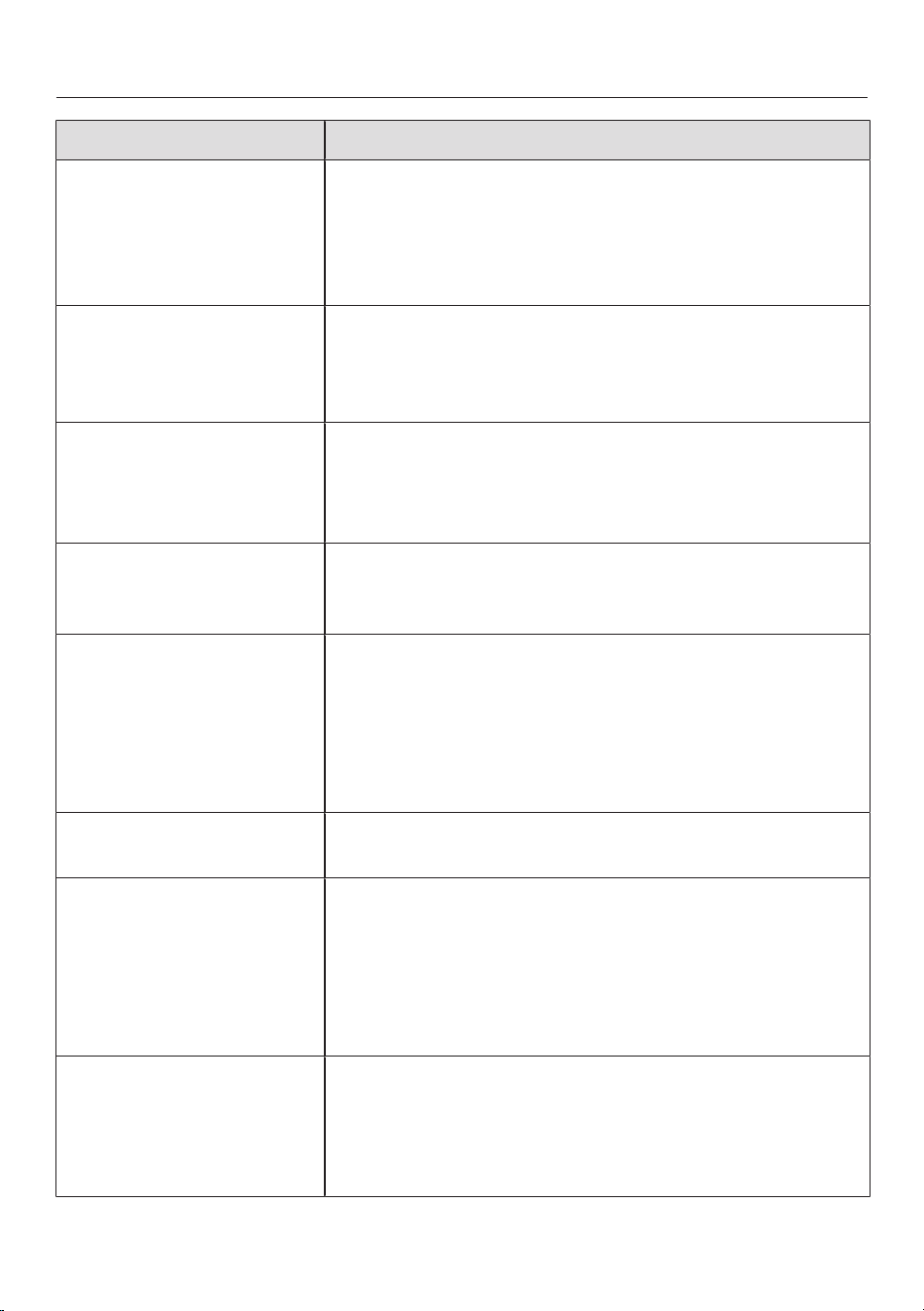
Frequently Asked Questions
119
Problem Possible cause and solution
System Lock in the
display when the oven
is turned on.
The system lock is On.
Press and hold the icon for at least 6 seconds to
unlock the oven for 1 cooking program.
To permanently deactivate the lock, see “Setting -
System Lock”.
The oven does not heat
up.
Demo mode is activated.
The oven can be operated but will not heat up.
Deactivate Demo mode (see “Settings –
Showroom Program”).
Power Failure - Program
Canceled appears in the
display.
There has been a power failure which has caused the
current cooking process to stop.
Turn the oven off and then back on again.
Restart the cooking process.
12:00 appears in the
display.
The power supply was interrupted for longer than 200
hours.
Reset the date and time.
Maximum Operating Hours
Reached appears in the
display.
The oven was operated for an unusually long period
of time. The Safety cut-out feature has been
activated.
Confirm with OK. Clear the message Program
Finished by selecting “Back”.
The oven is now ready to use.
Fault XX appears in
the display.
A fault has occurred that you cannot resolve.
Contact Miele.
The core temperature
cannot be set.
The roast probe is not recognized by the oven.
Check whether the roast probe is correctly
plugged into the socket.
If the oven still does not recognize the roast probe, it
must be faulty. A replacement roast probe can be
ordered from Miele.
If the door is opened
while using
“Microwave” , the
oven stops making a
noise.
This is not a fault. If the door is opened while
“Microwave” is being used, the door contact
switch will turn off the microwave and switch the
cooling fan to a lower speed.
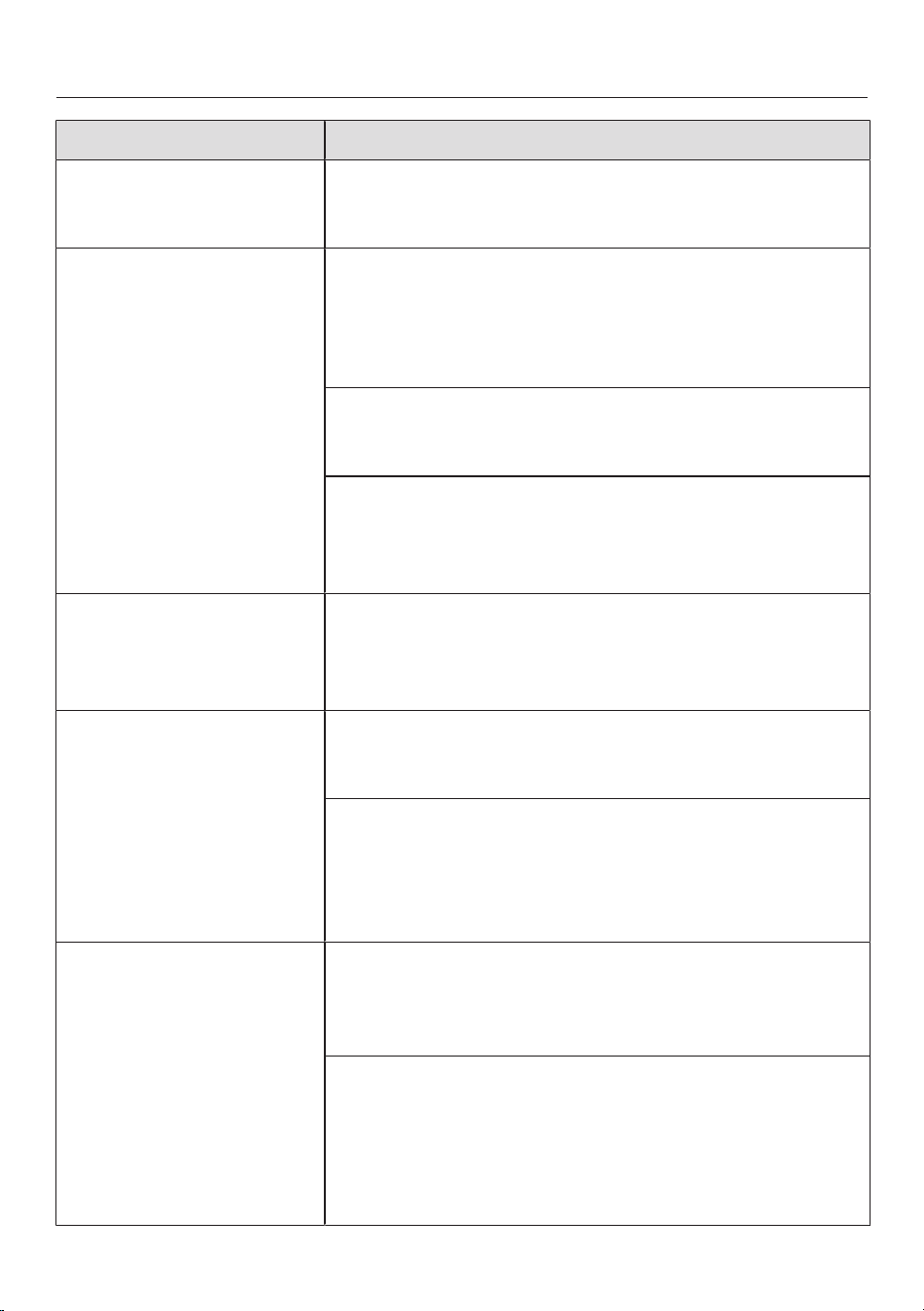
Frequently Asked Questions
120
Problem Possible cause and solution
A noise is heard after
the cooking process is
complete.
The fan remains turned on after a cooking program
(see “Settings - Cooling fan”).
An strange sound is
heard when the oven is
operating in microwave
mode.
Metal was used in the oven during a program with
microwave.
Check if there are sparks caused by using metal
dishes (see “Suitable containers for microwave
use”).
When using a program with microwave the dish was
covered with alumimum foil.
If necessary, remove the cover.
The wire oven rack was used during a program with
microwave.
Always use the glass tray for programs with
microwave.
The oven has turned
itself off.
The oven turns off automatically if a button is not
pressed after a certain amount of time or after a
cooking program has ended to save power.
Turn the oven back on.
Baked goods are not
cooked properly after
following the times
given in the chart.
A different temperature than that given in the recipe
was used.
Select the temperature required for the recipe.
The ingredient quantities are different from those
given in the recipe.
Double check the recipe. The addition of more
liquid or more eggs will make a wetter mixture
which will take longer to cook.
The browning is
uneven.
The wrong temperature or shelf level was selected.
There will always be a slight unevenness. If the
unevenness is great, check whether the correct
temperature and shelf level were selected.
The cookware used was not right for the program
chosen. Bright, shiny pans are not very suitable.
These reflect heat, which means that the heat does
not penetrate to the food effectively, resulting in
uneven or poor browning.
Dark, matte pans are best for baking.

Frequently Asked Questions
121
Problem Possible cause and solution
The food is not
sufficiently heated or is
not cooked at the end
of a set duration when
using Microwave (Solo)
.
Check that the program was restarted after
interrupting a cooking process using microwave
power.
Restart the program to ensure the food is heated
or cooked properly.
When cooking for heating with microwave, the time
set was too short.
Check that the correct time is selected for the
microwave power level. The lower the microwave
power level the longer the cooking time.
The food has cooled
down too quickly after
being reheated or
cooked in microwave
mode.
Due to the microwave properties, the heat is
generated first at the edges of the food and is then
transferred to the center of the food. If the food is
heated with a high microwave power level the food
may be hot on the outside but not heated through to
the center.
When cooking foods with different sizes, such as
with menu cooking, a lower microwave power level
for a longer period of time is most suitable.
The oven lighting turns
off after a short time.
The oven is factory set to turn off automatically after
15 seconds. This setting can be changed (see
“Settings - Lighting”).
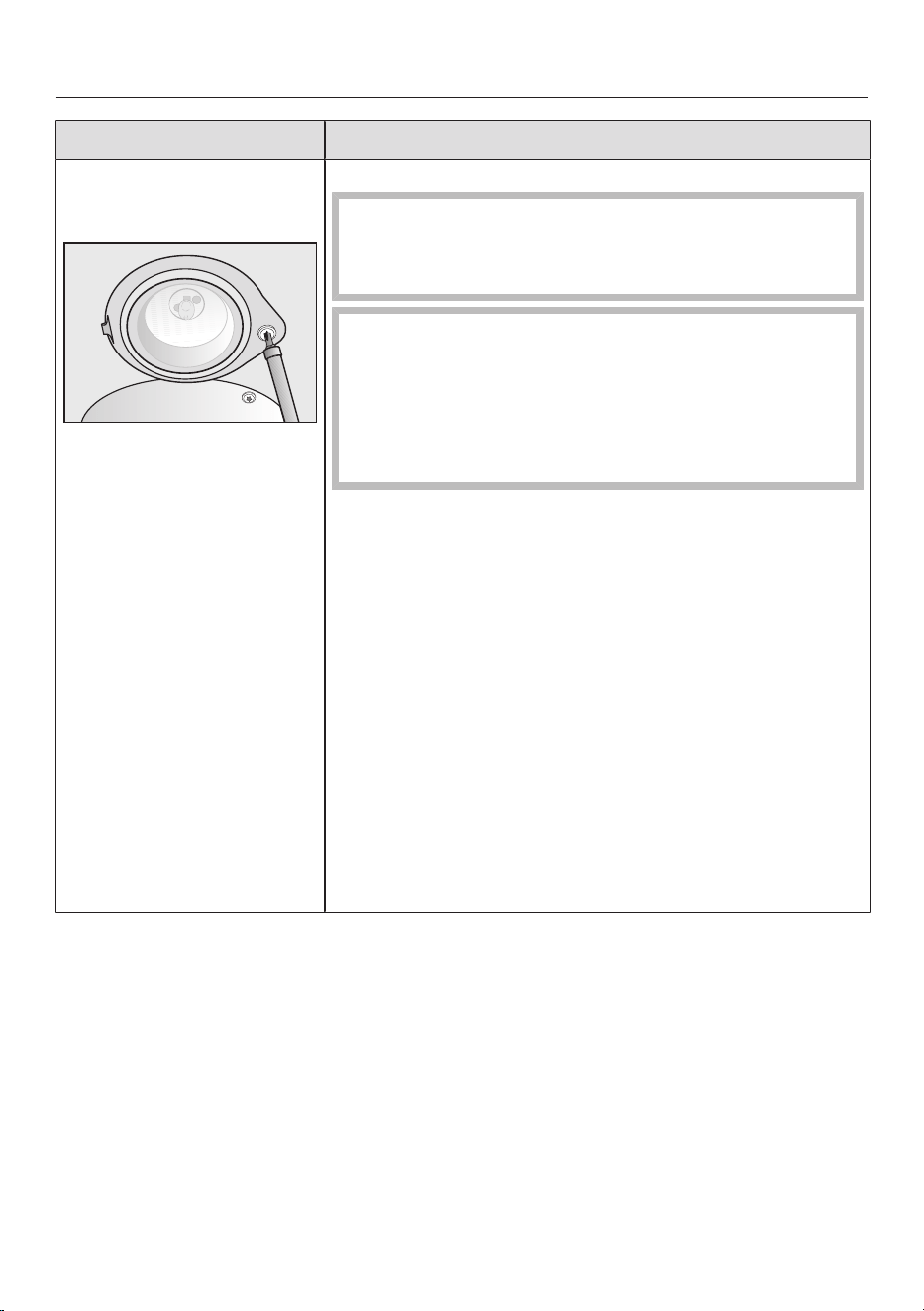
Frequently Asked Questions
122
Problem Possible cause and solution
The oven lighting does
not turn on.
The halogen bulb needs to be replaced.
Danger of burns!
Make sure the heating elements are turned off and
allowed to cool completely.
The light cover consists of two seperate parts, a
glass cover and mounting. If it falls it can be
damaged.
When removing the cover hold it firmly so that it
does not fall. Place a towel on the oven floor and
open door to avoid damage.
Disconnect the appliance from the power supply.
Remove the screw to the lamp cover using a T20
Torx screwdriver, and take off the cover.
Do not touch the halogen bulb with bare fingers.
Observe the manufacturers instructions.
Remove the halogen bulb.
Replace it with a new halogen bulb (Sylvania
66740, 120V, 40W, G9, FS1). It must be thermally
stable up to 575°F (300°C).
Replace the glass piece in the mounting, and refit
the lamp cover. Make sure that the lug on the
mounting is correctly located in the notch in the
roof of the oven, then screw the mounting back
into place.
Reconnect the oven to the electrical supply.

Technical Service
123
Contact in case of fault
In the event of a fault which you cannot
remedy yourself, please contact your
Miele dealer or Miele Technical Service.
Contact information for Miele
Technical Service can be found at the
end of this document.
Please quote the model and serial
number of your appliance when
contacting Miele. Both pieces of
information can be found on the data
plate.
The data plate is visible on the front
frame of the oven, with the door fully
open.
Warranty
For further information, please refer to
your warranty booklet.
Caring for the environment
124
Disposal of the packing
material
The cardboard box and packing
materials protect the appliance during
shipping. They have been designed to
be biodegradable and recyclable.
Ensure that any plastic wrappings,
bags, etc. are disposed of safely and
kept out of the reach of children.
Danger of suffocation!
Disposal of your old appliance
Electrical and electronic appliances
contain valuable materials. They also
contain certain substances, compounds
and components which were essential
for the proper functioning and safe use
of the equipment. Handling these
materials improperly by disposing of
them in your household waste can be
harmful to your health and the
environment. Therefore, please do not
dispose of your old appliance with
regular household waste and follow
local regulations on proper disposal.
Consult with local authorities, dealers or
Miele in order to dispose of and recycle
electrical and electronic appliances.
Miele assumes no responsibility for
deleting any personal data left on the
appliance being disposed. Please
ensure that your old appliance is kept
away from children until removal.
Observe safety requirements for
appliances that may tip over or pose an
entrapment hazard.
Electrical connection
*
I
N
S
T
A
L
L
A
T
I
O
N
*
125
CAUTION:
Before servicing, disconnect the
power supply by either removing the
fuse, shutting off the power main or
manually “tripping” the circuit
breaker.
Installation, repair and maintenance
should be performed by a Miele
authorized service technician. Work
by unqualified persons could be
dangerous and may void the
warranty.
Before connecting the appliance to
the power supply, make sure that the
voltage and frequency listed on the
data plate correspond with the
household electrical supply. This
data must correspond to prevent
machine damage. Consult an
electrician if in doubt.
Only operate the appliance after it
has been installed into cabinetry.
The plug must be inserted into a
suitable outlet that has been installed
and grounded in compliance with all
applicable local regulations.
WARNING: THIS APPLIANCE MUST
BE GROUNDED
Installer: Please pass these
instructions on to the customer.
Electrical connection
The oven is equipped with a power cord
approx. 6ft. (1.8m) in length with a 4-
prong NEMA 14-30P plug ready for
connection to the power supply:
– 120/208 V, 30 A, 60 Hz
or
– 120/240 V, 30 A, 60 Hz
The voltage can be adjusted (see
“Settings - Electrical Version”).
SAVE THESE INSTRUCTIONS FOR
THE ELECTRICAL INSPECTOR'S
USE.
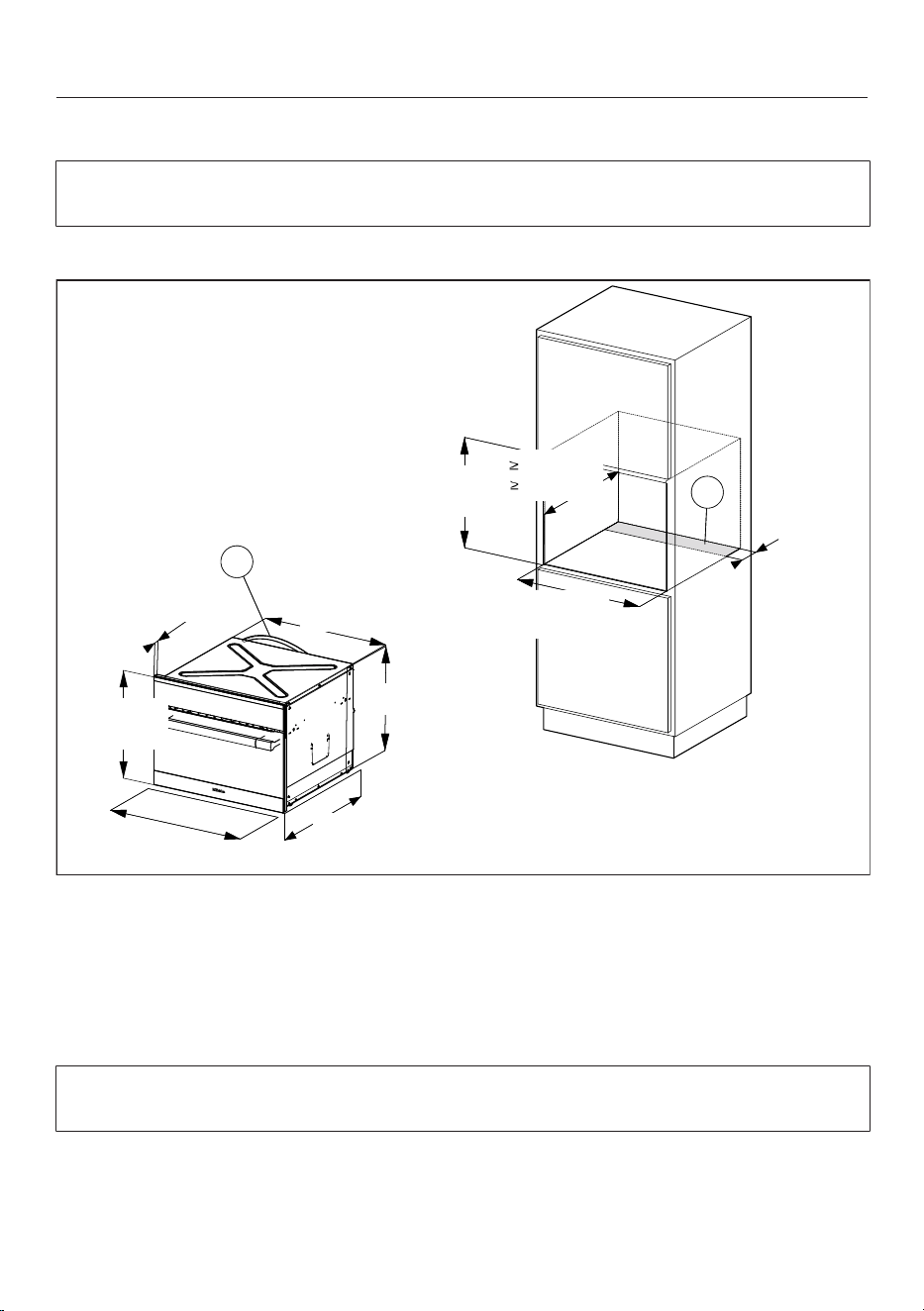
Installation diagrams H6500BM, H6600BM
126
Appliance and cut-out dimensions
Miele ovens can be installed flush or proud. Discuss your installation
requirements with your architect, designer and installer.
Installation in a tall cabinet
B
A
B
A
7/8" (22*/23** mm)
22 1/16"
(560 mm)
17 1/2" (445 mm)
21 9/16" (549 mm)
23 7/16"
(595 mm)
17 15/16"
(455 mm)
4"
(100 mm)
17 3/4" - 17 13/16"
(450-452 mm)
21 5/8"
( 550 mm)
22 1/16" - 22 3/8"
(561-568 mm)
Cut-out (4" x 22" / 100mm x 560mm) in the bottom of the cabinet for power
cord and ventilation
Power cord with plug
* Oven with glass front
** Oven with metal front
Depending on the model, the oven front may differ from the one shown the
drawing. Current specifications can be found on the Miele website.
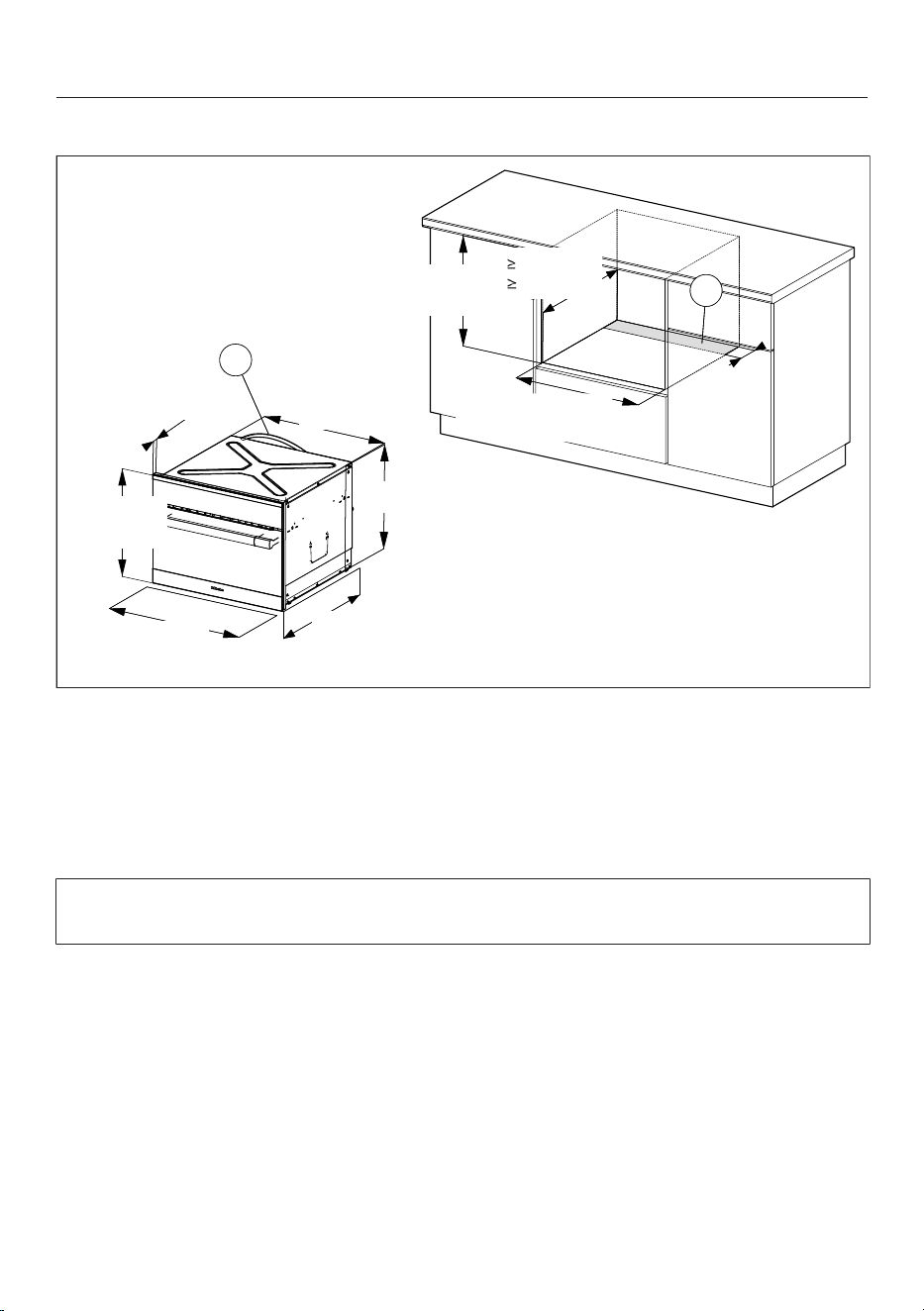
Installation diagrams H6500BM, H6600BM
127
Undercounter installation
B
A
B
A
7/8" (22*/23** mm)
22 1/16"
(560 mm)
17 1/2" (445 mm)
21 9/16" (549 mm)
23 7/16"
(595 mm)
17 15/16"
(455 mm)
22 1/16" - 22 3/8"
(561-568 mm)
4"
(100 mm)
18 1/8" - 18 5/16"
(460-465 mm)
21 5/8"
( 550 mm)
Cut-out (4" x 22" / 100mm x 560mm) in the bottom of the cabinet for power
cord and ventilation
Power cord with plug
* Oven with glass front
** Oven with metal front
Depending on the model, the oven front may differ from the one shown the
drawing. Current specifications can be found on the Miele website.
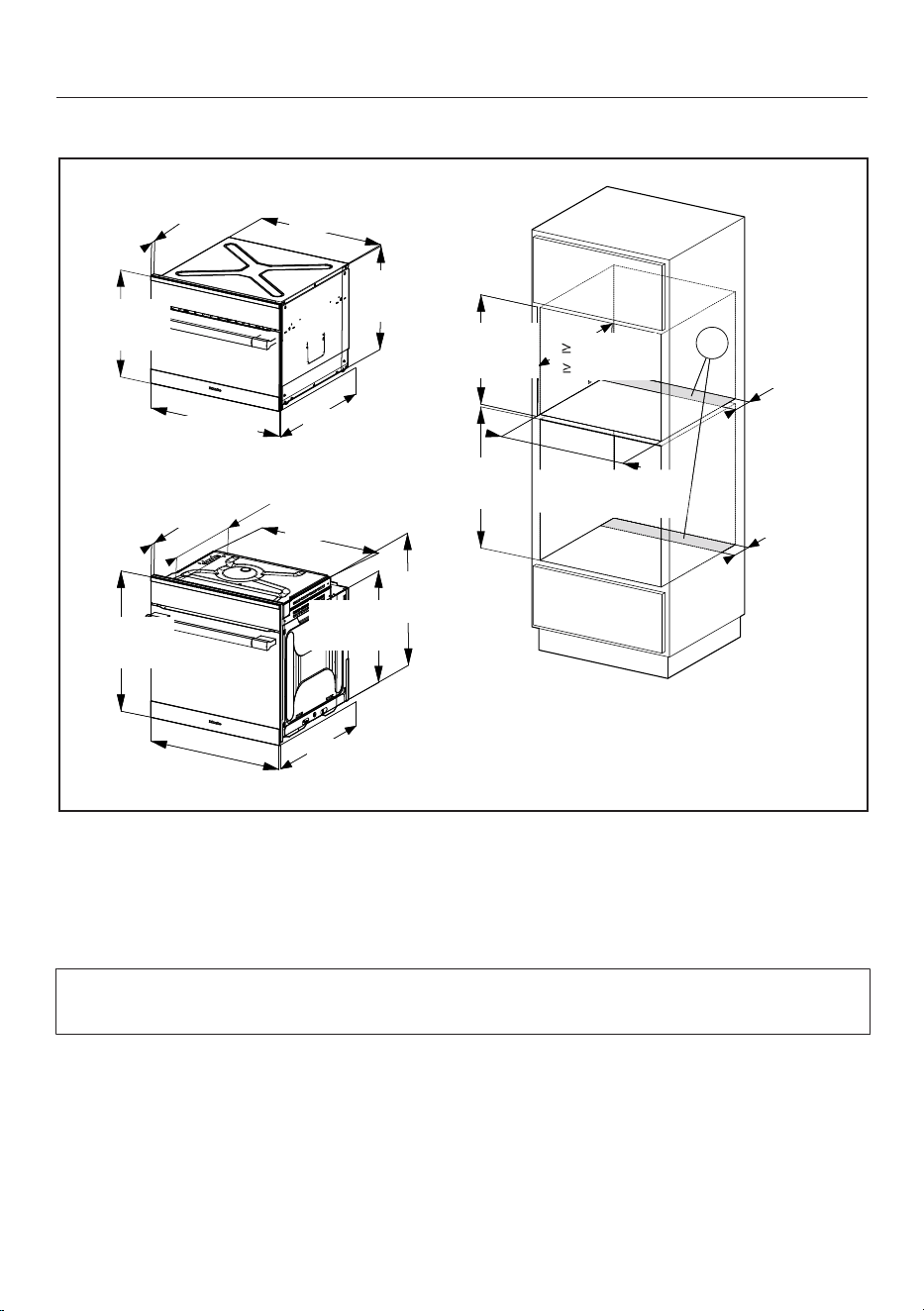
Installation diagrams H6500BM, H6600BM
128
Combination installation with an oven into a tall cabinet
7/8"
(22*/23** mm)
22 1/16"
(560 mm)
17 1/2"
(445 mm)
21 9/16"
(549 mm)
23 7/16"
(595 mm)
17 15/16"
(455 mm)
7/8"
(22*/23** mm)
16" (407 mm)
21 11/16"
(551 mm)
22 11/16"
(577 mm)
20 1/16"
(510 mm)
21 1/2" (546 mm)
23 7/16"
(595 mm)
23 7/16"
(596 mm)
A
A
4"
(100 mm)
4"
(100 mm)
23 3/8"-23 7/16"
(593-595 mm)
17 3/4"-17 13/16"
(450-452 mm)
22 1/16"-22 3/8"
(561-568 mm)
21 5/8"
( 550 mm)
Cut-out (4" x 22" / 100mm x 560mm) in the bottom of the cabinet for power
cord and ventilation
* Oven with glass front
** Oven with metal front
Depending on the model, the oven front may differ from the one shown the
drawing. Current specifications can be found on the Miele website.
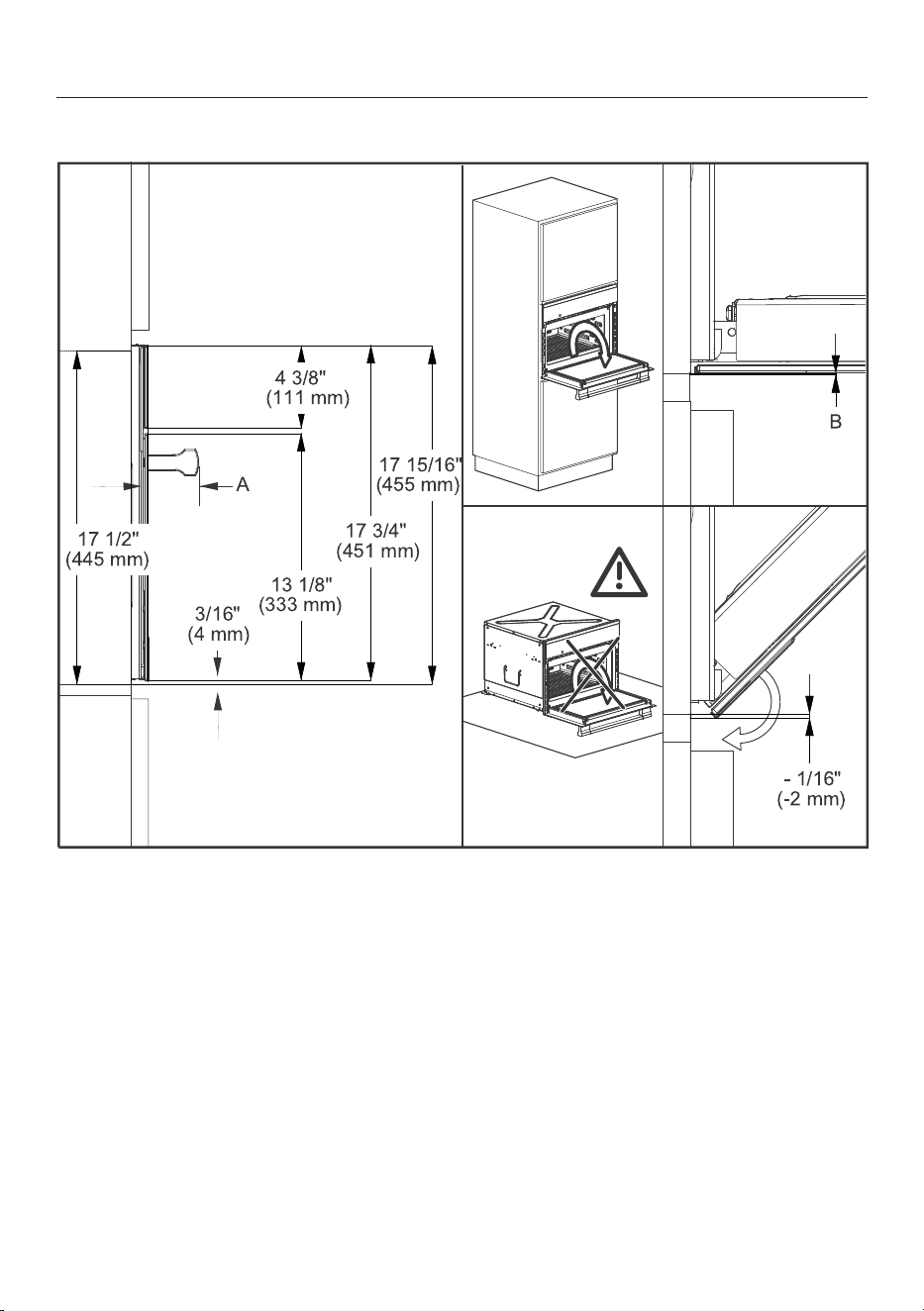
Installation diagrams H6500BM, H6600BM
129
Front dimensions
A H65xx: 2 3/4" (69mm)
H66xx: 1 5/8" (42mm)
B Oven with glass front: 1/16" (2.2mm)
Oven with metal front: 1/16" (1.2mm)
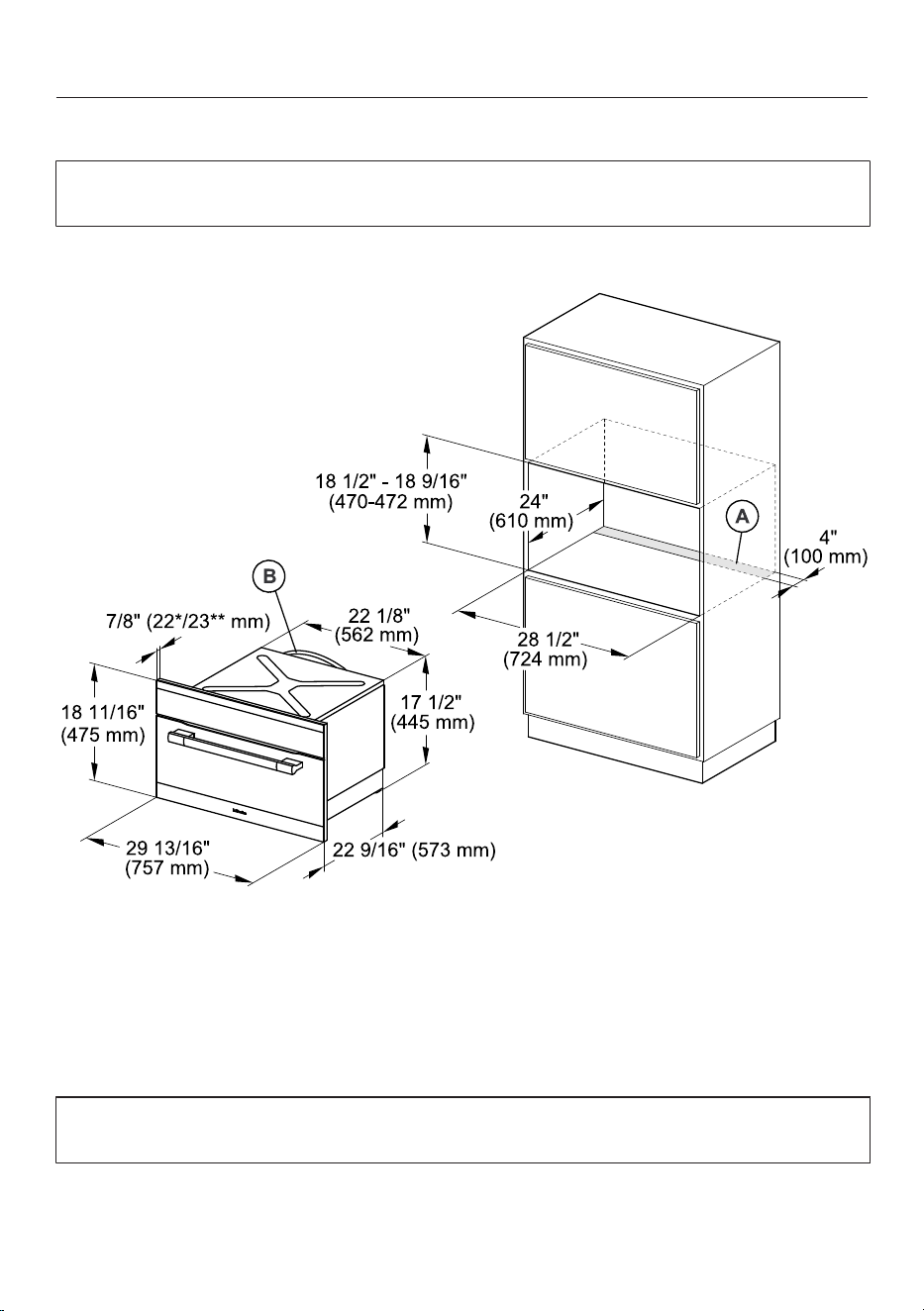
Installation diagrams H6570BM, H6670BM
130
Appliance and cut-out dimensions
Miele ovens can be installed flush or proud. Discuss your installation
requirements with your architect, designer and installer.
Installation in a tall cabinet
Cut-out (4" x 283/8" / 100mm x 720mm) in the bottom of the cabinet for
power cord and ventilation
Power cord with plug
* Oven with glass front
** Oven with metal front
Depending on the model, the oven front may differ from the one shown the
drawing. Current specifications can be found on the Miele website.
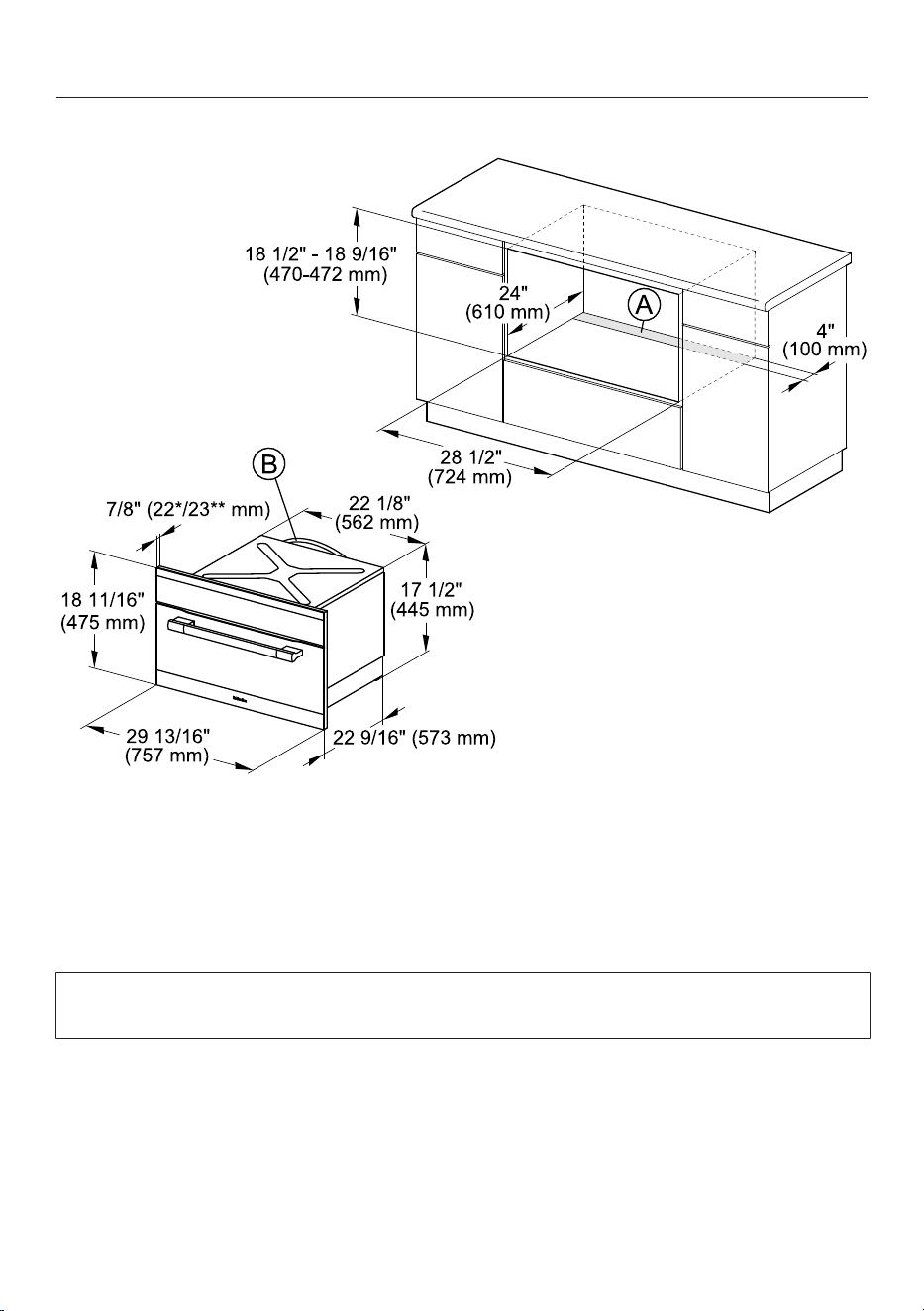
Installation diagrams H6570BM, H6670BM
131
Undercounter installation
Cut-out (4" x 283/8" / 100mm x 720mm) in the bottom of the cabinet for
power cord and ventilation
Power cord with plug
* Oven with glass front
** Oven with metal front
Depending on the model, the oven front may differ from the one shown the
drawing. Current specifications can be found on the Miele website.
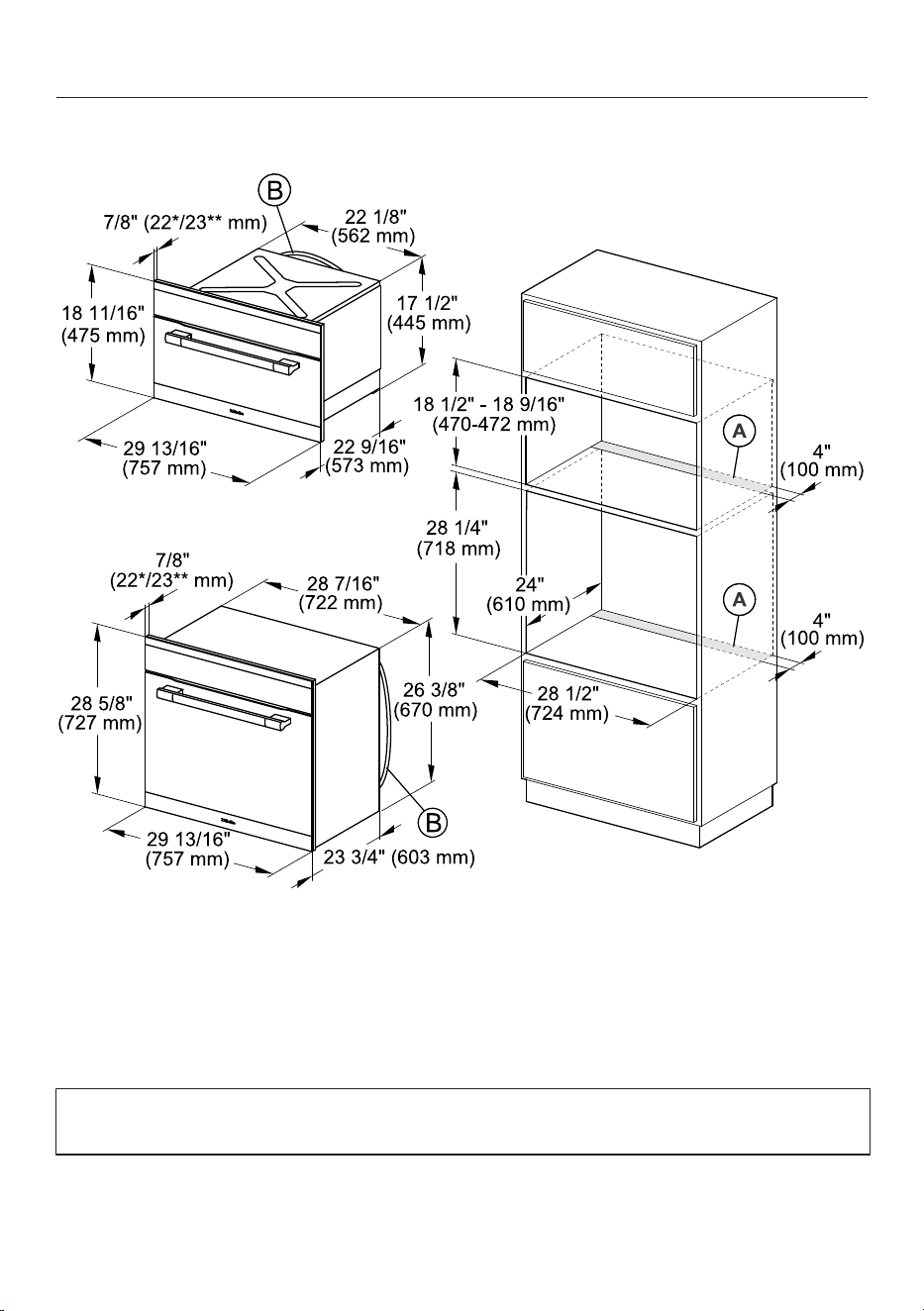
Installation diagrams H6570BM, H6670BM
132
Combination installation with an oven into a tall cabinet
Cut-out (4" x 283/8" / 100mm x 720mm) in the bottom of the cabinet for
power cord and ventilation
Power cord with plug
* Oven with glass front
** Oven with metal front
Depending on the model, the oven front may differ from the one shown the
drawing. Current specifications can be found on the Miele website.
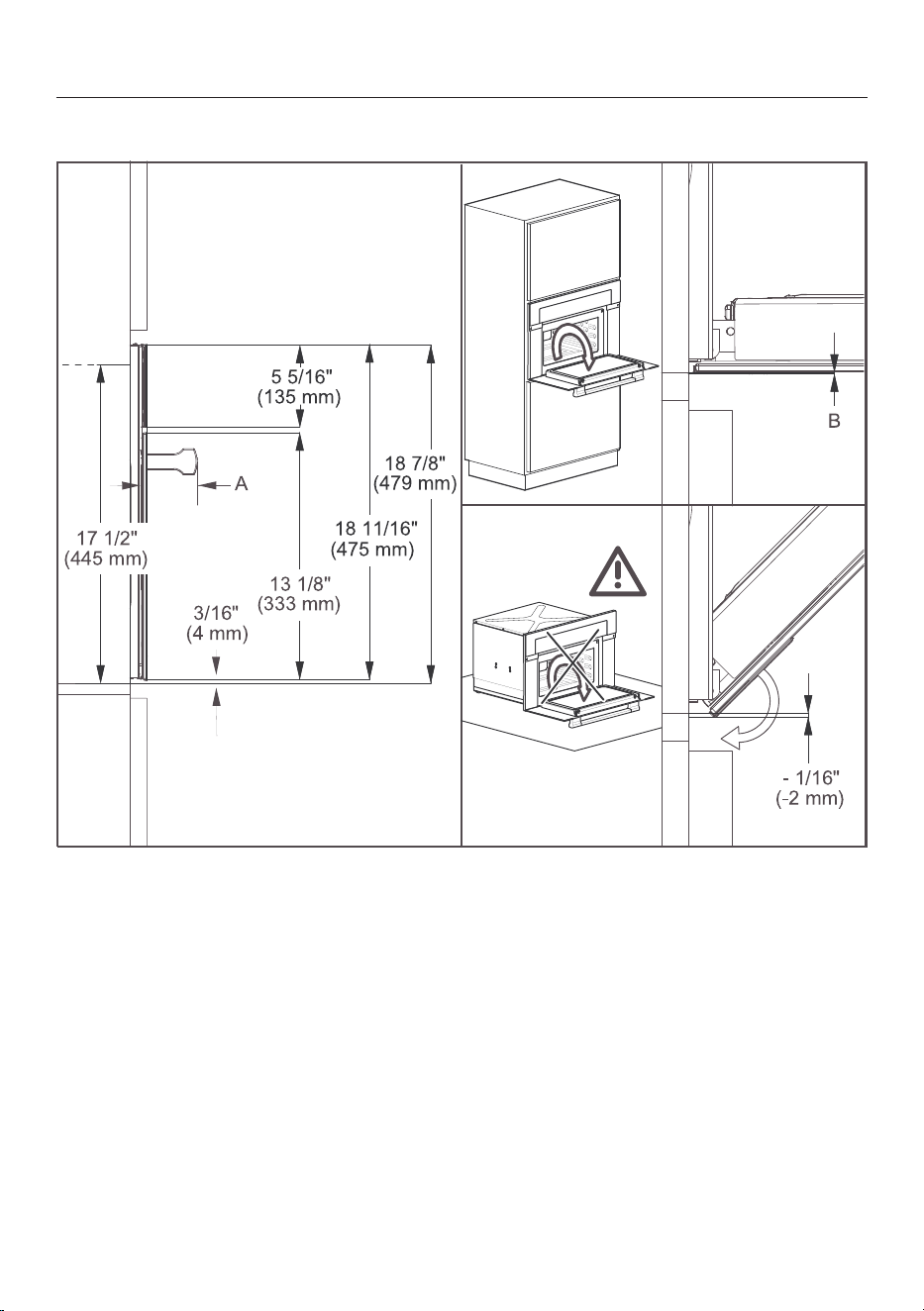
Installation diagrams H6570BM, H6670BM
133
Front dimensions
A H65xx: 2 3/4" (69mm)
H66xx: 1 5/8" (42mm)
B Oven with glass front: 1/16" (2.2mm)
Oven with metal front: 1/16" (1.2mm)
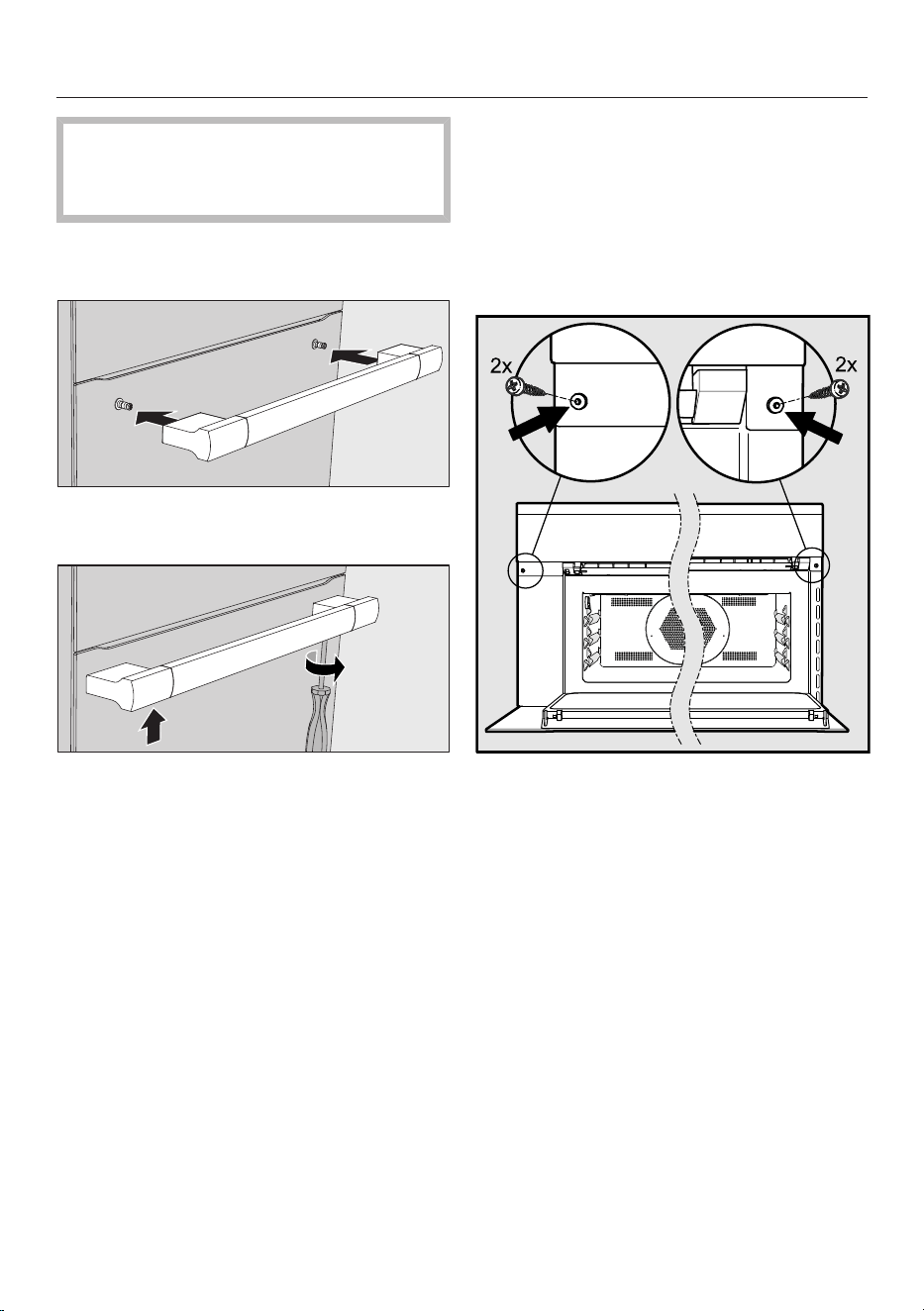
Installation
134
The oven must not be operated
until it has been properly installed
within cabinetry.
Mounting the door handle (depending
on model)
Mount the handle onto the retaining
bolts.
Use the supplied Allen wrench to
tighten all four bolts.
If there are side handles, please
remove them.
Connect the power cord to the
electrical supply.
Push the oven into the cabinetry up
to the oven trim and align it.
Open the door and use the screws
supplied to secure the oven to the
side walls of the cabinetry through
the holes in the oven trim.

9 Independence Way
Princeton, NJ 08540
U.S.A.
Miele, Inc.
National Headquarters
Please have the model and serial number
of your appliance available when
contacting Customer Service.
Canada
Importer
Miele Limited
Headquarters and Miele Centre
Customer Service & Support
Phone: 888-99-MIELE(64353)
www.mieleusa.com
161 Four Valley Drive
Vaughan, ON L4K 4V8
www.miele.ca
Customer Care Centre
Phone:
800-565-6435
905-532-2272
International Headquarters
Miele & Cie. KG
Carl-Miele-Straße 29
33332 Gütersloh
Germany

M.-Nr. 10 230 76
2 / 01
en-US, CA
H6500BM; H6600BM; H6570BM; H6670BM