9.7406784
0
CI
E-IM-2928
LS-88Hi III
Calculator / Calculatrice
Calculation Examples / Ejemplos de cálculo
INSTRUCTIONS
INSTRUCCIONESI
EN
ES
IMPORTANTE: LEA ANTES DE USAR
• Al utilizar este producto, lea todas las instrucciones
de uso, advertencias y precauciones establecidas por
Canon.
• Después de leer este manual, guárdelo para futuras
consultas
FUENTE DE ALIMENTACIÓN
Esta calculadora puede funcionar con dos fuentes de
alimentación. La duración de una batería de alcalino depende
enteramente de uso individual.
(Nota: No trate de cambiar usted mismo las pilas. Acuda a un
centro de servicio Canon para que le cambien las pila.)
La interferencia electromagnética o descargas e
lectrostáticas pueden hacer que la pantalla no funcione
correctamente o el contenido de la memoria para ser
perdido o alterado. Si esto ocurre, pulse la tecla y
volver a empezar el cálculo desde el principio.
FUNCIÓN DE REBOSE
En los siguientes casos, cuando aparece una "E" en la
pantalla, una línea de puntos es impresa, el teclado se
bloquea electrónicamente, y la operación subsiguiente no es
posible, presione para borrar el rebose. La función de
rebose ocurre cuando:
1. El resultado o el contenido de la memoria excede de 8
dígitos a la izquierda del punto decimal.
2. Divide por "0"
ESPECIFICACIONES
Fuente de alimentación: Celda solar y batería de alcalino (LR1130x 1)
Temperatura de operación: 0
o
C a 40
o
C (32
o
F a 104
o
F)
Dimensiones: 143mm (longitud) x 89.5mm (ancho) x 25mm (alto) /
5-5/8" (longitud) x 3-17/32" (ancho) x 63/64" (alto)
Peso: 90 g (3 oz)
(Sujeto a cambios sin previo aviso)
IMPORTANT: READ BEFORE USE
• When using this product, please read all the
operating instructions,warnings and precautions
provided by Canon.
• After reading this manual, please keep it for future
reference.
POWER SUPPLY
This calculator comes with a dual power source. The duration
of a alkaline battery depends entirely on individual usage.
(Note: Do not attempt to change the battery by yourself. Have
a Canon Service Center change the battery for you).
Electromagnetic interference or electrostatic discharge
may cause the display to malfunction or the contents of
the memory to be lost or altered. Should this occur,
press the key and re-start your calculation from the
beginning.
OVERFLOW FUNCTION
In the following cases, when "E" is displayed, the keyboard is
electronically locked, and further operation is impossible.
Press to clear the overflow.
The overflow function occurs when:
1. The result or the memory content exceeds 8 digits to the
left of the decimal point.
2. Dividing by "0".
SPECIFICATION
Power Source: Solar cell and alkaline battery (LR1130 x 1)
Usable Temperature: 0
o
C to 40
o
C (32
o
F to 104
o
F)
Automatic power-off: Approx. 7 minutes
Dimension: 143mm (L) x 89.5mm (W) x 25mm (H)
5-5/8" (L) x 3-17/32" (W) x 63/64" (H)
Weight : 90 g (3 oz)
(Subject to change without notice)
ESPAÑOL
© CANON ELECTRONIC BUSINESS MACHINES (H.K.) CO., LTD. 2015
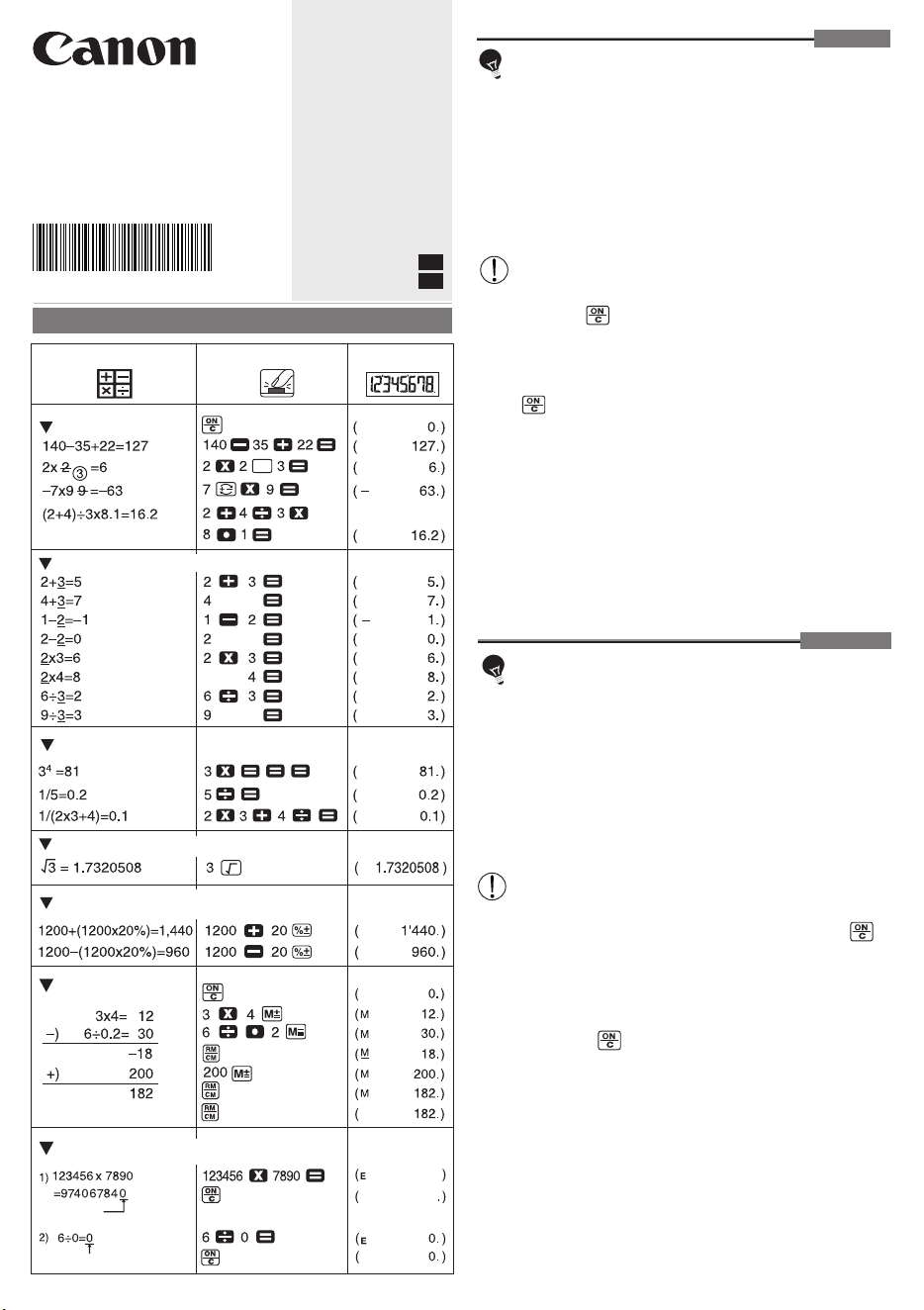
CALCULATION/CÁLCULO
OPERATION/OPERACIÓN
DISPLAY/PANTALLA
Constant / Constante
Power,Fraction /
Poder, Fracción
Square Root / Raíz Cuadrada
Percentage Calculation /
Cálculo de Porcentaje
Mixed / Mixto
(Recall Memory/
Recordemos la memoria)
(Clear Memory/
Borrar la memoria)
Memory Calculation /
Cálculo de Memoria
(ERROR /
ERREUR)
(ERROR / ERREUR)
Overflow /
Derramamiento de Capacidad
ENGLISH