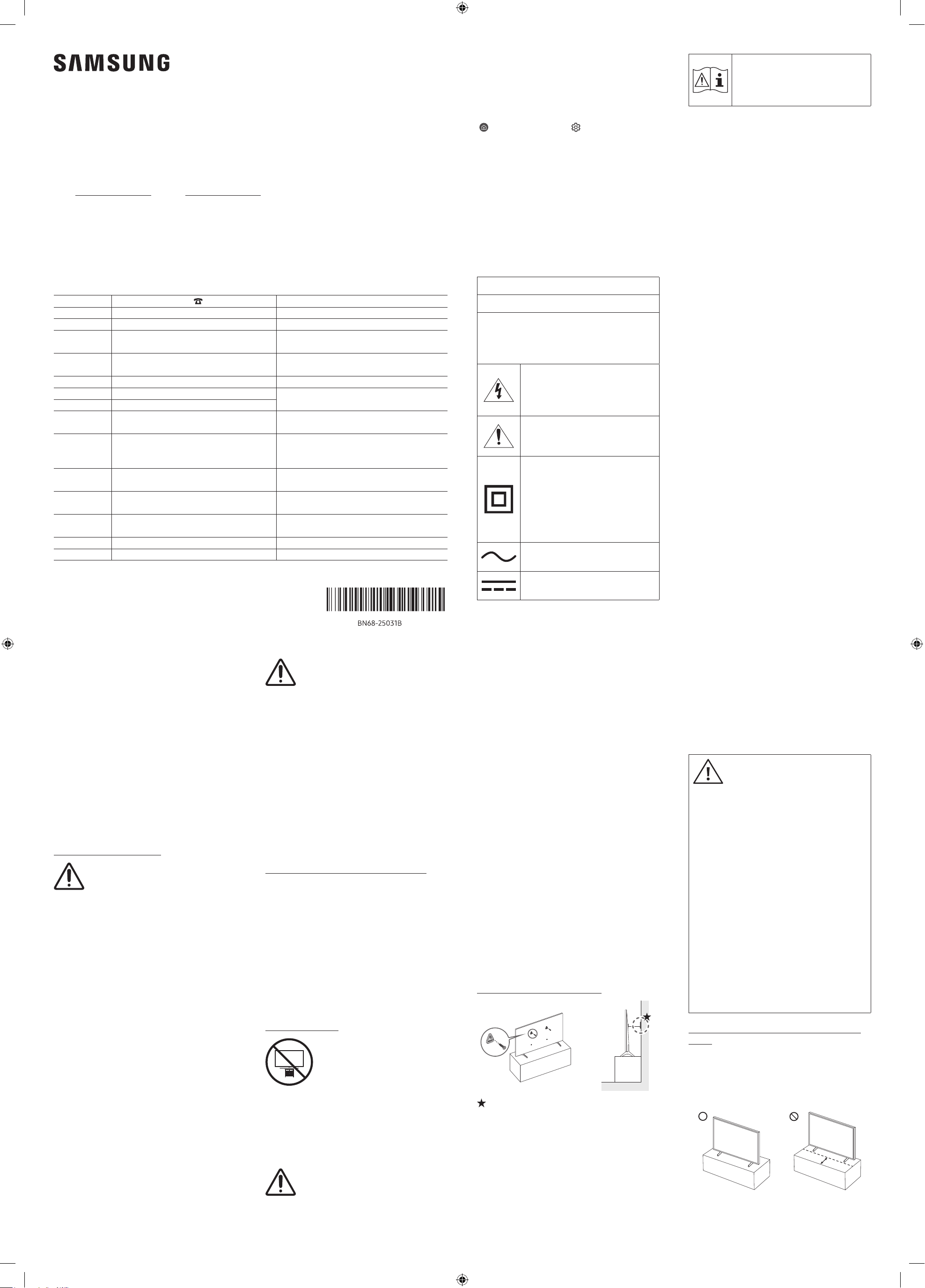
Thank you for purchasing this Samsung product.
To receive more complete service, please register your product at www.samsung.com
Model Serial No.
The figures and illustrations in this Simple User Guide are provided for reference only and may differ from the actual
product appearance.
The product design and specifications may change without notice.
© 2026 Samsung Electronics Co., Ltd. All rights reserved.
Before Reading This
Simple User Guide
This TV comes with this Simple User Guide and an
embedded User Guide.
(
> left directional button > Settings > Support >
Tips and User Guides > Open User Guide)
On the website (www.samsung.com), you can download
the manuals and see its contents on your PC or mobile
device.
Warning! Important
Safety Instructions
Please read the Safety Instructions before using your TV.
Refer to the table below for an explanation of symbols
which may be on your Samsung product.
CAUTION
RISK OF ELECTRIC SHOCK. DO NOT OPEN.
CAUTION: TO REDUCE THE RISK OF ELECTRIC
SHOCK, DO NOT REMOVE COVER (OR BACK).
THERE ARE NO USER SERVICEABLE PARTS INSIDE.
REFER ALL SERVICING TO QUALIFIED PERSONNEL.
This symbol indicates that high voltage
is present inside. It is dangerous to
make any kind of contact with any
internal part of this product.
This symbol indicates that this product
has included important literature
concerning operation and maintenance.
Class II product: This symbol indicates
that a safety connection to electrical
earth (ground) is not required. If this
symbol is not present on a product with
a mains lead, the product MUST have a
reliable connection to protective earth
(ground).
AC voltage: Rated voltage marked with
this symbol is AC voltage.
DC voltage: Rated voltage marked with
this symbol is DC voltage.
Caution. Consult instructions for
use: This symbol instructs the user
to consult the Simple User Guide for
further safety related information.
Power
• Do not overload wall outlets, extension cords, or
adapters beyond their voltage and capacity. It may
cause fire or electric shock.
Refer to the power specifications section of the
manual or the power supply label on the product for
voltage and amperage information.
• Power-supply cords should be placed so that they are
not likely to be walked on or pinched by items placed
upon or against them. Pay particular attention to
cords at the plug end, at wall outlets, and at the point
where they exit from the appliance.
• Never insert anything metallic into the open parts of
this apparatus. This may cause electric shock.
• To avoid electric shock, never touch the inside of this
apparatus. Only a qualified technician should open
this apparatus.
• Be sure to plug in the power cord until it is firmly
seated. When unplugging the power cord from a wall
outlet, always pull on the power cord's plug. Never
unplug it by pulling on the power cord. Do not touch
the power cord with wet hands.
• If this apparatus does not operate normally - in
particular, if there are any unusual sounds or smells
coming from it - unplug it immediately and contact an
authorised dealer or Samsung service centre.
• To protect this apparatus from a lightning storm, or
to leave it unattended and unused for a long time, be
sure to unplug it from the wall outlet and disconnect
the antenna or cable system.
– Accumulated dust can cause an electric shock,
an electric leakage, or a fire by causing the power
cord to generate sparks and heat or by causing the
insulation to deteriorate.
• Use only a properly grounded plug and wall outlet.
– An improper ground may cause electric shock or
equipment damage. (Class l Equipment only.)
• To turn off this apparatus completely, disconnect it
from the wall outlet. To ensure you can unplug this
apparatus quickly if necessary, make sure that the
wall outlet and power plug are readily accessible.
Installation
• Do not place this apparatus near or over a radiator or
heat register, or where it is exposed to direct sunlight.
• Do not place vessels (vases etc.) containing water on
this apparatus, as this can result in a fire or electric
shock.
• Do not expose this apparatus to rain or moisture.
• Be sure to contact an authorised Samsung service
centre for information if you intend to install
your TV in a location with heavy dust, high or low
temperatures, high humidity, chemical substances,
or where it will operate 24 hours a day such as in an
airport, a train station, etc. Failure to do so may lead
to serious damage to your TV.
• Do not expose this apparatus to dripping or splashing.
Mounting the TV on a wall
If you mount this TV on a wall, follow
the instructions exactly as set out by the
manufacturer. If it is not correctly mounted,
the TV may slide or fall and cause serious
injury to a child or adult and serious
damage to the TV.
• To order the Samsung wall mount kit, contact
Samsung service centre.
• Samsung Electronics is not responsible for any
damage to the product or injury to yourself or others if
you choose to install the wall mount on your own.
• Samsung is not liable for product damage or personal
injury when a non-VESA or non-specified wall mount
is used or when the consumer fails to follow the
product installation instructions.
• You can install your wall mount on a solid wall
perpendicular to the floor. Before attaching the wall
mount to surfaces other than plaster board, contact
your nearest dealer for additional information. If you
install the TV on a ceiling or slanted wall, it may fall
and result in severe personal injury.
• For safety, please install all fasteners without missing
any of the supplied parts according to the instructions
in the provided installation manual.
• Before installing a wall mount, be sure to check that it
is compatible with the TV.
• Do not mount the TV at more than a 15 degree tilt.
• Standard dimensions for wall mount kits are shown in
the table on the Unpacking and Installation Guide.
• Always use cabinets or stands or mounting methods
recommended by Samsung.
• Always use furniture that can safely support the
television set.
• Always ensure the television set is not overhanging
the edge of the supporting furniture.
• Always educate about the dangers of climbing on
furniture to reach the television set or its controls.
• Always route cords and cables connected to your
television so they cannot be tripped over, pulled or
grabbed.
• Never place a television set in an unstable location.
• Never place the television set on tall furniture (for
example, cupboards or bookcases) without anchoring
both the furniture and the television set to a suitable
support.
• Never place the television set on cloth or other
materials that may be located between the television
set and supporting furniture.
• Never place items that might tempt to climb, such as
toys and remote controls, on the top of the television
or furniture on which the television is placed.
If the existing television set is going to be retained and
relocated, the same considerations as above should be
applied.
• When you have to relocate or lift the TV for
replacement or cleaning, be sure not to pull out the
stand.
Preventing the TV from falling
: Wall-anchor (not supplied)
1. Using the appropriate screws, firmly fasten a set of
brackets to the wall. Confirm that the screws are
firmly attached to the wall.
– You may need additional material such as wall
anchors depending on the type of wall.
2. Using the appropriately sized screws, firmly fasten a
set of brackets to the TV.
– For the screw specifications, refer to the standard
screw part in the table on the Unpacking and
Installation Guide.
Do not install your wall mount kit while
your TV is turned on. This may result in
personal injury from electric shock.
• Do not use screws that are longer than the standard
dimension or do not comply with the VESA standard
screw specifications. Screws that are too long may
cause damage to the inside of the TV set.
• For wall mounts that do not comply with the VESA
standard screw specifications, the length of the screws
may differ depending on the wall mount specifications.
• Do not fasten the screws too firmly. This may damage
the product or cause the product to fall, leading to
personal injury. Samsung is not liable for these kinds
of accidents.
• Always have two people mount the TV onto a wall.
– For 82 inch or larger models, have four people mount
the TV onto a wall.
Providing proper ventilation for your TV
When installing the TV (*Wireless One Connect box),
ensure proper ventilation by leaving sufficient space
between the TV (*Wireless One Connect box) and
surrounding objects. Failing to maintain proper ventilation
may result in a fire or a problem with the product caused
by an increase in its internal temperature.
*: Wireless One Connect Box Supported Model Only
• When you install your TV with a stand or a wall mount,
we strongly recommend you use parts provided by
Samsung Electronics only. Using parts provided by
another manufacturer may cause difficulties with the
product or result in injury caused by the product falling.
Safety Precaution
Caution: Pulling, pushing, or climbing
on the TV may cause the TV to fall. In
particular, do not hang on or destabilise
the TV. This action may cause the TV
to tip over, causing serious injuries or
death. Follow all safety precautions
provided in the Safety Flyer included
with your TV. For added stability and
safety, you can purchase and install the
anti-fall device, referring to "Preventing
the TV from falling".
WARNING: Never place a television set in
an unstable location. The television set may
fall, causing serious personal injury or death.
Many injuries can be avoided by taking simple
precautions such as:
3. Connect the brackets fixed to the TV and the brackets
fixed to the wall with a durable, heavy-duty string,
and then tie the string tightly.
– Install the TV near the wall so that it does not fall
backwards.
– Connect the string so that the brackets fixed to the
wall are at the same height as or lower than the
brackets fixed to the TV.
THIS PRODUCT SHOULD BE MOUNTED
OR ANCHORED TO A WALL OR OTHER
SUITABLE SURFACE TO AVOID SERIOUS
INJURY.
To help avoid any serious or fatal injury, we strongly
recommend that this product be permanently
mounted or anchored to the wall or other suitable
surface. Anchoring devices are not included since
different surface materials require different
attachments. Please seek professional advice if you
are in doubt about mounting this product or what
anchoring device to use.
Serious injury or death can be caused by toppling
furniture and TVs.
Help prevent tip-over:
• Mount or anchor this product to a wall or other
suitable surface.
• Check anchors regularly.
• Avoid placing this TV on top of furniture unless
both the furniture and the TV are anchored.
• Use drawer locks to prevent children climbing.
Precautions when installing the TV with a
stand
(The Frame only)
When you install the TV with a stand, avoid placing the
stand on the back part of the table surface. Failure to do
so may cause the motion sensor at the bottom of the TV
not to work properly.
ENG
Simple User Guide
Contact Samsung world wide
If you have any questions or comments relating to Samsung products, please contact the Samsung service centre.
Country/Region
Samsung Service Centre
Website
SINGAPORE 1800 7267864 | 1800-SAMSUNG www.samsung.com/sg/support
AUSTRALIA 1300 362 603 www.samsung.com/au/support
NEW ZEALAND
0800 726 7864
0800 726 786
www.samsung.com/nz/support
VIETNAM
Zalo Samsung Vietnam
https://zalo.me/598843366637438151
www.samsung.com/vn/support
MYANMAR +95-1-2399-888 www.samsung.com/mm/support
CAMBODIA 1800-20-3232 (Toll free)
www.samsung.com/th/support
LAOS +856-214-17333
MALAYSIA
1800-88-9999
+603-7713 7420 (Overseas contact)
www.samsung.com/my/support
PHILIPPINES
1-800-10-7267864 [ PLDT - Toll Free ]
1-800-8-7267864 [ Globe - Toll Free ]
84222111 [ Landline ]
www.samsung.com/ph/support
INDIA
1800 5 7267864 (1800 5 SAMSUNG) (Toll-Free)
1800 40 7267864 (1800 40 SAMSUNG) (Toll-Free)
www.samsung.com/in/support
NEPAL
16600172667 (Toll Free for NTC Only)
9801572667 (Toll Free for Ncell users)
www.samsung.com/in/support/contact-us-nepal
BANGLADESH
08000-300-300 (Toll free)
09612-300-300
www.samsung.com/bd/support
SRI LANKA 011 SAMSUNG (011 7267864) www.samsung.com/in/support/contact-us-srilanka
IRAN 021-8255 [CE] www.samsung.com/iran/support
-00
02 Initial Setup
When you turn on your TV for the first time, it
immediately starts the Initial Setup. Follow the
instructions displayed on the screen and configure the
TV's basic settings to suit your viewing environment.
• You will need a Samsung account to access our
network-based smart services. If you choose not to
log in, you will only get a connection to terrestrial TV
(applicable to devices with tuners only) and external
devices, e.g. via HDMI.
• LS03H models support Portrait Mode when installed
vertically (except for the 98LS03HE).
– Some features may not support portrait mode or
full screen.
– The initial setup is optimised for landscape mode.
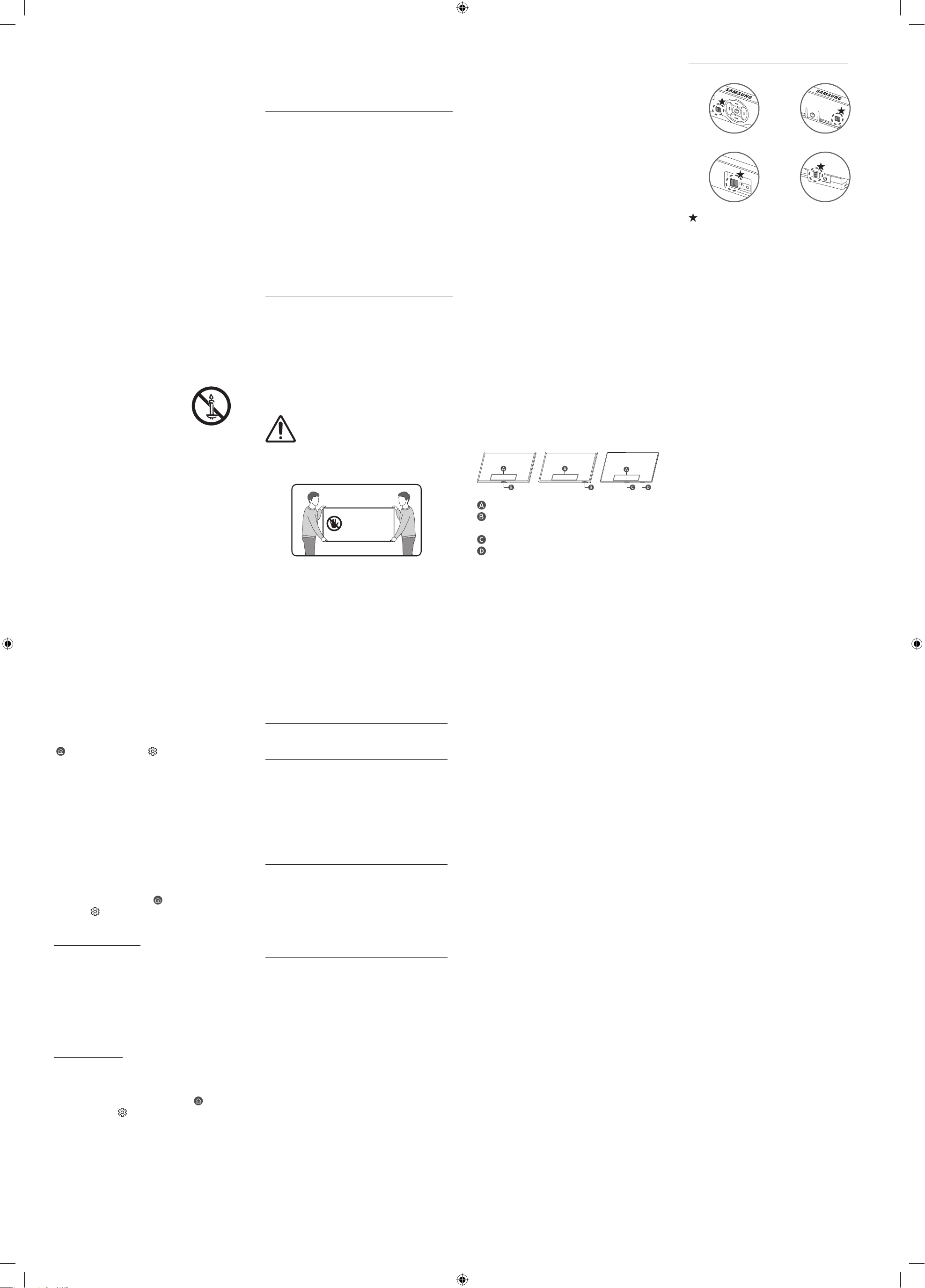
Using the TV Controller
You can turn on the TV with the TV Controller button at
the bottom of the TV, and then use the Control menu.
The Control menu appears when the TV Controller
button is pressed while the TV is On.
• The position and shape of the buttons at the bottom
of the TV may differ depending on the model.
• The screen may dim if the protective film on the
Samsung logo or the bottom of the TV is not detached.
If protective film is attached, remove the film.
• On model LS03HW, the TV Control button / Remote
Control Sensor may not be fixed in place and may
move. This is not a defect, but part of the design
to ensure smooth remote control sensing when
a Customizable Frame is installed, which is sold
separately.
Control menu
TV Controller button / Remote control sensor /
Microphone switch / *Motion Sensor
TV Controller button / Remote control sensor
Microphone switch
*: The Frame only
Operation
• This apparatus uses batteries. In your community,
there might be environmental regulations that
require you to dispose of these batteries properly.
Please contact your local authorities for disposal or
recycling information.
• Store the accessories (remote control, batteries, or
etc.) in a location safely out of the reach.
• Do not drop or strike the product. If the product is
damaged, disconnect the power cord and contact a
Samsung service centre.
• Do not dispose of remote control or batteries in a fire.
• Do not short-circuit, disassemble, or overheat the
batteries.
• After removing the screen protective film, never
remove the Polarising film.
– If the protective film removal label is not found, the
protective film has already been removed.
• CAUTION: There is danger of an explosion if you
replace the batteries used in the remote with the
wrong type of battery. Replace only with the same or
equivalent type.
• WARNING - Do not use liquid fumigators containing
chemicals, such as mosquito repellent or air freshener,
around the product.
– If steam comes in contact with the product surface
or enters the product, it may cause stains or
malfunction.
• WARNING - TO PREVENT THE SPREAD
OF FIRE, KEEP CANDLES AND OTHER
ITEMS WITH OPEN FLAMES AWAY
FROM THIS PRODUCT AT ALL TIMES.
Caring for the TV
• To clean this apparatus, unplug the power cord
from the wall outlet and wipe the product with a
soft, dry cloth. Do not use any chemicals such as
wax, benzene, alcohol, thinners, insecticide, aerial
fresheners, lubricants, or detergents. These chemicals
can damage the appearance of the TV or erase the
printing on the product.
• The exterior and screen of the TV can get scratched
during cleaning. Be sure to wipe the exterior and
screen carefully using a soft cloth to prevent
scratches.
• Do not spray water or any liquid directly onto the TV.
Any liquid that goes into the product may cause a
failure, fire, or electric shock.
How to turn on and off the Microphone
Type A Type B
Type C Type D
: On/Off Switch
You can turn on or off the microphone by using the
switch at the bottom or rear bottom of the TV. If
microphone is turned off, All voice and sound features
using microphone are not available.
• This function is supported only in R9*H/R8*H/QN1EH/
QN7*H/QN8*H/QN9**H/S8*H/S9*H/M8*H/M9*H/
U9***H/LS03H*.
• The position and shape of the microphone switch may
differ depending on the model.
• During analysis using data from the microphone, the
data is not saved.
01 What's in the Box?
Make sure the following items are included with your TV.
If any items are missing, contact your dealer.
• Simple User Guide
• Warranty Card / Regulatory Guide (Not available in
some locations)
• *Samsung Smart Remote
• *Remote Control
• *Standard Remote Control
• *Batteries
• *TV Power Cord
• *Wall Mount Adapter x 2
• *Slim Power Cord
• *CI Card Adapter (Depending on the country and model)
• *Power Box
• *Power Box Cable x 2
• *C-type Power Adapter
• *C to C Cable
• *Wireless One Connect Box
*: Some of the items specified above may not be
included in the package, depending on the model or
geographical area.
• The type of battery may vary depending on the model.
• The items’ colours and shapes may vary depending on
the models.
• Cables not included can be purchased separately.
• Check for any accessories hidden behind or in the
packing materials when opening the box.
Warning: Screens can be damaged from
direct pressure when handled incorrectly.
We recommend lifting the TV at the edges,
as shown. For more information about
handling, refer to the Unpacking and
Installation Guide came with this product.
Do Not Touch
This Screen!
03 Troubleshooting and
Maintenance
Troubleshooting
For more information, refer to "Troubleshooting" in the
User Guide.
(
> left directional button > Settings >
Support > Tips and User Guides > Open User Guide >
Troubleshooting)
If none of the troubleshooting tips apply, please visit
"www.samsung.com" and click Support or contact the
Samsung service centre.
• This panel is made up of sub pixels which require
sophisticated technology to produce. There may be,
however, a few bright or dark pixels on the screen.
These pixels will have no impact on the performance
of the product.
• To keep your TV in optimum condition, upgrade to the
latest software. Use the Update Now or Auto update
functions on the TV's menu (
> left directional
button > Settings > Support > Software Update >
Update Now or Auto update).
The TV won’t turn on.
• Make sure that the power cord is securely plugged
into the product and the wall outlet.
• Make sure that the wall outlet is working and the
remote control sensor at the bottom of the TV is lit
and glowing a solid red.
• Try pressing the TV Controller button at the bottom of
the TV to make sure that the problem is not with the
remote control.
The screen dims.
The Eco Sensor automatically adjusts the screen
brightness based on the ambient light intensity. If the
screen is too dark when watching in a dark environment,
check the Brightness Optimisation feature (
> left
directional button > Settings > All Settings > General
& Privacy > Power and Energy Saving > Brightness
Optimisation).
The screen brightness may decrease if any objects block
the Eco Sensor located at the bottom of the product.
04 Specifications and
Other Information
Specifications
Display Resolution
QN9**H: 7680 x 4320
Other models: 3840 x 2160
Sound (Output)
U8***H/U9***H/M7*H/M8*H/M9*H/QN7*H/QN1EH/
M1EH/S85H: 20 W
R8*H/QN8*H: 30 W
R9*H/S95H: 70 W
S90H (42"): 20 W, S90H (48"-83"): 40 W
QN9**H: 90 W
LS03HE (43"-85"): 20 W
LS03HE (98")/LS03HW: 40 W
Operating Temperature
50 °F to 104 °F (10 °C to 40 °C)
Operating Humidity
10 % to 80 %, non-condensing
Storage Temperature
-4 °F to 113 °F (-20 °C to 45 °C)
Storage Humidity
5 % to 95 %, non-condensing
Notes
• This device is a Class B digital apparatus.
• For information about the power supply, and more
information about power consumption, refer to the
information on the label attached to the product.
– On most models, the label is attached to the back
of the TV. (On some models, the label is inside the
cover terminal.)
– On Wireless One Connect Box models, the label
is attached to the bottom of the Wireless One
Connect Box.
• To connect a LAN cable, use a CAT 7 (*STP type) cable
for the connection. (100/10 Mbps)
* Shielded Twisted Pair
• The images and specifications of the Unpacking and
Installation Guide may differ from the actual product.
• Operation of this product shall be limited to indoor
use only.