CP-ABNC100GWH
FILTER CONFICURATION & REPLACEMENT CYCLE
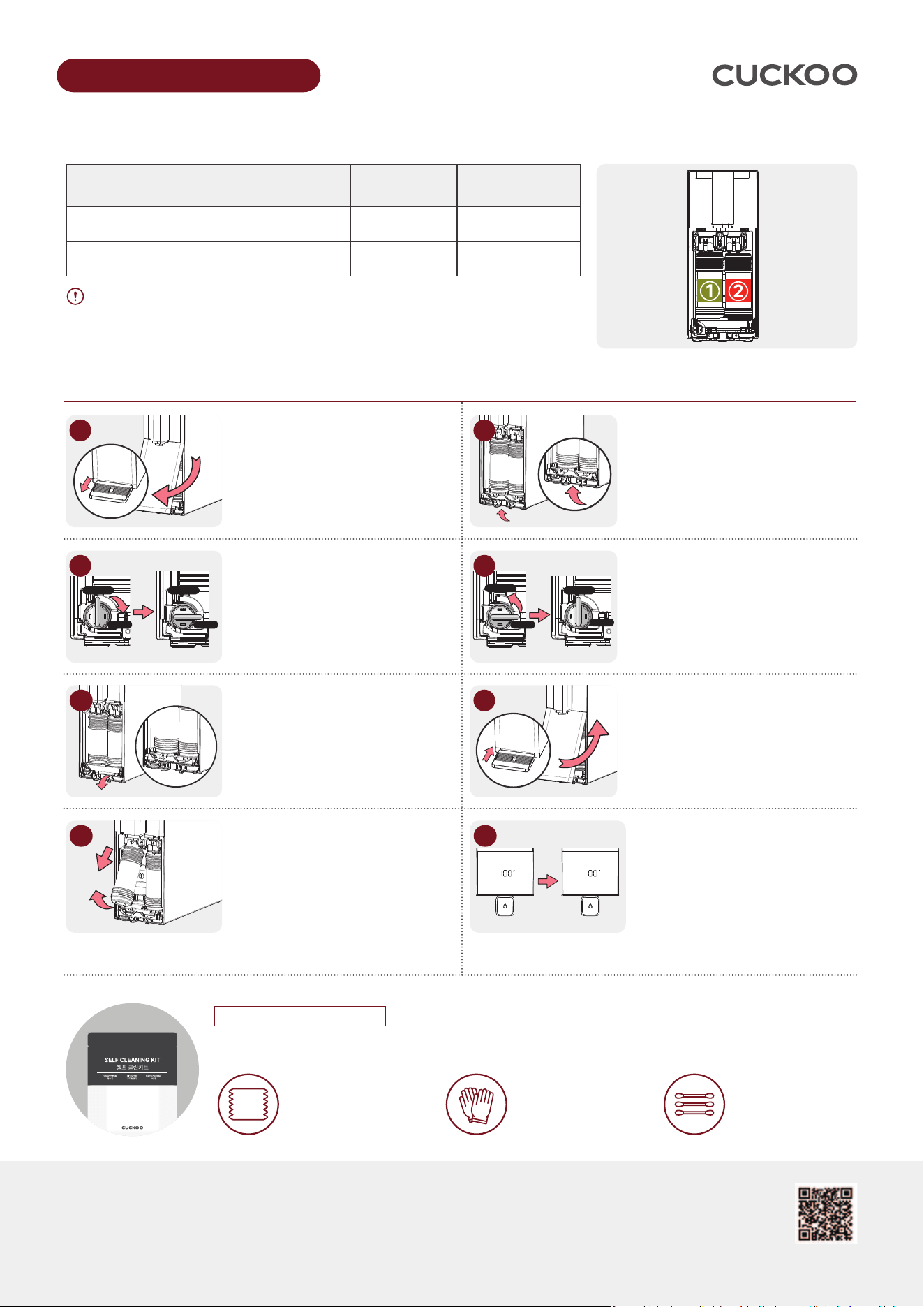
Please check the type and the number of the new filters before removing the old filters!
Remove the water tray and
detach the filter cover by
pulling the cover out towards.
② Turn the bracket locking lever
in the OPEN direction.
* Shut off the water supply to
prevent water from flowing.
Pull down the filter bracket as
shown in the image to detach it.
Then, wait until the melody stops
and the voice guidance begins.
Lift the used filter up then pull
downward to remove it.
Insert the new filter, then push the
filter case inward to secure it in place.
* Be sure to remove the cap from the
new filter before installation.
Please use the self-cleaning kit enclosed in the box to keep the product clean.
* Caution: Please use the clean swab carefully when cleaning the inside of faucet
Official Website CUCKOORENTAL.COM
Customer Service Center 888.700.0425 [Business Hours : M-F, 9AM-6PM(PST)]
P/N
: 10384-0001G0 REV.2
1. Clean wipes
Clean the interior/exterior
of the product
ONLY USE GENUINE CUCKOO FILTERS
REPLACEMENT GUIDE
2. Gloves
Use when replacing
the filter
3. Cotton Swab
Use to clean the inside
of the faucet
SCAN ME
Turn the bracket locking lever in
the CLOSE direction.
* Water will now be supplied to
the purifier.
Assemble the filter cover following
the arrow direction, and then attach
the water tray.
When the automatic filter cleaning
begins, a voice guide announces
the start and the filter stabilizes
automatically. The display shows
progress from 0% to 100%.
Once complete, it resets to 0% and
a voice message confirms cleaning
is finished.
* Estimated time: approx. 10–15 minutes
Lift the filter bracket upward as
shown in the image and press it until
you hear a clicking sound.
※ If the filter bracket is not correctly
assembled, the source water will
not be supplied.
Filter Replacement Guide
FILTER
LABEL
COLOR
REPLACEMENT
CYCLE
① METAL BLOCK 2.0 FILTER (801MB) GREEN 4 months
② NANO POSITIVE PLUS 3.0 FILTER (813NP) ORANGE 8 months
1
$-04&
01&/
$-04&
01&/
2
3
4
5
$-04&
01&/
$-04&
01&/
6
7
8
Self-Clean Kit User Guide
CP-ABNC100GWH
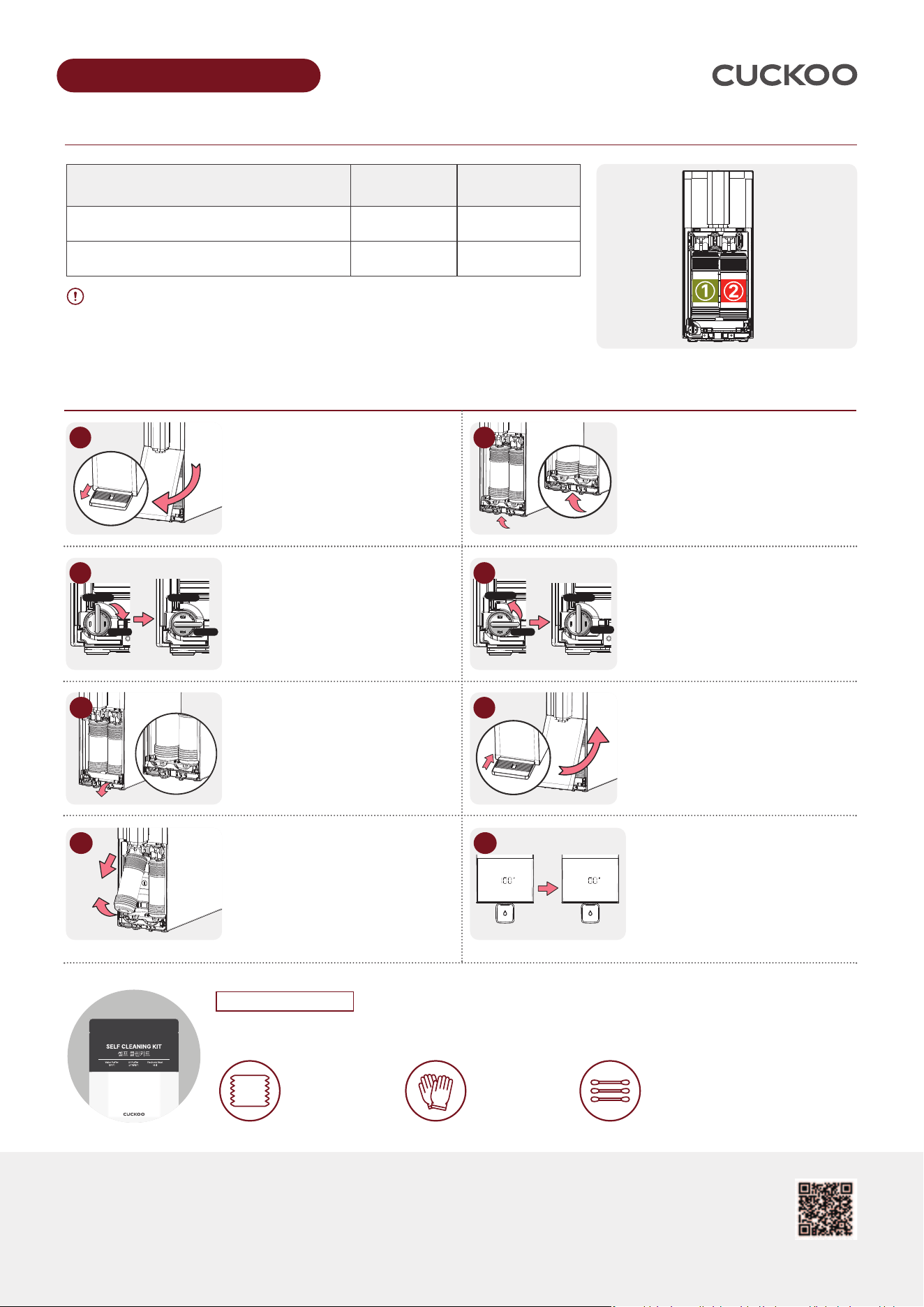
필터 구성 및 교체 주기를 먼저 확인하세요
새 필터의 종류와 번호를 먼저 확인해 주십시오. 교체 주기에 따라 배송되는 필터의 수량과
종류가 상이하므로 교체가 필요한 필터만 제거/교체 하시면 됩니다.
물받이를 분리하고,
필터 커버를 분리하여 주십시오.
제품 전면의 필터 가이드 브라켓
잠금 레버를 그림과 같이 OPEN 방향으로
돌려주십시오.
* 물공급을 차단하여 필터 교체시 물이
흐르는 것을 방지합니다.
필터 가이드 브라켓을 그림과 같이
아래 방향으로 내려 분리하고 멜로디가
끝난 후 안내멘트가 나올때 까지
기다려 주십시오.
교체할 필터를 들어 올려 아래 방향으로
당겨 제거하고, 새 필터로 끼워 넣은 후
필터 케이스를 안쪽으로 밀어 넣어 장착해
주십시오.
* 새 필터의 뚜껑을 제거하여야 합니다.
박스안에 동봉된 셀프클린 키트를 이용하여 제품을 깨끗하게 관리해 주십시오.
* 면봉 사용시 출수구 내부를 조심스럽게 닦아주세요.
홈페이지 확인 CUCKOORENTAL.COM
고객센터 전화 888.700.0425 [운영시간 : 월-금, 오전 9시 - 오후 6시(미 서부 기준)]
P/N : 10384-0001G0 REV.2
01. 클린티슈
제품 내/외부 관리
02. 비닐장갑
필터 교체 시
착용 후 관리
03. 면봉
정수기 출수구
안쪽 관리
반드시 쿠쿠 정품 필터를 사용해 주십시오.
교체 방법
QR 코드로
필터교체 영상보기
제품 전면의 필터 가이드 브라켓 잠금 레버를
그림과 같이 CLOSE 방향으로 돌려주십시오.
* 정수기에 물이 공급됩니다.
필터 커버를 화살표 방향으로 조립한 뒤,
물받이를 체결하여 주십시오.
자동 필터 세척이 시작되면 음성 안내와 함께
자동 안정화가 진행됩니다. 디스플레이에는
진행률이 0%부터 100%까지 표시되며, 완료
후 다시 0%로 초기화되고 음성으로 필터
세척 완료가 안내됩니다.
* 예상 소요 시간: 약 10-15분
필터 가이드 브라켓을 그림과 같이 윗방향으로
올려 딸깍 소리가 날때까지 눌러 주십시오.
※ 필터 브라켓 미체결시, 원수 공급이 진행되지
않습니다.
필터 교체 안내
필터 라벨 색상 교체 주기
① 메탈 블록 2.0 필터 (801MB) 연두색 4개월
② 나노 포지티브 플러스 3.0 FILTER (813NP) 주황색 8개월
1
$-04&
01&/
$-04&
01&/
2
3
4
5
$-04&
01&/
$-04&
01&/
6
7
8
셀프 클린 키트 사용 안내