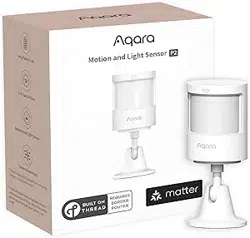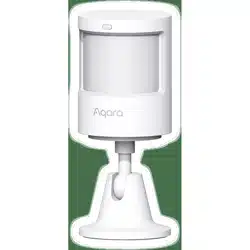
Motion Sensor
English
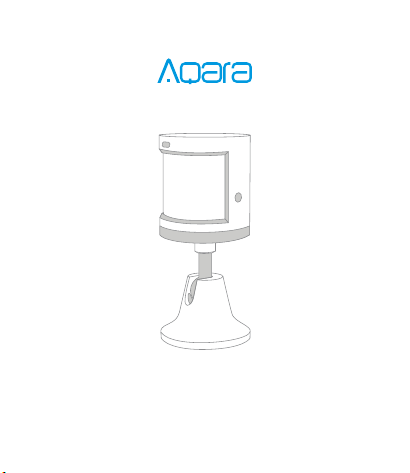
Motion Sensor Quick Start Guide
Aqara Motion Sensor detects human movement with
passive infrared. It works with other smart accessories
to set various scenes, such as, turning on or off lights
automatically when it detects activity or inactivity. It
consumes low energy. No tools are required to install it,
and you can simply place or stick it almost anywhere.
Product Introduction
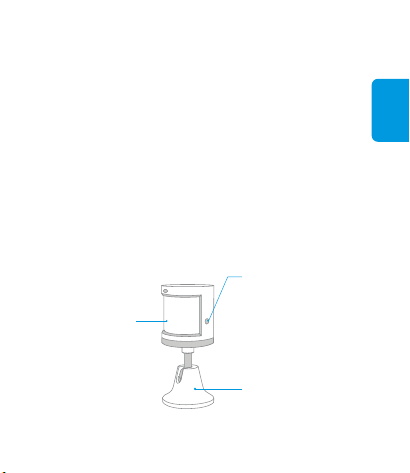
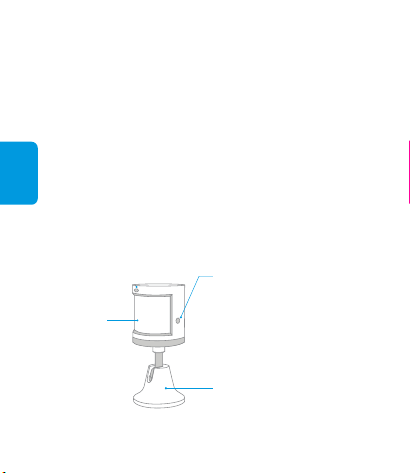
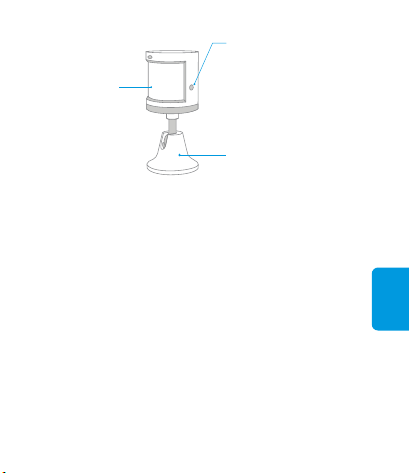
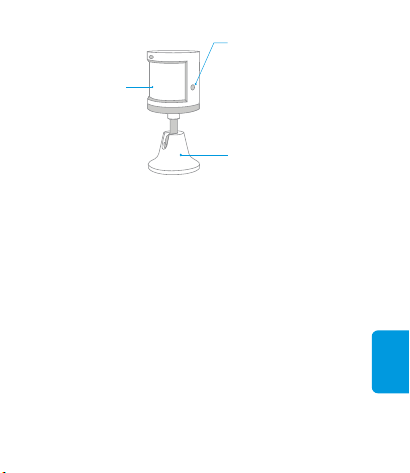
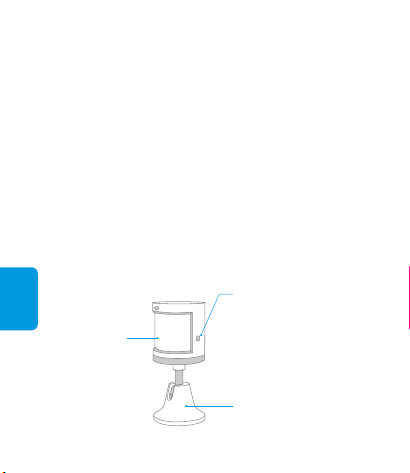
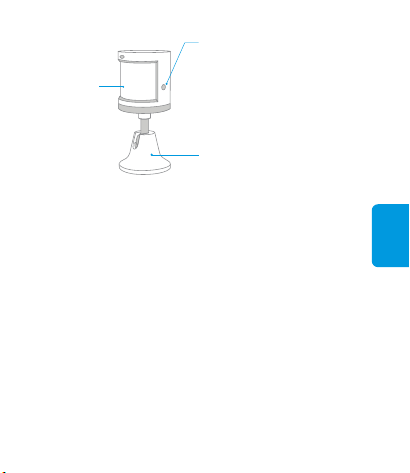
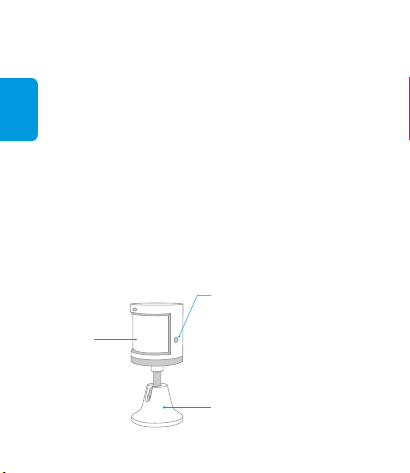
Indicator Light/
Fresnel Lens
Stand
Reset Button
Long Press for 3s: Reset
Single Press: Effective
Range Test
A hub is required.*
This product is for indoor use only.*
Aqara Hub is required to enable Aqara Motion Sensor to work with
HomeKit technology. See www.aqara.com for more details.
*
English
Quick Setup
Effective Range Test: Single press the reset button on
the accessory at your desired position. If the Hub makes
voice prompts, it indicates that the accessory can
communicate effectively with the Hub.
* Avoid metal surface to maximize signal strength.
Installation
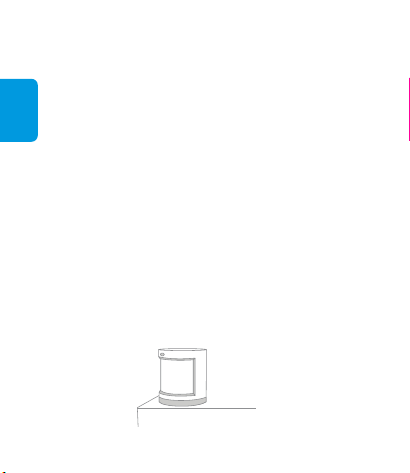
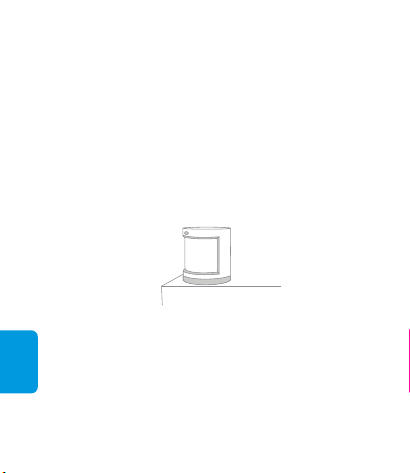
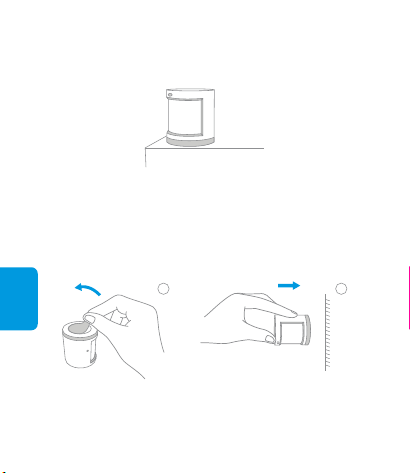
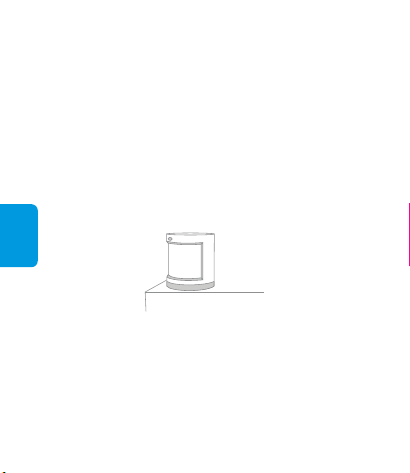
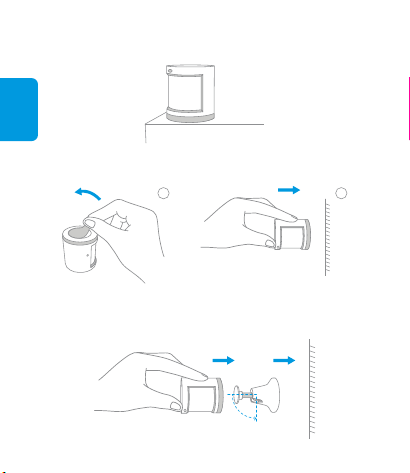
Option 1: Place the Motion Sensor where you need it.
If the connection fails, please move the accessory closer to the
Hub and try again.
*
Please add the Hub to the app according to the Hub
Quick Start Guide.
1.
Please open the app, tap “Home” and then tap “+” in
the top right corner to enter “Add Device(Accessory)”
page. Select “Motion Sensor” , and add it according
to instructions.
2.
English
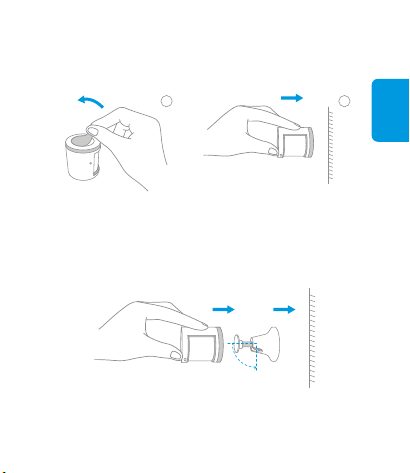
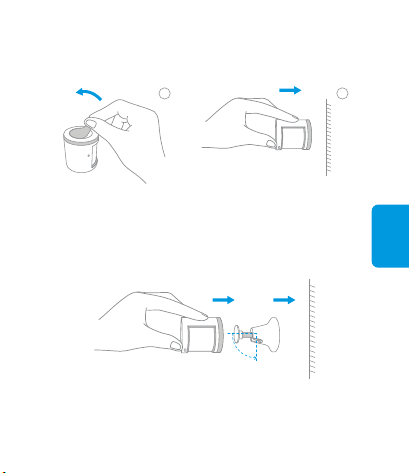
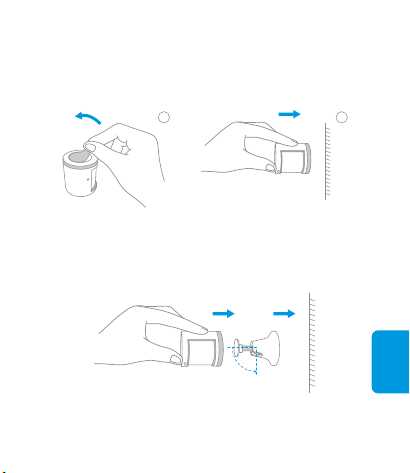
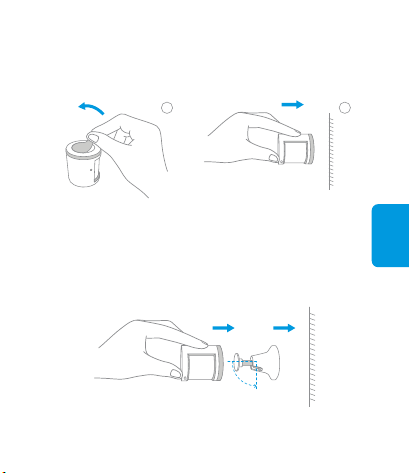
Stick it to the desired positionRemove the protective film
2
Keep the surface clean and dry.*
Remove the protective film (the round sticker is
in the box), and stick it to the desired position.
Option 2:
Stick the Motion Sensor to the stand, and stick
the stand to where you need it.
Option 3:
1
English
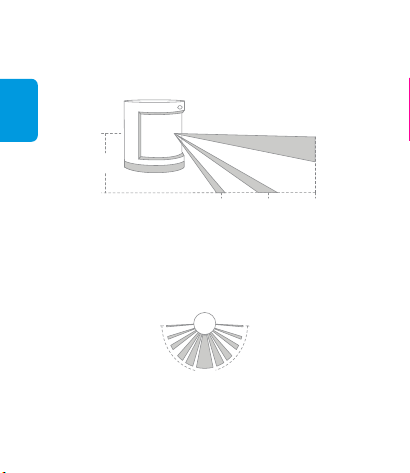
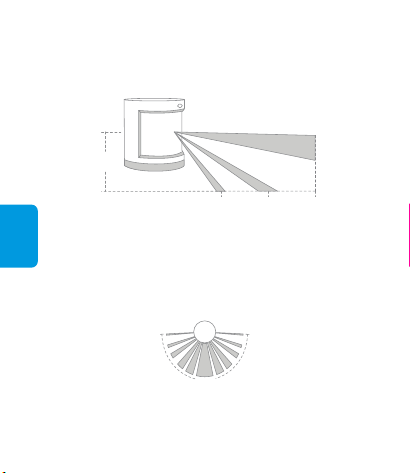
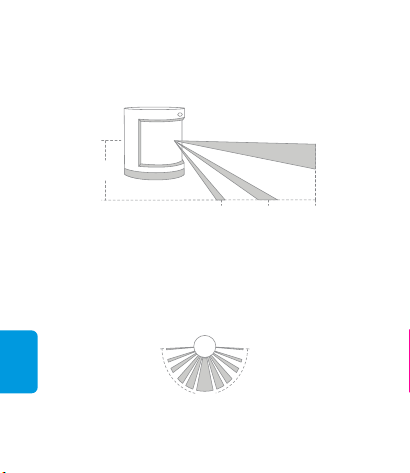
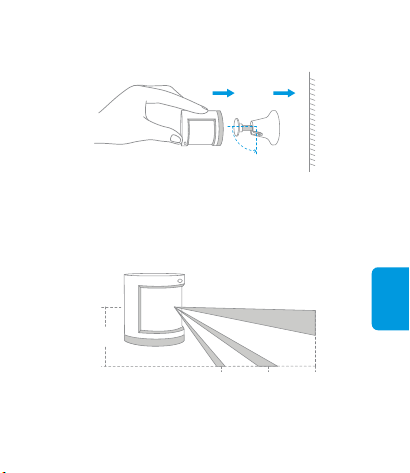
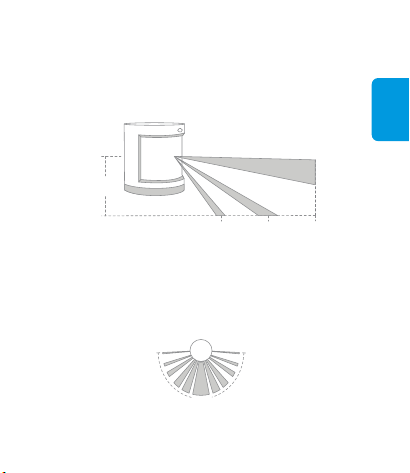
The recommended installation height is 1.2 m to 2.1 m. If the
installation height is below 1.2 m, the detection area will decrease; if
above 2.1 m, the detection area might have blind spots.
*
7m4.5m
2.1m
2m
Effective Detection Area — Side View
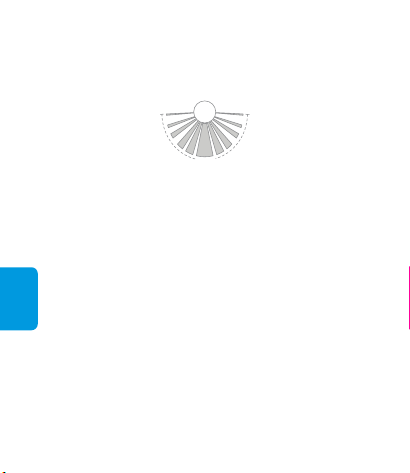
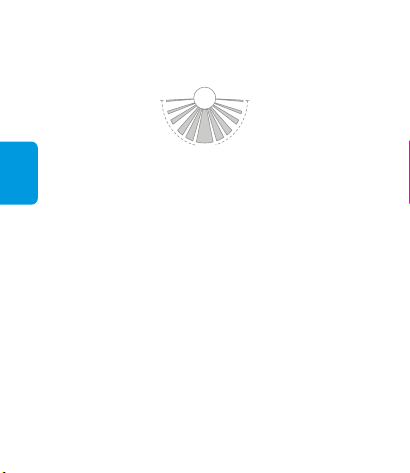
Effective Detection Area — Top View
170°
Note that the lens should be aligned with the detection area when
installing, and placed or pasted as close as possible to the edge of a
table or cabinet.
*

Online Customer Service: www.aqara.com/support
Email: [email protected]
Manufacturer: Lumi United Technology Co., Ltd.
Address: 8th Floor, JinQi Wisdom Valley, No.1 Tangling
Road, Liuxian Ave, Taoyuan Residential District, Nanshan
District, Shenzhen, China.
Model: RTCGQ11LM
Dimensions: 30 × 30 × 33 mm (1.18 × 1.18 × 1.30 in.)
Wireless Protocol: Zigbee
Battery: CR2450
Maximum Detection Distance: 7 m
Maximum Detection Angle: 170°
Operating Temperature: -10° – +45° C
Operating Humidity: 0 – 95% RH, no condensation
Specifications
English
简体中文
Aqara人体传感器是一款应用红外探测周围环境中人体移
动的传感器,可与其他智能设备搭配使用,实现丰富的自
动化应用场景,比如人来开灯、无人关灯等。本产品低功
耗,免工具安装,直接放置或粘贴在所需探测的区域。
人体传感器说明书
产品介绍
指示灯/
感应透镜
安装底座
重置键
长按3s:重置入网
按一下:通讯有效距离验证
本产品需要配合具备网关功能的设备使用;*
本产品仅限室内使用。*
若使本产品兼容于HomeKit,您需要配备Aqara网关,更多详情请登
录www.aqara.com;
*
简体中文
快速设置
有效距离验证:在预选的安装位置,按一下设备重置键,
网关发出提示音,表明设备与网关之间可以有效通讯。
安装方法
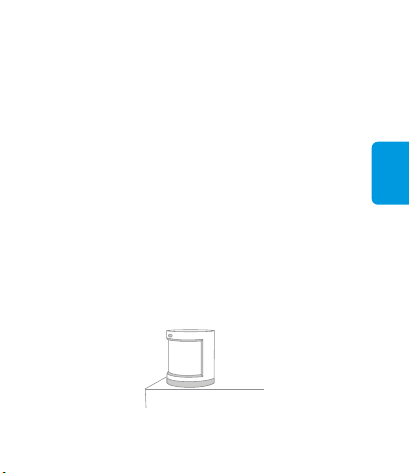
方式一:直接放置在所需探测区域。
请依照网关说明书,将网关添加到app。1、
打开app,点击首页右上角的“+”,进入“添加设备
(配件)”页面,选择人体传感器,并依照提示进行
操作。
2、
如添加失败,请将设备移近网关后重试。*
为了确保无线通信稳定,请避免安装在金属表面。*
简体中文
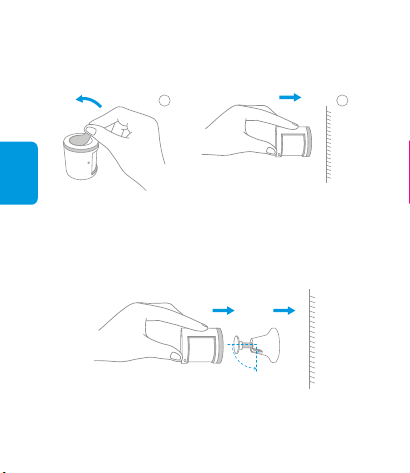
撕下胶贴保护膜(附件中配有圆形背胶贴),粘
贴在所需探测区域即可。
方式二:
将传感器粘贴在安装底座上,再将底座粘贴在所
需区域即可。
方式三:
请确保粘贴位置表面清洁干燥。*
粘贴在所需区域撕下胶贴保护膜
2
1
简体中文
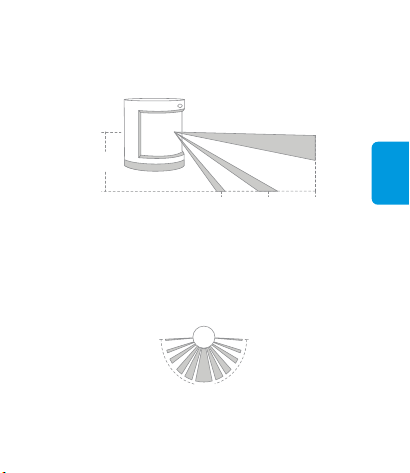
有效探测区域- 侧视图
7m4.5m
2.1m
2m
有效探测区域- 顶视图
170°
安装时请注意透镜要对准需要测试的区域,放置或粘贴时传感器尽量
靠近桌面或柜体边缘。
*
建议安装高度为1.2- 2.1米,小于1.2米探测范围变小,但不影响使用;
大于2.1米传感器底部会出现盲区,部分区域无法探测。
*
简体中文
本产品售后服务严格依据《中华人民共和国消费者权益保
护法》、《中华人民共和国产品质量法》实行售后三包服
务,服务内容如下:
产品型号:RTCGQ11LM
产品尺寸:30×30×33mm (1.18×1.18×1.30in.)
无线连接:Zigbee
电池型号:CR2450
探测距离:最大7米
探测角度:170°
执行标准:Q/QLML002- 2015
工作温度:- 10℃~+45℃
工作湿度:0~95% RH,无冷凝
基本参数
保修说明
在三包有效期内,您可以依照本规定免费享受退货、换货、
维修的服务,维修、换货、退货应当凭发票办理。
保修政策
简体中文
友情提示:因运输过程中需使用包装箱保证产品运输安全,
建议您自签收次日起至少保留包装箱30天。
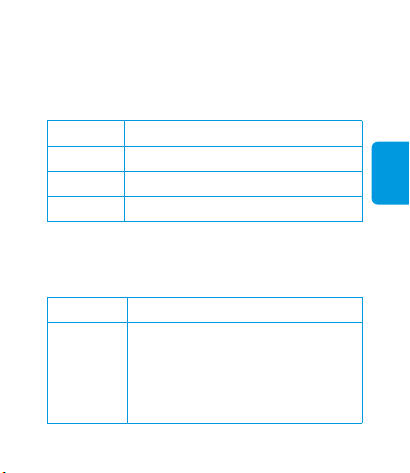
服务类型
自签收次日起7天内产品质量原因退货
服务政策
退货
换货
维修
自签收次日起15天内产品质量原因换货
自签收次日起1年内产品质量原因维修
产品性能故障表
名称 性能故障
1、因结构或者材料因素造成表面裂损
2、指示灯失效
3、重置键失效
4、Zigbee连接失效
5、人体感应失效
人体传感器
签收次日起7天内无理由退货(电商购买渠道),由用
户承担物流费用;
1、
本产品出现《产品性能故障表》所列性能故障的情况,
经售后服务中心检测确定后,可以免费享受如下服务。
2、
服务热线:400- 990- 7930(工作日 10:00~18:00)
服务网址:www.aqara.com/support
服务邮箱:[email protected]
制造商:深圳绿米联创科技有限公司
地址:深圳市南山区桃源街道留仙大道塘岭路1号金骐智谷
大厦8楼
非保修条例
简体中文
未经授权的维修、误用、碰撞、疏忽、滥用、进液、事
故、改动、不正确的使用非本产品配件,或撕毁、涂改
标贴、防伪标记;
1、
因人为原因导致本产品及其配件产生《产品性能故障
表》所列性能故障。
5、
已超过三包有效期;2、
因不可抗力造成的损坏;3、
不符合《产品性能故障表》所列性能故障的情况;4、
本產品需要配合具備閘道器功能的設備使用;
*
本產品僅限室內使用。
*
欲使本產品相容於HomeKit,需要配備Aqara閘道器,如需更多詳情,
請登入www.aqara.com;
*
繁體中文
人體感測器快速入門指南
產品介紹
Aqara人體感測器是一款應用紅外探測周圍環境中人體移
動的感測器,可與其他智慧設備搭配使用,實現豐富的自
動化應用場景,比如人來開燈、無人關燈等。本產品功耗
低,免工具安裝,直接放置或粘貼在所需探測的區域。
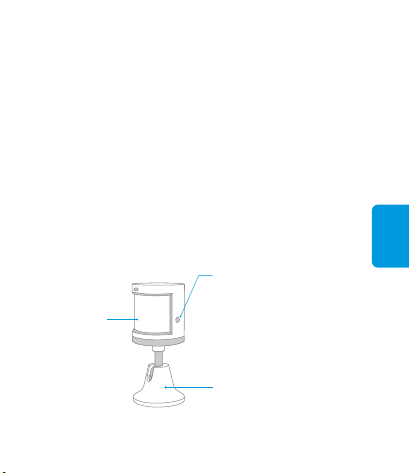
指示燈/
感測透鏡
安裝底座
重設鍵
長按3s:重置入網
按一下:通訊有效距離驗證
如加入失敗,請將設備移近閘道器後重試。
*
為了確保無線通訊穩定,須避免安裝在金屬表面。
*
繁體中文
快速設定
有效距離驗證:在預選的安裝位置,按一下設備重設鍵,閘
道器發出提示音,表明設備與閘道器之間可以有效通訊。
安裝方法
方式一:直接放置在所需探測區域。
請依照閘道器快速入門指南,將閘道器加入app。1、
開啟app,點選首頁右上角的「+」,進入「加入設備(配
件)」頁面,選擇人體感測器,並依照提示進行操作。
2、
繁體中文
撕下膠貼保護膜(附件中配有圓形背膠貼),粘
貼在所需探測區域即可。
方式二:
粘貼在所需區域撕下膠貼保護膜
確保粘貼位置表面清潔乾燥。
*
將感測器粘貼在安裝底座上,再將底座粘貼在所
需區域即可。
方式三:
2
1
建議安裝高度為1.2-2.1公尺,小於1.2公尺探測範圍變小,但不影響
使用;大於2.1公尺感測器底部會出現盲區,部分區域無法探測。
*
繁體中文
有效探測區域-側視圖
7m4.5m
2.1m
2m
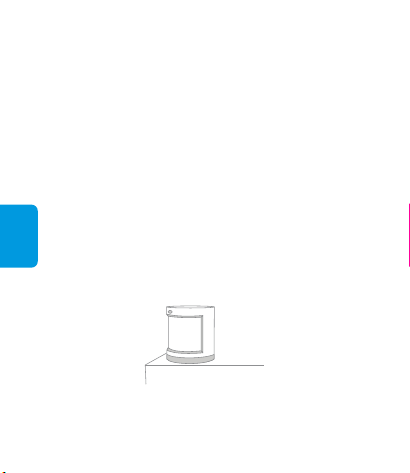
安裝時,須注意透鏡要對準需要測試的區域,放置或粘貼時感測器儘
量靠近桌面或櫃體邊緣。
*
有效探測區域-頂視圖
170°

繁體中文
產品型號:RTCGQ11LM
產品尺寸:30×30×33公釐(1.18×1.18×1.30英吋)
無線連接:Zigbee
電池型號:CR2450
探測距離:最大7公尺
探測角度:170°
工作溫度:-10℃~+45℃
工作濕度:0~95% RH,無冷凝
網站支援:www.aqara.com/support
售後電子信箱:[email protected]
製造商:深圳綠米聯創科技有限公司
地址:廣東省深圳市南山區留仙大道塘嶺路1號金騏智谷
大廈8樓
基本參數
Deutsch
Bewegungssensor –
Schnellstartanleitung
Produktübersicht
Der Aqara-Bewegungssensor erkennt menschliche
Bewegungen durch passives Infrarot. In Zusammenarbeit
mit anderen intelligenten Zubehörgeräten kann er
verschiedene Funktionen erfüllen, wie zum Beispiel das
Licht ein- oder auszuschalten, wenn er Aktivität bzw.
Inaktivität erkennt. Er verbraucht wenig Energie. Für seine
Montage sind keine Werkzeuge erforderlich, und Sie
können ihn fast überall anbringen oder ankleben.
Ein hub ist erforderlich.*
Dieses Gerät ist nur für Verwendung in Innenräumen bestimmt. *
Damit dieses Gerät mit der HomeKit-Technologie zusammenarbeiten
kann, ist ein Aqara-Hub erforderlich. Weitere Einzelheiten siehe
www.aqara.com.
*
Deutsch
Schnelleinrichtung
Anzeigelampe/
Fresnel-Linse
Ständer
Rücksetztaste
3s gedrückt halten: erneut
verbinden
Einmal drücken: Test der
wirksamen Reichweite
Bitte fügen Sie den Hub entsprechend der Hub-
Schnellstartanleitung zur App hinzu.
1.
Bitte öffnen Sie die App, tippen Sie auf „Home“ (Haus)
und dann auf „+“ in der oberen rechten Ecke, um die
Seite „Add Device (Accessory)“ (Gerät hinzufügen
(Zubehör)) aufzurufen. Tippen Sie auf „Motion
Sensor“ (Bewegungssensor) und fügen Sie ihn gemäß
der Anleitung hinzu.
2.
* Wenn die Verbindung fehlschlägt, geben Sie bitte das Zubehör
näher an den Hub und versuchen Sie es erneut.
Deutsch
Test der wirksamen Reichweite: Drücken Sie einmal die
Rücksetztaste des Zubehörgeräts an dessen
gewünschtem Standort. Wenn der Hub Töne von sich gibt,
bedeutet dies, dass das Zubehör mit dem Hub korrekt
kommunizieren kann.
Montage
* Vermeiden Sie die Nähe von Metalloberflächen, um die
Signalstärke zu maximieren.
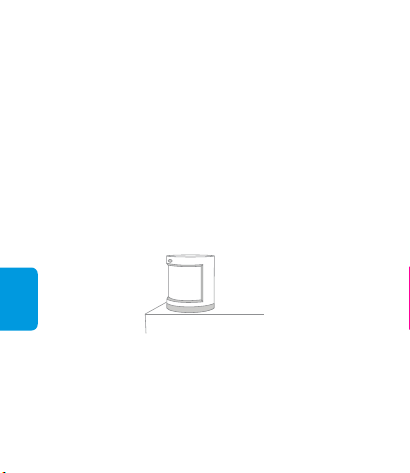
Platzieren Sie den Bewegungssensor dorthin,
wo Sie ihn benötigen.
Option 1:
Deutsch
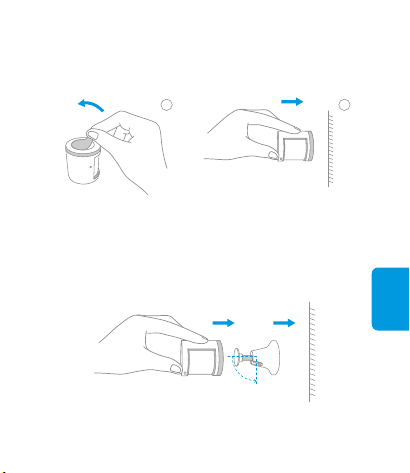
Entfernen Sie die Schutzfolie (der runde Sticker
ist in der Box) und kleben Sie ihn direkt an die
gewünschte Stelle.
Option 2:
Kleben Sie den Bewegungssensor
an die gewünschte StelleEntfernen Sie die Schutzfolie
* Halten Sie die Oberflächen sauber und trocken.
Kleben Sie den Bewegungssensor auf den
Ständer und kleben Sie dann den Ständer an die
erforderliche Stelle.
Option 3:
2
1
Deutsch
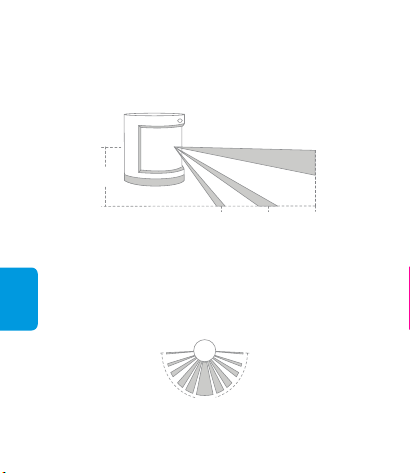
Wirksamer Erfassungsbereich – Seitenansicht
Wirksamer Erfassungsbereich – Draufsicht
7m4.5m
2.1m
2m
170°
* Beachten Sie, dass die Linse bei der Montage am Erfassungsbereich
ausgerichtet und so nahe wie möglich an den Rand eines Tisches
oder Schranks platziert oder geklebt werden sollte.
* Die empfohlene Montagehöhe beträgt 1,2 m bis 2,1 m. Wenn die
Montagehöhe unter 1,2 m liegt, verringert sich der Erfassungsbereich;
wenn sie über 2,1 m beträgt, kann es zu toten Winkeln im
Erfassungsbereich kommen.

Deutsch
Online-Kundendienst: www.aqara.com/support
E-Mail: [email protected]
Hersteller: Lumi United Technology Co., Ltd.
Adresse: 8th Floor, JinQi Wisdom Valley, No.1 Tangling
Road, Liuxian Ave, Taoyuan Residential District, Nanshan
District, Shenzhen, China.
Modell: RTCGQ11LM
Abmessungen: 30 × 30 × 33 mm (1,18 × 1,18 × 1,30 Zoll)
Drahtloses Protokoll: Zigbee
Batterie: CR2450
Maximale Erfassungsreichweite: 7 m
Maximaler Erfassungswinkel: 170°
Betriebstemperatur: –10 °C bis +45 °C
Betriebsfeuchtigkeit: 0 – 95% RH, keine Kondensation
Spezifikationen
Français
Guide de démarrage rapide
du détecteur de mouvement
Présentation du produit
Le détecteur de mouvement Aqara détecte les
mouvements de personnes par la méthode des
infrarouges passifs. Il fonctionne de concert avec d'autres
appareils intelligents pour créer différentes modifications
de l'environnement, par exemple allumer ou éteindre des
lampes automatiquement lorsqu'il détecte une activité ou
l'absence d'activité. Il consomme très peu d'énergie. Son
installation ne demande aucun outil, et il suffit de le placer
ou de le coller à peu près n'importe où.
Un concentrateur Aqara Hub est nécessaire pour utiliser ce produit
avec la technologie HomeKit. Pour plus de détails, consultez le site
www.aqara.com.
Un concentrateur est nécessaire. *
Cet appareil ne doit être utilisé qu'à l'intérieur. *
*
Français
Configuration rapide
Voyant indicateur/
Lentille de Fresnel
Pied
Bouton de réinitialisation
Appui prolongé (3 secondes) :
reconnexion
Un seul appui bref : test de
portée efficace
En cas d'échec de la connexion, rapprochez l'accessoire du
concentrateur et réessayez.
*
Ajoutez le concentrateur à l'application conformément
au guide de démarrage rapide du concentrateur.
1.
Ouvrez l'application, touchez «Home» (Maison) puis
touchez « + » au coin supérieur droit pour entrer à la
page «Add Device (Accessory)» (Ajouter un
périphérique (accessoire)). Sélectionnez « Motion
Sensor» (Détecteur de mouvement) et ajoutez-le
comme l'indiquent les instructions.
2.
DeutschFrançais
Test de portée efficace : Appuyez une fois sur le bouton de
réinitialisation de l'accessoire une fois placé à l'endroit
souhaité. Si le concentrateur émet des invites vocales,
c'est que l'accessoire peut effectivement communiquer
avec le concentrateur.
* Évitez les surfaces métalliques qui peuvent affaiblir le signal.
Installation
Option 1 : Placez le détecteur de mouvement là où il faut.
Français
Option 2 : Enlevez le film de protection (l'autocollant rond
se trouve dans la boîte), et collez-le directement
à l'endroit voulu.
Collez-le directement à l'endroit vouluEnlevez le film de protection
Maintenez la surface propre et sèche.*
Option 3 : Collez le détecteur de mouvement sur son pied,
et collez le pied là où il vous le faut.
2
1
Français
Zone de détection efficace — Vue latérale
7m4.5m
2.1m
2m
Zone de détection efficace — Vue zénithale
170°
Notez qu'il faut orienter l'objectif vers la zone de détection lors de
l'installation, et qu'il doit être placé ou collé le plus près possible du
bord d'une table ou armoire.
*
La hauteur d'installation recommandée est de 1,20 à 2,10 m. Plus bas
que 1,20 m, la zone de détection sera trop petite ; plus haut que 2,10
m, la détection pourrait présenter des points aveugles.
*

Français
Modèle : RTCGQ11LM
Dimensions : 30 × 30 × 33 mm (1,18 × 1,18 × 1,30 in)
Protocole sans fil : Zigbee
Pile : CR2450
Distance maximale de détection : 7 m
Angle maximal de détection : 170°
Température de service : de -10 à +45 °C
Humidité de service : de 0 à 95% HR, non condensante
Service clientèle en ligne : www.aqara.com/support
Courriel : [email protected]
Fabricant : Lumi United Technology Co., Ltd.
Adresse : 8th Floor, JinQi Wisdom Valley, No.1 Tangling
Road, Liuxian Ave, Taoyuan Residential District, Nanshan
District, Shenzhen, China.
Caractéristiques
Español
Guía rápida del sensor de movimiento
Presentación del producto
El sensor de movimiento Aqara detecta movimiento
humano mediante infrarrojos pasivos. Funciona con otros
accesorios inteligentes para configurar distintos escenarios,
como encender y apagar las luces automáticamente
cuando detecta actividad o inactividad. Consume poca
energía. No se requieren herramientas para instalarlo:
simplemente colóquelo o adhiéralo dondequiera.
Se requiere el Hub Aqara para que este producto funcione con
tecnología HomeKit. Consulte www.aqara.com para obtener más
información.
Luz indicadora/
Lente de Fresnel
Soporte
Botón de restablecimiento
Pulsación larga durante 3
seg.: Reconectar
Una pulsación: Prueba de
alcance efectivo
Se requiere un hub.*
Este producto es solamente para uso en interiores. *
*

Español
Configuración rápida
Prueba de alcance efectivo: pulse el botón de restablec-
imiento en el accesorio en la posición deseada. Si el Hub
emite indicaciones de voz, significa que el accesorio
puede comunicarse eficazmente con el Hub.
Instalación
En caso de error de conexión, acerque más el accesorio al Hub y
vuelva a intentarlo.
*
Evite las superficies metálicas para maximizar la intensidad de la
señal.
*
Siga las instrucciones en la Guía rápida del Hub para
añadir el Hub a la aplicación.
1.
Abra la aplicación, pulse “Home” (Casa) y luego “+” en
la parte superior derecha para acceder a la página “Add
Device (Accessory)” (Añadir dispositivo [Accesorio]).
Seleccione “Motion Sensor” (Sensor de movimiento) y
siga las instrucciones para añadirlo.
2.
Español
Retire el film protector Adhiéralo en la posición deseada
Opción 1 : Coloque el sensor de movimiento donde sea
necesario.
Opción 2 : Retire el film protector (el adhesivo redondo
está en la caja) y adhiéralo directamente en la
posición deseada.
2
1
Español
Área de detección efectiva — Vista lateral
7m4.5m
2.1m
2m
Mantenga la superficie limpia y seca.*
La altura de instalación recomendada es de 1,2 a 2,1 m. Si la altura de
instalación es inferior a los 1,2 m, se reducirá el área de detección; si
es superior a los 2,1 m, el área de detección puede presentar puntos
ciegos.
*
Opción 3 : Adhiera el sensor de movimiento a la base y
adhiera el soporte al lugar preciso.
Español
Modelo: RTCGQ11LM
Dimensiones: 30 × 30 × 33 mm (1,18 × 1,18 × 1,30 pulgadas)
Protocolo inalámbrico: Zigbee
Batería: CR2450
Distancia máxima de detección: 7 m
Ángulo máximo de detección: 170°
Temperatura de funcionamiento: -10° – +45°C
Humedad de funcionamiento: 0 – 95% HR, sin condensación
Especificaciones
Área de detección efectiva — Vista superior
170°
Tenga en cuenta que es preciso alinear la lente con el área de
detección durante la instalación, y colocarla o adherirla lo más cerca
posible del borde de una mesa o armario.
*

Español
Servicio de Atención al Cliente en línea: www.aqara.com/
support
Correo electrónico: [email protected]
Fabricante: Lumi United Technology Co., Ltd.
Dirección: 8th Floor, JinQi Wisdom Valley, No.1 Tangling
Road, Liuxian Ave, Taoyuan Residential District, Nanshan
District, Shenzhen, China.
русский
Для работы этого продукта с технологией HomeKit требуется хаб
Aqara. Более подробная информация доступна на веб-сайте
www.aqara.com.
Описание продукта
Датчик движения Aqara регистрирует движение с
помощью пассивного ИК-датчика. Он работает с
другими интеллектуальными устройствами для
настройки различных сценариев, таких как
автоматическое включение или выключение
освещения при регистрации движения или его
отсутствия. Он потребляет мало энергии. Для монтажа
не требуются инструменты, и его можно просто
разместить или закрепить практически везде.
Краткое руководство по
эксплуатации датчика движения
Требуется хаб.*
*
Данный продукт предназначен для эксплуатации только в
помещении.
*
русский
Быстрая настройка
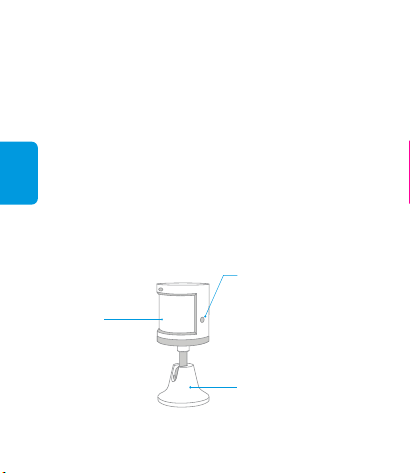
Световой
индикатор/
Объектив
Френеля
Подставка
Кнопка сброса
Длительное нажатие в тчение
3 с: Переподключение
Одинарное нажатие: Проверка
эффективной дальности действия
Добавьте хаб к приложению согласно краткому
руководству по эксплуатации хаба.
1.
Откройте приложение, коснитесь «Home» (дом),
затем коснитесь «+» в верхнем правом углу для
перехода на страницу «Add Device (Accessory)»
(Добавить устройство (принадлежность)).
Выберите «Motion Sensor » (Датчик движения), и
добавьте его согласно инструкции.
2.
* В случае сбоя соединения принадлежность следует
переместить ближе к хабу и повторить попытку.
русский
Монтаж
Проверка эффективной дальности действия:
Однократно нажмите кнопку сброса на
принадлежности в требуемом месте. Если хаб подает
голосовые инструкции, значит принадлежность
эффективно обменивается данными с хабами.
Для максимальной эффективности передачи сигналов
избегайте металлических поверхностей вблизи устройств.
*
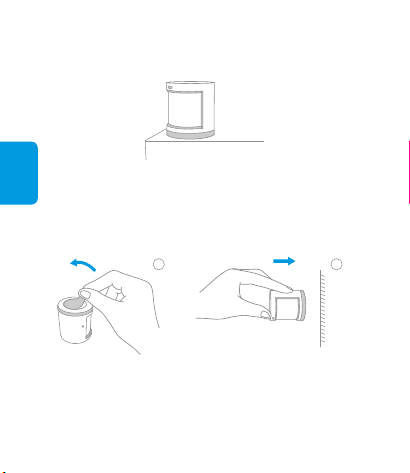
Разместите датчик движения в требуемом
месте.
Вариант 1:
русский
* Поверхность должна быть чистой и сухой.
Приклейте ее непосредственно
в требуемом местеСнимите защитную пленку
Снимите защитную пленку (круглая
наклейка в коробке), и приклейте ее
непосредственно в требуемом месте.
Вариант 2:
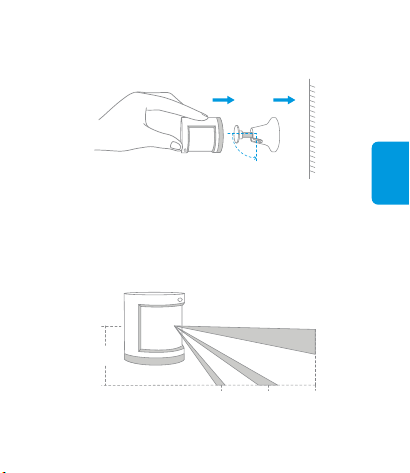
Закрепите датчик движения на
подставке, а подставку закрепите в
требуемом месте.
Вариант 3:
2
1
русский
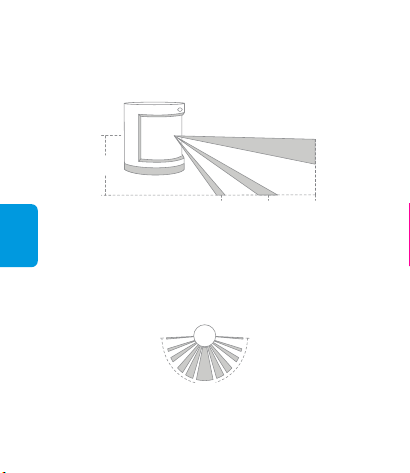
* Рекомендуемая высота монтажа: 1,2–2,1 м. Если высота
монтажа ниже 1,2 м, область обнаружения уменьшится. Если
выше 2,1 м, то область обнаружения может иметь слепые пятна.
* Следует помнить, что линза при монтаже должна быть
совмещена с областью обнаружения, и размещена или
вставлена как можно ближе к краю стола или шкафа.
Эффективное расстояние обнаружения — вид сбоку
Эффективное расстояние обнаружения — вид сверху
7m4.5m
2.1m
2m
170°

русский
Онлайн-служба поддержки: www.aqara.com/support
Email: [email protected]
Изготовитель: Lumi United Technology Co., Ltd.
Адрес: 8th Floor, JinQi Wisdom Valley, No.1 Tangling
Road, Liuxian Ave, Taoyuan Residential District, Nanshan
District, Shenzhen, China.
Модель: RTCGQ11LM
Габариты: 30 × 30 × 33 мм (1,18 × 1,18 × 1,30 дюймов)
Протокол беспроводной связи: Zigbee
Батарея: CR2450
Максимальная дальность обнаружения: 7 м
Максимальный угол обнаружения: 170°
Температура эксплуатация: -10° – +45°C
Рабочая влажность: 0 – 95% RH, без конденсации
Спецификации:

2
1
有効な検出範囲 — 側面
7m4.5m
2.1m
2m
有効な検出範囲上面図
170°

모션 센서 퀵 설치 가이드
제품 소개
Aqara 모션 센서는 수동형 적외선으로 사람의 움직임을
감지합니다. 이 제품은 활동이나 비활동을 감지할 때
자동으로 조명을 켜거나 끄는 것과 같은 다양한 현장을
설정하는 다른 스마트 액세서리와 함께 작동합니다. 이
제품의 에너지 소비는 낮습니다. 설치 시에 도구를 사용할
필요가 전혀 없으며 거의 모든 곳에 이 제품을 놓거나
붙이기만 하면 됩니다.
한국어
지시등/
프레넬 렌즈
스탠드
리셋 버튼
3초간 길게 누름:재연결
한 번만 누름:유효 범위 테스트
허브 필요.*
이 제품은 실내용입니다. *
Aqara 허브는 이 제품을 HomeKit 기술로 작동할 수 있게 하는데
필요합니다. 세부사항에 대해서는 www.aqara.com 사이트를 참조해 주
십시오.
*

빠른 설정
유효 범위 테스트: 원하는 위치에서 액세서리의 리셋 버튼을
한 차례 누릅니다. 허브에 음성 프롬프트가 나타나는 경우,
액세서리가 허브와 유효하게 통신할 수 있다는 것을
나타냅니다.
설치
한국어
연결이 되지 않는 경우, 액세서리를 허브에 더 가까이 이동시켜서
다시 시도해 주십시오.
*
신호 강도를 극대화하려면 금속 표면에 놓지 마십시오.*
허브 퀵 설치 가이드에 따라 허브를 앱에 추가해 주십시오.1.
앱을 열고 “Home”(홈)을 탭한 다음에 오른쪽 상단 구석의
“+”를 탭하여 “Add Device (Accessory)”(장치
추가(액세서리)) 페이지로 들어갑니다. “Motion
Sensor”(모션 센서)를 선택하고, 지시에 따라 추가합니다.
2.
한국어
옵션 1: 모션 센서를 필요한 곳에 놓습니다.
보호 필름을 제거하고(둥근 스티커가 상자 안에
있습니다), 원하는 위치에 직접 붙입니다.
옵션 2:
모션 센서를 스탠드에 붙이고 이 스탠드를 필요한
곳에 붙입니다.
옵션 3:
원하는 위치에 직접 붙입니다보호 필름을 제거합니다
2
1
유효 감지 영역 - 측면도
유효 감지 영역 – 평면도
한국어
7m4.5m
2.1m
2m
170°
표면을 깨끗하고 건조된 상태로 유지합니다.*
권장되는 설치 높이는 1.2m ~ 2.1m입니다. 설치 높이가 1.2m
이하이면, 감지 영역이 줄어들고 2.1m 이상이면 감지 영역에
블라인드 스팟이 있을 수 있습니다.
*
설치할 때 렌즈를 감지 영역에 맞춰 조정하고 테이블이나 캐비닛의
모서리 부분에 최대한 가깝게 놓거나 붙여야 한다는 점에 주의합니다.
*
사이트: www.aqara.com/support
A/S 메일: [email protected]
제조업체: 심천루미온과학기술유한공사
주소: 광동성 심천시 남산구 류선대도 당령로 1번지
금기지곡빌딩 8 층
모델: RTCGQ11LM
치수: 30 × 30 × 33mm(1.18 × 1.18 × 1.30인치)
무선 프로토콜: Zigbee
배터리: CR2450
최대 감지 거리: 7m
최대 감지 각도: 170°
작동 온도: -10°~+45°C
작동 습도: 0 ~ 95% RH, 응축 없음
사양
한국어

FCC ID: 2AKIT-RTCGQ11LM
Federal Communications Commission (FCC) compliance statement
1. This device complies with Part 15 of the FCC Rules. Operation is
subject to the following two conditions:
(1) This device may not cause harmful interference.
(2) This device must accept any interference received, including
interference that may cause undesired operation.
2. Changes or modifications not expressly approved by the party
responsible for compliance could void the user's authority to operate the
equipment.
NOTE: This equipment has been tested and found to comply with the
limits for a Class B digital device, pursuant to Part 15 of the FCC Rules.
These limits are designed to provide reasonable protection against
harmful interference in a residential installation.
This equipment generates uses and can radiate radio frequency energy
and, if not installed and used in accordance with the instructions, may
cause harmful interference to radio communications.
However, there is no guarantee that interference will not occur in a
particular installation. If this equipment does cause harmful interference
to radio or television reception, which can be determined by turning the
equipment off and on, the user is encouraged to try to correct the
interference by one or more of the following measures:
-Reorient or relocate the receiving antenna.
-Increase the separation between the equipment and receiver.
-Connect the equipment into an outlet on a circuit different from that to
which the receiver is connected.
-Consult the dealer or an experienced radio/TV technician for help.
FCC Radiation Exposure Statement

This equipment complies with FCC radiation exposure limits set forth for
an uncontrolled environment. This equipment should be installed and
operated with minimum distance 20cm between the radiator & your
body.
This device complies with Industry Canada license‐exempt RSS
standard(s). Operation is subject to the following two conditions: (1) This
device may not cause interference, and (2) This device must accept any
interference, including interference that may cause undesired operation
of the device. This device complies with RSS‐247 of Industry Canada.
Operation is subject to the condition that this device does not cause
harmful interference. This Class B digital apparatus complies with
Canadian ICES‐003 (Cet appareil numérique de la Classe B conforme
à la norme NMB‐003 du Canada).
This equipment complies with IC radiation exposure limits set forth for
an uncontrolled environment. This equipment should be installed and
operated with minimum distance of 20 cm between the radiator and your
body. This transmitter must not be co-located or operating in conjunction
with any other antenna or transmitter.
Le présent appareil est conforme aux CNR d'Industrie Canada
applicables aux appareils radio exempts de licence. L'exploitation est
autorisée aux deux conditions suivantes: (1) l'appareil ne doit pas
produire de brouillage, et (2) l'utilisateur de l'appareil doit accepter tout
brouillage radioélectrique subi, même si le brouillage est susceptible
d'en compromettre le fonctionnement.
IC: 22635-RTCGQ11LM
IC NOTICE TO CANADIAN USERS
Cet équipement est conforme aux limites IC d'exposition aux radiations
définies pour un environnement non contrôlé. Cet équipement doit être
installé et utilisé avec une distance minimale de 20 cm entre le radiateur
et votre corps. Cet émetteur ne doit pas être situé ou opérant en
conjonction avec une autre antenne ou émetteur.
Complies with the European Union’s Restriction of
Hazardous Substances Directive which protects
the environment by restricting specific hazardous
materials and products.
RECYCLING. This product bears the selective sorting
symbol for Waste electrical and electronic equipment
(WEEE). This means that this product must be handled
pursuant to European directive 2012/19/EU in order to be
recycled or dismantled to minimize its impact on the
environment.
CAUTION: RISK OF EXPLOSION IF BATTERY IS
REPLACED BY AN INCORRECT TYPE.
DISPOSE OF USED BATTERIES ACCORDING TO
THE INSTRUCTIONS.
Hereby, LUMI UNITED TECHNOLOGY CO., LTD
declares that the Radio Equipment type is in
compliance with RED 2014/53/EU. The full text of the
EU Declaration of Conformity is available at the
following internet address: www.lumiunited.com/DoC.
This product can be used across EU member states.
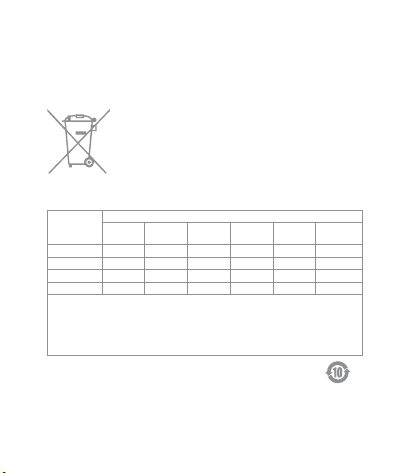
Symbol for “ENVIRONMENT PROTECTION – Waste
electrical products should not be disposed of with
household waste. Please recycle where facilities exist.
Check with your local Authority or retailer for recycling
advice”.
Symbol on the product or on its packaging indicates that
this product may not be treated as household waste.
Instead it shall be handed over to the applicable
collection point for the recycling of electrical and
electronic equipment.
产品中有害物质的名称及含量
有害物质
部件名称
铅
(Pb)
汞
(Hg)
玻璃
电子元器件
电池
○
×
○
○
○
○
○
镉
(Cd)
○
○
○
○
六价铬
(Cr(VI) )
○
○
○
○
多溴联苯
(PBB)
○
○
○
○
多溴二苯醚
(PBDE)
○
○
○
○
○
本表格依据SJ/T 11364的规定编制。
○: 表示该有害物质在该部件所有均质材料中的含量均在GB/T 26572规定的限量要求以
下。
X: 表示该有害物质至少在该部件的某一均质材料中的含量超出GB/ T 26572规定的限量
要求。
塑胶件

使用注意事项
1、本产品非玩具,请让儿童远离本产品。
2、本产品仅限室内使用,请勿在潮湿环境或室外使用。
3、注意防潮,请勿将水或其他液体泼洒到本产品上。
4、请勿将本产品置放于靠近热源的地方。除非有正常的通风,否则不
可放在密闭位置中。
5、请不要尝试自行维修本产品,应由授权的专业人士进行此项工作。
6、本产品仅适用于提升家居生活娱乐性、便捷度,以及用于设备状态
提醒,不应作为家居、楼宇、仓库或其他任何场所的安防设备使用。如
有用户违反产品使用说明及本注意事项,将产品用于安防领域,制造商
对因此造成的任何风险和财产损失不承担责任。

1、本產品非玩具,請讓兒童遠離本產品。
2、本產品僅限室內使用,請勿在潮濕環境或室外使用。
3、注意防潮,請勿將水或其他液體潑灑在本產品上。
4、請勿將本產品置放于靠近熱源的地方。除非有正常的通風,否則不
可放在密閉位置中。
5、請不要嘗試自行維修本產品,應由授權的專業人士進行此項工作。
6、本產品僅適用於提升家居生活娛樂性、便捷度,以及用於設備狀態
提醒,不應作為家居、樓宇、倉庫或其他任何場所的安防設備使用。如
有用戶違反產品使用說明及本注意事項,將產品用於安防領域,製造商
對因此造成的任何風險和財產損失不承擔責任。
使用注意事項