MP-01 User Manual
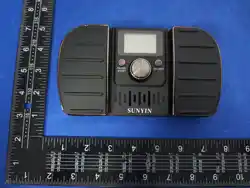
This is a page turner pedal device with metronome function.When using an iPad or
other devices to read score for instrument practice,this device can control the
progress of the score on the screen and set the corresponding rhythm notifications.
This not only easy for score reading but also enhances the practice of rhythm sense.
The page turner function and the metronome function can be used simultaneously or
separately.
Ⅰ.Warming
●The Bluetooth function can only be used when the page turner function is enabled.
If only the metronome function is enabled,the Bluetooth function will be auto turned
off.
●After the iPad is connected to Bluetooth,it may cause the screen unable to input
text (the virtual keyboard will not appear).Pressing the left and right pedals at
the same time for about two seconds.After the device emits a "beep",the virtual
keyboard on the screen will appear and use normally and text can be input normally.
●Don't disassemble or repair this product by yourself.
●Don't use or store it near any heat sources, damp and dusty areas.Avoid violent
vibration or shock.
●Don't drop this product otherwise it may malfunction.
●Don't use alcohol or other cleaning fluids to clean this product
●Please turn off the unit when it's not in use.
●If the unit shuts down automatically during use, it means the battery runs out,
please charge it in time.
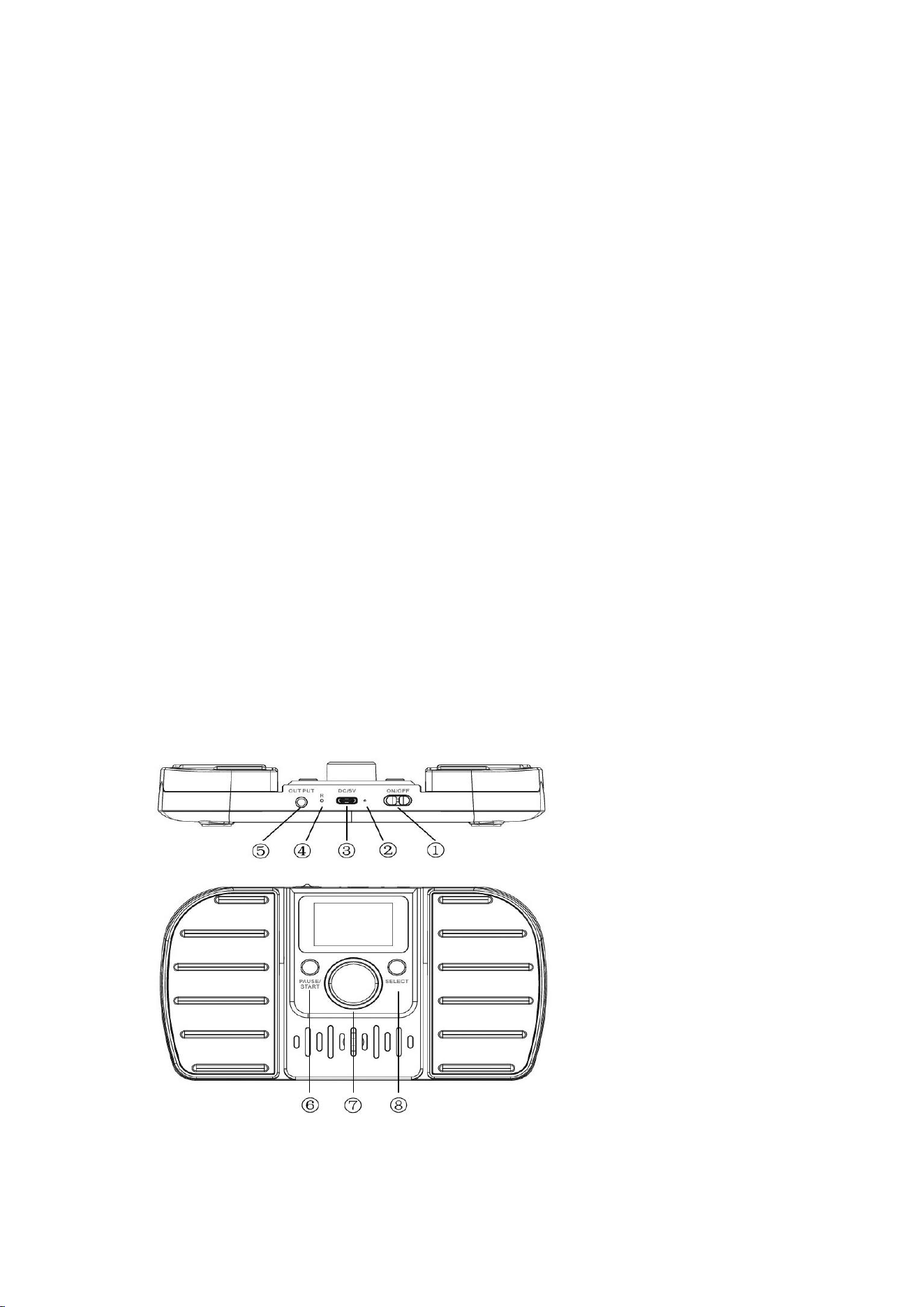
Ⅱ.Parts’ names and functions
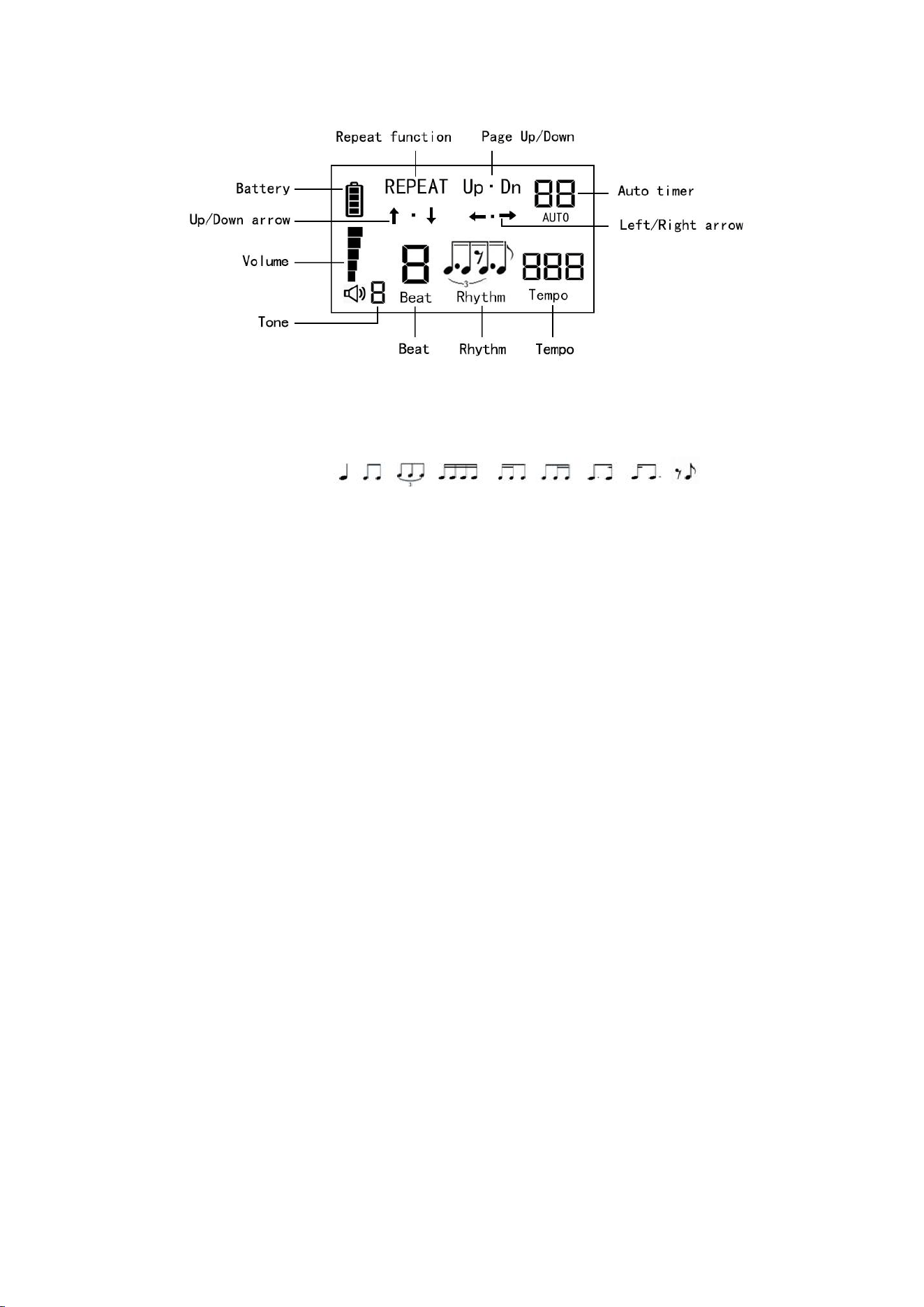
Metronome function and adjustment
Set 4 types of tone
Beat:0,1,2,3,4,5,6,7,8,9
Set 9 types of Rhythms:
Tempo:30-250
The tone,beat and rhythm pattern of the metronome can all be selected and adjusted
through the ⑦ multi-functional buttons.
1.Switch ① “Power”to “ON” to turn on the pedal,and enter wait status to
pairing;Switch “Power” to “OFF” to turn off the power.
2.②Bluetooth connection indicator light,blue light when connection,blue light
flashing when looking for connection
3.③Type-C charge port,red light when charging,green light fully charged
4.④Resetting key,use paperclip to short press,it will restore the factory default
Settings;long press will disconnected bluetooth and restore the bluetooth is no
connected.
5.⑤3.5mm audio output port,connect to earphones or amplifiers
6.⑥short press will pause or restart the sound of metronome plays the rhythm,long
press will starts up or shutdown the “REPEAT” function,the “REPEAT”pattern on
screen will light up or light off.In “REPEAT” function,the continuous sliding
action can be achieved on the screen when press the pedal without release.The
function can be use on ↑·↓(up or down moving page in short-distance),UP.DN(up or down
turn the entire page).The ←·→(Turn the pages left and right)can’t be use in “REPEAT”
pattern.
7.⑦short press the knob can choose the function of page turner and metronome.Include
the volume,tone of metronome,adjust the “Beat”,select the “Rhythm”,adjust the
“Tempo”.Turn on or off the metronome function by long press the knob.Simply turning
the knob will default to adjusting the volume.The knob will return to its default
function(volume adjustment) after 3 seconds of inactivity.
8.⑧long press can turn on or turn off the page turner function,short press can senect
the page-turning mode.If only the page tuner function turned on,long press will turn
off the page turner function,but metronome function will be turn on.
9. Press both left and right pedal simultaneously.After a prompt sound emitted,the
text input keyboard will be restored.So,if you cannot input text on the screen after
connecting to an iPad,please performing this operation will allow you to regain the
input capability.
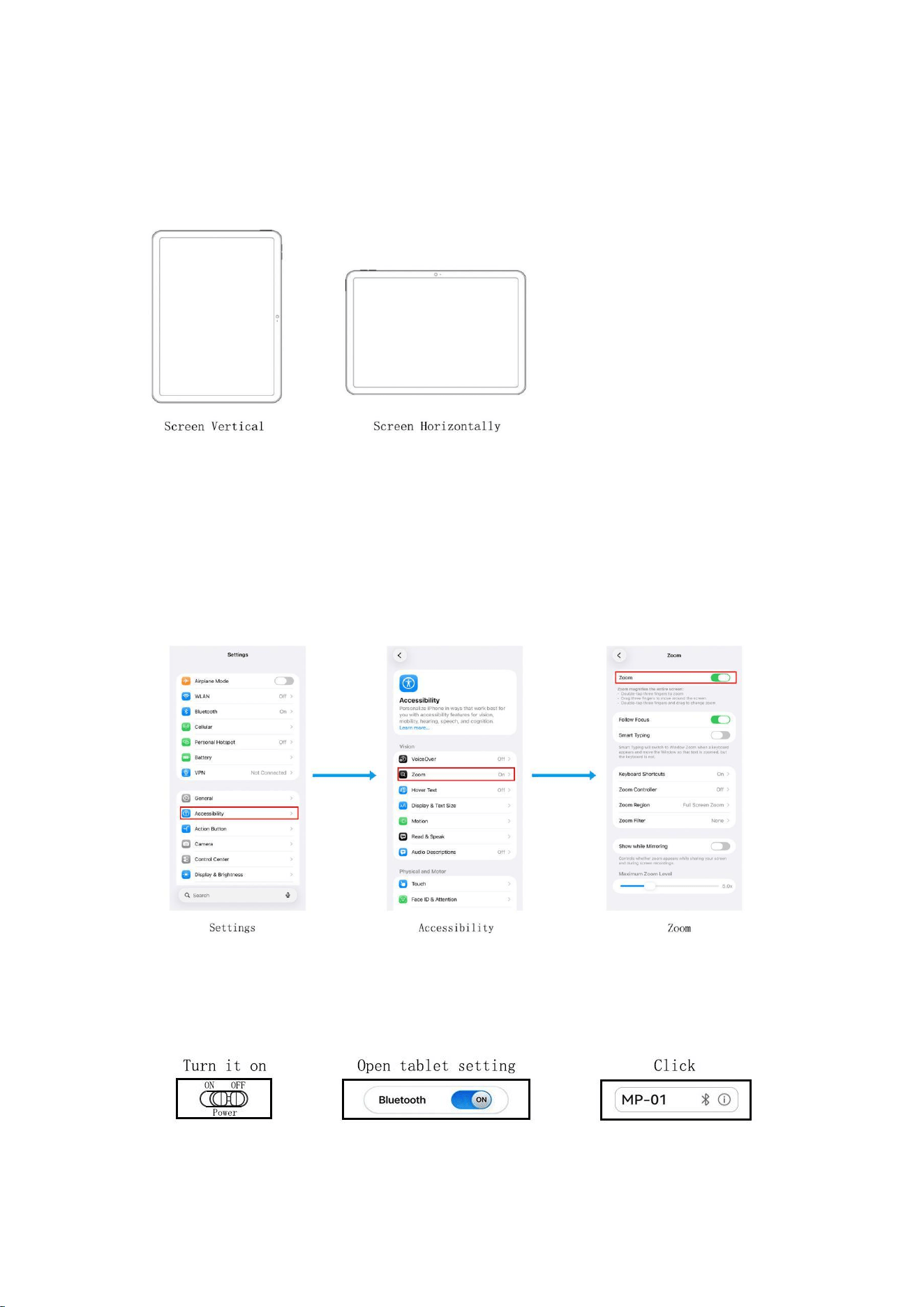
NOTICE
The orientation of the screen:This device factory default setting is working for
vertical screen browsing,it can work normally when the screen is vertical.If the
ipad screen placed horizontally,you can press ⑥ and ⑧ buttons together,after a
“beep” sound notification , the device can work for horizontal screen mode
normally.When the pedal is depressed, if the direction of the file movement displayed
on the screen is not the same as the expected direction, you can also simultaneously
press ⑥ and ⑧ to adjust screen mode.
Apple system:iPad and iPhone must open the Zoom pattern(Settings → Accessibility
→ Zoom),three fingers double-tap to recover the screen display normal.
Ⅲ.Bluetooth connection
When the page turner function of this device is enabled,bluetooth is activated and
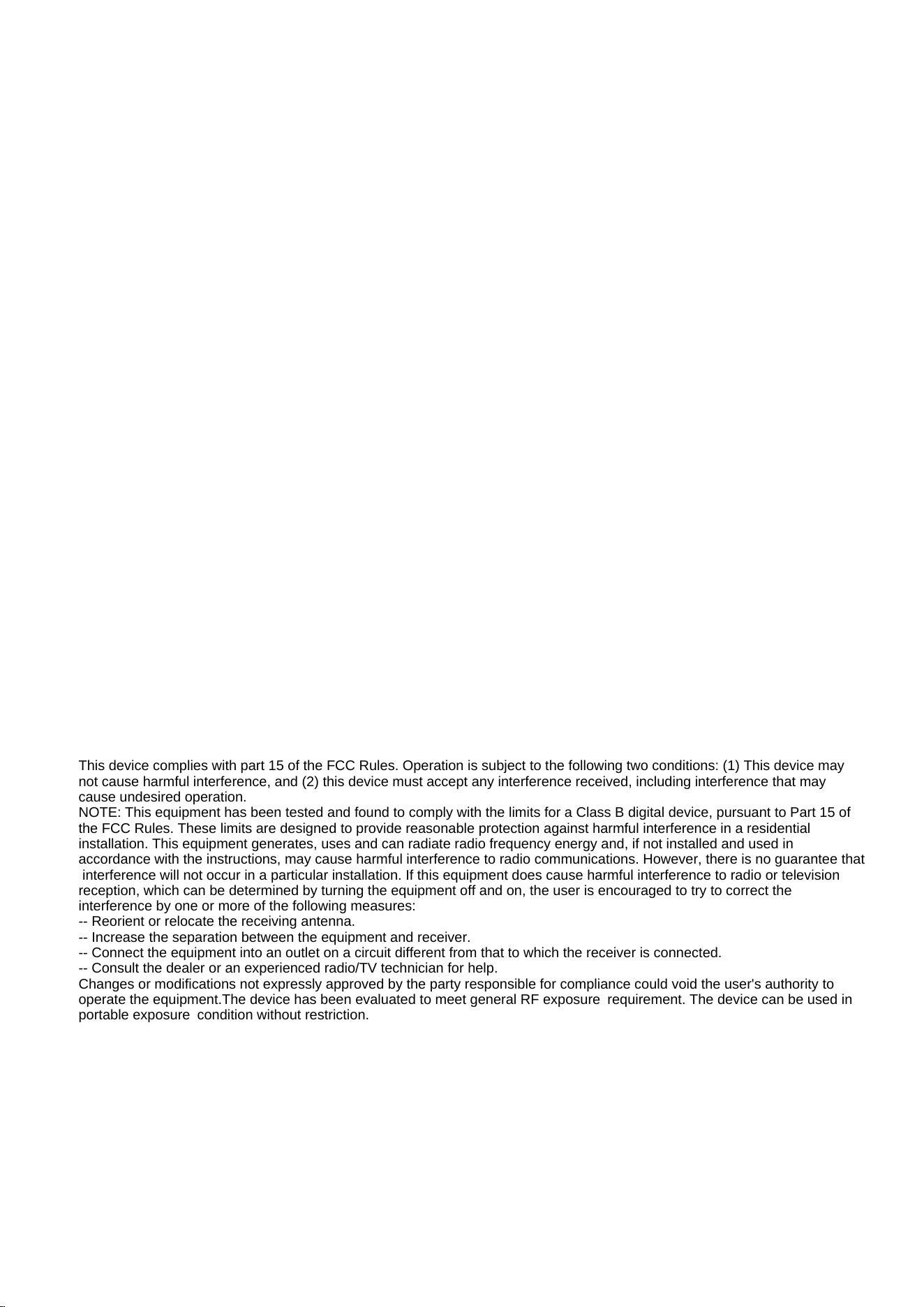
can be connected.If only the metronome function of the device is enabled,bluetooth
will be turned off.
The blue light flashing when bluetooth is not connected,the blue light is on once
connected successfully,it will connect to the last connected device automatically.
If you need to connect to other device,you can disconnect the bluetooth of the
original device or use a thimble to press the “Resetting key” foe 3 seconds.Then
you can connect page turner pedal to other device manually.
Ⅳ.Charge the MP-01
①The indicator is in red while charging,and it’s in green once fully charge.
②Please use the attached USB cable and connect it to a lower current charger (5V
Output).
③As for outdoor use,please make sure that the battery capacity display on screen
is full before going out.
④Please charge it in time once the battery capacity display on screen is low.
Ⅴ.Product Specifications
Product name: Wireless Metronome Page Turner Pedal
Model: MP-01
Operating distance: less then 10m
Dimensions:168*96*30mm
Battery: 3.7V/1200mAh
Power: DC 5V 500mA
Operating frequency:2402-2480MHz
Full charging time(0-100%):about 2.5hrs
Metronome battery life: >8hrs (one fully charge)
Page Turner battery life: >100hrs (one fully charge)
Ⅵ.Package Contents
MP-01×1 Owner’s Manual×1 Charging Cable×1
This device complies with part 15 of the FCC Rules. Operation is subject to the following two conditions: (1) This device may
not cause harmful interference, and (2) this device must accept any interference received, including interference that may
cause undesired operation.
NOTE: This equipment has been tested and found to comply with the limits for a Class B digital device, pursuant to Part 15 of
the FCC Rules. These limits are designed to provide reasonable protection against harmful interference in a residential
installation. This equipment generates, uses and can radiate radio frequency energy and, if not installed and used in
accordance with the instructions, may cause harmful interference to radio communications. However, there is no guarantee that
interference will not occur in a particular installation. If this equipment does cause harmful interference to radio or television
reception, which can be determined by turning the equipment off and on, the user is encouraged to try to correct the
interference by one or more of the following measures:
-- Reorient or relocate the receiving antenna.
-- Increase the separation between the equipment and receiver.
-- Connect the equipment into an outlet on a circuit different from that to which the receiver is connected.
-- Consult the dealer or an experienced radio/TV technician for help.
Changes or modifications not expressly approved by the party responsible for compliance could void the user's authority to
operate the equipment.The device has been evaluated to meet general RF exposure requirement. The device can be used in
portable exposure condition without restriction.