A6
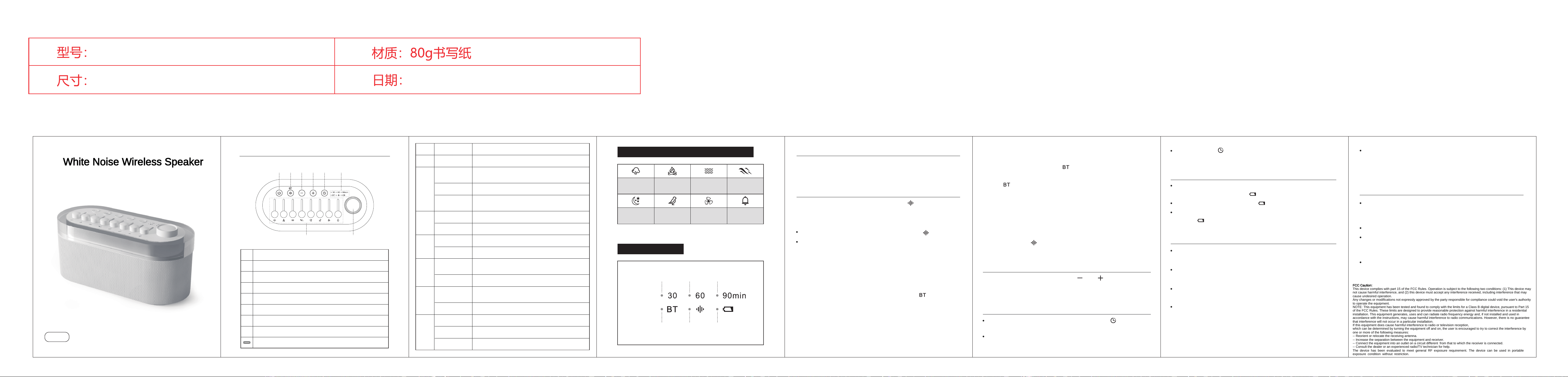
White Noise Wireless Speaker
Button
Operation
①
Function
Long press
Long press
Long press
Turn on/off the device
Switch to white noise mode / Bluetooth
mode (corresponding indicator light is on)
Enable / Disable Audio
③
Disconnect to clear the current pairing
(available only in Bluetooth mode)
Double-click
②
Short press
Short press
Long press
Short press
Long press
Short press
Long press
Short press
Increase the volume
④
Reduce the volume
⑤
Start the countdown and
switch to countdown mode
Close the countdown
Push downward
Reduce the volume until playback stops
⑦
Push upward
Play the corresponding natural sound and
increase the volume
⑧
Turn on and Switch lighting effects
Turn off the lights
Rotation Switch the light brightness
Previous Track (Available only in Bluetooth mode)
Next Track (Available only in Bluetooth mode)
Instructions
① ② ③ ④ ⑤ ⑥
⑦ ⑧
Power button
Volume Decrease / Next Track
Volume Increase / Previous Track
Timer
Function Indicator Light
Natural Sound fader
Knob switch
Type-C port
White Noise / Speaker Switch & Speaker Power
①
③
⑤
⑦
②
④
⑥
⑧
Indicator Light Diagram
Schematic diagram of white noise sound effects
Scheduled for
30 minutes
Bluetooth
mode
Scheduled for
60 minutes
White Noise
Mode
Scheduled for
90 minutes
Battery symbol
Sound of rain
Sound of
crackling fire
Sound of
flowing water
Sound of
waves
Sound of
insects chirping
Sound of
birdsong
Sound of
fan sound
Sound of
singing Bowl
Eight sets of white noise
( rain sound, campfire sound, flowing water sound, ocean wave sound ,
insect chirping sound, bird singing sound, fan noise,
singing bowl sound ) can have their volumes adjusted independently
and be combined arbitrarily.
Bluetooth Mode:
After turning on the device, short press the 【 】 key to cycle
through white noise mode and Bluetooth mode.
Long press and hold the button to turn on the device,
with flashing lights as a reminder; long press again to
turn off the device.
Switching between White Noise and Bluetooth
Device Switch
White Noise Mode:
In white noise mode, the indicator light on the right [ ] is illuminated;
Connect the mobile phone:
1.Turn on the Bluetooth device of your mobile phone to search for
this product
2. After the search bar displays the product link name: A06,
please click on the link.
In Bluetooth mode, the indicator light on the right [ ] blinks slowly,
and Bluetooth automatically enters search mode and reconnection mode.
Overall Volume Setting
3. After a successful paired connection, it can be used.
While playing audio, short-press the 【 】/【 】 button to adjust
the current playback volume.Every time the audio is opened, the
volume defaults to the volume level set in the previous session.
Scheduled Shutdown Settings
While the device is powered on, short-press the 【 】 button can
enable or disable the scheduled shutdown function.
When the scheduled shutdown is enabled, the corresponding
duration indicator light [ 30 / 60 / 90min ] remains on continuously.
g. The default reconnection reconnects to the last device.
c. When there is an incoming call, the sound will automatically switch
back to the mobile phone.
d. When Bluetooth remains on for more than 10 minutes without a
paired connection, it will automatically turn off.
(Note: At this moment, only the Bluetooth is turned off;
the lighting function is not controlled by this.)
b. When the Bluetooth connection is lost, the indicator light on the
right [ ] flashes rapidly.
a.When the Bluetooth pairing connection is successfully established,
the indicator light on the right [ ] remains constantly illuminated.
f. Double-click the 【 】button to disconnect and clear the current pairing.
Usage Notes
Light Color and Light Effects:
This product is equipped with a built-in rechargeable lithium battery,
which can be reused.Please charge the device by connecting it to a
standard 5V DC adapter using the provided charging cable.
Please fully charge the device before first use.
When using, please keep away from water sources and heat
sources. Do not cover the product to avoid damaging it and creating
safety hazards.
The light source of this device is not replaceable. When the light
source reaches the end of its service life, the entire product should
be replaced.
Orange → White → Yellow → Blue → Purple → Red →
Breathing Light Effect → Rainbow Gradient Light Effect →
Single-Color Gradient Light Effect
Device Switch
Night lights and iridescent ambient lights
When charging,
the indicator light on the right [ ] remains on constantly
When full, the right indicator light [ ] goes out
Long-press the【 】 button to turn off the countdown,
and the right indicator light [30 / 60 / 90min] will go out completely
When the lights are off :
short press the 【 knob 】button to turn on the lights.
When the light is on :
short press the 【 knob 】button to switch to the next lighting effect.
When the light is on :
Rotate the【 knob 】button to adjust the light brightness.
When the lights are on :
Long press the【 knob 】key to turn off the lights.
( After turning off the lights, turn them on again and the headlight
effect will be automatically turned on )
When the remaining battery power is too low, the indicator light on
the right [ ] flashes, and the device should be charged at this time.
A6英文说明书
102*120mm
, 折页(正反面印刷)
2026.01.19
FCC Caution:
This device complies with part 15 of the FCC Rules. Operation is subject to the following two conditions: (1) This device may
not cause harmful interference, and (2) this device must accept any interference received, including interference that may
cause undesired operation.
Any changes or modifications not expressly approved by the party responsible for compliance could void the user's authority
to operate the equipment.
NOTE: This equipment has been tested and found to comply with the limits for a Class B digital device, pursuant to Part 15
of the FCC Rules. These limits are designed to provide reasonable protection against harmful interference in a residential
installation. This equipment generates, uses and can radiate radio frequency energy and, if not installed and used in
accordance with the instructions, may cause harmful interference to radio communications. However, there is no guarantee
that interference will not occur in a particular installation.
If this equipment does cause harmful interference to radio or television reception,
which can be determined by turning the equipment off and on, the user is encouraged to try to correct the interference by
one or more of the following measures:
-- Reorient or relocate the receiving antenna.
-- Increase the separation between the equipment and receiver.
-- Connect the equipment into an outlet on a circuit different from that to which the receiver is connected.
-- Consult the dealer or an experienced radio/TV technician for help.
The device has been evaluated to meet general RF exposure requirement. The device can be used in portable
exposure condition without restriction.