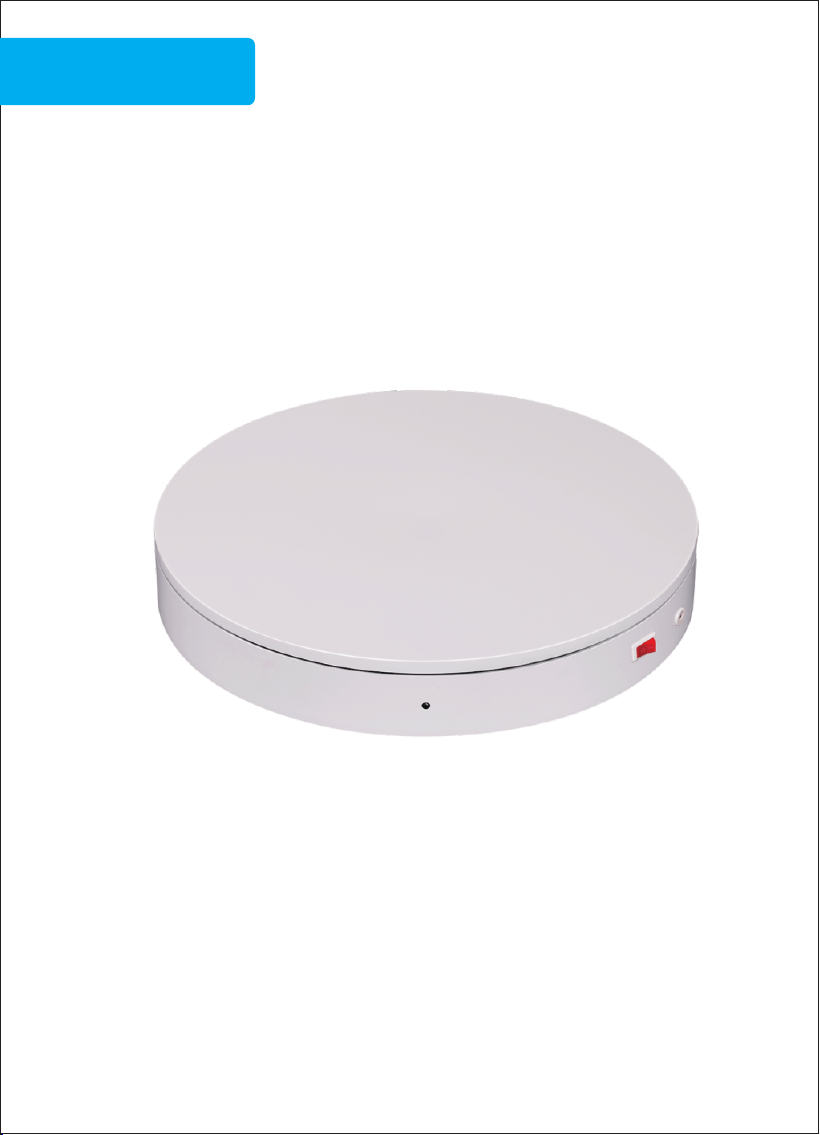
ComXim intelligent turntable instruction
Electric turntable operating manual
ComXim
Used for product rotation display
360 degree shooting
3D scanning
① Plug in power supply and turn on the turntable.
②Use the remote control to control the rotation modes,
rotation speeds and rotation angles.)
③This Series of electric turntables support 3 rotation
modes: continuous, intermittent and left-and-right swing.
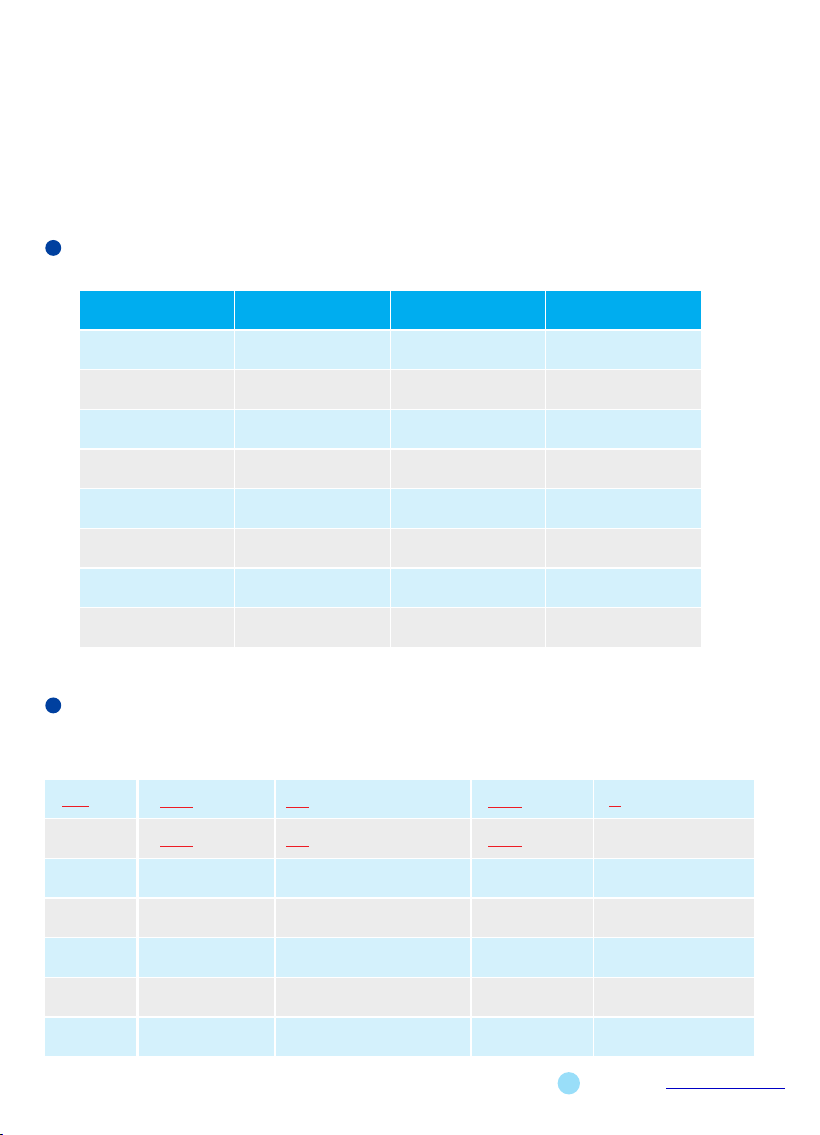
Product parameters
Item No.
Voltage
Speed( S/Lap) Max Load( Kg)
MT200RL20x
MT320RL40x
MT350RL40x
MT400RL40x
MT500RL200x
NT600RL200x
MT800RL300x
NT400RL40x
100V – 240vAC
100V – 240vAC
100V – 240vAC
100V – 240vAC
100V – 240vAC
100V – 240vAC
20-68(S/Lap
100V – 240vAC
100V – 240vAC
)
25-72(S/Lap)
28-74(S/Lap)
27-76(S/Lap)
34-90(S/Lap)
34-90 (S/Lap)
55-140(S/Lap)
25-72(S/Lap)
20 Kg
40 Kg
40 Kg
40 Kg
200 Kg
200 Kg
300 Kg
40 Kg
Copyright reserved by Shenzhen ComXim Technologies Co.,Ltd.2023 www.comxim.com
MT Series turntable model maming rules,
identification and main characteristics
320
RL
L40
MT
200
RL
L20
X
Series
Turntable
Sub code
Max Load
name
Model R: Remote control
(Kg)
code
Diameter
(cm)
2
International
or color
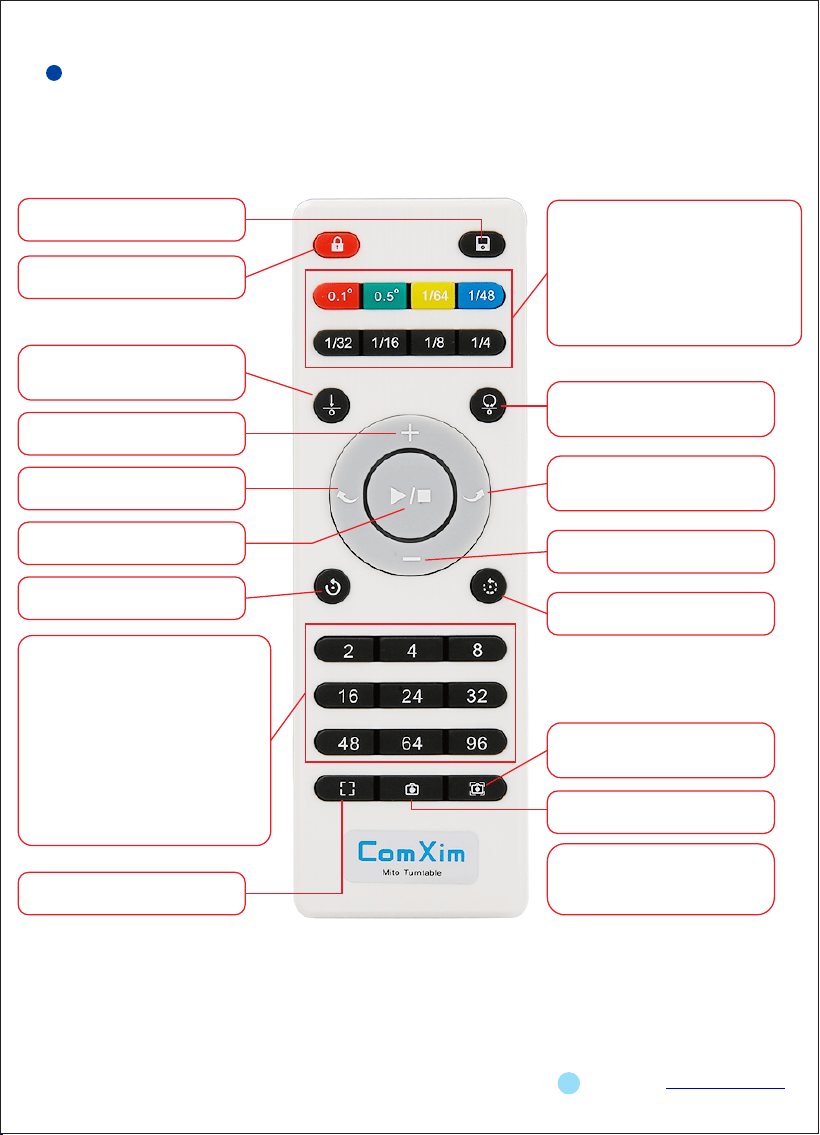
Medium remote controller instructions
Copyright reserved by Shenzhen ComXim Technologies Co.,Ltd.2023 www.comxim.com
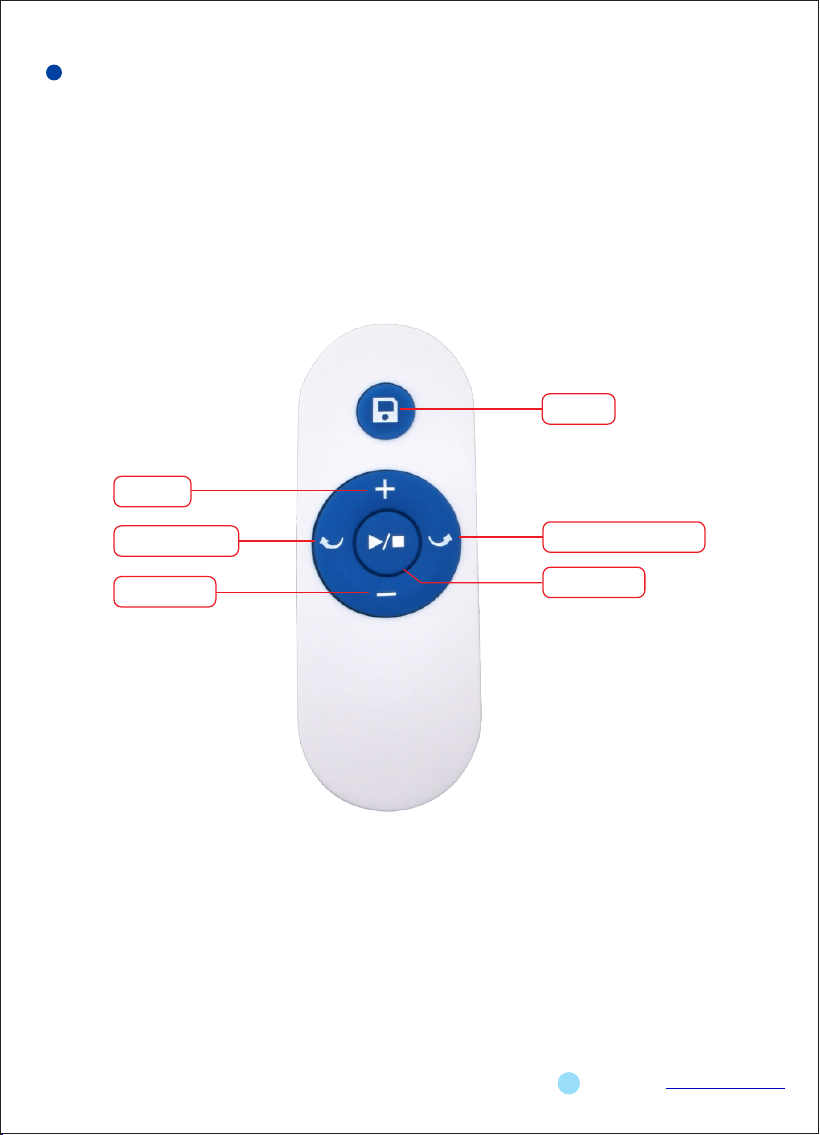
1.Save:Stor the current settings to the
tuentable flash.
3.SIngle rotation:By pressing thebutton in
this group ,the turntable rotaes only
ince.If you press the 0.1 or 0.5,just rotate
0.1 degrees or 0.5 degrees,it will stop.If
you press the 1/64,1/48,1/32...,
the turntabale rotates only ince ,such as
1/64,that is run 360*1/64 degrees.
These buttons are respectively rotation
angle:5.625 degrees,7.5 degrees,
11.25 degrees...
9.Multi angle shooting shortcut
keys:Function:Press this key to control the
turntable to suspend”n”
times within a circle.(n=2,n=4,n=8...)
For example:press the ket in this
group(e.g.8 keys),theturntable rotates
every time 1/8circle,45 degrees
(=360*1/8),suspended one
times,suspended time 4
seconds(MTxxxBSLx/MTxxxWSLx series is
automatically sent out the shutter signal
to take a
photo),repeat 8 times that a circle
automatically back to the starting
position.
10.Focus:Control the turntable to
output the focus signal.
Not i ce: T h ese th r ee f u nct i o ns
( I t e m 1 4 / I t e m 1 5 / I t e m 1 6 ) a r e
supported only by MTxxxBSLx and
MTxxxWSLx.Product model name
contains”WSL”or”BSL”.
2.Lock: In addition to this button,the
other key is invalid.
4.Set origin location:Set the current
position to the starting position of
the turntable.
5. Speed up:The rotary speed is
accelerated.
6.Clokwise rotation:Control the
turntable to rotate clockwise.
7.Start/Stop:Control the turntable
to rotate or stop.
8.Continuous totation:Control the
turntable to rotate continuously.
11. Return to the origin:Contrl the
turntable to return to the orignal
position.
12.Counter clockwise rotation:Control
t h e tu r nta b l e t o r o t ate co u n ter
clockwis.
13.Slow down:Control the turntable
speed decrease.
14.Intermittent rotation:Control the
turntable to rotate intermittently.
15.Auto:Control the turntable to
output the focus signal and the
shutter signal.
16.Shutter:Control the turntable to
output the shutter signal.
4
Note:AAA baery is used to provide power
for the remote controller.
Copyright reserved by Shenzhen ComXim Technologies Co.,Ltd.2023 www.comxim.com
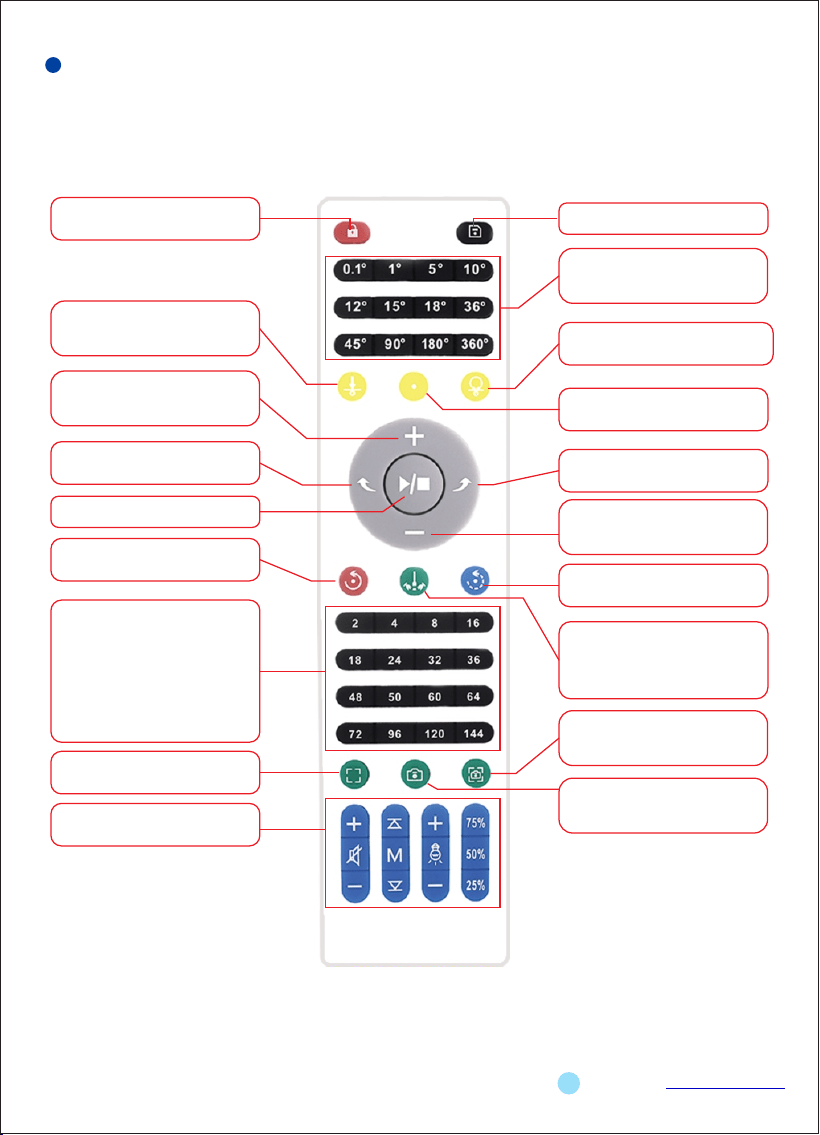
1.Lock: Except for this key,
other keys are invalid.
7.Acceleration key: Press this
key to increase the speed by
one gear.
8.Rotate left:Turntable
rotates clockwise.
9.Stop/Start
12.Continouse mode: Press this
key to swich to continouse mode.
15.Hot keys o f equally circular
rotation:Forexample, press 8, the
turntable will stop 8 times with 45°
rotating angle and for 3 senconds
each time. Duringeach stop,t he
turn table automaticall y sends a
shutter signal for the camera to
t a k e p i c t u r e s ( S o m e p r e m i u m
versio n s suppor t this features).
Turntable w ill stop afte r a lap.
16.Focus: Output camera
focus signal.
19:Multimedia key(Adjust
l i g h t s a n d v o l u m e . )
4 . O r i g i n a l p o s i t i o n : Tu r n t a b l e
rotates back to the original position.
6. Reserved key: This key
doesn't have function yet.
10.Rotate right: Turtable
rotates counterclockwise.
11.Deceleration key:Press this
keyto decrease the speed by
one gear.
13.Interminnent mode: Press this
key to switch to interminnent mode.
14 . Le f t- a nd - ri g ht mo d e: F o r
e x a m p l e , p r e s s 9 0 ° , t h e
turntable willturn 45°to the left
and 45° to the right,centeredon
the current position.
17.Focuse and shutter: Output
focus and shutter signal. (Pro
version supports this feature.)
2. Save: Save current settings.
3. Hot keys: Press any key in
this group and turtable rotates
the corresponding angle once.
18.Shutter: Output camera
shutter signal. (Pro version
supports this feature.)
5.Original position setting: Set
current position as original
position.
Large remote controller instructions
5
Note:AAA baery is used to provide power
for the remote controller.
Pl recautions
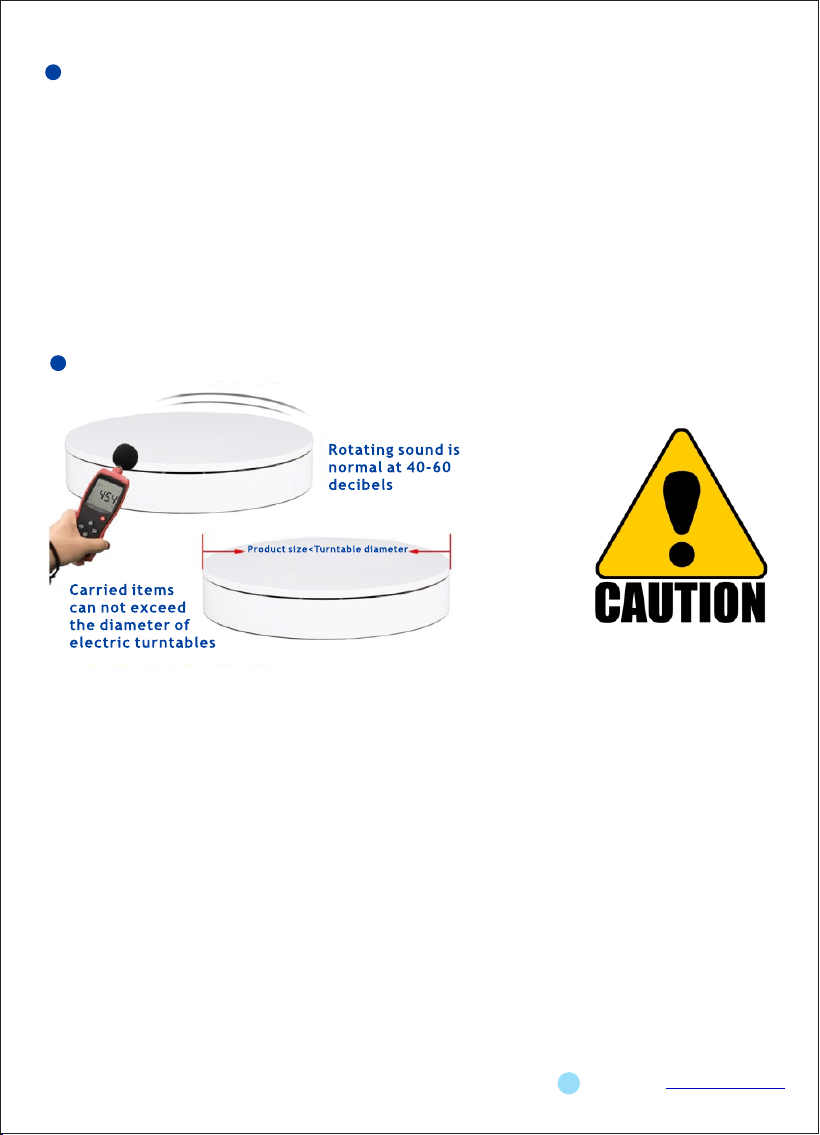
①Attention: Electric turntables are of electric products. They are Not waterproof and not heat
resistant.
②In cases when turntable doesn’t work, please check whether the turntable is powered on,
whether the power cord is plugged in tightly, and whether the switch is turned on. If the
turntable still cannot work normally, please contact us.
③The load-bearing capacity of the turntable refers to the maximum load that the turntable can
bear when the item is smaller than the diameter of the turntable. If the item exceeds the
diameter of the turntable, the load-bearing capacity will be greatly reduced, and even it will
not turn.
④In order to prolong the service life of the turntable, it is recommended to stop for 2 hours
after working continuously for 8 hours.
⑤In order to protect the safety of users, unauthorized modification or repair of the product is
prohibited. Please contact us if necessary.
Copyright reserved by Shenzhen ComXim Technologies Co.,Ltd.2023 www.comxim.com
Notes
6
§ 15.19 Labelling requirements.This device complies with part 15 of the FCC Rules. Operation
is subject to the following two conditions:(1) This device may not cause harmful interference, and
(2) this device must accept any interference received, including interference that may cause
undesired operation.
§ 15.21 Information to user.Any Changes or modifications not expressly approved by the party
responsible for compliance could void the user's authority to operate the equipment.
§ 15.105 Information to the user.Note: This equipment has been tested and found to comply
with the limits for a Class B digital device, pursuant to part 15 of the FCC Rules. These limits are
designed to provide reasonable protection against harmful interference in a residential installation.
This equipment generates uses and can radiate radio frequency energy and, if not installed and
used in accord a n c e w i t h t h e i n s t r u c t i o n s , m a y c a u s e h a r m f u l i n t e r f e r e nc e t o r a d i o
communications. However, there is no guarantee that interference will not occur in a particular
installation. If this equipment does cause harmful interference to radio or television reception,
which can be determined by turning the equipment off and on, the user is encouraged to try to
correct the interference by one or more of the following measures: -Reorient or relocate the
receiving antenna.-Increase the separation between the equipment and receiver.-Connect the
equipment into an outlet on a circuit different from that to which the receiver isconnected. -Consult
the dealer or an experienced radio/TV technician for help.
* RF warning for Mobile device:This equipment complies with FCC radiation exposurelimits set
forth for an uncontrolled environment. Thisequipment should be installed and operated
withminimum distance 20cm between the radiator & yourbody.