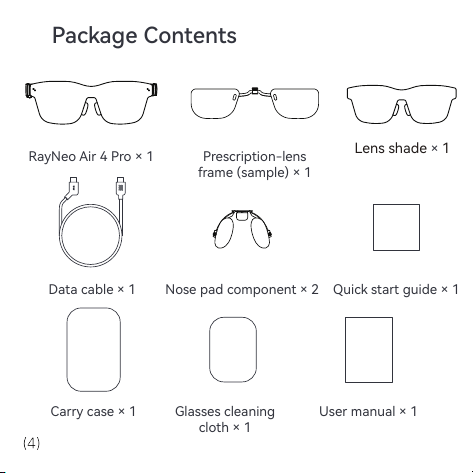
Package Contents
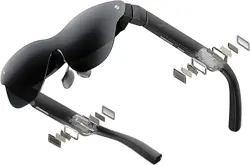
RayNeo Air 4 Pro × 1 Prescription-lens
frame (sample) × 1
Car case × 1
Glasses cleaning
cloth × 1
User manual × 1
Data cable × 1
Nose pad component × 2
Quick sta guide × 1
Lens shade × 1
Catalogue
Display Modes
How to Connect
User Guide & Videos
Eye Protection Tips
Disclaimer
Safety Information
General Information
Regulato Information
FCC Statement
IC Statement
Display Modes
Projection mode
The content on a mobile phone,
PC, game console, and other
devices can be mirrored to the
glasses as if presented on a giant
screen.
3D mode
A fresh new 3D space system
experience. This mode is
available on some Android
devices, and you need to install
the RayNeo XR app on your
device. For the compatible
devices, scan the QR code in the
following page.
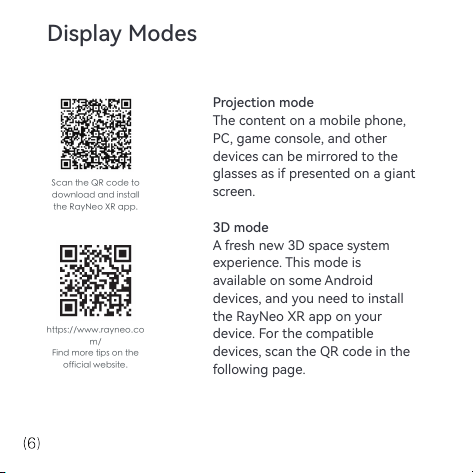
https://www.rayneo.co
m/
Find more tips on the
official website.
Scan the QR code to
download and install
the RayNeo XR app.
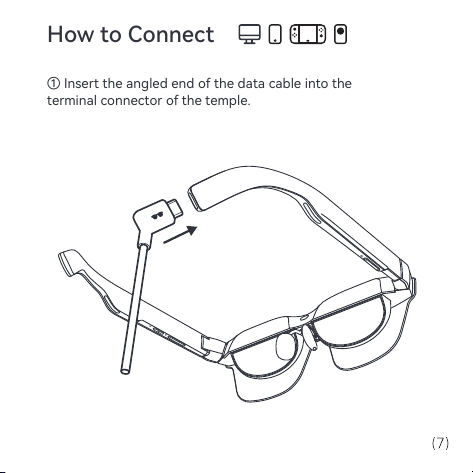
How to Connect
① Insert the angled end of the data cable into the
terminal connector ofthetemple.
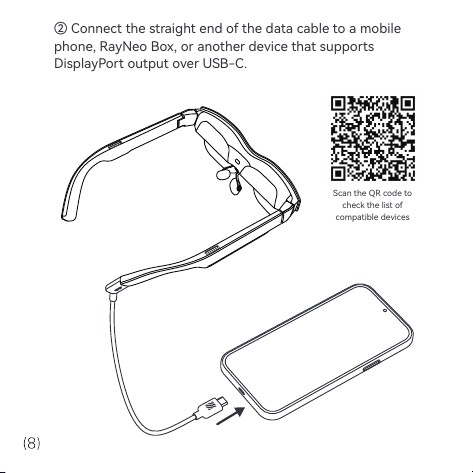
Scan the QR code to
check the list of
compatible devices
② Connect the straight end of the data cable to a mobile
phone, RayNeo Box, or another device that supports
DisplayPort output over USB-C.
User Guide & Videos
Scan the QR code below or visit the link for more details
on product usage.
https://www.rayneo.com/pages/suppo
Eye Protection Tips
RayNeo Air 4 Pro has been ceied for low blue light,
icker-free, and eye comfo by TÜV Rheinland. However,
viewing any electronic display for extended periods can
still result in eye strain. We recommend that users follow
the "20-20-20 rule".
* The 20-20-20 rule suggests taking a 20-second break to
look into distance 20 feet away after eve 20 minutes of
screen time.
• Thank you for purchasing the RayNeo Air 4 Pro Glasses.
• Depending on the software release of your phone and
the glasses or specic carrier seices, there may be
ceain dierences between the descriptions within the
user manual and the phone's actual operation.
• RayNeo Co., Ltd. shall not be legally responsible for
such dierences.
Disclaimer
Safety Information
TO REDUCE THE RISK OF PERSONAL INJURY, DISCOMFORT
OR PROPERTY DAMAGE, PLEASE ENSURE THAT YOU HAVE
READ THE FOLLOWING SAFETY INFORMATION CAREFULLY
BEFORE USING THE RayNeo Air 4 Pro GLASSES.
• The glasses shall be used only in a safe environment.
• To prevent possible hearing damage, do not listen at
high volume levels for long periods.
• Do not use these glasses during sudden or intensive
activity.
• If your glasses feel hot to touch or are uncomfoably
warm, stop using them and allow them to cool down.
• Immediately stop using these glasses if you are
experiencing eye strain or dizziness.
• If the glasses are damaged in any way, stop use
immediately.
• Keep the glasses away from any liquid as they are not
waterproof.
• Consult your doctor before using these glasses. Do not
use these glasses if you are sick, fatigued, under the
inuence of intoxicants/drugs, or are generally feeling
unwell.
• Do not squeeze these glasses during use. Doing so can
potentially cause damage to the glasses or cause the lenses to
become extruded, which poses a risk of damaging user's face.
• Stop using these glasses if you notice swelling, itchiness,
irritation or other discomfos on your skin that is in contact
with them. If symptoms persist, please contact a doctor. Do
not use strong chemicals, cleaning agents or strong
detergents to clean the glasses, as this may aect the material
and aect eye health. Please use a clean, d, soft cloth to
wipe the glasses.
• Stop using the glasses and disconnect all connections or
cables with other equipment before cleaning and
maintenance.
• Keep the glasses out of the reach of children and pets to
avoid damage to the glasses.
• Keep the glasses away from sunlight, either direct or
indirect, such as on a car dashboard or window sill.
• The glasses shall be treated, recycled, or disposed of in
accordance with local laws.
• These glasses are not equipped with prescription spectacle
lenses by default. Users who require corrective lenses should
purchase them separately.
• The manufacturer's recommended operating temperature
range is 0°C (32°F) to 50°C (122°F).
Ocial website:
https://www.rayneo.com/
On our website, you will nd our Frequently Asked
Questions (FAQs) and Sma Glasses app etc.
Manufacturer: RayNeo Co., Ltd.
Address: 5F TCL Electronics Building, TCL International E
City, No.1001 Zhongshan Park Road, Nanshan District,
Shenzhen, Guangdong, P. R. China
This product is not intended for use by children under the
age of 14 without direct adult supeision.
General Information
Regulato Information
Hereby, RayNeo Co., Ltd. declares that the product type
RayNeo Air 4 Pro is in compliance with Directive
2014/30/EU.
This device has been tested and found to comply with the limits
for a Class B digital device, pursuant to Pa 15 of the FCC
Rules. These limits are designed to provide reasonable
protection against harmful inteerence in a residential
installation. This device generates, uses and can radiate radio
frequency energy and, if not installed and used in accordance
with the instructions, may cause harmful inteerence to radio
communications. However, there is no guarantee that
inteerence will not occur in a paicular installation. If this
device does cause harmful inteerence to radio or television
reception, which can be determined by turning the device o
and on, the user is encouraged to t to correct the inteerence
by one or more of the following measures:
- Reorient or relocate the receiving antenna.
- Increase the separation between the device and receiver.
- Connect the device into an outlet on a circuit dierent from
that to which the receiver is connected.
- Consult the dealer or an experienced radio/TV technician for
help.
This device complies with Pa 15 of the FCC Rules.
FCC Statement
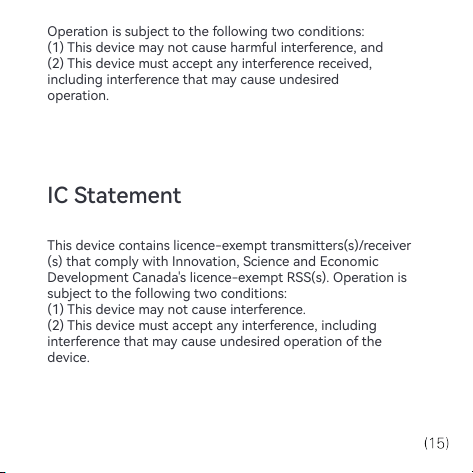
Operation is subject to the following two conditions:
(1) This device may not cause harmful inteerence, and
(2) This device must accept any inteerence received,
including inteerence that may cause undesired
operation.
This device contains licence-exempt transmitters(s)/receiver
(s) that comply with Innovation, Science and Economic
Development Canada's licence-exempt RSS(s). Operation is
subject to the following two conditions:
(1) This device may not cause inteerence.
(2) This device must accept any inteerence, including
inteerence that may cause undesired operation of the
device.
IC Statement