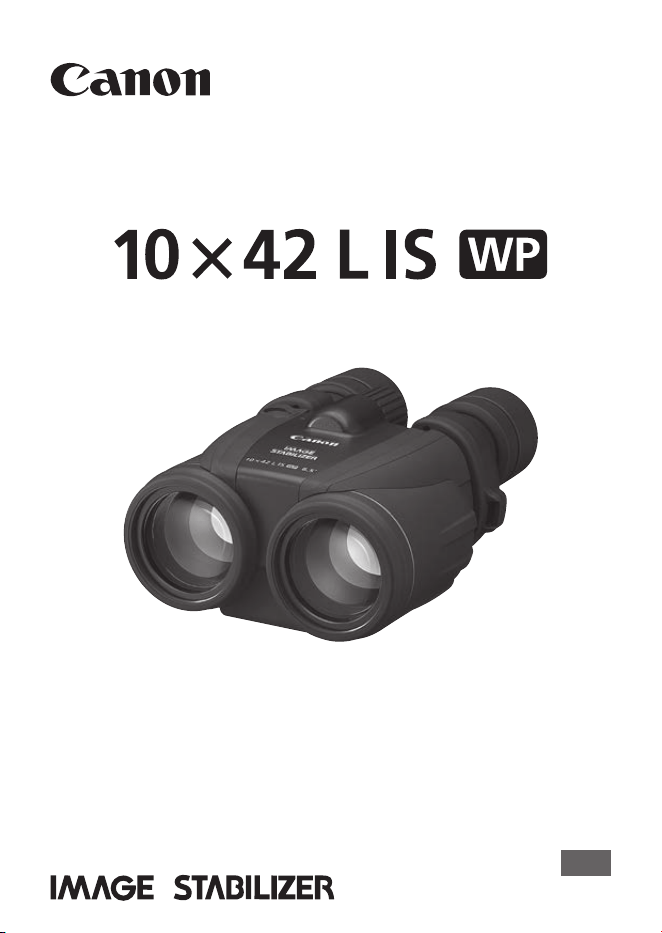
Instructions
ENG
BINOCULARS

ENG-1
Thank you for purchasing a Canon product.
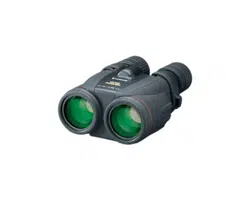
Canon 10
×
42L IS WP high-performance, waterproof binoculars
featuring an Image Stabilizer with a Canon-developed vari-angle prism.
Before using the binoculars, read this instruction booklet to familiarize
yourself with the proper operation.
Features
z
High-performance, waterproof binoculars for a wide range of uses from bird
watching to heavenly observations.
z
A steady image can be obtained with the Image Stabilizer.
z
The objective lenses have rubber protectors for excellent shock resistance.
z
The large-diameter, 42mm objective lenses make the image very bright.
z
A total of four UD lenses - two on each side, full surface Multilayer Coating
(Super Spectra Coating), and Doublet Field-Flattener for sharp, distortion-free
images from edge-to-edge.
z
Dioptric correction & xation mechanism prevents unexpected diopter
misalignment.
z
Freely adjustable eyecups.
z
The sealed structure makes it less likely that the internal lenses will fog up.
* UD lenses are made of Ultra-low Dispersion glass.
Accessories
The binoculars come with the following accessories:
o
Case (with pocket for extra batteries) ................1
o
Binocular strap ...................................................1
o
Case strap .........................................................1
o
Objective lens caps ............................................1
o
Eyepiece lens caps ............................................1
o
Size-AA alkaline batteries ..................................2
o
Strings (for objective lens caps) .........................1
Conventions used in this instruction
Warning to prevent malfunction or damage to the binoculars.
Supplementary hints for using the binoculars.
ENG-2
Precautions for Use
(Please be sure to read before use)
z
Please be sure to read this section carefully beforehand in order to
use your binoculars correctly and safely.
z
The following precautions are designed so that you will use your
binoculars safely. Please be sure to read and follow them in order to
prevent injury to you or others as well as damage to them.
Warning (regarding the binoculars)
Details pertaining to risks that may result in death or serious injury.
z
Never look at the sun with the binoculars.
Doing so can cause loss of vision.
z
Do not place the binoculars under direct sunlight. Otherwise, the lens may
concentrate the sun’s rays and cause a fire.
z
Keep the binoculars and accessories out of reach of small children.
z
Keep the plastic bags used for packaging out of reach of small children
since suffocation may occur if a bag is placed over their head.
z
If the strap is mistakenly wrapped around the neck, suffocation may result.
Warning (regarding the batteries)
Details pertaining to risks that may result in death or serious injury.
z
Store the batteries used with this product out of the reach of infants.
Also, avoid replacing the batteries where the procedure can be observed by
infants.
Swallowing the batteries will result in a chemical reaction occurring within
the body, and is extremely dangerous. Seek the advice of a doctor
immediately in the event of the batteries being swallowed.
z
Please follow the precautions below when using batteries.
Not doing so may result in overheating, generation of smoke, ignitions,
battery leakage, and explosions which may lead to fire or personal injury.
1. Be sure not to use batteries with a nominal voltage rating of 1.5V or
higher or batteries which have no nominal voltage information.
2. Do not use batteries of different brands together or use old batteries with
new ones. Replace the batteries with two new batteries at the same time
from the same brand.
3. Make sure that the battery polarity is correct.
4. Be sure not to use any battery that is leaking.
5. Remove the batteries if anything unusual happens, such as smoke or
unusual odors being emitted.

ENG-3
Precautions for Use (Please be sure to read before use)
6. Do not attempt to disassemble batteries, charge the batteries (except for
rechargeable batteries), leave batteries in a hot place, short circuit the
contacts, or throw them into a fire.
Caution (regarding the binoculars)
Details pertaining to risks that may result in injury or damage to other objects.
z
Do not place the binoculars on an unstable surface. Doing so may cause
the binoculars to fall and could result in a personal injury.
z
Do not use the binoculars while walking. Doing so may cause you to collide
into objects or fall down and could result in a personal injury.
z
Do not swing the binoculars around by the strap. Doing so may cause the
surrounding people to be hit by the binoculars and could result in a personal
injury or damage.
z
Fingers may be pinched when adjusting the width of the binoculars. Be
aware of this when the binoculars are being used by small children.
z
If damaged, do not touch the damaged portion or inside the product.
z
Do not wet, or allow liquids or foreign objects to enter.
z
Do not store the product in very hot or cold places. The product itself will
heat or cool, possibly causing burns or other injury when touched.
z
When used for a prolonged period or when used repeatedly, the rubber
eyecups may irritate the skin around the eyes. If you suspect that this may
have occurred, please see a physician.
Caution (regarding the batteries)
Details pertaining to risks that may result in injury or damage to other objects.
z
Please remove the batteries when not using the binoculars. If the batteries
are left inside, leakage may lead to malfunction, staining, or fire.
z
In the event that liquid from the inside of the batteries leaks out and
contacts your skin, be sure to wash the liquid off thoroughly. Also, do not
rub your eyes or mouth using any hand that made contact with liquid from
the batteries.
If eyes or mouth are exposed to the liquid, thoroughly rinse in clean, cold
water and seek medical attention immediately.
z
When removing or disposing of batteries, insulate the contacts by covering
them with tape, as contact with other metals may cause fire or rupturing.
z
If the lamp lights but the Image Stabilizer does not operate properly, it
means the battery power is low. Replace both batteries in such a case.
z
When the battery power is low, the lamp will not light even when you press
the Image Stabilizer button. Replace both batteries in such a case.

ENG-4
Precautions for Use (Please be sure to read before use)
Handling Precautions
z
Obey any instructions that prohibit the use of this product in certain places.
z
Binoculars are precision instruments. Do not use force on them, drop them,
or subject them to severe shock or vibration. Also, do not disassemble or
alter them.
z
Do not store the binoculars in a car or similar location under direct sunlight.
Doing so will cause the binoculars to reach a temperature higher than
expected which may cause damage to occur.
z
Do not use or store them in a humid, smoky or dusty environment.
Storing the binoculars in a humid location may cause fungus to form on the
lenses or cause the lenses to become cloudy. If the binoculars are not to be
used for an extended period, clean the lenses and body thoroughly and
store in a well-ventilated dry place.
z
The binoculars are waterproof, however they are not for underwater use.
If the binoculars come into contact with water, dry them with a dry, clean
cloth. If dirt, dust or salt adheres to them, wipe them well with a clean, well-
wrung wet cloth.
z
Do not use any organic solvent, such as alcohol, thinner, or benzene when
wiping the lenses or body.
If the lens is dirty, first use a blower brush to remove dust, etc., from the lens
surface. Then use a soft, dry cloth and wipe the lens gently without scratching
it.
* WP: Waterproof binoculars.
All Canon Binoculars are composed only of “Environment Friendly Lead-Free
Optical Glass”. The design is derived from Canon’s corporate policy to care about
our environment.
ENG-5
The binoculars are waterproof. To make full use of this performance,
make sure to check the O-ring in the battery chamber and the contact
surface. If you close the battery chamber cover when it is covered
with sand, hair or other materials, the waterproof property will be lost,
allowing water to enter, resulting in malfunction.
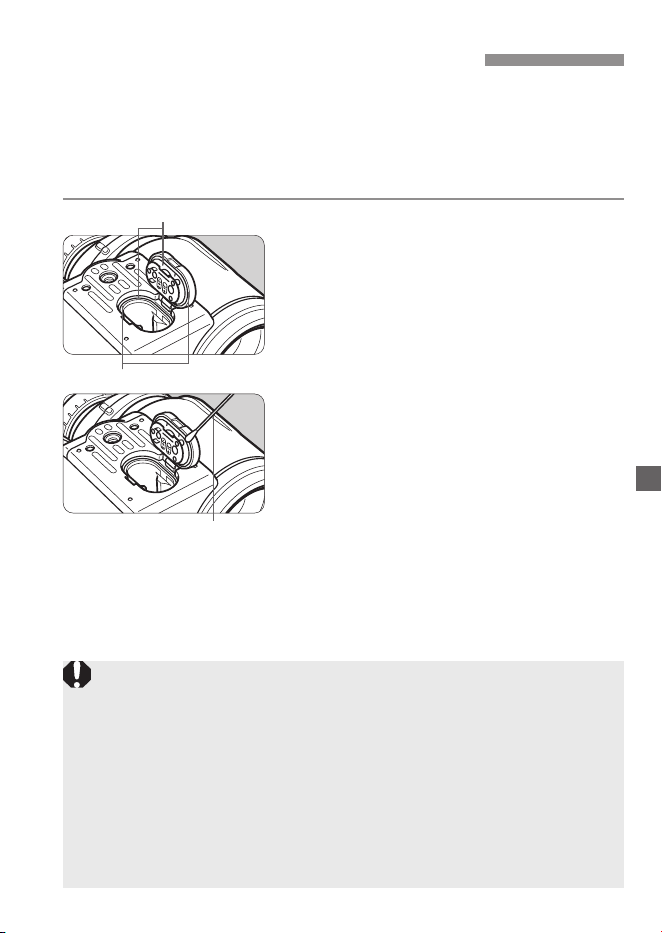
Check the O-ring.
z
Make sure that the O-ring and the
contact surface are not distorted or
covered with dust.
1
Clean the O-ring.
z
If there is dust on the O-ring and the
contact surface, use a damp cotton
swab or similar material to remove the
dust.
2
z
Do not forcefully pull or extend the O-ring.
z
The O-ring is specially treated. Be careful not to apply grease or allow
oil to accidentally come into contact with it.
z
Do not remove the O-ring. That may result in scratching the surface,
allowing water to enter.
z
If the O-ring is broken, cut or distorted, or if more than two years have
passed since you purchased the binoculars, bring them to a Canon
Service Center to have the O-ring replaced. It is recommended to
replace the O-ring every two years (for a fee).
z
If you use the binoculars in a sandy or dusty environment, it is
recommended to replace the O-ring every year.
O-ring
Contact surface
Cotton swab
(commercial product)
Maintaining Waterproof Property
ENG-6
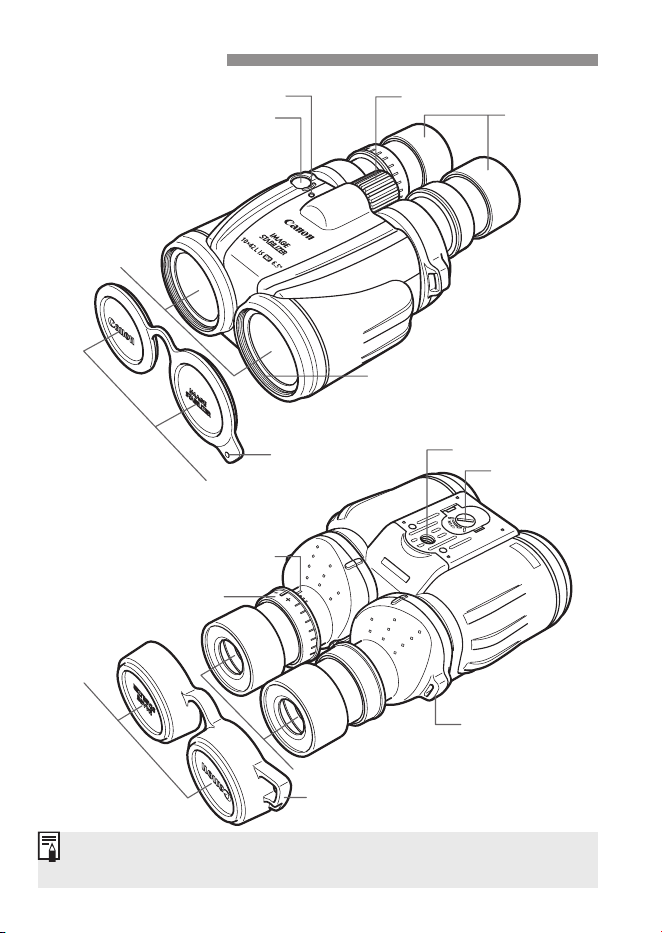
The 52mm lter (sold separately) can be attached to the lter attachment
thread.
Lamp
Image Stabilizer button
Objective
lenses
Focusing knob
Objective
lens caps
Filter (sold separately)
attachment thread
String attachment
location
Eyecup
Dioptric correction scale
Eyepiece
lens caps
Strap hole
Strap mount
Dioptric correction ring
Eyepiece lenses
Battery
chamber cover
Tripod socket
Nomenclature
ENG-7
Nomenclature
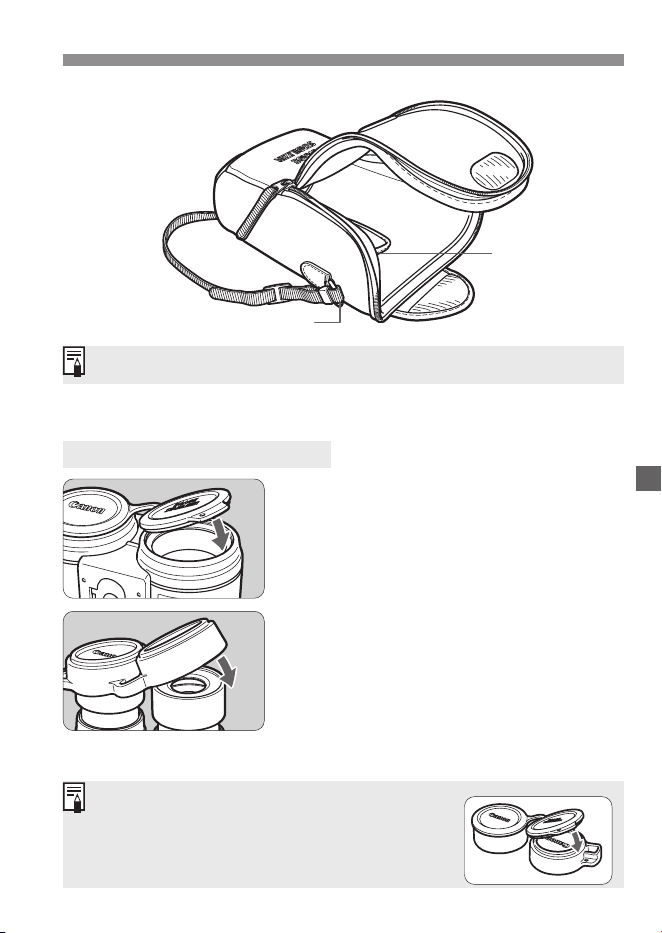
Attach the case strap included in the package to the case.
The eyepiece lens caps and the objective lens caps
can be placed on top of each other when they are
not being used. Push the objective lens caps
against the eyepiece lens caps.
Case
How to Attach Lens Caps
Attaching Objective Lens Caps
z
Attach them by pushing them against
the lter attachment thread.
Attaching Eyepiece Lens Caps
z
Attach them over the eyecups.
Extra battery
compartment
Strap mount
ENG-8
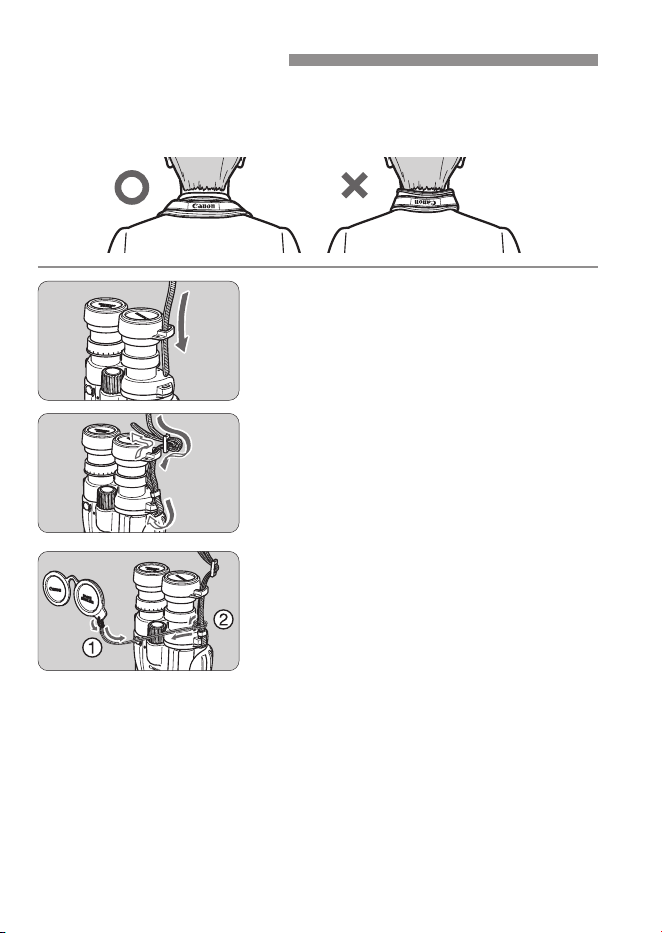
The strap is designed to hang on the neck in a specic direction. Install
the strap in a manner so that the Canon logo at the center of the strap
appears as in the illustration when the strap is hanging from the neck.
Install the eyepiece lens caps.
z
Install the eyepiece lens caps on the
binoculars.
z
Put the strap through the strap hole in
the eyepiece lens caps.
1
Fasten the strap.
z
Make sure that there is no slack and
the strap does not loosen at the clasp
when you pull it.
2
Connect the objective lens caps.
z
Use the string included in the package
to connect the objective lens caps to
the strap.
3
Installing the Strap
ENG-9
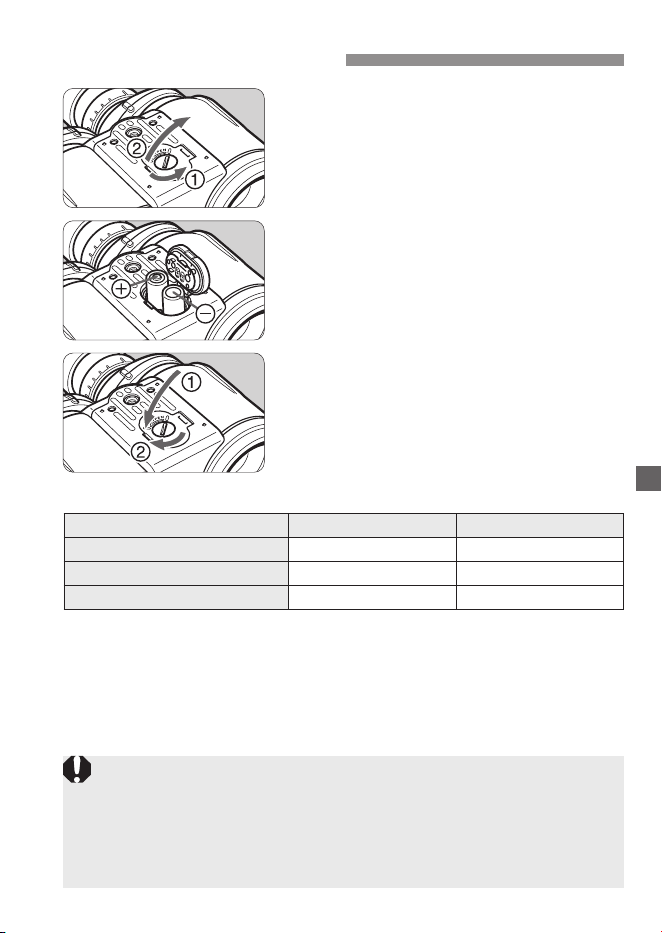
Open the cover.
z
Use a coin or a similar item to turn the
lock screw 90 degrees as shown by
the arrow. Then open the cover.
1
Load the batteries.
z
Load two batteries in the correct + and
– orientation as shown on the battery
cover.
2
Close the cover.
z
Hold down the battery chamber cover
and tighten the lock screw.
3
Battery Life (Continuous Use)
25˚C / 77˚F –10˚C / 14˚F
Size-AA lithium batteries Apporox. 8 hours Apporox. 3.5 hours
Size-AA Ni-MH batteries Apporox. 6 hours Apporox. 2.5 hours
Size-AA alkaline batteries Apporox. 2.5 hours Apporox. 10 minutes
(Based on Canon’s testing conditions.)
z
Size-AA manganese batteries are not recommended due to their low energy.
z
Change batteries when the binoculars are dry and there is no moisture
or dirt.
z
Be careful not to let moisture onto the inner side of the battery chamber
cover or into the chamber. If there is moisture, make sure to remove it
and adequately dry it o before changing batteries.
z
Wet batteries may result in battery leakage and failure.
Loading the Batteries
ENG-10
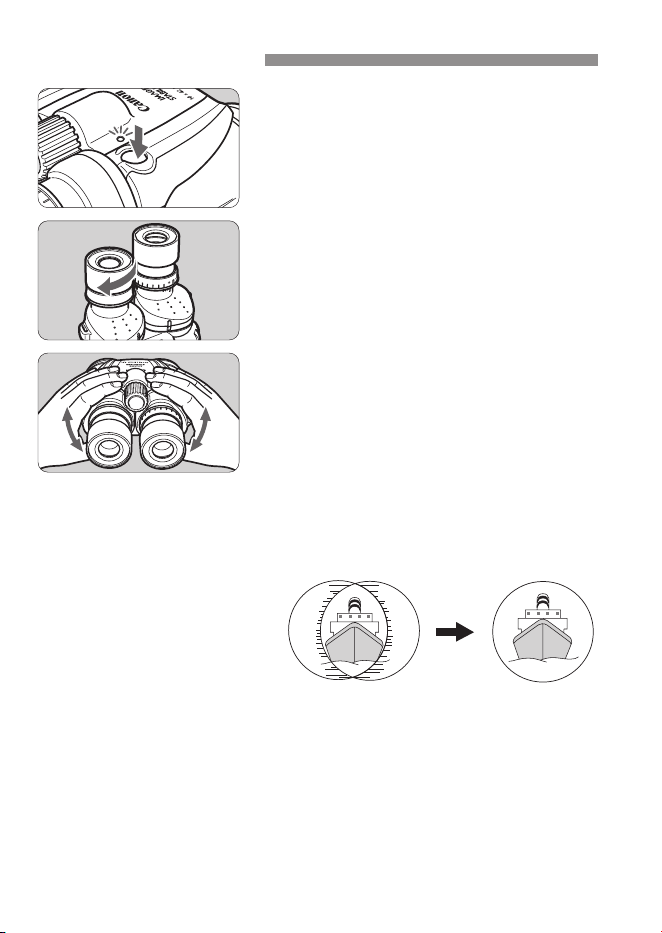
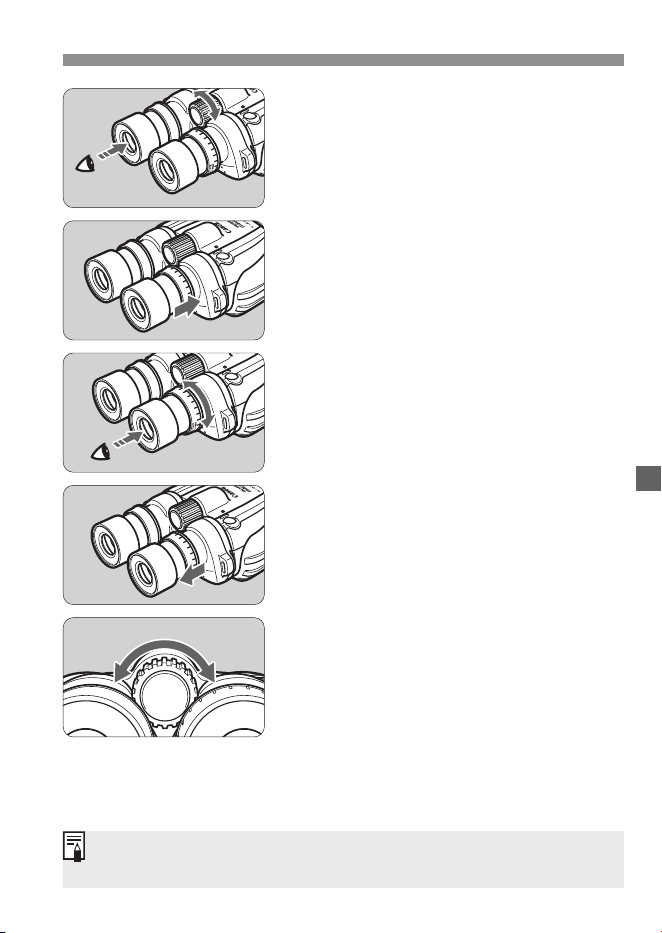
Check that the lamp lights.
z
Press the Image Stabilizer button and
check that the lamp lights.
1
Adjust the eyecup position.
z
When using the binoculars while
wearing eyeglasses, turn the eyecups
to adjust the height for easy viewing.
2
Adjust the width of the binoculars.
z
Look through the binoculars and adjust
the angle of the eyepieces until the left
and right images converge.
z
Doing the above maximizes
performance and minimizes eye fatigue
while viewing.
z
When adjusting the width of the
binoculars to suit the width between
your eyes, look at a distant object.
3
Before You Start
ENG-11
Before You Start
Adjust the diopter.
z
First look with the left eye only and
adjust the focusing knob until the
object looks sharp.
4
z
Push the dioptric correction ring in the
direction shown by the arrow until you
hear a click.
z
Then look with the right eye only at the
same object while turning the dioptric
correction ring until the object looks
sharp.
z
Pull the dioptric correction ring toward
you until you hear a click to secure the
diopter adjustment.
Adjust the focus.
z
Look through the eyepiece and turn
the focusing knob until the object looks
sharp.
5
The focusing range is about 2.5m to innity. There is some margin at the
innity end.

ENG-12
While you look through the binoculars, the image may be shaking and
dicult to see since your hands are holding the binoculars. In such a
case, the Image Stabilizer can help steady the image.
There are two ways to use the Image Stabilizer. You can turn on the
Image Stabilizer as long as you hold down the Image Stabilizer button
and or you can turn on the Image Stabilizer for 5 minutes.
n
Holding down the button
The Image Stabilizer operates
continuously while you hold down the
button. When you let go of the button, the
Image Stabilizer stops operating.
n
Five-minute operation
Press the Image Stabilizer button slowly
and quickly let it go, and the Image
Stabilizer will operate continuously for
about ve minutes.
To stop the Image Stabilizer operation,
press the button again.
z
The lamp lights while the Image
Stabilizer is on.
Using the Image Stabilizer
z
T
he Image Stabilizer may not be able to compensate for severe shaking.
z
If the binoculars are attached to a tripod, it will compensate for the
small vibrations unique to tripod use.
z
If the binoculars face down for more than 10 seconds, such as when
they are hanging from the strap, the Image Stabilizer will turn o to
conserve power. To use the binoculars in downward direction, keep
pressing the Image Stabilizer switch.
z
When the battery power is low, the Image Stabilizer may generate
noise and vibration. The image stabilization is not aected by this.
z
Even without batteries loaded, the binoculars can still be used as is.
ENG-13
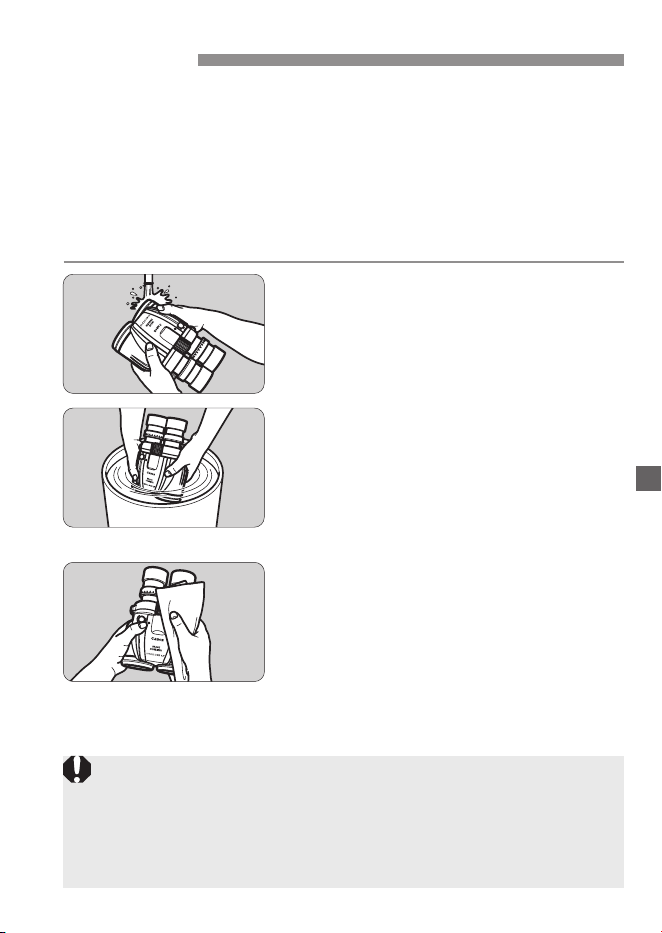
If there is sand or dirt on the binoculars, wash them with water by
following the procedure below.
z
Never operate any functions while washing the binoculars with
water. Otherwise water may leak into the binoculars through
movable components, resulting in malfunction.
z
Make sure that the battery chamber cover is closed before
washing the binoculars.
z
Use tap water below 30°C/86°F for washing.
Wash with running water.
z
Wash dust, dirt, and sand from the surface
of the binoculars with tap water at about the
same ow as for washing your hands.
z
Do not rub the objective and eyepiece
lenses if they are still dirty.
1
Soak and wash.
z
Soak the binoculars in water in a
bucket or other container, and gently
move them back and forth so that dust,
dirt, and sand come o easily.
z
If they are covered with salt water, soak the
binoculars for one to two hours to remove salt.
2
Wipe the binoculars.
z
Use a clean, dry, soft cloth to wipe
moisture o the binoculars.
z
Sometimes moisture remains in gaps between
components, so place the binoculars on a dry,
soft cloth to dry completely in the shade.
z
After the binoculars are completely dry,
use commercially available lens cleaner
or similar material to clean the lenses.
3
After Use
z
Do not wash the binoculars with detergent, hot water, or strongly
running water, as that may result in malfunction.
z
Do not swing the binoculars in an attempt to shake o water, or use a
hair drier or similar item to dry them, or wash them in a washing machine.
z
If the binoculars are heavily soiled or large amounts of sand are on the
binoculars, consult with a Canon Service Counter.

ENG-14
If there is a problem with the binoculars, rst refer to the table below
to see if you can resolve it. If the problem cannot be resolved, take the
binoculars to your nearest Canon Service Center.
Troubleshooting Guide
Problem Probable Cause Corrective Measure
The image is not clear. The lens is dirty. Use a blower brush to
remove dust, etc., from the
lens surface. Then use a
commercially available lens
cleaner or similar material to
wipe the lens.
The width of the binoculars
does not suit the width
between your eyes.
Adjust the width of the
binoculars
(See page ENG-10).
The diopter has not been
properly set.
Adjust the diopter
(See page ENG-11).
The binoculars are not
properly focused.
Focus the binoculars
(See page ENG-11).
The Image Stabilizer
does not operate.
There are no batteries
loaded.
Load batteries having
enough power.
When the Image Stabilizer
button is pressed, the lamp
does not light.
If the lamp does not light,
it means the batteries are
exhausted. Replace the
batteries with new ones.
The battery power is low. Even if the lamp lights, the
Image Stabilizer may not
operate if the batteries are
exhausted. Replace the
batteries with new ones.
The binoculars are facing
down.
If the binoculars face down
for more than 10 seconds,
the Image Stabilizer will
turn o to conserve power.
To use the binoculars
in downward direction,
keep pressing the Image
Stabilizer switch.
When the binoculars are
shaken severely while
the Image Stabilizer is
operating, there is a
strange noise.
The batteries are exhausted. Replace the batteries with
new ones.

ENG-15
* Specications subject to change without notice.
Specications
10
×
42L IS WP
Type Prism binoculars
Magnication 10
×
Objective lens eective
diameter
42 mm (52mm lter can also be attached)
Real eld of view 6.5˚
Apparent eld of view /
Field of view at 1000 m / yds
59.2°
(Calculated based on ISO 14132-1:2002)
114 m / 374 ft
Exit pupil diameter 4.2 mm
Eye relief 16 mm
Pupil-distance adjustment
range
57 to 75 mm
Focusing distance range Approx. 2.5 m to innity
Image Stabilizer system Optical correction with vari-angle prism
Correction angle ±0.8˚
Battery check Lamp (LED) turns on
Operating environment Temperature: –10˚C to 45˚C / 14˚F to 113˚F
Humidity: 90%
Dimensions (W
×
L
×
H) Approx. 137
×
176
×
86 mm / 5.4
×
6.9
×
3.4 in.
Weight Approx. 1110 g / 39.2 oz (Excluding batteries)
ENG-16
This device complies with Part 15 of the FCC Rules. Operation is subject to the
following two conditions: (1) This device may not cause harmful interference, and (2)
this device must accept any interference received, including interference that may
cause undesired operation.
Do not make any changes or modifications to the equipment unless otherwise
specified in the instructions. If such changes or modifications should be made, you
could be required to stop operation of the equipmet.
This equipment has been tested and found to comply with the limits for a Class B
digital device, pursuant to Part 15 of the FCC Rules. These limits are designed to
provide reasonable protection against harmful interference in a residential installation.
This equipment generates, uses and can radiate radio frequency energy and, if not
installed and used in accordance with the instructions, may cause harmful
interference to radio communications. However, there is no guarantee that
interference will not occur in a particular installation. If this equipment does cause
harmful interference to radio or television reception, which can be determined by
turning the equipment off and on, the user is encouraged to try to correct the
interference by one or more of the following measures:
• Reorient or relocate the receiving antenna.
• Increase the separation between the equipment and receiver.
• Connect the equipment into an outlet on a circuit different from that to which the
receiver is conected.
• Consult the dealer or an experienced radio/ TV technician for help.
CANON U.S.A. Inc.
One Canon Park, Melville, NY 11747, U.S.A.
Tel No. 1-800-OK-CANON (1-800-652-2666)
CAN ICES-3 (B) / NMB-3 (B)
Only for European Union and EEA (Norway, Iceland and Liechtenstein)
These symbols indicate that this product is not to be disposed
of with your household waste, according to the WEEE Directive
(2012/19/EU), the Battery Regulation ((EU) 2023/1542) and/or
national legislations implementing those Directive and Regulation.
If a chemical symbol is printed beneath the symbol shown
above, in accordance with the Battery Regulation, this
indicates that a heavy metal (Pb = Lead) is present in this
battery at a concentration above an applicable threshold
specied in the Battery Regulation.
This product should be handed over to a designated collection point, e.g., on an
authorized one-for-one basis when you buy a new similar product or to an
authorized collection site for recycling waste electrical and electronic equipment
(EEE) and batteries. Improper handling of this type of waste could have a possible
impact on the environment and human health due to potentially hazardous
substances that are generally associated with EEE. Your cooperation in the correct
disposal of this product will contribute to the effective usage of natural resources.
For more information about the recycling of this product, please contact your local
city office, waste authority, approved scheme or your household waste disposal
service or visit www.canon-europe.com/sustainability/approach/.

CT1-B049-D 0425Ni © CANON INC. 2020