W01
W01
W01
长按(电源键)
打开
头戴无线耳机
1.包装清单
用户使用手册 ×1
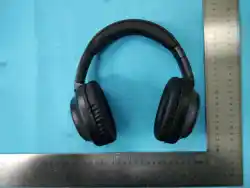
无线头戴耳机 ×1
USB 充电线 ×1
3.5 毫米音频线 ×1
使用前须知
关闭耳机,使用充电线将耳机连接至充电器、电
脑或移动电源进行充电。
备注:首次使用前,请将设备充电至少 小时。
充电过程中红色指示灯常亮,电量充满后指示灯
熄灭。
小贴士:充电时请勿使用耳机,否则会降低音质
并缩短电池使用寿命。
充电前请确保 接口保持干燥。
连接使用说明(蓝牙连接教程)
耳机与蓝牙设备的距离请勿超过 10 米。长按电
源键 3 秒即可开机,开机时会响起提示音。
开启手机蓝牙,在可用设备列表中选择
W01
进
行配对。若 5 分钟内未完成蓝牙连接,耳机将会
自动关机。
备注(指示灯状态说明)
白灯快速闪烁:未连接蓝牙
白灯缓慢闪烁:已成功连接蓝牙
红灯常亮:正在充电
4.音频线(有线连接使用方式)
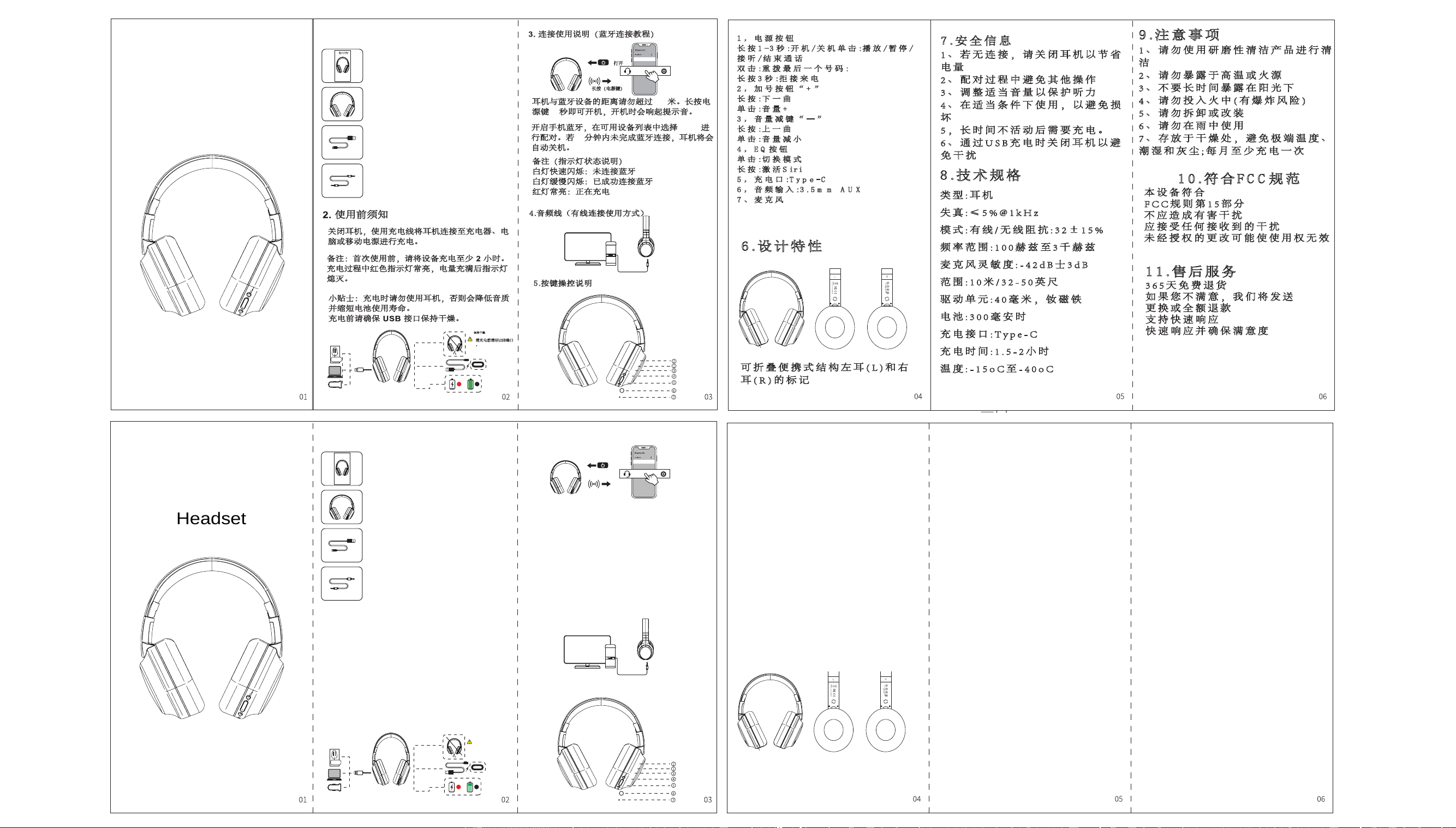
5.按键操控说明
1 , 电 源 按 钮
长 按 1 -3 秒 :开 机 / 关 机 单 击 :播 放 /暂 停 /
接 听 /结 束 通 话
双 击 :重 拨 最 后 一 个 号 码 :
长 按 3 秒 :拒 接 来 电
2 , 加 号 按 钮 “ + ”
长 按 :下 一 曲
单 击 :音 量 +
3 , 音 量 减 键 “ — ”
长 按 :上 一 曲
单 击 :音 量 减 小
4 , E Q 按 钮
单 击 :切 换 模 式
长 按 :激 活 S ir i
5 , 充 电 口 :T y p e -C
6 , 音 频 输 入 :3 .5 m m A U X
7 、 麦 克 风
6 .设 计 特 性
可 折 叠 便 携 式 结 构 左 耳 ( L ) 和 右
耳 ( R ) 的 标 记
7 .安 全 信 息
1 、 若 无 连 接 , 请 关 闭 耳 机 以 节 省
电 量
2 、 配 对 过 程 中 避 免 其 他 操 作
3 、 调 整 适 当 音 量 以 保 护 听 力
4 、 在 适 当 条 件 下 使 用 , 以 避 免 损
坏
5 , 长 时 间 不 活 动 后 需 要 充 电 。
6 、 通 过 U S B 充 电 时 关 闭 耳 机 以 避
免 干 扰
8 .技 术 规 格
类 型 : 耳 机
失 真 : ≤ 5 % @ 1 k H z
模 式 : 有 线 / 无 线 阻 抗 : 3 2 ± 1 5 %
频 率 范 围 : 1 0 0 赫 兹 至 3 千 赫 兹
麦 克 风 灵 敏 度 : - 4 2 d B 士 3 d B
范 围 : 1 0 米 / 3 2 - 5 0 英 尺
驱 动 单 元 : 4 0 毫 米 , 钕 磁 铁
电 池 : 3 0 0 毫 安 时
充 电 接 口 : T y p e - C
充 电 时 间 : 1 . 5 - 2 小 时
温 度 : - 1 5 o C 至 - 4 0 o C
9 .注 意 事 项
1 、 请 勿 使 用 研 磨 性 清 洁 产 品 进 行 清
洁
2 、 请 勿 暴 露 于 高 温 或 火 源
3 、 不 要 长 时 间 暴 露 在 阳 光 下
4 、 请 勿 投 入 火 中 ( 有 爆 炸 风 险 )
5 、 请 勿 拆 卸 或 改 装
6 、 请 勿 在 雨 中 使 用
7 、 存 放 于 干 燥 处 , 避 免 极 端 温 度 、
潮 湿 和 灰 尘 ; 每 月 至 少 充 电 一 次
1 0 .符 合 F C C 规 范
本 设 备 符 合
F C C 规 则 第 1 5 部 分
不 应 造 成 有 害 干 扰
应 接 受 任 何 接 收 到 的 干 扰
未 经 授 权 的 更 改 可 能 使 使 用 权 无 效
1 1 .售 后 服 务
3 6 5 天 免 费 退 货
如 果 您 不 满 意 , 我 们 将 发 送
更 换 或 全 额 退 款
支 持 快 速 响 应
快 速 响 应 并 确 保 满 意 度
保持干燥
清充电前清洁USB端口
。
W01
W01
1.
Headset
Packing List
User Manual ×1
Wireless Over-Ear Headphones × 1
USB Charging Cable × 1
3.5mm Audio Cable × 1
2. Pre-Use Instructions
Turn off the headphones, then connect the
headphones to a charger, computer or power
bank via the charging cable for charging.
Note:Before first use, charge the device for
at least 2 hours.The red indicator light stays
on steadily during charging; the indicator will
turn off once the battery is fully charged.
Tips:Do not use the headphones while
charging, as this will degrade sound quality
and shorten the battery service life.Ensure the
USB port is dry before charging.
Keep Dry
Clean the USB
port before charging.
3. Connection Instructions (Bluetooth Pairing Tutorial)
Turn On
Long Press (Power Button)
Keep the distance between the headphones and Bluetooth device
within 10 meters. Press and hold the power button for 3 seconds to
power on, and a prompt tone will play upon startup.
Turn on Bluetooth on your mobile phone, then select W01 from the
available device list to complete pairing. If Bluetooth connection is not
established within 5 minutes, the headphones will power off
automatically.
Notes (Indicator Light Status Guide)
Fast flashing white light: Bluetooth not connected
Slow flashing white light: Bluetooth connected successfully
Steady red light: Charging in progress
4. Audio Cable (Wired Connection Usage)
5. Button Operation Instructions
英文/English
W01
W01Wireless HeadphonesIns
truction Manual(EN)
9. Precautions
1、Do not use abrasive cleaning products for
cleaning.
2、Do not expose the device to high temperatures
or open flames.
3、Avoid prolonged exposure to direct sunlight.
4、Never throw into fire (risk of explosion).
5、Do not disassemble or modify the device.
6、Do not use it in the rain.
7、Store in a dry place; keep away from extreme
temperatures, humidity and dust. Charge the
headphones at least once a month.
10. FCC Compliance
This device complies with Part 15 of the FCC
Rules.
It shall not cause harmful interference.
It must accept any interference received.
Unauthorized modifications may void the
user’s authority to operate this equipment.
7. Safety Information
1、Power off the headphones to save battery
power when not connected to any device.
2、Avoid other operations during the pairing
process.
3、Adjust the volume to an appropriate level to
protect your hearing.
4、Use the device under suitable conditions to
prevent damage.
5、Charge the headphones after long periods of
inactivity.
6、Turn off the headphones while charging via
USB to avoid interference.
8. Technical Specifications
Type: Headphones
Total Harmonic Distortion: ≤5% @ 1kHz
Mode: Wired / Wireless
Impedance: 32Ω ±15%
Frequency Response: 100 Hz ~ 3 kHz
Microphone Sensitivity: -42dB ±3dB
Bluetooth Range: 10 meters / 32–50 feet
Driver Unit: 40mm, Neodymium Magnet
Battery Capacity: 300mAh
Charging Port: Type-C
Charging Time: 1.5 – 2 hours
Operating Temperature: -15°C ~ 40°C
1、Power Button
Press and hold for 1–3 seconds: Power On / Power
Off
Single click: Play / Pause / Answer call / End call
Double click: Redial the last dialed number
Press and hold for 3 seconds: Reject incoming call
2、Volume Up Button "+"
Press and hold: Next track
Single click: Volume Up
3、Volume Down Button "−"
Press and hold: Previous track
Single click: Volume Down
4、EQ Button
Single click: Switch sound modes
Press and hold: Activate Siri
5、Charging Port: Type-C
6、Audio Input: 3.5mm AUX Jack
7、Microphone
6. Design Features
Foldable portable structure, marked with
Left (L) and Right (R) ear indicators
W01

FCC Caution:
This device complies with part 15 of the FCC Rules. Operation is subject to the following two conditions: (1) This
device may not cause harmful interference, and (2) this device must accept any interference received, including
interference that may cause undesired operation.
Any changes or modifications not expressly approved by the party responsible for compliance could void the user's
authority to operate the equipment.
NOTE: This equipment has been tested and found to comply with the limits for a Class B digital device, pursuant to
Part 15 of the FCC Rules. These limits are designed to provide reasonable protection against harmful interference
in a residential installation. This equipment generates, uses and can radiate radio frequency energy and, if not
installed and used in accordance with the instructions, may cause harmful interference to radio communications.
However, there is no guarantee that interference will not occur in a particular installation.
If this equipment does cause harmful interference to radio or television reception,
which can be determined by turning the equipment off and on, the user is encouraged to try to correct the
interference by one or more of the following measures:
-- Reorient or relocate the receiving antenna.
-- Increase the separation between the equipment and receiver.
-- Connect the equipment into an outlet on a circuit different from that to which the receiver is connected.
-- Consult the dealer or an experienced radio/TV technician for help.
The device has been evaluated to meet general RF exposure requirement.
The device can be used in portable exposure condition without restriction.