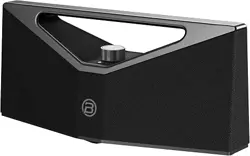
REAL JAZZ MUSIC SPEAKER
USER MANUAL
BRIEF PRO
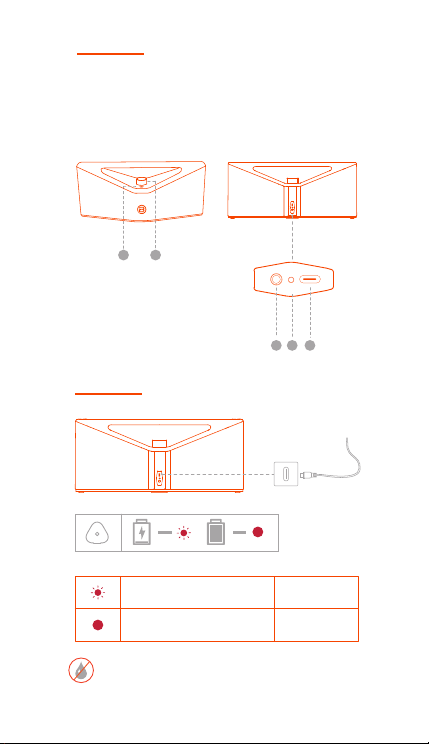
PRODUCT OVERVIEW
CHARGE THE SPEAKER
1. Multi-function Button
2. Knob Actuator
3. AUX IN
4. RESET
5. USB-C
Blinking red
Solid red
Charging
Fully charged
Don't plug the cable in when your speaker and the
charging port are not completely dry. Leave your
speaker in a dry area with some airflow to let the
port air dry naturally.
• Speaker --- 1pc
• USB-C Cable --- 1pc
• AUX IN Cable --- 1pc
• User Manual --- 1pc
• Quick Start Guide --- 1pc
USB-C
RESET
AUX IN
1
2
EN
USB-C
RESET
AUX IN
USB-C
RESET
AUX IN
3
4 5
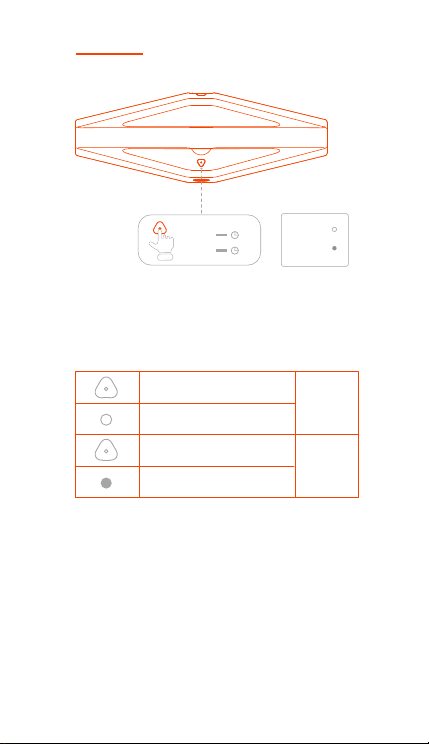
POWER ON / OFF
OFF
ON
Press for two seconds
Press for two seconds
White light on
White light o
Power on
Power o
The speaker switches o when audio has stopped or
buttons have not been pressed for 15 minutes.
ON
OFF
2s
2s
Press and hold the Power button for 2 seconds to power
on.
Press and hold the Power button again for 2 seconds to
power o.
EN
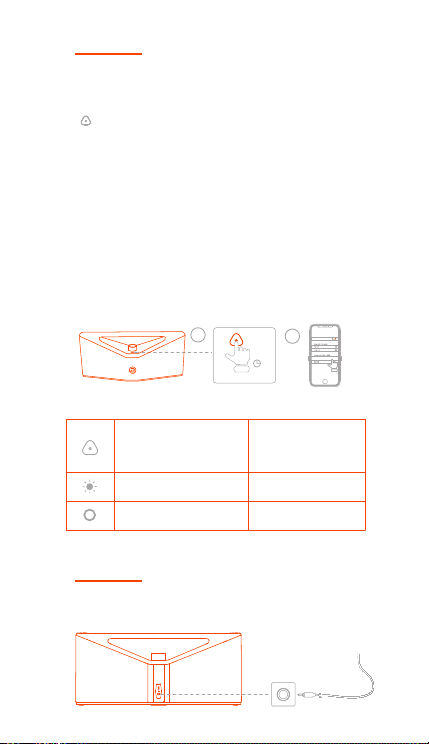
BLUETOOTH CONNECTION
Blinking White
Solid White
Automatically enter
Bluetooth pairing
mode after turning on
Bluetooth pairing
Bluetooth connected
• For first time use and turning on, the speaker will
automatically enter a waiting mode for connection.
• If the Bluetooth device is already connected, press
" " button to disconnect the current connection and
connect with other devices.
• The speaker will automatically enter pairing mode if it
is not connected to a Bluetooth device.
When pairing, enable the Bluetooth function of the
phone and search for "BUGANi Brief Pro" to connect.
When the connection is successful, you will hear a
prompt tone and the Bluetooth indicator will turn from
blinking to keeping solid.
Note: To avoid any sudden loud sound output from the
speaker, turn down the volume of both the Bluetooth
device and the speaker or stop music playback.
Press and hold for two
seconds
Connect a device to the AUX IN jack with an audio cable.
AUX IN
USB-C
RESET
AUX IN
2s
BUGANi Brief Pro
2
1
EN
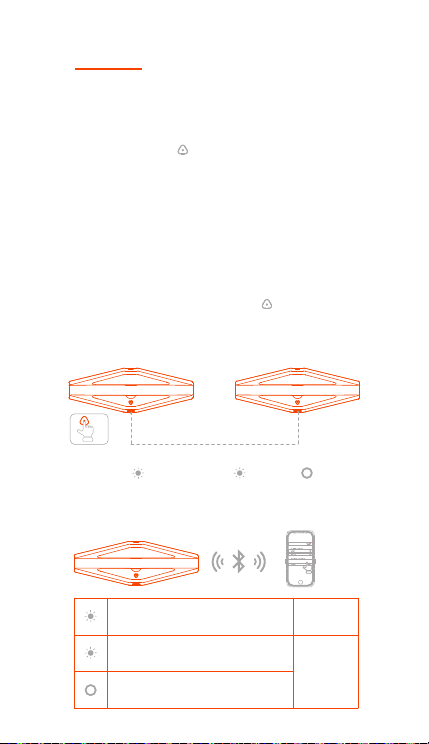
TWS (TRUE WIRELESS STEREO)
MODE
You can connect two of the same Brief Pro models
together in TWS Mode.
1. Make sure the speakers are not connected to the
mobile phone.
2. Double-click the " " button on any speaker. The
speakers are automatically paired. After pairing, the main
speaker Bluetooth indicator will blink, and the secondary
speaker Bluetooth indicator will remain on.
3. Enable the Bluetooth function on the phone, search for
"BUGANi Brief Pro" to connect. After the successful
connection, you will hear a prompt tone and the main
speaker Bluetooth indicator light will become solid. Also,
the Bluetooth indicator light on the secondary speaker
will remain solid.
4. Exit TWS mode: Double-click the " " button on the
main speaker, and the speaker will automatically exit
TWS mode.
speaker 1 / speaker 2
pairing
Blinking White (speaker 1)
Solid White (speaker 2)
TWS
connected
connected connected
Blinking White
TWS pairing
BUGANi Brief Pro
speaker 1
speaker 1 speaker 2
EN
x2
speaker 1 speaker 2
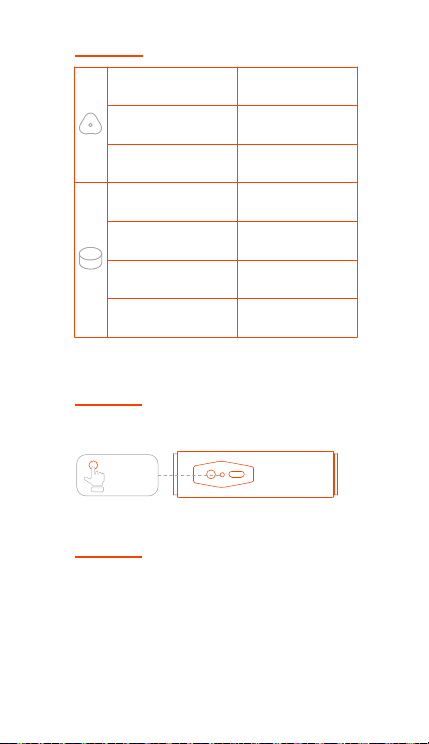
BUTTON CONTROLS
RESET
Press and hold
Turn on/o
Short press
Bluetooth connection/
disconnect
Double click
TWS connection/
disconnect
Press and hold
Short press
Turn clockwise
Turn counterclockwise
Play the next song
Play/pause
Volume up
Volume down
Press the reset button once.
RESET
×1
CAUTION
1. It is not recommended to replace the battery privately.
2. The battery (battery pack or battery pack
combination) must not be exposed to sunshine, fire or
similar overheated environments.
AUX IN
RESET
USB-C
EN

BUGANi LIMITED WARRANTY
BUGANi Corporation ("BUGANi") warrants your
product against defects in materials and workmanship
when purchased directly from BUGANi or a BUGANi
authorized reseller. This warranty is extended only to
the original end-use purchaser or the person receiving
the product as a gift and shall not be extended to any
other person or transferee. The warranty is valid from
the date of retail purchase for a period of 1 year.
BUGANi will provide the Warranty Services in
accordance with the relevant laws and regulations of
local government.
This warranty does not cover defects or damage arising
from improper use or maintenance, normal wear and
tear, commercial use, accident or external causes.
Unauthorized repair, modification or customization of
your product voids this warranty.
For warranty service on covered defects during the
warranty period, contact BUGANi using the contact
information at worldwide. Prior to providing warranty
service, BUGANi may require you to provide proof of
purchase details, including but not limited to a receipt
or sales invoice.
For more information, please visit
www.bugani-global.com
Please contact: care@bugani-global.com
EN

FCC STATEMENT
Changes or modifications not expressly approved by
the party responsible for compliance could void the
user's authority to operate the equipment.
This equipment has been tested and found to comply
with the limits for a Class B digital device, pursuant to
part 15 of the FCC Rules.
These limits are designed to provide reasonable
protection against harmful interference in a residential
installation. This equipment generates uses and can
radiate radio frequency energy and, if not installed and
used in accordance with the instructions, may cause
harmful interference to radio communications. However,
there is no guarantee that interference will not occur in
a particular installation. lf this equipment does cause
harmful interference to radio or television reception
which can be determined by turning the equipment o
and on, the user is encouraged to try to correct the
interference by one or more of the following measures:
- Reorient or relocate the receiving antenna.
- Increase the separation between the equipment and
the receiver.
- Connect the equipment to an outlet on a circuit
dierent from that to which the receiver is connected.
- Consult the dealer or an experienced radio/TV
technician for help.
Changes or modifications not expressly approved by
the party responsible for compliance could void the
user's authority to operate the equipment.
This device complies with Part 15 of the FCC Rules.
Operation is subject to the following two conditions:
(1) This device may not cause harmful interference, and
(2) This device must accept any interference received.
Including interference that may cause undesired
operation.
The device has been evaluated to meet general RF
exposure requirement. The device can be used in
portable exposure condition without restriction.
FCC ID: 2BGTK-BS12303
EN

IC CAUTION:
Radio Standards Specification RSS-Gen, issue 5
- English:
This device contains licence-exempt transmitter(s)/re-
ceiver(s) that comply with Innovation, Science and
Economic Development Canada’s licence-exempt
RSS(s). Operation is subject to the following two
conditions:
This device may not cause interference.
This device must accept any interference, including
interference that may cause undesired operation of the
device.
RF exposure statement:
The device has been evaluated to meet general RF
exposure requirement. The device can be used in
portable exposure condition without restriction.
- French:
Cet appareil contient des émetteurs/récepteurs
exemptés de licence conformes aux RSS (RSS)
d'Innovation, Sciences et Développement économique
Canada. Le fonctionnement est soumis aux deux
conditions suivantes:
Cet appareil ne doit pas causer d'interférences.
Cet appareil doit accepter toutes les interférences, y
compris celles susceptibles de provoquer un
fonctionnement indésirable de l'appareil.
Déclaration d'exposition RF:
L'appareil a été évalué pour répondre aux exigences
générales d'exposition aux RF. L'appareil peut être
utilisé dans des conditions d'exposition portable sans
restriction.
IC: 32554-BS12303
EN