Model: H7038
User Manual
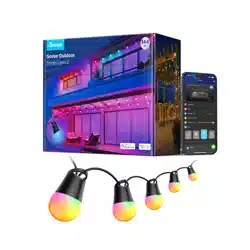
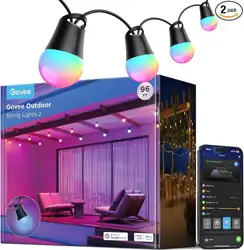
Govee Outdoor String Lights 2
05 06
Troubleshooting
❶
●Makesurethestringlightsareconnectedtopower.
●Makesureyoursmartphone’sBluetoothisenabled.
●Keepyoursmartphoneclosetothecontrolboxandtryagain.
❷
Missingparts/Receivingproductsfromasecondarysale.
FailedtoconnecttoGoveeHomeApp.
● Checkthepicturesonthewebpagetoconfirmwhatpartsaremissingand
contactcustomerserviceintheappforreplacements.
● Ifyoureceivedaproductfromasecondarysaleoraproductthatcannot
workproperly,pleasecontactcustomerserviceintheappfora
replacement.
❹
Appoperationguideisneeded.
● OpenGoveeHomeApp,tapMyProfile>>GoveeInstructions>>App
Guide>>HowtoUse,tofindmoredetails.
If yourproblempersists,pleasecontactCustomerSupport.
❸
Networkfailure
● MakesureyourhomeWi-Fiis2.4Ghz,andyoursmartphone’sBluetoothis
on.
● Longpressthecontrolboxformorethan5storesetthewholelight.
Unbindandthenrebindthelight.
● IfthelightistoofarawayfromtheWi-Fi,bringthedeviceclosertothe
Wi-Fi,andthenreconnecttothe network.
● Checkiftherearetoomanydevicesconnectedtothenetwork.Ifso,
changetoanothernetwork.
● Iftheabovemethodscannotsolveyourproblems,pleasecontactcustomer
serviceintheapptoreplacethecontrolbox.
Customer Service
Warranty: 12-Month Limited Warranty
Support: Lifetime Technical Support
Email: support@govee.com
Ocial Website: www.govee.com
@Govee.smarthome@Goveeocial
@govee.ocial
@govee_ocial
@Govee
FCC and ISED Canada Statement
This device complies with Part 15 of the FCC Rules and Industry Canada
licence-exempt RSS standard(s). Operation is subject to the following
two conditions:
(1) This device may not cause harmful interference, and (2) This device
must accept any interference received, including interference that may
cause undesired operation.
Warning: Changes or modifications not expressly approved by the party
responsible for compliance could void the user's authority to operate
the equipment.
Le présent appareil est conforme aux CNR d'Industrie Canada applica-
bles aux appareils radio exempts de licence. L'exploitation est autorisée
aux deux conditions suivantes :
(1) l'appareil nedoit pas produire de brouillage, et
(2) l'utilisateur de l'appareil doit accepter tout brouillage radioélectrique
subi, même si le brouillage est susceptible d'en compromettre le
fonctionnement.
NOTE: This equipment has been tested and found to comply with the
limits for a Class B digital device, pursuant to Part 15 of the FCC Rules.
These limits are designed to provide reasonable protection against
harmful interference in a residential installation. This equipment
generates uses and can radiate radio frequency energy and, if not
installed and used in accordance with the instructions, may cause
harmful interference to radio communications. However, there is no
guarantee that interference will not occur in a particular installation. If
this equipment does cause harmful interference to radio or television
reception, which can be determined by turning the equipment o and
on, the user is encouraged to try to correct the interference by one or
more of the following measures:
1.Reorient or relocate the receiving antenna.
2.Increase the separation between the equipment and receiver.
3.Connect the equipment into an outlet on a circuit dierent from that
to which the receiver is connected.
4.Consult the dealer or an experienced radio/TV technician for help.
This Class B digital apparatus complies with Canadian ICES-005.
Cet appareil numérique de la classe B est conforme à la norme
NMB-005 du Canada.
FCC and IC Radiation Exposure Statement
This equipment complies with FCC and IC radiation exposure limits set
forth for an uncontrolled environment. This equipment should be
installed and operated with minimum distance 20cm between the
radiator & your body.
Lors de l'utilisation du produit, maintenez une distance de 20 cm du
corps afin de vous conformer aux exigences en matière d'exposition RF.
Responsible party (this contact information is only for FCC matters) :
Name: GOVEE MOMENTS(US) TRADING LIMITED
Address: 2501 Chatham Rd Suite R Springfield IL 62704
Email: certification@govee.com
Contact information: https://www.govee.com/support
The Bluetooth® word mark and logos are registered trademarks owned
by Bluetooth SIG, Inc. and any use of such marks by Shenzhen Qianyan
Technology LTD is under license.
The trademark Govee have been authorised to Shenzhen Qianyan
Technology LTD.
Copyright ©2021 Shenzhen Qianyan Technology LTD.
All Rights Reserved.
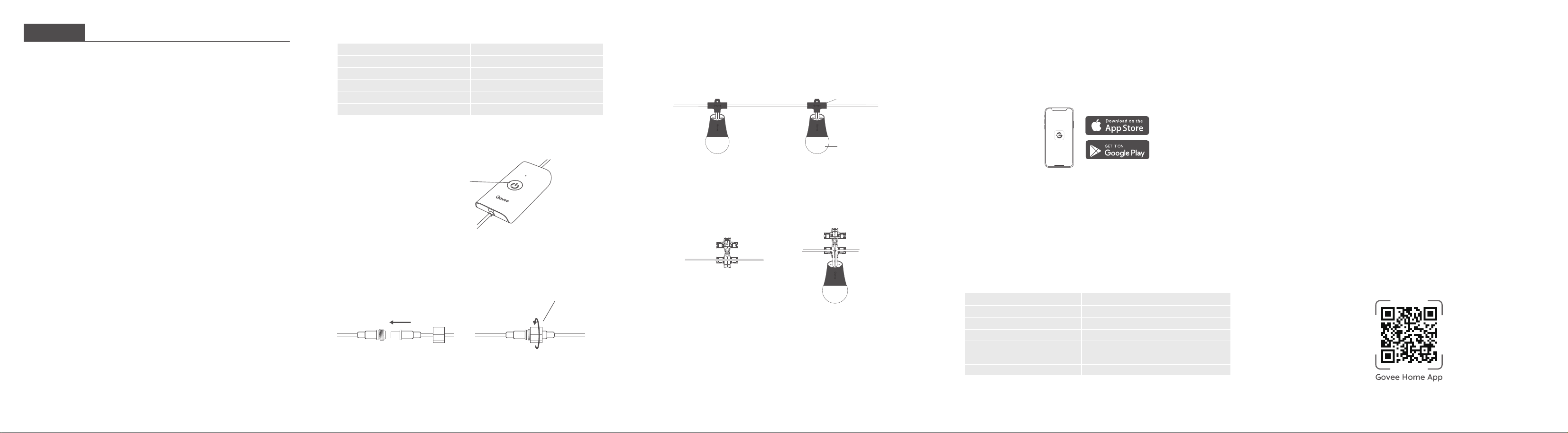
What You Get
01
English
Item
String Light
Adapter
Control Box
Cable Clip
User Manual
Quantity
2
1
1
15
1
02
At a Glance
Controlling String Lights in Series
Installing Your Device
●
●
Press to turn the light on or o.
Long press for 5 seconds to
reset.
1. Connect the two string
lights as shown in the image.
Installation Steps
Use the hooks to hang the light bulbs onto the string.
2. Firmly screw the wire nut.
Note: Only 3 string lights can be connected in a series.
Cable Clip
Independent Control
03
Find a proper position and firmly fit the cables into the cable clip.
❶
or
Pairing Your Device with Govee Home App
●
●
A Wi-Fi router supporting the 2.4GHz and 802.11 b/g/n bands. 5GHz is not
supported.
A smartphone or tablet running iOS or Android.
What You Need:
Govee Home
Download Govee Home App from the App Store (iOS devices) or Google
Play (Android devices).
Turn on your smartphone’s Bluetooth.
Open the app, tap the "+" icon in the top right corner and search "H7038."
Tap the device icon and follow the on-screen instructions to complete
pairing.
❶
❷
❸
❹
04
Power Input
Power Output
Total Length
Light Color
Waterproof
Working Temperature
Specifications
100-240VAC50/60Hz
36VDC1.5A
98FT/30M
RGB+Warm White
Control Box (IP65)
String Light (IP65)
-20℃-40℃ / -4℉-104℉
www.govee.com
For FAQs and more information,
please visit:
●
●
●
●
●
●
●
●
●
Safety Instructions
Introduction
This product is rated as IP65 Waterproof. It can be used outdoors but
cannot be immersed in water.
Risk of Electric Shock. The adapter install only to a covered Class A
GFCl receptacle that has an enclosure that is weatherproof with the
attachment plug cap inserted or removed.
Tighten up the waterproof cap before installing the light.
The internal light sources of the light cannot be replaced. If the light
sources sustain damage, the product should be replaced.
Do not allow children to assemble and install this product without
adult supervision.
Avoid installing this product near major heat sources.
External dimmers cannot be used with this product.
Use this product with the provided power adapter only.
CAUTION-The product is not a toy. Children and the disabled should
use it under adult supervision.
Thanks for choosing the Govee Outdoor String Lights 2. This product
has an IP65 waterproof rating, making them ideal for outdoor use. Using
Govee Home App, you can adjust its color and brightness and sync its
lighting eects with rhythm by turning on Music Mode.
Read and follow all the safety instructions: