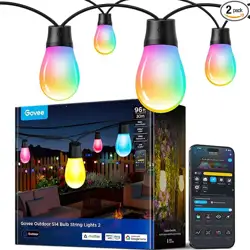

Model: H702B
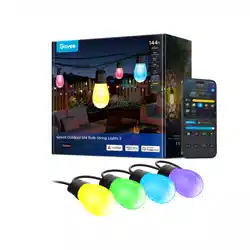
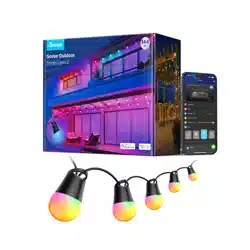
Govee Outdoor S14 Bulb String Lights 2
User Manual


English
01
08
Français

SAVE THESE INSTRUCTIONS
When using products, basic precautions should always be practiced
including the following:
READ AND FOLLOW ALL SAFETY INSTRUCTIONS.
Risk of Electric Shock. The adapter install only to a covered Class
A GFCI receptacle that has an enclosure that is weatherproof with
the attachment plug cap inserted or removed.
Tighten up the waterproof cap before installing the light.
The light source of this luminaire is not replaceable; when the light
source reaches its end of life the whole luminaire shall be replaced.
Do not allow children to assemble and install this product without
adult supervision.
Avoid installing this product near major heat sources.
External dimmers cannot be used with this product.
Use this product with the provided power adapter only.
Any open ends must be sealed-o before use.
To reduce the risk of strangulation, the flexible wiring connected
to this luminaire shall be eectively fixed to the wall if the wiring
is within arm's reach.
Do not connect the chain to the supply while it is in the packaging.
Do not remove or insert lamps while the chain is connected to the
supply.
Do not open or cut the light.
This product includes a built-in mic that can recognize sound
information to synchronize lights and music.
CAUTION -The product is not a toy. Children and the disabled
should use it under adult supervision.
INSTALLATION OR ASSEMBLY
INSTRUCTIONS
English
01
Thanks for choosing the Govee Outdoor S14 Bulb String Lights 2.
This product has an IP66 waterproof rating, making them ideal for
outdoor use. Using Govee Home App, you can adjust its color and
brightness and sync its lighting eects with rhythm by turning on
Music Mode.
02
What You Get
Introduction
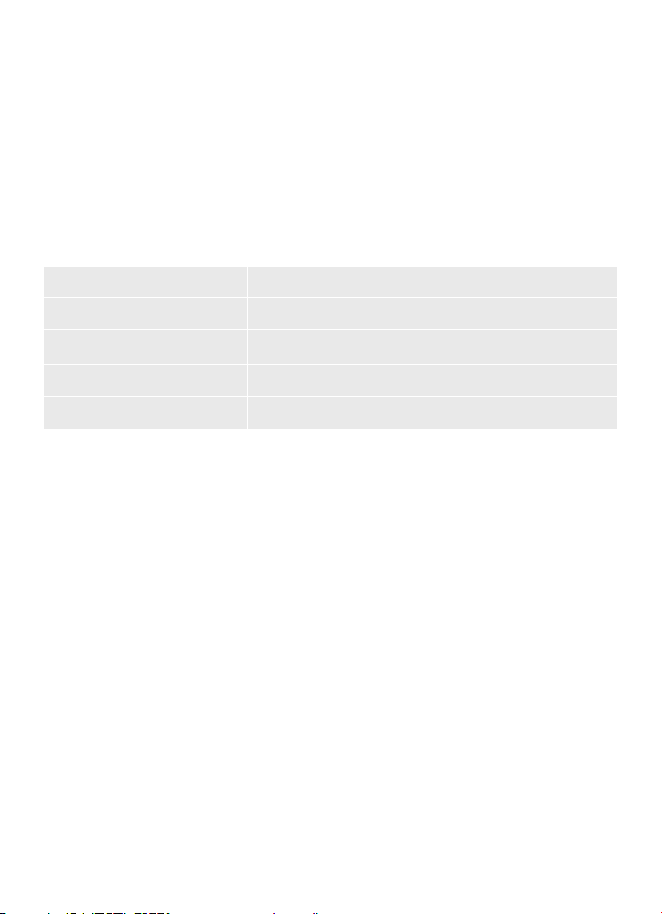
Item Quantity
String Light
Adapter
Control Box
User Manual
2
1
1
1
03
At a Glance
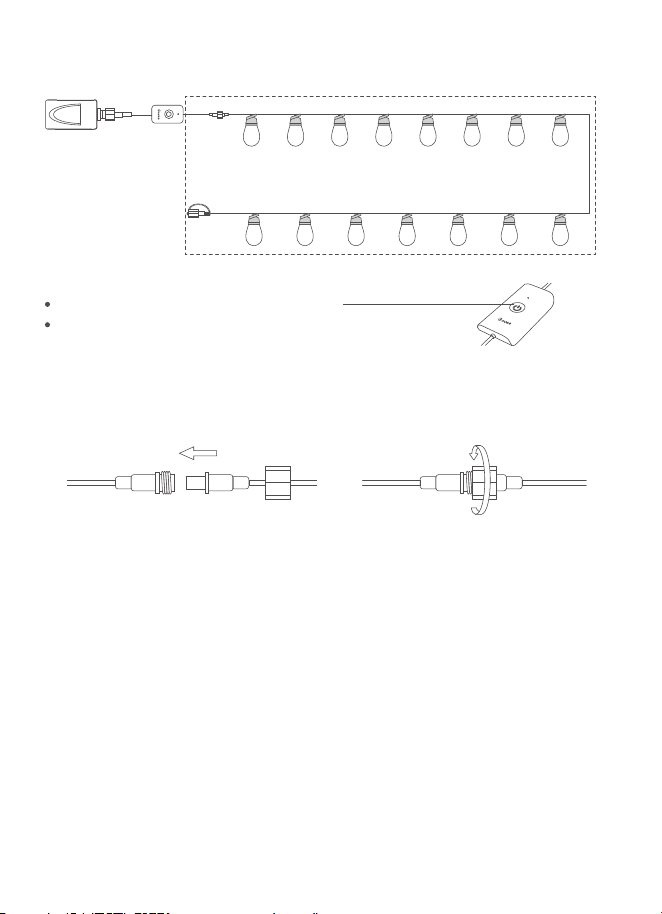
Press to turn the light on or o.
Long press for 5 seconds to reset.
Installing Your Device
Connect the cables and firmly tighten the cable caps.
1.
Hang the String Light to where you planned. And you may use
plastic strips to locate specific points of the String Light.
2.
X2
04
What You Need
A Wi-Fi router supporting 2.4GHz and 802.11 b/g/n bands.5GHz
is not supported.
A smartphone or tablet running iOS or Android.
DownIoad Govee Home App from the App Store (iOS devices)
or GooglePlay (Android devices).
1.
2.
3.
4.
Turn on your smartphone's Bluetooth.
Open the app, tap the “ + ” icon in the top right corner and
search for “H702B”.
Tap the device icon and follow the on-screen instructions to
complete pairing.
You need to complete the network connection of apps that
support Matter (eg.Google Home/Apple Homekit etc.) within
15 minutes after the product is powered on when using Matter
for the first time.
If the product cannot connect to the app, press and hold the
power button on the control box for 5 seconds to restore the
factory settings. After that, try connecting again later.
Changing the network may cause Matter to malfunction.
An IPv6 network is required.
1.
2.
3.
4.
Pairing Your Light with
Govee Home App
Govee Home
Cautions:
Matter Guide
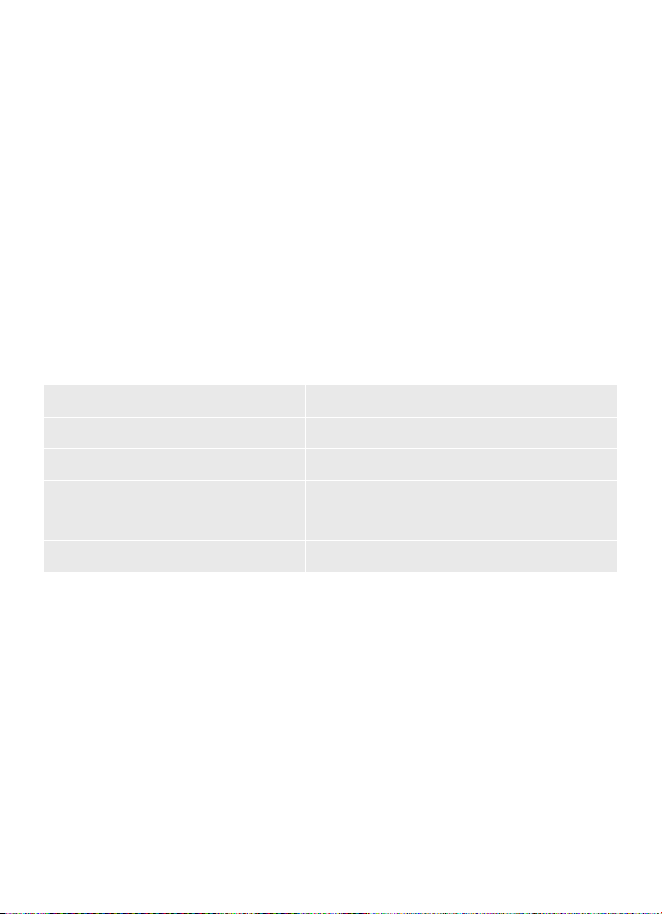
Power Input
Power Output
Specifications
Waterproof
Light Color RGBW
Working Temperature
100-240VAC 50/60Hz
24VDC 1.5A
String Light (IP66)
Control Box (IP65)
-20°C ~ 40°C / -4°F ~ 104°F
05
Find the QR code or device number of Matter on the product or on
Device Settings page in Govee Home App.
Step 1
Turn on the Bluetooth on your smartphone.
Step 2
Download and open the app that supports Matter like Google
Home/Apple Homekit, etc.
Step 3
Use the device number or QR code on the product in the app to
complete the network connection of Matter for the product.
Step 4

06
Troubleshooting
Make sure the string lights are connected to power.
Make sure your smartphone's Bluetooth is enabled.
Keep your smart phone close to the control box and try again.
Missingparts/Receivingproductsfromasecondarysale.
FailedtoconnecttoGoveeHomeApp.
Check the pictures on the web page to confirm what parts are
missing and contact customer service in the app for replacements.
If you received a product from a secondary sale or a product that
cannot work properly, please contact customer service in the app
for a replacement.
1.
a.
b.
c.
2.
a.
b.
Appoperationguideisneeded.
Open Govee Home App, tap My Profile>>Govee Instructions>>
AppGuide>>How to Use, to find more details.
If your problem persists, please contact Customer Support.
4.
a.
Networkfailure.
Make sure your home Wi-Fi is 2.4 Ghz, and your smartphone's
Bluetooth is on.
Long press the control box for more than 5s to reset the whole
light.Unbind and then rebind the light.
If the light is too far away from the Wi-Fi, bring the device closer
to the Wi-Fi, and then reconnect to the network.
Check if there are too many devices connected to the network.
If so, change to another network.
If the above methods cannot solve your problems, please contact
customer service in the app to replace the control box.
3.
a.
b.
c.
d.
e.
@GOVEE@GoveeOcial
@goveeocial@GOVEE @govee.ocial
Customer Service
Warranty: 12-Month Limited Warranty
Support: Lifetime Technical Support
Email: support@govee.com
Ocial Website: www.govee.com
07
08
CONSERVER CES INSTRUCTIONS
Lors de l'utilisation des produits, des précautions essentielles doivent
toujours être prises, notamment les suivantes:
LIRE ET SUIVRE TOUTES LES CONSIGNES DE SÉCURITÉ.
Risque de choc électrique. L'adaptateur s'installe uniquement sur
une prise GFCI couverte de classe A dotée d'un boîtier résistant aux
intempéries avec la capuchon de la fiche de fixation inséré ou retiré.
Resserrez le capuchon étanche d’installer les guirlandes.
La source lumineuse de ce luminaire n'est pas remplaçable ; lorsque la
source lumineuse atteint sa fin de vie, il faut remplacer l'ensemble du
luminaire.
Ne laissez pas les enfants assembler et installer ce produit sans
surveillance d'un adulte.
Évitez d'installer le produit à proximité de sources de forte chaleur.
Les gradateurs externes ne peuvent pas être utilisés avec ce
produit.
Utilisez ce produit uniquement avec l’adaptateur secteur fourni.
Toutes les extrémités ouvertes doivent être scellées avant utilisation.
Pour réduire le risque de strangulation, le câblage flexible connecté
à ce luminaire doit être fixé solidement au mur si le câblage est à
portée de main.
Ne connectez pas la guirlande à l'alimentation lorsqu'elle est dans
l'emballage.
Ne retirez pas et n’insérez pas de lampes lorsque la chaîne est
connectée à l’alimentation.
N'ouvrez pas et ne coupez pas la guirlande.
Ce produit comprend un micro intégré qui peut reconnaître les
informations sonores pour synchroniser les lumières et la musique.
ATTENTION - Ce produit n'est pas un jouet. Les enfants et les
personnes handicapées doivent l’utiliser sous la surveillance d’un
adulte.
INSTRUCTIONS D'INSTALLATION
OU DE MONTAGE
Français
09
Merci d'avoir choisi la guirlande boule lumineuse d'extérieur S14
Govee 2. Ce produit a un indice d'étanchéité IP66, ce qui le rend
idéal pour une utilisation en extérieur. Grâce à l'application Govee
Home, vous pouvez régler sa couleur et sa luminosité et
synchroniser ses eets d'éclairage avec le rythme en activant le
mode Musique.
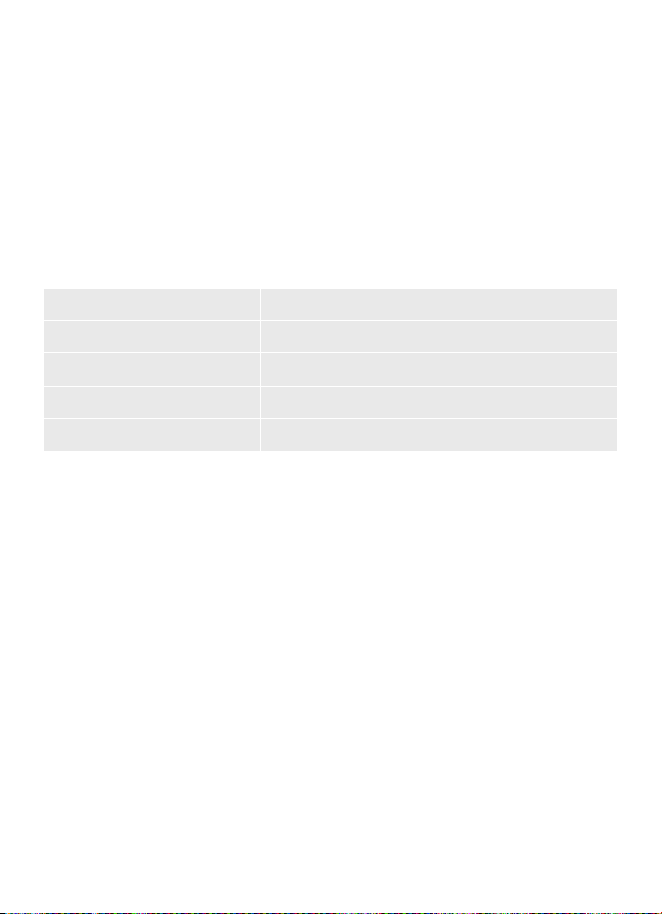
Contenu du carton
Introduction
Article Quantité
Guirlande lumineuse
Adaptateur
Boîtier de commande
Manuel d'utilisation
2
1
1
1
10
X2
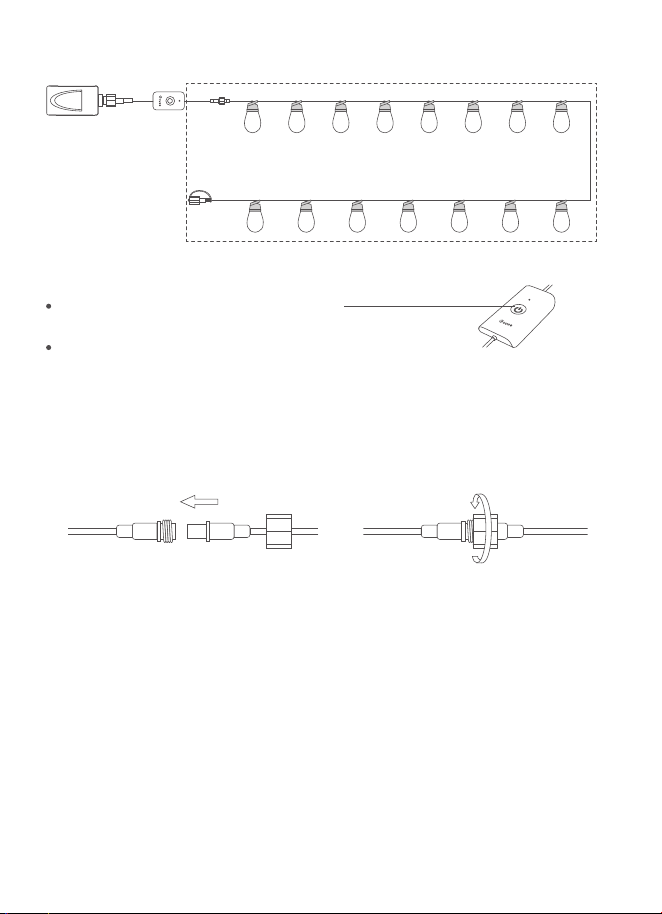
Vue d'ensemble
Appuyez pour allumer ou
éteindre la lumière.
Appuyez longuement pendant
5secondes pour réinitialiser.
Installation de votre appareil
Connectez les câbles et serrez fermement les capuchons des
câbles.
1.
Accrochez la guirlande lumineuse à l’endroit prévu. Vous
pouvez également utiliser des bandes en plastique pour
localiser des points spécifiques de la guirlande lumineuse.
2.
11
Govee Home
Ce dont vous avez besoin
Un routeur Wi-Fi prenant en charge les bandes 2,4 GHz et 802.11
b/g/n. La bande 5 GHz n'est pas prise en charge.
Un smartphone ou une tablette fonctionnant sous iOS ou
Android.
Téléchargez l'application Govee Home depuis l'App Store
(appareils iOS) ou GooglePlay (appareils Android).
1.
2.
3.
4.
Activez le Bluetooth de votre smartphone.
Ouvrez l'application, appuyez sur l'icône «+» dans le coin
supérieur droit et recherchez «H702B».
Appuyez sur l'icône de l'appareil et suivez les instructions à
l'écran pour terminer l'association.
Vous devez terminer la connexion réseau des applications qui
prennent en charge Matter (par exemple, Google Home/Apple
Homekit, etc.) dans les 15 minutes suivant la mise sous tension
du produit lorsque vous utilisez Matter pour la première fois.
Si le produit n'arrive pas à se connecter à l'application,
appuyez longuement sur le bouton d'alimentation du boîtier de
commande pendant 5secondes pour rétablir les paramètres
d'usine. Ensuite, essayez de vous connecter à nouveau.
Le changement de réseau peut entraîner un
dysfonctionnement de Matter.
Un réseau IPv6est requis.
1.
2.
3.
4.
Association de votre lampe à
l'application Govee Home
Mise en garde:
Guide des sujets
12
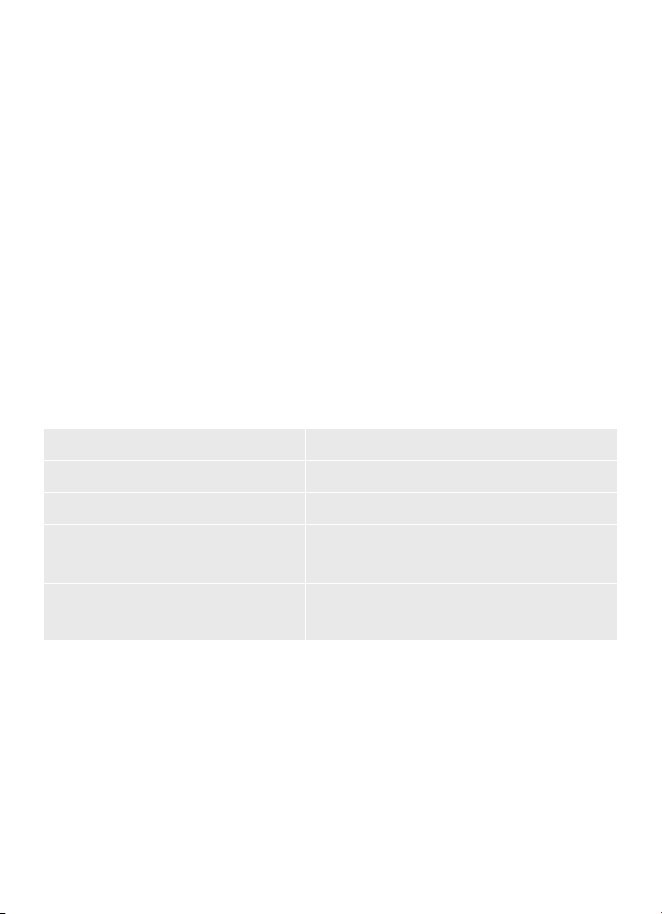
Entrée d'alimentation
Puissance de sortie
Caractéristiques techniques
Étanche
Couleur d'éclairage RGBW
Température de
fonctionnement
100-240 VCA 50/60 Hz
24V CC 1.5A
Guirlande lumineuse (IP66)
Boîtier de commande (IP65)
-20℃ à 40℃ / -4℉ à 104℉
Recherchez le code QR ou le numéro de l'appareil de Matter sur le
produit ou la page Paramètres de l'appareil dans l'Application
Govee Home.
Étape 1
Activez le Bluetooth sur votre smartphone.
Étape 2
Téléchargez et ouvrez l'application qui prend en charge Matter
telle que Google Home/Apple Homekit, etc.
Étape 3
Utilisez le numéro d’appareil ou le code QR figurant sur le
produit dans l’application pour établir la connexion réseau de
Matter pour le produit.
Étape 4

13
Dépannage
Assurez-vous que les guirlandes lumineuses sont connectées à
l’alimentation.
Assurez-vous que le Bluetooth de votre smartphone est activé.
Gardez votre smartphone à proximité du boîtier de commande
et réessayez.
Pièces manquantes/Réception de produits provenant d’une
vente secondaire.
Échec de la connexion à l’application Govee Home.
Vérifiez les images sur la page Web pour confirmer quelles
pièces sont manquantes et contactez le service clients dans
l’application pour les remplacements.
Si vous avez reçu un produit provenant d’une vente secondaire ou
un produit qui ne fonctionne pas correctement, veuillez contacter
le service clients dans l’application pour un remplacement.
1.
a.
b.
c.
2.
a.
b.
Un guide d’utilisation de l’application est nécessaire.
Ouvrez l'application Govee Home, appuyez sur Mon profil >>
Instructions Govee >> Guide de l'application >> Comment
utiliser pour consulter plus de détails.
Si votre problème persiste, veuillez contacter le service client.
4.
a.
Panne de réseau.
Assurez-vous que votre Wi-Fi domestique est de 2,4 GHz et
que le Bluetooth de votre smartphone est activé.
Appuyez longuement sur le boîtier de commande pendant plus
de 5 secondes pour réinitialiser tout le luminaire. Déconnectez
puis réassociez le luminaire.
Si le luminaire est trop éloigné du Wi-Fi, rapprochez l’appareil du
Wi-Fi, puis reconnectez-vous au réseau.
Vérifiez s’il y a trop d’appareils connectés au réseau. Si tel est le
cas, passez à un autre réseau.
Si les méthodes ci-dessus ne peuvent pas résoudre vos
problèmes, veuillez contacter le service client dans l’application
pour remplacer le boîtier de commande.
3.
a.
b.
c.
d.
e.
14
@GOVEE@GoveeOciel
@goveeocial@GOVEE @govee.ocial
Service clients
Garantie: Garantie limitée 12 mois
Assistance: Assistance technique à vie
E-mail: support@govee.com
Site Internet ociel: www.govee.com

This device complies with Part 15 of the FCC Rules and Innovation,
Science and Economic Development Canada licence-exempt RSS
standard(s). Operation is subject to the following two conditions:
(1)This device may not cause harmful interference, and (2)This device
must accept any interference received, including interference that
may cause undesired operation.
Warning: Changes or modifications not expressly approved by the
party responsible for compliance could void the user's authority to
operate the equipment.
NOTE: This equipment has been tested and found to comply with
the limits for a Class B digital device, pursuant to Part 15 of the FCC
Rules.
These limits are designed to provide reasonable protection against
harmful interference in a residential installation. This equipment
generates uses and can radiate radio frequency energy and, if not
installed and used in accordance with the instructions, may cause
harmful interference to radio communications. However, there is no
guarantee that interference will not occur in a particular installation.
If this equipment does cause harmful interference to radio or
television reception, which can be determined by turning the
equipment o and on, the user is encouraged to try to correct the
interference by one or more of the following measures:
FCC and ISED Canada Statement
1.
2.
3.
4.
Reorient or relocate the receiving antenna.
Increase the separation between the equipment and receiver.
Connect the equipment into an outlet on a circuit dierent from
that to which the receiver is connected.
Consult the dealer or an experienced radio/TV technician for help.
This Class B digital apparatus complies with Canadian ICES-005.

FCC and IC Radiation Exposure
Statement
This equipment complies with FCC and IC radiation exposure limits
set forth for an uncontrolled environment. This equipment should
be installed and operated with minimum distance 20cm between
the radiator & your body.
Responsible party (this contact information is only for FCC matters) :
Name: GOVEE MOMENTS(US) TRADING LIMITED
Address: 2501 Chatham Rd Suite R Springfield IL 62704
Email: certification@govee.com
Contact information: https://www.govee.com/support
The Bluetooth
® word mark and logos are registered trademarks owned
by Bluetooth SIG, Inc. and any use of such marks by Shenzhen Qianyan
Technology LTD is under license.
The trademark Govee have been authorised to Shenzhen Qianyan
Technology LTD.
Copyright ©2021 Shenzhen Qianyan Technology LTD.
All Rights Reserved.

Le présent appareil est conforme aux CNR d'Innovation, Sciences et
Développement économique Canada applicables aux appareils radio
exempts de licence. L'exploitation est autorisée aux deux conditions
suivantes :
(1) l'appareil nedoit pas produire de brouillage, et. (2) l'utilisateur de
l'appareil doit accepter tout brouillage radioélectrique subi, même si
le brouillage est susceptible d'en compromettre le fonctionnement.
Avertissement : Tout changement ou modification n’ayant pas été
expressément approuvé(e) par la partie responsable de la conformité
pourrait annuler l’autorité de l’utilisateur à utiliser l’appareil.
REMARQUE : cet équipement a été testé et déclaré conforme aux
limites imposées aux appareils numériques de classe B, en vertu de la
partie 15 des règles de la FCC.
Ces limites sont conçues pour assurer une protection susante contre
les interférences nuisibles dans les installations résidentielles. Cet
équipement génère, utilise et peut dégager de l’énergie de
radiofréquence et, s’il n’est pas installé et utilisé conformément aux
instructions du fabricant, provoquer des interférences préjudiciables
aux communications radio. Il n’existe toutefois aucune garantie qu’un
équipement particulier ne sourira pas d’interférences. Si cet
équipement entraîne des interférences préjudiciables à la réception
des émissions radio ou de télévision, identifiables en mettant l’appareil
hors tension, puis sous tension, il est recommandé que l’utilisateur
tente de résoudre ce problème au moyen d’une ou plusieurs des
mesures suivantes :
Déclaration de la FCC et d’ISED
Canada
1.
2.
3.
4.
en réorientant l’antenne réceptrice ou en la changeant de place;
en augmentant la distance séparant l’équipement du récepteur;
en connectant l’équipement à une prise sur un circuit diérent de
celui sur lequel le récepteur est branché;
en obtenant de l’aide auprès du revendeur ou d’un technicien
radio/TV expérimenté.
Cet appareil numérique de la classe B est conforme à la norme
NMB-005 du Canada.

Déclaration de la FCC et de l'IC
sur l'exposition aux radiations
Cet équipement est conforme aux limites d'exposition aux
rayonnements de la FCC et de l'IC définies pour un environnement
non contrôlé.
Lors de l'utilisation du produit, maintenez une distance de 20 cm
du corps afin de vous conformer aux exigences en matière
d'exposition RF.
La marque et les logos Bluetooth
® sont des marques déposées
appartenant à Bluetooth SIG, Inc., et toute utilisation de ces marques
par Shenzhen Qianyan Technology LTD est sous licence.
La marque Govee a été autorisée à Shenzhen Qianyan Technology LTD.
Copyright © 2021 Shenzhen Qianyan Technology LTD.
Tous droits réservés.
Partie responsable (ces coordonnées concernent uniquement les
questions liées à la FCC) :
Nom : GOVEE MOMENTS(US) TRADING LIMITED
Address: 2501 Chatham Rd Suite R Springfield IL 62704
E-mail : certification@govee.com
Contact : https://www.govee.com/support

For FAQs and more information,
please visit: www.govee.com
Govee Home App